Proform Pfevex749090 490 Spx Spinner Bike Users Manual WLEVEX17831 215701(UK)
2015-04-14
: Proform Proform-Pfevex749090-490-Spx-Spinner-Bike-Users-Manual-701016 proform-pfevex749090-490-spx-spinner-bike-users-manual-701016 proform pdf
Open the PDF directly: View PDF  .
.
Page Count: 16
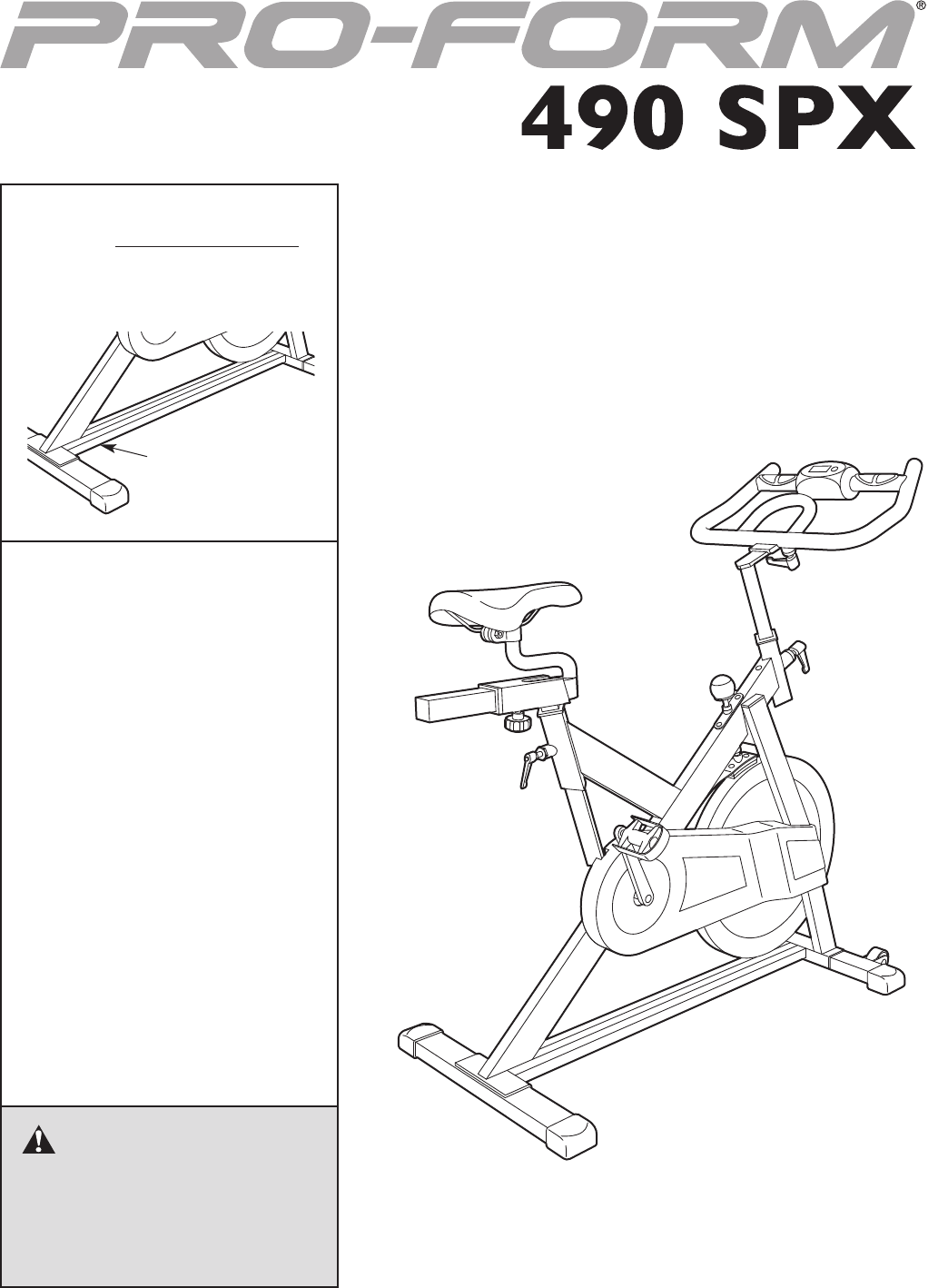
USERʼS MANUAL
Serial Number
Decal
CAUTION
Read all precautions and instruc-
tions in this manual before using
this equipment. Keep this manual
for future reference.
Model No. PFEVEX74909.0
Serial No.
Write the serial number in the
space above for reference.
www.iconeurope.com
QUESTIONS?
If you have questions, or if there are
missing parts, please contact us:
Call: 08457 089 009
From Ireland: 053 92 36102
E-mail: www.iconsupport.eu
Write:
ICON Health & Fitness, Ltd.
c/o HI Group PLC, Express Way
Whitwood, West Yorkshire
WF10 5QJ
UK
2
TABLE OF CONTENTS
WARNINGDECALPLACEMENT ..............................................................2
IMPORTANTPRECAUTIONS ................................................................3
BEFOREYOUBEGIN ......................................................................4
ASSEMBLY ...............................................................................5
HOWTOUSETHEEXERCISECYCLE ........................................................9
MAINTENANCEANDTROUBLESHOOTING....................................................11
EXERCISEGUIDELINES ...................................................................12
PARTLIST ..............................................................................14
EXPLODEDDRAWING ....................................................................15
ORDERINGREPLACEMENTPARTS ..................................................BackCover
PROFORM is a registered trademark of ICON IP, Inc.
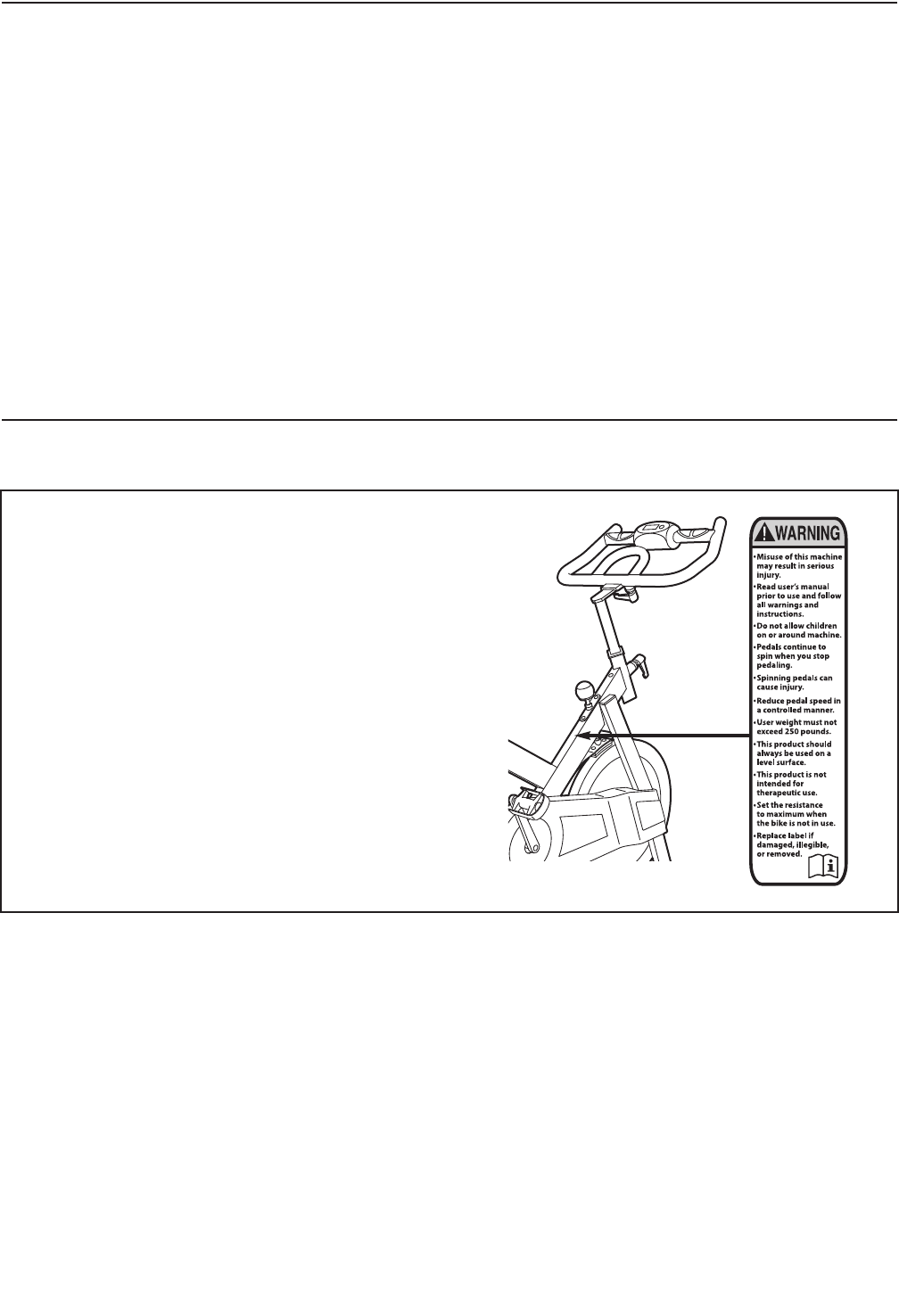
WARNING DECAL PLACEMENT
This drawing shows the location(s) of the warning
decal(s). If a decal is missing or illegible, see
the front cover of this manual and request a
free replacement decal. Apply the decal in the
location shown. Note: The decal(s) may not be
shown at actual size.
3
WARNING: To reduce the risk of serious injury, read all important precautions and
instructions in this manual and all warnings on your exercise cycle before using your exercise
cycle. ICON assumes no responsibility for personal injury or property damage sustained by or
through the use of this product.
1. Before beginning any exercise program,
consult your physician. This is especially
important for persons over age 35 or per-
sons with pre-existing health problems.
2. Use the exercise cycle only as described in
this manual.
3. It is the responsibility of the owner to ensure
that all users of the exercise cycle are ade-
quately informed of all precautions.
4. The exercise cycle is intended for home use
only. Do not use the exercise cycle in a com-
mercial, rental, or institutional setting.
5. Keep the exercise cycle indoors, away from
moisture and dust. Place the exercise cycle
on a level surface, with a mat beneath it to
protect the floor or carpet. Make sure that
there is at least 2 ft. (0.6 m) of clearance
around the exercise cycle.
6. Inspect and properly tighten all parts regu-
larly. Replace any worn parts immediately.
7. Keep children under the age of 12 and pets
away from the exercise cycle at all times.
8. Wear appropriate clothes while exercising;
do not wear loose clothes that could become
caught on the exercise cycle. Always wear
athletic shoes for foot protection.
9. The exercise cycle should not be used by
persons weighing more than 250 lbs.
(113 kg).
10. The pulse sensor is not a medical device.
Various factors, including the user's move-
ment, may affect the accuracy of heart rate
readings. The pulse sensor is intended only
as an exercise aid in determining heart rate
trends in general.
11. Always keep your back straight while using
the exercise cycle; do not arch your back.
12. The exercise cycle does not have a free-
wheel; the pedals will continue to move until
the flywheel stops. Reduce pedaling speed
in a controlled way.
13. To stop the flywheel quickly, press the resis-
tance knob downward.
14. Over exercising may result in serious injury
or death. If you feel faint or if you experience
pain while exercising, stop immediately and
cool down.
IMPORTANT PRECAUTIONS
4
Thank you for selecting the new PROFORM®490 SPX
exercise cycle. Cycling is an effective exercise for
increasing cardiovascular fitness, building endurance,
and toning the body. The 490 SPX exercise cycle pro-
vides a selection of features designed to make your
workouts at home more effective and enjoyable.
For your benefit, read this manual carefully before
you use the exercise cycle. If you have questions
after reading this manual, please see the front cover
of this manual. To help us assist you, note the product
model number and serial number before contacting
us. The model number and the location of the serial
number decal are shown on the front cover of this
manual.
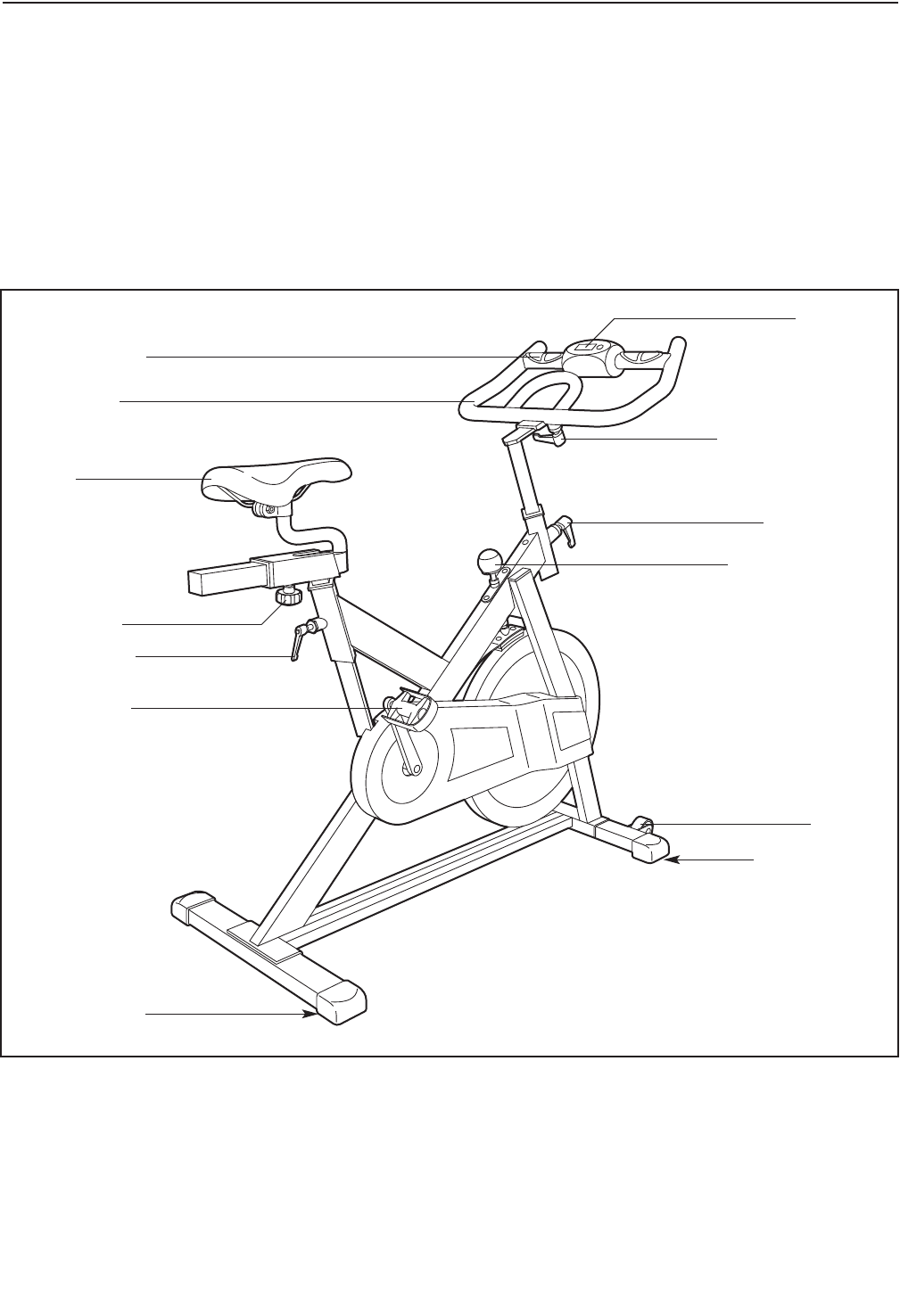
Before reading further, please familiarize yourself with
the parts that are labeled in the drawing below.
Resistance Knob
Handlebar Handle
Post Handle
Seat
Seat Knob
Post Handle
Pedal/Strap
Leveling Foot
Leveling Foot
Console
Handlebar
Pulse Sensor
BEFORE YOU BEGIN
Wheel
5
ASSEMBLY
Assembly requires two persons. Place all parts of the exercise cycle in a cleared area and remove the pack-
ing materials. Do not dispose of the packing materials until assembly is completed.
In addition to the included tool(s), assembly requires an adjustable wrench .
Note: If a part is not in the hardware kit, check to see if it has been preattached.
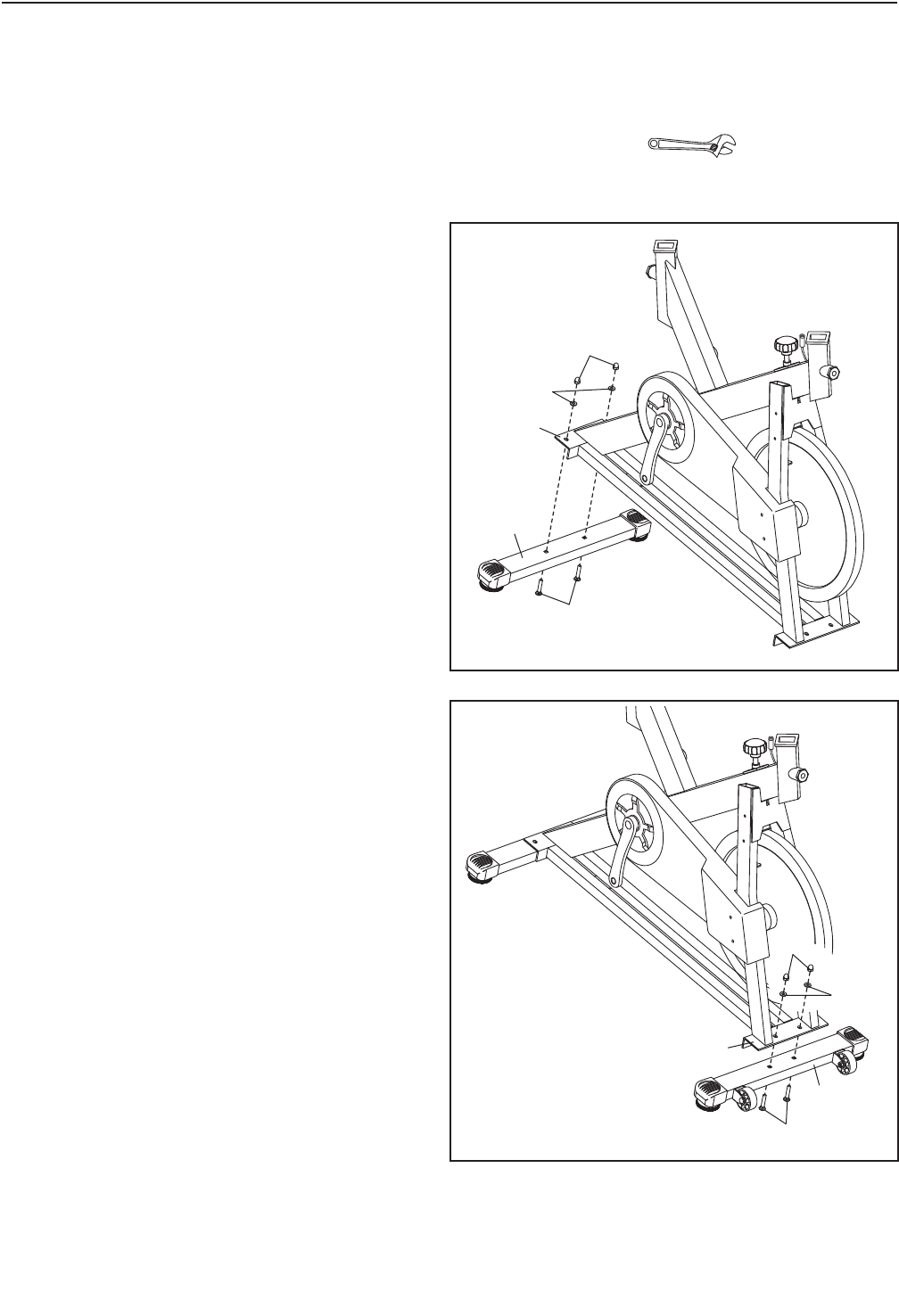
1. Attach the Rear Stabilizer (10) to the Frame (2)
with two M8 x 45mm Carriage Bolts (52), two
M8 Split Washers (60), and two M8 Acorn Nuts
(65).
2. Attach the Front Stabilizer (3) to the Frame (2)
with two M8 x 45mm Carriage Bolts (52), two
M8 Split Washers (60), and two M8 Acorn Nuts
(65).
1
2
10
2
3
52
52
65
65
60
60
2
6
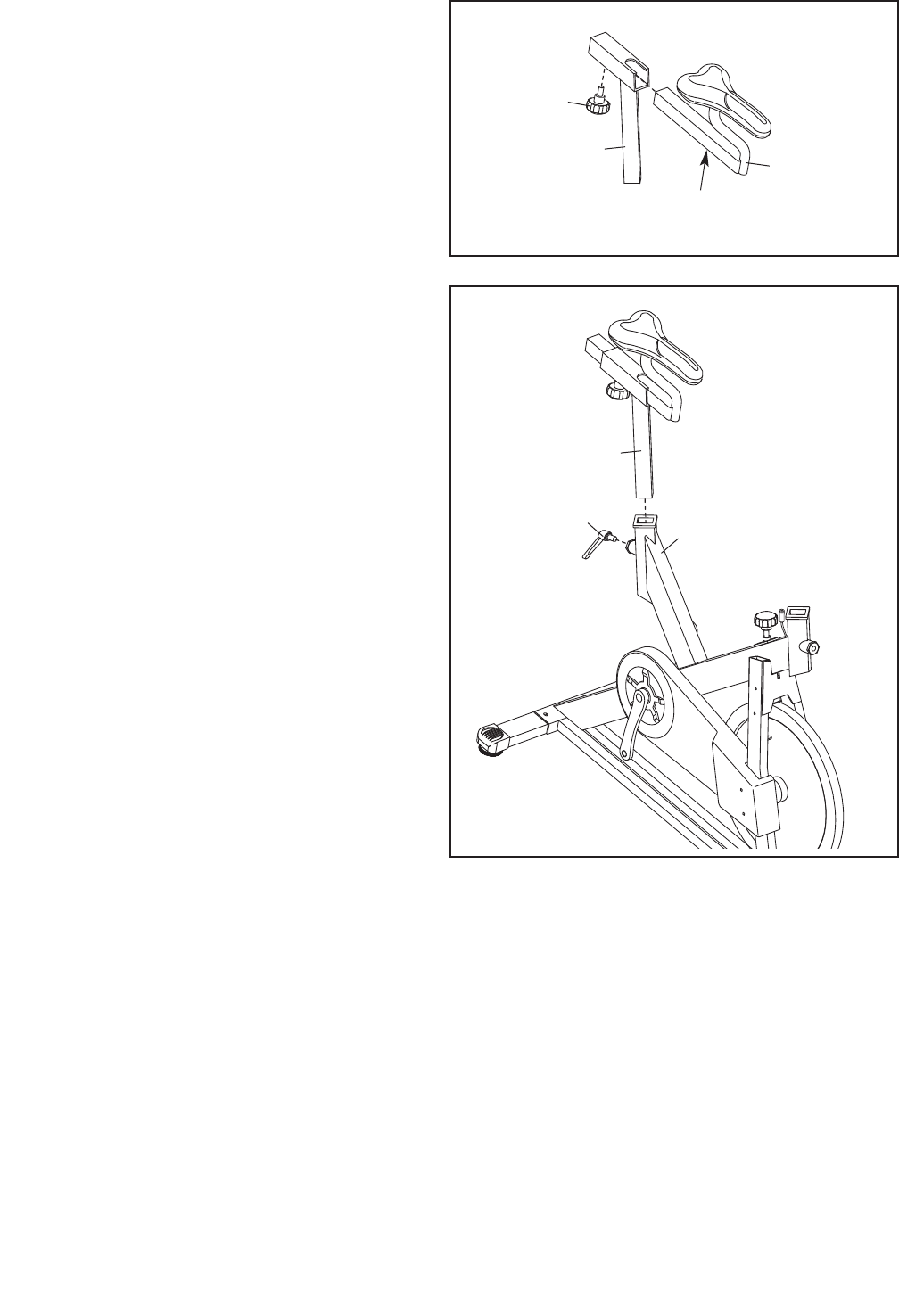
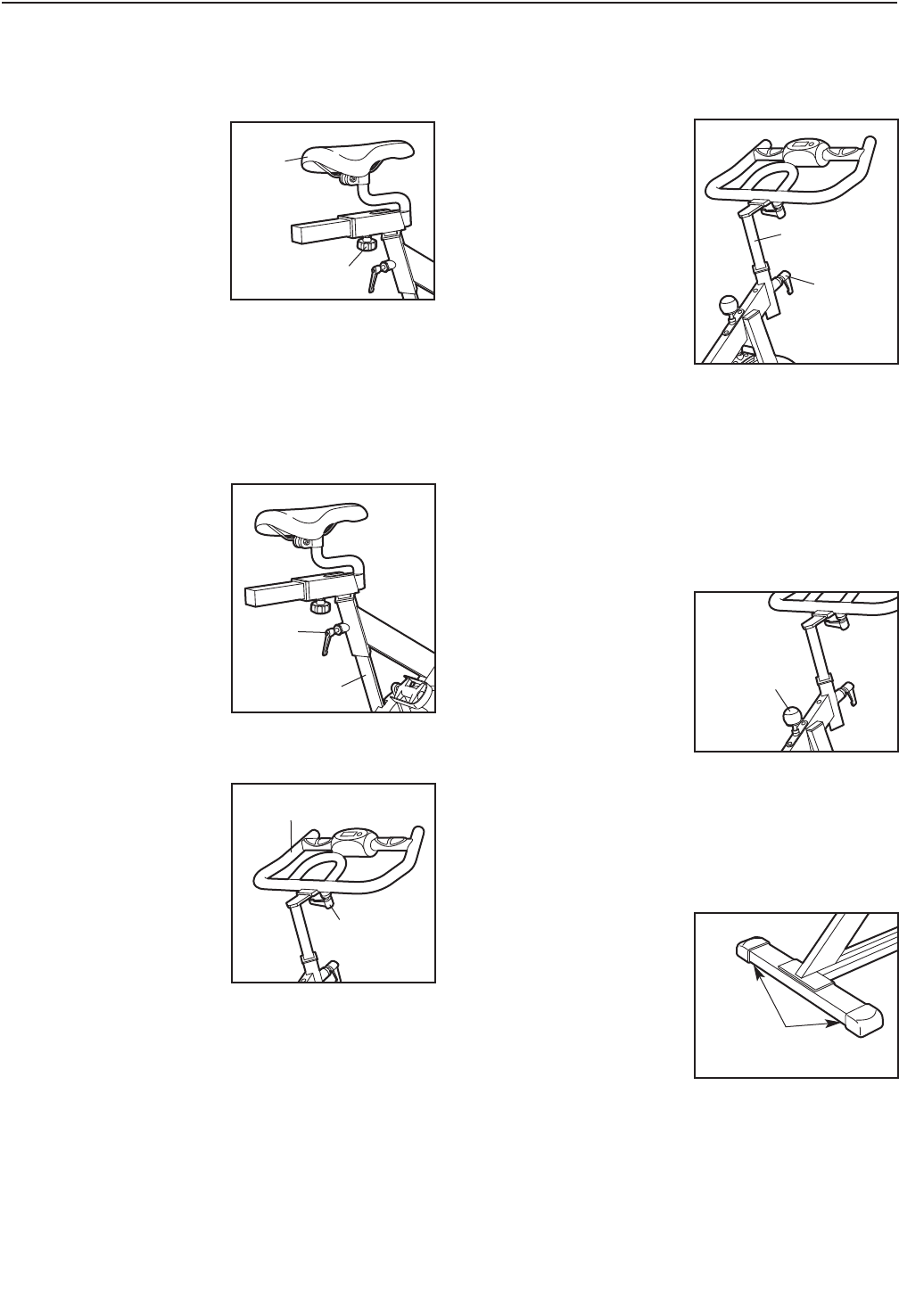
3. Orient the Seat Carriage (5) and the Seat Post
(20) as shown. Insert the Seat Carriage into the
Seat Post.
Slide the Seat Carriage (5) to the desired posi-
tion and then tighten the Seat Knob (42) into
the Seat Post and one of the adjustment holes
in the Seat Carriage. Make sure that the Seat
Knob is firmly tightened into an adjustment
hole.
4. Orient the Seat Post (20) as shown and insert it
into the Frame (2).
Slide the Seat Post (20) upward or downward to
the desired position and then tighten a Post
Handle (41) into the Frame (2).
Note: The Post Handle (41) functions like a
ratchet. Turn the handle on the Post Handle
clockwise, pull the handle outward, turn the
handle counterclockwise, push the handle
inward, then turn the handle clockwise again.
Repeat this process until the Post Handle is
tight.
Move the Seat Post (20) upward or down-
ward slightly to make sure that the Post
Handle (41) is firmly tightened against the
Seat Post.
3
4
5
42
20
Adjustment
Holes
20
41 2
7
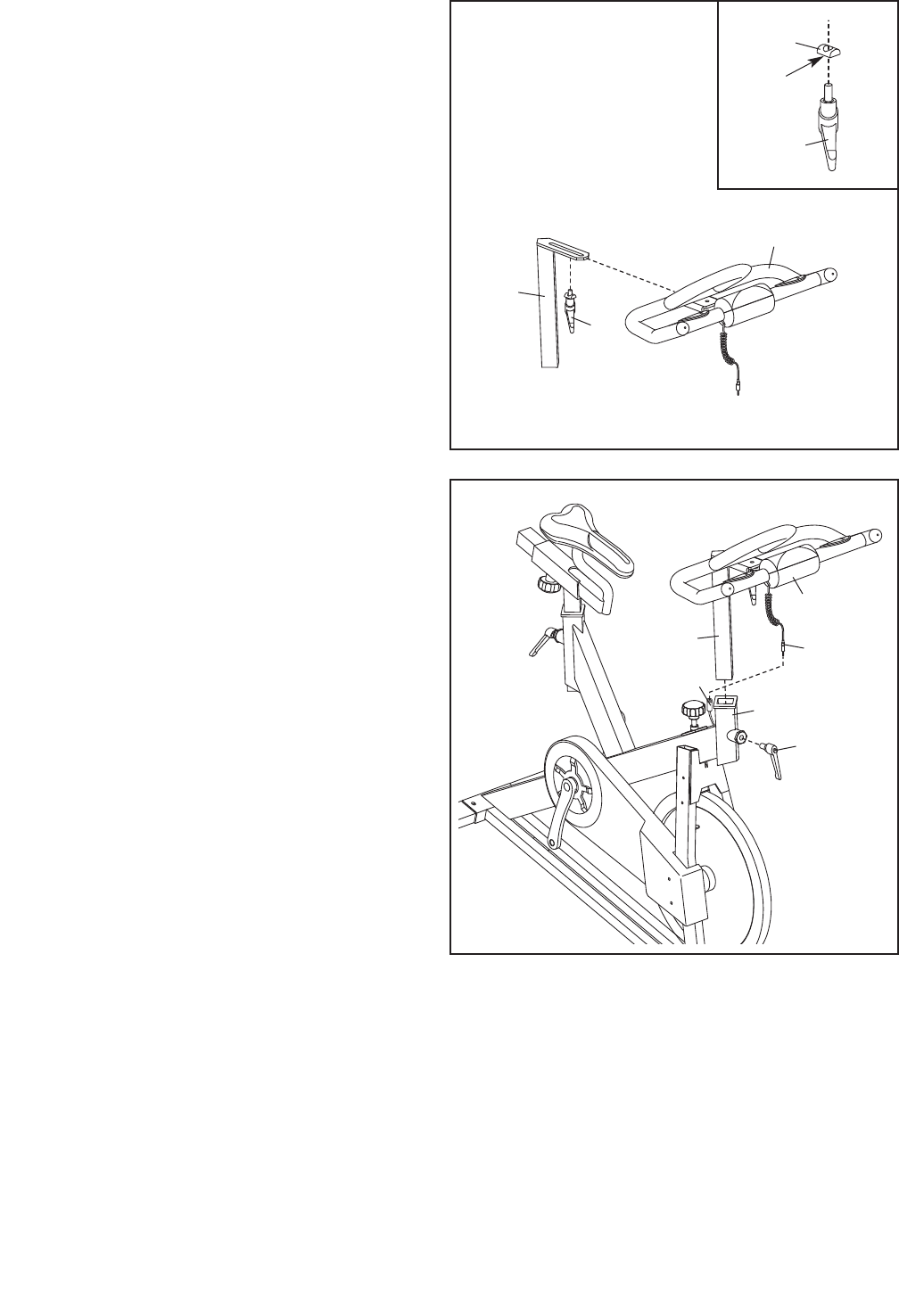
5. See the inset drawing. Tighten the Handlebar
Slide (19) onto the Handlebar Handle (45).
Make sure that the flat side of the Handlebar
Slide is facing the Handlebar Handle.
Orient the Handlebar (6) and the Handlebar
Post (4) as shown. Slide the Handlebar onto the
Handlebar Post.
Slide the Handlebar (6) to the desired position
on the Handlebar Post (4) and then tighten the
Handlebar Handle (45) into the Handlebar Post.
Note: The Handlebar Handle (45) functions like
a ratchet. Turn the handle on the Handlebar
Handle clockwise, pull the handle outward, turn
the handle counterclockwise, push the handle
inward, then turn the handle clockwise again.
Repeat this process until the Handlebar Handle
is tight.
5
6. Orient the Handlebar Post (4) as shown and
insert it into the Frame (2).
Slide the Handlebar Post (4) upward or down-
ward to the desired position and then tighten a
Post Handle (41) into the Frame (2).
Note: The Post Handle (41) functions like a
ratchet. Turn the handle on the Post Handle
clockwise, pull the handle outward, turn the
handle counterclockwise, push the handle
inward, then turn the handle clockwise again.
Repeat this process until the Post Handle is
tight.
Move the Handlebar Post (4) upward or
downward slightly to make sure that the
Post Handle (41) is firmly tightened against
the Handlebar Post.
Connect the wire on the Console (72) to the
Reed Switch Wire (73).
6
4
45
45
72
73
Wire
6
19
Flat
Side
4
2
41
8
7
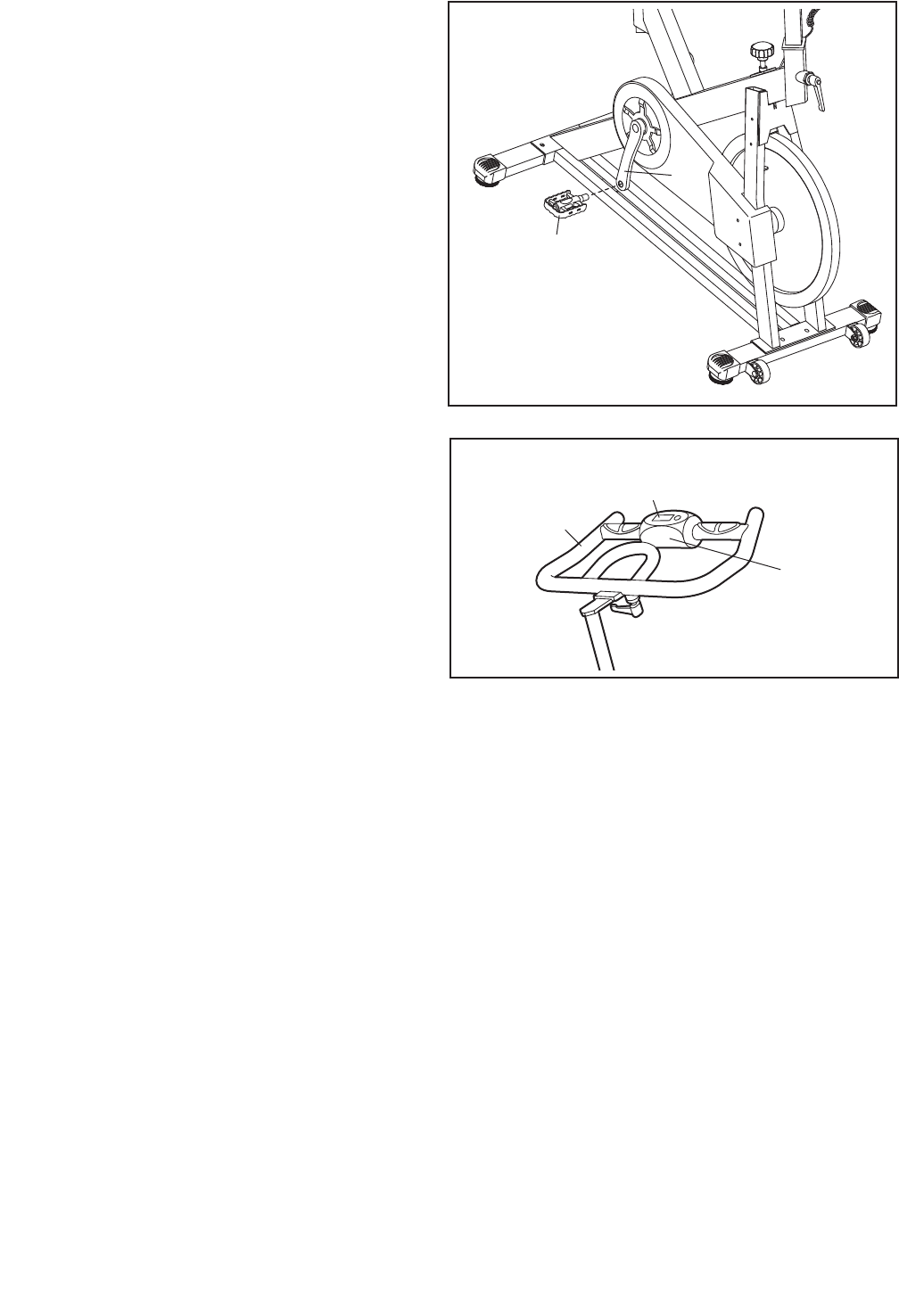
7. Identify the Right Pedal (39), which is marked
with an “R.”
Using an adjustable wrench, firmly tighten the
Right Pedal (39) clockwise into the Right Crank
Arm (26).
Tighten the Left Pedal (not shown) counter-
clockwise into the Left Crank Arm (not shown).
IMPORTANT: Tighten both pedals as firmly
as possible. After using the exercise cycle
for one week, retighten the pedals.
9. Make sure that all parts are properly tightened before you use the exercise cycle. Note: After assembly
is completed, some extra parts may be left over. Place a mat beneath the exercise cycle to protect the floor.
26
39
8
8. The Console (72) requires two AAA batteries
(not included); alkaline batteries are recom-
mended.
Remove the top cover of the Console (72) from
the Handlebar (6), insert the batteries into the
battery compartment, and then reattach the top
cover of the Console around the Handlebar.
Make sure that the batteries are oriented as
shown by the diagrams inside the battery
compartment.
6
72
Top Cover
9
HOW TO USE THE EXERCISE CYCLE
HOW TO ADJUST THE SEAT
To adjust the position of
the seat, first loosen the
seat knob. Then, move
the seat forward or back-
ward to the desired
position, and firmly
tighten the seat knob.
HOW TO ADJUST THE SEAT POST
For effective exercise, the seat should be at the
proper height. As you pedal, there should be a slight
bend in your knees when the pedals are in the lowest
position.
To adjust the height of
the seat post, first loosen
the post handle. Next,
slide the seat post
upward or downward to
the desired position, and
then tighten the post
handle. Make sure that
the post handle is
firmly tightened against
the seat post.
HOW TO ADJUST THE HANDLEBAR
To adjust the position of
the handlebar, first
loosen the handlebar
handle. Then, move the
handlebar forward or
backward to the desired
position, and firmly
tighten the handlebar
handle.
Note: The handlebar handle functions like a ratchet.
Turn the handle on the handlebar handle counter-
clockwise, pull the handle outward, turn the handle
clockwise, push the handle inward, then turn the han-
dle counterclockwise again. Repeat this process until
the handlebar handle is loose.
HOW TO ADJUST THE HANDLEBAR POST
To adjust the height of
the handlebar post, first
loosen the post handle.
Next, slide the handlebar
post upward or down-
ward to the desired
position, and then tighten
the post handle. Make
sure that the post han-
dle is firmly tightened
against the handlebar
post.
HOW TO ADJUST THE PEDAL STRAPS
To tighten the pedal straps, simply pull the ends of the
pedal straps. To loosen the pedal straps, press and
hold the tabs on the buckles, adjust the pedal straps
to the desired position, and then release the tabs.
HOW TO ADJUST THE PEDALING RESISTANCE
To increase the resis-
tance of the pedals, turn
the resistance knob
clockwise; to decrease
the resistance, turn the
resistance knob counter-
clockwise.
To stop the flywheel, push the resistance knob down-
ward. The flywheel should quickly come to a complete
stop.
HOW TO LEVEL THE EXERCISE CYCLE
If the exercise cycle
rocks slightly on your
floor during use, turn one
or both of the leveling
feet on the front or rear
stabilizer until the rocking
motion is eliminated.
Seat
Seat Knob
Handlebar
Post
Handle
Seat Post
Post
Handle
Handlebar
Post
Resistance
Knob
Leveling
Feet
Handlebar
Handle

10
FEATURES OF THE CONSOLE
The easy-to-use console features six modes that pro-
vide instant exercise feedback during your workouts.
The console modes are described below.
Scan (SCAN)—This mode displays the time, speed,
distance, calorie, and pulse modes, for a few seconds
each, in succession.
Time (TIME)—This mode displays the elapsed time.
Distance (DIST)—This mode displays the distance (in
kilometers) you have pedaled during your workout.
Speed (SPEED)—This mode displays your pedaling
speed, in kilometers per hour.
Calorie (CAL)—This mode displays the approximate
number of calories you have burned during your work-
out.
Pulse (PULSE)—This mode displays your heart rate
when you hold the handgrip pulse sensors.
HOW TO INSTALL BATTERIES
The console requires two AAA batteries (not included);
alkaline batteries are recommended. Remove the top
cover of the console, insert the batteries into the bat-
tery compartment, and reattach the top cover of the
console. Make sure that the batteries are oriented
as shown by the diagrams inside the battery com-
partment. Note: If there is a sheet of clear plastic on
the face of the console, remove the plastic.
HOW TO USE THE CONSOLE
1. Turn on the console.
To turn on the console, press the button on the
console or simply begin pedaling.
2. Select a mode.
Scan mode—To select the scan mode, repeatedly
press the button until an arrow appears next to the
word SCAN.
Time, speed, distance, or calorie mode—To
select one of these modes for continuous display,
repeatedly press the button until an arrow appears
next to the desired selection. Make sure that
there is no arrow next to the word SCAN.
Note: To reset the modes, press and hold the but-
ton until zeroes appear in the display.
3. Begin pedaling and follow your progress with
the display.
As you exercise, the console will display the
mode(s) that you select.
4. Measure your heart rate, if desired.
If there are sheets of clear plastic on the metal
contacts of the handgrip pulse sensor, remove
the plastic. Place your hands on the handgrip
pulse sensor, with your palms on the contacts.
Avoid moving your hands. When your pulse is
detected, your heart rate will be shown.
For the most accurate heart rate reading, continue
to hold the handgrips for about 30 seconds.
If your heart rate is not shown, make sure that
your hands are positioned as described. Avoid
moving your hands excessively or squeezing the
metal contacts tightly. For optimal performance,
periodically clean the metal contacts using a soft
cloth; never use alcohol, abrasives, or chemi-
cals to clean the contacts.
5. When you are finished exercising, the console
will turn off automatically.
The console has an “auto-off” feature. If the pedals
do not move and the console button is not pressed
for a few minutes, the power will turn off automati-
cally to save the batteries.

11
Inspect and tighten all parts of the exercise cycle reg-
ularly. Replace any worn parts immediately.
To clean the exercise cycle, use a damp cloth and a
small amount of mild detergent. IMPORTANT: To
avoid damage to the console, keep liquids away
from the console and keep the console out of
direct sunlight.
BATTERY REPLACEMENT
If the console display becomes dim, the batteries
should be replaced; most console problems are the
result of low batteries.
To replace the batteries, see HOW TO INSTALL
BATTERIES on page 10 and insert two batteries into
the console.
MAINTENANCE AND TROUBLESHOOTING
12
These guidelines will help you to plan your exercise
program. For detailed exercise information, obtain a
reputable book or consult your physician. Remember,
proper nutrition and adequate rest are essential for
successful results.
EXERCISE INTENSITY
Whether your goal is to burn fat or to strengthen your
cardiovascular system, exercising at the proper inten-
sity is the key to achieving results. You can use your
heart rate as a guide to find the proper intensity level.
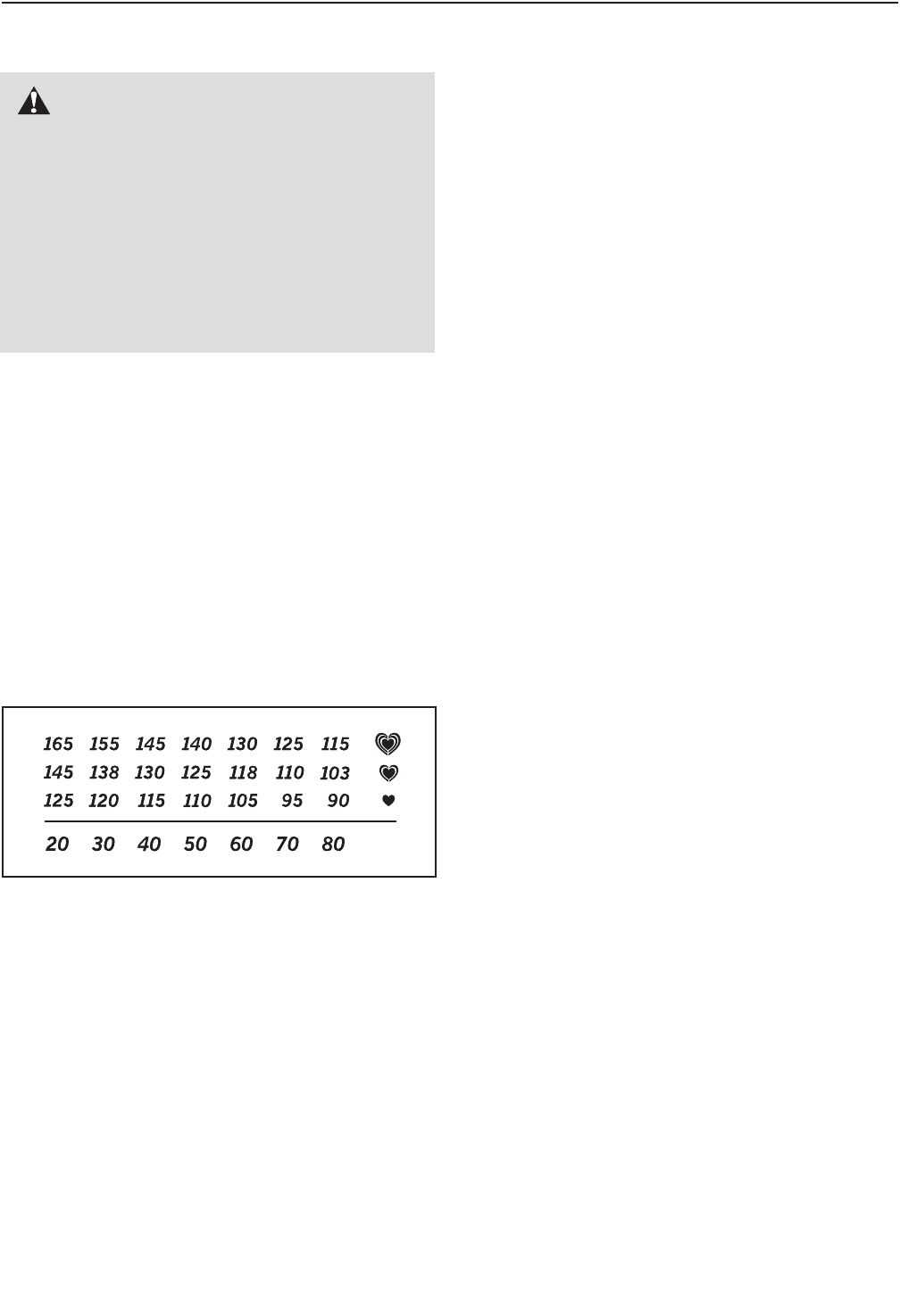
The chart below shows recommended heart rates for
fat burning and aerobic exercise.
To find the proper intensity level, find your age at the
bottom of the chart (ages are rounded off to the near-
est ten years). The three numbers listed above your
age define your “training zone.” The lowest number is
the heart rate for fat burning, the middle number is the
heart rate for maximum fat burning, and the highest
number is the heart rate for aerobic exercise.
Burning Fat—To burn fat effectively, you must exer-
cise at a low intensity level for a sustained period of
time. During the first few minutes of exercise, your
body uses carbohydrate calories for energy. Only after
the first few minutes of exercise does your body begin
to use stored fat calories for energy. If your goal is to
burn fat, adjust the intensity of your exercise until your
heart rate is near the lowest number in your training
zone. For maximum fat burning, exercise with your
heart rate near the middle number in your training
zone.
Aerobic Exercise—If your goal is to strengthen your
cardiovascular system, you must perform aerobic
exercise, which is activity that requires large amounts
of oxygen for prolonged periods of time. For aerobic
exercise, adjust the intensity of your exercise until
your heart rate is near the highest number in your
training zone.
WORKOUT GUIDELINES
Warming Up—Start with 5 to 10 minutes of stretching
and light exercise. A warm-up increases your body
temperature, heart rate, and circulation in preparation
for exercise.
Training Zone Exercise—Exercise for 20 to 30 min-
utes with your heart rate in your training zone. (During
the first few weeks of your exercise program, do not
keep your heart rate in your training zone for longer
than 20 minutes.) Breathe regularly and deeply as you
exercise–never hold your breath.
Cooling Down—Finish with 5 to 10 minutes of
stretching. Stretching increases the flexibility of your
muscles and helps to prevent post-exercise problems.
EXERCISE FREQUENCY
To maintain or improve your condition, complete three
workouts each week, with at least one day of rest
between workouts. After a few months of regular exer-
cise, you may complete up to five workouts each
week, if desired. Remember, the key to success is to
make exercise a regular and enjoyable part of your
everyday life.
EXERCISE GUIDELINES
WARNING: Before beginning this
or any exercise program, consult your physi-
cian. This is especially important for persons
over age 35 or persons with pre-existing
health problems.
The pulse sensor is not a medical device.
Various factors may affect the accuracy of
heart rate readings. The pulse sensor is
intended only as an exercise aid in determin-
ing heart rate trends in general.
13
SUGGESTED STRETCHES
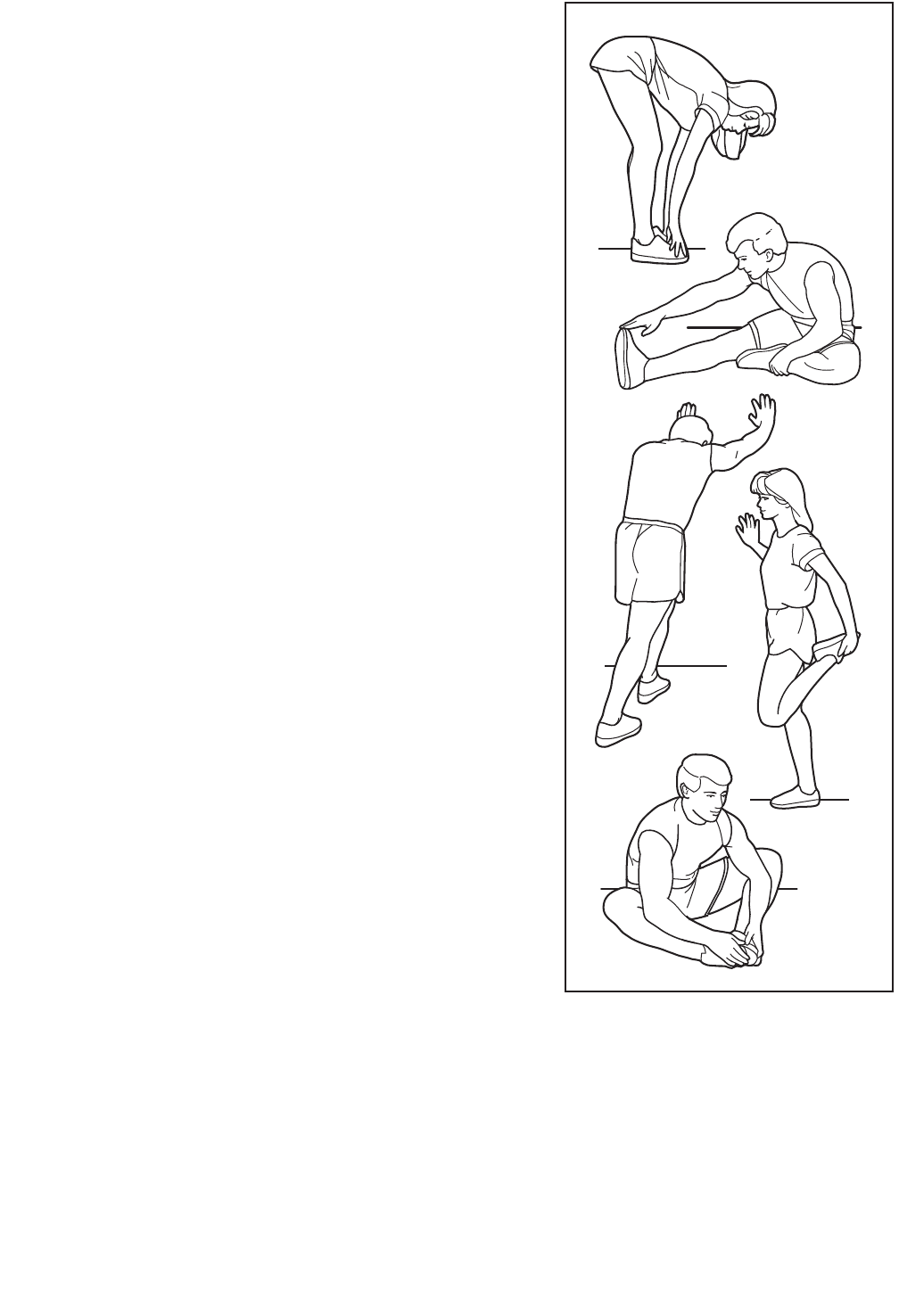
The correct form for several basic stretches is shown at the right.
Move slowly as you stretch—never bounce.
1. Toe Touch Stretch
Stand with your knees bent slightly and slowly bend forward from
your hips. Allow your back and shoulders to relax as you reach
down toward your toes as far as possible. Hold for 15 counts,
then relax. Repeat 3 times. Stretches: Hamstrings, back of knees
and back.
2. Hamstring Stretch
Sit with one leg extended. Bring the sole of the opposite foot
toward you and rest it against the inner thigh of your extended
leg. Reach toward your toes as far as possible. Hold for 15
counts, then relax. Repeat 3 times for each leg. Stretches:
Hamstrings, lower back and groin.
3. Calf/Achilles Stretch
With one leg in front of the other, reach forward and place your
hands against a wall. Keep your back leg straight and your back
foot flat on the floor. Bend your front leg, lean forward and move
your hips toward the wall. Hold for 15 counts, then relax. Repeat
3 times for each leg. To cause further stretching of the achilles
tendons, bend your back leg as well. Stretches: Calves, achilles
tendons and ankles.
4. Quadriceps Stretch
With one hand against a wall for balance, reach back and grasp
one foot with your other hand. Bring your heel as close to your
buttocks as possible. Hold for 15 counts, then relax. Repeat 3
times for each leg. Stretches: Quadriceps and hip muscles.
5. Inner Thigh Stretch
Sit with the soles of your feet together and your knees outward.
Pull your feet toward your groin area as far as possible. Hold for
15 counts, then relax. Repeat 3 times. Stretches: Quadriceps and
hip muscles.
1
2
3
4
5

14
11 Flywheel
21Frame
31Front Stabilizer
41Handlebar Post
51Seat Carriage
61Handlebar
72Adjustment Bracket
81Resistance Tube
91Pulley
10 1 Rear Stabilizer
11 1 Idler Arm
12 1 Brake Pad Spring Plate
13 1 Resistance Shaft
14 1 Resistance Retainer
15 1 Flywheel Axle
16 1 Crank
17 1 Idler Pulley Bolt
18 1 Idler Sleeve
19 1 Handlebar Slide
20 1 Seat Post
21 1 Drive Belt
22 2 Flywheel Bearing
23 2 Crank Bearing
24 4 Wheel Bearing
25 1 Left Crank Arm
26 1 Right Crank Arm
27 1 Idler Spring
28 1 Resistance Pin Spring
29 1 Shield
30 2 Reduction Nut
31 1 Resistance Pin Cap
32 1 Idler Pulley
33 4 Stabilizer Cap
34 4 Leveling Foot
35 2 Frame Bushing
36 1 Seat Carriage Cap
37 2 Frame Cap
38 1 Seat
39 1 Right Pedal/Strap
40 1 Brake Pad
41 2 Post Handle
42 1 Seat Knob
43 1 Resistance Knob
44 2 Crank Cap
45 1 Handlebar Handle
46 2 Wheel
47 2 Square Inner Cap
48 1 Grommet
49 2 M8 x 25mm Screw
50 1 J-bolt
51 1 Idler Arm Bolt
52 4 M8 x 45mm Carriage Bolt
53 8 M4 x 15mm Screw
54 2 Brake Pad Screw
55 2 Pulse Sensor
56 2 M8 x 16mm Button Screw
57 4 M6 x 12mm Button Screw
58 2 Wheel Bolt
59 8 M10 Washer
60 6 M8 Split Washer
61 4 M5 Washer
62 2 M10 Flange Nut
63 2 M10 Nut
64 1 M8 Nut
65 4 M8 Acorn Nut
66 2 M8 Locknut
67 2 M6 Locknut
68 2 M10 Locknut
69 1 Crank Nut
70 1 Snap Ring
71 1 Water Bottle Holder/Water Bottle
72 1 Console
73 1 Reed Switch/Wire
74 2 M4 x 12mm Screw
75 1 M3.5 x 32mm Bolt
76 1 M3.5 Locknut
77 2 M4 x 20mm Screw
78 1 Left Pedal/Strap
*–Assembly Tool
*–Userʼs Manual
Key No. Qty. Description Key No. Qty. Description
PART LIST—Model No. PFEVEX74909.0 R1109A
Note: Specifications are subject to change without notice. For information about ordering replacement parts, see
the back cover of this manual. *These parts are not illustrated.
15
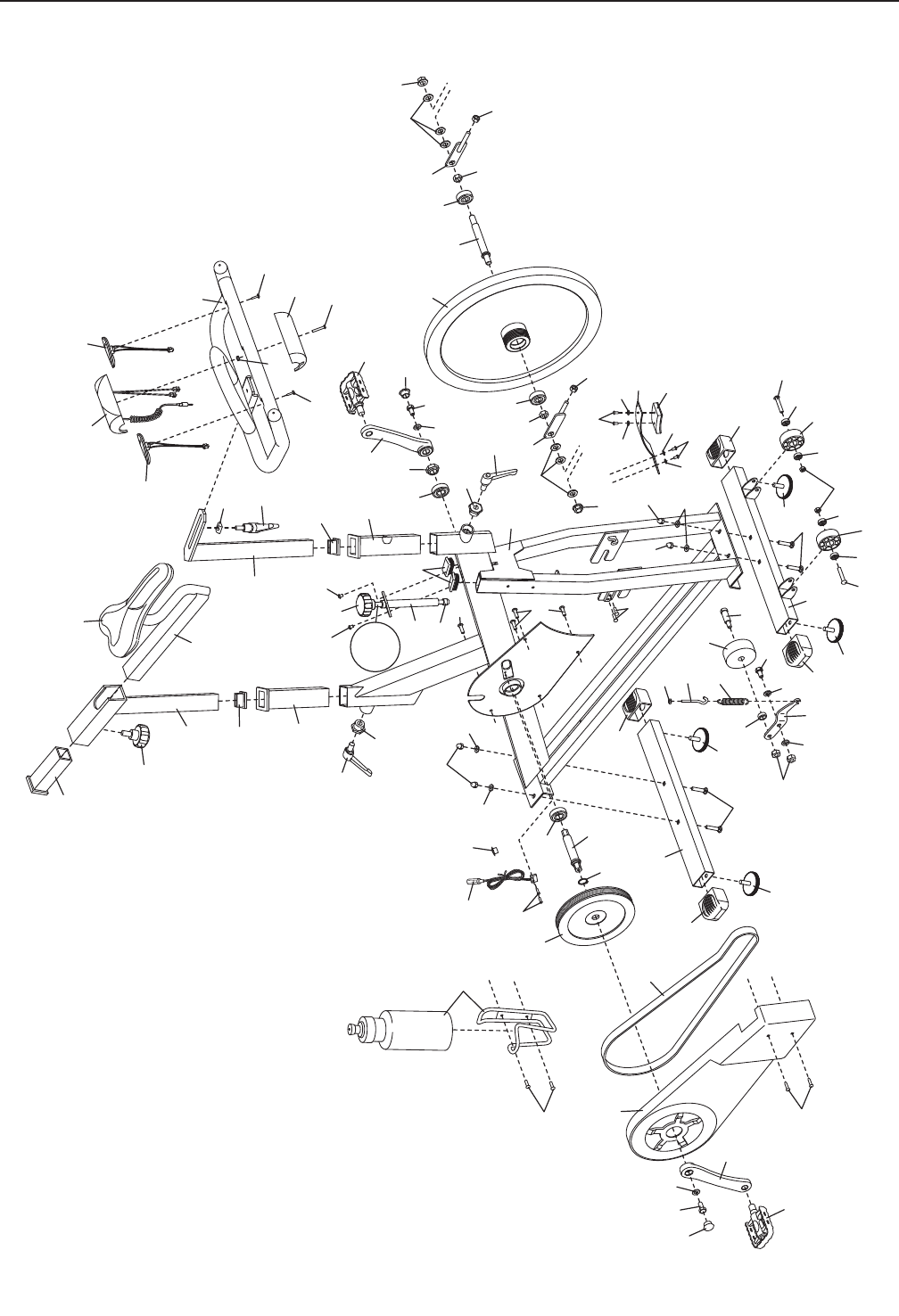
EXPLODED DRAWING—Model No. PFEVEX74909.0 R1109A
36
42
47
35
41
2
31
8
43
57 57
13 14
28
37
35
41
45
19
4
78
25
69
23
60 49
44
47
20
38
56
3
34 68
24
24
58 46
58
46
24
34
24
52
33
33
34
34
52
11
66
59
59
51
18 17
32
27
50
64
33
33
10
29
21
9
26
44 49 60
39
70
16
23
65
60
60
54
61
61
40
12
57
61 61
62
59 7
67
63
22
1
15
22
63
7
59 62
72
72
53
53
56 65 65
60
74
48
73
53
67
55
55
76
77
77
75
30
30
53
71
Part No. 290201 R1109A Printed in China © 2009 ICON IP, Inc.
ORDERING REPLACEMENT PARTS
To order replacement parts, please see the front cover of this manual. To help us assist you, be prepared to
provide the following information when contacting us:
• the model number and serial number of the product (see the front cover of this manual)
• the name of the product (see the front cover of this manual)
• the key number and description of the replacement part(s) (see the PART LIST and the EXPLODED
DRAWING near the end of this manual)
