Proware Technologies Co MN527V1 300Mbps Wireless N USB Module User Manual User s manual FCC rev 2

Proware Technologies Co Ltd. 300Mbps Wireless N USB Module User s manual FCC rev 2

User's manual-FCC_rev.2

    PW-MN527 300Mbps Wireless N USB Module   User Guide   Version 1.0 July 31, 2012  PROWARE TECHNOLOGIES CO., Ltd.
 Copyright Notice: Copyright © 2012, PROWARE Technologies CO,. Ltd . All Rights Reserved. No part of this document may be reproduced, transmitted, transcribed, stored in a retrieval system, or translated into any language, in any form or by any means, electronic, mechanical, magnetic, optical,  chemical,  manual  or  otherwise  without  the  prior  written  permission  of  PROWARE Technologies CO,. Ltd is a registered trademark of PROWARE Technologies CO,. Ltd. All trademarks are the properties of their respective owners.  Important: This product is only for Consumer Electronics device factory’s using. Terminal customers will not have direct access to buy and use this product.
 Revision History Release Date Revision Initials 1.0 2012-7-31 First release.
  FCC STATEMENT  This device complies with Part 15 of the FCC Rules. Operation is subject to the following two conditions: (1) This device may not cause harmful interference, and (2) this device must accept any interference received, including interference that may cause undesired operation.  This equipment has been tested and found to comply with the limits for a Class B digital device, pursuant  to  part  15  of  the  FCC  Rules.  These  limits  are  designed  to  provide  reasonable protection against harmful interference in a residential installation. This equipment generates, uses and can radiate radio frequency energy and, if not installed and used in accordance with the instructions, may cause harmful interference to radio communications. However, there is no guarantee  that  interference  will  not  occur  in  a  particular installation.  If  this  equipment  does cause harmful interference to radio or television reception, which can be determined by turning the equipment off and on, the user is encouraged to try to correct the interference by one or more of the following measures:   Reorient or relocate the receiving antenna.   Increase the separation between the equipment and receiver.   Connect  the  equipment  into  an  outlet  on  a  circuit  different  from  that  to  which  the receiver is connected.     Consult the dealer or an experienced radio/ TV technician for help. FCC Caution: Any changes or modifications not expressly approved by the party responsible for compliance could void the user's authority to operate this equipment.    This transmitter must not be co-located or operating in conjunction with any other antenna or transmitter.  FCC RF Radiation Exposure Statement This  equipment  complies  with  FCC  radiation  exposure  limits  set  forth  for  an  uncontrolled environment. This equipment should be installed and operated with minimum distance 20cm between the radiator & your body. This device is intended only for OEM integrators under the following conditions:    The antenna must be installed such that 20 cm is maintained between the antenna and users, and     The transmitter module may not be co-located with any other transmitter or antenna.
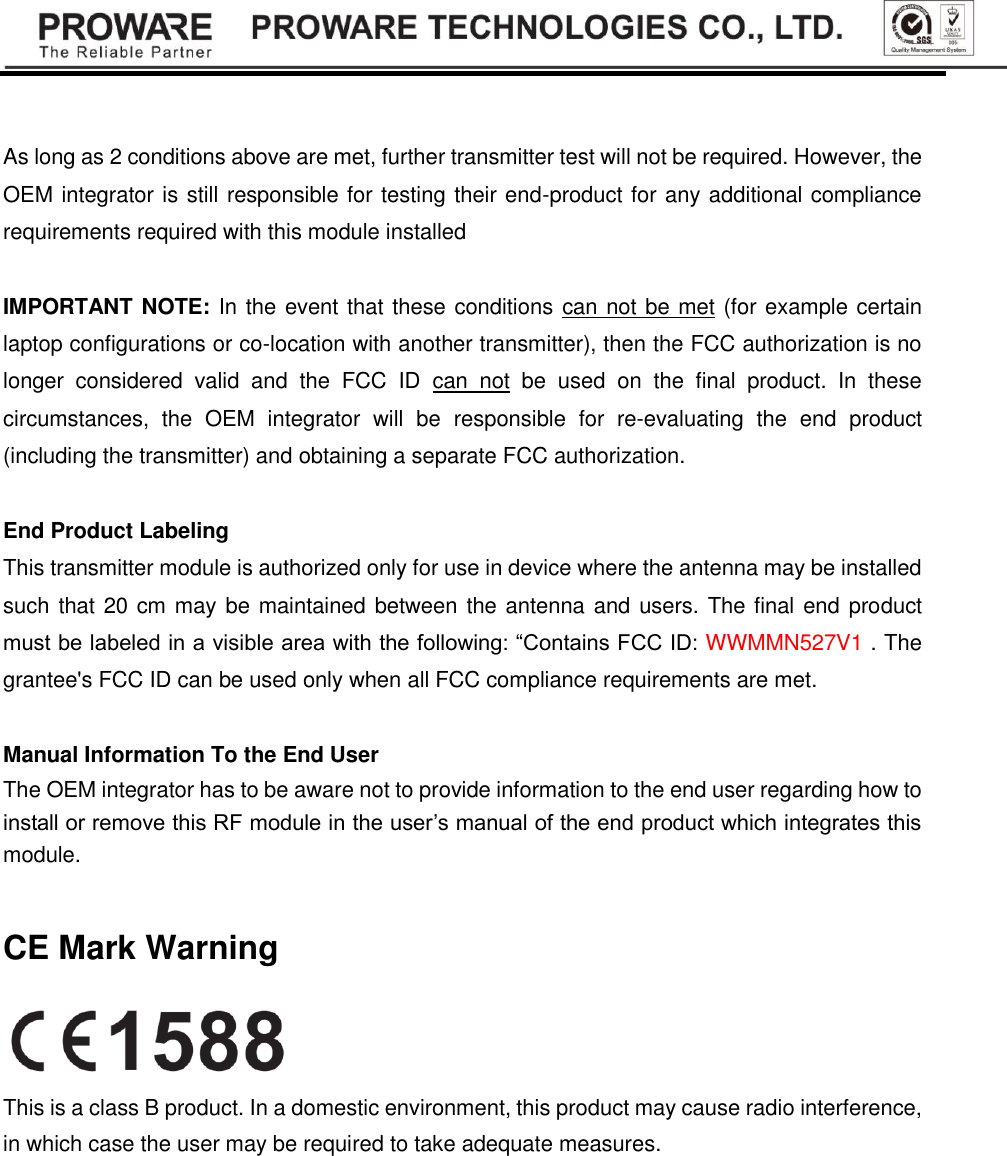
   As long as 2 conditions above are met, further transmitter test will not be required. However, the OEM integrator is still responsible for testing their end-product for any additional compliance requirements required with this module installed  IMPORTANT NOTE: In the event that these conditions can not be met (for example certain laptop configurations or co-location with another transmitter), then the FCC authorization is no longer  considered  valid  and  the  FCC  ID  can  not  be  used  on  the  final  product.  In  these circumstances,  the  OEM  integrator  will  be  responsible  for  re-evaluating  the  end  product (including the transmitter) and obtaining a separate FCC authorization.  End Product Labeling This transmitter module is authorized only for use in device where the antenna may be installed such that 20 cm may be maintained between the antenna and users. The final end product must be labeled in a visible area with the following: “Contains FCC ID: WWMMN527V1 . The grantee's FCC ID can be used only when all FCC compliance requirements are met.  Manual Information To the End User The OEM integrator has to be aware not to provide information to the end user regarding how to install or remove this RF module in the user’s manual of the end product which integrates this module.  CE Mark Warning  This is a class B product. In a domestic environment, this product may cause radio interference, in which case the user may be required to take adequate measures.
  CONTENTS Package Contents .................................................................................................... 7 Chapter 1 Introduction ........................................................................................... 8 1.1 Overview of the Product ............................................................................................ 8 1.2 Features ..................................................................................................................... 8 Chapter 2 Installation Guide .................................................................................. 9 2.1 Hardware Installation ................................................................................................. 9 2.2 Software Installation .................................................................................................. 9 Chapter 3 Linux Installation Guide (For Consumer Electronics) ..................... 14 3.1 Hardware Installation ............................................................................................... 14 3.2 Software Installation ................................................................................................ 14 Appendix A: Specifications ................................................................................... 15 Appendix B: Glossary ............................................................................................ 16
PW-MN527 300Mbps Wireless N USB Module   7 Package Contents The following items should be found in your package:  PW-MN527 300Mbps Wireless N USB Module  Note: Make sure that the package contains the above items. If any of the listed items are damaged or missing, please contact with your distributor. Conventions: The ‘Module’  mentioned in  this  user guide stands for PW-MN527 300Mbps Wireless N USB Module without any explanations.
PW-MN527 300Mbps Wireless N USB Module   8 Chapter 1 Introduction Thank you for choosing the PW-MN527 300Mbps Wireless N USB Module! 1.1  Overview of the Product The  module  is  an  802.11n  client  device.  It  is  mainly  designed  to  provide  a  high-speed  and unrivaled wireless performance for wireless embedded system application. With a faster wireless connection, you can get a better Internet experience without the cost of running network cables. With the 802.11n technology, the PW-MN527 auto-sensing capability allows high packet transfer rate of up to 150Mbps for maximum throughput. It has good capability on anti-jamming, and it can also interoperate with other wireless (802.11b/g/n) products. The module supports WEP, WPA and WPA2 encryption to prevent outside intrusion and  protect your personal  information  from being exposed. With unmatched wireless performance, reception, and security protection, it is easily to be used in different kinds of wireless embedded system for its size and portable.    Note: The PW-MN527 is designed to be used in the set-top box; The Antennas printed on the PCB will not be in use under any circumstance.  1.2  Features   Complies with IEEE802.11n, IEEE802.11g, IEEE802.11b standards   Supports  WPA/WPA2  data  security,  IEEE802.1x  authentication,  TKIP/AES  encryption, 64/128-bit WEP encryption   Supports  high  rate  of  up  to  300Mbps  for  maximum  throughput,  supports  automatically adjust to lower speeds due to distance or other operating limitations   Provides USB interface   Supports Ad-Hoc and Infrastructure modes   Good capability on anti-jamming   Supports roaming between access points when configured in Infrastructure mode   Ease to configure and provides monitoring information   Supports Windows XP, 7
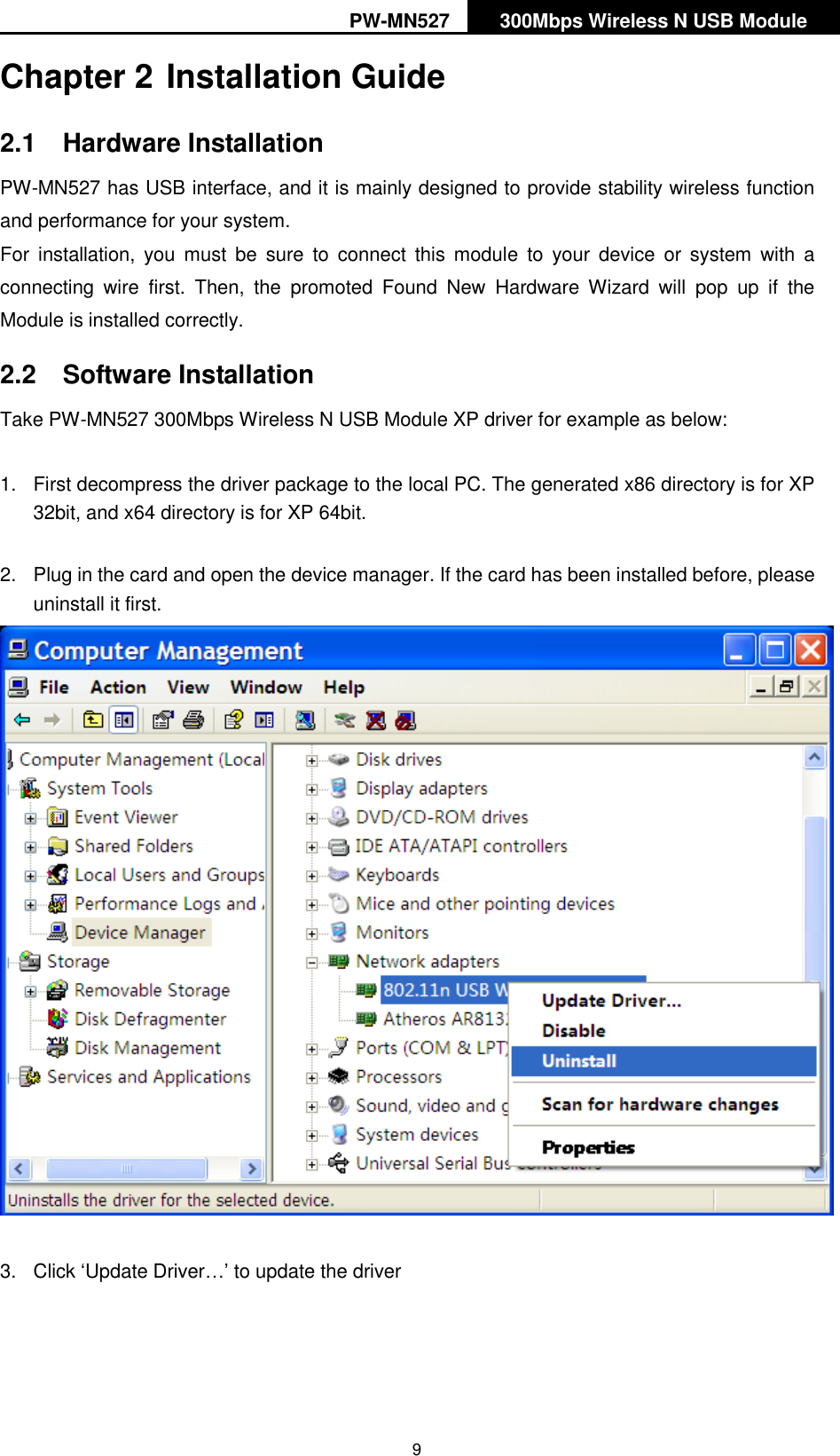
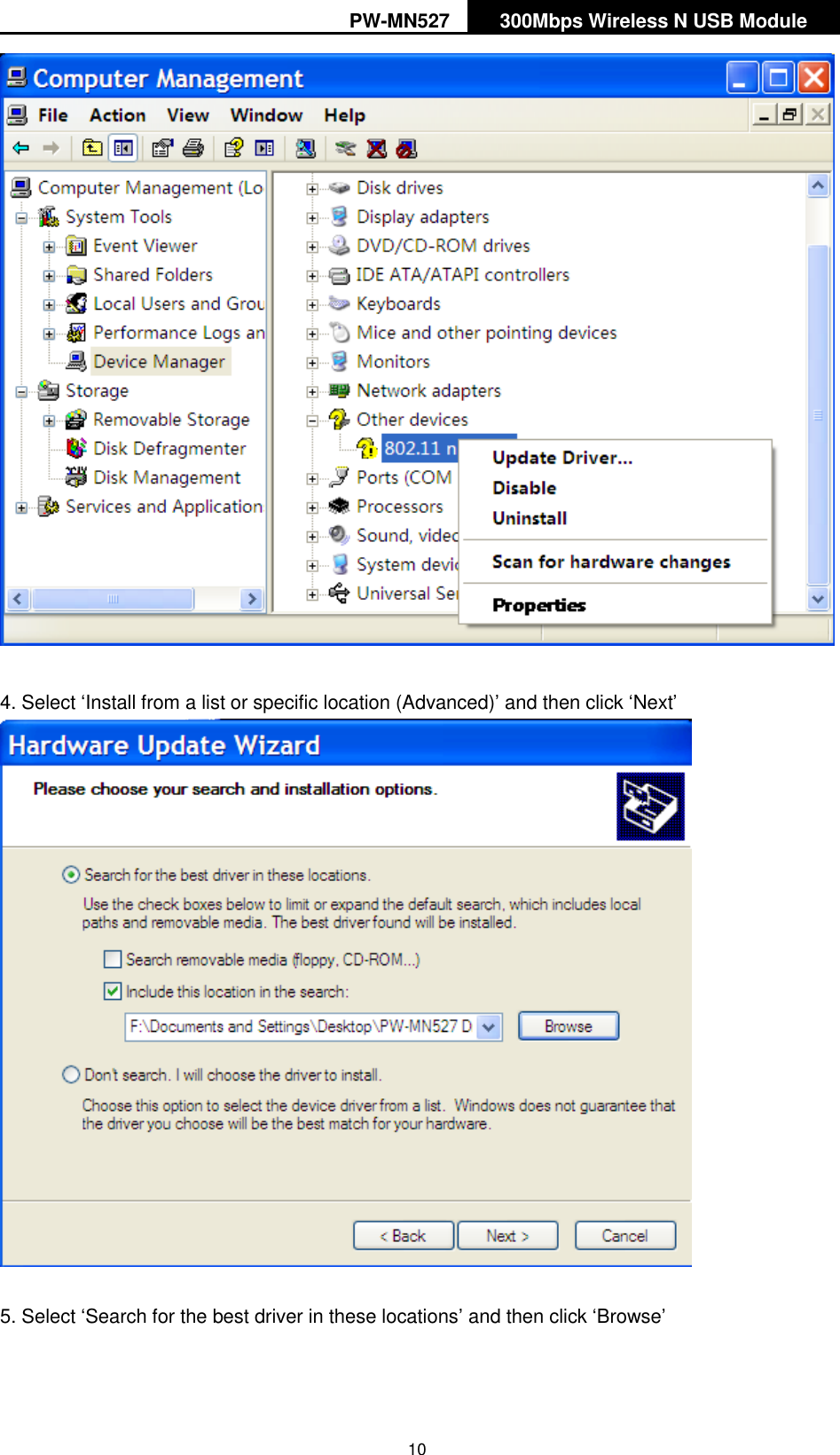
PW-MN527 300Mbps Wireless N USB Module   9 Chapter 2 Installation Guide 2.1  Hardware Installation PW-MN527 has USB interface, and it is mainly designed to provide stability wireless function and performance for your system.   For  installation,  you  must  be  sure  to  connect  this  module  to  your  device  or  system  with  a connecting  wire  first.  Then,  the  promoted  Found  New  Hardware  Wizard  will  pop  up  if  the Module is installed correctly.   2.2  Software Installation Take PW-MN527 300Mbps Wireless N USB Module XP driver for example as below:  1.  First decompress the driver package to the local PC. The generated x86 directory is for XP 32bit, and x64 directory is for XP 64bit.  2.  Plug in the card and open the device manager. If the card has been installed before, please uninstall it first.   3.  Click ‘Update Driver…’ to update the driver
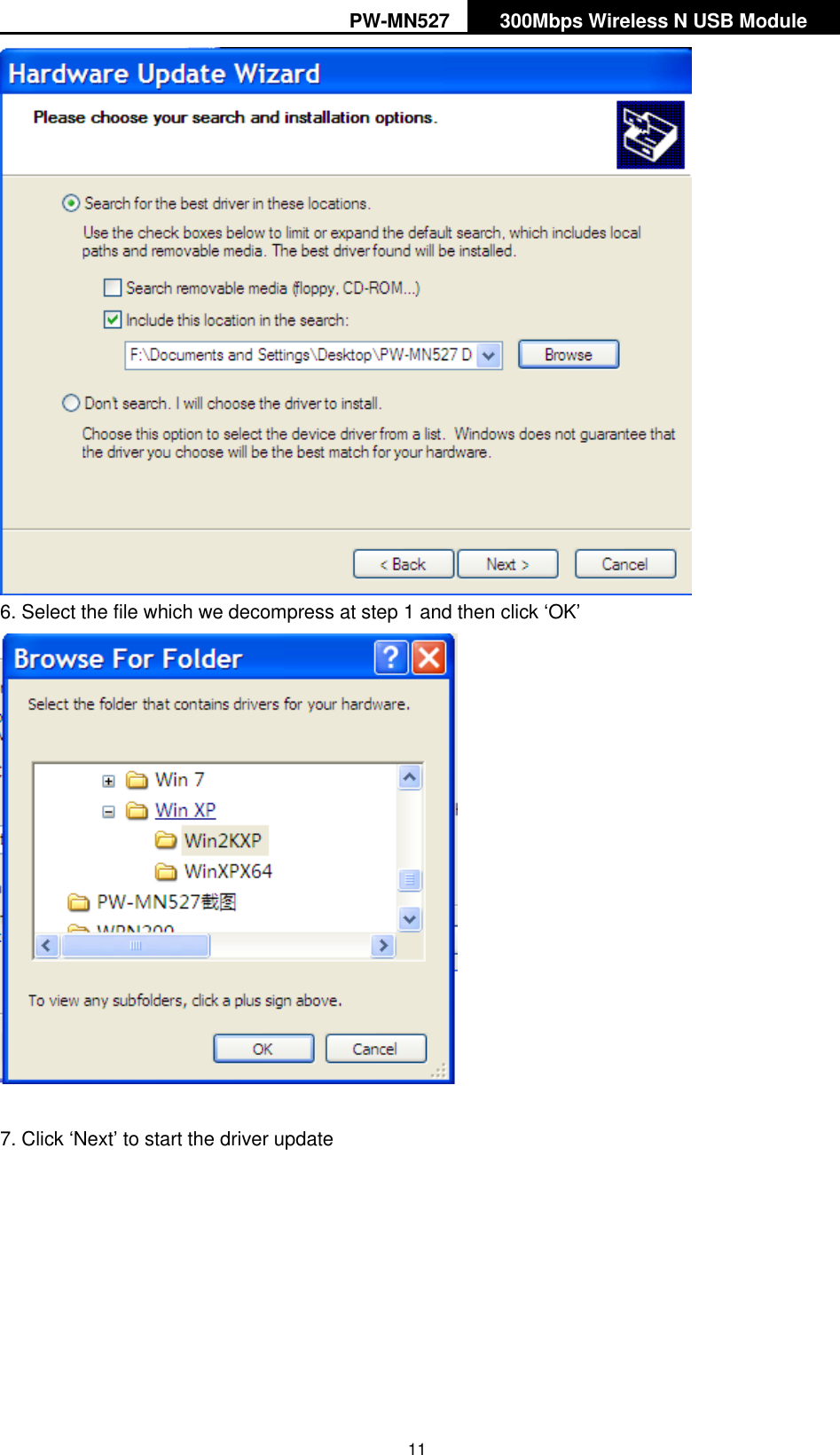
PW-MN527 300Mbps Wireless N USB Module   10   4. Select ‘Install from a list or specific location (Advanced)’ and then click ‘Next’   5. Select ‘Search for the best driver in these locations’ and then click ‘Browse’
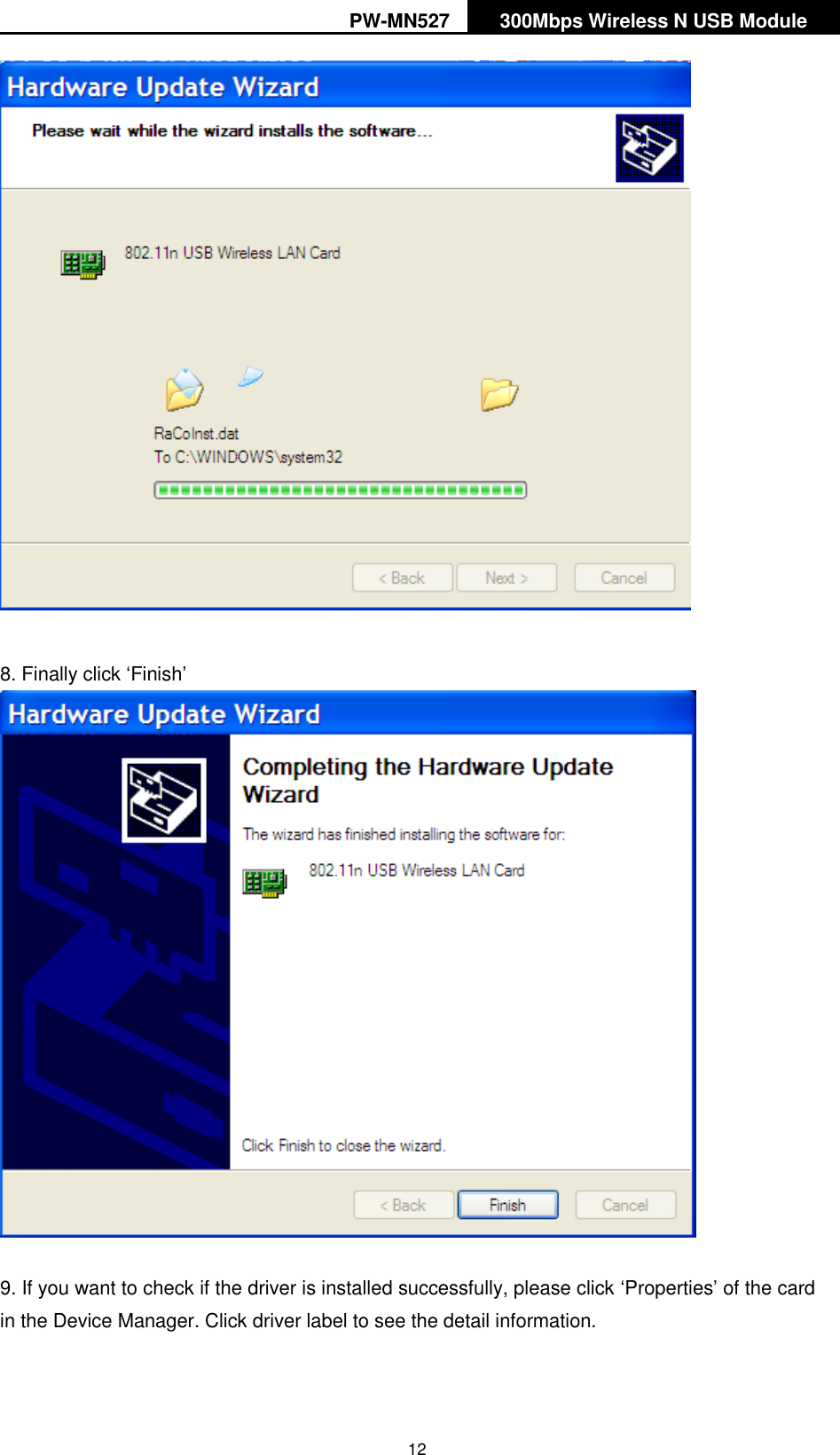
PW-MN527 300Mbps Wireless N USB Module   11  6. Select the file which we decompress at step 1 and then click ‘OK’   7. Click ‘Next’ to start the driver update
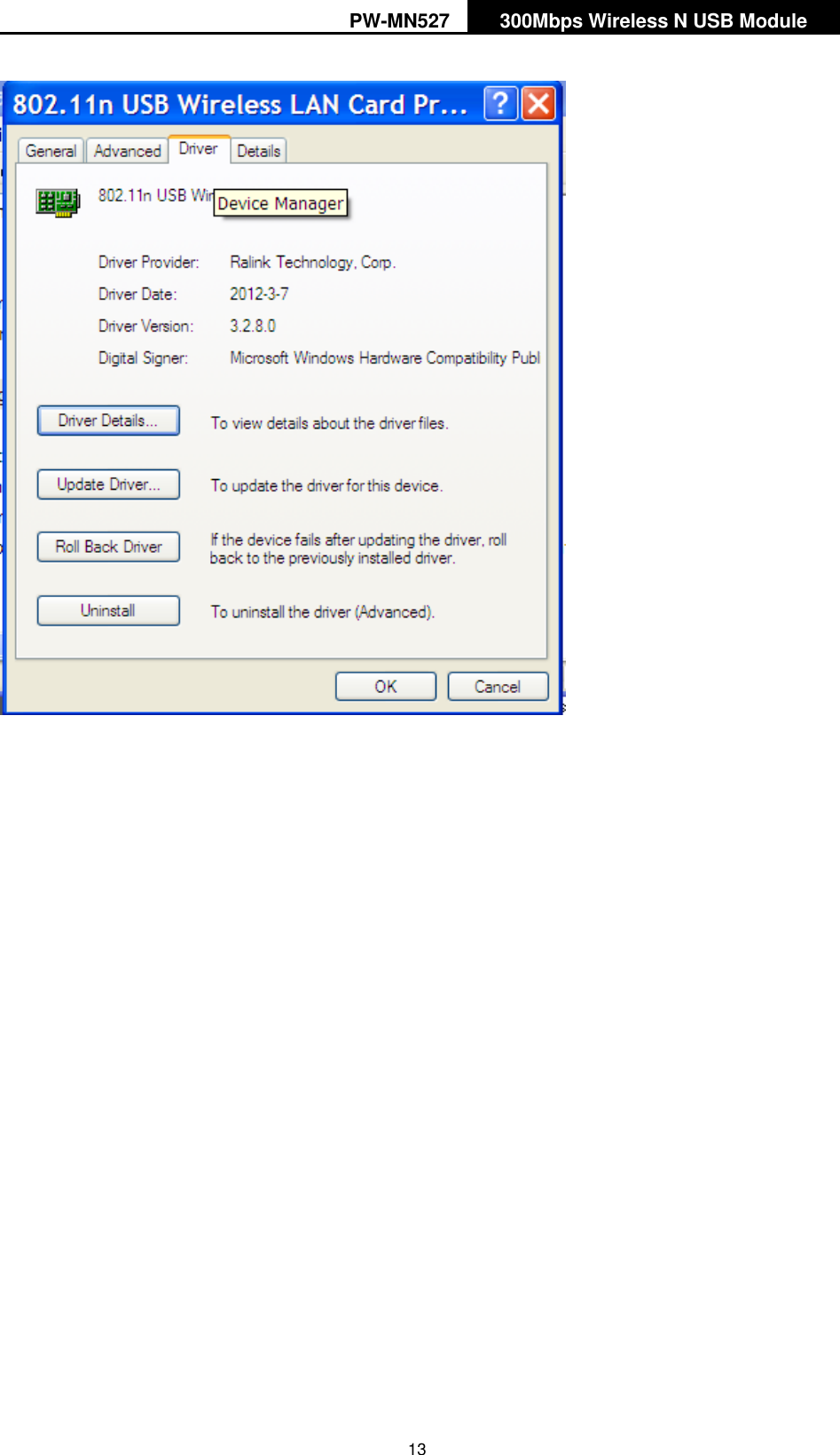
PW-MN527 300Mbps Wireless N USB Module   12   8. Finally click ‘Finish’   9. If you want to check if the driver is installed successfully, please click ‘Properties’ of the card in the Device Manager. Click driver label to see the detail information.
PW-MN527 300Mbps Wireless N USB Module   13
PW-MN527 300Mbps Wireless N USB Module   14 Chapter 3 Linux Installation Guide (For Consumer Electronics) 3.1  Hardware Installation For the Consumer Electronics products which use PW-MN527, it must provide a corresponding connector for the module. After connecting the module to the device, the hardware installation is finished.    3.2  Software Installation For the Consumer Electronics products, the Linux Driver of PW-MN527 is embedded in default. So the module is a plug and play device. After connecting the module to the device, PW-MN527 will work well.
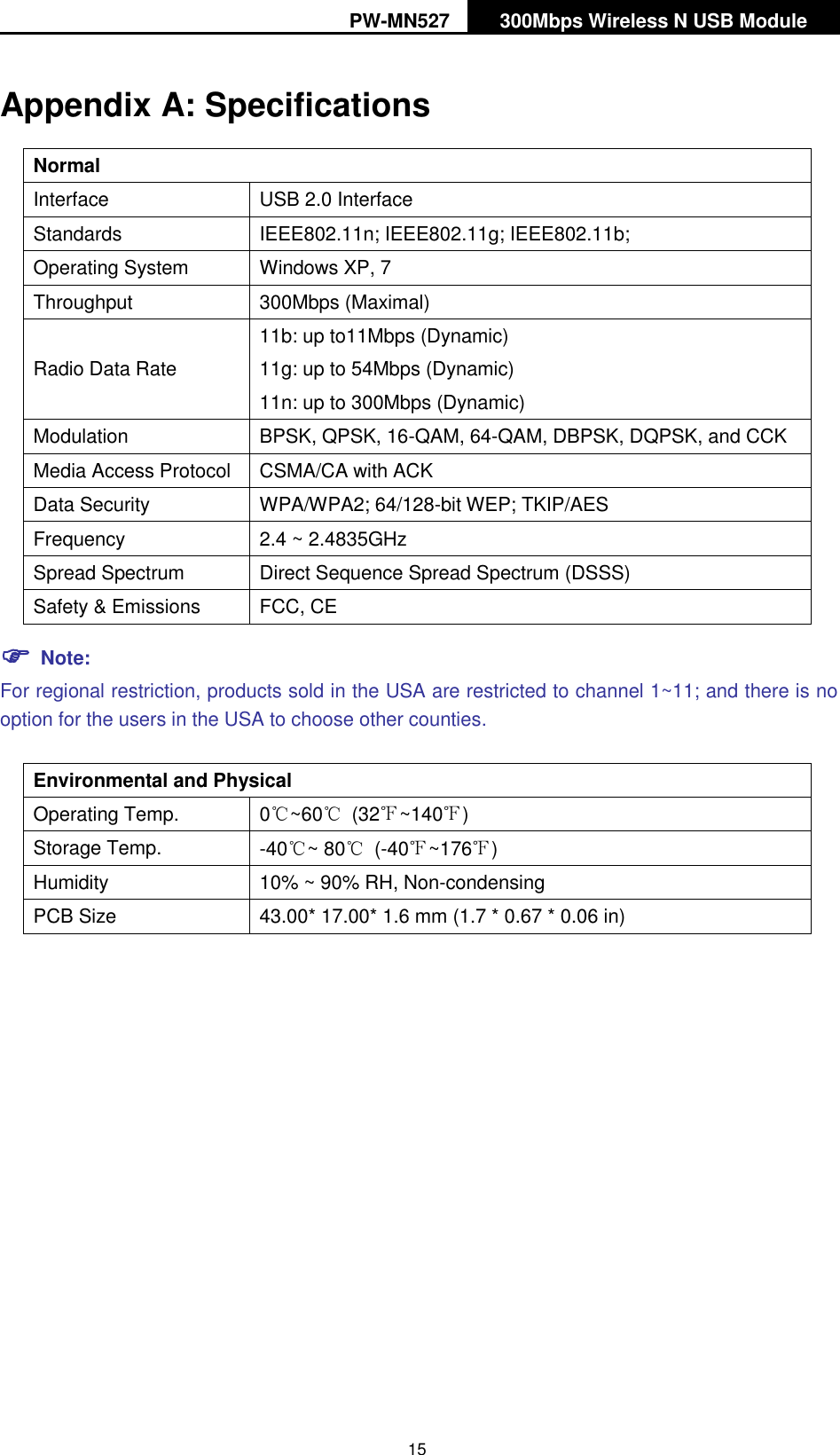
PW-MN527 300Mbps Wireless N USB Module   15 Appendix A: Specifications Normal Interface USB 2.0 Interface Standards IEEE802.11n; IEEE802.11g; IEEE802.11b; Operating System Windows XP, 7 Throughput 300Mbps (Maximal)  Radio Data Rate 11b: up to11Mbps (Dynamic) 11g: up to 54Mbps (Dynamic) 11n: up to 300Mbps (Dynamic) Modulation BPSK, QPSK, 16-QAM, 64-QAM, DBPSK, DQPSK, and CCK Media Access Protocol CSMA/CA with ACK Data Security WPA/WPA2; 64/128-bit WEP; TKIP/AES Frequency 2.4 ~ 2.4835GHz Spread Spectrum Direct Sequence Spread Spectrum (DSSS) Safety & Emissions FCC, CE  Note: For regional restriction, products sold in the USA are restricted to channel 1~11; and there is no option for the users in the USA to choose other counties.    Environmental and Physical Operating Temp. 0℃~60℃  (32℉~140℉) Storage Temp. -40℃~ 80℃  (-40℉~176℉) Humidity 10% ~ 90% RH, Non-condensing PCB Size 43.00* 17.00* 1.6 mm (1.7 * 0.67 * 0.06 in)
PW-MN527 300Mbps Wireless N USB Module   16 Appendix B: Glossary  802.11b - The 802.11b standard specifies a wireless product networking at 11 Mbps using direct-sequence spread-spectrum (DSSS) technology and operating in the unlicensed radio spectrum at 2.4GHz, and WEP encryption for security. 802.11b networks are also referred to as Wi-Fi networks.  802.11g -  specification  for  wireless  networking  at  54  Mbps  using  direct-sequence spread-spectrum  (DSSS)  technology,  using  OFDM  modulation  and  operating  in  the unlicensed radio spectrum at 2.4GHz, and backward compatibility with IEEE 802.11b devices, and WEP encryption for security.  802.11n - 802.11n builds upon previous 802.11 standards by adding MIMO (multiple-input multiple-output). MIMO uses multiple transmitter and receiver antennas to allow for increased data throughput via spatial multiplexing and increased range by exploiting the spatial diversity, perhaps through coding schemes like Alamouti coding. The Enhanced Wireless Consortium (EWC)[3] was formed to help accelerate the IEEE 802.11n development process and promote a  technology  specification  for  interoperability  of  next-generation  wireless  local  area networking (WLAN) products.  Ad-hoc Network - An ad-hoc network is a group of computers, each with a Wireless Adapter, connected as an independent 802.11 wireless LAN. Ad-hoc wireless computers operate on a peer-to-peer basis, communicating directly with each other without the use of an access point. Ad-hoc  mode  is  also  referred  to  as  an  Independent  Basic  Service  Set  (IBSS)  or  as peer-to-peer mode, and is useful at a departmental scale or SOHO operation.    DSSS - (Direct-Sequence Spread Spectrum) - DSSS generates a redundant bit pattern for all data transmitted. This bit pattern is called a chip (or chipping code). Even if one or more bits in the chip are damaged during transmission, statistical techniques embedded in the receiver can recover the original data without the need of retransmission. To an unintended receiver, DSSS appears as low power wideband noise and is rejected (ignored) by most narrowband receivers. However, to an intended receiver (i.e. another wireless LAN endpoint), the DSSS signal is recognized as the only valid signal, and interference is inherently rejected (ignored).  FHSS - (Frequency Hopping Spread Spectrum)  -  FHSS continuously  changes  (hops) the carrier  frequency  of  a  conventional  carrier  several  times  per  second  according  to  a pseudo-random  set  of  channels.  Because  a  fixed  frequency  is  not  used,  and  only  the transmitter and receiver know the hop patterns, interception of FHSS is extremely difficult.  Infrastructure Network - An infrastructure network is a group of computers or other devices, each with a Wireless Adapter, connected as an 802.11 wireless LAN. In infrastructure mode, the  wireless devices  communicate with  each  other  and  to  a  wired  network  by  first  going through an access point. An infrastructure wireless network connected to a wired network is referred to as a Basic Service Set (BSS). A set of two or more BSS in a single network is referred to as an Extended Service Set (ESS). Infrastructure mode is useful at a corporation scale, or when it is necessary to connect the wired and wireless networks.    Spread Spectrum - Spread Spectrum technology is a wideband radio frequency technique
PW-MN527 300Mbps Wireless N USB Module   17 developed by the military for use in reliable, secure, mission-critical communications systems. It is designed to trade off bandwidth efficiency for reliability, integrity, and security. In other words, more bandwidth is consumed than in the case of narrowband transmission, but the trade off produces a signal that is, in effect, louder and thus easier to detect, provided that the receiver knows the parameters of the spread-spectrum signal being broadcast. If a receiver is not  tuned  to  the  right  frequency,  a  spread-spectrum  signal  looks  like  background  noise. There are two main alternatives, Direct Sequence Spread Spectrum (DSSS) and Frequency Hopping Spread Spectrum (FHSS).  WEP - (Wired Equivalent Privacy) - A data privacy mechanism based on a 64-bit or 128-bit or 152-bit shared key algorithm, as described in the IEEE 802.11 standard. To gain access to a WEP network, you must know the key. The key is a  string of characters that you create. When  using  WEP,  you  must  determine  the  level  of  encryption.  The  type  of  encryption determines the key length. 128-bit encryption requires a longer key than 64-bit encryption. Keys are defined by entering in a string in HEX (hexadecimal - using characters 0-9, A-F) or ASCII  (American  Standard  Code  for  Information  Interchange  –  alphanumeric  characters) format. ASCII format is provided so you can enter a string that is easier to remember. The ASCII string is converted to HEX for use over the network. Four keys can be defined so that you can change keys easily.  Wi-Fi - A trade name for the 802.11b wireless networking standard, given by the Wireless Ethernet  Compatibility  Alliance  (WECA,  see  http://www.wi-fi.net),  an  industry  standards group promoting interoperability among 802.11b devices.  WLAN  -  (Wireless  Local  Area  Network)  -  A  group  of  computers  and  associated  devices communicate with each other wirelessly, which network serving users are limited in a local area.  WPA - (Wi-Fi  Protected Access) - A  wireless security protocol  uses TKIP (Temporal Key Integrity Protocol) encryption, which can be used in conjunction with a RADIUS server.

Navigation menu