Pyle Audio Pro P1001At Users Manual P 1001AT 2001AT 3001通用说明?..
PMX808 P1001AT-2001AT-3001AT
P1001AT to the manual 49766445-5658-a794-6961-70cf3be72128
2015-02-06
: Pyle-Audio Pyle-Audio-Pro-P1001At-Users-Manual-521567 pyle-audio-pro-p1001at-users-manual-521567 pyle-audio pdf
Open the PDF directly: View PDF  .
.
Page Count: 5


1
Pleasereadthisoperatinginstructionscarefullybeforeusing.Itwillacquaintyoufully
withallitsfeaturesandhelpyouenjoyyourtime.
Theproductadoptsthemostadvanceddigitaltechniqueintheworld.Itis4channels
withitshighpoweroutput,sotospeak,therealacousticcentreofyourfamilymovie
theatre.Itisdesignedtobemulti-funltionalw/AM/FMTunerMp3/Ipodinputjack,
headphoneinputjack.Itisaproductofthefinestaccompanyingacousticamplifier,
whenappliedtoTUNERMP3VCDDVDetc.ThePYLEPRObringsyouthe
firsteverHybridAmplifierwithdesignedSuboutandPreouttoadjustto
everysituation.
、
、、、
AM/FMQuartzsynthesizedTuner,autostationseekandstore,
50stationsstoreage,withbothmanualandautomatictuning
AllthebluelightsandblueringsgaincontrolthroughLEDDimmer
ThankyouforpurchasingthisfinePYLEPROamplifier.
Digitalfluorescentoutputdisplayallthefunctions
CPUmanagmentofallfunctions,remotesensor
Separategaincontrolofpre-ampandsubwoofer
Overheat,overcurrentprotection
PRE-AmpwithAM/FMTuner
Ipod/Mp3Inputwithcable
Digitalkaraokesystem
Foreword
Features
1.Powersource-TheunitshouldbeconnectedtoapowersupplyAC~110/60Hz,
AC~220V/50Hz.
2.Ventilation-Theunitshouldbesituatedsothatitslocationorpositiondoesnot
interferewithitsproperventilation.Placetheunitatleast10cmawayfromthe
walls.
3.Waterandmoisture-Theunitshouldnotbeusednearwater-forexample,neara
swimmingpoolinawetbasement,etc.
4.Electricshock-ifametalobject,suchashairpinorneedlecomesintocontactinside
thisunit,adangerouselectricshockmayresult.Forfamilieswithchildren,never
permitchildrentoputanything,especiallymetal,insidethisunit.
5.Enclosureremoval-Neverremovetheenclosure.Iftheinternalpartsaretouched
accidentally,aseriouselectricshockmightoccur.
6.Abnormalsmell-ifanabnormalsmellorsmokeisdetected,immediatelyturnthe
powerOFFandpulloutthepowercord.Contactyourdealerornearestservice
station.
Precautions
2
PDF created with pdfFactory trial version www.pdffactory.com
MainChannelPowerOutput
Technical
※Specificationssubjecttochangewithoutpriornotice
THD(1KHz) <1%
<1% <1%
+2dB
InputSensitivityImpedance
SignaltoNoiseRatio
FrequencyRange
Dimension
-
483(W)X300(D)X80(H)mm
NormalLoadImpedance 8Ohm 8Ohm 8Ohm
CD/DVDAUX 400mV/33kOhm
Microphone 6mV/600Ohm
PureAmplifier 76dB76dB76dB
KARAOKE 71dB71dB71dB
FrequencyResponse(40Hz-15KHz)
ToneCharacteristic(100Hz-10KHz)
PowerRequirements AC~110V/60HzAC~220V50Hz
Weight
PMPO,8Ohms,1KHztest
P-1001AT P-2001AT P-3001AT
1000WX2 2000WX2 3000WX2
400mV/33kOhm
6mV/600Ohm
400mV/33kOhm
6mV/600Ohm
+2dB +2dB
-
-
+14dB
-
+14dB +14dB
6.5kg6kg 7.2kg
-
-
3
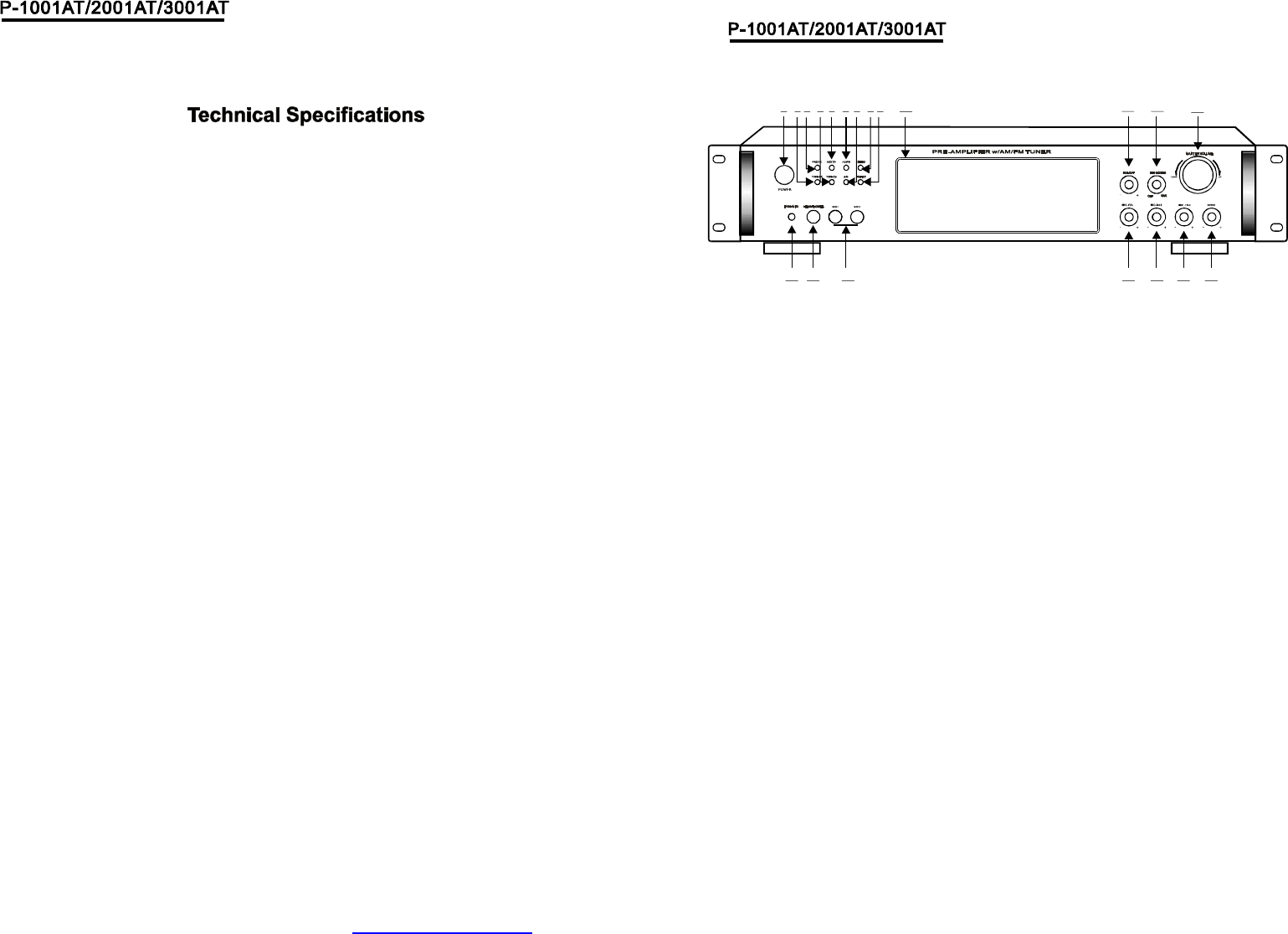
(1)POWERSWITCH
PresstoswitchthepowerunitONorOFF.
(6)AM/FMSELECTOR
(11)SUB.OUTVOLUMECONTROL
(10)FUNCTIONDISPLAYEDFLUORESCENT
WINDOW
(13)MASTERVOLUMECONTROL
Adjuststhevolumelevel.Turntheknob.
Clockwisetoincreasethevolume.
Adjuststhebluelightsandbluerings.
(14)ECHOCONTROL
TurntheknobtoadjusttheMICecho
level.
(15)MICTREBLE
AdjuststhetrebleofMIC.
(16)MICBASS
AdjuststhebassofMIC.
(17)MICVOLUME
Adjuststhevolumelevel.Turntheknob
clockwisetoincreasetheMICvolume.
(18)MICINPUTJACKS1&2
KARAOKEMICconnecttothesejacks.
(8)MENUCONTROL
Thisisusedtoincrementanddecrement
levelfortheselectedfunctionofMaster
Volume,Bass,Treble,BalanceAuto
stationseek.
,
(2)TUNING-
Radiotuningbutton.Decrementstheradio
frequency.
(3)PREV<
Thisknobisusedtoselectthepreview
stationwhichhavebeenkeptinsystem.
Thisknobisusedtoselectthenextstation
whichhavebeenkeptinsystem.
(4)TUNING+
Radiotuningbutton.Incrementstheradio
frequency.
(5)NEXT>
(7)A/BSPEAKERSOUTPUTSELECTOR
ThreemodeABA+B
:、、
(9)INPUT
Thisisusedtoselecttheinputsources:
DVD/CDTUNERIPOD/MP3AUX
、、、
(12)LEDDIMMER
(19)HEADPHONEJACKS
(20)IPOD/MP3JACKS
Headphoneconnecttothesejacks.
IPOD/MP3connecttothesejacks.
12 3 4 10 11 12
17 16 15 14
13
5 6
7
8 9
181920
4
PDF created with pdfFactory trial version www.pdffactory.com
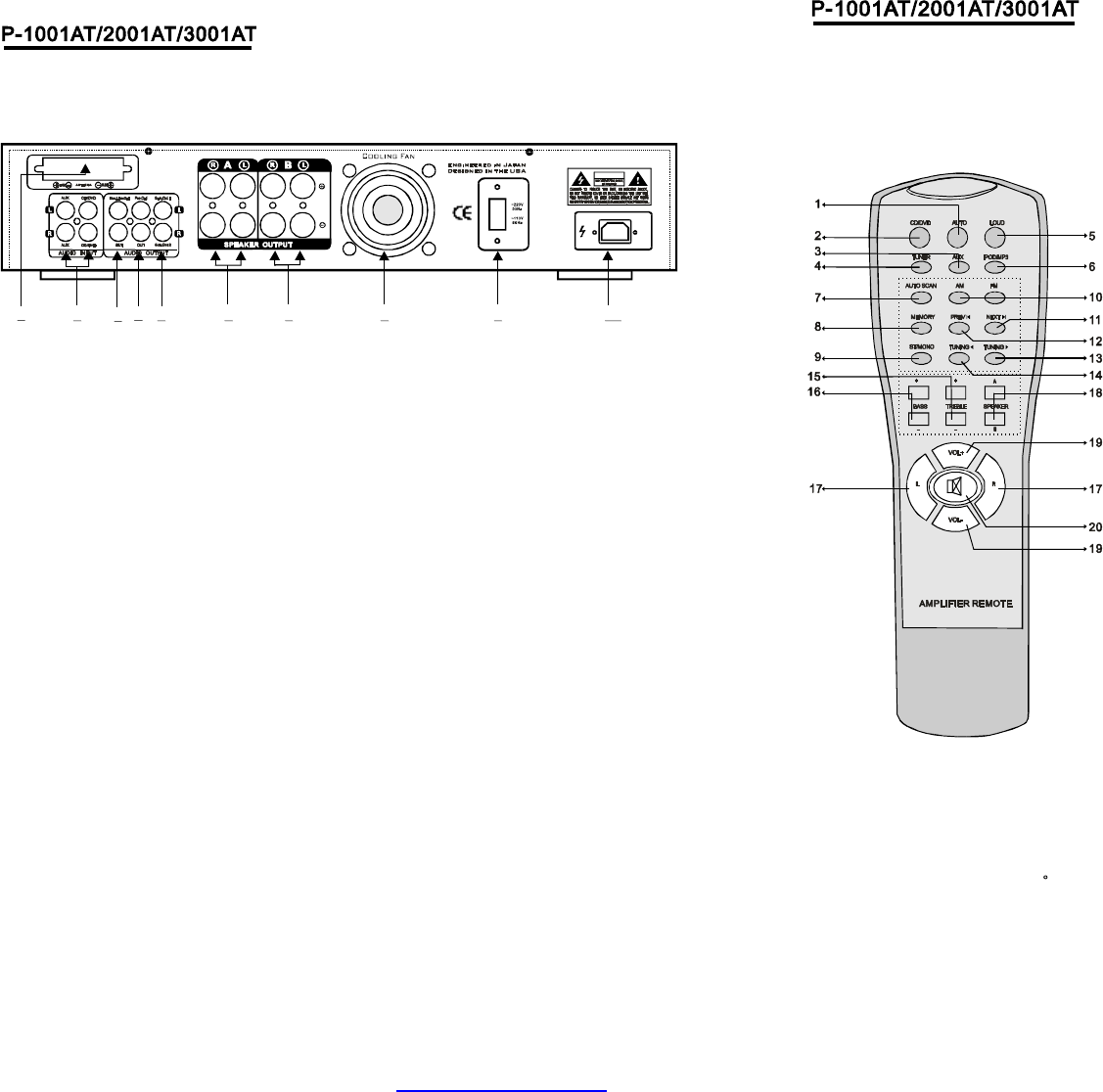
1AUTO
Automaticallysearchthesinglesourcewhenpoweron.
2CD/DVD
CD/DVD
16BASS
17L/R
18A/BSPEAKER
SpeakerA/B/A+BSelector
19VOL+VOL-
、
、
、
、
、
、
、
、
Selector.
3AUX
AUXSelector.
4TUNER
TUNERSelector.
5LOUD
Pressthebuttontocorrectanunbalanceprogramsource.
6IPOD/MP3
IPOD/MP3Selector
7AUTOSCAN
AM/FMautoscanselectorscanandstorestations
automitically.Canstore50stations.
8MEMORY
Afterastationhasbeenfoundyoucanstorethestation
bypressingtheMEMORYbuttonandthescreenwill
displaySAVE.
9ST/MONO
Stereoandmonoselector.
10AM/FM
AM/FMselector.
11/12PREV>NEXT<
Stationspreviewandnextselector.
13/14TUNING>TUNING<
Thetwokeysareusedtoadjusttothebestsingleof
thestations.
15TREBLE
Left/RightBalanceControl
MasterVolumeUpAndDown
20MUTE
MuteSelector
、
、
、
、
、
,
、
,
、
、
、
、
、
()
RemoteControllerOperation
1.Remotecontrollershouldbeoperatedwithin6
meterandthescopeof30infrontofreceiver.
2.Makesurethatthereisnobigobstaclebetween
remotecontrollerandmachine.
3.Remotesensorshouldbefaraway
fromthelight,highamountsoflightcanaffectitsperformance.
6
15 6 72 498 103
WARNING
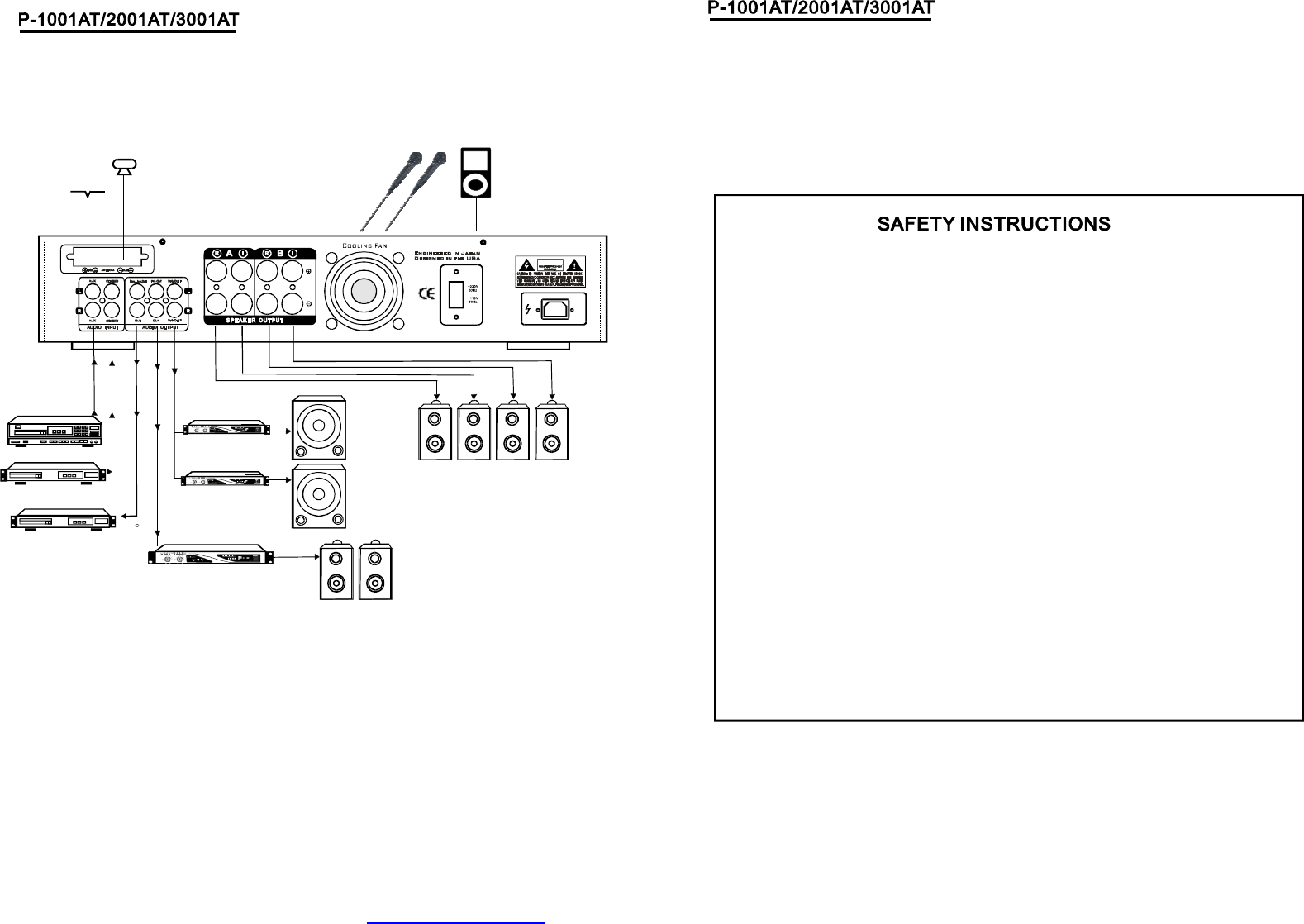
(3)REC.LINEOUTPUTJACKS
(2)AUDIOINPUTJACKS
(1)TUNERANT
Connecttheaudioouputjacksof
DVD/CDAUXtothesejacks.、
ConnectforAMandFMantennas.
(7)BSPEAKEROUTPUTTERMINALS
(6)ASPEAKEROUTPUTTERMINALS
Connectyourtheotherspeakersystem(s)to
theseterminals.
Connectyourspeakersystemto
theseterminals.
ConnecttheRECORDinputjacksto
thesejacks.
(9)110V/220VSWITCH
(8)COOLINGFAN
Accordingtopowervoltage,pushthisbutton
tothestationofthe110Vor220V.
(4)PREOUTPUTJACKS
Connecttheprofessionalinputjacks
tothesejacks.
(10)POWERCORD
ConnecttoAC110V/60Hz&220V/50Hzoutlet.
(5)SUB-WOOFEROUTPUTJACKS1&2
5
PDF created with pdfFactory trial version www.pdffactory.com
WARNING
FMANTENNA
AMANTENNA
PowerAmp
CD/DVD
CDRecorder
PreampOut
PowerAmp
2MonoSubOutputs
PowerAmp
MainSpeakers
2MIC
INPUTS
IPODor
MP3input
AUX
78
1.Makesurethatallconnectionsareproperlyconnectedandthemain
volumeissettominimumlevelbeforeturningontheunit.
2.Whenmorethenonepairofspeakersareused,(speciallythemain
speakeroutput)makesurethatthespeakersusedareofthesame
wattageandimpedance,otherwisetheunitmaybedamagedunder
highpowerorlongtermoperation.
3.Toavoidhummingsoundsandunwantednoise,makesurethatallthe
wiresareproperlyinserted.
4.Forspeakercords,stripoffthevinylcoatingandtwistthewiretip.
Pushdownthepinkjackorloosenthescrewterminal,beforeinserting
thewiretip,thenfastenitandtightenthescrew.Becarefulnottolet
thewiresstickoutoftheterminalotherwisethismaycauseashort
circuitwhenwiresofdifferentterminalcontacteachother.
5.Aftertheunitisturnedon,adjustthemainvolumetothedesiredlevel
sameistruewiththebassandtreblevolume,etc.
PDF created with pdfFactory trial version www.pdffactory.com
