Q3 Innovations RH-SM Radar Detector X, Ku, K and Ka Band User Manual RadarHAWK SM Manual DRAFT
Q3 Innovations, LLC Radar Detector X, Ku, K and Ka Band RadarHAWK SM Manual DRAFT
UserManual.wiki
>
Q3 Innovations
>
RH SM User Manual
Users Manual
Navigation menu
Upload a User Manual
Namespaces
Wiki Guide
HTML
PDF
Info
Views
User Manual
Discussion / Help
Navigation
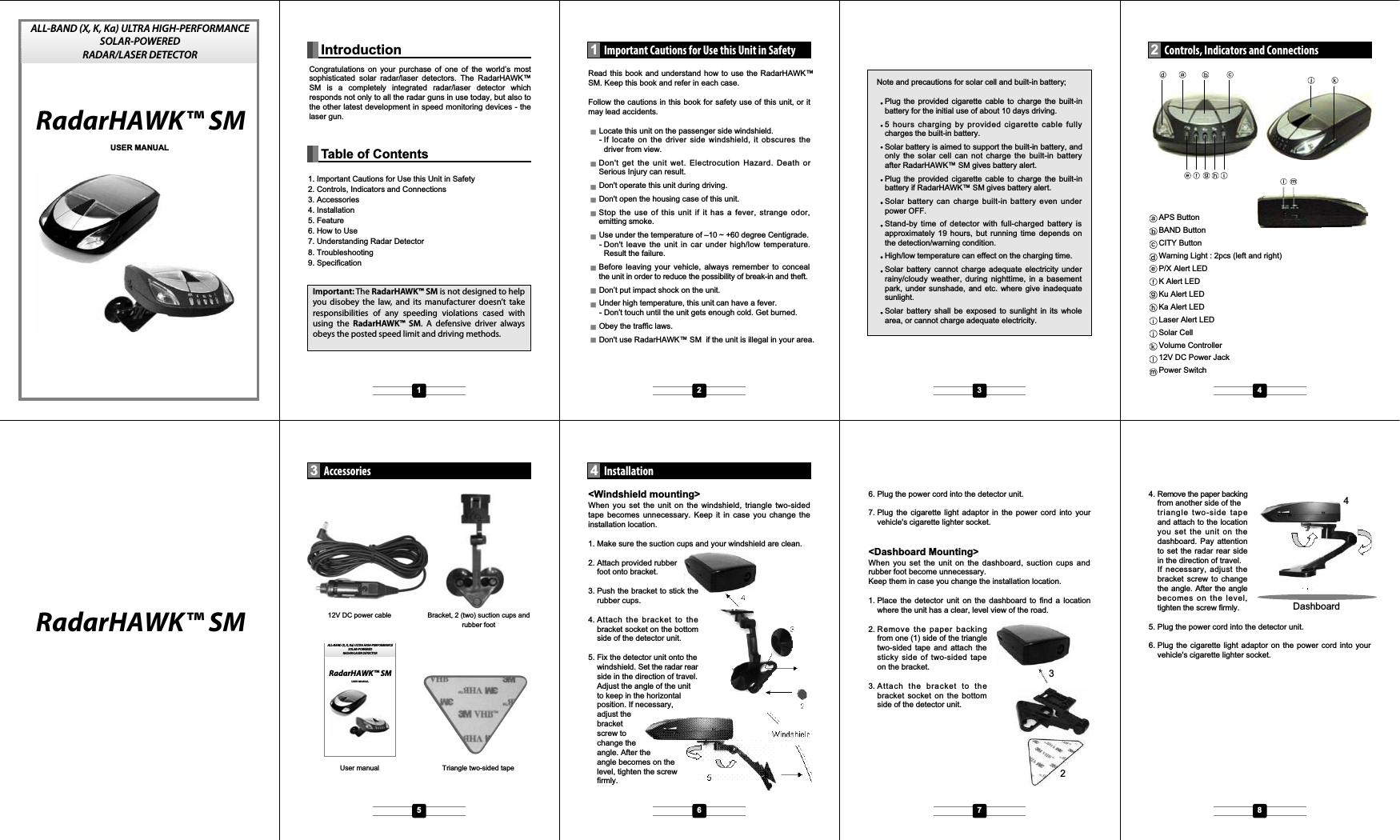
![Auto mute and Auto DIM controlThe unit alert with reduced audio alarms and with reduced LEDbrightness for continuously detected signals. When an alert isconstantly reported for radar/laser signal, the unit willautomatically reduce the audio sound level and the LEDbrightnessAUTOMUTE- Detected 3 level signal (strong signal strength) : Audiosound level will reduce after 10sec.- Detected 1~2 level signal (low~middle signal strength) :Audio sound level will reduce after 30sec.AUTODIM- Detected 3 level signal(strong signal strength) : LEDbrightness will reduce after 5sec.- Detected 1~2 level signal(low~middle signal strength): LEDbrightness will reduce after 10sec.Sensitivity control (City/Highway mode)Press the CITY button repeatedly each time to toggle the“CITY” or “HIGHWAY” mode. The factory default is theHIGHWAY mode. CITY mode starts with 1 beep and theHIGHWAY with 2 beeps.TEST modePress and hold the BAND button for longer than 3 seconds andthe unit will demonstrate how it operates when radar and lasersignals are detected. The unit will displays every visual alertmessage with the corresponding unique audio tone for its own.After the tutorial sequence is all done the screen will stay at theall-indicator-on status for 5 seconds and gets back to thestand-by mode. XK Ku Ka LASERBAND ON/OFFPress BAND button to off (or on) X band (9.900GHz/10.525GHz).Automated function/featuresProtection against VG-2The unit must be completely invisible to (undetectable by) theVG-2 interceptorAlert PriorityThe unit must report on the FIFO (first in first out) basis.However, when there is laser signals detected at a time, it mustreport by the following priority rule:- Laser signal- Radar signalRadarHAWK™ SM detects radar signals by buzzer alertand indicator while driving. The buzzer alert and indicatorwarning lighting change in accordance with increasing/de-creasing of the radar signals.Frequency of radar/laser signalsX band : 9.900GHz, 10.525 GHzKu band: 13.450GHzK band : 24.125 GHz, 24.150GHzSuper wide Ka band : 33.400~36.000GHz.Laser : 905nmPolice Speed Control MachineRadarHAWK™ SM detects Radar transmitter measuresthe speed of vehicle. Automatically the transmitter takesthe photo of the violation speeding vehicle.This system has variety like Stationary Installation Type, GunType and Car Portable Type.NoteRadar detector may detect interruption signals such from;Automatic doorWireless CCTV systemVehicle monitor systemMobile phone radiation baseConfirm the following points if any problem found;Trouble of power-on operationBattery exhaustion/battery shutoff - Recharge by theCigarette plug cable.Power switch is off - turn on the power switch.Trouble of battery rechargeSunlight is not enough - Confirm it can be rechargeable bythe Cigarette plug cable.Fuse short - Change the fuse of cigarette plug.Duration of rechargeable battery life - Use the unit by theCigarette plug cable.Trouble of soundNo SoundPower switch is off - turn on the power switch.Setting of the sound is small - Change the setting.Band function is off - press the Band button and change themode.City mode is on - press the City/Highway button and changeto the Highway mode.The police transmitter doesn't use the radar system.The police transmitter is power-off.Main SpecificationDetection format Dual conversion superheterodyneOperating voltage 12V DC (max 16V DC)Rechargeable battery built in 3.6V, 400mA Ni/Cd batteryOperating temperature -10 to +60 degree CStorage temperature -20 to +85 degree CStand-by time appx. 19hours with full-charged batteryDimension W x D x H (mm) 72 x 122 x 32.2sg041.xppathgieWBand and FrequenciesBand Frequency ToleranceX band 9.900GHz +/-25MHz10.525GHz +/-25MHzKu band 13.450GHz +/-25MHzK band 24.125GHz +/-100MHz24.150GHz +/-100MHzSuperwide Ka band 34.700GHz +/-1300MHzLaser 905nm +/-50nmPower connectionSlide the power switch forward the display to turn the unit on.If the unit has low battery status, Plug the adapter of the powercord (12V DC) into the lighter in your vehicle and the pin at theother side of the power cord into the power jack of the unit.Start & PreambleSlide the power switch forward the display to turn the unit on.When powered on, the unit will beep and illuminate (blinking)all the indicators. After preamble the unit will start flashing thepower indicator.Low battery alertThe low battery alert will appear for 5sec when the batteryvoltage is low level. This will repeat every 10 minutes until nobattery power remains and the radar detector shuts off.“PW/X” LED will blink to alert low battery. Other LEDs are all offduring alert.Note : We suggest keeping the power cord readilyavailable. If your batteries are drained, the cord will allowyou to continue using your radar detector until yourecharge the batteries.APS (Automatic Power Save)Basic functionIf there is not a detected vibration signal for 5sec, The sound ismuted and LED brightness is reduced to 50% when there is adetected radar/laser signal at that time.Press the APS button repeatedly each time to toggle the APSON or APS OFF mode. The factory default is the APS ONmode. The APS ON mode starts with 1 beep and APS OFFmode starts with 2 beeps.When the unit operates in the APS ON mode – [P/X] LED isblinking with green color, but If there is not a detected vibrationsignal for 5sec, [P/X] LED is blinking with red color.When the unit operates in the APS OFF mode, [P/X] LED isalways blinking with red color. APS function should beoperated both in the +12V LINE MODE and BATTERY MODE.Sensitivity adjustmentThere is a piezo vibration sensor function added to the circuit.The sensitivity control operation is as follows;1. Sensor Sensitivity: High - Middle – Low (3 steps) Factorydefault is MIDDLE (for low-vibration sedan car)2. Press and hold APS button for three (3) seconds to entersensor sensitivity control mode (1 beep).3. Select HIGH or MIDDLE or LOW using the APS button(short press), then press and hold APS button again forthree (3) seconds to store and exit this mode.4. You can select the mode with the warning lamp LED (blue)display as follows.High: left - ON, right - ON Middle: left - ON, right - OFFLow : left - OFF, right - ONAPO (Automatic Power Off)To conserve battery power, the unit will automatically shut offwhen there is not a detected vibration signal for 3minute,- APO function operates both APS on and off mode.- APO function should be operated under alerting.- APO function should be operated both in the +12V LINEMODE and BATTERY MODE.To conserve battery power, MCU operate into Idle mode whenthe unit is shut off. If there is a detected vibration signal, theunit will turn on to resume the detection.Memory retentionThe unit keeps some of the operation modes in its memoryeven after the unit is powered off, so that the unit can rebootthe same user settings when it’s turned on again. They are;- APS on/off mode- BAND on/off mode- City/Highway mode- Sensitivity adjustment (High/Middle/Low)Volume controlRotate the volume controller at the front anti-clockwise toincrease the audio level and clockwise to decrease. Themaximum audio level must be 85 +/- 5dB when measured atthe distance of 10cm from the buzzer.Specication9Troubleshooting8Understanding Radar Detector7How to Use6Mode X/Ku Band K /Ka BandHighway Full sensitivity Full sensitivityCity Reduce 20% Reduce 10%User interface keysA power switch at the left of the unit.A volume controller at the right of the unit.Three function buttons on the top of the unit:APS/SENS : APS on/off (on-1beep, off-2beep by shortpress), default APS on Press SENS to set APS sensitivityBAND : X band (9.900GHz/10.525GHz) on/off(on-1 beep,off-2 beep), default BAND onCITY : City/Highway(City-1beep, Highway-2beep), defaultHIGHWAYMain featuresDetects all radar/laser bandsUndetectable by VG-2360 degree laser coverageLED displayHighway/City mode (Detection sensitivity selection)Auto mute functionAuto Dim (LED brightness)APS (Auto Power Save) on/off APO (Auto Power Off)Low battery alertRetains memory on previously set operation modes afterpower offTest mode to demonstrate operationsMounts on windshield and dashboardOperates on the battery or a 12V power adapterRechargeable by solar cellX Band ON/OFFBuilt in rechargeable battery (NIMH AAA2/3 400mA@3.6V)LED DisplayWarning LED 2pcs : Lamp type LED, Blue color / left andright sidePW/X : chip LED, dual color(Green/Red)- APS on mode : Green blinking- APS off mode : Red blinking- X band Alert : Green onK : Red colorKu : Green colorKa : Yellow colorLaser : Red colorFeature5APS/SENS BAND/TEST CITY/HIWAY15 16 17 181014911 12 13P/X K Ku Ka LGNINRAWGNINRAW](https://usermanual.wiki/Q3-Innovations/RH-SM/User-Guide-810505-Page-2.png)