User Manual
QUICK USER GUIDE
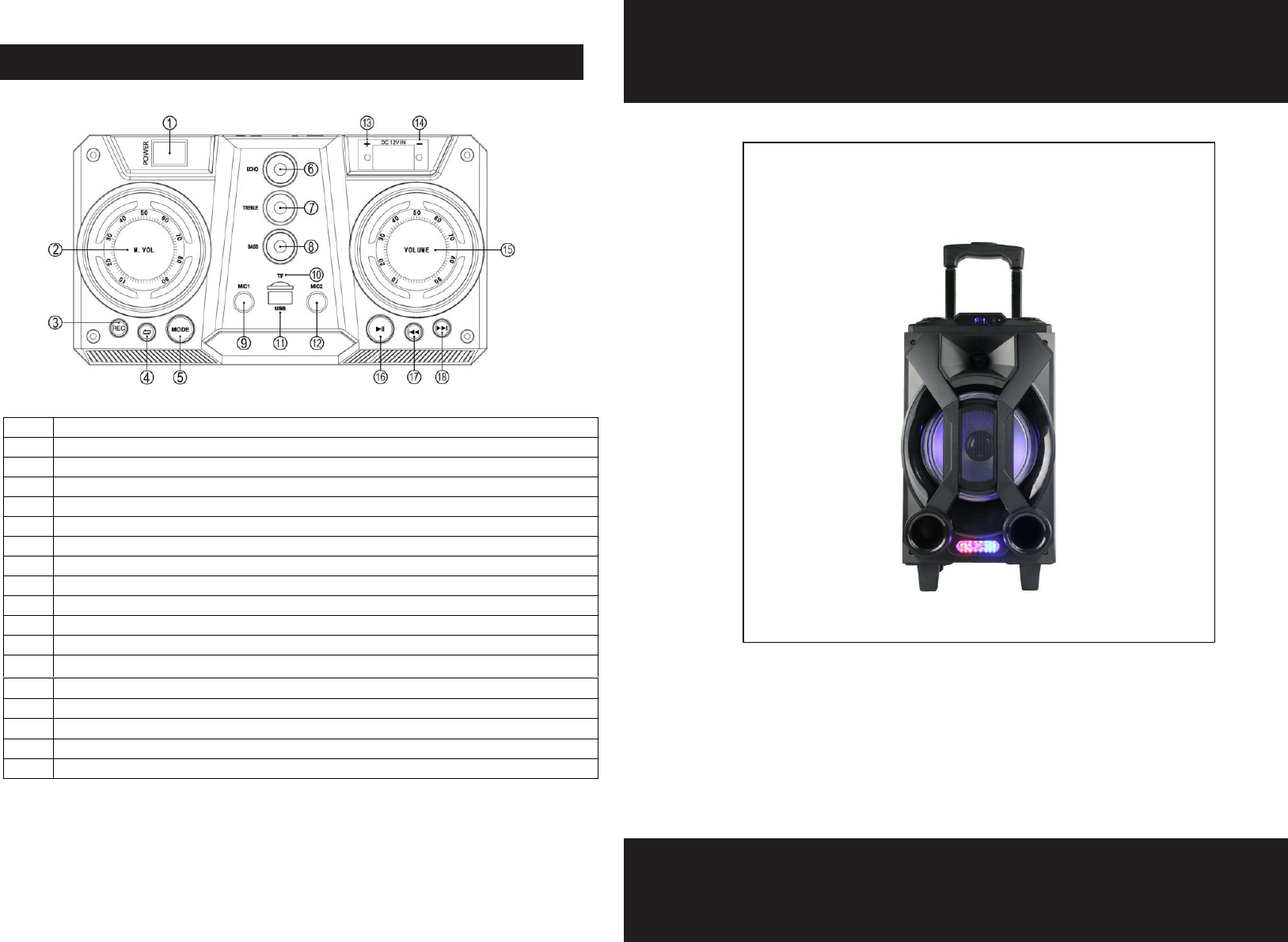
CONTROL PANEL
PBX-800
1
Power ON/OFF Swtich
2
Microphone Volume
3
Recording and Playback Function Keys
4
Playback / Loopback Button
5
Mode Select Button
6
Microphone Echo Effect Knob
7
TREBLE Knob
8
BASS Knob
9
Wired Microphone Input 1
10
Micro SD Card Socket
11
USB Storage Input Port
12
Wired Microphone Input 2
13
“+” 12V External DC Power Input - positive pole
14
“-” 12V External DC Power Input - negative pole
15
Main Volume
16
Previous Track / FM Station Button
17
Pause / Play Button
18
Next Track / FM Station Button
PHOTO

1. DC
9V IN :
Power
Adapter
Charger
Input
2. Charging Indicator Light. Red = Charging, Blue = Charge Complete
3. Microphone Sound Priority Button (over music)
4. Auxiliary Audio Input (3.5mm socket)
LINE IN JACK
1. Connect a 3.5mm Audio Cable to the LINE IN JACK of the unit and to your external
audio devices eg. MP3 player or Discman etc
2. Then select the LINE feature by pressing the MODE button.
3. Begin playback via your external devices.
FM RADIO
1. Select FM (mode) feature by pressing the MODE button.
2. Press the PLAY / PAUSE button to begin automatically searching and saving available
radio stations.
3. Press PREVIOUS / NEXT button to select a specific radio station.
NOTE: PLEASE MOVE YOUR SPEAKER, TO ENSURE BEST RECEPTION
USB / MICRO SD JACK
1. Insert USB drive or Micro SD card for playback
2. Playback will begin automatically
3. Press the PLAY / PAUSE button to pause and play
4. Press PREVIOUS / NEXT button to select a specific track for playback.
BLUETOOTH
1. Select the BT (Bluetooth) feature by pressing the MODE button
2. Turn the Bluetooth feature on, on your portable device
3. Find and pair with your “QFX PBX-800” speaker
4. Press the PLAY / PAUSE button to begin playback
MIC IN JACK
Plug in the wired microphone(not included). The wired microphone is then ready to use.
RECORDER FUNCTION
1. Insert a USB Drive (Thumb Drive) and plug in your wired microphone
2. Press the REC/REPLAY button
3. The speaker will then display RECO and begin recording.
4. To stop recording,press the REC/REPLAY button again
5. To playback a recorded file, press the PREVIOUS and NEXT buttons to select a track for
playback after finishing the record.
SPECIFICATIONS
Power Output: 8W
Frequency Response: 100Hz-20KHz
Power input: DC 9V
P.M.P.O: 1000W
CHARGING INDICATOR
During charging, the charging indicator light will turn RED.
When charging is complete, the charging indicator light will turn BLUE.
CONNECTING THE WALL CHARGER
1. Connect the wall charger to your speaker
2. When the battery is fully charged, disconnect the charger from the speaker
first, then the wall charger from the wall.
Note: The speaker can be used normally during charging
ON / OFF SWITCH
Press and hold the ON / OFF Switch to turn the speaker ON and again to turn
the speaker off.
LIGHT ON / OFF SWITCH
Long press the MODE button to turn the LED lights ON and again to turn the
light off.
VOLUME
Turn the volume knob anti-clockwise to decrease the volume and clockwise to
increase the volume.
PREVIOUS / NEXT BUTTON
To search for a specific song to playback, press the PREVIOUS / NEXT button to
either go forward or backwards through track keys.
NOTE: This equipment has been tested and found to comply with the limits for a
Class B digital device, pursuant to part 15 of the FCC Rules. These limits are
designed to provide reasonable protection against harmful interference in a
residential installation. This equipment generates uses and can radiate radio
frequency energy and, if not installed and used in accordance with the instructions,
may cause harmful interference to radio communications. However, there is no
guarantee that interference will not occur in a particular installation. If this
equipment does cause harmful interference to radio or television reception, which
can be determined by turning the equipment off and on, the user is encouraged to
try to correct the interference by one or more of the following measures:
- Reorient or relocate the receiving antenna.
- Increase the separation between the equipment and receiver.
-Connect the equipment into an outlet on a circuit different from that to which the
receiver is connected.
-Consult the dealer or an experienced radio/TV technician for help
Changes or modifications not expressly approved by the party responsible for compliance
could void the user's authority to operate the equipment.
This device complies with Part 15 of the FCC Rules. Operation is subject to the following two
conditions:
(1) this device may not cause harmful interference, and
(2) this device must accept any interference received, including interference that may
cause undesired operation.