QI SHENGLONG IST QSLMA877 Bluetooth Speaker User Manual Manual

SHENZHEN QI SHENGLONG INDUSTRIALIST CO.,LTD. Bluetooth Speaker Manual

Manual

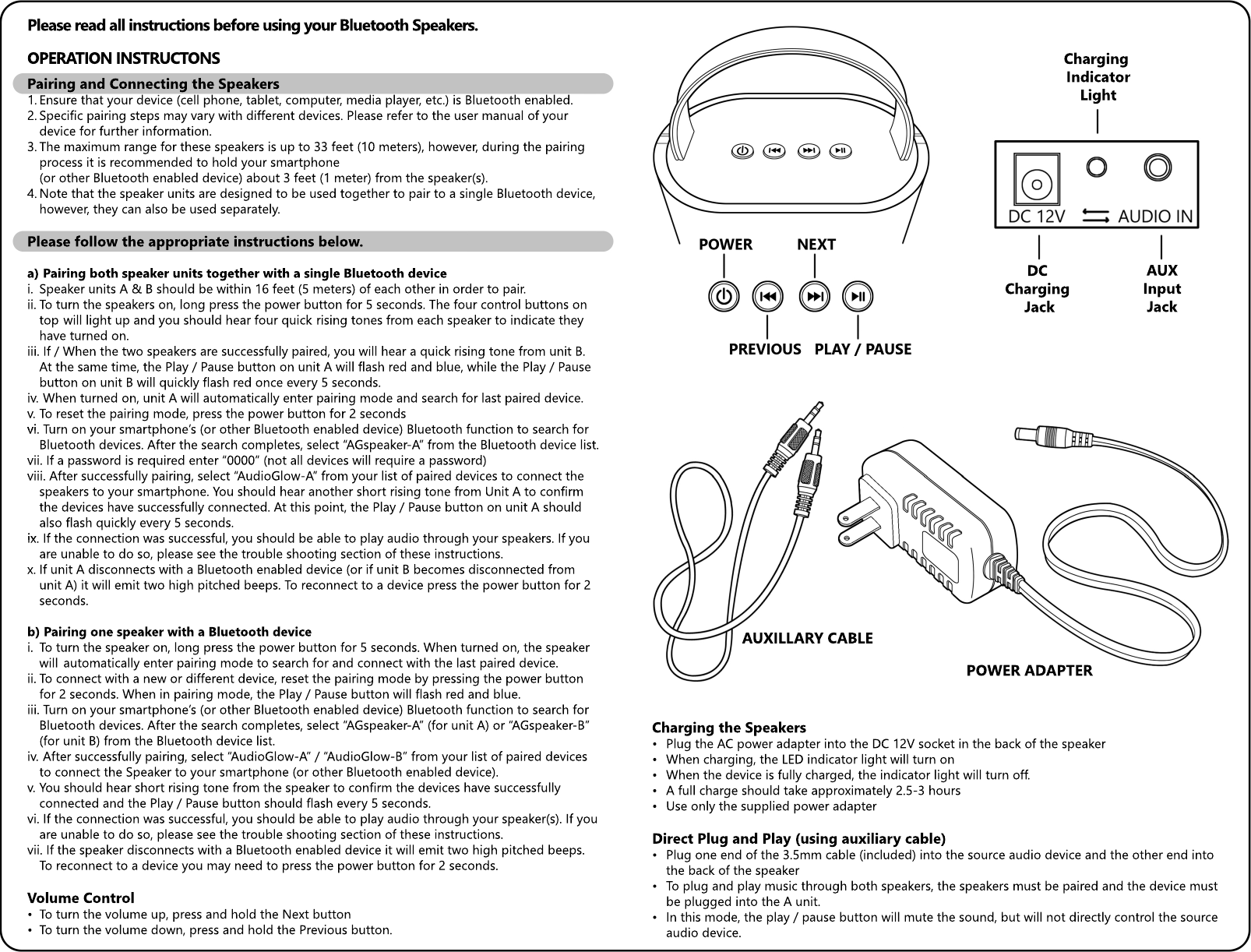
AUXInputJackDC Charging JackCharging IndicatorLightAUXILLARY CABLEPOWER ADAPTERCharging the Speakers• Plug the AC power adapter into the DC 12V socket in the back of the speaker• When charging, the LED indicator light will turn on• When the device is fully charged, the indicator light will turn off.• A full charge should take approximately 2.5-3 hours• Use only the supplied power adapterDiDirect Plug and Play (using auxiliary cable)• Plug one end of the 3.5mm cable (included) into the source audio device and the other end into  the back of the speaker• To plug and play music through both speakers, the speakers must be paired and the device must  be plugged into the A unit.  • In this mode, the play / pause button will mute the sound, but will not directly control the source  audio device. Pairing and Connecting the Speakers1. Ensure that your device (cell phone, tablet, computer, media player, etc.) is Bluetooth enabled.2. Specific pairing steps may vary with different devices. Please refer to the user manual of your  device for further information.3. The maximum range for these speakers is up to 33 feet (10 meters), however, during the pairing  process it is recommended to hold your smartphone   (or other Bluetooth enabled device) about 3 feet (1 meter) from the speaker(s).4. Note that the speaker units are designed to be used together to pair to a single Bluetooth device,  however, they can also be used separately.Please follow the appropriate instructions below.a)  Pairing both speaker units together with a single Bluetooth devicei. Speaker units A & B should be within 16 feet (5 meters) of each other in order to pair. ii. To turn the speakers on, long press the power button for 5 seconds. The four control buttons on   top  will light up and you should hear four quick  rising tones from each speaker to indicate they  have turned on. iii. If / When the two speakers are successfully paired, you will hear a quick rising tone from unit B.  At the same time, the Play / Pause button on unit A will flash red and blue, while the Play / Pause  button on unit B will quickly flash red once every 5 seconds.iv.  When turned on, unit A will automatically enter pairing mode and search for last paired device. v. To reset the pairing mode, press the power button for 2 seconds vi. vi. Turn on your smartphone’s (or other Bluetooth enabled device) Bluetooth function to search for  Bluetooth devices. After the search completes, select “AGspeaker-A” from the Bluetooth device list.vii. If a password is required enter “0000” (not all devices will require a password)viii. After successfully pairing, select “AudioGlow-A” from your list of paired devices to connect the  speakers to your smartphone. You should hear another short rising tone from Unit A to confirm  the devices have successfully connected. At this point, the Play / Pause button on unit A should  also flash quickly every 5 seconds.ix.ix.  If the connection was successful, you should be able to play audio through your speakers. If you  are unable to do so, please see the trouble shooting section of these instructions.x. If unit A disconnects with a Bluetooth enabled device (or if unit B becomes disconnected from  unit A) it will emit two high pitched beeps. To reconnect to a device press the power button for 2  seconds.b) Pairing one speaker with a Bluetooth devicei. To turn the speaker on, long press the power button for 5 seconds. When turned on, the speaker   will  automatically enter pairing mode to search for and connect with the last paired device.ii. To connect with a new or different device, reset the pairing mode by pressing the power button  for 2 seconds. When in pairing mode, the Play / Pause button will flash red and blue. iii. Turn on your smartphone’s (or other Bluetooth enabled device) Bluetooth function to search for  Bluetooth devices. After the search completes, select “AGspeaker-A” (for unit A) or “AGspeaker-B”  (for unit B) from the Bluetooth device list.iv.  After successfully pairing, select “AudioGlow-A” / “AudioGlow-B” from your list of paired devices   to connect the Speaker to your smartphone (or other Bluetooth enabled device).v. You should hear short rising tone from the speaker to confirm the devices have successfully  connected and the Play / Pause button should flash every 5 seconds.vi. If the connection was successful, you should be able to play audio through your speaker(s). If you  are unable to do so, please see the trouble shooting section of these instructions.vii. If the speaker disconnects with a Bluetooth enabled device it will emit two high pitched beeps.  To reconnect to a device you may need to press the power button for 2 seconds.VVolume Control• To turn the volume up, press and hold the Next button• To turn the volume down, press and hold the Previous button.Please read all instructions before using your Bluetooth Speakers.OPERATION INSTRUCTONS
Maintenance• When playing music, to avoid blowing out the speaker, start at a low volume and gradually  increase the volume to a desired level.• Keep the speaker unit dry and out of damp areas to prevent the internal circuitry from being  damaged.• Keep the product out of direct sunlight or very hot and very cold areas.•• Do not try to disassemble or repair the unit.• Take care to not let the item fall as the internal parts would be easily damaged.• If dirty, the item can be wiped with a gentle damp cloth.• Be careful not to allow water to get inside the unit and allow the unit to completely dry before  turning on.• Do not clean with abrasive chemicals or pads / brushes.Frequently Asked Questions•• Can I purchase additional speakers to pair even more units with my Bluetooth device?• Unfortunately no, currently Bluetooth technology does not allow for connections with more than  two speakers.• Can I still answer a phone call while playing music?• If there is an incoming call while the speaker(s) is connected to your phone and playing audio,  it will pause when you answer the call. If playback does not resume when the call is ended you  may need to press   the power button for 2 seconds to re-enter pairing mode.Warnings• Do not use where directly exposed to water or allow moisture inside the speakers.• Do not open – no user serviceable parts inside.• Manage in accordance with disposal laws.SpecificationsSpeakers: 2 x 5 Watts RMS (8Ω)Signal Signal to Noise Ratio (dB): >85:1Speaker driver: 52mm diameterDistortion: ≤0.1%Bluetooth Protocol: ISSC v3.0 + EDRBluetooth Range: up to 33 feet (10 meters)FCC ComplianceThis device complies with Part 15 of the FCC Rules.Operation is subject Operation is subject to the following two conditions:1) This device may not cause harmful interference, and2) This device must accept any interference received, including interference that may cause  undesired operationThis equipment can radiate radio frequency energy and if not installed and used in accordance with the instructions, may cause undesired interference to radio or television reception, which can be determined by turning the equipment off and on, the user is encouraged to try to corcorrect the interference by one or more of the following measures:• Reorient or relocate the receiving antenna• Increase the distance between the equipment and the receiver.• Plug the equipment into an outlet on a circuit different from that to which the receiver is connected.• Consult the dealer or an experienced radio / TV technician for help.This Class B digital apparatus complies with Canadian ICES-003Cet appareil numerique de la classe B est conforme a la norme NMB-003 du Canada.The BlueThe Bluetooth® word mark and logos are registered trademarks owned by Bluetooth SIG, Inc. and any use of such marks by CSN Inc. is under license. Other trademarks and trade names are those of their respective owners.Trouble ShootingThe speakers do not turn on• To turn the speakers on, push the power button for 5 seconds. If the power button is not pushed  for 5 full seconds, the device may not stay on.• When the speakers are on, the four control buttons at the top of the speakers are backlit with blue  lights.•• Note the speakers will automatically turn off when not in use.• Make sure the speakers are full charged.There’s no Bluetooth link between my device and the Speaker unit• Ensure the unit entered pairing mode• Ensure the device is in the effective working range• The units can only be paired to one device at a time. So be sure that all other nearby Bluetooth  enabled devices are not currently connected with the Light Bulb Speakers (AGspeaker-A and   AGspeaker-B). Also be sure that the Bluetooth enabled device you want to connect to the  speakers are not connected to any other devices.• On some Bluetooth enabled devices, you may need to select “AGspeaker-A” (or “AGspeaker-B) as  your default audio output device.• Delete the AGspeaker A / AGspeaker-B name entry from your Bluetooth device paired memory list  and re-pair your device with the light bulb speaker• Turn the switch / lamp OFF and ON again to restart the pairing / connection process•• Turn your Bluetooth device OFF and ON again to restart the pairing / connection process.There’s no sound coming out of the speaker• Check that the speakers are turned on and sufficiently charged.• Check if the volume is turned down too low on the speaker or your Bluetooth device.• Check that there is no other device connected to your speaker.• Check whether the music source is selected.• Check the connection between your Bluetooth device and the speaker.•• Turn speakers OFF and ON again to restart the pairing / connection process.• Turn your Bluetooth device OFF and ON again to restart the pairing / connection process.• Try to re-pair your device with the speakerThe audio coming from the speaker crackles or has a loud hum or buzz.• Turn the volume down using the remote or your Bluetooth device.• Move the speaker away from potential interference sources such as microwave ovens, fluorescent  lights, etc.•• The speaker may be out of range (33 feet / 10 meters).• Try to re-pair / reconnect your device with the speaker.The speaker seems to pick up signals from other devices• While the dependable range for the speakers are 33 feet, in certain conditions they may be able  to reach further. Bluetooth signals can also penetrate walls. So in some situations, a neighbor or  someone in another room may be able to pair their device with the speakers. • To disconnect and reset the pairing function to pair or connect to a different device push the   power button for 2 seconds.My speaker keeps beeping• If the speaker is turned on and someone walks in and out of range with a Bluetooth device that has  been connected with the speaker in the past (and the speaker is not currently paired or connected  with any other devices) then the bulb will automatically reconnect when it is in range and emit a  rising tone to confirm the connection, then emit two high pitched tones when the device goes out  of range and the speaker is no longer connected.

Navigation menu