Quantenna Communications QSKU-610 802.11an AP User Manual QBOX610 Installation guide rev1 0

Quantenna Communications, Inc 802.11an AP QBOX610 Installation guide rev1 0

Contents

User Manual

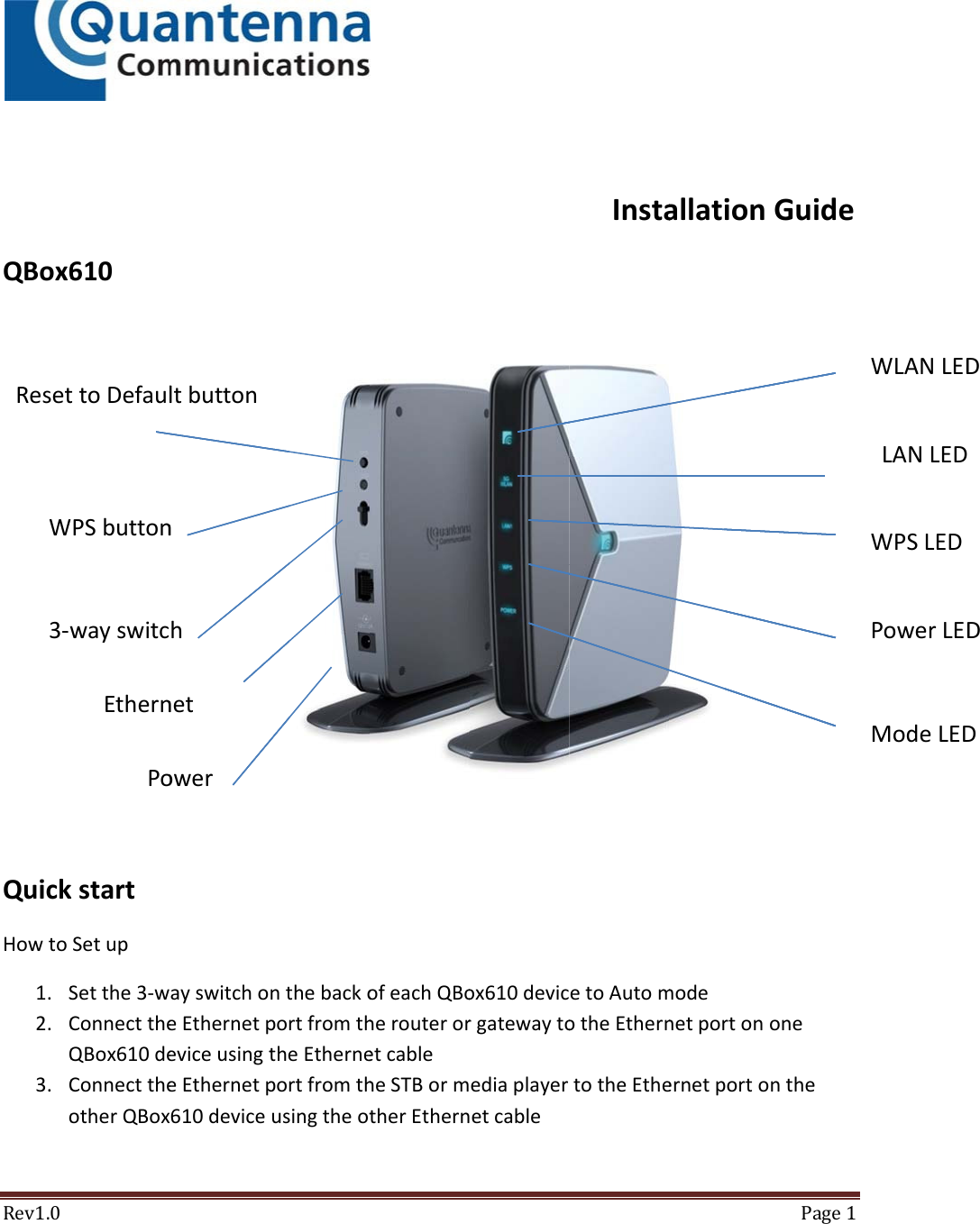
Rev1.0QBox6QuickHowto1. S2. CQ3. CoResetW3‐w610kstartSetupSetthe3‐wConnecttheQBox610deConnecttheotherQBoxttoDefaulWPSbuttonwayswitcEthernPoayswitchoeEthernetpeviceusingteEthernetp610deviceltbutton n h netower nthebackoportfromththeEtherneportfromthusingtheot ofeachQBoherouteroretcableheSTBormtherEthernox610devicrgatewaytoediaplayeretcableInstaetoAutomotheEtherntotheEtheallationmodenetportonernetportoPage1GuideonentheLANLEDWPSLEDPowerLEDWLANLEDModeLEDDDD
Rev1.0 Page24. PoweronbothQBox610devices,waitforWLANLEDtoblinkandthenturnsolidbluewhentheboxesareassociatedtogetherModeSelectionTheModeswitchatthebackpanelofQBox610devicecanbesettooneofthefollowingthreemodes:AutoMode:If3‐wayswitchissettoAuto,theQBox610willsetitsmodeautomatically.IfthedeviceisconnectedtoarouterorgatewayitwillruninAPModeotherwiseitwillruninSTAMode.(QBx610issettoAutoModefromthefactory).APMode:Ifthe3‐wayswitchissettoAP,thedeviceactsasanaccesspoint.ThedeviceinAPModeshouldbeconnectedtoarouterorgateway.STAMode:Ifthe3‐wayswitchissettoSTAMode,thedeviceactsasaclientanditcanbeconnectedtootherwireddevicessuchasSTBandmediaplayer.TheQBox610inSTAModeconnectswirelesslytotheQBox610whichissettoAPMode.ConfiguretheQBox610viaWebGUIBydefault,DHCPclientisenabledinQBox610anditwillcontinuetorequesttheDHCPservertogettheIPaddress.ToconfiguretheQBox610viaWebGUI:1. ConnecttheQBox610toaPCviaEthernetportonthebackofthedevice2. OpenanywebbrowserandtypetheIPaddressesaccordingbelow:http://192.168.1.100fortheboxinAPmodeifrouterorgatewayisnotconnectedhttp://192.168.1.200fortheboxinSTAmodeifrouterorgatewayisnotconnected3. IfrouterorgatewayisconnectedtoQBOX610,pleasefindouttheIPaddressesoftheQBOX610devicesfromtheattachedtablesoftherouterorgateway.Pleaselookforthedevicename:Quantenna4. YoucanstartconfiguringthedevicesviaWebGUI.Defaultusernameisuserandpasswordisuser.TroubleshootingOnAPdevice:
Rev1.0 Page3OncetheQBox610isconnectedtoGateway,itfetchestheIPaddressfromtheGatewayandtheModeLEDshouldbeONifthedeviceissettoAPorAuto.IftheModeLEDisOFF,checkthethree‐wayswitchtomakesurethatitisonAPorAuto.Ifthethree‐switchisonAPorAutobuttheModeLEDisOFF,pleasecheckifgatewayDHCPserverisenabled.OnSTAdevice:TochecktheconnectionbetweenGatewayandSTAdevice,connectaPCtotheSTAdevicethroughEthernetconnectionandchecktheLANLEDandWLANLEDLANLEDLANLEDisonwhentheEthernetcableisconnectedandblinkingduringthetraffic.IftheLANLEDisOFF,makesuretheEthernetcableisconnectedtothedevice.WLANLEDWirelessLAN(WLAN)LEDisONwhenwirelessconnectionissetup.DuringtheassociationtheWLANLEDisblinking.IFWLANLEDisOFFmakesurethemodesaresetscorrectlyontheAPandSTAdevice,waitfor5minutesandthedevicesshouldconnect.Ifthedevicesarestillnotconnected,makesuretheyareapartatleast3mormovethedevicescloseriftheyareveryfarapart.WPSbuttonThesecuritymodeisenabledoneveryQBOX610devicebeforeshipment.Ifuserwantstoresetthesecuritykey,pushtheWPSbuttononbothQBOX610deviceswithin2minutestoactivatetheWPSfeature.TheWPSLEDwillstartblinkingandthenturnsolidoncethenewsecuritykeyisassigned.
Rev1.0 Page4FederalCommunicationCommissionInterferenceStatementThisequipmenthasbeentestedandfoundtocomplywiththelimitsforaClassBdigitaldevice,pursuanttoPart15oftheFCCRules.Theselimitsaredesignedtoprovidereasonableprotectionagainstharmfulinterferenceinaresidentialinstallation.Thisequipmentgenerates,usesandcanradiateradiofrequencyenergyand,ifnotinstalledandusedinaccordancewiththeinstructions,maycauseharmfulinterferencetoradiocommunications.However,thereisnoguaranteethatinterferencewillnotoccurinaparticularinstallation.Ifthisequipmentdoescauseharmfulinterferencetoradioortelevisionreception,whichcanbedeterminedbyturningtheequipmentoffandon,theuserisencouragedtotrytocorrecttheinterferencebyoneofthefollowingmeasures: Reorientorrelocatethereceivingantenna. Increasetheseparationbetweentheequipmentandreceiver. Connecttheequipmentintoanoutletonacircuitdifferentfromthattowhichthereceiverisconnected. Consultthedealeroranexperiencedradio/TVtechnicianforhelp.FCCCaution:Anychangesormodificationsnotexpresslyapprovedbythepartyresponsibleforcompliancecouldvoidtheuser’sauthoritytooperatethisequipment.ThisdevicecomplieswithPart15oftheFCCRules.Operationissubjecttothefollowingtwoconditions:(1)Thisdevicemaynotcauseharmfulinterference,and(2)thisdevicemustacceptanyinterferencereceived,includinginterferencethatmaycauseundesiredoperation.This device is going to be operated in 5.15~5.25GHz frequency range, it is restricted in indoor environment only.  
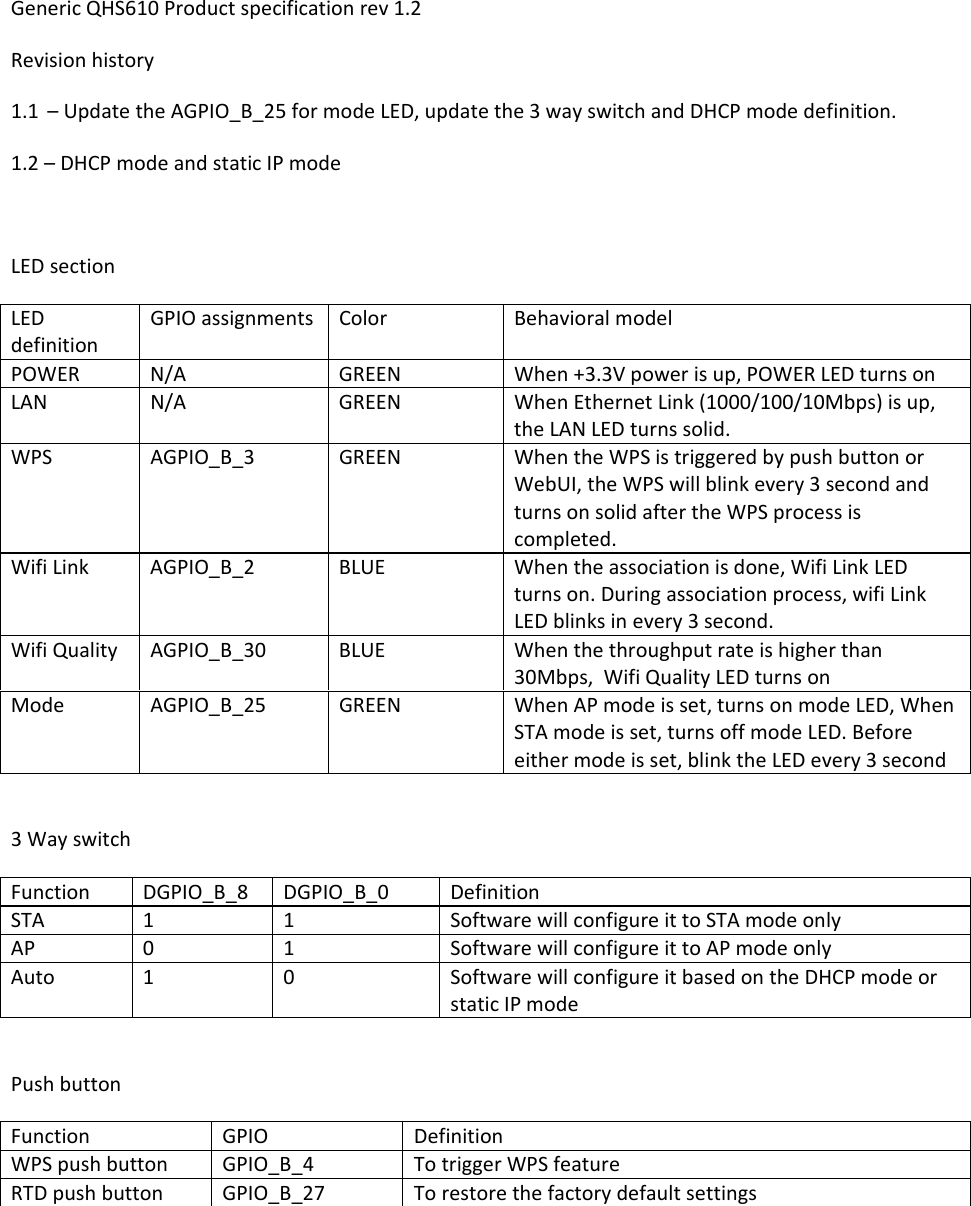
GenericQHS610Productspecificationrev1.2Revisionhistory1.1 –UpdatetheAGPIO_B_25formodeLED,updatethe3wayswitchandDHCPmodedefinition.1.2–DHCPmodeandstaticIPmodeLEDsectionLEDdefinitionGPIOassignmentsColorBehavioralmodelPOWERN/AGREENWhen+3.3Vpowerisup,POWERLEDturnsonLANN/AGREENWhenEthernetLink(1000/100/10Mbps)isup,theLANLEDturnssolid.WPSAGPIO_B_3GREENWhentheWPSistriggeredbypushbuttonorWebUI,theWPSwillblinkevery3secondandturnsonsolidaftertheWPSprocessiscompleted.WifiLinkAGPIO_B_2BLUEWhentheassociationisdone,WifiLinkLEDturnson.Duringassociationprocess,wifiLinkLEDblinksinevery3second.WifiQualityAGPIO_B_30BLUEWhenthethroughputrateishigherthan30Mbps,WifiQualityLEDturnsonModeAGPIO_B_25GREENWhenAPmodeisset,turnsonmodeLED,WhenSTAmodeisset,turnsoffmodeLED.Beforeeithermodeisset,blinktheLEDevery3second3WayswitchFunctionDGPIO_B_8DGPIO_B_0DefinitionSTA11SoftwarewillconfigureittoSTAmodeonlyAP01SoftwarewillconfigureittoAPmodeonlyAuto10SoftwarewillconfigureitbasedontheDHCPmodeorstaticIPmodePushbuttonFunctionGPIODefinitionWPSpushbuttonGPIO_B_4TotriggerWPSfeatureRTDpushbuttonGPIO_B_27Torestorethefactorydefaultsettings
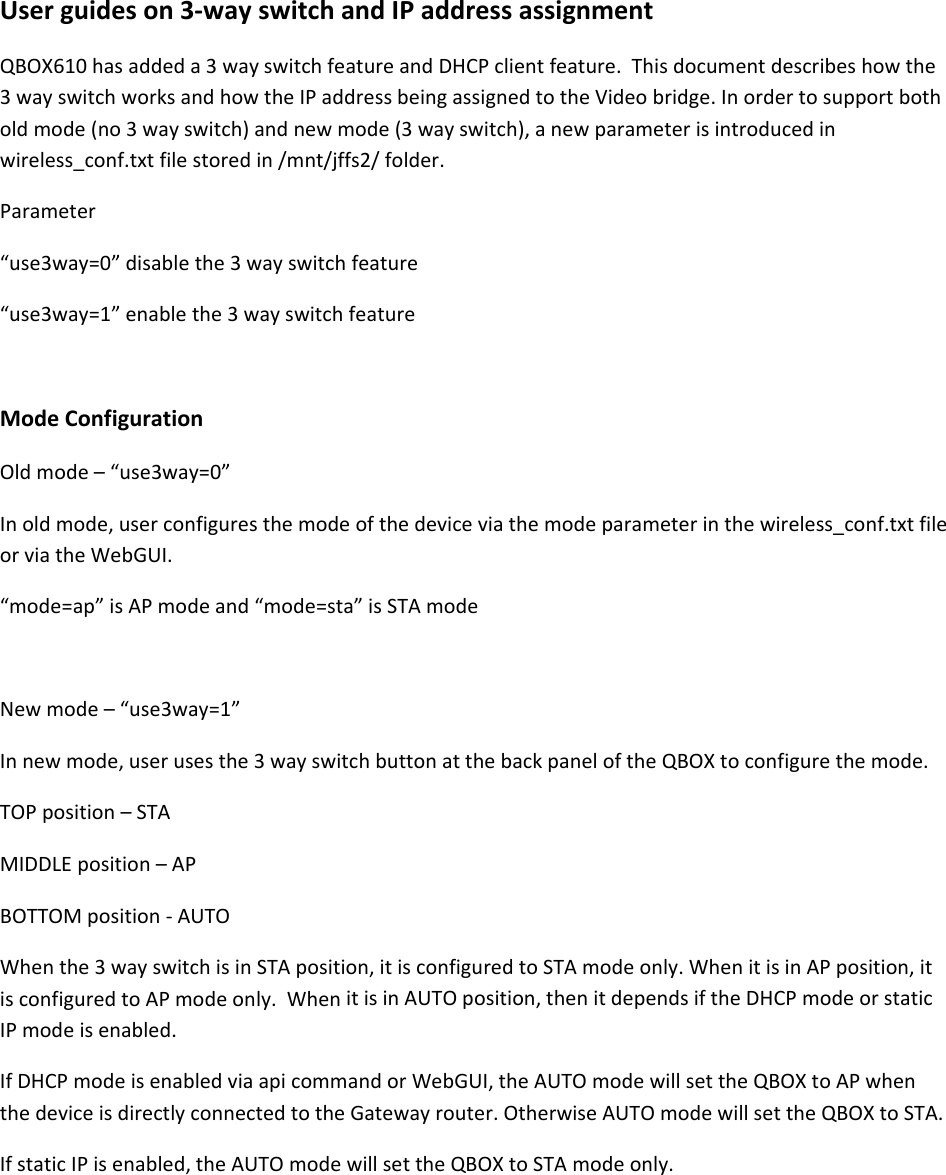
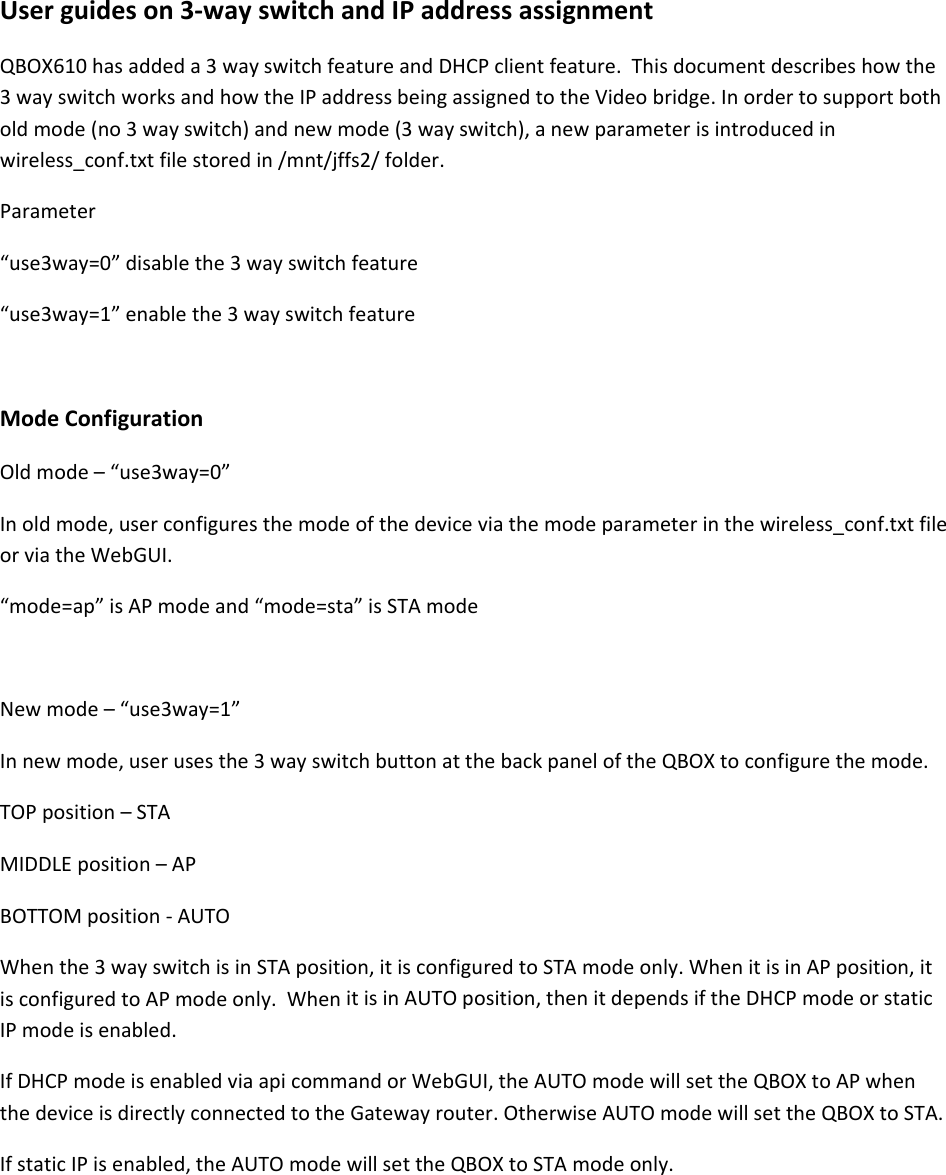
Userguideson3‐wayswitchandIPaddressassignmentQBOX610hasaddeda3wayswitchfeatureandDHCPclientfeature.Thisdocumentdescribeshowthe3wayswitchworksandhowtheIPaddressbeingassignedtotheVideobridge.Inordertosupportbotholdmode(no3wayswitch)andnewmode(3wayswitch),anewparameterisintroducedinwireless_conf.txtfilestoredin/mnt/jffs2/folder.Parameter“use3way=0”disablethe3wayswitchfeature“use3way=1”enablethe3wayswitchfeatureModeConfigurationOldmode–“use3way=0”Inoldmode,userconfiguresthemodeofthedeviceviathemodeparameterinthewireless_conf.txtfileorviatheWebGUI.“mode=ap”isAPmodeand“mode=sta”isSTAmodeNewmode–“use3way=1”Innewmode,userusesthe3wayswitchbuttonatthebackpaneloftheQBOXtoconfigurethemode.TOPposition–STAMIDDLEposition–APBOTTOMposition‐AUTOWhenthe3wayswitchisinSTAposition,itisconfiguredtoSTAmodeonly.WhenitisinAPposition,itisconfiguredtoAPmodeonly.WhenitisinAUTOposition,thenitdependsiftheDHCPmodeorstaticIPmodeisenabled.IfDHCPmodeisenabledviaapicommandorWebGUI,theAUTOmodewillsettheQBOXtoAPwhenthedeviceisdirectlyconnectedtotheGatewayrouter.OtherwiseAUTOmodewillsettheQBOXtoSTA.IfstaticIPisenabled,theAUTOmodewillsettheQBOXtoSTAmodeonly.
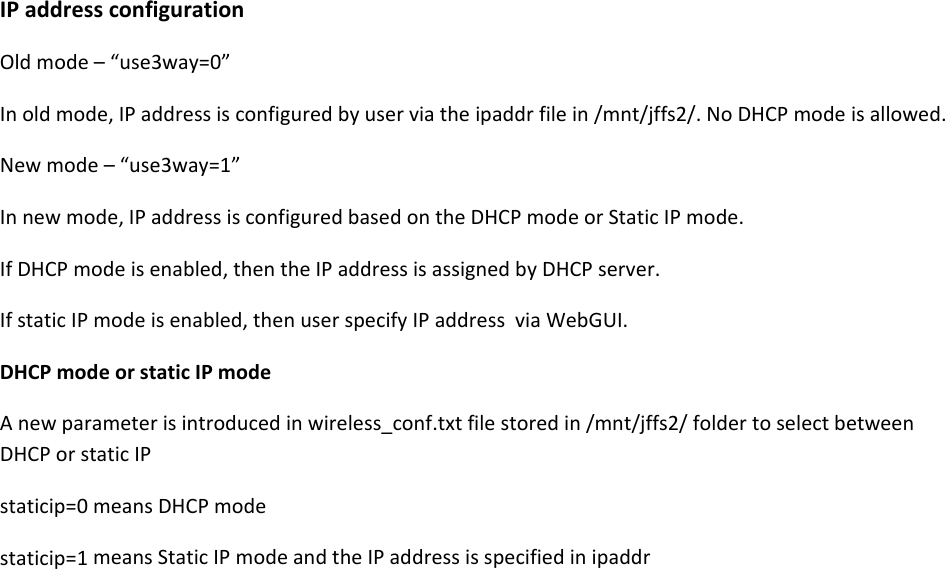
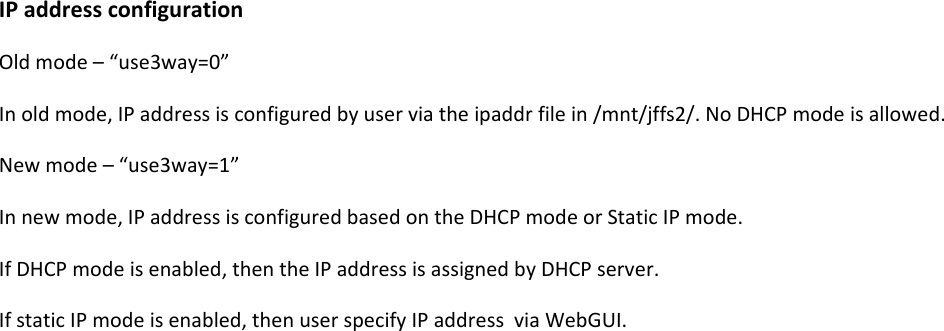
IPaddressconfigurationOldmode–“use3way=0”Inoldmode,IPaddressisconfiguredbyuserviatheipaddrfilein/mnt/jffs2/.NoDHCPmodeisallowed.Newmode–“use3way=1”Innewmode,IPaddressisconfiguredbasedontheDHCPmodeorStaticIPmode.IfDHCPmodeisenabled,thentheIPaddressisassignedbyDHCPserver.IfstaticIPmodeisenabled,thenuserspecifyIPaddressviaWebGUI.DHCPmodeorstaticIPmodeAnewparameterisintroducedinwireless_conf.txtfilestoredin/mnt/jffs2/foldertoselectbetweenDHCPorstaticIPstaticip=0meansDHCPmodestaticip=1meansStaticIPmodeandtheIPaddressisspecifiedinipaddr
Userguideson3‐wayswitchandIPaddressassignmentQBOX610hasaddeda3wayswitchfeatureandDHCPclientfeature.Thisdocumentdescribeshowthe3wayswitchworksandhowtheIPaddressbeingassignedtotheVideobridge.Inordertosupportbotholdmode(no3wayswitch)andnewmode(3wayswitch),anewparameterisintroducedinwireless_conf.txtfilestoredin/mnt/jffs2/folder.Parameter“use3way=0”disablethe3wayswitchfeature“use3way=1”enablethe3wayswitchfeatureModeConfigurationOldmode–“use3way=0”Inoldmode,userconfiguresthemodeofthedeviceviathemodeparameterinthewireless_conf.txtfileorviatheWebGUI.“mode=ap”isAPmodeand“mode=sta”isSTAmodeNewmode–“use3way=1”Innewmode,userusesthe3wayswitchbuttonatthebackpaneloftheQBOXtoconfigurethemode.TOPposition–STAMIDDLEposition–APBOTTOMposition‐AUTOWhenthe3wayswitchisinSTAposition,itisconfiguredtoSTAmodeonly.WhenitisinAPposition,itisconfiguredtoAPmodeonly.WhenitisinAUTOposition,thenitdependsiftheDHCPmodeorstaticIPmodeisenabled.IfDHCPmodeisenabledviaapicommandorWebGUI,theAUTOmodewillsettheQBOXtoAPwhenthedeviceisdirectlyconnectedtotheGatewayrouter.OtherwiseAUTOmodewillsettheQBOXtoSTA.IfstaticIPisenabled,theAUTOmodewillsettheQBOXtoSTAmodeonly.
IPaddressconfigurationOldmode–“use3way=0”Inoldmode,IPaddressisconfiguredbyuserviatheipaddrfilein/mnt/jffs2/.NoDHCPmodeisallowed.Newmode–“use3way=1”Innewmode,IPaddressisconfiguredbasedontheDHCPmodeorStaticIPmode.IfDHCPmodeisenabled,thentheIPaddressisassignedbyDHCPserver.IfstaticIPmodeisenabled,thenuserspecifyIPaddressviaWebGUI.

Navigation menu