Quanzhou Tesunho Electronics TM980 Mobile Network Radio User Manual TM 980

Quanzhou Tesunho Electronics Co., Ltd Mobile Network Radio TM 980

User manual

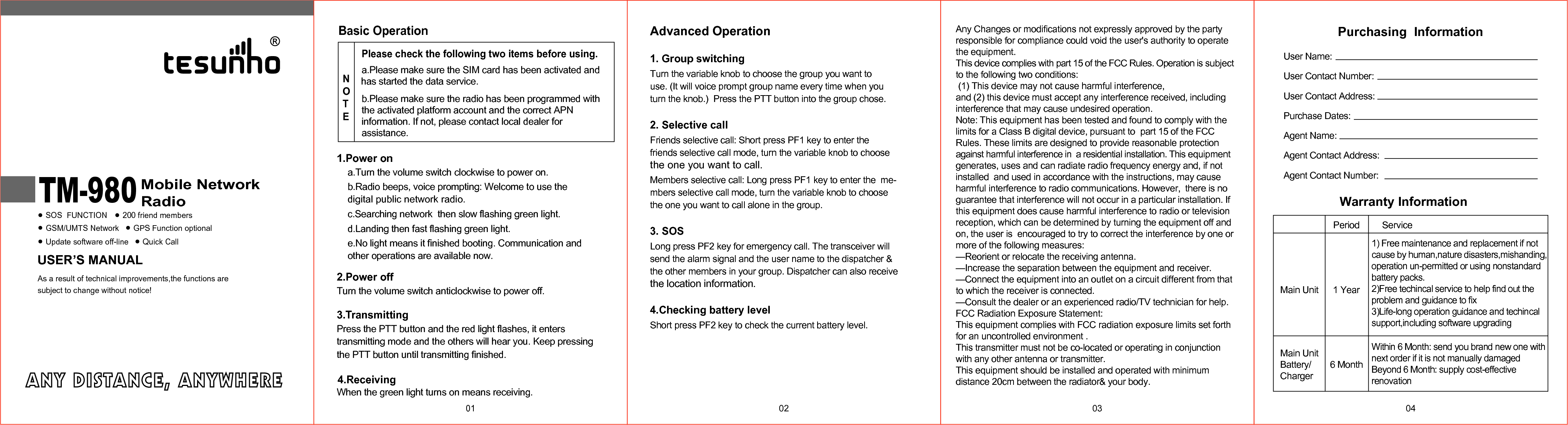
USER’S MANUALMobile NetworkRadioSOS  FUNCTION 200 friend membersGSM/UMTS Network GPS Function optionalUpdate software off-lineAs a result of technical improvements,the functions aresubject to change without notice!Quick CallTM-980 01Advanced Operation1. Group switchingTurn the variable knob to choose the group you want to use. (It will voice prompt group name every time when you  turn the knob.)  Press the PTT button into the group chose.2. Selective callFriends selective call: Short press PF1 key to enter the  friends selective call mode, turn the variable knob to choosethe one you want to call.Members selective call: Long press PF1 key to enter the  me-mbers selective call mode, turn the variable knob to choosethe one you want to call alone in the group.3. SOSLong press PF2 key for emergency call. The transceiver will send the alarm signal and the user name to the dispatcher & the other members in your group. Dispatcher can also receive the location information.4.Checking battery levelShort press PF2 key to check the current battery level.02 03a.Please make sure the SIM card has been activated and has started the data service.b.Please make sure the radio has been programmed with the activated platform account and the correct APN information. If not, please contact local dealer for assistance.Basic OperationPlease check the following two items before using.NOTE1.Power ona.Turn the volume switch clockwise to power on.b.Radio beeps, voice prompting: Welcome to use the digital public network radio.c.Searching network  then slow flashing green light.d.Landing then fast flashing green light.e.No light means it finished booting. Communication and other operations are available now. 2.Power offTurn the volume switch anticlockwise to power off.3.TransmittingPress the PTT button and the red light flashes, it enters transmitting mode and the others will hear you. Keep pressing4.ReceivingWhen the green light turns on means receiving. the PTT button until transmitting finished.Purchasing  InformationUser Name:User Contact Number:User Contact Address:Purchase Dates:Agent Name:Agent Contact Address:Agent Contact Number:04Warranty InformationMain UnitPeriod Service1) Free maintenance and replacement if notcause by human,nature disasters,mishanding,operation un-permitted or using nonstandardbattery packs.2)Free techincal service to help find out theproblem and guidance to fix 3)Life-long operation guidance and techincalsupport,including software upgradingWithin 6 Month: send you brand new one with next order if it is not manually damagedBeyond 6 Month: supply cost-effective renovation1 Year6 MonthMain UnitBattery/ChargerAny Changes or modifications not expressly approved by the party responsible for compliance could void the user's authority to operate the equipment.This device complies with part 15 of the FCC Rules. Operation is subject to the following two conditions: (1) This device may not cause harmful interference, and (2) this device must accept any interference received, including  interference that may cause undesired operation.Note: This equipment has been tested and found to comply with the limits for a Class B digital device, pursuant to  part 15 of the FCC Rules. These limits are designed to provide reasonable protection against harmful interference in  a residential installation. This equipment generates, uses and can radiate radio frequency energy and, if not installed  and used in accordance with the instructions, may cause harmful interference to radio communications. However,  there is no guarantee that interference will not occur in a particular installation. If this equipment does cause harmful interference to radio or television reception, which can be determined by turning the equipment off and on, the user is  encouraged to try to correct the interference by one or more of the following measures:   —Reorient or relocate the receiving antenna.  —Increase the separation between the equipment and receiver.  —Connect the equipment into an outlet on a circuit different from that to which the receiver is connected.  —Consult the dealer or an experienced radio/TV technician for help.FCC Radiation Exposure Statement:  This equipment complies with FCC radiation exposure limits set forth for an uncontrolled environment .This transmitter must not be co-located or operating in conjunction with any other antenna or transmitter.This equipment should be installed and operated with minimum distance 20cm between the radiator& your body.

Navigation menu