Quuppa LD-6L HAIP Locator User Manual

Quuppa Oy HAIP Locator

User Manual.pdf

Quuppa LD-6LInstallation Guide and Safety Information   1
ContentsFor your safety...............................................................................................3 1.Introduction................................................................................................4About this document..................................................................................4 2.Get started.................................................................................................5Parts............................................................................................................5Quuppa LD-6L main unit...................................................................................6Mounting Bracket.............................................................................................7Connect to power supply............................................................................8Option 1: Use Power over Ethernet (PoE).........................................................8Option 2: Use separate 12V DC power supply..................................................8Connect to HAIP network............................................................................8Reset factory settings.................................................................................9 3.Installation.................................................................................................9Safety Information......................................................................................9Installing Quuppa LD-6L ...........................................................................10Install mounting bracket to the ceiling/wall....................................................10Install Quuppa LD-6L main unit to the mounting bracket...............................11 4.Product information..................................................................................13 5.Care and Maintenance.............................................................................14Recycle.....................................................................................................14 6.Copyright and other notices.....................................................................15   2  Quuppa LD-6L Installation Guide and Safety Information  © 2013 Quuppa
For your safetyRead these simple guidelines. Not following them may be dangerous or illegal. Read the complete installation guide for further information.SWITCH ON SAFETYDo   not   switch   the   device   on   when   the   use   of   wireless   devices   is prohibited of when it may cause interference or dangerINTERFERENCEAll wireless devices may be susceptible to interference, which could affect performanceQUALIFIED SERVICEOnly qualified personnel may install, configure, or repair this productACCESSORIESUse   only   approved   accessories.   Do   not   connect   incompatible productsWhen connecting to any other device, read its user guide for detailed safety instructions. Do not connect incompatible products.   3  Quuppa LD-6L Installation Guide and Safety Information © 2013 Quuppa
 1. IntroductionQuuppa LD-6L (HAIP Locator) is a part of the Quuppa HAIP System. Other parts of the Quuppa HAIP system are Quuppa LD-6T (HAIP Tag) and Quuppa Positioning Engine  software.   The  Quuppa HAIP  System allows you to locate and track any objects equipped with HAIP Tags in an environment equipped with HAIP Locators.Read   this   guide   carefully   before   having   the   Quuppa   LD-6L professionally   installed.   Also,   watch   the   Quuppa   Site   Planner   and Quuppa  Deployment  tutorial videos before starting  to use the HAIP system. For the latest guides, additional information, and downloads related to your Quuppa product, go to www.quuppa.com/support.This product may contain small parts. Keep them out of reach of small children.About this documentMain features and first use of the Quuppa LD-6L are described in “Get started”,   page   5.   Installation   to   an   indoor   space   is   described   in “Installation”,   page   9.   Quuppa  LD-6L   should   only   be   installed   by   a qualified service technician using the original Quuppa parts supplied in the sales package.   4  Quuppa LD-6L Installation Guide and Safety Information © 2013 Quuppa
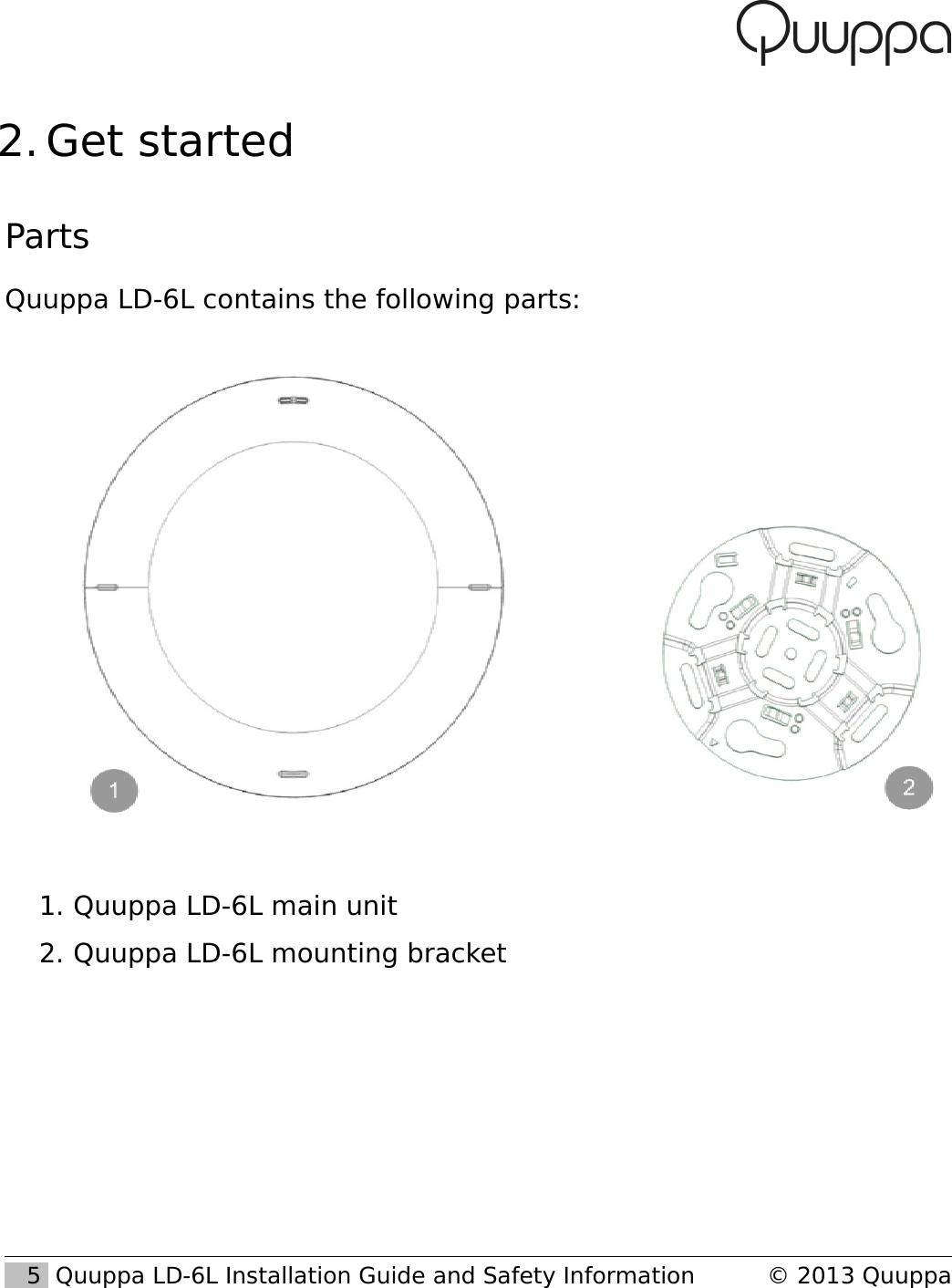
 2. Get startedPartsQuuppa LD-6L contains the following parts: 1. Quuppa LD-6L main unit2. Quuppa LD-6L mounting bracket   5  Quuppa LD-6L Installation Guide and Safety Information © 2013 Quuppa
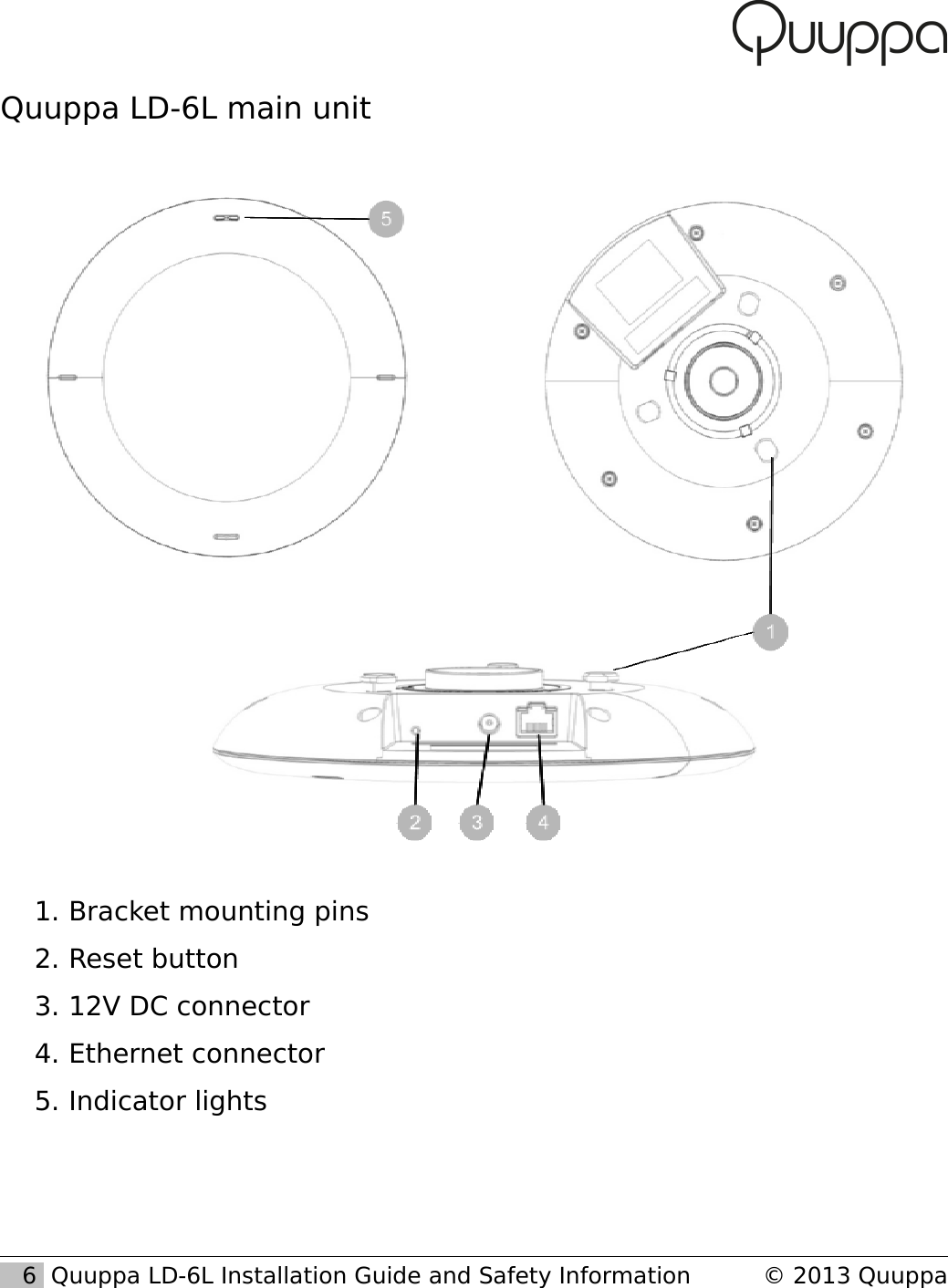
Quuppa LD-6L main unit1. Bracket mounting pins2. Reset button3. 12V DC connector4. Ethernet connector5. Indicator lights   6  Quuppa LD-6L Installation Guide and Safety Information © 2013 Quuppa
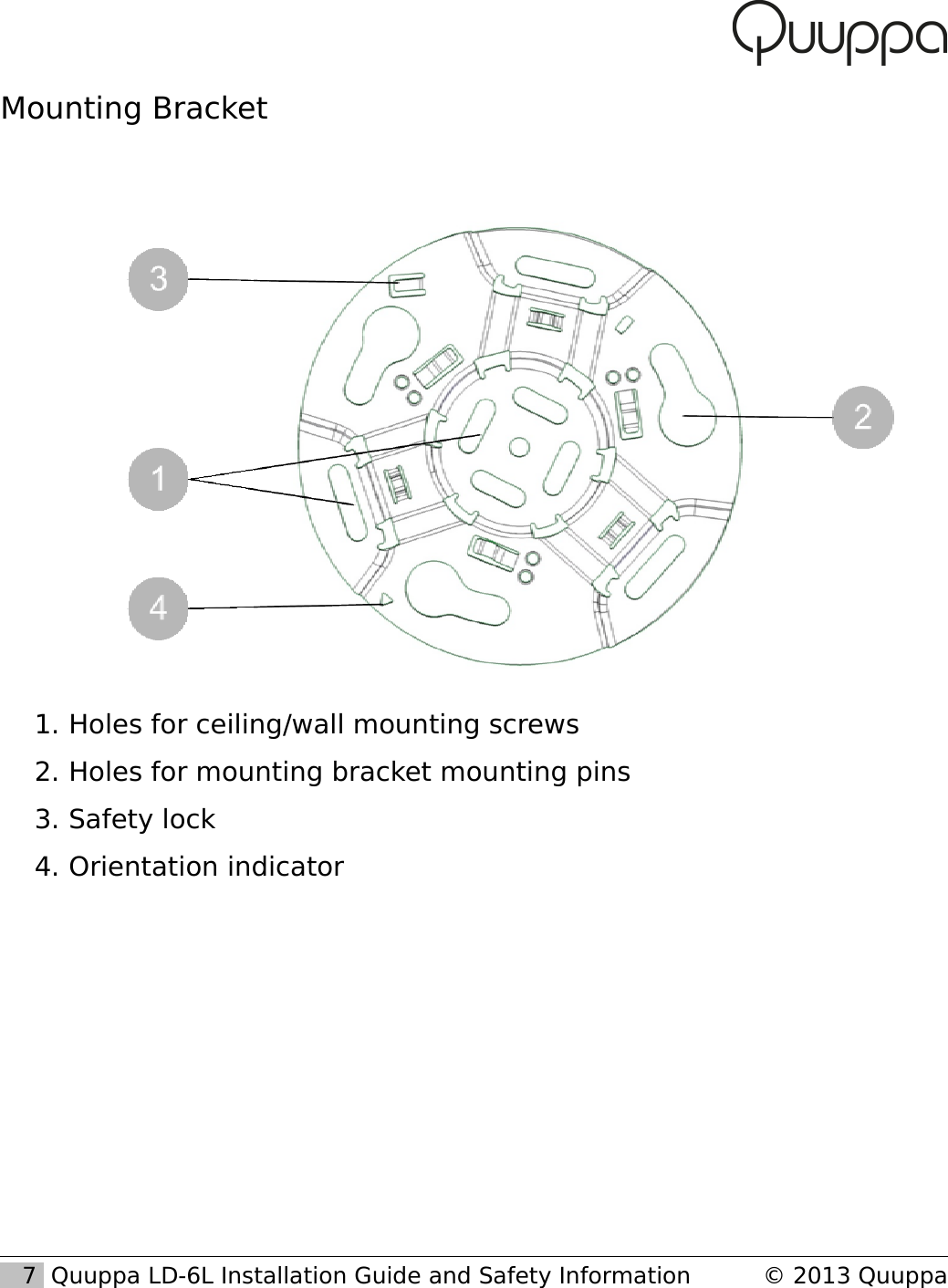
Mounting Bracket1. Holes for ceiling/wall mounting screws2. Holes for mounting bracket mounting pins3. Safety lock4. Orientation indicator   7  Quuppa LD-6L Installation Guide and Safety Information © 2013 Quuppa
Connect to power supplyOption 1: Use Power over Ethernet (PoE)Quuppa   LD-6L   supports   the   use   of   standard   PoE   (Power   over Ethernet) components, e.g. PoE switch or power injector, as its power source. Only use standard certified PoE devices.When using PoE, a separate DC power supply is not required.Option 2: Use separate 12V DC power supplyIf you are not using PoE components, connect Quuppa LD-6L to an approved DC power supply using the DC connector. Only use compatible   power   supplies.   Contact   Quuppa   in   case   of   any uncertainty regarding compatible power supplies.When   the   power   supply   is   connected   Quuppa   LD-6L   automatically switches on. The blue indicator light flashes once, after which the red indicator light turns constantly on, until Quuppa LD-6L is connected to the HAIP System.Connect to HAIP networkConnect Quuppa LD-6L to the HAIP System with Ethernet CAT5 UTP cable using the RJ-45 Ethernet socket. For your safety and to prevent any damage to Quuppa LD-6L, only connect Quuppa LD-6L to standard certified network components.The   red   indicator   light   is   flashing   when   Quuppa   LD-6L   is   properly connected   to   the   HAIP   System   but   not   activated   by   the   HAIP Positioning Engine software.Follow   the   Quuppa   Deployment   tutorial   video   to   configure   your Quuppa   LD-6L.   The   blue   indicator   light   is   flashing   or   constantly   lit    8  Quuppa LD-6L Installation Guide and Safety Information © 2013 Quuppa
when Quuppa LD-6L is activated by the HAIP system.Reset factory settingsTo   reset   factory   settings,   press   the   reset   button   while   connecting power  supply and  keep  it pressed   for  approximately  three seconds until the red indicator light stops flashing. After that the Quuppa LD-6L switches on normally with the default factory settings.  3. InstallationSafety InformationObserve the following safety guidelines when installing Quuppa LD-6L.•Only   a   qualified   service   technician   should   install   or   service Quuppa LD-6L using the approved original Quuppa parts supplied in   the   sales   package.   Faulty   installation   or   service   may   be dangerous and may invalidate any warranty which may apply to Quuppa LD-6L.•End   users   should   remember   that   Quuppa   LD-6L   comprises   of complex   technical   equipment   that   requires   professional installation using special tools and expert know-how.•Instructions given in this guide are general guidelines that apply to the installation  of  Quuppa   LD-6L   in  an indoor environment. However, due to   the   wide variety  of   indoor environments   and mounting   surfaces,   this   guide   cannot   consider   the   individual technical   requirements   relevant   for   any   particular   installation. Consult Quuppa in case you are uncertain about installation in a specific indoor environment.•Quuppa LD-6L is designed to operate either with a compatible 12V DC power supply, or by using a standard PoE (Power over Ethernet)   compatible   network   component   connected   at   the    9  Quuppa LD-6L Installation Guide and Safety Information © 2013 Quuppa
Ethernet socket. •For your safety, and to prevent any damage to Quuppa LD-6L, only use a compatible power supply. Contact Quuppa in case of any   uncertainty   regarding   compatible   power   supplies.   When using a PoE compatible network component as a power source, only use standard certified network components.•Quuppa   LD-6L   has   in-built   protection   for   over   voltage,   but   a connection using the wrong polarity might damage the unit.•When installing Quuppa LD-6L, make sure the installation surface can safely carry the weight of the equipment.•Your service technician or dealer may be able to provide you with information on alternatives for mounting the equipment suitably in different types of indoor environments.•Do not smoke when installing the equipment. Make sure there is no source of fire or flame nearby.•Make sure cables are placed so that they will not be subject to mechanical wear and tear.Installing Quuppa LD-6L This section describes how to install the Quuppa LD-6L onto a ceiling or wall of an indoor environment. The parts are described in “Parts”, p.5.Install mounting bracket to the ceiling/wallThe installation begins with the installation of the mounting bracket.TIPS: the mounting bracket has several holes for mounting screws. Use at least 60mm spacing between the holes to ensure a stable installation.   10  Quuppa LD-6L Installation Guide and Safety Information © 2013 Quuppa
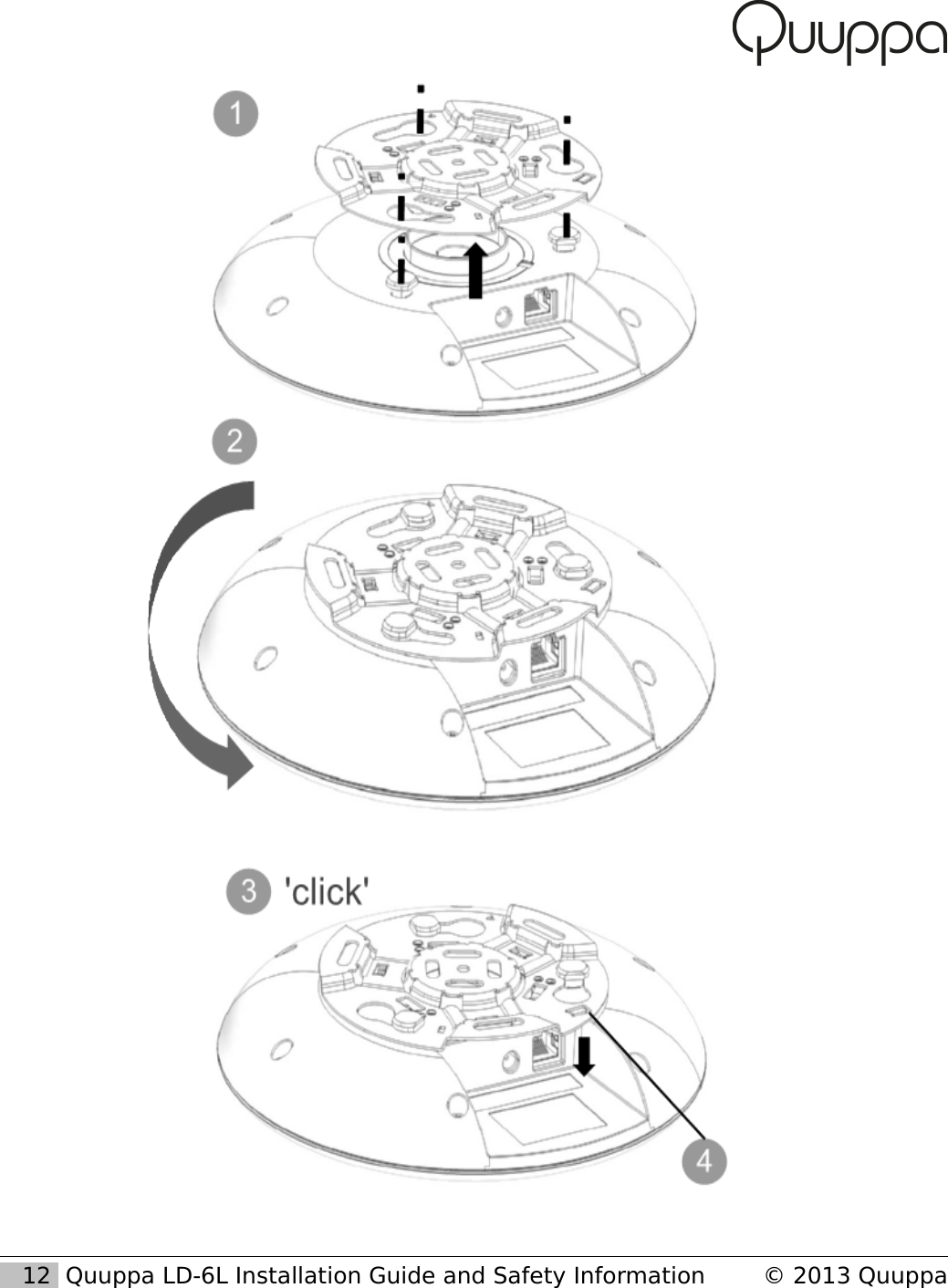
The orientation indicator in the mounting bracket (p.7) may be used to align   Quuppa   LD-6L   according   to   a   defined   orientation   in   the environment.WARNING: Never attach, mount, or connect the mounting bracket to hot surfaces. Always make sure that the surface can carry the weight of the equipment before installation.Not following general safety  regulation can cause damage to objects or injuries   to   people.   Rely   on   qualified   personnel   for   carrying   out   the installation of Quuppa LD-6L.Install Quuppa LD-6L main unit to the mounting bracket1. Align Quuppa LD-6L main unit with the bracket by ensuring the orientation   mark   in   the   mounting   bracket   is   aligned   with   the indicator lights on the Quuppa LD-6L main unit.2. Lift   Quuppa   LD-6L   main   unit   so   that   the   mounting   pins   go through the holes in the bracket (1).3. Rotate the Quuppa LD-6L main unit (2) until you hear a ‘click’ (3).4. Bend the safety lock down with a tip of a screwdriver to prevent Quuppa LD-6L main unit being accidentally detached (4).   11  Quuppa LD-6L Installation Guide and Safety Information © 2013 Quuppa
   12  Quuppa LD-6L Installation Guide and Safety Information © 2013 Quuppa
 4. Product information•Operating frequency range: 2400…2483 MHz•Maximum transmit power: +4 dBm EIRP•Operating temperature range: 0°C…+60°C•Storage temperature range: –10°C…+70°C•Input rating when using DC power supply: 12 V / 500 mA DC•Operating voltage when using PoE: 48 V•Typical power consumption: 2 W•Dimensions Locator main unit: Ø: 202 mm, h: 40 mm•Dimensions Locator mounting bracket: Ø: 120 mm, h: 5 mm•Weight: 500g   13  Quuppa LD-6L Installation Guide and Safety Information © 2013 Quuppa
 5. Care and MaintenanceYour Quuppa LD-6L is a product of superior design and craftsmanship and should be treated with care. The following suggestions will help you protect your warranty coverage.•Keep Quuppa LD-6L dry. Precipitation, humidity and all types of liquids   or   moisture   can   contain   minerals   that   will   corrode electronic circuits.•Do   not   use   or   store   Quuppa   LD-6L   in   dusty,   dirty   areas.   Its moving parts and electronic components can be damaged.•Do not attempt to open the Quuppa LD-6L.•Do   not   use   harsh   chemicals,   cleaning   solvents,   or   strong detergents to clean the locator. Only use a soft, clean, dry cloth to clean the surface of Quuppa LD-6L.•Do not paint Quuppa LD-6L. RecycleAlways return your used electronic products, batteries, and packaging materials to  dedicated  collection  points. This way you help prevent uncontrolled waste disposal and promote the recycling of materials. The crossed-out wheeled-bin symbol on your product, battery, literature,   or   packaging   reminds   you   that   all   electrical   and electronic   products,   batteries,   and   accumulators   must   be taken to separate collection at the end of their working life. This   requirement   applies   in   the   European   Union.   Do   not dispose of these products as unsorted municipal waste.    14  Quuppa LD-6L Installation Guide and Safety Information © 2013 Quuppa
 6. Copyright and other noticesDECLARATION OF CONFORMITYHereby,   Quuppa   Oy   declares   that   this   Quuppa   LD-6L   product   is   in compliance   with   the   essential   requirements   and   other   relevant provisions   of   Directive   1999/5/EC.   A   copy   of   the   Declaration   of Conformity can be found at http://www.quuppa.com/declaration-of-conformity© 2013 Quuppa. All rights reserved.FCC NOTICEThis   device   complies   with   Part   15   of   the   FCC   Rules.   Operation   is subject to the following two conditions: 1. This device may not cause harmful interference; and 2. This device must accept any interference received, including interference that may cause undesired operation. This equipment has been tested and found to comply with the limits for a Class   B  digital device,  pursuant   to  Part  15   of the  FCC   Rules. These   limits   are designed  to   provide   reasonable  protection   against harmful   interference   in   a   residential   installation.   This   equipment generates uses   and  can   radiate radio   frequency  energy  and,  if  not installed   and   used   in   accordance   with   the   instructions,   may   cause harmful interference to radio communications. However, there is no guarantee that interference will not occur in a particular installation. If this equipment does cause harmful interference to radio or television reception, which can be determined by turning the equipment off and on, the user is encouraged to try to correct the interference by one or more   of   the   following   measures:   Reorient   or   relocate   the   receiving antenna.   Increase   the   separation   between   the   equipment   and receiver. Connect the equipment into an outlet on a circuit different    15  Quuppa LD-6L Installation Guide and Safety Information © 2013 Quuppa
from that to which the receiver is connected. Consult the dealer or an experienced   radio/TV   technician   for   help.   NOTE:   FCC   Radiation Exposure   Statement:   This   equipment   complies   with   FCC   radiation exposure   limits   set   forth   for   an   uncontrolled   environment.   This transmitter must not be co-located or operating in conjunction with any other antenna or transmitter. NOTE: Changes or modifications not expressly   approved   by   Quuppa   could   void   the   user's   authority   to operate the equipment.Reproduction, transfer,  distribution,   or   storage   of   part   or   all   of   the contents   in   this   document   in   any   form   without   the   prior   written permission   of   Quuppa   is   prohibited.   Quuppa   operates   a   policy   of continuous development. Quuppa reserves the right to make changes and improvements to any of the products described in this document without prior notice. TO  THE MAXIMUM EXTENT PERMITTED BY  APPLICABLE LAW, UNDER NO  CIRCUMSTANCES  SHALL  QUUPPA  OR ANY OF ITS  LICENSORS  BE RESPONSIBLE FOR ANY LOSS OF DATA OR INCOME OR ANY SPECIAL, INCIDENTAL,   CONSEQUENTIAL   OR   INDIRECT   DAMAGES   HOWSOEVER CAUSED.THE CONTENTS OF THIS DOCUMENT ARE PROVIDED "AS IS". EXCEPT AS REQUIRED  BY APPLICABLE   LAW,   NO WARRANTIES   OF ANY  KIND, EITHER EXPRESS OR IMPLIED, INCLUDING, BUT NOT LIMITED TO, THE IMPLIED   WARRANTIES   OF   MERCHANTABILITY   AND   FITNESS   FOR   A PARTICULAR PURPOSE,  ARE MADE  IN RELATION   TO  THE ACCURACY, RELIABILITY OR CONTENTS  OF  THIS DOCUMENT. QUUPPA  RESERVES THE RIGHT TO REVISE THIS DOCUMENT OR WITHDRAW IT AT ANY TIME WITHOUT PRIOR NOTICE.The   availability   of   particular   products   may   vary   by   region.   Please check with your Quuppa dealer for details. This device may contain commodities,   technology   or   software   subject   to   export   laws   and regulations from the US and other countries. Diversion contrary to law is prohibited.   16  Quuppa LD-6L Installation Guide and Safety Information © 2013 Quuppa

Navigation menu