RASTAR GROUP XH150720TX 1 14 2.4GHz BMW I8 concept User Manual
RASTAR GROUP 1 14 2.4GHz BMW I8 concept
User Manual
AGE 6+
1:14 SCALE
Enjoy your BMW i8 Concept from RadioShack. Please
read this user’s guide before using your vehicle.
Features
• REALISTIC DETAIL
• INTERIOR LIGHT AND WORKING
HEADLIGHT, TAIL LIGHT
• INDEPENDENT SUSPENSION
• 2.4 GHz REMOTE CONTROL
Specifications
Speed ................. up to 492 ft/min (150m/min)
Control Distance ...............................66 ft (20m)
Climbing Angle ................................................. 10°
Specicationsaresubjecttochangeand
improvement without notice. Actual product may
vary from the images found in this document.
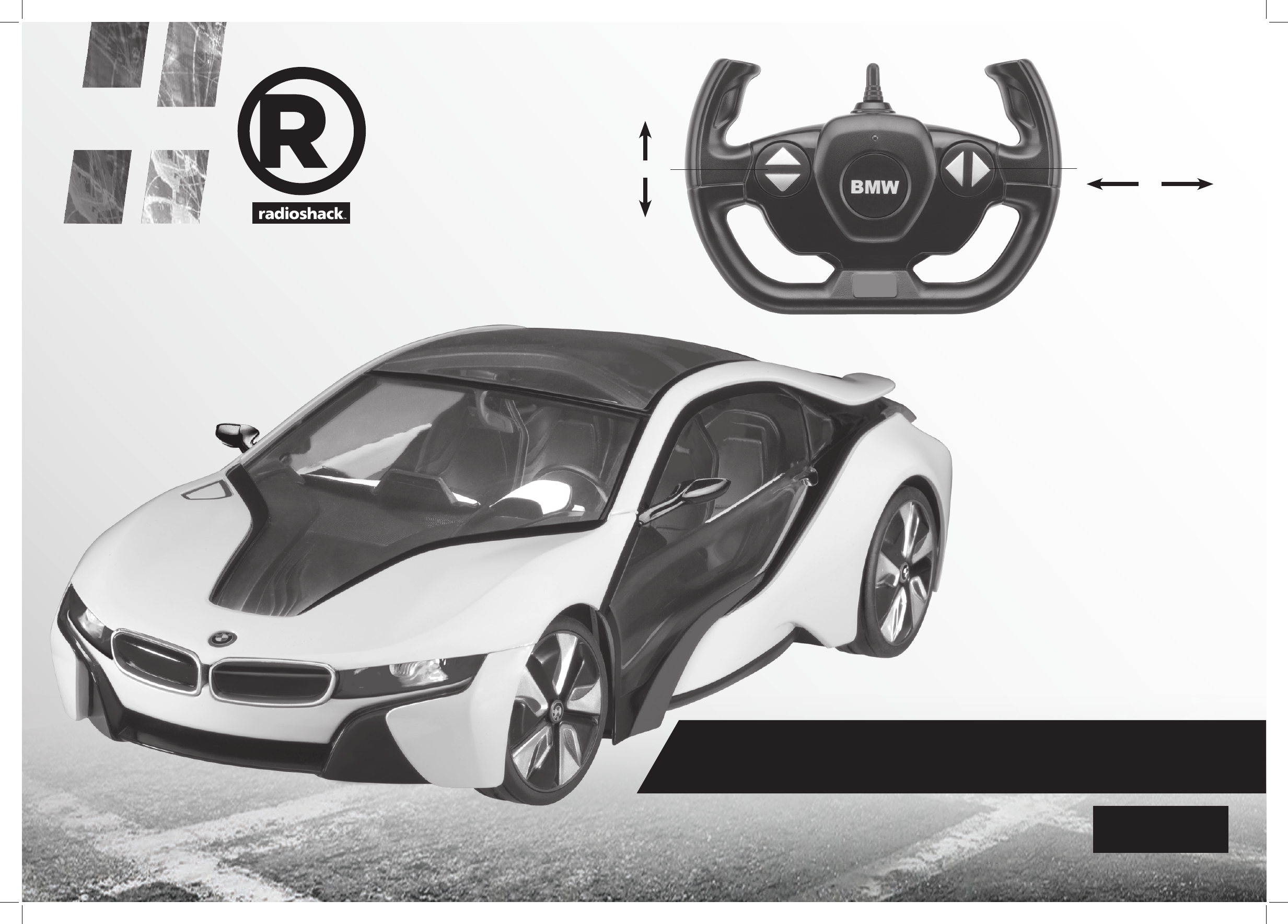
BMW i8 Concept
CHOKING HAZARD!
Small parts. Not for
children under 3 years.
What’s Included
• BMW i8 Concept
• Controller
• User’s Guide
Forward
Stop
Reverse
Left Straight Right
The BMW logo and BMW wordmark are trademarks of
BMW AG and used under license
6001353_UG_EN.indd 1 8/21/2015 2:13:14 PM
© 2015 Regal Worldwide Trading LLC. All rights reserved.
RadioShack is a registered trademark used by Regal Worldwide
Trading LLC under license of Global Franchising Corporation.
FCC Information
NOTE: This equipment has been tested and found to comply with the limits
for a Class B digital device, pursuant to Part 15 of the FCC Rules. These limits
are designed to provide reasonable protection against harmful interference
in a residential installation. This equipment generates, uses and can radiate
radio frequency energy and, if not installed and used in accordance with the
instructions, may cause harmful interference to radio communications.
However, there is no guarantee that interference will not occur in a particular
installation. If this equipment does cause harmful interference to radio or
televisionreception,whichcanbedeterminedbyturningtheequipmento
and on, the user is encouraged to try to correct the interference by one or
more of the following measures:
• Reorientorrelocatethereceivingantenna.
• Increasetheseparationbetweentheequipmentandreceiver.
• Connecttheequipmentintoanoutletonacircuitdierentfromthatto
which the receiver is connected.
• Consultthedealeroranexperiencedradio/TVtechnicianforhelp.
If you cannot eliminate the interference, the FCC requires that you stop using
your equipment.
WARNING: Changesormodicationstothisunitnotexpresslyapproved
by the party responsible for compliance could void the user’s authority to
operate the equipment.
This device complies with Part 15 of the FCC Rules. Operation is subject
to the following two conditions: (1) this device may not cause harmful
interference, and (2) this device must accept any interference received,
including interference that may cause undesired operation.
Pair the Controller
Before driving, you must pair the controller and vehicle. To
play with more than one BMW at the same time, pair each
vehicle separately.
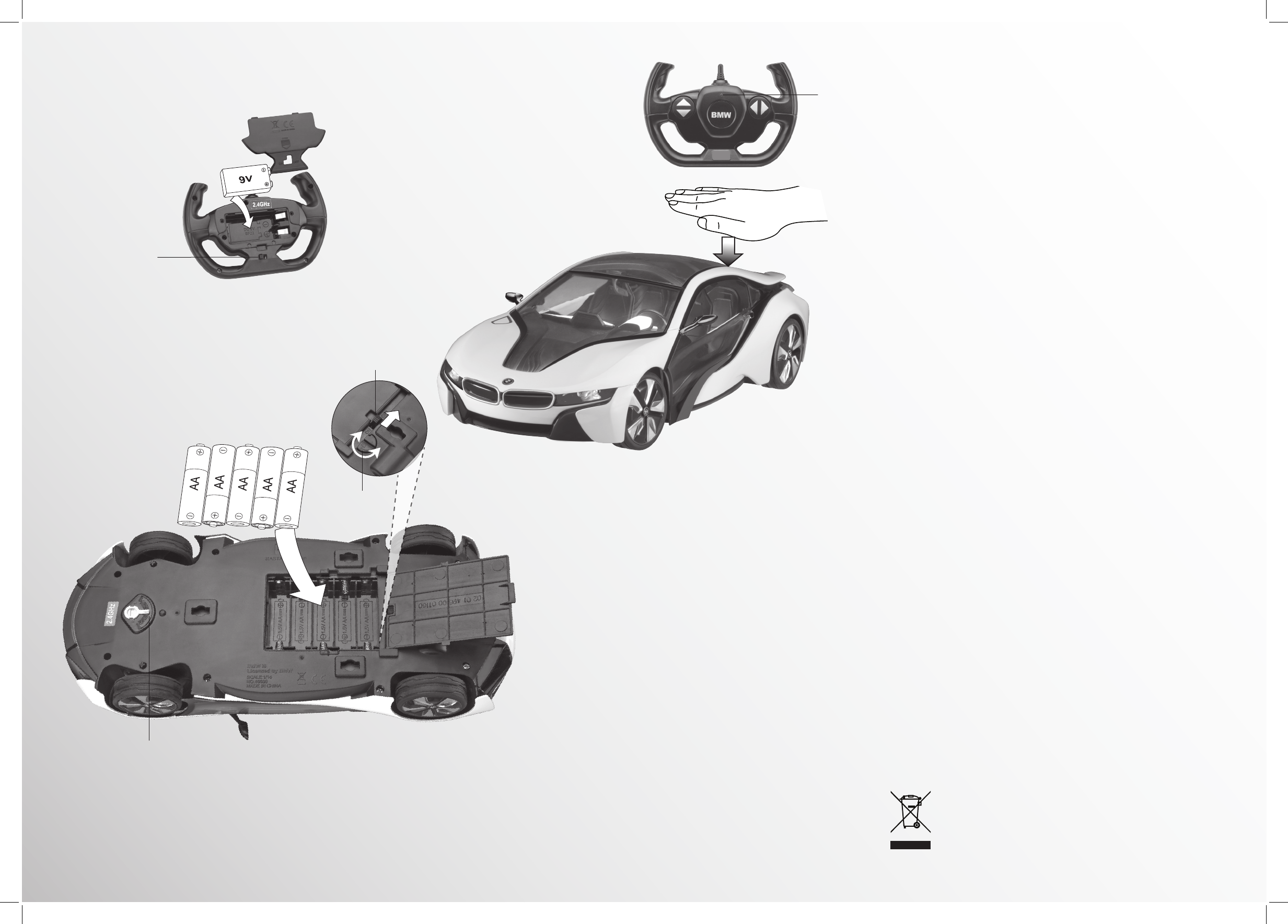
1. Place the controller within 3 ft. (1m) of the vehicle.
2. Turn on the controller and then the vehicle. The
controllerLEDashesquickly,andturnsowhen
paired.
Note: Ifpairingfails,turnothecontrollerandthe
vehicle, move closer, and then try again.
Safety and Care
• Turnoyourvehicleandcontrollerwhennotinuse.
• Not recommended for children under 6 years of age.
Adult supervision recommended at all times.
• A nearby CB radio can interfere with your vehicle’s
control. If this happens, move the vehicle away from
the CB radio.
• Do not play with your vehicle in the street.
• Avoid collisions with people and objects.
Battery Notes:
• For best performance use only fresh alkaline batteries
oftherequiredsizeandtype.Donotmixoldandnew
batteries,orbatteriesofdierentcapacities,typesor
chemistries.
• Remove batteries during longer storage
periods.
• Dispose of the old batteries promptly and
properly. Do not burn or bury them.
Install the Controller Battery
1. Turnothecontroller.
2. Installone9Vbattery(not
included), matching the polarity
symbols (+ and –) marked inside
the battery compartment.
Install Batteries in the BMW i8 Concept
1. Turnothevehicle.
2. Use a coin to turn the battery cover latch to unlock it,
then open the battery compartment.
3. InsertveAAbatteries(notincluded)matchingthe
polarity symbols (+ and –) marked inside, and replace
the battery cover. Lock the latch.
ON/OFF
Battery Cover
Latch
Wheel Alignment
If your vehicle pulls to the left, turn this switch toward R; if the
vehicle pulls to the right, turn this switch toward L.
Press the back of car to
turnon/otheheadlight,
tail light and interior light.
ON/OFF
LED
Flashing = Searching
O=Paired
Lit = When a driving
key is pressed.
Indicates controller
battery power
Printed in China
08A15
6001353
6001353_UG_EN.indd 2 8/21/2015 2:13:17 PM
AGE 6+
1:14 SCALE
Enjoy your Reventón Roadster from RadioShack. Please read this
user’s guide before using your vehicle.
Features
• REALISTIC DETAIL
• WORKING HEAD AND TAIL LIGHTS
• INDEPENDENT SUSPENSION
• 2.4 GHz REMOTE CONTROL
Specifications
Speed ................. up to 492 ft/min (150m/min)
Control Distance ...............................66 ft (20m)
Climbing Angle ................................................. 10°
Specicationsaresubjecttochangeand
improvement without notice. Actual product may
vary from the images found in this document.
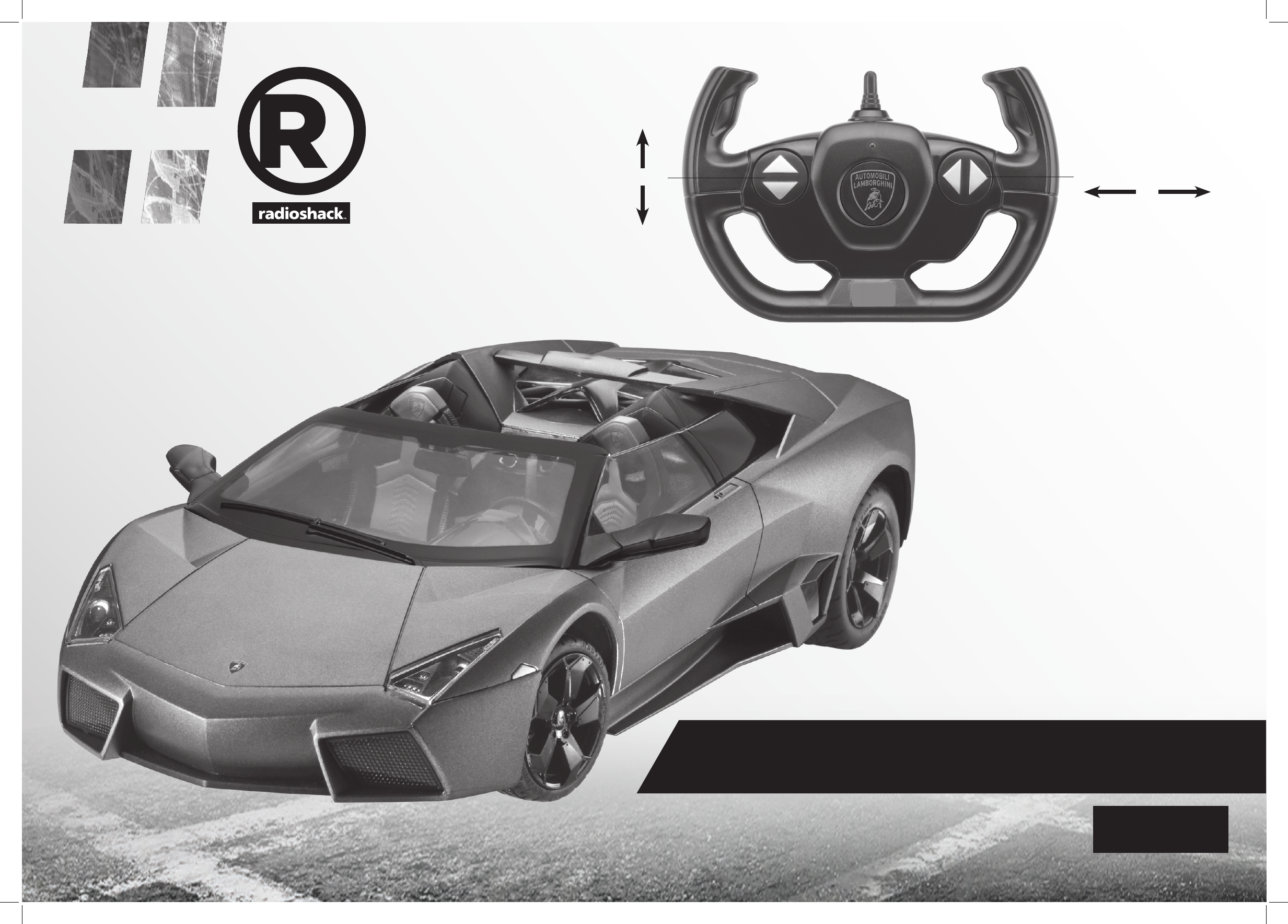
Reventón Roadster
CHOKING HAZARD!
Small parts. Not for
children under 3 years.
What’s Included
• Reventón Roadster
• Controller
• User’s Guide
Forward
Stop
Reverse
Left Straight Right
The trademarks, copyrights and design rights associated with the Lamborghini vehicle
Reventón Roadster are used under license of Automobili Lamborghini S,p.A., Italy.
6001354_UG_EN.indd 1 8/21/2015 2:14:35 PM
© 2015 Regal Worldwide Trading LLC. All rights reserved.
RadioShack is a registered trademark used by Regal Worldwide
Trading LLC under license of Global Franchising Corporation.
FCC Information
NOTE: This equipment has been tested and found to comply with the limits
for a Class B digital device, pursuant to Part 15 of the FCC Rules. These limits
are designed to provide reasonable protection against harmful interference
in a residential installation. This equipment generates, uses and can radiate
radio frequency energy and, if not installed and used in accordance with the
instructions, may cause harmful interference to radio communications.
However, there is no guarantee that interference will not occur in a particular
installation. If this equipment does cause harmful interference to radio or
televisionreception,whichcanbedeterminedbyturningtheequipmentoand
on, the user is encouraged to try to correct the interference by one or more of
the following measures:
• Reorientorrelocatethereceivingantenna.
• Increasetheseparationbetweentheequipmentandreceiver.
• Connecttheequipmentintoanoutletonacircuitdierentfromthatto
which the receiver is connected.
• Consultthedealeroranexperiencedradio/TVtechnicianforhelp.
If you cannot eliminate the interference, the FCC requires that you stop using
your equipment.
WARNING: Changesormodicationstothisunitnotexpresslyapprovedbythe
party responsible for compliance could void the user’s authority to operate the
equipment.
This device complies with Part 15 of the FCC Rules. Operation is subject to the
following two conditions: (1) this device may not cause harmful interference,
and (2) this device must accept any interference received, including
interference that may cause undesired operation.
Pair the Controller
Everytime before driving, you must pair the controller and
vehicle. To play with more than one Reventón at the same
time, pair each vehicle separately.
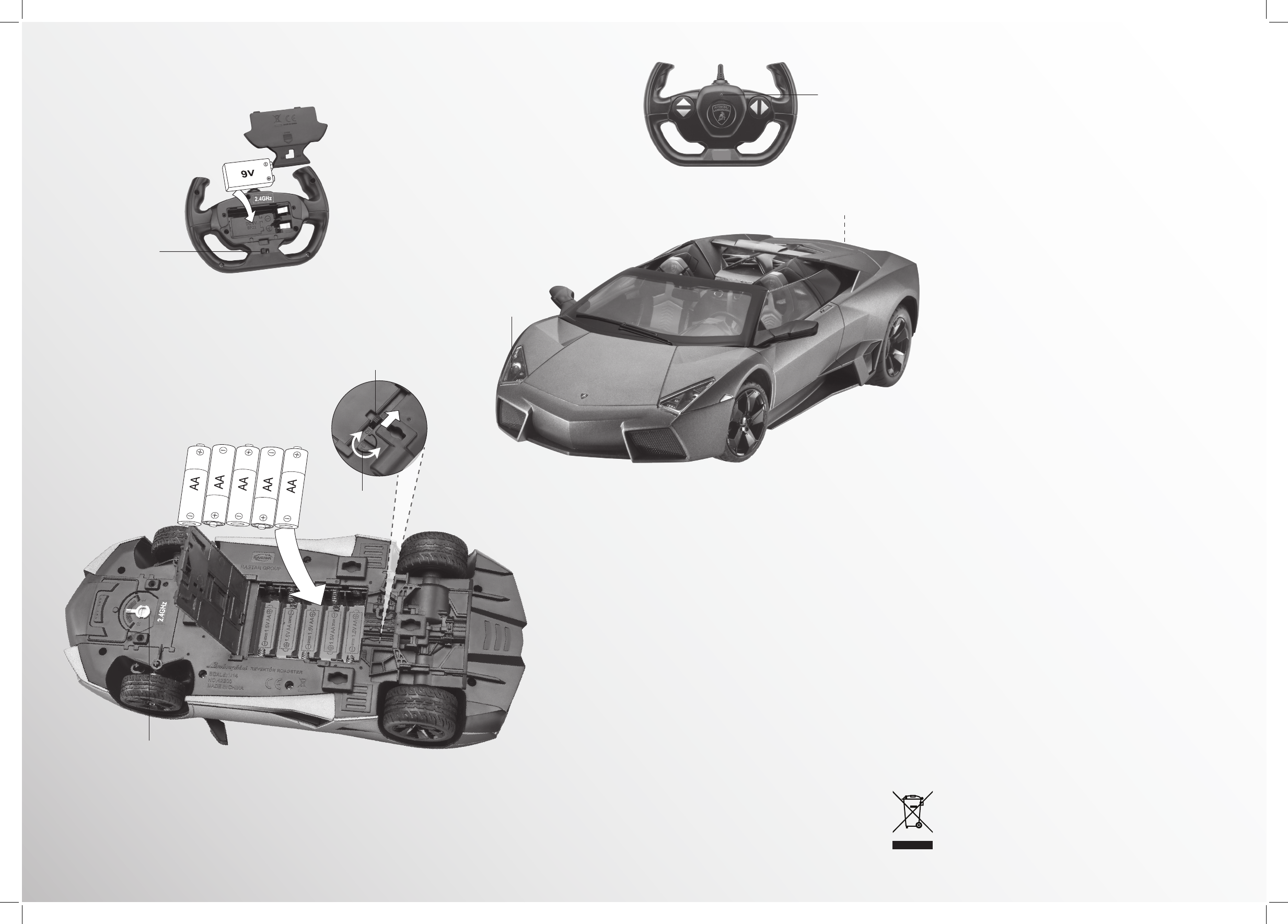
1. Place the controller within 3 ft. (1m) of the vehicle.
2. Turn on the controller, and then the vehicle. The
controllerLEDashesquickly,andturnsowhen
paired.
Note: Ifpairingfails,turnothecontrollerandthe
vehicle, move closer, and then try again.
Safety and Care
• Turnoyourvehicleandcontrollerwhennotinuse.
• Not recommended for children under 6 years of age.
Adult supervision recommended at all times.
• A nearby CB radio can interfere with your vehicle’s
control. If this happens, move the vehicle away from
the CB radio.
• Do not play with your vehicle in the street.
• Avoid collisions with people and objects.
Battery Notes:
• For best performance use only fresh alkaline batteries
oftherequiredsizeandtype.Donotmixoldandnew
batteries,orbatteriesofdierentcapacities,typesor
chemistries.
• Remove batteries during longer storage
periods.
• Dispose of the old batteries promptly and
properly. Do not burn or bury them.
Install the Controller Battery
1. Turnothecontroller.
2. Installone9Vbattery(not
included), matching the polarity
symbols (+ and –) marked inside
the battery compartment.
Install Batteries in the Reventón
1. Turnothevehicle.
2. Use a coin to turn the battery cover latch to unlock it,
then open the battery compartment.
3. InsertveAAbatteries(notincluded)matchingthe
polarity symbols (+ and –) marked inside, and replace
the battery cover. Lock the latch.
ON/OFF
Battery Cover
Latch
Wheel Alignment
If your vehicle pulls to the left, turn this switch toward R; if the
vehicle pulls to the right, turn this switch toward L.
LED
Flashing = Searching
O=Paired
Lit = When a driving
key is pressed.
Indicates controller
battery power
ON/OFF
Headlights light up
automatically when
driving forward.
Red tail lights turn on when reversing.
Printed in China
08A15
6001354
6001354_UG_EN.indd 2 8/21/2015 2:14:37 PM