RAYEE Technology 205200210306 GPS speed camera locator and wireless radar detector User Manual 1
RAYEE Technology LTD. GPS speed camera locator and wireless radar detector 1
User manual
RAYEE TECHNOLOGY LTD. 1
No.148, Chunzhu Li, Taibao City, Chiayi County 612, Taiwan (R.O.C.)
TEL 886-5-371-7289 FAX886-5-371-8239
GPS Speed Camera locator
(1) Notice: The changes or modifications not expressly approved by the party
responsible for compliance could void the user’s authority to operate the
equipment.
(2) IMPORTANT NOTE: To comply with the FCC RF exposure compliance
requirements, no change to the antenna or the device is permitted. Any change to
the antenna or the device could result in the device exceeding the RF exposure
requirements and void user’s authority to operate the device.
RAYEE TECHNOLOGY LTD. 2
No.148, Chunzhu Li, Taibao City, Chiayi County 612, Taiwan (R.O.C.)
TEL 886-5-371-7289 FAX886-5-371-8239
I. INTRODUCTION
Thank you for purchasing the Conqueror GR-210 + 205 TX WRD developed by RAYEE
Tech. Ltd.. We are delighted to have you as a valued customer and hope you will be satisfied
with your Conqueror GR-210 + 205 TX WRD. This device is an integration of GPS and
Wireless Radar Detector, and it is designed to work for giving warnings regarding the
detections of Radar gun and Laser gun including the latest speed monitoring tool which is
Stalker Laser gun. Moreover, the detections of all speed cameras and accidental black spots
will be announced by the device as well.
WARNING: Always obey all laws when using this device. We are not responsible for any
accident or injures that occur while using this device. Drive safely.
II. FEATURES
1. Changeable Voices: Chinese (factory default), English and Portuguese are available.
2. Date & Time indications: GPS receives extremely accurate datum from the “atomic
clock” so that it can provide precise Date and Time.
3. Wireless (TX remote) Radar Detector : Visual and vocal warnings are given to the
driver when it is of the presences of X, K, Ku, and all kinds of Ka-band of Radar Guns
around the car.
4. Time Zone: The time talking activates in different time zones. The time zones are
selectable by users according to their local time.
5. Over Speeding Warning: Max speed alarm activates when you exceed your personal
speed limit. The over speeding warnings issued only if users exceed the prevailing speed
limit.
6. Over Speeding Warning for Fixed Cameras – Over speeding warning for fixed
cameras issued only if users exceed the prevailing speed limit.
7. Automatic Mute ON/OFF by speeds – It functions to avoid the signals coming from
auto doors or micro towers when your speed is under the limit selected in downtown. The
Radar signals can be controlled to be mute ON/OFF by the speed setting. Minimum speed
alarm activates when your speed is under the personal setting, it will be mute on
automatically. However, when you approach to radar cameras which spread out
RAYEE TECHNOLOGY LTD. 3
No.148, Chunzhu Li, Taibao City, Chiayi County 612, Taiwan (R.O.C.)
TEL 886-5-371-7289 FAX886-5-371-8239
microwaves and exceed your personal speed setting, it will be mute off automatically. A
warning sound will be given to the user in this situation.
8. Speed Displaying: The speed is calculated by the GPS satellites and displayed in km/hr.
accurately.
9. Compass Heading: Your vehicle's heading will be shown as a rotating card. It is a
position of heading up. The speed is shown synchronously.
10. Congestion Charge: An announcement will be given to the driver when it approaches to
the Congestion Charge Zone.
11. Pinpoints Stored and Deleted: Pinpoints are able to be stored and deleted by users. It
functions to give warnings and remind for users.
12. The Comprehensive Database: Our professional survey team will update the database
periodically so that users can download the latest data by themselves via USB from their
own computers. ( in China and Taiwan only)
13. RF disconnection Alarm: In order to avoid speeding tickets due to the RF
disconnection, the function of RF disconnection Alarm activates when RX Receiver cannot
detect signals from TX. Moreover, it also activates when the TX does not work. This
function will remind users to be aware of the circumstances.
III. OPERATION
A. Power on & Mode selections
1-1. Power on: There is an operating system with GPS satellite signal message, and
then standby. When the power is turned on in the device, there will be an
announcement – “welcome to activate the Radar and GPS warning devise “. If the
device connects with satellites successfully, there will be an announcement –
“drive carefully and have a nice trip”. There are two twinkle numerical points
between hours and minutes. It is easy for you to find it on the timer.
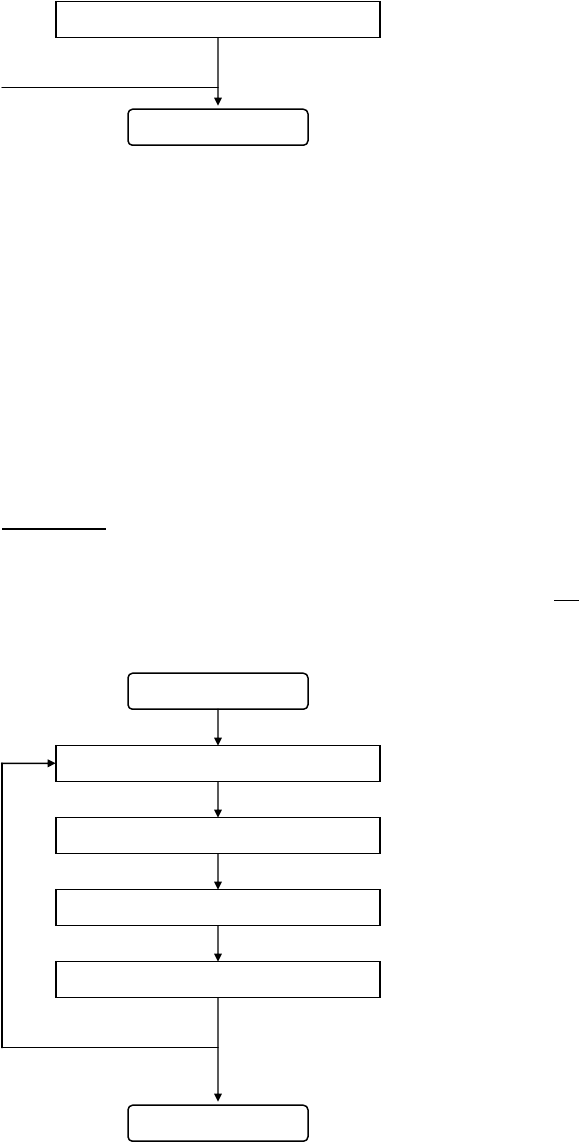
1-2. Mode selections: There are two kinds of mode selections. One is Safety Mode,
another one is Camera Model. The Mode status can be selected by pushing and
holding the mode button for more than 3 seconds. Users will select the mode
status by the circumstances.
Start
Safety Mode * Default = Safety Mode
Circulation Push and hold the Mode key for more than 3 seconds
RAYEE TECHNOLOGY LTD. 4
No.148, Chunzhu Li, Taibao City, Chiayi County 612, Taiwan (R.O.C.)
TEL 886-5-371-7289 FAX886-5-371-8239
Camera Mode
Push and hold the Mode key for more than 3 seconds
End
Safety Mode: When approaching to targets – all Speed Cameras and Accidental
Black Spots, warnings will be given to users.
Camera Mode: When approaching to targets – all Speed Cameras, warnings will
be given to users.
B. Setup and Functions
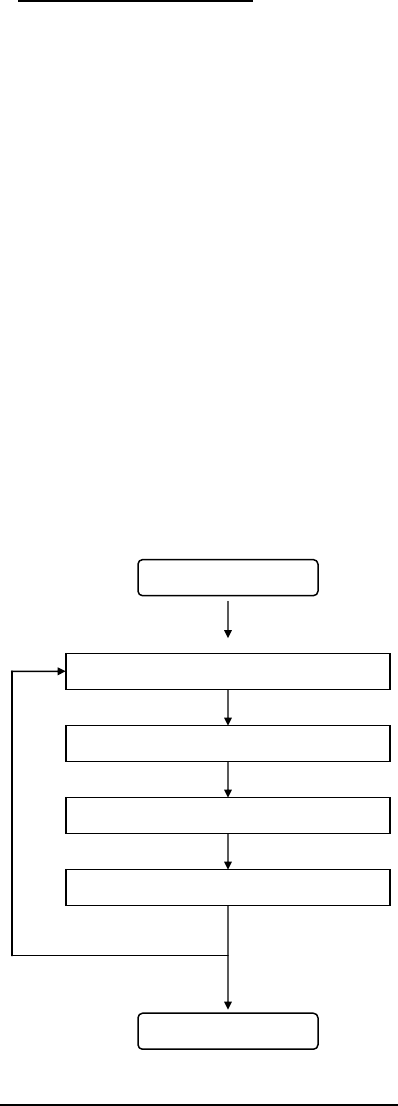
1-1. Time Zone: A time Zone is selected by users according to their local times. When
pushing and holding the button for more than 3 seconds, the Time Zone will be
selected. For example, if you are in China, you must select t 8, and then the
local time will be displayed accurately.
Start
Time Zone * Default = t 8
Push and hold the Memory Key for more than 3 seconds
User’s speed limit setting * Default = 0 Km/h
Push and hold the Memory Key for more than 3 seconds
Circulation Automatic mute on/off by speed * Default = 0K m/h
Push and hold the Memory Key for more than 3 seconds
RF disconnection Alarm On/Off setting * Default = Connection is off
Push and hold the Memory Key for more than 3 seconds
Memory Key
End
MEM button: When pushing the MEM button for 1 second, it will go to the next
Time Zone. Holding for 6-7 seconds, the setting is finished and confirmed for the
Time Zone selected.
RAYEE TECHNOLOGY LTD. 5
No.148, Chunzhu Li, Taibao City, Chiayi County 612, Taiwan (R.O.C.)
TEL 886-5-371-7289 FAX886-5-371-8239
MOD button: When pushing the MOD button for 1 second, it will go to the
previous Time Zone. Holding for 6-7 seconds, the setting is finished and
confirmed for the Time Zone selected.
1-2 Over speeding warning: Max speed alarm activates when exceeding the
personal speed settings by users. The vocal warnings will be given to users only
if users exceed the prevailing speed limits.
When entering into the condition of user’s speed limit setting, the range of setting
is available from 0 km/hr to 160 Km/hr. You might select whatever speed that
you like within the range. If you set up the limit to 100 km/hr, an over speeding
warning will be given to you when your speed exceeds 100 km/hr.
MEM button: When pushing the MEM button for 1 second, the speed will be
increased by 10Km/hr. Holding for 6-7 seconds, the setting is finished and
confirmed for the speed limit selected.
MOD button: When pushing MOD button for 1 second, the speed will be reduced
by 10Km/hr. Holding for 6-7 seconds, the setting is finished and confirmed for
the speed limit selected.
Start
Time Zone * Default = t 8
Push and hold the Memory Key for more than 3 seconds
Over Speeding Warning * Default = 0 Km/h
Push and hold the Memory Key for more than 3 seconds
Circulation Automatic mute on/off by speed * Default = 0 Km/h
Push and hold the Memory Key for more than 3 seconds
RF disconnection Alarm On/Off setting * Default = Connection is off
Push and hold the Memory Key for more than 3 seconds
Mode Key
End
1-3 Automatic Mute on/off by speed setting: To avoid the signals from auto doors
or micro towers when your speed is under limit selected in downtown, the “Mute”

RAYEE TECHNOLOGY LTD. 6
No.148, Chunzhu Li, Taibao City, Chiayi County 612, Taiwan (R.O.C.)
TEL 886-5-371-7289 FAX886-5-371-8239
function will be on automatically. When receiving these unwanted signals, there
will be a blinking light without sound on the Display Bar. In other words, if your
speed is over the limit selected, the “Mute” function will be off automatically.
This function for radar detector module reduces false alerts. When entering into
the condition of Automatic mute on/off by speed setting, no warnings will be given
to users when the speed setting is within the range from 0 Km/hr to 160 Km/hr.
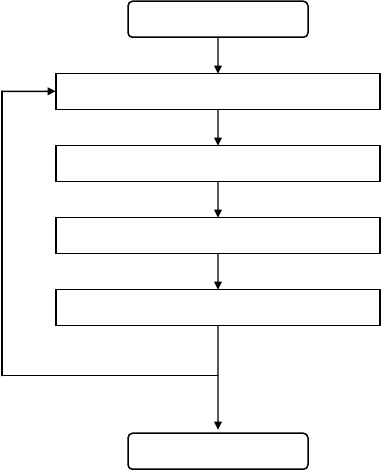
Start
Time Zone * Default = t 8
Push and hold the Memory Key for more than 3 seconds
User’s speed limit setting * Default = 0 Km/h
Push and hold the Memory Key for more than 3 seconds
Circulation Automatic mute on/off by speed * Default = 0 Km/h
Push and Hold the Memory Key for more than 3 seconds
RF disconnection Alarm On/Off setting * Default = Connection is off
Push and hold the Memory Key for more than 3 seconds
Memory Key
End
MEM button: When pushing the MEM button for 1 second, the speed will be
increased by 10Km/hr. Holding for 6-7 seconds, the setting is finished and
confirmed for the speed limit selected.
MOD button: When pushing the MOD button for 1 second, the speed will be
reduced by 10Km/hr. Holding for 6-7 seconds, the setting is finished and
confirmed for the speed limit selected.
1-4 RF disconnection Alarm On/Off setting: Users are able to turn on the
function of Wireless Connection Break to avoid the wireless connection with TX
from stopping without being found by users. If there is any strange connection or
RAYEE TECHNOLOGY LTD. 7
No.148, Chunzhu Li, Taibao City, Chiayi County 612, Taiwan (R.O.C.)
TEL 886-5-371-7289 FAX886-5-371-8239
TX which is out of order, there will be an announcement - “loss connection with
TX”. This function will remind users to be aware of the circumstances.
When entering into the condition of RF disconnection Alarm On/Off setting, you
are able to select RF disconnection Alarm On or RF disconnection Alarm Off.
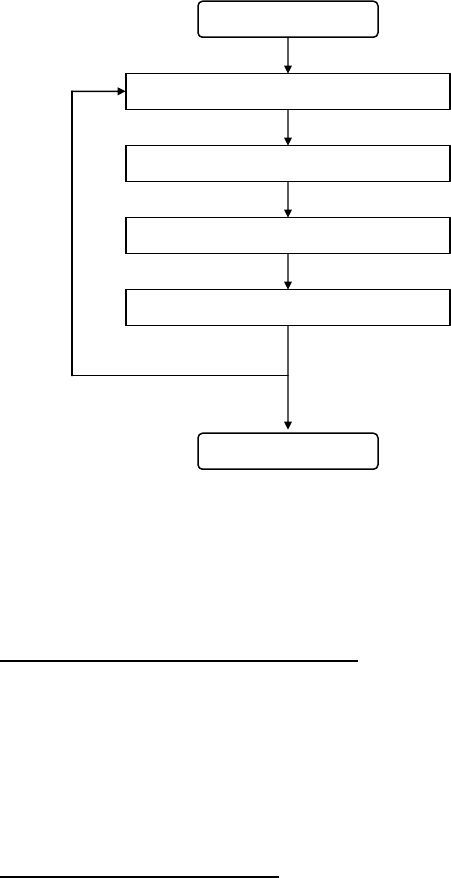
Start
Time Zone * Default = t 8
Push and Hold the Memory Key for more than 3 seconds
User’s speed limit setting * Default = 0 Km/h
Push and Hold the Memory Key for more than 3 seconds
Circulation Automatic mute on/off by speed * Default = 0 Km/h
Push and Hold the Memory Key for more than 3 seconds
RF disconnection Alarm On/Off setting * Default = Connection is off
Push and Hold the Memory Key for more than 3 seconds
Memory Key
End
MEM button: When pushing the MEM button for 1 second, the function of RF
disconnection Alarm will be off. Holding for 6-7 seconds, the setting is finished
and confirmed for the status to be Off.
MOD button: When pushing the MOD button for 1 second, the function of RF
disconnection Alarm will be on. Holding for 6-7 seconds, the setting is finished
and confirmed for the status to be On.
C. Pinpoints Stored and Deleted
1-1 Pinpoint Stored: When your speed is over 20 km/hr toward a fixed camera or a
personal interested location, you are able to store a pinpoint by pushing the MEM
button for “one time”. The action is taken before a target or a favorite location
about 5 meters and it takes about 1 second. On the opposite direction, you are
also able to make a pinpoint by pushing the MEM button “twice” before a fixed
RAYEE TECHNOLOGY LTD. 8
No.148, Chunzhu Li, Taibao City, Chiayi County 612, Taiwan (R.O.C.)
TEL 886-5-371-7289 FAX886-5-371-8239
camera or a personal interested location. If a pinpoint is stored in the GPS detector
successfully, there will be an announcement - “Pinpoint is stored”.
1-2 Pinpoints Deleted: You are able to delete a pinpoint by pushing the MEM button
before a target or a personal interested location. When pushing and holding the
buttons of MEM and MOD together for more than 3 seconds, all pinpoints can be
deleted at the same time. If pinpoints are deleted from the GPS detector
successfully, there will be an announcement- “Pinpoint is deleted”.
D. Time, Date and Battery Power checking: The functions allow checking Time, Date,
and Battery Power. When selecting, all functions are programmed to run in a cycle.
Start
Current Time * Default = 8:00 AM
Push and hold the Mode Key for 1 second
Current Date
Push and hold the Mode Key for 1 second
Circulation Current Battery Power
Push and hold the Mode Key for 1 second
Current Time
Mode Key
End
MOD button: When pushing the MOD button for 1 second, it will enter into the
next mode. Holding for 6-7 seconds, the setting is finished and confirmed for the
Mode status selected and return to standby.
E. Speed, time and distance displaying: You are able to see the speed on the Display Bar
after connecting with satellites successfully. The local time will be displayed when you
stand at the same spot without moving. When you close to a fixed camera, the distance
reduced to the target will be announced from start point to the end. Different speed limits
have different distances reduced to targets. The last warning for the camera will be
displayed with the word of “pass” on the display bar.
F. Pinpoint Numbers Checking: The numbers of pinpoint can be checked by pushing the
buttons of MEN and MOD together within 1 second. Please be careful! When pushing the

RAYEE TECHNOLOGY LTD. 9
No.148, Chunzhu Li, Taibao City, Chiayi County 612, Taiwan (R.O.C.)
TEL 886-5-371-7289 FAX886-5-371-8239
buttons for more than 3 seconds, all pinpoints will be deleted from the device; however,
this action does not affect the supplier’s database.
G. Compass: The compass will indicate the direction which you are heading to. The function
provides only one-way warnings without false alerts.
H. Warning for Long Distance Driving: When the driving time is more than 2 hours,
there will be a warning message – “Please take a break”. The same message will be
announced hourly if the driving time is more than 2 hours.
I. Battery Power: When the battery power is under 9.0 volts, a warning message for the
low power will be given to users.
J. Support Wireless Radar Detector: There are several techniques to be applied as
following:
- Wireless Detector with advanced and high performances
- The technology of Undetectable Shadow II
- Safe communication between RX and TX
- Audible speed trap alerts - "beep" and “voice”
- Resist to Water and shocks
- Anti false alarms by speed limit options. Revolutionary Radar Detector!
- Detecting for all kinds of Radar Cameras. Full protection!
- Easy to be installed by users
- Providing a plug-in connector for being integrated with Laser Jammer