REALTRACE V10 UHF RFID READER User Manual

REALTRACE UHF RFID READER

User Manual

1MR6051B UHF BluetoothHandheld Reader User Manual(V1.0)
MR6052B User ManualSHENZHEN MARKTRACE CO.,LTD2CATALOG1, Produce Presentation...................................................................................................................................................31.4 Photos.....................................................................................................................................................................42, Parameters.................................................................................................................................................................... 53 Quick Start.....................................................................................................................................................................53.1 ON/OFF................................................................................................................................................................. 53.2 LED........................................................................................................................................................................ 63.3 Tag Reading........................................................................................................................................................... 63.4 Tag Data Display................................................................................................................................................... 63.5 Bluetooth Function................................................................................................................................................63.6 Charging.................................................................................................................................................................63.7 Structure Description....................................................................................................................................... 7
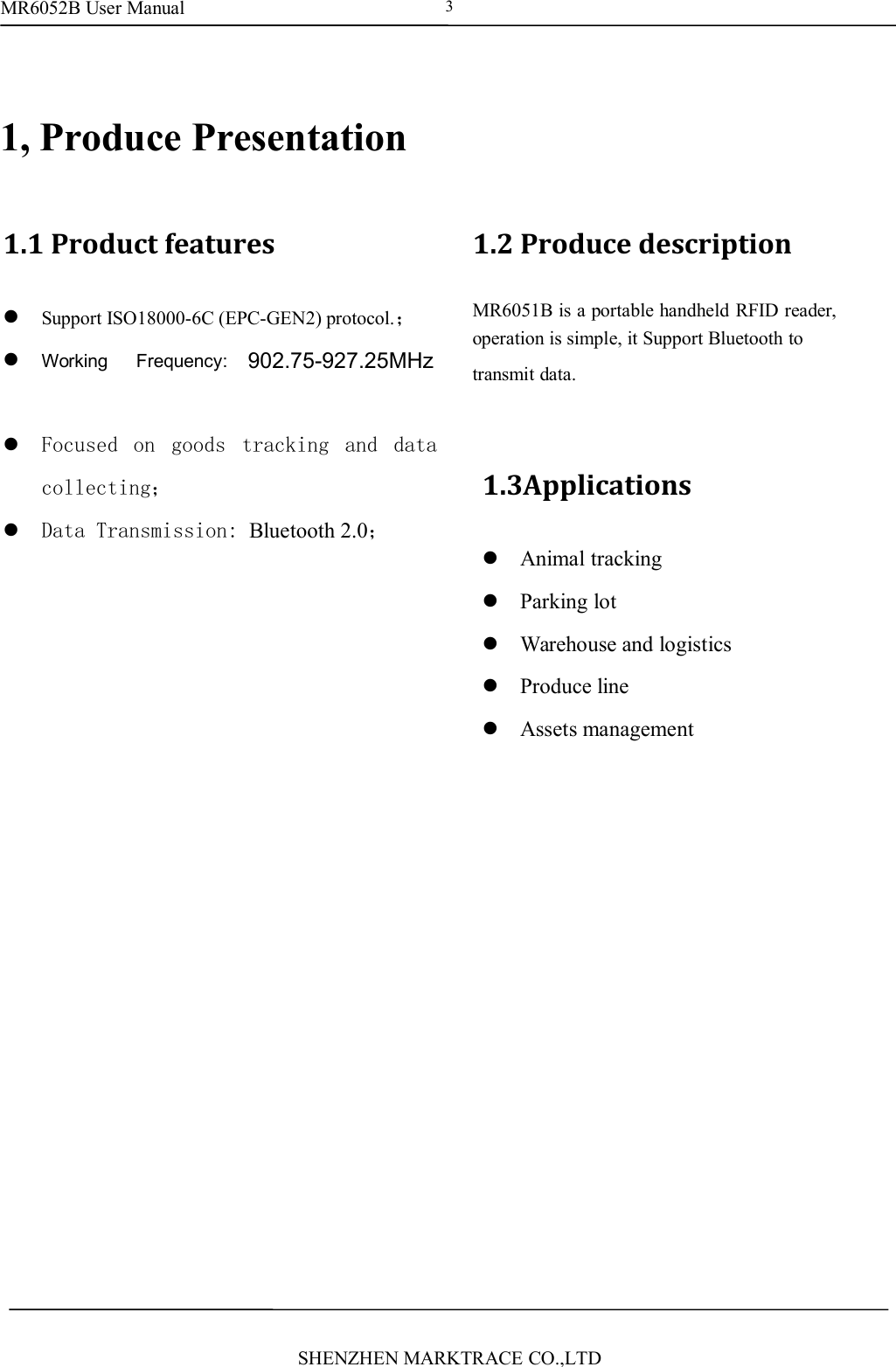
MR6052B User ManualSHENZHEN MARKTRACE CO.,LTD31, Produce Presentation1.1 Product featuresSupport ISO18000-6C (EPC-GEN2) protocol.;Working Frequency: ISM902-928MHz orISM865-868MHz and ISM920-925MHz;Focused on goods tracking and datacollecting;Data Transmission: Bluetooth 2.0;1.2 Produce descriptionMR6051B is a portable handheld RFID reader,operation is simple, it Support Bluetooth totransmit data.1.3ApplicationsAnimal trackingParking lotWarehouse and logisticsProduce lineAssets management902.75-927.25MHz
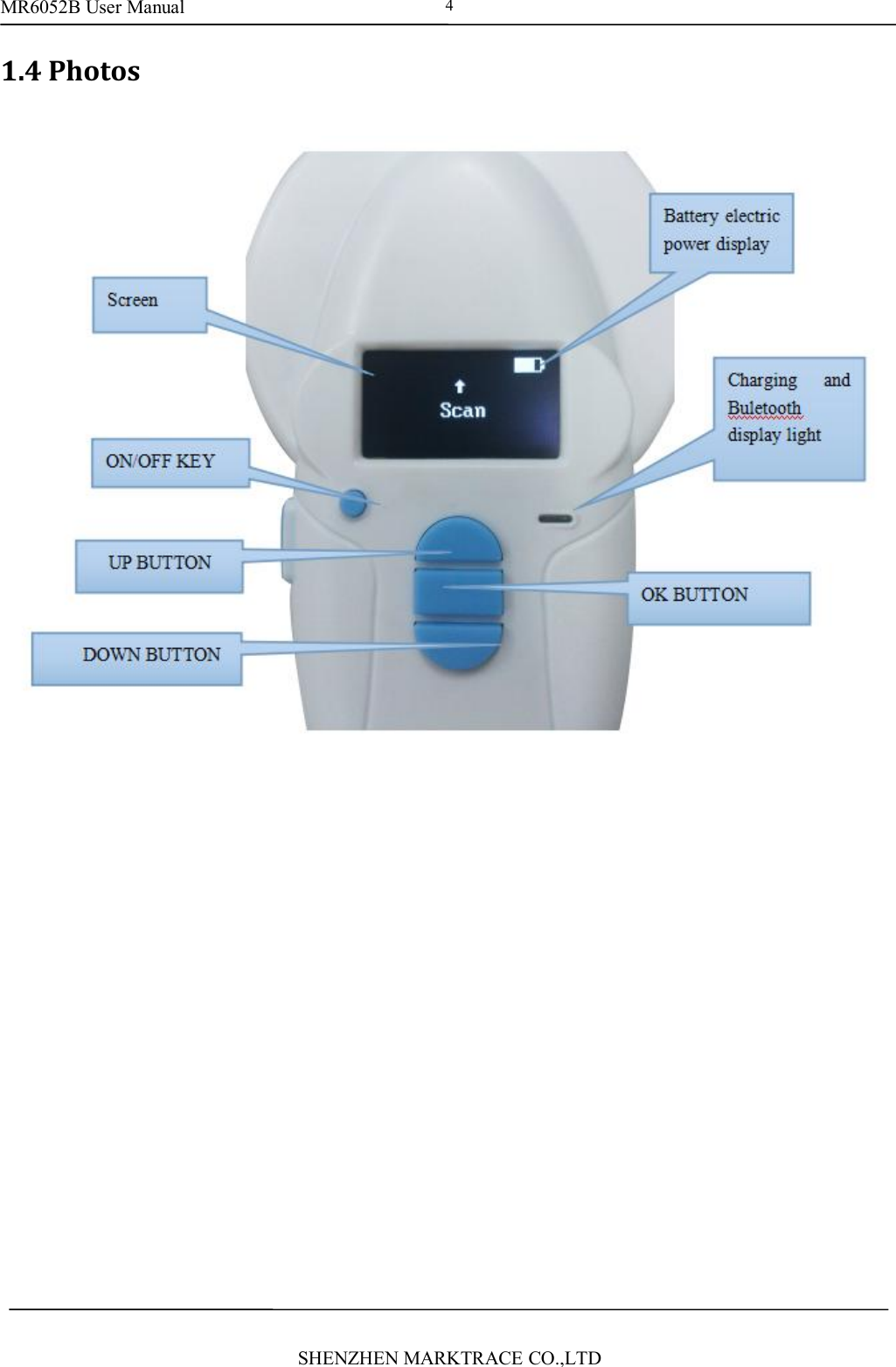
MR6052B User ManualSHENZHEN MARKTRACE CO.,LTD41.4 Photos
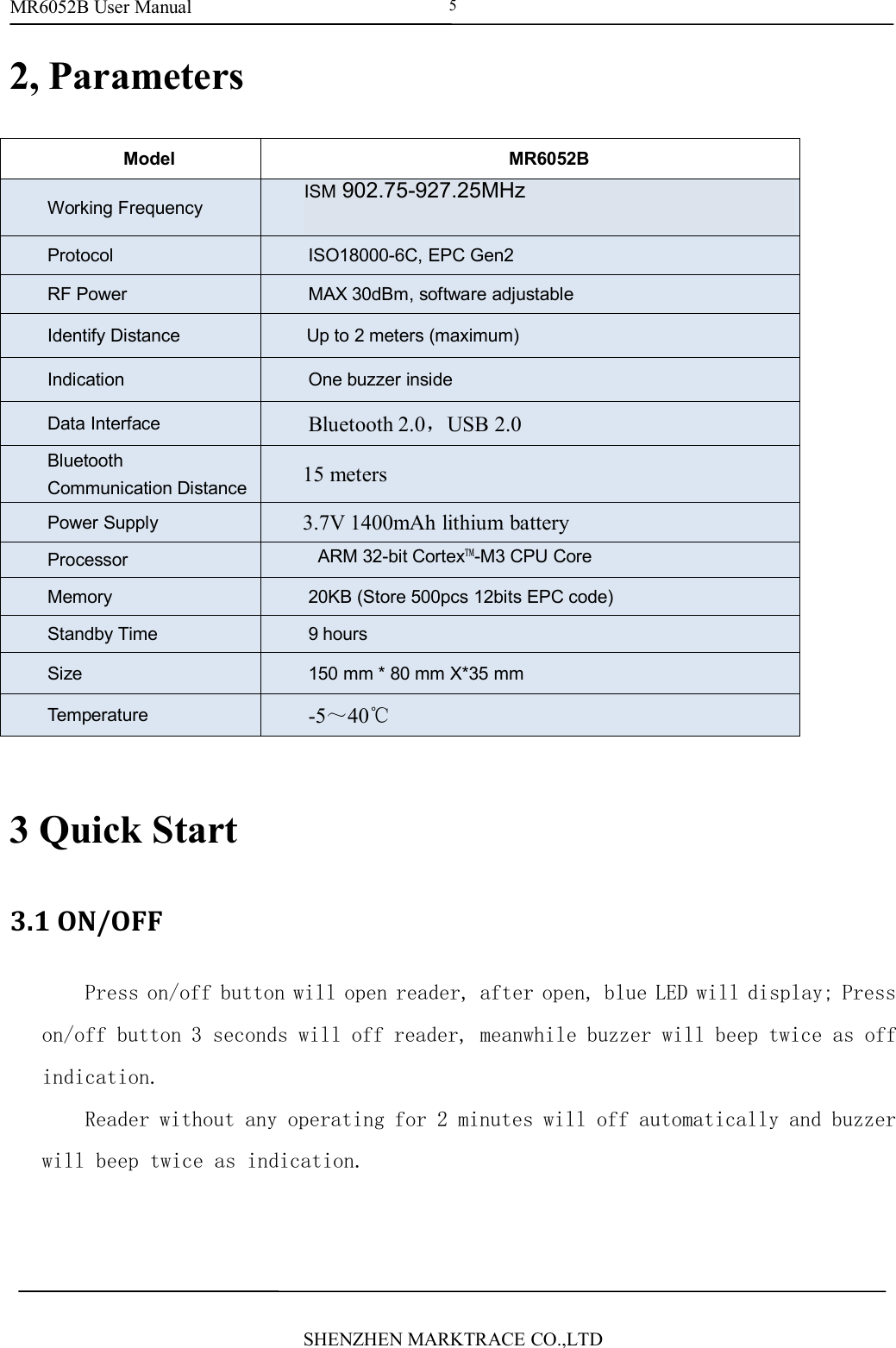
MR6052B User ManualSHENZHEN MARKTRACE CO.,LTD52, ParametersModelMR6052BWorking FrequencyISM 902~928MHz or ISM 865~868MHz and andISM920-925MHzProtocolISO18000-6C, EPC Gen2RF PowerMAX 30dBm, software adjustableIdentify DistanceUp to 2 meters (maximum)IndicationOne buzzer insideData InterfaceBluetooth 2.0,USB 2.0BluetoothCommunication Distance15 metersPower Supply3.7V 1400mAh lithium batteryProcessorARM 32-bit Cortex™-M3 CPU CoreMemory20KB (Store 500pcs 12bits EPC code)Standby Time9 hoursSize150 mm * 80 mm X*35 mmTemperature-5~40℃3 Quick Start3.1 ON/OFFPress on/off button will open reader, after open, blue LED will display; Presson/off button 3 seconds will off reader, meanwhile buzzer will beep twice as offindication.Reader without any operating for 2 minutes will off automatically and buzzerwill beep twice as indication.ISM 902.75-927.25MHz
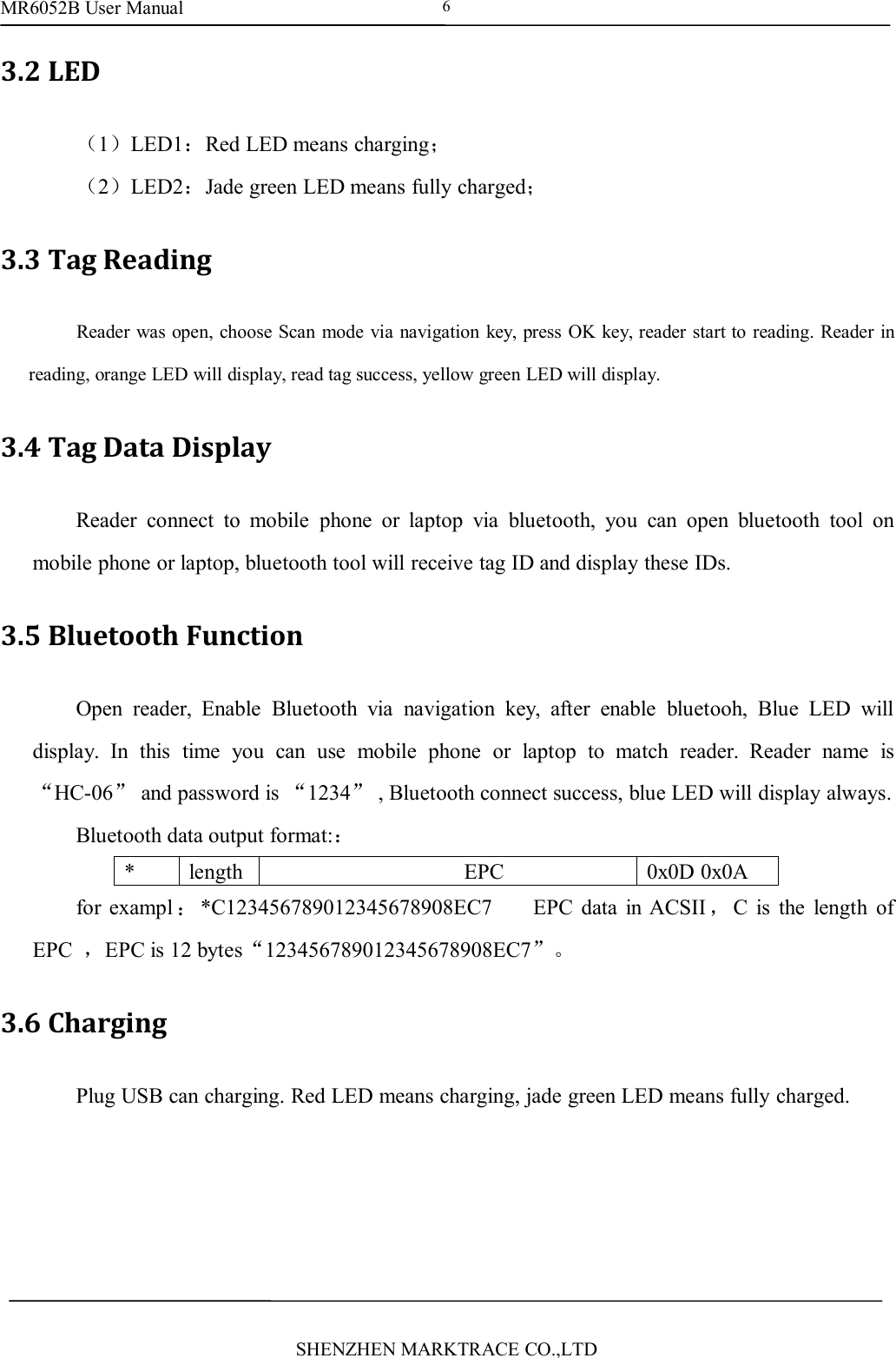
MR6052B User ManualSHENZHEN MARKTRACE CO.,LTD63.2 LED(1)LED1:Red LED means charging;(2)LED2:Jade green LED means fully charged;3.3 Tag ReadingReader was open, choose Scan mode via navigation key, press OK key, reader start to reading. Reader inreading, orange LED will display, read tag success, yellow green LED will display.3.4 Tag Data DisplayReader connect to mobile phone or laptop via bluetooth, you can open bluetooth tool onmobile phone or laptop, bluetooth tool will receive tag ID and display these IDs.3.5 Bluetooth FunctionOpen reader, Enable Bluetooth via navigation key, after enable bluetooh, Blue LED willdisplay. In this time you can use mobile phone or laptop to match reader. Reader name is“HC-06”and password is “1234”, Bluetooth connect success, blue LED will display always.Bluetooth data output format::*lengthEPC0x0D 0x0Afor exampl :*C123456789012345678908EC7 EPC data in ACSII ,C is the length ofEPC ,EPC is 12 bytes“123456789012345678908EC7”。3.6 ChargingPlug USB can charging. Red LED means charging, jade green LED means fully charged.
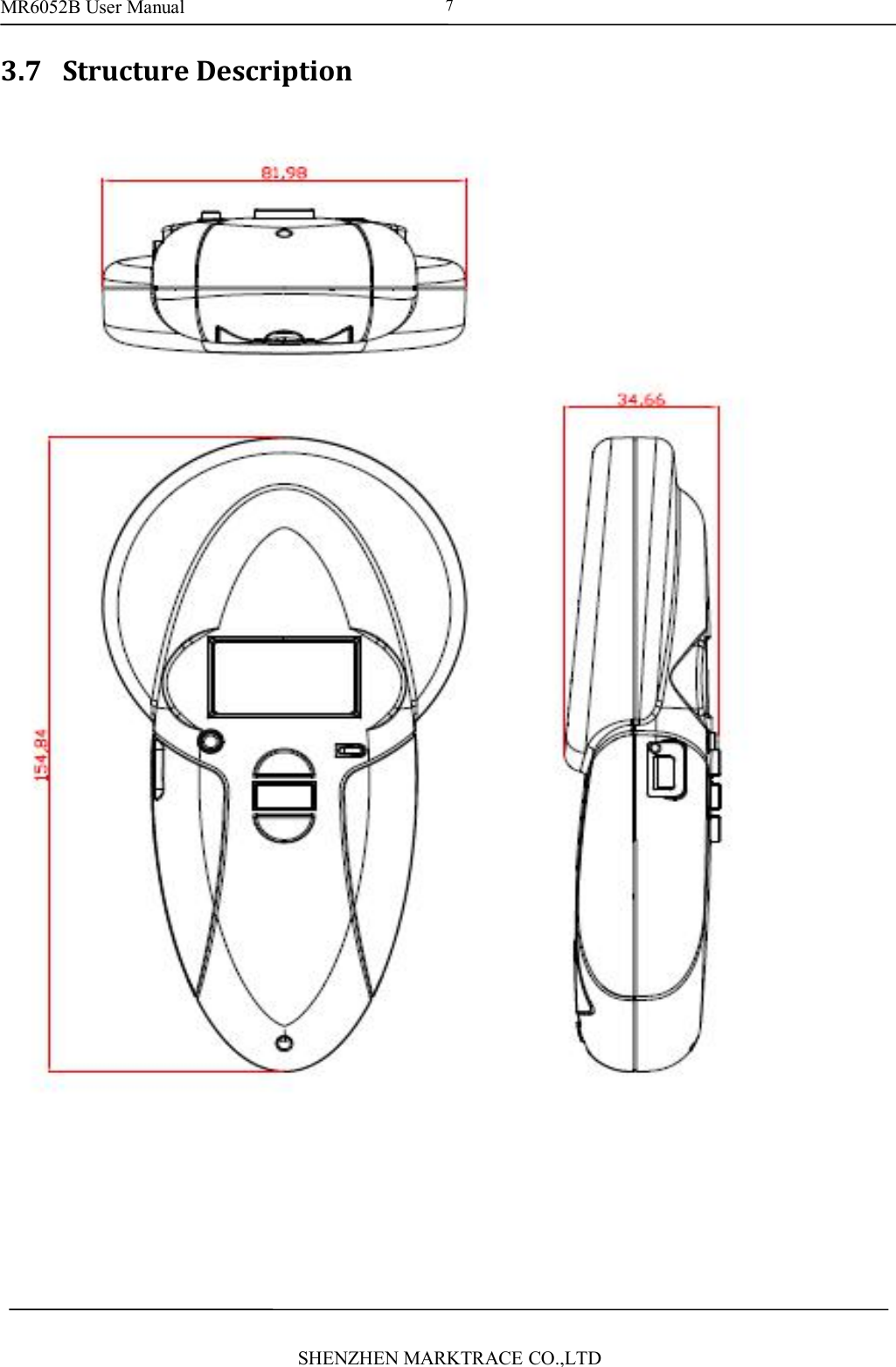
MR6052B User ManualSHENZHEN MARKTRACE CO.,LTD73.7 Structure Description
8FCC StatementThis equipment has been tested and found to comply with the limits for a Class B digitaldevice,pursuant to Part 15 of the FCC Rules. These limits are designed to providereasonable protection against harmful interference in a residential installation. Thisequipment generates uses and can radiate radio frequency energy and, if not installedand used in accordance with the instructions, may cause harmful interference to radiocommunications. However, there is no guarantee that interference will not occur in aparticular installation. If this equipment does cause harmful interference to radioor television reception, which can be determined by turning the equipment off and on,the user is encouraged to try to correct the interference by one or more of the followingmeasures:-- Reorient or relocate the receiving antenna.-- Increase the separation between the equipment and receiver.-- Connect the equipment into an outlet on a circuit different from that to which thereceiver is connected.-- Consult the dealer or an experienced radio/TV technician for help.Changes or modifications not expressly approved by the party responsible for compliancecould void the user's authority to operate the equipment.This device complies with part 15 of the FCC Rules. Operation is subject to the followingtwoconditions:(1) This device may not cause harmful interference, and(2) this device must accept any interference received, including interference that maycauseundesired operation.
9

Navigation menu