ROIDMI Information Technology XCQ04RM ROIDMI Cordless Vacuum Cleaner User Manual

ROIDMI Information Technology Co. ,Ltd. ROIDMI Cordless Vacuum Cleaner Users Manual

Users Manual

ROIDMI Cordless Vacuum Cleaner Operation ManualRead manual before use. Keep it well for future reference
ContentsSafety Precautions3WarningProduct DescriptionMain Machine7Product InstallationProduct Usage463Warning5Attention(Risk Of Injury)AttentionAccessoriesInstallation78Storage (With/Without Nails)Power On/Off and Suction Power Switch899Power Adapter UsageStatus Indicator LEDs9Adapter Basic ParametersRolling Brush Usage1010Accessories Usage11Quick Setting11About Works With Mijia Product Cleaning Product TroubleshootingRemoval and Installation of the Dust Cup111212Dust Cup Parts CleaningRoller Replacement1315Cordless Vacuum Cleaner Performance Fault ListProduct After-sales Maintenance Record16Detailed Packing List13Basic Parameter13FCC STATEMENT14Product Hazardous Substances Declaration 1414Warranty Description
3Warning: in order to avoid causing harm to you and others and causing unnecessary property damage, read carefully and observe the following "safety precautions" before use. The safety precautions are divided into two parts: "Warning" and "Attention".Both "Warning" and "Attention" are important parts of safe use.  Be sure to follow them.Read all safety warnings and instructions. Failure to follow the warnings and instructions may result in electric shock, fire and/or serious injury. WarningWarningAttention Notices that can lead to slight injury or product safety risk1. Do not use this product near wet places such as the bathroom;2. Do not use on cleaning liquids, matches and damp rubbish;3. Do not use broken power plug and loose socket;4. Do not disassemble, repair or transform by yourself to avoid fire, injury or improper operation, except certified replacement of consumables according to this manual;5. Use AC power at rated voltage, do not use generator or DC power supply, etc., to avoid causing fire and electric shock;6. Regularly use dry cleaning cloth to clean the dust on the plug, so as to avoid fire due to poor insulation and other reasons;7. Make sure that the plug is well inserted in the bottom to avoid electric shock, short circuit and fire;8. In case of any abnormal failure,  stop using it immediately to avoid causing smoke, fire and electric shock;9. When in following conditions: ① Switched to "on" and still not running; ② Frequent stops while in operation; ③ Intermittent power supply, when moving plug or power cord; ④ Body distortion, unusual heating; ⑤ Smell of burning; ⑥  If there is any abnormal sound during operation,  immediately cut off the power supply and unplug the plug, and the manufacturer or its maintenance staff shall replace and repair it to avoid any danger;10. Be sure to remove the plug from the power socket before cleaning and maintenance to avoid electric shock and injury;11. If the electric brush is found to be abnormal in use, turn off the power switch and immediately check whether the electric brush is wrapped around the hair or other excessively long fibers, and clean it in time;12. Do not pour water on the body of the machine and plug or immerse the body and/or plug into water;13. Do not operate the vacuum facing the ears, eyes, mouth and other body parts;14.  This equipment can not be used by children and those with bad physical, bad sensory or bad mental sor those who lack experience and knowledge,and supervise the use;15. Keep the vacuum cleaner away from the hospital's electromagnetic equipment;16. For indoor use only, do not expose to rain;17.  If the cord is damaged, it must be replaced by the manufacturer, our service agent or other qualified persons, in order to avoid a hazard;18. The charger must not be used if the enclosure is damaged because this will cause hazard of electric shock;19. The power adapter is only used for the indicated vacuum cleaner;20. Before charging, check whether the voltage specified on the marking label corresponds to the mains voltage;21. Keep the charger away from all sources of heat;22. Do not immerse the appliance in water;23. Do not continue to use the appliance in such cases: drop, impact by a heavy object, other means of damage, etc. If it occurs, get the charger, repaired by our service agent;24. Do not disassemble the battery charger by yourself to avoid fire hazard or electric shock;When using an electrical appliance, basic precautions should always be followed, including the following: BEFORE USING READ ALL INSTRUCTIONSIMPORTANT SAFETY INSTRUCTIONS
4Warning25. Remove the plug from the socket before cleaning or maintaining the charger;26. Do not try to charge non-rechargeable batteries with this charger;27. When the vacuum cleaner is attached to the magnetic wall mount, do not let children or pets collide with it to avoid damage;28. Household use only;29. To reduce the risk of fire, electric shock, or injury;30. Do not leave appliance when plugged in. Unplug from outlet when not in use and before servicing;31. Do not allow to be used as a toy,Close attention is necessary when used by or near children;32. Use only as described in this manual. Use only manufacturer’s recommended attachments;33. Do not use with damaged cord or plug. If appliance is not working as it should, has been dropped, damaged, left outdoors, or dropped into water, return it to a service center;34. Do not pull or carry by cord, use cord as a handle, close a door on cord, or pull cord around sharp edges or corners;35. Do not run appliance over cord, Keep cord away from heated surfaces;36. Do not unplug by pulling on cord, To unplug, grasp the plug, not the cord;37. Do not handle plug or appliance with wet hands;38. Do not put any object into openings,Do not use with any opening blocked; keep free of dust, lint, hair, and anything that may reduce air flow;39. Turn off all controls before unplugging;40. Use extra care when cleaning on stairs;41. Do not use to pick up flammable or combustible liquids, such as gasoline, or use in areas where they may be  present;42. Prevent unintentional starting. Ensure the switch is in the off-position before connecting to battery pack, picking up or carrying the appliance. Carrying the appliance with your finger on the switch or energizing appliance that have the switch on invites accidents;43. Recharge only with the charger specified by the manufacturer. A charger that is suitable for one type of battery pack may create a risk of fire when used with another battery pack;44. Use appliances only with specifically designated battery packs. Use of any other battery packs may create a risk of injury and fire;45. When battery pack is not in use, keep it away from other metal objects, like paper clips, coins, keys, nails, screws or other small metal objects, that can make a connection from one terminal to another. Shorting the battery terminals together may cause burns or a fire;46. When battery pack is not in use, keep it away from other metal objects, like paper clips, coins, keys, nails, screws or other small metal objects, that can make a connection from one terminal to another. Shorting the 47. Under abusive conditions, liquid may be ejected from the battery; avoid contact. If contact accidentally occurs, flush with water. If liquid contacts eyes, additionally seek medical help. Liquid ejected from the battery may cause irritation or burns;48. Do not use a battery pack or appliance that is damaged or modified. Damaged or modified batteries may exhibit unpredictable behavior resulting in fire, explosion or risk of injury;49. Do not expose a battery pack or appliance to fire or excessive temperature. Exposure to fire or tempera-ture above 130°C may cause explosion; 50. Follow all charging instructions and do not charge the battery pack or appliance outside of the tempera-ture range specified in the instructions. Charging improperly or at temperatures outside of the specified range may damage the battery and increase the risk of fire;
Warning5Attention(Risk Of Injury)1. Do not run for a long time when the vacuum cleaner is blocked;2. Do not block the vent (to avoid deformation to the body of the machine, failure or fire caused by overheating);3. Do not drag and drop the body of the machine (to avoid scratching the ground);4. Do not wave the body of the machine. Do not let children play with the body, etc. (to avoid injury or damage to the body);5. Do not drop the product into other objects and apply pressure to the product (to avoid fire and electric shock caused by failure); 6. Be sure to install the dust cup before using it (to avoid motor and body damage);7. Check whether the adapter charging cord is in good condition before charging ;8. Before using the vacuum cleaner for the first time or replacing the specified filter element, turn off the power of the vacuum cleaner and ensure that the filter element is installed in place;9. When there is a lot of garbage in the dust cup, clean it at that time to ensure unimpeded ventilation path, so as to avoid blocking, resulting in reduced suction or heating of the motor;10. The waste battery pack should be recycled safely. Do not throw it away just anywhere;11. Do not draw  large, soft, sticky objects such as wool, hair, bulk cotton, dough, and chewing gum into the vacuum cleaner;12. Be sure that the vacuum cleaner power is turned off when the electric brush and accessories are re-connected or disconnected;13. Do not use and store the vacuum cleaner under extreme adverse conditions, such as extreme、 temperature, etc. It is recommended to use and store in the indoors at 4 to  35 ℃ environment temperature, please store in a cool and dry place.14. Brush May Start Unexpectedly,Disconnect Battery Pack Before Cleaning or Servicing.Always turn off this appliance before connecting or disconnecting motorized nozzle;15. Do not pick up anything that is burning or smoking, such as cigarettes, matches, or hot ashes;16. Do not use without dust bag and filters in place.51. Have servicing performed by a qualified repair person using only identical replacement parts.This will ensure that the safety of the product is maintained;52. Do not modify or attempt to repair the appliance or the battery pack except as indicated in the instructions for use and care.
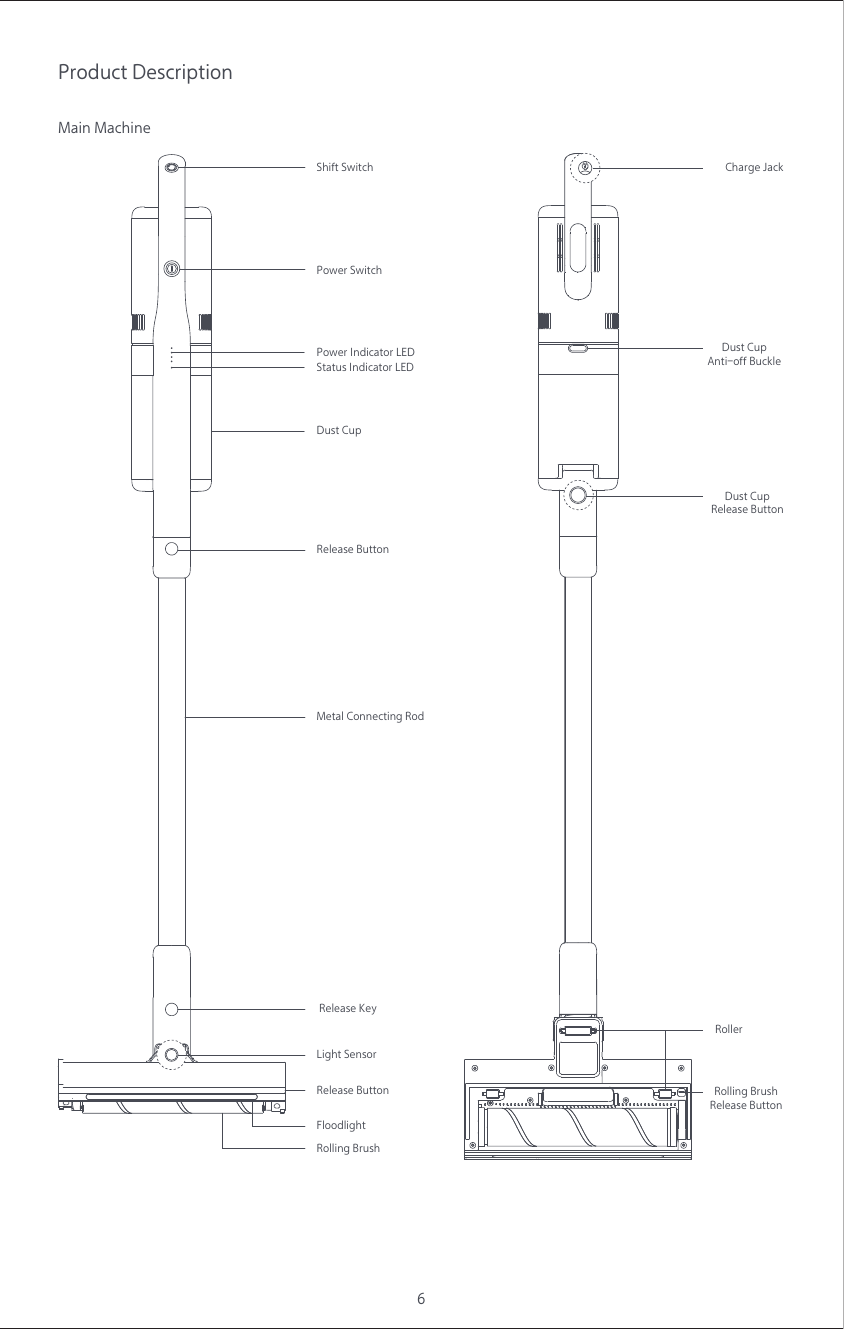
6Product DescriptionMain MachineShift SwitchMetal Connecting RodRelease ButtonRelease ButtonStatus Indicator LEDDust CupPower Switch Release KeyLight SensorFloodlightRolling BrushPower Indicator LED Dust CupAnti-off BuckleCharge JackDust CupRelease ButtonRolling BrushRelease ButtonRoller
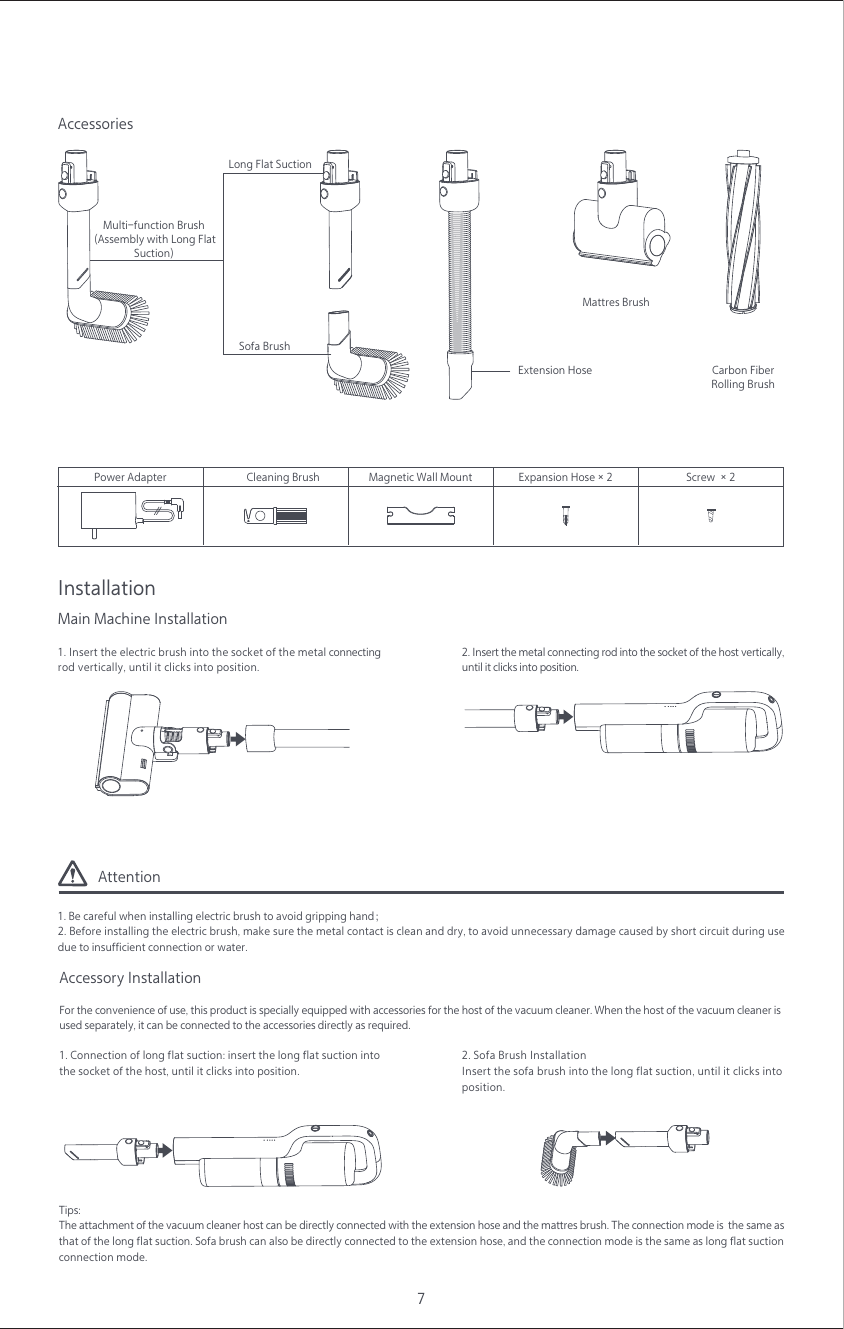
7AccessoriesCarbon FiberRolling BrushExtension HoseMattres BrushMulti-function Brush (Assembly with Long FlatSuction)Sofa Brush Long Flat SuctionAccessory InstallationFor the convenience of use, this product is specially equipped with accessories for the host of the vacuum cleaner. When the host of the vacuum cleaner isused separately, it can be connected to the accessories directly as required.Tips: The attachment of the vacuum cleaner host can be directly connected with the extension hose and the mattres brush. The connection mode is  the same as that of the long flat suction. Sofa brush can also be directly connected to the extension hose, and the connection mode is the same as long flat suction connection mode. 2. Sofa Brush InstallationInsert the sofa brush into the long flat suction, until it clicks intoposition.Attention1. Be careful when installing electric brush to avoid gripping hand;2. Before installing the electric brush, make sure the metal contact is clean and dry, to avoid unnecessary damage caused by short circuit during use due to insufficient connection or water.InstallationMain Machine Installation1. Insert the electric brush into the socket of the metal connecting rod vertically, until it clicks into position.2. Insert the metal connecting rod into the socket of the host vertically,until it clicks into position.1. Connection of long flat suction: insert the long flat suction intothe socket of the host, until it clicks into position.Cleaning Brush Magnetic Wall MountPower Adapter Expansion Hose×2 Screw ×2
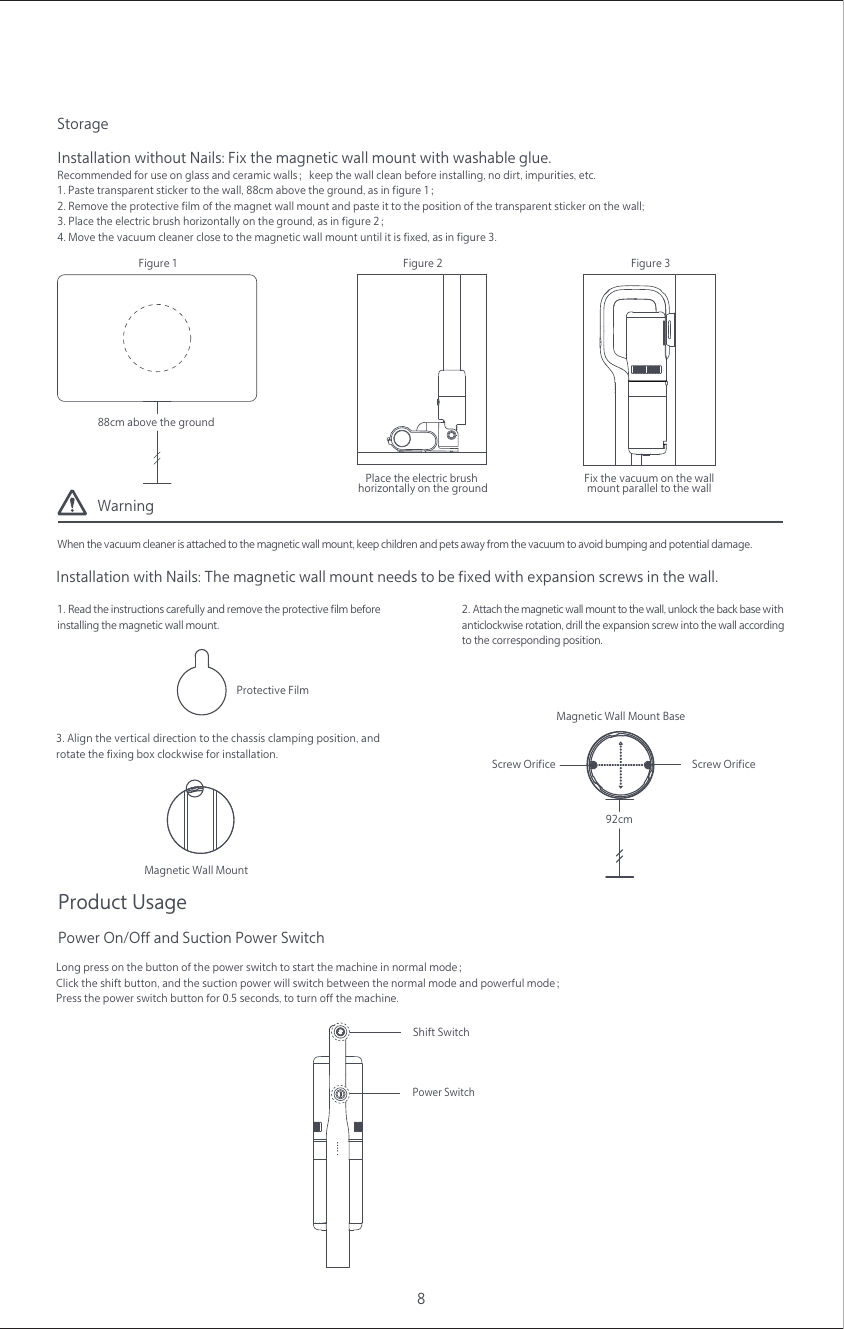
WarningWhen the vacuum cleaner is attached to the magnetic wall mount, keep children and pets away from the vacuum to avoid bumping and potential damage.8Storage1. Paste transparent sticker to the wall, 88cm above the ground, as in figure 1;2. Remove the protective film of the magnet wall mount and paste it to the position of the transparent sticker on the wall;3. Place the electric brush horizontally on the ground, as in figure 2;4. Move the vacuum cleaner close to the magnetic wall mount until it is fixed, as in figure 3.Installation without Nails: Fix the magnetic wall mount with washable glue.Recommended for use on glass and ceramic walls;keep the wall clean before installing, no dirt, impurities, etc.3. Align the vertical direction to the chassis clamping position, and rotate the fixing box clockwise for installation.1. Read the instructions carefully and remove the protective film beforeinstalling the magnetic wall mount.Installation with Nails: The magnetic wall mount needs to be fixed with expansion screws in the wall.2. Attach the magnetic wall mount to the wall, unlock the back base with anticlockwise rotation, drill the expansion screw into the wall according to the corresponding position.88cm above the groundProtective Film92cmScrew OrificeMagnetic Wall Mount BaseScrew OrificeMagnetic Wall MountProduct UsageLong press on the button of the power switch to start the machine in normal mode;Click the shift button, and the suction power will switch between the normal mode and powerful mode;Press the power switch button for 0.5 seconds, to turn off the machine.Power On/Off and Suction Power SwitchShift SwitchPower SwitchPlace the electric brush horizontally on the ground Fix the vacuum on the wallmount parallel to the wall Figure 1  Figure 2  Figure 3
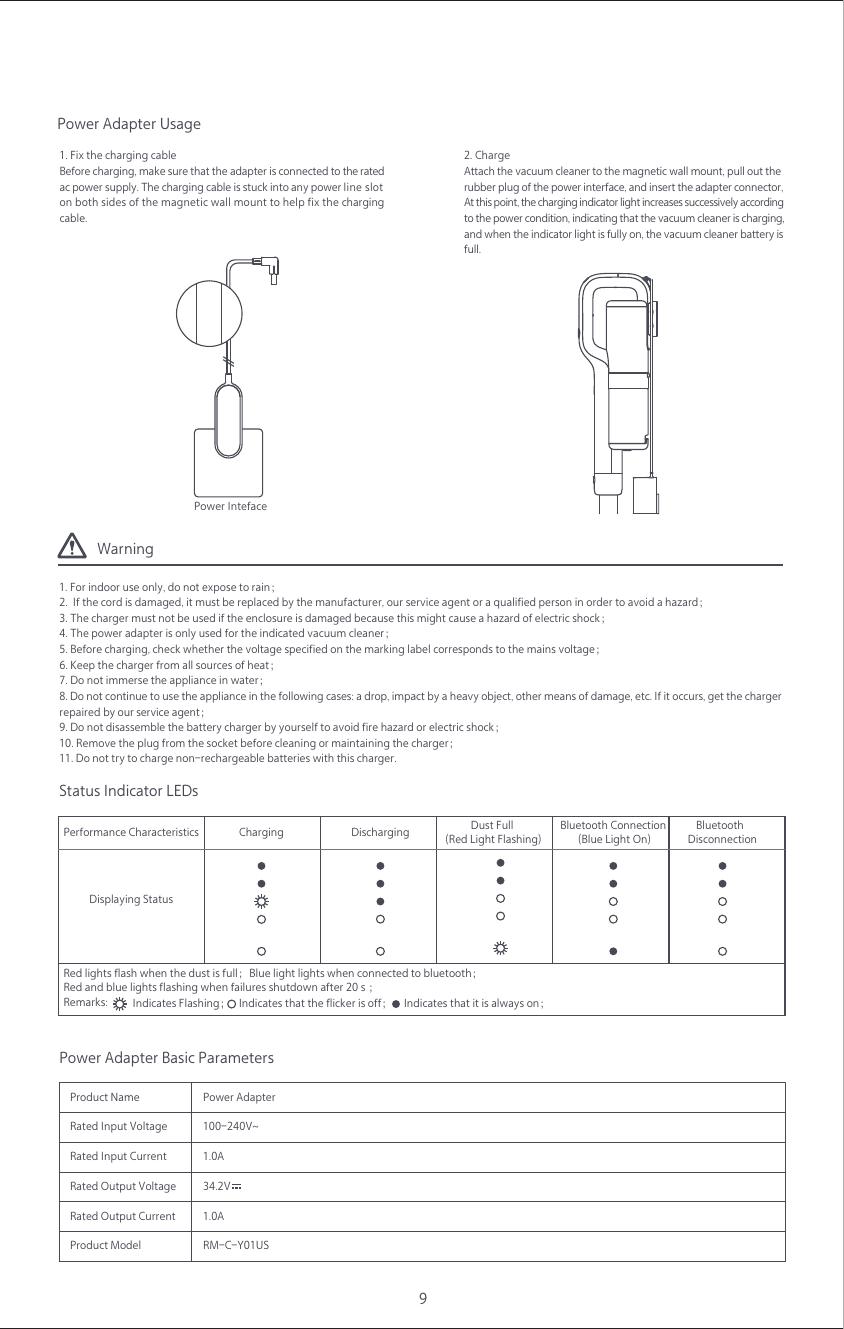
Warning1. For indoor use only, do not expose to rain;2.  If the cord is damaged, it must be replaced by the manufacturer, our service agent or a qualified person in order to avoid a hazard;3. The charger must not be used if the enclosure is damaged because this might cause a hazard of electric shock;4. The power adapter is only used for the indicated vacuum cleaner;5. Before charging, check whether the voltage specified on the marking label corresponds to the mains voltage;6. Keep the charger from all sources of heat;7. Do not immerse the appliance in water;8. Do not continue to use the appliance in the following cases: a drop, impact by a heavy object, other means of damage, etc. If it occurs, get the charger repaired by our service agent;9. Do not disassemble the battery charger by yourself to avoid fire hazard or electric shock;10. Remove the plug from the socket before cleaning or maintaining the charger;11. Do not try to charge non-rechargeable batteries with this charger.9Power Adapter Usage1. Fix the charging cableBefore charging, make sure that the adapter is connected to the rated ac power supply. The charging cable is stuck into any power line slot on both sides of the magnetic wall mount to help fix the charging cable.2. ChargeAttach the vacuum cleaner to the magnetic wall mount, pull out therubber plug of the power interface, and insert the adapter connector,At this point, the charging indicator light increases successively according to the power condition, indicating that the vacuum cleaner is charging, and when the indicator light is fully on, the vacuum cleaner battery is full.Power IntefaceStatus Indicator LEDsPower Adapter Basic ParametersDisplaying StatusPerformance Characteristics Bluetooth Connection (Blue Light On)Dust Full (Red Light Flashing)Bluetooth  DisconnectionDischargingRed lights flash when the dust is full;Blue light lights when connected to bluetooth;Red and blue lights flashing when failures shutdown after 20 s ;Remarks:  Indicates that the flicker is off;Indicates Flashing; Indicates that it is always on;ChargingPower AdapterProduct Name1.0A1.0ARated Input VoltageRated Input CurrentProduct Model RM-C-Y01USRated Output VoltageRated Output Current34.2V100-240V~
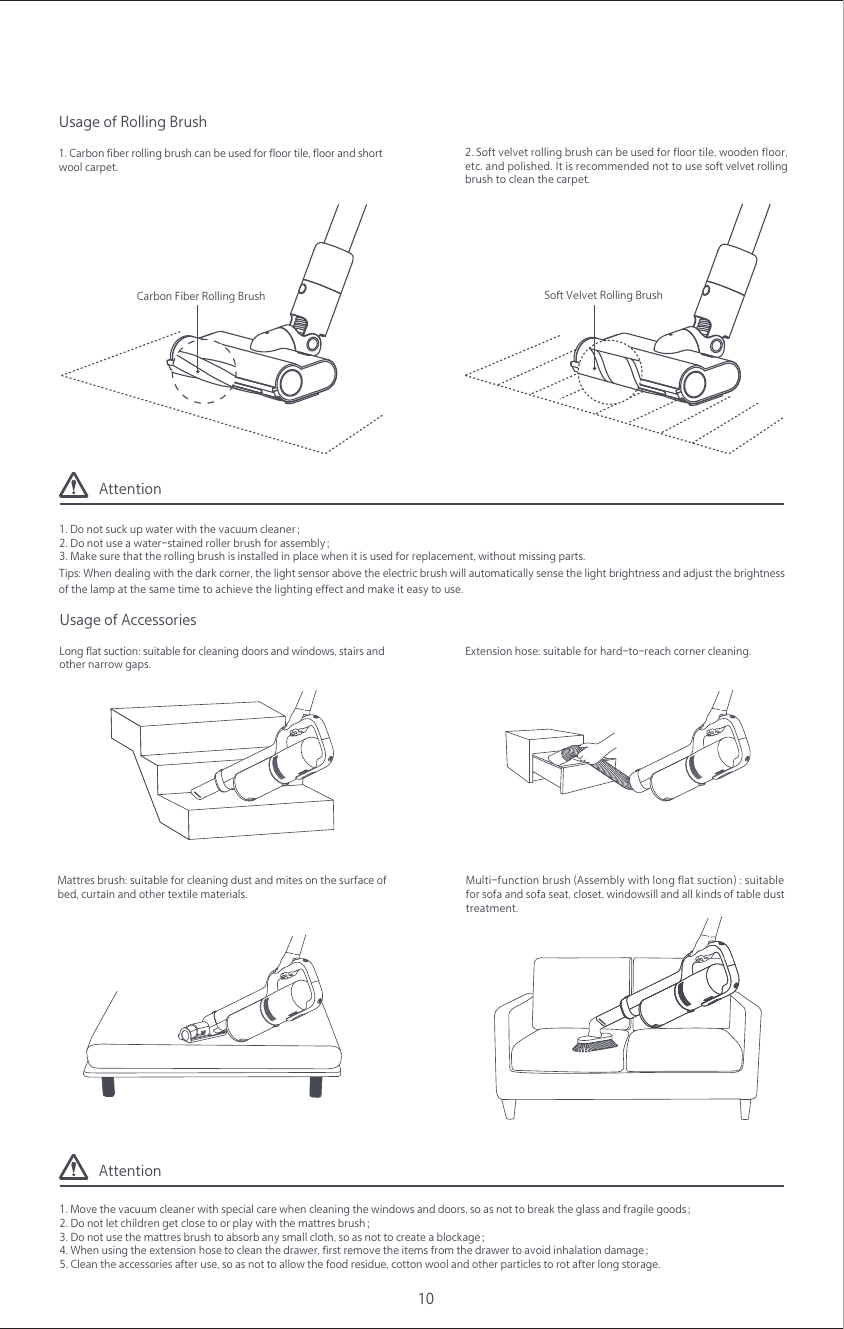
Attention1. Do not suck up water with the vacuum cleaner;2. Do not use a water-stained roller brush for assembly;3. Make sure that the rolling brush is installed in place when it is used for replacement, without missing parts.Attention1. Move the vacuum cleaner with special care when cleaning the windows and doors, so as not to break the glass and fragile goods;2. Do not let children get close to or play with the mattres brush;3. Do not use the mattres brush to absorb any small cloth, so as not to create a blockage;4. When using the extension hose to clean the drawer, first remove the items from the drawer to avoid inhalation damage;5. Clean the accessories after use, so as not to allow the food residue, cotton wool and other particles to rot after long storage.1. Carbon fiber rolling brush can be used for floor tile, floor and short wool carpet.Usage of Rolling Brush Carbon Fiber Rolling Brush2. Soft velvet rolling brush can be used for floor tile, wooden floor,etc. and polished. It is recommended not to use soft velvet rolling brush to clean the carpet.Tips: When dealing with the dark corner, the light sensor above the electric brush will automatically sense the light brightness and adjust the brightness of the lamp at the same time to achieve the lighting effect and make it easy to use.10Multi-function brush (Assembly with long flat suction) : suitable for sofa and sofa seat, closet, windowsill and all kinds of table dust treatment.Long flat suction: suitable for cleaning doors and windows, stairs and other narrow gaps.Usage of Accessories Mattres brush: suitable for cleaning dust and mites on the surface of bed, curtain and other textile materials.Extension hose: suitable for hard-to-reach corner cleaning.  Soft Velvet Rolling Brush
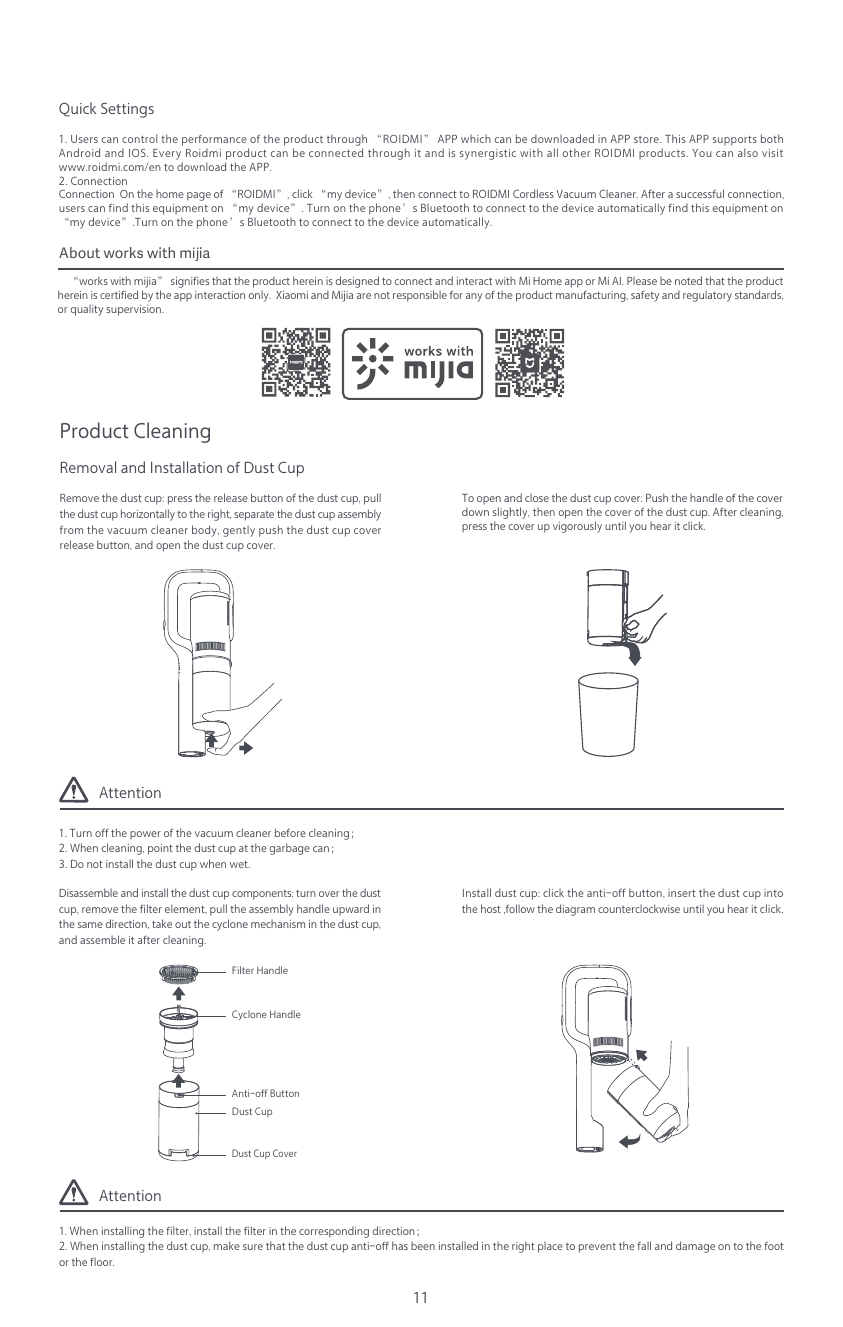
Attention1. Turn off the power of the vacuum cleaner before cleaning;2. When cleaning, point the dust cup at the garbage can;3. Do not install the dust cup when wet.Attention1. When installing the filter, install the filter in the corresponding direction;2. When installing the dust cup, make sure that the dust cup anti-off has been installed in the right place to prevent the fall and damage on to the foot or the floor.11Quick Settings1. Users can control the performance of the product through “ROIDMI” APP which can be downloaded in APP store. This APP supports both Android and IOS. Every Roidmi product can be connected through it and is synergistic with all other ROIDMI products. You can also visit www.roidmi.com/en to download the APP.2. ConnectionConnection  On the home page of “ROIDMI”, click “my device”, then connect to ROIDMI Cordless Vacuum Cleaner. After a successful connection, users can find this equipment on “my device”. Turn on the phone’s Bluetooth to connect to the device automatically find this equipment on “my device”.Turn on the phone’s Bluetooth to connect to the device automatically.    “works with mijia” signifies that the product herein is designed to connect and interact with Mi Home app or Mi AI. Please be noted that the product herein is certified by the app interaction only.  Xiaomi and Mijia are not responsible for any of the product manufacturing, safety and regulatory standards, or quality supervision.Product CleaningRemoval and Installation of Dust CupInstall dust cup: click the anti-off button, insert the dust cup into the host ,follow the diagram counterclockwise until you hear it click.Anti-off ButtonFilter HandleDust CupDust Cup CoverCyclone HandleDisassemble and install the dust cup components: turn over the dust cup, remove the filter element, pull the assembly handle upward in the same direction, take out the cyclone mechanism in the dust cup, and assemble it after cleaning.Remove the dust cup: press the release button of the dust cup, pull the dust cup horizontally to the right, separate the dust cup assembly from the vacuum cleaner body, gently push the dust cup cover release button, and open the dust cup cover.To open and close the dust cup cover: Push the handle of the cover down slightly, then open the cover of the dust cup. After cleaning, press the cover up vigorously until you hear it click.About works with mijia
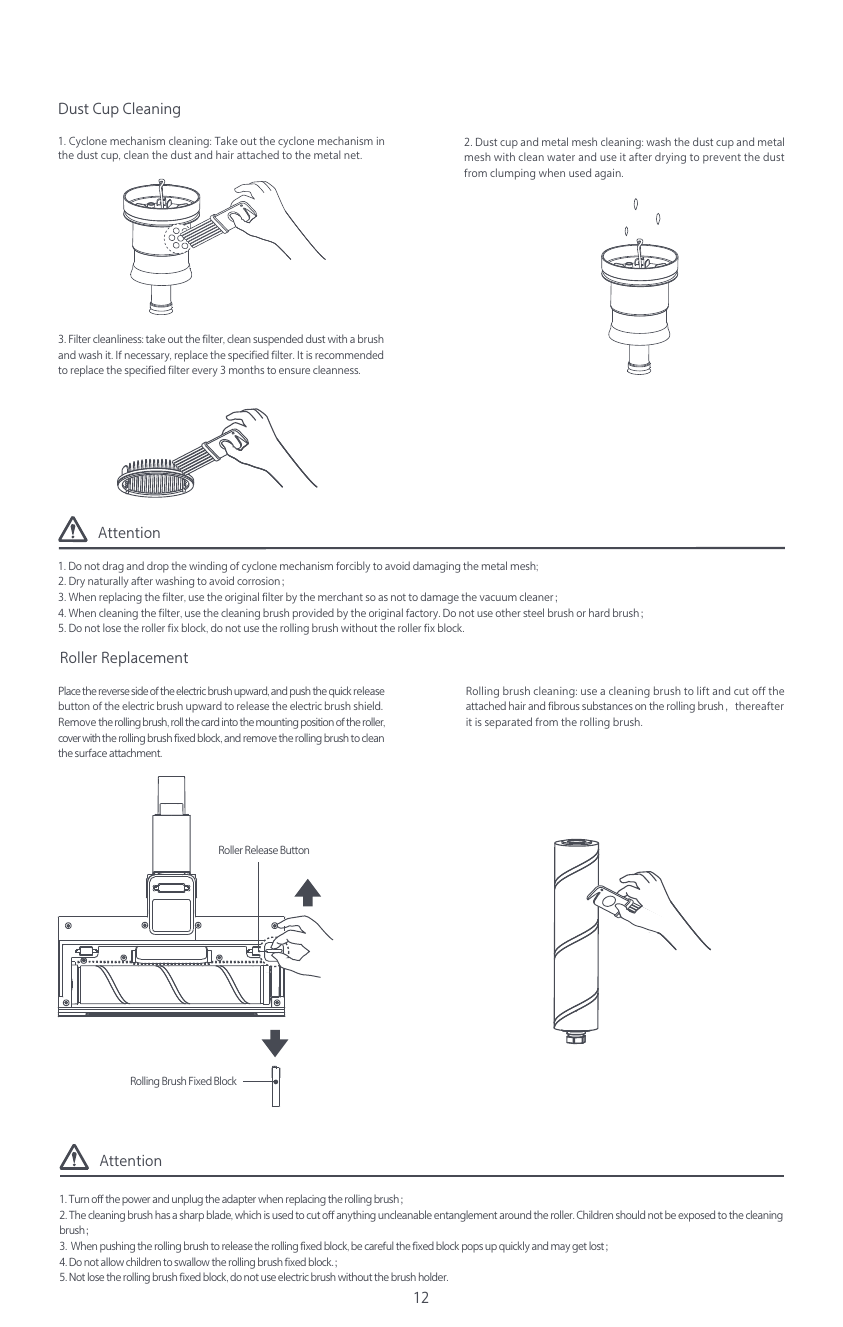
Attention1. Do not drag and drop the winding of cyclone mechanism forcibly to avoid damaging the metal mesh;2. Dry naturally after washing to avoid corrosion;3. When replacing the filter, use the original filter by the merchant so as not to damage the vacuum cleaner;4. When cleaning the filter, use the cleaning brush provided by the original factory. Do not use other steel brush or hard brush;5. Do not lose the roller fix block, do not use the rolling brush without the roller fix block.Attention1. Turn off the power and unplug the adapter when replacing the rolling brush;2. The cleaning brush has a sharp blade, which is used to cut off anything uncleanable entanglement around the roller. Children should not be exposed to the cleaning brush;3.  When pushing the rolling brush to release the rolling fixed block, be careful the fixed block pops up quickly and may get lost;4. Do not allow children to swallow the rolling brush fixed block.;5. Not lose the rolling brush fixed block, do not use electric brush without the brush holder.2. Dust cup and metal mesh cleaning: wash the dust cup and metal mesh with clean water and use it after drying to prevent the dust from clumping when used again.1. Cyclone mechanism cleaning: Take out the cyclone mechanism in the dust cup, clean the dust and hair attached to the metal net.Roller ReplacementPlace the reverse side of the electric brush upward, and push the quick release button of the electric brush upward to release the electric brush shield. Remove the rolling brush, roll the card into the mounting position of the roller, cover with the rolling brush fixed block, and remove the rolling brush to clean the surface attachment.Rolling brush cleaning: use a cleaning brush to lift and cut off the attached hair and fibrous substances on the rolling brush,thereafter it is separated from the rolling brush.Dust Cup Cleaning123. Filter cleanliness: take out the filter, clean suspended dust with a brush and wash it. If necessary, replace the specified filter. It is recommended to replace the specified filter every 3 months to ensure cleanness.Rolling Brush Fixed BlockRoller Release Button
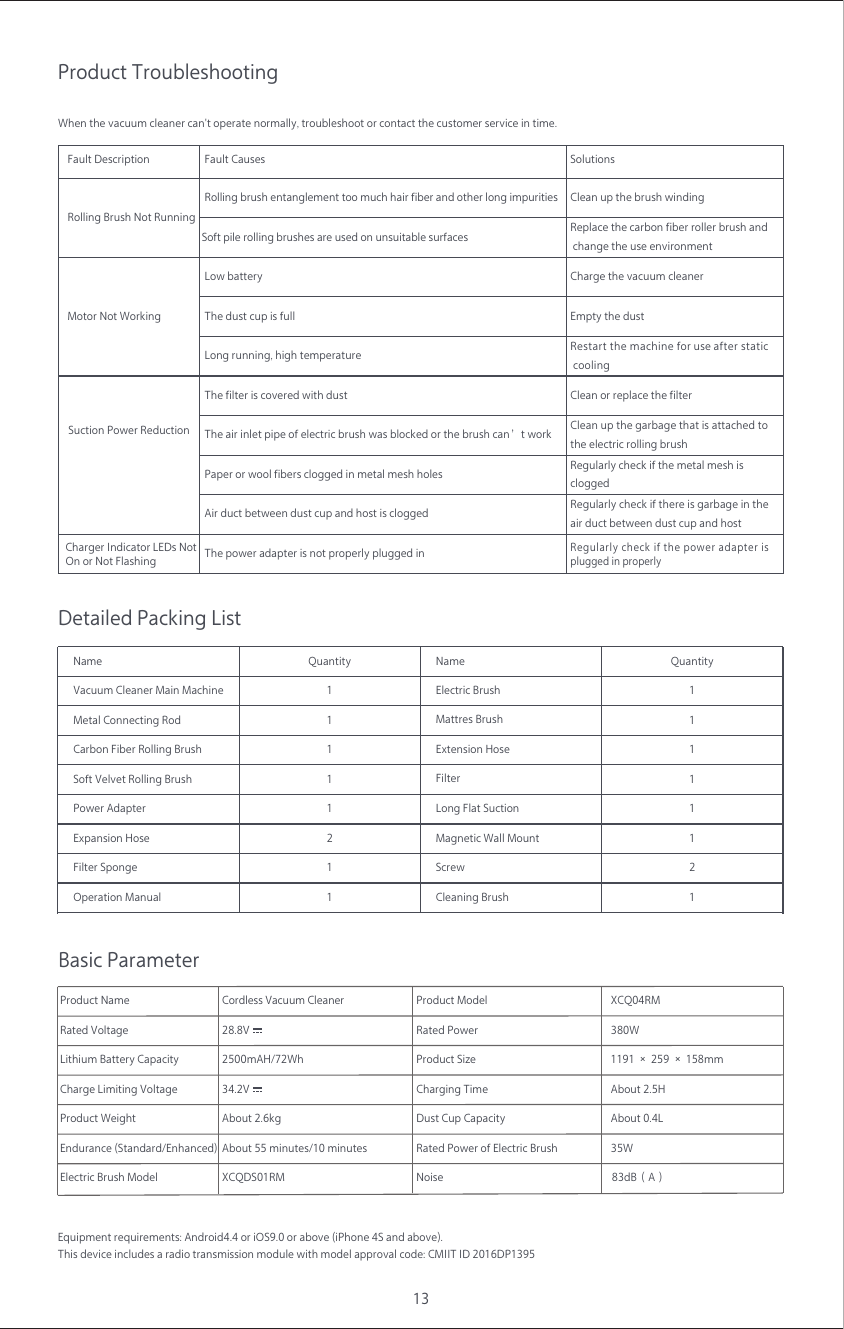
13Product TroubleshootingWhen the vacuum cleaner can't operate normally, troubleshoot or contact the customer service in time.Detailed Packing ListBasic ParameterName Name Quantity11111121Quantity11111211Vacuum Cleaner Main Machine Electric BrushMetal Connecting Rod Mattres BrushCleaning BrushCarbon Fiber Rolling BrushSoft Velvet Rolling BrushLong Flat SuctionPower AdapterMagnetic Wall MountExpansion HoseScrewFilter SpongeFilterOperation ManualEquipment requirements: Android4.4 or iOS9.0 or above (iPhone 4S and above). This device includes a radio transmission module with model approval code: CMIIT ID 2016DP1395Product Name XCQ04RM380W83dB(A)Product WeightEndurance (Standard/Enhanced)Rated VoltageLithium Battery CapacityCharge Limiting Voltage About 2.5HAbout 0.4L1191 × 259 × 158mm35WProduct ModelNoiseRated PowerProduct SizeCharging TimeDust Cup CapacityRated Power of Electric BrushElectric Brush Model28.8V2500mAH/72WhCordless Vacuum CleanerAbout 55 minutes/10 minutesAbout 2.6kgXCQDS01RM34.2VFault DescriptionMotor Not WorkingRolling Brush Not RunningSuction Power Reduction The air inlet pipe of electric brush was blocked or the brush can’t workThe dust cup is fullLong running, high temperatureThe filter is covered with dustPaper or wool fibers clogged in metal mesh holesAir duct between dust cup and host is cloggedLow batteryFault CausesSoft pile rolling brushes are used on unsuitable surfacesRolling brush entanglement too much hair fiber and other long impuritiesThe power adapter is not properly plugged inCharger Indicator LEDs Not On or Not FlashingClean up the garbage that is attached tothe electric rolling brushEmpty the dustRestart the machine for use after static coolingClean or replace the filterRegularly check if there is garbage in theair duct between dust cup and hostRegularly check if the metal mesh iscloggedCharge the vacuum cleanerReplace the carbon fiber roller brush and change the use environmentClean up the brush windingSolutionsRegularly check if the power adapter is plugged in properlyExtension Hose
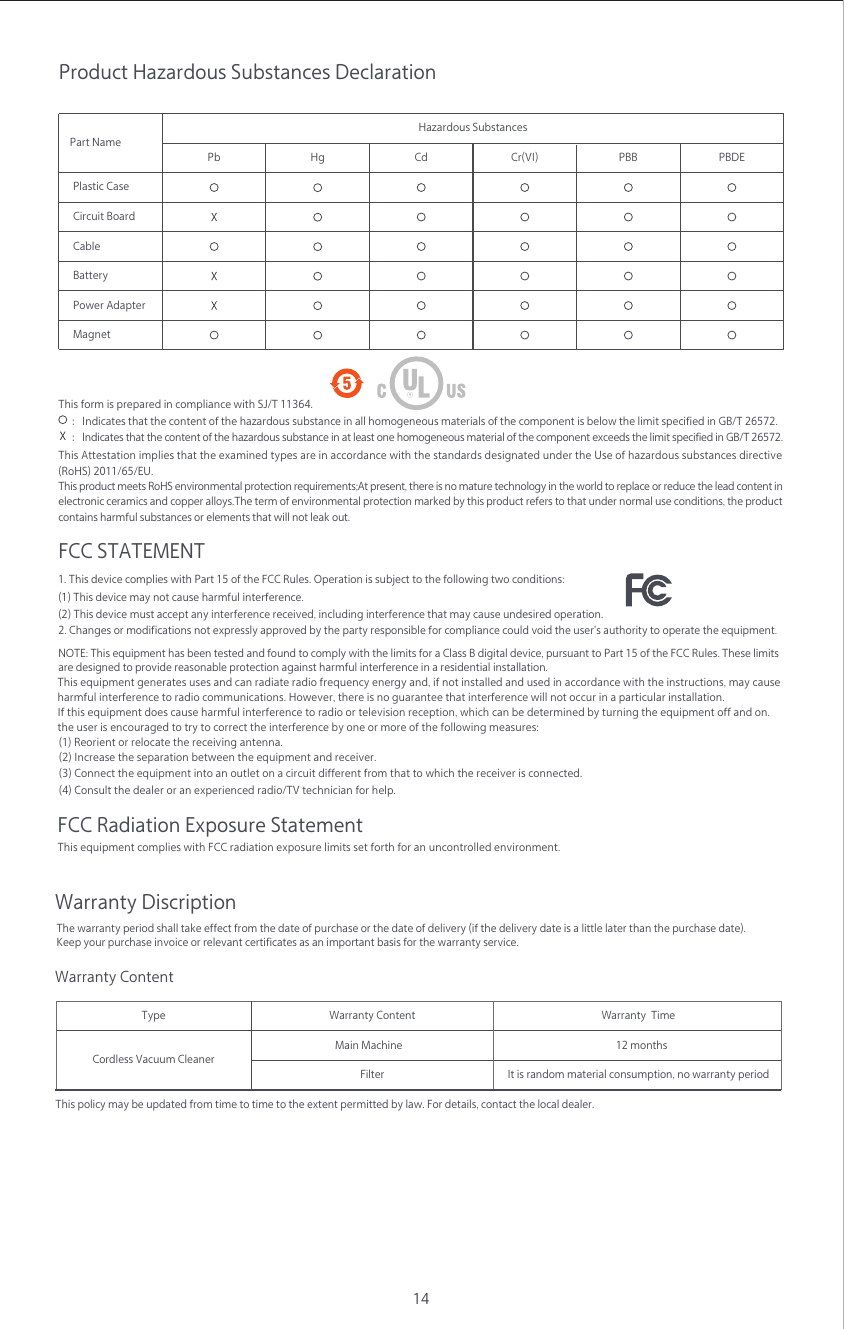
14Product Hazardous Substances DeclarationHazardous SubstancesPart NamePlastic CaseCircuit BoardCableBatteryPower AdapterMagnetPb Hg Cd Cr(VI) PBB PBDEThis form is prepared in compliance with SJ/T 11364.:Indicates that the content of the hazardous substance in at least one homogeneous material of the component exceeds the limit specified in GB/T 26572.    :Indicates that the content of the hazardous substance in all homogeneous materials of the component is below the limit specified in GB/T 26572.This product meets RoHS environmental protection requirements;At present, there is no mature technology in the world to replace or reduce the lead content in electronic ceramics and copper alloys.The term of environmental protection marked by this product refers to that under normal use conditions, the product contains harmful substances or elements that will not leak out.This Attestation implies that the examined types are in accordance with the standards designated under the Use of hazardous substances directive (RoHS) 2011/65/EU.This policy may be updated from time to time to the extent permitted by law. For details, contact the local dealer.Main MachineFilterTypeCordless Vacuum CleanerWarranty Content Warranty  Time12 monthsIt is random material consumption, no warranty periodFCC STATEMENT 1. This device complies with Part 15 of the FCC Rules. Operation is subject to the following two conditions: (1) This device may not cause harmful interference.(2) This device must accept any interference received, including interference that may cause undesired operation. 2. Changes or modifications not expressly approved by the party responsible for compliance could void the user's authority to operate the equipment.FCC Radiation Exposure Statement This equipment complies with FCC radiation exposure limits set forth for an uncontrolled environment.   Warranty DiscriptionThe warranty period shall take effect from the date of purchase or the date of delivery (if the delivery date is a little later than the purchase date). Keep your purchase invoice or relevant certificates as an important basis for the warranty service.Warranty ContentNOTE: This equipment has been tested and found to comply with the limits for a Class B digital device, pursuant to Part 15 of the FCC Rules. These limitsare designed to provide reasonable protection against harmful interference in a residential installation.  (1) Reorient or relocate the receiving antenna. (2) Increase the separation between the equipment and receiver. (3) Connect the equipment into an outlet on a circuit different from that to which the receiver is connected. (4) Consult the dealer or an experienced radio/TV technician for help. This equipment generates uses and can radiate radio frequency energy and, if not installed and used in accordance with the instructions, may cause harmful interference to radio communications. However, there is no guarantee that interference will not occur in a particular installation. If this equipment does cause harmful interference to radio or television reception, which can be determined by turning the equipment off and on.the user is encouraged to try to correct the interference by one or more of the following measures:
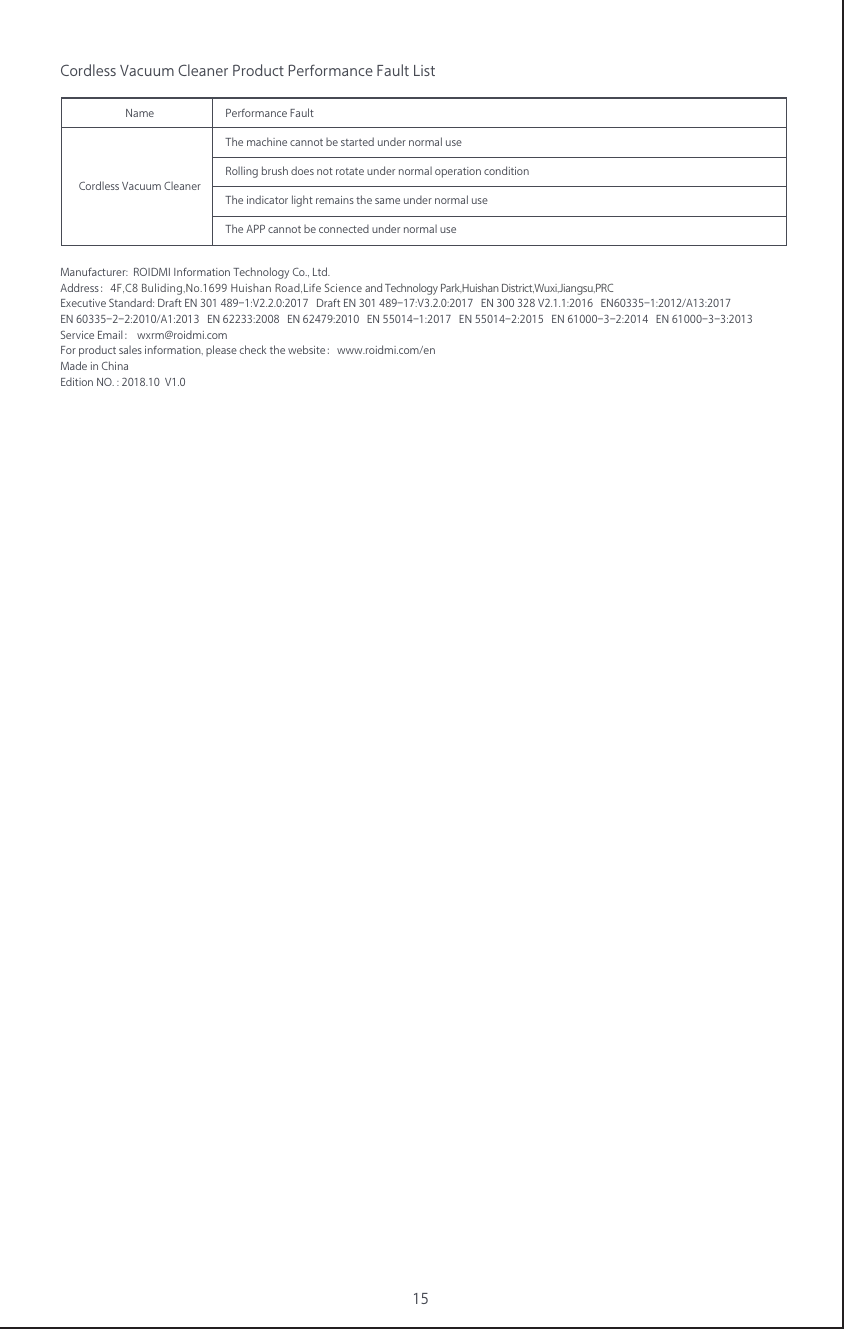
15Cordless Vacuum Cleaner Product Performance Fault ListNameThe machine cannot be started under normal useRolling brush does not rotate under normal operation conditionThe indicator light remains the same under normal useThe APP cannot be connected under normal usePerformance FaultCordless Vacuum CleanerManufacturer:  ROIDMI Information Technology Co., Ltd. Address:4F,C8 Buliding,No.1699 Huishan Road,Life Science and Technology Park,Huishan District,Wuxi,Jiangsu,PRCExecutive Standard: Draft EN 301 489-1:V2.2.0:2017   Draft EN 301 489-17:V3.2.0:2017   EN 300 328 V2.1.1:2016   EN60335-1:2012/A13:2017 EN 60335-2-2:2010/A1:2013   EN 62233:2008   EN 62479:2010   EN 55014-1:2017   EN 55014-2:2015   EN 61000-3-2:2014   EN 61000-3-3:2013  Service Email: wxrm@roidmi.com   For product sales information, please check the website:www.roidmi.com/enMade in ChinaEdition NO. : 2018.10  V1.0            
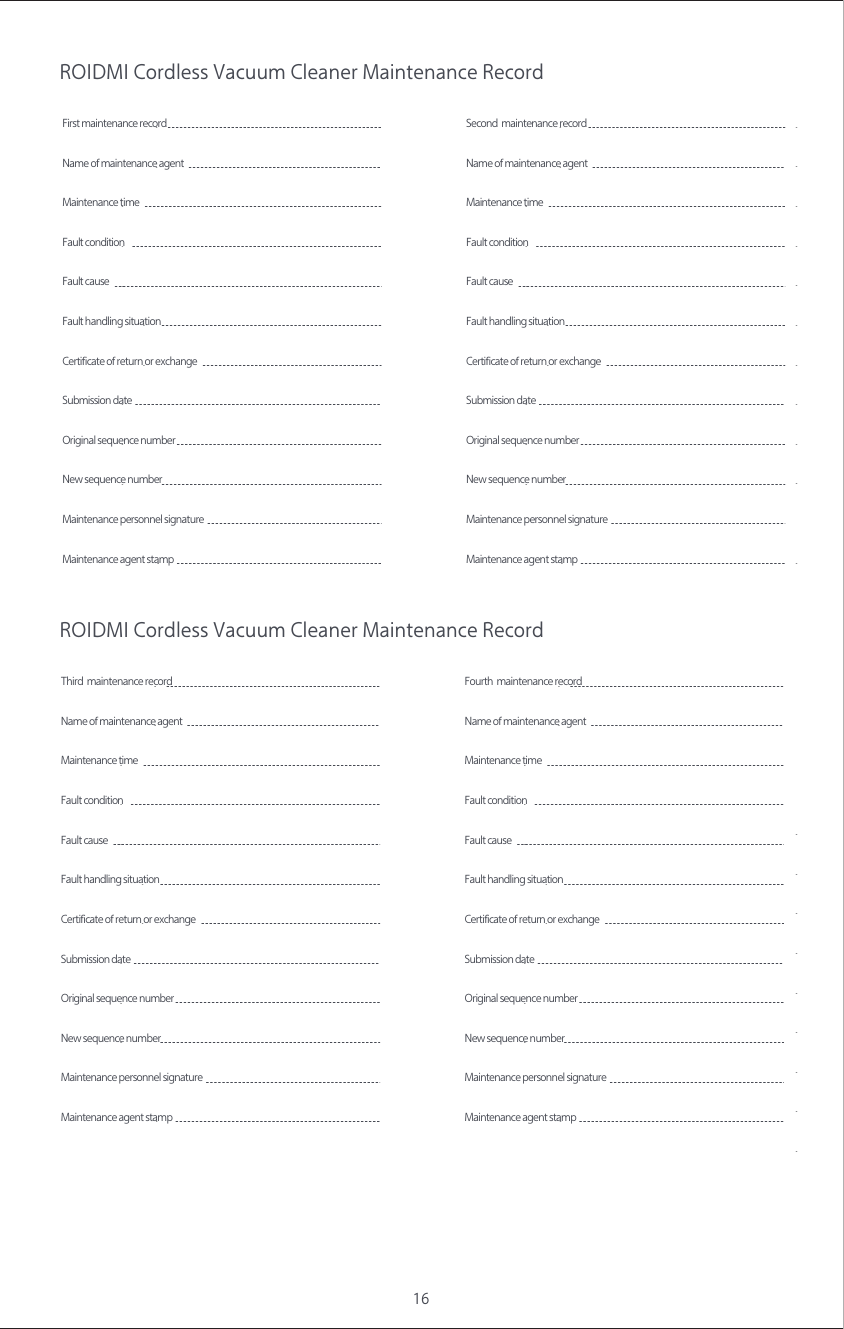
16ROIDMI Cordless Vacuum Cleaner Maintenance RecordROIDMI Cordless Vacuum Cleaner Maintenance RecordFirst maintenance recordName of maintenance agentMaintenance time  Fault condition   Fault causeCertificate of return or exchange Submission date New sequence numberOriginal sequence numberFault handling situationMaintenance agent stampMaintenance personnel signature Second  maintenance recordName of maintenance agentMaintenance time  Fault condition   Fault causeCertificate of return or exchange Submission date New sequence numberOriginal sequence numberFault handling situationMaintenance agent stampMaintenance personnel signature Third  maintenance recordName of maintenance agentMaintenance time  Fault condition   Fault causeCertificate of return or exchange Submission date New sequence numberOriginal sequence numberFault handling situationMaintenance agent stampMaintenance personnel signature Fourth  maintenance recordName of maintenance agentMaintenance time  Fault condition   Fault causeCertificate of return or exchange Submission date New sequence numberOriginal sequence numberFault handling situationMaintenance agent stampMaintenance personnel signature

Navigation menu