RadarFind T42140 INDOOR EQUIPMENT LOCATION SYSTEM User Manual
RadarFind Corporation INDOOR EQUIPMENT LOCATION SYSTEM Users Manual
Users Manual
Copyright © RadarFind Corp 2008
S‐Tag
Model‐T42‐140
TemperatureMonitoringTag
InstallationInstructions
RadarFind™Corporation
877‐RadarFind(723‐2734)
www.radarfind.com

Radarfind Corporation
8/25/2010 A-Tag Installation Instructions Page 2
Copyright © RadarFind Corp 2009
Warnings:
Itisimportanttofollowallinstructionsshippedwiththisproduct.
UNPACKING:Afterunpackingtheunit,examineitfordamagethatmayhaveoccurredintransit.Ifthe
equipmenthasbeendamaged,donotattempttoinstalloroperateit.Fileaclaimimmediatelywiththe
carrierstatingtheextentofthedamage,orcontactRadarFindcustomerserviceforrepairor
replacement.
Readandunderstandallinstructionsbeforeinstallingoroperatingthisequipment.
Theselectionofthemountinglocationforthedeviceistobeaccomplishedunderthedirectionofthe
directorofClinicalEngineeringandconformtoallcompanypolicies,andmustbeinaccordancewith
specificationsinthesub‐chapterforeachdevicetype.
CAUTION:Riskofmalfunction.Installthesedevicesonlyinareaswithanambienttemperature
between0°and50°C.
[15.19]ThisdevicecomplieswithPart15oftheFCCRules.Operationissubjecttothefollowingtwo
conditions:(1)thisdevicemaynotcauseharmfulinterference,and(2)thisdevicemustacceptany
interferencereceived,includinginterferencethatmaycauseundesiredoperation.
[15.21]Informationtouser:ChangesormodificationsnotexpresslyapprovedbytheRadarFind
Corporationcouldvoidtheuser'sauthoritytooperatetheequipment
[15.105]NOTE:ThisequipmenthasbeentestedandfoundtocomplywiththelimitsforaClassAdigital
device,pursuanttoPart15oftheFCCRules.Theselimitsaredesignedtoprovidereasonableprotection
againstharmfulinterferencewhentheequipmentisoperatedinacommercialenvironment.This
equipmentgenerates,uses,andcanradiateradiofrequencyenergyand,ifnotinstalledandusedin
accordancewiththeinstructionmanual,maycauseharmfulinterferencetoradiocommunications.
Operationofthisequipmentinaresidentialareaislikelytocauseharmfulinterferenceinwhichcase
theuserwillberequiredtocorrecttheinterferenceathisownexpense.
[15.249]ThisequipmentoperatesunderSection15.249oftheTitle47FCCRules.
ThisproductprotectedbyoneormoreofthefollowingU.S.Patents:7372365,7525432&7528716.
Otherpatentspending.
Radarfind Corporation
8/25/2010 A-Tag Installation Instructions Page 3
Copyright © RadarFind Corp 2009
Contentsofstandardpackage:
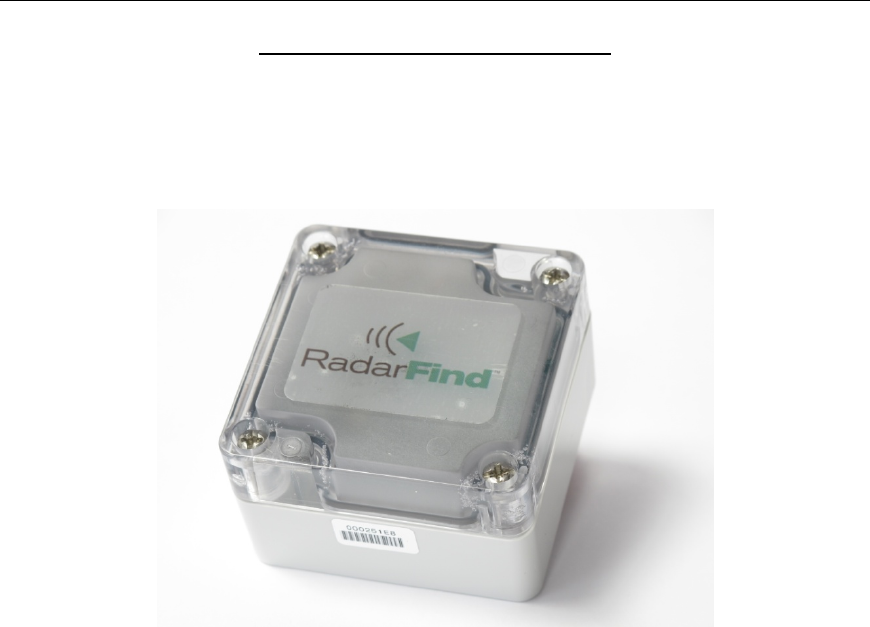
(1) T42‐140TemperatureMonitoringTag

Radarfind Corporation
8/25/2010 A-Tag Installation Instructions Page 4
Copyright © RadarFind Corp 2009
Accessories
AdhesivePadforpermanentmounting‐#90‐300‐303
Radarfind Corporation
8/25/2010 A-Tag Installation Instructions Page 5
Copyright © RadarFind Corp 2009
GeneralGuidelines:
Temperaturemonitoringtagshaveamaximumrangeof‐40Cto+70c
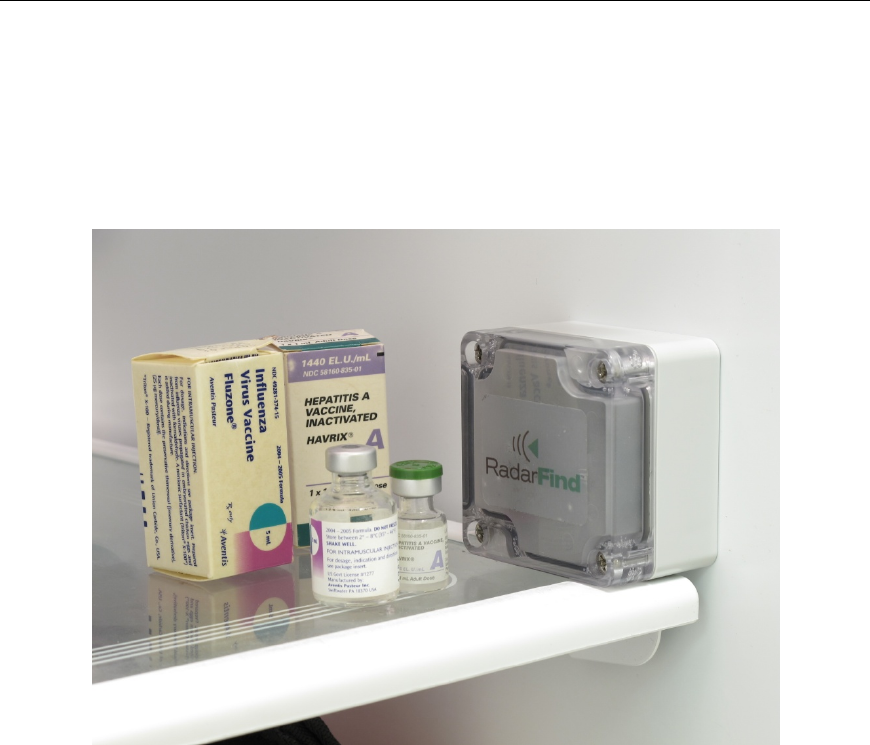
ExampleStatustagplacement
Selectastandardlocationineachmonitoredunitwherethetagisnotobstructedby
metalcontainersorliquidswhichmayinterferewiththetagsreportingsignals.
Placingthetaginthedoorshelfisagoodoptionifavailable.
Usingadhesivepads–Thereareadhesivepadsavailabletoattachthetagstothe
sidesoftherefrigeratorifdesires.
Radarfind Corporation
8/25/2010 A-Tag Installation Instructions Page 6
Copyright © RadarFind Corp 2009
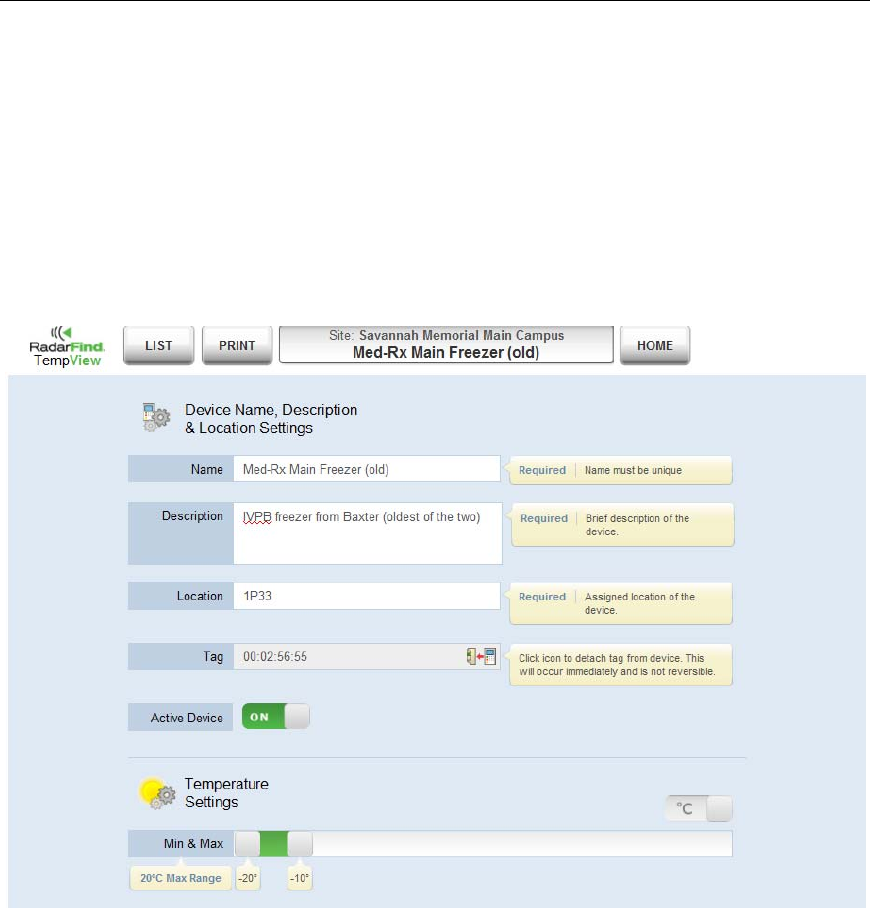
AssigningaTemperatureTagtoadevice:
1–NAME‐Createorselectthecorrectdevice.
2–DESCRIPTION‐GivethedeviceaNameandDescription.
3–LOCATION‐SelectthecorrectLocationIDforwherethedeviceislocated.Thiswilldisplaythedevice
inthecorrectplaceonthemaps.(RefertoacopyoftheRadarFindinstallationmapstoselectthe
LocationID)
4–TAG‐EntertheTagIDoftheTemperatureMonitiringTagplacedinthatdevice.
5–ACTIVEDEVICE‐SelectwhetherthedeviceisActiveornot.DeviceswhicharenotActivewillnot
appearinthedefaultuserinterfacesorgeneratealerts.(ForexamplemarkadeviceasInActivewhen
theunitisoutofservice)
6–MIN&MAX‐Settheacceptabletemperaturerangeforthedevice.Ifthedevicegoesoutofthe
rangespecifiedanalertmaybesent.Someadjustmentofthisrangemayberequireddependingonthe
normalfluctuationsofthedeviceovertime.Settherangetoacceptnormalfluctuations,buttowarnif
thosenormalconditionsarenotmaintained.
Radarfind Corporation
8/25/2010 A-Tag Installation Instructions Page 7
Copyright © RadarFind Corp 2009
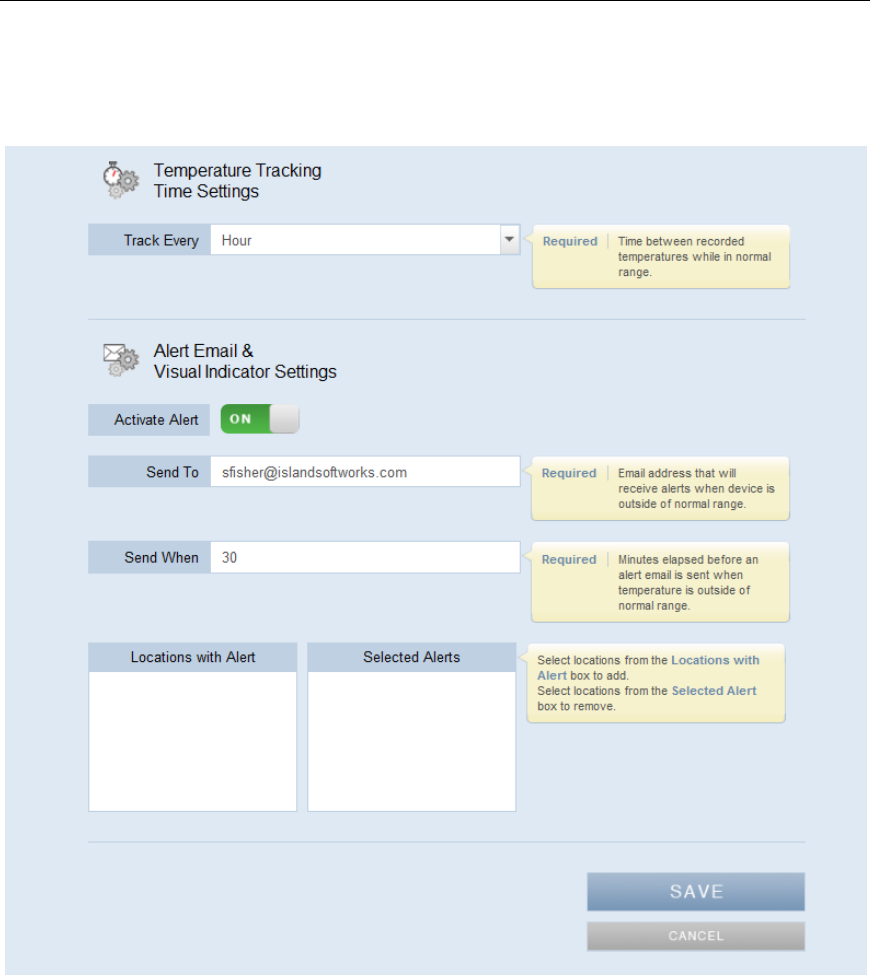
7–TRACKEVERY‐Setthetimeperiodicitytologthetemperaturetrackingrecord.Thisistheperiodicity
atwhichthetemperatureforthisdeviceisrecordedwhenthetemperatureiswithinthenormalrange.
Whenthetemperaturedeviatesfromthenormalrangeassetthetemperaturewillbeloggedevery5
minutes.
8–ACTIVATEALERT‐SelectwhethertheAlertfunctionforthisdeviceisActiveornot.Alertswhichare
notActivewillgeneratealerts.(ForexamplemarkanAlertasInActivewhentheunitisoutofservice)
9–SENDTO–Entertheemailaddress(s)forpersonswhoshouldreceiveemailnotificationswhenthis
Alertistriggered.
10–SENDWHEN–Enterthetimethedevicehastoremainoutoftemperaturerangebeforesendingan
emailAlert,.
11–SAVEtheconfiguration.
(LocationwithAlertandSelectedAlertsrefertoavisibleandaudibleEthernetattachedalertingdevice,
forfutureuse)
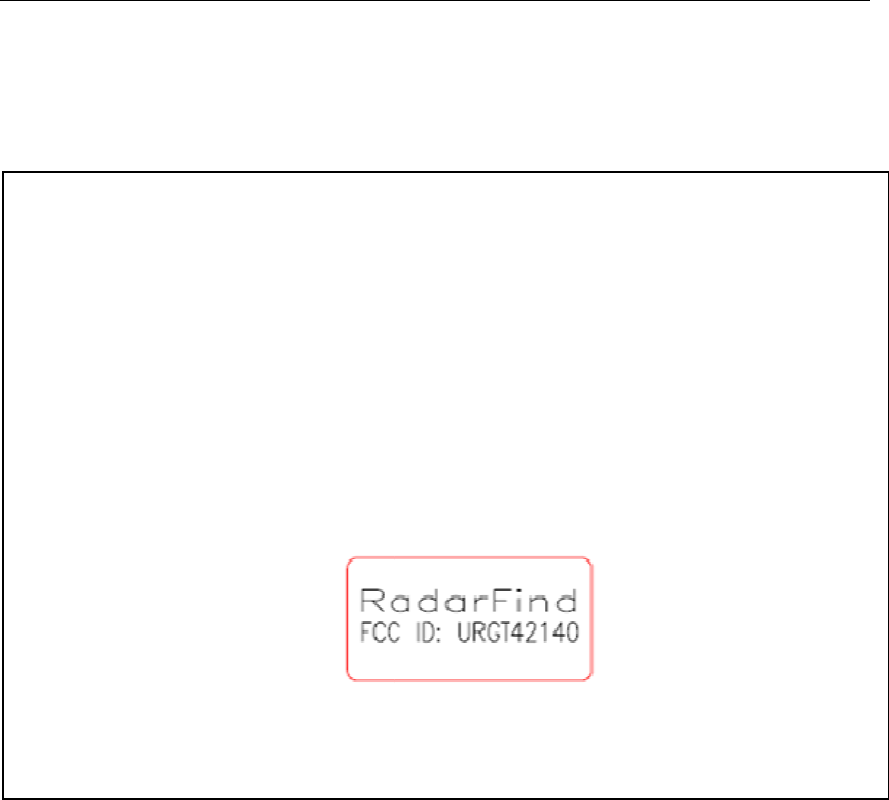
8/25/
2
2
010
DCpower:
Powerconsu
m
Communicatio
n
TransmitPowe
r
Antenna:
Communicati
o
Operating:
Packaging:
Accessories:
Dimensions:
Model
m
ption:
n
s
r
o
ns:
R
Radar
f
A-Tag In
s
Copyright
©
Techn
T42‐140‐
T
Internalsealedl
Average15uA
902‐928MHzFS
K
+10dBmmaxi
m
Unitygainisotr
o
FCCSubpart15.
‐40to+70ºC,5
%
ABSandPolyca
r
Adhesivepad
TagT42‐140(2
R
adarFin
d
f
ind Corporat
i
s
tallation Inst
r
©
RadarFind C
o
icalSpecificat
i
T
emperatur
ithiumbattery
K
m
um‐*nominal*
T
o
pic
249
%
to90%RH,non
r
bonate(ULFlam
m
.5”Lx2.25”Wx
1
FCCLabe
d
Corpor
a
i
on
r
uctions
o
rp 2009
i
ons:
eMonitori
n
T
Xfieldlevelis70
d
condensing
m
abilityRatingV0
)
1
.5”D)
l
a
tion™
n
gTag
d
BµV/m@1m
)
Page 8
Radarfind Corporation
8/25/2010 A-Tag Installation Instructions Page 9
Copyright © RadarFind Corp 2009
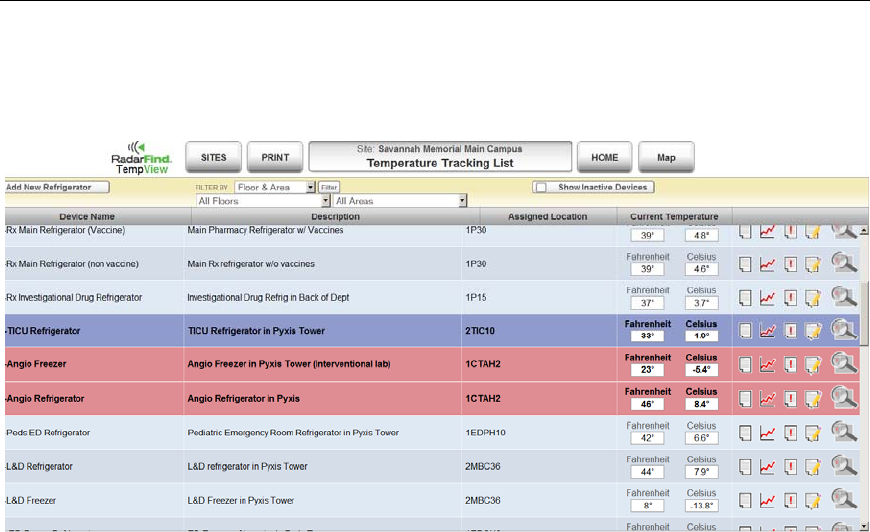
AppendixA–TemperatureTagDisplays
ThestandardTempViewgraphdisplaysDeviceName,Description,AssignedLocation,Current
Temperature,andatoolbarforeachActivedevice.
(TodisplayInActivedeviceschecktheShowInactiveDevicesboxonthetoptoolbar.)
NameandLocationcolumnsaresortable,andfiltersareavailableinthetoptoolbartofilterthedevices
byFloororArea.
Thetoolsavailableforeachdeviceare,fromlefttoright:
1–TextReport
2–TemperatureGraph
3–ReportLog
4–Editdevice
5–Showlocationonamap.

Radarfind Corporation
8/25/2010 A-Tag Installation Instructions Page 10
Copyright © RadarFind Corp 2009
ApppendixB‐Maintenance