Radio Shack Dx 398 Users Manual 20 228
DX-398 to the manual 2828f44b-2881-4384-8d18-79bb2953eb93
2015-01-21
: Radio-Shack Radio-Shack-Dx-398-Users-Manual-352494 radio-shack-dx-398-users-manual-352494 radio-shack pdf
Open the PDF directly: View PDF  .
.
Page Count: 48
Cat. No. 20-228
OWNER’S MANUAL
All-Band Shortwave Receiver
Please read before using this equipment.
with Radio Data System
DX-398

2
FEATURES
Your RadioShack DX-398 All-Band
Shortwave Receiver with Radio Data
System brings you the voices of the
world. In the 14 international short-
wave (SW) bands, you can hear news
broadcasts and other programs from
sources around the world, such as the
British Broadcasting Corporation, Ra-
dio Cairo, and Radio Beijing. You can
set your receiver so it displays Radio
Data System (RDS) call letters of
those stations that transmit an RDS
signal.
You can get emergency information
firsthand by listening to amateur radio
broadcasts, including single sideband
(SSB) voice transmissions.
In the longwave (LW) band, you can
hear ship-to-shore calls, other marine
and aeronautical services, and some-
times even hurricane reports. You can
also tune to local broadcasts in the FM
and medium-wave (MW) bands. (In the
United States, we commonly call the
MW band the AM band.)
In addition, you can connect a cassette
recorder to the receiver’s record line
out and standby jacks so you can di-
rectly record your favorite programs
live or at a preset time.
Your receiver’s features include:
Digital Synthesized Radio — en-
sures accurate, stable tuning.
Large, Fast-Response Display —
shows the time, band and frequency,
signal strength, and other indicators.
212 Preprogrammed Shortwave
Stations — let you rapidly tune to the
most popular U.S. and international
shortwave stations.
Three Timer Alarms — let you set the
buzzer to sound or the radio to turn on
daily at up to three specified times.
Record Line Out and Standby Jacks
— let you connect a tape recorder so
you can record broadcasts live or at a
preset time.
Dual Time — includes a primary and a
secondary clock, so you can set one to
your local time and the other to UTC
(Coordinated Universal Time — for-
merly known as Greenwich Mean
Time) or to the local time of a city in an-
other time zone.
World Time Zone — provides the cor-
rect time for 42 cities worldwide, once
you set your local time.
Search Tuning — scans up or down
the band for the next station.
Memory Tuning — stores up to 306
frequencies so you can quickly select
your favorite stations.
Priority Button — lets you quickly
store and recall your favorite station.
© 1997, 1999 Tandy Corporation.
All Rights Reserved.
RadioShack is a registered trademark used by Tandy Corporation.

3
Auto Tuning System (ATS) — the re-
ceiver finds the stations with strong
signals and stores them in memory in
order by signal strength.
Rotary Tuning Dial — lets you manu-
ally tune desired frequencies. You can
select a higher tuning increment for
faster tuning or a lower one for fine tun-
ing, or lock the dial to prevent acciden-
tally changing the tuned frequency.
Memory Lock — prevents accidental
frequency changes.
Control Lock — prevents accidental
setting changes.
Sleep Timer — lets you set the receiv-
er so it turns itself off after a length of
time you set, so you can fall asleep as
you listen to it.
MW Step Setting — lets you easily
change the frequency step setting to
match the MW (AM) broadcast fre-
quency step used by many other coun-
tries.
RF Gain Control — lets you adjust the
receiver’s sensitivity when you listen to
SW/LW/MW broadcasts, to provide
the best possible reception.
Narrow/Wide Control — lets you re-
duce interference from adjacent sta-
tions when you listen to SW, MW (AM),
and LW broadcasts.
Page Memory Location — lets you
store and select frequencies in storage
locations called
pages
. You can store
and select up to nine MW/FM frequen-
cies in two pages, nine LW frequencies
in one page, and 261 SW frequencies
in 29 pages.
Edit — lets you create and edit station
names for FM/MW/LW bands, page
names for SW bands, and home/world
city names for easy identification.
Tone Control — lets you adjust the
tone setting for different types of
broadcasts such as news, music, and
so on.
Battery Power/Signal Strength Indi-
cator — displays the battery’s power
and the strength of the received signal.
Memo Label — lets you record helpful
information such as the memory loca-
tion numbers of your favorite stations.
Three Power Options — let you pow-
er the receiver from internal batteries,
standard AC power (with an optional
AC adapter), or your vehicle’s battery
(with an optional DC cigarette lighter
adapter).

4
Your receiver is preset to cover the
following bands:
Band (Meters) Frequency Range
(MHz)
120 ................................ 2.300–2.495
90 .................................. 3.200–3.400
75 .................................. 3.900–4.000
60 .................................. 4.750–5.060
49 .................................. 5.900–6.200
41 .................................. 7.100–7.350
31 .................................. 9.400–9.990
25 .............................. 11.600–12.100
21 .............................. 13.500–13.870
19 .............................. 15.100–15.800
16 .............................. 17.480–17.900
15 .............................. 18.900–19.020
13 .............................. 21.450–21.750
11 .............................. 25.600–26.100
THE FCC WANTS YOU
TO KNOW
This equipment complies with Part 15
of the FCC Rules. Operation is subject
to the following two conditions: (1)
This device may not cause harmful in-
terference, and (2) this device must
accept any interference received, in-
cluding interference that may cause
undesired operation.
Your receiver might cause TV or radio
interference even when it is operating
properly. To determine whether your
receiver is causing the interference,
turn it off. If the interference goes
away, your receiver is causing it.
Try to eliminate the interference by:
• moving your receiver away from
the TV or radio
• connecting your receiver to an
outlet that is on a different electri-
cal circuit from the TV or radio
• contacting your local RadioShack
store for help
If you cannot eliminate the interfer-
ence, the FCC requires that you stop
using your receiver. Changes or modi-
fications not expressly approved by
RadioShack could void the user’s
FCC authorization to operate this
equipment.

5
CONTENTS
Preparation ........................................................................................................... 7
Connecting to Power ....................................................................................... 7
Installing Internal Batteries ....................................................................... 7
Using Standard AC Power ........................................................................ 7
Using Vehicle Battery Power ..................................................................... 8
Adjusting the Telescoping Antenna ................................................................. 9
Connecting an External Antenna .................................................................... 9
Connecting Headphones .............................................................................. 10
Listening Safely ...................................................................................... 10
Traffic Safety ........................................................................................... 10
Connecting a Tape Recorder ........................................................................ 10
Using the Stand ............................................................................................ 11
Using the Memo Label .................................................................................. 12
Setting the MW (AM) Tuning Increment ........................................................ 12
Understanding Your Receiver .......................................................................... 13
Basic Operation ................................................................................................. 15
Turning the Receiver On and Off ................................................................... 15
Lighting the Display ....................................................................................... 15
Locking the Controls ..................................................................................... 15
Setting and Viewing the Local Time .............................................................. 16
Viewing a World Time ................................................................................... 17
Changing a World City Name ........................................................................ 17
Tuning Stations .............................................................................................. 18
Selecting a Band .................................................................................... 18
Manual Tuning ........................................................................................ 18
Direct Access Tuning .............................................................................. 19
Scan Tuning ............................................................................................ 19
Tuning Preprogrammed Shortwave Stations ................................................. 20
DX-398 Shortwave Pages Chart ................................................................... 21
Adjusting the Tone ......................................................................................... 24
Special Tuning Controls ................................................................................ 24
STEREO/MONO-FM .............................................................................. 24
WIDE/NARR.-AM ................................................................................... 24
AM RF GAIN ........................................................................................... 24
Tuning SSB Stations ..................................................................................... 25
Using RDS .................................................................................................... 25

6
Memory Functions ............................................................................................. 27
Storing FM, MW, or LW Frequencies in Memory ........................................... 27
Automatic Storage ................................................................................... 27
Manual Storage ....................................................................................... 27
Storing SW Frequencies in Memory .............................................................. 28
Assigning a Name to an FM/MW/LW Station or SW Page ............................ 29
Deleting a Station You Stored ........................................................................ 30
Locking/Unlocking a Stored Station ............................................................... 30
Moving a Frequency to Another Memory Location ........................................ 30
Using Priority ................................................................................................. 31
Timer Functions ................................................................................................. 32
Using the Timer Alarms ................................................................................. 32
Setting an Alarm ..................................................................................... 32
Silencing the Alarm ................................................................................. 32
Using the Snooze Feature ...................................................................... 32
Turning a Timer Alarm On or Off ............................................................. 33
Timer Recording ..................................................................................... 33
Using the Sleep Timer ................................................................................... 33
Listening Hints ................................................................................................... 34
Reference Sources ........................................................................................ 34
Frequency Conversion ................................................................................... 34
Band Allocation .............................................................................................. 34
Amateur Radio Frequencies ................................................................... 34
International Frequencies ........................................................................ 35
Aircraft Frequencies ................................................................................ 36
Ships and Coastal Station Frequencies .................................................. 36
Time Standard Frequencies .................................................................... 36
Longwave Band ....................................................................................... 36
Listening Guide .................................................................................................. 37
Birdies ............................................................................................................ 41
Amateur Shortwave Bands in the US ............................................................ 41
Amateur Shortwave Bands (in MHz) ....................................................... 42
Troubleshooting ................................................................................................. 43
Care and Maintenance ....................................................................................... 44
Resetting the Display ..................................................................................... 45
Specifications ..................................................................................................... 46

7
PREPARATION
CONNECTING TO
POWER
You can power the receiver from inter-
nal batteries, standard AC power, or
your vehicle’s battery.
Installing Internal Batteries
You can use four AA batteries (not
supplied) to power the receiver. For
the best performance and longest life,
we recommend alkaline batteries,
available at your local RadioShack
store.
Cautions:
• Always use fresh batteries of the
required size and type.
• Do not mix old and new batteries
or different types of batteries
(standard or alkaline).
Follow these steps to install the batter-
ies.
1. Remove the battery compart-
ment’s cover by sliding the cover
in the direction of the arrow on the
cover’s tab.
2. Slide four AA batteries into the
compartment on top of the lift-out
ribbon, according to the polarity
symbols (+ and –) marked next to
the compartment.
3. Replace the cover.
Cautions:
• If you will not be using the receiver
with battery power for several
months, remove the batteries.
• Dispose of old batteries promptly
and properly.
Using Standard AC Power
To power the receiver from standard
AC power, you need an optional AC
adapter, such as Cat. No. 273-1662.
Note: Connecting an AC adapter dis-
connects internal batteries.
Caution: You must use a
Class 2 power source that
supplies 6 volts DC and deliv-
ers at least 300 mA. Its center tip must
be set to negative and its plug must fit
the receiver's DC IN 6V jack. The rec-
ommended adapter meets these
specifications. Using an adapter that
does not meet these specifications
could damage the receiver or the
adapter.
!

8
• When you finish using the AC
adapter, unplug it from the AC out-
let first, then disconnect it from the
receiver.
Follow these steps to use AC power.
1. Set the adapter’s voltage switch to
6V.
2. Line up the 5.5 mm outer diam-
eter/2.1 mm inner diameter
barrel plug with the adapter’s
socket so it reads –TIP
, and insert
the plug into the socket.
3. Insert the barrel plug into the
receiver’s
DC IN 6V jack.
4. Plug the adapter into a standard
AC outlet.
Using Vehicle Battery Power
To power the receiver from your vehi-
cle’s battery, you need an optional DC
cigarette lighter adapter, such as Cat.
No. 273-1802.
Caution: You must use a DC
cigarette lighter adapter that
supplies 6 volts DC and deliv-
ers at least 300 mA. Its center tip must
be set to negative and its plug must fit
the receiver's DC IN 6V jack. The rec-
ommended DC cigarette lighter adapt-
er meets these specifications. Using
an adapter that does not meet these
specifications could damage the re-
ceiver or the adapter.
Caution: Always plug the DC ciga-
rette lighter adapter into the receiver
before you plug it into your vehicle's
cigarette-lighter socket. Always un-
plug the adapter from the vehicle's
cigarette-lighter socket before you un-
plug it from the receiver.
Follow these steps to power the re-
ceiver from your vehicle’s battery.
1. Set the DC cigarette lighter
adapter’s voltage switch to 6V.
!

9
2. Insert the adapter’s barrel plug
into the receiver’s DC IN 6V jack.
3. Push the adapter’s plug into the
vehicle’s cigarette-lighter socket.
ADJUSTING THE
TELESCOPING
ANTENNA
For the best reception, adjust the tele-
scoping antenna for the desired band.
FM — Pull up the antenna base about
halfway then fully extend the antenna
and rotate it for the best reception.
LW and MW (AM) — Rotate the re-
ceiver. The receiver uses a built-in an-
tenna for these bands.
SW — Pull up the antenna base then
fully extend the antenna and point it
straight up.
CONNECTING AN
EXTERNAL ANTENNA
To improve SW/MW/LW reception,
you can connect an optional external
antenna (such as Cat. No. 20-181) di-
rectly to the AM EXT ANT jack on the
left side of the receiver. This automati-
cally disconnects the receiver’s built-in
antenna.
Follow the antenna’s supplied instruc-
tions to connect it to the receiver.

10
CONNECTING
HEADPHONES
For private listening and for stereo
sound during FM stereo broadcasts,
you can plug optional stereo head-
phones with a 1/8-inch (3.5 mm) plug
(available at your local RadioShack
store) into the jack on the left side of
the receiver. This automatically dis-
connects the internal speaker.
When you connect stereo headphones
and tune to a stereo broadcast,
appears on the display.
Listening Safely
To protect your hearing, follow these
guidelines when you use headphones.
• Do not listen at extremely high
volume levels. Extended high-vol-
ume listening can lead to perma-
nent hearing loss.
• Set the volume to the lowest set-
ting before you begin listening.
After you begin listening, adjust
the volume to a comfortable level.
• Once you set the volume, do not
increase it. Over time, your ears
adapt to the volume level, so a vol-
ume level that does not cause dis-
comfort might still damage your
hearing.
Traffic Safety
Do not use headphones with your re-
ceiver when operating a motor vehicle
or riding a bicycle in or near traffic.
Doing so can create a traffic hazard
and could be illegal in some areas.
If you use headphones with your re-
ceiver, be very careful. Do not listen to
a continuous broadcast. Even though
some headphones let you hear some
outside sounds when listening at nor-
mal volume levels, they still can
present a traffic hazard.
CONNECTING A TAPE
RECORDER
You can connect an optional tape re-
corder to your receiver’s REC LINE
OUT jack to record transmissions.
The recorder must have a line level in-
put jack.
Note: If you use a recorder’s MIC IN
jack to connect to the receiver, the
sound will be distorted.
ST

11
To connect a tape recorder, you need
a mono patch cord (not supplied) with
a 1/8-inch (3.5 mm) plug on both ends.
Your local RadioShack store carries a
wide selection of mono patch cords.
Insert the cord’s plug into the REC
LINE OUT jack on the left side of the
receiver, then connect the other end
of the cord to your tape recorder’s
LINE IN jack.
Follow the instructions provided with
your tape recorder to record transmis-
sions from the receiver.
Note: When you connect a tape re-
corder, the receiver’s built-in speaker
continues to work.
The REC STANDBY jack on the left side
of the receiver lets you record a broad-
cast at a preset time.
To connect a tape recorder to the re-
ceiver’s REC STANDBY jack, you need
a mono patch cord (not supplied) with
a 3/32-inch (2.3 mm) plug. And, your
tape recorder must have a STANDBY
IN or REMOTE IN jack rated at no
more than 20V, 150mA.
Connect one end of the cord to the
REC STANDBY jack, then connect the
other end to your recorder’s STAND-
BY IN or REMOTE IN jack. Then see
“Timer Recording” on Page 33 for
more information about using the re-
ceiver’s timers to record.
USING THE STAND
You can position the receiver more se-
curely and possibly improve the sound
by resting the receiver on its stand.
Lift the latch on the back of the receiver
to open the stand.

12
USING THE MEMO
LABEL
You can use the memo label under the
receiver’s stand to record helpful infor-
mation, such as the memory location
numbers of your favorite stations.
SETTING THE MW (AM)
TUNING INCREMENT
In the United States, the Federal Com-
munications Commission (FCC) as-
signs frequencies for stations in the
MW band in 10-kHz increments. (In the
United States, we commonly call the
MW band the AM band.) In Europe and
some other parts of the world, MW fre-
quencies are assigned in 9-kHz incre-
ments.
MW-STEP on the right side of the re-
ceiver is preset to 10k for use in the
United States, Canada, and many
South American countries. Depending
on the country you are in, you might
have to change the frequency step.
If you are in a country where the AM
frequency increments are 9 kHz, set
MW-STEP to 9k.

13
UNDERSTANDING YOUR RECEIVER
Once you understand a few simple terms we use in this manual and familiarize
yourself with your receiver’s features, you can start using your receiver to listen to
the world!
POWER — turns the receiver on and off.
— turns on the display light for about 12 seconds (if you installed batteries) or
until you press again.
— displays the time in your area using Daylight Saving Time.
SET — lets you set the time.
STEP — sets the tuning range for manual tuning (see “Direct Access Tuning” on
Page 19).
ATS/FM — selects the FM band and lets you select FM stations using your receiv-
er’s automatic tuning system (ATS).
ATS/LW — selects the LW (longwave) band and lets you select LW stations using
your receiver’s automatic tuning system.
14
ATS/MW — selects the MW (medium wave) band and lets you select MW stations
using your receiver’s automatic tuning system.
METER/SW — selects the SW (shortwave) band, and lets you scan for a shortwave
frequency in one of the receiver’s 14 meter bands.
Number Keys — each key has a single-digit label and a band range. The single
digits are used to enter a channel, frequency, or ID number. The band range
(120m, for example) indicates the shortwave band you can tune by pressing that
key.
• — enters a decimal point or clears an incorrect entry.
C (cancel) — cancels an entry.
F/FREQ (frequency) — lets you tune a frequency directly.
M/MEM — stores frequencies into memory.
ENTER — enters a frequency.
TIMER 1, TIMER 2, TIMER 3 — let you select any of the receiver’s three timers.
WORLD/HOME — lets you select the time you want to display (world time or your
home time).
AM MODE — lets you set up the alarm timer.
— lets you lock out selected frequencies.
EDIT — lets you assign a name for each FM, MW, or LW station or for each page
where you stored an SW station.
PAGE — lets you select either of the receiver’s memory pages (see “Memory Func-
tions” on Page 27).
PRIORITY — tunes to the priority station you set.
TUNING /
— tunes up or down the band you selected.
M

15
BASIC OPERATION
TURNING THE RECEIVER
ON AND OFF
Press POWER to turn on the receiver,
then adjust VOLUME to a comfortable
listening level.
The display shows the band, frequen-
cy, time, and signal strength (with 10
as the strongest signal).
When you press POWER to turn off the
receiver, the battery power indicator
appears on the display for several
seconds.
Fresh batteries show a power level of
10. If the indicator shows a power lev-
el of 3 or below or BATT LOW flashes,
replace all of the batteries.
Press POWER again to turn off the re-
ceiver.
LIGHTING THE DISPLAY
Press to light the display in low-
light situations.
Notes:
• If you use battery power, the light
automatically turns off after 12
seconds to save battery power.
• If you use AC or DC power, the
light stays on while the receiver is
on. You must turn off the receiver
to turn off the light.
LOCKING THE
CONTROLS
The lock feature prevents you from ac-
cidentally turning the receiver on or off,
changing the band or frequency, or us-
ing the front panel buttons.
16
Press to lock all the front panel
buttons and ROTARY TUNING. ap-
pears.
You can still adjust VOLUME, TONE,
and other controls.
To unlock the buttons, press
again. disappears.
SETTING AND VIEWING
THE LOCAL TIME
Your receiver has two clocks. One dis-
plays your local time and the other lets
you display the time in any of 42 preset
world cities or a world city you specify.
Once you set your local time, the re-
ceiver automatically calculates the cor-
rect time in each of the preset world
cities or a world city that you specify
and lets you select and display that
time.
The time zone map on the back of the
receiver shows the difference in hours
between UTC (Universal Time Coordi-
nate — formerly called Greenwich
Mean Time) and each time zone. To
determine your local time from UTC,
add or subtract the specified number
from UTC time. During Daylight Saving
Time, add one more hour.
The clock display shows a random
time when you install batteries. Follow
these steps to set the local time in the
24-hour format (0:00 – 23:59).
1. Repeatedly press WORLD/HOME
until flashes.
2. Rotate MANUAL TUNING until the
name of your city (or a city in the
same time zone) appears, then
press ENTER . The receiver
beeps and the city’s name ap-
pears for 2 seconds then disap-
pears. and the time ap-
pear on the display.
3. Press
SET. flashes.
4. While flashes, use the
number buttons to enter the cor-
rect time.
Notes:
• If stops flashing before
you press a number button,
start again at Step 3.
•Do
not
precede single-digit
hours with a 0. For example,
enter
930 for 9:30 AM.
• If you make a mistake, press C
to erase the last digit, then
enter the correct digit.
M
M
HOME
HOME
HOME
HOME
HOME
17
• If you enter an invalid time, the
clock beeps twice and E (error)
appears for about 1 second.
Repeat Steps 3–4 to enter the
correct time.
5. Press ENTER . The time you
set appears, and the seconds
start counting from 0.
Note: The receiver does not dis-
play the seconds.
VIEWING A WORLD TIME
Important: You need to set your local
time before following these steps. See
“Setting and Viewing the Local Time”
on Page 16.
1. Repeatedly press WORLD/HOME
until flashes.
2. Rotate MANUAL TUNING until the
name of the world city (or a city in
the same time zone) appears. The
current time in that city appears
on the display.
3. To save the displayed city as your
world city, press ENTER .
stops flashing. Then, the
world city’s name disappears from
the display within 2 seconds.
4. To return to your home time,
repeatedly press WORLD/HOME
until flashes. Your home
city’s name and the time in that
city appear.
5. Press ENTER . stops
flashing.
CHANGING A WORLD
CITY NAME
You can change the name of any of
the preprogrammed world cities to a
name you choose, then save the new
name in the receiver’s memory.
1. Repeatedly press WORLD/HOME
until flashes.
2. Turn MANUAL TUNING to select a
city in the same time zone as the
city you want to change.
3. Press EDIT. The first character of
the city’s name flashes.
4. Turn MANUAL TUNING to select
the desired character.
5. When the character you want
appears, press TUNING
to
move to the next position, then
turn
MANUAL TUNING to enter the
next character (up to 8 charac-
ters).
Note: If you want to correct a
character you entered, press TUN-
ING to move back to it.
6. Press ENTER . The receiver
stores the name of the world city
you entered.
WORLD
WORLD
HOME
HOME
HOME
18
TUNING STATIONS
Note: “Special Tuning Controls” on
Page 24 contains more information
about using your receiver’s controls.
Selecting a Band
Press ATS/FM, ATS/LW, ATS/MW, or
METER/SW to select the band. (Press
ATS/MW for AM.)
To select a smaller band within the SW
band, press METER/SW again. When m
flashes on the right side of the display,
enter the desired band by pressing its
labeled key on the keypad. For exam-
ple, to select the 75 meter shortwave
band, press 3.
Manual Tuning
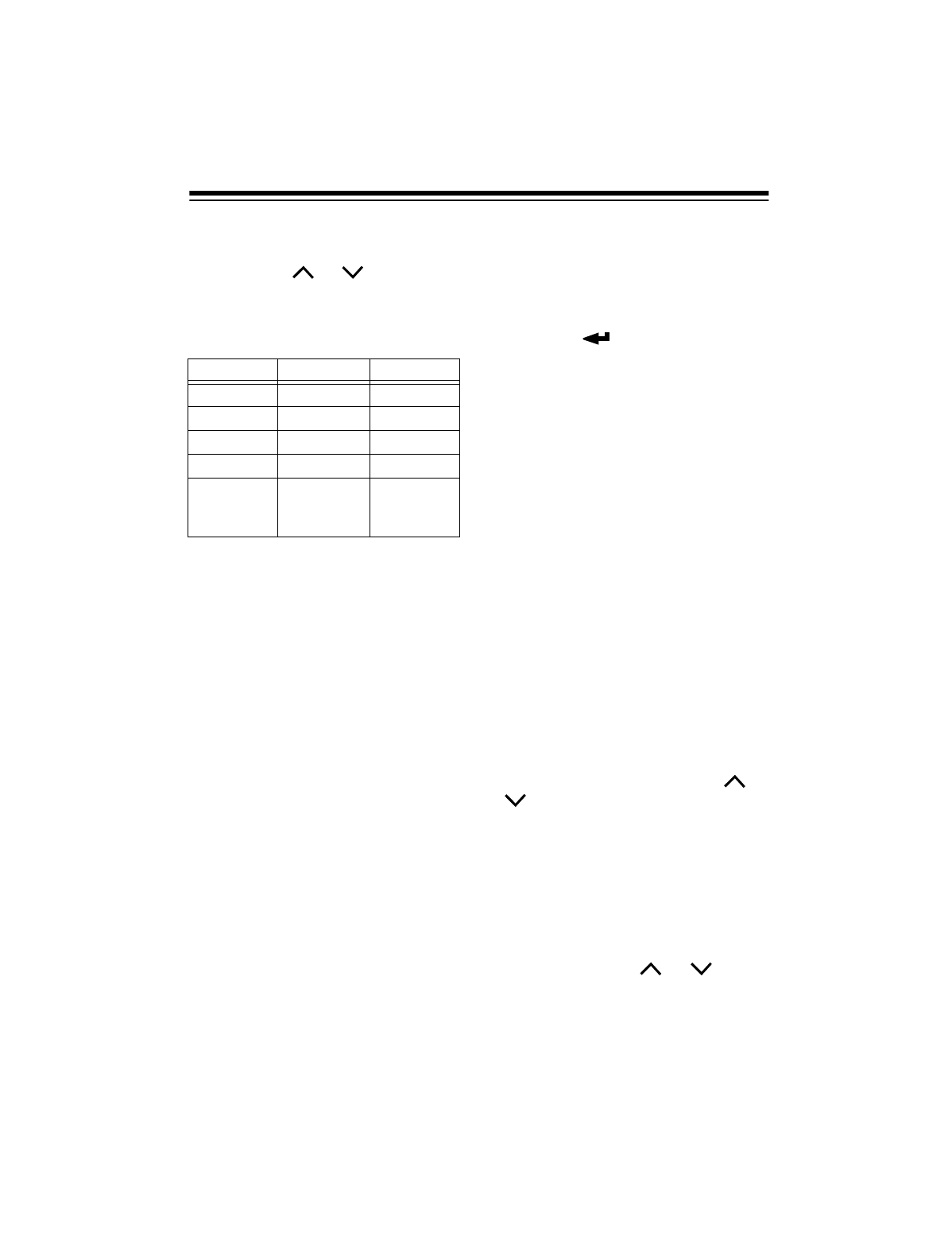
You can select a lower or higher fre-
quency by pressing TUNING
or
. The frequency changes in the fol-
lowing increments.
You can also select a higher or lower
frequency by turning MANUAL TUN-
ING.
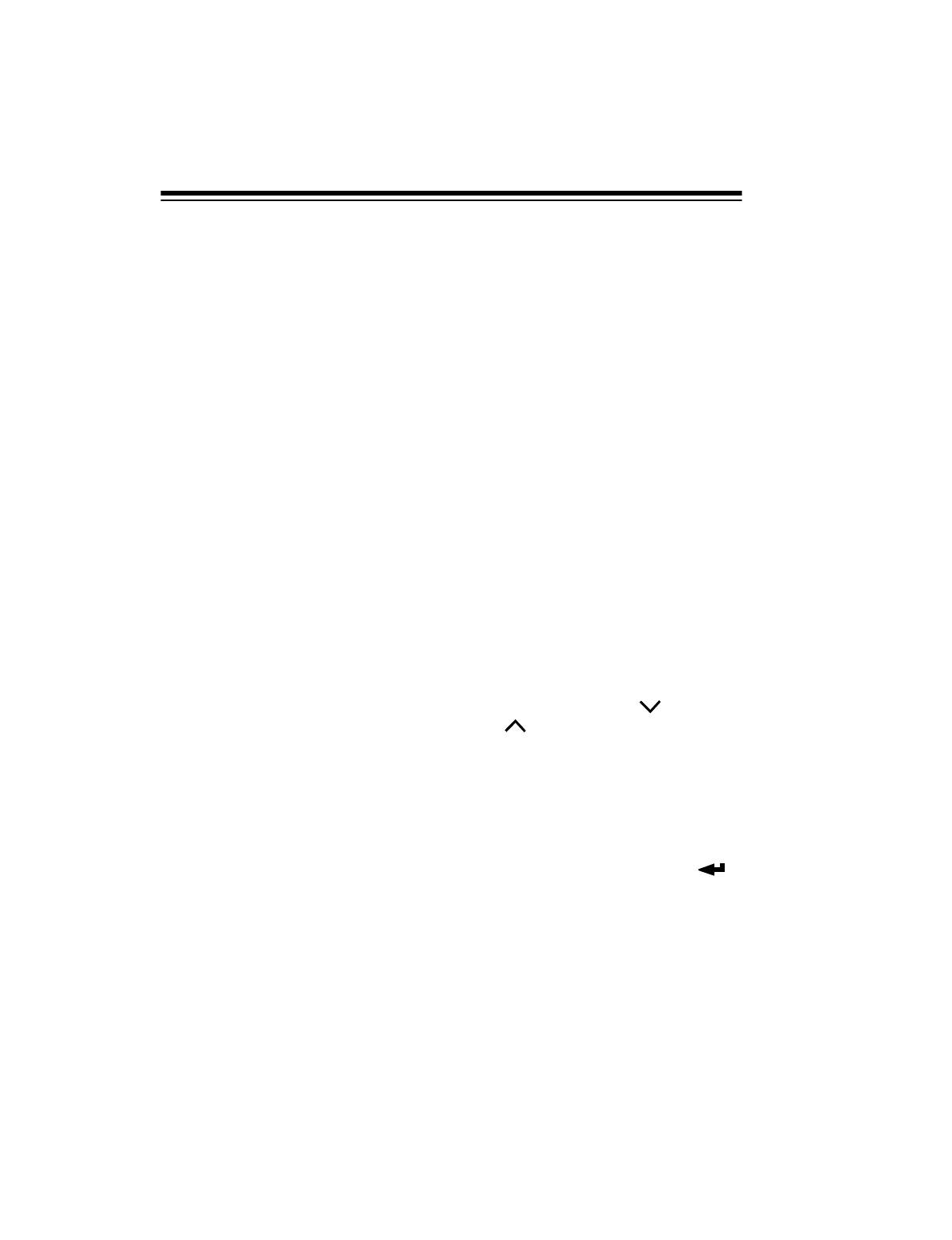
As you turn MANUAL TUNING, you
might find that you need the frequen-
cies to change more slowly. To
change how quickly the frequencies
change as you rotate the knob, re-
peatedly press STEP on the front of
the receiver so the arrow on the right
side of the display points to FAST or
SLOW.
Band Tuning Increment
FM 0.1 MHz
LW 9 kHz
MW 9 or 10 kHz
SW 0.005 MHz
19
If you set STEP to FAST, the tuning in-
crements are the same as when you
press
TUNING
or . If you select
SLOW, the tuning increments are
smaller so you can fine tune the fre-
quency.
Note: You can tune standard AM, up-
per sideband (USB), and lower side-
band (LSB) frequencies. For more
information, see “Tuning SSB Sta-
tions” on Page 25.
If you set STEP to STOP, turning MAN-
UAL TUNING has no effect at all, so
you cannot accidentally change the
frequency.
Note: Setting STEP to STOP locks only
MANUAL TUNING. For information
about locking the front panel buttons,
see “Locking the Controls” on
Page 15.
Direct Access Tuning
Follow these steps if you know a sta-
tion’s frequency and want to directly
tune to that station.
1. Press F/FREQ. The frequency dis-
play disappears and FREQ
flashes for about 30 seconds.
2. Use the number keys and • to
enter the frequency, then press
ENTER .
Notes:
• If you wait more than 30 sec-
onds to press a button, the pre-
vious frequency returns to the
display. Begin again at Step 1.
• If you make a mistake, press C
(cancel) to erase the last digit,
then enter the correct digit.
Scan Tuning
To automatically tune up or down to
the next active frequency in the select-
ed band, hold down TUNING or
for about 1 second. The receiver
scans up or down the selected band
and tunes to the first frequency it finds
with a strong signal.
To scan for an SW (shortwave) fre-
quency in one of the 14 meter bands,
press SW, press the number button
with the meter range you want to scan,
then press TUNING
or
to scan
the band.
Band Fast Slow
FM 0.1 MHz 0.05 MHz
LW 9 kHz 1 kHz
MW 9/10 kHz 1 kHz
SW 5 kHz 1 kHz
AM Mode
set to USB
or LSB
1 kHz 40 Hz
20
Notes:
• When scanning, the receiver only
searches for frequencies with
strong signals. To search for sta-
tions with weaker signals, use one
of the manual tuning methods.
• When scanning in a lower band,
the receiver searches only within
the selected band and stops at the
upper and lower limits of the band.
• Your receiver shows the short-
wave bands you can receive on
the bottom of the display.
TUNING
PREPROGRAMMED
SHORTWAVE STATIONS
Your receiver is preprogrammed with
212 of the most popular worldwide
and U.S. shortwave stations. You can
quickly tune these popular stations.
Notes:
• You cannot change the preset
shortwave stations stored in your
receiver’s memory.
• You can store shortwave frequen-
cies into the receiver’s empty
memory locations. See “Storing
SW Frequencies in Memory” on
Page 28 for more information.
• International commercial broad-
cast programs (often in English)
usually contain news, commentar-
ies, music, and special features
reflecting the culture of the broad-
casting country. Reception for this
range is best between 6:00 PM
and midnight (your time).
Follow these steps to tune prepro-
grammed shortwave stations.
1. Find the country and frequency for
the shortwave station you want to
tune in the “DX-398 Shortwave
Pages Chart” on Page 21. Then
write down the page number and
memory location number shown
on the chart for that station.
2. Press SW, then press PAGE.
3. While PAGE is flashing, repeat-
edly press TUNING or TUNING
or turn MANUAL TUNING until
the page number you wrote down
in Step 1 appears next to PAGE.
The name of the broadcaster’s
country also appears next to
PAGE.
Then, when you reach the desired
page number, press ENTER .
4. Press a number key to enter the
memory location number you
wrote down in Step 1. The re-
ceiver tunes the station.
21
Note: If you press a number key for a memory location number where there is no
station stored, MEMOFREE flashes for a few seconds. Then the receiver tunes the
station you previously tuned.
DX-398 SHORTWAVE PAGES CHART
Note: All frequencies are in MHz.
Page Country
(Stations)
Memory Location
123456789
1AUSTRLIA
(Radio
Australia)
5.995 9.580 9.860 11.800 11.880 13.755 15.365 17.795 17.860
2AUSTRIA
(Radio
Austria)
6.015 7.325 9.495 9.655 9.870 13.730
3CANADA
Radio
Canada
Intl.)
5.960 6.070 6.155 9.625 9.640 9.755 11.855 13.650 13.670
4CHINA
(China
Radio Intl.)
7.405 9.560 9.690 9.710 9.730 11.680 11.695 15.130
5CST RICA
(Adventist
World
Radio,
Radio for
Peace Intl.)
5.030 6.150 6.205
USB
7.385 9.725 13.750 15.050 15.460
6CUBA
(Radio
Habana)
6.000 6.180 9.505 9.820 9.380
USB
13.715 13.725
USB
7ECUADOR
(HCJB
Voice
of Andes)
5.860 9.445 9.745 11.960 12.005 15.115 15.540 21.455
USB
8ENGLAND
(BBC World
Service)
5.965 5.975 6.175 6.195 9.515 9.590 9.600 9.740 9.915
22
Page Country
(Stations)
Memory Location
123456789
9ENGLAND
(BBC World
Service)
11.750 11.835 12.095 15.220 15.400 15.575 17.830 17.840 21.660
10 FRANCE
(Radio
France
Intl.)
11.615 13.625 15.325 15.530 17.620
11 GERMANY
(Deutsche
Welle-Voice
of Ger-
many)
5.960 6.040 6.085 6.145 6.185 9.515 9.535 9.615 9.640
12 HOLLAND
(Radio
Netherlands
Wereldom-
roep)
6.020 6.165 9.700 9.720 9.845 9.890 15.315 17.605
13 ISRAEL
(Kol Israel)
7.465 9.435 11.605 12.077 15.615 15.640
14 JAPAN
(Radio
Japan/NHK)
5.960 6.110 6.120 9.535 11.705 11.895 12.000 13.630
15 KOREA N
(Radio
Pyongyang)
6.575 9.975 11.335 13.670
16 KOREA S
(Radio
Korea
Intl.)
9.650 11.715 13.650 15.575
17 N ZEALND
(Radio New
Zealand)
6.100 9.570 9.700 9.810 9.875 11.735 11.900 11.905 15.115
18 NORWAY
(Radio
Norway
Intl.)
5.905 7.440 7.465 7.520 9.560 11.840 13.800 15.340
19 RUSSIA
(Voice of
Russia)
7.125 7.240 7.250 9.665 11.630 11.675 11.750 12.050 15.400
23
Page Country
(Station)
Memory Location
123456789
20 S AFRICA
(Channel
Africa)
3.220 5.955 9.530 9.675 11.900 15.240
21 SWEDEN
(Radio
Sweden)
6.065 6.090 7.115 7.290 11.650 13.740 15.240
22 SWITZLND
(Swiss
Radio
Intl.)
6.135 9.885 9.905 13.635
23 TAIWAN
(Voice of
Free
China)
5.950 7.130 7.445 9.680 11.740 15.600 17.750
24 U.S.A.
(Voice of
America)
5.985 6.035 6.130 7.405 9.455 9.760 11.695 11.715 15.205
25 U.S.A.
(Voice of
America,
WEWN)
15.410 15.580 17.895 5.825 6.890 7.425 9.455 11.875 13.615
26 U.S.A.
(WHRI,
WRMI,
WRNO)
5.745 5.760 6.040 7.315 9.495 13.760 9.955 7.355 7.395
27 U.S.A.
(WSHB)
5.850 6.095 7.510 7.535 9.355 9.430 11.550 13.770 15.665
28 U.S.A.
(WWCR,
WGTG)
3.210 3.215 5.070 7.435 9.475 12.160 15.685 5.085 9.400
29 (Open)

24
ADJUSTING THE TONE
Set TONE to NEWS to enhance broad-
cast voices while listening to talk
shows or news programs on SW, MW,
and LW frequencies.
Set TONE to MUSIC to enhance treble
and bass response when listening to a
music program (especially FM pro-
grams).
Set
TONE to NORM to help reduce in-
terference.
SPECIAL TUNING
CONTROLS
STEREO/MONO-FM
You can receive FM stereo by con-
necting stereo headphones to the
jack and setting STEREO/ MONO-FM on
the right side of the receiver to STE-
REO.
To improve reception for weak FM ste-
reo stations, set STEREO/MONO-FM to
MONO-FM. The sound is no longer in
stereo, but the reception should im-
prove.
WIDE/NARR.-AM
A strong station that broadcasts close
to a frequency you tuned might inter-
fere with that frequency. To reduce in-
terference from adjacent stations in the
SW, MW, or LW bands, set WIDE/
NARR.-AM
on the right side of the re-
ceiver to NARR.-AM. Or, if there is no
interference, set it to WIDE for better
sound.
AM RF GAIN

25
AM RF GAIN on the left side of the re-
ceiver lets you tune a received signal
for the best SW reception. If the signal
is weak, turn AM RF GAIN toward +. If
the sound is distorted, turn AM RF GAIN
toward –.
TUNING SSB STATIONS
SSB (single sideband) is very popular
among amateur radio and business ra-
dio users because of its superior signal
quality. Many amateurs who operate
SSB and transmit below 10 MHz gen-
erally use LSB (lower sideband), while
amateur and commercial stations who
transmit above 10 MHz generally use
USB (upper sideband). Your receiver
receives both USB and LSB transmis-
sions.
Follow these steps to receive SSB
stations.
1. Select an SW band (see “Select-
ing a Band” on Page 18).
2. If you know the frequency of an
SSB station, enter that frequency.
Or, scan the band for SSB stations
by slowly rotating MANUAL TUN-
ING, tuning through the selected
band until you hear an SSB sta-
tion. Or, scan the band for USB or
LSB stations by holding down
TUNING or TUNING for
about 2 seconds until you hear an
USB or LSB station
Note: SSB stations sound dis-
torted when you tune to them in
the normal SW band. To help you
find SSB stations, watch for
deflections on the signal strength
indicator. Since SSB is transmit-
ted with a suppressed carrier, the
signal strength indicator will move
more quickly when there is a
transmission and more slowly dur-
ing pauses in the transmission.
3. When you have located an SSB
station, press AM MODE to receive
the transmission. Repeatedly
press
AM MODE to switch between
USB or LSB transmissions (try
LSB for frequencies below 10
MHz or USB for frequencies
above 10 MHz).
4. Set STEP to SLOW then readjust
MANUAL TUNING for maximum
intelligibility.
USING RDS
The receiver displays information
about FM radio stations that transmit a
Radio Data System (RDS) signal.
When the receiver receives an RDS
station, the station’s call letters appear
on the display. Also, if the station
broadcasts CT (clock time) informa-
tion, the receiver automatically cor-
rects the displayed time.

26
Follow these steps to use RDS.
1. Turn on the receiver.
2. Tune the receiver to an FM station
that transmits RDS (and CT) infor-
mation.
3. Set TIME SET on the right side of
the receiver to AUTO.
4. Make sure that your local time (as
described in “Setting and Viewing
the Local Time” on Page 16) has
been set correctly. (The receiver
compares the CT information with
your local time to display the cor-
rect time at the broadcaster’s loca-
tion).
5. If your time zone is using Daylight
Saving Time, repeatedly press
until appears.

27
MEMORY FUNCTIONS
Besides tuning to the preprogrammed
shortwave stations (see “Tuning Pre-
programmed Shortwave Stations” on
Page 20), you can store and then
quickly tune up to 94 frequencies in
your receiver’s
memory locations
. The
memory locations are grouped into
pages
(nine memory locations per
page).
You can store up to 18 FM frequen-
cies (2 pages), 18 MW frequencies (2
pages), and 9 LW frequencies (1
page) into your receiver’s FM/MW/LW
memory locations. You can store fre-
quencies automatically (see “Automat-
ic Storage”) or manually (see “Manual
Storage”).
Additionally, you can store frequencies
into any empty memory location in the
receiver’s SW memory pages (see
“Storing SW Frequencies in Memory”
on Page 28). There are 40 empty lo-
cations scattered throughout the pag-
es, and all 9 locations in Page 29 are
blank. See “DX-398 Shortwave Pages
Chart” on Page 21.
STORING FM, MW, OR
LW FREQUENCIES IN
MEMORY
Automatic Storage
You can set your receiver’s automatic
tuning system (ATS) so it automatically
stores all available FM, LW, and MW
stations (from strongest to weakest) in
the FM, LW, and MW memory loca-
tions until all the memory locations are
occupied. This feature helps you find
local stations in another city by simply
pressing a memory location button.
Note: You cannot use this feature to
store SW stations.
To use ATS, hold down ATS/FM, ATS/
LW, or ATS/MW for about 3 seconds.
The receiver beeps and the selected
band and ATS flash. Then the receiv-
er automatically scans and stores the
strongest frequency into the first avail-
able memory location. It continues to
scan and store frequencies until it fills
the nine memory locations in that
page.
The first stored station appears. Once
the receiver has stored nine stations
in Page 1, press PAGE to select the
next page. Then hold down ATS/FM or
ATS/MW again to store the other avail-
able frequencies. The receiver beeps
when it finishes automatically tuning
stations.
Manual Storage
1. Press ATS/FM, ATS/MW, or ATS/LW
to select the band where you want
to store a frequency.
2. Tune to the frequency you want to
store.
28
3. Repeatedly press PAGE to select
the page where you want to store
the frequency. 1 or 2 appears
under
PAGE.
Notes:
•PAGE flashes only when the
receiver is set to SW mode.
• If you wait more than 10 sec-
onds to press PAGE, PAGE
stops flashing.
• If you pressed ATS/LW in Step
1, PAGE does not appear be-
cause there is only one LW
page.
4. Press M/MEM. MEMO flashes for
about 12 seconds. The number for
the first available empty memory
location for the selected page
flashes next to MEMO.
Note: If an empty memory loca-
tion number does not flash, all
memory locations are full in the
band you selected. If this hap-
pens, clear a memory location
(see “Deleting a Station You
Stored” on Page 30) then store
the frequency. Or, to replace a
stored frequency with a new fre-
quency, repeatedly press TUN-
ING or to select a new
frequency, press M/MEM, then
press the number key for the
memory location. After a few sec-
onds, the receiver beeps and
stores the new frequency in the
memory location.
5. Press ENTER to store the fre-
quency in the flashing memory
location. The receiver beeps and
a bracket appears around the
memory location number where
you stored the frequency, to show
that the frequency was stored
there.
STORING SW
FREQUENCIES IN
MEMORY
Follow these steps to store shortwave
frequencies into empty memory loca-
tions in the shortwave page.
1. Press METER/SW to select the
shortwave band.
2. Tune to the frequency you want to
store. The currently selected page
number appears under PAGE.
3. Press M/MEM. PAGE and MEMO
flash for about 10 seconds.
29
4. While PAGE and MEMO flash,
repeatedly press TUNING or
to select the page where you
want to store the frequency.
The page’s number appears
under
PAGE and the name of the
page’s country appears as you
press TUNING or .
For
each page, the number of the first
available empty memory location
in that page flashes next to MEMO.
Note: If you wait more than 10
seconds to press TUNING or
,
PAGE and MEMO stop flash-
ing. If this happens, start again at
Step 3.
5. Press ENTER to assign the
frequency to the flashing memory
location. The receiver beeps and
a bracket appears around the
number where you stored the fre-
quency.
Notes:
• If the receiver’s memory is full,
MEMOFULL appears when you
press a number key.
• To replace a frequency you
stored with a new frequency,
repeatedly press TUNING
or TUNING to select a new
frequency, press M/MEM, then
hold down the number key cor-
responding to that memory
location for about 2 seconds.
The receiver beeps and stores
the new frequency in the mem-
ory location.
ASSIGNING A NAME TO
AN FM/MW/LW STATION
OR SW PAGE
To help you easily identify stored fre-
quencies, you can assign a name (up
to 8 characters) to an FM, MW, or LW
memory location, or to an SW page.
1. Select a band (see “Selecting a
Band” on Page 18).
2. Repeatedly press PAGE to select
the page number where you
stored the desired frequency.
3. For an FM, MW, or LW station,
use the number keys to enter the
desired memory location number.
4. Press EDIT. A cursor flashes
under the displayed frequency for
about 30 seconds.
5. While the cursor flashes, turn
MANUAL TUNING until you see the
first character you want to use.
30
Note: If you wait more than 20
seconds to turn MANUAL TUNING,
the cursor stops flashing. If this
happens, start again at Step 4.
6. When the character you want
appears, press TUNING
to
move to the next position, then
rotate MANUAL TUNING to select
the next character.
Note: If you want to correct a
character you entered, press TUN-
ING to move back to it.
7. When you have finished entering
the name, press ENTER .
DELETING A STATION
YOU STORED
1. Select a band (see “Selecting a
Band” on Page 18).
2. Press ENTER .
3. Repeatedly press PAGE until the
page with the desired frequency
appears.
4. Use the number keys to enter the
memory location number.
5. Press M/MEM.
6. Press C (cancel).
LOCKING/UNLOCKING A
STORED STATION
After storing your favorite stations, you
can lock any of them in memory. This
helps you avoid overwriting the station
if you accidentally use the receiver’s
ATS automatic store feature.
To lock or unlock a station, recall the
station, press M/MEM then press
. appears (locked) or dis-
appears (unlocked).
MOVING A FREQUENCY
TO ANOTHER MEMORY
LOCATION
Note: These steps show you how to
move a frequency to another memory
location on the same page. To move
the frequency to another memory lo-
cation on a different page, follow the
steps in “Storing FM, MW, or LW Fre-
quencies in Memory” on Page 27 or
“Storing SW Frequencies in Memory”
on Page 28.
1. Select a band (see “Selecting a
Band” on Page 18).
2. Recall the memory location num-
ber of the frequency you want to
move.
3. Press M/MEM. MEMO and the
memory location where the sta-
tion is programmed flash.
M

31
4. Use the number keys to enter the
new memory location number.
The receiver beeps.
USING PRIORITY
You can store one MW/LW/FM station
as the priority station, then quickly re-
call it.
1. Tune to your favorite station.
2. Press M/MEM.
3. Press PRIORITY to store the sta-
tion in the priority location.
Note: If you previously stored a
priority station, pressing PRIORITY
replaces it.
4. To tune to the priority station,
press PRIORITY
. The receiver
tunes to the priority station.
The receiver stores a SW priority sta-
tion differently than an MW/LW/FM
station. It stores a page containing 9
stations (including the SW station you
want to store as the priority station) in
a memory location.
1. Use the steps under “Tuning Pre-
programmed Shortwave Stations”
on Page 20 to tune to the page
where you stored your favorite
shortwave station.
2. Press M/MEM to store the page
containing the desired station.
3. Press PRIORITY to store the page
with the desired station in the pri-
ority location.
Note: If you previously stored a
priority station, pressing PRIORITY
replaces it.
4. To tune to the priority station,
press PRIORITY
. The receiver
tunes to the page you selected
then to the strongest frequency
among the 9 preset stations.
Note: If there is a stronger station
on the page you selected, the
receiver might tune to it instead of
the station you selected.
5. Press the memory location num-
ber you selected in Step 1 under
“Tuning Preprogrammed Short-
wave Stations” on Page 20 to tune
to the priority station.
32
TIMER FUNCTIONS
USING THE TIMER
ALARMS
Your receiver has three timer alarms.
You can set these alarms to sound
(buzzer or radio) at a time you set.
Setting an Alarm
1. If you want the radio to turn on at
the alarm time, tune to the desired
station. Then press M/MEM. MEMO
and the memory location where
the station is programmed flash
for about 10 seconds.
2. Press TIMER 1, TIMER 2, or TIMER
3 twice. , the selected timer
number, and (buzzer) flash for
about 10 seconds.
Note: If MEMO stops flashing
before you press TIMER 1, TIMER
2, or TIMER 3, start again from
Step 2.
3. To select the type of alarm (buzzer
or radio), repeatedly press AM
MODE until for the buzzer or
for the radio flashes next to
.
Note: If or , stops flashing
before you press AM MODE, start
again from Step 2.
4. Use the number keys to enter the
time you want the alarm to sound.
5. Press ENTER .
6. Turn the receiver off.
Silencing the Alarm
When the display shows the alarm
time, the radio turns on or the buzzer
sounds and , 1, 2, or 3, and
or flash on the display.
If you selected the buzzer, its volume
increases after several seconds. After
a few more seconds, the buzzer’s vol-
ume increases again. Then, after 60
seconds, the buzzer turns itself off
and sounds again the next day at the
set time.
If you selected the radio, it automati-
cally turns off after 60 minutes. To si-
lence the radio or the buzzer sooner,
press POWER to turn off the receiver.
, 1, 2, or 3, and or dis-
appear and the alarm sounds again
the next day at the set time.
Using the Snooze Feature
To silence the buzzer or radio alarm for
about 5 minutes, press any button ex-
cept POWER, , or .
flashes above . This temporarily
silences the buzzer or radio and then it
sounds again. You can repeat this for
up to 30 minutes using the buzzer
alarm or up to 60 minutes using the ra-
dio alarm.
Note: The snooze feature does not
work if a plug is connected to the REC
LINE OUT jack.
TIMER
TIMER
TIMER
TIMER
MZZZ
33
Turning a Timer Alarm
On or Off
To turn off the alarm so it does not
sound again, press TIMER 1, TIMER 2,
or TIMER 3. Then press C while
flashes.
If you want to turn on a timer alarm
again, press TIMER 1, TIMER 2, or TIM-
ER 3. Then press ENTER while
and 1, 2, or 3 flash.
Timer Recording
You can connect a tape recorder to
the receiver and have it record starting
at a preset time.
Connect your tape recorder as de-
scribed in “Connecting a Tape Re-
corder” on Page 10 and set your tape
recorder to record. Then follow the
steps in “Using the Timer Alarms” on
Page 32 to have the radio start to play
at the time you want.
When the radio plays at the time you
set, the tape recorder starts and
records the broadcast.
USING THE SLEEP
TIMER
The sleep timer lets you set the re-
ceiver to turn off in an amount of time
you set.
1. With the receiver off, hold down
POWER until the receiver beeps
and turns on. 90 appears and
flashes.
After a few seconds, 90 disap-
pears and stops flashing.
2. Tune to the desired station.
After the preset number of minutes, the
receiver turns off. To turn off the re-
ceiver sooner, press POWER.
To change the playing time after you
set it, hold down POWER. The sleep
timer changes from 90 → 80 → 70 →
60 → 50 → 40 → 30 → 20 → 10 → 90
minutes, repeating the sequence as
you hold down POWER. Release POW-
ER when the desired amount of time
appears.
TIMER
TIMER

34
LISTENING HINTS
Shortwave listening is a hobby with
thousands of participants worldwide. It
requires no special knowledge or
skills, but your enjoyment increases as
you gain experience and develop spe-
cial listening techniques.
The information in this section can help
you make the most of your DX-398.
REFERENCE SOURCES
Many books and magazines about
shortwave listening are available
through your local library or news-
stand. Consult sources such as the
World Radio Handbook
,
Radio Ama-
teur’s Handbook
,
Passport to World
Band Radio
,
Monitoring Times
, and
Popular Communications
. These pub-
lications can help you learn about the
conditions that make long-distance re-
ception possible and provide up-to-
date listings for shortwave broadcasts
in English and in other languages.
FREQUENCY
CONVERSION
A band is a group of frequencies.
Sometimes, bands are grouped ac-
cording to their wavelengths, in
meters. The tuning location of a station
can be expressed as a frequency (kHz
or MHz) or a wavelength (meters).
Amateur radio operators generally re-
fer to the frequencies they operate on
using the frequency’s wavelength. For
example, the 19-meter band refers to
the range of frequencies with waves
about 19 meters long.
Use the following equations to convert
kHz, MHz, and meters.
To convert MHz to kHz, multiply by
1,000. For example:
9.62 MHz × 1000 = 9,620 kHz
To convert kHz to MHz, divide by
1,000. For example:
2780 kHz ÷ 1000 = 2.780 MHz
To convert MHz to meters, divide 300
by the number of MHz. For example:
300 ÷ 7.1 MHz = 42.25 meters
To convert meters to MHz, divide 300
by the number of meters. For exam-
ple:
300
÷ 42.25 meters = 7.1 MHz
BAND ALLOCATION
Certain bands are set aside for specific
purposes.
Amateur Radio Frequencies
Tuning to the amateur radio frequen-
cies can be interesting and helpful, be-
cause amateur radio operators often
broadcast emergency information
when other means of communication
break down.

35
Amateur radio operators use the fol-
lowing bands. Portions of these bands
are set aside for continuous wave
(CW) Morse code communication or
for single sideband (SSB) voice com-
munication, as shown below.
160 meters:
1,800–2,000 kHz: SSB
80 meters:
3,500–3,800 kHz: CW
3,800–4,000 kHz: SSB
40 meters:
7,000–7,150 kHz: CW
7,150–7,300 kHz: SSB
20 meters:
14,000–14,200 kHz: CW
14,200–14,350 kHz: SSB
15 meters:
21,000–21,250 kHz: CW
21,250–21,450 kHz: SSB
10 meters:
28,000–28,500 kHz: CW
28,500–29,700 kHz: SSB
Note: These ranges are not precisely
observed everywhere in the world.
International Frequencies
International commercial broadcasts
are found in the following shortwave
bands. Programs (often in English)
usually contain news, commentaries,
music, and special features reflecting
the culture of the broadcasting country.
Reception for this range is best be-
tween 6:00 PM and midnight (your
time).
*
These bands are reserved for sta-
tions in tropical areas.
**
Interference is heavy in the 41m
band (7.100–7.300 MHz) because am-
ateur radio operators and international
stations share this range.
Band
(in meters)
Frequency
Range
(in MHz)
120 2.300–2.495
90 3.200–3.400
75 3.900–4.000
60 4.750–5.060
49 5.900–6.200
41 7.100–7.350
31 9.400–9.990
25 11.600–12.100
21 13.500–13.870
19 15.100–15.800
16 17.480–17.900
13 21.450–21.750
11 25.600–26.100
*
*
*
*
**

36
Aircraft Frequencies
Aircraft on international routes some-
times use SW. Most transmissions are
in SSB, although you can still hear
some MW transmissions. Here are
some bands where you might hear air-
craft communications.
4,650–4,750 kHz
6,545–6,765 kHz
8,815–9,040 kHz
11,175–11,400 kHz
13,200–13,360 kHz
15,010–15,100 kHz
17,900–18,030 kHz
Ships and Coastal Station
Frequencies
Most transmissions from ships and
coastal stations are in SSB and CW.
You can hear these transmissions in
the following bands.
2,000–2,300 kHz
*
4,063–4,139 kHz
4,361–4,438 kHz
8,195–8,181 kHz
12,330–12,420 kHz
13,107–13,200 kHz
16,460–16,565 kHz
*
The Coast Guard and small boats
use this band, with 2,182 kHz set aside
as the international distress and emer-
gency channel.
Time Standard Frequencies
The following frequencies announce
the exact time of day at specified inter-
vals.
WWV in Fort Collins, Colorado:
2,500 kHz
5,000 kHz
10,000 kHz
15,000 kHz
20,000 kHz
CHU in Canada: 7,335 kHz
VNG in Australia:
4,500 and 12,000 kHz
Longwave Band
The 150–519 kHz range is known as
the longwave band. Most stations in
this range serve as beacons for aircraft
and marine navigation by continuously
transmitting their call letters. Recep-
tion for this range is best between 6:00
PM and midnight (your time).
Some ships also use this range, with
500 kHz set aside as an international
distress and emergency station.
Most stations in this range use CW
(Morse code), although some use AM
voice transmission for weather broad-
casts.
37
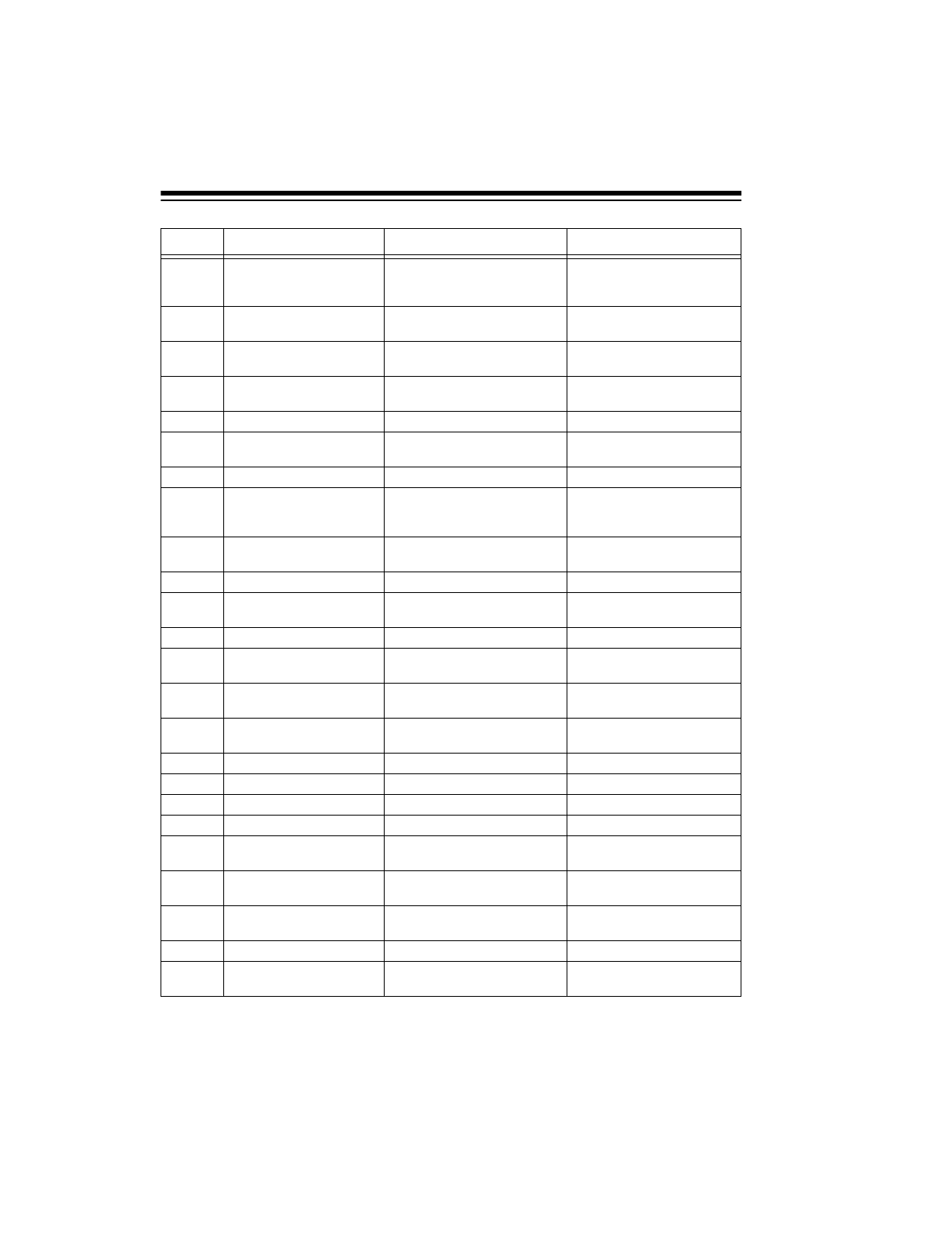
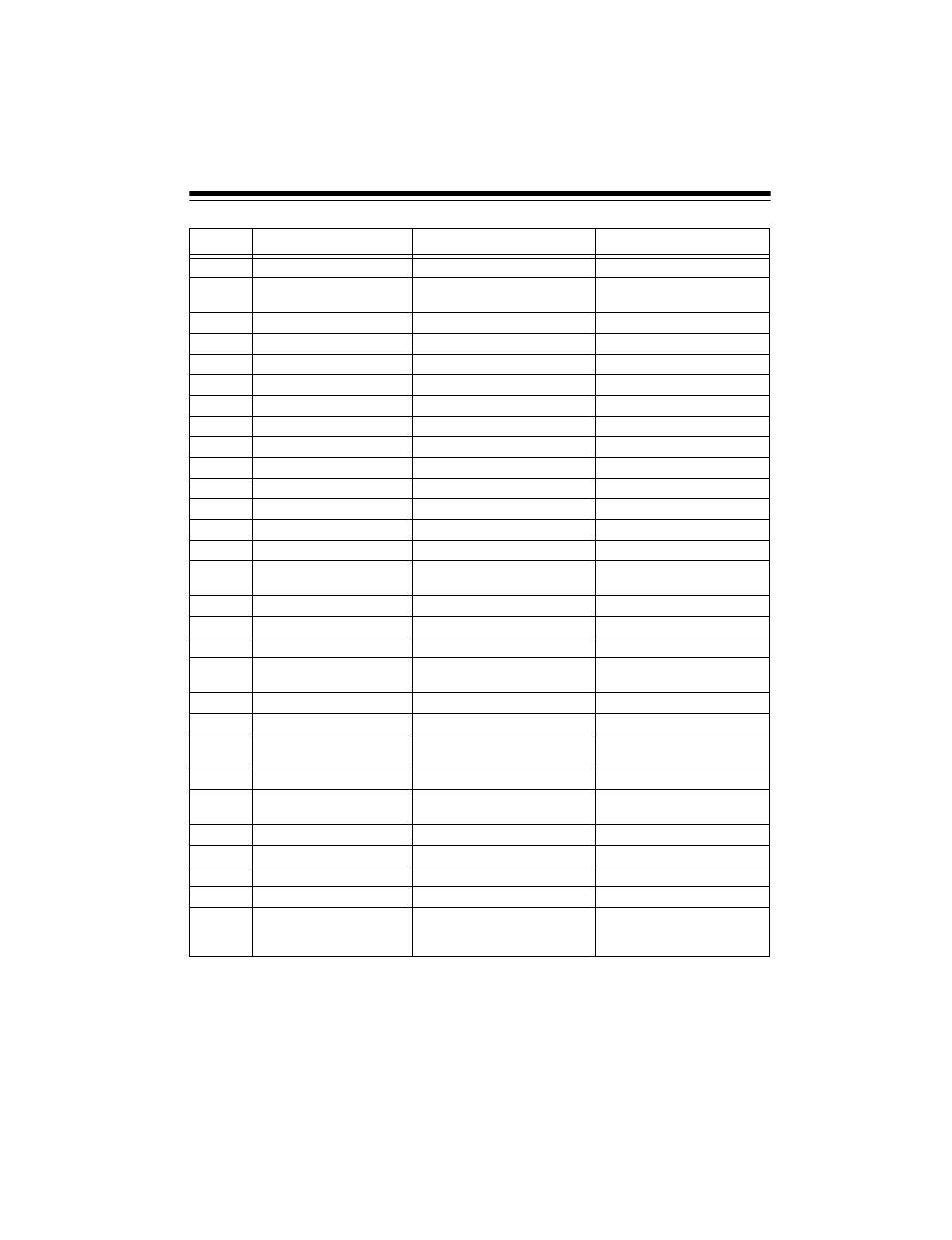
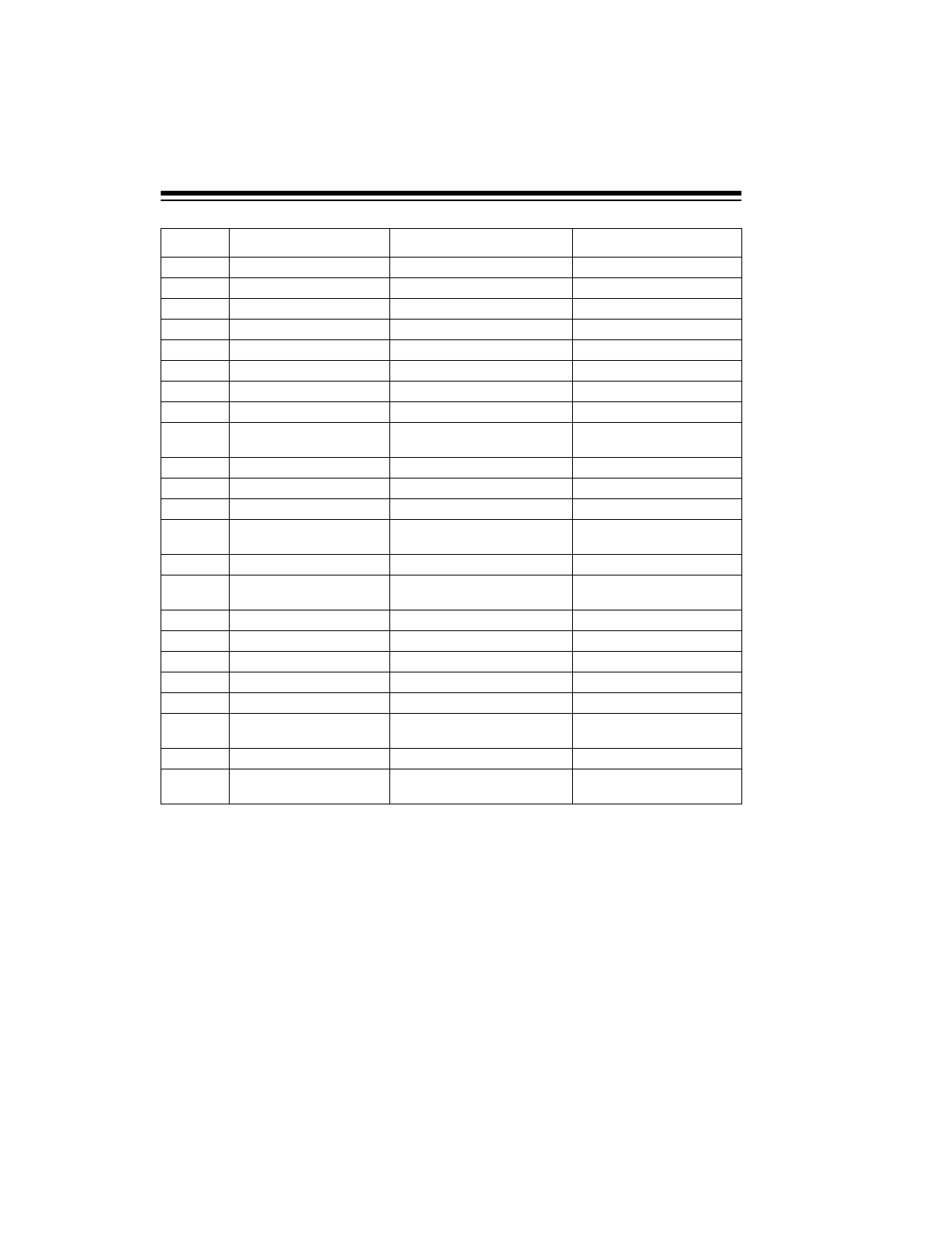
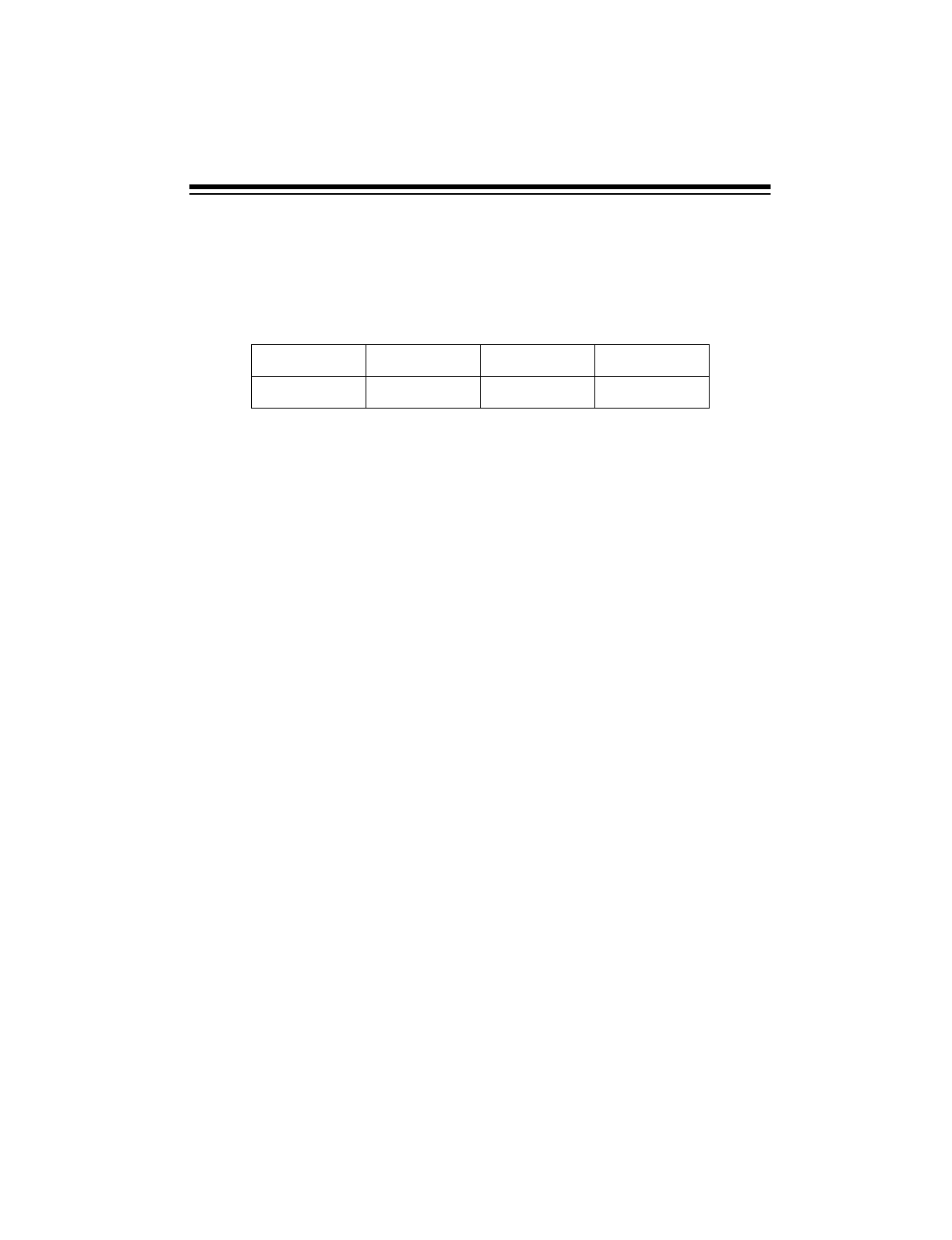
LISTENING GUIDE
The following list contains some of the more frequently heard stations. All stations
broadcast in English unless otherwise specified. You can hear these stations
throughout North America. However, reception varies based on the season, time of
day, and a number of other conditions.
This information can change at any time. For sources of yearly, up-to-date listings,
see “Reference Sources” on Page 34.
kHz Station Location Remarks
3,223 Radio SR Swaziland
3,265 Radio Mozambique Maputo, Mozambique
3,300 Radio Cultural Guatemala City,
Guatemala
Religious Programs
3,380 Radio Iris Esmeraldas, Ecuador Programs in Spanish
3,385 FR3 Cayenne,
French Guiana Programs in French
3,396 Radio Kaduna Kaduna, Nigeria
4,750 Radio Bertoua Bertoua, Cameroon
4,755 Imo Regional Radio Imo, Nigeria
4,777 Radio/TV Gabon Libreville, Gabon Programs in French
4,795 Radio Nueva
America La Paz, Bolivia Programs in Spanish
4,820 Radio Paz y Bien Ambala, Ecuador Programs in Spanish
4,832 Radio Reloj San Jose, Costa Rica Programs in Spanish
4,855 Radio Clube do
Para Belem, Brazil Programs in
Portugese
4,890 National
Broadcasting
Commission
Papua New Guinea
4,915 Voice Kenya Nairobi, Kenya
4,920 Australian
Broadcasting
Commission
Brisbane, Australia
4,945 Radio Colosal Neiva, Colombia Programs in Spanish
4,965 Radio Santa Fe Bogota, Colombia Programs in Spanish
4,980 Ecos del Torbes San Cristobal,
Venezuela Programs in Spanish
5,020 Solomon Islands
Broadcasting
Service
Honiara, Solomon Islands
5,057 Radio Gjirokaster Gjirokaster, Albania Programs in Albanian
38
kHz Station Location Remarks
5,950 Guyana
Broadcasting
Service
Georgetown, Guyana
5,954 Radio Casino Puerto Limon,
Costa Rica
5,960 Radio Canada
International Montreal, Canada
5,980 Radio RSA Johannesburg, South
Africa
6,005 CFCX Montreal, Canada
6,025 Radio Malaysia Kuala Lumpur,
Malaysia Programs in Chinese
6,045 Radio Australia Lyndhurst, Australia
6,055 Nihon Shortwave
Broadcasting
Company
Tokyo, Japan Programs in Japanese
6,060 Radio Nacional Buenos Aires,
Argentina Programs in Spanish
6,075 Radio Sutatenza Bogota, Colombia Programs in Spanish
6,090 Radio
Luxembourg Ville Louvigny,
Luxembourg
6,095 Polskie Radio Warsaw, Poland
6,105 Radio New Zealand Wellington, New
Zealand
7,140 Trans World
Radio Monte Carlo, Monaco
7,170 Radio Noumea Noumea, New
Caledonia Programs in French
7,300 Radio Tirana Tirana, Albania
9,475 Radio Cairo Cairo, Egypt
9,515 Voice of Greece Athens, Greece
9,525 Radio Korea Seoul, South Korea
9,530 Spanish Foreign
Radio Madrid, Spain
9,535 Swiss Radio
International Berne, Switzerland
9,540 Radio Prague Prague,
Czech Republic
9,570 Radio Bucharest Bucharest, Romania
9,575 Italian Radio and
Television Service Rome, Italy
39
kHz Station Location Remarks
9,610 Radio-TV Algeria Algiers, Algeria Programs in Arabic
9,620 Radio Berlin
International Berlin, Germany
9,645 Radio Norway Oslo, Norway
9,720 Radio Iran Tehran, Iran Programs in Farsi
9,745 HCJB Quito, Ecuador
9,770 Austrian Radio Vienna, Austria
9,800 Radio Kiev Kiev, Ukraine
9,835 Radio Budapest Budapest, Hungary
10,040 Voice of Vietnam Hanoi, Vietnam
11,655 Israel Radio Jerusalem, Israel
11,690 Radio Kuwait Kuwait City, Kuwait
11,705 Radio Sweden Stockholm, Sweden
11,720 Radio Moscow Moscow, Russia
11,735 Radio Sofia Sofia, Bulgaria
11,745 Voice of Free
China Taip ei, Ta iwan
11,815 Radio Japan Tokyo, Japan
11,825 Radio Tahiti Papeete, Tahiti Programs in Tahitian
11,835 4VEH Cap Haitien, Haiti
11,845 Radio Canada
International Montreal, Canada
11,850 Deutsche Welle Cologne, Germany
11,890 Voice of Chile Santiago, Chile
11,900 Radio RSA Johannesburg, South
Africa
11,910 BBC London, England
11,930 Radio Havana
Cuba Havana, Cuba
11,935 Radio Portugal Lisbon, Portugal
11,945 Radio Beijing Beijing, China
11,955 Voice of Turkey Ankara, Turkey
11,980 Radio Moscow Moscow, Russia
15,038 Saudi Arabian
Broadcasting
Service
Riyadh, Saudi Arabia Programs in Arabic
40
kHz Station Location Remarks
15,084 Voice of Iran Tehran, Iran Programs in Farsi
15,135 Radio Moscow Moscow, Russia
15,165 HCJB Quito, Ecuador
15,190 ORU Brussels, Belgium
15,205 All India Radio New Delhi, India
15,260 BBC London, England
15,265 Finnish Radio Helsinki, Finland
15,275 Radio Sweden Stockholm, Sweden
15,305 Swiss Radio
International Berne, Switzerland
15,310 Radio Japan Tokyo, Japan
15,320 Radio Australia Melbourne, Australia
15,400 BBC London, England
15,430 Radio Mexico Mexico City, Mexico Programs in
Spanish
15,465 Radio Pakistan Islamabad, Pakistan Programs in Urdu
17,720 Radio France
International Paris, France
17,825 Vatican Radio Vatican City
17,860 Austrian Radio Vienna, Austria
21,495 Israel Radio Jerusalem, Israel
21,525 Radio Australia Melbourne, Australia
21,625 Israel Radio Jerusalem, Israel
21,645 Radio France
International Paris, France
21,735 Radio-TV Morocco Rabat, Morocco Programs in Arabic
25,790 Radio RSA Johannesburg, South
Africa
41
BIRDIES
Birdies are the products of internally generated signals that make some frequencies
difficult or impossible to receive. If you program a birdie frequency, you hear only
noise on that frequency. The most common birdies to watch for on this receiver are:
Notes:
• See “Storing SW Frequencies in Memory” on Page 28 for more information
about using the shortwave page 29.
• Interference from devices such as dimmer switches and motors and atmo-
spheric conditions can disrupt shortwave listening. You can minimize interfer-
ence by moving the receiver away from the source of noise, or turning off the
offending device. Shortwave stations sometimes change their operating fre-
quency to avoid interfering with other stations, to improve reception during dif-
ferent seasons, or to take advantage of signal propagation changes due to sun
spots. For this reason, a given station might not be found on the frequency
listed in memory. Reception of these stations can also be affected by rapid
changes in the ionosphere. Sometimes the station you are listening to might
fade out completely. These occurrences are normal shortwave listening condi-
tions.
AMATEUR SHORTWAVE BANDS IN THE US
Amateur radio operators in the U.S.A. are found in the bands listed here. They op-
erate mostly in LSB (Lower Side Band) mode. Morse code operators are generally
found in the lower areas of each band. The amateur radio operators with the most
advanced classification are found in the upper areas of each band.
450 kHz 3,844 kHz 9,000 kHz 10,250 kHz
18,000 kHz 20,490 kHz 21,835 kHz 21,868 kHz
42
Amateur Shortwave Bands (in MHz)
3.500 – 4.000 MHZ 80 Meters 7.000 – 7.300 MHz 40 Meters
10.100 – 10.150 MHz 30 Meters 14.0 – 14.350 MHz 20 Meters
18.068 – 18.168 MHz 17 Meters 21.000 – 21.450 MHz 15 Meters
24.890 – 24.990 MHz 12 Meters 28.000 – 29.700 MHz 10 Meters
43
TROUBLESHOOTING
We do not expect you to have any problems with your receiver, but if you have a
problem, the information in this chart might help. If the problem persists, take the
receiver to your local RadioShack store for assistance.
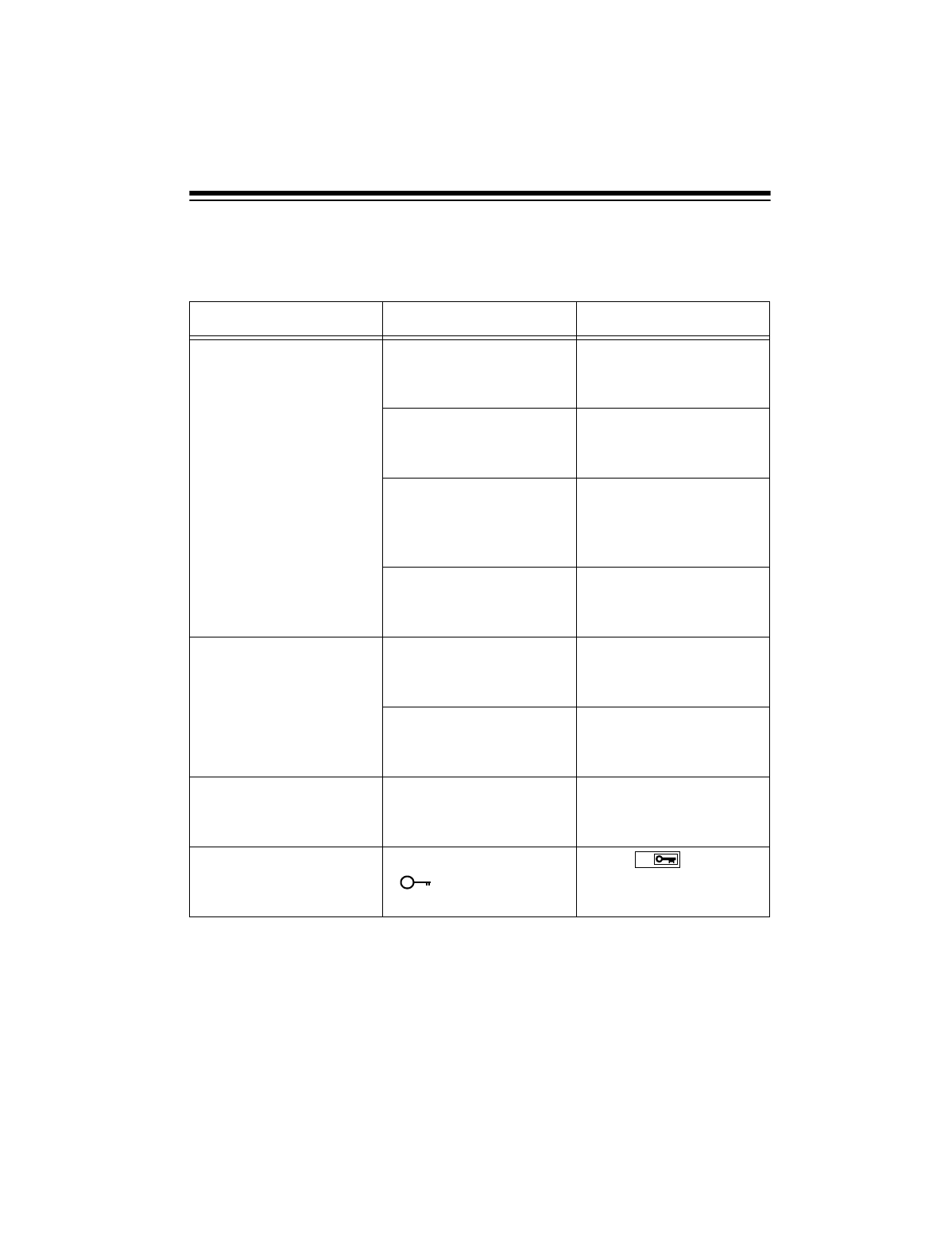
SYMPTOM POSSIBLE CAUSE SUGGESTION
Weak or intermittent
sound. The internal batteries
are weak. Check the batteries and
replace or recharge
them as necessary.
The antenna must be
adjusted. Adjust the telescoping
antenna or connect an
external antenna.
The signal is blocked by
metal or concrete. Move the receiver near a
window when you use it
inside a vehicle or metal-
frame building.
The frequency is not
tuned properly. Fine-tune the frequen-
cy. See “Tuning Sta-
tions” on Page 18.
Scanning stops on a fre-
quency that has an un-
clear transmission.
The frequency is not
tuned properly. Fine-tune the frequen-
cy. See “Tuning Sta-
tions” on Page 18.
The frequency is one of
the receiver’s birdie fre-
quencies.
Tune another frequency.
Frequency does not
change when you turn
ROTARY TUNING.
FAST/SLOW/STOP is set
to STOP.Set FAST/SLOW/STOP to
FAST or SLOW.
ROTARY TUNING and
front panel buttons do
not respond.
The keypad is locked
( appears on the
display).
Press .
M
44
CARE AND MAINTENANCE
Your RadioShack DX-398 All-Band Shortwave Receiver with Radio Data
System is an example of superior design and craftsmanship. The following
suggestions will help you care for your receiver so you can enjoy it for years.
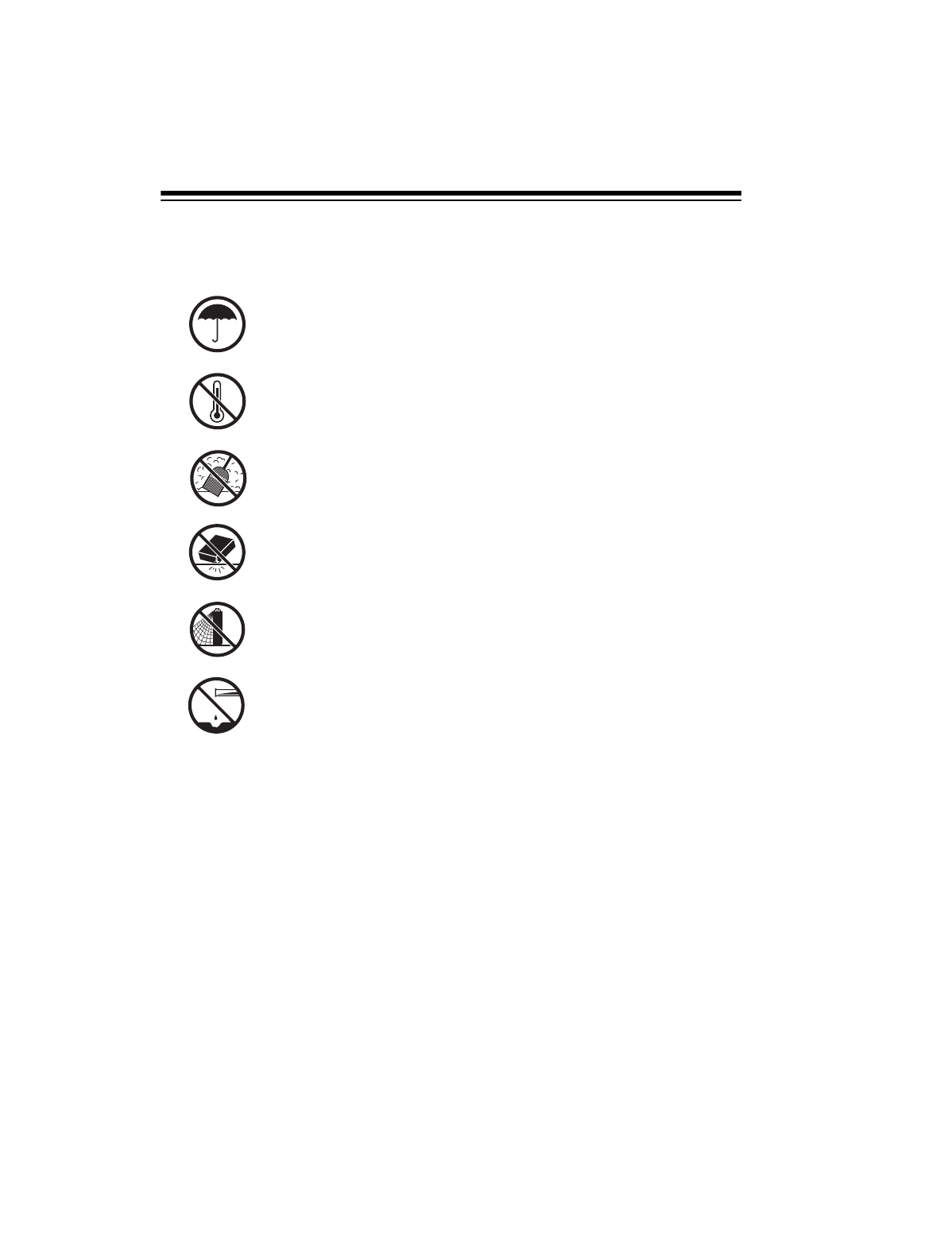
Keep the receiver dry. If it gets wet, wipe it dry immediately. Liq-
uids might contain minerals that can corrode the electronic cir-
cuits.
Use and store the receiver only in normal temperature environ-
ments. Temperature extremes can shorten the life of electronic
devices, damage batteries, and distort or melt plastic parts.
Keep the receiver away from dust and dirt, which can cause pre-
mature wear of parts.
Handle the receiver gently and carefully. Dropping it can damage
circuit boards and cases and can cause the receiver to work im-
properly.
Use only fresh batteries of the required size and recommended
type. Batteries can leak chemicals that damage your receiver’s
electronic parts.
Wipe the receiver with a damp cloth occasionally to keep it looking
new. Do not use harsh chemicals, cleaning solvents, or strong de-
tergents to clean the receiver.
Modifying or tampering with the receiver’s internal components can cause a
malfunction and might invalidate its warranty and void your FCC authoriza-
tion to operate it. If your receiver is not performing as it should, take it to your
local RadioShack store for assistance.

45
RESETTING THE
DISPLAY
If the display shows random charac-
ters or does not work properly, you
might need to reset it.
Important: This procedure clears the
set time and resets the receiver’s mi-
croprocessor (the component that
controls how the receiver operates),
but all stations remain stored. Reset
the receiver only when you are sure it
is not working properly.
To reset the display, insert a pointed
object, such as a straightened paper
clip, into the RESET hole on the bot-
tom of the receiver. Then gently press
and release the button inside the hole.

46
SPECIFICATIONS
Circuit:
FM ..................................................................................................... Heterodyne
LW/MW/SW ........................................................... Dual-Conversion Heterodyne
Frequency Range:
FM ................................................................................................... 88–108 MHz
LW .................................................................................................. 153–519 kHz
MW .............................................................................................. 520–1,710 kHz
SW ......................................................................................... 1.711–29.999 MHz
SW Sub-Bands:
2.300 – 2.495 MHz (120 meters) 11.600 – 12.100 MHz (25 meters)
3.200 – 3.400 MHz (90 meters) 13.500 – 13.870 MHz (21 meters)
3.900 – 4.000 MHz (75 meters) 15.100 – 15.800 MHz (19 meters)
4.750 – 5.060 MHz (60 meters) 17.480 – 17.900 MHz (16 meters)
5.900 – 6.200 MHz (49 meters) 18.900 – 19.020 MHz (15 meters)
7.100 – 7.350 MHz (41 meters) 21.450 – 21.750 MHz (13 meters)
9.400 – 9.990 MHz (31 meters) 25.600 – 26.100 MHz (11 meters)
Antenna:
LW/MW .................................................................................................... Built-In
SW ................................................................... Telescoping or Optional External
FM .................................................................................................... Telescoping
Output ............................................................................... 300 mW @ 10% THD
Jacks:
External Power .................................................................................... DC IN 6V
Stereo Headphones ................................................................................ 1/8-Inch
AM External Antenna .......................................................................... DC IN 6V
Record Standby ........................................................................... 3/32-Inch Mono
Record Line Out ............................................................................ 1/8-Inch Mono
Power Sources:
Primary ......................................................................................... 4 AA Batteries
AC (Requires Optional Adapter) ....................... 6V/300mA, Center Tip Negative
DC (Requires Optional Adapter) ...................... 6V/300mA, Center Tip Negative
Battery Life (with Alkaline Batteries) ........................................ 13 Hours @ 50 mW
Dimensions (HWD) ............................. 51/8 × 83/4 × 11/4 Inches (130 × 223 × 33 mm)
Weight (without batteries) ............................................................... 24.7 oz (700 g)
Included Accessory ......................................................................... Carrying Pouch
Specifications are typical; individual units might vary. Specifications are subject to
change and improvement without notice.

47
NOTES

RadioShack
A Division of Tandy Corporation
Fort Worth, Texas 76102
3818626A
08A00 Printed in Taiwan
Limited Ninet
y
-Da
y
Warrant
y
This product is warranted b
y
RadioShack a
g
ainst manufacturin
g
defects in material and workman-
ship under normal use for ninet
y
(
90
)
da
y
s from the date of purchase from RadioShack compan
y
-
owned stores and authorized RadioShack franchisees and dealers. EXCEPT AS PROVIDED
HEREIN, RadioShack MAKES NO EXPRESS WARRANTIES AND ANY IMPLIED WARRANTIES,
INCLUDING THOSE OF MERCHANTABILITY AND FITNESS FOR A PARTICULAR PURPOSE,
ARE LIMITED IN DURATION TO THE DURATION OF THE WRITTEN LIMITED WARRANTIES
CONTAINED HEREIN. EXCEPT AS PROVIDED HEREIN, RadioShack SHALL HAVE NO LIABIL-
ITY OR RESPONSIBILITY TO CUSTOMER OR ANY OTHER PERSON OR ENTITY WITH RE-
SPECT TO ANY LIABILITY, LOSS OR DAMAGE CAUSED DIRECTLY OR INDIRECTLY BY USE
OR PERFORMANCE OF THE PRODUCT OR ARISING OUT OF ANY BREACH OF THIS WAR-
RANTY, INCLUDING, BUT NOT LIMITED TO, ANY DAMAGES RESULTING FROM INCONVE-
NIENCE, LOSS OF TIME, DATA, PROPERTY, REVENUE, OR PROFIT OR ANY INDIRECT,
SPECIAL, INCIDENTAL, OR CONSEQUENTIAL DAMAGES, EVEN IF RadioShack HAS BEEN AD-
VISED OF THE POSSIBILITY OF SUCH DAMAGES.
Some states do not allow the limitations on how lon
g
an implied warrant
y
lasts or the exclusion of in-
cidental or conse
q
uential dama
g
es, so the above limitations or exclusions ma
y
not appl
y
to
y
ou.
In the event of a product defect durin
g
the warrant
y
period, take the product and the RadioShack
sales receipt as proof of purchase date to an
y
RadioShack store. RadioShack will, at its option, un-
less otherwise provided b
y
law:
(
a
)
correct the defect b
y
product repair without char
g
e for parts and
labor;
(
b
)
replace the product with one of the same or similar desi
g
n; or
(
c
)
refund the purchase
price. All replaced parts and products, and products on which a refund is made, become the prop-
ert
y
of RadioShack. New or reconditioned parts and products ma
y
be used in the performance of
warrant
y
service. Repaired or replaced parts and products are warranted for the remainder of the
ori
g
inal warrant
y
period. You will be char
g
ed for repair or replacement of the product made after the
expiration of the warrant
y
period.
This warrant
y
does not cover:
(
a
)
dama
g
e or failure caused b
y
or attributable to acts of God, abuse,
accident, misuse, improper or abnormal usa
g
e, failure to follow instructions, improper installation or
maintenance, alteration, li
g
htnin
g
or other incidence of excess volta
g
e or current;
(
b
)
an
y
repairs
other than those provided b
y
a RadioShack Authorized Service Facilit
y
;
(
c
)
consumables such as
fuses or batteries;
(
d
)
cosmetic dama
g
e;
(
e
)
transportation, shippin
g
or insurance costs; or
(
f
)
costs
of product removal, installation, set-up service ad
j
ustment or reinstallation.
This warrant
y
g
ives
y
ou specific le
g
al ri
g
hts, and
y
ou ma
y
also have other ri
g
hts which var
y
from
state to state.
RadioShack Customer Relations, 200 Ta
y
lor Street, 6th Floor, Fort Worth, TX 76102
We Service What We Sell
04/99
