Rca Rtb1023 Quick Start Guide
2014-07-06
: Rca Rca-Rtb1023-Quick-Start-Guide rca-rtb1023-quick-start-guide rca pdf
Open the PDF directly: View PDF  .
.
Page Count: 2
Quick Setup Sheet
RTB1023
Congratulations on purchasing your new RCA product.
Please read these instructions for quick setup sheet on using the product.
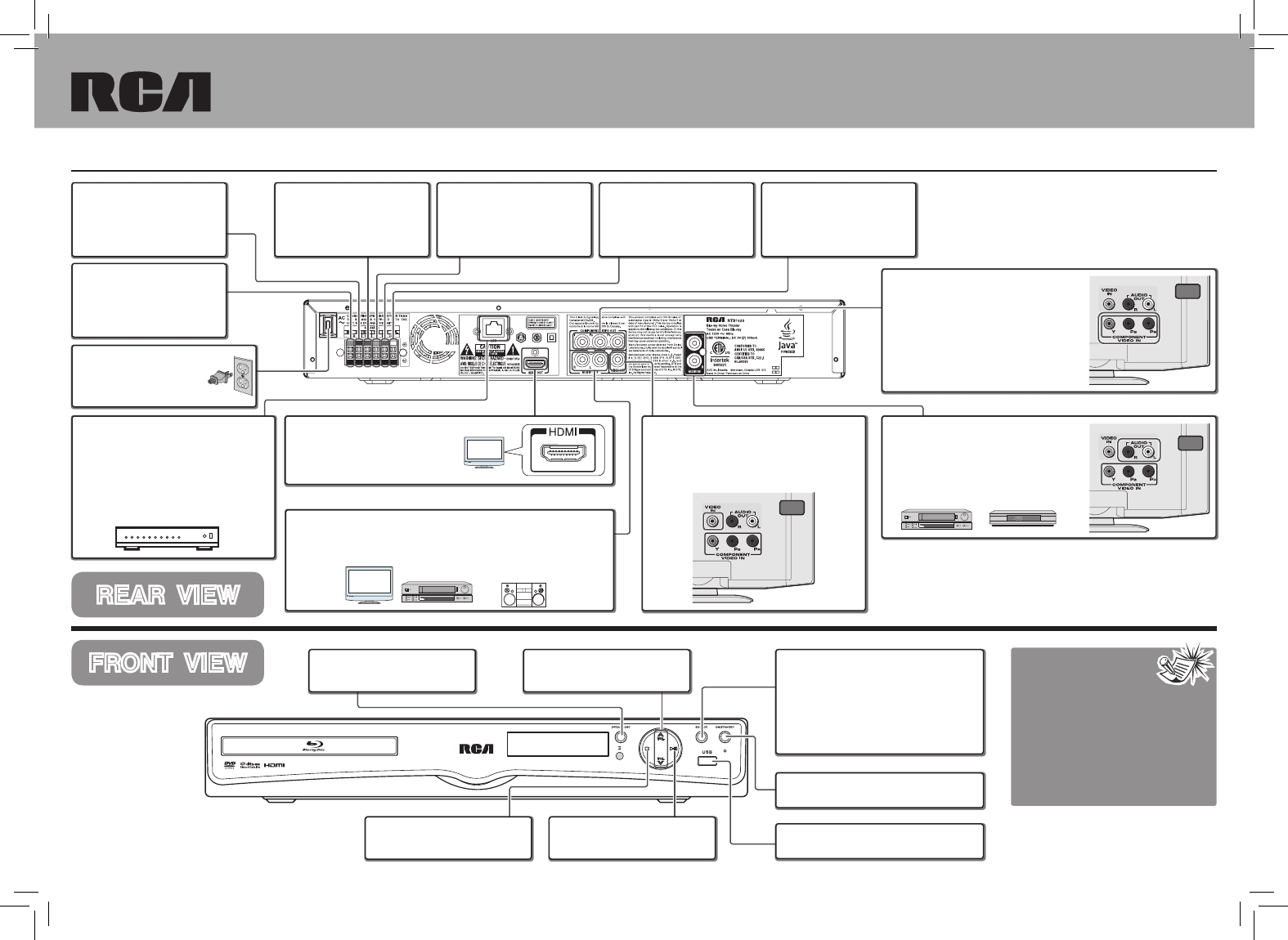
REAR VIEW
FRONT VIEW Notes:
1. The AC power plug is
polarized (one blade
is wider than the other) and only
fits into AC power outlets one way.
If the plug won’t go into the outlet
completely, turn the plug over and
try to insert it the other way.
2. The HDMI output will give you the
highest quality video connection.
Specifications and external appearance
are subject to change without advance
notice due to continuous product
improvement.
White Speaker Terminals
Conne ct t he whi te and
black wires from Front Left
Speaker to the terminals.
Red Speaker Terminals
Connect the red and black
wires from Front Right
Speaker to the terminals.
Green Speaker Terminals
Connect the green and black
wires from Center Speaker
to the terminals.
LAN (Ethernet) Jack
Use to connect an Ethernet cable (CAT5
or better with RJ45 connector) to the
ETHERNET jack on the back of your
player and to an Ethernet jack on a
broadband hub or router.
Hub or Network Router
OPEN/CLOSE Button
Opens and closes the disc tray.
VOLUME +/- Buttons
Adjusts the volume.
Purple Speaker Terminals
C o n n e c t t h e p u r p l e a n d
black wires from Subwoofer
Speaker to the terminals.
HDMI Out Jack
Use to connect an HDMI cable from
HDMI IN jack on the TV to the HDMI
OUT jack on this unit. (See Note 2)
AUDIO OUT Jacks
Use to connect
the AUDIO OUT jacks from the unit to the AUDIO
IN jacks on TV, VCR, Stereo system or other audio component.
VCR Stereo System
TV
Composite Video Out Jack
Use to connect the VIDEO OUT jack on the
back of the unit to the Video IN jack on your
TV so that the video content goes from the
unit to the TV screen.
TV
Composite Video Out Jack
Use to connect
the COMPONENT
VIDEO OUT jacks (Y, PB, PR) on the
back of the unit to the component video
IN jacks on your TV (shown at right) so
that the video content goes from the
unit to the TV screen.
TV
AUDIO IN Jack
Use to connect the AUDIO IN jacks on
the back of the unit to the AUDIO OUT
jacks on TV, VCR, SAT/Cable Box or
others (TV example shown here).
VCR SAT/Cable Box
TV
PLAY/PAUSE Button
Starts/pauses playback.
STOP Button
Stops playback.
Blue Speaker Terminals
Connect the blue and
black wires from Rear Left
Speakers (surround sound)
to the terminals.
Gray Speaker Terminals
Connect the gray and black
wires fr om R e a r R i g h t
Speakers (surround sound)
to the terminals.
AC Power Cord
Conne ct th e AC power
plug into the AC power
outlet. (See Note 1)
SOURCE Button
S e l e c t s t h e i n p u t s o u r c e s . P r e s s
repeatedly to select between:
•BD/USB –to watch BD/DVDdiscs,or
photos and video files stored on to a
data disc or USB flash drive.
•AUX–toselecttheanalogaudioinput.
ON/STANDBY Button
Switches the unit on and off.
USB Port
For connection of USB flash drives.
Hoja de Conexión Rápida
RTB1023
Felicitaciones por la compra de su nuevo producto RCA.
Por favor lea estas instrucciones para información de conexión rápida y sobre el uso del producto.
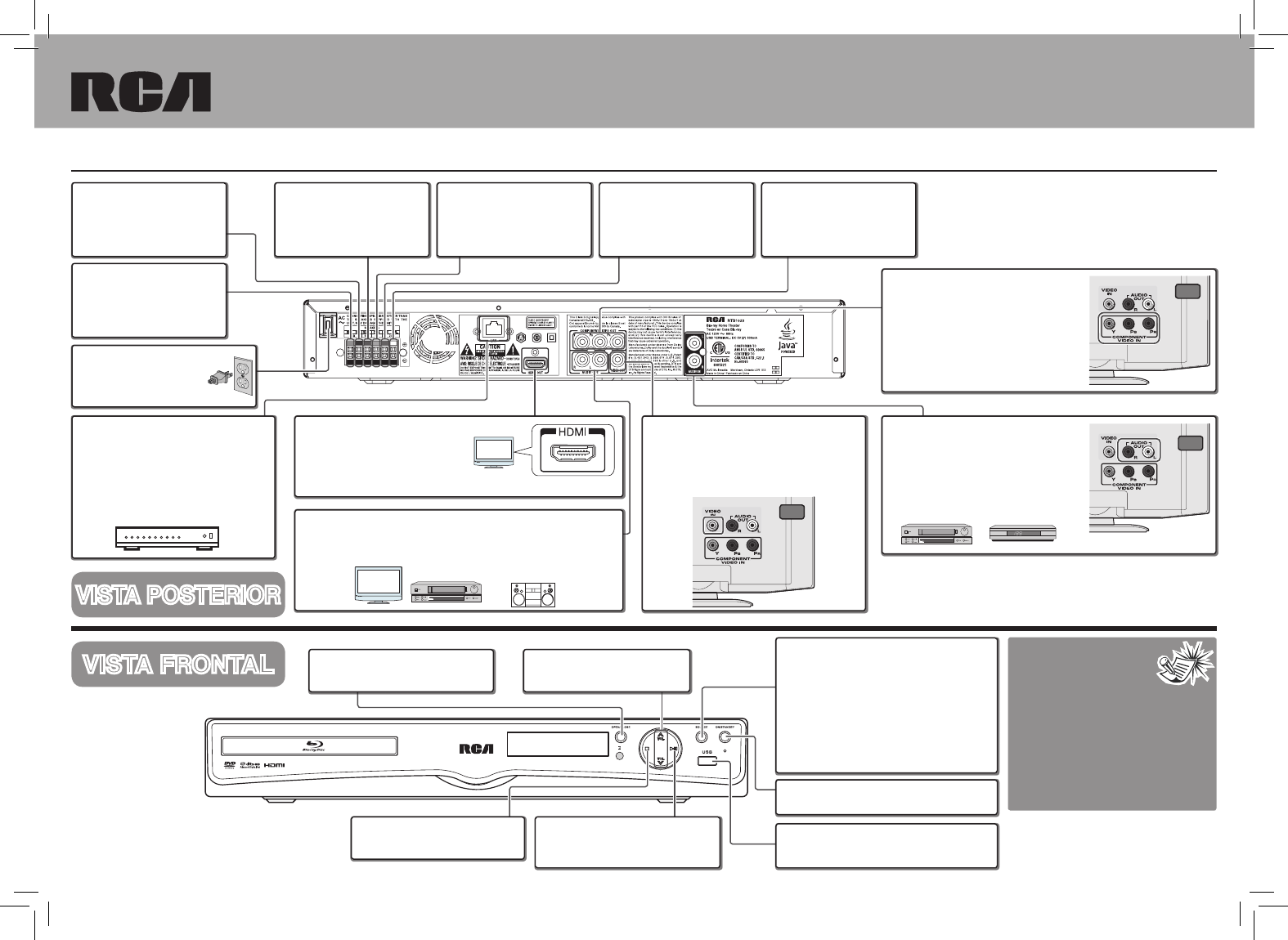
VISTA POSTERIOR
VISTA FRONTAL Notas:
1. La clavija de corriente
CA está polarizada (una
cuchilla es más ancha
que la otra) y solamente puede in-
sertarse en tomas de corriente CA
de una manera. Si la clavija no se
puede insertar completamente en la
toma de corriente, voltee la clavija y
trate de insertarla al revés.
2. La salida HDMI le dará la conexión
de video de más alta calidad.
Terminales de bocinas blancas
Conecte los cables negro y
blanco de la bocina fr ontal
izquierda a las terminales.
Terminales de bocinas rojas
Conecte los cables negro
y rojo de la bocina frontal
derecha a las terminales.
Terminales de bocina verdes
Conecte los cables negro y
verde de la bocina central a
las terminales.
Receptáculo de salida de Ethernet
Conecte un cable Ethernet (CAT5 o su-
perior con conector RJ45) al receptáculo
ETHERNET en la parte posterior de su re-
productor y a un receptáculo Ethernet en
una bahía o enrutador de banda ancha.
bahía o enrutador de
banda ancha
Botón ABRIR/CERRAR
Abre y cierra la bandeja de discos.
Botones VOLUMEN +/-
Ajusta el volumen.
Terminales de bocina moradas
Co ne c te l os c ab le s n eg ro
y m o r a d o d e l a b o c i n a
Subwoofer a las terminales.
Receptáculo HDMI
C o n e c t e u n c a b l e H D M I d e l
receptáculo HDMI IN en la TV al
receptáculo HDMI OUT en esta
unidad (Ver Nota 2)
Receptáculo de salida de AUDIO OUT
Conecte los receptáculos AUDIO OUT de la unidad a los recep-
táculos AUDIO IN en la TV, VCR, el sistema de estéreo u otro
componente de audio.
VCR Sistema estéreo
TV
Receptáculo de salida de video compuesto
Conecte el receptáculo de salida de video (Video
OUT) en la parte posterior de la unidad al receptáculo
de entrada de video (Video IN) en su TV de manera
que el contenido de video vaya de la unidad a la pan-
talla de la TV.
TV
Rec eptáculo de salida de vide o
componente
Conecte los receptáculos VIDEO OUT (Y,
PB, PR) en la parte posterior de la unidad
a los r e c e ptáculos video IN en su T V
(como se muestra a la derecha) de man-
era que el contenido de video vaya de la
unidad a la pantalla de la TV.
TV
Receptáculo AUDIO IN
Conecte los receptáculos AUDIO IN en la
parte posterior de la unidad a los recep-
táculos AUDIO OUT en la TV, VCR, con-
vertidor SAT/Cable u otros (por ejemplo la
TV que se muestra aquí).
VCR Convertidor
SAT/Cable
TV
Botón REPRODUCIR/PAUSA
Perm ite come nz ar o pausar la
reproducción.
Botón DETENER
Permite detener la reproducción.
Terminales de bocina azules
Conecte los c ables negro
y azul de la bocina trasera
izquierda (sonido surround)
a las terminales.
Terminales de bocina grises
Conecte los c ables negro
y gris de la bocina trasera
derecha (sonido surround) a
las terminales.
Cable de corriente CA
Conecte la clavija de cor-
riente CA e n la to ma de
corriente CA. (Ver la Nota 1)
Botón SOURCE (FUENTE)
Selecciona las fuentes de entrada. Presione
repetidamente para seleccionar:
• BD/USB – para ver discos BD/
DVD, fotografías y archivos de video
almacenados en un disco de datos o en
una unidad flash USB.
• AUX – para escuchar la entrada de audio
desde la/el TV, VCR o convertidor SAT/
Cable.
Botón ENCENDER/EN ESPERA
Enciende y apaga la unidad.
USB
Conecte una unidad flash USB en este
puerto.
Las especificaciones y la apariencia
exterior están sujetas a cambios sin
previo aviso debido a la continua mejora
del producto.
810-102395W030
