Rehabtronics CSST1 StimRay User Manual
Rehabtronics Inc. StimRay
User Manual
User Manual
CS-IFU-EN
Revision A (DRAFT)
2017-07-27
DRAFT

Table of Contents
Introduction 4
Device Description 4
List of Symbols 5
Safety Information 7
Contraindications 7
Warnings 7
Precautions 8
System Components 8
STIM Component 8
CHARGER Component 8
ELECTRODE Component 9
APP Component 9
Using the StimRay System 11
Overview 11
ELECTRODES Fitting 13
Preparing the Skin 13
Configuring Stimulation Intensity 14
Exercise Programs 15
System Cleaning and Maintenance 16
General System Maintenance 16
ELECTRODES Maintenance 17
2
DRAFT

Disposal Information 18
Troubleshooting 19
Electrode Placement Troubleshooting 19
Physical Reactions 20
Pain or Discomfort 20
Allergic Reactions 21
Skin Irritation 21
Device Use Troubleshooting 22
General Troubleshooting 22
Error Messages 22
Technical Information 23
Environmental Specifications 23
Electrical Component Specifications 23
Stimulation Specifications 24
Wireless Specifications 25
Electromagnetic Compatibility 26
Contact & Re-ordering Information 30
3
DRAFT

Safety Information
Contraindications
●The system should not be used by anyone with a cardiac pacemaker,
implanted defibrillator, or other implanted metallic or electronic device.
Such use could cause electric shock, burns, electrical interference, or
death.
●The system should not be used by anyone with a pre-existing medical
condition that may be impacted by muscle stimulation, including
fractures, dislocations, heart problems, or severe osteoporosis. Such
use can complicate the condition or lead to severe injury.
Warnings
●The system and Mobile Application are not intended to be used in
conjunction with therapy or treatment diseases of medical or medical
conditions of any kind.
●The long term effects of electronic stimulation are unknown.
Discontinue use and consult a medical professional if any adverse
effects are experienced.
●Never attempt to use the device to stimulate head or neck.
●Do not use the device on, or close to injured, swollen, infected, or
inflamed areas of the skin. Doing so may complicate the existing
condition or prolong healing.
●Long term use can cause skin irritation. Discontinue use if you
experience skin pain or a rash on your arm that doesn't fade within 1
hour.
●Do not immerse electrical components in water. Doing so may result in
electrical shock and damage to the device.
●Never attempt to disassemble, modify or repair any components of the
system. Doing so may result in electrical shock and damage to the
device
4
DRAFT

●Do not use if any component is visibly damaged. Connectors and
enclosures should be inspected for defects, breaks and obstructions
before every use.
●Do not use the device while sleeping.
●The system is to be used only with Stim and Electrode components
supplied by Rehabtronics Inc.
●Do not use electrodes without hydrogel
Precautions
●Safety of powered muscle stimulators for use during pregnancy has not
been established.
●Caution should be used over areas of the skin which lack normal
sensation.
●Some users may experience skin irritation or hypersensitivity due to
electrical stimulation. The irritation can usually be reduced by using an
alternate electrode placement or by changing the stimulation
parameters. If problems persist, discontinue use.
●Muscle soreness may occur, much like during regular exercise. Limit the
amount of usage per day according to exercise-related soreness.
●Replace Electrodes if they show signs of advanced wear and tear within
suggested replacement period.
●Ensure the skin is clean and free of any ointments, lotions and
cosmetics. The presence of other substances can have unknown effects
on stimulation delivery.
●Do not store or operate the device in conditions outside those listed.
Doing so can damage components.
●Caution when engaging in new or potentially dangerous activities.
List of Symbols
The following table lists the symbols that are used on the StimRay labels and in
this manual:
5
DRAFT
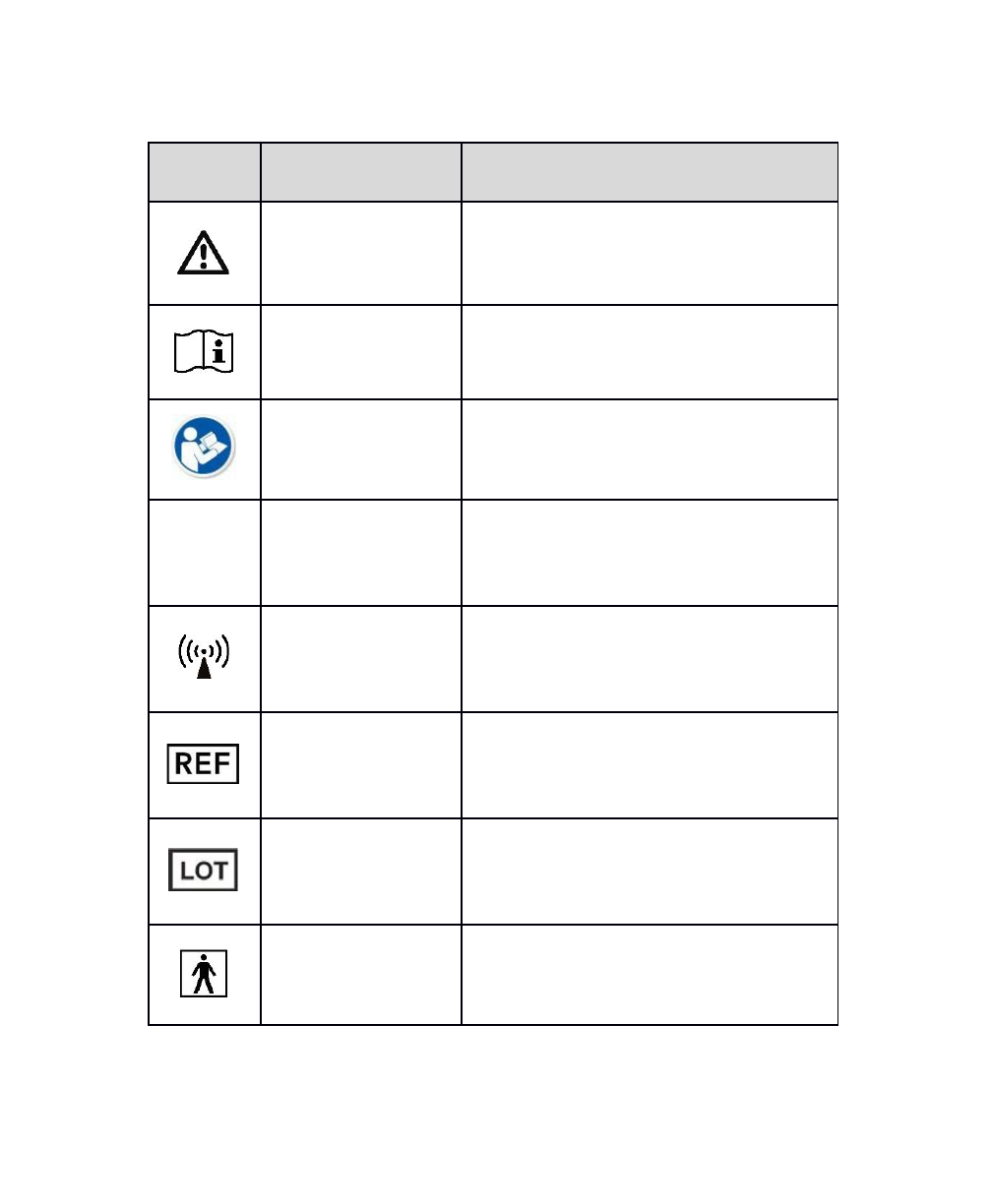
Symbol
Definition
Application to the StimRay System
Warning
Important information or instructions that
should be observed to avoid potential injury
or damage to the device.
Operating Instructions
Instructions for use can be referenced
detailing operating instructions.
Follow Instructions for
Use
The instructions for use contain critical
instructions necessary to use the device
safely.
IP22
Ingress Protection
Rating
The STIM enclosure is protected against
dripping water (e.g. light rain) and ingress of
finger-sized objects.
Non-Ionizing
Radiation Emitter
The STIM component uses low-energy radio
frequencies.
Model Reference
(Catalogue/Re-order
Number)
Reference the accompanying model number
next to this symbol when re-ordering
components.
Lot/Batch Number
Reference the accompanying batch number
next to this symbol if contacting support.
Type BF Applied Part
Components that make patient contact
have a degree of protection against electric
shock.
6
DRAFT
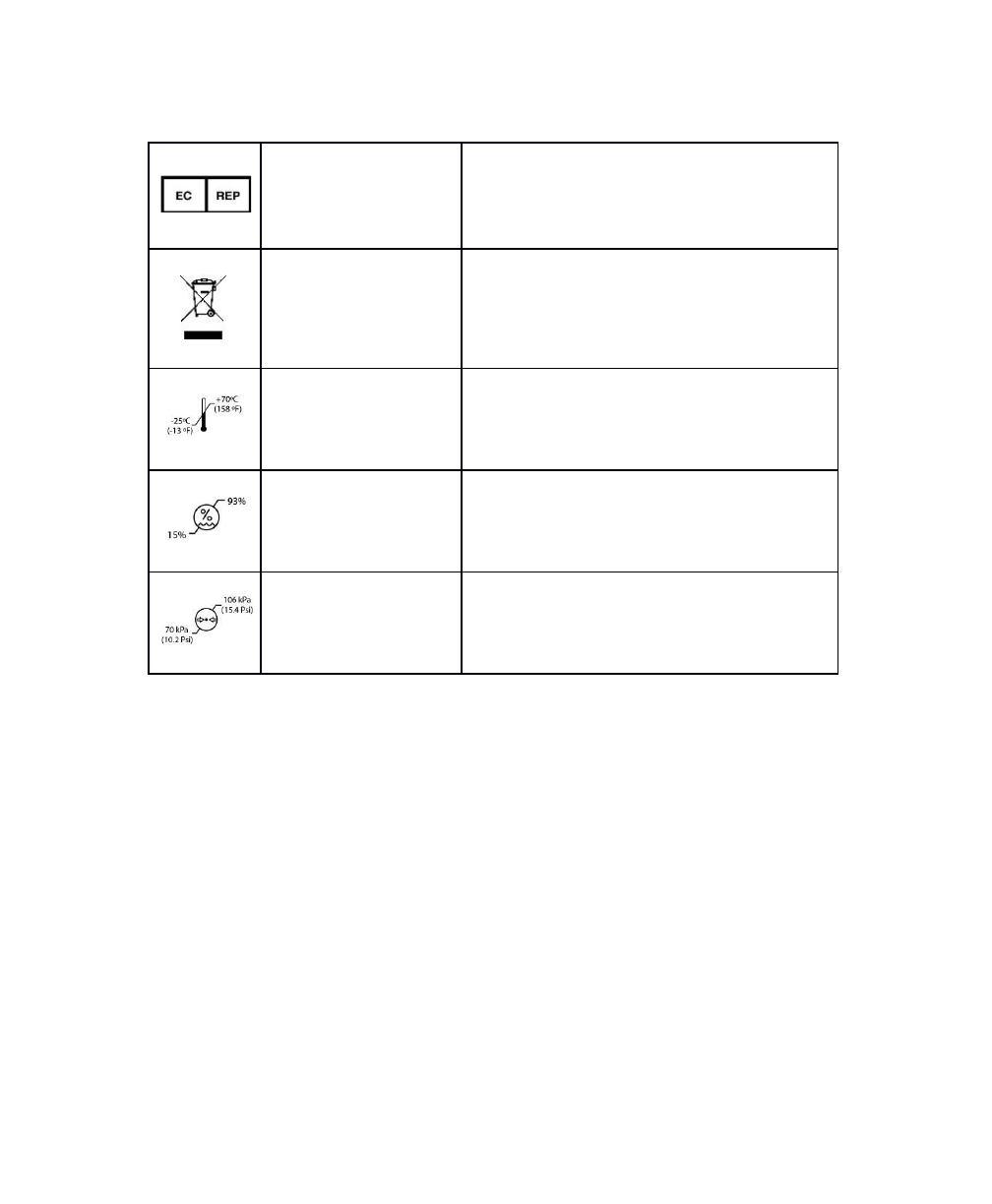
European Authorized
Representative
The contact information accompanying this
symbol can be used to contact a
representative in the European Community.
Waste Electrical and
Electronic Equipment
(WEEE)
Do not dispose electronics with regular
household waste. Consult local waste
management authorities to determine the
acceptable means to dispose of electronic
equipment.
Transportation and
storage temperature
limits
Do not transport or store the StimRay
outside the temperature range indicated.
Transportation and
storage humidity
limits
Do not transport or store the StimRay
outside the humidity range indicated.
Transportation and
storage pressure
limits
Do not transport or store the StimRay
outside the pressure range indicated.
Introduction
Device Description
The StimRay system, used with StimRay Mobile Application, is intended for the
stimulation of healthy muscles in order to improve or facilitate muscle
performance.
It is intended to supplement strengthening, massage and recovery of the
following muscle groups, during or after exercise:
7
DRAFT

●Abs
●Adductors
●Biceps
●Calves
●Deltoids
●Forearms
●Glutes
●Hamstrings
●Lats
●Lower-Back
●Pecs
●Quads
●Traps
●Triceps
The StimRay device and StimRay Mobile Application are not intended to be used
in conjunction with therapy or treatment diseases of medical or medical
conditions of any kind.
8
DRAFT
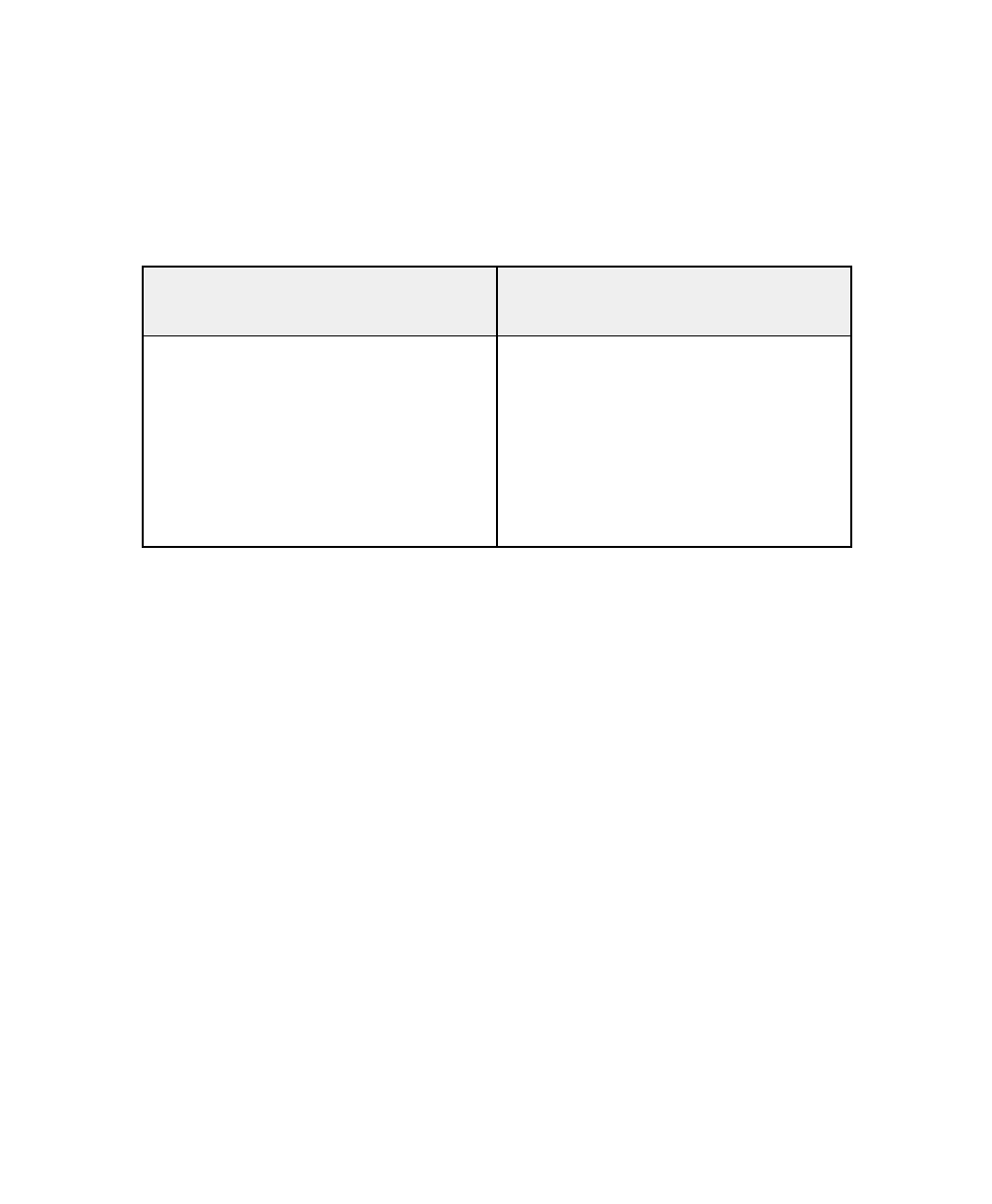
System Requirements
The StimRay system requires the following:
StimRay Components
(Included in system kit)
Other Requirements
(non-included)
- StimRay STIM (up to 2 can be
used simultaneously)
- StimRay CHARGER
- StimRay ELECTRODE (up to 2 can
be used simultaneously)
- StimRay ELECTRODE Hydrogel
Pads
- USB-to-microUSB cable
- Mobile device running iOS 10, or
later
- USB power supply (output: 5V,
1A-2A)
System Components
STIM Component
The StimRay STIM is a small, rechargeable battery-powered, stimulation device
that produces stimulation pulses when connected to a StimRay ELECTRODE
component, and can be controlled using a mobile device.
CHARGER Component
The StimRay CHARGER component is used to charge the STIM battery. It is
USB-powered, and can connect to any compliant USB power-source with a
micro-USB cable. It allows for up to two (2) STIM units to be charged
simultaneously.
ELECTRODE Component
The StimRay ELECTRODE is a 2-channel electrode that is placed over exercised
muscles groups.
9
DRAFT

It consists of a magnetic connection for a StimRay STIM, and replaceable
hydrogel pads.
MOBILE APP Component
The StimRay MOBILE APP component is a software program that is used to
control the STIM component. It allows for selection and initiation of exercise
programs, and stimulation intensity adjustment.
It is compatible with Apple iOS devices, and can be freely downloaded from the
Apple App Store.
Before You Begin
Downloading and Installing the MOBILE APP
Download the “StimRay” app from the Apple App Store onto your mobile
device.
Using the STIM
Using the STIM is as simple as connecting it to an ELECTRODE, and then
controlling it with the MOBILE APP (see “Using the MOBILE APP”).
The STIM will automatically turn on when connected to an ELECTRODE or
CHARGER, and automatically turn off when not connected to anything.
The STIM battery requires periodic recharging using the CHARGER (see “Using
the CHARGER”).
10
DRAFT
STIM Indicators
The STIM contains a single LED to indicate its status, when connected to either
the CHARGER or an ELECTRODE. The following table describes the meaning of
the LED states:
Stim LED
Meaning
No Activity
(Off)
The STIM is powered off. All stimulation functions
and MOBILE APP connections are disabled.
The STIM will automatically turn off when it is not
connected to either an ELECTRODE or CHARGER.
Blinking Blue
(Standby)
When connected to a CHARGER, this means that:
●The STIM charging
●The STIM is waiting for MOBILE APP pairing
Solid Blue
(Ready)
When connected to a CHARGER, this means the the
STIM battery is fully charged.
When connected to an ELECTRODE, this means that
the STIM is on, and ready to start stimulating.
Orange
(Active
-
Stimulating)
The STIM is sending stimulation pulses to the
ELECTRODE.
This is only possible when the STIM is connected to
the ELECTRODE, and controlled with the MOBILE
APP.
Flashing Red
(Low
Battery)
The STIM battery has less than 10% capacity
remaining.
11
DRAFT
Solid Red
(Error)
An error has been detected. Any stimulation will be
stopped, and functions will be disabled. See
“Troubleshooting” section of this manual for details.
Using the CHARGER
The StimRay CHARGER serves two functions. It is used to:
1. Recharge STIM batteries
2. Pair STIM units with a MOBILE APP (see “Using the MOBILE APP”)
Charging the STIM
Connect the CHARGER to a compliant USB power source, and then connect up
to two (2) STIM units. Charging progress is monitored by observing the LED on
connected STIM units according to the following table:
Charging in Progress
Charging Complete
Charging Error
STIM LED
Status
Pulsing blue LED
Solid blue LED
Solid red LED
NOTE: Two STIM units can be charged separately or simultaneously. Batteries
should be charged regularly. When STIM units are not in use, it is
recommended that they be charged to avoid battery depletion.
Using the ELECTRODES
Replacing Hydrogel Pads
The StimRay ELECTRODES require replaceable hydrogel pads in order to stick to
the skin and stimulate as intended.
Hydrogel pads are intended to be changed after five (5) days of use, or
whenever the pads no longer effectively stick to the skin.
12
DRAFT
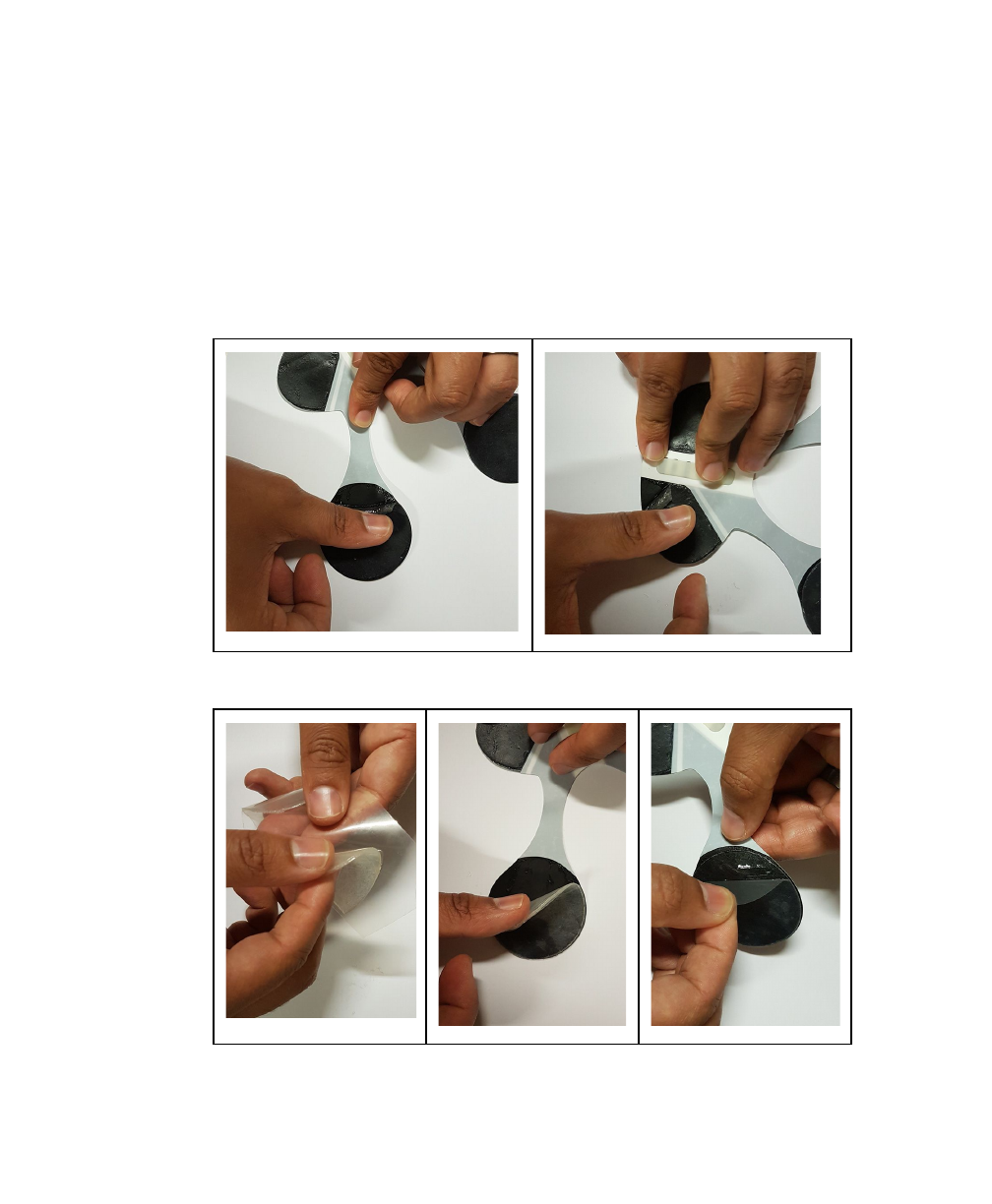
Replacement pads are available from Rehabtronics (see “Contact and
Re-ordering Information” section of this manual).
ELECTRODE hydrogel pads can be replaced as follows:
1. Peel off and discard previous hydrogel pads from the ELECTRODE.
2. Apply new hydrogel pads to the ELECTRODE pad areas.
13
DRAFT
Preparing the Skin
The skin over which the ELECTRODE(S) are placed must be clean, healthy, and
free of obstructions. Perform the following preparation steps prior to fitting:
1. Ensure the skin is healthy and free of any cuts, irritations, infections,
or other injuries.
2. Ensure the skin is clean and free of any lotions, ointments or other
cosmetics.
3. Remove any personal items such as jewelry, watches, bracelets, etc.
that may obstruct ELECTRODE placement.
4. It may be necessary to trim any excess arm hair from the areas over
which the ELECTRODE(S) will be placed in order to ensure good
contact with the skin.
Applying ELECTRODES to the Body
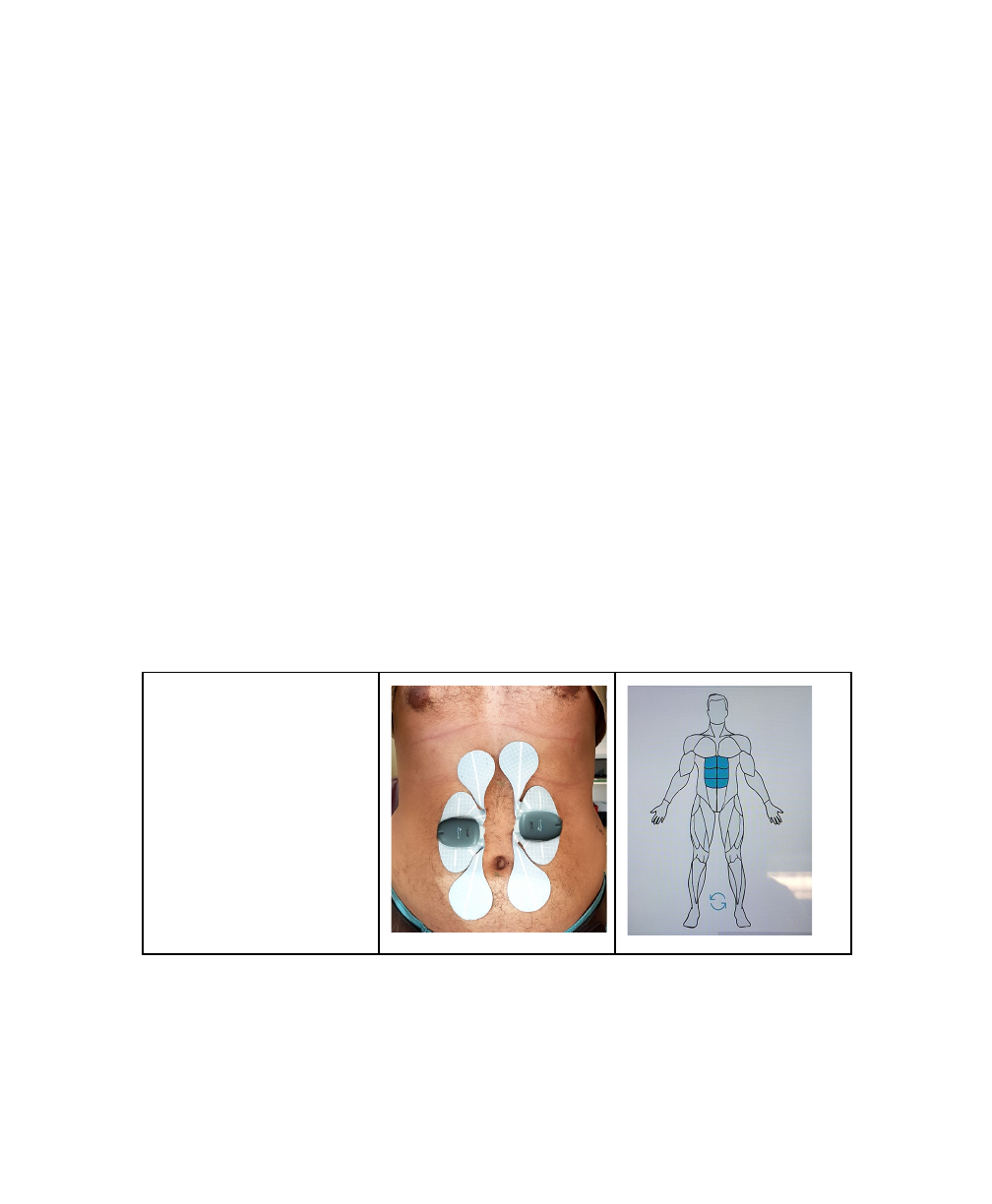
ELECTRODES are applied to the body by using the sticky hydrogel pads, such
that the circular pads are placed over the desired muscle group.
●Abs
14
DRAFT
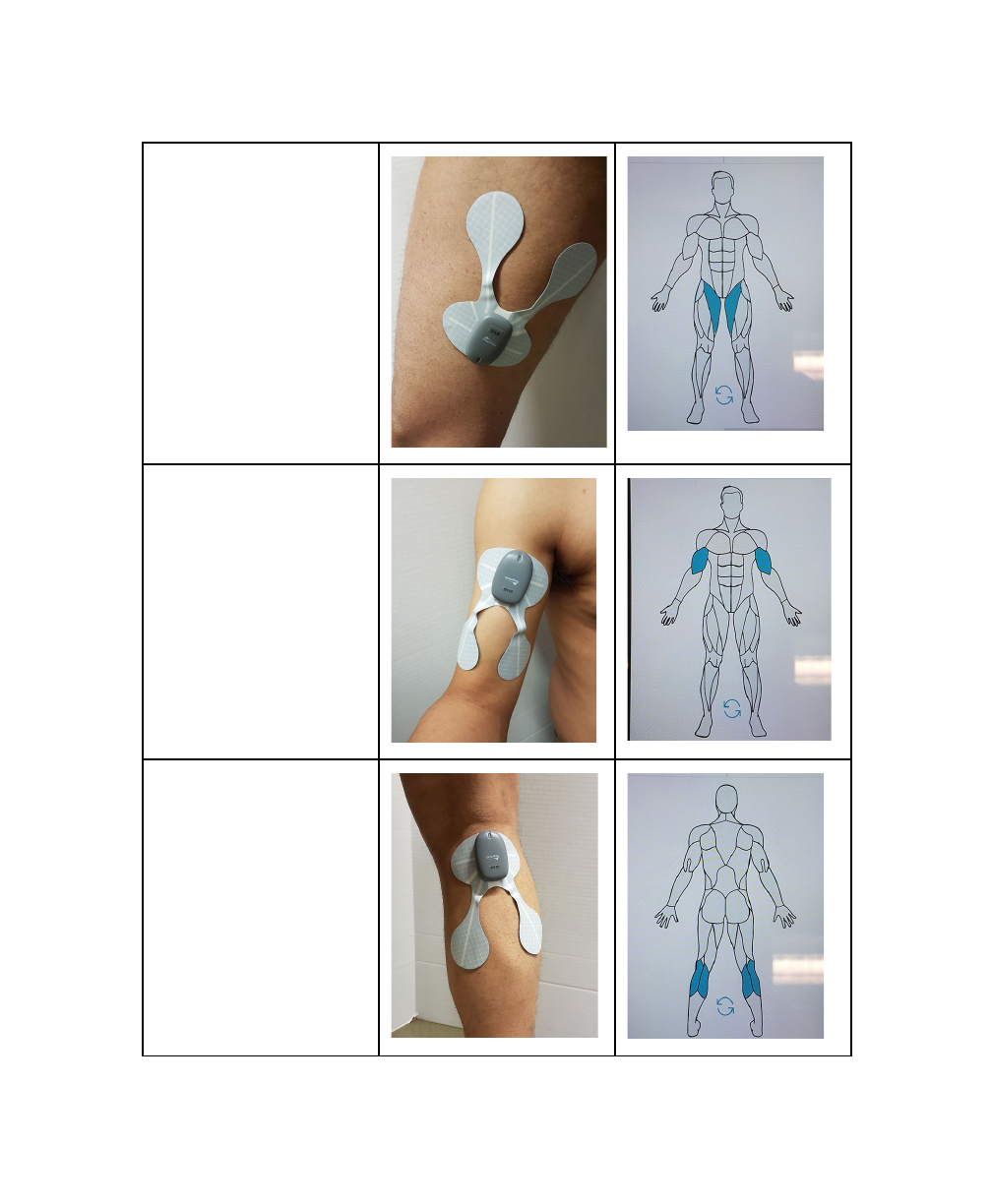
●Adductors
●Biceps
●Calves
15
DRAFT
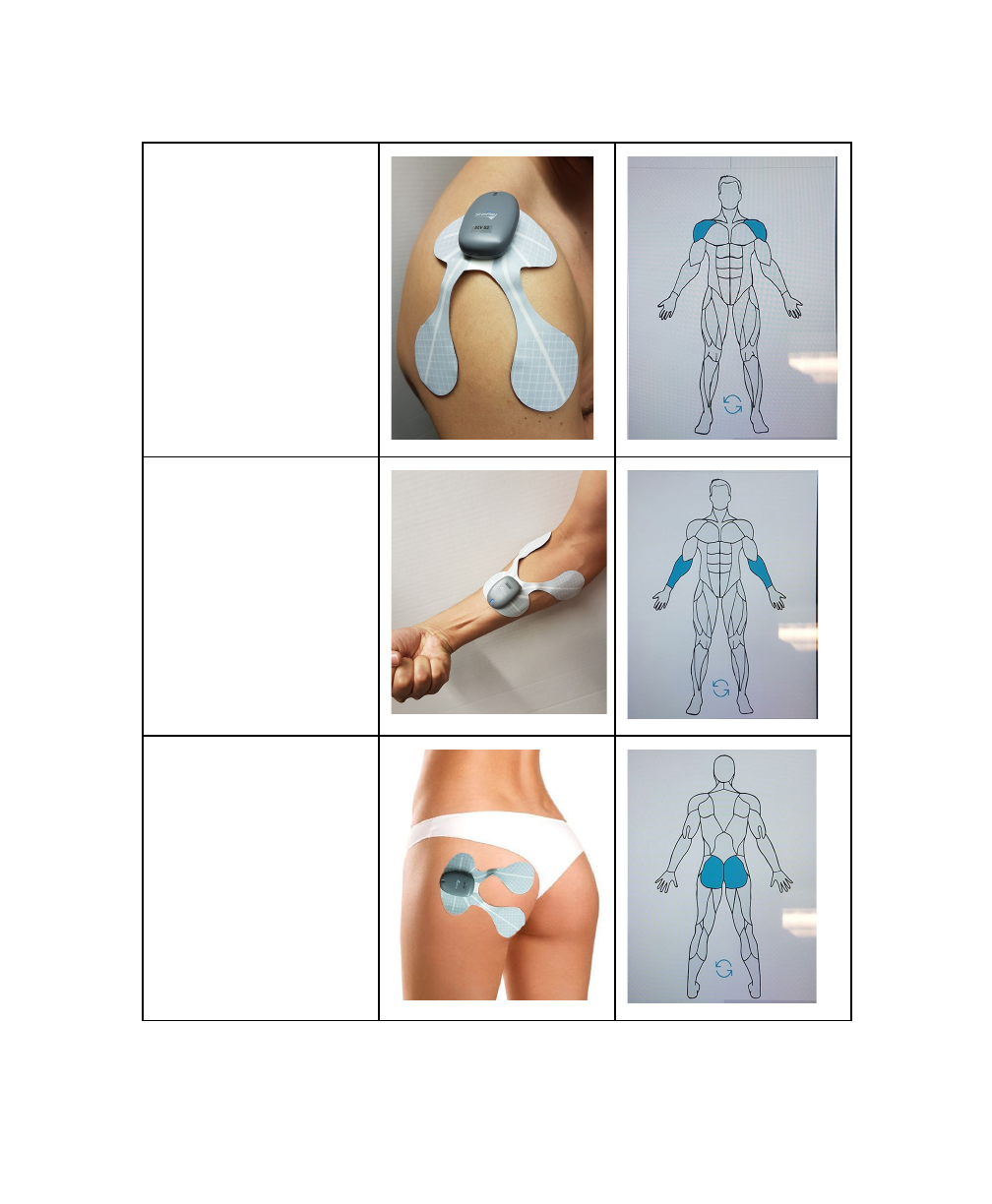
●Deltoids
●Forearms
●Glutes
16
DRAFT
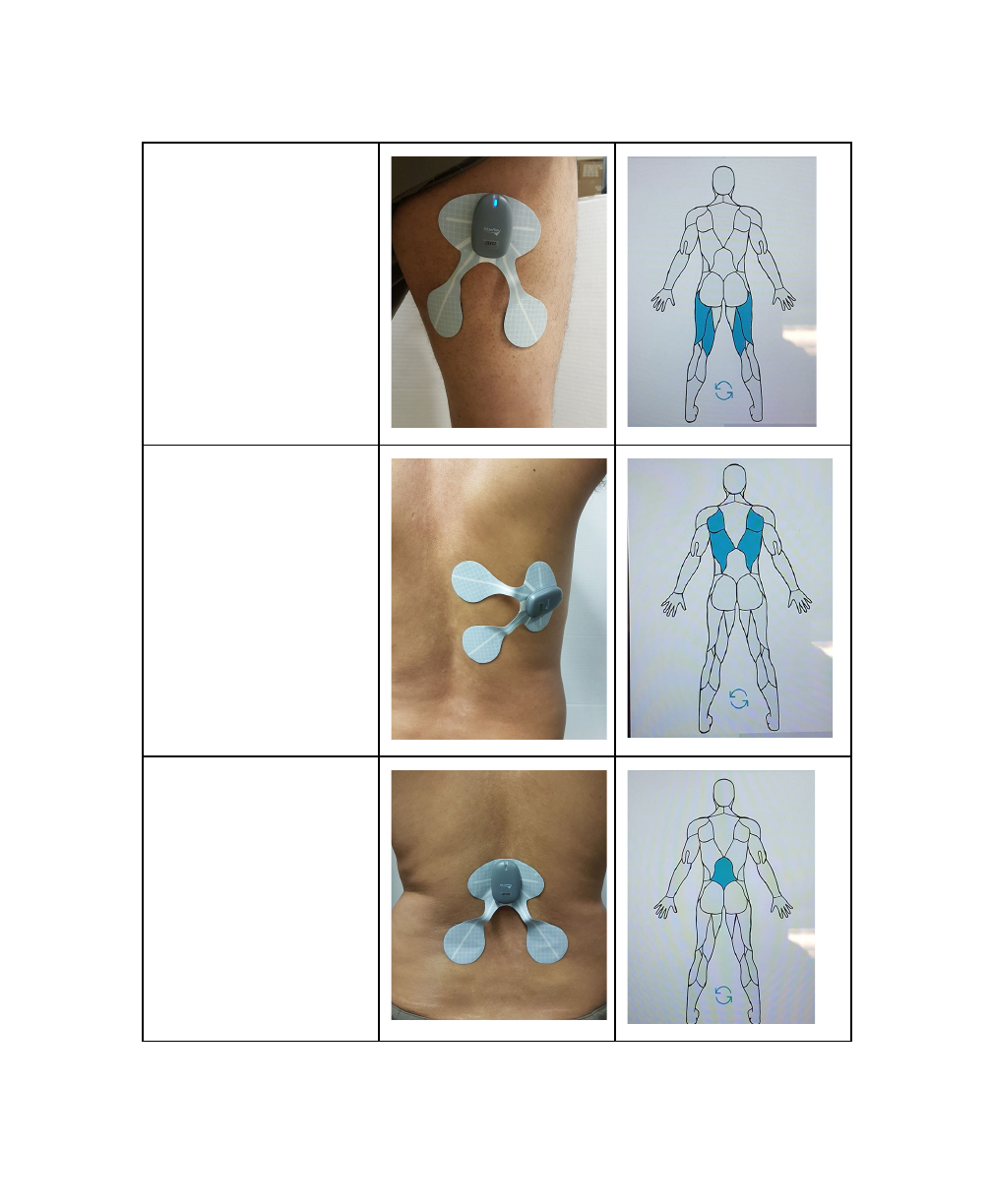
●Hamstrings
●Lats
●Lower-Back
17
DRAFT
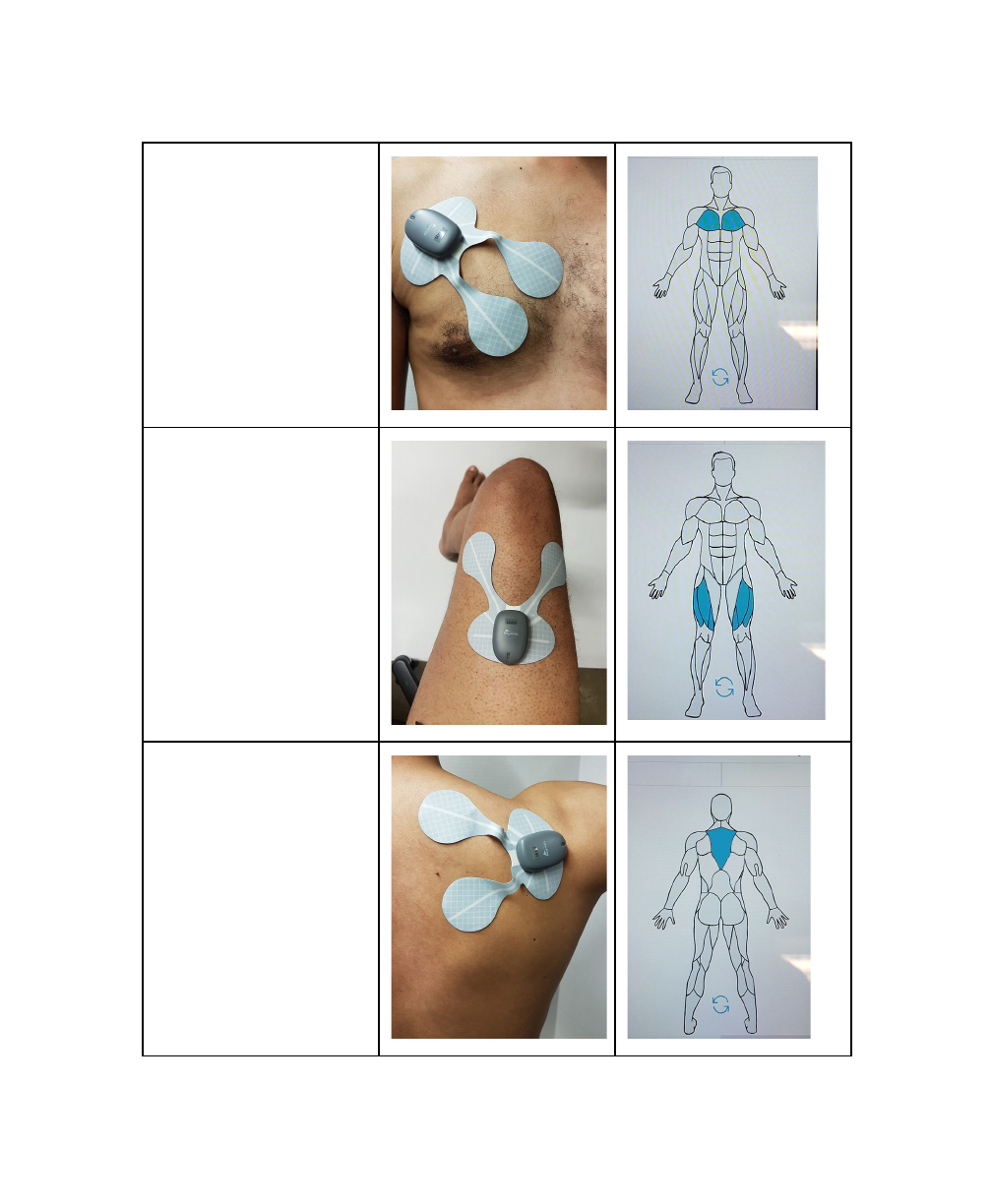
●Pecs
●Quads
●Traps
18
DRAFT
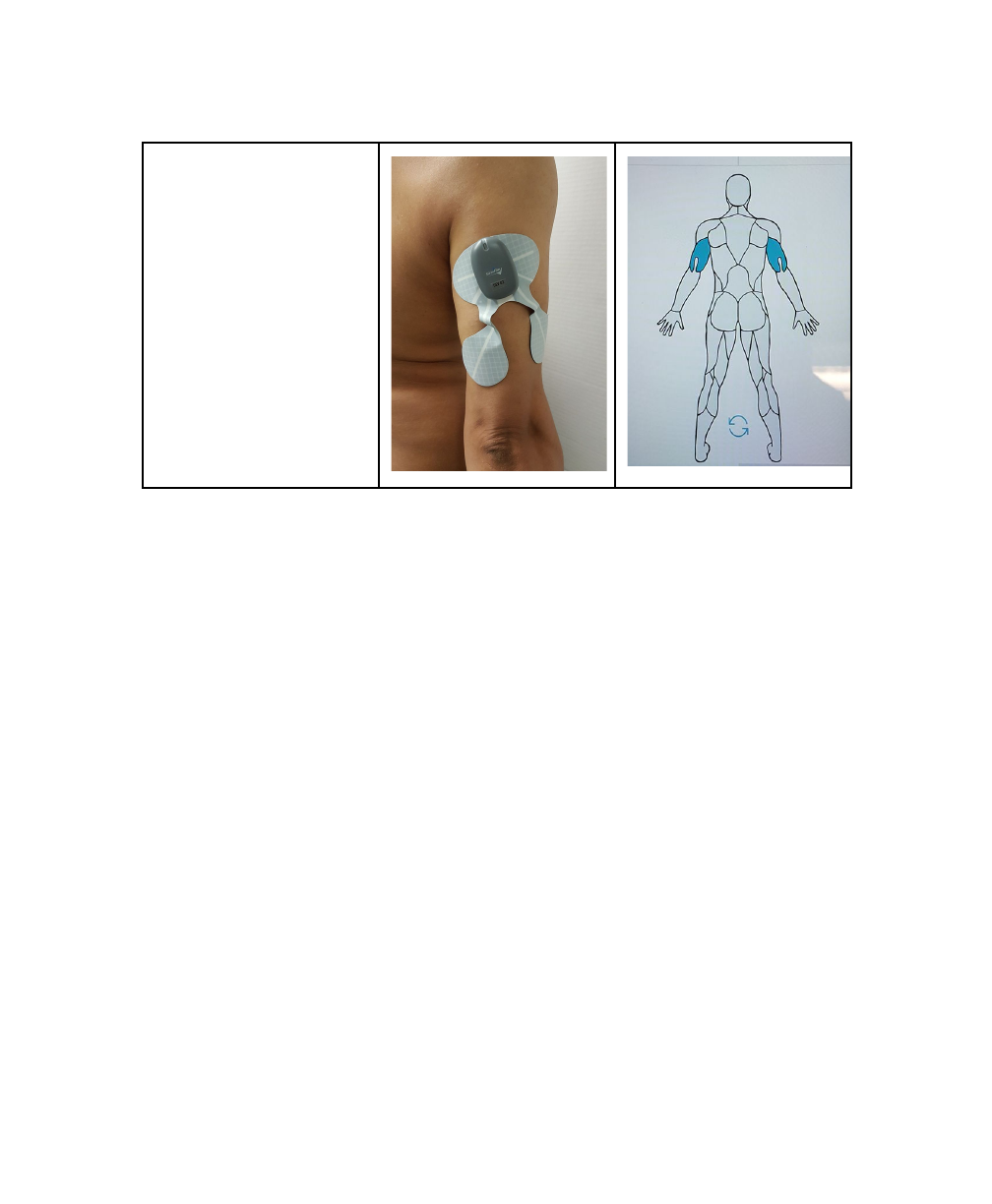
●Triceps
The MOBILE APP contains further instructions and images as to how to apply
ELECTRODES to specific areas.
Using the MOBILE APP
The MOBILE APP is what controls paired STIM units. This section describes the
features and functions of the MOBILE APP, in particular:
●Pairing STIM units with the MOBILE APP
●Naming STIM units
●Selecting Muscle Groups
●Selecting Exercise Programs
●Running Exercise Programs and Configuring Intensities
Pairing STIM Units with the MOBILE APP
STIM units need to first be paired with your mobile device running the MOBILE
APP. Up to two (2) STIM units can be paired with a given mobile device.
Pairing requires connection to the CHARGER, as follows:
19
DRAFT
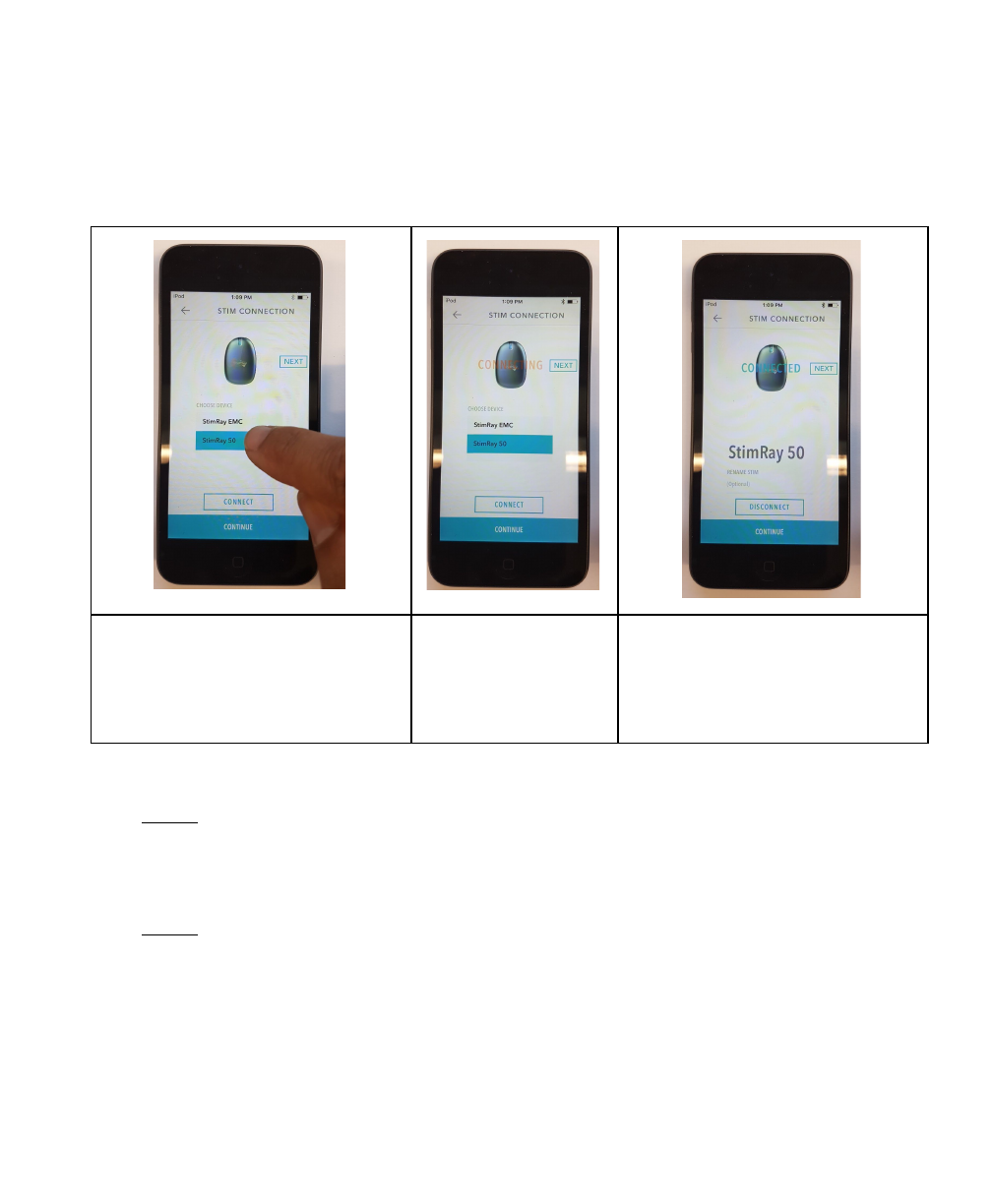
1. Open the StimRay MOBILE APP on your mobile device
2. Connect the STIM to the CHARGER - The STIM’s LED will flash blue
3. Pairing Instructions
Select one of the default names
of the STIM that will appear on
the list of the STIM available to
pair and then Click “CONNECT”
A red text
“CONNECTING” will
appear
Then Blue text “CONNECTED”.
The default Name of the STIM
will appear at the bottom of the
screen
4. To pair the second STIM, Click “ NEXT” and go through Step 3 again.
NOTE: Pairing must be done within three (3) minutes of connecting the STIM to
the CHARGER. If pairing is unsuccessful, disconnect the STIM from the
CHARGER, then re-connect and try again.
NOTE: The MOBILE APP will remember paired STIM units, so the pairing process
only has to be done once for any given STIM unit and mobile device.
20
DRAFT
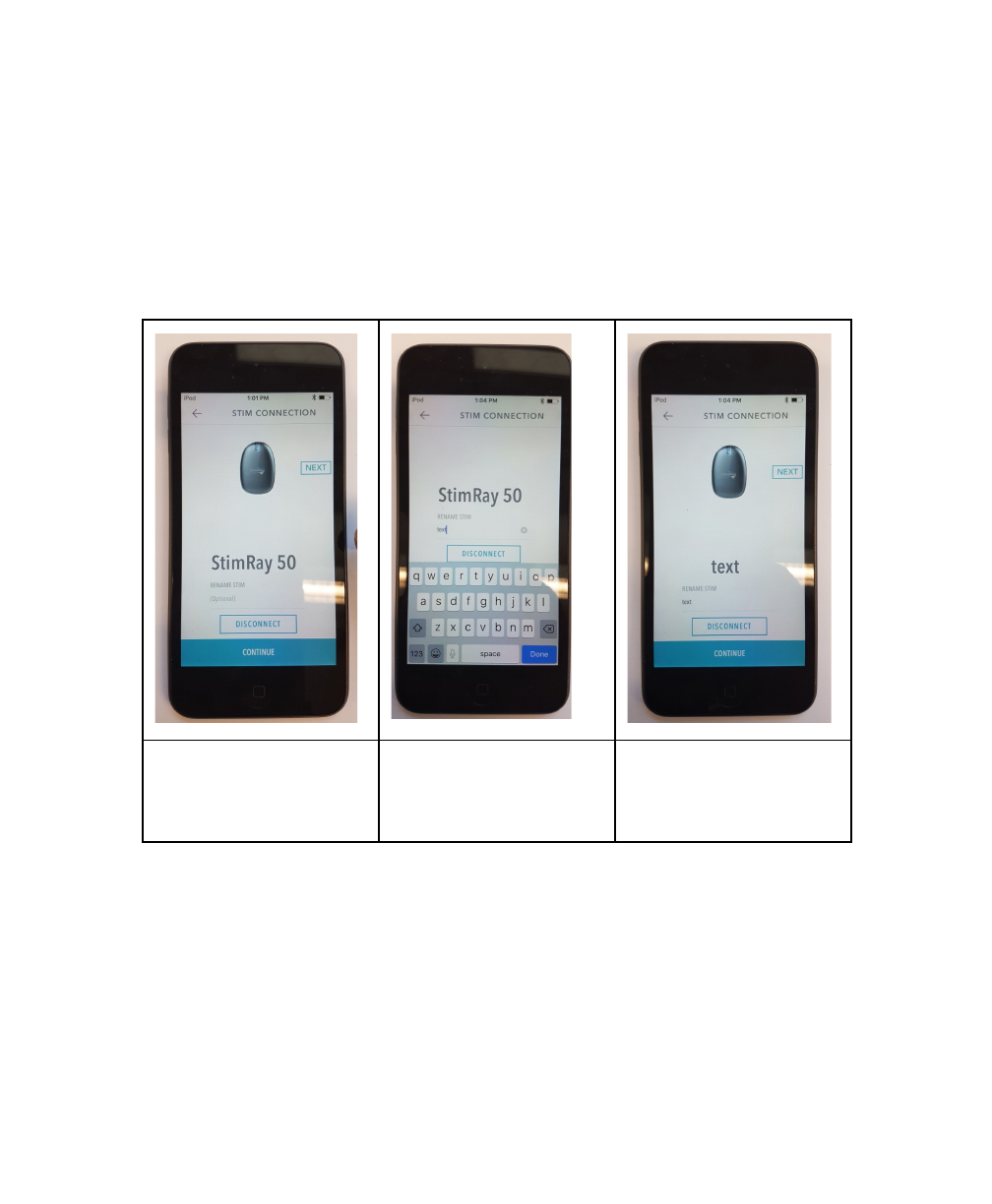
Naming STIM Units
The MOBILE APP allows paired STIM units to be assigned a name, so they can be
recognized easily in the future.
Naming / Renaming Instructions:
Click Bellow the text
“RENAME STIM”
Keyboard will appear,
name your STIM, then
click “ Done”
The new name of your
STIM will Appear
Selecting Muscle Groups
The MOBILE APP must be told what on parts of the body paired STIM units will
be acting. This is done on the muscle-group selection screen.
(see above “Applying ELECTRODES to the Body”)
21
DRAFT
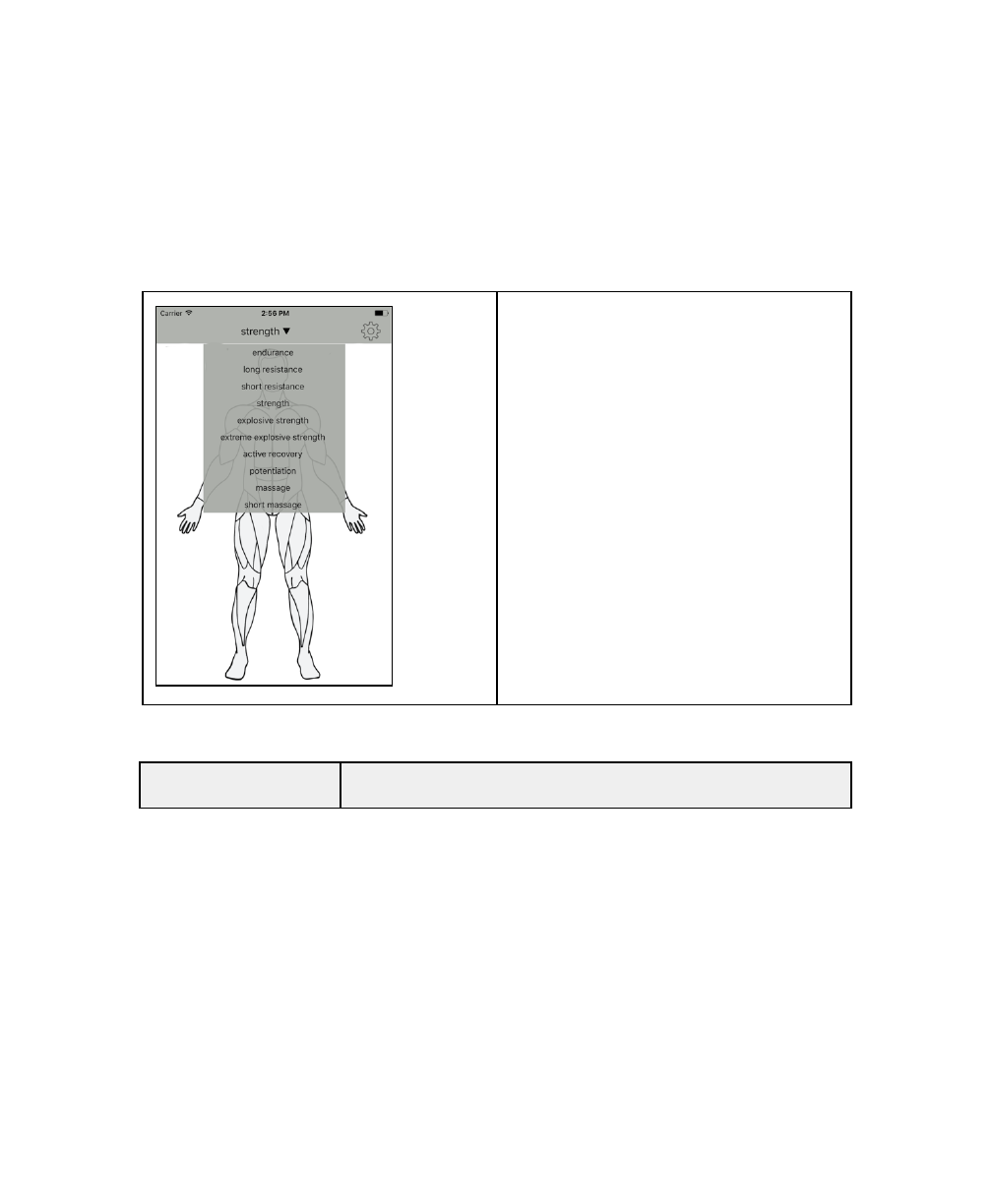
Selecting Exercise Programs
Depending on the muscle group selected, up to six (6) exercise modes will be
available within the MOBILE APP. The following table describes the different
modes:
Choose the desired mode from the
mode selection screen on the
MOBILE APP.
Exercise Mode
Description
22
DRAFT
Endurance
Improves muscle endurance and resistance to a fatigue.
Assists in developing a higher absolute intensity over a
given volume at greater ease, improving muscle’s ability
to increase the rate of lactic acid removal.
Use up to 5 times a week per muscle group, before your
endurance workouts.
DURATION: 40-46 MINUTES
RECOMMENDED MUSCLE GROUPS:ADDUCTORS,
DELTOIDS, GLUTES, LOWER BACK, TRAPS, WRIST
FLEXORS/EXTENSORS
Long Resistance
Improves muscle ability to resist intense and prolonged
effort, muscle tone and definition. Assists in ability to
sustain higher intensities of exercise for short time
frames.
Use up to 4 times a week per muscle group, before or
after your Long Resistance workouts.
DURATION: 26-32 MINUTES
RECOMMENDED MUSCLE GROUPS:ABS,
ADDUCTORS, CALVES, DELTOIDS, GLUTES, LATS,
LOWER BACK, TRAPS, WRIST
FLEXORS/EXTENSORS
Short Resistance
Improves muscle ability to resist intense and prolonged
effort, increases muscle hypertrophy (muscle
cross-sectional area). Assists in creating strength gains
toward movement, speed, and ground reaction force on
the field or court.
23
DRAFT

Use up to 3 times a week per muscle group, in between
or after your usual workouts.
DURATION: 20-26 MINS
RECOMMENDED MUSCLE GROUPS: ABS, BICEPS,
CALVES, HAMSTRINGS, LATS, PECS, QUADS,
TRICEPS
Strengt
Improves muscle strength. Great in complementing
strength training sessions with the major focus on
pushing, pressing and pulling training.
Use up to 3 times a week per muscle group, in between
or after your strength training workouts.
DURATION: 20-26 MINS
RECOMMENDED MUSCLE GROUPS: BICEPS,
HAMSTRINGS, PECS, QUADS, TRICEPS
Explosive Strength
Focuses on rapid muscle strength development. Great
for overcoming plateaus in your strength or speed
training, complements well your plyometric workouts.
Use up to 3 times a week per muscle group, in between
or after your strength training workouts.
DURATION: 17-23 MINS
RECOMMENDED MUSCLE GROUPS: BICEPS,
HAMSTRINGS, PECS, QUADS, TRICEPS
Extreme Explosive
Focuses on rapid muscle strength development. Great
24
DRAFT

Strength
for overcoming plateaus in your strength or speed
training, complements well your plyometric workouts.
Use up to 3 times a week per muscle group, in between
or after your strength training workouts.
DURATION: 9-15 MINS
RECOMMENDED MUSCLE GROUPS: BICEPS,
HAMSTRINGS, PECS, QUADS, TRICEPS
Active Recovery
Reduces blood lactate accumulation and speeds up
muscle recovery after a hard training session.
Use within 2 hours after intensive training.
DURATION: 20 MINUTES
Potentiation
Increases muscle contraction speed and prepares
muscles for the maximum output. Potentiation Program
is a great warm-up tool.
Use as advanced warm up before important events and
competitions.
DURATION: 4 MINUTES
Massage
Temporarily increases blood circulation in the area
applied, promotes muscle relaxation. Great add-on for
your rest days.
Apply during your rest periods.
25
DRAFT
DURATION: 20 MINUTES
Short Message
Temporarily increases blood circulation in the area
applied, promotes muscle relaxation. Great add-on for
your rest days.
Apply during your rest periods.
DURATION: 11 MINUTES
Running Exercise Programs and Configuring Intensities
Once the muscle group and exercise mode have been selected, stimulation can
be started, stopped and paused using the MOBILE APP’s on-screen controls.
The timer will be set automatically based on the selected exercise mode.
While the exercise program is running, adjust the stimulation intensity to a
comfortable level using the on-screen controls.
MOBILE APP Indicators
The MOBILE APP has icons to indicate the STIM battery charge.
Battery Status Icon
Icon
Meaning
Charged - Fully charged
26
DRAFT
Discharging - Partially charged
Low Battery - Less than 20% charge remaining
27
DRAFT
System Cleaning and Maintenance
General System Maintenance
The following general maintenance guidelines should be followed to ensure safe
and effective use of the StimRay system:
●Inspect all components prior to use. Do not use any components
showing signs of damage.
●Do not store or operate any of the system components outside their
specified operating and storage conditions (see “Environmental
Specifications” in the Technical Information section of this manual).
●All system components can be cleaned as necessary by wiping with a
soft cloth dampened with clean water.
WARNING: Do not immerse components in water or any other
liquid. Doing so can permanently damage the electronics.
28
DRAFT

ELECTRODES Maintenance
ELECTRODE Body Replacement
The StimRay ELECTRODES should be replaced in either of the following cases:
1. If there is any noticeable damage or separation of materials;
2. After six (6) months of daily use.
For re-ordering information see “Contact & Reordering Information” at the end
of this manual.
Hydrogel Pad Replacement
The ELECTRODE hydrogel pads are intended to be replaced regularly to ensure
adequate adhesion to the skin, and reliable stimulation delivery. Hydrogel pads
should be replaced in either of the following cases:
1. Hydrogel pads are dirty and/or no longer adhere well to the skin
2. After one (1) week of daily use.
The life of the electrodes varies depending on skin conditions, amount of use,
type of stimulation, storage and climate. Electrode life may be extended by
carefully following these tips on application, removal, and storage.
1- Avoid touching the Hydrogel Pad, lift a corner of the Electrode and slowly
peel the electrode off the skin, touching the adhesive gel as little as possible.
2- Place the electrodes back immediately after each use to its protective plastic
cover.
3- Return the electrodes back into storage Bag and reseal tightly to prevent
Dry-out.
4- Store at room or cool temperature and keep out of direct sunlight
29
DRAFT
For re-ordering information see “Contact & Reordering Information” at the end
of this manual.
Disposal Information
Rehabtronics Inc. considers the environment in all aspects of the product
lifecycle, from design and engineering to packaging and recycling. We
recommend that customers dispose of their used StimRay components in an
environmentally sound manner.
It is your responsibility to dispose of your waste equipment by handing it over to
a designated collection point for the recycling of waste electrical and electronic
equipment. The separate collection and recycling of your waste equipment at
the time of disposal will help to conserve natural resources and ensure that it is
recycled in a manner that protects human health and the environment. For
more information about where you can drop off your waste equipment for
recycling, please contact your local city office, your household waste disposal
service or the shop where you purchased the product.
CAUTION: Do not dispose of electronic components with normal
household waste. Contact your local waste-management
services for information on how to best dispose of electronic
equipment.
30
DRAFT

Troubleshooting
Electrode Placement Troubleshooting
31
DRAFT
Physical Reactions
Pain or Discomfort
If used as directed, the StimRay should not cause any pain. Mild discomfort may
be experienced when using the StimRay system, but is easily remedied in most
cases. The following table describes possible sources of discomfort, and the
appropriate actions to take:
Source of Discomfort
Recommended Action(s)
Increase in sensitivity to
stimulation over time
Decrease stimulation intensities to comfortable
levels. If discomfort persists, discontinue use and
consult your healthcare professional.
Fatigue or soreness
following prolonged use
Discontinue use until symptoms have cleared. If
symptoms do not dissipate within a day of ceasing
use, consult your healthcare professional.
WARNING: If persistent pain is experienced, discontinue use
immediately and contact your healthcare professional.
32
DRAFT
Allergic Reactions
All StimRay materials have been selected and tested to ensure they are
biocompatible, hypoallergenic, and free of any toxic substances. Nevertheless, if
allergic reaction to materials is suspected, discontinue use immediately and
contact your healthcare professional.
Skin Irritation
Some reddening and indentation of the skin under electrodes is normal
following a period of use, and further mild skin irritation may be experienced
depending on factors such as the environment, duration of use, and
skin-sensitivity.
The following guidance should be followed to mitigate possible skin irritation:
●Limit wearing the ELECTRODES to a maximum of 2 hours a day.
●If any sort of skin irritation develops, discontinue use until the
symptoms have cleared.
WARNING: If persistent skin irritation is experienced that does
not clear within hours of removing the ELECTRODES, discontinue
use and contact your healthcare professional.
33
DRAFT
Device Use Troubleshooting
General Troubleshooting
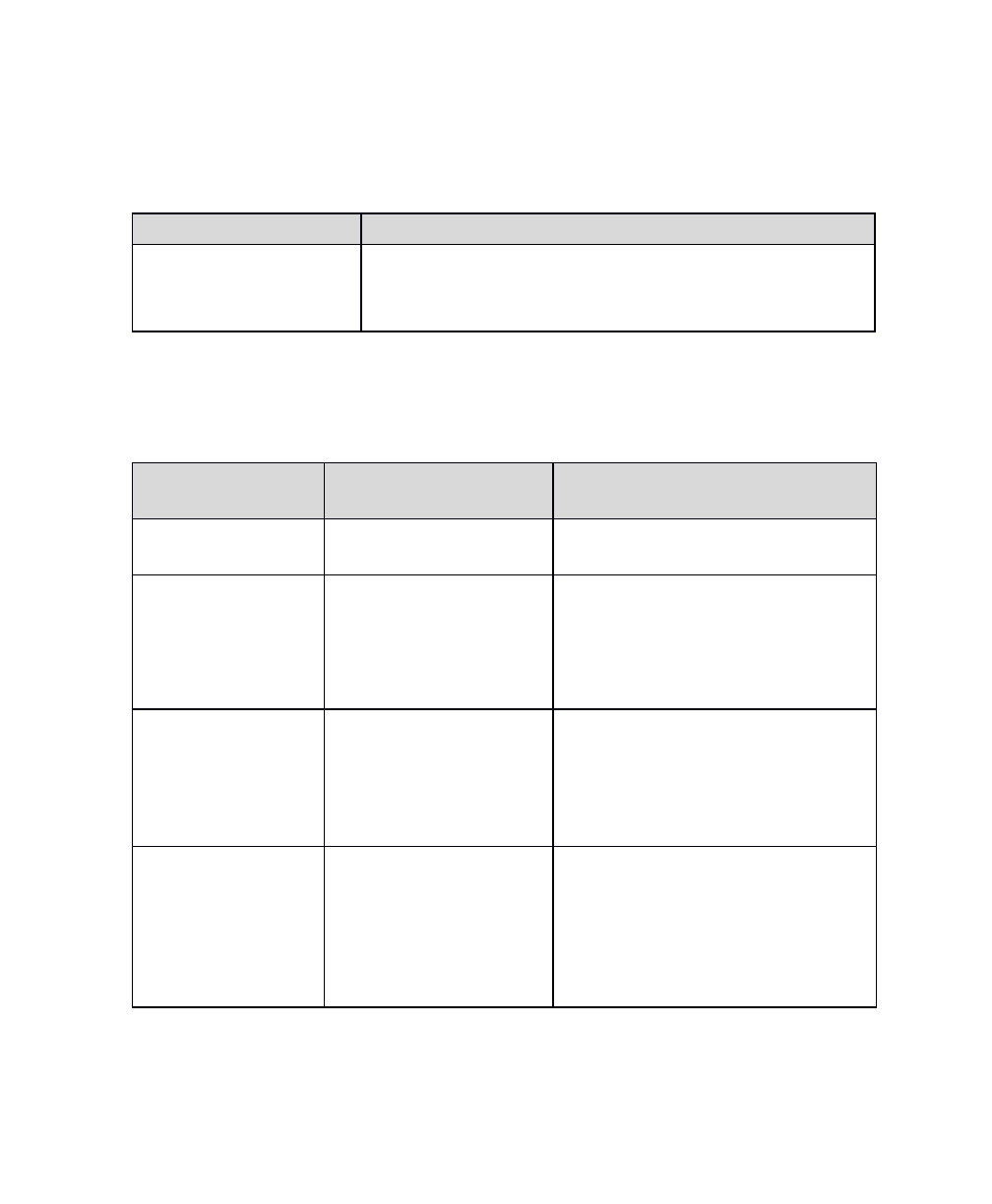
Issue
Recommended Action(s)
Device performance
issues or unanticipated
behavior.
Discontinue use and contact customer support.
(see “Contact and Reordering Information” at the end
of this manual)
Error Messages
The following table lists possible error messages that may appear, and the
recommended actions to take:
DISPLAY Message
Potential Cause(s)
Recommended Action(s)
Low Battery on my
StimRay
Battery is low
Recharge the Lithium ion battery
High Temperature
fault on my
StimRay
internal heating of
components
Remove the StimRay from the
electrode holder, wait until it
cools down. Try it again. If the
fault persists contact
Rehabtronics.inc.
Electrode fault on
my StimRay
Electrode not making
good contact with skin
or Stimray not making
good contact with the
electrode connector.
Remove the electrode, reapply
the gel. remove and place back
the StimRay onto the electrode
holder. If problem persists change
the electrodes.
System Fault on
my StimRay
Component failure or
StimRay not making a
good contact with the
electrode holder.
Remove and place back the
StimRay unit to the electrode
connector. If problem persists
replace the electrode assembly. If
problem still not resolved, contact
Rehabtronics inc.
34
DRAFT
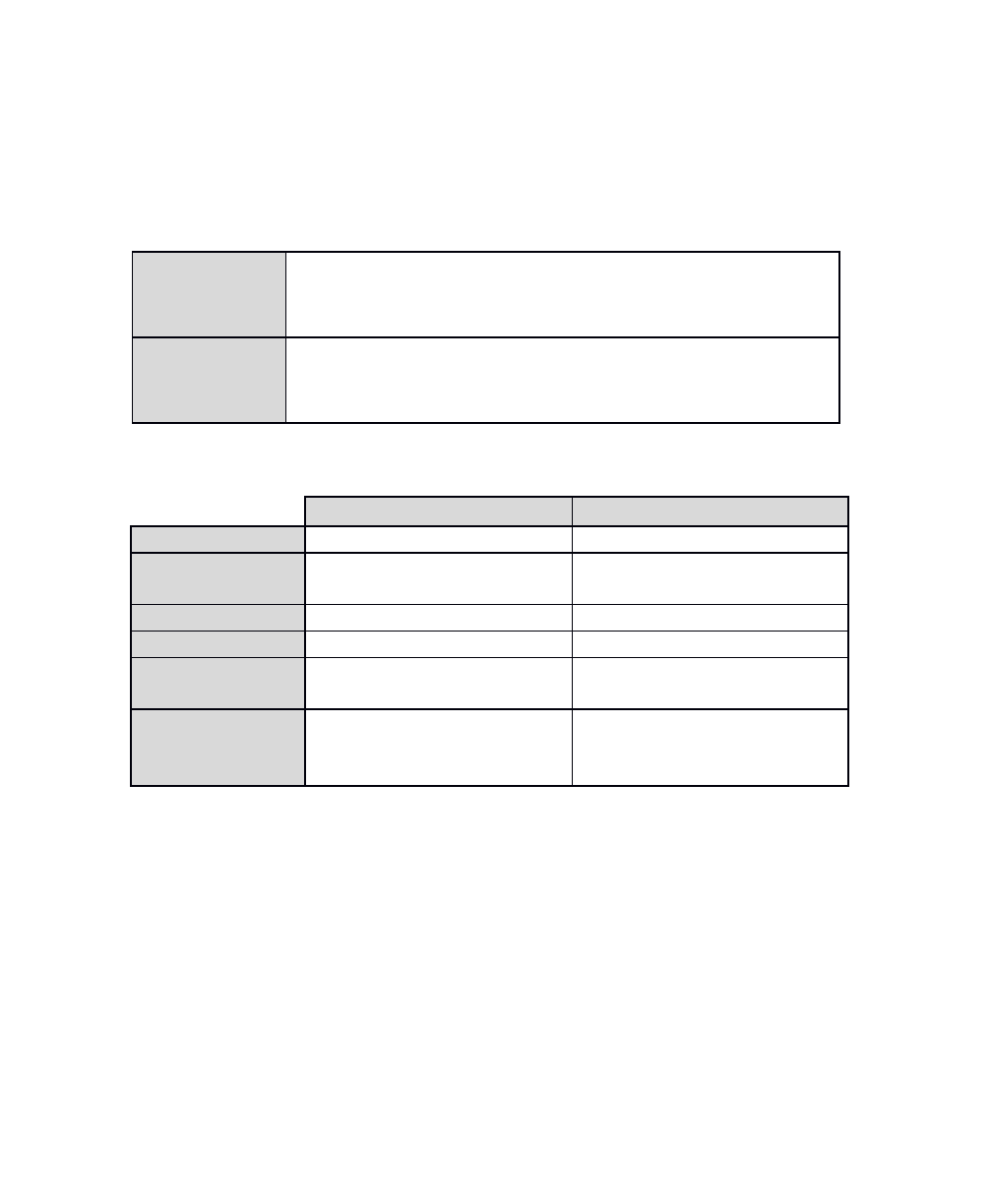
Technical Information
Environmental Specifications
Operating
Conditions
Temperature: +5 °C to +40 °C (41 °F to 104 °F)
Relative Humidity: 15% to 93% (non-condensing)
Pressure: 70 kPa to 106 kPa (10.2 psi to 15.4 psi)
Transport &
Storage
Conditions
Temperature: -25 °C to +70 °C (-13 °F to 158 °F)
Relative Humidity: 5% to 100% (non-condensing)
Pressure: 70 kPa to 106 kPa (10.2 psi to 15.4 psi)
Electrical Component Specifications
CHARGER
STIM
Model Number
CSCG1
CSST1
Equipment Usage &
Type
Non Transit-Operable
Portable Equipment
Transit-Operable
Body-Worn Equipment
Mode of Operation
Continuous
Continuous
Applied Part Type
N/A
BF Applied Part
Means of Supply
Mains Isolation
Direct plug-in adaptor
N/A
(battery-powered)
Power Specifications
USB Powered
5V, 1 - 2A
Internally Powered
3.7V, 310 - 330 mAh
Rechargeable Lithium Ion Battery
35
DRAFT
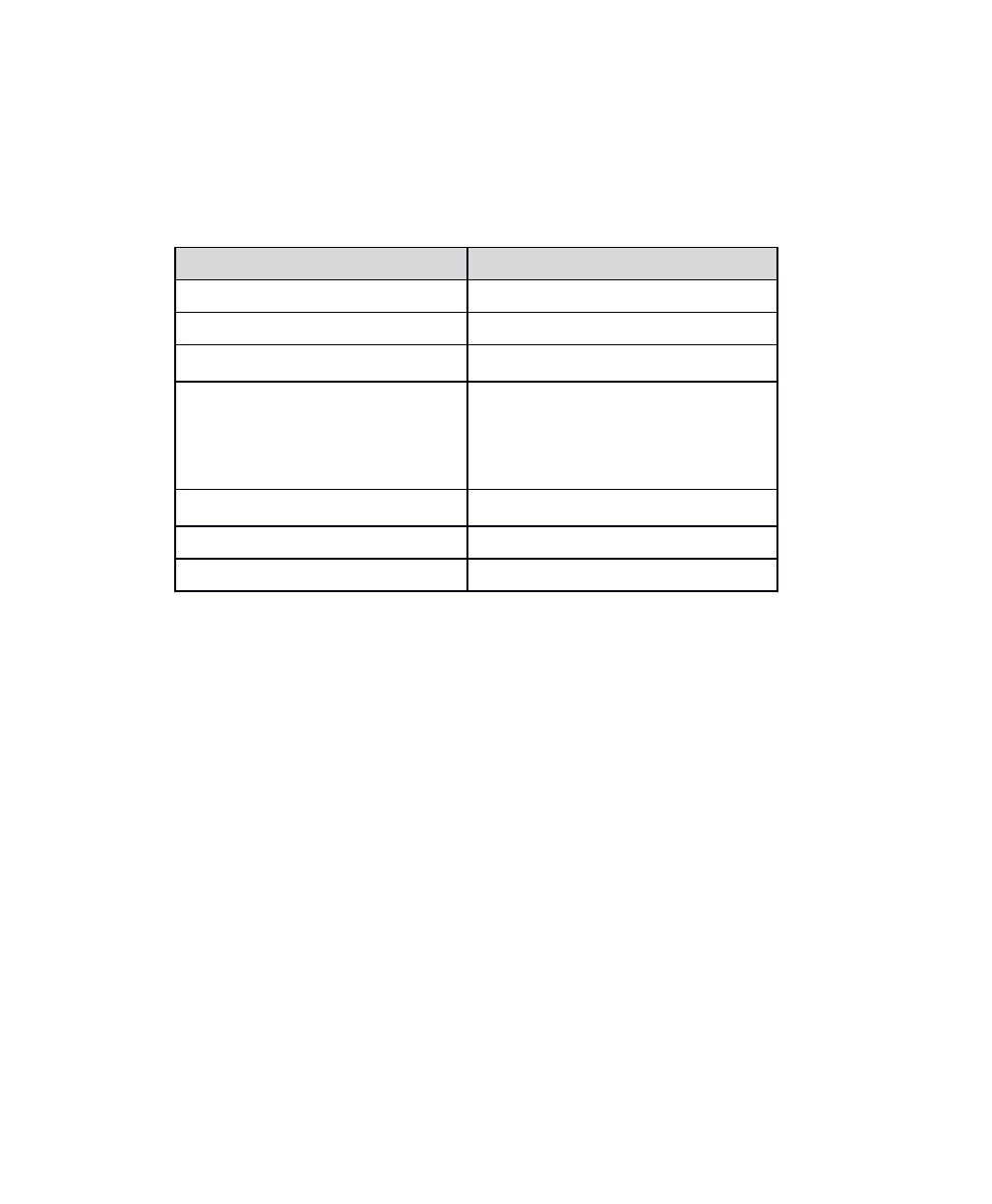
Stimulation Specifications
The following table provides technical details of the stimulation pulses delivered
by the StimRay system:
Stimulation Characteristic
StimRay Specification
Waveform Phase
Biphasic with passive recovery
Waveform Shape
Rectangular
Maximum Output Voltage (±10%)
80-100 mA (depending on pulse width)
Maximum Output Current (±10%)
100 mA @ 500 ohms
100 mA @ 2 kohms
0 mA @ 20 k Ohm (fault state)
Pulse Width
125 uS - 400 uS
Pulse Duration
1 mS
Pulse Frequency
1 Hz - 125 Hz
36
DRAFT
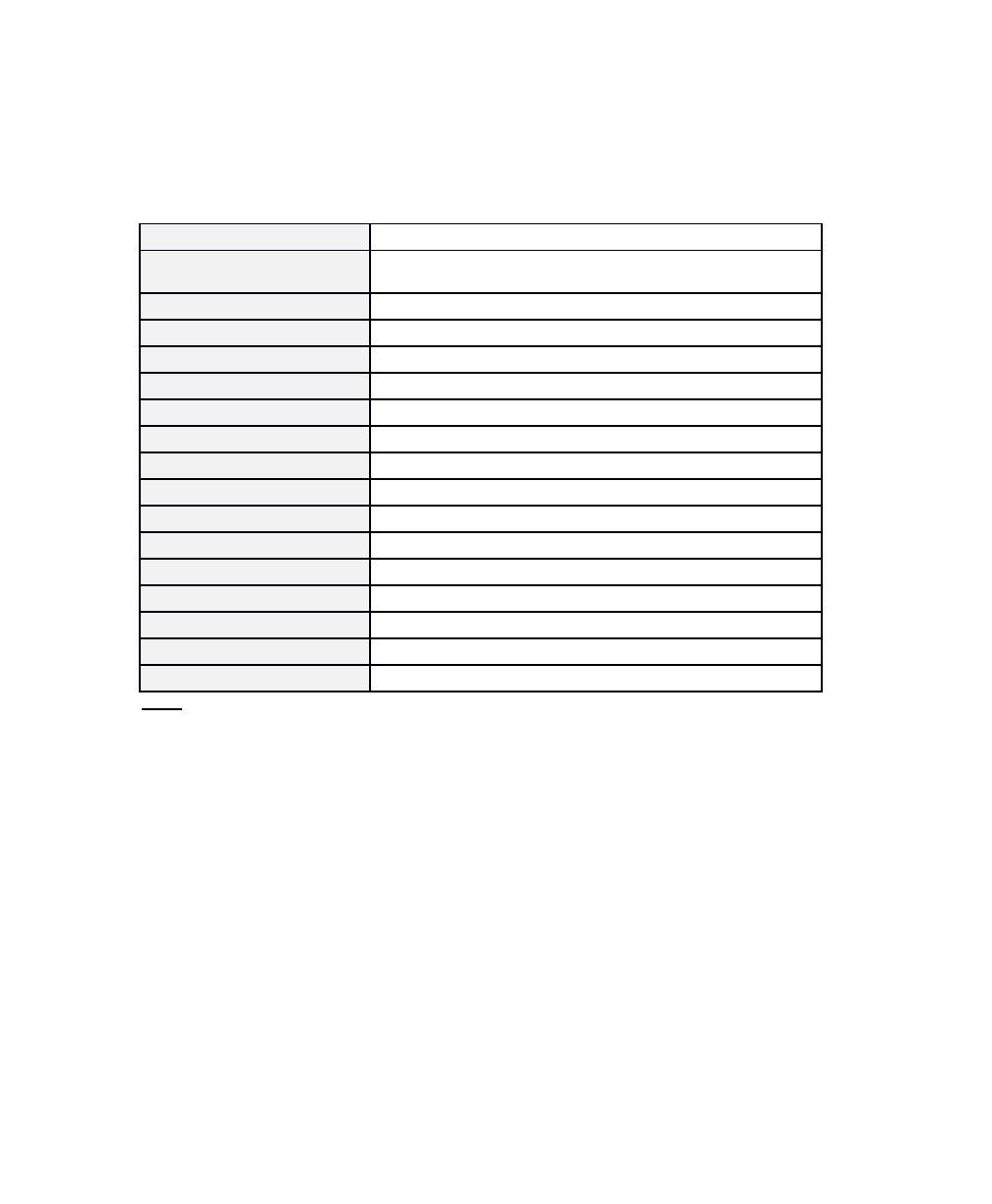
Wireless Specifications
The following table details the wireless specifications for the STIM:
Operating Frequency Range
2402– 2480 MHz
Operating Frequencies
2402,2426 and 2480 in advertising mode and other 37
channels in the range of 2402-2480 MHz
Data Rate
1 Mbps
Maximum Transmit Power
0 dBm
Modulation Scheme
GFSK
Modulating Signal Type
Binary Data
Modulation Baud Rate
1 MHz
RF Frequency Channels
40 Channels
Channel Spacing
2 MHz + channel hopping
Antenna Type
Printed F type PCB antenna with 5 dBi maximum gain.
Transceiver Duplex Scheme
Time Division Duplexing
Bit Error Rate
Less than 0.1%
Packet Error Rate
Less than 5%
Receiver Sensitivity
-96 dBm
Command Delay
Less than 1 Second
Transmitter Duty Cycle
Less than 0.2%
Operating Range
Up to 5 meters
NOTE: The Federal Aviation Administration rules require that all radio-transmitting devices be turned off
during flight.
37
DRAFT

FCC Regulator Statements
This device complies with Part 15 of the FCC Rules. Operation is subject to the following two conditions: (1)
This device may not cause harmful interference, and (2) This device must accept any interference received,
including interference that may cause undesired operation.
This equipment has been tested and found to comply with the limits for a Class B digital device, pursuant to
part 15 of the Federal Communication Commission (FCC) rules. These limits are designed to provide
reasonable protection against harmful interference in a residential installation. This equipment generates,
uses and can radiate radio frequency energy and, if not installed and used in accordance with the instructions,
may cause harmful interference to radio communications. However, there is no guarantee that interference
will not occur in a particular installation. If this equipment causes harmful interference to radio or television
reception, which can be determined by turning the equipment off and on, the user is encouraged to try to
correct the interference by doing one or more of the following measures:
●Reorient or relocate the receiving antenna.
●Increase the separation between the equipment and receiver.
●Connect the equipment into an outlet on a circuit different from that to which the receiver is
connected.
●Consult the dealer or an experienced radio/TV technician for help.
NOTE: THE GRANTEE IS NOT RESPONSIBLE FOR ANY CHANGES OR MODIFICATIONS NOT EXPRESSLY APPROVED
BY THE PARTY RESPONSIBLE FOR COMPLIANCE. SUCH MODIFICATIONS COULD VOID THE USER’S AUTHORITY
TO OPERATE THE EQUIPMENT.
RF Exposure Warning
This equipment complies with FCC radiation exposure limits set forth for an uncontrolled environment. In
order to avoid the possibility of exceeding the FCC radio frequency exposure limits, human proximity to the
antenna shall not be less than 5 mm during normal operation and must not be co-located or operating in
conjunction with any other antenna or transmitter.
IC Regulatory Statements
This device complies with Industry Canada license-exempt RSS standard(s). Operation is subject to the
following two conditions: (1) this device may not cause interference, and (2) this device must accept any
interference, including interference that may cause undesired operation of the device.
Le présent appareil est conforme aux CNR d'Industrie Canada applicables aux appareils radio exempts de
licence. L'exploitation est autorisée aux deux conditions suivantes: (1) l'appareil ne doit pas produire de
brouillage, et (2) l'utilisateur de l'appareil doit accepter tout brouillage radioélectrique subi, même si le
brouillage est susceptible d'en compromettre le fonctionnement.
CAN ICES-3 (B)/NMB-3(B)
RF Exposure Information
This equipment complies with ISED RSS-102 radiation exposure limits set forth for an uncontrolled
environment. This transmitter must be installed to provide a separation distance of at least 5 mm from all
persons and must not be co-located or operating in conjunction with any other antenna or transmitter.
Cet équipement est conforme avec ISED RSS-102 des limites d'exposition aux rayonnements définies pour un
environnement non contrôlé. Cet émetteur doit être installé à au moins 5 mm de toute personne et ne doit
pas être colocalisé ou fonctionner en association avec une autre antenne ou émetteur.
38
DRAFT
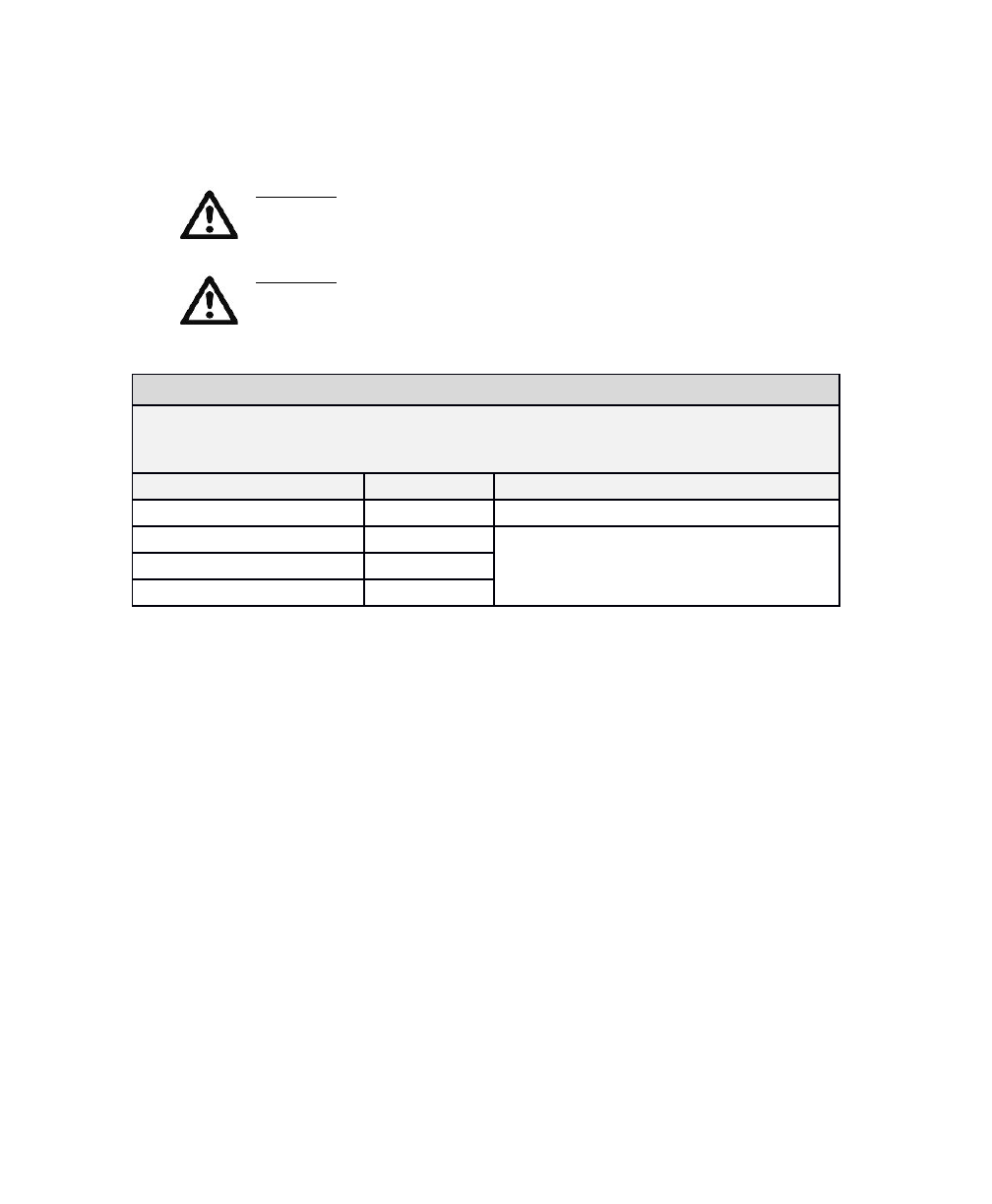
Electromagnetic Compatibility
WARNING: The StimRay System should not be used adjacent to or stacked with
other equipment. If adjacent or stacked use is necessary, the system should be
observed to verify normal operation in the configuration in which it will be
used.
WARNING: Use of any system components other than those specified or
supplied by Rehabtronics Inc. may result in increased emissions or decreased
immunity of the equipment, and may cause the system to be non-compliant
with the electromagnetic compatibility requirements of IEC 60601-1-2:2007.
Guidance and Manufacturer’s Declaration – Electromagnetic Emissions
The StimRay System and all its system components are intended for use in the electromagnetic
environment specified below. The customer or the user of the StimRay System should assure
that it is used in such an environment.
Emissions Test
Compliance
Electromagnetic Environment - Guidance
39
DRAFT
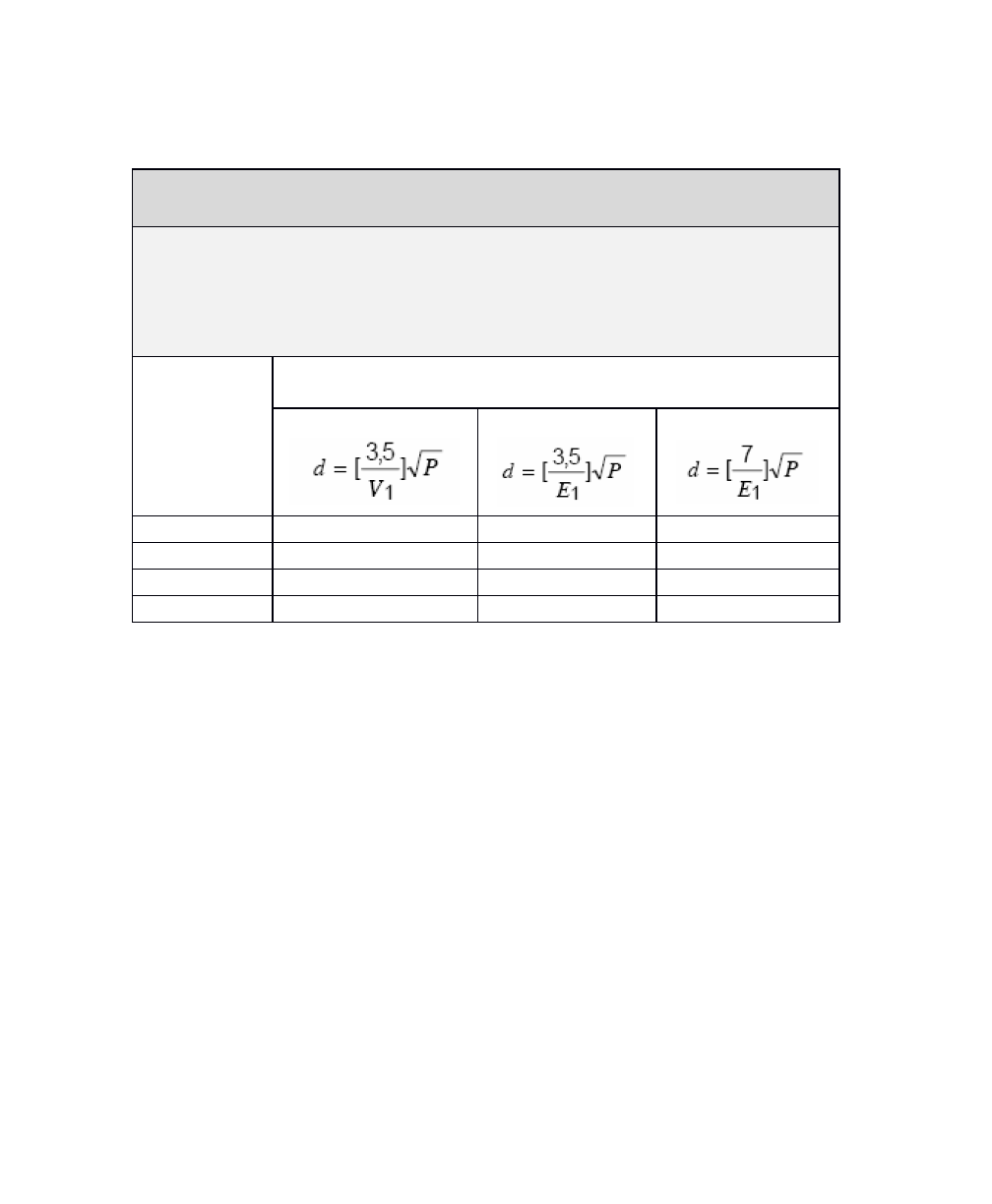
Recommended separation distances between portable and mobile RF
communications equipment and the StimRay System
The StimRay System and all its system components are intended for use in an electromagnetic
environment in which radiated RF disturbances are controlled. The customer or the user of the
StimRay System can help prevent electromagnetic interference by maintaining a minimum
distance between portable and mobile RF communications equipment (transmitters) and the
components of the StimRay System as recommended below, according to the maximum
output power of the communications equipment.
Rated
maximum
output power
of transmitter
(W)
Separation distance according to frequency of transmitter
(m)
150 kHz to 80 MHz
80 MHz to 800 MHz
800 MHz to 2.5 GHz
40
DRAFT
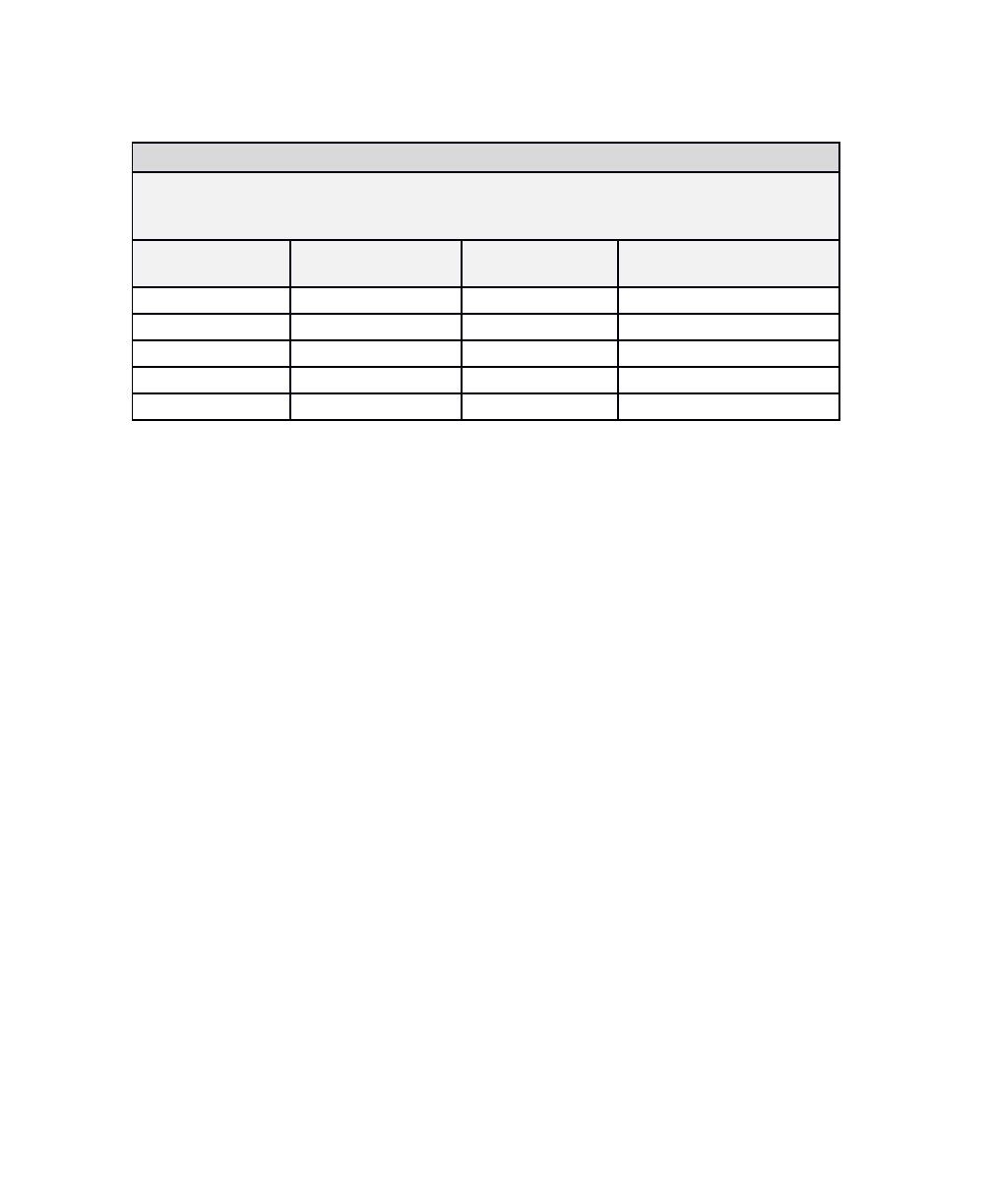
Guidance and Manufacturer’s Declaration – Electromagnetic Immunity
The StimRay System and all its system components are intended for use in the electromagnetic
environment specified below. The customer or the user of the StimRay System should assure
that it is used in such an environment.
Immunity Test
IEC 60601 Test Level
Compliance Level
Electromagnetic
Environment - Guidance
41
DRAFT
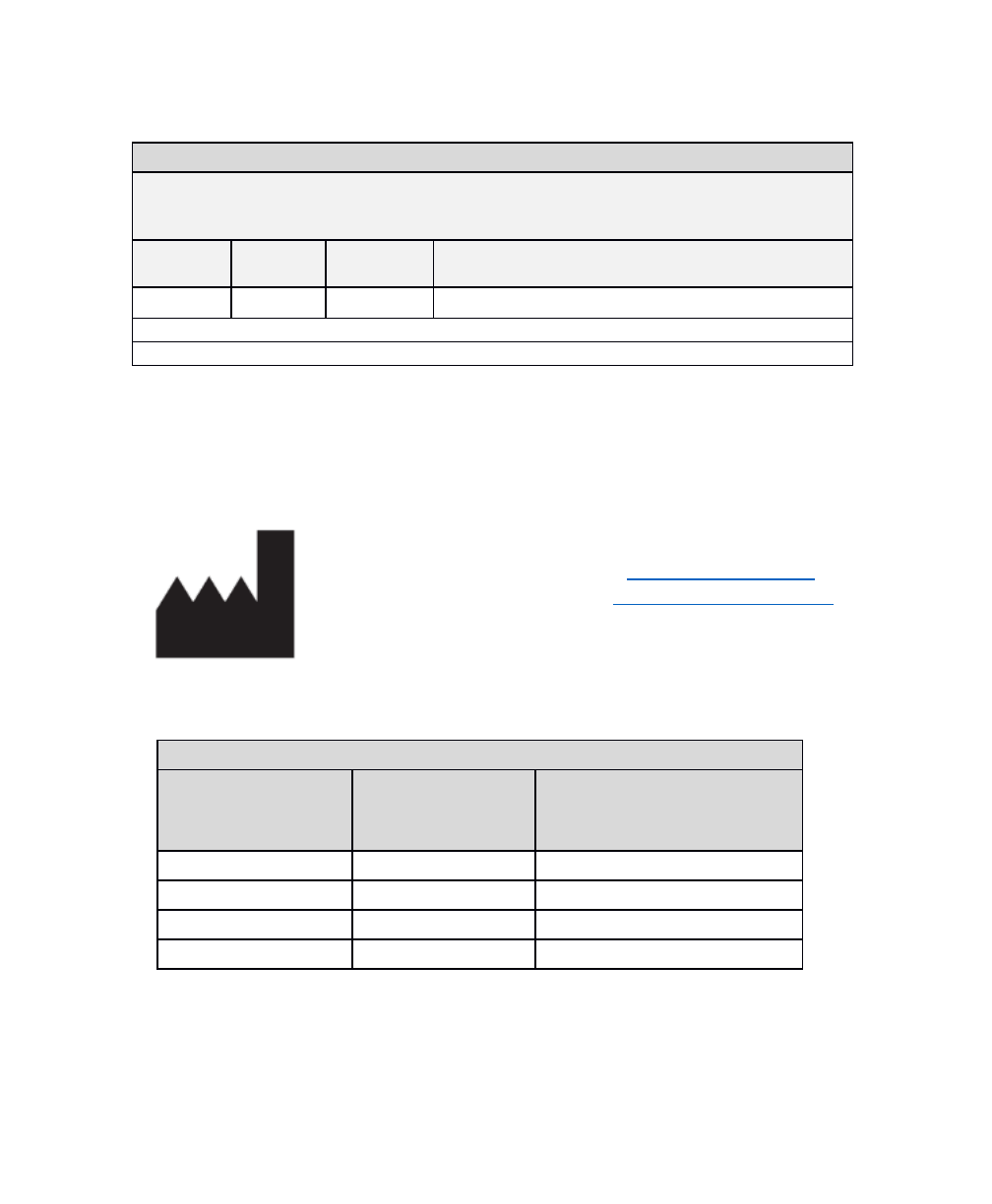
Guidance and Manufacturer’s Declaration – Electromagnetic Immunity
The StimRay System and all its system components are intended for use in the electromagnetic
environment specified below. The customer or the user of the StimRay System should assure
that it is used in such an environment.
Immunity
Test
IEC 60601
Test Level
Compliance
Level
Electromagnetic Environment - Guidance
Contact & Reordering Information
For device support, or to reorder components, contact Rehabtronics Inc. via any
of the following channels:
Manufactured By:
Rehabtronics Inc.
#4352, 10230 Jasper Ave.
Edmonton, Alberta,
Canada T5J 4P6
Web: www.rehabtronics.com
Email: support@rehabtronics.com
Phone: 1-866-896-7277
If reordering components, please refer to the model (REF) number as indicated
in the table below, or on the component labels:
System Component Re-Ordering
System Component
Model (REF) /
Re-order Number
Recommended Re-order
Interval
(component service life)
Stim
CSST1
4 years
Charger
CSCG1
4 years
Electrode
CSED1
6 months
Hydrogel Pads
CSEP1
1 week
For inquires or re-ordering outside Canada, contact your local StimRay distributor.
For health-related concerns, contact your health care professional.
42
DRAFT