Rehabtronics H200W-ICT-V02 EARPIECE TO DETECT TEETH CLICKS User Manual FinalDraft IntelliConnectIFU 10 30 12
Rehabtronics Inc. EARPIECE TO DETECT TEETH CLICKS FinalDraft IntelliConnectIFU 10 30 12
User Manual
Intelli-Connect User’s Guide
1. List of Symbols
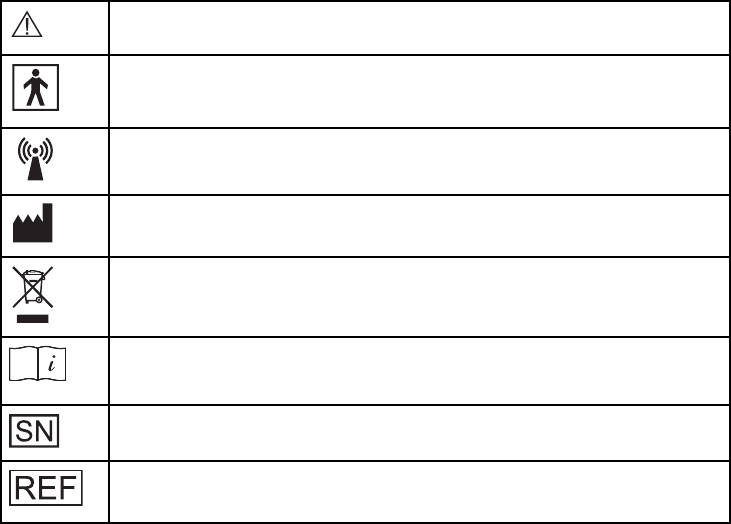
Caution or Warning
Type BF Applied Part
Non-Ionizing Radiation
Manufacturer
Do Not Dispose with Regular Household Waste
Consult Instructions for Use
Serial Number
Re-Order Number
2. Introduction
The Intelli-Connect is designed to be a hands-free triggering device, used exclusively with the NESS H200
Wireless Hand Rehabilitation System. Users of the H200 Wireless System can use the Intelli-Connect to
trigger the stimulation unit on their H200 Wireless Orthosis through simple movements of the jaw.
This guide includes important safety information, describes the components, and reviews how to set up,
operate and maintain the Intelli-Connect. Be sure to read this guide before using your Intelli-Connect.
2.1 Package Contents:
• Intelli-Connect Earpiece
• Intelli-Connect Charge-Cradle
• W-Cable (Charging Cable)
• Intelli-Connect User’s Guide
3. Safety Information
3.1 Intended Use
The Intelli-Connect is a hands-free triggering device used exclusively with the H200 Wireless Hand
Rehabilitation System. The Intelli-Connect is used to trigger the stimulation on the H200 Wireless Orthosis
through simple jaw movements.
3.2 Contraindications
• Do not use the Intelli-Connect if you suffer from Temporamandibular Joint Dysfunction (TMJD) or
other jaw-related discomfort.
• Do not use the Intelli-Connect if you suffer from enamel weakness or tooth pains.
3.3 Precaution
• Your H200 Wireless System must be setup prior to using the Intelli-Connect. Consult the H200
Wireless User’s Guide for details.
• The Intelli-Connect is intended to be used only with the H200 Wireless System. Be sure to follow
all safety information described in the H200 Wireless User’s Guide.
• Any dental-wear such as dentures or retainers must be firmly fixed in-place prior to using the Intelli-
Connect.
• The Intelli-Connect Earpiece should only be worn over the ear of the patient for whom it is fitted. It
should not be worn by anyone else or on any other part of the body.
3.4 Warnings
• Do not use the Intelli-Connect while driving a motor vehicle, operating machinery or performing
other potentially dangerous tasks.
• Make sure that there is no debris or obstructions in the Charge-Cradle prior to inserting the
Earpiece.
• Do not force the Earpiece into the Charge-Cradle. Ensure that the orientation is correct.
• Inspect the Earpiece prior to wearing. Do not use if any cracks in the plastic or punctures in the
sensor-arm are discovered.
• Never manipulate the Earpiece’s sensor-arm in excess of what is required. Doing so can damage
the Earpiece.
• Never click the teeth together in a manner that is uncomfortable, or with excessive force that may
damage the teeth or jaw. Only gentle clicking should be required to activate the Intelli-Connect.
• External vibrations may result in the Intelli-Connect Earpiece causing unintended triggers of the
H200 Wireless Orthosis.
• Never immerse any component of the Intelli-Connect in water or any other liquid.
• Do not wear the Intelli-Connect Earpiece over swollen, infected, or inflamed areas. Use on intact,
clean, healthy skin only.
• The Intelli-Connect Earpiece should not be worn for periods longer than ten hours. Prevent skin
irritation by periodically removing the Earpiece to ventilate the skin around the ear.
• If skin irritation occurs around the ear, remove the Earpiece immediately. Contact your clinician or
dermatologist, and Bioness or your local distributor. Resume use only when the skin is completely
healed.
• Never attempt to service or repair any component of the Intelli-Connect. Doing so will void the
warranty. If individual components are broken, contact Bioness or your local distributor for
replacement components.
3.5 Environmental Conditions Affecting Use
• The Intelli-Connect may be interfered by other equipment, even if that equipment complies with IEC
(International Electrotechnical Committee) emission requirements and FCC (Federal
Communications Commission) rules.
• The Federal Aviation Administration rules require that all radio-transmitting devices be turned off
during flight.
• Do not use the Intelli-Connect within three feet of short-wave or microwave therapy equipment.
4. Intelli-Connect Components
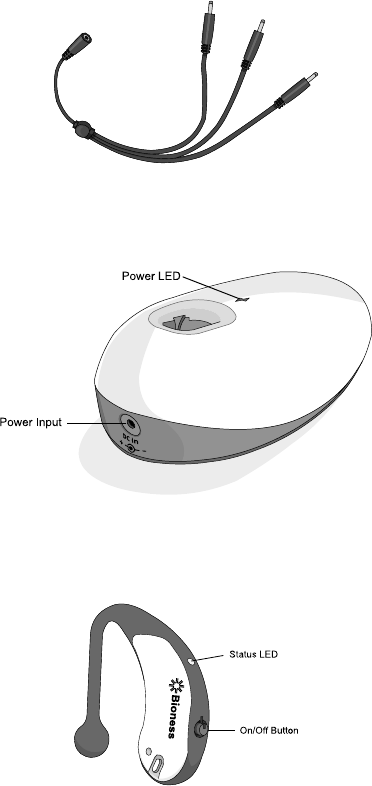
4.1 W-Cable (Charging Cable) (Model Number: L3P-5A00)
When using the Intelli-Connect with the H200 Wireless System, the W-Cable is used in place of the Y-Cable,
which is supplied as part of the H200 Wireless System Kit.
4.2 Intelli-Connect Charge-Cradle (Model Number: ICT-1200)
The Charge-Cradle is used exclusively for charging the Intelli-Connect Earpiece. It receives 5V DC using the
W-Cable and the system charger (included with the H200 Wireless System Kit).
4.3 Intelli-Connect Earpiece (Model Number: ICT-1100)
When properly fitted over the ear, the Earpiece will detect clicks of the teeth and wirelessly trigger the
stimulation unit on the H200 Wireless Orthosis.
On/Off Button:
To turn on: Press the On/Off button once. The Status-LED will blink green, and the Earpiece will beep.
To turn off: Press and hold the On/Off button for 2 seconds until the Status-LED turns yellow, then release
the button.
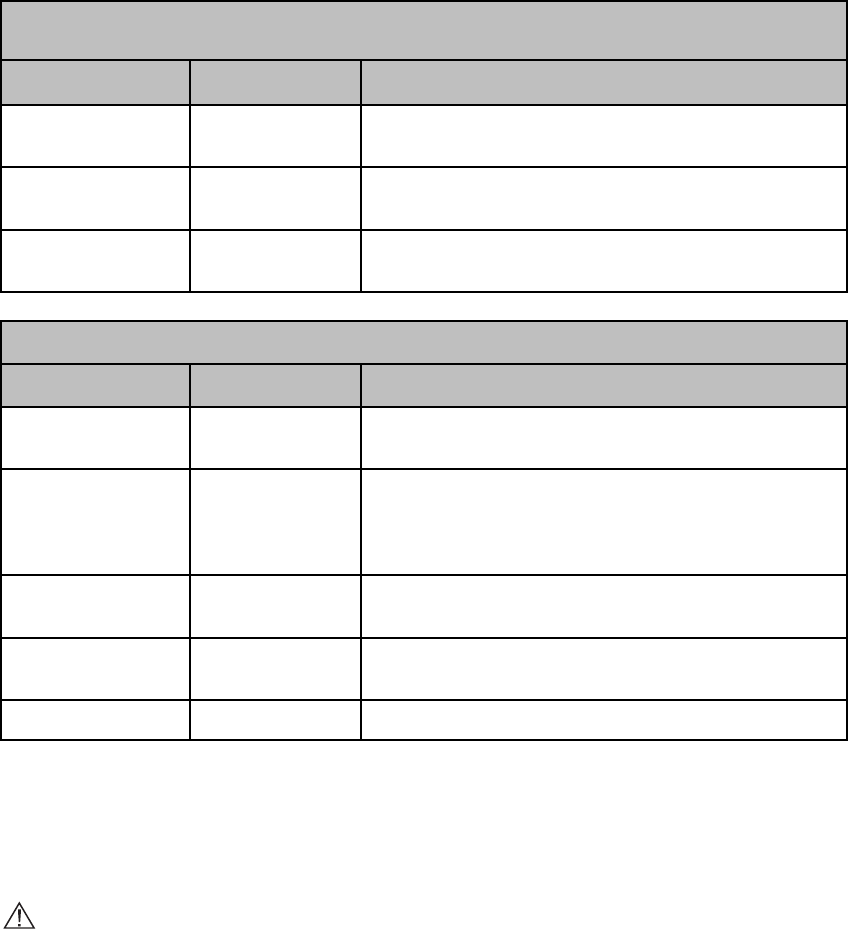
Status LED: Indicates the status of the Earpiece according to the following tables:
Earpiece Charging (In Charge-Cradle)
Status LED Display
Definition
Required Action
Alternating Yellow &
Green
Battery is charging
Wait for the Earpiece to charge (up to 2-4 hours).
Solid Green
Battery is fully
charged
Remove the Earpiece from the Charge-Cradle.
Solid Red
Battery fault
Remove the Earpiece from the Charge-Cradle and discontinue
use. Contact Bioness or your local distributor.
Earpiece In Use (Not in Charge-Cradle)
Status LED Display
Definition
Required Action
Flashing Green
Normal operating
mode
None
Solid Yellow
Registration mode:
Earpiece is searching
for nearby H200
Wireless Control-Unit
Make sure that a H200 Wireless Control-Unit that has either been
previously registered or is in registration-mode is within 3 meters
(10 feet) of the Earpiece.
Solid Green
Registration
successful
None.
Intermittent Red
Low battery
Recharge the battery following the charging instructions in this
guide.
Solid Red
Hardware fault
Discontinue use. Contact Bioness or your local distributor.
5. Instructions for Use
5.1 Charging Instructions
The Earpiece contains a rechargeable battery, which must be charged prior to use. Avoid allowing the
battery to fully deplete. Daily charging of the Earpiece is recommended.
CAUTION: Only use a system charger supplied by Bioness.
To charge the Intelli-Connect Earpiece:
1. Connect the W-Cable to the system charger from the H200 Wireless System Kit. Connect one of the ends
on the W-Cable to the power input on the Intelli-Connect Charge-Cradle. Plug the system charger into a
power outlet, the power LED on the Charge-Cradle will light green.
NOTE: The H200 Wireless Orthosis, Control-Unit and Intelli-Connect Earpiece can be charged
simultaneously. Use the other two ends of the W-Cable to connect to the Orthosis and Control-Unit. Refer
to the H200 Wireless User’s Guide for more information.
2. Insert the Earpiece into the Charge-Cradle. Do not force the Earpiece into the Charge-Cradle, ensure that
the orientation is correct. See Figure 5-1.
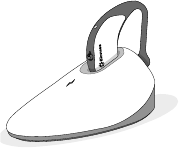
Figure 5-1. Correct orientation of Earpiece in Charge-Cradle.
3. The Status LED on the Earpiece will alternate between yellow and green while charging. When the
Earpiece LED is lit solid green, the battery is fully charged and can be removed from the Charge-Cradle.
The charging process should last approximately two to four hours.
5.2 Registration Instructions
For the Intelli-Connect to work with an H200 Wireless System, it must first be registered with the H200
Wireless Control-Unit. Registration of the Intelli-Connect Earpiece with the H200 Wireless Control-Unit
should only have to be done once. Once registered, the Earpiece and Control-Unit should always recognize
each other provided they are both turned-on and within 3 meters (10 feet) of one another.
Note: When registering the Earpiece and Control Unit, make certain that there are no other H200 Wireless
systems within 3 meters (10 feet) of the components being registered.
To register the Intelli-Connect:
1. Verify that both the Intelli-Connect Earpiece and the H200 Wireless Control-Unit are turned off.
2. Set the H200 Wireless Control-Unit into registration mode. Simultaneously press and hold the trigger
button and the minus button on the Control-Unit until the Control-Unit beeps. Refer to the H200 Wireless
User’s Guide for more detailed instructions.
3. Turn on the Intelli-Connect Earpiece by pressing the On/Off Button.
4. With the H200 Wireless Control-Unit now in registration mode, and the Intelli-Connect Earpiece turned on,
registration will happen automatically.
5. When registration is complete the Status LED on the Earpiece will be green and a “C” will appear in the
digital display on the Control Unit.
Note: If an “E” appears in the digital display on the Control Unit, a registration error has occurred. Turn the
Control Unit and Earpiece off and repeat the registration process.
5.3 Fitting Instructions
The Earpiece is designed to be fitted once, with only minor adjustments thereafter.
To fit the Earpiece:
1. Hang the Earpiece over the ear such that the rubber sensor-arm faces forward. See Figure 5-2.
2. Gently move the ball-end of the sensor-arm until it is in contact with the inside of the ear’s tragus. See
Figure 5-2.
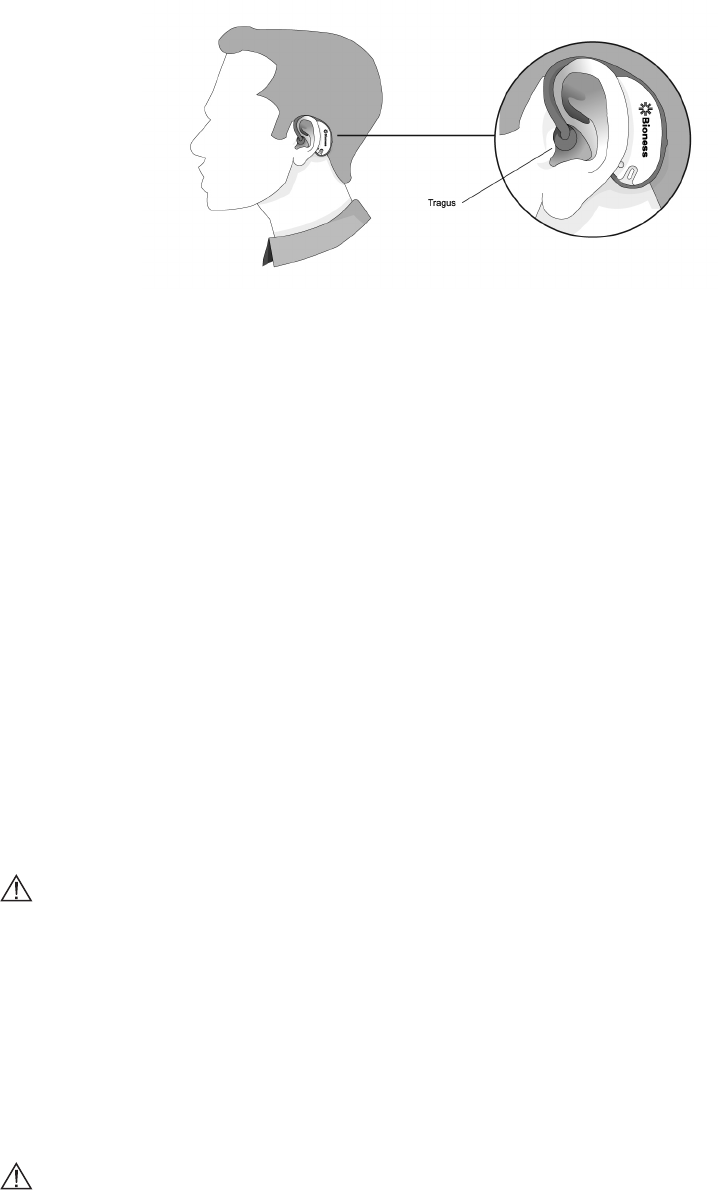
Figure 5-2. Correct fitting position of the Intelli-Connect Earpiece.
5.4 Operating Instructions
Make sure that the Earpiece and the Control Unit have been fully charged prior to operation. Refer to the
charging instructions in this guide and the H200 Wireless User’s Guide.
To operate the Intelli-Connect:
1. Turn on the Intelli-Connect Earpiece by pressing the On/Off Button, the Earpiece will beep once. Apply
the Earpiece to the ear.
2. Turn on the H200 Wireless System, and use the H200 Wireless Control-Unit to select the desired
stimulation program.
3. Gently click teeth together to trigger the Earpiece. This will, in turn, activate the current stimulation
program on the H200 Wireless Orthosis.
Note: It is recommended that the Intelli-Connect be turned off when eating.
6 Cleaning Instructions
6.1 Cleaning Instructions
All Intelli-Connect components may be cleaned by wiping with a damp cloth. Use water only. Do not use
detergents or other cleaning agents unless otherwise specified in this guide.
CAUTION: Ensure that the W-Cable and Charge-Cradle are unplugged and the Earpiece is turned off
prior to cleaning. Ensure they are completely dry prior to using again.
6.2 Disinfecting Instructions
The Intelli-Connect Earpiece may be disinfected using CaviWipes™, or wipes saturated (but not dripping)
with 70% isopropyl alcohol (IPA) per the following instructions:
1. Use one saturated disinfectant wipe or cloth to thoroughly wet the outer surfaces of the Earpiece.
2. Use a second saturated disinfectant wipe or cloth to remove any surface contaminants (soil, etc.) that
would impede the disinfectant’s effectiveness if not removed.
3. As needed, use additional saturated disinfectant wipes or cloths to keep the surfaces wet for 3 minutes.
CAUTION: Do not use other cleaning/disinfecting agents such as a diluted bleach mixture, or other
disinfecting wipes. Doing so may damage the Earpiece.
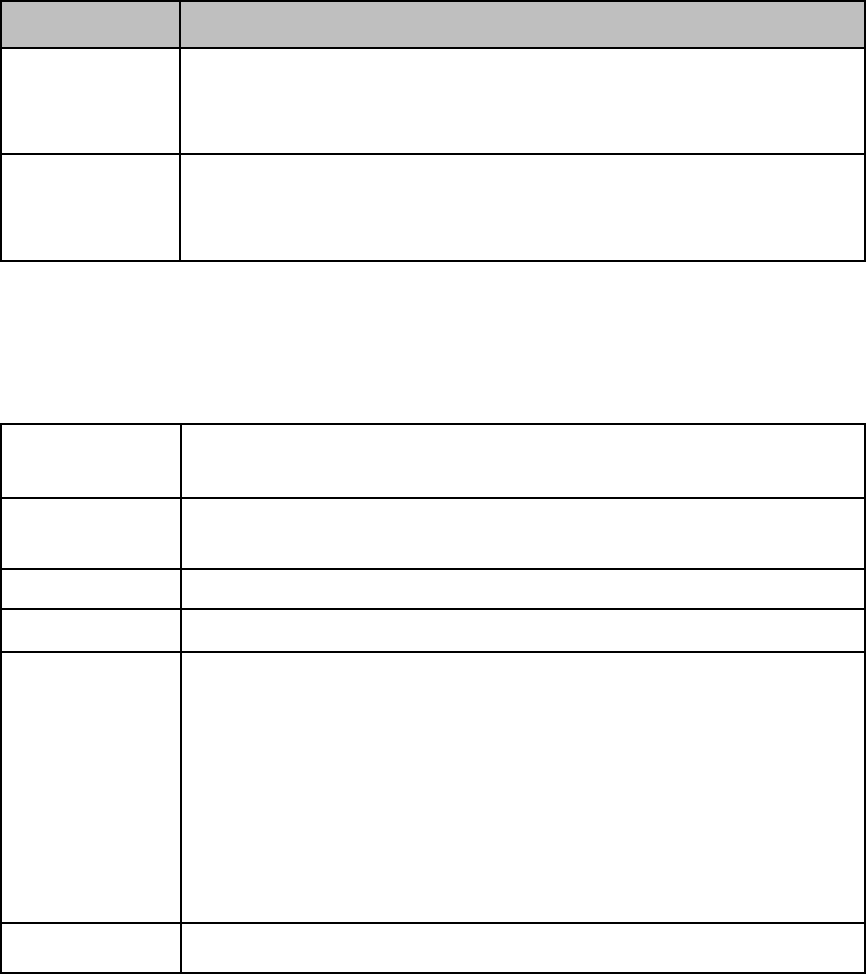
7. Troubleshooting
Issue
Solution
Irregular Reponse
from Intelli-Connect
• Adjust the Earpiece’s sensor-arm so that the sensor-ball is in contact with the ear’s
tragus. Refer to the Fitting Instructions.
• Ensure that the registered Control Unit and Earpiece are within 3 meters (10 feet) of
each other.
No Response from
Intelli-Connect
• Make sure the Earpiece and Control Unit are charged.
• Repeat the registration process for registering the Earpiece and Control Unit.
• Inspect the sensor–arm for signs of damage.
• Contact Bioness or your local distributor.
Refer to the H200 Wireless User’s Guide for additional troubleshooting information.
9. Technical Specifications
9.1 Intelli-Connect Specifications
Dimensions
Earpiece: 6.1cm x 2.2cm x 1cm
Charge-Cradle: 10.5 cm x 7 cm x 4.1 cm
Weight
Earpiece: 10 grams
Charge-Cradle: 55 grams
Battery Type
Rechargeable Lithium-Polymer
Frequency
2.4 GHz, ISM Band
Environmental
Ranges
Transport and storage temperature: -25°C to +70°C (-13°F to +158°F)
Operating conditions temperature: 5°C to 40°C (41°F to 104°F)
Operating conditions relative humidity: 15% to 93%
Shipping pressure: 30 kPa (equivalent to approximately 9,100 meters above sea-level) for up
to 10 hours
Operating Pressure: 101 kPa to 81 kPa (equivalent of sea-level to approximately 1,950
meters)
Ingress Protection Rating: IPx2
FCC ID Number
QIQ-H200W-ICT-V01
9.2 Electromagnetic Compatibility
The Intelli-Connect has been tested for electromagnetic compatibility according to the IEC 60601-1-2
international standard.
The Intelli-Connect complies with part 15 of the FCC regulations. Operation is subject to the following two
conditions:
1. This device may not cause harmful interference, and
2. This device must accept any interference received, including interference that may cause
undesired operation.

NOTE: FCC regulations provide that changes or modifications not expressly approved by Bioness Inc. could
void authority to operate.
!
The Intelli-Connect contains electrical components that should not be disposed with regular household
waste. Contact your local city office, or household waste disposal service for information about where to
safely drop-off waste electrical equipment for safe processing and recycling.
Aspects of this device are covered by several patents and patent applications, including US Pat 6,961,623.
To order replacement components, contact Bioness or your local distributor with the model number of the
component.
Rx Only (US Only)
2012 Bioness Inc.
Worldwide Corporate Office
Bioness Inc.
25103 Rye Canyon Loop
Valencia, CA 91355 USA
800-211-9136
www.bioness.com
Manufactured by
Rehabtronics, Inc.
#4352, 10230 Jasper Avenue
Edmonton, AB
Canada, T5J4P6
CaviWipes™ is a trademark of Metrex Research, Orange, CA.
NESS®, NESS H200®, NESS H200® Wireless, Bioness, the Bioness Logo® and LiveOn® are trademarks of Bioness Inc. in
the United States or other countries. | www.bioness.com | Rx Only (US Only).
612-00619-001 Rev. 1