Rheem Econet Control Center Specification Sheet
2015-04-02
: Rheem Rheem-Econet Control-Center-Specification-Sheet-683981 rheem-econet--control-center-specification-sheet-683981 rheem pdf
Open the PDF directly: View PDF  .
.
Page Count: 2
INTEGRATED HOME COMFOR
T
INTEGRATED HOME COMFORT
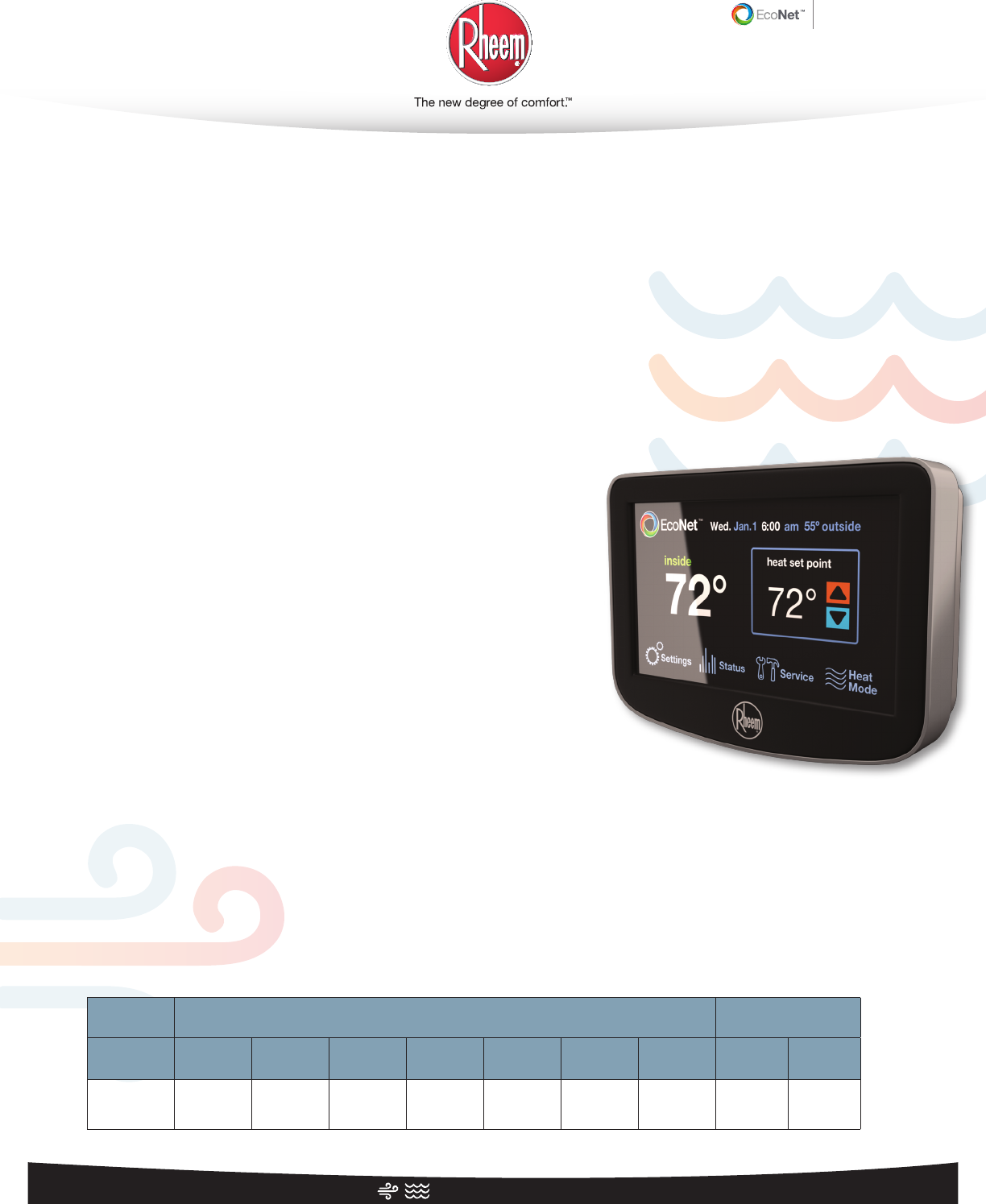
The Rheem EcoNet™ Control Center, our intuitive,
integrated air and water management system, customizes
comfort while cutting energy costs*—from anywhere.
EcoNet™ Control Center
Home control with intuitive LCD
touchscreen navigation
Efficiency
• Controls 65%** or more of a typical
home's energy use from a
single interface
• Reduces energy costs by up to 30%*
Performance
• Built with our 360°+1 Philosophy for
optimal Performance, Integration,
Installability and Serviceability
• Control from anywhere with system-
wide remote wireless, air & water
system management web portal and
mobile applications
Operation Modes
• Modes include:
- Heat
- Cool
- Auto (includes Vacation mode)
- Emergency Heat
- Fan Only
Compatibility
• Fully integrates with:
- R96V and R97V Gas Furnaces
- CC2 AC/HPs
- AC/HP Line***
- Heat Pump Water Heaters
- Gas Water Heaters***
- Electric Water Heaters
- Gas Pool & Spa Heaters***
- Heat Pump Pool & Spa Heaters***
Display
• Full-color, 4.7"x1" depth LCD
touchscreen display
• Attractive, modern design with
interchangeable faceplates
• Easy-to-read icons and text
• Indoor/outdoor temperature display
Easy Installation
• Simple 4/3 wiring
• Advanced setup tools automatically
recognize and configure connected
equipment and select optimal
operating mode
Intuitive Programming
• Lifestyle-based scheduling with
1-touch mode selection (including
1-touch vacation mode)
• Auto-mode control automatically
switches between Heat and Cool
mode to maintain set temperature
range
• Continuous Fan Mode ensures even
temperatures and continuous air
filtering throughout home
• Humidification (auto/manual)
& Dehumidification
• Low Ambient Cooling
Interchangeable Faceplates
• Shown with black, includes easy to
change soft white and taupe
Warranty
• 5 year limited warranty
(5 years from date of installation)
* When compared to non-programmable
thermostats. Source: ENERGY STAR for
Programmable Thermostats
**Source - Department of Energy
***Future-generation
Integrated Controls
RETST600SYS
Integrated Controls
RETST600SYS
DESCRIPTION FEATURES
ROUGHING IN
DIMENSIONS
(SHOWN IN INCHES)
Model Number Programmable Duel Fuel
Ready
Auto Change
Over
Programmable
Fan
System
Switches Fan Switch Warranty Depth
A
Width
B
RETST600SYS Yes Ye s Yes Ye s
Heat,
Cool, Auto,
Emergency
Heat, Fan, Off
5 Speeds, Off 5-Year Limited 1 4.7
PRINTED IN U.S.A. 3/14 WP FORM NO. CORP-RH-ECO-2014-3-REV
Rheem Manufacturing Company • 1100 Abernathy Road, Suite 1400, Atlanta, Georgia 30328 • 800.434.2794
PRINTED IN U.S.A. 3/14 WP FORM NO. CORP-RH-ECO-2014-3-REV
INTEGRATED HOME COMFOR
T
INTEGRATED HOME COMFORT
Full-Color LCD Touchscreen Interface
In keeping with its policy of continuous progress and product improvement, Rheem reserves the right to make changes without notice.
Integrated Controls
RETST600SYS
Integrated Controls
RETST600SYS
StatusSettings
heat set point
inside
Service Heat
Mode
72°
outside
72°
Wed. Jan. 1, 6:00 am 55º
1 2 3
4
5678
8
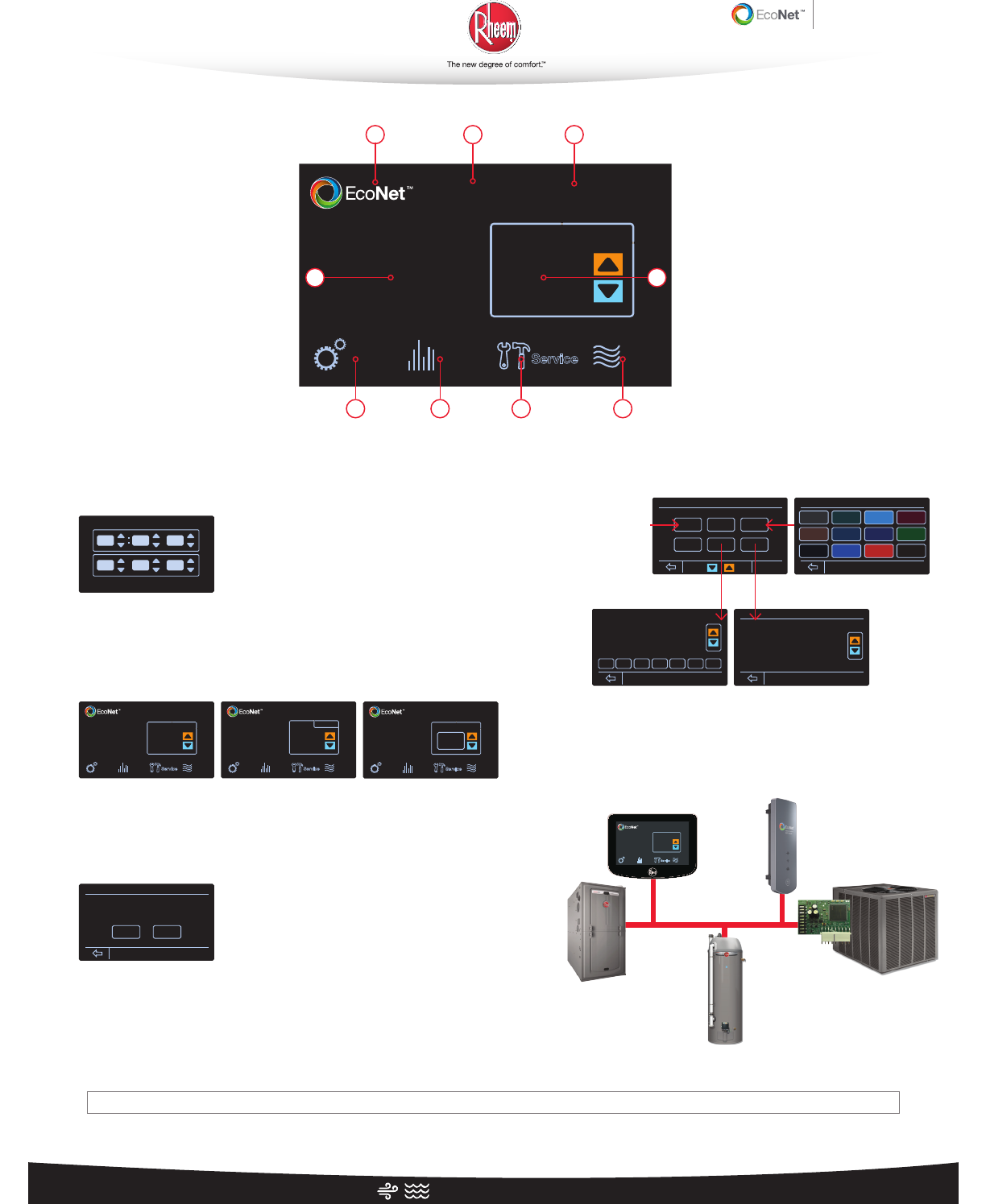
1 EcoNet Logo – Touch to access and control connected air and
water equipment
2 Day, Date and Time – Touch the settings icon to adjust
3 Outside Temperature Display – Displays the current outside
temperature
4 Temperature Set Point – Touch the corresponding arrow to
adjust the temperature set point up or down for comfort
5 Mode – Touch to change current operating mode
6 Service – Stay up to date on system alarms and service alerts;
touch to easily access service contact information
7 Status – Touch to view current operating status as well as runtime
and cycle records
8 Inside Temperature Display – Displays current temperature
9 Settings – Touch to adjust several control settings; from humidity
control to background color customization
Cancel
04 06 am
Oct. 20 2013
Accept
set the time and date
StatusSettings
heat set point
inside
Service Heat
Mode
72°
outside
72°
Wed. Jan. 1, 6:00 am 55º
StatusSettings
heat
inside cool
Service Auto
Mode
79°
outside
72°
Wed. Jan. 1, 6:00 am 55º
StatusSettings
fan speed adjust
off
inside
Service FanOnly
Mode
outside
72°
Wed. Jan. 1, 6:00 am 55º
status
Inside Temp: 80˚ Outside Temp: --˚
furnace ac/hp
Inside Rel. Humidity: 44%
Thermostat Mode: off
Equipment Operating status: off
basic
humidity schedules
Fan Speed: Auto
vacation
installer
time/date colors
settings
Heat Mode Auto Mode Fan Only Mode
Basic Equipment
Settings to adjust
Control Center or
equipment Settings
Personalize background
screen color
basic settings
Follow Schedules ?
Schedule Override Time
Main Screen Locked ?
Alarm Beep Enable ?
Auto-Changeover Time
Set Point Deadband
Inside Temp Sensor Offset
Temperature Display
Yes
2 hours
No
Yes
5 min.
2˚ F
-6.0˚ F
Fahrenheit
Morning:
Copy
Day
Smooth Arrival
Enabled
06:00 am 70˚ 78˚
FanCoolHeatTime
Mon. Tue. Wed. Thu. Fri. Sat. Sun.
Auto
Day: 08:00 am 62˚ 85˚ Auto
Evening: 06:00 pm 70˚ 78˚ Auto
Night: 10:00 pm 62˚ 78˚ Auto
Edit the schedule by
day/time
Vacation schedule
vacation
start: 12:00 pm Dec. 21 2013
Jan. 01 2014
12:00 pm
end:
Heat Cool Fan
72˚ 80˚ Auto
EcoNet
Enabled
Vacation
Disabled
background theme color
accept cancel
CC2
Translator
AC or HP
Select
Water Heaters
R96V – 2-stage VS
R97V – Modulating
EcoNet Control
Center
Wifi Device Remote Access
(Available Spring 2014)
Rheem EcoNet Air and Water System
StatusSettings
heat set point
inside
Service Heat
Mode
72
°
Wed. Jan. 1 6:00 a m outside
72°
55º
