Ricoh Mp 5001 Users Manual
MP 4001 aficiomp4001
MP 4001 to the manual 59522864-b9cc-4d40-abdc-ec00ce8e1170
2015-01-23
: Ricoh Ricoh-Mp-5001-Users-Manual-274602 ricoh-mp-5001-users-manual-274602 ricoh pdf
Open the PDF directly: View PDF  .
.
Page Count: 6
innovation
quality
speed
Ricoh Aficio MP 4001/MP 5001
Digital Imaging System
Accelerate Your Workflow
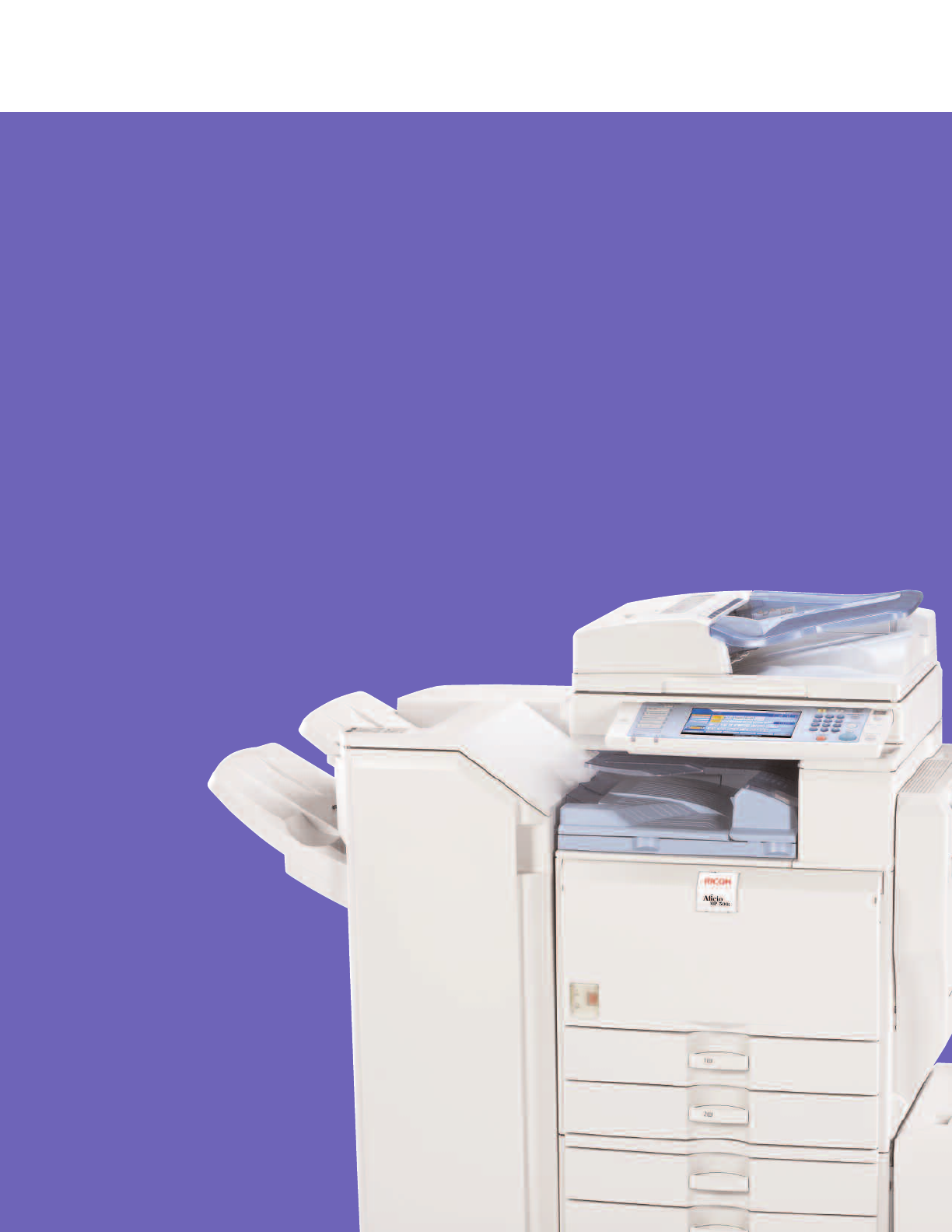
Ricoh Aficio MP 4001/MP 5001
Engineered for outstanding performance.
To stay competitive, organizations are doing more with
less. Companies are consolidating resources, eliminating
redundancies and taking every opportunity to keep
productivity high while maintaining information security
and supporting sustainability. The RICOH®Aficio MP
4001/MP 5001 aligns perfectly with these strategies.
These systems are designed to take on an incredibly
wide variety of document tasks and come equipped
with powerful new solutions: the Personal Paperless
Document Manager (PPDM™) software and the
breakthrough App2Me®portable workflow solution.
These solutions will help you streamline workflow
and minimize operating costs.
Improve Productivity Immediately
Expect fast, high-quality results from the Ricoh Aficio
MP 4001/MP 5001. It is equipped to help your office
print, copy, scan, fax or distribute critical documents.
• Boost productivity by copying or printing up to 50 pages per minute.
• Turn everyday documents into impressive, professionally finished output with
three finishing options, including a 1,000-Sheet Booklet Finisher.
• Manage document processing and storage capacity with 768 MB RAM and
a 40 GB Hard Disk Drive (HDD).
Keep Workflow Moving
Trust the Ricoh Aficio MP 4001/MP 5001 to provide
practical functions that make it easy to run your office
efficiently and help everyone stay on task.
• Establish cost control. Set print or copy quotas for up to 500 users with the
account limit feature.
• Give critical print and copy jobs higher priority with the Job Function List, which
allows you to send any job to the top of the queue for immediate output.
• Ensure efficient production of reports, presentations and training materials
with standard support for PCL or optional Adobe®PostScript®3™.
• Keep your local network clear. PDF Direct Print* lets you send PDF files
directly to the MFP without opening Adobe®Acrobat™software.
• Give mobile workers an edge. Mail to Print* allows them to print without
installing drivers. Users can send an e-mail to the system and have it print
the attached PDF or JPEG file.
*Requires optional equipment.
Customize Documents and Workflow
Personal Paperless Document Manager (PPDM)
enables users to capture, combine, convert and share
the three most prominent document types: paper,
PDFs and Microsoft®Office files.
• Make document distribution easy, secure and productive. Send paper and
electronic files to virtually any destination, including e-mail, FTP sites, Web
folders, Microsoft SharePoint and content management systems.
• Transform paper originals into fully editable Microsoft Office files, PDFs or
fillable forms that can be edited and electronically completed. Extract data
from fillable forms into a .csv file for analysis. Convert digital and paper
documents into WAV audio files.
• Create custom workflows. When users authenticate to the system, the interface
shows only the personalized view they create at their desktop computers.
Enhance Personal Productivity
The App2Me®solution revolutionizes document
management, enabling users to create customized
workflows and execute them anywhere they go.
• Download widgets to any client (desktop PC, laptop or Smartphone) and use
them on any Ricoh MFP enabled with App2Me.
• No matter where you go, your experience at each App2Me-enabled MFP
remains completely personalized for maximum convenience.
• Simplify complex workflows. Widgets can be created to combine, distribute,
edit and create documents, as well as perform many other tasks automatically.
• Maximize productivity. App2Me improves efficiency through widgets that control
a virtually endless array of MFP
, software or Web services-driven workflows.
• Create specialized widgets for virtually any need, in any framework across
multiple platforms that App2Me supports, such as Google Desktop™and more.
FlexibleSecureEfficientDynamic
With App2Me, you can download time-
saving and workflow-enhancing widgets
and use them at any Ricoh MFP enabled
with the App2Me solution.
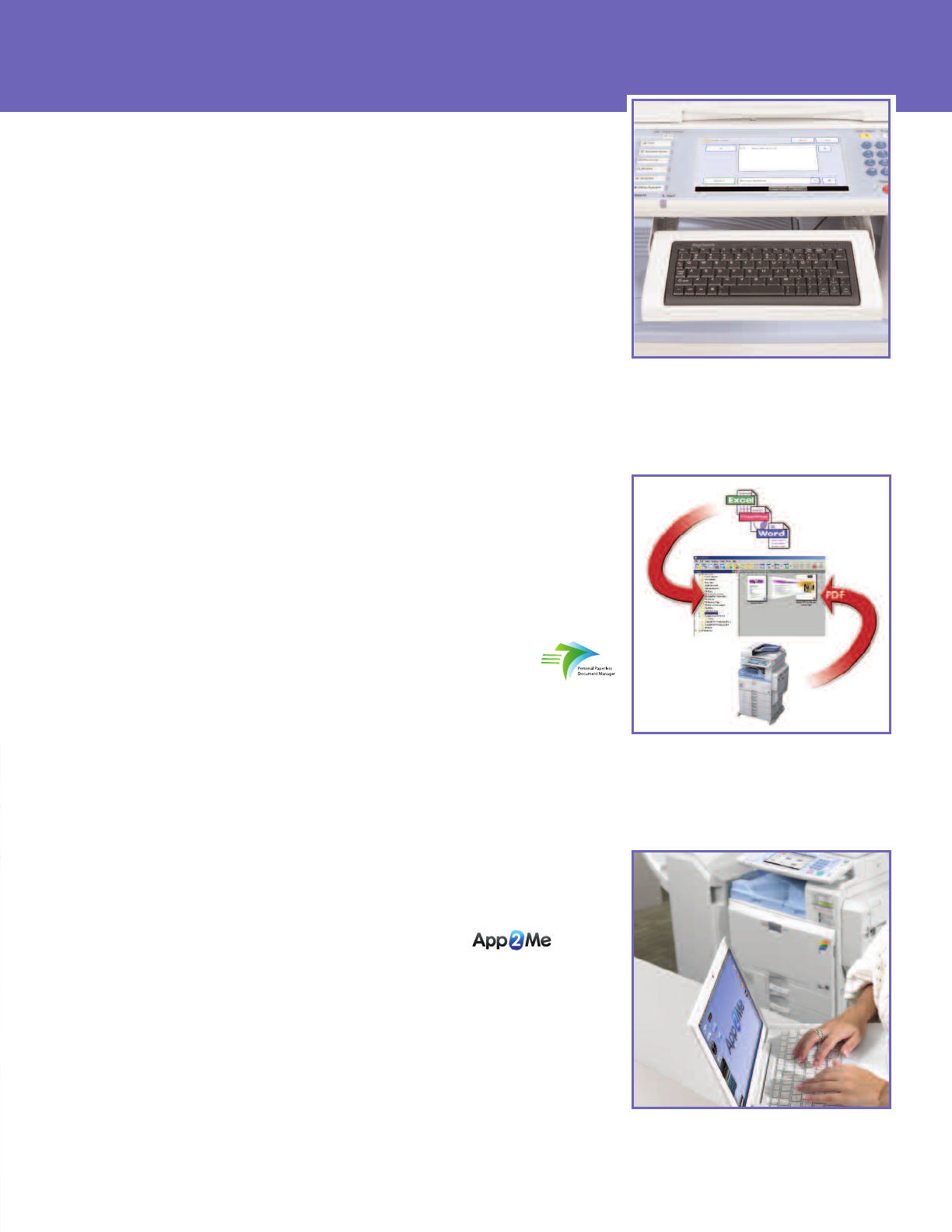
Create unique scanning workflows and save
time with Personal Paperless Document
Manager (PPDM).
The optional keyboard provides an alternative
way to enter data at the device.*
*Does not support all functions.
ReliablePowerfulVersatileFast
Eliminate Distribution Costs
Designed to serve as your office’s zero-cost
document distribution portal, the Ricoh Aficio
MP 4001/MP 5001 incorporates an impressive
lineup of technologies.
• Scan full-color or black & white originals and share them
instantly — and at no cost — with Scan-to-Email/Folder/HDD.
• Do not spend time searching for e-mail addresses. The system
pulls the correct address for each recipient directly from up to
five LDAP servers.
• Never waste time or resources on rescans. See full-color thumbnails
of every scanned page on the control panel, so you can verify
quality prior to distribution.
• Minimize file sizes for full-color scans with the High Compression
PDF feature, which keeps large files off the network.
• Keep the network moving with Scan-to-URL. It stores documents
on the HDD, then sends recipients a link that enables viewing or
downloading via Web browser.
Next-Generation Faxing
The Ricoh Aficio MP 4001/MP 5001 includes
the latest fax technologies to reduce costs
and minimize transmission time.
• Take advantage of up to three analog lines with the Super G3
modem. This improves total fax capacity and helps prevent bottlenecks.
• Send documents directly to e-mail addresses and eliminate long-
distance costs with Internet Fax capabilities.
• Forward inbound faxes to e-mail addresses, network folders or the
system’s HDD and go completely paperless.
Protect Critical Documents
The Ricoh Aficio MP 4001/MP 5001 includes
the high-end security technologies required to
keep documents safe from a variety of threats
at every stage of workflow.
• Prevent unauthorized access and usage with password protection.
• Keep sensitive documents safe without expensive mail boxes.
Locked Print holds printed files in memory until authorized users
enter a PIN code or password.
• Secure latent images remaining on the system’s internal hard drive
with the DataOverwriteSecurity System (DOSS).
User-Friendly Management
Make every administrator’s life easier with
intuitive tools for system management, device
monitoring, troubleshooting and other tasks.
• Configure system settings, address books and more with Web Image
Monitor.
• Manage multiple Ricoh devices remotely with Web SmartDeviceMonitor.
• Request alerts for low supplies or error detection with Auto E-mail
Notification.
• Automate service calls with @Remote™(network appliance or embedded),
which can be configured to notify service and supply alerts.
The Total Green
Office Solution
Ricoh continues its
long-standing commitment to
developing office solutions with
environmentally friendly and superior
energy- and supply-saving features,
without compromising productivity.
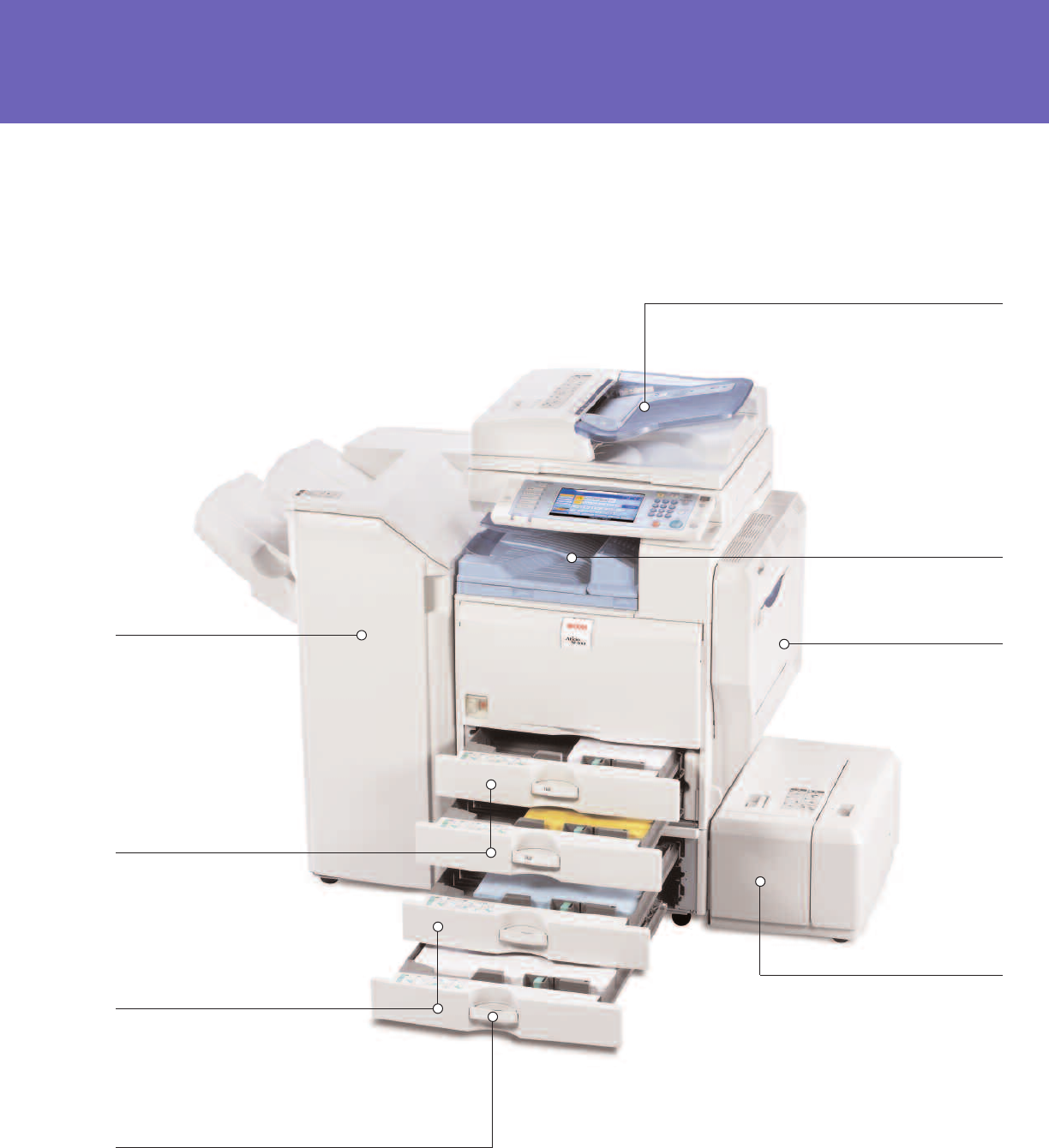
ReliableSecureFastVersatile
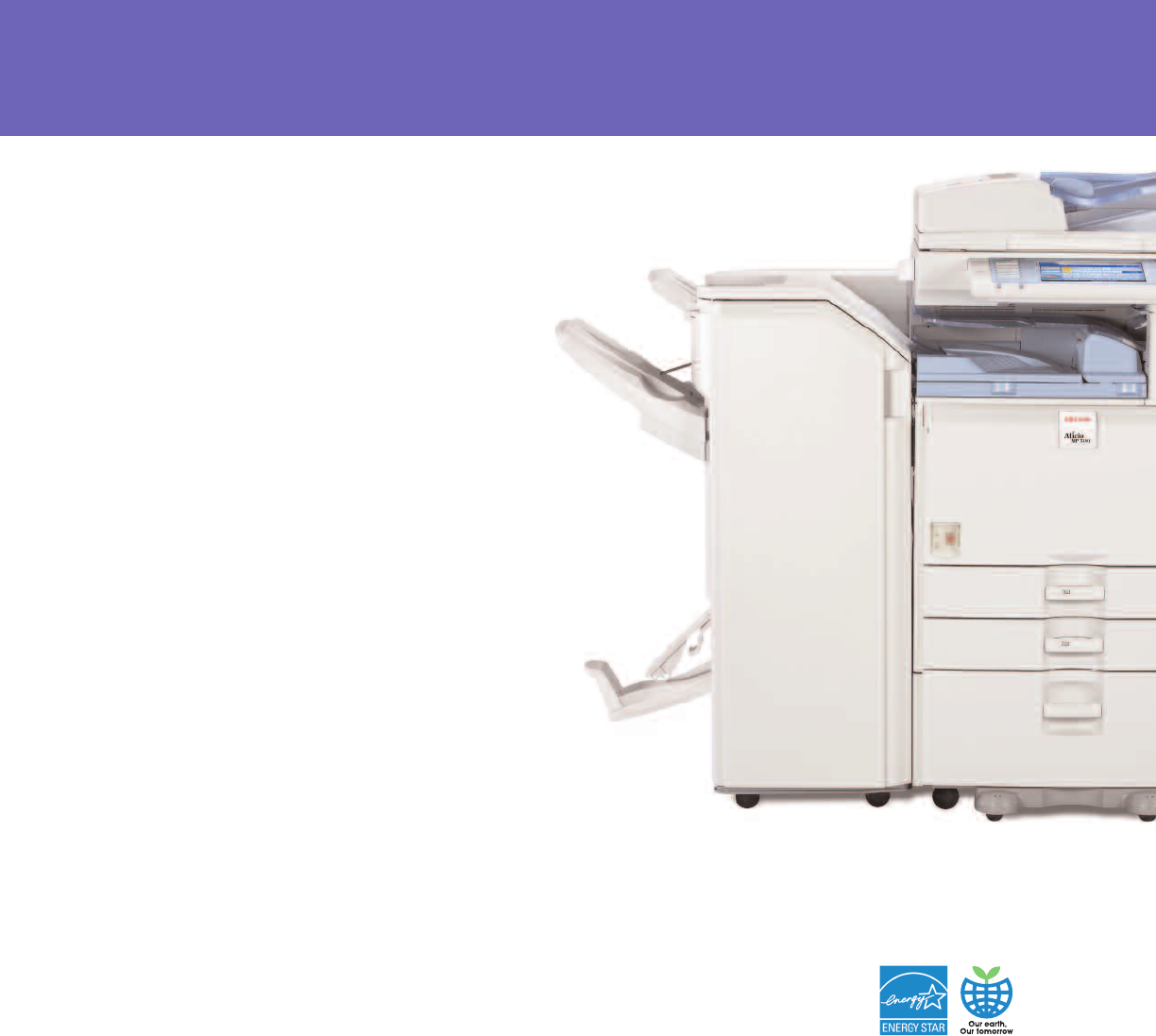
Improve Speed, Efficiency and Productivity
100-Sheet Automatic Reversing
Document Feeder (ARDF)
Handles multi-page and double-
sided originals up to 11" x 17"
with extreme efficiency.
Inner One-Bin Tray (Optional)
Provides a cost-effective way
to separate copy, print and
fax output.
Dual 550-Sheet Paper Trays
Increases productivity and
efficiency by minimizing the
need to reload paper.
Two 550-Sheet Tray Paper Bank
(Optional)
Holds up to five different sizes and
orientations of paper at all times for
maximum versatility.2,000-Sheet
(Letter-Sized) Large Capacity Tray
also available.
3,000-Sheet Multi-Tray
Finisher
Enhances productivity,
convenience and versatility
with high-capacity trays,
optional 2- or 3-hole
punching and multi-position
stapling for a wide variety
of paper weights and sizes.
100-Sheet Stack Bypass
Holds a range of paper types
and weights up to 58 lb. Bond.
Document Server
Stores up to 3,000 frequently used
documents for instant reprinting,
refaxing or redistribution.
Easy-to-Replace Toner Cartridge
Ensures quick replacement of toner
to minimize maintenance time.
2,000-Sheet Booklet/Saddle Stitch Finisher
Automatically staples documents to produce
professional-grade booklets with a variety of staple
positions and optional 2- or 3-hole punching.
1,000-Sheet Finisher
Holds up to 1,000 sheets of 8.5" x 11" or smaller,
20 lb. Bond (500 sheets of 8.5" x 14" or larger)
and offers automatic three-position stapling.
Automatic Stackless Duplexing
Produces two-sided booklets,
brochures and more while cutting
paper usage in half.
Large Capacity Tray (Optional)
Holds an additional 1,200 letter-sized
sheets to optimize workflow and
minimize user intervention during
large jobs.
Over/Underhand-Grip Tray
Handles and Easy-Open Trays
Ensure effortless paper loading
for all users.
innovation
speed
Engine/Copier Specifications
Configuration Console
Scanning Element Flatbed with Moving CCD Array Image
Sensor
Printing Process Twin Laser Beam Scanning &
Electrophotographic Printing
Toner Dry, Dual Component
System Memory 768 MB RAM (std./max.)
Hard Disk Drive 40 GB Standard
Document Feeder 100-Sheet ARDF (Standard)
Copy Resolution 600 x 600 dpi
Grayscale 256 levels
Exposure Adjustment Manual & Automatic (Standard)
Quantity Indicator Up to 999
Original Type Book/Sheet/Objects
Maximum Original Size Up to 11" x 17"
Copy Size 5.5"x 8.5" to 11"x 17"
Copy Type Plain Paper, Transparencies, Recycled
Paper, Card Stock, Letterhead
Warm-Up Time 22 seconds
First Copy Speed MP 4001: 4.1 seconds
MP 5001: 3.5 seconds
Continuous Copying MP 4001: 40 copies/minute (LTR)
Speed MP 5001: 50 copies/minute (LTR)
Recovery Time 10 seconds (from Auto Off)
Power Source 120V/60Hz/12A
Dimensions 26.4" (W) x 35.8" (H) x 26.6" (D)
Weight 213.8 lbs.
Standard Paper 550 sheets x 2 trays
Capacity 100-Sheet Bypass Tray
Optional Paper 550 sheets x 2 trays OR
Capacity 2,000 x 1; 1,200-Sheet Large Capacity
Tray (LCT)
Paper Size 5.5"x 8.5" to 11" x 17"
Paper Weight Tray 1 & 2: 16 - 45 lb. Bond/
60 - 169 g/m2
Bypass: 14 - 58 lb. Bond/52 - 220 g/m2
Duplex: 16 - 45 lb. Bond/60 - 169 g/m2
Reduction Ratios 25%, 50%, 65%, 73%, 78%, 85%,
93%
Enlargement Ratios 121%, 129%, 155%, 200%, 400%
Zoom 25% to 400% in 1% increments
Standard Features Auto Magnification, Auto Paper Select,
Auto Tray Switch, Background
Numbering, Booklet/Magazine Copy,
Center/Border Erase, Chapters,
Combine Mode, Cover Insertion,
Date Stamp, Directional Magnification,
Document Server (3,000 File Capacity),
Double Copy, Electronic/ Rotate Sorting,
English Preset Stamps, Full-Color VGA
Touch Screen, Java VM Card Type F,
8 Job Presets, 10 Job Programs,
Negative/Positive, OHP Slip Sheet,
Page Number Stamp, Paper Designate,
Sample Copy, Series Copy, Simplified
Display, 500 User Codes, User Stamps
Printer Specifications (Standard)
Print Speed MP 4001: 40 ppm
MP 5001: 50 ppm
CPU RM7035C-533 MHz
Standard Interfaces 10BaseT/100BaseTX, USB 2.0
Optional Interfaces IEEE 802.11a/b/g Wireless LAN,
Bluetooth, Gigabit Ethernet, IEEE 1284
Parallel Interface Board Type A
Memory Capacity Shared with Copier Memory
Network Protocol TCP/IP, IPX/SPX, AppleTalk
Network Operating Windows Vista/2000/XP/
Systems Server 2003/2008,
Netware 3.12, 3.2, 4.1, 4.11, 5.0, 5.1,
6.0, 6.5, UNIX; Sun Solaris, HP-UX, SCO
OpenServer, RedHat Linux, IBM AIX,
Mac OS 8.6 - 9.2x, OS X 10.1 or later,
SAP R/3, NDPS Gateway, IBM iSeries/
AS/ 400 using OS/400 Host Print
Transform, Citrix Metaframe
Utilities Web SmartDeviceMonitor,
SmartDeviceMonitor,
Web Image Monitor
Page Description Standard PCL 5e/6 and
Languages Adobe PostScript3 (Optional)
Print Resolution Up to 600 dpi
Fonts for PCL 5e/6 35 Intellifonts, 10 Truetype Fonts,
13 International Fonts
Fonts for PS3 136 PostScript Fonts
Standard Features Sample/Locked/Hold/Stored Print
Optional Features PDF Direct Print
Scanner Specifications (Standard)
Scanning Speed BW: 61 ipm (@200 dpi);
FC: 33 ipm (@200 dpi)
Scanning Resolution Up to 600 dpi
Grayscale 256 levels
Scan Area Up to 11"x 17"
Standard Interfaces 10BaseT/100BaseTX Ethernet
Optional Interfaces Wireless LAN (802.11a/b/g),
Gigabit Ethernet
Protocol TCP/IP, SMTP, SMB, FTP, POP3, NCP
Memory Capacity Shared with Copier Memory
Standard Features Embedded Scan-to-Email, HDD, Folder,
URL
File Formats Single-Page and Multi-Page TIFF, PDF,
High Compression PDF, Single-Page
JPEG
Fax Specifications (Option)
Circuit PSTN, PBX
Compatibility ITU-T G3
Resolution 200 x 200/100 dpi (Standard)
400 x 400 dpi (Optional)
Compression Method MH, MR, MMR, JBIG
Scanning Speed 0.40 seconds (LEF)
Modem Speed 33.6 Kbps with Auto Fallback
Transmission Speed G3: 3 seconds per page
(MMR Compression)
G3: 2 seconds per page
(JBIG Compression)
Memory 4 MB standard (320 pages)
28 MB maximum (2,240 pages)
Memory Backup 1 hour
Auto Dials 2,000 (with HDD)
Group Dials 100 (max. 500 numbers per group)
ID Code Programming 4 digits
User Function Key 3 keys
Standard Features Book Transmission, Dual Access,
Image Rotation, LAN-Fax Capability,
Internet Faxing (T.37), IP Faxing (T.38),
Fax Forwarding to E-mail/HDD/Folder
Optional Features Simultaneous operation of up to
3 lines (G3 x 3)
Security Features (Standard)
S/MIME, IPsec Communication, Locked Print Password
Encryption, Encrypt Address Book, SSL Secure Socket Layer,
PDF Encryption
One-Bin Tray BN3040 (Option)
Paper Size 5.5" x 8.5" - 11" x 17"/A3 - A5
Paper Weight 16 to 28 lb. Bond/60 - 196 g/m2
Paper Capacity 125 sheets
SR790 Finisher (Option)
Paper Size 5.5" x 8.5" - 11" x 17"/A5 - A3
Paper Weight 14 to 68 lb. Bond/52 to 256 g/m2
(Proof Tray)
14 to 42 lb. Bond/52 to 163 g/m2
(Shift Tray)
Stack Capacity Proof Tray: 250 sheets (8.5" x 11"
or smaller)
50 sheets (8.5" x 14" or larger)
Shift Tray: 1,000 sheets (8.5" x 11"
or smaller)
500 sheets (8.5" x 14" or larger)
Staple Capacity 50 sheets (8.5" x 11")
30 sheets (8.5" x 14" or larger)
Staple Position 1 staple/2 positions;
2 staples/1 position
Dimensions 10.7" (W) x 20.5" (D) x 31.2" (H)
SR3020 Booklet Finisher (Option)
Paper Size 5.5" x 8.5" - 11" x 17"
Paper Weight 14 to 43 lb. Bond/52 to 163 g/m2
(Proof Tray)
14 to 68 lb. Bond/52 to 256 g/m2
(Shift Tray)
Stack Capacity Proof Tray: 250 sheets (8.5" x 11"
or smaller)
50 sheets (8.5" x 14" or larger)
Shift Tray: 2,000 sheets (8.5" x 11") LEF
1,000 sheets (8.5" x 11" - 11" x 17") SEF
100 sheets (5.5" x 8.5")
Staple Capacity 50 sheets (8.5" x 11")
30 sheets (8.5" x 14" or larger)
Staple Position 1 staple/3 positions;
2 staples/2 positions
Saddle Stitch 30 sets (2 - 5 sheets)
15 sets (6 - 10 sheets)
10 sets (11 - 15 sheets)
Dimensions 25.8" (W) x 24.2" (D) x 37.8" (H)
SR3030 Finisher (Option)
Paper Size 5.5" x 8.5" - 11" x 17"
Paper Weight 14 to 43 lb. Bond/52 to 163 g/m2
(Proof Tray)
14 to 68 lb. Bond/52 to 256 g/m2
(Shift Tray)
Stack Capacity Proof Tray: 250 sheets (8.5" x 11"
or smaller)
50 sheets (8.5" x 14" or larger)
Shift Tray: 3,000 sheets (8.5" x 11") LEF
1,500 sheets (8.5" x 11" - 11" x 17") SEF
Staple Capacity 50 sheets (8.5" x 11")
30 sheets (8.5" x 14" or larger)
Staple Position 1 staple/3 positions;
2 staples/1 position
Dimensions 25.8" (W) x 24.2" (D) x 37.8" (H)
RT3000 Large Capacity Tray (Option)
Paper Size 8.5" x 11"/A4
Paper Weight 16 to 45 lb. Bond/60 - 169 g/m2
Paper Capacity 1,200 sheets
Dimensions 13.7" (W) x 21.3" (D) x 11.4" (H)
PB3040 Paper Feed Unit (Option)
Paper Size 5.5" x 8.5" - 11" x 17"/A5 - A3
Paper Weight 16 to 45 lb. Bond/60 to 169 g/m2
Paper Capacity 550 sheets x 2
Dimensions 22.8" (W) x 24.4" (D) x 10.2" (H)
PB3050 Large Capacity Tray (Option)
Paper Size 8.5" x 11"/A4
Paper Weight 16 to 45 lb. Bond/60 to 169 g/m2
Paper Capacity 2,000 sheets
Dimensions 22.8" (W) x 24.4" (D) x 10.2" (H)
Additional Options for MP 4001/MP 5001
Bluetooth Interface Unit Type 3245, Bridge Unit Type BU3030,
DOSS Type I, FAC33 Cabinet, Fax Type 5001, File Format
Converter Type E, G3 Interface Type 5000, Gigabit Ethernet
Board Type A, Handset Type 1018, HDD Encryption Unit Type A,
IEEE 1284 Parallel Interface Board Type A, IEEE 802.11a/b/g
Interface Unit Type J, Key Counter Bracket Type H, Optional
Counter Interface Type A, PostScript3 Type 5000, Punch Kit
Type 3260 (for SR3020 & SR3030), Scanner Accessibility Option
Type 4045, 32 MB Fax Memory, Removable HDD and Additional
Removable HDD, 3L68-17 USB External Keyboard, Hardware
4 Pack Bundle of PPDM
Some accessories require additional equipment or may be prerequisite for
other options.
Ricoh Aficio MP 4001/MP 5001
Specifications
Bringing Ricoh Value to Your Organization
Ricoh technology offers a diverse portfolio of solutions to help your organization stay
competitive and move ahead. Let Ricoh show you how to empower your business to
improve critical processes, keep information secure, ensure compliance and promote
environmental sustainability while reducing the total cost of ownership.
Ricoh Americas Corporation, Five Dedrick Place, West Caldwell, NJ 07006
Ricoh®and the Ricoh Logo are registered trademarks of Ricoh Company, Ltd. All other
trademarks are the property of their respective owners. Print speed may be affected by
network, application or PC performance. Specifications and external appearances are
subject to change without notice. Products are shown with optional features. R3148
www.ricoh-usa.com
