Riedel Communications and Co KG BPK100619 Wireless Intercom System User Manual Bolero Beltpack Quick Start Guide A00

Riedel Communications GmbH&Co; KG Wireless Intercom System Bolero Beltpack Quick Start Guide A00

user_manual

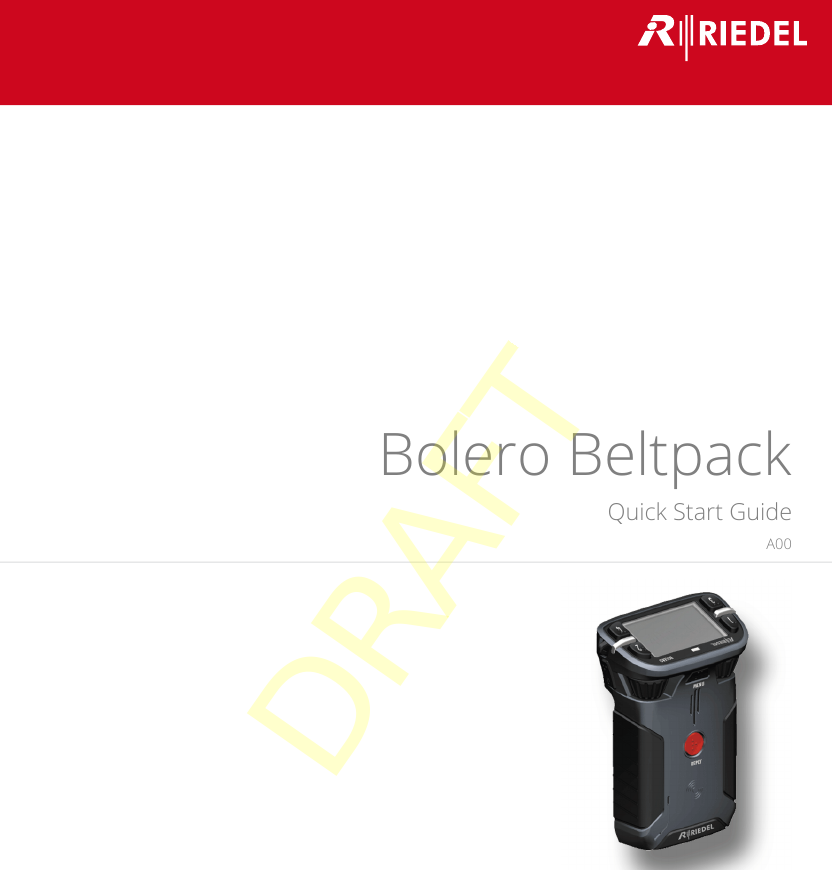
Bolero BeltpackQuick Start GuideA0003-300HB01EGDRAFT
© 2017 RIEDEL COMMUNICATIONS GmbH & Co KG. ALL RIGHTS RESERVED.UNDER THE COPYRIGHT LAWS, THIS MANUAL MAY NOT BE COPIED, IN WHOLE OR IN PART, WITHOUT THE WRITTEN CONSENT OF RIEDEL. EVERYEFFORT HAS BEEN MADE TO ENSURE THAT THE INFORMATION IN THIS MANUAL IS ACCURATE. RIEDEL IS NOT RESPONSIBLE FOR PRINTING ORCLERICAL ERRORS. ALL TRADEMARKS ARE THE PROPERTY OF THEIR RESPECTIVE OWNERS.This device complies with Part 15 of the FCC Rules and with Industry Canada licence-exempt RSS standard(s). Operation is subject to the following two conditions: (1) this device may not cause harmful interference, and (2) this device must accept any interference received, including interference that may cause undesired operation.Le présent appareil est conforme aux CNR d'Industrie Canada applicables aux appareils radio exempts de licence. L'exploitation est autorisée aux deux conditions suivantes: (1) l'appareil ne doit pas produire de brouillage, et (2) l'utilisateur de l'appareil doit accepter tout brouillage radioélectrique subi, même si le brouillage est susceptible d'en compromettre le fonctionnement.This equipment has been tested and found to comply with the limits for a Class A digital device, pursuant to Part 15 of the FCC Rules. These limits are designed to provide reasonable protection against harmful interference when the equipment is operated in a commercial environment. This equipmentgenerates, uses, and can radiate radio frequency energy and, if not installed and used in accordance with the instruction manual, may cause harmful interference to radiocommunications. Operation of this equipment in a residential area is likely to cause harmful interference in which case the user will be required to correct the interferenceat his own expense.Changes or modifications made to this equipment not expressly approved by Riedel may void the FCC authorization to operate this equipment.Radiofrequency radiation exposure Information:For body worn operation, this equipment has been tested and meets the FCC RF exposure guidelines when used with the Riedel accessories supplied or designated for thisproduct. Use of other accessories may not ensure compliance with FCC RF exposure guidelines.DRAFT
Bolero Beltpack Quick Start Guide A00CONTENT1Preface                                                                                                                                                                                         4Information ........................................................................................................................................................ 51.1About Bolero ...................................................................................................................................................... 81.22Bolero Beltpack                                                                                                                                                                         9Operating Elements .......................................................................................................................................... 92.1Status LEDs ...................................................................................................................................................... 112.2Getting Started ................................................................................................................................................ 122.3Technical Specifications .................................................................................................................................. 132.43Appendix                                                                                                                                                                                   14Service .............................................................................................................................................................. 143.1Notes ................................................................................................................................................................ 153.2Index .............................................................................................................................................................................. 17DRAFT
4Bolero Beltpack Quick Start Guide A001 PrefaceThank you for choosing a Riedel product.This PDF document provides detailed information about the Bolero Beltpack, pin outs, mechanical and electrical data.For further information, please refer to the Riedel Website or contact your local distributor or the Riedel headquartersin Wuppertal.NOTICEThis manual, as well as the software and any examples contained herein are provided “as is” and are subject to changewithout notice. The content of this manual is for informational purpose only and should not be construed as acommitment by Riedel Communications GmbH & Co. KG & Co. KG or its suppliers. Riedel Communications GmbH & Co.KG & Co. KG gives no warranty of any kind with regard to this manual or the software, including, but not limited to, theimplied warranties of merchantability and fitness for a particular purpose. Riedel Communications GmbH & Co. KG &Co. KG shall not be liable for any errors, inaccuracies or for incidental or consequential damages in connection with thefurnishing, performance or use of this manual, the software or the examples herein. Riedel Communications GmbH &Co. KG & Co. KG reserves all patent, proprietary design, title and intellectual property rights contained herein, including,but not limited to, any images, text, photographs incorporated into the manual or software. All title and intellectual property rights in and to the content that is accessed through use of the products is theproperty of the respective owner and may be protected by applicable copyright or other intellectual property laws andtreaties. 03-300HB01EG-A00Bolero Beltpack Quick Start Guide© April 2017 Copyright Riedel Communications GmbH & Co. KG. All rights reserved.Reproduction, adaptation, or translation of this manual in whole or in part is prohibited without prior writtenpermission of Riedel Communications GmbH & Co. KG, except as allowed under the copyright laws.All other trademarks are the property of their respective owner.DRAFT
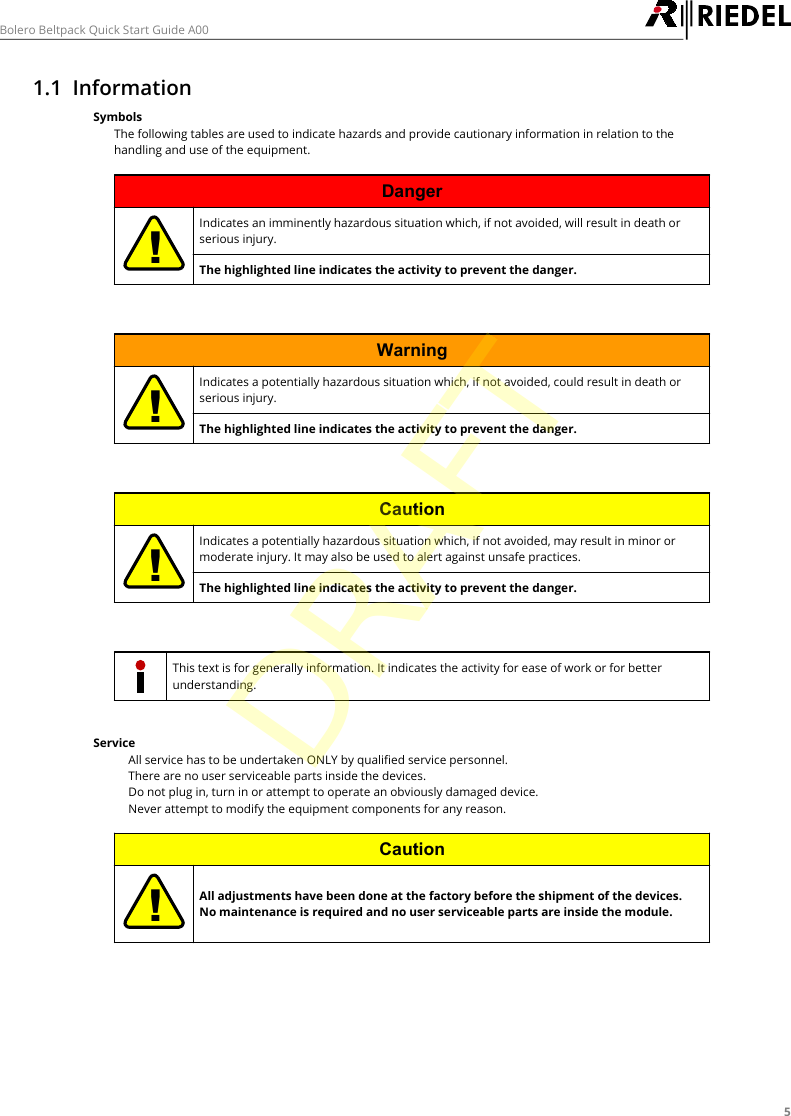
5Bolero Beltpack Quick Start Guide A001.1 InformationSymbolsThe following tables are used to indicate hazards and provide cautionary information in relation to thehandling and use of the equipment.Danger!Indicates an imminently hazardous situation which, if not avoided, will result in death orserious injury.The highlighted line indicates the activity to prevent the danger.Warning!Indicates a potentially hazardous situation which, if not avoided, could result in death orserious injury.The highlighted line indicates the activity to prevent the danger.Caution!Indicates a potentially hazardous situation which, if not avoided, may result in minor ormoderate injury. It may also be used to alert against unsafe practices.The highlighted line indicates the activity to prevent the danger.This text is for generally information. It indicates the activity for ease of work or for betterunderstanding.Service·All service has to be undertaken ONLY by qualified service personnel.·There are no user serviceable parts inside the devices.·Do not plug in, turn in or attempt to operate an obviously damaged device.·Never attempt to modify the equipment components for any reason.Caution!All adjustments have been done at the factory before the shipment of the devices.No maintenance is required and no user serviceable parts are inside the module.DRAFT
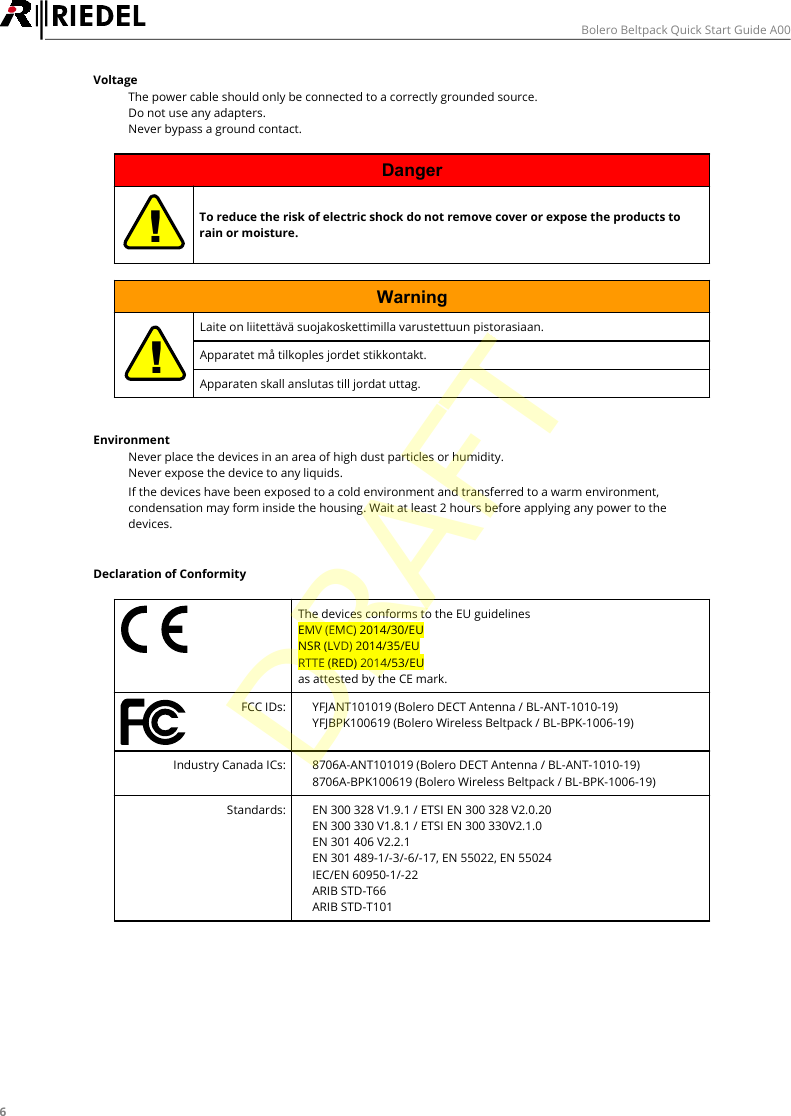
6Bolero Beltpack Quick Start Guide A00Voltage·The power cable should only be connected to a correctly grounded source.·Do not use any adapters.·Never bypass a ground contact.Danger!To reduce the risk of electric shock do not remove cover or expose the products torain or moisture.Warning!Laite on liitettävä suojakoskettimilla varustettuun pistorasiaan.Apparatet må tilkoples jordet stikkontakt.Apparaten skall anslutas till jordat uttag.Environment·Never place the devices in an area of high dust particles or humidity.·Never expose the device to any liquids.·If the devices have been exposed to a cold environment and transferred to a warm environment,condensation may form inside the housing. Wait at least 2 hours before applying any power to thedevices.Declaration of ConformityThe devices conforms to the EU guidelines EMV (EMC) 2014/30/EUNSR (LVD) 2014/35/EURTTE (RED) 2014/53/EUas attested by the CE mark.FCC IDs:·YFJANT101019 (Bolero DECT Antenna / BL-ANT-1010-19)·YFJBPK100619 (Bolero Wireless Beltpack / BL-BPK-1006-19)Industry Canada ICs:·8706A-ANT101019 (Bolero DECT Antenna / BL-ANT-1010-19)·8706A-BPK100619 (Bolero Wireless Beltpack / BL-BPK-1006-19)Standards:·EN 300 328 V1.9.1 / ETSI EN 300 328 V2.0.20·EN 300 330 V1.8.1 / ETSI EN 300 330V2.1.0·EN 301 406 V2.2.1·EN 301 489-1/-3/-6/-17, EN 55022, EN 55024·IEC/EN 60950-1/-22·ARIB STD-T66·ARIB STD-T101DRAFT
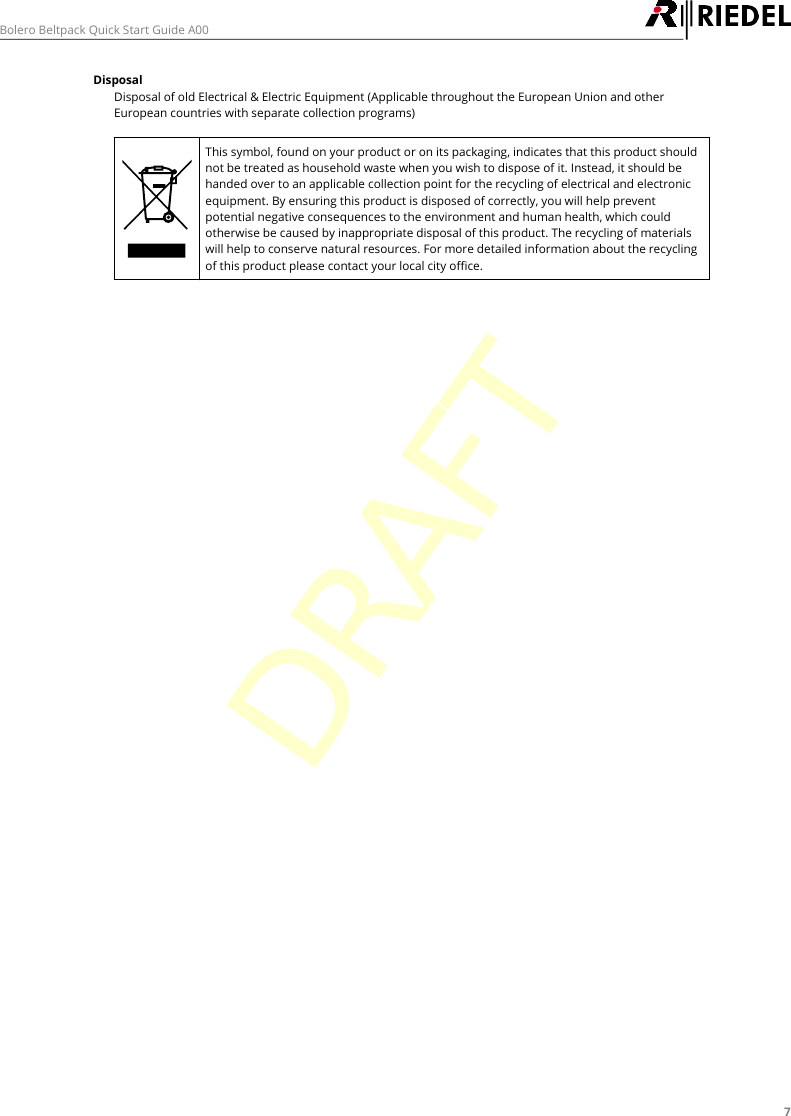
7Bolero Beltpack Quick Start Guide A00DisposalDisposal of old Electrical & Electric Equipment (Applicable throughout the European Union and otherEuropean countries with separate collection programs) This symbol, found on your product or on its packaging, indicates that this product shouldnot be treated as household waste when you wish to dispose of it. Instead, it should behanded over to an applicable collection point for the recycling of electrical and electronicequipment. By ensuring this product is disposed of correctly, you will help preventpotential negative consequences to the environment and human health, which couldotherwise be caused by inappropriate disposal of this product. The recycling of materialswill help to conserve natural resources. For more detailed information about the recyclingof this product please contact your local city office.DRAFT
8Bolero Beltpack Quick Start Guide A001.2 About BoleroBolero Wireless IntercomThe Riedel Bolero Wireless Intercom system is a digital, easy to use full-duplex communications solution for broadcast,security, industrial and theater applications as well as for sports and cultural events.Bolero takes a completely new approach to wireless communications, pushing it beyond the limits of existing wirelessintercom solutions.Riedel's Bolero Wireless Intercom solution utilizes the benefits of the Digital Enhanced Cordless Telecommunications(DECT) standard’s base layer. This provides a license-free, cellular architecture with seamless hand-over between cells,allowing each Bolero Wireless Beltpack to continuously monitor and automatically select the best connection to theAntenna. The audio transmission takes place directly via the antennas. There is no need for additional devices.Light and powerful custom lithium rechargeable battery packs are used for the Beltpack and the Antenna to provideUPS power. Battery packs are able to charge inside the Beltpack, the Antenna as well as separately in the charger.What is Bolero?·Digital Wireless Intercom System·based on the DECT standardRiedel Bolero - Key Features·Wireless Partyline and point-to-pointcommunications·4 Wireless Partylines·Cellular architecture with seamless hand-over·Up to10 individually addressable Wireless Beltpackscan be connected at the same time at one Antenna·Excellent audio quality via VoIP-over-DECTtechnology (license-free worldwide)·Connection of antennas via existing Ethernetinfrastructure (PoE)·No interference with radio microphones, In EarMonitoring (IEM) or other UHF systemsDRAFT
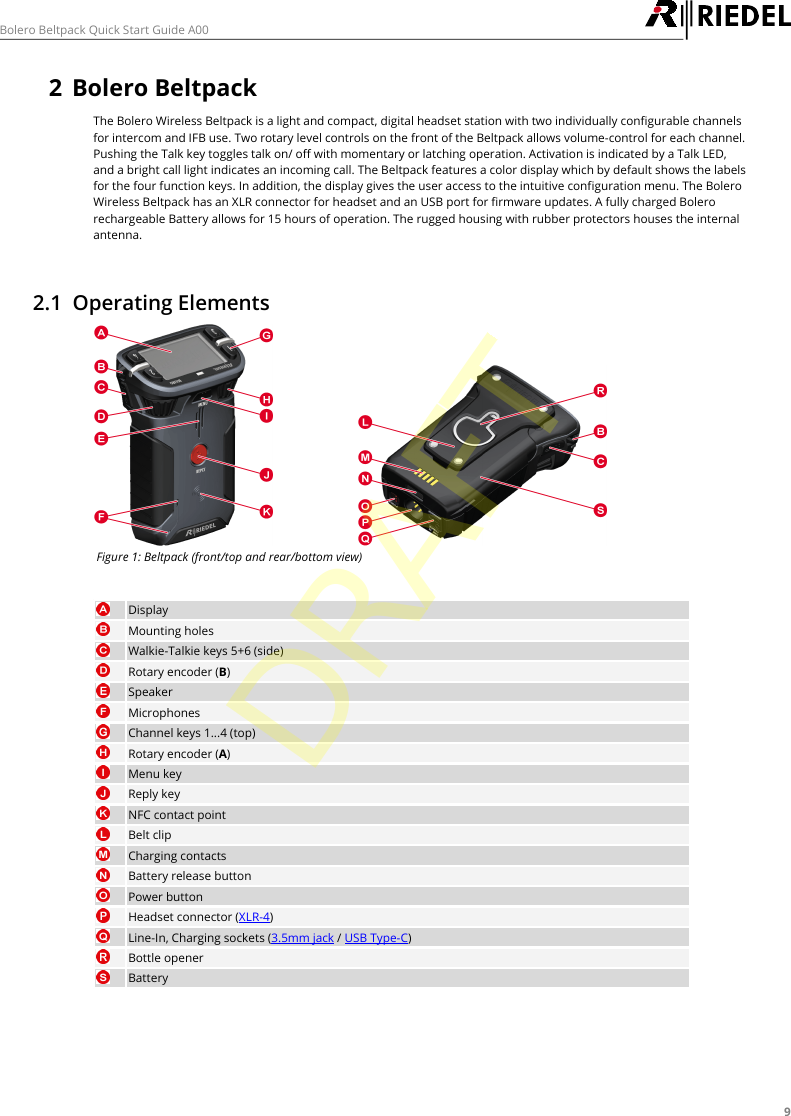
9Bolero Beltpack Quick Start Guide A002Bolero BeltpackThe Bolero Wireless Beltpack is a light and compact, digital headset station with two individually configurable channelsfor intercom and IFB use. Two rotary level controls on the front of the Beltpack allows volume-control for each channel.Pushing the Talk key toggles talk on/ off with momentary or latching operation. Activation is indicated by a Talk LED,and a bright call light indicates an incoming call. The Beltpack features a color display which by default shows the labelsfor the four function keys. In addition, the display gives the user access to the intuitive configuration menu. The BoleroWireless Beltpack has an XLR connector for headset and an USB port for firmware updates. A fully charged Bolerorechargeable Battery allows for 15 hours of operation. The rugged housing with rubber protectors houses the internalantenna.2.1 Operating ElementsFigure 1: Beltpack (front/top and rear/bottom view)DisplayMounting holesWalkie-Talkie keys 5+6 (side)Rotary encoder (B)SpeakerMicrophonesChannel keys 1...4 (top)Rotary encoder (A)Menu keyReply keyNFC contact pointBelt clipCharging contactsBattery release buttonPower buttonHeadset connector (XLR-4)Line-In, Charging sockets (3.5mm jack / USB Type-C)Bottle openerBatteryDRAFT
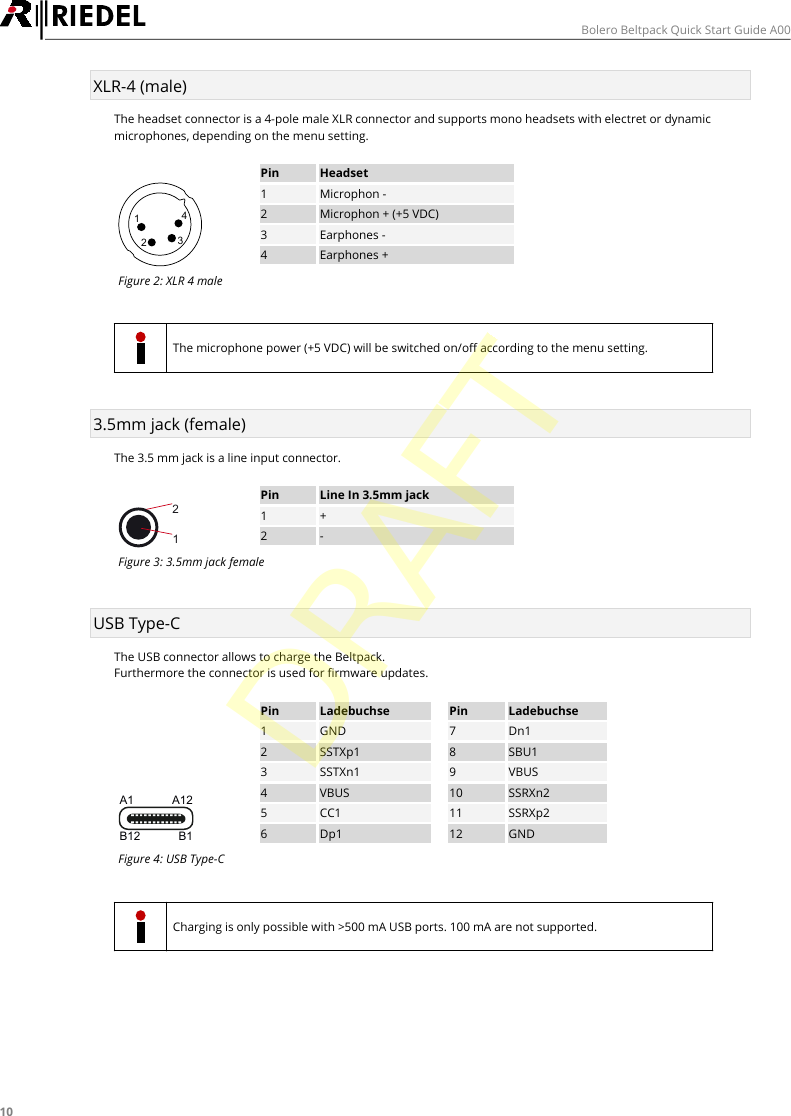
10Bolero Beltpack Quick Start Guide A00XLR-4 (male)The headset connector is a 4-pole male XLR connector and supports mono headsets with electret or dynamicmicrophones, depending on the menu setting.1234PinHeadset1Microphon -2Microphon + (+5 VDC)3Earphones -4Earphones +Figure 2: XLR 4 maleThe microphone power (+5 VDC) will be switched on/off according to the menu setting.3.5mm jack (female)The 3.5 mm jack is a line input connector.21PinLine In 3.5mm jack1+2-Figure 3: 3.5mm jack femaleUSB Type-CThe USB connector allows to charge the Beltpack.Furthermore the connector is used for firmware updates.A1 A12B12 B1PinLadebuchsePinLadebuchse1GND7Dn12SSTXp18SBU13SSTXn19VBUS4VBUS10SSRXn25CC111SSRXp26Dp112GNDFigure 4: USB Type-CCharging is only possible with >500 mA USB ports. 100 mA are not supported.DRAFT
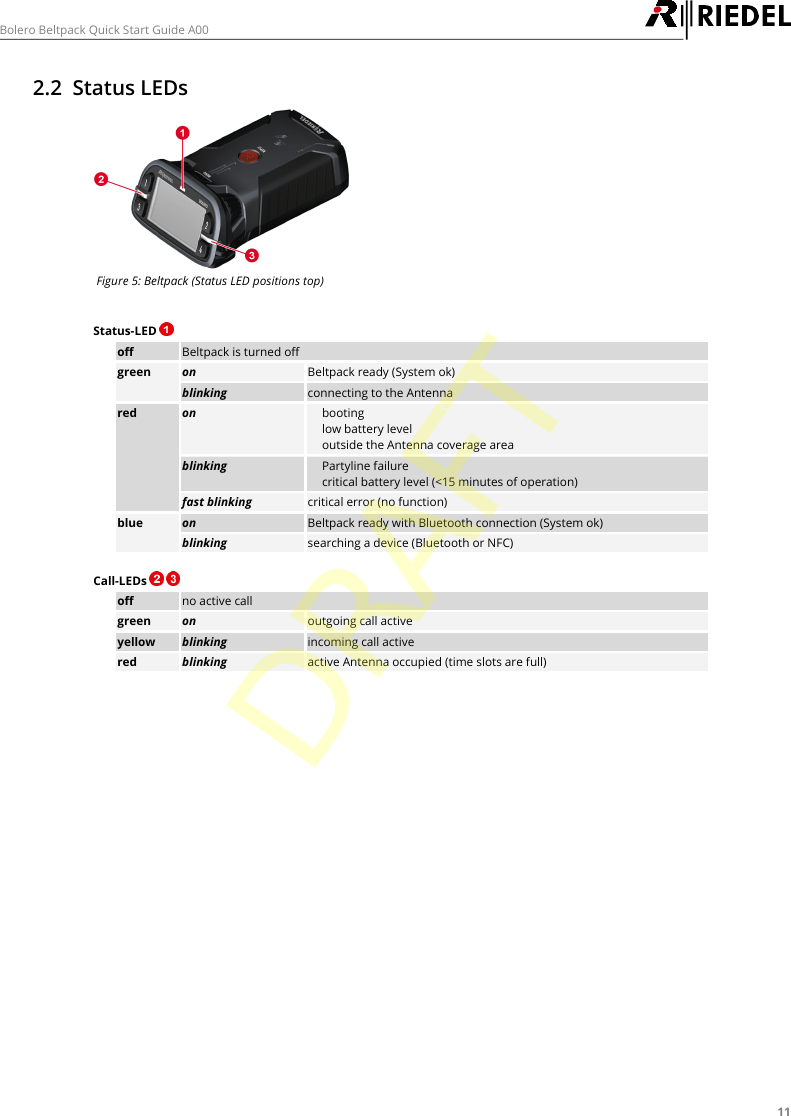
11Bolero Beltpack Quick Start Guide A002.2 Status LEDsFigure 5: Beltpack (Status LED positions top)Status-LED offBeltpack is turned offgreenonBeltpack ready (System ok)blinkingconnecting to the Antennaredon·booting·low battery level·outside the Antenna coverage areablinking·Partyline failure·critical battery level (<15 minutes of operation)fast blinkingcritical error (no function)blueonBeltpack ready with Bluetooth connection (System ok)blinkingsearching a device (Bluetooth or NFC)Call-LEDs   offno active callgreenonoutgoing call activeyellowblinkingincoming call activeredblinkingactive Antenna occupied (time slots are full)DRAFT
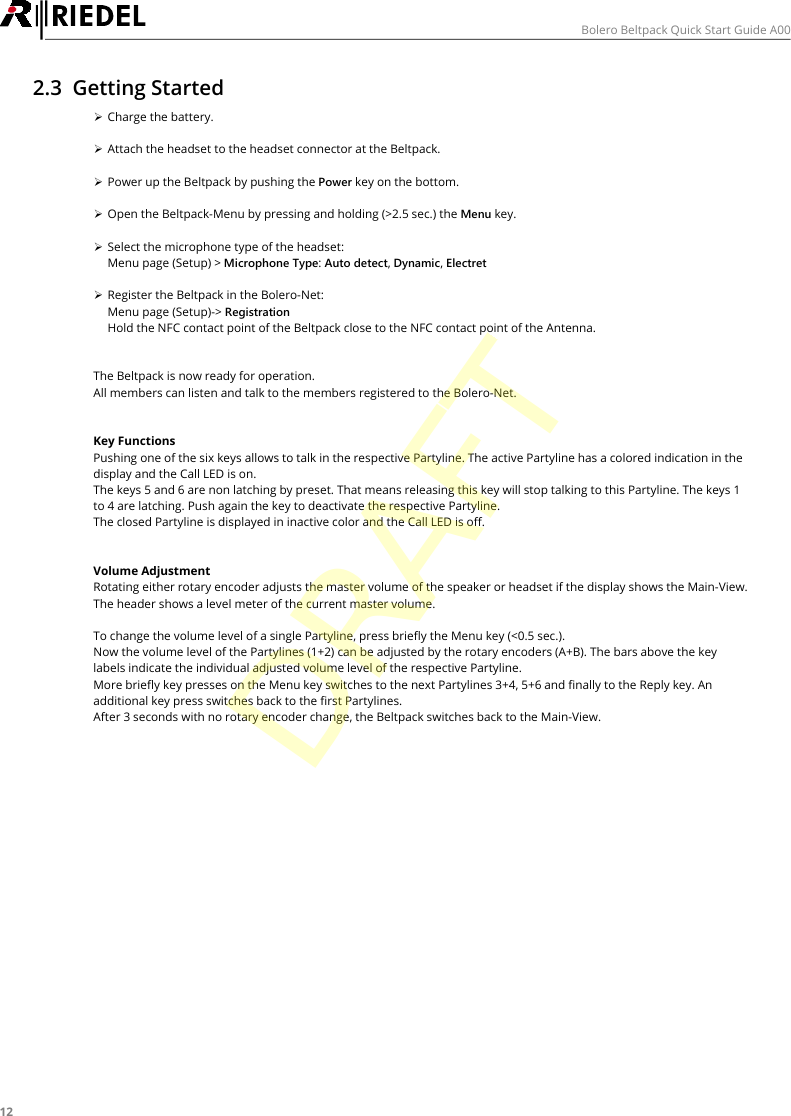
12Bolero Beltpack Quick Start Guide A002.3 Getting StartedØCharge the battery.ØAttach the headset to the headset connector at the Beltpack.ØPower up the Beltpack by pushing the Power key on the bottom.ØOpen the Beltpack-Menu by pressing and holding (>2.5 sec.) the Menu key.ØSelect the microphone type of the headset:Menu page (Setup) > Microphone Type: Auto detect, Dynamic, ElectretØRegister the Beltpack in the Bolero-Net:Menu page (Setup)-> RegistrationHold the NFC contact point of the Beltpack close to the NFC contact point of the Antenna.The Beltpack is now ready for operation.All members can listen and talk to the members registered to the Bolero-Net.Key FunctionsPushing one of the six keys allows to talk in the respective Partyline. The active Partyline has a colored indication in thedisplay and the Call LED is on.The keys 5 and 6 are non latching by preset. That means releasing this key will stop talking to this Partyline. The keys 1to 4 are latching. Push again the key to deactivate the respective Partyline.The closed Partyline is displayed in inactive color and the Call LED is off.Volume AdjustmentRotating either rotary encoder adjusts the master volume of the speaker or headset if the display shows the Main-View.The header shows a level meter of the current master volume.To change the volume level of a single Partyline, press briefly the Menu key (<0.5 sec.).Now the volume level of the Partylines (1+2) can be adjusted by the rotary encoders (A+B). The bars above the keylabels indicate the individual adjusted volume level of the respective Partyline.More briefly key presses on the Menu key switches to the next Partylines 3+4, 5+6 and finally to the Reply key. Anadditional key press switches back to the first Partylines.After 3 seconds with no rotary encoder change, the Beltpack switches back to the Main-View.DRAFT
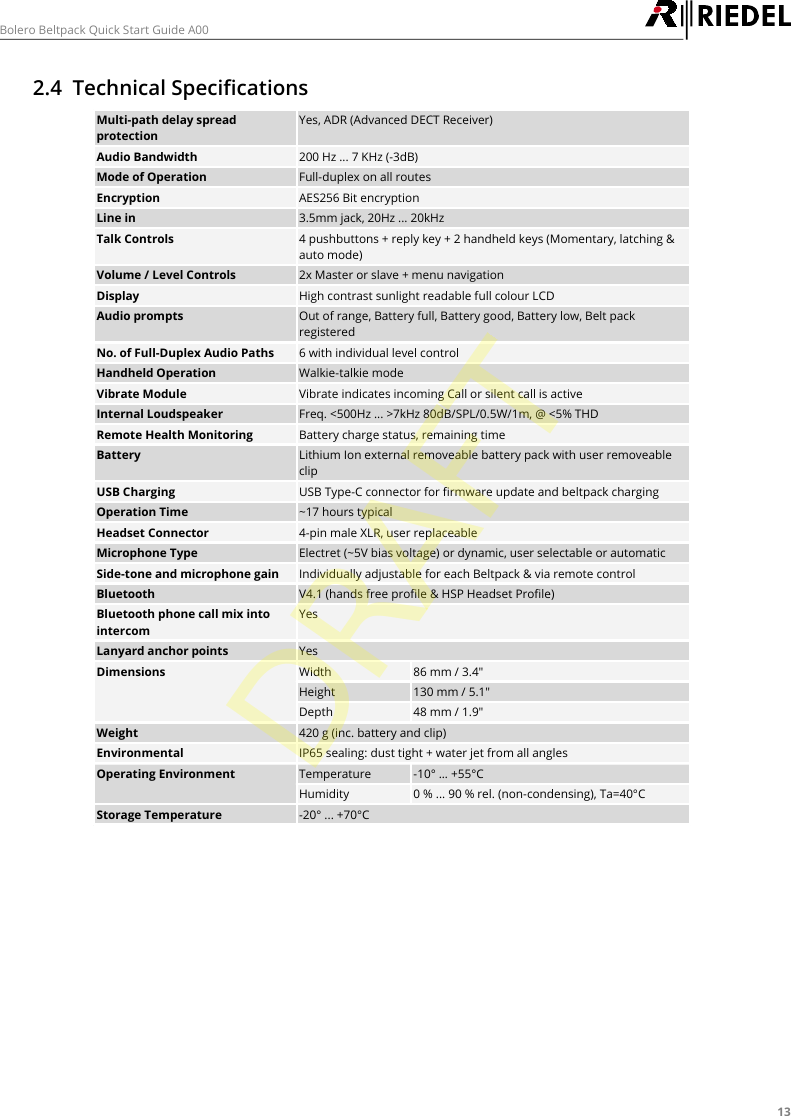
13Bolero Beltpack Quick Start Guide A002.4 Technical SpecificationsMulti-path delay spreadprotectionYes, ADR (Advanced DECT Receiver)Audio Bandwidth200 Hz ... 7 KHz (-3dB)Mode of OperationFull-duplex on all routesEncryptionAES256 Bit encryptionLine in3.5mm jack, 20Hz ... 20kHzTalk Controls4 pushbuttons + reply key + 2 handheld keys (Momentary, latching &auto mode)Volume / Level Controls2x Master or slave + menu navigationDisplayHigh contrast sunlight readable full colour LCDAudio promptsOut of range, Battery full, Battery good, Battery low, Belt packregisteredNo. of Full-Duplex Audio Paths6 with individual level controlHandheld OperationWalkie-talkie modeVibrate ModuleVibrate indicates incoming Call or silent call is activeInternal LoudspeakerFreq. <500Hz ... >7kHz 80dB/SPL/0.5W/1m, @ <5% THDRemote Health MonitoringBattery charge status, remaining timeBatteryLithium Ion external removeable battery pack with user removeableclipUSB ChargingUSB Type-C connector for firmware update and beltpack chargingOperation Time~17 hours typicalHeadset Connector4-pin male XLR, user replaceableMicrophone TypeElectret (~5V bias voltage) or dynamic, user selectable or automaticSide-tone and microphone gainIndividually adjustable for each Beltpack & via remote controlBluetoothV4.1 (hands free profile & HSP Headset Profile)Bluetooth phone call mix intointercomYesLanyard anchor pointsYesDimensionsWidth86 mm / 3.4"Height130 mm / 5.1"Depth48 mm / 1.9"Weight420 g (inc. battery and clip)EnvironmentalIP65 sealing: dust tight + water jet from all anglesOperating EnvironmentTemperature-10° … +55°CHumidity0 % ... 90 % rel. (non-condensing), Ta=40°CStorage Temperature-20° ... +70°CDRAFT
14Bolero Beltpack Quick Start Guide A003 Appendix3.1 ServiceIf you have any further questions, we offer comprehensive customer service options for this product including:·Telephone Service·Email Service·Skype Service·Fax Service·Configuration Support·Trainings·RepairYour primary point of contact for any service issues is your local dealer.In addition, Riedel Customer Service in Wuppertal, Germany is also available to assist you.Telephone: +49 (0) 202 292 9400(Monday - Friday, 8am – 5pm, Central European Time)Fax: +49 (0) 202 292 9419Skype: riedel.communications.serviceOr use the contact form on our website:www.riedel.net > Company > Riedel Communications > Contact > Wuppertal (Headquarters)For repairs, please contact your local dealer. Your dealer will be able to help process your repair as fast as possibleand/or arrange for the delivery of spare parts.The address for repairs sent directly to Riedel Communications GmbH is:Riedel Communications GmbH & Co. KG- Repairs -Uellendahler Str. 353D-42109 WuppertalGermanyPlease add a completed repair form to all your repairs.The form can be found at the Riedel website:www.riedel.net > Company > Services > Support > ContactDRAFT
15Bolero Beltpack Quick Start Guide A003.2 NotesDRAFT
16Bolero Beltpack Quick Start Guide A00NotesDRAFT
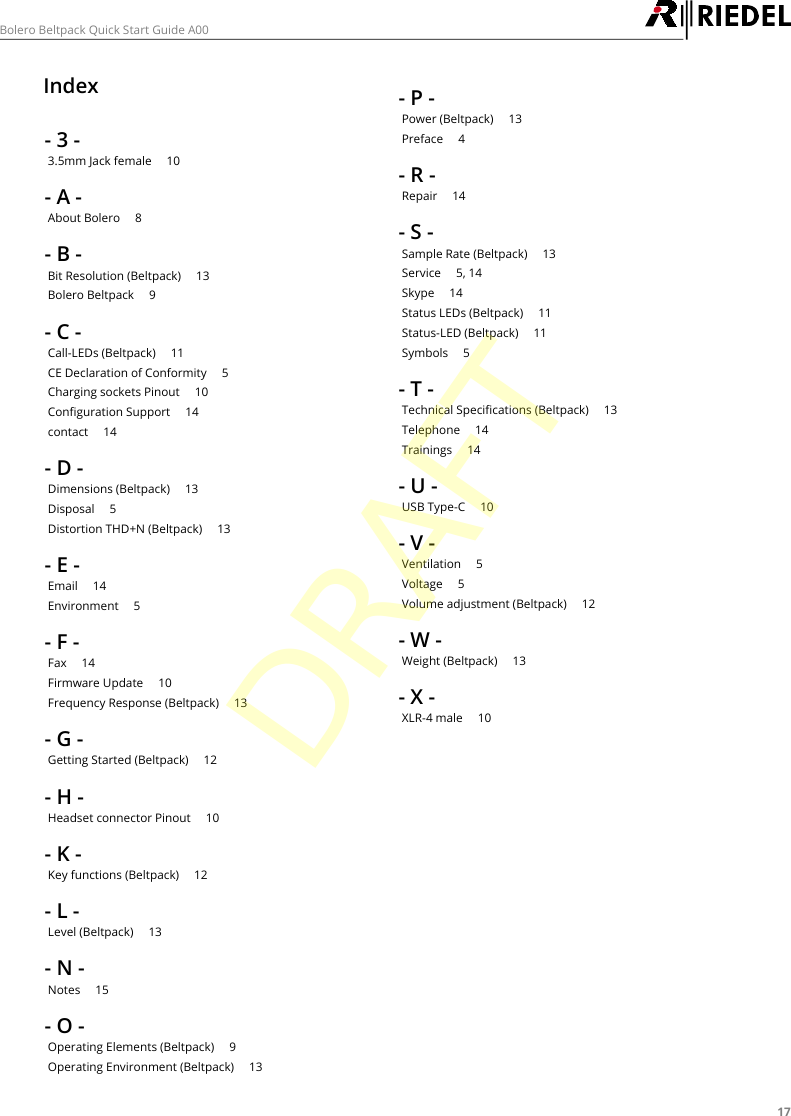
17Bolero Beltpack Quick Start Guide A00Index- 3 -3.5mm Jack female     10- A -About Bolero     8- B -Bit Resolution (Beltpack)     13Bolero Beltpack     9- C -Call-LEDs (Beltpack)     11CE Declaration of Conformity     5Charging sockets Pinout     10Configuration Support     14contact     14- D -Dimensions (Beltpack)     13Disposal     5Distortion THD+N (Beltpack)     13- E -Email     14Environment     5- F -Fax     14Firmware Update     10Frequency Response (Beltpack)     13- G -Getting Started (Beltpack)     12- H -Headset connector Pinout     10- K -Key functions (Beltpack)     12- L -Level (Beltpack)     13- N -Notes     15- O -Operating Elements (Beltpack)     9Operating Environment (Beltpack)     13- P -Power (Beltpack)     13Preface     4- R -Repair     14- S -Sample Rate (Beltpack)     13Service     5, 14Skype     14Status LEDs (Beltpack)     11Status-LED (Beltpack)     11Symbols     5- T -Technical Specifications (Beltpack)     13Telephone     14Trainings     14- U -USB Type-C     10- V -Ventilation     5Voltage     5Volume adjustment (Beltpack)     12- W -Weight (Beltpack)     13- X -XLR-4 male     10DRAFT
www.riedel.netRiedel Communications GmbH & Co. KG | Uellendahler Str. 353 | 42109 Wuppertal | GermanyDRAFT

Navigation menu