Rode Microphones 391002 RODELink Belt pack Receiver User Manual

Rode Microphones RODELink Belt pack Receiver

User Manual

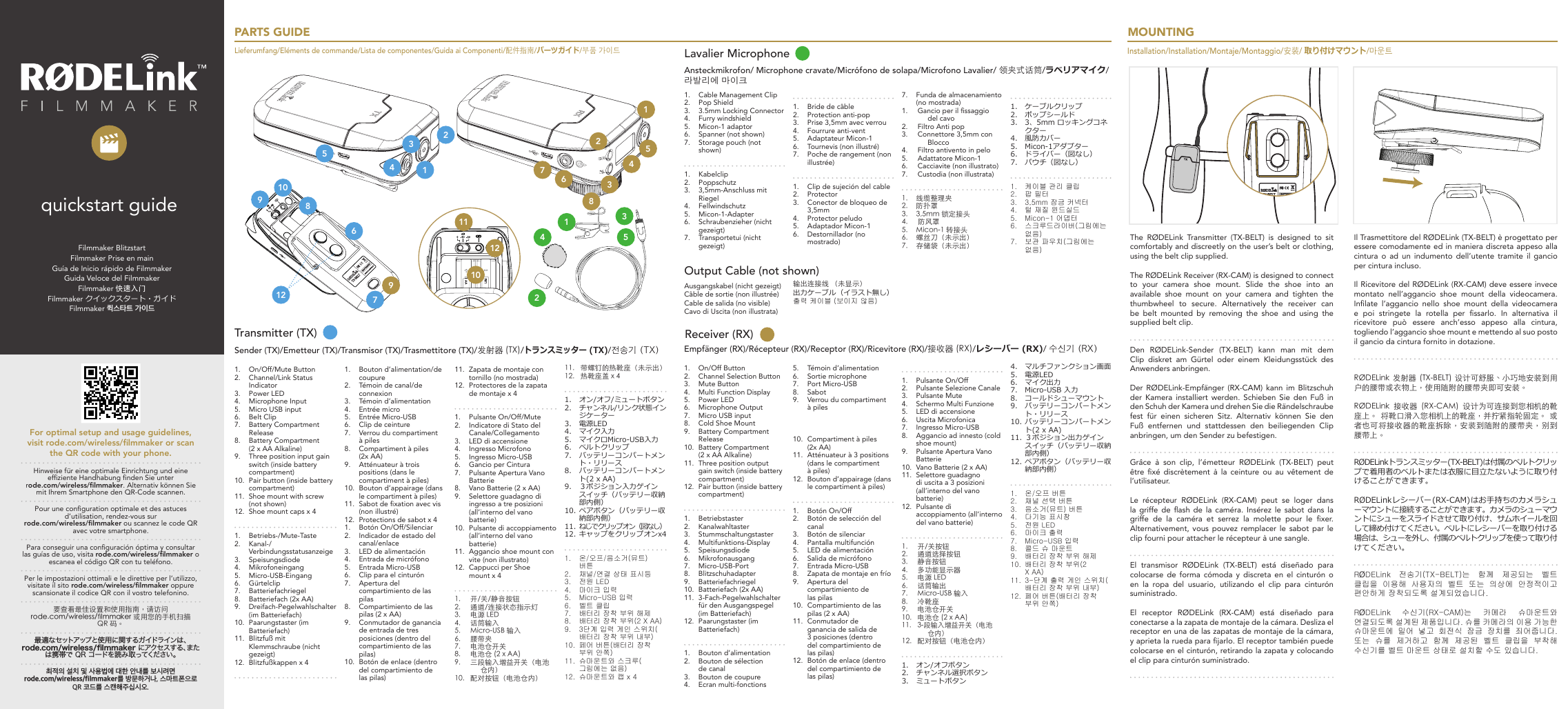
Filmmaker BlitzstartFilmmaker Prise en mainGuía de Inicio rápido de FilmmakerGuida Veloce del FilmmakerFilmmaker 快速入门Filmmaker クイックスタート・ガイドFilmmaker 퀵스타트 가이드quickstart guidePARTS GUIDELieferumfang/Eléments de commande/Lista de componentes/Guida ai Componenti/配件指南/パーツガイド/부품 가이드123456781211109123457689101234 512Transmitter (TX)Sender (TX)/Emetteur (TX)/Transmisor (TX)/Trasmettitore (TX)/发射器 (TX)/トランスミッター (TX)/전송기 (TX)1.  On/Off/Mute Button2.  Channel/Link Status Indicator3.  Power LED4.  Microphone Input5.  Micro USB input6.  Belt Clip7.  Battery Compartment Release8.  Battery Compartment  (2 x AA Alkaline)9.  Three position input gain switch (inside battery compartment)10.  Pair button (inside battery compartment)11.  Shoe mount with screw (not shown)12.  Shoe mount caps x 41.  Betriebs-/Mute-Taste2.  Kanal-/Verbindungsstatusanzeige3.  Speisungsdiode4.  Mikrofoneingang5.  Micro-USB-Eingang6.  Gürtelclip7.  Batteriefachriegel8.  Batteriefach (2x AA)9.  Dreifach-Pegelwahlschalter (im Batteriefach)10.  Paarungstaster (im Batteriefach)11.  Blitzfuß mit Klemmschraube (nicht gezeigt)12.  Blitzfußkappen x 4 1.  Bouton d’alimentation/de coupure2.  Témoin de canal/de connexion3.  Témoin d’alimentation4.  Entrée micro5.  Entrée Micro-USB6.  Clip de ceinture7.  Verrou du compartiment à piles8.  Compartiment à piles (2x AA)9.  Atténuateur à trois positions (dans le compartiment à piles)10.  Bouton d’appairage (dans le compartiment à piles) 11.  Sabot de xation avec vis (non illustré)12.  Protections de sabot x 4 1.  Botón On/Off/Silenciar2.  Indicador de estado del canal/enlace3.  LED de alimentación4.  Entrada de micrófono5.  Entrada Micro-USB6.  Clip para el cinturón7.  Apertura del compartimiento de las pilas8.  Compartimiento de las pilas (2 x AA)9.  Conmutador de ganancia de entrada de tres posiciones (dentro del compartimiento de las pilas)10.  Botón de enlace (dentro del compartimiento de las pilas)11.  Zapata de montaje con tornillo (no mostrada)12.  Protectores de la zapata de montaje x 4 1.  Pulsante On/Off/Mute2.  Indicatore di Stato del Canale/Collegamento3.  LED di accensione4.  Ingresso Microfono5.  Ingresso Micro-USB6.  Gancio per Cintura7.  Pulsante Apertura Vano Batterie8.  Vano Batterie (2 x AA)9.  Selettore guadagno di ingresso a tre posizioni (all’interno del vano batterie)10.  Pulsante di accoppiamento (all’interno del vano batterie)11.  Aggancio shoe mount con vite (non illustrato)12.  Cappucci per Shoe mount x 41.  开/关/静音按钮2.  通道/连接状态指示灯3.  电源 LED4.  话筒输入5.  Micro-USB 输入6.  腰带夹7.  电池仓开关8.  电池仓 (2 x AA)9.  三段输入增益开关(电池仓内)10.  配对按钮(电池仓内)11.  带螺钉的热靴座(未示出)12.  热靴座盖 x 41.  オン/オフ/ミュートボタン2.  チャンネル/リンク状態インジケーター3.  電源LED4.  マイク入力5.  マイクロMicro-USB入力6.  ベルトクリップ7.  バッテリーコンパートメント・リリース8.  バッテリーコンパートメント(2 x AA)9.  3ポジション入力ゲインスイッチ(バッテリー収納部内側)10. ペアボタン(バッテリー収納部内側)11. ねじでクリップオン(図なし)12. キャップをクリップオンx41.  온/오프/음소거(뮤트) 버튼2.  채널/연결 상태 표시등3.  전원 LED4.  마이크 입력5.  Micro-USB 입력6.  벨트 클립7.  배터리 장착 부위 해제8.  배터리 장착 부위(2 X AA)9.  3단계 입력 게인 스위치(배터리 장착 부위 내부)10.  페어 버튼(배터리 장착 부위 안쪽) 11.  슈마운트와 스크루(그림에는 없음)12.  슈마운트와 캡 x 4Empfänger (RX)/Récepteur (RX)/Receptor (RX)/Ricevitore (RX)/接收器 (RX)/レシーバー (RX)/ 수신기 (RX)Receiver (RX)1.  On/Off Button2.  Channel Selection Button3.  Mute Button4.  Multi Function Display5.  Power LED6.  Microphone Output7.  Micro USB input8.  Cold Shoe Mount9.  Battery Compartment Release10.  Battery Compartment  (2 x AA Alkaline)11.  Three position output gain switch (inside battery compartment)12.  Pair button (inside battery compartment)1.  Betriebstaster2.  Kanalwahltaster3.  Stummschaltungstaster4.  Multifunktions-Display5.  Speisungsdiode6.  Mikrofonausgang7.  Micro-USB-Port8.  Blitzschuhadapter9.  Batteriefachriegel10.  Batteriefach (2x AA)11.  3-Fach-Pegelwahlschalter für den Ausgangspegel (im Batteriefach)12.  Paarungstaster (im Batteriefach)1.  Bouton d’alimentation2.  Bouton de sélection de canal3.  Bouton de coupure4.  Ecran multi-fonctions5.  Témoin d’alimentation6.  Sortie microphone7.  Port Micro-USB8.  Sabot9.  Verrou du compartiment à piles   10.  Compartiment à piles (2x AA)11.  Atténuateur à 3 positions (dans le compartiment à piles)12.  Bouton d’appairage (dans le compartiment à piles)1.  Botón On/Off2.  Botón de selección del canal3.  Botón de silenciar4.  Pantalla multifunción5.  LED de alimentación6.  Salida de micrófono7.  Entrada Micro-USB8.  Zapata de montaje en frío9.  Apertura del compartimiento de las pilas10.  Compartimiento de las pilas (2 x AA)11.  Conmutador de ganancia de salida de 3 posiciones (dentro del compartimiento de las pilas)12.  Botón de enlace (dentro del compartimiento de las pilas)1.  Pulsante On/Off2.  Pulsante Selezione Canale3.  Pulsante Mute4.  Schermo Multi Funzione5.  LED di accensione6.  Uscita Microfonica7.  Ingresso Micro-USB8.  Aggancio ad innesto (cold shoe mount)9.  Pulsante Apertura Vano Batterie10.  Vano Batterie (2 x AA)11.  Selettore guadagno di uscita a 3 posizioni (all’interno del vano batterie)12.  Pulsante di accoppiamento (all’interno del vano batterie)1.  开/关按钮2.  通道选择按钮3.  静音按钮4.  多功能显示器5.  电源 LED6.  话筒输出7.  Micro-USB 输入8.  冷靴座9.  电池仓开关10.  电池仓 (2 x AA)11.  3-段输入增益开关(电池仓内)12.  配对按钮(电池仓内)1.  オン/オフボタン2.  チャンネル選択ボタン3.  ミュートボタン4.  マルチファンクション画面5.  電源LED6.  マイク出力7.  Micro-USB 入力8.  コールドシューマウント9.  バッテリーコンパートメント・リリース10. バッテリーコンパートメント(2 x AA)11. 3ポジション出力ゲインスイッチ(バッテリー収納部内側)12. ペアボタン(バッテリー収納部内側)1.  온/오프 버튼2.  채널 선택 버튼3.  음소거(뮤트) 버튼4.  다기능 표시창5.  전원 LED6.  마이크 출력7.  Micro-USB 입력8.  콜드 슈 마운트9.  배터리 장착 부위 해제10.  배터리 장착 부위(2 X AA)11.  3-단계 출력 게인 스위치(배터리 장착 부위 내부)12.  페어 버튼(배터리 장착 부위 안쪽)1.  Cable Management Clip2.  Pop Shield3.  3.5mm Locking Connector4.  Furry windshield5.  Micon-1 adaptor6.  Spanner (not shown)7.  Storage pouch (not shown)1.  Kabelclip2.  Poppschutz3.  3,5mm-Anschluss mit Riegel4.  Fellwindschutz5.  Micon-1-Adapter6.  Schraubenzieher (nicht gezeigt)7.  Transportetui (nicht gezeigt)1.  Bride de câble2.  Protection anti-pop3.  Prise 3,5mm avec verrou4.  Fourrure anti-vent5.  Adaptateur Micon-16.  Tournevis (non illustré)7.  Poche de rangement (non illustrée)1.  Clip de sujeción del cable2.  Protector3.  Conector de bloqueo de 3,5mm4.  Protector peludo5.  Adaptador Micon-16.  Destornillador (no mostrado)7.  Funda de almacenamiento (no mostrada)1.  Gancio per il ssaggio del cavo2.  Filtro Anti pop3.  Connettore 3,5mm con Blocco4.  Filtro antivento in pelo5.  Adattatore Micon-16.  Cacciavite (non illustrato)7.  Custodia (non illustrata)1.  线缆整理夹2.  防扑罩3.  3,5mm 锁定接头4.   防风罩5.  Micon-1 转接头6.  螺丝刀(未示出)7.  存储袋(未示出)1.  ケーブルクリップ2.  ポップシールド3.  3、5mm ロッキングコネクター 4.  風防カバー5.  Micon-1アダプター6.  ドライバー(図なし)7.  パウチ(図なし)1.  케이블 관리 클립2.  팝 필터3.  3,5mm 잠금 커넥터 4.  털 재질 윈드실드5.  Micon-1 어댑터6.  스크루드라이버(그림에는 없음)7.  보관 파우치(그림에는 없음)Ansteckmikrofon/ Microphone cravate/Micrófono de solapa/Microfono Lavalier/ 领夹式话筒/ラベリアマイク/라발리에 마이크Lavalier MicrophoneOutput Cable (not shown)Ausgangskabel (nicht gezeigt)Câble de sortie (non illustrée)Cable de salida (no visible)Cavo di Uscita (non illustrata)输出连接线 (未显示)出力ケーブル (イラスト無し)출력 케이블 (보이지 않음)MOUNTING Installation/Installation/Montaje/Montaggio/安装/ 取り付けマウント/마운트The RØDELink Transmitter (TX-BELT) is designed to sit comfortably and discreetly on the user’s belt or clothing, using the belt clip supplied.The RØDELink Receiver (RX-CAM) is designed to connect to your camera shoe mount. Slide the shoe into an available  shoe  mount  on  your  camera  and  tighten  the thumbwheel  to  secure.  Alternatively  the  receiver  can be  belt  mounted  by  removing  the  shoe  and  using  the supplied belt clip.Den RØDELink-Sender (TX-BELT) kann man mit dem Clip diskret am Gürtel oder einem Kleidungsstück des Anwenders anbringen.Der RØDELink-Empfänger (RX-CAM) kann im Blitzschuh der Kamera installiert werden. Schieben Sie den Fuß in den Schuh der Kamera und drehen Sie die Rändelschraube fest  für  einen  sicheren  Sitz.  Alternativ  können  Sie  den Fuß entfernen und stattdessen den beiliegenden Clip anbringen, um den Sender zu befestigen.Grâce à son clip, l’émetteur RØDELink (TX-BELT) peut être  xé discrètement  à  la  ceinture ou  au  vêtement  de l’utilisateur.Le récepteur RØDELink (RX-CAM) peut se loger dans la  griffe  de  ash  de  la  caméra.  Insérez  le  sabot  dans  la griffe  de  la  caméra  et  serrez  la  molette  pour  le  xer. Alternativement, vous  pouvez  remplacer le sabot  par  le clip fourni pour attacher le récepteur à une sangle.El transmisor RØDELink (TX-BELT) está diseñado para colocarse de forma cómoda y discreta en el cinturón o en la ropa del usuario, utilizando el clip para cinturón suministrado.El receptor RØDELink (RX-CAM) está diseñado para conectarse a la zapata de montaje de la cámara. Desliza el receptor en una de las zapatas de montaje de la cámara, y aprieta la rueda para jarlo. El receptor también puede colocarse en el cinturón, retirando la zapata y colocando el clip para cinturón suministrado.Il Trasmettitore del RØDELink (TX-BELT) è progettato per essere comodamente ed in maniera discreta appeso alla cintura o ad un indumento dell’utente tramite il gancio per cintura incluso.Il Ricevitore del RØDELink (RX-CAM) deve essere invece montato  nell’aggancio  shoe  mount  della  videocamera. Inlate  l’aggancio  nello  shoe  mount  della  videocamera e  poi  stringete  la  rotella  per  ssarlo.  In  alternativa  il ricevitore  può  essere  anch’esso  appeso  alla  cintura, togliendo l’aggancio shoe mount e mettendo al suo posto il gancio da cintura fornito in dotazione.RØDELink  发射器  (TX-BELT)  设计可舒服、小巧地安装到用户的腰带或衣物上,使用随附的腰带夹即可安装。RØDELink  接收器  (RX-CAM)  设计为可连接到您相机的靴座上。  将靴口滑入您相机上的靴座,并拧紧指轮固定。  或者也可将接收器的靴座拆除,安装到随附的腰带夹,别到腰带上。RØDELink トランスミッター (TX-BELT) は付属のベルトクリップで着用者のベルトまたは衣服に目立たないように取り付けることができます。RØDELink レシーバー (RX-CAM) はお手持ちのカメラシューマウントに接続 することができます。カメラのシューマウントにシューをスライドさせて取り付け、サムホイールを回して締め付けてください。ベルトにレシーバーを取り付ける場合は、シューを外し、付属のベルトクリップを使って取り付けてください。RØDELink  전송기(TX-BELT)는  함께  제공되는  벨트 클립을  이용해  사용자의  벨트  또는  의상에  안정적이고 편안하게 장착되도록 설계되었습니다.RØDELink  수신기(RX-CAM)는  카메라  슈마운트와 연결되도록 설계된 제품입니다. 슈를 카메라의 이용 가능한 슈마운트에  밀어  넣고  회전식  잠금  장치를  죄어줍니다. 또는  슈를  제거하고  함께  제공된  벨트  클립을  부착해 수신기를 벨트 마운트 상태로 설치할 수도 있습니다.For optimal setup and usage guidelines, visit rode.com/wireless/lmmaker or scan the QR code with your phone.Hinweise für eine optimale Einrichtung und eine efziente Handhabung nden Sie unter rode.com/wireless/lmmaker. Alternativ können Sie mit Ihrem Smartphone den QR-Code scannen.Pour une conguration optimale et des astuces d’utilisation, rendez-vous sur rode.com/wireless/lmmaker ou scannez le code QR avec votre smartphone.Para conseguir una conguración óptima y consultar las guías de uso, visita rode.com/wireless/lmmaker o escanea el código QR con tu teléfono.Per le impostazioni ottimali e le direttive per l’utilizzo, visitate il sito rode.com/wireless/lmmaker oppure scansionate il codice QR con il vostro telefonino.要查看最佳设置和使用指南,请访问 rode.com/wireless/󺙀lmmaker 或用您的手机扫描 QR 码。最 適 な セ ットア ップ と 使 用 に 関 す る ガ イド ラ イン は 、rode.com/wireless/lmmaker に ア ク セ ス す る 、ま たは携帯で QR コードを読み取ってください。최적의 설치 및 사용법에 대한 안내를 보시려면 rode.com/wireless/filmmaker를 방문하거나, 스마트폰으로 QR 코드를 스캔해주십시오.
The RØDELink System is pre-paired and does not require any conguration. However  for  multiple  devices  you may wish to change the channel conguration or pair the devices again. For more information on this process please  visit  the  FAQs  found  at  www.rode.com/wireless/lmmaker or scan the QR code with your phone.Das  RØDELink-System  braucht  vor  dem  Einsatz  nicht  kon-guriert zu werden. Wenn Sie allerdings mehrere Geräte verwenden möchten, müssen Sie die Kanalkonguration ändern oder die gewünschten Geräte erneut miteinander p ren. Weitere  Infos  hierzu  nden  Sie  im  FAQ-Bereich  unter  www.rode.com/wireless/lmmaker. Alternativ können Sie auch den QR-Code mit Ihrem Smartphone scannen.Le système RØDELink ne nécessite aucune conguration avant l’utilisation.  Si,  par  contre,  vous  utilisez  plusieurs  dispositifs, vous  serez  peut-être  amené  à  modier  la  conguration  des canaux ou à répéter l’appairage. Pour  en  savoir  plus,  voyez  la  section  FAQ  sur  www.rode.com/wireless/lmmaker ou scannez simplement le code QR avec votre smartphone.El sistema RØDELink  viene  enlazado  de  fábrica  y  no necesita ninguna conguración. No obstante, si utiliza varios dispositivos es  posible  que  desees  cambiar  la conguración  de  canales  o volver a enlazarlos. Para  más  información  acerca  de  este  proceso,  visita la sección de preguntas frecuentes de la página  www.rode.com/wireless/lmmaker,  o escanea el código QR con el teléfono.Il  Sistema  RØDELink  è  già  pre-accoppiato  e  non  richiede nessuna  congurazione.  Comunque  in  caso  di  utilizzo di  più  apparecchi  potreste  avere  bisogno  di  cambiare  la congurazione dei canali o accoppiare di nuovo gli apparecchi. Per maggiori informazioni su questa procedura vi  preghiamo  di  visitare  la  FAQ  che  trovate  su  www.rode.com/wireless/lmmaker  oppure scansionate il codice QR con il vostro smartphone.RØDELink  系统已预先配对,无需任何设置。  不过,使用多个设备时,您可能要更改通道配置或者再次配对设备。 有关此过程的更多信息,请访问 www.rode.com/wireless/󺙀lmmaker  上的常见问题,或者用您的手机扫描 QR 码。RØDELink システムは出荷時に予めペアリングされているため、 設定する必要はありません。しかし、複数の装置を使用したいという場合であればチャンネル設定、または装置のペアリングをし直す必要があります。このプロセスに関する詳細は、www.rode.com/wireless/lmmaker へアクセスするか、またはQRコードを読み取ってFAQを参照してください。RØDELink 시스템은 사전에 이미 페어링이 되어 있으므로 다른 설정이  필요  없습니다.  그러나  다중  기기  페어링의  경우에는 채널 설정을 바꾸거나, 기기를 다시 페어링해야 할 경우가 있을 수 있습니다. 이 과정에 대한 더 자세한 사항을 보시려면 www.rode.com/wireless/lmmaker의  FAQ를  참고하거나 전화기로 QR코드를 스캔하십시오.POWERING ONEinschalten/Mise sous tension/Activación/Accensione/供电/電源を入れる/전원 켜기The  receiver  and  transmitter  are  powered  either  by  2  x  AA Alkaline batteries or a suitable USB power source via the Micro USB connector. •  To insert batteries, press the battery compartment release and slide the rear cover down.•  Press and hold the power button. The power LED will turn GREEN.•  The  Receiver  will  automatically  sync  with  the  Transmitter. Once it has paired you will see the transmitter battery status and audio gain displayed on the receiver.Note  that  the  power  LED  will  ash  if  there  is  low  battery level. For optimal performance RØDE recommends the use of Energizer Ultimate lithium batteries.Empfänger und  Sender können wahlweise  mit 2 AA-Batterien oder über ihren Micro-USB-Port gespeist werden. •  Um Batterien einzulegen, drücken Sie den Riegel des Batteriefachs und schieben die rückseitige Blende hinunter.•  Halten Sie den Betriebstaster gedrückt, bis seine Diode GRÜN leuchtet.•  Der Empfänger baut automatisch eine Verbindung mit dem Sender auf. Sobald das geschehen ist, zeigt der Empfänger den Batteriestatus und die Pegeleinstellung des Senders an.Wenn  die  Batterien  fast  erschöpft  sind,  blinkt  die  Diode.  Im Sinne einer optimalen Leistung rät RØDE zur Verwendung von Energizer Ultimate-Lithiumbatterien.Le récepteur et l’émetteur  peuvent  être alimentés  par 2 piles AA ou via le port Micro-USB. •  Pour  insérer  des  piles,  déverrouillez  le  couvercle  en  face arrière et poussez-le vers le bas.•  Maintenez le bouton d’alimentation enfoncé, jusqu’à ce que son témoin s’allume en VERT.•  Le récepteur établit automatiquement une connexion avec l’émetteur. Une fois la connexion établie, le récepteur afche l’état des piles et le réglage de niveau de l’émetteur.Lorsque les piles sont presque épuisées, le témoin se met à clignoter. Pour une performance optimale, RØDE conseille l’utilisation de piles au lithium Energizer Ultimate. La alimentación para el receptor y el transmisor se suministra mediante 2 pilas AA o mediante una fuente de alimentación USB adecuada a través del conector Micro-USB. •  Para insertar las pilas, presiona la apertura del compartimiento de las pilas y desliza la cubierta posterior hacia abajo.•  Mantén pulsado el botón de alimentación. El LED de activación se iluminará en VERDE.•  El receptor se sincronizará automáticamente con el transmisor.  Una  vez  enlazados,  la  carga  de  las  pilas  del transmisor y la ganancia de audio se mostrarán en el receptor.AUDIO CONNECTIONSAudioverbindungen/Connexions audio/Conexiones de audio/Collegamenti Audio/音频连接/ オーディオ接続/오디오 연결INPUT OVERLOAD(DISTORTION)NORMAL OPERATIONMUTEConnect your microphone to the Transmitter Mic Input. The Transmitter accepts both standard (MiCon-2 style) and lock-nut (MiCon-1 style) 3.5mm jack plugs. 4V ‘Plug In Power’ is supplied.Set  the  three-position  input  level  gain  switch  (0db,  -10db, -20db)  which  is  revealed  on  the  back  of  the  Transmitter  by pressing the Battery Compartment Release and sliding the rear cover down. The  input  status LED should be solid  GREEN  for normal operation. If the LED briey turns red during operation it can be an indication of input overload (distortion) and the input level should be reduced to correct for this.Connect the locking nut end of the Output Cable to the Receiver Mic Output,  and the other to your camera 3.5mm mic input or other recording device.If required, set the three-position output level gain switch (0db, +10db, +20db) which is revealed on the back of the Receiver by pressing the Battery Compartment Release and sliding the rear cover down. Check your camera or recorder’s audio input level to ensure your signal is not clipping.Schließen Sie Ihr Mikrofon an den Eingang des Senders an. Der Sender unterstützt sowohl herkömmliche (z.B. MiCon-2) 3,5mm-Klinkenstecker als auch Ausführungen mit Schraubmutter (MiCon-1). Der Sender liefert 4V-Steckerspeisung.Um  den  Pegel  (0dB,  –10dB,  –20dB)  zu  ändern,  öffnen  Sie das Batteriefach des Senders, indem Sie es entriegeln, die rückseitige Blende nach unten schieben und den Pegelschalter wunschgemäß  einstellen.  Im  Normalfall  sollte  die  Statusdiode GRÜN leuchten, wenn ein Signal eingeht. Wenn die Diode kurz rot leuchtet,  weist  dies  eventuell  auf  eine  Übersteuerung  hin. Dann sollten Sie den Eingangspegel reduzieren.Verbinden Sie den Ausgangskabelstecker mit der Rändel-schraube mit dem Ausgang des Empfängers und den Stecker am anderen Kabelende mit dem 3,5mm-Mikrofoneingang des Aufnahmegeräts.Um  den  Pegel  (0dB,  +10dB,  +20dB)  zu  ändern,  öffnen  Sie das Batteriefach des Empfänger, indem Sie es entriegeln, die rückseitige Blende nach unten schieben und den Schalter wunschgemäß einstellen. Überprüfen Sie den Aufnahmepegel der Kamera oder des Recorders – das eingehende Signal darf zu keiner Zeit übersteuern.Branchez votre microphone à l’entrée de l’émetteur. L’émetteur accepte aussi bien une che normale (de type MiCon-2) qu’une che de 3,5mm avec écrou de  blocage  (MiCon-1).  L’émetteur peut fournir une alimentation plug-in de 4V.Pour modier le niveau (0dB, –10dB, –20dB), ouvrez le compar-timent  à  piles  en  déverrouillant  son  couvercle  à  l’arrière  de l’émetteur  et  en  le  poussant  vers  le  bas  puis  choisissez  la position  voulue.  Normalement,  le  témoin  du  signal  d’entrée doit s’allumer en VERT à la réception d’un signal. S’il s’allume en rouge (même brièvement), le signal d’entrée sature. Dans ce cas, diminuez le niveau d’entrée.Branchez la che munie de l’écrou de blocage à la sortie micro du récepteur et reliez la che de 3,5mm à l’autre extrémité du câble à l’entrée du dispositif d’enregistrement.Pour  modier  le  niveau  (0dB,  +10dB,  +20dB),  ouvrez  le  com-par timent  à  piles  en  déverrouillant  son  couvercle  à  l’arrière du  récepteur  et  en  le  poussant  vers  le  bas  puis  choisissez  la position  voulue.  Vériez  le  niveau  audio  de  la  caméra  ou  de l’enregistreur: le signal ne doit jamais saturer.Conecta el micrófono a la entrada de micrófono del transmisor. El transmisor acepta tanto conectores estándar (de estilo MiCon-2) como del tipo tuerca de seguridad (de estilo MiCon-1) de 3,5mm. Alimentación "Plug In" de 4V.Ajusta  el  conmutador  de  ganancia  del  nivel  de  entrada  de tres posiciones (0dB, –10dB, –20dB) que se encuentra en la parte posterior del transmisor presionando la apertura del compartimiento de las pilas y deslizando la cubierta posterior hacia abajo. El LED de estado de entrada se iluminará en color VERDE durante el funcionamiento normal. Si el LED se ilumina brevemente  en  rojo  durante  el  funcionamiento  puede  indicar una sobrecarga de entrada (distorsión), y debería reducirse el nivel de entrada para corregir el problema.Conecta el extremo de la tuerca de bloqueo del cable de salida a la salida de micrófono del receptor, y el otro extremo a la entrada de micrófono de 3,5mm de la cámara o a otro dispositivo de grabación.Si fuera necesario, ajusta el conmutador de ganancia del nivel de salida de tres posiciones (0dB, +10dB, +20dB) que se encuentra en la parte posterior del receptor presionando la apertura del compartimiento de las pilas y deslizando la cubierta posterior hacia abajo. Revisa el nivel de entrada de audio de la grabadora o de la cámara para comprobar que la señal no queda cortada.Collegate  il  vostro  microfono  all’Ingresso  del  Microfono  del Trasmettitore. Il Trasmettitore accetta sia il connettore jack da 3,5mm standard (stile MiCon-2) che quello con ghiera di blocco (stile MiCon-1). Viene fornita l’alimentazione ‘Plug In Power’ di 4V.Impostate il livello del guadagno in ingresso tramite l’apposito selettore  (0dB,  –10dB,  –20dB)  che  trovate  nel  retro  del Trasmettitore premendo il Pulsante di Apertura del Vano Batterie e facendo scorrere verso il basso il coperchio posteriore. Per il normale funzionamento il LED di stato dell’ingresso deve essere VERDE sso. Se durante l’utilizzo il LED si illumina brevemente in rosso potrebbe indicare il sovraccarico dell’ingresso (distorsione) e per correggere questo problema il livello di ingresso dovrebbe essere diminuito.Collegate  il  connettore  del  Cavo  di  Uscita  con  la  ghiera di  ssaggio  all’Uscita  Microfonica  del  Ricevitore,  e  l’altro connettore all’ingresso microfonico da 3,5mm della videocamera o di un altro registratore.Se  necessario,  impostate  il  livello  del  guadagno  in  uscita tramite  l’apposito  selettore  (0dB,  +10dB,  +20dB)  che  trovate nel  retro del  Ricevitore premendo il  Pulsante  di  Apertura  del Vano  Batterie  e  facendo  scorrere  verso  il  basso  il  coperchio posteriore. Controllate il livello dell’ingresso audio della vostra videocamera  o  del  registratore  per  assicurarvi  che  il  segnale non stia distorcendo.您的话筒连接到发射器的话筒输入。 发射器接受标准 (MiCon-2) 和锁定式 (MiCon-1) 3,5mm 插孔。 随附 4V 插入式电源。按住电池仓开关,把后背板滑下,可调节发射器背面的三段输入电平增益开关 (0dB, –10dB, –20dB)。 输入状态 LED 正常工作时应为绿色长亮。 如果 LEd 灯在工作过程中暂时变为红色,则表示输入过载(失真),此时应降低输入电平来纠正。将输出连接线的锁定端连接到接收器话筒输出,另一端接到您摄像机的 3,5mm 话筒输入或者其他录音设备上。如有需要,按住电池仓开关,把后背板滑下,可调节发射器背面的三段输入电平增益开关 (0dB, +10dB, +20dB)。 检查您摄像机或者录音机的音频输入电平,确保信号没有过载。マイクをトランスミッター側のマイク入力に接続します。トランスミッターは、標準 (MiCon-2 スタイル) とロックナット (MiCon-1 スタイル) 3、5mm ジャック・プラグのどちらにも対応しています。4V「プラグインパワー」 が同梱されています。3ポジション入力レベルゲインスイッチ(0dB、–10dB、–20dB)を設定します。このスイッチは電池収納部の内側にあるため、トランスミッターのバッテリーコンパートメント・リリースをスライドして下げないと見えません。入力状態のLED は、通常の場合は緑色で点灯します。操作中にLEDが赤色で点滅した場合、入力過負荷(ディストーション)の状態を意味していますので、入力レベルを下げて修正してください。出力ケーブルの端の締め付けナットをレシーバーマイク出力に接続し、ケーブルのもう一方の端をカメラ3、5mm のマイク入力、またはその他の録音機器に接続します。必要に応じて、3ポジション入力レベルゲインスイッチ(0dB、+10dB、+20dB)を設定します。このスイッチは電池収納部の内側にあるため、トランスミッターのバッテリーコンパートメント・リリースをスライドして下げないと見えません。カメラ、または録音機器のオーディオ入力レベルを確認して、信号がクリップしないように注意してください。마이크를  전송기  마이크  입력  단자에  연결하십시오.  전송기는 표준(MiCon-2 스타일) 및 잠금 너트(MiCon-1 스타일) 3,5mm 잭 플러그를 모두 지원합니다. 4V ‘플러그인 전원’이 공급됩니다.배터리 장착 부위 해제를 누르고 뒷면 커버를 아래로 밀면 전송기 뒤쪽에  나타나는  3단계  입력  레벨  게인  스위치(0dB,  –10dB, –20dB)를 설정하십시오. 입력 상태 LED는 정상 작동 시 안정된 녹색을  나타냅니다.  만약  작동  도중  LED가  잠시  빨간색으로 바뀌면  이는  입력  과부하(디스토션)를  의미할  수  있으며,  이를 해결하기 위해서는 입력 레벨을 줄여야 할 수도 있습니다.출력 케이블의 잠금 너트  끝부분을 수신기 마이크  출력 단자에 연결하고, 다른 끝을 카메라 3,5mm 마이크 입력 단자 또는 기타 녹음 기기에 연결합니다.필요한  경우,  배터리  장착  부위  해제를  누르고  뒷면  커버를 아래로  밀면  수신기  뒤쪽에  나타나는  3단계  출력  레벨  게인 스위치(0dB,  +10dB,  +20dB)를  설정하십시오.  신호가 과부하로 인해 클리핑되지 않도록 카메라 또는 녹음 기기의 입력 레벨을 확인하십시오.PAIRING NEW OR MULTIPLE TRANSMITTERSPaaren mit einem anderen oder weiteren Sendern/ Appairage avec d’autres émetteurs/Enlazar nuevos o varios transmisores/Accoppiare Trasmettitori Nuovi o Più Trasmettitori/配对新的或多个发射器/新しい、または複数のトランスミッターのペアリング/새 전송기 페어링 또는 다중 전송기 페어링RF EXPOSURE STATEMENT:This transmitter must not be co-located or operated in conjunction with any other antenna or transmitter.NOTE: This equipment has been tested and found to comply with the limits for a Class B digital device, pursuant to Part15  of  the  FCC  Rules.  These  limits  are  designed  to  provide reasonable protection against harmful interference in a residential installation. This equipment generates, uses and can radiate radio frequency energy and, if not installed and used in accordance with the instructions, may cause harmful interference  to  radio  communications.  However,  there  is no guarantee that interference will not occur in a particular installation.If this equipment does cause harmful interference to radio or television reception,  which can be determined  by  turning the equipment off and on, the user is encouraged to try to correct the interference by one or more of the following measures: 1.  Reorient or relocate the receiving antenna.2.  Increase the separation between the equipment and receiver.3.  Connect the equipment into an outlet on a circuit different from that to which the receiver is connected.4.  Consult the dealer or an experienced radio/TV technician for help.This device complies with Part 15 of the FCC Rules. Operation is subject to the following two conditions: (1) this device may not cause harmful interference, and (2) this device must accept any interference  received,  including  interference  that  may  cause undesired operation.This  device  complies  with  Industry  Canada  licence-exempt RSS standard(s). Operation is subject to the following two conditions: (1) this device may not cause interference (2)  this  device  must  accept  any  interference,  including interference that may cause undesired operation of the device. Le  présent  appareil  est  conforme  aux  CNR  d’Industrie Canada applicables aux appareils radio exempts de licence. L’exploitation est autorisée aux deux conditions suivantes : (1) l’appareil ne doit pas produire de brouillage, (2) l’utilisateur de l’appareil doit accepter tout brouillage radioélectrique subi, même si le brouillage est susceptible d’en compromettre le fonctionnement. This Class B digital apparatus complies with Canadian ICES-003. Cet appareil umerique de la classe B est conforme a la norme NMB-003 du Canada. Changes  or  modications  to  the  equipment  not  expressly approved by  the party responsible  for compliance could  void the user’s authority to operate the equipment.Only use this product with authorised RØDE attachments and accessories.Ten en cuenta que el LED de activación parpadeará si el nivel de carga de las pilas es bajo. Para un rendimiento óptimo, RØDE recomienda utilizar baterías de litio Energizer Ultimate.Ricevitore  ed  il  trasmettitore  vengono  alimentati  o  tramite  2 batterie tipo AA o da una fonte di alimentazione USB tramite il connettore Micro-USB. •  Per mettere le batterie, premete il pulsante di apertura del vano batterie e fate scorrere verso il basso il coperchio posteriore.•  Premete e tenete premuto il pulsante di accensione. Il LED di accensione si illuminerà in VERDE.•  Il Ricevitore si abbinerà automaticamente al Trasmettitore. Una  volta  abbinati  vedrete  visualizzati  sullo  schermo  del ricevitore  lo  stato  delle  batterie  del  trasmettitore  ed  il guadagno audio.Notate che il LED di accensione lampeggerà se le batterie sono scariche. Per ottenere le prestazioni migliori RØDE consiglia l’utilizzo delle batterie al litio Energizer Ultimate.接收器和发射器均采用  2  x  AA 电池供电,也可使用合适的  USB 电源通过 Micro-USB 接头供电。 •  要安装电池,按住电池仓开关,把后背板滑下。•  按住电源键。 电源 LED 指示灯变为绿色。•  接收器将自动与发射器同步。  配对完成后,您将看到接收器上显示发射器的电池状态和音频增益。请注意,电池电量低时,电源  LED  将闪烁。为保证最佳性能,RØDE建议使用Energizer Ultimate锂电池。レシーバーとトランスミッターは、 2 x AA 乾電池または電力を供給できるUSB 機器(Micro-USB コネクターを使用)のどちらでも動作させることができます。•  電池を装着する際は、バッテリーコンパートメント・リリースを軽く押してスライドさせ、リアカバーを下げて下さい。•  電源ボタンを長押しします。電源LEDが緑色で点灯します。•  レシーバーは自動的にトランスミッターと同期します。ペアリングが終了すると、レシーバーの画面に電池の状態とオーディオゲインが表示されます。電池残量が少なくなると電源LEDが点滅しますので、注意して ください。 性能を最大限に発揮させるために、RØDEは Energizer Ultimateリチウム電池の使用を推奨します。 수신기  및  전송기는  2  x  AA  배터리  또는  적절한  Micro-USB 커넥터로 연결된 USB 전원 공급원에 의해 작동합니다. •  배터리를 삽입하려면 배터리 장착 부위 해제를 누르고 뒷면 커버를 아래로 밀어주십시오.•  전원  버튼을  누른  채로  유지합니다.  전원  LED가  녹색으로 변하게 됩니다.•  수신기는  자동적으로  전송기와 동기화됩니다.  일단  페어를 이루고  나면  전송기  배터리  상태  및  오디오  게인  표시를 수신기에서 확인할 수 있습니다.전원  LED가  깜빡이면  배터리  잔량이  얼마  남지  않았다는 뜻입니다. 최적의 성능을 위해 RØDE는 Energizer Ultimate 리튬 배터리의 사용을 권장합니다.Risk of explosion if battery is replaced by an incorrect type.Dispose of used batteries according to the instructions.CAUTION

Navigation menu