Contents
- 1. USERS MANUAL
- 2. OPERATIONAL DESCRIPTION
USERS MANUAL
English 1
RoyalTek Bluetooth GPS Receiver
RTG-1001 and Car Holder Quick Guide
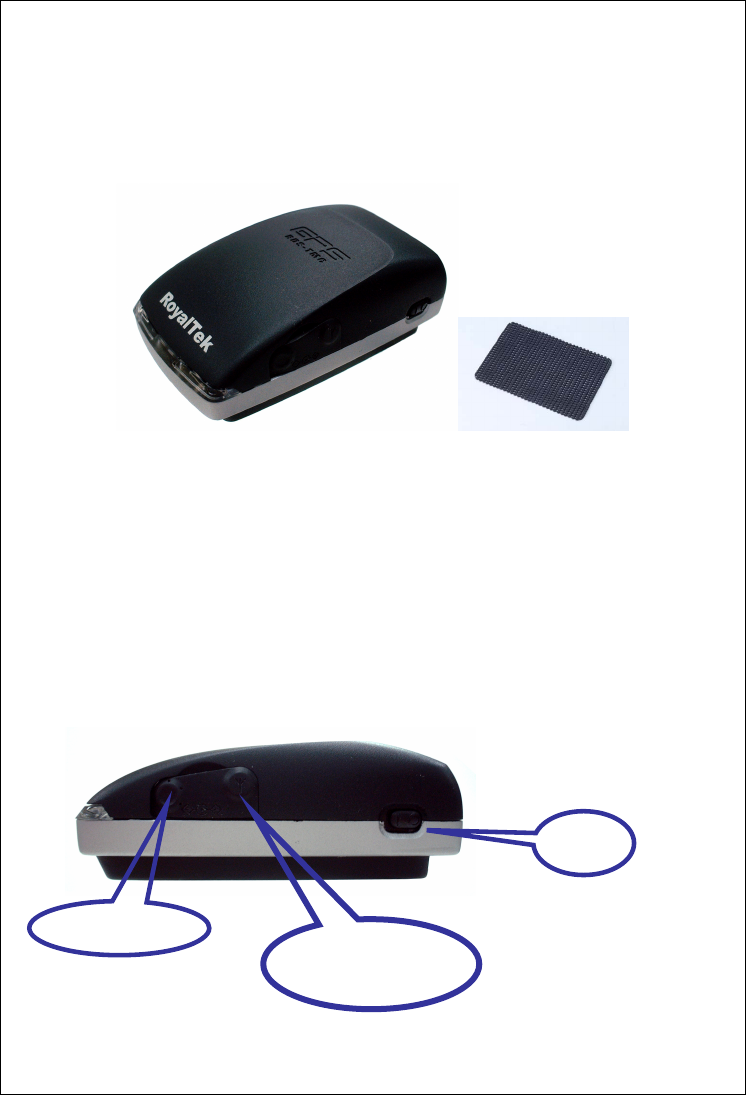
Check the Package Content
Before start using your RoyalTek Bluetooth GPS + RDS TMC Receiver,
RTG-1001, please check if your package includes the following items. If any
item is damaged or missing, please contact your reseller at once.
RTG-1001 External TMC Antenna Car Charger Car Holder PDA
Adapter Connector Navigation Software Kit Non-Slip Pad
Power Switch, Power Jack & External Antenna Port
Right View
Power Jack
External GPS
Antenna Port
Power
Switch
English 2
Left View
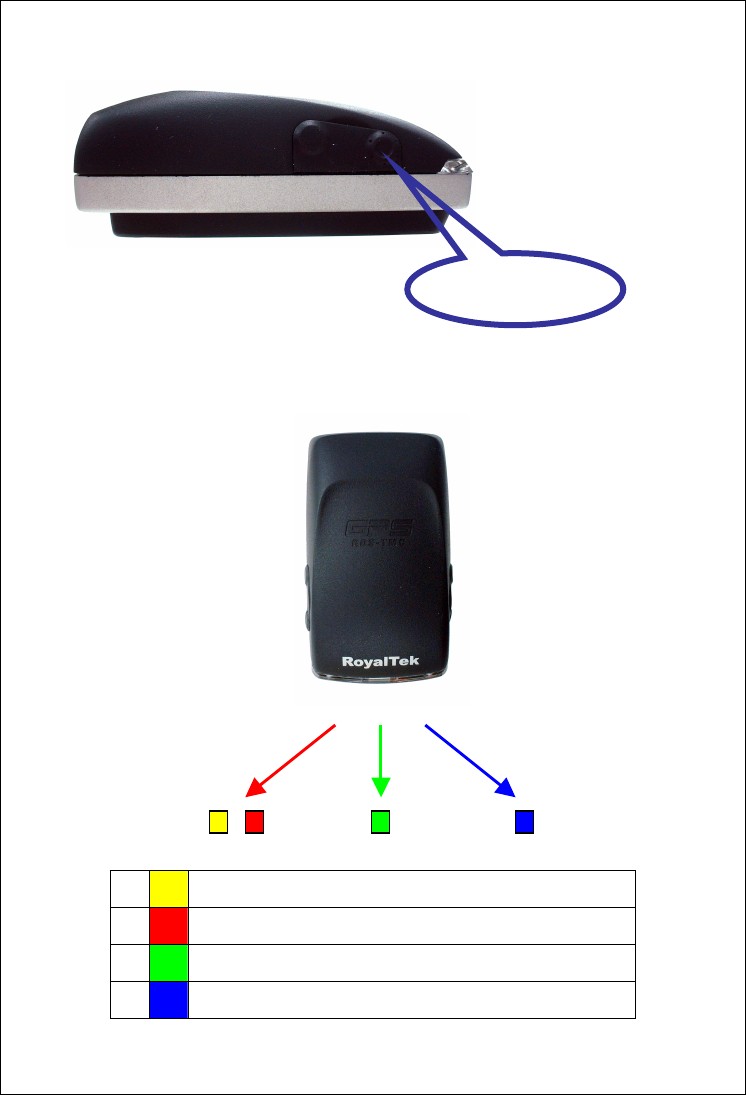
LED Display
Front View
1
Yellow LED indicates power is in charging
2
Blinking red LED indicates low power
3
Blinking Green LED indicates position is fixed
4
Blinking Blue LED indicates Bluetooth is connected
Battery Status GPS Status Bluetooth Status
1
2
3
4
External TMC
Antenna Port
English 3
Getting Started
STEP 1: Charge the Battery
Before you use RTG-1001, the battery must be charged for at least four hours.
Plug car charger into power jack and cigar-lighter separately. As RTG-1001 is
in charging, the Yellow LED will be lighted up. When the battery is fully
charged, the Yellow LED will be turned off. Unplug car charger from power
jack and cigar-lighter separately.
STEP 2: Turn on Receiver and wait for GPS fix
If the position has not been fixed yet, the Green LED will be still. If the position
has been fixed, the Green LED will be blinking.
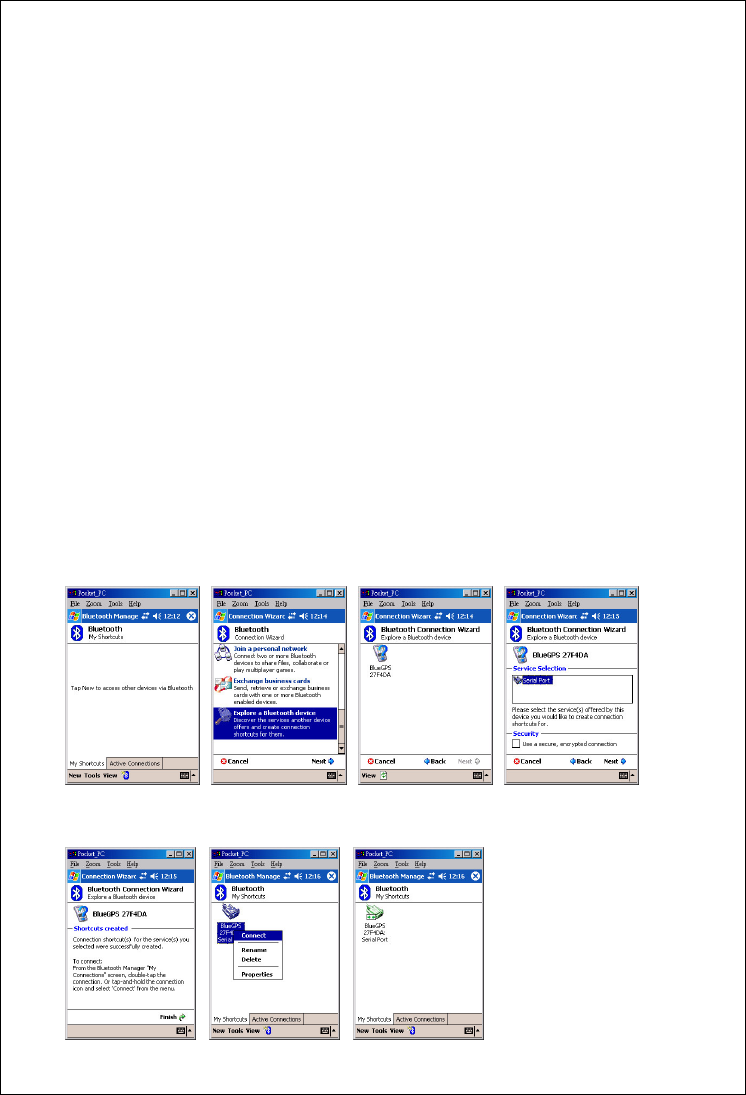
STEP 3: Connect to Bluetooth-enabled handheld device
From your Bluetooth-enabled handheld device, execute Bluetooth application
software to search RTG-1001 and then connect it to your device. If the
connection between your device and RTG-1001 is successful, the Blue LED
will be blinking.
NewConnect
Explore a Bluetooth
device
Tap Bluetooth GPS
BlueGPSxxxxxx
Select Serial Port

English 4
Click Finish
Tap BlueGPSConnect Successful
STEP 4: Connect to your Navigation Software
Install and launch your navigation software in Navigation Software Kit and set
GPS configuration. Select correct COM port subject to the outbound
Bluetooth serial port of your handheld device and correct baud rate
depending on your navigation software.
•If you are required to type in pin code during configuration, please key in
“0000”.
TMC Function
TMC standards for Traffic Message Channel, it allows the end
users to receive real time news concerning the traffic conditions.
Please refer to the navigation software manual for basic set up
process and usage.
How to use Car Holder
1. Joint gooseneck with holder.
2. Suction mount to windshield or any flat, smooth surface or use
self-adhesive power disc connector to mount on other surfaces
3. Squeeze sides to close and press button to release.
• Never leave your handheld device and the mount in extreme heat.
How to use Car Charger to charge your handheld device
1. Connect car charger into your adapter connector of handheld device.
2. Plug adapter connector into handheld device connector and plug car
charger into cigar-lighter.
Tips
1. Place your RTG-1001 below the windshield for car navigation

English 5
2. Cars equipped with heat dissipation films for the windshield and windows
will affect GPS and TMC performance.
3. The RDS TMC antenna shall be positioned under the front windshield.
4. For the first position fix, please make sure your RTG-1001 is not in
motion but stationary and in open space so as to shorten the fix time.

FCC ID: RCCTG
FCC Compliance and Advisory Statement
This device complies with Part 15 of the FCC rules. Operation is subject to the following two
conditions:(1) this device may not cause harmful interference, and (2) this device must accept
any interference received, including interference that may cause undesired operation.
This equipment has been tested and found to comply with the limits for a Class B digital device,
according to Part 15 of the FCC rules. These limits are designed to provide reasonable
protection against harmful interference in a residential installation. This equipment generates,
uses and can radiate radio frequency energy and if not installed and used in accordance with
the instructions, may cause harmful interference to radio communications. However, there is
no guarantee that interference will not occur in a particular installation. If this equipment does
cause harmful interference to radio or television reception, which can be determined by turning
the equipment off and on, the user is encouraged to try correct the interference by one or more
of the following measures:
1.Reorient the receiving antenna.
2.Increase the separation between the equipment and receiver.
3.Connect the equipment into and outlet on a circuit different from that to which the receiver is
connected.
4.Consult the dealer or an experienced radio/TV technician for help.
Any special accessories needed for compliance must be specified in the instruction manual.
Warning: A shielded-type power cord is required in order to meet FCC emission limits and
also to prevent interference to the nearby radio and television reception. It is essential that
only the supplied power cord be used. Use only shielded cables to connect I/O devices to this
equipment.
CAUSION: Any changes or modifications not expressly approved by the party responsible for
compliance could void your authority to operate the equipment.