Royole RY0101 Smart Mobile Theater User Manual 20151217
Royole Corporation Smart Mobile Theater 20151217
Royole >
manual
User Manual
Smart Mobile Theater
Near-to-eye devices may affect kids' health. Please keep it from younger kids.
Ages
While using the device, Royole suggests you take a break periodically, and the break duration and interval depend on each
individual. In case of any discomfort (such as eyestrain, malaise, nausea or blackout), please stop using the device
immediately until the symptoms disappear and visit a doctor if necessary.
Read these instructions –All the safety and operating instructions should be read before this product is operated.
Keep these instructions –The safety and operating instructions should be retained for future reference.
Heed all warnings –All warnings on the apparatus and in the operating instructions should be adhered to.
Follow all instructions –All operating and use instructions should be followed.
Clean only with dry cloth.
Only use attachments/accessories specified by the manufacturer.
Unplug the apparatus during lightning storms or when unused for long periods of time.
Adverse reaction
Important Safety Instructions
Health
Warning
Do not expose the apparatus to rain or moisture.
Do not cover the ventilation opening of the apparatus with newspapers, table-cloths, curtains, etc.
Do not expose the apparatus to naked flame sources, such as lighted candles.
Do not expose the apparatus near any heat sources such as radiators, heat registers, stoves, or other apparatus (including amplifiers)
that produce heat.
Do not expose the apparatus to dripping or splashing, and do not place objects filled with liquids, such as vases, on the apparatus.
Do not expose battery or apparatus with battery installed to excessive heat, such as sunshine, fire or the like.
CAUTION:
CAUTION:
These servicing instructions are for use by qualified service personnel only. To reduce the risk of electric shock,
do not perform any servicing other than that contained in the operating instructions unless you are qualified to do so.
Refer all servicing to qualified personnel. Servicing is required when the apparatus has been damaged in any way, such as
power supply cord or plug is damaged, liquid has been spilled or objects have fallen into the apparatus has been exposed to
rain or moisture, does not operate normally, or has been dropped.
9)
8)
The use of apparatus in tropical and/or moderate climates.
10)
The direct-plug adapter is used as the disconnect apparatus, the disconnect apparatus shall remain readily operable.
11)
This battery is irreplaceable. Attention should be drawn to the environmental aspects of battery disposal.
12)
To prevent possible hearing damage, do not listen at high volume levels for long periods.
13)
1)
2)
3)
4)
5)
6)
7)

Do not use any non-specified adapter or USB cable, which may otherwise cause product failure, or even damage the
product.
Do not dismantle or restructure the power adapter.
Do not touch the metallic area of the power adapter. Especially, metal tools may cause direct short and damage the power
adapter.
Problems caused by any USB hub or USB extension cords are not covered by warranty (for repair, replacement or
compensation of faulty products).
As the device can be disconnected by unplugging the power connector from the wall socket, please connect it to an
available AC power socket. Once the device goes wrong, switch off the AC socket immediately, and unplug the connector.
Power adapter
The battery is irreplaceable.
Please do not put the device in extreme environments, such as under the sunlight or fire.
A fully discharged battery can be recharged for approximately 500 times, which depends on the using conditions.
In order to prevent degradation, the battery should be charged every six months if the device is out of operation for a long
time.
Built-in battery
Usage
Make sure you are properly wearing Royole-X. Align the window with your eyes if the image looks distorted. You may refer to the
startup tips for details.
Drop or brutal usage of the device may lead to distortion of images.
Do not touch the processor unit (BOX) or power adapter for a long time while using. Prolonged skin contact may cause low
temperature burns.
Royole-X PD adjustment range is 56 mm - 70 mm. If this is not applied, please do not use the product anyway.
Royole-X DPT adjustment range is myopic 500° to hyperopic 200°. If your eyesight degree is out of the range, you should
wear glasses, but the view will be affected.
Comfortable use
Prolonged excessive volume may damage the hearing, which should be avoided for safety purpose.
If you are allergic to the headset, please stop using the device immediately and visit a doctor.

The device uses the 2.4 GHz frequency band and adopts the OFDM mode for modulation.
If there are more than 3 pairs of 2.4 GHz wireless devices (including this product) within an area of 20 sqm, the wireless
communication function may be disabled due to signal interference.
Do not use the wireless communication function where it is prohibited or limited (during flight or in the blasting operation area,
etc.).
The device uses the 2.4 GHz frequency band which may be used by other wireless devices as well. In order to avoid signal
interference between the system and other devices,
Wireless communication
Bringing the device from cold to warm environment or opening the heater in the room may cause condensation on the surface
of or inside the device. If condensation happens, do not use or charge the device, to avoid electric shock or damage.
Condensation
In dry seasons, using the device may cause tingle to ears occasionally. It may be caused by ESD from human body.
Electrostatic
Do not dispose the abandoned product together with household wastes. Proper disposal of the abandoned product will help avoid
the potentially negative impacts on the environment and human body. Please follow the local rules and regulations for more
details.
Environmental protection
Please carefully protect the lens from stains or scratches. If the lens is blurred, please softly wipe the lens with soft cloth.
Do not shake or press the lens with a large force. The breached or broken lens may do harm to human body. In case of such
situation, stop using the device at once and replace with the new ones.
Lens Care
Clean the outer surface of the device by using soft cloth with a bit of mild detergent. Do not use dissolvent such as diluents,
gasoline or alcohol since these dissolvent may cause damage to the device surface.
Cleansing
Do not cause harmful interference to all legitimate radio services while using. Once any interference is detected, the function
should be disabled.
Do not change the transmission frequency, increase the emission power (including assembling an extra power amplifier),
mount external antenna or change to other antennas without permission.
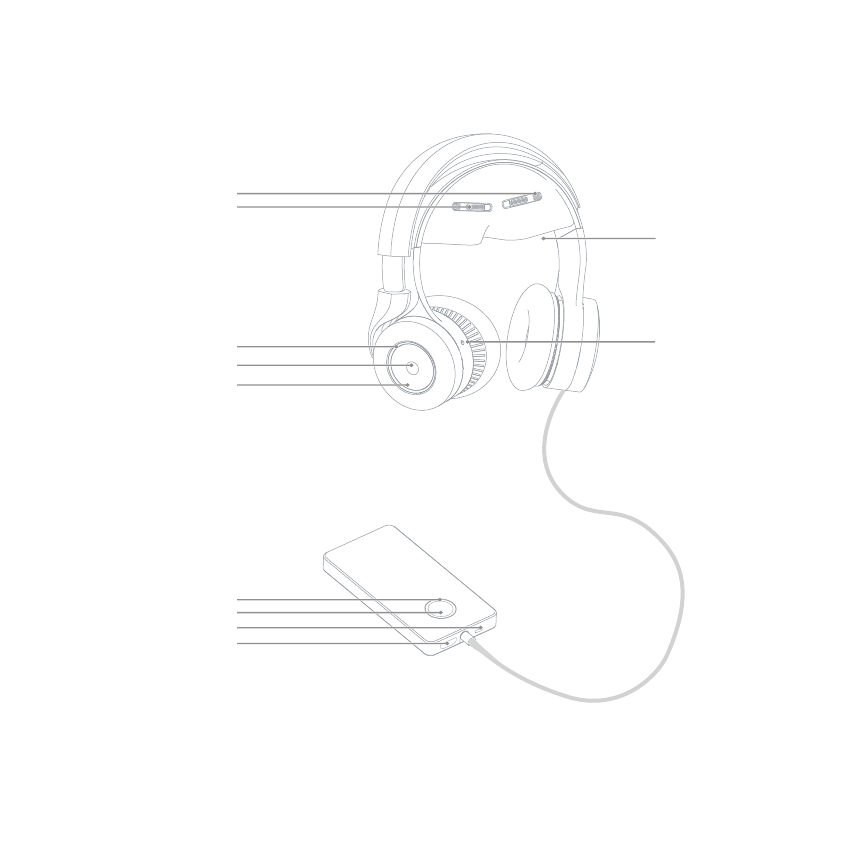
Overview
Quick preview of all the function keys
PD Adjustment Sliders
DPT Adjustment Wheels
Viewing Windows
Noise Reduction Switch
Indicator
Button
Touch Wheel
Indicator
Power
Micro USB
HDMI
Connection
Enjoy infinite resources with multiple connection methods.
Storage
Multimedia Cast
Multi-screen interaction
HDMI connection
R
Discover
OTG connection
Using the HDMI cable, you can see the content on PC, player, STB and other
devices after being connected.
The OTG function is available for the Micro USB interface. The device can read
data from the mobile storage device through an OTG data cable.
The device provides 16 GB storage, to store multimedia resources via Micro
USB.
Using the Discover function, you can access shared multimedia files from the
other devices on the LAN.
Transfer images and sound from other mobile devices and play them in the device.
Cast multimedia files from other mobile devices and play in the device.
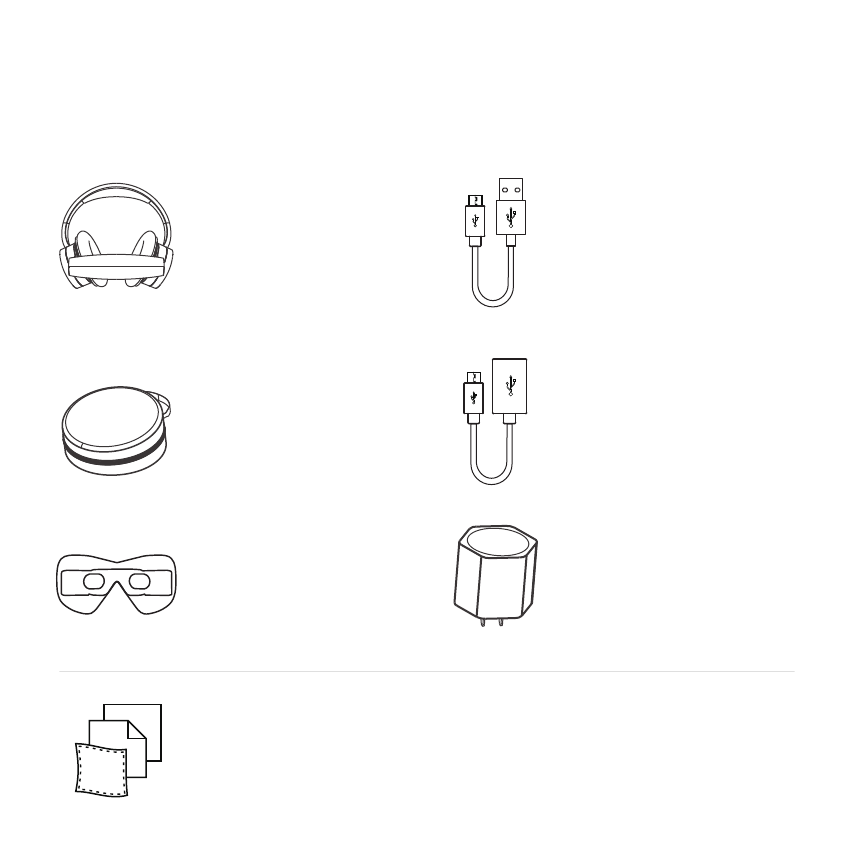
Packing list
After purchase, please confirm you have all the following items in the pack. If any item is missing, please contact your local
retailer, or call the Royole service center.
Power adapter
Charge the device together with the
"USB to Micro USB" cable.
Royole-X ( foam cushioning included)
Smart mobile theater device, including
a replaceable foam cushioning.
Light-tight hood included
including a mobile light-tight hood.
Portable storage box
Easy for carrying.
Manual/Quick Guide/Guarantee Card/Lens Cloth
Provide more information about the product.
"USB to Micro USB" cable
Charge the device together with the
power adapter.
OTG cable (giveaway)
The OTG function is available for the
Micro USB interface. The device can
read data from the mobile storage
device through the OTG data cable.
Smart Mobile Theatrer
For more information, service or support,
please visit our website: www.royole.com,
Model No.: RY0101
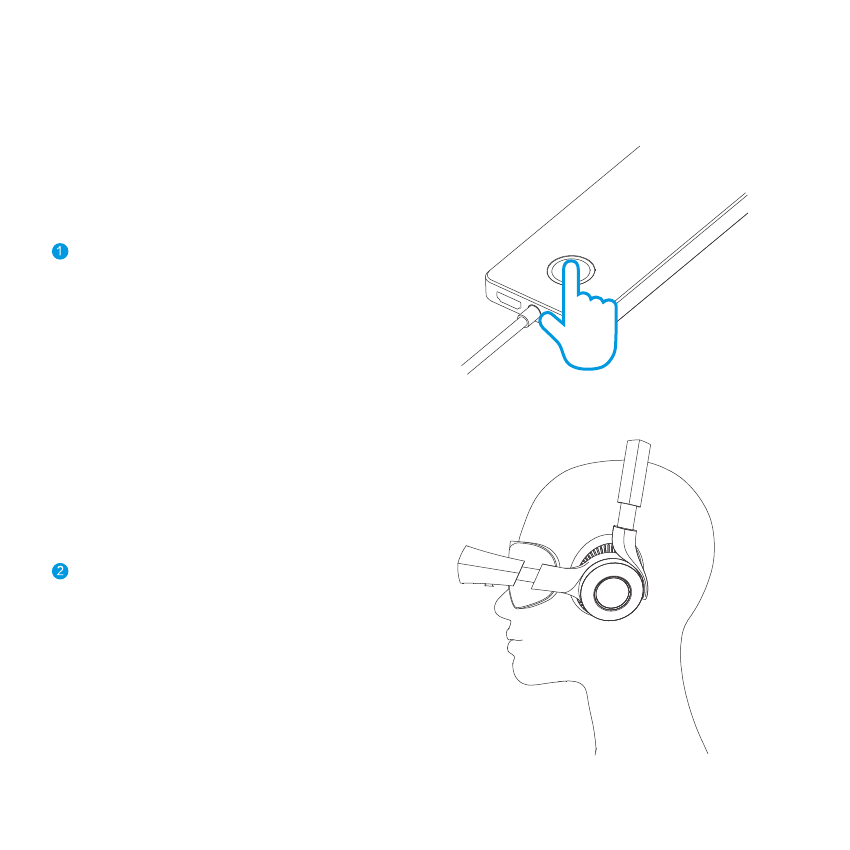
Quick setup
Quickly know about the device.
Unfold the display unit and adjust it to the optimum fit.
Long press the Power button until the indicator is on.
Start the device
Wear the device
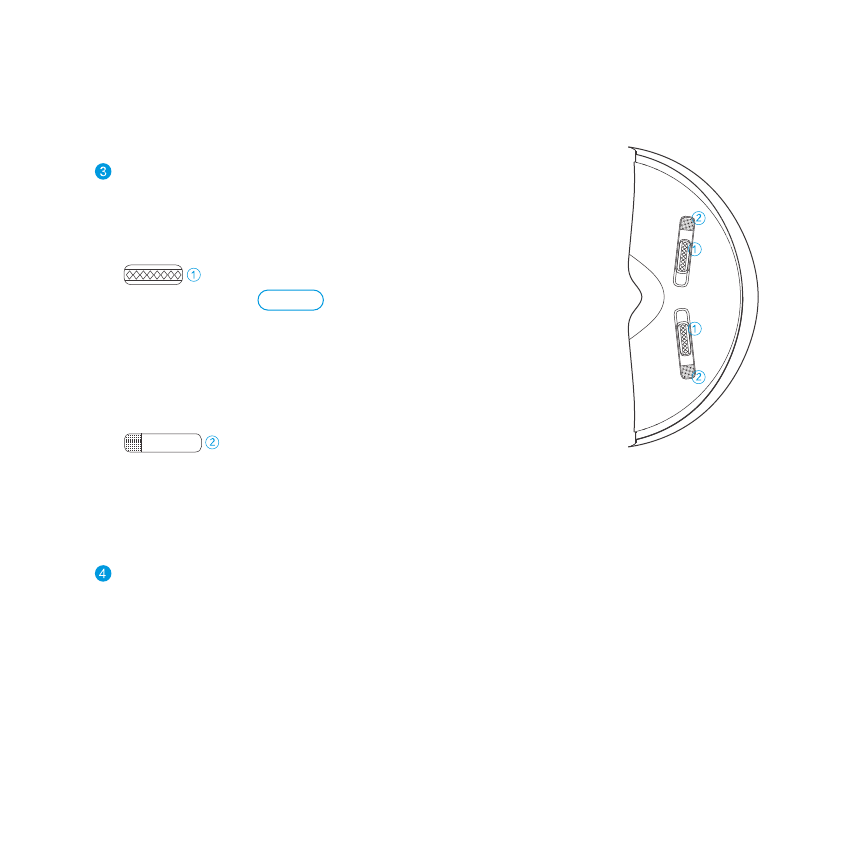
Display setup
Adjust the DPT and PD to make images clear.
*Note: When adjusting the focus following the startup guide, the device will close
the images on the other side, just to make the focus adjustment more accurate.
Start enjoyment
Enjoy the infinite fun Royole-X brings to you.
Adjust the focus for eye
Rotate the left/right Focus Adjustment Wheel until images are clear.
Adjust the Pupil Distance
Press the PD adjustment sliders, and slide to adjust the lens spacing
until you cannot see double vision.
left/right
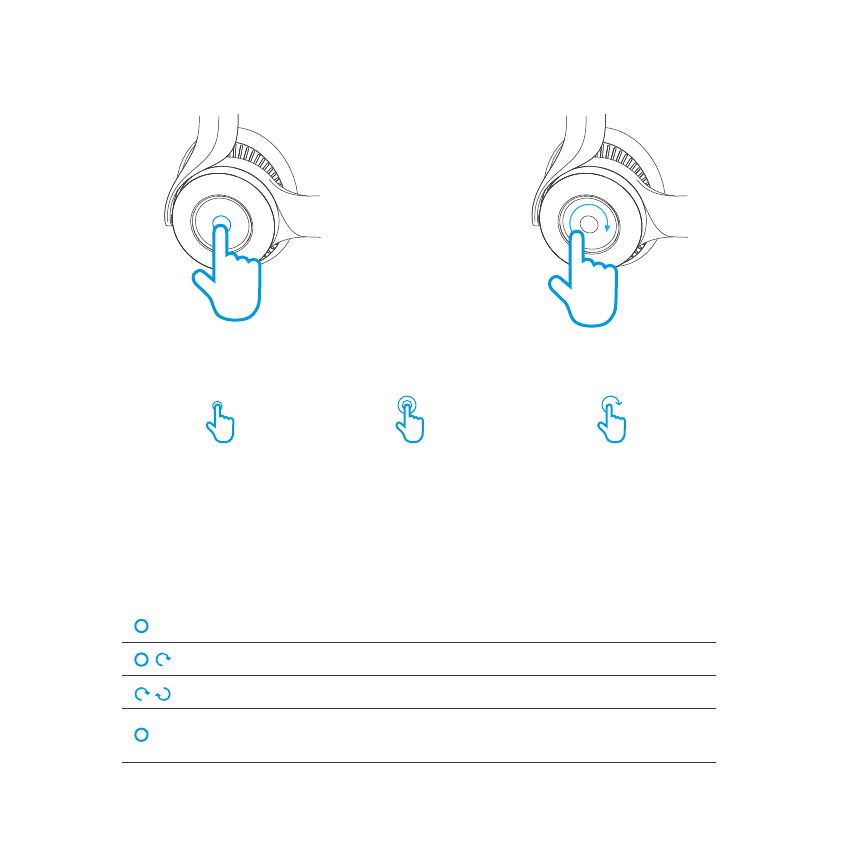
Operations
Slide the Touch Wheel
Clockwise / Counterclockwise
Select
Click
the center button Double-click
the center button
Confirm Back
Pause or start playingClick
Fast-Forward/Fast-Rewind
Volume up/down
Delete the local file(s)
Show the playlist on the player interface
Click and slide
Slide (clockwise/counterclockwise)
Long press
Quickly know how to use the device.
You can operate the device by means of sliding clockwise/counterclockwise, click,
double-click, and long press.
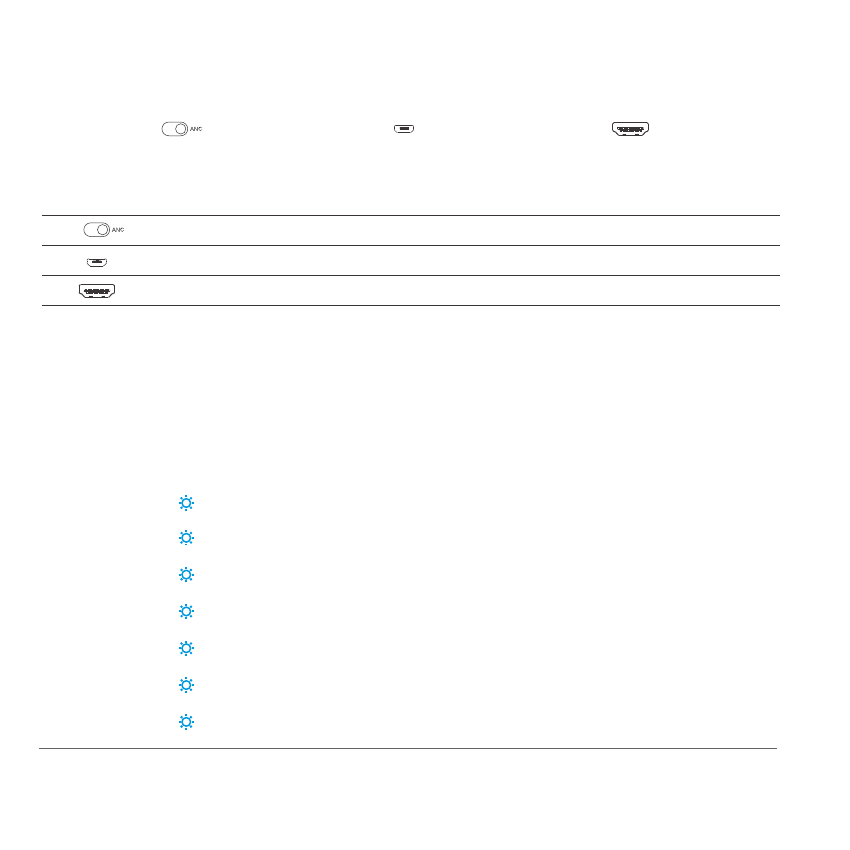
Ports and buttons
NR switch Micro USB
Micro USB interface Charge/Data transfer
HDMI
HDMI interface Audio and video transfer
Indicators
By default, the device will enter the standby mode automatically when no video file is played and the touch
wheel is not used for 10 minutes.
Processor unit
Display unit
Power on
Power off4
1Entering/Exiting the standby mode
Standby mode
Charging
Charging completed
Low battery
properly functioning
Light on for 1 second
Blinks 4 times consecutively flash
Blinks once
Breathing indicator
Slow blinking(once every 3 seconds, until charging completed)
Always on
Fast blinking at an interval (twice every 10 seconds)
Breathing indicator
Enable or disable the headphones NR function Slide to ANC to enable NR
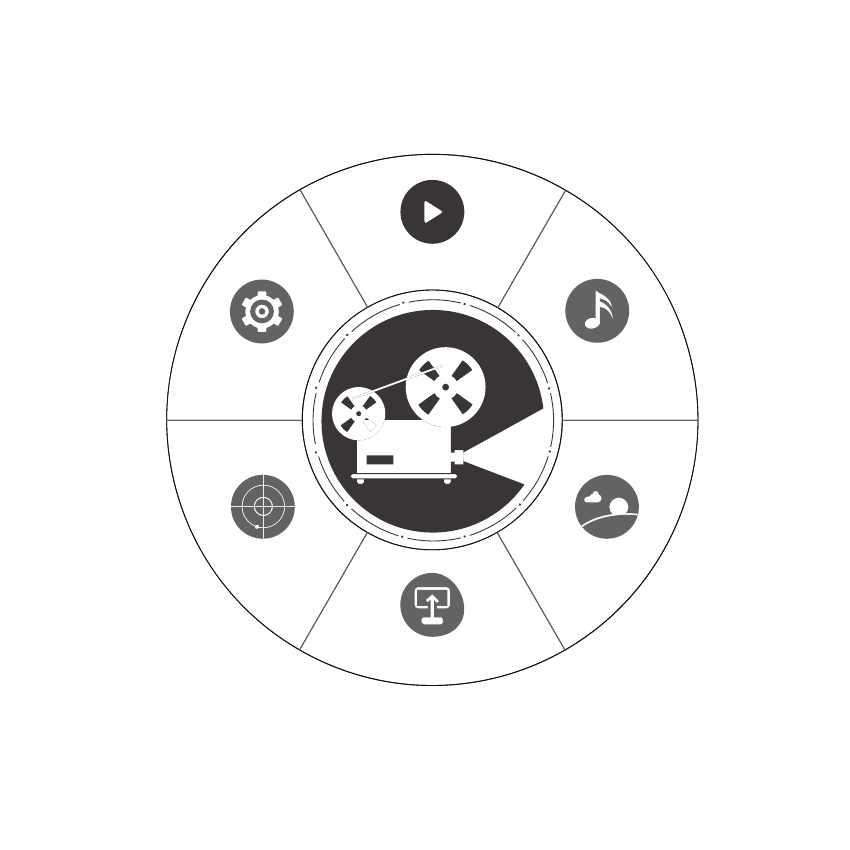
Royole-XOS Operation Panel
Settings
Videos
Slide the touch wheel to switch the options
Cast
Discover Pictures
Music
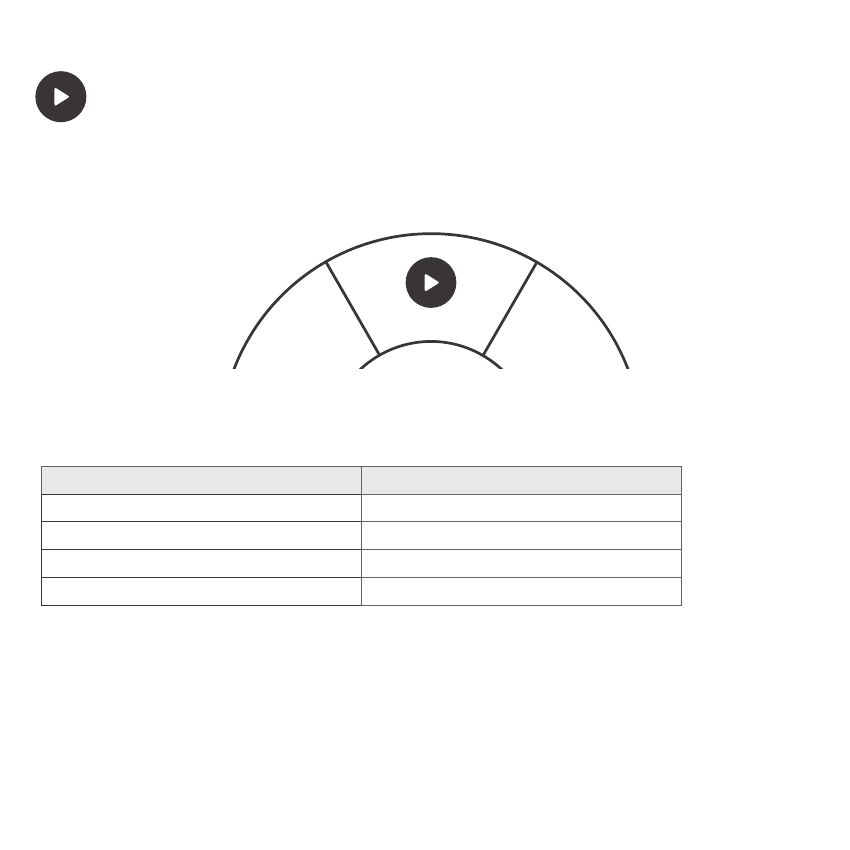
Videos
You can play videos stored in this device or use the OTG connection to play videos in other devices.
Videos
Deleting video files
During video playing:
Select a file to be deleted, and long press the touch wheel. When the delete dialog box appears, select "Yes". The file will be deleted.
Supported file formats
Royole-X supports multiple formats of video files, including MP4, FLV, MKV, AVI, MPEG, WEBM, MOV, 3GP, F4V, 3GPP, VOB, MPG,
M1V, M2V, DAT, TS, TP, M2TS, ASF, WMV, PMP, AWTS, 3DM, 23DV, and OGM.
Supported formats of caption files
Royole-X supports multiple formats of external subtitle files, such as SRT, ASS, SSA, etc. You can name the caption files as the video
files and store them in the same directory. When videos are played, the subtitles will be displayed as well.
Pause or play
Volume up/down
Fast forward/rewind
Display the playlist
Click
Click and slide
Long press
Slide (clockwise/counterclockwise)
If you want it to Please operate as below
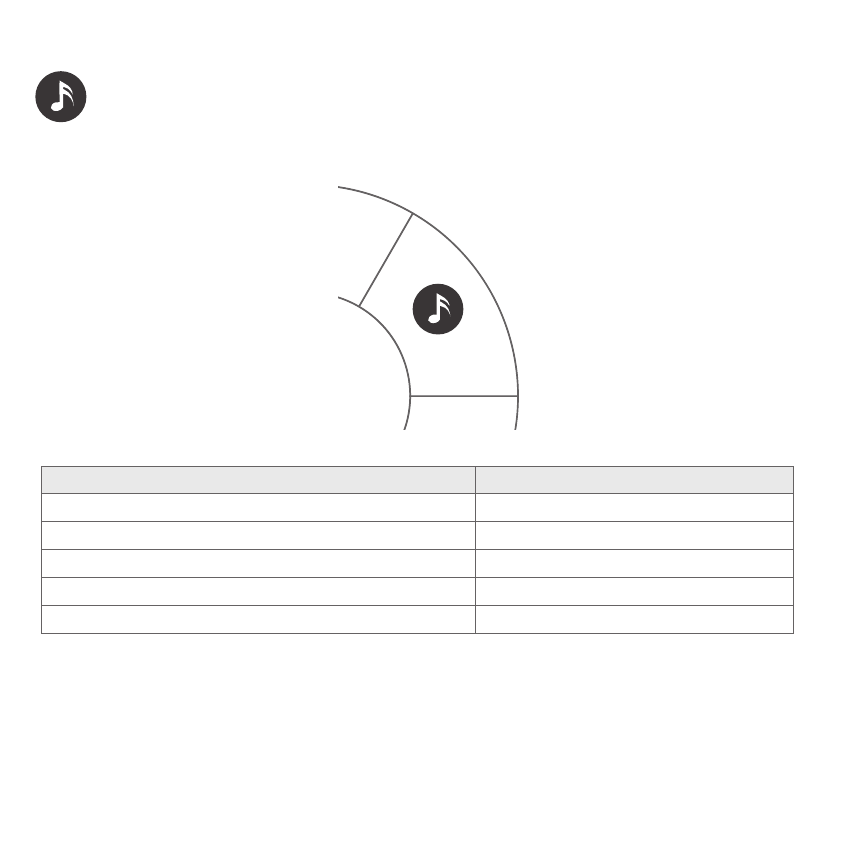
Music
Music
You can play music stored in this device or use the OTG connection to play music in other devices.
Pause or play
Fast forward/rewind
Click
Click and slide
Deleting music files
During music playing:
Select a file to be deleted, and long press the touch wheel. When the delete dialog box appears, select "Yes". The file will be deleted.
Royole-X supports multiple formats of music files, including MP3, AAC, FLAC, WMA, AMR, OGG, WAV, MID, SMF, XMF, IMY, RTTTL, RTX,
OTA, APE, and ARAC.
Switch the play modes (shuffle off, repeat one, shuffle) Pause and then long press
Supported file formats
Royole-X supports lyric display. When the device is connected to the Internet and plays music, it will automatically download and display the lyrics. If the
Internet is not connected, you can name the LRC files as the music files and store them in the same directory. Then, the device will display the
lyrics when playing music.
Supporting lyrics
If you want it to Please operate as below
Display the playlist Long press
Volume up/down Slide (clockwise/counterclockwise)
Switch to the previous picture
Switch to the next picture
Auto play
Display the picture list
Slide counterclockwise
Slide clockwise
Click
Deleting picture files
Supported file formats
Select the file to be deleted, and long press the touch wheel. When the delete dialog box appears, select "Yes". The file will
be deleted.
Royole-X supports multiple formats of picture files, including JPEG, PNG, BMP, and GIF.
If you want it to Please operate as below
Long press
Pictures
Pictures
You can browse pictures stored in this device or use the OTG connection to browse pictures in other devices.
During picture browsing:
Multimedia Cast
The procedure is as follows (using a smart phone for example):
Multi-Screen Interaction/Multimedia Cast
Cast
1. Start Roycle-X and enter the Cast > Multimedia Cast page.
2. Start an APP that supports multimedia cast on the phone and select Roycle-X for cast.
Multi-Screen Interaction
The procedure is as follows (using a smart phone for example):
You can transmit the screens and sound of smart phones, Pads or computers directly to Roycle-X for playing.
1. Start Roycle-X and enter the Cast > Multi-Screen Interaction page.
2. Search for Roycle-X on the phone for connection. After the connection succeeds, multi-screen interaction can be
implemented.
Video, music and picture files in your smart phone, pad or computer can be transferred to Royole-X through wireless network
and display.
Notes
2. Only certain APPs support digital media sharing; therefore, relevant software must be installed on the computer for casting.
3. When the cast function is used, Roycle-X supports operations such as play/pause, volume control, and fast forward/rewind.
1. Make sure that Roycle-X and your device are in the same valid network. If there is no external network, you can enable the Hotspot function of the
phone for connection.
Discover
Discover
The procedure is as follows (using a smart phone for example):
1. Start an APP that supports multimedia resource sharing in your mobile phone, and select the directory and
contents to be shared.
2. Start the Royole-X and access the Discover page.
3. Select your shared mobile phone after scanning to view the shared contents.
1.Make sure that Roycle-X and your mobile phone, Pad and computer are in the same valid network.
2.Relevant APPs or software (supporting multimedia resource sharing) in your mobile phone, pad or computer.
3.Only the shared videos, music or pictures can be viewed by Royole-X.
Connect Royole-X to a valid wireless network (if no external network is available, you may also use the Hotspot
function of the smart phone for connection). You can search for the smart phones, pads or computers in the
same LAN, and then browse and play the video,music or picture files which are shared by them.
Notes
Settings
Settings
The Settings consist of seven items, which are About, System, Reminders, Language, Sound, Display and WLAN.
You can perform personal settings and view the information about Royole-X.
You can view information about Royole-X, including the system version, serial number, and storage.
Select the next/previous one
Access the current option for setting
Return to the previous level
Adjust setting parameters
Slide clockwise/counterclockwise
Click
Double-click
Slide clockwise/counterclockwise
Operation instructions:
If you want it to Please operate as below
About

System
1. Update (Choose Settings > System > Update)
Reminders:
1.Eye caring (Choose Settings > Reminders > Eye Caring)
2.Startup gesture guide (Choose Settings > Reminders > Startup Gesture Guide)
2. Reset device (Choose Settings > System > Reset device)
A. Click it to reset device. The system will reboot automatically.
B. Your personal settings will be deleted after Reset.
When you watch Royole-X for a long time, it will remind you to take care of your eyes. You can set the reminding
cycle to 45 minutes or 90 minutes. You can also choose the Don’t Disturb mode to disable this reminder function.
C. Don’t shut down Royole-X during upgrade.
If this function is enabled, a guidance page for new users will be displayed every time you start Royole-X. You can
also disable it to make sure that it will not appear any longer.
A. When a new system version is available, Royole-X will automatically detect it through the wireless network and
give notifications.
B. It may take a long time to download upgrade files. To avoid interruption, please make sure the battery capacity
is over 30% , or directly connect the device to power supply. When the downloading is complete, Royole-X will
automatically reboot and install the upgraded version.

WLAN (Choose Settings > WLAN)
Language
Choose Settings > Language to select the language you want.
Display
1. Brightness adjustment: Adjust the brightness of the screen as you wish.
2. Auto standby mode: You can enable or disable the auto standby mode.
3. Headset light: Turn on or off the headset light.
Sound
1. Volume up/down: Adjust the volume. You can also adjust the volume when a video or music is being played.
2. System sound on/off: Turn on or off the system sound.
1. Connection procedure: Enable the WLAN, Search a network, join a network, and input the password. Then,
the connection succeeds.
3. To ignore the currently connected network, long press this network, and then select "Ignore".
2. After inputting the password, select "Connect" in the keyboard for connection.
4. A WLAN is required for the Cast, Discover, and Update function. You are advised to disable the WLAN and only
enable it as required, so as to save power.

Active Noise Reduction
Battery charging
Active standby:
Standby Mode
When the device is working, short press the Power button to enter the standby mode (if the device is playing music, only the
screen is turned off but the music continues).
Passive standby:
If no operation is performed and no video is played for 10 minutes, the system will enter the standby mode. (The default standby
time is 10 minutes. You can adjust it in Settings.)
Wake-up:
Short press the Power button to wake up the system.
Royole-X is equipped with a high-quality audio device and provides the active noise reduction function.
To enable or disable the active noise reduction function, toggle the noise reduction switch at the right lower part of the headset.
When you use the device for the first time or its battery is of low capacity, you should charge the battery with its original matching
data cable and power adapter.
During charging, the indicator of the processer unit will blink slowly (blink once every 3 seconds).
After the charging is finished, the indicator will keep on until the power supply is cut off.
After the charging is finished, please unplug the data cable, and remove the power adapter from the socket.
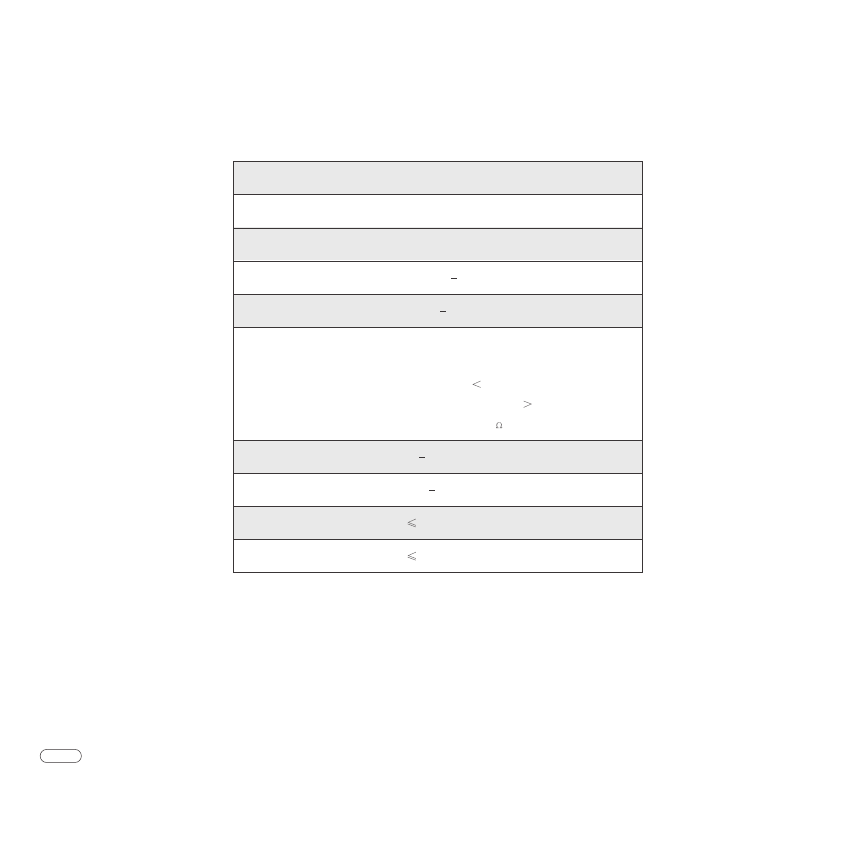
Specification
Based on users’ using modes and actual environment, the specifications mentioned above may be slightly different. We will not give notices if the
system specifications or appearance are changed.
Notes
Display unit
Size:
Resolution:
Pupil distance:
Diopter:
Headset:
Operating temperature:
Storage temperature:
Operating humidity:
Storage humidity:
Approximate 230x230x100 mm
3300ppi
Supported resolutions: XGA, HD, FHD, etc.
56 mm 70 mm
-500° 200°
Aactive noise cancelling
Max. reduced noise amplitude: 22dB
Distortion: 1%
Reduction degree: 92%
Impedance: 32
0 45°
-20 60°
90%RH
90%RH
C
C
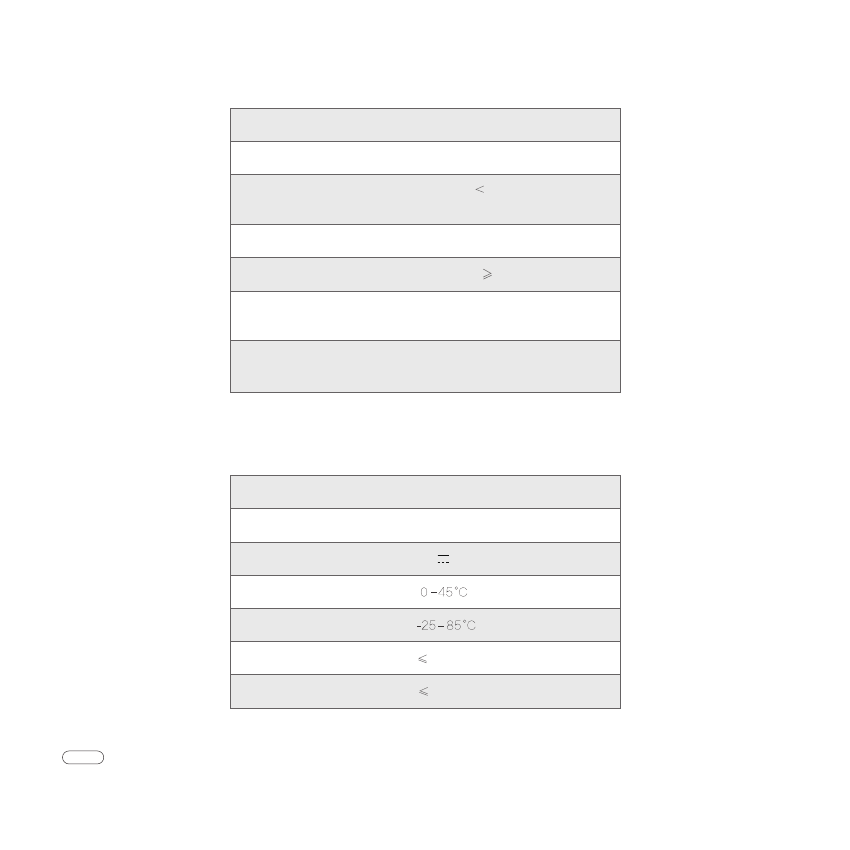
Based on users’ using modes and actual environment, the specifications mentioned above may be slightly different. We will not give notices if the
system specifications or appearance are changed.
Notes
Power adapter
Processer unit
ODM Manufacturer: Shenzhen Royole Technology Corporation
Address: Bld. 43, Dayun Software Town, No. 8288, Longgang Blvd., Longgang District, Shenzhen City.
Size:
Rated input:
Rated output:
Storage temperature:
100-240V~50/60Hz,0.35A
5V 2A
Operating humidity:
Storage humidity:
90%RH
90%RH
Approximate 40x44x60 mm
Operating temperature:
Size:
Power dissipation:
Operating duration:
Charging duration:
Input interface:
Wireless network:
Capacity:
Approximate133x61x18 mm
Standby: 1W
Operating: 3.5W
Approximate 5-7hours
2 hours for 80%
HDMI
Micro USB
Compatible mode: 802.11b/g/n
Usable frequency: 2.4GHz
6000mAh
www.royole.com
Smart Mobile Theater
FCC Compliance statement
This device complies with Part 15 of the FCC Rules. Operation is subject to the following two conditions:
1) this device may not cause harmful interference, and
2) this device must accept any interference received, including interference that may cause undesired operation.
This equipment has been tested and found to comply with the limits for a Class B digital device, pursuant to Part 15 of the FCC
Rules. These limits are designed to provide reasonable protection against harmful interference in a residential installation. This
equipment generates, uses and can radiate radio frequency energy and, if not installed and used in accordance with the
instructions, may cause harmful interference to radio communications. However, there is no guarantee that interference will not
occur in a particular installation. If this equipment does cause harmful interference to radio or television reception, which can be
determined by turning the equipment off and on, the user is encouraged to try to correct the interference by one or more of the
following measures:
Specific Absorption Rate (SAR) information
This device is also designed to meet the requirements for exposure to radio waves established by the Federal Communications
Commission (USA).
The SAR limit of USA (FCC) is 1.6 W/kg averaged over one gram of tissue. This model (FCC ID: 2AGVM-RY0101) has also
been tested against this SAR limited.
□ Reorient or relocate the receiving antenna.
□ Increase the separation between the equipment and receiver.
□ Connect the equipment into an outlet on a circuit different from that to which the receiver is connected.
□ Consult the dealer or an experienced radio/TV technician for help.
The terms HDMI and HDMI High-Definition Multimedia Interface, and the HDMI Logo are trademarks or registered trademarks
of HDMI Licensing LLC in the United States and other countries.
HIGH-DEFINITION MULTIMEDIA INTERFACE
R
Note
Changes or modifications to this unit not expressly approved by the party responsible for compliance could void
the user’s authority to operate the equipment.
Warning
Specific Absorption Rate (SAR) information
This apparatus is also designed to meet the requirements for exposure to radio waves established by the EU.
The SAR limit of EU is 2.0 W/kg averaged over one gram of tissue. This apparatus has also been tested against this SAR
limited.
Correct Disposal of this product. This marking indicates that this product should not be disposed with other household wastes
throughout the EU. To prevent possible harm to the environment or human health from uncontrolled waste disposal, recycle it
responsibly to promote the sustainable reuse of material resources. To return your used device, please use the return and
collection systems or contact the retailer where the product was purchased. They can take this product for environmental safe
recycling.
This product compliances with the requirements of the following Directives and carries the CE mark accordingly.
LVD Directive 2006/95/EC & 2014/35/EU, EMC Directive 2004/108/EC & 2014/30/EU, R&TTE Directive 1999/5/EC &
2014/53/EU, RoHS Directive 2011/65/EU, Eco-design requirements for energy-related products Directive 2009/125/EC.
EU Declarations of Conformity