Royqueen Audio Technology RQT350 Bluetooth speaker User Manual DuraTunes T350B
Shenzhen Royqueen Audio Technology Co., Ltd. Bluetooth speaker DuraTunes T350B
Users Manual

T350B User Manual
Brand:ROYQUEEN
FCC ID:2ADORRQT350
Dear customer,
Thank you for purchasing the Bluetooth speaker T350B. To ensure correct
operation, please read this user manual carefully before operation.
Important Safety Instructions
◆ This speaker is designed to protect against splashing water sprayed at all angles.
Dropping the whole unit in body of water may damage the product.
◆ Keep speaker away from any source of heat.
◆ Adjust the volume to a suitable level so as to avoid damaging your hearing, or the unit
itself.
◆ If does not use this speaker for long time, please charge at lease once within one
month, in order to prevent the lithium battery from causing and damaging because of
excessive consumption.
Features
1. Bluetooth Music and Mobile Hands-free Function
Bluetooth stereo music playing, support mobile hands-free function.
2. Aux In
Work as the external speaker by connecting to the audio source of computer, mobile,
PSP/MP3/MP4 etc.
3. Voice Guide
The speaker will voice the current working mode under operation
Technical Data
Voltage: DC 5V
Impedance: 3Ω
Aux in Jack: 3.5mm
Net Weight: 148g
Size: 41(H)*84(Φ)(mm)
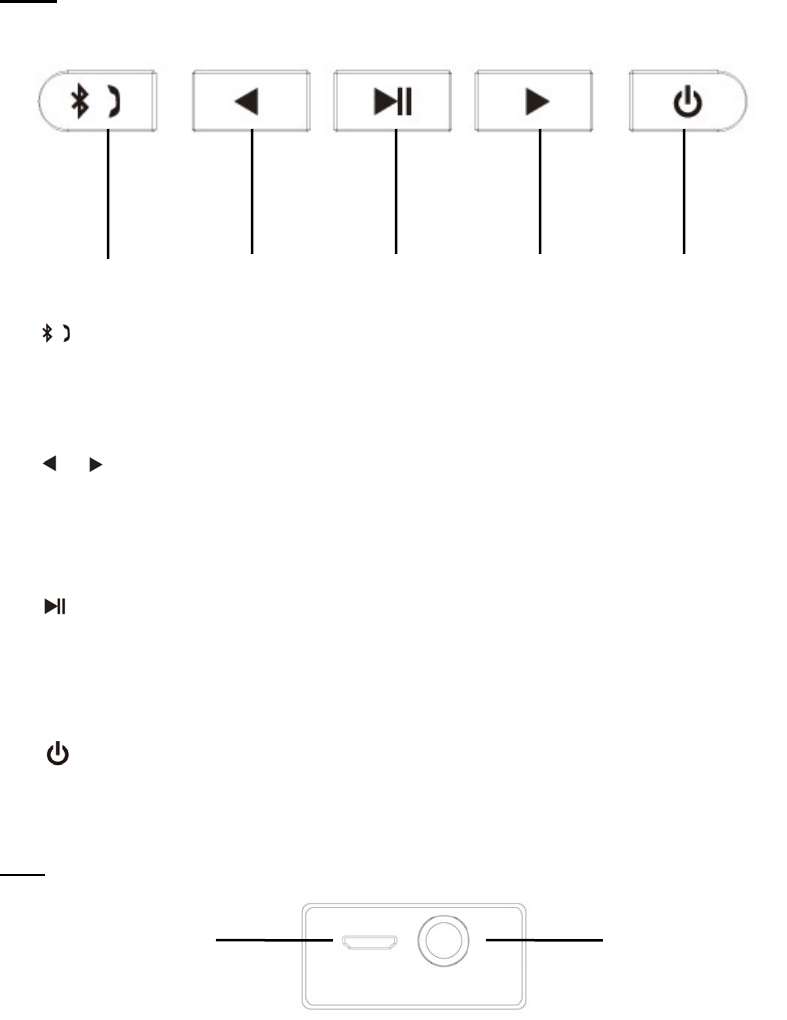
Keys
①
Short press:Pick up/Hand off the phone call
Long press: Disconnect the Bluetooth device forcibly
② /
Short press:Previous song/Next song (Bluetooth mode)
Long press: increase/decrease the volume
③
Short Press:Play/Pause (Bluetooth mode);
Long press: Switch the mobile phone call between the mobile and the speaker.
④
Long press: Power on/off the speaker
Slot
① Micro USB
Use the Micro USB cable included to connect the speaker to the computer/adaptor for
charging.
② AUX
Work as the external speaker by connecting to the audio source of computer, mobile,
PSP/MP3/MP4 etc.
① ② ②③ ④
① ②

Instructions
1. Power On / Off
Long press the button to power on the speaker (The blue light will be on); Long press
the button again to power off the speaker (The blue light will be off).
2. Bluetooth
(1) Power on the speaker, it will enter the Bluetooth mode directly.
(2) Bluetooth Paired
Please turn on the Bluetooth function of your mobile/other devices. And start to search for
Bluetooth devices, the “T350B” will be found, please connect it. (The speaker will voice
“Device paired” when connecting). The speaker’s default pairing code is “0000”. After
pairing, you can use Bluetooth music playing and hands-free function.
(3) Bluetooth Music
Please turn on the mobile or other devices’ music player, and speaker will play the
selected music.
(4) Mobile Hands-free
Under pairing, using phone to call, it can enter the Hands-free status.
(a) When phone call comes in, please press the button to pick up, press the
button again to hand off the phone call.
(b) Long press the button to reject the phone.
(c) Under Bluetooth pairing status, press the button twice and speaker will re-dial the
last telephone number.
3. Aux In
Use the 3.5mm audio cable included to connect the speaker to an audio source (PC,
MP3/MP4, mobile phone). The speaker will play the music from the audio source.
Please note: The speaker can not enter the Bluetooth mode if connecting with the aux
in cable. Please remove the aux in mode when using the Bluetooth mode.
4. Charging
The speaker with built-in rechargeable 800 mAh lithium battery, can play about 3hours at
the highest volume.
When battery low, the speaker will voice “out of battery”, please charge the battery as
soon as possible.
Below is the charging method:
1. Using the included micro USB charging cable to connect the speaker to the computer
for charging
2. Using the included micro USB charging cable to connect the speaker to t a branded
good quality 5V/1000mA adaptor for charging
Please Note: Do not charging the speaker more than 4 hours
5. LED Indicator Light
Blue light on: Bluetooth device paired;
Blue light flash slowly: Waiting for Bluetooth pairing;
Orange light on: Under charging, the light will off when charging completed.
This device complies with part 15 of the FCC rules. Operation is subject to the following two conditions:
(1) this device may not cause harmful interference, and
(2) this device must accept any interference received, including interference
that may cause undesired operation.
Changes or modifications to this unit not expressly approved by the party responsible for compliance
could void the user's authority to operate the equipment.