Royqueen Audio Technology T300B SPEAKERPHONE User Manual 3

Shenzhen Royqueen Audio Technology Co., Ltd. SPEAKERPHONE 3

Users Manual

Road Talk User Manual  Dear customer,     Thank you for purchasing the car Bluetooth speaker Road Talk. To ensure correct operation, please read this user manual carefully before operation.     Important Safety Instructions   ◆ Keep speaker away from water and other liquids.   ◆ Keep speaker away from any source of heat.   ◆ Adjust the volume to a suitable level so as to avoid damaging your hearing, or the unit itself.   Features: ◆ Bluetooth 4.0 Hands-free (mobile) Communication , support to pair with two mobile simultaneously. Multipoint support for HFP connection to 2 handsets for voice and also for A2DP sources for music playback. ◆ Built-in Voice Module ◆ Low power consumption, it will auto enter the sleep mode when not paired with mobile. ◆ Ergonomic design ◆ With Alloy Back Splint, can be handed on the Car Visor easily     Technical Data Bluetooth: 4.0 Impedance: 4 ohm   Output: 1W Voltage: DC 5V   N.W: 89 g Dimension: 103*59*37.5 mm Li Battery: 800 mAh Talking Hours: 12 hours Standby Hours: 900 hours   Package Contents Car Bluetooth Speaker Road Talk, USB Charging Cable, User Manual.
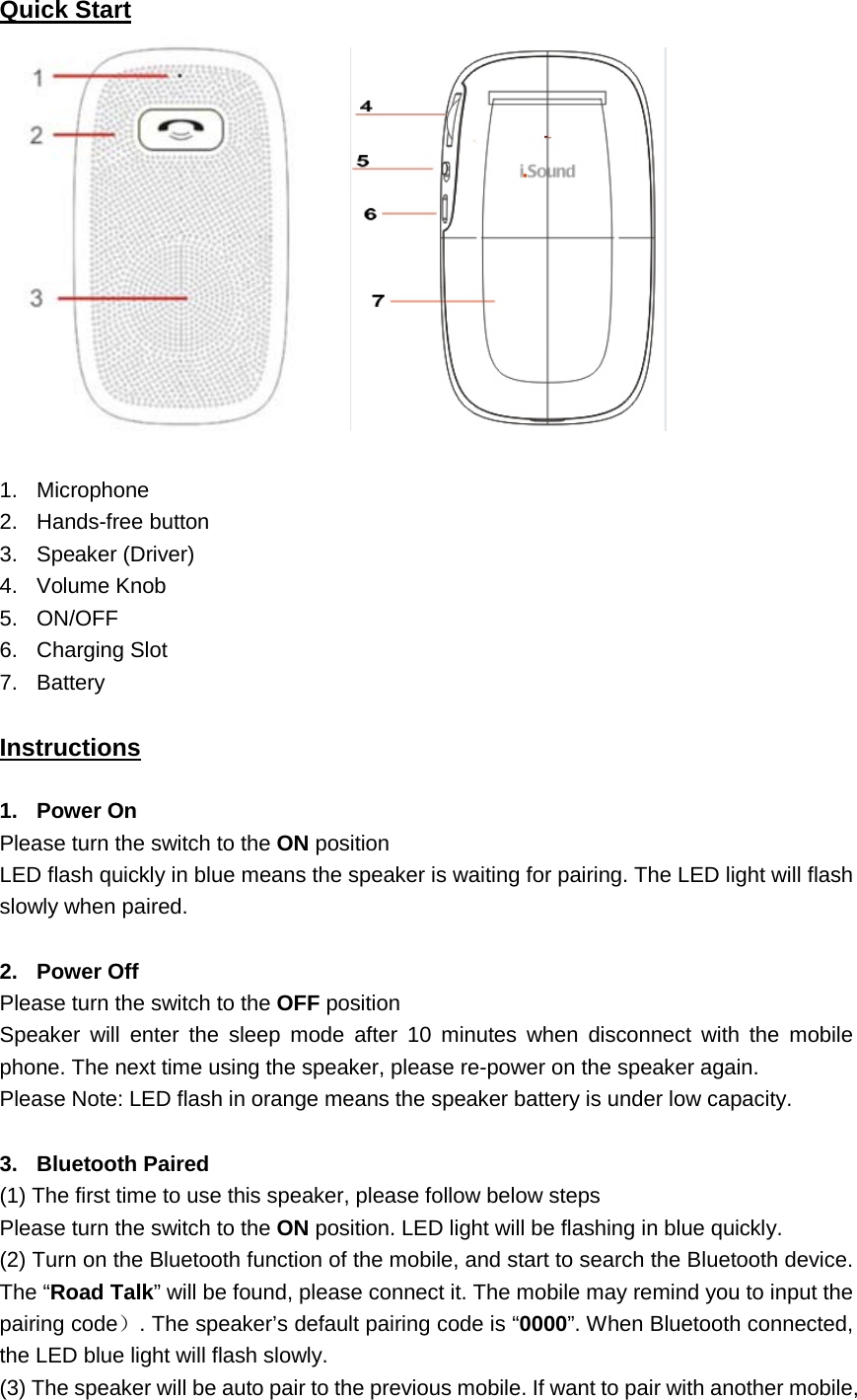
Quick Start   1. Microphone 2. Hands-free button 3. Speaker (Driver) 4. Volume Knob 5. ON/OFF 6. Charging Slot 7. Battery   Instructions 1. Power On Please turn the switch to the ON position LED flash quickly in blue means the speaker is waiting for pairing. The LED light will flash slowly when paired.  2. Power Off Please turn the switch to the OFF position Speaker will enter the sleep mode after 10 minutes when disconnect with the mobile phone. The next time using the speaker, please re-power on the speaker again. Please Note: LED flash in orange means the speaker battery is under low capacity.  3. Bluetooth Paired (1) The first time to use this speaker, please follow below steps Please turn the switch to the ON position. LED light will be flashing in blue quickly. (2) Turn on the Bluetooth function of the mobile, and start to search the Bluetooth device. The “Road Talk” will be found, please connect it. The mobile may remind you to input the pairing code). The speaker’s default pairing code is “0000”. When Bluetooth connected, the LED blue light will flash slowly. (3) The speaker will be auto pair to the previous mobile. If want to pair with another mobile,
please follow below steps, 1. Pair the Road Talk to the first mobile phone successfully. 2. Turn off the Bluetooth function of the first mobile phone (Please note is not to ignore this equipment, is turn off the Bluetooth on the mobile directly). 3. Turn on the second mobile phone’s Bluetooth function and start to search the Road Talk, and connect to the Road Talk. 4. When the second mobile phone paired successfully, please turn on the first mobile phone’s Bluetooth function, it will paired to Road Talk automatically.   Follow the above steps; Road Talk can pair with two mobile phones in one time.  4. Bluetooth Disconnected If you want to disconnect the mobile with the speaker, please turn the switch to the OFF position, or long press the mobile “Hands-free” button, or you can operate on the mobile.  5. Hands-free Function (1) Pick up the phone call Short press the “Hands-free” button to pick up the phone (2) Hand off the phone call Under phone conversation, short press the “Hands-free”  button again to end the phone call. (3) Refuse the phone call Short press the “Hands-free” button twice to refuse the phone call (4) Switch the phone call Under phone conversation, press the “Hands-free” button for 2 seconds, you can switch the phone call between the speaker and the mobile (5) Re-dial the latest number Speaker under standby status, continue to short press the “Hands-free” button twice can re-call the last number (6) Volume Knob Under phone conversation, can use the volume knob to adjustment the volume  6. Bluetooth Music Playback Bluetooth paired successfully, the Road Talk can play music from the mobile phone directly. Normally the Road Talk will play the first mobile phone’s music first. It can not support to play music from two mobiles in one time. Press the “Hands-free” button for play/pause.  7. Charging The included Li battery can be charged repeatedly. For the first time using, please full charge the battery. (1) Please use the included USB cable to connect the speaker to the computer for charging (2) Please use the included USB cable to connect the car adaptor for charging
Please Note: Under charging, the orange LED light will be on. And finish charging, the LED light will be off.    8. LED Light Indicator Flash in blue quickly: Waiting for pairing Flash in blue slowly: Bluetooth Paired Flash in orange: Battery low capacity Stay in orange: Battery under charging Orange light off: Battery charging finished      Troubleshooting   1. What should I do if the speaker can not pair with the Bluetooth device and can not enjoy the hands-free function? Please check the specification/ the manual of the Bluetooth device (your mobile or computer), and see if the device can support the A2DP stereo audio transmission. If yes, please turn on the A2DP stereo mode. Some mobile may required to be set the mobile’s hands-free device as Road Talk.  2. What should I do if there is no response of the Road Talk?   Under working, if there is no response of the speaker, please check the battery has capacity or not. If yes, please try to take off the battery and re-install again.    FCC Caution: Any changes or modifications not expressly approved by the party responsible for compliance could void the user’s authority to operate this equipment. Federal Communications Commission (FCC) Statement  This device complies with Part 15 of the FCC Rules.    Operation is subject to the following two conditions: (1) This device may not cause harmful interference, and (2) this device must accept any interference received, including interference that may cause undesired operation. NOTE: This equipment has been tested and found to comply with the limits for a Class B digital device, pursuant to Part 15 of the FCC Rules.  These limits are designed to provide reasonable protection against harmful interference in a residential installation.  This equipment generates, uses and can radiate radio frequency energy and, if not installed and used in accordance with the instructions, may cause harmful interference to radio communications.  However, there is no guarantee that interference will not occur in a particular installation.   If this equipment does cause harmful interference to radio or television reception, which can be determined by turning the equipment off and on, the user is encouraged to try to correct the interference by one or more of the following measures:  Reorient or relocate the receiving antenna.  Increase the separation between the equipment and receiver.
 Connect the equipment into an outlet on a circuit different from that to which the receiver is connected.  Consult the dealer or an experienced radio/TV technician for help.

Navigation menu