Ruckus Access Point 100.1.0 Release Notes 100.1.0.0.194 AP 100.1 Rev D 20151217
Access Point 100.1.0.0.194 Release Notes AP%20-%20100.1%20-%20Release%20Notes%20-%20Rev%20D%20-%2020151217
2015-12-16
User Manual: Ruckus Access Point 100.1.0.0.194 Release Notes
Open the PDF directly: View PDF  .
.
Page Count: 25

Ruckus Wireless™
Access Point Version 100.1.0.0.194
Release Notes
Part Number 800-70861-001 Rev D
Published December, 2015
www.ruckuswireless.com

Access Point Version 100.1.0.0.194 Release Notes, 800-70861-001 Rev D 2
Copyright Notice and Proprietary Information
Copyright 2015. Ruckus Wireless, Inc. All rights reserved.
No part of this documentation may be reproduced, transmitted, or translated, in any form or by any means, electronic,
mechanical, manual, optical, or otherwise, without prior written permission of Ruckus Wireless, Inc. (“Ruckus Wireless”),
or as expressly provided by under license from Ruckus Wireless.
Destination Control Statement
Technical data contained in this publication may be subject to the export control laws of the United States of America.
Disclosure to nationals of other countries contrary to United States law is prohibited. It is the reader’s responsibility to
determine the applicable regulations and to comply with them.
Disclaimer
THIS DOCUMENTATION AND ALL INFORMATION CONTAINED HEREIN (“MATERIAL”) IS PROVIDED FOR GENERAL
INFORMATION PURPOSES ONLY. RUCKUS AND ITS LICENSORS MAKE NO WARRANTY OF ANY KIND, EXPRESS
OR IMPLIED, WITH REGARD TO THE MATERIAL, INCLUDING, BUT NOT LIMITED TO, THE IMPLIED WARRANTIES
OF MERCHANTABILITY, NON-INFRINGEMENT AND FITNESS FOR A PARTICULAR PURPOSE, OR THAT THE
MATERIAL IS ERROR-FREE, ACCURATE OR RELIABLE. RUCKUS RESERVES THE RIGHT TO MAKE CHANGES OR
UPDATES TO THE MATERIAL AT ANY TIME.
Limitation of Liability
IN NO EVENT SHALL RUCKUS BE LIABLE FOR ANY DIRECT, INDIRECT, INCIDENTAL, SPECIAL OR CONSEQUEN-
TIAL DAMAGES, OR DAMAGES FOR LOSS OF PROFITS, REVENUE, DATA OR USE, INCURRED BY YOU OR ANY
THIRD PARTY, WHETHER IN AN ACTION IN CONTRACT OR TORT, ARISING FROM YOUR ACCESS TO, OR USE
OF, THE MATERIAL.
Trademarks
Ruckus Wireless, Ruckus, the bark logo, ZoneFlex, FlexMaster, ZoneDirector, SmartMesh, ChannelFly, SmartCell,
Dynamic PSK, and Simply Better Wireless are trademarks of Ruckus Wireless, Inc. in the United States and other
countries. All other product or company names may be trademarks of their respective owners.

Access Point Version 100.1.0.0.194 Release Notes, 800-70861-001 Rev D 3
Contents
1About This Document
Supported Access Points . . . . . . . . . . . . . . . . . . . . . . . . . . . . . . . . . . . . . . . . . . . . . . . . . 7
Highlights of this Release . . . . . . . . . . . . . . . . . . . . . . . . . . . . . . . . . . . . . . . . . . . . . . . . . 9
Supported Country Codes . . . . . . . . . . . . . . . . . . . . . . . . . . . . . . . . . . . . . . . . . . . . . . . 10
2 Notes on AP Firmware Operation
Controller-Managed Operation . . . . . . . . . . . . . . . . . . . . . . . . . . . . . . . . . . . . . . . . . . . . 11
Case 1: AP Controller Discovery using L2 Subnet . . . . . . . . . . . . . . . . . . . . . . . . . . . . 12
Case 2: Connecting an AP to a Controller using DHCP Option 43 . . . . . . . . . . . . . . . . 13
Case 3: Connecting an AP to a Controller using DNS . . . . . . . . . . . . . . . . . . . . . . . . . 13
Case 4: Manually Setting the Controller IP Address in the AP Web Interface . . . . . . . . 14
Standalone AP- or FlexMaster-Managed Operation . . . . . . . . . . . . . . . . . . . . . . . . . . . . 14
3 Supported Devices, Services and Firmware
Access Point Models . . . . . . . . . . . . . . . . . . . . . . . . . . . . . . . . . . . . . . . . . . . . . . . . . . . 15
ZoneDirector (ZD) Controllers . . . . . . . . . . . . . . . . . . . . . . . . . . . . . . . . . . . . . . . . . . . . . 16
FlexMaster (FM) Managers . . . . . . . . . . . . . . . . . . . . . . . . . . . . . . . . . . . . . . . . . . . . . . . 16
SmartCell Gateway (SCG) Controllers . . . . . . . . . . . . . . . . . . . . . . . . . . . . . . . . . . . . . . . 16
virtual SmartCell Gateway (vSCG) Controllers . . . . . . . . . . . . . . . . . . . . . . . . . . . . . . . . . 17
SmartZone (SZ) Controllers. . . . . . . . . . . . . . . . . . . . . . . . . . . . . . . . . . . . . . . . . . . . . . . 17
Smart Access Management service (SAMs) Controllers . . . . . . . . . . . . . . . . . . . . . . . . . 17
4 Upgrade Information
5 Enhancements and Resolved Issues
Enhancements . . . . . . . . . . . . . . . . . . . . . . . . . . . . . . . . . . . . . . . . . . . . . . . . . . . . . . . . 19
Resolved Issues . . . . . . . . . . . . . . . . . . . . . . . . . . . . . . . . . . . . . . . . . . . . . . . . . . . . . . . 20
6 Caveats, Limitations and Known Issues
7 Interoperability Information
Operating Systems . . . . . . . . . . . . . . . . . . . . . . . . . . . . . . . . . . . . . . . . . . . . . . . . . . . . . 22
Web Browsers . . . . . . . . . . . . . . . . . . . . . . . . . . . . . . . . . . . . . . . . . . . . . . . . . . . . . . . . 23


Access Point Version 100.1.0.0.194 Release Notes, 800-70861-001 Rev D 5
1
About This Document
These release notes describe the new features available in version 100.1.0.0.194
of the Ruckus Wireless base image access points (APs). Different AP SKUs are no
longer required for compatibility with different Ruckus Wireless controllers or
managers.
This document assumes familiarity with the Ruckus ZoneFlex (ZF), ZoneDirector
(ZD), SmartCell Gateway (SCG), virtual SmartCell Gateway (vSCG), SmartZone (SZ),
Smart Access Management service (SAMs), and FlexMaster (FM) product lines and
the features of earlier releases.
This document covers Ruckus Wireless access points configured with version
100.1.0.0.194 base image. For version information about ZD, SCG, vSCG, SZ, and
SAMs controllers, as well as FM managers, please refer to their respective Release
Notes.
This document includes enhancements and resolved issues, known issues,
caveats, workarounds, upgrade details and interoperability information. The version
100.1.0.0.194 APs include ZF APs and SmartCell APs.

Access Point Version 100.1.0.0.194 Release Notes, 800-70861-001 Rev D 6
NOTE Beginning with 100.0.0 base image access points, the ZF Release Notes
(which previously included ZD controllers, FM managers, and ZoneFlex access
points) are now divided into separate Release Notes documents.
By downloading this software and subsequently upgrading Ruckus Wireless APs to
base image 100.0.0 and later, please be advised that:
• The ZoneDirector periodically connects to Ruckus and Ruckus collects the
ZoneDirector serial number, software version and build number. Ruckus transmits
a file back to the ZoneDirector and this is used to display the current status of the
ZoneDirector Support Contract.
• The AP may send a query to Ruckus containing the AP’s serial number. This allows
your AP to autonomously connect with a wireless LAN controller operated by your
choice of cloud service provider. Ruckus may transmit the Fully Qualified Domain
Name (FQDN) or IP address of the controller that the AP will subsequently attempt
to join back to the AP.
• Please be advised that this information may be transferred and stored outside of
your country of residence where data protection standards may be different.
Supported Access Points
Access Point Version 100.1.0.0.194 Release Notes, 800-70861-001 Rev D 7
Continue with the following:
•Supported Access Points
•Highlights of this Release
•Supported Country Codes
Supported Access Points
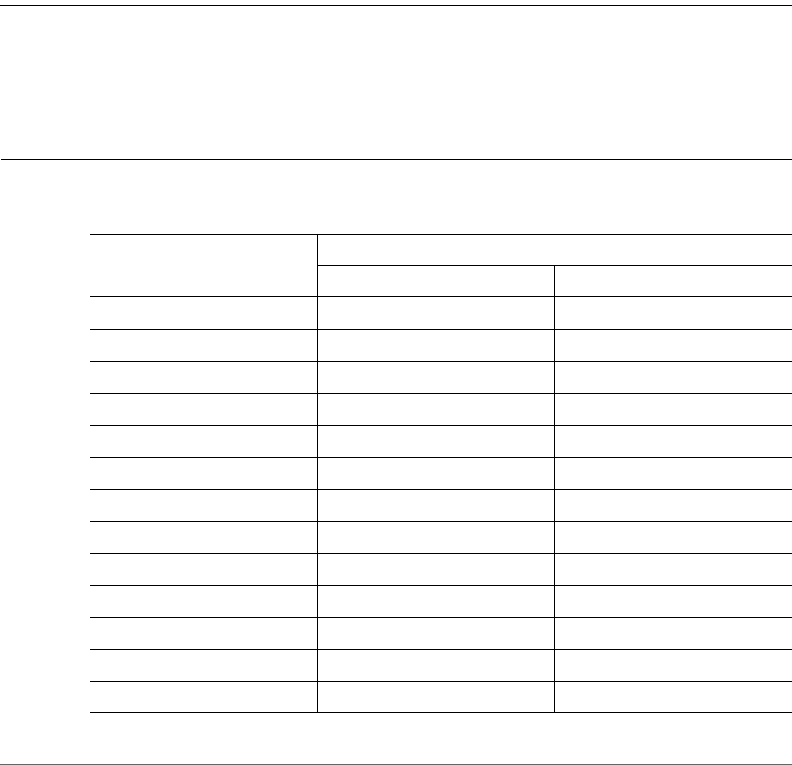
The Ruckus Wireless access points supported by 100.0 base images are listed in
Table 1. For information on the Ruckus Wireless access points supported by 9.x
and earlier images, contact your sales representative.
NOTE For information on Ruckus Wireless access points supported by SmartCell
Gateway (SCG) controllers, virtual SmartCell Gateway (vSCG) controllers,
SmartZone (SZ) controllers, ZoneDirector (ZD) controllers, Smart Access
Management service (SAMs), and FlexMaster (FM) managers, refer to their
respective Release Notes and associated user documents.
Table 1. Ruckus Wireless Access Points and Supporting 100.0.0.0 and Later Base Image
Cross-Reference
Supported Access Points
(Note 1)
Base Image (√ = supported, -- = not supported)
100.0.0 100.1.0
SC8800-S √ √
SC8800-S-AC √ √
ZoneFlex 7055 √ √
ZoneFlex 7321 √ √
ZoneFlex 7321-U √ √
ZoneFlex 7341 √ √
ZoneFlex 7343 √ √
ZoneFlex 7352 √ √
ZoneFlex 7363 √ √
ZoneFlex 7372 √ √
ZoneFlex 7372-E √ √
ZoneFlex 7441 √ √
ZoneFlex 7761-CM √ √

Supported Access Points
Access Point Version 100.1.0.0.194 Release Notes, 800-70861-001 Rev D 8
ZoneFlex 7762 √ √
ZoneFlex 7762-AC √ √
ZoneFlex 7762-S √ √
ZoneFlex 7762-S-AC √ √
ZoneFlex 7762-T √ √
ZoneFlex 7781CM √ √
ZoneFlex 7782 √ √
ZoneFlex 7782-E √ √
ZoneFlex 7782-N √ √
ZoneFlex 7782-S √ √
ZoneFlex 7982 √ √
ZoneFlex H500 (Note 2)-- √
ZoneFlex R300 √ √
ZoneFlex R500 √ √
ZoneFlex R600 √ √
ZoneFlex R700 √ √
ZoneFlex T300 √ √
ZoneFlex T300e √ √
ZoneFlex T301n √ √
ZoneFlex T301s √ √
Note 1: Contact your sales representative for information on the Ruckus Wireless access
points supported by 9.x and earlier images, and for information on Ruckus Wireless access
points unsupported by base image 100.0 and later.
Note 2: The H500 is not supported on the ZoneDirector 1100.
Table 1. Ruckus Wireless Access Points and Supporting 100.0.0.0 and Later Base Image
Cross-Reference (Continued)
Supported Access Points
(Note 1)
Base Image (√ = supported, -- = not supported)
100.0.0 100.1.0
Highlights of this Release
Access Point Version 100.1.0.0.194 Release Notes, 800-70861-001 Rev D 9
Highlights of this Release
AP base image release 100.0.0 introduced a factory configured Ruckus Wireless
AP which is compatible with the expanding product line of network controllers and
with the new innovative management capabilities of Ruckus Wireless solutions.
The new features and enhancements in this release include:
• New H500 AP support
• FM AP Management support
• SNMP management for standalone operation
• Hotspot/WISPr standalone support
• L2TP tunneling and PPPoE support
• Standalone router mode support
• AP Web UI enhancements
• Zone 2 regulatory regions (refer to Appendix: Zone 2 APs)
AP SKUs with ordering number prefix 901- are now supplied with AP base image
release 100.0.0 and later to support discovery with all Ruckus Wireless ZD, SCG,
vSCG, and SZ controllers (see Table 2 for details). Once an AP base image discovers
and connects to the specific ZD, SCG, vSCG or SZ controller, the AP firmware is
updated to a controller-compatible image to ensure simple and reliable operation.
The AP base image is optimized for management by the FM management tool and
for standalone controller-less operation.
NOTE Once an AP has been updated with a controller-specific image, it does not
support standalone operation or a FlexMaster manager.
Controller-specific features and mesh networking capabilities are enabled on the AP
when a controller-initiated firmware upgrade is performed as part of the AP-to-
controller discovery process.

Supported Country Codes
Access Point Version 100.1.0.0.194 Release Notes, 800-70861-001 Rev D 10
With the introduction of the AP base image release 100.0.0 and later, AP discovery
compatibility is assured with all controller products and software releases, elimi-
nating the need to manage and track compatibility between specific APs model
numbers and controller families.
Supported Country Codes
Refer to the Ruckus Wireless Price List for available country certifications. Refer to
Appendix: Zone 2 APs for a description of the Zone 2 regulatory regions function.
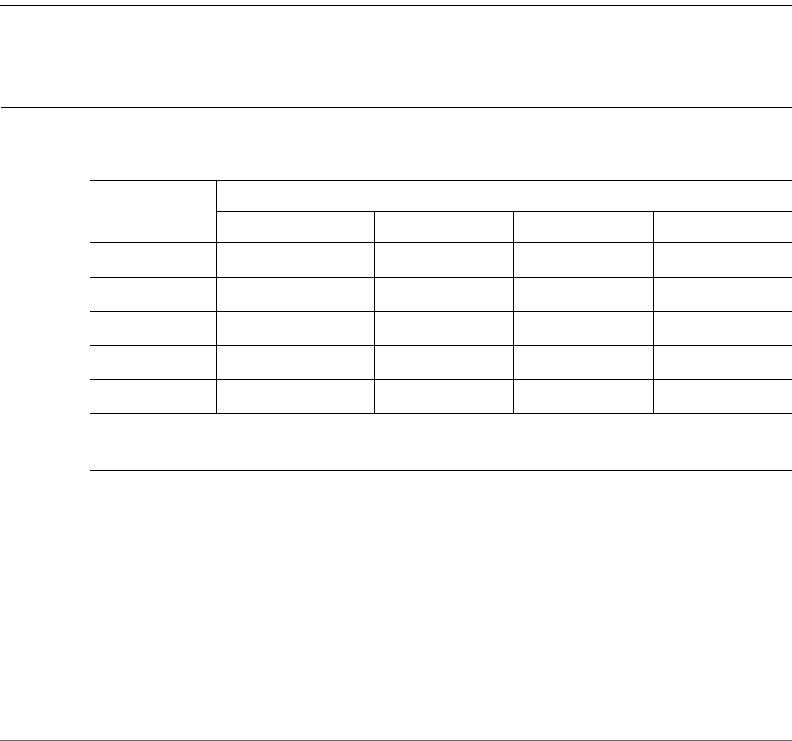
Table 2. Controller- and FlexMaster-Managed Compatibility Matrix
Controller or Manager Firmware Version
SmartCell Gateway (SCG) controller RuckOS 2.1 and later
(Note 1)
virtual SmartCell Gateway (vSCG) controller RuckOS 2.5 and later
(Note 1)
SmartZone (SZ) controller RuckOS 3.0 and later
ZoneDirector (ZD) controller 9.10 and later
FlexMaster (FM) manager 9.10 and later
Smart Access Management service (SAMs) controller Note 2
Note 1: SCG and vSCG controllers must have LWAPP discovery enabled and configured.
LWAPP discovery is enabled by default on SCG and vSCG controllers release 3.0 and later.
Refer to Case 1: AP Controller Discovery using L2 Subnet for details.
Note 2: SAMs uses SCG or vSCG controllers, which are automatically managed in the
cloud.
Access Point Version 100.1.0.0.194 Release Notes, 800-70861-001 Rev D 11
2
Notes on AP Firmware Operation
Starting with version 100.0.0, Ruckus Wireless APs are shipped from the factory
with a single firmware image, referred to as the base image. The AP’s base image
is capable of discovering the Ruckus Wireless controllers listed below. When the
AP does not discover any of those controllers, the AP can be operated in standalone
mode using the base image.
NOTE APs with the base image (100.0.0 or later) can only operate in standalone
mode with or without a FlexMaster manager.
Please refer to the following sections:
•Controller-Managed Operation
•Standalone AP- or FlexMaster-Managed Operation
Controller-Managed Operation
The AP is compatible with the SCG, vSCG, SZ, SAMs and ZD controllers listed in
Table 3.
When the AP discovers one of these Ruckus Wireless controllers on the network,
the AP downloads the associated controller-specific image and replaces the base
image.
There are four general cases when working with the AP:
•Case 1: AP Controller Discovery using L2 Subnet
•Case 2: Connecting an AP to a Controller using DHCP Option 43
•Case 3: Connecting an AP to a Controller using DNS
•Case 4: Manually Setting the Controller IP Address in the AP Web Interface
Controller-Managed Operation
Case 1: AP Controller Discovery using L2 Subnet
Access Point Version 100.1.0.0.194 Release Notes, 800-70861-001 Rev D 12
Case 1: AP Controller Discovery using L2 Subnet
When the AP is powered on and is connected to the same IP subnet as a controller,
the AP looks for any SCG, vSCG, SZ or ZD controller. It continues searching for a
controller until it finds one, until the Ruckus Wireless AP Registrar service assigns it
a controller, or until the installer logs into the AP web interface and configures the
controller IP address manually, or until the discovery agents are disabled on the AP.
•SCG and vSCG and SZ: When the AP finds an SCG, vSCG or SZ controller on
the same subnet and the controller is configured to add APs with the base image,
the AP automatically updates the base image with the controller-compatible
firmware image. Please see Ta bl e 3 for AP-to-controller pairing options that the
controllers use to communicate with the AP.
NOTE Please verify that the SCG or vSCG controller has the lwapp2scg utility
installed and configured before putting the AP on the subnet to be recognized and
configured by the controller.
•ZD: When the AP finds a ZD controller on the same subnet and the ZD controller
is configured to add APs with the base image, the AP automatically downloads
the ZD-compatible firmware image. Please see Table 3 for AP-to-controller
pairing options that the ZD uses to communicate with the AP.
Table 3. Controller- and Manager-to-AP Pairing Options
Controller or
Manager
AP-to-Controller Pairing Options
Local Discovery Manual Option 43 DNS
SCG Optional (Note) Optional Default Optional
vSCG Optional (Note) Optional Default Optional
SZ Default Optional Optional Optional
ZD Default Optional Optional Optional
FlexMaster No Manual No No
Note: The SCG and vSCG controllers must have the lwapp2scg utility installed and
configured.

Controller-Managed Operation
Case 2: Connecting an AP to a Controller using DHCP Option 43
Access Point Version 100.1.0.0.194 Release Notes, 800-70861-001 Rev D 13
NOTE In the SCG, vSCG, SZ and ZD cases, after the AP base image is overwritten
with the controller-specific image and the AP no longer operates in standalone
mode, the AP retains its SCG, vSCG, SZ or ZD firmware image after reboot and
factory reset.
NOTE Refer to the 9.7.x through 9.8.x AP Release Notes for the procedures used
with pre-100.0.0 firmware operation.
• If the AP does not find an SCG, vSCG, SZ or ZD controller on the network, or if
there is an SCG/vSCG controller on the network but the lwapp2scg utility has
not been activated, then the AP retains its base image.
The installer can log into the AP web interface at any time and configure the AP
as a standalone AP, and can optionally configure the AP to report to a FlexMaster
manager. To set up the AP for management by FlexMaster, refer to Configuring
the AP for Management by FlexMaster or for Standalone Operation in the Ruckus
Wireless Indoor AP User Guide or Ruckus Wireless Outdoor AP User Guide.
NOTE If a standalone AP finds multiple SZ, SCG, vSCG and ZD controllers on the
network, then the AP associates with whichever controller it finds first. (This is almost
unknown, but can happen when organizations are migrating from ZD to SCG or
vSCG, and have multiple controllers on the AP subnet.) This scenario can be
prevented by changing the IP address range or by specifying ACLs in the lwapp2scg
utility.
Case 2: Connecting an AP to a Controller using DHCP
Option 43
Refer to the SZ, SCG, vSCG or ZD controller user documents for instructions on
how to connect the AP to the controller using DHCP Option 43.
Case 3: Connecting an AP to a Controller using DNS
Refer to the SZ, SCG, vSCG or ZD controller user documents for instructions on
how to connect the AP to the controller using DNS.
Standalone AP- or FlexMaster-Managed Operation
Case 4: Manually Setting the Controller IP Address in the AP Web Interface
Access Point Version 100.1.0.0.194 Release Notes, 800-70861-001 Rev D 14
Case 4: Manually Setting the Controller IP Address in
the AP Web Interface
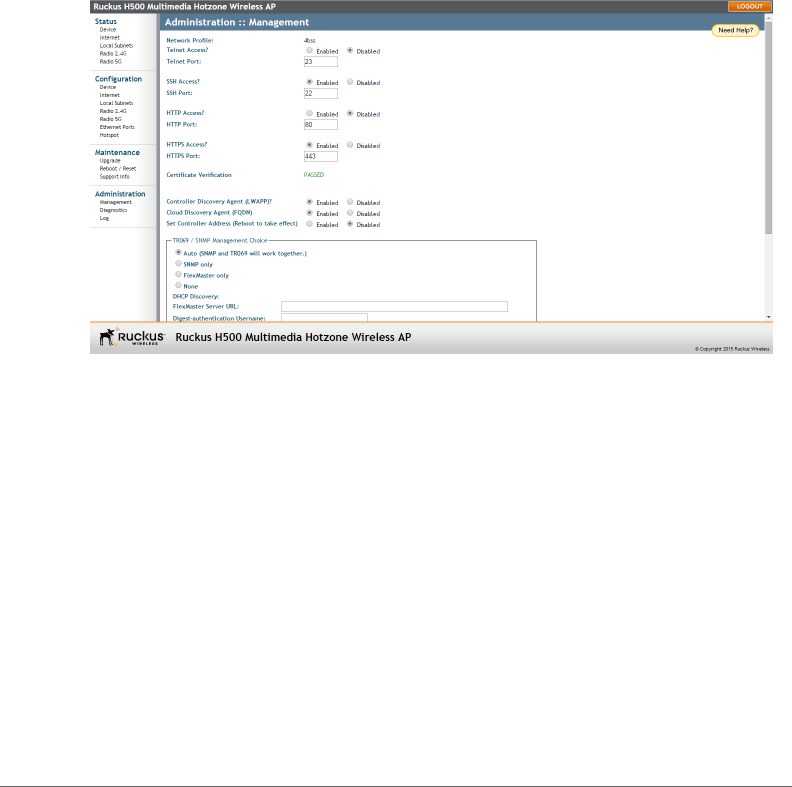
Go to the Administration > Management page in the AP Web interface. Click Set
Controller Address Enabled, then enter either one primary controller IP address or
one primary and one optional secondary controller IP address, and then click
Update Settings. Refer to the Ruckus Wireless Outdoor Access Point User Guide
or the Ruckus Wireless Indoor Access Point User Guide for more information on
how to manually set the controller IP address in the AP web interface.
Figure 1. Sample Administration > Management Page
Standalone AP- or FlexMaster-Managed
Operation
When the AP is to be used in standalone mode or when reporting to a FM manager,
the AP retains and uses the base image. Refer to the Ruckus Wireless Indoor Access
Point User Guide or the Ruckus Wireless Outdoor Access Point User Guide for
instruction on how to configure the AP for standalone and/or FlexMaster-managed
operation.

Access Point Version 100.1.0.0.194 Release Notes, 800-70861-001 Rev D 15
3
Supported Devices, Services and
Firmware
AP image 100.1.0.0.194 supports Ruckus Wireless AP models, and can interop-
erate with the Ruckus Wireless controllers and managers listed below. Refer to the
following:
•Access Point Models
•ZoneDirector (ZD) Controllers
•FlexMaster (FM) Managers
•SmartCell Gateway (SCG) Controllers
•virtual SmartCell Gateway (vSCG) Controllers
•SmartZone (SZ) Controllers
•Smart Access Management service (SAMs) Controllers
Access Point Models
• SC8800-S -- 100.1.0.0.194
• SC8800-S-AC -- 100.1.0.0.194
• ZoneFlex 7055 -- 100.1.0.0.194
• ZoneFlex 7321 -- 100.1.0.0.194
• ZoneFlex 7352 -- 100.1.0.0.194
• ZoneFlex 7372 -- 100.1.0.0.194
• ZoneFlex 7372-E -- 100.1.0.0.194
• ZoneFlex 7441 -- 100.1.0.0.194
• ZoneFlex 7761-CM -- 100.1.0.0.194
• ZoneFlex 7762 -- 100.1.0.0.194
• ZoneFlex 7762-AC -- 100.1.0.0.194
• ZoneFlex 7762-S -- 100.1.0.0.194
• ZoneFlex 7762-S-AC -- 100.1.0.0.194
• ZoneFlex 7762-T -- 100.1.0.0.194

ZoneDirector (ZD) Controllers
Access Point Version 100.1.0.0.194 Release Notes, 800-70861-001 Rev D 16
• ZoneFlex 7781CM -- 100.1.0.0.194
• ZoneFlex 7782 -- 100.1.0.0.194
• ZoneFlex 7782-E -- 100.1.0.0.194
• ZoneFlex 7782-N -- 100.1.0.0.194
• ZoneFlex 7782-S -- 100.1.0.0.194
• ZoneFlex 7982 -- 100.1.0.0.194
• ZoneFlex H500 -- 100.1.0.0.194
• ZoneFlex R300 -- 100.1.0.0.194
• ZoneFlex R500 -- 100.1.0.0.194
• ZoneFlex R600 -- 100.1.0.0.194
• ZoneFlex R700 -- 100.1.0.0.194
• ZoneFlex T300 -- 100.1.0.0.194
• ZoneFlex T300e -- 100.1.0.0.194
• ZoneFlex T301n -- 100.1.0.0.194
• ZoneFlex T301s -- 100.1.0.0.194
ZoneDirector (ZD) Controllers
• Please refer to the SCG controller Release Notes for a list of supported APs.
NOTE The H500 AP is not supported on ZoneDirector 1100.
FlexMaster (FM) Managers
• Please refer to the FM manager Release Notes for a list of supported APs.
SmartCell Gateway (SCG) Controllers
• Please refer to the SCG controller Release Notes for a list of supported APs.
NOTE SCG controllers must have LWAPP discovery enabled and configured.
LWAPP discovery is enabled by default on SCG controllers release 3.0 and later.
Refer to Case 1: AP Controller Discovery using L2 Subnet for details.
virtual SmartCell Gateway (vSCG) Controllers
Access Point Version 100.1.0.0.194 Release Notes, 800-70861-001 Rev D 17
virtual SmartCell Gateway (vSCG) Controllers
• Please refer to the vSCG controller Release Notes for a list of supported APs.
NOTE vSCG controllers must have LWAPP discovery enabled and configured.
LWAPP discovery is enabled by default on vSCG controllers release 3.0 and later.
Refer to Case 1: AP Controller Discovery using L2 Subnet for details.
SmartZone (SZ) Controllers
• Please refer to the SZ controller Release Notes for a list of supported APs.
Smart Access Management service (SAMs)
Controllers
NOTE SAMs uses SCG or vSCG controllers, which are automatically managed in
the cloud.
Access Point Version 100.1.0.0.194 Release Notes, 800-70861-001 Rev D 18
4
Upgrade Information
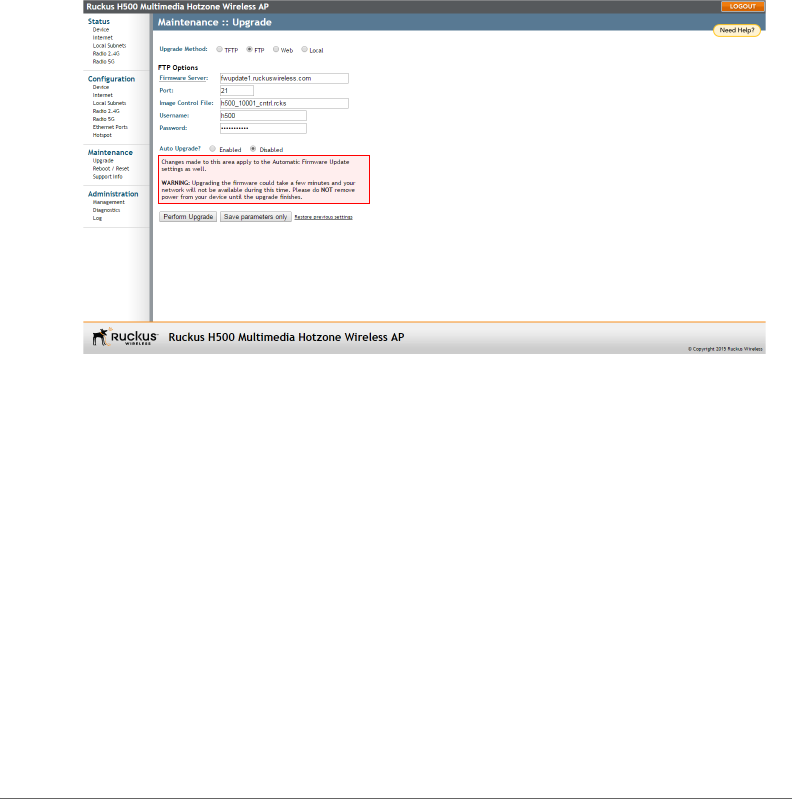
Go to Maintenance > Upgrade in the AP Web interface. Refer to the Ruckus
Wireless Outdoor Access Point User Guide or the Ruckus Wireless Indoor Access
Point User Guide for instructions on how to upgrade the AP firmware.
Figure 2. Sample Maintenance > Upgrade Page

Access Point Version 100.1.0.0.194 Release Notes, 800-70861-001 Rev D 19
5
Enhancements and Resolved
Issues
This section lists enhancements that have been added and issues from previous
versions that have been resolved in this version.
•Enhancements
•Resolved Issues
Enhancements
• The following Access Point is new in this version:
The H500 is a compact indoor 802.11a/b/g/n/ac dual-band 2x2:2 access point
with integrated five-port Ethernet, in a form factor which allows mounting to
standard USA- or EU-style single-gang wall outlet boxes. The H500 includes a
10/100/1000 uplink port and four 10/100 access ports.
The H500 can be powered by a customer-supplied IEEE 802.3af- or 802.3at-
compliant PoE switch or injector, or can be powered by an optional customer-
ordered DC power adapter.
The H500 has side cutouts for one or two bypass cables. The mounting bracket
has locating hooks to keep the bypass cables aligned with the cutouts when
attaching the H500 to the mounting base.
The H500 can have a low-power (0.5W or less) USB device plugged in, such as
a customer-supplied BLE (Bluetooth low energy) beacon. The USB device is
very difficult to remove after the H500 is attached to the mounting base.
• The H500 Access Point includes a new feature, AP support for Zone 2 regulatory
regions. Refer to Appendix: Zone 2 APs for more information.
• Some Ruckus Wireless APs, such as the H500, support customer-supplied, low-
power (1W or less), Bluetooth low energy (BLE) devices, such as BLE beacons.
The BLE devices plug into a USB port on the AP, and the AP can be configured
to turn power to the USB port either on or off.

Resolved Issues
Access Point Version 100.1.0.0.194 Release Notes, 800-70861-001 Rev D 20
Ruckus Wireless APs with USB ports supporting BLE devices can provide power
to the BLE device. The BLE devices perform whatever tasks they are designed
to do without interference from or control (other than supplying USB power) by
the Ruckus Wireless network equipment.
Resolved Issues
• TR069 is disabled by default in the AP Web user interface after an AP is updated
from a ZoneDirector controller-based image to base image 100.0.0 (ZF-9763).
• ZoneDirector-controlled APs may fail to send DHCPv6 discovery messages after
rejoining ZoneDirector, which could result in multiple APs being assigned the
same IPv6 address (ZF-9540).
• Enabling RTS on R700 does not work with MacBook (ZF-7882).
• AP does not support the special shutdown advisory LLDPDU with TTL=0 (ZF-
9036).

Access Point Version 100.1.0.0.194 Release Notes, 800-70861-001 Rev D 21
6
Caveats, Limitations and Known
Issues
This section lists the caveats, limitations, and known issues for FlexMaster, Zone-
Director and ZoneFlex Access Points in this version. Please also refer to previous
(for example, 9.7, 9.8 and 9.8.1) Release Notes documents for previously docu-
mented caveats and limitations.
• Using ZoneFlex APs with release 9.6 or greater or using a ZoneFlex AP with base
image release 100.0.0 or greater with an SCG, vSCG, SmartZone or SAMs
controller and DHCP option 43 discover and/or DNS discovery requires settings
to be configured consistent with the procedures outlined in RuckOS 3.0 Admin-
istrators Guide and RuckOS 3.0 Quick Start Guide.
• Before using ZoneFlex APs with release 9.6 or greater or using a ZoneFlex AP
with base image release 100.0.0 or greater with an SCG, vSCG, SmartZone or
SAMs controllers, ensure that LWAPP services or the LWAPP2SCG utility is
installed and enabled on the controller and properly configured, and that the
controller is restricted from distributing SCG-AP release 1.1.1.x or release 2.1.x
to APs which discover and join the controller. SCG-AP images release 1.1.1.x
and 2.1.1.x do not support DNS controller discovery which can result in a
service-affecting outage of the AP if the network requires DNS discovery of the
controller.
• Before re-deploying a ZoneDirector-managed AP to an SCG, vSCG, SmartZone
or SAMs controller, the AP must be reset to factory defaults before allowing the
AP to discover and attach to the SCG, vSCG, SmartZone or SAMs controller
network. To reset the AP to factory defaults, hold the reset button for 8 to 10
seconds and allow the AP to clear existing configurations and reboot, which
takes about 2 minutes.

Access Point Version 100.1.0.0.194 Release Notes, 800-70861-001 Rev D 22
7
Interoperability Information
ZoneDirector and Ruckus Wireless APs use standard protocols to interoperate with
third-party Wi-Fi devices. Ruckus Wireless qualifies its functionality on the most
common clients.
•Operating Systems
•Web Browsers
Operating Systems
The following client operating systems have been tested for compatibility with this
version:
• Personal Computer OS:
•Windows 8
•Windows 8.1
• Mac OS 10.8.3
• Mac OS 10.8.5
• Mac OS 10.9.3
• Mac OS 10.9.4
• Mac OS 10.10
• Smart Phone and Tablet OS:
• iOS (6.x, 7.x, 8, 8.02, 8.1)
• Android (4.0.3, 4.1, 4.1.1, 4.1.2, 4.2.2, 4.3, 4.4, 4.4.2, 4.4.4)
• Windows Phone (WP7.5, WP8, WP8.1)
• BlackBerry OS (10.1.0.4633)
• Kindle (7.4.2)

Web Browsers
Access Point Version 100.1.0.0.194 Release Notes, 800-70861-001 Rev D 23
Web Browsers
The following client web browsers have been tested for compatibility with this
version:
• Officially Supported Browsers:
• Internet Explorer 10, 11
• Firefox 33 and later
• Chrome 39 and 40
• Not Officially Supported Browsers:
• Safari, Dolphin, Opera Mini, Android Default, BlackBerry Default, and others.

Access Point Version 100.1.0.0.194 Release Notes, 800-70861-001 Rev D 24
Appendix: Zone 2 APs
Some Ruckus Wireless access points can be purchased with the country code
factory configured and locked to a regulatory region referred to as “Zone 2”. AP
ordering numbers with a “Z2” in the suffix, for example 901-R700-Z200, have been
factory locked to the Zone 2 country code setting. End users of these access points
are not able to change the country code setting, operate the AP on non-Z2 channels,
or use non-Z2 transmit power limits.
APs discover and join Ruckus Wireless controllers with matching “Zone 2” or “Z2”
country code settings.
APs with locked Z2 country code settings comply with the Zone 2 regulatory limits
outlined in Tabl e 4.
Table 4. Zone 2 Regulatory Information
SKU suffix Locked Country Country
Code
2.4 GHz CH
(1-13) and RF
Power Limit
5.150 GHz-
5.250 GHz
(W52) RF
Power Limit
5.250 GHz-
5.350 GHz CH
(W53) and RF
Power Limit
-WWxx Unlocked Algeria DZ 1-13/100mW
(outdoor
limited to
28mW)
200mW Indoor:
200mW
Outdoor:
1000mW
-WWxx Unlocked Morocco MA 1-13/100mW 200mW 200mW
-WWxx Unlocked Tunisia TN 1-13/100mW 200mW 200mW
-WWxx Unlocked Vietnam VN 1-13/100mW 200mW 200mW
-WWxx Unlocked Israel IL 1-13/100mW 200mW 200mW
-ILxx (Note) Locked Israel IL 1-13/100mW 200mW 200mW
-Z2xx Locked Zone 2 Z2 1-13/100mW 200mW 200mW
Note: -ILxx is not used for new designs

Copyright © 2006-2015. Ruckus Wireless, Inc.
350 West Java Dr. Sunnyvale, CA 94089. USA
www.ruckuswireless.com
