Ruckus Smart Zone 100 And Virtual Essentials Command Reference For SmartZone 3.6 Guide (SZ100/v SZ E) SZ100VSZE 36 CLIReference Rev A 20171110
2017-11-17
User Manual: Ruckus SmartZone 3.6 Command Reference Guide (SZ100/vSZ-E)
Open the PDF directly: View PDF  .
.
Page Count: 434 [warning: Documents this large are best viewed by clicking the View PDF Link!]
- Ruckus Smart Zone 100 and Virtual Smart Zone Essentials Command Reference
- Preface
- About This Guide
- Introduction to the Controller Command Line Interface
- Configuration Commands A - D
- Configuration Commands E - R
- encrypt-mac-ip
- encrypt-zone-name
- end
- eth-port-validate-one-trunk
- event
- event db-persistence
- event email
- event-email
- event snmp-notification
- event-threshold
- exit
- flexiVpn
- ftp-server
- ftp-test
- guest-access
- hccd
- help
- hostname
- hotspot
- identity-provider
- interface
- ip
- ip control-nat
- ip internal-subnet
- ip name-server
- ip name-server-ipv6
- ip route
- ip route-ipv6
- ipsec-profile
- lbs-service
- ldap-service
- license
- license cloud
- license export
- license import
- license local
- license sync-now
- lineman
- localdb-service
- logging console
- lwapp2scg
- mgmt-acl
- no ad-service
- no admin
- no admin-radius
- no ap
- no ap auto-approve
- no ap auto-tagging
- no ap-cert-check
- no ap-control-mgmt-tos
- no ap-group
- no block-client
- no bonjour-fencing
- no bonjour-fencing-policy
- no bonjour-gateway
- no bonjour-policy
- no cert-store
- no control-plane
- no data-plane
- no device-policy
- no diffserv
- no dns-server-service
- no dp-group
- no encrypt-mac-ip
- no event
- no ethernet-port-profile
- no ftp-server
- no guest-access
- no hotspot
- no hotspot20-venue-profile
- no hotspot20-wlan-profile
- no identity-provider
- no interface
- no ip
- no ipsec-profile
- no lbs-service
- no ldap-service
- no lineman
- no logging
- no oauth-service
- no operator-profile
- no osu-portal-profile
- no outbound firewall
- no proxy-aaa
- no report
- no role
- no snmp-v2-community
- no snmp-v3-user
- no user-agent-blacklist
- no user-role
- no user-traffic-profile
- no vlan-pooling
- no web-authentication
- no wlan
- no wlan-group
- no wlan-scheduler
- non-proxy-aaa
- northbound-authtype
- northbound-portal
- ntp-server
- oauth-service
- operator-profile
- outbound-firewall
- proxy-aaa
- rebalance-aps
- report
- role
- Configuration Commands S - W
- Debug Commands
- debug
- all-log-level
- ap-subnet-discovery
- apcli
- dataplane
- diagnostic
- do
- dpcli
- dp-customized-config
- end
- exit
- export log
- help
- no all-log-level
- no ap-subnet-discovery
- no dp-customized-config
- no output-format
- no save
- no schedule
- no screen-pagination
- no sha1
- no strict-wfa-compliance
- no tlsv1
- output-format
- reindex-elasticsearch-all
- save
- screen-pagination
- sha1
- show ap-subnet-discovery-status
- show dp-customized-config
- show sha1-state
- show strict-wfa-compliance-state
- show tlsv1-state
- strict-wfa-compliance-state
- tlsv1
- Setup Commands
- Show Commands
- show admin-activity
- show alarm
- show ap
- show ap-certificate-status
- show ap-stats
- show backup
- Show backup-config
- show backup-config-state
- show backup-network
- show backup-schedule
- show backup-state
- show backup-upgrade-state
- show client
- show clock
- show cluster
- show cluster-node
- show cluster-state
- show control-plane-stats
- show counter
- show cpuinfo
- show dhcp-relay-stats
- show diskinfo
- show event
- show history
- show interface
- show internal-subnet
- show license
- show ip
- show logs-filter
- show md-stats
- show meminfo
- show ntp
- show radius-proxy-stats
- show radshm-stats
- show report-result
- show rogue-aps
- show running-config
- show service
- show upgrade-history
- show upgrade-state
- show version
- show wired- client
- show zone
- System Commands
- ?
- backup
- backup config
- backup network
- backup schedule
- backup-upgrade
- cluster in-service
- config
- copy
- copy ap-certificate-request
- copy backup
- copy backup-config
- copy backup-network
- copy client
- copy report-result
- copy ftp-url
- delete backup
- delete backup-config
- delete backup-network
- delete client
- diagnostic
- enable
- enable new password
- exit
- help
- log-diagnostic
- logout
- no service
- patches
- ping
- ping6
- reload
- reload ap
- reload now
- remote ap-cli
- restore
- restore config
- restore local
- restore network
- service restart
- service start
- set-factory
- shutdown
- shutdown now
- traceroute
- traceroute6
- upgrade
- upload ap-certificate-status

Supporting SmartZone 3.6
COMMAND REFERENCE GUIDE
Ruckus Smart Zone 100
and Virtual Smart Zone Essentials
Command Reference
Part Number: 800-71567-001 Rev A
Publication Date: November 2017
Copyright Notice and Proprietary Information
Copyright 2017 Brocade Communications Systems, Inc. All rights reserved.
No part of this documentation may be used, reproduced, transmitted, or translated, in any form or by any means, electronic, mechanical,
manual, optical, or otherwise, without prior written permission of or as expressly provided by under license from Brocade.
Destination Control Statement
Technical data contained in this publication may be subject to the export control laws of the United States of America. Disclosure to
nationals of other countries contrary to United States law is prohibited. It is the reader’s responsibility to determine the applicable regulations
and to comply with them.
Disclaimer
THIS DOCUMENTATION AND ALL INFORMATION CONTAINED HEREIN (“MATERIAL”) IS PROVIDED FOR GENERAL INFORMATION
PURPOSES ONLY. BROCADE and RUCKUS WIRELESS, INC. AND THEIR LICENSORS MAKE NO WARRANTY OF ANY KIND, EXPRESS
OR IMPLIED, WITH REGARD TO THE MATERIAL, INCLUDING, BUT NOT LIMITED TO, THE IMPLIED WARRANTIES OF
MERCHANTABILITY, NON-INFRINGEMENT AND FITNESS FOR A PARTICULAR PURPOSE, OR THAT THE MATERIAL IS ERROR-FREE,
ACCURATE OR RELIABLE. BROCADE and RUCKUS RESERVE THE RIGHT TO MAKE CHANGES OR UPDATES TO THE MATERIAL AT
ANY TIME.
Limitation of Liability
IN NO EVENT SHALL BROCADE or RUCKUS BE LIABLE FOR ANY DIRECT, INDIRECT, INCIDENTAL, SPECIAL OR CONSEQUENTIAL
DAMAGES, OR DAMAGES FOR LOSS OF PROFITS, REVENUE, DATA OR USE, INCURRED BY YOU OR ANY THIRD PARTY, WHETHER
IN AN ACTION IN CONTRACT OR TORT, ARISING FROM YOUR ACCESS TO, OR USE OF, THE MATERIAL.
Trademarks
Ruckus Wireless, Ruckus, the bark logo, BeamFlex, ChannelFly, Dynamic PSK, FlexMaster, Simply Better Wireless, SmartCell, SmartMesh,
SmartZone, Unleashed, ZoneDirector and ZoneFlex are trademarks of Ruckus Wireless, Inc. in the United States and in other countries.
Brocade, the B-wing symbol, MyBrocade, and ICX are trademarks of Brocade Communications Systems, Inc. in the United States and in
other countries. Other trademarks may belong to third parties.
Ruckus Smart Zone 100 and Virtual Smart Zone Essentials Command Reference
2 Part Number: 800-71567-001 Rev A

Contents
Preface........................................................................................................................................................................................................11
Document Conventions........................................................................................................................................................................11
Notes, Cautions, and Warnings.....................................................................................................................................................11
Command Syntax Conventions............................................................................................................................................................11
Document Feedback............................................................................................................................................................................12
Ruckus Product Documentation Resources......................................................................................................................................... 12
Online Training Resources.................................................................................................................................................................... 12
Contacting Ruckus Customer Services and Support............................................................................................................................13
What Support Do I Need?.............................................................................................................................................................13
Open a Case.................................................................................................................................................................................13
Self-Service Resources................................................................................................................................................................. 13
About This Guide........................................................................................................................................................................................ 15
Introduction..........................................................................................................................................................................................15
Introduction to the Controller Command Line Interface................................................................................................................................ 17
Overview of the Controller Command Line Interface............................................................................................................................. 17
Accessing the Command Line Interface............................................................................................................................................... 17
What You Will Need..............................................................................................................................................................................17
Connect the Administrative Computer to the Controller........................................................................................................................17
Start and Configure the SSH Client............................................................................................................................................... 18
Using SSH Connection........................................................................................................................................................................ 18
Using Serial Connection....................................................................................................................................................................... 19
Log On to CLI............................................................................................................................................................................... 23
Configuration Commands A - D.................................................................................................................................................................. 27
config...................................................................................................................................................................................................27
ad-service............................................................................................................................................................................................ 28
admin...................................................................................................................................................................................................30
admin-radius........................................................................................................................................................................................32
ap........................................................................................................................................................................................................ 34
ap-auto-approve.................................................................................................................................................................................. 43
ap-auto-tagging................................................................................................................................................................................... 44
ap-cert-check...................................................................................................................................................................................... 46
ap-cert-expired-check..........................................................................................................................................................................47
ap-certificate-reset............................................................................................................................................................................... 48
ap-control-mgmt-tos............................................................................................................................................................................49
ap-heartbeat........................................................................................................................................................................................ 50
ap-internal-subnet................................................................................................................................................................................51
app-denial-policy................................................................................................................................................................................. 52
app-port-mapping................................................................................................................................................................................54
cert-store............................................................................................................................................................................................. 55
changepassword................................................................................................................................................................................. 58
clock....................................................................................................................................................................................................59
cluster-ip-list.........................................................................................................................................................................................60
cluster-name........................................................................................................................................................................................ 61
dns-server-service................................................................................................................................................................................62
do........................................................................................................................................................................................................ 64
Ruckus Smart Zone 100 and Virtual Smart Zone Essentials Command Reference
Part Number: 800-71567-001 Rev A 3
dp-group..............................................................................................................................................................................................65
Configuration Commands E - R...................................................................................................................................................................67
encrypt-mac-ip.................................................................................................................................................................................... 69
encrypt-zone-name..............................................................................................................................................................................70
end...................................................................................................................................................................................................... 71
eth-port-validate-one-trunk.................................................................................................................................................................. 72
event....................................................................................................................................................................................................73
event db-persistence........................................................................................................................................................................... 75
event email...........................................................................................................................................................................................76
event-email.......................................................................................................................................................................................... 77
event snmp-notification........................................................................................................................................................................ 78
event-threshold.................................................................................................................................................................................... 79
exit.......................................................................................................................................................................................................80
flexiVpn................................................................................................................................................................................................ 81
ftp-server............................................................................................................................................................................................. 82
ftp-test................................................................................................................................................................................................. 84
guest-access....................................................................................................................................................................................... 85
hccd.................................................................................................................................................................................................... 87
help......................................................................................................................................................................................................88
hostname.............................................................................................................................................................................................89
hotspot................................................................................................................................................................................................ 90
identity-provider................................................................................................................................................................................... 92
interface.............................................................................................................................................................................................101
ip....................................................................................................................................................................................................... 104
ip control-nat......................................................................................................................................................................................105
ip internal-subnet............................................................................................................................................................................... 106
ip name-server................................................................................................................................................................................... 107
ip name-server-ipv6 .......................................................................................................................................................................... 108
ip route.............................................................................................................................................................................................. 109
ip route-ipv6.......................................................................................................................................................................................110
ipsec-profile....................................................................................................................................................................................... 111
lbs-service..........................................................................................................................................................................................115
ldap-service....................................................................................................................................................................................... 117
license................................................................................................................................................................................................119
license cloud...................................................................................................................................................................................... 120
license export.....................................................................................................................................................................................121
license import.....................................................................................................................................................................................122
license local....................................................................................................................................................................................... 123
license sync-now............................................................................................................................................................................... 124
lineman.............................................................................................................................................................................................. 125
localdb-service...................................................................................................................................................................................126
logging console..................................................................................................................................................................................127
lwapp2scg......................................................................................................................................................................................... 129
mgmt-acl........................................................................................................................................................................................... 131
no ad-service..................................................................................................................................................................................... 132
no admin............................................................................................................................................................................................133
no admin-radius.................................................................................................................................................................................134
no ap................................................................................................................................................................................................. 135
no ap auto-approve........................................................................................................................................................................... 136
no ap auto-tagging.............................................................................................................................................................................137
Ruckus Smart Zone 100 and Virtual Smart Zone Essentials Command Reference
4 Part Number: 800-71567-001 Rev A
no ap-cert-check............................................................................................................................................................................... 138
no ap-control-mgmt-tos.....................................................................................................................................................................139
no ap-group.......................................................................................................................................................................................140
no block-client................................................................................................................................................................................... 141
no bonjour-fencing............................................................................................................................................................................. 142
no bonjour-fencing-policy................................................................................................................................................................... 143
no bonjour-gateway........................................................................................................................................................................... 144
no bonjour-policy............................................................................................................................................................................... 145
no cert-store...................................................................................................................................................................................... 146
no control-plane.................................................................................................................................................................................147
no data-plane.....................................................................................................................................................................................148
no device-policy.................................................................................................................................................................................149
no diffserv.......................................................................................................................................................................................... 150
no dns-server-service.........................................................................................................................................................................151
no dp-group.......................................................................................................................................................................................152
no encrypt-mac-ip............................................................................................................................................................................. 153
no event.............................................................................................................................................................................................154
no ethernet-port-profile...................................................................................................................................................................... 155
no ftp-server...................................................................................................................................................................................... 156
no guest-access................................................................................................................................................................................ 157
no hotspot......................................................................................................................................................................................... 158
no hotspot20-venue-profile................................................................................................................................................................ 159
no hotspot20-wlan-profile.................................................................................................................................................................. 160
no identity-provider............................................................................................................................................................................ 161
no interface........................................................................................................................................................................................ 162
no ip.................................................................................................................................................................................................. 163
no ipsec-profile.................................................................................................................................................................................. 165
no lbs-service.....................................................................................................................................................................................166
no ldap-service.................................................................................................................................................................................. 167
no lineman......................................................................................................................................................................................... 168
no logging..........................................................................................................................................................................................169
no oauth-service................................................................................................................................................................................ 170
no operator-profile..............................................................................................................................................................................171
no osu-portal-profile...........................................................................................................................................................................172
no outbound firewall...........................................................................................................................................................................173
no proxy-aaa......................................................................................................................................................................................174
no report............................................................................................................................................................................................175
no role................................................................................................................................................................................................176
no snmp-v2-community..................................................................................................................................................................... 177
no snmp-v3-user............................................................................................................................................................................... 178
no user-agent-blacklist....................................................................................................................................................................... 179
no user-role........................................................................................................................................................................................180
no user-traffic-profile.......................................................................................................................................................................... 181
no vlan-pooling.................................................................................................................................................................................. 182
no web-authentication........................................................................................................................................................................183
no wlan.............................................................................................................................................................................................. 184
no wlan-group....................................................................................................................................................................................185
no wlan-scheduler..............................................................................................................................................................................186
non-proxy-aaa................................................................................................................................................................................... 187
northbound-authtype......................................................................................................................................................................... 190
Ruckus Smart Zone 100 and Virtual Smart Zone Essentials Command Reference
Part Number: 800-71567-001 Rev A 5
northbound-portal..............................................................................................................................................................................191
ntp-server.......................................................................................................................................................................................... 192
oauth-service..................................................................................................................................................................................... 193
operator-profile...................................................................................................................................................................................195
outbound-firewall............................................................................................................................................................................... 197
proxy-aaa...........................................................................................................................................................................................199
rebalance-aps.................................................................................................................................................................................... 202
report.................................................................................................................................................................................................203
role.....................................................................................................................................................................................................206
Configuration Commands S - W................................................................................................................................................................209
sci-profile........................................................................................................................................................................................... 209
sci-setting.......................................................................................................................................................................................... 211
sms-server.........................................................................................................................................................................................212
smtp-server........................................................................................................................................................................................214
snmp-notification............................................................................................................................................................................... 216
snmp-v2-community.......................................................................................................................................................................... 217
snmp-v3-user.................................................................................................................................................................................... 219
soft-gre.............................................................................................................................................................................................. 221
subpackages..................................................................................................................................................................................... 223
support-admin................................................................................................................................................................................... 224
syslog-server......................................................................................................................................................................................225
user-agent-blacklist............................................................................................................................................................................ 227
user-group......................................................................................................................................................................................... 229
user-role.............................................................................................................................................................................................230
user-traffic-profile............................................................................................................................................................................... 232
vlan-pooling....................................................................................................................................................................................... 235
zone...................................................................................................................................................................................................237
zone-template....................................................................................................................................................................................277
Debug Commands....................................................................................................................................................................................279
debug................................................................................................................................................................................................ 279
all-log-level.........................................................................................................................................................................................280
ap-subnet-discovery.......................................................................................................................................................................... 281
apcli................................................................................................................................................................................................... 282
dataplane...........................................................................................................................................................................................283
diagnostic.......................................................................................................................................................................................... 284
do...................................................................................................................................................................................................... 286
dpcli...................................................................................................................................................................................................287
dp-customized-config........................................................................................................................................................................ 288
end.................................................................................................................................................................................................... 289
exit.....................................................................................................................................................................................................290
export log...........................................................................................................................................................................................291
help....................................................................................................................................................................................................292
no all-log-level....................................................................................................................................................................................293
no ap-subnet-discovery..................................................................................................................................................................... 294
no dp-customized-config................................................................................................................................................................... 295
no output-format................................................................................................................................................................................296
no save.............................................................................................................................................................................................. 297
no schedule....................................................................................................................................................................................... 298
no screen-pagination......................................................................................................................................................................... 299
Ruckus Smart Zone 100 and Virtual Smart Zone Essentials Command Reference
6 Part Number: 800-71567-001 Rev A
no sha1..............................................................................................................................................................................................300
no strict-wfa-compliance....................................................................................................................................................................301
no tlsv1.............................................................................................................................................................................................. 302
output-format.....................................................................................................................................................................................303
reindex-elasticsearch-all..................................................................................................................................................................... 304
save................................................................................................................................................................................................... 305
screen-pagination.............................................................................................................................................................................. 306
sha1...................................................................................................................................................................................................307
show ap-subnet-discovery-status...................................................................................................................................................... 308
show dp-customized-config...............................................................................................................................................................309
show sha1-state................................................................................................................................................................................ 310
show strict-wfa-compliance-state...................................................................................................................................................... 311
show tlsv1-state.................................................................................................................................................................................312
strict-wfa-compliance-state................................................................................................................................................................313
tlsv1................................................................................................................................................................................................... 314
Setup Commands..................................................................................................................................................................................... 315
rbd.....................................................................................................................................................................................................315
rbddump............................................................................................................................................................................................316
setup................................................................................................................................................................................................. 317
Show Commands..................................................................................................................................................................................... 319
show admin-activity........................................................................................................................................................................... 320
show alarm........................................................................................................................................................................................ 322
show ap.............................................................................................................................................................................................323
show ap-certificate-status.................................................................................................................................................................. 324
show ap-stats.................................................................................................................................................................................... 325
show backup..................................................................................................................................................................................... 330
Show backup-config..........................................................................................................................................................................331
show backup-config-state..................................................................................................................................................................332
show backup-network....................................................................................................................................................................... 333
show backup-schedule......................................................................................................................................................................334
show backup-state............................................................................................................................................................................ 335
show backup-upgrade-state.............................................................................................................................................................. 336
show client.........................................................................................................................................................................................337
show clock.........................................................................................................................................................................................338
show cluster.......................................................................................................................................................................................339
show cluster-node..............................................................................................................................................................................340
show cluster-state..............................................................................................................................................................................341
show control-plane-stats....................................................................................................................................................................342
show counter..................................................................................................................................................................................... 345
show cpuinfo..................................................................................................................................................................................... 346
show dhcp-relay-stats........................................................................................................................................................................347
show diskinfo..................................................................................................................................................................................... 348
show event........................................................................................................................................................................................ 349
show history.......................................................................................................................................................................................350
show interface....................................................................................................................................................................................351
show internal-subnet..........................................................................................................................................................................352
show license...................................................................................................................................................................................... 353
show ip.............................................................................................................................................................................................. 354
show logs-filter...................................................................................................................................................................................355
Ruckus Smart Zone 100 and Virtual Smart Zone Essentials Command Reference
Part Number: 800-71567-001 Rev A 7
show md-stats...................................................................................................................................................................................356
show meminfo................................................................................................................................................................................... 358
show ntp............................................................................................................................................................................................359
show radius-proxy-stats.....................................................................................................................................................................360
show radshm-stats............................................................................................................................................................................ 361
show report-result.............................................................................................................................................................................. 362
show rogue-aps.................................................................................................................................................................................363
show running-config...........................................................................................................................................................................365
show service...................................................................................................................................................................................... 371
show upgrade-history........................................................................................................................................................................ 372
show upgrade-state...........................................................................................................................................................................373
show version......................................................................................................................................................................................374
show wired- client.............................................................................................................................................................................. 375
show zone......................................................................................................................................................................................... 376
System Commands...................................................................................................................................................................................379
?........................................................................................................................................................................................................ 380
backup...............................................................................................................................................................................................381
backup config.................................................................................................................................................................................... 382
backup network................................................................................................................................................................................. 383
backup schedule................................................................................................................................................................................384
backup-upgrade................................................................................................................................................................................ 386
cluster in-service................................................................................................................................................................................ 387
config.................................................................................................................................................................................................388
copy...................................................................................................................................................................................................389
copy ap-certificate-request................................................................................................................................................................ 391
copy backup......................................................................................................................................................................................392
copy backup-config........................................................................................................................................................................... 393
copy backup-network........................................................................................................................................................................ 394
copy client......................................................................................................................................................................................... 395
copy report-result...............................................................................................................................................................................396
copy ftp-url........................................................................................................................................................................................ 397
delete backup.................................................................................................................................................................................... 398
delete backup-config......................................................................................................................................................................... 399
delete backup-network...................................................................................................................................................................... 400
delete client........................................................................................................................................................................................401
diagnostic.......................................................................................................................................................................................... 402
enable................................................................................................................................................................................................404
enable
new password
........................................................................................................................................................................ 405
exit.....................................................................................................................................................................................................406
help....................................................................................................................................................................................................407
log-diagnostic.................................................................................................................................................................................... 408
logout................................................................................................................................................................................................ 409
no service.......................................................................................................................................................................................... 410
patches..............................................................................................................................................................................................411
ping................................................................................................................................................................................................... 413
ping6................................................................................................................................................................................................. 414
reload.................................................................................................................................................................................................415
reload ap............................................................................................................................................................................................416
reload now.........................................................................................................................................................................................417
remote ap-cli......................................................................................................................................................................................418
Ruckus Smart Zone 100 and Virtual Smart Zone Essentials Command Reference
8 Part Number: 800-71567-001 Rev A
restore............................................................................................................................................................................................... 419
restore config..................................................................................................................................................................................... 420
restore local....................................................................................................................................................................................... 421
restore network.................................................................................................................................................................................. 422
service restart.....................................................................................................................................................................................423
service start....................................................................................................................................................................................... 424
set-factory..........................................................................................................................................................................................425
shutdown...........................................................................................................................................................................................426
shutdown now................................................................................................................................................................................... 427
traceroute.......................................................................................................................................................................................... 428
traceroute6........................................................................................................................................................................................ 431
upgrade............................................................................................................................................................................................. 432
upload ap-certificate-status................................................................................................................................................................433
Ruckus Smart Zone 100 and Virtual Smart Zone Essentials Command Reference
Part Number: 800-71567-001 Rev A 9
Ruckus Smart Zone 100 and Virtual Smart Zone Essentials Command Reference
10 Part Number: 800-71567-001 Rev A
Preface
• Document Conventions...........................................................................................................................................11
• Command Syntax Conventions............................................................................................................................... 11
• Document Feedback...............................................................................................................................................12
• Ruckus Product Documentation Resources............................................................................................................ 12
• Online Training Resources....................................................................................................................................... 12
• Contacting Ruckus Customer Services and Support............................................................................................... 13
Document Conventions
The following tables list the text and notice conventions that are used throughout this guide.
TABLE 1 Text conventions
Convention Description Example
monospace Identifies command syntax
examples. device(config)# interface ethernet 1/1/6
bold User interface (UI) components such
as screen or page names, keyboard
keys, software buttons, and field
names
On the Start menu, click All Programs.
italics
Publication titles Refer to the
Ruckus Small Cell Release Notes
for more information
Notes, Cautions, and Warnings
Notes, cautions, and warning statements may be used in this document. They are listed in the order of increasing severity of potential
hazards.
NOTE
A NOTE provides a tip, guidance, or advice, emphasizes important information, or provides a reference to related information.
CAUTION
A CAUTION statement alerts you to situations that can be potentially hazardous to you or cause damage to hardware, firmware,
software, or data.
DANGER
A DANGER statement indicates conditions or situations that can be potentially lethal or extremely hazardous to you. Safety labels
are also attached directly to products to warn of these conditions or situations.
Command Syntax Conventions
Bold and italic text identify command syntax components. Delimiters and operators define groupings of parameters and their logical
relationships.
Convention Description
bold text Identifies command names, keywords, and command options.
Ruckus Smart Zone 100 and Virtual Smart Zone Essentials Command Reference
Part Number: 800-71567-001 Rev A 11
Convention Description
italic
text Identifies a variable.
[ ] Syntax components displayed within square brackets are optional.
Default responses to system prompts are enclosed in square brackets.
{ x | y | z }A choice of required parameters is enclosed in curly brackets separated by vertical bars. You must select
one of the options.
x | yA vertical bar separates mutually exclusive elements.
< > Nonprinting characters, for example, passwords, are enclosed in angle brackets.
... Repeat the previous element, for example,
member
[
member
...].
\ Indicates a “soft” line break in command examples. If a backslash separates two lines of a command input,
enter the entire command at the prompt without the backslash.
Document Feedback
Ruckus is interested in improving its documentation and welcomes your comments and suggestions.
You can email your comments to Ruckus at: docs@ruckuswireless.com
When contacting us, please include the following information:
• Document title and release number
• Document part number (on the cover page)
• Page number (if appropriate)
• For example:
– Ruckus Small Cell Alarms Guide SC Release 1.3
– Part number: 800-71306-001
– Page 88
Ruckus Product Documentation Resources
Visit the Ruckus website to locate related documentation for your product and additional Ruckus resources.
Release Notes and other user documentation are available at https://support.ruckuswireless.com/documents. You can locate
documentation by product or perform a text search. Access to Release Notes requires an active support contract and Ruckus Support
Portal user account. Other technical documentation content is available without logging into the Ruckus Support Portal.
White papers, data sheets, and other product documentation are available at https://www.ruckuswireless.com.
Online Training Resources
To access a variety of online Ruckus training modules, including free introductory courses to wireless networking essentials, site surveys,
and Ruckus products, visit the Ruckus Training Portal at https://training.ruckuswireless.com.
Preface
Document Feedback
Ruckus Smart Zone 100 and Virtual Smart Zone Essentials Command Reference
12 Part Number: 800-71567-001 Rev A
Contacting Ruckus Customer Services and Support
The Customer Services and Support (CSS) organization is available to provide assistance to customers with active warranties on their
Ruckus Networks products, and customers and partners with active support contracts.
For product support information and details on contacting the Support Team, go directly to the Support Portal using https://
support.ruckuswireless.com, or go to https://www.ruckuswireless.com and select Support.
What Support Do I Need?
Technical issues are usually described in terms of priority (or severity). To determine if you need to call and open a case or access the self-
service resources use the following criteria:
• Priority 1 (P1)—Critical. Network or service is down and business is impacted. No known workaround. Go to the Open a Case
section.
• Priority 2 (P2)—High. Network or service is impacted, but not down. Business impact may be high. Workaround may be available.
Go to the Open a Case section.
• Priority 3 (P3)—Medium. Network or service is moderately impacted, but most business remains functional. Go to the Self-Service
Resources section.
• Priority 4 (P4)—Low. Request for information, product documentation, or product enhancements. Go to the Self-Service
Resources section.
Open a Case
When your entire network is down (P1), or severely impacted (P2), call the appropriate telephone number listed below to get help:
• Continental United States: 1-855-782-5871
• Canada: 1-855-782-5871
• Europe, Middle East, Africa, and Asia Pacific, toll-free numbers are available at https://support.ruckuswireless.com/contact-us and
Live Chat is also available.
Self-Service Resources
The Support Portal at https://support.ruckuswireless.com/contact-us offers a number of tools to help you to research and resolve problems
with your Ruckus products, including:
•Technical Documentation—https://support.ruckuswireless.com/documents
•Community Forums—https://forums.ruckuswireless.com/ruckuswireless/categories
•Knowledge Base Articles—https://support.ruckuswireless.com/answers
•Software Downloads and Release Notes—https://support.ruckuswireless.com/software
•Security Bulletins—https://support.ruckuswireless.com/security
Using these resources will help you to resolve some issues, and will provide TAC with additional data from your troubleshooting analysis if
you still require assistance through a support case or RMA. If you still require help, open and manage your case at https://
support.ruckuswireless.com/case_management
Preface
Contacting Ruckus Customer Services and Support
Ruckus Smart Zone 100 and Virtual Smart Zone Essentials Command Reference
Part Number: 800-71567-001 Rev A 13
Ruckus Smart Zone 100 and Virtual Smart Zone Essentials Command Reference
14 Part Number: 800-71567-001 Rev A

About This Guide
• Introduction............................................................................................................................................................. 15
Introduction
This
SmartZone™ (SZ) 100 and Virtual SmartZone Essentials (vSZ-E) Command Line Interface Reference Guide
contains the syntaxes and
commands for configuring and managing the SZ100/vSZ-E (collectively referred to as “the controller” throughout this guide) from the
command line interface.
This guide is written for service operators and system administrators who are responsible for managing, configuring, and troubleshooting
Ruckus Wireless devices. Consequently, it assumes a basic working knowledge of local area networks, wireless networking, and wireless
devices.
NOTE
If release notes are shipped with your product and the information there differs from the information in this guide, follow the
instructions in the release notes.
Most user guides and release notes are available in Adobe Acrobat Reader Portable Document Format (PDF) or HTML on the Ruckus
Wireless Support Web site at https://support.ruckuswireless.com/contact-us.
Ruckus Smart Zone 100 and Virtual Smart Zone Essentials Command Reference
Part Number: 800-71567-001 Rev A 15
Ruckus Smart Zone 100 and Virtual Smart Zone Essentials Command Reference
16 Part Number: 800-71567-001 Rev A

Introduction to the Controller Command
Line Interface
• Overview of the Controller Command Line Interface................................................................................................ 17
• Accessing the Command Line Interface.................................................................................................................. 17
• What You Will Need.................................................................................................................................................17
• Connect the Administrative Computer to the Controller........................................................................................... 17
• Using SSH Connection............................................................................................................................................18
• Using Serial Connection.......................................................................................................................................... 19
Overview of the Controller Command Line Interface
The Controller command line interface (CLI) is a software tool that enables you to configure and manage the controller. Using the command
line interface, you can issue commands from an operating system prompt, such as the Microsoft Windows command prompt or a Linux
operating system terminal. Each command performs a specific action for configuring device settings or returning information about the
status of a specific device feature.
Accessing the Command Line Interface
The controller has a built-in command line interface (CLI) that you can use to configure controller settings and manage access points. This
section describes the requirements and the procedure for accessing the controller’s CLI.
What You Will Need
To access the controller CLI, you will need the following:
1. A computer that you want to designate as administrative computer
2. A network connection to the controller (if you want to use an SSH connection) or an RS-232 serial to RJ45 cable (if you want to
use a serial connection)
3. An SSH (secure shell) client
Connect the Administrative Computer to the
Controller
Connect the administrative computer to the controller either through the network or directly using an RS-232 serial to RJ45 cable.
1. If you want to use an SSH connection, connect the administrative computer to the same subnet or broadcast domain as the
Management (Web) interface of the controller.
Ruckus Smart Zone 100 and Virtual Smart Zone Essentials Command Reference
Part Number: 800-71567-001 Rev A 17
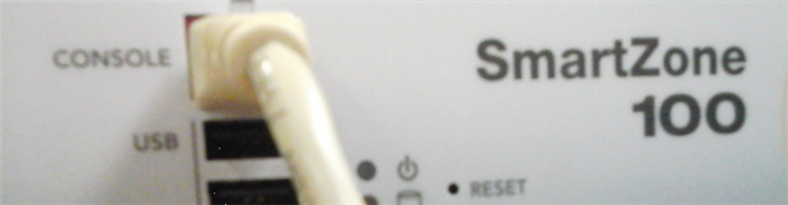
2. If you want to use a serial connection, make sure that both the administrative computer and the controller are both powered on.
And then, do the following:
• Connect the RJ45 end of the cable to the port labeled |O|O| (console port) on the controller. See the figure below for the
location of the console port.
• Connect the RS-232 end of the cable to a COM port on the administrative computer.
FIGURE 1 Location of console port
Start and Configure the SSH Client
Before starting this procedure, make sure that the SSH client is already installed on the administrative computer.
NOTE
The following procedure describes how to use PuTTY, a free and open source telnet/SSH client, to access the controller CLI. If
you are using a different SSH client, the procedure may be slightly different (although the connection settings should be the same).
For more information on PuTTY, visit www.putty.org.
See the following sections depending on your connection method:
•Using SSH Connection on page 18
•Using Serial Connection on page 19
Using SSH Connection
If you have connected the administrative computer to the same subnet or broadcast domain as the Management (Web) interface of the
controller, follow these steps to start and configure the SSH client.
1. Start PuTTY. The PuTTY configuration dialog box appears, showing the Session screen as seen in Figure 2.
Introduction to the Controller Command Line Interface
Using SSH Connection
Ruckus Smart Zone 100 and Virtual Smart Zone Essentials Command Reference
18 Part Number: 800-71567-001 Rev A
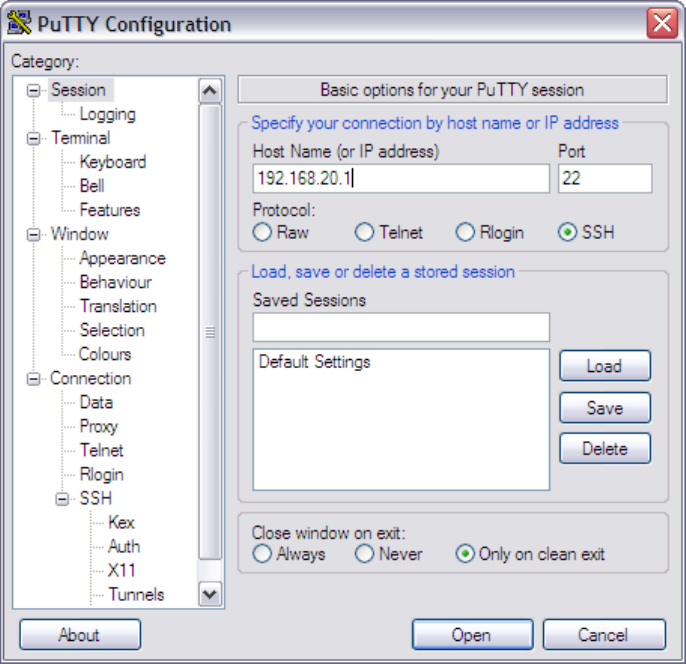
2. In Connection type, select SSH.
If you have connected the administrative computer to the same subnet or broadcast domain as the Management (Web) interface
of the controller, follow these steps to start and configure the SSH client.
FIGURE 2 Selecting SSH as a connection type
3. Enter the IP address of the Management (Web) interface of the controller in the Host Name (or IP address) field as seen in Figure
2 .
4. Click Open. The PuTTY console appears and displays the login prompt. See Figure 6 on page 23.
Using Serial Connection
If you have connected the administrative computer to the console port on the controller using an RS-232 serial to RJ45 cable, follow these
steps to start and configure the SSH client.
1. Start PuTTY. The PuTTY Configuration dialog box appears, showing the Session screen as seen in Figure 3.
Introduction to the Controller Command Line Interface
Using Serial Connection
Ruckus Smart Zone 100 and Virtual Smart Zone Essentials Command Reference
Part Number: 800-71567-001 Rev A 19
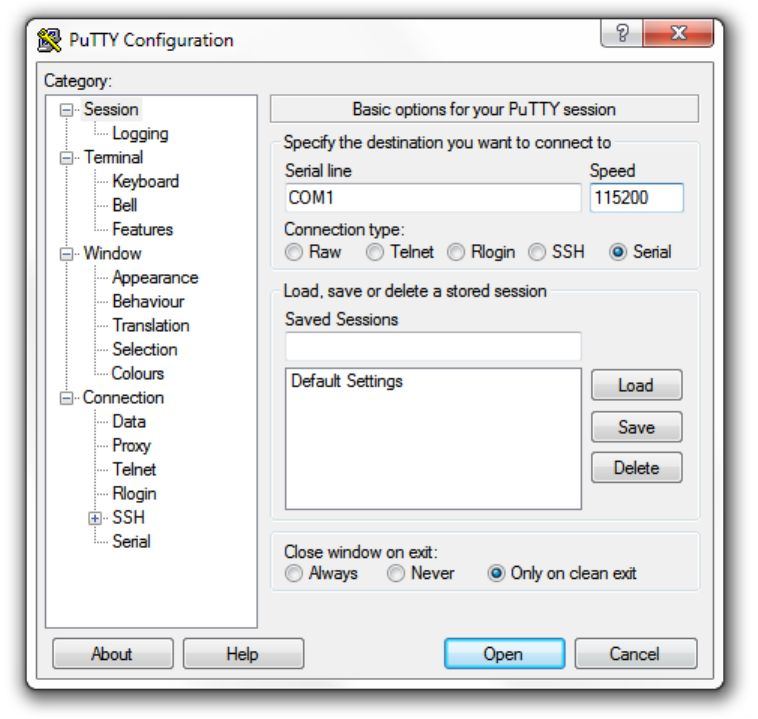
2. In Connection type, select Serial if you are connecting via serial cable.
FIGURE 3 Selecting serial as a connection type
Introduction to the Controller Command Line Interface
Using Serial Connection
Ruckus Smart Zone 100 and Virtual Smart Zone Essentials Command Reference
20 Part Number: 800-71567-001 Rev A
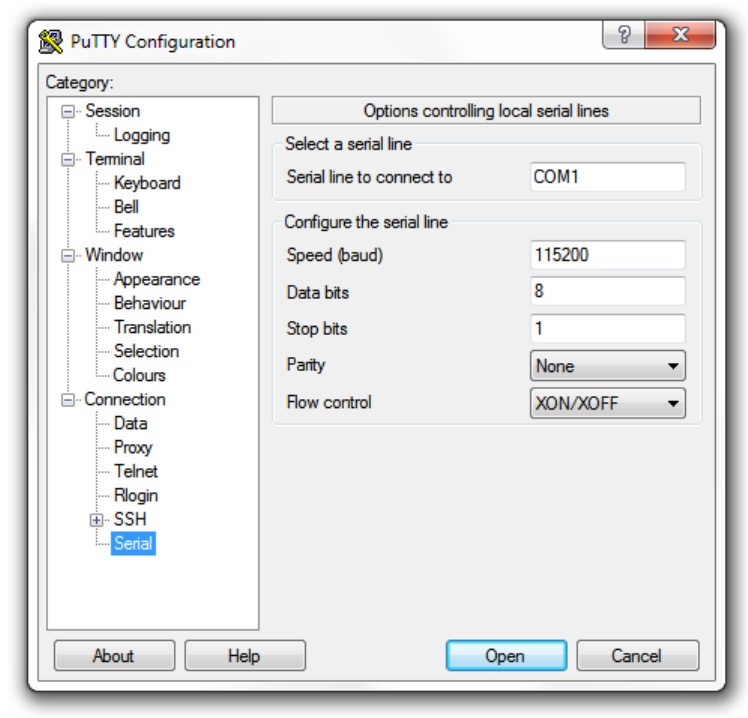
3. Under Category, click Connection > Serial. The serial connection options appear on the right side of the dialog box, displaying
PuTTY’s default serial connection settings. See Figure 4.
FIGURE 4 PuTTy’s default serial connection setting
Introduction to the Controller Command Line Interface
Using Serial Connection
Ruckus Smart Zone 100 and Virtual Smart Zone Essentials Command Reference
Part Number: 800-71567-001 Rev A 21
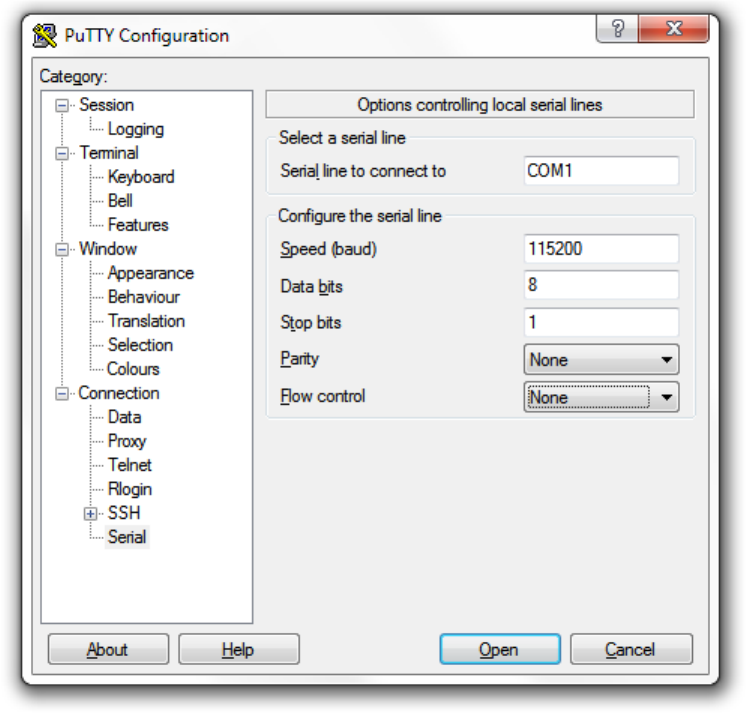
4. Configure the serial connection settings as follows. See Figure 5.
• Serial line to connect to: Type the COM port name to which you connected the RS-232 cable.
• Bits per second: 115200
• Data bits: 8
• Stop bits: 1
• Parity: None
• Flow control: None
FIGURE 5 PuTTY’s serial connection settings for connecting to the controller
5. Click Open. The PuTTY console appears and displays the login prompt as seen in Figure 6.
Introduction to the Controller Command Line Interface
Using Serial Connection
Ruckus Smart Zone 100 and Virtual Smart Zone Essentials Command Reference
22 Part Number: 800-71567-001 Rev A
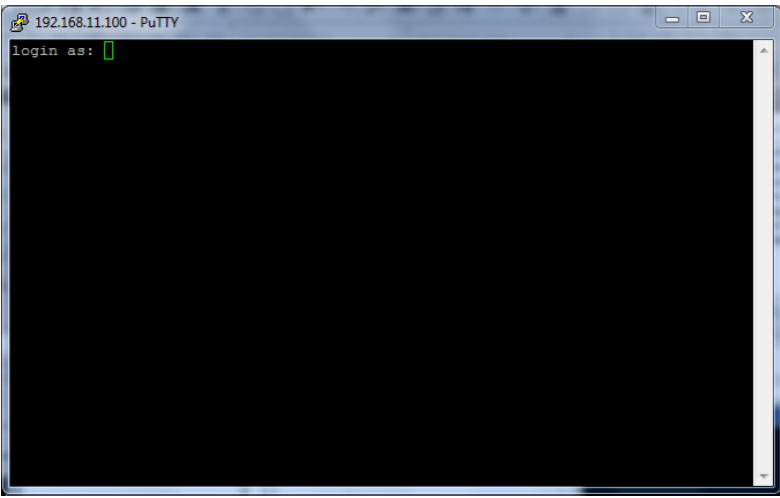
FIGURE 6 PuTTY console displaying the login prompt
You have completed configuring the SSH client to connect to the controller CLI.
Log On to CLI
The following describes the process for log on to the CLI.
• Log on to the controller using putty/Xssh (any other application) using the user credentials of login name and password as given.
NOTE
You cannot use 'admin' as a password, which is used during the controller installation procedure.
• The Ruckus Wireless controller CLI welcome message appears with the CLI prompt as seen in the following figure.
Introduction to the Controller Command Line Interface
Using Serial Connection
Ruckus Smart Zone 100 and Virtual Smart Zone Essentials Command Reference
Part Number: 800-71567-001 Rev A 23
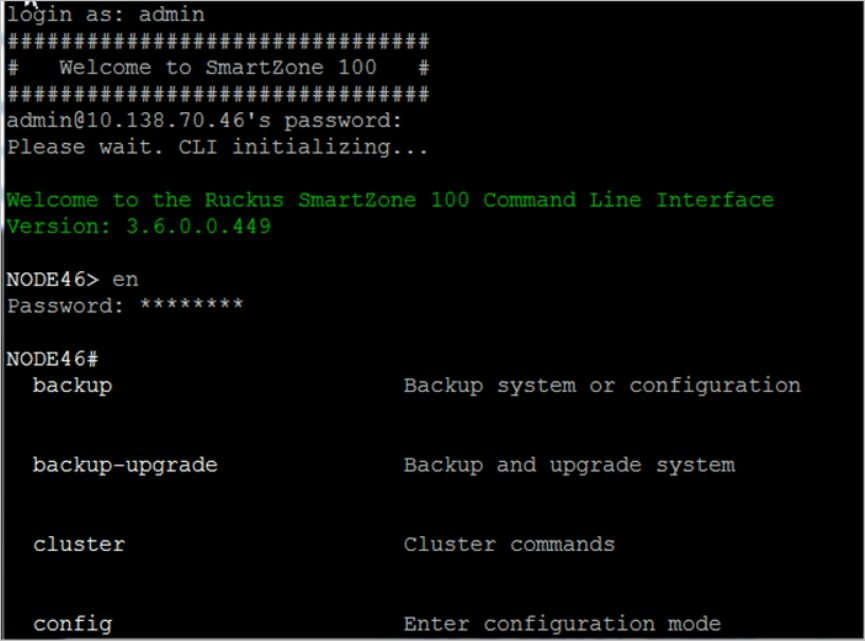
FIGURE 7 Welcome to SmartZone
• You are now logged into the controller CLI as a user with limited privileges by looking at the CLI prompt. If you are in limited mode,
the prompt appears as ruckus> (with a greater than sign). To view a list of commands that are available at the root level or user
mode, enter help or ? as seen in Figure 7 and Figure 8.
NOTE
To change the CLI prompt to a privileged mode, see step 5.
Introduction to the Controller Command Line Interface
Using Serial Connection
Ruckus Smart Zone 100 and Virtual Smart Zone Essentials Command Reference
24 Part Number: 800-71567-001 Rev A
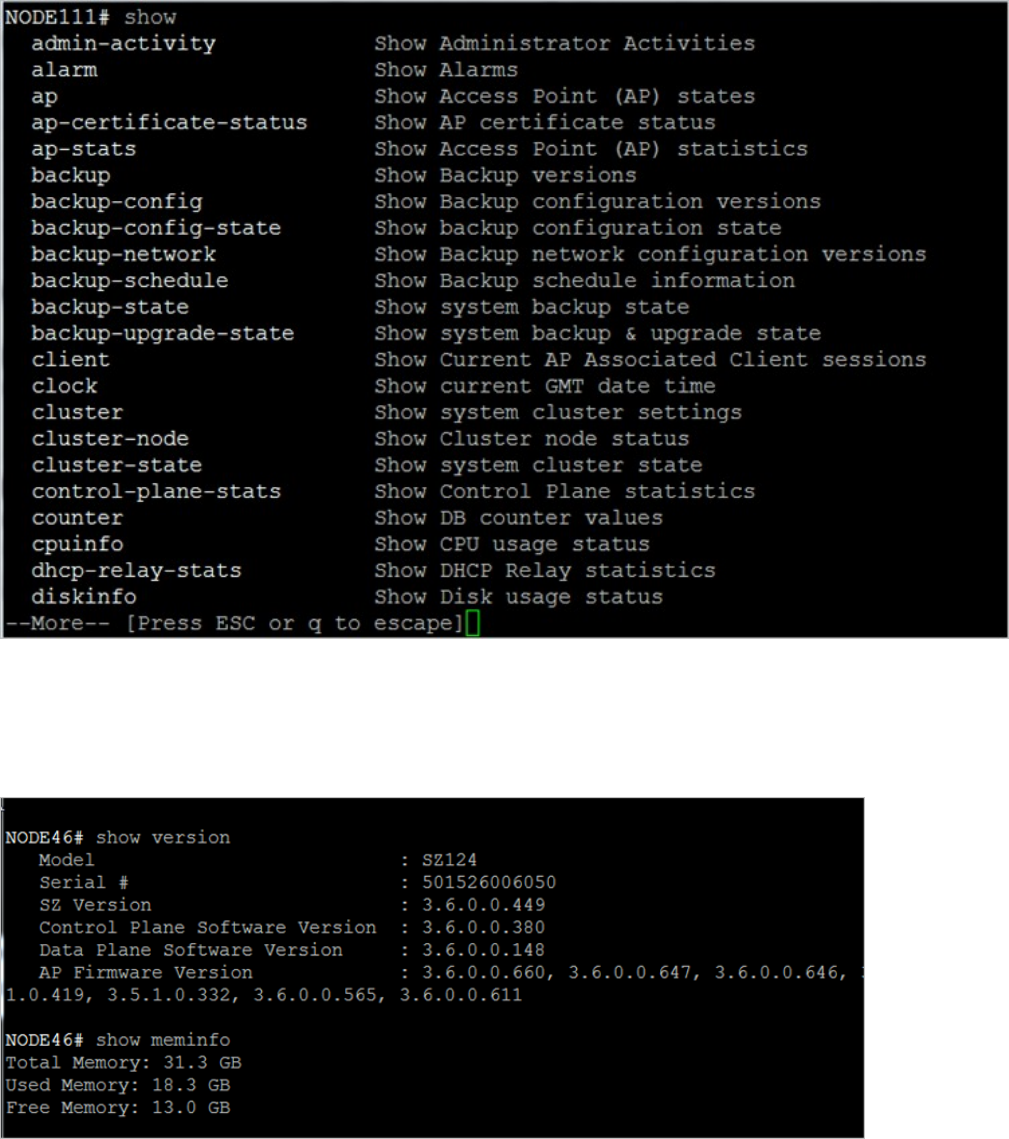
FIGURE 8 Using Show Commands
• As a user with limited privileges, you can view a history of commands that were previously executed and ping a device as seen in
Figure 9.
FIGURE 9 Using the Ping command
Introduction to the Controller Command Line Interface
Using Serial Connection
Ruckus Smart Zone 100 and Virtual Smart Zone Essentials Command Reference
Part Number: 800-71567-001 Rev A 25
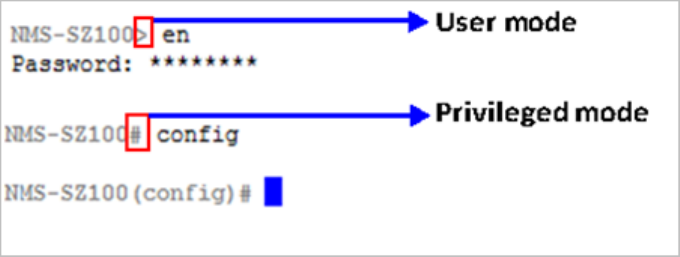
• If you want to run more commands, you need to switch to privileged mode by entering enable and the password at the root
prompt as seen in Figure 10. The prompt changes from ruckus> to ruckus# (with a pound sign) as seen in Figure 10 . Refer to
enable on page 404 command for details.
FIGURE 10 Changing to privileged mode
Introduction to the Controller Command Line Interface
Using Serial Connection
Ruckus Smart Zone 100 and Virtual Smart Zone Essentials Command Reference
26 Part Number: 800-71567-001 Rev A

Configuration Commands A - D
•config...................................................................................................................................................................... 27
• ad-service............................................................................................................................................................... 28
• admin......................................................................................................................................................................30
• admin-radius........................................................................................................................................................... 32
• ap........................................................................................................................................................................... 34
• ap-auto-approve..................................................................................................................................................... 43
• ap-auto-tagging...................................................................................................................................................... 44
• ap-cert-check..........................................................................................................................................................46
• ap-cert-expired-check.............................................................................................................................................47
•ap-certificate-reset.................................................................................................................................................. 48
• ap-control-mgmt-tos............................................................................................................................................... 49
• ap-heartbeat........................................................................................................................................................... 50
• ap-internal-subnet................................................................................................................................................... 51
• app-denial-policy.....................................................................................................................................................52
• app-port-mapping...................................................................................................................................................54
• cert-store................................................................................................................................................................ 55
• changepassword.....................................................................................................................................................58
• clock....................................................................................................................................................................... 59
• cluster-ip-list............................................................................................................................................................60
• cluster-name........................................................................................................................................................... 61
• dns-server-service................................................................................................................................................... 62
• do........................................................................................................................................................................... 64
• dp-group.................................................................................................................................................................65
config
To execute commands in configuration mode, you need to change the mode to:
ruckus(cong)#
Example
SZ100-Node1#
SZ100-Node1# config
SZ100-Node1(config)#
Ruckus Smart Zone 100 and Virtual Smart Zone Essentials Command Reference
Part Number: 800-71567-001 Rev A 27

ad-service
To create or update the active directory service configuration, use the following command:
ruckus(cong)# ad-service
name
Once you enter the config-admin context, you can configure the rest of the administrator’s profile (see example below).
Syntax Description
This command uses the following syntax:
name
Active service directory name
Default
This command has no default settings.
Command Mode
Config
Example
SZ100-Node1(config)# ad-service ads
SZ100-Node1(config-ad-service)#
Related Commands
The following table lists the related ad-service configuration commands.
TABLE 2 Commands related to ruckus(config-ad-service)
Syntax and Type Parameters (if any) Description
ruckus(config-ad-service)# admin-domain-
name
Type: Privileged
domain-name
Sets the administrator domain name. This field
is applicable on executing the group attribute
command.
ruckus(config-ad-service)# admin-password
Type: Privileged
password
Sets the administrator domain password. This
field is applicable on executing the group
attribute command.
ruckus(config-ad-service)# description
Type: Privileged
text
Sets the description
ruckus(config-ad-service)# do
Type: Privileged
Executes the do command.
ruckus(config-ad-service)# email
Type: Privileged
email
Sets the user’s email details.
ruckus(config-ad-service)# end
Type: Privileged
Ends the current configuration session and
returns to privileged EXEC mode.
Configuration Commands A - D
ad-service
Ruckus Smart Zone 100 and Virtual Smart Zone Essentials Command Reference
28 Part Number: 800-71567-001 Rev A

TABLE 2 Commands related to ruckus(config-ad-service) (continued)
Syntax and Type Parameters (if any) Description
ruckus(config-ad-service)# exit
Type: Privileged
Exits from the EXEC.
ruckus(config-ad-service)# friendly-name
Type: Privileged
friendly-name
Sets friendly name for the active service
directory.
ruckus(config-ad-service)# global-catalog
Type: Privileged
friendly-name
Enables the global catalog support
ruckus(config-ad-service)# group-attrs
Type: Privileged
attr-value
: Group attribute value
user-role
: User Role
Sets the user traffic profile mapping.
ruckus(config-ad-service)# help
Type: Privileged
Displays the help.
ruckus(config-ad-service)# ip-address
Type: Privileged
ip
- Sets the primary server IP address Sets the primary service IP address.
ruckus(config-ad-service)# name
Type: Privileged
name
Sets the active directory service name.
ruckus(config-ad-service)# no
Type: Privileged
global-catalog
group-attrs
attr-value
Disables the commands.
ruckus(config-ad-service)# port
Type: Privileged
port
Sets the primary server port.
ruckus(config-ad-service)# windows-domain-
name
Type: Privileged
domain-name
Example: dc=domain,
dc=ruckuswireless, dc=com
Sets the windows domain name
ruckus(config-ad-service)# title
Type: Privileged
text
Sets the user’s job title.
Configuration Commands A - D
ad-service
Ruckus Smart Zone 100 and Virtual Smart Zone Essentials Command Reference
Part Number: 800-71567-001 Rev A 29

admin
To create or update the administrator’s profile (including the email address, login ID and password), use the following command:
ruckus(cong)# admin
name
Once you enter the config-admin context, you can configure the rest of the administrator’s profile (see example below).
Syntax Description
This command uses the following syntax:
name
Administrator user name
Default
This command has no default settings.
Command Mode
Config
Example
SZ100-Node1(config)# admin joe
SZ100-Node1(config-admin)# email joe@company.com
SZ100-Node1(config-admin)# password admin!234
SZ100-Node1(config-admin)# phone 22870001
SZ100-Node1(config-admin)# real-name "Joe Admin"
SZ100-Node1(config-admin)# title CTO
SZ100-Node1(config-admin)# radius radius-1
SZ100-Node1(config-admin-radius)# ip 1.1.1.1
SZ100-Node1(config-admin-radius)# port 1813
SZ100-Node1(config-admin-radius)# realm tw1
SZ100-Node1(config-admin-radius)# shared-secret 11
Retype: **
SZ100-Node1(config-admin-radius)# exit
SZ100-Node1(config-admin)# exit
SZ100-Node1(config)#
Related Commands
The following table lists the related admin configuration commands.
TABLE 3 Commands related to ruckus(config-admin)
Syntax and Type Parameters (if any) Description
ruckus(config-admin)# do
Type: Privileged
Executes the do command.
ruckus(config-admin)# email
Type: Privileged
email
Sets the user’s email details.
Configuration Commands A - D
admin
Ruckus Smart Zone 100 and Virtual Smart Zone Essentials Command Reference
30 Part Number: 800-71567-001 Rev A

TABLE 3 Commands related to ruckus(config-admin) (continued)
Syntax and Type Parameters (if any) Description
ruckus(config-admin)# end
Type: Privileged
Ends the current configuration session and
returns to privileged EXEC mode.
ruckus(config-admin)# exit
Type: Privileged
Exits from the EXEC.
ruckus(config-admin)# help
Type: Privileged
Displays the help.
ruckus(config-admin)# name
Type: Privileged
name
Sets the account name.
ruckus(config-admin)# password
Type: Privileged
password
Sets the password for user.
ruckus(config-admin)# phone
Type: Privileged
phone
Sets the phone number of the user.
ruckus(config-admin)# real-name
Type: Privileged
name
Sets the real name.
ruckus(config-admin)# role
Type: Privileged
name
Sets the user role.
ruckus(config-admin)# title
Type: Privileged
text
Sets the user’s job title.
Configuration Commands A - D
admin
Ruckus Smart Zone 100 and Virtual Smart Zone Essentials Command Reference
Part Number: 800-71567-001 Rev A 31

admin-radius
To configure the RADIUS server for administrators use the following command:
ruckus(cong)# admin-radius
Syntax Description
This command uses the following syntax:
name
RADIUS server name
Default
This command has no default settings.
Command Mode
Config
Example
SZ100-Node1(config-admin)# radius radius-1
SZ100-Node1(config-admin-radius)# ip 1.1.1.1
SZ100-Node1(config-admin-radius)# port 1813
SZ100-Node1(config-admin-radius)# realm tw1
SZ100-Node1(config-admin-radius)# shared-secret 11
Retype: **
SZ100-Node1(config-admin-radius)# exit
Related Commands
The following table lists the related admin-radius-service configuration commands.
TABLE 4 Commands related to ruckus(config-radius-service)
Syntax and Type Parameters (if any) Description
ruckus(config-admin-radius)# backup
Type: Privileged
ip
ip
: Sets the IP address of secondary
RADIUS server
port
port
: Sets the port of secondary RADIUS
server
shared-secret: Sets the shared secret of
secondary RADIUS server
request-timeout
seconds
: Sets the request
timeout seconds for failover policy
max-retry
number
: Sets the maximum number
of retries for failover policy
retry-prilnvl
minutes
: Sets the reconnect
primary minutes for failover policy
Enables backup of RADIUS server.
ruckus(config-admin-radius)# do Executes the do command.
Configuration Commands A - D
admin-radius
Ruckus Smart Zone 100 and Virtual Smart Zone Essentials Command Reference
32 Part Number: 800-71567-001 Rev A

TABLE 4 Commands related to ruckus(config-radius-service) (continued)
Syntax and Type Parameters (if any) Description
Type: Privileged
ruckus(config-admin-radius)# end
Type: Privileged
Ends the current configuration session and
returns to privileged EXEC mode.
ruckus(config-admin-radius)# exit
Type: Privileged
Exits from the EXEC.
ruckus(config-admin-radius)# help
Type: Privileged
Displays the help.
ruckus(config-admin-radius)# ip
Type: Privileged
ip
Sets the IP addresses of the primary RADIUS
server.
ruckus(config-admin-radius)# name
Type: Privileged
name
Sets the RADIUS server name.
ruckus(config-admin-radius)# no
Type: Privileged
backup Disables the backup RADIUS support.
ruckus(config-admin-radius)# port
Type: Privileged
port
Sets the port addresses of the primary
RADIUS server.
ruckus(config-admin-radius)# realm
Type: Privileged
realms
Multiple realms supported. Use a
comma (,) to separate realms
(example:home1,home2)
Sets the realms.
ruckus(config-admin-radius)# service
Type: Privileged
services
: Multiple services supported. Use a
comma (,) to separate services
(example:home1,home2)
Sets the services.
ruckus(config-admin-radius)# shared-secret
Type: Privileged
shared-secret
Shared secret between 1 and
255.
Sets the shared secret of the primary RADIUS
server.
ruckus(config-admin-radius)# test
Type: Privileged
username
password
[CHAP | PAP]Tests the RADIUS server based on the user
credentials.
ruckus(config-admin-radius)# type
Type: Privileged
[ radius | tacacs ]] Sets the admin authentication type,
Configuration Commands A - D
admin-radius
Ruckus Smart Zone 100 and Virtual Smart Zone Essentials Command Reference
Part Number: 800-71567-001 Rev A 33
ap
To update the AP configuration, use the following commands:
ruckus(cong)# ap
mac
ruckus(cong)# ap pre-prov
import ftp-url
export ftp-url
ruckus(cong)# ap swap
import ftp-url
export ftp-url
Syntax Description
This command uses the following syntax:
mac
lock
mac
AP MAC address
lock
Lock AP
mac
pre-prov
mac
AP MAC address
pre-prov
Update Pre-provision configuration
mac
swap
mac
AP MAC address
swap
Update Swap configuration
mac
trigger-swap
mac
AP MAC address
trigger-swap
Trigger swap action
mac
approve
mac
AP MAC address
approve
Approve AP to go ahead registration process
Default
This command has no default settings.
Configuration Commands A - D
ap
Ruckus Smart Zone 100 and Virtual Smart Zone Essentials Command Reference
34 Part Number: 800-71567-001 Rev A

Command Mode
Config
Example
ruckus(config)# ap mac
SZ100-Node1(config)# ap A1:87:45:34:56:FE
ruckus(config)# ap pre-prov <export <ftp-url>>
SZ100-Node1(config)# ap pre-prov import ftp://ruckus:ruckus1!@172.19.7.100/backup/AP_ad8745345
ruckus(config)# ap swap <import <ftp-url>>
SZ100-Node1(config)# ap swap export ftp://ruckus:ruckus1!@172.19.7.100
Related Commands
•Table 5 lists the related cong ap profile configuration commands.
•Table 6 lists the related cong-ap-model configuration commands.
•Table 7 lists the related cong-ap-mode-lan1l configuration commands.
The following table lists the related congig ap profile configuration commands.
TABLE 5 Commands related to ruckus(config-ap).
Syntax and Type Parameters (if any) Description
ruckus(config-ap)# admin
Type: Privileged
logon
password
Sets the administrative logon credentials.
ruckus(config-ap)# admin-mode
Type: Privileged
locked
unlocked
Sets the administrative mode to either locked
or unlocked.
ruckus(config-ap)# ap-logon
Type: Privileged
logon-id
Sets the access point administration login
credentials.
ruckus(config-ap)# ap-model
Type: Privileged
ap-model
Sets the model specification (overrides the
zone configuration).
ruckus(config-ap)# ap-password
Type: Privileged
password
Sets the access point administrative
password.
ruckus(config-ap)# area-code
Type: Privileged
areacode
Sets the user location information of LAC or
TAC.
ruckus(config-ap)# ap-snmp-options
Type: Privileged
Sets the AP SNMP options.
ruckus(config-ap)# bonjour-gateway
Type: Privileged
Enables the bonjour gateway.
ruckus(config-ap)# bonjour-policy
Type: Privileged
Enables the bonjour policy.
ruckus(config-ap)# channel-evaluation-interval
Type: Privileged
seconds
:The interval value (Range: 60-3600
sec)
Sets the channel evaluation interval.
ruckus(config-ap)# channel-select-mode
Type: Privileged
2.4g ${value}: 2.4GHz radio
5g ${value}: 5GHz radio
Sets a mode to automatically adjust AP
channels.
Configuration Commands A - D
ap
Ruckus Smart Zone 100 and Virtual Smart Zone Essentials Command Reference
Part Number: 800-71567-001 Rev A 35

TABLE 5 Commands related to ruckus(config-ap). (continued)
Syntax and Type Parameters (if any) Description
ruckus(config-ap)# channelfly-mtbc
Type: Privileged
2.4g
number
2.4GHz radio
number
: MTBC value (Range:100~1440)
5g
number
: 5GHz radio
Set MTBC value of ChannelFly
ruckus(config-ap)# client-admission-control
Type: Privileged
2.4g
5g
2.4g minClientCount
minClientCount
: Min
Client Count (Default: 10)
2.4g maxRadioLoad
maxRadioLoad
Max
Radio Load (Default: 75%)
2.4g minClientThroughput
minClientThroughput
: Min Client Throughput
(Default: 0.0Mbps)
5g minClientCount
minClientCount
: Min
Client Count (Default: 20)
5g maxRadioLoad
maxRadioLoad
: Max
Radio Load (Default: 75%)
5g minClientThroughput
minClientThroughput
: Min Client Throughput
(Default: 0.0Mbps)
Enables the client admission control.
ruckus(config-ap)# description
Type: Privileged
description
Sets the model specification (overrides the
zone configuration).
ruckus(config-ap)# device-ip-mode
Type: Privileged
[ ipv6 | ipv4 ]Sets the device IP mode.
ruckus(config-ap)# do
Type: Privileged
Executes the do command.
ruckus(config-ap)# end
Type: Privileged
Ends the current configuration session and
returns to privileged EXEC mode.
ruckus(config-ap)# exit
Type: Privileged
Exits from the EXEC.
ruckus(config-ap)# gps
Type: Privileged
latitude
longitude
Sets the GPS coordinates to latitude and
longitude values.
ruckus(config-ap)# gps-latitude
Type: Privileged
gps-latitude
Sets the GPS coordination latitude.
ruckus(config-ap)# gps-longitude
Type: Privileged
gps-longitude
Sets the GPS coordination longitude.
ruckus(config-ap)# help
Type: Privileged
Displays the help.
ruckus(config-ap)# hotspot20
Type: Privileged
name
[ swe | cze | spa | eng | chi | ger | fre |
jpn | dan | tur ]
name
: Name
swe: Swedish
cze: Czech
Sets the hotspot 2.0 settings.
Configuration Commands A - D
ap
Ruckus Smart Zone 100 and Virtual Smart Zone Essentials Command Reference
36 Part Number: 800-71567-001 Rev A

TABLE 5 Commands related to ruckus(config-ap). (continued)
Syntax and Type Parameters (if any) Description
spa: Spanish
eng: English
chi: Chinese
ger: German
fre: French
jpn: Japanese
dan: Danish
tur: Turkish
ruckus(config-ap)# ip
Type: Privileged
address
ip
network-mask gateway
name-server
dns-server
secondary
Sets the IP address and primary and
secondary DNS servers.
ruckus(config-ap)# ip6
Type: Privileged
[ keep | auto ]: Retains the AP settings
static ipv6
gateway
primaryDNS
secondaryDNS
: Static IPv6 address with the
primary and secondary server details.
Sets the AP IPv6 address.
ruckus(config-ap)# location
Type: Privileged
location
Sets the location.
ruckus(config-ap)# location-additional-info
Type: Privileged
text
Sets the additional information for location.
ruckus(config-ap)# mesh
Type: Privileged
[ disable | mesh | root | auto ]Sets the mesh mode to either:
disable: Disable
mesh: Mesh AP
root: Root AP
auto: Auto
ruckus(config-ap)# model
Type: Privileged
Sets the model specifications. It overrides the
zone configuration.
ruckus(config-ap)# name
Type: Privileged
name
Sets the AP name.
ruckus(config-ap)# no
Type: Privileged
admin
bonjour-gateway
channel-evaluation-interval
channel-select-mode
client-admission-control
description
gps
hotspot20
ip
address
name-server secondary
ip6
address
name-server secondary
location
location-additional-info
Disables the configuration.
...................................continued
Configuration Commands A - D
ap
Ruckus Smart Zone 100 and Virtual Smart Zone Essentials Command Reference
Part Number: 800-71567-001 Rev A 37

TABLE 5 Commands related to ruckus(config-ap). (continued)
Syntax and Type Parameters (if any) Description
ruckus(config-ap)# no
Type: Privileged
model
override-ap-mgmt-vlan
channel-select-mode
override-client-admission-control
override-smart-mon
override-syslog-opt
override-zone-location
override-zone-location-additional-info
no protection-mode
radio
smart-mon
swap-in-ap
syslog
uplink-ap
venue-profile
Disables the configuration.
ruckus(config-ap)# override-ap-mgmt-vlan
Type: Privileged
vlanTag
Override AP Management VLAN.
ruckus(config-ap)# override-channel-select-
mode
Type: Privileged
2.4g
: 2.4 GHz radio
5g
: 5 GHz radio
Overrides the auto channel selection mode
and channelFly MTBC.
ruckus(config-ap)# override-client-admission-
control
Type: Privileged
2.4g
5g
Overrides the client admission control.
ruckus(config-ap)# override-smart-mon
Type: Privileged
Overrides the smart monitor.
ruckus(config-ap)# override-syslog-opt
Type: Privileged
Override Syslog options
ruckus(config-ap)# override-zone-location
Type: Privileged
Overrides the zone location settings.
ruckus(config-ap)# override-zone-location-
additional-info
Type: Privileged
Overrides the zone’s additional information
setting on location.
ruckus(config-ap)# protection-mode
Type: Privileged
2.4g ${value} Overrides the protection mode on 2.4 GHz
radio
ruckus(config-ap)# radio
Type: Privileged
2.4g channel
channel
5g channel
channel
2.4g channelization
channelization
5g channelization
channelization
2.4g tx-power
tx-power
Sets the radio channels.
Configuration Commands A - D
ap
Ruckus Smart Zone 100 and Virtual Smart Zone Essentials Command Reference
38 Part Number: 800-71567-001 Rev A

TABLE 5 Commands related to ruckus(config-ap). (continued)
Syntax and Type Parameters (if any) Description
5g tx-power
tx-power
2.4g wlan-service
5g wlan-service
2.4g wlan-group
name
5g wlan-group
name
2.4g roam [ enable | disable ]
5g roam [ enable | disable ]
ruckus(config-ap)# smart-mon
Type: Privileged
interval
between 5-60
threshold
between 1-10
Enables the smart monitor.
ruckus(config-ap)# swap-in-ap
Type: Privileged
mac
Sets the AP Mac IP address for swap-in.
ruckus(config-ap)# syslog
Type: Privileged
enable
ip
port
:Enable the syslog server
enable
ip
port
[ Local2 | Keep Origina l |
Local1 | Local5 | Local6 | Local0 | Local7 |
Local3 | Local4 ] [ Error | Critical | Warning | All
| Alert | Notice | Info | Emergency ]
disable - Disables the syslog server
Sets the syslog server.
ruckus(config-ap)# uplink
Type: Privileged
[ smart | manual ]Sets the uplink selection to either smart or
manual.
ruckus(config-ap)# uplink-ap
Type: Privileged
Sets the uplink to manual access point.
ruckus(config-ap)# venue-profile
Type: Privileged
name
Sets the venue profile
ruckus(config-ap)# zone
Type: Privileged
name
Moves the access point to another zone.
The following table lists the related ap model configuration commands.
TABLE 6 Commands related to ruckus(config-ap-model)
Syntax and Type Parameters (if any) Description
ruckus(config-ap-model)# do
Type: Privileged
Executes the do command.
ruckus(config-ap-model)# end
Type: Privileged
Ends the current configuration session and
returns to privileged EXEC mode.
ruckus(config-ap-model)# exit
Type: Privileged
Exits from the EXEC.
ruckus(config-ap-model)# ext-ant
Type: Privileged
2.4g
number
- 2.4 with DBI number
2.4gg
number
[ 3 | 2 ] - 3/2 antennas
5g
number
- 5g with DBI number
5gg
number
[ 2 | 3 ] - 5gg with 2/3 antennas
Enables the external antenna.
Configuration Commands A - D
ap
Ruckus Smart Zone 100 and Virtual Smart Zone Essentials Command Reference
Part Number: 800-71567-001 Rev A 39

TABLE 6 Commands related to ruckus(config-ap-model) (continued)
Syntax and Type Parameters (if any) Description
ruckus(config-ap-model)# help
Type: Privileged
Displays the help.
ruckus(config-ap-model)# internal-heater
Type: Privileged
Enables the internal heater.
ruckus(config-ap-model)# lan1
ruckus(config-ap-model)# lan2
ruckus(config-ap-model)# lan3
ruckus(config-ap-model)# lan4
ruckus(config-ap-model)# lan5
Type: Privileged
Sets the LAN configurations from 1 to 5.
ruckus(config-ap-model)# led
Type: Privileged
Enables the status of LEDs.
ruckus(config-ap-model)# led-mode
Type: Privileged
Sets the LED mode.
ruckus(config-ap-model)# lldp
Type: Privileged
Enables link layer discovery protocol.
ruckus(config-ap-model)# lldp-ad-interval
Type: Privileged
seconds
Sets the LLDP advertise interval.
ruckus(config-ap-model)# lldp-hold-time
Type: Privileged
seconds
Sets the LLDP hold time.
ruckus(config-ap-model)# lldp-mgmt
Type: Privileged
Enables LLDP management IP TLV.
ruckus(config-ap-model)# no
Type: Privileged
ext-ant
internal-heater
lan1
lan2
lan3
lan4
lan5
led
lldp
lldp-mgmt
poe-operating-mode
poe-out-port
radio-band
usb
usb-software
Disables or deletes the settings that have
been configured.
ruckus(config-ap-model)# poe-operating-
mode
Switches the PoE mode.
Configuration Commands A - D
ap
Ruckus Smart Zone 100 and Virtual Smart Zone Essentials Command Reference
40 Part Number: 800-71567-001 Rev A

TABLE 6 Commands related to ruckus(config-ap-model) (continued)
Syntax and Type Parameters (if any) Description
Type: Privileged
ruckus(config-ap-model)# poe-out-port
Type: Privileged
Enables the PoE out port.
ruckus(config-ap-model)# radio-band
Type: Privileged
${value} Switches the radio band.
ruckus(config-ap-model)# usb
Type: Privileged
ap-model
[ enable | disable]Sets the USB port for a specific AP model.
ruckus(config-ap-model)# usb-software
Type: Privileged
value
Sets the AP USB software package.
The following table lists the related to ap-model-lan1 configuration commands.
TABLE 7 Commands related to ruckus(config-ap-model-lan1)
Syntax and Type Parameters (if any) Description
ruckus(config-ap-model-lan1)# 8021x
Type: Privileged
802.1x-type
Sets 802.1x.
ruckus(config-ap-model-lan1)# acct-service
Type: Privileged
acct-service
Sets the authentication service configurations.
ruckus(config-ap-model-lan1)# auth-service
Type: Privileged
auth-service
Sets the authentication service configurations.
ruckus(config-ap-model-lan1)# do
Type: Privileged
Executes the do command.
ruckus(config-ap-model-lan1)# end
Type: Privileged
Ends the current configuration session and
returns to privileged EXEC mode.
ruckus(config-ap-model-lan1)# exit
Type: Privileged
Exits from the EXEC.
ruckus(config-ap-model-lan1)# help
Type: Privileged
Displays the help.
ruckus(config-ap-model-lan1)# no
Type: Privileged
overwrite Does not permit overwriting.
ruckus(config-ap-model-lan1)# mac-bypass
Type: Privileged
Sets the MAC bypass.
ruckus(config-ap-model-lan1)# members
Type: Privileged
members
Sets the AP model configurations.
ruckus(config-ap-model-lan1)# no
Type: User
acct-service
mac-bypass
Disables or deletes the settings that have
been configured.
ruckus(config-ap-model-lan1)# profile
Type: Privileged
profile
: Ethernet port profile. Sets the Ethernet port profile.
ruckus(config-ap-model-lan1)# supplicant mac Sets the supplicant.
Configuration Commands A - D
ap
Ruckus Smart Zone 100 and Virtual Smart Zone Essentials Command Reference
Part Number: 800-71567-001 Rev A 41
TABLE 7 Commands related to ruckus(config-ap-model-lan1) (continued)
Syntax and Type Parameters (if any) Description
Type: Privileged custom
username
password
ruckus(config-ap-model-lan1)# type
Type: Privileged
[trunk-port | access-port | general-port]Sets the port type.
ruckus(config-ap-model-lan1)# vlan-untag-id
Type: Privileged
vlan-untag-id
Sets the VLAN untag ID.
ruckus(config-ap-model-lan1)# vlan-members
Type: Privileged
members
: VLAN members Sets the VLAN members.
Configuration Commands A - D
ap
Ruckus Smart Zone 100 and Virtual Smart Zone Essentials Command Reference
42 Part Number: 800-71567-001 Rev A
ap-auto-approve
To enable auto approve, use the following command:
ruckus(cong)# ap-auto-approve
Syntax Description
This command has no arguments or keywords
Default
This command has no default settings.
Command Mode
Config
Example
SZ100-Node1(config)# ap-auto-approve
Successful operation
Configuration Commands A - D
ap-auto-approve
Ruckus Smart Zone 100 and Virtual Smart Zone Essentials Command Reference
Part Number: 800-71567-001 Rev A 43

ap-auto-tagging
To setup critical access point auto tagging rules or to enable auto tagging critical access points, use the following command:
ruckus(cong)# ap-auto-tagging
Syntax Description
This command has no arguments or keywords
Default
This command has no default settings.
Command Mode
Config
Example
SZ100-Node1(config)# ap-auto-tagging
SZ100-Node1(config-ap-auto-tagging)#
Related Commands
The following table lists the related to ap-auto-tagging configuration commands.
TABLE 8 Commands related to ruckus(config-ap-auto-tagging)
Syntax and Type Parameters (if any) Description
ruckus(config-ap-auto-tagging)# do
Type: Privileged
Executes the do command.
ruckus(config-ap-auto-tagging)# enable
Type: Privileged
Enables the auto tagging for critical APs.
ruckus(config-ap-auto-tagging)# end
Type: Privileged
Ends the current configuration session and
returns to privileged EXEC mode.
ruckus(config-ap-auto-tagging)# exit
Type: Privileged
Exits from the EXEC.
ruckus(config-ap-auto-tagging)# help
Type: Privileged
Displays the help.
ruckus(config-ap-auto-tagging)# no
Type: Privileged
enable Disables the auto tagging for critical APs.
ruckus(config-ap-auto-tagging)# rule
Type: Privileged
daily-threshold
- Traffic bytes exceeds
threshold rule
Selects the auto tagging rule. To view this
command the ap-auto-tagging should be
enabled.
Configuration Commands A - D
ap-auto-tagging
Ruckus Smart Zone 100 and Virtual Smart Zone Essentials Command Reference
44 Part Number: 800-71567-001 Rev A

TABLE 8 Commands related to ruckus(config-ap-auto-tagging) (continued)
Syntax and Type Parameters (if any) Description
ruckus(config-ap-auto-tagging)# threshold
Type: Privileged
daily-
Disables the auto tagging for critical APs. To
view this command the ap-auto-tagging
should be enabled.
ruckus(config-ap-auto-tagging)# unit
Type: Privileged
[ m | g ]Sets the unit to either mega bytes or giga
bytes.
Configuration Commands A - D
ap-auto-tagging
Ruckus Smart Zone 100 and Virtual Smart Zone Essentials Command Reference
Part Number: 800-71567-001 Rev A 45
ap-cert-check
To enable the access point certificate check, use the following command:
ruckus(cong)# ap-cert-check
Syntax Description
This command has no arguments or keywords.
Default
This command has no default settings.
Command Mode
Config
Example
SZ100-Node1(config)# ap-cert-check
Successful operation
Configuration Commands A - D
ap-cert-check
Ruckus Smart Zone 100 and Virtual Smart Zone Essentials Command Reference
46 Part Number: 800-71567-001 Rev A
ap-cert-expired-check
To enable checking of AP expired certificate use the following command:
Syntax
ruckus(cong)# ap-cert-expired-check
Syntax Description
This command has no arguments or keywords.
Default
This command has no default settings.
Command Mode
Config
Example
ruckus(config)# ap-cert-expired-check
Related Command
ruckus(cong)#no ap-cert-expired-check
Disables the checking of AP expired certificates.
Configuration Commands A - D
ap-cert-expired-check
Ruckus Smart Zone 100 and Virtual Smart Zone Essentials Command Reference
Part Number: 800-71567-001 Rev A 47
ap-certificate-reset
To the AP certificate request which failed to update the certificate, use the following command:
ruckus(cong)# ap-certicate-reset
Syntax Description
This command has no arguments or keywords.
Default
This command has no default settings.
Command Mode
Config
Example
SZ100-Node1(config)# ap-certificate-reset
Configuration Commands A - D
ap-certificate-reset
Ruckus Smart Zone 100 and Virtual Smart Zone Essentials Command Reference
48 Part Number: 800-71567-001 Rev A
ap-control-mgmt-tos
To enable the access control and management traffic type of service and values, use the following command:
ruckus(cong)# ap-control-mgmt-tos
value
Syntax Description
This command has no arguments or keywords.
Default
This command uses the following syntax:
value: TOS value
Command Mode
Config
Example
SZ100-Node1(config)# ap-control-mgmt-tos 10
Configuration Commands A - D
ap-control-mgmt-tos
Ruckus Smart Zone 100 and Virtual Smart Zone Essentials Command Reference
Part Number: 800-71567-001 Rev A 49
ap-heartbeat
To setup the access point heartbeat, use the following command:
ruckus(cong)# ap-heartbeat
seconds
Syntax Description
This command uses the following syntax:
seconds
Interval in seconds, which the AP sends the heartbeat to the controller such as: 30, 60, 150 and 300
Default
This command has no default settings.
Command Mode
Config
Example
SZ100-Node1(config)# ap-heartbeat 30
Configuration Commands A - D
ap-heartbeat
Ruckus Smart Zone 100 and Virtual Smart Zone Essentials Command Reference
50 Part Number: 800-71567-001 Rev A
ap-internal-subnet
To set the tunnel internal subnet use the following command:
Syntax
ruckus(cong)# ap-internal-subnet < ip >
Syntax Description
This command has the below arguments or keywords:
ip : IP address of the subnet in the format 10.X.0.0
Default
This command has no default settings.
Command Mode
Config
Example
ruckus(config)# ap-internal-subnet 10.0.0.0
Configuration Commands A - D
ap-internal-subnet
Ruckus Smart Zone 100 and Virtual Smart Zone Essentials Command Reference
Part Number: 800-71567-001 Rev A 51
app-denial-policy
To create or update an Application Denial Policy, use the following command:
ruckus(cong)# app-denial-policy
name
Syntax Description
This command has the following parameter:
name
application name
Default
This command has no default settings.
Command Mode
Privileged
Example
SZ100-Node1(config)# app-denial-policy xyz
Related Commands
The following table lists the related app-denial-policy configuration commands.
TABLE 9 Commands related to ruckus(config-app-denial-policy)
Syntax and Type Parameters (if any) Description
ruckus(config-app-denial-policy)# description
Type: Privileged
text
Sets the description.
ruckus(config-app-denial-policy)# rule
Type: Privileged
Creates/Updates Application Denial Policy rule
ruckus(config-app-denial-policy)# no
Type: Privileged
rule Removes Application Denial Policy rule.
app-denial-policy lists the related app-denial-policy-rule configuration commands.
TABLE 10 Commands related to ruckus(config-app-denial-policy-rule)
Syntax and Type Parameters (if any) Description
ruckus(config-app-denial-policy-rule)#
applicationtype
Type: Privileged
[ port | http-domain-name ]
port: Port
http-domain-name: HTTP
domain name
Sets the application type.
Configuration Commands A - D
app-denial-policy
Ruckus Smart Zone 100 and Virtual Smart Zone Essentials Command Reference
52 Part Number: 800-71567-001 Rev A

TABLE 10 Commands related to ruckus(config-app-denial-policy-rule) (continued)
Syntax and Type Parameters (if any) Description
ruckus(config-app-denial-policy-rule)#
content
Type: Privileged
content
Sets the content.
Configuration Commands A - D
app-denial-policy
Ruckus Smart Zone 100 and Virtual Smart Zone Essentials Command Reference
Part Number: 800-71567-001 Rev A 53

app-port-mapping
To create or update application port mapping, use the following command:
ruckus(cong)# app-port-mapping
name
Syntax Description
This command has the following parameter:
name
application name
Default
This command has no default settings.
Command Mode
Privileged
Example
SZ100-Node1(config)# app-port-mapping abc
Related Commands
The following table lists the related app-port-mapping configuration commands.
TABLE 11 Commands related to ruckus(config-app-port-mapping)
Syntax and Type Parameters (if any) Description
ruckus(config-app-port-mapping)# port
Type: Privileged
port
: Port Sets the port.
ruckus(config-app-port-mapping)# protocol
Type: Privileged
[tcp | udp]Sets the protocol
Configuration Commands A - D
app-port-mapping
Ruckus Smart Zone 100 and Virtual Smart Zone Essentials Command Reference
54 Part Number: 800-71567-001 Rev A

cert-store
To create or update certificate configurations, use the following command:
ruckus(cong)# cert-store ap-cert
name
ruckus(cong)# cert-store cert
name
ruckus(cong)# cert-store csr
name
ruckus(cong)# cert-store hotspot-cert
name
ruckus(cong)# cert-store web-cert
name
Syntax Description
This command uses the following syntax:
ap-cert
name
Create / updates the AP port certificate
cert
name
Create / updates the certificate configuration
csr
name
Create / updates CSR (Certificate Signing Request) configuration
hotspot-cert
name
Sets the hotspot certificate
web-cert
name
Sets the management web certificate
Default
This command has no default settings.
Command Mode
Config
Example
SZ100-Node1(config)# cert-store cert apcert
SZ100-Node1(config-cert)#
Related Commands
The following table lists the related cert-store configuration commands.
TABLE 12 Commands related to ruckus(config-cert-store) configuration
Syntax and Type Parameters (if any) Description
ruckus(config-cert-store)# cert
ftp-url
Uploads the certificate file.
Configuration Commands A - D
cert-store
Ruckus Smart Zone 100 and Virtual Smart Zone Essentials Command Reference
Part Number: 800-71567-001 Rev A 55

TABLE 12 Commands related to ruckus(config-cert-store) configuration (continued)
Syntax and Type Parameters (if any) Description
Type: Privileged
ftp-url
append
ruckus(config-cert-store)# city
Type: Privileged
city
Sets the city
ruckus(config-cert-store)# common-name
Type: Privileged
domain-name
Sets the domain name
ruckus(config-cert-store)# country
Type: Privileged
country
Sets the country.
ruckus(config-cert-store)# description
Type: Privileged
text
Sets the description
ruckus(config-cert-store# do
Type: Privileged
Executes the do command.
ruckus(config-cert-store)# email
Type: Privileged
email
Sets the email address.
ruckus(config-cert-store)# end
Type: Privileged
Ends the current configuration session and
return to privileged EXEC mode.
ruckus(config-cert-store)# exit
Type: Privileged
Exits from the EXEC.
ruckus(config-cert-store)# help
Type: Privileged
Displays the help.
ruckus(config-cert-store)#inter-cert
Type: Privileged
ftp-url
:FTP URL
format: ftp://
username
:
password
@
ftp-host
/
file-path
Upload intermediate CA certificate.
ruckus(config-cert-store)# no
Type: Privileged
inter-cert
root-cert
Disables all commands.
ruckus(config-cert-store)# organization
Type: Privileged
org
Sets the organization.
ruckus(config-cert-store)# passphrase
Type: Privileged
passphrase
Sets the key passphrase.
ruckus(config-cert-store)# private-key
Type: Privileged
upload
ftp-url
csr
csr-name
Sets the private key.
ruckus(config-cert-store)# root-cert
Type: Privileged
ftp-url
:FTP URL
format: ftp://
username
:
password
@
ftp-host
/
file-path
Select the root certificate.
ruckus(config-cert-store)# root-cert-type
Type: Privileged
Sets the certificate type to trusted root
certificate.
ruckus(config-cert-store)# server-cert
Type: Privileged
ftp-url
:FTP URL
format: ftp://
username
:
password
@
ftp-host
/
file-path
Upload server certificates.
ruckus(config-cert-store)# state
Type: Privileged
state
Sets the state
Configuration Commands A - D
cert-store
Ruckus Smart Zone 100 and Virtual Smart Zone Essentials Command Reference
56 Part Number: 800-71567-001 Rev A

TABLE 12 Commands related to ruckus(config-cert-store) configuration (continued)
Syntax and Type Parameters (if any) Description
ruckus(config-cert-store)# unit
Type: Privileged
org-unit
Sets the organization unit.
Configuration Commands A - D
cert-store
Ruckus Smart Zone 100 and Virtual Smart Zone Essentials Command Reference
Part Number: 800-71567-001 Rev A 57
changepassword
To change the administrative password, use the following command:
ruckus(cong)# changepassword
old password
new password
Syntax Description
This command uses the following syntax:
old password
Existing password
new password
Changed password.
The password must contain at least eight characters with at least one number, one letter, and one special character (~ !
@ # $ % ^ & * ( ) - _ = + [ ] { } \ | ; : ' " , . < > / ?) except ` or $(.
Default
This command has no default settings.
Command Mode
Config
Example
SZ100-Node1(config)# changepassword
Old Password: *******
New Password: *******
Configuration Commands A - D
changepassword
Ruckus Smart Zone 100 and Virtual Smart Zone Essentials Command Reference
58 Part Number: 800-71567-001 Rev A
clock
To update the system clock or the timezone configuration, use the following command:
ruckus(cong)# clock timezone
timezone
Syntax Description
This command uses the following syntax:
timezone
Sets the system clock timezone
timezone
Timezone name of the domain
Default
This command has no default settings.
Command Mode
Config
Example
SZ100-Node1(config)# clock timezone Africa/Nairobi
Configuration Commands A - D
clock
Ruckus Smart Zone 100 and Virtual Smart Zone Essentials Command Reference
Part Number: 800-71567-001 Rev A 59
cluster-ip-list
To update the node IP address mapping list of the cluster configuration, use the following command:
ruckus(cong)# cluster-ip-list
ip-mappings
Syntax Description
This command uses the following syntax:
ip-mappings
Node IP mapping list, which is space separated.
Default
This command has no default settings.
Command Mode
Config
Example
SZ100-Node1(config)# cluster-ip-list <old-ip>:<new-ip> <old-ip2>:<new-ip2>
SZ100-Node1(config)# cluster-ip-list 172.19.18.96:172.19.13.56 172.19.15.67:172.19.10.07
Configuration Commands A - D
cluster-ip-list
Ruckus Smart Zone 100 and Virtual Smart Zone Essentials Command Reference
60 Part Number: 800-71567-001 Rev A
cluster-name
To change the cluster name, use the following command:
ruckus(cong)# cluster-name
cluster-name
Syntax Description
This command uses the following syntax:
cluster-name
Change the cluster name.
Default
This command has no default settings.
Command Mode
Config
Example
SZ100-Node1(config)# cluster-name cls1
Configuration Commands A - D
cluster-name
Ruckus Smart Zone 100 and Virtual Smart Zone Essentials Command Reference
Part Number: 800-71567-001 Rev A 61
dns-server-service
To create or update DNS server services, use the following command.
ruckus(cong)# dns-server-service
Syntax Description
This command has the following keywords:
name
DNS server service name
Default
This command has no default settings.
Command Mode
Config
Example
SZ100-Node1(config)# dns-server-service xy
Related Commands
The following table lists the related dns-server-service configuration commands.
TABLE 13 Commands related to ruckus(config-dns-server-service)
Syntax and Type Parameters (if any) Description
ruckus(config-dns-server-service)# description
Type: Privileged
Sets description.
ruckus(config-dns-server-service)# do
Type: Privileged
Executes the do command.
ruckus(config-dns-server-service)# exit
Type: Privileged
Exits from the EXEC.
ruckus(config-dns-server-service)# end
Type: Privileged
Ends the current configuration session and returns
to the privileged EXEC mode.
ruckus(config-dns-server-service)# help
Type: Privileged
Displays help.
ruckus(config-dns-server-service)# name
Type: Privileged
<name> Sets the DNS server services name.
ruckus(config- dns-server - service) ## no
Type: Privileged
Disable and delete commands.
ruckus(config-dns-server-service) # primary-ip
Type: Privileged
Sets the primary IP address.
ruckus(config- dns-server - service) ## secondary-ip
Type: Privileged
Sets the secondary IP address.
Configuration Commands A - D
dns-server-service
Ruckus Smart Zone 100 and Virtual Smart Zone Essentials Command Reference
62 Part Number: 800-71567-001 Rev A

TABLE 13 Commands related to ruckus(config-dns-server-service) (continued)
Syntax and Type Parameters (if any) Description
ruckus(config-dns-server-service) # no description
Type: Privileged
Delete the description.
ruckus(config- dns-server-service) # no primary-ip
Type: Privileged
Deletes the primary IP address.
ruckus(config-dns-server-service) ## no secondary-
ip
Type: Privileged
Deletes the secondary IP address.
Configuration Commands A - D
dns-server-service
Ruckus Smart Zone 100 and Virtual Smart Zone Essentials Command Reference
Part Number: 800-71567-001 Rev A 63
do
To setup the do command, use the following command.
ruckus(cong)# do
Syntax Description
This command has no arguments or keywords.
Default
This command has no default settings.
Command Mode
Config
Example
SZ100-Node1(config)# do
Configuration Commands A - D
do
Ruckus Smart Zone 100 and Virtual Smart Zone Essentials Command Reference
64 Part Number: 800-71567-001 Rev A
dp-group
To enable and sets the data plane grouping, use the following command.
ruckus(cong)# dp-group
dp-mac-group
Syntax Description
This command uses the following syntax:
dp-mac-group
Dataplane groups, which is comma separated DP MAC addresses in a group. For example, 3 DP value is seen as “,”.
Default
This command has no default settings.
Command Mode
Config
Example
SZ100-Node1(config)# dp-group dp1-172.19.7.100 dp2-172.19.8.120
Configuration Commands A - D
dp-group
Ruckus Smart Zone 100 and Virtual Smart Zone Essentials Command Reference
Part Number: 800-71567-001 Rev A 65
Ruckus Smart Zone 100 and Virtual Smart Zone Essentials Command Reference
66 Part Number: 800-71567-001 Rev A

Configuration Commands E - R
• encrypt-mac-ip........................................................................................................................................................69
• encrypt-zone-name................................................................................................................................................. 70
• end......................................................................................................................................................................... 71
• eth-port-validate-one-trunk......................................................................................................................................72
• event....................................................................................................................................................................... 73
• event db-persistence...............................................................................................................................................75
• event email..............................................................................................................................................................76
• event-email..............................................................................................................................................................77
• event snmp-notification........................................................................................................................................... 78
• event-threshold....................................................................................................................................................... 79
• exit.......................................................................................................................................................................... 80
•flexiVpn................................................................................................................................................................... 81
• ftp-server.................................................................................................................................................................82
• ftp-test.................................................................................................................................................................... 84
• guest-access...........................................................................................................................................................85
• hccd........................................................................................................................................................................87
• help.........................................................................................................................................................................88
• hostname................................................................................................................................................................ 89
• hotspot....................................................................................................................................................................90
• identity-provider.......................................................................................................................................................92
• interface................................................................................................................................................................ 101
• ip...........................................................................................................................................................................104
• ip control-nat.........................................................................................................................................................105
• ip internal-subnet...................................................................................................................................................106
• ip name-server...................................................................................................................................................... 107
• ip name-server-ipv6 ..............................................................................................................................................108
• ip route..................................................................................................................................................................109
• ip route-ipv6..........................................................................................................................................................110
•ipsec-profile...........................................................................................................................................................111
• lbs-service.............................................................................................................................................................115
• ldap-service...........................................................................................................................................................117
• license...................................................................................................................................................................119
• license cloud......................................................................................................................................................... 120
• license export........................................................................................................................................................121
• license import........................................................................................................................................................122
• license local...........................................................................................................................................................123
• license sync-now...................................................................................................................................................124
• lineman................................................................................................................................................................. 125
• localdb-service...................................................................................................................................................... 126
• logging console..................................................................................................................................................... 127
• lwapp2scg............................................................................................................................................................ 129
• mgmt-acl...............................................................................................................................................................131
• no ad-service........................................................................................................................................................ 132
• no admin...............................................................................................................................................................133
• no admin-radius.................................................................................................................................................... 134
• no ap.................................................................................................................................................................... 135
• no ap auto-approve...............................................................................................................................................136
• no ap auto-tagging................................................................................................................................................137
Ruckus Smart Zone 100 and Virtual Smart Zone Essentials Command Reference
Part Number: 800-71567-001 Rev A 67
• no ap-cert-check...................................................................................................................................................138
• no ap-control-mgmt-tos........................................................................................................................................ 139
• no ap-group.......................................................................................................................................................... 140
• no block-client.......................................................................................................................................................141
• no bonjour-fencing................................................................................................................................................ 142
• no bonjour-fencing-policy...................................................................................................................................... 143
• no bonjour-gateway...............................................................................................................................................144
• no bonjour-policy...................................................................................................................................................145
• no cert-store......................................................................................................................................................... 146
• no control-plane.................................................................................................................................................... 147
• no data-plane........................................................................................................................................................148
• no device-policy.................................................................................................................................................... 149
• no diffserv..............................................................................................................................................................150
• no dns-server-service............................................................................................................................................ 151
• no dp-group..........................................................................................................................................................152
• no encrypt-mac-ip.................................................................................................................................................153
• no event................................................................................................................................................................ 154
• no ethernet-port-profile......................................................................................................................................... 155
• no ftp-server..........................................................................................................................................................156
• no guest-access....................................................................................................................................................157
• no hotspot.............................................................................................................................................................158
• no hotspot20-venue-profile................................................................................................................................... 159
• no hotspot20-wlan-profile......................................................................................................................................160
• no identity-provider................................................................................................................................................161
• no interface........................................................................................................................................................... 162
• no ip......................................................................................................................................................................163
• no ipsec-profile......................................................................................................................................................165
• no lbs-service........................................................................................................................................................166
• no ldap-service......................................................................................................................................................167
• no lineman.............................................................................................................................................................168
• no logging............................................................................................................................................................. 169
• no oauth-service....................................................................................................................................................170
• no operator-profile.................................................................................................................................................171
• no osu-portal-profile.............................................................................................................................................. 172
• no outbound firewall.............................................................................................................................................. 173
• no proxy-aaa.........................................................................................................................................................174
• no report............................................................................................................................................................... 175
• no role...................................................................................................................................................................176
• no snmp-v2-community........................................................................................................................................ 177
• no snmp-v3-user...................................................................................................................................................178
• no user-agent-blacklist.......................................................................................................................................... 179
• no user-role........................................................................................................................................................... 180
• no user-traffic-profile..............................................................................................................................................181
• no vlan-pooling......................................................................................................................................................182
• no web-authentication...........................................................................................................................................183
• no wlan................................................................................................................................................................. 184
• no wlan-group.......................................................................................................................................................185
• no wlan-scheduler.................................................................................................................................................186
• non-proxy-aaa.......................................................................................................................................................187
• northbound-authtype.............................................................................................................................................190
• northbound-portal................................................................................................................................................. 191
• ntp-server..............................................................................................................................................................192
Configuration Commands E - R
Ruckus Smart Zone 100 and Virtual Smart Zone Essentials Command Reference
68 Part Number: 800-71567-001 Rev A
• oauth-service........................................................................................................................................................ 193
•operator-profile......................................................................................................................................................195
•outbound-firewall...................................................................................................................................................197
• proxy-aaa..............................................................................................................................................................199
• rebalance-aps....................................................................................................................................................... 202
• report.................................................................................................................................................................... 203
• role........................................................................................................................................................................206
encrypt-mac-ip
To enable encryption of MAC and IP address for WISPr enriched URL, use the following command.
ruckus(cong)# encrypt-mac-ip
Syntax Description
This command has no arguments or keywords.
Default
This command has no default settings.
Command Mode
Config
Example
SZ100-Node1(config)# encrypt-mac-ip
Successful operation
Configuration Commands E - R
encrypt-mac-ip
Ruckus Smart Zone 100 and Virtual Smart Zone Essentials Command Reference
Part Number: 800-71567-001 Rev A 69
encrypt-zone-name
To enable AP Zone name encryption for Wireless Internet Service Provider roaming (WISPr) enriched URL, use the following
command.
ruckus(cong)# encrypt-zone-name
Syntax Description
This command has no arguments or keywords.
Default
This command has no default settings.
Command Mode
Config
Example
SZ100-Node1(config)# encrypt-zone-name
Successful operation
Configuration Commands E - R
encrypt-zone-name
Ruckus Smart Zone 100 and Virtual Smart Zone Essentials Command Reference
70 Part Number: 800-71567-001 Rev A
end
To end the current session and returns to privileged EXEC mode, use the following command.
ruckus(cong)# end
Syntax Description
This command has no arguments or keywords.
Default
This command has no default settings.
Command Mode
Config
Example
SZ100-Node1(config)# end
Configuration Commands E - R
end
Ruckus Smart Zone 100 and Virtual Smart Zone Essentials Command Reference
Part Number: 800-71567-001 Rev A 71
eth-port-validate-one-trunk
To update the validator for an AP with at least one trunk port, use the following command.
ruckus(cong)# eth-port-validate-one-trunk
Syntax Description
This command has the following keywords:
disable
Disable the validator for the AP with at least one trunk port
enable
Enable the validator for the AP with at least one trunk port
Default
This command has no default settings.
Command Mode
Config
Example
ruckus(config)# eth-port-validate-one-trunk
Configuration Commands E - R
eth-port-validate-one-trunk
Ruckus Smart Zone 100 and Virtual Smart Zone Essentials Command Reference
72 Part Number: 800-71567-001 Rev A

event
To update the event notification configuration, use the following command.
ruckus(cong)# event
eventCode
Syntax Description
This command uses the following syntax:
eventCode
Single configuration event notification
Default
This command has no default settings.
Command Mode
Config
Example
SZ100-Node1(config)# event 1002
Related Commands
The following table lists the related cong-event configuration commands.
TABLE 14 Commands related to ruckus(config-event)
Syntax and Type Parameters (if any) Description
ruckus(config-event)# db-persistence
Type: Privileged
Enables the data blade persistence for the
event.
ruckus(config-event)# do
Type: Privileged
Executes the do command.
ruckus(config-event)# email
Type: Privileged
Enables the email notification.
ruckus(config-event)# end
Type: Privileged
Ends the current configuration session and
returns to privileged EXEC mode.
ruckus(config-event)# exit
Type: Privileged
Exits from the EXEC.
ruckus(config-event)# help
Type: Privileged
Displays the help.
ruckus(config-event)# no
Type: Privileged
db-persistence
email
Enables the SNMP trap.
Configuration Commands E - R
event
Ruckus Smart Zone 100 and Virtual Smart Zone Essentials Command Reference
Part Number: 800-71567-001 Rev A 73

TABLE 14 Commands related to ruckus(config-event) (continued)
Syntax and Type Parameters (if any) Description
snmp-trap
ruckus(config-event)# snmp-trap
Type: Privileged
Enables the SNMP trap.
Configuration Commands E - R
event
Ruckus Smart Zone 100 and Virtual Smart Zone Essentials Command Reference
74 Part Number: 800-71567-001 Rev A
event db-persistence
To enable data base persistence for the event, use the following command.
ruckus(cong)# event db-persistence
Syntax Description
This command has no arguments or keywords.
Default
This command has no default settings.
Command Mode
Config
Example
SZ100-Node1(config)# event db-persistence
No. Event Code Category Type Description Severity SNMP Email DB Persistence
----- ----------- ------------------------ ----------------------
1 103 AP Communication AP managed This event occurs when AP
is approved by the SmartZone. Informational Disabled Disabled Enabled
2 105 AP Communication AP rejected This event occurs when AP
is rejected by the SmartZone.Minor Enabled Disabled Enabled
3 106 AP Communication AP firmware updated This event occurs when AP
successfully updates its firmware. Informational Disabled Disabled Enabled
Configuration Commands E - R
event db-persistence
Ruckus Smart Zone 100 and Virtual Smart Zone Essentials Command Reference
Part Number: 800-71567-001 Rev A 75
event email
To enable event triggers for selected email notification, use the following command.
ruckus(cong)# event email
eventCode
Syntax Description
This command has no arguments or keywords.
Command Mode
Config
Example
SZ100-Node1(config)# event email
No. Event Code Category Type Description Severity SNMP Email DB Persistence
----- ----------- ------------------------ ----------------------
1 103 AP Communication AP managed This event occurs when AP is approved by the
SmartZone Informational Enabled Enabled Enabled .
2 105 AP Communication AP rejected This event occurs when AP
is rejected by SmartZone Minor Enabled Enabled Enabled
3 106 AP Communication AP firmware updated This event occurs when AP
successfully updates its firmware
Informational Enabled Enabled Enabled
Please choose Event Codes (separated by ',') to enable Event to trigger Email:
Related Commands
The following lists the related event-email configuration commands.
TABLE 15 Commands related to ruckus(config-event-email)
Syntax and Type Parameters (if any) Description
ruckus(config-event-email)# enable
Type: Privileged
Enables notification email for events.
ruckus(config-event-email)# mail-to
Type: Privileged
email
email address Email address configuration.
ruckus(config-event-email)# no enable
Type: Privileged
Disables the email notification for events.
ruckus(config-event-email)# no mail-to
Type: Privileged
Disables email address configuration.
Configuration Commands E - R
event email
Ruckus Smart Zone 100 and Virtual Smart Zone Essentials Command Reference
76 Part Number: 800-71567-001 Rev A
event-email
To setup the event to email services, use the following command.
ruckus(cong)# event-email
eventCode
Syntax Description
This command has no arguments or keywords.
Command Mode
Config
Example
SZ100-Node1(config)# event-email
SZ100-Node1(config-event-email)#
Related Commands
The following tab;le lists the related event-email configuration commands.
TABLE 16 Commands related to ruckus(config-event-email)
Syntax and Type Parameters (if any) Description
ruckus(config-event-email)# do
Type: Privileged
Enables the do command.
ruckus(config-event-email)# enable
Type: Privileged
Enables the email notifications for events.
ruckus(config-event-email)# end: Privileged End the current configuration session and
returns to the privileged EXEC mode.
ruckus(config-event-email)# exit Privileged Exit from the EXEC.
ruckus(config-event-email)# help Privileged Display the help message.
ruckus(config-event)# mail-to
Type: Privileged
email
Sets the email address configuration.
ruckus(config-event)# no
Type: Privileged
enable
mail-to
Disables various options.
Configuration Commands E - R
event-email
Ruckus Smart Zone 100 and Virtual Smart Zone Essentials Command Reference
Part Number: 800-71567-001 Rev A 77
event snmp-notification
To enable selected SNMP notification, use the following command.
ruckus(cong)# event snmp-notication
eventCode
Syntax Description
This command has no arguments or keywords.
Default
Command Mode
Config
Example
SZ100-Node1(config)# event snmp-notification
No. Event Code Category Type Description Severity SNMP Email DB Persistence
----- ----------- ------------------------ ----------------------
1 103 AP Communication AP managed This event occurs when AP is approved by the SmartZone
Informational Enabled Enabled Enabled .
Configuration Commands E - R
event snmp-notification
Ruckus Smart Zone 100 and Virtual Smart Zone Essentials Command Reference
78 Part Number: 800-71567-001 Rev A
event-threshold
To update the event threshold configuration, use the following command.
ruckus(cong)# event-threshold
threshold
Syntax Description
This command has no arguments or keywords.
Command Mode
Config
Example
SZ100-Node1(config)# event-threshold thres
SZ100-Node1(config-event-threshold)#
Related Commands
The following table lists the related event-threshold configuration commands.
TABLE 17 Commands related to ruckus(config-event-threshold)
Syntax and Type Parameters (if any) Description
ruckus(config-event-threshold)# do
Type: Privileged
Enables the do command.
ruckus(config-event-threshold)# end:
Privileged
End the current configuration session and
returns to the privileged EXEC mode.
ruckus(config-event-threshold)# exit
Type: Privileged
Exit from the EXEC.
ruckus(config-event-threshold)# help
Type: Privileged
Display the help message.
ruckus(config-threshold)# unit
Type: Privileged
Sets the threshold unit.
ruckus(config-threshold)# value
Type: Privileged
Sets the threshold value.
Configuration Commands E - R
event-threshold
Ruckus Smart Zone 100 and Virtual Smart Zone Essentials Command Reference
Part Number: 800-71567-001 Rev A 79
exit
To exit from the EXEC, use the following command.
ruckus(cong)# exit
Syntax Description
This command has no arguments or keywords.
Command Mode
Config
Example
SZ100-Node1(config)# exit
Configuration Commands E - R
exit
Ruckus Smart Zone 100 and Virtual Smart Zone Essentials Command Reference
80 Part Number: 800-71567-001 Rev A
flexiVpn
To create or update flexi vpn roaming profile configuration, use the following command.
NOTE
NOTE: This command is applicable to vSZ-E.
ruckus(cong)# exiVpn
Syntax Description
This command has no arguments or keywords
Default
This command has no default settings.
Command Mode
config
Example
ruckus(config)# flexiVpn ruckus (config-flexiVpn)
Related Commands
The following table lists the related exiVpn configuration commands.
TABLE 18 Commands related to ruckus(config-flexiVpn)#)
Syntax and Type Parameters (if any) Description
ruckus(config-flexiVpn)# do
Type: Privileged
Executes the do command.
ruckus(config-flexiVpn)# enable
Type: Privileged
Enables flexi vpn global settings.
ruckus(config-flexiVpn)# end
Type: Privileged
Ends the current configuration session and
return to privileged EXEC mode.
ruckus(config-flexiVpn)# exit
Type: Privileged
Exits from the EXEC.
ruckus(config-flexiVpn)# help
Type: Privileged
Displays the help.
ruckus(config-flexiVpn)# no
Type: Privileged
<enable> Disables the flexi vpn settings.
Configuration Commands E - R
flexiVpn
Ruckus Smart Zone 100 and Virtual Smart Zone Essentials Command Reference
Part Number: 800-71567-001 Rev A 81
ftp-server
To update the FTP server for uploading reports configuration, use the following command.
ruckus(cong)# ftp-server
name
Once you enter the config-ftp-server context, you can configure the rest of the FTP server settings (see example below).
Syntax Description
This command has no arguments or keywords
Default
This command has no default settings.
Command Mode
config
Example
SZ100-Node1(config)# ftp-server f1
SZ100-Node1(config-ftp-server)#
SZ100-Node1(config-ftp-server)# host 1.1.1.1
SZ100-Node1(config-ftp-server)# port 21
SZ100-Node1(config-ftp-server)# username test
SZ100-Node1(config-ftp-server)# password
Password: ****
Retype: ****
SZ100-Node1(config-ftp-server)# exit
SZ100-Node1(config)#
Related Commands
The following table lists the related ftp-server commands.
TABLE 19 Commands related to ruckus(config-ftp-server)
Syntax and Type Parameters (if any) Description
ruckus(config-ftp-server)# do
Type: Privileged
Executes the do command.
ruckus(config-ftp-server)# end
Type: Privileged
Ends the current configuration session and
returns to privileged EXEC mode.
ruckus(config-ftp-server)# exit
Type: Privileged
Exits from the EXEC.
ruckus(config-ftp-server)# help
Type: Privileged
Displays the help.
ruckus(config-ftp-server)# host
Type: Privileged
ip
Sets the FTP server IP address.
Configuration Commands E - R
ftp-server
Ruckus Smart Zone 100 and Virtual Smart Zone Essentials Command Reference
82 Part Number: 800-71567-001 Rev A

TABLE 19 Commands related to ruckus(config-ftp-server) (continued)
Syntax and Type Parameters (if any) Description
ruckus(config-ftp-server)# password
Type: Privileged
password
Sets the FTP password.
ruckus(config-ftp-server)# port
Type: Privileged
port
Sets the FTP server port.
ruckus(config-ftp-server)# protocol
Type: Privileged
Sets the protocol.
ruckus(config-ftp-server)# remote-directory
Type: Privileged
directory
Sets the FTP remote directory.
ruckus(config-ftp-server)# test
Type: Privileged
Test the FTP settings.
ruckus(config-ftp-server)# username
Type: Privileged
username
Sets the user name.
Configuration Commands E - R
ftp-server
Ruckus Smart Zone 100 and Virtual Smart Zone Essentials Command Reference
Part Number: 800-71567-001 Rev A 83
ftp-test
To test the FTP server connection, use the following command.
ruckus(cong)# ftp-test
name
Syntax Description
This command uses the following syntax:
name
FTP server name
Default
This command has no default settings.
Command Mode
config
Example
SZ100-Node1(config)# ftp-test FTP-SERVER
Fail to connection to FTP server
Configuration Commands E - R
ftp-test
Ruckus Smart Zone 100 and Virtual Smart Zone Essentials Command Reference
84 Part Number: 800-71567-001 Rev A

guest-access
To create or update the guest access configuration, use the following command.
ruckus(cong)# guest-access
name
Syntax Description
This command uses the following syntax:
name
Name of the guest
Default
This command has no default settings.
Command Mode
config
Example
SZ100-Node1(config)# guest-access dominic
SZ100-Node1(config-guest-access)#
Related Commands
The following table lists the related guest-access configuration commands.
TABLE 20 Commands related to ruckus (config-guest-access)
Syntax and Type Parameters (if any) Description
ruckus(config-guest-access)# description
Type: Privileged
text
Sets the description.
ruckus(config-guest-access)# do
Type: Privileged
Executes the do command.
ruckus(config-guest-access)# enable-terms-
and-conditions
Type: Privileged
Enables the web portal terms and conditions.
ruckus(config-guest-access)# end
Type: Privileged
Ends the current configuration session and
returns to privileged EXEC mode.
ruckus(config-guest-access)# exit
Type: Privileged
Exits from the EXEC.
ruckus(config-guest-access)# grace-period
Type: Privileged
minutes
Sets the grace period.
ruckus(config-guest-access)# help Displays the help.
Configuration Commands E - R
guest-access
Ruckus Smart Zone 100 and Virtual Smart Zone Essentials Command Reference
Part Number: 800-71567-001 Rev A 85

TABLE 20 Commands related to ruckus (config-guest-access) (continued)
Syntax and Type Parameters (if any) Description
Type: Privileged
ruckus(config-guest-access)# language
Type: Privileged
Sets the language.
ruckus(config-guest-access)# logo
Type: Privileged
ftp-url
: FTP URL, format: ftp://
username
:
password
@
ip
/
file-path
Sets the logo.
ruckus(config-guest-access)# name
Type: Privileged
name
Sets the guess access service name.
ruckus(config-guest-access)# no
Type: Privileged
enable-terms-and-conditions
sms-gateway
terms-and-conditions
Disables the web portal terms and conditions.
ruckus(config-guest-access)# session-timeout
Type: Privileged
minutes
Sets the session timeout as per the specified
minutes.
ruckus(config-guest-access)# sms-gateway
Type: Privileged
disabled
Sets the guest pass for the SMS gateway.
ruckus(config-guest-access)# start-page
Type: Privileged
original
redirect
start-url
Sets the start page.
ruckus(config-guest-access)# terms-and-
conditions
Type: Privileged
Sets the web portal terms and conditions.
ruckus(config-guest-access)# title
Type: Privileged
Sets the title for the web portal.
Configuration Commands E - R
guest-access
Ruckus Smart Zone 100 and Virtual Smart Zone Essentials Command Reference
86 Part Number: 800-71567-001 Rev A
hccd
To enable historical client connection diagnostic (hccd).
ruckus(cong)# hccd
Syntax Description
This command has no arguments or keywords
Default
This command has no default settings.
Command Mode
config
Example
ruckus(config)# hccd
Related Command
ruckus(cong)#no hccd
Disables the historical client connection diagnostic .
Configuration Commands E - R
hccd
Ruckus Smart Zone 100 and Virtual Smart Zone Essentials Command Reference
Part Number: 800-71567-001 Rev A 87
help
To display the help message, use the following command.
ruckus(cong)# help
Syntax Description
This command has no arguments or keywords.
Default
This command has no default settings.
Command Mode
Config
Example
SZ100-Node1(config)# help
admin Create/Update Administrator account configuration
admin-radius Create/Update RADIUS server for Administrators
ap-auto-approve Enable AP auto approve
Configuration Commands E - R
help
Ruckus Smart Zone 100 and Virtual Smart Zone Essentials Command Reference
88 Part Number: 800-71567-001 Rev A
hostname
To change the hostname, use the following command.
ruckus(cong)# hostname
hostname
Syntax Description
This command uses the following syntax:
hostname
Changed hostname
Default
This command has no default settings.
Command Mode
Config
Example
SZ100-Node1(config)# hostname
Configuration Commands E - R
hostname
Ruckus Smart Zone 100 and Virtual Smart Zone Essentials Command Reference
Part Number: 800-71567-001 Rev A 89

hotspot
To create or update the hotspot (WISPr) configuration, use the following command.
ruckus(cong)# hotspot prole
name
Syntax Description
This command uses the following syntax:
name
Name of the WISPr hotspot profile
Default
This command has no default settings.
Command Mode
Config
Example
SZ100-Node1(config)# hotspot hsp1
SZ100-Node1(config-hotspot)#
Related Commands
The following table lists the related hotspot configuration commands.
TABLE 21 Commands related to ruckus(config-hotspot)
Syntax and Type Parameters (if any) Description
ruckus(config-hotspot)# description
Type: Privileged
text
Sets the description.
ruckus(config-hotspot)# do
Type: Privileged
Executes the do command.
ruckus(config-hotspot)# end
Type: Privileged
Ends the current configuration session and
returns to privileged EXEC mode.
ruckus(config-hotspot)# exit
Type: Privileged
Exits from the EXEC.
ruckus(config-hotspot)# grace-period
Type: Privileged
minutes
Sets the EAP-SIM MAP version.
ruckus(config-hotspot)# help
Type: Privileged
Displays the help.
ruckus(config-hotspot)# language
Type: Privileged
Sets the portal language.
Configuration Commands E - R
hotspot
Ruckus Smart Zone 100 and Virtual Smart Zone Essentials Command Reference
90 Part Number: 800-71567-001 Rev A

TABLE 21 Commands related to ruckus(config-hotspot) (continued)
Syntax and Type Parameters (if any) Description
ruckus(config-hotspot)# location-id
Type: Privileged
location-id
Sets the location ID.
ruckus(config-hotspot)# location-name
Type: Privileged
location-name
Sets the location name.
ruckus(config-hotspot)# logo
Type: Privileged
ftp-url
Sets the logo.
ruckus(config-hotspot)# logon-url
Type: Privileged
internal
external
logon-url
logon-url
: Redirects unauthenticated user to
the URL for authentication
Sets the logon model.
ruckus(config-hotspot)# mac-address-format
Type: Privileged
Set MAC address format.
ruckus(config-hotspot)# name
Type: Privileged
Renames the hotspot profile.
ruckus(config-hotspot)# no
Type: Privileged
show-terms-conditions
walled-garden-list
Disables the commands.
ruckus(config-hotspot)# session-timeout
Type: Privileged
minutes
Sets the session timeout. Defined in minutes.
ruckus(config-hotspot)# show-terms-
conditions
Type: Privileged
Shows the terms and conditions.
ruckus(config-hotspot)# smart-client-support
Type: Privileged
enable
none
only
instructions
: Only smart client allowed
with instructions for enabling users to log on
using the smart client application
Sets the smart client support.
ruckus(config-hotspot)# start-page
Type: Privileged
original
redirect
start-url
start-url
: Redirects to the defined URL
Sets the start page.
ruckus(config-hotspot)# terms-conditions
Type: Privileged
terms
Sets the terms and conditions.
ruckus(config-hotspot)# title
Type: Privileged
title
Sets the title.
ruckus(config-hotspot)# walled-garden
Type: Privileged
walled-garden-list
Enables walled garden. Allows unauthorized
destinations. Comma-separated IP, IP range,
CIDR and regular expression domain name
list.
Configuration Commands E - R
hotspot
Ruckus Smart Zone 100 and Virtual Smart Zone Essentials Command Reference
Part Number: 800-71567-001 Rev A 91

identity-provider
To create or update identity provider configuration, use the following command.
ruckus(cong)# identity-provider
name
Syntax Description
This command uses the following syntax:
name
Name of the identity provider
Default
This command has no default settings.
Command Mode
Config
Example
SZ100-Node1(config)# identity-provider idwlan
SZ100-Node1(config-identity-provider)#
Related Commands
•Table 22 lists the related identity-provider configuration commands.
•Table 23 lists the related identity-provider-acct-prole configuration commands.
•Table 24 lists the related identity-provider-acct-prole-realm configuration commands.
•Table 25 lists the related identity-provider-auth-prole configuration commands
•Table 26 lists the related identity-provider-auth-prole-realm configuration commands.
•Table 27 lists the related identity-provider-osu-enable configuration commands.
identity-provider-osu-enable
•Table 28 lists the related identity-provider-realms configuration commands.
•Table 29lists the related identity-provider-realms-eaps configuration commands.
•Table 30 lists the related identity-provider-realms-eaps-auth configuration commands
The following table lists the related identity-provider configuration commands.
TABLE 22 Commands related to ruckus(config-identity-provider)
Syntax and Type Parameters (if any) Description
ruckus(config-identity-provider)# acct-enable
Type: Privileged
Enables accounting.
ruckus(config-identity-provider)# acct-profile Sets the accounting profile.
Configuration Commands E - R
identity-provider
Ruckus Smart Zone 100 and Virtual Smart Zone Essentials Command Reference
92 Part Number: 800-71567-001 Rev A

TABLE 22 Commands related to ruckus(config-identity-provider) (continued)
Syntax and Type Parameters (if any) Description
Type: Privileged
ruckus(config-identity-provider)# auth-profile
Type: Privileged
Sets the authentication profile.
ruckus(config-identity-provider)# description
Type: Privileged
text
Sets the description.
ruckus(config-identity-provider)# do
Type: Privileged
Executes the do command.
ruckus(config-identity-provider)# end
Type: Privileged
Ends the current configuration session and
returns to privileged EXEC mode.
ruckus(config-identity-provider)# exit
Type: Privileged
Exits from the EXEC.
ruckus(config-identity-provider)# help
Type: Privileged
Displays the help.
ruckus(config-identity-provider)# home-ois
Type: Privileged
name
5-hex
id1id2id3id4hex-value
name
3-hex
id1id2id3
Sets the Home OIs.
ruckus(config-identity-provider)# name
Type: Privileged
name
Sets the identity provider name.
ruckus(config-identity-provider)# no
Type: Privileged
acct-enable
home-ois
osu-enable
plmns
realms
Disables the commands.
ruckus(config-identity-provider)# osu-enable
Type: Privileged
Enables the online signup and provisioning.
ruckus(config-identity-provider)# plmns
Type: Privileged
mcc
mnc
Sets the PLMNs.
ruckus(config-identity-provider)# realms
Type: Privileged
name
Sets the realms
The following table lists the related identity-provider-acct-prole configuration commands.
TABLE 23 Commands related to ruckus(config-identity-provider-acct-profile)
Syntax and Type Parameters (if any) Description
ruckus(config-identity-provider-acct-profile)#
default
Type: Privileged
no-match-realm acct
name
no-realm acct
name
Sets the default service.
ruckus(config-identity-provider-acct-profile)#
description
Type: Privileged
text
Sets the description
Configuration Commands E - R
identity-provider
Ruckus Smart Zone 100 and Virtual Smart Zone Essentials Command Reference
Part Number: 800-71567-001 Rev A 93

TABLE 23 Commands related to ruckus(config-identity-provider-acct-profile) (continued)
Syntax and Type Parameters (if any) Description
ruckus(config-identity-provider-acct-profile)#
do
Type: Privileged
Executes the do command.
ruckus(config-identity-provider-acct-profile)#
end
Type: Privileged
Ends the current configuration session and
returns to privileged EXEC mode.
ruckus(config-identity-provider-acct-profile)#
exit
Type: Privileged
Exits from the EXEC.
ruckus(config-identity-provider-acct-profile)#
help
Type: Privileged
Displays the help.
ruckus(config-identity-provider-acct-profile)#
no
Type: Privileged
realm
name
Disables the realm command.
ruckus(config-identity-provider-acct-profile)#
realm
Type: Privileged
realm
Sets the accounting service realm.
The following table lists the related identity-provider-acct-prole-realm configuration commands.
TABLE 24 Commands related to ruckus(config-identity-provider-acct-profile-realm)
Syntax and Type Parameters (if any) Description
ruckus(config-identity-provider-acct-profile-
realm)# acct-service
Type: Privileged
name
Sets the accounting service.
ruckus(config-identity-provider-acct-profile-
realm)# auth-service
Type: Privileged
name
Sets the authentication service.
ruckus(config-identity-provider-acct-profile-
realm)# auth-method
Type: Privileged
name
Sets the authentication method.
ruckus(config-identity-provider-acct-profile-
realm)# dynamic-vlan
Type: Privileged
<vlan-id>
Sets the dynamic VLAN identifier.
ruckus(config-identity-provider-acct-profile-
realm)# do
Type: Privileged
Executes the do command.
ruckus(config-identity-provider-acct-profile-
realm)# end
Type: Privileged
Ends the current configuration session and
returns to privileged EXEC mode.
ruckus(config-identity-provider-acct-profile-
realm)# exit
Type: Privileged
Exits from the EXEC.
Configuration Commands E - R
identity-provider
Ruckus Smart Zone 100 and Virtual Smart Zone Essentials Command Reference
94 Part Number: 800-71567-001 Rev A

TABLE 24 Commands related to ruckus(config-identity-provider-acct-profile-realm) (continued)
Syntax and Type Parameters (if any) Description
ruckus(config-identity-provider-acct-profile-
realm)# help
Type: Privileged
Displays the help.
ruckus(config-identity-provider-acct-profile-
realm)# name
Type: Privileged
name
Sets the realm name.
ruckus(config-identity-provider-acct-profile)#
realm
Type: Privileged
realm
Sets the accounting service realm.
The following table lists the related identity-provider-auth-prole configuration commands.
TABLE 25 Commands related to ruckus(config-identity-provider-auth-profile)
Syntax and Type Parameters (if any) Description
ruckus(config-identity-provider-auth-profile)#
aaa-interim-acct-interval
Type: Privileged
seconds
Sets the accounting interim interval for the
hosted AAA server.
ruckus(config-identity-provider-auth-profile)#
aaa-session-idle-timeout
Type: Privileged
seconds
Sets the idle session timeout for the hosted
AAA server.
ruckus(config-identity-provider-auth-profile)#
aaa-session-timeout
Type: Privileged
seconds
Sets the session timeout for the hosted AAA
server.
ruckus(config-identity-provider-auth-profile)#
aaa-support
Type: Privileged
Enables the hosted AAA server support.
ruckus(config-identity-provider-auth-profile)#
default
Type: Privileged
no-match-realm acct
name
: Set to either
RADIUS, local-database, na (request rejected)
or radius. Set the authentication service
name.
no-realm acct
name
: Sets the default
authentication service.
Sets the default service.
ruckus(config-identity-provider-auth-profile)#
description
Type: Privileged
text
Sets the description
ruckus(config-identity-provider-auth-profile)#
do
Type: Privileged
Executes the do command.
ruckus(config-identity-provider-auth- profile)#
end
Type: Privileged
Ends the current configuration session and
returns to privileged EXEC mode.
ruckus(config-identity-provider-auth-profile)#
exit
Type: Privileged
Exits from the EXEC.
Configuration Commands E - R
identity-provider
Ruckus Smart Zone 100 and Virtual Smart Zone Essentials Command Reference
Part Number: 800-71567-001 Rev A 95

TABLE 25 Commands related to ruckus(config-identity-provider-auth-profile) (continued)
Syntax and Type Parameters (if any) Description
ruckus(config-identity-provider-auth-profile)#
help
Type: Privileged
Displays the help.
ruckus(config-identity-provider-auth-profile)#
gpp-support
Type: Privileged
Sets the PLMN identifier.
ruckus(config-identity-provider-auth-profile)#
no
Type: Privileged
aaa-support
gpp-support
realm
Disables the commands.
ruckus(config-identity-provider-auth-profile)#
realm
Type: Privileged
realm
Sets the authentication service realm.
ruckus(config-identity-provider-auth-profile)#
sgsn-mcc
Type: Privileged
mcc
Sets the mobile country code.
ruckus(config-identity-provider-auth-profile)#
sgsn-mnc
Type: Privileged
mnc
Sets the mobile network code.
The following table lists the related identity-provider-auth-prole-realm configuration commands.
TABLE 26 Commands related to ruckus(config-identity-provider-auth-profile-realm)
Syntax and Type Parameters (if any) Description
ruckus(config-identity-provider-auth-profile-
realm)# auth-method
Type: Privileged
Sets the authorization method.
ruckus(config-identity-provider-auth-profile-
realm)# auth-service
Type: Privileged
name
: Set to either RADIUS, local-database,
na (request rejected) or radius. Set the
authentication service name.
Sets the authentication service.
ruckus(config-identity-provider-auth-profile-
realm)# do
Type: Privileged
Executes the do command.
ruckus(config-identity-provider-auth-profile-
realm)# dynamic-vlan
Type: Privileged
vlan-id
Sets the dynamic VLAN ID.
ruckus(config-identity-provider-auth- profile-
realm)# end
Type: Privileged
Ends the current configuration session and
returns to privileged EXEC mode.
ruckus(config-identity-provider-auth-profile-
realm)# exit
Type: Privileged
Exits from the EXEC.
ruckus(config-identity-provider-auth-profile-
realm)# help
Type: Privileged
Displays the help.
Configuration Commands E - R
identity-provider
Ruckus Smart Zone 100 and Virtual Smart Zone Essentials Command Reference
96 Part Number: 800-71567-001 Rev A

TABLE 26 Commands related to ruckus(config-identity-provider-auth-profile-realm) (continued)
Syntax and Type Parameters (if any) Description
ruckus(config-identity-provider-auth-profile-
realm)# name
Type: Privileged
name
Sets the authentication service name.
The following table lists the related identity-provider-osu-enable configuration commands.
TABLE 27 Commands related to ruckus(config-identity-provider-osu-enable)
Syntax and Type Parameters (if any) Description
ruckus(config-identity-provider-osu-enable)#
common-icon
Type: Privileged
ftp-url
Sets the common language icon.
ruckus(config-identity-provider-osu-enable)#
do
Type: Privileged
Executes the do command.
ruckus(config-identity-provider-osu-enable)#
end
Type: Privileged
Ends the current configuration session and
returns to privileged EXEC mode.
ruckus(config-identity-provider-osu-enable)#
exit
Type: Privileged
Exits from the EXEC.
ruckus(config-identity-provider-osu-enable)#
help
Type: Privileged
Displays the help.
ruckus(config-identity-provider-osu-enable)#
no
Type: Privileged
osu-auth-services
service-descr
whitelisted-domains
Disables the commands
ruckus(config-identity-provider-osu-enable)#
osu-auth-services
Type: Privileged
service-name
local
realm
service-name
:
Authentication services name
local: Local database
realm
: Realm server
service-name
remote
realm
remote: Supports only RADIUS service
service-name
local
realm
never
service-name
local
realm
hour
expiration-
value
: Local credential expiration, between 1
and 175200
service-name
local
realm
day
expiration-value
:
Local credential expiration, between 1 and
7300
service-name
local
realm
week
expiration-
value
: Local credential expiration, between 1
and 1040
Sets the OSU authentication services.
ruckus(config-identity-provider-osu-enable)#
osu-auth-services
service-name
local
realm
month
expiration-
value
: Local credential expiration - between 1
and 240
Sets the OSU authentication services.
Configuration Commands E - R
identity-provider
Ruckus Smart Zone 100 and Virtual Smart Zone Essentials Command Reference
Part Number: 800-71567-001 Rev A 97

TABLE 27 Commands related to ruckus(config-identity-provider-osu-enable) (continued)
Syntax and Type Parameters (if any) Description
Type: Privileged
ruckus(config-identity-provider-osu-enable)#
osu-cert
Type: Privileged
${cert} Sets the OSU certificates.
ruckus(config-identity-provider-osu-enable)#
osu-nai-realm
Type: Privileged
Sets the OSU NAI realm.
ruckus(config-identity-provider-osu-enable)#
osu-portal
Type: Privileged
internal
osu-portal-profile
external
portal-url
Sets the OSU portal.
ruckus(config-identity-provider-osu-enable)#
provisioning-format
Type: Privileged
r2-r1-zeroit
r2-r1-zeroit: Hotspot 2.0 R2, Hotspot 2.0 R1
r2-zeroit
Sets the provisioning format.
ruckus(config-identity-provider-osu-enable)#
provisioning-protocol
Type: Privileged
all
oma-dm
soap-xml
Sets the provisioning protocol.
ruckus(config-identity-provider-osu-enable)#
provisioning-service-url
Type: Privileged
url
Sets the provisioning service URL.
ruckus(config-identity-provider-osu-enable)#
provisioning-update-at
Type: Privileged
home-only
home-roaming
any
Sets the provisioning update.
ruckus(config-identity-provider-osu-enable)#
service-descr
Type: Privileged
language
name
icon-ftp-url
language
name
description
icon-ftp-url
Sets the subscription description
ruckus(config-identity-provider-osu-enable)#
whitelisted-domains
Type: Privileged
domain-name
Sets the whitelisted domains.
identity-provider lists the related identity-provider-realms configuration commands.
TABLE 28 Commands related to ruckus(config-identity-provider-realms)
Syntax and Type Parameters (if any) Description
ruckus(config-identity-provider-realms)# do
Type: Privileged
Executes the do command.
ruckus(config-identity-provider-realms)# eaps
Type: Privileged
[ #4 | #2 | #3 | #1 ]
#4: EAP method ID
#2: EAP method ID
#3: EAP method ID
#1: EAP method ID
Creates or updates the EAP configuration.
ruckus(config-identity-provider-realms)#
encoding
[ rfc-4282 | utf-8 ]Sets the encoding type.
Configuration Commands E - R
identity-provider
Ruckus Smart Zone 100 and Virtual Smart Zone Essentials Command Reference
98 Part Number: 800-71567-001 Rev A

TABLE 28 Commands related to ruckus(config-identity-provider-realms) (continued)
Syntax and Type Parameters (if any) Description
Type: Privileged
ruckus(config-identity-provider-realms)# end
Type: Privileged
Ends the current configuration session and
returns to privileged EXEC mode.
ruckus(config-identity-provider-realms)# exit
Type: Privileged
Exits from the EXEC.
ruckus(config-identity-provider-realms)# help
Type: Privileged
Displays the help.
ruckus(config-identity-provider-realms)# name
Type: Privileged
name
Sets the realm name.
ruckus(config-identity-provider-realms)# no
Type: Privileged
eaps Disables the command.
The following table lists the related identity-provider-realms-eaps configuration commands.
TABLE 29 Commands related to ruckus(config-identity-provider-realms-eaps)
Syntax and Type Parameters (if any) Description
ruckus(config-identity-provider-realms-eaps)#
auth
Type: Privileged
[ 4 | 1 | 2 | 3 ]
4: Authentication index
1: Authentication index
2: Authentication index
3: Authentication index
Creates or updates the authentication
information based on the index.
ruckus(config-identity-provider-realms-eaps)#
do
Type: Privileged
Executes the do command.
ruckus(config-identity-provider-realms-eaps)#
end
Type: Privileged
Ends the current configuration session and
returns to privileged EXEC mode.
ruckus(config-identity-provider-realms-eaps)#
exit
Type: Privileged
Exits from the EXEC.
ruckus(config-identity-provider-realms-eaps)#
help
Type: Privileged
Displays the help.
ruckus(config-identity-provider-realms-eaps)#
method
Type: Privileged
[ eap-aka-23 | eap-tls | eap-mschap-v2 | na |
eap-aka-50 | md5 | eap-ttls | reserved | eap-
sim | eap-cisco | peap ]
eap-aka-23: EAP-AKA
eap-tls: EAP-Transport Layer Security (EAP-
TLS)
eap-mschap-v2: EAP-MSCHAP-V2
na: N/A
Sets the EAP method.
Configuration Commands E - R
identity-provider
Ruckus Smart Zone 100 and Virtual Smart Zone Essentials Command Reference
Part Number: 800-71567-001 Rev A 99

TABLE 29 Commands related to ruckus(config-identity-provider-realms-eaps) (continued)
Syntax and Type Parameters (if any) Description
eap-aka-50: EAP-AKA
md5: MD5-Challenge
eap-ttls: EAP-Tunneled Transport Layer
Security (EAP-TTLS)
reserved: Reserved for the Expanded Type
eap-sim: EAP for GSM Subscriber Identity
Module (EAP-SIM)
eap-cisco: EAP-Cisco
peap: Protected Extensible Authentication
Protocol (PEAP)
ruckus(config-identity-provider-realms-eaps)#
no
Type: Privileged
auth Disables the command.
The following table lists the related identity-provider-realms-eaps-auth configuration commands.
TABLE 30 Commands related to ruckus(config-identity-provider-realms-eaps-auth)
Syntax and Type Parameters (if any) Description
ruckus(config-identity-provider-realms-eaps-
auth)# info
Type: Privileged
tunneled | credential | non-eap-inner | expand-
inner-eap | inner-auth-eap | expand-eap ]
tunneled: Tunneled EAP method credential
type
credential: Credential type
non-eap-inner: Non EAP inner authentication
type
expand-inner-eap: Expanded inner EAP
method
inner-auth-eap: Inner authentication EAP
method type
expand-eap: Expanded EAP method
Sets the authentication parameter type.
ruckus(config-identity-provider-realms-eaps-
auth)# type
Type: Privileged
type
Sets the authentication type.
ruckus(config-identity-provider-realms-eaps-
auth)# vendor-id
Type: Privileged
vendor-id
Sets the vendor ID.
ruckus(config-identity-provider-realms-eaps-
auth)# vendor-type
Type: Privileged
vendor-type
Sets the vendor type.
Configuration Commands E - R
identity-provider
Ruckus Smart Zone 100 and Virtual Smart Zone Essentials Command Reference
100 Part Number: 800-71567-001 Rev A
interface
To setup the interface configuration, use the following command.
ruckus(cong)# interface ap-tunnel-data
ruckus(cong)# interface mgmt-and-ap-control
ruckus(cong)# interface user-dened
name
Syntax Description
This command has no arguments or keywords.
Default
cluster
cluster: Cluster interface
control
control: Control interface
management
management: Management interface
mgmt-and-ap-control
mgmt-and-ap-control: Management & AP Control
ap-tunnel-data
ap-tunnel-data: AP Tunnel Data
mgmt-or-ap-tunnel
mgmt-or-ap-tunnel: Management/AP Tunnel Traffic
user-defined
name
user-defined: User defined interface
name
: User defined interface name.
Command Mode
Config
Example
SZ100-Node1(config)# interface
ap-tunnel-data AP Tunnel Data
mgmt-and-ap-control Management & AP Control
user-defined User defined interface
SZ100-Node1(config)# interface ap-tunnel-data
SZ100-Node1(config-if)#
data-plane Update Data Plane configuration
do Do command
Configuration Commands E - R
interface
Ruckus Smart Zone 100 and Virtual Smart Zone Essentials Command Reference
Part Number: 800-71567-001 Rev A 101

end End the current configuration session and return to privileged EXEC mode
exit Exit from the EXEC
help Display this help message
ip Update IP configuration
no Disable and delete commands ned UD1
Related Commands
•Table 31 lists the related interface-ap-tunnel-data and mgmt-and-ap-control configuration commands.
•Table 32 lists the related interface-user-dened configuration commands.
The following table lists the related interface-ap-tunnel-data and mgmt-and-ap-control configuration commands.
TABLE 31 Commands related to ruckus(config-interface-ap-tunnel-data and mgmt-and-ap-control)
Syntax and Type Parameters (if any) Description
ruckus(config-interface)# data-plane
Type: Privileged
name
forward-stp
name
: Data plane name
forward-stp: Disables the STP package bridge
Updates the data plane configuration
ruckus(config-interface)# do
Type: Privileged
Executes the do command.
ruckus(config-interface)# end
Type: Privileged
Ends the current configuration session and
returns to privileged EXEC mode.
ruckus(config-interface)# exit
Type: Privileged
Exits from the EXEC.
ruckus(config-interface)# help
Type: Privileged
Displays the help.
ruckus(config-interface)# interface
Type: Privileged
Sets the physical interface.
ruckus(config-interface)# ip
Type: Privileged
address dhcp
address: Sets IP address of interface
dhcp: IP address negotiated by DHCP
ipv6-address auto
ipv6-address: Sets the IPv6 address with
prefix lengths of interface
auto: IPv6 address negotiated by auto
address
ip mask
gateway
address: Sets IP address of interface
ip
: Static IP address
mask
: IP Subnet mask
gateway
: Gateway
ipv6-address
ip
gateway
ipv6-address: Sets IPv6 address of interface
ip
: Static IPv6 address
gateway
: Gateway
Sets the IP address.
Configuration Commands E - R
interface
Ruckus Smart Zone 100 and Virtual Smart Zone Essentials Command Reference
102 Part Number: 800-71567-001 Rev A

TABLE 31 Commands related to ruckus(config-interface-ap-tunnel-data and mgmt-and-ap-control) (continued)
Syntax and Type Parameters (if any) Description
ruckus(config-interface)# no data-plane
Type: Privileged
name
Disables the data-plane
ruckus(config-interface)# service
Type: Privileged
Sets the service.
ruckus(config-interface)# vlan
Type: Privileged
vlan-id
VLAN ID Sets the VLAN ID.
The following table lists the related interface-user-dened configuration commands.
TABLE 32 Commands related to ruckus(config-interface-user-defined)
Syntax and Type Parameters (if any) Description
ruckus(config-interface-user-defined)# do
Type: Privileged
Executes the do command.
ruckus(config-interface-user-defined)# end
Type: Privileged
Ends the current configuration session and
returns to privileged EXEC mode.
ruckus(config-interface-user-defined)# exit
Type: Privileged
Exits from the EXEC.
ruckus(config-interface-user-defined)# help
Type: Privileged
Displays the help.
ruckus(config-interface-user-defined)#
interface
Type: Privileged
[ control | management ]Sets the physical interface such as control
and management interface. Executed in
conjunction with user defined sub command.
ruckus(config-interface-user-defined)# name
Type: Privileged
Renames the user-define interface.
ruckus(config-interface-user-defined)# ip
Type: Privileged
address
Sets the IP address for the user defined
interface.
ruckus(config-interface-user-defined)# service
Type: Privileged
any
hotspot
Sets the service.
ruckus(config-interface-user-defined)# vlan
Type: Privileged
vlan-id
Sets the VLAN ID for the interface.
Configuration Commands E - R
interface
Ruckus Smart Zone 100 and Virtual Smart Zone Essentials Command Reference
Part Number: 800-71567-001 Rev A 103
ip
To setup the IP address, use the following command.
ruckus(cong)# ip
Syntax Description
This command uses the following syntax:
name-server
Set name server
route
Set static routes
Default
This command has no default settings.
Command Mode
Config
Example
SZ100-Node1(config)# ip
name-server Set name server
route Set static routes
Configuration Commands E - R
ip
Ruckus Smart Zone 100 and Virtual Smart Zone Essentials Command Reference
104 Part Number: 800-71567-001 Rev A
ip control-nat
To set the Control NAT IP address, use the following command.
ruckus(cong)# ip control-nat
ip
Syntax Description
This command uses the following syntax:
ip
Control NAT IP
Default
This command has no default settings.
Command Mode
Config
Example
SZ100-Node1(config)# ip control-nat
Configuration Commands E - R
ip control-nat
Ruckus Smart Zone 100 and Virtual Smart Zone Essentials Command Reference
Part Number: 800-71567-001 Rev A 105
ip internal-subnet
To setup the IP address internal subnet, use the following command.
ruckus(cong)# ip internal-subnet
prefix
Syntax Description
This command uses the following syntax:
prefix
Subnet prefix
Default
This command has no default settings.
Command Mode
Config
Example
ruckus(config)# ip internal-subnet prefix
This command will reboot internal interface, data planes and SMF service. Do you want to continue?
Configuration Commands E - R
ip internal-subnet
Ruckus Smart Zone 100 and Virtual Smart Zone Essentials Command Reference
106 Part Number: 800-71567-001 Rev A
ip name-server
To setup the name server configuration, use the following command.
ruckus(cong)# ip name-server
ip
Syntax Description
This command uses the following syntax:
ip
Primary DNS server
ip
Secondary DNS server
Default
This command has no default settings.
Command Mode
Config
Example
SZ100-Node1(config)# ip name-server ip 172.19.13.56
Successful operation
Configuration Commands E - R
ip name-server
Ruckus Smart Zone 100 and Virtual Smart Zone Essentials Command Reference
Part Number: 800-71567-001 Rev A 107
ip name-server-ipv6
To setup the IPv6 server configuration, use the following command.
ruckus(cong)# ip name-server
ipv6-address
Syntax Description
This command uses the following syntax:
ipv6-address
Primary DNS server
ipv6-address
Secondary DNS server
Default
This command has no default settings.
Command Mode
Config
Example
SZ100-Node1(config)# ip name-server-ipv6 172.19.13.56
Successful operation
Configuration Commands E - R
ip name-server-ipv6
Ruckus Smart Zone 100 and Virtual Smart Zone Essentials Command Reference
108 Part Number: 800-71567-001 Rev A
ip route
To setup the static rule configuration, use the following command.
ruckus(cong)# ip route
ip
mask
ip
interface
metric
Syntax Description
This command uses the following syntax:
ip
Destination network IP address
mask
Destination network mask
ip
Next hop IP address
interface
Interface
metric
Distance metric for this route
Default
This command has no default settings.
Command Mode
Config
Example
SZ100-Node1(config)# ip route ip 193.12.30.10 255.255.255 10.9.0.254 management
Configuration Commands E - R
ip route
Ruckus Smart Zone 100 and Virtual Smart Zone Essentials Command Reference
Part Number: 800-71567-001 Rev A 109
ip route-ipv6
To setup the IPv6 static rule configuration, use the following command.
ruckus(cong)# ip route
ip
ip
interface
metric
Syntax Description
This command uses the following syntax:
ip
Destination network IPv6 address with prefix length
ip
Next hop IPv6 address
interface
Interface
metric
Distance metric for this route
Default
This command has no default settings.
Command Mode
Config
Example
SZ100-Node1(config)# ip route-ipv6 193.12.30.10 193.12.30.20
Configuration Commands E - R
ip route-ipv6
Ruckus Smart Zone 100 and Virtual Smart Zone Essentials Command Reference
110 Part Number: 800-71567-001 Rev A

ipsec-profile
To create or update IPsec profile configuration, use the following command.
ruckus(cong)# ipsec-prole
name
Syntax Description
This command has the following syntax:
name
IPsec profile name.
Default
This command has no default settings.
Command Mode
Config
Example
SZ100-Node1(config)# ipsec-profile
Related Commands
The following table lists the related ipsec-prole configuration commands
TABLE 33 Commands related to ruckus(config-ipsec-profile).
Syntax and Type Parameters (if any) Description
ruckus(config-ipsec-profile)# auth-type
Type: Privileged
Sets the authentication type
rruckus(config-ipsec-profile)# cara-server
Type: Privileged
Sets Certificate Management Protocol CA/RA
address.
ruckus(config-ipsec-profile)# cara-server-path
Type: Privileged
Sets Certificate Management Protocol Server
path.
ruckus(config-ipsec-profile)# cara-subject-
name
Type: Privileged
Sets the Certificate Management Protocol
subject name of CA/RA
ruckus(config-ipsec-profile)# cmp-dhcp-
opt43-subcode
Type: Privileged
Sets the Certificate Management Protocol
DHCP option 43 sub code for the CA/RA
address
ruckus(config-ipsec-profile)# cmp-subject-
name-dhcp-opt43-subcode
Type: Privileged
Sets the Certificate Management Protocol
DHCP option 43 sub code for subject name
of CA/RA
Configuration Commands E - R
ipsec-profile
Ruckus Smart Zone 100 and Virtual Smart Zone Essentials Command Reference
Part Number: 800-71567-001 Rev A 111

TABLE 33 Commands related to ruckus(config-ipsec-profile). (continued)
Syntax and Type Parameters (if any) Description
ruckus(config-ipsec-profile)# description
Type: Privileged
Sets the description.
ruckus(config-ipsec-profile)# dhcp-opt43-
subcode
Type: Privileged
Sets the DHCP option 43 sub code for
Security Gateway.
ruckus(config-ipsec-profile)# do
Type: Privileged
Executes the do command.
rruckus(config-ipsec-profile)# dpd-delay
Type: Privileged
Sets the Dead Peer Detection.
ruckus(config-ipsec-profile)# end
Type: Privileged
End the current configuration session and
return to privileged EXEC mode
ruckus(config-ipsec-profile)# esp-proposal
Type: Privileged
[3des | aes256 | aes192 | aes128 | none ]
[ md5 | sha512 | sha384 | sha1 | sha256 |
aesxcbc ][ modp8192 |modp6144 |
modp1024 | none | modp3072 | modp2048 |
modp1536 | modp768 | modp4096]
3des: 3DES
aes256: AES256
aes192: AES192
aes128: AES128
none: NONE
md5: MD5
sha512: SHA512
sha384: SHA384
sha1: SHA1
sha256: SHA256
aesxcbc: AES-XCBC
modp8192: MODP8192
modp6144: MODP6144
modp1024: MODP1024
modp3072: MODP3072
modp2048: MODP2048
modp1536: MODP1536
modp768: MODP768
modp4096: MODP4096
Add ESP proposal.
ruckus(config-ipsec-profile)# esp-rekeytime
Type: Privileged
Sets the ESP Rekey time.
ruckus(config-ipsec-profile)# esp-type
Type: Privileged
Set ESP Proposal Type
ruckus(config-ipsec-profile)# exit Exits from the EXEC mode.
Configuration Commands E - R
ipsec-profile
Ruckus Smart Zone 100 and Virtual Smart Zone Essentials Command Reference
112 Part Number: 800-71567-001 Rev A

TABLE 33 Commands related to ruckus(config-ipsec-profile). (continued)
Syntax and Type Parameters (if any) Description
Type: Privileged
ruckus(config-ipsec-profile)# failover-check-
interval
Type: Privileged
Sets the Fail Over Checking Interval
ruckus(config-ipsec-profile)# failover-retry-
interval
Type: Privileged
Sets the Fail Over Retry Interval
ruckus(config-ipsec-profile)# failover-retry-
mode
Type: Privileged
Sets the Fail Over Retry mode.
ruckus(config-ipsec-profile)# failover-retry-
period
Type: Privileged
Sets the Fail Over Retry period.
ruckus(config-ipsec-profile)# help
Type: Privileged
Displays the help.
ruckus(config-ipsec-profile)# ike-proposal
Type: Privileged
[ 3des | aes256 | aes192 | aes128 ][ sha1 |
md5 | aesxcbc | sha512 | sha384 | sha256 ]
[ prfsha1 | prfmd5 |prfsha256 | prfaescmac |
prfaesxcbc | prfsha384 | prfsha512 | use-
integrity-alg ][ modp1024 | modp8192 |
modp6144 | modp768 | modp4096 |
modp3072 | modp1536 | modp2048 ]
Add IKE proposal.
ruckus(config-ipsec-profile)# ike-rekeytime
Type: Privileged
Sets the IKE Rekey time.
ruckus(config-ipsec-profile)# ike-type
Type: Privileged
Sets the IKE Proposal type.
ruckus(config-ipsec-profile)# ip-compression
Type: Privileged
Enables IP compression.
ruckus(config-ipsec-profile)# ipmode
Type: Privileged
Sets the IP mode.
ruckus(config-ipsec-profile)# keep-alive-
interval
Type: Privileged
Sets the NAT-T Keep Alive interval.
ruckus(config-ipsec-profile)# name
Type: Privileged
Sets the IPsec profile name.
ruckus(config-ipsec-profile)# nat-traversal
Type: Privileged
Enables force NAT-T.
ruckus(config-ipsec-profile)# no
Type: Privileged
cara-server
cara-server-path
cara-subject-name
dpd-delay
esp-proposal
Disables and deletes commands.
Configuration Commands E - R
ipsec-profile
Ruckus Smart Zone 100 and Virtual Smart Zone Essentials Command Reference
Part Number: 800-71567-001 Rev A 113

TABLE 33 Commands related to ruckus(config-ipsec-profile). (continued)
Syntax and Type Parameters (if any) Description
esp-rekeytime’
ike-proposal
ike-rekeytime
ip-compression
keep-alive-interval
nat-traversal
replay-window
retry-limit
security-gateway
ruckus(config-ipsec-profile)# replay-window
Type: Privileged
Sets the Replay window.
ruckus(config-ipsec-profile)# retry-limit
Type: Privileged
Sets the Retry limit.
ruckus(config-ipsec-profile)# security-gateway
Type: Privileged
Sets the Security gateway.
Configuration Commands E - R
ipsec-profile
Ruckus Smart Zone 100 and Virtual Smart Zone Essentials Command Reference
114 Part Number: 800-71567-001 Rev A

lbs-service
To create and update the Location Based Service (LBS) configuration, use the following command.
ruckus(cong)# lbs-service
Syntax Description
This command uses the following syntax:
name
LBS venue name
Default
This command has no default settings.
Command Mode
Config
Example
SZ100-Node1(config)# lbs-service
<name> LBS venue name
SZ100-Node1(config)# lbs-service n3
Related Commands
The following table lists the related lbs-service configuration command
.
TABLE 34 Commands related to ruckus(config-lbs-service)
Syntax and Type Parameters (if any) Description
ruckus(config-lbs-service)# do
Type: Privileged
Sets the do command.
ruckus(config-lbs-service)# end
Type: Privileged
Ends the current configuration session and
returns to the privileged EXEC mode.
ruckus(config-lbs-service)# exit
Type: Privileged
Exits from the EXEC.
ruckus(config-lbs-service)# help
Type: Privileged
Displays the help message.
ruckus(config-lbs-service)# host
Type: Privileged
host
- Server IP address Sets the server address.
ruckus(config-lbs-service)# password
Type: Privileged
password
Sets the password.
Configuration Commands E - R
lbs-service
Ruckus Smart Zone 100 and Virtual Smart Zone Essentials Command Reference
Part Number: 800-71567-001 Rev A 115

TABLE 34 Commands related to ruckus(config-lbs-service) (continued)
Syntax and Type Parameters (if any) Description
ruckus(config-lbs-service)# port
Type: Privileged
port
Sets the port number.
ruckus(config-lbs-service)# venue
Type: Privileged
venue
Sets the LBS venue.
Configuration Commands E - R
lbs-service
Ruckus Smart Zone 100 and Virtual Smart Zone Essentials Command Reference
116 Part Number: 800-71567-001 Rev A

ldap-service
To create and update the LDAP service configuration, use the following command.
ruckus(cong)# ldap-service
name
Syntax Description
This command uses the following syntax:
name
LDAP service name
Default
This command has no default settings.
Command Mode
Config
Example
SZ100-Node1(config)# ldap-service
SZ100-Node1(config-ldap-service)#
Related Commands
The following table lists the related ldap-service configuration commands.
TABLE 35 Commands related to ruckus(config-ldap-service)
Syntax and Type Parameters (if any) Description
ruckus(config-ldap-service)# admin-domain-
name
Type: Privileged
domain-name
: LDAP admin domain name, To
query multiple organizational units, enter an
admin domain name and password with full
search and read privileges. For example:
uid=admin,dc=ldap,dc=com
Sets the LDAP administrator domain name.
ruckus(config-ldap-service)# admin-password
Type: Privileged
password
: LDAP server admin password. For
example: uid.
Sets the LDAP administrator password.
ruckus(config-ldap-service)# base-domain-
name
Type: Privileged
domain-name
: LDAP base domain name. For
example: dc=ldap,dc=com
Sets the LDAP base domain name.
ruckus(config-ldap-service)# description
Type: Privileged
text
Sets the description.
ruckus(config-ldap-service)# do
Type: Privileged
Sets the do command.
ruckus(config-ldap-service)# end
Type: Privileged
Ends the current configuration session and
returns to the privileged EXEC mode.
Configuration Commands E - R
ldap-service
Ruckus Smart Zone 100 and Virtual Smart Zone Essentials Command Reference
Part Number: 800-71567-001 Rev A 117

TABLE 35 Commands related to ruckus(config-ldap-service) (continued)
Syntax and Type Parameters (if any) Description
ruckus(config-ldap-service)# exit
Type: Privileged
Exits from the EXEC.
ruckus(config-ldap-service)# friendly-name
Type: Privileged
friendly-name
Sets the LDAP service name as seen by the
user.
ruckus(config-ldap-service)# group-attrs
Type: Privileged
attr-value
user-role
attr-value
: : Group attribute value
user-role
: User role
Sets the user traffic profile mapping.
ruckus(config-ldap-service)# help
Type: Privileged
Displays the help message.
ruckus(config-ldap-service)# ip-address
Type: Privileged
ip
Sets the IP address for LDAP server.
ruckus(config-ldap-service)# key-attr
Type: Privileged
attr-value
: Sets the key attribute for LDAP server.
ruckus(config-ldap-service)# no
Type: Privileged
group-attrs Disables the command.
ruckus(config-ldap-service)# port
Type: Privileged
port
Sets the port number for LDAP server.
ruckus(config-ldap-service)# search-filter
Type: Privileged
filter
For example: (objectClass=Person, show
more...)
Sets the search filter for LDAP server.
ruckus(config-ldap-service)# test
Type: Privileged
username
password
Test AAA server.
Configuration Commands E - R
ldap-service
Ruckus Smart Zone 100 and Virtual Smart Zone Essentials Command Reference
118 Part Number: 800-71567-001 Rev A
license
To enable the cloud license server, use the following command.
ruckus(cong)# license cloud
ruckus(cong)# license import
ruckus(cong)# license export
ruckus(cong)# license local
ruckus(cong)# license sync-now
Syntax Description
This command uses the following syntax:
enable
Enables the cloud license server
Default
This command has no default settings.
Command Mode
Config
Example
SZ100-Node1(config)# license
cloud Enable Cloud License Server
export Export Licenses
import Import Licenses
local Enable Local License Server, Format: <local-server> <port>
sync-now Sync License with Server
Configuration Commands E - R
license
Ruckus Smart Zone 100 and Virtual Smart Zone Essentials Command Reference
Part Number: 800-71567-001 Rev A 119
license cloud
To enable the cloud license server, use the following command.
ruckus(cong)# license cloud
enable
Syntax Description
This command uses the following syntax:
enable
Enables the cloud license server
Default
This command has no default settings.
Command Mode
Config
Example
SZ100-Node1(config)# license cloud enable
Are you sure you want to change the license server configuration? All current license data will be wipe
out!! (or input 'no' to cancel)? [yes/no]
Configuration Commands E - R
license cloud
Ruckus Smart Zone 100 and Virtual Smart Zone Essentials Command Reference
120 Part Number: 800-71567-001 Rev A
license export
To setup the export licenses, use the following command.
ruckus(cong)# license export
ftp-url
|
ftp-url
name
Syntax Description
This command uses the following syntax:
ftp-url
License file. FTP URL format is, ftp://
username
:
password
@
ipfile-path
name
Sets the control plane
Default
This command has no default settings.
Command Mode
Config
Example
SZ100-Node1(config)# license export ftp://dm:ruckus1!@172.19.7.100
Configuration Commands E - R
license export
Ruckus Smart Zone 100 and Virtual Smart Zone Essentials Command Reference
Part Number: 800-71567-001 Rev A 121
license import
To setup the import licenses, use the following command.
ruckus(cong)# license import
ftp-url
|
ftp-url
name
Syntax Description
This command uses the following syntax:
ftp-url
License file. FTP URL format is, ftp://
username
:
password
@
ipfile-path
name
Sets the control plane
Default
This command has no default settings.
Command Mode
Config
Example
SZ100-Node1(config)# license import ftp://dm:ruckus1!@172.19.7.100
Configuration Commands E - R
license import
Ruckus Smart Zone 100 and Virtual Smart Zone Essentials Command Reference
122 Part Number: 800-71567-001 Rev A
license local
To enable the local license server, use the following command.
ruckus(cong)# license local
local-server
port
Syntax Description
This command uses the following syntax:
local-server
Sets the local license server IP address or the domain name
port
Sets the local license server port number
Default
This command has no default settings.
Command Mode
Config
Example
SZ100-Node1(config)# license local 172.19.7.100 80
Configuration Commands E - R
license local
Ruckus Smart Zone 100 and Virtual Smart Zone Essentials Command Reference
Part Number: 800-71567-001 Rev A 123
license sync-now
To synchronize licenses, use the following command.
ruckus(cong)# license sync-now
Syntax Description
This command has no arguments or keywords.
Default
This command has no default settings.
Command Mode
Config
Example
SZ100-Node1(config)# license sync-now
Configuration Commands E - R
license sync-now
Ruckus Smart Zone 100 and Virtual Smart Zone Essentials Command Reference
124 Part Number: 800-71567-001 Rev A
lineman
To setup the workflow URL, use the following command.
ruckus(cong)# lineman
workflow-file
|
workflow-url
Syntax Description
This command uses the following syntax:
workflow-file
Uploads the workflow file
workflow-url
Set the workflow URL
Default
This command has no default settings.
Command Mode
Config
Example
SZ100-Node1(config)# lineman workflow-file ftp://dm:ruckus1!@172.19.7.100
Configuration Commands E - R
lineman
Ruckus Smart Zone 100 and Virtual Smart Zone Essentials Command Reference
Part Number: 800-71567-001 Rev A 125
localdb-service
To create or update the local database service configuration, use the following command.
ruckus(cong)# localdb-service
Syntax Description
This command has no arguments or keywords.
Default
This command has no default settings.
Command Mode
Config
Example
SZ100-Node1(config)# localdb-service
SZ100-Node1(config-localdb-service)#
Related Commands
The following table lists the related localdb-service configuration command
.
TABLE 36 Commands related to ruckus(config-localdb-service).
Syntax and Type Parameters (if any) Description
ruckus(config-localdb-service)# description
Type: Privileged
text
Sets the description.
ruckus(config-localdb-service)# do
Type: Privileged
Sets the do command
ruckus(config-localdb-service)# end
Type: Privileged
Ends the current configuration session and
returns to the privileged EXEC mode.
ruckus(config-localdb-service)# exit
Type: Privileged
Exits from the EXEC.
ruckus(config-localdb-service)# friendly-name
Type: Privileged
friendly-name
Displays the local database server name as
seen by the user.
ruckus(config-localdb-service)# group-attrs
Type: Privileged
attr-value
user-role
attr-value
: Group attribute value
user-role
: User role
Sets the user traffic profile mapping.
ruckus(config-localdb-service)# help
Type: Privileged
Displays the help message.
Configuration Commands E - R
localdb-service
Ruckus Smart Zone 100 and Virtual Smart Zone Essentials Command Reference
126 Part Number: 800-71567-001 Rev A
logging console
To enable service logging on the console, use the following command.
ruckus(cong)# logging console cli [ error | info ] | cli debug |
name
Syntax Description
This command uses the following syntax:
cli [ error | info ]
cli [ error | info ]
cli
Enables CLI logging
error
Error level
info
Information level
cli debug
cli
Enables CLI logging
debug
Debug level
name
System service name. Enables logging for a system service.
Default
This command has no default settings.
Command Mode
Config
Example
SZ100-Node1(config)# cli
2014-11-14 11:17:11,932 wsg.cli[main] INFO c.r.w.c.g.ShellRunner[-1] - Read line:
SZ100-Node1(config)# logging console
2014-11-14 11:17:24,683 wsg.cli[CliSessionTimeout] INFO c.r.w.c.Context[-1] - sleep interrupted
2014-11-14 11:17:24,684 wsg.cli[main] INFO c.r.w.c.g.Shell[-1] - Input command: help logging console
2014-11-14 11:17:24,684 wsg.cli[main] INFO c.r.w.c.g.Shell[-1] - Executing command (help):
com.ruckuswireless.wsg.cli.command.HelpCommand; options: [logging, console]
2014-11-14 11:17:24,687 wsg.cli[main] INFO c.r.w.c.c.CommandOptionsMixin[-1] - Starting to cache
validation status
2014-11-14 11:17:24,689 wsg.cli[main] INFO c.r.w.c.c.CommandOptionsMixin[-1] - Finished to cache
validation status
2014-11-14 11:17:24,690 wsg.cli[main] INFO c.r.w.c.c.CommandOptionsMixin[-1] - Starting to cache
validation status
Configuration Commands E - R
logging console
Ruckus Smart Zone 100 and Virtual Smart Zone Essentials Command Reference
Part Number: 800-71567-001 Rev A 127
2014-11-14 11:17:24,700 wsg.cli[main] INFO c.r.w.c.c.CommandOptionsMixin[-1] - Finished to cache
validation status
Configuration Commands E - R
logging console
Ruckus Smart Zone 100 and Virtual Smart Zone Essentials Command Reference
128 Part Number: 800-71567-001 Rev A

lwapp2scg
To update the LWAPP to controller configurations, use the following command.
ruckus(cong)# lwapp2scg
Syntax Description
This command has no arguments or keywords.
Default
This command has no default settings.
Command Mode
Config
Example
SZ100-Node1(config)# lwapp2scg
Related Commands
The following table lists the related lwapp2scg configuration command.
TABLE 37 Commands related to ruckus(config-lwapp2scg).
Syntax and Type Parameters (if any) Description
ruckus(config-lwapp2scg)# acl-ap
Type: Privileged
mac
ApMac
: Sets the AP MAC address. Use
commas to separate the addresses. For
example: 1a:2b:3c:4d:5f:
60,11:22:33:44:55:66
serial
SerialNumber
: Sets the serial number.
Use commas to separate the serial numbers.
For example: 123456789012,987654321021
Sets the ACL AP.
ruckus(config-lwapp2scg)# do
Type: Privileged
Sets the do command
ruckus(config-lwapp2scg)# end
Type: Privileged
Ends the current configuration session and
returns to the privileged EXEC mode.
ruckus(config-lwapp2scg)# exit
Type: Privileged
Exits from the EXEC.
ruckus(config-lwapp2scg)# help
Type: Privileged
Displays the help message.
ruckus(config-lwapp2scg)# natIpTranslation
Type: Privileged
NAT IP translation in FTP passive mode.
ruckus(config-lwapp2scg)# no acl-ap Disables the commands.
Configuration Commands E - R
lwapp2scg
Ruckus Smart Zone 100 and Virtual Smart Zone Essentials Command Reference
Part Number: 800-71567-001 Rev A 129
TABLE 37 Commands related to ruckus(config-lwapp2scg). (continued)
Syntax and Type Parameters (if any) Description
Type: Privileged natIpTranslation
ruckus(config-lwapp2scg)# pasv-port
Type: Privileged
port
port
: Sets it to minimum and maximum
port.
Set the dynamic data transmission port range
to minimum and maximum.
ruckus(config-lwapp2scg)# policy
Type: Privileged
accept
: Accept by ACL AP list
accept-all
: Accept all
deny
: Deny by ACL AP list
deny-all
: Deny all
Sets the ACL policy.
Configuration Commands E - R
lwapp2scg
Ruckus Smart Zone 100 and Virtual Smart Zone Essentials Command Reference
130 Part Number: 800-71567-001 Rev A
mgmt-acl
To update the Management interface Access Control List (ACL) configuration, use the following command.
ruckus(cong)# mgmt-acl
Syntax Description
This command has no arguments or keywords.
Default
This command has no default settings.
Command Mode
Config
Example
SZ100-Node1(config)# mgmt-acl
Related Commands
The following table lists the related cong-mgmt-acl configuration commands.
TABLE 38 Commands related to ruckus(config-event-email)
Syntax and Type Parameters (if any) Description
ruckus(config-mgmt-acl)# enable
Type: Privileged
Enables access control of management
interface.
ruckus(config-mgmt-acl)# no
Type: Privileged
enable
rule
Disables the commands.
ruckus(config-mgmt-acl)# rule
Type: Privileged
name
: ACL rule name Create/update management interface ACL
rule configuration.
Configuration Commands E - R
mgmt-acl
Ruckus Smart Zone 100 and Virtual Smart Zone Essentials Command Reference
Part Number: 800-71567-001 Rev A 131
no ad-service
To delete the all active service directories, use the following command.
ruckus(cong)# no ad-service
name
Syntax Description
This command uses the following syntax:
name
Name of the active service directory to be deleted
Default
This command has no default settings.
Command Mode
Config
Example
SZ100-Node1(config)# no ad-service active-orange
Configuration Commands E - R
no ad-service
Ruckus Smart Zone 100 and Virtual Smart Zone Essentials Command Reference
132 Part Number: 800-71567-001 Rev A
no admin
To delete the administrator, use the following command.
ruckus(cong)# no admin
username
Syntax Description
This command uses the following syntax:
username
Name of the administrator to be deleted
Default
This command has no default settings.
Command Mode
Config
Example
SZ100-Node1(config)# no admin adam
Configuration Commands E - R
no admin
Ruckus Smart Zone 100 and Virtual Smart Zone Essentials Command Reference
Part Number: 800-71567-001 Rev A 133
no admin-radius
To delete RADIUS servers configurations for administrators, use the following command.
ruckus(cong)# no admin-radius
name
Syntax Description
This command uses the following syntax:
name
AAA server name
Default
This command has no default settings.
Command Mode
Config
Example
SZ100-Node1(config)# no admin-radius aaa1
Configuration Commands E - R
no admin-radius
Ruckus Smart Zone 100 and Virtual Smart Zone Essentials Command Reference
134 Part Number: 800-71567-001 Rev A
no ap
To delete the lock or unlock the access point, use the following command.
ruckus(cong)# no ap
mac
lock
Syntax Description
This command uses the following syntax:
mac
AP MAC address
lock
Unlock AP
Default
This command has no default settings.
Command Mode
Config
Example
SZ100-Node1(config)# no ap 50:A7:33:24:EA:00
Configuration Commands E - R
no ap
Ruckus Smart Zone 100 and Virtual Smart Zone Essentials Command Reference
Part Number: 800-71567-001 Rev A 135
no ap auto-approve
To disable AP auto approve, use the following command.
ruckus(cong)# no ap auto-approve
Syntax Description
This command has no arguments or keywords.
Default
This command has no default settings.
Command Mode
Config
Example
SZ100-Node1(config)# no ap-auto-approve
Configuration Commands E - R
no ap auto-approve
Ruckus Smart Zone 100 and Virtual Smart Zone Essentials Command Reference
136 Part Number: 800-71567-001 Rev A
no ap auto-tagging
To disable auto tagging of critical access points, use the following command.
ruckus(cong)# no ap auto-tagging enable
Syntax Description
This command uses the following syntax:
enable
Disable the auto tagging for critical access point.
Default
This command has no default settings.
Command Mode
Config
Example
SZ100-Node1(config)# no ap-auto-tagging enable
Configuration Commands E - R
no ap auto-tagging
Ruckus Smart Zone 100 and Virtual Smart Zone Essentials Command Reference
Part Number: 800-71567-001 Rev A 137
no ap-cert-check
To disable the access point certificate check, use the following command.
ruckus(cong)# no ap-cert-check
Syntax Description
This command has no arguments or keywords.
Default
This command has no default settings.
Command Mode
Config
Example
SZ100-Node1(config)# no ap-cert-check
Configuration Commands E - R
no ap-cert-check
Ruckus Smart Zone 100 and Virtual Smart Zone Essentials Command Reference
138 Part Number: 800-71567-001 Rev A
no ap-control-mgmt-tos
To disable the access point control management traffic type of service, use the following command.
ruckus(cong)# no ap-control-mgmt-tos
Syntax Description
This command has no arguments or keywords.
Default
This command has no default settings.
Command Mode
Config
Example
SZ100-Node1(config)# no ap-control-mgmt-tos
Configuration Commands E - R
no ap-control-mgmt-tos
Ruckus Smart Zone 100 and Virtual Smart Zone Essentials Command Reference
Part Number: 800-71567-001 Rev A 139
no ap-group
To disable or delete the AP group, use the following command.
ruckus(cong)# no ap-group ${apGroupName} |
name
Syntax Description
This command uses the following syntax:
ap-group ${apGroupName}?
ap-group
${apGroupName}?
name
AP Group name
Default
This command has no default settings.
Command Mode
Config
Example
SZ100-Node1(config)# no ap-group ap3
Do you want to continue to delete (or input 'no' to cancel)? [yes/no]
Configuration Commands E - R
no ap-group
Ruckus Smart Zone 100 and Virtual Smart Zone Essentials Command Reference
140 Part Number: 800-71567-001 Rev A
no block-client
To delete all blocked clients profiles, use the following command.
ruckus(cong)# no block-client ${value}
mac
Syntax Description
This command uses the following syntax:
${value}
mac
blocked client MAC
Default
This command has no default settings.
Command Mode
Config
Example
SZ100-Node1(config)# no block-client 84:18:3A:39:C8:50
Configuration Commands E - R
no block-client
Ruckus Smart Zone 100 and Virtual Smart Zone Essentials Command Reference
Part Number: 800-71567-001 Rev A 141
no bonjour-fencing
To delete bonjour fencing settings, use the following command.
ruckus(cong)# no bonjour-fencing
Syntax Description
This command has no arguments or keywords.
Default
This command has no default settings.
Command Mode
Config
Example
SZ100-Node1(config)# no bonjour-fencing
Configuration Commands E - R
no bonjour-fencing
Ruckus Smart Zone 100 and Virtual Smart Zone Essentials Command Reference
142 Part Number: 800-71567-001 Rev A
no bonjour-fencing-policy
To delete bonjour fencing policy settings, use the following command.
ruckus(cong)# no bonjour-fencing-policy
Syntax Description
This command has no arguments or keywords.
Default
This command has no default settings.
Command Mode
Config
Example
SZ100-Node1(config)# no bonjour-fencing-policy
Configuration Commands E - R
no bonjour-fencing-policy
Ruckus Smart Zone 100 and Virtual Smart Zone Essentials Command Reference
Part Number: 800-71567-001 Rev A 143
no bonjour-gateway
To disable the bonjour gateway configuration, use the following command.
ruckus(cong)# no bonjour-gateway
Syntax Description
This command has no arguments or keywords.
Default
This command has no default settings.
Command Mode
Config
Example
SZ100-Node1(config)# no bonjour-gateway
Configuration Commands E - R
no bonjour-gateway
Ruckus Smart Zone 100 and Virtual Smart Zone Essentials Command Reference
144 Part Number: 800-71567-001 Rev A
no bonjour-policy
To delete the bonjour policy configuration, use the following command.
ruckus(cong)# no bonjour-policy
name
Syntax Description
This command uses the following syntax:
name
Name of the bonjour policy to be deleted.
Default
This command has no default settings.
Command Mode
Config
Example
SZ100-Node1(config)# no bonjour-policy n1
Do you want to continue to delete (or input 'no' to cancel)? [yes/no]
Configuration Commands E - R
no bonjour-policy
Ruckus Smart Zone 100 and Virtual Smart Zone Essentials Command Reference
Part Number: 800-71567-001 Rev A 145
no cert-store
To delete all OSU (Online SignUp) portal profile configuration, use the following command.
ruckus(cong)# no cert-store
name
ruckus(cong)# no csr
name
Syntax Description
This command uses the following syntax:
cert
name
Deletes certificate
csr
name
Deletes Certificates Signing Request (CSR)
Default
This command has no default settings.
Command Mode
Config
Example
SZ100-Node1(config)# no cert-store cert certpool
Do you want to continue to delete (or input 'n
Configuration Commands E - R
no cert-store
Ruckus Smart Zone 100 and Virtual Smart Zone Essentials Command Reference
146 Part Number: 800-71567-001 Rev A
no control-plane
To remove the control plane from the cluster configuration, use the following command.
ruckus(cong)# no control-plane
name
Syntax Description
This command uses the following syntax:
name
Control plane name
Default
This command has no default settings.
Command Mode
Config
Example
SZ100-Node1(config)# no control-plane cp1
Configuration Commands E - R
no control-plane
Ruckus Smart Zone 100 and Virtual Smart Zone Essentials Command Reference
Part Number: 800-71567-001 Rev A 147
no data-plane
To disable the STP package bridge of the local data plane configuration, use the following command.
ruckus(cong)# no data-plane
name
forward-stp
Syntax Description
This command uses the following syntax:
name
Dataplane name
forward-stp
Disables the STP package bridge
Default
This command has no default settings.
Command Mode
Config
Example
SZ100-Node1(config)# no data-plane name indus7-d1
Configuration Commands E - R
no data-plane
Ruckus Smart Zone 100 and Virtual Smart Zone Essentials Command Reference
148 Part Number: 800-71567-001 Rev A
no device-policy
To delete the device policy configuration, use the following command:
ruckus(cong)# device-policy
name
Syntax Description
This command uses the following syntax:
name
Name of the device policy
Default
This command has no default settings.
Command Mode
Config
Example
SZ100-Node1(config)# no device-policy dp1
Configuration Commands E - R
no device-policy
Ruckus Smart Zone 100 and Virtual Smart Zone Essentials Command Reference
Part Number: 800-71567-001 Rev A 149
no diffserv
To delete diffserv configuration, use the following command:
ruckus(cong)# diserv
name
disable
Syntax Description
This command uses the following syntax:
name
Name of the differential server to disable
disable
Disables the all differential servers
Default
This command has no default settings.
Command Mode
Config
Example
SZ100-Node1(config)# no diffserv disable
Configuration Commands E - R
no diffserv
Ruckus Smart Zone 100 and Virtual Smart Zone Essentials Command Reference
150 Part Number: 800-71567-001 Rev A
no dns-server-service
To delete all DNS server services, use the following command.
ruckus(cong)# no dns-server-service
name
Syntax Description
This command has no arguments or keywords.
Default
This command has no default settings.
Command Mode
Config
Example
SZ100-Node1(config)# no dp-group
Configuration Commands E - R
no dns-server-service
Ruckus Smart Zone 100 and Virtual Smart Zone Essentials Command Reference
Part Number: 800-71567-001 Rev A 151
no dp-group
To disable the data plane grouping, use the following command.
ruckus(cong)# no dp-group
Syntax Description
This command has no arguments or keywords.
Default
This command has no default settings.
Command Mode
Config
Example
SZ100-Node1(config)# no dp-group
Configuration Commands E - R
no dp-group
Ruckus Smart Zone 100 and Virtual Smart Zone Essentials Command Reference
152 Part Number: 800-71567-001 Rev A
no encrypt-mac-ip
To disable the encryption of MAC and IP address, use the following command.
ruckus(cong)# no encrypt-mac-ip
Syntax Description
This command has no arguments or keywords.
Default
This command has no default settings.
Command Mode
Config
Example
SZ100-Node1(config)# no encrypt-mac-ip
Do you want to continue to disable (or input 'no' to cancel)? [yes/no]
Configuration Commands E - R
no encrypt-mac-ip
Ruckus Smart Zone 100 and Virtual Smart Zone Essentials Command Reference
Part Number: 800-71567-001 Rev A 153
no event
To disable the trigger to SNMP trap/email configuration, use the following command.
ruckus(cong)# no event
snmp-trap
email
db-persistence
Syntax Description
This command uses the following syntax:
snmp-trap
Disables the trigger to SNMP trap
email
Disables the to trigger email
db-persistence
Disables DB persistence for the event
Default
This command has no default settings.
Command Mode
Config
Example
SZ100-Node1(config)# no event email 305, 214, 11
Configuration Commands E - R
no event
Ruckus Smart Zone 100 and Virtual Smart Zone Essentials Command Reference
154 Part Number: 800-71567-001 Rev A
no ethernet-port-profile
To disable the ethernet port profile, use the following command.
ruckus(cong)# no ethernet-port-prole
name
Syntax Description
This command uses the following syntax:
name
Ethernet Port Profile name
Default
This command has no default settings.
Command Mode
Config
Example
SZ100-Node1(config)# no ethernet-port-profile abcd
Configuration Commands E - R
no ethernet-port-profile
Ruckus Smart Zone 100 and Virtual Smart Zone Essentials Command Reference
Part Number: 800-71567-001 Rev A 155
no ftp-server
To delete FTP server, use the following command.
ruckus(cong)# no ftp-server
FTPname
Syntax Description
This command uses the following syntax:
FTPname
Name of the FTP server
Default
This command has no default settings.
Command Mode
Config
Example
SZ100-Node1(config)# no ftp-server ftp1
Configuration Commands E - R
no ftp-server
Ruckus Smart Zone 100 and Virtual Smart Zone Essentials Command Reference
156 Part Number: 800-71567-001 Rev A
no guest-access
To delete the guest access configuration, use the following command.
ruckus(cong)# guest-access ${guestAccessName}? |
name
Syntax Description
This command uses the following syntax:
name
Name of the guest
guest-access ${guestAccessName}?
Default
This command has no default settings.
Command Mode
config
Example
SZ100-Node1(config)# no guest-access dominic
Configuration Commands E - R
no guest-access
Ruckus Smart Zone 100 and Virtual Smart Zone Essentials Command Reference
Part Number: 800-71567-001 Rev A 157
no hotspot
To delete the hotspot (WISPr) configuration, use the following command.
ruckus(cong)# no hotspot ${hotspotName}? |
name
Syntax Description
This command uses the following syntax:
hotspot ${hotspotName}?
name
Name of the WISPr hotspot profile
Default
This command has no default settings.
Command Mode
Config
Example
SZ100-Node1(config)# no hotspot htsp1
Configuration Commands E - R
no hotspot
Ruckus Smart Zone 100 and Virtual Smart Zone Essentials Command Reference
158 Part Number: 800-71567-001 Rev A
no hotspot20-venue-profile
To delete all hotspot 2.0 venue profile, use the following command.
ruckus(cong)# no hotspot20-venue-prole ${name}? |
name
Syntax Description
This command uses the following syntax:
$name?
name
Name of hotspot 2.0 venue profile
Default
This command has no default settings.
Command Mode
Config
Example
SZ100-Node1(config)# no hotspot20-venue-profile htsp2vp
Do you want to continue to delete (or input 'no' to cancel)? [yes/no]
Configuration Commands E - R
no hotspot20-venue-profile
Ruckus Smart Zone 100 and Virtual Smart Zone Essentials Command Reference
Part Number: 800-71567-001 Rev A 159
no hotspot20-wlan-profile
To delete all hotspot 2.0 WLAN profile, use the following command.
ruckus(cong)# no hotspot20-wlan-prole ${name}? |
name
Syntax Description
This command uses the following syntax:
$name?
|
name
Name of hotspot 2.0 WLAN profile
Default
This command has no default settings.
Command Mode
Config
Example
SZ100-Node1(config)# no hotspot20-wlan-profile htsp2wl
Do you want to continue to delete (or input 'no' to cancel)? [yes/no]
Configuration Commands E - R
no hotspot20-wlan-profile
Ruckus Smart Zone 100 and Virtual Smart Zone Essentials Command Reference
160 Part Number: 800-71567-001 Rev A
no identity-provider
To delete all identity provider profile, use the following command.
ruckus(cong)# no identity-provider identity-provider ${name}? |
name
Syntax Description
This command uses the following syntax:
$name?
name
Name of identity provider
Default
This command has no default settings.
Command Mode
Config
Example
SZ100-Node1(config)# no identity-provider ip2wl
Do you want to continue to delete (or input 'no' to cancel)? [yes/no]
Configuration Commands E - R
no identity-provider
Ruckus Smart Zone 100 and Virtual Smart Zone Essentials Command Reference
Part Number: 800-71567-001 Rev A 161
no interface
To disable an interface configuration, use the following command.
ruckus(cong)# no interface user-dened
name
Syntax Description
This command uses the following syntax:
user-dened
User defined interface
name
User defined interface name
Default
This command has no default settings.
Command Mode
Config
Example
SZ100-Node1(config)# no interface user-defined UD1
Configuration Commands E - R
no interface
Ruckus Smart Zone 100 and Virtual Smart Zone Essentials Command Reference
162 Part Number: 800-71567-001 Rev A
no ip
To remove all IP address static routes, use the following command.
ruckus(cong)# no ip
route
| route
ip
mask
ip interface
| route-ipv6
ip ip interface
| name-server secondary | separate-access-
core enable
Syntax Description
This command uses the following syntax:
route
Deletes static routes
route
ip
mask
ip
interface
route
Deletes static routes
ip
Destination network IP address
mask
Destination network mask
ip
Next hop IP address
interface
Interface
route-ipv6
ip
ip
interface
route-ipv6
Delete IPv6 static routes
ip
Destination network IPv6 address
ip
Next hop IPv6 address
interface
Interface
name-server secondary
name-server
Deletes all name servers
secondary
Deletes secondary name server
separate-access-core enable
separate-access-core
Separates the access and core gateway
Configuration Commands E - R
no ip
Ruckus Smart Zone 100 and Virtual Smart Zone Essentials Command Reference
Part Number: 800-71567-001 Rev A 163
enable
Disables the access and core gateway
Default
This command has no default settings.
Command Mode
Config
Example
SZ100-Node1(config)# no ip route ip 193.12.30.10 255.255.255 10.9.0.254 management
Configuration Commands E - R
no ip
Ruckus Smart Zone 100 and Virtual Smart Zone Essentials Command Reference
164 Part Number: 800-71567-001 Rev A
no ipsec-profile
To delete all IPsec profiles, use the following command.
ruckus(cong)# no ipsec-prole
name
Syntax Description
This command uses the following syntax:
name
IPsec profile name
Default
This command has no default settings.
Command Mode
Config
Example
SZ100-Node1(config)# no ipsec-profile xyz
Configuration Commands E - R
no ipsec-profile
Ruckus Smart Zone 100 and Virtual Smart Zone Essentials Command Reference
Part Number: 800-71567-001 Rev A 165
no lbs-service
To disables the load balance server configuration, use the following command.
ruckus(cong)# no lbs-service
name
Syntax Description
This command uses the following syntax:
name
Set the LBS venue name
Default
This command has no default settings.
Command Mode
Config
Example
SZ100-Node1(config)# no lbs-service lbsruckus
Do you want to continue to delete (or input 'no' to cancel)? [yes/no]
Configuration Commands E - R
no lbs-service
Ruckus Smart Zone 100 and Virtual Smart Zone Essentials Command Reference
166 Part Number: 800-71567-001 Rev A
no ldap-service
To delete all LDAP service, use the following command.
ruckus(cong)# no ldap-service
name
Syntax Description
This command uses the following syntax:
name
LDAP server name
Default
This command has no default settings.
Command Mode
Config
Example
SZ100-Node1(config)# no ldap-service ldapser
Do you want to continue to delete (or input 'no' to cancel)? [yes/no]
Configuration Commands E - R
no ldap-service
Ruckus Smart Zone 100 and Virtual Smart Zone Essentials Command Reference
Part Number: 800-71567-001 Rev A 167
no lineman
To disables the lineman application configuration, use the following command.
ruckus(cong)# no lineman
workflow-url
Syntax Description
This command uses the following syntax:
workflow-url
Workflow URL
Default
This command has no default settings.
Command Mode
Config
Example
SZ100-Node1(config)# no lineman workflow-url ftp://dm:ruckus1!@172.19.7.100
Configuration Commands E - R
no lineman
Ruckus Smart Zone 100 and Virtual Smart Zone Essentials Command Reference
168 Part Number: 800-71567-001 Rev A
no logging
To disable service logging settings, use the following command.
ruckus(cong)# no logging
console cli
Syntax Description
This command uses the following syntax:
console
Disables all services that logon to the console and reverts to default settings.
cli
Disables the CLI logging on the console and changes the default log level
Default
This command has no default settings.
Command Mode
Config
Example
SZ100-Node1(config)# no logging console cli
Configuration Commands E - R
no logging
Ruckus Smart Zone 100 and Virtual Smart Zone Essentials Command Reference
Part Number: 800-71567-001 Rev A 169
no oauth-service
To disable the all OAuth servers, use the following command.
ruckus(cong)# no oauth-service
name
Syntax Description
This command uses the following syntax:
name
OAuth server name
Default
This command has no default settings.
Command Mode
Config
Example
SZ100-Node1(config)# no oauth-service nam3
Do you want to continue to delete (or input 'no' to cancel)? [yes/no]
Configuration Commands E - R
no oauth-service
Ruckus Smart Zone 100 and Virtual Smart Zone Essentials Command Reference
170 Part Number: 800-71567-001 Rev A
no operator-profile
To disable all WiFi operator profile settings, use the following command.
ruckus(cong)# no operator-prole operator-prole ${name}? |
name
Syntax Description
This command uses the following syntax:
operator-prole ${name}?
name
Operator name
Default
This command has no default settings.
Command Mode
Config
Example
SZ100-Node1(config)# no operator-profile ops2
Do you want to continue to delete (or input 'no' to cancel)? [yes/no]
Configuration Commands E - R
no operator-profile
Ruckus Smart Zone 100 and Virtual Smart Zone Essentials Command Reference
Part Number: 800-71567-001 Rev A 171
no osu-portal-profile
To disable all OSU portal profile settings, use the following command.
ruckus(cong)# no osu-portal osu-portal-prole ${name}? |
name
Syntax Description
This command uses the following syntax:
osu-portal ${name}?
name
OSU profile name
Default
This command has no default settings.
Command Mode
Config
Example
SZ100-Node1(config)# no osu-portal-profile ops3
Do you want to continue to delete (or input 'no' to cancel)? [yes/no]
Configuration Commands E - R
no osu-portal-profile
Ruckus Smart Zone 100 and Virtual Smart Zone Essentials Command Reference
172 Part Number: 800-71567-001 Rev A
no outbound firewall
To disable the outbound firewall, use the following command.
ruckus(cong)# no outbound rewall
Syntax Description
This command has no keywords or arguments.
Default
This command has no default settings.
Command Mode
Privileged
Example
SZ100-Node1(config)# no outbound firewall
Configuration Commands E - R
no outbound firewall
Ruckus Smart Zone 100 and Virtual Smart Zone Essentials Command Reference
Part Number: 800-71567-001 Rev A 173
no proxy-aaa
To disable the proxy AAA server settings, use the following command.
ruckus(cong)# no proxy-aaa
name
Syntax Description
This command uses the following syntax:
name
Proxy AAA server name
Default
This command has no default settings.
Command Mode
Config
Example
SZ100-Node1(config)# no proxy-aaa
Do you want to continue to delete (or input 'no' to cancel)? [yes/no]
Configuration Commands E - R
no proxy-aaa
Ruckus Smart Zone 100 and Virtual Smart Zone Essentials Command Reference
174 Part Number: 800-71567-001 Rev A
no report
To delete reports, use the following command.
ruckus(cong)# no report
report-title
Syntax Description
This command uses the following syntax:
report-title
Report to be deleted
Default
This command has no default settings.
Command Mode
Config
Example
SZ100-Node1(config)# no report dns-report
Configuration Commands E - R
no report
Ruckus Smart Zone 100 and Virtual Smart Zone Essentials Command Reference
Part Number: 800-71567-001 Rev A 175
no role
To delete all administrator roles except the default administrator role, use the following command.
ruckus(cong)# no role
name
Syntax Description
This command uses the following syntax:
name
Name of the role to be deleted
Default
This command has no default settings.
Command Mode
Config
Example
SZ100-Node1(config)# no role rm34
Do you want to continue to delete (or input 'no' to cancel)? [yes/no]
Configuration Commands E - R
no role
Ruckus Smart Zone 100 and Virtual Smart Zone Essentials Command Reference
176 Part Number: 800-71567-001 Rev A
no snmp-v2-community
To delete SNMPv2 community, use the following command.
ruckus(cong)# no snmp-v2-community
community
Syntax Description
This command uses the following syntax:
community
Community name
Default
This command has no default settings.
Command Mode
Config
Example
SZ100-Node1(config)#snmpno snmp-v2-community cm2
Do you want to continue to delete (or input 'no' to cancel)? [yes/no]
Configuration Commands E - R
no snmp-v2-community
Ruckus Smart Zone 100 and Virtual Smart Zone Essentials Command Reference
Part Number: 800-71567-001 Rev A 177
no snmp-v3-user
To delete SNMPv3 user configuration, use the following command.
ruckus(cong)# no snmp-v3-user
user
Syntax Description
This command uses the following syntax:
user
User name
Default
This command has no default settings.
Command Mode
Config
Example
SZ100-Node1(config)# no snmp-v3-user ud11
Do you want to continue to delete (or input 'no' to cancel)? [yes/no]
Configuration Commands E - R
no snmp-v3-user
Ruckus Smart Zone 100 and Virtual Smart Zone Essentials Command Reference
178 Part Number: 800-71567-001 Rev A
no user-agent-blacklist
To delete the user agent blacklisted, use the following command.
ruckus(cong)# no user-agent-blacklist
name
Syntax Description
This command uses the following syntax:
name
Name of the user agent which is blacklisted
Default
This command has no default settings.
Command Mode
Config
Example
SZ100-Node1(config)# no user-agent-blacklist userb1
Do you want to continue to delete (or input 'no' to cancel)? [yes/no]
Configuration Commands E - R
no user-agent-blacklist
Ruckus Smart Zone 100 and Virtual Smart Zone Essentials Command Reference
Part Number: 800-71567-001 Rev A 179
no user-role
To delete all users except the default user, use the following command.
ruckus(cong)# no user-role
name
Syntax Description
This command uses the following syntax:
name
Name of the user role
Default
This command has no default settings.
Command Mode
Config
Example
SZ100-Node1(config)# no user-role userr1
Do you want to continue to delete (or input 'no' to cancel)? [yes/no]
Configuration Commands E - R
no user-role
Ruckus Smart Zone 100 and Virtual Smart Zone Essentials Command Reference
180 Part Number: 800-71567-001 Rev A
no user-traffic-profile
To delete all users traffic profiles, use the following command.
ruckus(cong)# no user-trac-prole
name
Syntax Description
This command uses the following syntax:
name
Name of the user traffic profile
Default
This command has no default settings.
Command Mode
Config
Example
SZ100-Node1(config)# no user-traffic-profile userp1
Do you want to continue to delete (or input 'no' to cancel)? [yes/no]
Configuration Commands E - R
no user-traffic-profile
Ruckus Smart Zone 100 and Virtual Smart Zone Essentials Command Reference
Part Number: 800-71567-001 Rev A 181
no vlan-pooling
To delete all VLAN pooling profiles, use the following command.
ruckus(cong)# no vlan-pooling vlan-pooling ${vlanPoolingName}? |
name
Syntax Description
This command uses the following syntax:
vlan-pooling ${vlanPoolingName}?
name
Name of the VLAN pooling profile
Default
This command has no default settings.
Command Mode
Config
Example
SZ100-Node1(config)# no vlan-pooling vlanservice1
Do you want to continue to delete (or input 'no' to cancel)? [yes/no]
Configuration Commands E - R
no vlan-pooling
Ruckus Smart Zone 100 and Virtual Smart Zone Essentials Command Reference
182 Part Number: 800-71567-001 Rev A
no web-authentication
To delete all web authentication, use the following command.
ruckus(cong)# no web-authentication ${webAuthenticationName}? |
name
Syntax Description
This command uses the following syntax:
web-authentication ${webAuthenticationName}?
name
Name of the user traffic profile
Default
This command has no default settings
Command Mode
Config
Example
SZ100-Node1(config)# no web-authentication
Do you want to continue to delete (or input 'no' to cancel)? [yes/no]
Configuration Commands E - R
no web-authentication
Ruckus Smart Zone 100 and Virtual Smart Zone Essentials Command Reference
Part Number: 800-71567-001 Rev A 183
no wlan
To delete all WLAN, use the following command.
ruckus(cong)# no wlan ${wlanName}? |
name
Syntax Description
This command uses the following syntax:
name
WLAN name
wlan ${wlanName}?
Default
This command has no default settings.
Command Mode
Config
Example
SZ100-Node1(config)# no wlan
Do you want to continue to delete (or input 'no' to cancel)? [yes/no]
Configuration Commands E - R
no wlan
Ruckus Smart Zone 100 and Virtual Smart Zone Essentials Command Reference
184 Part Number: 800-71567-001 Rev A
no wlan-group
To delete all WLAN group, use the following command.
ruckus(cong)# no wlan-group ${wlanGroupName}? |
name
Syntax Description
This command uses the following syntax:
name
WLAN name
wlan-group ${wlanGroupName}?
Default
This command has no default settings.
Command Mode
Config
Example
SZ100-Node1(config)# no wlan-group
Do you want to continue to delete (or input 'no' to cancel)? [yes/no]
Configuration Commands E - R
no wlan-group
Ruckus Smart Zone 100 and Virtual Smart Zone Essentials Command Reference
Part Number: 800-71567-001 Rev A 185
no wlan-scheduler
To delete all WLAN group, use the following command.
ruckus(cong)# no wlan-scheduler ${wlanSchedulerName}?
Syntax Description
This command uses the following syntax:
wlan-scheduler ${wlanSchedulerName}?
Default
This command has no default settings.
Command Mode
Config
Example
SZ100-Node1(config)# no wlan-scheduler
Do you want to continue to delete (or input 'no' to cancel)? [yes/no]
Configuration Commands E - R
no wlan-scheduler
Ruckus Smart Zone 100 and Virtual Smart Zone Essentials Command Reference
186 Part Number: 800-71567-001 Rev A

non-proxy-aaa
To create or update the non-proxy AAA server configuration settings, use the following command.
ruckus(cong)# non-proxy-aaa
name
Syntax Description
This command uses the following syntax:
name
Proxy AAA server name
Default
This command has no default settings.
Command Mode
Config
Example
SZ100-Node1(config)# non-proxy-aaa
SZ100-Node1(config-non-proxy-aaa)#
Related Commands
The following table lists the related non-proxy-aaa configuration commands.
TABLE 39 Commands related ruckus(config-non-proxy-aaa)
Syntax and Type Parameters (if any) Description
ruckus(config-non-proxy-aaa)# admin-domain
Type: Privileged
Sets the admin domain.
ruckus(config-non-proxy-aaa)# admin-
domain-name
Type: Privileged
admin-domain
Creates or updates the admin domain name.
ruckus(config-non-proxy-aaa)# admin-
password
Type: Privileged
admin-password
Creates or updates the admin password.
ruckus(config-non-proxy-aaa)# backup
Type: Privileged
ip
ip
: Sets the IP address of secondary
RADIUS server
port
port
: Sets the port of secondary RADIUS
server
shared-secret: Sets the shared secret of
secondary RADIUS server
Enables backup of the RADIUS support.
ruckus(config-non-proxy-aaa)# base-domain
base-domain
Sets the base domain.
Configuration Commands E - R
non-proxy-aaa
Ruckus Smart Zone 100 and Virtual Smart Zone Essentials Command Reference
Part Number: 800-71567-001 Rev A 187

TABLE 39 Commands related ruckus(config-non-proxy-aaa) (continued)
Syntax and Type Parameters (if any) Description
Type: Privileged
ruckus(config-non-proxy-aaa)# description
Type: Privileged
description
Sets the description.
ruckus(config-non-proxy-aaa)# do
Type: Privileged
Executes the do command.
ruckus(config-non-proxy-aaa)# end
Type: Privileged
Ends the current configuration session and
returns to privileged EXEC mode.
ruckus(config-non-proxy-aaa)# exit
Type: Privileged
Exits from the EXEC.
ruckus(config-non-proxy-aaa)# help
Type: Privileged
Displays the help.
ruckus(config-non-proxy-aaa)# global-catalog
Type: Privileged
Enables the global catalog support.
ruckus(config-non-proxy-aaa)# ip
Type: Privileged
ip
Sets the IP addresses of the primary RADIUS
server.
ruckus(config-non-proxy-aaa)# ip6
Type: Privileged
ipv6
Sets the IPv6 address of the primary RADIUS
server.
ruckus(config-non-proxy-aaa)# key-attribute
Type: Privileged
key-attribute
Sets the key attributes for the primary RADIUS
server.
ruckus(config-non-proxy-aaa)# name
Type: Privileged
Sets the RADIUS server name.
ruckus(config-non-proxy-aaa)# no
Type: Privileged
backup
global-catalog
Sets the RADIUS server name.
ruckus(config-non-proxy-aaa)# password
Type: Privileged
password
Sets the password.
ruckus(config-non-proxy-aaa)# port
Type: Privileged
port
Sets the port number of the primary RADIUS
server.
ruckus(config-non-proxy-aaa)# search-filter
Type: Privileged
search-filter
Sets the search filter.
ruckus(config-non-proxy-aaa)# shared-secret
Type: Privileged
Sets the shared secret of the primary RADIUS
server.
ruckus(config-non-proxy-aaa)# test
Type: Privileged
username
password
[ PAP | CHAP]Sets the test AAA server.
ruckus(config-non-proxy-aaa)# type
Type: Privileged
[ radius | radius-acct | ldap | ad ]
radius: RADIUS type
radius-acct: RADIUS accounting type
ldap: LDAP
ad: Active Directory
Sets the RADIUS type.
Configuration Commands E - R
non-proxy-aaa
Ruckus Smart Zone 100 and Virtual Smart Zone Essentials Command Reference
188 Part Number: 800-71567-001 Rev A

TABLE 39 Commands related ruckus(config-non-proxy-aaa) (continued)
Syntax and Type Parameters (if any) Description
ruckus(config-non-proxy-aaa)# windows-
domain
Type: Privileged
windows-domain
Sets the windows domain.
Configuration Commands E - R
non-proxy-aaa
Ruckus Smart Zone 100 and Virtual Smart Zone Essentials Command Reference
Part Number: 800-71567-001 Rev A 189
northbound-authtype
Sets the RADIUS authentication type to northbound portal interface, use the following command.
ruckus(config)# northbound-authtype
PAP
|
CHAP
Syntax Description
This command uses the following syntax:
PAP
Password authentication protocol
CHAP
Challenge handshake authentication protocol
Default
This command has no default settings.
Command Mode
Config
Example
SZ100-Node1(config)# northbound-authtype PAP
SZ100-Node1(config)# northbound-authtype CHAP
Configuration Commands E - R
northbound-authtype
Ruckus Smart Zone 100 and Virtual Smart Zone Essentials Command Reference
190 Part Number: 800-71567-001 Rev A
northbound-portal
To enable the northbound portal interface and set the password, use the following command.
ruckus(cong)# northbound-portal
password
Syntax Description
This command uses the following syntax:
password
Password for the northbound portal interface
Default
This command has no default settings.
Command Mode
Config
Example
SZ100-Node1(config)# northbound-portal ruckus1!
Configuration Commands E - R
northbound-portal
Ruckus Smart Zone 100 and Virtual Smart Zone Essentials Command Reference
Part Number: 800-71567-001 Rev A 191
ntp-server
To update the NTP server configuration, use the following command.
ruckus(cong)# ntp-server
ntp-server
Syntax Description
This command uses the following syntax:
ntp-server
NTP server IP/domain name
Default
This command has no default settings.
Command Mode
Config
Example
SZ100-Node1(config)# ntp-server host 172.19.13.53
Configuration Commands E - R
ntp-server
Ruckus Smart Zone 100 and Virtual Smart Zone Essentials Command Reference
192 Part Number: 800-71567-001 Rev A

oauth-service
To create or update OAuth service configuration, use the following command.
ruckus(cong)# oauth-service
name
Syntax Description
This command uses the following syntax:
name
OAuth service name
Default
This command has no default settings.
Command Mode
Config
Example
SZ100-Node1(config)# oauth-service osuauth
SZ100-Node1(config-oauth-service)#
Related Commands
The following table lists the related oauth-service configuration commands.
TABLE 40 Commands related ruckus(config-oauth-service)
Syntax and Type Parameters (if any) Description
ruckus(config-oauth-service)# app-id
Type: Privileged
app-id
Sets the application ID.
ruckus(config-oauth-service)# app-secret
Type: Privileged
app-secret
Sets the application secret name.
ruckus(config-oauth-service)# collect-email
Type: Privileged
Enables collecting email addresses.
ruckus(config-oauth-service)# description
Type: Privileged
text
Sets the description.
ruckus(config-oauth-service)# do
Type: Privileged
Executes the do command.
ruckus(config-oauth-service)# end
Type: Privileged
Ends the current configuration session and
returns to privileged EXEC mode.
ruckus(config-oauth-service)# exit
Type: Privileged
Exits from the EXEC.
Configuration Commands E - R
oauth-service
Ruckus Smart Zone 100 and Virtual Smart Zone Essentials Command Reference
Part Number: 800-71567-001 Rev A 193

TABLE 40 Commands related ruckus(config-oauth-service) (continued)
Syntax and Type Parameters (if any) Description
ruckus(config-oauth-service)# group-attrs
Type: Privileged
user-role
Sets the user traffic profile mapping.
ruckus(config-oauth-service)# help
Type: Privileged
Displays the help.
ruckus(config-oauth-service)# name
Type: Privileged
name
Sets the OAuth service name.
ruckus(config-oauth-service)# no
Type: Privileged
collect-email
whitelisted-domain
Disables commands.
ruckus(config-oauth-service)# type
Type: Privileged
[ linkedin | facebook | google ]Sets the OAuth provider type.
ruckus(config-oauth-service)# whitelisted-
domains
Type: Privileged
domain
Sets the whitelisted domains.
Configuration Commands E - R
oauth-service
Ruckus Smart Zone 100 and Virtual Smart Zone Essentials Command Reference
194 Part Number: 800-71567-001 Rev A

operator-profile
To create or update WiFi operator profile configuration, use the following command.
ruckus(cong)# operator-prole
name
Syntax Description
This command uses the following syntax:
name
Operator profile name
Default
This command has no default settings.
Command Mode
Config
Example
SZ100-Node1(config)# operator-profile orangewifi
SZ100-Node1(config-operator-profile)#
Related Commands
The following table lists the related operator-prole configuration commands.
TABLE 41 Commands related ruckus(config-operator-profile)
Syntax and Type Parameters (if any) Description
ruckus(config-operator-profile)# description
Type: Privileged
text
Sets the description.
ruckus(config-operator-profile)# do
Type: Privileged
Executes the do command.
ruckus(config-operator-profile)# domain-
names
Type: Privileged
domain-name
Sets the domain name.
ruckus(config-operator-profile)# end
Type: Privileged
Ends the current configuration session and
returns to privileged EXEC mode.
ruckus(config-operator-profile)# exit
Type: Privileged
Exits from the EXEC.
ruckus(config-operator-profile)# friendly-
names
Type: Privileged
language
names
Sets the friendly name as seen by the end
user.
Configuration Commands E - R
operator-profile
Ruckus Smart Zone 100 and Virtual Smart Zone Essentials Command Reference
Part Number: 800-71567-001 Rev A 195

TABLE 41 Commands related ruckus(config-operator-profile) (continued)
Syntax and Type Parameters (if any) Description
ruckus(config-operator-profile)# help
Type: Privileged
Displays the help.
ruckus(config-operator-profile)# name
Type: Privileged
name
Sets the WiFi operator profile name.
ruckus(config-operator-profile)# no
Type: Privileged
domain-names
friendly-names
signup-security
Disables commands.
ruckus(config-operator-profile)# osen-cert
Type: Privileged
${cert} Uploads the operator certificate.
ruckus(config-operator-profile)# signup-
security
Type: Privileged
Enables OSEN (Support for Anonymous
Authentication)
Configuration Commands E - R
operator-profile
Ruckus Smart Zone 100 and Virtual Smart Zone Essentials Command Reference
196 Part Number: 800-71567-001 Rev A

outbound-firewall
To update the outbound firewall configuration settings, use the following command.
ruckus(cong)# outbound-rewall
Syntax Description
This command has no keywords or arguments.
Default
This command has no default settings.
Command Mode
Config
Example
SZ100-Node1(config)# outbound firewall
Related Commands
The following table lists the related outbound-rewall configuration commands.
TABLE 42 Commands related ruckus(config-outbound-firewall)
Syntax and Type Parameters (if any) Description
ruckus(config-outbound-firewall)# enable
Type: Privileged
Allow the outbound traffic.
ruckus(config-outbound-firewall)# ip-rule
Type: Privileged
profileName
out [ udp | sctp | tcp ] [ dport |
sport ]
port
profileName
: profile name out: Output traffic
udp: UDP
sctp: SCTP
tcp: TCP
dport: Destination port sport: Source port
port
: port
profileName
out [ udp | sctp | tcp ] [ sport |
dport ]
port
[ src | dst ]
ipaddress
profileName
: profile name out: Output traffic
udp: UDP
sctp: SCTP
tcp: TCP
Allow IP tables profile.
Configuration Commands E - R
outbound-firewall
Ruckus Smart Zone 100 and Virtual Smart Zone Essentials Command Reference
Part Number: 800-71567-001 Rev A 197
TABLE 42 Commands related ruckus(config-outbound-firewall) (continued)
Syntax and Type Parameters (if any) Description
sport: Source port dport: Destination
port
port
: port
src: Source
dst: Destination
ipaddress
: IP address
ruckus(config-outbound-firewall)# no ip-rule
Type: Privileged
profileName
: Profile Name Remove IP rule.
Configuration Commands E - R
outbound-firewall
Ruckus Smart Zone 100 and Virtual Smart Zone Essentials Command Reference
198 Part Number: 800-71567-001 Rev A

proxy-aaa
To create or update the proxy AAA server configuration settings, use the following command.
ruckus(cong)# proxy-aaa
name
Syntax Description
This command uses the following syntax:
name
Proxy AAA server name
Default
This command has no default settings.
Command Mode
Config
Example
SZ100-Node1(config)# proxy-aaa
SZ100-Node1(config-proxy-aaa)#
Related Commands
The following table lists the related proxy-aaa configuration commands.
TABLE 43 Commands related ruckus(config-proxy-aaa)
Syntax and Type Parameters (if any) Description
ruckus(config-proxy-aaa)# auto-fallback-
disable
Type: Privileged
Disables the auto fallback.
ruckus(config-proxy-aaa)# backup
Type: Privileged
ip
ip
: Sets the IP address of secondary
RADIUS server
port
port
: Sets the port of secondary RADIUS
server
shared-secret: Sets the shared secret of
secondary RADIUS server
Enables backup of the RADIUS support.
ruckus(config-proxy-aaa)# description
Type: Privileged
text
Sets the description.
ruckus(config-proxy-aaa)# do
Type: Privileged
Executes the do command.
ruckus(config-proxy-aaa)# end
Type: Privileged
Ends the current configuration session and
returns to privileged EXEC mode.
Configuration Commands E - R
proxy-aaa
Ruckus Smart Zone 100 and Virtual Smart Zone Essentials Command Reference
Part Number: 800-71567-001 Rev A 199

TABLE 43 Commands related ruckus(config-proxy-aaa) (continued)
Syntax and Type Parameters (if any) Description
ruckus(config-proxy-aaa)# exit
Type: Privileged
Exits from the EXEC.
ruckus(config-proxy-aaa)# friendly-name
Type: Privileged
friendly-name
Sets the RADIUS server friendly name.
ruckus(config-proxy-aaa)# group-attrs
Type: Privileged
attr-value
user-role
Sets the user traffic profile mapping.
ruckus(config-proxy-aaa)# help
Type: Privileged
Displays the help.
ruckus(config-proxy-aaa)# ip
Type: Privileged
ip
Sets the IP addresses of the primary RADIUS
server.
ruckus(config-proxy-aaa)# mor
Type: Privileged
[ 0 or 10-4096]: Maximum outstanding
requests per server
Sets the maximum outstanding requests per
server.
ruckus(config-proxy-aaa)# no
Type: Privileged
auto-fallback-disable
backup
no group-attrs
no-response-fail
out-of-band
Disables various commands.
ruckus(config-proxy-aaa)# out-of-band
Type: Privileged
Enables RFC5580 out of band location
delivery for Ruckus AP.
ruckus(config-proxy-aaa)# name
Type: Privileged
Sets the RADIUS server name.
ruckus(config-aaa)# port
Type: Privileged
port
Sets the port number of the primary RADIUS
server.
ruckus(config-proxy-aaa)# response-window
Type: Privileged
seconds
Sets the response window.
ruckus(config-proxy-aaa)# revive-interval
Type: Privileged
seconds
Sets the revive interval.
ruckus(config-proxy-aaa)# sanity-timer
Type: Privileged
seconds
Sets the sanity timer.
ruckus(config-proxy-aaa)# shared-secret
Type: Privileged
Sets the shared secret of the primary RADIUS
server.
ruckus(config-proxy-aaa)# test
Type: Privileged
username
password
[PAP | CHAP]Sets the RADIUS server using login
credentials.
ruckus(config-proxy-aaa)# threshold
Type: Privileged
[ 10-90 % ]:Percentage of maximum number
of outstanding requests.
Sets the percentage of maximum number of
outstanding requests.
ruckus(config-proxy-aaa# type
Type: Privileged
[ radius | radius-acct | LDAP | AD ]
radius: RADIUS type
radius-acct: RADIUS accounting type
LDAP: LDAP
Sets the RADIUS type.
Configuration Commands E - R
proxy-aaa
Ruckus Smart Zone 100 and Virtual Smart Zone Essentials Command Reference
200 Part Number: 800-71567-001 Rev A

TABLE 43 Commands related ruckus(config-proxy-aaa) (continued)
Syntax and Type Parameters (if any) Description
AD: Active Directory
ruckus(config-proxy-aaa)# zombie-period
Type: Privileged
seconds
Sets the zombie period.
Configuration Commands E - R
proxy-aaa
Ruckus Smart Zone 100 and Virtual Smart Zone Essentials Command Reference
Part Number: 800-71567-001 Rev A 201
rebalance-aps
To execute control plane and data plane loading and rebalancing, use the following command.
ruckus(cong)# rebalance-aps
Syntax Description
This command has no arguments or keywords.
Default
This command has no default settings.
Command Mode
Config
Example
SZ100-Node1(config)# rebalance-aps
Configuration Commands E - R
rebalance-aps
Ruckus Smart Zone 100 and Virtual Smart Zone Essentials Command Reference
202 Part Number: 800-71567-001 Rev A

report
To create or update the report configurations, use the following command.
ruckus(cong)# report
title
Syntax Description
This command uses the following syntax:
title
Name of the report
Default
This command has no default settings.
Command Mode
Config
Example
SZ100-Node1(config)# report rep01
Related Commands
The following table lists the related report configuration command.
TABLE 44 Commands related to ruckus(config-report)
Syntax and Type Parameters (if any) Description
ruckus(config-report)# csv-format
Type: Privileged
Sets the output of the report in CSV format.
ruckus(config-report)# description
Type: Privileged
text
Sets the description.
ruckus(config-report)# do
Type: Privileged
Executes the do command.
ruckus(config-report)# email
Type: Privileged
email
Sets the email notification.
ruckus(config-report)# enable-export
Type: Privileged
Enables the export report results to the FTP
server.
ruckus(config-report)# end
Type: Privileged
Ends the current configuration session and
returns to privileged EXEC mode.
ruckus(config-report)# exit
Type: Privileged
Exits from the EXEC.
Configuration Commands E - R
report
Ruckus Smart Zone 100 and Virtual Smart Zone Essentials Command Reference
Part Number: 800-71567-001 Rev A 203

TABLE 44 Commands related to ruckus(config-report) (continued)
Syntax and Type Parameters (if any) Description
ruckus(config-report)# export
Type: Privileged
ftp-url
: FTP URL format is: ftp://
username
:
password
@
ftp-host
[/
dir-path
]
Sets the export report results to FTP server.
ruckus(config-report)# export-test
Type: Privileged
Tests the FTP server.
ruckus(config-report)# help
Type: Privileged
Displays the help.
ruckus(config-report)# no
Type: Privileged
csv-format
email
enable export
export
pdf-format
resource-filter
schedule
Disables and deletes commands.
ruckus(config-report)# pdf-format
Type: Privileged
Sets the outputs of the report in a PDF format.
ruckus(config-report)# resource-filter
Type: Privileged
ggsn
ggsn-ip
ssid
ssid
radio ${value}
device plane
name
device domain
name
device zone
name
device ap
name
Sets the resource filter criteria.
ruckus(config-report)# schedule
Type: Privileged
monthly
date-of-month
hour
hour
minute
minute
weekly
date-of-week
hour
hour
minute
minute
daily
hour
minute
minute
hourly
minute
Sets the schedule.
ruckus(config-report)# time-filter
Type: Privileged
monthly months
months
daily days
days
hourly days
days
hourly hours
hours
15min hours
hours
5min hours
hours
time-period hours
hours
Sets the time filter.
ruckus(config-report)# title
Type: Privileged
title
Sets the report title.
ruckus(config-report)# type
Type: Privileged
client-number
client-number-vs-air-time
continuously-disconnected-aps
Sets the report type.
Configuration Commands E - R
report
Ruckus Smart Zone 100 and Virtual Smart Zone Essentials Command Reference
204 Part Number: 800-71567-001 Rev A

TABLE 44 Commands related to ruckus(config-report) (continued)
Syntax and Type Parameters (if any) Description
failed-client-associations
new-client-associations
system-resource-utilization
tx-rx-bytes
Configuration Commands E - R
report
Ruckus Smart Zone 100 and Virtual Smart Zone Essentials Command Reference
Part Number: 800-71567-001 Rev A 205

role
To create or update the role configuration, use the following command.
ruckus(cong)# role
name
Syntax Description
This command uses the following syntax:
name
Define the role name
Default
This command has no default settings.
Command Mode
Config
Example
SZ100-Node1(config)# role admin01
Related Commands
The following table lists the related role configuration commands.
TABLE 45 Commands related to ruckus(config-role)
Syntax and Type Parameters (if any) Description
ruckus(config-role)# capabilities
Type: Privileged
administration
configuration
device
monitor
reports
capabilities-depth-1
Sets the capabilities details.
ruckus(config-role)# description
Type: Privileged
text
Sets the description for the assigned role.
ruckus(config-role)# do
Type: Privileged
Executes the do command.
ruckus(config-role)# end
Type: Privileged
Ends the current configuration session and
returns to privileged EXEC mode.
ruckus(config-role)# exit
Type: Privileged
Exits from the EXEC.
Configuration Commands E - R
role
Ruckus Smart Zone 100 and Virtual Smart Zone Essentials Command Reference
206 Part Number: 800-71567-001 Rev A
TABLE 45 Commands related to ruckus(config-role) (continued)
Syntax and Type Parameters (if any) Description
ruckus(config-role)# help
Type: Privileged
Displays the help.
ruckus(config-role)# no
Type: Privileged
administration
configuration
device
monitor
reports
capabilities-depth-1
Disables the capabilities assigned.
Configuration Commands E - R
role
Ruckus Smart Zone 100 and Virtual Smart Zone Essentials Command Reference
Part Number: 800-71567-001 Rev A 207
Ruckus Smart Zone 100 and Virtual Smart Zone Essentials Command Reference
208 Part Number: 800-71567-001 Rev A

Configuration Commands S - W
•sci-profile...............................................................................................................................................................209
• sci-setting............................................................................................................................................................. 211
• sms-server............................................................................................................................................................ 212
• smtp-server...........................................................................................................................................................214
•snmp-notification...................................................................................................................................................216
• snmp-v2-community............................................................................................................................................. 217
• snmp-v3-user........................................................................................................................................................219
• soft-gre................................................................................................................................................................. 221
• subpackages.........................................................................................................................................................223
• support-admin.......................................................................................................................................................224
• syslog-server.........................................................................................................................................................225
• user-agent-blacklist............................................................................................................................................... 227
• user-group............................................................................................................................................................ 229
• user-role................................................................................................................................................................ 230
•user-traffic-profile...................................................................................................................................................232
• vlan-pooling...........................................................................................................................................................235
• zone......................................................................................................................................................................237
• zone-template....................................................................................................................................................... 277
sci-profile
To configure an SCI profile, use the following command.
ruckus(cong)# sci-prole
Syntax Description
This command has the following syntax:
name
The SCI profile name
Default
This command has no default settings.
Command Mode
Config
Example
SZ100-Node1(config)# sci-profile
Ruckus Smart Zone 100 and Virtual Smart Zone Essentials Command Reference
Part Number: 800-71567-001 Rev A 209

Related Commands
The following table lists the related sci-prole configuration commands.
TABLE 46 Commands related to ruckus(config-sci-profile)
Syntax and Type Parameters (if any) Description
ruckus(config-sci-profile)# do
Type: Privileged
Enables the do command.
ruckus(config-sci-profile)# end
Type: Privileged
Ends the current configuration session and
return to privileged EXEC mode.
ruckus(config-sci-profile)# exit
Type: Privileged
Exits from the EXEC.
ruckus(config-sci-profile)# help
Type: Privileged
Display this help message.
ruckus(config-sci-profile)# host
Type: Privileged
<host> Sets the host.
ruckus(config-sci-profile)# name
Type: Privileged
<name> Sets the SCI profile name.
ruckus(config-sci-profile)# password
Type: Privileged
<password> Sets password.
ruckus(config-sci-profile)# port
Type: Privileged
<port> Sets the port.
ruckus(config-sci-profile)# system-id
Type: Privileged
<system-id> Sets the system ID.
ruckus(config-sci-profile)# user
Type: Privileged
<user> Sets user.
Configuration Commands S - W
sci-profile
Ruckus Smart Zone 100 and Virtual Smart Zone Essentials Command Reference
210 Part Number: 800-71567-001 Rev A
sci-setting
To enable SCI settings, use the following command.
ruckus(cong)# sci-setting
Syntax Description
This command has no arguments or keywords.
Default
This command has no default settings.
Command Mode
Config
Example
ruckus(config)# sci-setting
ruckus(config-sci-setting)#
Related Commands
The following table lists the related sci-setting configuration commands.
TABLE 47 Commands related to ruckus(config-sci-setting)
Syntax and Type Parameters (if any) Description
ruckus(config-sci-setting)# do
Type: Privileged
Enables the do command.
ruckus(config-sci-setting)# enable
Type: Privileged
Enables the SCI server.
ruckus(config-sci-setting)# end
Type: Privileged
Ends the current configuration session and
return to privileged EXEC mode.
ruckus(config-sci-setting)# exit
Type: Privileged
Exits from the EXEC.
ruckus(config-sci-setting)# help
Type: Privileged
Displays this help message.
ruckus(config-sci-setting)# no
Type: Privileged
<enable> Disables SCI server commands.
Configuration Commands S - W
sci-setting
Ruckus Smart Zone 100 and Virtual Smart Zone Essentials Command Reference
Part Number: 800-71567-001 Rev A 211

sms-server
To enable SMS server configurations, use the following command.
ruckus(cong)# sms-server
personalname
Syntax Description
This command has the following syntax:
personalname
Set personal name
Default
This command has no default settings.
Command Mode
Config
Example
SZ100-Node1(config)# sms-server
Related Commands
The following table lists the related sms-server configuration commands.
TABLE 48 Commands related to ruckus(config-sms-server)
Syntax and Type Parameters (if any) Description
ruckus(config-sms-server)# account-sid
Type: Privileged
sid
Sets the account SID, which is a 34 character
string that uniquely identifies this account. The
enable commands set this command.
ruckus(config-sms-server)# auth-token
Type: Privileged
token
Sets the authorization token identifier. The
enable commands set this command.
ruckus(config-sms-server)# do
Type: Privileged
Executes the do command.
ruckus(config-sms-server)# end
Type: Privileged
Ends the current configuration session and
returns to privileged EXEC mode.
ruckus(config-sms-server)# exit
Type: Privileged
Exits from the EXEC.
ruckus(config-sms-server)# enable
Type: Privileged
Enables the SMS server.
ruckus(config-sms-server)# from
Type: Privileged
from
Sets the sender’s mail address.
Configuration Commands S - W
sms-server
Ruckus Smart Zone 100 and Virtual Smart Zone Essentials Command Reference
212 Part Number: 800-71567-001 Rev A
TABLE 48 Commands related to ruckus(config-sms-server) (continued)
Syntax and Type Parameters (if any) Description
ruckus(config-sms-server)# help
Type: Privileged
Displays the help.
ruckus(config-sms-server)# no enable
Type: Privileged
Disables the SMS server.
ruckus(config-sms-server)# server-name
Type: Privileged
server-name
Sets the server name.
Configuration Commands S - W
sms-server
Ruckus Smart Zone 100 and Virtual Smart Zone Essentials Command Reference
Part Number: 800-71567-001 Rev A 213

smtp-server
To update the SMTP server configurations, use the following command.
ruckus(cong)# smtp-server
Syntax Description
This command has no arguments or keywords.
Default
This command has no default settings.
Command Mode
Config
Example
SZ100(config)# smtp-server
Related Commands
The following table lists the related smtp-server configuration commands.
TABLE 49 Commands related to ruckus(config-smtp-server)
Syntax and Type Parameters (if any) Description
ruckus(config-smtp-server)# do
Type: Privileged
Executes the do command.
ruckus(config-smtp-server)# enable
Type: Privileged
Enables the SMTP server.
ruckus(config-smtp-server)# end
Type: Privileged
Ends the current configuration session and
returns to privileged EXEC mode.
ruckus(diagnostic)# exit
Type: Privileged
Exits from the EXEC.
ruckus(config-smtp-server)# from
Type: Privileged
mail
Sets the sender’s mail address.
ruckus(config-smtp-server)# help
Type: Privileged
Displays the help.
ruckus(config-smtp-server)# host
Type: Privileged
host
Sets the SMTP server IP address or domain
name.
ruckus(config-smtp-server)# no
Type: Privileged
enable: Disables SMTP Server
password: Removes password
Disables TLS or STARTTLS encryption
commands.
Configuration Commands S - W
smtp-server
Ruckus Smart Zone 100 and Virtual Smart Zone Essentials Command Reference
214 Part Number: 800-71567-001 Rev A

TABLE 49 Commands related to ruckus(config-smtp-server) (continued)
Syntax and Type Parameters (if any) Description
start-tls: Disables STARTTLS encryption
tls: Disables TLS encryption
username: Removes the username
ruckus(config-smtp-server)# password
Type: Privileged
password
Sets the password.
ruckus(config-smtp-server)# personalname
Type: Privileged
personalname
Sets the name from the display name.
ruckus(config-smtp-server)# port
Type: Privileged
port
Sets the port number.
ruckus(config-smtp-server)# start-tls
Type: Privileged
Enables STARTTLS encryption. The TLS
commands set this command.
ruckus(config-smtp-server)# test
Type: Privileged
Tests the SMTP settings. The TLS commands
set this command.
ruckus(config-smtp-server)# tls
Type: Privileged
Enables TLS encryption.
ruckus(config-smtp-server)# to
Type: Privileged
mail
Sets the receiver’s email address.
ruckus(config-smtp-server)# username
Type: Privileged
username
Sets the logon name.
Configuration Commands S - W
smtp-server
Ruckus Smart Zone 100 and Virtual Smart Zone Essentials Command Reference
Part Number: 800-71567-001 Rev A 215
snmp-notification
To enable SNMP notification, use the following command.
ruckus(cong)# snmp-notication
Syntax Description
This command has no arguments or keywords.
Default
This command has no default settings.
Command Mode
Config
Example
SZ100-Node1(config)# snmp-notification
Configuration Commands S - W
snmp-notification
Ruckus Smart Zone 100 and Virtual Smart Zone Essentials Command Reference
216 Part Number: 800-71567-001 Rev A

snmp-v2-community
Sets the SNMPv2 community, use the following command.
ruckus(cong)# snmp-v2-community
community
Syntax Description
This command uses the following syntax:
community
Community name
Default
This command has no default settings.
Command Mode
Config
Example
SZ100-Node1(config)# snmp-v2-community comm3
Related Commands
The following table lists the related snmp-v2-community configuration commands.
.
TABLE 50 Commands related to ruckus(config-snmp-v2-community)
Syntax and Type Parameters (if any) Description
ruckus(config-snmp-v2-community)# do
Type: Privileged
Executes the do command.
ruckus(config-snmp-v2-community)# end
Type: Privileged
Ends the current configuration session and
returns to privileged EXEC mode.
ruckus(config-snmp-v2-community)# exit
Type: Privileged
Exits from the EXEC.
ruckus(config-snmp-v2-community)# help
Type: Privileged
Displays the help.
ruckus(config-snmp-v2-community)# no
Type: Privileged
read: Disables read privilege
trap: Disables trap privilege
trap-target
ip
port
: Deletes trap target IP
address and port
write: Disables write privilege
Disables various options.
Configuration Commands S - W
snmp-v2-community
Ruckus Smart Zone 100 and Virtual Smart Zone Essentials Command Reference
Part Number: 800-71567-001 Rev A 217
TABLE 50 Commands related to ruckus(config-snmp-v2-community) (continued)
Syntax and Type Parameters (if any) Description
ruckus(config-snmp-v2-community)# read
Type: Privileged
Enables the read privileges.
ruckus(config-snmp-v2-community)# trap
Type: Privileged
Enables trap privileges.
ruckus(config-snmp-v2-community)# trap-
target
Type: Privileged
ip
port
Enables trap target by setting the IP address
and port. The trap command sets this
command.
ruckus(config-snmp-v2-community)# write
Type: Privileged
Enables the write privileges.
Configuration Commands S - W
snmp-v2-community
Ruckus Smart Zone 100 and Virtual Smart Zone Essentials Command Reference
218 Part Number: 800-71567-001 Rev A

snmp-v3-user
Sets the SNMPv3 user configuration, use the following command.
ruckus(cong)# snmp-v3-user user
Syntax Description
This command uses the following syntax:
user
User name
Default
This command has no default settings.
Command Mode
Config
Example
SZ100-Node1(config)# snmp-v3-user user
SZ100-Node1(config-snmp-v3-user)#
Related Commands
The following table lists the related snmp-v3-user configuration commands.
TABLE 51 Commands related to ruckus(config-snmp-v3-user)
Syntax and Type Parameters (if any) Description
ruckus(config-snmp-v3-user)# auth
Type: Privileged
md5
auth-password
none
sha
auth-password
Sets SNMPv3 user authentication.
ruckus(config-snmp-v3-user)# do
Type: Privileged
Executes the do command.
ruckus(config-snmp-v3-user)# end
Type: Privileged
Ends the current configuration session and
returns to privileged EXEC mode.
ruckus(config-snmp-v3-user)# exit
Type: Privileged
Exits from the EXEC.
ruckus(config-snmp-v3-user)# help
Type: Privileged
Displays the help.
ruckus(config-snmp-v3-user)# no
Type: Privileged
read: Disables read privilege
trap: Disables trap privilege
Disables various options.
Configuration Commands S - W
snmp-v3-user
Ruckus Smart Zone 100 and Virtual Smart Zone Essentials Command Reference
Part Number: 800-71567-001 Rev A 219

TABLE 51 Commands related to ruckus(config-snmp-v3-user) (continued)
Syntax and Type Parameters (if any) Description
trap-target
ip
port
: Deletes trap target IP
address and port
write: Disables write privilege
ruckus(config-snmp-v3-user)# privacy
Type: Privileged
none: Set to none
des
privacy-phrase
: DES privacy phrase
aes
privacy-phrase
: AES privacy phrase
Sets the user privacy. The auth-md5
command sets this command.
ruckus(config-snmp-v3-user)# read
Type: Privileged
Enables read privileges.
ruckus(config-snmp-v3-user)# trap
Type: Privileged
Enables trap privileges.
ruckus(config-snmp-v3-user)# trap-target
Type: Privileged
ip
port
Enables trap target by setting the IP address
and port. The trap command sets this
command.
ruckus(config-snmp-v3-user)# write
Type: Privileged
Enables write privileges.
Configuration Commands S - W
snmp-v3-user
Ruckus Smart Zone 100 and Virtual Smart Zone Essentials Command Reference
220 Part Number: 800-71567-001 Rev A

soft-gre
To configure soft GRE, use the following command.
ruckus# soft-gre
Syntax Description
This command has the following syntax:
name
soft GRE name
Default
This command has no default settings.
Command Mode
Config
Example
SZ100-Node1(config)# soft-gre
Related Commands
The following table lists the related soft-gre configuration commands.
TABLE 52 Commands related to ruckus (config-soft-gre)
Syntax and Type Parameters (if any) Description
ruckus(config-soft-gre)# description
Type: Privileged
Sets the description.
ruckus(config-soft-gre)# device-ip-mode
Type: Privileged
Sets Gateway IP mode.
ruckus(config-soft-gre)# do
Type: Privileged
Executes the do command.
ruckus(config-soft-gre)# end
Type: Privileged
End the current configuration session and
return to privileged EXEC mode.
ruckus(config-soft-gre)# exit
Type: Privileged
Exits from the EXEC.
ruckus(config-soft-gre)# force-disassociate-
client
Type: Privileged
Forces Disassociate clients.
ruckus(config-soft-gre)# gateway
Type: Privileged
Sets the gateway address.
ruckus(config-soft-gre)# gateway-mtu
Type: Privileged
Sets the gateway path MTU.
ruckus(config-soft-gre)# help Displays this help message.
Configuration Commands S - W
soft-gre
Ruckus Smart Zone 100 and Virtual Smart Zone Essentials Command Reference
Part Number: 800-71567-001 Rev A 221
TABLE 52 Commands related to ruckus (config-soft-gre) (continued)
Syntax and Type Parameters (if any) Description
Type: Privileged
ruckus(config-soft-gre)# icmp-period
Type: Privileged
Sets the ICMP keepalive period.
ruckus(config-soft-gre)# icmp-retry
Type: Privileged
Sets the ICMP keepalive retry.
ruckus(config-soft-gre)# name
Type: Privileged
Sets the soft GRE name.
ruckus(config-soft-gre)# no
Type: Privileged
Disables the softGRE settings.
Configuration Commands S - W
soft-gre
Ruckus Smart Zone 100 and Virtual Smart Zone Essentials Command Reference
222 Part Number: 800-71567-001 Rev A
subpackages
To create and update the configuration of subscription packages, use the following command.
ruckus(cong)# subpackages
name
Syntax Description
This command has the following keywords:
name
Package Name
Default
This command has no default settings.
Command Mode
Config
Example
SZ100-Node1(config)# subpackages abcd12
Related Commands
The following table lists the related event-email configuration commands.
TABLE 53 Commands related to ruckus(config-subpackages)
Syntax and Type Parameters (if any) Description
ruckus(config-subpackages)# description
Type: Privileged
description
Sets the description.
ruckus(config-subpackages)# expiration-
interval
Type: Privileged
[ week | hour | year | never | month | day]
week: Set Week
hour: Set Hour
year: Set Year
never: Never
month: Set Month
day: Set Day
Sets the expiration interval.
ruckus(config-subpackages)# expiration-value
Type: Privileged
expiration-value
Sets the expiration value.
Configuration Commands S - W
subpackages
Ruckus Smart Zone 100 and Virtual Smart Zone Essentials Command Reference
Part Number: 800-71567-001 Rev A 223
support-admin
To support administrator configuration, use the following command.
ruckus(cong)# support-admin
Syntax Description
This command has no arguments or keywords.
Default
This command has no default settings.
Command Mode
Config
Example
SZ100-Node1(config)# support-admin
Related Commands
The following table lists the related support-admin configuration commands.
TABLE 54 Commands related to ruckus(config-support-admin)
Syntax and Type Parameters (if any) Description
ruckus(config-support-admin)#
changepassword
Type: Privileged
Change the password.
ruckus(config-support-admin)# do
Type: Privileged
Executes the do command.
ruckus(config-support-admin)# enable
Type: Privileged
Unlocks the support administrator.
ruckus(config-support-admin)# end
Type: Privileged
Ends the current configuration session and
returns to privileged EXEC mode.
ruckus(config-support-admin)# exit
Type: Privileged
Exits from the EXEC.
ruckus(config-support-admin)# help
Type: Privileged
Displays the help.
ruckus(config-support-admin)# no
Type: Privileged
enable Disables the support administrator.
Configuration Commands S - W
support-admin
Ruckus Smart Zone 100 and Virtual Smart Zone Essentials Command Reference
224 Part Number: 800-71567-001 Rev A

syslog-server
To update the syslog server configurations, use the following command.
ruckus(cong)# syslog-server
Syntax Description
This command has no arguments or keywords.
Default
This command has no default settings.
Command Mode
Config
Example
SZ100-Node1(config)# user-agent-blacklist name
SZ100-Node1(config-user-agent-blacklist)#
Related Commands
The following table lists the relate syslog-server configuration commands.
TABLE 55 Commands related to ruckus(config-syslog-server)
Syntax and Type Parameters (if any) Description
ruckus(config-syslog-server)# appfacility
Type: Privileged
[ Local2 | Local7 | Local0 | Local6 | Local4 |
Local5 | Local3 | Local1 ]
Remote syslog server to send the application
log files.
ruckus(config-syslog-server)# auditfaciility
Type: Privileged
[ Local6 | Local4 | Local2 | Local3 | Local0 |
Local5 | Local7 | Local1 ]
Remote syslog server to send the audit log
files.
ruckus(config-syslog-server)# do
Type: Privileged
Executes the do command.
ruckus(config-syslog-server)# enable
Type: Privileged
Enables sending events to the remote syslog
server.
ruckus(config-syslog-server)# end
Type: Privileged
Ends the current configuration session and
returns to privileged EXEC mode.
ruckus(config-syslog-server)# eventfacility
Type: Privileged
[ Local7 | Local6 | Local3 | Local4 | Local0 |
Local2 | Local1 | Local5 ]
Remote syslog server to send the event log
files.
ruckus(config-syslog-server)# exit
Type: Privileged
Exits from the EXEC.
ruckus(config-syslog-server)# filter
Type: Privileged
[ severity | exclude-client | all ]
severity: All events above a severity
Sets the settings for filtering events.
Configuration Commands S - W
syslog-server
Ruckus Smart Zone 100 and Virtual Smart Zone Essentials Command Reference
Part Number: 800-71567-001 Rev A 225

TABLE 55 Commands related to ruckus(config-syslog-server) (continued)
Syntax and Type Parameters (if any) Description
exclude-client: All events except client
associate/disassociate events
all: All events
ruckus(config-syslog-server)# filter-severity
Type: Privileged
[ Critical | Warning | Major | Info | Debug |
Minor ]
Sets the event severity filter settings.
ruckus(config-syslog-server)# help
Type: Privileged
Displays the help.
ruckus(config-syslog-server)# host
Type: Privileged
ip
Sets the syslog server IP address.
ruckus(config-syslog-server)# no
Type: Privileged
enable
secondary-host
Disables the settings and commands.
ruckus(config-syslog-server)# ping
Type: Privileged
Pings the syslog server.
ruckus(config-syslog-server)# pingsecondary
Type: Privileged
Pings the secondary syslog server.
ruckus(config-syslog-server)# port
Type: Privileged
port
Sets the syslog server port.
ruckus(config-syslog-server)# priority
Type: Privileged
[ Minor | Critical | Debug | Info | Warning |
Major ][ Debug | Warning | Info | Error ]
Sets the priority for events. The event severity
and syslog-severity is based on priority.
ruckus(config-syslog-server)# protocol
Type: Privileged
[ udp | tcp ]
udp: UDP protocol
tcp: TCP protocol
Sets the protocol for the primary syslog server
ruckus(config-syslog-server)# redundancy-
mode
Type: Privileged
[Primary/Backup | Active/Active]Set forwarding syslog server mode.
ruckus(config-syslog-server)# secondary-host
Type: Privileged
ip
IP address Sets the secondary syslog server IP.
ruckus(config-syslog-server)# secondary-port
Type: Privileged
port
Sets the secondary syslog server port.
ruckus(config-syslog-server)# secondary-
protocol
Type: Privileged
[ tcp | udp ]
tcp: TCP protocol
udp: UDP protocol
Sets the protocol for the secondary syslog
server.
Configuration Commands S - W
syslog-server
Ruckus Smart Zone 100 and Virtual Smart Zone Essentials Command Reference
226 Part Number: 800-71567-001 Rev A

user-agent-blacklist
To create and update the user agent blacklisted configuration, use the following command.
ruckus(cong)# user-agent-blacklist
name
Syntax Description
This command uses the following syntax:
name
Name of the user agent blacklisted
Default
This command has no default settings.
Command Mode
Config
Example
SZ100(config)# user-agent-blacklist user-agent-blacklist
SZ100(config-user-agent-blacklist)#
Related Commands
The following table lists the related user-agent-blacklist configuration commands.
TABLE 56 Commands related to ruckus(config-user-agent-blacklist)
Syntax and Type Parameters (if any) Description
ruckus(config-user-agent-blacklist)# do
Type: Privileged
Sets the do command.
ruckus(config-user-agent-blacklist)# end
Type: Privileged
Ends the current configuration session and
returns to privileged EXEC mode.
ruckus(config-user-agent-blacklist)# error
Type: Privileged
error
Sets the error code between 400 and 599.
ruckus(config-user-agent-blacklist)# error-
message
Type: Privileged
error message
Sets the error message.
ruckus(config-user-agent-blacklist)# exit
Type: Privileged
Exits from the EXEC.
ruckus(config-user-agent-blacklist)# help
Type: Privileged
Displays the help.
ruckus(config-user-agent-blacklist)# name
name
Sets the user agent name who is blacklisted.
Configuration Commands S - W
user-agent-blacklist
Ruckus Smart Zone 100 and Virtual Smart Zone Essentials Command Reference
Part Number: 800-71567-001 Rev A 227

TABLE 56 Commands related to ruckus(config-user-agent-blacklist) (continued)
Syntax and Type Parameters (if any) Description
Type: Privileged
ruckus(config-user-agent-blacklist)# pattern
Type: Privileged
pattern
Sets the user agent pattern
Configuration Commands S - W
user-agent-blacklist
Ruckus Smart Zone 100 and Virtual Smart Zone Essentials Command Reference
228 Part Number: 800-71567-001 Rev A

user-group
To create and update the user group, use the following command.
ruckus(cong)# user-group
name
Syntax Description
This command uses the following syntax:
name
User group name
Default
This command has no default settings.
Command Mode
Config
Example
SZ100(config)# user-group ag1
SZ100(config-user-group)#
Related Commands
The following table lists the related user-group configuration commands.
Syntax and Type Parameters (if any) Description
ruckus(config-user-group)#
Type: Privileged
<group> Sets the user group name.
ruckus(config-user-group)# do
Type: Privileged
Executes the do command.
ruckus(config-user-group)# end
Type: Privileged
Ends the current configuration session and
return to privileged EXEC mode.
ruckus(config-user-group)# exit
Type: Privileged
Exits from the EXEC.
ruckus(config-user-group)# help
Type: Privileged
Displays help.
ruckus(config-user-group)# name
Type: Privileged
Sets user group name.
ruckus(config-user-group)# no
Type: Privileged
<user> Deletes the user.
ruckus(config-user-group)# permission
Type: Privileged
Sets permission.
ruckus(config-user-group)# user
Type: Privileged
Sets user.
Configuration Commands S - W
user-group
Ruckus Smart Zone 100 and Virtual Smart Zone Essentials Command Reference
Part Number: 800-71567-001 Rev A 229

user-role
To create and update the user role configuration, use the following command.
ruckus(cong)# user-role
name
Syntax Description
This command uses the following syntax:
name
Name of the user role
Default
This command has no default settings.
Command Mode
Config
Example
SZ100-Node1(config)# user-role user-adam
SZ100-Node1(config-user-role)#
Related Commands
The following table lists the related user-role configuration commands.
TABLE 57 Commands related to ruckus(config-user-role)
Syntax and Type Parameters (if any) Description
ruckus(config-user-role)# allow-wlan-type
Type: Privileged
all
: Allows Zero IT access to all WLANs
zones - Allows Zero IT access to all WLANs in
the selected zones
wlans
: Allows Zero IT access to selected
WLANs
Sets the allowed resources.
ruckus(config-user-role)# description
Type: Privileged
description
Sets the description.
ruckus(config-user-role)# do
Type: Privileged
Sets the do command.
ruckus(config-user-role)# dpsk-expire-unit
Type: Privileged
Day
Week
Month
Year
Never
Sets the DPSK expiration unit.
Configuration Commands S - W
user-role
Ruckus Smart Zone 100 and Virtual Smart Zone Essentials Command Reference
230 Part Number: 800-71567-001 Rev A

TABLE 57 Commands related to ruckus(config-user-role) (continued)
Syntax and Type Parameters (if any) Description
ruckus(config-user-role)# dpsk-expire-value
Type: Privileged
dpsk-expire-value
Enable DPSK expiration value.
ruckus(config-user-role)# enable-dpsk-auto-
removal
Type: Privileged
Enables DPSK auto removal.
ruckus(config-user-role)# end
Type: Privileged
Ends the current configuration session and
returns to privileged EXEC mode.
ruckus(config-user-role)# exit
Type: Privileged
Exits from the EXEC.
ruckus(config-user-role)# help
Type: Privileged
Displays the help.
ruckus(config-user-role)# max-devices
Type: Privileged
number
: Allows max devices value
unlimited: Unlimited devices value
Sets the number for maximum devices
allowed (1-10).
ruckus(config-user-role)# no
Type: Privileged
description
enable-dpsk-auto-removal
user-traffic-profile
wlan
Disables the override on the specified
settings.
ruckus(config-user-role)# user-traffic-profile
Type: Privileged
user-traffic-profile
Sets the user traffic profile.
ruckus(config-user-role)# wlan
Type: Privileged
name
Adds the WLAN server.
Configuration Commands S - W
user-role
Ruckus Smart Zone 100 and Virtual Smart Zone Essentials Command Reference
Part Number: 800-71567-001 Rev A 231
user-traffic-profile
To create and update the user traffic profile configuration, use the following command.
ruckus(cong)# user-trac-prole
name
Syntax Description
This command uses the following syntax:
name
Name of the user traffic profile
Default
This command has no default settings.
Command Mode
Config
Example
SZ100-Node1(config-user-traffic-profile)#
SZ100-Node1(config-user-traffic-profile)#
Related Commands
•Table 58 lists the related user-trac-prole configuration commands.
•Table 59 lists the related user-trac-prole-acl configuration commands.
The following table lists the related user-trac-prole configuration commands.
TABLE 58 Commands related to (config-user-traffic-profile)
Syntax and Type Parameters (if any) Description
ruckus(config-user-traffic-profile)# acl
Type: Privileged
${value} Sets the network access control list.
ruckus(config-user-traffic-profile)# default-
action
Type: Privileged
default-action
Sets the default action.
ruckus(config-user-traffic-profile)# description
Type: Privileged
description
Sets the description.
ruckus(config-user-traffic-profile)# do
Type: Privileged
Sets the do command.
ruckus(config-user-traffic-profile)# downlink
Type: Privileged
Sets the downlink rate limit in mbps.
Configuration Commands S - W
user-traffic-profile
Ruckus Smart Zone 100 and Virtual Smart Zone Essentials Command Reference
232 Part Number: 800-71567-001 Rev A

TABLE 58 Commands related to (config-user-traffic-profile) (continued)
Syntax and Type Parameters (if any) Description
ruckus(config-user-traffic-profile)# end
Type: Privileged
Ends the current configuration session and
returns to privileged EXEC mode.
ruckus(config-user-traffic-profile)# exit
Type: Privileged
Exits from the EXEC.
ruckus(config-user-traffic-profile)# help
Type: Privileged
Displays the help.
ruckus(config-user-traffic-profile)# name
Type: Privileged
name
Sets the number for maximum devices
allowed.
ruckus(config-user-traffic-profile)# no
Type: Privileged
acl
downlink
uplink
Disables various commands.
ruckus(config-user-traffic-profile)# uplink
Type: Privileged
Sets the uplink rate limit in mbps.
The following table lists the related user-trac-prole-acl configuration commands.
TABLE 59 Commands related to ruckus(config-user-traffic-profile-acl)
Syntax and Type Parameters (if any) Description
ruckus(config-user-traffic-profile-acl)# action
Type: Privileged
${value} Sets the handling action.
ruckus(config-user-traffic-profile-acl)#
description
Type: Privileged
description
Sets the description.
ruckus(config-user-traffic-profile-acl)#
destination-ip
Type: Privileged
network [
Network Address
] subnet-mask
subnet-mask
: Sets the destination subnet
host [
Host IP Address
]: Sets the destination
host
Sets the destination IP address.
ruckus(config-user-traffic-profile-acl)#
destination-port
Type: Privileged
[
Port Number
]: Sets the destination port
number
range [
Port Number
] [
Port Number
]: Sets
the destination port range
Sets the destination port number.
ruckus(config-user-traffic-profile-acl)# direction
Type: Privileged
${value} Sets the traffic direction.
ruckus(config-user-traffic-profile-acl)# do
Type: Privileged
Sets the do command.
ruckus(config-user-traffic-profile-acl)# end
Type: Privileged
Ends the current configuration session and
returns to privileged EXEC mode.
ruckus(config-user-traffic-profile-acl)# exit
Type: Privileged
Exits from the EXEC.
ruckus(config-user-traffic-profile-acl)# help
Type: Privileged
Displays the help.
Configuration Commands S - W
user-traffic-profile
Ruckus Smart Zone 100 and Virtual Smart Zone Essentials Command Reference
Part Number: 800-71567-001 Rev A 233

TABLE 59 Commands related to ruckus(config-user-traffic-profile-acl) (continued)
Syntax and Type Parameters (if any) Description
ruckus(config-user-traffic-profile-acl)# protocol
Type: Privileged
protocol number
: Value should be in the
range of 1 to 255
Sets the protocol.
ruckus(config-user-traffic-profile-acl)# source-
ip
Type: Privileged
network [
Network Address
] subnet-mask
subnet-mask
: Sets the source subnet
host [
Host IP Address
] :Sets the source host
Sets the matching source IP address.
ruckus(config-user-traffic-profile-acl)# source-
port
Type: Privileged
[
Port Number
]: Sets the destination port
number
range [
Port Number
] [
Port Number
]range:
Sets the destination port range
Sets the source port number.
Configuration Commands S - W
user-traffic-profile
Ruckus Smart Zone 100 and Virtual Smart Zone Essentials Command Reference
234 Part Number: 800-71567-001 Rev A

vlan-pooling
To create or update the VLAN pooling profile configurations, use the following command.
ruckus(cong)# vlan-pooling
name
Syntax Description
This command uses the following syntax:
name
Web authentication name
Default
This command has no default settings.
Command Mode
Config
Example
SZ100-Node1(config)# vlan-pooling vlanorange
SZ100-Node1(config-vlan-pooling)#
Related Commands
The following table lists the related vlan-pooling configuration commands.
TABLE 60 Commands related to ruckus (config-vlan-pooling)
Syntax and Type Parameters (if any) Description
ruckus(config-vlan-pooling)# algo
Type: Privileged
mac-hash
Sets the algorithm,
ruckus(config-vlan-pooling)# description
Type: Privileged
text
Sets the description.
ruckus(config-vlan-pooling)# do
Type: Privileged
Sets the do command.
ruckus(config-vlan-pooling)# end
Type: Privileged
Ends the current configuration session and
returns to privileged EXEC mode.
ruckus(config-vlan-pooling# exit
Type: Privileged
Exits from the EXEC.
ruckus(config-vlan-pooling)# help
Type: Privileged
Displays the help.
ruckus(config-vlan-pooling)# name
Type: Privileged
name
Sets the VLAN pooling name.
Configuration Commands S - W
vlan-pooling
Ruckus Smart Zone 100 and Virtual Smart Zone Essentials Command Reference
Part Number: 800-71567-001 Rev A 235

TABLE 60 Commands related to ruckus (config-vlan-pooling) (continued)
Syntax and Type Parameters (if any) Description
ruckus(config-vlan-pooling)# no
Type: Privileged
description
pooling
Disables the commands.
ruckus(config-vlan-pooling)# pooling
Type: Privileged
range
start-value
end-value
single
value
Adds the VLAN pooling.
Configuration Commands S - W
vlan-pooling
Ruckus Smart Zone 100 and Virtual Smart Zone Essentials Command Reference
236 Part Number: 800-71567-001 Rev A
zone
To create or update the AP zone configurations, use the following command.
ruckus(cong)# zone
Syntax Description
name
AP zone name
name
template
name
name
AP zone name
template
Creates a AP zone from the template
name
Name of the zone template
name
clone
name
name
AP zone name
clone
Creates a clone AP zone from an existing AP zone
name
Name of the zone template
name
ap-rmware
ap-firmware
name
AP zone name
ap-rmware
Changes the AP firmware
ap-firmware
Version of the AP firmware
name
cluster-switch-over
name
name
AP zone name
cluster-switch-over
Enables the cluster switchover
name
Cluster redundancy name
name
template-apply
name
name
AP zone name
Configuration Commands S - W
zone
Ruckus Smart Zone 100 and Virtual Smart Zone Essentials Command Reference
Part Number: 800-71567-001 Rev A 237

template-apply
Apply the zone template
name
Zone template name
name
trigger-prefer-node
name
AP zone name
trigger-prefer-node
Apply the trigger preference for the node
Default
This command has no default settings.
Command Mode
Config
Example
ruckus(config)# zone indus3-ap3
Related Commands
The following table lists the related zone configuration commands.
TABLE 61 Commands related to ruckus(config-zone)
Syntax and Type Parameters (if any) Description
ruckus(config-zone)# aaa
Type: Privileged
<name> Creates or updates the AAA server
configuration.
ruckus(config-zone)# adj-threshold
Type: Privileged
2.4g ${value}
5g ${value}
Value minimum = 1 and
maximum = 100
Sets the adjacent radio threshold of the client
load balancing.
ruckus(config-zone)# ap-firmware
Type: Privileged
<ap-firmware > Sets the AP firmware version.
ruckus(config-zone)# ap-group
Type: Privileged
<name> Creates or updates the AP group
configuration.
ruckus(config-zone)# ap-ip-mode
Type: Privileged
[ ipv4 | ipv6 | dual] Sets the AP IP mode to either IPv4 or IPv6
version.
ruckus(config-zone)# ap-logon
Type: Privileged
<logon-id> Sets the login ID for the AP administrator.
ruckus(config-zone)# ap-mgmt-vlan
Type: Privileged
<vlanTag>: VLAN Tag (1-4094); enter 'keep'
to keep APs setting
Sets AP management VLAN.
ruckus(config-zone)# ap-model
Type: Privileged
<name> Sets the AP model name.
Configuration Commands S - W
zone
Ruckus Smart Zone 100 and Virtual Smart Zone Essentials Command Reference
238 Part Number: 800-71567-001 Rev A

TABLE 61 Commands related to ruckus(config-zone) (continued)
Syntax and Type Parameters (if any) Description
ruckus(config-zone)# ap-password
Type: Privileged
Sets the password for the AP administrator.
ruckus(config-zone)# ap-re boot-timeout
Type: Privileged
default-gateway [ <hours and minutes> ]
default-gateway: Sets the default gateway
timeout in hours and minutes.
control-interface <hours> Sets the control
interface timeout in hours.
Sets the AP reboot timeout.
ruckus(config-zone)# ap-registration-rule
Type: Privileged
<priority> Creates or updates the AP registration rule
configuration.
ruckus(config-zone)# ap-snmp-options
Type: Privileged
Sets the AP SNMP options.
ruckus(config-zone)# background-scan
Type: Privileged
2.4g <seconds>
5g <seconds>
Sets the background scanning.
ruckus(config-zone)# band-balancing
Type: Privileged
2.4g <int> 2.4g
2.4G band
<int>: Percentage of clients on 2.4G band
Sets the band balance.
ruckus(config-zone)# block-client
Type: Privileged
<mac> Sets to block the client by specifying the MAC
address.
ruckus(config-zone)# bonjour-fencing
Type: Privileged
<name>: Bonjour fencing policy name to
apply
Enables bonjour fencing policy.
ruckus(config-zone)# bonjour-fencing-policy
Type: Privileged
<name>: Bonjour fencing policy name Creates or updates the bonjour fencing policy.
ruckus(config-zone)# bonjour-gateway
Type: Privileged
Enables the bonjour gateway.
ruckus(config-zone)# bonjour-policy
Type: Privileged
<name> Creates or updates the bonjour policy.
ruckus(config-zone)# channel
Type: Privileged
2.4g <channel>
5g indoor <channel>
5g outdoor <channel>
Sets the channel.
ruckus(config-zone)# channel-evaluation-
interval
Type: Privileged
Sets the channel evaluation interval.
ruckus(config-zone)# channel-range
Type: Privileged
• 2.4g [ <channels | all> ]
2.4g: 2.4 GHz radio
<channels | all>: Channels (ex: 1,2,3,4,5 or all)
• 5g indoor [ <channels | all> ]
5g: 5 GHz radio
indoor: indoor
<channels | all>: Channels (ex: 36,40,44 or all)
• 5g outdoor [ <channels | all> ]
5g: 5 GHz radio
outdoor: outdoor
<channels | all>: Channels (ex: 149,153,161
or all)
Sets the channel range.
ruckus(config-zone)# channel-select-mode
Type: Privileged
Selects the channel.
Configuration Commands S - W
zone
Ruckus Smart Zone 100 and Virtual Smart Zone Essentials Command Reference
Part Number: 800-71567-001 Rev A 239

TABLE 61 Commands related to ruckus(config-zone) (continued)
Syntax and Type Parameters (if any) Description
ruckus(config-zone)# channelfly-mtbc
Type: Privileged
• 2.4g <number>
2.4g: 2.4 GHz radio
<number>: MTBC value (Range: 100~1440)
• 5g <number>
5g: 5 GHz radio
<number>:MTBC value (Range: 100~1440)
Sets MTBC value of ChannelFly.
ruckus(config-zone)# channelization
Type: Privileged
2.4g [ 20 | 40 ] 5g [ 40 | 20 ] Sets the channelization.
ruckus(config-zone)# client-admission-control
Type: Privileged
2.4g
5g
2.4g minClientCount <minClientCount>
2.4g maxRadioLoad <maxRadioLoad>
2.4g minClientThroughput
<minClientThroughput>
5g minClientCount <minClientCount>
5g maxRadioLoad <maxRadioLoad>
5g minClientThroughput
<minClientThroughput>
Enables the client admission control.
ruckus(config-zone)# client-isolation-whitelist
Type: Privileged
<name>: Client isolation whitelist name Creates or updates the client isolation
whitelist.
ruckus(config-zone)# country-code
Type: Privileged
<country-code> Sets the country code.
ruckus(config-zone)# description
Type: Privileged
<text> Sets the description,
ruckus(config-zone)# device-policy
Type: Privileged
<name> Sets the device policy.
ruckus(config-zone)# dfs-channel
Type: Privileged
Sets the DFS channels for the US country
code.
ruckus(config-zone)# diffserv
Type: Privileged
<name> Creates or updates the diff server profile.
ruckus(config-zone)# do
Type: Privileged
Executes the do command.
ruckus(config-zone)# dos-protection
Type: Privileged
<dosBarringPeriod>: DoS protection period
<dosBarringThreshold >: DoS protection
threshold
<dosBarringCheckPeriod>: DoS protection
checkperiod
Enables DoS (Denial-of-service) protection.
ruckus(config-zone)# end
Type: Privileged
Ends the current configuration session and
return to privileged EXEC mode.
ruckus(config-zone)# exit
Type: Privileged
Exits from the EXEC.
ruckus(config-zone)# ethernet-port-profile
Type: Privileged
<name>: Ethernet Port Profile name Sets the Ethernet Port profile.
ruckus(config-zone)# gps
Type: Privileged
<latitude> <longitude> Sets the GPS coordinates.
ruckus(config-zone)# gps-altitude <altitude> [ floor | meters ] Sets the GPS altitude.
Configuration Commands S - W
zone
Ruckus Smart Zone 100 and Virtual Smart Zone Essentials Command Reference
240 Part Number: 800-71567-001 Rev A

TABLE 61 Commands related to ruckus(config-zone) (continued)
Syntax and Type Parameters (if any) Description
Type: Privileged altitude value
floor
meters
ruckus(config-zone)# guest-access
Type: Privileged
<name> Sets the guest access.
ruckus(config-zone)# help
Type: Privileged
Displays the help.
ruckus(config-zone)# headroom 2.4g <client>
5g <client>
2.4g: 2.4 GHz radio
5g: 5 GHz radio
<client>: Number of clients
Sets the headroom (# of clients) of client load
balancing.
You need to access the load-balancing sub-
menu first for this command to work.
ruckus(config-zone)# hotspot
Type: Privileged
<name> Creates or updates the hotspot (WISPr)
configuration.
ruckus(config-zone)# hotspot20-venue-profile
Type: Privileged
<name> Creates or updates the venue profilefor
hotspot release 2 configuration.
ruckus(config-zone)# hotspot20-wlan-profile
Type: Privileged
<name> Creates or updates the WLAN profilefor
hotspot release 2 configuration.
ruckus(config-zone)# indoor-channel
Type: Privileged
Enables the indoor channels.
ruckus(config-zone)# ipsec-tunnel-profile
Type: Privileged
$<ipsec-profile-name > Sets the IPsec Tunnel profile.
ruckus(config-zone)# l2-acl
Type: Privileged
<name> Sets the layer 2 access control list.
ruckus(config-zone)# lbs
Type: Privileged
Enables the location based service.
ruckus(config-zone)# lbs-service
Type: Privileged
Sets the location based service.
ruckus(config-zone)# location Type: Privileged Sets the location.
ruckus(config-zone)# location-additional-info
Type: Privileged
<text> Sets the additional information location.
ruckus(config-zone)# mesh
Type: Privileged
Enables mesh networking.
ruckus(config-zone)# mesh-name
Type: Privileged
<name> Sets the mesh name (ESSID).
ruckus(config-zone)# mesh-passphrase
Type: Privileged
<mesh-passphrase> Sets the mesh passphrase.
ruckus(config-zone)# move Type:
Privileged
domain <name> Moves the zone to another domain.
ruckus(config-zone)# name
Type: Privileged
<name> Sets the AP zone name.
ruckus(config-zone)# no
Type: Privileged
aaa <name>
ap-group <name>
ap-registration-rule <priority>
ap-snmp-options background-scan <2.4g>
<5g>
Disables and deletes command configuration.
Configuration Commands S - W
zone
Ruckus Smart Zone 100 and Virtual Smart Zone Essentials Command Reference
Part Number: 800-71567-001 Rev A 241

TABLE 61 Commands related to ruckus(config-zone) (continued)
Syntax and Type Parameters (if any) Description
band-balancing
block-client
bonjour-fencing
bonjour-fencing-policy
bonjour-gateway
bonjour-policy
channel-select-mode
client-admission-control
client-isolation-whitelist
description
device-policy
diffserv
dos-protection
dfs-channel
ethernet-port-profile
gps
gps-altitude
guest-access
hotspot <name>
hotspot20-venue-profile <name>
hotspot20-wlan-profile <name>
indoor-channel l2-acl lbs load-balancing
location
location-additional-info
mesh
roam
smart-mon
smart-roam-disconnect-event
syslog-enabled
timezone-dst
venue-code
venue-profile
vlan-overlapping
web-authentication
wechat
wlan <name>
wlan-group <name>
Configuration Commands S - W
zone
Ruckus Smart Zone 100 and Virtual Smart Zone Essentials Command Reference
242 Part Number: 800-71567-001 Rev A

TABLE 61 Commands related to ruckus(config-zone) (continued)
Syntax and Type Parameters (if any) Description
wlan-scheduler <name>
ruckus(config-ap)# protection-mode
Type: Privileged
2.4g ${value} Overrides the protection mode on 2.4 GHz
radio
ruckus(config-zone)# roam
Type: Privileged
2.4g
5g
Sets the smart roam
ruckus(config-zone)# rogue-ap-detection
Type: Privileged
[enable | disable ]: Enables or disables
malicious rogue devices which have same
network
report-all [ disable | enable ]: Sets to report all
rogue devices
report-only-malicious [ enable | disable ]:
Reports only malicious rogue device type.
report-ssid-spoofing [ disable | enable ]:
Reports only malicious rogue devices of SSID
spoofing.
report-same-network [ enable | disable ]:
Reports only malicious rogue devices of the
same network.
report-mac-spoofing [ disable | enable ]:
Enables or disables malicious rogue devices
which have MAC IP address spoofing
protect-from-malicious [ disable | enable ]:
Enables or disables the network from
malicious rogue access points
Sets the report rogue access point
ruckus(config-zone)# smart-mon
Type: Privileged
interval <between5-60>
threshold <between 1-10
Sets the smart monitor interval.
ruckus(config-zone)# smart-roam-disconnect-
event
Type: Privileged
Enables smart roam disconnect event.
ruckus(config-zone)# syslog-enabled
Type: Privileged
Enables the external syslog server for APs in
this zone.
ruckus(config-zone)# syslog-facility
Type: Privileged
[ Local6 | Keep Original | Local0 | Local5 |
Local7 | Local1 | Local4 | Local3 | Local2 ]
Sets the syslog server facility,
ruckus(config-zone)# syslog-ip
Type: Privileged
<ip> Sets the syslog server IP address.
ruckus(config-zone)# syslog-ip6
Type: Privileged
<ipv6> Sets the IPv6 address for the syslog server.
ruckus(config-zone)# syslog-port
Type: Privileged
<port> Sets the syslog server port.
ruckus(config-zone)# syslog-priority
Type: Privileged
[ Alert | Info | Critical | Warning | Notice |
Emergency | All | Error ]
Sets the syslog server priority.
ruckus(config-zone)# timezone
Type: Privileged
System-Follows the controller time zone
setting
System [ <time zone> ] Select the time zone
from system database
User-defined [ <time zone abbr.> ] User
defined time zone Time zone
abbreviation(example: GMT,CST, EST)
Sets the timezone for zone.
ruckus(config-zone)# timezone-dst
Type: Privileged
[ <Start | End> ] <order> <weekday>
<month> <hour>
Sets the user defined timezone for daylight
savings.
Configuration Commands S - W
zone
Ruckus Smart Zone 100 and Virtual Smart Zone Essentials Command Reference
Part Number: 800-71567-001 Rev A 243

TABLE 61 Commands related to ruckus(config-zone) (continued)
Syntax and Type Parameters (if any) Description
ruckus(config-zone)# timezone-gmt-offset
Type: Privileged
[ <hour | hour: minute>] For example, 8,-7:45 Sets the user defined timezone for GMT
offset.
ruckus(config-zone)# tunnel-profile Type:
Privileged
<profile-name> Sets the AP GRE tunnel profile.
ruckus(config-zone)# tunnel-type
Type: Privileged
[ gre | gre-udp ] Sets the tunnel type.
ruckus(config-zone)# tx-power
Type: Privileged
2.4g ${value}
5g ${value}
Value minimum = 1 and maximum = 100
Sets the TX power adjustment.
ruckus(config-zone)# venue-code
Type: Privileged
<code> Sets the venue code.
ruckus(config-zone)# venue-profile
Type: Privileged
<name> Sets the venue profile.
ruckus(config-zone)# vlan-overlapping
Type: Privileged
Enables the overlapping of VLAN pooling.
ruckus(config-zone)# weak-bypass
Type: Privileged
2.4g ${threshold}
5g ${threshold}
Value minimum = 1 and maximum = 100
Sets the weak bypass threshold of the client
load balancing.
ruckus(config-zone)# web-authentication
Type: Privileged
<name> Sets the web authentication.
ruckus(config-zone)# wechat
Type: Privileged
<name>: WeChat name Creates/updates WeChat configuration.
ruckus(config-zone)# wlan
Type: Privileged
<name> Creates or updates the WLAN configuration.
ruckus(config-zone)# wlan-group
Type: Privileged
<name> Creates or updates the WLAN group
configuration.
ruckus(config-zone)# wlan-scheduler
Type: Privileged
<name> Creates or updates the WLAN scheduler
configuration.
The following table lists the related zone-aaa configuration commands.
TABLE 62 Commands related ruckus(config-zone-aaa)
Syntax and Type Parameters (if any) Description
ruckus(config-zone-aaa)# admin-domain
Type: Privileged
<admin-domain>: Admin domain name,
example: admin@domain.ruckuswireless.com
Enables the admin domain name.
ruckus(config-zone-aaa)# admin-domain-
name
Type: Privileged
<admin-domain>: Admin domain name.
To query multiple organizational units, enter an
admin domain name and-password with full
search and read privileges.
(example:uid=admin, dc=ldap, dc=com)
Creates or updates the admin domain.
ruckus(config-zone-aaa)# admin-password
Type: Privileged
<admin-password> Creates or updates the admin password.
ruckus(config-zone-aaa)# backup
Type: Privileged
ip <ip>
ipv6 <ipv6>
port <port>
shared-secret <sharedsecret>
Enables backup of RADIUS support and set
related settings.
ruckus(config-zone-aaa)# base-domain <base-domain> Set the base domain.
Configuration Commands S - W
zone
Ruckus Smart Zone 100 and Virtual Smart Zone Essentials Command Reference
244 Part Number: 800-71567-001 Rev A

TABLE 62 Commands related ruckus(config-zone-aaa) (continued)
Syntax and Type Parameters (if any) Description
Type: Privileged
ruckus(config-zone-aaa)# description
Type: Privileged
<description> Sets the description.
ruckus(config-zone-aaa)# do
Type: Privileged
Executes the do command.
ruckus(config-zone-aaa)# end
Type: Privileged
Ends the current configuration session and
returns to privileged EXECmode.
ruckus(config-zone-aaa)# exit
Type: Privileged
Exits from the EXEC.
ruckus(config-zone-aaa)# global-catalog
Type: Privileged
Enables the global catalog support.
ruckus(config-zone-aaa)# help
Type: Privileged
Displays the help.
ruckus(config-zone-aaa)# ip
Type: Privileged
<ip> Set IP addresses of primary RADIUS server.
ruckus(config-zone-aaa)# ip6
Type: Privileged
<ipv6> Set IPv6 addresses of primary RADIUS server.
ruckus(config-zone-aaa)# key-attribute
Type: Privileged
<key-attribute> Sets the key attributes for the primary RADIUS
Server.
ruckus(config-zone-aaa)# no
Type: Privileged
backup global-catalog Disables or deletes configuration settings.
ruckus(config-zone-aaa)# password
Type: Privileged
<password> Sets the password for the primary RADIUS
server.
ruckus(config-zone-aaa)# port
Type: Privileged
<port> Sets the port number of the primary RADIUS
Server.
ruckus(config-zone-aaa)# search-filter
Type: Privileged
<search-filter> Sets the search filter.
ruckus(config-zone-aaa)# shared-secret
Type: Privileged
<shared-secret> Sets the shared secret of the primary RADIUS
Server.
ruckus(config-zone-aaa)# test
Type: Privileged
<username> <password> [PAP | CHAP] Tests the connectivity of the AAA server using
protocol settings.
ruckus(config-zone-aaa)# test-acct
Type: Privileged
Tests the accounting server.
ruckus(config-zone-aaa)# type
Type: Privileged
[ radius | radius-acct | LDAP | AD ] Sets the RADIUS type.
ruckus(config-zone-aaa)# windows-domain
Type: Privileged
<windows-domain> Sets the windows domain name.
The following table lists the related zone-ap-group configuration commands.
TABLE 63 Commands related to ruckus(config-zone-ap-group)
Syntax and Type Parameters (if any) Description
ruckus(config-zone-ap-group)# ani-ofdm-level
Type: Privileged
<ap-model>: AP model name Sets the AP adaptive noise immunity level for
specific AP model.
ruckus(config-zone-ap-group)# ap-snmp-
options
Type: Privileged
Enables AP SNMP options.
ruckus(config-zone-ap-group)# channel 2.4g ${value} Sets the channel.
Configuration Commands S - W
zone
Ruckus Smart Zone 100 and Virtual Smart Zone Essentials Command Reference
Part Number: 800-71567-001 Rev A 245

TABLE 63 Commands related to ruckus(config-zone-ap-group) (continued)
Syntax and Type Parameters (if any) Description
Type: Privileged 5g indoor ${value}
5g outdoor ${value}
ruckus(config-zone-ap-group)# channel-
evaluation-interval
Type: Privileged
<seconds> The interval value (Range:
60~3600 secs)
Sets the channel evaluation interval.
ruckus(config-zone-ap-group)# channel-range
Type: Privileged
• 2.4g [ <channels | all> ]
2.4g: 2.4 GHz radio
<channels | all>: Channels (ex: 1,2,3,4,5 or all)
• 5g indoor [ <channels | all> ]
5g: 5 GHz radio
indoor:indoor
<channels | all>: Channels (ex: 36,40,44 or all)
• 5g outdoor [ <channels | all> ]
5g: 5 GHz radio
outdoor: outdoor
<channels | all>: Channels (ex: 149,153,161
or all)
Sets the channel range.
ruckus(config-zone-ap-group)# channel-
select-mode
Type: Privileged
Selects the channel.
ruckus(config-zone-ap-group)# channelfly-
mtbc Type: Privileged
• 2.4g <number>
2.4g: 2.4 GHz radio
<number>:MTBC value (Range: 100~1440)
• 5g <number>
5g: 5 GHz radio
<number>:MTBC value (Range: 100~1440)
Sets MTBC value of ChannelFly.
ruckus(config-zone-ap-group)# channelization
Type: Privileged
2.4g [ 20 | 40 ] 5g [ 40 | 20 ] Sets the channelization.
ruckus(config-zone-ap-group)# client-
admission-control
Type: Privileged
2.4g
5g
2.4g minClientCount
<minClientCount>
Min Client Count (Default: 10)
2.4g maxRadioLoad
<maxRadioLoad>
Max Radio Load (Default: 75%)
2.4gminClientThroughput
<minClientThroughput>:
Min Client Throughput (Default: 0.0Mbps)
5g minClientCount
<minClientCount>
Min Client Count (Default: 20)
Enables the client admission control.
Configuration Commands S - W
zone
Ruckus Smart Zone 100 and Virtual Smart Zone Essentials Command Reference
246 Part Number: 800-71567-001 Rev A

TABLE 63 Commands related to ruckus(config-zone-ap-group) (continued)
Syntax and Type Parameters (if any) Description
ruckus(config-zone-ap-group)# client-
admission-control
Type: Privileged
5g maxRadioLoad <maxRadioLoad>
Max Radio Load(Default:75%) 5g
minClientThroughput <min ClientThroughput>
Min Client Throughput(Default: 0.0Mbps)
Enables the client admission control.
ruckus(config-zone-ap-group)# description
Type: Privileged
<text > Sets the description.
ruckus(config-zone-ap-group)# do
Type: Privileged
Executes the do command.
ruckus(config-zone-ap-group)# end
Type: Privileged
Ends the current configuration session and
returns to privileged EXEC mode.
ruckus(config-zone-ap-group)# exit
Type: Privileged
Exits from the EXEC.
ruckus(config-zone-ap-group)# external-
antenna
Type: Privileged
<ap-model> 5g [ disable | enable ]
<ap-model> 5g gain <gain>
<ap-model> 2.4g gain <gain>
<ap-model> 2.4g [ enable | disable ]
<ap-model> gain <gain>
<ap-model> [ disable | enable ]
<ap-model> 2.4g [ 3-antennas | 2-antennas ]
<ap-model> 5g [ 3-antennas | 2-antennas ]
Sets the external antenna for specific AP
model.
ruckus(config-zone-ap-group)# gps
Type: Privileged
<latitude> <longitude> Sets GPS coordinates.
ruckus(config-zone-ap-group)# gps-altitude
Type: Privileged
<altitude> [ floor | meters ] Sets the GPS altitude.
ruckus(config-zone-ap-group)# help
Type: Privileged
Displays the help.
ruckus(config-zone-ap-group)# internal-heater
Type: Privileged
<ap-model> [ enable | disable ] Sets the internal heater for specific AP model.
ruckus(config-zone-ap-group)# lbs
Type: Privileged
Enables the location based service.
ruckus(config-zone-ap-group)# lbs-service
Type: Privileged
Sets the location based service.
ruckus(config-zone-ap-group)# led-mode
Type: Privileged
<ap-model> Sets the LED mode for specific AP model.
ruckus(config-zone-ap-group)# lldp
Type: Privileged
<ap-model> [ enable | disable ] Sets the LLDP for a specific AP model.
ruckus(config-zone-ap-group)# location
Type: Privileged
Sets the location.
ruckus(config-zone-ap-group)# location-
additional-info
Type: Privileged
<text > Sets the additional information location.
ruckus(config-zone-ap-group)# member
Type: Privileged
add <ap-mac>
move-to <apgroup-name> <ap-mac>
remove <mac>
Sets the AP group member. It adds a new
access point to current AP group.
The AP Mac address removes the access
point from the current AP group and moves it
to other AP group.
ruckus(config-zone-ap-group)# no Type:
Privileged
ani-ofdm-level Disables / deletes the configuration settings.
Configuration Commands S - W
zone
Ruckus Smart Zone 100 and Virtual Smart Zone Essentials Command Reference
Part Number: 800-71567-001 Rev A 247

TABLE 63 Commands related to ruckus(config-zone-ap-group) (continued)
Syntax and Type Parameters (if any) Description
channel 2.4g
channel 5g indoor
channel 5g outdoor
channel-evaluation-interval
channel-range channel-select-mode
client-admission-control
channelization 2.4g
channelization 5g
client-admission-control description
external-antenna <ap-model> 5g
external-antenna <ap-model> 2.4g
gps
gps-altitude
internal heater
lbs
led-mode
lldp
location
location-additional-info
override-ap-mgmt-vlan
override-ap-snmp-options
override-channel-select-mode
override-client-admission-control
override-lbs
override-venue-code
override-zone-location
override-zone-location-additional-info
poe-operating-mode
poe-out
protection-mode <2.4g>
radio-band
secondary-channel
status-leds
tx-power 2.4g
tx-power 5g
usb-port
usb-software
Configuration Commands S - W
zone
Ruckus Smart Zone 100 and Virtual Smart Zone Essentials Command Reference
248 Part Number: 800-71567-001 Rev A

TABLE 63 Commands related to ruckus(config-zone-ap-group) (continued)
Syntax and Type Parameters (if any) Description
venue-profile
wlan-group 2.4g
wlan-group 5g
ruckus(config-zone-ap-group)#override-ap-
mgmt-vlan
Type: Privileged
<vlanTag> : VLAN tag Overrides the AP Management VLAN.
ruckus(config-zone-ap-group)#override-ap-
snmp-options
Type: Privileged
Overrides the AP SNMP options.
ruckus(config-zone-ap-group)# override-
channel-select-mode
Type: Privileged
2.4g
5g
overrides auto channel selection mode and
ChannelFly MTBC.
ruckus(config-zone-ap-group)# override-
client-admission-control
Type: Privileged
2.4g
5g
Overrides the client admission control
settings.
ruckus(config-zone-ap-group)#override-lbs
Type: Privileged
Overrides the location based service to zone
settings.
ruckus(config-zone-ap-group)#override-
venue-code
Type: Privileged
Overrides the venue code.
ruckus(config-zone-ap-group)#override-zone-
location
Type: Privileged
Overrides the zone location setting.
ruckus(config-zone-ap-group)# override-zone-
location-additional-info
Type: Privileged
Overrides the zone location additional
information setting
ruckus(config-zone-ap-group)# poe-
operating-mode
Type: Privileged
<ap-model>: AP model name Switch the PoE Operating Mode for a specific
AP model.
ruckus(config-zone-ap-group)# poe-out
Type: Privileged
<ap-model> [ enable | disable ] Sets the PoE out port for a specific AP model.
ruckus(config-zone-ap-group)# port-setting
Type: Privileged
<ap-model> Sets the port settings for specific AP model.
ruckus(config-zone-ap-group)# protection-
mode
Type: Privileged
2.4g ${value} Overrides the protection mode on 2.4 GHz
radio
ruckus(config-zone-ap-group)# radio-b an d
Type:
Privileged
<ap-model> [ 2.4g | 5g ] Switches the radio band for a specific AP
model.
ruckus(config-zone-ap-group)# secondary-
channel
Type: Privileged
5g indoor [ <secondarychannel> ]
5g outdoor [ <secondary channel> ]
Sets the secondary channel.
ruckus(config-zone-ap-group)# status-leds
Type: Privileged
<ap-model> [ enable | disable ] Sets the status LED for specific AP model.
ruckus(config-zone-ap-group)# tx-power
Type: Privileged
2.4g ${value}
5g ${value}
Sets the TX power adjustment.
ruckus(config-zone-ap-group)# usb-port
Type: Privileged
<ap-model> [ enable | disable ] Enables USB port.
Configuration Commands S - W
zone
Ruckus Smart Zone 100 and Virtual Smart Zone Essentials Command Reference
Part Number: 800-71567-001 Rev A 249

TABLE 63 Commands related to ruckus(config-zone-ap-group) (continued)
Syntax and Type Parameters (if any) Description
ruckus(config-zone-ap-group)# usb-soft ware
Type: Privileged
<ap-model> <name> Sets the AP USB software package for a
specific AP model.
ruckus(config-zone-ap-group)# venue-code
Type: Privileged
Sets the venue code.
ruckus(config-zone-ap-group)# venue-pr o file
Type: Privileged
<name> Sets the venue profile
ruckus(config-zone-ap-group)# wlan-group
Type: Privileged
2.4g
5g
Sets the WLAN group configurations.
The following table lists the related zone-ap-group-lldp configuration commands.
TABLE 64 Commands related to ruckus(config-zone-ap-group-lldp) configuration
Syntax and Type Parameters (if any) Description
ruckus(config-zone-ap-group-lldp)# do
Type: Privileged
Executes the do command.
ruckus(config-zone-ap-group-lldp)# end
Type: Privileged
Ends the current configuration session and
return to privileged EXECmode.
ruckus(config-zone-ap-group-lldp)# exit
Type: Privileged
Exits from the EXEC.
ruckus(config-zone-ap-group-ll dp)# help
Type: Privileged
Displays the help.
ruckus(config-zone-ap-group-lldp) # ll dp-ad-
inter val
Type: Privileged
<seconds> Sets the LLDP advertise interval in seconds
from the range 1 to 300.
ruckus(config-zone-ap-group-lld p )# lldp-
hold-time
Type: Privileged
<seconds> Sets the LLDP hold time in seconds from the
range 60 to 1200.
ruckus(config-zone-ap-group-lldp)# ll dp-
mgmt
Type: Privileged
Enables the LLDP management IP TL V .
The following table lists the related zone-ap-group-snmp-options configuration commands.
TABLE 65 Commands related to ruckus (zone-ap-group-ap-snmp-options) configuration
Syntax and Type Parameters (if any) Description
ruckus(config-zone-ap-group-ap-snmp-
options )# ap-snmp
Type: Privileged
Enables AP SNMP.
ruckus(config-zone-ap-group-ap-snmp-
options )# no
Type: Privileged
snmp-v2-community snmp-v3-u ser Disables and deletes commands.
ruckus(config-zone-ap-group-ap-snmp-
options )# snmp-v2-community
Type: Privileged
Adds or update AP SNMPv2 community.
ruckus(config-zone-ap-group-ap-snmp-
options )# snmp-v3-user
Type: Privileged
Adds or updates AP SNMPv3 users.
The following table lists the related zone-ap-group-port-setting configuration commands.
Configuration Commands S - W
zone
Ruckus Smart Zone 100 and Virtual Smart Zone Essentials Command Reference
250 Part Number: 800-71567-001 Rev A

TABLE 66 Commands related to ruckus(config-zone-ap-group-port-setting)
Syntax and Type Parameters (if any) Description
ruckus(config-zone-ap-group-port-setting)#
do
Type: Privileged
Executes the do command.
ruckus(config-zone-ap-group-port-setting)#
dot1x
Type: Privileged
authsvr [ <Authenticator Server Name> ]
accsvr <name>
mac-auth-bypass [ true | false ]
supplicant user-name [ <user
name>password <password> supplicant mac
Sets the 802.1x role
ruckus(config-zone-ap-group-port-setting)#
end
Type: Privileged
Ends the current configuration session and
return to privilegedEXEC mode.
ruckus(config-zone-ap-group-port-setting)#
exit
Type: Privileged
Exits from the EXEC.
ruckus(config-zone-ap-group-port-setting)#
help
Type: Privileged
Displays the help.
ruckus(config-zone-ap-group-port-setting)#
lan
Type: Privileged
<port>
<port> uplink [ general | access | trunk ]
<port> untag <vlan> <port> memb er <vlan-
members>
<port> dot1x [ auth-mac-based | disabled |
auth-port-based | supplicant ]
Enables or disables specific port.
ruckus(config-zone-ap-group-port-setting)#
no
Type: Privileged
dot1x acc svr
lan <port>
Disables or deletes the configuration settings.
The following table lists the commands related zone-ap-model configuration commands.
TABLE 67 Commands related to ruckus(config-zone-ap-model) configuration commands
Syntax and Type Parameters (if any) Description
ruckus(config-zone-ap-model)# do
Type: Privileged
Executes the do command.
ruckus(config-zone-ap-model)# end
Type: Privileged
Ends the current configuration session and
return to privileged EXEC mode.
ruckus(config-zone-ap-model)# exit
Type: Privileged
Exits from the EXEC.
ruckus(config-zone-ap-model)# ext-ant
Type: Privileged
2.4g <number>
2.4gg <number> [ 3 | 2 ] 5g <number>
5gg <number> [ 2 | 3 ]
Sets the external antenna.
ruckus(config-zone-ap-model)# help
Type: Privileged
Displays the help.
ruckus(config-zone-ap-model)# internal-
heater
Type: Privileged
Enables international heater.
ruckus(config-zone-ap-model)# lan1
ruckus(config-zone-ap-model)# lan2
ruckus(config-zone-ap-model)# lan3
Sets the LAN configurations from 1 to 5.
Configuration Commands S - W
zone
Ruckus Smart Zone 100 and Virtual Smart Zone Essentials Command Reference
Part Number: 800-71567-001 Rev A 251

TABLE 67 Commands related to ruckus(config-zone-ap-model) configuration commands (continued)
Syntax and Type Parameters (if any) Description
ruckus(config-zone-ap-model)# lan4
ruckus(config-zone-ap-model)# lan5
Type: Privileged
ruckus(config-zone-ap-model)# led
Type: Privileged
Enables the status of led.
ruckus(config-zone-ap-model)# led-mode
Type: Privileged
Sets the led mode description
ruckus(config-zone-ap-model)# lldp
Type: Privileged
Enables the LinkLayer Discovery
Protocol(LLDP).
ruckus(config-zone-ap-model)# lldp-ad-
interval
Type: Privileged
<seconds> Sets the LLDP advertise interval.
ruckus(config-zone-ap-model)# lld p-hold-
time
Type: Privileged
<seconds> Sets the LLDP hold time.
ruckus(config-zone-ap-model)# ll dp-mgmt
Type: Privileged
Enables the LLDP management IP TL V .
ruckus(config-zone-ap-model)# no Type:
Privileged
ext-ant
internal-heater
lan1
lan2
lan3
lan4
lan5
led
lldp
lldp-mgmt
poe-out-port
radio-band
usb
usb-software
Disables or deletes the settings that have
been configured.
ruckus(config-zone-ap-model)# poe-
operating-mode
Type: Privileged
${value} Switch PoE mode.
ruckus(config-zone-ap-model)# poe-out-port
Type: Privileged
Enables the PoE out port
ruckus(config-zone-ap-model)# radio-b an d
Type: Privileged
${value} Switches the radio band.
ruckus(config-zone-ap-model)# usb
Type: Privileged
<ap-model> [ enable | disable] Sets the USB port for a specific AP model.
ruckus(config-zone-ap-model)# usb-soft ware
Type: Privileged
<ap-model> [ enable | disable] Sets the AP USB software package.
The following table lists the related zone-ap-model-lan1 configuration commands.
Configuration Commands S - W
zone
Ruckus Smart Zone 100 and Virtual Smart Zone Essentials Command Reference
252 Part Number: 800-71567-001 Rev A

TABLE 68 Commands related to ruckus(config-zone-ap-model-lan1)
Syntax and Type Parameters (if any) Description
ruckus(config-zone-ap-model-lan1)# 8021x
Type: Privileged
<8021x-type > Sets the 802.1x.
ruckus(config-zone-ap-model-lan1)# acct-
service
Type: Privileged
<acct-service> Sets the accounting service configurations.
ruckus(config-zone-ap-model-lan1)# auth-
service
Type: Privileged
<auth-service> Sets the authentication service configurations.
ruckus(config-zone-ap-model-lan1)# do
Type: Privileged
Executes the do command.
ruckus(config-zone-ap-model-lan1)# end
Type: Privileged
Ends the current configuration session and
returns to privilegedEXECmode.
ruckus(config-zone-ap-model-lan1) # exit
Type: Privileged
Exits from the EXEC.
ruckus(config-zone-ap-model-lan1)# help
Type: Privileged
Displays the help.
ruckus(config-zone-ap-model-lan1)# mac-
bypass
Type: Privileged
Sets the MAC authentication bypass.
ruckus(config-zone-ap-model-lan1)#
members
Type: Privileged
<members> Sets the members.
ruckus(config-zone-ap-model-lan1)# no
Type: Privileged
acct-service mac-bypass Disables or deletes the settings that have
been configured.
ruckus(config-zone-ap-model-lan1)# profile
Type: Privileged
<profile>: Ethernet port profile. Sets the Ethernet port profile.
ruckus(config-zone-ap-model-lan1) #
supplicant
Type: Privileged
mac custom <username> <password> Sets the supplicant.
ruckus(config-zone-ap-model-lan1)# type
Type: Privileged
[ trunk-port | access-port | general-port ] Sets the port type.
ruckus(config-zone-ap-model-lan1)# vlan-
untag-id
Type: Privileged
<vlan-untag-id> Sets the VLAN untag ID.
The following table lists the related zone-ap-registration-rule configuration commands.
TABLE 69 Commands related to ruckus(config-zone-ap-registration-rule)
Syntax and Type Parameters (if any) Description
ruckus(config-zone-ap-registration-
rule)#description
Type: Privileged
<text> Sets the description.
ruckus(config-zone-ap-registration-rule)# do
Type: Privileged
Executes the do command.
ruckus(config-zone-ap-registration-rule)# end
Type: Privileged
Ends the current configuration session and
returns to privilegedEXEC mode.
ruckus(config-zone-ap-registration-rule)# exit
Type: Privileged
Exits from the EXEC.
ruckus(config-zone-ap-registration-rule)# gps
Type: Privileged
<latitude> <longitude> <distance> Sets the GPS coordinates.
Configuration Commands S - W
zone
Ruckus Smart Zone 100 and Virtual Smart Zone Essentials Command Reference
Part Number: 800-71567-001 Rev A 253

TABLE 69 Commands related to ruckus(config-zone-ap-registration-rule) (continued)
Syntax and Type Parameters (if any) Description
ruckus(config-zone-ap-registration-rule)# help
Type: Privileged
Displays the help.
ruckus(config-zone-ap-registration-rule)#ip-
range
Type: Privileged
<ip> <ip> Sets the IP address range from and to IP
address.
ruckus(config-zone-ap-registration-
rule)#provision-tag
Type: Privileged
<tag> Sets the provision tags.
ruckus(config-zone-ap-registration-
rule)#subnet
Type: Privileged
<ip> <mask> Sets the subnet IP address and subnet mask.
ruckus(config-zone-ap-registration-rule)# type
Type: Privileged
[ gps | provision-tag | ip-range | subnet ] Sets the rule type.
The following table lists the related zone-ap-snmp-options configuration commands.
TABLE 70 Commands related to ruckus(config-zone-ap-snmp-options configuration)
Syntax and Type Parameters (if any) Description
ruckus( config-zone-ap-snmp-options )# ap-
snmp
Type: Privileged
Enables AP SNMP.
ruckus( config-zone-ap-snmp-options )# no
Type: Privileged
ap-snmp
snmp-v2-community <name>
snmp-v3-user <name>
Disables the settings that have been
configured with these commands.
ruckus( config-zone-ap-snmp-options )#
snmp-v2-community
Type: Privileged
<name> Adds or updates the AP SNMPv2 community.
ruckus( config-zone-ap-snmp-options) #
snmp-v3-user
Type: Privileged
<name> Adds or updates the AP SNMPv3 user.
The following table lists the related zone-ap-snmp-options-snmp-v2-community configuration commands.
TABLE 71 Commands related to ruckus(config-zone-ap-snmp-options-snmp-v2-community configuration)
Syntax and Type Parameters (if any) Description
ruckus( config-zone-ap-snmp-options-snmp-
v2-community )# no
Type: Privileged
snmp-v2-community <name> snmp-v3-user
<name>
Disables the settings that have been
configured with these commands.
ruckus( config-zone-ap-snmp-options-snmp-
v2-community )# read
Type: Privileged
Enable the read privilege.
ruckus( config-zone-ap-snmp-options-snmp-
v2-community)# write
Type: Privileged
Enable the write privilege.
ruckus( config-zone-ap-snmp-options-snmp-
v2-community)# notification
Type: Privileged
Enable notification privilege.
ruckus( config-zone-ap-snmp-options-snmp-
v2-community)# notification-target
Enables notification target configuration
commands.
Configuration Commands S - W
zone
Ruckus Smart Zone 100 and Virtual Smart Zone Essentials Command Reference
254 Part Number: 800-71567-001 Rev A

TABLE 71 Commands related to ruckus(config-zone-ap-snmp-options-snmp-v2-community configuration) (continued)
Syntax and Type Parameters (if any) Description
Type: Privileged
ruckus( config-zone-ap-snmp-options-snmp-
v2-community)# notification-type
Type: Privileged
Sets the notification type.
The following table lists the related config-zone-ap-snmp-options-snmp-v3-user configu-ration commands.
TABLE 72 Commands related to ruckus(config-zone-ap-snmp-options-snmp-v3-user configuration)
Syntax and Type Parameters (if any) Description
ruckus( config-zone-ap-snmp-options-snmp-
v3-user )# auth
Type: Privileged
Sets SNMPv3 user authentication.
ruckus( config-zone-ap-snmp-options-snmp-
v3-user )# no
Type: Privileged
snmp-v3-user <name> Disables the settings that have been
configured with these commands.
ruckus( config-zone-ap-snmp-options-snmp-
v3-user )# read
Type: Privileged
Enable the readprivilege.
ruckus( config-zone-ap-snmp-options-snmp-
v3-user )# write
Type: Privileged
Enable the writeprivilege.
ruckus( config-zone-ap-snmp-op ti ons-
snmp-v3-user)# notification
Type: Privileged
Enable notification privilege.
The following table lists the related zone-block-client configuration commands.
TABLE 73 Commands related to ruckus(config-zone-block-client)
Syntax and Type Parameters (if any) Description
ruckus(config-zone-block-client)# description
Type: Privileged
<text> Sets the description.
The following table lists the related zone-bonjour-fencing-policy configuration commands.
TABLE 74 Commands related to ruckus(config-zone-bonjour-fencing-policy)
Syntax and Type Parameters (if any) Description
ruckus(config-zone-bonjour-fencing-policy)#
description
Type: Privileged
<text> Sets the description.
ruckus(config-zone-bonjour-fencing-policy)#
no
Type: Privileged
description
rule <rule index>
Sets to delete sub commands.
ruckus(config-zone-bonjour-fencing-policy)#
rule
Type: Privileged
<index>-rule index Sets the bonjour fencing rule.
The following table lists the related zone-bonjour-policy configuration commands.
Configuration Commands S - W
zone
Ruckus Smart Zone 100 and Virtual Smart Zone Essentials Command Reference
Part Number: 800-71567-001 Rev A 255

TABLE 75 Commands related to ruckus(config-zone-bonjour-policy)
Syntax and Type Parameters (if any) Description
ruckus(config-zone-bonjour-policy)#
description
Type: Privileged
<text> Sets the description.
ruckus(config-zone-bonjour-policy)# do
Type: Privileged
Executes the do command.
ruckus(config-zone-bonjour-policy)# end
Type: Privileged
Ends the current configuration session and
returns to privilegedEXECmode.
ruckus(config-zone-bonjour-policy)# exit
Type: Privileged
Exits from the EXEC.
ruckus(config-zone-bonjour-policy)# help
Type: Privileged
Displays the help.
ruckus(config-zone-bonjour-policy)# name
Type: Privileged
<name> Sets the bonjour policy name.
ruckus(config-zone-bonjour-policy)# no rule
Type: Privileged
<priority> Deletes the rules based on the rule priority.
ruckus(config-zone-bonjour-policy)# rule
Type: Privileged
<priority> Sets the bonjour policy set of rules based on
the rule priority.
The following table lists the related zone-bonjour-policy-rule configuration commands.
TABLE 76 Commands related to ruckus(config-zone-bonjour-policy-rule)
Syntax and Type Parameters (if any) Description
ruckus(config-zone-bonjour-policy-rule)#
bridge-service
Type: Privileged
airdisk
airplay
airport-management
airprint
airtunes
apple-file-sharing
apple-mobile-devices
(Allows sync with iTunesover Wi-Fi)
appletv
icloud-sync
itunes-remote
itunes-sharing
open-directory-master
optical-disk-sharing
other
screen-sharing
secure-file-sharing
secure-shell
workgroup-manager
www-http
Sets the bridge service.
Configuration Commands S - W
zone
Ruckus Smart Zone 100 and Virtual Smart Zone Essentials Command Reference
256 Part Number: 800-71567-001 Rev A

TABLE 76 Commands related to ruckus(config-zone-bonjour-policy-rule) (continued)
Syntax and Type Parameters (if any) Description
www-https
xgrid
ruckus(config-zone-bonjour-policy-rule)# do
Type: Privileged
Executes the do command.
ruckus(config-zone-bonjour-policy-rule) # end
Type: Privileged
Ends the current configuration session and
returns to privilegedEXECmode.
ruckus(config-zone-bonjour-policy-rule) # exit
Type: Privileged
Exits from the EXEC.
ruckus(config-zone-bonjour-policy-rule)# from-
vlan
Type: Privileged
< int> Sets the from VLAN.
ruckus(config-zone-bonjour-policy-rule) # help
Type: Privileged
Exits from the EXEC.
ruckus(config-zone-bonjour-policy-rule)#
notes
Type: Privileged
<text> Sets the notes.
ruckus(config-zone-bonjour-policy-rule)#
protocol
Type: Privileged
Sets the bridge service when it is 'other'.
ruckus(config-zone-bonjour-policy-rule)# to-
vlan
Type: Privileged
< int> Sets the VLAN.
GUID-4E95B98D-6847-493D-A307-3DBE78DE4D65#GUID-4E95B98D-6847-493D-A307-3DBE78DE4D65/ID-7405-00005EE4
lists the related zone-bonjour-fencing-policy-rule configuration commands.
TABLE 77 Commands related to ruckus(config-zone-bonjour-fencing-policy-rule)
Syntax and Type Parameters (if any) Description
ruckus(config-zone-bonjour-fencing-policy-rule)#
closest-ap
Type: Privileged
<text> Sets the configuration to the closest AP.
ruckus(config-zone-bonjour-fencing-policy-rule)#
description
Type: Privileged
<text> Sets the description.
ruckus(config-zone-bonjour-fencing-policy-rule)#
device-mac-list
Type: Privileged
${value} Lists the devices, which use MAC address.
ruckus(config-zone-bonjour-fencing-policy-rule)#
device-type
Type: Privileged
Sets the device type.
ruckus(config-zone-bonjour-fencing-policy-rule)#
fence-range
Type: Privileged
Sets the fence range.
ruckus(config-zone-bonjour-fencing-policy-rule)#
no
Type: Privileged
device-mac-list
Disables the configuration.
Configuration Commands S - W
zone
Ruckus Smart Zone 100 and Virtual Smart Zone Essentials Command Reference
Part Number: 800-71567-001 Rev A 257

TABLE 77 Commands related to ruckus(config-zone-bonjour-fencing-policy-rule) (continued)
Syntax and Type Parameters (if any) Description
ruckus(config-zone-bonjour-fencing-policy-rule)#
service-type
Type: Privileged
Sets the service type.
The following table lists the related zone-client-isolation-whitelist configuration commands.
TABLE 78 Commands related to ruckus(config-zone-client-isolation-whitelist)
Syntax and Type Parameters (if any) Description
ruckus(config-zone-client-isolation-whitelist)#
auto
Type: Privileged
Enables the auto whitelist. Each entry must
have an IP address in order to enable auto
whitelist.
ruckus(config-zone-client-isolation-whitelist)#
description
Type: Privileged
<text> Sets the description.
ruckus(config-zone-client-isolation-whitelist)#
entry
Type: Privileged
<index>-entry index Sets the client isolation entry.
ruckus(config-zone-bonjour-policy-rule)# no
Type: Privileged
auto
description
entry
Sets to delete sub command
The following table lists the related zone-device-policy configuration commands.
TABLE 79 Commands related to ruckus(config-zone-device-policy)
Syntax and Type Parameters (if any) Description
ruckus(config-zone-device-policy)# default-
action
Type: Privileged
[ allow | block ] Sets the default action to either allow or block.
ruckus(config-zone-device-policy)#
description
Type: Privileged
<text > Sets the description.
ruckus(config-zone-device-policy)# do
Type: Privileged
Executes the do command.
ruckus(config-zone-device-policy)# exit
Type: Privileged
Exits from the EXEC.
ruckus(config-zone-device-policy)# end
Type: Privileged
Ends the current configuration session and
returns to privileged EXEC mode.
ruckus(config-zone-device-policy)# help
Type: Privileged
Displays the help.
ruckus(config-zone-device-policy# no policy-
rule
Type: Privileged
[ <device type> ] Deletes the device policy rules.
ruckus(config-zone-device-policy)# policy-rule
Type: Privileged
Sets the device policy.
The following table lists the related zone-device-policy-policy-rule configuration commands.
Configuration Commands S - W
zone
Ruckus Smart Zone 100 and Virtual Smart Zone Essentials Command Reference
258 Part Number: 800-71567-001 Rev A

TABLE 80 . Commands related to ruckus (config-zone-device-policy-policy rule)
Syntax and Type Parameters (if any) Description
ruckus(config-zone-device-policy-policy-rule)
# action
Type: Privileged
[ allow | block ] Sets the default action to either allow or block.
ruckus(config-zone-device-policy-policy-rule)
# description
Type: Privileged
<text> Sets the description.
ruckus(config-zone-device-policy-policy-rule)#
downlink
Type: Privileged
[ <Rate Limiting> ] Rate limiting (mbps) Sets the downlink rate limiting.
ruckus(config-zone-device-policy-policy-rule)#
no vlan
Type: Privileged
Resets the VLAN number.
ruckus(config-zone-device-policy-policy-rule)
# type
Type: Privileged
[ <Device Type> ] Sets the device type.
ruckus(config-zone-device-policy-policy-rule)#
uplink
Type: Privileged
[ <Rate Limiting> ] Rate limiting (mbps) Sets the uplink rate limiting.
ruckus(config-zone-device-policy-policy-rule)
# vlan
Type: Privileged
[ <VLAN Number> ]] Sets the VLAN number.
The following table lists the related zone-diffserv configuration commands.
TABLE 81 Commands related to ruckus(config-zone-diffserv)
Syntax and Type Parameters (if any) Description
ruckus(config-zone-dif fserv)# description
Type: Privileged
<text> Sets the description.
ruckus(config-zone-dif fserv)# do
Type: Privileged
Executes the do command.
ruckus(config-zone-dif fserv)# downlink-dif
fserv
Type: Privileged
<value> Enables the tunnel diffserv downlink and sets
the diffserv number.
ruckus(config-zone-dif fserv)# exit
Type: Privileged
Exits from the EXEC.
ruckus(config-zone-dif fserv)# end
Type: Privileged
Ends the current configuration session and
returns to the privileged EXEC mode.
ruckus(config-zone-dif fserv)# help
Type: Privileged
Displays the help.
ruckus(config-zone-dif fserv)# no
Type: Privileged
description
downlink-diffserv
preserved-diffserv
uplink-diffserv
Disables various options.
ruckus(config-zone-dif fserv)# preserved-
diffserv
Type: Privileged
<value> Adds the preserved diffserv number .
ruckus(config-zone-diffserv)# uplink-diffserv
Type: Privileged
<value> Enables the tunnel diffserv uplink and sets the
diffserv number.
Configuration Commands S - W
zone
Ruckus Smart Zone 100 and Virtual Smart Zone Essentials Command Reference
Part Number: 800-71567-001 Rev A 259

The following table lists the related zone-ethernet-port-profile configuration commands.
TABLE 82 Commands related to ruckus(config-zone-ethernet-port-profile)
Syntax and Type Parameters (if any) Description
ruckus(config-zone-ethernet-port-profile)#
8021x
Type: Privileged
Sets 802.1x.
ruckus(config-zone-ethernet-port-profile)#
8021x-enable
Type: Privileged
Enable 802.1x
ruckus(config-zone-ethernet-port-profile) #
acct-service
Type: Privileged
<acct-service> Accounting service.
ruckus(config-zone-ethernet-port-profile) #
auth-service
Type: Privileged
<auth-service> Authentication service.
ruckus(config-zone-ethernet-port-profile)#
client-visibility
Type: Privileged
Enables client visibility regardless of 802.1X
authentication
ruckus(config-zone-ethernet-port-profile) #
dvlan Type:
Type: Privileged
Enable dynamic VLAN
ruckus(config-zone-ethernet-port-profile )#
guest-vlan
Type: Privileged
<guest-vlan-id > Guest VLAN
ruckus(config-zone-ethernet-port-profile) #
mac-bypass
Type: Privileged
Enable MAC authentication bypass
ruckus(config-zone-ethernet-port-profile) # no
Type: Privileged
8021x-enable
acct-service
client-visibility
dvla
n
mac-bypass
proxy-acct
proxy-auth
tunnel
Disables the various options.
ruckus(config-zone-ethernet-port-profile) #
proxy-acct
Type: Privileged
Enables Proxy Accounting service.
ruckus(config-zone-ethernet-port-profile)#
proxy-auth
Type: Privileged
Enables Proxy Authentication service.
ruckus(config-zone-ethernet-port-profile) #
supplicant
Type: Privileged
• mac
• custom <username><password>
Set the supplicant.
ruckus(config-zone-ethernet-port-profile)#
tunnel
Type: Privileged
Enable tunnel
Configuration Commands S - W
zone
Ruckus Smart Zone 100 and Virtual Smart Zone Essentials Command Reference
260 Part Number: 800-71567-001 Rev A

TABLE 82 Commands related to ruckus(config-zone-ethernet-port-profile) (continued)
Syntax and Type Parameters (if any) Description
ruckus(config-zone-ethernet-port-profile) #
type
Type: Privileged
Set port type
ruckus(config-zone-ethernet-port-profile) #
vlan-members
Type: Privileged
Describe VLAN members.
ruckus(config-zone-ethernet-port-profile) #
vlan-untag-id
Type: Privileged
<vlan-untag-id> Set the VLAN untag ID.
The following table lists the related guest-access configuration commands.
TABLE 83 Commands related to ruckus (config-guest-access)
Syntax and Type Parameters (if any) Description
ruckus(config-domain-guest-access)#
description
Type: Privileged
<text> Sets the description.
ruckus(config-domain-guest-access)# do
Type: Privileged
Executes the do command.
ruckus(config-domain-guest-access)# enable-
terms-and-conditions
Type: Privileged
Enables the web portal terms and conditions.
ruckus(config-domain-guest-access)# end
Type: Privileged
Ends the current configuration session and
returns to privileged EXEC mode.
ruckus(config-domain-guest-access)# exit
Type: Privileged
Exits from the EXEC.
ruckus(config-domain-guest-access)# grace-
period
Type: Privileged
<minutes> Sets the grace period.
ruckus(config-domain-guest-access)# help
Type: Privileged
Displays the help.
ruckus(config-domain-guest-access)#
language
Type: Privileged
Sets the language.
ruckus(config-domain-guest-access)# logo
Type: Privileged
<ftp-url> format: ftp://
<username>:<password>@<ip>/<file-path>
Sets the logo by setting the FTP URL.
ruckus(config-domain-guest-access)# name
Type: Privileged
<name> Sets the guess access service name.
ruckus(config-domain-guest-access)# no
Type: Privileged
enable-terms-andconditions
sms-gateway
terms-and-condition
Disables the web portal terms and conditions.
ruckus(config-domain-guest-access)#
session-timeout
Type: Privileged
<minutes> Sets the session timeout as per the specified
minutes.
ruckus(config-domain-guest-access)# sms-
gateway
Type: Privileged
<disabled> Sets the guest pass for the SMS gateway.
ruckus(config-domain-guest-access)# start-
page Type: Privileged
original redirect<start-url> Sets the start page.
Configuration Commands S - W
zone
Ruckus Smart Zone 100 and Virtual Smart Zone Essentials Command Reference
Part Number: 800-71567-001 Rev A 261

TABLE 83 Commands related to ruckus (config-guest-access) (continued)
Syntax and Type Parameters (if any) Description
ruckus(config-domain-guest-access)# terms-
and-conditions
Type: Privileged
Sets the web portal terms and conditions.
ruckus(config-domain-guest-access)# title
Type: Privileged
Sets the title for the web portal.
The following table lists the related zone-hotspot configuration commands.
TABLE 84 Commands related to ruckus(config-zone-hotspot)
Syntax and Type Parameters (if any) Description
ruckus(config-zone-hotspot)# description
Type: Privileged
<text> Sets the description.
ruckus(config-zone-hotspot)# do
Type: Privileged
Executes the do command.
ruckus(config-zone-hotspot)# end
Type: Privileged
Ends the current configuration session and
returns to privileged EXEC mode.
ruckus(config-zone-hotspot)# exit
Type: Privileged
Exits from the EXEC.
ruckus(config-zone-hotspot)# grace-period
Type: Privileged
<minutes> Sets the EAP-SIMMAP version.
ruckus(config-zone-hotspot)# help
Type: Privileged
Displays the help.
ruckus(config-zone-hotspot)# https-redirect
Type: Privileged
<enable> If enabled, the AP tries to redirect the HTTPS
requests to the hotspot portal.
ruckus(config-zone-hotspot)# language
Type: Privileged
Sets the portal language.
ruckus(config-zone-hotspot)# location-id
Type: Privileged
<location-id> Sets the location ID.
ruckus(config-zone-hotspot)# location-name
Type: Privileged
<location-name> Sets the location name.
ruckus(config-zone-hotspot)# logo
Type: Privileged
<ftp-url> Sets the logo.
ruckus(config-zone-hotspot)# logon-url
Type: Privileged
internal
external <logon-url> <
logon-url>: Redirects unauthenticated user to
the URL for authentication
Sets the logon model.
ruckus(config-zone-hotspot)# mac-address-
format
Type: Privileged
Sets the MAC address format.
ruckus(config-zone-hotspot)# name
Type: Privileged
Renames the hotspot profile.
ruckus(config-zone-hotspot)# no
Type: Privileged
https-redirect show-terms-conditions walled-
garden <walled-garden-list>
Disables the commands.
ruckus(config-zone-hotspot)# session-timeout
Type: Privileged
<minutes> Sets the session timeout. Defined in minutes.
ruckus(config-zone-hotspot)# show-terms-
conditions
Type: Privileged
Shows the terms and conditions.
Configuration Commands S - W
zone
Ruckus Smart Zone 100 and Virtual Smart Zone Essentials Command Reference
262 Part Number: 800-71567-001 Rev A

TABLE 84 Commands related to ruckus(config-zone-hotspot) (continued)
Syntax and Type Parameters (if any) Description
ruckus(config-zone-hotspot)# smart-client-
support
Type: Privileged
enable
none
only <instructions> Only smart client allowed
with instructions for enabling users to log on
using the smart client application
Sets the smart client support.
ruckus(config-zone-hotspot)# start-page
Type: Privileged
original
redirect<start-url>
<start-url>: Redirects to the defined URL
Sets the start page.
ruckus(config-zone-hotspot)# terms-
conditions
Type: Privileged
<terms> Sets the terms and conditions.
ruckus(config-zone-hotspot)# title
Type: Privileged
<title> Sets the title.
ruckus(config-zone-hotspot)# walled-garden
Type: Privileged
<walled-garden-list> Enables walled garden. Allows unauthorized
destinations. Comma-separated IP, IP range,
CIDR and regular expression domain name
list.
The following table lists the related zone-hotspot20-venue-profile configuration commands.
TABLE 85 Commands related to ruckus(config-zone-hotspot20-venue-profile)
Syntax and Type Parameters (if any) Description
ruckus(config-zone-hots pot20-venue-profile)#
description
Type: Privileged
<text> Sets the description.
ruckus(config-zone-hots pot20-venue-profile)#
do
Type: Privileged
Executes the do command.
ruckus(config-zone-hots pot20-venue-profile)#
end
Type: Privileged
Ends the current configuration session and
returns to the privileged EXEC mode.
ruckus(config-zone-hots pot20-venue-profile)
# exit
Type: Privileged
Exits from the EXEC.
ruckus(config-zone-hots pot20-venue-profile)#
help
Type: Privileged
Displays the help.
ruckus(config-zone-hots pot20-venue-profile)#
no
Type: Privileged
venue-name
wan-at-capacity
wan-sym-link
Disables the commands.
ruckus(config-zone-hots pot20-venue-profile)#
venue-category
Type: Privileged
unspecified unspecified
assembly [ coffee-shop | passenger-terminal|
restaurant | bar | arena | library | place-of-
worship | emergencycoordination-center |
museum | stadium | convention-center |
unspecified | amphitheater |amusement-park |
th ea t er | zoo-or-aquarium ]
business [ unspecified | police-station |
attorney-office | professional-office | research-
and-development-facility |doctor-or-dent i st-
Sets the venue category
Configuration Commands S - W
zone
Ruckus Smart Zone 100 and Virtual Smart Zone Essentials Command Reference
Part Number: 800-71567-001 Rev A 263

TABLE 85 Commands related to ruckus(config-zone-hotspot20-venue-profile) (continued)
Syntax and Type Parameters (if any) Description
of fice | fire-station | post-office | bank ]
factory-and-industrial [ unspecified | factory ]
educational [ unspecified | school-pr i mary |
university-or-college | school-secondary ]
factory-and-industr ial [ unspecified | factory ]
institutional [ hospital | group-home |
unspecified | prison-or-jail | long-term-care-
facility | alcohol-and-drugrehabilitation-
center ]
mercantile [ grocery-market | automotive-
service-station | unspecified | retail-store | gas-
station | shopping-mall ]
residential [ unspecified | private-residence |
hotel-or-motel | dormitory | boarding-house ]
storage unspecified
utility-and-miscellaneous unspecified
vehicular [ train | airplane | ferry | automobile-
or-truck | bus | motor-bike | unspecified | ship-
or-boat
outdoor [ unspecified | city-park | bus-stop |
traffic-control | rest-area | muni-mesh-network
| kiosk ]
ruckus(config-zone-hots pot20-venue-profile)#
venue-names
Type: Privileged
<language> <names> Sets the venue-names.
ruckus(config-zone-hots pot20-venue-profile)
# wan-at-capacity
Type: Privileged
Sets the WAN capacity.
ruckus(config-zone-hots pot20-venue-profile)
# wan-downlink-load
Type: Privileged
<downlink-load>-Load between 1 and255 Sets the WAN downlink load.
ruckus(config-zone-hots pot20-venue-profile)#
wan-downlink-speed
Type: Privileged
<speed> Sets the WAN downlink speed in (kbps).
ruckus(config-zone-hots pot20-venue-profile)#
wan-link-status
Type: Privileged
[ link-up | link-test | link-down ] Sets the link status.
ruckus(config-zone-hots pot20-venue-profile)#
wan-load-duration
Type: Privileged
<duration> Sets the load measurement duration.
ruckus(config-zone-hots pot20-venue-profile)
# wan-sym-link
Type: Privileged
Enables symmetric link.
ruckus(config-zone-hots pot20-venue-profile)
# wan-uplink-load
Type: Privileged
<uplink-load> Sets the WAN uplink load.
ruckus(config-zone-hots pot20-venue-profile)
# wan-uplink-speed
Type: Privileged
<speed>-Uplink speed in kbps Sets the WAN uplink speed.
Configuration Commands S - W
zone
Ruckus Smart Zone 100 and Virtual Smart Zone Essentials Command Reference
264 Part Number: 800-71567-001 Rev A

The following table lists the related zone-hotspot20-wlan-profile configuration commands.
TABLE 86 Commands related to ruckus(config-zone-hotspot20-wlan-profile)
Syntax and Type Parameters (if any) Description
ruckus(config-zone-hotspot20-wlan-profile)#
access-network-type
Type: Privileged
Sets the access network type.
ruckus(config-zone-hotspot20-wlan-profile)#
asra
Type: Privileged
Sets the ASRA profile.
ruckus(config-zone-hotspot20-wlan-profile)#
asra-dns-redirect
Type: Privileged
<url> Sets the ASRA DNS redirection.
ruckus(config-zone-hotspot20-wlan-profile)#
asra-http-redirect
Type: Privileged
Sets the ASRA HTTP redirection.
ruckus(config-zone-hotspot20-wlan-profile)#
asra-online-signup
Type: Privileged
<ssid> Sets the ASRA online signup.
ruckus(config-hotspot20-wlan-profile) # asra-
terms-conditions
Type: Privileged
<url> Sets the ASRA terms and conditions.
ruckus(config-zone-hotspot20-wlan-profile)#
connect-capabilities
Type: Privileged
[ pptp | http | voip-6 | ipsec-vpn | ikev2 | ftp |
tls | voip-17 | icmp | ssh | esp ] [ open |
unknown | closed ]
Sets the connection capabilities. pptp:
Protocol Number:6 Port:1723 Protocol Name:
Used by PPTP VPNs
http: Protocol Number:6 Port:80 Protocol
Name: HTTP
voip-6: Protocol Number:6 Port:5060 Protocol
Name: VoIP
ipsec-vpn: Protocol Number:17 Port:4500
Protocol Name: IPSec VPN
ikev2: Protocol Number:17 Port:500 Protocol
Name:Used by IKEv2(IPSec VPN)
tls: Protocol Number:6 Port:443 Protocol
Name:Used by TLS VPN
voip-17: Protocol Number:17 Port:5060
Protocol Name: Voip
icmp: Protocol Number:1 Port:0 Protocol
Name:ICMP
ssh: Protocol Number:6 Port:22 Protocol
Name: SSH
esp: Protocol Number:50 Port:0 Protocol
Name: ESP
open: Open
unknown: Unknown
closed: Closed
ruckus(config-zone-hotspot20-wlan-profile)#
connect-capabilities
Type: Privileged
[ pptp | http | voip-6 | ipsec-vpn | ikev2 | ftp |
tls | voip-17 | icmp | ssh | esp ] [ open |
unknown | closed ]
Configuration Commands S - W
zone
Ruckus Smart Zone 100 and Virtual Smart Zone Essentials Command Reference
Part Number: 800-71567-001 Rev A 265

TABLE 86 Commands related to ruckus(config-zone-hotspot20-wlan-profile) (continued)
Syntax and Type Parameters (if any) Description
ruckus(config-zone-hotspot20-wlan-profile)#
cust-connect-capabilities
Type: Privileged
<protocol-name>
<protocol-number>
Creates or updates the custom connection
capabilities.
ruckus(config-zone-hotspot20-wlan-profile)#
description
Type: Privileged
<text> Sets the description.
ruckus(config-zone-hotspot20-wlan-profile)#
do
Type: Privileged
Executes the do command.
ruckus(config-zone-hotspot20-wlan-profile)#
end
Type: Privileged
Ends the current configuration session and
returns to privileged EXEC mode.
ruckus(config-zone-hotspot20-wlan-profile)#
exit
Type: Privileged
Exits from the EXEC.
ruckus(config-zone-hotspot20-wlan-profile)#
help
Type: Privileged
Displays the help.
ruckus(config-zone-hotspot20-wlan-profile)#
identity-providers
Type: Privileged
<identityProvider> default Sets the identity providers.
ruckus(config-zone-hotspot20-wlan-profile)#
internet-option
Type: Privileged
enable Enables the specified WLAN with Internet
connectivity.
ruckus(config-zone-hotspot20-wlan-profile)#
ipv4-address
Type: Privileged
[ port-restrict-address | single-nated-private-
address | double-nated-private-address | port-
restricted-addressdouble-nated-address |
unknown | public-address | port-restricted-
address-single-nated-address|not-available ]>
Sets the IPv4 address.
ruckus(config-zone-hotspot20-wlan-profile)#
ipv6-address
Type: Privileged
[ not-available | unknown | available ] Sets the IPv6 address.
ruckus(config-zone-hotspot20-wlan-profile)#
name
Type: Privileged
<name> Sets the hotspot 2.0 WLAN profile name.
ruckus(config-zone-hotspot20-wlan-profile)#
no
Type: Privileged
asra
asra-dns-redirect
asra-http-redirect
asra-online-signup
asra-terms-conditions
cust-connect-capabilities
identity-providers
internet-option
Disables the commands.
ruckus(config-zone-hotspot20-wlan-profile)#
operator
Type: Privileged
<name> Sets the operator name.
The following table lists the related zone-hotspot20-wlan-profile-cust-connect-capabilities configuration commands.
Configuration Commands S - W
zone
Ruckus Smart Zone 100 and Virtual Smart Zone Essentials Command Reference
266 Part Number: 800-71567-001 Rev A

TABLE 87 to ruckus(config-zone-hotspot20-wlan-profile-cust-connect-capabilities)
Syntax and Type Parameters (if any) Description
ruckus(config-zone-hotspot20-wlan-profile-
cust-connect-capabilities)# do
Type: Privileged
Executes the do command.
ruckus(config-zone-hotspot20-wlan-profile-
cust-connect-capabilities)# end
Type: Privileged
Ends the current configuration session and
returns to privileged EXEC mode.
ruckus(config-zone-hotspot20-wlan-profile-
cust-connect-capabilities)# exit
Type: Privileged
Exits from the EXEC.
ruckus(config-zone-hotspot20-wlan-profile-
cust-connect-capabilities)# help
Type: Privileged
Displays the help.
ruckus(config-zone-hotspot20-wlan-profile-
cust-connect-capabilities)# port
Type: Privileged
<port> Set the port number.
ruckus(config-zone-hotspot20-wlan-profile-
cust-connect-capabilities)# protocol
Type: Privileged
<protocol> Sets the protocol number.
ruckus(config-zone-hotspot20-wlan-profile-
cust-connect-capabilities) status
Type: Privileged
[ closed | unknown | open] Sets the status.
The following table lists the related zone-l2-acl configuration commands.
TABLE 88 Commands related to ruckus(config-zone-l2-acl)
Syntax and Type Parameters (if any) Description
ruckus(config-zone-l2-acl)# action
Type: Privileged
[ allow | block ] Sets the handling action to allow or block.
ruckus(config-zone-l2-acl)# description
Type: Privileged
<text> Sets the description.
ruckus(config-zone-l2-acl)# mac
Type: Privileged
${value} Sets the MAC value.
ruckus(config-zone-l2-acl)# no mac
Type: Privileged
${value} Disables the MAC value.
The following table lists the related zone-web-authentication configuration commands.
TABLE 89 Commands related to ruckus (config-zone-web-authentication)
Syntax and Type Parameters (if any) Description
ruckus(config-zone-web-authentication)#
description
Type: Privileged
<te x t> Sets the description.
ruckus(config-zone-web-authentication)#
grace-period
Type: Privileged
<minutes > Sets the grace period.
ruckus(config-zone-web-authentication)#
language
Type: Privileged
Sets the language.
ruckus(config-zone-web-authentication)#
session-timeout
<minutes> Sets the session timeout as per the specified
minutes.
Configuration Commands S - W
zone
Ruckus Smart Zone 100 and Virtual Smart Zone Essentials Command Reference
Part Number: 800-71567-001 Rev A 267

TABLE 89 Commands related to ruckus (config-zone-web-authentication) (continued)
Syntax and Type Parameters (if any) Description
Type: Privileged
ruckus(config-zone-web-authentication)#
start-page
Type: Privileged
original
redirect<start-url>
Sets the start page.
The following table lists the related zone-wechat configuration commands.
TABLE 90 Commands related to ruckus (config-zone-wechat)
Syntax and Type Parameters (if any) Description
ruckus(config-zone-wechat)# authentication-
url
Type: Privileged
<text>: Authentication URL Sets Authentication URL
ruckus(config-zone-wechat)# black-list
Type: Privileged
<te x t>: Black list Sets black lis t.
rruckus(config-zone-wechat)# description
Type: Privileged
<text>: Description Sets description.
ruckus(config-zone-wechat)# dnat-destination
Type: Privileged
<text>: DNAT destination Sets DNAT destination.
ruckus(config-zone-wechat)# dnat-port-
mapping
Type: Privileged
<source><dest>: Source and destination
ports
Set DNAT port mappings
ruckus(config-zone-wechat)# grace-period
Type: Privileged
<minutes>: Grace Period minutes Set graceperiod
ruckus(config-zone-wechat)# no
Type: Privileged
dnat-port-mapping white-list Disable the options.
ruckus(config-zone-wechat)# whitelist
Type: Privileged
<white-list> Allowed unauthorized
destinations, comma-separated IP, IP range,
CIDR and regular expression Domain name
list
Sets White list.
The following table lists the related zone-wlan configuration commands.
TABLE 91 Commands related to ruckus(config-zone-wlan)
Syntax and Type Parameters (if any) Description
ruckus(config-zone-wlan)# aaa-vlan-override
Type: Privileged
Enables AAA VLAN override.
ruckus(config-zone-wlan)# access-network
Type: Privileged
Enables tunnel WLAN traffic to the controller.
ruckus(config-zone-wlan)# acct-delay-time
Type: Privileged
Enables the acct-delay time.
ruckus(config-zone-wlan)# acct-interval
Type: Privileged
<minutes> Set the authentication service. Enables
accounting interval to send interim updates.
ruckus(config-zone-wlan)# acct-service
Type: Privileged
<name> Sets the accounting service.
ruckus(config-zone-wlan)# acct-service-use-
pr oxy
Type: Privileged
Set the accounting service: Uses the
controller as proxy.
ruckus(config-zone-wlan)# acct-ttg-session
Type: Privileged
Sets the accounting service. Enables
accounting for TTG sessions.
Configuration Commands S - W
zone
Ruckus Smart Zone 100 and Virtual Smart Zone Essentials Command Reference
268 Part Number: 800-71567-001 Rev A

TABLE 91 Commands related to ruckus(config-zone-wlan) (continued)
Syntax and Type Parameters (if any) Description
ruckus(config-zone-wlan)# auth-method
Type: Privileged
Sets the authentication method.
ruckus(config-zone-wlan)# auth-service
Type: Privileged
<name> Sets the authentication service.
ruckus(config-zone-wlan)# auth-service-use-
proxy
Type: Privileged
Sets the authentication service. Enables
accounting for TTG sessions.
ruckus(config-zone-wlan)# auth-type
Type: Privileged
Sets the authentication type.
ruckus(config-zone-wlan)# bss-minrate
Type: Privileged
[ 5.5mbps | 24mbps | 12mbps | 1mbps |
2mbps ]
Sets the BSS minimum rate.
ruckus(config-zone-wlan) #bypass-cna
Type: Privileged
Enable to bypass CNA server.
ruckus(config-zone-wlan)# called-sta
Type: Privileged
[bssid | apmac | none | apgroup] Sets the called STA ID.
ruckus(config-zone-wlan)# clea
Type: Privileged
Enables CALEA.
ruckus(config-zone-wlan)# client-fingerprinting
Type: Privileged
Sets the client fingerprinting.
ruckus(config-zone-wlan)# client-tx-rx-
statistics
Type: Privileged
Enables ignore statistics from unauthorized
clients.
ruckus(config-zone-wlan)# description
Type: Privileged
<text> Sets the description,
ruckus(config-zone-wlan)# device-policy
Type: Privileged
[ <Policy Name> ] Sets the device policy.
ruckus(config-zone-wlan)# dgaf
Type: Privileged
Disables downstreamgroup-address frame
forwarding.
ruckus(config-zone-wlan)# dhcp-option-82
Type: Privileged
Enables DHCP option 82.
ruckus(config-zone-wlan)# dhcp-option-82-
format
Type: Privileged
[ subopt-1 | ruckus-gre | soft-gre ]
Subopt-1 with format (Circuit-
ID[WLAN:IFNAME:VLAN:SSID:MODEL:HOST
NAME :DEVMAC])
ruckus-gre: Ruckus default (Circuit-ID
[WLAN:IFNAME:VLAN:S SI
D:MODEL:HOSTname :DEVMAC:LOCATION])
soft-gre: SoftGRE customized (Circuit-ID
[DEVMAC;SSID;PRIVACY TYPE ]. Remote-I D
[STAMAC])
Enables DHCP option 82 format options.
ruckus(config-zone-wlan)# diffserv-profile
Type: Privileged
<name> Sets the Diffserv profile
ruckus(config-zone-wlan)# directed-threshold
Type: Privileged
number
Directed threshold should range from
0 to 128
Sets the directed MC/BC threshold
ruckus(config-zone-wlan)# disable-band-
balancing
Type: Privileged
Disables radio band balancing on WLAN.
ruckus(config-zone-wlan)# disable-load-
balancing
Type: Privileged
Disables client load balancing on WLAN.
Configuration Commands S - W
zone
Ruckus Smart Zone 100 and Virtual Smart Zone Essentials Command Reference
Part Number: 800-71567-001 Rev A 269

TABLE 91 Commands related to ruckus(config-zone-wlan) (continued)
Syntax and Type Parameters (if any) Description
ruckus(config-zone-wlan)# disable-wlan
Type: Privileged
Disa b les this WLAN service.
ruckus(config-zone-wlan)# dnlink-limit
Type: Privileged
Sets the downlink rate limiting.
ruckus(config-zone-wlan)# do
Type: Privileged
Executes the do command.
ruckus(config-zone-wlan)# dns-server-profile
Type: Privileged
Sets the DNS server profile.
ruckus(config-zone-wlan)# dp-tunnel-nat
Type: Privileged
Enables data plane tunnel for NAT server.
ruckus(config-zone-wlan)# dpsk-effective-type
Type: Privileged
Sets the DPSK expiration effective type.
ruckus(config-zone-wlan)# dpsk-expiration
Type: Privileged
Sets DPSK expiration.
ruckus(config-zone-wlan)# dpsk-length
Type: Privileged
Sets DPSK length.
ruckus(config-zone-wlan)# dpsk-server-type
Type: Privileged
Sets DPSK type.
ruckus(config-zone-wlan)# dpsk-type
Type: Privileged
Enables dynamic PSK.
ruckus(config-zone-wlan)# dtim-interval
Type: Privileged
number
: DTIM interval must range from 1 to
255
Sets the DTIM interval.
ruckus(config-zone-wlan)# eap-acct-ip-attr-
ignore
Type: Privileged
Accounting service - enables the attribute
ignore
for EAP Accounting IP address.
ruckus(config-zone-wlan)# end
Type: Privileged
Ends the current configuration session and
returns to the privileged EXEC mode.
ruckus(config-zone-wlan)# exit
Type: Privileged
Exits from the EXEC.
ruckus(config-zone-wlan)# enable-rfc5580-
support
Type: Privileged
Enables this attribute to deliver the location
information only for those APs where location
attribute is configured.
ruckus(config-zone-wlan)# enable-type
Type: Privileged
Enables the WLAN service type.
ruckus(config-zone-wlan)# enc-algorithm
Type: Privileged
Sets the encryption algorithm.
ruckus(config-zone-wlan)# enc-method
Type: Privileged
Sets the encryption method.
ruckus(config-zone-wlan)# enc-mfp
Type: Privileged
Sets the MFP.
ruckus(config-zone-wlan)# enc-passphrase
Type: Privileged
<password> Sets the encryption passphrase.
ruckus(config-zone-wlan)# enc-wep-key
Type: Privileged
<wep-key-index> <wep-key>
WEP key (HEX), length should be 10
(WEP-64) or 26 (WEP-128)
Sets WEP key (HEX).
ruckus(config-zone-wlan)# external-nas
Type: Privileged
Enables the external NAS IP address.
ruckus(config-zone-wlan)# flow-log Enables the flow log.
Configuration Commands S - W
zone
Ruckus Smart Zone 100 and Virtual Smart Zone Essentials Command Reference
270 Part Number: 800-71567-001 Rev A

TABLE 91 Commands related to ruckus(config-zone-wlan) (continued)
Syntax and Type Parameters (if any) Description
Type: Privileged
ruckus(config-zone-wlan)# flexi-vpn
Type: Privileged
<profile-name>: vSZ-D zone affinity profile
name
Sets the flexi vpn profile. Note: This command
is applicable to vSZ-E.
ruckus(config-zone-wlan)# flexi-vpn-
destination-vlan
Type: Privileged
<destination VLAN>: Sets the VLAN destination in the range from
1to 4094 for flexi-vpn. Note: This command is
applicable to vSZ-E.
ruckus(config-zone-wlan)# force-dhcp
Type: Privileged
timeout <seconds> timeout:Setsthe
disconnect client timeout interval <seconds>:
Sets the disconnect client timeout in intervals
of 5-15 seconds
Sets the timeout for DHCP in seconds.
ruckus(config-zone-wlan)# forwarding-policy
Type: Privileged
Sets the forwarding policy configurations.
ruckus(config-zone-wlan)# guest-access
Type: Privileged
<name> Sets the guest access service.
ruckus(config-zone-wlan)# guest-access-
acct-service
Type: Privileged
Sets the accounting server.
ruckus(config-zone-wlan)# guest-access-
auth-service
Type: Privileged
Sets the authentication server.
ruckus(config-zone-wlan)# help
Type: Privileged
Displays the help.
ruckus(config-zone-wlan)# hessid
Type: Privileged
<hessid> Sets the WLAN HESSID value.
ruckus(config-zone-wlan)# hide-ssid
Type: Privileged
Hides SSID in beacon broadcast.
ruckus(config-zone-wlan)# hotspot
Type: Privileged
<name> Sets the hotspot service.
ruckus(config-zone-wlan)# hotspot2
Type: Privileged
<name> Sets the hotspot 2.0 configuration.
ruckus(config-zone-wlan)# hotspot20-osu-
support
Type: Privileged
Enables the hotspot 2.0 device registration
from the guest portal.
ruckus(config-zone-wlan)# inactivity-timeout
Type: Privileged
<number> Sets the inactivity timeout. Terminates idle
user sessions after the specified seconds of
inactivity.
ruckus(config-zone-wlan)# l2-acl
Type: Privileged
[ <ACL Name> ] Sets the layer 2 access control list.
ruckus(config-zone-wlan)# mac-address-
format
Type: Privileged
Sets the MAC address format.
ruckus(config-zone-wlan)# mac-auth
Type: Privileged
<password> Sets the MAC authentication.
ruckus(config-zone-wlan)# max-clients
Type: Privileged
<number> Sets the maximum clients. Allows clients per
AP radio to associate with this WLAN. Range
is between 1 and 512.
ruckus(config-zone-wlan)# mgmt-tx-rate
Type: Privileged
[[ 48mbps | 2mbps | 36mbps | 1mbps |
18mbps | 12mbps | 11mbps | 5.5mbps |
6mbps | 54mbps | 9mbps | 24mbps ]
Sets the management Tx rates.
Configuration Commands S - W
zone
Ruckus Smart Zone 100 and Virtual Smart Zone Essentials Command Reference
Part Number: 800-71567-001 Rev A 271

TABLE 91 Commands related to ruckus(config-zone-wlan) (continued)
Syntax and Type Parameters (if any) Description
ruckus(config-zone-wlan)# mobility-domain-id
Type: Privileged
<number>: ID number (1-65535) Sets the mobility domain identifier (for
802.11r).
ruckus(config-zone-wlan)# no
Type: Privileged
aaa-vlan-override
access-network
acct-delay-time
acct-service
acct-service-use-proxy
acct-ttg-session
auth-service-use-proxy
bss-minrate
bypass-cna
calea
client-fingerprinting
client-tx-rx-statistics
device-policy
dgaf
dhcp-option-82
diffserv-profile
disable-band-balancing
disable-load-balancing
disable-wlan
dnlink-limit
dns-server-profile
dp-tunnel-nat
eap-acct-ip-attr-ignore
enable-rfc5580-support
flexi-vpn
flexi-vpn-destination-vlan
ow-log
force-dhcp
hessid
hide-ssid
hotspot20-osu-support
l2-acl
mac-auth
ofdm-only (Orthogonal Frequency Division
Multiplexing)
okc-support
Disables or deletes the configuration settings.
Configuration Commands S - W
zone
Ruckus Smart Zone 100 and Virtual Smart Zone Essentials Command Reference
272 Part Number: 800-71567-001 Rev A

TABLE 91 Commands related to ruckus(config-zone-wlan) (continued)
Syntax and Type Parameters (if any) Description
onboarding-auth-service
onboarding-auth-serviceuse-proxy
pmk-caching
proxy-arp
qinq-vlan
qos-map-enable
roam
single-session-id-acct
support-802-11d
uplink-limit
user-traffic-profile
vlan-enabled
vlan-pooling
wireless-client-isolation
wispr-ttg-support
zero-it-activation
zero-it-onboarding
ruckus(config-domain-zone-wlan)# ofdm-only
Type: Privileged
Enables OFDM (Orthogonal Frequency
Division Multiplexing) rates.
ruckus(config-zone-wlan)# okc-support
Type: Privileged
Enables OKC support.
ruckus(config-zone-wlan)# onboarding-auth-
service
Type: Privileged
<service-name> local <realm>
<service-name> remote <realm>
<service-name> local <realm> never
<service-name> local <realm> hour
<expiration-value>-Expiration value between 1
and 175200.
<service-name> local <realm> day
<expiration-value>-Expiration value between 1
and 7300.
<service-name> local <realm> week
<expiration-value>-Expiration value between 1
and 1040.
<service-name> local <realm> month
<expiration-value>-Expiration value between 1
and 240.
Sets the onboarding authentication service.
ruckus(config-zone-wlan)# onboarding-auth-
service-use-proxy
Type: Privileged
Sets the onboarding authentication service
using the controller proxy server.
ruckus(config-zone-wlan)# onboarding-portal
Type: Privileged
<name> Sets the onboarding portal.
ruckus(config-zone-wlan)# operator-realm
Type: Privileged
Sets the operator realm.
Configuration Commands S - W
zone
Ruckus Smart Zone 100 and Virtual Smart Zone Essentials Command Reference
Part Number: 800-71567-001 Rev A 273

TABLE 91 Commands related to ruckus(config-zone-wlan) (continued)
Syntax and Type Parameters (if any) Description
ruckus(config-zone-wlan)# pmk-caching-
support
Type: Privileged
Enables the PMK caching support.
ruckus(config-zone-wlan)# priority
Type: Privileged
Sets the priority as either low or high.
ruckus(config-zone-wlan)# proxy-arp
Type: Privileged
Enables proxy ARP.
ruckus(config-zone-wlan)# qinq-vlan
Type: Privileged
<s-vlan-id> Enables Q-in-Q VLAN.
ruckus(config-zone-wlan)# qos-map
Type: Privileged
<priority> Updates the QoS map.
ruckus(config-zone-wlan)# qos-map-enable
Type: Privileged
Enables the QoS map.
ruckus(config-zone-wlan)# radius-nas-id Type:
Privileged
<number> Sets the RADIUS NAS ID.
ruckus(config-zone-wlan)# radius-nas-max-
retries
Type: Privileged
<times> Sets the maximum number of r e tr ies for
RADIUS NAS.
ruckus(config-zone-wlan)# radius-nas-
reconnect-primary
Type: Privileged
<minutes> Sets the re-connection to the primary RADIUS
NAS.
ruckus(config-zone-wlan)# radius-nas-re
quest-timeout
Type: Privileged
<seconds> Sets the RADIUS NAS request timeout.
ruckus(config-zone-wlan)# radius-nas-type
Type: Privileged
Sets the RADIUS NAS type.
ruckus(config-zone-wlan)# roam
Type: Privileged
Enables roaming.
ruckus(config-zone-wlan)# roam-factor
Type: Privileged
2.4g <value>
5g <value>
Sets the roam factor.
ruckus(config-zone-wlan)# scheduler
Type: Privileged
<profile-name> Sets the WLAN scheduler profile.
ruckus(config-zone-wlan)# single-session-id-
acct
Type: Privileged
Enables Single Session ID Accounting.
ruckus(config-zone-wlan)# ssid
Type: Privileged
<ssid> Sets the WLAN SSID configuration.
ruckus(config-zone-wlan)# ssid-rate-limiting
Type: Privileged
<uplink> <downlink> Sets the SSID rate limit as either uplink or
downlink with the range 1-200 mbps.
ruckus(config-zone-wlan)# support-802-11d
Type: Privileged
Enables support for 802.11d.
ruckus(config-zone-wlan)# support-802-11k
Type: Privileged
Enables support for 802.11k neighbor reports.
ruckus(config-zone-wlan)# support-802-11r
Type: Privileged
Enables 802.11r fast BSS transition.
ruckus(config-zone-wlan)# uplink-limit
Type: Privileged
Sets the uplink rate limiting.
ruckus(config-zone-wlan)# user-traffic-profile
Type: Privileged
Sets the user traffic profile.
Configuration Commands S - W
zone
Ruckus Smart Zone 100 and Virtual Smart Zone Essentials Command Reference
274 Part Number: 800-71567-001 Rev A

TABLE 91 Commands related to ruckus(config-zone-wlan) (continued)
Syntax and Type Parameters (if any) Description
ruckus(config-zone-wlan)# venue-code
Type: Privileged
Enables venue code.
ruckus(config-zone-wlan)# vlan-enabled
Type: Privileged
Enables dynamic VLAN.
ruckus(config-zone-wlan)# vlan-id
Type: Privileged
<vlan-id > Sets the VLAN ID
ruckus(config-zone-wlan)# vlan-pooling
Type: Privileged
<name> Enables and sets the VLAN pooling profile.
ruckus(config-zone-wlan)# web-authentication
Type: Privileged
<name> Sets the web authentication service.
ruckus(config-zone-wlan)# we-chat
Type: Privileged
<name> Sets the WeChat services.
ruckus(config-zone-wlan)# wireless-client-
isolation
Type: Privileged
Sets the wireless client Isolation.
ruckus(config-zone-wlan)# wireless-client-
isolation-whitelist
Type: Privileged
<whitelist name> Sets the wireless client Isolation whitelist. The
whitelist can only contain wired destinations.
Wireless clients are not supported on the
whitelist.
ruckus(config-zone-wlan)# zero-it-activation
Type: Privileged
Enables zero-it activation (WLAN users are
provided with wireless configuration installer
after they login).
ruckus(config-zone-wlan)# zero-it-onboarding
Type: Privileged
Enables zero-it device registration from the
guest portal.
The following table lists the related zone-wlan-qos-map configuration commands.
TABLE 92 Commands related to ruckus(config-zone-wlan-qos-map)
Syntax and Type Parameters (if any) Description
ruckus(config-zone-wlan-qos-map)# dscp-
range
Type: Privileged
<dscp-low-value > <dscp-high-value> Sets the range as either high or low values for
DSCP.
ruckus(config-zone-wlan-qos-map)# enable
Type: Privileged
Enables the QoS map setting.
ruckus(config-zone-wlan-qos-map)# excp-
dscp-values
Type: Privileged
Sets the exception values for DSCP.
ruckus(config-zone-wlan-qos-map)# no
Type: Privileged
enable
excp-dscp-values
Disables the commands.
The following table lists the related zone-wlan-group configuration commands.
TABLE 93 Commands related to ruckus(config-zone-wlan-group)
Syntax and Type Parameters (if any) Description
ruckus(config-zone-wlan-group )# description
Type: Privileged
<text> Sets the description,
ruckus(config-zone-wlan-group# do
Type: Privileged
Executes the do command.
Configuration Commands S - W
zone
Ruckus Smart Zone 100 and Virtual Smart Zone Essentials Command Reference
Part Number: 800-71567-001 Rev A 275

TABLE 93 Commands related to ruckus(config-zone-wlan-group) (continued)
Syntax and Type Parameters (if any) Description
ruckus(config-zone-wlan-group )# end
Type: Privileged
Ends the current configuration session and
returns to privileged EXEC mode.
ruckus(config-zone-wlan-group# exit
Type: Privileged
Exits from the EXEC.
ruckus(config-zone-wlan-group )# help
Type: Privileged
Displays the help.
ruckus(config-zone-wlan-group )# no
Type: Privileged
wlan <name> Disables or removes WLAN from this group.
ruckus(config-zone-wlan-group )# wlan
Type: Privileged
<name> vlan <vlanTag> nasid <nasid>
<name> nasid <nasid> vlan <vlanTag>
<name> vlan <vlanTag> <name> nasid
<nasid> <name> vlan-pooling <vlanPooling>
<name> vlan-pooling <vlanPooling> <nasid>
<name>
Sets a WLAN in this group or overrides VLAN
setting.
The following table lists the related zone-wlan-scheduler configuration commands.
TABLE 94 Commands related to ruckus (config-zone-wlan-scheduler)
Syntax and Type Parameters (if any) Description
ruckus(config-zone-wlan-scheduler)#
description
Type: Privileged
<text> Sets the description,
ruckus(config-zone-wlan-scheduler)# no
Type: Privileged
description
schedule-data [ <weekday | empty> ] [ <start
time value | empty> ] [ <end time value> ] | $
{weekday}
Disables the commands.
ruckus(config-zone-wlan-scheduler)#
schedule-data
Type: Privileged
<weekday | empty> ] [ <start time value |
empty> ] [ <end time value> ]
${weekday}
Sets the schedule table.
Configuration Commands S - W
zone
Ruckus Smart Zone 100 and Virtual Smart Zone Essentials Command Reference
276 Part Number: 800-71567-001 Rev A
zone-template
To create or update the zone template configurations, use the following command.
ruckus(cong)# zone-template
Syntax Description
This command uses the following syntax:
import
ftp-url
import
Import AP Zone Template from FTP server
ftp-url
FTP URL. Format is ftp://
username
:
password
@
ftp-host
/
file-path
name
extract
name
name
AP Zone Template name
extract
Extract AP Zone Template from an existing AP Zone
name
AP Zone name
name
export
ftp-url
name
AP Zone Template name
export
Export AP Zone Template to FTP server
ftp-url
FTP URL. Format is ftp://
username
:
password
@
ftp-host
[/
dir-path
]
Default
This command has no default settings.
Command Mode
Config
Example
ruckus(config)# zone-template acct-profile
Configuration Commands S - W
zone-template
Ruckus Smart Zone 100 and Virtual Smart Zone Essentials Command Reference
Part Number: 800-71567-001 Rev A 277
Ruckus Smart Zone 100 and Virtual Smart Zone Essentials Command Reference
278 Part Number: 800-71567-001 Rev A

Debug Commands
• debug................................................................................................................................................................... 279
• all-log-level............................................................................................................................................................ 280
• ap-subnet-discovery..............................................................................................................................................281
• apcli...................................................................................................................................................................... 282
• dataplane.............................................................................................................................................................. 283
• diagnostic..............................................................................................................................................................284
• do......................................................................................................................................................................... 286
• dpcli...................................................................................................................................................................... 287
•dp-customized-config........................................................................................................................................... 288
• end....................................................................................................................................................................... 289
• exit........................................................................................................................................................................ 290
• export log..............................................................................................................................................................291
• help.......................................................................................................................................................................292
• no all-log-level....................................................................................................................................................... 293
• no ap-subnet-discovery.........................................................................................................................................294
• no dp-customized-config...................................................................................................................................... 295
• no output-format................................................................................................................................................... 296
• no save................................................................................................................................................................. 297
• no schedule...........................................................................................................................................................298
• no screen-pagination.............................................................................................................................................299
• no sha1.................................................................................................................................................................300
• no strict-wfa-compliance....................................................................................................................................... 301
• no tlsv1................................................................................................................................................................. 302
• output-format........................................................................................................................................................ 303
• reindex-elasticsearch-all........................................................................................................................................ 304
• save...................................................................................................................................................................... 305
• screen-pagination..................................................................................................................................................306
• sha1......................................................................................................................................................................307
• show ap-subnet-discovery-status......................................................................................................................... 308
• show dp-customized-config.................................................................................................................................. 309
• show sha1-state....................................................................................................................................................310
• show strict-wfa-compliance-state..........................................................................................................................311
• show tlsv1-state.................................................................................................................................................... 312
• strict-wfa-compliance-state................................................................................................................................... 313
• tlsv1...................................................................................................................................................................... 314
debug
To execute commands in debug mode, you need to change the mode to:
ruckus(debug)#
Example
SZ100-Node1# debug
SZ100-Node1(debug)#
Ruckus Smart Zone 100 and Virtual Smart Zone Essentials Command Reference
Part Number: 800-71567-001 Rev A 279
all-log-level
To enable all log level support, use the following command:
ruckus(debug)# all-log-level
Syntax Description
This command has no arguments or keywords.
Default
This command has no default settings.
Command Mode
Debug
Example
SZ100-Node1(debug)# all-log-level
Debug Commands
all-log-level
Ruckus Smart Zone 100 and Virtual Smart Zone Essentials Command Reference
280 Part Number: 800-71567-001 Rev A
ap-subnet-discovery
To enable AP subnet discover service, use the following command:
ruckus(debug)# ap-subnet-discovery
Syntax Description
This command has no arguments or keywords.
Default
This command has no default settings.
Command Mode
Debug
Example
SZ100-Node1(debug)# ap-subnet-discovery
Shutting down Avahi daemon: [ OK ]
Starting Avahi daemon... [ OK ]
Successful operation
Debug Commands
ap-subnet-discovery
Ruckus Smart Zone 100 and Virtual Smart Zone Essentials Command Reference
Part Number: 800-71567-001 Rev A 281

apcli
To run AP CLI debug script management, use the following command:
ruckus(debug)# apcli
Syntax Description
This command has no arguments or keywords.
Default
This command has no default settings.
Command Mode
Debug
Example
SZ100-Node1(debug)# apcli
SZ100-Node1(debug-apcli)#
Related Commands
The following tables lists the related debug apcli configuration commands.
TABLE 95 Commands related to ruckus(debug-apcli)
Syntax and Type Parameters (if any) Description
ruckus(debug-apcli)# do
Type: Privileged
Executes the do command.
ruckus(debug-apcli)# end
Type: Privileged
Ends the current configuration session and
returns to privileged EXEC mode.
ruckus(debug-apcli)# execute
Type: Privileged
Executes the API CLI script.
ruckus(debug-apcli)# exit
Type: Privileged
Exits from the EXEC.
ruckus(debug-apcli)# help
Type: Privileged
Displays the help.
ruckus(debug-apcli)# show
Type: Privileged
diagnostic-script
schedule
Shows the diagnostic script or the schedule
script.
ruckus(debug-apcli)# show-execution-status
Type: Privileged
Shows the script execution summary.
ruckus(debug-apcli)# upload
Type: Privileged
ftp-url
Uploads the API CLI script from a remote FTP
server.
Debug Commands
apcli
Ruckus Smart Zone 100 and Virtual Smart Zone Essentials Command Reference
282 Part Number: 800-71567-001 Rev A

dataplane
To retrieve data plane information, use the following command:
ruckus(debug)# dataplane
name
Syntax Description
This command has no arguments or keywords.
Default
This command has no default settings.
Command Mode
Debug
Example
SZ100-Node1(debug)# dataplane dp
SZ100-Node1(debug-dataplane)#
Related Commands
The following table lists the related debug dataplane configuration commands.
TABLE 96 Commands related to ruckus(debug-dataplane)
Syntax and Type Parameters (if any) Description
ruckus(debug-dataplane)# do
Type: Privileged
Executes the do command.
ruckus(debug-dataplane)# end
Type: Privileged
Ends the current configuration session and
returns to privileged EXEC mode.
ruckus(debug-dataplane)# exit
Type: Privileged
Exits from the EXEC.
ruckus(debug-dataplane)# help
Type: Privileged
Displays the help.
ruckus(debug-dataplane)# run
Type: Privileged
dp commands
For example datacore
dump_ifs
Executes data plane commands.
Debug Commands
dataplane
Ruckus Smart Zone 100 and Virtual Smart Zone Essentials Command Reference
Part Number: 800-71567-001 Rev A 283

diagnostic
To run debug diagnostic script management, use the following command:
ruckus(debug)# diagnostic
Syntax Description
This command has no arguments or keywords.
Default
This command has no default settings.
Command Mode
Debug
Example
SZ100-Node1(debug)# diagnostic
SZ100-Node1(debug-diagnostic)#
Related Commands
The following table lists the related debug diagnostic commands.
TABLE 97 Commands related to ruckus(debug-diagnostic)
Syntax and Type Parameters (If Any) Description
ruckus(debug-diagnostic)# delete
Type: Privileged
name
Deletes a diagnostic script. Specify the script
name.
ruckus(debug-diagnostic)# do
Type: Privileged
Executes the do command.
ruckus(debug-diagnostic)# end
Type: Privileged
Ends the current configuration session and
returns to privileged EXEC mode.
ruckus(debug-diagnostic)# execute
Type: Privileged
name
params
Executes a diagnostic script. Specify the
script name.
ruckus(debug-diagnostic)# exit
Type: Privileged
Exits from the EXEC.
ruckus(debug-diagnostic)# help
Type: Privileged
Displays the help.
ruckus(debug-diagnostic)# no
Type: Privileged
schedule
Disables the scheduled script.
ruckus(debug-diagnostic)# schedule
Type: Privileged
name
Schedules a script to run with arguments.
Debug Commands
diagnostic
Ruckus Smart Zone 100 and Virtual Smart Zone Essentials Command Reference
284 Part Number: 800-71567-001 Rev A

TABLE 97 Commands related to ruckus(debug-diagnostic) (continued)
Syntax and Type Parameters (If Any) Description
ruckus(debug-diagnostic)# show
Type: Privileged
diagnostic-script
schedule
Shows the diagnostic or the schedule script.
Specify the script name and its parameters.
ruckus(debug-diagnostic)# upload
Type: Privileged
ftp-url
ftp://
username
:
password
@
ftp-host
/
file-
path
: FTP URL format is: ftp://
username
:
password
@
ftp-host
/
file-path
Uploads a diagnostic script from a remote
FTP server.
Debug Commands
diagnostic
Ruckus Smart Zone 100 and Virtual Smart Zone Essentials Command Reference
Part Number: 800-71567-001 Rev A 285
do
To run the debug do command:
ruckus(debug)# do
Syntax Description
This command has no arguments or keywords
Default
This command has no default settings.
Command Mode
Debug
Example
SZ100-Node1(debug)# do
Debug Commands
do
Ruckus Smart Zone 100 and Virtual Smart Zone Essentials Command Reference
286 Part Number: 800-71567-001 Rev A
dpcli
To run DP CLI script management commands:
ruckus(debug)# dpcli
Syntax Description
This command has the following syntax:
•tunnel ${value}
•datacore ${value}
•tunnel ${value} ${param}
•datacore ${value} ${param}
•netif
•routes
Default
This command has no default settings.
Command Mode
Debug
Example
SZ100-Node1(debug)# dpcli
Debug Commands
dpcli
Ruckus Smart Zone 100 and Virtual Smart Zone Essentials Command Reference
Part Number: 800-71567-001 Rev A 287
dp-customized-config
To run DP CLI script management commands:
ruckus(debug)# dp-customized-cong
Syntax Description
This command has the following syntax:
tunnel ${value}
datacore ${value}
tunnel ${value} ${param}
datacore ${value} ${param}
netif
routes
Default
This command has no default settings.
Command Mode
Debug
Example
SZ100-Node1(debug)# dp-customized-config
Debug Commands
dp-customized-config
Ruckus Smart Zone 100 and Virtual Smart Zone Essentials Command Reference
288 Part Number: 800-71567-001 Rev A
end
To end the current configuration session and returns to privileged exec mode, use the following command:
ruckus(debug)# end
Syntax Description
This command has no arguments or keywords
Default
This command has no default settings.
Command Mode
Debug
Example
SZ100-Node1(debug)# end
Debug Commands
end
Ruckus Smart Zone 100 and Virtual Smart Zone Essentials Command Reference
Part Number: 800-71567-001 Rev A 289
exit
To exit from the exec mode, use the following command:
ruckus(debug)# exit
Syntax Description
This command has no arguments or keywords
Default
This command has no default settings.
Command Mode
Debug
Example
SZ100-Node1(debug)# exit
Debug Commands
exit
Ruckus Smart Zone 100 and Virtual Smart Zone Essentials Command Reference
290 Part Number: 800-71567-001 Rev A
export log
To export the local system logs to external FTP server, use the following command:
ruckus(debug)# export log
ftp-url
ftp-url
app
name
Syntax Description
This command uses the following syntax:
ftp-url
FTP URL, Format is ftp://
username
:
password
@
ftp-host
[/
dir-path
]
app
Application
name
Application name
Default
This command has no default settings.
Command Mode
Debug
Example
SZ100-Node1(debug)# export log ftp://mahan:ruckus1!@172.19.7.100
Debug Commands
export log
Ruckus Smart Zone 100 and Virtual Smart Zone Essentials Command Reference
Part Number: 800-71567-001 Rev A 291
help
To display the command line interface help, use the following command:
ruckus(debug)# help
Syntax Description
This command has no arguments or keywords.
Default
This command has no default settings.
Command Mode
Debug
Example
SZ100-Node1(debug)# help
Debug Commands
help
Ruckus Smart Zone 100 and Virtual Smart Zone Essentials Command Reference
292 Part Number: 800-71567-001 Rev A
no all-log-level
To disable all log level support, use the following command:
ruckus(debug)# no all-log-level
Syntax Description
This command has no arguments or keywords.
Default
This command has no default settings.
Command Mode
Debug
Example
SZ100-Node1(debug)# no all-log-level
Debug Commands
no all-log-level
Ruckus Smart Zone 100 and Virtual Smart Zone Essentials Command Reference
Part Number: 800-71567-001 Rev A 293
no ap-subnet-discovery
To disable the AP subnet discovery service, use the following command:
ruckus(debug)# no ap-subnet-discovery
Syntax Description
This command has no arguments or keywords.
Default
This command has no default settings.
Command Mode
Debug
Example
SZ100-Node1(debug)# no ap-subnet-discovery
Debug Commands
no ap-subnet-discovery
Ruckus Smart Zone 100 and Virtual Smart Zone Essentials Command Reference
294 Part Number: 800-71567-001 Rev A
no dp-customized-config
To disable the dataplane customized configuration, use the following command:
ruckus(debug)# no dp-customized-cong
Syntax Description
This command has the following arguments or keywords:
all
All dataplanes
name
Dataplane name
Default
This command has no default settings.
Command Mode
Debug
Example
SZ100-Node1(debug)# no dp-customized-config all
SZ100-Node1(debug)# dp-customized-config <name>
Debug Commands
no dp-customized-config
Ruckus Smart Zone 100 and Virtual Smart Zone Essentials Command Reference
Part Number: 800-71567-001 Rev A 295
no output-format
To disable output formatting, use the following command:
ruckus(debug)# no output-format
Syntax Description
This command has no arguments or keywords.
Default
This command has no default settings.
Command Mode
Debug
Example
SZ100-Node1(debug)# no output-format
Debug Commands
no output-format
Ruckus Smart Zone 100 and Virtual Smart Zone Essentials Command Reference
296 Part Number: 800-71567-001 Rev A
no save
To disable save shell passphrase, use the following command:
ruckus(debug)# no save
Syntax Description
This command has no arguments.
Default
This command has no default settings.
Command Mode
Debug
Example
SZ100-Node1(debug)# no save
Debug Commands
no save
Ruckus Smart Zone 100 and Virtual Smart Zone Essentials Command Reference
Part Number: 800-71567-001 Rev A 297
no schedule
To disable a script, use the following command:
ruckus(debug)# no schedule
name
cron-time-spec
args
|
name
Syntax Description
This command uses the following syntax:
name
Script name
cron-time-spec
Scheduled time
args
Arguments. Double quote multi parameters as one. For example, "bux foo"
Default
This command has no default settings.
Command Mode
Debug
Example
SZ100-Node1(debug)# no schedule
Debug Commands
no schedule
Ruckus Smart Zone 100 and Virtual Smart Zone Essentials Command Reference
298 Part Number: 800-71567-001 Rev A
no screen-pagination
To disable the screen pagination, use the following command:
ruckus(debug)# no screen-pagination
Syntax Description
This command has no arguments or keywords.
Default
This command has no default settings.
Command Mode
Debug
Example
SZ100-Node1(debug)# no screen-pagination
Debug Commands
no screen-pagination
Ruckus Smart Zone 100 and Virtual Smart Zone Essentials Command Reference
Part Number: 800-71567-001 Rev A 299
no sha1
To disable the Secure Hash Algorithm 1 (SHA1) support, use the following command.
ruckus(debug)# no sha1
Syntax Description
This command has no arguments or keywords.
Default
This command has no default settings.
Command Mode
Debug
Example
SZ100-Node1(debug)# no sha1
Debug Commands
no sha1
Ruckus Smart Zone 100 and Virtual Smart Zone Essentials Command Reference
300 Part Number: 800-71567-001 Rev A
no strict-wfa-compliance
To disable WFA compliance, use the following command:
ruckus(debug)# no strict-wfa-compliance
Syntax Description
This command has no arguments or keywords.
Default
This command has no default settings.
Command Mode
Debug
Usage Guidelines
Its is highly recommended that the user contacts Ruckus customer support before enabling / disabling this command.
Example
SZ100-Node1(debug)# no strict-wfa-compliance
Debug Commands
no strict-wfa-compliance
Ruckus Smart Zone 100 and Virtual Smart Zone Essentials Command Reference
Part Number: 800-71567-001 Rev A 301
no tlsv1
To disable the Transport Layer Security version 1 (TLSv1) support, use the following command.
To disable the Transport Layer Security version 1 (TLSv1) support, use the following
Syntax Description
This command has no arguments or keywords.
Default
This command has no default settings.
Command Mode
Debug
Example
SZ100-Node1(debug)# no tlsv1
Debug Commands
no tlsv1
Ruckus Smart Zone 100 and Virtual Smart Zone Essentials Command Reference
302 Part Number: 800-71567-001 Rev A
output-format
To enable output formatting, use the following command:
ruckus(debug)# output-format
Syntax Description
This command has no arguments or keywords.
Default
This command has no default settings.
Command Mode
Debug
Example
SZ100-Node1(debug)# output-format
Debug Commands
output-format
Ruckus Smart Zone 100 and Virtual Smart Zone Essentials Command Reference
Part Number: 800-71567-001 Rev A 303
reindex-elasticsearch-all
To reindex all Elasticsearch data, use the following command:
ruckus(debug)# reindex-elasticsearch-all
Syntax Description
This command has no arguments or keywords.
Default
This command has no default settings.
Command Mode
Debug
Example
SZ100-Node1(debug)# reindex-elasticsearch-all
Debug Commands
reindex-elasticsearch-all
Ruckus Smart Zone 100 and Virtual Smart Zone Essentials Command Reference
304 Part Number: 800-71567-001 Rev A
save
To enable save shell passphrase, use the following command:
ruckus(debug)# save
Syntax Description
This command has no arguments or keywords.
Default
This command has no default settings.
Command Mode
Debug
Example
SZ100-Node1(debug)# save
Debug Commands
save
Ruckus Smart Zone 100 and Virtual Smart Zone Essentials Command Reference
Part Number: 800-71567-001 Rev A 305
screen-pagination
To enable the screen pagination, use the following command:
ruckus(debug)# screen-pagination ap-subnet-discovery-status | diagnostic-script
name
| schedule | sslv3-state | strict-
wfa-compliance-state
Syntax Description
This command uses the following syntax:
ap-subnet-discovery-status
Shows the AP subnet discovery service status
diagnostic-script
name
Shows the diagnostic scripts
schedule
Show the scheduled scripts
sslv3-state
Shows the SSLv3 support state
strict-wfa-compliance-state
Shows the WFA compliance state
Default
This command has no default settings.
Command Mode
Debug
Usage Guidelines
Its is highly recommended that the user contacts Ruckus customer support before enabling / disabling this command.
Example
SZ100-Node1(debug)# show ap-subnet-discovery-status
enabled 1
SZ100-Node1(debug)# show sslv3-state
SLv3 support: disabled
SZ100-Node1(debug)# strict-wfa-compliance-state
Debug Commands
screen-pagination
Ruckus Smart Zone 100 and Virtual Smart Zone Essentials Command Reference
306 Part Number: 800-71567-001 Rev A
sha1
To enable Secure Hash Algorithm 1 (SHA1) support, use the following command:
ruckus(debug)# sha1
Syntax Description
This command has no arguments or keywords.
Default
This command has no default settings.
Command Mode
Debug
Example
SZ100-Node1(debug)# sha1
Debug Commands
sha1
Ruckus Smart Zone 100 and Virtual Smart Zone Essentials Command Reference
Part Number: 800-71567-001 Rev A 307
show ap-subnet-discovery-status
To show AP subnet discovery service status, use the following command:
ruckus(debug)# show ap-subnet-discovery-status
Syntax Description
This command has no arguments or keywords.
Default
This command has no default settings.
Command Mode
Debug
Example
SZ100-Node1(debug)# show ap-subnet-discovery-status
Debug Commands
show ap-subnet-discovery-status
Ruckus Smart Zone 100 and Virtual Smart Zone Essentials Command Reference
308 Part Number: 800-71567-001 Rev A
show dp-customized-config
To display the dataplane customized configuration, use the following command:
ruckus(debug)# show dp-customized-cong
Syntax Description
This command has the following arguments or keywords:
all
All dataplanes
name
Dataplane name
Default
This command has no default settings.
Command Mode
Debug
Example
SZ100-Node1(debug)# show dp-customized-config all
SZ100-Node1(debug)# show dp-customized-config <name>
Debug Commands
show dp-customized-config
Ruckus Smart Zone 100 and Virtual Smart Zone Essentials Command Reference
Part Number: 800-71567-001 Rev A 309
show sha1-state
To show the Secure Hash Algorithm 1 (SHA1) support state, use the following command.
ruckus(debug)# show sha1-state
Syntax Description
This command has no arguments or keywords.
Default
This command has no default settings.
Command Mode
Debug
Example
SZ100-Node1(debug)# show sha1-state
Debug Commands
show sha1-state
Ruckus Smart Zone 100 and Virtual Smart Zone Essentials Command Reference
310 Part Number: 800-71567-001 Rev A
show strict-wfa-compliance-state
To show strict WFA compliance state, use the following command:
ruckus(debug)# show strict-wfa-compliance-state
Syntax Description
This command has no arguments or keywords.
Default
This command has no default settings.
Command Mode
Debug
Example
SZ100-Node1(debug)# show strict-wfa-compliance-state
Debug Commands
show strict-wfa-compliance-state
Ruckus Smart Zone 100 and Virtual Smart Zone Essentials Command Reference
Part Number: 800-71567-001 Rev A 311
show tlsv1-state
To show the Transport Layer Security version 1 (TLSv1) support state, use the following command.
ruckus(debug)# show tlsv1-state
Syntax Description
This command has no arguments or keywords.
Default
This command has no default settings.
Command Mode
Debug
Example
SZ100-Node1(debug)# show tlsv1-state
Debug Commands
show tlsv1-state
Ruckus Smart Zone 100 and Virtual Smart Zone Essentials Command Reference
312 Part Number: 800-71567-001 Rev A
strict-wfa-compliance-state
To enable the strict WFA compliance state, use the following command:
ruckus(debug)# strict-wfa-compliance-state
Syntax Description
This command has no arguments or keywords.
Default
This command has no default settings.
Command Mode
Debug
Usage Guidelines
Its is highly recommended that the user contacts Ruckus customer support before enabling this command.
Example
SZ100-Node1(debug)# strict-wfa-compliance-state
Debug Commands
strict-wfa-compliance-state
Ruckus Smart Zone 100 and Virtual Smart Zone Essentials Command Reference
Part Number: 800-71567-001 Rev A 313
tlsv1
To enable the Transport Layer Security version 1 (TLSv1) support, use the following command.
ruckus(debug)# tlsv1
Syntax Description
This command has no arguments or keywords.
Default
This command has no default settings.
Command Mode
Debug
Example
SZ100-Node1(debug)# tlsv1
Debug Commands
tlsv1
Ruckus Smart Zone 100 and Virtual Smart Zone Essentials Command Reference
314 Part Number: 800-71567-001 Rev A

Setup Commands
• rbd........................................................................................................................................................................ 315
• rbddump............................................................................................................................................................... 316
• setup.....................................................................................................................................................................317
rbd
To set up the board data of the controller, use the following command:
ruckus# rbd
board
model
serial
mac
mac-count
customer
Example
Syntax Description
This command has the following arguments or keywords:
board
Board name
model
Model name
serial
Serial number
mac
MAC Address
mac-count
MAC Count
customer
Customer name
Default
This command has no default settings.
Command Mode
Privileged
Example
SZ100-Node1# rbddump
Ruckus Smart Zone 100 and Virtual Smart Zone Essentials Command Reference
Part Number: 800-71567-001 Rev A 315
rbddump
To display the board data of the controller, use the following command:
ruckus# rbddump
Syntax Description
This command has no arguments or keywords.
Default
This command has no default settings.
Command Mode
Privileged
Example
SZ100-Node1# rbddump
name: Gallus
magic: 35333131
cksum: b19
rev: 5.4
Serial#: 531336000194
Customer ID: ruckus
Model: sz124
V54 Board Type: Undef
V54 Board Class: AP71
Random#: 0000 0000 0000 0000 0000 0000 0000 0000
symimgs: no
ethport: 0
V54 MAC Address Pool: yes, size 32, base 24:C9:A1:3F:06:10
major: 0
minor: 0
pciId: 0000
dblade0: yes 24:C9:A1:3F:06:20
dblade1: yes 24:C9:A1:3F:06:28
eth0: yes 24:C9:A1:3F:06:10
eth1: yes 24:C9:A1:3F:06:11
eth2: - 24:C9:A1:3F:06:12
eth3: - 24:C9:A1:3F:06:13
eth4: - 24:C9:A1:3F:06:14
eth5: - 24:C9:A1:3F:06:15
uart0: no
sysled: no, gpio 0
sysled2: no, gpio 0
sysled3: no, gpio 0
sysled4: no, gpio 0
Fixed Ctry Code: no
Antenna Info: no, value 0x00000000
Local Bus: disabled
factory: yes, gpio 8
serclk: internal
cpufreq: calculated 0 Hz
sysfreq: calculated 0 Hz
memcap: disabled
watchdg: enabled
Setup Commands
rbddump
Ruckus Smart Zone 100 and Virtual Smart Zone Essentials Command Reference
316 Part Number: 800-71567-001 Rev A
setup
Sets up the controller network interface settings, use the following command:
ruckus# setup
Syntax Description
This command has no arguments or keywords.
Default
This command has no default settings.
Command Mode
Privileged
Setup Commands
setup
Ruckus Smart Zone 100 and Virtual Smart Zone Essentials Command Reference
Part Number: 800-71567-001 Rev A 317
Example
SZ# setup
Stopping crond: [ OK ]
################################################
Start SZ104 setup process:
################################################
************************************
Port Grouping Configuration
************************************
1. One Port Group
[ETH 1-4] Management/AP Tunnel Traffic
2. Two Port Group
[ETH 1-2] Port Group 1: Management & AP Control
[ETH 3-4] Port Group 2: AP Tunnel Data
************************************
Select Port Grouping Configuration (1/2) [1]2
Current network settings:
************************************
Port Group 1: Management & AP Control:
************************************
IP TYPE :
IP Address :
Netmask :
Gateway :
Default Gateway :
************************************
************************************
IP address setup for Port Group 1: Management & AP Control
************************************
1. MANUAL
2. DHCP
************************************
Select IP configuration: (1/2) 2
************************************
Port Group 1: Management & AP Control:
************************************
IP Address : 182.21.160.67
Netmask : 255.255.255.240
Gateway : 182.21.160.65
************************************
Are these correct? (y/n): y
Execute networking configuration of Port Group 1: Management & AP Control!
Save networking configuration of Port Group 1: Management & AP Control!
Primary DNS: 4.2.2.2
Secondary DNS: 172.19.0.5
************************************
IP address setup for Port Group 2: AP Tunnel Data
************************************
1. MANUAL
2. DHCP
************************************
Select IP configuration: (1/2) 2
************************************
Interface : DataPlane0
Type : dhcp
************************************
Are these correct? (y/n): y
Execute dataplane networking configuration of Port Group 2: AP Tunnel Data!
Save dataplane networking configuration of Port Group 2: AP Tunnel Data!
(C)reate a new cluster or (J)oin an exist cluster: (c/j) c
Cluster Name ([a-zA-Z0-9_-]): ruckController Description: SZ104 for FT
Setup Commands
setup
Ruckus Smart Zone 100 and Virtual Smart Zone Essentials Command Reference
318 Part Number: 800-71567-001 Rev A

Show Commands
• show admin-activity...............................................................................................................................................320
• show alarm............................................................................................................................................................322
• show ap................................................................................................................................................................ 323
• show ap-certificate-status..................................................................................................................................... 324
• show ap-stats....................................................................................................................................................... 325
• show backup........................................................................................................................................................ 330
• Show backup-config............................................................................................................................................. 331
• show backup-config-state.....................................................................................................................................332
• show backup-network...........................................................................................................................................333
• show backup-schedule......................................................................................................................................... 334
• show backup-state................................................................................................................................................335
• show backup-upgrade-state................................................................................................................................. 336
• show client............................................................................................................................................................ 337
• show clock............................................................................................................................................................338
• show cluster..........................................................................................................................................................339
• show cluster-node.................................................................................................................................................340
• show cluster-state................................................................................................................................................. 341
• show control-plane-stats.......................................................................................................................................342
• show counter........................................................................................................................................................ 345
• show cpuinfo.........................................................................................................................................................346
• show dhcp-relay-stats...........................................................................................................................................347
• show diskinfo........................................................................................................................................................ 348
• show event............................................................................................................................................................349
• show history..........................................................................................................................................................350
• show interface.......................................................................................................................................................351
• show internal-subnet............................................................................................................................................. 352
• show license......................................................................................................................................................... 353
• show ip................................................................................................................................................................. 354
• show logs-filter...................................................................................................................................................... 355
• show md-stats...................................................................................................................................................... 356
• show meminfo.......................................................................................................................................................358
• show ntp............................................................................................................................................................... 359
• show radius-proxy-stats........................................................................................................................................360
• show radshm-stats................................................................................................................................................361
• show report-result................................................................................................................................................. 362
• show rogue-aps.................................................................................................................................................... 363
• show running-config..............................................................................................................................................365
• show service......................................................................................................................................................... 371
• show upgrade-history............................................................................................................................................372
• show upgrade-state.............................................................................................................................................. 373
• show version......................................................................................................................................................... 374
• show wired- client................................................................................................................................................. 375
• show zone.............................................................................................................................................................376
Ruckus Smart Zone 100 and Virtual Smart Zone Essentials Command Reference
Part Number: 800-71567-001 Rev A 319
show admin-activity
To view the activities of an administrator account, use the following command:
ruckus# show admin-activity
Syntax Description
This command uses the following syntax:
admin
username
admin
Filtered by user
username
User name
ip
ip
ip
Filtered by browser IP
ip
Browser IP
resource
resource
action
resource
Filtered by resource
resource
Resource
action
Resource action
datetime
from-time
to-time
datetime
Filtered by datetime
from-time
From time
to-time
To time
Default
This command has no default settings.
Command Mode
Privileged
Show Commands
show admin-activity
Ruckus Smart Zone 100 and Virtual Smart Zone Essentials Command Reference
320 Part Number: 800-71567-001 Rev A
Example
SZ100# show admin-activity
No. Datetime Administrator From IP Action
Resource Description
----- ------------------------ -------------- --------------------
1 2015-03-05 09:14:03 GMT admin 10.1.31.105 Log on
Administrator Administrator [admin] logged on from CLI
Show Commands
show admin-activity
Ruckus Smart Zone 100 and Virtual Smart Zone Essentials Command Reference
Part Number: 800-71567-001 Rev A 321
show alarm
To see the outstanding access point alarms, use the following command:
ruckus# show alarm
Syntax Description
This command has no arguments or keywords.
Default
This command has no default settings.
Command Mode
privileged
Example
SZ100# show alarm
No. Datetime Code Alarm Type Severity Status Acknowledged
On Activity
----- ------------------------ ----- ------------------- ----- 1 2015-03-03 10:08:59 GMT 302 AP
rebooted by sys Major Outstanding AP [Ruckus-AP@C0:8A:DE:3A:2A:00] rebooted by the system
because of [application, wsgclient, reboot due to firmware
change].
2 2015-03-03 10:36:53 GMT 804 Cluster in mainten Critical Cleared Cluster [NMS] is in
maintenance state.
3 2015-03-03 10:55:34 GMT 810 Node physical inte Critical Outstanding Physical network
interface [pcap2] interface down
Show Commands
show alarm
Ruckus Smart Zone 100 and Virtual Smart Zone Essentials Command Reference
322 Part Number: 800-71567-001 Rev A
show ap
To display details about a particular access point, use the following command:
ruckus# show ap
mac
mesh [ neighbors | topology ]
Syntax Description
This command uses the following syntax:
mac
Displays the specified MAC address
neighbors
Displays the AP mesh neighbors
topology
Displays the AP mesh topology
Default
This command has no default settings.
Command Mode
Privileged
Example
SZ100# show ap 84:18:3A:39:C8:50 mesh
neighbors Show AP Mesh neighbors
topology Show AP Mesh topology
Show Commands
show ap
Ruckus Smart Zone 100 and Virtual Smart Zone Essentials Command Reference
Part Number: 800-71567-001 Rev A 323
show ap-certificate-status
To display the AP certificate status, use the following command:
ruckus# show ap-certicate-status [ request | update ]
Syntax Description
This command uses the following syntax:
request
Displays AP certificate request status
update
Displays AP certificate update status
Default
This command has no default settings.
Command Mode
Privileged
Example
SZ100# show ap-certificate-status request
Show Commands
show ap-certificate-status
Ruckus Smart Zone 100 and Virtual Smart Zone Essentials Command Reference
324 Part Number: 800-71567-001 Rev A
show ap-stats
To display the AP statistics, use the following command:
ruckus# show ap-stats
Syntax Description
This command uses the following syntax:
mac
type [ client-count | client-association | ap-trac ] ap period [ 30-d | 24-h | 7-d | 8-h ]
mac
AP MAC address
type
Statistics data type
client-count
Client count
client-association
Client associations
ap-trac
AP Traffic
ap
Per AP
period
Statistics period
30-d
30 days
24-h
24 hours
7-d
7 days
8-h
8 hours
mac
type [ client-association | client-count | ap-trac ] radio [ 2.4g | 5g ] period [ 30-d | 7-d | 24-h | 8-h ]
mac
AP MAC address
type
Statistics data type
client-association
Client associations
client-count
Client count
Show Commands
show ap-stats
Ruckus Smart Zone 100 and Virtual Smart Zone Essentials Command Reference
Part Number: 800-71567-001 Rev A 325
ap-trac
AP Traffic
radio
Per Radio
2.4g
2.4 GHz radio
5g
5 GHz radio
period
Statistics period
30-d
30 days
7-d
7 days
24-h
24 hours
8-h
8 hours
mac
type [ client-count | client-association | ap-trac ] wlan
ssid
period [ 30-d | 7-d | 24-h | 8-h ]
mac
AP MAC address
type
Statistics data type
client-count
Client count
client-association
Client associations
ap-trac
AP Traffic
wlan
WLAN
ssid
WLAN SSID
period
Statistics period
30-d
30 days
7-d
7 days
24-h
24 hours
Show Commands
show ap-stats
Ruckus Smart Zone 100 and Virtual Smart Zone Essentials Command Reference
326 Part Number: 800-71567-001 Rev A
8-h
8 hours
mac
type [ client-association | client-count | ap-trac ] wlan
ssid
radio [ 2.4g | 5g ] period [ 7-d | 30-d | 24-h | 8-h ]
mac
AP MAC address
type
Statistics data type
client-association
Client associations
client-count
Client count
ap-trac
AP Traffic
wlan
WLAN
ssid
WLAN SSID
radio
Per Radio
2.4g
2.4 GHz radio
5g
5 GHz radio
period
Statistics period
7-d
7 days
30-d
30 days
24-h
24 hours
8-h
8 hours
mac
type
client-os
mac
AP MAC address
type
Statistics data type
client-os
Client OS types
Show Commands
show ap-stats
Ruckus Smart Zone 100 and Virtual Smart Zone Essentials Command Reference
Part Number: 800-71567-001 Rev A 327
mac
type
client-os wlan ssid
mac
AP MAC address
type
Statistics data type
client-os
Client OS types
wlan
WLAN
ssid
WLAN SSID
mac
type rks-gre period [ 7-d | 30-d | 8-h | 24-h ]
mac
AP MAC address
type
Statistics data type
rks-gre
Ruckus GRE tunnel usage
period
Statistics period
7-d
7 days
30-d
30 days
8-h
8 hours
24-h
24 hours
mac
type air-time radio [ 5g | 2.4g ] period [ 8-h | 30-d | 7-d | 24-h ]
mac
AP MAC address
type
Statistics data type
air-time
Air Time
radio
Per Radio
5g
5 GHz radio
Show Commands
show ap-stats
Ruckus Smart Zone 100 and Virtual Smart Zone Essentials Command Reference
328 Part Number: 800-71567-001 Rev A
2.4g
2.4 GHz radio
period
Statistics period
8-h
8 hours
30-d
30 days
7-d
7 days
24-h
24 hours
Default
This command has no default settings.
Command Mode
Privileged
Example
SCG200# show ap-stats 6C:AA:B3:26:68: air-time radio 5g period 7-d
Show Commands
show ap-stats
Ruckus Smart Zone 100 and Virtual Smart Zone Essentials Command Reference
Part Number: 800-71567-001 Rev A 329
show backup
To display a list of available system backup versions, use the following command:
ruckus# show backup
Syntax Description
This command has no arguments or keywords.
Default
This command has no default settings.
Command Mode
Privileged
Example
SZ100# show backup
No. Created on Patch Version File Size
----- ----------------------------- --------------------------
1 2015-03-03 10:36:49 GMT 3.0.0.0.599 869.7MB
Show Commands
show backup
Ruckus Smart Zone 100 and Virtual Smart Zone Essentials Command Reference
330 Part Number: 800-71567-001 Rev A
Show backup-config
To display a list of available configuration backup versions, use the following command:
ruckus# show backup-cong
Syntax Description
This command has no arguments or keywords.
Command Default
This command has no default settings.
Mode
Privileged
Example
SZ100# show backup-config
No. Created on Version CP Version DP Version Created By Type Backup Elapsed File Size
---- -------------- ----------- ----------------- ------------ 1 2015-03-03 11:14:31 GMT
3.1.0.0.187 3.1.0.0.381 3.1.0.0.33 admin Manual Backup 1 48.1KB
Show Commands
Show backup-config
Ruckus Smart Zone 100 and Virtual Smart Zone Essentials Command Reference
Part Number: 800-71567-001 Rev A 331
show backup-config-state
To display the status of the available configuration backup, use the following command:
ruckus# show backup-cong-state
Syntax Description
This command has no arguments or keywords.
Default
This command has no default settings.
Command Mode
Privileged
Example
SZ100# show backup-config-state
Operation : Successful
Progress Status : Completed
Show Commands
show backup-config-state
Ruckus Smart Zone 100 and Virtual Smart Zone Essentials Command Reference
332 Part Number: 800-71567-001 Rev A
show backup-network
To display backup network configuration versions, use the following command:
ruckus# show backup-network
Syntax Description
This command has no arguments or keywords.
Default
This command has no default settings.
Command Mode
Privileged
Example
SZ100# show backup-network
No. Created on Patch Version File Size
----- ----------------------------- --------------------------
1 2015-02-11 16:53:26 GMT 3.1.0.0.401 1.2KB
Show Commands
show backup-network
Ruckus Smart Zone 100 and Virtual Smart Zone Essentials Command Reference
Part Number: 800-71567-001 Rev A 333
show backup-schedule
To display the system backup schedule, use the following command:
ruckus# show backup-schedule
Syntax Description
This command has no arguments or keywords.
Default
This command has no default settings.
Command Mode
Privileged
Example
SZ100# show backup-schedule
No running configuration
Show Commands
show backup-schedule
Ruckus Smart Zone 100 and Virtual Smart Zone Essentials Command Reference
334 Part Number: 800-71567-001 Rev A
show backup-state
To display the system backup state, use the following command:
ruckus# show backup-state
Syntax Description
This command has no arguments or keywords.
Default
This command has no default settings.
Command Mode
Privileged
Example
SZ100# show backup-state
No running configuration
Show Commands
show backup-state
Ruckus Smart Zone 100 and Virtual Smart Zone Essentials Command Reference
Part Number: 800-71567-001 Rev A 335
show backup-upgrade-state
To display the system backup system backup and upgrade state, use the following command:
ruckus# show backup-upgrade-state
Syntax Description
This command has no arguments or keywords.
Default
This command has no default settings.
Command Mode
Privileged
Example
SZ100# show backup-upgrade-state
No running configuration
Show Commands
show backup-upgrade-state
Ruckus Smart Zone 100 and Virtual Smart Zone Essentials Command Reference
336 Part Number: 800-71567-001 Rev A
show client
To display current AP associated client sessions, use the following command:
ruckus# show client
client-mac
Syntax Description
This command uses the following syntax:
client-mac
Client MAC IP address
Default
This command has no default settings.
Command Mode
Privileged
Example
SZ100# show client 00:03:00:15:40:08
General Information
-----------------------------------
STA MAC Address : 00:03:00:15:40:08
IP Address : 1.21.64.8
User Name :
Auth Method : NONE
Encryption Method :
Connected Since :
OS Type :
Host Name :
Status : Unauthorized
AP Zone : Antonio-Sim
Access Point : Sim-21
-----------------------------------
Channel : 0
VLAN : 1
SNR (dB) : 32
Packets from Client : 0
Bytes from Client : 67.3K
Packets to Client : 0
Bytes to Client : 134.6K
Dropped Packets to Client : 427.9K
# of Events
Critical : 0
Major : 0
Minor : 0
Warning : 0
Informational : 0
Show Commands
show client
Ruckus Smart Zone 100 and Virtual Smart Zone Essentials Command Reference
Part Number: 800-71567-001 Rev A 337
show clock
To display the current GMT date and time, use the following command:
ruckus# show clock
Syntax Description
This command has no arguments or keywords.
Default
This command has no default settings.
Command Mode
Privileged
Example
SZ100# show clock
2015-03-05 07:12:42 GMT
Show Commands
show clock
Ruckus Smart Zone 100 and Virtual Smart Zone Essentials Command Reference
338 Part Number: 800-71567-001 Rev A
show cluster
To display the system cluster settings, use the following command:
ruckus# show cluster
Syntax Description
This command uses the following syntax:
name
Name of the cluster
ip-list
Cluster node IP list
Default
This command has no default settings.
Command Mode
Privileged
Example
show cluster ip-list
Cluster Node IPs: 183.238.236.243
Show Commands
show cluster
Ruckus Smart Zone 100 and Virtual Smart Zone Essentials Command Reference
Part Number: 800-71567-001 Rev A 339
show cluster-node
To display the cluster node status, use the following command:
ruckus# show cluster-node
Syntax Description
This command has no arguments or keywords.
Default
This command has no default settings.
Command Mode
Privileged
Example
SZ100# show cluster-node
<name> Node name
Show Commands
show cluster-node
Ruckus Smart Zone 100 and Virtual Smart Zone Essentials Command Reference
340 Part Number: 800-71567-001 Rev A
show cluster-state
To display the system cluster state, use the following command:
ruckus# show cluster-state
Syntax Description
This command has no arguments or keywords.
Default
This command has no default settings.
Command Mode
Privileged
Example
SZ100# show cluster-state
Current Node Status : In service
Cluster Status : In service
Cluster Operation : None
System Mode : None
Cluster Node Information
--------------------------------------------------------------
No. Name Role
----- ------------------------ -----------
1 NTeja1-C LEADER
Show Commands
show cluster-state
Ruckus Smart Zone 100 and Virtual Smart Zone Essentials Command Reference
Part Number: 800-71567-001 Rev A 341
show control-plane-stats
To display control plane status, use the following command:
ruckus# show control-plane-stats
name
Syntax Description
This command uses the following syntax:
name
type [ cpu | memory | disk ] period [ 7-d | 8-h | 30-d | 24-h ]
name
Control Plane name
type
Statistics data type
cpu
CPU usage
memory
Memory usage
disk
Disk usage
period
Statistics period
7-d
7 days
8-h
8 hours
30-d
30 days
24-h
24 hours
name
type port name period [ 24-h | 8-h | 30-d | 7-d ]
name
Control Plane name
type
Statistics data type
port
Port usage
name
Port name
period
Statistics period
Show Commands
show control-plane-stats
Ruckus Smart Zone 100 and Virtual Smart Zone Essentials Command Reference
342 Part Number: 800-71567-001 Rev A
24-h
24 hours
8-h
8 hours
30-d
30 days
7-d
7 days
name
type interface
type
period [ 7-d | 24-h | 8-h | 30-d ]
name
Control Plane name
type
Statistics data type
interface
Interface usage
type
Interface type
period
Statistics period
7-d
7 days
24-h
24 hours
8-h
8 hours
30-d
30 days
Default
This command has no default settings.
Command Mode
Privileged
Example
SZ100# show control-plane-stats INDUS4-C type
cpu CPU usage
disk Disk usage
interface Interface usage
memory Memory usage
port Port usage
Show Commands
show control-plane-stats
Ruckus Smart Zone 100 and Virtual Smart Zone Essentials Command Reference
Part Number: 800-71567-001 Rev A 343
SZ100# show control-plane-stats INDUS4-C type cpu period
7-d 7 days
8-h 8 hours
24-h 24 hours
30-d 30 days
SZ100# show control-plane-stats INDUS4-C type cpu period 8-h
No. Time MAX AVG MIN
----- ----------------------------- --------- --------- -----
1 2015-04-05 22:45:00 GMT 6.6% 0.56% 0.13%
2 2015-04-05 23:00:00 GMT 5.68% 0.43% 0.13%
3 2015-04-05 23:15:00 GMT 6.7% 0.53% 0.14%
4 2015-04-05 23:30:00 GMT 5.67% 0.44% 0.13%
5 2015-04-05 23:45:00 GMT 6.61% 0.55% 0.13%
6 2015-04-06 00:00:00 GMT 5.62% 0.44% 0.13%
7 2015-04-06 00:15:00 GMT 6.73% 0.63% 0.13%
8 2015-04-06 00:30:00 GMT 6.12% 0.44% 0.14%
Show Commands
show control-plane-stats
Ruckus Smart Zone 100 and Virtual Smart Zone Essentials Command Reference
344 Part Number: 800-71567-001 Rev A
show counter
To display the database counter values, use the following command:
ruckus> show counter
Syntax Description
This command has no arguments or keywords.
Default
This command has no default settings.
Command Mode
Privileged
Example
SZ100# show counter
Show Commands
show counter
Ruckus Smart Zone 100 and Virtual Smart Zone Essentials Command Reference
Part Number: 800-71567-001 Rev A 345
show cpuinfo
To display the current CPU usage status, use the following command:
ruckus> show cpuinfo
Syntax Description
This command has no arguments or keywords.
Default
This command has no default settings.
Command Mode
Privileged
Example
SZ100# show cpuinfo
processor : 0
model name : Intel(R) Core(TM) i7-3770 CPU @ 3.40GHz
processor : 1
model name : Intel(R) Core(TM) i7-3770 CPU @ 3.40GHz
processor : 2
model name : Intel(R) Core(TM) i7-3770 CPU @ 3.40GHz
processor : 3
model name : Intel(R) Core(TM) i7-3770 CPU @ 3.40GHz
processor : 4
model name : Intel(R) Core(TM) i7-3770 CPU @ 3.40GHz
processor : 5
model name : Intel(R) Core(TM) i7-3770 CPU @ 3.40GHz
processor : 6
model name : Intel(R) Core(TM) i7-3770 CPU @ 3.40GHz
processor : 7
model name : Intel(R) Core(TM) i7-3770 CPU @ 3.40GHz
Cpu(s): 48.1%us, 3.9%sy, 0.0%ni, 46.7%id, 0.6%wa, 0.0%hi, 0.7%si, 0.0%st
Show Commands
show cpuinfo
Ruckus Smart Zone 100 and Virtual Smart Zone Essentials Command Reference
346 Part Number: 800-71567-001 Rev A
show dhcp-relay-stats
To display a list of DHCP relay statistics, use the following command:
ruckus# show dhcp-relay-stats
Syntax Description
This command has no arguments or keywords
Default
This command has no default settings.
Command Mode
Privileged
Example
SZ100# show dhcp-relay-stats
Show Commands
show dhcp-relay-stats
Ruckus Smart Zone 100 and Virtual Smart Zone Essentials Command Reference
Part Number: 800-71567-001 Rev A 347
show diskinfo
To display the current disk usage on the controller, use the following command:
ruckus> show diskinfo
Syntax Description
This command has no arguments or keywords.
Default
This command has no default settings.
Command Mode
Privileged
Example
SZ100# show diskinfo
Filesystem Size Used Avail Use% Mounted on
/dev/sda3 20G 2.1G 17G 11% /
/dev/mapper/vg00-lv00 242G 2.6G 227G 2% /data
tmpfs 1.0G 1.2M 1023M 1% /tmp
/dev/sda1 9.9G 151M 9.2G 2% /boot_mbr
Show Commands
show diskinfo
Ruckus Smart Zone 100 and Virtual Smart Zone Essentials Command Reference
348 Part Number: 800-71567-001 Rev A
show event
To see events based on staging zones, use the following command:
ruckus# show event
Syntax Description
This command has no arguments or keywords.
Default
This command has no default settings.
Command Mode
Privileged
Example
SZ100# show event
No. Datetime Event Code Event Type Severity Activity
----- ------------------------ ----------- -------------------
1 2015-03-03 10:35:02 GMT 831 Cluster upload complete Informational Cluster [NMS] upload
completed.
2 2015-03-03 10:59:56 GMT 1007 Configuration updated Informational Configuration [TTG Event
Settings] applied successfully in [cip ] process at SmartZone [10.1.31.105]
Show Commands
show event
Ruckus Smart Zone 100 and Virtual Smart Zone Essentials Command Reference
Part Number: 800-71567-001 Rev A 349
show history
To display a list of CLI commands that have recently been executed, use the following command:
ruckus# show history
Syntax Description
This command has no arguments or keywords
Default
This command has no default settings.
Command Mode
Privileged
Example
SZ100# show history
0. en
1. config
2. helop
3. help
4. exit
5. help
6. ping host
7. ping 172.19.10.9
8. setup
9. show clock
10. show cpuinfo
11. show diskinfo
12. show meminfo
13. show version
Show Commands
show history
Ruckus Smart Zone 100 and Virtual Smart Zone Essentials Command Reference
350 Part Number: 800-71567-001 Rev A
show interface
To display the interface runtime status, use the following command:
ruckus# show interface
mgmt
ap-tunnel
|
user-defined
Syntax Description
This command uses the following syntax:
mgmt-or-ap-tunnel
Management/AP tunnel traffic
user-defined
User defined interface
Default
This command has no default settings.
Command Mode
Privileged
Example
SZ100# show interface
Interfaces
--------------------------------------------------------------
Interface : Management/AP Tunnel Traffic
IP Mode : Static
IP Address : 10.1.31.105
Subnet Mask : 255.255.255.0
Gateway : 10.1.31.1
Default Gateway Interface : Management/AP Tunnel Traffic
Primary DNS Server : 172.19.0.5
Secondary DNS Server : 4.2.2.2
User Defined Interfaces
--------------------------------------------------------------
IP Address : 10.1.30.48
Subnet Mask : 255.255.255.0
Gateway : 10.1.30.1
VLAN : 30
Physical Interface : Control
Show Commands
show interface
Ruckus Smart Zone 100 and Virtual Smart Zone Essentials Command Reference
Part Number: 800-71567-001 Rev A 351
show internal-subnet
To display the runtime internal subnet prefix, use the following command:
ruckus# show internal-subnet
Syntax Description
This command has no arguments or keywords.
Default
This command has no default settings.
Command Mode
Privileged
Example
SZ100# show internal-subnet Internal Subnet Prefix: 10.254.1
Show Commands
show internal-subnet
Ruckus Smart Zone 100 and Virtual Smart Zone Essentials Command Reference
352 Part Number: 800-71567-001 Rev A
show license
To display information about the current controller license, use the following command:
ruckus# show license
Syntax Description
This command has no arguments or keywords.
Default
This command has no default settings.
Command Mode
Privileged
Example
SZ100# show license
License Summary
--------------------------------------------------------------
No. License Type #of Units Total #of Units Consumed #of Units Available
----- ------------------------- ------------------------ -----
1 AP Capacity License 1000 1 (0.1%) 999 (99.9%)
2 AP Direct Tunnel License 1000 0 (0%) 1000 (100%)
-------------------------------------------------------------- License Information
--------------------------------------------------------------
This device is not registered. Please copy/paste the following URL to get more information -
https://support.ruckuswireless.com/cl
Installed Licenses
--------------------------------------------------------------
No. SZ Node Feature Capacity Description Start Date Expiration Date
----- -------------- ------------------------ --------- ------
1 NMS SUPPORT-EU-DEFAULT 1 Default End User Support License For SZ100 2015-03-03 GMT 2015-05-31 GMT
2 NMS CAPACITY-RXGW-DEFAULT 1000 Default AP Direct Tunnel License for SZ100 2015-03-03 GMT 2015-05-31
GMT
3 NMS CAPACITY-AP-DEFAULT 1000 Default AP Capacity License for SZ100 2015-03-03 GMT 2015-05-31 GMT
Show Commands
show license
Ruckus Smart Zone 100 and Virtual Smart Zone Essentials Command Reference
Part Number: 800-71567-001 Rev A 353
show ip
To display information about controller static route, use the following command:
ruckus# show ip route static
Syntax Description
This command uses the following syntax:
route
IP routing table
static
Static routes
Default
This command has no default settings.
Command Mode
Privileged
Example
SZ100# show ip route static
Static Routes
--------------------------------------------------------------
No. Network Address Subnet Mask Gateway Interface Metric
----- ------------------- ------------------- ----------------
1 10.1.31.0 255.255.255.0 172.19.9.1 Control 0
Show Commands
show ip
Ruckus Smart Zone 100 and Virtual Smart Zone Essentials Command Reference
354 Part Number: 800-71567-001 Rev A
show logs-filter
To display client logs, use the following command:
ruckus# show logs-lter
Syntax Description
This command has the following arguments or keywords:
client
mac
client
Client MAC
mac
STA MAC Address
client
mac
copy
ftp-url
client
Client MAC
mac
STA MAC Address
copy
Copy STA real-time tracing log to external FTP server
ftp-url
FTP directory URL, Format:ftp://
username
:
password
@
ftp-host
[/
dir-path
]
Default
This command has no default settings.
Command Mode
Privileged
Example
SZ100# show logs-filter client
Show Commands
show logs-filter
Ruckus Smart Zone 100 and Virtual Smart Zone Essentials Command Reference
Part Number: 800-71567-001 Rev A 355
show md-stats
To display MD-statistics captured on this controller, use the following command:
ruckus# show md-stats
Syntax Description
This command has the following arguments or keywords:
scg: Displays the Local MD shared memory stats.
peer-scg-mac ${scgMac}
peer-scg-mac
Display the other SCG-MD connection stats at SCG.
${scgMac}
ap-mac ${apMac}
ap-mac
Display the stats for Connected AP at SCG
${apMac}
[ scg-app-name ] ${appName}
scg-app-name
Display the local application stats; Application Names must be among:
(scg_md/scg_sessmgr/md_proxy/scg_hip/scg_cnr/scg_communicator/ scg_sciagent/scg_web/scg_eventreader/
scg_nbi/scg_publicapi/scg_mem- proxy/scg_observer/scg_logmgr/logclient/scg_idm/scg_ccd/scg_push/
scg_greyhound/scg_snmp/scg_cached)
${appName}
node-id ${nodeId}
node-id
Display nodeID's stats; Valid value: Actual node id + 1
${nodeId}
remote mac app-name ${apMac} app-name ${appName}
remote
Get the stats from remote AP/DP; Valid value: ap / dp
mac
Provide MAC of AP/DP
app-name
Provide app-name from AP/DP; Valid value: ap_md / dp_md
${apMac}
app-name
${appName}
Show Commands
show md-stats
Ruckus Smart Zone 100 and Virtual Smart Zone Essentials Command Reference
356 Part Number: 800-71567-001 Rev A
Default
Command Mode
Example
SZ100# show logs-filter client
Show Commands
show md-stats
Ruckus Smart Zone 100 and Virtual Smart Zone Essentials Command Reference
Part Number: 800-71567-001 Rev A 357
show meminfo
To view the current memory usage status, use the following command:
ruckus> show meminfo
Syntax Description
This command has no arguments or keywords.
Default
This command has no default settings.
Command Mode
Enable
Example
SZ100# show meminfo
MemTotal: 32775708 kB
MemFree: 16150352 kB
Buffers: 163996 kB
Cached: 951708 kB
SwapCached: 0 kB
total used free shared buffers cached
Mem: 32775708 16625356 16150352 0 163996 951708
-/+ buffers/cache: 15509652 17266056
Swap: 0 0 0
Show Commands
show meminfo
Ruckus Smart Zone 100 and Virtual Smart Zone Essentials Command Reference
358 Part Number: 800-71567-001 Rev A
show ntp
To view the NTP status, use the following command:
ruckus# show ntp
associations
Syntax Description
This command uses the following syntax:
associations
NTP peer status.
Default
This command has no default settings.
Command Mode
Privileged
Example
SZ100# show ntp associations
remote refid st t when poll reach delay offset jitter
==============================================================
123.108.200.163 .INIT. 16 u - 1024 0 0.000 0.000 0.000
*LOCAL(0) .LOCL. 12 l 18 64 377 0.000 0.000 0.000
Show Commands
show ntp
Ruckus Smart Zone 100 and Virtual Smart Zone Essentials Command Reference
Part Number: 800-71567-001 Rev A 359
show radius-proxy-stats
To view statistics of RADIUS proxy on controller, use the following command:
ruckus# show radius-proxy-stats
Syntax Description
This command has no arguments or keywords.
Default
This command has no default settings.
Command Mode
Privileged
Example
SZ100# show radius-proxy-stats
No. MVNO Account Control Plane AAA IP Created On Last Modified On NAS
Type Auth Accounting ACCESS Request ACCESS Challenge ACCESS Accept ACCESS Reject
Account Request Accounting Response CoA (AAA) DM (AAA) DM (NAS) Dropped requests due to rate
Limiting (Auth/Acc) AP Accounting AP Accounting Request/Response CoA (NAS) CoA Autz Only
------------ ----------- --------------
1 Super INDUS7-C 104.0.0.10 2014-04-18 11:22:18 GMT 2014-04-24 13:33:17 GMT Ruckus AP 76/0/0 59/11
112/112 0/0 76/76 0/0 178/178 118/118 0/0/0 0/0/0 0/0/0 12/65 59/12 178/118 0/0/0 0/0/0
Show Commands
show radius-proxy-stats
Ruckus Smart Zone 100 and Virtual Smart Zone Essentials Command Reference
360 Part Number: 800-71567-001 Rev A
show radshm-stats
To view RADIUS KPI (key performance indicators) captured per AAA server on the controller, use the following command:
ruckus# show radius-server-stats <ipaddress>> display|kill|send
ipaddress
Syntax Description
This command uses the following syntax:
display
Displays the RADIUS KPI statistics captured on the controller
kill
Stops sending the statistics collected to the elastic search database.
send
Sends the collected statistics to the elastic search database.
Default
This command has no default settings.
Command Mode
Privileged
Example
ruckus# show radshm-stats send 172.19.13.60
Show Commands
show radshm-stats
Ruckus Smart Zone 100 and Virtual Smart Zone Essentials Command Reference
Part Number: 800-71567-001 Rev A 361
show report-result
To view report results or to view a specific report, use the following command:
ruckus# show report-result
report-title
Syntax Description
This command uses the following syntax:
report-title
Report title
Default
This command has no default settings.
Command Mode
Privileged
Example
SZ100# show report-result report1
No.Date and Time Title Report Template Result Links Status Time Taken
---------- ------------- ------------------------------------
1 2015-02-25 09:02:26 GMT Report1Client Number CSV Success 43ms
2 2015-02-25 00:00:02 GMT Report1 Client Number CSV Success 19ms
3 2015-02-24 00:00:02 GMT Report1 Client Number CSV Success 23ms
4 2015-02-23 00:00:02 GMT Report1 Client Number CSV Success 20ms
Show Commands
show report-result
Ruckus Smart Zone 100 and Virtual Smart Zone Essentials Command Reference
362 Part Number: 800-71567-001 Rev A
show rogue-aps
To view the rogue access points, use the following command:
ruckus# show rogue-aps rogueMac ${rogueMac}
ruckus# show rogue-aps type [ MaliciousAP(SSID-spoof) | Ad-hoc | Rogue | MaliciousAP(Same-Network) | MaliciousAP(MAC-
spoof) | RogueAPtimeout
Syntax Description
This command uses the following syntax:
rogue-mac
mac
rogue-mac
Rogue AP MAC
mac
MAC Address
rogue-type [ rogue | same-network | ssid-spoong | ad-hoc | mac-spoong ]
rogue-type
Rogue AP Type
rogue
Rogue
same-network
Malicious AP (Same-Network)
ssid-spoong
Malicious AP (SSID-spoof)
ad-hoc
ad-hoc
mac-spoong
Malicious AP (MAC-spoof)
Default
This command has no default settings.
Command Mode
Privileged
Example
SZ100# show rogue-aps
rogue-mac Rogue AP MAC
rogue-type Rogue AP Type
SZ100# show rogue-aps rogue-type
ad-hoc ad-hoc
Show Commands
show rogue-aps
Ruckus Smart Zone 100 and Virtual Smart Zone Essentials Command Reference
Part Number: 800-71567-001 Rev A 363
mac-spoofing Malicious AP (MAC-spoof)
rogue Rogue
same-network Malicious AP (Same-Network)
ssid-spoofing Malicious AP (SSID-spoof)
Show Commands
show rogue-aps
Ruckus Smart Zone 100 and Virtual Smart Zone Essentials Command Reference
364 Part Number: 800-71567-001 Rev A
show running-config
To view the current system configuration, use the following commands:
ruckus# show running-cong
Syntax Description
This command uses the following syntax:
ad-service
ad-service
Shows active directory service configurations admin
admin
admin
Shows Administrator configurations admin-radius
admin-radius
admin-radius
Shows RADIUS server configurations for administrators
ap
ap
Shows AP configurations
ap-auto-approve
ap-auto-approve
Shows the current AP approval policies ap-auto-tagging
ap-auto-tagging
ap-auto-tagging
Shows critical AP Auto tagging rules configurations
ap-cert-check
ap-cert-check
Shows AP certificate check configurations ap-control-mgmt-tos
ap-control-mgmt-tos
ap-control-mgmt-tos
Shows AP control and management traffic TOS configurations
ap-heartbeat
ap-heartbeat
Shows AP heartbeat interval configurations bridge-profile
bridge-prole
name
bridge-prole
Shows bridge service profile configurations
cert-store
Show Commands
show running-config
Ruckus Smart Zone 100 and Virtual Smart Zone Essentials Command Reference
Part Number: 800-71567-001 Rev A 365
cert-store
Shows certificate store configurations
cluster-node
cluster-node
Shows cluster node configurations
cluster-redundancy
cluster-redundancy
Shows cluster redundancy configurations
dns-server-service
dns-server-service
Shows DNS server service configurations
dp-group
dp-group
Shows data plane grouping configurations
encrypt-mac-ip
encrypt-mac-ip
Shows MAC and IP encryption for WISPr enriched URL configurations
encrypt-zone-name
encrypt-zone-name
Shows AP zone name encryption for WISPr enriched URL configurations
eth-port-validate-one-trunk
eth-port-validate-one-trunk
Shows validator for AP with at least one trunk port configurations
event
event
Shows events configurations
event-threshold
event-threshold
Shows event threshold
ftp-server
ftp-server
Shows FTP server configurations
identity-provider
identity-provider
Shows identity provider configurations
interface
interface
Shows interface configurations
internal-subnet
Show Commands
show running-config
Ruckus Smart Zone 100 and Virtual Smart Zone Essentials Command Reference
366 Part Number: 800-71567-001 Rev A
internal-subnet
Shows internal subnet prefix
ip
ip
Shows control plane IP configurations
ip-support
ip-support
Shows IP version support configuration
ipsec-prole
ipsec-prole
Shows IPsec profile configurations
lbs-service
lbs-service
Shows LBS service
ldap-service
ldap-service
Shows LDAP Service configurations
license
license
Shows license server configuration
lineman
lineman
Shows Lineman application configuration
localdb-service
localdb-service
Shows LOCAL DB service configurations
lwapp2scg
lwapp2scg
Shows LWAPP2SCG configuration
mgmt-acl
mgmt-acl
Shows management interface access control list configurations
northbound-portal
northbound-portal
Shows northbound portal interface configurations
ntp-server
ntp-server
Shows NTP server configurations
oauth-service
Show Commands
show running-config
Ruckus Smart Zone 100 and Virtual Smart Zone Essentials Command Reference
Part Number: 800-71567-001 Rev A 367
oauth-service
Shows OAuth service configurations
operator-prole
operator-prole
Shows Wi-Fi operator profile configurations
outbound-rewall
outbound-rewall
Shows outbound firewall configurations
proxy-aaa
proxy-aaa
Shows Proxy AAA server configurations
report:
report:
Shows report configurations
rks-gre
rks-gre
Shows Ruckus GRE configurations
sci-prole
sci-prole
Shows SCI profile configurations
sci-setting
sci-setting
Shows SCI server configurations
sms-server
sms-server
Show SMS Server configurations
smtp-server
smtp-server
Shows SMTP server configurations
snmp-notication
snmp-notication
Shows SNMP notification configurations
snmp-v2-community
snmp-v2-community
Shows SNMPv2 community configurations
snmp-v3-user
snmp-v3-user
Shows SNMPv3 user configurations
soft-gre
Show Commands
show running-config
Ruckus Smart Zone 100 and Virtual Smart Zone Essentials Command Reference
368 Part Number: 800-71567-001 Rev A
soft-gre
Shows soft GRE configurations
subpackages
subpackages
Shows subscription packages configurations
syslog-server
syslog-server
Shows Syslog server configurations
user-agent-blacklist
user-agent-blacklist
Shows user agent black list configurations
user-role
user-role
Shows user Role configurations
user-trac-prole
user-trac-prole
Shows user traffic profile configurations
web-cert
web-cert
Shows web certificate configurations
wlan-template
wlan-template
Shows WLAN template configurations
zone
zone
Shows AP zone configurations
zone-global
zone-global
Shows zone global configurations
zone-template
zone-template
Shows AP Zone template configurations
Default
This command has no default settings.
Command Mode
Privileged
Show Commands
show running-config
Ruckus Smart Zone 100 and Virtual Smart Zone Essentials Command Reference
Part Number: 800-71567-001 Rev A 369
Example
SZ100# show running-config common-settings General Options
--------------------------------------------------------------
Timezone : Follow the smartZone's time zone setting AP IP Mode : IPv4 only
AP Firmware Version : 3.1.0.0.280
Country Code : TW
Location :
Location Additional Information : GPS Coordinates :
AP Admin Logon : Logon ID : admin Password : ********
Switchover Cluster : Disabled
Syslog Options : Enabled IP Address : 172.19.7.88
Port : 514
Facility : Keep Original
Priority : Err
Mesh Options
--------------------------------------------------------------
Mesh : Disabled
Radio Options
--------------------------------------------------------------
Channelization (2.4G/5G) : Auto / Auto
Channel (2.4G/5G) : Auto / Auto(indoor), Auto(outdoor)
Show Commands
show running-config
Ruckus Smart Zone 100 and Virtual Smart Zone Essentials Command Reference
370 Part Number: 800-71567-001 Rev A
show service
To view the system service state, use the following command:
ruckus# show service
Syntax Description
This command uses the following syntax:
name
System service name
Default
This command has no default settings.
Command Mode
Privileged
Example
SZ100# show service
No. Application Name Health Status Log Level # of Logs
----- ------------------------ ---------------- ------------ ---
1 API Online WARN 2
2 AUT Online WARN 1
3 CNR Online DEBUG 10
4 CaptivePortal Online WARN 2
5 Cassandra Online 3
6 Communicator Online DEBUG 11
7 Configurer Online DEBUG 22
8 Diagnostics 1
9 ElasticSearch Online 15
10 EventReader Online WARN 2
11 Greyhound Online WARN 2
12 MemProxy Online WARN 1
13 Memcached Online 1
14 Monitor Online DEBUG 6
15 Mosquitto Online 0
16 Mqttclient Online WARN 12
17 NC Online WARN 5
18 Northbound Online DEBUG 4
19 RadiusProxy Online WARN 4
Show Commands
show service
Ruckus Smart Zone 100 and Virtual Smart Zone Essentials Command Reference
Part Number: 800-71567-001 Rev A 371
show upgrade-history
To display system upgrade history, use the following command:
ruckus# show upgrade-history
Syntax Description
This command has no arguments or keywords.
Default
This command has no default settings.
Command Mode
Privileged
Example
SZ100# show upgrade-history
No. Start time SmartZone System Version Control Plane version Data Plane version AP Firmware
version File name Elapsed
----- ------------------------ ------------------------- -----
1 2015-03-03 10:41:20 GMT 3.0.0.0.599->3.1.0.0.187 3.0.0.0.1624->3.1.0.0.3 3.0.0.0.157->3.1.0
3.0.0.0.438->3.1.0. scge-installer_3.1 22m 14s 81 .0.33 0.280 .0.0.187.ximg
2 2015-03-03 09:37:50 GMT 3.0.0.0.599 3.0.0.0.1624 3.0.0.0.157 3.0.0.0.438 resh
Installation 15m 11s
Show Commands
show upgrade-history
Ruckus Smart Zone 100 and Virtual Smart Zone Essentials Command Reference
372 Part Number: 800-71567-001 Rev A
show upgrade-state
To display the system upgrade state, use the following command:
ruckus# show upgrade-state
Syntax Description
This command has no arguments or keywords.
Default
This command has no default settings.
Command Mode
Privileged
Example
SZ100# show upgrade-state
No running operation
Show Commands
show upgrade-state
Ruckus Smart Zone 100 and Virtual Smart Zone Essentials Command Reference
Part Number: 800-71567-001 Rev A 373
show version
To view the controller version, use the following command:
ruckus# show version
Syntax Description
This command has no arguments or keywords.
Default
This command has no default settings.
Command Mode
Enable
Example
SZ100# ruckus> show version
Model : SZ124
Serial # : 501526006050
SZ Version : 3.6.0.0.449
Control Plane Software Version : 3.6.0.0.380
Data Plane Software Version : 3.6.0.0.148
AP Firmware Version : 3.6.0.0.660, 3.6.0.0.647, 3.6.0.0.646,
3.5.
1.0.419, 3.5.1.0.332, 3.6.0.0.565, 3.6.0.0.611
Show Commands
show version
Ruckus Smart Zone 100 and Virtual Smart Zone Essentials Command Reference
374 Part Number: 800-71567-001 Rev A
show wired- client
To view the current AP’s associated wired client sessions, use the following command:
ruckus# show wired-client
wired-client-mac
Syntax Description
This command uses the following syntax:
wired-client-mac
Wired client MAC address
Default
This command has no default settings.
Command Mode
Privileged
Example
ruckus# show wired-client <mac address>
Show Commands
show wired- client
Ruckus Smart Zone 100 and Virtual Smart Zone Essentials Command Reference
Part Number: 800-71567-001 Rev A 375
show zone
To view the AP zone states, use the following command:
ruckus# show zone
name
Syntax Description
This command uses the following syntax:
<name> ap <mac>
Shows the AP list of a specific AP zone.
<name>: AP Zone name
<mac>: AP MAC address
<name> client <client-mac>
Shows the client list of a specific AP zone.
<name>: AP Zone name
<client-mac> Client MAC address
<name> wired-client <wired-client-mac>
Shows the Wired Client list of a specific AP Zone.
<name>: AP Zone name
<wired-client-mac>: Client MAC address
Default
This command has no default settings.
Command Mode
Privileged
Example
ruckus# show zone
No. Zone Name Management Domain Description AP
Fir
mware # of Alarms # of APs # of WLANs # of Clients AP IP Mode
----- ------------------- ------------------------ -------------------
------
------ ------------------- -------------- ----------- ------------- -----------
1 Rogue-1 Administration Domain Enabled
3.5.1.
0.419 0/0/0/0 0 (0/0/0/0/0) 0 0 IPv4
2 Zone50 Administration Domain Zone50
3.5.1.
0.419 0/0/0/0 0 (0/0/0/0/0) 0 0 IPv6
3 Zone-Test Administration Domain Zone-Test
Show Commands
show zone
Ruckus Smart Zone 100 and Virtual Smart Zone Essentials Command Reference
376 Part Number: 800-71567-001 Rev A
3.6.0.
0.565 0/0/0/0 0 (0/0/0/0/0) 1 0 IPv4
4 Zone4 Administration Domain Zone4
3.5.1.
0.419 0/0/0/0 1 (0/1/0/0/0) 2 0 IPv4
Show Commands
show zone
Ruckus Smart Zone 100 and Virtual Smart Zone Essentials Command Reference
Part Number: 800-71567-001 Rev A 377
Ruckus Smart Zone 100 and Virtual Smart Zone Essentials Command Reference
378 Part Number: 800-71567-001 Rev A

System Commands
• ?........................................................................................................................................................................... 380
• backup..................................................................................................................................................................381
• backup config....................................................................................................................................................... 382
• backup network.................................................................................................................................................... 383
• backup schedule...................................................................................................................................................384
• backup-upgrade....................................................................................................................................................386
• cluster in-service................................................................................................................................................... 387
•config.................................................................................................................................................................... 388
• copy......................................................................................................................................................................389
• copy ap-certificate-request....................................................................................................................................391
• copy backup......................................................................................................................................................... 392
• copy backup-config.............................................................................................................................................. 393
• copy backup-network........................................................................................................................................... 394
• copy client.............................................................................................................................................................395
• copy report-result.................................................................................................................................................. 396
• copy ftp-url............................................................................................................................................................397
• delete backup....................................................................................................................................................... 398
• delete backup-config.............................................................................................................................................399
• delete backup-network..........................................................................................................................................400
• delete client...........................................................................................................................................................401
• diagnostic..............................................................................................................................................................402
• enable................................................................................................................................................................... 404
• enable
new password
........................................................................................................................................... 405
• exit........................................................................................................................................................................ 406
• help.......................................................................................................................................................................407
• log-diagnostic........................................................................................................................................................408
• logout....................................................................................................................................................................409
• no service..............................................................................................................................................................410
• patches................................................................................................................................................................. 411
• ping.......................................................................................................................................................................413
• ping6.....................................................................................................................................................................414
• reload....................................................................................................................................................................415
• reload ap...............................................................................................................................................................416
• reload now............................................................................................................................................................ 417
• remote ap-cli......................................................................................................................................................... 418
• restore...................................................................................................................................................................419
• restore config........................................................................................................................................................ 420
• restore local...........................................................................................................................................................421
• restore network..................................................................................................................................................... 422
• service restart........................................................................................................................................................423
• service start...........................................................................................................................................................424
• set-factory.............................................................................................................................................................425
• shutdown.............................................................................................................................................................. 426
• shutdown now...................................................................................................................................................... 427
• traceroute..............................................................................................................................................................428
• traceroute6............................................................................................................................................................431
• upgrade................................................................................................................................................................ 432
• upload ap-certificate-status...................................................................................................................................433
Ruckus Smart Zone 100 and Virtual Smart Zone Essentials Command Reference
Part Number: 800-71567-001 Rev A 379
?
To display commands that are available on the command line, use the following command:
ruckus#
Syntax Description
This command has no arguments or keywords.
Default
This command has no default settings.
Command Mode
Privileged
Example
SZ100-Node1#
backup Backup system or configuration
backup-upgrade Backup and upgrade system
cluster Cluster commands
config Enter configuration mode
copy Copy commands
debug Debug commands
delete Delete commands
diagnostic Diagnostic commands
enable Modify enable password
exit Exit from the EXEC
help Display this help message
logout Exit from the EXEC
no No commands
ping Send ICMP echo request to network host
rbddump Dump Rbd board data
reload Reload system
remote Remote commands
restore Restore system
service Service commands
set-factory Set Factory
show Show system information
shutdown Shutdown system
traceroute Print the route packets take to network host
upgrade Upgrade system
System Commands
?
Ruckus Smart Zone 100 and Virtual Smart Zone Essentials Command Reference
380 Part Number: 800-71567-001 Rev A
backup
To backup the whole cluster system of the controller, use the following command:
ruckus# backup
Syntax Description
This command has no arguments or keywords.
Default
This command has no default settings.
Command Mode
Privileged
Example
SZ100-Node1#
Please note that event, alarm and statistic data will be deleted from the backup file after 7 days. Do
you want to backup whole system (or input 'no' to cancel)? [yes/no]
System Commands
backup
Ruckus Smart Zone 100 and Virtual Smart Zone Essentials Command Reference
Part Number: 800-71567-001 Rev A 381
backup config
To backup controller configuration, use the following command:
ruckus# backup cong
Syntax Description
This command has no arguments or keywords.
Default
This command has no default settings.
Command Mode
Privileged
Example
SZ100-Node1# backup config
Do you want to backup configurations (or input 'no' to cancel)? [yes/no] yes
Starting to backup configurations...
Successful operation
System Commands
backup config
Ruckus Smart Zone 100 and Virtual Smart Zone Essentials Command Reference
382 Part Number: 800-71567-001 Rev A
backup network
To backup controller network configuration, use the following command:
ruckus# backup network
Syntax Description
This command has no arguments or keywords.
Default
This command has no default settings.
Command Mode
Privileged
Example
SZ100-Node1# backup network
Do you want to backup network configurations (or input 'no' to cancel)? [yes/no] yes
Starting to backup network configurations...
Successful operation
System Commands
backup network
Ruckus Smart Zone 100 and Virtual Smart Zone Essentials Command Reference
Part Number: 800-71567-001 Rev A 383
backup schedule
To create a schedule for backing up the configuration, use the following command:
ruckus# backup schedule
daily
disable
monthly
weekly
Syntax Description
This command uses the following syntax:.
monthly
date-of-month
hour
hour
minute
minute
monthly
Monthly
date-of-month
Date of month
hour
Hour (GMT)
hour
Hour value (GMT)
minute
Minute
minute
Minute value
weekly
day-of-week
hour
hour
minute
minute
weekly
Weekly
day-of-week
Day Of week
hour
Hour (GMT)
hour
Hour Value (GMT)
minute
Minute
minute
Minute value
daily
hour
minute
minute
daily
Daily
hour
Hour value (GMT)
System Commands
backup schedule
Ruckus Smart Zone 100 and Virtual Smart Zone Essentials Command Reference
384 Part Number: 800-71567-001 Rev A
minute
Minute
minute
Minute value
disable
disable
Schedule disable
Default
This command has no default settings.
Command Mode
Privileged
Example
SZ100-Node1# backup-upgrade ftp://mahan:ruckus1!@172.19.7.100/backup/AP_ad87453456fe.csv
System Commands
backup schedule
Ruckus Smart Zone 100 and Virtual Smart Zone Essentials Command Reference
Part Number: 800-71567-001 Rev A 385
backup-upgrade
To backup and upgrade the whole cluster system of the controller, use the following command:
ruckus# backup-upgrade
ftp-url
Syntax Description
This command uses the following syntax:.
ftp-url
Upgrade file. The FTP URL format: ftp://
username
:
password
@
ftp-host
[ /
dir-path
]
Default
This command has no default settings.
Command Mode
Privileged
Example
SZ100-Node1# backup-upgrade ftp://mahan:ruckus1!@172.19.7.100/backup/AP_ad87453456fe.csv
System Commands
backup-upgrade
Ruckus Smart Zone 100 and Virtual Smart Zone Essentials Command Reference
386 Part Number: 800-71567-001 Rev A
cluster in-service
To restore the cluster to a normal state, use the following command:
ruckus# cluster in-service
Syntax Description
This command has no arguments or keywords.
Default
This command has no default settings.
Command Mode
Privileged
Example
SZ100-Node1# cluster in-service
% Unable to change the cluster state back to service. Reason: Only Network Partition State can change
to In Service State!.
System Commands
cluster in-service
Ruckus Smart Zone 100 and Virtual Smart Zone Essentials Command Reference
Part Number: 800-71567-001 Rev A 387
config
To change to configuration mode, use the following command:
ruckus# cong
Syntax Description
This command has no arguments or keywords.
Default
This command has no default settings.
Command Mode
Privileged
Usage Guidelines
NOTE
To view configuration commands, see the Configuration Command (a-d) chapters.
Example
SZ100-Node1# config
SZ100(config)#
System Commands
config
Ruckus Smart Zone 100 and Virtual Smart Zone Essentials Command Reference
388 Part Number: 800-71567-001 Rev A
copy
To copy the AP certificate request to the external FTP server, to backup, backup-config, or backup-network file from external FTP
server, use the following command:
ruckus# copy ap-certicate-request [ all | new ]
ftp-url
ruckus# copy backup
ruckus# copy backup-cong
ruckus# copy backup-network
ruckus# copy client
ruckus# copy report-result
ruckus# copy
ftp-url
Syntax Description
This command uses the following syntax:
all
Copy all AP certificate requests
new
Copy the APs that need to be exported.
ftp-url
FTPdir ectory URL, ftp://
username
:
password
@
ftp-host
[/
dir-path
]
backup
Backup file. FTP URL format: ftp://
username
:
password
@
ftp-host
[/
dir-path
]
backup-cong
Backup of the configuration file. The FTP URL format: ftp://
username
:
password
@
ftp-host
[/
dir-path
]
backup-network
Backup of the network configuration file. The FTP URL format: ftp://
username
:
password
@
ftp-host
[/
dir-path
]
client
Copy AP Clients Statistics to external FTP server
report-result
Copy Report Result to external FTP server
ftp-url
Copy file from external FTP server, Format:ftp://
username
:
password
@
ftp-host
[/
dir-path
]
Default
This command has no default settings.
Command Mode
Privileged
System Commands
copy
Ruckus Smart Zone 100 and Virtual Smart Zone Essentials Command Reference
Part Number: 800-71567-001 Rev A 389
Example
SZ100-Node1# copy ap-certificate-request all ftp://test:testpwd@172.17.22.11
SZ100-Node1# copy ftp://test:testpwd@172.17.22.11 backup
SZ100-Node1# copy ftp://test:testpwd@172.17.22.11/SmartZone-config backup-config
SZ100-Node1# copy ftp://test:testpwd@172.17.22.11/SmartZone-network backup-network
System Commands
copy
Ruckus Smart Zone 100 and Virtual Smart Zone Essentials Command Reference
390 Part Number: 800-71567-001 Rev A
copy ap-certificate-request
To copy the AP certificate request to the external FTP server, use the following command:
ruckus# copy ap-certicate-request [ all | new ]
ftp-url
Syntax Description
This command uses the following syntax:
all
Copy all AP certificate requests
new
Copy the APs that need to be exported.
ftp-url
FTP directory. FTP URL format: ftp://
username
:
password
@
ftp-host
[/
dir-path
]
Default
This command has no default settings.
Command Mode
Privileged
Example
SZ100-Node1# copy ap-certificate-request all ftp://test:testpwd@172.17.22.11
System Commands
copy ap-certificate-request
Ruckus Smart Zone 100 and Virtual Smart Zone Essentials Command Reference
Part Number: 800-71567-001 Rev A 391
copy backup
To copy backup file to external FTP server, use the following command:
ruckus# copy backup
ftp-url
Syntax Description
This command uses the following syntax:
ftp-url
FTP directory. FTP URL format: ftp://
username
:
password
@
ftp-host
[/
dir-path
]
Default
This command has no default settings.
Command Mode
Privileged
Example
SZ100-Node1# copy backup ftp://test:testpwd@172.17.22.11
System Commands
copy backup
Ruckus Smart Zone 100 and Virtual Smart Zone Essentials Command Reference
392 Part Number: 800-71567-001 Rev A
copy backup-config
To copy backup configuration file to external FTP server, use the following command:
ruckus# copy backup-cong
ftp-url
Syntax Description
This command uses the following syntax:
ftp-url
FTP directory. FTP URL format: ftp://
username
:
password
@
ftp-host
[/
dir-path
]
Default
This command has no default settings.
Command Mode
Privileged
Example
SZ100-Node1# copy backup-config ftp://test:testpwd@172.17.22.11/SmartZone-config
System Commands
copy backup-config
Ruckus Smart Zone 100 and Virtual Smart Zone Essentials Command Reference
Part Number: 800-71567-001 Rev A 393
copy backup-network
To copy backup network configuration file to external FTP server, use the following command:
ruckus# copy backup-network
ftp-url
Syntax Description
This command uses the following syntax:
ftp-url
FTP directory. FTP URL format: ftp://
username
:
password
@
ftp-host
[/
dir-path
]
Default
This command has no default settings.
Command Mode
Privileged
Example
SZ100-Node1# copy backup-network ftp://test:testpwd@172.17.22.11/SmartZone-network
System Commands
copy backup-network
Ruckus Smart Zone 100 and Virtual Smart Zone Essentials Command Reference
394 Part Number: 800-71567-001 Rev A
copy client
To copy AP client statistics to external FTP server, use the following command:
ruckus# copy client
name
ftp-url
Syntax Description
The command uses the following syntax
name
AP Zone name
ftp-url
FTP directory, FTP URL Format: ftp://
username
:
password
@
ftp-host
[/
dir-path
] f
Default
This command has no default settings.
Command Mode
Privileged
Example
SZ100-Node1# copy client test Zone ftp://test:testpwd@172.17.22.11
System Commands
copy client
Ruckus Smart Zone 100 and Virtual Smart Zone Essentials Command Reference
Part Number: 800-71567-001 Rev A 395
copy report-result
To copy report result to external FTP server, use the following command:
ruckus# copy report-result
name
ftp-url
Syntax Description
The command uses the following syntax
name
Report name
ftp-url
FTP directory, FTP URL format: ftp://
username
:
password
@
ftp-host
[/
dir-path
]
Default
This command has no default settings.
Command Mode
Privileged
Example
SZ100-Node1# copy report-result SmartZone report ftp://test:testpwd@172.17.22.11
System Commands
copy report-result
Ruckus Smart Zone 100 and Virtual Smart Zone Essentials Command Reference
396 Part Number: 800-71567-001 Rev A
copy ftp-url
To copy files from external FTP server, use the following command:
ruckus# copy ftp-url
name
ftp-url
Syntax Description
The command uses the following syntax
ftp-url
FTP directory, FTP URL format: ftp://
username
:
password
@
ftp-host
[/
dir-path
]
Default
This command has no default settings.
Command Mode
Privileged
Example
SZ100-Node1# copy ftp://test:testpwd@172.17.22.11
System Commands
copy ftp-url
Ruckus Smart Zone 100 and Virtual Smart Zone Essentials Command Reference
Part Number: 800-71567-001 Rev A 397
delete backup
To delete certain or all backup files, use the following command:
ruckus# delete backup
version
Syntax Description
This command uses the following syntax:
version
version Backup version
Default
This command has no default settings.
Command Mode
Privileged
Example
SZ100-Node1# delete backup
SZ100-Node1# delete backup 1
System Commands
delete backup
Ruckus Smart Zone 100 and Virtual Smart Zone Essentials Command Reference
398 Part Number: 800-71567-001 Rev A
delete backup-config
To delete certain or all backup configuration files, use the following command:
ruckus# delete backup-cong
version
Syntax Description
This command uses the following syntax:
version
Backup configuration version
Default
This command has no default settings.
Command Mode
Privileged
Example
SZ100-Node1# delete backup-config
SZ100-Node1# delete backup-config 1
System Commands
delete backup-config
Ruckus Smart Zone 100 and Virtual Smart Zone Essentials Command Reference
Part Number: 800-71567-001 Rev A 399
delete backup-network
To delete certain or all backup network configuration files, use the following command:
ruckus# delete backup-network
version
Syntax Description
This command uses the following syntax:
version
Backup network configuration version
Default
This command has no default settings.
Command Mode
Privileged
Example
SZ100-Node1# delete backup-network
SZ100-Node1# delete backup-network 1
System Commands
delete backup-network
Ruckus Smart Zone 100 and Virtual Smart Zone Essentials Command Reference
400 Part Number: 800-71567-001 Rev A
delete client
To delete AP client, use the following command:
ruckus# delete client
client-mac
Syntax Description
This command uses the following syntax:
client-mac
Client Mac address
Default
This command has no default settings.
Command Mode
Privileged
Example
SZ100-Node1# delete client A1:87:45:34:56:FE
System Commands
delete client
Ruckus Smart Zone 100 and Virtual Smart Zone Essentials Command Reference
Part Number: 800-71567-001 Rev A 401

diagnostic
To run diagnostic commands, use the following command:
ruckus# diagnostic
Syntax Description
This command has no arguments or keywords
Default
This command has no default settings.
Command Mode
Privileged
Example
SZ100-Node1# diagnostic
SZ100-Node1(diagnostic)#
Related Commands
The following table lists the related diagnostic commands.
TABLE 98 Commands related to ruckus(diagnostic)
Syntax and Type Parameters (If Any) Description
ruckus(diagnostic)# application-log-level
Type: Privileged
DEBUG: Sets the log level to debug
ERROR: Sets the log level to error
INFO: Sets the log level to information
WARN: Sets the log level to warning
Sets the log level of an application.
ruckus(diagnostic)# application-log-level-all
<debug|error|info|warn>
Type: Privileged
DEBUG: Sets log level for all applications to
debug
ERROR: Sets the log level for all applications
to error
INFO: Sets the log level for all applications to
information
WARN: Sets the log level for all applications to
warning
Sets the log level for all applications.
ruckus(diagnostic)# copy snapshot
Type: Privileged
ftp-url
:
FTP directory URL, Format: ftp://ftp://
username
:
password
@
ftp-host
[/
dir-path
]
Copy snapshot to external FTP server.
ruckus(diagnostic)# copy snapshot
Type: Privileged
ftp-url
:
FTP directory URL, Format: ftp://ftp://
username
:
password
@
ftp-host
[/
dir-path
]
Copy snapshot to external FTP server.
System Commands
diagnostic
Ruckus Smart Zone 100 and Virtual Smart Zone Essentials Command Reference
402 Part Number: 800-71567-001 Rev A

TABLE 98 Commands related to ruckus(diagnostic) (continued)
Syntax and Type Parameters (If Any) Description
ruckus(diagnostic)# delete snapshot
Type: Privileged
${snapshotName} Deletes all snapshot.
ruckus(diagnostic)# do
Type: Privileged
Executes the do command.
ruckus(diagnostic)# end
Type: Privileged
Ends the current configuration session and
returns to privileged EXEC mode.
ruckus(diagnostic)# execute all
Type: Privileged
Executes all cases.
ruckus(diagnostic)# execute case
Type: Privileged
name
: Case name Executes the specified case.
ruckus(diagnostic)# exit
Type: Privileged
Exits from the EXEC.
ruckus(diagnostic)# help
Type: Privileged
Displays the help.
ruckus(diagnostic)# remote-packet-capture-
disable
Type: Privileged
Disables the remote packet capture.
ruckus(diagnostic)# remote-packet-capture-
enable
Type: Privileged
Enables the remote packet capture.
ruckus(diagnostic)# show case
Type: Privileged
Shows the case.
ruckus(diagnostic)# show ipmi
Type: Privileged
[ health | sensors | sel ]
health: Shows the BMC basic health
sensors: Shows the hardware sensors, fru,
LEDs information
sel: Shows the system event log records
Shows IPMI information.
ruckus(diagnostic)# show snapshot
Type: Privileged
Show snapshot files.
ruckus(diagnostic)# show version
Type: Privileged
Shows the version.
ruckus(diagnostic)# trigger-trap
Type: Privileged
all: Trigger all traps
event-code
: Multiple traps separated by
commas.
Triggers specified traps
System Commands
diagnostic
Ruckus Smart Zone 100 and Virtual Smart Zone Essentials Command Reference
Part Number: 800-71567-001 Rev A 403
enable
To enable privileged commands on the command line interface, use the following command:
ruckus# enable
Syntax Description
This command uses the following syntax:
password
Password to change the mode.
Default
This command has no default settings.
Command Mode
Privileged
Example
SZ100-Node1# enable
Old Password:
New Password:
SZ100> enable
SZ100-Node1# config
SZ100-Node1(config)#
System Commands
enable
Ruckus Smart Zone 100 and Virtual Smart Zone Essentials Command Reference
404 Part Number: 800-71567-001 Rev A
enable
new password
To setup or update the controller administrator password, use the following command:
ruckus# enable
old password
new password
retype password
Syntax Description
This command uses the following syntax:
old password
The old controller administrator password
new password
The new controller administrator password that you want to set.
retype password
Retype the new controller administrator password.
Default
This command has no default settings.
Command Mode
Privileged
Example
SZ100-Node1# enable
Old Password: ************
New Password: ************
retype: ************
Successful operation
System Commands
enable
new password
Ruckus Smart Zone 100 and Virtual Smart Zone Essentials Command Reference
Part Number: 800-71567-001 Rev A 405
exit
To exit from EXEC, use the following command:
ruckus# exit
Syntax Description
This command has no arguments or keywords
Default
This command has no default settings.
Command Mode
User
Example
SZ100-Node1# exit
System Commands
exit
Ruckus Smart Zone 100 and Virtual Smart Zone Essentials Command Reference
406 Part Number: 800-71567-001 Rev A
help
To display the command line interface help, use the following command:
ruckus# help
Syntax Description
This command has no arguments or keywords.
Default
This command has no default settings.
Command Mode
User
Example
SZ100-Node1# help
backup-upgrade Backup and upgrade system
config Enter configuration mode
debug Debug commands
System Commands
help
Ruckus Smart Zone 100 and Virtual Smart Zone Essentials Command Reference
Part Number: 800-71567-001 Rev A 407
log-diagnostic
To access the log-diagnostic feature-related commands, use the following command.
ruckus# log-diagnostic
Syntax Description
This command uses the following syntax:
ap-log-level-set
Sets log level at the AP for log diagnostic.
set-oine-lter
Sets the offline log analysis filter options.
Default
This command has no default settings.
Command Mode
User
Example
SZ100-Node1# log-diagnostic set-offline-filter SCG 03/01/2017/
00:00:01 03/17/2017/00:00:01 00:0C:29:fc:32:3d 1.2.3.4 DBG Message
System Commands
log-diagnostic
Ruckus Smart Zone 100 and Virtual Smart Zone Essentials Command Reference
408 Part Number: 800-71567-001 Rev A
logout
To exit from EXEC, use the following command:
ruckus# logout
Syntax Description
This command has no arguments or keywords
Default
This command has no default settings.
Command Mode
User
Example
SZ100-Node1# logout
System Commands
logout
Ruckus Smart Zone 100 and Virtual Smart Zone Essentials Command Reference
Part Number: 800-71567-001 Rev A 409
no service
To stop all controller services, use the following command:
ruckus# no service
Syntax Description
This command has no arguments or keywords.
Default
This command has no default settings.
Command Mode
Privileged
Example
SZ100-Node1# no service
Please note that this command will cause current SSH connection closed for SSH restart. Do you want to
stop all services (yes/no)? yes
Stopping all services...
Connection to 10.2.6.230 closed by remote host.
System Commands
no service
Ruckus Smart Zone 100 and Virtual Smart Zone Essentials Command Reference
410 Part Number: 800-71567-001 Rev A

patches
To manage patch scripts, use the following command:
ruckus# patches apply |
name
do end exit help no show upload
Syntax Description
This command has no arguments or keywords:
Default
This command has no default settings.
Command Mode
User
Example
SZ100-Node1# patches
SZ100-Node1(patches)# show <applied-patches> <uploaded-patches>
Related Commands
The following table lists the related patches commands.
TABLE 99 Commands related to ruckus(patches)
Syntax and Type Parameters (If Any) Description
ruckus(patches)# apply
Type: Privileged
name
Applies a patch script. Once a patch is
applied is cannot be re-applied.
ruckus(patches)# do
Type: Privileged
Executes the do command.
ruckus(patches)# end
Type: Privileged
Ends the current configuration session and
returns to privileged EXEC mode.
ruckus(patches)# exit
Type: Privileged
Exits from the EXEC.
ruckus(patches)# help
Type: Privileged
Displays the help.
ruckus(patches)# no
Type: Privileged
patches Delete a patch script, Once the patch file is
applied, it cannot be deleted
ruckus(patches)# show
Type: Privileged
applied-patches
uploaded-patches
Shows the applied and uploaded patch list.
ruckus(patches)# show case
Type: Privileged
Shows the case.
System Commands
patches
Ruckus Smart Zone 100 and Virtual Smart Zone Essentials Command Reference
Part Number: 800-71567-001 Rev A 411

TABLE 99 Commands related to ruckus(patches) (continued)
Syntax and Type Parameters (If Any) Description
ruckus(patches)# upload
Type: Privileged
ftp-url
Uploads a patch script from a remote FTP
server.
System Commands
patches
Ruckus Smart Zone 100 and Virtual Smart Zone Essentials Command Reference
412 Part Number: 800-71567-001 Rev A
ping
To send an ICMP echo request to the network host, use the following command:
ruckus# ping
host
Syntax Description
This command uses the following syntax:
ip
IP address
Default
This command has no default settings.
Command Mode
User
Example
SZ100-Node1# ping 172.19.10.9
Start ping server (172.19.10.9) for 3 times...
PING 172.19.10.9 (172.19.10.9) 56(84) bytes of data.
64 bytes from 172.19.10.9: icmp_seq=1 ttl=64 time=0.016 ms
64 bytes from 172.19.10.9: icmp_seq=2 ttl=64 time=0.014 ms
64 bytes from 172.19.10.9: icmp_seq=3 ttl=64 time=0.017 ms
--- 172.19.10.9 ping statistics ---
3 packets transmitted, 3 received, 0% packet loss, time 2001ms
rtt min/avg/max/mdev = 0.014/0.015/0.017/0.004 ms
System Commands
ping
Ruckus Smart Zone 100 and Virtual Smart Zone Essentials Command Reference
Part Number: 800-71567-001 Rev A 413
ping6
To send an ICMP echo request to the network host, use the following command:
ruckus# ping
options
Syntax Description
This command uses the following syntax:
Options
[ -LUdfnqrvVaA ] [-c count ] [ [-i interval ] [-w deadline ]
Default
This command has no default settings.
Command Mode
User
Example
SZ100-Node1# ping6 172.19.10.9
System Commands
ping6
Ruckus Smart Zone 100 and Virtual Smart Zone Essentials Command Reference
414 Part Number: 800-71567-001 Rev A
reload
To reload the controller after 30 seconds, use the following command:
ruckus# reload
seconds
Syntax Description
This command uses the following syntax:
seconds
Indicate the number of seconds before controller reboots itself.
Default
This command has no default settings.
Command Mode
Privileged
Example
SZ100-Node1# reload <60>
Do you want to reboot system (yes/no)? yes
Server would be rebooted in 60 seconds.
Broadcast message from admin (Tue June 18 15:11:24 2013):
The system is going down for reboot NOW!
System Commands
reload
Ruckus Smart Zone 100 and Virtual Smart Zone Essentials Command Reference
Part Number: 800-71567-001 Rev A 415
reload ap
To reboot an access point, use the following command:
ruckus# reload
mac
Syntax Description
This command uses the following syntax:
mac
AP Mac address
Default
This command has no default settings.
Command Mode
Privileged
Example
SZ100-Node1# reload ap 00:1c:2d:ee:ff:cc
Success to trigger AP (00:1c:2d:ee:ff:cc) reboot.
System Commands
reload ap
Ruckus Smart Zone 100 and Virtual Smart Zone Essentials Command Reference
416 Part Number: 800-71567-001 Rev A
reload now
To reload the system immediately, use the following command:
ruckus# reload now
Syntax Description
This command has no arguments or keywords.
Default
This command has no default settings.
Command Mode
Privileged
Example
SZ100-Node1# reload now
System Commands
reload now
Ruckus Smart Zone 100 and Virtual Smart Zone Essentials Command Reference
Part Number: 800-71567-001 Rev A 417
remote ap-cli
To display the name and firmware version of a remote access point, use the following command:
ruckus# remote ap-cli
mac
command
Syntax Description
This command uses the following syntax:
mac
MAC address of the access point
command
Command that retrieves the access point name and firmware version, double-quoted
Default
This command has no default settings.
Command Mode
Privileged
Example
SZ100-Node1# remote ap-cli 74:91:1A:2A:DB:80 "get version"
Ruckus 7962 Multimedia Hotzone Wireless AP
Version: 1.1.0.0.151
OK
System Commands
remote ap-cli
Ruckus Smart Zone 100 and Virtual Smart Zone Essentials Command Reference
418 Part Number: 800-71567-001 Rev A
restore
To restore the entire cluster configuration, use the following command:
ruckus# restore
Syntax Description
This command has no arguments or keywords.
Default
This command has no default settings.
Command Mode
Privileged
Example
SZ100-Node1# restore config
No. Created on Patch Version File Size
----- ----------------------------- --------------------------
1 2014-11-14 06:38:41 GMT 3.0.0.0.530 1.1GB
2 2014-11-17 12:33:50 GMT 3.0.0.0.534 1.2GB
Please choose a backup to restore or 'No' to cancel:
System Commands
restore
Ruckus Smart Zone 100 and Virtual Smart Zone Essentials Command Reference
Part Number: 800-71567-001 Rev A 419
restore config
To restore a configuration backup file that you uploaded to the FTP server, use the following command:
ruckus# restore cong
Syntax Description
This command has no arguments or keywords.
Default
This command has no default settings.
Command Mode
Privileged
Example
SZ100-Node1# restore config
No. Created on Patch Version File Size
----- ----------------------------- --------------------------
1 2014-10-17 12:32:14 GMT 3.0.0.0.479 160.3KB
Please choose a backup to restore or 'No' to cancel:
System Commands
restore config
Ruckus Smart Zone 100 and Virtual Smart Zone Essentials Command Reference
420 Part Number: 800-71567-001 Rev A
restore local
To restore the current system without a system integrity test, use the following command:
ruckus# restore local
Syntax Description
This command has no arguments or keywords.
Default
This command has no default settings.
Command Mode
Privileged
Example
SZ100-Node1# restore local
No. Created on Patch Version File Size
---- ----------------------------- ---------------------------
1 2014-11-14 06:38:41 GMT 3.0.0.0.530 1.1GB
2 2014-11-17 12:33:50 GMT 3.0.0.0.534 1.2GB
Please choose a backup to restore or 'No' to cancel:
System Commands
restore local
Ruckus Smart Zone 100 and Virtual Smart Zone Essentials Command Reference
Part Number: 800-71567-001 Rev A 421
restore network
To restore the network configuration, use the following command:
ruckus# restore network
Syntax Description
This command has no arguments or keywords.
Default
This command has no default settings.
Command Mode
Privileged
Example
SZ100-Node1# restore network
System Commands
restore network
Ruckus Smart Zone 100 and Virtual Smart Zone Essentials Command Reference
422 Part Number: 800-71567-001 Rev A
service restart
To restart all the controller services, use the following command:
ruckus# service restart
Syntax Description
This command has no arguments or keywords.
Default
This command has no default settings.
Command Mode
Privileged
Example
SZ100-Node1# service restart
Please note that this command will cause current SSH connection closed for SSH restart. Do you want to
restart all services (yes/no)? yes
Restarting all services...
System Commands
service restart
Ruckus Smart Zone 100 and Virtual Smart Zone Essentials Command Reference
Part Number: 800-71567-001 Rev A 423
service start
To start all the controller services, use the following command:
ruckus# service start
Syntax Description
This command has no arguments or keywords.
Default
This command has no default settings.
Command Mode
Privileged
Example
SZ100-Node1# service start
Please note that this command will cause current SSH connection closed for SSH restart. Do you want to
start all services (yes/no)? yes
Starting all services...
wait for
(cassandra,communicator,eventreader,freeradius,memcached,monitor,northbound,repcached,scheduler,tomcat)
Up!
wait for
(cassandra,communicator,eventreader,freeradius,memcached,monitor,northbound,repcached,scheduler,tomcat)
Up!
wait for (communicator,eventreader,freeradius,memcached,monitor,northbound,repcached,scheduler,tomcat)
Up!
wait for (communicator,eventreader,monitor,northbound,repcached,scheduler,tomcat) Up!
wait for (communicator,eventreader,monitor,northbound,repcached,scheduler,tomcat) Up!
wait for (communicator,eventreader,monitor,northbound,repcached,scheduler,tomcat) Up!
wait for (communicator,eventreader,monitor,northbound,repcached,scheduler,tomcat) Up!
wait for (communicator,eventreader,northbound,tomcat) Up!
All services are up!
ruckus# Connection to 10.2.6.230 closed by remote host.
System Commands
service start
Ruckus Smart Zone 100 and Virtual Smart Zone Essentials Command Reference
424 Part Number: 800-71567-001 Rev A

set-factory
To reset to factory settings of the controller system, use the following command:
ruckus# set-factory
Syntax Description
This command has no arguments or keywords.
Default
This command has no default settings.
Command Mode
Privileged
Usage Guidelines
CAUTION
Resetting a node to factory settings will erase all of its system configuration settings, backup files, and cluster settings.
Before resetting a node to factory settings, Ruckus Wireless strongly recommends that you export all of the backup files
on the controller to an FTP server using either the web interface or CLI.
For information on how to use the controller web interface to reset a node to factory settings, see the
SmartCell Gateway 200
Administrator Guide
.
For Show commands refer to the chapter Show Commands on page 319
Example
SZ100-Node1# set-factory
System Commands
set-factory
Ruckus Smart Zone 100 and Virtual Smart Zone Essentials Command Reference
Part Number: 800-71567-001 Rev A 425
shutdown
To shutdown the controller gracefully after 30 seconds, use the following command:
ruckus# shutdown
seconds
Syntax Description
This command uses the following syntax:
seconds
Indicates the number of seconds before controller shutdowns.
Default
This command has no default settings.
Command Mode
Privileged
Example
SZ100-Node1# shutdown 10
Do you want to shutdown system
Server would be shutdown in 10 seconds
System Commands
shutdown
Ruckus Smart Zone 100 and Virtual Smart Zone Essentials Command Reference
426 Part Number: 800-71567-001 Rev A
shutdown now
To shutdown the controller immediately, use the following command:
ruckus# shutdown now
Syntax Description
This command has no arguments or keywords.
Default
This command has no default settings.
Command Mode
Privileged
Example
SZ100-Node1# shutdown now
Do you want to shutdown system?
Server would be shutdown in 30 seconds
System Commands
shutdown now
Ruckus Smart Zone 100 and Virtual Smart Zone Essentials Command Reference
Part Number: 800-71567-001 Rev A 427
traceroute
To print the route packets that are taken to the network host, use the following command:
ruckus# traceroute
options
ruckus# traceroute6
options
Syntax Description
This command uses the following syntax:
-4
Use IPv4.
-6
Use IPv6
-d -debug
Enable socket level debugging.
-F --dont-fragment
Do not fragment packets.
-f rst_ttl --rst=rst_ttl
Start from the first_ttl hop (instead from 1).
-g gate,, --gateway=gate,...
Route packets through the specified gateway. (maximum 8 for IPv4 and 127 for IPv6).
-I --icmp
Use ICMP ECHO for tracerouting.
-T --tcp
Use TCP SYN for tracerouting.
-i device --interface=device
Specify a network interface to operate with.
-m max_ttl --max-hops=max_ttl
Set the max number of hops (max TTL to be reached). Default is 30.
-N squeries --sim-queries=squeries
Set the number of probes to be tried simultaneously (default is 16).
-n
Do not resolve IP addresses to their domain names.
-p port --port=port
Set the destination port to use. It is either initial udp port value for "default" method (incremented by each probe, default
is 33434), or initial seq for "icmp" (incremented as well, default from 1), or some constant destination port for other
methods (with default of 80 for "tcp", 53 for "udp", etc.) .
-t tos --tos=tos
Set the TOS (IPv4 type of service) or TC (IPv6 traffic class) value for outgoing packets -l flow_label --flowlabel=flow_label
Use specified flow_label for IPv6 packets.
System Commands
traceroute
Ruckus Smart Zone 100 and Virtual Smart Zone Essentials Command Reference
428 Part Number: 800-71567-001 Rev A
-w waittime --wait=waittime
Set the number of seconds to wait for response to a probe (default is 5.0). Non-integer (float point) values allowed too.
-q nqueries --queries=nqueries
Set the number of probes per each hop. Default is 3.
-r
Bypass the normal routing and send directly to a host on an attached network.
-s src_addr --source=src_addr
Use source src_addr for outgoing packets.
-z sendwait --sendwait=sendwait
Minimal time interval between probes (default 0). If the value is more than 10, then it specifies a number in milliseconds,
else it is a number of seconds (float point values allowed too).
-e --extensions
Show ICMP extensions (if present), including MPLS.
-A --as-path-lookups
Perform AS path lookups in routing registries and print results directly after the corresponding addresses.
-M name --module=name
Use specified module (either builtin or external) for traceroute operations. Most methods have their shortcuts (`-I' means `-
M icmp' etc.).
-O OPTS,... --options=OPTS,..
Use module-specific option OPTS for the traceroute module. Several OPTS allowed, separated by comma. If OPTS is
"help", print info about available options.
--sport=num
Use source port num for outgoing packets. Implies `-N 1'.
-U --udp
Use UDP to particular port for tracerouting (instead of increasing the port per each probe), default port is 53.
-UL
Use UDPLITE for tracerouting (default dest port is 53).
-P prot --protocol=prot
Use raw packet of protocol prot for tracerouting.
--mtu
Discover MTU along the path being traced. Implies `-F -N 1'.
--back
Guess the number of hops in the backward path and print if it differs.
-V --version
Print version info and exit.
--help
Read this help and exit.
Arguments
+ host The host to traceroute to packetlen The full packet length (default is the length of an IP header plus 40). Can be
ignored or increased to a minimal allowed value.
System Commands
traceroute
Ruckus Smart Zone 100 and Virtual Smart Zone Essentials Command Reference
Part Number: 800-71567-001 Rev A 429
Default
This command has no default settings.
Command Mode
Privileged
Example
SZ100-Node1# traceroute -4 10.1.31.105
traceroute to 10.1.31.105 (10.1.31.105), 30 hops max, 60 byte packets
1 10.1.31.105 (10.1.31.105) 0.014 ms 0.008 ms 0.007 ms
System Commands
traceroute
Ruckus Smart Zone 100 and Virtual Smart Zone Essentials Command Reference
430 Part Number: 800-71567-001 Rev A
traceroute6
To print the route that packets take to the network host, use the following command:
ruckus# traceroute6
Syntax Description
This command has no arguments or keywords.
Default
This command has no default settings.
Command Mode
Privileged
Example
SZ100-Node1# traceroute6
System Commands
traceroute6
Ruckus Smart Zone 100 and Virtual Smart Zone Essentials Command Reference
Part Number: 800-71567-001 Rev A 431
upgrade
To upgrade the controller system, use the following command:
ruckus# upgrade
ftp-url
Syntax Description
This command uses the following syntax:
ftp-url
Upgrade file. FTP URL format is:ftp://
username
:
password
@
ip
[/
dir-path
] .
Default
This command has no default settings.
Command Mode
Privileged
Example
SZ100-Node1# upgrade ftp://mahan:ruckus1!@172.19.7.100
System Commands
upgrade
Ruckus Smart Zone 100 and Virtual Smart Zone Essentials Command Reference
432 Part Number: 800-71567-001 Rev A
upload ap-certificate-status
To upload the AP certificate to the controller system, use the following command:
ruckus# upload ap-certicate-status
ftp-url
Syntax Description
This command uses the following syntax:
ftp-url
Upload file. FTP URL format is: ftp://
username
:
password
@
ip
[/
dir-path
]
Default
This command has no default settings.
Command Mode
Privileged
Example
SZ100-Node1# upload ap-certificate-status ftp://mahan:ruckus1!@172.19.7.100
System Commands
upload ap-certificate-status
Ruckus Smart Zone 100 and Virtual Smart Zone Essentials Command Reference
Part Number: 800-71567-001 Rev A 433

Copyright © 2006-2017. Ruckus Wireless, Inc.
350 West Java Dr. Sunnyvale, CA 94089. USA
www.ruckuswireless.com
