Ruckus SCG™ 200 S2a Interface Reference Guide For SmartZone 3.5.1 Smart Zone (MR1) (SCG200) Scg200 351 20170616
2017-08-03
User Manual: Ruckus SmartZone 3.5.1 (MR1) S2a Interface Reference Guide (SCG200)
Open the PDF directly: View PDF  .
.
Page Count: 31

Ruckus Wireless™ SmartCell
Gateway™ 200
S2a Interface Reference Guide for
SmartZone 3.5.1
Part Number: 800-71531-001 Rev A
Published: 15 June 2017
www.ruckuswireless.com

Contents
Copyright Notice and Proprietary Information.............................................................................3
About this Guide.........................................................................................................................4
Document Conventions.........................................................................................................4
Terminology..........................................................................................................................5
References............................................................................................................................6
Legend.................................................................................................................................7
Related Documentation.........................................................................................................7
Online Training Resources.....................................................................................................7
Documentation Feedback.....................................................................................................8
1 Data Session and Path Management Messages
Overview...............................................................................................................................9
Data Session Establishment................................................................................................11
Path Management Messages..............................................................................................12
2 Tunnel Management Messages
Create Session Process Flow..............................................................................................13
Create Session Request Messages...............................................................................13
Create Session Response Messages............................................................................16
Modify Bearer Command Flow............................................................................................19
Bearer Context - Modify Bearer.....................................................................................20
Modify Bearer Request Flow...............................................................................................20
Modify Bearer Request Messages.................................................................................21
Modify Bearer Response Message................................................................................22
Update Bearer Process Flow..............................................................................................23
Update Bearer Request Messages................................................................................24
Update Bearer Response Message...............................................................................25
Delete Bearer Process Flow................................................................................................26
Delete Bearer Request Messages..................................................................................26
Delete Bearer Response Messages...............................................................................27
Delete Session Process Flow..............................................................................................28
Delete Session Request Message.................................................................................28
Delete Session Response Message...............................................................................28
2
Ruckus Wireless™ SmartCell Gateway™ 200 S2a Interface Reference Guide for SmartZone 3.5.1

Copyright Notice and Proprietary
Information
Copyright 2017. Ruckus Wireless, Inc. All rights reserved.
No part of this documentation may be used, reproduced, transmitted, or translated, in
any form or by any means, electronic, mechanical, manual, optical, or otherwise, without
prior written permission of Ruckus Wireless, Inc. (“Ruckus”), or as expressly provided
by under license from Ruckus.
Destination Control Statement
Technical data contained in this publication may be subject to the export control laws
of the United States of America. Disclosure to nationals of other countries contrary to
United States law is prohibited. It is the reader’s responsibility to determine the applicable
regulations and to comply with them.
Disclaimer
THIS DOCUMENTATION AND ALL INFORMATION CONTAINED HEREIN (“MATERIAL”)
IS PROVIDED FOR GENERAL INFORMATION PURPOSES ONLY. RUCKUS AND ITS
LICENSORS MAKE NO WARRANTY OF ANY KIND, EXPRESS OR IMPLIED, WITH
REGARD TO THE MATERIAL, INCLUDING, BUT NOT LIMITED TO, THE IMPLIED
WARRANTIES OF MERCHANTABILITY, NON-INFRINGEMENT AND FITNESS FOR A
PARTICULAR PURPOSE, OR THAT THE MATERIAL IS ERROR-FREE, ACCURATE OR
RELIABLE. RUCKUS RESERVES THE RIGHT TO MAKE CHANGES OR UPDATES TO
THE MATERIAL AT ANY TIME.
Limitation of Liability
IN NO EVENT SHALL RUCKUS BE LIABLE FOR ANY DIRECT, INDIRECT, INCIDENTAL,
SPECIAL OR CONSEQUENTIAL DAMAGES, OR DAMAGES FOR LOSS OF PROFITS,
REVENUE, DATA OR USE, INCURRED BY YOU OR ANY THIRD PARTY, WHETHER
IN AN ACTION IN CONTRACT OR TORT, ARISING FROM YOUR ACCESS TO, OR USE
OF, THE MATERIAL.
Trademarks
Ruckus Wireless™, Ruckus™, the bark logo, ZoneFlex™, FlexMaster™, ZoneDirector™,
SmartMesh™, Channelfly™, Smartcell™, Dynamic PSK™, and Simply Better Wireless™
are trademarks of Ruckus Wireless, Inc. in the United States and other countries. All
other product or company names may be trademarks of their respective owners.
3
Ruckus Wireless™ SmartCell Gateway™ 200 S2a Interface Reference Guide for SmartZone 3.5.1
3
About this Guide
This SmartCell Gateway™ (SCG) 200 S2a Interface Reference Guide describes the
interface between the SCG and the Packet Data Network Gateway (PDN-GW). It also
describes the control plane GPRS (General Packet Radio Service) tunneling protocol
messages.
This guide is written for service operators and system administrators who are responsible
for managing, configuring, and troubleshooting Ruckus Wireless devices. Consequently,
it assumes a basic working knowledge of local area networks, wireless networking, and
wireless devices.
NOTE If release notes are shipped with your product and the information there differs
from the information in this guide, follow the instructions in the release notes..
Most user guides and release notes are available in Adobe Acrobat Reader Portable
Document Format (PDF) or HTML on the Ruckus Wireless Support Web site at
https://support.ruckuswireless.com/contact-us.
Document Conventions
Table 1: Text conventions on page 4 and Table 2: Notice conventions on page 5 list
the text and notice conventions that are used throughout this guide.
Table 1: Text conventions
ExampleDescriptionConvention
[Device Name] >Represents information as it
appears on screen
message phrase
[Device Name] >
set ipaddr 10.0.0.12
Represents information that
you enter
user input
Click Start > All ProgramsKeyboard keys, software
buttons, and field names
user interface controls
Click Advanced Settings.
The Advanced Settings
page appears.
Screen or page names
4
Ruckus Wireless™ SmartCell Gateway™ 200 S2a Interface Reference Guide for SmartZone 3.5.1
4
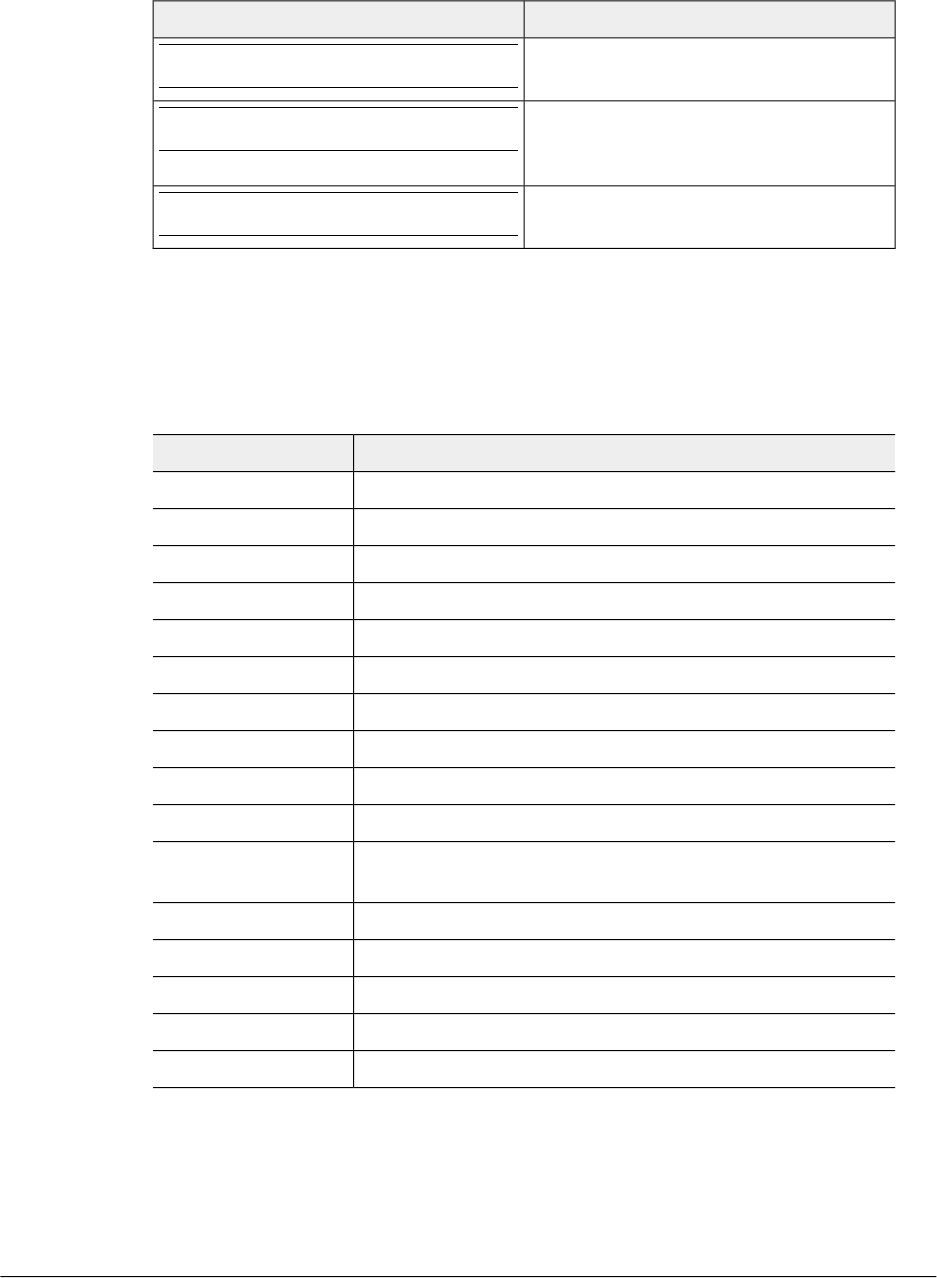
Table 2: Notice conventions
DescriptionNotice type
Information that describes important
features or instructions
NOTE
Information that alerts you to potential loss
of data or potential damage to an
application, system, or device
CAUTION!
Information that alerts you to potential
personal injury
WARNING!
Terminology
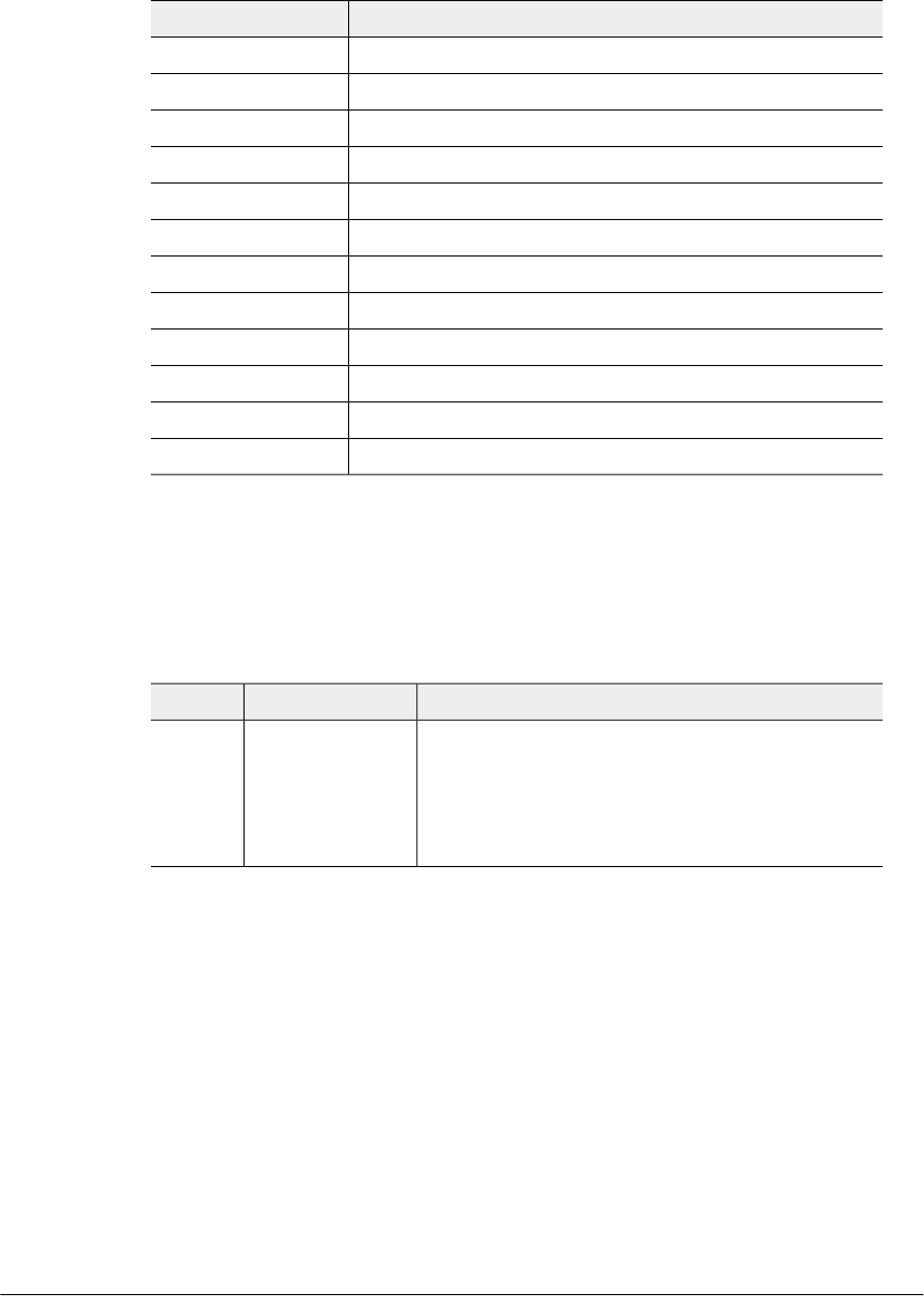
The table lists the terms used in this guide.
Table 3: Terms used in this guide
DescriptionTerminology
Authentication, Authorization, and AccountingAAA
Aggregate Maximum Bit RateAMBR
Access Point NameAPN
Domain Name SystemDNS
EPS Bearer IDEBI
Evolved Packet CoreEPC
Evolved Packet SystemEPS
Fully Qualified Tunnel Endpoint IdentifierF-TEID
GTP Packet Data UnitGPDU
General Packet Radio ServiceGPRS
GPRS serving node, is application module in the SCG handling
GTP messages
GSN APN
GPRS Tunneling ProtocolGTP
GTP version 1, user planeGTPv1-U
GTP version 2, control planeGTPv2-C
Information ElementIE
International Mobile Subscriber IdentityIMSI
5
Ruckus Wireless™ SmartCell Gateway™ 200 S2a Interface Reference Guide for SmartZone 3.5.1
About this Guide
Terminology
DescriptionTerminology
Internet ProtocolIP
Mobile Country CodeMCC
Mobile Network CodeMNC
Mobile Subscriber ISDN NumberMSISDN
PDN Address AllocationPAA
Protocol Configuration OptionsPCO
Packet Data NetworkPDN
PDN GatewayPGW
Serving GatewaySGW
User Location InformationULI
Universal Mobile Telecommunications SystemsUMTS
UMTS Terrestrial Radio Access NetworkUTRAN
References
Table 4: References used in this guide on page 6 lists the specifications and standards
that are referred to in this guide.
Table 4: References used in this guide
DescriptionReferenceNo.
•3GPP TS 29.274 V11.2.0 (2012-03) 3GPP Evolved
Packet System (EPS)
•Evolved General Packet Radio Service (GPRS)
•Tunneling Protocol for Control plane (GTPv2-C)
•Stage 3 (Release 11)
29274-b20.docx1
Ruckus Wireless™ SmartCell Gateway™ 200 S2a Interface Reference Guide for SmartZone 3.5.1
6
About this Guide
References

Legend
Table 5: Legends/presence code used in this guide on page 7 lists the legend/presence
code used in this guide.
Table 5: Legends/presence code used in this guide
DescriptionLegend / Presence
ConditionalC
The Instance Value column indicates the
instance number of the IE, which is used
in differentiating between two instances of
same IE, i.e., IE with the same type in the
same message.
Instance Value
MandatoryM
OptionalO
Related Documentation
For a complete list of documents that accompany this release, refer to the Release
Notes.
Online Training Resources
To access a variety of online Ruckus Wireless training modules, including free introductory
courses to wireless networking essentials, site surveys, and Ruckus Wireless products,
visit the Ruckus Wireless Training Portal at:
https://training.ruckuswireless.com.
7
Ruckus Wireless™ SmartCell Gateway™ 200 S2a Interface Reference Guide for SmartZone 3.5.1
About this Guide
Legend
Documentation Feedback
Ruckus Wireless™ is interested in improving its documentation and welcomes your
comments and suggestions.
You can email your comments to Ruckus Wireless at: docs@ruckuswireless.com
When contacting us, please include the following information:
•Document title
•Document part number (on the cover page)
•Page number (if appropriate)
•For example:
•S2a Interface Reference Guide for SmartZone 3.5
•Part number: 800-71306-001
•Page 88

Data Session and Path Management
Messages 1
Overview
This reference guide describes the interface between the SCG with Packet Data Network
Gateway (PDN-GW). It describes the control plane GPRS (General Packet Radio Service)
tunneling protocol messages v2 for EPS (Evolved Packet System) interfaces (GTPv2-C)
from the SCG and PGW. This guide lists all the interface messages and GPRS Tunneling
Protocol (GTP-C) information element used between the SCG and PGW.
The S2a interface is used in control signaling between the SCG and PDN-GW (Packet
Data Network Gateway) as well as for tunneling end user data payload within the
backbone network between both the nodes in EPC (Evolved Packet Core) network.
The GPRS Tunneling Protocol (GTP) transmits user data packets and signaling messages
between the SCG and PDN-GW. GTP encapsulates traffic and creates GTP tunnels,
which acts as virtual data channels for transmission of packet data between the SCG
and PDN-GW. A GTP tunnel is established between the SCG and PDN-GW through
Create Session Request procedure for a data session initiated from UE.
The SCG acts as trusted non-3GPP access network (TWAN) towards PDN-GW with
S2a (GTPv2) interface. In case the operator EPC network does not support the S2a
interface, the SCG can be statically configured to support S5 (GTPv2) interface, in which
case the SCG acts as Serving Gateway (SGW).
A GTP tunnel is identified by a pair of IP addresses and a pair of GTP Tunnel End Point
Identifiers (TEIDs), where one IP address and TEID is for the SCG (TWAN) and the other
is for the PGW. The TEID is a session identifier used by GTP protocol entities in the SCG
and in the PGW. GTP separates signaling from payload. Traffic is sorted onto a control
plane (GTP-C) for signaling and a user plane (GTP-U) for user data. GTP-C is a tunnel
control and management protocol and is used to create, modify and delete tunnels.
GTP-U is a tunneling mechanism, which provides a service for carrying user data packets.
On both planes, a GTP header encapsulates the data packet, called GTP Packet Data
Unit (GPDU), and a path implemented by UDP/IP is used as bearer of the GTP traffic.
Figure 1 shows the deployment of the SCG in operator networks with 3G and EPC.
9
Ruckus Wireless™ SmartCell Gateway™ 200 S2a Interface Reference Guide for SmartZone 3.5.1
9
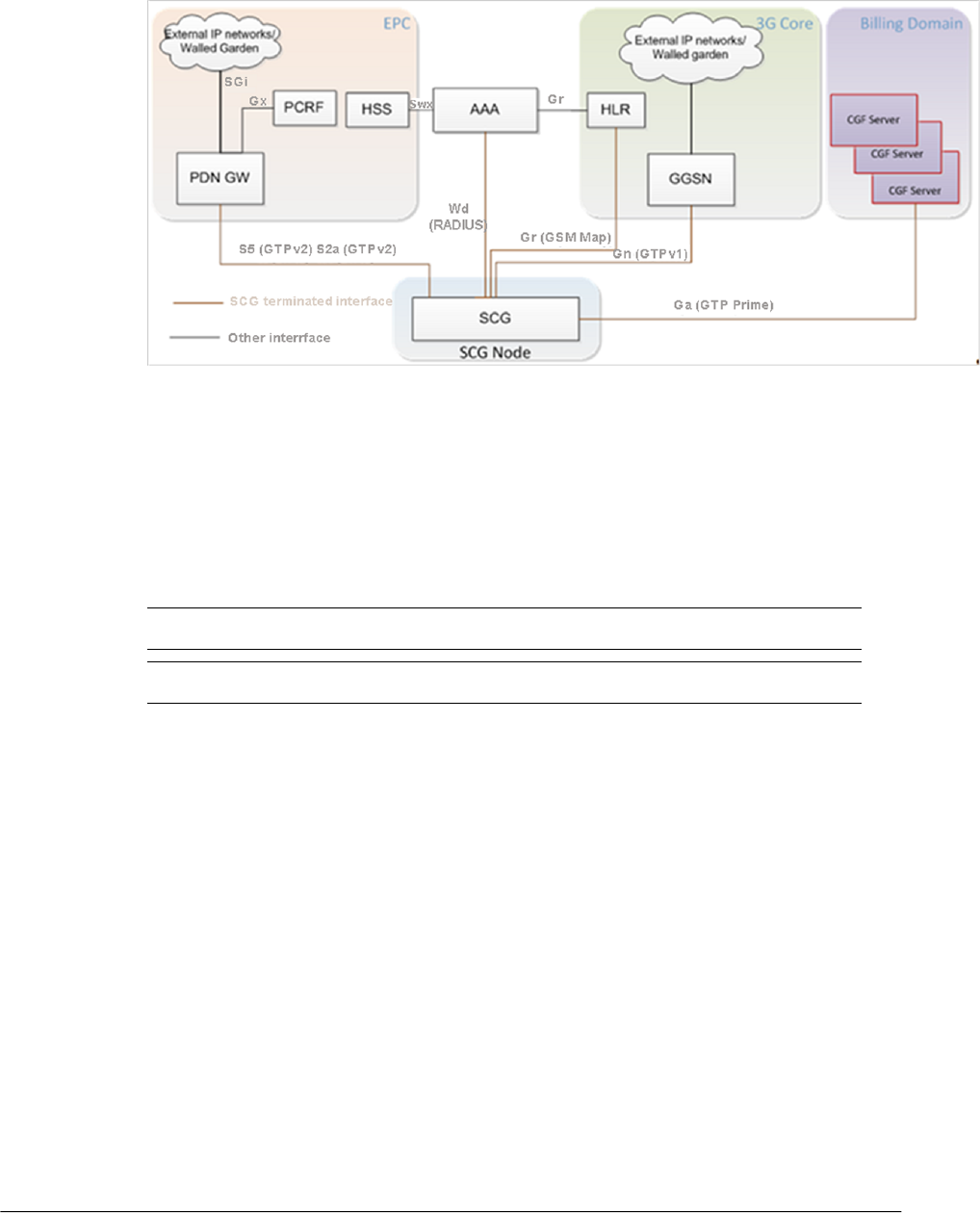
Figure 1: Deployment of SCG with 3G and EPC
The SCG supports the following categories of GTP signaling traffic:
•Path Management Messages: The main purpose of these messages is to supervise
an UDP/IP path to ensure that connectivity failure can be detected on time. This is
managed by frequently sending GTP Echo or Echo response packets between SCG
and PGW.
•Tunnel Management Messages: These contain messages that establish, modify and
release GTP tunnels.
NOTE The SCG support for STA interface is being considered for the future release.
NOTE Refer to About this Guide on page 4 for the conventions used in this guide.
Ruckus Wireless™ SmartCell Gateway™ 200 S2a Interface Reference Guide for SmartZone 3.5.1
10
Data Session and Path Management Messages
Overview
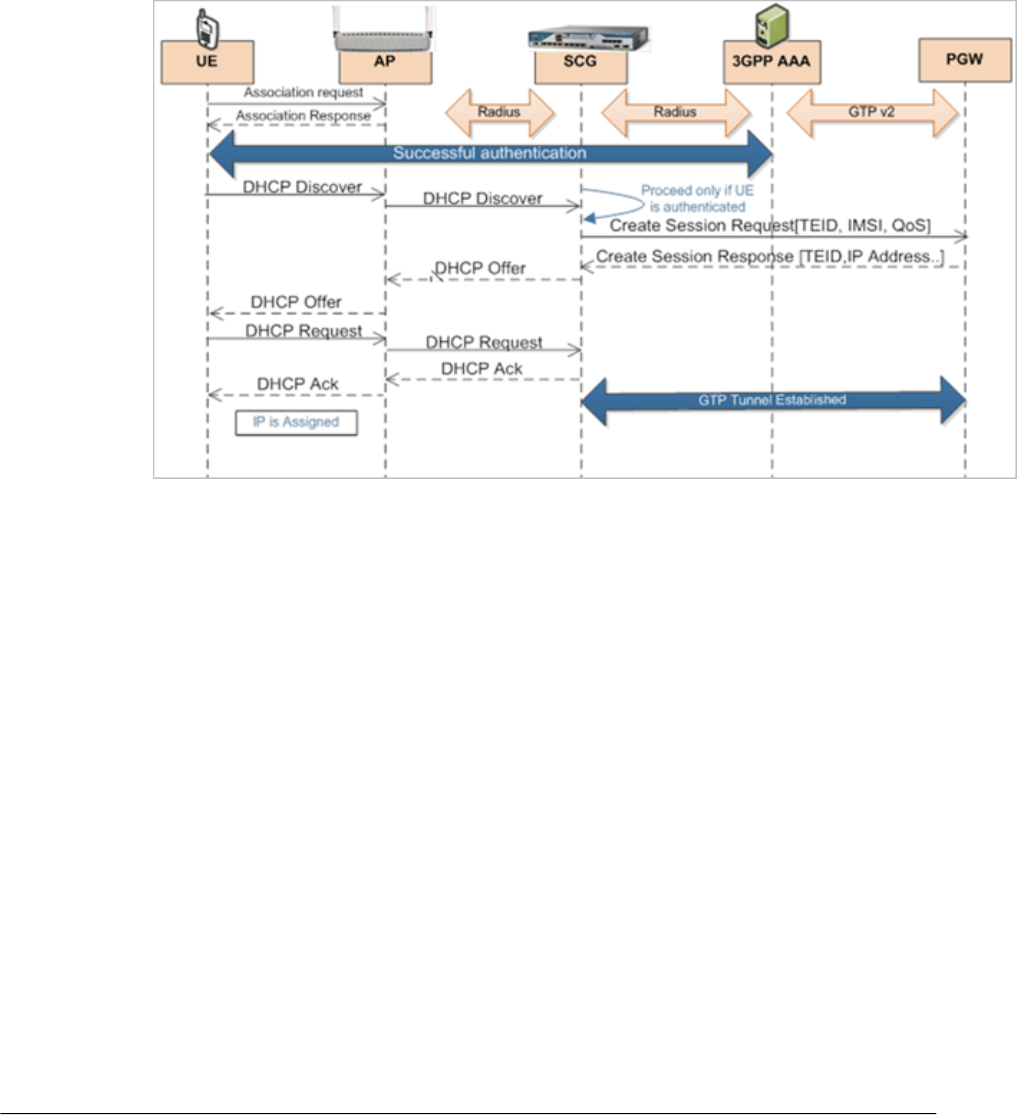
Data Session Establishment
Figure 2: Data session establishment on page 11 depicts session establishment based
on the session such as create, modify, update and so on.
Figure 2: Data session establishment
11
Ruckus Wireless™ SmartCell Gateway™ 200 S2a Interface Reference Guide for SmartZone 3.5.1
Data Session and Path Management Messages
Data Session Establishment
Path Management Messages
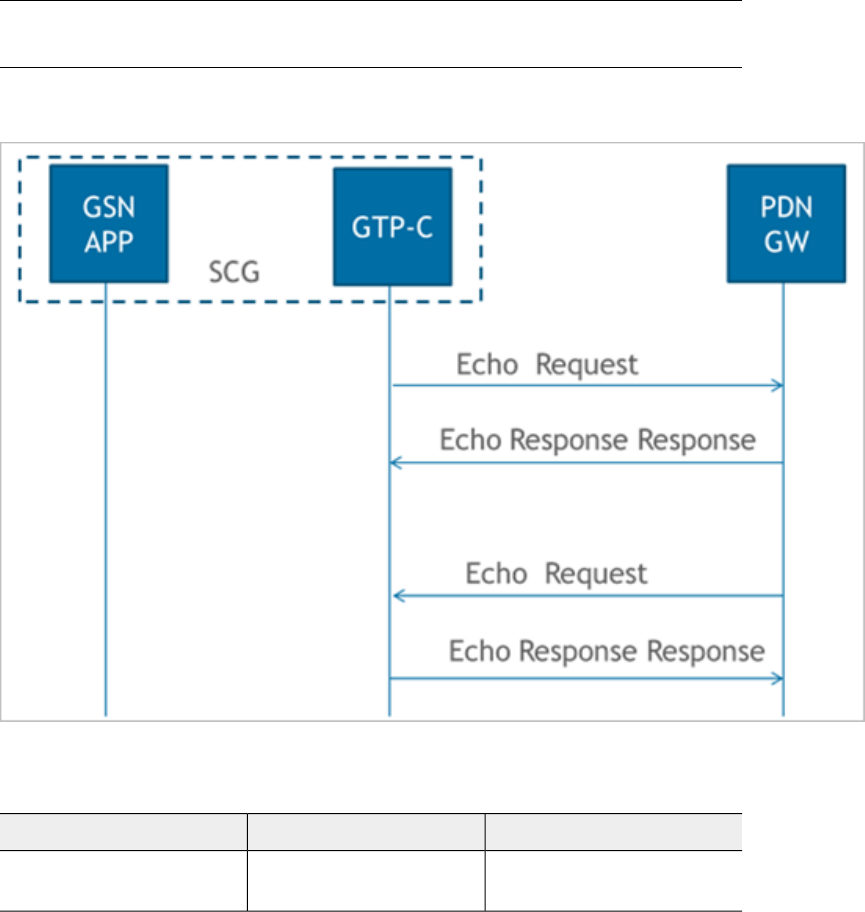
Path management messages, monitors the health of the transport between GTP-C
peers, which is the SCG and PGW. Figure 3: Path management messages on page 12
shows the path management messages process flow and Table 6: Echo request message
on page 12 lists the attribute.
NOTE GSN APP is GPRS serving node which is an application module in the SCG for
handling GTP messages.
Figure 3: Path management messages
Table 6: Echo request message
CommentPresenceAttribute
SCG/PGW updates the local
restart counter in this IE
MRecovery
Tunnel Management Messages 2
Create Session Process Flow
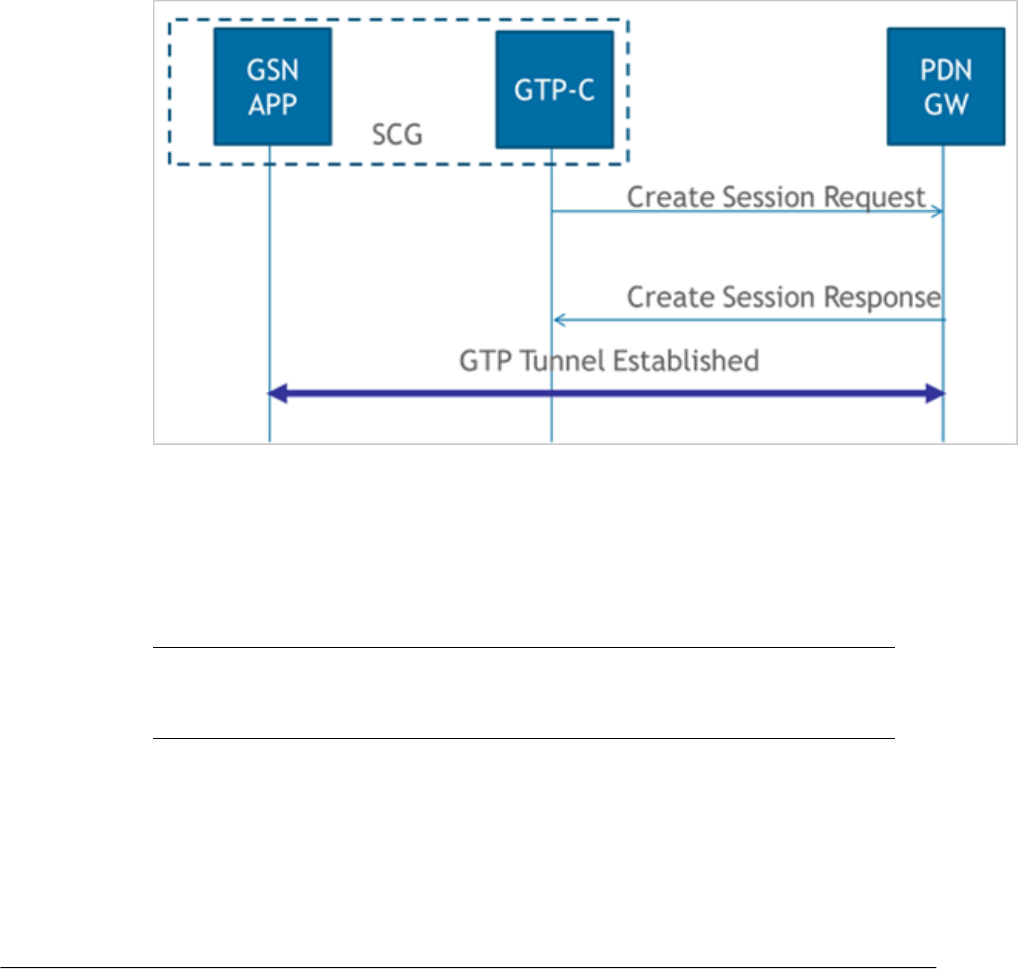
Figure 4: Create session on page 13 shows the process flow for create session. This
section covers:
•Create Session Request Messages on page 13
•Create Session Response Messages on page 16
Figure 4: Create session
Create Session Request Messages
Table 7: Create session - request messages on page 14 lists the create session request
messages attributes. This section covers:
•Bearer Context - Create Session Request on page 15
NOTE The Instance Value column indicates the instance number of the IE, which is
used in differentiating between two instances of same IE, i.e., IE with the same type in
the same message.
13
Ruckus Wireless™ SmartCell Gateway™ 200 S2a Interface Reference Guide for SmartZone 3.5.1
13

Table 7: Create session - request messages
DescriptionInterface
(S2a, S5
Both)
PresenceInstance
Value
Attribute
IMSI of the subscriber.BothC0IMSI
MSISDN received from HLR or
AAA server during authentication.
BothC0MSISDN
MCC and MNC as configured in
the SCG web interface. This
attribute will not be present if it is
not configured in the SCG web
interface.
BothC0Serving Network
For S5 interface value is 6
(EUTRAN) and for S2a interface
the value is 3 (WLAN).
BothM0RAT Type
Value is set to zero.BothC0Indication
Sender F-TEID for control plane,
SCG generated TEID
S2aM0F-TEID
Sender F-TEID for control plane,
SCG generated TEID
S5M1F-TEID
Access Point Name (APN), APN
NI+OI
BothM0APN
The value shall be set to “MS or
network provided APN,
subscription verified”
BothC0Selection Mode
Set to IPV4S5C0PDN Type
PDN Address allocation, set to
0.0.0.0
BothC0PAA
Aggregate Maximum Bit Rate
(APN-AMBR), configurable in
ttg_pdg.cfg
BothC0AMBR
Bearer context is createdBothMBearer Context
This attribute is included if its
contacting the peer node for the
first time
BothC0Recovery
Mandatory in case of SCG, CC
received form HLR/HSS or
default value in SCG if not
received form external entity
BothC0Charging
Characteristics
Ruckus Wireless™ SmartCell Gateway™ 200 S2a Interface Reference Guide for SmartZone 3.5.1
14
Tunnel Management Messages
Create Session Process Flow
DescriptionInterface
(S2a, S5
Both)
PresenceInstance
Value
Attribute
Value is set to zero, this value is
set to the least restrictive type
S5C0Maximum APN
Restriction
User Location Information (ULI),
MCC MNC from UE realm
S5C0User Location
Information (ULI)
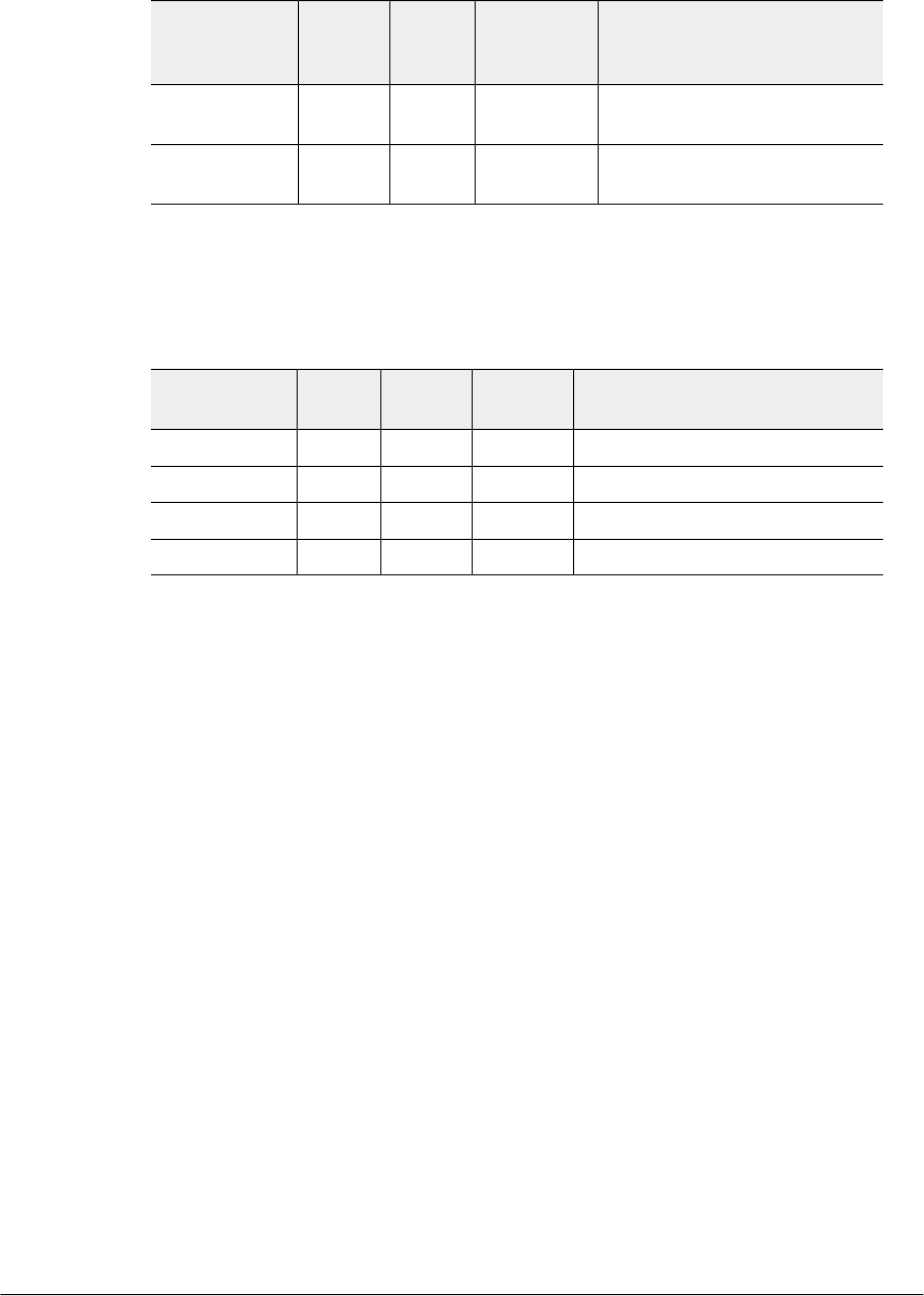
Bearer Context - Create Session Request
Table 8: Bearer context - request messages on page 15 lists the attributes of bearer
context for create session request messages.
Table 8: Bearer context - request messages
DescriptionInterfacePresenceInstance
Value
Attribute
EPS Bearer IDBothM0EBI
Bearer Level QoSBothM0Bearer QoS
S5-U SGW F-TEIDS5C2F-TEID
S2a-U TWAN F-TEIDS2aC6F-TEID
15
Ruckus Wireless™ SmartCell Gateway™ 200 S2a Interface Reference Guide for SmartZone 3.5.1
Tunnel Management Messages
Create Session Process Flow

Create Session Response Messages
Table 9: Create session response message on page 16 lists the attribute for create
session response messages. This section covers:
•Bearer Context - Create Session Response Messages on page 18
Table 9: Create session response message
DescriptionInterface
(S2a, S5,
Both)
PresenceInstance
Value
Attribute
Cause in response message.BothM0Cause
S5C0Change
Reporting
Action
Includes the TEID in the GTP
based interfaces
BothC1F-TEID
PDN Address AllocationBothC0PAA
APN restrictionS5C0APN Restriction
Aggregate Maximum Bit Rate
(APN-AMBR), is included only if
the received APN-AMBR is
modified by the PCRF.
BothC0AMBR
PGW may include CGF IP address
provided the CGF server IP
address is configured in the user
interface. The SCG sets this server
with highest priority, for sending
generated CDR's.
S5O0Charging
Gateway
Address
Includes the QoS, Charging ID
along with other attributes
BothM0Bearer Context
Included only if the peer node is
contacted for the first time.
BothC0Recovery
Charging gateway nameS5C0FQDN
Charging gateway addressS5C0IP Address
Ruckus Wireless™ SmartCell Gateway™ 200 S2a Interface Reference Guide for SmartZone 3.5.1
16
Tunnel Management Messages
Create Session Process Flow

DescriptionInterface
(S2a, S5,
Both)
PresenceInstance
Value
Attribute
PGW could include this IE on the
S2a interface to provide TWAN
with additional IP configuration
parameters (example, DNS server).
This IE is included provided a
corresponding request is received
in the Create Session - request
message.
S2aO0Protocol
Configuration
Options (PCO)
PGW Back-Off Time, PDN-GW
rejects the Create Session
Request with the cause “APN
congestion”. It indicates the time
during which the peer should
refrain from sending subsequent
PDN connection establishment
requests to the PGW for the
congested APN for services other
than Service Users/emergency
services.
NOTE Note: Not supported in
this release
S5O0EPC Timer
Trusted WLAN IPv4 Parameters
NOTE Note: Not supported in
this release
S2aCO0IPv4
Configuration
Parameters
(IP4CP)
Private Extension
NOTE Note: Not supported in
this release
BothO0Private
Extension
17
Ruckus Wireless™ SmartCell Gateway™ 200 S2a Interface Reference Guide for SmartZone 3.5.1
Tunnel Management Messages
Create Session Process Flow
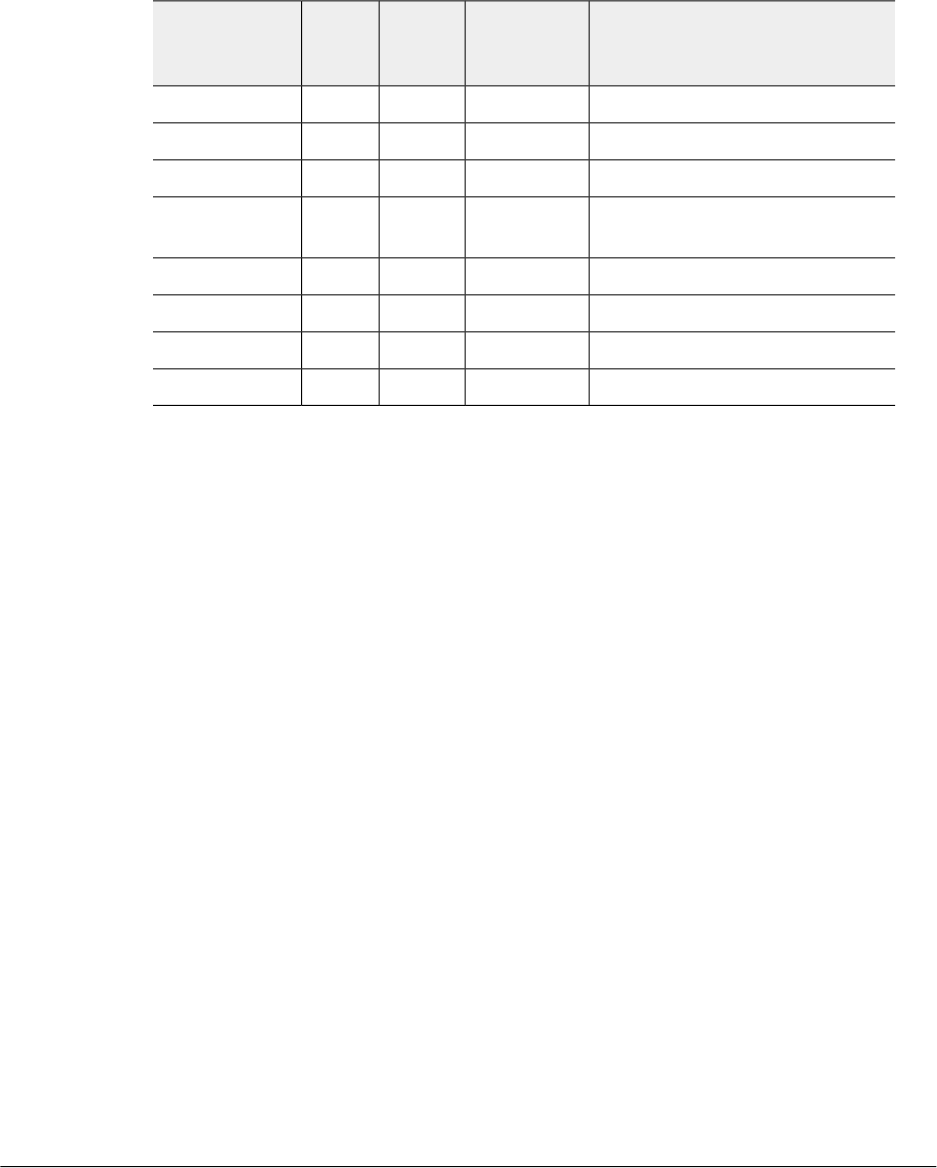
Bearer Context - Create Session Response Messages
Table 10: Bearer context for create session response messages on page 18 lists the
bearer context attributes for create session response messages.
Table 10: Bearer context for create session response messages
DescriptionInterface
(S2a, S5,
Both)
PresenceInstance
Value
Attribute
Cause in response message.BothM0Cause
EPS Bearer IDBothM0EBI
Bearer Level QoSBothC0Bearer QoS
Bearer modification and TFT
change
BothO0TFT
S5-U PGW F-TEIDS5C2F-TEID
S2a-U PGWF-TEIDS2aC5F-TEID
Charging IDBothO0Charging ID
Bearer flagS5O0Bearer Flag
Ruckus Wireless™ SmartCell Gateway™ 200 S2a Interface Reference Guide for SmartZone 3.5.1
18
Tunnel Management Messages
Create Session Process Flow
Modify Bearer Command Flow
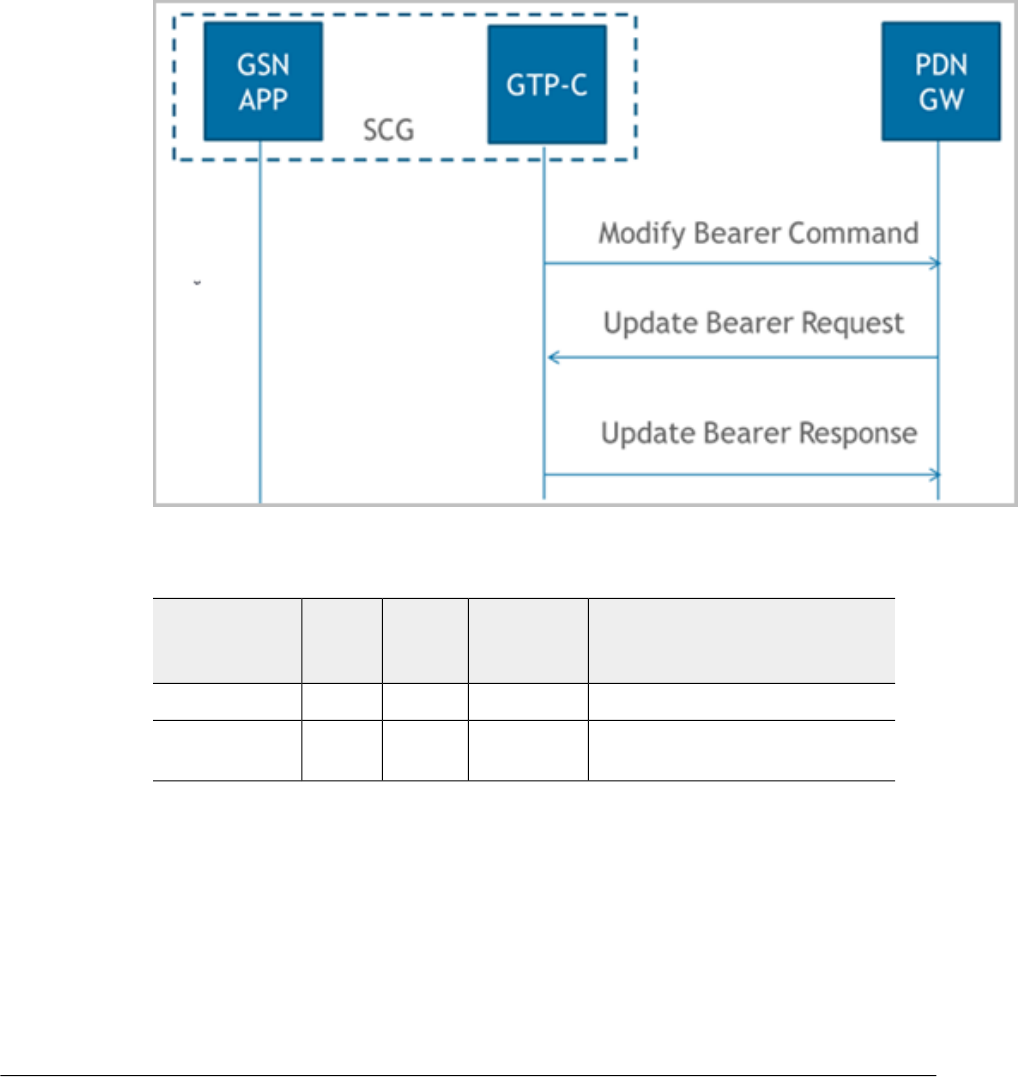
Figure 5: Modify bearer on page 19 shows the modify bearer process flow. Table 11:
Modify bearer on page 19 lists the modify bearer attributes. This section covers:
•Bearer Context - Modify Bearer on page 20
Figure 5: Modify bearer
Table 11: Modify bearer
DescriptionInterface
(S2a, S5,
Both)
PresenceInstance
Value
Attribute
Modified bearer contextBothM0Bearer Context
Aggregate Maximum Bit Rate
(APN-AMBR)
BothC0AMBR
19
Ruckus Wireless™ SmartCell Gateway™ 200 S2a Interface Reference Guide for SmartZone 3.5.1
Tunnel Management Messages
Modify Bearer Command Flow
Bearer Context - Modify Bearer
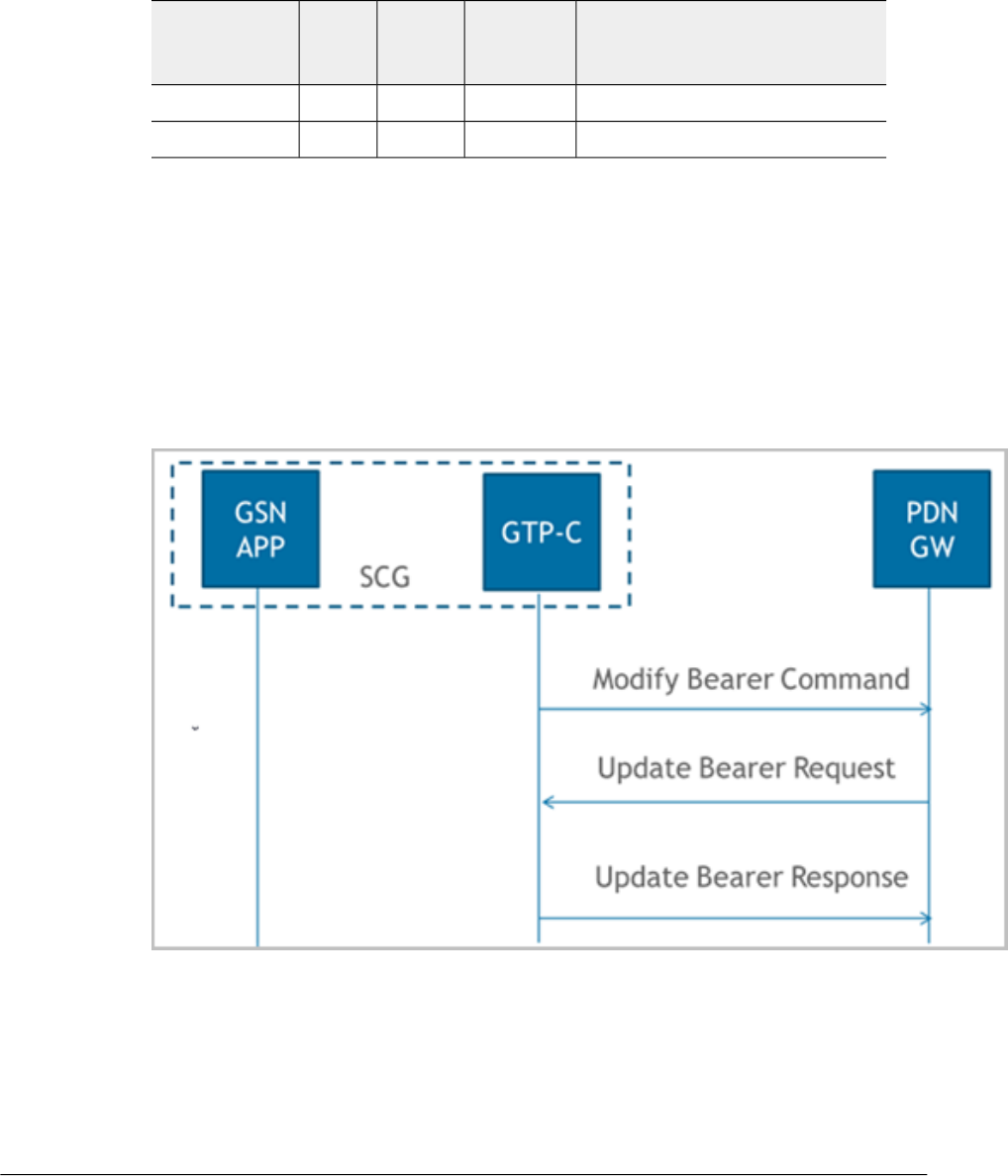
Table 12: Bearer context - Modify bearer on page 20 lists the attributes of bearer context.
Table 12: Bearer context - Modify bearer
DescriptionInterface
(S2a, S5,
Both)
PresenceInstance
Value
Attribute
EPS Bearer IDBothM0EBI
Bearer Level QoSBothC0Bearer QoS
Modify Bearer Request Flow
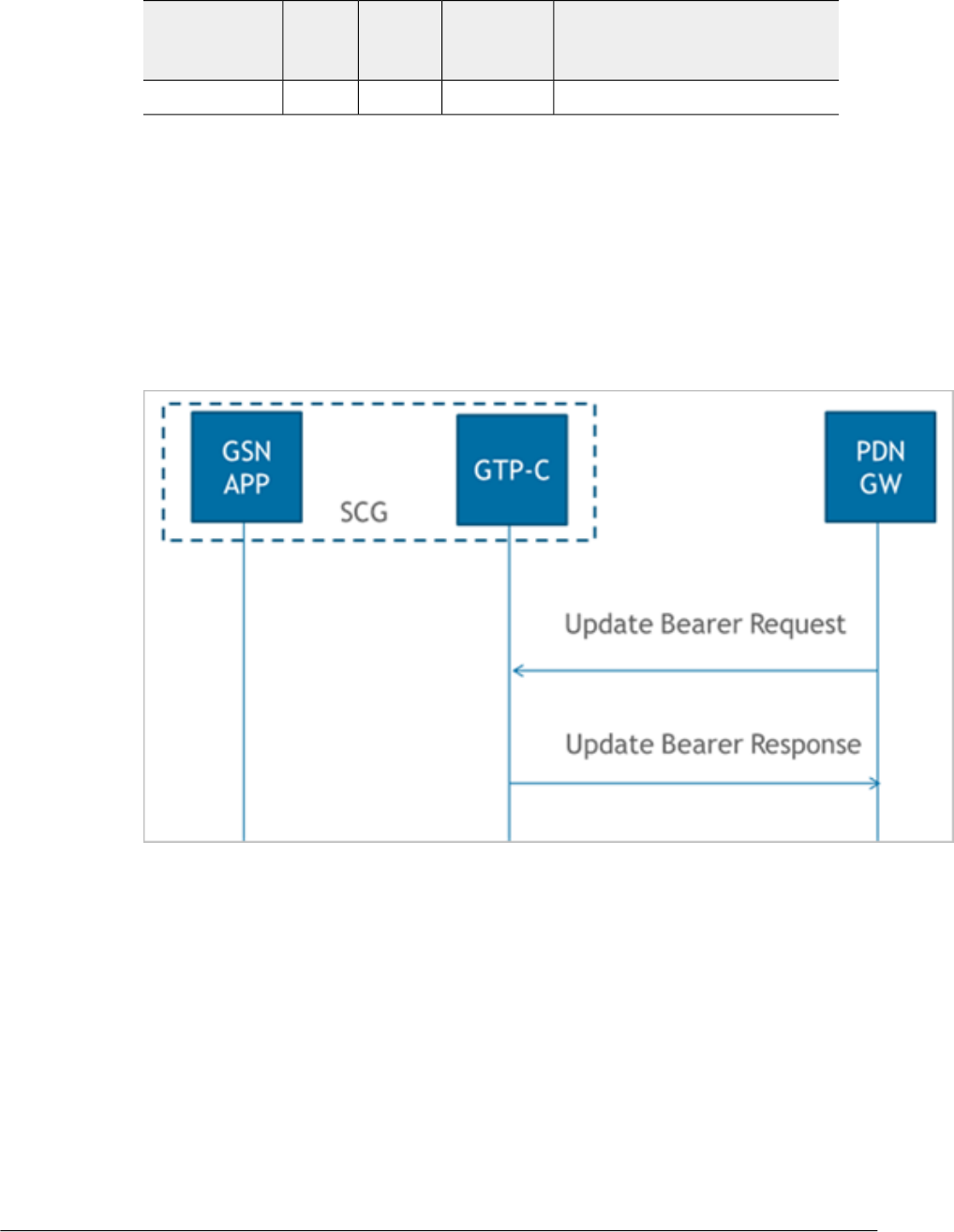
Figure 6: Modify bearer request and response messages on page 20 shows the bearer
process flow of request and response messages, when modified. This section covers:
•Modify Bearer Request Messages on page 21
•Modify Bearer Response Message on page 22
Figure 6: Modify bearer request and response messages
Ruckus Wireless™ SmartCell Gateway™ 200 S2a Interface Reference Guide for SmartZone 3.5.1
20
Tunnel Management Messages
Modify Bearer Request Flow
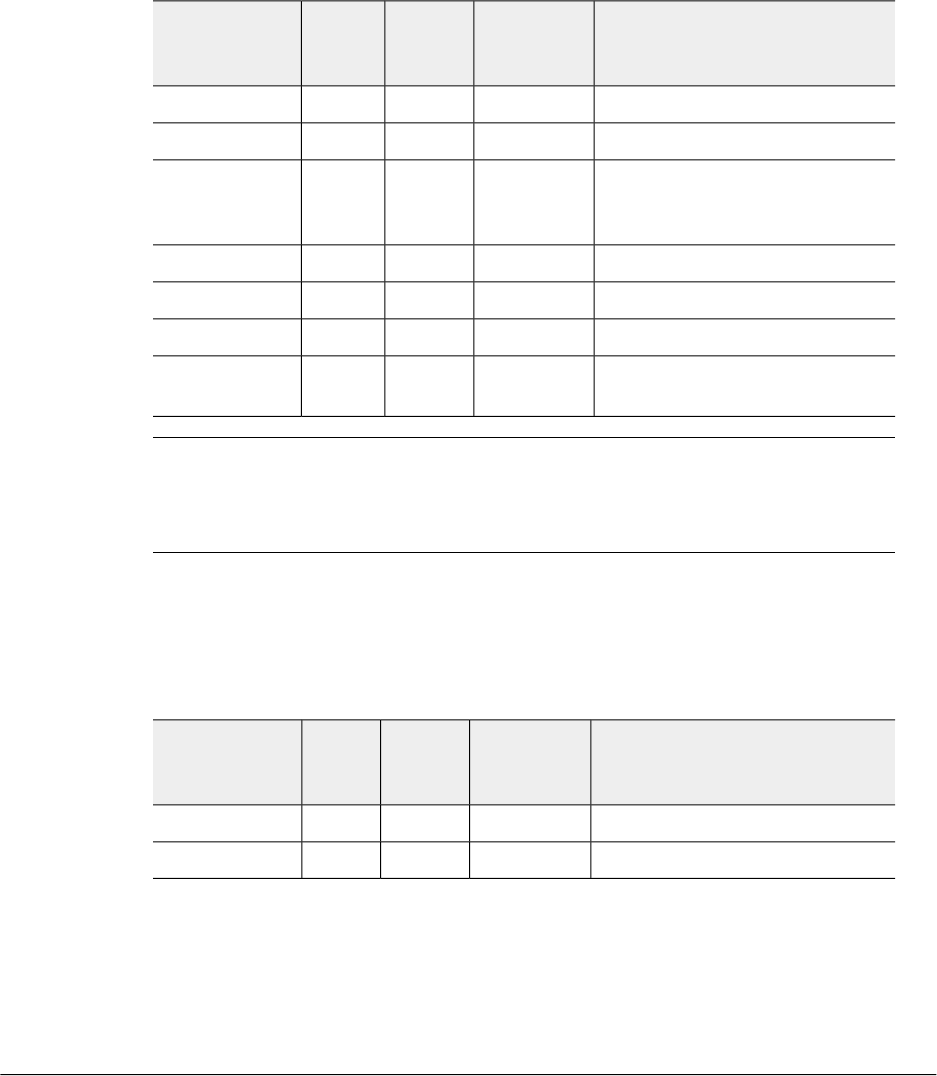
Modify Bearer Request Messages
Table 13: Modify bearer request messages on page 21 lists the attributes of modified
bearer request messages. This section covers:
•Bearer Context - Modify Bearer Request Messages on page 21
Table 13: Modify bearer request messages
DescriptionInterface
(S2a, S5,
Both)
PresenceInstance
Value
Attribute
User Location InformationS5C0ULI
Serving networkS5C0Serving Network
For S5 the interface value is 6
(EUTRAN) and for S2a interface
the value is 3 (WLAN).
BothC0RAT Type
Indication flagsBoth0Indication
Sender F-TEID for control planeBoth0F-TEID
Bearer Contexts to be modifiedBothC0Bearer Context
Included only if the peer node is
contacted for the first time.
BothC0Recovery
NOTE In release 11 specifications, Modify Bearer Request is not supported in an S2a
interface. To support roaming scenarios Ruckus Wireless assumes that this message
is required for S2a interface. Ruckus Wireless will continue with this implementation until
3GPP specification has proper roaming scenarios for S2a interface.
Bearer Context - Modify Bearer Request Messages
Table 14: Bearer context - Modify bearer request messages on page 21 lists the
attributes of bearer context request messages for modify bearer.
Table 14: Bearer context - Modify bearer request messages
DescriptionInterface
(S2a, S5,
Both)
PresenceInstance
Value
Attribute
EPS Bearer IDBothM0EBI
Data Plane TEIDBothC1TEID
21
Ruckus Wireless™ SmartCell Gateway™ 200 S2a Interface Reference Guide for SmartZone 3.5.1
Tunnel Management Messages
Modify Bearer Request Flow
Modify Bearer Response Message
Table 15: Modify bearer response messages on page 22 lists the modified bearer
response messages. This section covers:
•Bearer Context - Modify Bearer Response Messages on page 22
Table 15: Modify bearer response messages
DescriptionInterface
(S2a, S5,
Both)
PresenceInstance
Value
Attribute
Possible causes could be:
•Request accepted
•Request accepted partially
•Context not found
•Service not supported
BothM0Cause
MSISDNBothC0MSISDN
Linked EPS Bearer IDBothC0EBI
Aggregate Maximum Bit Rate
(APN-AMBR), is included only if
the received APN-AMBR is
modified by the PCRF
BothC0AMBR
Bearer contexts modifiedBothM0Bearer Context
BothC0Change
Reporting
Action
Included only if the peer node is
contacted for the first time.
BothC0Recovery
Bearer Context - Modify Bearer Response Messages
Table 16: Bearer context - Modify bearer response messages on page 22 lists the
attributes of bearer context response messages for modify bearer.
Table 16: Bearer context - Modify bearer response messages
DescriptionInterface
(S2a, S5,
Both)
PresenceInstance
Value
Attribute
EPS Bearer IDBothM0EBI
CauseBothM0Cause
Ruckus Wireless™ SmartCell Gateway™ 200 S2a Interface Reference Guide for SmartZone 3.5.1
22
Tunnel Management Messages
Modify Bearer Request Flow
DescriptionInterface
(S2a, S5,
Both)
PresenceInstance
Value
Attribute
Charging IDS5O0Charging ID
Update Bearer Process Flow
Figure 7: Update Bearer on page 23 shows the bearer process flow, when updated.
This section covers:
•Update Bearer Request Messages on page 24
•Update Bearer Response Message on page 25
Figure 7: Update Bearer
23
Ruckus Wireless™ SmartCell Gateway™ 200 S2a Interface Reference Guide for SmartZone 3.5.1
Tunnel Management Messages
Update Bearer Process Flow
Update Bearer Request Messages
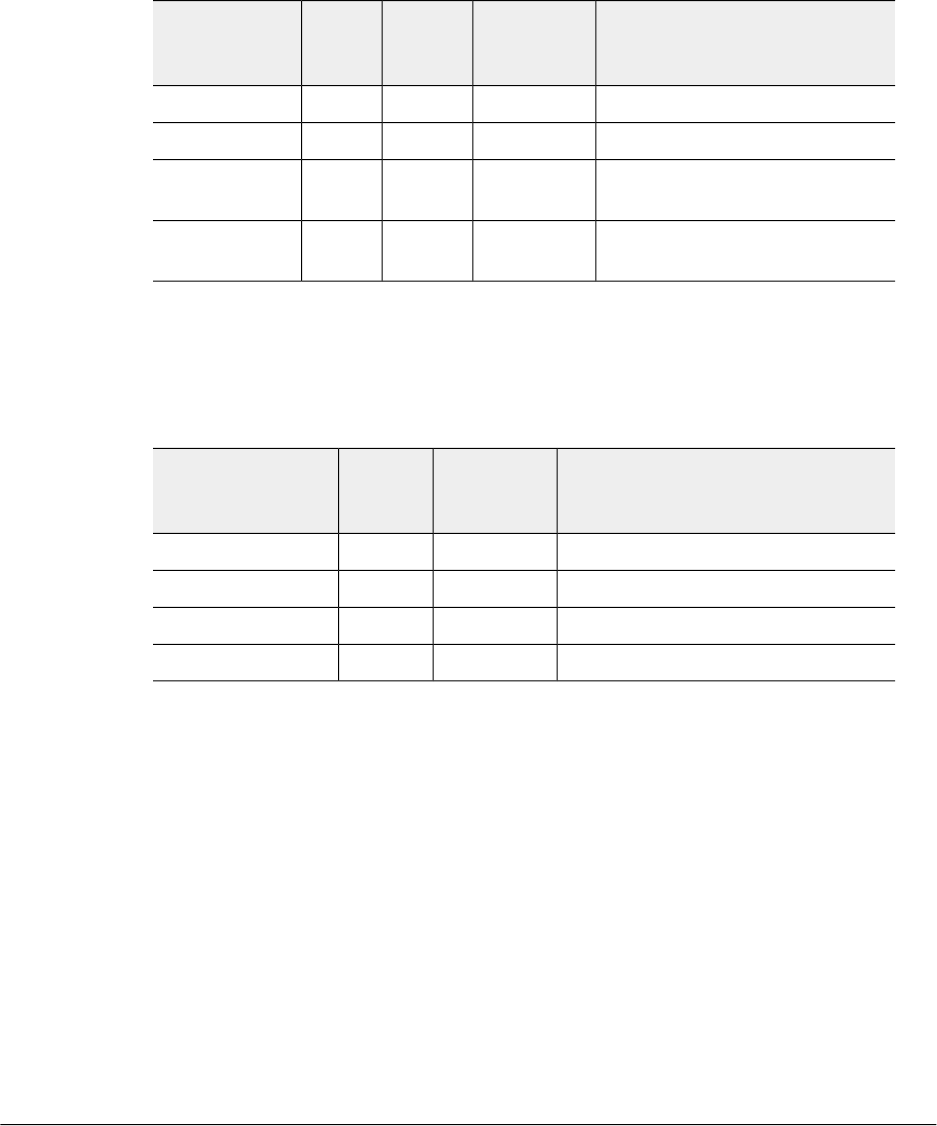
Table 17: Update bearer request messages on page 24 lists the update bearer request
messages. This section covers:
•Bearer Context - Update Bearer Request Messages on page 24
Table 17: Update bearer request messages
DescriptionInterface
(S2a, S5,
Both)
PresenceInstance
Value
Attribute
Modified bearer contextBothM0Bearer Context
Protocol Configuration OptionS5C0PCO
Aggregate Maximum Bit Rate
(APN-AMBR)
BothC0AMBR
Private extensionBothO0Private
Extension
Bearer Context - Update Bearer Request Messages
Table 18: Bearer context - Update bearer request messages on page 24 lists the
attributes of bearer context for update bearer request messages.
Table 18: Bearer context - Update bearer request messages
DescriptionInterface
(S2a, S5,
Both)
PresenceAttribute
EPS Bearer IDBothMEBI
Bearer level QoSBothCBearer QoS
Bearer modification and changeBothCTFT
Protocol Configuration OptionS5COPCO
Ruckus Wireless™ SmartCell Gateway™ 200 S2a Interface Reference Guide for SmartZone 3.5.1
24
Tunnel Management Messages
Update Bearer Process Flow
Update Bearer Response Message
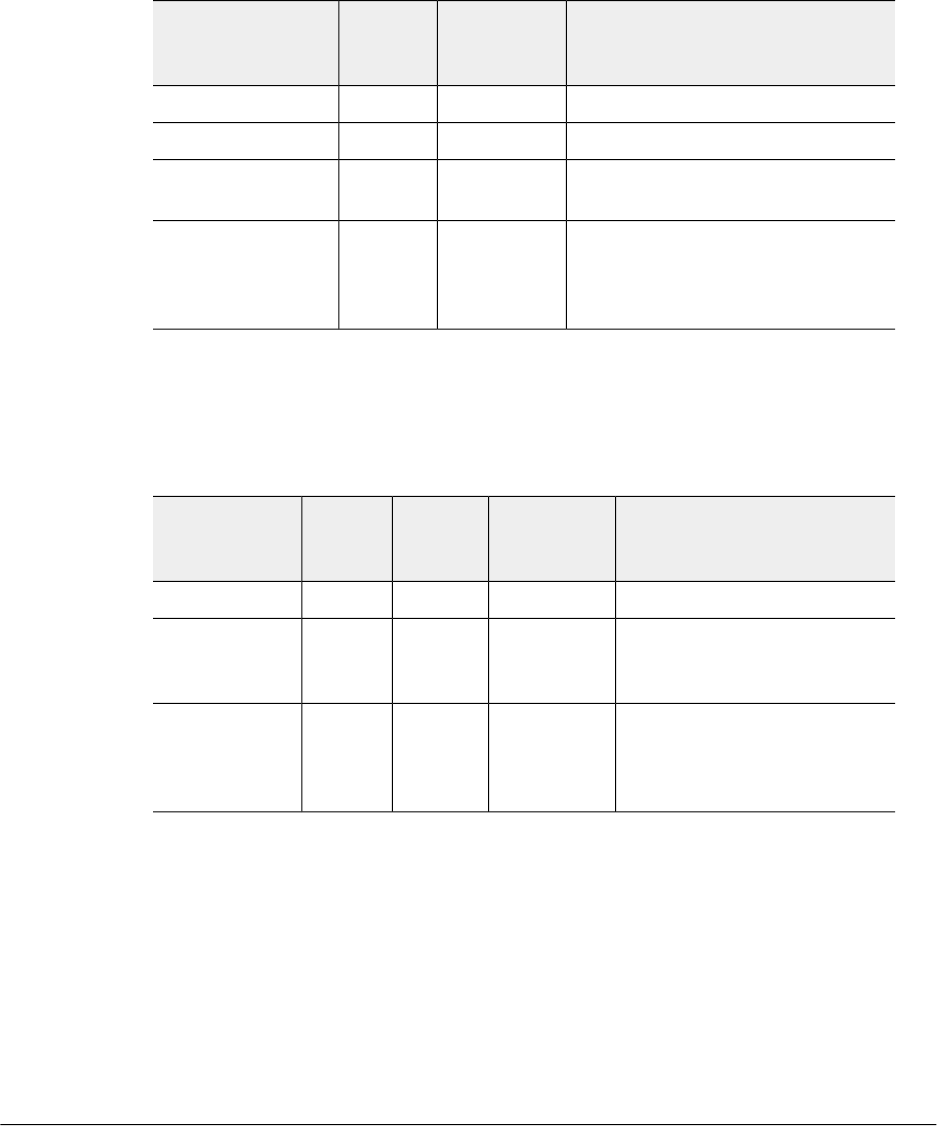
Table 19: Update bearer response messages on page 25 lists the update bearer response
messages. This section covers:
•Bearer Context - Update Bearer Response Message on page 25
Table 19: Update bearer response messages
DescriptionInterface
(S2a, S5,
Both)
PresenceAttribute
Cause valueBothMCause
Failed bearer contextBothOBearer Context
Included only if the peer node is
contacted for the first time.
BothCRecovery
Protocol Configuration Options (PCO)
contains PCO from HLR or PCO
received from PDN-GW in Create
Session Response
S5C/OPCO
Bearer Context - Update Bearer Response Message
Table 20: Bearer context - Update bearer response messages on page 25 lists the
attributes of bearer context for update bearer response message.
Table 20: Bearer context - Update bearer response messages
DescriptionInterface
(S2a, S5,
Both)
PresenceInstance
Value
Attribute
EPS Bearer IDBothM0EBI
Indicates if the bearer handling
was successful and if not
successful, displays the reasons
BothM0Cause
Protocol Configuration Options
(PCO) contains PCO from HLR
or PCO received from PDN-GW
in Create Session Response
S5CO0PCO
25
Ruckus Wireless™ SmartCell Gateway™ 200 S2a Interface Reference Guide for SmartZone 3.5.1
Tunnel Management Messages
Update Bearer Process Flow
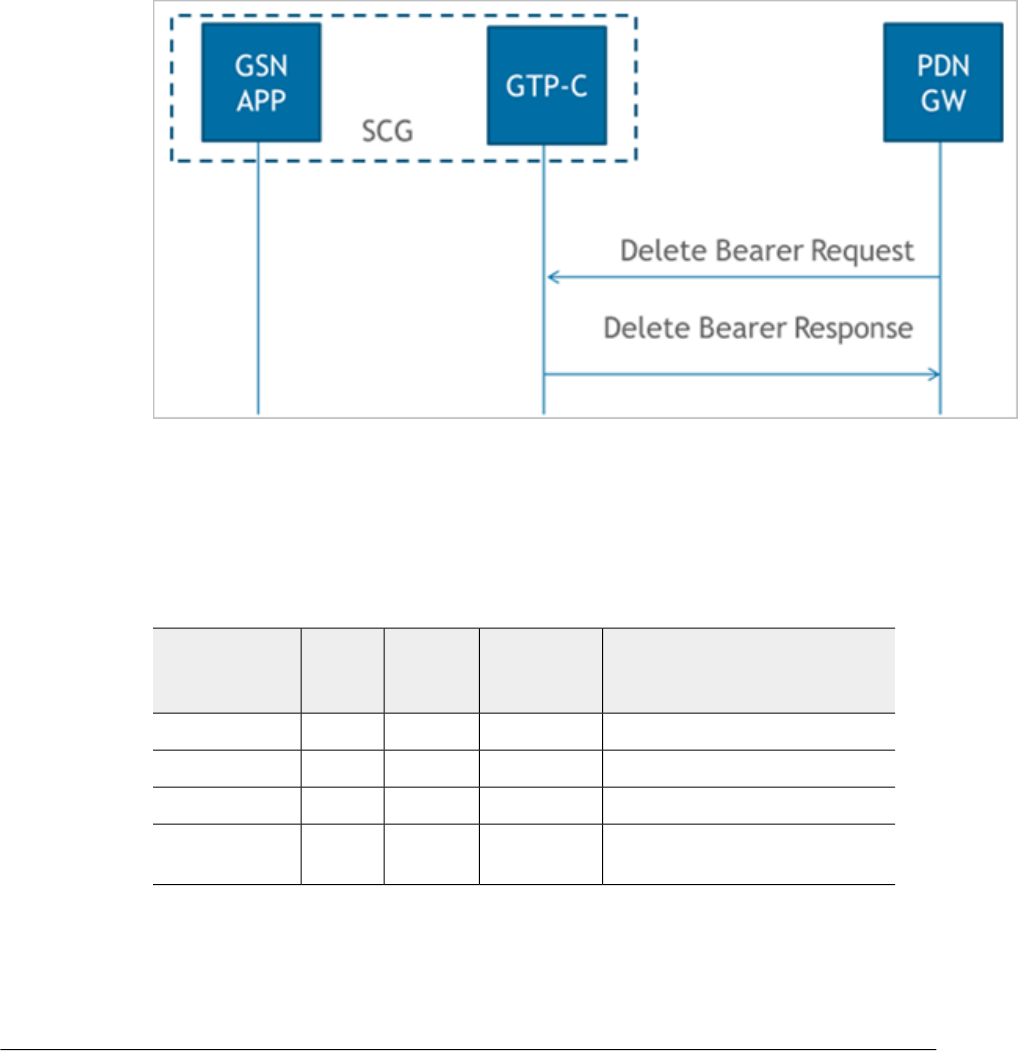
Delete Bearer Process Flow
Figure 8: Delete bearer on page 26 shows the bearer process flow, when updated. This
section covers:
•Delete Bearer Request Messages on page 26
•Delete Bearer Response Messages on page 27
Figure 8: Delete bearer
Delete Bearer Request Messages
Table 21: Delete bearer request messages on page 26 lists the delete bearer request
messages.
Table 21: Delete bearer request messages
DescriptionInterface
(S2a, S5,
Both)
PresenceInstance
Value
Attribute
Linked EPS Bearer ID (LBI)BothC0EBI
EPS Bearer IDsBothC1EBI
Failed bearer contextS5O0Bearer Context
Protocol Configuration Options
(PCO)
S5C0PCO
Ruckus Wireless™ SmartCell Gateway™ 200 S2a Interface Reference Guide for SmartZone 3.5.1
26
Tunnel Management Messages
Delete Bearer Process Flow
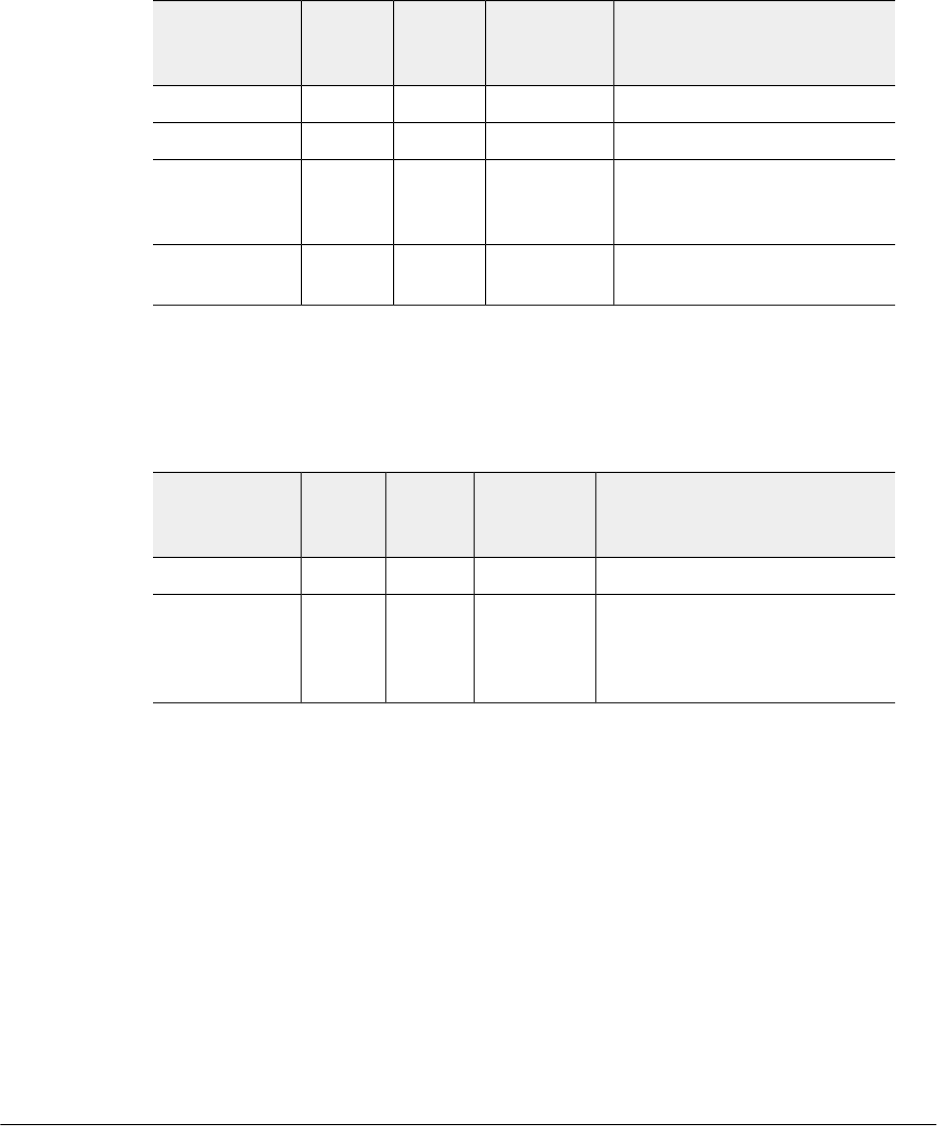
Delete Bearer Response Messages
Table 22: Delete bearer response messages on page 27 lists the delete bearer response
message attributes. This section covers:
•Bearer Context - Delete bearer response messages on page 27
Table 22: Delete bearer response messages
DescriptionInterface
(S2a, S5,
Both)
PresenceInstance
Value
Attribute
Cause valueBothM0Cause
Linked EPS Bearer ID (LBI)BothC0EBI
Considers it as a failed bearer
context when SCG fails to delete
the bearer
BothO0Bearer Context
Included only if the peer node is
contacted for the first time.
BothC0Recovery
Bearer Context - Delete bearer response messages
Table 23: Bearer context - Delete bearer response messages on page 27 lists the
attributes of delete bearer context.
Table 23: Bearer context - Delete bearer response messages
DescriptionInterface
(S2a, S5,
Both)
PresenceInstance
Value
Attributes
EPS Bearer ID (LBI)BothM0EBI
Indicates if the bearer handling
was successful. If it is not
successful, the reason is
displayed.
BothM0Cause
27
Ruckus Wireless™ SmartCell Gateway™ 200 S2a Interface Reference Guide for SmartZone 3.5.1
Tunnel Management Messages
Delete Bearer Process Flow

Delete Session Process Flow
This section covers:
•Delete Session Request Message on page 28
•Delete Session Response Message on page 28
Delete Session Request Message
Table 24: Delete session request messages on page 28 lists the attribute for delete
session request message.
Table 24: Delete session request messages
DescriptionInterface
(S2a, S5,
Both)
PresenceInstance
Value
Attribute
Linked EPS Bearer ID (LBI)BothC0EBI
Delete Session Response Message
Table 25: Delete session response messages on page 28 lists the delete session
response message attributes.
Table 25: Delete session response messages
DescriptionInterface
(S2a, S5,
Both)
PresenceInstance
Value
Attribute
Cause valueBothM0Cause
Included only if the peer node is
contacted for the first time.
BothC0Recovery
Private extensionBothO0Private
Extension

Index
A
AMBR 13, 16, 19, 22
APN Restriction 16
B
Bearer Context 13, 16, 19, 21–22
Bearer Context - Create Session Request 15
Bearer Context - Create Session Response Messages
18
Bearer Context - Delete bearer response messages 27
Bearer Context - Modify Bearer 20
Bearer Context - Modify Bearer Request Messages 21
Bearer Context - Modify Bearer Response Messages 22
Bearer context - request messages 15
Bearer Context - Update Bearer Request Messages 24
Bearer Context - Update Bearer Response Message 25
Bearer Flag 18
Bearer QoS 15, 18, 20
C
Cause 16, 18, 22
Change Reporting Action 16, 22
Charging Characteristics 13
Charging Gateway Address 16
Charging ID 18, 22
Create Session Process Flow 13
Create Session Request Messages 13
Create Session Response Messages 16
D
Data Session and Path Management Messages 9
Data Session Establishment 11
Delete Bearer Process Flow 26
Delete Bearer Request Messages 26
Delete Bearer Response Messages 27
Delete Session Process Flow 28
Delete Session Request Message 28
Delete Session Response Message 28
Deployment of SCG with 3G and EPC 9
E
EBI 15, 18, 20–22
Echo request message 12
EPC (Evolved Packet Core) 9
EPC Timer 16
EPS (Evolved Packet System) 9
F
F-TEID 13, 15–16, 18, 21
FQDN 16
G
GPDU 9
GPRS(General Packet Radio Service) 9
GTP-C 9
GTP-U 9
GTPv2-C 9
I
IMSI 13
Indication 13, 21
IP Address 16
IPv4 Configuration Parameters (IP4CP) 16
M
Maximum APN Restriction 13
Modify Bearer Command Flow 19
Modify Bearer Request Flow 20
Modify Bearer Request Messages 21
Modify Bearer Response Message 22
MSISDN 13, 22
O
Overview 9
P
PAA 13, 16
Packet Data Network Gateway 9
Path Management Messages 9, 12
PDN Type 13
Private Extension 16
Protocol Configuration Options (PCO) 16
R
RAT Type 13, 21
Recovery 13, 16, 21–22
S
S2a interface 9
Selection Mode 13
Serving Gateway 9
29
Ruckus Wireless™ SmartCell Gateway™ 200 S2a Interface Reference Guide for SmartZone 3.5.1

Serving Network 13, 21
T
TEID 21
TEIDs 9
TFT 18
Tunnel Management Messages 9, 13
TWAN 9
U
ULI 21
Update Bearer Process Flow 23
Update Bearer Request Messages 24
Update Bearer Response Message 25
User Location Information (ULI) 13
V
v13
Ruckus Wireless™ SmartCell Gateway™ 200 S2a Interface Reference Guide for SmartZone 3.5.1
30
30 | Index |

Copyright © 2017. Ruckus Wireless, Inc.
350 West Java Drive, Sunnyvale, CA
www.ruckuswireless.com
