Ruckus Virtual SmartZone Data Plane (vSZ D™) Configuration Guide For 3.5 Smart Zone (GA) (v SZ D) Vszd 35 Guide20170407
2017-04-07
User Manual: Ruckus SmartZone 3.5 (GA) Configuration Guide (vSZ-D)
Open the PDF directly: View PDF  .
.
Page Count: 51

Ruckus Wireless™ virtual SmartZone Data
Plane (vSZ-D)
vSZ-D Configuration Guide for SmartZone
3.5
Part Number: 800-71245-001 Rev A
Published: 07 April 2017
www.ruckuswireless.com
| Introduction | 2
Contents
Copyright Notice and Proprietary Information
About this Guide
Document Conventions.................................................................................................6
Related Documentation.................................................................................................7
Online Training Resources.............................................................................................7
Documentation Feedback.............................................................................................7
1 Virtual SmartZone Data Plane Overview
2 Features and Benefits
Tunneled WLANs and Flexible Traffic Redirection........................................................10
Architecture and Deployment Flexibility........................................................................11
IPv6 Address Support.................................................................................................12
vSZ-D Zone Affinity......................................................................................................12
DHCP Server and NAT Service on the vSZ-D..............................................................13
L3 Roaming.................................................................................................................14
Lawful Intercept...........................................................................................................15
3 Network Architecture
4 Communication Workflow
5 NAT Deployment Topologies
6 System Requirements
Hardware Requirements..............................................................................................26
Supported Modes of Operation.........................................................................27
Recommended NICs and Operation Modes......................................................33
7 Hypervisor Configuration
Supported Hypervisors................................................................................................34
General Configuration..................................................................................................34
Ruckus Wireless™ virtual SmartZone Data Plane (vSZ-D) vSZ-D Configuration Guide for SmartZone 3.5
3
VMware Specific Configuration....................................................................................35
KVM Specific Configuration.........................................................................................40
8 Upgrade Procedure
9 vSZ-D Performance Recommendations
Ruckus Wireless™ virtual SmartZone Data Plane (vSZ-D) vSZ-D Configuration Guide for SmartZone 3.5
4
Copyright Notice and Proprietary Information
Copyright 2017. Ruckus Wireless, Inc. All rights reserved.
No part of this documentation may be used, reproduced, transmitted, or translated, in any form
or by any means, electronic, mechanical, manual, optical, or otherwise, without prior written
permission of Ruckus Wireless, Inc. (“Ruckus”), or as expressly provided by under license from
Ruckus.
Destination Control Statement
Technical data contained in this publication may be subject to the export control laws of the
United States of America. Disclosure to nationals of other countries contrary to United States
law is prohibited. It is the reader’s responsibility to determine the applicable regulations and to
comply with them.
Disclaimer
THIS DOCUMENTATION AND ALL INFORMATION CONTAINED HEREIN (“MATERIAL”) IS
PROVIDED FOR GENERAL INFORMATION PURPOSES ONLY. RUCKUS AND ITS LICENSORS
MAKE NO WARRANTY OF ANY KIND, EXPRESS OR IMPLIED, WITH REGARD TO THE
MATERIAL, INCLUDING, BUT NOT LIMITED TO, THE IMPLIED WARRANTIES OF
MERCHANTABILITY, NON-INFRINGEMENT AND FITNESS FOR A PARTICULAR PURPOSE,
OR THAT THE MATERIAL IS ERROR-FREE, ACCURATE OR RELIABLE. RUCKUS RESERVES
THE RIGHT TO MAKE CHANGES OR UPDATES TO THE MATERIAL AT ANY TIME.
Limitation of Liability
IN NO EVENT SHALL RUCKUS BE LIABLE FOR ANY DIRECT, INDIRECT, INCIDENTAL, SPECIAL
OR CONSEQUENTIAL DAMAGES, OR DAMAGES FOR LOSS OF PROFITS, REVENUE, DATA
OR USE, INCURRED BY YOU OR ANY THIRD PARTY, WHETHER IN AN ACTION IN CONTRACT
OR TORT, ARISING FROM YOUR ACCESS TO, OR USE OF, THE MATERIAL.
Trademarks
Ruckus Wireless, Ruckus, the bark logo, BeamFlex, ChannelFly, Dynamic PSK, FlexMaster,
Simply Better Wireless, SmartCell, SmartMesh, SmartZone, Unleashed, ZoneDirector and
ZoneFlex are trademarks of Ruckus Wireless, Inc. in the United States and other countries. All
other product or company names may be trademarks of their respective owners.
Ruckus Wireless™ virtual SmartZone Data Plane (vSZ-D) vSZ-D Configuration Guide for SmartZone 3.5
5
5

About this Guide
This Configuration Guide describes the features and configuration required for setting up the
Ruckus Wireless Virtual SmartZone Data Plane (vSZ-D) on the network.
This guide is written for service operators and system administrators who are responsible for
managing, configuring, and troubleshooting Ruckus Wireless devices. Consequently, it assumes
a basic working knowledge of local area networks, wireless networking, and wireless devices.
NOTE: If release notes are shipped with your product and the information there differs from the
information in this guide, follow the instructions in the release notes.
Most user guides and release notes are available in Adobe Acrobat Reader Portable Document
Format (PDF) or HTML on the Ruckus Wireless Support Web site at
https://support.ruckuswireless.com/contact-us.
Document Conventions
Table 1: Text conventions on page 6 and Table 2: Notice conventions on page 6 list the text
and notice conventions that are used throughout this guide.
Table 1: Text conventions
ExampleDescriptionConvention
[Device Name] >Represents information as it
appears on screen
message phrase
[Device Name] > set
ipaddr 10.0.0.12
Represents information that you
enter
user input
Click Start > All ProgramsKeyboard keys, software
buttons, and field names
user interface controls
Click Advanced Settings. The
Advanced Settings page
appears.
screen or page names
Table 2: Notice conventions
DescriptionNotice type
Information that describes important features
or instructions
NOTE:
Information that alerts you to potential loss of
data or potential damage to an application,
system, or device
CAUTION:
Ruckus Wireless™ virtual SmartZone Data Plane (vSZ-D) vSZ-D Configuration Guide for SmartZone 3.5
6
About this Guide
Document Conventions

DescriptionNotice type
Information that alerts you to potential personal
injury
WARNING:
Related Documentation
For a complete list of documents that accompany this release, refer to the Release Notes.
Online Training Resources
To access a variety of online Ruckus Wireless training modules, including free introductory
courses to wireless networking essentials, site surveys, and Ruckus Wireless products, visit the
Ruckus Wireless Training Portal at:
https://training.ruckuswireless.com.
Documentation Feedback
Ruckus Wireless™ is interested in improving its documentation and welcomes your comments
and suggestions.
You can email your comments to Ruckus Wireless at: docs@ruckuswireless.com
When contacting us, please include the following information:
•Document title
•Document part number (on the cover page)
•Page number (if appropriate)
Ruckus Wireless™ virtual SmartZone Data Plane (vSZ-D) vSZ-D Configuration Guide for SmartZone 3.5
7
About this Guide
Related Documentation
1
Virtual SmartZone Data Plane Overview
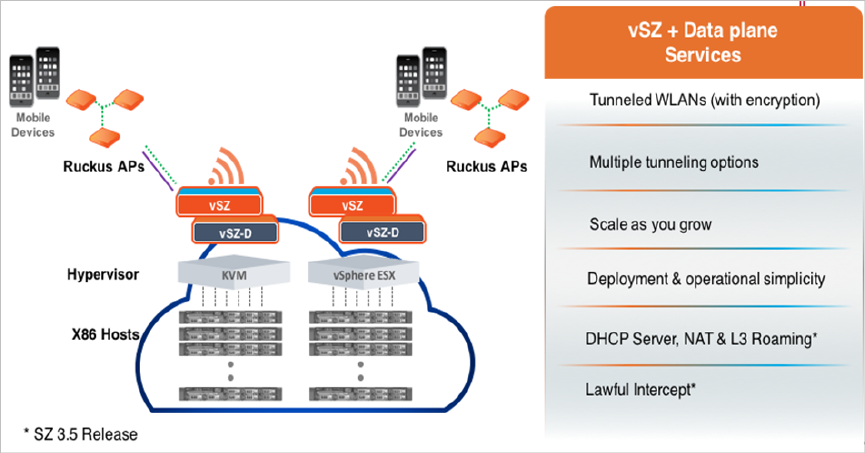
The Ruckus Wireless Virtual SmartZone controller platform is the industry’s most scalable Wi-Fi
controller platform that enables service providers and enterprises to leverage virtualization technologies
to deploy superior Wi-Fi management systems.
With the introduction of the Virtual Data Plane (vSZ-D) in SZ 3.2 release, the Virtual SmartZone platform
launched sophisticated data plane capabilities in a virtualized form factor. This is truly differentiated
and distinguished offering that provides compelling business benefits for varied deployment scenarios.
Figure 1: vSZ-D services
Ruckus Wireless™ virtual SmartZone Data Plane (vSZ-D) vSZ-D Configuration Guide for SmartZone 3.5
8
Virtual SmartZone Data Plane Overview
2
Features and Benefits
In this chapter:
•Tunneled WLANs and Flexible Traffic Redirection
•Architecture and Deployment Flexibility
•IPv6 Address Support
•vSZ-D Zone Affinity
•DHCP Server and NAT Service on the vSZ-D
•L3 Roaming
•Lawful Intercept
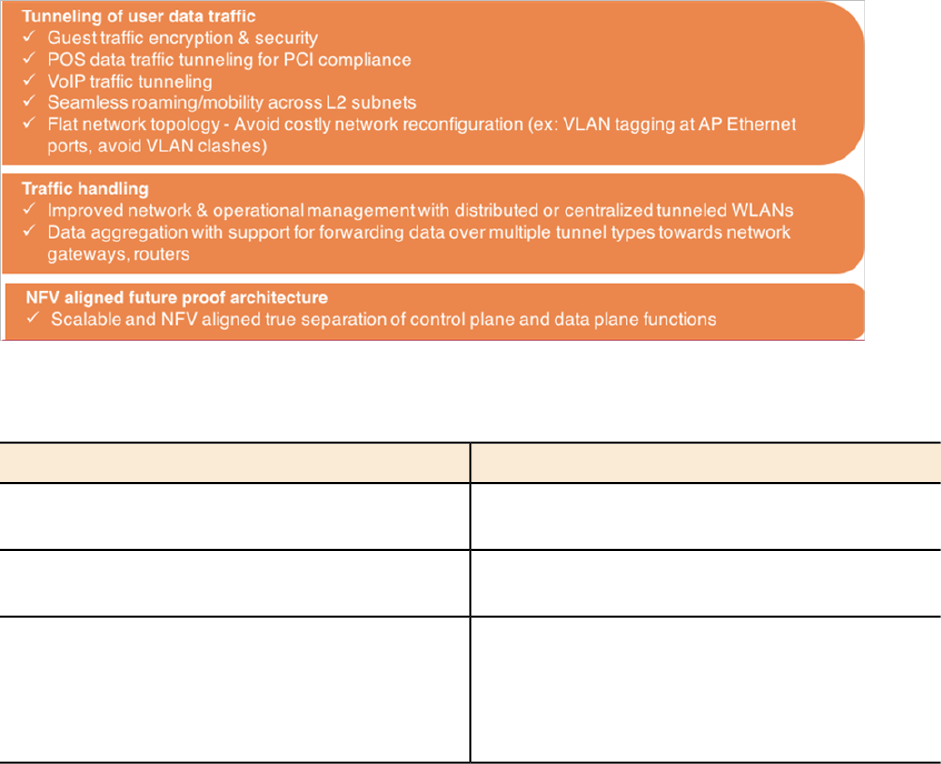
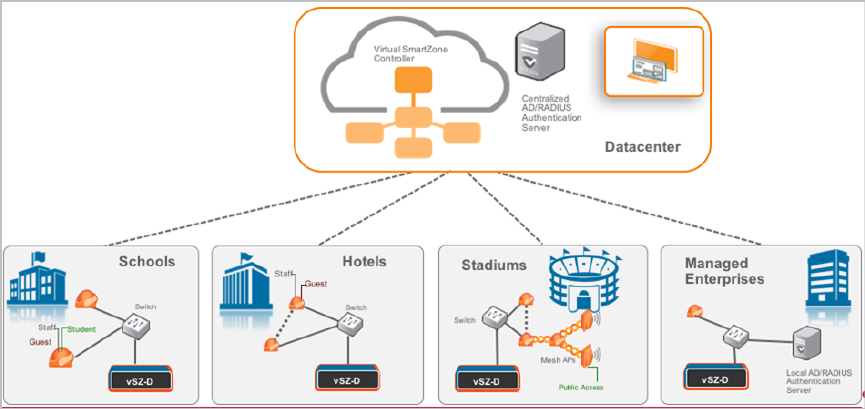
vSZ-D is a virtualized service to segregate and securely tunnel user data traffic.
Some of the key use cases for the vSZ-D are:
Figure 2: Use cases
Table 3: Feature and Benefits
BenefitFeature
Manages the creation of aggregated user data
streams through secure tunnel
Secure data plane tunneling
Supports the most widely deployed VMware and
KVM hypervisors
Multiple Hypervisor Support
Supports 1Gbps, 10Gbps or even higher
throughput capacities to support all types of
Dynamic data plane scaling
enterprise and carrier deployments that can be
dynamically tuned without needing software
updates
Ruckus Wireless™ virtual SmartZone Data Plane (vSZ-D) vSZ-D Configuration Guide for SmartZone 3.5
9
9

BenefitFeature
Seamless integration with vSZ controller •Simple integration and management with vSZ
controller clustering architecture enables
support for multiple vSZ-D instances
•10 vSZ-D instances per vSZ instance
•40 vSZ-D instances per vSZ cluster of 4
instances
•The controller runs in Active/Active (3+1) mode
for extremely high availability.
•Each vSZ-D runs as an independent virtual
machine instance that is managed by the
controller.
•With vSZ-D Zone Affinity enabled, it is possible
to support a distributed vSZ-D instance on a
per vSZ Zone basis.
Encrypted tunnel aggregation from all types of
WLANs (Captive portal, 802.1x, HS2.0), VLANs,
Superior data plane functions
DHCP Relay, DHCP Server, NAT, L3 Roaming,
Lawful Intercept, IPv6 Support and NAT traversal
between AP and vSZ-D.
Provides the ability to service distributed and
centralized network configurations
Scalable Deployment Architectures
Simple integration and management with vSZ-E
and vSZ-H installations
Deployment and operational simplicity
Service policy management and data stream (will
be supported in a later release)
Site level QoS and policy control
Tunneled WLANs and Flexible Traffic Redirection
Many WiFi deployments have requirements to support tunneled WLANs for guest isolation and
encryption, POS data security, VoIP traffic management, and seamless roaming across L2
subnets. One of the most deployed and easily managed way to meet these requirements is to
enable a flat network topology by tunneling traffic to a controller.
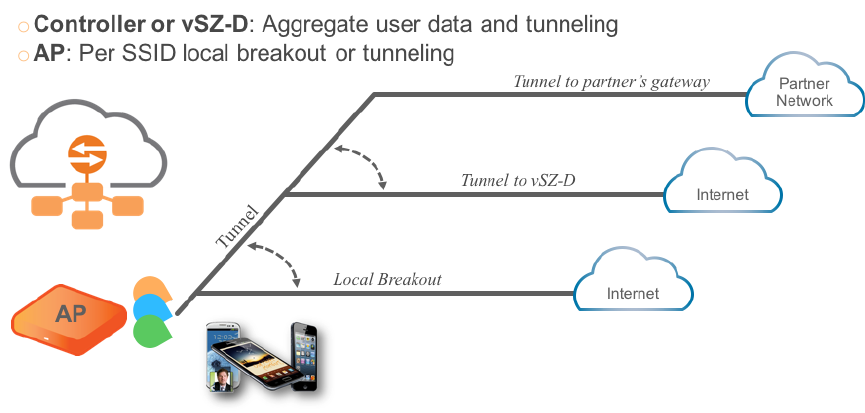
With the vSZ-D, it is now possible to support tunneled WLANs on Ruckus Wireless APs that are
managed by a vSZ controller. In addition, both the Ruckus Wireless AP and the vSZ-D support
encryption capabilities on tunnels for data protection. This is especially important when tunneling
guest traffic and in use cases where the service provider or enterprise operator does not have
control on the backhaul links.
Figure 3: Traffic redirection flexibility with the Virtual SmartZone platform
Ruckus Wireless™ virtual SmartZone Data Plane (vSZ-D) vSZ-D Configuration Guide for SmartZone 3.5
10
Features and Benefits
Tunneled WLANs and Flexible Traffic Redirection
Architecture and Deployment Flexibility
Existing architectures for supporting tunneled WLANs involve tunneling data back into controllers.
This results in architectures where a complete controller needs to be deployed on each site or
all the tunneled WLAN traffic being backhauled into a centralized data center. This also results
in dependencies on choices for controller platforms with different capacity profiles, which increase
the capital and operating expenses of the entire solution without actually solving the real problem.
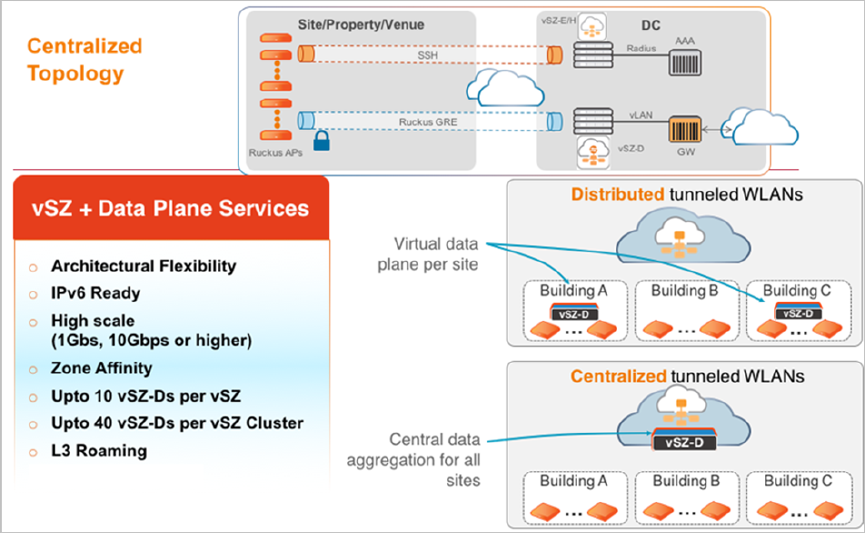
With the vSZ-D, it is now possible to deploy the same software either on-premise (on cheaper
COTS hardware) when needed, as well as deploy it at the data center (on higher end COTS
hardware) and the entire Wi-Fi management controller by the vSZ controller.
Figure 4: Unmatched architecture flexibility
Ruckus Wireless™ virtual SmartZone Data Plane (vSZ-D) vSZ-D Configuration Guide for SmartZone 3.5
11
Features and Benefits
Architecture and Deployment Flexibility
IPv6 Address Support
The vSZ-D supports IPv6 addresses for the data and control/management plane interfaces. The
vSZ-D also supports client IPv6 addressess for DHCP Relay only.
NOTE: vSZ-D does not support IPv6 addresses for northbound soft-GRE tunnels.
vSZ-D Zone Affinity
vSZ-D Zone Affinity is a new feature introduced in this release. It is now possible to dedicate
vSZ-D instance on a per distributed site basis.
This is especially useful for managed service providers and ISPs who manage remote distributed
sites through a central or regional data center. In this architecture, the vSZ is in the provider’s
data center managing APs across all remote distributed sites.
On sites where there is a need for tunneling, they can introduce the vSZ-D and bind those vSZ-Ds
to that particular site so that all APs on that site shall tunnel traffic locally to the vSZ-D on that
site.
Figure 5: vSZ-D Zone Affinity
Ruckus Wireless™ virtual SmartZone Data Plane (vSZ-D) vSZ-D Configuration Guide for SmartZone 3.5
12
Features and Benefits
IPv6 Address Support
DHCP Server and NAT Service on the vSZ-D
3.5 Release introduces a highly scalable and optimized DHCP Server on the vSZ-D that is
designed from the ground up for WiFi networks. It also introduces NAT capability.
NOTE: DHCP Server/NAT function if enabled is supported only for wireless client IPv4 address
assignment.
NOTE: DHCP Server and NAT service configuration is supported only with CLI in 3.5 release.
DHCP Server
The DHCP Server is designed in-line in the data plane and provides extreme scale in terms of
IP address assignment to clients. This feature is especially useful in high density and dynamic
deployments like stadiums, train stations where large number of clients continuously move in &
out of WiFi coverage. The DHCP server in the network needs to scale to meet these challenging
requirements. The DHCP server on the vSZ-D provides high scale IP assignment and management
with minimal impact on forwarding latency. DHCP Server supports 440K IP addresses and 64
pools with profile support.
NAT Service
With NAT service enabled, all the WiFi client traffic is NATed by the vSZ-D before being forwarded
to the core network. Each vSZ-D supports up to 990K ports and 16 public IP addresses for
NAT. This feature essentially reduces the network overhead significantly since this reduces the
MAC-table considerations on the UP-stream switches significantly. Again, very useful in high
density deployments.
NOTE: Only single subnet is supported in 3.5 release.
Ruckus Wireless™ virtual SmartZone Data Plane (vSZ-D) vSZ-D Configuration Guide for SmartZone 3.5
13
Features and Benefits
DHCP Server and NAT Service on the vSZ-D
L3 Roaming
Ruckus vSZ and vSZ-D architecture now supports L3 Roaming without the need for additional
mobility controllers.
The key use cases for L3 Roaming are well-understood,. Typically, a large WLAN network where
APs are separated on different VLAN segments and there is a need for IP address preservation
and potentially session persistence. Most common deployments are large campus networks
designed with multiple switches and VLANs and there is a need to support L3 Roaming.
With the 3.5 release and on the vSZ-D, Ruckus Wi-Fi can now support L3 Roaming with IP
Address preservation. Below is the high level use case that describes the feature functions. A
large network that is broken up into various campuses and there is a need to support L3 Roaming.
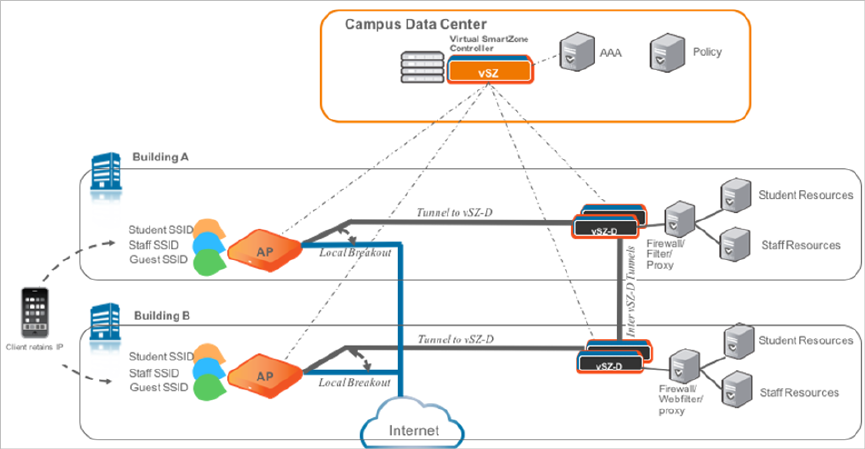
Below figure depicts 2 campuses, which are L2 separated but need L3 Roaming.
The APs in campus A setup a tunneled WLAN to the vSZ-D (Using Zone Affinity) and APs in
building B setup a tunneled WLAN to the vSZ-D in their building.
Each vSZ-D in the building can be configured to run a DHCP Server and NAT the traffic or be
setup as a DHCP Relay. When a client roams from an AP in building A to an AP in building B,
the vSZ-D in building B detects the roaming event and forwards the traffic (or assigns the same
IP back to the client) to the vSZ-D in building A (home vSZ-D or anchor vSZ-D) to ensure that
service to the client is not interrupted.
One additional unique benefit of this architecture over other L3 Roaming solutions is that with
this architecture, the roamer client can still have access to his home network resources (this is
similar to mobile roaming on 3G/4G networks).
Figure 6: Usage of L3 roaming
Ruckus Wireless™ virtual SmartZone Data Plane (vSZ-D) vSZ-D Configuration Guide for SmartZone 3.5
14
Features and Benefits
L3 Roaming
Lawful Intercept
An important carrier class feature that is being introduced on the vSZ-D with the 3.5 release is
to support Lawful Intercept requirements.
These are slowly becoming mandatory and stringent on SP-WiFi deployments where Service
Providers need to meet the CALEA standard requirements.
Ruckus vSZ-D now supports the ability to identify a device that has a LI warrant issued against
it and mirror the client data traffic to a LIG (Lawful Intercept Gateway) that is hosted in the SP’s
data center over L2oGRE.
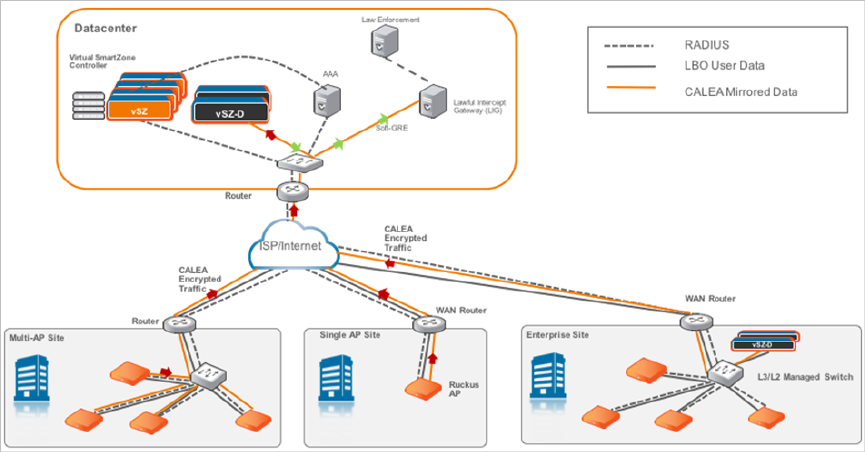
The figure below illustrates the high level architecture that is supported for Lawful Intercept
capabilities. It aslo depicts an architecture where smaller sites (with lesser number of APs) that
do not need data tunneling to vSZ-D (depicted as Multi-AP and Single AP sites) but need Lawful
Intercept. On the other side is a large enterprise site with large number of APs and need tunneling
(depicted as Enterprise site with vSZ-D on premise) with Lawful intercept.
NOTE: As mentioned in this document, the flexibility of the Ruckus vSZ/vSZ-D architecture is
that WiFi service providers can deploy the vSZ-D only on premises where there is a need (typically
larger venues) for tunneling.
The Ruckus architecture simply involves spinning up a vSZ-D instance at the central data center
and designate that vSZ-D instance as a CALEA mirroring agent. All of this configuration is centrally
managed through the vSZ. Once the network is setup appropriately, when a client device with
a matching MAC address that has a warrant is detected on any of the access sites, the APs (or
the vSZ-D) will mirror the packets to the vSZ-D (CALEA Mirroring agent) in the DC which will
then forward the traffic to the LIG (Lawful Intercept Gateway) either in the DC or SP DC.
Figure 7: Usage of Lawful Intercept
Ruckus Wireless™ virtual SmartZone Data Plane (vSZ-D) vSZ-D Configuration Guide for SmartZone 3.5
15
Features and Benefits
Lawful Intercept
3
Network Architecture
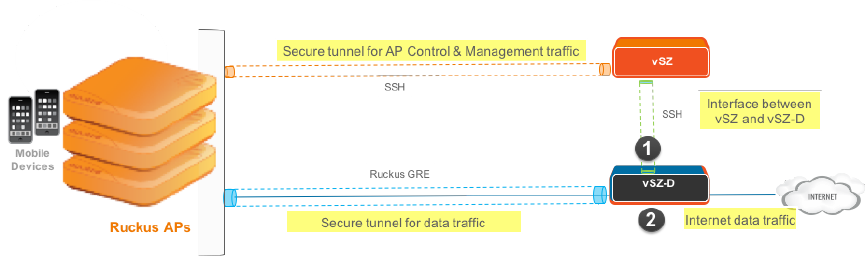
vSZ-D requires at least two physical interfaces: one for control/management and another for data
plane.
The control/management interface is used for communication with the vSZ controller, as well as the
command line interface. The data plane interface is used to tunnel user data traffic from the APs.
Figure 8: vSZ-D logical interfaces
The access layer (southbound) is used to tunnel traffic to and from managed APs. The following
connections exist on the access layer.
1. AP to and from vSZ-D: Data plane, secured by Ruckus GRE tunnel.
2. vSZ to and from vSZ-D: Control plane, for vSZ to manage vSZ-D
3. AP to and from vSZ: Control plane, for vSZ to manage the AP
The core layer (northbound) is used by vSZ-D to forward traffic to and from the core network.
Ruckus Wireless™ virtual SmartZone Data Plane (vSZ-D) vSZ-D Configuration Guide for SmartZone 3.5
16
Network Architecture
4
Communication Workflow
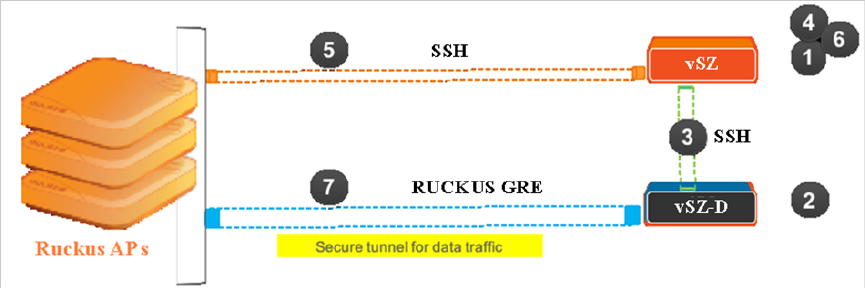
The figure below captures a high level end-to-end communication flow between Ruckus Wireless
APs, vSZ and vSZ-D.
Figure 9: Communication workflow between Ruckus Wireless APs, vSZ, and vSZ-D
The following are the steps seen in the above figure.
1. Update the vSZ controller to the latest 3.x release or perform a fresh install of the vSZ controller
with the latest release
NOTE: If you are upgrading the vSZ controller and the vSZ-D, Ruckus Wireless recommends the
update of vSZ controller before the update of vSZ-D
2. Install vSZ-D and point it to the vSZ-E or vSZ-H controller by using the following options:
•Set vSZ-E or vSZ-H control interface IP address or FQDN or configure the controller IP address
via DHCP option 43.
•For vSZ-E or vSZ-H configured with three (3) IP interfaces, the IP address to use is the vSZ
control interface IP address.
3. The vSZ-D management interface connects with the vSZ-E or vSZ-H controller control interface
4. The vSZ-E or vSZ-H controller administrator approves the vSZ-D connection request
5. The vSZ informs the AP of the vSZ-D data interface
6. The vSZ-D is displayed as active and managed on vSZ-E or vSZ-H
7. AP establishes a Ruckus GRE tunnel with the vSZ-D data interface when a tunnelling WLAN is
configured
Figure 9: Communication workflow between Ruckus Wireless APs, vSZ, and vSZ-D on page 17
depicts logical network architecture. In real-world deployments, there may be network routers,
gateways, firewalls and other devices; these typical network devices are not shown in the figure to
focus on the vSZ-D interfaces and communication protocol aspects between the various entities.
Ruckus Wireless™ virtual SmartZone Data Plane (vSZ-D) vSZ-D Configuration Guide for SmartZone 3.5
17
17
It is also important to note that support for distributed or centralized deployment topologies introduce
NAT routers/gateway devices. The communication interfaces between Ruckus Wireless APs, vSZ
and vSZ-D are designed to support NAT traversal so as to support such deployment topologies.
Ruckus Wireless™ virtual SmartZone Data Plane (vSZ-D) vSZ-D Configuration Guide for SmartZone 3.5
18
Communication Workflow
5
NAT Deployment Topologies
vSZ-D supports several deployment topologies.
AP Behind NAT and vSZ-D Behind NAT
When an AP is behind NAT, it is assumed that AP is sitting in the private world and wants to talk to
vSZ-D in the public world through NAT. The AP obtains its private IP address and communicate with
the vSZ-D through NAT. During communication with vSZ-D, the NAT router will intercept the packet
and change the source IP address (which is the AP IP address) to a public IP address and add a new
source port number before forwarding the packet to vSZ-D. vSZ-D, in this case, is insensitive to the
NAT router’s operation. When the packet comes back from vSZ-D to the AP, the NAT router will
intercept the packet and translate the destination IP address and port number back to the appropriate
(original) AP IP address and port number.
When vSZ-D is behind NAT, it is assumed that vSZ-D is sitting in the private world and wants to talk
to the AP in the public world through NAT. In this case, it is needed to setup the NAT IP (public IP)
and a port number pair in vSZ-D “setup” process. vSZ picks up this public address and the associated
port number and informs the AP that this is the vSZ-D address/port (public-IP, port) pair to connect
to.
It is also needed to configure the NAT device and enter the port mapping, basically, (public-IP, port)
<-> (private-IP, 23233) into NAT’s rule table. Thus, when NAT receives the packet bound for vSZ-D
(sent to public-IP/port) from the AP, it will translate it to (private-IP, 23233) based on the rule table
before sending it to vSZ-D, and conversely, for packet from vSZ-D, NAT router will look at the
srcIP/srcPort (IP, 23233), and convert it to public IP address or port based on the rule table before
sending it to AP.
NOTE: Both TCP and UDP protocols on port 23233 need to be forwarded as both are used (TCP is
used for tunnel establishment and UDP for client data)
vSZ and vSZ-D at Data Center Behind NAT
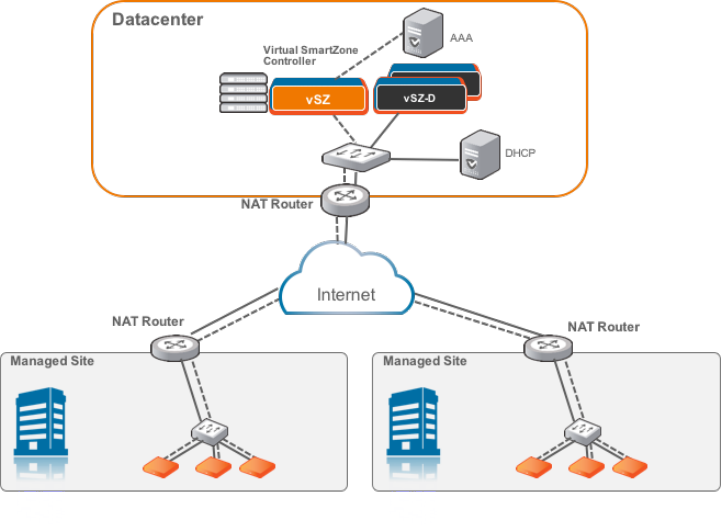
In this deployment topology, vSZ-D and vSZ are co-located at the data center behind NAT, while
Ruckus Wireless APs are on the access network behind NAT.
Figure 10: vSZ and vSZ-D at data center behind NAT
Ruckus Wireless™ virtual SmartZone Data Plane (vSZ-D) vSZ-D Configuration Guide for SmartZone 3.5
19
19
vSZ-D at Access Side with NAT
In this deployment topology, vSZ is at the data center and vSZ-D is co-located with the Ruckus
Wireless APs on the access network. In this scenario, there are NAT routers between vSZ and
vSZ-D/Ruckus APs.
Ruckus Wireless™ virtual SmartZone Data Plane (vSZ-D) vSZ-D Configuration Guide for SmartZone 3.5
20
NAT Deployment Topologies
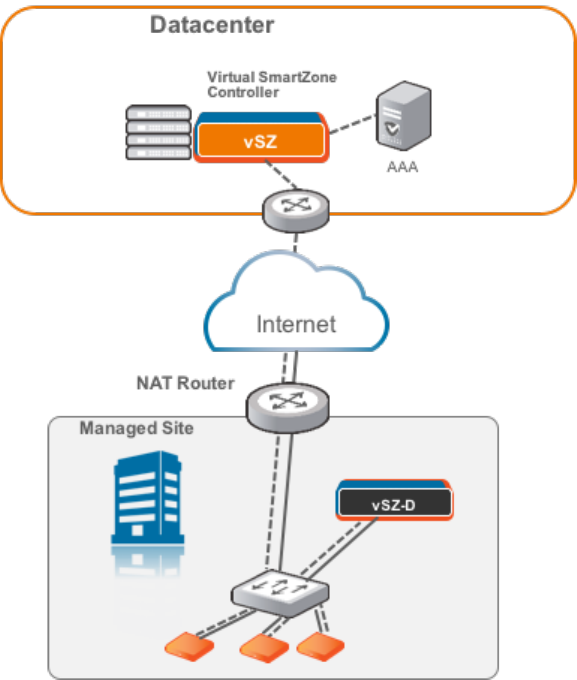
Figure 11: vSZ-D at access side with a NAT router
vSZ-D Behind NAT
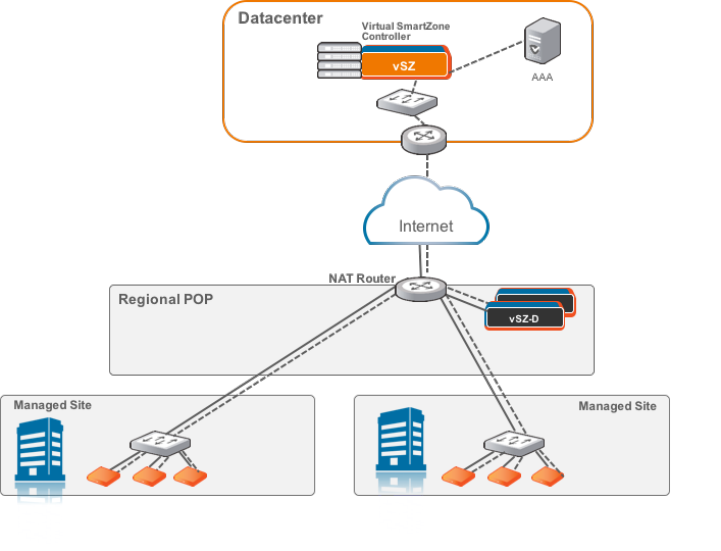
In this deployment topology, vSZ is at the data center and vSZ-D is in a distributed site but not
co-located with the Ruckus Wireless APs within the access network. There are NAT routers between
vSZ and vSZ-D, and between vSZ-D and Ruckus Wireless APs. The vSZ-D port to communicate with
vSZ control plane is port 22.
Figure 12: vSZ-D behind a NAT router
Ruckus Wireless™ virtual SmartZone Data Plane (vSZ-D) vSZ-D Configuration Guide for SmartZone 3.5
21
NAT Deployment Topologies
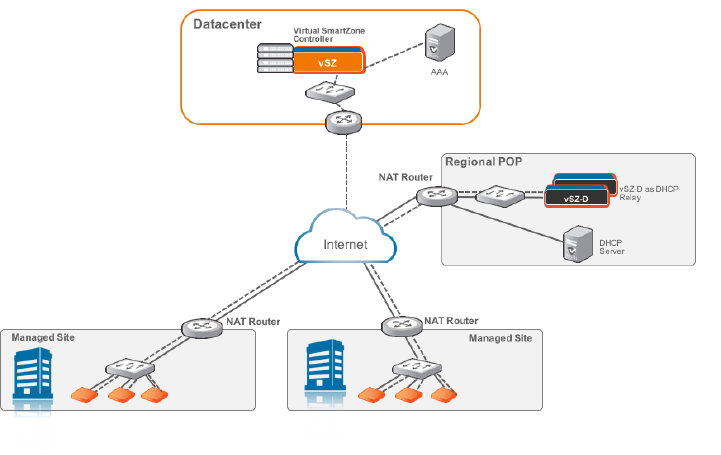
DHCP Relay with NAT
Similar to the vSZ-D Behind NAT, in this deployment topology, vSZ is at the data center and vSZ-D
is in a distributed site but not co-located with the Ruckus Wireless APs within the access network.
There are NAT routers between vSZ and vSZ-D, and between vSZ-D and Ruckus Wireless APs.
However, in this topology, the DHCP server assigning client IP addresses is on its own separate
subnet. vSZ-D provides the DHCP relay function to support such a network configuration.
Figure 13: DHCP relay with a NAT router
Ruckus Wireless™ virtual SmartZone Data Plane (vSZ-D) vSZ-D Configuration Guide for SmartZone 3.5
22
NAT Deployment Topologies
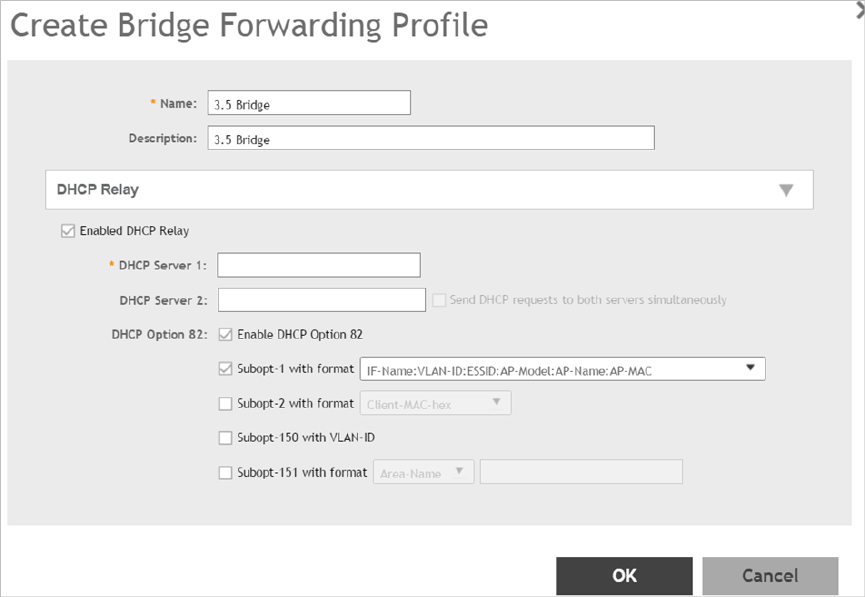
DHCP Option 82 and Bridge Profile
If you are enabling the DHCP Option 82 in WLAN configuration in the controller vSZ, it means that
the AP is going to put DHCP Option 82 in the DHCP server and will send it to vSZ-D. This is in the
format IF-Name:VLAN-ID:ESSID:AP-Model:AP-Name:AP-MAC. If you want to give the users
the option to choose what needs to be included in DHCP Option 82, you would need to create a
Bridge Service Profile in the vSZ controller web interface. Follow the steps to create a Bridge Service
Profile.
•Go to vSZ controller web interface > Services & Profiles > Core Network Tunnel
•Click on Create to add a Bridge Forwarding Profile
•Verify if the DHCP Relay is enabled.
•Add the DHCP server IP address
•Enable DHCP Option 82 and choose the sub options based on your requirement or of the user.
This will be taken care by vSZ-D during DHCP packet relay to the DHCP server.
Figure 14: Creating Bridge Profile
Ruckus Wireless™ virtual SmartZone Data Plane (vSZ-D) vSZ-D Configuration Guide for SmartZone 3.5
23
NAT Deployment Topologies
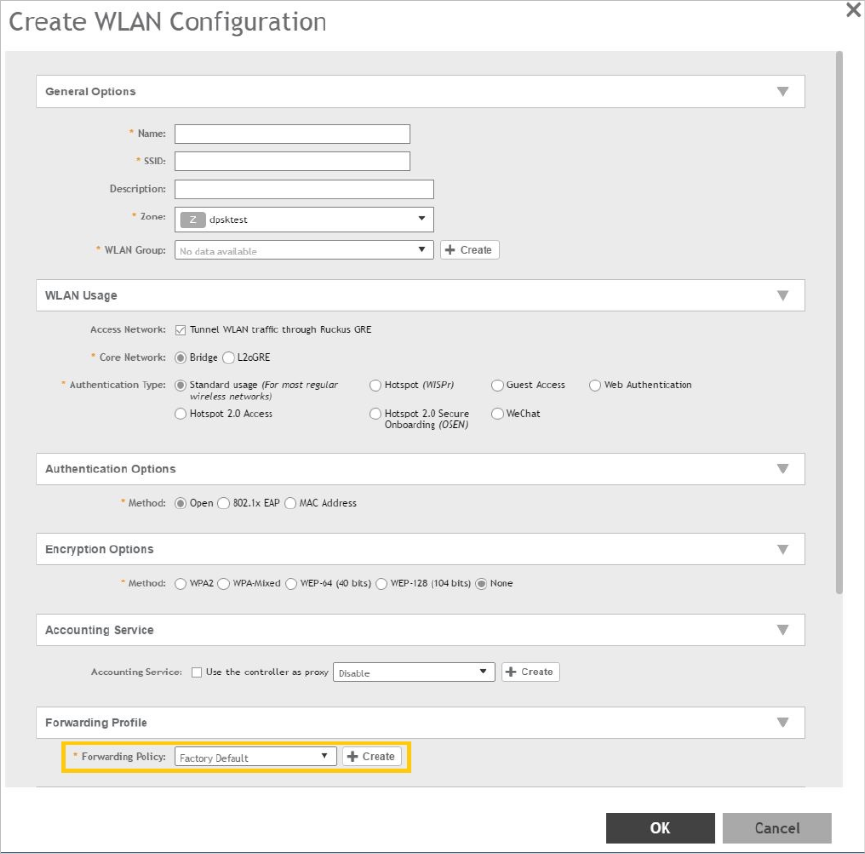
•Go to vSZ controller web interface > Wireless LANs
•Click on Create to add the following new WLAN configuration:
•Access Network as Tunnel WLAN traffic through Ruckus GRE
•Core Network as Bridge
•Authentication Options > Methodas Open
•Encryption Options > Methodas None
•Forwarding Policy as Factory Default . Choose the forwarding policy as the bridge profile.
•Click OK to complete and save the configuration.
Figure 15: Creating a WLAN Configuration
Ruckus Wireless™ virtual SmartZone Data Plane (vSZ-D) vSZ-D Configuration Guide for SmartZone 3.5
24
NAT Deployment Topologies
Ruckus Wireless™ virtual SmartZone Data Plane (vSZ-D) vSZ-D Configuration Guide for SmartZone 3.5
25
NAT Deployment Topologies

6
System Requirements
In this chapter:
•Hardware Requirements
Hardware Requirements
vSZ-D supports auto scaling, which means the number of CPU cores can be expanded without
needing a software update. Ruckus Wireless has tested from three to six CPU core allocations
for the vSZ-D in release 3.2 and above.
NOTE: The minimum memory and CPU requirements for vSZ have changed in this release. You
may need to upgrade your infrastructure before upgrading. Please read carefully. This is the
minimum requirement recommended. Refer to the Release Notes or the vSZ Getting Started
Guide.
The following table lists the minimum hardware requirements recommended for running an
instance of vSZ-D.
Table 4: vSZ-D hardware requirements
RequirementHardware Component
VMWare Esxi 5.5 and later OR KVM (CentOS
7.0 64bit)
Hypervisor support required by Management
Interface
Intel Xeon E55xx and above. Recent Intel
E5-2xxx chips are recommended
Processor
CPU cores •Minimum 3 to 6 cores per instance
dedicated for data plane processing.
•DirectIO mode for best data plane
performance.
NOTE: Actual throughput numbers will vary
depending on infrastructure and traffic type.
•vSwitch mode for flexibility and service
chaining
Minimum 6 Gb memory per instanceMemory
10GB per instanceDisk space
2Ethernet interfaces
Ruckus Wireless™ virtual SmartZone Data Plane (vSZ-D) vSZ-D Configuration Guide for SmartZone 3.5
26
System Requirements
Hardware Requirements

RequirementHardware Component
NICs that support Intel DPDK requiredby Data
Interface
•Intel NICs iab, ixabe
•82576, I350
•82599EB, 82599, X520
Important Notes About Hardware Requirements
•If you change the number of CPU cores, you must reboot vSZ-D for the changes to take
effect.
•The first core is always shared between Linux and NPE. Other cores are dedicated to NPE.
•vSZ-D requires two interfaces and these interfaces must be deployed on different subnets.
•The management interface of the vSZ-D can be any model as long as the NIC is supported
by the hypervisor.
•The data interface needs to be Intel DPDK based.
Supported Modes of Operation
vSZ-D supports two modes of operation: direct IO mode and vSwitch mode.
For best performance, Ruckus Wireless recommends using the direct IO mode. SR-IOV mode
is unsupported. Refer to the table below for mode of operation
NOTE: NICs assigned to direct IO cannot be shared. Moreover, VMware features such as
vMotion, DRS, and HA are unsupported.
The hardware configuration for a single vSZ-D instance specified in the guide will scale to handle
10K tunnels (10K APs) and up to 10Gbps of throughput (unencrypted) with appropriate underlying
Intel NIC cards (10G interfaces) in directIO mode of operation. This aligns with the number of
Ruckus AP that a vSZ controller supports. Refer to the dimensioning table below.
Table 5: Hardware Dimensioning
NotesMaximum
Throughput
(Unencrypted)
Number of
Tunnels on
vSZ-D
Number of
Ruckus APs
Number of
vSZ-D
Instances
Number of
vSZ
Instances
It is
recommended
10 Gbps100001000011
to have 10G
NICS on the
vSZ-D
considering
the high
number of
Ruckus APs.
Tunnels are
load-balanced
10 Gbps5000 (10K
maximum in
1000021
Ruckus Wireless™ virtual SmartZone Data Plane (vSZ-D) vSZ-D Configuration Guide for SmartZone 3.5
27
System Requirements
Hardware Requirements

NotesMaximum
Throughput
(Unencrypted)
Number of
Tunnels on
vSZ-D
Number of
Ruckus APs
Number of
vSZ-D
Instances
Number of
vSZ
Instances
towards the
vSZ-D by the
case of
failover)
vSZ. This is
useful when
data plane
redundancy is
required. It is
recommended
to have 10G
NICS on the
vSZ-D
considering
the high
number of
Ruckus APs.
Tunnels are
load-balanced
10 Gbps5000 (10K
maximum)
1000022
towards the
vSZ-D by the
vSZ. Each
vSZ-D
instance can
handle 10K
maximim
tunnels.
Tunnels are
load-balanced
10 Gbps2500 (10K
maximum)
1000042
towards the
vSZ-D by the
vSZ. Each
vSZ-D
instance can
handle 10K
maximim
tunnels.
Tunnels are
load-balanced
10 Gbps3300 (10K
maximum)
2000063
towards the
vSZ-D by the
vSZ. Each
vSZ-D
instance can
handle 10K
Ruckus Wireless™ virtual SmartZone Data Plane (vSZ-D) vSZ-D Configuration Guide for SmartZone 3.5
28
System Requirements
Hardware Requirements

NotesMaximum
Throughput
(Unencrypted)
Number of
Tunnels on
vSZ-D
Number of
Ruckus APs
Number of
vSZ-D
Instances
Number of
vSZ
Instances
maximim
tunnels.
Tunnels are
load-balanced
10 Gbps3750 (10K
maximum)
3000084
towards the
vSZ-D by the
vSZ. Each
vSZ-D
instance can
handle 10K
maximim
tunnels.
Table 6: Mode of Operation
Packet
Size
(Bytes)
Tunnel
Bandwidth
(Intel NIC-10
G)
(Unencrypted)
Number of
Tunnels
Hard Disk
(GB)
Memory
(GB)
Number of
CPUs
Hypervisor
140017.6 Gbps10001063Vmware
(DirectIO)
Random6.3 Gbps100001066*Vmware
(DirectIO)
Random4.5 Gbps100001063Vmware
(DirectIO)
NOTE: Refer to the vSZ-D Performance Recommendations on page 49 chapter for encryption
and vSwitch impacts.
NOTE: * vDP needs to increase the CPUs to 6 for sustaining the 10GB line rate in random-byte
traffic when the encryption is enabled. Encrypted requires 6 cores and unencrypted requires 3
cores
Ruckus Wireless™ virtual SmartZone Data Plane (vSZ-D) vSZ-D Configuration Guide for SmartZone 3.5
29
System Requirements
Hardware Requirements
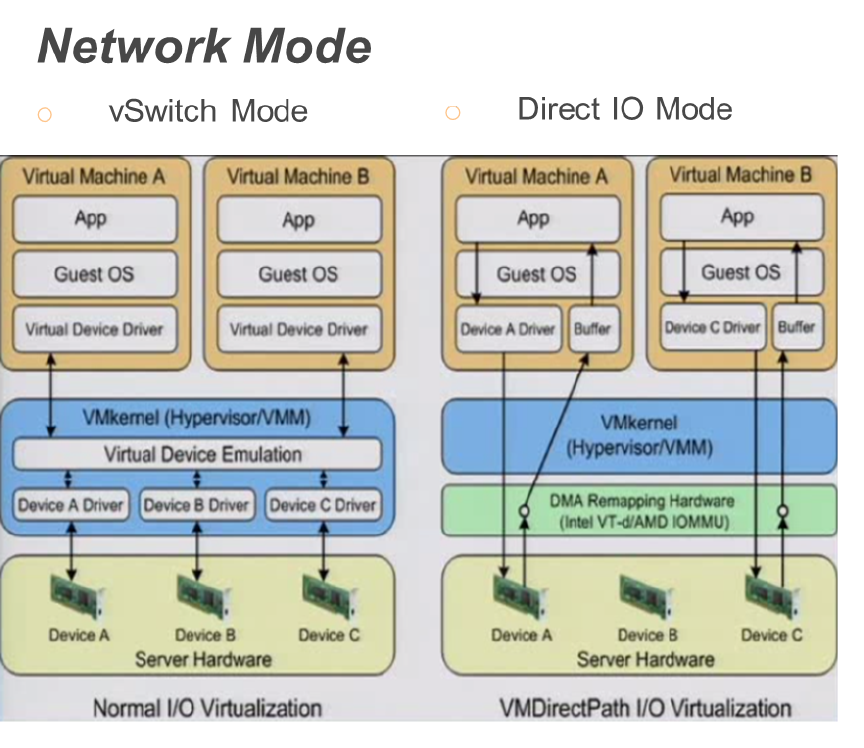
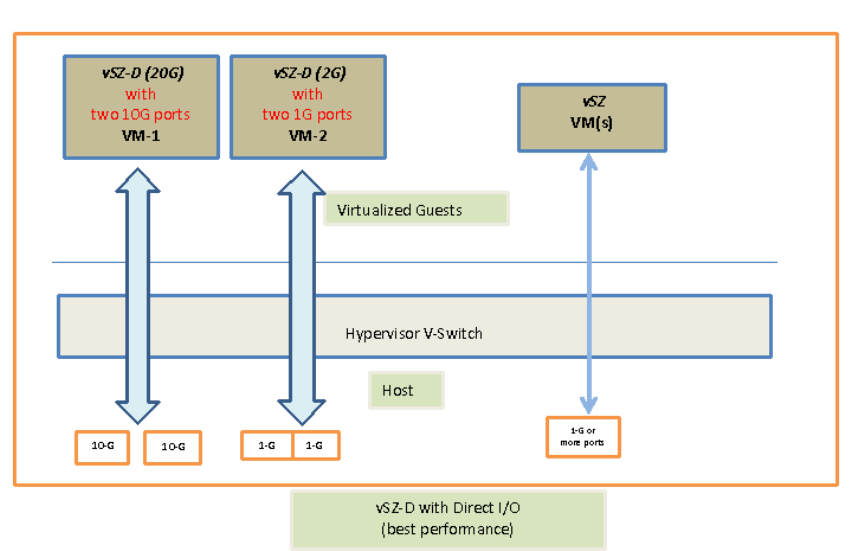
The figure below depicts a sample configuration in DirectIO mode. This is the recommended
deployment model for the vSZ-D for best performance benefits. In this setup, cores as well as
the NICs are dedicated to the vSZ-D VM only for best performance.
NOTE: In this setup, the vSZ-D data plane interfaces directly with the DPDK NIC, completely
bypassing the vSwitch
vSZ-D with DirectI/O
NOTE: The figure below depicts multiple virtual data plane instances for reference purposes
only.
It also depicts a vSZ controller instance running as a separate VM. These VMs can be running
on the same underlying host or potentially different hosts.
Ruckus Wireless™ virtual SmartZone Data Plane (vSZ-D) vSZ-D Configuration Guide for SmartZone 3.5
30
System Requirements
Hardware Requirements
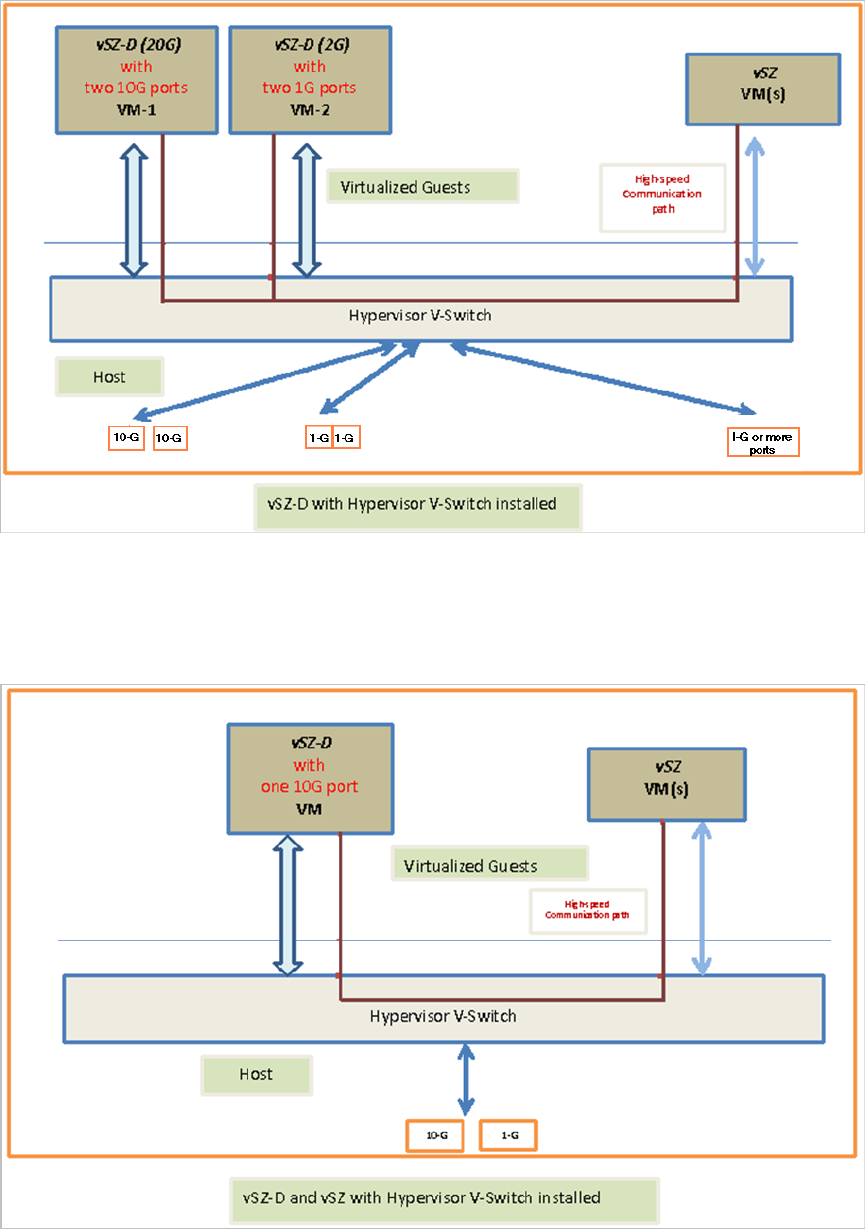
vSZ-D with Hypervisor vSwitch Installed
The figure below depicts a sample setup via the vSwitch.
NOTE: The figure below depicts multiple virtual data plane instances for reference. It also depicts
a vSZ controller instance running as a separate VM.
Ruckus Wireless™ virtual SmartZone Data Plane (vSZ-D) vSZ-D Configuration Guide for SmartZone 3.5
31
System Requirements
Hardware Requirements
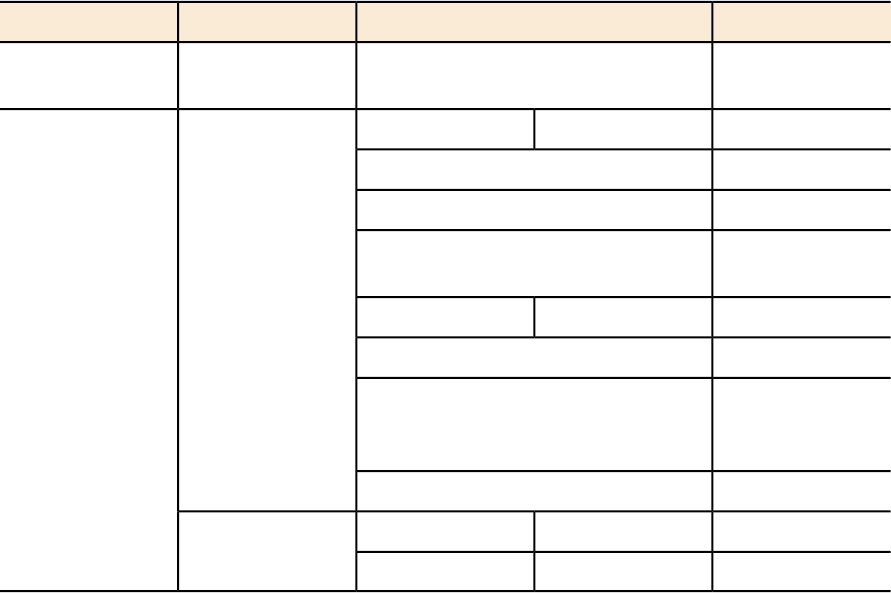
vSZ-D and vSZ with Hypervisor vSwitch Installed
The figure below depicts an architecture where vSZ and vSZ-D are running on the same underlying
host.
Ruckus Wireless™ virtual SmartZone Data Plane (vSZ-D) vSZ-D Configuration Guide for SmartZone 3.5
32
System Requirements
Hardware Requirements
Recommended NICs and Operation Modes
The following table lists the modes of operation and network interface cards (NICs) that have
been tested by Ruckus Wireless. Other NICs that support Intel DPDK architectures may or may
not work.
Table 7: Recommended NICs and operation modes
NIC ModelSupported NIC DriverModeInterface
82574E1000vSwitchControl /
management
I350
igb1GBDirect IOData
82576
Intel 82571EB
Broadcom
BCM5720
82599EBixgbe10GB
82598
X540 (T1 and T2,
for RJ-45
twist-pair)
X520
--VMXNET3VMwarevSwitch
--VirtioKVM
Ruckus Wireless™ virtual SmartZone Data Plane (vSZ-D) vSZ-D Configuration Guide for SmartZone 3.5
33
System Requirements
Hardware Requirements
7
Hypervisor Configuration
In this chapter:
•Supported Hypervisors
•General Configuration
•VMware Specific Configuration
•KVM Specific Configuration
This section covers hypervisor-specific configurations that Ruckus Wireless recommends and other
settings that you may need to fine tune.
Supported Hypervisors
Unlike the vSZ controller, vSZ-D can only be installed on specific versions of VMware and KVM.
The tables below list the hypervisors and versions on which vSZ and vSZ-D can and cannot be
installed.
Table 8: vSZ and vSZ-D supported hypervisors
vSZ-DvSZ
Supported from 2.5VMware 5.1
Supported from 3.2Supported from 3.0VMware 5.5 and later
Supported from 2.5KVM CentOS 6.5 64-bit
Supported from 3.2Supported from 3.0KVM CentOS 7.0 64-bit
Supported from 3.2Hyper-V
Supported from 3.2Azure
Supported from 3.2GCE
General Configuration
Ruckus Wireless offers the following general configuration recommendations.
Table 9: General vSZ-D configuration recommendations
Minimum RecommendationComponent
Minimum 6144MBRecommended reserved memory
Ruckus Wireless™ virtual SmartZone Data Plane (vSZ-D) vSZ-D Configuration Guide for SmartZone 3.5
34
Hypervisor Configuration
Supported Hypervisors

Minimum RecommendationComponent
Minimum three CPU cores. For improved
performance in a large-scale deployment,
allocate six CPU cores.
Recommended number of CPU cores
To enable passthrough on NIC devices,
configure DirectIO mode in ESXi in Advanced
Settings.
Configuration via DirectIO or through vSwitch
VMware Specific Configuration
If you are installing vSZ-D on VMware, read these VMware specific configuration recommendations
from Ruckus Wireless.
•Deploy vSZ-D on a machine that has at least two physical NICs. Alternatively, deploy to two
vSwitch instances with dedicated physical NICs.
Ruckus Wireless™ virtual SmartZone Data Plane (vSZ-D) vSZ-D Configuration Guide for SmartZone 3.5
35
Hypervisor Configuration
VMware Specific Configuration
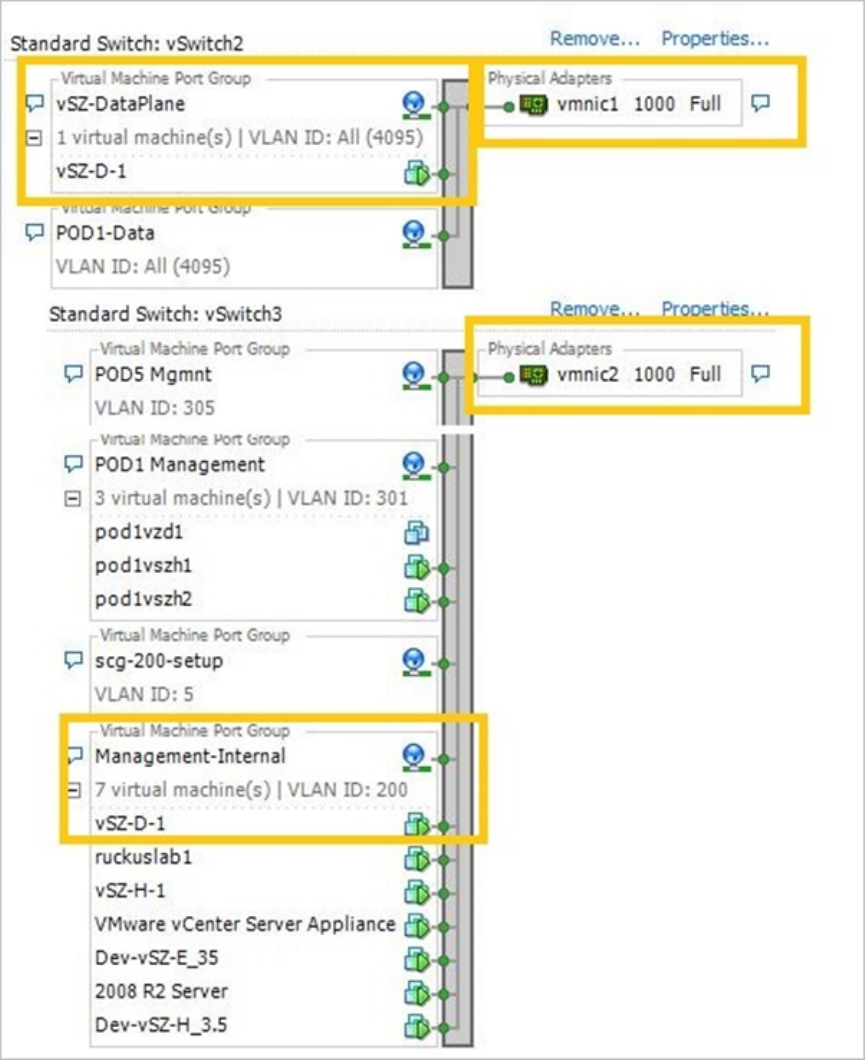
•When deploying an instance of vSZ-D using an OVA file, you must assign the management
and data interfaces to two different network groups (vSwitch) on different subnets.
Ruckus Wireless™ virtual SmartZone Data Plane (vSZ-D) vSZ-D Configuration Guide for SmartZone 3.5
36
Hypervisor Configuration
VMware Specific Configuration
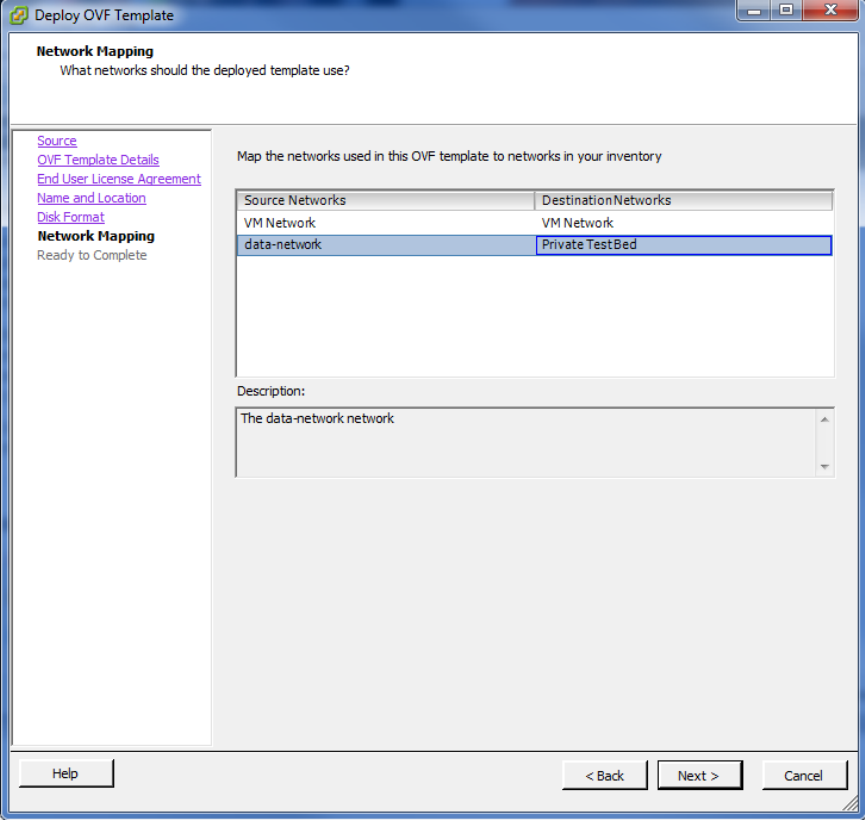
•Enable Promiscuous mode in vSwitch Config.
Ruckus Wireless™ virtual SmartZone Data Plane (vSZ-D) vSZ-D Configuration Guide for SmartZone 3.5
37
Hypervisor Configuration
VMware Specific Configuration
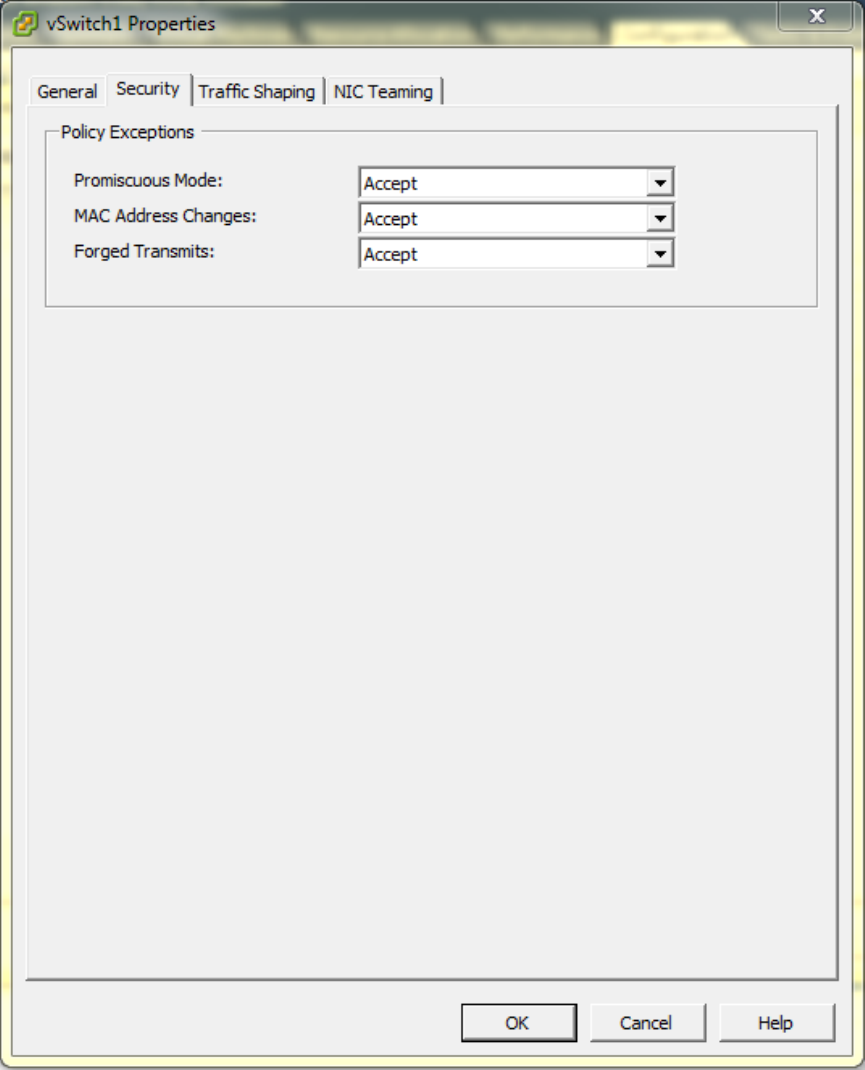
•In vSwitch Config, enable VLAN ID for All.
Ruckus Wireless™ virtual SmartZone Data Plane (vSZ-D) vSZ-D Configuration Guide for SmartZone 3.5
38
Hypervisor Configuration
VMware Specific Configuration
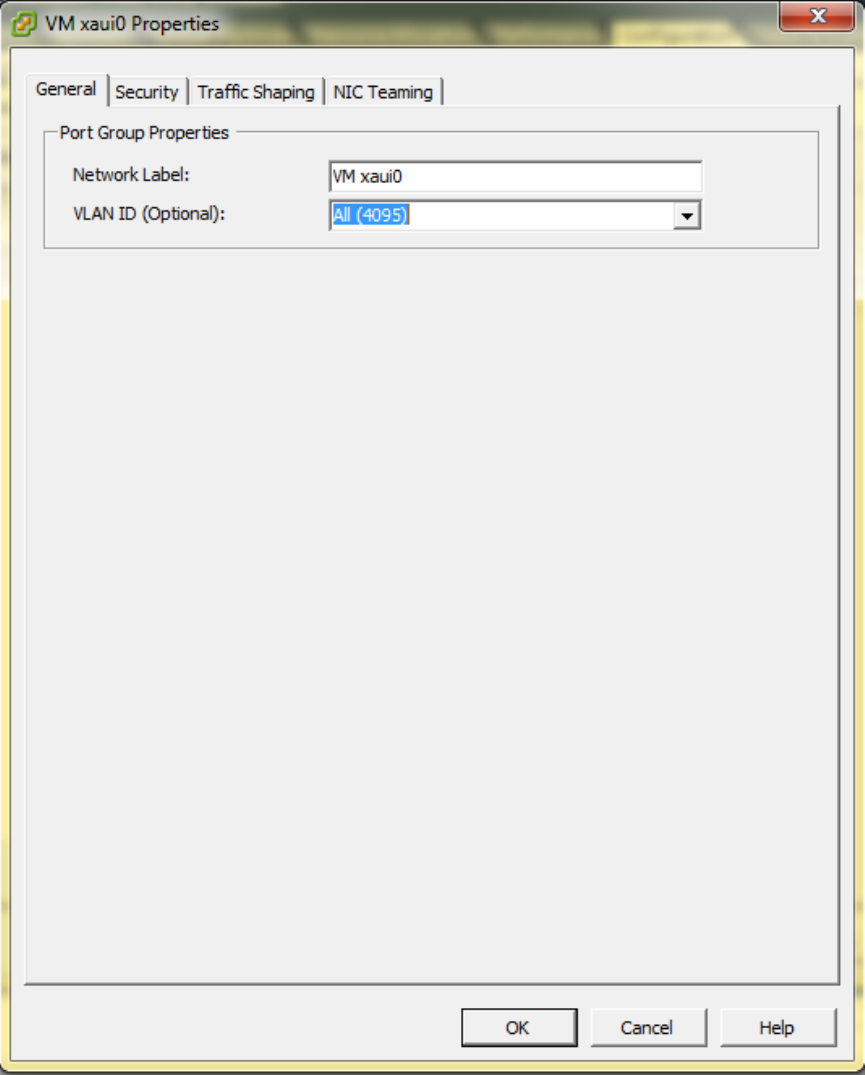
•After the vSZ-D instance is ready, modify the number of CPU cores (if needed) before powering
on vSZ-D.
Ruckus Wireless™ virtual SmartZone Data Plane (vSZ-D) vSZ-D Configuration Guide for SmartZone 3.5
39
Hypervisor Configuration
VMware Specific Configuration
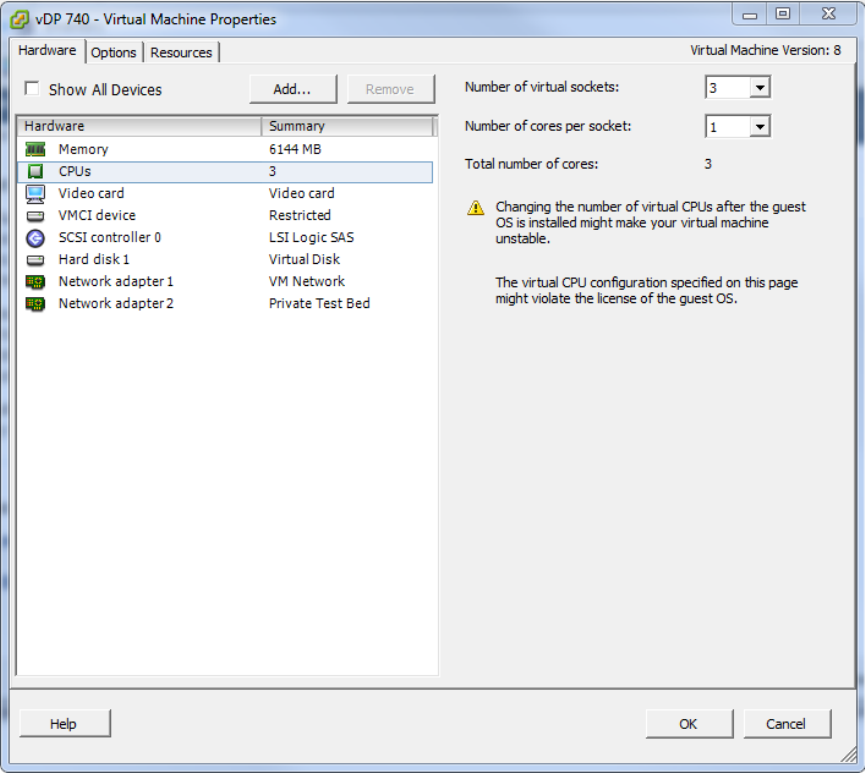
•For advanced CPU and memory resource configuration recommendations, refer to the vSphere
Resource Management Guide, which is available on the VMware website.
KVM Specific Configuration
If you are installing a KVM on VMware, read these KVM specific configuration recommendations
from Ruckus Wireless
CPU Type
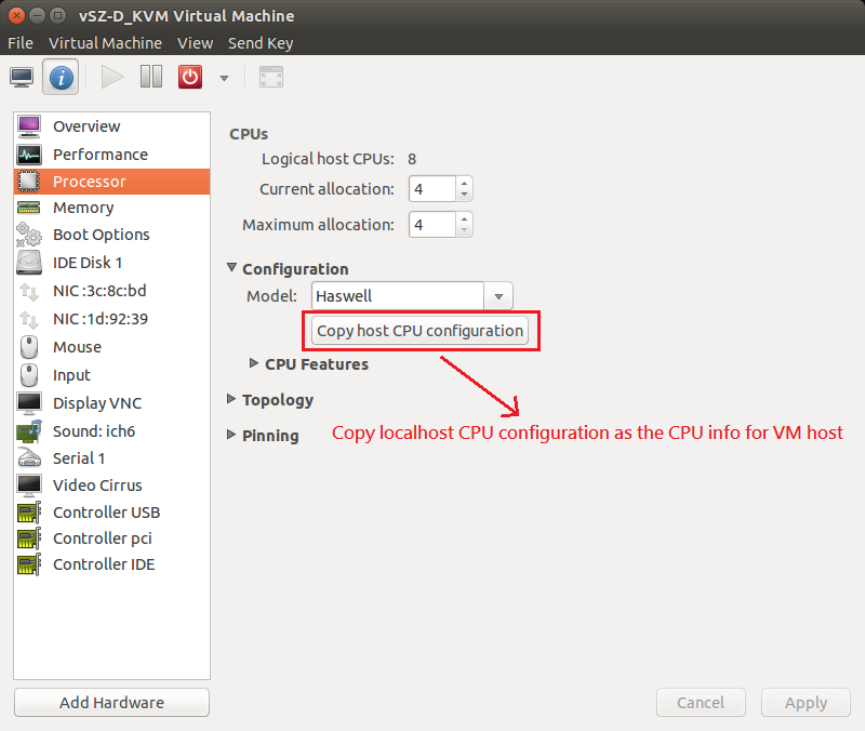
When selecting the CPU model, make sure you select one that is higher than Intel Core 2 Duo.
On Linux, you can this information in /proc/cpuinfo.
Ruckus Wireless™ virtual SmartZone Data Plane (vSZ-D) vSZ-D Configuration Guide for SmartZone 3.5
40
Hypervisor Configuration
KVM Specific Configuration
Disk Configuration
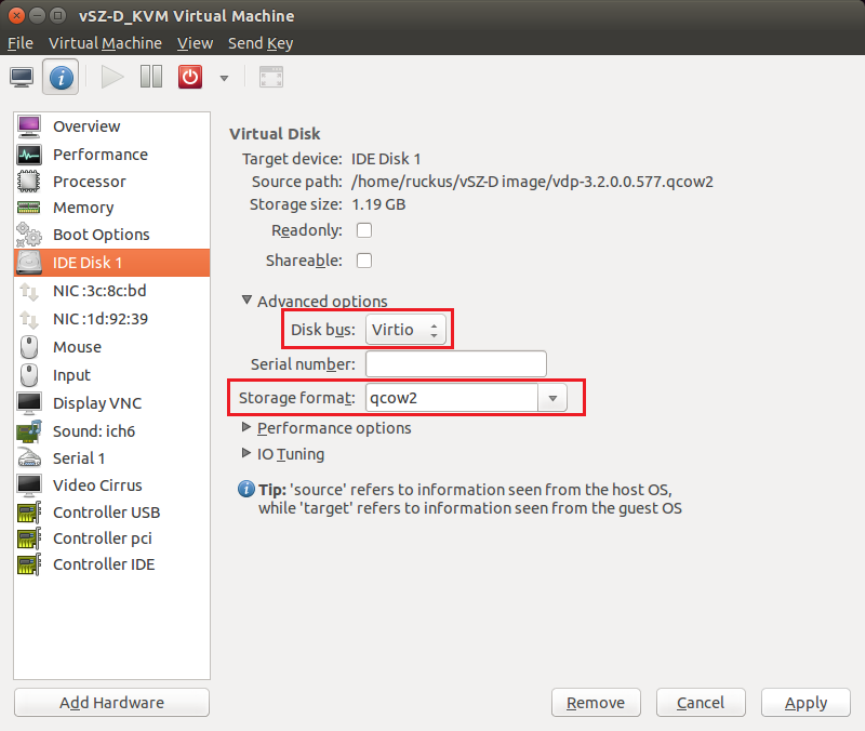
Ruckus Wireless recommends using Virtio as the disk bus and qcow2 as the storage format.
Ruckus Wireless™ virtual SmartZone Data Plane (vSZ-D) vSZ-D Configuration Guide for SmartZone 3.5
41
Hypervisor Configuration
KVM Specific Configuration
Ruckus Wireless™ virtual SmartZone Data Plane (vSZ-D) vSZ-D Configuration Guide for SmartZone 3.5
42
Hypervisor Configuration
KVM Specific Configuration
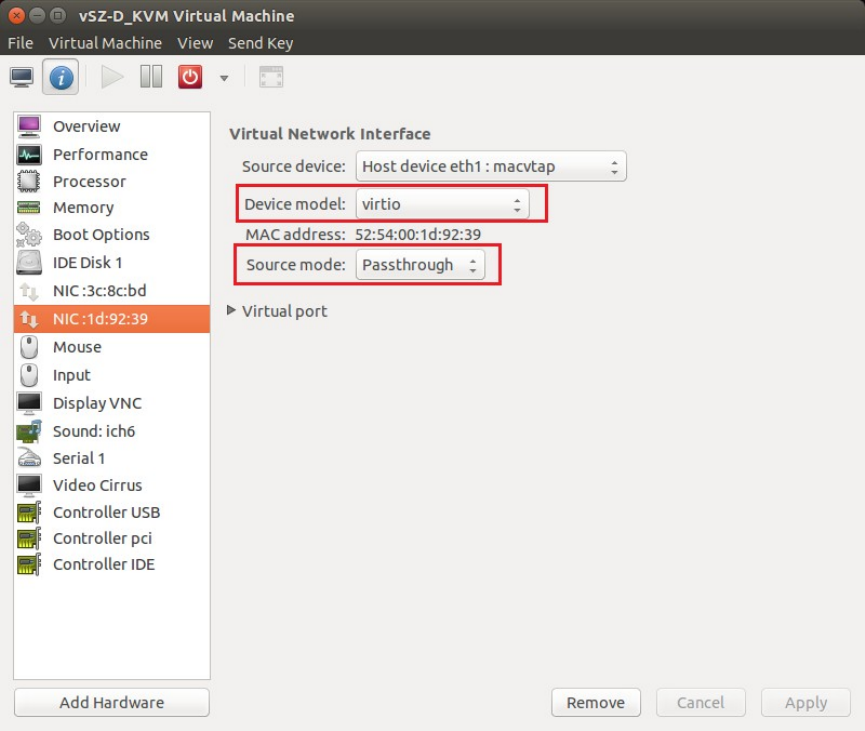
NIC Configuration in Direct IO Mode
NOTE: Only the data interface needs to be configured to direct PCI passthrough. The
management interface should always be configured to e1000 as the NIC driver.
Before adding a PCI device to the KVM, you need to complete the following steps:
1. Enable VT-d (for Intel processors) in the motherboard BIOS. Intel's VT-d ("Intel Virtualization
Technology for Directed I/O") is available on most i7 family processors.
2. Add kernel boot parameters via GRUB to enable IOMMU (see figure below). To enable IOMMU
in the kernel of Intel processors, pass intel_iommu=on boot parameter on Linux. For more
information, read this tutorial.
3. After configuring the boot parameter, reset the computer.
NIC Configuration in vSwitch Mode
NOTE: Configure only two ports for vSZ-D.
For the management interface, use the following settings:
Ruckus Wireless™ virtual SmartZone Data Plane (vSZ-D) vSZ-D Configuration Guide for SmartZone 3.5
43
Hypervisor Configuration
KVM Specific Configuration
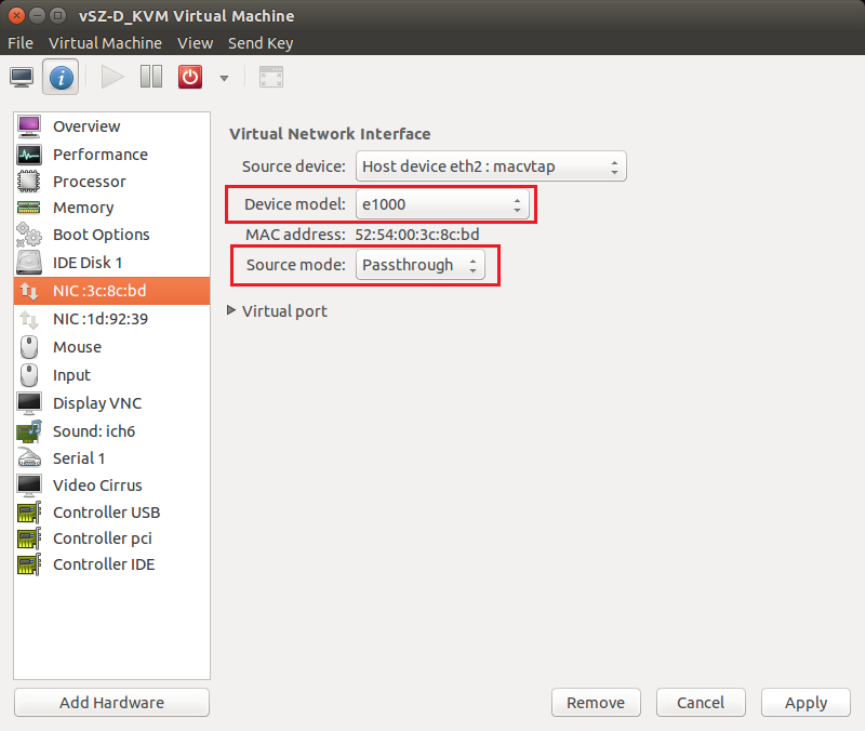
•Device model: e1000
•Source mode: Either Bridge or Passthrough if you are using macvtap for the device type.
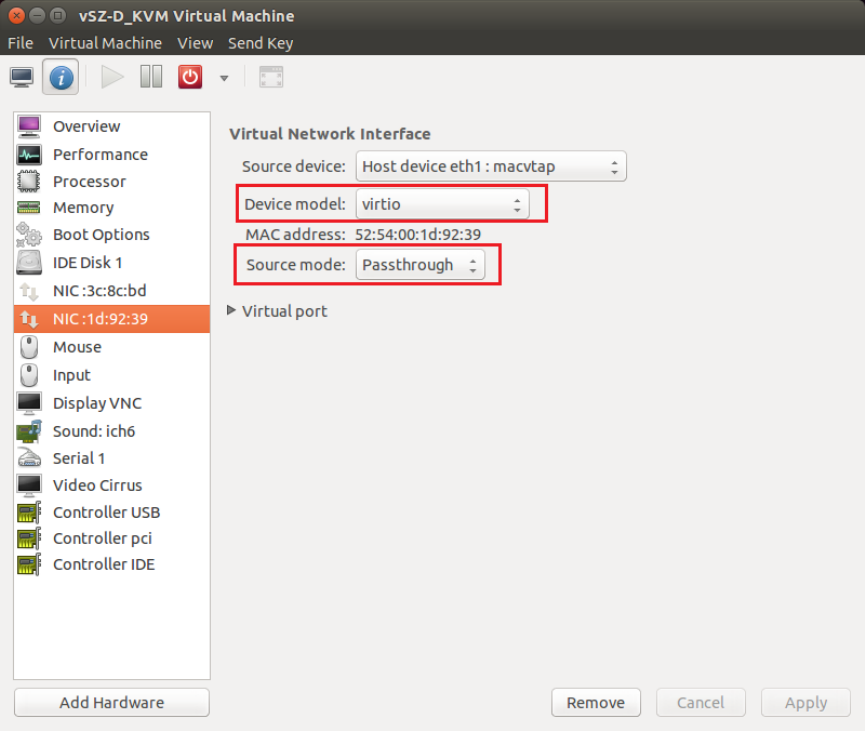
For the data interface, use the following settings:
•Device model: e1000
•Source mode: Passthrough if you are using macvtap for the device type. Only the
passthrough mode can allow UE traffic to pass through the VM NIC.
Ruckus Wireless™ virtual SmartZone Data Plane (vSZ-D) vSZ-D Configuration Guide for SmartZone 3.5
44
Hypervisor Configuration
KVM Specific Configuration
Ruckus Wireless™ virtual SmartZone Data Plane (vSZ-D) vSZ-D Configuration Guide for SmartZone 3.5
45
Hypervisor Configuration
KVM Specific Configuration
8
Upgrade Procedure
Procedure for upgrading to a new vSZ-D version.
Controller and vSZ-D Firmware Compatibility Matrix
The below table indicates the compatibiliy matrix. In general, Ruckus Wireless supports N-2 vSZ-D
releases with vSZ.
Table 10: Controller and vSZ-D Firmware Compatibility Matrix
vSZ-D ReleasevSZ Release
3.23.43.5
YesYesYes3.5
YesYesNo3.4
YesNoNo3.2
Follow these steps to upgrade the vSZ-D version.
NOTE: Before starting this procedure, you should have already obtained a valid software upgrade file
from Ruckus Wireless® Support or an authorized reseller.
NOTE: If you are upgrading both vSZ and vSZ-D, Ruckus Wireless® recommends upgrading vSZ first
before vSZ-D.
1. Copy the software upgrade file that you received from Ruckus Wireless® to the computer where
you are accessing the controller web interface or to any location on the network that is accessible
from the web interface.
2. Go to Controller web interface > Administration > Upgrade
Figure 16: Upgrade Section
Ruckus Wireless™ virtual SmartZone Data Plane (vSZ-D) vSZ-D Configuration Guide for SmartZone 3.5
46
Upgrade Procedure
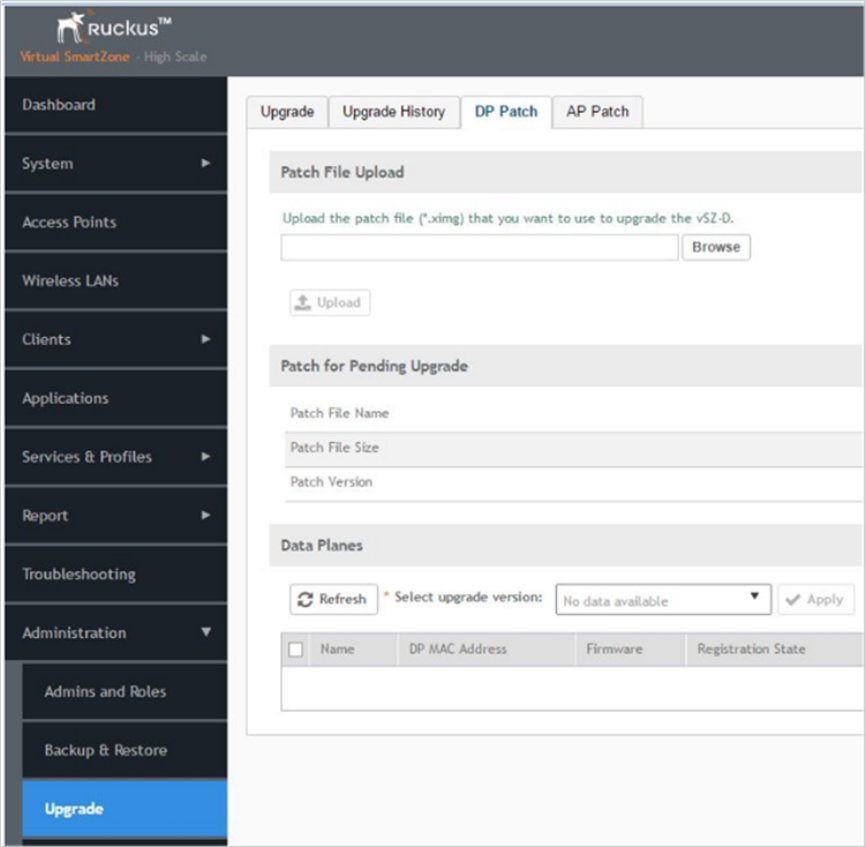
3. In the Patch File Upload section, click the Browse button, and then browse to the location of the
software upgrade file.
The file name of the software upgrade file is vSZ-D-installer_{version}.ximg.
4. Click Upload to upload the software upgrade file.
5. The Patch Information displays the new vSZ-D file details.
6. Select the vSZ-D instance that you want to upgrade from the Data Plane table and click Apply.
The controller fetches the new vSZ-D version on a reboot.
7. To verify if the upgrade is successful after a reboot:
•Go to Controller web interface > Administration > Upgrade to view a confirmation message
that the data plane firmware upgrade is complete.
Ruckus Wireless™ virtual SmartZone Data Plane (vSZ-D) vSZ-D Configuration Guide for SmartZone 3.5
47
Upgrade Procedure
•Go to Controller web interface > Configuration > System > Cluster Planes to view a
confirmation message that the data plane is managed with an upgrade firmware version.
Ruckus Wireless™ virtual SmartZone Data Plane (vSZ-D) vSZ-D Configuration Guide for SmartZone 3.5
48
Upgrade Procedure
9
vSZ-D Performance Recommendations
vSZ-D has been designed to induce minimal latency in user data aggregation and forwarding. The
unique design of the vSZ-D software enables consistent packet performance with minimal throughput
degradation as the number of tunnels or the number of clients’ increase.
The fast path processing of the vSZ-D is engineered to scale to the underlying NIC capacity profiles
whether be it 1G or 10G speeds. vSZ-D is designed to scale and handle data tunnels and data
forwarding capabilities at high scale.
The following are some important observations and recommendations related to the vSZ-D
performance:
•To obtain the best throughput, Ruckus Wireless recommends operating vSZ-D in directIO mode.
This recommended mode of operation applies whether the hypervisor used is VMware or KVM.
•vSZ-D supports vSwitch mode of operation for added flexibility in deployments where vSZ-D may
be co-located with other VMs for service chaining on the same underlying hardware. Note that the
current observations are that in the vSwitch mode of operation, there is an induced performance
impact in comparison with the directIO mode of operation. This may be due to the latency or
performance bottleneck in virtIO and vSwitch sharing. This is still being researched at the Ruckus
Wireless R&D Labs.
•There is an expected performance impact when enabling encryption (AES 128 bit) on the Ruckus
GRE Tunnels. This is due to the overhead induced by the crypto processing on Ruckus Wireless
AP and vSZ-D due to the associated overheads of encryption and decryption on a per packet
basis. The vSZ-D software is designed to introduce minimal latency and overheads associated in
packet processing. vSZ-D takes advantage of the underlying Intel chip’s crypto module for packet
encryption and decryption and the associated impact is primarily bounded at the hardware level.
For specific recommendations and calibrations that may be needed for your deployment, contact
Ruckus Wireless.
Ruckus Wireless™ virtual SmartZone Data Plane (vSZ-D) vSZ-D Configuration Guide for SmartZone 3.5
49
49
Index
A
architecture 11
B
benefits 9
Bridge Profile 19
C
CALEA standard requirement 15
communication workflow 17
control 16
controller 16
controllers 11
copyright information 5
CPU cores 26
D
data center managing 12
data plane 8, 16, 46
deployment flexibility 11
deployment topologies 19
DHCP Option 82 19
DHCP relay 19
DHCP Server 13
E
Ethernet interfaces 26
F
features 9
Flexible traffic redirection 10
Forwarding Policy 19
G
general configuration 34
H
hard disk 26
hardware dimensioning 27
hardware requirements 26
hypervisor configuration 34
Hypervisor support 26
hypervisors 34
I
IPv6 address 12
K
KVM 40
L
lawful intercept 15
legal 5
M
managed services 12
management 16
memory 26
modes of operation 33
N
NAT 19
NAT Service 13
NICs 33
NICs supported 26
O
operation modes 27
overview 8
P
patch information 46
performance 49
Processor 26
R
Ruckus GRE 17
S
service provider 15
SSH 17
system requirements 26
T
trademarks 5
tunnel 16
Tunneled WLAN 10
