Ruckus ICX Flexible Authentication With Cloudpath ES 5.0 Deployment Guide [BP] Brcd Fastiron Auth Dp
[BP] Ruckus ICX Flexible Authentication with Cloudpath ES 5.0 Deployment Guide brcd-fastiron-flexible-auth-cloudpath-dp
2017-12-12
User Manual: Ruckus [BP] Ruckus ICX Flexible Authentication with Cloudpath ES 5.0 Deployment Guide
Open the PDF directly: View PDF  .
.
Page Count: 83
- Ruckus ICX Flexible Authentication with Cloudpath ES 5.0 Deployment Guide
- Preface
- Overview
- Use Case 1: Dynamic VLAN and ACL Assignment with MAC Authentication
- Use Case 2: Dynamic VLAN and ACL Assignment with 802.1X Authentication
- Use Case 3: Guest VLAN with External Captive Portal (Web Authentication)
- Use Case 4: Authentication of an IP Phone and a PC on the Same Port Using Flexible Authentication
- Use Case 5: Authentication of a Phone, PC, and Guest User Using Flexible Authentication
- Summary

Supporting FastIron 08.0.60
DEPLOYMENT GUIDE
Ruckus ICX Flexible Authentication with
Cloudpath ES 5.0 Deployment Guide
53-1005026-02
15 June 2017
© 2017, Brocade Communications Systems, Inc. All Rights Reserved.
Brocade, the B-wing symbol, and MyBrocade are registered trademarks of Brocade Communications Systems, Inc., in the United States and in other
countries. Other brands, product names, or service names mentioned of Brocade Communications Systems, Inc. are listed at www.brocade.com/en/legal/
brocade-Legal-intellectual-property/brocade-legal-trademarks.html. Other marks may belong to third parties.
Notice: This document is for informational purposes only and does not set forth any warranty, expressed or implied, concerning any equipment,
equipment feature, or service oered or to be oered by Brocade. Brocade reserves the right to make changes to this document at any time, without
notice, and assumes no responsibility for its use. This informational document describes features that may not be currently available. Contact a Brocade
sales oce for information on feature and product availability. Export of technical data contained in this document may require an export license from the
United States government.
The authors and Brocade Communications Systems, Inc. assume no liability or responsibility to any person or entity with respect to the accuracy of this
document or any loss, cost, liability, or damages arising from the information contained herein or the computer programs that accompany it.
The product described by this document may contain open source software covered by the GNU General Public License or other open source license
agreements. To nd out which open source software is included in Brocade products, view the licensing terms applicable to the open source software, and
obtain a copy of the programming source code, please visit http://www.brocade.com/support/oscd.
Ruckus ICX Flexible Authentication with Cloudpath ES 5.0 Deployment Guide
2 53-1005026-02

Contents
Preface...................................................................................................................................................................................................................................5
Introduction...................................................................................................................................................................................................................................................5
Purpose of This Document....................................................................................................................................................................................................................5
Audience........................................................................................................................................................................................................................................................ 6
Related Documents...................................................................................................................................................................................................................................6
Document History......................................................................................................................................................................................................................................6
Overview............................................................................................................................................................................................................................... 7
802.1X Authentication............................................................................................................................................................................................................................ 7
Message Exchange During Authentication............................................................................................................................................................................7
MAC Authentication..................................................................................................................................................................................................................................9
Flexible Authentication.............................................................................................................................................................................................................................9
How Flexible Authentication Works....................................................................................................................................................................................................9
Platform Support for Flexible Authentication..............................................................................................................................................................................11
Conguring Cloudpath for RADIUS, HTTP, and Clients........................................................................................................................................................ 12
Use Case 1: Dynamic VLAN and ACL Assignment with MAC Authentication................................................................................................... 17
Cloudpath Conguration......................................................................................................................................................................................................................18
Switch Conguration .............................................................................................................................................................................................................................24
Switch Show Commands and Syslog Information....................................................................................................................................................................25
Cloudpath Information.......................................................................................................................................................................................................................... 26
Use Case 2: Dynamic VLAN and ACL Assignment with 802.1X Authentication.............................................................................................. 29
Cloudpath Conguration......................................................................................................................................................................................................................30
Switch Conguration .............................................................................................................................................................................................................................34
Switch Show Commands and Syslog Information....................................................................................................................................................................34
Cloudpath Information.......................................................................................................................................................................................................................... 35
Use Case 3: Guest VLAN with External Captive Portal (Web Authentication).................................................................................................... 39
Cloudpath Conguration......................................................................................................................................................................................................................40
Switch Conguration .............................................................................................................................................................................................................................41
Switch Show Commands and Syslog Information....................................................................................................................................................................42
Cloudpath Information.......................................................................................................................................................................................................................... 43
Use Case 4: Authentication of an IP Phone and a PC on the Same Port Using Flexible Authentication......................................................47
Cloudpath Conguration......................................................................................................................................................................................................................49
Switch Conguration .............................................................................................................................................................................................................................52
Switch Show Commands and Syslog Information....................................................................................................................................................................53
Cloudpath Information.......................................................................................................................................................................................................................... 55
MAC Authentication for an IP Phone..............................................................................................................................................................................................59
Use Case 5: Authentication of a Phone, PC, and Guest User Using Flexible Authentication..........................................................................61
Cloudpath Conguration......................................................................................................................................................................................................................63
Switch Conguration .............................................................................................................................................................................................................................64
Switch Show Commands and Syslog Information....................................................................................................................................................................66
Combined Output for Both Ports e 1/1/1 (PC1) and e 1/1/2 (PC2 Behind the IP Phone).................................................................................67
Cloudpath Information.......................................................................................................................................................................................................................... 70
Summary............................................................................................................................................................................................................................83
Ruckus ICX Flexible Authentication with Cloudpath ES 5.0 Deployment Guide
53-1005026-02 3
Ruckus ICX Flexible Authentication with Cloudpath ES 5.0 Deployment Guide
4 53-1005026-02

Preface
• Introduction..............................................................................................................................................................................................................5
• Purpose of This Document.............................................................................................................................................................................. 5
• Audience...................................................................................................................................................................................................................6
• Related Documents............................................................................................................................................................................................. 6
• Document History................................................................................................................................................................................................6
Introduction
Ruckus ICX switches running FastIron software support Network Access Control features, including IEEE 802.1X, MAC authentication,
and Web authentication. These authentication methods can be used to address various use cases in granting network access to users
and devices.
The Flexible Authentication feature, or Flex Auth, provides the exibility to use authentication methods such as 802.1X and MAC
authentication. Both mechanisms can be used in a congurable sequence for additional exibility, depending on the use case of
authenticating a user or a device or a combination of both. This exibility also helps to reduce authentication trac, and provides a
common conguration set that can be used across all ports on a switch regardless of the clients connecting to it.
Flexible Authentication allows the network administrator to set the sequence of authentication methods to be attempted on a switch port.
The Brocade Flexible Authentication implementation allows each client connected to the same switch port to have a dierent network
policy (such as a dynamic VLAN or ingress IPv4 ACL). This implementation is achieved by using MAC-based VLANs that allow the
creation of VLANs based on MAC addresses instead of the traditional method of port membership.
Web authentication is a sought-after authentication method opted for by various market segments, such as hospitality, enterprises,
higher education, and so on. Web authentication can be used in conjunction with Flexible Authentication (a combination of IEEE 802.1X
authentication and MAC authentication) or as a standalone authentication mechanism. When a guest user attempts to access a web page
for the rst time, the user is redirected to a web login page to enter credentials and conrm identity. Upon successful authentication, the
user is directed to the requested web page. With the growing market trend toward Bring Your Own Devices (BYOD) such as mobile
devices, laptops, and so on, it is essential for companies to address client onboarding in as seamless a way as possible. Ruckus
Cloudpath provides best-in-class service for client onboarding in conjunction with Ruckus ICX switches.
Purpose of This Document
The purpose of this deployment guide is to provide an understanding of Flexible Authentication and the steps required to successfully
congure and deploy a strong set of authentication schemes suitable for your network. This guide describes the following use cases:
• Dynamic VLAN and ACL assignment with MAC authentication
• Dynamic VLAN and ACL assignment with 802.1X authentication
• Guest VLAN with external captive portal
• Authentication of a phone and a PC on the same port using Flexible Authentication
• Authentication of a phone, PC, and guest user using Flexible Authentication
Ruckus ICX Flexible Authentication with Cloudpath ES 5.0 Deployment Guide
53-1005026-02 5

Audience
This document can be used by technical marketing engineers, system engineers, technical assistance center engineers, and customers
to deploy a Flexible Authentication scheme for a network.
Related Documents
•Brocade FastIron Security Conguration Guide, 08.0.60
http://www.brocade.com/content/html/en/fastiron-os/08-0-60/fastiron-08060-securityguide/GUID-CA45229B-
F8EE-4074-9175-046A1E3B1830-homepage.html
• Cloudpath
https://www.ruckuswireless.com/products/smart-wireless-services/cloudpath
•Cloudpath ES 5.0 Deployment Guide
https://support.ruckuswireless.com/documents/1279-cloudpath-es-5-0-ga-deployment-guide
• Cloudpath Administrative Console
https://xpc.cloudpath.net/login.php
• Cloudpath OVA Download
https://xpc.cloudpath.net/view_ova_download.php
•Cloudpath Quick Start Guide
https://xpc.cloudpath.net/documents/ES_QuickStartGuide.pdf
•IEEE 802.1X-2004
http://www.ieee802.org/1/pages/802.1x-2004.html
• PPP Extensible Authentication Protocol (EAP)
https://tools.ietf.org/html/rfc2284
• Remote Authentication Dial In User Service (RADIUS)
https://tools.ietf.org/html/rfc2865
• RADIUS Extensions
https://tools.ietf.org/html/rfc2869
Document History
Date Part Number Description
June 8, 2017 53-1005026-01 Initial release.
June 15, 2017 53-1005026-02 Corrections to command examples.
Audience
Ruckus ICX Flexible Authentication with Cloudpath ES 5.0 Deployment Guide
6 53-1005026-02

Overview
• 802.1X Authentication.......................................................................................................................................................................................7
• MAC Authentication.............................................................................................................................................................................................9
• Flexible Authentication........................................................................................................................................................................................9
• How Flexible Authentication Works...............................................................................................................................................................9
• Platform Support for Flexible Authentication.........................................................................................................................................11
•Conguring Cloudpath for RADIUS, HTTP, and Clients...................................................................................................................12
802.1X Authentication
The 802.1X-based authentication is a standards-based implementation, and it denes three types of device roles in a network:
• Client/Supplicant
• Authenticator
• Authentication Server
Client/Supplicant—The devices (for example, desktop, laptop, and IP phone) that seek to gain access to the network. Clients must be
running software that supports the 802.1X standard. Clients can be directly connected to a port on the authenticator, or they can be
connected by way of a hub.
Authenticator—The device that controls access to the network. In an 802.1X conguration, the Brocade device serves as the
authenticator. The authenticator passes messages between the client and the authentication server. Based on the identity information
supplied by the client and the authentication information supplied by the authentication server, the authenticator either grants or restricts
network access to the client.
Authentication Server—The device that validates the client and species whether the client may access services on the device. Brocade
supports authentication servers that run RADIUS.
Message Exchange During Authentication
For communication between devices, 802.1X port security uses the Extensible Authentication Protocol (EAP), dened in RFC 2284.
The 802.1X standard species a method for encapsulating EAP messages so that they can be carried over a LAN. This encapsulated
form of EAP is known as EAP over LAN (EAPOL). During authentication, EAPOL messages are exchanged between the client/
supplicant and the authenticator, and RADIUS messages are exchanged between the authenticator and the authentication server.
Ruckus ICX Flexible Authentication with Cloudpath ES 5.0 Deployment Guide
53-1005026-02 7
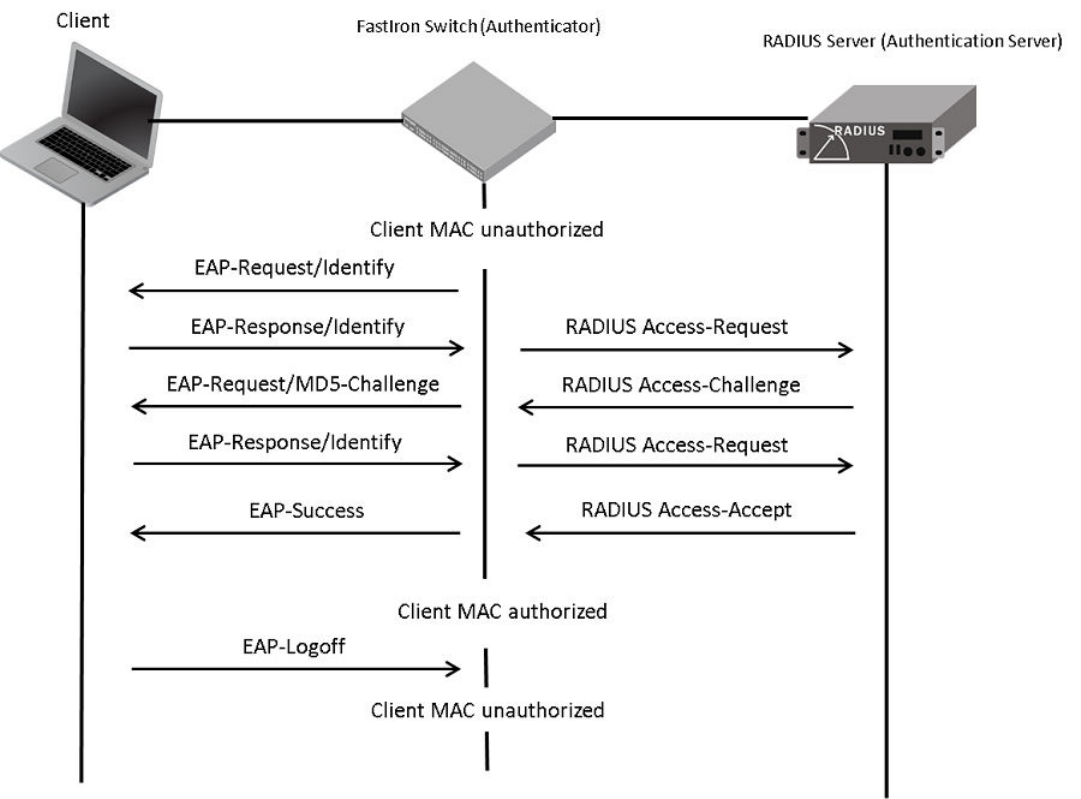
FIGURE 1 Message Exchange Between the Client, Authenticator, and Authentication Server
In this example, the authenticator (the ICX switch) initiates communication with an 802.1X-enabled client. When the client responds, it is
prompted for a username (255 characters maximum) and a password. The authenticator passes this information to the authentication
server, which determines whether the client can access services provided by the authenticator. If authentication succeeds, the MAC
address of the client is authorized. In addition, the RADIUS server may include a network access policy, such as a dynamic VLAN or an
ingress IPv4 ACL, in the Access-Accept message for this client. When the client logs o, the MAC address of the client becomes
unauthorized again.
A client may fail to be authenticated in various scenarios. The following scenarios and options are available to place the client in various
VLANs due to authentication failure:
• Guest VLAN
• Critical VLAN
• Restricted VLAN
802.1X Authentication
Ruckus ICX Flexible Authentication with Cloudpath ES 5.0 Deployment Guide
8 53-1005026-02
Guest VLAN—The client is moved to a guest VLAN when it does not respond to the 802.1X requests for authentication. It is possible
that the client does not have the 802.1X authenticator loaded and thus needs some way to access the network to download the
authenticator. The administrator can congure the guest VLAN with such access and other access methods, as required.
Critical VLAN—There may be scenarios in which the RADIUS server is not available and authentication fails. This can happen the rst
time the client is authenticating or when the client re-authenticates. In this situation, the administrator can decide to grant some or the
same access as the original instead of blocking the access. This VLAN should be congured with the desired access levels.
Restricted VLAN—When authentication fails, the client can be moved into a restricted VLAN instead of failing completely. The
administrator may decide to grant some access in this scenario instead of blocking the access. This VLAN should be congured with the
desired access levels.
For more information about 802.1X authentication, refer to the Brocade FastIron Security Conguration Guide.
MAC Authentication
MAC authentication is a mechanism by which incoming trac originating from a specic MAC address is forwarded by the Brocade
switch only if a RADIUS server successfully authenticates the source MAC address. The MAC address itself is used as the username and
password for RADIUS authentication; the user does not provide a specic username and password to gain access to the network. If
RADIUS authentication for that MAC address succeeds, trac from that MAC address is forwarded.
If the RADIUS server cannot validate the user's MAC address, it is considered an authentication failure, and a specied authentication-
failure action can be taken. The format of the MAC address sent to the RADIUS server is congurable by way of the CLI. MAC
authentication supports the use of a critical VLAN and a restricted VLAN, as described in 802.1X Authentication on page 7.
For more information about MAC authentication, refer to the Brocade FastIron Security Conguration Guide.
Flexible Authentication
Flexible Authentication allows the network administrator to set the sequence of the authentication methods to be attempted on a switch
port. Flexible Authentication supports two methods: 802.1X authentication and MAC authentication. By default the sequence is set to
802.1X followed by MAC authentication.
How Flexible Authentication Works
The following ow chart explains how Flexible Authentication is implemented in FastIron. 802.1X is attempted rst. If the client is not
802.1X-capable, MAC authentication is attempted.
How Flexible Authentication Works
Ruckus ICX Flexible Authentication with Cloudpath ES 5.0 Deployment Guide
53-1005026-02 9
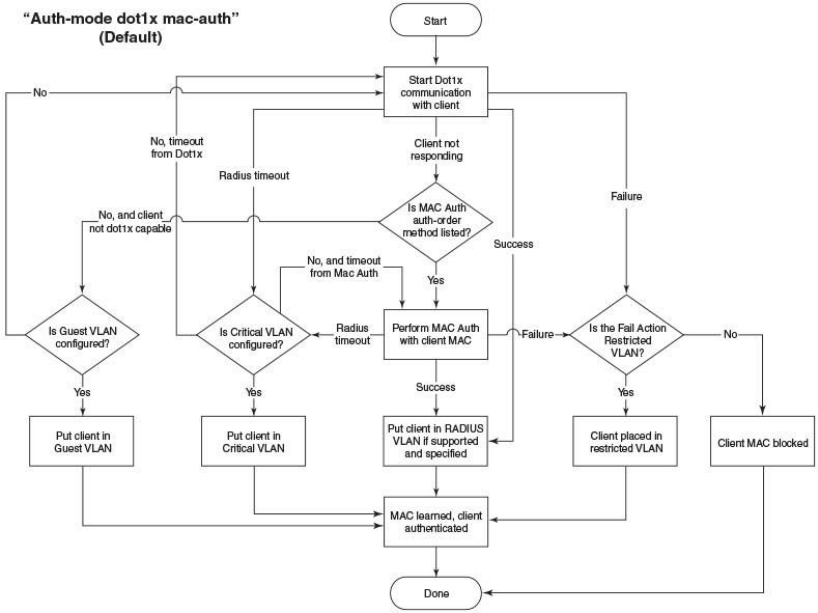
FIGURE 2 Default Sequence: 802.1X Followed by MAC Authentication
When the sequence is set to MAC authentication followed by 802.1X:
• MAC authentication is attempted rst. If it succeeds, the 802.1X method is also attempted.
• If MAC authentication succeeds, the 802.1X process can be skipped by using a RADIUS vendor-specic attribute (VSA) called
“Foundry-802_1x-enable” for the MAC authentication process. If this attribute is present in the RADIUS Access-Accept
message during MAC authentication and the value of this attribute is set to 1, 802.1X is not attempted for the client.
• If MAC authentication fails, 802.1X is not attempted and the congured failure action is taken. However, the administrator can
congure the dot1x-override command to allow the clients that failed MAC authentication to authenticate by way of the 802.1X
method.
How Flexible Authentication Works
Ruckus ICX Flexible Authentication with Cloudpath ES 5.0 Deployment Guide
10 53-1005026-02
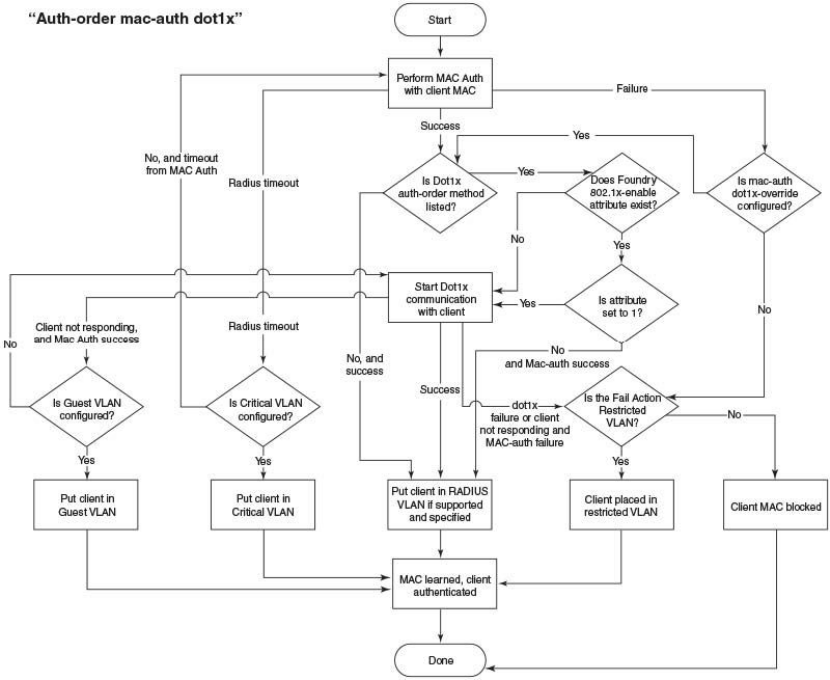
FIGURE 3 MAC Authentication Followed by 802.1X
Platform Support for Flexible Authentication
FastIron 08.0.60 supports Cloudpath with the following platforms:
• ICX 7150
• ICX 7250
• ICX 7450
• ICX 7750
Platform Support for Flexible Authentication
Ruckus ICX Flexible Authentication with Cloudpath ES 5.0 Deployment Guide
53-1005026-02 11
Conguring Cloudpath for RADIUS, HTTP, and
Clients
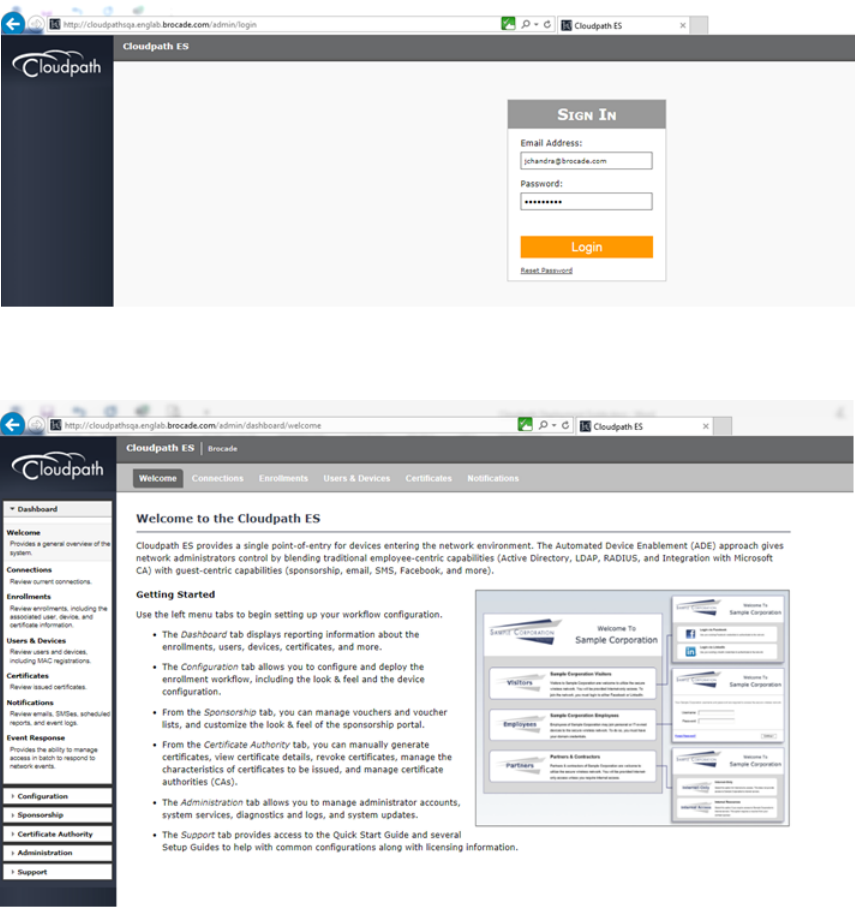
1. Log in to the Cloudpath server.
After login, the welcome page is displayed.
Conguring Cloudpath for RADIUS, HTTP, and Clients
Ruckus ICX Flexible Authentication with Cloudpath ES 5.0 Deployment Guide
12 53-1005026-02

2. Navigate to System Services and check for the web server conguration. In this deployment guide, HTTP is used.
Conguring Cloudpath for RADIUS, HTTP, and Clients
Ruckus ICX Flexible Authentication with Cloudpath ES 5.0 Deployment Guide
53-1005026-02 13
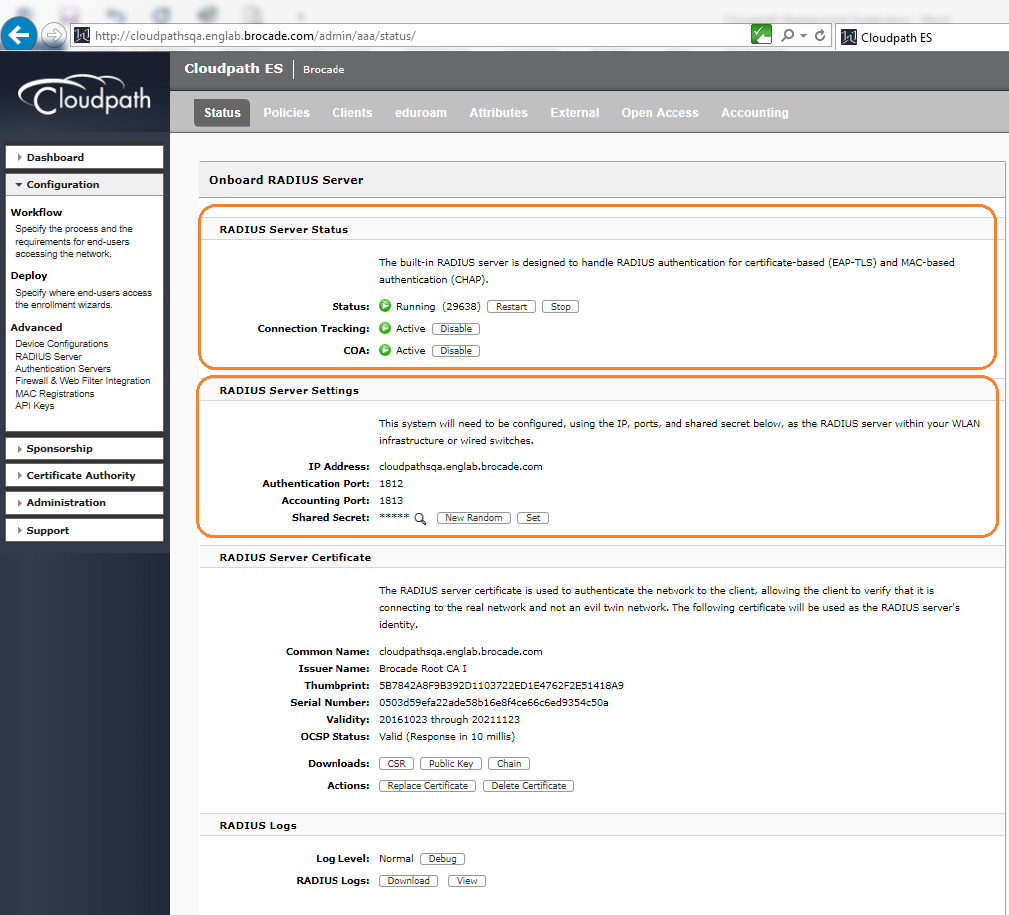
3. Navigate to Conguration > RADIUS Server > Status and check for IP Address: cloudpathsqa.englab.brocade.com (Domain/IP
address dened), Authentication Port 1812, Accounting Port 1813, and Shared Secret "Foundry1".
Conguring Cloudpath for RADIUS, HTTP, and Clients
Ruckus ICX Flexible Authentication with Cloudpath ES 5.0 Deployment Guide
14 53-1005026-02
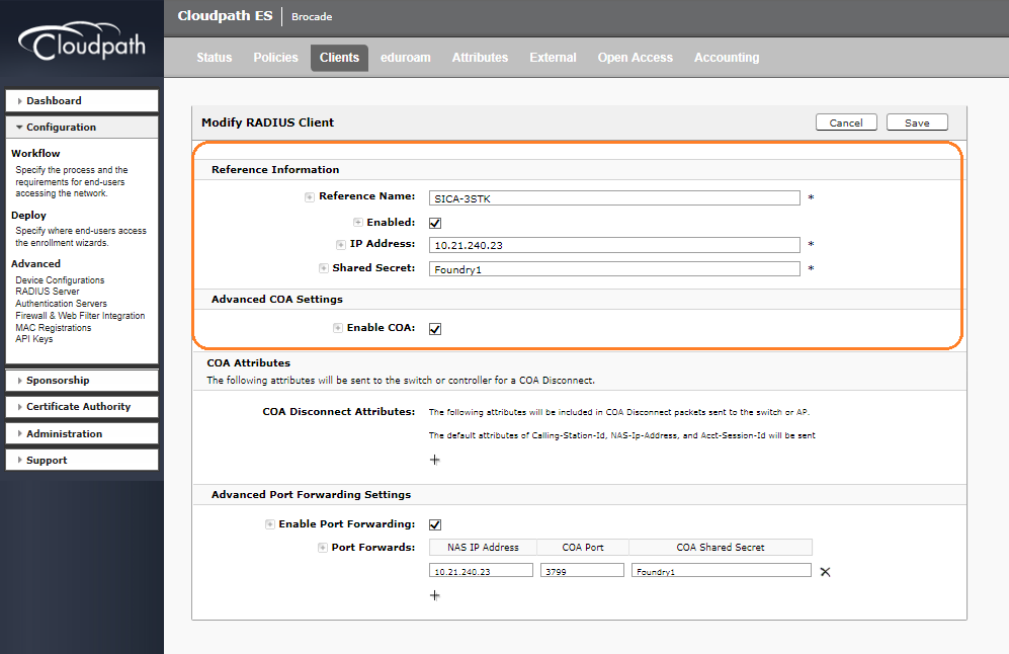
4. Navigate to Conguration > RADIUS Server > Clients and add the NAS IP Address of the switch, the COA shared secret key,
and enable the COA option if required.
Conguring Cloudpath for RADIUS, HTTP, and Clients
Ruckus ICX Flexible Authentication with Cloudpath ES 5.0 Deployment Guide
53-1005026-02 15
Ruckus ICX Flexible Authentication with Cloudpath ES 5.0 Deployment Guide
16 53-1005026-02
Use Case 1: Dynamic VLAN and ACL
Assignment with MAC Authentication
• Cloudpath Conguration.................................................................................................................................................................................18
• Switch Conguration ....................................................................................................................................................................................... 24
• Switch Show Commands and Syslog Information..............................................................................................................................25
• Cloudpath Information.....................................................................................................................................................................................26
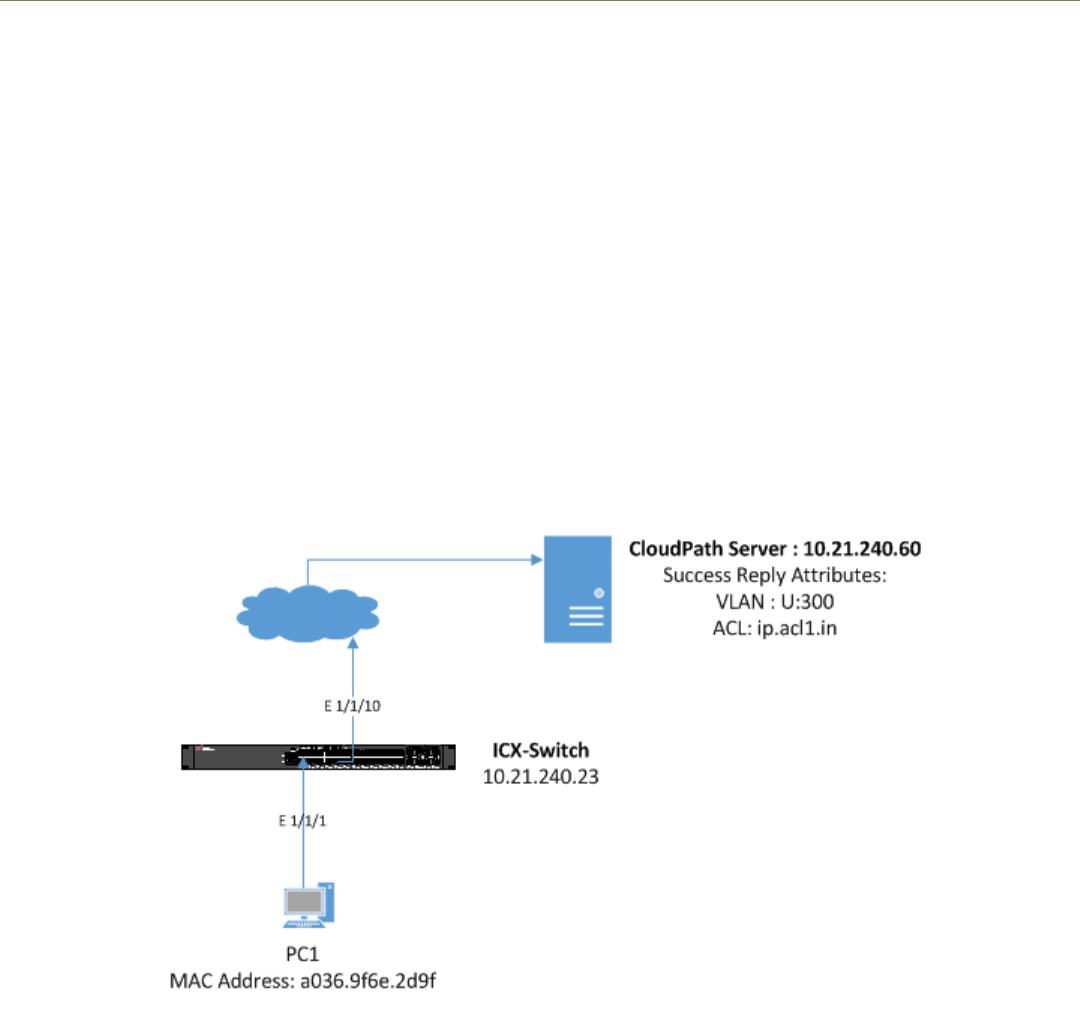
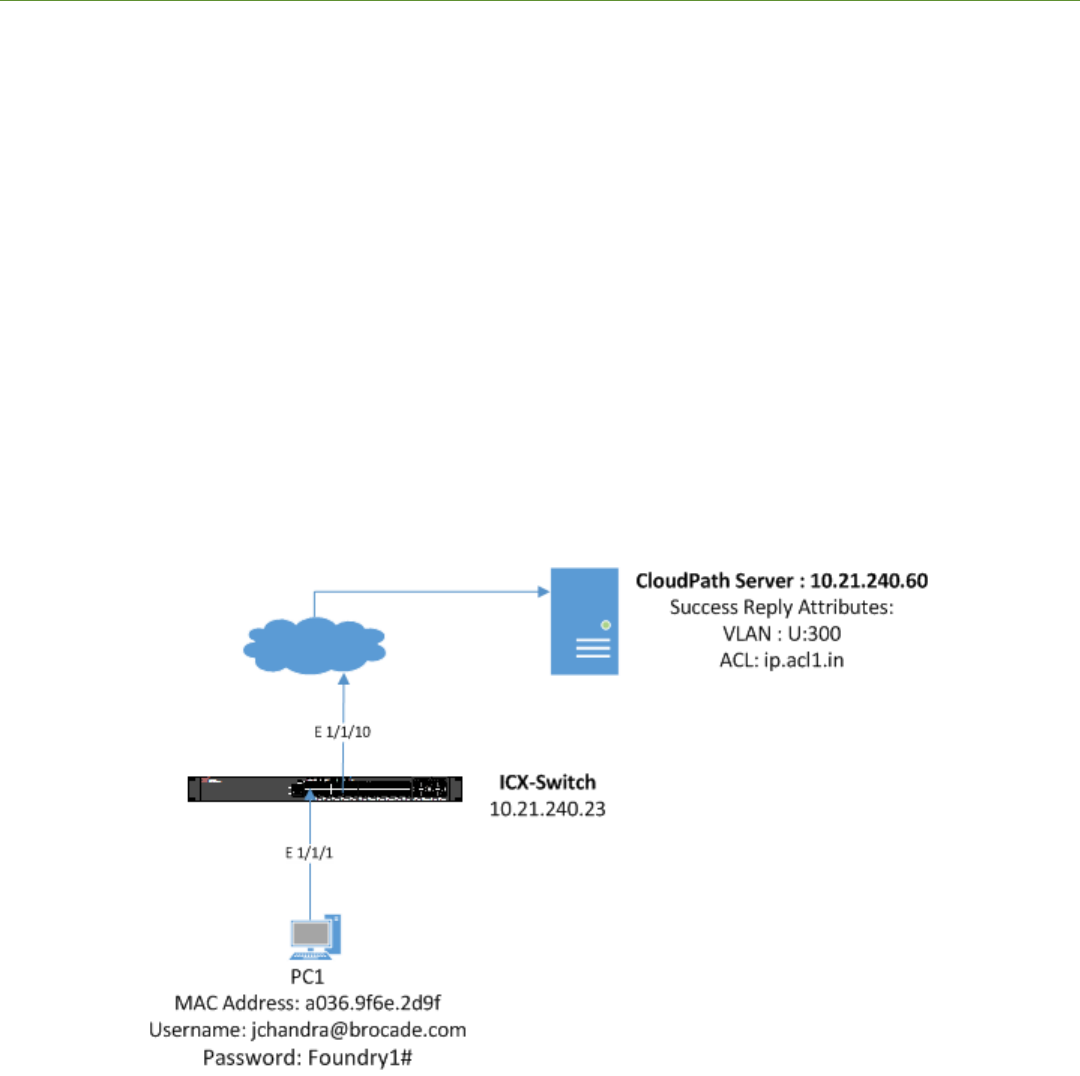
The following example uses MAC authentication for authenticating a client and then dynamically assigns a VLAN and ACL after a
successful authentication.
Client PC1
• The MAC address is a036.9f6e.2d9f.
• After authentication:
– The client should be placed in VLAN 300.
– Incoming trac from the client should be ltered by ACL "acl1".
NOTE
The administrator can apply a policy such as a VLAN, an ACL, or both from the RADIUS server depending on the network
design and its implementation.
FIGURE 4 Example of Assigning a Dynamic VLAN and ACL with MAC Authentication
Ruckus ICX Flexible Authentication with Cloudpath ES 5.0 Deployment Guide
53-1005026-02 17
Cloudpath Conguration
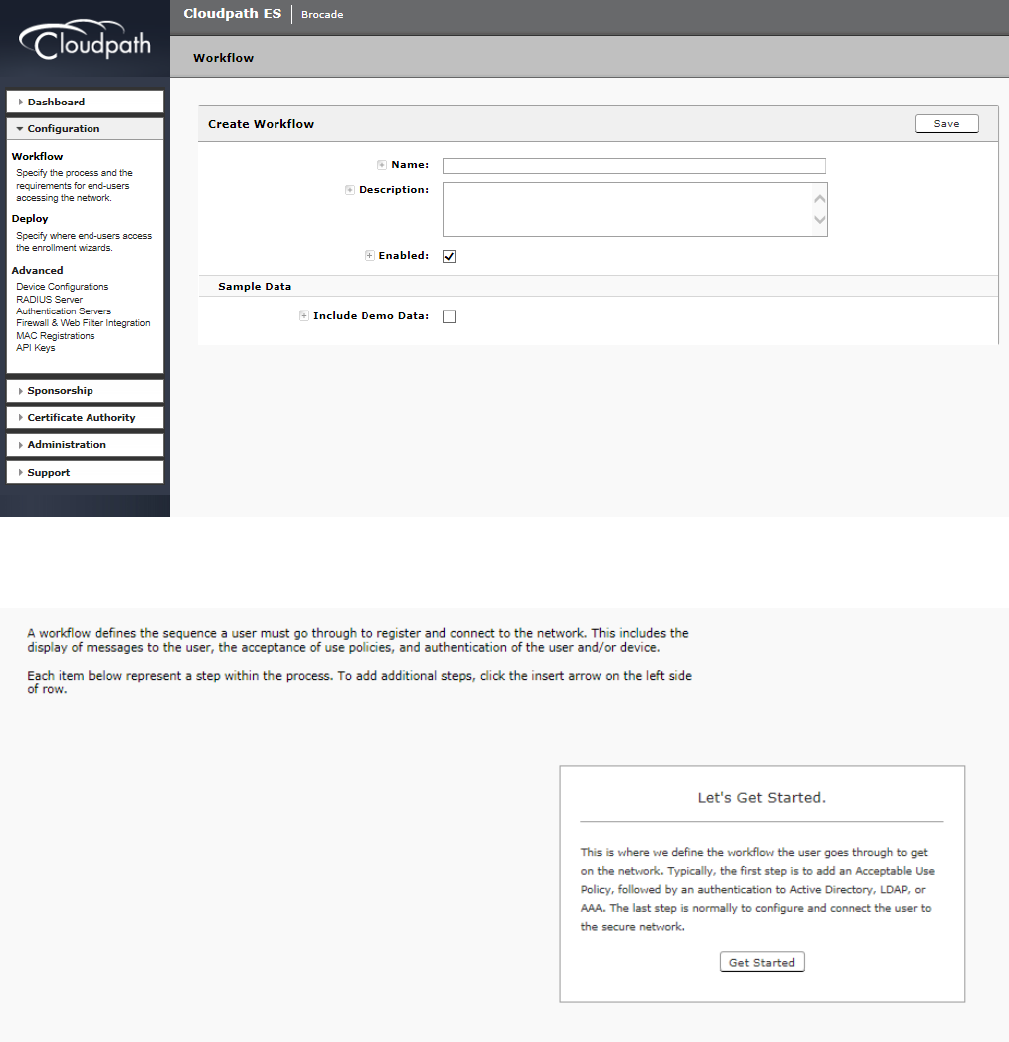
1. Navigate to Conguration > Workow, and select + Add new workow.
2. After creating the new workow, click the Get Started button to select the steps for the workow.
Cloudpath Conguration
Ruckus ICX Flexible Authentication with Cloudpath ES 5.0 Deployment Guide
18 53-1005026-02
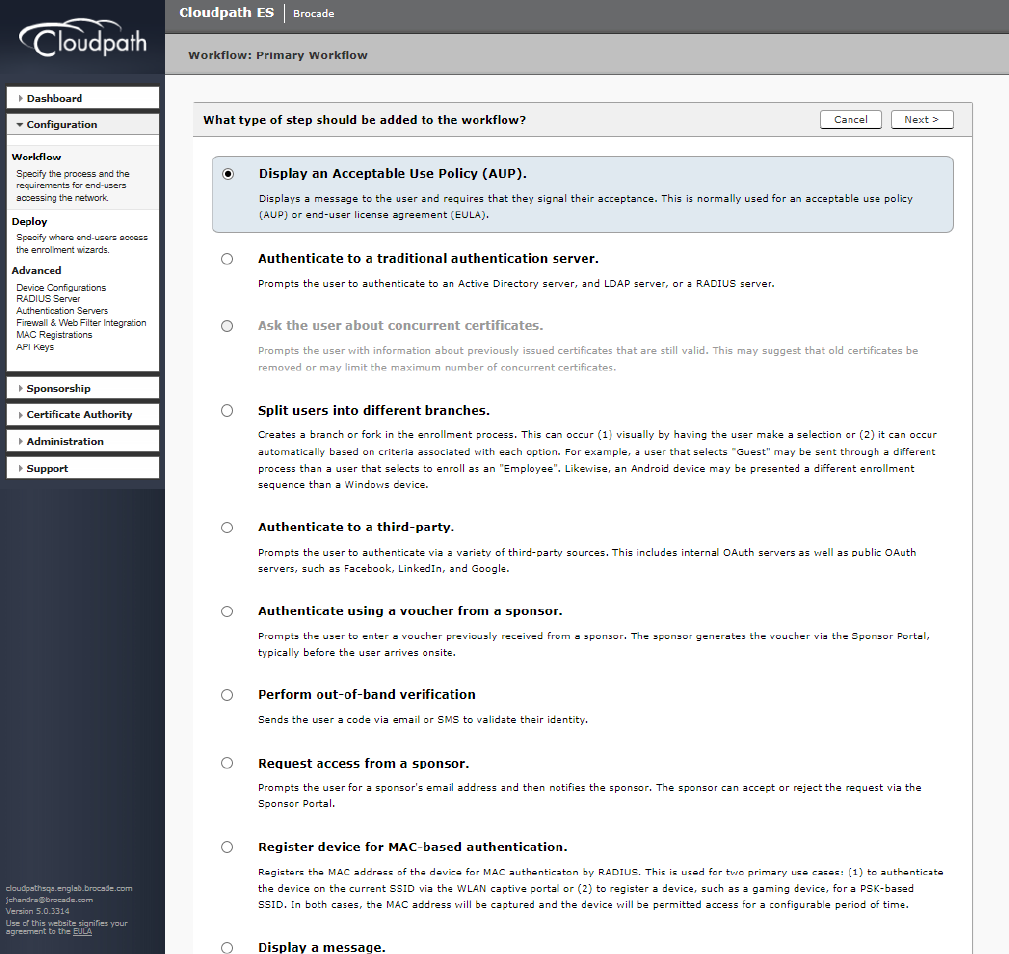
3. Select the appropriate steps required to congure the workow.
Cloudpath Conguration
Ruckus ICX Flexible Authentication with Cloudpath ES 5.0 Deployment Guide
53-1005026-02 19
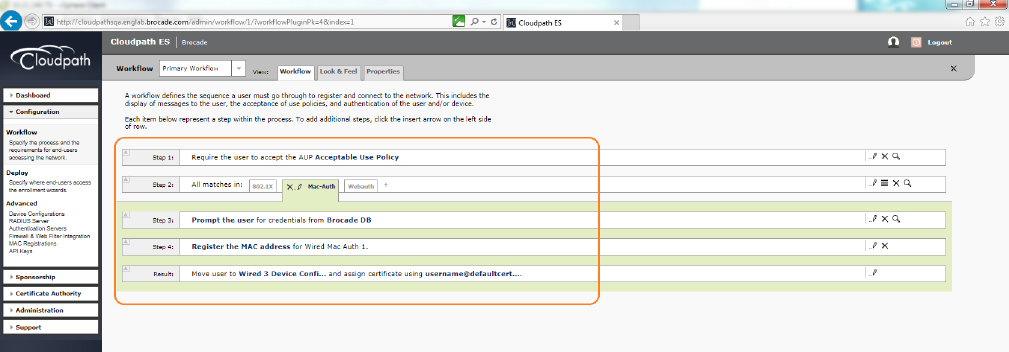
The workow for registering the MAC address is displayed.
Cloudpath Conguration
Ruckus ICX Flexible Authentication with Cloudpath ES 5.0 Deployment Guide
20 53-1005026-02
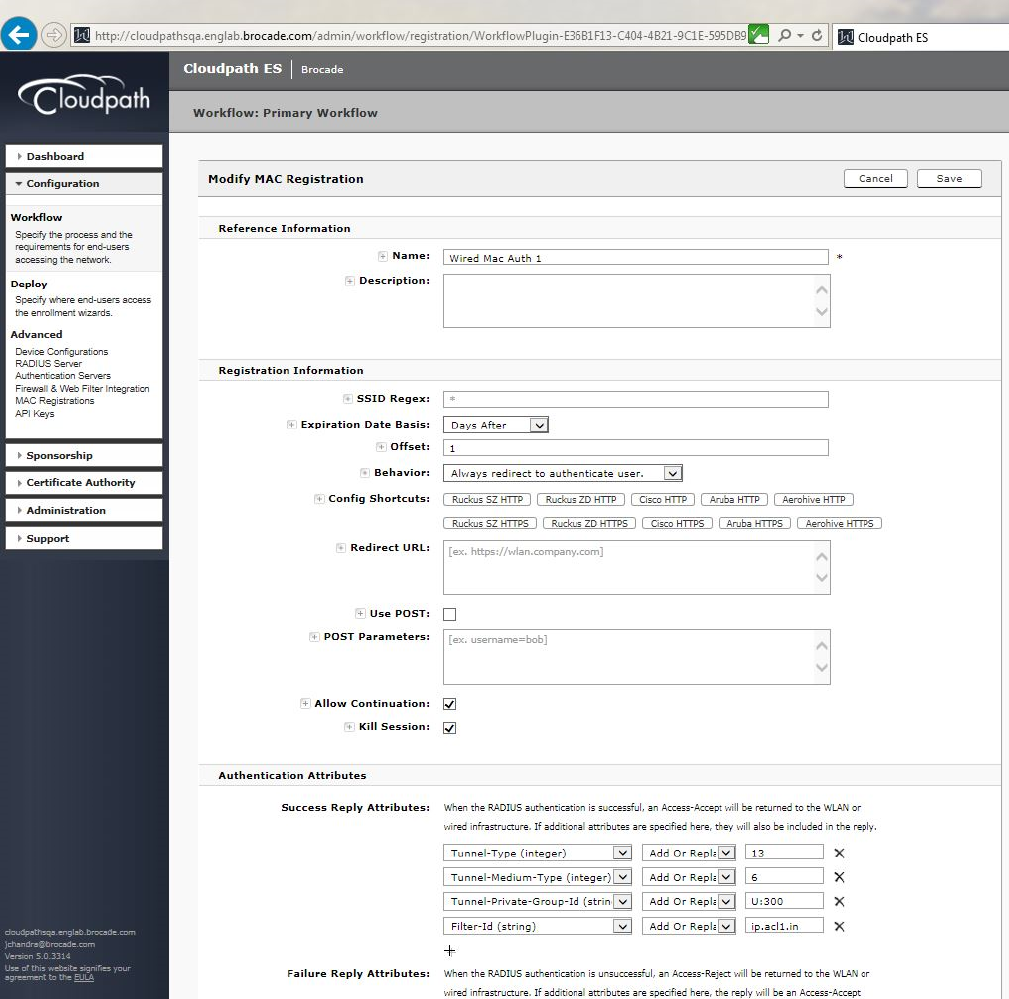
4. Modify the MAC registration by conguring the authentication success and failure reply attributes.
Cloudpath Conguration
Ruckus ICX Flexible Authentication with Cloudpath ES 5.0 Deployment Guide
53-1005026-02 21
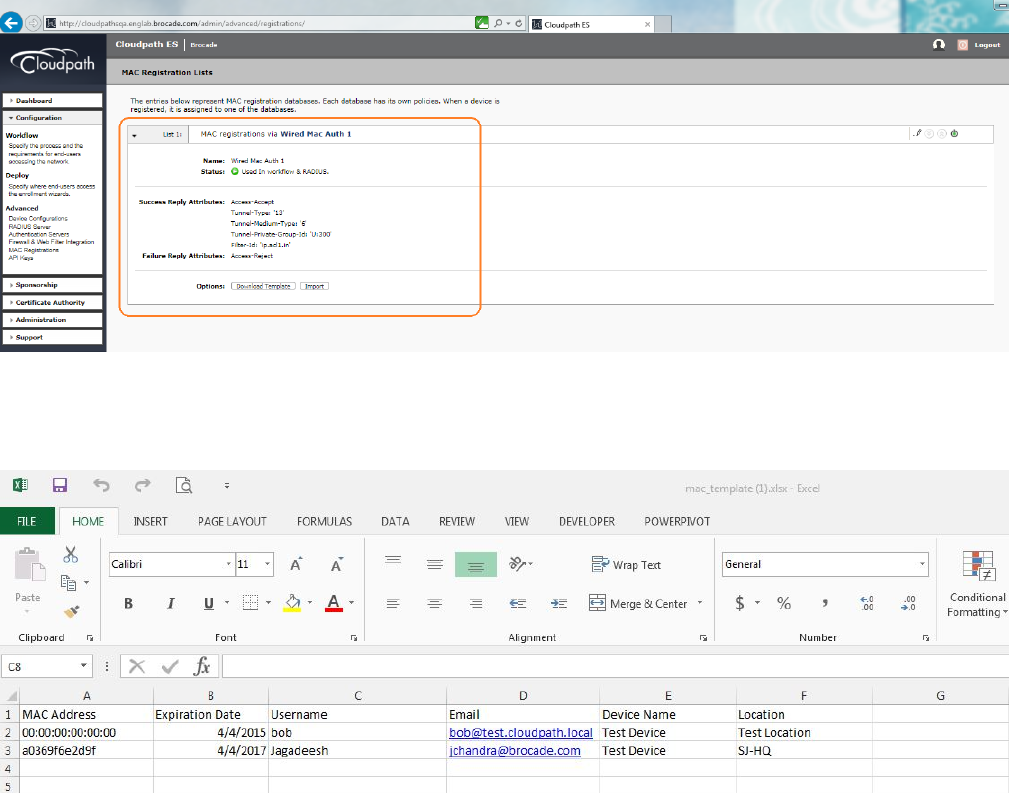
5. Navigate to Conguration > MAC Registrations to view the congured success and failure attributes.
6. Navigate to Conguration > MAC Registrations > Options, click Download Template, and add the MAC addresses of the
clients and the expiration dates for those clients.
Cloudpath Conguration
Ruckus ICX Flexible Authentication with Cloudpath ES 5.0 Deployment Guide
22 53-1005026-02
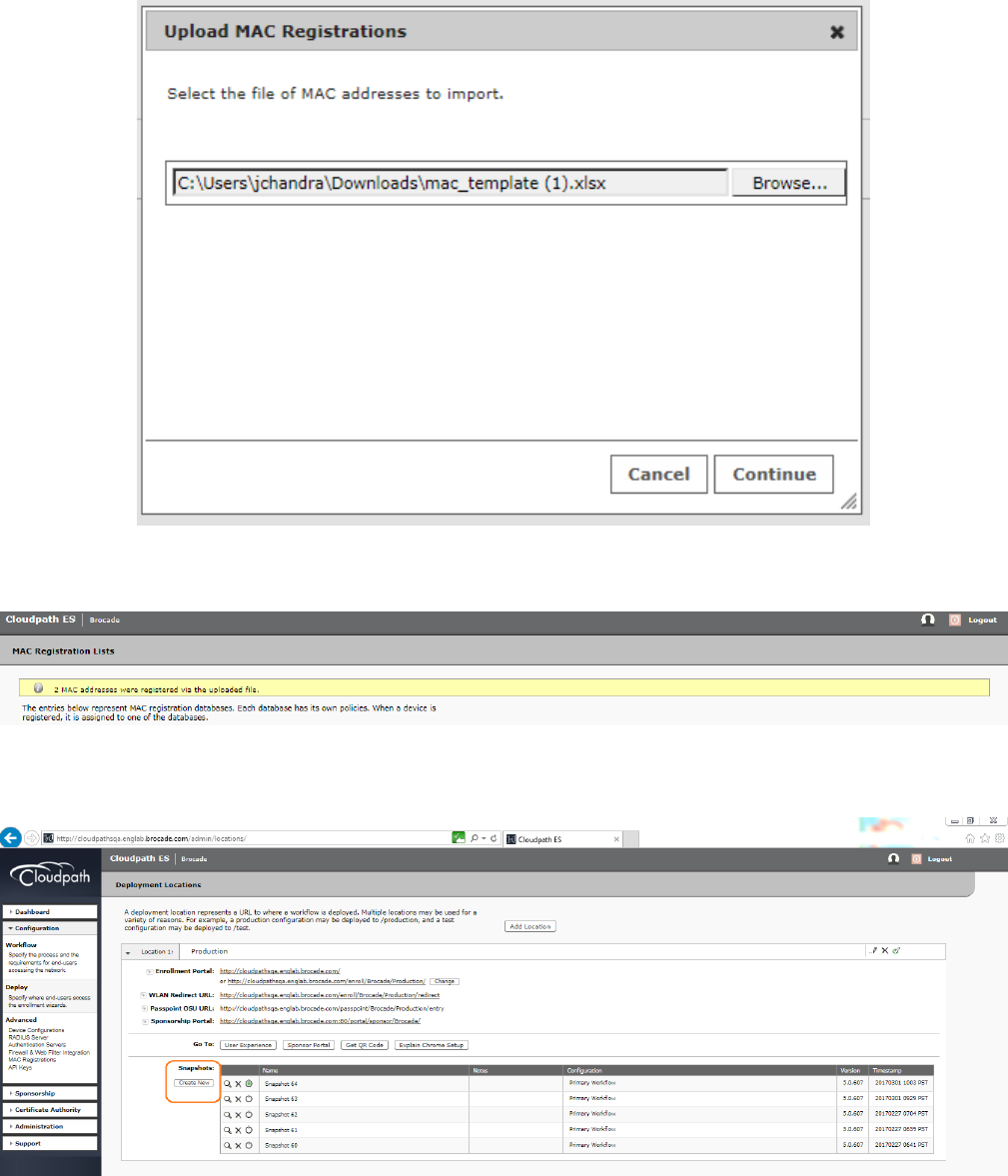
7. Import the updated template.
After uploading the imported template, the MAC addresses are registered.
8. After allowing any changes in Cloudpath to take eect, navigate to Conguration > Deploy > Create.
Cloudpath Conguration
Ruckus ICX Flexible Authentication with Cloudpath ES 5.0 Deployment Guide
53-1005026-02 23
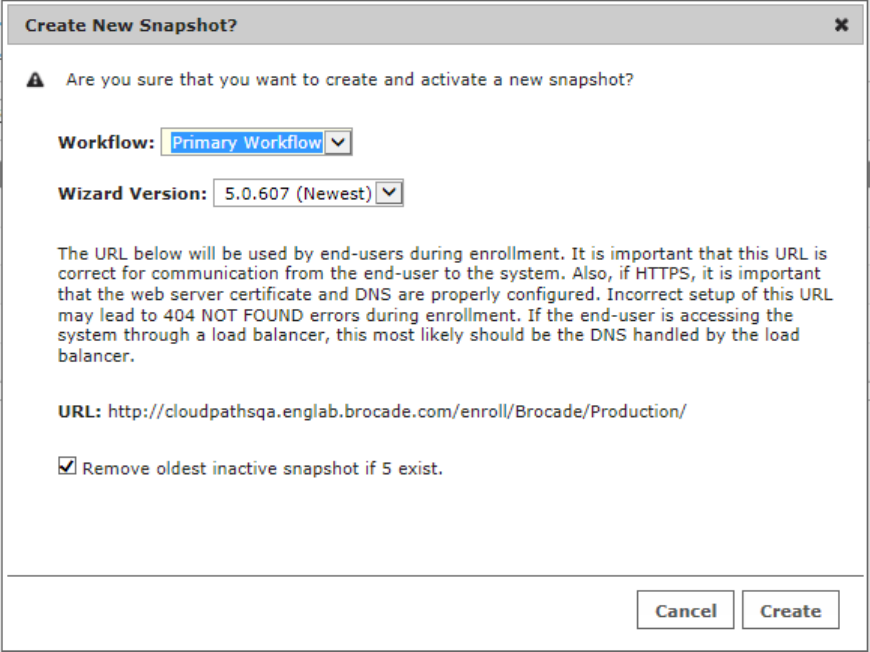
9. Create a new snapshot.
Switch Conguration
!
vlan 2 name AUTH-DEFAULT by port
!
vlan 300 name MAC-AUTH by port
tagged ethe 1/1/10
!
authentication
auth-default-vlan 2
mac-authentication enable
mac-authentication enable ethe 1/1/1
!
aaa authentication dot1x default radius
radius-server host 10.21.240.60 auth-port 1812 acct-port 1813 default key Foundry1 dot1x mac-auth web-auth
!
ip access-list extended acl1
permit ip any any
!
Switch Conguration
Ruckus ICX Flexible Authentication with Cloudpath ES 5.0 Deployment Guide
24 53-1005026-02
Switch Show Commands and Syslog Information
ICX-Switch#
SYSLOG: <14> Mar 1 17:36:25 ICX-Switch System: Interface ethernet 1/1/1, state up
SYSLOG: <13> Mar 1 17:36:26 ICX-Switch MAC Authentication succeeded for [a036.9f6e.2d9f ] on port 1/1/1
SYSLOG: <13> Mar 1 17:36:26 ICX-Switch FLEXAUTH: Port ethe 1/1/1 is added into VLAN 300 as MAC-VLAN member
SYSLOG: <13> Mar 1 17:36:26 ICX-Switch FLEXAUTH: Port ethe 1/1/1 is deleted from VLAN 2 as MAC-VLAN member
ICX-Switch#show mac-auth sessions all
-----------------------------------------------------------------------------------
Port MAC IP(v4/v6) VLAN Auth ACL Session Age
Addr Addr State Time
-----------------------------------------------------------------------------------
1/1/1 a036.9f6e.2d9f 10.21.80.226 300 Yes Yes 6 Ena
ICX-Switch#show vlan 300
Total PORT-VLAN entries: 7
Maximum PORT-VLAN entries: 64
Legend: [Stk=Stack-Id, S=Slot]
PORT-VLAN 300, Name MAC-AUTH, Priority level0, Spanning tree Off
Untagged Ports: None
Tagged Ports: (U1/M1) 10
Uplink Ports: None
DualMode Ports: None
Mac-Vlan Ports: (U1/M1) 1
Monitoring: Disabled
ICX-Switch#show mac-authentication ip-acl all
-----------------------------------------------------------------------------
Port MAC Address V4 Ingress V4 Egress V6 Ingress V6 Egress
-----------------------------------------------------------------------------
1/1/1 a036.9f6e.2d9f acl1 - - -
Switch Show Commands and Syslog Information
Ruckus ICX Flexible Authentication with Cloudpath ES 5.0 Deployment Guide
53-1005026-02 25
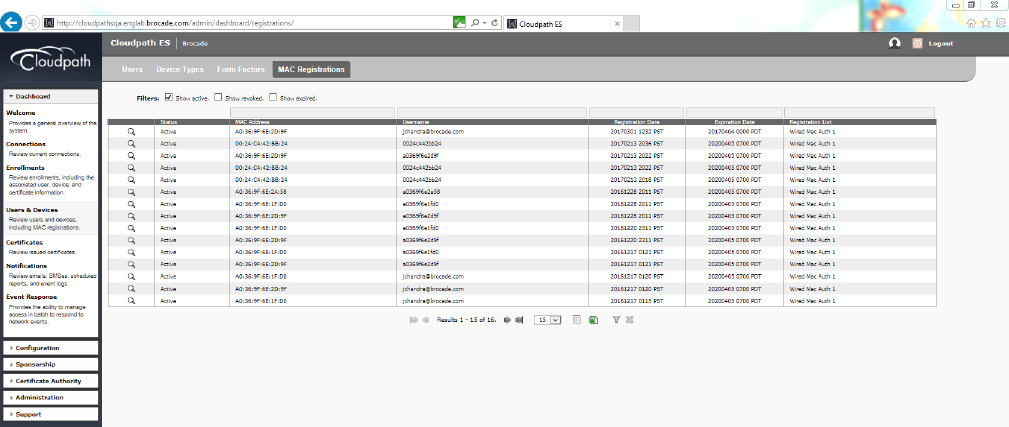
Cloudpath Information
1. Navigate to Dashboard > Users & Devices and click MAC Registrations to verify the MAC authentication.
Cloudpath Information
Ruckus ICX Flexible Authentication with Cloudpath ES 5.0 Deployment Guide
26 53-1005026-02

2. Click the search button of the MAC address to view MAC registration details.
Cloudpath Information
Ruckus ICX Flexible Authentication with Cloudpath ES 5.0 Deployment Guide
53-1005026-02 27
Ruckus ICX Flexible Authentication with Cloudpath ES 5.0 Deployment Guide
28 53-1005026-02
Use Case 2: Dynamic VLAN and ACL
Assignment with 802.1X Authentication
• Cloudpath Conguration.................................................................................................................................................................................30
• Switch Conguration ....................................................................................................................................................................................... 34
• Switch Show Commands and Syslog Information..............................................................................................................................34
• Cloudpath Information.....................................................................................................................................................................................35
The following example uses 802.1X authentication for authenticating a client and then dynamically assigns a VLAN and ACL after a
successful authentication.
Client PC1
• Username: jchandra@brocade.com
• Password: Foundry1#
• After authentication:
– The client should be placed in VLAN 300.
– Incoming trac from client A should be ltered by ACL "acl1".
NOTE
The administrator can apply a policy such as a VLAN, an ACL, or both from the RADIUS server depending on the network
design and its implementation.
FIGURE 5 Example of Assigning a Dynamic VLAN and ACL with 802.1X Authentication
Ruckus ICX Flexible Authentication with Cloudpath ES 5.0 Deployment Guide
53-1005026-02 29
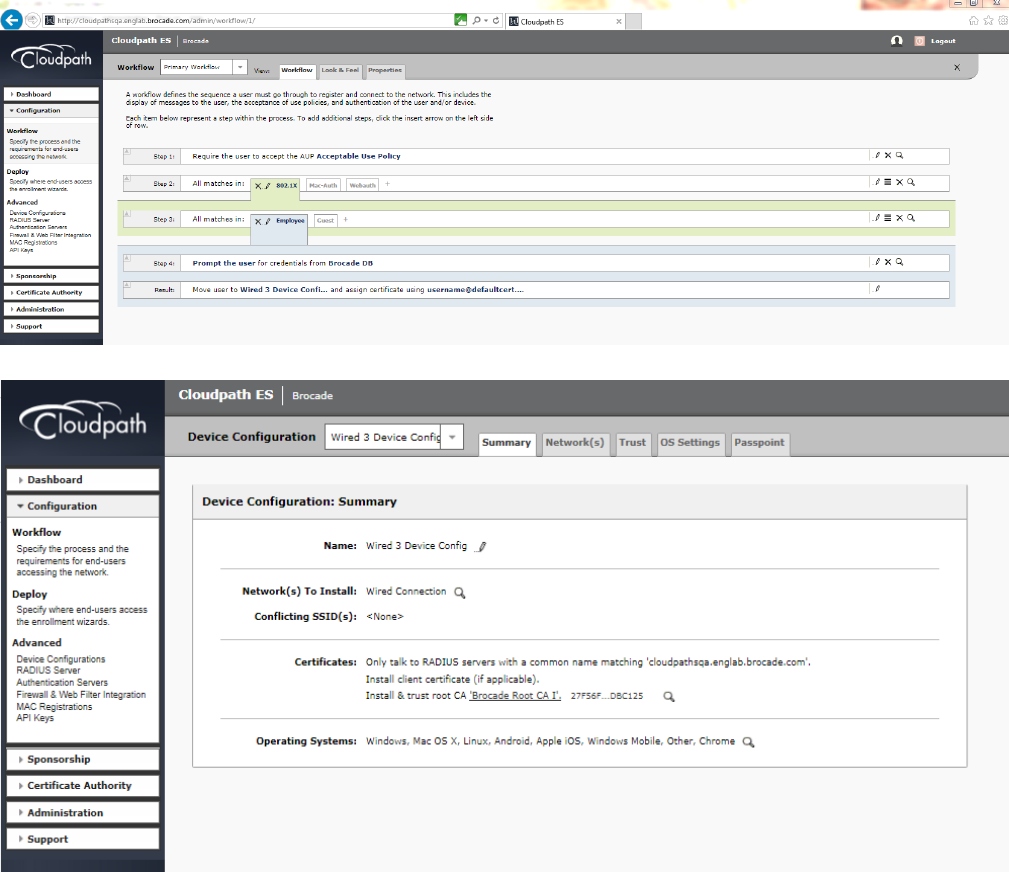
Cloudpath Conguration
The following conguration assumes that the administrator has already installed the certicates to the users, such as Employees.
1. Congure the following steps to authenticate the client using 802.1X certicate-based authentication.
The following screenshots demonstrate steps for conguring the 802.1X authentication workow.
Cloudpath Conguration
Ruckus ICX Flexible Authentication with Cloudpath ES 5.0 Deployment Guide
30 53-1005026-02
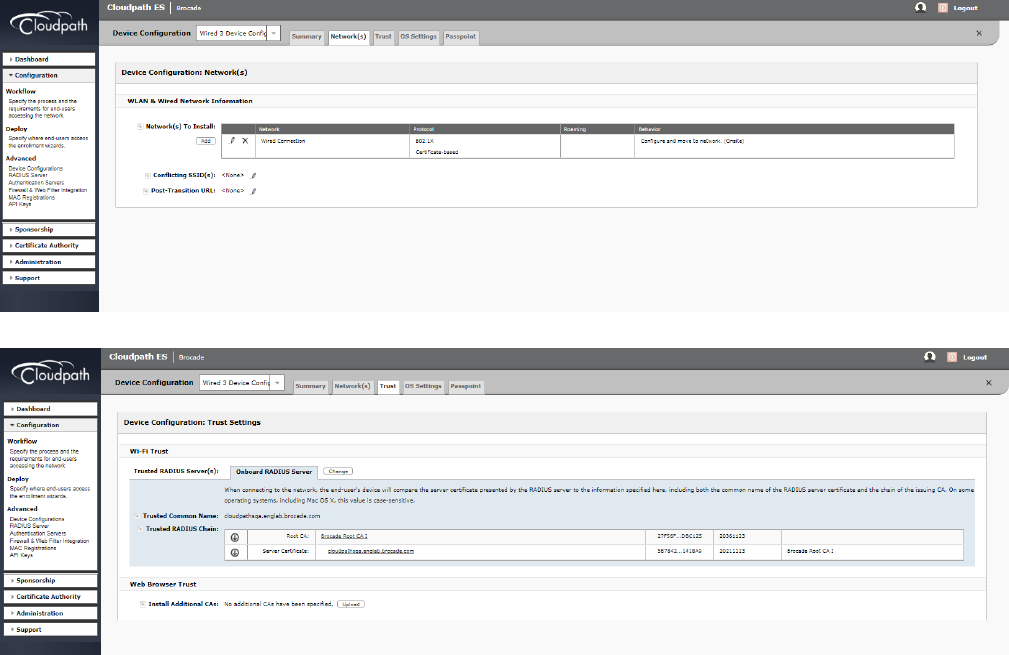
Cloudpath Conguration
Ruckus ICX Flexible Authentication with Cloudpath ES 5.0 Deployment Guide
53-1005026-02 31
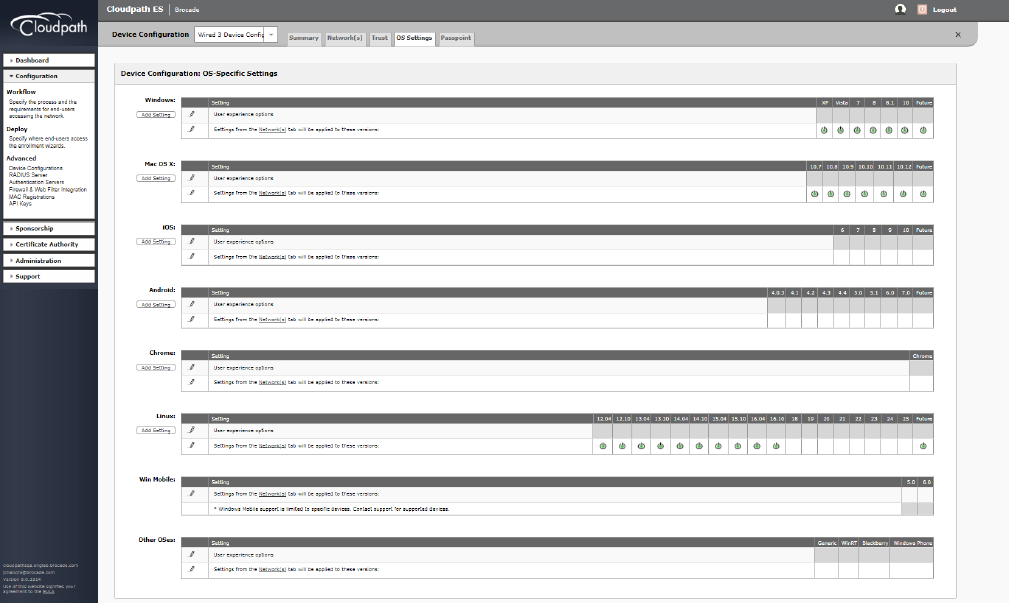
Cloudpath Conguration
Ruckus ICX Flexible Authentication with Cloudpath ES 5.0 Deployment Guide
32 53-1005026-02
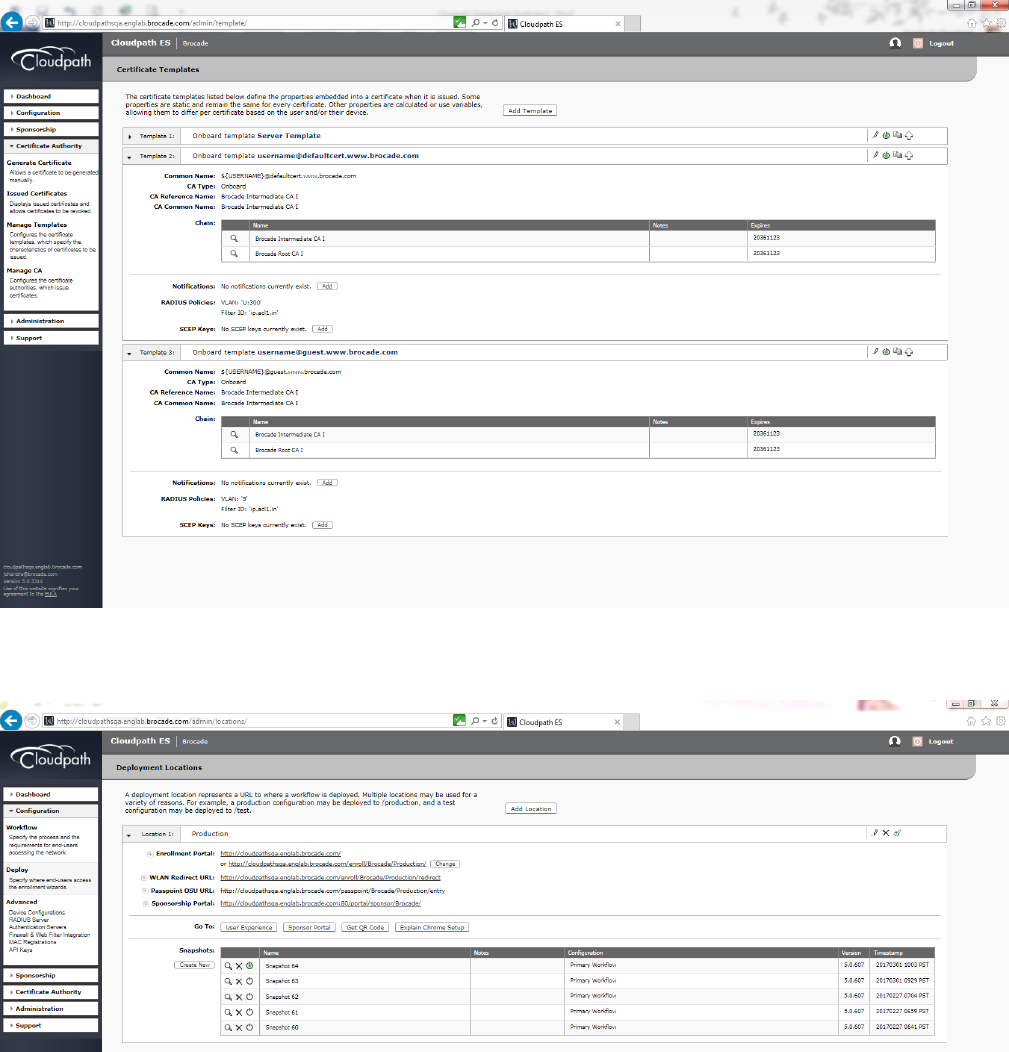
2. Navigate to Certicate Authority > Manage Templates to edit the certicates.
3. Create a snapshot to save the changes.
Cloudpath Conguration
Ruckus ICX Flexible Authentication with Cloudpath ES 5.0 Deployment Guide
53-1005026-02 33
Switch Conguration
!
vlan 2 name AUTH-DEFAULT by port
!
vlan 300 name 802.1X by port
tagged ethe 1/1/10
!
authentication
auth-default-vlan 2
dot1x enable
dot1x enable ethe 1/1/1
!
interface ethernet 1/1/1
dot1x port-control auto
!
aaa authentication dot1x default radius
radius-server host 10.21.240.60 auth-port 1812 acct-port 1813 default key Foundry1 dot1x mac-auth web-auth
!
ip access-list extended acl1
permit ip any any
!
Switch Show Commands and Syslog Information
!
ICX-Switch#
SYSLOG: <14> Mar 1 16:25:02 ICX-Switch DOT1X: Port 1/1/1 - mac a036.9f6e.2d9f AuthControlledPortStatus change:
unauthorized
SYSLOG: <14> Mar 1 16:25:02 ICX-Switch System: Interface ethernet 1/1/1, state up
SYSLOG: <14> Mar 1 16:25:03 ICX-Switch DOT1X: Port 1/1/1 - mac a036.9f6e.2d9f, AuthControlledPortStatus
change: authorized
SYSLOG: <13> Mar 1 16:25:03 ICX-Switch FLEXAUTH: Port ethe 1/1/1 is added into VLAN 300 as MAC-VLAN member
SYSLOG: <13> Mar 1 16:25:03 ICX-Switch FLEXAUTH: Port ethe 1/1/1 is deleted from VLAN 2 as MAC-VLAN member
ICX-Switch#show dot1x sessions all
---------------------------------------------------------------------------------------------------------
Port MAC IP(v4/v6) User VLAN Auth ACL Session Age PAE
Addr Addr Name State Time State
---------------------------------------------------------------------------------------------------------
1/1/1 a036.9f6e.2d9f 10.21.80.226 jchandra@broc 300 permit Yes 25 Ena
AUTHENTICATED
ICX-Switch#
SYSLOG: <14> Mar 1 16:25:28 ICX-Switch CLI CMD: "show dot1x sessions all" by un-authenticated user from
console
ICX-Switch#show vlan 300
Total PORT-VLAN entries: 7
Maximum PORT-VLAN entries: 64
Legend: [Stk=Stack-Id, S=Slot]
PORT-VLAN 300, Name 802.1X, Priority level0, Spanning tree Off
Untagged Ports: None
Tagged Ports: (U1/M1) 10
Uplink Ports: None
DualMode Ports: None
Mac-Vlan Ports: (U1/M1) 1
Monitoring: Disabled
ICX-Switch#show dot1x ip-acl all
-----------------------------------------------------------------------------
Switch Conguration
Ruckus ICX Flexible Authentication with Cloudpath ES 5.0 Deployment Guide
34 53-1005026-02
Port MAC Address V4 Ingress V4 Egress V6 Ingress V6 Egress
-----------------------------------------------------------------------------
1/1/1 a036.9f6e.2d9f acl1
Refer following show command to check status of radius server.
ICX-Switch#show radius server
-----------------------------------------------------------------------------
Server Tyoe Opens Closes Timeouts Status
-----------------------------------------------------------------------------
10.21.240.60 any 0 0 0 active
Cloudpath Information
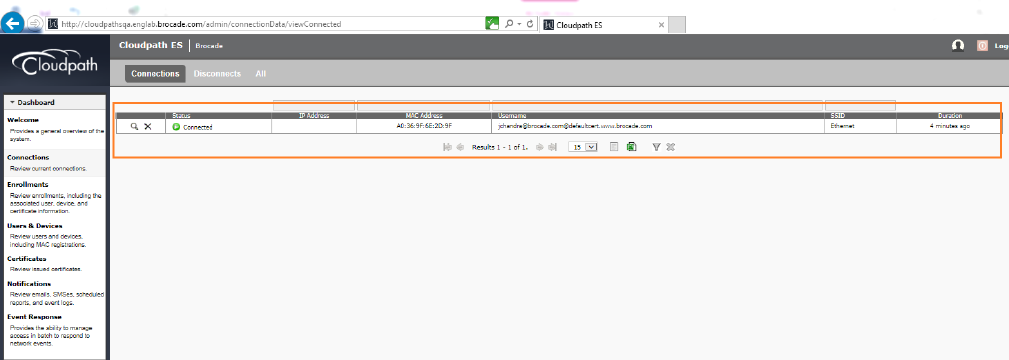
1. Navigate to Dashboard > Connections to verify the username of the certicate issued to the user.
Cloudpath Information
Ruckus ICX Flexible Authentication with Cloudpath ES 5.0 Deployment Guide
53-1005026-02 35

2. Click the search button of the connection to view the connection details.
Cloudpath Information
Ruckus ICX Flexible Authentication with Cloudpath ES 5.0 Deployment Guide
36 53-1005026-02
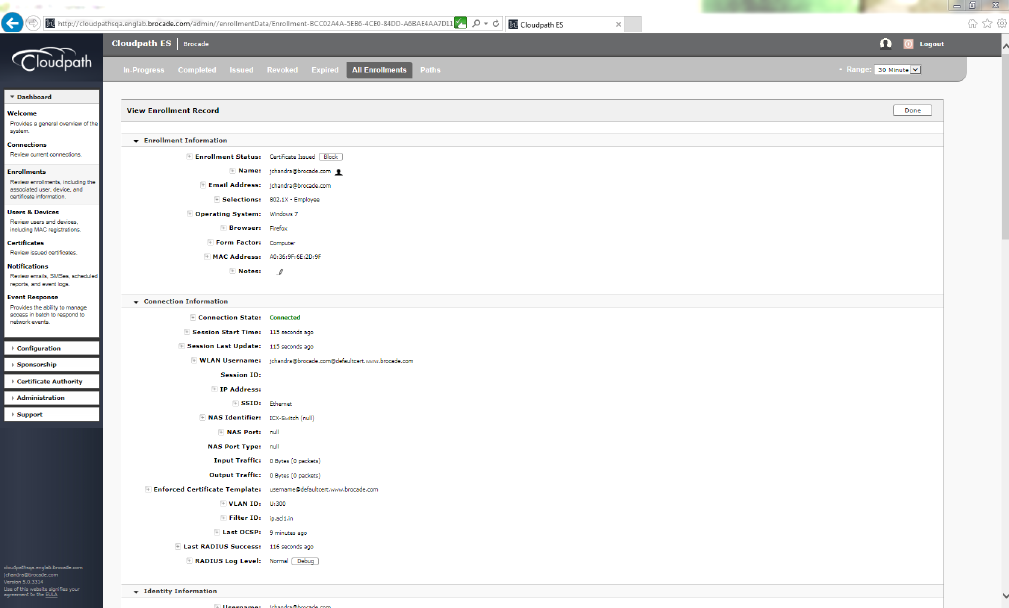
3. Click the Enrollment Record button to view the additional details for the connection.
Cloudpath Information
Ruckus ICX Flexible Authentication with Cloudpath ES 5.0 Deployment Guide
53-1005026-02 37
Ruckus ICX Flexible Authentication with Cloudpath ES 5.0 Deployment Guide
38 53-1005026-02
Use Case 3: Guest VLAN with External
Captive Portal (Web Authentication)
• Cloudpath Conguration.................................................................................................................................................................................40
• Switch Conguration ....................................................................................................................................................................................... 41
• Switch Show Commands and Syslog Information..............................................................................................................................42
• Cloudpath Information.....................................................................................................................................................................................43
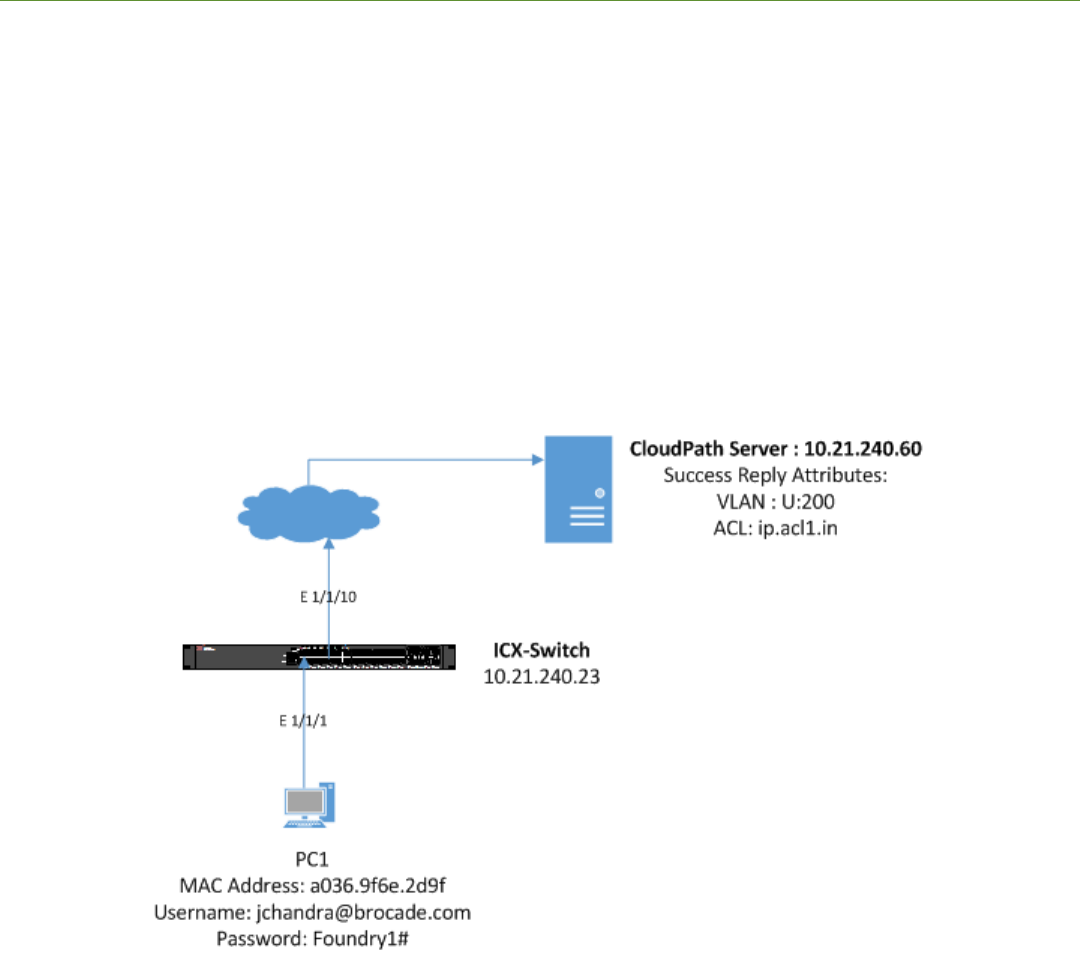
The following example uses captive portal (web authentication) for authenticating a client and then dynamically assigns an ACL after a
successful authentication. In a typical scenario, a visitor enters the lobby and receives a visitor username and password to access the
Internet. In the following use case, VLAN 200 is an Internet-only-enabled VLAN. Upon connecting a PC to the Ethernet port, the user
will be redirected to the captive portal. Once valid credentials have been authenticated, the user will be provided access to the Internet.
Client PC1
• The MAC address is a036.9f6e.2d9f.
• After authentication, incoming trac from client A should be ltered by ACL "acl1".
FIGURE 6 Example of Web Authentication (Captive Portal) with a Guest VLAN
Ruckus ICX Flexible Authentication with Cloudpath ES 5.0 Deployment Guide
53-1005026-02 39

Cloudpath Conguration
1. Navigate to Conguration > Workow and create steps for web authentication.
2. Modify the data prompt by clicking "Login page for 'Brocade RADIUS'" for input elds 1 and 2.
Cloudpath Conguration
Ruckus ICX Flexible Authentication with Cloudpath ES 5.0 Deployment Guide
40 53-1005026-02
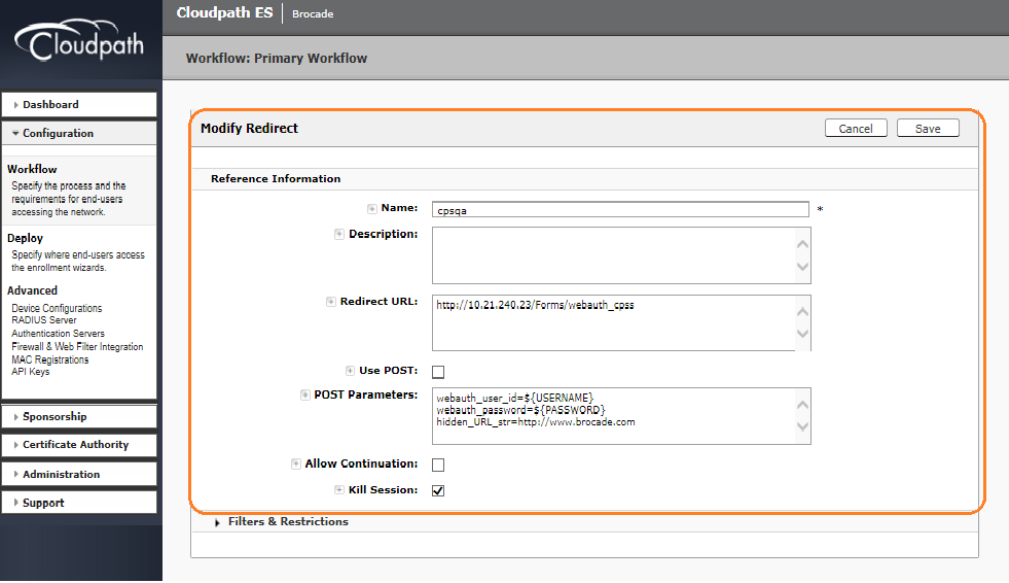
3. Create the Redirect URL http://10.21.240.23/Forms/webauth_cpss, where 10.21.240.23 is the NAS IP address of the
switch, and enter the following POST parameters:
• webauth_user_id=${USERNAME}
• webauth_password=${PASSWORD}
• hidden_URL_str=http://www.brocade.com
Based on administrator preference, the "hidden_URL_str" parameter can be congured, which will be used to redirect to the
specic website after authentication.
Switch Conguration
!
captive-portal cp-sqa
virtual-ip 10.21.240.60
virtual-port 80
login-page /enroll/Brocade/Production/
!
captive-portal cp-sqa1
virtual-ip Cloudpathsqa.englab.brocade.com
virtual-port 80
login-page /enroll/Brocade/Production/
!
vlan 2 name AUTH-DEFAULT by port
!
vlan 200 name GUEST by port
tagged ethe 1/1/10
untagged ethe 1/1/1
router-interface ve 200
webauth
Switch Conguration
Ruckus ICX Flexible Authentication with Cloudpath ES 5.0 Deployment Guide
53-1005026-02 41
captive-portal profile cp-sqa1
auth-mode captive-portal
no secure-login
trust-port ethernet 1/1/10
enable
!
aaa authentication dot1x default radius
radius-server host 10.21.240.60 auth-port 1812 acct-port 1813 default key Foundry1 dot1x mac-auth web-auth
!
ip dns server-address 10.37.2.1 10.37.2.2 10.31.2.10 10.31.2.11
!
web-management https
!
interface ve 200
ip address 10.21.80.130/27
!
ip access-list extended acl1
permit ip any any
!
Switch Show Commands and Syslog Information
ICX-Switch#
SYSLOG: <14> Mar 1 21:40:41 ICX-Switch System: Interface ethernet 1/1/1, state up
SYSLOG: <14> Mar 1 21:41:00 ICX-Switch Web Auth in Vlan 200: Authentication succeeded for user :
jchandra@brocade.com using mac: a036.9f6e.2d9f on port 1/1/1 for a duration 28800 seconds
ICX-Switch#show webauth allowed-list
======================================================================================================
VLAN 200: Web Authentication, Mode: I = Internal E = External
------------------------------------------------------------------------------------------------------
Web Authenticated List Configuration Auth Duration Dynamic
Port MAC Address User Name Mode Static/Dynamic HH:MM:SS ACL
------------------------------------------------------------------------------------------------------
1/1/1 a036.9f6e.2d9f jchandra@brocade.com E D 07:59:57 Yes
ICX-Switch#show webauth ip-acl
----------------------------------------------------------
VLAN Port MAC Address V4 Ingress ACL V4 Egress ACL
----------------------------------------------------------
200 1/1/1 a036.9f6e.2d9f acl1 -
ICX-Switch#show vlan e 1/1/1
Total PORT-VLAN entries: 7
Maximum PORT-VLAN entries: 64
Legend: [Stk=Stack-Id, S=Slot]
PORT-VLAN 200, Name GUEST, Priority level0, Spanning tree Off
Untagged Ports: (U1/M1) 1
Tagged Ports: (U1/M1) 10
Uplink Ports: None
DualMode Ports: None
Mac-Vlan Ports: None
Monitoring: Disabled
Refer following show command to check status of radius server.
ICX-Switch#show radius server
-----------------------------------------------------------------------------
Server Tyoe Opens Closes Timeouts Status
-----------------------------------------------------------------------------
10.21.240.60 any 0 0 0 active
Switch Show Commands and Syslog Information
Ruckus ICX Flexible Authentication with Cloudpath ES 5.0 Deployment Guide
42 53-1005026-02
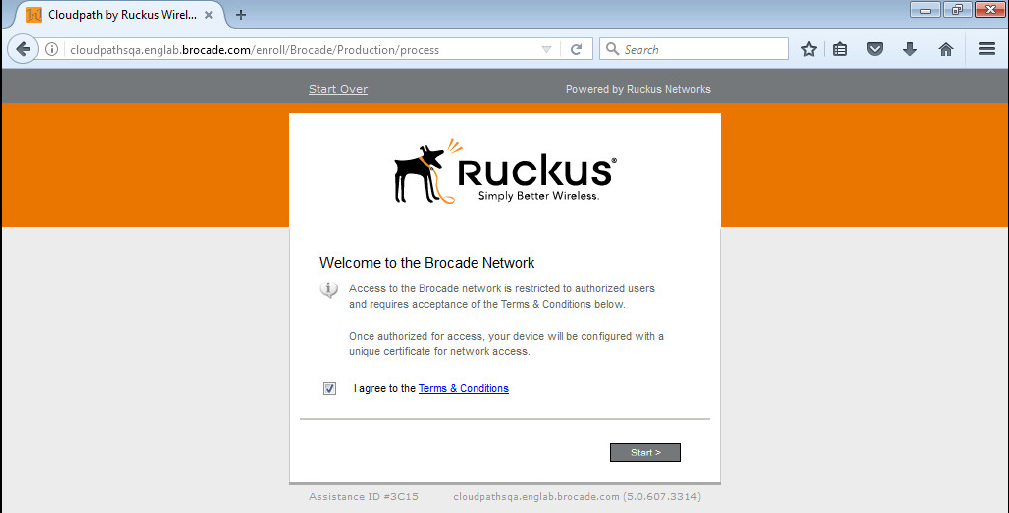
Cloudpath Information
1. Open a web browser on the client PC and enter any website address or http://www.brocade.com/.
Because captive-portal authentication is congured on Webauth VLAN 200 and the captive-portal prole points to "cp-sqa1",
the browser will redirect to http://Cloudpathsqa.englab.brocade.com/enroll/Brocade/Production/redirect.
2. Accept the user policy and click Start.
Cloudpath Information
Ruckus ICX Flexible Authentication with Cloudpath ES 5.0 Deployment Guide
53-1005026-02 43
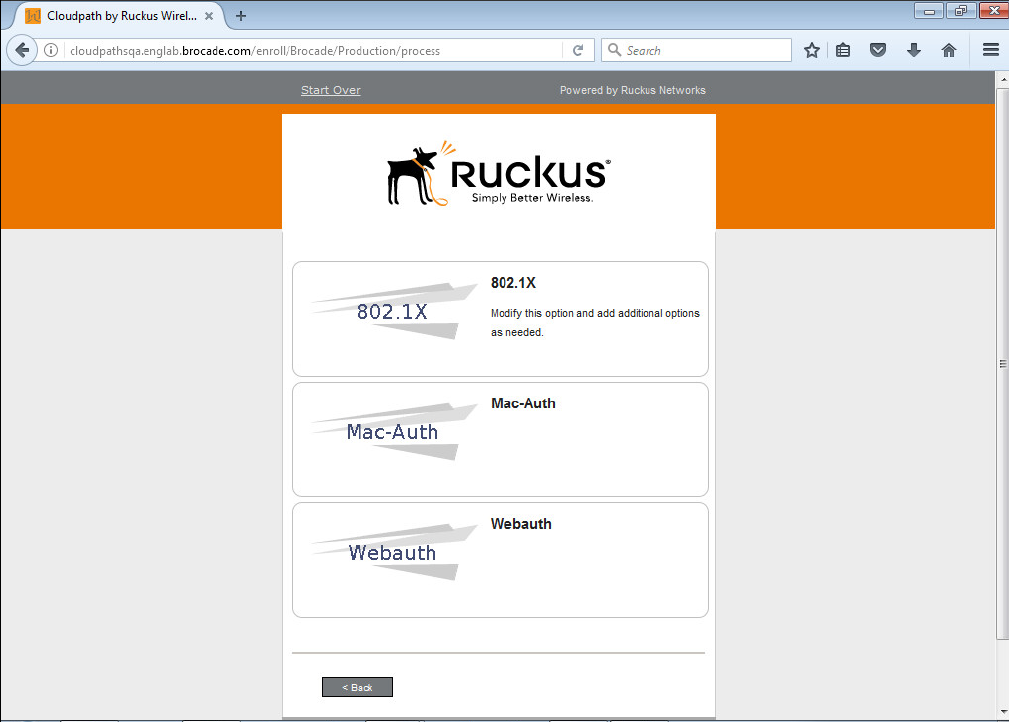
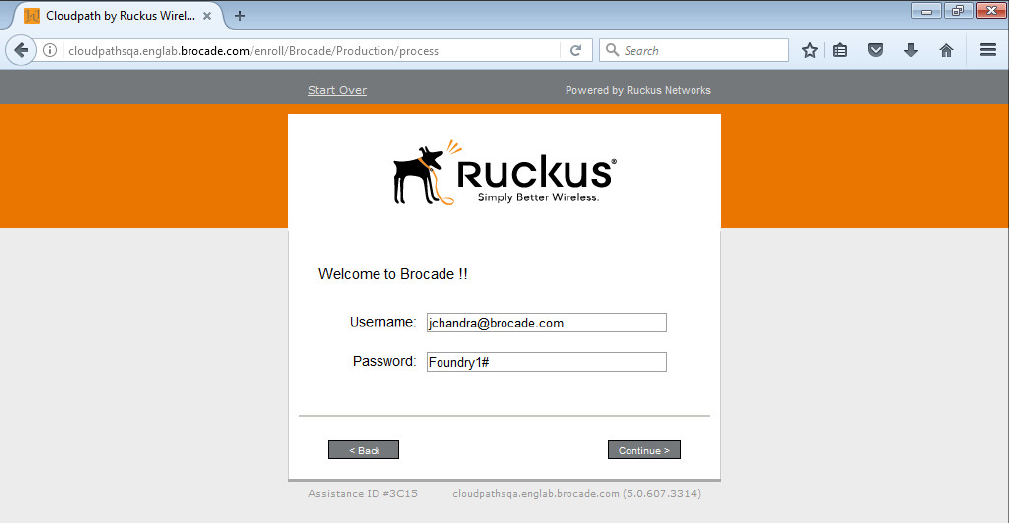
3. Click Webauth.
Cloudpath Information
Ruckus ICX Flexible Authentication with Cloudpath ES 5.0 Deployment Guide
44 53-1005026-02
Ruckus ICX Flexible Authentication with Cloudpath ES 5.0 Deployment Guide
46 53-1005026-02

Use Case 4: Authentication of an IP Phone
and a PC on the Same Port Using Flexible
Authentication
• Cloudpath Conguration.................................................................................................................................................................................49
• Switch Conguration ....................................................................................................................................................................................... 52
• Switch Show Commands and Syslog Information..............................................................................................................................53
• Cloudpath Information.....................................................................................................................................................................................55
• MAC Authentication for an IP Phone........................................................................................................................................................59
The following example demonstrates the use for Flexible Authentication in a setup where a PC is daisy-chained to an IP phone
connected to a switch port. When Flexible Authentication is enabled on a port with an IP phone and a PC, both clients go through
802.1X and MAC authentication. A typical scenario uses MAC authentication for the IP phone and 802.1X for the PC connecting to the
phone.
Note that if the IP phone is not capable of participating in the 802.1X process, it will time out, and then MAC authentication will be tried.
If the IP phone is capable of 802.1X, 802.1X authentication is used rst by default. If 802.1X succeeds, MAC authentication is not
performed.
If LLDP is not congured by way of the RADIUS server, the following LLDP conguration must be added to enable LLDP MED on the
port connecting to the IP phone:
lldp med network-policy application voice tagged vlan 3000 priority 4 dscp 46 ports ethernet 1/1/2
IP Phone: The IP phone MAC address is 0024.c442.bb24, and the IP phone is in tagged VLAN 3000.
Client PC2
• 802.1X username: jchandra@brocade.com
• Password: Foundry1#
• After authentication:
– The client should be placed in VLAN 300.
– Incoming trac from client A should be ltered by ACL "acl1".
Ruckus ICX Flexible Authentication with Cloudpath ES 5.0 Deployment Guide
53-1005026-02 47
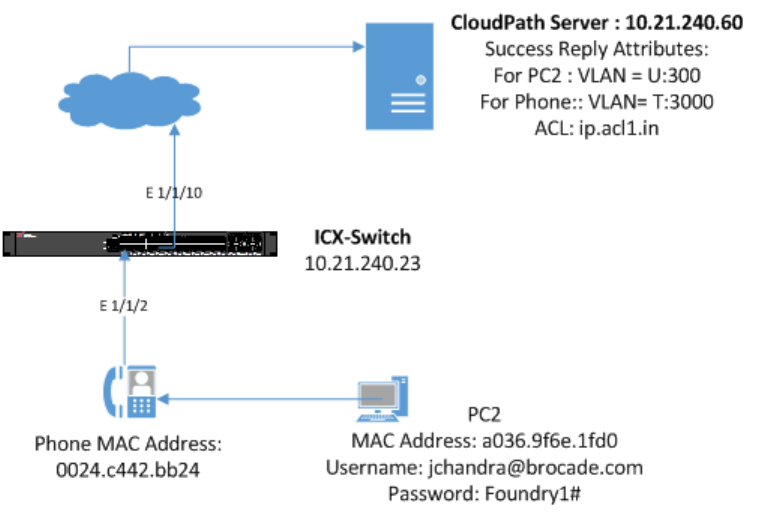
FIGURE 7 Example of Authenticating an IP Phone and a PC on the Same Port Using Flexible Authentication
Ruckus ICX Flexible Authentication with Cloudpath ES 5.0 Deployment Guide
48 53-1005026-02
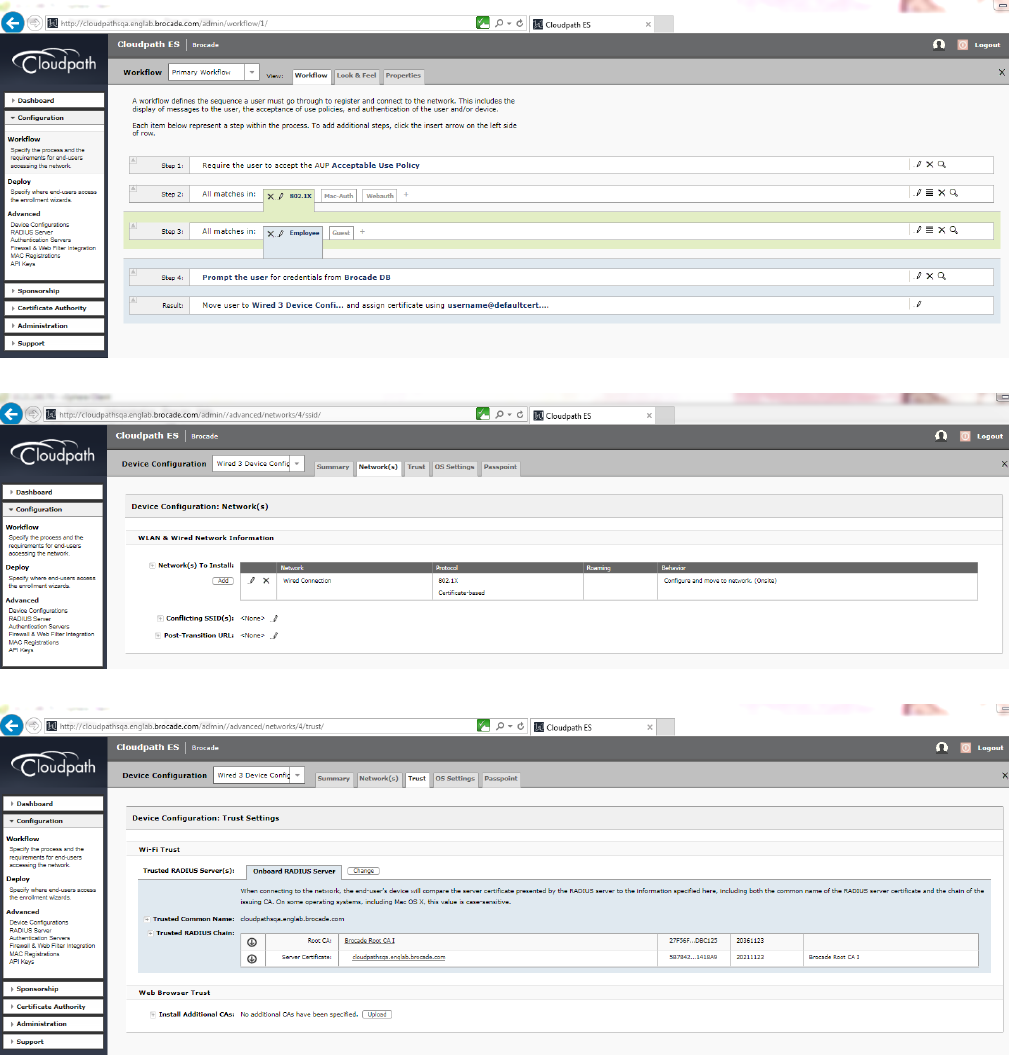
Cloudpath Conguration
Congure the workow for 802.1X authentication for PC2 and MAC authentication for an IP phone.
The following screenshots demonstrate steps for conguring the workow.
Cloudpath Conguration
Ruckus ICX Flexible Authentication with Cloudpath ES 5.0 Deployment Guide
53-1005026-02 49
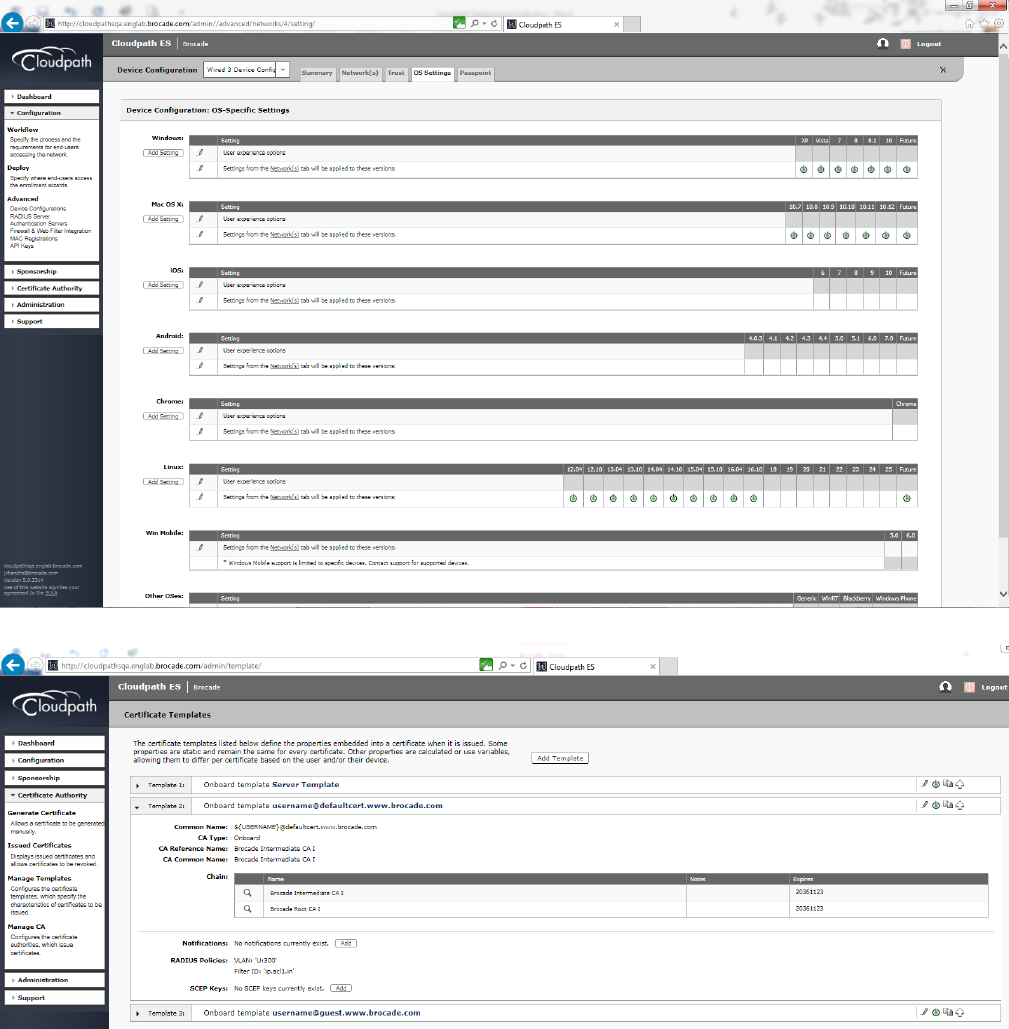
Cloudpath Conguration
Ruckus ICX Flexible Authentication with Cloudpath ES 5.0 Deployment Guide
50 53-1005026-02
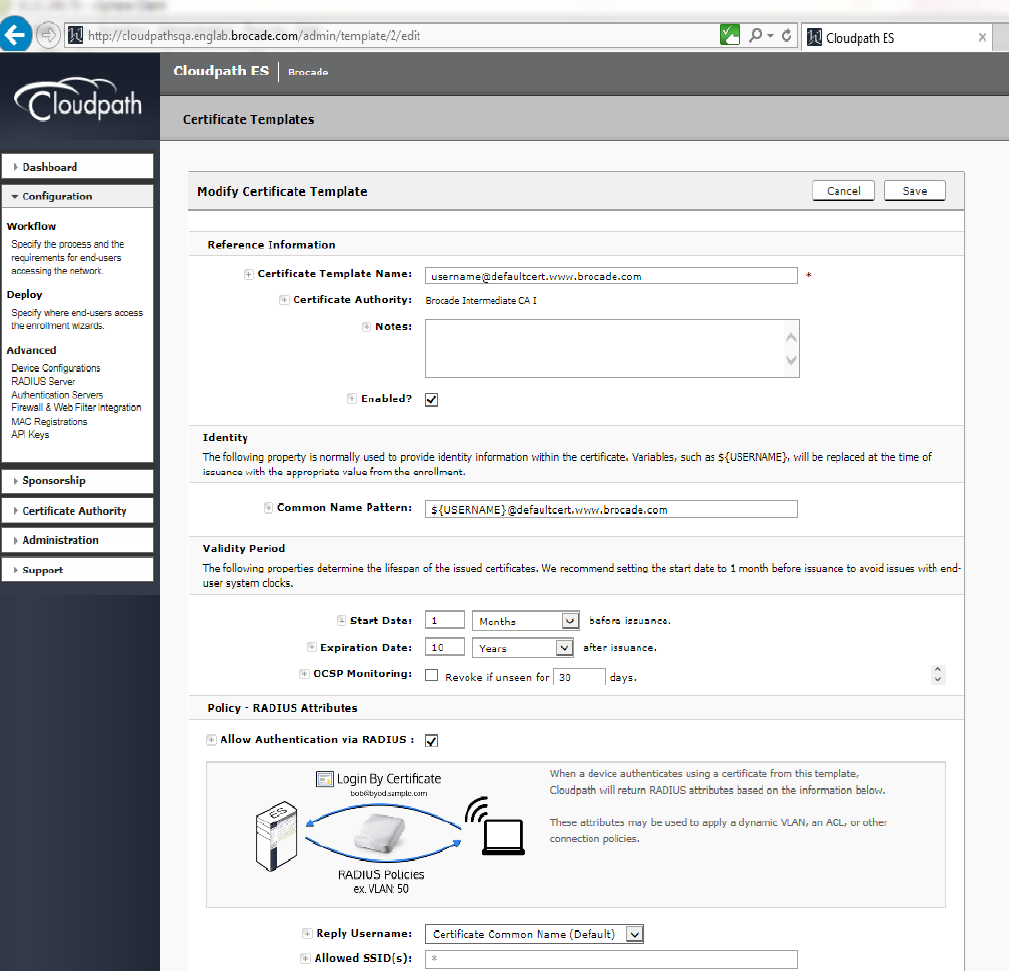
Cloudpath Conguration
Ruckus ICX Flexible Authentication with Cloudpath ES 5.0 Deployment Guide
53-1005026-02 51

Switch Conguration
!
vlan 2 name AUTH-DEFAULT by port
!
!
vlan 300 name 802.1X by port
tagged ethe 1/1/10
router-interface ve 300
!
vlan 3000 name VOICE by port
tagged ethe 1/1/2 ethe 1/1/10
router-interface ve 3000
!
authentication
auth-default-vlan 2
dot1x enable
dot1x enable ethe 1/1/2
mac-authentication enable
mac-authentication enable ethe 1/1/2
!
!
aaa authentication dot1x default radius
!
radius-server host 10.21.240.60 auth-port 1812 acct-port 1813 default key Foundry1 dot1x mac-auth web-auth
!
interface ethernet 1/1/2
Switch Conguration
Ruckus ICX Flexible Authentication with Cloudpath ES 5.0 Deployment Guide
52 53-1005026-02
dot1x port-control auto
port-name PHONE-G06
inline power
!
!
ip access-list extended acl1
permit ip any any
!
!
lldp med network-policy application voice tagged vlan 3000 priority 4 dscp 46 ports ethe 1/1/2
lldp run
!
Switch Show Commands and Syslog Information
ICX-Switch#
PoE: Power enabled on port 1/1/2.
SYSLOG: <14> Mar 2 15:54:40 ICX-Switch System: PoE: Power adjustment done: decreased power by 14600 mwatts on
port 1/1/2 .
SYSLOG: <14> Mar 2 15:54:40 ICX-Switch System: PoE: Power enabled on port 1/1/2.
SYSLOG: <14> Mar 2 15:54:45 ICX-Switch System: Interface ethernet 1/1/2, state up
SYSLOG: <14> Mar 2 15:54:53 ICX-Switch DOT1X: Port 1/1/2 - mac 0024.c442.bb24 AuthControlledPortStatus change:
unauthorized
SYSLOG: <14> Mar 2 15:54:59 ICX-Switch DOT1X: Port 1/1/2 - mac a036.9f6e.1fd0 AuthControlledPortStatus change:
unauthorized
SYSLOG: <14> Mar 2 15:54:59 ICX-Switch DOT1X: Port 1/1/2 - mac a036.9f6e.1fd0, AuthControlledPortStatus
change: authorized
SYSLOG: <13> Mar 2 15:54:59 ICX-Switch FLEXAUTH: Port ethe 1/1/2 is added into VLAN 300 as MAC-VLAN member
SYSLOG: <13> Mar 2 15:54:59 ICX-Switch FLEXAUTH: Port ethe 1/1/2 is deleted from VLAN 2 as MAC-VLAN member
SYSLOG: <13> Mar 2 15:55:50 ICX-Switch MAC Authentication succeeded for [0024.c442.bb24 ] on port 1/1/2
ICX-Switch#show dot1x sessions all
---------------------------------------------------------------------------------------------------------
Port MAC IP(v4/v6) User VLAN Auth ACL Session Age PAE
Addr Addr Name State Time State
---------------------------------------------------------------------------------------------------------
1/1/2 0024.c442.bb24 N/A N/A 300 init None 93 Ena HELD
1/1/2 a036.9f6e.1fd0 10.21.80.228 jchandra@broc 300 permit Yes 87 Ena
AUTHENTICATED
ICX-Switch#show mac-auth sessions all
-----------------------------------------------------------------------------------
Port MAC IP(v4/v6) VLAN Auth ACL Session Age
Addr Addr State Time
-----------------------------------------------------------------------------------
1/1/2 0024.c442.bb24 10.21.80.97 3000 Yes Yes 24 Ena
1/1/2 0024.c442.bb24 N/A 300 Yes Yes 36 Ena
ICX-Switch#show dot1x ip-acl all
-----------------------------------------------------------------------------
Port MAC Address V4 Ingress V4 Egress V6 Ingress V6 Egress
-----------------------------------------------------------------------------
1/1/2 0024.c442.bb24 - - - -
1/1/2 a036.9f6e.1fd0 acl1 - - -
ICX-Switch#show mac-authentication ip-acl all
-----------------------------------------------------------------------------
Port MAC Address V4 Ingress V4 Egress V6 Ingress V6 Egress
-----------------------------------------------------------------------------
Switch Show Commands and Syslog Information
Ruckus ICX Flexible Authentication with Cloudpath ES 5.0 Deployment Guide
53-1005026-02 53
1/1/2 0024.c442.bb24 acl1 - - -
1/1/2 0024.c442.bb24 acl1 - - -
ICX-Switch#show vlan 300
Total PORT-VLAN entries: 8
Maximum PORT-VLAN entries: 64
Legend: [Stk=Stack-Id, S=Slot]
PORT-VLAN 300, Name 802.1X, Priority level0, Spanning tree Off
Untagged Ports: None
Tagged Ports: (U1/M1) 10
Uplink Ports: None
DualMode Ports: None
Mac-Vlan Ports: (U1/M1) 2
Monitoring: Disabled
ICX-Switch#show vlan 3000
Total PORT-VLAN entries: 8
Maximum PORT-VLAN entries: 64
Legend: [Stk=Stack-Id, S=Slot]
PORT-VLAN 3000, Name VOICE, Priority level0, Spanning tree Off
Untagged Ports: None
Tagged Ports: (U1/M1) 2 10
Uplink Ports: None
DualMode Ports: None
Mac-Vlan Ports: None
Monitoring: Disabled
ICX-Switch#show lldp local-info port e 1/1/2
Local port: 1/1/2
+ Chassis ID (MAC address): cc4e.24b4.7b30
+ Port ID (MAC address): cc4e.24b4.7b31
+ Time to live: 120 seconds
+ System name : "ICX-Switch"
+ Port description : "GigabitEthernet1/1/2"
+ System capabilities : bridge, router
Enabled capabilities: bridge, router
+ 802.3 MAC/PHY : auto-negotiation enabled
Advertised capabilities: 10BaseT-HD, 10BaseT-FD, 100BaseTX-HD,
100BaseTX-FD, fdxSPause, fdxBPause, 1000BaseT-HD,
1000BaseT-FD
Operational MAU type : 1000BaseT-FD
+ 802.3 Power via MDI: PSE port, power enabled, class 3
Power Pair : A (not controllable)
Power Type : Type 2 PSE device
Power Source : Unknown Power Source
Power Priority : Low (3)
Power Requested: 12.0 watts (PSE equivalent: 13190 mWatts)
Power Allocated: 12.0 watts (PSE equivalent: 13190 mWatts)
+ Link aggregation: not capable
+ Maximum frame size: 1522 octets
+ MED capabilities: capabilities, networkPolicy, location, extendedPSE
SYSLOG: <14> Mar 2 15:56:43 ICX-Switch CLI CMD: "show lldp local-info ports ethernet 1/1/2" by un-
authenticated user from console
MED device type : Network Connectivity
+ MED Network Policy
Application Type : Voice
Policy Flags : Known Policy, Tagged
VLAN ID : 3000
L2 Priority : 4
DSCP Value : 46
+ MED Extended Power via MDI
Power Type : PSE device
Power Source : Unknown Power Source
Power Priority : Low (3)
Power Value : 12.0 watts (PSE equivalent: 13190 mWatts)
+ Port VLAN ID: none
+ Management address (IPv4): 10.21.80.249
Refer following show command to check status of radius server.
Switch Show Commands and Syslog Information
Ruckus ICX Flexible Authentication with Cloudpath ES 5.0 Deployment Guide
54 53-1005026-02
ICX-Switch#show radius server
-----------------------------------------------------------------------------
Server Tyoe Opens Closes Timeouts Status
-----------------------------------------------------------------------------
10.21.240.60 any 0 0 0 active
Cloudpath Information
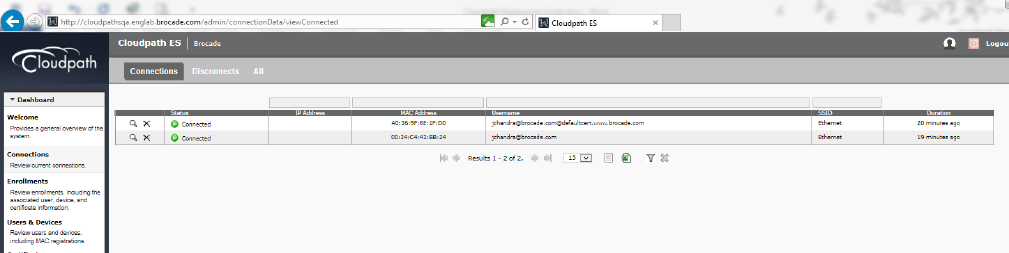
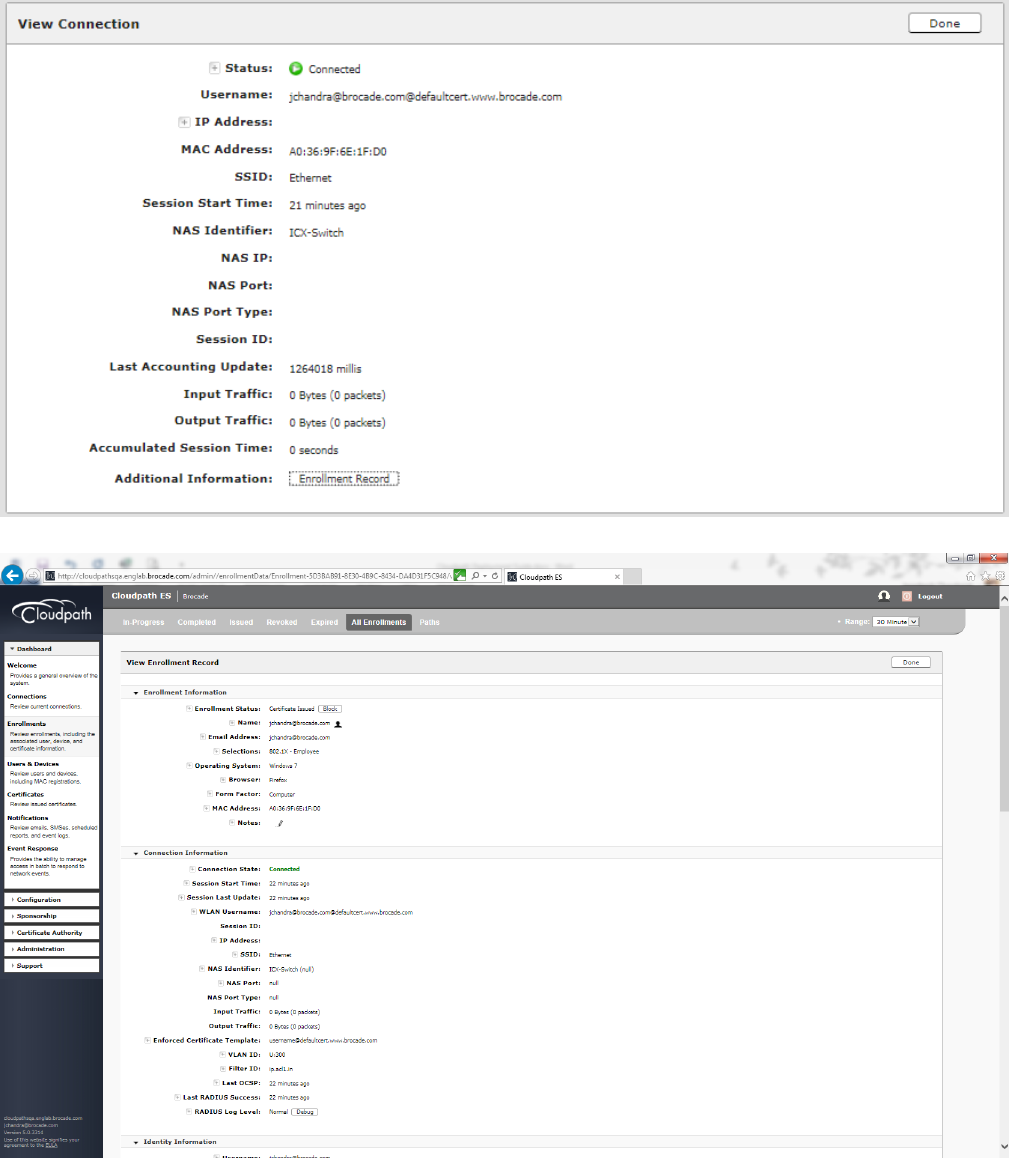
1. Navigate to Dashboard > Connections and click the search button to view the connection details for both 802.1X
authentication for the PC and MAC authentication for an IP phone.
Cloudpath Information
Ruckus ICX Flexible Authentication with Cloudpath ES 5.0 Deployment Guide
53-1005026-02 55
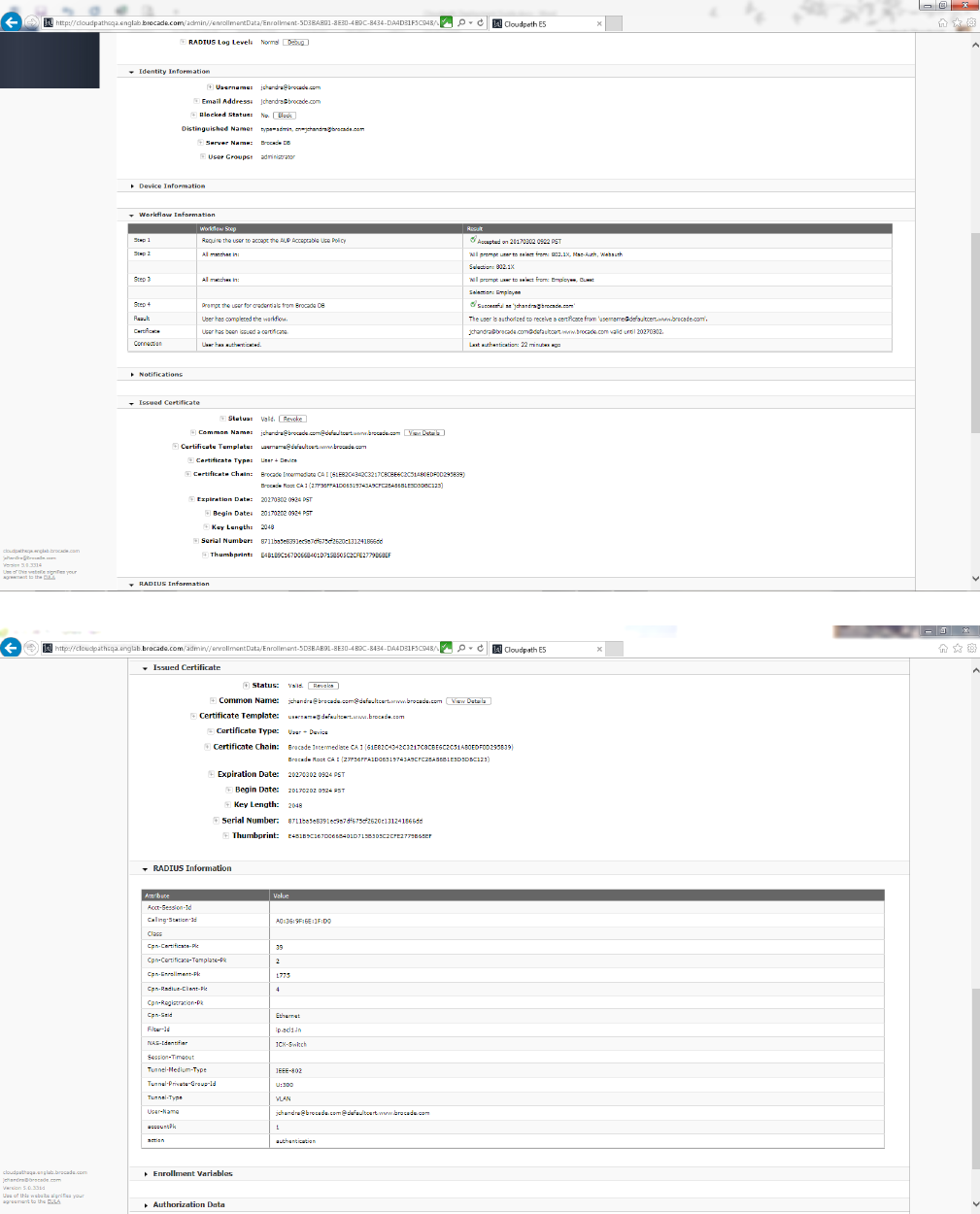
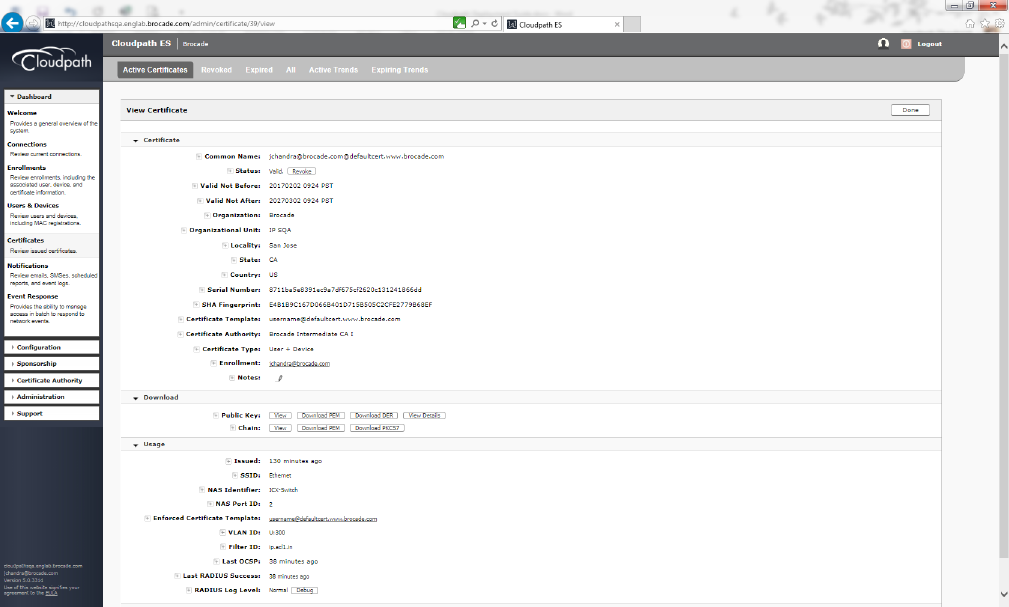
2. Congure 802.1X authentication for a PC.
Cloudpath Information
Ruckus ICX Flexible Authentication with Cloudpath ES 5.0 Deployment Guide
56 53-1005026-02
Cloudpath Information
Ruckus ICX Flexible Authentication with Cloudpath ES 5.0 Deployment Guide
53-1005026-02 57
Cloudpath Information
Ruckus ICX Flexible Authentication with Cloudpath ES 5.0 Deployment Guide
58 53-1005026-02
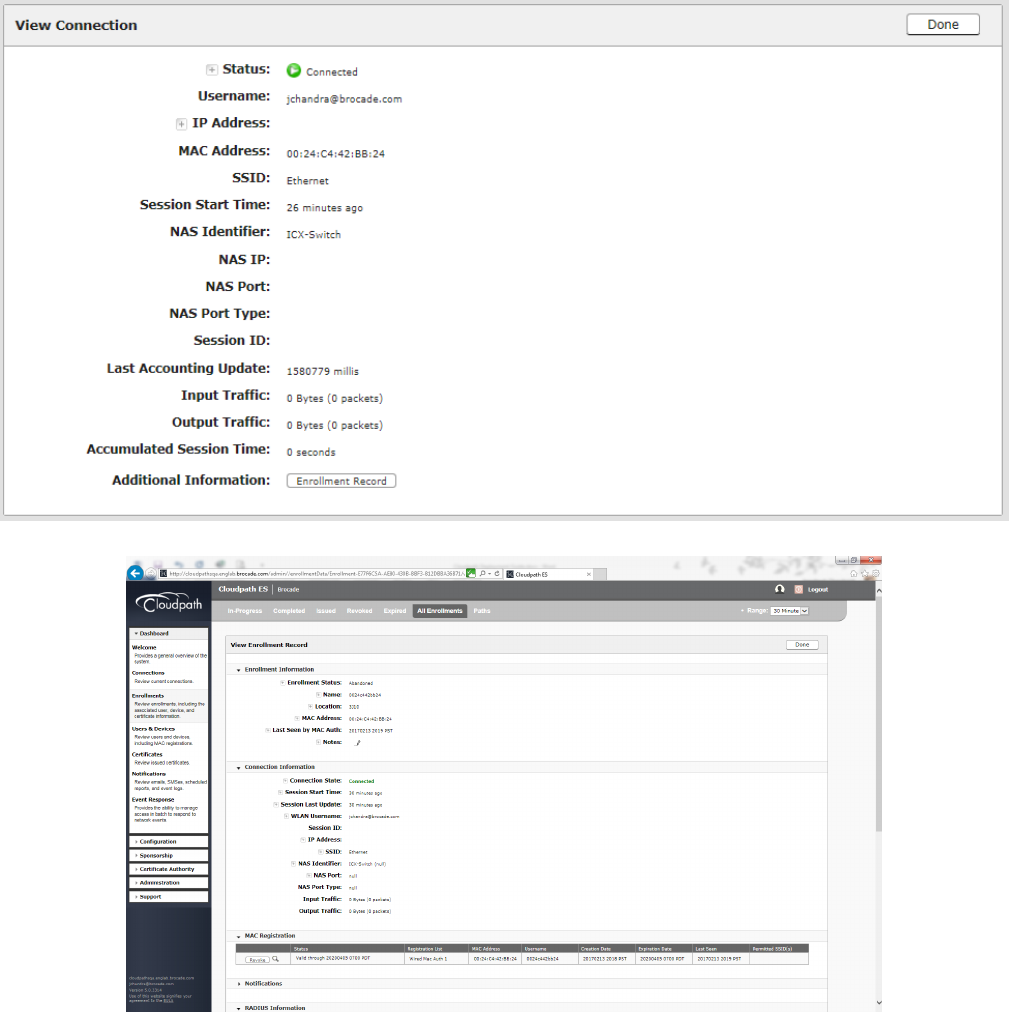
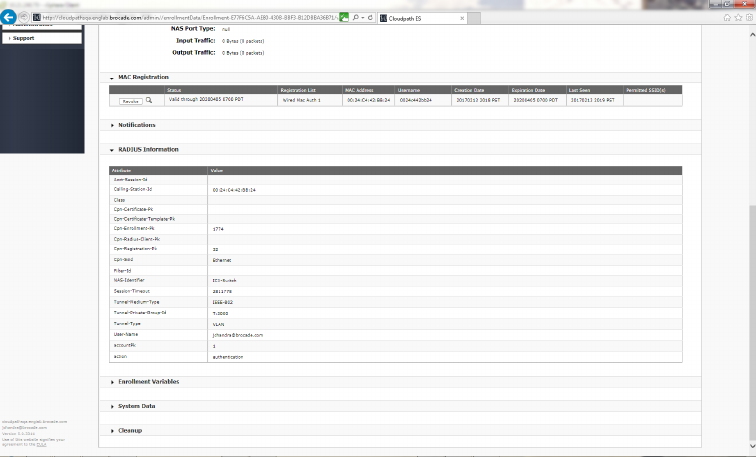
MAC Authentication for an IP Phone
Congure MAC authentication for an IP phone.
MAC Authentication for an IP Phone
Ruckus ICX Flexible Authentication with Cloudpath ES 5.0 Deployment Guide
53-1005026-02 59
MAC Authentication for an IP Phone
Ruckus ICX Flexible Authentication with Cloudpath ES 5.0 Deployment Guide
60 53-1005026-02

Use Case 5: Authentication of a Phone,
PC, and Guest User Using Flexible
Authentication
• Cloudpath Conguration.................................................................................................................................................................................63
• Switch Conguration ....................................................................................................................................................................................... 64
• Switch Show Commands and Syslog Information..............................................................................................................................66
• Combined Output for Both Ports e 1/1/1 (PC1) and e 1/1/2 (PC2 Behind the IP Phone)............................................67
• Cloudpath Information.....................................................................................................................................................................................70
The following example demonstrates the use for Flexible Authentication in a setup where a PC is daisy-chained to an IP phone
connected to a switch port. Refer to Use Case 4: Authentication of an IP Phone and a PC on the Same Port Using Flexible
Authentication on page 47 for the PC behind the IP phone. Additionally, when the guest user PC1 needs to be enabled for 802.1X
certicate-based authentication, the following example shows the conguration and validation of this use case.
Client PC1 (Guest User)
• 802.1X username: jchandra@brocade.com
• Password: Foundry1#
• After authentication:
– The client should be placed in VLAN 200.
– Incoming trac from the client should be ltered by ACL "acl1".
IP Phone: The IP phone MAC address is 0024.c442.bb24, and the IP phone is in tagged VLAN 3000.
Client PC2
• 802.1X username: jchandra@brocade.com
• Password: Foundry1#
• After authentication:
– The client should be placed in VLAN 300.
– Incoming trac from the client should be ltered by ACL "acl1".
Ruckus ICX Flexible Authentication with Cloudpath ES 5.0 Deployment Guide
53-1005026-02 61
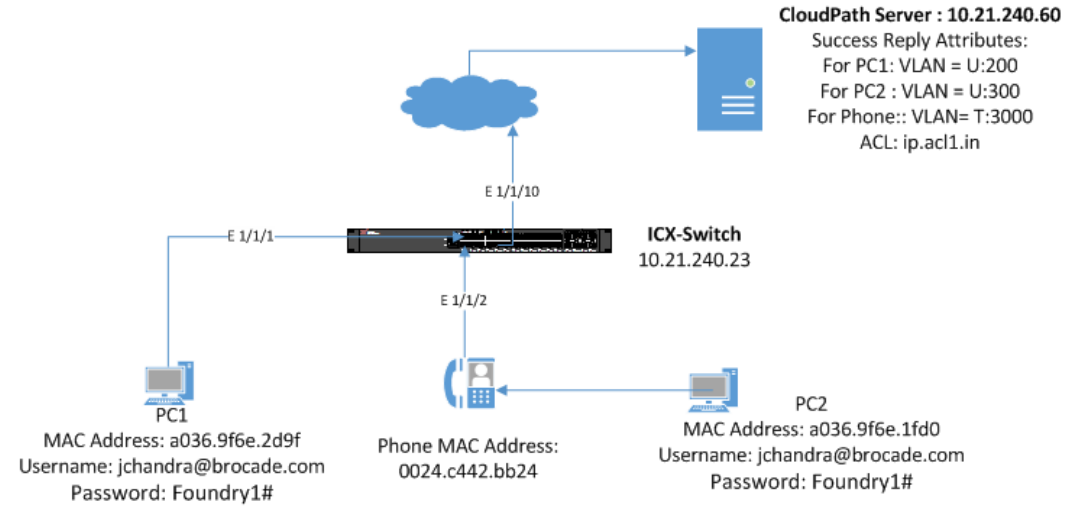
FIGURE 8 Example of Authenticating an IP Phone, a PC, and a Guest User Using Flexible Authentication
Ruckus ICX Flexible Authentication with Cloudpath ES 5.0 Deployment Guide
62 53-1005026-02
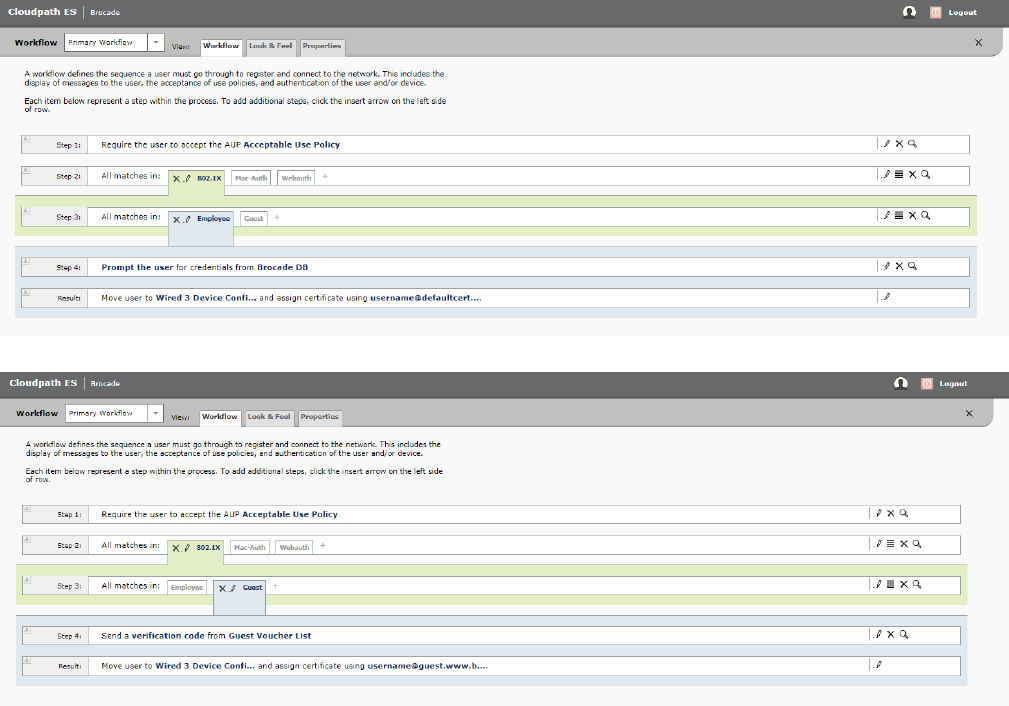
Cloudpath Conguration
1. Congure the workow for 802.1X guest user authentication for PC1, 802.1X authentication for PC2 (Employee), and MAC
authentication for the IP phone.
Cloudpath Conguration
Ruckus ICX Flexible Authentication with Cloudpath ES 5.0 Deployment Guide
53-1005026-02 63
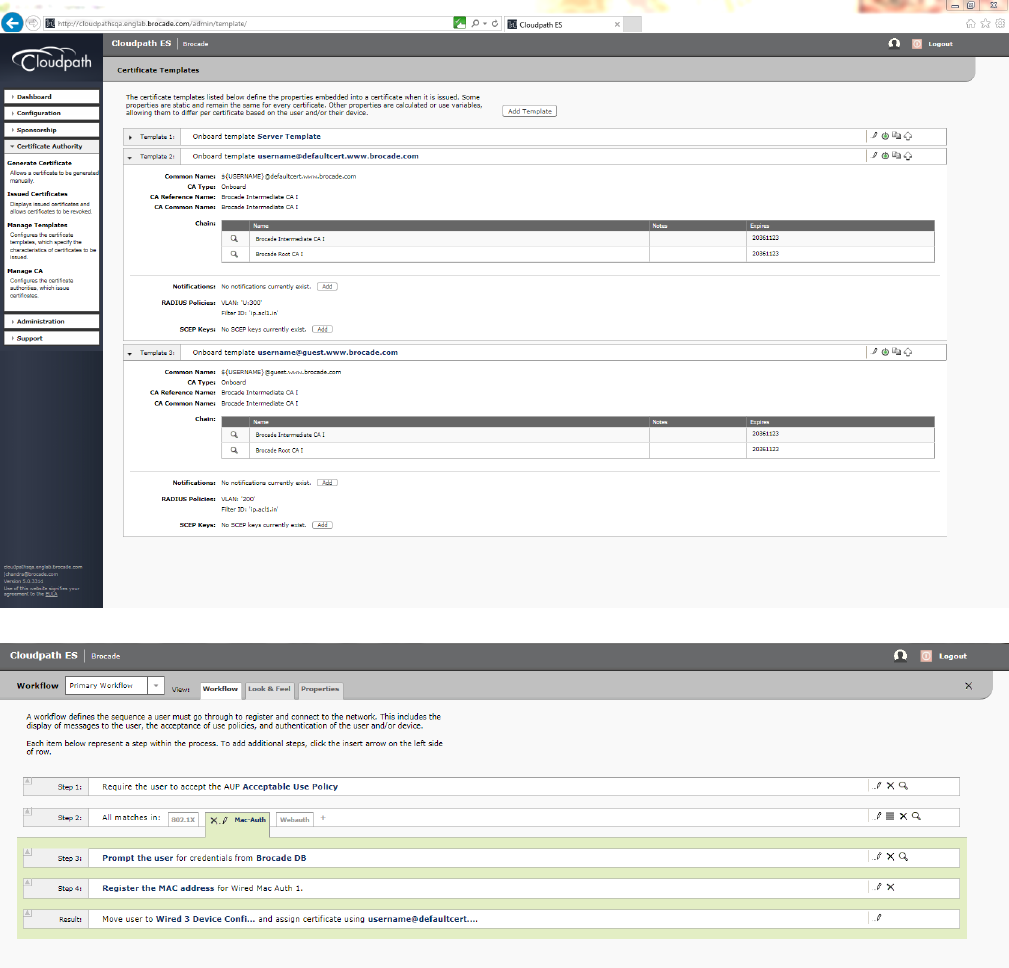
2. Navigate to Certicate Authority > Manage Templates and verify the RADIUS policies.
Switch Conguration
!
captive-portal cp-sqa1
virtual-ip Cloudpathsqa.englab.brocade.com
virtual-port 80
login-page /enroll/Brocade/Production/
Switch Conguration
Ruckus ICX Flexible Authentication with Cloudpath ES 5.0 Deployment Guide
64 53-1005026-02
!
vlan 2 name AUTH-DEFAULT by port
!
vlan 3 name 802.1X-GUEST by port
tagged ethe 1/1/10
router-interface ve 3
webauth
captive-portal profile cp-sqa1
auth-mode captive-portal
no secure-login
trust-port ethernet 1/1/10
enable
!
!
vlan 200 name GUEST by port
tagged ethe 1/1/10
router-interface ve 200
!
vlan 300 name 802.1X by port
tagged ethe 1/1/10
router-interface ve 300
!
vlan 3000 name VOICE by port
tagged ethe 1/1/2 ethe 1/1/10
router-interface ve 3000
!
!
authentication
auth-default-vlan 2
dot1x enable
dot1x enable ethe 1/1/1 to 1/1/2
dot1x guest-vlan 3
mac-authentication enable
mac-authentication enable ethe 1/1/2
!
!
aaa authentication dot1x default radius
radius-server host 10.21.240.60 auth-port 1812 acct-port 1813 default key Foundry1 dot1x mac-auth web-auth
!
interface ethernet 1/1/1
dot1x port-control auto
!
interface ethernet 1/1/2
dot1x port-control auto
port-name PHONE-G06
inline power
!
!
interface ve 3
ip address 10.21.80.189/27
!
interface ve 200
ip address 10.21.80.157/27
!
interface ve 300
ip address 10.21.80.249/27
!
interface ve 3000
ip address 10.21.80.125/27
!
ip access-list extended acl1
permit ip any any
!
lldp med network-policy application voice tagged vlan 3000 priority 4 dscp 46 ports ethe 1/1/2
lldp run
!
Switch Conguration
Ruckus ICX Flexible Authentication with Cloudpath ES 5.0 Deployment Guide
53-1005026-02 65
Switch Show Commands and Syslog Information
For PC1 Guest User: The client is enabled for 802.1X certicate-based authentication. Without a certicate, the guest user will be placed
in the 802.1X Guest VLAN. To perform captive-portal authentication, download and install the certicate. Disconnect the client and,
while reconnecting, the user will be placed in VLAN 200.
For PC2 behind the IP Phone: Refer to Use Case 4: Authentication of an IP Phone and a PC on the Same Port Using Flexible
Authentication on page 47.
ICX-Switch#
SYSLOG: <14> Mar 2 17:18:30 ICX-Switch System: Interface ethernet 1/1/1, state up
SYSLOG: <14> Mar 2 17:18:31 ICX-Switch DOT1X: Port 1/1/1 - mac a036.9f6e.2d9f AuthControlledPortStatus change:
unauthorized
SYSLOG: <13> Mar 2 17:19:00 ICX-Switch DOT1X: Port 1/1/1 Mac a036.9f6e.2d9f - is moved to guest vlan
SYSLOG: <13> Mar 2 17:19:00 ICX-Switch FLEXAUTH: Port ethe 1/1/1 is added into VLAN 3 as MAC-VLAN member
SYSLOG: <13> Mar 2 17:19:00 ICX-Switch FLEXAUTH: Port ethe 1/1/1 is deleted from VLAN 2 as MAC-VLAN member
ICX-Switch#sds
show dot1x sessions all
---------------------------------------------------------------------------------------------------------
Port MAC IP(v4/v6) User VLAN Auth ACL Session Age PAE
Addr Addr Name State Time State
---------------------------------------------------------------------------------------------------------
1/1/1 a036.9f6e.2d9f N/A N/A 3 init None 46 S0 HELD
ICX-Switch#show vlan 3
Total PORT-VLAN entries: 8
Maximum PORT-VLAN entries: 64
Legend: [Stk=Stack-Id, S=Slot]
PORT-VLAN 3, Name 802.1X-GUEST, Priority level0, Spanning tree Off
Untagged Ports: None
Tagged Ports: (U1/M1) 10
Uplink Ports: None
DualMode Ports: None
Mac-Vlan Ports: (U1/M1) 1
Monitoring: Disabled
ICX-Switch#
SYSLOG: <14> Mar 2 17:19:29 ICX-Switch CLI CMD: "show vlan 3" by un-authenticated user from console
SYSLOG: <13> Mar 2 17:27:15 ICX-Switch FLEXAUTH: Port ethe 1/1/1 is added into VLAN 2 as MAC-VLAN member
SYSLOG: <13> Mar 2 17:27:15 ICX-Switch FLEXAUTH: Port ethe 1/1/1 is deleted from VLAN 3 as MAC-VLAN member
SYSLOG: <14> Mar 2 17:27:16 ICX-Switch DOT1X: Port 1/1/1 - mac a036.9f6e.2d9f AuthControlledPortStatus change:
unauthorized
SYSLOG: <14> Mar 2 17:28:00 ICX-Switch System: Interface ethernet 1/1/1, state down
SYSLOG: <14> Mar 2 17:28:07 ICX-Switch System: Interface ethernet 1/1/1, state up
SYSLOG: <14> Mar 2 17:28:07 ICX-Switch DOT1X: Port 1/1/1 - mac a036.9f6e.2d9f AuthControlledPortStatus change:
unauthorized
SYSLOG: <13> Mar 2 17:28:35 ICX-Switch DOT1X: Port 1/1/1 Mac a036.9f6e.2d9f - is moved to guest vlan
SYSLOG: <13> Mar 2 17:28:35 ICX-Switch FLEXAUTH: Port ethe 1/1/1 is added into VLAN 3 as MAC-VLAN member
SYSLOG: <13> Mar 2 17:28:35 ICX-Switch FLEXAUTH: Port ethe 1/1/1 is deleted from VLAN 2 as MAC-VLAN member
SYSLOG: <13> Mar 2 17:28:52 ICX-Switch FLEXAUTH: Port ethe 1/1/1 is added into VLAN 2 as MAC-VLAN member
Switch Show Commands and Syslog Information
Ruckus ICX Flexible Authentication with Cloudpath ES 5.0 Deployment Guide
66 53-1005026-02
SYSLOG: <13> Mar 2 17:28:52 ICX-Switch FLEXAUTH: Port ethe 1/1/1 is deleted from VLAN 3 as MAC-VLAN member
SYSLOG: <14> Mar 2 17:28:52 ICX-Switch DOT1X: Port 1/1/1 - mac a036.9f6e.2d9f AuthControlledPortStatus change:
unauthorized
SYSLOG: <14> Mar 2 17:28:58 ICX-Switch DOT1X: Port 1/1/1 - mac a036.9f6e.2d9f, AuthControlledPortStatus
change: authorized
SYSLOG: <13> Mar 2 17:28:58 ICX-Switch FLEXAUTH: Port ethe 1/1/1 is added into VLAN 200 as MAC-VLAN member
SYSLOG: <13> Mar 2 17:28:58 ICX-Switch FLEXAUTH: Port ethe 1/1/1 is deleted from VLAN 2 as MAC-VLAN member
ICX-Switch#show dot1x sessions all
---------------------------------------------------------------------------------------------------------
Port MAC IP(v4/v6) User VLAN Auth ACL Session Age PAE
Addr Addr Name State Time State
---------------------------------------------------------------------------------------------------------
1/1/1 a036.9f6e.2d9f 10.21.80.161 jchandra@broc 200 permit Yes 11 Ena
AUTHENTICATED
ICX-Switch#
sdi
show dot1x ip-acl all
-----------------------------------------------------------------------------
Port MAC Address V4 Ingress V4 Egress V6 Ingress V6 Egress
-----------------------------------------------------------------------------
1/1/1 a036.9f6e.2d9f acl1 - - -
ICX-Switch#show vlan 200
Total PORT-VLAN entries: 8
Maximum PORT-VLAN entries: 64
Legend: [Stk=Stack-Id, S=Slot]
PORT-VLAN 200, Name GUEST, Priority level0, Spanning tree Off
Untagged Ports: None
Tagged Ports: (U1/M1) 10
Uplink Ports: None
DualMode Ports: None
Mac-Vlan Ports: (U1/M1) 1
Monitoring: Disabled
Combined Output for Both Ports e 1/1/1 (PC1) and e
1/1/2 (PC2 Behind the IP Phone)
ICX-Switch#
SYSLOG: <14> Mar 2 17:39:07 ICX-Switch System: PoE: Allocated power of 30000 mwatts on port 1/1/2.
SYSLOG: <14> Mar 2 17:39:09 ICX-Switch System: PoE: Power adjustment done: decreased power by 14600 mwatts on
port 1/1/2 .
SYSLOG: <14> Mar 2 17:39:09 ICX-Switch System: PoE: Power enabled on port 1/1/2.
SYSLOG: <14> Mar 2 17:39:13 ICX-Switch System: Interface ethernet 1/1/2, state up
SYSLOG: <14> Mar 2 17:39:14 ICX-Switch DOT1X: Port 1/1/2 - mac a036.9f6e.1fd0 AuthControlledPortStatus change:
unauthorized
SYSLOG: <14> Mar 2 17:39:21 ICX-Switch DOT1X: Port 1/1/2 - mac 0024.c442.bb24 AuthControlledPortStatus change:
unauthorized
SYSLOG: <14> Mar 2 17:39:26 ICX-Switch DOT1X: Port 1/1/2 - mac a036.9f6e.1fd0, AuthControlledPortStatus
change: authorized
SYSLOG: <13> Mar 2 17:39:26 ICX-Switch FLEXAUTH: Port ethe 1/1/2 is added into VLAN 300 as MAC-VLAN member
Combined Output for Both Ports e 1/1/1 (PC1) and e 1/1/2 (PC2 Behind the IP Phone)
Ruckus ICX Flexible Authentication with Cloudpath ES 5.0 Deployment Guide
53-1005026-02 67
SYSLOG: <13> Mar 2 17:39:26 ICX-Switch FLEXAUTH: Port ethe 1/1/2 is deleted from VLAN 2 as MAC-VLAN member
SYSLOG: <13> Mar 2 17:40:20 ICX-Switch MAC Authentication succeeded for [0024.c442.bb24 ] on port 1/1/2
ICX-Switch#show dot1x sessions all
---------------------------------------------------------------------------------------------------------
Port MAC IP(v4/v6) User VLAN Auth ACL Session Age PAE
Addr Addr Name State Time State
---------------------------------------------------------------------------------------------------------
1/1/1 a036.9f6e.2d9f 10.21.80.129 jchandra@broc 200 permit Yes 692 Ena
AUTHENTICATED
1/1/2 0024.c442.bb24 N/A N/A 300 init None 64 Ena HELD
1/1/2 a036.9f6e.1fd0 10.21.80.228 jchandra@broc 300 permit Yes 71 Ena
AUTHENTICATED
ICX-Switch#show mac-auth sessions all
-----------------------------------------------------------------------------------
Port MAC IP(v4/v6) VLAN Auth ACL Session Age
Addr Addr State Time
-----------------------------------------------------------------------------------
1/1/2 0024.c442.bb24 10.21.80.97 3000 Yes None 258 Ena
1/1/2 0024.c442.bb24 N/A 300 Yes None 270 Ena
ICX-Switch#show dot1x ip-acl all
-----------------------------------------------------------------------------
Port MAC Address V4 Ingress V4 Egress V6 Ingress V6 Egress
-----------------------------------------------------------------------------
1/1/1 a036.9f6e.2d9f acl1 - - -
1/1/2 0024.c442.bb24 - - - -
1/1/2 a036.9f6e.1fd0 acl1 - - -
ICX-Switch#show mac-authentication ip-acl all
-----------------------------------------------------------------------------
Port MAC Address V4 Ingress V4 Egress V6 Ingress V6 Egress
-----------------------------------------------------------------------------
1/1/2 0024.c442.bb24 - - - -
1/1/2 0024.c442.bb24 - - - -
ICX-Switch#show vlan 300
Total PORT-VLAN entries: 8
Maximum PORT-VLAN entries: 64
Legend: [Stk=Stack-Id, S=Slot]
PORT-VLAN 300, Name 802.1X, Priority level0, Spanning tree Off
Untagged Ports: None
Tagged Ports: (U1/M1) 10
Uplink Ports: None
DualMode Ports: None
Mac-Vlan Ports: (U1/M1) 2
Monitoring: Disabled
ICX-Switch#show vlan 200
Total PORT-VLAN entries: 8
Maximum PORT-VLAN entries: 64
Legend: [Stk=Stack-Id, S=Slot]
PORT-VLAN 200, Name GUEST, Priority level0, Spanning tree Off
Untagged Ports: None
Tagged Ports: (U1/M1) 10
Uplink Ports: None
DualMode Ports: None
Mac-Vlan Ports: (U1/M1) 1
Monitoring: Disabled
ICX-Switch#show vlan 3000
Total PORT-VLAN entries: 8
Maximum PORT-VLAN entries: 64
Legend: [Stk=Stack-Id, S=Slot]
Combined Output for Both Ports e 1/1/1 (PC1) and e 1/1/2 (PC2 Behind the IP Phone)
Ruckus ICX Flexible Authentication with Cloudpath ES 5.0 Deployment Guide
68 53-1005026-02
PORT-VLAN 3000, Name VOICE, Priority level0, Spanning tree Off
Untagged Ports: None
Tagged Ports: (U1/M1) 2 10
Uplink Ports: None
DualMode Ports: None
Mac-Vlan Ports: None
Monitoring: Disabled
ICX-Switch#show lldp local-info port e 1/1/2
Local port: 1/1/2
+ Chassis ID (MAC address): cc4e.24b4.7b30
+ Port ID (MAC address): cc4e.24b4.7b31
+ Time to live: 120 seconds
+ System name : "ICX-Switch"
+ Port description : "GigabitEthernet1/1/2"
+ System capabilities : bridge, router
Enabled capabilities: bridge, router
+ 802.3 MAC/PHY : auto-negotiation enabled
Advertised capabilities: 10BaseT-HD, 10BaseT-FD, 100BaseTX-HD,
100BaseTX-FD, fdxSPause, fdxBPause, 1000BaseT-HD,
1000BaseT-FD
Operational MAU type : 10BaseT-FD
+ 802.3 Power via MDI: PSE port, power enabled, class 3
Power Pair : A (not controllable)
Power Type : Type 2 PSE device
Power Source : Unknown Power Source
Power Priority : Low (3)
Power Requested: 12.0 watts (PSE equivalent: 13190 mWatts)
Power Allocated: 12.0 watts (PSE equivalent: 13190 mWatts)
+ Link aggregation: not capable
+ Maximum frame size: 1522 octets
+ MED capabilities: capabilities, networkPolicy, location, extendedPSE
SYSLOG: <14> Mar 2 17:43:04 ICX-Switch CLI CMD: "show lldp local-info ports ethernet 1/1/2" by un-
authenticated user from console
MED device type : Network Connectivity
+ MED Network Policy
Application Type : Voice
Policy Flags : Known Policy, Tagged
VLAN ID : 3000
L2 Priority : 4
DSCP Value : 46
+ MED Extended Power via MDI
Power Type : PSE device
Power Source : Unknown Power Source
Power Priority : Low (3)
Power Value : 12.0 watts (PSE equivalent: 13190 mWatts)
+ Port VLAN ID: none
+ Management address (IPv4): 10.21.80.249
Refer following show command to check status of radius server.
ICX-Switch#show radius server
-----------------------------------------------------------------------------
Server Tyoe Opens Closes Timeouts Status
-----------------------------------------------------------------------------
10.21.240.60 any 0 0 0 active
Combined Output for Both Ports e 1/1/1 (PC1) and e 1/1/2 (PC2 Behind the IP Phone)
Ruckus ICX Flexible Authentication with Cloudpath ES 5.0 Deployment Guide
53-1005026-02 69

Cloudpath Information
For Guest User PC1: Once the user is moved to the 802.1X Guest VLAN, perform captive-portal authentication.
1. Accept the user policy and click Start.
Cloudpath Information
Ruckus ICX Flexible Authentication with Cloudpath ES 5.0 Deployment Guide
70 53-1005026-02
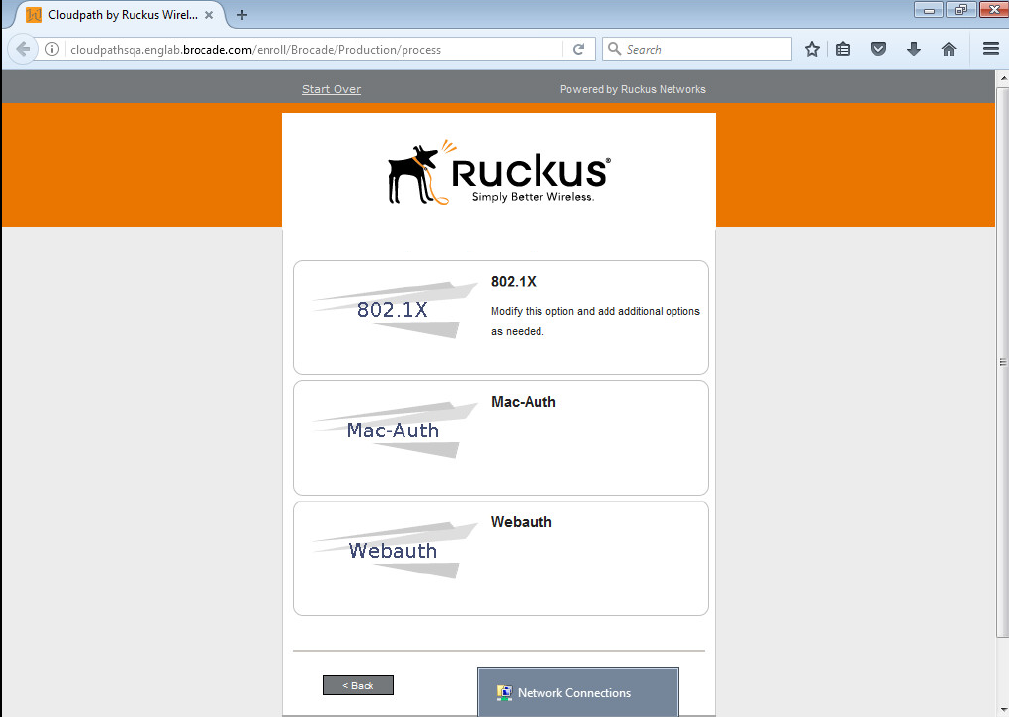
2. Select 802.1X.
Cloudpath Information
Ruckus ICX Flexible Authentication with Cloudpath ES 5.0 Deployment Guide
53-1005026-02 71
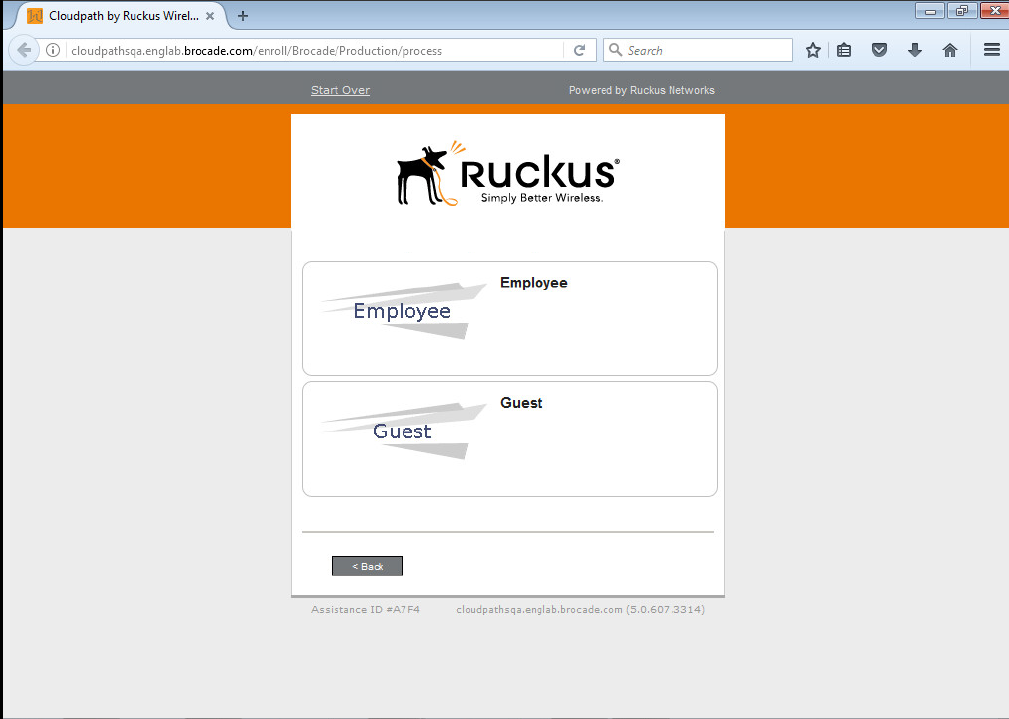
3. Select Guest.
Cloudpath Information
Ruckus ICX Flexible Authentication with Cloudpath ES 5.0 Deployment Guide
72 53-1005026-02
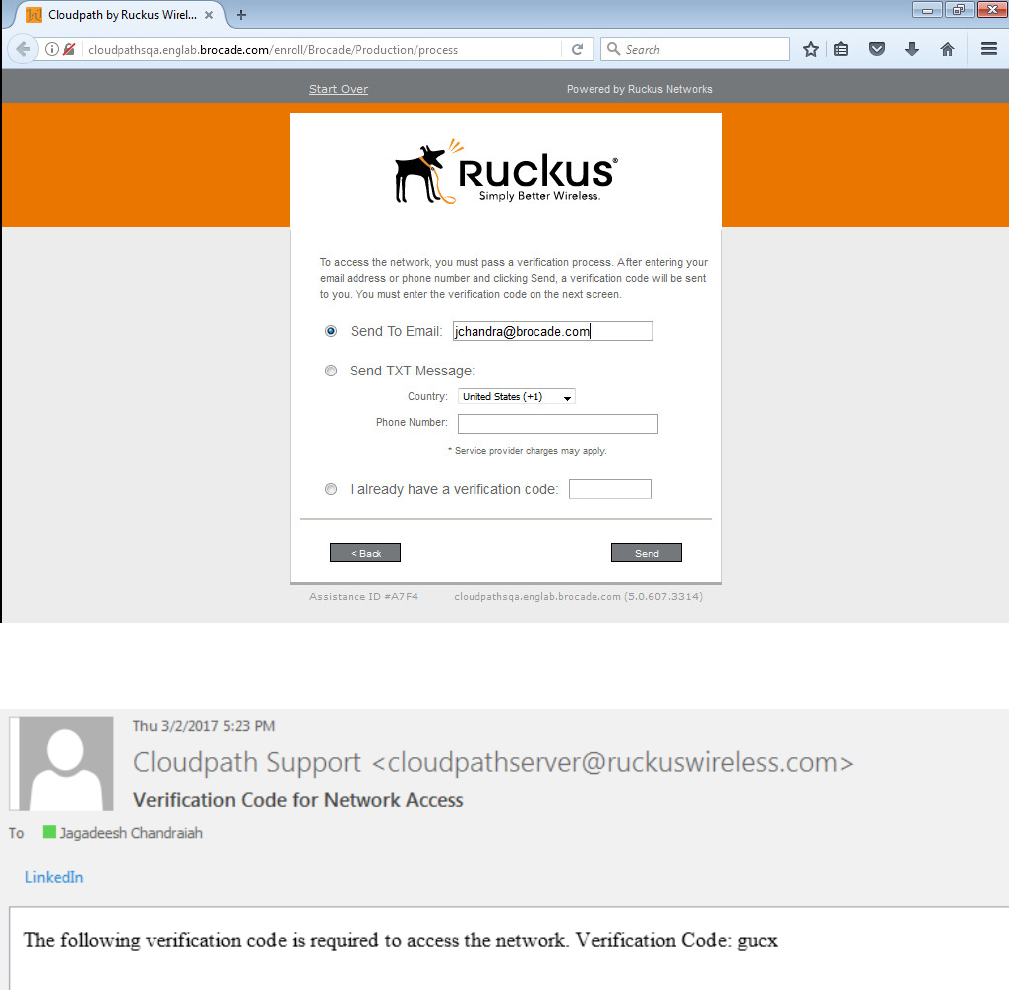
4. Provide an email address or phone number, and click Send.
Depending on the email or phone number, the user will receive the email or text notication with a verication code.
Cloudpath Information
Ruckus ICX Flexible Authentication with Cloudpath ES 5.0 Deployment Guide
53-1005026-02 73
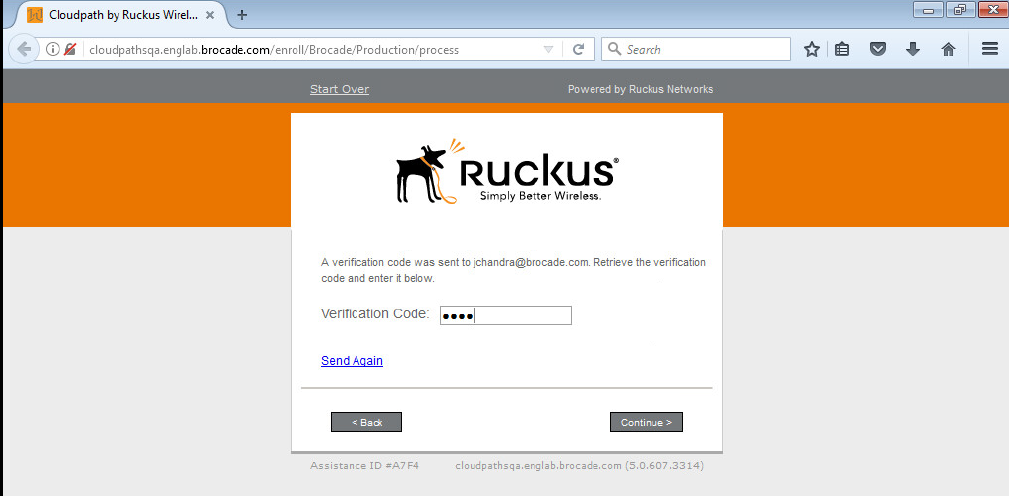
5. Provide the verication code and press Continue.
Cloudpath Information
Ruckus ICX Flexible Authentication with Cloudpath ES 5.0 Deployment Guide
74 53-1005026-02
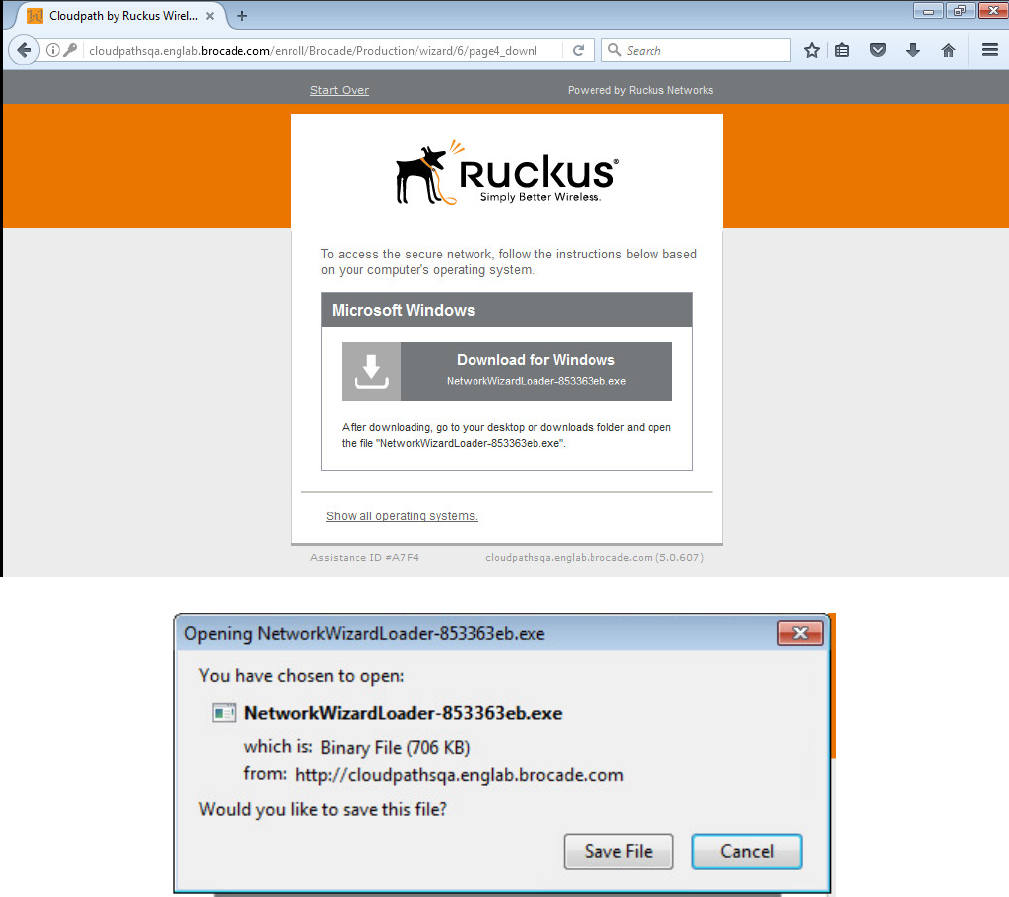
6. Download the application and install the certicate.
Cloudpath Information
Ruckus ICX Flexible Authentication with Cloudpath ES 5.0 Deployment Guide
53-1005026-02 75
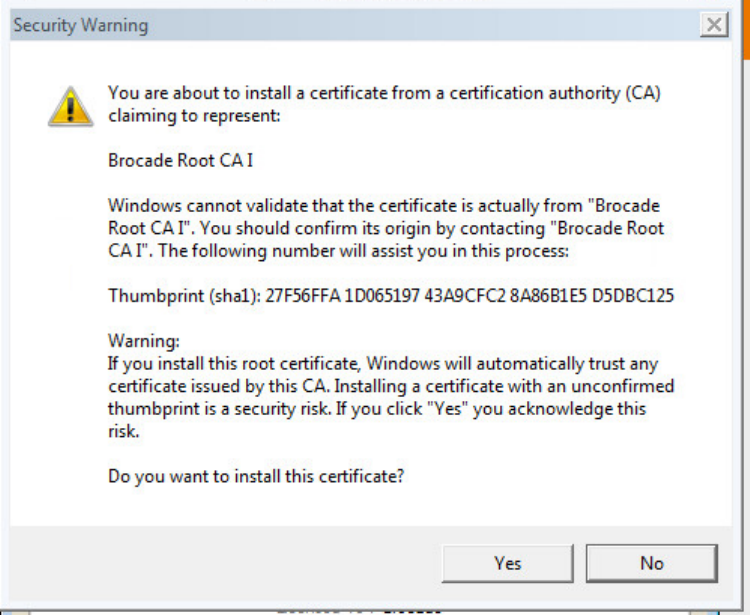
Cloudpath Information
Ruckus ICX Flexible Authentication with Cloudpath ES 5.0 Deployment Guide
76 53-1005026-02
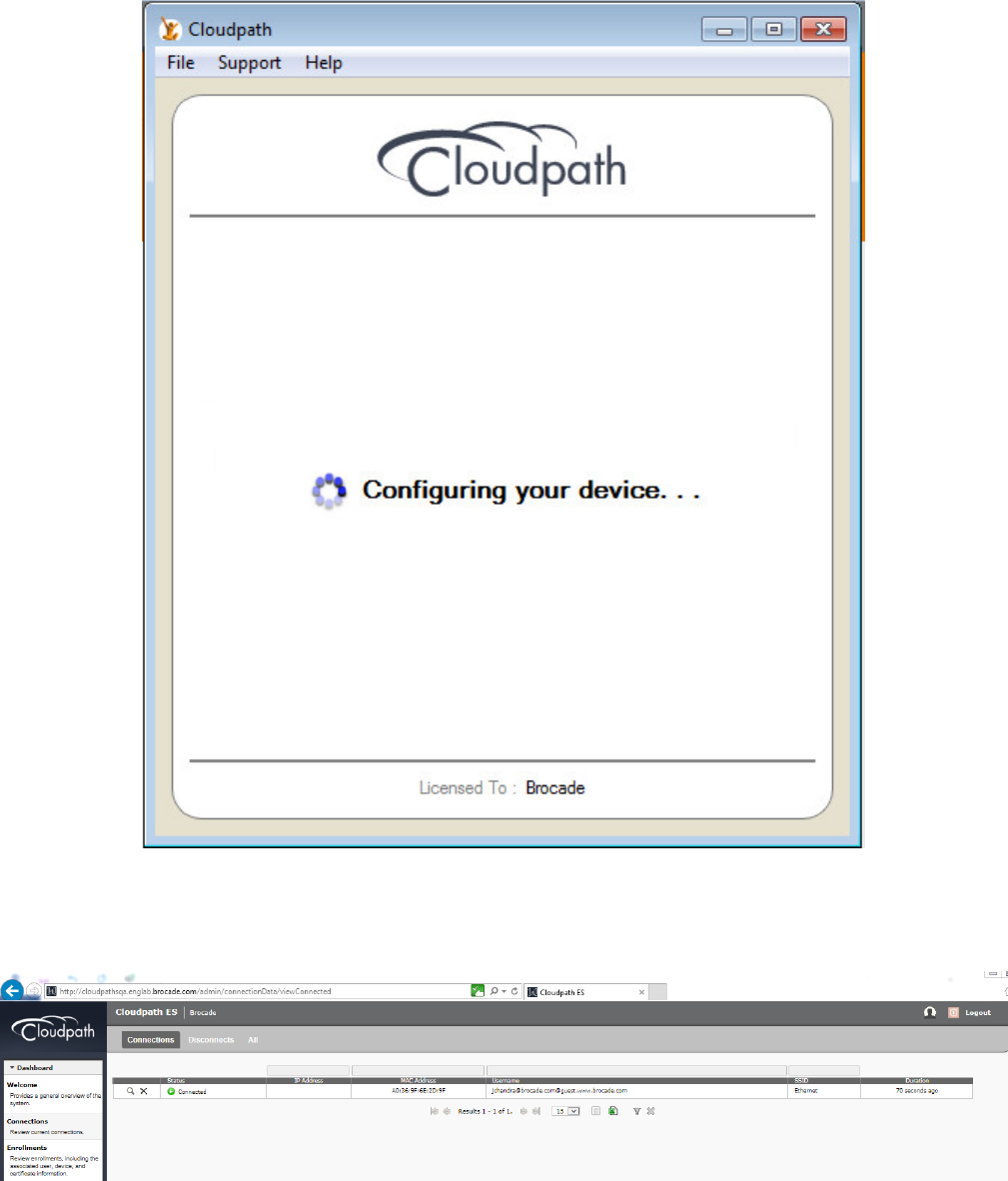
7. Disconnect and enable the network connection on the client.
8. Navigate to Connections and look for the guest user authentication. Click the search button to view the connection.
Cloudpath Information
Ruckus ICX Flexible Authentication with Cloudpath ES 5.0 Deployment Guide
53-1005026-02 77
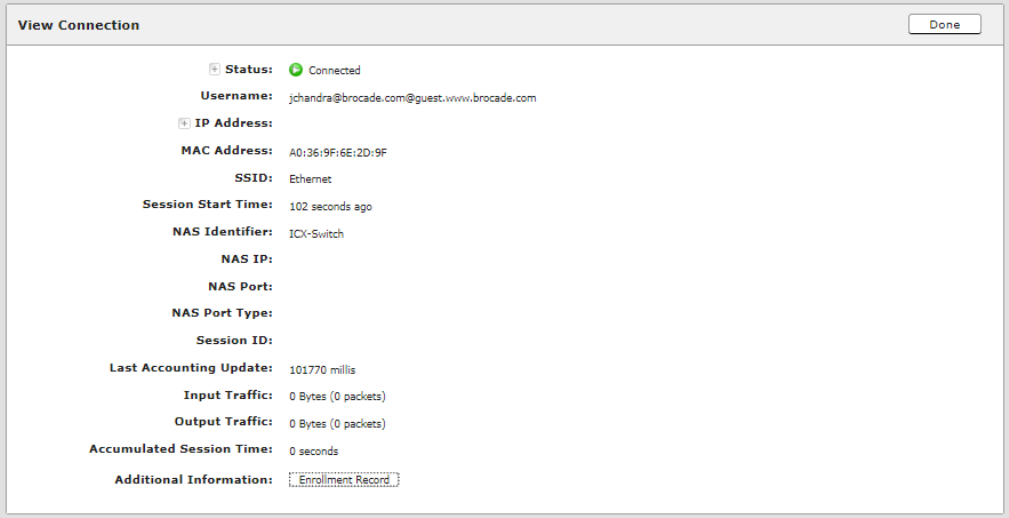
9. Click Enrollment Record for additional information.
Cloudpath Information
Ruckus ICX Flexible Authentication with Cloudpath ES 5.0 Deployment Guide
78 53-1005026-02
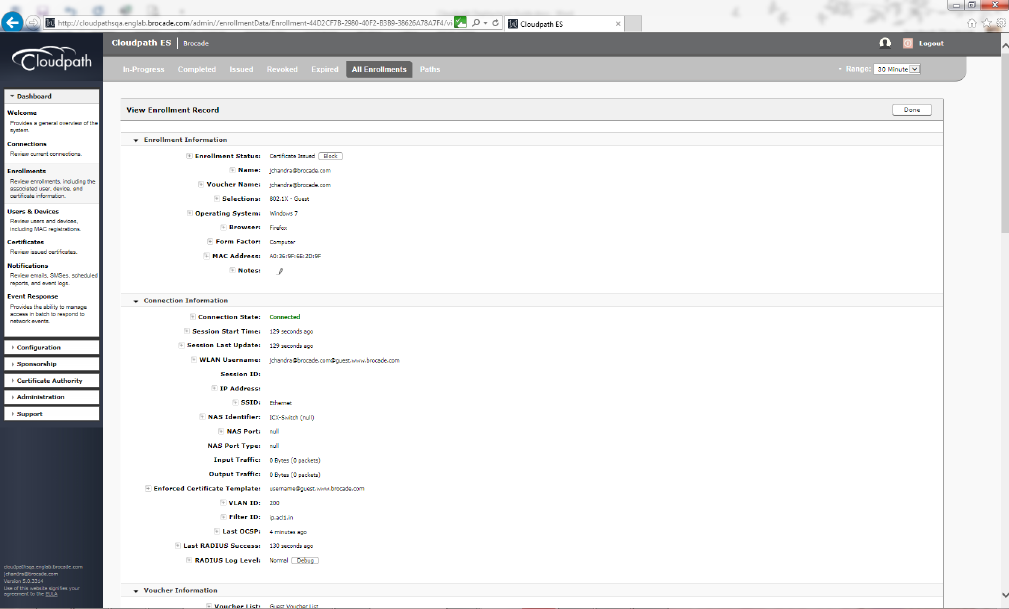
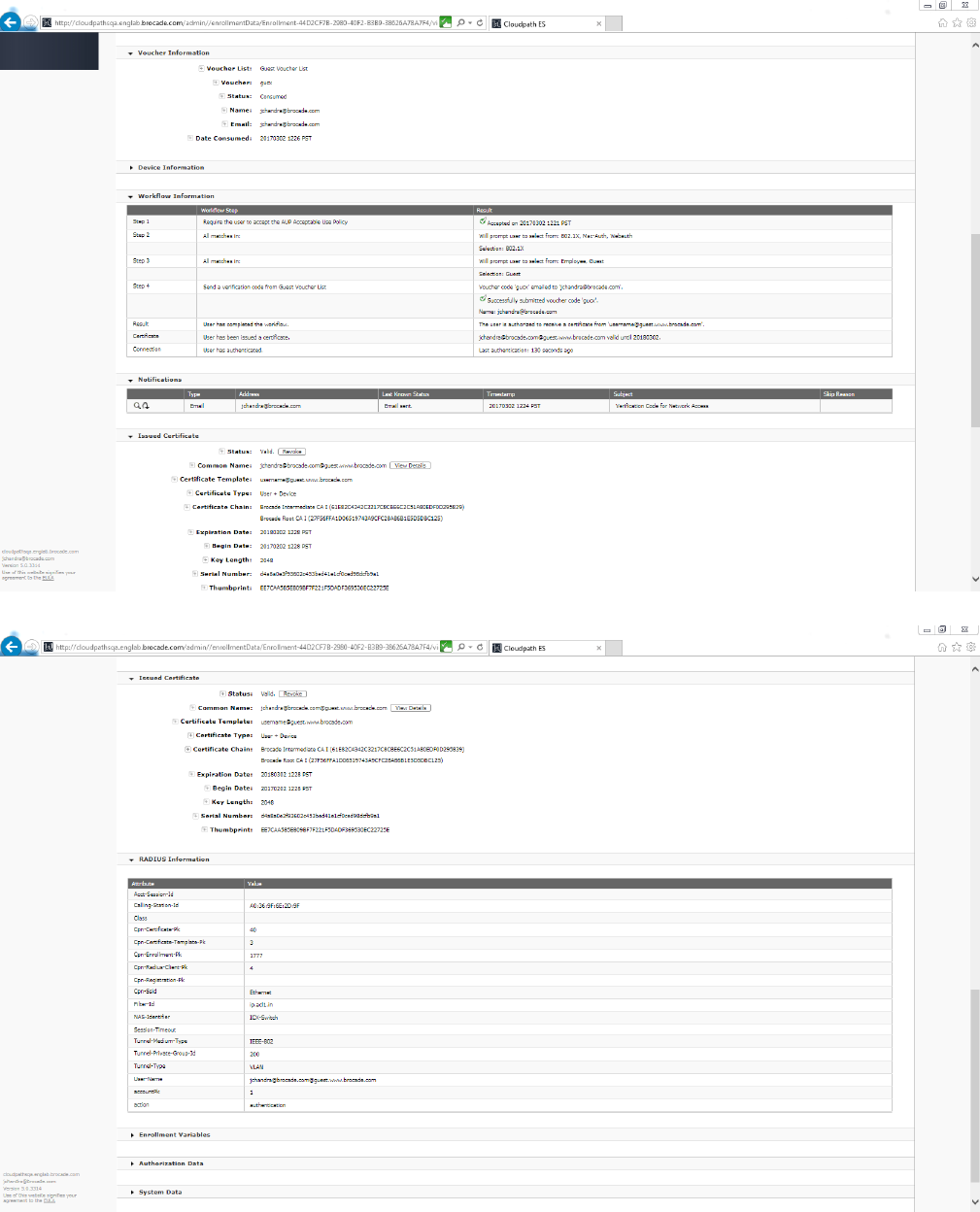
10. Check for VLAN ID, Filter ID, voucher, device and workow information for more details.
Cloudpath Information
Ruckus ICX Flexible Authentication with Cloudpath ES 5.0 Deployment Guide
53-1005026-02 79
Cloudpath Information
Ruckus ICX Flexible Authentication with Cloudpath ES 5.0 Deployment Guide
80 53-1005026-02
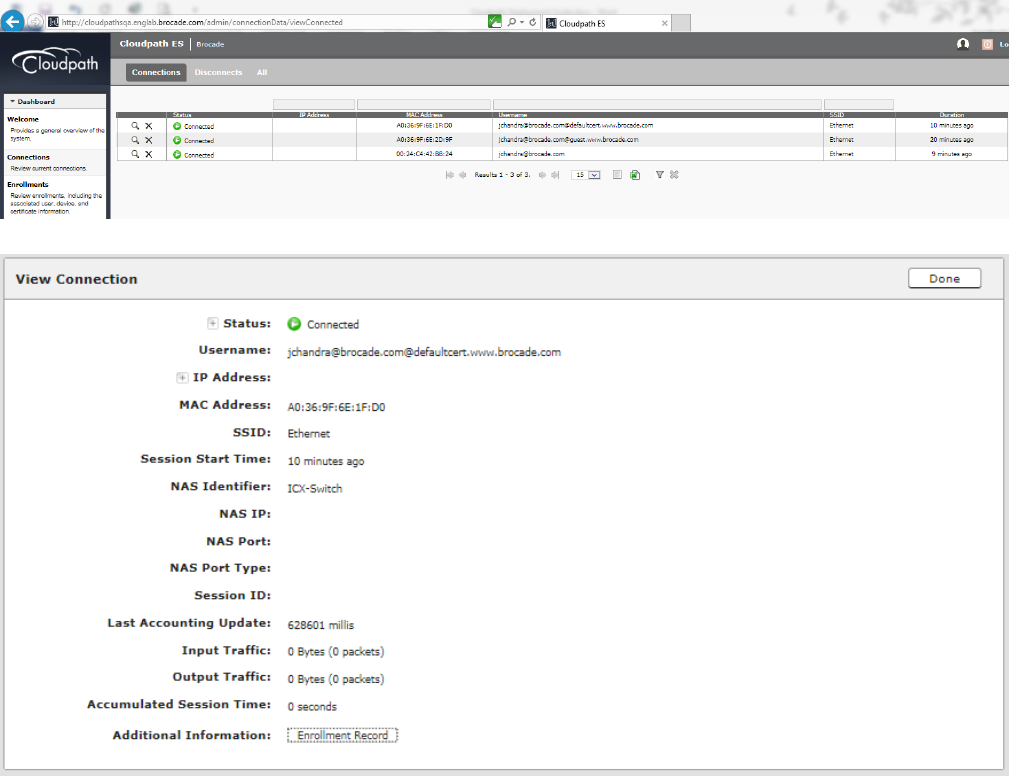
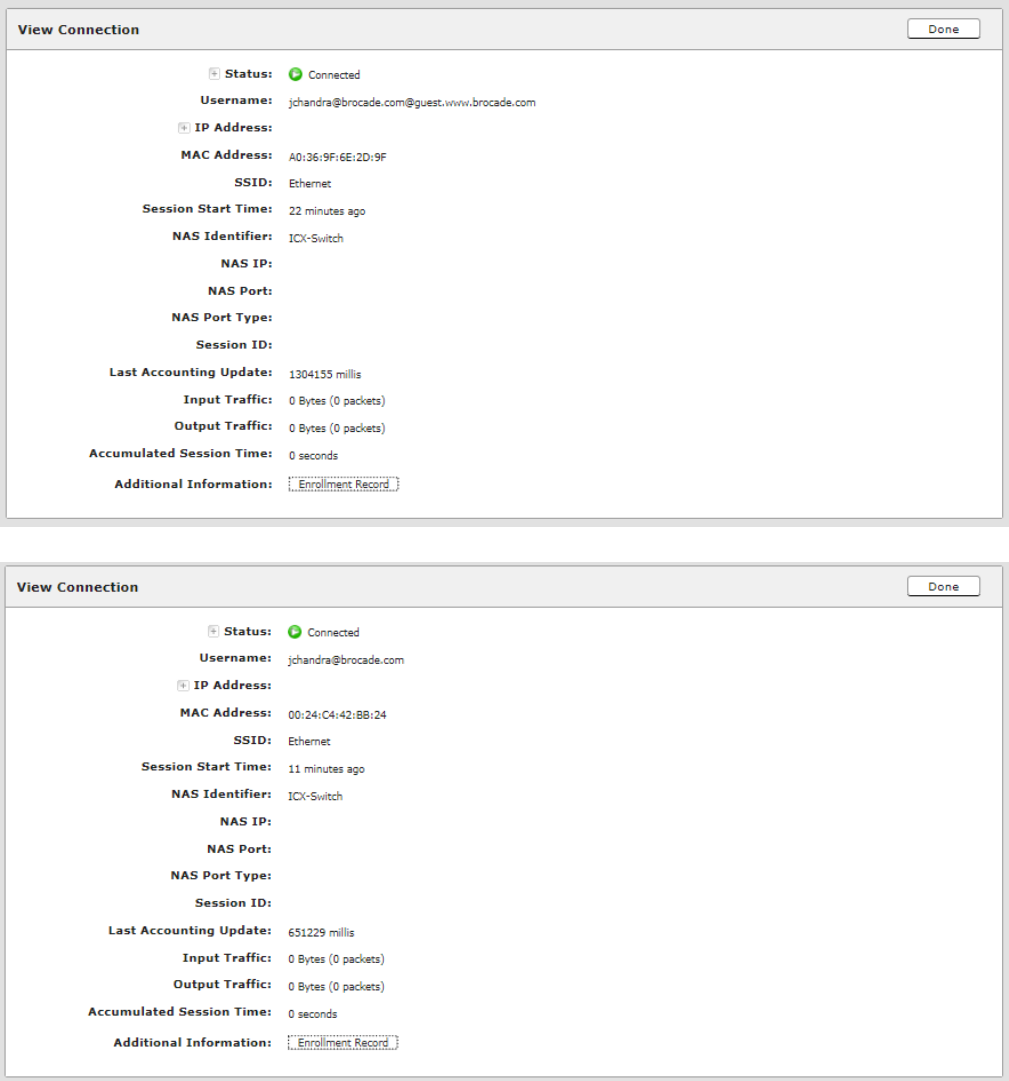
The combined output for port e 1/1/1 (PC1) and e 1/1/2 (PC behind the IP Phone) is displayed.
Cloudpath Information
Ruckus ICX Flexible Authentication with Cloudpath ES 5.0 Deployment Guide
53-1005026-02 81
Cloudpath Information
Ruckus ICX Flexible Authentication with Cloudpath ES 5.0 Deployment Guide
82 53-1005026-02

Summary
The use cases can be implemented based on the network conguration and implementation designed by the administrator using Ruckus
ICX devices and the Ruckus Cloudpath Enrollment System (ES).
Ruckus ICX Flexible Authentication with Cloudpath ES 5.0 Deployment Guide
53-1005026-02 83
