Ruckus Brocade Mobility RFS4000, RFS6000 And RFS7000 CLI Reference Guide, 5.3.0.0 RFS Controller Guide 5300 Cliguide
Mobility 5.3.0.0 RFS Controller CLI Reference Guide mobility-5300-controller-cliguide
2017-05-10
User Manual: Ruckus Mobility 5.3.0.0 RFS Controller CLI Reference Guide
Open the PDF directly: View PDF  .
.
Page Count: 928 [warning: Documents this large are best viewed by clicking the View PDF Link!]
- Contents
- About This Guide
- Introduction
- User Exec Mode Commands
- Privileged EXEC Mode Commands
- Global Configuration Commands
- In this chapter
- Global Configuration Commands
- aaa-policy
- aaa-tacacs-policy
- advanced-wips-policy
- br300
- br650
- br6511
- br71xx
- association-acl-policy
- auto-provisioning-policy
- captive portal
- clear
- critical-resource-policy
- customize
- device
- device-categorization
- dhcp-server-policy
- dns-whitelist
- do
- end
- event-system-policy
- firewall-policy
- host
- ip
- l2tpv3
- mac
- management-policy
- mint-policy
- nac-list
- no
- password-encryption
- profile
- radio-qos-policy
- radius-group
- radius-server-policy
- radius-user-pool-policy
- rf-domain
- rfs4000
- rfs6000
- rfs7000
- role-policy
- self
- smart-rf-policy
- wips-policy
- wlan
- wlan-qos-policy
- Common Commands
- Show Commands
- In this chapter
- show commands
- show
- adoption
- advanced-wips
- ap-upgrade
- boot
- captive-portal
- cdp
- clock
- cluster
- commands
- context
- critical-resources
- crypto
- debug
- debugging
- device-categorization
- event-history
- event-system-policy
- file
- firewall
- interface
- ip
- ip-access-list-stats
- l2tpv3
- licenses
- lldp
- logging
- mac-access-list-stats
- mac-address-table
- mint
- noc
- ntp
- password-encryption
- power
- pppoe-client
- privilege
- remote-debug
- reload
- rf-domain-manager
- role
- running-config
- session-changes
- session-config
- sessions
- smart-rf
- spanning-tree
- startup-config
- terminal
- timezone
- upgrade-status
- version
- vrrp
- what
- wireless
- wwan
- Profiles
- In this chapter
- Creating Profiles
- ap-upgrade
- br300
- arp
- auto-learn-staging-config
- autoinstall
- bridge commands
- cdp
- cluster
- configuration-persistence
- controller
- critical-resource
- crypto
- Crypto-auto-ipsec-secure Commands
- crypto-ikev1 policy commands
- crypto-ikev1-peer commands
- crypto map commands
- dscp-mapping
- email-notification
- enforce-version
- events
- ip
- l2tpv3
- nat-pool
- interface
- Interface Config Instance
- Interface vlan Instance
- led
- legacy-auto-downgrade
- legacy-auto-update
- lldp
- load-balancing
- logging
- mac-address-table
- mint
- misconfiguration-recovery-time
- monitor
- neighbor-inactivity-timeout
- neighbor-info-interval
- no
- noc
- ntp
- preferred-controller-group
- preferred-tunnel-controller
- power-config
- radius
- router
- rf-domain-manager
- spanning-tree
- tunnel-controller
- use
- vrrp
- wep-shared-key-auth
- Device Specific Commands
- AAA-Policy
- Auto-Provisioning-Policy
- Advanced-WIPS-Policy
- Association-ACL-Policy
- Access-list
- DHCP-Server-Policy
- Firewall-Policy
- MiNT-Policy
- Management-Policy
- RADIUS-Policy
- Radio-QoS-Policy
- Role-Policy
- Smart-RF-Policy
- WIPS-Policy
- WLAN-QoS-Policy
- Interface-Radio Commands
- In this chapter
- interface-radio Instance
- ack-timeout
- aggregation
- airtime-fairness
- antenna-gain
- antenna-mode
- beacon
- channel
- data-rates
- description
- dynamic-chain-selection
- guard-interval
- lock-rf-mode
- max-clients
- mesh
- no
- non-unicast
- off-channel-scan
- placement
- power
- preamble-short
- probe-response
- radio-tap-mode
- rf-mode
- rifs
- rts-threshold
- shutdown
- sniffer-redirect
- use
- wireless-client
- wlan
- Firewall Logging
- L2TPV3-Policy
- Router-Mode Commands
- Routing-Policy Commands
- AAA-TACACS-Policy
- Controller Managed WLAN Use Case

53-1002619-01
14 May 2012
®
Brocade Mobility RFS4000,
RFS6000 and RFS7000
CLI Reference Guide
Supporting software release 5.3.0.0 and later
Copyright © 2012 Brocade Communications Systems, Inc. All Rights Reserved.
Brocade, Brocade Assurance, the B-wing symbol, DCX, Fabric OS, MLX, SAN Health, VCS, and VDX are registered trademarks, and
AnyIO, Brocade One, CloudPlex, Effortless Networking, ICX, NET Health, OpenScript, and The Effortless Network are trademarks of
Brocade Communications Systems, Inc., in the United States and/or in other countries. Other brands, products, or service names
mentioned may be trademarks of their respective owners.
Notice: This document is for informational purposes only and does not set forth any warranty, expressed or implied, concerning
any equipment, equipment feature, or service offered or to be offered by Brocade. Brocade reserves the right to make changes to
this document at any time, without notice, and assumes no responsibility for its use. This informational document describes
features that may not be currently available. Contact a Brocade sales office for information on feature and product availability.
Export of technical data contained in this document may require an export license from the United States government.
The authors and Brocade Communications Systems, Inc. shall have no liability or responsibility to any person or entity with
respect to any loss, cost, liability, or damages arising from the information contained in this book or the computer programs that
accompany it.
The product described by this document may contain “open source” software covered by the GNU General Public License or other
open source license agreements. To find out which open source software is included in Brocade products, view the licensing
terms applicable to the open source software, and obtain a copy of the programming source code, please visit
http://www.brocade.com/support/oscd.
Brocade Communications Systems, Incorporated
Document History
Corporate and Latin American Headquarters
Brocade Communications Systems, Inc.
130 Holger Way
San Jose, CA 95134
Tel: 1-408-333-8000
Fax: 1-408-333-8101
E-mail: info@brocade.com
Asia-Pacific Headquarters
Brocade Communications Systems China HK, Ltd.
No. 1 Guanghua Road
Chao Yang District
Units 2718 and 2818
Beijing 100020, China
Tel: +8610 6588 8888
Fax: +8610 6588 9999
E-mail: china-info@brocade.com
European Headquarters
Brocade Communications Switzerland Sàrl
Centre Swissair
Tour B - 4ème étage
29, Route de l'Aéroport
Case Postale 105
CH-1215 Genève 15
Switzerland
Tel: +41 22 799 5640
Fax: +41 22 799 5641
E-mail: emea-info@brocade.com
Asia-Pacific Headquarters
Brocade Communications Systems Co., Ltd. (Shenzhen WFOE)
Citic Plaza
No. 233 Tian He Road North
Unit 1308 – 13th Floor
Guangzhou, China
Tel: +8620 3891 2000
Fax: +8620 3891 2111
E-mail: china-info@brocade.com
Title Publication number Summary of changes Date
Brocade Mobility RFS4000, RFS6000,
and RFS7000 CLI Reference Guide
53-1002313-01 New document June 2011
Brocade Mobility RFS4000, RFS6000,
and RFS7000 CLI Reference Guide
53-1002486-01 New Additions for software
version 5.2.0.0
November 2011
Brocade Mobility RFS4000, RFS6000,
and RFS7000 CLI Reference Guide
53-1002619-01 New Additions for software
version 5.3.0.0
May 2012

Brocade Mobility RFS4000, RFS6000, and RFS7000 CLI Reference Guide iii
53-1002619-01
Contents
About This Guide
In this chapter . . . . . . . . . . . . . . . . . . . . . . . . . . . . . . . . . . . . . . . . . . . xix
Supported hardware and software . . . . . . . . . . . . . . . . . . . . . . . . . . xix
Document Conventions . . . . . . . . . . . . . . . . . . . . . . . . . . . . . . . . . . . xix
Text formatting . . . . . . . . . . . . . . . . . . . . . . . . . . . . . . . . . . . . . . . xix
Notes. . . . . . . . . . . . . . . . . . . . . . . . . . . . . . . . . . . . . . . . . . . . . . . xx
Related publications . . . . . . . . . . . . . . . . . . . . . . . . . . . . . . . . . . . . . . xxi
Getting technical help . . . . . . . . . . . . . . . . . . . . . . . . . . . . . . . . . . . . .xxii
Chapter 1 Introduction
In this chapter . . . . . . . . . . . . . . . . . . . . . . . . . . . . . . . . . . . . . . . . . . . . 1
CLI Overview . . . . . . . . . . . . . . . . . . . . . . . . . . . . . . . . . . . . . . . . . . . . . 2
Getting Context Sensitive Help. . . . . . . . . . . . . . . . . . . . . . . . . . . . . . . 5
Using the No Command . . . . . . . . . . . . . . . . . . . . . . . . . . . . . . . . . . . . 6
Basic Conventions . . . . . . . . . . . . . . . . . . . . . . . . . . . . . . . . . . . . . 6
Using CLI Editing Features and Shortcuts . . . . . . . . . . . . . . . . . . . . . . 6
Moving the Cursor on the Command Line . . . . . . . . . . . . . . . . . . 7
Completing a Partial Command Name. . . . . . . . . . . . . . . . . . . . . 7
Command Output pagination . . . . . . . . . . . . . . . . . . . . . . . . . . . . 8
Creating Profiles. . . . . . . . . . . . . . . . . . . . . . . . . . . . . . . . . . . . . . . 8
Change the default profile by creating vlan 150 and
mapping to ge3 Physical interface . . . . . . . . . . . . . . . . . . . . . . . . 9
Remote Administration . . . . . . . . . . . . . . . . . . . . . . . . . . . . . . . . . 9
Chapter 2 User Exec Mode Commands
In this chapter . . . . . . . . . . . . . . . . . . . . . . . . . . . . . . . . . . . . . . . . . . . 13
iv Brocade Mobility RFS4000, RFS6000, and RFS7000 CLI Reference Guide
53-1002619-01
User Exec Commands. . . . . . . . . . . . . . . . . . . . . . . . . . . . . . . . . . . . . 14
ap-upgrade . . . . . . . . . . . . . . . . . . . . . . . . . . . . . . . . . . . . . . . . . . 14
change-passwd . . . . . . . . . . . . . . . . . . . . . . . . . . . . . . . . . . . . . .18
clear . . . . . . . . . . . . . . . . . . . . . . . . . . . . . . . . . . . . . . . . . . . . . . .19
clock . . . . . . . . . . . . . . . . . . . . . . . . . . . . . . . . . . . . . . . . . . . . . . . 22
cluster . . . . . . . . . . . . . . . . . . . . . . . . . . . . . . . . . . . . . . . . . . . . . .23
connect . . . . . . . . . . . . . . . . . . . . . . . . . . . . . . . . . . . . . . . . . . . . .23
crypto . . . . . . . . . . . . . . . . . . . . . . . . . . . . . . . . . . . . . . . . . . . . . . 24
disable . . . . . . . . . . . . . . . . . . . . . . . . . . . . . . . . . . . . . . . . . . . . .35
enable. . . . . . . . . . . . . . . . . . . . . . . . . . . . . . . . . . . . . . . . . . . . . .35
exit. . . . . . . . . . . . . . . . . . . . . . . . . . . . . . . . . . . . . . . . . . . . . . . . .36
logging . . . . . . . . . . . . . . . . . . . . . . . . . . . . . . . . . . . . . . . . . . . . .36
mint. . . . . . . . . . . . . . . . . . . . . . . . . . . . . . . . . . . . . . . . . . . . . . . . 37
no . . . . . . . . . . . . . . . . . . . . . . . . . . . . . . . . . . . . . . . . . . . . . . . . .39
page . . . . . . . . . . . . . . . . . . . . . . . . . . . . . . . . . . . . . . . . . . . . . . .42
ping . . . . . . . . . . . . . . . . . . . . . . . . . . . . . . . . . . . . . . . . . . . . . . . .42
ssh. . . . . . . . . . . . . . . . . . . . . . . . . . . . . . . . . . . . . . . . . . . . . . . . .43
telnet. . . . . . . . . . . . . . . . . . . . . . . . . . . . . . . . . . . . . . . . . . . . . . .44
terminal . . . . . . . . . . . . . . . . . . . . . . . . . . . . . . . . . . . . . . . . . . . .44
time-it . . . . . . . . . . . . . . . . . . . . . . . . . . . . . . . . . . . . . . . . . . . . . .45
traceroute . . . . . . . . . . . . . . . . . . . . . . . . . . . . . . . . . . . . . . . . . . .46
watch . . . . . . . . . . . . . . . . . . . . . . . . . . . . . . . . . . . . . . . . . . . . . . 47
Chapter 3 Privileged EXEC Mode Commands
In this chapter . . . . . . . . . . . . . . . . . . . . . . . . . . . . . . . . . . . . . . . . . . . 49
Brocade Mobility RFS4000, RFS6000, and RFS7000 CLI Reference Guide v
53-1002619-01
Privileged Exec Mode Commands . . . . . . . . . . . . . . . . . . . . . . . . . . .50
ap-upgrade . . . . . . . . . . . . . . . . . . . . . . . . . . . . . . . . . . . . . . . . . . 52
archive . . . . . . . . . . . . . . . . . . . . . . . . . . . . . . . . . . . . . . . . . . . . . 55
boot. . . . . . . . . . . . . . . . . . . . . . . . . . . . . . . . . . . . . . . . . . . . . . . . 57
cd . . . . . . . . . . . . . . . . . . . . . . . . . . . . . . . . . . . . . . . . . . . . . . . . . 57
change-passwd . . . . . . . . . . . . . . . . . . . . . . . . . . . . . . . . . . . . . .58
clear . . . . . . . . . . . . . . . . . . . . . . . . . . . . . . . . . . . . . . . . . . . . . . .59
clock . . . . . . . . . . . . . . . . . . . . . . . . . . . . . . . . . . . . . . . . . . . . . . . 62
cluster . . . . . . . . . . . . . . . . . . . . . . . . . . . . . . . . . . . . . . . . . . . . . .63
configure. . . . . . . . . . . . . . . . . . . . . . . . . . . . . . . . . . . . . . . . . . . .63
connect . . . . . . . . . . . . . . . . . . . . . . . . . . . . . . . . . . . . . . . . . . . . .64
copy. . . . . . . . . . . . . . . . . . . . . . . . . . . . . . . . . . . . . . . . . . . . . . . . 65
crypto . . . . . . . . . . . . . . . . . . . . . . . . . . . . . . . . . . . . . . . . . . . . . .66
delete . . . . . . . . . . . . . . . . . . . . . . . . . . . . . . . . . . . . . . . . . . . . . . 77
disable . . . . . . . . . . . . . . . . . . . . . . . . . . . . . . . . . . . . . . . . . . . . .78
diff. . . . . . . . . . . . . . . . . . . . . . . . . . . . . . . . . . . . . . . . . . . . . . . . . 78
dir . . . . . . . . . . . . . . . . . . . . . . . . . . . . . . . . . . . . . . . . . . . . . . . . .79
edit . . . . . . . . . . . . . . . . . . . . . . . . . . . . . . . . . . . . . . . . . . . . . . . . 81
enable. . . . . . . . . . . . . . . . . . . . . . . . . . . . . . . . . . . . . . . . . . . . . .82
erase . . . . . . . . . . . . . . . . . . . . . . . . . . . . . . . . . . . . . . . . . . . . . . .82
exit. . . . . . . . . . . . . . . . . . . . . . . . . . . . . . . . . . . . . . . . . . . . . . . . .83
format . . . . . . . . . . . . . . . . . . . . . . . . . . . . . . . . . . . . . . . . . . . . . . 83
halt . . . . . . . . . . . . . . . . . . . . . . . . . . . . . . . . . . . . . . . . . . . . . . . .84
join-cluster . . . . . . . . . . . . . . . . . . . . . . . . . . . . . . . . . . . . . . . . . .85
logging . . . . . . . . . . . . . . . . . . . . . . . . . . . . . . . . . . . . . . . . . . . . .86
mkdir. . . . . . . . . . . . . . . . . . . . . . . . . . . . . . . . . . . . . . . . . . . . . . .86
mint. . . . . . . . . . . . . . . . . . . . . . . . . . . . . . . . . . . . . . . . . . . . . . . . 87
more . . . . . . . . . . . . . . . . . . . . . . . . . . . . . . . . . . . . . . . . . . . . . . . 89
no . . . . . . . . . . . . . . . . . . . . . . . . . . . . . . . . . . . . . . . . . . . . . . . . .90
page . . . . . . . . . . . . . . . . . . . . . . . . . . . . . . . . . . . . . . . . . . . . . . .93
ping . . . . . . . . . . . . . . . . . . . . . . . . . . . . . . . . . . . . . . . . . . . . . . . .94
pwd . . . . . . . . . . . . . . . . . . . . . . . . . . . . . . . . . . . . . . . . . . . . . . . .94
reload . . . . . . . . . . . . . . . . . . . . . . . . . . . . . . . . . . . . . . . . . . . . . .95
rename . . . . . . . . . . . . . . . . . . . . . . . . . . . . . . . . . . . . . . . . . . . . .96
rmdir . . . . . . . . . . . . . . . . . . . . . . . . . . . . . . . . . . . . . . . . . . . . . . . 97
self . . . . . . . . . . . . . . . . . . . . . . . . . . . . . . . . . . . . . . . . . . . . . . . .98
ssh. . . . . . . . . . . . . . . . . . . . . . . . . . . . . . . . . . . . . . . . . . . . . . . . .98
telnet. . . . . . . . . . . . . . . . . . . . . . . . . . . . . . . . . . . . . . . . . . . . . . .99
terminal . . . . . . . . . . . . . . . . . . . . . . . . . . . . . . . . . . . . . . . . . . .100
time-it . . . . . . . . . . . . . . . . . . . . . . . . . . . . . . . . . . . . . . . . . . . . .101
traceroute . . . . . . . . . . . . . . . . . . . . . . . . . . . . . . . . . . . . . . . . . .102
upgrade . . . . . . . . . . . . . . . . . . . . . . . . . . . . . . . . . . . . . . . . . . .102
upgrade-abort . . . . . . . . . . . . . . . . . . . . . . . . . . . . . . . . . . . . . .103
watch . . . . . . . . . . . . . . . . . . . . . . . . . . . . . . . . . . . . . . . . . . . . .104
Chapter 4 Global Configuration Commands
In this chapter . . . . . . . . . . . . . . . . . . . . . . . . . . . . . . . . . . . . . . . . . .105
vi Brocade Mobility RFS4000, RFS6000, and RFS7000 CLI Reference Guide
53-1002619-01
Global Configuration Commands. . . . . . . . . . . . . . . . . . . . . . . . . . .106
aaa-policy . . . . . . . . . . . . . . . . . . . . . . . . . . . . . . . . . . . . . . . . . .108
aaa-tacacs-policy . . . . . . . . . . . . . . . . . . . . . . . . . . . . . . . . . . . .109
advanced-wips-policy. . . . . . . . . . . . . . . . . . . . . . . . . . . . . . . . .110
br300 . . . . . . . . . . . . . . . . . . . . . . . . . . . . . . . . . . . . . . . . . . . . .110
br650 . . . . . . . . . . . . . . . . . . . . . . . . . . . . . . . . . . . . . . . . . . . . .111
br6511 . . . . . . . . . . . . . . . . . . . . . . . . . . . . . . . . . . . . . . . . . . . .112
br71xx . . . . . . . . . . . . . . . . . . . . . . . . . . . . . . . . . . . . . . . . . . . . .112
association-acl-policy. . . . . . . . . . . . . . . . . . . . . . . . . . . . . . . . .113
auto-provisioning-policy . . . . . . . . . . . . . . . . . . . . . . . . . . . . . . .114
captive portal . . . . . . . . . . . . . . . . . . . . . . . . . . . . . . . . . . . . . . .114
clear . . . . . . . . . . . . . . . . . . . . . . . . . . . . . . . . . . . . . . . . . . . . . .129
critical-resource-policy. . . . . . . . . . . . . . . . . . . . . . . . . . . . . . . .130
customize . . . . . . . . . . . . . . . . . . . . . . . . . . . . . . . . . . . . . . . . . .133
device . . . . . . . . . . . . . . . . . . . . . . . . . . . . . . . . . . . . . . . . . . . . .139
device-categorization. . . . . . . . . . . . . . . . . . . . . . . . . . . . . . . . .141
dhcp-server-policy . . . . . . . . . . . . . . . . . . . . . . . . . . . . . . . . . . .145
dns-whitelist . . . . . . . . . . . . . . . . . . . . . . . . . . . . . . . . . . . . . . . .145
do . . . . . . . . . . . . . . . . . . . . . . . . . . . . . . . . . . . . . . . . . . . . . . . .149
end . . . . . . . . . . . . . . . . . . . . . . . . . . . . . . . . . . . . . . . . . . . . . . .159
event-system-policy . . . . . . . . . . . . . . . . . . . . . . . . . . . . . . . . . .159
firewall-policy . . . . . . . . . . . . . . . . . . . . . . . . . . . . . . . . . . . . . . .179
host . . . . . . . . . . . . . . . . . . . . . . . . . . . . . . . . . . . . . . . . . . . . . . .179
ip . . . . . . . . . . . . . . . . . . . . . . . . . . . . . . . . . . . . . . . . . . . . . . . . .180
l2tpv3 . . . . . . . . . . . . . . . . . . . . . . . . . . . . . . . . . . . . . . . . . . . . .181
mac . . . . . . . . . . . . . . . . . . . . . . . . . . . . . . . . . . . . . . . . . . . . . . .182
management-policy . . . . . . . . . . . . . . . . . . . . . . . . . . . . . . . . . .183
mint-policy . . . . . . . . . . . . . . . . . . . . . . . . . . . . . . . . . . . . . . . . .184
nac-list . . . . . . . . . . . . . . . . . . . . . . . . . . . . . . . . . . . . . . . . . . . .185
no . . . . . . . . . . . . . . . . . . . . . . . . . . . . . . . . . . . . . . . . . . . . . . . .189
password-encryption . . . . . . . . . . . . . . . . . . . . . . . . . . . . . . . . .190
profile . . . . . . . . . . . . . . . . . . . . . . . . . . . . . . . . . . . . . . . . . . . . .191
radio-qos-policy . . . . . . . . . . . . . . . . . . . . . . . . . . . . . . . . . . . . .194
radius-group . . . . . . . . . . . . . . . . . . . . . . . . . . . . . . . . . . . . . . . .194
radius-server-policy . . . . . . . . . . . . . . . . . . . . . . . . . . . . . . . . . .195
radius-user-pool-policy. . . . . . . . . . . . . . . . . . . . . . . . . . . . . . . .196
rf-domain . . . . . . . . . . . . . . . . . . . . . . . . . . . . . . . . . . . . . . . . . .196
rfs4000. . . . . . . . . . . . . . . . . . . . . . . . . . . . . . . . . . . . . . . . . . . .213
rfs6000. . . . . . . . . . . . . . . . . . . . . . . . . . . . . . . . . . . . . . . . . . . .213
rfs7000. . . . . . . . . . . . . . . . . . . . . . . . . . . . . . . . . . . . . . . . . . . .214
role-policy . . . . . . . . . . . . . . . . . . . . . . . . . . . . . . . . . . . . . . . . . .214
self . . . . . . . . . . . . . . . . . . . . . . . . . . . . . . . . . . . . . . . . . . . . . . .215
smart-rf-policy . . . . . . . . . . . . . . . . . . . . . . . . . . . . . . . . . . . . . .216
wips-policy . . . . . . . . . . . . . . . . . . . . . . . . . . . . . . . . . . . . . . . . .216
wlan. . . . . . . . . . . . . . . . . . . . . . . . . . . . . . . . . . . . . . . . . . . . . . . 217
wlan-qos-policy. . . . . . . . . . . . . . . . . . . . . . . . . . . . . . . . . . . . . .252
Chapter 5 Common Commands
In this chapter . . . . . . . . . . . . . . . . . . . . . . . . . . . . . . . . . . . . . . . . . .255
Brocade Mobility RFS4000, RFS6000, and RFS7000 CLI Reference Guide vii
53-1002619-01
Common Commands . . . . . . . . . . . . . . . . . . . . . . . . . . . . . . . . . . . .255
clrscr . . . . . . . . . . . . . . . . . . . . . . . . . . . . . . . . . . . . . . . . . . . . . .255
commit . . . . . . . . . . . . . . . . . . . . . . . . . . . . . . . . . . . . . . . . . . . .256
end . . . . . . . . . . . . . . . . . . . . . . . . . . . . . . . . . . . . . . . . . . . . . . .257
exit. . . . . . . . . . . . . . . . . . . . . . . . . . . . . . . . . . . . . . . . . . . . . . . .257
help . . . . . . . . . . . . . . . . . . . . . . . . . . . . . . . . . . . . . . . . . . . . . . .258
no . . . . . . . . . . . . . . . . . . . . . . . . . . . . . . . . . . . . . . . . . . . . . . . .262
revert. . . . . . . . . . . . . . . . . . . . . . . . . . . . . . . . . . . . . . . . . . . . . .264
service . . . . . . . . . . . . . . . . . . . . . . . . . . . . . . . . . . . . . . . . . . . .265
show . . . . . . . . . . . . . . . . . . . . . . . . . . . . . . . . . . . . . . . . . . . . . .290
write . . . . . . . . . . . . . . . . . . . . . . . . . . . . . . . . . . . . . . . . . . . . . .291
Chapter 6 Show Commands
In this chapter . . . . . . . . . . . . . . . . . . . . . . . . . . . . . . . . . . . . . . . . . .293
viii Brocade Mobility RFS4000, RFS6000, and RFS7000 CLI Reference Guide
53-1002619-01
show commands . . . . . . . . . . . . . . . . . . . . . . . . . . . . . . . . . . . . . . . .293
show . . . . . . . . . . . . . . . . . . . . . . . . . . . . . . . . . . . . . . . . . . . . . .295
adoption . . . . . . . . . . . . . . . . . . . . . . . . . . . . . . . . . . . . . . . . . . .298
advanced-wips . . . . . . . . . . . . . . . . . . . . . . . . . . . . . . . . . . . . . .300
ap-upgrade . . . . . . . . . . . . . . . . . . . . . . . . . . . . . . . . . . . . . . . . .302
boot. . . . . . . . . . . . . . . . . . . . . . . . . . . . . . . . . . . . . . . . . . . . . . .303
captive-portal . . . . . . . . . . . . . . . . . . . . . . . . . . . . . . . . . . . . . . .304
cdp . . . . . . . . . . . . . . . . . . . . . . . . . . . . . . . . . . . . . . . . . . . . . . .306
clock . . . . . . . . . . . . . . . . . . . . . . . . . . . . . . . . . . . . . . . . . . . . . .308
cluster . . . . . . . . . . . . . . . . . . . . . . . . . . . . . . . . . . . . . . . . . . . . .308
commands . . . . . . . . . . . . . . . . . . . . . . . . . . . . . . . . . . . . . . . . .310
context . . . . . . . . . . . . . . . . . . . . . . . . . . . . . . . . . . . . . . . . . . . .311
critical-resources . . . . . . . . . . . . . . . . . . . . . . . . . . . . . . . . . . . .312
crypto . . . . . . . . . . . . . . . . . . . . . . . . . . . . . . . . . . . . . . . . . . . . .313
debug . . . . . . . . . . . . . . . . . . . . . . . . . . . . . . . . . . . . . . . . . . . . .315
debugging. . . . . . . . . . . . . . . . . . . . . . . . . . . . . . . . . . . . . . . . . . 317
device-categorization. . . . . . . . . . . . . . . . . . . . . . . . . . . . . . . . .319
event-history. . . . . . . . . . . . . . . . . . . . . . . . . . . . . . . . . . . . . . . .319
event-system-policy . . . . . . . . . . . . . . . . . . . . . . . . . . . . . . . . . .320
file . . . . . . . . . . . . . . . . . . . . . . . . . . . . . . . . . . . . . . . . . . . . . . . .321
firewall . . . . . . . . . . . . . . . . . . . . . . . . . . . . . . . . . . . . . . . . . . . .322
interface . . . . . . . . . . . . . . . . . . . . . . . . . . . . . . . . . . . . . . . . . . .325
ip . . . . . . . . . . . . . . . . . . . . . . . . . . . . . . . . . . . . . . . . . . . . . . . . .327
ip-access-list-stats . . . . . . . . . . . . . . . . . . . . . . . . . . . . . . . . . . .333
l2tpv3 . . . . . . . . . . . . . . . . . . . . . . . . . . . . . . . . . . . . . . . . . . . . .334
licenses. . . . . . . . . . . . . . . . . . . . . . . . . . . . . . . . . . . . . . . . . . . .336
lldp . . . . . . . . . . . . . . . . . . . . . . . . . . . . . . . . . . . . . . . . . . . . . . .336
logging . . . . . . . . . . . . . . . . . . . . . . . . . . . . . . . . . . . . . . . . . . . .337
mac-access-list-stats . . . . . . . . . . . . . . . . . . . . . . . . . . . . . . . . .338
mac-address-table . . . . . . . . . . . . . . . . . . . . . . . . . . . . . . . . . . .339
mint. . . . . . . . . . . . . . . . . . . . . . . . . . . . . . . . . . . . . . . . . . . . . . .340
noc . . . . . . . . . . . . . . . . . . . . . . . . . . . . . . . . . . . . . . . . . . . . . . .342
ntp. . . . . . . . . . . . . . . . . . . . . . . . . . . . . . . . . . . . . . . . . . . . . . . .344
password-encryption . . . . . . . . . . . . . . . . . . . . . . . . . . . . . . . . .345
power . . . . . . . . . . . . . . . . . . . . . . . . . . . . . . . . . . . . . . . . . . . . .346
pppoe-client . . . . . . . . . . . . . . . . . . . . . . . . . . . . . . . . . . . . . . . .347
privilege . . . . . . . . . . . . . . . . . . . . . . . . . . . . . . . . . . . . . . . . . . .348
remote-debug . . . . . . . . . . . . . . . . . . . . . . . . . . . . . . . . . . . . . . .348
reload . . . . . . . . . . . . . . . . . . . . . . . . . . . . . . . . . . . . . . . . . . . . .349
rf-domain-manager . . . . . . . . . . . . . . . . . . . . . . . . . . . . . . . . . .350
role . . . . . . . . . . . . . . . . . . . . . . . . . . . . . . . . . . . . . . . . . . . . . . .350
running-config . . . . . . . . . . . . . . . . . . . . . . . . . . . . . . . . . . . . . .351
session-changes . . . . . . . . . . . . . . . . . . . . . . . . . . . . . . . . . . . .355
session-config . . . . . . . . . . . . . . . . . . . . . . . . . . . . . . . . . . . . . .355
sessions . . . . . . . . . . . . . . . . . . . . . . . . . . . . . . . . . . . . . . . . . . .356
smart-rf. . . . . . . . . . . . . . . . . . . . . . . . . . . . . . . . . . . . . . . . . . . .357
spanning-tree . . . . . . . . . . . . . . . . . . . . . . . . . . . . . . . . . . . . . . .359
startup-config . . . . . . . . . . . . . . . . . . . . . . . . . . . . . . . . . . . . . . .362
terminal . . . . . . . . . . . . . . . . . . . . . . . . . . . . . . . . . . . . . . . . . . .363
timezone. . . . . . . . . . . . . . . . . . . . . . . . . . . . . . . . . . . . . . . . . . .363
upgrade-status . . . . . . . . . . . . . . . . . . . . . . . . . . . . . . . . . . . . . .364
version . . . . . . . . . . . . . . . . . . . . . . . . . . . . . . . . . . . . . . . . . . . .365
Brocade Mobility RFS4000, RFS6000, and RFS7000 CLI Reference Guide ix
53-1002619-01
vrrp . . . . . . . . . . . . . . . . . . . . . . . . . . . . . . . . . . . . . . . . . . . . . . .366
what . . . . . . . . . . . . . . . . . . . . . . . . . . . . . . . . . . . . . . . . . . . . . .367
wireless. . . . . . . . . . . . . . . . . . . . . . . . . . . . . . . . . . . . . . . . . . . .368
wwan. . . . . . . . . . . . . . . . . . . . . . . . . . . . . . . . . . . . . . . . . . . . . .377
Chapter 7 Profiles
In this chapter . . . . . . . . . . . . . . . . . . . . . . . . . . . . . . . . . . . . . . . . . .379
x Brocade Mobility RFS4000, RFS6000, and RFS7000 CLI Reference Guide
53-1002619-01
Creating Profiles . . . . . . . . . . . . . . . . . . . . . . . . . . . . . . . . . . . . . . . .380
ap-upgrade . . . . . . . . . . . . . . . . . . . . . . . . . . . . . . . . . . . . . . . . .381
br300 . . . . . . . . . . . . . . . . . . . . . . . . . . . . . . . . . . . . . . . . . . . . .382
arp. . . . . . . . . . . . . . . . . . . . . . . . . . . . . . . . . . . . . . . . . . . . . . . .383
auto-learn-staging-config. . . . . . . . . . . . . . . . . . . . . . . . . . . . . .384
autoinstall. . . . . . . . . . . . . . . . . . . . . . . . . . . . . . . . . . . . . . . . . .385
bridge commands . . . . . . . . . . . . . . . . . . . . . . . . . . . . . . . . . . .386
cdp . . . . . . . . . . . . . . . . . . . . . . . . . . . . . . . . . . . . . . . . . . . . . . .396
cluster . . . . . . . . . . . . . . . . . . . . . . . . . . . . . . . . . . . . . . . . . . . . .397
configuration-persistence . . . . . . . . . . . . . . . . . . . . . . . . . . . . .399
controller. . . . . . . . . . . . . . . . . . . . . . . . . . . . . . . . . . . . . . . . . . .400
critical-resource . . . . . . . . . . . . . . . . . . . . . . . . . . . . . . . . . . . . .402
crypto . . . . . . . . . . . . . . . . . . . . . . . . . . . . . . . . . . . . . . . . . . . . .404
Crypto-auto-ipsec-secure Commands. . . . . . . . . . . . . . . . . . . .409
crypto-ikev1 policy commands . . . . . . . . . . . . . . . . . . . . . . . . .412
crypto-ikev1-peer commands . . . . . . . . . . . . . . . . . . . . . . . . . .416
crypto map commands . . . . . . . . . . . . . . . . . . . . . . . . . . . . . . .421
dscp-mapping. . . . . . . . . . . . . . . . . . . . . . . . . . . . . . . . . . . . . . .427
email-notification . . . . . . . . . . . . . . . . . . . . . . . . . . . . . . . . . . . .428
enforce-version. . . . . . . . . . . . . . . . . . . . . . . . . . . . . . . . . . . . . .430
events . . . . . . . . . . . . . . . . . . . . . . . . . . . . . . . . . . . . . . . . . . . . .431
ip . . . . . . . . . . . . . . . . . . . . . . . . . . . . . . . . . . . . . . . . . . . . . . . . .432
l2tpv3 . . . . . . . . . . . . . . . . . . . . . . . . . . . . . . . . . . . . . . . . . . . . .436
nat-pool. . . . . . . . . . . . . . . . . . . . . . . . . . . . . . . . . . . . . . . . . . . .438
interface . . . . . . . . . . . . . . . . . . . . . . . . . . . . . . . . . . . . . . . . . . .440
Interface Config Instance . . . . . . . . . . . . . . . . . . . . . . . . . . . . .442
Interface vlan Instance . . . . . . . . . . . . . . . . . . . . . . . . . . . . . . .458
led . . . . . . . . . . . . . . . . . . . . . . . . . . . . . . . . . . . . . . . . . . . . . . . .466
legacy-auto-downgrade . . . . . . . . . . . . . . . . . . . . . . . . . . . . . . .467
legacy-auto-update . . . . . . . . . . . . . . . . . . . . . . . . . . . . . . . . . .468
lldp . . . . . . . . . . . . . . . . . . . . . . . . . . . . . . . . . . . . . . . . . . . . . . .468
load-balancing . . . . . . . . . . . . . . . . . . . . . . . . . . . . . . . . . . . . . .469
logging . . . . . . . . . . . . . . . . . . . . . . . . . . . . . . . . . . . . . . . . . . . . 474
mac-address-table . . . . . . . . . . . . . . . . . . . . . . . . . . . . . . . . . . .475
mint. . . . . . . . . . . . . . . . . . . . . . . . . . . . . . . . . . . . . . . . . . . . . . . 476
misconfiguration-recovery-time . . . . . . . . . . . . . . . . . . . . . . . .479
monitor . . . . . . . . . . . . . . . . . . . . . . . . . . . . . . . . . . . . . . . . . . . .480
neighbor-inactivity-timeout . . . . . . . . . . . . . . . . . . . . . . . . . . . .481
neighbor-info-interval. . . . . . . . . . . . . . . . . . . . . . . . . . . . . . . . .482
no . . . . . . . . . . . . . . . . . . . . . . . . . . . . . . . . . . . . . . . . . . . . . . . .482
noc . . . . . . . . . . . . . . . . . . . . . . . . . . . . . . . . . . . . . . . . . . . . . . .485
ntp. . . . . . . . . . . . . . . . . . . . . . . . . . . . . . . . . . . . . . . . . . . . . . . .485
preferred-controller-group . . . . . . . . . . . . . . . . . . . . . . . . . . . . .487
preferred-tunnel-controller . . . . . . . . . . . . . . . . . . . . . . . . . . . .488
power-config . . . . . . . . . . . . . . . . . . . . . . . . . . . . . . . . . . . . . . . .488
radius . . . . . . . . . . . . . . . . . . . . . . . . . . . . . . . . . . . . . . . . . . . . .489
router . . . . . . . . . . . . . . . . . . . . . . . . . . . . . . . . . . . . . . . . . . . . .490
rf-domain-manager . . . . . . . . . . . . . . . . . . . . . . . . . . . . . . . . . .491
spanning-tree . . . . . . . . . . . . . . . . . . . . . . . . . . . . . . . . . . . . . . .492
tunnel-controller. . . . . . . . . . . . . . . . . . . . . . . . . . . . . . . . . . . . .494
use . . . . . . . . . . . . . . . . . . . . . . . . . . . . . . . . . . . . . . . . . . . . . . .495
vrrp . . . . . . . . . . . . . . . . . . . . . . . . . . . . . . . . . . . . . . . . . . . . . . .497
Brocade Mobility RFS4000, RFS6000, and RFS7000 CLI Reference Guide xi
53-1002619-01
wep-shared-key-auth . . . . . . . . . . . . . . . . . . . . . . . . . . . . . . . . .501
Device Specific Commands . . . . . . . . . . . . . . . . . . . . . . . . . . . . . . .501
area. . . . . . . . . . . . . . . . . . . . . . . . . . . . . . . . . . . . . . . . . . . . . . .505
channel-list . . . . . . . . . . . . . . . . . . . . . . . . . . . . . . . . . . . . . . . . .506
contact . . . . . . . . . . . . . . . . . . . . . . . . . . . . . . . . . . . . . . . . . . . .506
country-code. . . . . . . . . . . . . . . . . . . . . . . . . . . . . . . . . . . . . . . .507
dhcp-redundancy . . . . . . . . . . . . . . . . . . . . . . . . . . . . . . . . . . . .508
floor. . . . . . . . . . . . . . . . . . . . . . . . . . . . . . . . . . . . . . . . . . . . . . .509
hostname . . . . . . . . . . . . . . . . . . . . . . . . . . . . . . . . . . . . . . . . . . 510
layout-coordinates . . . . . . . . . . . . . . . . . . . . . . . . . . . . . . . . . . .510
location . . . . . . . . . . . . . . . . . . . . . . . . . . . . . . . . . . . . . . . . . . . .511
mac-name. . . . . . . . . . . . . . . . . . . . . . . . . . . . . . . . . . . . . . . . . .512
neighbor-info-interval. . . . . . . . . . . . . . . . . . . . . . . . . . . . . . . . .513
no . . . . . . . . . . . . . . . . . . . . . . . . . . . . . . . . . . . . . . . . . . . . . . . . 514
override-wlan . . . . . . . . . . . . . . . . . . . . . . . . . . . . . . . . . . . . . . . 517
remove-override . . . . . . . . . . . . . . . . . . . . . . . . . . . . . . . . . . . . .518
rsa-key. . . . . . . . . . . . . . . . . . . . . . . . . . . . . . . . . . . . . . . . . . . . .519
sensor-server . . . . . . . . . . . . . . . . . . . . . . . . . . . . . . . . . . . . . . .520
stats . . . . . . . . . . . . . . . . . . . . . . . . . . . . . . . . . . . . . . . . . . . . . .521
timezone. . . . . . . . . . . . . . . . . . . . . . . . . . . . . . . . . . . . . . . . . . .522
trustpoint . . . . . . . . . . . . . . . . . . . . . . . . . . . . . . . . . . . . . . . . . .523
Chapter 8 AAA-Policy
In this chapter . . . . . . . . . . . . . . . . . . . . . . . . . . . . . . . . . . . . . . . . . .525
aaa-policy. . . . . . . . . . . . . . . . . . . . . . . . . . . . . . . . . . . . . . . . . . . . . .525
accounting . . . . . . . . . . . . . . . . . . . . . . . . . . . . . . . . . . . . . . . . .526
authentication . . . . . . . . . . . . . . . . . . . . . . . . . . . . . . . . . . . . . .529
health-check. . . . . . . . . . . . . . . . . . . . . . . . . . . . . . . . . . . . . . . .533
mac-address-format. . . . . . . . . . . . . . . . . . . . . . . . . . . . . . . . . .534
no . . . . . . . . . . . . . . . . . . . . . . . . . . . . . . . . . . . . . . . . . . . . . . . .535
server-pooling-mode . . . . . . . . . . . . . . . . . . . . . . . . . . . . . . . . .537
use . . . . . . . . . . . . . . . . . . . . . . . . . . . . . . . . . . . . . . . . . . . . . . .538
Chapter 9 Auto-Provisioning-Policy
In this chapter . . . . . . . . . . . . . . . . . . . . . . . . . . . . . . . . . . . . . . . . . .541
auto-provisioning-policy . . . . . . . . . . . . . . . . . . . . . . . . . . . . . . . . . .542
adopt. . . . . . . . . . . . . . . . . . . . . . . . . . . . . . . . . . . . . . . . . . . . . .542
default-adoption. . . . . . . . . . . . . . . . . . . . . . . . . . . . . . . . . . . . .545
deny . . . . . . . . . . . . . . . . . . . . . . . . . . . . . . . . . . . . . . . . . . . . . .545
no . . . . . . . . . . . . . . . . . . . . . . . . . . . . . . . . . . . . . . . . . . . . . . . .548
Chapter 10 Advanced-WIPS-Policy
In this chapter . . . . . . . . . . . . . . . . . . . . . . . . . . . . . . . . . . . . . . . . . .551
advanced-wips-policy . . . . . . . . . . . . . . . . . . . . . . . . . . . . . . . . . . . .551
event . . . . . . . . . . . . . . . . . . . . . . . . . . . . . . . . . . . . . . . . . . . . . .552
no . . . . . . . . . . . . . . . . . . . . . . . . . . . . . . . . . . . . . . . . . . . . . . . .557
server-listen-port . . . . . . . . . . . . . . . . . . . . . . . . . . . . . . . . . . . .560
terminate . . . . . . . . . . . . . . . . . . . . . . . . . . . . . . . . . . . . . . . . . .560
use . . . . . . . . . . . . . . . . . . . . . . . . . . . . . . . . . . . . . . . . . . . . . . .561
xii Brocade Mobility RFS4000, RFS6000, and RFS7000 CLI Reference Guide
53-1002619-01
Chapter 11 Association-ACL-Policy
In this chapter . . . . . . . . . . . . . . . . . . . . . . . . . . . . . . . . . . . . . . . . . .563
association-acl-policy . . . . . . . . . . . . . . . . . . . . . . . . . . . . . . . . . . . .563
deny . . . . . . . . . . . . . . . . . . . . . . . . . . . . . . . . . . . . . . . . . . . . . .564
no . . . . . . . . . . . . . . . . . . . . . . . . . . . . . . . . . . . . . . . . . . . . . . . .565
permit . . . . . . . . . . . . . . . . . . . . . . . . . . . . . . . . . . . . . . . . . . . . .567
Chapter 12 Access-list
In this chapter . . . . . . . . . . . . . . . . . . . . . . . . . . . . . . . . . . . . . . . . . .569
ip-access-list . . . . . . . . . . . . . . . . . . . . . . . . . . . . . . . . . . . . . . . . . . .570
deny . . . . . . . . . . . . . . . . . . . . . . . . . . . . . . . . . . . . . . . . . . . . . .570
no . . . . . . . . . . . . . . . . . . . . . . . . . . . . . . . . . . . . . . . . . . . . . . . .575
permit . . . . . . . . . . . . . . . . . . . . . . . . . . . . . . . . . . . . . . . . . . . . .580
mac-access-list . . . . . . . . . . . . . . . . . . . . . . . . . . . . . . . . . . . . . . . . .585
deny . . . . . . . . . . . . . . . . . . . . . . . . . . . . . . . . . . . . . . . . . . . . . .585
no . . . . . . . . . . . . . . . . . . . . . . . . . . . . . . . . . . . . . . . . . . . . . . . .588
permit . . . . . . . . . . . . . . . . . . . . . . . . . . . . . . . . . . . . . . . . . . . . .590
Chapter 13 DHCP-Server-Policy
In this chapter . . . . . . . . . . . . . . . . . . . . . . . . . . . . . . . . . . . . . . . . . .593
dhcp-server-policy . . . . . . . . . . . . . . . . . . . . . . . . . . . . . . . . . . . . . . .594
bootp. . . . . . . . . . . . . . . . . . . . . . . . . . . . . . . . . . . . . . . . . . . . . .594
dhcp-class. . . . . . . . . . . . . . . . . . . . . . . . . . . . . . . . . . . . . . . . . .595
dhcp-pool . . . . . . . . . . . . . . . . . . . . . . . . . . . . . . . . . . . . . . . . . .598
no . . . . . . . . . . . . . . . . . . . . . . . . . . . . . . . . . . . . . . . . . . . . . . . .628
option . . . . . . . . . . . . . . . . . . . . . . . . . . . . . . . . . . . . . . . . . . . . .629
ping . . . . . . . . . . . . . . . . . . . . . . . . . . . . . . . . . . . . . . . . . . . . . . .630
Chapter 14 Firewall-Policy
In this chapter . . . . . . . . . . . . . . . . . . . . . . . . . . . . . . . . . . . . . . . . . .633
firewall-policy . . . . . . . . . . . . . . . . . . . . . . . . . . . . . . . . . . . . . . . . . . .634
alg . . . . . . . . . . . . . . . . . . . . . . . . . . . . . . . . . . . . . . . . . . . . . . . .635
clamp . . . . . . . . . . . . . . . . . . . . . . . . . . . . . . . . . . . . . . . . . . . . .635
dhcp-offer-convert. . . . . . . . . . . . . . . . . . . . . . . . . . . . . . . . . . .636
dns-snoop. . . . . . . . . . . . . . . . . . . . . . . . . . . . . . . . . . . . . . . . . .637
firewall . . . . . . . . . . . . . . . . . . . . . . . . . . . . . . . . . . . . . . . . . . . .637
flow . . . . . . . . . . . . . . . . . . . . . . . . . . . . . . . . . . . . . . . . . . . . . . .638
ip . . . . . . . . . . . . . . . . . . . . . . . . . . . . . . . . . . . . . . . . . . . . . . . . .640
ip-mac . . . . . . . . . . . . . . . . . . . . . . . . . . . . . . . . . . . . . . . . . . . . .645
logging . . . . . . . . . . . . . . . . . . . . . . . . . . . . . . . . . . . . . . . . . . . .647
no . . . . . . . . . . . . . . . . . . . . . . . . . . . . . . . . . . . . . . . . . . . . . . . .648
proxy-arp . . . . . . . . . . . . . . . . . . . . . . . . . . . . . . . . . . . . . . . . . . .655
stateful-packet-inspection-12 . . . . . . . . . . . . . . . . . . . . . . . . . .655
storm-control . . . . . . . . . . . . . . . . . . . . . . . . . . . . . . . . . . . . . . .656
virtual-defragmentation. . . . . . . . . . . . . . . . . . . . . . . . . . . . . . .658
Chapter 15 MiNT-Policy
In this chapter . . . . . . . . . . . . . . . . . . . . . . . . . . . . . . . . . . . . . . . . . .659
Brocade Mobility RFS4000, RFS6000, and RFS7000 CLI Reference Guide xiii
53-1002619-01
mint-policy . . . . . . . . . . . . . . . . . . . . . . . . . . . . . . . . . . . . . . . . . . . . .659
level. . . . . . . . . . . . . . . . . . . . . . . . . . . . . . . . . . . . . . . . . . . . . . .660
mtu . . . . . . . . . . . . . . . . . . . . . . . . . . . . . . . . . . . . . . . . . . . . . . .661
udp . . . . . . . . . . . . . . . . . . . . . . . . . . . . . . . . . . . . . . . . . . . . . . .662
no . . . . . . . . . . . . . . . . . . . . . . . . . . . . . . . . . . . . . . . . . . . . . . . .662
Chapter 16 Management-Policy
In this chapter . . . . . . . . . . . . . . . . . . . . . . . . . . . . . . . . . . . . . . . . . .665
management-policy. . . . . . . . . . . . . . . . . . . . . . . . . . . . . . . . . . . . . .666
aaa-login . . . . . . . . . . . . . . . . . . . . . . . . . . . . . . . . . . . . . . . . . . .666
banner . . . . . . . . . . . . . . . . . . . . . . . . . . . . . . . . . . . . . . . . . . . .668
ftp . . . . . . . . . . . . . . . . . . . . . . . . . . . . . . . . . . . . . . . . . . . . . . . .669
http . . . . . . . . . . . . . . . . . . . . . . . . . . . . . . . . . . . . . . . . . . . . . . .670
https . . . . . . . . . . . . . . . . . . . . . . . . . . . . . . . . . . . . . . . . . . . . . . 671
idle-session-timeout. . . . . . . . . . . . . . . . . . . . . . . . . . . . . . . . . .672
no . . . . . . . . . . . . . . . . . . . . . . . . . . . . . . . . . . . . . . . . . . . . . . . .673
restrict-access . . . . . . . . . . . . . . . . . . . . . . . . . . . . . . . . . . . . . .675
snmp-server . . . . . . . . . . . . . . . . . . . . . . . . . . . . . . . . . . . . . . . .677
ssh. . . . . . . . . . . . . . . . . . . . . . . . . . . . . . . . . . . . . . . . . . . . . . . .681
telnet. . . . . . . . . . . . . . . . . . . . . . . . . . . . . . . . . . . . . . . . . . . . . .681
user . . . . . . . . . . . . . . . . . . . . . . . . . . . . . . . . . . . . . . . . . . . . . . .682
Chapter 17 RADIUS-Policy
In this chapter . . . . . . . . . . . . . . . . . . . . . . . . . . . . . . . . . . . . . . . . . .685
radius-group. . . . . . . . . . . . . . . . . . . . . . . . . . . . . . . . . . . . . . . . . . . .685
guest . . . . . . . . . . . . . . . . . . . . . . . . . . . . . . . . . . . . . . . . . . . . . .686
policy. . . . . . . . . . . . . . . . . . . . . . . . . . . . . . . . . . . . . . . . . . . . . .687
rate-limit . . . . . . . . . . . . . . . . . . . . . . . . . . . . . . . . . . . . . . . . . . .689
no . . . . . . . . . . . . . . . . . . . . . . . . . . . . . . . . . . . . . . . . . . . . . . . .689
radius-server-policy . . . . . . . . . . . . . . . . . . . . . . . . . . . . . . . . . . . . . .691
authentication . . . . . . . . . . . . . . . . . . . . . . . . . . . . . . . . . . . . . .692
crl-check . . . . . . . . . . . . . . . . . . . . . . . . . . . . . . . . . . . . . . . . . . .693
ldap-group-verification. . . . . . . . . . . . . . . . . . . . . . . . . . . . . . . .694
ldap-server . . . . . . . . . . . . . . . . . . . . . . . . . . . . . . . . . . . . . . . . .694
local. . . . . . . . . . . . . . . . . . . . . . . . . . . . . . . . . . . . . . . . . . . . . . .696
nas . . . . . . . . . . . . . . . . . . . . . . . . . . . . . . . . . . . . . . . . . . . . . . .697
no . . . . . . . . . . . . . . . . . . . . . . . . . . . . . . . . . . . . . . . . . . . . . . . .698
proxy . . . . . . . . . . . . . . . . . . . . . . . . . . . . . . . . . . . . . . . . . . . . . .700
session-resumption . . . . . . . . . . . . . . . . . . . . . . . . . . . . . . . . . .702
use . . . . . . . . . . . . . . . . . . . . . . . . . . . . . . . . . . . . . . . . . . . . . . .702
radius-user-pool-policy . . . . . . . . . . . . . . . . . . . . . . . . . . . . . . . . . . .703
user . . . . . . . . . . . . . . . . . . . . . . . . . . . . . . . . . . . . . . . . . . . . . . .704
no . . . . . . . . . . . . . . . . . . . . . . . . . . . . . . . . . . . . . . . . . . . . . . . .705
Chapter 18 Radio-QoS-Policy
In this chapter . . . . . . . . . . . . . . . . . . . . . . . . . . . . . . . . . . . . . . . . . .707
xiv Brocade Mobility RFS4000, RFS6000, and RFS7000 CLI Reference Guide
53-1002619-01
radio-qos-policy . . . . . . . . . . . . . . . . . . . . . . . . . . . . . . . . . . . . . . . . .707
accelerated-multicast . . . . . . . . . . . . . . . . . . . . . . . . . . . . . . . .708
admission-control. . . . . . . . . . . . . . . . . . . . . . . . . . . . . . . . . . . .709
no . . . . . . . . . . . . . . . . . . . . . . . . . . . . . . . . . . . . . . . . . . . . . . . . 711
wmm . . . . . . . . . . . . . . . . . . . . . . . . . . . . . . . . . . . . . . . . . . . . . . 713
Chapter 19 Role-Policy
In this chapter . . . . . . . . . . . . . . . . . . . . . . . . . . . . . . . . . . . . . . . . . .715
role-policy. . . . . . . . . . . . . . . . . . . . . . . . . . . . . . . . . . . . . . . . . . . . . . 715
default-role . . . . . . . . . . . . . . . . . . . . . . . . . . . . . . . . . . . . . . . . . 716
no . . . . . . . . . . . . . . . . . . . . . . . . . . . . . . . . . . . . . . . . . . . . . . . . 717
user-role . . . . . . . . . . . . . . . . . . . . . . . . . . . . . . . . . . . . . . . . . . . 719
Chapter 20 Smart-RF-Policy
In this chapter . . . . . . . . . . . . . . . . . . . . . . . . . . . . . . . . . . . . . . . . . .733
smart-rf-policy . . . . . . . . . . . . . . . . . . . . . . . . . . . . . . . . . . . . . . . . . .733
assignable-power . . . . . . . . . . . . . . . . . . . . . . . . . . . . . . . . . . . .734
auto-assign-sensor. . . . . . . . . . . . . . . . . . . . . . . . . . . . . . . . . . .735
channel-list . . . . . . . . . . . . . . . . . . . . . . . . . . . . . . . . . . . . . . . . .736
channel-width. . . . . . . . . . . . . . . . . . . . . . . . . . . . . . . . . . . . . . .737
coverage-hole-recovery . . . . . . . . . . . . . . . . . . . . . . . . . . . . . . .737
enable. . . . . . . . . . . . . . . . . . . . . . . . . . . . . . . . . . . . . . . . . . . . .739
group-by . . . . . . . . . . . . . . . . . . . . . . . . . . . . . . . . . . . . . . . . . . . 740
interference-recovery. . . . . . . . . . . . . . . . . . . . . . . . . . . . . . . . . 741
neighbor-recovery . . . . . . . . . . . . . . . . . . . . . . . . . . . . . . . . . . . 742
no . . . . . . . . . . . . . . . . . . . . . . . . . . . . . . . . . . . . . . . . . . . . . . . . 744
sensitivity . . . . . . . . . . . . . . . . . . . . . . . . . . . . . . . . . . . . . . . . . .745
smart-ocs-monitoring. . . . . . . . . . . . . . . . . . . . . . . . . . . . . . . . . 746
Chapter 21 WIPS-Policy
In this chapter . . . . . . . . . . . . . . . . . . . . . . . . . . . . . . . . . . . . . . . . . .751
wips-policy . . . . . . . . . . . . . . . . . . . . . . . . . . . . . . . . . . . . . . . . . . . . .751
ap-detection . . . . . . . . . . . . . . . . . . . . . . . . . . . . . . . . . . . . . . . .752
enable. . . . . . . . . . . . . . . . . . . . . . . . . . . . . . . . . . . . . . . . . . . . .753
event . . . . . . . . . . . . . . . . . . . . . . . . . . . . . . . . . . . . . . . . . . . . . .754
history-throttle-duration. . . . . . . . . . . . . . . . . . . . . . . . . . . . . . .757
no . . . . . . . . . . . . . . . . . . . . . . . . . . . . . . . . . . . . . . . . . . . . . . . .757
signature. . . . . . . . . . . . . . . . . . . . . . . . . . . . . . . . . . . . . . . . . . . 761
use . . . . . . . . . . . . . . . . . . . . . . . . . . . . . . . . . . . . . . . . . . . . . . .773
Chapter 22 WLAN-QoS-Policy
In this chapter . . . . . . . . . . . . . . . . . . . . . . . . . . . . . . . . . . . . . . . . . .775
Brocade Mobility RFS4000, RFS6000, and RFS7000 CLI Reference Guide xv
53-1002619-01
wlan-qos-policy . . . . . . . . . . . . . . . . . . . . . . . . . . . . . . . . . . . . . . . . .776
accelerated-multicast . . . . . . . . . . . . . . . . . . . . . . . . . . . . . . . . 776
classification . . . . . . . . . . . . . . . . . . . . . . . . . . . . . . . . . . . . . . .777
multicast-mask. . . . . . . . . . . . . . . . . . . . . . . . . . . . . . . . . . . . . .779
no . . . . . . . . . . . . . . . . . . . . . . . . . . . . . . . . . . . . . . . . . . . . . . . .780
qos . . . . . . . . . . . . . . . . . . . . . . . . . . . . . . . . . . . . . . . . . . . . . . .782
rate-limit . . . . . . . . . . . . . . . . . . . . . . . . . . . . . . . . . . . . . . . . . . .783
svp-prioritization. . . . . . . . . . . . . . . . . . . . . . . . . . . . . . . . . . . . .784
voice-prioritization . . . . . . . . . . . . . . . . . . . . . . . . . . . . . . . . . . .785
wmm . . . . . . . . . . . . . . . . . . . . . . . . . . . . . . . . . . . . . . . . . . . . . .786
Chapter 23 Interface-Radio Commands
In this chapter . . . . . . . . . . . . . . . . . . . . . . . . . . . . . . . . . . . . . . . . . .791
interface-radio Instance . . . . . . . . . . . . . . . . . . . . . . . . . . . . . . . . . .792
ack-timeout. . . . . . . . . . . . . . . . . . . . . . . . . . . . . . . . . . . . . . . . .793
aggregation. . . . . . . . . . . . . . . . . . . . . . . . . . . . . . . . . . . . . . . . .794
airtime-fairness . . . . . . . . . . . . . . . . . . . . . . . . . . . . . . . . . . . . .796
antenna-gain . . . . . . . . . . . . . . . . . . . . . . . . . . . . . . . . . . . . . . .797
antenna-mode . . . . . . . . . . . . . . . . . . . . . . . . . . . . . . . . . . . . . .798
beacon . . . . . . . . . . . . . . . . . . . . . . . . . . . . . . . . . . . . . . . . . . . .799
channel. . . . . . . . . . . . . . . . . . . . . . . . . . . . . . . . . . . . . . . . . . . .800
data-rates . . . . . . . . . . . . . . . . . . . . . . . . . . . . . . . . . . . . . . . . . .801
description . . . . . . . . . . . . . . . . . . . . . . . . . . . . . . . . . . . . . . . . .803
dynamic-chain-selection . . . . . . . . . . . . . . . . . . . . . . . . . . . . . .804
guard-interval . . . . . . . . . . . . . . . . . . . . . . . . . . . . . . . . . . . . . . .804
lock-rf-mode . . . . . . . . . . . . . . . . . . . . . . . . . . . . . . . . . . . . . . . .805
max-clients . . . . . . . . . . . . . . . . . . . . . . . . . . . . . . . . . . . . . . . . .806
mesh . . . . . . . . . . . . . . . . . . . . . . . . . . . . . . . . . . . . . . . . . . . . . .807
no . . . . . . . . . . . . . . . . . . . . . . . . . . . . . . . . . . . . . . . . . . . . . . . .808
non-unicast. . . . . . . . . . . . . . . . . . . . . . . . . . . . . . . . . . . . . . . . .811
off-channel-scan . . . . . . . . . . . . . . . . . . . . . . . . . . . . . . . . . . . .812
placement. . . . . . . . . . . . . . . . . . . . . . . . . . . . . . . . . . . . . . . . . .814
power . . . . . . . . . . . . . . . . . . . . . . . . . . . . . . . . . . . . . . . . . . . . .814
preamble-short. . . . . . . . . . . . . . . . . . . . . . . . . . . . . . . . . . . . . .815
probe-response . . . . . . . . . . . . . . . . . . . . . . . . . . . . . . . . . . . . .816
radio-tap-mode. . . . . . . . . . . . . . . . . . . . . . . . . . . . . . . . . . . . . . 817
rf-mode . . . . . . . . . . . . . . . . . . . . . . . . . . . . . . . . . . . . . . . . . . . . 817
rifs . . . . . . . . . . . . . . . . . . . . . . . . . . . . . . . . . . . . . . . . . . . . . . . .818
rts-threshold. . . . . . . . . . . . . . . . . . . . . . . . . . . . . . . . . . . . . . . .819
shutdown . . . . . . . . . . . . . . . . . . . . . . . . . . . . . . . . . . . . . . . . . .820
sniffer-redirect . . . . . . . . . . . . . . . . . . . . . . . . . . . . . . . . . . . . . .821
use . . . . . . . . . . . . . . . . . . . . . . . . . . . . . . . . . . . . . . . . . . . . . . .821
wireless-client. . . . . . . . . . . . . . . . . . . . . . . . . . . . . . . . . . . . . . .822
wlan. . . . . . . . . . . . . . . . . . . . . . . . . . . . . . . . . . . . . . . . . . . . . . .823
Chapter 24 Firewall Logging
In this chapter . . . . . . . . . . . . . . . . . . . . . . . . . . . . . . . . . . . . . . . . . .825
xvi Brocade Mobility RFS4000, RFS6000, and RFS7000 CLI Reference Guide
53-1002619-01
Firewall Log Terminology and Syslog Severity Levels . . . . . . . . . . .826
Date format in Syslog messages . . . . . . . . . . . . . . . . . . . . . . .826
FTP data connection log . . . . . . . . . . . . . . . . . . . . . . . . . . . . . .827
UDP packets log . . . . . . . . . . . . . . . . . . . . . . . . . . . . . . . . . . . . .827
ICMP type logs . . . . . . . . . . . . . . . . . . . . . . . . . . . . . . . . . . . . . .828
ICMP type logs . . . . . . . . . . . . . . . . . . . . . . . . . . . . . . . . . . . . . .829
Raw IP Protocol logs. . . . . . . . . . . . . . . . . . . . . . . . . . . . . . . . .829
Raw IP Protocol logs . . . . . . . . . . . . . . . . . . . . . . . . . . . . . . . . .830
Firewall startup log . . . . . . . . . . . . . . . . . . . . . . . . . . . . . . . . . .831
Manual time change log . . . . . . . . . . . . . . . . . . . . . . . . . . . . . .832
Firewall ruleset log . . . . . . . . . . . . . . . . . . . . . . . . . . . . . . . . . . .832
TCP Reset Packets log . . . . . . . . . . . . . . . . . . . . . . . . . . . . . . . .834
ICMP Destination log . . . . . . . . . . . . . . . . . . . . . . . . . . . . . . . . .834
ICMP Packet log . . . . . . . . . . . . . . . . . . . . . . . . . . . . . . . . . . . . .835
SSH connection log . . . . . . . . . . . . . . . . . . . . . . . . . . . . . . . . . .835
Allowed/Dropped Packets Log . . . . . . . . . . . . . . . . . . . . . . . . .836
Chapter 25 L2TPV3-Policy
In this chapter . . . . . . . . . . . . . . . . . . . . . . . . . . . . . . . . . . . . . . . . . .837
l2tpv3-policy-commands . . . . . . . . . . . . . . . . . . . . . . . . . . . . . . . . .838
cookie-size . . . . . . . . . . . . . . . . . . . . . . . . . . . . . . . . . . . . . . . . .838
hello-interval. . . . . . . . . . . . . . . . . . . . . . . . . . . . . . . . . . . . . . . .839
no . . . . . . . . . . . . . . . . . . . . . . . . . . . . . . . . . . . . . . . . . . . . . . . .840
reconnect-attempts . . . . . . . . . . . . . . . . . . . . . . . . . . . . . . . . . .841
reconnect-interval . . . . . . . . . . . . . . . . . . . . . . . . . . . . . . . . . . .842
retry-attempts. . . . . . . . . . . . . . . . . . . . . . . . . . . . . . . . . . . . . . .843
retry-interval . . . . . . . . . . . . . . . . . . . . . . . . . . . . . . . . . . . . . . . .844
rx-window-size . . . . . . . . . . . . . . . . . . . . . . . . . . . . . . . . . . . . . .844
tx-window-size . . . . . . . . . . . . . . . . . . . . . . . . . . . . . . . . . . . . . .845
l2tpv3-tunnel-commands . . . . . . . . . . . . . . . . . . . . . . . . . . . . . . . . .846
hostname . . . . . . . . . . . . . . . . . . . . . . . . . . . . . . . . . . . . . . . . . .847
local-ip-address . . . . . . . . . . . . . . . . . . . . . . . . . . . . . . . . . . . . .847
mtu . . . . . . . . . . . . . . . . . . . . . . . . . . . . . . . . . . . . . . . . . . . . . . .848
no . . . . . . . . . . . . . . . . . . . . . . . . . . . . . . . . . . . . . . . . . . . . . . . .849
peer. . . . . . . . . . . . . . . . . . . . . . . . . . . . . . . . . . . . . . . . . . . . . . .850
router-id . . . . . . . . . . . . . . . . . . . . . . . . . . . . . . . . . . . . . . . . . . .851
session . . . . . . . . . . . . . . . . . . . . . . . . . . . . . . . . . . . . . . . . . . . .852
use . . . . . . . . . . . . . . . . . . . . . . . . . . . . . . . . . . . . . . . . . . . . . . .853
l2tpv3-manual-session-commands . . . . . . . . . . . . . . . . . . . . . . . . .854
local-cookie. . . . . . . . . . . . . . . . . . . . . . . . . . . . . . . . . . . . . . . . .855
local-ip-address . . . . . . . . . . . . . . . . . . . . . . . . . . . . . . . . . . . . .856
local-session-id. . . . . . . . . . . . . . . . . . . . . . . . . . . . . . . . . . . . . .857
mtu . . . . . . . . . . . . . . . . . . . . . . . . . . . . . . . . . . . . . . . . . . . . . . .858
no . . . . . . . . . . . . . . . . . . . . . . . . . . . . . . . . . . . . . . . . . . . . . . . .859
peer. . . . . . . . . . . . . . . . . . . . . . . . . . . . . . . . . . . . . . . . . . . . . . .860
remote-cookie . . . . . . . . . . . . . . . . . . . . . . . . . . . . . . . . . . . . . .861
remote-session-id. . . . . . . . . . . . . . . . . . . . . . . . . . . . . . . . . . . .862
traffic-source . . . . . . . . . . . . . . . . . . . . . . . . . . . . . . . . . . . . . . .863
Chapter 26 Router-Mode Commands
Brocade Mobility RFS4000, RFS6000, and RFS7000 CLI Reference Guide xvii
53-1002619-01
In this chapter . . . . . . . . . . . . . . . . . . . . . . . . . . . . . . . . . . . . . . . . . .865
router-mode . . . . . . . . . . . . . . . . . . . . . . . . . . . . . . . . . . . . . . . . . . . .866
area. . . . . . . . . . . . . . . . . . . . . . . . . . . . . . . . . . . . . . . . . . . . . . .866
auto-cost. . . . . . . . . . . . . . . . . . . . . . . . . . . . . . . . . . . . . . . . . . .867
default-information . . . . . . . . . . . . . . . . . . . . . . . . . . . . . . . . . .868
ip . . . . . . . . . . . . . . . . . . . . . . . . . . . . . . . . . . . . . . . . . . . . . . . . .868
network. . . . . . . . . . . . . . . . . . . . . . . . . . . . . . . . . . . . . . . . . . . .869
ospf . . . . . . . . . . . . . . . . . . . . . . . . . . . . . . . . . . . . . . . . . . . . . . .869
passive . . . . . . . . . . . . . . . . . . . . . . . . . . . . . . . . . . . . . . . . . . . .870
redistribute . . . . . . . . . . . . . . . . . . . . . . . . . . . . . . . . . . . . . . . . .870
route-limit . . . . . . . . . . . . . . . . . . . . . . . . . . . . . . . . . . . . . . . . . . 871
router-id . . . . . . . . . . . . . . . . . . . . . . . . . . . . . . . . . . . . . . . . . . .872
vrrp-state-check . . . . . . . . . . . . . . . . . . . . . . . . . . . . . . . . . . . . .873
no . . . . . . . . . . . . . . . . . . . . . . . . . . . . . . . . . . . . . . . . . . . . . . . .873
OSPF-area-mode . . . . . . . . . . . . . . . . . . . . . . . . . . . . . . . . . . . . 874
Chapter 27 Routing-Policy Commands
In this chapter . . . . . . . . . . . . . . . . . . . . . . . . . . . . . . . . . . . . . . . . . .879
routing-policy Commands . . . . . . . . . . . . . . . . . . . . . . . . . . . . . . . . .879
apply-to-local-packets . . . . . . . . . . . . . . . . . . . . . . . . . . . . . . . .880
logging . . . . . . . . . . . . . . . . . . . . . . . . . . . . . . . . . . . . . . . . . . . .880
route-map . . . . . . . . . . . . . . . . . . . . . . . . . . . . . . . . . . . . . . . . . .881
route-map-mode. . . . . . . . . . . . . . . . . . . . . . . . . . . . . . . . . . . . .881
use . . . . . . . . . . . . . . . . . . . . . . . . . . . . . . . . . . . . . . . . . . . . . . .886
no . . . . . . . . . . . . . . . . . . . . . . . . . . . . . . . . . . . . . . . . . . . . . . . .886
Chapter 28 AAA-TACACS-Policy
In this chapter . . . . . . . . . . . . . . . . . . . . . . . . . . . . . . . . . . . . . . . . . .889
aaa-tacacs-policy. . . . . . . . . . . . . . . . . . . . . . . . . . . . . . . . . . . . . . . .889
accounting . . . . . . . . . . . . . . . . . . . . . . . . . . . . . . . . . . . . . . . . .890
authentication . . . . . . . . . . . . . . . . . . . . . . . . . . . . . . . . . . . . . .892
authorization . . . . . . . . . . . . . . . . . . . . . . . . . . . . . . . . . . . . . . .893
no . . . . . . . . . . . . . . . . . . . . . . . . . . . . . . . . . . . . . . . . . . . . . . . .895
Chapter A Controller Managed WLAN Use Case
In this chapter . . . . . . . . . . . . . . . . . . . . . . . . . . . . . . . . . . . . . . . . . .897
Creating a First Controller Managed WLAN. . . . . . . . . . . . . . . . . . .897
Assumptions. . . . . . . . . . . . . . . . . . . . . . . . . . . . . . . . . . . . . . . .897
Design. . . . . . . . . . . . . . . . . . . . . . . . . . . . . . . . . . . . . . . . . . . . .897
Using the Command Line Interface to Configure the WLAN . .898
xviii Brocade Mobility RFS4000, RFS6000, and RFS7000 CLI Reference Guide
53-1002619-01

Brocade Mobility RFS4000, RFS6000, and RFS7000 CLI Reference Guide xix
53-1002619-01
About This Guide
In this chapter
•Supported hardware and software. . . . . . . . . . . . . . . . . . . . . . . . . . . . . . . . . xix
•Document Conventions. . . . . . . . . . . . . . . . . . . . . . . . . . . . . . . . . . . . . . . . . . xix
•Related publications . . . . . . . . . . . . . . . . . . . . . . . . . . . . . . . . . . . . . . . . . . . . xxi
•Getting technical help . . . . . . . . . . . . . . . . . . . . . . . . . . . . . . . . . . . . . . . . . . xxii
Supported hardware and software
This guide provides information on using the following Brocade wireless controllers and access
points:
•Brocade Mobility RFS7000 Controller
•Brocade Mobility RFS6000 Controller
•Brocade Mobility RFS4000 Controller
•Brocade Mobility 71XX Series Access Point
•Brocade Mobility 300 Access Point
•Brocade Mobility 650 Access Point
•Brocade Mobility 6511 Access Point
Document Conventions
This section describes text formatting conventions and important notice formats used in this
document.
Text formatting
The narrative-text formatting conventions that are used are as follows:
xx Brocade Mobility RFS4000, RFS6000, and RFS7000 CLI Reference Guide
53-1002619-01
For readability, command names in the narrative portions of this guide are presented in bold; for
example, show version.
Notes
The following notice statement is used in this manual.
NOTE
A note provides a tip, guidance or advice, emphasizes important information, or provides a reference
to related information.
Understanding command syntax
bold text Identifies command names
Identifies the names of user-manipulated GUI elements
Identifies keywords
Identifies text to enter at the GUI or CLI
italic text Provides emphasis
Identifies variables
Identifies document titles
code text Identifies CLI output
<variable> Variables are described with a short description enclosed within a ‘<‘ and a ‘>’ pair.
For example, the command,
RFController>show interface ge 1
is documented as
show interface ge <idx>
•show – The command – Display information
•interface – The keyword – The interface
•<idx> – The variable – ge Index value
| The pipe symbol. This is used to separate the variables/keywords in a list.
For example, the command
RFController> show .....
is documented as
show [adoption|advanced-wips|boot|captive-portal|......]
where:
•show – The command
•[adoption|advanced-wips|boot|captive-portal|......] – Indicates the different commands that can be
combined with the show command. However, only one of the above list can be used at a time.
show adoption ...
show advanced-wips ...
show boot ...
Brocade Mobility RFS4000, RFS6000, and RFS7000 CLI Reference Guide xxi
53-1002619-01
Related publications
The following Brocade Communications Systems, Inc. documents supplement the information in
this guide and can be located at http://www.brocade.com/ethernetproducts.
•Brocade Mobility RFS4000, RFS6000 and RFS7000 System Reference Guide - Describes
configuration of the Brocade wireless controllers using the Web UI.
•Brocade Mobility RFS4000, RFS6000 and RFS7000 CLI Reference Guide (this document) -
Describes the Command Line Interface (CLI) and Management Information Base (MIB)
commands used to configure the Brocade wireless controllers.
If you find errors in the guide, send an e-mail to documentation@brocade.com.
[] Of the different keywords and variables listed inside a ‘[‘ & ‘]’ pair, only one can be used. Each choice in the
list is separated with a ‘|’ (pipe)
symbol.
For example, the command
RFController# clear ...
is documented as
clear [arp-cache|cdp|crypto|event-history|
firewall|ip|spanning-tree]
where:
•clear – The command
•[arp-cache|cdp|crypto|event-history|firewall|ip|spanning-tree] – Indicates that seven keywords are
available for this command and only one can be used at a time
{ } Any command/keyword/variable or a combination of them inside a ‘{‘ & ‘}’ pair is optional. All optional
commands follow the same conventions as listed above. However they are displayed italicized.
For example, the command
RFController> show adoption ....
is documented as
show adoption info {on <DEVICE-OR-DOMAIN-NAME>}
Here:
•show adoption info – The command. This command can also be used as
show adoption info
•{on <DEVICE-OR-DOMAIN-NAME>} – The optional keyword on <device-or-domain-name>. The
command can also be extended as
show adoption info {on <DEVICE-OR-DOMAIN-NAME>}
Here the keyword {on <DEVICE-OR-DOMAIN-NAME>} is optional.
command / keyword The first word is always a command. Keywords are words that must be entered as is. Commands and
keywords are mandatory.
For example, the command,
RFController>show wireless
is documented as
show wireless
where:
•show – The command
•wireless – The keyword

Brocade Mobility RFS4000, RFS6000, and RFS7000 CLI Reference Guide 1
53-1002619-01
Chapter
1
Introduction
In this chapter
•CLI Overview. . . . . . . . . . . . . . . . . . . . . . . . . . . . . . . . . . . . . . . . . . . . . . . . . . . . 2
•Getting Context Sensitive Help . . . . . . . . . . . . . . . . . . . . . . . . . . . . . . . . . . . . . 5
•Using the No Command . . . . . . . . . . . . . . . . . . . . . . . . . . . . . . . . . . . . . . . . . . 6
•Using CLI Editing Features and Shortcuts . . . . . . . . . . . . . . . . . . . . . . . . . . . . 6
This chapter describes the commands available using the wireless controller Command Line
Interface (CLI). CLI is available for wireless controllers as well as access points (APs).
Access the CLI by using:
•A terminal emulation program running on a computer connected to the serial port on the
wireless controller. The serial port is located on the front of the wireless controller.
•A Telnet session through Secure Shell (SSH) over a network.
Configuration for connecting to a Wireless Controller using a terminal emulator
If connecting through the serial port, use the following settings to configure your terminal emulator:
When a CLI session is established, complete the following (user input is in bold):
login as: <username>
administrator’s login password: <password>
User Credentials
Use the following credentials when logging into a device for the first time:
When logging into the CLI for the first time, you are prompted to change the password.
Examples in this reference guide
Examples used in this reference guide are generic to the each supported wireless controller model
and AP. Commands that are not common, are identified using the notation “Supported in the
following platforms.” For an example, see below:
Bits Per Second 19200
Data Bits 8
Parity None
Stop Bit 1
Flow Control None
User Name admin
Password admin123
2 Brocade Mobility RFS4000, RFS6000, and RFS7000 CLI Reference Guide
53-1002619-01
1
Supported in the following platforms:
•Brocade Mobility RFS6000
The above example indicates the command is only available for a Brocade Mobility RFS6000 model
wireless controller.
CLI Overview
The CLI is used for configuring, monitoring, and maintaining the wireless controller managed
network. The user interface allows you to execute commands on supported wireless controllers and
APs, using either a serial console or a remote access method.
This chapter describes basic CLI features. Topics covered include an introduction to command
modes, navigation and editing features, help features and command history.
The CLI is segregated into different command modes. Each mode has its own set of commands for
configuration, maintenance and monitoring. The commands available at any given time depend on
the mode you are in, and to a lesser extent, the particular model used. Enter a question mark (?) at
the system prompt to view a list of commands available for each command mode/instance.
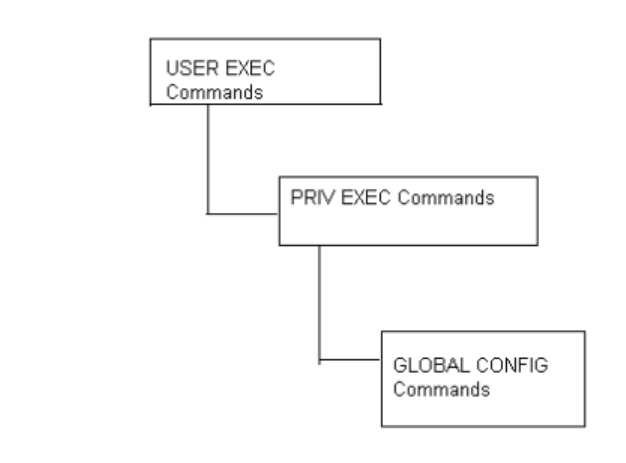
Use specific commands to navigate from one command mode to another. The standard order is:
USER EXEC mode, PRIV EXEC mode and GLOBAL CONFIG mode.
FIGURE 1 Hierarchy of User Modes
Command Modes
A session generally begins in the USER EXEC mode (one of the two access levels of the EXEC
mode). For security, only a limited subset of EXEC commands are available in the USER EXEC
mode. This level is reserved for tasks that do not change the wireless controller configuration.
rfs7000-37FABE>
The system prompt signifies the device name and the last three bytes of the device MAC address.

Brocade Mobility RFS4000, RFS6000, and RFS7000 CLI Reference Guide 3
53-1002619-01
1
To access commands, enter the PRIV EXEC mode (the second access level for the EXEC mode).
Once in the PRIV EXEC mode, enter any EXEC command. The PRIV EXEC mode is a superset of the
USER EXEC mode.
rfs7000-37FABE>enable
rfs7000-37FABE#
Most of the USER EXEC mode commands are one-time commands and are not saved across
wireless controller reboots. Save the command by executing ‘commit’ command. For example, the
show command displays the current configuration and the clear command clears the interface.
Access the GLOBAL CONFIG mode from the PRIV EXEC mode. In the GLOBAL CONFIG mode, enter
commands that set general system characteristics. Configuration modes, allow you to change the
running configuration. If you save the configuration later, these commands are stored across
wireless controller reboots.
Access a variety of protocol specific (or feature-specific) modes from the global configuration mode.
The CLI hierarchy requires you to access specific configuration modes only through the global
configuration mode.
rfs7000-37FABE# configure terminal
Enter configuration commands, one per line. End with CNTL/Z.
rfs7000-37FABE(config)#
You can also access sub-modes from the global configuration mode. Configuration sub-modes
define specific features within the context of a configuration mode.
rfs7000-37FABE(config)# aaa-policy test
rfs7000-37FABE(config-aaa-policy-test)#
Table 1 summarizes available wireless controller commands
TABLE 1 Wireless Controller modes and commands
User Exec Mode Priv Exec Mode Global Configuration Mode
ap-upgrade ap-upgrade aaa-policy
change-passwd archive advanced-wips-policy
clear boot br300
cluster change-passwd br650
commit clear br6511
debug commit br71xx
disable configure association-acl-policy
enable connect auto-provisioning-policy
help copy captive-portal
logging crypto clear
mint debug critical-resource-policy
no delete customize
page diff device
ping dir device-categorization
remote-debug disable dhcp-sever-policy
revert edit dns-whitelist

4 Brocade Mobility RFS4000, RFS6000, and RFS7000 CLI Reference Guide
53-1002619-01
1
service enable event-system-policy
show erase firewall-policy
ssh format help
telnet halt host
terminal help igmp-snoop-policy
time-it logging ip
traceroute mint mac
watch mkdir management-policy
write more mint-policy
clrscr no nac-list
exit page no
ping password-encryption
pwd profile
reload radio-qos-policy
remote-debug radius-group
rename radius-server-policy
revert radius-user-pool-policy
rmdir rf-domain
self rfs4000
service rfs6000
show rfs7000
ssh role-policy
telnet self
terminal smart-rf-policy
time-it wips-policy
traceroute wlan
upgrade wlan-qos-policy
upgrade-abort write
watch clrscr
write commit
clrscr do
exit end
exit
revert
service
show
TABLE 1 Wireless Controller modes and commands
User Exec Mode Priv Exec Mode Global Configuration Mode

Brocade Mobility RFS4000, RFS6000, and RFS7000 CLI Reference Guide 5
53-1002619-01
1
Getting Context Sensitive Help
Enter a question mark (?) at the system prompt to display a list of commands available for each
mode. Obtain a list of arguments and keywords for any command using the CLI context-sensitive
help.
Use the following commands to obtain help specific to a command mode, command name,
keyword or argument:
NOTE
The system prompt varies depending on which configuration mode your in.
NOTE
Enter Ctrl + V to use ? as a regular character and not as a character used for displaying context
sensitive help. This is required when the user has to enter a URL that ends with a ?
NOTE
The escape character used through out the CLI is “\”. To enter a "\" use "\\" instead.
When using context-sensitive help, the space (or lack of a space) before the question mark (?) is
significant. To obtain a list of commands that begin with a particular sequence, enter the
characters followed by a question mark (?). Do not include a space. This form of help is called word
help, because it completes a word.
rfs7000-37FABE#service?
service Service Commands
rfs7000-37FABE#service
Enter a question mark (?) (in place of a keyword or argument) to list keywords or arguments.
Include a space before the “?”. This form of help is called command syntax help. It shows the
keywords or arguments available based on the command/keyword and argument already entered.
rfs7000-37FABE>service ?
advanced-wips Advanced WIPS service commands
clear Clear
cli-tables-expand Expand the cli-table in drapdown format
cli-tables-skin Choose a formatting layout/skin for CLI tabular outputs
cluster Cluster Protocol
locator Enable leds flashing on the device
pktcap Start packet capture
radio Radio parameters
show Show running system information
smart-rf Smart-RF Management Commands
Command Description
(prompt)# help Displays a brief description of the help system
(prompt)# abbreviated-command-entry? Lists commands in the current mode that begin with a particular
character string
(prompt)# abbreviated-command-entry<Tab> Completes a partial command name
(prompt)# ? Lists all commands available in the command mode
(prompt)# command ? Lists the available syntax options (arguments and keywords) for the
command
(prompt)# command keyword ? Lists the next available syntax option for the command
6 Brocade Mobility RFS4000, RFS6000, and RFS7000 CLI Reference Guide
53-1002619-01
1
traceroute Trace route to destination
wireless Wireless commands
rfs7000-37FABE>service
It’s possible to abbreviate commands and keywords to allow a unique abbreviation. For example,
“configure terminal” can be abbreviated as config t. Since the abbreviated command is unique,
the wireless controller accepts the abbreviation and executes the command.
Enter the help command (available in any command mode) to provide the following description:
rfs7000-37FABE>help
CLI provides advanced help feature. When you need help,
anytime at the command line please press '?'.
If nothing matches, the help list will be empty and you must backup
until entering a '?' shows the available options.
Two styles of help are provided:
1. Full help is available when you are ready to enter a
command argument (e.g. 'show ?') and describes each possible
argument.
2. Partial help is provided when an abbreviated argument is entered and you
want to know what arguments match the input
(e.g. 'show ve?'.)
Using the No Command
Almost every command has a no form. Use no to disable a feature or function or return it to its
default value. Use the command without the no keyword to re-enable a disabled feature.
Basic Conventions
Keep the following conventions in mind while working within the wireless controller CLI:
•Use ? at the end of a command to display available sub-modes. Type the first few characters of
the sub-mode and press the tab key to add the sub-mode. Continue using ? until you reach the
last sub-mode.
•Pre-defined CLI commands and keywords are case-insensitive: cfg = Cfg = CFG. However (for
clarity), CLI commands and keywords are displayed (in this guide) using mixed case. For
example, apPolicy, trapHosts, channelInfo.
•Enter commands in uppercase, lowercase, or mixed case. Only passwords are case sensitive.
Using CLI Editing Features and Shortcuts
A variety of shortcuts and edit features are available. The following describe these features:
•Moving the Cursor on the Command Line
•Completing a Partial Command Name
•Command Output pagination
Brocade Mobility RFS4000, RFS6000, and RFS7000 CLI Reference Guide 7
53-1002619-01
1
Moving the Cursor on the Command Line
Table 2 on page 7
Shows the key combinations or sequences to move the command line cursor. Ctrl defines the
control key, which must be pressed simultaneously with its associated letter key. Esc means the
escape key (which must be pressed first), followed by its associated letter key. Keys are not case
sensitive. Specific letters are used to provide an easy way of remembering their functions. In
Table 2 on page 7, bold characters indicate the relation between a letter and its function.
Completing a Partial Command Name
If you cannot remember a command name (or if you want to reduce the amount of typing you have
to perform), enter the first few letters of a command, then press the Tab key. The command line
parser completes the command if the string entered is unique to the command mode. If your
keyboard does not have a Tab key, press Ctrl-L.
The CLI recognizes a command once you have entered enough characters to make the command
unique. If you enter “conf” within the privileged EXEC mode, the CLI associates the entry with the
configure command, since only the configure command begins with conf.
TABLE 2 Keystrokes Details
Keystrokes Function Summary Function Details
Left Arrow
or
Ctrl-B
Back character Moves the cursor one character to the left
When entering a command that extends beyond a single
line, press the Left Arrow or Ctrl-B keys repeatedly to move
back to the system prompt.
Right Arrow or Ctrl-F Forward character Moves the cursor one character to the right
Esc- B Back word Moves the cursor back one word
Esc- F Forward word Moves the cursor forward one word
Ctrl-A Beginning of line Moves the cursor to the beginning of the command line
Ctrl-E End of line Moves the cursor to the end of the command line
Ctrl-D Deletes the current character
Ctrl-U Deletes text up to cursor
Ctrl-K Deletes from the cursor to end of the line
Ctrl-P Obtains the prior command from memory
Ctrl-N Obtains the next command from memory
Esc-C Converts the letter at the cursor to uppercase
Esc-L Converts the letter at the cursor to lowercase
Esc-D Deletes the remainder of a word
Ctrl-W Deletes the word up to the cursor
Ctrl-Z Returns to the root prompt
Ctrl-T Transposes the character to the left of the cursor with the
character located at the cursor
Ctrl-L Clears the screen

8 Brocade Mobility RFS4000, RFS6000, and RFS7000 CLI Reference Guide
53-1002619-01
1
In the following example, the CLI recognizes a unique string in the privileged EXEC mode when the
Tab key is pressed:
rfs7000-37FABE# conf<Tab>
rfs7000-37FABE# configure
When using the command completion feature, the CLI displays the full command name. The
command is not executed until the Return or Enter key is pressed. Modify the command if the full
command was not what you intended in the abbreviation. If entering a set of characters (indicating
more than one command), the system lists all commands beginning with that set of characters.
Enter a question mark (?) to obtain a list of commands beginning with that set of characters. Do not
leave a space between the last letter and the question mark (?).
For example, entering U lists all commands available in the current command mode:
rfs7000-37FABE# co?
commit Commit all changes made in this session
configure Enter configuration mode
connect Open a console connection to a remote device
copy Copy from one file to another
rfs7000-37FABE# co
NOTE
The characters entered before the question mark are reprinted to the screen to complete the
command entry.
Command Output pagination
Output often extends beyond the visible screen length. For cases where output continues beyond
the screen, the output is paused and a
--More--
prompt displays at the bottom of the screen. To resume the output, press the Enter key to scroll
down one line or press the Spacebar to display the next full screen of output.
Creating Profiles
Profiles are sort of a ‘template’ representation of configuration. The system has:
•a default wireless controller profile
•a default profile for each of the following APs:
•Brocade Mobility 650 Access Point
•Brocade Mobility 6511 Access Point
•Brocade Mobility 7131 Access Point
To modify the default profile to assign an IP address to the management port:
rfs7000-37FABE(config)#profile rfs7000 default-rfs-7000
rfs7000-37FABE(config-profile-default-rfs-7000)#interface me1
rfs7000-37FABE(config-profile-default-rfs-7000-if-me1)#ip address
172.16.10.2/24
rfs7000-37FABE(config-profile-default-rfs-7000-if-me1)#commit
rfs7000-37FABE(config-profile-default-rfs-7000)#exit
rfs7000-37FABE(config)#
The following command displays default br7131 profile:
Brocade Mobility RFS4000, RFS6000, and RFS7000 CLI Reference Guide 9
53-1002619-01
1
rfs7000-37FABE(config)#profile br7131 default-br7131
rfs7000-37FABE(config-profile-default-br7131)#show context
Change the default profile by creating vlan 150 and
mapping to ge3 Physical interface
Logon to the wireless controller in config mode and follow the procedure below:
rfs7000-37FABE(config-profile-default-rfs7000)# interface vlan 150
rfs7000-37FABE(config-profile-default-rfs7000-if-vlan150)# ip address
192.168.150.20/24
rfs7000-37FABE(config-profile-default-rfs7000-if-vlan150)# exit
rfs7000-37FABE(config-profile-default-rfs7000)# interface ge 3
rfs7000-37FABE(config-profile-default-rfs7000-if-ge3)# switchport access vlan
150
rfs7000-37FABE(config-profile-default-rfs7000-if-ge3)# commit write
[OK]
rfs7000-37FABE(config-profile-default-rfs7000-if-ge3)# show interface vlan 150
Interface vlan150 is UP
Hardware-type: vlan, Mode: Layer 3, Address: 00-15-70-37-FA-BE
Index: 8, Metric: 1, MTU: 1500
IP-Address: 192.168.150.20/24
input packets 43, bytes 12828, dropped 0, multicast packets 0
input errors 0, length 0, overrun 0, CRC 0, frame 0, fifo 0, missed 0
output packets 0, bytes 0, dropped 0
output errors 0, aborted 0, carrier 0, fifo 0, heartbeat 0, window 0
collisions 0
Viewing Configured APs
To view previously configured APs, enter the following command:
rfs7000-37FABE(config)#show wireless ap configured
Remote Administration
A terminal server may function in remote administration mode if either the terminal services role is
not installed on the machine or the client used to invoke the session has enabled the admin
wireless controller.
•A terminal emulation program running on a computer connected to the serial port on the
wireless controller. The serial port is located on the front of the wireless controller.
•A Telnet session through a Secure Shell (SSH) over a network. The Telnet session may or may
not use SSH depending on how the wireless wireless controller is configured. Brocade
recommends using SSH for remote administration tasks.
Configuring Telnet for Management Access
Login through the serial console. Perform the following:
A session generally begins in the USER EXEC mode (one of the two access levels of the EXEC
mode).
Access the GLOBAL CONFIG mode from the PRIV EXEC mode.
rfs7000-37FABE> en

10 Brocade Mobility RFS4000, RFS6000, and RFS7000 CLI Reference Guide
53-1002619-01
1
rfs7000-37FABE# configure terminal
Enter configuration commands, one per line. End with CNTL/Z.
Go to ‘default-management-policy’ mode.
rfs7000-37FABE(config)# management-policy ?
rfs7000-37FABE(config)# management-policy default
rfs7000-37FABE(config-management-policy-default)#
Enter Telnet and the port number at the command prompt. The port number is optional. The
default port is 23. Commit the changes after every command. Telnet is enabled.
rfs7000-37FABEconfig-management-policy-default)# telnet
rfs7000-37FABE(config-management-policy-default)# commit write
Connect to the wireless wireless controller through Telnet using its configured IP address. Use the
following credentials when logging on to the device for the first time:
When logging into the wireless controller for the first time, you are prompted to change the
password.
To change user credentials:
Enter the username, password, role and access details
rfs7000-37FABE(config-management-policy-default)# user testuser password
symbol role helpdesk access all
rfs7000-37FABE(config-management-policy-default)# commit
rfs7000-37FABE(config-management-policy-default)# show context
management-policy default
telnet
http server
ssh
user admin password 1
c9745a77bb8663fbe9422c0bab93087208e68c40add8edd0a3b4a985aa96a682 role
superuser
access all
user testuser password 1
fd6af6a0e74ede3fc4bd54519e4864b078554aa2d97a623eedefae2ede682c13 role
helpdesk
access all
rfs7000-37FABE(config-management-policy-default)# show context
include-factory
management-policy default
secure-management
telnet port 23
http server
no https server
no ftp
ssh port 22
user admin password 1
c9745a77bb8663fbe9422c0bab93087208e68c40add8edd0a3b4a985aa96a682 role
superuser access all
user testuser password 1
fd6af6a0e74ede3fc4bd54519e4864b078554aa2d97a623eedefae2ede682c13 role
helpdesk access all
snmp-server manager v2
snmp-server manager v3
User Name admin
Password admin123

Brocade Mobility RFS4000, RFS6000, and RFS7000 CLI Reference Guide 11
53-1002619-01
1
no snmp-server enable traps
rfs7000-37FABE(config-management-policy-default)#
rfs7000-37FABE(config-management-policy-default)# user testuser password
symbol role helpdesk access all ?
Logon to the Telnet console and provide the user details configured in the previous step to access
the wireless controller.
Brocade Mobility RFS7000 release 5.2.0.0-048B
rfs7000-37FABE login: testuser
Password:
Welcome to CLI
Starting CLI...
rfs7000-37FABE>
Configuring ssh
By default, SSH is enabled from the factory settings on the wireless controller. The wireless
controller requires an IP address and login credentials.
To enable SSH access in the default profile, login through the serial console. Perform the following:
Access the GLOBAL CONFIG mode from the PRIV EXEC mode.
rfs7000-37FABE> en
rfs7000-37FABE# configure
Enter configuration commands, one per line. End with CNTL/Z.
rfs7000-37FABE> en
rfs7000-37FABE# configure
Enter configuration commands, one per line. End with CNTL/Z.
Go to ‘default-management-policy’ mode.
rfs7000-37FABE(config)# management-policy default
rfs7000-37FABE(config-management-policy-default)#
Enter SSH at the command prompt.
rfs7000-37FABE(config-management-policy-default)# ssh
Log into the wireless wireless controller through SSH using appropriate credentials.
Use the following credentials when logging on to the device for the first time:
When logging into the wireless controller for the first time, you are prompted to change the
password.
•To change the user credentials:
Brocade Mobility RFS7000 release 5.2.0.0-048B
rfs7000-37FABE login: testuser
Password:
Welcome to CLI
Starting CLI...
rfs7000-37FABE>
User Name admin
Password admin123
12 Brocade Mobility RFS4000, RFS6000, and RFS7000 CLI Reference Guide
53-1002619-01
1

Brocade Mobility RFS4000, RFS6000, and RFS7000 CLI Reference Guide 13
53-1002619-01
Chapter
2
User Exec Mode Commands
In this chapter
•User Exec Commands . . . . . . . . . . . . . . . . . . . . . . . . . . . . . . . . . . . . . . . . . . . 14
Logging in to the wireless controller places you within the USER EXEC command mode. Typically, a
login requires a user name and password. You have three login attempts before the connection
attempt is refused. USER EXEC commands (available at the user level) are a subset of the
commands available at the privileged level. In general, USER EXEC commands allow you to connect
to remote devices, perform basic tests and list system information.
To list available USER EXEC commands, use? at the command prompt. The USER EXEC prompt
consists of the device host name followed by an angle bracket (>).
rfs7000-37FABE?
User Exec commands:
ap-upgrade AP firmware upgrade
change-passwd Change password
clear Clear
clock Configure software system clock
cluster Cluster commands
commit Commit all changes made in this session
connect Open a console connection to a remote device
crypto Encryption related commands
debug Debugging functions
disable Turn off privileged mode command
enable Turn on privileged mode command
help Description of the interactive help system
logging Modify message logging facilities
mint MiNT protocol
no Negate a command or set its defaults
page Toggle paging
ping Send ICMP echo messages
remote-debug Troubleshoot remote system(s)
revert Revert changes
service Service Commands
show Show running system information
ssh Open an ssh connection
telnet Open a telnet connection
terminal Set terminal line parameters
time-it Check how long a particular command took between request and
completion of response
traceroute Trace route to destination
watch Repeat the specific CLI command at a periodic interval
write Write running configuration to memory or terminal
clrscr Clears the display screen
exit Exit from the CLI
rfs7000-37FABE>

14 Brocade Mobility RFS4000, RFS6000, and RFS7000 CLI Reference Guide
53-1002619-01
2
User Exec Commands
Table 3 summarizes User Exec Mode commands
ap-upgrade
User Exec Commands
TABLE 3 User Exec Mode Commands
Command Description Reference
ap-upgrade Enables an automatic adopted AP firmware upgrade page 2-14
change-passwd Changes the password of a logged user page 2-14
clear Resets the last saved command page 2-19
clock Configures the system clock page 2-22
cluster Accesses the cluster context page 2-23
connect Establishes a console connection to a remote device page 2-23
crypto Enables encryption page 2-24
disable Turns off (disables) the privileged mode command set page 2-35
enable Turns on (enables) the privileged mode command set page 2-35
logging Modifies message logging facilities page 2-36
mint Configures MiNT protocol page 2-37
no Negates a command or sets its default value page 2-39
page Toggles to the wireless controller paging function page 2-42
ping Sends ICMP echo messages to a user-specified location page 2-42
ssh Opens an SSH connection between two network devices page 2-43
telnet Opens a Telnet session page 2-44
terminal Sets the length/number of lines displayed within the terminal window page 2-44
time-it Verifies the time taken by a particular command between request and response page 2-45
traceroute Traces the route to its defined destination page 2-46
watch Repeats a specific CLI command at a periodic interval page 2-47
clrscr Clears the display screen page 5-255
commit Commits (saves) changes made in the current session page 5-256
exit Ends the current mode and moves to the previous mode page 5-257
help Displays the interactive help system page 5-258
revert Reverts changes to their last saved configuration page 5-264
service Invokes service commands to troubleshoot or debug (config-if) instance
configurations
page 5-265
show Displays running system information page 6-295
write Writes information to memory or terminal page 5-291
Brocade Mobility RFS4000, RFS6000, and RFS7000 CLI Reference Guide 15
53-1002619-01
2
Enables an automatic firmware upgrade on an adopted AP or a set of APs. APs of the same type
can be upgraded together. Once APs have been upgraded, they can be forced to reboot. This
command also loads the firmware on to the wireless controller.
The AP upgrade command also upgrades APs in a specified RF Domain.
Supported in the following platforms:
•Brocade Mobility 300 Access Point
•Brocade Mobility 650 Access Point
•Brocade Mobility 6511 Access Point
•Brocade Mobility 71XX Access Point
•Brocade Mobility RFS4000
•Brocade Mobility RFS6000
•Brocade Mobility RFS7000
Syntax:
ap-upgrade [<MAC/HOSTNAME>|all|br650|br6511|
br71xx|cancel-upgrade|load-image|rf-domain]
ap-upgrade [<MAC/HOSTNAME>|all] {no-reboot|reboot-time <TIME>|
upgrade-time <TIME> {no-reboot|reboot-time <TIME>}}
ap-upgrade [br650|br6511|br71xx] all
{no-reboot|reboot-time <TIME>|upgrade-time <TIME> {no-reboot|
reboot-time <TIME>}}]
ap-upgrade cancel-upgrade [<MAC/HOSTNAME>|all|br650|br6511|71xx|on]
ap-upgrade cancel-upgrade [<MAC/HOSTNAME>|all]
ap-upgrade cancel-upgrade [br650|br6511|71xx] all
ap-upgrade cancel-upgrade on rf-domain [<RF-DOMAIN-NAME>|all]
ap-upgrade load-image [br650|br6511|br71xx]
<IMAGE-URL>
ap-upgrade rf-domain [<RF-DOMAIN-NAME>|all] [all|br650|br6511|
br71xx] {no-reboot|no-via-rf-domain|reboot-time <TIME>|
upgrade-time <TIME> {no-reboot|reboot-time <TIME>}}
ap-upgrade rf-domain [<RF-DOMAIN-NAME>|all] [all|br650|br6511||br71xx]
{no-via-rf-domain} {no-reboot|reboot-time <TIME>|upgrade-time <TIME>}
Parameters

16 Brocade Mobility RFS4000, RFS6000, and RFS7000 CLI Reference Guide
53-1002619-01
2
ap-upgrade [<MAC/HOSTNAME>|all] {no-reboot|reboot-time <TIME>|upgrade-time
<TIME> {no-reboot|reboot-time <TIME>}}
ap-upgrade [br650|br6511|br71xx] all {no-reboot|reboot-time
<TIME>|upgrade-time <TIME> {no-reboot|reboot-time <TIME>}}
ap-upgrade cancel-upgrade [<MAC/HOSTNAME>|all]
[<MAC/HOSTNAME>|all] Upgrades firmware on a specified AP or all APs adopted by the wireless controller
•<MAC/HOSTNAME> – Specify the MAC address or hostname of the AP.
•all – Upgrades all APs adopted by the wireless controller
no-reboot Optional. Disables automatic reboot after a successful upgrade (the wireless controller must be
manually restarted)
reboot-time <TIME> Optional. Schedules an automatic reboot after a successful upgrade
•<TIME> – Specify the reboot time in the MM/DD/YYYY-HH:MM or HH:MM format.
upgrade-time <TIME>
{no-reboot|reboot-time <TIME>}
Optional. Schedules an automatic firmware upgrade
•<TIME> – Specify the upgrade time in the MM/DD/YYYY-HH:MM or HH:MM format. After a
scheduled upgrade, these actions can be performed.
•no-reboot – Disables automatic reboot after a successful upgrade (the wireless
controller must be manually restarted)
•reboot-time <TIME> – Optional. Schedules an automatic reboot after a successful
upgrade. Specify the reboot time in the MM/DD/YYYY-HH:MM or HH:MM
format.
[br650|br6511|br71xx] all Upgrades firmware on all adopted APs
•Brocade Mobility 650 Access Point all – Upgrades firmware on all Brocade Mobility 650
Access Points
•Brocade Mobility 6511 Access Point all – Upgrades firmware on all Brocade Mobility 6511
Access Points
•Brocade Mobility 71XX Access Point all – Upgrades firmware on all Brocade Mobility 71XX
Access Points
After selecting the AP type, you can schedule an automatic upgrade and/or an automatic
reboot.
no-reboot Optional. Disables automatic reboot after a successful upgrade (the wireless controller must be
manually restarted)
reboot-time <TIME> Optional. Schedules an automatic reboot after a successful upgrade
•<TIME> – Optional. Specify the reboot time in the MM/DD/YYYY-HH:MM or HH:MM format.
upgrade-time <TIME>
{no-reboot|reboot-time <TIME>}
Optional. Schedules firmware upgrade on an AP adopted by the wireless controller
•<TIME> – Specify the upgrade time in the MM/DD/YYYY-HH:MM or HH:MM format. After a
scheduled upgrade, these actions can be performed.
•no-reboot – Optional. Disables automatic reboot after a successful upgrade (the wireless
controller must be manually restarted)
•reboot-time <TIME> – Optional. Schedules an automatic reboot after a
successful upgrade. Specify the reboot time in the MM/DD/YYYY-HH:MM or HH:MM format.
cancel-upgrade [
<MAC/HOSTNAME>|all]
Cancels scheduled firmware upgrade on a specified AP or all APs adopted by the wireless
controller
•<MAC/HOSTNAME> – Specify the MAC address or hostname of the AP.
•all – Cancels scheduled upgrade on all APs

Brocade Mobility RFS4000, RFS6000, and RFS7000 CLI Reference Guide 17
53-1002619-01
2
ap-upgrade cancel-upgrade [br650|br651|br71xx] all
ap-upgrade cancel-upgrade on rf-domain [<DOMAIN-NAME>|all]
ap-upgrade load-image [br650|br6511|br71xx] <IMAGE-URL>
cancel-upgrade
[br650|br6511|br71xx] all
Cancels scheduled firmware upgrade on all adopted APs
•Brocade Mobility 650 Access Point all – Cancels scheduled upgrade on all Brocade
Mobility 650 Access Points
•Brocade Mobility 6511 Access Point all – Cancels scheduled upgrade on all Brocade
Mobility 6511 Access Points
•Brocade Mobility 71XX Access Point all – Cancels scheduled upgrade on all Brocade
Mobility 71XX Access Points
cancel-upgrade on rf-domain
[<RF-DOMAIN-NAME>|all]
Cancels scheduled firmware upgrade on a specified RF Domain or all RF Domains
•<RF-DOMAIN-NAME> – Specify the RF Domain name.
•all – Cancels scheduled upgrades on all RF Domains
load-image [br650|6511||br71xx] Loads AP firmware images on the wireless controller. Select the AP type and provide the
location of the AP firmware image.
•Brocade Mobility 650 Access Point <IMAGE-URL> – Loads Brocade Mobility 650 Access
Point firmware image
•Brocade Mobility 6511 Access Point <IMAGE-URL> – Loads Brocade Mobility 6511
Access Point firmware image
•Brocade Mobility 71XX Access Point <IMAGE-URL> – Loads Brocade Mobility 71XX
Access Point firmware image
<IMAGE-URL> Specify the AP firmware image location in the following format:
ftp://<user>:<passwd>@<hostname|IP>[:port]/path/file
sftp://<user>:<passwd>@<hostname|IP>[:port]>/path/file
http://<hostname|IP>[:port]/path/file
cf:/path/file
usb1:/path/file
usb2:/path/file

18 Brocade Mobility RFS4000, RFS6000, and RFS7000 CLI Reference Guide
53-1002619-01
2
ap-upgrade rf-domain [<RF-DOMAIN-NAME>|all] [all|br650|br6511|
br71xx] {no-reboot|no-via-rf-domain|reboot-time <TIME>|
upgrade-time <TIME>}
Example
rfs7000-37FABE>ap-upgrade all
rfs7000-37FABE>
rfs7000-37FABE>ap-upgrade default/rfs7000-37FABE no-reboot
--------------------------------------------------------------------------
CONTROLLER STATUS MESSAGE
--------------------------------------------------------------------------
00-23-68-88-0D-A7 Success Queued 0 APs to upgrade
--------------------------------------------------------------------------
rfs7000-37FABE>
rfs7000-37FABE>ap-upgrade rfs7000-37FABE reboot-time 06/01/2011-12:01
--------------------------------------------------------------------------
CONTROLLER STATUS MESSAGE
--------------------------------------------------------------------------
00-15-70-37-FA-BE Success Queued 0 APs to upgrade
--------------------------------------------------------------------------
rfs7000-37FABE>
change-passwd
User Exec Commands
rf-domain
[<RF-DOMAIN-NAME>|all]
Upgrades AP firmware on devices in a specified RF Domain or all RF Domains
•<RF-DOMAIN-NAME> – Upgrades firmware in a specified RF Domain. Specify the RF
Domain name.
•all – Upgrades firmware on all RF Domains
[all|br650|br6511|br71xx] After specifying the RF Domain, select the AP type.
•all – Upgrades firmware on all APs
•Brocade Mobility 650 Access Point – Upgrades firmware on all Brocade Mobility 650
Access Points
•Brocade Mobility 6511 Access Point – Upgrades firmware on all Brocade Mobility 6511
Access Points
•Brocade Mobility 71XX Access Point – Upgrades firmware on all Brocade Mobility 71XX
Access Points
{no-reboot|no-via-rf-domain
|reboot-time <TIME>|
upgrade-time <TIME>}
The following actions can be performed:
•no-reboot – Optional. Disables automatic reboot after a successful upgrade (the wireless
controller must be manually restarted)
•no-via-rf-domain – Optional. Performs AP firmware upgrade from the adopted device
•reboot-time <TIME> – Optional. Schedules an automatic reboot, after a successful
upgrade. Specify the reboot time in the MM/DD/YYYY-HH:MM or HH:MM format.
•upgrade-time <TIME> – Optional. Schedules an automatic firmware upgrade. Specify the
upgrade time in the MM/DD/YYYY-HH:MM or HH:MM format.
{no-reboot|reboot-time <TIME>} The following are common to the [no-via-rf-domain upgrade <TIME>] and upgrade
parameters:
•no-reboot – Optional. Disables automatic reboot after a successful upgrade of firmware
(the wireless controller must be manually restarted)
•reboot-time <TIME> – Optional. Schedules an automatic reboot after a successful
upgrade. Specify the reboot time in the MM/DD/YYYY-HH:MM or HH:MM format.

Brocade Mobility RFS4000, RFS6000, and RFS7000 CLI Reference Guide 19
53-1002619-01
2
Changes the password of a logged user. When this command is executed without any parameters,
the password can be changed interactively.
Supported in the following platforms:
•Brocade Mobility 300 Access Point
•Brocade Mobility 650 Access Point
•Brocade Mobility 6511 Access Point
•Brocade Mobility 71XX Access Point
•Brocade Mobility RFS4000
•Brocade Mobility RFS6000
•Brocade Mobility RFS7000
Syntax:
change-passwd {<OLD-PASSWORD> <NEW-PASSWORD>}
Parameters
change passwd {<OLD-PASSWORD> <NEW-PASSWORD>}
Usage Guidelines:
A password must be from 1 - 64 characters.
Example
rfs7000-37FABE#change-passwd
Enter old password:
Enter new password:
Password for user 'admin' changed successfully
Please write this password change to memory(write memory) to be persistent.
rfs7000-37FABE#write memory
OK
rfs7000-37FABE#
clear
User Exec Commands
Clears parameters, cache entries, table entries, and other similar entries. The clear command is
available for specific commands only. The information cleared using this command varies
depending on the mode where the clear command is executed.
Supported in the following platforms:
•Brocade Mobility 300 Access Point
•Brocade Mobility 650 Access Point
•Brocade Mobility 6511 Access Point
•Brocade Mobility 71XX Access Point
<OLD-PASSWORD>
<NEW-PASSWORD>
Optional. The password can also be changed interactively. To do so, press [Enter] after the
command.
•<OLD-PASSWORD> – Specify the password that needs to be changed
•<NEW-PASSWORD> – Specify the password to change to

20 Brocade Mobility RFS4000, RFS6000, and RFS7000 CLI Reference Guide
53-1002619-01
2
•Brocade Mobility RFS4000
•Brocade Mobility RFS6000
•Brocade Mobility RFS7000
NOTE
Refer to the interface details below when using clear
•ge <index> – Brocade Mobility RFS4000 supports 5GEs and Brocade Mobility RFS6000 supports 8 GEs
•me1 – Available in both Brocade Mobility RFS7000 and Brocade Mobility RFS6000-up1- Uplink interface on
Brocade Mobility RFS4000
Syntax:
clear [arp-cache|cdp|crypto|event-history|ip|lldp|spanning-tree]
clear arp-cache {on <DEVICE-NAME>}
clear [cdp|lldp] neighbors {on <DEVICE-NAME>}
clear crypto [ipsec|isakmp] sa [<IP>|all] {on <DEVICE-NAME>}
clear event-history
clear ip [dhcp|ospf]
clear ip dhcp bindings [<IP>|all] {on <DEVICE-NAME>}
clear ip ospf process {on <DEVICE-NAME>}
clear spanning-tree detected-protocols {interface|on}
clear spanning-tree detected-protocols {on <DEVICE-NAME>}
clear spanning-tree detected-protocols {interface [<INTERFACE>|
ge <1-4>|me1|port-channel <1-2>|vlan <1-4094>]} {on <DEVICE-NAME>}}
Parameters
clear arp-cache {on <DEVICE-NAME>}
clear [cdp|lldp] neighbors {on <DEVICE-NAME>}
arp-cache Clears Address Resolution Protocol (ARP) cache entries on an AP or wireless controller. This
protocol matches the layer 3 IP addresses to the layer 2 MAC addresses.
on <DEVICE-NAME> Optional. Clears ARP cache entries on a specified AP or wireless controller
•<DEVICE-NAME> – Specify the name of the AP or wireless controller.
cdp Clears Cisco Discovery Protocol (CDP) table entries
lldp Clears Link Layer Discovery Protocol (LLDP) table entries
neighbors Clears CDP or LLDP neighbor table entries based on the option selected in the preceding step
on <DEVICE-NAME> Optional. Clears CDP or LLDP neighbor table entries on a specified AP or wireless controller
•<DEVICE-NAME> – Specify the name of the AP or wireless controller.

Brocade Mobility RFS4000, RFS6000, and RFS7000 CLI Reference Guide 21
53-1002619-01
2
clear crypto [ipsec|isakmp] sa [<IP>|all] {on <DEVICE-NAME>}
clear event-history
clear ip dhcp bindings [<IP>|all]
clear ip ospf process {on <DEVICE-NAME>}
clear spanning-tree detected-protocols {on <DEVICE-NAME>}
clear spanning-tree detected-protocols {interface [<INTERFACE>|ge <1-4>|
me1|port-channel <1-2>|vlan <1-4094>]} {on <DEVICE-NAME>}
crypto Clears encryption module database
ipsec sa Clears Internet Protocol Security (IPSec) database security associations (SAs)
isakmp sa Clears Internet Security Association and Key Management Protocol (ISAKMP) database SAs
[<IP>|all] The following are common to the IPSec and ISAKMP parameters:
•<IP> – Clears IPSec or ISAKMP SAs for a certain peer
•all – Clears IPSec or ISAKMP SAs for all peers
on <DEVICE-NAME> Optional. Clears IPSec or ISAKMP SA entries on a specified AP or wireless controller
•<DEVICE-NAME> – Specify the name of the AP or wireless controller.
event-history Clears event history cache entries
ip Clears a DHCP server’s IP address bindings entries
dhcp bindings Clears Dynamic Host Configuration Protocol (DHCP) connections and server bindings
•bindings – Clears DHCP address binding entries
<IP> Clears address binding entries on a specified DHCP server. Specify the DHCP server’s IP address.
all Clears address binding entries on all DHCP servers
ip ospf process Clears already enabled open shortest path first (OSPF) process, and also restarts the
process
on <DEVICE-NAME> Optional. Clears OSPF process on a specified AP or wireless controller
•<DEVICE-NAME> – Specify the name of the AP or wireless controller.
spanning-tree Clears spanning tree protocols on an interface, and also restarts protocol migration
detected-protocols Restarts protocol migration
on <DEVICE-NAME> Optional. Clears spanning tree protocols on a specified AP or wireless controller
•<DEVICE-NAME> – Optional. Specify the name of the AP or wireless controller.
spanning-tree Clears spanning tree protocols on an interface, and also restarts protocol migration
detected-protocols Restarts protocol migration
interface [<INTERFACE>|
ge <1-4>|me1|
port-channel <1-2>|
vlan <1-4094>]
Optional. Clears spanning tree protocols on different interfaces
•<INTERFACE> – Clears information on a specified interface. Specify the interface name.
•ge <1-4> – Clears GigabitEthernet interface information. Select the GigabitEthernet interface
index from 1 - 4.
•me1 – Clears FastEthernet interface status (up1 - Clears the uplink interface)
•port-channel <1-2> – Clears port channel interface information. Select the port channel
index from 1 - 2.
•vlan <1-4094> – Clears VLAN interface information. Select a Switch Virtual Interface (SVI)
VLAN ID from 1- 4094.
on <DEVICE-NAME> Optional. Clears spanning tree protocol entries on a selected AP or wireless controller
•<DEVICE-NAME> – Optional. Specify the name of the AP or wireless controller.

22 Brocade Mobility RFS4000, RFS6000, and RFS7000 CLI Reference Guide
53-1002619-01
2
Example
rfs7000-37FABE>clear crypto isakmp sa 111.222.333.01 on rfs7000-37FABE
rfs7000-37FABE>
rfs7000-37FABE>clear event-history
rfs7000-37FABE>
rfs7000-37FABE>clear spanning-tree detected-protocols interface port-channel 1
on rfs7000-37FABE
rfs7000-37FABE>
rfs7000-37FABE>clear ip dhcp bindings 172.16.10.9 on rfs7000-37FABE
rfs7000-37FABE>
rfs7000-37FABE>clear cdp neighbors on rfs7000-37FABE
rfs7000-37FABE>
rfs7000-37FABE>clear spanning-tree detected-protocols interface ge 1
rfs7000-37FABE>
rfs7000-37FABE>clear lldp neighbors
rfs7000-37FABE>
clock
User Exec Commands
Sets a device’s system clock
Supported in the following platforms:
•Brocade Mobility 300 Access Point
•Brocade Mobility 650 Access Point
•Brocade Mobility 6511 Access Point
•Brocade Mobility 71XX Access Point
•Brocade Mobility RFS4000
•Brocade Mobility RFS6000
•Brocade Mobility RFS7000
Syntax:
clock set <HH:MM:SS> <1-31> <MONTH> <1993-2035> {on <DEVICE-NAME>}
Parameters
clock set <HH:MM:SS> <1-31> <MONTH> <1993-2035> {on <DEVICE-NAME>}
clock set Sets a device’s software system clock
<HH:MM:SS> Sets the current time (in military format hours, minutes and seconds)
<1-31> Sets the numerical day of the month
<MONTH> Sets the month of the year (Jan to Dec)
<1993-2035> Sets a valid four digit year from 1993 - 2035
on <DEVICE-NAME> Optional. Sets the clock on a specified device
•<DEVICE-NAME> – Specify the name of the AP or wireless controller.

Brocade Mobility RFS4000, RFS6000, and RFS7000 CLI Reference Guide 23
53-1002619-01
2
Example
rfs7000-37FABE>clock set 18:16:30 7 JUL 2011 on rfs7000-37FABE
clock set 18:16:30 7 JUL 2011 on rfs7000-37FABE
rfs7000-37FABE>
cluster
User Exec Commands
Initiates cluster context. The cluster context provides centralized management to configure all
cluster members from any one member.
Commands executed under this context are executed on all members of the cluster.
Supported in the following platforms:
•Brocade Mobility 300 Access Point
•Brocade Mobility 650 Access Point
•Brocade Mobility 6511 Access Point
•Brocade Mobility 71XX Access Point
•Brocade Mobility RFS4000
•Brocade Mobility RFS6000
•Brocade Mobility RFS7000
Syntax:
cluster start-selection
Parameters
cluster start-selection
Example
rfs7000-37FABE>cluster start-election
rfs7000-37FABE>
connect
User Exec Commands
Begins a console connection to a remote device using the remote device’s MiNT ID or name
Supported in the following platforms:
•Brocade Mobility 300 Access Point
•Brocade Mobility 650 Access Point
•Brocade Mobility 6511 Access Point
•Brocade Mobility 71XX Access Point
•Brocade Mobility RFS4000
•Brocade Mobility RFS6000
start-selection Starts a new cluster master election

24 Brocade Mobility RFS4000, RFS6000, and RFS7000 CLI Reference Guide
53-1002619-01
2
•Brocade Mobility RFS7000
Syntax:
connect [mint-id <MINT-ID>|<REMOTE-DEVICE-NAME>]
Parameters
connect [mint-id <MINT-ID>|<REMOTE-DEVICE-NAME>]
Example
rfs7000-37FABE>show mint lsp-db
2 LSPs in LSP-db of 01.42.14.79:
LSP 01.42.14.79 at level 1, hostname "rfs7000-37FABE", 1 adjacencies, seqnum
5069
LSP 01.44.54.C0 at level 1, hostname "ap4600-4454C0", 1 adjacencies, seqnum
5265
rfs7000-37FABE>connect mint-id 01.44.54.C0
Entering character mode
Escape character is '^]'.
AP4600 release 5.2.0.0-033B
ap4600-4454C0 login:
rfs7000-37FABE>show mint lsp-db
1 LSPs in LSP-db of 70.37.FA.BE:
LSP 70.37.FA.BE at level 1, hostname "rfs7000-37FABE", 0 adjacencies, seqnum
65562
rfs7000-37FABE>
crypto
User Exec Commands
Enables RSA Keypair management. Use this command to generate, delete, export, or import an
RSA Keypair. It encrypts the RSA Keypair before an export operation. This command also enables
Public Key Infrastructure (PKI) management.
Supported in the following platforms:
•Brocade Mobility 300 Access Point
•Brocade Mobility 650 Access Point
•Brocade Mobility 6511 Access Point
•Brocade Mobility 71XX Access Point
•Brocade Mobility RFS4000
•Brocade Mobility RFS6000
•Brocade Mobility RFS7000
mint-id <MINT-ID> Connects to the remote system using the MiNT ID
•<MINT-ID> – Specify the remote device’s MiNT ID.
<REMOTE-DEVICE-NAME> Connects to the remote system using its name
•<REMOTE-DEVICE-NAME> – Specify the remote device’s name.
Brocade Mobility RFS4000, RFS6000, and RFS7000 CLI Reference Guide 25
53-1002619-01
2
Syntax:
crypto [key|pki]
crypto key [export|generate|import|zeroise]
crypto key export rsa <RSA-KEYPAIR-NAME> <EXPORT-TO-URL>
{background|on|passphrase}
crypto key export rsa <RSA-KEYPAIR-NAME> <EXPORT-TO-URL> {background}
{on <DEVICE-NAME>}
crypto key export rsa <RSA-KEYPAIR-NAME> <EXPORT-TO-URL> {passphrase
<KEY-PASSPHRASE>} {background} {on <DEVICE-NAME>}
crypto key generate rsa <RSA-KEYPAIR-NAME> <1024-2048>{on <DEVICE-NAME>}
crypto key import rsa <RSA-KEYPAIR-NAME> <EXPORT-TO-URL>
{background|on|passphrase}
crypto key import rsa <RSA-KEYPAIR-NAME> <IMPORT-FROM-URL>
{background} {on <DEVICE-NAME>}
crypto key import rsa <RSA-KEYPAIR-NAME> <IMPORT-FROM-URL> passphrase
<KEY-PASSPHRASE> {background} {on <DEVICE-NAME>}
crypto key zeroise rsa <RSA-KEYPAIR-NAME> {force} {on <DEVICE-NAME>}
crypto pki [authenticate|export|generate|import|zeroise]
crypto pki authenticate <TRUST-POINT> <URL> {background{on <DEVICE-NAME>}|
on <DEVICE-NAME>}
crypto pki export [request|trustpoint]
crypto pki export request [generate-rsa-key|use-rsa-key] <RSA-KEYPAIR-NAME>
autogen-subject-name [<EXPORT-TO-URL>, email <SEND-TO-EMAIL>, fqdn <FQDN>,
ip-address <IP>]
crypto pki export request [generate-rsa-key|use-rsa-key] <RSA-KEYPAIR-NAME>
autogen-subject-name <EXPORT-TO-URL> {background {on <DEVICE-NAME>}|
on <DEVICE-NAME>}
crypto pki export request [generate-rsa-key|use-rsa-key] <RSA-KEYPAIR-
NAME> subject-name <COMMON-NAME> <COUNTRY> <STATE> <CITY> <ORGANIZATION>
<ORGANIZATION-UNIT> [<EXPORT-TO-URL>, email <SEND-TO-EMAIL>, fqdn <FQDN>,
ip-address <IP>]
crypto pki export trustpoint <TRUSTPOINT-NAME> <EXPORT-TO-URL> {background
{on <DEVICE-NAME>}|on <DEVICE-NAME>|passphrase <KEY-PHRASE> {background
{on <DEVICE-NAME>}|on <DEVICE-NAME>}}
crypto pki generate self-signed <TRUSTPOINT-NAME> [generate-rsa-key|
use-rsa-key] <RSA-KEYPAIR-NAME> [autogen-subject-name|subject-name]
crypto pki generate self-signed <TRUSTPOINT-NAME> [generate-rsa-key|
use-rsa-key] <RSA-KEYPAIR-NAME> autogen-subject-name {email <SEND-TO-EMAIL>,
fqdn <FQDN>, ip-address <IP>, on <DEVICE-NAME>}
crypto pki generate self-signed <TRUSTPOINT-NAME> [generate-rsa-key|
use-rsa-key] <WORD> subject-name <COMMON-NAME> <COUNTRY> <STATE> <CITY>
<ORGANIZATION> <ORGANIZATION-UNIT> {email <SEND-TO-EMAIL>, fqdn <FQDN>,
ip-address <IP>, on <DEVICE-NAME>}
crypto pki import [certificate|crl|trustpoint]

26 Brocade Mobility RFS4000, RFS6000, and RFS7000 CLI Reference Guide
53-1002619-01
2
crypto pki import [certificate|crl] <TRUSTPOINT-NAME> <IMPORT-FROM-URL>
{background {on <DEVICE-NAME>}|on <DEVICE-NAME>}]
crypto pki import trustpoint <TRUSTPOINT-NAME> <IMPORT-FROM-URL>
{background {on <DEVICE-NAME>}|on <DEVICE-NAME>|passphrase <word>
{background {on <DEVICE-NAME>}|on <DEVICE-NAME>}
crypto pki zeroise trustpoint <TRUSTPOINT-NAME> {del-key {on <DEVICE-NAME>}|
on <DEVICE-NAME>}
Parameters
crypto key export rsa <RSA-KEYPAIR-NAME> <EXPORT-TO-URL> {on <DEVICE-NAME>}
crypto key export rsa <RSA-KEYPAIR-NAME> <EXPORT-TO-URL> {background}
{on <DEVICE-NAME>}
key Enables RSA Keypair management. Use this command to export, import, generate, or delete a
RSA key.
export rsa
<RSA-KEYPAIR-NAME>
Exports a RSA Keypair to a specified destination
•<RSA-KEYPAIR-NAME> – Specify the RSA Keypair name.
<EXPORT-TO-URL>
{on <DEVICE-NAME>}
Specify the RSA Keypair destination address in the following format:
tftp://<hostname|IP>[:port]/path/file
ftp://<user>:<passwd>@<hostname|IP>[:port]/path/file
sftp://<user>@<hostname|IP>[:port]>/path/file
http://<hostname|IP>[:port]/path/file
cf:/path/file
usb1:/path/file
usb2:/path/file
•on <DEVICE-NAME> – Optional. Performs the export operation on a specified device
•<DEVICE-NAME> – Specify the name of the AP or wireless controller.
key Enables RSA Keypair management. Use this command to export, import, generate, or delete a
RSA key.
export rsa
<RSA-KEYPAIR-NAME>
Exports a RSA Keypair to a specified destination
•<RSA-KEYPAIR-NAME> – Specify the RSA Keypair name.
<EXPORT-TO-URL> {background}
{on <DEVICE-NAME>}
Specify the RSA Keypair destination address in the following format:
tftp://<hostname|IP>[:port]/path/file
ftp://<user>:<passwd>@<hostname|IP>[:port]/path/file
sftp://<user>@<hostname|IP>[:port]>/path/file
http://<hostname|IP>[:port]/path/file
cf:/path/file
usb1:/path/file
usb2:/path/file
•background – Optional. Performs the export operation in the background
•on <DEVICE-NAME> – Optional. Performs the export operation on a specific device
•<DEVICE-NAME> – Specify the name of the AP or wireless controller.

Brocade Mobility RFS4000, RFS6000, and RFS7000 CLI Reference Guide 27
53-1002619-01
2
crypto key export rsa <RSA-KEYPAIR-NAME> <EXPORT-TO-URL> {passphrase
<KEY-PASSPHRASE> {background {on <DEVICE-NAME>}|on <DEVICE-NAME>}
crypto key generate rsa <RSA-KEYPAIR-NAME> <1024-2048> {on <DEVICE-NAME>}
crypto key import rsa <RSA-KEYPAIR-NAME> <EXPORT-TO-URL> {on <DEVICE-NAME>}
key Enables RSA Keypair management. Use this command to export, import, generate, or delete a
RSA key.
export rsa Exports a RSA Keypair to a specified destination
•<RSA-KEYPAIR-NAME> – Specify the RSA Keypair name.
<EXPORT-TO-URL> {passphrase
<KEY-PASSPHRASE>}
Specify the RSA Keypair destination address in the following format:
tftp://<hostname|IP>[:port]/path/file
ftp://<user>:<passwd>@<hostname|IP>[:port]/path/file
sftp://<user>@<hostname|IP>[:port]>/path/file
http://<hostname|IP>[:port]/path/file
cf:/path/file
usb1:/path/file
usb2:/path/file
•passphrase – Optional. Encrypts RSA Keypair before exporting it
•<KEY-PASSPHRASE> – Specify a passphrase to encrypt the RSA Keypair.
on <DEVICE-NAME> Optional. Performs the export operation on a specified device
•<DEVICE-NAME> – Specify the name of the AP or wireless controller.
key Enables RSA Keypair management. Use this command to export, import, generate, or delete a
RSA key.
generate rsa
<RSA-KEYPAIR-NAME>
<1024-2048>
Generates a new RSA Keypair
•<RSA-KEYPAIR-NAME> – Specify the RSA Keypair name.
•<1024-2048> – Sets the size of the RSA key in bits from 1024 - 2048
on <DEVICE-NAME> Optional. Generates the new RSA Keypair on a specified device
•<DEVICE-NAME> – Specify the name of the AP or wireless controller.
key Enables RSA Keypair management. Use this command to export, import, generate, or delete a
RSA key.
import rsa
<RSA-KEYPAIR-NAME>
Imports a RSA Keypair from a specified source
•<RSA-KEYPAIR-NAME> – Specify the RSA Keypair name.
<IMPORT-TO-URL>
{on <DEVICE-NAME>}
Specify the RSA Keypair source address in the following format:
tftp://<hostname|IP>[:port]/path/file
ftp://<user>:<passwd>@<hostname|IP>[:port]/path/file
sftp://<user>@<hostname|IP>[:port]>/path/file
http://<hostname|IP>[:port]/path/file
cf:/path/file
usb1:/path/file
usb2:/path/file
•on <DEVICE-NAME> – Optional. Performs the import operation on a specified device
•<DEVICE-NAME> – Specify the name of the AP or wireless controller.

28 Brocade Mobility RFS4000, RFS6000, and RFS7000 CLI Reference Guide
53-1002619-01
2
crypto key import rsa <RSA-KEYPAIR-NAME> <IMPORT-TO-URL> {background}
{on <DEVICE-NAME>}
crypto key import rsa <RSA-KEYPAIR-NAME> <IMPORT-TO-URL>
{passphrase <KEY-PASSPHRASE>} {background {on <DEVICE-NAME>}|on <DEVICE-NAME>}
crypto key zeroise <RSA-KEYPAIR-NAME> {force} {on <DEVICE-NAME>}
key Enables RSA Keypair management. Use this command to export, import, generate, or delete a
RSA key.
import rsa
<RSA-KEYPAIR-NAME>
Imports a RSA Keypair from a specified source
•<RSA-KEYPAIR-NAME> – Specify the RSA Keypair name.
<IMPORT-TO-URL> {background}
{on <DEVICE-NAME>}
Specify the RSA Keypair source address in the following format:
tftp://<hostname|IP>[:port]/path/file
ftp://<user>:<passwd>@<hostname|IP>[:port]/path/file
sftp://<user>@<hostname|IP>[:port]>/path/file
http://<hostname|IP>[:port]/path/file
cf:/path/file
usb1:/path/file
usb2:/path/file
•background – Optional. Performs the import operation in the background
•on <DEVICE-NAME> – Optional. Performs the import operation on a specified device
•<DEVICE-NAME> – Specify the name of the AP or wireless controller.
key Enables RSA Keypair management. Use this command to export, import, generate, or delete a
RSA key.
import rsa
<RSA-KEYPAIR-NAME>
Decrypts and imports a RSA Keypair from a specified source
•<RSA-KEYPAIR-NAME> – Specify the RSA Keypair name.
<IMPORT-TO-URL> {passphrase
<KEY-PASSPHRASE>}
Specify the RSA Keypair source address in the following format:
tftp://<hostname|IP>[:port]/path/file
ftp://<user>:<passwd>@<hostname|IP>[:port]/path/file
sftp://<user>@<hostname|IP>[:port]>/path/file
http://<hostname|IP>[:port]/path/file
cf:/path/file
usb1:/path/file
usb2:/path/file
•passphrase – Optional. Decrypts the RSA Keypair before importing it
•<KEY-PASSPHRASE> – Specify the passphrase to decrypt the RSA Keypair.
on <DEVICE-NAME> Optional. Performs the import operation on a specified device
•<DEVICE-NAME> – Specify the name of the AP or wireless controller.
key Enables RSA Keypair management. Use this command to export, import, generate, or delete a
RSA key.
zeroise rsa
<RSA-KEYPAIR-NAME>
Deletes a specified RSA Keypair
•<RSA-KEYPAIR-NAME> – Specify the RSA Keypair name.
force {on <DEVICE-NAME>} Optional. Forces deletion of all certificates associated with the RSA Keypair
•on <DEVICE-NAME> – Optional. Forces deletion of all certificates associated with the RSA
Keypair on a specified device
•<DEVICE-NAME> – Specify the name of the AP or wireless controller.

Brocade Mobility RFS4000, RFS6000, and RFS7000 CLI Reference Guide 29
53-1002619-01
2
crypto pki authenticate <TRUSTPOINT-NAME> <URL> {background {on
<DEVICE-NAME>}|
on <DEVICE-NAME>}
crypto pki request [generate-rsa-key|use-rsa-key] <RSA-KEYPAIR-NAME>
autogen-subject-name [<EXPORT-TO-URL>|email <SEND-TO-EMAIL>|fqdn <FQDN>|
ip-address <IP>]
pki Enables Private Key Infrastructure (PKI) management. Use this command to authenticate,
export, generate, or delete a trustpoint and its associated Certificate Authority (CA) certificates.
authenticate
<TRUSTPOINT-NAME>
Authenticates a CA certificate
•<TRUSTPOINT-NAME> – Specify the trustpoint name.
<URL> Specify the CA certificate location in the following format:
tftp://<hostname|IP>[:port]/path/file
ftp://<user>:<passwd>@<hostname|IP>[:port]/path/file
sftp://<user>@<hostname|IP>[:port]>/path/file
http://<hostname|IP>[:port]/path/file
cf:/path/file
usb1:/path/file
usb2:/path/file
background
{on <DEVICE-NAME>}
Optional. Performs authentication in the background
•on <DEVICE-NAME> – Optional. Performs authentication on a specified device
•<DEVICE-NAME> – Specify the name of the AP or wireless controller.
on <DEVICE-NAME> Optional. Performs authentication on a specified device
•<DEVICE-NAME> – Specify the name of the AP or wireless controller.
pki Enables PKI management. Use this command to authenticate, export, generate, or delete a
trustpoint and its associated CA certificates.
request Sends a Certificate Signing Request (CSR) to the CA for digital identity certificate. The CSR
contains the applicant’s details and the RSA Keypair’s public key.
[generate-rsa-key|
use-rsa-key]
<RSA-KEYPAIR-NAME>
Generates a new RSA Keypair or uses an existing RSA Keypair
•generate-rsa-key – Generates a new RSA Keypair for digital authentication
•use-rsa-key – Uses an existing RSA Keypair for digital authentication
•<RSA-KEYPAIR-NAME> – If generating a new RSA Keypair, specify a name for it. If an
existing RSA Keypair, specify its name.
autogen-subject-name Auto generates the subject name from configuration parameters. The subject name helps to
identify the certificate.

30 Brocade Mobility RFS4000, RFS6000, and RFS7000 CLI Reference Guide
53-1002619-01
2
crypto pki request [generate-rsa-key|use-rsa-key] <RSA-KEYPAIR-NAME>
subject-name <COUNTRY> <STATE> <CITY> <ORGANIZATION> <ORGANIZATION-UNIT>
[<EXPORT-TO-URL>, email <SEND-TO-EMAIL>, fqdn <FQDN>, ip-address <IP>
<EXPORT-TO-URL> {background
{on <DEVICE-NAME}|on
<DEVICE-NAME>}
Specify the CSR location in the following format:
tftp://<hostname|IP>[:port]/path/file
ftp://<user>:<passwd>@<hostname|IP>[:port]/path/file
sftp://<user>@<hostname|IP>[:port]>/path/file
http://<hostname|IP>[:port]/path/file
cf:/path/file
usb1:/path/file
•background – Optional. Performs the export operation in the background
•on <DEVICE-NAME> – Optional. Performs the export operation on a specified
device
•<DEVICE-NAME> – Specify the name of the AP or wireless controller.
email <SEND-TO-EMAIL> Exports CSR to a specified e-mail address
•<SEND-TO-EMAIL> – Specify the e-mail address of the CA.
fqdn <FQDN> Exports CSR to a specified Fully Qualified Domain Name (FQDN)
•<FQDN> – Specify the FQDN of the CA.
ip address <IP> Exports CSR to a specified device or system
•<IP> – Specify the IP address of the CA.
pki Enables PKI management. Use this command to authenticate, export, generate, or delete a
trustpoint and its associated CA certificates.
request Sends CSR to the CA for a digital identity certificate.The CSR contains the applicant’s details
and the RSA Keypair’s public key.
[generate-rsa-key|
use-rsa-key]
<RSA-KEYPAIR-NAME>
Generates a new RSA Keypair or uses an existing RSA Keypair
•generate-rsa-key – Generates a new RSA Keypair for digital authentication
•use-rsa-key – Uses an existing RSA Keypair for digital authentication
•<RSA-KEYPAIR-NAME> – If generating a new RSA Keypair, specify a name for it. If using
an existing RSA Keypair, specify its name.
subject-name
<COMMON-NAME>
Specify a subject name to identify the certificate.
•<COMMON-NAME> – Specify the common name used with the CA certificate. The name
should enable you to identify the certificate easily.
<COUNTRY> Sets the deployment country name (2 character ISO code)
<STATE> Sets the state name (2 to 64 characters)
<CITY> Sets the city name (2 to 64 characters)
<ORGANIZATION> Sets the organization name (2 to 64 characters)
<ORGANIZATION-UNIT> Sets the organization unit (2 to 64 characters)

Brocade Mobility RFS4000, RFS6000, and RFS7000 CLI Reference Guide 31
53-1002619-01
2
crypto pki trustpoint <TRUSTPOINT-NAME> <EXPORT-TO-URL> {background {on
<DEVICE-NAME>}|on <DEVICE-NAME>|passphrase <KEY-PASSPHRASE> background {on
<DEVICE-NAME>}|
on <DEVICE-NAME>}}
<EXPORT-TO-URL> {background
{on <DEVICE-NAME}|on
<DEVICE-NAME>}
Specify the CSR location in the following format:
tftp://<hostname|IP>[:port]/path/file
ftp://<user>:<passwd>@<hostname|IP>[:port]/path/file
sftp://<user>@<hostname|IP>[:port]>/path/file
http://<hostname|IP>[:port]/path/file
cf:/path/file
usb1:/path/file
•background – Optional. Performs the export operation in the background
•on <DEVICE-NAME> – Optional. Performs the export operation on a specific
device.
•<DEVICE-NAME> – Specify the name of the AP or wireless controller.
email <SEND-TO-EMAIL> Exports CSR to a specified e-mail address
•<SEND-TO-EMAIL> – Specify the e-mail address of the CA.
fqdn <FQDN> Exports CSR to a specified FQDN
•Specify the FQDN of the CA.
ip address <IP> Exports CSR to a specified device or system
•Specify the IP address of the CA.
pki Enables PKI management. Use this command to authenticate, export, generate, or delete a
trustpoint and its associated CA certificates.
trustpoint
<TRUSTPOINT-NAME>
Exports a trustpoint CA certificate, Certificate Revocation List (CRL), server certificate, and
private key
•<TRUSTPOINT-NAME> – Specify the trustpoint name.
<EXPORT-TO-URL> Specify the destination address in the following format:
tftp://<hostname|IP>[:port]/path/file
ftp://<user>:<passwd>@<hostname|IP>[:port]/path/file
sftp://<user>@<hostname|IP>[:port]>/path/file
http://<hostname|IP>[:port]/path/file
cf:/path/file
usb1:/path/file usb2:/path/file
background
{on <DEVICE-NAME>}
Optional. Performs the export operation in the background
•on <DEVICE-NAME> – Optional. Performs the export operation on a specified device
•<DEVICE-NAME> – Specify the name of the AP or wireless controller.
on <DEVICE-NAME> Optional. Performs the export operation on a specified device
•<DEVICE-NAME> – Specify the name of the AP or wireless controller.
passphrase
<KEY-PASSPHRASE> {background
{on <DEVICE-NAME>}|
on <DEVICE-NAME>
Optional. Encrypts the key with a passphrase before exporting it
•<KEY-PASSPHRASE> – Specify the passphrase.
•background – Optional. Performs the export operation in the background
•on <DEVICE-NAME> – Optional. Performs the export operation on a specified device
•<DEVICE-NAME> – Specify the name of the AP or wireless controller.

32 Brocade Mobility RFS4000, RFS6000, and RFS7000 CLI Reference Guide
53-1002619-01
2
crypto pki generate self-signed <TRUSTPOINT-NAME> [generate-rsa-key|
use-rsa-key] <RSA-KEYPAIR-NAME> autogen-subject-name {email <SEND-TO-EMAIL>|
fqdn <FQDN>|ip-address <IP>|on <DEVICE-NAME>}
crypto pki generate self-signed <TRUSTPOINT-NAME> [generate-rsa-key|
use-rsa-key] <RSA-KEYPAIR-NAME> subject-name <COMMON-NAME> <COUNTRY>
<STATE> <CITY> <ORGANIZATION> <ORGANIZATION-UNIT> {email <SEND-TO-EMAIL>|
fqdn <FQDN>|ip-address <IP>|on <DEVICE-NAME>}
pki Enables PKI management. Use this command to authenticate, export, generate, or delete a
trustpoint and its associated CA certificates.
generate Generates a CA certificate and a trustpoint
self-signed
<TRUSTPOINT-NAME>
Generates a self-signed CA certificate and a trustpoint
•<TRUSTPOINT-NAME> – Specify a name for the certificate and its trustpoint.
[generate-rsa-key|
use-rsa-key]
<RSA-KEYPAIR-NAME>
Generates a new RSA Keypair, or uses an existing RSA Keypair
•generate-rsa-key – Generates a new RSA Keypair for digital authentication
•use-rsa-key – Uses an existing RSA Keypair for digital authentication
•<RSA-KEYPAIR-NAME> – If generating a new RSA Keypair, specify a name for it. If using
an existing RSA Keypair, specify its name.
autogen-subject-name Auto generates the subject name from the configuration parameters. The subject name helps to
identify the certificate
email <SEND-TO-EMAIL> Exports CSR to a specified e-mail address
•<SEND-TO-EMAIL> – Specify the e-mail address of the CA.
fqdn <FQDN> Exports CSR to a specified FQDN
•<FQDN> – Specify the FQDN of the CA.
ip-address <IP> Exports CSR to a specified device or system
•<IP> – Specify the IP address of the CA.
on <DEVICE-NAME> Exports the CSR on a specified device
•<DEVICE-NAME> – Specify the name of the AP or wireless controller.
pki Enables PKI management. Use this command to authenticate, export, generate, or delete a
trustpoint and its associated CA certificates.
generate Generates a CA certificate and a trustpoint
self-signed
<TRUSTPOINT-NAME>
Generates a self-signed CA certificate and a trustpoint
•<TRUSTPOINT-NAME> – Specify a name for the certificate and its trustpoint.
[generate-rsa-key|
use-rsa-key]
<RSA-KEYPAIR-NAME>
Generates a new RSA Keypair, or uses an existing RSA Keypair
•generate-rsa-key – Generates a new RSA Keypair for digital authentication
•use-rsa-key – Uses an existing RSA Keypair for digital authentication
•<RSA-KEYPAIR-NAME> – If generating a new RSA Keypair, specify a name for it. If using
an existing RSA Keypair, specify its name.
subject-name
<COMMON-NAME>
Specify a subject name to identify the certificate.
•<COMMON-NAME> – Specify the common name used with the CA certificate. The name
should enable you to identify the certificate easily.
<COUNTRY> Sets the deployment country name (2 character ISO code)
<STATE> Sets the state name (2 to 64 characters)
<CITY> Sets the city name (2 to 64 characters)
<ORGANIZATION> Sets the organization name (2 to 64 characters)

Brocade Mobility RFS4000, RFS6000, and RFS7000 CLI Reference Guide 33
53-1002619-01
2
crypto pki import [certificate|crl] <TRUSTPOINT-NAME> <IMPORT-FROM-URL>
{background {on <DEVICE-NAME>}|on <DEVICE--NAME>}
crypto pki import trustpoint <TRUSTPOINT-NAME> <IMPORT-FROM-URL> {background
{on <DEVICE-NAME>}|on <DEVICE--NAME>}
<ORGANIZATION-UNIT> Sets the organization unit (2 to 64 characters)
email <SEND-TO-EMAIL> Exports the CSR to a specified e-mail address
•<SEND-TO-EMAIL> – Specify the e-mail address of the CA.
fqdn <FQDN> Exports the CSR to the CA by providing the FQDN of the CA
•<FQDN> – Specify the FQDN of the CA.
ip address <IP> Exports the CSR to a specified device or system
•<IP> – Specify the IP address of the CA
pki Enables PKI management. Use this command to authenticate, export, generate, or delete a
trustpoint and its associated CA certificates.
import Imports certificates, CRL, or a trustpoint to the selected device
[certificate|crl]
<TRUSTPOINT-NAME>
Imports a signed server certificate or CRL
•certificate – Imports signed server certificate
•crl – Imports CRL
•<TRUSTPOINT-NAME> – Specify the trustpoint name (should be authenticated).
<IMPORT-FROM-URL> Specify the signed server certificate or CRL source address in the following format:
tftp://<hostname|IP>[:port]/path/file
ftp://<user>:<passwd>@<hostname|IP>[:port]/path/file
sftp://<user>@<hostname|IP>[:port]>/path/file
http://<hostname|IP>[:port]/path/file
cf:/path/file
usb1:/path/file
usb2:/path/file
background
{on <DEVICE-NAME>}
Optional. Performs the import operation in the background
•on <DEVICE-NAME> – Optional. Performs the import operation on a specified device
•<DEVICE-NAME> – Specify the name of the AP or wireless controller.
on <DEVICE-NAME> Optional. Performs the import operation on a specified device
•<DEVICE-NAME> – Specify the name of the AP or wireless controller.
pki Enables PKI management. Use this command to authenticate, export, generate, or delete a
trustpoint and its associated CA certificates.
import Imports certificates, CRL, or a trustpoint to the selected device
trustpoint
<TRUSTPOINT-NAME>
Imports a trustpoint and its associated CA certificate, server certificate, and private key
•<TRUSTPOINT-NAME> – Specify the trustpoint name (should be authenticated).

34 Brocade Mobility RFS4000, RFS6000, and RFS7000 CLI Reference Guide
53-1002619-01
2
crypto pki zeroise trustpoint <TRUSTPOINT-NAME> {del-key {on <DEVICE-NAME>}|
on <DEVICE-NAME>}
Example
rfs7000-37FABE#crypto key generate rsa key 1025
RSA Keypair successfully generated
rfs7000-37FABE#
rfs7000-37FABE#crypto key import rsa moto123 url passphrase word background on
rfs7000-37FABE
RSA key import operation is started in background
rfs7000-37FABE#
rfs7000-37FABE#crypto pki generate self-signed word generate-rsa-key word
autogen-subject-name fqdn word
Successfully generated self-signed certificate
rfs7000-37FABE#
rfs7000-37FABE#crypto pki zeroize trustpoint word del-key on rfs7000-37FABE
Successfully removed the trustpoint and associated certificates
%Warning: Applications associated with the trustpoint will start using
default-trustpoint
rfs7000-37FABE#
<IMPORT-FROM-URL> Specify the trustpoint source address in the following format:
tftp://<hostname|IP>[:port]/path/file
ftp://<user>:<passwd>@<hostname|IP>[:port]/path/file
sftp://<user>@<hostname|IP>[:port]>/path/file
http://<hostname|IP>[:port]/path/file
cf:/path/file
usb1:/path/file
usb2:/path/file
background
{on <DEVICE-NAME>}
Optional. Performs the import operation in the background
•on <DEVICE-NAME> – Optional. Performs the import operation on a specified device
•<DEVICE-NAME> – Specify the name of the AP or wireless controller.
on <DEVICE-NAME> Optional. Performs the import operation on a specified device
•<DEVICE-NAME> – Specify the name of the AP or wireless controller.
passphrase
<KEY-PASSPHRASE> {background
{on <DEVICE-NAME>}|
on <DEVICE-NAME>}
Optional. Encrypts the trustpoint with a passphrase before importing it
•<KEY-PASSPHRASE> – Specify a passphrase.
•background – Optional. Imports the encrypted trustpoint in the background
•on <DEVICE-NAME> – Optional. Imports the encrypted trustpoint on a
specified device
•<DEVICE-NAME> – Specify the name of the AP or wireless controller.
pki Enables PKI management. Use this command to authenticate, export, generate, or delete a
trustpoint and its associated CA certificates.
zeroise
<TRUSTPOINT-NAME>
Deletes a trustpoint and its associated CA certificate, server certificate, and private key
•<TRUSTPOINT-NAME> – Specify the trustpoint name (should be authenticated).
del-key
{on <DEVICE-NAME>}
Optional. Deletes the private key associated with the server certificate
•on <DEVICE-NAME> – Optional. Deletes private key on a specific device
•<DEVICE-NAME> – Specify the name of the AP or wireless controller.
on <DEVICE-NAME> Optional. Deletes the trustpoint on a specified device
•<DEVICE-NAME> – Specify the name of the AP or wireless controller.

Brocade Mobility RFS4000, RFS6000, and RFS7000 CLI Reference Guide 35
53-1002619-01
2
rfs7000-37FABE#crypto pki authenticate word url background on rfs7000-37FABE
Import of CA certificate started in background
rfs7000-37FABE#
rfs7000-37FABE#crypto pki import trustpoint word url passphrase word on
rfs7000-37FABE
Import operaton started in background
rfs7000-37FABE#
Related Commands:
disable
User Exec Commands
Turns off (disables) the privileged mode command set. This command returns to the User
Executable mode.
Supported in the following platforms:
•Brocade Mobility 300 Access Point
•Brocade Mobility 650 Access Point
•Brocade Mobility 6511 Access Point
•Brocade Mobility 71XX Access Point
•Brocade Mobility RFS4000
•Brocade Mobility RFS6000
•Brocade Mobility RFS7000
Syntax:
disable
Parameters
None
Example
rfs7000-37FABE#disable
rfs7000-37FABE>
enable
User Exec Commands
Turns on (enables) the privileged mode command set. This command does not do anything in the
Privilege Executable mode.
Supported in the following platforms:
•Brocade Mobility 300 Access Point
•Brocade Mobility 650 Access Point
•Brocade Mobility 6511 Access Point
no Resets or disables the crypto commands
36 Brocade Mobility RFS4000, RFS6000, and RFS7000 CLI Reference Guide
53-1002619-01
2
•Brocade Mobility 71XX Access Point
•Brocade Mobility RFS4000
•Brocade Mobility RFS6000
•Brocade Mobility RFS7000
Syntax:
enable
Parameters
None
Example
rfs7000-37FABE>enable
rfs7000-37FABE#
exit
User Exec Commands
Ends the current CLI session and closes the session window
Supported in the following platforms:
•Brocade Mobility 300 Access Point
•Brocade Mobility 650 Access Point
•Brocade Mobility 6511 Access Point
•Brocade Mobility 71XX Access Point
•Brocade Mobility RFS4000
•Brocade Mobility RFS6000
•Brocade Mobility RFS7000
Syntax:
exit
Parameters
None
Example
rfs7000-37FABE>exit
logging
User Exec Commands
Modifies message logging settings
Supported in the following platforms:
•Brocade Mobility 300 Access Point
•Brocade Mobility 650 Access Point

Brocade Mobility RFS4000, RFS6000, and RFS7000 CLI Reference Guide 37
53-1002619-01
2
•Brocade Mobility 6511 Access Point
•Brocade Mobility 71XX Access Point
•Brocade Mobility RFS4000
•Brocade Mobility RFS6000
Syntax:
logging monitor {<0-7>|alerts|critical|debugging|emergencies|errors|
informational|warnings|notifications}
Parameters
logging monitor {<0-7>|alerts|critical|debugging|emergencies|errors|
informational|warnings|notifications}
Example
rfs7000-37FABE>logging monitor warnings ?
rfs7000-37FABE>
rfs7000-37FABE>logging monitor 2
rfs7000-37FABE>
Related Commands:
mint
User Exec Commands
Uses MiNT protocol to perform a ping and a traceroute to a remote device
Supported in the following platforms:
•Brocade Mobility 300 Access Point
•Brocade Mobility 650 Access Point
•Brocade Mobility 6511 Access Point
•Brocade Mobility 71XX Access Point
•Brocade Mobility RFS4000
•Brocade Mobility RFS6000
•Brocade Mobility RFS7000
monitor Sets the terminal lines logging levels. The logging severity levels can be set from
0 - 7. The system configures default settings, if no logging severity level is specified.
•<0-7> – Optional. Specify the logging severity level from 0-7. The various levels and their
implications are as follows:
•alerts – Optional. Immediate action needed (severity=1)
•critical – Optional. Critical conditions (severity=2)
•debugging – Optional. Debugging messages (severity=7)
•emergencies – Optional. System is unusable (severity=0)
•errors – Optional. Error conditions (severity=3)
•informational – Optional.Informational messages (severity=6)
•notifications – Optional. Normal but significant conditions (severity=5)
•warnings – Optional. Warning conditions (severity=4)
no Resets the terminal lines logging levels

38 Brocade Mobility RFS4000, RFS6000, and RFS7000 CLI Reference Guide
53-1002619-01
2
Syntax:
mint [ping|traceroute]
mint ping <MINT-ID> {count [<1-60>]|size [<1-64000>]|timeout [<1-10>]}
mint traceroute <MINT-ID> {destination-port [<1-65535>]|max-hops [<1-255>]|
source-port [<1-65535>]|timeout [<1-255>]}
Parameters
mint ping <MINT-ID> {count [<1-60>]|size [<1-64000>]|timeout [<1-10>]}
mint traceroute <MINT-ID> {destination-port [<1-65535>]|max-hops [<1-255>]|
source-port [<1-65535>]|timeout [<1-255>]}
Example
rfs7000-37FABE>mint ping 70.37.FA.BF count 20 size 128
MiNT ping 70.37.FA.BF with 128 bytes of data.
Response from 70.37.FA.BF: id=1 time=0.292 ms
Response from 70.37.FA.BF: id=2 time=0.206 ms
Response from 70.37.FA.BF: id=3 time=0.184 ms
Response from 70.37.FA.BF: id=4 time=0.160 ms
Response from 70.37.FA.BF: id=5 time=0.138 ms
Response from 70.37.FA.BF: id=6 time=0.161 ms
Response from 70.37.FA.BF: id=7 time=0.174 ms
Response from 70.37.FA.BF: id=8 time=0.207 ms
Response from 70.37.FA.BF: id=9 time=0.157 ms
Response from 70.37.FA.BF: id=10 time=0.153 ms
Response from 70.37.FA.BF: id=11 time=0.159 ms
Response from 70.37.FA.BF: id=12 time=0.173 ms
Response from 70.37.FA.BF: id=13 time=0.156 ms
Response from 70.37.FA.BF: id=14 time=0.209 ms
Response from 70.37.FA.BF: id=15 time=0.147 ms
Response from 70.37.FA.BF: id=16 time=0.203 ms
ping <MINT-ID> Sends a MiNT echo message to a MiNT destination
•<MINT-ID> – Specify the MiNT destination ID to ping.
count <1-60> Optional. Sets the number of times to ping the MiNT destination
•<1-60> – Specify a value from 1 - 60. The default is 3.
size <1-64000> Optional. Sets the MiNT payload size in bytes
•<1-64000> – Specify a value from 1 - 640000. The default is 64 bytes.
timeout <1-10> Optional. Sets a response time in seconds
•<1-10> – Specify a value from 1 - 10 seconds. The default is 1 second.
traceroute <MINT-ID> Prints the route packets trace to a device
•<MINT-ID> – Specify the MiNT destination ID.
destination-port
<1-65535>
Optional. Sets the Equal-cost Multi-path (ECMP) routing destination port
•<1-65535> – Specify a value from 1 - 65535. The default port is 45.
max-hops <1-255> Optional. Sets the maximum number of hops a traceroute packet traverses in the forward direction
•<1-255> – Specify a value from 1 - 255. The default is 30.
source-port <1-65535> Optional. Sets the ECMP source port
•<1-65535> – Specify a value from 1 - 65535. The default port is 45.
timeout <1-255> Optional. Sets the minimum response time period
•<1-65535> – Specify a value from 1 - 255 seconds. The default is 30 seconds.

Brocade Mobility RFS4000, RFS6000, and RFS7000 CLI Reference Guide 39
53-1002619-01
2
Response from 70.37.FA.BF: id=17 time=0.148 ms
Response from 70.37.FA.BF: id=18 time=0.169 ms
Response from 70.37.FA.BF: id=19 time=0.164 ms
Response from 70.37.FA.BF: id=20 time=0.177 ms
--- 70.37.FA.BF ping statistics ---
20 packets transmitted, 20 packets received, 0% packet loss
round-trip min/avg/max = 0.138/0.177/0.292 ms
no
User Exec Commands
Use the no command to revert a command or to set parameters to their default. This command is
useful to turn off an enabled feature or set default values for a parameter.
NOTE
The commands have their own set of parameters that can be reset.
Supported in the following platforms:
•Brocade Mobility 300 Access Point
•Brocade Mobility 650 Access Point
•Brocade Mobility 6511 Access Point
•Brocade Mobility 71XX Access Point
•Brocade Mobility RFS4000
•Brocade Mobility RFS6000
•Brocade Mobility RFS7000
Syntax:
no
[adoption|captive-portal|crypto|debug|logging|page|service|terminal|wireless]
no adoption {on <DEVICE-OR-DOMAIN-NAME>}
no captive-portal client [captive-portal <CAPTIVE-PORTAL-NAME>|<MAC>]
{on <DEVICE-OR-DOMAIN-NAME>}
no crypto pki [server|trustpoint]
no crypto pki [server|trustpoint] <TRUSTPOINT-NAME> {del-key {on
<DEVICE-NAME>}|
on <DEVICE-NAME>}
no logging monitor
no page
no service [br300|cli-tables-expand|locator]
no service br300 locator <MAC>
no service [cli-tables-expand <LINE>|locator {on <DEVICE-NAME>}]
no terminal [length|width]
no wireless client [all {filter|on}|<MAC>]

40 Brocade Mobility RFS4000, RFS6000, and RFS7000 CLI Reference Guide
53-1002619-01
2
no wireless client all {filter [wlan [<WLAN-NAME>]]}
no wireless client all {on <DEVICE-OR-DOMAIN-NAME> {filter [wlan
[<WLAN-NAME>]]}}
no wireless client <MAC> {on <DEVICE-OR-DOMAIN-NAME>}
Parameters
no adoption {on <DEVICE-OR-DOMAIN-NAME>}
no captive-portal client [captive-portal <CAPTIVE-PORTAL-NAME>|<MAC>]
{on <DEVICE-OR-DOMAIN-NAME>}
no crypto pki [server|trustpoint] <TRUSTPOINT-NAME> {del-key {on
<DEVICE-NAME>}|
on <DEVICE-NAME>}
no logging monitor
no page
no service br300 locator <MAC>
no adoption
{on
<DEVICE-OR-DOMAIN-NAME>}
Resets the adoption status of a specified device or all devices adopted by a device
•<DEVICE-OR-DOMAIN-NAME> – Optional. Specify the name of the AP, wireless controller, or
RF Domain.
no captive-portal client Disconnects captive portal clients from the network
captive-portal
<CAPTIVE-PORTAL-NAME>
Disconnects captive portal clients
•<CAPTIVE-PORTAL-NAME> – Specify the captive portal name.
<MAC> Disconnects a specified client
•<MAC> – Specify the MAC address of the client.
on
<DEVICE-OR-DOMAIN-NAME>
Optional. Disconnects clients on a specified device or RF Domain
•<DEVICE-OR-DOMAIN-NAME> – Specify the name of the AP, wireless controller, or RF
Domain.
no crypto pki Deletes all PKI authentications
[server|trustpoint]
<TRUSTPOINT-NAME>
Deletes PKI authentications, such as server certificates and trustpoints
•server – Deletes server certificates
•trustpoint – Deletes a trustpoint and its associated certificates
The following is common to the server and trustpoint parameters:
•<TURSTPOINT-NAME> – Deletes a trustpoint or its server certificate. Specify the trustpoint
name.
del-key
{on <DEVICE-NAME>}
Optional. Deletes the private key associated with a server certificate or trustpoint. The operation
will fail if the private key is in use by other trustpoints.
•on <DEVICE-NAME> – Optional. Deletes the private key on a specified device
•<DEVICE-NAME> – Specify the name of the AP or wireless controller.
no logging monitor Resets terminal lines message logging levels
no page Resets wireless controller paging function to its default. Disabling the “page” command displays
the CLI command output at once, instead of page by page.
no service Disables LEDs on Brocade Mobility 300 Access Points or a specified device in the WLAN. It also
resets the CLI table expand and MiNT protocol configurations.
no br300 locator <MAC> Disables LEDs on Brocade Mobility 300 Access Points
•<MAC> – Specify the MAC address of the Brocade Mobility 300 Access Point.

Brocade Mobility RFS4000, RFS6000, and RFS7000 CLI Reference Guide 41
53-1002619-01
2
no service [cli-tables-expand <LINE>|locator {on <DEVICE-NAME>}]
no terminal [length|width]
no wireless client all {filter [wlan [<WLAN-NAME>]]}
no wireless client all {on <DEVICE-OR-DOMAIN-NAME> {filter [wlan
<WLAN-NAME>]}}
Usage Guidelines:
The no command negates any command associated with it. Wherever required, use the same
parameters associated with the command getting negated.
Example
rfs7000-37FABE>no adoption
rfs7000-37FABE>
rfs7000-37FABE>no page
rfs7000-37FABE>
rfs7000-37FABE>no service cli-tables-expand line
rfs7000-37FABE>
Related Commands:
no service Disables LEDs on Brocade Mobility 300 Access Points or a specified device in the WLAN. It also
resets the CLI table expand and MiNT protocol configurations.
cli-tables-expand <LINE> Resets the expand configuration of the CLI table, so that the table does not expand in the
drop-down format
locator
{on <DEVICE-NAME>}
Disables LEDs on a specified device
•on <DEVICE-NAME> – Optional. Specify the name of the AP or wireless controller.
no terminal [length|width] Resets the width of the terminal window or the number of lines displayed within the terminal
window
•length – Resets the number of lines displayed on the terminal window to its default
•width – Resets the width of the terminal window to its default
no wireless client all Disassociates all clients on a specified device or domain
filter
wlan <WLAN-NAME>
Optional. Specifies additional client selection filter
•wlan – Optional. Filters clients based on the WLAN
•<WLAN-NAME> – Specify the WLAN name.
no wireless client all on
<DEVICE-OR-DOMAIN-NAME>
Disassociates all wireless clients on a specified device or domain
•<DEVICE-OR-DOMAIN-NAME> – Specify the name of the AP, wireless controller, or RF
Domain.
filter
wlan <WLAN-NAME>
The following are optional filter parameters:
•filter – Optional. Specifies additional client selection filter
•wlan – Filters clients based on the WLAN
•<WLAN-NAME> – Specify the WLAN name.
auto-provisioning-policy Resets the adoption state of a device and all devices adopted to it
captive portal Manages captive portal clients
logging Modifies message logging settings

42 Brocade Mobility RFS4000, RFS6000, and RFS7000 CLI Reference Guide
53-1002619-01
2
page
User Exec Commands
Toggles wireless controller paging. Enabling this command displays the CLI command output page
by page, instead of running the entire output at once.
Supported in the following platforms:
•Brocade Mobility 300 Access Point
•Brocade Mobility 650 Access Point
•Brocade Mobility 6511 Access Point
•Brocade Mobility 71XX Access Point
•Brocade Mobility RFS4000
•Brocade Mobility RFS6000
•Brocade Mobility RFS7000
Syntax:
page
Parameters
None
Example
rfs7000-37FABE>page
rfs7000-37FABE>
Related Commands:
ping
User Exec Commands
Sends Internet Controller Message Protocol (ICMP) echo messages to a user-specified location
Supported in the following platforms:
•Brocade Mobility 300 Access Point
•Brocade Mobility 650 Access Point
•Brocade Mobility 6511 Access Point
•Brocade Mobility 71XX Access Point
page Resets the wireless controller paging function to its default
service Performs different functions depending on the parameter passed
terminal Sets the length or the number of lines displayed within the terminal window
wireless-client Manages wireless clients
no Disables wireless controller paging

Brocade Mobility RFS4000, RFS6000, and RFS7000 CLI Reference Guide 43
53-1002619-01
2
•Brocade Mobility RFS4000
•Brocade Mobility RFS6000
•Brocade Mobility RFS7000
Syntax:
ping [<IP>|<HOSTNAME>]
Parameters
ping [<IP>|<HOSTNAME>]
Example
rfs7000-37FABE>ping 172.16.10.3
PING 172.16.10.3 (172.16.10.3): 100 data bytes
108 bytes from 172.16.10.3: seq=0 ttl=64 time=7.100 ms
108 bytes from 172.16.10.3: seq=1 ttl=64 time=0.390 ms
108 bytes from 172.16.10.3: seq=2 ttl=64 time=0.422 ms
108 bytes from 172.16.10.3: seq=3 ttl=64 time=0.400 ms
--- 172.16.10.3 ping statistics ---
4 packets transmitted, 4 packets received, 0% packet loss
rfs7000-37FABE>
ssh
User Exec Commands
Opens a Secure Shell (SSH) connection between two network devices
Supported in the following platforms:
•Brocade Mobility 300 Access Point
•Brocade Mobility 650 Access Point
•Brocade Mobility 6511 Access Point
•Brocade Mobility 71XX Access Point
•Brocade Mobility RFS4000
•Brocade Mobility RFS6000
•Brocade Mobility RFS7000
Syntax:
ssh <IP> <USER-NAME>
Parameters
<IP> Optional. Specify the destination IP address to ping. When entered without any parameters, this
command prompts for an IP.
<HOSTNAME> Optional. Specify the destination hostname to ping. When entered without any parameters, this
command prompts for a hostname.

44 Brocade Mobility RFS4000, RFS6000, and RFS7000 CLI Reference Guide
53-1002619-01
2
ssh <IP> <USER-NAME>
Example
rfs7000-37FABE>ssh 172.16.10.3 172.16.10.1
ssh: connect to host 172.16.10.3 port 22: No route to host
rfs7000-37FABE>
telnet
User Exec Commands
Opens a Telnet session between two network devices
Supported in the following platforms:
•Brocade Mobility 300 Access Point
•Brocade Mobility 650 Access Point
•Brocade Mobility 6511 Access Point
•Brocade Mobility 71XX Access Point
•Brocade Mobility RFS4000
•Brocade Mobility RFS6000
•Brocade Mobility RFS7000
Syntax:
telnet <IP> {<TCP-PORT>}
Parameters
telnet <IP> {<TCP-PORT>}
Example
rfs7000-37FABE>telnet 172.16.10.1
Entering character mode
Escape character is '^]'.
rfs7000-37FABE release 5.2.0.0-048B
rfs7000-37FABE login: admin
Password:
rfs7000-37FABE>
terminal
User Exec Commands
Sets the length or the number of lines displayed within the terminal window
[<IP>/<HOSTNAME>] Specify the IP address or hostname of the remote system.
<USERNAME> Specify the name of the user requesting SSH connection with the remote system.
<IP> Configures the IP address of the remote system to connect to. The Telnet session is established
between the connecting system and the remote system.
•<IP> – Specify the IP address of the remote system.
<TCP-PORT> Optional. Specify the Transmission Control Protocol (TCP) port number.

Brocade Mobility RFS4000, RFS6000, and RFS7000 CLI Reference Guide 45
53-1002619-01
2
Supported in the following platforms:
•Brocade Mobility 300 Access Point
•Brocade Mobility 650 Access Point
•Brocade Mobility 6511 Access Point
•Brocade Mobility 71XX Access Point
•Brocade Mobility RFS4000
•Brocade Mobility RFS6000
•Brocade Mobility RFS7000
Syntax:
terminal [length|width] <0-512>
Parameters
terminal [length|width] <0-512>
Example
rfs7000-37FABE>terminal length 150
rfs7000-37FABE>
rfs7000-37FABE>terminal width 215
rfs7000-37FABE>
rfs7000-37FABE>show context
Terminal Type: vt102
Length: 150 Width: 0
rfs7000-37FABE>
Related Commands:
time-it
User Exec Commands
Verifies the time taken by a particular command between request and response
Supported in the following platforms:
•Brocade Mobility 300 Access Point
•Brocade Mobility 650 Access Point
•Brocade Mobility 6511 Access Point
•Brocade Mobility 71XX Access Point
•Brocade Mobility RFS4000
length <0-512> Sets the number of lines displayed on a terminal window
•<0-512> – Specify a value from 0 - 512.
width <0-512> Sets the width or number of characters displayed on a terminal window
•<0-512> – Specify a value from 0 - 512.
no Resets the width of the terminal window or the number of lines displayed within the terminal
window

46 Brocade Mobility RFS4000, RFS6000, and RFS7000 CLI Reference Guide
53-1002619-01
2
•Brocade Mobility RFS6000
•Brocade Mobility RFS7000
Syntax:
time-it <COMMAND>
Parameters
time-it <COMMAND>
Example
rfs7000-37FABE>time-it enable
That took 0.00 seconds..
rfs7000-37FABE#
traceroute
User Exec Commands
Traces the route to a defined destination
Use ‘--help’ or ‘-h’ to display a complete list of parameters for the traceroute command
Supported in the following platforms:
•Brocade Mobility 300 Access Point
•Brocade Mobility 650 Access Point
•Brocade Mobility 6511 Access Point
•Brocade Mobility 71XX Access Point
•Brocade Mobility RFS4000
•Brocade Mobility RFS6000
•Brocade Mobility RFS7000
Syntax:
traceroute <LINE>
Parameters
traceroute <LINE>
Example
rfs7000-37FABE>traceroute --help
BusyBox v1.14.1 () multi-call binary
Usage: traceroute [-FIldnrv] [-f 1st_ttl] [-m max_ttl] [-p port#] [-q
nqueries]
[-s src_addr] [-t tos] [-w wait] [-g gateway] [-i iface]
[-z pausemsecs] HOST [data size]
time-it <COMMAND> Verifies the time taken by a particular command to execute and provide a result
•<COMMAND> – Specify the command.
traceroute <LINE> Traces the route to a destination IP address or hostname
•<LINE> – Specify a traceroute argument. For example, “service traceroute-h”.

Brocade Mobility RFS4000, RFS6000, and RFS7000 CLI Reference Guide 47
53-1002619-01
2
Trace the route to HOST
Options:
-F Set the don't fragment bit
-I Use ICMP ECHO instead of UDP datagrams
-l Display the ttl value of the returned packet
-d Set SO_DEBUG options to socket
-n Print hop addresses numerically rather than symbolically
-r Bypass the normal routing tables and send directly to a host
-v Verbose
-m max_ttl Max time-to-live (max number of hops)
-p port# Base UDP port number used in probes (default is 33434)
-q nqueries Number of probes per 'ttl' (default 3)
-s src_addr IP address to use as the source address
-t tos Type-of-service in probe packets (default 0)
-w wait Time in seconds to wait for a response (default 3 sec)
-g Loose source route gateway (8 max)
rfs7000-37FABE>traceroute 172.16.10.2
traceroute to 172.16.10.2 (172.16.10.2), 30 hops max, 38 byte packets
1 172.16.10.1 (172.16.10.1) 3002.008 ms !H 3002.219 ms !H 3003.945 ms !H
watch
User Exec Commands
Repeats the specified CLI command at periodic intervals
Supported in the following platforms:
•Brocade Mobility 300 Access Point
•Brocade Mobility 650 Access Point
•Brocade Mobility 6511 Access Point
•Brocade Mobility 71XX Access Point
•Brocade Mobility RFS4000
•Brocade Mobility RFS6000
•Brocade Mobility RFS7000
Syntax:
watch <1-3600> <LINE>
Parameters
watch <1-3600> <LINE>
Example
rfs7000-37FABE>watch 45 page
rfs7000-37FABE>
rfs7000-37FABE>watch 45 ping 172.16.10.2
PING 172.16.10.2 (172.16.10.2): 100 data bytes
108 bytes from 172.16.10.2: seq=0 ttl=64 time=0.725 ms
watch Repeats a CLI command at a specified interval
<1-3600> Select an interval from 1 - 3600 seconds. Pressing CTRL-Z halts execution of the command.
<LINE> Specify the CLI command.
48 Brocade Mobility RFS4000, RFS6000, and RFS7000 CLI Reference Guide
53-1002619-01
2
108 bytes from 172.16.10.2: seq=1 ttl=64 time=0.464 ms
108 bytes from 172.16.10.2: seq=2 ttl=64 time=0.458 ms
108 bytes from 172.16.10.2: seq=3 ttl=64 time=0.378 ms
108 bytes from 172.16.10.2: seq=4 ttl=64 time=0.364 ms
--- 172.16.10.2 ping statistics ---
5 packets transmitted, 5 packets received, 0% packet loss
round-trip min/avg/max = 0.364/0.477/0.725 ms
rfs7000-37FABE>

Brocade Mobility RFS4000, RFS6000, and RFS7000 CLI Reference Guide 49
53-1002619-01
Chapter
3
Privileged EXEC Mode Commands
In this chapter
•Privileged Exec Mode Commands . . . . . . . . . . . . . . . . . . . . . . . . . . . . . . . . . 50
Most PRIV EXEC commands set operating parameters. Privileged-level access should be password
protected to prevent unauthorized use. The PRIV EXEC command set includes commands
contained within the USER EXEC mode. The PRIV EXEC mode also provides access to configuration
modes, and includes advanced testing commands.
The PRIV EXEC mode prompt consists of the hostname of the device followed by a pound sign (#).
To access the PRIV EXEC mode, enter the following at the prompt:
rfs7000-37FABE>enable
rfs7000-37FABE#
The PRIV EXEC mode is often referred to as the enable mode, because the enable command is
used to enter the mode.
There is no provision to configure a password to get direct access to PRIV EXEC (enable) mode.
rfs7000-37FABE#?
Priv Exec commands:
ap-upgrade AP firmware upgrade
archive Manage archive files
boot Boot commands
cd Change current directory
change-passwd Change password
clear Clear
clock Configure software system clock
cluster Cluster commands
commit Commit all changes made in this session
configure Enter configuration mode
connect Open a console connection to a remote device
copy Copy from one file to another
crypto Encryption related commands
debug Debugging functions
delete Deletes specified file from the system.
diff Display differences between two files
dir List files on a filesystem
disable Turn off privileged mode command
edit Edit a text file
enable Turn on privileged mode command
erase Erase a filesystem
format Format file system
halt Halt the system
help Description of the interactive help system
join-cluster Join the cluster
logging Modify message logging facilities
mint MiNT protocol
mkdir Create a directory
more Display the contents of a file

50 Brocade Mobility RFS4000, RFS6000, and RFS7000 CLI Reference Guide
53-1002619-01
3
no Negate a command or set its defaults
page Toggle paging
ping Send ICMP echo messages
pwd Display current directory
reload Halt and perform a warm reboot
remote-debug Troubleshoot remote system(s)
rename Rename a file
revert Revert changes
rmdir Delete a directory
self Config context of the device currently logged into
service Service Commands
show Show running system information
ssh Open an ssh connection
telnet Open a telnet connection
terminal Set terminal line parameters
time-it Check how long a particular command took between request and
completion of response
traceroute Trace route to destination
upgrade Upgrade software image
upgrade-abort Abort an ongoing upgrade
watch Repeat the specific CLI command at a periodic interval
write Write running configuration to memory or terminal
clrscr Clears the display screen
exit Exit from the CLI
rfs7000-37FABE#
Privileged Exec Mode Commands
Table 4 summarizes the PRIV EXEC Mode commands:
TABLE 4 Privileged Exec Commands
Command Description Reference
ap-upgrade Enables an automatic firmware upgrade on an adopted AP page 3-52
archive Manages file archive operations page 3-55
boot Specifies the image used after reboot page 3-57
cd Changes the current directory page 3-57
change-passwd Changes the password of a logged user page 3-58
clear Clears parameters, cache entries, table entries, and other similar entries page 3-59
clock Configures the system clock page 3-62
cluster Initiates a cluster context page 3-63
configure Enters the configuration mode page 3-63
connect Begins a console connection to a remote device page 3-64
copy Copies a file from any location to the wireless controller page 3-65
crypto Enables encryption page 3-66
delete Deletes a specified file from the system page 3-77
diff Displays the differences between two files page 3-78

Brocade Mobility RFS4000, RFS6000, and RFS7000 CLI Reference Guide 51
53-1002619-01
3
dir Displays the list of files on a file system page 3-79
edit Edits a text file page 3-81
enable Turns on (enables) the privileged mode commands set page 3-82
erase Erases a file system page 3-82
exit Ends the current CLI session and closes the session window page 3-83
format Formats the file system page 3-83
halt Stops the wireless controller page 3-84
join-cluster Adds a wireless controller to an existing cluster of devices page 3-85
logging Modifies message logging parameters page 3-86
mint Configures MiNT protocols page 3-87
mkdir Creates a new directory in the file system page 3-86
more Displays the contents of a file page 3-89
no Reverts a command or sets values to their default settings page 3-90
page Toggles wireless controller paging page 3-93
ping Sends ICMP echo messages to a user-specified location page 3-94
pwd Displays the current directory page 3-94
reload Halts the wireless controller and performs a warm reboot page 3-95
rename Renames a file in the existing file system page 3-96
rmdir Deletes an existing file from the file system page 3-97
self Displays the configuration context of the device page 3-98
ssh Connects to another device using a secure shell page 3-98
telnet Opens a Telnet session page 3-99
terminal Sets the length/number of lines displayed within the terminal window page 3-100
time-it Verifies the time taken by a particular command between request and response page 3-101
traceroute Traces the route to a defined destination page 3-102
upgrade Upgrades the software image page 3-102
upgrade-abort Aborts an ongoing software image upgrade page 3-103
watch Repeats the specific CLI command at a periodic interval page 3-104
clrscr Clears the display screen page 5-255
commit Commits (saves) the changes made in the current session page 5-256
do Runs commands from EXEC mode page 4-149
end Ends and exits the current mode and moves to the PRIV EXEC mode page 5-257
exit Ends the current mode and moves to the previous mode page 5-257
help Displays interactive help system page 5-258
revert Reverts changes to their last saved configuration page 5-264
service Invokes service commands to troubleshoot or debug (config-if) instance configurations page 5-265
TABLE 4 Privileged Exec Commands
Command Description Reference

52 Brocade Mobility RFS4000, RFS6000, and RFS7000 CLI Reference Guide
53-1002619-01
3
ap-upgrade
Privileged Exec Commands
Enables an automatic firmware upgrade on an adopted AP or a set of APs. APs of the same type
can be upgraded together. Once APs have been upgraded, they can be forced to reboot. This
command also loads the firmware on to the wireless controller.
The AP upgrade command also upgrades APs in a specified RF Domain.
Supported in the following platforms:
•Brocade Mobility 300 Access Point
•Brocade Mobility 650 Access Point
•Brocade Mobility 6511 Access Point
•Brocade Mobility 71XX Access Point
•Brocade Mobility RFS4000
•Brocade Mobility RFS6000
•Brocade Mobility RFS7000
Syntax:
ap-upgrade [<MAC/HOSTNAME>|all|br650|br6511|
br71xx|cancel-upgrade|load-image|rf-domain]
ap-upgrade [<MAC/HOSTNAME>|all] {no-reboot|reboot-time <TIME>|
upgrade-time <TIME> {no-reboot|reboot-time <TIME>}}
ap-upgrade [br650|br6511|br71xx] all
{no-reboot|reboot-time <TIME>|upgrade-time <TIME> {no-reboot|
reboot-time <TIME>}}]
ap-upgrade cancel-upgrade [<MAC/HOSTNAME>|all|br650|br6511|
71xx|on]
ap-upgrade cancel-upgrade [<MAC/HOSTNAME>|all]
ap-upgrade cancel-upgrade [br650|br6511|71xx] all
ap-upgrade cancel-upgrade on rf-domain [<RF-DOMAIN-NAME>|all]
ap-upgrade load-image [br650|br6511|br71xx]
<IMAGE-URL>
ap-upgrade rf-domain [<RF-DOMAIN-NAME>|all] [all|br650|br6511|
br71xx] {no-reboot|no-via-rf-domain|reboot-time <TIME>|
upgrade-time <TIME> {no-reboot|reboot-time <TIME>}}
ap-upgrade rf-domain [<RF-DOMAIN-NAME>|all] [all|br650|br6511|
|br71xx] {no-via-rf-domain} {no-reboot|reboot-time <TIME>|
upgrade-time <TIME>}
Parameters
show Displays running system information page 6-295
write Writes information to memory or terminal page 5-291
TABLE 4 Privileged Exec Commands
Command Description Reference

Brocade Mobility RFS4000, RFS6000, and RFS7000 CLI Reference Guide 53
53-1002619-01
3
ap-upgrade [<MAC/HOSTNAME>|all] {no-reboot|reboot-time <TIME>|upgrade-time
<TIME> {no-reboot|reboot-time <TIME>}}
ap-upgrade [br650|br6511|br71xx] all {no-reboot|
reboot-time <TIME>|upgrade-time <TIME> {no-reboot|reboot-time <TIME>}}
ap-upgrade cancel-upgrade [<MAC/HOSTNAME>|all]
[<MAC/HOSTNAME>|all] Upgrades firmware on a specified AP or all APs adopted by the wireless controller
•<MAC/HOSTNAME> – Specify the MAC address or hostname of the AP.
•all – Upgrades all APs adopted by the wireless controller
no-reboot Optional. Disables automatic reboot after a successful upgrade (the wireless controller must be
manually restarted)
reboot-time <TIME> Optional. Schedules an automatic reboot after a successful upgrade
•<TIME> – Specify the reboot time in the MM/DD/YYYY-HH:MM or HH:MM format.
upgrade-time <TIME>
{no-reboot|
reboot-time <TIME>}
Optional. Schedules an automatic firmware upgrade
•<TIME> – Specify the upgrade time in the MM/DD/YYYY-HH:MM or HH:MM format. After a
scheduled upgrade, these actions can be performed.
•no-reboot – Disables automatic reboot after a successful upgrade (the wireless
controller must be manually restarted)
•reboot-time <TIME> – Optional. Schedules an automatic reboot after a
successful upgrade. Specify the reboot time in the MM/DD/YYYY-HH:MM or HH:MM format.
[br650|br6511|br71xx] all Upgrades firmware on all adopted APs
•Brocade Mobility 650 Access Point all – Upgrades firmware on all Brocade Mobility 650
Access Points
•Brocade Mobility 6511 Access Point all – Upgrades firmware on all Brocade Mobility 6511
Access Points
•Brocade Mobility 71XX Access Point all – Upgrades firmware on all Brocade Mobility 71XX
Access Points
After selecting the AP type, you can schedule an automatic upgrade and/or an automatic
reboot.
no-reboot Optional. Disables automatic reboot after a successful upgrade (the wireless controller must be
manually restarted)
reboot-time <TIME> Optional. Schedules an automatic reboot after a successful upgrade
•<TIME> – Optional. Specify the reboot time in the MM/DD/YYYY-HH:MM or HH:MM format.
upgrade-time <TIME>
{no-reboot|
reboot-time <TIME>}
Optional. Schedules firmware upgrade on an AP adopted by the wireless controller
•<TIME> – Specify the upgrade time in the MM/DD/YYYY-HH:MM or HH:MM formats. After a
scheduled upgrade, these actions can be performed.
•no-reboot – Optional. Disables automatic reboot after a successful upgrade (the wireless
controller must be manually restarted)
•reboot-time <TIME> – Optional. Schedules an automatic reboot after a
successful upgrade. Specify the reboot time in the MM/DD/YYYY-HH:MM or HH:MM format.
cancel-upgrade [
<MAC/HOSTNAME>|all]
Cancels scheduled firmware upgrade on a specified AP or all APs adopted by the wireless
controller
•<MAC/HOSTNAME> – Specify the MAC address or hostname of the AP.
•all – Cancels scheduled upgrade on all APs

54 Brocade Mobility RFS4000, RFS6000, and RFS7000 CLI Reference Guide
53-1002619-01
3
ap-upgrade cancel-upgrade [br650|br651|br71xx] all
ap-upgrade cancel-upgrade on rf-domain [<DOMAIN-NAME>|all]
ap-upgrade load-image [br650|br6511|br71xx] <IMAGE-URL>
cancel-upgrade
[br650|br6511|br71xx] all
Cancels scheduled firmware upgrade on all adopted APs
•Brocade Mobility 650 Access Point all – Cancels scheduled upgrade on all Brocade
Mobility 650 Access Points
•Brocade Mobility 6511 Access Point all – Cancels scheduled upgrade on all Brocade
Mobility 6511 Access Points
•Brocade Mobility 71XX Access Point all – Cancels scheduled upgrade on all Brocade
Mobility 71XX Access Points
cancel-upgrade on rf-domain
[<RF-DOMAIN-NAME>|all]
Cancels scheduled firmware upgrade on a specified RF Domain or all RF Domains
•<RF-DOMAIN-NAME> – Specify the RF Domain name.
•all – Cancels scheduled upgrades on all RF Domains
load-image
[br650|br6511|br71xx]
Loads AP firmware images on the wireless controller. Select the AP type and provide the
location of the AP firmware image.
•Brocade Mobility 650 Access Point <IMAGE-URL> – Loads Brocade Mobility 650 Access
Point firmware image
•Brocade Mobility 6511 Access Point <IMAGE-URL> – Loads Brocade Mobility 6511 Access
Point firmware image
•Brocade Mobility 71XX Access Point <IMAGE-URL> – Loads Brocade Mobility 71XX Access
Point firmware image
<IMAGE-URL> Specify the AP firmware image location in the following format:
ftp://<user>:<passwd>@<hostname|IP>[:port]/path/file
sftp://<user>:<passwd>@<hostname|IP>[:port]>/path/file
http://<hostname|IP>[:port]/path/file
cf:/path/file
usb1:/path/file
usb2:/path/file

Brocade Mobility RFS4000, RFS6000, and RFS7000 CLI Reference Guide 55
53-1002619-01
3
ap-upgrade rf-domain [<RF-DOMAIN-NAME>|all] [all|br650|br6511|
br71xx] {no-reboot|no-via-rf-domain|reboot-time <TIME>|
upgrade-time <TIME>}
Example
Brocade Mobility RFS4000-880DA7#ap-upgrade default/Brocade Mobility
RFS4000-880DA7 no-reboot
--------------------------------------------------------------------------
CONTROLLER STATUS MESSAGE
--------------------------------------------------------------------------
00-23-68-88-0D-A7 Success Queued 0 APs to upgrade
--------------------------------------------------------------------------
Brocade Mobility RFS4000-880DA7#
rfs7000-37FABE#ap-upgrade rfs7000-37FABE reboot-time 06/01/2011-12:01
--------------------------------------------------------------------------
CONTROLLER STATUS MESSAGE
--------------------------------------------------------------------------
00-15-70-37-FA-BE Success Queued 0 APs to upgrade
--------------------------------------------------------------------------
rfs7000-37FABE#
archive
Privileged Exec Mode Commands
Manages file archive operations
Supported in the following platforms:
rf-domain
[<RF-DOMAIN-NAME>|all]
Upgrades AP firmware on devices in a specified RF Domain or all RF Domains
•<RF-DOMAIN-NAME> – Upgrades firmware in a specified RF Domain. Specify the RF
Domain name.
•all – Upgrades firmware on all RF Domains
[all|br650|br6511|
br71xx]
After specifying the RF Domain, select the AP type.
•all – Upgrades firmware on all APs
•Brocade Mobility 650 Access Point – Upgrades firmware on all Brocade Mobility 650
Access Points
•Brocade Mobility 6511 Access Point – Upgrades firmware on all Brocade Mobility 6511
Access Points
•Brocade Mobility 71XX Access Point – Upgrades firmware on all Brocade Mobility 71XX
Access Points
{no-reboot|no-via-rf-domain
|reboot-time <TIME>|
upgrade-time <TIME>}
The following actions can be performed:
•no-reboot – Optional. Disables automatic reboot after a successful upgrade (the wireless
controller must be manually restarted)
•no-via-rf-domain – Optional. Performs AP firmware upgrade from the adopted device
•reboot-time <TIME> – Optional. Schedules an automatic reboot, after a successful
upgrade. Specify the reboot time in the MM/DD/YYYY-HH:MM or HH:MM format.
•upgrade-time <TIME> – Optional. Schedules an automatic firmware upgrade Specify the
upgrade time in the MM/DD/YYYY-HH:MM or HH:MM format.
{no-reboot|
reboot-time <TIME>}
The following are common to the [no-via-rf-domain upgrade <TIME>] and upgrade parameters:
•no-reboot – Optional. Disables automatic reboot after a successful upgrade (the wireless
controller must be manually restarted)
•reboot-time <TIME> – Optional. Schedules an automatic reboot after a successful
upgrade. Specify the reboot time in the MM/DD/YYYY-HH:MM or HH:MM format.

56 Brocade Mobility RFS4000, RFS6000, and RFS7000 CLI Reference Guide
53-1002619-01
3
•Brocade Mobility 300 Access Point
•Brocade Mobility 650 Access Point
•Brocade Mobility 6511 Access Point
•Brocade Mobility 71XX Access Point
•Brocade Mobility RFS4000
•Brocade Mobility RFS6000
•Brocade Mobility RFS7000
Syntax:
archive tar /table [<FILE>|<URL>]
archive tar /create [<FILE>|<URL>] <FILE>
archive tar /xtract [<FILE>|<URL>] <DIR>
Parameters
archive tar /table [<FILE>|<URL>]
archive tar /create [<FILE>|<URL>] <FILE>
archive tar /xtract [<FILE>|<URL>] <DIR>
Example
How to zip the folder flash:/log/?
rfs7000-37FABE#archive tar /create flash:/out.tar flash:/log/
tar: Removing leading '/' from member names
flash/log/
flash/log/snmpd.log
flash/log/messages.log
flash/log/startup.log
flash/log/radius/
rfs7000-37FABE#dir flash:/
tar Manipulates (creates, lists or extracts) a tar file
/table Lists the files in a tar file
<FILE> Defines a tar filename
<URL> Sets the tar file URL
tar Manipulates (creates, lists or extracts) a tar file
/create Creates a tar file
<FILE> Defines tar filename
<URL> Sets the tar file URL
tar Manipulates (creates, lists or extracts) a tar file
/xtract Extracts content from a tar file
<FILE> Defines tar filename
<URL> Sets the tar file URL
<DIR> Specify a directory name. When used with /create, dir is the source directory for the tar file. When
used with /xtract, dir is the destination file where contents of the tar file are extracted.

Brocade Mobility RFS4000, RFS6000, and RFS7000 CLI Reference Guide 57
53-1002619-01
3
boot
Privileged Exec Mode Commands
Specifies the image used after reboot
Supported in the following platforms:
•Brocade Mobility 300 Access Point
•Brocade Mobility 650 Access Point
•Brocade Mobility 6511 Access Point
•Brocade Mobility 71XX Access Point
•Brocade Mobility RFS4000
•Brocade Mobility RFS6000
•Brocade Mobility RFS7000
Syntax:
boot system [primary|secondary] {on <DEVICE-NAME>}
Parameters
boot system [primary|secondary] {on <DEVICE-NAME>}
Example
rfs7000-37FABE#boot system primary on rfs7000-37FABE
Updated system boot partition
rfs7000-37FABE#
cd
Privileged Exec Mode Commands
Changes the current directory
Supported in the following platforms:
•Brocade Mobility 300 Access Point
•Brocade Mobility 650 Access Point
•Brocade Mobility 6511 Access Point
•Brocade Mobility 71XX Access Point
•Brocade Mobility RFS4000
•Brocade Mobility RFS6000
•Brocade Mobility RFS7000
Syntax:
system [primary|secondary] Specifies the image used after a device reboot
•primary – Uses a primary image after reboot
•secondary – Uses a secondary image after reboot
on <DEVICE-NAME> Optional. Specifies the primary or secondary image location on a specified device
•<DEVICE-NAME> – Specify the name of the AP or wireless controller.

58 Brocade Mobility RFS4000, RFS6000, and RFS7000 CLI Reference Guide
53-1002619-01
3
cd {<DIR>}
Parameters
cd {<DIR>}
Example
rfs7000-37FABE#cd flash:/log/
rfs7000-37FABE#pwd
flash:/log/
rfs7000-37FABE#
change-passwd
Privileged Exec Mode Commands
Changes the password of a logged user. When this command is executed without any parameters,
the password can be changed interactively.
Supported in the following platforms:
•Brocade Mobility 300 Access Point
•Brocade Mobility 650 Access Point
•Brocade Mobility 6511 Access Point
•Brocade Mobility 71XX Access Point
•Brocade Mobility RFS4000
•Brocade Mobility RFS6000
•Brocade Mobility RFS7000
Syntax:
change-passwd {<OLD-PASSWORD> <NEW-PASSWORD>}
Parameters
change passwd {<OLD-PASSWORD> <NEW-PASSWORD>}
Usage Guidelines:
A password must be from 1 - 64 characters.
Example
rfs7000-37FABE#change-passwd
Enter old password:
Enter new password:
Password for user 'admin' changed successfully
Please write this password change to memory(write memory) to be persistent.
rfs7000-37FABE#write memory
<DIR> Optional. Changes the current directory to DIR. If a directory name is not provided, the system
displays the current directory name.
<OLD-PASSWORD>
<NEW-PASSWORD>
Optional. The password can also be changed interactively. To do so, press [Enter] after the
command.
•<OLD-PASSWORD> – Specify the password that needs to be changed.
•<NEW-PASSWORD> – Specify the new password.

Brocade Mobility RFS4000, RFS6000, and RFS7000 CLI Reference Guide 59
53-1002619-01
3
OK
rfs7000-37FABE#
clear
Privileged Exec Mode Commands
Clears parameters, cache entries, table entries, and other entries. The clear command is available
for specific commands only. The information cleared using this command varies depending on the
mode where the clear command is executed.
Supported in the following platforms:
•Brocade Mobility 300 Access Point
•Brocade Mobility 650 Access Point
•Brocade Mobility 6511 Access Point
•Brocade Mobility 71XX Access Point
•Brocade Mobility RFS4000
•Brocade Mobility RFS6000
•Brocade Mobility RFS7000
NOTE
Refer to the interface details below when using clear
- ge <index> – RFS4000 supports 5GEs, RFS6000 supports 8 GEs and RFS7000 supports 4GEs
- me1 – Available in both RFS7000 and RFS6000 - up1 - Uplink interface on RFS4000
Syntax:
clear
[arp-cache|cdp|counters|crypto|event-history|firewall|ip|lldp|spanning-tree]
clear arp-cache {on <DEVICE-NAME>}
clear [cdp|lldp] neighbors {on <DEVICE-NAME>}
clear counters [all|bridge|router|thread]
clear counters interface [<INTERFACE>|all|ge <1-4>|me1|port-channel <1-2>|
vlan <1-4094>]
clear crypto [ipsec|isakmp] sa [<IP>|all] {on <DEVICE-NAME>}
clear event-history
clear firewall [dhcp snoop-table|dos stats|flows] {on <DEVICE-NAME>}
clear ip dhcp bindings [<IP>|all] {on <DEVICE-NAME>}
clear spanning-tree detected-protocols {interface |on <DEVICE-NAME>}
clear spanning-tree detected-protocols {interface [<INTERFACE>|
ge <1-4>|me1|port-channel <1-2>|vlan <1-4094>]} {on <DEVICE-NAME}
Parameters

60 Brocade Mobility RFS4000, RFS6000, and RFS7000 CLI Reference Guide
53-1002619-01
3
clear arp-cache {on <DEVICE-NAME>}
clear [cdp|lldp] neighbors {on <DEVICE-NAME>}
clear counters [all|bridge|router|thread]
clear counters interface [<INTERFACE>|all|ge <1-4>|me1|port-channel <1-2>|
vlan <1-4094>]
clear crypto [ipsec|isakmp] sa [<IP>|all] {on <DEVICE-NAME>}
clear event-history
arp-cache Clears Address Resolution Protocol (ARP) cache entries on an AP or wireless controller
on <DEVICE-NAME> Optional. Clears ARP cache entries on a specified device
•<DEVICE-NAME> – Specify the name of the AP or wireless controller.
cdp Clears Cisco Discovery Protocol (CDP) table entries
ldp Clears Link Layer Discovery Protocol (LLDP) neighbor table entries
neighbors Clears CDP or LLDP neighbor table entries based on the option selected in the preceding step
on <DEVICE-NAME> Optional. Clears CDP or LLDP neighbor table entries on a specified device
•<DEVICE-NAME> – Specify the name of the AP or wireless controller.
counters
[all|bridge|router|thread]
Clears counters on a system
•all – Clears all counters irrespective of the interface type
•bridge – Clears bridge counters
•router – Clears router counters
•thread – Clears per-thread counters
counters interface
[<INTERFACE>|all|ge <1-4>|
me1|port-channel <1-2>|
vlan <1-4094>]
Clears interface counters for a specified interface
•<INTERFACE> – Clears a specified interface counters. Specify the interface name.
•all – Clears all interface counters
•ge – Clears GigabitEthernet interface counters. Specify the GigabitEthernet interface index
from 1 - 4.
•me1 – Clears FastEthernet interface counters
•port-channel – Clears port-channel interface counters. Specify the port channel interface
index from 1 - 2.
•vlan – Clears interface counters. Specify the Switch Virtual Interface (SVI) VLAN ID from 1 -
4094.
crypto Clears encryption module database
ipsec sa Clears Internet Protocol Security (IPSec) database security associations (SAs)
isakmp sa Clears Internet Security Association and Key Management Protocol (ISAKMP) database SAs
[<IP>|all] The following are common to the IPSec and ISAKMP parameters:
•Clears IPSec or ISAKMP SAs for a certain peer
•Clears IPSec or ISAKMP SAs for all peers
on <DEVICE-NAME> Optional. Clears IPSec or ISAKMP SA entries on a specified device
•<DEVICE-NAME> – Specify the name of the AP or wireless controller.
event-history Clears event history cache entries

Brocade Mobility RFS4000, RFS6000, and RFS7000 CLI Reference Guide 61
53-1002619-01
3
clear ip dhcp bindings [<IP>|all]
clear firewall [dhcp snoop-table|dos stats|flows] {on <DEVICE-NAME>}
clear spanning-tree detected-protocols {on <DEVICE-NAME>}
clear spanning-tree detected-protocols {interface [<INTERFACE>|ge <1-4>|me1|
port-channel <1-2>|vlan <1-4094>]} {on <DEVICE-NAME>}
Example
rfs7000-37FABE>clear crypto isakmp sa 111.222.333.01 on rfs7000-37FABE
rfs7000-37FABE>
rfs7000-37FABE>clear event-history
rfs7000-37FABE>
ip Clears Dynamic Host Configuration Protocol (DHCP) server IP address bindings
dhcp bindings Clears DHCP connections and server bindings
•bindings – Clears DHCP address binding entries
<IP> Clears DHCP address binding entries on a specified DHCP server. Specify the DHCP server IP
address.
all Clears DHCP address binding entries on all DHCP servers
firewall Clears firewall event entries
DHCP snoop-table Clears DHCP snoop table entries
dos stats Clears denial of service statistics
flows Clears established firewall sessions
on <DEVICE-NAME> The following are common to the DHCP, DOS, and flows parameters:
•on <DEVICE-NAME> – Optional. Clears DHCP snoop table entries, denial of service
statistics, or the established firewall sessions on a specified device
•<DEVICE-NAME> – Specify the name of the AP or wireless controller.
spanning-tree Clears spanning tree protocols on an interface, and also restarts protocol migration
detected-protocols Restarts protocol migration
on <DEVICE-NAME> Optional. Clears spanning tree protocols on a specified device
•<DEVICE-NAME> – Optional. Specify the name of the AP or wireless controller.
spanning-tree Clears spanning tree protocols on an interface, and also restarts protocol migration
detected-protocols Restarts protocol migration
interface [<INTERFACE>|
ge <1-4|me1|
port-channel <1-2>|
vlan <1-4094>]
Optional. Clears spanning tree protocols on specified interfaces
•<INTERFACE> – Clears information on a specified interface. Specify the interface name.
•ge <1-4> – Clears a GigabitEthernet interface. Specify the GigabitEthernet interface index
from 1- 4.
•me1 – Clears a FastEthernet interface (up1 - Clears the uplink interface)
•port-channel <1-2> – Clears a port channel interface. Specify the port channel index from
1 - 2.
•vlan <1-4094> – Clears a VLAN interface. Specify a Switch Virtual Interface (SVI) VLAN ID
from 1 - 4094.
on <DEVICE-NAME> The following parameters are common to all interfaces:
•on <DEVICE-NAME. – Optional. Clears spanning tree protocol entries on a specified
device
•<DEVICE-NAME> – Specify the name of the AP or wireless controller.

62 Brocade Mobility RFS4000, RFS6000, and RFS7000 CLI Reference Guide
53-1002619-01
3
rfs7000-37FABE>clear spanning-tree detected-protocols interface port-channel 1
on rfs7000-37FABE
rfs7000-37FABE>
rfs7000-37FABE>clear ip dhcp bindings 172.16.10.9 on rfs7000-37FABE
rfs7000-37FABE>
rfs7000-37FABE#clear cdp neighbors on rfs7000-37FABE
rfs7000-37FABE#
Brocade Mobility RFS4000-880DA7#clear spanning-tree detected-protocols
interface ge 1
Brocade Mobility RFS4000-880DA7#
Brocade Mobility RFS4000-880DA7#clear lldp neighbors
Brocade Mobility RFS4000-880DA7#
clock
Privileged Exec Mode Commands
Sets a device’s system clock
Supported in the following platforms:
•Brocade Mobility 300 Access Point
•Brocade Mobility 650 Access Point
•Brocade Mobility 6511 Access Point
•Brocade Mobility 71XX Access Point
•Brocade Mobility RFS4000
•Brocade Mobility RFS6000
•Brocade Mobility RFS7000
Syntax:
clock set <HH:MM:SS> <1-31> <MONTH> <1993-2035> {on <DEVICE-NAME>}
Parameters
clock set <HH:MM:SS> <1-31> <MONTH> <1993-2035> {on <DEVICE-NAME>}
Example
rfs7000-37FABE#clock set 10:07:00 29 JUL 2011
rfs7000-37FABE#
clock set Sets a device’s system clock
<HH:MM:SS> Sets the current time (in military format hours, minutes and seconds)
<1-31> Sets the numerical day of the month
<MONTH> Sets the month of the year (Jan to Dec)
<1993-2035> Sets a valid four digit year from 1993 - 2035
on <DEVICE-NAME> Optional. Sets the clock on a specified device
•<DEVICE-NAME> – Specify the name of the AP or wireless controller.

Brocade Mobility RFS4000, RFS6000, and RFS7000 CLI Reference Guide 63
53-1002619-01
3
rfs7000-37FABE#show clock
2011-07-29 10:07:36 UTC
rfs7000-37FABE#
cluster
Privileged Exec Mode Commands
Initiates the cluster context. The cluster context provides centralized management to configure all
cluster members from any one member.
Commands executed under this context are executed on all members of the cluster.
Supported in the following platforms:
•Brocade Mobility 300 Access Point
•Brocade Mobility 650 Access Point
•Brocade Mobility 6511 Access Point
•Brocade Mobility 71XX Access Point
•Brocade Mobility RFS4000
•Brocade Mobility RFS6000
•Brocade Mobility RFS7000
Syntax:
cluster start-selection
Parameters
cluster start-selection
Example
rfs7000-37FABE#cluster start-election
rfs7000-37FABE#
configure
Privileged Exec Mode Commands
Enters the configuration mode. Use this command to enter the current device’s configuration
mode, or enable configuration from the terminal.
Supported in the following platforms:
•Brocade Mobility 300 Access Point
•Brocade Mobility 650 Access Point
•Brocade Mobility 6511 Access Point
•Brocade Mobility 71XX Access Point
•Brocade Mobility RFS4000
•Brocade Mobility RFS6000
start-selection Starts a new cluster master election

64 Brocade Mobility RFS4000, RFS6000, and RFS7000 CLI Reference Guide
53-1002619-01
3
•Brocade Mobility RFS7000
Syntax:
configure {self|terminal}
Parameters
configure {self|terminal}
Example
rfs7000-37FABE#configure self
Enter configuration commands, one per line. End with CNTL/Z.
rfs7000-37FABE(config-device-00-15-70-37-FA-BE)#
rfs7000-37FABE#configure terminal
Enter configuration commands, one per line. End with CNTL/Z.
rfs7000-37FABE(config)#
connect
Privileged Exec Mode Commands
Begins a console connection to a remote device using the remote device’s MiNT ID or name
Supported in the following platforms:
•Brocade Mobility 300 Access Point
•Brocade Mobility 650 Access Point
•Brocade Mobility 6511 Access Point
•Brocade Mobility 71XX Access Point
•Brocade Mobility RFS4000
•Brocade Mobility RFS6000
•Brocade Mobility RFS7000
Syntax:
connect [mint-id <MINT-ID>|<REMOTE-DEVICE-NAME>]
Parameters
connect [mint-id <MINT-ID>|<REMOTE-DEVICE-NAME>]
Example
rfs7000-37FABE#connect RFDOMAIN_UseCase1/Brocade Mobility RFS7000-37FAAA
Entering character mode
self Optional. Enables the current device’s configuration mode
terminal Optional. Enables configuration from the terminal
mint-id <MINT-ID> Connects to a remote system using the MiNT ID
•<MINT-ID> – Specify the remote device MiNT ID.
<REMOTE-DEVICE-NAME> Connects to a remote system using its name
•<REMOTE-DEVICE-NAME> – Specify the remote device name.

Brocade Mobility RFS4000, RFS6000, and RFS7000 CLI Reference Guide 65
53-1002619-01
3
Escape character is '^]'.
Brocade Mobility RFS7000 release 5.3.0.0-059B
rfs7000-37FABE login: admin
Password:
Welcome to CLI
Brocade Mobility RFS7000-37FAAA>
rfs7000-37FABE#show mint lsp-db
2 LSPs in LSP-db of 01.42.14.79:
LSP 01.42.14.79 at level 1, hostname "Brocade Mobility RFS6000-421479", 1
adjacencies, seqnum 5069
LSP 01.44.54.C0 at level 1, hostname "ap4600-4454C0", 1 adjacencies, seqnum
5265
rfs7000-37FABE>connect mint-id 01.44.54.C0
Entering character mode
Escape character is '^]'.
AP4600 release 5.3.0.0-059B
ap4600-4454C0 login:
copy
Privileged Exec Mode Commands
Copies a file (config,log,txt...etc) from any location to the wireless controller and vice-versa
NOTE
Copying a new config file onto an existing running-config file merges it with the existing
running-config on the wireless controller. Both the existing running-config and the new config file are
applied as the current running-config.
Copying a new config file onto a start-up config files replaces the existing start-up config file with the
parameters of the new file. It is better to erase the existing start-up config file and then copy the new
config file to the startup config.
Supported in the following platforms:
•Brocade Mobility 300 Access Point
•Brocade Mobility 650 Access Point
•Brocade Mobility 6511 Access Point
•Brocade Mobility 71XX Access Point
•Brocade Mobility RFS4000
•Brocade Mobility RFS6000
•Brocade Mobility RFS7000
Syntax:
copy [<SOURCE-FILE>|<SOURCE-URL>] [<DESTINATION-FILE>|<DESTINATION-URL>]
Parameters

66 Brocade Mobility RFS4000, RFS6000, and RFS7000 CLI Reference Guide
53-1002619-01
3
copy [<SOURCE-FILE>|<SOURCE-URL>] [<DESTINATION-FILE>|<DESTINATION-URL>]
Example
Transferring file snmpd.log to remote TFTP server.
rfs7000-37FABE#copy flash:/log/snmpd.log
tftp://157.235.208.105:/snmpd.log
Accessing running-config file from remote TFTP server into switch running-config.
rfs7000-37FABE#copy tftp://157.235.208.105:/running-config running-config
crypto
Privileged Exec Mode Commands
Enables RSA Keypair management. Use this command to generate, delete, export, or import a RSA
Keypair. It encrypts the RSA Keypair before an export operation. This command also enables Public
Key Infrastructure (PKI) management.
Supported in the following platforms:
•Brocade Mobility 300 Access Point
•Brocade Mobility 650 Access Point
•Brocade Mobility 6511 Access Point
•Brocade Mobility 71XX Access Point
•Brocade Mobility RFS4000
•Brocade Mobility RFS6000
•Brocade Mobility RFS7000
Syntax:
crypto [key|pki]
crypto key [export|generate|import|zeroise]
crypto key export rsa <RSA-KEYPAIR-NAME> <EXPORT-TO-URL>
{background|on|passphrase}
crypto key export rsa <RSA-KEYPAIR-NAME> <EXPORT-TO-URL> {background}
{on <DEVICE-NAME>}
crypto key export rsa <RSA-KEYPAIR-NAME> <EXPORT-TO-URL> {passphrase
<KEY-PASSPHRASE>} {background} {on <DEVICE-NAME>}
crypto key generate rsa <RSA-KEYPAIR-NAME> <1024-2048>{on <DEVICE-NAME>}
crypto key import rsa <RSA-KEYPAIR-NAME> <EXPORT-TO-URL>
{background|on|passphrase}
crypto key import rsa <RSA-KEYPAIR-NAME> <IMPORT-FROM-URL>
{background} {on <DEVICE-NAME>}
<SOURCE-FILE> Specify the source file to copy
<SOURCE-URL> Specify the source file URL
<DESTINATION-FILE> Specify the destination file to copy to
<DESTINATION-URL> Specify the destination file URL
Brocade Mobility RFS4000, RFS6000, and RFS7000 CLI Reference Guide 67
53-1002619-01
3
crypto key import rsa <RSA-KEYPAIR-NAME> <IMPORT-FROM-URL> passphrase
<KEY-PASSPHRASE> {background} {on <DEVICE-NAME>}
crypto key zeroise rsa <RSA-KEYPAIR-NAME> {force} {on <DEVICE-NAME>}
crypto pki [authenticate|export|generate|import|zeroise]
crypto pki authenticate <TRUST-POINT> <URL> {background{on <DEVICE-NAME>}|
on <DEVICE-NAME>}
crypto pki export [request|trustpoint]
crypto pki export request [generate-rsa-key|use-rsa-key] <RSA-KEYPAIR-NAME>
autogen-subject-name [<EXPORT-TO-URL>, email <SEND-TO-EMAIL>, fqdn <FQDN>,
ip-address <IP>]
crypto pki export request [generate-rsa-key|use-rsa-key] <RSA-KEYPAIR-NAME>
autogen-subject-name <EXPORT-TO-URL> {background {on <DEVICE-NAME>}|
on <DEVICE-NAME>}
crypto pki export request [generate-rsa-key|use-rsa-key] <RSA-KEYPAIR-
NAME> subject-name <COMMON-NAME> <COUNTRY> <STATE> <CITY> <ORGANIZATION>
<ORGANIZATION-UNIT> [<EXPORT-TO-URL>, email <SEND-TO-EMAIL>, fqdn <FQDN>,
ip-address <IP>]
crypto pki export trustpoint <TRUSTPOINT-NAME> <EXPORT-TO-URL> {background
{on <DEVICE-NAME>}|on <DEVICE-NAME>|passphrase <KEY-PHRASE> {background
{on <DEVICE-NAME>}|on <DEVICE-NAME>}}
crypto pki generate self-signed <TRUSTPOINT-NAME> [generate-rsa-key|
use-rsa-key] <RSA-KEYPAIR-NAME> [autogen-subject-name|subject-name]
crypto pki generate self-signed <TRUSTPOINT-NAME> [generate-rsa-key|
use-rsa-key] <RSA-KEYPAIR-NAME> autogen-subject-name {email <SEND-TO-EMAIL>,
fqdn <FQDN>, ip-address <IP>, on <DEVICE-NAME>}
crypto pki generate self-signed <TRUSTPOINT-NAME> [generate-rsa-key|
use-rsa-key] <WORD> subject-name <COMMON-NAME> <COUNTRY> <STATE> <CITY>
<ORGANIZATION> <ORGANIZATION-UNIT> {email <SEND-TO-EMAIL>, fqdn <FQDN>,
ip-address <IP>, on <DEVICE-NAME>}
crypto pki import [certificate|crl|trustpoint]
crypto pki import [certificate|crl] <TRUSTPOINT-NAME> <IMPORT-FROM-URL>
{background {on <DEVICE-NAME>}|on <DEVICE-NAME>}
crypto pki import trustpoint <TRUSTPOINT-NAME> <IMPORT-FROM-URL>
{background {on <DEVICE-NAME>}|on <DEVICE-NAME>|passphrase <WORD>}
{background {on <DEVICE-NAME>}|on <DEVICE-NAME>}
crypto pki zeroise trustpoint <TRUSTPOINT-NAME> {del-key {on <DEVICE-NAME>}|
on <DEVICE-NAME>}
Parameters

68 Brocade Mobility RFS4000, RFS6000, and RFS7000 CLI Reference Guide
53-1002619-01
3
crypto key export rsa <RSA-KEYPAIR-NAME> <EXPORT-TO-URL> {on <DEVICE-NAME>}
crypto key export rsa <RSA-KEYPAIR-NAME> <EXPORT-TO-URL> {background}
{on <DEVICE-NAME>}
key Enables RSA Keypair management. Use this command to export, import, generate, or delete a
RSA key.
export rsa
<RSA-KEYPAIR-NAME>
Exports a RSA Keypair to a specified destination
•<RSA-KEYPAIR-NAME> – Specify the RSA Keypair name.
<EXPORT-TO-URL>
{on <DEVICE-NAME>}
Specify the RSA Keypair destination address in the following format:
tftp://<hostname|IP>[:port]/path/file
ftp://<user>:<passwd>@<hostname|IP>[:port]/path/file
sftp://<user>@<hostname|IP>[:port]>/path/file
http://<hostname|IP>[:port]/path/file
cf:/path/file
usb1:/path/file
usb2:/path/file
•on <DEVICE-NAME> – Optional. Performs the export operation on a specified device
•<DEVICE-NAME> – Specify the name of the AP or wireless controller.
key Enables RSA Keypair management. Use this command to export, import, generate, or delete a
RSA key.
export rsa
<RSA-KEYPAIR-NAME>
Exports a RSA Keypair to a specified destination
•<RSA-KEYPAIR-NAME> – Specify the RSA Keypair name.
<EXPORT-TO-URL> {background}
{on <DEVICE-NAME>}
Specify the RSA Keypair destination address in the following format:
tftp://<hostname|IP>[:port]/path/file
ftp://<user>:<passwd>@<hostname|IP>[:port]/path/file
sftp://<user>@<hostname|IP>[:port]>/path/file
http://<hostname|IP>[:port]/path/file
cf:/path/file
usb1:/path/file
usb2:/path/file
•background – Optional. Performs the export operation in the background
•on <DEVICE-NAME> – Optional. Performs the export operation on a specified
device
•<DEVICE-NAME> – Specify the name of the AP or wireless controller.

Brocade Mobility RFS4000, RFS6000, and RFS7000 CLI Reference Guide 69
53-1002619-01
3
crypto key export rsa <RSA-KEYPAIR-NAME> <EXPORT-TO-URL>
{passphrase <KEY-PASSPHRASE> {background {on <DEVICE-NAME>}|on <DEVICE-NAME>}
crypto key generate rsa <RSA-KEYPAIR-NAME> <1024-2048> {on <DEVICE-NAME>}
crypto key import rsa <RSA-KEYPAIR-NAME> <EXPORT-TO-URL> {on <DEVICE-NAME>}
key Enables RSA Keypair management. Use this command to export, import, generate, or delete a
RSA key.
export rsa Exports a RSA Keypair to a specified destination
•<RSA-KEYPAIR-NAME> – Specify the RSA Keypair name.
<EXPORT-TO-URL> {passphrase
<KEY-PASSPHRASE>}
Specify the RSA Keypair destination address in the following format:
tftp://<hostname|IP>[:port]/path/file
ftp://<user>:<passwd>@<hostname|IP>[:port]/path/file
sftp://<user>@<hostname|IP>[:port]>/path/file
http://<hostname|IP>[:port]/path/file
cf:/path/file
usb1:/path/file
usb2:/path/file
•passphrase – Optional. Encrypts RSA Keypair before exporting it
•<KEY-PASSPHRASE> – Specify a passphrase to encrypt the RSA Keypair.
on <DEVICE-NAME> Optional. Performs the export operation on a specified device
•<DEVICE-NAME> – Specify the name of the AP or wireless controller.
key Enables RSA Keypair management. Use this command to export, import, generate, or delete a
RSA key.
generate rsa
<RSA-KEYPAIR-NAME>
<1024-2048>
Generates a new RSA Keypair
•<RSA-KEYPAIR-NAME> – Specify the RSA Keypair name.
•<1024-2048> – Specify the size of the RSA key in bits from 1024 - 2048.
on <DEVICE-NAME> Optional. Generates a new RSA Keypair on a specified device
•<DEVICE-NAME> – Specify the name of the AP or wireless controller.
key Enables RSA Keypair management. Use this command to export, import, generate, or delete a
RSA key.
import rsa
<RSA-KEYPAIR-NAME>
Imports a RSA Keypair from a specified source
•<RSA-KEYPAIR-NAME> – Specify the RSA Keypair name.
<IMPORT-TO-URL>
{on <DEVICE-NAME>}
Specify the RSA Keypair source address in the following format:
tftp://<hostname|IP>[:port]/path/file
ftp://<user>:<passwd>@<hostname|IP>[:port]/path/file
sftp://<user>@<hostname|IP>[:port]>/path/file
http://<hostname|IP>[:port]/path/file
cf:/path/file
usb1:/path/file
usb2:/path/file
•on <DEVICE-NAME> – Optional. Performs the import operation on a specified device
•<DEVICE-NAME> – Specify the name of the AP or wireless controller.

70 Brocade Mobility RFS4000, RFS6000, and RFS7000 CLI Reference Guide
53-1002619-01
3
crypto key import rsa <RSA-KEYPAIR-NAME> <IMPORT-TO-URL> {background}
{on <DEVICE-NAME>}
crypto key import rsa <RSA-KEYPAIR-NAME> <IMPORT-TO-URL> {passphrase
<KEY-PASSPHRASE>} {background {on <DEVICE-NAME>}|on <DEVICE-NAME>}
crypto key zeroise <RSA-KEYPAIR-NAME> {force} {on <DEVICE-NAME>}
key Enables RSA Keypair management. Use this command to export, import, generate, or delete a
RSA key.
import rsa
<RSA-KEYPAIR-NAME>
Imports a RSA Keypair from a specified source
•<RSA-KEYPAIR-NAME> – Specify the RSA Keypair name.
<IMPORT-TO-URL> {background}
{on <DEVICE-NAME>}
Specify the RSA Keypair source address in the following format:
tftp://<hostname|IP>[:port]/path/file
ftp://<user>:<passwd>@<hostname|IP>[:port]/path/file
sftp://<user>@<hostname|IP>[:port]>/path/file
http://<hostname|IP>[:port]/path/file
cf:/path/file
usb1:/path/file
usb2:/path/file
•background – Optional. Performs the import operation in the background
•on <DEVICE-NAME> – Optional. Performs the import operation on a specified
device
•<DEVICE-NAME> – Specify the name of the AP or wireless controller.
key Enables RSA Keypair management. Use this command to export, import, generate, or delete a
RSA key.
import rsa
<RSA-KEYPAIR-NAME>
Decrypts and imports RSA Keypair from a specified source
•<RSA-KEYPAIR-NAME> – Specify the RSA Keypair name.
<IMPORT-TO-URL> {passphrase
<KEY-PASSPHRASE>}
Specify the RSA Keypair source address in the following format:
tftp://<hostname|IP>[:port]/path/file
ftp://<user>:<passwd>@<hostname|IP>[:port]/path/file
sftp://<user>@<hostname|IP>[:port]>/path/file
http://<hostname|IP>[:port]/path/file
cf:/path/file
usb1:/path/file
usb2:/path/file
•passphrase – Optional. Decrypts RSA Keypair before importing it
•<KEY-PASSPHRASE> – Specify the passphrase to decrypt the RSA Keypair.
on <DEVICE-NAME> Optional. Performs the import operation on a specified device
•<DEVICE-NAME> – Specify the name of the AP or wireless controller.
key Enables RSA Keypair management. Use this command to export, import, generate, or delete a
RSA key.
zeroise rsa
<RSA-KEYPAIR-NAME>
Deletes a specified RSA Keypair
•<RSA-KEYPAIR-NAME> – Specify the RSA Keypair name.
force {on <DEVICE-NAME>} Optional. Forces deletion of all certificates associated with the RSA Keypair
•on <DEVICE-NAME> – Optional. Forces deletion of all certificates on a specified device
•<DEVICE-NAME> – Specify the name of the AP or wireless controller.

Brocade Mobility RFS4000, RFS6000, and RFS7000 CLI Reference Guide 71
53-1002619-01
3
crypto pki authenticate <TRUSTPOINT-NAME> <URL> {background {on
<DEVICE-NAME>}|
on <DEVICE-NAME>}
crypto pki request [generate-rsa-key|use-rsa-key] <RSA-KEYPAIR-NAME>
autogen-subject-name [<EXPORT-TO-URL>|email <SEND-TO-EMAIL>|fqdn <FQDN>|
ip-address <IP>]
pki Enables Private Key Infrastructure (PKI) management. Use this command to authenticate,
export, generate, or delete a trustpoint and its associated Certificate Authority (CA) certificates.
authenticate
<TRUSTPOINT-NAME>
Authenticates a CA certificate
•<TRUSTPOINT-NAME> – Specify the trustpoint name.
<URL> Specify the CA certificate location in the following format:
tftp://<hostname|IP>[:port]/path/file
ftp://<user>:<passwd>@<hostname|IP>[:port]/path/file
sftp://<user>@<hostname|IP>[:port]>/path/file
http://<hostname|IP>[:port]/path/file
cf:/path/file
usb1:/path/file
usb2:/path/file
background
{on <DEVICE-NAME>}
Optional. Performs authentication in the background
•on <DEVICE-NAME> – Optional. Performs authentication on a specified device
•<DEVICE-NAME> – Specify the name of the AP or wireless controller.
on <DEVICE-NAME> Optional. Performs authentication on a specified device
•<DEVICE-NAME> – Specify the name of the AP or wireless controller.
pki Enables PKI management. Use this command to authenticate, export, generate, or delete a
trustpoint and its associated CA certificates.
request Sends a Certificate Signing Request (CSR) to the CA for digital identity certificate. The CSR
contains the applicant’s details and the RSA Keypair’s public key.
[generate-rsa-key|
use-rsa-key]
<RSA-KEYPAIR-NAME>
Generates a new RSA Keypair or uses an existing RSA Keypair
•generate-rsa-key – Generates a new RSA Keypair for digital authentication
•use-rsa-key – Uses an existing RSA Keypair for digital authentication
•<RSA-KEYPAIR-NAME> – If generating a new RSA Keypair, specify a name for it. If an
existing RSA Keypair, specify its name.
autogen-subject-name Auto generates the subject name from configuration parameters. The subject name helps to
identify the certificate.

72 Brocade Mobility RFS4000, RFS6000, and RFS7000 CLI Reference Guide
53-1002619-01
3
crypto pki request [generate-rsa-key|use-rsa-key] <RSA-KEYPAIR-NAME>
subject-name <COUNTRY> <STATE> <CITY> <ORGANIZATION> <ORGANIZATION-UNIT>
[<EXPORT-TO-URL>, email <SEND-TO-EMAIL>, fqdn <FQDN>, ip-address <IP>]
<EXPORT-TO-URL> {background
{on <DEVICE-NAME}|on
<DEVICE-NAME>}
Specify the CSR destination address in the following format:
tftp://<hostname|IP>[:port]/path/file
ftp://<user>:<passwd>@<hostname|IP>[:port]/path/file
sftp://<user>@<hostname|IP>[:port]>/path/file
http://<hostname|IP>[:port]/path/file
cf:/path/file
usb1:/path/file
usb2:/path/file
•background – Optional. Performs the export operation in the background
•on <DEVICE-NAME> – Optional. Performs the export operation on a specified
device
•<DEVICE-NAME> – Specify the name of the AP or wireless controller.
email <SEND-TO-EMAIL> Exports CSR to a specified e-mail address
•<SEND-TO-EMAIL> – Specify the e-mail address of the CA.
fqdn <FQDN> Exports CSR to a specified Fully Qualified Domain Name (FQDN)
•<FQDN> – Specify the FQDN of the CA.
ip address <IP> Exports CSR to a specified device or system
•<IP> – Specify the IP address of the CA.
pki Enables PKI management. Use this command to authenticate, export, generate, or delete a
trustpoint and its associated CA certificates.
request Sends a CSR to the CA for digital identity certificate. The CSR contains the applicant’s details
and the RSA Keypair’s public key
[generate-rsa-key|
use-rsa-key]
<RSA-KEYPAIR-NAME>
Generates a new RSA Keypair, or uses an existing RSA Keypair
•generate-rsa-key – Generates a new RSA Keypair for digital authentication
•use-rsa-key – Uses an existing RSA Keypair for digital authentication
•<RSA-KEYPAIR-NAME> – If generating a new RSA Keypair, specify a name for it. If using
an existing RSA Keypair, specify its name.
subject-name
<COMMON-NAME>
Specify a subject name to identify the certificate.
•<COMMON-NAME> – Specify the common name used with the CA certificate. The name
should enable you to identify the certificate easily.
<COUNTRY> Sets the deployment country name (2 character ISO code)
<STATE> Sets the state name (2 to 64 characters)
<CITY> Sets the city name (2 to 64 characters)
<ORGANIZATION> Sets the organization name (2 to 64 characters)
<ORGANIZATION-UNIT> Sets the organization unit (2 to 64 characters)

Brocade Mobility RFS4000, RFS6000, and RFS7000 CLI Reference Guide 73
53-1002619-01
3
crypto pki trustpoint <TRUSTPOINT-NAME> <EXPORT-TO-URL> {background {on
<DEVICE-NAME>}|on <DEVICE-NAME>|passphrase <KEY-PASSPHRASE> background {on
<DEVICE-NAME>}|
on <DEVICE-NAME>}}
<EXPORT-TO-URL> {background
{on <DEVICE-NAME}|on
<DEVICE-NAME>}
Specify the CSR destination address in the following format:
tftp://<hostname|IP>[:port]/path/file
ftp://<user>:<passwd>@<hostname|IP>[:port]/path/file
sftp://<user>@<hostname|IP>[:port]>/path/file
http://<hostname|IP>[:port]/path/file
cf:/path/file
usb1:/path/file
usb2:/path/file
•background – Optional. Performs the export operation in the background
•on <DEVICE-NAME> – Optional. Performs the export operation on a specified
device
•<DEVICE-NAME> – Specify the name of the AP or wireless controller.
email <SEND-TO-EMAIL> Exports CSR to a specified e-mail address
•<SEND-TO-EMAIL> – Specify the e-mail address of the CA.
fqdn <FQDN> Exports CSR to a specified FQDN
•Specify the FQDN of the CA.
ip address <IP> Exports the CSR to a specified device or system
•Specify the IP address of the CA.
pki Enables PKI management. Use this command to authenticate, export, generate, or delete a
trustpoint and its associated CA certificates.
trustpoint
<TRUSTPOINT-NAME>
Exports trustpoint CA certificate, Certificate Revocation List (CRL), server certificate, and private
key
•<TRUSTPOINT-NAME> – Specify the trustpoint name.
<EXPORT-TO-URL> Specify the destination address in the following format:
tftp://<hostname|IP>[:port]/path/file
ftp://<user>:<passwd>@<hostname|IP>[:port]/path/file
sftp://<user>@<hostname|IP>[:port]>/path/file
http://<hostname|IP>[:port]/path/file
cf:/path/file
usb1:/path/file
usb2:/path/file
background
{on-DEVICE-NAME>}
Optional. Performs the export operation in the background
•on <DEVICE-NAME> – Optional. Performs the export operation on a specified device
•<DEVICE-NAME> – Specify the name of the AP or wireless controller.
on <DEVICE-NAME> Optional. Performs the export operation on a specified device
•<DEVICE-NAME> – Specify the name of the AP or wireless controller.
passphrase
<KEY-PASSPHRASE> {background
{on <DEVICE-NAME>}|
on <DEVICE-NAME>
Optional. Encrypts key with a passphrase before exporting it
•<KEY-PASSPHRASE> – Specify the passphrase.
•background – Optional. Performs the export operation in the background
•on <DEVICE-NAME> – Optional. Performs the export operation on a specified device
•<DEVICE-NAME> – Specify the name of the AP or wireless controller.

74 Brocade Mobility RFS4000, RFS6000, and RFS7000 CLI Reference Guide
53-1002619-01
3
crypto pki generate self-signed <TRUSTPOINT-NAME> [generate-rsa-key|
use-rsa-key] <RSA-KEYPAIR-NAME> autogen-subject-name {email <SEND-TO-EMAIL>|
fqdn <FQDN>|ip-address <IP>|on <DEVICE-NAME>}
crypto pki generate self-signed <TRUSTPOINT-NAME> [generate-rsa-key|
use-rsa-key] <RSA-KEYPAIR-NAME> subject-name <COMMON-NAME> <COUNTRY>
<STATE> <CITY> <ORGANIZATION> <ORGANIZATION-UNIT> {email <SEND-TO-EMAIL>|
fqdn <FQDN>|ip-address <IP>|on <DEVICE-NAME>}
pki Enables PKI management. Use this command to authenticate, export, generate, or delete a
trustpoint and its associated CA certificates.
generate Generates a CA certificate and a trustpoint
self-signed
<TRUSTPOINT-NAME>
Generates a self-signed CA certificate and a trustpoint
•<TRUSTPOINT-NAME> – Specify a name for the certificate and its trustpoint.
[generate-rsa-key|
use-rsa-key]
<RSA-KEYPAIR-NAME>
Generates a new RSA Keypair, or uses an existing RSA Keypair
•generate-rsa-key – Generates a new RSA Keypair for digital authentication
•use-rsa-key – Uses an existing RSA Keypair for digital authentication
•<RSA-KEYPAIR-NAME> – If generating a new RSA Keypair, specify a name for it. If using
an existing RSA Keypair, specify its name.
autogen-subject-name Auto generates the subject name from configuration parameters. The subject name helps to
identify the certificate.
email <SEND-TO-EMAIL> Exports CSR to a specified e-mail address
•<SEND-TO-EMAIL> – Specify the e-mail address of the CA.
fqdn <FQDN> Exports CSR to a specified FQDN
•<FQDN> – Specify the FQDN of the CA.
ip-address <IP> Exports CSR to a specified device or system
•<IP> – Specify the IP address of the CA.
on <DEVICE-NAME> Exports the CSR on a specified device
•<DEVICE-NAME> – Specify the name of the AP or wireless controller.
pki Enables PKI management. Use this command to authenticate, export, generate, or delete a
trustpoint and its associated CA certificates.
generate Generates a CA certificate and a trustpoint
self-signed
<TRUSTPOINT-NAME>
Generates a self-signed CA certificate and a trustpoint
•<TRUSTPOINT-NAME> – Specify a name for the certificate and its trustpoint.
[generate-rsa-key|use-rsa-key]
<RSA-KEYPAIR-NAME>
Generates a new RSA Keypair, or uses an existing RSA Keypair
•generate-rsa-key – Generates a new RSA Keypair for digital authentication
•use-rsa-key – Uses an existing RSA Keypair for digital authentication
•<RSA-KEYPAIR-NAME> – If generating a new RSA Keypair, specify a name for it. If using
an existing RSA Keypair, specify its name.
subject-name
<COMMON-NAME>
Enter a subject name to identify the certificate.
•<COMMON-NAME> – Specify the common name used with the CA certificate. The name
should enable you to identify the certificate easily.
<COUNTRY> Sets the deployment country name (2 character ISO code)
<STATE> Sets the state name (2 to 64 characters)
<CITY> Sets the city name (2 to 64 characters)
<ORGANIZATION> Sets the organization name (2 to 64 characters)

Brocade Mobility RFS4000, RFS6000, and RFS7000 CLI Reference Guide 75
53-1002619-01
3
crypto pki import [certificate|crl] <TRUSTPOINT-NAME> <IMPORT-FROM-URL>
{background {on <DEVICE-NAME>}|on <DEVICE--NAME>}
crypto pki import trustpoint <TRUSTPOINT-NAME> <IMPORT-FROM-URL> {background
{on <DEVICE-NAME>}|on <DEVICE--NAME>}
<ORGANIZATION-UNIT> Sets the organization unit (2 to 64 characters)
email <SEND-TO-EMAIL> Exports CSR to a specified e-mail address
•<SEND-TO-EMAIL> – Specify the e-mail address of the CA.
fqdn <FQDN> Exports CSR to a specified FQDN
•<FQDN> – Specify the FQDN of the CA.
ip address <IP> Exports the CSR to a specified device or system
•<IP> – Specify the IP address of the CA.
pki Enables PKI management. Use this command to authenticate, export, generate, or delete a
trustpoint and its associated CA certificates.
import Imports certificates, CRL, or a trustpoint to a selected device
[certificate|crl]
<TRUSTPOINT-NAME>
Imports a signed server certificate or a certificate revocation list
•certificate – Imports a signed server certificate
•crl – Imports a CRL
•<TRUSTPOINT-NAME> – Specify the trustpoint name (should be authenticated).
<IMPORT-FROM-URL> Specify the signed server certificate or CRL source address in the following format:
tftp://<hostname|IP>[:port]/path/file
ftp://<user>:<passwd>@<hostname|IP>[:port]/path/file
sftp://<user>@<hostname|IP>[:port]>/path/file
http://<hostname|IP>[:port]/path/file
cf:/path/file
usb1:/path/file
usb2:/path/file
background
{on <DEVICE-NAME>}
Optional. Performs the import operation in the background
•on <DEVICE-NAME> – Optional. Performs the import operation on a specified device
•<DEVICE-NAME> – Specify the name of the AP or wireless controller.
on <DEVICE-NAME> Optional. Performs the import operation on a specified device
•<DEVICE-NAME> – Enter the name of the AP or wireless controller.
pki Enables PKI management. Use this command to authenticate, export, generate, or delete a
trustpoint and its associated CA certificates.
import Imports certificates, CRL, or a trustpoint to the selected device
trustpoint
<TRUSTPOINT-NAME>
Imports a trustpoint and its associated CA certificate, server certificate, and private key
•<TRUSTPOINT-NAME> – Specify the trustpoint name (should be authenticated).

76 Brocade Mobility RFS4000, RFS6000, and RFS7000 CLI Reference Guide
53-1002619-01
3
crypto pki zeroise trustpoint <TRUSTPOINT-NAME> {del-key {on <DEVICE-NAME>}|
on <DEVICE-NAME>}
Example
rfs7000-37FABE#crypto key generate rsa key 1025
RSA Keypair successfully generated
rfs7000-37FABE#
rfs7000-37FABE#crypto key import rsa moto123 url passphrase word background on
rfs7000-37FABE
RSA key import operation is started in background
rfs7000-37FABE#
rfs7000-37FABE#crypto pki generate self-signed word generate-rsa-key word
autogen-subject-name fqdn word
Successfully generated self-signed certificate
rfs7000-37FABE#
rfs7000-37FABE#crypto pki zeroize trustpoint word del-key on rfs7000-37FABE
Successfully removed the trustpoint and associated certificates
%Warning: Applications associated with the trustpoint will start using
default-trustpoint
rfs7000-37FABE#
rfs7000-37FABE#crypto pki authenticate word url background on rfs7000-37FABE
<IMPORT-FROM-URL> Specify the trustpoint source address in the following format:
tftp://<hostname|IP>[:port]/path/file
ftp://<user>:<passwd>@<hostname|IP>[:port]/path/file
sftp://<user>@<hostname|IP>[:port]>/path/file
http://<hostname|IP>[:port]/path/file
cf:/path/file
usb1:/path/file
usb2:/path/file
background
{on <DEVICE-NAME>}
Optional. Performs the import operation in the background
•on <DEVICE-NAME> – Optional. Performs the import operation on a specified device
•<DEVICE-NAME> – Specify the name of the AP or wireless controller.
on <DEVICE-NAME> Optional. Performs the import operation on a specified device
•<DEVICE-NAME> – Specify the name of the AP or wireless controller.
passphrase
<KEY-PASSPHRASE> {background
{on <DEVICE-NAME>}|
on <DEVICE-NAME>}
Optional. Encrypts trustpoint with a passphrase before importing it
•<KEY-PASSPHRASE> – Specify a passphrase.
•background – Optional. Imports encrypted trustpoint in the background
•on <DEVICE-NAME> – Optional. Imports encrypted trustpoint on a specified device
•<DEVICE-NAME> – Specify the name of the AP or wireless controller.
pki Enables PKI management. Use this command to authenticate, export, generate, or delete a
trustpoint and its associated CA certificates
zeroise
<TRUSTPOINT-NAME>
Deletes a trustpoint and its associated CA certificate, server certificate, and private key
•<TRUSTPOINT-NAME> – Specify the trustpoint name.
del-key
{on <DEVICE-NAME>}
Optional. Deletes the private key associated with the server certificate
•on <DEVICE-NAME> – Optional. Deletes the private key on a specified device
•<DEVICE-NAME> – Enter the name of the AP or wireless controller.
on <DEVICE-NAME> Optional. Deletes trustpoint on a specified device
•<DEVICE-NAME> – Specify the name of the AP or wireless controller.

Brocade Mobility RFS4000, RFS6000, and RFS7000 CLI Reference Guide 77
53-1002619-01
3
Import of CA certificate started in background
rfs7000-37FABE#
rfs7000-37FABE#crypto pki import trustpoint word url passphrase word on
rfs7000-37FABE
Import operaton started in background
rfs7000-37FABE#
Related Commands:
delete
Privileged Exec Mode Commands
Deletes a specified file from the device’s file system
Supported in the following platforms:
•Brocade Mobility 300 Access Point
•Brocade Mobility 650 Access Point
•Brocade Mobility 6511 Access Point
•Brocade Mobility 71XX Access Point
•Brocade Mobility RFS4000
•Brocade Mobility RFS6000
•Brocade Mobility RFS7000
Syntax:
delete [/force <FILE>|/recursive <FILE>|<FILE>]
Parameters
delete [/force <FILE>|/recursive <FILE>|<FILE>]
Example
rfs7000-37FABE#delete flash:/out.tar flash:/out.tar.gz
Delete flash:/out.tar [y/n]? y
Delete flash:/out.tar.gz [y/n]? y
rfs7000-37FABE#delete /force flash:/tmp.txt
rfs7000-37FABE#
rfs7000-37FABE#delete /recursive flash:/backup/
Delete flash:/backup//fileMgmt_350_180B.core
[y/n]? y
Delete
no Resets or disables the crypto commands
/force Forces deletion without a prompt
/recursive Performs a recursive delete
<FILE> Specifies the filenames to delete
78 Brocade Mobility RFS4000, RFS6000, and RFS7000 CLI Reference Guide
53-1002619-01
3
flash:/backup//fileMgmt_350_18212X.core_bk
[y/n]? n
Delete flash:/backup//imish_1087_18381X.core.gz
[y/n]? n
rfs7000-37FABE#
disable
Privileged Exec Commands
Turns off (disables) the privileged mode command set. This command returns to the User
Executable mode.
Supported in the following platforms:
•Brocade Mobility 300 Access Point
•Brocade Mobility 650 Access Point
•Brocade Mobility 6511 Access Point
•Brocade Mobility 71XX Access Point
•Brocade Mobility RFS4000
•Brocade Mobility RFS6000
•Brocade Mobility RFS7000
Syntax:
disable
Parameters
None
Example
rfs7000-37FABE#disable
rfs7000-37FABE>
diff
Privileged Exec Mode Commands
Displays the differences between two files on a device’s file system or a particular URL
Supported in the following platforms:
•Brocade Mobility 300 Access Point
•Brocade Mobility 650 Access Point
•Brocade Mobility 6511 Access Point
•Brocade Mobility 71XX Access Point
•Brocade Mobility RFS4000
•Brocade Mobility RFS6000
•Brocade Mobility RFS7000

Brocade Mobility RFS4000, RFS6000, and RFS7000 CLI Reference Guide 79
53-1002619-01
3
Syntax:
diff [<FILE>|<URL>] [<FILE>|<URL>]
Parameters
diff [<FILE>|<URL>] [<FILE>|<URL>]
Example
rfs7000-37FABE#diff startup-config running-config
--- startup-config
+++ running-config
@@ -104,6 +105,9 @@
+!### show running-config
!
! Configuration of Brocade Mobility RFS7000 version 5.3.0.0-059B
!
@@ -104,6 +105,9 @@
!
l2tpv3 policy default
!
+l2tpv3 policy test
+ reconnect-interval 10
+!
profile rfs7000 default-rfs7000
bridge vlan 1
bridging-mode isolated-tunnel
critical-resource monitor via wwan1 all 172.16.10.10
@@ -322,29 +326,23 @@
!
--More--
rfs7000-37FABE#
dir
Privileged Exec Mode Commands
Lists files on a device’s file system
Supported in the following platforms:
•Brocade Mobility 300 Access Point
•Brocade Mobility 650 Access Point
•Brocade Mobility 6511 Access Point
•Brocade Mobility 71XX Access Point
•Brocade Mobility RFS4000
•Brocade Mobility RFS6000
•Brocade Mobility RFS7000
Syntax:
FILE The first <FILE> is the source file for the diff command. The second <FILE> is the file to compare
it with.
URL The first <URL> is the source URL for the file for the diff command. The second <URL> is the URL
of the file to compare it with.

80 Brocade Mobility RFS4000, RFS6000, and RFS7000 CLI Reference Guide
53-1002619-01
3
dir {[/all|/recursive|<DIR>|all-filesystems]}
Parameters
dir {[/all|/recursive|<DIR>|all-filesystems]}
Example
rfs7000-37FABE#dir
Directory of flash:/.
Directory of flash:/.
drwx Mon Nov 28 15:43:55 2011 log
drwx Fri Jul 8 10:20:23 2011 test
drwx Mon Jul 18 09:46:35 2011 cache
drwx Thu Dec 1 14:21:22 2011 crashinfo
drwx Sat Jan 1 00:00:25 2000 hotspot
drwx Sat Jan 1 00:00:09 2000 floorplans
-rw- 28615 Mon Nov 28 15:46:17 2011 startup.1.log
-rw- 28112 Wed Nov 16 14:52:57 2011 startup.2.log
-rw- 28009 Fri Nov 4 09:11:19 2011 startup.3.log
-rw- 27995 Sat Oct 22 12:40:36 2011 startup.4.log
-rw- 21639 Wed Oct 12 14:03:10 2011 startup.5.log
rfs7000-37FABE#
rfs7000-37FABE#dir all-filesystems
Directory of flash:/
drwx Mon Nov 28 15:43:55 2011 log
drwx Fri Jul 8 10:20:23 2011 test
drwx Mon Jul 18 09:46:35 2011 cache
drwx Thu Dec 1 14:21:22 2011 crashinfo
drwx Sat Jan 1 00:00:25 2000 hotspot
drwx Sat Jan 1 00:00:09 2000 floorplans
-rw- 28615 Mon Nov 28 15:46:17 2011 startup.1.log
-rw- 28112 Wed Nov 16 14:52:57 2011 startup.2.log
-rw- 28009 Fri Nov 4 09:11:19 2011 startup.3.log
-rw- 27995 Sat Oct 22 12:40:36 2011 startup.4.log
-rw- 21639 Wed Oct 12 14:03:10 2011 startup.5.log
Directory of nvram:/
-rw- 3460 Fri Dec 11 14:42:44 2009 startup-config.save
-rw- 1638 Tue Jan 5 14:27:17 2010 startup-config-unused
-rw- 3393 Mon Dec 14 13:55:51 2009 startup-config.save.1
-rw- 185 Mon Nov 28 15:44:30 2011 licenses
-rw- 9358 Mon Nov 28 15:43:53 2011 startup-config
--More--
rfs7000-37FABE#
/all Optional. Lists all files
/recursive Optional. Lists files recursively
<DIR> Optional. Lists files in the named file path
all-filesystems Optional. Lists files on all file systems

Brocade Mobility RFS4000, RFS6000, and RFS7000 CLI Reference Guide 81
53-1002619-01
3
edit
Privileged Exec Mode Commands
Edits a text file on the device’s file system
Supported in the following platforms:
•Brocade Mobility 300 Access Point
•Brocade Mobility 650 Access Point
•Brocade Mobility 6511 Access Point
•Brocade Mobility 71XX Access Point
•Brocade Mobility RFS4000
•Brocade Mobility RFS6000
•Brocade Mobility RFS7000
Syntax:
edit <FILE>
Parameters
edit <FILE>
Example
rfs7000-37FABE#edit startup-config
GNU nano 1.2.4 File: startup-config
!
! Configuration of RFS7000 version 5.3.0.0-059B
!
!
version 2.1
!
!
ip access-list BROADCAST-MULTICAST-CONTROL
permit tcp any any rule-precedence 10 rule-description "permit all TCP
traffic"
permit udp any eq 67 any eq dhcpc rule-precedence 11 rule-description "permit
$
deny udp any range 137 138 any range 137 138 rule-precedence 20
rule-descripti$
deny ip any 224.0.0.0/4 rule-precedence 21 rule-description "deny IP
multicast"
deny ip any host 255.255.255.255 rule-precedence 22 rule-description "deny IP
$
permit ip any any rule-precedence 100 rule-description "permit all IP
traffic"
!
ip access-list test
!
mac access-list PERMIT-ARP-AND-IPv4
permit any any type ip rule-precedence 10 rule-description "permit all IPv4
tr$
[ Read 353 lines ]
<FILE> Specify the name of the file to modify.
82 Brocade Mobility RFS4000, RFS6000, and RFS7000 CLI Reference Guide
53-1002619-01
3
^G Get Help ^O WriteOut ^R Read File ^Y Prev Page ^K Cut Text ^C Cur Pos
^X Exit ^J Justify ^W Where Is ^V Next Page ^U UnCut Txt ^T To Spell
enable
Privileged Exec Mode Commands
Turns on (enables) the privileged mode command set. This command does not do anything in the
Privilege Executable mode.
Supported in the following platforms:
•Brocade Mobility 300 Access Point
•Brocade Mobility 650 Access Point
•Brocade Mobility 6511 Access Point
•Brocade Mobility 71XX Access Point
•Brocade Mobility RFS4000
•Brocade Mobility RFS6000
•Brocade Mobility RFS7000
Syntax:
enable
Parameters
None
Example
rfs7000-37FABE#enable
rfs7000-37FABE#
erase
Privileged Exec Mode Commands
Erases a device’s file system
Supported in the following platforms:
•Brocade Mobility 300 Access Point
•Brocade Mobility 650 Access Point
•Brocade Mobility 6511 Access Point
•Brocade Mobility 71XX Access Point
•Brocade Mobility RFS4000
•Brocade Mobility RFS6000
•Brocade Mobility RFS7000
Syntax:
erase [cf:|flash:|nvram:|startup-config|usb1:]

Brocade Mobility RFS4000, RFS6000, and RFS7000 CLI Reference Guide 83
53-1002619-01
3
Parameters
erase [cf:|flash:|nvram:|startup-config|usb1:]
Example
rfs7000-37FABE#erase startup-config
Erase startup-config? (y/n): n
rfs7000-37FABE#
exit
Privileged Exec Mode Commands
Ends the current CLI session and closes the session window
For more information, see exit.
Supported in the following platforms:
•Brocade Mobility 300 Access Point
•Brocade Mobility 650 Access Point
•Brocade Mobility 6511 Access Point
•Brocade Mobility 71XX Access Point
•Brocade Mobility RFS4000
•Brocade Mobility RFS6000
•Brocade Mobility RFS7000
Syntax:
exit
Parameters
None
Example
rfs7000-37FABE#exit
format
Privileged Exec Mode Commands
Formats the device’s compact flash file system
Supported in the following platforms:
•Brocade Mobility 300 Access Point
cf: Erases everything in wireless controller cf:
flash: Erases everything in wireless controller flash:
nvram: Erases everything in wireless controller nvram:
startup-config Erases the wireless controller’s startup configuration file. The startup configuration file is used to
configure the device when it reboots.
usb1: Erases everything in wireless controller usb1:

84 Brocade Mobility RFS4000, RFS6000, and RFS7000 CLI Reference Guide
53-1002619-01
3
•Brocade Mobility 650 Access Point
•Brocade Mobility 6511 Access Point
•Brocade Mobility 71XX Access Point
•Brocade Mobility RFS4000
•Brocade Mobility RFS6000
•Brocade Mobility RFS7000
Syntax:
format cf:
Parameters
format cf:
Example
rfs7000-37FABE#format cf:
Warning: This will destroy the contents of compact flash.
Do you want to continue [y/n]? n
rfs7000-37FABE#
halt
Privileged Exec Mode Commands
Stops (halts) a device or a wireless controller. Once halted, the system must be restarted manually.
This command stops the device immediately. No indications or notifications are provided while the
device shuts down.
Supported in the following platforms:
•Brocade Mobility 300 Access Point
•Brocade Mobility 650 Access Point
•Brocade Mobility 6511 Access Point
•Brocade Mobility 71XX Access Point
•Brocade Mobility RFS4000
•Brocade Mobility RFS6000
•Brocade Mobility RFS7000
Syntax:
halt {on <DEVICE-NAME>}
Parameters
halt {on <DEVICE-NAME>}
cf: Formats the compact flash file system
halt {on <DEVICE-NAME>} Optional. Halts a device or a wireless controller
•<DEVICE-NAME> – Enter the name of the AP or wireless controller.

Brocade Mobility RFS4000, RFS6000, and RFS7000 CLI Reference Guide 85
53-1002619-01
3
Example
rfs7000-37FABE#halt on rfs7000-37FABE
rfs7000-37FABE#
join-cluster
Privileged Exec Mode Commands
Adds a wireless controller to an existing cluster of devices. Use this command to add a new
wireless controller to an existing cluster. Before a wireless controller can be added to a cluster, a
static address must be assigned to it.
Supported in the following platforms:
•Brocade Mobility RFS4000
•Brocade Mobility RFS6000
•Brocade Mobility RFS7000
Syntax:
join-cluster <IP> user <USERNAME> password <WORD> level [1|2]
Parameters
join-cluster <IP> user <USERNAME> password <WORD> level [1|2]
Usage Guidelines:
To add a wireless controller to an existing cluster:
•A static IP address must be configured on the wireless controller being added.
•Username and password of one of the following accounts, superuser, network admin, system
admin, or operator account for the new wireless controller must be provided.
Once a wireless controller is added to the cluster, a manual “write memory” command must be
executed. Without this command, the configuration will not persist across reboots.
Example
rfs7000-37FABE#join-cluster 172.16.10.10 user admin password admin123
Joining cluster at 172.16.10.10... Done
Please execute “write memory” to save cluster configuration.
rfs7000-37FABE#
join-cluster Adds a new wireless controller to an existing cluster
<IP> Specify the IP address of the cluster member.
user <USERNAME> Specify a user account with super user privileges on the new cluster member
password <WORD> Specify password for the account specified in the user parameter
level [1|2] Configures the routing level
•1 – Configures level 1 routing
•2 – Configures level 2 routing

86 Brocade Mobility RFS4000, RFS6000, and RFS7000 CLI Reference Guide
53-1002619-01
3
logging
Privileged Exec Mode Commands
Modifies message logging settings
Supported in the following platforms:
•Brocade Mobility 300 Access Point
•Brocade Mobility 650 Access Point
•Brocade Mobility 6511 Access Point
•Brocade Mobility 71XX Access Point
•Brocade Mobility RFS4000
•Brocade Mobility RFS6000
•Brocade Mobility RFS7000
Syntax:
logging monitor
{<0-7>|alerts|critical|debugging|emergencies|errors|informational|
warnings|notifications}
Parameters
logging monitor {<0-7>|alerts|critical|debugging|emergencies|errors|
informational|warnings|notifications}
Example
rfs7000-37FABE#logging monitor warnings
rfs7000-37FABE#
rfs7000-37FABE#logging monitor 2
rfs7000-37FABE#
Related Commands:
mkdir
Privileged Exec Mode Commands
monitor Sets terminal lines logging levels. The logging severity levels can be set from
0 - 7. The system configures default settings, if no logging severity level is specified.
•<0-7> – Optional. Enter the logging severity level from 0 - 7. The various levels and their
implications are:
•alerts – Optional. Immediate action needed (severity=1)
•critical – Optional. Critical conditions (severity=2)
•debugging – Optional. Debugging messages (severity=7)
•emergencies – Optional. System is unusable (severity=0)
•errors – Optional. Error conditions (severity=3)
•informational – Optional.Informational messages (severity=6)
•notifications – Optional. Normal but significant conditions (severity=5)
•warnings – Optional. Warning conditions (severity=4)
no Resets terminal lines logging levels

Brocade Mobility RFS4000, RFS6000, and RFS7000 CLI Reference Guide 87
53-1002619-01
3
Creates a new directory in the file system
Supported in the following platforms:
•Brocade Mobility 300 Access Point
•Brocade Mobility 650 Access Point
•Brocade Mobility 6511 Access Point
•Brocade Mobility 71XX Access Point
•Brocade Mobility RFS4000
•Brocade Mobility RFS6000
•Brocade Mobility RFS7000
Syntax:
mkdir <DIR>
Parameters
mkdir <DIR>
Example
rfs7000-37FABE#dir
Directory of flash:/.
drwx Fri Jul 8 08:44:33 2011 log
drwx Wed Jul 28 19:01:08 2010 cache
drwx Fri Jul 8 08:45:36 2011 crashinfo
drwx Sat Jan 1 00:00:25 2000 hotspot
drwx Sat Jan 1 00:00:09 2000 floorplans
rfs7000-37FABE#mkdir testdir
rfs7000-37FABE#dir
Directory of flash:/.
drwx Fri Jul 8 08:44:33 2011 log
drwx Wed Jul 28 19:01:08 2010 cache
drwx Fri Jul 8 08:45:36 2011 crashinfo
drwx Fri Jul 8 08:45:36 2011 testdir
drwx Sat Jan 1 00:00:25 2000 hotspot
drwx Sat Jan 1 00:00:09 2000 floorplans
mint
Privileged Exec Mode Commands
Uses MiNT protocol to perform a ping and a traceroute to a remote device
Supported in the following platforms:
•Brocade Mobility 300 Access Point
•Brocade Mobility 650 Access Point
•Brocade Mobility 6511 Access Point
•Brocade Mobility 71XX Access Point
•Brocade Mobility RFS4000
<DIR> Specify a directory name.

88 Brocade Mobility RFS4000, RFS6000, and RFS7000 CLI Reference Guide
53-1002619-01
3
•Brocade Mobility RFS6000
•Brocade Mobility RFS7000
Syntax:
mint [ping|traceroute]
mint ping <MINT-ID> {count <1-60>|size <1-64000>|timeout <1-10>}
mint traceroute <MINT-ID> {destination-port <1-65535>|max-hops <1-255>|
source-port <1-65535>|timeout <1-255>}
Parameters
mint ping MINT-ID {count <1-60>|size <1-64000>|timeout <1-10>}
mint traceroute MINT-ID {destination-port <1-65535>|max-hops <1-255>|
source-port <1-65535>|timeout <1-255>}
Example
rfs7000-37FABE#mint ping 70.37.FA.BF count 20 size 128
MiNT ping 70.37.FA.BF with 128 bytes of data.
Response from 70.37.FA.BF: id=1 time=0.292 ms
Response from 70.37.FA.BF: id=2 time=0.206 ms
Response from 70.37.FA.BF: id=3 time=0.184 ms
Response from 70.37.FA.BF: id=4 time=0.160 ms
Response from 70.37.FA.BF: id=5 time=0.138 ms
Response from 70.37.FA.BF: id=6 time=0.161 ms
Response from 70.37.FA.BF: id=7 time=0.174 ms
Response from 70.37.FA.BF: id=8 time=0.207 ms
Response from 70.37.FA.BF: id=9 time=0.157 ms
Response from 70.37.FA.BF: id=10 time=0.153 ms
Response from 70.37.FA.BF: id=11 time=0.159 ms
Response from 70.37.FA.BF: id=12 time=0.173 ms
ping <MINT-ID> Sends a MiNT echo message to a MiNT destination
•<MINT-ID> – Specify the MiNT destination ID to ping.
count <1-60> Optional. Sets the number of times to ping the MiNT destination
•<1-60> – Specify a value from 1 - 60. The default is 3.
size <1-64000> Optional. Sets the MiNT payload size in bytes
•<1-64000> – Specify a value from 1 - 640000 bytes. The default is 64 bytes.
timeout <1-10> Optional. Sets a response time in seconds
•<1-10> – Specify a value from 1 - 10 seconds. The default is 1 second.
traceroute <MINT-ID> Prints the route packets trace to a device
•<MINT-ID> – Specify the MiNT destination ID.
destination-port <1-65535> Optional. Sets the Equal-cost Multi-path (ECMP) routing destination port
•<1-65535> – Specify a value from 1 - 65535. The default port is 45.
max-hops <1-255> Optional. Sets the maximum number of hops a traceroute packet traverses in the forward
direction
•<1-255> – Specify a value from 1 - 255. The default is 30.
source-port <1-65535> Optional.Sets the ECMP source port
•<1-65535> – Specify a value from 1 - 65535. The default port is 45.
timeout <1-255> Optional. Sets the minimum response time period
•<1-65535> – Specify a value from 1 - 255 seconds. The default is 30 seconds.

Brocade Mobility RFS4000, RFS6000, and RFS7000 CLI Reference Guide 89
53-1002619-01
3
Response from 70.37.FA.BF: id=13 time=0.156 ms
Response from 70.37.FA.BF: id=14 time=0.209 ms
Response from 70.37.FA.BF: id=15 time=0.147 ms
Response from 70.37.FA.BF: id=16 time=0.203 ms
Response from 70.37.FA.BF: id=17 time=0.148 ms
Response from 70.37.FA.BF: id=18 time=0.169 ms
Response from 70.37.FA.BF: id=19 time=0.164 ms
Response from 70.37.FA.BF: id=20 time=0.177 ms
--- 70.37.FA.BF ping statistics ---
20 packets transmitted, 20 packets received, 0% packet loss
round-trip min/avg/max = 0.138/0.177/0.292 ms
more
Privileged Exec Mode Commands
Displays contents of a file on the device’s file system. This command navigates and displays
specific files in the device’s file system. To do so, provide the complete path to the file.
The more command also displays the startup configuration file.
Supported in the following platforms:
•Brocade Mobility 300 Access Point
•Brocade Mobility 650 Access Point
•Brocade Mobility 6511 Access Point
•Brocade Mobility 71XX Access Point
•Brocade Mobility RFS4000
•Brocade Mobility RFS6000
•Brocade Mobility RFS7000
Syntax:
more <FILE>
Parameters
more <FILE>
Example
rfs7000-37FABE#more flash:/log/messages.log
Nov 28 16:43:52 2011: %CERTMGR-4-CERT_EXPIRY: ca certificate for trustpoint
mint_security_trustpoint Certificate has expired. Valid until: Tue Apr 26
15:00:39 2011 UTC, current time: Mon Nov 28 16:43:52 2011 UTC
Nov 28 16:43:52 2011: %CERTMGR-4-CERT_EXPIRY: server certificate for
trustpoint mint_security_trustpoint Certificate has expired. Valid until: Tue
Apr 26 15:00:41 2011 UTC, current time: Mon Nov 28 16:43:52 2011 UTC
Nov 28 16:44:36 2011: %AUTHPRIV-4-WARNING: pluto[1372]: inserting event
EVENT_REINIT_SECRET, timeout in 3600 seconds
Nov 28 17:43:52 2011: %CERTMGR-4-CERT_EXPIRY: ca certificate for trustpoint
mint_security_trustpoint Certificate has expired. Valid until: Tue Apr 26
15:00:39 2011 UTC, current time: Mon Nov 28 17:43:52 2011 UTC
<FILE> Specify the file name.
90 Brocade Mobility RFS4000, RFS6000, and RFS7000 CLI Reference Guide
53-1002619-01
3
Nov 28 17:43:52 2011: %CERTMGR-4-CERT_EXPIRY: server certificate for
trustpoint mint_security_trustpoint Certificate has expired. Valid until: Tue
Apr 26 15:00:41 2011 UTC, current time: Mon Nov 28 17:43:52 2011 UTC
Nov 28 17:44:36 2011: %AUTHPRIV-4-WARNING: pluto[1372]: inserting event
EVENT_REINIT_SECRET, timeout in 3600 seconds
Nov 28 18:43:52 2011: %CERTMGR-4-CERT_EXPIRY: ca certificate for trustpoint
mint_security_trustpoint Certificate has expired. Valid until: Tue Apr 26
15:00:39 2011 UTC, current time: Mon Nov 28 18:43:52 2011 UTC
Nov 28 18:43:52 2011: %CERTMGR-4-CERT_EXPIRY: server certificate for
trustpoint
--More--
rfs7000-37FABE#
no
Privileged Exec Mode Commands
Use the no command to revert a command or set parameters to their default. This command is
useful to turn off an enabled feature or set defaults for a parameter.
The no commands have their own set of parameters that can be reset.
Supported in the following platforms:
•Brocade Mobility 300 Access Point
•Brocade Mobility 650 Access Point
•Brocade Mobility 6511 Access Point
•Brocade Mobility 71XX Access Point
•Brocade Mobility RFS4000
•Brocade Mobility RFS6000
•Brocade Mobility RFS7000
Syntax:
no [adoption|captive-portal|crypto|debug|logging|page|service|terminal|
upgrade|wireless]
no adoption {on <DEVICE-OR-DOMAIN-NAME>}
no captive-portal client [captive-portal <CAPTIVE-PORTAL-NAME>|<MAC>]
{on <DEVICE-OR-DOMAIN-NAME>}
no crypto pki [server|trustpoint]
no crypto pki [server|trustpoint] <TRUSTPOINT-NAME> {del-key {on
<DEVICE-NAME>}|
on <DEVICE-NAME>}
no logging monitor
no page
no service [br300|cli-tables-expand|locator|mint]
no service br300 locator <MAC>
no service [cli-tables-expand <LINE>|locator {on <DEVICE-NAME>}]
no service mint silence
no terminal [length|width]

Brocade Mobility RFS4000, RFS6000, and RFS7000 CLI Reference Guide 91
53-1002619-01
3
no upgrade <PATCH-NAME> {on <DEVICE-NAME>}
no wireless client [all {filter|on}|<MAC>]
no wireless client all {filter} wlan <WLAN-NAME>
no wireless client all on <DEVICE-OR-DOMAIN-NAME> {filter} wlan <WLAN-NAME>
no wireless client <MAC> {on <DEVICE-OR-DOMAIN-NAME>}
Parameters
no adoption {on <DEVICE-OR-DOMAIN-NAME>}
no captive-portal client [captive-portal <CAPTIVE-PORTAL-NAME>|<MAC>] {on
<DEVICE-OR-DOMAIN-NAME>}
no crypto pki [server|trustpoint] <TRUSTPOINT-NAME> {del-key {on
<DEVICE-NAME>}|
on <DEVICE-NAME>}
no logging monitor
no page
no adoption
{on <DEVICE-OR-DOMAIN-NAME>}
Resets the adoption status of a specified device or all devices
•<DEVICE-OR-DOMAIN-NAME> – Optional. Enter the name of the AP, wireless controller, or
RF Domain.
no captive-portal client Disconnects captive portal clients from the network
captive-portal
<CAPTIVE-PORTAL-NAME>
Disconnects captive portal clients
•<CAPTIVE-PORTAL-NAME> – Specify the captive portal name.
<MAC> Disconnects a specified client
•<MAC> – Specify the MAC address of the client.
on <DEVICE-OR-DOMAIN-NAME> Optional. Disconnects captive portal clients or a specified client on a specified device or RF
Domain
•<DEVICE-OR-DOMAIN-NAME> – Specify the name of the AP, wireless controller, or RF
Domain.
no crypto pki Deletes all PKI authentications
[server|trustpoint]
<TRUSTPOINT-NAME>
Deletes PKI authentications, such as server certificates and trustpoints
•server – Deletes server certificates
•trustpoint – Deletes a trustpoint and its associated certificates
The following is common to the server and trustpoint parameters:
•<TURSTPOINT-NAME> – Deletes a trustpoint or its server certificate. Specify the
trustpoint name.
del-key {on <DEVICE-NAME>} Optional. Deletes the private key associated with a server certificate or trustpoint. The
operation will fail if the private key is in use by other trustpoints.
•on <DEVICE-NAME> – Deletes the private key on a specified device
•<DEVICE-NAME> – Specify the name of the AP or wireless controller.
no logging monitor Resets terminal lines message logging levels
no page Resets wireless controller paging function to its default. Disabling the “page” command
displays the CLI command output at once, instead of page by page.

92 Brocade Mobility RFS4000, RFS6000, and RFS7000 CLI Reference Guide
53-1002619-01
3
no service br300 locator <MAC>
no service [cli-tables-expand <LINE>|locator {on <DEVICE-NAME>}]
no service mint silence
no upgrade <PATCH-NAME> {on <DEVICE-NAME>}
no terminal [length|width]
no wireless client all {filter} wlan <WLAN-NAME>
no wireless client all on <DEVICE-OR-DOMAIN-NAME> {filter} wlan <WLAN-NAME>
Usage Guidelines:
The no command negates any command associated with it. Wherever required, use the same
parameters associated with the command getting negated.
no service Disables LEDs on Brocade Mobility 300 Access Points or a specified device in the WLAN. It
also resets the CLI table expand and MiNT protocol configurations.
br300 locator <MAC> Disables LEDs on Brocade Mobility 300 Access Points
•<MAC> – Specify the MAC address of the Brocade Mobility 300 Access Point.
no service Disables LEDs on Brocade Mobility 300 Access Points or a specified device in the WLAN. It also
resets the CLI table expand and MiNT protocol configurations.
cli-tables-expand <LINE> Resets the expand configuration of the CLI table, so that the table does not expand in the
drop-down format
locator
{on <DEVICE-NAME>}
Disables LEDs on a specified device
•<DEVICE-NAME> – Optional. Specify the name of the AP or wireless controller.
no service mint silence Disables LEDs on Brocade Mobility 300 Access Points or a specified device in the WLAN. It also
resets the CLI table expand and MiNT protocol configurations.
•mint – Resets MiNT protocol configurations. Disables ping and traceroute parameters
•silence – Disables MiNT echo messaging and tracing of route packets
no upgrade <PATCH-NAME> Removes a patch installed on a specified device
•<PATCH-NAME> – Specify the name of the patch.
on <DEVICE-NAME> Optional. Removes a patch on a specified device
•<DEVICE-NAME> – Specify the name of the AP or wireless controller.
no terminal [length|width] Resets the width of the terminal window, or the number of lines displayed within the terminal
window
•length – Resets the number of lines displayed on the terminal window to its default
•width – Resets the width of the terminal window to its default.
no wireless client all Disassociates all wireless clients on a specified device or domain
filter wlan <WLAN-NAME> Optional. Specifies an additional client selection filter
•wlan – Filters clients based on the WLAN
•<WLAN-NAME> – Specify the WLAN name.
no wireless client all on
<DEVICE-OR-DOMAIN-NAME>
Disassociates all clients on a specified device or domain
•<DEVICE-OR-DOMAIN-NAME> – Specify the name of the AP, wireless controller, or RF
Domain.
filter wlan <WLAN-NAME> Optional. Specifies an additional client selection filter
•wlan – Filters clients based on the WLAN
•<WLAN-NAME> – Specify the WLAN name.

Brocade Mobility RFS4000, RFS6000, and RFS7000 CLI Reference Guide 93
53-1002619-01
3
Example
rfs7000-37FABE#no adoption
rfs7000-37FABE#
rfs7000-37FABE#no page
rfs7000-37FABE#
rfs7000-37FABE#no service cli-tables-expand line
rfs7000-37FABE#
Related Commands:
page
Privileged Exec Mode Commands
Toggles wireless controller paging. Enabling this command displays the CLI command output page
by page, instead of running the entire output at once.
Supported in the following platforms:
•Brocade Mobility 300 Access Point
•Brocade Mobility 650 Access Point
•Brocade Mobility 6511 Access Point
•Brocade Mobility 71XX Access Point
•Brocade Mobility RFS4000
•Brocade Mobility RFS6000
•Brocade Mobility RFS7000
Syntax:
page
Parameters
None
Example
rfs7000-37FABE#page
rfs7000-37FABE#
adoption Resets the adoption state of a device and all devices adopted to it
captive-portal Manages captive portal clients
debug Disables debug commands
logging Modifies message logging settings
page Resets wireless controller paging function to its default
service Performs different functions depending on the parameter passed
terminal Sets the length or the number of lines displayed within the terminal window
upgrade Upgrades software image on a device
wireless-client Manages wireless clients

94 Brocade Mobility RFS4000, RFS6000, and RFS7000 CLI Reference Guide
53-1002619-01
3
Related Commands:
ping
Privileged Exec Mode Commands
Sends Internet Controller Message Protocol (ICMP) echo messages to a user-specified location
Supported in the following platforms:
•Brocade Mobility 300 Access Point
•Brocade Mobility 650 Access Point
•Brocade Mobility 6511 Access Point
•Brocade Mobility 71XX Access Point
•Brocade Mobility RFS4000
•Brocade Mobility RFS6000
•Brocade Mobility RFS7000
Syntax:
ping [<IP>/HOSTNAME>]
Parameters
ping [<IP>/HOSTNAME>]
Example
rfs7000-37FABE#ping 172.16.10.3
PING 172.16.10.3 (172.16.10.3): 100 data bytes
108 bytes from 172.16.10.3: seq=0 ttl=64 time=7.100 ms
108 bytes from 172.16.10.3: seq=1 ttl=64 time=0.390 ms
108 bytes from 172.16.10.3: seq=2 ttl=64 time=0.422 ms
108 bytes from 172.16.10.3: seq=3 ttl=64 time=0.400 ms
--- 172.16.10.3 ping statistics ---
4 packets transmitted, 4 packets received, 0% packet loss
round-trip min/avg/max = 0.390/2.078/7.100 ms
rfs7000-37FABE#
pwd
Privileged Exec Mode Commands
Displays the full path of the present working directory, similar to the UNIX pwd command
Supported in the following platforms:
•Brocade Mobility 300 Access Point
no Disables wireless controller paging
<IP> Optional. Specify the destination IP address to ping. When entered without any parameters, this
command prompts for an IP.
<HOSTNAME> Optional. Specify the destination hostname to ping. When entered without any parameters, this
command prompts for a hostname.
Brocade Mobility RFS4000, RFS6000, and RFS7000 CLI Reference Guide 95
53-1002619-01
3
•Brocade Mobility 650 Access Point
•Brocade Mobility 6511 Access Point
•Brocade Mobility 71XX Access Point
•Brocade Mobility RFS4000
•Brocade Mobility RFS6000
•Brocade Mobility RFS7000
Syntax:
pwd
Parameters
None
Example
rfs7000-37FABE#pwd
flash:/
rfs7000-37FABE#dir
Directory of flash:/.
drwx Fri Jul 8 08:44:33 2011 log
drwx Wed Jul 28 19:01:08 2010 cache
drwx Fri Jul 8 08:45:36 2011 crashinfo
drwx Sat Jan 1 00:00:25 2000 hotspot
drwx Sat Jan 1 00:00:09 2000 floorplans
rfs7000-37FABE#cd log
rfs7000-37FABE#pwd
flash:/log
rfs7000-37FABE#
reload
Privileged Exec Mode Commands
Halts the wireless controller and performs a warm reboot of the device
Supported in the following platforms:
•Brocade Mobility 300 Access Point
•Brocade Mobility 650 Access Point
•Brocade Mobility 6511 Access Point
•Brocade Mobility 71XX Access Point
•Brocade Mobility RFS4000
•Brocade Mobility RFS6000
•Brocade Mobility RFS7000
Syntax:
reload {cancel|force|in|on}
reload {on <DEVICE-OR-DOMAIN-NAME>}

96 Brocade Mobility RFS4000, RFS6000, and RFS7000 CLI Reference Guide
53-1002619-01
3
reload {cancel|force} {on <DEVICE-OR-DOMAIN-NAME>}
reload {in} <1-999> {on <DEVICE-OR-DOMAIN-NAME>}
Parameters
reload {on <DEVICE-OR-DOMAIN-NAME>}
reload {cancel|force} {on <DEVICE-OR-DOMAIN-NAME>}
reload {in} <1-999> {on <DEVICE-OR-DOMAIN-NAME>}
Example
rfs7000-37FABE#reload force on rfs7000-37FABE
rfs7000-37FABE#
rename
Privileged Exec Mode Commands
Renames a file in the devices’ file system
Supported in the following platforms:
•Brocade Mobility 300 Access Point
•Brocade Mobility 650 Access Point
•Brocade Mobility 6511 Access Point
•Brocade Mobility 71XX Access Point
•Brocade Mobility RFS4000
•Brocade Mobility RFS6000
•Brocade Mobility RFS7000
Syntax:
rename <OLD-FILE-NAME> <NEW-FILE-NAME>
Parameters
on <DEVICE-OR-DOMIN-NAME> Optional. Performs reload on an AP, wireless controller, or RF Domain. Halts a system and
performs a warm reboot
•<DEVICE-OR-DOMAIN-NAME> – Specify the name of the AP, wireless controller, or RF
Domain.
cancel Optional. Cancels pending reloads
force Optional. Forces reboot, while ignoring conditions like upgrade in progress, unsaved changes etc.
on
<DEVICE-OR-DOMAIN-NAME>
Optional. Cancels or forces a reload on an a specified device
•<DEVICE-OR-DOMAIN-NAME> – Specify the name of the AP, wireless controller, or the RF
Domain.
in <1-9999> Schedules a reload after a specified time period
•<1-9999> – Specify the time from 1 - 999 minutes.
on
<DEVICE-OR-DOMAIN-NAME>
Optional. Reloads on a specified device
•<DEVICE-OR-DOMAIN-NAME> – Specify the name of the AP, wireless controller, or RF
Domain.

Brocade Mobility RFS4000, RFS6000, and RFS7000 CLI Reference Guide 97
53-1002619-01
3
rename <OLD-FILE-NAME> <NEW-FILE-NAME>
Example
rfs7000-37FABE#dir
Directory of flash:/.
drwx Fri Jul 8 08:44:33 2011 log
drwx Fri Jul 8 10:16:43 2011 test
drwx Wed Jul 28 19:01:08 2010 cache
drwx Fri Jul 8 08:45:36 2011 crashinfo
drwx Sat Jan 1 00:00:25 2000 hotspot
drwx Sat Jan 1 00:00:09 2000 floorplans
rfs7000-37FABE#rename flash:/test/ testdir
rfs7000-37FABE#dir
Directory of flash:/.
drwx Fri Jul 8 08:44:33 2011 log
drwx Wed Jul 28 19:01:08 2010 cache
drwx Fri Jul 8 08:45:36 2011 crashinfo
drwx Fri Jul 8 10:16:43 2011 testdir
drwx Sat Jan 1 00:00:25 2000 hotspot
drwx Sat Jan 1 00:00:09 2000 floorplans
rmdir
Privileged Exec Mode Commands
Deletes an existing directory from the file system (only empty directories can be removed)
Supported in the following platforms:
•Brocade Mobility 300 Access Point
•Brocade Mobility 650 Access Point
•Brocade Mobility 6511 Access Point
•Brocade Mobility 71XX Access Point
•Brocade Mobility RFS4000
•Brocade Mobility RFS6000
•Brocade Mobility RFS7000
Syntax:
rmdir <DIR>
Parameters
rmdir <DIR>
Example
rfs7000-37FABE#dir
<OLD-FILE-NAME> Specify the file to rename.
<NEW-FILE-NAME> Specify the new file name.
rmdir <DIR> Specifies the directory name
98 Brocade Mobility RFS4000, RFS6000, and RFS7000 CLI Reference Guide
53-1002619-01
3
Directory of flash:/.
drwx Fri Jul 8 08:44:33 2011 log
drwx Wed Jul 28 19:01:08 2010 cache
drwx Fri Jul 8 08:45:36 2011 crashinfo
drwx Fri Jul 8 10:16:43 2011 testdir
drwx Sat Jan 1 00:00:25 2000 hotspot
drwx Sat Jan 1 00:00:09 2000 floorplans
rfs7000-37FABE#
rfs7000-37FABE#rmdir testdir
rfs7000-37FABE#dir
Directory of flash:/.
drwx Fri Jul 8 08:44:33 2011 log
drwx Wed Jul 28 19:01:08 2010 cache
drwx Fri Jul 8 08:45:36 2011 crashinfo
drwx Sat Jan 1 00:00:25 2000 hotspot
drwx Sat Jan 1 00:00:09 2000 floorplans
self
Privileged Exec Mode Commands
Displays the logged device’s configuration context
Supported in the following platforms:
•Brocade Mobility 300 Access Point
•Brocade Mobility 650 Access Point
•Brocade Mobility 6511 Access Point
•Brocade Mobility 71XX Access Point
•Brocade Mobility RFS4000
•Brocade Mobility RFS6000
•Brocade Mobility RFS7000
Syntax:
self
Parameters
None
Example
rfs7000-37FABE#self
Enter configuration commands, one per line. End with CNTL/Z.
rfs7000-37FABE(config-device-00-15-70-37-FA-BE)#
ssh
Privileged Exec Mode Commands
Opens a Secure Shell (SSH) connection between two network devices
Supported in the following platforms:

Brocade Mobility RFS4000, RFS6000, and RFS7000 CLI Reference Guide 99
53-1002619-01
3
•Brocade Mobility 300 Access Point
•Brocade Mobility 650 Access Point
•Brocade Mobility 6511 Access Point
•Brocade Mobility 71XX Access Point
•Brocade Mobility RFS4000
•Brocade Mobility RFS6000
•Brocade Mobility RFS7000
Syntax:
ssh [<IP/HOSTNAME>] [<USERNAME>]
Parameters
ssh [<IP/HOSTNAME>] [<USERNAME>]
Usage Guidelines:
To exit of the other device’s context, use the command that is relevant to that device.
Example
rfs7000-37FABE#ssh 172.16.10.9 admin
ssh: connect to host 172.16.10.9 port 22
Entering character mode
Escape character is '^]'.
Brocade Mobility RFS7000 release 5.2.3.0-048B
Login as 'cli' to access CLI.
Brocade Mobility RFS7000 login: cli
User Access Verification
Username: admin
Password:
Welcome to CLI
Brocade Mobility RFS7000>
telnet
Privileged Exec Mode Commands
Opens a Telnet session between two network devices
Supported in the following platforms:
•Brocade Mobility 300 Access Point
•Brocade Mobility 650 Access Point
•Brocade Mobility 6511 Access Point
[<IP>/<HOSTNAME>] Specify the IP address or hostname of the remote system.
<USERNAME> Specify the name of the user requesting the SSH connection.

100 Brocade Mobility RFS4000, RFS6000, and RFS7000 CLI Reference Guide
53-1002619-01
3
•Brocade Mobility 71XX Access Point
•Brocade Mobility RFS4000
•Brocade Mobility RFS6000
•Brocade Mobility RFS7000
Syntax:
telnet <IP> {<TCP-PORT>}
Parameters
telnet <IP> {<TCP-PORT>}
Usage Guidelines:
To exit of the other device’s context, use the command relevant to that device.
Example
rfs7000-37FABE#telnet 172.16.10.2
Entering character mode
Escape character is '^]'.
Brocade Mobility RFS7000 release 5.2.3.0-048B
Login as 'cli' to access CLI.
Brocade Mobility RFS7000 login: cli
User Access Verification
Username: admin
Password:
Welcome to CLI
Brocade Mobility RFS7000>
terminal
Privileged Exec Mode Commands
Sets the number of characters per line, and the number of lines displayed within the terminal
window
Supported in the following platforms:
•Brocade Mobility 300 Access Point
•Brocade Mobility 650 Access Point
•Brocade Mobility 6511 Access Point
•Brocade Mobility 71XX Access Point
<IP> Configures the remote system’s IP address. The Telnet session will be established between the
connecting system and the remote system.
•<IP> – Specify the remote system IP address.
<TCP-PORT> Optional. Specify the Transmission Control Protocol (TCP) port.

Brocade Mobility RFS4000, RFS6000, and RFS7000 CLI Reference Guide 101
53-1002619-01
3
•Brocade Mobility RFS4000
•Brocade Mobility RFS6000
•Brocade Mobility RFS7000
Syntax:
terminal [length|width] <0-512>
Parameters
terminal [length|width] <0-512>
Example
rfs7000-37FABE#terminal length 150
rfs7000-37FABE#
rfs7000-37FABE#terminal width 215
rfs7000-37FABE#
Related Commands:
time-it
Privileged Exec Mode Commands
Verifies the time taken by a particular command between request and response
Supported in the following platforms:
•Brocade Mobility 300 Access Point
•Brocade Mobility 650 Access Point
•Brocade Mobility 6511 Access Point
•Brocade Mobility 71XX Access Point
•Brocade Mobility RFS4000
•Brocade Mobility RFS6000
•Brocade Mobility RFS7000
Syntax:
time-it <COMMAND>
Parameters
time-it <COMMAND>
length <0-512> Sets the number of lines displayed on a terminal window
•<0-512> – Specify a value from 0 - 512.
width <0-512> Sets the width or number of characters displayed on the terminal window
•<0-512> – Specify a value from 0 - 512.
no Resets the width of the terminal window or the number of lines displayed on a terminal window
time-it <COMMAND> Verifies the time taken by a particular command to execute and provide a result
•<COMMAND> – Specify the command to time execution.

102 Brocade Mobility RFS4000, RFS6000, and RFS7000 CLI Reference Guide
53-1002619-01
3
Example
rfs7000-37FABE#time-it enable
That took 0.00 seconds..
rfs7000-37FABE#
traceroute
Privileged Exec Mode Commands
Traces the route to a defined destination
Use ‘--help’ or ‘-h’ to display a complete list of parameters for the traceroute command
Supported in the following platforms:
•Brocade Mobility 300 Access Point
•Brocade Mobility 650 Access Point
•Brocade Mobility 6511 Access Point
•Brocade Mobility 71XX Access Point
•Brocade Mobility RFS4000
•Brocade Mobility RFS6000
•Brocade Mobility RFS7000
Syntax:
traceroute <LINE>
Parameters
traceroute <LINE>
Example
rfs7000-37FABE#traceroute 172.16.10.2
traceroute to 172.16.10.2 (172.16.10.2), 30 hops max, 38 byte packets
1 172.16.10.1 (172.16.10.1) 3002.008 ms !H 3002.219 ms !H 3003.945 ms !H
rfs7000-37FABE#
upgrade
Privileged Exec Mode Commands
Upgrades software image on a device
Supported in the following platforms:
•Brocade Mobility 300 Access Point
•Brocade Mobility 650 Access Point
•Brocade Mobility 6511 Access Point
•Brocade Mobility 71XX Access Point
•Brocade Mobility RFS4000
<LINE> Traces route to a destination IP address or hostname
•<LINE> – Specify a traceroute argument. For example, “service traceroute-h”.

Brocade Mobility RFS4000, RFS6000, and RFS7000 CLI Reference Guide 103
53-1002619-01
3
•Brocade Mobility RFS6000
•Brocade Mobility RFS7000
Syntax:
upgrade [<FILE>|<URL>]
Parameters
upgrade [<FILE>|<URL>]
Example
rfs7000-37FABE#upgrade tftp://157.235.208.105:/img
var2 is 10 percent full
/tmp is 2 percent full
Free Memory 161896 kB
FWU invoked via Linux shell
Running from partition /dev/hda5, partition to
rfs7000-37FABE#upgrade tftp://157.125.208.235/img
Running from partition /dev/mtdblock7, partition to update is /dev/mtdblock6
Related Commands:
upgrade-abort
Privileged Exec Mode Commands
Aborts an ongoing software image upgrade
Supported in the following platforms:
•Brocade Mobility 300 Access Point
•Brocade Mobility 650 Access Point
•Brocade Mobility 6511 Access Point
•Brocade Mobility 71XX Access Point
•Brocade Mobility RFS4000
•Brocade Mobility RFS6000
•Brocade Mobility RFS7000
<URL> Specify the target firmware image location in the following format:
tftp://<hostname|IP>[:port]/path/file
ftp://<user>:<passwd>@<hostname|IP>[:port]/path/file
sftp://<user>:<passwd>@<hostname|IP>[:port]>/path/file
http://<hostname|IP>[:port]/path/file
cf:/path/file
usb1:/path/file
usb2:/path/file
background Performs upgrade in the background
on <DEVICE-NAME> Optional. Upgrades the software image on a remote AP or wireless controller
•<DEVICE-NAME> – Specify the name of the AP or wireless controller.
no Removes a patch installed on a specified device

104 Brocade Mobility RFS4000, RFS6000, and RFS7000 CLI Reference Guide
53-1002619-01
3
Syntax:
upgrade-abort {on <DEVICE-OR-DOMAIN-NAME>}
Parameters
upgrade-abort {on <DEVICE-OR-DOMAIN-NAME>}
Example
rfs7000-37FABE#upgrade-abort on rfs7000-37FABE
Error: No upgrade in progress
rfs7000-37FABE#
watch
Privileged Exec Mode Commands
Repeats a specified CLI command at periodic intervals
Supported in the following platforms:
•Brocade Mobility 300 Access Point
•Brocade Mobility 650 Access Point
•Brocade Mobility 6511 Access Point
•Brocade Mobility 71XX Access Point
•Brocade Mobility RFS4000
•Brocade Mobility RFS6000
•Brocade Mobility RFS7000
Syntax:
watch <1-3600> <LINE>
Parameters
watch <1-3600> <LINE>
Example
rfs7000-37FABE#watch 1 show clock
rfs7000-37FABE#
upgrade-abort Aborts an ongoing software image upgrade
on
<DEVICE-OR-DOMAIN-NAME>
Optional. Aborts an ongoing software image upgrade on a specified device
•<DEVICE-OR-DOMAIN-NAME> – Specify the name of the AP, wireless controller, or RF
Domain.
watch <1-3600> Repeats a CLI command at a specified interval
<1-3600> Select an interval from 1- 3600 seconds. Pressing CTRL-Z halts execution of the command
<LINE> Specify the CLI command name.

Brocade Mobility RFS4000, RFS6000, and RFS7000 CLI Reference Guide 105
53-1002619-01
Chapter
4
Global Configuration Commands
In this chapter
•Global Configuration Commands . . . . . . . . . . . . . . . . . . . . . . . . . . . . . . . . . 106
This chapter summarizes the global-configuration commands in the CLI command structure.
The term global indicates characteristics or features effecting the system as a whole. Use the
Global Configuration Mode to configure the system globally, or enter specific configuration modes
to configure specific elements (such as interfaces or protocols). Use the configure terminal
command (under PRIV EXEC) to enter the global configuration mode.
The example below describes the process of entering the global configuration mode from the
privileged EXEC mode:
rfs7000-37FABE# configure terminal
rfs7000-37FABE(config)#
NOTE
The system prompt changes to indicate you are now in the global configuration mode. The prompt
consists of the device host name followed by (config) and a pound sign (#).
Commands entered in the global configuration mode update the running configuration file as soon
as they are entered. However, these changes are not saved in the startup configuration file until a
commit write memory command is issued.
rfs7000-37FABE(config)#Global Configuration commands:
aaa-policy Configure a
authentication/accounting/authorization policy
aaa-tacacs-policy Configure an
authentication/accounting/authorization TACACS
policy
advanced-wips-policy Configure a advanced-wips policy
br300 Configure a br300
br650 br650 access point
br6511 br6511 access point
br71xx br71xx access point
association-acl-policy Configure an association acl policy
auto-provisioning-policy Configure an auto-provisioning policy
captive-portal Configure a captive portal
clear Clear
customize Customize the output of summary cli commands
device Configuration on multiple devices
device-categorization Configure a device categorization object
dhcp-server-policy DHCP server policy
dns-whitelist Configure a whitelist
event-system-policy Configure a event system policy
firewall-policy Configure firewall policy
help Description of the interactive help system
host Enter the configuration context of a device by
specifying its hostname

106 Brocade Mobility RFS4000, RFS6000, and RFS7000 CLI Reference Guide
53-1002619-01
4
ip Internet Protocol (IP)
l2tpv3 L2tpv3 tunnel protocol
mac MAC configuration
management-policy Configure a management policy
mint-policy Configure the global mint policy
nac-list Configure a network access control list
no Negate a command or set its defaults
password-encryption Encrypt passwords in configuration
profile Profile related commands - if no parameters are
given, all profiles are selected
radio-qos-policy Configure a radio quality-of-service policy
radius-group Configure radius user group parameters
radius-server-policy Create device onboard radius policy
radius-user-pool-policy Configure Radius User Pool
rf-domain Create a RF Domain or enter rf-domain context for
one or more rf-domains
rfs4000 RFS4000 wireless controller
rfs6000 RFS6000 wireless controller
rfs7000 RFS7000 wireless controller
role-policy Role based firewall policy
routing-policy Policy Based Routing Configuration
self Config context of the device currently logged into
smart-rf-policy Configure a Smart-RF policy
wips-policy Configure a wips policy
wlan Create a new WLAN or enter WLAN configuration
context for one or more WLANs
wlan-qos-policy Configure a wlan quality-of-service policy
write Write running configuration to memory or terminal
clrscr Clears the display screen
commit Commit all changes made in this session
do Run commands from Exec mode
end End current mode and change to EXEC mode
exit End current mode and down to previous mode
revert Revert changes
service Service Commands
show Show running system information
rfs7000-37FABE(config)#
Global Configuration Commands
Table 5 summarizes Global configuration commands
TABLE 5 Global Config Commands
Command Description Reference
aaa-policy Configures a AAA policy page 4-108
aaa-tacacs-policy Configures AAA-TACACS policy page 4-109
advanced-wips-policy Configures an advanced WIPS policy page 4-110
br300 Adds a Brocade Mobility 300 Access Point to the wireless controller managed
network, and creates a general profile for the access point
page 4-110
br650 Adds a Brocade Mobility 650 Access Point to the wireless controller managed
network
page 4-111

Brocade Mobility RFS4000, RFS6000, and RFS7000 CLI Reference Guide 107
53-1002619-01
4
br6511 Adds a Brocade Mobility 6511 Access Point to the wireless controller managed
network
page 4-112
br71xx Adds a Brocade Mobility 7131 Access Point or AP7161 to the wireless controller
managed network
page 4-112
association-acl-policy Configures an association ACL policy page 4-113
auto-provisioning-policy Configures an auto provisioning policy page 4-114
captive portal Configures a captive portal page 4-115
clear Clears the event history page 4-129
critical-resource-policy Configures a critical resource policy page 4-130
customize Customizes the CLI command summary output page 4-133
device Specifies configuration on multiple devices page 4-139
device-categorization Configures a device categorization object page 4-141
dhcp-server-policy Configures a DHCP server policy page 4-145
dns-whitelist Configures a DNS whitelist page 4-146
do Runs commands from the EXEC mode page 4-149
event-system-policy Configures an event system policy page 4-159
firewall-policy Configures a firewall policy page 4-179
host Sets the system's network name page 4-179
ip Configures Internet Protocol (IP) components page 4-180
l2tpv3 Configures Layer 2 Tunneling Protocol Version 3 (L2TPV3) tunnel policy page 4-181
mac Configures MAC access lists (goes to the MAC Access Control List (ACL) mode) page 4-182
management-policy Configures a management policy page 4-183
mint-policy Configures a MiNT security policy page 4-184
nac-list Configures a network ACL page 4-185
no Negates a command or sets its default page 4-189
password-encryption Enables password encryption page 4-190
profile Configures profile related commands page 4-191
radio-qos-policy Configures a radio qos policy page 4-194
radius-group Configures a RADIUS group page 4-194
radius-server-policy Configures a RADIUS server policy page 4-195
radius-user-pool-policy Configures a RADIUS user pool policy page 4-196
rf-domain Creates a RF Domain page 4-196
rfs4000 Adds a Brocade Mobility RFS4000 wireless controller to a network page 4-213
rfs6000 Adds a Brocade Mobility RFS6000 wireless controller to a network page 4-213
rfs7000 Adds a Brocade Mobility RFS7000 wireless controller to a network page 4-214
role-policy Configures a role policy page 4-214
self Displays a logged device’s configuration context page 4-215
TABLE 5 Global Config Commands
Command Description Reference

108 Brocade Mobility RFS4000, RFS6000, and RFS7000 CLI Reference Guide
53-1002619-01
4
aaa-policy
Global Configuration Commands
Configures an Authentication, Accounting, and Authorization (AAA) policy. This policy configures
multiple servers for authentication and authorization. Up to six servers can be configured for
providing AAA services.
Supported in the following platforms:
•Brocade Mobility 300 Access Point
•Brocade Mobility 650 Access Point
•Brocade Mobility 6511 Access Point
•Brocade Mobility 71XX Access Point
•Brocade Mobility RFS4000
•Brocade Mobility RFS6000
•Brocade Mobility RFS7000
Syntax:
aaa-policy <AAA-POLICY-NAME>
Parameters
aaa-policy <AAA-POLICY-NAME>
Example
rfs7000-37FABE(config)#aaa-policy test
smart-rf-policy Configures a Smart RF policy page 4-216
wips-policy Configures a WIPS policy page 4-216
wlan Configures a wireless WLAN page 4-217
wlan-qos-policy Configures a WLAN QoS policy page 4-252
clrscr Clears the display screen page 5-255
commit Commits (saves) changes made in the current session page 5-256
end Ends and exits the current mode and moves to the PRIV EXEC mode page 5-257
exit Ends the current mode and moves to the previous mode page 5-257
help Displays the interactive help system page 5-258
revert Reverts changes to their last saved configuration page 5-264
service Invokes service commands to troubleshoot or debug (config-if) instance
configurations
page 5-265
show Displays running system information page 6-295
write Writes information to memory or terminal page 5-291
TABLE 5 Global Config Commands
Command Description Reference
<AAA-POLICY-NAME> Specify the AAA policy name. If the policy does not exist, it is created.
Brocade Mobility RFS4000, RFS6000, and RFS7000 CLI Reference Guide 109
53-1002619-01
4
rfs7000-37FABE(config-aaa-policy-test)#
Related Commands:
NOTE
For more information on the AAA policy commands, see Chapter 8, AAA-Policy.
aaa-tacacs-policy
Global Configuration Commands
Configures an Authentication, Accounting, and Authorization (AAA) Terminal Access Controller
Access-Control System (TACACS) policy. This policy configures multiple servers for authentication
and authorization. TACACS Authentication server should be configured when server preference is
authenticated server.
Supported in the following platforms:
•Brocade Mobility 300 Access Point
•Brocade Mobility 650 Access Point
•Brocade Mobility 6511 Access Point
•Brocade Mobility 71XX Access Point
•Brocade Mobility RFS4000
•Brocade Mobility RFS6000
•Brocade Mobility RFS7000
Syntax:
aaa-tacacs-policy <AAA-TACACS-POLICY-NAME>
Parameters
aaa-tacacs-policy <AAA-TACACS-POLICY-NAME>
Example
rfs7000-37FABE(config)#aaa-tacacs-policy testpolicy
rfs7000-37FABE(config-aaa-tacacs-policy-testpolicy)#
Related Commands:
NOTE
For more information on the AAA-TACACS policy commands, see Chapter 28, AAA-TACACS-Policy.
no Resets values or disables commands
<AAA-TACACS-POLICY-NAME> Specify the AAA-TACACS policy name. If the policy does not exist, it is created.
no Resets values or disables commands

110 Brocade Mobility RFS4000, RFS6000, and RFS7000 CLI Reference Guide
53-1002619-01
4
advanced-wips-policy
Global Configuration Commands
Configures advanced WIPS policy parameters. The Wireless Intrusion Prevention System (WIPS)
prevents unauthorized access to a managed network.
Supported in the following platforms:
•Brocade Mobility 300 Access Point
•Brocade Mobility 650 Access Point
•Brocade Mobility 6511 Access Point
•Brocade Mobility 71XX Access Point
•Brocade Mobility RFS4000
•Brocade Mobility RFS6000
•Brocade Mobility RFS7000
Syntax:
advanced-wips-policy <ADVANCED-WIPS-POLICY-NAME>
Parameters
advanced-wips-policy <ADVANCED-WIPS-POLICY-NAME>
Example
rfs7000-37FABE(config)#advanced-wips-policy test
rfs7000-37FABE(config-advanced-wips-policy-test)#
Related Commands:
NOTE
For more information on WIPS, see Chapter 10, Advanced-WIPS-Policy.
br300
Global Configuration Commands
Adds a Brocade Mobility 300 Access Point access point to the wireless controller managed
network. If a profile for the AP is not available, a new profile is created.
Supported in the following platforms:
•Brocade Mobility RFS4000
•Brocade Mobility RFS6000
•Brocade Mobility RFS7000
Syntax:
<ADVANCED-WIPS-POLICY-NAME
>
Specify the advanced WIPS policy name. If the policy does not exist, it is created.
no Resets values or disables commands

Brocade Mobility RFS4000, RFS6000, and RFS7000 CLI Reference Guide 111
53-1002619-01
4
br300 {<MAC>|enter}
Parameters
br300 {<MAC>|enter}
Example
rfs7000-37FABE(config)#Brocade Mobility 300 Access Point 11-22-33-44-55-66 ?
rfs7000-37FABE(config-Brocade Mobility 300 Access Point-11-22-33-44-55-66)#
rfs7000-37FABE(config)#show wireless ap configured
+-----+-----------------+---------------------+------------------+--------
| IDX | NAME | MAC | PROFILE | RF-DOMAIN |
+-----+-----------------+---------------------+------------------+--------
| 1 | Brocade Mobility 7131 Access Point-889EC4 | 00-15-70-88-9E-C4 |
default-Brocade Mobility 7131 Access Point | default |
| 2 | Brocade Mobility 300 Access Point-445566 | 11-22-33-44-55-66 |
default-Brocade Mobility 300 Access Point | default |
+-----+-----------------+---------------------+------------------+--------
rfs7000-37FABE(config)#
Related Commands:
br650
Global Configuration Commands
Adds a Brocade Mobility 650 Access Point access point to the wireless controller managed
network. If a profile for the AP is not available, a new profile is created.
Supported in the following platforms:
•Brocade Mobility RFS4000
•Brocade Mobility RFS6000
•Brocade Mobility RFS7000
Syntax:
br650 <MAC>
Parameters
br650 <MAC>
Example
rfs7000-37FABE(config)#br650 11-22-33-44-55-66 ?
rfs7000-37FABE(config-device-11-22-33-44-55-66)
<MAC> Optional. Specify the MAC address of the Brocade Mobility 300 Access Point.
When the br300 command is issued without any parameters, the default Brocade Mobility 300
Access Point profile is configured.
enter Optional. Creates a Brocade Mobility 300 Access Point general profile
no Resets values or disables commands
<MAC> Specify the MAC address of the Brocade Mobility 650 Access Point.

112 Brocade Mobility RFS4000, RFS6000, and RFS7000 CLI Reference Guide
53-1002619-01
4
rfs7000-37FABE(config)#show wireless ap configured
+-----+-----------------+---------------------+------------------+--------
| IDX | NAME | MAC | PROFILE | RF-DOMAIN |
+-----+-----------------+---------------------+------------------+--------
| 1 | Brocade Mobility 7131 Access Point-889EC4 | 00-15-70-88-9E-C4 |
default-Brocade Mobility 7131 Access Point | default |
| 2 | Brocade Mobility 650 Access Point-445566 | 11-22-33-44-55-66 |
default-Brocade Mobility 650 Access Point | default |
+-----+-----------------+---------------------+------------------+--------
rfs7000-37FABE(config)#
Related Commands:
br6511
Global Configuration Commands
Adds a Brocade Mobility 6511 Access Point access point to the wireless controller network. If a
profile for the AP is not available, a new profile is created.
Supported in the following platforms:
•Brocade Mobility RFS4000
•Brocade Mobility RFS6000
•Brocade Mobility RFS7000
Syntax:
br6511 <MAC>
Parameters
br6511 <MAC>
Example
rfs7000-37FABE(config)#br6511 00-17-70-88-9E-C4 ?
rfs7000-37FABE(config-device-00-17-70-88-9E-C4)#
Related Commands:
br71xx
Global Configuration Commands
Adds a Brocade Mobility 71XX Access Point series access point to the wireless controller network. If
a profile for the AP is not available, a new profile is created.
Supported in the following platforms:
•Brocade Mobility RFS4000
no Resets values or disables commands
<MAC> Specify the MAC address of the Brocade Mobility 6511 Access Point.
no Resets values or disables commands

Brocade Mobility RFS4000, RFS6000, and RFS7000 CLI Reference Guide 113
53-1002619-01
4
•Brocade Mobility RFS6000
•Brocade Mobility RFS7000
Syntax:
br71xx <MAC>
Parameters
br71xx <MAC>
Example
rfs7000-37FABE(config)#Brocade Mobility 71XX Access Point 00-15-70-88-9E-C4
rfs7000-37FABE(config-device-00-15-70-88-9E-C4)#
Related Commands:
association-acl-policy
Global Configuration Commands
Configures an association ACL policy. This policy configures a list of devices allowed or denied
access to the wireless controller managed network.
Supported in the following platforms:
•Brocade Mobility 300 Access Point
•Brocade Mobility 650 Access Point
•Brocade Mobility 6511 Access Point
•Brocade Mobility 71XX Access Point
•Brocade Mobility RFS4000
•Brocade Mobility RFS6000
•Brocade Mobility RFS7000
Syntax:
association-acl-policy <ASSOCIATION-ACL-POLICY-NAME>
Parameters
association-acl-policy <ASSOCIATION-ACL-POLICY-NAME>
Example
rfs7000-37FABE(config)#association-acl-policy test
rfs7000-37FABE(config-assoc-acl-test)#
<MAC> Specify the MAC address of the Brocade Mobility 71XX Access Point.
no Resets values or disables commands
<ASSOCIATION-ACL-POLICY-N
AME>
Specify the association ACL policy name. If the policy does not exist, it is created.
114 Brocade Mobility RFS4000, RFS6000, and RFS7000 CLI Reference Guide
53-1002619-01
4
Related Commands:
NOTE
For more information on the association-acl-policy, see Chapter 11, Association-ACL-Policy.
auto-provisioning-policy
Global Configuration Commands
Configures an auto provisioning policy. This policy is used to configure the automatic provisioning of
device adoption. The policy configures how an AP is adopted based on its type.
Supported in the following platforms:
•Brocade Mobility 300 Access Point
•Brocade Mobility 650 Access Point
•Brocade Mobility 6511 Access Point
•Brocade Mobility 71XX Access Point
•Brocade Mobility RFS4000
•Brocade Mobility RFS6000
•Brocade Mobility RFS7000
Syntax:
auto-provisioning-policy <AUTO-PROVISIONING-POLICY>
Parameters
auto-provisioning-policy <AUTO-PROVISIONING-POLICY>
Example
rfs7000-37FABE(config)#auto-provisioning-policy test
rfs7000-37FABE(config-auto-provisioning-policy-test)#
Related Commands:
NOTE
For more information on the association-acl-policy, see Chapter 9, Auto-Provisioning-Policy.
captive portal
Global Configuration Commands
no Resets values or disables commands
<AUTO-PROVISIONING-POLICY> Specify the auto provisioning policy name. If the policy does not exist, it is created.
no Resets values or disables commands
Brocade Mobility RFS4000, RFS6000, and RFS7000 CLI Reference Guide 115
53-1002619-01
4
The captive portal mode configures a hotspot. The following table lists the command to enter the
captive portal configuration mode.
captive-portal
captive portal
Configures a captive portal. A captive portal is a hotspot type guest WLAN where users access
wireless controller resources.
Supported in the following platforms:
•Brocade Mobility 300 Access Point
•Brocade Mobility 650 Access Point
•Brocade Mobility 6511 Access Point
•Brocade Mobility 71XX Access Point
•Brocade Mobility RFS4000
•Brocade Mobility RFS6000
•Brocade Mobility RFS7000
Syntax:
captive-portal <CAPTIVE-PORTAL>
Parameters
captive-portal <CAPTIVE-PORTAL>
Example
rfs7000-37FABE(config)#captive-portal testportal
rfs7000-37FABE(config-captive-portal-testportal)#
Related Commands:
captive-portal-mode commands
Table 6 summarizes captive portal mode commands
Command Description Reference
captive-portal Configures captive portal Web page parameters page 4-115
<CAPTIVE-PORTAL> Specify the captive portal name. If the captive portal does not exist, it is created.
no Resets values or disables commands
TABLE 6 captive portal mode commands
Command Description Reference
access-time Defines a client’s access time. It is used when no session time is defined in the RADIUS
response
page 4-116
access-type Configures a captive portal’s access type page 4-117
accounting Enables a captive portal’s accounting records page 4-118

116 Brocade Mobility RFS4000, RFS6000, and RFS7000 CLI Reference Guide
53-1002619-01
4
access-time
captive-portal-mode commands
Defines the permitted access time for a client. It is used when no session time is defined in the
RADIUS response.
Supported in the following platforms:
•Brocade Mobility 300 Access Point
•Brocade Mobility 650 Access Point
•Brocade Mobility 6511 Access Point
•Brocade Mobility 71XX Access Point
•Brocade Mobility RFS4000
•Brocade Mobility RFS6000
•Brocade Mobility RFS7000
Syntax:
access-time <30-10080>
connection-mode Configures a captive portal’s connection mode page 4-118
custom-auth Configures custom user information page 4-119
inactivity-timeout Defines an inactivity timeout in seconds page 4-120
no Resets or disables captive portal commands page 4-121
server Configures the captive portal server parameter page 4-124
simultaneous-users Specifies a username used by a MAC address pool page 4-124
terms-agreement Enforces the user to agree to terms and conditions (included in login page) for captive portal
access
page 4-125
use Defines captive portal configuration settings page 4-126
webpage-location Specifies the location of Web pages used for captive portal authentication page 4-127
webpage Configures captive portal Web page parameters page 4-127
clrscr Clears the display screen page 5-255
commit Commits (saves) changes made in the current session page 5-256
do Runs commands from EXEC mode page 4-149
end Ends and exits the current mode and moves to the PRIV EXEC mode page 5-257
exit Ends the current mode and moves to the previous mode page 5-257
help Displays the interactive help system page 5-258
revert Reverts changes to their last saved configuration page 5-264
service Invokes service commands to troubleshoot or debug (config-if) instance configurations page 5-265
show Displays running system information page 6-295
write Writes information to memory or terminal page 5-291
TABLE 6 captive portal mode commands
Command Description Reference

Brocade Mobility RFS4000, RFS6000, and RFS7000 CLI Reference Guide 117
53-1002619-01
4
Parameters
access-time <30-10080>
Example
rfs7000-37FABE(config-captive-portal-test)#access-time 35
rfs7000-37FABE(config-captive-portal-test)#
Related Commands:
access-type
captive-portal-mode commands
Defines the captive portal access type
Supported in the following platforms:
•Brocade Mobility 300 Access Point
•Brocade Mobility 650 Access Point
•Brocade Mobility 6511 Access Point
•Brocade Mobility 71XX Access Point
•Brocade Mobility RFS4000
•Brocade Mobility RFS6000
•Brocade Mobility RFS7000
Syntax:
access-type [custom-auth-radius|logging|no-auth|radius]
Parameters
access-type [custom-auth-radius|logging|no-auth|radius]
Example
rfs7000-37FABEE(config-captive-portal-test)#access-type radius
rfs7000-37FABE(config-captive-portal-test)#
rfs7000-37FABE(config-captive-portal-testportal)#access-type logging
rfs7000-37FABE(config-captive-portal-testportal)#
Related Commands:
<30-10080> Defines the access time allowed for a wireless client from 30 - 10080 minutes
no Resets or disables captive portal commands
custom-auth-radius Verifies custom user information for authentication
logging Generates a logging record of users and allowed access
no-auth Configures a no authentication required for a guest (redirected to welcome message)
radius Enables RADIUS authentication for wireless clients
no Resets or disables captive portal commands

118 Brocade Mobility RFS4000, RFS6000, and RFS7000 CLI Reference Guide
53-1002619-01
4
accounting
captive-portal-mode commands
Enables accounting records for a captive portal
Supported in the following platforms:
•Brocade Mobility 300 Access Point
•Brocade Mobility 650 Access Point
•Brocade Mobility 6511 Access Point
•Brocade Mobility 71XX Access Point
•Brocade Mobility RFS4000
•Brocade Mobility RFS6000
•Brocade Mobility RFS7000
Syntax:
accounting [radius|syslog]
accounting radius
accounting syslog host <IP/HOSTNAME> {port <1-65535>}
Parameters
accounting radius
accounting syslog host <IP/HOSTNAME> {port <1-65535>}
Example
rfs7000-37FABE(config-captive-portal-test)#accounting syslog host
172.16.10.13 port 1
rfs7000-37FABE(config-captive-portal-test)#
Related Commands:
connection-mode
captive-portal-mode commands
Configures a captive portal’s connection mode. HTTP uses plain unsecured connection for user
requests. HTTPS uses encrypted connection to support user requests.
Supported in the following platforms:
•Brocade Mobility 300 Access Point
radius Enables support for RADIUS accounting messages
syslog
host <IP/HOSTNAME>
Enables support for syslog accounting messages
•host <IP/HOSTNAME> – Specifies the syslog server host address. Specify the IP address or
hostname of the syslog server.
port <1-65535> Optional. Specifies the syslog server’s listener port
•<1-65535> – Specify the UDP port from 1- 65535.
no Resets or disables captive portal commands

Brocade Mobility RFS4000, RFS6000, and RFS7000 CLI Reference Guide 119
53-1002619-01
4
•Brocade Mobility 650 Access Point
•Brocade Mobility 6511 Access Point
•Brocade Mobility 71XX Access Point
•Brocade Mobility RFS4000
•Brocade Mobility RFS6000
•Brocade Mobility RFS7000
Syntax:
connection-mode [http|https]
Parameters
connection-mode [http|https]
Example
rfs7000-37FABE(config-captive-portal-test)#connection-mode https
rfs7000-37FABE(config-captive-portal-test)#
Related Commands:
custom-auth
captive-portal-mode commands
Configures custom user information when authenticating with the RADIUS server
Supported in the following platforms:
•Brocade Mobility 300 Access Point
•Brocade Mobility 650 Access Point
•Brocade Mobility 6511 Access Point
•Brocade Mobility 71XX Access Point
•Brocade Mobility RFS4000
•Brocade Mobility RFS6000
•Brocade Mobility RFS7000
Syntax:
custom-auth info <LINE>
Parameters
http Sets HHTP as the default connection mode
https Sets HHTPS as the default connection mode
HTTPS is a more secure version of HTTP, and uses encryption while sending and receiving
requests
no Resets or disables captive portal commands

120 Brocade Mobility RFS4000, RFS6000, and RFS7000 CLI Reference Guide
53-1002619-01
4
custom-auth info <LINE>
Example
rfs7000-37FABE(config-captive-portal-test)#custom-auth info testuser
robert@symbol.com
rfs7000-37FABE(config-captive-portal-test)#
rfs7000-37FABE(config-captive-portal-testportal)#custom-auth info bob,
bob@symbol.com, 9902833119
rfs7000-37FABE(config-captive-portal-testportal)#show context
captive-portal testportal
access-type logging
custom-auth info bob,\ bob@symbol.com,\ 9902833119
rfs7000-37FABE(config-captive-portal-testportal)#
Related Commands:
inactivity-timeout
captive-portal-mode commands
Defines an inactivity timeout in seconds. If a frame is not received from a client for the specified
time interval, the current session is terminated.
Supported in the following platforms:
•Brocade Mobility 300 Access Point
•Brocade Mobility 650 Access Point
•Brocade Mobility 6511 Access Point
•Brocade Mobility 71XX Access Point
•Brocade Mobility RFS4000
•Brocade Mobility RFS6000
•Brocade Mobility RFS7000
Syntax:
inactivity-timeout <300-1800>
Parameters
inactivity-timeout <300-1800>
Example
rfs7000-37FABE(config-captive-portal-test)#inactivity-timeout 750
rfs7000-37FABE(config-captive-portal-test)#
info <LINE> Configures information used for RADIUS lookup when custom auth radius access type is
configured
•<LINE> – Guest data needs to be provided. Specify the name, e-mail address, and
telephone number of the user.
no Resets or disables captive portal commands
<300-1800> Defines the duration of inactivity after which a captive portal session is automatically terminated.
Set a timeout interval from 300 - 1800 seconds.

Brocade Mobility RFS4000, RFS6000, and RFS7000 CLI Reference Guide 121
53-1002619-01
4
Related Commands:
no
captive-portal-mode commands
The no command disables captive portal mode commands or resets parameters to their default.
Supported in the following platforms:
•Brocade Mobility 300 Access Point
•Brocade Mobility 650 Access Point
•Brocade Mobility 6511 Access Point
•Brocade Mobility 71XX Access Point
•Brocade Mobility RFS4000
•Brocade Mobility RFS6000
•Brocade Mobility RFS7000
Syntax:
no [access-time|access-type|accounting|connection-mode|custom-auth|
inactivity-timeout|server|simultaneous-users|terms-agreement|use|webpage|
webpage-location]
no
[access-time|access-type|connection-mode|inactivity-timeout|simultaneous-user
s|
terms-agreement|webpage-location]
no accounting [radius|syslog]
no custom-auth info
no server host
no server mode {centralized-controller hosting-vlan-interface}
no use [aaa-policy|dns-whitelist
no webpage external [agreement|fail|login|welcome]
no webpage internal [org-name|org-signature]
no webpage internal [agreement|fail|login|welcome] [description|footer|header|
main-logo|small-logo|title]
Parameters
no [access-time|access-type|connection-mode|inactivity-timeout|
simultaneous-users|terms-agreement|webpage-location]
no Resets or disables captive portal commands
no access-time Resets client access time
no access-type Resets the client access type
no connection-mode Resets the connection mode to HTTP

122 Brocade Mobility RFS4000, RFS6000, and RFS7000 CLI Reference Guide
53-1002619-01
4
no accounting [radius|syslog]
no custom-auth info
no server host
no server mode {centralized-controller hosting-vlan-interface}
no use [aaa-policy|dns-whitelist
no webpage external [agreement|fail|login|welcome]
no webpage internal [org-name|org-signature]
no inactivity-timeout Resets the inactivity timeout interval
no simultaneous-users Resets the number of MAC addresses that can use a single user name, to its default of 1
no terms-agreement Resets the terms agreement requirement for logging in. The user no longer has to agree to terms
& conditions before connecting to a captive portal.
no webpage-location Resets the use of custom Web pages for login, welcome, terms, and failure page. The default of
automatically created Web pages is used.
no accounting Disables accounting configurations
radius Disables support for sending RADIUS accounting messages
syslog Disables support for sending syslog messages to remote syslog servers
no custom-auth Resets custom authentication information
info Resets the configuration of custom user information sent to the RADIUS server (for
custom-auth-radius access type)
no server host Clears captive portal server address
no server mode Configures the captive portal server mode
centralized-controller
hosting-vlan-interface
Optional. Resets the hosting VLAN interface for centralized captive portal server to its default
value of zero (0)
no use Resets profiles used with a captive portal policy
aaa-policy Removes the AAA policy used with a captive portal policy
dns-whitelist Removes the DNS whitelist used with a captive portal policy
no webpage external Resets the configuration of external Web pages displayed when a user interacts with the captive
portal
agreement Resets the agreement page
fail Resets the fail page
login Resets the login page
welcome Resets the welcome page
no webpage external Resets the configuration of internal Web pages displayed when a user interacts with the captive
portal
org-name Resets the organization name that is included at the top of Web pages
org-signature Resets the organization signature (email, addresses, phone numbers) included at the bottom of
Web pages

Brocade Mobility RFS4000, RFS6000, and RFS7000 CLI Reference Guide 123
53-1002619-01
4
no webpage internal [agreement|fail|login|welcome]
[description|footer|header|main-logo|small-logo|title]
Example
rfs7000-37FABE(config-captive-portal-testportal)#no webpage internal login
header
rfs7000-37FABE(config-captive-portal-testportal)#no use aaa-policy
rfs7000-37FABE(config-captive-portal-testportal)#no custom-auth info
rfs7000-37FABE(config-captive-portal-testportal)#no accounting radius
Related Commands:
no webpage external Resets the configuration of internal Web pages displayed when a user interacts with the captive
portal
agreement Resets the agreement page
fail Resets the fail page
login Resets the login page
welcome Resets the welcome page
description Resets the description part of each Web page. This is the area where information about the
captive portal and user state is displayed to the user.
footer Resets the footer portion of each Web page. A footer can contain the organization signature
header Resets the header portion of each Web page
main-logo Resets the main logo of each Web page
small-logo Resets the small logo of each Web page
title Resets the title of each Web page
access-time Configures the allowed access time for each captive portal client
access-type Configures a captive portal authentication and logging information
accounting Configures a captive portal accounting information
connection-mode Configures how clients connect to a captive portal
custom-auth Configures the captive portal parameters required for client access
inactivity-timeout Configures the client inactivity timeout interval
server Configures the captive portal server parameters
simultaneous-users Configures the maximum number of clients that can use a single captive portal user name
terms-agreement Configures if a client has to accept terms and conditions before logging to the captive portal
use Configures a AAA policy and DNS whitelist with this captive portal policy
webpage-location Configures the location of Web pages displayed when the user interacts with the captive portal
webpage Configures Web pages used by the captive portal to interact with users
aaa-policy Configures a AAA policy
dns-whitelist Configures a DNS whitelist
124 Brocade Mobility RFS4000, RFS6000, and RFS7000 CLI Reference Guide
53-1002619-01
4
server
captive-portal-mode commands
Configures captive portal server parameters, such as the hostname, IP, and mode of operation
Supported in the following platforms:
•Brocade Mobility 300 Access Point
•Brocade Mobility 650 Access Point
•Brocade Mobility 6511 Access Point
•Brocade Mobility 71XX Access Point
•Brocade Mobility RFS4000
•Brocade Mobility RFS6000
•Brocade Mobility RFS7000
Syntax:
server [host <WORD|mode]
server host <IP/HOSTNAME>
server mode [centralized|centralized-controller|self]
Parameters
server host <IP/HOSTNAME>
server mode [centralized|centralized-controller|self]
Example
rfs7000-37FABE(config-captive-portal-test)#server mode self
rfs7000-37FABE(config-captive-portal-test)#
rfs7000-37FABE(config-captive-portal-test)#server host 172.16.10.9
rfs7000-37FABE(config-captive-portal-test)#
Related Commands:
simultaneous-users
captive-portal-mode commands
Specifies the number of MAC addresses that can simultaneously use a particular username
host <IP/HOSTNAME> Configures the captive portal authentication server
•<IP/HOSTNAME> – Specify the IP address or hostname of the captive portal server.
mode Configures the captive portal server mode
centralized Considers the configured server hostname or IP address as the centralized captive portal server
centralized-controller Uses the configured hostname as the virtual captive portal server name across the wireless
controller
self Selects the captive portal server as the same device supporting the WLAN
no Resets or disables captive portal commands

Brocade Mobility RFS4000, RFS6000, and RFS7000 CLI Reference Guide 125
53-1002619-01
4
Supported in the following platforms:
•Brocade Mobility 300 Access Point
•Brocade Mobility 650 Access Point
•Brocade Mobility 6511 Access Point
•Brocade Mobility 71XX Access Point
•Brocade Mobility RFS4000
•Brocade Mobility RFS6000
•Brocade Mobility RFS7000
Syntax:
simultaneous-users <1-8192>
Parameters
simultaneous-users <1-8192>
Example
rfs7000-37FABE(config-captive-portal-test)#simultaneous-users 5
rfs7000-37FABE(config-captive-portal-test)#
Related Commands:
terms-agreement
captive-portal-mode commands
Enforces the user to agree to terms and conditions (included in the login page) for captive portal
guest access
Supported in the following platforms:
•Brocade Mobility 300 Access Point
•Brocade Mobility 650 Access Point
•Brocade Mobility 6511 Access Point
•Brocade Mobility 71XX Access Point
•Brocade Mobility RFS4000
•Brocade Mobility RFS6000
•Brocade Mobility RFS7000
Syntax:
terms-agreement
Parameters
None
<1-8192> Specifies the number of MAC addresses that can simultaneously use a particular username.
Select a number from 1 - 8192.
no Resets or disables captive portal commands

126 Brocade Mobility RFS4000, RFS6000, and RFS7000 CLI Reference Guide
53-1002619-01
4
Example
rfs7000-37FABE(config-captive-portal-test)#terms-agreement
rfs7000-37FABE(config-captive-portal-test)#
Related Commands:
use
captive-portal-mode commands
Configures a AAA policy and DNS whitelist with this captive portal policy. AAA policies are used to
configure servers for this captive portal. DNS whitelists provide a method to restrict users to a set
of configurable domains on the internet accessed through the captive portal.
For more information on AAA policy, see Chapter 8, AAA-Policy.
For more information on DNS whitelists, see Chapter 4, Global Configuration Commands.
Defines captive portal configuration settings
Supported in the following platforms:
•Brocade Mobility 300 Access Point
•Brocade Mobility 650 Access Point
•Brocade Mobility 6511 Access Point
•Brocade Mobility 71XX Access Point
•Brocade Mobility RFS4000
•Brocade Mobility RFS6000
•Brocade Mobility RFS7000
Syntax:
use [aaa-policy <AAA-POLICY>|dns-whitelist <DNS-WHITELIST>]
Parameters
use [aaa-policy <AAA-POLICY>|dns-whitelist <DNS-WHITELIST>]
Example
rfs7000-37FABE(config-captive-portal-test)#use aaa-policy test
rfs7000-37FABE(config-captive-portal-test)#use dns-whitelist
Captive_Portal_Allowed_URL_list
no Resets or disables captive portal commands
aaa-policy <AAA-POLICY> Configures a AAA policy with this captive portal policy. AAA policies configure servers for the
captive portal.
•<AAA-POLICY> – Specify the AAA policy name.
dns-whitelist <DNS-WHITELIST> Configures a DNS whitelist to use with this captive portal policy. DNS whitelists restrict access
of URLs from a captive portal.
•<DNS-WHITELIST> – Specify the DNS whitelist name.

Brocade Mobility RFS4000, RFS6000, and RFS7000 CLI Reference Guide 127
53-1002619-01
4
Related Commands:
webpage-location
captive-portal-mode commands
Specifies the location of the Web pages used for authentication. These pages can either be hosted
on the system or on an external Web server.
Supported in the following platforms:
•Brocade Mobility 300 Access Point
•Brocade Mobility 650 Access Point
•Brocade Mobility 6511 Access Point
•Brocade Mobility 71XX Access Point
•Brocade Mobility RFS4000
•Brocade Mobility RFS6000
•Brocade Mobility RFS7000
Syntax:
webpage-location [advanced|external|internal]
Parameters
webpage-location [advanced|external|internal]
Example
rfs7000-37FABE(config-captive-portal-test)#webpage-location internal
rfs7000-37FABE(config-captive-portal-test)#
rfs7000-37FABE(config-captive-portal-test)#webpage internal agreement title
test123
rfs7000-37FABE(config-captive-portal-test)#
Related Commands:
webpage
captive-portal-mode commands
no Resets or disables captive portal commands
dns-whitelist Configures a DNS whitelist
aaa-policy Configures a AAA policy
advanced Uses Web pages for login, welcome, failure, and terms created and stored on the wireless
controller
external Uses Web pages for login, welcome, failure, and terms located on an external server. Provide the
URL for each of these pages
internal Uses Web pages for login, welcome, and failure that are automatically generated
no Resets or disables captive portal commands
webpage Configures Web pages displayed for the login, welcome, fail, and terms pages for a captive portal

128 Brocade Mobility RFS4000, RFS6000, and RFS7000 CLI Reference Guide
53-1002619-01
4
Configures Web pages displayed when interacting with a captive portal. There are four (4) different
pages.
•agreement – This page displays “Terms and Conditions” that a user needs to accept before
allowed access to the captive portal.
•fail – This page is displayed when the user is not authenticated to use the captive portal.
•login – This page is displayed when the user connects to the captive portal. Use this page to
fetch login credentials from the user.
•welcome – This page is displayed to welcome an authenticated user to the captive portal.
The Web pages for interacting with the users of a captive portal can be located either on the
wireless controller or an external location.
Supported in the following platforms:
•Brocade Mobility 300 Access Point
•Brocade Mobility 650 Access Point
•Brocade Mobility 6511 Access Point
•Brocade Mobility 71XX Access Point
•Brocade Mobility RFS4000
•Brocade Mobility RFS6000
•Brocade Mobility RFS7000
Syntax:
webpage [external|internal]
webpage external [agreement|fail|login|welcome] <URL>
webpage internal [agreement|fail|login|org-name|org-signature|welcome]
webpage internal [agreement|fail|login|welcome] [description|footer|
header|title] <CONTENT>
webpage internal [agreement|fail|login|welcome] [main-logo|small-logo] <URL>
Parameters
webpage external [agreement|fail|login|welcome] <URL>
webpage internal [agreement|fail|login|welcome]
description|footer|header|title] <CONTENT>
external Indicates the Web pages being served are external to the captive portal
agreement Indicates the page is displayed for “Terms & Conditions”
fail Indicates the page is displayed for login failure
login Indicates the page is displayed for getting user credentials for log in to the captive portal
welcome Indicates the page is displayed after a user has successfully logged in to the captive portal
<URL> Indicates the URL to the Web page displayed
internal Indicates the Web pages being served are internal
agreement Indicates the page is displayed for “Terms & Conditions”
fail Indicates the page is displayed for login failure
login Indicates the page is displayed for getting user credentials for log in to the captive portal

Brocade Mobility RFS4000, RFS6000, and RFS7000 CLI Reference Guide 129
53-1002619-01
4
webpage internal [agreement|fail|login|welcome] [main-logo|small-logo] <URL>
Example
rfs7000-37FABE(config-captive-portal-test)#webpage external fail
www.symbol.com
rfs7000-37FABE(config-captive-portal-test)#
Related Commands:
clear
Global Configuration Commands
Clears parameters, cache entries, table entries, and other similar entries. The clear command is
available for specific commands only. The information cleared using this command varies
depending on the mode where executed.
Supported in the following platforms:
•Brocade Mobility 300 Access Point
•Brocade Mobility 650 Access Point
•Brocade Mobility 6511 Access Point
•Brocade Mobility 71XX Access Point
•Brocade Mobility RFS4000
•Brocade Mobility RFS6000
welcome Indicates the page is displayed after a user has successfully logged in to the captive portal
description Indicates the content is the description portion of each internal, agreement, fail, and welcome page
footer Indicates the content is the footer portion of each internal, agreement, fail, and welcome page. The
footer portion contains the signature of the organization that hosts the captive portal.
header Indicates the content is the header portion of each internal, agreement, fail, and welcome page. The
header portion contains the heading information for each of these pages.
title Indicates the content is the title of each internal, agreement, fail, and welcome page. The title for
each of these pages is configured here.
<CONTENT> Specify the content displayed for each of the different components of the Web page. You can enter
900 characters for the description and 256 characters each for header, footer, and title.
internal Indicates the Web pages being served are internal
agreement Indicates the page is displayed for “Terms & Conditions”
fail Indicates the page is displayed for login failure
login Indicates the page is displayed for getting user credentials for log in to the captive portal
welcome Indicates the page is displayed after a user has successfully logged in to the captive portal
main-logo Indicates the main logo displayed in the header portion of each Web page
small-logo Indicates the logo image displayed in the footer portion of each Web page, and constitutes the
organization’s signature
<URL> Indicates the complete URL of the main-log and small-logo files
no Resets or disables captive portal commands

130 Brocade Mobility RFS4000, RFS6000, and RFS7000 CLI Reference Guide
53-1002619-01
4
•Brocade Mobility RFS7000
Syntax:
clear event-history
Parameters
clear event-history
Example
rfs7000-37FABE(config)#clear event-history
rfs7000-37FABE(config)#
critical-resource-policy
Global Configuration Commands
Creates a critical resource monitoring policy. A critical resource is a device (wireless controller,
router, gateway, etc.) considered critical to the health of the wireless controller. This is a list of IP
addresses pinged regularly by the wireless controller. If there is a connectivity issue with a device
on the critical resource list, an event is generated stating a critical resource is unavailable. The
wireless controller does not attempt to restore connection to a critical resource. All critical devices
are listed in a critical resource policy.
critical-resource-policy
critical-resource-policy
Creates or enters a Critical-resource Monitoring (CRM) policy. If the defined policy is not present, it
is created.
Supported in the following platforms:
•Brocade Mobility 300 Access Point
•Brocade Mobility 650 Access Point
•Brocade Mobility 6511 Access Point
•Brocade Mobility 71XX Access Point
•Brocade Mobility RFS4000
•Brocade Mobility RFS6000
•Brocade Mobility RFS7000
Syntax:
critical-resource-policy <CRITICAL-RESOURCE-POLICY>
Parameters
event-history Clears the event history file
Command Description Reference
critical-resource-policy Configures captive portal Web page parameters page 4-130
Brocade Mobility RFS4000, RFS6000, and RFS7000 CLI Reference Guide 131
53-1002619-01
4
critical-resource-policy <CRITICAL-RESOURCE-POLICY>
Example
rfs7000-37FABE(config)#critical-resource-policy test
rfs7000-37FABE(config-critical-resource-policy-test)#?
rfs7000-37FABE(config-critical-resource-policy-test)#?
commands:
monitor Critical resource monitoring
no Negate a command or set its defaults
clrscr Clears the display screen
commit Commit all changes made in this session
do Run commands from Exec mode
end End current mode and change to EXEC mode
exit End current mode and down to previous mode
help Description of the interactive help system
revert Revert changes
service Service Commands
show Show running system information
write Write running configuration to memory or terminal
rfs7000-37FABE(config-critical-resource-policy-test)#
Related Commands:
critical-resource-policy-mode
Table 7 summarizes critical resource monitoring policy commands
<CRITICAL-RESOURCE-POLICY
>
Specify the critical resource monitoring policy name. If the policy does not exist, it is created.
no Disables a critical resource policy
TABLE 7 critical resource monitoring policy commands
Command Description Reference
monitor Performs critical resource monitoring page 4-132
no Cancels the monitoring of a critical resource page 4-133
clrscr Clears the display screen page 5-255
commit Commits (saves) changes made in the current session page 5-256
do Runs commands from the EXEC mode page 4-149
end Ends and exits the current mode and moves to the PRIV EXEC mode page 5-257
exit Ends the current mode and moves to the previous mode page 5-257
help Displays the interactive help system page 5-258
revert Reverts changes to their last saved configuration page 5-264
service Invokes service commands to troubleshoot or debug (config-if) instance configurations page 5-265
show Displays running system information page 6-295
write Writes information to memory or terminal page 5-291

132 Brocade Mobility RFS4000, RFS6000, and RFS7000 CLI Reference Guide
53-1002619-01
4
monitor
critical-resource-policy-mode
Monitors critical resources. Use this command to configure a critical policy and set the interval the
availability of the critical resource is checked.
Supported in the following platforms:
•Brocade Mobility 300 Access Point
•Brocade Mobility 650 Access Point
•Brocade Mobility 6511 Access Point
•Brocade Mobility 71XX Access Point
•Brocade Mobility RFS4000
•Brocade Mobility RFS6000
•Brocade Mobility RFS7000
Syntax:
monitor [<IP>|ping-interval
monitor [ping-interval <5-86400>]
monitor <IP> ping-mode [arp-icmp|arp-only vlan <1-4094>]
Parameters
monitor ping-interval <5-86400>
monitor <IP> ping-mode [arp-icmp|arp-only vlan <1-4094>]
Example
rfs7000-37FABE(config-critical-resource-policy-test)#monitor ping-interval 10
rfs7000-37FABE(config-critical-resource-policy-test)#
rfs7000-37FABE(config-critical-resource-policy-test)#monitor 172.16.10.2
ping-mode arp-only vlan 1
rfs7000-37FABE(config-critical-resource-policy-test)#
ping-interval <5-86400> Configures the ping interval. This is the duration between two successive pings to a critical resource.
•<5-86400> – Specify the ping interval from 5 - 86400 seconds.
<IP> Specify the IP address of the critical resource.
ping-mode Configures the type of ping packets to use. For pinging critical resources that do not have an IP
address, use the arp-only mode.
arp-icmp Use Address Resolution Protocol (ARP) requests or Internet Control Message Protocol (ICMP) echo
requests to monitor a critical resource. To use this ping mode, an IP address must be configured for
each device in the critical resource list.
arp-only vlan <1-4094> Uses ARP requests to monitor a critical resource. This mode can be used for devices that do not
have a configured IP address.
•vlan – Configures the VLAN to ping for the critical resource
•<1-4094> – Specify a VLAN ID from 1 - 4094

Brocade Mobility RFS4000, RFS6000, and RFS7000 CLI Reference Guide 133
53-1002619-01
4
Related Commands:
no
critical-resource-policy-mode
Removes a device from the critical resource list. This command also resets the ping interval to its
default.
Supported in the following platforms:
•Brocade Mobility 300 Access Point
•Brocade Mobility 650 Access Point
•Brocade Mobility 6511 Access Point
•Brocade Mobility 71XX Access Point
•Brocade Mobility RFS4000
•Brocade Mobility RFS6000
•Brocade Mobility RFS7000
Syntax:
no monitor [<IP>|ping-interval]
Parameters
no monitor [<IP>|ping-interval]
Example
rfs7000-37FABE(config-critical-resource-policy-test)#no monitor 172.16.10.2
rfs7000-37FABE(config-critical-resource-policy-test)#
Related Commands:
customize
Global Configuration Commands
Customizes the output of the summary CLI commands. Use this command to define the data
displayed as a result of various show commands.
Supported in the following platforms:
•Brocade Mobility 300 Access Point
•Brocade Mobility 650 Access Point
•Brocade Mobility 6511 Access Point
no Resets or disables critical resource policy commands
no monitor Configures critical resource monitoring parameters
<IP> Removes a specified device from the list of monitored devices
ping-interval Resets the ping interval for pinging critical resources
monitor Adds a device to the critical resource policy list

134 Brocade Mobility RFS4000, RFS6000, and RFS7000 CLI Reference Guide
53-1002619-01
4
•Brocade Mobility 71XX Access Point
•Brocade Mobility RFS4000
•Brocade Mobility RFS6000
•Brocade Mobility RFS7000
Syntax:
customize
[hostname-column-width|show-wireless-client|show-wireless-client-stats|
show-wireless-client-stats-rf|show-wireless-radio|show-wireless-radio-stats|
show-wireless-radio-stats-rf]
customize hostname-column-width <1-64>
customize show-wireless-client (ap-name <1-64>,auth,bss,enc,hostname
<1-64>,ip,
last-active,location <1-64>,mac,radio-alias
<3-67>,radio-id,radio-type,state,
username <1-64>,vendor,vlan,wlan)
customize show-wireless-client-stats (hostname <1-64>,mac,rx-bytes,rx-errors,
rx-packets,rx-throughput,tx-bytes,tx-dropped,tx-packets,tx-throughput)
customize show-wireless-client-stats-rf (average-retry-number,error-rate,
hostname
<1-64>,mac,noise,q-index,rx-rate,signal,snr,t-index,tx-rate)
customize show-wireless-radio (adopt-to,ap-name <1-64>,channel,location
<1-64>,
num-clients,power,radio-alias
<3-67>,radio-id,radio-mac,rf-mode,state)
customize show-wireless-radio-stats (radio-alias <3-67>,radio-id,radio-mac,
rx-bytes,rx-errors,rx-packets,rx-throughput,tx-bytes,tx-dropped,tx-packets,
tx-throughput)
customize show-wireless-radio-stats-rf
(average-retry-number,error-rate,noise,
q-index,radio-alias
<3-67>,radio-id,radio-mac,rx-rate,signal,snr,t-index,
tx-rate)
Parameters
customize hostname-column-width <1-64>
hostname-column-width
<1-64>
Configures the default width of the hostname column in all show commands
•<1-64> – Specify the hostname column width from 1 - 64 characters.

Brocade Mobility RFS4000, RFS6000, and RFS7000 CLI Reference Guide 135
53-1002619-01
4
customize show-wireless-client (ap-name <1-64>,auth,bss,enc,hostname
<1-64>,ip,
last-active,location <1-64>,mac,radio-alias <3-67>,radio-id,radio-type,state,
username <1-64>,vendor,vlan,wlan)
show-wireless-client Customizes the columns displayed for the show wireless client command
ap-name <1-64> Includes the ap-name column in the show wireless client command.
•<1-64> – Specify the ap-name column width from 1 - 64 characters.
auth Includes the auth column in the show wireless client command. The auth column displays the
authorization protocol used by the wireless client.
bss Includes the BSS column in the show wireless client command. The BSS column displays the BSSID
the wireless client is associated with.
enc Includes the enc column in the show wireless client command. The enc column displays the
encryption suite used by the wireless client.
hostname <1-64> Includes the hostname column in the show wireless client command. The hostname column displays
the hostname of the wireless client.
•<1-64> – Specify the hostname column width from 1 - 64 characters.
ip Includes the IP column in the show wireless client command. The IP column displays the current IP
address of the wireless client.
last-active Includes the last-active column in the show wireless client command. The last-active column displays
the time of the last activity seen from the wireless client.
location <1-64> Includes the location column in the show wireless client command. The location column displays the
location of the AP the wireless client is associated with.
•<1-64> – Specify the location column width from 1 - 64 characters.
mac Includes the MAC column in the show wireless client command. The MAC column displays the MAC
address of the wireless client.
radio-alias <3-67> Includes the radio-alias column in the show wireless client command. The radio-alias column
displays the radio alias with the AP's hostname and the radio interface number in the
“HOSTNAME:RX” format.
•<1-64> – Specify the radio-alias column width from 3 - 67 characters.
radio-id Includes the radio-id column in the show wireless client command. The radio-id column displays the
radio ID with the AP’s MAC address and the radio interface number in the
“AA-BB-CC-DD-EE-FF:RX” format.
radio-type Includes the radio-type column in the show wireless client command. The radio-type column displays
the radio type of the wireless client.
state Includes the state column in the show wireless client command. The state column displays the
current availability state of the wireless client.
username <1-64> Includes the username column in the show wireless client command. The username column displays
the username used to logon by the wireless client.
•<1-64> – Specify the username column width from 1 - 64 characters.
vendor Includes the vendor column in the show wireless client command. The vendor column displays the
vendor ID of the wireless client.
vlan Includes the VLAN column in the show wireless client command. The VLAN column displays the VLAN
assigned to the wireless client.
wlan Includes the WLAN column in the show wireless client command. The WLAN column displays the
WLAN assigned to the wireless client.

136 Brocade Mobility RFS4000, RFS6000, and RFS7000 CLI Reference Guide
53-1002619-01
4
customize show-wireless-client-stats (hostname <1-64>,mac,rx-bytes,rx-errors,
rx-packets,rx-throughput,tx-bytes,tx-dropped,tx-packets,tx-throughput)
customize show-wireless-client-stats-rf (average-retry-number,error-rate,
hostname <1-64>,mac,noise,q-index,rx-rate,signal,snr,t-index,tx-rate)
show-wireless-client-stats Customizes the columns displayed for the show wireless client statistics command
hostname <1-64> Includes the hostname column in the show wireless client statistics command. The hostname
column displays the hostname of the wireless client.
•<1-64> – Sets the hostname column width from 1 - 64 characters
mac Includes the MAC column in the show wireless client statistics command. The MAC column displays
the MAC address of the wireless client.
rx-bytes Includes the rx-bytes column in the show wireless client statistics command. The rx-bytes column
displays the total number of bytes received by the wireless client.
rx-errors Includes the rx-error column in the show wireless client statistics command. The rx-error column
displays the total number of receive errors received by the wireless client.
rx-packets Includes the rx-packets column in the show wireless client statistics command. The
rx-packets column displays the total number of packets received by the wireless client.
rx-throughput Includes the rx-throughput column in the show wireless client statistics command. The
rx-throughput column displays the receive throughput at the wireless client.
tx-bytes Includes the tx-bytes column in the show wireless client statistics command. The tx-bytes column
displays the total number of bytes transmitted by the wireless client.
tx-dropped Includes the tx-dropped column in the show wireless client statistics command. The
tx-dropped column displays the total number of dropped packets by the wireless client.
tx-packets Includes the tx-packets column in the show wireless client statistics command. The
tx-packets column displays the total number of packets transmitted by the wireless client.
tx-throughput Includes the tx-throughput column in the show wireless client statistics command. The
tx-throughput column displays the transmission throughput at the wireless client.
show-wireless-client-stats-rf Customizes the columns displayed for the show wireless client stats rf command
average-retry-number Includes the average-retry-number column in the show wireless client statistics RF command. The
average-retry-number column displays the average number of retransmissions per packet.
error-rate Includes the error-rate column in the show wireless client statistics rf command. The
error-rate column displays the error rate information for the wireless client.
hostname <1-64> Includes the hostname column in the show wireless client statistics RF command. The hostname
column displays the hostname of the wireless client.
•<1-64> – Specify the hostname column width from 1 - 64 characters.
mac Includes the MAC column in the show wireless client statistics RF command. The MAC column
displays the MAC address of the wireless client.
noise Includes the noise column in the show wireless client statistics RF command. The MAC column
displays the noise as detected by the wireless client.
q-index Includes the q-index column in the show wireless client statistics RF command. The q-index column
displays the RF quality index where a higher value indicates better RF quality.
rx-rate Includes the rx-rate column in the show wireless client statistics RF command. The rx-rate column
displays the receive rate at the particular wireless client.

Brocade Mobility RFS4000, RFS6000, and RFS7000 CLI Reference Guide 137
53-1002619-01
4
customize show-wireless-radio (adopt-to,ap-name <1-64>,channel,location
<1-64>,
num-clients,power,radio-alias <3-67>,radio-id,radio-mac,rf-mode,state)
signal Includes the signal column in the show wireless client statistics RF command. The signal column
displays the signal strength at the particular wireless client.
snr Includes the snr column in the show wireless client statistics RF command. The snr column displays
the signal to noise ratio at the particular wireless client.
t-index Includes the t-index column in the show wireless client statistics RF command. The t-index column
displays the traffic utilization index at the wireless controller.
tx-rate Includes the tx-rate column in the show wireless client statistics RF command. The tx-rate column
displays the packet transmission rate at the particular wireless client.
show-wireless-radio Customizes the columns displayed for the show wireless radio command.
adopt-to Includes the adopt-to column in the show wireless radio command. The adopt-to column displays
information about the wireless controller adopting this AP.
ap-name <1-64> Includes the ap-name column in the show wireless radio command. The adopt-to column displays
information about the AP this radio belongs.
•<1-64> – Specify the ap-name column width from 1 - 64 characters.
channel Includes the channel column in the show wireless radio command. The channel column displays
information about the configured and current channel of operation for this radio.
location <1-64> Includes the location column in the show wireless radio command. The location column displays the
location of the AP this radio belongs.
•<1-64> – Specify the location column width from 1 - 64 characters.
num-clients Includes the num-clients column in the show wireless radio command. The num-clients column
displays the number of clients associated with this radio.
power Includes the power column in the show wireless radio command. The power column displays the
configured and current transmit power of the radio.
radio-alias <3-67> Includes the radio-alias column in the show wireless radio command. The radio-alias column
displays the radio alias along with the AP's hostname and the radio interface number in the
“HOSTNAME:RX” formate.
•<3-67> – Specify the radio-alias column width from 3 - 67 characters.
radio-id Includes the radio-id column in the show wireless radio command. The radio-id column displays the
Radio ID along with the AP’s MAC address and the radio interface number in the
“AA-BB-CC-DD-EE-FF:RX” format.
radio-mac Includes the radio-mac column in the show wireless radio command. The radio-mac column displays
the base MAC address of the radio.
rf-mode Includes the rf-mode column in the show wireless radio command. The rf-mode column displays the
mode in which the radio operates. The radio mode can be 2.4GHz, 5GHz, or sensor.
state Includes the state column in the show wireless radio command. The state column displays the
current operational state of the radio.

138 Brocade Mobility RFS4000, RFS6000, and RFS7000 CLI Reference Guide
53-1002619-01
4
customize show-wireless-radio-stats (radio-alias <3-67>,radio-id,radio-mac,
rx-bytes,rx-errors,rx-packets,rx-throughput,tx-bytes,tx-dropped,tx-packets,
tx-throughput)
customize show-wireless-radio-stats-rf
(average-retry-number,error-rate,noise,
q-index,radio-alias <3-67>,radio-id,radio-mac,rx-rate,signal,snr,t-index,
tx-rate)
show-wireless-radio-stats Customizes the columns displayed for the show wireless radio statistics command.
radio-alias <3-67> Includes the radio-alias column in the show wireless radio statistics command. The
radio-alias column displays the radio alias along with the AP's hostname and the radio interface
number in the “HOSTNAME:RX” format.
•<3-67> – Specify the radio-alias column width from 3 - 67 characters.
radio-id Includes the radio-id column in the show wireless radio statistics command. The radio-id column
displays the Radio ID along with the AP’s MAC address and the radio interface number in the
“AA-BB-CC-DD-EE-FF:RX” format.
radio-mac Includes the radio-mac column in the show wireless radio statistics command. The
radio-mac column displays the base MAC address of the radio.
rx-bytes Includes the rx-bytes column in the show wireless radio statistics command. The rx-bytes column
displays the total number of bytes received by the wireless radio.
rx-errors Includes the rx-error column in the show wireless radio statistics command. The rx-error column
displays the total number of receive errors received by the wireless radio.
rx-packets Includes the rx-packets column in the show wireless radio statistics command. The
rx-packets column displays the total number of packets received by the wireless radio.
rx-throughput Includes the rx-throughput column in the show wireless radio statistics command. The
rx-throughput column displays the receive throughput at the wireless radio.
tx-bytes Includes the tx-bytes column in the show wireless radio statistics command. The tx-bytes column
displays the total number of bytes transmitted by the wireless radio.
tx-dropped Includes the tx-dropped column in the show wireless radio statistics command. The
tx-dropped column displays the total number of dropped packets by the wireless radio.
tx-packets Includes the tx-packets column in the show wireless radio statistics command. The
tx-packets column displays the total number of packets transmitted by the wireless radio.
tx-throughput Includes the tx-throughput column in the show wireless radio statistics command. The
tx-throughput column displays the transmission throughput at the wireless radio.
show-wireless-radio-stats-rf Customizes the columns displayed for the show wireless radio stats RF command
average-retry-number Includes the average-retry-number column in the show wireless radio statistics RF command. The
average-retry-number column displays the average number of retransmissions per packet.
error-rate Includes the error-rate column in the show wireless radio statistics RF command. The error-rate
column displays the error rate information for the wireless radio.
noise Includes the noise column in the show wireless radio statistics RF command. The mac column
displays the noise as detected by the wireless radio.
q-index Includes the q-index column in the show wireless client statistics RF command. The
q-index column displays the RF quality index where a higher value indicates better RF quality.
radio-alias <3-67> Includes the radio-alias column in the show wireless radio statistics RF command. The radio-alias
column displays the radio alias along with AP's hostname and the radio interface number in the
“HOSTNAME:RX” format.
•<3-67> – Specify the radio-alias width column from 3 - 67 characters.

Brocade Mobility RFS4000, RFS6000, and RFS7000 CLI Reference Guide 139
53-1002619-01
4
Example
rfs7000-37FABE(config)*#customize show-wireless-client ap-name auth
rfs7000-37FABE(config)*#commit
rfs7000-37FABE(config)*#show wireless client
-----------------------
AP-NAME AUTH
-----------------------
-----------------------
Total number of wireless clients displayed: 0
rfs7000-37FABE(config)*#
Related Commands:
device
Global Configuration Commands
Enables simultaneous configuration of multiple devices
Supported in the following platforms:
•Brocade Mobility 300 Access Point
•Brocade Mobility 650 Access Point
•Brocade Mobility 6511 Access Point
•Brocade Mobility 71XX Access Point
•Brocade Mobility RFS4000
•Brocade Mobility RFS6000
•Brocade Mobility RFS7000
Syntax:
radio-id Includes the radio-id column in the show wireless radio statistics rf command. The radio-id column
displays the Radio ID along with the AP’s MAC address and the radio interface number in the
“AA-BB-CC-DD-EE-FF:RX” format.
radio-mac Includes the radio-mac column in the show wireless radio statistics RF command. The radio-mac
column displays the base MAC address of the radio.
rx-rate Includes the rx-rate column in the show wireless radio statistics RF command. The rx-rate column
displays the receive rate at the particular wireless radio.
signal Includes the signal column in the show wireless radio statistics RF command. The signal column
displays the signal strength at the particular wireless radio.
snr Includes the snr column in the show wireless radio statistics RF command. The snr column displays
the signal to noise ratio at the particular wireless radio.
t-index Includes the t-index column in the show wireless radio statistics RF command. The t-index column
displays the traffic utilization index at the wireless controller.
tx-rate Includes the tx-rate column in the show wireless radio statistics RF command. The tx-rate column
displays the packet transmission rate at the particular wireless radio.
no Resets values or disables commands
wireless Displays wireless configuration and other information

140 Brocade Mobility RFS4000, RFS6000, and RFS7000 CLI Reference Guide
53-1002619-01
4
device {containing|filter}
device
device containing <STRING> {filter type [br650|br6511|br71xx|
rfs4000|rfs6000|rfs7000]}
device filter type [br650|br6511|br71xx|rfs4000|rfs6000|
rfs7000]
Parameters
device
device containing <STRING> {filter type [br650|br6511|br71xx|
rfs4000|rfs6000|rfs7000]}
device filter type [br650|br6511|br71xx|rfs4000|rfs6000|
rfs7000]
Example
rfs7000-37FABE(config)#device containing ap filter type Brocade Mobility 71XX
Access Point
% Error: Parsing cmd line (1)
rfs7000-37FABE(config)#
rfs7000-37FABE(config)#device containing ap filter type ap4600
rfs7000-37FABE(config-device-{'type': 'br650', 'con)#
device Configures a basic device profile
containing <STRING> Configures the search string to search for in the device’s hostname. Only those devices that have
the search string in their hostname can be configured.
•<STRING> – Specify the string to search for in the hostname of the devices
filter type Optional. Filters out a specific device type
br650 Optional. Filters out devices other than Brocade Mobility 650 Access Points
br6511 Optional. Filters out devices other than Brocade Mobility 6511 Access Points
br71xx Optional. Filters out devices other than Brocade Mobility 71XX Access Points
rfs4000 Optional. Filters out devices other than Brocade Mobility RFS4000s
rfs6000 Optional. Filters out devices other than Brocade Mobility RFS6000s
rfs7000 Optional. Filters out devices other than Brocade Mobility RFS7000s
filter type Filters out a specific device type
br650 Filters out devices other than Brocade Mobility 650 Access Points
br6511 Filters out devices other than Brocade Mobility 6511 Access Points
br71xx Filters out devices other than Brocade Mobility 71XX Access Points
rfs4000 Filters out devices other than Brocade Mobility RFS4000s
rfs6000 Filters out devices other than Brocade Mobility RFS6000s
rfs7000 Filters out devices other than Brocade Mobility RFS7000s
Brocade Mobility RFS4000, RFS6000, and RFS7000 CLI Reference Guide 141
53-1002619-01
4
Related Commands:
device-categorization
Global Configuration Commands
Categorizes devices as sanctioned or neighboring. Categorization of devices enables quick
identification and blocking of rogue/unsanctioned devices in the wireless controller managed
network.
device-categorization
device-categorization
Configures a device categorization list. This list categorizes devices as sanctioned or neighboring.
This information determines which devices are allowed access to the wireless controller managed
network and which are rogue devices.
If a device categorization list does not exist, it is created.
Supported in the following platforms:
•Brocade Mobility 300 Access Point
•Brocade Mobility 650 Access Point
•Brocade Mobility 6511 Access Point
•Brocade Mobility 71XX Access Point
•Brocade Mobility RFS4000
•Brocade Mobility RFS6000
•Brocade Mobility RFS7000
Syntax:
device-categorization <DEVICE-CATEGORIZATION-LIST-NAME>
Parameters
device-categorization <DEVICE-CATEGORIZATION-LIST-NAME>
Example
rfs7000-37FABE(config)#device-categorization Brocade Mobility RFS7000
rfs7000-37FABE(config-device-categorization-Brocade Mobility RFS7000)#?
Device Category Mode commands:
mark-device Add a device
no Negate a command or set its defaults
no Resets values or disables commands
Command Description Reference
device-categorization Configures a device categorization list page 4-141
<DEVICE-CATEGORIZATION-LIST-NA
ME>
Specify the device categorization list name. If a list with the same name does not exist, it is
created.
142 Brocade Mobility RFS4000, RFS6000, and RFS7000 CLI Reference Guide
53-1002619-01
4
clrscr Clears the display screen
commit Commit all changes made in this session
do Run commands from Exec mode
end End current mode and change to EXEC mode
exit End current mode and down to previous mode
help Description of the interactive help system
revert Revert changes
service Service Commands
show Show running system information
write Write running configuration to memory or terminal
rfs7000-37FABE(config-device-categorization-Brocade Mobility RFS7000)#
Related Commands:
device-categorization-mode commands
device-categorization
Table 8 summarizes device categorization mode commands
mark-device
device-categorization-mode commands
Adds a device to the device categorization list as sanctioned or neighboring. Devices are further
classified as AP or client.
Supported in the following platforms:
•Brocade Mobility 300 Access Point
•Brocade Mobility 650 Access Point
•Brocade Mobility 6511 Access Point
no Resets values or disables commands
TABLE 8 device categorization mode commands
Command Description Reference
mark-device Adds a device to the device categorization list page 4-142
no Removes a device from the device categorization list page 4-144
clrscr Clears the display screen page 5-255
commit Commits (saves) changes made in the current session page 5-256
do Runs commands from EXEC mode page 4-149
end Ends and exits the current mode and moves to the PRIV EXEC mode page 5-257
exit Ends the current mode and moves to the previous mode page 5-257
help Displays the interactive help system page 5-258
revert Reverts changes to their last saved configuration page 5-264
service Invokes service commands to troubleshoot or debug (config-if) instance
configurations
page 5-265
show Displays running system information page 6-295
write Writes information to memory or terminal page 5-291
Brocade Mobility RFS4000, RFS6000, and RFS7000 CLI Reference Guide 143
53-1002619-01
4
•Brocade Mobility 71XX Access Point
•Brocade Mobility RFS4000
•Brocade Mobility RFS6000
•Brocade Mobility RFS7000
Syntax:
mark-device [sanctioned|neighboring] [ap|client]
mark-device [sanctioned|neighboring] ap [<MAC>|any] ssid [<SSID>|any]
mark-device [sanctioned|neighboring] client [<MAC>|any]
Parameters
mark-device [sanctioned|neighboring] ap [<MAC>|any] ssid [<SSID>|any]
mark-device [sanctioned|neighboring] client [<MAC>|any]
Example
rfs7000-37FABE(config-device-categorization-Brocade Mobility
RFS7000)#mark-device sanctioned ap any ssid any
rfs7000-37FABE(config-device-categorization-Brocade Mobility RFS7000)#
rfs7000-37FABE(config-device-categorization-Brocade Mobility
RFS7000)#mark-device neighboring client 11-22-33-44-55-66
rfs7000-37FABE(config-device-categorization-Brocade Mobility RFS7000)#
Related Commands:
sanctioned Marks a device as sanctioned. A sanctioned device is authorized to use network resources by
providing correct credentials.
neighboring Marks a device as neighboring. A neighboring device is a neighbor in the same network as this
device.
ap [<MAC>|any] Marks all or a specified AP as sanctioned or neighboring based on their MAC addresses
•<MAC> – Specify the MAC address of the AP.
•any – Indicates all APs are marked
ssid [<SSID>|any] Configures the SSID for the AP. Any AP with the configured SSID is automatically marked. When the
‘any’ parameter is used, any AP with any SSID is automatically marked.
•<SSID> – Specify the SSID.
•any – Indicates any SSID to match
sanctioned Marks the wireless client as sanctioned. A sanctioned device is authorized to use network
resources by providing correct credentials.
neighboring Marks the wireless client as neighboring. A neighboring device is a neighbor in the same network
as this device.
client [<MAC>|any] Marks all or a specified wireless client as sanctioned or neighboring based on the MAC address
•<MAC> – Specify the MAC address of the wireless client.
•any – Indicates all wireless clients are marked
no Resets or disables mark device commands

144 Brocade Mobility RFS4000, RFS6000, and RFS7000 CLI Reference Guide
53-1002619-01
4
no
device-categorization-mode commands
Removes a device from the device categorization list
Supported in the following platforms:
•Brocade Mobility 300 Access Point
•Brocade Mobility 650 Access Point
•Brocade Mobility 6511 Access Point
•Brocade Mobility 71XX Access Point
•Brocade Mobility RFS4000
•Brocade Mobility RFS6000
•Brocade Mobility RFS7000
Syntax:
no mark-device [neighboring|sanctioned] [ap|client] [<MAC>|any]
no mark-device [sanctioned|neighboring] client [<MAC>|any]
no mark-device [sanctioned|neighboring] ap [<MAC>|any] ssid [<SSID>|any]
Parameters
no mark-device [sanctioned|neighboring] ap [<MAC>|any] ssid [<SSID>|any]
no mark-device [sanctioned|neighboring] client [<MAC>|any]
no mark-device Removes a device from the marked device list
sanctioned Removes a device marked as sanctioned. A sanctioned device is authorized to use network
resources by providing correct credentials.
neighboring Removes a device marked as neighboring. A neighboring device is a neighbor in the same network
as this device.
ap [<MAC>|any] Removes all or a specified AP as sanctioned or neighboring
•<MAC> – Specify the MAC address of the AP.
•any – Indicates all APs are marked
ssid [<SSID>|any] Configures the AP’s SSID. Any AP with the configured SSID is removed from the marked list. When
the ‘any’ parameter is used, any AP with any SSID is removed from the marked list.
•<SSID> – Specify the SSID.
•any – Indicates any SSID to match
no mark-device Removes a device from the marked device list
sanctioned Marks the wireless client as sanctioned. A sanctioned device is authorized to use network
resources by providing correct credentials.
neighboring Removes a wireless client marked as neighboring. A neighboring device is a neighbor in the same
network as this device.
client [<MAC>|any] Removes all or a specified wireless client marked as sanctioned or neighboring
•<MAC> – Specify the MAC address of the wireless client.
•any – Indicates all wireless clients are removed from the marked list
Brocade Mobility RFS4000, RFS6000, and RFS7000 CLI Reference Guide 145
53-1002619-01
4
Example
rfs7000-37FABE(config-device-categorization-Brocade Mobility RFS7000)#no
mark-device authorized ap any ssid 1
%% Error: Parsing cmd line
rfs7000-37FABE(config-device-categorization-Brocade Mobility RFS7000)#
Related Commands:
dhcp-server-policy
Global Configuration Commands
Configures DHCP server policy parameters, such as class, address range, and options. A new policy
is created if it does not exist.
Supported in the following platforms:
•Brocade Mobility 300 Access Point
•Brocade Mobility 650 Access Point
•Brocade Mobility 6511 Access Point
•Brocade Mobility 71XX Access Point
•Brocade Mobility RFS4000
•Brocade Mobility RFS6000
•Brocade Mobility RFS7000
Syntax:
dhcp-server-policy <DHCP-POLICY-NAME>
Parameters
dhcp-server-policy <DHCP-POLICY-NAME>
Example
rfs7000-37FABE(config)#dhcp-policy test
rfs7000-37FABE(config)#?
Related Commands:
NOTE
For more information on DHCP policy, see Chapter 13, DHCP-Server-Policy.
dns-whitelist
Global Configuration Commands
mark-device Adds a device to a list of sanctioned or neighboring devices
<DHCP-POLICY-NAME> Specify the DHCP policy name. If the policy does not exist, it is created.
no Resets values or disables commands

146 Brocade Mobility RFS4000, RFS6000, and RFS7000 CLI Reference Guide
53-1002619-01
4
Configures a whitelist of devices permitted to access the wireless controller managed network or a
hotspot
dns-whitelist
dns-whitelist
Configures a DNS whitelist. A DNS whitelist is a list of domains allowed access to the wireless
controller managed network.
Supported in the following platforms:
•Brocade Mobility 300 Access Point
•Brocade Mobility 650 Access Point
•Brocade Mobility 6511 Access Point
•Brocade Mobility 71XX Access Point
•Brocade Mobility RFS4000
•Brocade Mobility RFS6000
•Brocade Mobility RFS7000
Syntax:
dns-whitelist <DNS-WHITELIST>
Parameters
dns-whitelist <DNS-WHITELIST>
Example
rfs7000-37FABE(config-dns-whitelist-test)#?
DNS Whitelist Mode commands:
no Negate a command or set its defaults
permit Match a host
clrscr Clears the display screen
commit Commit all changes made in this session
end End current mode and change to EXEC mode
exit End current mode and down to previous mode
help Description of the interactive help system
revert Revert changes
service Service Commands
show Show running system information
write Write running configuration to memory or terminal
rfs7000-37FABE(config-dns-whitelist-test)#
Related Commands:
Command Description Reference
dns-whitelist Configures the DNS whitelist page 4-146
<DNS-WHITELIST> Specify the DNS whitelist name. If the whitelist does not exist, it is created.
no Resets values or disables commands
Brocade Mobility RFS4000, RFS6000, and RFS7000 CLI Reference Guide 147
53-1002619-01
4
dns-whitelist mode commands
dns-whitelist
Table 9 summarizes DNS white list mode commands
permit
dns-whitelist mode commands
A whitelist is a list of host names and IP addresses permitted access to the wireless controller
managed network or captive portal. This command adds a device by its hostname or IP address to
the DNS whitelist.
Supported in the following platforms:
•Brocade Mobility 300 Access Point
•Brocade Mobility 650 Access Point
•Brocade Mobility 6511 Access Point
•Brocade Mobility 71XX Access Point
•Brocade Mobility RFS4000
•Brocade Mobility RFS6000
•Brocade Mobility RFS7000
Syntax:
permit <IP/HOSTNAME> {suffix}
Parameters
TABLE 9 DNS white list mode commands
Command Description Reference
permit Matches a host page 4-147
no Negates a command or sets its default values page 4-148
clrscr Clears the display screen page 5-255
commit Commits (saves) changes made in the current session page 5-256
do Runs commands from EXEC mode page 4-149
end Ends and exits the current mode and moves to the PRIV EXEC mode page 5-257
exit Ends the current mode and moves to the previous mode page 5-257
help Displays the interactive help system page 5-258
revert Reverts changes to their last saved configuration page 5-264
service Invokes service commands to troubleshoot or debug (config-if) instance
configurations
page 5-265
show Displays running system information page 6-295
write Writes information to memory or terminal page 5-291

148 Brocade Mobility RFS4000, RFS6000, and RFS7000 CLI Reference Guide
53-1002619-01
4
permit <IP/HOSTNAME> {suffix}
Example
rfs7000-37FABE(config-dns-whitelist-test)#permit brocade.com suffix
rfs7000-37FABE(config-dns-whitelist-test)#show context
dns-whitelist test
permit brocade.com suffix
rfs7000-37FABE(config-dns-whitelist-test)#
Related Commands:
no
dns-whitelist mode commands
Removes a specified host or IP address from the DNS whitelist, and prevents it from accessing
network resources
Supported in the following platforms:
•Brocade Mobility 300 Access Point
•Brocade Mobility 650 Access Point
•Brocade Mobility 6511 Access Point
•Brocade Mobility 71XX Access Point
•Brocade Mobility RFS4000
•Brocade Mobility RFS6000
•Brocade Mobility RFS7000
Syntax:
no permit <IP/HOSTNAME>
Parameters
no permit <IP/HOSTNAME>
Example
rfs7000-37FABE(config-dns-whitelist-test)#no permit joysportsview.com
rfs7000-37FABE(config-dns-whitelist-test)#
Related Commands:
<IP/HOSTNAME> Specify the IP address or hostname of the device, to add to the DNS whitelist.
suffix Optional. Matches any hostname including the specified name as suffix
no Resets or disables DNS whitelist commands
<IP/HOSTNAME> Specify the device’s IP address or hostname to remove from the DNS whitelist.
permit Adds a device to the DNS whitelist
Brocade Mobility RFS4000, RFS6000, and RFS7000 CLI Reference Guide 149
53-1002619-01
4
do
Global Configuration Commands
Use the do command to run commands from the EXEC mode. These commands perform tasks,
such as clearing caches, setting device clock, upgrades etc.
Generally use the do command to execute commands from the Privilege Executable or User
Executable modes.
Supported in the following platforms:
•Brocade Mobility 300 Access Point
•Brocade Mobility 650 Access Point
•Brocade Mobility 6511 Access Point
•Brocade Mobility 71XX Access Point
•Brocade Mobility RFS4000
•Brocade Mobility RFS6000
•Brocade Mobility RFS7000
Syntax:
do
[ap-upgrade|archive|boot|cd|change-passwd|clear|clock|clrscr|cluster|commit|
configure|connect|copy|crypto|debug|delete|diff|dir|disable|edit|enable|
erase|exit|format|halt|help|logging|mint|mkdir|more|no|page|ping|pwd|reload|
remote-debug|rename|revert|rmdir|self|service|show|telnet|terminal|time-it|
traceroute|upgrade|upgrade-abort|watch|write|ssh]
do ap-upgrade
[<DEVICE-NAME>|all|all|br650|br6511|br71xx|load-image|rf-domain|cancel-upgrad
e]
do archive tar [/create|/table|/xtract] [<FILE>|<URL>]
do boot system [primary|secondary] {on <DEVICE-NAME>}
do cd {<DIR>}
do change-passwd {<OLD-PASSWORD>} {<NEW-PASSWORD>}
do clear
[arp-cache|cdp|counters|event-history|firewall|ip|lldp|spanning-tree|
crypto]
do clock set <TIME> <DAY> <MONTH> <YEAR>
do clrscr
do cluster start-election
do commit write memory
do configure [terminal|self]
150 Brocade Mobility RFS4000, RFS6000, and RFS7000 CLI Reference Guide
53-1002619-01
4
do connect [<REMOTE-DEVICE>|mint-id <DEVICE-MINT-ID>]
do copy [<SOURCE-FILE>|<SOURCE-URL>] [<DESTINATION-FILE>|<DESTINATION-URL>]
do crypto [key|pki]
do delete /force /recursive <FILE>
do diff [<FILE1>|<URL1>] [<FILE2>|<URL2>]
do dir {/all} {/recursive} {<DIR>} {all-filesystems}
do disable
do edit <FILE>
do enable
do erase [cf:|flash:|nvram:|startup-config|usb1]
do exit
do format cf:
do halt {on <DEVICE>}
do help {[search|show]}
do logging monitor {[<0-7>|alerts|critical|debugging|emergencies|errors|
informational|notification|warnings]}
do mint [ping|traceroute] <MINT-DEVICE-ID>
do mkdir <DIR>
do more <FILE>
do no [adoption|captive-portal|crypto|debug|page|service|terminal|upgrade|
wireless|logging]
do page
do ping <IP>
do pwd
do reload {[cancel|force|in|on]}
do rename <FILE>
do revert
do rmdir <DIR>
do self
Brocade Mobility RFS4000, RFS6000, and RFS7000 CLI Reference Guide 151
53-1002619-01
4
do service
[advanced-wips|br300|clear|cli-tables-expand|cli-tables-skin|cluster|
copy|force-send-config|locator|mint|noc|pktcap|pm|radio|radius|set|show|
smart-rf|start-shell|wireless|signal]
do show
[adoption|advanced-wips|ap-upgrade|boot|captive-portal|cdp|clock|cluster|
commands|critical-resources|crypto|debug|debugging|device-categorization|
event-history|event-system-policy|file|firewall|interface|ip|
ip-access-list-stats|licenses|lldp|logging|mac-access-list-stats|
mac-address-table|mint|noc|ntp|password-encryption|power|reload|remote-debug|
rf-domain-manager|role|running-config
session-changes|session-config|
sessions
smart-rf|spanning-tree|startup-config|terminal|timezone|upgrade-status|
version|wireless|wwan|context]
do ssh <IP>
do telnet <IP/HOSTNAME>
do terminal [length <LINES>|width <CHARACTERS>]
do time-it <CLI-COMMAND>
do traceroute <ARGS>
do upgrade [<FILE>|<URL>
do upgrade-abort {on <DEVICE>}
do watch <TIME> <CLI-COMMAND>
do write [memory|terminal]
Parameters
do ap-upgrade [<DEVICE-NAME>|all|all|br650|br6511|br71xx|
load-image|rf-domain|cancel-upgrade]
do archive tar [/create|/table|/xtract] [<FILE>|<URL>]
do boot system [primary|secondary] {on <DEVICE-NAME>}
do cd {<DIR>}
ap-upgrade Runs the ap-upgrade command
For more information on the AP upgrade command, see ap-upgrade.
archive Runs the archive command
For more information on the archive command, see archive.
boot Configures the image used for the next boot
For more information on the boot command, see boot.
cd <DIR> Runs the command to change the present working directory
For more information on the cd command see dir.

152 Brocade Mobility RFS4000, RFS6000, and RFS7000 CLI Reference Guide
53-1002619-01
4
do change-passwd {<OLD-PASSWORD>} {<NEW-PASSWORD>}
do clear
[arp-cache|cdp|counters|event-history|firewall|ip|lldp|spanning-tree|
crypto]
do clock set <TIME> <DAY> <MONTH> <YEAR>
do clrscr
do cluster start-election
do commit writer memory
do configure [terminal|self]
do connect [<REMOTE-DEVICE>|mint-id <DEVICE-MINT-ID>]
do copy [<SOURCE-FILE>|<SOURCE-URL>] [<DESTINATION-FILE>|<DESTINATION-URL>]
do crypto [key|pki]
do delete /force /recursive <FILE>
change-passwd
{<OLD-PASSWORD>}
{<NEW-PASSWORD>}
Changes password of the logged user
For more information on the clear command, see change-passwd.
clear Clears some configurations
For more information on the clear command, see clear.
clock set <TIME> <DAY>
<MONTH> <YEAR>
Sets the device’s time and date
For more information on the clock command, see clock.
clrscr Clears the current screen
For more information on the clrscr command, see clrscr.
cluster start-election Starts the configuration for creating a cluster of servers
For more information on the cluster command, see cluster.
commit write memory Commits the changes made in the current CLI session
For more information on the commit command, see commit.
configure [terminal|self] Changes the configuration mode
For more information on the configure command, see configure.
connect [<REMOTE-DEVICE>|
mint-id <DEVICE-MINT-ID>]
Connects to a remote device to configure it. This command uses a device’s hostname or its MiNT
ID to connect.
For more information on the connect command, see connect.
copy [<SOURCE-FILE>|
<SOURCE-URL>]
[<DESTINATION-FILE>|
<DESTINATION-URL>]
Copies a file from one location to another
For more information on the copy command, see copy.
crypto [key|pki] Configures the crypto command
For more information on the crypto command, see crypto.
delete /force /recursive <FILE> Deletes a file from the device’s file system
For more information on the delete command, see disable.

Brocade Mobility RFS4000, RFS6000, and RFS7000 CLI Reference Guide 153
53-1002619-01
4
do diff [<FILE1>|<URL1>] [<FILE2>|<URL2>]
do dir {/all} {/recursive} {<DIR>} {all-filesystems}
do disable
do edit <FILE>
do enable
do erase [cf:|flash:|nvram:|startup-config|usb1]
do exit
do format cf:
do halt {on <DEVICE-NAME>}
do help {[search|show]}
do logging monitor {[<0-7>|alerts|critical|debugging|emergencies|errors|
informational|notification|warnings]}
diff [<FILE1>|<URL1>]
[<FILE2>|<URL2>]
Compares two files and displays the difference between them
For more information on the diff command, see diff.
dir {/all} {/recursive} {<DIR>}
{all-filesystems}
Displays the content of a directory in the device’s file system
For more information on the dir command, see dir.
disable Moves the control to the User Exec mode
For more information on the disable command, see disable.
edit <FILE> Edits a file
For more information on the edit command, see edit.
enable Moves the mode to Privilege Exec mode
For more information on the enable command, see enable.
do erase [cf:|flash:|nvram:|
startup-config|usb1]
Erases the content of the specified storage device. Also erases the startup configuration to
restore the device to its default.
For more information on the erase command, see erase.
exit Exits the CLI
For more information on the exit command, see exit.
format cf: Formats the CF card installed on the device
For more information on the format command, see format.
halt {on <DEVICE-NAME>} Stops the device
For more information on the halt command, see halt.
help {[search|show]} Displays the command line interface help
For more information on the help command, see help.
logging monitor
{<0-7>|alerts|critical|
debugging|emergencies|
errors|informational|
notification|warnings}
Configures the logging level for the device
For more information on the logging command, see logging.

154 Brocade Mobility RFS4000, RFS6000, and RFS7000 CLI Reference Guide
53-1002619-01
4
do mint [ping|traceroute] <MINT-DEVICE-ID>
do mkdir <DIR>
do more <FILE>
do no [adoption|captive-portal|crypto|debug|page|service|terminal|
upgrade|wireless|logging]
do page
do ping <IP>
do pwd
do reload {[cancel|force|in|on]}
do rename <FILE>
do revert
do rmdir <DIR>
mint [ping|traceroute]
<MINT-DEVICE-ID>
Performs MiNT operations such as ping and traceroute
For more information on the mint command, see mint.
mkdir <DIR> Creates a directory in the device’s file structure
For more information on the dir command, see mkdir.
more <FILE> Displays a file in the console window
For more information on the more command, see more.
no [adoption|
captive-portal|
crypto|debug|page|
service|
terminal|upgrade|
wireless|logging]
Reverts or negates a command
For more information on the no command, see the respective profiles and modes.
page Toggles paging of the command line interface
For more information on the page command, see page.
ping <IP> Pings a device to check its availability
For more information on the ping command, see ping.
pwd Displays the current working directory
For more information on the pwd command, see pwd.
reload {[cancel|force|in|on]} Halts the device and performs a warm reboot
For more information on the reload command, see reload.
rename <FILE> Renames a file on the device’s file system
For more information on the rename command, see rename.
revert Reverts the changes made to the system during the current CLI session
For more information on the revert command, see revert.
rmdir <DIR> Removes a directory in the device’s file system
For more information on the rmdir command, see rmdir.

Brocade Mobility RFS4000, RFS6000, and RFS7000 CLI Reference Guide 155
53-1002619-01
4
do self
do service
[advanced-wips|br300|clear|cli-tables-expand|cli-tables-skin|cluster|
copy|force-send-config|locator|mint|noc|pktcap|pm|radio|radius|set|show|
smart-rf|start-shell|wireless|signal]
do show [adoption|advanced-wips|ap-upgrade|boot|captive-portal|cdp|clock|
cluster|commands|critical-resources|crypto|debug|debugging|device-categorizat
ion|
event-history|event-system-policy|file|firewall|interface|ip|
ip-access-list-stats|licenses|lldp|logging|mac-access-list-stats|
mac-address-table|mint|noc|ntp|password-encryption|power|reload|remote-debug|
rf-domain-manager|role|running-config session-changes|session-config|
sessions-smart-rf|spanning-tree|startup-config|terminal|timezone|upgrade-stat
us|
version|wireless|wwan|context]
do ssh <IP>
self Loads the configuration context of the device currently logged into
For more information on the self command, see self.
service [advanced-wips|
br300|clear|cli-tables-expand|
cli-tables-skin|cluster|
copy|force-send-config|
locator|mint|noc|pktcap|pm|
radio|radius|set|show|
smart-rf|start-shell|
wireless|signal
Performs the different service commands
For more information on the service commands, see service.
show [adoption|
advanced-wips|ap-upgrade|
boot|captive-portal|
cdp|clock|cluster|commands|
critical-resources|
crypto|debug|
debugging|
device-categorization|
event-history|
event-system-policy|
file|firewall|interface|ip|
ip-access-list-stats|
licenses|lldp|logging|
mac-access-list-stats|
mac-address-table|mint|noc|
ntp|password-encryption|
power|reload|remote-debug|
rf-domain-manager|role|
running-config|
session-changes|
session-config|
sessions-smart-rf|
spanning-tree|startup-config|
terminal|timezone|
upgrade-status|version|
wireless|wwan|context]
Displays information about the state of device, its configuration, its current status, and statistics
For more information on the show command, see show.
ssh <IP> Connects to a device using the SSH protocol
For more information on the SSH command, see ssh.

156 Brocade Mobility RFS4000, RFS6000, and RFS7000 CLI Reference Guide
53-1002619-01
4
do telnet <IP/HOSTNAME>
do terminal [length <LINES>|width <CHARACTERS>]
do time-it <CLI-COMMAND>
do traceroute <ARGS>
do upgrade [<FILE>|<URL>
do upgrade-abort {on <DEVICE>}
do watch <TIME> <CLI-COMMAND>
do write [memory|terminal]
Example
rfs7000-37FABE(config)#do ?
ap-upgrade AP firmware upgrade
archive Manage archive files
boot Boot commands
cd Change current directory
change-passwd Change password
clear Clear
clock Configure software system clock
cluster Cluster commands
commit Commit all changes made in this session
configure Enter configuration mode
connect Open a console connection to a remote device
copy Copy from one file to another
crypto Encryption related commands
debug Debugging functions
delete Deletes specified file from the system.
diff Display differences between two files
dir List files on a filesystem
disable Turn off privileged mode command
edit Edit a text file
telnet <IP/HOSTNAME> Connects to a device using the Telnet protocol
For more information on the Telnet command, see telnet.
do terminal [length <LINES>|
width <CHARACTERS>]
Configures the CLI display characteristics
For more information on the terminal command, see terminal.
time-it <CLI-COMMAND> Captures the time required to execute a command in the CLI
For more information on the time-it command, see time-it.
traceroute <ARGS> Traces the path to the target devices through the network
For more information on the traceroute command, see traceroute.
upgrade [<FILE>|<URL> Upgrades the device’s firmware from a file or a location
For more information on the upgrade command, see upgrade.
upgrade-abort
{on <DEVICE-NAME>}
Aborts an upgrade in progress on the logged device or remote device
For more information on the upgrade abort command, see upgrade-abort.
watch <TIME>
<CLI-COMMAND>
Repeats a CLI command at a periodic interval
For more information on the watch command, see watch.
write [memory|terminal] Writes the changes made to the running configuration to the memory or to the terminal
For more information on the write command, see write.

Brocade Mobility RFS4000, RFS6000, and RFS7000 CLI Reference Guide 157
53-1002619-01
4
enable Turn on privileged mode command
erase Erase a filesystem
format Format file system
halt Halt the system
help Description of the interactive help system
logging Modify message logging facilities
mint MiNT protocol
mkdir Create a directory
more Display the contents of a file
no Negate a command or set its defaults
page Toggle paging
ping Send ICMP echo messages
pwd Display current directory
reload Halt and perform a warm reboot
remote-debug Troubleshoot remote system(s)
rename Rename a file
revert Revert changes
rmdir Delete a directory
self Config context of the device currently logged into
ssh Open an ssh connection
telnet Open a telnet connection
terminal Set terminal line parameters
time-it Check how long a particular command took between request and
completion of response
traceroute Trace route to destination
upgrade Upgrade software image
upgrade-abort Abort an ongoing upgrade
watch Repeat the specific CLI command at a periodic interval
write Write running configuration to memory or terminal
clrscr Clears the display screen
exit Exit from the CLI
service Service Commands
show Show running system information
rfs7000-37FABE(config)#
Related Commands:
ap-upgrade Runs the ap update command
archive Runs the archive command
boot Configures the image used for the next boot
cd Runs the command to change the present working directory
change-passwd Changes the password for the current login user
clear Clears some configurations
clock Configures a device’s time and date
clrscr Clears the current screen
cluster Starts the configuration for creating a cluster of servers
commit Commits changes made in the current CLI session
configure Changes the configuration mode
connect Configures a remote device. This command uses a device’s hostname or MiNT ID to connect.
copy Copies a file from one location to another

158 Brocade Mobility RFS4000, RFS6000, and RFS7000 CLI Reference Guide
53-1002619-01
4
crypto Configures the crypto command
delete Deletes a file from a device’s filesystem
diff Compares two files and displays the difference
dir Displays the content of a directory in the device’s file system
disable Moves the control to the User Exec mode
edit Edits a file
enable Moves the mode to Privilege Exec mode
enable Erases the content of the specified storage device. Also erases the startup configuration to restore
the device to its default.
exit Exits from the CLI
format Formats the CF card installed on a device
halt Stops a device
help Displays the CLI help
logging Configures a device’s logging
mint Performs MiNT operations such as ping and traceroute
mkdir Creates a directory in the device’s file structure
more Displays a file in the console window
no Reverts or negates a command
page Toggles paging of the command line interface
ping Pings a device to check its availability
pwd Displays the current working directory
reload Halts a device and performs a warm reboot
rename Renames a file on a device’s file system
revert Reverts changes made to the system during the current CLI session
rmdir Removes a directory in a device’s file system
self Loads a device’s configuration context
service Executes service commands
ssh Connects to a device using SSH
show Displays a device’s state, configuration, and statistics
telnet Uses Telnet to connect to a device
terminal Configures the CLI display characteristics
time-it Captures the time required to execute a command in the CLI
traceroute Traces the path to target devices
upgrade Upgrades a device’s firmware from a file or a location
upgrade-abort Aborts an upgrade in progress on a logged or a remote device
watch Repeats a CLI command at a periodic interval
write Writes the changes made in the current session to the memory

Brocade Mobility RFS4000, RFS6000, and RFS7000 CLI Reference Guide 159
53-1002619-01
4
end
Global Configuration Commands
Ends and exits the current mode and moves to the PRIV EXEC mode
The prompt changes to the PRIV EXEC mode.
Supported in the following platforms:
•Brocade Mobility 300 Access Point
•Brocade Mobility 650 Access Point
•Brocade Mobility 6511 Access Point
•Brocade Mobility 71XX Access Point
•Brocade Mobility RFS4000
•Brocade Mobility RFS6000
•Brocade Mobility RFS7000
Syntax:
end
Parameters
None
Example
rfs7000-37FABE(config)#end
rfs7000-37FABE#
event-system-policy
Global Configuration Commands
Configures how events are supported by the wireless controller. Each event can be configured
individually to perform an action such as sending an e-mail or forwarding a notification to its parent
wireless controller etc.
event-system-policy
event-system-policy
Configures a system wide events handling policy
Supported in the following platforms:
•Brocade Mobility 300 Access Point
•Brocade Mobility 650 Access Point
•Brocade Mobility 6511 Access Point
•Brocade Mobility 71XX Access Point
Command Description Reference
event-system-policy Configures the event system policy page 4-159
160 Brocade Mobility RFS4000, RFS6000, and RFS7000 CLI Reference Guide
53-1002619-01
4
•Brocade Mobility RFS4000
•Brocade Mobility RFS6000
•Brocade Mobility RFS7000
Syntax:
event-system-policy <EVENT-SYSTEM-POLICY>
Parameters
event-system-policy <EVENT-SYSTEM-POLICY>
Example
rfs7000-37FABE(config)#event-system-policy event-testpolicy
rfs7000-37FABE(config-event-system-policy-event-testpolicy)#?
rfs7000-37FABE(config-event-system-policy-event-testpolicy)#?
Event System Policy Mode commands:
event Configure an event
no Negate a command or set its defaults
clrscr Clears the display screen
commit Commit all changes made in this session
do Run commands from Exec mode
end End current mode and change to EXEC mode
exit End current mode and down to previous mode
help Description of the interactive help system
revert Revert changes
service Service Commands
show Show running system information
write Write running configuration to memory or terminal
rfs7000-37FABE(config-event-system-policy-event-testpolicy)#
Related Commands:
event-system-policy mode commands
event-system-policy
Table 10 summarizes event system policy mode commands
<EVENT-SYSTEM-POLICY> Specify the event system policy name. If the policy does not exist, it is created.
no Removes an event system policy
TABLE 10 system policy mode commands
Command Description Reference
event Configures an event page 4-161
no Negates a command or sets its default values page 4-169
clrscr Clears the display screen page 5-255
commit Commits (saves) changes made in the current session page 5-256
do Runs commands from EXEC mode page 4-149
Brocade Mobility RFS4000, RFS6000, and RFS7000 CLI Reference Guide 161
53-1002619-01
4
event
event-system-policy mode commands
Configures an event and sets the action performed when the event happens
Supported in the following platforms:
•Brocade Mobility 300 Access Point
•Brocade Mobility 650 Access Point
•Brocade Mobility 6511 Access Point
•Brocade Mobility 71XX Access Point
•Brocade Mobility RFS4000
•Brocade Mobility RFS6000
•Brocade Mobility RFS7000
Syntax:
event <EVENT-TYPE> <EVENT> (email,forward-to-switch,snmp,syslog)
[default|on|off]
NOTE
The parameter values for <event type> and <event name> are summarized in the table under the
Parameters section.
Parameters
end Ends and exits the current mode and moves to the PRIV EXEC mode page 5-257
exit Ends the current mode and moves to the previous mode page 5-257
help Displays the interactive help system page 5-258
revert Reverts changes to their last saved configuration page 5-264
service Invokes service commands to troubleshoot or debug (config-if) instance configurations page 5-265
show Displays running system information page 6-295
write Writes information to memory or terminal page 5-291
TABLE 10 system policy mode commands
Command Description Reference
162 Brocade Mobility RFS4000, RFS6000, and RFS7000 CLI Reference Guide
53-1002619-01
4
event <EVENT-TYPE> <EVENT> (email,forward-to-switch,snmp,syslog)
[default|on|off]

Brocade Mobility RFS4000, RFS6000, and RFS7000 CLI Reference Guide 163
53-1002619-01
4
<event type> <event name>
aaa Configures authentication, authorization, and accounting related event messages
•radius-discon-msg – RADIUS disconnection message
•radius-session-expired – RADIUS session expired message
•radius-session-not-started – RADIUS session not started message
•radius-vlan-update – RADIUS VLAN update message
adv-wips Configures advanced WIPS related event messages
•adv-wips-event-1 – Event adv-wips-event-1 message
•adv-wips-event-10 – Event adv-wips-event-10 message
•adv-wips-event-105 – Event adv-wips-event-105 message
•adv-wips-event-109 – Event adv-wips-event-109 message
•adv-wips-event-11 – Event adv-wips-event-11 message
•adv-wips-event-110 – Event adv-wips-event-110 message
•adv-wips-event-111 – Event adv-wips-event-111 message
•adv-wips-event-112 – Event adv-wips-event-112 message
•adv-wips-event-113 – Event adv-wips-event-113 message
•adv-wips-event-114 – Event adv-wips-event-114 message
•adv-wips-event-115 – Event adv-wips-event-115 message
•adv-wips-event-116 – Event adv-wips-event-116 message
•adv-wips-event-117 – Event adv-wips-event-117 message
•adv-wips-event-118 – Event adv-wips-event-118 message
•adv-wips-event-119 – Event adv-wips-event-119 message
•adv-wips-event-12 – Event adv-wips-event-12 message
•adv-wips-event-120 – Event adv-wips-event-120 message
•adv-wips-event-121 – Event adv-wips-event-121 message
•adv-wips-event-13 – Event adv-wips-event-13 message
•adv-wips-event-14 – Event adv-wips-event-14 message
•adv-wips-event-142 – Event adv-wips-event-142 message
•adv-wips-event-16 – Event adv-wips-event-16 message
•adv-wips-event-19 – Event adv-wips-event-19 message
•adv-wips-event-2 – Event adv-wips-event-2 message
•adv-wips-event-21 – Event adv-wips-event-21message
•adv-wips-event-220 – Event adv-wips-event-220 message
•adv-wips-event-221 – Event adv-wips-event-221 message
•adv-wips-event-222 – Event adv-wips-event-222 message
•adv-wips-event-25 – Event adv-wips-event-25 message
•adv-wips-event-26 – Event adv-wips-event-26 message
•adv-wips-event-29 – Event adv-wips-event-29 message
•adv-wips-event-3 – Event adv-wips-event-3 message
•adv-wips-event-47 – Event adv-wips-event-47 message
•adv-wips-event-63 – Event adv-wips-event-63 message
•adv-wips-event-87 – Event adv-wips-event-87 message

164 Brocade Mobility RFS4000, RFS6000, and RFS7000 CLI Reference Guide
53-1002619-01
4
ap Configures AP event messages
•adopted – Event AP adopted message
•adopted-to-controller – Event AP adopted to wireless controller message
•ap-adopted – Event access port adopted message
•ap-autoup-done – Event AP autoup done message
•ap-autoup-fail – Event AP autoup fail message
•ap-autoup-needed – Event AP autoup needed message
•ap-autoup-no-need – Event AP autoup not needed message
•ap-autoup-reboot – Event AP autoup reboot message
•ap-autoup-timeout – Event AP autoup timeout message
•ap-autoup-ver – Event AP autoup version message
•image-parse-failure – Event image parse failure message
•legacy-auto-update – Event legacy auto update message
•no-image-file – Event no image file message
•reset – Event reset message
•sw-conn-lost – Event software connection lost message
•unadopted – Event unadopted message
captive-portal Configures captive portal (hotspot) related event messages
•allow-access – Event client allowed access message
•auth-failed – Event authentication failed message
•auth-success – Event authentication success message
•client-disconnect – Event client disconnected message
•client-removed – Event client removed message
•flex-log-access – Event flexible log access granted to client message
•inactivity-timeout – Event client time-out due to inactivity message
•purge-client – Event client purged message
•session-timeout – Event session timeout message
certmgr Configures certificate manager related event messages
•ca-cert-actions-failure – Event CA certificate actions failure message
•ca-cert-actions-success – Event CA certificate actions success message
•ca-key-actions-failure – Event CA key actions failure message
•ca-key-actions-success – Event CA key actions success message
•cert-expiry – Event certificate expiry message
•crl-actions-failure – Event Certificate Revocation List (CRL) actions failure message
•crl-actions-success – Event CRL actions success message
•csr-export-failure – Event CSR export failure message
•csr-export-success – Event CSR export success message
•delete-trustpoint-action – Event delete trustpoint action message
•export-trustpoint – Event export trustpoint message
•import-trustpoint – Event import trustpoint message
•rsa-key-actions-failure – Event RSA key actions failure message
•rsa-key-actions-success – Event RSA key actions success message
•svr-cert-actions-success – Event server certificate actions success message
•svr-cert-actions-failure – Event server certificate actions failure message
cfgd Configures configuration daemon module related event messages
•acl-attached-altered – Event Access List (ACL) attached altered message
•acl-rule-altered – Event ACL rule altered message
cluster Configures cluster module related messages
•max-exceeded – Event maximum cluster count exceeded message
<event type> <event name>

Brocade Mobility RFS4000, RFS6000, and RFS7000 CLI Reference Guide 165
53-1002619-01
4
crm Configures Critical Resource Monitoring related event messages
•critical-resource-down – Event Critical Resource Down message
•critical-resource-up – Event Critical Resource Up message
dhcpsvr Configures DHCP server related event messages
•dhcp-start – Event DHCP server started message
•dhcpsvr-stop – Event DHCP sever stopped message
•relay-iface-no-ip – Event no IP address on DHCP relay interface message
•relay-no-iface – Event no interface for DHCP relay message
•relay-start – Event relay agent started
•relay-stop – Event DHCP relay agent stopped
diag Configures diagnostics module related event messages
•autogen-tech-sprt – Event autogen technical support message
•buf-usage – Event buffer usage message
•cpu-load – Event CPU load message
•disk-usage – Event disk usage message
•elapsed-time – Event elapsed time message
•fan-underspeed – Event fan underspeed message
•fd-count – Event forward count message
•free-flash-disk – Event free flash disk message
•free-flash-inodes – Event free flash inodes message
•free-nvram-disk – Event free nvram disk message
•free-nvram-inodes – Event free nvram inodes message
•free-ram – Event free ram message
•free-ram-disk – Event free ram disk message
•free-ram-inodes – Event free ram inodes message
•head-cache-usage – Event head cache usage message
•high-temp – Event high temp message
•ip-dest-usage – Event ip destination usage message
•led-identify – Event led identify message
•low-temp – Event low temp message
•new-led-state – Event new led state message
•over-temp – Event over temp message
•over-voltage – Event over voltage message
•poe-init-fail – Event PoE init fail message
•poe-power-level – Event PoE power level message
•poe-read-fail – Event PoE read fail message
•poe-state-change – Event PoE state change message
•ram-usage – Event ram usage message
•under-voltage – Event under voltage message
•wd-reset-sys – Event wd reset system message
•wd-state-change – Event wd state change message
<event type> <event name>

166 Brocade Mobility RFS4000, RFS6000, and RFS7000 CLI Reference Guide
53-1002619-01
4
dot11 Configures 802.11 management module related event messages
•client-associated – Wireless client associated event message
•client-denied-assoc – Event client denied association message
•client-disassociated – Wireless client disassociated message
•country-code – Event country code message
•country-code-error – Event country code error message
•eap-cached-keys – Event EAP cached keys message
•eap-client-timeout – Event EAP client timeout message
•eap-failed – Event EAP failed message
•eap-opp-cached-keys – Event EAP opp cached keys message
•eap-preauth-client-timeout – Event EAP pre authentication client timeout message
•eap-preauth-failed – Event EAP pre authentication failed message
•eap-preauth-server-timeout – Event EAP pre authentication server timeout message
•eap-preauth-success – Event EAP pre authentication success message
•eap-server-timeout – Event EAP server timeout message
•eap-success – Event EAP success message
•kerberos-client-failed – Event Kerberos client failed message
•kerberos-client-success – Event Kerberos client success message
•kerberos-wlan-failed – Event Kerberos WLAN failed message
•kerberos-wlan-success – Event Kerberos WLAN success message
•kerberos-wlan-timeout – Event Kerberos WLAN timeout message
•tkip-cntrmeas-end – Event TKIP cntrmeas end message
•tkip-cntrmeas-start – Event TKIP cntrmeas start message
•tkip-mic-fail-report – Event TKIP mic fail report message
•tkip-mic-failure – Event TKIP mic failure message
•unsanctioned-ap-active – Event unsanctioned AP active message
•unsanctioned-ap-inactive – Event unsanctioned AP inactive message
•unsanctioned-ap-status-change – Event unsanctioned AP status change
•voice-call-completed – Event voice call completed message
•voice-call-failed – Event voice call failed message
•wpa-wpa2-failed – Event WPA-WPA2 failed message
•wpa-wpa2-key-rotn – Event WPA-WPA2 key rotn message
•wpa-wpa2-success – Event WPA-WPA2 success message
filemgmt Configures file management module related event messages
•http – Event HTTP message
•httplocal – Event HTTP local message
•https-start – Event HTTPS start message
•https-wait – Event HTTPS wait message
•httpstart – Event HTTP start message
•keyadded – Event key added message
•keydeleted – Event key deleted message
•trustpointdeleted – Event trustpoint deleted message
<event type> <event name>

Brocade Mobility RFS4000, RFS6000, and RFS7000 CLI Reference Guide 167
53-1002619-01
4
fwu Configures firmware update related event messages
•fwuaborted – Event fwu aborted message
•fwubadconfig – Event fwu bad config message
•fwucorruptedfile – Event fwu corrupted file message
•fwucouldntgetfile – Event fwu could not get file message
•fwudone – Event fwu done message
•fwufileundef – Event fwu file undefined message
•fwunoneed – Event fwu no need message
•fwuprodmismatch – Event fwu prod mismatch message
•fwuserverundef – Event fwu server undefined message
•fwuserverunreachable – Event fwu server unreachable message
•fwusignmismatch – Event fwu signature mismatch message
•fwusyserr – Event fwu system error message
•fwuunsupportedhw – Event fwu unsupported hardware message
•fwuvermismatch – Event fwu version mismatch message
licmgr Configures license manager module related event messages
•lic-installed-count – Event total number of license installed count message
•lic-installed-default – Event default license installation message
•lic-installed – Event license installed message
•lic-invalid – Event license installation failed message
•lic-removed – Event license removed message
mesh Configures mesh module related event messages
•mesh-link-down – Event mesh link down message
•mesh-link-up – Event mesh link up message
nsm Configures Network Service Module (NSM) related event message
•dhcpc-err – Event DHCP certification error message
•dhcpdefrt – Event DHCP defrt message
•dhcpip – Event DHCP IP message
•dhcpipchg – Event DHCP IP change message
•dhcpipnoadd – Event DHCP IP overlaps static IP address message
•dhcplsexp – Event DHCP lease expiry message
•dhcpnak – Event DHCP server returned DHCP NAK response
•ifdown – Event interface down message
•ifipcfg – Event interface IP config message
•ifup – Event interface up message
pm Configures process monitor module related event messages
•procid – Event proc ID message
•procmaxrstrt – Event proc max restart message
•procnoresp – Event proc no response message
•procrstrt – Event proc restart message
•procstart – Event proc start message
•procstop – Event proc stop message
•procsysrstrt – Event proc system restart message
•startupcomplete – Event startup complete message
radconf Configures RADIUS configuration daemon related event messages
•could-not-stop-radius – Event could not stop RADIUS server message
•radiusdstart – Event RADIUS server started message
•radiusdstop – Event RADIUS server stopped message
<event type> <event name>

168 Brocade Mobility RFS4000, RFS6000, and RFS7000 CLI Reference Guide
53-1002619-01
4
radio Configures radio module related event messages
•acs-scan-complete – Event ACS scan completed
•acs-scan-started – Event ACS scan started
•radar-detected – Event radar detected message
•radar-scan-completed – Event radar scan completed message
•radar-scan-started – Event radar scan started message
•radio-state-change – Event radio state change message
•resume-home-channel – Event resume home channel message
securitymgr Configures the security manager module related event messages
•deprecatedcli – Event deprecated CLI message
•fatal-hit – Event fatal hit message
•log-cli-error – Event log CLI error message
•userpassstrength – Event user pass strength message
smrt Configures SMART RF module related event messages
•calibration-done – Event calibration done message
•calibration-started – Event calibration started message
•config-cleared – Configuration cleared event message
•cov-hole-recovery – Event coverage hole recovery message
•cov-hole-recovery-done – Event coverage hole recovery done message
•interference-recovery – Event interference recovery message
•neighbor-recovery – Event neighbor recovery message
•power-adjustment – Event power adjustment message
smtpnot Configures SMTP module related event messages
•cfg – Event cfg message
•cfginc – Event cfg inc message
•net – Event net message
•proto – Event proto message
•smtpauth – Event SMTP authentication message
•smtperr – Event SMTP error message
•smtpinfo – Event SMTP information message
system Configures system module related event messages
•clock-reset – Event clock reset message
•http – Event HTTP message
•login – Event successful login message
•login-fail – Event login fail message. Occurs when user authentication fails.
•login-fail-access – Event login fail access message.Occurs in case of access violation.
•login-fail-bad-role – Event login fail bad role message. Occurs when user uses an invalid
role to logon.
•logout – Event logout message
•panic – Event panic message
•procstop – Event proc stop message
•system-autoup-disable – Event system autoup disable message
•system-autoup-enable – Event system autoup enable message
•ui-user-auth-fail – Event user authentication fail message
•ui-user-auth-success – Event user authentication success message
<event type> <event name>

Brocade Mobility RFS4000, RFS6000, and RFS7000 CLI Reference Guide 169
53-1002619-01
4
Example
rfs7000-37FABE(config-event-system-policy-event-testpolicy)#event aaa
radius-discon-msg email on forward-to-switch default snmp default syslog
default
rfs7000-37FABE(config-event-system-policy-event-testpolicy)#
rfs7000-37FABE(config-event-system-policy-adv-wips)#
rfs7000-37FABE(config-event-system-policy-testpolicy)#show context
event-system-policy testpolicy
event sole adaptererr syslog off snmp off forward-to-switch off
rfs7000-37FABE(config-event-system-policy-testpolicy)#
Related Commands:
no
event-system-policy mode commands
Negates an event configuration
Supported in the following platforms:
•Brocade Mobility 300 Access Point
•Brocade Mobility 650 Access Point
•Brocade Mobility 6511 Access Point
test Configures the test module related event messages
•testalert – Event test alert message
•testargs – Event test arguments message
•testcrit – Event test critical message
•testdebug – Event test debug message
•testemerg – Event test emergency message
•testerr – Event test error message
•testinfo – Event test information message
•testnotice – Event test notice message
•testwarn – Event test warning message
wips Configures the Wireless IPS module related event messages
•wips-client-blacklisted – Event WIPS client blacklisted message
•wips-client-rem-blacklist – Event WIPS client rem blacklist message
•wips-event – Event WIPS event triggered message
email Sends e-mail notifications to a pre configured e-mail ID
forward-to-switch Forwards the messages to an external server
snmp Logs an SNMP event
syslog Logs event to syslog
default Performs the default action for the event
off Switches the event off, when the event happens, no action is performed
on Switches the event on, when the event happens, the configured action is taken
<event type> <event name>
no Resets or disables events commands
170 Brocade Mobility RFS4000, RFS6000, and RFS7000 CLI Reference Guide
53-1002619-01
4
•Brocade Mobility 71XX Access Point
•Brocade Mobility RFS4000
•Brocade Mobility RFS6000
•Brocade Mobility RFS7000
Syntax:
no [<event type>] [<event name>] [email|forward-to-switch|snmp|syslog]
[default|on|off]
Parameters
Brocade Mobility RFS4000, RFS6000, and RFS7000 CLI Reference Guide 171
53-1002619-01
4
no event <EVENT-TYPE> <EVENT> (email,forward-to-switch,snmp,syslog)
[default|on|off]

172 Brocade Mobility RFS4000, RFS6000, and RFS7000 CLI Reference Guide
53-1002619-01
4
<event type> <event name>
aaa Resets authentication, authorization, and accounting related event messages
•radius-discon-msg – RADIUS disconnection message
•radius-session-expired – RADIUS session expired message
•radius-session-not-started – RADIUS session not started message
•radius-vlan-update – RADIUS VLAN update message
adv-wips Resets advanced WIPS related event messages
•adv-wips-event-1 – Event adv-wips-event-1 message
•adv-wips-event-10 – Event adv-wips-event-10 message
•adv-wips-event-105 – Event adv-wips-event-105 message
•adv-wips-event-109 – Event adv-wips-event-109 message
•adv-wips-event-11 – Event adv-wips-event-11 message
•adv-wips-event-110 – Event adv-wips-event-110 message
•adv-wips-event-111 – Event adv-wips-event-111 message
•adv-wips-event-112 – Event adv-wips-event-112 message
•adv-wips-event-113 – Event adv-wips-event-113 message
•adv-wips-event-114 – Event adv-wips-event-114 message
•adv-wips-event-115 – Event adv-wips-event-115 message
•adv-wips-event-116 – Event adv-wips-event-116 message
•adv-wips-event-117 – Event adv-wips-event-117 message
•adv-wips-event-118 – Event adv-wips-event-118 message
•adv-wips-event-119 – Event adv-wips-event-119 message
•adv-wips-event-12 – Event adv-wips-event-12 message
•adv-wips-event-120 – Event adv-wips-event-120 message
•adv-wips-event-121 – Event adv-wips-event-121 message
•adv-wips-event-13 – Event adv-wips-event-13 message
•adv-wips-event-14 – Event adv-wips-event-14 message
•adv-wips-event-142 – Event adv-wips-event-142 message
•adv-wips-event-16 – Event adv-wips-event-16 message
•adv-wips-event-19 – Event adv-wips-event-19 message
•adv-wips-event-2 – Event adv-wips-event-2 message
•adv-wips-event-21 – Event adv-wips-event-21message
•adv-wips-event-220 – Event adv-wips-event-220 message
•adv-wips-event-221 – Event adv-wips-event-221 message
•adv-wips-event-222 – Event adv-wips-event-222 message
•adv-wips-event-25 – Event adv-wips-event-25 message
•adv-wips-event-26 – Event adv-wips-event-26 message
•adv-wips-event-29 – Event adv-wips-event-29 message
•adv-wips-event-3 – Event adv-wips-event-3 message
•adv-wips-event-47 – Event adv-wips-event-47 message
•adv-wips-event-63 – Event adv-wips-event-63 message
•adv-wips-event-87 – Event adv-wips-event-87 message

Brocade Mobility RFS4000, RFS6000, and RFS7000 CLI Reference Guide 173
53-1002619-01
4
ap Resets AP event messages
•adopted – Event AP adopted message
•adopted-to-controller – Event AP adopted to wireless controller message
•ap-adopted – Event access port adopted message
•ap-autoup-done – Event AP autoup done message
•ap-autoup-fail – Event AP autoup fail message
•ap-autoup-needed – Event AP autoup needed message
•ap-autoup-no-need – Event AP autoup not needed message
•ap-autoup-reboot – Event AP autoup reboot message
•ap-autoup-timeout – Event AP autoup timeout message
•ap-autoup-ver – Event AP autoup version message
•image-parse-failure – Event image parse failure message
•legacy-auto-update – Event legacy auto update message
•no-image-file – Event no image file message
•reset – Event reset message
•sw-conn-lost – Event software connection lost message
•unadopted – Event unadopted message
captive-portal Resets captive portal (hotspot) related event messages
•allow-access – Event client allowed access message
•auth-failed – Event authentication failed message
•auth-success – Event authentication success message
•client-disconnect – Event client disconnected message
•client-removed – Event client removed message
•flex-log-access – Event flexible log access granted to client message
•inactivity-timeout – Event client timed out due to inactivity message
•purge-client – Event client purged message
•session-timeout – Event session timeout message
certmgr Resets certificate manager related event messages
•ca-cert-actions-failure – Event CA certificate actions failure message
•ca-cert-actions-success – Event CA certificate actions success message
•ca-key-actions-failure – Event CA key actions failure message
•ca-key-actions-success – Event CA key actions success message
•cert-expiry – Event certificate expiry message
•crl-actions-failure – Event CRL actions failure message
•crl-actions-success – Event CRL actions success message
•csr-export-failure – Event CSR export failure message
•csr-export-success – Event CSR export success message
•delete-trustpoint-action – Event delete trustpoint action message
•export-trustpoint – Event export trustpoint message
•import-trustpoint – Event import trustpoint message
•rsa-key-actions-failure – Event RSA key actions failure message
•rsa-key-actions-success – Event RSA key actions success message
•srv-cert-actions-success – Event server certificate actions success message
•svr-cert-actions-failure – Event server certificate actions failure message
cfgd Resets configuration daemon module related event messages
•acl-attached-altered – Event ACL attached altered message
•acl-rule-altered – Event ACL rule altered message
cluster Resets cluster module related messages
•max-exceeded – Event maximum cluster count exceeded message
<event type> <event name>

174 Brocade Mobility RFS4000, RFS6000, and RFS7000 CLI Reference Guide
53-1002619-01
4
crm Resets Critical Resource Monitoring related event messages
•critical-resource-down – Event Critical Resource Down message
•critical-resource-up – Event Critical Resource Up message
dhcpsvr Resets DHCP server related event messages
•dhcp-start – Event DHCP server started message
•dhcpsvr-stop – Event DHCP sever stopped message
•relay-iface-no-ip – Event no IP address on DHCP relay interface message
•relay-no-iface – Event no interface for DHCP relay message
•relay-start – Event relay agent started
•relay-stop – Event DHCP relay agent stopped
diag Resets diagnostics module related event messages
•autogen-tech-sprt – Event autogen technical support message
•buf-usage – Event buffer usage message
•cpu-load – Event CPU load message
•disk-usage – Event disk usage message
•elapsed-time – Event elapsed time message
•fan-underspeed – Event fan underspeed message
•fd-count – Event forward count message
•free-flash-disk – Event free flash disk message
•free-flash-inodes – Event free flash inodes message
•free-nvram-disk – Event free nvram disk message
•free-nvram-inodes – Event free nvram inodes message
•free-ram – Event free ram message
•free-ram-disk – Event free ram disk message
•free-ram-inodes – Event free ram inodes message
•head-cache-usage – Event head cache usage message
•high-temp – Event high temp message
•ip-dest-usage – Event ip destination usage message
•led-identify – Event led identify message
•low-temp – Event low temp message
•new-led-state – Event new led state message
•over-temp – Event over temp message
•over-voltage – Event over voltage message
•poe-init-fail – Event PoE init fail message
•poe-power-level – Event PoE power level message
•poe-read-fail – Event PoE read fail message
•poe-state-change – Event PoE state change message
•ram-usage – Event ram usage message
•under-voltage – Event under voltage message
•wd-reset-sys – Event wd reset system message
•wd-state-change – Event wd state change message
<event type> <event name>

Brocade Mobility RFS4000, RFS6000, and RFS7000 CLI Reference Guide 175
53-1002619-01
4
dot11 Resets 802.11 management module related event messages
•client-associated – Wireless client associated event message
•client-denied-assoc – Event client denied association message
•client-disassociated – Wireless client disassociated message
•country-code – Event country code message
•country-code-error – Event country code error message
•eap-cached-keys – Event EAP cached keys message
•eap-client-timeout – Event EAP client timeout message
•eap-failed – Event EAP failed message
•eap-opp-cached-keys – Event EAP opp cached keys message
•eap-preauth-client-timeout – Event EAP pre authentication client timeout message
•eap-preauth-failed – Event EAP pre authentication failed message
•eap-preauth-server-timeout – Event EAP pre authentication server timeout message
•eap-preauth-success – Event EAP pre authentication success message
•eap-server-timeout – Event EAP server timeout message
•eap-success – Event EAP success message
•kerberos-client-failed – Event Kerberos client failed message
•kerberos-client-success – Event Kerberos client success message
•kerberos-wlan-failed – Event Kerberos WLAN failed message
•kerberos-wlan-success – Event Kerberos WLAN success message
•kerberos-wlan-timeout – Event Kerberos WLAN timeout message
•tkip-cntrmeas-end – Event TKIP cntrmeas end message
•tkip-cntrmeas-start – Event TKIP cntrmeas start message
•tkip-mic-fail-report – Event TKIP mic fail report message
•tkip-mic-failure – Event TKIP mic failure message
•unsanctioned-ap-active – Event unsanctioned AP active message
•unsanctioned-ap-inactive – Event unsanctioned AP inactive message
•unsanctioned-ap-status-change – Event unsanctioned AP status change
•voice-call-completed – Event voice call completed message
•voice-call-failed – Event voice call failed message
•wpa-wpa2-failed – Event WPA-WPA2 failed message
•wpa-wpa2-key-rotn – Event WPA-WPA2 key rotn message
•wpa-wpa2-success – Event WPA-WPA2 success message
filemgmt Resets file management module related event messages
•http – Event HTTP message
•httplocal – Event HTTP local message
•https-start – Event HTTPS start message
•https-wait – Event HTTPS wait message
•httpstart – Event HTTP start message
•keyadded – Event key added message
•keydeleted – Event key deleted message
•trustpointdeleted – Event trustpoint deleted message
<event type> <event name>

176 Brocade Mobility RFS4000, RFS6000, and RFS7000 CLI Reference Guide
53-1002619-01
4
fwu Resets firmware update related event messages
•fwuaborted – Event aborted message
•fwubadconfig – Event bad config message
•fwucorruptedfile – Event corrupted file message
•fwucouldntgetfile – Event could not get file message
•fwudone – Event done message
•fwufileundef – Event file undefined message
•fwunoneed – Event no need message
•fwuprodmismatch – Event prod mismatch message
•fwuserverundef – Event server undefined message
•fwuserverunreachable – Event server unreachable message
•fwusignmismatch – Event signature mismatch message
•fwusyserr – Event system error message
•fwuunsupportedhw – Event unsupported hardware message
•fwuvermismatch – Event version mismatch message
licmgr Resets license manager module related event messages
•lic-installed-count – Event total number of license installed count message
•lic-installed-default – Event default license installation message
•lic-installed – Event license installed message
•lic-invalid – Event license installation failed message
•lic-removed – Event license removed message
mesh Resets mesh module related event messages
•mesh-link-down – Event mesh link down message
•mesh-link-up – Event mesh link up message
nsm Resets NSM related event messages
•dhcpc-err – Event DHCP certification error message
•dhcpdefrt – Event DHCP defrt message
•dhcpip – Event DHCP IP message
•dhcpipchg – Event DHCP IP change message
•dhcpipnoadd – Event DHCP IP overlaps static IP address message
•dhcplsexp – Event DHCP lease expiry message
•dhcpnak – Event DHCP server returned DHCP NAK response
•ifdown – Event interface down message
•ifipcfg – Event interface IP config message
•ifup – Event interface up message
pm Resets process monitor module related event messages
•procid – Event proc ID message
•procmaxrstrt – Event proc max restart message
•procnoresp – Event proc no response message
•procrstrt – Event proc restart message
•procstart – Event proc start message
•procstop – Event proc stop message
•procsysrstrt – Event proc system restart message
•startupcomplete – Event startup complete message
radconf Resets RADIUS configuration daemon related event messages
•could-not-stop-radius – Event could not stop RADIUS server message
•radiusdstart – Event RADIUS server started message
•radiusdstop – Event RADIUS server stopped message
<event type> <event name>

Brocade Mobility RFS4000, RFS6000, and RFS7000 CLI Reference Guide 177
53-1002619-01
4
radio Resets radio module related event messages
•acs-scan-complete – Event ACS scan completed
•acs-scan-started – Event ACS scan started
•radar-detected – Event radar detected message
•radar-scan-completed – Event radar scan completed message
•radar-scan-started – Event radar scan started message
•radio-state-change – Event radio state change message
•resume-home-channel – Event resume home channel message
securitymgr Resets the security manager module related event messages
•deprecatedcli – Event deprecated CLI message
•fatal-hit – Event fatal hit message
•log-cli-error – Event log CLI error message
•userpassstrength – Event user pass strength message
smrt Resets SMART RF module related event messages
•calibration-done – Event calibration done message
•calibration-started – Event calibration started message
•config-cleared – Configuration cleared event message
•cov-hole-recovery – Event coverage hole recovery message
•cov-hole-recovery-done – Event coverage hole recovery done message
•interference-recovery – Event interference recovery message
•neighbor-recovery – Event neighbor recovery message
•power-adjustment – Event power adjustment message
<event type> <event name>

178 Brocade Mobility RFS4000, RFS6000, and RFS7000 CLI Reference Guide
53-1002619-01
4
Example
rfs7000-37FABE(config-event-system-policy-testpolicy)#
rfs7000-37FABE(config-event-system-policy-testpolicy)#no event aaa
% Error: event_system_policy[aaa] does not exist, unable to delete
rfs7000-37FABE(config)#
Related Commands:
smtpnot Resets SMTP module related event messages
•cfg – Event cfg message
•cfginc – Event cfg inc message
•net – Event net message
•proto – Event proto message
•smtpauth – Event SMTP authentication message
•smtperr – Event SMTP error message
•smtpinfo – Event SMTP information message
system Resets system module related event messages
•clock-reset – Event clock reset message
•http – Event HTTP message
•login – Event successful login message
•login-fail – Event login fail message. Occurs when user authentication fails.
•login-fail-access – Event login fail access message.Occurs in case of access violation.
•login-fail-bad-role – Event login fail bad role message. Occurs when user uses an invalid
role to logon.
•logout – Event logout message
•panic – Event panic message
•procstop – Event proc stop message
•system-autoup-disable – Event system autoup disable message
•system-autoup-enable – Event system autoup enable message
•ui-user-auth-fail – Event ui user authentication fail message
•ui-user-auth-success – Event ui user authentication success message
test Resets the test module related event messages
•testalert – Event test alert message
•testargs – Event test arguments message
•testcrit – Event test critical message
•testdebug – Event test debug message
•testemerg – Event test emergency message
•testerr – Event test error message
•testinfo – Event test information message
•testnotice – Event test notice message
•testwarn – Event test warning message
wips Resets the Wireless IPS module related event messages
•wips-client-blacklisted – Event WIPS client blacklisted message
•wips-client-rem-blacklist – Event WIPS client rem blacklist message
•wips-event – Event WIPS event triggered message
<event type> <event name>
event Configures the action taken for each event

Brocade Mobility RFS4000, RFS6000, and RFS7000 CLI Reference Guide 179
53-1002619-01
4
firewall-policy
Global Configuration Commands
Configures a firewall policy. This policy defines a set of rules for managing network traffic and
prevent unauthorized access to the network behind the firewall while allowing authorized devices
access.
Supported in the following platforms:
•Brocade Mobility 300 Access Point
•Brocade Mobility 650 Access Point
•Brocade Mobility 6511 Access Point
•Brocade Mobility 71XX Access Point
•Brocade Mobility RFS4000
•Brocade Mobility RFS6000
•Brocade Mobility RFS7000
Syntax:
firewall-policy <FIREWALL-POLICY-NAME>
Parameters
firewall-policy <FIREWALL-POLICY-NAME>
Example
rfs7000-37FABE(config)#firewall-policy test
rfs7000-37FABE(config-fw-policy-test)#
Related Commands:
NOTE
For more information on Firewall policy, see Chapter 14, Firewall-Policy.
host
Global Configuration Commands
Enters the configuration context of a remote device using its hostname
Supported in the following platforms:
•Brocade Mobility 300 Access Point
•Brocade Mobility 650 Access Point
•Brocade Mobility 6511 Access Point
•Brocade Mobility 71XX Access Point
•Brocade Mobility RFS4000
<FIREWALL-POLICY-NAME> Specify the firewall policy name. If a firewall policy does not exist, it is created.
no Removes an existing firewall policy

180 Brocade Mobility RFS4000, RFS6000, and RFS7000 CLI Reference Guide
53-1002619-01
4
•Brocade Mobility RFS6000
•Brocade Mobility RFS7000
Syntax:
host <DEVICE-NAME>
Parameters
host <DEVICE-NAME>
Example
rfs7000-37FABE(config)#host rfs7000-37FABE
rfs7000-37FABE(config-device-00-04-96-42-14-79)#
ip
Global Configuration Commands
Configures IP access control lists
Access lists define access to the wireless controller managed network using a set of rules. Each
rule specifies an action taken when a packet matches a given set of rules. If the action is deny, the
packet is dropped. If the action is permit, the packet is allowed.
Supported in the following platforms:
•Brocade Mobility 300 Access Point
•Brocade Mobility 650 Access Point
•Brocade Mobility 6511 Access Point
•Brocade Mobility 71XX Access Point
•Brocade Mobility RFS4000
•Brocade Mobility RFS6000
•Brocade Mobility RFS7000
Syntax:
ip access-list <IP-ACCESS-LIST-NAME>
Parameters
ip access-list <IP-ACCESS-LIST-NAME>
Example
rfs7000-37FABE(config)#ip access-list test
rfs7000-37FABE(config-ip-acl-test)#
rfs7000-37FABE(config-ip-acl-test)#?
ACL Configuration commands:
<DEVICE-NAME> Specify the device’s hostname. All discovered devices are displayed when ‘Tab’ is pressed to auto
complete this command.
access-list
<IP-ACCESS-LIST-NAME>
Configures an IP access list
•<IP-ACCESS-LIST-NAME> – Specify the ACL name. If the access list does not exist, it is
created.

Brocade Mobility RFS4000, RFS6000, and RFS7000 CLI Reference Guide 181
53-1002619-01
4
deny Specify packets to reject
no Negate a command or set its defaults
permit Specify packets to forward
clrscr Clears the display screen
commit Commit all changes made in this session
end End current mode and change to EXEC mode
exit End current mode and down to previous mode
help Description of the interactive help system
revert Revert changes
service Service Commands
show Show running system information
write Write running configuration to memory or terminal
rfs7000-37FABE(config-ip-acl-test)#
Related Commands:
NOTE
For more information on Access Control Lists, see Chapter 12, Access-list.
l2tpv3
Global Configuration Commands
Configures a Layer 2 Tunnel Protocol Version 3 (L2TPV3) tunnel policy, used to create one or more
L2TPV3 tunnels.
The L2TPV3 policy defines the control and encapsulation protocols needed for tunneling layer 2
frames between two IP nodes. This policy enables the creation of L2TPV3 tunnels used for
transporting Ethernet frames between bridge VLANs and physical GE ports. L2TPV3 tunnels can be
created between any vendor devices supporting L2TPV3 protocol.
Supported in the following platforms:
•Brocade Mobility 650 Access Point
•Brocade Mobility 71XX Access Point
•Brocade Mobility RFS4000
•Brocade Mobility RFS6000
•Brocade Mobility RFS7000
Syntax:
l2tpv3 policy <L2TPV3-POLICY-NAME>
Parameters
l2tpv3 policy <L2TPV3-POLICY>
no Removes an IP access control list
l2tpv3 policy
<L2TPV3-POLICY-NAME>
Configures an L2TPV3 tunnel policy
•<L2TPV3-POLICY-NAME> – Specify a policy name. The policy is created if it does not exist.
To modify an existing L2TPV3, specify its name.

182 Brocade Mobility RFS4000, RFS6000, and RFS7000 CLI Reference Guide
53-1002619-01
4
Example
rfs7000-37FABE(config)#l2tpv3 policy L2TPV3Policy1
rfs7000-37FABE(config-l2tpv3-policy-L2TPV3Policy1)#?
L2tpv3 Policy Mode commands:
cookie-size Size of the cookie field present in each l2tpv3 data
message
hello-interval Configure the time interval (in seconds) between l2tpv3
Hello keep-alive messages exchanged in l2tpv3 control
connection
no Negate a command or set its defaults
reconnect-attempts Maximum number of attempts to reestablish the tunnel.
reconnect-interval Time interval between the successive attempts to
reestablish the l2tpv3 tunnel
retry-attempts Configure the maximum number of retransmissions for
signaling message
retry-interval Time interval (in seconds) before the initiating a
retransmission of any l2tpv3 signaling message
rx-window-size Number of signaling messages that can be received
without sending the acknowledgement
tx-window-size Number of signaling messages that can be sent without
receiving the acknowledgement
clrscr Clears the display screen
commit Commit all changes made in this session
end End current mode and change to EXEC mode
exit End current mode and down to previous mode
help Description of the interactive help system
revert Revert changes
service Service Commands
show Show running system information
write Write running configuration to memory or terminal
rfs7000-37FABE(config-l2tpv3-policy-L2TPV3Policy1)#
Related Commands:
NOTE
For more information on the L2TPV3 tunnel configuration mode and commands, see Chapter 25,
L2TPV3-Policy.
mac
Global Configuration Commands
Configures MAC access control lists
Access lists define access to the wireless controller managed network using a set of rules. Each
rule specifies an action taken when a packet matches a given set of rules. If the action is deny, the
packet is dropped. If the action is permit, the packet is allowed.
Supported in the following platforms:
•Brocade Mobility 300 Access Point
no Removes an existing L2TPV3 tunnel policy
mint-policy Configures the global MiNT policy
Brocade Mobility RFS4000, RFS6000, and RFS7000 CLI Reference Guide 183
53-1002619-01
4
•Brocade Mobility 650 Access Point
•Brocade Mobility 6511 Access Point
•Brocade Mobility 71XX Access Point
•Brocade Mobility RFS4000
•Brocade Mobility RFS6000
•Brocade Mobility RFS7000
Syntax:
mac access-list <MAC-ACCESS-LIST-NAME>
Parameters
mac access-list <MAC-ACCESS-LIST-NAME>
Example
rfs7000-37FABE(config)#mac access-list test
rfs7000-37FABE(config-mac-acl-test)#
rfs7000-37FABE(config-mac-acl-test)#?
MAC Extended ACL Configuration commands:
deny Specify packets to reject
no Negate a command or set its defaults
permit Specify packets to forward
clrscr Clears the display screen
commit Commit all changes made in this session
end End current mode and change to EXEC mode
exit End current mode and down to previous mode
help Description of the interactive help system
revert Revert changes
service Service Commands
show Show running system information
write Write running configuration to memory or terminal
rfs7000-37FABE(config-mac-acl-test)#
Related Commands:
NOTE
For more information on Access Control Lists, see Chapter 12, Access-list.
management-policy
Global Configuration Commands
Configures a management policy. This policy configures parameters, such as services that run on a
device, welcome messages, banners, and others.
access-list
<IP-ACCESS-LIST-NAME>
Configures a MAC access control list
•<MAC-ACCESS-LIST-NAME> – Specify the ACL name. If the access control list does not exist,
it is created.
no Removes a MAC access control list

184 Brocade Mobility RFS4000, RFS6000, and RFS7000 CLI Reference Guide
53-1002619-01
4
Supported in the following platforms:
•Brocade Mobility 300 Access Point
•Brocade Mobility 650 Access Point
•Brocade Mobility 6511 Access Point
•Brocade Mobility 71XX Access Point
•Brocade Mobility RFS4000
•Brocade Mobility RFS6000
•Brocade Mobility RFS7000
Syntax:
management-policy <MANAGEMENT-POLICY-NAME>
Parameters
management-policy <MANAGEMENT-POLICY-NAME>
Example
rfs7000-37FABE(config)#management-policy test
rfs7000-37FABE(config-management-policy-test)#
Related Commands:
NOTE
For more information on the parameters that can be configured in a management policy, see
Chapter 16, Management-Policy.
mint-policy
Global Configuration Commands
Configures the global MiNT policy
Supported in the following platforms:
•Brocade Mobility 300 Access Point
•Brocade Mobility 650 Access Point
•Brocade Mobility 6511 Access Point
•Brocade Mobility 71XX Access Point
•Brocade Mobility RFS4000
•Brocade Mobility RFS6000
•Brocade Mobility RFS7000
Syntax:
mint-policy global-default
<MANAGEMENT-POLICY-NAME> Specify the management policy name. If the policy does not exist, it is created.
no Removes an existing management policy

Brocade Mobility RFS4000, RFS6000, and RFS7000 CLI Reference Guide 185
53-1002619-01
4
Parameters
mint-policy global-default
Example
rfs7000-37FABE(config)#mint-policy global-default
rfs7000-37FABE(config-mint-policy-global-default)#
Related Commands:
NOTE
For more information on MiNT policy, see Chapter 15, MiNT-Policy.
nac-list
Global Configuration Commands
Configures a policy, which configures a list of devices that can access a managed network based
on their MAC addresses.
nac-list
Global Configuration Commands
Configures a Network Access Control (NAC) list that controls access to the wireless controller
managed network
Supported in the following platforms:
•Brocade Mobility 300 Access Point
•Brocade Mobility 650 Access Point
•Brocade Mobility 6511 Access Point
•Brocade Mobility 71XX Access Point
•Brocade Mobility RFS4000
•Brocade Mobility RFS6000
•Brocade Mobility RFS7000
Syntax:
nac-list <NAC-LIST-NAME>
Parameters
nac-list <NAC-LIST-NAME>
global-default Uses the global default policy
no Removes an existing MiNT policy
Command Description Reference
nac-list Creates a NAC list policy page 4-185
<NAC-LIST-NAME> Specify the NAC list name. If the NAC list does not exist, it is created.
186 Brocade Mobility RFS4000, RFS6000, and RFS7000 CLI Reference Guide
53-1002619-01
4
Example
rfs7000-37FABE(config)#nac-list test
rfs7000-37FABE(config-nac-list-test)#
rfs7000-37FABE(config-nac-list-test)#?
NAC List Mode commands:
exclude Specify MAC addresses to be excluded from the NAC enforcement list
include Specify MAC addresses to be included in the NAC enforcement list
no Negate a command or set its defaults
clrscr Clears the display screen
commit Commit all changes made in this session
do Run commands from Exec mode
end End current mode and change to EXEC mode
exit End current mode and down to previous mode
help Description of the interactive help system
revert Revert changes
service Service Commands
show Show running system information
write Write running configuration to memory or terminal
rfs7000-37FABE(config-nac-list-test)#
Related Commands:
nac-list-mode
Table 11 summarizes NAC list mode commands
no Removes a NAC list
TABLE 11 NAC list mode commands
Command Description Reference
exclude Specifies the MAC addresses excluded from the NAC enforcement list page 4-187
include Specifies the MAC addresses included in the NAC enforcement list page 4-187
no Cancels an exclude or an include NAC list rule page 4-188
clrscr Clears the display screen page 5-255
commit Commits (saves) changes made in the current session page 5-256
do Runs commands from EXEC mode page 4-149
end Ends and exits the current mode and moves to the PRIV EXEC mode page 5-257
exit Ends the current mode and moves to the previous mode page 5-257
help Displays the interactive help system page 5-258
revert Reverts changes to their last saved configuration page 5-264
service Invokes service commands to troubleshoot or debug (config-if) instance
configurations
page 5-265
show Displays running system information page 6-295
write Writes information to memory or terminal page 5-291

Brocade Mobility RFS4000, RFS6000, and RFS7000 CLI Reference Guide 187
53-1002619-01
4
exclude
nac-list-mode
Specifies the MAC addresses excluded from the NAC enforcement list
Supported in the following platforms:
•Brocade Mobility 300 Access Point
•Brocade Mobility 650 Access Point
•Brocade Mobility 6511 Access Point
•Brocade Mobility 71XX Access Point
•Brocade Mobility RFS4000
•Brocade Mobility RFS6000
•Brocade Mobility RFS7000
Syntax:
exclude <START-MAC> [<END-MAC> precedence <1-1000>|precedence <1-1000>]
Parameters
exclude <START-MAC> [<END-MAC> precedence <1-1000>|precedence <1-1000>]
Example
rfs7000-37FABE(config-nac-list-test)#exclude 00-40-96-B0-BA-2A precedence 1
rfs7000-37FABE(config-nac-list-test)#
include
nac-list-mode
Specifies the MAC addresses included in the NAC enforcement list
Supported in the following platforms:
•Brocade Mobility 300 Access Point
•Brocade Mobility 650 Access Point
•Brocade Mobility 6511 Access Point
•Brocade Mobility 71XX Access Point
•Brocade Mobility RFS4000
•Brocade Mobility RFS6000
•Brocade Mobility RFS7000
Syntax:
<START-MAC> Specifies a range of MAC addresses or a single MAC address to exclude from the NAC
enforcement list
Specify the first MAC address in the range.
Use this parameter to specify a single MAC address.
<END-MAC> Specify the last MAC address in the range.
precedence <1-1000> Sets the rule precedence. Exclude entries are checked in the order of their rule precedence.
•<1-1000> – Specify a value from 1 - 1000.

188 Brocade Mobility RFS4000, RFS6000, and RFS7000 CLI Reference Guide
53-1002619-01
4
include <START-MAC> [<END-MAC> precedence <1-1000>|precedence <1-1000>]
Parameters
include <START-MAC> [<END-MAC> precedence <1-1000>|precedence <1-1000>]
Example
rfs7000-37FABE(config-nac-list-test)#include 00-40-96-B0-BA-2A precedence 1
rfs7000-37FABE(config-nac-list-test)#
no
nac-list-mode
Cancels an exclude or an include NAC list rule
Supported in the following platforms:
•Brocade Mobility 300 Access Point
•Brocade Mobility 650 Access Point
•Brocade Mobility 6511 Access Point
•Brocade Mobility 71XX Access Point
•Brocade Mobility RFS4000
•Brocade Mobility RFS6000
•Brocade Mobility RFS7000
Syntax:
no [exclude|include]
no [exclude|include] <START-MAC> [<END-MAC> precedence <1-1000>|
precedence <1-1000>]
Parameters
no [exclude|include] <START-MAC> [<END-MAC> precedence <1-1000>|
precedence <1-1000>]
<START-MAC> Specifies a range of MAC addresses or a single MAC address to include in the NAC enforcement
list
Specify the first MAC address in the range.
Use this parameter to specify a single MAC address
<END-MAC> Specify the last MAC address in the range.
precedence <1-1000> Sets the rule precedence. Exclude entries are checked in the order of their rule precedence.
•<1-1000> – Specify a value from 1 - 1000.
no exclude Removes an exclude rule

Brocade Mobility RFS4000, RFS6000, and RFS7000 CLI Reference Guide 189
53-1002619-01
4
Example
rfs7000-37FABE(config-nac-list-test)#no include 00-40-96-B0-BA-2A precedence 1
rrfs7000-37FABE(config-nac-list-test)#show context
nac-list test
rfs7000-37FABE(config-nac-list-test)#
Related Commands:
no
Global Configuration Commands
Negates a command, or reverts configured settings to their default values
Supported in the following platforms:
•Brocade Mobility 300 Access Point
•Brocade Mobility 650 Access Point
•Brocade Mobility 6511 Access Point
•Brocade Mobility 71XX Access Point
•Brocade Mobility RFS4000
•Brocade Mobility RFS6000
•Brocade Mobility RFS7000
Syntax:
no <parameter>
Parameters
None
Example
rfs7000-37FABE(config)#no ?
aaa-policy Delete a aaa policy
aaa-tacacs-policy Delete a aaa tacacs policy
advanced-wips-policy Delete an advanced-wips policy
br300 Delete a br300
br650 Delete a br650 access point
br6511 Delete a br6511 access point
no include Removes an include rule
<START-MAC> Specifies a range of MACs included in/removed from the NAC enforcement list
Specify the first MAC address in the range.
Use this parameter to specify a single MAC address.
<END-MAC> Specify the last MAC address in the range.
precedence <1-1000> Sets the rule precedence for this rule. Exclude entries are checked in the order of their rule
precedence.
•<1-1000> – Specify a value from 1 - 1000.
exclude Specifies MAC addresses excluded from the NAC enforcement list
include Specifies MAC addresses included in the NAC enforcement list
190 Brocade Mobility RFS4000, RFS6000, and RFS7000 CLI Reference Guide
53-1002619-01
4
br71xx Delete a br71xx access point
association-acl-policy Delete an association-acl policy
auto-provisioning-policy Delete an auto-provisioning policy
captive-portal Delete a captive portal
customize Restore the custom cli commands to default
device Delete multiple devices
device-categorization Delete device categorization object
dhcp-server-policy DHCP server policy
dns-whitelist Delete a whitelist object
event-system-policy Delete a event system policy
firewall-policy Configure firewall policy
ip Internet Protocol (IP)
l2tpv3 Negate a command or set its defaults
mac MAC configuration
management-policy Delete a management policy
nac-list Delete a network access control list
password-encryption Disable password encryption in configuration
profile Delete a profile and all its associated
configuration
radio-qos-policy Delete a radio QoS configuration policy
radius-group Local radius server group configuration
radius-server-policy Remove device onboard radius policy
radius-user-pool-policy Configure Radius User Pool
rf-domain Delete one or more RF-domains and all their
associated configurations
rfs4000 Delete an RFS4000 wireless controller
rfs6000 Delete an RFS6000 wireless controller
rfs7000 Delete an RFS7000 wireless controller
role-policy Role based firewall policy
routing-policy Policy Based Routing Configuratino
smart-rf-policy Delete a smart-rf-policy
wips-policy Delete a wips policy
wlan Delete a wlan object
wlan-qos-policy Delete a wireless lan QoS configuration policy
service Service Commands
rfs7000-37FABE(config)#
password-encryption
Global Configuration Commands
Enables password encryption within a configuration
Supported in the following platforms:
•Brocade Mobility 300 Access Point
•Brocade Mobility 650 Access Point
•Brocade Mobility 6511 Access Point
•Brocade Mobility 71XX Access Point
•Brocade Mobility RFS4000
•Brocade Mobility RFS6000
•Brocade Mobility RFS7000
Syntax:

Brocade Mobility RFS4000, RFS6000, and RFS7000 CLI Reference Guide 191
53-1002619-01
4
password-encryption secret 2 <LINE>
Parameters
password-encryption secret 2 <LINE>
Example
rfs7000-37FABE(config)#password-encryption secret 2 symbol
rfs7000-37FABE(config)#
profile
Global Configuration Commands
Configures profile related commands. If no parameters are given, all profiles are selected.
Supported in the following platforms:
•Brocade Mobility 300 Access Point
•Brocade Mobility 650 Access Point
•Brocade Mobility 6511 Access Point
•Brocade Mobility 71XX Access Point
•Brocade Mobility RFS4000
•Brocade Mobility RFS6000
•Brocade Mobility RFS7000
Syntax:
profile {br650|br6511|br71xx|containing|filter|
rfs4000|rfs6000|rfs7000}
profile {br650|br6511|br71xx|rfs4000|rfs6000|rfs7000}
[<DEVICE-PROFILE-NAME>]
profile {containing [<DEVICE-PROFILE-NAME>] {filter [type [br650|br6511|
br71xx|rfs4000|rfs6000|rfs7000]]}}
profile {filter [type [br650|br6511|br71xx|rfs4000|
rfs6000|rfs7000]]}
Parameters
profile {br650|br6511|br71xx|containing|filter|
rfs4000|rfs6000|rfs7000} [<DEVICE-PROFILE-NAME>]
secret 2 <LINE> Encrypts passwords with a secret phrase
•2 – Specifies the encryption type as either SHA256 or AES256
•<LINE> – Specify the encryption passphrase.
profile Configures device profile commands. If no device profile is specified, the system configures all device
profiles.
br650 Optional. Configures Brocade Mobility 650 Access Point profile commands
br6511 Optional. Configures Brocade Mobility 6511 Access Point profile commands
br71xx Optional. Configures Brocade Mobility 71XX Access Point profile commands

192 Brocade Mobility RFS4000, RFS6000, and RFS7000 CLI Reference Guide
53-1002619-01
4
profile {containing [<DEVICE-PROFILE-NAME>] {filter [type [br650|br6511|
br71xx|rfs4000|rfs6000|rfs7000]]}}
profile {filter [type [br650|br6511|br71xx|rfs4000|
rfs6000|rfs7000]]}
Example
rfs7000-37FABE(config)#profile Brocade Mobility RFS7000 test1
rfs7000-37FABE(config-profile-test1)#?
Profile Mode commands:
aaa VPN AAA authentication settings
adopted-mode Set Device Running in Adopted Mode
ap-upgrade AP firmware upgrade
br300 Adopt/unadopt br300 device to this
profile/device
arp Address Resolution Protocol (ARP)
auto-learn-staging-config Enable learning network configuration of the
devices that come for adoption
autoinstall Autoinstall Configuration commands
bridge Ethernet bridge
rfs4000 Optional. Configures Brocade Mobility RFS4000 profile commands
rfs6000 Optional. Configures Brocade Mobility RFS6000 profile commands
rfs7000 Optional. Configures Brocade Mobility RFS7000 profile commands
<DEVICE-PROFILE-NAME> After specifying the profile type, specify a substring in the profile name to filter profiles
profile Configures device profile commands
containing
<DEVICE-PROFILE-NAME>
Optional. Configures profiles that contain a specified sub-string in the hostname
•<DEVICE-PROFILE-NAME> – Specify a substring in the profile name to filter profiles.
filter type Optional. An additional filter used to configure a specific type of device profile. If no device type is
specified, the system configures all device profiles.
•type – Filters profiles by the device type. Select a device type from the following options:
br650 Selects a Brocade Mobility 650 Access Point profile
br6511 Selects a Brocade Mobility 6511 Access Point profile
br71xx Selects a Brocade Mobility 71XX Access Point profile
rfs4000 Selects a Brocade Mobility RFS4000 profile
rfs6000 Selects a Brocade Mobility RFS6000 profile
rfs7000 Selects a Brocade Mobility RFS7000 profile
profile Configures device profile commands
filter type Optional. An additional filter used to configure a specific type of device profile. If no device type is
specified, the system configures all device profiles.
•type – Filters profiles by the device type. Select a device type from the following options:
br650 Selects a Brocade Mobility 650 Access Point profile
br6511 Selects a Brocade Mobility 6511 Access Point profile
br71xx Selects a Brocade Mobility 71XX Access Point profile
rfs4000 Selects a Brocade Mobility RFS4000 profile
rfs6000 Selects a Brocade Mobility RFS6000 profile
rfs7000 Selects a Brocade Mobility RFS7000 profile
Brocade Mobility RFS4000, RFS6000, and RFS7000 CLI Reference Guide 193
53-1002619-01
4
cdp Cisco Discovery Protocol
cluster Cluster configuration
configuration-persistence Enable persistence of configuration across
reloads (startup config file)
controller WLAN controller configuration
crypto Encryption related commands
dscp-mapping Configure IP DSCP to 802.1p priority mapping
for untagged frames
email-notification Email notification configuration
enforce-version Check the firmware versions of devices
before interoperating
events System event messages
interface Select an interface to configure
ip Internet Protocol (IP)
led Turn LEDs on/off on the device
legacy-auto-downgrade Enable device firmware to auto downgrade
when other legacy devices are detected
legacy-auto-update Enable legacy device firmware auto update
lldp Link Layer Discovery Protocol
load-balancing Configure load balancing parameter
local Local user authentication database for VPN
logging Modify message logging facilities
mac-address-table MAC Address Table
mint MiNT protocol
misconfiguration-recovery-time Check controller connectivity after
configuration is received
monitor Critical resource monitoring
neighbor-inactivity-timeout Configure neighbor inactivity timeout
neighbor-info-interval Configure neighbor information exchange
interval
no Negate a command or set its defaults
noc Configure the noc related setting
ntp Ntp server A.B.C.D
power-config Configure power mode
preferred-controller-group Controller group this system will prefer for
adoption
radius Configure device-level radius authentication
parameters
rf-domain-manager RF Domain Manager
spanning-tree Spanning tree
use Set setting to use
vpn Vpn configuration
wep-shared-key-auth Enable support for 802.11 WEP shared key
authentication
clrscr Clears the display screen
commit Commit all changes made in this session
do Run commands from Exec mode
end End current mode and change to EXEC mode
exit End current mode and down to previous mode
help Description of the interactive help system
revert Revert changes
service Service Commands
show Show running system information
write Write running configuration to memory or
terminal
rfs7000-37FABE(config-profile-test1)#

194 Brocade Mobility RFS4000, RFS6000, and RFS7000 CLI Reference Guide
53-1002619-01
4
NOTE
For more information on profiles and how to configure profiles, see Chapter 7, Profiles.
radio-qos-policy
Global Configuration Commands
Configures a radio quality-of-service (QoS) policy
Supported in the following platforms:
•Brocade Mobility 300 Access Point
•Brocade Mobility 650 Access Point
•Brocade Mobility 6511 Access Point
•Brocade Mobility 71XX Access Point
•Brocade Mobility RFS4000
•Brocade Mobility RFS6000
•Brocade Mobility RFS7000
Syntax:
radio-qos-policy <RADIO-QOS-POLICY-NAME>
Parameters
radio-qos-policy <RADIO-QOS-POLICY-NAME>
Example
rfs7000-37FABE(config)#radio-qos-policy test
rfs7000-37FABE(config)#
NOTE
For more information on radio qos policy, see Chapter 18, Radio-QoS-Policy.
radius-group
Global Configuration Commands
Configures RADIUS user group parameters
Supported in the following platforms:
•Brocade Mobility 300 Access Point
•Brocade Mobility 650 Access Point
•Brocade Mobility 6511 Access Point
•Brocade Mobility 71XX Access Point
•Brocade Mobility RFS4000
•Brocade Mobility RFS6000
•Brocade Mobility RFS7000
<RADIO-QOS-POLICY-NAME> Specify the radio QoS policy name. If the policy does not exist, it is created.

Brocade Mobility RFS4000, RFS6000, and RFS7000 CLI Reference Guide 195
53-1002619-01
4
Syntax:
radius-group <RADIUS-GROUP-NAME>
Parameters
radius-group <RADIUS-GROUP-NAME>
Example
rfs7000-37FABE(config)#radius-group testgroup
rfs7000-37FABE(config)#
NOTE
For more information on RADIUS user group commands, see Chapter 17, RADIUS-Policy.
radius-server-policy
Global Configuration Commands
Creates an onboard device RADIUS policy
Supported in the following platforms:
•Brocade Mobility 300 Access Point
•Brocade Mobility 650 Access Point
•Brocade Mobility 6511 Access Point
•Brocade Mobility 71XX Access Point
•Brocade Mobility RFS4000
•Brocade Mobility RFS6000
•Brocade Mobility RFS7000
Syntax:
radius-server-policy <RADIUS-SERVER-POLICY-NAME>
Parameters
radius-server-policy <RADIUS-SERVER-POLICY-NAME>
Example
rfs7000-37FABE(config)#radius-server-policy testpolicy
rfs7000-37FABE(config)#
NOTE
For more information on RADIUS user group commands, see Chapter 17, RADIUS-Policy.
<RADIUS-GROUP-NAME> Specify a RADIUS user group name. The name should not exceed 64 characters. If the RADIUS user
group does not exist, it is created.
<RADIUS-SERVER-POLICY-NAME
>
Specify the RADIUS server policy name. If the policy does not exist, it is created.

196 Brocade Mobility RFS4000, RFS6000, and RFS7000 CLI Reference Guide
53-1002619-01
4
radius-user-pool-policy
Global Configuration Commands
Configures a RADIUS user pool
Supported in the following platforms:
•Brocade Mobility 300 Access Point
•Brocade Mobility 650 Access Point
•Brocade Mobility 6511 Access Point
•Brocade Mobility 71XX Access Point
•Brocade Mobility RFS4000
•Brocade Mobility RFS6000
•Brocade Mobility RFS7000
Syntax:
radius-user-pool-policy <RADIUS-USER-POOL-POLICY-NAME>
Parameters
radius-user-pool-policy <RADIUS-USER-POOL-POLICY-NAME>
Example
rfs7000-37FABE(config)#radius-user-pool-policy testpool
rfs7000-37FABE(config)#
NOTE
For more information on RADIUS user group commands, see Chapter 17, RADIUS-Policy.
rf-domain
Global Configuration Commands
An RF Domain groups devices that can logically belong to one network. The RF Domain policy
configures a set of parameters that enable devices configured quickly as belonging to a particular
RF Domain.
rf-domain
rf-domain
Creates a RF Domain or enters RF Domain context for one or more RF Domains. If the policy does
not exist, it creates a new policy.
Supported in the following platforms:
<RADIUS-USER-POOL-POLICY-NA
ME>
Specify the RADIUS user pool policy name. If the policy does not exist, it is created.
Command Description Reference
rf-domain Creates a RF Domain policy page 4-196

Brocade Mobility RFS4000, RFS6000, and RFS7000 CLI Reference Guide 197
53-1002619-01
4
•Brocade Mobility 300 Access Point
•Brocade Mobility 650 Access Point
•Brocade Mobility 6511 Access Point
•Brocade Mobility 71XX Access Point
•Brocade Mobility RFS4000
•Brocade Mobility RFS6000
•Brocade Mobility RFS7000
Syntax:
rf-domain {<RF-DOMAIN-NAME>|containing <DOMAIN-NAME>}
Parameters
rf-domain {<RF-DOMAIN-NAME>|containing <DOMAIN-NAME>}
Example
rfs7000-37FABE(config)#rf-domain Brocade Mobility RFS7000
rfs7000-37FABE(config-rf-domain-Brocade Mobility RFS7000)#
Brocade Mobility RFS4000-880DA7(config)#rf-domain default
Brocade Mobility RFS4000-880DA7(config-rf-domain-default)#
rfs7000-37FABE(config-rf-domain-Brocade Mobility RFS7000)#?
RF Domain Mode commands:
channel-list Configure channel list to be advertised to wireless
clients
contact Configure the contact
control-vlan VLAN for control traffic on this RF Domain
country-code Configure the country of operation
dhcp-redundancy Enable DHCP redundancy
layout Configure layout
location Configure the location
mac-name Configure MAC address to name mappings
no Negate a command or set its defaults
override-smartrf Configured RF Domain level overrides for smart-rf
override-wlan Configure RF Domain level overrides for wlan
sensor-server Brocade AirDefense sensor server configuration
stats Configure the stats related setting
timezone Configure the timezone
use Set setting to use
clrscr Clears the display screen
commit Commit all changes made in this session
do Run commands from Exec mode
end End current mode and change to EXEC mode
exit End current mode and down to previous mode
help Description of the interactive help system
revert Revert changes
rf-domain Creates a new RF Domain or enters RF Domain context for one or more existing RF Domains
<RF-DOMAIN-NAME> Specify the RF Domain name. The name should not exceed 32 characters and should represent the
intended purpose. Once created, the name cannot be edited.
containing
<DOMAIN-NAME>
Specify an existing RF Domain that contains a specified sub-string in the domain name
•<DOMAIN-NAME> – Specify a sub-string of the RF Domain name.

198 Brocade Mobility RFS4000, RFS6000, and RFS7000 CLI Reference Guide
53-1002619-01
4
service Service Commands
show Show running system information
write Write running configuration to memory or terminal
rfs7000-37FABE(config-rf-domain-Brocade Mobility RFS7000)#
rf-domain-mode
rf-domain
This section describes the default commands under RF Domain.
Table 12 summarises RF Domain commands
TABLE 12 RF Domain commands
Command Description Reference
channel-list Configures the channel list advertised by radios page 4-199
contact Configures details of the person to contact (the network administrator) in case of
any problems impacting the RF Domain
page 4-200
control-vlan Configures VLAN for traffic control on a RF Domain page 4-200
country-code Configures the country of operation page 4-201
dhcp-redundancy Enables DHCP redundancy on a RF Domain page 4-202
layout Configures layout information page 4-203
location Configures the physical location of a RF Domain page 4-204
mac-name Maps MAC addresses to names page 4-204
no Negates a command or reverts configured settings to their default values page 4-205
override-smart-rf Configures RF Domain level overrides for Smart RF page 4-207
override-wlan Configures RF Domain level overrides for WLAN page 4-208
sensor-server Configures an AirDefense sensor server on this RF Domain page 4-209
stats Configures stats related settings on this RF Domain. These settings define how RF
Domain statistics are updated
page 4-210
timezone Configures a RF Domain’s geographic time zone page 4-211
use Enables the use of a specified Smart RF and/or WIPS policy page 4-212
clrscr Clears the display screen page 5-255
commit Commits (saves) changes made in the current session page 5-256
do Runs commands from EXEC mode page 4-149
end Ends and exits the current mode and moves to the PRIV EXEC mode page 5-257
exit Ends the current mode and moves to the previous mode page 5-257
help Displays the interactive help system page 5-258
revert Reverts changes to their last saved configuration page 5-264
service Invokes service commands to troubleshoot or debug (config-if) instance
configurations
page 5-265
show Displays running system information page 6-295
write Writes information to memory or terminal page 5-291
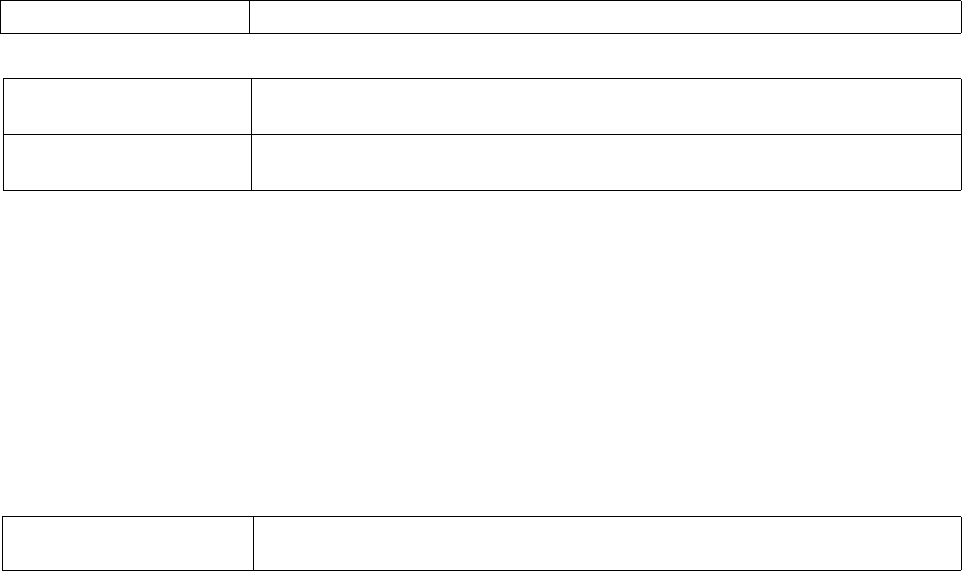
Brocade Mobility RFS4000, RFS6000, and RFS7000 CLI Reference Guide 199
53-1002619-01
4
channel-list
rf-domain-mode
Configures the channel list advertised by radios. This command also enables dynamic update of a
channel list
Supported in the following platforms:
•Brocade Mobility 300 Access Point
•Brocade Mobility 650 Access Point
•Brocade Mobility 6511 Access Point
•Brocade Mobility 71XX Access Point
•Brocade Mobility RFS4000
•Brocade Mobility RFS6000
•Brocade Mobility RFS7000
Syntax:
channel-list [2.4GHz|5GHz|dynamic]
channel-list dynamic
channel-list [2.4GHz|5GHz] <CHANNEL-LIST>
Parameters
channel-list dynamic
channel-list [2.4GHz|5GHz] <CHANNEL-LIST>
Example
rfs7000-37FABE(config-rf-domain-default)#channel-list 2.4GHz 1-10
rfs7000-37FABE(config-rf-domain-default)#show context
rf-domain RFDOMAIN_UseCase1
location SanJose
contact txyr399@brocade-solutions.com
timezone America/Los_Angeles
country-code us
channel-list 2.4GHz 1,2,3,4,5,6,7,8,9,10
rfs7000-37FABE(config-rf-domain-default)#
Related Commands:
dynamic Enables dynamic update of a channel list
2.4GHz <CHANNEL-LIST> Configures the channel list advertised by radios operating in the 2.4GHz mode
•<CHANNLE-LIST> – Specify the list of channels separated by commas or hyphens.
5GHz <CHANNEL-LIST> Configures the channel list advertised by radios operating in the 5GHz mode
•<CHANNLE-LIST> – Specify the list of channels separated by commas or hyphens.
no Removes the list of channels configured on the selected RF Domain for 2.4GHz and 5GHz bands.
Also disables dynamic update of a channel list.

200 Brocade Mobility RFS4000, RFS6000, and RFS7000 CLI Reference Guide
53-1002619-01
4
contact
rf-domain-mode
Configures the contact (the network administrator) in case of problems or issues impacting the RF
Domain
Supported in the following platforms:
•Brocade Mobility 300 Access Point
•Brocade Mobility 650 Access Point
•Brocade Mobility 6511 Access Point
•Brocade Mobility 71XX Access Point
•Brocade Mobility RFS4000
•Brocade Mobility RFS6000
•Brocade Mobility RFS7000
Syntax:
contact <WORD>
Parameters
contact <WORD>
Example
rfs7000-37FABE(config-rf-domain-default)#contact Bob+919620011529
rfs7000-37FABE(config-rf-domain-default)#
rfs7000-37FABE(config-rf-domain-default)#show context
rf-domain default
contact Bob+919620011529
stats update-interval 200
no country-code
use smart-rf-policy Smart-RF1
use wips-policy WIPS1
sensor-server 2 ip 172.16.10.3
override-wlan test vlan-pool 2 limit 20
rfs7000-37FABE(config-rf-domain-default)#
Related Commands:
control-vlan
rf-domain-mode
Configures VLAN for traffic control in this RF Domain
Supported in the following platforms:
•Brocade Mobility 300 Access Point
•Brocade Mobility 650 Access Point
•Brocade Mobility 6511 Access Point
contact <WORD> Specify contact details, such as name and number.
no Removes contact details configured for a RF Domain

Brocade Mobility RFS4000, RFS6000, and RFS7000 CLI Reference Guide 201
53-1002619-01
4
•Brocade Mobility 71XX Access Point
•Brocade Mobility RFS4000
•Brocade Mobility RFS6000
•Brocade Mobility RFS7000
Syntax:
control-vlan <1-4094>
Parameters
control-vlan <1-4094>
Example
rfs7000-37FABE(config-rf-domain-default)#control-vlan 1
rfs7000-37FABE(config-rf-domain-default)#show context
rf-domain RFDOMAIN_UseCase1
location SanJose
contact txyr399@brocade-solutions.com
timezone America/Los_Angeles
country-code us
channel-list 2.4GHz 1,2,3,4,5,6,7,8,9,10
control-vlan 1
rfs7000-37FABE(config-rf-domain-default)#
Related Commands:
country-code
rf-domain-mode
Configures a RF Domain’s country of operation. Since device channels transmit in specific
channels unique to the country of operation, it is essential to configure the country code correctly
or risk using the access point illegally.
Supported in the following platforms:
•Brocade Mobility 300 Access Point
•Brocade Mobility 650 Access Point
•Brocade Mobility 6511 Access Point
•Brocade Mobility 71XX Access Point
•Brocade Mobility RFS4000
•Brocade Mobility RFS6000
•Brocade Mobility RFS7000
Syntax:
country-code [<WORD>]
Parameters
<1-4094> Specify the VLAN ID from 1 - 4094.
no Disables the VLAN for controlling traffic in a RF Domain

202 Brocade Mobility RFS4000, RFS6000, and RFS7000 CLI Reference Guide
53-1002619-01
4
country-code [<WORD>]
Example
rfs7000-37FABE(config-rf-domain-default)#country-code in
rfs7000-37FABE(config-rf-domain-default)#
rfs7000-37FABE(config-rf-domain-default)#show context
rf-domain default
country-code in
rfs7000-37FABE(config-rf-domain-default)#
Related Commands:
dhcp-redundancy
rf-domain-mode
Enables DHCP redundancy in this RF Domain
Supported in the following platforms:
•Brocade Mobility 300 Access Point
•Brocade Mobility 650 Access Point
•Brocade Mobility 6511 Access Point
•Brocade Mobility 71XX Access Point
•Brocade Mobility RFS4000
•Brocade Mobility RFS6000
•Brocade Mobility RFS7000
Syntax:
dhcp-redundancy
Parameters
None
Example
rfs7000-37FABE(config-rf-domain-default)#dhcp-redundancy
rfs7000-37FABE(config-rf-domain-default)#
rfs7000-37FABE(config-rf-domain-default)#show context
rf-domain default
country-code in
dhcp-redundancy
rfs7000-37FABE(config-rf-domain-default)#
Related Commands:
country-code Configures the RF Domain’s country of operation
<WORD> Specify the 2 letter ISO-3166 country code.
no Removes the country of operation configured on a RF Domain
no Removes RF Domain DHCP redundancy

Brocade Mobility RFS4000, RFS6000, and RFS7000 CLI Reference Guide 203
53-1002619-01
4
layout
rf-domain-mode
Configures the RF Domain layout in terms of area, floor, and location on a map. It allows users to
place APs across the deployment map. A maximum of 256 layouts is permitted.
Supported in the following platforms:
•Brocade Mobility 300 Access Point
•Brocade Mobility 650 Access Point
•Brocade Mobility 6511 Access Point
•Brocade Mobility 71XX Access Point
•Brocade Mobility RFS4000
•Brocade Mobility RFS6000
•Brocade Mobility RFS7000
Syntax:
layout [area|floor|map-location]
layout [area|floor|map-location] {(area [<AREA-NAME>]|floor [<FLOOR-NAME>]|
map-location [<URL> units [feet|meters] {area [<AREA-NAME>]|floor
[<FLOOR-
NAME>]}}
Parameters
layout [area|floor|map-location] {(area [<AREA-NAME>]|floor [<FLOOR-NAME>]|
map-location [<URL> units [feet|meters] {area [<AREA-NAME>]|floor
[<FLOOR-NAME>]}}
Example
rfs7000-37FABE(config-rf-domain-default)#layout map-location
www.firstfloor.com units meters area Ecospace floor Floor5
rfs7000-37FABE(config-rf-domain-default)#
rfs7000-37FABE(config-rf-domain-default)#show context
rf-domain default
country-code us
sensor-server 1 ip 172.16.10.14 port 1
channel-list dynamic
channel-list 2.4GHz 1,2,3,4,5,6,7,8,9,10
layout Configures the RF Domain layout in terms of area, floor, and location on a map
area <AREA-NAME> Configures the RF Domain area name
•<AREA-NAME> – Specify the area name.
floor <FLOOR-NAME> Configures the RF Domain floor name
•<FLOOR-NAME> – Specify the floor name.
map-location <URL> units
[feet|meters]
Configures the location of the RF Domain on the map
•<URL> – Specify the URL to configure the map location.
•units – Configures the map units in terms of feet or meters
•feet – Selects the unit of measurement as feet
•meters – Selects the unit of measurement as meters
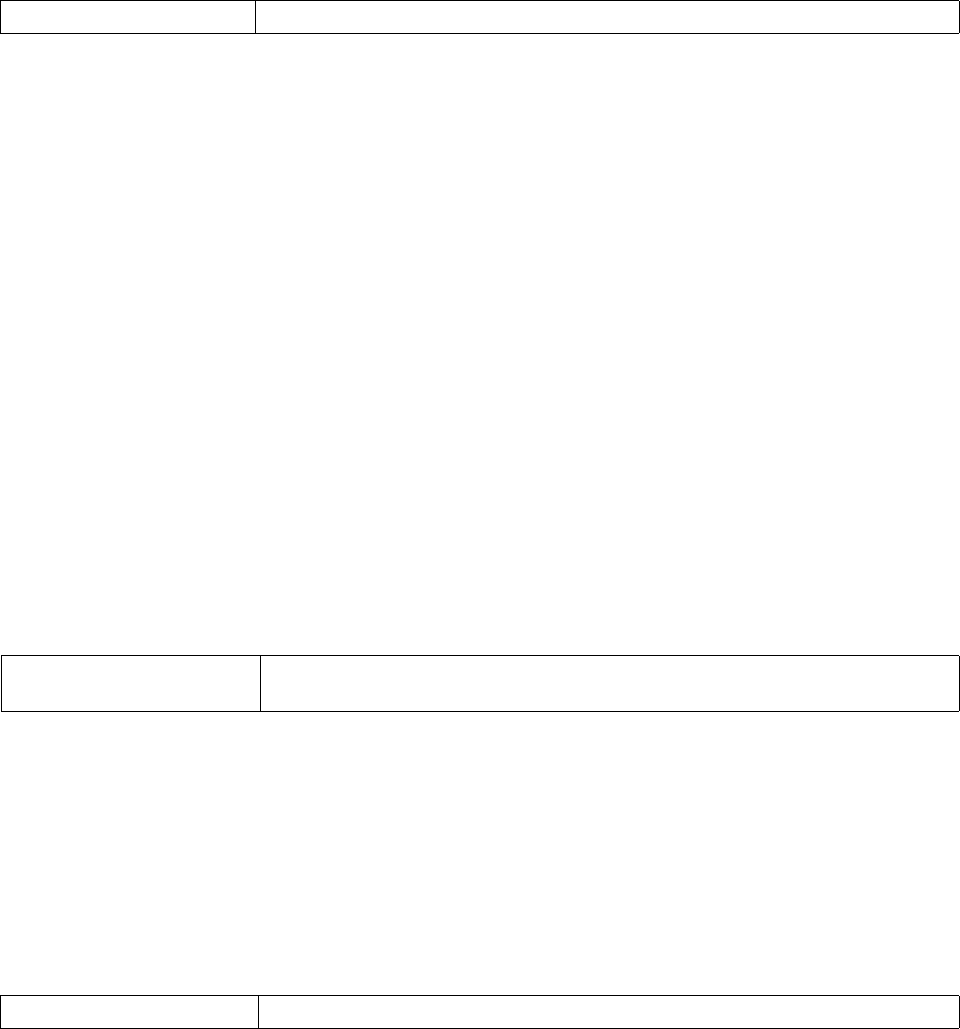
204 Brocade Mobility RFS4000, RFS6000, and RFS7000 CLI Reference Guide
53-1002619-01
4
layout map-location www.firstfloor.com units meters area Ecospace floor
Floor5
rfs7000-37FABE(config-rf-domain-default)#
Related Commands:
location
rf-domain-mode
Configures the physical location of the wireless controller RF Domain. The location could be as
specific as the building name or floor number. Or it could be generic and include an entire site. The
location defines the physical area where a common set of device configurations are deployed and
managed by a RF Domain policy.
Supported in the following platforms:
•Brocade Mobility 300 Access Point
•Brocade Mobility 650 Access Point
•Brocade Mobility 6511 Access Point
•Brocade Mobility 71XX Access Point
•Brocade Mobility RFS4000
•Brocade Mobility RFS6000
•Brocade Mobility RFS7000
Syntax:
location <WORD>
Parameters
location <WORD>
Example
rfs7000-37FABE(config-rf-domain-default)#location SanJose
rfs7000-37FABE(config-rf-domain-default)#
rfs7000-37FABE(config-rf-domain-default)#show context
rf-domain default
location SanJose
no country-code
rfs7000-37FABE(config-rf-domain-default)#
Related Commands:
mac-name
rf-domain-mode
no Removes the RF Domain layout details
location <WORD> Configures the RF Domain location by specifying the area or building name
•<WORD> – Specify the location.
no Removes the RF Domain location

Brocade Mobility RFS4000, RFS6000, and RFS7000 CLI Reference Guide 205
53-1002619-01
4
Configures a relevant name for each MAC address
Supported in the following platforms:
•Brocade Mobility 300 Access Point
•Brocade Mobility 650 Access Point
•Brocade Mobility 6511 Access Point
•Brocade Mobility 71XX Access Point
•Brocade Mobility RFS4000
•Brocade Mobility RFS6000
•Brocade Mobility RFS7000
Syntax:
mac-name <MAC> <NAME>
Parameters
mac-name <MAC> <NAME>
Example
rfs7000-37FABE(config-rf-domain-default)#mac-name 11-22-33-44-55-66
TestDevice
rfs7000-37FABE(config-rf-domain-default)#
rfs7000-37FABE(config-rf-domain-default)#show context
rf-domain default
location SanJose
no country-code
mac-name 11-22-33-44-55-66 TestDevice
rfs7000-37FABE(config-rf-domain-default)#
Related Commands:
no
rf-domain-mode
Negates a command or reverts configured settings to their default. When used in the config RF
Domain mode, the no command negates or reverts RF Domain settings.
Supported in the following platforms:
•Brocade Mobility 300 Access Point
•Brocade Mobility 650 Access Point
•Brocade Mobility 6511 Access Point
•Brocade Mobility 71XX Access Point
•Brocade Mobility RFS4000
mac-name Configures a relevant name for each MAC address
<MAC> <NAME> Specifies the MAC address
•<NAME> – Specify a friendly name for this MAC address to use in events and statistics.
no Removes the MAC address to name mapping

206 Brocade Mobility RFS4000, RFS6000, and RFS7000 CLI Reference Guide
53-1002619-01
4
•Brocade Mobility RFS6000
•Brocade Mobility RFS7000
Syntax:
no
[channel-list|contact|control-vlan|country-code|dhcp-redundancy|layout|locati
on|
mac-name|override-smartrf|override-wlan|sensor-server|stats|timezone|use]
Parameters
no [channel-list|contact|control-vlan|country-code|dhcp-redundancy|layout|
location|
mac-name|override-smartrf|override-wlan|sensor-server|stats|timezone|use]
Example
rfs7000-37FABE(config-rf-domain-default)#mac-name 11-22-33-44-55-66
TestDevice
rfs7000-37FABE(config-rf-domain-default)#
rfs7000-37FABE(config-rf-domain-default)#show context
rf-domain default
location SanJose
no country-code
mac-name 11-22-33-44-55-66 TestDevice
rfs7000-37FABE(config-rf-domain-default)#
no channel-list Removes the channel list for 2.4GHz and 5GHz bands. Also disables dynamic update of a
channel list
no contact Removes contact details configured
no control-vlan Removes VLAN configured for controlling traffic
no country-code Removes the country of operation configured
no dhcp-redundancy Removes DHCP redundancy
no layout Removes the RF Domain layout details
no location Removes the RF Domain location details
no mac-name Removes the MAC address to name mapping
no override-smartrf Resets the override Smart RF settings to default
no override-wlan Resets the override WLAN settings to default
no sensor-server Disables an AirDefense sensor server details
no stats Resets RF Domain stats settings
no timezone Removes the RF Domain’s time zone
no use Resets RF Domain profile settings

Brocade Mobility RFS4000, RFS6000, and RFS7000 CLI Reference Guide 207
53-1002619-01
4
Related Commands:
override-smart-rf
rf-domain-mode
Configures RF Domain level overrides for a Smart RF policy
Supported in the following platforms:
•Brocade Mobility 300 Access Point
•Brocade Mobility 650 Access Point
•Brocade Mobility 6511 Access Point
•Brocade Mobility 71XX Access Point
•Brocade Mobility RFS4000
•Brocade Mobility RFS6000
•Brocade Mobility RFS7000
Syntax:
override-smartrf channel-list [2.4GHz|5GHZ] <WORD>
Parameters
override-smartrf channel-list [2.4GHz|5GHZ] <WORD>
channel-list Configures the channel list advertised by radios, and enables dynamic update of channel lists
contact Configures details of the person to contact (or the administrator) in case of any problems or
issues impacting the RF Domain
control-vlan Configures a VLAN for traffic control
country-code Configures a RF Domain’s country of operation
dhcp-redundancy Enables a RF Domain’s DHCP redundancy
layout Configures a RF Domain’s layout maps
location Configures a RF Domain’s deployment location
mac-name Configures a relevant name for each MAC address
override-smart-rf Configures RF Domain level overrides for Smart RF
override-wlan Configures RF Domain level overrides for WLAN
sensor-server Configures an AirDefense sensor server
stats Configures RF Domain stats settings
timezone Configures a RF Domain’s geographic time zone
use Enables the use of a Smart RF and/or WIPS policy
override-smartrf Configures RF Domain level overrides for a Smart RF policy
channel-list Enables the selection of a channel list for a Smart RF policy
2.4GHz <WORD> Selects the 2.4GHz band
•<WORD> – Specify a list of channels separated by commas.
5GHz <WORD> Selects the 5GHz band
•<WORD> – Specify a list of channels separated by commas.

208 Brocade Mobility RFS4000, RFS6000, and RFS7000 CLI Reference Guide
53-1002619-01
4
Example
rfs7000-37FABE(config-rf-domain-default)#override-smartrf channel-list 2.4GHz
1
,2,3
rfs7000-37FABE(config-rf-domain-default)#
rfs7000-37FABE(config-rf-domain-default)#show context
rf-domain default
location SanJose
no country-code
override-smartrf channel-list 2.4GHz 1,2,3
mac-name 11-22-33-44-55-66 TestDevice
rfs7000-37FABE(config-rf-domain-default)#
Related Commands:
override-wlan
rf-domain-mode
Configures RF Domain level overrides for a WLAN
Supported in the following platforms:
•Brocade Mobility 300 Access Point
•Brocade Mobility 650 Access Point
•Brocade Mobility 6511 Access Point
•Brocade Mobility 71XX Access Point
•Brocade Mobility RFS4000
•Brocade Mobility RFS6000
•Brocade Mobility RFS7000
Syntax:
overrides-wlan <WLAN> [ssid|vlan-pool|wpa-wpa2-psk]
overrides-wlan <WLAN> [ssid <SSID>|vlan-pool <1-4094> {limit}|wpa-wpa2-psk
<WORD>]
Parameters
no Resets the override Smart RF settings its default

Brocade Mobility RFS4000, RFS6000, and RFS7000 CLI Reference Guide 209
53-1002619-01
4
overrides-wlan <WLAN> [ssid <SSID>|vlan-pool <1-4094> {limit}|wpa-wpa2-psk
<WORD>]
Example
rfs7000-37FABE(config-rf-domain-default)#override-wlan test vlan-pool 2 limit
2
0
rfs7000-37FABE(config-rf-domain-default)#
rfs7000-37FABE(config-rf-domain-default)#show context
rf-domain default
no country-code
override-wlan test vlan-pool 2 limit 20
rfs7000-37FABE(config-rf-domain-default)#
Related Commands:
sensor-server
rf-domain-mode
Configures an AirDefense sensor server on this RF Domain. Sensor servers allow network
administrators to monitor and download data from multiple sensors remote locations using
Ethernet TCP/IP or serial communications. This enables administrators to respond quickly to
interferences and coverage problems.
Supported in the following platforms:
•Brocade Mobility 300 Access Point
•Brocade Mobility 650 Access Point
•Brocade Mobility 6511 Access Point
•Brocade Mobility 71XX Access Point
•Brocade Mobility RFS4000
•Brocade Mobility RFS6000
•Brocade Mobility RFS7000
Syntax:
sensor-server <1-3> ip <IP> port [443|8443|<1-65535>]
<WLAN> Configures the WLAN name
The name should not exceed 32 characters and should represent the WLAN coverage area. After
creating the WLAN, configure its override parameters.
ssid <SSID> Configures a override Service Set Identifier (SSID) associated with this WLAN
The SSID should not exceed 32 characters.
vlan-pool <1-4094> limit Configures the override VLANs available to this WLAN
•<1-4094> – Specify the VLAN ID from 1 - 4094.
•limit – Optional. Sets a limit to the number of users on this VLAN. The maximum client limit
is 8192 per VLAN. The default is 0.
wpa-wpa2-psk <WORD> Configures the WPA-WPA2 key or passphrase for this WLAN
•<WORD> – Specify a WPA-WPA2 key or passphrase.
no Resets the override WLAN settings its default

210 Brocade Mobility RFS4000, RFS6000, and RFS7000 CLI Reference Guide
53-1002619-01
4
Parameters
sensor-server <1-3> ip <IP> port [443|8443|<1-65535>]
Example
rfs7000-37FABE(config-rf-domain-default)#sensor-server 2 ip 172.16.10.3 port
44
3
rfs7000-37FABE(config-rf-domain-default)#
rfs7000-37FABE(config-rf-domain-default)#show context
rf-domain default
no country-code
sensor-server 2 ip 172.16.10.3
override-wlan test vlan-pool 2 limit 20
rfs7000-37FABE(config-rf-domain-default)#
Related Commands:
stats
rf-domain-mode
Configures stats settings that define how RF Domain statistics are updated
Supported in the following platforms:
•Brocade Mobility 300 Access Point
•Brocade Mobility 650 Access Point
•Brocade Mobility 6511 Access Point
•Brocade Mobility 71XX Access Point
•Brocade Mobility RFS4000
•Brocade Mobility RFS6000
•Brocade Mobility RFS7000
Syntax:
stats [open-window|update-interval]
stats open-window <1-2> {sample-interval [<5-86640>] {size [<3-100>]}}
Sensor-server <1-3> Configures an AirDefense sensor server parameters
•<1-3> – Select the server ID from 1 - 3. The server with the lowest defined ID is reached first
by the wireless controller. The default is 1.
ip <IP> Configures the (non DNS) IP address of the sensor server
•<IP> – Specify the IP address of the sensor server.
port [443|8443|<1-65535>] Configures the sensor server port. The options are:
•443 – Configures port 443, the default port used by the AirDefense server
•8843 – Configures port 883, the default port used by advanced WIPS on a wireless
controller
•<1-6553> – Allows you to select a WIPS/AirDefense sensor server port from
1 - 65535
no Disables an AirDefense sensor server parameters

Brocade Mobility RFS4000, RFS6000, and RFS7000 CLI Reference Guide 211
53-1002619-01
4
stats update-interval [<5-300>|auto]
Parameters
stats open-window <1-2> {sample-interval [<5-86640>] {size [<3-100>]}}
stats update-interval [<5-300>|auto]
Example
rfs7000-37FABE(config-rf-domain-default)#stats update-interval 200
rfs7000-37FABE(config-rf-domain-default)#
rfs7000-37FABE(config-rf-domain-default)*#show context
rf-domain default
stats update-interval 200
no country-code
sensor-server 2 ip 172.16.10.3
override-wlan test vlan-pool 2 limit 20
rfs7000-37FABE(config-rf-domain-default)*#
Related Commands:
timezone
rf-domain-mode
Configures the RF Domain’s geographic time zone. Configuring the time zone is essential for RF
Domains deployed across different geographical locations.
Supported in the following platforms:
•Brocade Mobility 300 Access Point
•Brocade Mobility 650 Access Point
•Brocade Mobility 6511 Access Point
•Brocade Mobility 71XX Access Point
•Brocade Mobility RFS4000
•Brocade Mobility RFS6000
stats Configures stats related settings on this RF Domain
open-window <1-2> Opens a stats window to get trending data
•<1-2> – Configures a numerical index ID for this RF Domain statistics
sample-interval <5-86640> Optional. Configures the interval at which the wireless controller captures statistics supporting
this RF Domain
•<5-86640> – Specify the sample interval from 5 - 86640 seconds. The default is 5 seconds.
size <3-100> Optional. After specifying the interval time you might specify the number of samples used by the
wireless controller to define RF Domain statistics.
•<3-100> – Specify the number of samples from 3 - 100. The default is 6 samples.
stats Configures stats related settings on this RF Domain
update-interval
[<5-300>|auto]
Configures the interval at which RF Domain statistics are updated. The options are:
•<5-300> – Specify an update interval from 5 - 300 seconds.
•auto – The RF Domain manager automatically adjusts the update interval based on the load.
no Resets stats related settings

212 Brocade Mobility RFS4000, RFS6000, and RFS7000 CLI Reference Guide
53-1002619-01
4
•Brocade Mobility RFS7000
Syntax:
timezone <TIMEZONE>
Parameters
timezone <TIMEZONE>
Example
rfs7000-37FABE(config-rf-domain-default)#timezone America/Los_Angeles
rfs7000-37FABE(config-rf-domain-default)#
rfs7000-37FABE(config-rf-domain-default)#show context
rf-domain default
timezone America/Los_Angeles
stats update-interval 200
no country-code
use wips-policy WIPS1
sensor-server 2 ip 172.16.10.3
override-wlan test vlan-pool 2 limit 20
rfs7000-37FABE(config-rf-domain-default)#
Related Commands:
use
rf-domain-mode
Enables the use of Smart RF and WIPS with this RF Domain
Supported in the following platforms:
•Brocade Mobility 300 Access Point
•Brocade Mobility 650 Access Point
•Brocade Mobility 6511 Access Point
•Brocade Mobility 71XX Access Point
•Brocade Mobility RFS4000
•Brocade Mobility RFS6000
•Brocade Mobility RFS7000
Syntax:
use [smart-rf-policy|wips-policy]
use [smart-rf-policy <SMART-RF-POLICY-NAME>|wips-policy <WIPS-POLICY-NAME>]
Parameters
time <TIMEZONE> Specify the RF Domain’s time zone.
no Removes a RF Domain’s time zone

Brocade Mobility RFS4000, RFS6000, and RFS7000 CLI Reference Guide 213
53-1002619-01
4
use [smart-rf-policy <SMART-RF-POLICY-NAME>|wips-policy <WIPS-POLICY-NAME>]
Example
rfs7000-37FABE(config-rf-domain-default)#use smart-rf-policy Smart-RF1
rfs7000-37FABE(config-rf-domain-default)#use wips-policy WIPS1
rfs7000-37FABE(config-rf-domain-default)#show context
rf-domain default
stats update-interval 200
no country-code
use smart-rf-policy Smart-RF1
use wips-policy WIPS1
sensor-server 2 ip 172.16.10.3
override-wlan test vlan-pool 2 limit 20
rfs7000-37FABE(config-rf-domain-default)#
Related Commands:
rfs4000
Global Configuration Commands
Adds a Brocade Mobility RFS4000 wireless controller to the network
Supported in the following platforms:
•Brocade Mobility RFS4000
•Brocade Mobility RFS6000
•Brocade Mobility RFS7000
Syntax:
rfs4000 <DEVICE-Brocade Mobility RFS4000>
Parameters
rfs4000 <DEVICE-Brocade Mobility RFS4000>
Example
rfs7000-37FABEconfig)#Brocade Mobility RFS4000 10-20-30-40-50-60
rfs7000-37FABE(config-device-10-20-30-40-50-60)#
rfs6000
Global Configuration Commands
use Uses a Smart RF policy with this RF Domain
smart-rf-policy
<SMART-RF-POLICY-NAME>
Specifies a Smart RF policy
•<SMART-RF-POLICY-NAME> – Specify the Smart RF policy name.
wips-policy
<WIPS-POLICY-NAME>
Specifies a WIPS policy
<WIPS-POLICY-NAME> – Specify the WIPS policy name.
no Resets profiles used with this RF Domain
<DEVICE-RFS4000> Specify the MAC address of the Brocade Mobility RFS4000.

214 Brocade Mobility RFS4000, RFS6000, and RFS7000 CLI Reference Guide
53-1002619-01
4
Adds a Brocade Mobility RFS6000 wireless controller to the network
Supported in the following platforms:
•Brocade Mobility RFS4000
•Brocade Mobility RFS6000
•Brocade Mobility RFS7000
Syntax:
rfs6000 <DEVICE-Brocade Mobility RFS6000>
Parameters
rfs6000 <DEVICE-Brocade Mobility RFS6000>
Example
rfs7000-37FABE(config)#Brocade Mobility RFS6000 11-20-30-40-50-61
rfs7000-37FABE(config-device-11-20-30-40-50-61)#
rfs7000
Global Configuration Commands
Adds a Brocade Mobility RFS7000 wireless controller to the network
Supported in the following platforms:
•Brocade Mobility RFS4000
•Brocade Mobility RFS6000
•Brocade Mobility RFS7000
Syntax:
rfs7000 <DEVICE-Brocade Mobility RFS7000>
Parameters
rfs7000 <DEVICE-Brocade Mobility RFS7000>
Example
rfs7000-37FABE(config)#Brocade Mobility RFS7000 12-20-30-40-50-62
rfs7000-37FABE(config-device-12-20-30-40-50-62)#
role-policy
Global Configuration Commands
Configures a role-based firewall policy
Supported in the following platforms:
•Brocade Mobility 300 Access Point
<DEVICE-RFS6000> Specify the MAC address of a Brocade Mobility RFS6000.
<DEVICE-RFS7000> Specify the MAC address of a Brocade Mobility RFS7000.

Brocade Mobility RFS4000, RFS6000, and RFS7000 CLI Reference Guide 215
53-1002619-01
4
•Brocade Mobility 650 Access Point
•Brocade Mobility 6511 Access Point
•Brocade Mobility 71XX Access Point
•Brocade Mobility RFS4000
•Brocade Mobility RFS6000
•Brocade Mobility RFS7000
Syntax:
role-policy <ROLE-POLICY-NAME>
Parameters
role-policy <ROLE-POLICY-NAME>
Example
rfs7000-37FABE(config)#role-policy role1
rfs7000-37FABE(config)#
NOTE
For more information on Role policy commands, see Chapter 19, Role-Policy.
self
Global Configuration Commands
Displays the device’s configuration context
Supported in the following platforms:
•Brocade Mobility 300 Access Point
•Brocade Mobility 650 Access Point
•Brocade Mobility 6511 Access Point
•Brocade Mobility 71XX Access Point
•Brocade Mobility RFS4000
•Brocade Mobility RFS6000
•Brocade Mobility RFS7000
Syntax:
self
Parameters
None
Example
rfs7000-37FABE(config)#self
rfs7000-37FABE(config-device-00-15-70-37-FA-BE)#
<ROLE-POLICY-NAME> Specify the role policy name. If the policy does not exist, it is created.

216 Brocade Mobility RFS4000, RFS6000, and RFS7000 CLI Reference Guide
53-1002619-01
4
smart-rf-policy
Global Configuration Commands
Configures a Smart RF policy
Supported in the following platforms:
•Brocade Mobility 300 Access Point
•Brocade Mobility 650 Access Point
•Brocade Mobility 6511 Access Point
•Brocade Mobility 71XX Access Point
•Brocade Mobility RFS4000
•Brocade Mobility RFS6000
•Brocade Mobility RFS7000
Syntax:
smart-rf-policy <SMART-RF-POLICY-NAME>
Parameters
smart-rf-policy <SMART-RF-POLICY-NAME>
Example
rfs7000-37FABE(config)#smart-rf-policy test
rfs7000-37FABE(config-smart-rf-policy-test)#
NOTE
For more information on smart-rf policy commands, see Chapter 20, Smart-RF-Policy.
wips-policy
Global Configuration Commands
Configures a WIPS policy
Supported in the following platforms:
•Brocade Mobility 300 Access Point
•Brocade Mobility 650 Access Point
•Brocade Mobility 6511 Access Point
•Brocade Mobility 71XX Access Point
•Brocade Mobility RFS4000
•Brocade Mobility RFS6000
•Brocade Mobility RFS7000
Syntax:
wips-policy <WIPS-POLICY-NAME>
<SMART-RF-POLICY-NAME>Specify the Smart RF policy name. If the policy does not exist, it is created.

Brocade Mobility RFS4000, RFS6000, and RFS7000 CLI Reference Guide 217
53-1002619-01
4
Parameters
wips-policy <WIPS-POLICY-NAME>
Example
rfs7000-37FABE(config)#wips-policy test
rfs7000-37FABE(config-wips-policy-test)#
NOTE
For more information on WIPS policy commands, see Chapter 21, WIPS-Policy.
wlan
Global Configuration Commands
Configures a wireless LAN
wlan
wlan
Configures a WLAN or enters WLAN configuration context for one or more WLANs
Supported in the following platforms:
•Brocade Mobility 300 Access Point
•Brocade Mobility 650 Access Point
•Brocade Mobility 6511 Access Point
•Brocade Mobility 71XX Access Point
•Brocade Mobility RFS4000
•Brocade Mobility RFS6000
•Brocade Mobility RFS7000
Syntax:
wlan {<WLAN-NAME>|containing <WLAN-NAME>}
Parameters
wlan {<WLAN-NAME>|containing <WLAN-NAME>}
Example
rfs7000-37FABE(config)#wlan 1
<WIPS-POLICY-NAME> Specify the WIPS policy name. If the policy does not exist, it is created.
Command Description Reference
wlan Configures a wireless LAN page 4-196
wlan <WLAN-NAME> Configures a new wireless LAN
•<WLAN-NAME> – Optional. Specify the WLAN name.
containing <WLAN-NAME> Optional. Configures an existing WLAN’s configuration context
•<WLAN-NAME> – Specify a sub-string in the WLAN name. Use this parameter to filter a WLAN

218 Brocade Mobility RFS4000, RFS6000, and RFS7000 CLI Reference Guide
53-1002619-01
4
rfs7000-37FABE(config-wlan-1)#
rfs7000-37FABE(config)#wlan containing wlan1
rfs7000-37FABE(config-wlan-{'containing': 'wlan1'})#
wlan-mode commands
wlan
Configures WLAN mode commands. Manual WLAN mappings are erased when the actual WLAN is
disabled and then enabled immediately
Use the (config) instance to configure WLAN related parameters.
To navigate to this instance, use the following commands:
rfs7000-37FABE(config)#wlan <WLAN>
Table 13 summarizes WLAN mode commands
TABLE 13 wlan-mode commands
Command Description Reference
802.11w Enables support for Protected Management Frame (IEEE 802.11w) settings page 4-219
accounting Defines WLAN accounting configuration page 4-220
acl Defines the actions based on an ACL rule configuration page 4-221
answer-broadcast-probes Allows a WLAN to respond to probes for broadcast ESS page 4-222
authentication-type Sets a WLAN’s authentication type page 4-222
bridging-mode Configures how packets to/from this WLAN are bridged page 4-223
broadcast-dhcp Configures broadcast DHCP packet handling page 4-224
broadcast-ssid Advertises a WLAN’s SSID in beacons page 4-225
captive-portal-enforcement Configures a WLAN’s captive portal enforcement page 4-225
client-access Enables WLAN client access (normal data operations) page 4-226
client-client-communication Allows the switching of frames from one wireless client to another on a WLAN page 4-227
client-load-balancing Enables load balancing of WLAN clients page 4-227
data-rates Specifies the 802.11 rates supported on the WLAN page 4-229
description Sets a WLAN’s description page 4-231
encryption-type Sets a WLAN’s encryption type page 4-232
enforce-dhcp Drops packets from clients with a static IP address page 4-233
ip Configures IP settings page 4-234
kerberos Configures Kerberos authentication parameters page 4-235
brocade-extensions Enables support for Brocade specific extensions to 802.11 page 4-236
no Negates a command or sets its default value page 4-238
proxy-arp-mode Enables the proxy ARP mode for ARP requests page 4-240
radius Configures the RADIUS related parameters page 4-241
shutdown Closes a WLAN page 4-242
ssid Configures a WLAN’s SSID page 4-242
Brocade Mobility RFS4000, RFS6000, and RFS7000 CLI Reference Guide 219
53-1002619-01
4
802.11w
wlan-mode commands
Enables support for Protected Management Frames (PMF) (IEEE 802.11w) settings
Supported in the following platforms:
•Brocade Mobility 300 Access Point
•Brocade Mobility 650 Access Point
•Brocade Mobility 6511 Access Point
•Brocade Mobility 71XX Access Point
•Brocade Mobility RFS4000
•Brocade Mobility RFS6000
•Brocade Mobility RFS7000
Syntax:
802.11w [mandatory|optional|sa-query]
802.11w [mandatory|optional]
802.11w sa-query [attempts <1-15>|timeout <100-6000>]
Parameters
802.11w [mandatory|optional]
802.11w sa-query [attempts <1-15>|timeout <100-6000>]
Example
rfs7000-37FABE(config-wlan-wlan1)#802.11w sa-query timeout 110
rfs7000-37FABE(config-wlan-wlan1)#802.11w sa-query attempts 1
rfs7000-37FABE(config-wlan-wlan1)#
use Defines WLAN mode configuration settings page 4-243
vlan Sets VLAN assignment for a WLAN page 4-245
vlan-pool-member Adds a member VLAN to the pool of VLANs for a WLAN page 4-245
wep128 Configures WEP128 parameters page 4-247
wep64 Configures WEP64 parameters page 4-248
wireless-client Configures the transmit power for wireless clients transmission page 4-249
wpa-wpa2 Modifies TKIP and CCMP (WPA/WPA2) related parameters page 4-250
TABLE 13 wlan-mode commands
Command Description Reference
802.11w mandatory Enforces WLAN PMF settings
802.11w optional Advertises support for PMF, but it is enforced only for clients that indicate their support
802.11w sa-query Enables security association (SA) query settings
attempts <1-15> Sets the number of times an SA query message is attempted
time-out <100-600> Sets the timeout period, when waiting for a response to an sa query, before re-sending

220 Brocade Mobility RFS4000, RFS6000, and RFS7000 CLI Reference Guide
53-1002619-01
4
rfs7000-37FABE(config-wlan-wlan1)#show context
wlan wlan1
ssid wlan1
bridging-mode tunnel
encryption-type none
authentication-type none
802.11w sa-query timeout 110
802.11w sa-query attempts 1
rfs7000-37FABE(config-wlan-wlan1)#
accounting
wlan-mode commands
Defines the WLAN’s accounting configuration
Supported in the following platforms:
•Brocade Mobility 300 Access Point
•Brocade Mobility 650 Access Point
•Brocade Mobility 6511 Access Point
•Brocade Mobility 71XX Access Point
•Brocade Mobility RFS4000
•Brocade Mobility RFS6000
•Brocade Mobility RFS7000
Syntax:
accounting [radius|syslog]
accounting radius
accounting [syslog host <IP/HOSTNAME> {port [<1-65535>]}]
Parameters
accounting radius
accounting [radius|syslog host <IP/HOSTNAME> {port [<1-65535>]}]
Example
rfs7000-37FABE(config-wlan-wlan1)#accounting syslog host 172.16.10.12 port 2
rfs7000-37FABE(config-wlan-wlan1)#show context
wlan wlan1
ssid wlan1
bridging-mode tunnel
encryption-type none
accounting radius Enables support for WLAN RADIUS accounting messages
accounting syslog Enables support for WLAN syslog accounting messages
host <IP/HOSTNAME> Configures a syslog destination hostname or IP address for accounting records
•<IP/HOSTNAME> – Specify the IP address or name of the destination host.
port <1-65535> Optional. Configures the syslog server’s UDP port (this port is used to connect to the server)
•<1-65535> – Specify the port from 1 - 65535.

Brocade Mobility RFS4000, RFS6000, and RFS7000 CLI Reference Guide 221
53-1002619-01
4
authentication-type none
802.11w sa-query timeout 110
802.11w sa-query attempts 1
accounting syslog host 172.16.10.12 port 2
rfs7000-37FABE(config-wlan-wlan1)#
acl
wlan-mode commands
Defines the actions taken based on an ACL rule configuration
Supported in the following platforms:
•Brocade Mobility 300 Access Point
•Brocade Mobility 650 Access Point
•Brocade Mobility 6511 Access Point
•Brocade Mobility 71XX Access Point
•Brocade Mobility RFS4000
•Brocade Mobility RFS6000
•Brocade Mobility RFS7000
Syntax:
acl exceed-rate wireless-client-denied-traffic <0-1000000> {blacklist
|disassociate}
acl exceed-rate wireless-client-denied-traffic <0-1000000> {blacklist
<0-86400>|disassociate}
Parameters
acl exceed-rate wireless-client-denied-traffic <0-1000000> {blacklist
<0-86400>|disassociate}
Example
rfs7000-37FABE(config-wlan-wlan1)#acl exceed-rate
wireless-client-denied-traffic
20 disassociate
rfs7000-37FABE(config-wlan-wlan1)#show context
wlan wlan1
ssid wlan1
bridging-mode tunnel
encryption-type none
authentication-type none
802.11w sa-query timeout 110
802.11w sa-query attempts 1
accounting syslog host 172.16.10.12 port 2
acl exceed-rate wireless-client-denied-traffic 20 disassociate
rfs7000-37FABE(config-wlan-wlan1)#
acl exceed-rate Sets the actions taken based on an ACL rule configuration (for example, drop a packet)
•exceed-rate – Action is taken when the rate exceeds a specified value
wireless-client-denied-traffic
<0-1000000>
Sets the action to deny traffic to the wireless client, when the rate exceeds the specified value
•<0-1000000> – Specify a allowed rate threshold of disallowed traffic in packets/sec.
blacklist <0-86400> Optional. When enabled, sets the time interval to blacklist a wireless client
disassociate Optional. When enabled, disassociates a wireless client
222 Brocade Mobility RFS4000, RFS6000, and RFS7000 CLI Reference Guide
53-1002619-01
4
answer-broadcast-probes
wlan-mode commands
Allows the WLAN to respond to probe requests that do not specify an SSID. These probes are for
broadcast ESS.
Supported in the following platforms:
•Brocade Mobility 300 Access Point
•Brocade Mobility 650 Access Point
•Brocade Mobility 6511 Access Point
•Brocade Mobility 71XX Access Point
•Brocade Mobility RFS4000
•Brocade Mobility RFS6000
•Brocade Mobility RFS7000
Syntax:
answer-broadcast-probes
Parameters
None
Example
rfs7000-37FABE(config-wlan-wlan1)#answer-broadcast-probes
rfs7000-37FABE(config-wlan-wlan1)#
authentication-type
wlan-mode commands
Sets the WLAN’s authentication type
Supported in the following platforms:
•Brocade Mobility 300 Access Point
•Brocade Mobility 650 Access Point
•Brocade Mobility 6511 Access Point
•Brocade Mobility 71XX Access Point
•Brocade Mobility RFS4000
•Brocade Mobility RFS6000
•Brocade Mobility RFS7000
Syntax:
authentication-type [eap|eap-mac|eap-psk|kerberos|mac|none]
Parameters

Brocade Mobility RFS4000, RFS6000, and RFS7000 CLI Reference Guide 223
53-1002619-01
4
authentication-type [eap|eap-mac|eap-psk|kerberos|mac|none]
Example
rfs7000-37FABE(config-wlan-wlan1)#authentication-type eap
rfs7000-37FABE(config-wlan-wlan1)#
rfs7000-37FABE(config-wlan-wlan1)#show context
wlan wlan1
ssid wlan1
bridging-mode tunnel
encryption-type none
authentication-type eap
802.11w sa-query timeout 110
802.11w sa-query attempts 1
accounting syslog host 172.16.10.12 port 2
acl exceed-rate wireless-client-denied-traffic 20 disassociate
rfs7000-37FABE(config-wlan-wlan1)#
bridging-mode
wlan-mode commands
Configures how packets are bridged to and from a WLAN
Supported in the following platforms:
•Brocade Mobility 300 Access Point
•Brocade Mobility 650 Access Point
•Brocade Mobility 6511 Access Point
•Brocade Mobility 71XX Access Point
•Brocade Mobility RFS4000
•Brocade Mobility RFS6000
•Brocade Mobility RFS7000
Syntax:
bridging-mode [local|tunnel]
Parameters
authentication-type Configures a WLAN’s authentication type
The authentication types are: EAP, EAP-MAC, EAP-PSK, Kerberos, MAC, and none.
eap Configures Extensible Authentication Protocol (EAP) authentication (802.1X)
eap-mac Configures EAP or MAC authentication depending on client
eap-psk Configures EAP authentication or pre-shared keys depending on client (This setting is only valid with
Temporal Key Integrity Protocol (TKIP) or Counter Mode with Cipher Block Chaining Message
Authentication Code Protocol (CCMP))
kerberos Configures Kerberos authentication (encryption will change to WEP128 if it’s not already WEP128 or
Keyguard)
mac Configures MAC authentication (RADIUS lookup of MAC address)
none No authentication is used or the client uses pre-shared keys

224 Brocade Mobility RFS4000, RFS6000, and RFS7000 CLI Reference Guide
53-1002619-01
4
bridging-mode [local|tunnel]
Example
rfs7000-37FABE(config-wlan-wlan1)#bridging-mode local
rfs7000-37FABE(config-wlan-wlan1)#
rfs7000-37FABE(config-wlan-wlan1)#show context
wlan wlan1
ssid wlan1
bridging-mode local
encryption-type none
authentication-type eap
802.11w sa-query timeout 110
802.11w sa-query attempts 1
accounting syslog host 172.16.10.12 port 2
acl exceed-rate wireless-client-denied-traffic 20 disassociate
rfs7000-37FABE(config-wlan-wlan1)#
broadcast-dhcp
wlan-mode commands
Configures the broadcast DHCP packet handling parameters
Supported in the following platforms:
•Brocade Mobility 300 Access Point
•Brocade Mobility 650 Access Point
•Brocade Mobility 6511 Access Point
•Brocade Mobility 71XX Access Point
•Brocade Mobility RFS4000
•Brocade Mobility RFS6000
•Brocade Mobility RFS7000
Syntax:
broadcast-dhcp validate-offer
Parameters
broadcast-dhcp validate-offer
Example
rfs7000-37FABE(config-wlan-wlan1)#broadcast-dhcp validate-offer
rfs7000-37FABE(config-wlan-wlan1)#
rfs7000-37FABE(config-wlan-wlan1)#show context
wlan wlan1
ssid wlan1
bridging-mode Configures how packets are bridged to and from a WLAN. The options available are local and tunnel.
local Bridges packets between WLAN and local ethernet ports
tunnel Tunnels packets to other devices (typically a wireless controller)
validate-offer Validates the broadcast DHCP packet destination (a wireless client associated to the radio) before
forwarding over the air
Brocade Mobility RFS4000, RFS6000, and RFS7000 CLI Reference Guide 225
53-1002619-01
4
bridging-mode local
encryption-type none
authentication-type eap
802.11w sa-query timeout 110
802.11w sa-query attempts 1
accounting syslog host 172.16.10.12 port 2
acl exceed-rate wireless-client-denied-traffic 20 disassociate
broadcast-dhcp validate-offer
rfs7000-37FABE(config-wlan-wlan1)#
broadcast-ssid
wlan-mode commands
Advertises the WLAN SSID in beacons
Supported in the following platforms:
•Brocade Mobility 300 Access Point
•Brocade Mobility 650 Access Point
•Brocade Mobility 6511 Access Point
•Brocade Mobility 71XX Access Point
•Brocade Mobility RFS4000
•Brocade Mobility RFS6000
•Brocade Mobility RFS7000
Syntax:
broadcast-ssid
Parameters
None
Example
rfs7000-37FABE(config-wlan-wlan1)#broadcast-ssid
rfs7000-37FABE(config-wlan-wlan1)#
captive-portal-enforcement
wlan-mode commands
Configures the WLAN’s captive portal enforcement
Supported in the following platforms:
•Brocade Mobility 300 Access Point
•Brocade Mobility 650 Access Point
•Brocade Mobility 6511 Access Point
•Brocade Mobility 71XX Access Point
•Brocade Mobility RFS4000
•Brocade Mobility RFS6000
•Brocade Mobility RFS7000
Syntax:

226 Brocade Mobility RFS4000, RFS6000, and RFS7000 CLI Reference Guide
53-1002619-01
4
captive-portal-enforcement {fall-back}
Parameters
captive-portal-enforcement {fall-back}
Example
rfs7000-37FABE(config-wlan-wlan1)#captive-portal-enforcement fall-back
rfs7000-37FABE(config-wlan-wlan1)#
rfs7000-37FABE(config-wlan-wlan1)#show context
wlan wlan1
ssid wlan1
bridging-mode local
encryption-type none
authentication-type eap
802.11w sa-query timeout 110
802.11w sa-query attempts 1
accounting syslog host 172.16.10.12 port 2
captive-portal-enforcement fall-back
acl exceed-rate wireless-client-denied-traffic 20 disassociate
broadcast-dhcp validate-offer
rfs7000-37FABE(config-wlan-wlan1)#
client-access
wlan-mode commands
Enables WLAN client access (for normal data operations)
Supported in the following platforms:
•Brocade Mobility 300 Access Point
•Brocade Mobility 650 Access Point
•Brocade Mobility 6511 Access Point
•Brocade Mobility 71XX Access Point
•Brocade Mobility RFS4000
•Brocade Mobility RFS6000
•Brocade Mobility RFS7000
Syntax:
client-access
Parameters
None
Example
rfs7000-37FABE(config-wlan-wlan1)#client-access
rfs7000-37FABE(config-wlan-wlan1)#
captive-portal-enforcement Enables captive portal enforcement on a WLAN
fall-back Optional. Enforces captive portal validation if WLAN authentication fails (applicable to EAP or
MAC authentication only)
Brocade Mobility RFS4000, RFS6000, and RFS7000 CLI Reference Guide 227
53-1002619-01
4
client-client-communication
wlan-mode commands
Allows frame switching from one client to another on a WLAN
Supported in the following platforms:
•Brocade Mobility 300 Access Point
•Brocade Mobility 650 Access Point
•Brocade Mobility 6511 Access Point
•Brocade Mobility 71XX Access Point
•Brocade Mobility RFS4000
•Brocade Mobility RFS6000
•Brocade Mobility RFS7000
Syntax:
client-client-communication
Parameters
None
Example
rfs7000-37FABE(config-wlan-wlan1)#client-client-communication
rfs7000-37FABE(config-wlan-wlan1)#s
client-load-balancing
wlan-mode commands
Configures client load balancing on a WLAN
Supported in the following platforms:
•Brocade Mobility 300 Access Point
•Brocade Mobility 650 Access Point
•Brocade Mobility 6511 Access Point
•Brocade Mobility 71XX Access Point
•Brocade Mobility RFS4000
•Brocade Mobility RFS6000
•Brocade Mobility RFS7000
Syntax:
client-load-balancing {allow-single-band-clients|band-discovery-intvl|
capability-ageout-time|max-probe-req|probe-req-invl}
client-load-balancing {allow-single-band-clients [2.4Ghz|5Ghz]|
band-discovery-intvl [<0-10000>]|capability-ageout-time
[<0-10000>]}
client-load-balancing {{max-probe-req|probe-req-intvl} [2.4Ghz|5Ghz]
[<0-10000>]}

228 Brocade Mobility RFS4000, RFS6000, and RFS7000 CLI Reference Guide
53-1002619-01
4
Parameters
client-load-balancing {allow-single-band-clients [2.4Ghz|5Ghz]|
band-discovery-intvl [<0-10000>]|capability-ageout-time [<0-10000>]}
client-load-balancing {{max-probe-req|probe-req-intvl} [2.4Ghz|5Ghz]
[<0-10000>]}
Example
rfs7000-37FABE(config-wlan-wlan1)#client-load-balancing
allow-single-band-clients 2.4ghz
rfs7000-37FABE(config-wlan-wlan1)#
rfs7000-37FABE(config-wlan-wlan1)#client-load-balancing band-discovery-intvl
2
rfs7000-37FABE(config-wlan-wlan1)#
rfs7000-37FABEconfig-wlan-wlan1)#client-load-balancing probe-req-intvl 5ghz 5
rfs7000-37FABE(config-wlan-wlan1)#
rfs7000-37FABE(config-wlan-wlan1)#show context
wlan wlan1
ssid wlan1
bridging-mode local
encryption-type none
authentication-type eap
802.11w sa-query timeout 110
802.11w sa-query attempts 1
accounting syslog host 172.16.10.12 port 2
client-load-balancing probe-req-intvl 5ghz 5
client-load-balancing band-discovery-intvl 2
captive-portal-enforcement fall-back
acl exceed-rate wireless-client-denied-traffic 20 disassociate
broadcast-dhcp validate-offer
rfs7000-37FABE(config-wlan-wlan1)#
client-load-balancing Configures client load balancing on a WLAN
allow-single-band-clients
[2.4GHz|5GHz]
Optional. Allows single band clients to associate even during load balancing
•2.4GHz – Enables load balancing across 2.4GHz channels
•5GHz – Enables load balancing across 5GHz channels
band-discovery-intvl
<0-10000>
Optional. Configures time interval to discover a client's band capability before associating it
•<0-10000> – Specify a value from 0 - 10000 seconds.
capability-ageout-time
<0-10000>
Optional. Configures a client's capability ageout interval
•<0-10000> – Specify a value from 0 - 10000 seconds.
client-load-balancing Configures load balancing of clients on a WLAN
max-probe-req [2.4GHz|5GHz]
<0-10000>
Optional. Configures client probe request interval limits for association
•2.4GHz – Configures maximum client probe requests on 2.4GHz radios
•5GHz – Configures maximum client probe requests on 5GHz radios
•<0-10000> – Specify a client probe request threshold from 0 - 100000.
probe-req-intvl 2.4GHz|5GHz]
<0-10000>
Optional. Configures client probe request interval limits for association
•2.4GHz – Configures client probe request interval on 2.4GHz radios
•5GHz – Configures client probe request interval on 5GHz radios
•<0-10000> – Specify a value from 0 - 100000.

Brocade Mobility RFS4000, RFS6000, and RFS7000 CLI Reference Guide 229
53-1002619-01
4
data-rates
wlan-mode commands
Specifies the 802.11 rates supported on a WLAN
Supported in the following platforms:
•Brocade Mobility 300 Access Point
•Brocade Mobility 650 Access Point
•Brocade Mobility 6511 Access Point
•Brocade Mobility 71XX Access Point
•Brocade Mobility RFS4000
•Brocade Mobility RFS6000
•Brocade Mobility RFS7000
Syntax:
data-rates [2.4GHz|5GHz]
data-rates 2.4GHz [b-only|bg|bgn|custom|default|g-only|gn]
data-rates 2.4GHz [b-only|bg|bgn|default|g-only|gn]
data-rates 2.4GHz custom [1|11|12|18|2|24|36|48|5.5|54|6|9|
basic-1|basic-11|basic-12|basic-18|basci-2|basic-24|basic-36|
basic-48|basic-5.5|basic-54|basic-6|basic-9|basic-mcs0-7|mcs0-15|
mcs0-7|mcs8-15]
data-rates 5GHz [a-only|an|custom|default]
data-rates 5GHz [a-only|an|default]
data-rates 5GHz custom [12|18|24|36|48|54|6|9|basic-1|basi-11|
basic-12|basic-18|basic-2|basic-24|basic-36|basic-48|basic-5.5|basic-54|
basic-6|basic-9|basic-mcs0-7|mcs0-15|mcs0-7|mcs8-15]
Parameters
data-rates 2.4GHz [b-only|bg|bgn|default|g-only|gn]
data-rates Specifies the 802.11 rates supported when mapped to a 2.4GHz radio
b-only Uses rates that support only 11b clients
bg Uses rates that support both 11b and 11g clients
bgn Uses rates that support 11b, 11g and 11n clients
default Uses the default rates configured for a 2.4GHz radio
g-only Uses rates that support operation in the 11g only mode
gn Uses rates that support 11g and 11n clients

230 Brocade Mobility RFS4000, RFS6000, and RFS7000 CLI Reference Guide
53-1002619-01
4
data-rates 5GHz [a-only|an|default]
data-rates [2.4GHz|5GHz] custom [1|11|12|18|2|24|36|48|5.5|54|6|9|
basic-1|basic-11|basic-12|basic-18|basic-2|basic-24|basic-36|
basic-48|basic-5.5|basic-54|basic-6|basic-9|basic-mcs0-7|mcs0-15|
mcs0-7|mcs8-15]
Example
rfs7000-37FABE(config-wlan-wlan1)#data-rates 2.4GHz gn
rfs7000-37FABE(config-wlan-wlan1)#
rfs7000-37FABE(config-wlan-wlan1)#show context
wlan wlan1
ssid wlan1
data-rates Specifies the 802.11 rates supported when mapped to a 5GHz radio
a-only Uses rates that support operation in 11a only
an Uses rates that support 11a and 11n clients
default Uses default rates configured for a 5GHz
data-rates [2.4GHz|5GHz] Specifies the 802.11 rates supported when mapped to a 2.4GHz or 5GHz radio
custom Configures a data rates list by specifying each rate individually. Use 'basic-' prefix before a rate to
indicate it is used as a basic rate (For example, 'data-rates custom basic-1 basic-2 5.5 11').
The data-rates for 2.4GHz and 5GHz channels are the same with a few exceptions. The 2.4GHz
channel has a few extra data rates: 1, 11, 2, and 5.5.
1,11,2,5.5 The following data rates are specific to the 2.4GHz channel:
•1 – 1-Mbps
•11 – 11-Mbps
•2 – 2-Mbps
•5.5 – 5.5-Mbps
12,18,24,36,48,54,6,9,
basic-1,basic-11,
basic-12,basic-18,basic-2,
basic-36,basic-48,basic-5.5,
basic-54,basic-6,basic-9,
basic-mcs0-7,mcs0-15,
mcs0-7,mcs8-15
The following data rates are common to both the 2.4Ghz and 5GHz channels:
•12 – 12 Mbps
•18 – 18-Mbps
•24 – 24 Mbps
•36 – 36-Mbps
•48 – 48-Mbps
•54 – 54-Mbps
•6 – 6-Mbps
•9 – 9-Mbps
•basic-1 – basic 1-Mbps
•basic-11 – basic 11-Mbps
•basic-12 – basic 12-Mbps
•basic-18 – basic 18-Mbps
•basic-2 – basic 2-Mbps
•basic-36 – basic 36-Mbps
•basic-48 – basic 48-Mbps
•basic-5.5 – basic 5.5-Mbps
•basic-54 – basic 54-Mbps
•basic-6 – basic 6-Mbps
•basic-9 – basic 9-Mbps
•basic-mcs0-7 – Modulation and coding scheme 0-7 as a basic rate
•mcs0-15 – Modulation and coding scheme 0-15
•mcs0-7 – Modulation and coding scheme 0-7
•mcs8-15 – Modulation and coding scheme 8-15

Brocade Mobility RFS4000, RFS6000, and RFS7000 CLI Reference Guide 231
53-1002619-01
4
bridging-mode local
encryption-type none
authentication-type eap
802.11w sa-query timeout 110
802.11w sa-query attempts 1
accounting syslog host 172.16.10.12 port 2
data-rates 2.4GHz gn
client-load-balancing probe-req-intvl 5ghz 5
client-load-balancing band-discovery-intvl 2
captive-portal-enforcement fall-back
acl exceed-rate wireless-client-denied-traffic 20 disassociate
broadcast-dhcp validate-offer
rfs7000-37FABE(config-wlan-wlan1)#
description
wlan-mode commands
Defines the WLAN description
Supported in the following platforms:
•Brocade Mobility 300 Access Point
•Brocade Mobility 650 Access Point
•Brocade Mobility 6511 Access Point
•Brocade Mobility 71XX Access Point
•Brocade Mobility RFS4000
•Brocade Mobility RFS6000
•Brocade Mobility RFS7000
Syntax:
description <LINE>
Parameters
description <LINE>
Example
rfs7000-37FABE(config-wlan-wlan1)#description testwlan
rfs7000-37FABE(config-wlan-wlan1)#
rfs7000-37FABE(config-wlan-wlan1)#show context
wlan wlan1
description testwlan
ssid wlan1
bridging-mode local
encryption-type none
authentication-type eap
802.11w sa-query timeout 110
802.11w sa-query attempts 1
accounting syslog host 172.16.10.12 port 2
data-rates 2.4GHz gn
client-load-balancing probe-req-intvl 5ghz 5
client-load-balancing band-discovery-intvl 2
captive-portal-enforcement fall-back
<LINE> Specify a WLAN description

232 Brocade Mobility RFS4000, RFS6000, and RFS7000 CLI Reference Guide
53-1002619-01
4
acl exceed-rate wireless-client-denied-traffic 20 disassociate
broadcast-dhcp validate-offer
rfs7000-37FABE(config-wlan-wlan1)#
encryption-type
wlan-mode commands
Sets a WLAN’s encryption type
Supported in the following platforms:
•Brocade Mobility 300 Access Point
•Brocade Mobility 650 Access Point
•Brocade Mobility 6511 Access Point
•Brocade Mobility 71XX Access Point
•Brocade Mobility RFS4000
•Brocade Mobility RFS6000
•Brocade Mobility RFS7000
Syntax:
encryption-type [ccmp|keyguard|none|tkip|tkip-ccmp|wep128|
web128-keyguard|wep64]
Parameters
encryption-type [ccmp|keyguard|none|tkip|tkip-ccmp|wep128|web128-keyguard|
wep64]
Example
rfs7000-37FABEconfig-wlan-wlan1)#encryption-type tkip-ccmp
rfs7000-37FABE(config-wlan-wlan1)#
rfs7000-37FABE(config-wlan-wlan1)#show context
wlan wlan1
description testwlan
ssid wlan1
bridging-mode local
encryption-type tkip-ccmp
authentication-type eap
802.11w sa-query timeout 110
802.11w sa-query attempts 1
encryption-type Configures the WLAN’s data encryption parameters
ccmp Configures Advanced Encryption Standard (AES) Counter Mode CBC-MAC Protocol
(AES-CCM/CCMP)
keyguard Configures Keyguard-MCM (Mobile Computing Mode)
tkip Configures TKIP
tkip-ccmp Configures the TKIP and AES-CCM/CCMP encryption modes
wep128 Configures WEP with 128 bit keys
wep128-keyguard Configures WEP128 as well as Keyguard-MCM encryption modes
wep64 Configures WEP with 64 bit keys. A WEP64 configuration is insecure when two WLANs are mapped
to the same VLAN, and one uses no encryption while the other uses WEP.
Brocade Mobility RFS4000, RFS6000, and RFS7000 CLI Reference Guide 233
53-1002619-01
4
accounting syslog host 172.16.10.12 port 2
data-rates 2.4GHz gn
client-load-balancing probe-req-intvl 5ghz 5
client-load-balancing band-discovery-intvl 2
captive-portal-enforcement fall-back
acl exceed-rate wireless-client-denied-traffic 20 disassociate
broadcast-dhcp validate-offer
rfs7000-37FABE(config-wlan-wlan1)#
enforce-dhcp
wlan-mode commands
Drops packets from clients with a static IP address
Supported in the following platforms:
•Brocade Mobility 300 Access Point
•Brocade Mobility 650 Access Point
•Brocade Mobility 6511 Access Point
•Brocade Mobility 71XX Access Point
•Brocade Mobility RFS4000
•Brocade Mobility RFS6000
•Brocade Mobility RFS7000
Syntax:
enforce-dhcp
Parameters
None
Example
rfs7000-37FABE(config-wlan-wlan1)#enforce-dhcp
rfs7000-37FABE(config-wlan-wlan1)#
rfs7000-37FABE(config-wlan-wlan1)#show context
wlan wlan1
description testwlan
ssid wlan1
bridging-mode local
encryption-type tkip-ccmp
authentication-type eap
802.11w sa-query timeout 110
802.11w sa-query attempts 1
accounting syslog host 172.16.10.12 port 2
data-rates 2.4GHz gn
client-load-balancing probe-req-intvl 5ghz 5
client-load-balancing band-discovery-intvl 2
captive-portal-enforcement fall-back
acl exceed-rate wireless-client-denied-traffic 20 disassociate
enforce-dhcp
broadcast-dhcp validate-offer
rfs7000-37FABE(config-wlan-wlan1)#

234 Brocade Mobility RFS4000, RFS6000, and RFS7000 CLI Reference Guide
53-1002619-01
4
ip
wlan-mode commands
Configures Internet Protocol (IP) settings
Supported in the following platforms:
•Brocade Mobility 300 Access Point
•Brocade Mobility 650 Access Point
•Brocade Mobility 6511 Access Point
•Brocade Mobility 71XX Access Point
•Brocade Mobility RFS4000
•Brocade Mobility RFS6000
•Brocade Mobility RFS7000
Syntax:
ip [arp|dhcp]
ip arp [header-mismatch-validation|trust]
ip dhcp trust
Parameters
ip arp [header-mismatch-validation|trust]
ip dhcp trust
Example
rfs7000-37FABE(config-wlan-wlan1)#ip dhcp trust
rfs7000-37FABE(config-wlan-wlan1)#
rfs7000-37FABE(config-wlan-wlan1)#show context
wlan wlan1
description testwlan
ssid wlan1
bridging-mode local
encryption-type tkip-ccmp
authentication-type eap
802.11w sa-query timeout 110
802.11w sa-query attempts 1
accounting syslog host 172.16.10.12 port 2
data-rates 2.4GHz gn
client-load-balancing probe-req-intvl 5ghz 5
client-load-balancing band-discovery-intvl 2
captive-portal-enforcement fall-back
ip dhcp trust
ip arp Configures the IP settings for ARP packets
header-mismatch-validation Verifies mismatch of source MAC address in the ARP and Ethernet headers
trust Sets ARP responses as trusted for a WLAN/range
ip dhcp Configures the IP settings for DHCP packets
trust Sets DHCP responses as trusted for a WLAN/range

Brocade Mobility RFS4000, RFS6000, and RFS7000 CLI Reference Guide 235
53-1002619-01
4
acl exceed-rate wireless-client-denied-traffic 20 disassociate
enforce-dhcp
broadcast-dhcp validate-offer
rfs7000-37FABE(config-wlan-wlan1)#
kerberos
wlan-mode commands
Configures Kerberos authentication parameters on a WLAN
Supported in the following platforms:
•Brocade Mobility 300 Access Point
•Brocade Mobility 650 Access Point
•Brocade Mobility 6511 Access Point
•Brocade Mobility 71XX Access Point
•Brocade Mobility RFS4000
•Brocade Mobility RFS6000
•Brocade Mobility RFS7000
Syntax:
kerberos [password|realm|server]
kerberos password [0 <LINE>|2 <LINE>|<LINE>]
kerberos realm <REALM>
kerberos server [primary|secondary|timeout]
kerberos server [primary|secondary] host <IP/HOSTNAME> {port [<1-65535>]}
keberos server timeout <1-60>
Parameters
kerberos password [0 <LINE>|2 <LINE>|<LINE>]
kerberos realm <REALM>
kerberos Configures a WLAN’s Kerberos authentication parameters
The parameters are: password, realm, and server.
password Configures a Kerberos Key Distribution Center (KDC) server password. The password should not
exceed 127 characters. The password options are:
•0 <LINE> – Configures a clear text password
•2 <LINE> – Configures an encrypted password
•<LINE> – Specify the password.
kerberos Configures a WLAN’s Kerberos authentication parameters
The parameters are: password, realm, and server.
realm <REALM> Configures a Kerberos KDC server realm. The REALM should not exceed 127 characters.

236 Brocade Mobility RFS4000, RFS6000, and RFS7000 CLI Reference Guide
53-1002619-01
4
kerberos server [primary|secondary] host <IP/HOSTNAME> {port [<1-65535>]}
keberos server timeout <1-60>
Example
rfs7000-37FABE(config-wlan-wlan1)#kerberos server timeout 12
rfs7000-37FABE(config-wlan-wlan1)#
rfs7000-37FABE(config-wlan-wlan1)#kerberos server primary host 172.16.10.9
port
88
rfs7000-37FABE(config-wlan-wlan1)#
rfs7000-37FABE(config-wlan-wlan1)#show context
wlan wlan1
description testwlan
ssid wlan1
bridging-mode local
encryption-type tkip-ccmp
authentication-type eap
802.11w sa-query timeout 110
802.11w sa-query attempts 1
kerberos server timeout 12
kerberos server primary host 172.16.10.9
accounting syslog host 172.16.10.12 port 2
data-rates 2.4GHz gn
client-load-balancing probe-req-intvl 5ghz 5
client-load-balancing band-discovery-intvl 2
captive-portal-enforcement fall-back
ip dhcp trust
acl exceed-rate wireless-client-denied-traffic 20 disassociate
enforce-dhcp
broadcast-dhcp validate-offer
rfs7000-37FABE(config-wlan-wlan1)#
brocade-extensions
wlan-mode commands
Enables support for Brocade specific extensions to 802.11
kerberos Configures a WLAN’s Kerberos authentication parameters
The parameters are: password, realm, and server.
server [primary|secondary] Configures the primary and secondary KDC server parameters
•primary – Configures the primary KDC server parameters
•secondary – Configures the secondary KDC server parameters
host <IP/HOSTNAME> Sets the primary or secondary KDC server address
•<IP/HOSTNAME> – Specify the IP address or name of the KDC server.
port <1-65535> Optional. Configures the UDP port used to connect to the KDC server
•<1-65535> – Specify the port from 1 - 65535. The default is 88.
kerberos Configures a WLAN’s Kerberos authentication parameters
The parameters are: password, realm, and server.
timeout <1-60> Modifies the Kerberos KDC server‘s timeout parameters
•<1-60> – Specifies the time the wireless controller waits for a response from the Kerberos KDC
server before retrying. Specify a value from 1 - 60 seconds.

Brocade Mobility RFS4000, RFS6000, and RFS7000 CLI Reference Guide 237
53-1002619-01
4
Supported in the following platforms:
•Brocade Mobility 300 Access Point
•Brocade Mobility 650 Access Point
•Brocade Mobility 6511 Access Point
•Brocade Mobility 71XX Access Point
•Brocade Mobility RFS4000
•Brocade Mobility RFS6000
•Brocade Mobility RFS7000
Syntax:
brocade-extensions [move-command|smart-scan|symbol-load-information|
wmm-load-information]
Parameters
brocade-extensions [move-command|smart-scan|symbol-load-information|
wmm-load-information]
Example
rfs7000-37FABE(config-wlan-wlan1)#brocade-extensions wmm-load-information
rfs7000-37FABE(config-wlan-wlan1)#
rfs7000-37FABE(config-wlan-wlan1)#show context
wlan wlan1
description testwlan
ssid wlan1
bridging-mode local
encryption-type tkip-ccmp
authentication-type eap
802.11w sa-query timeout 110
802.11w sa-query attempts 1
kerberos server timeout 12
kerberos server primary host 172.16.10.9
accounting syslog host 172.16.10.12 port 2
data-rates 2.4GHz gn
brocade-extensions wmm-load-information
client-load-balancing probe-req-intvl 5ghz 5
client-load-balancing band-discovery-intvl 2
captive-portal-enforcement fall-back
ip dhcp trust
acl exceed-rate wireless-client-denied-traffic 20 disassociate
enforce-dhcp
broadcast-dhcp validate-offer
rfs7000-37FABE(config-wlan-wlan1)#
brocade-extensions Enables support for Brocade specific extensions to 802.11
move-command Enables support for Brocade move (fast roaming) feature
smart-scan Enables support for smart scanning feature
symbol-load-information Enables support for the Symbol Technologies load information element (Element ID 173)
wmm-load-information Enables support for the Brocade WMM load information element
238 Brocade Mobility RFS4000, RFS6000, and RFS7000 CLI Reference Guide
53-1002619-01
4
no
wlan-mode commands
Negates WLAN mode commands and reverts values to their default
Supported in the following platforms:
•Brocade Mobility 300 Access Point
•Brocade Mobility 650 Access Point
•Brocade Mobility 6511 Access Point
•Brocade Mobility 71XX Access Point
•Brocade Mobility RFS4000
•Brocade Mobility RFS6000
•Brocade Mobility RFS7000
Syntax:
no <parameter>
Parameters
None
Usage Guidelines:
The no command negates any command associated with it. Wherever required, use the same
parameters associated with the command getting negated.
Example
rfs7000-37FABE(config-wlan-wlan1)#no ?
802.11w Disable support for Protected Management Frames
(IEEE 802.11w)
accounting Configure how accounting records are created
for this wlan
acl Actions taken based on ACL configuration [
packet drop being one of them]
answer-broadcast-probes Do not Include this wlan when responding to
probe requests that do not specify an SSID
authentication-type Reset the authentication to use on this wlan to
default (none/Pre-shared keys)
broadcast-dhcp Configure broadcast DHCP packet handling
broadcast-ssid Do not advertise the SSID of the WLAN in
beacons
captive-portal-enforcement Configure how captive-portal is enforced on the
wlan
client-access Disallow client access on this wlan (no data
operations)
client-client-communication Disallow switching of frames from one wireless
client to another on this wlan
client-load-balancing Disable load-balancing of clients on this wlan
data-rates Reset data rate configuration to default
description Reset the description of the wlan
encryption-type Reset the encryption to use on this wlan to
default (none)
enforce-dhcp Drop packets from Wireless Clients with static
IP address
ip Internet Protocol (IP)
Brocade Mobility RFS4000, RFS6000, and RFS7000 CLI Reference Guide 239
53-1002619-01
4
kerberos Configure kerberos authentication parameters
brocade-extensions Disable support for Brocade-Specific
extensions to 802.11
proxy-arp-mode Configure handling of ARP requests with
proxy-arp is enabled
radius Configure RADIUS related parameters
shutdown Enable the use of this wlan
ssid Configure ssid
use Set setting to use
vlan Map the default vlan (vlan-id 1) to the wlan
vlan-pool-member Delete a mapped vlan from this wlan
wep128 Reset WEP128 parameters
wep64 Reset WEP64 parameters
wireless-client Configure wireless-client specific parameters
wpa-wpa2 Modify tkip-ccmp (wpa/wpa2) related parameters
service Service Commands
rfs7000-37FABE(config-wlan-wlan1)#
The wlan1 settings before the execution of the no command:
rfs7000-37FABE(config-wlan-wlan1)#show context
wlan wlan1
description testwlan
ssid wlan1
bridging-mode local
encryption-type tkip-ccmp
authentication-type eap
802.11w sa-query timeout 110
802.11w sa-query attempts 1
kerberos server timeout 12
kerberos server primary host 172.16.10.9
accounting syslog host 172.16.10.12 port 2
data-rates 2.4GHz gn
brocade-extensions wmm-load-information
client-load-balancing probe-req-intvl 5ghz 5
client-load-balancing band-discovery-intvl 2
captive-portal-enforcement fall-back
ip dhcp trust
acl exceed-rate wireless-client-denied-traffic 20 disassociate
enforce-dhcp
broadcast-dhcp validate-offer
rfs7000-37FABE(config-wlan-wlan1)#
rfs7000-37FABE(config-wlan-wlan1)#no accounting syslog
rfs7000-37FABE(config-wlan-wlan1)#
rfs7000-37FABE(config-wlan-wlan1)#no description
rfs7000-37FABE(config-wlan-wlan1)#
rfs7000-37FABE(config-wlan-wlan1)#no authentication-type
rfs7000-37FABE(config-wlan-wlan1)#
rfs7000-37FABE(config-wlan-wlan1)#no encryption-type
rfs7000-37FABE(config-wlan-wlan1)#
rfs7000-37FABE(config-wlan-wlan1)#no enforce-dhcp
rfs7000-37FABE(config-wlan-wlan1)#

240 Brocade Mobility RFS4000, RFS6000, and RFS7000 CLI Reference Guide
53-1002619-01
4
rfs7000-37FABE(config-wlan-wlan1)#no kerberos server primary host
rfs7000-37FABE(config-wlan-wlan1)#
rfs7000-37FABE(config-wlan-wlan1)#no kerberos server timeout
rfs7000-37FABE(config-wlan-wlan1)#
rfs7000-37FABE(config-wlan-wlan1)#no data-rates 2.4GHz
rfs7000-37FABE(config-wlan-wlan1)#
The wlan1 settings after the execution of the no command:
rfs7000-37FABE(config-wlan-wlan1)#show context
wlan wlan1
ssid wlan1
bridging-mode local
encryption-type none
authentication-type none
802.11w sa-query timeout 110
802.11w sa-query attempts 1
brocade-extensions wmm-load-information
client-load-balancing probe-req-intvl 5ghz 5
client-load-balancing band-discovery-intvl 2
captive-portal-enforcement fall-back
ip dhcp trust
acl exceed-rate wireless-client-denied-traffic 20 disassociate
broadcast-dhcp validate-offer
rfs7000-37FABE(config-wlan-wlan1)#
proxy-arp-mode
wlan-mode commands
Enables proxy ARP mode for handling ARP requests
Supported in the following platforms:
•Brocade Mobility 300 Access Point
•Brocade Mobility 650 Access Point
•Brocade Mobility 6511 Access Point
•Brocade Mobility 71XX Access Point
•Brocade Mobility RFS4000
•Brocade Mobility RFS6000
•Brocade Mobility RFS7000
Syntax:
proxy-arp-mode [dynamic|strict]
Parameters
proxy-arp-mode [dynamic|strict]
proxy-arp-mode Enables proxy ARP mode for handling ARP requests. The options available are dynamic and strict.
dynamic Forwards ARP requests to the wireless side (for which a response could not be proxied)
strict Does not forward ARP requests to the wireless side

Brocade Mobility RFS4000, RFS6000, and RFS7000 CLI Reference Guide 241
53-1002619-01
4
Example
rfs7000-37FABE(config-wlan-wlan1)#proxy-arp-mode strict
rfs7000-37FABE(config-wlan-wlan1)#
rfs7000-37FABE(config-wlan-wlan1)#show context
wlan wlan1
ssid wlan1
bridging-mode local
encryption-type none
authentication-type none
802.11w sa-query timeout 110
802.11w sa-query attempts 1
brocade-extensions wmm-load-information
client-load-balancing probe-req-intvl 5ghz 5
client-load-balancing band-discovery-intvl 2
captive-portal-enforcement fall-back
ip dhcp trust
acl exceed-rate wireless-client-denied-traffic 20 disassociate
proxy-arp-mode strict
broadcast-dhcp validate-offer
rfs7000-37FABE(config-wlan-wlan1)#
radius
wlan-mode commands
Configures RADIUS related parameters
Supported in the following platforms:
•Brocade Mobility 300 Access Point
•Brocade Mobility 650 Access Point
•Brocade Mobility 6511 Access Point
•Brocade Mobility 71XX Access Point
•Brocade Mobility RFS4000
•Brocade Mobility RFS6000
•Brocade Mobility RFS7000
Syntax:
radius [dynamic-authorization|nas-identifier|nas-port-id|vlan-assignment]
radius [dynamic-authorization|nas-identifier <NAS-ID>|
nas-port-id <NAS-PORT-ID>|vlan-assignment]
Parameters
radius [dynamic-authorization|nas-identifier <NAS-ID>|
nas-port-id <NAS-PORT-ID>|vlan-assignment]
dynamic-authorization Enables support for disconnect and change of authorization messages (RFC5176)
nas-identifier <NAS-ID> Configures the WLAN NAS identifier sent to the RADIUS server. The NAS identifier should not
exceed 256 characters.
nas-port-id
<NAS-PORT-ID>
Configures the WLAN NAS port ID sent to the RADIUS server. The NAS port identifier should not
exceed 256 characters.
vlan-assignment Configures the VLAN assignment of a WLAN
242 Brocade Mobility RFS4000, RFS6000, and RFS7000 CLI Reference Guide
53-1002619-01
4
Example
rfs7000-37FABE(config-wlan-wlan1)#radius vlan-assignment
rfs7000-37FABE(config-wlan-wlan1)#
rfs7000-37FABE(config-wlan-wlan1)#show context
wlan wlan1
ssid wlan1
bridging-mode local
encryption-type none
authentication-type none
802.11w sa-query timeout 110
802.11w sa-query attempts 1
radius vlan-assignment
brocade-extensions wmm-load-information
client-load-balancing probe-req-intvl 5ghz 5
client-load-balancing band-discovery-intvl 2
proxy-arp-mode strict
rfs7000-37FABE(config-wlan-wlan1)#
shutdown
wlan-mode commands
Shuts down a WLAN
Supported in the following platforms:
•Brocade Mobility 300 Access Point
•Brocade Mobility 650 Access Point
•Brocade Mobility 6511 Access Point
•Brocade Mobility 71XX Access Point
•Brocade Mobility RFS4000
•Brocade Mobility RFS6000
•Brocade Mobility RFS7000
Syntax:
shutdown
Parameters
None
Example
rfs7000-37FABE(config-wlan-1)#shutdown
ssid
wlan-mode commands
Configures a WLAN’s SSID
Supported in the following platforms:
•Brocade Mobility 300 Access Point
•Brocade Mobility 650 Access Point
•Brocade Mobility 6511 Access Point

Brocade Mobility RFS4000, RFS6000, and RFS7000 CLI Reference Guide 243
53-1002619-01
4
•Brocade Mobility 71XX Access Point
•Brocade Mobility RFS4000
•Brocade Mobility RFS6000
•Brocade Mobility RFS7000
Syntax:
ssid <SSID>
Parameters
ssid <SSID>
Example
rfs7000-37FABE(config-wlan-wlan1)#ssid test1
rfs7000-37FABE(config-wlan-wlan1)#
rfs7000-37FABE(config-wlan-wlan1)#show context
wlan wlan1
ssid test1
bridging-mode local
encryption-type none
authentication-type none
802.11w sa-query timeout 110
802.11w sa-query attempts 1
radius vlan-assignment
brocade-extensions wmm-load-information
client-load-balancing probe-req-intvl 5ghz 5
client-load-balancing band-discovery-intvl 2
proxy-arp-mode strict
rfs7000-37FABE(config-wlan-wlan1)#
use
wlan-mode commands
This command associates an existing captive portal with a WLAN.
Supported in the following platforms:
•Brocade Mobility 300 Access Point
•Brocade Mobility 650 Access Point
•Brocade Mobility 6511 Access Point
•Brocade Mobility 71XX Access Point
•Brocade Mobility RFS4000
•Brocade Mobility RFS6000
•Brocade Mobility RFS7000
Syntax:
use [aaa-policy|association-acl-policy|captive-portal|ip-access-list|
mac-access-list|wlan-qos-policy]
<SSID> Specify the WLAN’s SSID. The WLAN SSID is case sensitive and alphanumeric. It’s length should
not exceed 32 characters.

244 Brocade Mobility RFS4000, RFS6000, and RFS7000 CLI Reference Guide
53-1002619-01
4
use [aaa-policy <AAA-POLICY-NAME>|association-acl-policy <ASSOCIATION-POLICY-
NAME>|captive-portal <CAPTIVE-PORTAL-NAME>|wlan-qos-policy
<WLAN-QOS-POLICY-
NAME>]
use ip-access-list [in|out] <IP-ACCESS-LIST-NAME>
use mac-access-list [in|out] <MAC-ACCESS-LIST-NAME>
Parameters
use [aaa-policy <AAA-POLICY-NAME>|association-acl-policy <ASSOCIATION-POLICY-
NAME>|captive-portal <CAPTIVE-PORTAL-NAME>|wlan-qos-policy
<WLAN-QOS-POLICY-NAME>]
use ip-access-list [in|out] <IP-ACCESS-LIST-NAME>]
use mac-access-list [in|out] <MAC-ACCESS-LIST-NAME>
Example
rfs7000-37FABE(config-wlan-wlan1)#use ip-access-list in symbol
rfs7000-37FABE(config-wlan-wlan1)#
rfs7000-37FABE(config-wlan-wlan1)#show context
wlan wlan1
ssid test1
bridging-mode local
encryption-type none
authentication-type none
802.11w sa-query timeout 110
802.11w sa-query attempts 1
radius vlan-assignment
brocade-extensions wmm-load-information
client-load-balancing probe-req-intvl 5ghz 5
client-load-balancing band-discovery-intvl 2
use ip-access-list in symbol
proxy-arp-mode strict
rfs7000-37FABE(config-wlan-wlan1)#
aaa-policy
<AAA-POLICY-NAME>
Uses a specified AAA policy with a WLAN
•<AAA-POLICY-NAME> – Specify the name of the AAA policy.
association-acl
<ASSOCIATION-POLICY-NAME>
Uses a specified association ACL policy with a WLAN
•<ASSOCIATION-POLICY-NAME> – Specify the name of the association ACL policy.
captive-portal
<CAPTIVE-PORTAL-NAME>
Enables a WLAN’s captive portal authentication
•<CAPTIVE-PORTAL-NAME> – Specify the name of the captive portal.
wlan-qos-policy
<WLAN-QOS-POLICY-NAME>
Uses a specified WLAN QoS policy with a WLAN
•<wlan-qos-policy-name> – Specify the name of the WLAN QoS policy.
ip-access-list [in|out]
<IP-ACCESS-LIST-NAME>
Specifies the IP access list for incoming and outgoing packets
•in – Incoming packets
•out – Outgoing packets
•<IP-ACCESS-LIST-NAME> – Specify the name of the IP access list.
mac-access-list [in|out]
<MAC-ACCESS-LIST-NAME>
Specifies the MAC access list for incoming and outgoing packets.
•in – Incoming packets
•out – Outgoing packets
•<MAC-ACCESS-LIST-NAME> – Specify the name of the MAC access list.

Brocade Mobility RFS4000, RFS6000, and RFS7000 CLI Reference Guide 245
53-1002619-01
4
vlan
wlan-mode commands
Sets the VLAN where traffic from a WLAN is mapped
Supported in the following platforms:
•Brocade Mobility 300 Access Point
•Brocade Mobility 650 Access Point
•Brocade Mobility 6511 Access Point
•Brocade Mobility 71XX Access Point
•Brocade Mobility RFS4000
•Brocade Mobility RFS6000
•Brocade Mobility RFS7000
Syntax:
vlan <1-4094>
Parameters
vlan <1-4094>
Example
rfs7000-37FABE(config-wlan-wlan1)#vlan 4
rfs7000-37FABE(config-wlan-wlan1)#
rfs7000-37FABE(config-wlan-wlan1)#show context
wlan wlan1
ssid test1
vlan 4
bridging-mode local
encryption-type none
authentication-type none
802.11w sa-query timeout 110
802.11w sa-query attempts 1
radius vlan-assignment
brocade-extensions wmm-load-information
client-load-balancing probe-req-intvl 5ghz 5
client-load-balancing band-discovery-intvl 2
use ip-access-list in symbol
proxy-arp-mode strict
rfs7000-37FABE(config-wlan-wlan1)#
vlan-pool-member
wlan-mode commands
Adds a member VLAN to a WLAN’s VLAN pool
NOTE
Configuration of a VLAN pool overrides the 'vlan' configuration.
<1-4094> Sets a WLAN’s VLAN ID. This command starts a new VLAN assignment for a WLAN index. All prior
VLAN settings are erased.

246 Brocade Mobility RFS4000, RFS6000, and RFS7000 CLI Reference Guide
53-1002619-01
4
Supported in the following platforms:
•Brocade Mobility 300 Access Point
•Brocade Mobility 650 Access Point
•Brocade Mobility 6511 Access Point
•Brocade Mobility 71XX Access Point
•Brocade Mobility RFS4000
•Brocade Mobility RFS6000
•Brocade Mobility RFS7000
Syntax:
vlan-pool-member <WORD> {limit [<0-8192>]}
Parameters
vlan-pool-member <WORD> {limit [<0-8192>]}
Example
rfs7000-37FABE(config-wlan-wlan1)#vlan-pool-member 1-10 limit 1
rfs7000-37FABE(config-wlan-wlan1)#
rfs7000-37FABE(config-wlan-wlan1)#show context
wlan wlan1
ssid test1
vlan-pool-member 1 limit 1
vlan-pool-member 2 limit 1
vlan-pool-member 3 limit 1
vlan-pool-member 4 limit 1
vlan-pool-member 5 limit 1
vlan-pool-member 6 limit 1
vlan-pool-member 7 limit 1
vlan-pool-member 8 limit 1
vlan-pool-member 9 limit 1
vlan-pool-member 10 limit 1
bridging-mode local
encryption-type none
authentication-type none
802.11w sa-query timeout 110
802.11w sa-query attempts 1
radius vlan-assignment
brocade-extensions wmm-load-information
client-load-balancing probe-req-intvl 5ghz 5
client-load-balancing band-discovery-intvl 2
use ip-access-list in symbol
proxy-arp-mode strict
rfs7000-37FABE(config-wlan-wlan1)#
vlan-pool-member Adds a member VLAN to a WLAN’s VLAN pool
<WORD> Defines the VLAN configuration. It is either a single index, or a list of VLAN IDs (For example, 1,3,7)
limit <0-8192> Optional. Is ignored if the number of clients are limited and well within the limits of the DHCP pool
on the VLAN
•<0-8192> – Specifies the number of users allowed

Brocade Mobility RFS4000, RFS6000, and RFS7000 CLI Reference Guide 247
53-1002619-01
4
wep128
wlan-mode commands
Configures WEP128 parameters
Supported in the following platforms:
•Brocade Mobility 300 Access Point
•Brocade Mobility 650 Access Point
•Brocade Mobility 6511 Access Point
•Brocade Mobility 71XX Access Point
•Brocade Mobility RFS4000
•Brocade Mobility RFS6000
•Brocade Mobility RFS7000
Syntax:
wep128 [key|keys-from-passkey|transmit-key]
wep128 key <1-4> [ascii|hex] [0 <WORD>|2 <WORD>|<WORD>]
wep128 keys-from-passkey <WORD>
wep128 transmit-key <1-4>
Parameters
wep128 key <1-4> [ascii|hex] [0 <WORD>|2 <WORD>|<WORD>]
wep128 keys-from-passkey <WORD>]
wep128 transmit-key <1-4>]
wep128 Configures WEP128 parameters. The parameters are: key, key-from-passkey, and transmit-key.
key <1-4>] Configures pre-shared hex keys
•<1-4> – Configures a maximum of four key indexes. Select the key index from
1 - 4.
ascii
[0 <WORD>|
2 <WORD>|<WORD>]
Sets keys as ASCII characters (5 characters for WEP64, 13 for WEP128)
•0 <WORD> – Configures a clear text key
•2 <WORD> – Configures an encrypted key
•<WORD> – Configures keys as 13 ASCII characters converted to hex, or 26 hexadecimal
characters
hex
[0 <WORD>|
2 <WORD>|<WORD>]
Sets keys as hexadecimal characters (10 characters for WEP64, 26 for WEP128).
•0 <WORD> – Configures a clear text key
•2 <WORD> – Configures an encrypted key
•<WORD> – Configures keys as 13 ASCII characters converted to hex, or 26 hexadecimal
characters
keys-from-passkey <WORD> Specifies a passphrase from which keys are derived
•<WORD> – Specify a passphrase from 4 - 32 characters.
transmit-key <1-4> Configures the key index used for transmission from an AP to a wireless client
•<1-4> – Specify a key index from 1 - 4.

248 Brocade Mobility RFS4000, RFS6000, and RFS7000 CLI Reference Guide
53-1002619-01
4
Example
rfs7000-37FABE(config-wlan-wlan1)#wep128 transmit-key 1
rfs7000-37FABE(config-wlan-wlan1)#
wep64
wlan-mode commands
Configures WEP64 parameters
Supported in the following platforms:
•Brocade Mobility 300 Access Point
•Brocade Mobility 650 Access Point
•Brocade Mobility 6511 Access Point
•Brocade Mobility 71XX Access Point
•Brocade Mobility RFS4000
•Brocade Mobility RFS6000
•Brocade Mobility RFS7000
Syntax:
wep64 [key|keys-from-passkey|transmit-key]
wep64 key <1-4> [ascii|hex] [0 <WORD>|2 <WORD>|<WORD>]
wep64 keys-from-passkey <WORD>
wep64 transmit-key <1-4>
Parameters
wep64 key <1-4> [ascii|hex] [0 <WORD>|2 <WORD>|<WORD>]
wep64 keys-from-passkey <WORD>
wep64 Configures WEP64 parameters
The parameters are: key, key-from-passkey, and transmit-key.
key <1-4>] Configures pre-shared hex keys
•<1-4> – Configures a maximum of four key indexes. Select a key index from 1 - 4.
ascii
[0 <WORD>|
2 <WORD>|<WORD>]
Sets keys as ASCII characters (5 characters for WEP64, 13 for WEP128)
•0 <WORD> – Configures a clear text key
•2 <WORD> – Configures an encrypted key
•<WORD> – Configures key (10 hex or 5 ASCII characters for WEP64, 26 hex or 13 ASCII
characters for WEP128).
hex
[0 <WORD>|
2 <WORD>|<WORD>]
Sets keys as hexadecimal characters (10 characters for WEP64, 26 for WEP128).
•0 <WORD> – Configures a clear text key
•2 <WORD> – Configures an encrypted key
•<WORD> – Configures the key (10 hex or 5 ASCII characters for WEP64, 26 hex or 13 ASCII
characters for WEP128)
keys-from-passkey <WORD> Specifies a passphrase from which keys are derived
•<WORD> – Specify a passphrase from 4 - 32 characters.

Brocade Mobility RFS4000, RFS6000, and RFS7000 CLI Reference Guide 249
53-1002619-01
4
wep64 transmit-key <1-4>
Example
rfs7000-37FABE(config-wlan-wlan1)#wep64 key 1 ascii symbo
rfs7000-37FABE(config-wlan-wlan1)#
rfs7000-37FABE(config-wlan-wlan1)#wep64 transmit-key 1
rfs7000-37FABE(config-wlan-wlan1)#
wireless-client
wlan-mode commands
Configures the transmit power indicated to clients
Supported in the following platforms:
•Brocade Mobility 300 Access Point
•Brocade Mobility 650 Access Point
•Brocade Mobility 6511 Access Point
•Brocade Mobility 71XX Access Point
•Brocade Mobility RFS4000
•Brocade Mobility RFS6000
•Brocade Mobility RFS7000
Syntax:
wireless-client [cred-cache-ageout|hold-time |inactivity-timeout|
max-firewall-sessions|reauthentication|tx-power|vlan-cache-out]
wireless-client [cred-cache-ageout <60-86400>|hold-time <1-300>|
inactivity-timeout <60-86400>|max-firewall-sessions <10-10000>|
reauthentication <30-86400>|tx-power <0-20>|vlan-cache-out
<60-86400>]
Parameters
wireless-client [cred-cache-ageout <60-86400>|hold-time <1-300>|
inactivity-timeout <60-86400>|max-firewall-sessions <10-10000>|
reauthentication <30-86400>|tx-power <0-20>|vlan-cache-out <60-86400>]
transmit-key <1-4> Configures the key index used for transmission from an AP to a wireless client
•<1-4> – Specify a key index from 1 - 4.
wireless-client Configures the transmit power indicated to wireless clients for transmission
cred-cache-ageout
<60-86400>
Configures the timeout period for which client credentials (For example, encryption keys) are
cached across associations
•<60-86400> – Specify a value from 60 - 86400 seconds.
hold-time <1-300> Configures the time period for which wireless client state information is cached post roaming
•<1-300> – Specify a value from 1 - 300 seconds.
inactivity-timeout
<60-86400>
Configures an inactivity timeout period in seconds. If a frame is not received from a wireless client
for this period of time, the client is disassociated.
•<60-86400> – Specify a value from 60 - 86400 seconds.

250 Brocade Mobility RFS4000, RFS6000, and RFS7000 CLI Reference Guide
53-1002619-01
4
Example
rfs7000-37FABE(config-wlan-wlan1)#wireless-client cred-cache-ageout 65
rfs7000-37FABE(config-wlan-wlan1)#
rfs7000-37FABE(config-wlan-wlan1)#wireless-client hold-time 10
rfs7000-37FABE(config-wlan-wlan1)#
rfs7000-37FABE(config-wlan-wlan1)#wireless-client max-firewall-sessions 100
rfs7000-37FABE(config-wlan-wlan1)#
rfs7000-37FABE(config-wlan-wlan1)#wireless-client reauthentication 35
rfs7000-37FABE(config-wlan-wlan1)#
rfs7000-37FABE(config-wlan-wlan1)#wireless-client tx-power 12
rfs7000-37FABE(config-wlan-wlan1)#
rfs7000-37FABE(config-wlan-wlan1)#show context
wlan wlan1
ssid wlan1
bridging-mode tunnel
encryption-type none
authentication-type none
wireless-client hold-time 10
wireless-client cred-cache-ageout 65
wireless-client max-firewall-sessions 100
wireless-client reauthentication 35
wep64 key 1 hex 0 73796d626f
wireless-client tx-power 12
rfs7000-37FABE(config-wlan-wlan1)#
wpa-wpa2
wlan-mode commands
Modifies TKIP-CCMP (WPA/WPA2) related parameters
Supported in the following platforms:
•Brocade Mobility 300 Access Point
•Brocade Mobility 650 Access Point
•Brocade Mobility 6511 Access Point
•Brocade Mobility 71XX Access Point
•Brocade Mobility RFS4000
•Brocade Mobility RFS6000
max-firewall-sessions
<10-10000>
Configures the maximum firewall sessions allowed per client on a WLAN
•<10-10000> – Specify the maximum number of firewall sessions allowed from
10 - 10000.
reauthentication
<30-86400>
Configures periodic reauthentication of associated clients
•<30-86400> – Specify the client reauthentication interval from 30 - 86400 seconds.
tx-power <0-20> Configures the transmit power indicated to clients
•<0-20> – Specify a value from 0 - 20 dBm.
vlan-cache-ageout
<60-86400>
Configures the timeout period for which client VLAN information is cached across associations.
•<60-86400> – Specify a value from 60 - 86400 seconds.

Brocade Mobility RFS4000, RFS6000, and RFS7000 CLI Reference Guide 251
53-1002619-01
4
•Brocade Mobility RFS7000
Syntax:
wpa-wpa2 [exclude-wpa2-tkip|handshake|key-rotation|opp-pmk-caching|
pmk-caching|preauthentication|psk|tkip-countermeasures|use-sha256-akm]
wpa-wpa2 [exclude-wpa2-tkip|opp-pmk-caching|pmk-caching|preauthentication|
use-sha256-akm]
wpa-wpa2 handshake [attempts|init-wait|priority|timeout]
wpa-wpa2 handshake [attempts <1-5>|init-wait <5-1000000>|priority
[high|normal]|
timeout <10-5000>]
wpa-wpa2 key-rotation [broadcast|unicast] <30-86400>]
wpa-wpa2 psk [0 <LINE>|2 <LINE>|<LINE>]
wpa-wpa2 tkip-countermeasures holdtime <0-65535>
Parameters
wpa-wpa2 [exclude-wpa2-tkip|opp-pmk-caching|pmk-caching|preauthentication|
use-sha256-akm]
wpa-wpa2 handshake [attempts <1-5>|init-wait <5-1000000>|
priority [high|normal]|timeout <10-5000>]
wpa-wpa2 Modifies TKIP-CCMP (WPA/WPA2) related parameters
exclude-wpa2-tkip Excludes the Wi-Fi Protected Access II (WPA2) version of TKIP. It supports the WPA version of TKIP
only.
opp-pmk-caching Uses opportunistic key caching (same Pairwise Master Key (PMK) across APs for fast roaming with
EAP.802.1x).
pmk-caching Uses cached pair-wise master keys (fast roaming with eap/802.1x)
preauthentication Uses pre-authentication mode (WPA2 fast roaming)
use-sha256-akm Uses sha256 authentication key management suite
wpa-wpa2 Modifies TKIP-CCMP (WPA/WPA2) related parameters
handshake Configures WPA/WPA2 handshake parameters
attempts <1-5> Configures the total number of times a message is transmitted towards a non-responsive client
•<1-5> – Specify a value from 1 - 5.
init-wait <5-1000000> Configures a minimum wait-time period before the first handshake message is transmitted from the
AP
•<5-1000000> – Specify a value from 5 - 1000000 microseconds.
priority [high|normal] Configures the relative priority of handshake messages compared to other data traffic
•high – Treats handshake messages as high priority packets on a radio
•normal – Treats handshake messages as normal priority packets on a radio
timeout <10-5000> Configures the timeout period for a handshake message to retire. Once this timeout period is over,
the handshake message is retired.
•<10-5000> – Specify a value from 10 - 5000 milliseconds.

252 Brocade Mobility RFS4000, RFS6000, and RFS7000 CLI Reference Guide
53-1002619-01
4
wpa-wpa2 key-rotation [broadcast|unicast] <30-86400>
wpa-wpa2 psk [0 <LINE>|2 <LINE>|<LINE>]
wpa-wpa2 tkip-countermeasures holdtime <0-65535>]
Example
rfs7000-37FABE(config-wlan-wlan1)#wpa-wpa2 tkip-countermeasures hold-time 2
rfs7000-37FABE(config-wlan-wlan1)#
rfs7000-37FABE(config-wlan-wlan1)#show context
wlan wlan1
ssid wlan1
bridging-mode tunnel
encryption-type none
authentication-type none
wireless-client hold-time 10
wireless-client cred-cache-ageout 65
wireless-client max-firewall-sessions 100
wireless-client reauthentication 35
wpa-wpa2 tkip-countermeasures hold-time 2
wep64 key 1 hex 0 73796d626f
wireless-client tx-power 12
rfs7000-37FABE(config-wlan-wlan1)#
wlan-qos-policy
Global Configuration Commands
Configures a WLAN QoS policy
Supported in the following platforms:
wpa-wpa2 Modifies TKIP-CCMP (WPA/WPA2) related parameters
key-rotation Configures parameters related to periodic rotation of encryption keys. The parameters are periodic
rotation of keys for broadcast, multicast, and unicast traffic.
broadcast <30-86400> Configures the periodic rotation of keys used for broadcast and multicast traffic. This parameter
specifies the interval at which keys are rotated
•<30-86400> – Specify a value from 30 - 86400 seconds.
unicast <30-86400> Configures a periodic interval for the rotation of keys, used for unicast traffic
•<30-86400> – Specify a value from 30 - 86400 seconds.
wpa-wpa2 Modifies TKIP-CCMP (WPA/WPA2) related parameters
psk Configures a pre-shared key. The key options are: 0, 2, and LINE
0 <LINE> Configures a clear text key
2 <LINE> Configures an encrypted key
<LINE> Enter the pre-shared key either as a passphrase not exceeding 8 - 63 characters, or as a 64
character (256bit) hexadecimal value
wpa-wpa2 Modifies TKIP-CCMP (WPA/WPA2) parameters
tkip-countermeasures Configures a hold time period for implementation of TKIP counter measures
holdtime <0-65535> Configures the amount of time a WLAN is disabled when TKIP counter measures are invoked
•<0-65535> – Specify a value from 0 - 65536 seconds.

Brocade Mobility RFS4000, RFS6000, and RFS7000 CLI Reference Guide 253
53-1002619-01
4
•Brocade Mobility 300 Access Point
•Brocade Mobility 650 Access Point
•Brocade Mobility 6511 Access Point
•Brocade Mobility 71XX Access Point
•Brocade Mobility RFS4000
•Brocade Mobility RFS6000
•Brocade Mobility RFS7000
Syntax:
wlan-qos-policy <WLAN-QOS-POLICY-NAME>
Parameters
wlan-qos-policy <WLAN-QOS-POLICY-NAME>
Example
rfs7000-37FABE(config)#wlan-qos-policy test
rfs7000-37FABE(config-wlan-qos-test)#
NOTE
For more information on WLAN QoS policy commands, see Chapter 22, WLAN-QoS-Policy.
<WLAN-QOS-POLICY-NAME> Specify the WLAN QoS policy name. If the policy does not exist, it is created.
254 Brocade Mobility RFS4000, RFS6000, and RFS7000 CLI Reference Guide
53-1002619-01
4
Brocade Mobility RFS4000, RFS6000, and RFS7000 CLI Reference Guide 255
53-1002619-01
Chapter
5
Common Commands
In this chapter
•Common Commands. . . . . . . . . . . . . . . . . . . . . . . . . . . . . . . . . . . . . . . . . . . 255
This chapter describes the CLI commands used in the USER EXEC, PRIV EXEC, and GLOBAL CONFIG
modes.
The PRIV EXEC command set contains commands available within the USER EXEC mode. Some
commands can be entered in either mode. Commands entered in either the USER EXEC or PRIV
EXEC mode are referred to as EXEC mode commands. If a user or privilege is not specified, the
referenced command can be entered in either mode.
Common Commands
Table 14 summarizes common commands
clrscr
Common Commands
Clears the screen and refreshes the prompt, irrespective of the mode you are in
Supported in the following platforms:
•Brocade Mobility 300 Access Point
•Brocade Mobility 650 Access Point
•Brocade Mobility 6511 Access Point
TABLE 14 Common Commands in Controller
Command Description Reference
clrscr Clears the display screen page 5-255
commit Commits (saves) changes made in the current session page 5-256
end Ends and exits the current mode and moves to the PRIV EXEC mode page 5-257
exit Ends the current mode and moves to the previous mode page 5-257
help Displays the interactive help system page 5-258
no Negates a command or reverts values to their default settings page 5-262
revert Reverts changes to their last saved configuration page 5-264
service Invokes service commands to troubleshoot or debug (config-if) instance configurations page 5-265
show Displays running system information page 5-290
write Writes the system’s running configuration to memory or terminal page 5-291
256 Brocade Mobility RFS4000, RFS6000, and RFS7000 CLI Reference Guide
53-1002619-01
5
•Brocade Mobility 71XX Access Point
•Brocade Mobility RFS4000
•Brocade Mobility RFS6000
•Brocade Mobility RFS7000
Syntax:
clrscr
Parameters
None
Example
The terminal window or screen before the clrscr command is executed:
rfs7000-37FABE#ap-upgrade ?
DEVICE-NAME Name/MAC address of AP
all Upgrade all access points
Brocade Mobility 650 Access Point Upgrade a Brocade Mobility 650
Access Point device
Brocade Mobility 6511 Access Point Upgrade a Brocade Mobility 6511
Access Point device
Brocade Mobility 71XX Access Point Upgrade a Brocade Mobility 71XX
Access Point device
cancel-upgrade Cancel upgrading the AP
load-image Load the AP images to controller for ap-upgrades
rf-domain Upgrade all access points belonging to an RF Domain
rfs7000-37FABE#clrscr
The terminal window or screen after the clrscr command is executed:
rfs7000-37FABE#
commit
Common Commands
Commits all changes made in the active session. Use the commit command to save and invoke
settings entered during the current transaction.
Supported in the following platforms:
•Brocade Mobility 300 Access Point
•Brocade Mobility 650 Access Point
•Brocade Mobility 6511 Access Point
•Brocade Mobility 71XX Access Point
•Brocade Mobility RFS4000
•Brocade Mobility RFS6000
•Brocade Mobility RFS7000
Syntax:
commit {write}{memory}

Brocade Mobility RFS4000, RFS6000, and RFS7000 CLI Reference Guide 257
53-1002619-01
5
Parameters
commit {write}{memory}
Example
rfs7000-37FABE#commit write memory
[OK]
rfs7000-37FABE#
end
Common Commands in Controller
Ends and exits the current mode and moves to the PRIV EXEC mode. The prompt changes to
rfs7000-37FABE#.
Supported in the following platforms:
•Brocade Mobility 300 Access Point
•Brocade Mobility 650 Access Point
•Brocade Mobility 6511 Access Point
•Brocade Mobility 71XX Access Point
•Brocade Mobility RFS4000
•Brocade Mobility RFS6000
•Brocade Mobility RFS7000
Syntax:
end
Parameters
None
Example
rfs7000-37FABE(config)#end
rfs7000-37FABE#
exit
Common Commands
The exit command works differently in its three supported modes. In the Global Config mode, it
ends the current mode and moves to the previous mode, which is the Priv Exec mode. The prompt
changes from (config)# to #. When used in the
Priv Exec and User Exec modes, the exit command ends the current session and connection to the
terminal device.
Supported in the following platforms:
•Brocade Mobility 300 Access Point
write Optional. If a commit succeeds, the configuration is written to memory
memory Optional. Writes to memory
258 Brocade Mobility RFS4000, RFS6000, and RFS7000 CLI Reference Guide
53-1002619-01
5
•Brocade Mobility 650 Access Point
•Brocade Mobility 6511 Access Point
•Brocade Mobility 71XX Access Point
•Brocade Mobility RFS4000
•Brocade Mobility RFS6000
•Brocade Mobility RFS7000
Syntax:
exit
Parameters
None
Example
rfs7000-37FABE(config)#exit
rfs7000-37FABE#
help
Common Commands
Describes the interactive help system
Use this command to access the advanced help feature. Use “?” anytime at the command prompt
to access the help topic
Two kinds of help are provided:
•Full help is available when ready to enter a command argument
•Partial help is provided when an abbreviated argument is entered and you want to know what
arguments match the input (for example 'show ve?').
Supported in the following platforms:
•Brocade Mobility 300 Access Point
•Brocade Mobility 650 Access Point
•Brocade Mobility 6511 Access Point
•Brocade Mobility 71XX Access Point
•Brocade Mobility RFS4000
•Brocade Mobility RFS6000
•Brocade Mobility RFS7000
Syntax:
help {search|show}
help {show [configuration-tree]}
help {search [<WORD>] {detailed|only-show|skip-no|skip-show}}
Brocade Mobility RFS4000, RFS6000, and RFS7000 CLI Reference Guide 259
53-1002619-01
5
NOTE
The show configuration-tree option is not available in the Global Config mode.
Parameters
help {show [configuration-tree]}
help {search [<WORD>] {detailed|only-show|skip-no|skip-show}}
Example
rfs7000-37FABE>help search crypto detailed
Found 29 references for “crypto”
Found 113 references for “crypto”
Mode : User Exec
Command : show crypto key rsa (|public-key-detail) (|(on DEVICE-NAME))
\ Show running system information
\ Encryption related commands
\ Key management operations
\ Show RSA public Keys
\ Show the public key in PEM format
\ On AP/Controller
\ AP / Controller name
: show crypto pki trustpoints (WORD|all|)(|(on DEVICE-NAME))
\ Show running system information
\ Encryption related commands
\ Public Key Infrastructure related commands
\ Display the configured trustpoints
\ Display a particular trustpoint's details
\ Display details for all trustpoints
\ On AP/Controller
\ AP / Controller name
: show crypto isakmp sa (|(on DEVICE-NAME))
\ Show running system information
\ Encryption Module
\ Show ISAKMP related statistics
\ Show all ISAKMP Security Associations
\ On AP/Controller
\ AP / Controller name
: show crypto ipsec sa (|(on DEVICE-NAME))
\ Show running system information
show configuration-tree Optional. Displays the running system information
•configuration-tree – Displays relationship amongst configuration objects
search <WORD> Optional. Searches for CLI commands related to a specific target term
•<WORD> – Specify a target term (for example, a feature, or configuration parameter). After
specifying the term, select one of the following options: detailed, only-show, skip-no, or
skip-show. The system displays information based on the option selected.
detailed Optional. Searches and displays help strings in addition to mode and commands
only-show Optional. Displays only “show” commands. Does not display configuration commands
skip-no Optional. Displays only configuration commands. Does not display “no” commands
skip-show Optional. Displays only configuration commands. Does not display “show” commands
260 Brocade Mobility RFS4000, RFS6000, and RFS7000 CLI Reference Guide
53-1002619-01
5
\ Encryption Module
\ Show IPSec related statistics
\ IPSec security association
\ On AP/Controller
\ AP / Controller name
: crypto key generate rsa WORD <1024-2048> (|(on DEVICE-NAME))
\ Encryption related commands
\ Key management operations
\ Generate a keypair
\ Generate a RSA keypair
\ Keypair name
.............................................................................
.......................................................................rfs700
0-37FABE>
rfs7000-37FABE>help show configuration-tree
## ACCESS-POINT / SWITCH ## ---+
|
+--> [[ RF-DOMAIN ]]
|
+--> [[ PROFILE ]]
|
+--> Device specific parameters (license, serial
number, hostname)
|
+--> Configuration Overrides of rf-domain and
profile
## RF-DOMAIN ## ---+
|
+--> RF parameters, WIPS server parameters
|
+--> [[ SMART-RF-POLICY ]]
|
+--> [[ WIPS POLICY ]]
## PROFILE ## ---+
|
+--> Physical interface (interface GE,ME,UP etc)
| |
| +--> [[ RATE-LIMIT-TRUST-POLICY ]]
|
+--> Vlan interface (interface VLAN1/VLAN36 etc)
|
+--> Radio interface (interface RADIO1, RADIO2 etc)
| |
| +--> Radio specific Configuration
| |
| +--> [[ RADIO-QOS-POLICY ]]
| |
| +--> [[ ASSOC-ACL-POLICY ]]
| |
| +--> [[ WLAN ]]
|
+--> [[ MANAGEMENT-POLICY ]]
|
+--> [[ DHCP-SERVER-POLICY ]]
|
Brocade Mobility RFS4000, RFS6000, and RFS7000 CLI Reference Guide 261
53-1002619-01
5
+--> [[ FIREWALL-POLICY ]]
|
+--> [[ NAT-POLICY ]]
.............................................................................
.......................................................................rfs700
0-37FABE>
rfs7000-37FABE>help search clrscr only-show
found no commands containing "clrscr"
rfs7000-37FABE>
rfs7000-37FABE>help search service skip-show
Found 32 references for "service"
Mode : User Exec
Command : service show cli
: service show rim config (|include-factory)
: service show wireless credential-cache
: service show wireless neighbors
: service show general stats(|(on DEVICE-OR-DOMAIN-NAME))
: service show process(|(on DEVICE-OR-DOMAIN-NAME))
: service show mem(|(on DEVICE-OR-DOMAIN-NAME))
: service show top(|(on DEVICE-OR-DOMAIN-NAME))
: service show crash-info (|(on DEVICE-OR-DOMAIN-NAME))
: service cli-tables-skin
(none|minimal|thin|thick|stars|hashes|percent|ansi|utf-8) (grid|)
: service cli-tables-expand (|left|right)
: service wireless clear unauthorized aps (|(on DEVICE-OR-DOMAIN-NAME))
: service wireless qos delete-tspec AA-BB-CC-DD-EE-FF tid <0-7>
: service wireless wips clear-event-history
: service wireless wips clear-mu-blacklist (all|(mac
AA-BB-CC-DD-EE-FF))
: service radio <1-3> dfs simulate-radar (primary|extension)
: service smart-rf run-calibration
: service smart-rf stop-calibration
: service cluster manual-revert
: service advanced-wips clear-event-history
: service advanced-wips clear-event-history
(dos-eap-failure-spoof|id-theft-out-of-sequence|id-theft-eapol-success-spoof-
detected|wlan-jack-attack-detected|essid-jack-attack-detected|monkey-jack-att
ack-detected|null-probe-response-detected|fata-jack-detected|fake-dhcp-server
-detected|crackable-wep-iv-used|windows-zero-config-memory-leak|multicast-all
-systems-on-subnet|multicast-all-routers-on-subnet|multicast-ospf-all-routers
-detection|multicast-ospf-designated-routers-detection|multicast-rip2-routers
-detection|multicast-igmp-routers-detection|multicast-vrrp-agent|multicast-hs
rp-agent|multicast-dhcp-server-relay-agent|multicast-igmp-detection|netbios-d
etection|stp-detection|ipx-detection|invalid-management-frame|invalid-channel
-advertized|dos-deauthentication-detection|dos-disassociation-detection|dos-r
ts-flood|rogue-ap-detection|accidental-association|probe-response-flood|dos-c
ts-flood|dos-eapol-logoff-storm|unauthorized-bridge)
: service start-shell
: service pktcap on(bridge|drop|deny|router|wireless|vpn|radio
(all|<1-3>) (|promiscuous)|rim|interface `WORD|ge <1-4>|me1|pc <1-4>|vlan
<1-4094>')(|{direction (any|inbound|outbound)|acl-name WORD|verbose|hex|count
<1-1000000>|snap <1-2048>|write (FILE|URL|tzsp WORD)|tcpdump})(|filter LINE)
Mode : Profile Mode
Command : service watchdog
262 Brocade Mobility RFS4000, RFS6000, and RFS7000 CLI Reference Guide
53-1002619-01
5
Mode : Radio Mode
Command : service antenna-type
(default|dual-band|omni|yagi|embedded|panel|patch|sector|out-omni|in-patch|Br
ocade Mobility 650 Access Point-int)
: service disable-erp
: service disable-ht-protection
: service recalibration-interval <0-65535>
..........................................................................rfs
7000-37FABE>
rfs7000-37FABE>help search mint only-show
Found 8 references for "mint"
Mode : User Exec
Command : show mint neighbors (|details)(|(on DEVICE-NAME))
: show mint links (|details)(|(on DEVICE-NAME))
: show mint id(|(on DEVICE-NAME))
: show mint stats(|(on DEVICE-NAME))
: show mint route(|(on DEVICE-NAME))
: show mint lsp
: show mint lsp-db (|details)(|(on DEVICE-NAME))
: show mint mlcp(|(on DEVICE-NAME))
rfs7000-37FABE>
no
Common Commands
Negates a command or sets its default. Though the no command is common to the User Exec, Priv
Exec, and Global Config modes, it negates a different set of commands in each mode.
Supported in the following platforms:
•Brocade Mobility 300 Access Point
•Brocade Mobility 650 Access Point
•Brocade Mobility 6511 Access Point
•Brocade Mobility 71XX Access Point
•Brocade Mobility RFS4000
•Brocade Mobility RFS6000
•Brocade Mobility RFS7000
Syntax:
no <PARAMETER>
Parameters
None
Usage Guidelines:
The no command negates any command associated with it. Wherever required, use the same
parameters associated with the command getting negated.
Example
Global Config mode: No command options
Brocade Mobility RFS4000, RFS6000, and RFS7000 CLI Reference Guide 263
53-1002619-01
5
rfs7000-37FABE(config)#no ?
aaa-policy Delete a aaa policy
advanced-wips-policy Delete an advanced-wips policy
Brocade Mobility 300 Access Point Delete a Brocade
Mobility 300 Access Point
Brocade Mobility 650 Access Point Delete a Brocade
Mobility 650 Access Point access point
Brocade Mobility 6511 Access Point Delete a Brocade
Mobility 6511 Access Point access point
Brocade Mobility 71XX Access Point Delete a Brocade
Mobility 71XX Access Point access point
association-acl-policy Delete an association-acl policy
auto-provisioning-policy Delete an auto-provisioning policy
captive-portal Delete a captive portal
critical-resource-policy Remove device onboard critical resource policy
customize Restore the custom cli commands to default
device Delete multiple devices
device-categorization Delete device categorization object
dhcp-server-policy DHCP server policy
dns-whitelist Delete a whitelist object
event-system-policy Delete a event system policy
firewall-policy Configure firewall policy
igmp-snoop-policy Remove device onboard igmp snoop policy
ip Internet Protocol (IP)
mac MAC configuration
management-policy Delete a management policy
nac-list Delete an network access control list
password-encryption Disable password encryption in configuration
profile Delete a profile and all its associated
configuration
radio-qos-policy Delete a radio QoS configuration policy
radius-group Local radius server group configuration
radius-server-policy Remove device onboard radius policy
radius-user-pool-policy Configure Radius User Pool
rf-domain Delete one or more RF-domains and all their
associated configurations
Brocade Mobility RFS4000 Delete a Brocade Mobility RFS4000
wireless controller
Brocade Mobility RFS6000 Delete a Brocade Mobility RFS6000
wireless controller
Brocade Mobility RFS7000 Delete a Brocade Mobility RFS7000
wireless controller
role-policy Role based firewall policy
smart-rf-policy Delete a smart-rf-policy
wips-policy Delete a wips policy
wlan Delete a wlan object
wlan-qos-policy Delete a wireless lan QoS configuration policy
service Service Commands
rfs7000-37FABE(config)#
Priv Exec mode: No command options
rfs7000-37FABE#no ?
adoption Reset adoption state of the device (& all devices adopted to
it)
captive-portal Captive portal commands
crypto Encryption related commands
debug Debugging functions
logging Modify message logging facilities
page Toggle paging
service Service Commands

264 Brocade Mobility RFS4000, RFS6000, and RFS7000 CLI Reference Guide
53-1002619-01
5
terminal Set terminal line parameters
upgrade Remove a patch
wireless Wireless Configuration/Statistics commands
rfs7000-37FABE#
user Exec mode: No command options
rfs7000-37FABE>no ?
adoption Reset adoption state of the device (& all devices adopted to
it)
captive-portal Captive portal commands
crypto Encryption related commands
debug Debugging functions
logging Modify message logging facilities
page Toggle paging
service Service Commands
terminal Set terminal line parameters
wireless Wireless Configuration/Statistics commands
rfs7000-37FABE>
Related Commands:
revert
Common Commands
Reverts changes made to their last saved configuration
Supported in the following platforms:
•Brocade Mobility 300 Access Point
•Brocade Mobility 650 Access Point
•Brocade Mobility 6511 Access Point
•Brocade Mobility 71XX Access Point
•Brocade Mobility RFS4000
•Brocade Mobility RFS6000
•Brocade Mobility RFS7000
Syntax:
revert
Parameters
None
Example
rfs7000-37FABE>revert
rfs7000-37FABE>
no User Exec Commands mode
no Priv Exec Commands mode
no Global Config Commands mode
Brocade Mobility RFS4000, RFS6000, and RFS7000 CLI Reference Guide 265
53-1002619-01
5
service
Common Commands
Service commands are used to view and manage wireless controller configurations in all modes.
The service commands and their corresponding parameters vary from mode to mode. The User
Exec Mode and Priv Exec Mode commands provide same functionalities with a few minor changes.
The Global Config service command sets the size of history files. It also enables viewing of CLI tree
of the current mode.
Supported in the following platforms:
•Brocade Mobility 300 Access Point
•Brocade Mobility 650 Access Point
•Brocade Mobility 6511 Access Point
•Brocade Mobility 71XX Access Point
•Brocade Mobility RFS4000
•Brocade Mobility RFS6000
•Brocade Mobility RFS7000
Syntax: (User Exec Mode)
service [advanced-wips|br300|clear|cli-tables-expand|cli-tables-skin|cluster
force-send-config|locator|noc|pktcap|radio|radius|set|show|smart-rf|wireless]
service advanced-wips [clear-event-history|terminate-device <MAC>]
service advanced-wips clear-event-history {accidental-association|
crackable-wep-iv-used|dos-cts-flood|dos-deauthentication-detection|
dos-disassociation-detection|dos-eap-failure-spoof|dos-eapol-logoff-storm|
dos-rts-flood|essid-jack-attack-detected|fake-dhcp-server-detected|
fata-jack-detected|id-theft-eapol-success-spoof-detected|
id-theft-out-of-sequence|invalid-channel-advertized|invalid-management-frame|
ipx-detection|monkey-jack-attack-detected|multicast-all-routers-on-subnet|
multicast-all-systems-on-subnet|multicast-dhcp-server-relay-agent|
multicast-hsrp-agent|multicast-igmp-detection|multicast-igrp-routers-detectio
n|
multicast-ospf-all-routers-detection|multicast-ospf-designated-routers-detect
ion|
multicast-rip2-routers-detection|multicast-vrrp-agent|netbios-detection|
null-probe-response-detected|probe-response-flood|rogue-ap-detection|
stp-detection|unauthorized-bridge|windows-zero-config-memory-leak|
wlan-jack-attack-detected}
service br300 [dns-name|dot1x|locator|reload]
service br300 dot1x username <USERNAME> password <PASSWORD>
on [all|ap-mac <MAC>]
service br300 dns-name <DNS> on [all|ap-mac <MAC>]
service br300 [locator|reload] <MAC>
266 Brocade Mobility RFS4000, RFS6000, and RFS7000 CLI Reference Guide
53-1002619-01
5
service clear [ap-upgrade|command-history|noc|reboot-history|unsanctioned|
upgrade-history|wireless]
service clear ap-ugrade history {on <DOMAIN-NAME>}
service clear [command-history|reboot-history|upgrade-history]{on
<DEVICE-NAME>}
service clear noc statistics
service clear unsanctioned aps {on <DEVICE-OR-DOMAIN-NAME>}
service clear wireless [ap|client|radio|wlan]
service clear wireless [ap|client] statistics {<MAC> {(on
<DEVICE-OR-DOMAIN-NAME>)}
service clear wireless radio statistics {<MAC/HOSTNAME> <1-3> {(on
<DEVICE-OR-DOMAIN-
NAME>)}
service clear wireless wlan statistics {<WLAN> {(on <DEVICE-OR-DOMAIN-NAME)}
service cli-tables-expand {left|right}
service cli-tables-skin [ansi|hashes|minimal|none|percent|stars|thick|thin|
utf-8]
{grid}
service cluster force [active|configured-state|standby]
service force-send-config {on <DEVICE-OR-DOMAIN-NAME>}
service locator {on <DEVICE-NAME>}
service noc parallel-updates <1-1024>
service pktcap on [bridge|deny|drop|ext-vlan|interface|radio|rim|router|
vpn|wireless]
service pktcap on [bridge|deny|drop|ext-vlan|rim|router|vpn|wireless]
{(acl-name <ACL>,count <1-1000000>,direction
[any|inbound|outbound],
filter <LINE>,hex,rate <1-100>,snap <1-2048>,tcpdump|verbose,
write [file|url|tzsp [<IP/TZSP HOSTNAME>]])}
service pktcap on interface [<INTERFACE>|ge <1-4>|me1|port-channel <1-2>|
vlan <1-4094>] {(acl-name <ACL>,count <1-1000000>,
direction [any|inbound|outbound],filter <LINE>,hex,rate <1-100>,
snap <1-2048>,tcpdump|verbose,write [file|url|tzsp [<IP/TZSP
HOSTNAME>]])}
service pktcap on radio [<1-3>|all] {(acl-name <ACL>,count <1-1000000>,
direction [any|inbound|outbound],filter <LINE>,hex,rate <1-100>,
snap <1-2048>,tcpdump|verbose,write [file|url|tzsp [<IP/TZSP
HOSTNAME>]])}
service radio <1-3> dfs simulator-radar [extension|primary]
service radius test [<IP>|<HOSTNAME>] [<WORD>|<PORT>]
service radius test [<IP>|<HOSTNAME>] <WORD> <USERNAME> <PASSWORD> {wlan
<WLAN>
ssid <SSID> {(on <DEVICE-NAME>)}}
service radius test [<IP>|<HOSTNAME>] <PORT> <1024-65535> <WORD> <USERNAME>
<PASSWORD> {wlan <WLAN> ssid <SSID> {(on <DEVICE-NAME>)}
service set validation-mode [full|partial] {on <DEVICE-NAME>}
Brocade Mobility RFS4000, RFS6000, and RFS7000 CLI Reference Guide 267
53-1002619-01
5
service show [advanced-wips|captive-portal|cli|command-history|
configuration-revision|crash-info|dhcp-lease|diag|info|mac-vendor|mem|
mint|noc|pm|process|reboot-history|rf-domain-manager|snmp|startup-log|sysinfo
|
top|upgrade-history|watch-dog|wireless|xpath-history]
service show advanced-wips stats
[ap-table|client-table|connected-sensors-status|
termination-entries]
service show captive-portal [servers|user-cache] {on <DEVICE-NAME>}
service show [cli|configuration-revision|mac-vendor <OUI/MAC>|noc diag|
snmp session|xpath-history|
service show [command-history|crash-info|info|mem|process|reboot-history|
startup-log|sysinfo|top|upgrade-history|watchdog] {on
<DEVICE-NAME>}
service show dhcp-lease {<INTERFACE>|on|vlan <1-4094>} {(on <DEVICE-NAME>)}
service show diag [led-status|stats] {on <DEVICE-NAME>}
service show mint adopted-devices {on <DEVICE_NAME>}
service show pm {history {(on <DEVICE-NAME>)}}
service show rf-domain-manager diag {<MAC/HOSTNAME> {(on <DEVICE-OR-DOMAIN-
NAME>)}
service show wireless
[aaa-stats|br300|client|config-internal|credential-cache|
dns-cache|neighbors|stats-client|vlan-usage]]
service show wireless [aaa-stats|credential-cache|dns-cache] {on
<DEVICE-NAME>}
service show wireless [br300 <MAC>|neighbors|vlan-usage]
service show wireless client proc [info|stats] {<MAC> {{on <DEVICE-OR-DOMAIN-
NAME>)}}
service show wireless config-internal {include-factory}]
service show wireless stats-client diag {<MAC/HOSTNAME> {(on <DEVICE-OR-
DOMAIN-NAME>)}}
service smart-rf [clear-config|clear-history|interactive-calibration|
interactive-calibration-result|run-calibration|save-config|stop-calibration]
service smart-rf [clear-config|clear-history|interactive-calibration|
run-calibration|save-config|stop-calibration]{on <DOMAIN-NAME>}
service smart-rf interactive-calibration-result
[discard|replace-current-config|
write-to-configuration]{on <DOMAIN-NAME>}
service wireless [client|dump-core-snapshot|qos|wips]
service wireless client beacon-request <MAC> mode [active|passive|table]
ssid [<SSID>|any] channel-report [<CHANNEL-LIST>|none]
{on <DEVICE-NAME>}
service wireless qos delete-tspec <MAC> tid <0-7>
service wireless wips [clear-client-blacklist|clear-event-history]
service wireless wips clear-client-blacklist [all|mac <MAC>
service wireless wips clear-event-history {on <DEVICE-OR-DOMAIN-NAME>}

268 Brocade Mobility RFS4000, RFS6000, and RFS7000 CLI Reference Guide
53-1002619-01
5
Parameters (User Exec Mode)
service advanced-wips clear-event-history {accidental-association|
crackable-wep-iv-used|dos-cts-flood|dos-deauthentication-detection|
dos-disassociation-detection|dos-eap-failure-spoof|dos-eapol-logoff-storm|
dos-rts-flood|essid-jack-attack-detected|fake-dhcp-server-detected|
fata-jack-detected|id-theft-eapol-success-spoof-detected|
id-theft-out-of-sequence|invalid-channel-advertized|invalid-management-frame|
ipx-detection|monkey-jack-attack-detected|multicast-all-routers-on-subnet|
multicast-all-systems-on-subnet|multicast-dhcp-server-relay-agent|
multicast-hsrp-agent|multicast-igmp-detection|multicast-igrp-routers-detectio
n|
multicast-ospf-all-routers-detection|multicast-ospf-designated-routers-detect
ion|
multicast-rip2-routers-detection|multicast-vrrp-agent|netbios-detection|
null-probe-response-detected|probe-response-flood|rogue-ap-detection|
stp-detection|unathorized-bridge|windows-zero-config-memory-leak|
wlan-jack-attack-detected}
advanced-wips
clear-event-history
The advanced Wireless Intrusion Prevention System (WIPS) service command clears event history
and terminates a device.
•clear-event-history – Clears event history based on the parameters passed
accidental-association Optional. Clears accidental wireless client association event history
crackable-wep-iv-used Optional. Clears crackable Wired Equivalent Privacy (WEP) IV used event history
dos-cts-flood Optional. Clears DoS Clear-To-Send (CTS) flood event history
dos-deauthentication-detection Optional. Clears DoS de-authentication detection event history
dos-disassociation-detection Optional. Clears DoS disassociation detection event history
dos-eap-failure-spoof Optional. Clears DoS Extensible Authentication Protocol (EAP) failure spoof detection event
history
dos-eapol-logoff-storm Optional. Clears DoS Extensible Authentication Protocol over LAN (EAPoL) logoff storm detection
event history
dos-rts-flood Optional. Clears DoS request-to-send (RTS) flood detection event history
essid-jack-attack-detected Optional. Clears Extended Service Set ID (ESSID) jack attacks detection event history
fake-dhcp-server-detected Optional. Clears fake DHCP server detection event history
fata-jack-detected Optional. Clears fata-jack attacks detection event history
id-theft-eapol-success-spoof-det
ected
Optional. Clears IDs theft - EAPOL success spoof detection event history
id-theft-out-of-sequence Optional. Clears IDs theft-out-of-sequence detection event history
invalid-channel-advertized Optional. Clears invalid channel advertizement detection event history
invalid-management-frame Optional. Clears invalid management frames detection event history
ipx-detection Optional. Clears automatic IPX interface detection event history
monkey-jack-attack-detected Optional. Detects monkey-jack attacks detection event history
multicast-all-routers-on-subnet Optional. Clears all multicast routers on the subnet detection event history
multicast-all-systems-on-subnet Optional. Clears all multicast systems on the subnet detection event history
multicast-dhcp-server-relay-agen
t
Optional. Clears multicast DHCP server relay agents detection event history
multicast-hsrp-agent Optional. Clears multicast Hot Standby Router Policy (HSRP) agents detection event history
multicast-igmp-detection Optional. Clears multicast Internet Group Management Protocol (IGMP) detection event history

Brocade Mobility RFS4000, RFS6000, and RFS7000 CLI Reference Guide 269
53-1002619-01
5
service advanced-wips terminate-device <MAC>
service br300 [dot1x username <USERNAME> password <PASSWORD> on [all|ap-mac
<MAC>]
multicast-igrp-routers-detection Optional. Clears multicast Interior Gateway Router Protocol (IGRP) routers detection event history
multicast-ospf-all-routers-detecti
on
Optional. Clears multicast Open Shortest Path First (OSPF) all routers detection event history
multicast-ospf-designated-router
s-detection
Optional. Clears multicast OSPF designated routers detection event history
multicast-rip2-routers-detection Optional. Clears multicast Routing Information Protocol Version 2 (RIP2) routers detection event
history
multicast-vrrp-agent Optional. Clears multicast Virtual Router Redundancy Protocol (VRRP) agents detection event
history
netbios-detection Optional. Clears NetBIOS detection event history
null-probe-response-detected Optional. Clears null probe response detection event history
probe-response-flood Optional. Clears probe response flood detection event history
rogue-ap-detection Optional. Clears rogue AP detection event history
stp-detection Optional. Clears Spanning Tree Protocol (STP) detection event history
unauthorized-bridge Optional. Clears unauthorized bridge detection event history
windows-zero-config-memory-lea
k
Optional. Clears Windows zero configuration memory leak detection event history
wlan-jack-attack-detected Optional. Clears WLAN jack attack detection event history
advanced-wips terminate-device
<MAC>
The advanced WIPS service command clears event history details, and terminates a device.
•terminate-device – Terminates a specified device
•<MAC> – Specify the MAC address of the AP or wireless client.
br300 Sets global Brocade Mobility 300 Access Point configuration parameters
dot1x Sets 802.1x authentication parameters
username <USERNAME> Authenticates user before providing access
•<USERNAME> – Specify the username.
password <PASSWORD> Authenticates password before providing access
•<PASSWORD> – Specify the password.
on [all|
ap-mac <MAC>]
Sets global Brocade Mobility 300 Access Point parameters on a specified Brocade Mobility 300
Access Point or all Brocade Mobility 300 Access Points
•all – Sets global parameters on all Brocade Mobility 300 Access Points
•Brocade Mobility 300 Access Point <MAC> – Sets global parameters on a specified
Brocade Mobility 300 Access Point
•<MAC> – Specify the MAC address of the Brocade Mobility 300 Access Point.

270 Brocade Mobility RFS4000, RFS6000, and RFS7000 CLI Reference Guide
53-1002619-01
5
service br300 dns-name <DNS> on [all|ap-mac <MAC>]
service br300 [locator|reload] <MAC>
service clear ap-upgrade history {on <DOMAIN-NAME>}
service clear [command-history|reboot-history|upgrade-history] {on
<DEVICE-NAME>}
service clear noc statistics
service clear unsanctioned aps {on <DEVICE-OR-DOMAIN-NAME>}
service clear wireless [ap|client] {<MAC> {on <DEVICE-OR-DOMAIN-NAME>}|
on <DEVICE-OR-DOMAIN-NAME>}
br300 Sets global Brocade Mobility 300 Access Point configuration parameters
dns-name <DNS> Authenticates DNS server name
•<DNS> – Specify the DNS sever name.
on [all|ap-mac <MAC>] Adopts a specified Brocade Mobility 300 Access Point or al Brocade Mobility 300 Access Points
•all – Adopts all Brocade Mobility 300 Access Points
•Brocade Mobility 300 Access Point <MAC> – Adopts a specified Brocade Mobility 300
Access Point
•<MAC> – Specify the MAC address of the Brocade Mobility 300 Access Point.
br300 Sets global Brocade Mobility 300 Access Point configuration parameters
locator Enables Brocade Mobility 300 Access Point LEDs
reload Resets a Brocade Mobility 300 Access Point
<MAC> Provides the MAC address of the Brocade Mobility 300 Access Point
•<MAC> – Specify the MAC address of the Brocade Mobility 300 Access Point.
clear ap-upgrade history Clears firmware upgrade history
on <DOMAIN-NAME> Optional. Clears firmware upgrade details in a specified RF Domain
•<DOMAIN-NAME> – Specify the RF Domain name.
clear [command-history|
reboot-history|
upgrade-history]
Clears command history, reboot history, or device upgrade history
on <DEVICE-NAME> Optional. Clears history on a specified device
•<DEVICE-NAME> – Specify the name of the AP or wireless controller.
clear noc statistics Clears Network Operations Center (NOC) applicable statistics counters
clear unsanctioned aps Clears the unsanctioned APs list
on
<DEVICE-OR-DOMAIN-NAME>
Optional. Clears the list on a specified device or RF Domain
•<DEVICE-OR-DOMAIN-NAME> – Specify the name of the AP, wireless controller, or RF
Domain.
clear wireless [ap|client] Clears applicable statistics counters
•AP – Clears AP statistics counters
•client – Clears wireless client statistics counters
<MAC>
{on
<DEVICE-OR-DOMAIN-NAME>}
Optional. Specify the MAC address of the AP.
•on <DEVICE-OR-DOMAIN-NAME> – Optional. Specify the name of the AP, wireless controller,
or RF Domain.

Brocade Mobility RFS4000, RFS6000, and RFS7000 CLI Reference Guide 271
53-1002619-01
5
service clear wireless radio statistics {<MAC/HOSTNAME> <1-3> {(on
<DEVICE-OR-DOMAIN-NAME>)}
service clear wireless wlan statistics {<WLAN> {(on <DEVICE-OR-DOMAIN-NAME>)}
service cli-tables-expand {left|right}
service cli-tables-skin
[ansi|hashes|minimal|none|percent|stars|thick|thin|utf-8] {grid}
service cluster force [active|configured-state|standby]
service force-send-config {on <DEVICE-OR-DOMAIN-NAME>}
clear wireless radio statistics Clears applicable wireless radio statistics counters
<MAC/HOSTNAME>
<1-3>
Optional. Specify the MAC address or hostname of the radio, or append the interface number to
form the radio ID in the AA-BB-CC-DD-EE-FF:RX or HOSTNAME:RX format.
•<1-3> – Specify the radio interface index, if not specified as part of the radio ID.
on <DEVICE-OR-DOMAIN-NAME> Optional. Specify the name of the AP, wireless controller, or RF Domain.
clear wireless wlan statistics Clears WLAN statistics counters
<WLAN> Clears statistics counters on a specified WLAN
on <DEVICE-OR-DOMAIN-NAME> Optional. Specify the name of the AP, wireless controller, or RF Domain.
cli-tables-expand Displays the CLI table in a drop-down format
left Optional. Displays the output in a left-justified format
right Optional. Displays the output in a right-justified format
cli-tables-skin
[ansi|hashes|minimal|
none|percent|
stars|thick|
thin|uf-8]
Selects a formatting layout or skin for CLI tabular outputs
•ansi – Uses ANSI characters for borders
•hashes – Uses hashes (#) for borders
•minimal – Uses one horizontal line between title and data rows
•none – Displays space separated items with no decoration
•percent – Uses the percent sign (%) for borders
•stars – Uses asterisks (*) for borders
•thick – Uses thick lines for borders
•thin – Uses thin lines for borders
•utf-8 – Uses UTF-8 characters for borders
grid Optional. Uses a complete grid instead of title lines
cluster Enables cluster protocol management
force Forces action commands on a cluster
active Changes the cluster run status to active
configured-state Restores a cluster to the configured state
standby Changes the cluster run status to standby
force-send-config Resends configuration details
on <DEVICE-OR-DOMAIN-NAME> Optional. Resends configuration details to a device
•<DEVICE-OR-DOMAIN-NAME> – Optional. Specify the name of the AP, wireless controller, or
RF Domain.
272 Brocade Mobility RFS4000, RFS6000, and RFS7000 CLI Reference Guide
53-1002619-01
5
service locator {on <DEVICE-NAME>}
service noc parallel-updates <1-1024>
service pktcap on [bridge|deny|drop|ext-vlan|rim|router|vpn|wireless]
{(acl-name <ACL>|count <1-1000000>|direction
[any|inbound|outbound]|filter|hex|
rate <1-100>|snap <1-2048>|tcpdump|verbose|write [file|url|tzsp <IP/TZSP
HOSTNAME>])}
locator Enables LEDs
on <DEVICE-NAME> Optional. Enables LEDs on a device
•<DEVICE-NAME> – Specify name of the AP or wireless controller.
noc Configures NOC wireless controller serviceability commands
parallel-updates
<1-1024>
Sets a limit to the number of parallel threads
•<1-1024> – Specify a value from 1 - 1024.
pktcap on Captures data packets crossing at a specified location
•on – Defines the packet capture location
bridge Captures packets transiting through the Ethernet bridge
deny Captures packets denied by an Access Control List (ACL)
drop Captures packets at the drop locations
ext-vlan Captures packets forwarded to or from an extended VLAN
rim Captures packets at the Radio Interface Module (RIM)
router Captures packets transiting through an IP router
vpn Captures packets forwarded to or from a VPN link
wireless Captures packets forwarded to or from a wireless device
acl-name <ACL> Optional. Specify the ACL that matches the acl-name for the 'deny' location
count <1-1000000> Optional. Limits the captured packet count. Specify a value from 1 -1000000.
direction
[any|inbound|outbound]
Optional. Changes the packet direction with respect to a device. The direction can be set as any,
inbound, or outbound.

Brocade Mobility RFS4000, RFS6000, and RFS7000 CLI Reference Guide 273
53-1002619-01
5
filter
[<LINE>|arp|capwap|cdp|dot11
|dropreason|dst|ether|
host|icmp|igmp|ip|ipv6|l2|l3|l
4|lldp|mint|net|not|port|priorit
y|radio|src|tcp|udp|vlan|wlan]
Optional. Filters packets based on the option selected (must be used as a last option)
The filter options are:
•<LINE> – Defines user defined packet capture filter
•arp – Matches ARP packets
•capwap – Matches CAPWAP packets
•cdp – Matches CDP packets
•dot11 – Matches 802.11 packets
•dropreason – Matches packet drop reason
•dst – Matches IP destination
•ether – Matches Ethernet packets
•host – Matches host destination
•icmp – Matches ICMP packets
•igmp – Matches IGMP packets
•ip – Matches IPV4 packets
•ipv6 – Matches IPV6 packets
•l2 – Matches L2 header
•l3 – Matches L3 header
•l4 – Matches L4 header
•lldp – Matches LLDP packets
•mint – Matches MiNT packets
•net – Matches IP in subnet
•not – Filters out any packet that matches the filter criteria (For example, if not TCP is used,
all tcp packets are filtered out)
•port – Matches TCP or UDP port
•priority – Matches packet priority
•radio – Matches radio
•src – Matches IP source
•stp – Matches STP packets
•tcp – Matches TCP packets
•udp – Match UDP packets
•vlan – Matches VLAN
•wlan – Matches WLAN
hex Optional. Provides binary output of the captured packets
rate <1-100> Optional. Specifies the packet capture rate
•<1-100> – Specify a value from 1 - 100 seconds.
snap <1-2048> Optional. Captures the data length
•<1-2048> – Specify a value from 1 - 2048 characters.
tcpdump Optional. Decodes tcpdump. The tcpdump analyzes network behavior, performance, and
infrastructure. It also analyzes applications that generate or receive traffic.
verbose Optional. Displays full packet body
write Captures packets to a specified file. Provide the file name and location in the following format:
FILE – flash:/path/file
cf:/path/file
usb1:/path/file
usb2:/path/file
vram:startup-config
URL – tftp://<hostname|IP>[:port]/path/file
ftp://<user>:<passwd>@<hostname|IP>[:port]/path/file
sftp://<user>@<hostname|IP>[:port]>/path/file
tzsp – Tazman Sniffer Protocol (TZSP) host. Specify the TZSP host’s IP address or hostname.

274 Brocade Mobility RFS4000, RFS6000, and RFS7000 CLI Reference Guide
53-1002619-01
5
service pktcap on radio [<1-3>|all] {(acl-name <ACL>|count <1-1000000>|
direction [any|inbound|outbound]|filter <LINE>|hex|promiscuous|rate <1-100>|
snap <1-2048>|tcpdump|verbose|write [file|url|tzsp <IP/TZSP HOSTNAME>])}
pktcap on radio
[<1-3>|all]
Captures data packets on a specified radio or on all radios (802.11)
•<1-3> – Specify the radio index from 1 - 3.
•all – Captures data packets on all radios (802.11)
acl-name <ACL> Optional. Specify the ACL name.
count <1-1000000> Optional. Sets a specified number of packets to capture
•<1-1000000> – Specify a value from 1 -1000000.
direction
[any|inbound|outbound]
Optional. Changes the packet direction with respect to a device. The direction can be set as any,
inbound, or outbound.
filter <LINE> Optional. Filters packets based on the option selected (must be used as a last option)
•<LINE> – Define a packet capture filter or select any one of the available options. The
options are: arp, capwap, cdp, dot11, dropreason, dst, ether, host, icmp, igmp, ip, ipv6, 12,
13, 14, lldp, mint, net, not, port, priority, radio, src, stp, tcp, udp, vlan, and wlan.
hex Optional. Provides binary output of the captured packets
promiscuous Optional. Enables limited promiscuous mode capture on the current channel (disables normal
operation during the capture)
rate <1-100> Optional. Specifies the packet capture rate
•<1-100> – Specify a value from 1 - 100 seconds.
snap <1-2048> Optional. Captures the data length
•<1-2048> – Specify a value from 1 - 2048 characters.
tcpdump Optional. Decodes the TCP dump
verbose Optional. Provides verbose output
write Captures packets to a specified file. Provide the file name and location in the following format:
FILE – flash:/path/file
cf:/path/file
usb1:/path/file
usb2:/path/file
nvram:startup-config
URL – tftp://<hostname|IP>[:port]/path/file
ftp://<user>:<passwd>@<hostname|IP>[:port]/path/file
sftp://<user>@<hostname|IP>[:port]>/path/file
tzsp – The TZSP host. Specify the TZSP host’s IP address or hostname.

Brocade Mobility RFS4000, RFS6000, and RFS7000 CLI Reference Guide 275
53-1002619-01
5
service pktcap on interface [<INTERFACE>|ge <1-4>|me|port-channel <1-2>|
vlan <1-4094] {(acl-name <ACL>|count <1-1000000>|direction
[any|inbound|outbound]|
filter <LINE>|hex|rate <1-100>|snap <1-2048>|tcpdump|verbose|
write [file|url|tzsp <IP/TZSP HOSTNAME>])}
service radio <1-3> dfs simulate-radar [extension|primary]
pktcap on Captures data packets at a specified interface
•on – Specify the capture location.
interface [<INTERFACE>|
ge <1-4>|me1|
port-channel <1-2|
vlan <1-4094>]
Captures packets at a specified interface. The options are:
•<INTERFACE> – Specify the interface name.
•ge <1-4> – Selects a GigabitEthernet interface index from 1 - 4
•me1 – Selects the FastEthernet interface
•port-channel <1-2> – Selects a port-channel interface index from 1- 2
•vlan <1-4094> – Selects a VLAN ID from 1 - 4094
acl-name <ACL> Optional. Specify the ACL that matches the ACL name for the 'deny' location
count <1-1000000> Optional. Sets a specified number of packets to capture
•<1-1000000> – Specify a value from 1 - 1000000.
direction
[any|inbound|outbound]
Optional. Changes the packet direction with respect to a device. The direction can be set as any,
inbound, or outbound.
filter <LINE> Optional. Filters packets based on the option selected (must be used as a last option)
•<LINE> – Define a packet capture filter or select any one of the available options.
hex Optional. Provides binary output of the captured packets
rate <1-100> Optional. Specifies the packet capture rate
•<1-100> – Specify a value from 1 - 100 seconds.
snap <1-2048> Optional. Captures the data length
•<1-2048> – Specify a value from 1 - 2048 characters.
tcpdump Optional. Decodes the TCP dump
verbose Optional. Provides verbose output
write Captures packets to a specified file. Provide the file name and location in the following format:
FILE – flash:/path/file
cf:/path/file
usb1:/path/file
usb2:/path/file
nvram:startup-config
URL – tftp://<hostname|IP>[:port]/path/file
ftp://<user>:<passwd>@<hostname|IP>[:port]/path/file
sftp://<user>@<hostname|IP>[:port]>/path/file
tzsp – The TZSP host. Specify the TZSP host’s IP address or hostname.
radio <1-3> Configures radio’s parameters
•<1-3> – Specify the radio index from 1 - 3.
dfs Enables Dynamic Frequency Selection (DFS)
simulate-radar
[extension|primary]
Simulates the presence of a radar on a channel. Select the channel type from the following
options:
•extension – Simulates a radar on the radio’s current extension channel
•primary – Simulates a radar on the radio’s current primary channel

276 Brocade Mobility RFS4000, RFS6000, and RFS7000 CLI Reference Guide
53-1002619-01
5
service radius test [<IP>|<HOSTNAME>] <WORD> <USERNAME> <PASSWORD> {wlan
<WLAN>
ssid <SSID> {(on <DEVICE-NAME>)}}
service radius test [<IP>|<HOSTNAME>] <PORT> <1024-65535> <WORD> <USERNAME>
<PASSWORD> {wlan <WLAN> ssid <SSID> {(on <DEVICE-NAME>)}}
service set validation-mode [full|partial] {on <DEVICE-NAME>}
radius test Tests a RADIUS server account
•test – Tests the RADIUS server account with user parameters
[<IP>|<HOSTNAME>] Sets the IP address or hostname of the RADIUS server
•<IP> – Specify the RADIUS server’s IP address.
•<HOSTNAME> – Specify the RADIUS server’s hostname.
<WORD> Specify the shared secret to logon to the RADIUS server.
<USERNAME> Specify the name of the user for authentication.
<PASSWORD> Specify the password.
wlan <WLAN>
ssid <SSID>
Tests the local RADIUS WLAN. Specify the local RADIUS WLAN name.
•ssid <SSID> – Specify the local RADIUS server’s SSID.
on <DEVICE-NAME> Optional. Performs the tests on a specified device
•<DEVICE-NAME> – Specify the name of the AP or wireless controller.
radius test Tests a RADIUS server account
•test – Tests the RADIUS server account with user parameters
[<IP>|<HOSTNAME>] Sets the IP address or hostname of the RADIUS server
•<IP> – Specify the RADIUS server’s IP address.
•<HOSTNAME> – Specify the RADIUS server’s hostname.
<PORT> <1024-65535> Specify the RADIUS server port from 1024 - 65535. The default port is 1812.
<WORD> Specify the shared secret to logon to the RADIUS server.
<USERNAME> Specify the name of the user for authentication.
<PASSWORD> Specify the password.
wlan <WLAN>
ssid <SSID>
Tests the RADIUS server on the local WLAN. Specify the local WLAN name.
•ssid <SSID> – Specify the RADIUS server’s SSID.
on <DEVICE-NAME> Optional. Performs the tests on a specified device
•<DEVICE-NAME> – Specify the name of the AP or wireless controller.
set Sets the validation mode for running configuration validation
validation-mode [full|partial] Sets the validation mode
•full – Performs a full configuration validation
•partial – Performs a partial configuration validation
on <DEVICE-NAME> Optional. Performs configuration validation on a specified device
•<DEVICE-NAME> – Specify the name of the AP or wireless controller.

Brocade Mobility RFS4000, RFS6000, and RFS7000 CLI Reference Guide 277
53-1002619-01
5
service show advanced-wips stats [ap-table|client-table|
connected-sensors-status|termination-entries]
service show captive-portal [servers|user-cache] {on <DEVICE-NAME>}
service show [cli|configuration-revision|mac-vendor <OUI/MAC>|noc diag|
snmp session|xpath-history]
service show [command-history|crash-info|info|mem|process|reboot-histroy|
startup-log|sysinfo|top|upgrade-history|watchdog] {on <DEVICE-NAME>}
show Displays running system statistics based on the parameters passed
advanced-wips stats Displays advanced WIPS statistics
ap-table Displays AP table statistics
client-table Displays client table statistics
connected-sensors-status Displays connected sensors statistics
termination-entries Displays termination entries statistics
show Displays running system statistics based on the parameters passed
captive-portal Displays captive portal information
servers Displays server information for active captive portals
user-cache Displays cached user details for a captive portal
on <DEVICE-NAME> Optional. Displays server information or cached user details on a specified device
•<DEVICE-NAME> – Specify the name of the AP or wireless controller.
show Displays running system statistics based on the parameters passed
cli Displays CLI tree of the current mode
configuration-revision Displays current configuration revision number
mac-vendor
<OUI/MAC>
Displays vendor name for a specified MAC address or Organizationally Unique Identifier (OUI)
part of the MAC address
•<OUI/MAC> – Specify the MAC address or its OUI. The first six digits of the MAC address is
the OUI. Use the AABBCC or AA-BB-CC format to provide the OUI.
noc diag Displays NOC diagnostic details
snmp session Displays SNMP session details
xpath-history Displays XPath history
show Displays running system statistics based on the parameters passed
command-history Displays command history (lists all commands executed)
crash-info Displays information about core, panic, and AP dump files
info Displays snapshot of available support information
mem Displays a system’s current memory usage (displays the total memory and available memory)
process Displays active system process information (displays all processes currently running on the
system)
reboot-history Displays the device’s reboot history
startup-log Displays the device’s startup log
sysinfo Displays a system’s memory usage

278 Brocade Mobility RFS4000, RFS6000, and RFS7000 CLI Reference Guide
53-1002619-01
5
service show dhcp-lease {<INTERFACE>|on|vlan <1-4094>} {(on <DEVICE-NAME>)}
service show diag [led-staus|stats] {(on <DEVICE-NAME>)}
service show mint adopted-devices {(on <DEVICE-NAME>)}
top Displays system resource information
upgrade-history Displays the device’s upgrade history (displays details, such as date, time, and status of the
upgrade, old version, new version etc.)
watchdog Displays the device’s watchdog status
on <DEVICE-NAME> The following parameters are common to all of the above:
•on <DEVICE-NAME> – Optional. Displays information for a specified device. If no device is
specified, the system displays information for the logged device
•<DEVICE-NAME> – Specify the name of the AP or wireless controller.
show Displays running system statistics based on the parameters passed
dhcp-lease Displays DHCP lease information received from the server
<INTERFACE> Displays DHCP lease information for a specified router interface
•<INTERFACE> – Specify the router interface name.
on Displays DHCP lease information for a specified device
vlan <1-4094> Displays DHCP lease information for a VLAN
•<1-4094> – Specify a VLAN index from 1 - 4094.
on <DEVICE-NAME> Optional. Displays DHCP lease information for a specified device. If no device is specified, the
system displays information for the logged device.
•<DEVICE-NAME> – Specify the name of the AP or wireless controller.
show Displays running system statistics based on the parameters passed
diag Displays diagnostic statistics, such as LED status, fan speed, and sensor temperature
led-status Displays LED state variables and the current state
stats Displays fan speed and sensor temperature statistics
on <DEVICE-NAME> Optional. Displays diagnostic statistics for a specified device. If no device is specified, the system
displays information for the logged device.
•<DEVICE-NAME> – Specify the name of the AP or wireless controller.
show Displays running system statistics based on the parameters passed
mint Displays MiNT protocol details
adopted-devices Displays adopted devices status in dpd2
on <DEVICE-NAME> Optional. Displays MiNT protocol details for a specified device. If no device is specified, the
system displays information for the logged device.
•<DEVICE-NAME> – Specify the name of the AP or wireless controller.

Brocade Mobility RFS4000, RFS6000, and RFS7000 CLI Reference Guide 279
53-1002619-01
5
service show pm {history {(on <DEVICE-NAME>)}}
service show rf-domain-manager diag {(<MAC/HOSTNAME> {(on
<DEVICE-OR-DOMAIN-NAME>)}}
service show wireless [aaa-stats|credential-cache|dns-cache] {on
<DEVICE-NAME>}
service show wireless [br300 <MAC>|neighbors|vlan-usage] {on <DEVICE-NAME>}
show Displays running system statistics based on the parameters passed
pm Displays the Process Monitor (PM) controlled process details
history Optional. Displays process change history (the time at which the change was implemented, and
the events that triggered the change)
on <DEVICE-NAME> Optional. Displays process change history for a specified device. If no device is specified, the
system displays information for the logged device.
•<DEVICE-NAME> – Specify the name of the AP or wireless controller.
show Displays running system statistics based on the parameters passed
rf-domain-manager Displays RF Domain manager information
diag Displays RF Domain manager related diagnostics statistics
<MAC/HOSTNAME> Optional. Specify the MAC address or hostname of the RF Domain manager.
on
<DEVICE-OR-DOMAIN-NAME>
Optional. Displays diagnostics statistics on a specified device or domain
•<DEVICE-OR-DOMAIN-NAME> – Specify the name of the AP, wireless controller, or RF Domain.
show Displays running system statistics based on the parameters passed
wireless Displays WLAN statistics (WLAN AAA policy, configuration parameters, VLAN usage etc.)
aaa-stats Displays AAA policy statistics
credential-cache Displays clients cached credentials statistics (VLAN, keys etc.)
dns-cache Displays cache of resolved names of servers related to wireless networking
on <DEVICE-NAME> Optional. Displays WLAN statistics for a specified device. If no device is specified, the system
displays information for the logged device.
•<DEVICE-NAME> – Specify the name of the AP or wireless controller.
show Displays running system statistics based on the parameters passed
wireless Displays WLAN statistics (WLAN AAA policy, configuration parameters, VLAN usage etc.)
br300 <MAC> Displays WLAN Brocade Mobility 300 Access Point statistics
•<MAC> – Specify the MAC address of the Brocade Mobility 300 Access Point.
neighbors Displays neighboring device statistics for roaming and flow migration
vlan-usage Displays VLAN statistics across WLANs
on <DEVICE-NAME> Optional. Displays WLAN statistics for a specified device
•<DEVICE-NAME> – Specify the name of the AP or wireless controller.

280 Brocade Mobility RFS4000, RFS6000, and RFS7000 CLI Reference Guide
53-1002619-01
5
service show wireless client proc [info|stats] {<MAC> {(on
<DEVICE-OR-DOMAIN-NAME)}}
service show wireless config-internal {include-factory}
service show wireless stats-client diag {<MAC/HOSTNAME> {(on
<DEVICE-OR-DOMAIN-NAME)}}
service smart-rf [clear-config|clear-history|interactive-calibration|
run-calibration|save-config|stop-calibration] {on <DOMAIN-NAME>}
show Displays running system statistics based on the parameters passed
wireless Displays WLAN statistics (WLAN AAA policy, configuration parameters, VLAN usage etc.)
client Displays WLAN client statistics
proc Displays dataplane proc entries
These proc entries provide statistics on each wireless client on the WLAN.
info Displays information of a specified wireless client
stats Displays statistical data of a specified wireless client
<MAC> Optional. Specify the MAC address of the wireless client.
on <DEVICE-OR-DOMAIN-NAME> Optional. Displays information on a specified device or domain.
•<DEVICE-OR-DOMAIN-NAME> – Specify the name of the AP, wireless controller, or RF
Domain.
show Displays running system statistics based on the parameters passed
wireless Displays WLAN statistics (WLAN AAA policy, configuration parameters, VLAN usage etc.)
config-internal Displays internal configuration parameters
include-factory Optional. Displays factory default settings
show Displays running system statistics based on the parameters passed
wireless Displays WLAN statistics (WLAN AAA policy, configuration parameters, VLAN usage etc.)
stats-client Displays managed AP statistics
<MAC/HOSTNAME> Optional. Specify the MAC address or hostname of the AP.
on <DEVICE-OR-DOMAIN-NAME> Optional. Displays statistics on a specified AP, or all APs on a specified domain.
•<DEVICE-OR-DOMAIN-NAME> – Specify the name of the AP, wireless controller, or RF
Domain.
smart-rf Enables Smart RF management
clear-config Clears WLAN Smart RF configuration on all devices
clear-history Clears WLAN Smart RF history on all devices
interactive-calibration Enables interactive Smart RF calibration
run-calibration Starts a new Smart RF calibration process
save-config Saves Smart RF configuration on all device, and also saves the history on the domain manager
stop-calibration Stops Smart RF configuration, currently in progress
on <DOMAIN-NAME> Optional. Enables Smart RF management on a specified RF Domain
•<DOMAIN-NAME> – Specify the RF Domain name.

Brocade Mobility RFS4000, RFS6000, and RFS7000 CLI Reference Guide 281
53-1002619-01
5
service smart-rf interactive-calibration-result
[discard|replace-current-config|write-to-configuration] {on <DOMAIN-NAME>}
service wireless client beacon-request <MAC> mode [active|passive|table] ssid
[<SSID>|any] channel-report [<CHANNEL-LIST>|none] {on <DEVICE-NAME>}
service wireless qos delete-tspec <MAC> tid <0-7>
service wireless wips clear-client-blacklist [all|mac <MAC>]
smart-rf Enables Smart RF management
interactive-calibration-result Displays interactive Smart RF calibration results
discard Discards interactive Smart RF calibration results
replace-current-config Replaces current radio configuration
write-to-configuration Writes and saves radio settings to configuration
on <DOMAIN-NAME> Optional. Displays interactive Smart RF calibration results on a specified RF Domain
•<DOMAIN-NAME> – Specify the RF Domain name.
wireless client beacon-requests Sends beacon measurement requests to a wireless client
<MAC> Specify the MAC address of the wireless client.
mode [active|passive|table] Specifies the beacon measurements mode
•Active – Requests beacon measurements in the active mode
•Passive – Requests beacon measurements in the passive mode
•Table – Requests beacon measurements in the table mode
ssid [<SSID>|any] Specifies if the measurements have to be made for a specified SSID or for any SSID
•<SSID> – Requests beacon measurement for a specified SSID
•any – Requests beacon measurement for any SSID
channel-report
[<CHANNEL-LIST>|
none]
Configures channel report in the request. The request can include a list of channels or can apply
to all channels
•<CHANNEL-LIST> – Request includes a list of channels. The client has to send beacon
measurements only for those channels included in the request
•none – Request applies to all channels
on <DEVICE-NAME> Optional. Sends requests on a specified device
•<DEVICE-NAME> – Specify the name of the AP or wireless controller.
wireless qos delete-tspec Sends a delete TSPEC request to a wireless client
<MAC> Specify the MAC address of the wireless client.
tid <0-7> Deletes the Traffic Identifier (TID)
•<0-7> – Select the TID from 0 - 7.
wireless wips Enables management of WIPS parameters
clear-client-blacklist [all|mac
<MAC>]
Removes a specified client or all clients from the blacklist
•all – Removes all clients from the blacklist
•mac <MAC> – Removes a specified client form the blacklist
•<MAC> – Specify the MAC address of the wireless client.

282 Brocade Mobility RFS4000, RFS6000, and RFS7000 CLI Reference Guide
53-1002619-01
5
service wireless wips clear-event-history {on <DEVICE-OR-DOMAIN-NAME}
Syntax: (Privilege Exec Mode)
NOTE
The “service” command of the Priv Exec Mode is the same as the service command in the User Exec
Mode. There a few modifications that have been documented in this section. For the syntax and
parameters of the other commands refer to the
(User Exec Mode) syntax and (User Exec Mode) parameters sections of this chapter.
service [advanced-wips|clear|cli-tables-expand|cli-tables-skin|cluster|copy|
locator|mint|noc|pktcap|pm|radio|set|show|signal|smart-rf|start-shell||wirele
ss]
service copy tech-support [FILE|URL]
service clear [ap-upgrade|command-history|crash-info|noc|reboot-history|
unsanctioned|upgrade-history|wireless]
service mint [clear [lsp-db|mlcp
]|debug-log [flash-and-syslog|flash-only]|
expire [lsp|spf]|flood [csnp|lsp]|silence]
service signal [abort <PROCESS>|kill <PROCESS>]
service pm stop{on <DEVICE-NAME>}
service show [advanced-wips|captive-portal|cli|command-history|crash-info|
dhcp-lease|diag|info|last-passwd|mac-vendor|mem|noc|pm|process|reboot-history
|
rf-domain-manager|snmp|startup-log|sysinfo||top|upgrade-history|watchdog|
wireless|xpath-history]
service start-shell
Parameters (Privilege Exec Mode)
service copy tech-support <FILE> <URL>
wireless wips Enables WIPS management
clear-event-history Clears event history
on
<DEVICE-OR-DOMAIN-NAME>
Optional. Clears event history on a device or RF Domain
•<DEVICE-OR-DOMAIN-NAME> – Specify the name of the AP, wireless controller, or RF
Domain.
copy tech-support Copies files for technical support
•tech-support – Copies extensive system information useful for troubleshooting
<FILE> Specify the file name in the following format:
cf:/path/file
usb1:/path/file
usb2:/path/file
<URL> Specify the file location in the following format:
tftp://<hostname|IP>[:port]/path/file
ftp://<user>:<passwd>@<hostname|IP>[:port]/path/file
sftp://<user>:<passwd>@<hostname|IP>[:port]>/path/file

Brocade Mobility RFS4000, RFS6000, and RFS7000 CLI Reference Guide 283
53-1002619-01
5
service clear crash-info {on <DEVICE-NAME>}
service mint [clear [lsp-dp|mlcp]|debug-log
[flash-and-syslog|flash-only]|expire [lsp|spf]|flood [csnp|lsp]|silence]
service pm stop {on <DEVICE-NAME>}
service show last-passwd
service signal [abort <PROCESS>|kill <PROCESS>]
service start-shell
Syntax: (Global Config Mode)
service [set|show cli]
clear crash-info Clears all crash files
on <DEVICE-NAME> Optional. Clears crash files on a specified device. These crash files are core, panic, and AP dump
•<DEVICE-NAME> – Specify the name of the AP or wireless controller.
mint Enables MiNT protocol management (clears LSP database, enables debug logging, enables running
silence etc.)
clear [lsp-dp|mlcp] Clears LSP database and MiNT Link Control Protocol (MLCP) links
•lsp-dp – Clears MiNT Label Switched Path (LSP) database
•mlcp – Clears MLCP links
debug-log
[flash-and-syslog|
flash-only]
Enables debug message logging
•flash-and-syslog – Logs debug messages to the flash and syslog files
•flash-only – Logs debug messages to the flash file only
expire [lsp|spf] Forces expiration of LSP and recalculation of Shortest Path First (SPF)
•lsp – Forces expiration of LSP
•spf – Forces recalculation of SPF
flood [csnp|lsp] Floods control packets
•csnp – Floods our Complete Sequence Number Packets (CSNP)
•lsp – Floods our LSP
silence Run silent
pm Stops the Process Monitor (PM)
stops Stops the PM from monitoring all daemons
on <DEVICE-NAME> Optional. Stops the PM on a specified device
•<DEVICE-NAME> – Specify the name of the AP or wireless controller.
show Displays running system statistics based on the parameters passed
last-passwd Displays the last password used to enter shell
signal Sends a signal to a process
•tech-support – Copies extensive system information useful for troubleshooting
abort Sends an abort signal to a process, and forces it to dump to core
•<PROCESS> – Specify the process name.
kill Sends a kill signal to a process, and forces it to terminate without a core
•<PROCESS> – Specify the process name.
start-shell Provides shell access

284 Brocade Mobility RFS4000, RFS6000, and RFS7000 CLI Reference Guide
53-1002619-01
5
service set [command-history <10-300>|upgrade-history <10-100>|
reboot-history <10-100>] {on <DEVICE-NAME>}
Parameters (Global Config Mode)
service set [command-history <10-300>|upgrade-history <10-300>|reboot-history
<10-300>] {on <DEVICE-NAME>}
service show cli
Example
rfs7000-37FABE>service cli-tables-skin stars
rfs7000-37FABE>
rfs7000-37FABE>service pktcap on interface vlan 2
Capturing up to 50 packets. Use Ctrl-C to abort.
rfs7000-37FABE>service show cli
User Exec mode: +-do
+-help [help]
+-show
+-configuration-tree [help show configuration-tree]
+-search
+-WORD [help search WORD (|detailed|only-show|skip-show)]
+-detailed [help search WORD (|detailed|only-show|skip-show)]
+-only-show [help search WORD (|detailed|only-show|skip-show)]
+-skip-show [help search WORD (|detailed|only-show|skip-show)]
+-show
+-commands [show commands]
+-running-config [show (running-config|session-config) (|include-factory)]
+-include-factory [show (running-config|session-config)
(|include-factory)]
+-interface [show running-config interface (|`WORD|ge <1-4>|me1|pc
<1-4>|vlan <1-4094>') (|include-factory)]
+-WORD [show running-config interface (|`WORD|ge <1-4>|me1|pc <1-4>|vlan
<1-4094>') (|include-factory)]
+-include-factory [show running-config interface (|`WORD|ge
<1-4>|me1|pc <1-4>|vlan <1-4094>') (|include-factory)]
+-ge
+-<1-4> [show running-config interface (|`WORD|ge <1-4>|me1|pc
<1-4>|vlan <1-4094>') (|include-factory)]
set Sets the size of history files
command-history
<10-300>
Sets the size of the command history file
•<10-300> – Specify a value from 10 - 300. The default is 200.
upgrade-history
<10-100>
Sets the size of the upgrade history file
•<10-100> – Specify a value from 10 - 100. The default is 50.
reboot-history
<10-100>
Sets the size of the reboot history file
•<10-100> – Specify a value from 10 - 100. The default is 50.
on <DEVICE-NAME> Optional. Sets the size of history files on a specified device
•<DEVICE-NAME> – Specify the name of the AP or wireless controller.
show cli Displays running system configuration details
•cli – Displays the CLI tree of the current mode
Brocade Mobility RFS4000, RFS6000, and RFS7000 CLI Reference Guide 285
53-1002619-01
5
+-include-factory [show running-config interface (|`WORD|ge
<1-4>|me1|pc <1-4>|vlan <1-4094>')
(|include-factory)]..........................................................
.......rfs7000-37FABE
rfs7000-37FABE>service show general stats on rfs7000-37FABE
Current Fan Speed: 6540 Minimum Fan Speed: TBD Hysteresis: TBD
Sensor 1 Temperature: 31C
Sensor 2 Temperature: 55C
Sensor 3 Temperature: 29C
Sensor 4 Temperature: 28C
Sensor 5 Temperature: 26C
Sensor 6 Temperature: 28C
rfs7000-37FABE>
rfs7000-37FABE>service wireless wips clear-mu-blacklist mac 11-22-33-44-55-66
rfs7000-37FABE>
rfs7000-37FABE#service signal kill testp
Sending a kill signal to testp
rfs7000-37FABE#
rfs7000-37FABE#service signal abort testprocess
Sending an abort signal to testprocess
rfs7000-37FABE#
rfs7000-37FABE#service mint clear lsp-db
rfs7000-37FABE#
rfs7000-37FABE#service mint silence
rfs7000-37FABE#
rfs7000-37FABE#service pm stop on rfs7000-37FABE
rfs7000-37FABE#
rfs7000-37FABE(config)#service show cli
Global Config mode:
+-help [help]
+-search
+-WORD [help search WORD (|detailed|only-show|skip-show)]
+-detailed [help search WORD (|detailed|only-show|skip-show)]
+-only-show [help search WORD (|detailed|only-show|skip-show)]
+-skip-show [help search WORD (|detailed|only-show|skip-show)]
+-show
+-commands [show commands]
+-eval
+-LINE [show eval LINE]
+-debugging [show debugging (|(on DEVICE-OR-DOMAIN-NAME))]
+-cfgd [show debugging cfgd]
+-on
+-DEVICE-OR-DOMAIN-NAME [show debugging (|(on DEVICE-OR-DOMAIN-NAME))]
+-wireless [show debugging wireless (|(on DEVICE-OR-DOMAIN-NAME))]
+-on
+-DEVICE-OR-DOMAIN-NAME [show debugging wireless (|(on
DEVICE-OR-DOMAIN-NAME))]
+-voice [show debugging voice (|(on DEVICE-OR-DOMAIN-NAME))]
+-on
286 Brocade Mobility RFS4000, RFS6000, and RFS7000 CLI Reference Guide
53-1002619-01
5
+-DEVICE-OR-DOMAIN-NAME [show debugging voice (|(on
DEVICE-OR-DOMAIN-NAME))]
+-captive-portal [show debugging captive-portal (|(on
DEVICE-OR-DOMAIN-NAME))]
+-on
+-DEVICE-OR-DOMAIN-NAME [show debugging captive-portal (|(on
DEVICE-OR-DOMAIN-NAME))]
+-dhcpsvr [show debugging dhcpsvr (|(on DEVICE-NAME))]
+-on..............................................................
rfs7000-37FABE(config)#
rfs7000-37FABE#service traceroute -h
traceroute: invalid option -- h
BusyBox v1.14.1 () multi-call binary
Usage: traceroute [-FIldnrv] [-f 1st_ttl] [-m max_ttl] [-p port#] [-q
nqueries]
[-s src_addr] [-t tos] [-w wait] [-g gateway] [-i iface]
[-z pausemsecs] HOST [data size]
Trace the route to HOST
Options:
-F Set the don't fragment bit
-I Use ICMP ECHO instead of UDP datagrams
-l Display the ttl value of the returned packet
-d Set SO_DEBUG options to socket
-n Print hop addresses numerically rather than symbolically
-r Bypass the normal routing tables and send directly to a host
-v Verbose
-m max_ttl Max time-to-live (max number of hops)
-p port# Base UDP port number used in probes
(default is 33434)
-q nqueries Number of probes per 'ttl' (default 3)
-s src_addr IP address to use as the source address
-t tos Type-of-service in probe packets (default 0)
-w wait Time in seconds to wait for a response
(default 3 sec)
-g Loose source route gateway (8 max)
rfs7000-37FABE#
rfs7000-37FABE>ser show ap configured
--------------------------------------------------------------------------
IDX NAME MAC PROFILE RF-DOMAIN
ADOPTED-BY
-------------------------------------------------------------------------- 1
br7131-889EC4 00-15-70-88-9E-C4 default-Brocade Mobility 7131 Access Point
default un-adopted
2 Brocade Mobility 650 Access Point-445566 11-22-33-44-55-66
default-Brocade Mobility 650 Access Point default un-adopted
3 Brocade Mobility 650 Access Point-000000 00-A0-F8-00-00-00
default-Brocade Mobility 650 Access Point default 00-15-70-37-FA-BE
--------------------------------------------------------------------------
rfs7000-37FABE>
rfs7000-37FABE>service show command-history on rfs7000-37FABE
Configured size of command history is 200
Date & Time User Location Command
Brocade Mobility RFS4000, RFS6000, and RFS7000 CLI Reference Guide 287
53-1002619-01
5
=====================================================================
Jul 28 16:39:34 2010 admin 172.16.10.10 17 service locator on
rfs7000-37FABE
Jul 28 16:39:13 2010 admin 172.16.10.10 17 exit
Jul 28 16:17:51 2010 admin 172.16.10.10 17 exit
Jul 28 16:15:58 2010 admin 172.16.10.10 17 exit
Jul 28 16:15:53 2010 admin 172.16.10.10 17 advanced-wips-policy test
Jul 28 16:08:13 2010 admin 172.16.10.10 17 exit
Jul 28 15:24:25 2010 admin 172.16.10.10 16 firewall-policy test
Jul 28 13:51:59 2010 admin 172.16.10.10 15 exit
Jul 28 13:51:47 2010 admin 172.16.10.10 15 exit
Jul 28 13:51:44 2010 admin 172.16.10.10 15 exit
Jul 28 13:51:43 2010 admin 172.16.10.10 15 exit
Jul 28 13:21:17 2010 admin 172.16.10.10 15 aaa-policy test
Jul 28 13:20:35 2010 admin 172.16.10.10 15 exit
Jul 28 13:09:14 2010 admin 172.16.10.10 15 exit
Jul 28 13:08:44 2010 admin 172.16.10.10 15 aaa-policy test
Jul 27 13:46:46 2010 admin 172.16.10.10 6 ip nat pool pool1
prefix-length 1
Jul 27 13:44:46 2010 admin 172.16.10.10 6 profile Brocade Mobility
RFS7000 default-Brocade Mobility RFS7000
Jul 27 12:39:29 2010 admin 172.16.10.12 5 reload force
Jul 27 12:28:41 2010 admin 172.16.10.12 20 reload force
Jul 27 12:28:39 2010 admin 172.16.10.12 20 write memory
..................................................................
rfs7000-37FABE>
rfs7000-37FABE>service show diag stats on rfs7000-37FABE
fan 1 current speed: 6660 min_speed: 2000 hysteresis: 250
fan 2 current speed: 6720 min_speed: 2000 hysteresis: 250
fan 3 current speed: 6540 min_speed: 2000 hysteresis: 250
Sensor 1 Temperature 32.0 C
Sensor 2 Temperature 58.0 C
Sensor 3 Temperature 29.0 C
Sensor 4 Temperature 28.0 C
Sensor 5 Temperature 26.0 C
Sensor 6 Temperature 28.0 C
rfs7000-37FABE>service show info on rrfs7000-37FABE
7.7M out of 8.0M available for logs.
9.4M out of 10.0M available for history.
19.2M out of 20.0M available for crashinfo.
List of Files:
cfgd.log 5.7K Jul 28 17:17
fmgr.log 221 Jul 27 12:40
messages.log 1.0K Jul 27 12:41
startup.log 52.3K Jul 27 12:40
command.history 903 Jul 28 16:39
reboot.history 1.6K Jul 27 12:40
ugrade.history 698 Jul 27 12:39
Please export these files or delete them for more space.
rfs7000-37FABE>
rfs7000-37FABEE>service show upgrade-history on rfs7000-37FABE
Configured size of upgrade history is 50
288 Brocade Mobility RFS4000, RFS6000, and RFS7000 CLI Reference Guide
53-1002619-01
5
Date & Time Old Version New Version Status
=====================================================================
Jul 27 12:37:30 2010 5.2.0.0-098D 5.2.0.0-097B Successful
Jul 27 12:26:34 2010 5.2.0.0-097B 5.2.0.0-098D Successful
Jul 22 16:33:04 2010 5.2.0.0-096B 5.2.0.0-097B Successful
Jul 22 16:32:15 2010 5.2.0.0-096B 5.2.0.0-096B Unable to get update file.
ftpget: cannot connect to remote host (172.16.10.1): Connection refused
Jul 19 17:51:29 2010 5.2.0.0-090D 5.2.0.0-096B Successful
Jul 12 12:41:12 2010 5.2.0.0-088D 5.2.0.0-090D Successful
Jul 06 12:38:49 2010 5.2.0.0-086D 5.2.0.0-088D Successful
Jun 29 13:06:50 2010 5.2.0.0-084D 5.2.0.0-086D Successful
..........................................................
rfs7000-37FABE
rfs7000-37FABE>service show watchdog
watchdog is enabled
countdown: 255 seconds of 260 remain until reset
rfs7000-37FABE>
rfs7000-37FABE>service show xpath-history
-----------------------------------------------------------------------------
-------
DATE&TIME USER XPATH
DURATION(MS)
-----------------------------------------------------------------------------
-------
Wed Jul 28 17:29:49 2010 [system]
/wing-stats/device/00-A0-F8-00-00-00/_internal/adjust_stats_interval 40
Wed Jul 28 17:29:49 2010 [system]
/wing-stats/device/00-15-70-37-FA-BE/_internal/adjust_stats_interval 16
Wed Jul 28 17:29:43 2010 [system]
/wing-stats/device/00-A0-F8-00-00-00/_internal/adjust_stats_interval 39
Wed Jul 28 17:29:43 2010 [system]
/wing-stats/device/00-15-70-37-FA-BE/_internal/adjust_stats_interval 16
Wed Jul 28 17:29:37 2010 [system]
/wing-stats/device/00-A0-F8-00-00-00/_internal/adjust_stats_interval 40
Wed Jul 28 17:29:37 2010 [system]
/wing-stats/device/00-15-70-37-FA-BE/_internal/adjust_stats_interval 17
Wed Jul 28 17:29:31 2010 [system]
/wing-stats/device/00-A0-F8-00-00-00/_internal/adjust_stats_interval 40
Wed Jul 28 17:29:31 2010 [system]
/wing-stats/device/00-15-70-37-FA-BE/_internal/adjust_stats_interval 16
Wed Jul 28 17:29:30 2010 [system]
/wing-stats/device/00-15-70-37-FA-BE/watchdog-status 6
rfs7000-37FABE#service show last-passwd
Last password used: password with MAC 00:15:70:37:fa:be
rfs7000-37FABE#
rfs7000-37FABE>service show wireless ap diag on rfs7000-37FABE
-----------------------------------------------------------------------------
---
AP-MAC FIELD VALUE
-----------------------------------------------------------------------------
---
00-15-70-37-FA-BE is_manager True
00-15-70-37-FA-BE last_stats_upload 107802.617188
00-15-70-37-FA-BE manager_mint_id 70.37.FA.BE
00-15-70-37-FA-BE max_pull_time 2.80668640137
00-15-70-37-FA-BE num_adoptions 0
Brocade Mobility RFS4000, RFS6000, and RFS7000 CLI Reference Guide 289
53-1002619-01
5
00-15-70-37-FA-BE num_config_failed 0
00-15-70-37-FA-BE num_config_received 0
00-15-70-37-FA-BE num_stats_pulled 17951
00-15-70-37-FA-BE num_stats_pushed 0
00-15-70-37-FA-BE upload_state master
-----------------------------------------------------------------------------
------- AP-MAC FIELD VALUE
--------------------------------------------------------------------------
00-A0-F8-00-00-00 is_manager False
00-A0-F8-00-00-00 last_stats_upload 449767.65625
00-A0-F8-00-00-00 manager_mint_id 70.37.FA.BE
00-A0-F8-00-00-00 max_pull_time 0
00-A0-F8-00-00-00 num_adoptions 2
00-A0-F8-00-00-00 num_config_applied 2
00-A0-F8-00-00-00 num_config_failed 0
00-A0-F8-00-00-00 num_config_received 2
00-A0-F8-00-00-00 num_stats_pulled 74796
00-A0-F8-00-00-00 num_stats_pushed 3
00-A0-F8-00-00-00 upload_state connected
--------------------------------------------------------------------------
Total number of APs displayed: 2
rfs7000-37FABE>
rfs7000-37FABE>service show wireless config-internal
! Startup-Config-Playback Completed: Yes
no debug wireless
no country-code
!
wlan-qos-policy default
no rate-limit wlan to-air
no rate-limit wlan from-air
no rate-limit client to-air
no rate-limit client from-air
!
wlan wlan1
ssid wlan1
vlan 1
qos-policy default
encryption-type none
authentication-type none
no accounting radius
no accounting syslog
rfs7000-37FABE>
System Information:
Free RAM: 68.0% (169 of 249) Min: 10.0%
File Descriptors: free: 24198 used: 960 max: 25500
CPU load averages: 1 min: 0.0% 5 min: 0.0% 15 min: 0.0%
Kernel Buffers:
Size: 32 64 128 256 512 1k 2k 4k 8k 16k 32k 64k
128k
Usage: 2761 2965 927 201 549 107 141 25 68 0 1 2
0
Limit: 32768 8192 4096 4096 8192 8192 16384 16384 1024 512 256 64
64
rfs7000-37FABE#
rfs7000-37FABE>service clear wireless radio statistics on rfs7000-37FABE
290 Brocade Mobility RFS4000, RFS6000, and RFS7000 CLI Reference Guide
53-1002619-01
5
clear radio stats on *: o.k.
rfs7000-37FABE#service show dhcp-lease vlan 1 on rfs7000-37FABE
No dhcp lease information available
rfs7000-37FABE#
show
Common Commands
Displays specified system component settings. There are a number of ways to invoke the show
command:
•When invoked without any arguments, it displays information about the current context. If the
current context contains instances, the show command (usually) displays a list of these
instances.
•When invoked with the display parameter, it displays information about that component.
Supported in the following platforms:
•Brocade Mobility 300 Access Point
•Brocade Mobility 650 Access Point
•Brocade Mobility 6511 Access Point
•Brocade Mobility 71XX Access Point
•Brocade Mobility RFS4000
•Brocade Mobility RFS6000
•Brocade Mobility RFS7000
Syntax:
show <parameter>
Parameters
None
Example
rfs7000-37FABE#show ?
adoption Display information related to adoption to wireless
controller
advanced-wips Advanced WIPS
ap-upgrade AP Upgrade
boot Display boot configuration.
captive-portal Captive portal commands
cdp Cisco Discovery Protocol
clock Display system clock
cluster Cluster Protocol
commands Show command lists
context Information about current context
critical-resources Critical Resources
crypto Encryption related commands
debug Show Debugging status
debugging Debugging functions
device-categorization Device Categorization
event-history Display event history
event-system-policy Display event system policy

Brocade Mobility RFS4000, RFS6000, and RFS7000 CLI Reference Guide 291
53-1002619-01
5
file Display filesystem information
firewall Wireless Firewall
interface Interface Configuration/Statistics commands
ip Internet Protocol (IP)
ip-access-list-stats IP Access list stats
licenses Show installed licenses and usage
lldp Link Layer Discovery Protocol
logging Show logging information
mac-access-list-stats MAC Access list stats
mac-address-table Display MAC address table
mint MiNT protocol
noc Noc-level information
ntp Network time protocol
password-encryption Pasword encryption
power Show power over ethernet command
reload Scheduled reload information
remote-debug Show details of remote debug sessions
rf-domain-manager Show RF Domain Manager selection details
role Role based firewall
running-config Current operating configuration
session-changes Configuration changes made in this session
session-config This session configuration
sessions Display CLI sessions
smart-rf Smart-RF Management Commands
spanning-tree Display spanning tree information
startup-config Startup configuration
terminal Display terminal configuration parameters
timezone The timezone
upgrade-status Display last image upgrade status
version Display software & hardware version
wireless Wireless commands
wwan Display wireless WAN Status
rfs7000-37FABE#
NOTE
For more information on the show command, see Chapter 6, Show Commands.
write
Common Commands
Writes the system running configuration to memory or terminal
Supported in the following platforms:
•Brocade Mobility 300 Access Point
•Brocade Mobility 650 Access Point
•Brocade Mobility 6511 Access Point
•Brocade Mobility 71XX Access Point
•Brocade Mobility RFS4000
•Brocade Mobility RFS6000
•Brocade Mobility RFS7000

292 Brocade Mobility RFS4000, RFS6000, and RFS7000 CLI Reference Guide
53-1002619-01
5
Syntax:
write [memory|terminal]
Parameters
write [memory|terminal]
Example
rfs7000-37FABE>write memory
[OK]
rfs7000-37FABE>
rfs7000-37FABE>write terminal
!
! Configuration of Brocade Mobility RFS7000 version 5.3.0.0-059B
!
! version 2.1
!
smart-rf-policy default
!
smart-rf-policy test
enable
calibration wait-time 4
!
wlan-qos-policy default
!
wlan-qos-policy test
voice-prioritization
svp-prioritization
wmm background cw-max 8
wmm video txop-limit 9
..........................................................................
rfs7000-37FABE>
memory Writes to the non-volatile (NV) memory
terminal Writes to terminal
Brocade Mobility RFS4000, RFS6000, and RFS7000 CLI Reference Guide 293
53-1002619-01
Chapter
6
Show Commands
In this chapter
•show commands . . . . . . . . . . . . . . . . . . . . . . . . . . . . . . . . . . . . . . . . . . . . . . 293
Show commands display information about a configuration setting or display statistical
information. Use this command to see the current running configuration as well as the start-up
configuration. The show command also displays the configuration of the current context.
This chapter describes the ‘show’ CLI commands used in the USER EXEC, PRIV EXEC, and GLOBAL
CONFIG modes. Commands entered in either USER EXEC mode or PRIV EXEC mode are referred to
as EXEC mode commands. If a user or privilege is not specified, the referenced command can be
entered in either mode.
This chapter also describes the ‘show’ commands in the ‘GLOBAL CONFIG’ mode. The commands
can be entered in all three modes, except commands like file, IP access list stats, MAC access list
stats, and upgrade stats, which cannot be entered in the User Executable Mode.
show commands
Table summarizes show commands
Command Description Reference
show Displays settings for the specified system component page 6-295
adoption Displays information related to wireless controller adoption page 6-298
advanced-wips Displays advanced WIPS settings page 6-300
ap-upgrade Displays access point software image upgrade information page 6-302
boot Displays a device boot configuration page 6-303
captive-portal Displays WLAN hotspot functions page 6-304
cdp Displays a Cisco Discovery Protocol (CDP) neighbor table page 6-306
clock Displays the software system clock page 6-308
cluster Displays cluster commands page 6-308
commands Displays command list page 6-310
context Displays information about the current context page 6-311
critical-resources Displays critical resource information page 6-312
crypto Displays encryption mode information page 6-313
debug Displays debugging configuration information page 6-315
debugging Displays debugging configuration information page 6-317
device-categorization Displays device categorization details page 6-317

294 Brocade Mobility RFS4000, RFS6000, and RFS7000 CLI Reference Guide
53-1002619-01
6
event-history Displays event history page 6-319
event-system-policy Displays event system policy configuration information page 6-320
file Displays file system information page 6-321
firewall Displays wireless firewall information page 6-322
interface Displays wireless controller interface status page 6-325
ip Displays Internet Protocol (IP) related information page 6-327
ip-access-list-stats Displays IP access list statistics page 6-333
l2tpv3 Displays L2TPV3 information page 6-334
licenses Displays installed licenses and usage information page 6-336
lldp Displays Link Layer Discovery Protocol (LLDP) information page 6-336
logging Displays logging information page 6-337
mac-access-list-stats Displays MAC access list statistics page 6-338
mac-address-table Displays MAC address table entries page 6-339
mint Displays MiNT protocol configuration commands page 6-340
noc Displays Noc-level information page 6-342
ntp Displays Network Time Protocol (NTP) information page 6-344
password-encryption Displays password encryption status page 6-345
power Displays Power over Ethernet (PoE) information page 6-346
pppoe-client Displays PPPoE client information page 6-347
privilege Displays current privilege level information page 6-348
remote-debug Displays remote debug session data page 6-348
reload Displays scheduled reload information page 6-349
rf-domain-manager Displays RF Domain manager selection details page 6-350
role Displays role-based firewall information page 6-350
running-config Displays contents of configuration files page 6-351
session-changes Displays configuration changes made in this session page 6-355
session-config Displays a list of currently active open sessions on the device page 6-355
sessions Displays CLI sessions page 6-356
smart-rf Displays Smart RF management commands page 6-357
spanning-tree Displays spanning tree information page 6-359
startup-config Displays complete startup configuration script on the console page 6-362
terminal Displays terminal configuration parameters page 6-363
timezone Displays timezone page 6-363
upgrade-status Displays image upgrade status page 6-364
version Displays a device’s software and hardware version page 6-365
vrrp Displays VRRP protocol details page 6-366
what Displays details of a specified search phrase page 6-367
Command Description Reference

Brocade Mobility RFS4000, RFS6000, and RFS7000 CLI Reference Guide 295
53-1002619-01
6
show
show commands
The show command displays the following information:
•A device’s current configuration
•A device’s start up configuration
•A device’s current context configuration, such as profiles and policies
Supported in the following platforms:
•Brocade Mobility 300 Access Point
•Brocade Mobility 650 Access Point
•Brocade Mobility 6511 Access Point
•Brocade Mobility 71XX Access Point
•Brocade Mobility RFS4000
•Brocade Mobility RFS6000
•Brocade Mobility RFS7000
Syntax:
show <parameter>
Parameters
None
Example
The following examples list the show commands in the different modes:
GLOBAL CONFIG Mode
rfs7000-37FABE(config)#show ?
adoption Display information related to adoption to wireless
controller
advanced-wips Advanced WIPS
ap-upgrade AP Upgrade
boot Display boot configuration.
captive-portal Captive portal commands
cdp Cisco Discovery Protocol
clock Display system clock
cluster Cluster Protocol
commands Show command lists
context Information about current context
critical-resources Critical Resources
crypto Encryption related commands
debug Show Debugging status
debugging Debugging functions
device-categorization Device Categorization
wireless Displays wireless configuration parameters page 6-368
wwan Displays wireless WAN status page 6-377
Command Description Reference
296 Brocade Mobility RFS4000, RFS6000, and RFS7000 CLI Reference Guide
53-1002619-01
6
event-history Display event history
event-system-policy Display event system policy
file Display filesystem information
firewall Wireless Firewall
interface Interface Configuration/Statistics commands
ip Internet Protocol (IP)
ip-access-list-stats IP Access list stats
l2tpv3 L2TPv3 information
licenses Show installed licenses and usage
lldp Link Layer Discovery Protocol
logging Show logging information
mac-access-list-stats MAC Access list stats
mac-address-table Display MAC address table
mint MiNT protocol
noc Noc-level information
ntp Network time protocol
password-encryption Pasword encryption
power Show power over ethernet command
reload Scheduled reload information
remote-debug Show details of remote debug sessions
rf-domain-manager Show RF Domain Manager selection details
role Role based firewall
running-config Current operating configuration
session-changes Configuration changes made in this session
session-config This session configuration
sessions Display CLI sessions
smart-rf Smart-RF Management Commands
spanning-tree Display spanning tree information
startup-config Startup configuration
terminal Display terminal configuration parameters
timezone The timezone
upgrade-status Display last image upgrade status
version Display software & hardware version
wireless Wireless commands
wwan Display wireless WAN Status
rfs7000-37FABE(config)#
rfs7000-37FABE(config)#
rfs7000-37FABE(config)#show clock
2011-04-30 09:28:29 GMT
PRIVILEGE EXEC Mode
rfs7000-37FABE#show ?
adoption Display information related to adoption to wireless
controller
advanced-wips Advanced WIPS
ap-upgrade AP Upgrade
boot Display boot configuration.
captive-portal Captive portal commands
cdp Cisco Discovery Protocol
clock Display system clock
cluster Cluster Protocol
commands Show command lists
context Information about current context
critical-resources Critical Resources
crypto Encryption related commands
debug Show Debugging status
Brocade Mobility RFS4000, RFS6000, and RFS7000 CLI Reference Guide 297
53-1002619-01
6
debugging Debugging functions
device-categorization Device Categorization
event-history Display event history
event-system-policy Display event system policy
file Display filesystem information
firewall Wireless Firewall
interface Interface Configuration/Statistics commands
ip Internet Protocol (IP)
ip-access-list-stats IP Access list stats
l2tpv3 L2TPv3 information
licenses Show installed licenses and usage
lldp Link Layer Discovery Protocol
logging Show logging information
mac-access-list-stats MAC Access list stats
mac-address-table Display MAC address table
mint MiNT protocol
noc Noc-level information
ntp Network time protocol
password-encryption Pasword encryption
power Show power over ethernet command
reload Scheduled reload information
remote-debug Show details of remote debug sessions
rf-domain-manager Show RF Domain Manager selection details
role Role based firewall
running-config Current operating configuration
session-changes Configuration changes made in this session
session-config This session configuration
sessions Display CLI sessions
smart-rf Smart-RF Management Commands
spanning-tree Display spanning tree information
startup-config Startup configuration
terminal Display terminal configuration parameters
timezone The timezone
upgrade-status Display last image upgrade status
version Display software & hardware version
wireless Wireless commands
wwan Display wireless WAN Status
rfs7000-37FABE#
rfs7000-37FABE#show terminal
rfs7000-37FABE#show terminal
Terminal Type: xterm
Length: 24 Width: 80
USER EXEC Mode
rfs7000-37FABE>show ?
adoption Display information related to adoption to wireless
controller
advanced-wips Advanced WIPS
ap-upgrade AP Upgrade
captive-portal Captive portal commands
cdp Cisco Discovery Protocol
clock Display system clock
cluster Cluster Protocol
commands Show command lists
context Information about current context
critical-resources Critical Resources
298 Brocade Mobility RFS4000, RFS6000, and RFS7000 CLI Reference Guide
53-1002619-01
6
crypto Encryption related commands
debug Show Debugging status
debugging Debugging functions
device-categorization Device Categorization
event-history Display event history
event-system-policy Display event system policy
firewall Wireless Firewall
interface Interface Configuration/Statistics commands
ip Internet Protocol (IP)
licenses Show installed licenses and usage
lldp Link Layer Discovery Protocol
logging Show logging information
mac-address-table Display MAC address table
mint MiNT protocol
noc Noc-level information
ntp Network time protocol
password-encryption Pasword encryption
power Show power over ethernet command
remote-debug Show details of remote debug sessions
rf-domain-manager Show RF Domain Manager selection details
role Role based firewall
running-config Current operating configuration
session-changes Configuration changes made in this session
session-config This session configuration
sessions Display CLI sessions
smart-rf Smart-RF Management Commands
spanning-tree Display spanning tree information
startup-config Startup configuration
terminal Display terminal configuration parameters
timezone The timezone
version Display software & hardware version
wireless Wireless commands
wwan Display wireless WAN Status
rfs7000-37FABE>
rfs7000-37FABE>show wireless ap configured
--------------------------------------------------------------------------
IDX NAME MAC PROFILE RF-DOMAIN ADOPTED-BY
--------------------------------------------------------------------------
1 Brocade Mobility 7131 Access Point-889EC4 00-15-70-88-9E-C4
default-Brocade Mobility 7131 Access Point default un-adopted
2 Brocade Mobility 650 Access Point-445566 11-22-33-44-55-66
default-Brocade Mobility 650 Access Point default un-adopted
--------------------------------------------------------------------------
rfs7000-37FABE>
adoption
show commands
The adoption command is common to all three modes. It displays information related to APs
adopted by a wireless controller.
Supported in the following platforms:
•Brocade Mobility 300 Access Point
•Brocade Mobility 650 Access Point

Brocade Mobility RFS4000, RFS6000, and RFS7000 CLI Reference Guide 299
53-1002619-01
6
•Brocade Mobility 6511 Access Point
•Brocade Mobility 71XX Access Point
•Brocade Mobility RFS4000
•Brocade Mobility RFS6000
•Brocade Mobility RFS7000
Syntax:
show adoption [config-errors|history|info|offline|pending|status]
show adoption [config-errors <DEVICE-NAME>|history {on <DEVICE-NAME>}|
info {on <DEVICE-NAME>}|offline|pending {on <DEVICE-NAME>}|
status {on <DEVICE-NAME>}]
Parameters
show adoption [config-errors <DEVICE-NAME>|history {on <DEVICE-NAME>}|info {on
<DEVICE-NAME>}|offline|pending {on <DEVICE-NAME>}|status {on-<DEVICE-NAME>}]
Example
rfs7000-37FABE(config-device-00-15-70-37-FA-BE)#show adoption offline
--------------------------------------------------------------------------
MAC HOST-NAME TYPE RF-DOMAIN
--------------------------------------------------------------------------
00-15-70-88-9E-C4 Brocade Mobility 7131 Access Point-889EC4 Brocade
Mobility 7131 Access Point default
11-22-33-44-55-66 Brocade Mobility 650 Access Point-445566 Brocade
Mobility 650 Access Point default
--------------------------------------------------------------------------
Total number of APs displayed: 2
rfs7000-37FABE(config-device-00-15-70-37-FA-BE)#
rfs7000-37FABE(config-adoption-policy-test)#show adoption info
Number of APs adopted : 1
Number of AAPs adopted : 0
Available AP licenses : 49
adoption Displays an AP adoption history and status. It also displays adopted device configuration errors.
config-errors
<DEVICE-NAME>
Displays configuration errors of an AP or all APs adopted by a wireless controller
•<DEVICE-NAME> – Specify the name of the AP or wireless controller.
history
{on <DEVICE-NAME>}
Displays adoption history status
•on <DEVICE-NAME> – Optional. Displays adoption history status on a specified device
•<DEVICE-NAME> – Specify the name of the AP or wireless controller.
info
{on <DEVICE-NAME>}
Displays adopted device details
•on <DEVICE-NAME> – Optional. Displays adoption details on a specified device
•<DEVICE-NAME> – Specify the name of the AP or wireless controller.
offline Displays device’s non-adopted status and its adopted access points
pending
{on <DEVICE-NAME>}
Displays details for access points pending adoption, but have to actually connect to wireless
controller
•on <DEVICE-NAME> – Optional. Displays information on a specified device
•<DEVICE-NAME> – Specify the name of the AP or wireless controller.
status
{on <DEVICE-NAME>}
Displays a device’s adoption status
•on <DEVICE-NAME> – Optional. Specify the name of the AP or wireless controller.
300 Brocade Mobility RFS4000, RFS6000, and RFS7000 CLI Reference Guide
53-1002619-01
6
Available AAP licenses : 50
Device in cluster : No
Cluster state : active
--------------------------------------------------------------------------
MAC HOST-NAME TYPE VERSION ADOPTED-BY
LAST-ADOPTION
--------------------------------------------------------------------------
00-A0-F8-00-00-00 Brocade Mobility 650 Access Point-000000 Brocade Mobility
650 Access Point 5.3.0.0-059B 00-15-70-37-FA-BE 2010-08-17 23:48:48
--------------------------------------------------------------------------
Total number of APs displayed: 1
rfs7000-37FABE(config-adoption-policy-test)#
rfs7000-37FABE(config)#show adoption history
--------------------------------------------------------------------------
MAC TYPE EVENT REASON TIME-STAMP
--------------------------------------------------------------------------
00-23-68-13-9B-34 Brocade Mobility 7131 Access Point adopted N.A.
2011-01-01 05:28:14
--------------------------------------------------------------------------
rfs7000-37FABE(config)#
advanced-wips
show commands
Displays advanced Wireless Intrusion Prevention Policy (WIPS) settings
Supported in the following platforms:
•Brocade Mobility 300 Access Point
•Brocade Mobility 650 Access Point
•Brocade Mobility 6511 Access Point
•Brocade Mobility 71XX Access Point
•Brocade Mobility RFS4000
•Brocade Mobility RFS6000
•Brocade Mobility RFS7000
Syntax:
show advanced-wips [configuration|stats]
show advanced-wips configuration [events {thresholds}|terminate-list]
show advanced-wips stats [ap-table|client-table|connected-sensors|
event-history|server-listening-port]
show advanced-wips stats [detected-aps|detected-clients-for AP <MAC>]
{[neighboring|sanstioned|unsanctioned]}
Parameters

Brocade Mobility RFS4000, RFS6000, and RFS7000 CLI Reference Guide 301
53-1002619-01
6
show advanced-wips configuration [events {thresholds}|terminate-list]
show advanced-wips stats
[ap-table|client-table|connected-sensors|event-history|
server-listening-port]
show advanced-wips stats [detected-aps|detected-clients-for AP <MAC>]
{[neighboring|sanstioned|unsanctioned]}
Example
rfs7000-37FABE(config)#show advanced-wips configuration events
+------+----+---------------------------------------------+----------+----
|POLICY|SLNO|NAME|AUTHORIZED|UNAUTHORIZED|NEIGHBORING|
+------+----+---------------------------------------------+----------+----
Trigger-S: Trigger against Sanctioned devices enabled(Y)/disabled(N)
Trigger-U: Trigger against Unsanctioned devices enabled(Y)/disabled(N)
Trigger-N: Trigger against Neighboring devices enabled(Y)/disabled(N)
| - | - | - |
+------+----+---------------------------------------------+----------+----
rfs7000-37FABE(config)#
rfs7000-37FABE(config)#show advanced-wips configuration events thresholds
+--------+-----+--------------------------+--------------------------+----
| POLICY | # | EVENT | THRESHOLD | VALUE |
+--------+-----+--------------------------+--------------------------+----
| test | 1 | dos-eapol-logoff-storm | eapol-start-frames-ap | 9 |
| test | 2 | dos-eapol-logoff-storm | eapol-start-frames-mu | 99 |
configuration Displays advanced WIPS settings
events thresholds Displays events summary
Advanced WIPS policies are assigned to wireless controllers and support various events depending
on the configuration. These events are individually triggered against authorized, unauthorized, and
neighboring devices.
•thresholds – Optional. Displays threshold values for each event configured in the advanced
WIPS policy
terminate-list Displays the terminate list
stats Displays advanced WIPS statistics
ap-table Displays AP table statistics
client-table Displays station table statistics
connected-sensors Displays connected sensors statistics
event-history Displays advanced WIPS event history
server-listening-port Displays advanced WIPS server listening port statistics
stats Displays advanced WIPS statistics
detected-aps
{neighboring|sanctioned|unsa
nctioned}
Displays AP details based on the parameters passed
•neighboring – Optional. Displays neighboring AP statistics
•sanctioned – Optional. Displays sanctioned AP statistics
•unsanctioned – Optional. Displays unsanctioned AP statistics
detected-clients-for-ap <MAC>
{neighboring|sanctioned|
unsanctioned}
Displays clients statistics for APs
•<MAC> – Displays clients for a specified AP. Enter the MAC address (BSS-ID) of the AP.
•neighboring – Optional. Displays neighboring client information
•sanctioned – Optional. Displays sanctioned client information
•unsanctioned – Optional. Displays unsanctioned client information
302 Brocade Mobility RFS4000, RFS6000, and RFS7000 CLI Reference Guide
53-1002619-01
6
| test | 3 | dos-cts-flood | cts-frames-ratio | 8 |
| test | 4 | dos-cts-flood | mu-rx-cts-frames | 20 |
+--------+-----+--------------------------+--------------------------+----
rfs7000-37FABE(config)#
rfs7000-37FABE(config)#show advanced-wips stats detected-stations-for-ap
11-22-33-44-55-66 authorized
Number of stations associated to the AP 11-22-33-44-55-66: 0
rfs7000-37FABE(config)#
rfs7000-37FABE(config)#show advanced-wips stats client-table
Number of clients: 2
rfs7000-37FABE(config)#
rfs7000-37FABE(config)#show advanced-wips configuration events thresholds
--------------------------------------------------------------------------
POLICY # EVENT THRESHOLD VALUE
--------------------------------------------------------------------------
test 1 probe-response-flood probe-rsp-frames-count 50
test 2 dos-cts-flood cts-frames-ratio 70
test 3 dos-cts-flood mu-rx-cts-frames 20
test 4 dos-eapol-logoff-storm eapol-start-frames-ap 10
------------------------------------------------------------------------
ap-upgrade
show commands
Displays AP firmware image upgrade information
Supported in the following platforms:
•Brocade Mobility 300 Access Point
•Brocade Mobility 650 Access Point
•Brocade Mobility 6511 Access Point
•Brocade Mobility 71XX Access Point
•Brocade Mobility RFS4000
•Brocade Mobility RFS6000
•Brocade Mobility RFS7000
Syntax:
show ap-upgrade [history {on <RF-DOMAIN-NAME>}|load-image-status|status
{on [<RF-DOMAIN-NAME>|<RF-DOMAIN-MANAGER>]}|versions {on
<RF-DOMAIN-MANAGER>}]
Parameters

Brocade Mobility RFS4000, RFS6000, and RFS7000 CLI Reference Guide 303
53-1002619-01
6
show ap-upgrade [history {on <RF-DOMAIN-NAME>}|load-image-status|status
{on [<RF-DOMAIN-NAME>|<RF-DOMAIN-MANAGER>]|versions {<RF-DOMAIN-MANAGER>}]
Example
rfs7000-37FABE(config)#show ap-upgrade history
-----------------------------------------------------------------------------
------- AP RESULT TIME RETRIES UPGRADED-BY
LAST-UPDATE-ERROR
-----------------------------------------------------------------------------
-------
00-04-96-44-54-C0 done 2011-03-31 02:06:39 0
00-04-96-42-14-79 -
00-04-96-44-54-C0 done 2011-04-14 00:46:52 0
00-04-96-42-14-79 -
00-04-96-44-54-C0 done 2011-04-25 00:12:00 0
00-04-96-42-14-79 -
00-04-96-44-54-C0 done 2011-04-28 07:17:38 0
00-04-96-42-14-79 -
00-04-96-44-54-C0 done 2011-05-04 12:15:31 0
00-04-96-42-14-79 -
Total number of entries displayed: 5
boot
show commands
Displays a device’s boot configuration. Use the on command to view a remote device’s boot
configuration.
NOTE
This command is not present in the USER EXEC Mode.
Supported in the following platforms:
•Brocade Mobility 300 Access Point
•Brocade Mobility 650 Access Point
•Brocade Mobility 6511 Access Point
•Brocade Mobility 71XX Access Point
ap-upgrade Displays AP firmware upgrade details
history
{on <RF-DOMAIN-NAME>}
Displays AP firmware upgrade history (AP address, upgrade result, time of upgrade, number of
retries, upgrade by etc.)
•on <RF-DOMAIN-NAME> – Optional. Displays device firmware upgrade history in a RF
Domain
•<RF-DOMAIN-NAME> – Specify the RF Domain name.
load-image-status Displays firmware image download status on a device
status
on {<RF-DOMAIN-NAME>|
<RF-DOMAIN-MANAGER>}
Displays AP firmware upgrade status
•on – Optional. Displays firmware upgrade status on a RF Domain or RF Domain manager
•<RF-DOMAIN-NAME> – Optional. Specify the RF Domain name.
•<RF-DOMAIN MANAGER> – Optional. Specify the RF Domain manager name.
versions
{on <RF-DOMAIN-MANAGER>}
Displays upgrade image versions
•on <RF-DOMAIN-MANAGER> – Optional. Displays upgrade image versions on devices
adopted by a RF Domain manager

304 Brocade Mobility RFS4000, RFS6000, and RFS7000 CLI Reference Guide
53-1002619-01
6
•Brocade Mobility RFS4000
•Brocade Mobility RFS6000
•Brocade Mobility RFS7000
Syntax:
show boot {on <DEVICE-NAME>}
Parameters
show boot {on <DEVICE-NAME>}
Example
rfs7000-37FABE(config)#show boot on rfs7000-37FABE
-----------------------------------------------------------------------------
---
IMAGE BUILD DATE INSTALL DATE VERSION
-----------------------------------------------------------------------------
---
Primary 2011-10-11 20:55:13 2011-10-12 14:00:36 5.3.0.0-043D
Secondary 2011-11-25 03:32:57 2011-11-28 15:41:59 5.3.0.0-059B
-----------------------------------------------------------------------------
---
Current Boot : Secondary
Next Boot : Secondary
Software Fallback : Enabled
rfs7000-37FABE(config)#
captive-portal
show commands
Displays WLAN hotspot information
Supported in the following platforms:
•Brocade Mobility 300 Access Point
•Brocade Mobility 650 Access Point
•Brocade Mobility 6511 Access Point
•Brocade Mobility 71XX Access Point
•Brocade Mobility RFS4000
•Brocade Mobility RFS6000
•Brocade Mobility RFS7000
Syntax:
show captive-portal client {filter|on}
show captive-portal client {filter [captive-portal|ip|state|vlan|wlan]}
boot Displays primary and secondary image boot configuration details (build date, install date, version,
and the image used to boot the current session)
on <DEVICE-NAME> Optional. Displays boot configuration information on a specified device
•<DEVICE-NAME> – Specify the name of the AP or wireless controller.

Brocade Mobility RFS4000, RFS6000, and RFS7000 CLI Reference Guide 305
53-1002619-01
6
show captive-portal client {filter captive-portal [<CAPTIVE-PORTAL>|
not <CAPTIVE-PORTAL>]}
show captive-portal client {filter ip [<IP>|not <IP>]}
show captive-portal client {filter state [not[pending|success]
|pending|success]}
show captive-portal client {filter vlan [<VLAN>|not <VLAN>]}
show captive-portal client {filter wlan [<WLAN>|not <WLAN>]}
show captive-portal client {on <DEVICE-OR-DOMAIN-NAME> {filter
{captive-portal|
ip|state|vlan|wlan}}
Parameters
show captive-portal client {filter captive-portal [<CAPTIVE-PORTAL>|
not <CAPTIVE-PORTAL>]}
show captive-portal client {filter ip [<IP>|not <IP>]}
show captive-portal client {filter state [not
[pending|success]|pending|success]}
show captive-portal client {filter vlan [<VALN-ID>|not <VLAN-ID>]}
captive-portal client Displays captive portal client information
filter Optional. Defines additional filters
captive-portal
[<CAPTIVE-PORTAL>|
not <CAPTIVE-PORTAL>]
Optional. Displays a specified captive portal client information
•<CAPTIVE-PORTAL> – Specify the captive portal name.
•not <CAPTIVE-PORTAL> – Inverts the match selection
captive-portal client Displays captive portal client information
filter Optional. Defines additional filters
ip [<IP>|not <IP>] Displays captive portal client information based on the IP address passed
•<IP> – Specify the IP address.
•not <IP> – Inverts the match selection
captive-portal client Displays captive portal client information
filter Optional. Defines additional filters
state not [pending|success]] Optional. Filters clients based on their authentication state
•not – Inverts match selection
•pending – Displays clients successfully authenticated (Opposite of pending authentication)
•success – Displays clients redirected for authentication (Opposite of successful
authentication)
state [pending|success]] Optional. Filters clients based on their authentication state
•pending – Displays clients redirected for authentication
•success – Displays clients successfully authenticated
captive-portal client Displays captive portal client information
filter Optional. Defines additional filters
vlan [<VLAN>|
not <VLAN>]
Optional. Displays clients on a specified VLAN
•<VLAN> – Specify the VLAN ID.
•not <VLAN> – Inverts match selection

306 Brocade Mobility RFS4000, RFS6000, and RFS7000 CLI Reference Guide
53-1002619-01
6
show captive-portal client {filter wlan [<WALN-ID>|not <WLAN-ID>]}
show captive-portal client {on <DEVICE-OR-DMAIN-NAME> filter
[captive-portal|ip|
state|vlan|wlan]}
Example
rfs7000-37FABE(config)#show captive-portal client on Brocade Mobility
RFS7000-421479
-----------------------------------------------------------------------------
-------
CLIENT IP CAPTIVE-PORTAL WLAN VLAN STATE
SESSION TIME
-----------------------------------------------------------------------------
-------
-----------------------------------------------------------------------------
-------
Total number of captive portal clients displayed: 0
cdp
show commands
Displays the Cisco Discovery Protocol (CDP) neighbor table
Supported in the following platforms:
•Brocade Mobility 300 Access Point
•Brocade Mobility 650 Access Point
•Brocade Mobility 6511 Access Point
•Brocade Mobility 71XX Access Point
•Brocade Mobility RFS4000
•Brocade Mobility RFS6000
•Brocade Mobility RFS7000
Syntax:
captive-portal client Displays captive portal client information
filter Optional. Defines additional filters
wlan [<WLAN>|
not <WLAN>]
Optional. Displays clients on a specified WLAN
•<WLAN> – Specify the WLAN ID.
•not <WLAN> – Inverts match selection
captive-portal client Displays captive portal client information
on <DEVICE-OR-DOMAIN-NAME> Optional. Displays captive portal clients on a specified device or RF Domain
•<DEVICE-OR-DOMAIN-NAME> – Specify the name of the AP, wireless controller, or RF
Domain.
filter Optional. Defines additional filters
•captive-portal – Optional. Displays client information for a specified captive portal
•ip – Optional. Displays captive portal client information based on the IP address passed
•state – Optional. Displays client information based on the their authentication state
•vlan – Displays clients on a specified VLAN
•wlan – Optional. Displays clients on a specified WLAN

Brocade Mobility RFS4000, RFS6000, and RFS7000 CLI Reference Guide 307
53-1002619-01
6
show cdp [neighbors|report] {detail {on <DEVICE-OR-DOMAIN-NAME>}|
on <DEVICE-OR-DOMAIN-NAME>}
Parameters
show cdp [neighbors|report] {detail {on <DEVICE-OR-DOMAIN-NAME>}|on
<DEVICE-OR-DOMAIN-NAME>}
Example
The following example displays CDP neighbors table in detail.
rfs7000-37FABE(config)#show cdp neighbors detail on rfs7000-37FABE
-------------------------
Device ID: Brocade Mobility RFS4000-229D58
Entry address(es):
IP Address: 172.16.10.6
IP Address: 169.254.157.88
Platform: RFS-4010-00010-WR, Capabilites: Router Switch
Interface: ge1, Port ID (outgoing port): ge1
Hold Time: 173 sec
advertisement version: 2
Native VLAN: 1
Duplex: full
Version :
5.2.0.0-048B
-------------------------
Device ID: wm3600-380649
Entry address(es):
IP Address: 2.2.2.2
IP Address: 172.16.10.4
Platform: Brocade Mobility RFS6000, Capabilites: Router Switch
Interface: ge1, Port ID (outgoing port): ge1
Hold Time: 173 sec
advertisement version: 2
--More--
rfs7000-37FABE(config)#
The following example shows a non-detailed CDP neighbors table.
rfs7000-37FABE(config)#show cdp neighbors on rfs7000-37FABE
--------------------------------------------------------------------------
Device ID Neighbor IP Platform Local Intrfce Port ID Duplex
--------------------------------------------------------------------------
wm3400-229D58 172.16.10.6 RFS-4010-00010-WR ge1 ge1 full
wm3600-380649 2.2.2.2 Brocade Mobility RFS6000 ge1
ge1 full
cdp [neighbors|report] Displays CDP neighbors table or aggregated CDP neighbors table
detail
{on
<DEVICE-OR-DOMAIN-NAME
>}
Optional. Displays CDP neighbors table or aggregated CDP neighbors table details
•on <DEVICE-OR-DOMAIN-NAME> – Optional. Displays table details on a specified device or RF
Domain
•<DEVICE-OR-DOMAIN-NAME> – Specify the name of the AP, wireless controller, or RF Domain.
on
<DEVICE-OR-DOMAIN-NAME
>
Optional. Displays table details on a specified device or domain (This option does not display detailed
information)
•<DEVICE-OR-DOMAIN-NAME> – Specify the name of the AP, wireless controller, or
RF Domain.

308 Brocade Mobility RFS4000, RFS6000, and RFS7000 CLI Reference Guide
53-1002619-01
6
--------------------------------------------------------------------------
rfs7000-37FABE(config)#
rfs7000-37FABE(config)#show cdp neighbors on rfs7000-37FABE
-----------------------------------------------------------------------------
---
Device ID Neighbor IP Platform Local Intrfce Port ID Duplex
-----------------------------------------------------------------------------
---
ap4600-4454C0 169.254.84.192 AP4610-ROW ge8 ge1 full
-----------------------------------------------------------------------------
---
clock
show commands
Displays a system’s clock
Supported in the following platforms:
•Brocade Mobility 300 Access Point
•Brocade Mobility 650 Access Point
•Brocade Mobility 6511 Access Point
•Brocade Mobility 71XX Access Point
•Brocade Mobility RFS4000
•Brocade Mobility RFS6000
•Brocade Mobility RFS7000
Syntax:
show clock {on <DEVICE-NAME>}
Parameters
show clock {on <DEVICE-NAME>}
Example
rfs7000-37FABE(config)#show clock
2011-06-21 14:14:49 IST
rfs7000-37FABE(config)#
cluster
show commands
Displays cluster information (cluster configuration parameters, members, status etc.)
Supported in the following platforms:
•Brocade Mobility 300 Access Point
clock Displays a system’s clock
on <DEVICE-NAME> Optional. Displays system clock on a specified device
•<DEVICE-NAME> – Specify the name of the AP, wireless controller, or RF Domain.

Brocade Mobility RFS4000, RFS6000, and RFS7000 CLI Reference Guide 309
53-1002619-01
6
•Brocade Mobility 650 Access Point
•Brocade Mobility 6511 Access Point
•Brocade Mobility 71XX Access Point
•Brocade Mobility RFS4000
•Brocade Mobility RFS6000
•Brocade Mobility RFS7000
Syntax:
show cluster [configuration|members {detail}|status]
Parameters
show cluster [configuration|members {detail}|status]
Example
rfs7000-37FABE(config)#show cluster configuration
Cluster Configuration Information
Mode : Active
Number of peer(s) : 0
Auto revert : Disabled
Auto revert interval (Mins) : 5
Controller AP license : 0
Controller AAP license : 0
Controller max AP adoption capacity : 1024
Cluster Runtime Information
Cluster protocol version : 1
Cluster run state : active
Cluster AP license : 0
Cluster AAP license : 0
Controller AP count : 0
Controller AAP count : 0
Cluster AP count : 0
Cluster AAP count : 0
Cluster max AP adoption capacity : 1024
Number of connected peer(s) : 0
rfs7000-37FABE(config)#show cluster members detail
+-------------+-------------------+--------+--------+---------+----------|
ID | MAC | MODE |AP COUNT|AAP COUNT|AP LICENSE|AAP LICENSE| VERSION |
+-------------+-------------------+--------+--------+---------+----------|
70.37.fa.be | 00-15-70-37-FA-BE | Active | 0 | 0 | 0 | 0 |
Unknown |
+-------------+-------------------+--------+--------+---------+----------+
cluster Displays cluster information
configuration Displays cluster configuration parameters
members {detail} Displays cluster members configured on the logged device
•detail – Optional. Displays detailed information of known cluster members
status Displays cluster status
310 Brocade Mobility RFS4000, RFS6000, and RFS7000 CLI Reference Guide
53-1002619-01
6
commands
show commands
Displays commands available for the current mode
Supported in the following platforms:
•Brocade Mobility 300 Access Point
•Brocade Mobility 650 Access Point
•Brocade Mobility 6511 Access Point
•Brocade Mobility 71XX Access Point
•Brocade Mobility RFS4000
•Brocade Mobility RFS6000
•Brocade Mobility RFS7000
Syntax:
show commands
Parameters
None
Example
rfs7000-37FABE(config)#show commands
help
help search WORD (|detailed|only-show|skip-show)
show commands
show debugging (|(on DEVICE-OR-DOMAIN-NAME))
show debugging cfgd
show debugging wireless (|(on DEVICE-OR-DOMAIN-NAME))
show debugging voice (|(on DEVICE-OR-DOMAIN-NAME))
show debugging captive-portal (|(on DEVICE-OR-DOMAIN-NAME))
show debugging dhcpsvr (|(on DEVICE-NAME))
show debugging mstp (|(on DEVICE-OR-DOMAIN-NAME))
show debugging advanced-wips
show debugging vpn (|(on DEVICE-NAME))
show debugging radius (|(on DEVICE-NAME))
show (running-config|session-config) (|include-factory)
show running-config interface (|`WORD|ge <1-4>|me1|pc <1-4>|vlan <1-4094>')
(|include-factory)
show running-config wlan WLAN (|include-factory)
show (running-config) device (self|DEVICE-NAME) (|include-factory)
show session-changes
show startup-config (|include-factory)
show adoption info (|(on DEVICE-NAME))
show adoption offline
show licenses
show password-encryption status
show debug xpath get WORD (|WORD)
show debug xpath count WORD
show debug xpath list WORD
show rf-domain-manager
show timezone
show event-history
show ntp status

Brocade Mobility RFS4000, RFS6000, and RFS7000 CLI Reference Guide 311
53-1002619-01
6
show ntp associations (|detail)
show device-categorization summary
show wireless ap (|(on DEVICE-OR-DOMAIN-NAME))
show wireless ap configured
show wireless ap detail (|WORD)
show wireless unsanctioned aps (|(on DEVICE-OR-DOMAIN-NAME))
show wireless unsanctioned aps detailed (|(on DEVICE-OR-DOMAIN-NAME))
show wireless unsanctioned aps statistics (|(on DEVICE-OR-DOMAIN-NAME))
show wireless client (|(on DEVICE-OR-DOMAIN-NAME)) (|(filter {|(state (|not)
(data-ready|roaming))|(wlan (|not) WLAN)|(ip (|not) A.B.C.D)}))
show wireless client detail AA-BB-CC-DD-EE-FF (|(on DEVICE-OR-DOMAIN-NAME))
show wireless client statistics (|traffic) (|(on DEVICE-OR-DOMAIN-NAME))
show wireless client statistics rf (|(on DEVICE-OR-DOMAIN-NAME))
...............................................
rfs7000-37FABE(config)#
context
show commands
Displays the current context details
Supported in the following platforms:
•Brocade Mobility 300 Access Point
•Brocade Mobility 650 Access Point
•Brocade Mobility 6511 Access Point
•Brocade Mobility 71XX Access Point
•Brocade Mobility RFS4000
•Brocade Mobility RFS6000
•Brocade Mobility RFS7000
Syntax:
show context {include-factory|session-config {include-factory}}
Parameters
show context {include-factory|session-config {include-factory}}
Example
rfs7000-37FABE>show context include-factory
!
! Configuration of Brocade Mobility RFS7000 version 5.3.0.0-059B
!
version 2.1
!
firewall-policy default
ip dos smurf log-and-drop log-level warnings
ip dos twinge log-and-drop log-level warnings
ip dos invalid-protocol log-and-drop log-level warnings
ip dos router-advt log-and-drop log-level warnings
include-factory Optional. Includes factory defaults
session-config
include-factory
Optional. Displays running system information in the current context
•include-factory – Optional. Includes factory defaults

312 Brocade Mobility RFS4000, RFS6000, and RFS7000 CLI Reference Guide
53-1002619-01
6
ip dos router-solicit log-and-drop log-level warnings
ip dos option-route log-and-drop log-level warnings
ip dos ascend log-and-drop log-level warnings
ip dos chargen log-and-drop log-level warnings
ip dos fraggle log-and-drop log-level warnings
ip dos snork log-and-drop log-level warnings
ip dos ftp-bounce log-and-drop log-level warnings
ip dos tcp-intercept log-and-drop log-level warnings
ip dos broadcast-multicast-icmp log-and-drop log-level warnings
ip dos land log-and-drop log-level warnings
ip dos tcp-xmas-scan log-and-drop log-level warnings
--More--
rfs7000-37FABE>
critical-resources
show commands
Displays critical resource information. Critical resources are resources vital to the wireless
controller managed network. Some critical resources are security spanning routers, switches,
firewalls, VPNs, VLANs, WiFi access points etc.
Supported in the following platforms:
•Brocade Mobility 300 Access Point
•Brocade Mobility 650 Access Point
•Brocade Mobility 6511 Access Point
•Brocade Mobility 71XX Access Point
•Brocade Mobility RFS4000
•Brocade Mobility RFS6000
•Brocade Mobility RFS7000
Syntax:
show critical-resources {on <DEVICE-NAME>}
Parameters
show critical-resources {on <DEVICE-NAME>}
Example
Brocade Mobility RFS4000-22CDAA(config)#sh critical-resources on Brocade
Mobility RFS4000-22CDAA
--------------------------------------------------------------------------
CRITICAL RESOURCE IP VLAN PING-MODE STATE
--------------------------------------------------------------------------
172.168.1.103 1 arp-icmp up
critical-resources Displays critical resource information
on <DEVICE-NAME> Optional. Displays critical resource information on a specified device
•<DEVICE-NAME> – Specify the name of the AP or wireless controller.

Brocade Mobility RFS4000, RFS6000, and RFS7000 CLI Reference Guide 313
53-1002619-01
6
crypto
show commands
Displays encryption mode information
Supported in the following platforms:
•Brocade Mobility 300 Access Point
•Brocade Mobility 650 Access Point
•Brocade Mobility 6511 Access Point
•Brocade Mobility 71XX Access Point
•Brocade Mobility RFS4000
•Brocade Mobility RFS6000
•Brocade Mobility RFS7000
Syntax:
show crypto [ipsec|isakmp|key|pki]
show crypto [ipsec|isakmp] sa {on <DEVICE-NAME>}
show crypto key rsa {on <DEVICE-NAME>|public-key-detail {on <DEVICE-NAME>}
show crypto pki trustpoints {<TRUSTPOINT> {on <DEVICE-NAME>}|
all {on <DEVICE-NAME>}|on <DEVICE-NAME>}
Parameters
show crypto [ipsec|isakmp] sa {on <DEVICE-NAME>}
show crypto key rsa {on <DEVICE-NAME>|public-key-detail {on <DEVICE-NAME>}}
crypto [ipsec|isakmp] sa Displays encryption information
•ipsec – Displays Internet Protocol Security (IPSec) statistics. The IPSec encryption
authenticates and encrypts each IP packet in a communication session.
•isakmp – Displays Internet Security Association and Key Management Protocol (ISAKMP)
statistics. The ISAKMP protocol provides a means of authentication and key exchange.
The following is common to the IPSec and ISAKMP parameters:
•sa – Displays all IPSec or ISAKMP Security Associations (SA)
on <DEVICE-NAME> Optional. Displays IPSec or ISAKMP SAs on a specified device
•<DEVICE-NAME> – Specify the name of the AP or wireless controller.
crypto key Displays key management operations
rsa {on <DEVICE-NAME>} Displays RSA public keys
•on <DEVICE-NAME> – Optional. Displays RSA public keys on a specified device
•<DEVICE-NAME> – Specify the name of the AP or wireless controller.
public-key-detail
{on <DEVICE-NAME>}
Displays public key in the Privacy Enhanced Mail (PEM) format
•on <DEVICE-NAME> – Optional. Displays public key on a specified device
•<DEVICE-NAME> – Specify the name of the AP or wireless controller.

314 Brocade Mobility RFS4000, RFS6000, and RFS7000 CLI Reference Guide
53-1002619-01
6
show crypto pki trustpoints {<TRUSTPOINT> {on <DEVICE-NAME>}|all {on
<DEVICE-NAME>}|on <DEVICE-NAME>}
Example
rfs7000-37FABE(config)#show crypto key rsa public-key-detail on rfs7000-37FABE
RSA key name: default-trustpoint-srvr-priv-key Key-length: 1024
-----BEGIN PUBLIC KEY-----
MIGfMA0GCSqGSIb3DQEBAQUAA4GNADCBiQKBgQDGHBR2bxLeRZ4G6hm7jHJRSaeE
A216r4s4qptiSld+rKeMiHPtFbyELedk3dITkzF1EU7Ov0vKzant0pyAmdJ8ci//
wSQMmZjX3RwF9OFBRp2C09LFj?1VX2fsoD6xXhJHBLieJ9qzF+ZQ2CYG7+r29P/o
3rfr/GLaTN3C6RIWvQIDAQAB
-----END PUBLIC KEY-----
RSA key name: default_rsa_key Key-length: 1024
-----BEGIN PUBLIC KEY-----
MIGdMA0GCSqGSIb3DQEBAQUAA4GLADCBhwKBgQCwXXWGE9j/i3EiSjnY9x1Ktsbt
rzgqB1KhlShWIgnWqlxjzvO6S?GmBPG5XqBS3rKqIzrgh6fXF2cNJZweWgc1QktL
AoZN/MeCiGVGiJZmtmyKlHPMgyyLGqm6krvWFfOdqlA85+WdQyvDsevTVVp/OiEB
al4SsIvMG+U/UQaI1wIBIw==
-----END PUBLIC KEY-----
rfs7000-37FABE(config)#
rfs7000-37FABE(config)#show crypto key rsa on rfs7000-37FABE
+------------+-------------------------------------------+----------------
| # | KEY NAME | KEY LENGTH |
+------------+-------------------------------------------+----------------
| 1 | default-trustpoint-srvr-priv-key | 1024 |
| 2 | default_rsa_key | 1024 |
+------------+-------------------------------------------+-------------------
--+
rfs7000-37FABE(config)#
rfs7000-37FABEconfig)#show crypto pki trustpoints all on rfs7000-37FABE
Trustpoint Name: default-trustpoint (self signed)
--------------------------------------------------------------------------
CRL present: no
Server Certificate details:
Key used: default-trustpoint-srvr-priv-key
Serial Number: 0671
Subject Name:
C=US, ST=CA, L=San Jose, O=Enterprise Mobility, OU=EWLAN, CN=brocade
Issuer Name:
crypto pki Displays Public Key Infrastructure (PKI) commands
trustpoints Displays WLAN trustpoints
<TRUSTPOINT>
{on <DEVICE-NAME>}
Optional. Displays a specified trustpoint. Specify the trustpoint name.
•on <DEVICE-NAME> – Optional. Displays trustpoint details on a specified device
•<DEVICE-NAME> – Specify the name of the AP or wireless controller.
all {on <DEVICE-NAME>} Optional. Displays all trustpoints
•on <DEVICE-NAME> – Optional. Displays all trustpoints configured on a specified device
•<DEVICE-NAME> – Specify the name of the AP or wireless controller.
on <DEVICE-NAME> Optional. Displays trustpoints configured on a specified device
•<DEVICE-NAME> – Specify the name of the AP or wireless controller.
Brocade Mobility RFS4000, RFS6000, and RFS7000 CLI Reference Guide 315
53-1002619-01
6
C=US, ST=CA, L=San Jose, O=Enterprise Mobility, OU=EWLAN, CN=brocade
Valid From : Tue Sep 22 16:19:51 2009 UTC
Valid Until: Wed Sep 22 16:19:51 2010 UTC
rfs7000-37FABE(config)#
rfs7000-37FABE(config)#show crypto pki trustpoints all
Trustpoint Name: default-trustpoint (self signed)
--------------------------------------------------------------------------
CRL present: no
Server Certificate details:
Key used: default-trustpoint-srvr-priv-key
Serial Number: 0671
Subject Name:
C=US, ST=CA, L=San Jose, O=Enterprise Mobility, OU=EWLAN, CN=brocade
Issuer Name:
C=US, ST=CA, L=San Jose, O=Enterprise Mobility, OU=EWLAN, CN=brocade
Valid From : Tue Sep 22 16:19:51 2009 UTC
Valid Until: Wed Sep 22 16:19:51 2010 UTC
rfs7000-37FABE(config)#
debug
show commands
Displays debugging status of the DPD2 module, profile functions, and XPath operations
Supported in the following platforms:
•Brocade Mobility 300 Access Point
•Brocade Mobility 650 Access Point
•Brocade Mobility 6511 Access Point
•Brocade Mobility 71XX Access Point
•Brocade Mobility RFS4000
•Brocade Mobility RFS6000
•Brocade Mobility RFS7000
Syntax:
show debug [dpd2|profile|xpath]
show debug dpd2 {on <DEVICE-NAME>}
show debug profile <WORD> {arg <WORD>}
show debug xpath [count|get|list]
show debug xpath [count|list] <WORD>
show debug xpath get <WORD> {option|param <WORD> option} [do-profiling|
no-pretty|show-tail-only|use-generator|use-streaming]
Parameters

316 Brocade Mobility RFS4000, RFS6000, and RFS7000 CLI Reference Guide
53-1002619-01
6
show debug dpd2 {on <DEVICE-NAME>}
show debug profile <WORD> {arg <WORD>}
show debug xpath [count|list] <WORD>
show debug xpath get <WORD> {option|param <WORD> option} [do-profiling|
no-pretty|show-tail-only|use-generator|use-streaming]
Example
rfs7000-37FABE(config)#show debug xpath count /wing-stats
Success: 4
rfs7000-37FABE(config)#
rfs7000-37FABE(config)#show debug xpath get word option do-profiling no-pretty
Wed Jun 22 09:28:34 2011 /var/profile
26 function calls in 0.001 CPU seconds
Ordered by: standard name
debug dpd2 Displays DPD2 module debugging status
on <DEVICE-NAME> Optional. Displays the debugging status on a specified device
•<DEVICE-NAME> – Specify the name of the AP or wireless controller.
debug profile <WORD>
{arg <WORD>}
Displays profile function debugging status
•<WORD> – Specify the name of the profile function.
•arg <WORD> – Optional. Specify arguments for the function in a single word,
separated by a coma (for example. cli,[3,4]).
debug xpath Displays XPath-based operation debugging status
count <WORD> Prints the number of items under an XPath node
•<WORD> – Specify the XPath node. (for example, /wing-stats/device/self/interface)
list <WORD> Lists the names (keys) under an XPath node
•<WORD> – Specify the XPath node. (for example, /wing-stats/device/self/interface)
debug xpath Displays XPath-based operation debugging status
get <WORD> Prints the XPath node value based on the options passed
•<WORD> – Specify the XPath node. (for example, /wing-stats/device/self/interface)
option Optional. Prints the XPath node value based on the options passed
Select one of the following options:
•do-profiling – Performs profiling
•no-pretty – Disables pretty for speed
•show-tail-only – Displays only the tail of the result
•use-generator – Performs streaming using generator interface
•use-streaming – Uses streaming interface
param <WORD> option Optional. Prints the XPath node value based on the options passed
•<WORD> – Specify the parameter in the dictionary format (for example,
rf_domain_name:a_name,dummy_name:dummy_value)
•option – After entering the parameter, select one of the following options:
•do-profiling – Performs profiling
•no-pretty – Disables pretty for speed
•show-tail-only – Displays only the tail of the result
•use-generator – Performs streaming using generator interface
•use-streaming – Uses streaming interface
Brocade Mobility RFS4000, RFS6000, and RFS7000 CLI Reference Guide 317
53-1002619-01
6
ncalls tottime percall cumtime percall filename:lineno(function)
1 0.000 0.000 0.001 0.001 <string>:1(<module>)
1 0.000 0.000 0.001 0.001
cluster_db_api.py:36(cluster_db_get_api)
1 0.000 0.000 0.001 0.001
debugcli.py:163(debug_xpath_get_stats_body)
2 0.000 0.000 0.000 0.000 log.py:133(dlog)
1 0.000 0.000 0.000 0.000 re.py:144(sub)
1 0.000 0.000 0.000 0.000 re.py:227(_compile)
1 0.000 0.000 0.000 0.000 utils.py:174(dlog_stats)
1 0.000 0.000 0.000 0.000 utils.py:186(dlog_snmp)
1 0.000 0.000 0.000 0.000 xpath_parser.py:104(__init__)
1 0.000 0.000 0.000 0.000 xpath_parser.py:124(splitsegments)
1 0.000 0.000 0.000 0.000 xpath_parser.py:194(stripFilters)
1 0.000 0.000 0.000 0.000 xpath_parser.py:6(__init__)
1 0.000 0.000 0.000 0.000 {built-in method sub}
1 0.000 0.000 0.000 0.000 {isinstance}
2 0.000 0.000 0.000 0.000 {len}
2 0.000 0.000 0.000 0.000 {method 'append' of 'list'
objects}
1 0.000 0.000 0.000 0.000 {method 'disable' of
'_lsprof.Profiler' objects}
1 0.000 0.000 0.000 0.000 {method 'find' of 'str' objects}
3 0.000 0.000 0.000 0.000 {method 'get' of 'dict' objects}
2 0.000 0.000 0.000 0.000 {method 'startswith' of 'str'
objects}
done profiling
rfs7000-37FABE(config)#
rfs7000-37FABEconfig)#show debug xpath list /wing-stats
Success: ['device', 'rf_domain', 'noc']
rfs7000-37FABE(config)#
debugging
show commands
Displays debugging information
Supported in the following platforms:
•Brocade Mobility 300 Access Point
•Brocade Mobility 650 Access Point
•Brocade Mobility 6511 Access Point
•Brocade Mobility 71XX Access Point
•Brocade Mobility RFS4000
•Brocade Mobility RFS6000
•Brocade Mobility RFS7000
Syntax:
show debugging {advanced-wips|captive-portal|cfgd|dhcpsvr|mint|mstp|
nsm|on|radius|snmp|voice|vpn|wireless}

318 Brocade Mobility RFS4000, RFS6000, and RFS7000 CLI Reference Guide
53-1002619-01
6
show debugging {[advanced-wips|cfgd]}
show debugging {[captive-portal|mint|mstp|nsm|voice|wireless]}
{on <DEVICE-OR-DOMAIN-NAME>}
show debugging {on <DEVICE-OR-DOMAIN-NAME>}
show debugging {dhcpsvr|radius|snmp|vpn} {on <DEVICE-NAME>}
Parameters
show debugging {advanced-wips|cfgd}
show debugging {captive-portal|mint|mstp|nsm|voice|wireless} {on
<DEVICE-OR-DOMAIN-NAME>}
show debugging {dhcpsvr|radius|snmp|vpn} {on <DEVICE-NAME>}
show debugging {on <DEVICE-OR-DOMAIN-NAME>}
Example
rfs7000-37FABE(config)#show debugging cfgd
cfgd:
config debugging is on
cluster debugging is on
rfs7000-37FABE(config)#
debugging
{advanced-wips|cfgd}
Displays debugging processes in progress based on the parameters passed
•advanced-wips – Optional. Displays the advanced WIPS module’s debugging configuration
•cfgd – Optional. Displays the cfgd process debugging configuration
debugging
{captive-portal|
mint|mstp|nsm|voice|
wireless}
Displays debugging processes in progress based on the parameters passed
•captive-portal – Optional. Displays the hotspot (HSD) module’s debugging configuration
•mint – Optional. Displays the MiNT module’s debugging configuration
•mstp – Optional. Displays the Multiple Spanning Tree (MST) module’s debugging
configuration
•nsm – Optional. Displays Network Service Module (NSM) debugging configuration
•voice – Optional. Displays the voice module’s debugging configuration
•wireless – Optional. Displays the wireless module’s debugging configuration
on
<DEVICE-OR-DOMAIN-NAME>
The following are common to all of the above options:
•on <DEVICE-OR-DOMAIN-NAME> – Optional. Displays debugging processes on a device or RF
Domain.
•<DEVICE-OR-DOMAIN-NAME> – The name of the AP, wireless controller, or
RF Domain.
debugging
{dhcpsvr|radius|snmp|
vpn}
Displays debugging processes in progress based on the parameters passed
•dhcpsvr – Optional. Displays the DHCP server configuration module’s debugging information
•radius – Optional. Displays the RADIUS server configuration module’s debugging information
•snmp – Optional. Displays the Simple Network Management Protocol (SNMP) module’s
debugging information
•vpn – Optional. Displays the VPN module’s debugging information
•snmp – Optional. Displays the SNMP module’s debugging information
on <DEVICE-NAME> The following are common to all of the above options:
•on <DEVICE-NAME> – Optional. Displays debugging processes on a specified device
•<DEVICE-NAME> – Specify the name of the AP or wireless controller.
debugging {on
<DEVICE-OR-DMAIN-NAME>}
Displays all debugging processes in progress on a specified device or RF Domain.
•on <DEVICE-OR-DOMAIN-NAME> – Optional. Displays debugging processes in progress, on a
device or RF Domain
•<DEVICE-OR-DOMAIN-NAME> – Specify the name of the AP, wireless controller, or RF
Domain.

Brocade Mobility RFS4000, RFS6000, and RFS7000 CLI Reference Guide 319
53-1002619-01
6
device-categorization
show commands
Displays device categorization summary
Supported in the following platforms:
•Brocade Mobility 300 Access Point
•Brocade Mobility 650 Access Point
•Brocade Mobility 6511 Access Point
•Brocade Mobility 71XX Access Point
•Brocade Mobility RFS4000
•Brocade Mobility RFS6000
•Brocade Mobility RFS7000
Syntax:
show device-categorization summary
Parameters
show device-categorization summary
Example
rfs7000-37FABE(config)#show device-categorization summary
--------------------------------------------------------------------------
POLICY # A/N AP/CLIENT MAC SSID
--------------------------------------------------------------------------
DEVICE-CATEGORIZATION 1 sanctioned client 00-40-96-B0-BA-2D -
DEVICE-CATEGORIZATION 2 neighboring client 00-40-96-B0-BA-2A -
DEVICE-CATEGORIZATION 3 sanctioned ap 00-23-68-31-12-65 ASDF
--------------------------------------------------------------------------
rfs7000-37FABE(config)#
event-history
show commands
Displays event history report
Supported in the following platforms:
•Brocade Mobility 300 Access Point
•Brocade Mobility 650 Access Point
•Brocade Mobility 6511 Access Point
•Brocade Mobility 71XX Access Point
•Brocade Mobility RFS4000
•Brocade Mobility RFS6000
•Brocade Mobility RFS7000
device-categorization summary Displays device categorization summary

320 Brocade Mobility RFS4000, RFS6000, and RFS7000 CLI Reference Guide
53-1002619-01
6
Syntax:
show event-history {on <DEVICE-OR-DOMAIN-NAME>}
Parameters
show event-history {on <DEVICE-OR-DOMAIN-NAME>}
Example
rfs7000-37FABE(config)#show event-history
EVENT HISTORY REPORT
Generated on '2011-06-22 12:50:10 IST' by 'admin'
2011-06-22 10:28:22 00-15-70-37-FA-BE SYSTEM LOGIN
Successfully logged in User: 'admin' with privilege 'superuser' from 'ssh'
2011-06-22 10:25:01 00-15-70-37-FA-BE SYSTEM LOGOUT
Logged out User: 'admin' with privilege 'superuser' from '172.16.10.10'
2011-06-22 09:39:35 00-15-70-37-FA-BE NSM IFUP
Interface ge3 is up
2011-06-22 09:39:34 00-15-70-37-FA-BE NSM IFUP
Interface ge3 is up
2011-06-22 09:37:16 00-15-70-37-FA-BE NSM IFDOWN
Interface ge3 is down
2011-06-22 07:24:21 00-15-70-37-FA-BE SYSTEM LOGIN
Successfully logged in User: 'admin' with privilege 'superuser' from 'ssh'
2011-06-22 07:01:54 00-15-70-37-FA-BE NSM IFUP
Interface ge3 is up
2011-06-22 07:01:53 00-15-70-37-FA-BE NSM IFUP
Interface ge3 is up
2011-06-22 07:01:35 00-15-70-37-FA-BE NSM IFDOWN
Interface ge3 is down
--More--
rfs7000-37FABE(config)#
event-system-policy
show commands
Displays detailed event system policy configuration
Supported in the following platforms:
•Brocade Mobility 300 Access Point
•Brocade Mobility 650 Access Point
•Brocade Mobility 6511 Access Point
•Brocade Mobility 71XX Access Point
•Brocade Mobility RFS4000
•Brocade Mobility RFS6000
•Brocade Mobility RFS7000
Syntax:
event-history Displays event history report
on <DEVICE-OR-DOMAIN-NAME> Optional. Displays event history report on a device or RF Domain
•<DEVICE-OR-DOMAIN-NAME> – Specify the name of the AP, wireless controller, or RF
Domain.

Brocade Mobility RFS4000, RFS6000, and RFS7000 CLI Reference Guide 321
53-1002619-01
6
show event-system-policy [config|detail] <EVENT-SYSTEM-POLICY>
Parameters
show event-system-policy [config|detail] <EVENT-SYSTEM-POLICY>
Example
rfs7000-37FABE(config)#show event-system-policy config testpolicy
--------------------------------------------------------------------------
MODULE EVENT SYSLOG SNMP FORWARD EMAIL
--------------------------------------------------------------------------
aaa radius-discon-msg on on on default
--------------------------------------------------------------------------
rfs7000-37FABE(config)#
rfs7000-37FABE
file
show commands
Displays file system information
NOTE
This command is not available in the USER EXEC Mode.
Supported in the following platforms:
•Brocade Mobility 300 Access Point
•Brocade Mobility 650 Access Point
•Brocade Mobility 6511 Access Point
•Brocade Mobility 71XX Access Point
•Brocade Mobility RFS4000
•Brocade Mobility RFS6000
•Brocade Mobility RFS7000
Syntax:
show file [information <FILE>|systems]
Parameters
show file [information <FILE>|systems]
event-system-policy Displays event system policy configuration
config Displays configuration for a specified policy
detail Displays detailed configuration for a specified policy
<EVENT-SYSTEM-POLICY> Specify the event system policy name.
information <FILE> Displays file information
•<FILE> – Specify the file name.
systems Lists all file systems present in the system
322 Brocade Mobility RFS4000, RFS6000, and RFS7000 CLI Reference Guide
53-1002619-01
6
Example
rfs7000-37FABE(config)#show file systems
File Systems:
Size(b) Free(b) Type Prefix
- - opaque system:
10485760 9916416 flash nvram:
20971520 20131840 flash flash:
- - network (null)
- - network rdp:
- - network sftp:
- - network http:
- - network ftp:
- - network tftp:
20971520 20131840 - hotspot:
rfs7000-37FABE(config)#
rfs7000-37FABE(config)#show file information flash
flash::
type is directory
rfs7000-37FABE(config)#
firewall
show commands
Displays wireless firewall information, such as DHCP snoop table entries, denial of service
statistics, active session summaries etc.
Supported in the following platforms:
•Brocade Mobility 300 Access Point
•Brocade Mobility 650 Access Point
•Brocade Mobility 6511 Access Point
•Brocade Mobility 71XX Access Point
•Brocade Mobility RFS4000
•Brocade Mobility RFS6000
•Brocade Mobility RFS7000
Syntax:
show firewall [dhcp|dos|flows]
show firewall [dhcp snoop-table|dos stats] {on <DEVICE-NAME>}]
show firewall flows {[filter|management|on|stats|wireless-client <MAC>]}
show firewall flows {filter [dir|dst port <1-65535>|ether|flow-type|icmp|
igmp|ip|max-idle|min-bytes|min-idle|min-pkts|not|port|src|tcp|udp]}
show firewall flows {management {on <DEVICE-NAME>}|stats {on <DEVICE-NAME>}|
wireless-client <MAC>|on <DEVICE-NAME>}
Parameters

Brocade Mobility RFS4000, RFS6000, and RFS7000 CLI Reference Guide 323
53-1002619-01
6
show firewall [dhcp snoop-table|dos stats]
show firewall flows {management {on <DEVICE-NAME>}|stats {on <DEVICE-NAME>}|
wireless-client <MAC>|on <DEVICE-NAME>}
show firewall flows filter [(dir|dst|ether|flow-type|icmp|igmp|ip|
max-idle|min-bytes|min-idle|min-pkts|not|port|src|tcp|udp)] {(dir|dst|ether|
flow-type|ip|max-idle|min-bytes|min-idle|min-pkts|port|src)}
dhcp snoop-table Displays Dynamic Host Configuration Protocol (DHCP) snoop table entries
•snoop-table – Displays DHCP snoop table entries
DHCP snooping acts as a firewall between non-trusted hosts and the DHCP server. Snoop table
entries contain MAC address, IP address, lease time, binding type, and interface information of
non-trusted interfaces.
dos stats Displays Denial of Service (DoS) statistics
on <DEVICE-NAME> The following are common to the DHCP snoop table and DoS stats parameters:
•on <DEVICE-NAME> – Optional. Displays snoop table entries, or DoS stats on a specified
device
•<DEVICE-NAME> – Specify the name of the AP or wireless controller.
firewall flows Notifies a session has been established
management
{on <DEVICE-NAME>}
Optional. Displays management traffic firewall flows
•on <DEVICE-NAME> – Optional. Displays firewall flows on a specified device
•<DEVICE-NAME> – Specify the name of the AP or wireless controller.
stats
{on <DEVICE-NAME>}
Optional. Displays active session summary
•on <DEVICE-NAME> – Optional. Displays active session summary on a specified device
•<DEVICE-NAME> – Specify the name of the AP or wireless controller.
wireless-client <MAC> Optional. Displays wireless clients firewall flows
•<MAC> – Specify the MAC address of the wireless client.
on <DEVICE-NAME> Optional. Displays all firewall flows on a specified device
•<DEVICE-NAME> – Specify the name of the AP or wireless controller.
firewall filter Defines additional firewall flow filter parameters
dir
[wired-wired|wired-wireless|wirel
ess-wired|wireless-wireless]
Matches the packet flow direction
•wired-wired – Wired to wired flows
•wired-wireless – Wired to wireless flows
•wireless-wired – Wireless to wired flows
•wireless-wireless – Wireless to wireless flows
dst <PORT> <1-65535> Matches the destination port with the specified port
•<PORT> – Specifies the destination port
•<1-65535> – Specify the destination port number from 1 - 65535.
ether
[dst <MAC>|host <MAC>|
src|vlan]
Displays Ethernet filter options
•dst <MAC> – Matches the destination MAC address
•host <MAC> – Matches flows containing the specified MAC address
•src <MAC> – Matches only the source MAC address
•vlan <1-4094> – Matches the VLAN number of the traffic with the specified value. Specify
a value from 1- 4094.

324 Brocade Mobility RFS4000, RFS6000, and RFS7000 CLI Reference Guide
53-1002619-01
6
Example
rfs7000-37FABE(config)#show firewall dhcp snoop-table on rfs7000-37FABE
Snoop Binding <157.235.208.252, 00-15-70-37-FA-BE, Vlan 4>
Type Controller-SVI, Touched 32 seconds ago
--------------------------------------------------------------------------
Snoop Binding <172.16.10.2, 00-15-70-37-FA-BE, Vlan 1>
Type Controller-SVI, Touched 1 seconds ago
--------------------------------------------------------------------------
rfs7000-37FABE(config)#
rfs7000-37FABE(config)#show firewall flows management on rfs7000-37FABE
========== Flow# 1 Summary ==========
Forward:
Vlan 1, TCP 172.16.10.10 port 3995 > 172.16.10.1 port 22
00-02-B3-28-D1-55 > 00-15-70-37-FA-BE, ingress port ge1
Egress port: <local>, Egress interface: vlan1, Next hop: <local>
(00-15-70-37-FA-BE)
573 packets, 49202 bytes, last packet 0 seconds ago
Reverse:
Vlan 1, TCP 172.16.10.1 port 22 > 172.16.10.10 port 3995
00-15-70-37-FA-BE > 00-02-B3-28-D1-55, ingress port local
flow-type
[bridged|natted|routed|
wired|wireless]
Matches the traffic flow type
•bridged – Bridged flows
•natted – Natted flows
•routed – Routed flows
•wired – Flows belonging to wired hosts
•wireless – Flows containing a mobile unit
icmp {code|type} Matches flows with the specified Internet Control Message Protocol (ICMP) code and type
•code – Matches flows with the specified ICMP code
•type – Matches flows with the specified ICMP type
igmp Matches Internet Group Management Protocol (IGMP) flows
ip [dst <IPv4>|host <IPv4>|proto
<0-254>|
src <IPv4>]
Filters firewall flows based on the IPv4 parameters passed
•dst <IPv4> – Matches destination IP address
•host <IPv4> – Matches flows containing IPv4 address
•proto <0-254> – Matches the IPv4 protocol
•src <IPv4> – Matches source IP address
max-idle Filters firewall flows idle for at least the specified duration. Specify a max-idle value from 1 -
4294967295 bytes.
min-bytes Filters firewall flows seen at least the specified number of bytes. Specify a min-bytes value from
1 - 4294967295 bytes.
min-idle Filters firewall flows idle for at least the specified duration. Specify a min-idle value from 1 -
4294967295 bytes.
min-pkts Filters firewall flows with at least the given number of packets. Specify a min-bytes value from 1
- 4294967295 bytes.
not Negates the filter expression selected
port <1-65535> Matches either the source or destination port. Specify a port from 1 - 65535.
src <1-65535> Matches the source port with the specified port. Specify a port from 1 - 65535.
tcp Matches TCP flows
udp Matches UDP flows
Brocade Mobility RFS4000, RFS6000, and RFS7000 CLI Reference Guide 325
53-1002619-01
6
Egress port: ge1, Egress interface: vlan1, Next hop: 172.16.10.10
(00-02-B3-28-D1-55)
552 packets, 63541 bytes, last packet 0 seconds ago
TCP state: Established
Flow times out in 1 hour 30 minutes
rfs7000-37FABE(config)#
rfs7000-37FABE(config)#show firewall flows stats on rfs7000-37FABE
Active Flows 2
TCP flows 1
UDP flows 0
DHCP flows 1
ICMP flows 0
IPsec flows 0
L3/Unknown flows 0
rfs7000-37FABE(config)#
interface
show commands
Displays wireless controller interface status
Supported in the following platforms:
•Brocade Mobility 300 Access Point
•Brocade Mobility 650 Access Point
•Brocade Mobility 6511 Access Point
•Brocade Mobility 71XX Access Point
•Brocade Mobility RFS4000
•Brocade Mobility RFS6000
•Brocade Mobility RFS7000
Syntax:
show interfaces {<INTERFACE>|brief|counters|ge <1-4>|me1|on|
port-channel {<1-2>|switchport|vlan <1-4094>} {on <DEVICE-NAME>}
Parameters

326 Brocade Mobility RFS4000, RFS6000, and RFS7000 CLI Reference Guide
53-1002619-01
6
show interfaces {<INTERFACE>|brief|counters|ge <1-4>|me1|on|
port-cahnnel <1-2>|switchport|vlan <1-4094>} {on <DEVICE-NAME>}
Example
rfs7000-37FABE(config)#show interface switchport on rfs7000-37FABEE
--------------------------------------------------------------------------
INTERFACE STATUS MODE VLAN(S)
--------------------------------------------------------------------------
ge1 UP access 1
ge2 DOWN access 1
ge3 UP access 1
ge4 DOWN access 1
--------------------------------------------------------------------------
A '*' next to the VLAN ID indicates the native vlan for that trunk port
rfs7000-37FABE(config)#
rfs7000-37FABE(config)#show interface vlan 1
Interface vlan1 is UP
Hardware-type: vlan, Mode: Layer 3, Address: 00-15-70-37-FA-BE
Index: 4, Metric: 1, MTU: 1500
IP-Address: 172.16.10.1/24
input packets 587971, bytes 58545041, dropped 0, multicast packets 0
input errors 0, length 0, overrun 0, CRC 0, frame 0, fifo 0, missed 0
output packets 56223, bytes 4995566, dropped 0
output errors 0, aborted 0, carrier 0, fifo 0, heartbeat 0, window 0
interfaces Displays wireless controller interface status based on the parameters passed
<INTERFACE>
{on <DEVICE-NAME>}
Displays status of the interface specified by the <INTERFACE> parameter. Specify the interface
name.
•on <DEVICE-NAME> – Optional. Displays interface status on a specified device
•<DEVICE-NAME> – Specify the name of the AP or wireless controller.
brief
{on <DEVICE-NAME>}
Displays a brief summary of the interface status and configuration
•on <DEVICE-NAME> – Optional. Displays a brief summary on a specified device
•<DEVICE-NAME> – Specify the name of the AP or wireless controller.
counters
{on <DEVICE-NAME>}
Displays interface Tx or Rx counters
•on <DEVICE-NAME> – Optional. Displays interface Tx or Rx counters on a specified device
•<DEVICE-NAME> – Specify the name of the AP or wireless controller.
ge <1-4> Displays Gigabit Ethernet interface status and configuration
•<1-4> – Select the Gigabit Ethernet interface index from 1 - 4.
me1
{on <DEVICE-NAME>}
Displays Fast Ethernet interface status and configuration
•on <DEVICE-NAME> – Optional. Displays Fast Ethernet interface status on a specified device
•<DEVICE-NAME> – Specify the name of the AP or wireless controller.
on <DEVICE-NAME> Displays interface status on a specified device
•<DEVICE-NAME> – Specify the name of the AP or wireless controller.
port-channel <1-2> Displays port channel interface status and configuration
•<1-2> – Specify the port channel index from 1 - 2.
switch port
{on <DEVICE-NAME>}
Displays layer 2 interface status
•on <DEVICE-NAME> – Optional. Displays interface status on a specified device
•<DEVICE-NAME> – Specify the name of the AP or wireless controller.
vlan <1-4094>
{on <DEVICE-NAME>}
Displays VLAN interface status and configuration
•<1-4094> – Specify the Switch Virtual Interface (SVI) VLAN ID from 1 - 4094.
•on <DEVICE-NAME> – Optional. Displays interface status on a specified device
•<DEVICE-NAME> – Specify the name of the AP or wireless controller.
Brocade Mobility RFS4000, RFS6000, and RFS7000 CLI Reference Guide 327
53-1002619-01
6
collisions 0
rfs7000-37FABE(config)#
rfs7000-37FABE(config)#show interface ge 2 on rfs7000-37FABE
Interface ge2 is DOWN
Hardware-type: ethernet, Mode: Layer 2, Address: 00-15-70-37-FA-C0
Index: 2002, Metric: 1, MTU: 1500
Speed: Admin Auto, Operational n/a, Maximum 1G
Duplex: Admin Auto, Operational n/a
Active-medium: n/a
Switchport settings: access, access-vlan: 1
Input packets 0, bytes 0, dropped 0
Received 0 unicasts, 0 broadcasts, 0 multicasts
Input errors 0, runts 0, giants 0
CRC 0, frame 0, fragment 0, jabber 0
Output packets 501587, bytes 60935912, dropped 0
Sent 3 unicasts, 4613 broadcasts, 496971 multicasts
Output errors 0, collisions 0, late collisions 0
Excessive collisions 0
rfs7000-37FABE(config)#
rfs7000-37FABE(config)#show interface counters
--------------------------------------------------------------------------
# MAC RX-PKTS RX-BYTES RX-DROP TX-PKTS
TX-BYTES TX-DROP
--------------------------------------------------------------------------
me1 00-...-F7 0 0 0 0 0
0
vlan1 00-...-BE 588384 58580154 0 56435
5013682 0
ge1 00-...-BF 1906950 175560930 0 1402226
589235764 0
ge2 00-...-C0 0 0 0 501615
60939303 0
ge3 00-...-C1 1354163 581149840 0 1877890
175646105 0
ge4 00-...-C2 0 0 0 501615
60939303 0
--------------------------------------------------------------------------
rfs7000-37FABE(config)#
ip
show commands
Displays IP related information
Supported in the following platforms:
•Brocade Mobility 300 Access Point
•Brocade Mobility 650 Access Point
•Brocade Mobility 6511 Access Point
•Brocade Mobility 71XX Access Point
•Brocade Mobility RFS4000
•Brocade Mobility RFS6000
328 Brocade Mobility RFS4000, RFS6000, and RFS7000 CLI Reference Guide
53-1002619-01
6
•Brocade Mobility RFS7000
Syntax:
show ip [arp|ddns|dhcp|dhcp-vendor-options|domain-name|igmp|interface|
name-server|nat|ospf|route|routing]
show ip arp {<VLAN-NAME> {on <DEVICE-NAME>}|on <DEVICE-NAME>}
show ip ddns bindings {on <DEVICE-NAME>}
show ip dhcp [binding|networks|status]
show ip dhcp [networks|status] {on <DEVICE-NAME>}]
show ip dhcp binding {manual <DEVICE-NAME>|on <DEVICE-NAME>}
show ip [dhcp-vendor-options|domain-name|name-server|routing] {on <DEVICE-
NAME>}
show ip igmp snooping [mrouter|vlan]
show ip igmp snooping mrouter vlan <1-4095> {on <DEVICE-NAME>}
show ip igmp snooping vlan <1-4095> {<IP> {on <DEVICE-NAME>}|
on <DEVICE-NAME>}
show ip interface {<INTERFACE> {on <DEVICE-NAME>}|brief {on <DEVICE-NAME>}|
on <DEVICE-NAME>}
show ip nat translations verbose {on <DEVICE-NAME>}
show ip route {<INTERFACE>|ge <1-4>|me1|port-channel <1-2>|vlan
<1-4094>|pppoe1|wwan1} {on <DEVICE-NAME>}
show ip route {on <DEVICE-NAME>}
show ip ospf [border-router|interface|neighbor|on|route|stats]
show ip ospf interface {on {<on> <DEVICE-NAME>}|vlan <1-4094> {on
<DEVICE-NAME>}]
show ip ospf [border-router|neighbor|route|on|stats] {on <DEVICE-NAME>}
NOTE
The show ip ospf command is also available under ‘profile’and ‘device’ modes.
Parameters
show ip arp {<VLAN-NAME> {on <DEVICE-NAME>}|on <DEVICE-NAME>}
show ip ddns bindings {on <DEVICE-NAME>}
ip arp Displays Address Resolution Protocol (ARP) configuration details
<VLAN-NAME>
{on <DEVICE-NAME>}
Optional. Displays ARP configuration on a specified VLAN. Specify the VLAN name.
•on <DEVICE-NAME> – Optional. Displays VLAN ARP configuration on a specified device
•<DEVICE-NAME> – Specify the name of the AP or wireless controller.
on <DEVICE-NAME> Optional. Displays VLAN ARP configuration details on a specified device
•<DEVICE-NAME> – Specify the name of the AP or wireless controller.
ip ddns Displays Dynamic Domain Name Server (DDNS) configuration details
bindings
{on <DEVICE-NAME>}
Displays DDNS address bindings
•on <DEVICE-NAME> – Optional. Displays address bindings on a specified device
•<DEVICE-NAME> – Specify the name of the AP or wireless controller.

Brocade Mobility RFS4000, RFS6000, and RFS7000 CLI Reference Guide 329
53-1002619-01
6
show ip dhcp [networks|status] {on <DEVICE-NAME>}
show ip dhcp binding {manual {on <DEVICE-NAME>}|on <DEVICE-NAME>}
show ip [dhcp-vendor-options|domain-name|name-server|routing] {on
<DEVICE-NAME>}
show ip igmp snooping mrouter vlan <1-4095> {on <DEVICE-NAME>}
ip dhcp Displays the DHCP server configuration details
networks
{on <DEVICE-NAME>}
Displays the DHCP server network details
•on <DEVICE-NAME> – Optional. Displays server network details on a specified device
•<DEVICE-NAME> – Specify the name of the AP or wireless controller.
status {on <DEVICE-NAME>} Displays the DHCP server status
•on <DEVICE-NAME> – Optional. Displays server status on a specified device
•<DEVICE-NAME> – Specify the name of the AP or wireless controller.
ip dhcp Displays the DHCP server configuration details
bindings Displays DHCP address bindings
manual {on <DEVICE-NAME>} Displays static DHCP address bindings
•on <DEVICE-NAME> – Optional. Displays address bindings on a specified device
•<DEVICE-NAME> – Specify the name of the AP or wireless controller.
on <DEVICE-NAME> Displays DHCP address bindings on a specified device
•<DEVICE-NAME> – Optional. Specify the name of the AP or wireless controller.
ip dhcp-vendor-options
{on <DEVICE-NAME>}
Displays DHCP 43 parameters received from the DHCP server
•on <DEVICE-NAME> – Optional. Displays DHCP 43 parameters received from a specified
device
•<DEVICE-NAME> – Specify the name of the AP or wireless controller.
ip domain-name
{on <DEVICE-NAME>}
Displays DNS default domain
•on <DEVICE-NAME> – Optional. Displays the default domain on a specified device
•<DEVICE-NAME> – Specify the name of the AP or wireless controller.
ip name-server
{on <DEVICE-NAME>}
Display the DNS name server details
•on <DEVICE-NAME> – Optional. Displays server details on a specified device
•<DEVICE-NAME> – Specify the name of the AP or the wireless controller.
ip routing
{on <DEVICE-NAME>}
Displays the routing status
•on <DEVICE-NAME> – Optional. Displays routing details on a specified device
•<DEVICE-NAME> – Specify the name of the AP or wireless controller.
ip igmp Displays IGMP configuration details
snooping Displays IGMP snooping configuration details
mrouter vlan <1-4095>
{on <DEVICE-NAME>}
Displays VLAN IGMP snooping mrouter configuration
•<1-4095> – Specify the VLAN ID from 1 - 4095.
•on <DEVICE-NAME> – Optional. Displays details on a specified device
•<DEVICE-NAME> – Specify the name of the AP or wireless controller.

330 Brocade Mobility RFS4000, RFS6000, and RFS7000 CLI Reference Guide
53-1002619-01
6
show ip igmp snooping vlan <1-4095> {<IP> {on <DEVICE-NAME>}|on <DEVICE-NAME>}
show ip interface {<INTERFACE> {on <DEVICE-NAME>}|brief {on <DEVICE-NAME>}}
show ip nat translations verbose {on <DEVICE-NAME>}
show ip route {<INTERFACE>|ge <1-4>|me1|port-channel <1-2>|vlan <1-4095>|
pppoe1|wwan1} {on <DEVICE-NAME>}
ip igmp Displays IGMP configuration details
snooping Displays IGMP snooping configuration details
vlan <1-4095> Displays VLAN IGMP snooping configuration
•<1-4095> – Specify the VLAN ID from 1 - 4095.
<IP> {on <DEVICE-NAME>} Optional. Specify the multicast group IP address.
•on <DEVICE-NAME> – Optional. Displays configuration details on a specified device
•<DEVICE-NAME> – Specify the name of the AP or wireless controller.
ip interface Displays administrative and operational status of all layer 3 interfaces or a specified layer 3
interface
<INTERFACE>
{on <DEVICE-NAME>}
Displays a specified interface status. Specify the interface name.
•on <DEVICE-NAME> – Optional. Displays interface status on a specified device
•<DEVICE-NAME> – Specify the name of the AP or wireless controller.
brief Displays a brief summary of interface status and configuration
•on <DEVICE-NAME> – Optional. Displays a brief summary on a specified device
•<DEVICE-NAME> – Specify the name of the AP or wireless controller.
ip nat translations Displays Network Address Translation (NAT) translations
verbose Displays detailed NAT translations
•on <DEVICE-NAME> – Optional.Displays NAT translations on a specified device
•<DEVICE-NAME> – Specify the name of the AP or wireless controller.
ip route Displays route table details
<INTERFACE>
{on <DEVICE-NAME>}
Displays route table details for a specified interface
•on <DEVICE-NAME> – Optional. Displays route table details on a specified device
•<DEVICE-NAME> – Specify the name of the AP or wireless controller.
ge <1-4>
{on <DEVICE-NAME>}
Displays GigabitEthernet interface route table details
•<1-4> – Specify the GigabitEthernet interface index from 1 - 4.
•on <DEVICE-NAME> – Optional. Displays route table details on a specified device
•<DEVICE-NAME> – Specify the name of the AP or wireless controller.
me1 {on <DEVICE-NAME>} Displays FastEthernet interface route table details
•on <DEVICE-NAME> – Optional. Displays route table details on a specified device
•<DEVICE-NAME> – Specify the name of the AP or wireless controller.

Brocade Mobility RFS4000, RFS6000, and RFS7000 CLI Reference Guide 331
53-1002619-01
6
show ip ospf [border-router|interface|neighbor|on|route|stats] {on
<DEVICE-NAME>}
Example
rfs7000-37FABE(config)#show ip arp test on rfs7000-37FABEE
+--------------------+-------------------------+---------------+----------
| IP | MAC | INTERFACE | TYPE |
+--------------------+-------------------------+---------------+----------
| 172.16.10.11 | 00-50-DA-95-11-13 | vlan1 | dynamic |
| 172.16.10.10 | 00-02-B3-28-D1-55 | vlan1 | dynamic |
+--------------------+-------------------------+---------------+----------
rfs7000-37FABE(config)#
rfs7000-37FABE(config)#show ip interface brief on rfs7000-37FABE
+-----------------+----------------------------+--------------+-----------
| INTERFACE | IP-ADDRESS/MASK | STATUS | PROTOCOL |
port-channel <1-2>
{on <DEVICE-NAME>}
Displays port channel interface route table details
•on <DEVICE-NAME> – Optional. Displays route table details on a specified device
•<DEVICE-NAME> – Specify the name of the AP or wireless controller.
vlan <1-4095>
{on <DEVICE-NAME>}
Displays VLAN interface route table details
•on <DEVICE-NAME> – Optional. Displays route table details on a specified device
•<DEVICE-NAME> – Specify the name of the AP or wireless controller.
pppoe1 {on <DEVICE-NAME>} Displays Point-to-point Protocol over Ethernet (PPPoE) interface route table details
•on <DEVICE-NAME> – Optional. Displays route table details on a specified device
•<DEVICE-NAME> – Specify the name of the AP or wireless controller.
wwan1 {on <DEVICE-NAME>} Displays Wireless WAN route table details
•on <DEVICE-NAME> – Optional. Displays route table details on a specified device
•<DEVICE-NAME> – Specify the name of the AP or wireless controller.
ip ospf
{on <DEVICE-NAME>}
Displays overall OSPF status on a specified device
•on <DEVICE-NAME> – Optional. Displays specified device details
•<DEVICE-NAME> – Specify the name of the AP or wireless controller.
border-router
{on <DEVICE-NAME>}
Displays details of all the border routers connected
•on <DEVICE-NAME> – Optional. Displays specified device details
•<DEVICE-NAME> – Specify the name of the AP or wireless controller.
interface
{on| vlan <1-4094>}
{on <DEVICE-NAME>}
Displays details of all the interfaces with OSPF enabled
•on <DEVICE-NAME> – Optional. Displays specified device details
•vlan <1-4094> – Displays VLAN interface details
•<DEVICE-NAME> – Specify the name of the AP or wireless controller.
neighbor
{on <DEVICE-NAME>}
Displays list of all OSPF neighbors
•on <DEVICE-NAME> – Optional. Displays specified device details
•<DEVICE-NAME> – Specify the name of the AP or wireless controller.
on {<DEVICE-NAME>} Displays details on a specified device
• <DEVICE-NAME> – Specify the name of the AP or wireless controller
route
{on <DEVICE-NAME>}
Displays all the routes on a specified interface
•on <DEVICE-NAME> – Optional. Displays specified device details
•<DEVICE-NAME> – Specify the name of the AP or wireless controller.
stats
{on <DEVICE-NAME>}
Displays the status of OSPF process
•on <DEVICE-NAME> – Optional. Displays specified device details
•<DEVICE-NAME> – Specify the name of the AP or wireless controller.
332 Brocade Mobility RFS4000, RFS6000, and RFS7000 CLI Reference Guide
53-1002619-01
6
+-----------------+----------------------------+--------------+-----------
| me1 | unassigned | DOWN | down |
| vlan44 | unassigned | UP | up |
| vlan1 | 172.16.10.2/24 | UP | up |
| vlan4 | 157.235.208.252/24 | UP | up |
+-----------------+----------------------------+--------------+-----------
rfs7000-37FABE(config)#
rfs7000-37FABE(config)#show ip nat translations verbose on rfs7000-37FABE
PROTO ACTUAL SOURCE ACTUAL DESTINATION NATTED SOURCE NATTED
DESTINATION
--------------------------------------------------------------------------
rfs7000-37FABE(config)#
rfs7000-37FABE(config)#show ip route test on rfs7000-37FABE
+-------------------------+--------------------+------------+-------------
| DESTINATION | GATEWAY | FLAGS | INTERFACE |
+-------------------------+--------------------+------------+-------------
| 157.235.208.0/24 | direct | C | vlan4 |
| 172.16.10.0/24 | direct | C | vlan1 |
| default | 172.16.10.9 | CG | vlan1 |
+-------------------------+--------------------+------------+-------------
Flags: C - Connected G - Gateway
rfs7000-37FABE(config)#
rfs7000-37FABE(config)#show ip route pc 2
+-------------------------+--------------------+------------+-------------
| DESTINATION | GATEWAY | FLAGS | INTERFACE |
+-------------------------+--------------------+------------+-------------
| 157.235.208.0/24 | direct | C | vlan4 |
| 172.16.10.0/24 | direct | C | vlan1 |
| default | 172.16.10.9 | CG | vlan1 |
+-------------------------+--------------------+------------+-------------
Flags: C - Connected G - Gateway
rfs7000-37FABEconfig)#
rfs7000-37FABE(config)#show ip route vlan 1 on rfs7000-37FABE
+------------------------+---------------------+-------------+------------
| DESTINATION | GATEWAY | FLAGS | INTERFACE |
+------------------------+---------------------+-------------+------------
| 172.16.10.0/24 | direct | C | vlan1 |
| default | 172.16.10.9 | CG | vlan1 |
+------------------------+---------------------+-------------+------------
Flags: C - Connected G - Gateway
rfs7000-37FABE(config)#
rfs7000-37FABE(config)#show ip route ge 1 on
rfs7000-37FABE---------------------------------------------------------------
-----------
DESTINATION GATEWAY FLAGS INTERFACE
--------------------------------------------------------------------------
172.16.12.0/24 direct C vlan3
172.16.11.0/24 direct C vlan2
172.16.10.0/24 direct C vlan1
--------------------------------------------------------------------------
Flags: C - Connected G - Gateway
rfs7000-37FABE(config)#

Brocade Mobility RFS4000, RFS6000, and RFS7000 CLI Reference Guide 333
53-1002619-01
6
rfs7000-37FABE(config)#show ip routing on rfs7000-37FABE
IP routing is enabled.
rfs7000-37FABE(config)#
rfs7000-37FABE(config)#show ip dhcp status on rfs7000-37FABE
State of DHCP server: running
Interfaces: vlan2, vlan3
rfs7000-37FABE(config)#
rfs7000-37FABE(config)#show ip ospf route on rfs7000-37FABE
rfs7000-37FABE(config)#
rfs7000-37FABE(config)#show ip ospf state on rfs7000-37FABE
Maximum number of OSPF routes allowed: 9216
Number of OSPF routes received: 0
Ignore-count allowed: 5, current ingore-count: 0
Ignore-time 60 seconds, reset-time 360 seconds
Current OSPF process state: Running
rfs7000-37FABE(config)#
rfs7000-37FABE(config)#show ip ospf border-router on rfs7000-37FABE
rfs7000-37FABE(config)#
rfs7000-37FABE(config)#show ip ospf neighbor on rfs7000-37FABE
rfs7000-37FABE(config)#
rfs7000-37FABE(config-device-00-15-70-37-FA-BE)#show ip route pppoe1 on
rfs7000-
37FABE
-----------------------------------------------------------------------------
---
DESTINATION GATEWAY FLAGS INTERFACE
-----------------------------------------------------------------------------
---
192.168.0.0/24 direct C me1
172.16.10.0/24 direct C vlan1
-----------------------------------------------------------------------------
---
Flags: C - Connected G - Gateway
ip-access-list-stats
show commands
Displays IP access list statistics
NOTE
This command is not available in the USER EXEC Mode
Supported in the following platforms:
•Brocade Mobility 300 Access Point
•Brocade Mobility 650 Access Point
•Brocade Mobility 6511 Access Point
•Brocade Mobility 71XX Access Point
•Brocade Mobility RFS4000

334 Brocade Mobility RFS4000, RFS6000, and RFS7000 CLI Reference Guide
53-1002619-01
6
•Brocade Mobility RFS6000
•Brocade Mobility RFS7000
Syntax:
show ip-access-list-stats {<IP-ACCESS-LIST> {on <DEVICE-NAME>}|on <DEVICE-
NAME>}
Parameters
show ip-access-list-stats {<IP-ACCESS-LIST> {on <DEVICE-NAME>}|on
<DEVICE-NAME>}
Example
rfs7000-37FABE(config)#show ip-access-list-stats
IP Access-list: # Restrict Management ACL #
permit tcp any any eq ftp rule-precedence 1 Hitcount: 0
permit tcp any any eq www rule-precedence 2 Hitcount: 41
permit tcp any any eq ssh rule-precedence 3 Hitcount: 448
permit tcp any any eq https rule-precedence 4 Hitcount: 0
permit udp any any eq snmp rule-precedence 5 Hitcount: 0
permit tcp any any eq telnet rule-precedence 6 Hitcount: 4
l2tpv3
show commands
Displays L2TPV3 information
Supported in the following platforms:
•Brocade Mobility 7131 Access Point
•Brocade Mobility RFS4000
•Brocade Mobility RFS6000
•Brocade Mobility RFS7000
Syntax:
l2tpv3 {on|tunnel|tunnel-summary}
l2tpv3 {on <DEVICE-NAME>|tunnel [<L2TPV3-TUNNEL-NAME>] {on|session}}
l2tpv3 tunnel-summary {down {on <DEVICE-NAME>}|on <DEVICE-NAME>|
up {on <DEVICE-NAME>}}
Parameters
ip-access-list-stats Displays IP access list statistics
<IP-ACCESS-LIST>
{on <DEVICE-NAME>}
Displays statistics for a specified IP access list
•<IP-ACCESS-LIST> – Optional. Specify the IP access list name.
•on <DEVICE-NAME> – Optional. Displays statistics on a specified device
•<DEVICE-NAME> – Specify the name of the AP or wireless controller.
on <DEVICE-NAME> Optional. Displays all IP access list statistics on a specified device
•<DEVICE-NAME> – Optional. Specify the name of the AP or wireless controller.

Brocade Mobility RFS4000, RFS6000, and RFS7000 CLI Reference Guide 335
53-1002619-01
6
l2tpv3 {on <DEVICE-NAME>|tunnel [<L2TPV3-TUNNEL-NAME>] {on|session}}
l2tpv3 tunnel-summary {down {on <DEVICE-NAME>}|on <DEVICE-NAME>|
up {on <DEVICE-NAME>}}
Example
rfs7000-37FABE(config)#show l2tpv3
rfs7000-37FABE(config)#
rfs7000-37FABE(config)#show l2tpv3 on 172.16.10.1
% Error processing 'show l2tpv3 on 172.16.10.1 ':
Traceback (most recent call last):
File "/data/wing5.3-trunk/obj/qs5/src/sys/cfgd/cli/show.py", line 129, in
_show_read
File "/data/wing5.3-trunk/obj/qs5/src/sys/cfgd/l2tpv3/l2tpv3_statscli.py",
line 80, in l2tpv3_all_stats
NameError: global name 'e' is not defined
rfs7000-37FABE(config)#
rfs7000-37FABE(config)#show l2tpv3 tunnel-summary
Session Name : 1
VLANs : 11 10 13 12 14 9
Pseudo Wire Type : Ethernet_VLAN
Serial number for the session : 31
Local Session ID : 267330235
Remote Session ID : 27841566
Size of local cookie (0, 4 or 8 bytes) : 0
First word of local cookie : 0
Second word of local cookie : 0
Size of remote cookie (0, 4 or 8 bytes) : 0
First word of remote cookie : 0
Second word of remote cookie : 0
Session state : Established
Remote End ID : 109
Trunk Session : 1
on <DEVICE-NAME> Optional. Displays L2TPV3 information on the device specified by the <DEVICE-NAME> parameter
tunnel
<L2TPV3-TUNNEL-NAME>
Optional. Displays a specified L2TPV3 tunnel information
•<L2TPV3-TUNNEL-NAME> {on|session} – Specify the L2TPV3 tunnel name.
•on <DEVICE-NAME> – Optional. Displays a specified L2TPV3 tunnel information on the device
specified by the <DEVICE-NAME> parameter.
•session <L2TPV3-SESSION-NAME> – Optional. Displays a specified L2TPV3 tunnel session
information
•<L2TPV3-SESSION-NAME> {on <DEVICE-NAME>} – Specify the session name to view
information.
•on <DEVICE-NAME> – Optional. Displays session information on the device specified by
the <DEVICE-NAME> parameter.
tunnel-summary Optional. Displays L2TPV3 tunnels summary
down
{on <DEVICE-NAME>}
Optional. Displays unestablished tunnels summary
•on <DEVICE-NAME> – Optional. Displays unestablished tunnels summary on the device
specified by the <DEVICE-NAME> parameter
on <DEVICE-NAME> Optional. Displays L2TPV3 tunnel summary on the device specified by the <DEVICE-NAME>
parameter
up
{on <DEVICE-NAME>}
Optional. Displays summary of established tunnels
•on <DEVICE-NAME> – Optional. Displays summary of tunnels established on the device
specified by the <DEVICE-NAME> parameter
336 Brocade Mobility RFS4000, RFS6000, and RFS7000 CLI Reference Guide
53-1002619-01
6
Native VLAN tagged : 0
Native VLAN ID : 9
Number of packets received : 0
Number of bytes received : 0
Number of packets sent : 994
Number of bytes sent : 93804
Number of packets dropped : 0
rfs7000-37FABE(config)#
licenses
show commands
Displays installed licenses and usage information
Supported in the following platforms:
•Brocade Mobility 300 Access Point
•Brocade Mobility 650 Access Point
•Brocade Mobility 6511 Access Point
•Brocade Mobility 71XX Access Point
•Brocade Mobility RFS4000
•Brocade Mobility RFS6000
•Brocade Mobility RFS7000
Syntax:
show licenses
Parameters
None
Example
rfs7000-37FABE(config)#show licenses
Serial Number : 6268529900014
Device Licenses:
AP-LICENSE
String :
8088bb045018988b85bcd575d0ab7dbc802885bcc680a96194dfbeedc28d4117058eb53bd8b
Value : 50
Used : 0
AAP-LICENSE
String :
8088bb045018988bf98ff7127cda1d354bc689885fcc6b625b695384946d4117058eb53bd8b
Value : 50
Used : 0
rfs7000-37FABE(config)#
lldp
show commands
Displays Link Layer Discovery Protocol (LLDP) information

Brocade Mobility RFS4000, RFS6000, and RFS7000 CLI Reference Guide 337
53-1002619-01
6
Supported in the following platforms:
•Brocade Mobility 300 Access Point
•Brocade Mobility 650 Access Point
•Brocade Mobility 6511 Access Point
•Brocade Mobility 71XX Access Point
•Brocade Mobility RFS4000
•Brocade Mobility RFS6000
•Brocade Mobility RFS7000
Syntax:
show lldp neighbors {on <DEVICE-NAME>}
Parameters
show lldp neighbors {on <DEVICE-NAME>}
Example
rfs7000-37FABE(config)#show lldp neighbors
rfs7000-37FABE(config)#
rfs7000-37FABE(config)#show lldp neighbors on rfs7000-37FABE
rfs7000-37FABE(config)#
logging
show commands
Displays network activity log
Supported in the following platforms:
•Brocade Mobility 300 Access Point
•Brocade Mobility 650 Access Point
•Brocade Mobility 6511 Access Point
•Brocade Mobility 71XX Access Point
•Brocade Mobility RFS4000
•Brocade Mobility RFS6000
•Brocade Mobility RFS7000
Syntax:
show logging {on <DEVICE-NAME>}
Parameters
lldp Displays LLDP neighbor table
on <DEVICE-NAME> Optional. Displays LLDP neighbor table on a specified device
•<DEVICE-NAME> – Specify the name of the AP or wireless controller.

338 Brocade Mobility RFS4000, RFS6000, and RFS7000 CLI Reference Guide
53-1002619-01
6
show logging {on <DEVICE-NAME>}
Example
rfs7000-37FABE(config)#show logging on rfs7000-37FABE
Logging module: enabled
Aggregation time: disabled
Console logging: level warnings
Monitor logging: disabled
Buffered logging: level warnings
Syslog logging: level warnings
Facility: local7
Log Buffer (2294 bytes):
Jul 08 16:44:26 2011: %CERTMGR-4-CERT_EXPIRY: server certificate for
trustpoint mint_security_trustpoint has expired
Jul 08 16:44:26 2011: %CERTMGR-4-CERT_EXPIRY: ca certificate for trustpoint
mint_security_trustpoint has expired
Jul 08 15:44:26 2011: %CERTMGR-4-CERT_EXPIRY: server certificate for
trustpoint mint_security_trustpoint has expired
Jul 08 15:44:26 2011: %CERTMGR-4-CERT_EXPIRY: ca certificate for trustpoint
mint_security_trustpoint has expired
Jul 08 14:44:26 2011: %CERTMGR-4-CERT_EXPIRY: server certificate for
trustpoint mint_security_trustpoint has expired
Jul 08 14:44:26 2011: %CERTMGR-4-CERT_EXPIRY: ca certificate for trustpoint
mint--More--
rfs7000-37FABE(config)#
mac-access-list-stats
show commands
Displays MAC access list statistics
NOTE
This command is not present in USER EXEC Mode
Supported in the following platforms:
•Brocade Mobility 300 Access Point
•Brocade Mobility 650 Access Point
•Brocade Mobility 6511 Access Point
•Brocade Mobility 71XX Access Point
•Brocade Mobility RFS4000
•Brocade Mobility RFS6000
•Brocade Mobility RFS7000
Syntax:
logging
{on <DEVICE-NAME>}
Displays logging information on a specified device
•<DEVICE-NAME> – Optional. Specify the name of the AP or wireless controller.

Brocade Mobility RFS4000, RFS6000, and RFS7000 CLI Reference Guide 339
53-1002619-01
6
show mac-access-list-stats {<MAC-ACCESS-LIST> {on <DEVICE-NAME>}|
on <DEVICE-NAME>}
Parameters
show mac-access-list-stats {<MAC-ACCESS-LIST> {on <DEVICE-NAME>}|on
<DEVICE-NAME>}
Example
rfs7000-37FABE(config)#show mac-access-list-stats on rfs7000-37FABEE
rfs7000-37FABE(config)#
mac-address-table
show commands
Displays MAC address table entries
Supported in the following platforms:
•Brocade Mobility 300 Access Point
•Brocade Mobility 650 Access Point
•Brocade Mobility 6511 Access Point
•Brocade Mobility 71XX Access Point
•Brocade Mobility RFS4000
•Brocade Mobility RFS6000
•Brocade Mobility RFS7000
Syntax:
show mac-address-table {on <DEVICE-NAME>}
Parameters
show mac-address-table {on <DEVICE-NAME>}
Example
rfs7000-37FABE(config)#show mac-address-table on rfs7000-37FABE
+------------+----------+-----------+-------------------------+-----------
| BRIDGE | VLAN | PORT | MAC | STATE |
+------------+----------+-----------+-------------------------+-----------
| 1 | 1 | ge1 | 00-50-DA-EE-B5-5C | forward |
mac-access-list-stats Displays MAC access list statistics
<MAC-ACCESS-LIST>
{on <DEVICE-NAME>}
Displays statistics for a specified MAC access list
•<MAC-ACCESS-LIST> – Optional. Specify the MAC access list name.
•on <DEVICE-NAME> – Optional. Displays statistics on a specified device
•<DEVICE-NAME> – Specify the name of the AP or wireless controller.
on <DEVICE-NAME> Optional. Displays MAC access list statistics on a specified device
•<DEVICE-NAME> – Specify the name of the AP or wireless controller.
mac-address-table Displays MAC address table entries
on <DEVICE-NAME> Optional. Displays MAC address table entries on a specified device
•<DEVICE-NAME> – Specify the name of the AP or wireless controller.

340 Brocade Mobility RFS4000, RFS6000, and RFS7000 CLI Reference Guide
53-1002619-01
6
| 1 | 1 | ge1 | 00-A0-F8-00-00-00 | forward |
| 1 | 1 | ge1 | 00-02-B3-28-D1-55 | forward |
| 1 | 1 | ge1 | 00-A0-F8-68-D5-5D | forward |
| 1 | 1 | ge1 | 00-50-DA-95-11-13 | forward |
| 1 | 1 | ge1 | 00-15-70-38-06-53 | forward |
| 1 | 1 | ge1 | 00-15-70-41-9F-7F | forward |
| 1 | 1 | ge1 | 00-15-70-88-9E-C4 | forward |
+------------+----------+-----------+-------------------------+-----------
rfs7000-37FABE(config)#
mint
show commands
Displays MiNT protocol configuration commands
Supported in the following platforms:
•Brocade Mobility 300 Access Point
•Brocade Mobility 650 Access Point
•Brocade Mobility 6511 Access Point
•Brocade Mobility 71XX Access Point
•Brocade Mobility RFS4000
•Brocade Mobility RFS6000
•Brocade Mobility RFS7000
Syntax:
show mint [config|dis|id|info|known-adopters|links|lsp|lsp-db|mlcp|
neighbors|route|stats|tunnel-controller|tunneled-vlans]
show mint [config|id|info|known-adopters|route|stats|tunneled-vlans]
{on <DEVICE-NAME>}
show mint [dis|links|neighbors] {details {on <DEVICE-NAME>}|on <DEVICE-NAME>}
show mint lsp-db {details <AA.BB.CC.DD> {on <DEVICE-NAME>}|on <DEVICE-NAME>
show mint mlcp {history {on <DEVICE-NAME>}|on <DEVICE-NAME>}
show mint tunnel-controller {details {on <DEVICE-NAME>}|on <DEVICE-NAME>}
Parameters
show mint [config|id|info|known-adopters|route|stats|tunneled-vlans]
{on <DEVICE-NAME>}
mint Displays MiNT protocol information based on the parameters passed
config Displays MiNT related configuration details
id Displays local MiNT ID
known-adopters Displays known, possible, or reachable adopters

Brocade Mobility RFS4000, RFS6000, and RFS7000 CLI Reference Guide 341
53-1002619-01
6
show mint [dis|links|neighbors] {details {on <DEVICE-NAME>}|on <DEVICE-NAME>}
show mint lsp-db {details <AA.BB.CC.DD> {on <DEVICE-NAME>}|on <DEVICE-NAME>}
show mint mlcp {history {on <DEVICE-NAME>}|on <DEVICE-NAME>}
show mint tunnel-controller {details {on <DEVICE-NAME>}|on <DEVICE-NAME>}
Example
rfs7000-37FABE(config)#show mint stats
0 L1 neighbors
L1 LSP DB size 1 LSPs (0 KB)
1 L1 routes
Last SPFs took 0s
SPF (re)calculated 1 times.
levels 1
base priority 180
dis priority 180
rfs7000-37FABE(config)#
rfs7000-37FABE(config)#show mint lsp
route Displays MiNT route table details
stats Displays MiNT related statistics
tunneled-vlans Displays MiNT tunneled VLAN details
on <DEVICE-NAME> The following are common to all of the above:
•on <DEVICE-NAME> – Optional. Displays MiNT protocol details on a specified device
•<DEVICE-NAME> – Specify the name of the AP or wireless controller.
mint Displays MiNT protocol information based on the parameters passed
dis Displays MiNT network Designated Intermediate Systems (DISes)
links Displays MiNT networking link details
neighbors Displays adjacent MiNT peer details
details
{on <DEVICE-NAME>}I
on <DEVICE-NAME>
The following are common to the dis, links, and neighbors parameters:
•details – Optional. Displays detailed MiNT information
•on <DEVICE-NAME> – Optional. Displays MiNT information on a specified
device
mint Displays MiNT protocol information based on the parameters passed
lsp-db Displays MiNT LSP database entries
details <AA.BB.CC.DD>
{on <DEVICE-NAME>}
Optional. Displays detailed MiNT LSP database entries
•<AA.BB.CC.DD> – Specify the MiNT address in the <AA.BB.CC.DD> format.
•on <DEVICE-NAME> – Optional. Displays MiNT LSP database entries on a
specified device
mint Displays MiNT protocol information based on the parameters passed
mlcp Displays MiNT Link Creation Protocol (MLCP) status
history {on <DEVICE-NAME>} Optional. Displays MLCP client history
•on <DEVICE-NAME> – Optional. Displays MLCP client history on a specified device
tunnel-controller
{details {on <DEVICE-NAME>}|
on <DEVICE-NAME>}
Displays details of MiNT VLAN Network Tunnel Controllers for extended VLAN load balancing
•on <DEVICE-NAME> – Optional. Displays tunnel controller details on a specified device

342 Brocade Mobility RFS4000, RFS6000, and RFS7000 CLI Reference Guide
53-1002619-01
6
id 70.37.fa.be, level 1, seqnum 18640, 0 adjacencies, 0 extended-vlans,
expires in 1145 seconds, republish in 722 seconds, changed True,
ext-vlan FDB pri 0, 180 bytes
rfs7000-37FABE(config)#show mint lsp-db
Level 1 LSPs
70.37.fa.be: seqnum 18640, 0 adjacencies, 0 extended-vlans, expires in 1138
seconds
1 LSPs in level 1 database
rfs7000-37FABE(config)#show mint route on rfs7000-37FABE
Destination : Next-Hop(s)
70.37.FA.BE : 70.37.FA.BE via self
rfs7000-37FABE(config)#
rfs7000-37FABE(config)#show mint known-adopters on rfs7000-37FABE
70.37.FA.BE
rfs7000-37FABE(config)#
rfs7000-37FABE(config-profile-default-rfs7000)#show mint tunnel-controller
details on rfs7000-37FABE
rfs7000-37FABE(config-profile-default-rfs7000)#
noc
show commands
Displays Network Operations Center (NOC) level information
Supported in the following platforms:
•Brocade Mobility 300 Access Point
•Brocade Mobility 650 Access Point
•Brocade Mobility 6511 Access Point
•Brocade Mobility 71XX Access Point
•Brocade Mobility RFS4000
•Brocade Mobility RFS6000
•Brocade Mobility RFS7000
Syntax:
show noc [client-list|device|domain]
show noc device {filter {offline|online|rf-domain {<DOMAIN-NAME>|
not <DOMAIN-NAME>]}
show noc domain [managers|statistics {details}]
Parameters
show noc client-list
noc client-list Displays a list of clients at the NOC level

Brocade Mobility RFS4000, RFS6000, and RFS7000 CLI Reference Guide 343
53-1002619-01
6
show noc device {filter {offline|online|rf-domain {<DOMAIN-NAME>|not
<DOMAIN-NAME>}}
show noc domain [managers|statistics {details}]
Example
rfs7000-37FABE(config)#show noc device
+-----------------+----------------+--------+----------------+------------
| MAC| HOST-NAME | TYPE| CLUSTER| RF-DOMAIN |ADOPTED-BY| ONLINE |
+-----------------+----------------+--------+----------------+------------
|99-88-77-66-55-44| br7131-665544| br7131| | default| | offline |
|00-15-70-88-9E-C4| br7131-889EC4| br7131| | default| | offline |
|11-22-33-44-55-66| br650-445566| br650| | default| | offline |
|00-15-70-37-FA-BE| rfs7000-37FABE| Brocade Mobility RFS7000| | default|
| online |
+-----------------+----------------+--------+----------------+------------
Total number of clients displayed: 4
rfs7000-37FABE(config)#
rfs7000-37FABE(config)#show noc domain statistics details
==========================================================================
RF-Domain RFDOMAIN_UseCase1
Note: TX = AP->Client, RX = Client->AP
--------------------------------------------------------------------------
Data bytes : ( TX + RX = Total ), 0 + 0 = 0 bytes
Data throughput : ( TX + RX = Total ), 0 Kbps + 0 Kbps = 0 Kbps
Data packets : ( TX + RX = Total ), 0 + 0 = 0 pkts
Data pkts/sec : ( TX + RX = Total ), 0 + 0 = 0 pps
BCMC Packets : ( TX + RX = Total ), 0 + 0 = 0 pkts
Management Packets : ( TX + RX = Total ), 0 + 0 = 0 pkts
Packets Discarded : 0 - Tx Dropped, 0 - Rx Errors
Indicators : T = 0 @ Max user rate of 0 Kbps
Distribution : 0 Clients, 0 radios
Client count Detais : 0/0/0 (b/bg/bgn); 0/0 (a/an)
Stats Update Info : 6 seconds - update interval, mode is auto
Threat Level : 0
Cause of concern :
Remedy :
Last update : 2010-01-31 10:30:22 by 00-15-70-37-FA-BE
--------------------------------------------------------------------------
noc device filter Displays devices in a network
•filter – Optional. Displays network devices
Use additional filters to view specific details
offline Displays offline devices
online Displays online devices
rf-domain
{<DOMAIN-NAME>|
not <DOMAIN-NAME>}
Displays devices on a specified RF Domain
•<DOMAIN-NAME> – Optional. Specify the name of the RF Domain.
•not <DOMAIN-NAME> – Inverts the selection
noc domain Displays RF Domain information
Use this command to view all domain managers and get RF Domain statistics
managers Lists RF Domains and managers
statistics {details} Displays RF Domains statistics
•details – Optional. Provides detailed RF Domain statistics
344 Brocade Mobility RFS4000, RFS6000, and RFS7000 CLI Reference Guide
53-1002619-01
6
Total number of RF-domain displayed: 1
rfs7000-37FABE(config-rf-domain-RFDOMAIN_UseCase1)#
rfs7000-37FABE(config)#show noc device filter online
--------------------------------------------------------------------------
MAC HOST-NAME TYPE CLUSTER RF-DOMAIN ADOPTED-BY
ONLINE
--------------------------------------------------------------------------
00-15-70-37-FA-BE rfs7000-37FABE Brocade Mobility RFS7000 RFDOMAI..echPubs
online
--------------------------------------------------------------------------Tot
al number of clients displayed: 1
rfs7000-37FABE(config)#
rfs7000-37FABE(config)#show noc domain statistics details
==========================================================================RF-
Domain RFDOMAIN_TechPubs
Note: TX = AP->Client, RX = Client->AP
--------------------------------------------------------------------------
Data bytes : ( TX + RX = Total ), 0 + 0 = 0 bytes
Data throughput : ( TX + RX = Total ), 0 Kbps + 0 Kbps = 0 Kbps
Data packets : ( TX + RX = Total ), 0 + 0 = 0 pkts
Data pkts/sec : ( TX + RX = Total ), 0 + 0 = 0 pps
BCMC Packets : ( TX + RX = Total ), 0 + 0 = 0 pkts
Management Packets : ( TX + RX = Total ), 0 + 0 = 0 pkts
Packets Discarded : 0 - Tx Dropped, 0 - Rx Errors
Indicators : T = 0 @ Max user rate of 0 Kbps
Distribution : 0 Clients, 0 radios
Client count Detais : 0/0/0 (b/bg/bgn); 0/0 (a/an)
Stats Update Info : 6 seconds - update interval, mode is auto
Threat Level : 1
Cause of concern : no sensors enabled in RF-domain RFDOMAIN_TechPubs
Remedy : enable AP detection
Last update : 2011-01-09 08:44:15 by 00-15-70-37-FA-BE
--------------------------------------------------------------------------
Total number of RF-domain displayed: 1
rfs7000-37FABE(config)#
ntp
show commands
Displays Network Time Protocol (NTP) information
Supported in the following platforms:
•Brocade Mobility 300 Access Point
•Brocade Mobility 650 Access Point
•Brocade Mobility 6511 Access Point
•Brocade Mobility 71XX Access Point
•Brocade Mobility RFS4000
•Brocade Mobility RFS6000
•Brocade Mobility RFS7000
Syntax:

Brocade Mobility RFS4000, RFS6000, and RFS7000 CLI Reference Guide 345
53-1002619-01
6
show ntp [associations|status]
show ntp [associations {detail|on}|status {on <DEVICE-NAME>}
Parameters
show ntp [associations {detail|on}|status {on <DEVICE-NAME>}]
Example
rfs7000-37FABE>show ntp associations
address ref clock st when poll reach delay offset disp
* master (synced), # master (unsynced), + selected, - candidate, ~ configured
rfs7000-37FABE>
rfs7000-37FABE>show ntp status
Clock is synchronized, stratum 0, actual frequency is 0.0000 Hz, precision is
2**0
reference time is 00000000.00000000 (Feb 07 06:28:16 UTC 2036)
clock offset is 0.000 msec, root delay is 0.000 msec
root dispersion is 0.000 msec
rfs7000-37FABE>
rfs7000-37FABE>show ntp status
Clock is synchronized, stratum 0, actual frequency is 0.0000 Hz, precision is
2^0
reference time is 00000000.00000000 (Feb 07 06:28:16 UTC 2036)
clock offset is 0.000 msec, root delay is 0.000 msec
root dispersion is 0.000 msec
rfs7000-37FABE>
password-encryption
show commands
Displays password encryption status (enabled/disabled)
Supported in the following platforms:
•Brocade Mobility 300 Access Point
•Brocade Mobility 650 Access Point
•Brocade Mobility 6511 Access Point
•Brocade Mobility 71XX Access Point
•Brocade Mobility RFS4000
•Brocade Mobility RFS6000
•Brocade Mobility RFS7000
Syntax:
show password-encryption status
ntp associations {detail|on} Displays existing NTP associations
•detail – Optional. Displays detailed NTP associations
•on <DEVICE-NAME> – Optional. Displays NTP associations on a specified device
•<DEVICE-NAME> – Specify the name of the AP or wireless controller.
ntp status
{on <DEVICE-NAME>}
Displays NTP association status
•on <DEVICE-NAME> – Optional. Displays NTP association status on a specified device
•<DEVICE-NAME> – Specify the name of the AP or wireless controller.

346 Brocade Mobility RFS4000, RFS6000, and RFS7000 CLI Reference Guide
53-1002619-01
6
Parameters
show password-encryption status
Example
rfs7000-37FABE(config)#show password-encryption status
Password encryption is disabled
rfs7000-37FABE(config)#
power
show commands
Displays Power Over Ethernet (PoE) information
Supported in the following platforms:
•Brocade Mobility RFS4000
•Brocade Mobility RFS6000
Syntax:
show power [configuration|status] {on <DEVICE-NAME>}
Parameters
show power [configuration|status] {on <DEVICE-NAME>}
Example
rfs7000-37FABE(config)#show power status on rfs6000-37FAAA
System Voltage: 53.4 volts
Guard Band: 32 watts
Power Budget: 190 watts Power Consumption: 0 watts
poe device 1 temperature 35C
poe device 2 temperature 38C
-----------------------------------------------------------------------------
---
PORT VOLTS mA WATTS CLASS STATUS
-----------------------------------------------------------------------------
---
ge1 0.0 0 0.0 0 Off
ge2 0.0 0 0.0 0 Off
ge3 0.0 0 0.0 0 Off
ge4 0.0 0 0.0 0 Off
ge5 0.0 0 0.0 0 Off
ge6 0.0 0 0.0 0 Off
password-encryption status Displays password encryption status (enabled/disabled)
power Displays PoE information (PoE configuration and status)
configuration
{on <DEVICE-NAME>}
Displays detailed PoE configuration
•on <DEVICE-NAME> – Optional. Displays configuration on a specified device
•<DEVICE-NAME> – Specify the name of the AP or wireless controller.
status
{on <DEVICE-NAME>}
Displays PoE status
•on <DEVICE-NAME> – Optional. Displays status on a specified device
•<DEVICE-NAME> – Specify the name of the AP or wireless controller.

Brocade Mobility RFS4000, RFS6000, and RFS7000 CLI Reference Guide 347
53-1002619-01
6
ge7 0.0 0 0.0 0 Off
ge8 0.0 0 0.0 0 Off
-----------------------------------------------------------------------------
---
Brocade Mobility RFS6000-37FAAA(config)#show power configuration
-----------------------------------------------------------------------------
---
PORT PRIORITY POWER LIMIT ENABLED
-----------------------------------------------------------------------------
---
ge1 low 30.0W yes
ge2 low 30.0W yes
ge3 low 30.0W yes
ge4 low 30.0W yes
ge5 low 30.0W yes
ge6 low 30.0W yes
ge7 low 30.0W yes
ge8 low 30.0W yes
-----------------------------------------------------------------------------
---
pppoe-client
show commands
Displays Point-to-Point Protocol over Ethernet (PPPoE) client information
Supported in the following platforms:
•Brocade Mobility 300 Access Point
•Brocade Mobility 650 Access Point
•Brocade Mobility 6511 Access Point
•Brocade Mobility 71XX Access Point
•Brocade Mobility RFS4000
•Brocade Mobility RFS6000
•Brocade Mobility RFS7000
Syntax:
show pppoe-client [configuration|status] {on <DEVICE-NAME>}
Parameters
show pppoe-client [configuration|status] {on <DEVICE-NAME>}
Example
rfs7000-37FABE(config)#show pppoe-client configuration
PPPoE Displays PPPoE information (configuration and status)
configuration
{on <DEVICE-NAME>}
Displays detailed PPPoE client configuration
•on <DEVICE-NAME> – Optional. Displays configuration on a specified device
•<DEVICE-NAME> – Specify the name of the AP or wireless controller.
status {on <DEVICE-NAME>} Displays detailed PPPoE client status
•on <DEVICE-NAME> – Optional. Displays configuration on a specified device
•<DEVICE-NAME> – Specify the name of the AP or wireless controller.
348 Brocade Mobility RFS4000, RFS6000, and RFS7000 CLI Reference Guide
53-1002619-01
6
PPPoE Client Configuration:
+-------------------------------------------
| Mode : Disabled
| Service Name :
| Auth Type : pap
| Username :
| Password :
| Idle Time : 600
| Keepalive : Disabled
| Local n/w : vlan1
| Static IP : 0.0.0.0
| MTU : 1492
+-------------------------------------------
rfs7000-37FABE(config)#
privilege
show commands
Displays current privilege level information
Supported in the following platforms:
•Brocade Mobility 300 Access Point
•Brocade Mobility 650 Access Point
•Brocade Mobility 6511 Access Point
•Brocade Mobility 71XX Access Point
•Brocade Mobility RFS4000
•Brocade Mobility RFS6000
•Brocade Mobility RFS7000
Syntax:
show privilege
Parameters
None
Example
rfs7000-37FABE(config)#show privilege
Current user privilege: superuser
rfs7000-37FABE(config)#
remote-debug
show commands
Displays remote debug session information
Supported in the following platforms:
•Brocade Mobility 300 Access Point
•Brocade Mobility 650 Access Point
Brocade Mobility RFS4000, RFS6000, and RFS7000 CLI Reference Guide 349
53-1002619-01
6
•Brocade Mobility 6511 Access Point
•Brocade Mobility 71XX Access Point
•Brocade Mobility RFS4000
•Brocade Mobility RFS6000
•Brocade Mobility RFS7000
Syntax:
show remote-debugging
Parameters
None
Example
rfs7000-37FABE(config)#show remote-debug
live-pktcap
Not running
wireless
Not running
copy-crashinfo
Not running
offline-pktcap
Not running
copy-techsupport
Not running
more
Not running
rfs7000-37FABE(config)#
reload
show commands
Displays scheduled reload information
Supported in the following platforms:
•Brocade Mobility 300 Access Point
•Brocade Mobility 650 Access Point
•Brocade Mobility 6511 Access Point
•Brocade Mobility 71XX Access Point
•Brocade Mobility RFS4000
•Brocade Mobility RFS6000
•Brocade Mobility RFS7000
Syntax:
show reload {on <DEVICE-NAME>}
Parameters

350 Brocade Mobility RFS4000, RFS6000, and RFS7000 CLI Reference Guide
53-1002619-01
6
show reload {on <DEVICE-NAME>}
Example
rfs7000-37FABE(config)#show reload on rfs7000-37FABE
No reload is scheduled.
rfs7000-37FABE(config)#
rf-domain-manager
show commands
Displays RF Domain manager selection details
Supported in the following platforms:
•Brocade Mobility 300 Access Point
•Brocade Mobility 650 Access Point
•Brocade Mobility 6511 Access Point
•Brocade Mobility 71XX Access Point
•Brocade Mobility RFS4000
•Brocade Mobility RFS6000
•Brocade Mobility RFS7000
Syntax:
show rf-domain-manager
Parameters
None
Example
rfs7000-37FABE(config)#show rf-domain-manager
RF Domain default
RF Domain Manager:
ID: 70.37.fa.be
Priority: 9
Has IP connectivity
Has non-mesh links
Last change 12265 seconds ago
This device:
Priority: 9
Has IP connectivity
Has non-mesh links
rfs7000-37FABE(config)#
role
show commands
Displays role based firewall information
reload {on <DEVICE-NAME>} Displays scheduled reload information on a specified device
•on <DEVICE-NAME> – Optional. Displays configuration on a specified device
•<DEVICE-NAME> – Specify the name of the AP or wireless controller.

Brocade Mobility RFS4000, RFS6000, and RFS7000 CLI Reference Guide 351
53-1002619-01
6
Supported in the following platforms:
•Brocade Mobility 300 Access Point
•Brocade Mobility 650 Access Point
•Brocade Mobility 6511 Access Point
•Brocade Mobility 71XX Access Point
•Brocade Mobility RFS4000
•Brocade Mobility RFS6000
•Brocade Mobility RFS7000
Syntax:
show role wireless-clients {on <DEVICE-NAME>}
Parameters
show role wireless-clients {on <DEVICE-NAME>}
Example
rfs7000-37FABE(config)#show role wireless-clients on rfs7000-37FABEE
No ROLE statistics found.
rfs7000-37FABE(config)#
running-config
show commands
Displays configuration files (where all configured MAC and IP access lists are applied to an
interface)
Supported in the following platforms:
•Brocade Mobility 300 Access Point
•Brocade Mobility 650 Access Point
•Brocade Mobility 6511 Access Point
•Brocade Mobility 71XX Access Point
•Brocade Mobility RFS4000
•Brocade Mobility RFS6000
•Brocade Mobility RFS7000
Syntax:
show running-config {aaa-policy|association-acl-policy|auto-provisioning-
policy|captive-portal-policy|device|dhcp-server-policy|firewall-policy|
include-factory|interface|management-policy|profile|radio-qos-policy|
rf-domain|smart-rf-policy|wlan|wlan-qos-policy}
role wireless-clients Displays clients associated with roles
•on <DEVICE-NAME> – Optional. Displays clients associated with roles on a specified device

352 Brocade Mobility RFS4000, RFS6000, and RFS7000 CLI Reference Guide
53-1002619-01
6
show running-config {aaa-policy|association-acl-policy|auto-provisioning-
policy|captive-portal-policy|dhcp-server-policy|firewall-policy|
management-policy|radio-qos-policy|smart-rf-policy|wlan-qos-policy}
<POLICY-NAME> {include-factory}}
show running-config {device [<MAC>|self] {include-factory}}
show running-config {include-factory}
show running-config {interface {<INTERFACE>|ge <1-4>|include-factory|
me1|port-channel <1-2>|vlan <1-4095>} {include-factory}}
show running-config {profile [br650|br6511|br71xx|
rfs4000|rfs6000|rfs7000] <PROFILE-NAME> {include-factory}}
show running-config {rf-domain <DOMAIN-NAME> {include-factory}}
show running-config {wlan <WLAN-NAME> {include-factory}}
Parameters
show running-config {aaa-policy|association-acl-policy|
auto-provisioning-policy|captive-portal-policy|dhcp-server-policy|
firewall-policy|management-policy|radio-qos-policy|smart-rf-policy|wlan-qos-p
olicy} <POLICY-NAME> {include-factory}
show running-config {device [<MAC>|self] {include-factory}}
running-config Optional. Displays current configuration details
aaa-policy Optional. Displays AAA policy configuration details
association-acl-policy Optional. Displays association ACL policy configuration details
auto-provisioning-policy Optional. Displays auto provisioning policy configuration details
captive-portal-policy Optional. Displays captive portal policy configuration details
dhcp-server-policy Optional. Displays the DHCP server policy configuration details
firewall-policy Optional. Displays firewall policy configuration details
management-policy Optional. Displays management policy configuration details
radio-qos-policy Optional. Displays radio QoS policy configuration details
smart-rf-policy Optional. Displays Smart RF policy configuration details
wlan-qos-policy Optional. Displays WLAN QoS policy configuration details
<POLICY-NAME> The following is common to all policies listed above:
•<POLICY-NAME> – Specify the name of the policy.
include-factory This parameter is common to all policies listed above.
•Optional. Includes factory defaults
running-config Displays current configuration details
device {<MAC>|self} Optional. Displays device configuration details
•<MAC> – Optional. Displays configuration of a specified device. Specify the MAC address of
the device.
•self – Optional. Displays the logged device’s configuration
include-factory The following is common to the <MAC> and self parameters:
•Optional. Displays factory default values

Brocade Mobility RFS4000, RFS6000, and RFS7000 CLI Reference Guide 353
53-1002619-01
6
show running-config {include-factory}}
show running-config {interface {<INTERFACE>|ge
<1-4>|include-factory|me1|port-channel <1-2>|vlan <1-4095>}
{include-factory}}
show running-config {profile [br650|br6511|
br71xx|rfs4000|rfs6000|rfs7000] <PROFILE-NAME> {include-factory}}
running-config Displays current configuration details
include-factory Optional. Includes factory default values
running-config Displays current configuration details
interface Optional. Displays interface configuration
<INTERFACE> Displays a specified interface configuration. Specify the interface name.
ge <1-4> Displays GigabitEthernet interface configuration details
•<1-4> – Specify a GigabitEthernet interface index from 1 - 4.
me1 Displays FastEthernet interface configuration details
port-channel <1-2> Displays port channel interface configuration details
•<1-2> – Specify a port channel interface index from 1 - 2.
vlan <1-4095> Displays VLAN interface configuration details
•<1-4095> – Specify the VLAN interface number from 1 - 4095.
include-factory This parameter is common to all of the interface options.
•Optional. Includes factory defaults
running-config Displays current configuration
profile Optional. Displays current configuration for a specified profile
br650
<PROFILE-NAME>
Displays Brocade Mobility 650 Access Point profile configuration
•<PROFILE-NAME> – Displays configuration for a specified Brocade Mobility 650 Access Point
profile. Specify the Brocade Mobility 650 Access Point profile name.
br6511
<PROFILE-NAME>
Displays Brocade Mobility 6511 Access Point profile
•<PROFILE-NAME> – Displays configuration for a specified Brocade Mobility 6511 Access
Point profile. Specify the Brocade Mobility 6511 Access Point profile name.
br71xx <PROFILE-NAME> Displays Brocade Mobility 71XX Access Point profile configuration
•<PROFILE-NAME> – Displays configuration for a specified Brocade Mobility 71XX Access
Point profile. Specify the Brocade Mobility 71XX Access Point profile name.
rfs4000
<PROFILE-NAME>
Displays Brocade Mobility RFS4000 profile configuration
•<PROFILE-NAME> – Displays configuration for a specified Brocade Mobility RFS4000 profile.
Specify the Brocade Mobility RFS4000 profile name.
rfs6000
<PROFILE-NAME>
Displays Brocade Mobility RFS6000 profile configuration
•<PROFILE-NAME> – Displays configuration for a specified Brocade Mobility RFS6000 profile.
Specify the Brocade Mobility RFS6000 profile name.
rfs7000
<PROFILE-NAME>
Displays Brocade Mobility RFS7000 profile configuration
•<PROFILE-NAME> – Displays configuration for a specified Brocade Mobility RFS6000 profile.
Specify the Brocade Mobility RFS7000 profile name.
include-factory Optional.This parameter is common to all profiles. It includes factory defaults

354 Brocade Mobility RFS4000, RFS6000, and RFS7000 CLI Reference Guide
53-1002619-01
6
show running-config {rf-domain <DOMAIN-NAME> {include-factory}}
show running-config {wlan <WLAN-NAME> {include-factory}}
Example
rfs7000-37FABE(config)#show running-config device self
!
firewall ratelimit-trust policy default
!
management-policy default
telnet
http server
ssh
!
firewall-policy default
!
mint-security-policy the_policy
rejoin-timeout 35
!
device-discover-policy default
!
Brocade Mobility RFS7000 00-15-70-37-FA-BE
hostname rfs7000-37FABE
no country-code
bridge vlan 3
bridge vlan 5
ip dhcp trust
ip igmp snooping querier version 2
ip igmp snooping querier max-response-time 3
ip igmp snooping querier timer expiry 89
wep-shared-key-auth
radius nas-identifier test
--More--
rfs7000-37FABE(config)
rfs7000-37FABE(config)#show running-config device 11-22-33-44-55-66
include-factory
!
radio-qos-policy default
wmm best-effort aifsn 3
wmm video txop-limit 94
wmm video aifsn 1
wmm video cw-min 3
wmm video cw-max 4
wmm voice txop-limit 47
wmm voice aifsn 1
running-config Displays current configuration
rf-domain Optional. Displays current configuration for a RF Domain
<DOMAIN-NAME> Specify the name of the RF Domain.
include-factory Optional. Includes factory defaults
running-config Displays current configuration
wlan Optional. Displays current configuration for a WLAN
<DOMAIN-NAME> Displays current configuration for a specified WLAN. Specify the name of the WLAN.
include-factory Optional. Includes factory defaults
Brocade Mobility RFS4000, RFS6000, and RFS7000 CLI Reference Guide 355
53-1002619-01
6
wmm voice cw-min 2
--More--
session-changes
show commands
Displays configuration changes made in the current session
Supported in the following platforms:
•Brocade Mobility 300 Access Point
•Brocade Mobility 650 Access Point
•Brocade Mobility 6511 Access Point
•Brocade Mobility 71XX Access Point
•Brocade Mobility RFS4000
•Brocade Mobility RFS6000
•Brocade Mobility RFS7000
Syntax:
show session-changes
Parameters
None
Example
rfs7000-37FABE(config)#show session-changes
No changes in this session
rfs7000-37FABE(config)#
session-config
show commands
Lists active open sessions on a device
Supported in the following platforms:
•Brocade Mobility 300 Access Point
•Brocade Mobility 650 Access Point
•Brocade Mobility 6511 Access Point
•Brocade Mobility 71XX Access Point
•Brocade Mobility RFS4000
•Brocade Mobility RFS6000
•Brocade Mobility RFS7000
Syntax:
show session-config {include-factory}

356 Brocade Mobility RFS4000, RFS6000, and RFS7000 CLI Reference Guide
53-1002619-01
6
Parameters
show session-config {include-factory}
Example
rfs7000-37FABE(config)#show session-config
!
! Configuration of Brocade Mobility RFS7000 version 5.3.0.0-059B
!
!
version 2.1
!
!
ip access-list BROADCAST-MULTICAST-CONTROL
permit tcp any any rule-precedence 10 rule-description "permit all TCP
traffic"
permit udp any eq 67 any eq dhcpc rule-precedence 11 rule-description "permit
DHCP replies"
deny udp any range 137 138 any range 137 138 rule-precedence 20
rule-description "deny windows netbios"
deny ip any 224.0.0.0/4 rule-precedence 21 rule-description "deny IP
multicast"
deny ip any host 255.255.255.255 rule-precedence 22 rule-description "deny IP
local broadcast"
permit ip any any rule-precedence 100 rule-description "permit all IP
traffic"
!
mac access-list PERMIT-ARP-AND-IPv4
permit any any type ip rule-precedence 10 rule-description "permit all IPv4
traffic"
permit any any type arp rule-precedence 20 rule-description "permit all ARP
traffic"
--More--
rfs7000-37FABE(config)#
sessions
show commands
Displays CLI sessions initiated on a device
Supported in the following platforms:
•Brocade Mobility 300 Access Point
•Brocade Mobility 650 Access Point
•Brocade Mobility 6511 Access Point
•Brocade Mobility 71XX Access Point
•Brocade Mobility RFS4000
•Brocade Mobility RFS6000
•Brocade Mobility RFS7000
Syntax:
session-config
include-factory
Displays current session configuration
•include-factory – Optional. Includes factory defaults

Brocade Mobility RFS4000, RFS6000, and RFS7000 CLI Reference Guide 357
53-1002619-01
6
show sessions {on <DEVICE-NAME>}
Parameters
show sessions {on <DEVICE-NAME>}
Example
rfs7000-37FABE(config)#show sessions on rfs7000-37FABE
INDEX COOKIE NAME START TIME FROM
1 4 snmp 2011-06-23 07:59:25 127.0.0.1
2 14 admin 2011-06-24 08:12:44 Console
3 15 admin 2011-06-24 08:42:26 172.16.10.10
rfs7000-37FABE(config)#
smart-rf
show commands
Displays Smart RF management commands
Supported in the following platforms:
•Brocade Mobility 300 Access Point
•Brocade Mobility 650 Access Point
•Brocade Mobility 6511 Access Point
•Brocade Mobility 71XX Access Point
•Brocade Mobility RFS4000
•Brocade Mobility RFS6000
•Brocade Mobility RFS7000
Syntax:
show smart-rf
[calibration-status|channel-distribution|history|history-timeline|
interactive-calibration-config|radio]
show smart-rf
[calibration-status|channel-distribution|history|history-timeline|
interactive-calibration-config] {on <DOMAIN-NAME>}]
show smart-rf radio {<MAC>|activity|all-11an|all-11bgn|energy|neighbors|on
<DOMAIN-
NAME>]
show smart-rf radio {<MAC>|all-11an|all-11bgn|energy <MAC>} {on <DOMAIN-NAME>}
show smart-rf radio {activity|neigbors}{<MAC>|all-11an|all-11bgn|on
<DOMAIN-NAME>}
show smart-rf radio {activity|neigbors}{<MAC>|all-11an|all-11bgn} {on <DOMAIN-
NAME>}
Parameters
sessions Displays CLI sessions initiated on a device
on <DEVICE-NAME> Optional. Displays CLI sessions on a specified device
•<DEVICE-NAME> – Specify the name of the AP or wireless controller.

358 Brocade Mobility RFS4000, RFS6000, and RFS7000 CLI Reference Guide
53-1002619-01
6
show [calibration-status|channel-distribution|history|history-timeline|
interactive-calibration-config] {on <DOMAIN-NAME>}
show smart-rf radio {<MAC>|all-11an|all-11bgn|energy <MAC>}{on <DOMAIN-NAME>}
show smart-rf radio {activity|neighbors} {<MAC>|all-11an|all-11bgn} {on
<DOMAIN-NAME>}
calibration-status
{on <DOMAIN-NAME>}
Displays Smart RF calibration status
•on <DOMAIN-NAME> – Optional. Displays Smart RF calibration status on a specified RF
Domain
•<DOMAIN-NAME> – Specify the RF Domain name.
channel-distribution
{on <DOMAIN-NAME>}
Displays Smart RF channel distribution
•on <DOMAIN-NAME> – Optional. Displays Smart RF channel distribution on a specified RF
Domain
•<DOMAIN-NAME> – Specify the RF Domain name.
history
{on <DOMAIN-NAME>}
Displays Smart RF calibration history
•on <DOMAIN NAME> – Optional. Displays Smart RF calibration history on a specified RF
Domain
•<DOMAIN NAME> – Specify the RF Domain name.
history-timeline
{on <DOMAIN-NAME>}
Displays extended Smart RF calibration history on an hourly or daily timeline
•on <DOMAIN-NAME> – Optional. Displays extended timeline on a specified
RF Domain
•<DOMAIN NAME> – Specify the RF Domain name.
interactive-calibration-config
{on <DOMAIN-NAME>}
Displays simulated calibration configuration
•on <DOMAIN-NAME> – Optional. Displays configuration on a specified RF Domain
•on <DOMAIN-NAME> – Specify the RF Domain name.
radio Displays radio related commands
<MAC> Optional. Displays details of a specified radio. Specify the MAC address of the radio in a
<AA-BB-CC-DD-EE-FF> format.
all-11an Optional. Displays all 11a radios currently in the configuration
all-11bgn Optional. Displays all 11bg radios currently in the configuration
energy {<MAC>} Optional. Displays radio energy
Specify the MAC address of the radio
•<MAC> – Optional. Specify the radio’s MAC address in the
<AA-BB-CC-DD-EE-FF> format.
on <DOMAIN-NAME> The following is common to above parameters:
•on <DOMAIN-NAME> – Optional. Displays radio details on a specified RF Domain
•<DOMAIN-NAME> – Specify the RF Domain name.
radio Displays radio related commands
activity Optional. Displays changes related to radio power, number of radio channels, or coverage holes.
Use additional filters to view specific details.
<MAC> Optional. Displays radio activity for a specified radio
•<MAC> – Specify the MAC address of the radio.
all-11an Optional. Displays radio activity of all 11a radios in the configuration
all-11bgn Optional.Displays radio activity of all 11bg radios in the configuration
on <DOMAIN-NAME> Optional. Displays radio activity of all radios within a specified RF Domain
•<DOMAIN-NAME> – Specify the RF Domain name.

Brocade Mobility RFS4000, RFS6000, and RFS7000 CLI Reference Guide 359
53-1002619-01
6
Example
rfs7000-37FABE(config)#show smart-rf calibration-status
No calibration currently in progress
rfs7000-37FABE(config)#
rfs7000-37FABE(config)#show smart-rf history
rfs7000-37FABE(config)#
spanning-tree
show commands
Displays spanning tree information
Supported in the following platforms:
•Brocade Mobility 300 Access Point
•Brocade Mobility 650 Access Point
•Brocade Mobility 6511 Access Point
•Brocade Mobility 71XX Access Point
•Brocade Mobility RFS4000
•Brocade Mobility RFS6000
•Brocade Mobility RFS7000
Syntax:
show spanning-tree mst {configuration|detail|instance|on}
show spanning-tree mst {configuration {(on <DEVICE-NAME>)}}
show spanning-tree mst {detail interface {<INTERFACE>|ge<1-4>|me1|
port-channel<1-2>|vlan <1-4094>} {(on <DEVICE-NAME>)}}
show spanning-tree mst {instance <1-15> {interface <INTERFACE>} {(on
<DEVICE-NAME>)}}
Parameters
show spanning-tree mst {configuration {(on <DEVICE-NAME>)}}
spanning-tree Displays spanning tree information
mst Displays Multiple Spanning Tree (MST) configuration
configuration
{on <DEVICE-NAME>}
Optional. Displays MST configuration
•on <DEVICE-NAME> – Optional. Displays MST configuration on a specified device
•<DEVICE-NAME> – Specify the name of the AP or wireless controller.

360 Brocade Mobility RFS4000, RFS6000, and RFS7000 CLI Reference Guide
53-1002619-01
6
show spanning-tree mst {detail interface {<Interfaced <1-4>|me1|
port-channel <1-2>|vlan <1-4094>} {(on <DEVICE-NAME>)}}
show spanning-tree mst {instance <1-15> {interface <INTERFACE>} {(on
<DEVICE-NAME>)}}
Example
rfs7000-37FABE(config)#show spanning-tree mst configuration on rfs7000-37FABE
%%
% MSTP Configuration Information for bridge 1 :
%%------------------------------------------------------
% Format Id : 0
% Name : My Name
% Revision Level : 0
% Digest : 0xac36177f50283cd4b83821d8ab26de62
%%------------------------------------------------------
rfs7000-37FABE(config)#
spanning-tree Displays spanning tree information
mst Displays MST configuration
detail Optional. Displays detailed MST configuration based on the parameters passed
interface [<INTERFACE>|
age <1-4>|me1|
port-channel <1-2>|
van <1-4094>]
Displays detailed MST configuration for a specified interface
•<INTERFACE> – Displays detailed MST configuration for a specified interface. Specify the
interface name.
•age <1-4> – Displays GigabitEthernet interface MST configuration
•<1-4> – Select the GigabitEthernet interface index from 1 - 4.
•me1 – Displays FastEthernet interface MST configuration
•port-channel – Displays port channel interface MST configuration
•<1-2> – Select the port channel interface index from 1 - 2.
•vlan – Displays VLAN interface MST configuration
•<1-4094> – Select the SVI VLAN ID from 1 - 4094.
on <DEVICE-NAME> Optional. Displays detailed MST configuration on a specified device
•<DEVICE-NAME> – Specify the name of the AP or wireless controller.
spanning-tree Displays spanning tree information
mst Displays MST configuration. Use additional filters to view specific details.
instance <1-15> Optional. Displays information for a particular MST instance
•<1-15> – Specify the instance ID from 1 - 15.
interface [<INTERFACE>|
ge <1-4>|me1|
port-channel <1-2>|
vlan <1-4094>]
Optional. Displays MST configuration for a specific interface instance. The options are:
•<INTERFACE> – Displays MST configuration for a specified interface. Specify the interface
name.
•ge – Displays GigabitEthernet interface MST configuration
•<1-4> – Select the GigabitEthernet interface index from 1 - 4.
•me1 – Displays FastEthernet interface MST configuration
•port-channel – Displays port channel interface MST configuration
•<1-2> – Select the port channel interface index from 1 - 2.
•vlan – Displays VLAN interface MST configuration
•<1-4094> – Select the SVI VLAN ID from 1 - 4094.
on <DEVICE-NAME> Optional. Displays MST configuration on a specified device
•<DEVICE-NAME> – Specify the name of the AP or wireless controller.
Brocade Mobility RFS4000, RFS6000, and RFS7000 CLI Reference Guide 361
53-1002619-01
6
rfs7000-37FABE(config)#show spanning-tree mst detail interface test on
rfs7000-37FABE
% Bridge up - Spanning Tree Disabled
% CIST Root Path Cost 0 - CIST Root Port 0 - CIST Bridge Priority 32768
% Forward Delay 15 - Hello Time 2 - Max Age 20 - Max hops 20
% 1: CIST Root Id 800000157037fabf
% 1: CIST Reg Root Id 800000157037fabf
% 1: CIST Bridge Id 800000157037fabf
% portfast bpdu-filter disabled
% portfast bpdu-guard disabled
% portfast portfast errdisable timeout disabled
% portfast errdisable timeout interval 300 sec
% cisco interoperability not configured - Current cisco interoperability off
rfs7000-37FABE(config)#
rfs7000-37FABE(config)#show spanning-tree mst detail
% Bridge up - Spanning Tree Disabled
% CIST Root Path Cost 0 - CIST Root Port 0 - CIST Bridge Priority 32768
% Forward Delay 15 - Hello Time 2 - Max Age 20 - Max hops 20
% 1: CIST Root Id 800000157037fabf
% 1: CIST Reg Root Id 800000157037fabf
% 1: CIST Bridge Id 800000157037fabf
% 1: portfast bpdu-guard disabled
% portfast portfast errdisable timeout disabled
% portfast errdisable timeout interval 300 sec
% cisco interoperability not configured - Current cisco interoperability off
% ge4: Port 2004 - Id 87d4 - Role Disabled - State Forwarding
% ge4: Designated External Path Cost 0 - Internal Path Cost 0
% ge4: Configured Path Cost 11520 - Add type Implicit - ref count 1
% ge4: Designated Port Id 0 - CST Priority 128
% ge4: ge4: CIST Root 0000000000000000
% ge4: ge4: Regional Root 0000000000000000
% ge4: ge4: Designated Bridge 0000000000000000
% ge4: Message Age 0 - Max Age 0
% ge4: CIST Hello Time 0 - Forward Delay 0
% ge4: CIST Forward Timer 0 - Msg Age Timer 0 - Hello Timer 0
% ge4: Version Multiple Spanning Tree Protocol - Received None - Send MSTP
% ge4: Portfast configured - Current portfast on
% ge4: portfast bpdu-guard enabled - Current portfast bpdu-guard off
% ge4: portfast bpdu-filter enabled - Current portfast bpdu-filter off
% ge4: no root guard configured - Current root guard off
% ge4: Configured Link Type point-to-point - Current point-to-point
% ge3: Port 2003 - Id 87d3 - Role Disabled - State Forwarding
% ge3: Designated External Path Cost 0 - Internal Path Cost 0
% ge3: Configured Path Cost 11520 - Add type Implicit - ref count 1
% ge3: Designated Port Id 0 - CST Priority 128
--More--
rfs7000-37FABE(config)#
rfs7000-37FABE(config)#show spanning-tree mst instance 1 interface test on
rfs7000-37FABE
rfs7000-37FABE(config)#

362 Brocade Mobility RFS4000, RFS6000, and RFS7000 CLI Reference Guide
53-1002619-01
6
startup-config
show commands
Displays complete startup configuration script
Supported in the following platforms:
•Brocade Mobility 300 Access Point
•Brocade Mobility 650 Access Point
•Brocade Mobility 6511 Access Point
•Brocade Mobility 71XX Access Point
•Brocade Mobility RFS4000
•Brocade Mobility RFS6000
•Brocade Mobility RFS7000
Syntax:
show startup-config {include-factory}
Parameters
show startup-config {include-factory}
Example
rrfs7000-37FABE(config)#show startup-config include-factory
!
! Configuration of Brocade Mobility RFS7000 version 5.3.0.0-059B
!
!
version 2.1
!
!
ip access-list BROADCAST-MULTICAST-CONTROL
permit tcp any any rule-precedence 10 rule-description "permit all TCP
traffic"
permit udp any eq 67 any eq dhcpc rule-precedence 11 rule-description "permit
DHCP replies"
deny udp any range 137 138 any range 137 138 rule-precedence 20
rule-description "deny windows netbios"
deny ip any 224.0.0.0/4 rule-precedence 21 rule-description "deny IP
multicast"
deny ip any host 255.255.255.255 rule-precedence 22 rule-description "deny IP
local broadcast"
permit ip any any rule-precedence 100 rule-description "permit all IP
traffic"
!
mac access-list PERMIT-ARP-AND-IPv4
permit any any type ip rule-precedence 10 rule-description "permit all IPv4
traffic"
permit any any type arp rule-precedence 20 rule-description "permit all ARP
traffic"
--More--
rfs7000-37FABE(config)#
startup-config
include-factory
Displays startup configuration script
•include-factory – Optional. Includes factory defaults
Brocade Mobility RFS4000, RFS6000, and RFS7000 CLI Reference Guide 363
53-1002619-01
6
terminal
show commands
Displays terminal configuration parameters
Supported in the following platforms:
•Brocade Mobility 300 Access Point
•Brocade Mobility 650 Access Point
•Brocade Mobility 6511 Access Point
•Brocade Mobility 71XX Access Point
•Brocade Mobility RFS4000
•Brocade Mobility RFS6000
•Brocade Mobility RFS7000
Syntax:
show terminal
Parameters
None
Example
rfs7000-37FABE(config)#show terminal
Terminal Type: xterm
Length: 45 Width: 126
rfs7000-37FABE(config)#
timezone
show commands
Displays a device’s timezone
Supported in the following platforms:
•Brocade Mobility 300 Access Point
•Brocade Mobility 650 Access Point
•Brocade Mobility 6511 Access Point
•Brocade Mobility 71XX Access Point
•Brocade Mobility RFS4000
•Brocade Mobility RFS6000
•Brocade Mobility RFS7000
Syntax:
show timezone
Parameters

364 Brocade Mobility RFS4000, RFS6000, and RFS7000 CLI Reference Guide
53-1002619-01
6
show timezone
Example
rfs7000-37FABE(config)#show timezone
Timezone is America/Los_Angeles
upgrade-status
show commands
Displays the last image upgrade status
NOTE
This command is not available in the USER EXEC Mode
Supported in the following platforms:
•Brocade Mobility 300 Access Point
•Brocade Mobility 650 Access Point
•Brocade Mobility 6511 Access Point
•Brocade Mobility 71XX Access Point
•Brocade Mobility RFS4000
•Brocade Mobility RFS6000
•Brocade Mobility RFS7000
Syntax:
show upgrade-status {detail {on <DEVICE-NAME>}|on <DEVICE-NAME>}
Parameters
show upgrade-status {detail {on <DEVICE-NAME>}|on <DEVICE-NAME>}
Example
rfs7000-37FABE(config)#show upgrade-status detail on rfs7000-37FABEE
Last Image Upgrade Status : Successful
Last Image Upgrade Time : 2011-11-04 08:44:00 UTC
rfs7000-37FABE(config)#
--------------------------------------------------------
Running from partition /dev/mtdblock6, partition to update is /dev/mtdblock7
var2 is 6 percent full
/tmp is 6 percent full
Free Memory 155900 kB
FWU invoked via Linux shell
Validating image file header
timezone Displays timezone where the AP or wireless controller is deployed
detail
{on <DEVICE-NAME>}
Displays last image upgrade log
•on <DEVICE-NAME> – Optional. Displays last image upgrade log on a specified device
•<DEVICE-NAME> – Specify the name of the AP or wireless controller.
on <DEVICE-NAME> Optional. Displays last image upgrade status on a specified device
•<DEVICE-NAME> – Specify the name of the AP or wireless controller.

Brocade Mobility RFS4000, RFS6000, and RFS7000 CLI Reference Guide 365
53-1002619-01
6
Making file system
Extracting files (this can take some time).
Version of firmware update file is 5.3.0.0-059B
Successful
rfs7000-37FABE(config)#
rfs7000-37FABE(config)#show upgrade-status on rfs7000-37FABE
Last Image Upgrade Status : Successful
Last Image Upgrade Time : 04:11:2011 08:44:00 UTC
rfs7000-37FABE(config)#
version
show commands
Displays a device’s software and hardware version
Supported in the following platforms:
•Brocade Mobility 300 Access Point
•Brocade Mobility 650 Access Point
•Brocade Mobility 6511 Access Point
•Brocade Mobility 71XX Access Point
•Brocade Mobility RFS4000
•Brocade Mobility RFS6000
•Brocade Mobility RFS7000
Syntax:
show version {on <DEVICE-NAME>}
Parameters
show version {on <DEVICE-NAME>}
Example
rfs7000-37FABE(config)#show version on rfs7000-37FABE
Brocade Mobility RFS7000 version 5.3.0.0-059B
Copyright (c) 2004-2011 Brocade, Inc. All rights reserved.
Booted from secondary
rfs7000-37FABE uptime is 3 days, 19 hours 14 minutes
CPU is RMI XLR V0.4
255464 kB of on-board RAM
Base ethernet MAC address is 00-15-70-37-FA-BE
System serial number is 6268529900014
Model number is RFS-7010-1000-WR
FPGA version is 3.41
rfs7000-37FABE(config)#
version
{on <DEVICE-NAME>}
Displays software and hardware versions on all devices or a specified device
•on <DEVICE-NAME> – Optional. Displays software and hardware versions on a specified
device
•<DEVICE-NAME> – Specify the name of the AP or wireless controller.

366 Brocade Mobility RFS4000, RFS6000, and RFS7000 CLI Reference Guide
53-1002619-01
6
vrrp
show commands
Displays VRRP protocol details
Supported in the following platforms:
•Brocade Mobility 71XX Access Point
•Brocade Mobility RFS4000
•Brocade Mobility RFS6000
•Brocade Mobility RFS7000
Syntax:
show vrrp [brief|details|error-stats|stats]
show vrrp [brief|details|stats] {<1-255> on <DEVICE-NAME>|on <DEVICE-NAME>}
show vrrp error-stats {on <DEVICE-NAME>}
Parameters
show vrrp [brief|details|error-stats|stats]
Example
rfs7000-37FABE(config-profile-default-rfs7000)#show vrrp error-stats on
rfs7000-37FABE
Last protocol error reason: none
IP TTL errors: 0
Version mismatch: 0
Packet Length error: 0
Checksum error: 0
Invalid virtual router id: 0
Authentication mismatch: 0
Invalid packet type: 0
rfs7000-37FABE(config)#show vrrp details on rfs7000-37FABE
VRRP Group 1:
version 2
interface none
configured priority 1
brief {<1-255> on
<DEVICE-NAME>|
on <DEVICE-NAME>}
Displays VRRP protocol information on a specified device
•<1-255> – Specify the router ID
•on – Optional. Displays brief information on a specified device
•<DEVICE-NAME> – Specify the name of the AP or wireless controller
details {<1-255> on
<DEVICE-NAME>|
on <DEVICE-NAME>}
Displays all the VRRP protocol details on a specified device
•<1-255> – Specify the router ID
•on – Optional. Displays all the VRRP protocols on a specified device
•<DEVICE-NAME> – Specify the name of the AP or wireless controller
error-stats
{on <DEVICE-NAME>}
Displays global error statistics on a specified device
•on – Optional. Displays global error statistics on a specified device
•<DEVICE-NAME> – Specify the name of the AP or wireless controller
stats {<1-255> on
<DEVICE-NAME>|on
<DEVICE-NAME>}
Displays VRRP protocol related statistics on a specified device
•<1-255> – Specify the router ID
•on – Optional. Displays statistics on a specified device
•<DEVICE-NAME> – Specify the name of the AP or wireless controller

Brocade Mobility RFS4000, RFS6000, and RFS7000 CLI Reference Guide 367
53-1002619-01
6
advertisement interval 1 sec
preempt enable, preempt-delay 0
virtual mac address 00-00-5E-00-01-01
sync group disable
rfs7000-37FABE(config)#
what
show commands
Displays details of a specified search phrase
Supported in the following platforms:
•Brocade Mobility 300 Access Point
•Brocade Mobility 650 Access Point
•Brocade Mobility 6511 Access Point
•Brocade Mobility 71XX Access Point
•Brocade Mobility RFS4000
•Brocade Mobility RFS6000
•Brocade Mobility RFS7000
Syntax:
show what [contains|is] <WORD> {on <DEVICE-NAME>}
Parameters
show what [contains|is] <WORD> {on <DEVICE-NAME>}
Example
rfs7000-37FABE(config)#show what is help on rfs7000-37FABE ?
| Output modifiers
> Output redirection
>> Output redirection appending
<cr>
rfs7000-37FABE(config)#show what is help on rfs7000-37FABE
-----------------------------------------------------------------------------
-------NO. CATEGORY MATCHED OTHER KEY INFO (1) OTHER KEY INFO (2)OTHER KEY
INFO (3) NAME/VALUE NAME/VALUE NAME/VALUE
NAME/VALUE
-----------------------------------------------------------------------------
-------
----------------------------------------------------------------
rfs7000-37FABE(config)#
contains <WORD> {on
<DEVICE-NAME>}
Searches on all the items that contain a specified word
•<WORD> – Specify a word to search
•on <DEVICE-NAME> – Optional. Displays details on a specified device
•<DEVICE-NAME> – Specify the name of the AP or wireless controller
is <WORD> {on
<DEVICE-NAME>}
Searches on an exact match
•<WORD> – Specify a word to search
•on <DEVICE-NAME> – Optional. Displays details on a specified device
•<DEVICE-NAME> – Specify the name of the AP or wireless controller
368 Brocade Mobility RFS4000, RFS6000, and RFS7000 CLI Reference Guide
53-1002619-01
6
wireless
show commands
Displays wireless configuration parameters
Supported in the following platforms:
•Brocade Mobility 300 Access Point
•Brocade Mobility 650 Access Point
•Brocade Mobility 6511 Access Point
•Brocade Mobility 71XX Access Point
•Brocade Mobility RFS4000
•Brocade Mobility RFS6000
•Brocade Mobility RFS7000
Syntax:
show wireless [ap|client|domain|mesh|radio|regulatory|sensor-server|
unsanctioned|wips|wlan]
show wireless ap {configured|detail|load-balancing|on <DEVICE-NAME>}
show wireless ap {detail {<MAC/HOST-NAME> {on <DEVICE-OR-DOMAIN-NAME>}|on
<DEVICE-
OR-DOMAIN-NAME>}
show wireless ap {load-balancing {client-capability|events|neighbors} {(on
<DEVICE-
NAME>)}
show wireless client {associaton-history|detail|filter|on <DEVICE-OR-DOMAIN-
NAME>|statistics|tspec}
show wireless client {association-history <MAC> {on <DEVICE-OR-DOMAIN-NAME>}}
show wireless client {detail <MAC> {on <DEVICE-OR-DOMAIN-NAME>}|on <DEVICE-OR-
DOMAIN-NAME>
show wireless client {filter {ip|on <DEVICE-OR-DOMAIN-NAME>|state|wlan}}
show wireless client {filter ip [<IP>|not <IP>] {on <DEVICE-OR-DOMAIN-NAME>]}
show wireless client {filter state [data-ready|not
[data-ready|roaming]|roaming] {on
<DEVICE-OR-DOMAIN-NAME>]}
show wireless client {filter wlan [<WLAN>|not <WLAN>] {on
<DEVICE-OR-DOMAIN-NAME>]}
show wireless client {statistics {detail <MAC>|rf|window-data <MAC>} {(on
<DEVICE-OR-
DOMAIN-NAME>)}}
show wireless client {tspec <MAC> {on <DEVICE-OR-DOMAIN-NAME>}|on
<DEVICE-OR-DOMAIN-
NAME>}
show wireless domain statistics {detail {on <DEVICE-OR-DOMAIN-NAME>}|on
<DEVICE-OR-
DOMAIN-NAME>}}]
show wireless mesh [detail|links {on <DEVICE-OR-DOMAIN-NAME>}]
show wireless mesh detail {<DEVICE-NAME>|filter|on <DEVICE-OR-DOMAIN-NAME>}
show wireless mesh detail {<DEVICE-NAME> <1-3> {(filter <RADIO-MAC>)} {(on
<DEVICE-
OR-DOMAIN-NAME>)}

Brocade Mobility RFS4000, RFS6000, and RFS7000 CLI Reference Guide 369
53-1002619-01
6
show wireless radio {detail|on <DEVICE-OR-DOMAIN-NAME>|statistics|tspec}
show wireless radio {detail {<DEVICE-NAME> <1-3> (filter {on
<DEVICE-OR-DOMAIN-
NAME>|<RADIO-MAC>})}
show wireless radio {statistics {detail|on|rf|windows-data}}
show wireless radio {statistics {on <DEVICE-OR-DOMAIN-NAME>|rf {on <DEVICE-
OR-DOMAIN-NAME>}}
show wireless radio {statistics {detail|window-data} {<DEVICE-NAME> <1-3>}
{(filter <RADIO-MAC>)} {(on <DEVICE-OR-DOMAIN-NAME>)}
show wireless regulatory [channel-info <WORD>|country-code <WORD>|
device-type]
show wireless regulatory device-type [br650|br6511|br7131|rfs4000] <WORD>
show wireless sensor-server {on <DEVICE-OR-DOMAIN-NAME>}
show wireless unsanctioned aps {detail|statistics} {(on
<DEVICE-OR-DOMAIN-NAME>)}
show wireless wips [client-blacklist|event-history]{on
<DEVICE-OR-DOMAIN-NAME>}
show wireless wlan {config|detail <WLAN>|on <DEVICE-OR-DOMAIN-NAME>|
policy-mappings|statistics|usage-mappings}
show wireless wlan {detail <WLAN>|on <DEVICE-OR-DOMAIN-NAME>|policy-mappings|
usage-mappings}
show wireless {config filter {device <DEVICE-NAME>|rf-domain <DOMAIN-NAME>}}
show wireless wlan statitics {<WLAN>|detail|traffic} {on
<DEVICE-OR-DOMAIN-NAME>}
Parameters
show wireless ap {configured}
show wireless ap {detail {<MAC/HOST-NAME> {on <DEVICE-OR-DOMAIN-NAME>}|on
<DEVICE-OR-DOMAIN-NAME>}}
wireless Displays wireless configuration parameters
ap Displays information on wireless controller managed access points
configured Optional. Displays all configured AP information
wireless Displays wireless configuration parameters
ap Displays information on wireless controller managed access points
detail
{<MAC/HOST-NAME>
{on
<DEVICE-OR-DOMAIN-NAME>}
Optional. Displays detailed information for all APs or a specified AP
•<MAC/HOST-NAME> – Optional. Displays information for a specified AP
•on <DEVICE-OR-DOMAIN-NAME> – Optional. Displays information on a specified device or
RF Domain
•<DEVICE-OR-DOMAIN-NAME> – Specify the name of the AP, wireless controller, or RF
Domain.
on
<DEVICE-OR-DOMAIN-NAME>}
Optional. Displays information on a specified device or RF Domain
•<DEVICE-OR-DOMAIN-NAME> – Specify the name of the AP, wireless controller, or RF
Domain.

370 Brocade Mobility RFS4000, RFS6000, and RFS7000 CLI Reference Guide
53-1002619-01
6
show wireless ap {load-balancing {client-capability|events|neighbors} {(on
<DEVICE-NAME>)}}
show wireless client {association-history <MAC> {on <DEVICE-OR-DOMAIN-NAME>}}
show wireless client {detail <MAC> {on <DEVICE-OR-DOMAIN-NAME>}|on
<DEVICE-OR-DOMAIN-NAME>}
show wireless client {filter ip {<IP>|not <IP>} {on <DEVICE-OR-DOMAIN-NAME>}
wireless Displays wireless configuration parameters
ap Displays information on wireless controller managed access points
load-balancing
{client-capability|
events|neighbors}
Optional. Displays load balancing status. Use additional filters to view specific details.
•client capability – Optional. Displays client band capability
•events – Optional. Displays client events
•neighbors – Optional. Displays neighboring clients
on <DEVICE-NAME> The following are common to the client capability, events, and neighbors parameters:
•on – Optional. Displays load balancing status on a specified device
•<DEVICE-NAME> – Specify the name of the AP or wireless controller.
wireless Displays wireless configuration parameters
client Displays client information based on the parameters passed
association-history <MAC> Optional. Displays association history for a specified client
•<MAC> – Specify the MAC address of the client.
on <DEVICE-OR-DOMAIN-NAME> Optional. Displays association history on a specified device or RF Domain
•<DEVICE-OR-DOMAIN-NAME> – Specify the name of the AP, wireless controller, or RF
Domain.
wireless Displays wireless configuration parameters
client Displays client information based on the parameters passed
detail <MAC>
{on <DEVICE-OR-DOMAIN-NAME>}
Optional. Displays detailed information for a specified client
•<MAC> – Specify the MAC address of the client.
•on <DEVICE-OR-DOMAIN-NAME> – Optional. Displays detailed information on a specified
device or RF Domain
•<DEVICE-OR-DOMAIN-NAME> – Specify the name of the AP, wireless controller, or RF
Domain.
on <DEVICE-OR-DOMAIN-NAME> Optional. Displays client information on a specified device or RF Domain
•<DEVICE-OR-DOMAIN-NAME> – Specify the name of the AP, wireless controller, or RF
Domain.
wireless Displays wireless configuration parameters
client Displays client information based on the parameters passed
filter IP {<IP>|not <IP>} Optional. Uses IP address to filter clients
•<IP> – Optional. Selects clients based on the IP address passed
•not <IP> – Optional. Inverts the match selection
on <DEVICE-OR-DOMAIN-NAME> The following is common to the IP and not IP parameters:
•on <DEVICE-OR-DOMAIN-NAME> – Optional. Displays association history on a specified
device or RF Domain
•<DEVICE-OR-DOMAIN-NAME> – Specify the name of the AP, wireless controller, or RF
Domain.

Brocade Mobility RFS4000, RFS6000, and RFS7000 CLI Reference Guide 371
53-1002619-01
6
show wireless client {filter state {data-ready|not
{data-ready|roaming}|roaming} {on <DEVICE-OR-DOMAIN-NAME>}
show wireless client {filter wlan {<WLAN>|not {WLAN} {on
<DEVICE-OR-DOMAIN-NAME>}
show wireless client {statistics {detail <MAC>|rf|window-data <mac>} {on
<DEVICE-OR-DOMAIN-NAME>}
wireless Displays wireless configuration parameters
client Displays client information based on the parameters passed
filter state {data-ready|
not {data-ready|roaming}|
roaming}
Optional. Filters clients based on their state
•data-ready – Optional. Selects wireless clients in the data-ready state
•not {data-ready|roaming} – Optional. Inverts match selection. Selects wireless clients
neither ready nor roaming
•Roaming – Optional. Selects roaming clients
on <DEVICE-OR-DOMAIN-NAME> The following is common to the ready, not, and roaming parameters:
•on <DEVICE-OR-DOMAIN-NAME> – Optional. Displays client details on a specified device or
RF Domain
wireless Displays wireless configuration parameters
client Displays client information based on the parameters passed
filter wlan {<WLAN>|
not <WLAN>}
Optional. Filters clients on a specified WLAN
•<WLAN> – Specify the WLAN name.
•not <WLAN> – Inverts the match selection
on <DEVICE-OR-DOMAIN-NAME> The following are common to the WLAN and not parameters:
•on <DEVICE-OR-DOMAIN-NAME> – Optional. Filters clients on a specified device or RF
Domain
wireless Displays wireless configuration parameters
client Displays client information based on the parameters passed
statistics
{detail <MAC>|
rf|window-data <MAC>}
Optional. Displays detailed client statistics. Use additional filters to view specific details.
•detail <MAC> – Optional. Displays detailed statistics for a specified client
•<MAC> – Specify the MAC address of the client.
•rf – Displays detailed client statistics on a specified device or RF Domain
•window-data <MAC> – Displays historical data, for a specified client
•<MAC> – Specify the MAC address of the client
on <DEVICE-OR-DOMAIN-NAME> The following are common to the detail <MAC>, RF, and window-data <MAC> parameters:
•on <DEVICE-OR-DOMAIN-NAME> – Optional. Displays client statistics on a specified device
or RF Domain

372 Brocade Mobility RFS4000, RFS6000, and RFS7000 CLI Reference Guide
53-1002619-01
6
show wireless client {tspec {<MAC> {on <DEVICE-OR-DOMAIN-NAME>}|
on <DEVICE-OR-DOMAIN-NAME>}}
show wireless mesh links {on <DEVICE-OR-DOMAIN-NAME>}
show wireless mesh detail {<DEVICE-NAME> <1-3> {(filter <RADIO-MAC>)}
{(on <DEVICE-OR-DOMAIN-NAME>)}}
show wireless radio {detail {<DEVICE-NAME> <1-3> {(filter <RADIO-MAC>)}
{(on <DEVICE-OR-DOMAIN-NAME>)}}
wireless Displays wireless configuration parameters
client Displays client information based on the parameters passed
tspec <MAC>
{on <DEVICE-OR-DOMAIN-NAME>}
Optional. Displays detailed TSPEC information for all clients or a specified client
•<MAC> – Optional. Displays detailed TSPEC information for a specified client
•<MAC> – Specify the MAC address of the client.
•on <DEVICE-OR-DOMAIN-NAME> – Optional. Displays detailed TSPEC information on a
specified device or RF Domain
on <DEVICE-OR-DOMAIN-NAME> Optional. Displays detailed TSPEC information for all wireless clients on a specified device or RF
Domain
•<DEVICE-OR-DOMAIN-NAME> – Specify the name of the AP, wireless controller, or RF
Domain.
wireless Displays wireless configuration parameters
mesh Displays information on radio mesh
links
{on <DEVICE-OR-DOMAIN-NAME>}
Optional. Displays active links of a radio mesh
•on <DEVICE-OR-DOMAIN-NAME> – Optional. Displays active links of a radio mesh on a
specified device or RF Domain
wireless Displays wireless configuration parameters
mesh Displays radio mesh information
detail Optional. Displays detailed radio mesh information
<DEVICE-NAME> <1-3> Optional. Specify the MAC address or hostname, or append the interface number to form the
mesh ID in the AA-BB-CC-DD-EE-FF:RX or HOSTNAME:RX format.
•<1-3> – Optional. Specify the mesh interface index.
filter <RADIO-MAC> Optional. Provides additional filters
•<RADIO-MAC> – Optional. Filters based on the radio MAC address
on <DEVICE-OR-DOMAIN-NAME> Optional. After specifying the radio MAC address, further refine the search by specifying a device
or RF Domain.
•<DEVICE-OR-DOMAIN-NAME> – Specify the name of the AP, wireless controller, or RF
Domain.
wireless Displays wireless configuration parameters
radio Displays radio operation status and other related information

Brocade Mobility RFS4000, RFS6000, and RFS7000 CLI Reference Guide 373
53-1002619-01
6
show wireless radio {statistics {on <DEVICE-OR-DOMAIN-NAME>|rf {on
<DEVICE-OR-DOMAIN-NAME>}}
show wireless radio {statistics {detail|window-data} {<DEVICE-NAME> <1-3>
{(filter <RADIO-MAC>)} {(on <DEVICE-OR-DOMAIN-NAME>)}}
detail Optional. Displays detailed radio operation status
<DEVICE-NAME> <1-3> Optional. Specify the MAC address or hostname, or append the interface number to form the
radio ID in the AA-BB-CC-DD-EE-FF:RX or HOSTNAME:RX format.
•<1-3> – Optional. Specify the radio interface index.
filter <RADIO-MAC> Optional. Provides additional filters
•<RADIO-MAC> – Optional. Filters based on the radio MAC address
on <DEVICE-OR-DOMAIN-NAME> Optional. After specifying the radio MAC address, further refine the search by specifying a device
or RF Domain.
•<DEVICE-OR-DOMAIN-NAME> – Specify the name of the AP, wireless controller, or RF
Domain.
wireless Displays wireless configuration parameters
radio Displays radio operation status and other related information
statistics
{on
<DEVICE-OR-DOMIAN-NAME>|
rf {on
<DEVICE-OR-DOMAIN-NAME>}}
Optional. Displays radio traffic and RF statistics
•on <DEVICE-OR-DOMIAN-NAME> – Optional. Displays traffic and RF related statistics on a
specified device or RF Domain
•<DEVICE-OR-DOMIAN-NAME> – Specify the name of the AP, wireless controller, or RF
Domain.
•rf – Optional. Displays RF statistics on a specified device or RF Domain
•<DEVICE-OR-DOMIAN-NAME> – Specify the name of the AP, wireless controller, or RF
Domain.
wireless Displays wireless configuration parameters
radio Displays radio operation status and other related information
statistics
{detail|window-data}
Optional. Displays radio traffic and RF statistics. Use additional filters to view specific details.
The options are: are:
•detail – Displays detailed traffic and RF statistics of all radios
•window-data – Displays historical data over a time window
<DEVICE-NAME> <1-3> The following are common to the detail and window-data parameters:
•<DEVICE-NAME> – Optional. Specify the MAC address or hostname, or append the
interface number to form the radio ID in the AA-BB-CC-DD-EE-FF:RX or HOSTNAME:RX
format.
•<1-3> – Optional. Specify the radio interface index.
filter <RADIO-MAC> Optional. Provides additional filters
•<RADIO-MAC> – Optional. Filters based on the radio MAC address
on <DEVICE-OR-DOMAIN-NAME> Optional. After specifying the radio MAC address, further refine the search by specifying a
device or RF Domain.
•<DEVICE-OR-DOMAIN-NAME> – Specify the name of the AP, wireless controller, or RF
Domain.

374 Brocade Mobility RFS4000, RFS6000, and RFS7000 CLI Reference Guide
53-1002619-01
6
show wireless regulatory [channel-info <WORD>|county-code <WORD>]
show wireless regulatory device-type [br650|br6511|br71xx|rfs4000] <WORD>
show wireless sensor-server {on <DEVICE-OR-DOMAIN-NAME>}
show wireless unsanctioned aps {detailed|statistics} {(on
<DEVICE-OR-DOMAIN-NAME>)}
show wireless wips [client-blacklist|event-history] {on
<DEVICE-OR-DOMAIN-NAME>}
wireless Displays wireless configuration parameters
regulatory Displays wireless regulatory information
channel-info <WORD> Displays channel information
•<WORD> – Specify the channel number.
country-code <WORD> Displays country code to country name information
•<WORD> – Specify the two letter ISO-3166 country code.
wireless Displays wireless configuration parameters
regulatory Displays wireless regulatory information
device-type
[br650|br6511|br71xx|
rfs4000] <WORD>
Displays regulatory information based on the device type
•br650 – Displays Brocade Mobility 650 Access Point information
•br6511 – Displays Brocade Mobility 6511 Access Point information
•br71xx – Displays Brocade Mobility 71XX Access Point information
•rfs4000 – Displays Brocade Mobility RFS4000 information
The following is common to all of the above:
•<WORD> – Specify the two letter ISO-3166 country code.
wireless Displays wireless configuration parameters
sensor- server
{on
<DEVICE-OR-DOMAIN-NAME>}
Displays AirDefense sensor server configuration details
•on <DEVICE-OR-DOMAIN-NAME> – Optional. Displays AirDefense sensor server configuration
on a specified device or RF Domain
wireless Displays wireless configuration parameters
unsanctioned aps Displays unauthorized APs. Use additional filters to view specific details.
detailed Optional. Displays detailed unauthorized APs information
statistics Optional. Displays channel statistics
on
<DEVICE-OR-DOMAIN-NAME>
The following is common to the detailed and statistics parameters:
•on <DEVICE-OR-DOMAIN-NAME> – Optional. Specify the name of the AP, wireless controller,
or RF Domain.
wireless Displays wireless configuration parameters
wips
[client-blacklist|event-history]
Displays the WIPS details
•client-blacklist – Displays blacklisted clients
•event-history – Displays event history
on <DEVICE-OR-DOMAIN-NAME> The following are common to the client-blacklist and event-history parameters:
•on <DEVICE-OR-DOMAIN-NAME> – Optional. Specify the name of the AP, wireless controller,
or RF Domain.

Brocade Mobility RFS4000, RFS6000, and RFS7000 CLI Reference Guide 375
53-1002619-01
6
show wlan {detail <WLAN>|on
<DEVICE-OR-DOMAIN-NAME>|policy-mappings|usage-mappings}
show wlan {config filter {device <DEVICE-NAME>|rf-domain <DOMAIN-NAME>}
show wlan {statistics {<WLAN>|detail} {(on <DEVICE-OR-DOMAIN-NAME>)}
Example
rfs7000-37FABE(config)#show wireless sensor server status on br7131-889EC4
rfs7000-37FABE(config)#
rfs7000-37FABE(config)#show wireless unauthorized aps detailed
Number of APs seen: 1
rfs7000-37FABE(config)#
rfs7000-37FABE(config)#show wireless wips mu-blacklist
No mobile units blacklisted
rfs7000-37FABE(config)#
rfs7000-37FABE(config)#show wireless wlan config
+-----------+---------+-----------+-------------+-----------------+-------
| NAME | ENABLE | SSID | ENCRYPTION | AUTHENTICATION | VLAN |
+-----------+---------+-----------+-------------+-----------------+-------
| test | Y | test | none | none | 1 |
| brocade | Y | brocade | none | none | 1 |
| wlan1 | Y | wlan1 | none | none | 1 |
wireless Displays wireless configuration parameters
wlan Displays WLAN related information based on the parameters passed
detail <WLAN> Optional. Displays WLAN configuration
•<WLAN> – Specify the WLAN name.
on
<DEVICE-OR-DOMAIN-NAME>
Optional. Displays WLAN configuration on a specified device or RF Domain
•<DEVICE-OR-DOMAIN-NAME> – Specify the name of the AP, wireless controller, or RF
Domain.
policy-mappings Optional. Displays WLAN policy mappings
usage-mappings Optional. Lists all devices and profiles using the WLAN
wireless Displays wireless configuration parameters
wlan Displays WLAN related information based on the parameters passed
config filter Optional. Filters WLAN information based on the device name or RF Domain
device <DEVICE-NAME> Optional. Filters WLAN information based on the device name
•<DEVICE-NAME> – Specify the device name.
rf-domain
<DOMAIN-NAME>
Optional. Filters WLAN information based on the RF Domain
•<DOMAIN-NAME> – Specify the RF Domain name.
wireless Displays wireless configuration parameters
wlan Displays WLAN related information based on the parameters passed
statistics {<WLAN>|detail} Optional. Displays WLAN statistics. Use additional filters to view specific details
•<WLAN> – Optional. Displays WLAN statistics. Specify the WLAN name.
•detail – Optional. Displays detailed WLAN statistics
on <DEVICE-OR-DOMAIN-NAME> The following is common to the <WLAN> and detail parameters:
•on <DEVICE-OR-DOMAIN-NAME> – Optional. Displays WLAN statistics on a specified device
or RF Domain
376 Brocade Mobility RFS4000, RFS6000, and RFS7000 CLI Reference Guide
53-1002619-01
6
rfs7000-37FABE(config)#
rfs7000-37FABE(config)#show wireless wlan statistics
+---------------------+----------+----------+--------+--------+--------+--
| WLAN | TX BYTES | RX BYTES |TX PKTS |RX PKTS |TX KBPS |RX KBPS
|DROPPED | ERRORS |
+---------------------+----------+----------+--------+--------+--------+-
| brocade | 0 | 0 | 0 | 0 | 0 | 0
| 0 | 0 |
| wlan1 | 0 | 0 | 0 | 0 | 0 | 0
| 0 | 0 |
+---------------------+----------+----------+--------+--------+--------+--
Total number of wlan displayed: 2
rfs7000-37FABE(config)#
rfs7000-37FABE(config)#show wireless regulatory channel-info 1
Center frequency for channel 1 is 2412MHz
rfs7000-37FABE(config)#
rfs7000-37FABE(config)#show wireless regulatory country-code
ISO CODE NAME
------------------------------------------------------------
al Algeria
ai Anguilla
ar Argentina
au Australia
at Austria
bs Bahamas
bh Bahrain
bb Barbados
by Belarus
be Belgium
bm Bermuda
bo Bolivia
bw Botswana
ba Bosnia-Herzegovina
br Brazil
bg Bulgaria
ca Canada
ky Cayman Islands
......................................................
rfs7000-37FABE(config)#
rfs7000-37FABE(config)#show wireless regulatory device-type br650 in
--------------------------------------------------------------------------
# Channel Set Power(mW) Power (dBm) Placement DFS CAC(mins)
--------------------------------------------------------------------------
1 1-13 4000 36 Indoor/Outdoor NA NA
2 36-64 200 23 Indoor Not Required 0
3 149-165 1000 30 Outdoor Not Required 0
4 149-165 200 23 Indoor Not Required 0
--------------------------------------------------------------------------
rfs7000-37FABE(config)#
Brocade Mobility RFS4000-880DA7(config)#show wireless ap detail Brocade
Mobility RFS4000-880DA7 on Brocade Mobility RFS4000-880DA7
AP: 00-23-68-88-0D-A7
AP Name : Brocade Mobility RFS4000-880DA7
Location : default
RF-Domain : default
Brocade Mobility RFS4000, RFS6000, and RFS7000 CLI Reference Guide 377
53-1002619-01
6
Type : Brocade Mobility RFS4000
Model : RFS-4011-11110-US
Num of radios : 2
Num of clients : 0
Last Smart-RF time : not done
Stats update mode : auto
Stats interval : 6
Radio Modes :
radio-1 : wlan
radio-2 : wlan
Country-code : not-set
Site-Survivable : True
Last error :
Fault Detected : False
Brocade Mobility RFS4000-880DA7(config)#
Brocade Mobility RFS4000-880DA7(config)#show wireless ap load-balancing on
default/Brocade Mobility RFS4000-880DA7
AP: 00-23-68-88-0D-A7
Client requests on 5ghz : allowed
Client requests on 2.4ghz : allowed
Average AP load in neighborhood : 0 %
Load on this AP : 0 %
Total 2.4ghz band load in neighborhood : 0 %
Total 5ghz band load in neighborhood : 0 %
Configured band ratio 2.4ghz to 5ghz : 1:1
Current band ratio 2.4ghz to 5ghz : 0:0
Average 2.4ghz channel load in neighborhood : 0 %
Average 5ghz channel load in neighborhood : 0 %
Load on this AP's 2.4ghz channel : 0 %
Load on this AP's 5ghz channel : 0 %
Total number of APs displayed: 1
Brocade Mobility RFS4000-880DA7(config)#
Brocade Mobility RFS4000-880DA7(config)#show wireless ap on default
--------------------------------------------------------------------------
MODE : radio modes - W = WLAN, S=Sensor, ' ' (Space) = radio not present
--------------------------------------------------------------------------
AP-NAME AP-LOCATION RF-DOMAIN AP-MAC #RADIOS MODE #CLIENT
LAST-CAL-TIME
--------------------------------------------------------------------------
Brocade Mobility RFS4000-880DA7 default default 00-23-68-88-0D-A7 2
W-W 0
not done
--------------------------------------------------------------------------
Total number of APs displayed: 1
Brocade Mobility RFS4000-880DA7(config)#
wwan
show commands
Displays wireless WAN status
Supported in the following platforms:

378 Brocade Mobility RFS4000, RFS6000, and RFS7000 CLI Reference Guide
53-1002619-01
6
•Brocade Mobility RFS4000
•Brocade Mobility RFS6000
Syntax:
show wwan [configuration|status] {on <DEVICE-OR-DOMAIN-NAME>}
Parameters
show wwan [configuration|status] {on <DEVICE-OR-DOMAIN-NAME>}
Example
Brocade Mobility RFS4000-880DA7(con
fig-device-00-23-68-88-0D-A7)*#show wwan configuration on rfs4000-880DA7
>>> WWAN Configuration:
+-------------------------------------------
| Access Port Name : isp.cingular
| User Name : testuser
| Cryptomap : map1
+-------------------------------------------
Brocade Mobility RFS4000-880DA7(config-device-00-23-68-88-0D-A7)#
Brocade Mobility RFS4000-880DA7(config-device-00-23-68-88-0D-A7)#show wwan
status on rfs4000-880DA7
>>> WWAN Status:
+-------------------------------------------
| State : ACTIVE
| DNS1 : 209.183.54.151
| DNS2 : 209.183.54.151
+-------------------------------------------
Brocade Mobility RFS4000-880DA7(config-device-00-23-68-88-0D-A7)#
wwan Displays wireless WAN configuration and status details
configuration Displays wireless WAN configuration information
status Displays wireless WAN status information
on <DEVICE-OR-DOMAIN-NAME> The following are common to the configuration and status parameters:
•on <DEVICE-OR-DOMAIN-NAME> – Optional. Displays configuration or status details on a
specified device or RF Domain

Brocade Mobility RFS4000, RFS6000, and RFS7000 CLI Reference Guide 379
53-1002619-01
Chapter
7
Profiles
In this chapter
•Creating Profiles . . . . . . . . . . . . . . . . . . . . . . . . . . . . . . . . . . . . . . . . . . . . . . 380
•Device Specific Commands . . . . . . . . . . . . . . . . . . . . . . . . . . . . . . . . . . . . . 501
Profiles enable administrators to assign a common set of configuration parameters and policies to
wireless controllers and access points. Profiles can be used to assign common or unique network,
wireless and security parameters to wireless controller and access points across a large, multi
segment site. The configuration parameters within a profile are based on the hardware model the
profile was created to support. The wireless controller supports both default and user defined
profiles implementing new features or updating existing parameters to groups of wireless controller
or access points. The central benefit of a profile is its ability to update devices collectively without
having to modify individual device configurations.
The system maintains a couple of default profiles. The default profile is applied to the wireless
controller automatically, and default AP profiles are applied to the APs automatically discovered by
the wireless controller. After adoption, if a change is made in one of the parameters in the profile,
that change is reflected across all the APs using the same profile.
User defined profiles are manually created for each supported wireless controller and access point
model. User defined profiles can be manually assigned or automatically assigned to access points.
•Brocade Mobility 650 Access Point – Adds a Brocade Mobility 650 Access Point access point
profile
•Brocade Mobility 6511 Access Point - Adds a Brocade Mobility 6511 Access Point access point
profile
•Brocade Mobility 7131 Access Point – Adds a Brocade Mobility 7131 Access Point access point
profile
•Brocade Mobility RFS4000 – Adds a Brocade Mobility RFS4000 wireless controller profile
•Brocade Mobility RFS6000 – Adds a Brocade Mobility RFS6000 wireless controller profile
•Brocade Mobility RFS7000 – Adds a Brocade Mobility RFS7000 wireless controller profile
Each default and user defined profile contains policies and configuration parameters. Changes
made to these parameters are automatically inherited by the devices assigned to the profile.
rfs7000-37FABE(config)#profile Brocade Mobility RFS7000 default-Brocade
Mobility RFS7000
rfs7000-37FABE(config-profile-default-Brocade Mobility RFS7000)#
rfs7000-37FABE(config)#profile Brocade Mobility 7131 Access Point
default-Brocade Mobility 7131 Access Point
rfs7000-37FABE(config-profile-default-Brocade Mobility 7131 Access Point)#

380 Brocade Mobility RFS4000, RFS6000, and RFS7000 CLI Reference Guide
53-1002619-01
7
Creating Profiles
NOTE
The commands present under ‘Profiles’ are also available under the ‘Device mode’. The additional
commands specific to the ‘Device mode’ are listed separately. Refer Chapter 7, <$elemtextDevice
Specific Commands for more information.
Table 15 summarizes profile commands
TABLE 15 Profile Commands
Command Description Reference
ap-upgrade Enables automatic AP firmware upgrade page 7-381
br300 Enables adoption of Brocade Mobility 300 Access Points page 7-383
arp Configures static address resolution protocol page 7-383
auto-learn-staging-config Enables network configuration learning of devices page 7-384
autoinstall Configures the automatic install feature page 7-385
bridge Configures bridge specific commands page 7-386
cdp Enables Cisco Discovery Protocol (CDP) on a device page 7-396
cluster Configures a cluster name page 7-397
configuration-persistence Enables persistence of configuration across reloads page 7-399
controller Configures a wireless controller page 7-400
critical-resource Monitors user configured IP addresses and logs their status page 7-402
crypto Configures crypto settings page 7-404
dscp-mapping Configures an IP DSCP to 802.1p priority mapping for untagged frames page 7-427
email-notification Configures e-mail notification page 7-428
enforce-version Checks device firmware versions before attempting connection page 7-430
events Displays system event messages page 7-431
interface Configures an interface page 7-440
ip Configures IP components page 7-432
l2tpv3 Defines the Layer 2 Tunnel Protocol (L2TP) protocol for tunneling Layer 2 payloads
using Virtual Private Networks (VPNs)
page 7-436
led Turns device LEDs on or off page 7-466
legacy-auto-downgrade Auto downgrades a legacy device firmware page 7-467
legacy-auto-update Auto upgrades a legacy device firmware page 7-468
lldp Configures Link Layer Discovery Protocol (LLDP) page 7-468
load-balancing Configures load balancing parameters page 7-469
logging Modifies message logging page 7-474
mac-address-table Configures the MAC address table page 7-475
mint Configures MiNT protocol page 7-476
misconfiguration-recovery-t
ime
Verifies wireless controller connectivity after a configuration is received page 7-479

Brocade Mobility RFS4000, RFS6000, and RFS7000 CLI Reference Guide 381
53-1002619-01
7
ap-upgrade
Creating Profiles
Enables an automatic firmware upgrade on an adopted access point
Supported in the following platforms:
•Brocade Mobility 300 Access Point
•Brocade Mobility 650 Access Point
monitor Enables critical resource monitoring page 7-480
neighbor-inactivity-timeout Configures neighbor inactivity timeout page 7-481
neighbor-info-interval Configures neighbor information exchange interval page 7-482
no Negates a command or sets its default values page 7-482
noc Configures NOC settings page 7-485
ntp Configures an NTP server page 7-485
power-config Configures the power mode page 7-488
preferred-controller-group Specifies the wireless controller group preferred for adoption page 7-487
preferred-tunnel-controller Configures the tunnel controller name which the system prefers for tunneling extended
vlan traffic
page 7-488
radius Configures device-level RADIUS authentication parameters page 7-489
router Configures dynamic router protocol settings page 7-490
rf-domain-manager Enables RF Domain manager page 7-491
spanning-tree Configures spanning tree commands page 7-492
tunnel-controller Configures the name of tunneled-wlan (extended-vlan) controller page 7-494
use Uses pre configured policies with this profile page 7-495
vrrp Configures Virtual Router Redundancy Protocol (VRRP) group settings page 7-497
wep-shared-key-auth Enables support for 802.11 WEP shared key authentication page 7-501
clrscr Clears the display screen page 5-255
commit Commits (saves) changes made in the current session page 5-256
do Runs commands from EXEC mode page 4-149
end Ends and exits the current mode and moves to the PRIV EXEC mode page 5-257
exit Ends the current mode and moves to the previous mode page 5-257
help Displays the interactive help system page 5-258
revert Reverts changes to their last saved configuration page 5-264
service Invokes service commands to troubleshoot or debug (config-if) instance
configurations
page 5-265
show Displays running system information page 6-295
write Writes information to memory or terminal page 5-291
TABLE 15 Profile Commands
Command Description Reference

382 Brocade Mobility RFS4000, RFS6000, and RFS7000 CLI Reference Guide
53-1002619-01
7
•Brocade Mobility 6511 Access Point
•Brocade Mobility 71XX Access Point
•Brocade Mobility RFS4000
•Brocade Mobility RFS6000
•Brocade Mobility RFS7000
Syntax:
ap-upgrade [auto|count]
ap-upgrade auto {(br650|br6511|br71xx)}
ap-upgrade count <1-20>
Parameters
ap-upgrade auto {(br650|br6511|br71xx)}
ap-upgrade count <1-20>
Example
rfs7000-37FABE(config-profile-default-Brocade Mobility RFS7000)#ap-upgrade
count 7
rfs7000-37FABE(config-profile-default-Brocade Mobility RFS7000)#
Related Commands:
br300
Creating Profiles
Enables the adoption of a Brocade Mobility 300 Access Point by a profile or wireless controller
Supported in the following platforms:
•Brocade Mobility RFS4000
•Brocade Mobility RFS6000
•Brocade Mobility RFS7000
Syntax:
br300 [<MAC> [adopt|deny]|adopt-unconfigured]
Parameters
auto Enables automatic firmware upgrade on an adopted AP
br650 Optional. Enables automatic Brocade Mobility 650 Access Point firmware upgrade
br6511 Optional. Enables automatic Brocade Mobility 6511 Access Point firmware upgrade
br71xx Optional. Enables automatic Brocade Mobility 71XX Access Point firmware upgrade
count <1-20> Sets a limit to the number of concurrent upgrades performed
•<1-20> – Specify a value from 1 - 20.
no Disables or reverts settings to their default

Brocade Mobility RFS4000, RFS6000, and RFS7000 CLI Reference Guide 383
53-1002619-01
7
br300 [<MAC> [adopt|deny]|adopt-unconfigured]
Example
rfs7000-37FABE(config-profile-default-Brocade Mobility RFS7000)#Brocade
Mobility 300 Access Point 00-15-70-63-4F-86
rfs7000-37FABE(config-Brocade Mobility 300 Access Point-00-15-70-63-4F-86)#
Related Commands:
arp
Creating Profiles
Configures Address Resolution Protocol (ARP) parameters
Supported in the following platforms:
•Brocade Mobility 300 Access Point
•Brocade Mobility 650 Access Point
•Brocade Mobility 6511 Access Point
•Brocade Mobility 71XX Access Point
•Brocade Mobility RFS4000
•Brocade Mobility RFS6000
•Brocade Mobility RFS7000
Syntax:
arp [<IP>|timeout]
arp <IP> <MAC> arpa [<L3-INTERFACE-NAME>|vlan <1-4094>] {dhcp-server|router}
arp timeout <TIME>
Parameters
br300 Adopts or denies the adoption of a Brocade Mobility 300 Access Point. It also facilitates the adoption
of all
non-configured Brocade Mobility 300 Access Points.
<MAC> [adopt|deny] Specify the Brocade Mobility 300 Access Point Media Access Control (MAC) address to adopt or deny
adoption.
•adopt – Adds the Brocade Mobility 300 Access Point to the adopt list
•deny – Adds the Brocade Mobility 300 Access Point to the deny list
adopt-unconfigured Adopts all unconfigured Brocade Mobility 300 Access Point devices
no Disables or reverts settings to their default
384 Brocade Mobility RFS4000, RFS6000, and RFS7000 CLI Reference Guide
53-1002619-01
7
arp <IP> <MAC> arpa [<L3-INTERFACE-NAME>|vlan <1-4094>] {dhcp-server|router}
arp timeout <TIME>
Example
rfs7000-37FABE(config-profile-default-Brocade Mobility RFS7000)#arp timeout
2000
rfs7000-37FABE(config-profile-default-Brocade Mobility RFS7000)#show context
profile Brocade Mobility RFS7000 default-Brocade Mobility RFS7000
arp timeout 2000
no autoinstall configuration
no autoinstall firmware
crypto isakmp policy default
crypto ipsec transform-set default esp-aes-256 esp-sha-hmac
interface me1
interface ge1
ip dhcp trust
qos trust dscp
qos trust 802.1p
rfs7000-37FABE(config-profile-default-Brocade Mobility RFS7000)#arp
172.16.10.10 45-bc-22-38-16-3F arpa vlan 3 dhcp-server
Related Commands:
auto-learn-staging-config
Creating Profiles
Enables automatic recognition of devices pending adoption
Supported in the following platforms:
•Brocade Mobility 300 Access Point
•Brocade Mobility 650 Access Point
•Brocade Mobility 6511 Access Point
•Brocade Mobility 71XX Access Point
arp <IP> Configures a static ARP entry for a IPv4 IP address
•<IP> – Specify the static IP address.
<MAC> Specify the MAC address associated with the IP and the Switch Virtual Interface (SVI).
arpa Sets ARP type to ARPA
<L3-INTERFACE-NAME> Sets the router interface name
•<L3-INTERFACE-NAME> – Specify a name of the router interface.
vlan <1-4094> Sets a VLAN interface
•<1-4094> – Specify a SVI VLAN ID from 1 - 4094.
{dhcp-server|router} The following are common for the router and VLAN parameters:
•dhcp-server – Optional. Sets the ARP entry for the DHCP server
•router – Optional. Sets the ARP entry for a router
arp timeout <TIME> Sets ARP timeout
•<TIME> – Sets the ARP entry timeout in seconds. Specify a value from 15 - 86400 seconds.
no Disables or reverts settings to their default

Brocade Mobility RFS4000, RFS6000, and RFS7000 CLI Reference Guide 385
53-1002619-01
7
•Brocade Mobility RFS4000
•Brocade Mobility RFS6000
•Brocade Mobility RFS7000
Syntax:
auto-learn-staging-config
Parameters
None
Example
rfs7000-37FABE(config-profile-default-Brocade Mobility
RFS7000)#auto-learn-staging-config
rfs7000-37FABE(config-profile-default-Brocade Mobility RFS7000)#
Related Commands:
autoinstall
Creating Profiles
Automatically installs firmware image and configuration parameters on to the selected device.
Supported in the following platforms:
•Brocade Mobility 300 Access Point
•Brocade Mobility 650 Access Point
•Brocade Mobility 6511 Access Point
•Brocade Mobility 71XX Access Point
•Brocade Mobility RFS4000
•Brocade Mobility RFS6000
•Brocade Mobility RFS7000
Syntax:
autoinstall [configuration|firmware]
Parameters
autoinstall [configuration|firmware]
Example
rfs7000-37FABE(config-profile-default-Brocade Mobility RFS7000)#autoinstall
configuration
rfs7000-37FABE(config-profile-default-Brocade Mobility RFS7000)#
no Disables or reverts settings to their default
configuration Autoinstalls configuration parameters. Setup parameters are automatically configured on devices
using this profile
firmware Autoinstalls firmware image. Firmware images are automatically installed on devices using this
profile

386 Brocade Mobility RFS4000, RFS6000, and RFS7000 CLI Reference Guide
53-1002619-01
7
rfs7000-37FABE(config-profile-default-Brocade Mobility RFS7000)#autoinstall
firmware
rfs7000-37FABE(config-profile-default-Brocade Mobility RFS7000)#
Related Commands:
bridge commands
Creating Profiles
Configures Ethernet bridging parameters
bridge
bridge commands
Configures VLAN Ethernet bridging parameters
Supported in the following platforms:
•Brocade Mobility 300 Access Point
•Brocade Mobility 650 Access Point
•Brocade Mobility 6511 Access Point
•Brocade Mobility 71XX Access Point
•Brocade Mobility RFS4000
•Brocade Mobility RFS6000
•Brocade Mobility RFS7000
NOTE
The interfaces mentioned below are supported as follows:
•ge <index> – Brocade Mobility RFS7000 and Brocade Mobility RFS4000 supports 4 GEs, Brocade Mobility
RFS6000 supports 8 GEs
•me1 – Only supported on Brocade Mobility RFS7000 and Brocade Mobility RFS6000
Syntax:
bridge vlan <1-4095>
Parameters
bridge vlan <1-4095>
Usage Guidelines:
no Disables or reverts settings to their default
Command Description Reference
bridge Configures Ethernet bridging parameters page 7-386
vlan <1-4095> Specify a VLAN index from 1 - 4095.

Brocade Mobility RFS4000, RFS6000, and RFS7000 CLI Reference Guide 387
53-1002619-01
7
Creating customized filter schemes for bridged networks limits the amount of unnecessary traffic
processed and distributed by the bridging equipment.
If a bridge does not hear Bridge Protocol Data Units (BPDUs) from the root bridge within the
specified interval, defined in the max-age (seconds) parameter, assume the network has changed
and recomputed the spanning-tree topology.
Example
rfs7000-37FABE(config-profile-default-Brocade Mobility RFS7000)#bridge vlan 5
rfs7000-37FABE(config-profile default-Brocade Mobility
RFS7000-bridge-vlan-5)#
bridge-vlan-mode commands
bridge commands
Table 16 summarizes bridge VLAN mode commands
bridging-mode
bridge-vlan-mode commands
Configures how packets are bridged on the selected VLAN
Supported in the following platforms:
•Brocade Mobility 300 Access Point
•Brocade Mobility 650 Access Point
TABLE 16 bridge VLAN mode commands
Command Description Reference
bridging-mode Configures how packets on this VLAN are bridged page 7-387
description Defines VLAN description page 7-388
edge-vlan Enables edge VLAN mode page 7-389
ip Configures IP components page 7-432
no Negates a command or sets its default values page 7-392
stateful-packet-inspection-12 Enables stateful packet inspection in the layer 2 firewall page 7-395
use Uses pre configured access lists with this PF bridge policy page 7-396
clrscr Clears the display screen page 5-255
commit Commits (saves) changes made in the current session page 5-256
do Runs commands from EXEC mode page 4-149
end Ends and exits the current mode and moves to the PRIV EXEC mode page 5-257
exit Ends the current mode and moves to the previous mode page 5-257
help Displays interactive help system page 5-258
revert Reverts changes to their last saved configuration page 5-264
service Invokes service commands to troubleshoot or debug (config-if) instance
configurations
page 5-265
show Displays running system information page 6-295
write Writes information to memory or terminal page 5-291

388 Brocade Mobility RFS4000, RFS6000, and RFS7000 CLI Reference Guide
53-1002619-01
7
•Brocade Mobility 6511 Access Point
•Brocade Mobility 71XX Access Point
•Brocade Mobility RFS4000
•Brocade Mobility RFS6000
•Brocade Mobility RFS7000
Syntax:
bridging-mode [auto|isolated-tunnel|local|tunnel]
Parameters
bridging-mode [auto|isolated-tunnel|local|tunnel]
Example
rfs7000-37FABE(config-profile default-Brocade Mobility
RFS7000-bridge-vlan-1)#bridging-mode isolated-tunnel
rfs7000-37FABE(config-profile default-Brocade Mobility RFS7000-bridge-vlan-1)
rfs7000-37FABE(config-profile default-Brocade Mobility
RFS7000-bridge-vlan-1)#show context
bridge vlan 1
bridging-mode isolated-tunnel
ip igmp snooping
ip igmp snooping querier
rfs7000-37FABE(config-profile default-Brocade Mobility
RFS7000-bridge-vlan-1)#
Related Commands:
description
bridge-vlan-mode commands
Sets a VLAN bridge description
Supported in the following platforms:
•Brocade Mobility 300 Access Point
•Brocade Mobility 650 Access Point
•Brocade Mobility 6511 Access Point
•Brocade Mobility 71XX Access Point
•Brocade Mobility RFS4000
bridging-mode Configures VLAN bridging modes
auto Automatically selects the bridging mode to match the WLAN, VLAN and bridging mode configurations
isolated-tunnel Bridges packets between local Ethernet ports and local radios, and passes tunneled packets through
without de tunneling
local Bridges packets normally between local Ethernet ports and local radios (if any)
tunnel Bridges packets between local Ethernet ports, local radios, and tunnels to other APs and wireless
controllers
no Disables or reverts VLAN Ethernet bridge settings to their default

Brocade Mobility RFS4000, RFS6000, and RFS7000 CLI Reference Guide 389
53-1002619-01
7
•Brocade Mobility RFS6000
•Brocade Mobility RFS7000
Syntax:
description <WORD>
Parameters
description <WORD>
Example
rfs7000-37FABE(config-profile default-Brocade Mobility
RFS7000-bridge-vlan-1)#description “This is a description for the bridged
VLAN”
rfs7000-37FABE(config-profile default-Brocade Mobility
RFS7000-bridge-vlan-1)#show context
bridge vlan 1
description This\ is\ a\ description\ for\ the\ bridged\ VLAN
bridging-mode isolated-tunnel
ip igmp snooping
ip igmp snooping querier
Related Commands:
edge-vlan
bridge-vlan-mode commands
Enables edge VLAN mode. In the edge VLAN mode, a protected port does not forward traffic to
another protected port on the same wireless controller.
Supported in the following platforms:
•Brocade Mobility 300 Access Point
•Brocade Mobility 650 Access Point
•Brocade Mobility 6511 Access Point
•Brocade Mobility 71XX Access Point
•Brocade Mobility RFS4000
•Brocade Mobility RFS6000
•Brocade Mobility RFS7000
Syntax:
edge-vlan
Parameters
None
description <WORD> Sets a VLAN bridge description
•<WORD> – Specify a VLAN description.
no Disables or reverts VLAN Ethernet bridge settings to their default

390 Brocade Mobility RFS4000, RFS6000, and RFS7000 CLI Reference Guide
53-1002619-01
7
Example
rfs7000-37FABE(config-profile default-Brocade Mobility
RFS7000-bridge-vlan-1)#edge-vlan
rfs7000-37FABE(config-profile default-Brocade Mobility
RFS7000-bridge-vlan-1)#
Related Commands:
ip
bridge-vlan-mode commands
Configures VLAN bridge IP components
Supported in the following platforms:
•Brocade Mobility 300 Access Point
•Brocade Mobility 650 Access Point
•Brocade Mobility 6511 Access Point
•Brocade Mobility 71XX Access Point
•Brocade Mobility RFS4000
•Brocade Mobility RFS6000
•Brocade Mobility RFS7000
Syntax:
ip [arp|dhcp|igmp]
ip [arp|dhcp] trust
ip igmp snooping {mrouter|querier|unknown-multicast-fwd}
ip igmp snooping {mrouter [interface <INTERFACE>|learn pim-dvmrp]}
ip igmp snooping {querier {address <IP>|max-response-time <1-25>|
timer expiry <60-300>|version <1-3>}}
Parameters
ip [arp|dhcp] trust
ip igmp snooping {unknown-multicast-fwd}
no Disables or reverts VLAN Ethernet bridging settings to their default
ip Configures VLAN bridge IP parameters
arp trust Configures the ARP trust parameter
•trust – Trusts ARP responses on the VLAN
dhcp trust Configures the DHCP trust parameter
•trust – Trusts DHCP responses on the VLAN
ip Configures VLAN bridge IP parameters
igmp snooping Configures IGMP snooping parameter
unknown-multicast-fwd Optional. Enables forwarding of unknown multicast packets

Brocade Mobility RFS4000, RFS6000, and RFS7000 CLI Reference Guide 391
53-1002619-01
7
ip igmp snooping {mrouter [interface <INTERFACE>|learn pim-dvmrp]}
ip igmp snooping {querier {address <IP>|max-response-time <1-25>|
timer expiry <60-300>|version <1-3>}}
Example
rfs7000-37FABE(config-profile default-Brocade Mobility
RFS7000-bridge-vlan-1)#ip arp trust
rfs7000-37FABE(config-profile default-Brocade Mobility
RFS7000-bridge-vlan-1)#
rfs7000-37FABE(config-profile default-Brocade Mobility
RFS7000-bridge-vlan-1)#ip dhcp trust
rfs7000-37FABEconfig-profile default-Brocade Mobility RFS7000-bridge-vlan-1)#
rfs7000-37FABE(config-profile default-Brocade Mobility
RFS7000-bridge-vlan-1)#ip igmp snooping mr
outer interface ge1 ge2
rfs7000-37FABE(config-profile default-Brocade Mobility
RFS7000-bridge-vlan-1)#
rfs7000-37FABE(config-profile default-Brocade Mobility
RFS7000-bridge-vlan-1)#ip igmp snooping mr
outer learn pim-dvmrp
rfs7000-37FABE(config-profile default-Brocade Mobility
RFS7000-bridge-vlan-1)#
rfs7000-37FABE(config-profile default-Brocade Mobility
RFS7000-bridge-vlan-1)#ip igmp snooping qu
erier max-response-time 24
ip Configures VLAN bridge IP parameters
igmp snooping Configures IGMP snooping parameters
mrouter Optional. Configures multicast router parameters
interface <INTERFACE> Configures multicast router interfaces
•<WORD> – Specify a comma-separated list of interface names.
learn pim-dvmrp Configures multicast router learning protocols
•pim-dvmrp – Enables Protocol-Independent Multicast (PIM) and
Distance-Vector Multicast Routing Protocol (DVMRP) snooping of packets
ip Configures VLAN bridge IP parameters
igmp snooping Configures IGMP snooping parameters
querier Optional. Configures IGMP querier parameters
address <IP> Optional. Configures IGMP querier source IP address
•<IP> – Specify the IGMP querier source IP address.
max-response-time
<1-25>
Optional. Configures IGMP querier maximum response time
•<1-25> – Specify a maximum response time from 1 - 25 seconds.
timer expiry <60-300> Optional. Configures IGMP querier timeout
•expiry – Configures IGMP querier timeout
•<60-300> – Specify the IGMP querier timeout from 60 - 300 seconds.
version <1-3> Optional. Configures the IGMP version
•<1-3> – Specify the IGMP version. The versions are 1- 3.

392 Brocade Mobility RFS4000, RFS6000, and RFS7000 CLI Reference Guide
53-1002619-01
7
rfs7000-37FABE(config-profile default-Brocade Mobility
RFS7000-bridge-vlan-1)#
rfs7000-37FABE(config-profile default-Brocade Mobility
RFS7000-bridge-vlan-1)#ip igmp snooping qu
erier timer expiry 100
rfs7000-37FABE(config-profile default-Brocade Mobility
RFS7000-bridge-vlan-1)#
rfs7000-37FABE(config-profile default-Brocade Mobility
RFS7000-bridge-vlan-1)#ip igmp snooping qu
erier version 2
rfs7000-37FABE(config-profile default-Brocade Mobility
RFS7000-bridge-vlan-1)#
bridge vlan 1
description This\ is\ a\ description\ of\ the\ bridged\ VLAN
ip arp trust
ip dhcp trust
ip igmp snooping
ip igmp snooping querier
ip igmp snooping querier version 2
ip igmp snooping querier max-response-time 24
ip igmp snooping querier timer expiry 100
ip igmp snooping mrouter interface ge2 ge1
rfs7000-37FABE(config-profile default-Brocade Mobility
RFS7000-bridge-vlan-1)#
Related Commands:
no
bridge-vlan-mode commands
Negates a command or reverts settings to their default. The no command, when used in the bridge
VLAN mode, negates the VLAN bridge settings or reverts them to their default.
Supported in the following platforms:
•Brocade Mobility 300 Access Point
•Brocade Mobility 650 Access Point
•Brocade Mobility 6511 Access Point
•Brocade Mobility 71XX Access Point
•Brocade Mobility RFS4000
•Brocade Mobility RFS6000
•Brocade Mobility RFS7000
Syntax:
no [bridging-mode|description|edge-vlan|ip|stateful-packet-inspection-l2|use]
no ip [arp|dhcp|igmp]
no ip [arp|dhcp] trust
no Disables or reverts VLAN Ethernet bridge settings to their default

Brocade Mobility RFS4000, RFS6000, and RFS7000 CLI Reference Guide 393
53-1002619-01
7
no ip igmp snooping {mrouter|querier|unknown-multicast-fwd}
no ip igmp snooping {mrouter {interface <INTERFACE>|learn pin-dvmrp}}
no ip igmp snooping {querier {address|max-response-time|timer expiry|version}}
no use [ip-access-list|mac-access-list] tunnel out
Parameters
no [bridging-mode|description|edge-vlan|stateful-packet-inspection-12]
no ip [arp|dhcp] trust
no ip igmp snooping {unknown-multicast-fwd}
no ip igmp snooping {mrouter [interface <INTERFACE>|learn pim-dvmrp]}
no ip igmp snooping {querier {address|max-response-time|
timer expiry|version}}
no bridging-mode Resets bridging mode to ‘auto’
no description Removes VLAN description
no edge-vlan Disables edge VLAN mode
no
stateful-packet-inspection-12
Disables stateful packet inspection in the layer 2 firewall
no ip Negates or reverts VLAN bridge IP settings
arp trust Disables trust of ARP responses on the VLAN
dhcp trust Disables trust of DHCP responses on the VLAN
no ip Negates or reverts VLAN bridge IP settings
igmp snooping Negates or reverts IGMP snooping settings
unknown-multicast-fwd Optional. Disables the forwarding of unknown multicast packets
no ip Negates or reverts VLAN bridge IP settings
igmp snooping Negates or reverts IGMP snooping settings
mrouter Optional. Resets or disables multicast router parameters
interface <INTERFACE> Disables mrouter interfaces
•<WORD> – Specify interface names, separated by a space.
learn pim-dvmrp Disables multicast router learning protocols
•pim-dvmrp – Disables PIM-DVMRP snooping of packets
no ip Negates or reverts VLAN bridge IP settings
igmp snooping Configures IGMP snooping components
querier Optional. Reverts IGMP querier settings
address Optional. Reverts to the default IGMP querier source IP address of 0.0.0.0
max-response-time Optional. Reverts to the default IGMP querier maximum response time
timer expiry Optional. Reverts to the default IGMP querier timeout
version <1-3> Optional. Reverts to the default IGMP version

394 Brocade Mobility RFS4000, RFS6000, and RFS7000 CLI Reference Guide
53-1002619-01
7
no use [ap-access-list|mac-access-list] tunnel out
Example
rfs7000-37FABE(config-profile default-Brocade Mobility
RFS7000-bridge-vlan-1)#no description
rfs7000-37FABE(config-profile default-Brocade Mobility
RFS7000-bridge-vlan-1)#
rfs7000-37FABE(config-profile default-Brocade Mobility
RFS7000-bridge-vlan-1)#no ip igmp snooping mrouter interface ge1
rfs7000-37FABE(config-profile default-Brocade Mobility
RFS7000-bridge-vlan-1)#
rfs7000-37FABE(config-profile default-Brocade Mobility
RFS7000-bridge-vlan-1)#no ip igmp snooping mrouter learn pim-dvmrp
rfs7000-37FABE(config-profile default-Brocade Mobility
RFS7000-bridge-vlan-1)#
rfs7000-37FABE(config-profile default-Brocade Mobility
RFS7000-bridge-vlan-1)#no ip igmp snooping querier max-response-time
rfs7000-37FABE(config-profile default-Brocade Mobility
RFS7000-bridge-vlan-1)#
rfs7000-37FABE(config-profile default-Brocade Mobility
RFS7000-bridge-vlan-1)#no ip igmp querier version
rfs7000-37FABE(config-profile default-Brocade Mobility
RFS7000-bridge-vlan-1)#
rfs7000-37FABE(config-profile default-Brocade Mobility
RFS7000-bridge-vlan-1)#show context
bridge vlan 1
no edge-vlan
no stateful-packet-inspection-l2
ip igmp snooping
no ip igmp snooping unknown-multicast-fwd
no ip igmp snooping mrouter learn pim-dvmrp
ip igmp snooping querier
rfs7000-37FABE(config-profile default-Brocade Mobility
RFS7000-bridge-vlan-1)#
Related Commands:
no use Removes the VLAN bridge’s IP access list or MAC access list
ip-access-list tunnel out Removes the VLAN bridge’s IP access list
•tunnel – Removes IP access list from being applied to all packets going into a tunnel
•out – Removes IP access list from being applied to all outgoing packets
mac-access-list tunnel out Removes the VLAN bridge’s MAC access list
•tunnel – Removes MAC access list from being applied to all packets going into a tunnel
•out – Removes MAC access list from being applied to all outgoing packets
bridging-mode Configures how packets on this VLAN are bridged
description Defines VLAN description
edge-vlan Enables edge VLAN mode
ip Configures IP components
no Negates a command or sets its default values

Brocade Mobility RFS4000, RFS6000, and RFS7000 CLI Reference Guide 395
53-1002619-01
7
stateful-packet-inspection-12
bridge-vlan-mode commands
Enables a stateful packet inspection at the layer 2 firewall
Supported in the following platforms:
•Brocade Mobility 300 Access Point
•Brocade Mobility 650 Access Point
•Brocade Mobility 6511 Access Point
•Brocade Mobility 71XX Access Point
•Brocade Mobility RFS4000
•Brocade Mobility RFS6000
•Brocade Mobility RFS7000
Syntax:
stateful-packet-inspection-l2
Parameters
None
Example
rfs7000-37FABE(config-profile default-Brocade Mobility
RFS7000-bridge-vlan-1)#stateful-packet-ins
inspection-l2
rfs7000-37FABE(config-profile default-Brocade Mobility
RFS7000-bridge-vlan-1)#
Related Commands:
stateful-packet-inspe
ction-12
Enables stateful packet inspection in the layer 2 firewall
use Uses pre configured access lists with this PF bridge policy
clrscr Clears the display screen
commit Commits (saves) changes made in the current session
do Runs commands from EXEC mode
end Ends and exits the current mode and moves to the PRIV EXEC mode
exit Ends the current mode and moves to the previous mode
help Displays interactive help system
revert Reverts changes to their last saved configuration
service Invokes service commands to troubleshoot or debug (config-if) instance configurations
show Displays running system information
write Writes information to memory or terminal
no Disables or reverts VLAN Ethernet bridge settings to their default

396 Brocade Mobility RFS4000, RFS6000, and RFS7000 CLI Reference Guide
53-1002619-01
7
use
bridge-vlan-mode commands
Uses pre configured access lists with this bridge policy
Supported in the following platforms:
•Brocade Mobility 300 Access Point
•Brocade Mobility 650 Access Point
•Brocade Mobility 6511 Access Point
•Brocade Mobility 71XX Access Point
•Brocade Mobility RFS4000
•Brocade Mobility RFS6000
•Brocade Mobility RFS7000
Syntax:
use [ip-access-list|mac-access-list] tunnel out <IP/MAC-ACCESS-LIST>
Parameters
use [ip-access-list|mac-acces-list] tunnel out <IP/MAC-ACCESS-LIST>
Example
rfs7000-37FABE(config-profile default-Brocade Mobility
RFS7000-bridge-vlan-1)#use ip-access-list
ext-vlan out test
rfs7000-37FABE(config-profile default-Brocade Mobility
RFS7000-bridge-vlan-1)#
Related Commands:
cdp
Creating Profiles
Uses Cisco Discovery Protocol (CDP) on the device. CDP is a layer 2 protocol to discover information
about neighboring network devices
Supported in the following platforms:
•Brocade Mobility 300 Access Point
•Brocade Mobility 650 Access Point
use Sets this VLAN bridge policy to use an IP access list or a MAC access list
ip-access-list tunnel Uses an IP access list
mac-access-list Uses a MAC access list
tunnel out
<IP/MAC-ACCESS-LIST>
The following are common to the IP access list and MAC access list parameters:
•tunnel – Applies IP access list or MAC access list to all packets going into the tunnel
•out – Applies IP access list or MAC access list to all outgoing packets
•<IP/MAC-ACCESS-LIST> – Specify the IP access list or MAC access list name.
no Disables or reverts VLAN Ethernet bridge settings to their default

Brocade Mobility RFS4000, RFS6000, and RFS7000 CLI Reference Guide 397
53-1002619-01
7
•Brocade Mobility 6511 Access Point
•Brocade Mobility 71XX Access Point
•Brocade Mobility RFS4000
•Brocade Mobility RFS6000
•Brocade Mobility RFS7000
Syntax:
cdp [holdtime|run|timer]
cdp [holdtime <10-1800>|run|timer <5-900>]
Parameters
cdp [holdtime <10-1800>|run|timer <5-900>]
Example
rfs7000-37FABE(config-profile-default-Brocade Mobility RFS7000)#cdp run
rfs7000-37FABE(config-profile-default-Brocade Mobility RFS7000)#
rfs7000-37FABE(config-profile-default-Brocade Mobility RFS7000)# holdtime 1000
rfs7000-37FABE(config-profile-default-Brocade Mobility RFS7000)#
rfs7000-37FABE(config-profile-default-Brocade Mobility RFS7000)# timer 900
rfs7000-37FABE(config-profile-default-Brocade Mobility RFS7000)#
rfs7000-37FABE(config-profile-default-Brocade Mobility RFS7000)#show context
profile Brocade Mobility RFS7000 default-Brocade Mobility RFS7000
bridge vlan 1
ip igmp snooping
no ip igmp snooping unknown-multicast-fwd
no ip igmp snooping mrouter learn pim-dvmrp
ip dhcp trust
holdtime 1000
timer 900
Brocade Mobility 300 Access Point 00-15-70-63-4F-86 adopt
service pm sys-restart
rfs7000-37FABE(config-profile-default-Brocade Mobility RFS7000)#
Related Commands:
cluster
Creating Profiles
Sets the cluster configuration
holdtime <10-1800> Specifies the holdtime after which transmitted packets are discarded
•<10-1800> – Specify a value from 10 - 1800 seconds.
run Enables CDP sniffing and transmit globally
timer <5-900> Specifies time between advertisements
•<5-900> – Specify a value from 5 - 900 seconds.
no Disables or reverts settings to their default

398 Brocade Mobility RFS4000, RFS6000, and RFS7000 CLI Reference Guide
53-1002619-01
7
Supported in the following platforms:
•Brocade Mobility 300 Access Point
•Brocade Mobility 650 Access Point
•Brocade Mobility 6511 Access Point
•Brocade Mobility 71XX Access Point
•Brocade Mobility RFS4000
•Brocade Mobility RFS6000
•Brocade Mobility RFS7000
Syntax:
cluster [force-configured-state|force-configured-state-delay|handle-stp|
master-priority|member|mode|name]
cluster [force-configured-state|force-configured-state-delay
<3-1800>|handle-stp|
master-priority <1-255>]
cluster member [ip <IP> {level [1|2]}|vlan <1-4094>]
cluster mode [active|standby]
cluster name <CLUSTER-NAME>
Parameters
cluster [force-configured-state|force-configured-state-delay
<3-1800>|handle-stp|
master-priority <1-255>]
cluster member [ip <IP> {level [1|2]}|vlan <1-4094>]
force-configured-state Forces adopted APs to auto revert when a failed controller in a cluster restarts
When a controller in the cluster fails, a secondary controller or a set of controllers manages the APs
adopted by the failed controller. When force-configured-state is set and a failed controller restarts
APs that were adopted by it and taken over by secondary controllers, are moved back.
force-configured-state-delay
<3-1800>
Forces cluster transition to the configured state after a specified interval
•<3-1800> – Specify a delay from 3 - 1800 minutes. The default is 5 minutes
handle-stp Configures Spanning Tree Protocol (STP) convergence handling
master-priority
<1-255>
Configures cluster master priority
•<1-255> – Specifies priority for cluster master election. Assign a value from
1 - 255. Higher values have higher precedence.
member Adds a member to the cluster. It also configures the cluster VLAN where members can be reached.
ip <IP> level [1|2] Adds IP address of the new cluster member
•<IP> – Specify the IP address.
•level – Optional. Configures routing level for the new member. Select one of the
following routing levels:
•1 – Level 1, local routing
•2 – Level 2, In-site routing
vlan <1-4094> Configures the cluster VLAN where members can be reached
•<1-4094> – Specify the VLAN ID from 1- 4094.

Brocade Mobility RFS4000, RFS6000, and RFS7000 CLI Reference Guide 399
53-1002619-01
7
cluster mode [active|standby]
cluster name <CLUSTER-NAME>
Example
rfs7000-37FABE(config-profile-default-Brocade Mobility RFS7000)#cluster name
cluster1
rfs7000-37FABE(config-profile-default-Brocade Mobility RFS7000)#
rfs7000-37FABE(config-profile-default-Brocade Mobility RFS7000)#cluster
member ip 172.16.10.3
rfs7000-37FABE(config-profile-default-Brocade Mobility RFS7000)#
rfs7000-37FABE(config-profile-default-Brocade Mobility RFS7000)#cluster mode
active
rfs7000-37FABE(config-profile-default-Brocade Mobility RFS7000)#
rfs7000-37FABE(config-profile-default-Brocade Mobility RFS7000)#show context
profile Brocade Mobility RFS7000 default-Brocade Mobility RFS7000
bridge vlan 1
description Vlan1
.............................................
cluster name cluster1
cluster member ip 172.16.10.3
cluster member vlan 1
rfs7000-37FABE(config-profile-default-Brocade Mobility RFS7000)#cluster
auto-revert-delay 10
rfs7000-37FABE(config-profile-default-Brocade Mobility RFS7000)#
Related Commands:
configuration-persistence
Creating Profiles
Enables configuration persistence across reloads
Supported in the following platforms:
•Brocade Mobility 300 Access Point
•Brocade Mobility 650 Access Point
•Brocade Mobility 6511 Access Point
•Brocade Mobility 71XX Access Point
•Brocade Mobility RFS4000
•Brocade Mobility RFS6000
mode [active|standby] Configures cluster mode as either active or standby
•active – Configures the active mode
•standby – Configures the standby mode
name
<CLUSTER-NAME>
Configures the cluster name
•<CLUSTER-NAME> – Specify the cluster name.
no Disables or reverts settings to their default

400 Brocade Mobility RFS4000, RFS6000, and RFS7000 CLI Reference Guide
53-1002619-01
7
•Brocade Mobility RFS7000
Syntax:
configuration-persistence {secure}
Parameters
configuration-persistence {secure}
Example
rfs7000-37FABE(config-profile-default-Brocade Mobility
RFS7000)#configuration-persistence secure
rfs7000-37FABE(config-profile-default-Brocade Mobility RFS7000)#
rfs7000-37FABE(config-profile-default-Brocade Mobility RFS7000)#show context
profile Brocade Mobility RFS7000 default-Brocade Mobility RFS7000
bridge vlan 1
no edge-vlan
ip igmp snooping
no ip igmp snooping unknown-multicast-fwd
no ip igmp snooping mrouter learn pim-dvmrp
autoinstall configuration
autoinstall firmware
--More--
cluster name cluster1
cluster member ip 1.2.3.4 level 2
cluster member ip 172.16.10.3
cluster member vlan 4094
cluster handle-stp
cluster force-configured-state
holdtime 1000
timer 900
configuration-persistence secure
rfs7000-37FABE(config-profile-default-Brocade Mobility RFS7000)#
Related Commands:
controller
Creating Profiles
Sets the wireless controller as part of a pool and group
Supported in the following platforms:
•Brocade Mobility 300 Access Point
•Brocade Mobility 650 Access Point
•Brocade Mobility 6511 Access Point
•Brocade Mobility 71XX Access Point
•Brocade Mobility RFS4000
•Brocade Mobility RFS6000
secure Optional. Ensures parts of a file that contain security information are not written during a reload
no Disables or reverts settings to their default

Brocade Mobility RFS4000, RFS6000, and RFS7000 CLI Reference Guide 401
53-1002619-01
7
•Brocade Mobility RFS7000
Syntax:
controller [group|vlan|host]
controller [group <CONTROLLER-GROUP-NAME>|vlan <1-4094>]
controller host [<IP>|<HOSTNAME>] [level [1|2]|pool <1-2> level [1|2]}
Parameters
controller [group <CONTROLLER-GROUP-NAME>|vlan <1-4094>]
controller host [<IP>|<HOSTNAME>] {level [1|2]|pool <1-2> level [1|2]}
Example
rfs7000-37FABE(config-profile-default-Brocade Mobility RFS7000)#controller
group test
rfs7000-37FABE(config-profile-default-Brocade Mobility RFS7000)#controller
host 1.2.3.4 pool 2
rfs7000-37FABE(config-profile-default-Brocade Mobility RFS7000)#show context
profile Brocade Mobility RFS7000 default-Brocade Mobility RFS7000
no autoinstall configuration
no autoinstall firmware
crypto isakmp policy default
crypto ipsec transform-set default esp-aes-256 esp-sha-hmac
interface me1
interface ge1
ip dhcp trust
qos trust dscp
controller Configures WLAN settings
group
<CONTROLLER-GROUP-NAME>
Configures the wireless controller group
•<CONTROLLER-GROUP-NAME> – Specify the wireless controller group name.
vlan <1-4094> Configures the wireless controller VLAN
•<1-4094> – Specify the VLAN ID from 1 - 4094.
controller Configures WLAN settings
host Configures wireless controller’s host address
[<IP>|<HOSTNAME> Provide the IP address or hostname
•<IP> – Specify IP address of the wireless controller.
•<HOSTNAME> – Specify the wireless controller name.
level [1|2] The following are common to the IP and hostname parameters:
Optional. After providing the wireless controller address, optionally select one of the following
two routing levels:
•1 – Level 1, local routing
•2 – Level 2, inter-site routing
pool <1-2> level [1|2] The following are common to the IP and hostname parameters:
Optional. Sets the wireless controller’s pool
•<1-2> – Select either 1 or 2 as the pool. The default is 1. After selecting the pool, optionally
select one of the following two routing levels:
•1 – Level 1, local routing
•2 – Level 2, inter-site routing

402 Brocade Mobility RFS4000, RFS6000, and RFS7000 CLI Reference Guide
53-1002619-01
7
qos trust 802.1p
interface ge2
ip dhcp trust
qos trust dscp
qos trust 802.1p
interface ge3
ip dhcp trust
qos trust dscp
qos trust 802.1p
interface ge4
ip dhcp trust
qos trust dscp
qos trust 802.1p
use firewall-policy default
controller host 1.2.3.4 pool 2
controller group test
service pm sys-restart
Related Commands:
critical-resource
Creating Profiles
Monitors user configured IP addresses and logs their status
Supported in the following platforms:
•Brocade Mobility 300 Access Point
•Brocade Mobility 650 Access Point
•Brocade Mobility 6511 Access Point
•Brocade Mobility 71XX Access Point
•Brocade Mobility RFS4000
•Brocade Mobility RFS6000
•Brocade Mobility RFS7000
Syntax:
critical-resource monitor [direct|interval|via]
critical-resource monitor direct [all|any] <A.B.C.D> {<A.B.C.D>|arp-only vlan
<1-4094> {<A.B.C.D>}}
critical-resource monitor interval <5-86400>
critical-resource monitor via [<A.B.C.D>|<WORD>|pppoe1|vlan <1-4094>|wwan1]
critical-resource monitor via [<A.B.C.D>|<WORD>|pppoe1|vlan
<1-4094>|wwan1][all|any] <A.B.C.D> {<A.B.C.D>|arp-only vlan <1-4094>
{<A.B.C.D>}}]
Parameters
no Disables or reverts settings to their default

Brocade Mobility RFS4000, RFS6000, and RFS7000 CLI Reference Guide 403
53-1002619-01
7
monitor direct [all|any] <A.B.C.D> {<A.B.C.D>|arp-only vlan <1-4094>
{<A.B.C.D>}}
monitor interval <5-86400>
monitor via [<A.B.C.D>|<WORD>|pppoe1|vlan <1-4094>|wwan1][all|any] <A.B.C.D>
{<A.B.C.D>|arp-only vlan <1-4094> {<A.B.C.D>}}
Example
rfs7000-37FABE(config-profile-default-rfs7000)#critical-resource monitor
interval 55
rfs7000-37FABE(config-profile-default-rfs7000)#
rfs7000-37FABE(config-profile-default-rfs7000)#critical-resource monitor
direct all 172.16.10.2 arp-only vlan 1
rfs7000-37FABE(config-profile-default-rfs7000)#
monitor Monitors configured critical resources
direct Monitors the critical resources using the default routing engine
all <A.B.C.D>
{<A.B.C.D>|arp-only vlan
<1-4094> {<A.B.C.D>}}
Monitors all resources that are going down
•<A.B.C.D> {A.B.C.D> – Specify the IP address to monitor
•arp-only vlan <1-4094> – Use ARP to determine if the IP address is reachable. User needs to
specify the VLAN ID for sending ARP request
•vlan <1-4094> – Specify the VLAN ID on which the probing ARP requests should be sent.
Specify a VLAN from 1-4094
any <A.B.C.D>
{<A.B.C.D>|arp-only vlan
<1-4094> {<A.B.C.D>}}
Monitors any resource that is going down
monitor interval <5-86400> Configures the frequency of critical resource monitoring
• <5-86400> – Specifies the time in seconds. Specify the time from 5-86400 seconds. The
default value is 30 seconds.
via Specifies the interface or next-hop via which the ICMP pings should be sent.
<A.B.C.D> Specify the IP address of the next-hop via which the critical resource(s) are to be monitored.
NOTE
Configures up to four IP addresses for monitoring. All the four IP addresses constitute
on critical resource
<WORD> Specify the layer 3 Interface name (router interface)
pppoe1 Specifies PPoE interface
vlan <1-4094> Specifies the controller’s VLAN interface. Specify SVI VLAN ID from 1 - 4094.
wwan1 Specifies Wireless WAN interface
all <A.B.C.D>
{<A.B.C.D>|arp-only vlan
<1-4094> {<A.B.C.D>}}
Monitors all the resources which are going down
•<A.B.C.D> {<A.B.C.D>} – Specify the IP address to monitor
•arp-only vlan <1-4094> – Uses ARP to determine if the IP address is reachable. Specify the
VLAN ID for sending ARP request
•vlan <1-4094> – Specify the VLAN ID on which the probing ARP requests should be sent.
Specify a VLAN from 1- 4094
any <A.B.C.D>
{<A.B.C.D>|arp-only vlan
<1-4094> {<A.B.C.D>}}
Monitors any resource that is going down
404 Brocade Mobility RFS4000, RFS6000, and RFS7000 CLI Reference Guide
53-1002619-01
7
rfs7000-37FABE(config-profile-default-rfs7000)#show critical-resources
Critical Resource Monitor interval 30
-----------------------------------------------------------------------------
--
via wwan1 Status: DOWN (next-hop address is not known)
monitor for all resources down
RESOURCES:
172.16.10.10 down arp-and-ping
-----------------------------------------------------------------------------
--
rfs7000-37FABE(config-profile-default-rfs7000)#
rfs7000-37FABE(config-profile-default-rfs7000)#critical-resource monitor via
vlan 1 all 172.16.10.1
rfs7000-37FABE(config-profile-default-rfs7000)#
crypto
Creating Profiles
Use crypto to define system a level local ID for ISAKMP negotiation and to enter the ISAKMP Policy,
ISAKMP Client, or ISAKMP Peer command set.
A crypto map entry is a single policy that describes how certain traffic is secured. There are two
types of crypto map entries: ipsec-manual and ipsec-ike entries. Each entry is given an index (used
to sort the ordered list).
When a non-secured packet arrives on an interface, the crypto map set associated with that
interface is processed (in order). If a crypto map entry matches the non-secured traffic, the traffic
is discarded.
When a packet is transmitted on an interface, the crypto map set associated with that interface is
processed. The first crypto map entry that matches the packet is used to secure the packet. If a
suitable SA exists, it is used for transmission. Otherwise, IKE is used to establish an SA with the
peer. If no SA exists (and the crypto map entry is “respond only”), the packet is discarded.
When a secured packet arrives on an interface, its SPI is used to look up a SA. If a SA does not exist
(or if the packet fails any of the security checks), it is discarded. If all checks pass, the packet is
forwarded normally.
Supported in the following platforms:
•Brocade Mobility 300 Access Point
•Brocade Mobility 650 Access Point
•Brocade Mobility 6511 Access Point
•Brocade Mobility 71XX Access Point
•Brocade Mobility RFS4000
•Brocade Mobility RFS6000
•Brocade Mobility RFS7000
Syntax:
crypto
[auto-ipsec-secure|ikev1|ikev2|ipsec|load-management|map|pki|plain-text-deny-
acl-scope]

Brocade Mobility RFS4000, RFS6000, and RFS7000 CLI Reference Guide 405
53-1002619-01
7
crypto ikev1 [dpd-keepalive <10-3600>|dpd-retries <1-100>|nat-keepalive
<10-3600>|
peer IKEV1-PEER|policy IKEV1-POLICY|remote-vpn]
crypto ikev2 [cookie-challenge-threshold <1-100>|dpd-keepalive
<10-3600>|dpd-retries <1-100>|nat-keepalive <10-3600>|peer IKEV2-PEER|policy
IKEV2-POLICY|remote-vpn]
crypto ipsec [df-bit
[clear|copy|set]|include-alg-rules|security-association|transform-set]
crypto ipsec security-association lifetime [kilobytes <500-2147483646>|
seconds <90-2147483646>]
crypto transform-set <TRANSFORM-SET-TAG> [esp-3des|esp-aes|esp-aes-192|
esp-aes-256|esp-des|esp-null] [esp-md5-hmac|esp-sha-hmac]]
crypto map <CRYPTO-MAP-TAG> <1-1000> [ipsec-isakmp {dynamic}|ipsec-manual]
crypto pki import crl <TRUSTPOINT> URL <1-168>
crypto plain-text-deny-acl-scope [global|interface]
Parameters
auto-ipsec-secure
crypto ikev1 [dpd-keepalive <10-3600>|dpd-retries <1-100>|nat-keepalive
<10-3600>|
peer IKEV1-PEER|policy IKEV1-POLICY|remote-vpn]
crypto ikev2 [cookie-challenge-threshold <1-100>|dpd-keepalive <10-3600>|
dpd-retries <1-100>|nat-keepalive <10-3600>|peer IKEV2-PEER|policy
IKEV2-POLICY|
remote-vpn]
auto-ipsec-secure Configures Auto IPSec Secure parameter settings
ikev1 Configures IKE version 1 parameters
dpd-keepalive <10-3600> Sets the global Dead Peer Detection interval between 10 and 3600 seconds
dpd-retries <1-1000> Sets the global Dead Peer Detection retries count between 1 and 1000
nat-keepalive <10-3600> Sets the global NAT keepalive interval between 10 and 3600 seconds
peer IKEV1-PEER Specify the Name/Identifier for IKEv1 peer to be configured
policy IKEV1-POLICY Configures an ISKAMP policy. Specify the name of the policy to be configured.The local IKE policy
and the peer IKE policy must have matching group settings for negotiation to be successful.
remote-vpn Specifies IKEV1 remote-VPN server configuration (responder only)
cookie-challenge-threshold
<1-100>
Starts cookie challenge after half open IKE SAs crosses the specified limit. Sets the limit from 1 -
100
ikev2 Configures IKE version 2 parameters
dpd-keepalive <10-3600> Sets the global Dead Peer Detection interval between 10 and 3600 seconds
dpd-retries <1-1000> Sets the global Dead Peer Detection retries count between 1 and 1000

406 Brocade Mobility RFS4000, RFS6000, and RFS7000 CLI Reference Guide
53-1002619-01
7
crypto ipsec [df-bit [clear|copy|set]|include-alg-rules|security-association
lifetime [kilobytes <500-2147483646>|seconds <90-2147483646>]|transform-set]
crypto ipsec transform-set <TRANSFORM-SET-TAG> [esp-3des|esp-aes|
esp-aes-192|esp-aes-256|esp-des|esp-null] {esp-md5-hmac|esp-sha-hmac}
nat-keepalive <10-3600> Sets the global NAT keepalive interval between 10 and 3600 seconds
peer IKEV2-PEER Specify the Name/Identifier for IKEv2 peer to be configured
policy IKEV2-POLICY Configures an ISKAMP policy. Specify the name of the policy to be configured.The local IKE policy
and the peer IKE policy must have matching group settings for negotiation to be successful.
remote-vpn Specifies IKEV2 remote-VPN server configuration (responder only)
ipsec Configures Internet Protocol Security (IPSec) policy parameters
df-bit [clear|copy|set] Configures DF bit handling for encapsulating header. The configuration is of three types
•clear – Clears DF bit in outer header and ignores in inner header
•copy – Copies DF bit from inner header to outer header
•set – Sets DF bit in outer header
include-alg-rules Includes ALG rules in IPSEC ACLs
security-association Configures IPSec SAs parameters
lifetime [kilobyte |seconds] Defines IPSec SAs lifetime (in kilobytes and/or seconds). Values can be entered in both kilobytes
and seconds, which ever limit is reached first, ends the SA. When the SA lifetime ends it is
renegotiated as a security measure.
•kilobytes – Specifies a volume-based key duration, the minimum is 500 KB and the
maximum is 2147483646 KB.
•<500-2147483646> – Specify a value from 500 - 2147483646 KB.
•seconds – Specifies a time-based key duration, the minimum is 90 seconds and the
maximum is 2147483646 seconds
•<90-2147483646> – Specify a value from 90 - 2147483646 seconds
ipsec Configures IPSec policy parameters
transform-set
<TRANSFORM-SET-TAG>
Defines transform configuration (authentication and encryption) for securing data
•<TRANSFORM-SET-TAG> – Specify the transform set name.
Specify the transform set used by the IPSec transport connection to negotiate the transform
algorithm.
esp-3des Configures the ESP transform using 3DES cipher (168 bits). The transform set is assigned to a
crypto map using the map’s set transform-set command.
esp-aes Configures the ESP transform using Advanced Encryption Standard (AES) cipher. The transform
set is assigned to a crypto map using the map’s set transform-set command.
esp-aes-192 Configures the ESP transform using AES cipher (192 bits). The transform set is assigned to a
crypto map using the map’s set transform-set command.
esp-aes-256 Configures the ESP transform using AES cipher (256 bits). The transform set is assigned to a
crypto map using the map’s set transform-set command.
esp-des Configures the ESP transform using Data Encryption Standard (DES) cipher (56 bits). The
transform set is assigned to a crypto map using the map’s set transform-set command.
esp-null Configures the ESP transform with no encryption
{esp-md5-hmac|esp-sha-hmac} The following are common to all of the above transform sets:
•esp-md5-hmac – Optional. Configures ESP transform using HMAC-MD5 authorization
•esp-sha-hmac – Optional. Configures ESP transform using HMAC-SHA authorization

Brocade Mobility RFS4000, RFS6000, and RFS7000 CLI Reference Guide 407
53-1002619-01
7
crypto load-management
crypto map <CRYPTO-MAP-TAG> <1-1000> [ipsec-isakmp {dynamic}|ipsec-manual]
crypto pki import crl <TRUSTPOINT> <URL> <1-168>
crypto plain-text-deny-acl-scope [global|interface]
Usage Guidelines:
If no peer IP address is configured, the manual crypto map is not valid and not complete. A peer IP
address is required for manual crypto maps. To change the peer IP address, the no set peer
command must be issued first, then the new peer IP address can be configured.
A peer address can be deleted with a wrong ISAKMP value. Crypto currently matches only the IP
address when a no command is issued.
rfs7000-37FABE(config-profile-default-rfs7000)#crypto isakmp key 12345678 address 4.4.4.4
Example
rfs7000-37FABE(config-profile-default-Brocade Mobility RFS7000)#crypto ipsec
transform-set tpsec-tag1 ah-md5-hmac
load-management Configures load management for platforms using software cryptography
map <CRYPTO-MAP-TAG> Configures the crypto map, a software configuration entity that selects data flows that require
security processing. The crypto map also defines the policy for these data flows.
•<CRYPTO-MAP-TAG> – Specify a name for the crypto map. The name should not exceed 32
characters.
<1-1000> Defines the crypto map entry sequence. Specify a value from 1 - 1000.
ipsec-isakmp {dynamic} Configures IPSEC w/ISAKMP.
•dynamic – Optional. Configures dynamic map entry (remote VPN configuration) for XAUTH
with mode-config or ipsec-l2tp configuration
ipsec-manual Configures IPSEC w/manual keying. Remote configuration is not allowed for manual crypto map
pki Configures certificate parameters. The Public Key Infrastructure (PKI) protocol creates encrypted
public keys using digital certificates from certificate authorities.
import Imports a trustpoint related configuration
crl <TRUSTPOINT> Imports a Certificate Revocation List (CRL). Imports a trustpoint including either a private key and
server certificate or a CA certificate or both
•<TRUSTPOINT> – Specify the trustpoint name.
<URL> Specify the CRL source address in the following format:
tftp://<hostname|IP>[:port]/path/file
ftp://<user>:<passwd>@<hostname|IP>[:port]/path/file
sftp://<user>:<passwd>@<hostname|IP>[:port]>/path/file
http://<hostname|IP>[:port]/path/file
cf:/path/file
usb1:/path/file
usb2:/path/file
<1-168> Sets command replay duration from 1 - 168 hours
plain-text-deny-acl-scope Configures plain-text-deny-acl-scope parameters
global Specifies plain-text-deny-acl as global
interface Specifies plain-text-deny-acl per interface
408 Brocade Mobility RFS4000, RFS6000, and RFS7000 CLI Reference Guide
53-1002619-01
7
rfs7000-37FABE(config-profile-default-Brocade Mobility
RFS7000-transform-set-tpsec-tag1)#
rfs7000-37FABE(config-profile-default-Brocade Mobility RFS7000)#crypto map
map1 10 ipsec-isakmp d
ynamic
rfs7000-37FABE(config-profile-default-Brocade Mobility RFS7000-cryptomap-map1
10)#
rfs7000-37FABE(config-profile-default-rfs7000)#crypto
plain-text-deny-acl-scope interface
rfs7000-37FABE(config-profile-default-rfs7000)#show context
profile rfs7000 default-rfs7000
bridge vlan 1
bridging-mode isolated-tunnel
ip igmp snooping
ip igmp snooping querier
autoinstall configuration
autoinstall firmware
crypto ikev1 policy ikev1-default
isakmp-proposal default encryption aes-256 group 2 hash sha
crypto ikev2 cookie-challenge-threshold 1
crypto ikev2 policy ikev2-default
isakmp-proposal default encryption aes-256 group 2 hash sha
crypto ipsec transform-set default esp-aes-256 esp-sha-hmac
crypto ikev1 remote-vpn
crypto ikev2 remote-vpn
crypto auto-ipsec-secure
crypto plain-text-deny-acl-scope interface
interface me1
interface ge1
ip dhcp trust
qos trust dscp
qos trust 802.1p
interface ge2
ip dhcp trust
qos trust dscp
qos trust 802.1p
interface ge3
ip dhcp trust
qos trust dscp
qos trust 802.1p
interface ge4
ip dhcp trust
qos trust dscp
qos trust 802.1p
interface pppoe1
use firewall-policy default
br300 00-15-70-63-4F-86 adopt
br300 00-15-70-63-4F-97 adopt
service pm sys-restart
router ospf
rfs7000-37FABE(config-profile-default-rfs7000)#
rfs7000-37FABE(config-profile-default-rfs7000)#crypto ipsec transform-set
tag1 esp-null esp-md5-hmac
rfs7000-37FABE(config-profile-default-rfs7000-transform-set-tag1)#
rfs7000-37FABE(config-profile-default-rfs7000)#crypto ikev2 remote-vpn
rfs7000-37FABE(config-profile-default-rfs7000-ikev2-remote-config)#

Brocade Mobility RFS4000, RFS6000, and RFS7000 CLI Reference Guide 409
53-1002619-01
7
rfs7000-37FABE(config-profile-default-rfs7000-transform-set-tag1)#?
Crypto Ipsec Configuration commands:
mode Encapsulation mode (transport/tunnel)
no Negate a command or set its defaults
clrscr Clears the display screen
commit Commit all changes made in this session
end End current mode and change to EXEC mode
exit End current mode and down to previous mode
help Description of the interactive help system
revert Revert changes
service Service Commands
show Show running system information
write Write running configuration to memory or terminal
rfs7000-37FABE(config-profile-default-rfs7000-transform-set-tag1)#
rfs7000-37FABE(config-profile-default-rfs7000)#crypto map map1 12 ipsec-isakmp
dynamic
rfs7000-37FABE(config-profile-default-rfs7000-cryptomap-map1#12)#
Related Commands:
Crypto-auto-ipsec-secure Commands
Creating Profiles
Creates an auto IPSec VPN tunnel and changes the mode to auto-ipsec-secure mode for further
configuration.
rfs7000-37FABE(config-profile-default-rfs7000)#crypto auto-ipsec-secure
rfs7000-37FABE(config-profile-default-rfs7000-crypto-auto-ipsec-secure)#?
Crypto Auto IPSEC Tunnel commands:
groupid Local/Remote identity and Authentication credentials
for Auto IPSec Secure IKE negotiation
no Negate a command or set its defaults
remotegw-ike-version IKE version used for auto ipsec secure tunnel with
secure gateways
clrscr Clears the display screen
commit Commit all changes made in this session
do Run commands from Exec mode
end End current mode and change to EXEC mode
exit End current mode and down to previous mode
help Description of the interactive help system
revert Revert changes
service Service Commands
show Show running system information
write Write running configuration to memory or terminal
no Disables or reverts settings to their default

410 Brocade Mobility RFS4000, RFS6000, and RFS7000 CLI Reference Guide
53-1002619-01
7
rfs7000-37FABE(config-profile-default-rfs7000-crypto-auto-ipsec-secure)#
groupid
Crypto-auto-ipsec-secure Commands
Specifies the identity string used for IKE authentication
Supported in the following platforms:
•Brocade Mobility 300 Access Point
•Brocade Mobility 650 Access Point
•Brocade Mobility 6511 Access Point
•Brocade Mobility 71XX Access Point
•Brocade Mobility RFS4000
•Brocade Mobility RFS6000
•Brocade Mobility RFS7000
Syntax:
groupid <WORD> [psk [0|2|<WORD>]|rsa]
Parameters
groupid <WORD> [psk [0|2|<WORD>]|rsa]
NOTE
Only one group ID is supported on the controller. All APs and controllers must use the same group ID.
Example
rfs7000-37FABE(config-profile-default-rfs7000-crypto-auto-ipsec-secure)#show
context
crypto auto-ipsec-secure
groupid autotunnel psk 0 symbol123
rfs7000-37FABE(config-profile-default-rfs7000-crypto-auto-ipsec-secure)#
remotegw-ike-version
Crypto-auto-ipsec-secure Commands
Command Description Reference
groupid Specifies the identity string used for IKE authentication page 7-410
remotegw-ike-versio
n
Defines the IKE version used for an auto IPSec secure tunnel using secure gateways page 7-410
no Negates a command or sets its default values page 7-411
<WORD> Specify a string up to 64 characters
psk [0|2|<WORD>] Configures pre-shared key
•0 – Enter a clear text key
•2 – Enter an encrypted key
•<WORD> – Specify a string value from 8 - 21 characters.
rsa Configures Rivest-Shamir-Adleman (RSA) key

Brocade Mobility RFS4000, RFS6000, and RFS7000 CLI Reference Guide 411
53-1002619-01
7
Defines the IKE version used for auto IPSEC secure tunnel negotiation using a secure gateway
Supported in the following platforms:
•Brocade Mobility 300 Access Point
•Brocade Mobility 650 Access Point
•Brocade Mobility 6511 Access Point
•Brocade Mobility 71XX Access Point
•Brocade Mobility RFS4000
•Brocade Mobility RFS6000
•Brocade Mobility RFS7000
Syntax:
remotegw-ike-version [ikev1-aggr|ikev1-main|ikev2]
Parameters
remotegw-ike-version [ikev1-aggr|ikev1-main|ikev2]
Example
rfs7000-37FABE(config-profile-default-rfs7000-crypto-auto-ipsec-secure)#remot
egw-ike-version ikev2
rfs7000-37FABE(config-profile-default-rfs7000-crypto-auto-ipsec-secure)#
no
Crypto-auto-ipsec-secure Commands
Negates a command or set its defaults
Supported in the following platforms:
•Brocade Mobility 300 Access Point
•Brocade Mobility 650 Access Point
•Brocade Mobility 6511 Access Point
•Brocade Mobility 71XX Access Point
•Brocade Mobility RFS4000
•Brocade Mobility RFS6000
•Brocade Mobility RFS7000
Syntax:
no groupid
Parameters
ikev1-aggr Aggregation mode is used by auto IPSec secure tunnel initiator to set up the connection
ikev1-main Main mode is used by auto IPSec secure tunnel initiator to establish the connection
ikev2 IKEv2 is preferred method when controller/AP only is used

412 Brocade Mobility RFS4000, RFS6000, and RFS7000 CLI Reference Guide
53-1002619-01
7
no groupid
Example
rfs7000-37FABE(config-profile-default-rfs7000-crypto-auto-ipsec-secure)#no
groupid
rfs7000-37FABE(config-profile-default-rfs7000-crypto-auto-ipsec-secure)#show
context
crypto auto-ipsec-secure
no groupid
rfs7000-37FABE(config-profile-default-rfs7000-crypto-auto-ipsec-secure)#
crypto-ikev1 policy commands
Defines crypto-IKEv1/IKEv2 commands in detail.
Use the (config) instance to configure IKEv1 policy configuration commands. To navigate to the
IKEv1 policy instance, use the following commands:
rfs7000-37FABE(config-profile-default-rfs7000)#crypto ikev1 policy
ikev1-testpolicy
rfs7000-37FABE(config-profile-default-rfs7000-ikev1-policy-ikev1-testpolicy)#
?
Crypto IKEv1 Policy Configuration commands:
dpd-keepalive Set Dead Peer Detection interval in seconds
dpd-retries Set Dead Peer Detection retries count
isakmp-proposal Configure ISAKMP Proposals
lifetime Set lifetime for ISAKMP security association
mode IKEv1 mode (main/aggressive)
no Negate a command or set its defaults
clrscr Clears the display screen
commit Commit all changes made in this session
end End current mode and change to EXEC mode
exit End current mode and down to previous mode
help Description of the interactive help system
revert Revert changes
service Service Commands
show Show running system information
write Write running configuration to memory or terminal
rfs7000-37FABE(config-profile-default-rfs7000-ikev1-policy-ikev1-testpolicy)#
dpd-keepalive
crypto-ikev1 policy commands
groupid Removes local/remote identity for auto IPSec secure IKE
Command Description Reference
dpd-keepalive Sets Dead Peer Detection interval in seconds page 7-412
dpd-retries Sets Dead Peer Detection retries count value page 7-413
isakmp-proposal Configures ISAKMP proposals page 7-414
lifetime Specifies how long an IKE SA is valid before it expires page 7-415
mode Sets the mode of the tunnels page 7-415
no Negates a command or sets its default values page 7-416

Brocade Mobility RFS4000, RFS6000, and RFS7000 CLI Reference Guide 413
53-1002619-01
7
Sets Dead Peer Detection (DPD) interval in seconds
Supported in the following platforms:
•Brocade Mobility 300 Access Point
•Brocade Mobility 650 Access Point
•Brocade Mobility 6511 Access Point
•Brocade Mobility 71XX Access Point
•Brocade Mobility RFS4000
•Brocade Mobility RFS6000
•Brocade Mobility RFS7000
Syntax:
dpd-keepalive <10-3600>
Parameters
dpd-keepalive <10-3600>
Example
rfs7000-37FABE(config-profile-default-rfs7000-ikev1-policy-ikev1-testpolicy)#
dpd-keepalive 11
rfs7000-37FABE(config-profile-default-rfs7000-ikev1-policy-ikev1-testpolicy)#
dpd-retries
crypto-ikev1 policy commands
Sets the DPD retry interval
Supported in the following platforms:
•Brocade Mobility 300 Access Point
•Brocade Mobility 650 Access Point
•Brocade Mobility 6511 Access Point
•Brocade Mobility 71XX Access Point
•Brocade Mobility RFS4000
•Brocade Mobility RFS6000
•Brocade Mobility RFS7000
Syntax:
dpd-retries <1-100>
Parameters
dpd-retries <1-100>
<10-3600> Specifies the interval between successive DPD keepalives. Specify the time from
10 - 3600 seconds.
<1-100> Declares a peer dead after the specified number of retries. Specify a value from 1-100.

414 Brocade Mobility RFS4000, RFS6000, and RFS7000 CLI Reference Guide
53-1002619-01
7
Example
rfs7000-37FABE(config-profile-default-rfs7000-ikev1-policy-ikev1-testpolicy)#
dpd-retries 10
rfs7000-37FABE(config-profile-default-rfs7000-ikev1-policy-ikev1-testpolicy)#
isakmp-proposal
crypto-ikev1 policy commands
Configures ISAKMP proposals
Supported in the following platforms:
•Brocade Mobility 300 Access Point
•Brocade Mobility 650 Access Point
•Brocade Mobility 6511 Access Point
•Brocade Mobility 71XX Access Point
•Brocade Mobility RFS4000
•Brocade Mobility RFS6000
•Brocade Mobility RFS7000
Syntax:
isakmp-proposal <WORD> encryption [3des|aes|aes-192|aes-256] group [14|2|5]
hash [md5|sha]
Parameters
isakmp-proposal <WORD> encryption [3des|aes|aes-192|aes-256] group [14|2|5]
hash [md5|sha]
Example
rfs7000-37FABE(config-profile-default-rfs7000-ikev1-policy-ikev1-testpolicy)#
isakmp-proposal testproposal encryption aes group 2 hash sha
rfs7000-37FABE(config-profile-default-rfs7000-ikev1-policy-ikev1-testpolicy)#
<WORD> Specify the name of the ISAKMP proposal to configure
encryption [3des|aes|
aes-192|aes-256]
Configures the encryption level transmitted using the crypto isakmp command
•3des – Configures triple data encryption standard
•aes – Configures Advanced Encryption Standard (AES) (128 bit keys)
•aes-192 – Configures Advanced Encryption Standard (AES) (192 bit keys)
•aes-256 – Configures AES (256 bit keys)
group [14|2|5] Specifies the Diffie-Hellman (DH) group (1 or 2) used by the IKE policy to generate keys (used to
create IPSec SA). Specifying the group enables you to declare the size of the modulus used in DH
calculation.
•14 – Configures DH group 14
•2 – Configures DH group 2
•5 – Configures DH group 5
hash [md5|sha] Specifies the hash algorithm used to authenticate data transmitted over the IKE SA
•md5 – Uses Message Digest 5 (MD5) hash algorithm
•sha – Uses Secure Hash Authentication (SHA) hash algorithm

Brocade Mobility RFS4000, RFS6000, and RFS7000 CLI Reference Guide 415
53-1002619-01
7
lifetime
crypto-ikev1 policy commands
Specifies how long an IKE SA is valid before it expires
Supported in the following platforms:
•Brocade Mobility 300 Access Point
•Brocade Mobility 650 Access Point
•Brocade Mobility 6511 Access Point
•Brocade Mobility 71XX Access Point
•Brocade Mobility RFS4000
•Brocade Mobility RFS6000
•Brocade Mobility RFS7000
Syntax:
lifetime <600-86400>
Parameters
lifetime <600-86400>
Example
rfs7000-37FABE(config-profile-default-rfs7000-ikev1-policy-test-ikev1policy)#
lifetime 655
rfs7000-37FABE(config-profile-default-rfs7000-ikev1-policy-test-ikev1policy)#
mode
crypto-ikev1 policy commands
Configures the IPSec mode of operation
Supported in the following platforms:
•Brocade Mobility 300 Access Point
•Brocade Mobility 650 Access Point
•Brocade Mobility 6511 Access Point
•Brocade Mobility 71XX Access Point
•Brocade Mobility RFS4000
•Brocade Mobility RFS6000
•Brocade Mobility RFS7000
Syntax:
mode [aggresive|main]
Parameters
<lifetime 600-86400> Specifies how many seconds an IKE SA lasts before it expires. Set a time stamp from
60 - 86400 seconds.
•<60-86400> – Specify a value from 60 -86400 seconds.
416 Brocade Mobility RFS4000, RFS6000, and RFS7000 CLI Reference Guide
53-1002619-01
7
mode [aggresive|main]
Example
rfs7000-37FABE(config-profile-default-rfs7000-ikev1-policy-test-ikev1policy)#
mode main
rfs7000-37FABE(config-profile-default-rfs7000-ikev1-policy-test-ikev1policy)#
no
crypto-ikev1 policy commands
Negates a command or set its defaults
Supported in the following platforms:
•Brocade Mobility 300 Access Point
•Brocade Mobility 650 Access Point
•Brocade Mobility 6511 Access Point
•Brocade Mobility 71XX Access Point
•Brocade Mobility RFS4000
•Brocade Mobility RFS6000
•Brocade Mobility RFS7000
Syntax:
no [dpd-keepalive|dpd-retries|isakmp-proposal|lifetime|mode]
Parameters
no [dpd-keepalive|dpd-retries|isakmp-proposal|lifetime|mode]
Example
rfs7000-37FABE(config-profile-default-rfs7000-ikev1-policy-test-ikev1policy)#
no mode
rfs7000-37FABE(config-profile-default-rfs7000-ikev1-policy-test-ikev1policy)#
crypto-ikev1-peer commands
Use the (config) instance to configure IKEv1 peer configuration commands. To navigate to the
IKEv1 peer instance, use the following commands:
rfs7000-37FABE(config-profile-default-rfs7000)#crypto ikev1 peer peer1
rfs7000-37FABE(config-profile-default-rfs7000-ikev1-peer-peer1)#?
mode [aggresive|main] Sets the mode of the tunnels
•aggressive – Initiates aggressive mode
•main – Initiates main mode
dpd-keepalive Resets the DPD keepalive interval to default value
dpd-retries Resets the DPD retries count to default
isakmp-proposal Removes the configured ISAKMP Proposal
lifetime Resets the lifetime for ISAKMP security association
mode The default mode is set to IKEv1 main mode

Brocade Mobility RFS4000, RFS6000, and RFS7000 CLI Reference Guide 417
53-1002619-01
7
Crypto IKEV1 Peer Configuration commands:
authentication Configure Authentication credentails
ip Configure peer address/fqdn
localid Set local identity
no Negate a command or set its defaults
remoteid Configure remote peer identity
use Set setting to use
clrscr Clears the display screen
commit Commit all changes made in this session
end End current mode and change to EXEC mode
exit End current mode and down to previous mode
help Description of the interactive help system
revert Revert changes
service Service Commands
show Show running system information
write Write running configuration to memory or terminal
rfs7000-37FABE(config-profile-default-rfs7000-ikev1-peer-peer1)#
authentication
crypto-ikev1-peer commands
Sets the peer authentication
Supported in the following platforms:
•Brocade Mobility 300 Access Point
•Brocade Mobility 650 Access Point
•Brocade Mobility 6511 Access Point
•Brocade Mobility 71XX Access Point
•Brocade Mobility RFS4000
•Brocade Mobility RFS6000
•Brocade Mobility RFS7000
Syntax:
authentication [psk|rsa]
authentication psa [0 <WORD>|2 <WORD>|<WORD>]
Parameters
authentication [psk [0 <WORD>|2 <WORD>|<WORD>]|rsa]
Example
rfs7000-37FABE(config-profile-default-rfs7000-ikev1-peer-peer1)#authenticatio
n rsa
rfs7000-37FABE(config-profile-default-rfs7000-ikev1-peer-peer1)#
psk [0 <WORD>|2
<WORD>|<WORD>
Configures an authentication method which uses pre-shared key
•0 <WORD> – Specifies a clear text key. The key must be from 8-21 characters in length
•2 <WORD> – Specifies an encrypted key. The key must be from 8-21 characters in length
•<WORD> – Pre-shared key. The key must be from 8-21 characters in length
rsa Configures a authentication method which uses Rivest-Shamir-Adleman (RSA) key

418 Brocade Mobility RFS4000, RFS6000, and RFS7000 CLI Reference Guide
53-1002619-01
7
ip
crypto-ikev1-peer commands
Sets the IP address of the peer device. This can be set for multiple remote peers. The remote peer
can be either an IP address or hostname.
Supported in the following platforms:
•Brocade Mobility 300 Access Point
•Brocade Mobility 650 Access Point
•Brocade Mobility 6511 Access Point
•Brocade Mobility 71XX Access Point
•Brocade Mobility RFS4000
•Brocade Mobility RFS6000
•Brocade Mobility RFS7000
Syntax:
ip [address <A.B.C.D>|fqdn <WORD>]
Parameters
ip [address <A.B.C.D>|fqdn <WORD>]
Example
rfs7000-37FABE(config-profile-default-rfs7000-ikev1-peer-tespeer)#ip address
172.16.10.12
rfs7000-37FABE(config-profile-default-rfs7000-ikev1-peer-tespeer)#
localid
crypto-ikev1-peer commands
Sets local identity details
Supported in the following platforms:
•Brocade Mobility 300 Access Point
•Brocade Mobility 650 Access Point
•Brocade Mobility 6511 Access Point
•Brocade Mobility 71XX Access Point
•Brocade Mobility RFS4000
•Brocade Mobility RFS6000
•Brocade Mobility RFS7000
Syntax:
localid [address <A.B.C.D>|dn <WORD>|email <WORD>|fqdn <WORD>|string <WORD>]
address <A.B.C.D> Specify the IP address of the peer to configure
fqdn <WORD> Specify the Fully Qualified Domain Name (FQDN) host name of the peer to configure

Brocade Mobility RFS4000, RFS6000, and RFS7000 CLI Reference Guide 419
53-1002619-01
7
Parameters
localid [address <A.B.C.D>|dn <WORD>|email <WORD>|fqdn <WORD>|string <WORD>]
Example
rfs7000-37FABE(config-profile-default-rfs7000-ikev1-peer-tespeer)#localid
email rxn436@brocade.com
rfs7000-37FABE(config-profile-default-rfs7000-ikev1-peer-tespeer)#
remoteid
crypto-ikev1-peer commands
Sets remote identity details
Supported in the following platforms:
•Brocade Mobility 300 Access Point
•Brocade Mobility 650 Access Point
•Brocade Mobility 6511 Access Point
•Brocade Mobility 71XX Access Point
•Brocade Mobility RFS4000
•Brocade Mobility RFS6000
•Brocade Mobility RFS7000
Syntax:
remoteid [address <A.B.C.D>|dn <WORD>|email <WORD>|fqdn <WORD>|string <WORD>]
Parameters
remoteid [address <A.B.C.D>|dn <WORD>|email <WORD>|fqdn <WORD>|string<WORD>]
Example
rfs7000-37FABE(config-profile-default-rfs7000-ikev1-peer-tespeer)#remoteid dn
India
address <A.B.C.D> Configures IP address of the peer. The IP address is used as local identity.
dn <WORD> Configures distinguished name of the peer. E.g. "C=us ST=<state> L=<location> O=<organization>
OU=<org unit>". The maximum length is 128 characters.
email <WORD> Configures the e-mail address of the peer. The maximum length is 128 characters.
fqdn <WORD> Configures Fully Qualified Domain Name(FQDN) of the peer. The maximum length is 128
characters.
string <WORD> Configures identity string of the peer. The maximum length is 128 characters
address <A.B.C.D> Configures IP address of the peer. The IP address is used as the peer’s remote identity.
dn <WORD> Configures distinguished name of the peer. E.g. "C=us ST=<state> L=<location> O=<organization>
OU=<org unit>". The maximum length is 128 characters.
email <WORD> Configures the e-mail address of the peer. The maximum length is 128 characters.
fqdn <WORD> Configures Fully Qualified Domain Name (FQDN) of the peer. The maximum length is 128
characters.
string <WORD> Configures identity string of the peer. The maximum length is 128 characters

420 Brocade Mobility RFS4000, RFS6000, and RFS7000 CLI Reference Guide
53-1002619-01
7
rfs7000-37FABE(config-profile-default-rfs7000-ikev1-peer-tespeer)#
use
crypto-ikev1-peer commands
Uses IKEv1 ISAKMP policy configuration settings
Supported in the following platforms:
•Brocade Mobility 300 Access Point
•Brocade Mobility 650 Access Point
•Brocade Mobility 6511 Access Point
•Brocade Mobility 71XX Access Point
•Brocade Mobility RFS4000
•Brocade Mobility RFS6000
•Brocade Mobility RFS7000
Syntax:
use ikev1-policy <IKEV1-POLICY>
Parameters
use ikev1-policy <IKEV1-POLICY>
Example
rfs7000-37FABE(config-profile-default-rfs7000-ikev1-peer-tespeer)#use
ikev1-policy test-ikev1policy
rfs7000-37FABE(config-profile-default-rfs7000-ikev1-peer-tespeer)#
no
crypto-ikev1-peer commands
Negates a command or reverts settings to their default. The no command, when used in the
ISAKMP policy mode, defaults the ISAKMP protection suite settings
Supported in the following platforms:
•Brocade Mobility 300 Access Point
•Brocade Mobility 650 Access Point
•Brocade Mobility 6511 Access Point
•Brocade Mobility 71XX Access Point
•Brocade Mobility RFS4000
•Brocade Mobility RFS6000
•Brocade Mobility RFS7000
Syntax:
no [authentication|ip|localid|remoteid|use]
use ikev1-policy
<IKEV1-POLICY>
Specify the name of the IKEv1 ISAKMP policy. The local IKE policy and the peer IKE policy must
have matching group settings for negotiation to be successful.

Brocade Mobility RFS4000, RFS6000, and RFS7000 CLI Reference Guide 421
53-1002619-01
7
Parameters
no [authentication|ip|localid|remoteid|use]
Example
rfs7000-37FABE(config-profile-default-rfs7000-ikev1-peer-tespeer)#no localid
rfs7000-37FABE(config-profile-default-rfs7000-ikev1-peer-tespeer)#
crypto map commands
This section explains crypto map commands in detail.
A crypto map entry is a single policy that describes how certain traffic is secured. There are two
types of crypto map entries: ipsec-manual and ipsec-ike entries. Each entry is given an index (used
to sort the ordered list)
Use the (config) instance to configure crypto map configuration commands. To navigate to the
config-map instance, use the following commands:
rfs7000-37FABE(config-profile-default-rfs7000)#crypto map map1 1 ipsec-manual
rfs7000-37FABE(config-profile-default-rfs7000-cryptomap-map1#1)#?
Manual Crypto Map Configuration commands:
local-endpoint-ip Use this IP as local tunnel endpoint address, instead
of the interface IP (Advanced Configuration)
mode Set the tunnel mode
no Negate a command or set its defaults
peer Set peer
security-association Set security association parameters
session-key Set security session key parameters
use Set setting to use
clrscr Clears the display screen
commit Commit all changes made in this session
do Run commands from Exec mode
end End current mode and change to EXEC mode
exit End current mode and down to previous mode
help Description of the interactive help system
revert Revert changes
service Service Commands
show Show running system information
write Write running configuration to memory or terminal
authentication Unconfigures the authentication credentials of the peer
ip Removes IP address /FQDN
localid Removes local identity details of the peer
remoteid Removes remote identity details of the peer
use Resets the IKEv1 ISAKMP policy settings

422 Brocade Mobility RFS4000, RFS6000, and RFS7000 CLI Reference Guide
53-1002619-01
7
rfs7000-37FABE(config-profile-default-rfs7000-cryptomap-map1#1)#
local-endpoint-ip
crypto map commands
Uses the configured IP as local tunnel endpoint address, instead of the interface IP (Advanced
Configuration)
Supported in the following platforms:
•Brocade Mobility 300 Access Point
•Brocade Mobility 650 Access Point
•Brocade Mobility 6511 Access Point
•Brocade Mobility 71XX Access Point
•Brocade Mobility RFS4000
•Brocade Mobility RFS6000
•Brocade Mobility RFS7000
Syntax:
local-endpoint-ip <A.B.C.D>
Parameters
local-endpoint-ip <A.B.C.D>
Example
rfs7000-37FABE(config-profile-default-rfs7000-cryptomap-map1#1)#local-endpoin
t-ip 172.16.10.3
rfs7000-37FABE(config-profile-default-rfs7000-cryptomap-map1#1)#
mode
crypto map commands
Command Description Reference
local-endpoint-ip Uses the configured IP as local tunnel endpoint address, instead of the interface IP
(Advanced Configuration)
page 7-422
mode Sets the mode of the tunnels for this crypto map mode
peer Sets the IP address of the peer device page 7-423
security-association Defines the lifetime (in kilobytes and/or seconds) of the IPSec SAs created by the
crypto map
page 7-424
session-key Use the session-key command to define the encryption and authentication keys for this
crypto map
page 7-424
use Uses the configured IP access list page 7-426
no Negates a command or sets its default value page 7-426
local-endpoint-ip <A.B.C.D> Uses the configured IP as local tunnel endpoint address, instead of the interface IP
•<A.B.C.D> – Specify the IP address. The specified IP address must be available on the
interface.

Brocade Mobility RFS4000, RFS6000, and RFS7000 CLI Reference Guide 423
53-1002619-01
7
Sets the crypto map tunnel mode
Supported in the following platforms:
•Brocade Mobility 300 Access Point
•Brocade Mobility 650 Access Point
•Brocade Mobility 6511 Access Point
•Brocade Mobility 71XX Access Point
•Brocade Mobility RFS4000
•Brocade Mobility RFS6000
•Brocade Mobility RFS7000
Syntax:
mode [transport|tunnel]
Parameters
mode [transport|tunnel]
Example
rfs7000-37FABE(config-profile-default-rfs7000-cryptomap-map1#1)#mode tunnel
rfs7000-37FABE(config-profile-default-rfs7000-cryptomap-map1#1)#
peer
crypto map commands
Sets the IP address of the peer device. This can be set for multiple remote peers. The remote peer
can be either an IP address.
Supported in the following platforms:
•Brocade Mobility 300 Access Point
•Brocade Mobility 650 Access Point
•Brocade Mobility 6511 Access Point
•Brocade Mobility 71XX Access Point
•Brocade Mobility RFS4000
•Brocade Mobility RFS6000
•Brocade Mobility RFS7000
Syntax:
peer <A.B.C.D>
Parameters
peer <A.B.C.D>
mode [transport|tunnel] Sets the mode of the tunnels for this crypto map
•transport – Initiates transport mode
•tunnel – Initiates tunnel mode
peer <A.B.C.D>] Enter the IP address of the peer device. If not configured, it implies responder only to any peer

424 Brocade Mobility RFS4000, RFS6000, and RFS7000 CLI Reference Guide
53-1002619-01
7
Example
rfs7000-37FABE(config-profile-default-rfs7000-cryptomap-map1#1)#peer
172.16.10.8
rfs7000-37FABE(config-profile-default-rfs7000-cryptomap-map1#1)#
security-association
crypto map commands
Defines the lifetime (in kilobytes and/or seconds) of the IPSec SAs created by this crypto map
Supported in the following platforms:
•Brocade Mobility 300 Access Point
•Brocade Mobility 650 Access Point
•Brocade Mobility 6511 Access Point
•Brocade Mobility 71XX Access Point
•Brocade Mobility RFS4000
•Brocade Mobility RFS6000
•Brocade Mobility RFS7000
Syntax:
security-association lifetime [kilobytes <500-2147483646>|seconds <120-86400>]
Parameters
security-association lifetime [kilobytes <500-2147483646>|seconds <120-86400>]
Example
rfs7000-37FABE(config-profile-default-rfs7000-cryptomap-map1#1)#security-asso
ciation lifetime seconds 123
rfs7000-37FABE(config-profile-default-rfs7000-cryptomap-map1#1)#
session-key
crypto map commands
Use the session-key command to define the encryption and authentication keys for this crypto map
Supported in the following platforms:
•Brocade Mobility 300 Access Point
•Brocade Mobility 650 Access Point
•Brocade Mobility 6511 Access Point
•Brocade Mobility 71XX Access Point
•Brocade Mobility RFS4000
lifetime [kilobytes
<500-2147483646>|second
s <120-86400>]
Values can be entered in both kilobytes and seconds. Which ever limit is reached first, ends the
security association.
•kilobytes <500-2147483646> – Defines the volume based key duration in kilobytes. Specify a
value from 500 - 2147483646 bytes.
•seconds <120-86400> – Defines time based key duration in seconds. Specify the time frame
from 120 - 86400 seconds.

Brocade Mobility RFS4000, RFS6000, and RFS7000 CLI Reference Guide 425
53-1002619-01
7
•Brocade Mobility RFS6000
•Brocade Mobility RFS7000
Syntax:
session-key [inbound|outbound] [ah|esp] <256-4294967295>
session-key [inbound|outbound] ah <256-4294967295> [0|2|authenticator
[md5|sha]]
<WORD>
session-key [inbound|outbound] esp <256-4294967295> [0|2|cipher
[3des|aes|aes-192|
aes-256|des|esp-null]] <WORD> authenticator [md5|sha] <WORD>
Parameters
[inbound|outbound] [ah|esp] <256-4294967295>
ah <256-4294967295> [0|2|authenticator [md5|sha] <WORD>]
esp <256-4294967295> [0|2|cipher [3des|aes|aes-192|aes-256|des|esp-null]]
<WORD> authenticator [md5|sha] <WORD>]
Example
rfs7000-37FABE(config-profile-default-rfs7000-cryptomap-map1#1)#session-key
inbound esp 273 cipher esp-null authenticator sha 32
inbound [ah|esp] Define encryption keys for inbound traffic
outbound [ah|esp] Defines encryption keys for outbound traffic
<256-4294967295> Sets Security Parameter Index (SPI) for the security association from 256-4294967295
ah <256-4294967295 Authentication header protocol
•Sets Security Parameter Index (SPI) for the security association from 256-4294967295
[0|2|authenticator
[md5|sha] <WORD>]
•0 – Enter a clear text key
•2 – Enter an encrypted key
•authenticator – Specify AH authenticator details
•md5 <WORD> – AH with MD5 authentication
•sha <WORD> – AH with SHA authentication
•<WORD> – Sets security association key value. The following key lengths (in hex
characters) are required (w/o leading 0x).AH-MD5: 32, AH-SHA: 40
esp <256-4294967295> Encapsulating security payload protocol
•<256-4294967295> – Defines the security association parameter index
[0|2|cipher
[3des|aes|aes-192|aes-256
|des|esp-null]]
•0 – Enter a clear text key
•2 – Enter an encrypted key
•cipher – Specifies encryption/decryption key details
•3des – ESP with 3DES encryption
•aes – ESP with AES encryption
•aes-192 – ESP with AES-192 encryption
•aes-256 – ESP with AES-256 encryption
•des – ESP with DES encryption
•esp-null – ESP with no encryption
•authenticator – Specify ESP authenticator details
•md5 <WORD> – ESP with MD5 authentication
•sha <WORD> – ESP with SHA authentication
•<WORD> – Sets security association key value. The following key lengths (in hex
characters) are required (w/o leading 0x).AH-MD5: 32, AH-SHA: 40

426 Brocade Mobility RFS4000, RFS6000, and RFS7000 CLI Reference Guide
53-1002619-01
7
% Error: Parsing "session-key inbound esp 273 cipher esp-null authenticator
sha 32 " in mode 155: 1
rfs7000-37FABE(config-profile-default-rfs7000-cryptomap-map1#1)#
use
crypto map commands
Uses the configured IP access list
Supported in the following platforms:
•Brocade Mobility 300 Access Point
•Brocade Mobility 650 Access Point
•Brocade Mobility 6511 Access Point
•Brocade Mobility 71XX Access Point
•Brocade Mobility RFS4000
•Brocade Mobility RFS6000
•Brocade Mobility RFS7000
Syntax:
use ip-access-list <IP-ACCESS-LIST>
Parameters
use ip-access-list <IP-ACCESS-LIST>
Example
rfs7000-37FABE(config-profile-default-rfs7000-cryptomap-map1#1)#use
ip-access-list test-acl
rfs7000-37FABE(config-profile-default-rfs7000-cryptomap-map1#1)#
no
crypto map commands
Negates a command or sets its default value
Supported in the following platforms:
•Brocade Mobility 300 Access Point
•Brocade Mobility 650 Access Point
•Brocade Mobility 6511 Access Point
•Brocade Mobility 71XX Access Point
•Brocade Mobility RFS4000
•Brocade Mobility RFS6000
•Brocade Mobility RFS7000
Syntax:
ip-access-list
<IP-ACCESS-LIST>
Specify the IP access list name

Brocade Mobility RFS4000, RFS6000, and RFS7000 CLI Reference Guide 427
53-1002619-01
7
no [local-endpoint-ip|mode|peer|security-association|session-key|use]
Parameters
no [local-endpoint-ip|mode|peer|security-association|session-key|use]
Example
rfs7000-37FABE(config-profile-default-rfs7000-cryptomap-map1#1)#no
local-endpoint-ip
rfs7000-37FABE(config-profile-default-rfs7000-cryptomap-map1#1)#
dscp-mapping
Creating Profiles
Configures IP Differentiated Services Code Point (DSCP) to 802.1p priority mapping for untagged
frames
Supported in the following platforms:
•Brocade Mobility 300 Access Point
•Brocade Mobility 650 Access Point
•Brocade Mobility 6511 Access Point
•Brocade Mobility 71XX Access Point
•Brocade Mobility RFS4000
•Brocade Mobility RFS6000
•Brocade Mobility RFS7000
Syntax:
dscp-mapping <WORD> priority <0-7>
Parameters
dscp-mapping <word> priority <0-7>
Example
rfs7000-37FABE(config-profile-default-Brocade Mobility RFS7000)#dscp-mapping
20 priority 7
rfs7000-37FABE(config-profile-default-Brocade Mobility RFS7000)#show context
profile Brocade Mobility RFS7000 default-Brocade Mobility RFS7000
dscp-mapping 20 priority 7
no local-endpoint-ip Deletes local IP address
no mode Resets tunnel mode to default (TUNNEL)
no peer Deletes the remote peer settings
no security-association Deletes security association parameters
no session-key Deletes session key parameters
no use Resets the IP access list parameters values
<WORD> Specify a DSCP value of a received IP packet. This could be a single value or a list. For example,
10-20,25,30-35
priority <0-7> Specifies the 802.1p priority to use for a packet if untagged. The priority is set on a scale of 0 - 7.

428 Brocade Mobility RFS4000, RFS6000, and RFS7000 CLI Reference Guide
53-1002619-01
7
no autoinstall configuration
no autoinstall firmware
crypto isakmp policy default
crypto ipsec transform-set default esp-aes-256 esp-sha-hmac
interface me1
interface ge1
ip dhcp trust
qos trust dscp
Related Commands:
email-notification
Creating Profiles
Configures e-mail notification settings
Supported in the following platforms:
•Brocade Mobility 300 Access Point
•Brocade Mobility 650 Access Point
•Brocade Mobility 6511 Access Point
•Brocade Mobility 71XX Access Point
•Brocade Mobility RFS4000
•Brocade Mobility RFS6000
•Brocade Mobility RFS7000
Syntax:
email-notification [host <IP>|recipient <EMAIL>]
email-notification host <SMTP-SERVER-IP> sender <EMAIL> {port|username}
email-notification host <SMTP-SERVER-IP> sender <EMAIL> {port <1-65535>}
{username <SMTP-USERNAME>} [password [2 <WORD>|<WORD>]]
email-notification host <SMTP-SERVER-IP> sender <EMAIL> {username
<SMTP-USERNAME>}
[password [2 <WORD>|<WORD>]] {port <1-65535>}
Parameters
email-notification recipient <EMAIL>
no Disables or reverts settings to their default
recipient Defines the e-mail address of the recipient
•<EMAIL> – Specify the e-mail address of the recipient.

Brocade Mobility RFS4000, RFS6000, and RFS7000 CLI Reference Guide 429
53-1002619-01
7
email-notification host <SMTP-SERVER-IP> sender <EMAIL> {port <1-65535>}
{username <SMTP-USERNAME>} [password [2 <WORD>|<WORD>]]
email-notification host <SMTP-SERVER-IP> sender <EMAIL> {username
<SMTP-USERNAME>} [password [2 <WORD>|<WORD>] {port <1-65535]
Example
rfs7000-37FABEconfig-profile-default-Brocade Mobility
RFS7000)#email-notification recipient test@brocade.com
rfs7000-37FABE(config-profile-default-Brocade Mobility RFS7000)#show context
profile Brocade Mobility RFS7000 default-Brocade Mobility RFS7000
dscp-mapping 20 priority 7
no autoinstall configuration
no autoinstall firmware
crypto isakmp policy default
crypto ipsec transform-set default esp-aes-256 esp-sha-hmac
ip dhcp trust
interface ge2
ip dhcp trust
qos trust dscp
qos trust 802.1p
interface ge3
ip dhcp trust
qos trust dscp
qos trust 802.1p
interface ge4
host <SMTP-SERVER-IP> Configures the host SMTP server
• <SMTP-SERVER-IP> – Specify the IP address of the SMTP server.
sender <EMAIL> Defines the e-mail address of the sender
•<EMAIL> – Specify the e-mail address of the sender.
port <1-65535> Optional. Configures the SMTP server port
•<1-65535> – Specify the port from 1 - 65535.
username
<SMTP-USERNAME>
Optional. Configures the SMTP server username
•<SMTP-USERNAME> – Specify the SMTP username.
password
[2 <WORD>|<WORD>]
Configures the SMTP server password
•2 <WORD> – Configures an encrypted password
•<WORD> – Specify the password.
recipient Defines the e-mail address of the recipient
•<EMAIL> – Specify the e-mail address of the recipient.
host <SMTP-SERVER-IP> Configures the host SMTP server
•<SMTP-SERVER-IP> – Specify the IP address of the SMTP server.
sender <EMAIL> Defines the e-mail address of the sender
•<EMAIL> – Specify the e-mail address of the sender.
username
<SMTP-USERNAME>
Optional. Configures the SMTP username
•<SMTP_USERNAME> – Specify the SMTP username.
password
[2 <WORD>|<WORD>]
Configures the SMTP server password
•2 <WORD> – Configures an encrypted password
•<WORD> – Specify the password.
port <1-65535> Optional. Configures the SMTP server port
•<1-65535> – Specify the port from 1 - 65535.

430 Brocade Mobility RFS4000, RFS6000, and RFS7000 CLI Reference Guide
53-1002619-01
7
ip dhcp trust
qos trust dscp
qos trust 802.1p
use firewall-policy default
email-notification recipient test@brocade.com
service pm sys-restart
Related Commands:
enforce-version
Creating Profiles
Checks device firmware versions before attempting connection
Supported in the following platforms:
•Brocade Mobility 300 Access Point
•Brocade Mobility 650 Access Point
•Brocade Mobility 6511 Access Point
•Brocade Mobility 71XX Access Point
•Brocade Mobility RFS4000
•Brocade Mobility RFS6000
•Brocade Mobility RFS7000
Syntax:
enforce-version [adoption|cluster] [full|major|none|strict]
Parameters
enforce-version [adoption|cluster] [full|major|none|strict]
Example
rfs7000-37FABE(config-profile-default)#enforce-version cluster full
rfs7000-37FABE(config-profile-default)#enforce-version adoption major
rfs7000-37FABE(config-profile-default-Brocade Mobility RFS7000)#show context
profile Brocade Mobility RFS7000 default-Brocade Mobility RFS7000
dscp-mapping 20 priority 7
no autoinstall configuration
no autoinstall firmware
crypto isakmp policy default
no Disables or reverts settings to their default
adoption Checks firmware versions before adopting
cluster Checks firmware versions before clustering
full Allows adoption or clustering when firmware versions match exactly
major Allows adoption or clustering when major and minor versions match exactly
none Allows adoption or clustering between any firmware versions
strict Allows adoption or clustering when firmware versions match exactly

Brocade Mobility RFS4000, RFS6000, and RFS7000 CLI Reference Guide 431
53-1002619-01
7
crypto ipsec transform-set default esp-aes-256 esp-sha-hmac
interface me1
interface ge1
ip dhcp trust
qos trust dscp
qos trust 802.1p
interface ge2
ip dhcp trust
qos trust dscp
qos trust 802.1p
interface ge3
ip dhcp trust
qos trust dscp
qos trust 802.1p
interface ge4
ip dhcp trust
qos trust dscp
qos trust 802.1p
use firewall-policy default
email-notification recipient test@brocade.com
enforce-version adoption major
enforce-version cluster full
service pm sys-restart
Related Commands:
events
Creating Profiles
Displays system event messages
Supported in the following platforms:
•Brocade Mobility 300 Access Point
•Brocade Mobility 650 Access Point
•Brocade Mobility 6511 Access Point
•Brocade Mobility 71XX Access Point
•Brocade Mobility RFS4000
•Brocade Mobility RFS6000
•Brocade Mobility RFS7000
Syntax:
events [forward on|on]
Parameters
event [forward on|on]
no Disables or reverts settings to their default
forward on Forwards system event messages to the wireless controller or cluster members
•on – Enables forwarding of system events
on Generates system events on this wireless controller

432 Brocade Mobility RFS4000, RFS6000, and RFS7000 CLI Reference Guide
53-1002619-01
7
Example
rfs7000-37FABE(config-profile-default-Brocade Mobility RFS7000)#events
forward on
rfs7000-37FABE(config-profile-default-Brocade Mobility RFS7000)#
Related Commands:
ip
Creating Profiles
Configures IP components, such as default gateway, DHCP, Domain Name Service (DNS) server
forwarding,
name server, domain name, routing standards etc.
Supported in the following platforms:
•Brocade Mobility 300 Access Point
•Brocade Mobility 650 Access Point
•Brocade Mobility 6511 Access Point
•Brocade Mobility 71XX Access Point
•Brocade Mobility RFS4000
•Brocade Mobility RFS6000
•Brocade Mobility RFS7000
Syntax:
ip [default-gateway|dhcp|dns-server-forward|domain-lookup|domain-name|igmp||
name-server|nat|route|routing]
ip [default-gateway <IP>|dns-server-forward|domain-lookup|domain-name
<DOMAIN-NAME>|
name-server <IP>|routing]
ip dhcp client [hostname|persistent-lease]
ip igmp snooping [forward-unknown-multicast|querier]
ip igmp snooping forward-unknown-multicast
ip igmp snooping querier {max-response-time <1-25>|query-interval <1-18000>|
robustness-variable <1-7>|timer expiry <60-300>|version <1-3>}
NOTE
The command ‘ip igmp snooping’ can be configured under bridge VLAN context also. For example:
rfs7000-37FABE(config-device 00-15-70-37-FA-BE-bridge-vlan-1)#ip igmp
snooping forward-unknown-multicast
ip nat [inside|outside|pool]
ip nat pool <NAT-POOL-NAME>]
ip nat [inside|outside] [destination|source]
no Disables or reverts settings to their default

Brocade Mobility RFS4000, RFS6000, and RFS7000 CLI Reference Guide 433
53-1002619-01
7
ip nat [inside|outside] destination static <ACTUAL-IP> [<1-65535> [tcp|udp]]
[(<NATTED-IP> {<1-65535>})]
ip nat [inside|outside] source [list|static]
ip nat [inside|outside] source static <ACTUAL-IP> <NATTED-IP>
ip nat [insdie|outside] source list <IP-ACCESS-LIST> interface [<INTERFACE>|
vlan <1-4094>] [(address <IP>|interface <L3IFNAME>|overload|
pool <NAT-POOL-NAME>)]
ip route <IP/M> <IP>
Parameters
ip [default-gateway <IP>|dns-server-forward|domain-lookup|
domain-name <DOMAIN-NAME>|name-server <IP>|routing]
ip dhcp client [hostname|persistent-lease]
ip igmp snooping forward-unknown-multicast
ip igmp snooping querier {max-response-time <1-25>|query-interval <1-18000>|
robustness-variable <1-7>|timer expiry <60-300>|version <1-3>}
default-gateway <IP> Configures the IP address of the default gateway (next-hop router)
•<IP> – Specify the default gateway’s IP address.
dns-server-forward Enables DNS forwarding. This command enables the forwarding of DNS queries to DNS servers
outside of the network.
domain-lookup Enables domain lookup
domain-name
<DOMAIN-NAME>
Configures a default domain name
•<DOMAIN-NAME> – Specify a name for the DNS.
name-server <IP> Configures IP address of the name server
•<IP> – Specify the IP address of the name server.
routing Enables IP routing of logically addressed packets from their source to their destination
dhcp Configures Dynamic Host Control Protocol (DHCP) client and host
client
[hostname|persistent-lease]
Sets the DHCP client
•hostname – Includes the hostname in the DHCP request
•persistent-lease – Retains the last lease across reboot if the DHCP server is unreachable
igmp snooping
forward-unknown-multicast
Enables/disables unknown multicast data packets to be flooded in the specified VLAN. By
default the unknown-multicast-fwd is disabled
igmp snooping querier Enables/disables IGMP querier functionality for the specified VALN. By default IGMP snooping
querier is disabled.
max-response-time <1-25> Configures the IGMP maximum query response interval used in IGMP V2/V3 queries for the given
VLAN. The default value is 10 seconds.
query-interval <1-18000> Configures IGMP querier query interval in seconds. Specify time frame from 1 - 18000 seconds.
robustness-variable <1-7> Configures IGMP robustness variable from 1 - 7
timer expiry <60-300> Configures the other querier time out value for the given VLAN. The default value is 60 seconds.
version <1-3> Configures the IGMP query version for the given VLAN. The default value is 3.

434 Brocade Mobility RFS4000, RFS6000, and RFS7000 CLI Reference Guide
53-1002619-01
7
ip nat pool <NAT-POOL-NAME>
ip nat [inside|outside] destination static <ACTUAL-IP> [<1-65535> [tcp|udp]]
[(<NATTED-IP> {<1-65535>})]]
ip nat [inside|outside] source static <ACTUAL-IP> <NATTED-IP>
ip nat [inside|outside] source list <IP-ACCESS-LIST> interface [<INTERFACE>|
vlan <1-4094>] [(address <IP>|interface <L3IFNAME>|overload|pool
<NAT-POOL-NAME>)]
nat Configures Network Address Translation (NAT) parameters
pool <NAT-POOL-NAME> Configures a pool of IP addresses for NAT
•<NAT-POOL-NAME> – Specify a name for the NAT pool.
nat Configures NAT parameters
[inside|outside] Configures inside and outside address translation for the destination
•inside – Configures inside address translation
•outside – Configures outside address translation
destination static <ACTUAL-IP> The following are common to the inside and outside parameters:
•destination – Specifies destination address translation parameters
•static – Specifies static NAT local to global mapping
•<ACTUAL-IP> – Specify the actual outside IP address to map.
<1-65535> [tcp|udp] •<1-65535> – Configures the actual outside port. Specify a value from 1 - 65535.
•tcp – Configures Transmission Control Protocol (TCP) port
•udp – Configures User Datagram Protocol (UDP) port
<NATTED-IP> <1-65535> Enables configuration of the outside natted IP address
•<NATTED-IP> – Specify the outside natted IP address.
•<1-65535> – Optional. Configures the outside natted port. Specify a value
from 1 - 65535.
nat Configures NAT parameters
[inside|outside] Configures inside and outside address translation for the source
•inside – Configures inside address translation
•outside – Configures outside address translation
source static
<ACTUAL-IP> <NATTED-IP>
The following are common to the inside and outside parameters:
•source – Specifies source address translation parameters
•static – Specifies static NAT local to global mapping
•<ACTUAL-IP> – Specify the actual inside IP address to map.
•<NATTED-IP> – Specify the natted IP address to map.
nat Configures NAT parameters
[inside|outside] Configures inside and outside IP access list
source list
<IP-ACCESS-LIST>
Configures an access list describing local addresses
•<IP-ACCESS-LIST> – Specify a name for the IP access list.
interface
[<INTERFACE>|vlan <1-4094>
•interface – Selects an interface to configure. Select a layer 3 router interface or a VLAN
interface.
•<INTERFACE> – Selects a layer 3 interface. Specify the layer 3 router
interface name.
•vlan – Selects a VLAN interface
•<1-4094> – Set the SVI VLAN ID of the interface.

Brocade Mobility RFS4000, RFS6000, and RFS7000 CLI Reference Guide 435
53-1002619-01
7
ip route <IP/M> <IP>]
Example
rfs7000-37FABE(config-profile-default-Brocade Mobility RFS7000)#ip
default-gateway 172.16.10.9
rfs7000-37FABE(config-profile-default-Brocade Mobility RFS7000)#
rfs7000-37FABE(config-profile-default-Brocade Mobility RFS7000)#ip
dns-server-forward
rfs7000-37FABE(config-profile-default-Brocade Mobility RFS7000)#
rfs7000-37FABE(config-profile-default-Brocade Mobility RFS7000)#ip route
172.16.10.10/24 172.16.10.2
rfs7000-37FABE(config-profile-default-Brocade Mobility RFS7000)#
rfs7000-37FABE(config-profile-default-Brocade Mobility RFS7000)#ip local pool
default low-ip-address 1.2.3.4 high-ip-address 6.7.8.9
rfs7000-37FABE(config-profile-default-Brocade Mobility RFS7000)#
rfs7000-37FABE(config-profile-default-Brocade Mobility RFS7000)#ip nat inside
source list test interface vlan 1 pool pool1 overload
rfs7000-37FABE(config-profile-default-Brocade Mobility RFS7000)#
rfs7000-37FABE(config-profile-default-rfs7000)#ip igmp snooping querier
version
1
rfs7000-37FABE(config-profile-default-rfs7000)#
rfs7000-37FABEconfig-profile-default-Brocade Mobility RFS7000)#ip nat pool
pool1 prefix-length 9
rfs7000-37FABE(config-profile-default-Brocade Mobility
RFS7000-nat-pool-pool1)#
rfs7000-37FABE(config-profile-default-Brocade Mobility
RFS7000-nat-pool-pool1)#?
Nat Policy Mode commands:
address Specify addresses for the nat pool
no Negate a command or set its defaults
clrscr Clears the display screen
commit Commit all changes made in this session
do Run commands from Exec mode
end End current mode and change to EXEC mode
exit End current mode and down to previous mode
help Description of the interactive help system
address <IP> The following is a recursive parameter and common to both the layer 3 and VLAN interfaces:
•Configures the interface IP address used with NAT
interface <L3IFNAME> The following is a recursive parameter and common to both the layer 3 and VLAN interfaces:
•Configures a wireless controller VLAN interface
•<L3IFNAME> – Specify the SVI VLAN ID of the interface.
overload Enables use of global address for many local addresses
pool <NAT-POOL-NAME> Specifies the NAT pool
•<NAT-POOL-NAME> – Specify the NAT pool name.
route Configures static routes
<IP/M> Specify the IP destination prefix in the A.B.C.D/M format.
<IP> Specify the IP address of the gateway.

436 Brocade Mobility RFS4000, RFS6000, and RFS7000 CLI Reference Guide
53-1002619-01
7
revert Revert changes
service Service Commands
show Show running system information
write Write running configuration to memory or terminal
rfs7000-37FABE(config-profile-default-Brocade Mobility
RFS7000-nat-pool-pool1)
Related Commands:
l2tpv3
Creating Profiles
Defines the Layer 2 Tunnel Protocol (L2TP) protocol for tunneling Layer 2 payloads using Virtual
Private Networks (VPNs)
Supported in the following platforms:
•Brocade Mobility 300 Access Point
•Brocade Mobility 650 Access Point
•Brocade Mobility 6511 Access Point
•Brocade Mobility 71XX Access Point
•Brocade Mobility RFS4000
•Brocade Mobility RFS6000
•Brocade Mobility RFS7000
Syntax:
l2tpv3 [hostname <HOSTNAME>|inter-tunnel-bridging|manual-session|
router-id [<1-4294967295>|<IP-ADDRESS>]|tunnel|udp-listen-port
<1024-65535>]
Parameters
l2tpv3 [hostname <HOSTNAME>|inter-tunnel-bridging|manual-session|
router-id [<1-4294967295>|<IP-ADDRESS>]|tunnel|udp-listen-port <1024-65535>]
no Disables or reverts settings to their default
l2tpv3 Configures the L2TPV3 protocol settings for a profile
hostname <HOSTNAME> Configures the host name that will be sent in the L2TPV3 signalling messages
•<HOSTNAME> – Specify the L2TPV3 specific host name.
inter-tunnel-bridging Enables inter tunnel bridging of packets

Brocade Mobility RFS4000, RFS6000, and RFS7000 CLI Reference Guide 437
53-1002619-01
7
Example
rfs7000-37FABE(config-profile-default-rfs7000)#l2tpv3 hostname l2tpv3Host1
rfs7000-37FABE(config-profile-default-rfs7000)#
rfs7000-37FABE(config-profile-default-rfs7000)#l2tpv3 inter-tunnel-bridging
rfs7000-37FABE(config-profile-default-rfs7000)#
rfs7000-37FABE(config-profile-default-rfs7000)#show context
profile rfs7000 default-rfs7000
bridge vlan 1
bridging-mode isolated-tunnel
ip igmp snooping
ip igmp snooping querier
autoinstall configuration
autoinstall firmware
crypto ikev1 policy ikev1-default
isakmp-proposal default encryption aes-256 group 2 hash sha
crypto ikev2 policy ikev2-default
isakmp-proposal default encryption aes-256 group 2 hash sha
crypto ipsec transform-set default esp-aes-256 esp-sha-hmac
crypto ikev1 remote-vpn
crypto ikev2 remote-vpn
crypto auto-ipsec-secure
interface me1
interface ge1
ip dhcp trust
qos trust dscp
qos trust 802.1p
interface ge2
ip dhcp trust
qos trust dscp
qos trust 802.1p
interface ge3
ip dhcp trust
qos trust dscp
qos trust 802.1p
interface ge4
ip dhcp trust
qos trust dscp
qos trust 802.1p
interface pppoe1
use firewall-policy default
bridge nat source list BROADCAST-MULTICAST-CONTROL interface vlan1 overload
br300 00-15-70-63-4F-86 adopt
br300 00-15-70-63-4F-97 adopt
manual-session Creates/modifies L2TPV3 manual sessions
For more information, see “l2tpv3-manual-session-commands” on page 854
router-id
[<1-4294967295>|
<IP-ADDRESS>]
Configures the router ID that will be sent un L2TPV3 signalling messages
•<1-4294967295> – Configures the router ID in decimal format from
1 - 4294967295
•<IP-ADDRESS> – Configures the router ID in the IP address (A.B.C.D) format
tunnel Creates/modifies L2TPV3 tunnel
For more information, see l2tpv3-tunnel-commands.
udp-listen-port
<1024-65535>
Configures the UDP port, on this device, running the L2TPV3 service
•<1024-65535> – Specify the UDP port from 1024 - 65535 (default is 1701)

438 Brocade Mobility RFS4000, RFS6000, and RFS7000 CLI Reference Guide
53-1002619-01
7
service pm sys-restart
router ospf
ospf enable
vrrp 1 priority 1
vrrp 1 timers advertise 1
vrrp 1 preempt
l2tpv3 hostname l2tpv3Host1
l2tpv3 inter-tunnel-bridging
rfs7000-37FABE(config-profile-default-rfs7000)#
Related Commands:
nat-pool
Creating Profiles
Use the (config-profile-default-Brocade Mobility RFS7000) instance to configure Network
Address Translation (NAT) pool commands.
rfs7000-37FABEconfig-profile-default-Brocade Mobility RFS7000)#ip nat pool
pool1 prefix-length
rfs7000-37FABE(config-profile-default-Brocade Mobility
RFS7000-nat-pool-pool1)#ip nat pool pool1 prefix-length 1
rfs7000-37FABE(config-profile-default-Brocade Mobility
RFS7000-nat-pool-pool1)#?
Nat Policy Mode commands:
address Specify addresses for the nat pool
no Negate a command or set its defaults
clrscr Clears the display screen
commit Commit all changes made in this session
do Run commands from Exec mode
end End current mode and change to EXEC mode
exit End current mode and down to previous mode
help Description of the interactive help system
revert Revert changes
service Service Commands
show Show running system information
write Write running configuration to memory or terminal
rfs7000-37FABE(config-profile-default-Brocade Mobility
RFS7000-nat-pool-pool1)
Table 17 summarizes NAT pool commands
no Negates L2TPV3 tunnels settings on this profile
TABLE 17 NAT pool commands
Command Description Reference
address Specifies addresses for the NAT pool page 7-439
no Negates a command or sets its default page 7-440
clrscr Clears the display screen page 5-255

Brocade Mobility RFS4000, RFS6000, and RFS7000 CLI Reference Guide 439
53-1002619-01
7
address
nat-pool
Configures NAT pool IP addresses
Supported in the following platforms:
•Brocade Mobility 300 Access Point
•Brocade Mobility 650 Access Point
•Brocade Mobility 6511 Access Point
•Brocade Mobility 71XX Access Point
•Brocade Mobility RFS4000
•Brocade Mobility RFS6000
•Brocade Mobility RFS7000
Syntax:
address [<IP>|range]
address range <Start-IP> <End-IP>
Parameters
address [<IP>|range <START-IP> <END-IP>]
Example
rfs7000-37FABE(config-profile-default-Brocade Mobility
RFS7000-nat-pool-pool1)#address range 172.
16.10.2 172.16.10.8
rfs7000-37FABE(config-profile-default-Brocade Mobility
RFS7000-nat-pool-pool1)#s
commit Commits (saves) changes made in the current session page 5-256
do Runs commands from EXEC mode page 4-149
end Ends and exits the current mode and moves to the PRIV EXEC mode page 5-257
exit Ends the current mode and moves to the previous mode page 5-257
help Displays the interactive help system page 5-258
revert Reverts changes to their last saved configuration page 5-264
service Invokes service commands to troubleshoot or debug (config-if) instance
configurations
page 5-265
show Displays running system information page 6-295
write Writes information to memory or terminal page 5-291
TABLE 17 NAT pool commands
Command Description Reference
address <IP> Adds a single IP address to the NAT pool
range <START-IP> <END-IP> Adds multiple IP (a range of IP addresses) addresses to the NAT pool
•<START-IP> – Specify the starting IP address of the range.
•<END-IP> – Specify the ending IP address of the range.

440 Brocade Mobility RFS4000, RFS6000, and RFS7000 CLI Reference Guide
53-1002619-01
7
rfs7000-37FABEconfig-profile-default-Brocade Mobility
RFS7000-nat-pool-pool1)#show context
ip nat pool pool1
address range 172.16.10.2 172.16.10.8
rfs7000-37FABE(config-profile-default-Brocade Mobility
RFS7000-nat-pool-pool1)#
no
nat-pool
Negates a command or sets its default
Supported in the following platforms:
•Brocade Mobility 300 Access Point
•Brocade Mobility 650 Access Point
•Brocade Mobility 6511 Access Point
•Brocade Mobility 71XX Access Point
•Brocade Mobility RFS4000
•Brocade Mobility RFS6000
•Brocade Mobility RFS7000
Syntax:
no address
Parameters
None
Usage Guidelines:
The no command negates any command associated with it. Wherever required, use the same
parameters associated with the command getting negated.
Example
rfs7000-37FABE(config-profile-default-Brocade Mobility
RFS7000-nat-pool-pool1)#no address
Related Commands:
interface
Creating Profiles
Selects an interface to configure
This command is used to enter the interface configuration mode for the specified physical wireless
controller SVI interface. If the VLANx (SVI) interface does not exist, it’s automatically created.
Supported in the following platforms:
no Disables NAT pool IP addresses
address Specifies addresses for the NAT pool

Brocade Mobility RFS4000, RFS6000, and RFS7000 CLI Reference Guide 441
53-1002619-01
7
•Brocade Mobility 300 Access Point
•Brocade Mobility 650 Access Point
•Brocade Mobility 6511 Access Point
•Brocade Mobility 71XX Access Point
•Brocade Mobility RFS4000
•Brocade Mobility RFS6000
•Brocade Mobility RFS7000
Syntax:
interface [<INTERFACE>|fe <1-4>|ge <1-8>|me1|port-channel<1-4>|radio [1|2|3]|
up1|vlan <1-4094>|wwan1]
Parameters
interface [<interface>|ge <1-8>|me1|port-channel <1-4|vlan <1-4094>]
Example
rfs7000-37FABE(config-profile-default-Brocade Mobility RFS7000)#interface
vlan 44
rfs7000-37FABE(config-profile-default-Brocade Mobility RFS7000-if-vlan44)#?
SVI configuration commands:
crypto Encryption module
description Vlan description
dhcp-relay-incoming Allow on-board DHCP server to respond to relayed DHCP
packets on this interface
ip Interface Internet Protocol config commands
no Negate a command or set its defaults
shutdown Shutdown the selected interface
use Set setting to use
clrscr Clears the display screen
commit Commit all changes made in this session
<INTERFACE> Defines the name of an interface
fe <1-4> Sets a FastEthernet interface
•<1-4> – Specify the interface index from 1 - 4.
ge <1-8> Sets a GigabitEthernet interface
•<1-8> – Specify the interface index from 1 - 8. (4 for RFS7000 and 8 for RFS6000).
me1 Sets a management interface
Not applicable for Brocade Mobility RFS4000
port-channel <1-4>Sets the port channel interface
•<1-4> – Specify the interface index from 1 - 4.
radio [1|2|3] Sets a radio interface
•1 – Selects radio interface 1
•2 – Selects radio interface 2
•3 – Selects radio interface 3
up1 Configures the uplink GigabitEthernet interface
vlan <1-4094> Configures a VLAN interface
•<1-4094> – Specify the SVI VLAN ID from 1 - 4094.
wwan1 Configures a Wireless WAN interface

442 Brocade Mobility RFS4000, RFS6000, and RFS7000 CLI Reference Guide
53-1002619-01
7
do Run commands from Exec mode
end End current mode and change to EXEC mode
exit End current mode and down to previous mode
help Description of the interactive help system
revert Revert changes
service Service Commands
show Show running system information
write Write running configuration to memory or terminal
rfs7000-37FABE(config-profile-default-Brocade Mobility RFS7000-if-vlan44)#
Related Commands:
Interface Config Instance
Use the (config-profile-default-Brocade Mobility RFS7000) instance to configure the Ethernet,
VLAN and tunnel associated with the wireless controller.
To switch to this mode, use the following command:
rfs7000-37FABE(config-profile-default-Brocade Mobility RFS7000)#interface
[<INTERFACE>|fe <1-4>|
ge <1-8>|me1|port-channel <1-4>|radio [1|2|3]|up1|vlan <1-4094>|wwan1]
rfs7000-37FABE(config-profile-default-Brocade Mobility RFS7000)# ge 1
rfs7000-37FABE(config-profile-default-Brocade Mobility RFS7000-if-ge1)#?
Interface Configuration commands:
cdp Cisco Discovery Protocol
channel-group Channel group commands
description Interface specific description
dot1x 802.1X Authentication
duplex Set duplex to interface
ip Internet Protocol (IP)
lldp Link Local Discovery Protocol
no Negate a command or set its defaults
qos Quality of service
shutdown Shutdown the selected interface
spanning-tree Spanning tree commands
speed Configure speed
switchport Set switching mode characteristics
use Set setting to use
clrscr Clears the display screen
commit Commit all changes made in this session
do Run commands from Exec mode
end End current mode and change to EXEC mode
exit End current mode and down to previous mode
help Description of the interactive help system
revert Revert changes
service Service Commands
show Show running system information
write Write running configuration to memory or terminal
rfs7000-37FABE(config-profile-default-Brocade Mobility RFS7000-if-ge1)#
no Disables or reverts settings to their default

Brocade Mobility RFS4000, RFS6000, and RFS7000 CLI Reference Guide 443
53-1002619-01
7
Table 18 summarizes the interface config commands
cdp
Interface Config Instance
Enables CDP on wireless controller ports
Supported in the following platforms:
•Brocade Mobility 300 Access Point
•Brocade Mobility 650 Access Point
•Brocade Mobility 6511 Access Point
•Brocade Mobility 71XX Access Point
•Brocade Mobility RFS4000
TABLE 18 interface config commands
Command Description Reference
cdp Enables the Cisco Discovery Protocol (CDP) on ports page 7-443
channel-group Configures channel group commands page 7-444
description Creates an interface specific description page 7-445
dot1x Configures 802.1X authentication settings page 7-446
duplex Specifies the duplex mode for the interface page 7-447
ip Sets the IP address for the assigned Fast Ethernet interface (ME) and VLAN interface page 7-447
lldp Configures Link Local Discovery Protocol (LLDP) page 7-449
no Negates a command or sets its defaults page 7-449
qos Enables QoS page 7-450
shutdown Disables the selected interface page 7-451
spanning-tree Configures spanning tree parameters page 7-452
speed Specifies the speed of a FastEthernet or GigabitEthernet port page 7-454
switchport Sets interface switching mode characteristics page 7-455
use Defines the settings to use with this command page 7-457
clrscr Clears the display screen page 5-255
commit Commits (saves) changes made in the current session page 5-256
do Runs commands from EXEC mode page 4-149
end Ends and exits the current mode and moves to the PRIV EXEC mode page 5-257
exit Ends the current mode and moves to the previous mode page 5-257
help Displays the interactive help system page 5-258
revert Reverts changes to their last saved configuration page 5-264
service Invokes service commands to troubleshoot or debug (config-if) instance
configurations
page 5-265
show Displays running system information page 6-295
write Writes information to memory or terminal page 5-291

444 Brocade Mobility RFS4000, RFS6000, and RFS7000 CLI Reference Guide
53-1002619-01
7
•Brocade Mobility RFS6000
•Brocade Mobility RFS7000
Syntax:
cdp [transmit|receive]
Parameters
cdp [receive|transmit]
Example
rfs7000-37FABE(config-profile-default-Brocade Mobility RFS7000-if-ge1)#cdp
transmit
rfs7000-37FABE(config-profile-default-Brocade Mobility RFS7000-if-ge1)#
Related Commands:
channel-group
Interface Config Instance
Configures channel group commands
Supported in the following platforms:
•Brocade Mobility 300 Access Point
•Brocade Mobility 650 Access Point
•Brocade Mobility 6511 Access Point
•Brocade Mobility 71XX Access Point
•Brocade Mobility RFS4000
•Brocade Mobility RFS6000
•Brocade Mobility RFS7000
Syntax:
channel-group <1-5>
Parameters
channel-group <1-5>
Example
rfs7000-37FABE(config-profile-default-Brocade Mobility
RFS7000-if-ge1)#channel-group 1
rfs7000-37FABE(config-profile-default-Brocade Mobility RFS7000-if-ge1)#
transmit Enables CDP packet snooping on an interface
receive Enables CDP packet transmission on an interface
no Disables or reverts interface settings to their default
<1-5> Specifies a channel group number from 1 - 5

Brocade Mobility RFS4000, RFS6000, and RFS7000 CLI Reference Guide 445
53-1002619-01
7
rfs7000-37FABE(config-profile-default-Brocade Mobility RFS7000-if-ge1)#show
context
interface ge1
ip dhcp trust
qos trust dscp
qos trust 802.1p
channel-group 1
rfs7000-37FABE(config-profile-default-Brocade Mobility RFS7000-if-ge1)#
Related Commands:
description
Interface Config Instance
Defines an interface description
Supported in the following platforms:
•Brocade Mobility 300 Access Point
•Brocade Mobility 650 Access Point
•Brocade Mobility 6511 Access Point
•Brocade Mobility 71XX Access Point
•Brocade Mobility RFS4000
•Brocade Mobility RFS6000
•Brocade Mobility RFS7000
Syntax:
description [<LINE>|<WORD>]
Parameters
description [<LINE>|<WORD>]
Example
rfs7000-37FABE(config-profile-default-Brocade Mobility
RFS7000-if-ge1)#description “This is GigabitEthernet interface for Royal King”
rfs7000-37FABE(config-profile-default-Brocade Mobility RFS7000-if-ge1)#
rfs7000-37FABE(config-profile-default-Brocade Mobility RFS7000-if-ge1)#show
context
interface ge1
description This\ is\ GigabitEthernet\ interface\ for\ Royal\ King
ip dhcp trust
qos trust dscp
qos trust 802.1p
channel-group 1
rfs7000-37FABE(config-profile-default-Brocade Mobility RFS7000-if-ge1)#
no Disables or reverts interface settings to their default
[<LINE>|<WORD>] Defines an interface description

446 Brocade Mobility RFS4000, RFS6000, and RFS7000 CLI Reference Guide
53-1002619-01
7
Related Commands:
dot1x
Interface Config Instance
Configures 802.1X authentication settings
Supported in the following platforms:
•Brocade Mobility 300 Access Point
•Brocade Mobility 650 Access Point
•Brocade Mobility 6511 Access Point
•Brocade Mobility 71XX Access Point
•Brocade Mobility RFS4000
•Brocade Mobility RFS6000
•Brocade Mobility RFS7000
Syntax:
dot1x username <USERNAME> password [0 <WORD>|2 <WORD>|<WORD>]
Parameters
dot1x [username <USERNAME> password [0 <WORD>|2 <WORD>|<WORD>]]
Example
rfs7000-37FABE(config-profile-default-Brocade Mobility RFS7000-if-ge1)#dot1x
username Bob password brocade
rfs7000-37FABE(config-profile-default-Brocade Mobility RFS7000-if-ge1)#show
context
rfs7000-37FABE(config-profile-default-Brocade Mobility RFS7000-if-ge1)#show
context
interface ge1
description This\ is\ GigabitEthernet\ interface\ for\ Royal\ King
dot1x username Bob password 0 brocade
ip dhcp trust
qos trust dscp
qos trust 802.1p
channel-group 1
rfs7000-37FABE(config-profile-default-Brocade Mobility RFS7000-if-ge1)#
Related Commands:
no Disables or reverts interface settings to their default
username <USERNAME> Sets the username for authentication
•<USERNAME> – Specify the username.
password
[0 <WORD>|
2 <WORD>|<WORD>]
Sets the password. Select any one of the following options:
•0 <WORD> – Sets a clear text password
•2 <WORD> – Sets an encrypted password
•<WORD> – Specify the password.
no Disables or reverts interface settings to their default
Brocade Mobility RFS4000, RFS6000, and RFS7000 CLI Reference Guide 447
53-1002619-01
7
duplex
Interface Config Instance
Specifies duplex mode for an interface
Supported in the following platforms:
•Brocade Mobility 300 Access Point
•Brocade Mobility 650 Access Point
•Brocade Mobility 6511 Access Point
•Brocade Mobility 71XX Access Point
•Brocade Mobility RFS4000
•Brocade Mobility RFS6000
•Brocade Mobility RFS7000
Syntax:
duplex [auto|half|full]
Parameters
duplex [auto|half|full]
Example
rfs7000-37FABE(config-profile-default-Brocade Mobility RFS7000-if-ge1)#duplex
full
rfs7000-37FABE(config-profile-default-Brocade Mobility RFS7000-if-ge1)#
rfs7000-37FABE(config-profile-default-Brocade Mobility RFS7000-if-ge1)#show
context
interface ge1
description This\ is\ GigabitEthernet\ interface\ for\ Royal\ King
duplex full
dot1x username Bob password 0 brocade
ip dhcp trust
qos trust dscp
qos trust 802.1p
channel-group 1
rfs7000-37FABE(config-profile-default-Brocade Mobility RFS7000-if-ge1)#
Related Commands:
ip
Interface Config Instance
auto Enables automatic duplexity on an interface port. The port automatically detects whether it
should run in full or half-duplex mode.
half Sets the port to half-duplex mode. Allows communication in both directions, but only in one
direction at any given time
full Sets the port to full-duplex mode. Allows flow in both directions simultaneously
no Disables or reverts interface settings to their default

448 Brocade Mobility RFS4000, RFS6000, and RFS7000 CLI Reference Guide
53-1002619-01
7
Sets the ARP and DHCP components for this interface
Supported in the following platforms:
•Brocade Mobility 300 Access Point
•Brocade Mobility 650 Access Point
•Brocade Mobility 6511 Access Point
•Brocade Mobility 71XX Access Point
•Brocade Mobility RFS4000
•Brocade Mobility RFS6000
•Brocade Mobility RFS7000
Syntax:
ip [arp|dhcp]
ip [arp [header-mismatch-validation|trust]|dhcp trust]
Parameters
ip [arp [header-mismatch-validation|trust]|dhcp trust]
Example
rfs7000-37FABE(config-profile-default-Brocade Mobility RFS7000-if-ge1)#ip
dhcp trust
rfs7000-37FABE(config-profile-default-Brocade Mobility RFS7000-if-ge1)#
rfs7000-37FABE(config-profile-default-Brocade Mobility RFS7000-if-ge1)#ip arp
header-mismatch-validation
rfs7000-37FABE(config-profile-default-Brocade Mobility RFS7000-if-ge1)#
rfs7000-37FABE(config-profile-default-Brocade Mobility RFS7000-if-ge1)#show
context
interface ge1
description This\ is\ GigabitEthernet\ interface\ for\ Royal\ King
duplex full
dot1x username Bob password 0 brocade
ip dhcp trust
ip arp header-mismatch-validation
qos trust dscp
qos trust 802.1p
channel-group 1
rfs7000-37FABE(config-profile-default-Brocade Mobility RFS7000-if-ge1)#
Related Commands:
arp
[header-mismatch-validation|tru
st]
Sets ARP for the packets on this interface
•header-mismatch-validation – Verifies mismatch for source MAC address in ARP header and
Ethernet header
•trust – Sets ARP trust state for ARP responses on this interface
dhcp trust Uses a DHCP client to obtain an IP address for the interface (this enables DHCP on a layer 3 SVI)
•trust – Sets DHCP trust state for DHXP responses on this interface
no Disables or reverts interface settings to their default

Brocade Mobility RFS4000, RFS6000, and RFS7000 CLI Reference Guide 449
53-1002619-01
7
lldp
Interface Config Instance
Configures Link Local Discovery Protocol (LLDP) parameters
Supported in the following platforms:
•Brocade Mobility 300 Access Point
•Brocade Mobility 650 Access Point
•Brocade Mobility 6511 Access Point
•Brocade Mobility 71XX Access Point
•Brocade Mobility RFS4000
•Brocade Mobility RFS6000
•Brocade Mobility RFS7000
Syntax:
lldp [receive|transmit]
Parameters
lldp [receive|transmit]
Example
rfs7000-37FABE(config-profile-default-Brocade Mobility RFS7000-if-ge1)#lldp
transmit
rfs7000-37FABE(config-profile-default-Brocade Mobility RFS7000-if-ge1)#
Related Commands:
no
Interface Config Instance
Negates a command or sets its defaults
Supported in the following platforms:
•Brocade Mobility 300 Access Point
•Brocade Mobility 650 Access Point
•Brocade Mobility 6511 Access Point
•Brocade Mobility 71XX Access Point
•Brocade Mobility RFS4000
•Brocade Mobility RFS6000
•Brocade Mobility RFS7000
[receive] Enables LLDP Protocol Data Units (PDUs) snooping on this interface
transmit Enables LLDP PDUs transmission on this interface
no Disables or reverts interface settings to their default

450 Brocade Mobility RFS4000, RFS6000, and RFS7000 CLI Reference Guide
53-1002619-01
7
Syntax:
no
[cdp|channel-group|description|dot1k|duplex|ip|lldp|qos|shutdown|spanning-tre
e|
speed|switchport|use]
Parameters
None
Usage Guidelines:
The no command negates any command associated with it. Wherever required, use the same
parameters associated with the command getting negated.
Example
rfs7000-37FABE(config-profile-default-Brocade Mobility RFS7000-if-ge1)#no cdp
rfs7000-37FABE(config-profile-default-Brocade Mobility RFS7000-if-ge1)#
rfs7000-37FABE(config-profile-default-Brocade Mobility RFS7000-if-ge1)#no
duplex
rfs7000-37FABE(config-profile-default-Brocade Mobility RFS7000-if-ge1)#
Related Commands:
qos
Interface Config Instance
Enables Quality of Service (QoS)
Supported in the following platforms:
•Brocade Mobility 300 Access Point
cdp Enables the Cisco Discovery Protocol (CDP) on ports
channel-group Configures channel group commands
description Creates an interface specific description
dot1x Configures 802.1X authentication settings
duplex Specifies the duplex mode for the interface
ip Sets the IP address for the assigned Fast Ethernet interface (ME) and VLAN interface
lldp Configures Link Local Discovery Protocol (LLDP)
no Negates a command or sets its defaults
qos Enables QoS
shutdown Disables the selected interface
spanning-tree Configures spanning tree parameters
speed Specifies the speed of a FastEthernet or GigabitEthernet port
switchport Sets interface switching mode characteristics
use Defines the settings to use with this command
write Writes information to memory or terminal

Brocade Mobility RFS4000, RFS6000, and RFS7000 CLI Reference Guide 451
53-1002619-01
7
•Brocade Mobility 650 Access Point
•Brocade Mobility 6511 Access Point
•Brocade Mobility 71XX Access Point
•Brocade Mobility RFS4000
•Brocade Mobility RFS6000
•Brocade Mobility RFS7000
Syntax:
qos trust [802.1p|cos|dscp]
Parameters
qos trust [802.1p|cos|dscp]
Example
rfs7000-37FABE(config-profile-default-Brocade Mobility RFS7000-if-ge1)#qos
trust dscp
rfs7000-37FABE(config-profile-default-Brocade Mobility RFS7000-if-ge1)#
rfs7000-37FABE(config-profile-default-Brocade Mobility RFS7000-if-ge1)#qos
trust dscp
rfs7000-37FABE(config-profile-default-Brocade Mobility RFS7000-if-ge1)#show
context
interface ge1
description This\ is\ GigabitEthernet\ interface\ for\ Royal\ King
duplex full
dot1x username Bob password 0 brocade
ip dhcp trust
ip arp header-mismatch-validation
qos trust dscp
qos trust 802.1p
channel-group 1
rfs7000-37FABE(config-profile-default-Brocade Mobility RFS7000-if-ge1)#
Related Commands:
shutdown
Interface Config Instance
Shutdown (disables) an interface. The interface is administratively enabled unless explicitly
disabled using this command.
Supported in the following platforms:
•Brocade Mobility 300 Access Point
trust [802.1p|cos|dscp] Trusts QoS values ingressing on this interface
•802.1p – Trusts 802.1p QoS
•cos – Trusts 802.1p QoS
•dscp – Trusts IP DSCP QoS
no Disables or reverts interface settings to their default

452 Brocade Mobility RFS4000, RFS6000, and RFS7000 CLI Reference Guide
53-1002619-01
7
•Brocade Mobility 650 Access Point
•Brocade Mobility 6511 Access Point
•Brocade Mobility 71XX Access Point
•Brocade Mobility RFS4000
•Brocade Mobility RFS6000
•Brocade Mobility RFS7000
Syntax:
shutdown
Parameters
None
Example
rfs7000-37FABE(config-profile-default-Brocade Mobility
RFS7000-if-ge1)#shutdown
rfs7000-37FABE(config-profile-default-Brocade Mobility RFS7000-if-ge1)#
Related Commands:
spanning-tree
Interface Config Instance
Configures spanning tree parameters
Supported in the following platforms:
•Brocade Mobility 300 Access Point
•Brocade Mobility 650 Access Point
•Brocade Mobility 6511 Access Point
•Brocade Mobility 71XX Access Point
•Brocade Mobility RFS4000
•Brocade Mobility RFS6000
•Brocade Mobility RFS7000
Syntax:
spanning-tree
[bpdufilter|bpduguard|edgeport|force-version|guard|link-type|mst|
port-cisco-interoperability|portfast]
spanning-tree [edgeport|force-version <0-3>|guard root|portfast]
spanning-tree [bpdufilter|bpduguard] [default|disable|enable]
spanning-tree link-type [point-to-point|shared]
spanning-tree mst <0-15> [cost <1-200000000>|port-priority <0-240>]
no Disables or reverts interface settings to their default

Brocade Mobility RFS4000, RFS6000, and RFS7000 CLI Reference Guide 453
53-1002619-01
7
spanning-tree port-cisco-interoperability [disable|enable]
Parameters
spanning-tree [edgeport|force-version|guard root|portfast]
spanning-tree [bpdufilter|bpduguard] [default|disable|enable]
spanning-tree link-type [point-to-point|shared]
spanning-tree mst <0-15> [cost <1-200000000>|port-priority <0-240>]
spanning-tree port-cisco-interoperability [disbale|enable]]
edgeport Enables an interface as an edge port
force-version <0-3> Specifies the spanning tree force version. A version identifier of less than 2 enforces the
spanning tree protocol. Select one of the following versions:
•0 – Spanning Tree Protocol (STP)
•1 – Not supported
•2 – Rapid Spanning tree Protocol (RSTP)
•3 – Multiple Spanning Tree Protocol (MSTP)
The default is MSTP
guard root Enables Root Guard for the port. The Root Guard disables reception of superior
Bridge Protocol Data Units (BPDUs). The Root Guard ensures the enabled port is a designated
port. If the Root Guard enabled port receives a superior BPDU, it moves to a discarding state.
Use the no parameter with this command to disable the
Root Guard.
portfast Enables rapid transitions. Enabling PortFast allows the port to bypass the listening and learning
states
bpdufilter
[default|disable|enable]
Sets a PortFast BPDU filter for the port
Use the no parameter with this command to revert the port BPDU filter to its default. The
spanning tree protocol sends BPDUs from all ports. Enabling the BPDU filter ensures PortFast
enabled ports do not transmit or receive BPDUs.
bpduguard
[default|disable|enable]
Enables or disables BPDU guard on a port
Use the no parameter with this command to set BPDU guard to its default.
When the BPDU guard is set for a bridge, all PortFast-enabled ports that have the BPDU guard
set to default shut down the port upon receiving a BPDU. If this occurs, the BPDU is not
processed. The port can be brought back either manually (using the no shutdown
command), or by configuring the errdisable-timeout to enable the port after the specified
interval.
link-type
[point-to-point|shared]
Enables or disables point-to-point or shared link types
•point-to-point – Enables rapid transition
•shared – Disables rapid transition
mst <0-15> Configures MST on a spanning tree
cost <1-200000000> Defines path cost for a port from 1 - 200000000.
port-priority <0-240> Defines port priority for a bridge from 1 - 240.
port-cisco-interoperability Enables or disables interoperability with Cisco's version of MSTP (which is incompatible with
standard MSTP)
enable Enables CISCO Interoperability
disable Disables CISCO Interoperability. The default is disabled.

454 Brocade Mobility RFS4000, RFS6000, and RFS7000 CLI Reference Guide
53-1002619-01
7
Example
rfs7000-37FABE(config-profile-default-Brocade Mobility
RFS7000-if-ge1)#spanning-tree bpdufilter disable
rfs7000-37FABE(config-profile-default-Brocade Mobility RFS7000-if-ge1)#
rfs7000-37FABE(config-profile-default-Brocade Mobility
RFS7000-if-ge1)#spanning-tree bpduguard enable
rfs7000-37FABE(config-profile-default-Brocade Mobility RFS7000-if-ge1)#
rfs7000-37FABE(config-profile-default-Brocade Mobility
RFS7000-if-ge1)#spanning-tree force-version 1
rfs7000-37FABE(config-profile-default-Brocade Mobility RFS7000-if-ge1)#
rfs7000-37FABE(config-profile-default-Brocade Mobility
RFS7000-if-ge1)#spanning-tree guard root
rfs7000-37FABE(config-profile-default-Brocade Mobility RFS7000-if-ge1)#
rfs7000-37FABE(config-profile-default-Brocade Mobility
RFS7000-if-ge1)#spanning-tree mst 2 port-priority 10
rfs7000-37FABE(config-profile-default-Brocade Mobility RFS7000-if-ge1)#
rfs7000-37FABE(config-profile-default-Brocade Mobility RFS7000-if-ge1)#show
context
interface ge1
switchport mode trunk
switchport trunk native vlan 1
no switchport trunk native tagged
switchport trunk allowed vlan 1
spanning-tree link-type shared
spanning-tree bpduguard enable
spanning-tree bpdufilter enable
spanning-tree force-version 1
spanning-tree guard root
spanning-tree mst 2 port-priority 10
spanning-tree mst 2 cost 200
qos trust 802.1p
rfs7000-37FABE(config-profile-default-Brocade Mobility RFS7000-if-ge1)#
Related Commands:
speed
Interface Config Instance
Specifies the speed of a FastEthernet (10/100) or GigabitEthernet (10/100/1000) port
Supported in the following platforms:
•Brocade Mobility 300 Access Point
•Brocade Mobility 650 Access Point
•Brocade Mobility 6511 Access Point
•Brocade Mobility 71XX Access Point
•Brocade Mobility RFS4000
•Brocade Mobility RFS6000
no Disables or reverts interface settings to their default
Brocade Mobility RFS4000, RFS6000, and RFS7000 CLI Reference Guide 455
53-1002619-01
7
•Brocade Mobility RFS7000
Syntax:
speed [10|100|1000|auto]
Parameters
speed [10|100|1000|auto]
Usage Guidelines:
Set the interface speed to auto detect and use the fastest speed available. Speed detection is
based on connected network hardware
Example
rfs7000-37FABE(config-profile-default-Brocade Mobility RFS7000-if-ge1)#speed
10
rfs7000-37FABE(config-profile-default-Brocade Mobility RFS7000-if-ge1)#
rfs7000-37FABE(config-profile-default-Brocade Mobility RFS7000-if-ge1)#speed
auto
rfs7000-37FABE(config-profile-default-Brocade Mobility RFS7000-if-ge1)#
Related Commands:
switchport
Interface Config Instance
Sets switching mode characteristics for the selected interface
Supported in the following platforms:
•Brocade Mobility 300 Access Point
•Brocade Mobility 650 Access Point
•Brocade Mobility 6511 Access Point
•Brocade Mobility 71XX Access Point
•Brocade Mobility RFS4000
•Brocade Mobility RFS6000
•Brocade Mobility RFS7000
Syntax:
switchport [access|mode|trunk]
switchport access vlan <1-4094>
10 Forces 10 Mbps operation
100 Forces 100 Mbps operation
1000 Forces 1000 Mbps operation
auto Port automatically detects its operational speed based on the port at the other end of the link.
Auto negotiation is a requirement for using 1000BASE-T[3] according to the standard
no Disables or reverts interface settings to their default

456 Brocade Mobility RFS4000, RFS6000, and RFS7000 CLI Reference Guide
53-1002619-01
7
switchport mode [access|trunk]
switchport trunk [allowed|native]
switchport trunk allowed vlan [<VLAN-ID>|add <VLAN-ID>|none|remove <VLAN-ID>]
switchport trunk native [tagged|vlan <1-4094>]
Parameters
switchport access vlan <1-4094>
switchport mode [access|trunk]
switchport trunk allowed vlan [<VLAN-ID>|add <VLAN-ID>|none|remove <VLAN-ID>]
switchport trunk native [tagged|vlan <1-4094>]
Usage Guidelines:
Interfaces ge1-ge4 can be configured as trunk or in access mode. An interface (when configured as
trunk) allows packets (from the given list of VLANs) to be added to the trunk. An interface
configured as “access” allows packets only from native VLANs
Use the [no] switchport (access|mode|trunk)to undo switchport configurations
access vlan <1-4094> Configures access VLAN of an access-mode port
•vlan – Sets the VLAN when interface is in access mode
•<1-4094> – Specify the SVI VLAN ID from 1 - 4094.
mode [access|trunk] Sets the interface mode to access or trunk (can only be used on physical - layer 2 - interfaces)
•access – If access mode is selected, the access VLAN is automatically set to VLAN1. In this
mode, only untagged packets in the access VLAN (vlan1) are accepted on this port. All
tagged packets are discarded
•trunk – If trunk mode is selected, tagged VLAN packets are accepted. The native VLAN is
automatically set to VLAN1. Untagged packets are placed in the native VLAN by the wireless
controller. Outgoing packets in the native VLAN are sent untagged. trunk is the default
mode for both ports.
trunk Sets trunking mode characteristics of the port
allowed Configures trunk characteristics when the port is in trunk mode
vlan [<VLAN-ID>|
add <VLAN-ID>|
none|
remove <VLAN-ID>
Sets allowed VLAN options. The options are:
•<VLAN-ID> – Allows a group of VLAN IDs. Can be either a range of VLAN (55-60) or a list of
comma separated IDs (35, 41 etc.)
•none – Allows no VLANs to Xmit/Rx through the layer 2 interface
•add <VLAN-ID> – Adds VLANs to the current list
•<VLAN-ID> – Specify VLAN IDs. Can be either a range of VLAN (55-60) or list of comma
separated IDs (35, 41 etc.)
•remove <VLAN-ID> – Removes VLANs from the current list
•<VLAN-ID> – Specify VLAN IDs. Can be either a range of VLAN (55-60) or list of comma
separated IDs (35, 41 etc.)
trunk Sets trunking mode characteristics of the switchport
native
[tagged|vlan <1-4094>]
Configures the native VLAN ID of the trunk-mode port
•tagged – Tags the native VLAN
•vlan <1-4094> – Sets the native VLAN for classifying untagged traffic when the interface is
in trunking mode. Specify a value from 1 - 4094.

Brocade Mobility RFS4000, RFS6000, and RFS7000 CLI Reference Guide 457
53-1002619-01
7
Example
rfs7000-37FABE(config-profile-default-Brocade Mobility
RFS7000-if-ge1)#switchport trunk native tagged
rfs7000-37FABE(config-profile-default-Brocade Mobility RFS7000-if-ge1)#
rfs7000-37FABE(config-profile-default-Brocade Mobility
RFS7000-if-ge1)#switchport access vlan 1
rfs7000-37FABE(config-profile-default-Brocade Mobility RFS7000-if-ge1)#
Related Commands:
use
Interface Config Instance
Specifies the IP access list and MAC access list used with this interface
Supported in the following platforms:
•Brocade Mobility 300 Access Point
•Brocade Mobility 650 Access Point
•Brocade Mobility 6511 Access Point
•Brocade Mobility 71XX Access Point
•Brocade Mobility RFS4000
•Brocade Mobility RFS6000
•Brocade Mobility RFS7000
Syntax:
use [ip-access-list in <IP-ACCESS-LIST>|mac-access-list in <MAC-ACCESS-LIST>]
Parameters
use [ip-access-list in <IP-ACCESS-LIST>|mac-access-list in <MAC-ACCESS-LIST>]
Example
rfs7000-37FABE(config-profile-default-Brocade Mobility RFS7000-if-ge1)#use
mac-access-list in test
rfs7000-37FABE(config-profile-default-Brocade Mobility RFS7000-if-ge1)#
Related Commands:
no Disables or reverts interface settings to their default
ip-access-list in
<IP-ACCESS-LIST>
Uses an IP access list
•in – Applies ACL on incoming packets
•<IP-ACCESS-LIST> – Specify the IP access list name.
mac-access-list in
<MAC-ACCESS-LIST>
Uses a MAC access list
•in – Applies ACL on incoming packets
•<MAC-ACCESS-LIST> – Specify the MAC access list name.
no Disables or reverts interface settings to their default

458 Brocade Mobility RFS4000, RFS6000, and RFS7000 CLI Reference Guide
53-1002619-01
7
Interface vlan Instance
Use (config-profile-default-Brocade Mobility RFS7000) to configure Ethernet, VLAN and tunnel
settings.
To switch to this mode:
rfs7000-37FABE(config-profile-default-Brocade Mobility RFS7000)#interface
[<INTERFACE>|ge <1-8>|
me1|port-channel <1-4>|vlan <1-4094>]
rfs7000-37FABE(config-profile-default-Brocade Mobility RFS7000)#interface
vlan 8
rfs7000-37FABE(config-profile-default-Brocade Mobility RFS7000-if-vlan8)#
Table 19 summarizes interface VLAN mode commands
crypto
Interface vlan Instance
Sets encryption module for this VLAN interface. The encryption module (crypto map) is configured
using the crypto map command. For more information, see crypto.
Supported in the following platforms:
•Brocade Mobility 300 Access Point
•Brocade Mobility 650 Access Point
TABLE 19 interface VLAN mode commands
Commands Description Reference
crypto Defines the encryption module page 7-458
description Defines the VLAN description page 7-459
dhcp-relay-incoming Allows an on-board DHCP server to respond to relayed DHCP packets on this interface page 7-460
ip Configures Internet Protocol (IP) config commands page 7-461
no Negates a command or sets its default page 7-462
shutdown Shuts down an interface page 7-465
use Defines the settings used with this command page 7-466
clrscr Clears the display screen page 5-255
commit Commits (saves) changes made in the current session page 5-256
do Runs commands from EXEC mode page 4-149
end Ends and exits the current mode and moves to the PRIV EXEC mode page 5-257
exit Ends the current mode and moves to the previous mode page 5-257
help Displays the interactive help system page 5-258
revert Reverts changes to their last saved configuration page 5-264
service Invokes service commands to troubleshoot or debug (config-if) instance
configurations
page 5-265
show Displays running system information page 6-295
write Writes information to memory or terminal page 5-291

Brocade Mobility RFS4000, RFS6000, and RFS7000 CLI Reference Guide 459
53-1002619-01
7
•Brocade Mobility 6511 Access Point
•Brocade Mobility 71XX Access Point
•Brocade Mobility RFS4000
•Brocade Mobility RFS6000
•Brocade Mobility RFS7000
Syntax:
crypto map <CRYPTO-MAP>
Parameters
crypto map <CRYPTO-MAP>
Example
rfs7000-37FABE(config-profile-default-Brocade Mobility RFS7000)#interface
vlan 8
rfs7000-37FABE(config-profile-default-Brocade Mobility
RFS7000-if-vlan8)#crypto map map1
rfs7000-37FABE(config-profile-default-Brocade Mobility RFS7000-if-vlan8)#show
context
interface vlan8
crypto map map1
rfs7000-37FABE(config-profile-default-Brocade Mobility RFS7000-if-vlan8)#
Related Commands:
description
Interface vlan Instance
Defines a VLAN interface description. Use this command to provide additional information about
the VLAN.
Supported in the following platforms:
•Brocade Mobility 300 Access Point
•Brocade Mobility 650 Access Point
•Brocade Mobility 6511 Access Point
•Brocade Mobility 71XX Access Point
•Brocade Mobility RFS4000
•Brocade Mobility RFS6000
•Brocade Mobility RFS7000
Syntax:
description <WORD>
map <CRYPTO-MAP> Attaches a crypto map to the VLAN interface
•<CRYPTO-MAP> – Specify the crypto map name.
no Disables or reverts interface VLAN settings to their default

460 Brocade Mobility RFS4000, RFS6000, and RFS7000 CLI Reference Guide
53-1002619-01
7
Parameters
description <WORD>
Example
rfs7000-37FABE(config-profile-default-Brocade Mobility
RFS7000-if-vlan8)#description “This VLAN interface is configured for the Sales
Team”
rfs7000-37FABE(config-profile-default-Brocade Mobility RFS7000-if-vlan8)#
rfs7000-37FABEconfig-profile-default-Brocade Mobility RFS7000-if-vlan8)#show
context
interface vlan8
description This\ VLAN\ interface\ is\ configured\ for\ the\ Sales\ Team
crypto map map1
rfs7000-37FABE(config-profile-default-Brocade Mobility RFS7000-if-vlan8)#
Related Commands:
dhcp-relay-incoming
Interface vlan Instance
Allows an on-board DHCP server to respond to relayed DHCP packets
Supported in the following platforms:
•Brocade Mobility 300 Access Point
•Brocade Mobility 650 Access Point
•Brocade Mobility 6511 Access Point
•Brocade Mobility 71XX Access Point
•Brocade Mobility RFS4000
•Brocade Mobility RFS6000
•Brocade Mobility RFS7000
Syntax:
dhcp-relay-incoming
Parameters
None
Example
rfs7000-37FABE(config-profile-default-Brocade Mobility
RFS7000-if-vlan8)#dhcp-relay-incoming
rfs7000-37FABE(config-profile-default-Brocade Mobility RFS7000-if-vlan8)#
rfs7000-37FABE(config-profile-default-Brocade Mobility RFS7000-if-vlan8)#show
context
interface vlan8
description This\ VLAN\ interface\ is\ configured\ for\ the\ Sales\ Team
description <WORD> Defines the VLAN interface description
no Disables or reverts interface VLAN settings to their default

Brocade Mobility RFS4000, RFS6000, and RFS7000 CLI Reference Guide 461
53-1002619-01
7
crypto map map1
dhcp-relay-incoming
rfs7000-37FABE(config-profile-default-Brocade Mobility RFS7000-if-vlan8)#
Related Commands:
ip
Interface vlan Instance
Configures VLAN interface IP configuration commands
Supported in the following platforms:
•Brocade Mobility 300 Access Point
•Brocade Mobility 650 Access Point
•Brocade Mobility 6511 Access Point
•Brocade Mobility 71XX Access Point
•Brocade Mobility RFS4000
•Brocade Mobility RFS6000
•Brocade Mobility RFS7000
Syntax:
ip [address|dhcp|helper-address|nat]
ip helper-address <IP>
ip address [<IP/M>|dhcp|zerconf]
ip address [<IP/M> {secondary}|zeroconf {secondary}]
ip dhcp client request options all
ip nat [inside|outside]
Parameters
ip helper-address <IP>
ip address [<IP/M> {secondary}|dhcp|zerconf {secondary}]
no Disables or reverts interface VLAN settings to their default
helper-address <IP> Enables DHCP and BOOTP forwarding for a set of clients. Configure a helper address on the VLAN
interface connected to the client. The helper address should specify the address of the BOOTP or
DHCP servers. If you have multiple servers, configure one helper address for each server.
•<IP> – Specify the IP address of the DHCP or BOOTP server.
address Sets the IP address for this VLAN interface. Select one of the following options to set or obtain the
IP address:
<IP/M> {secondary} Specify the interface IP address in the A.B.C.D/M format.
•secondary – Optional. Sets the specified IP address as a secondary address
dhcp Uses a DHCP client to obtain an IP address for this interface
zerconf {secondary} Uses Zero Configuration Networking (zerconf) to generate an IP address for this interface
•secondary – Optional. Sets the generated IP address as a secondary address
462 Brocade Mobility RFS4000, RFS6000, and RFS7000 CLI Reference Guide
53-1002619-01
7
ip dhcp client request options all
ip nat [inside|outside]
Example
rfs7000-37FABE(config-profile-default-Brocade Mobility RFS7000-if-vlan8)#ip
address 10.0.0.1/8
rfs7000-37FABE(config-profile-default-Brocade Mobility RFS7000-if-vlan8)#
rfs7000-37FABE(config-profile-default-Brocade Mobility RFS7000-if-vlan8)#ip
nat inside
rfs7000-37FABE(config-profile-default-Brocade Mobility RFS7000-if-vlan8)#
rfs7000-37FABE(config-profile-default-Brocade Mobility RFS7000-if-vlan8)#ip
helper-address 172.16
.10.3
rfs7000-37FABE(config-profile-default-Brocade Mobility RFS7000-if-vlan8)#
rfs7000-37FABE(config-profile-default-Brocade Mobility RFS7000-if-vlan8)#ip
dhcp client request o
ptions all
rfs7000-37FABE(config-profile-default-Brocade Mobility RFS7000-if-vlan8)#
rfs7000-37FABE(config-profile-default-Brocade Mobility RFS7000-if-vlan8)#show
context
interface vlan8
description This\ VLAN\ interface\ is\ configured\ for\ the\ Sales\ Team
ip address 10.0.0.1/8
ip dhcp client request options all
ip helper-address 172.16.10.3
ip nat inside
crypto map map1
dhcp-relay-incoming
rfs7000-37FABE(config-profile-default-Brocade Mobility RFS7000-if-vlan8)#
Related Commands:
no
Interface vlan Instance
Negates a command or sets its default values. The no command, when used in the Config
Interface VLAN mode, negates VLAN interface settings or reverts them to their default values.
dhcp Uses a DHCP client to configure a request on this VLAN interface
client Configures a DHCP client
request Configures DHCP client request
options Configures DHCP client request options
all Configures all DHCP client request options
nat [inside|outside]Sets the NAT of this VLAN interface
•inside – Sets the NAT inside interface
•outside – Sets the NAT outside interface
no Disables or reverts interface VLAN settings to their default

Brocade Mobility RFS4000, RFS6000, and RFS7000 CLI Reference Guide 463
53-1002619-01
7
Supported in the following platforms:
•Brocade Mobility 300 Access Point
•Brocade Mobility 650 Access Point
•Brocade Mobility 6511 Access Point
•Brocade Mobility 71XX Access Point
•Brocade Mobility RFS4000
•Brocade Mobility RFS6000
•Brocade Mobility RFS7000
Syntax:
no [crypto|description|dhcp-relay-incoming|ip|shut-down|use]
no [crypto map|description|dhcp-relay-incoming|shut-down|use <IP-ACCESS-LIST>
in]
no ip [address|dhcp|helper-address|nat]
no ip [helper-address <IP>|nat]
no ip address [<IP/M> {secondary}|dhcp|zerconf {secondary}]
no ip dhcp client request options all
Parameters
no [crypto map|description|dhcp-relay-incoming|shut-down|use <IP-ACCESS-LIST>
in]
no ip address [<IP/M> {secondary}|dhcp|zerconf {secondary}]
no crypto map Detaches crypto map from an interface
no description Removes the VLAN interface description
no dhcp-relay-incoming Prohibits an on board DHCP server from responding to relayed DHCP packets
no shut-down If an interface has been shutdown, use the no shutdown command to enable the interface. Use
this command for trouble shooting new interfaces.
no use <IP-ACCESS-LIST> in Removes specified IP access list from being used by an interface
•in – Disables incoming packets
•<IP-ACCESS-LIST> – Specify the IP access list name.
no ip address Disables interface IP settings
•address – Removes IP addresses configured for this interface, depending on the options
used while setting the address
IP/M> {secondary} Specify the interface IP address in the A.B.C.D/M format.
•secondary – Optional. Removes the secondary IP address
dhcp Removes IP address obtained using the DHCP client
zerconf {secondary} Removes the IP address generated using a zerconf
•secondary – Optional. Removes the secondary IP address

464 Brocade Mobility RFS4000, RFS6000, and RFS7000 CLI Reference Guide
53-1002619-01
7
no ip address [helper-address <IP>|nat]
no ip address dhcp client request options all
Example
rfs7000-37FABE(config-profile-default-Brocade Mobility RFS7000-if-vlan8)#no
use ip-access-list in
rfs7000-37FABE(config-profile-default-Brocade Mobility RFS7000-if-vlan8)#
rfs7000-37FABE(config-profile-default-Brocade Mobility RFS7000-if-vlan8)#no
allow-management
rfs7000-37FABE(config-profile-default-Brocade Mobility RFS7000-if-vlan8)#
rfs7000-37FABE(config-profile-default-Brocade Mobility RFS7000-if-vlan8)#no
crypto map
rfs7000-37FABE(config-profile-default-Brocade Mobility RFS7000-if-vlan8)#
rfs7000-37FABE(config-profile-default-Brocade Mobility RFS7000-if-vlan8)#no
description
rfs7000-37FABE(config-profile-default-Brocade Mobility RFS7000-if-vlan8)#
rfs7000-37FABE(config-profile-default-Brocade Mobility RFS7000-if-vlan8)#no
dhcp-relay-incoming
rfs7000-37FABE(config-profile-default-Brocade Mobility RFS7000-if-vlan8)#
rfs7000-37FABE(config-profile-default-Brocade Mobility RFS7000-if-vlan8)#no
ip dhcp client request options all
rfs7000-37FABE(config-profile-default-Brocade Mobility RFS7000-if-vlan8)
rfs7000-37FABE(config-profile-default-Brocade Mobility RFS7000-if-vlan8)#show
context
interface vlan8
ip address 10.0.0.1/8
ip helper-address 172.16.10.3
rfs7000-37FABE(config-profile-default-Brocade Mobility RFS7000-if-vlan8)#
no ip address Disables interface IP settings
•address – Removes IP addresses configured for this interface, depending on the options
used while setting the address
helper-address <IP> Disables the forwarding of DHCP and BOOTP packets to the configured helper IP address
•<IP> – Specify the IP address of the DHCP or BOOTP server.
nat Disables NAT for this interface
ip address Disables interface IP settings
•address – Removes IP addresses configured for this interface, depending on the options
used while setting the address
dhcp Removes DHCP client request configured for this interface
client Removes a DHCP client
request Removes DHCP client request
options Removes DHCP client request options
all Removes all DHCP client request options

Brocade Mobility RFS4000, RFS6000, and RFS7000 CLI Reference Guide 465
53-1002619-01
7
Related Commands:
shutdown
Interface vlan Instance
Shuts down the selected interface. Use the no shutdown command to enable an interface.
Supported in the following platforms:
•Brocade Mobility 300 Access Point
•Brocade Mobility 650 Access Point
•Brocade Mobility 6511 Access Point
•Brocade Mobility 71XX Access Point
•Brocade Mobility RFS4000
•Brocade Mobility RFS6000
•Brocade Mobility RFS7000
Syntax:
shutdown
Parameters
None
Example
rfs7000-37FABE(config-profile-default-Brocade Mobility
RFS7000-if-vlan8)#shutdown
rfs7000-37FABE(config-profile-default-Brocade Mobility RFS7000-if-vlan8)#
rfs7000-37FABE(config-profile-default-Brocade Mobility RFS7000-if-vlan8)#show
context
interface vlan8
ip address 10.0.0.1/8
ip helper-address 172.16.10.3
shutdown
rfs7000-37FABE(config-profile-default-Brocade Mobility RFS7000-if-vlan8)#
Related Commands:
crypto Defines the encryption module
description Defines the VLAN description
dhcp-relay-incoming Allows an on-board DHCP server to respond to relayed DHCP packets on this interface
ip Configures Internet Protocol (IP) config commands
no Negates a command or sets its default
shutdown Shuts down an interface
use Defines the settings used with this command
no Disables or reverts interface VLAN settings to their default

466 Brocade Mobility RFS4000, RFS6000, and RFS7000 CLI Reference Guide
53-1002619-01
7
use
Interface vlan Instance
Specifies an IP access list to use with this VLAN interface
Supported in the following platforms:
•Brocade Mobility 300 Access Point
•Brocade Mobility 650 Access Point
•Brocade Mobility 6511 Access Point
•Brocade Mobility 71XX Access Point
•Brocade Mobility RFS4000
•Brocade Mobility RFS6000
•Brocade Mobility RFS7000
Syntax:
use ip-access-list in <IP-ACCESS-LIST>
Parameters
use ip-access-list in <IP-ACCESS-LIST>
Example
rfs7000-37FABE(config-profile-default-Brocade Mobility RFS7000-if-vlan8)#use
ip-access-list in test
rfs7000-37FABE(config-profile-default-Brocade Mobility RFS7000-if-vlan8)#s
rfs7000-37FABE(config-profile-default-Brocade Mobility RFS7000-if-vlan8)#show
context
interface vlan8
ip address 10.0.0.1/8
use ip-access-list in test
ip helper-address 172.16.10.3
rfs7000-37FABE(config-profile-default-Brocade Mobility RFS7000-if-vlan8)#
Related Commands:
led
Creating Profiles
Turns LEDs on or off on an access point
Supported in the following platforms:
•Brocade Mobility 300 Access Point
•Brocade Mobility 650 Access Point
ip-access-list in
<IP-ACCESS-LIST>
Uses a specified IP access list with this interface
•in – Sets incoming packets
•<IP-ACCESS-LIST> – Specify the IP access list name.
no Disables or reverts interface VLAN settings to their default

Brocade Mobility RFS4000, RFS6000, and RFS7000 CLI Reference Guide 467
53-1002619-01
7
•Brocade Mobility 6511 Access Point
•Brocade Mobility 71XX Access Point
•Brocade Mobility RFS4000
•Brocade Mobility RFS6000
•Brocade Mobility RFS7000
Syntax:
led
Parameters
None
Example
rfs7000-37FABE(config-profile-default-Brocade Mobility RFS7000)#led
% Error: led configuration not available for this platform
rfs7000-37FABE(config-profile-default-Brocade Mobility RFS7000)#
Related Commands:
legacy-auto-downgrade
Creating Profiles
Enables device firmware to auto downgrade when legacy devices are detected
Supported in the following platforms:
•Brocade Mobility 300 Access Point
•Brocade Mobility 650 Access Point
•Brocade Mobility 6511 Access Point
•Brocade Mobility 71XX Access Point
•Brocade Mobility RFS4000
•Brocade Mobility RFS6000
•Brocade Mobility RFS7000
Syntax:
legacy-auto-downgrade
Parameters
None
Example
rfs7000-37FABE(config-profile-default)#legacy-auto-downgrade
rfs7000-37FABE(config-profile-default)#
no Disables or reverts settings to their default

468 Brocade Mobility RFS4000, RFS6000, and RFS7000 CLI Reference Guide
53-1002619-01
7
Related Commands:
legacy-auto-update
Creating Profiles
Auto updates an Brocade Mobility 650 Access Point or an Brocade Mobility 71XX Access Point
legacy access point firmware
Supported in the following platforms:
•Brocade Mobility 650 Access Point
•Brocade Mobility 71XX Access Point
•Brocade Mobility RFS4000
•Brocade Mobility RFS6000
•Brocade Mobility RFS7000
Syntax:
legacy-auto-update {br650|br71xx} image <FILE>
Parameters
legacy-auto-update {br650|br71xx} image <FILE>
Example
rfs7000-37FABE(config-profile-default-Brocade Mobility
RFS7000)#legacy-auto-update br650 image flash:/ap47d.img
rfs7000-37FABE(config-profile-default-Brocade Mobility RFS7000)#
rfs7000-37FABE(config-profile-default-Brocade Mobility
RFS7000)#legacy-auto-update
rfs7000-37FABE(config-profile-default-Brocade Mobility RFS7000)#
Related Commands:
lldp
Creating Profiles
Configures Link Layer Discovery Protocol (LLDP) settings
no Disables or reverts settings to their default
legacy-auto-update Updates an Brocade Mobility 650 Access Point or an Brocade Mobility 71XX Access Point legacy
access point firmware
[br650|br71xx]
image <FILE>
Select one of the following options:
•br650 – Auto updates a legacy Brocade Mobility 650 Access Point firmware
•br71xx – Auto updates a legacy Brocade Mobility 71XX Access Point firmware
•The following are common to both the Brocade Mobility 650 Access Point and Brocade
Mobility 71XX Access Point parameters:
•image – Sets the path to the firmware image
•<FILE> – Specify the path and filename in the flash:/ap.img format.
no Disables or reverts settings to their default

Brocade Mobility RFS4000, RFS6000, and RFS7000 CLI Reference Guide 469
53-1002619-01
7
Supported in the following platforms:
•Brocade Mobility 300 Access Point
•Brocade Mobility 650 Access Point
•Brocade Mobility 6511 Access Point
•Brocade Mobility 71XX Access Point
•Brocade Mobility RFS4000
•Brocade Mobility RFS6000
•Brocade Mobility RFS7000
Syntax:
lldp [holdtime|med-tlv-select|run|timer]
lldp [holdtime <10-1800>|run|timer <5-900>]
lldp med-tlv-select [inventory-management|power-management]
Parameters
lldp [holdtime <10-1800>|run|timer <5-900>]
lldp med-tlv-select [inventory-management|power-management]
Example
Brocade Mobility RFS4000-880DA7(config-profile-default-Brocade Mobility
RFS4000)#lldp timer 20
Brocade Mobility RFS4000-880DA7(config-profile-default-Brocade Mobility
RFS4000)#
Related Commands:
load-balancing
Creating Profiles
holdtime <10-1800> Sets the holdtime for transmitted LLDP PDUs. This command specifies the amount of time a
receiving device should hold information before discarding it
•<10-1800> – Specify a holdtime from 10 - 1800 seconds.
run Enables run LLDP
timer <5-900> Sets timer for transmit interval. This command specifies the transmission frequency of LLDP
updates in seconds
•<5-900> – Sets transmit interval from 5 - 900 seconds.
med-tlv-select
[inventory-management|
power-management]
Provides additional media endpoint device TLVs to enable discovery of inventory and power
management. Specifies the LLDP MED TLVs to send or receive.
•inventory-management – Enables inventory management discovery. Allows an endpoint to
convey detailed inventory information about itself to the wireless controller
•power-management – Enables extended power via MDI discovery. Allows wireless
controllers to convey power information, such as how the device is powered, power priority
etc.
no Disables or reverts settings to their default
470 Brocade Mobility RFS4000, RFS6000, and RFS7000 CLI Reference Guide
53-1002619-01
7
Configures load balancing parameters
Supported in the following platforms:
•Brocade Mobility 300 Access Point
•Brocade Mobility 650 Access Point
•Brocade Mobility 6511 Access Point
•Brocade Mobility 71XX Access Point
•Brocade Mobility RFS4000
•Brocade Mobility RFS6000
•Brocade Mobility RFS7000
Syntax:
load-balancing [advanced-params|balance-ap-loads|balance-band-loads|
balance-channel-loads|band-ratio|band-steering-strategy|
neighbor-selection-strategy]
load-balancing advanced-params
[2.4GHz-load|5GHz-load|ap-load|equality-margin|
hiwater-threshold|max-neighbors|max-preferred-band-load|min-common-clients|
min-neighbor-rssi|min-probe-rssi]
load-balancing advanced-params [2.4GHz|5GHz|ap-load] [client-weightage|
throughput- weightage] <0-100>
load-balancing advanced-params equality-margin [2.4GHz|5GHz|ap|band] <0-100>
load-balancing advanced-params hiwater-threshold
[ap|channel-2.4GHz|channel-5GHz]
<0-100>
load-balancing advanced-params max-preferred-band-load [2.4GHz|5GHz] <0-100>
load-balancing advanced-params [max-neighbors <0-16>|min-common-clients
<0-256>|
min-neighbor-rssi <0-100>|min-probe-rssi] <0-100>
load-balancing [balance-ap-loads|balance-band-loads|balance-channel-loads
[2.4GHz|5GHz]]
load-balancing band-ratio [2.4GHz|5GHz] [0|<1-10>]
load-balancing band-steering-strategy
[disable|steer-by-ratio|steer-to-2.4GHz|
steer-to-5GHz]
load-balancing neighbor-selection-strategy [use-common-clients|
use-roam-notification|use-smart-rf|use-wips]
Parameters

Brocade Mobility RFS4000, RFS6000, and RFS7000 CLI Reference Guide 471
53-1002619-01
7
load-balancing advanced-params [2.4GHz|5GHz|ap-load] [client-weightage|
throughput-weightage] <0-100>
load-balancing advanced-params equality-margin [2.4GHz|5GHz|ap|band] <0-100>
load-balancing advanced-params hiwater-threshold [ap|channel-2.4GHz|
channel-5GHz] <0-100>
advanced-params Configures advanced load balancing parameters
2.4GHz-load
[client-weightage|
throughput-weightage]
<0-100>
Configures 2.4GHz radio load calculation weightages
•client-weightage – Specifies weightage assigned to the client-count when calculating the
2.4GHz radio load
•throughput-weightage – Specifies weightage assigned to throughput, when calculating
the 2.4GHz band, channel, or radio load
The following is common to the client-weightage and throughput-weightage parameters:
•<0-100> – Sets the margin as a percentage of load from 1 - 100
5GHz-load
[client-weightage|
throughput-weightage]
<0-100>
Configures 5GHz radio load calculation weightages
•client-weightage – Specifies weightage assigned to the client-count when calculating the
5GHz radio load
•throughput-weightage – Specifies weightage assigned to throughput, when calculating
the 5GHz band, channel or radio load
The following is common to the client-weightage and throughput-weightage parameters:
•<0-100> – Sets the margin as a percentage of load from 1 - 100
ap-load
[client-weightage|
throughput-weightage]
<0-100>
Configures AP load calculation weightages
•client-weightage – Specifies weightage assigned to the client-count when calculating the
AP load
•throughput-weightage – Specifies weightage assigned to throughput, when calculating
the AP load
The following is common to the client-weightage and throughput-weightage parameters:
•<0-100> – Sets the margin as a percentage of load from 1 - 100
advanced-params Configures advanced load balancing parameters
equality-margin
[2.4GHz|5GHz|ap|band]
<0-100>
Configures the maximum load difference considered equal. The load is compared for different
2.4GHz channels, 5GHz channels, AP, or bands.
•2.4GHz – Configures the maximum load difference considered equal when comparing
loads on different 2.4GHz channels
•5GHz – Configures the maximum load difference considered equal when comparing
loads on different 5GHz channels
•ap – Configures the maximum load difference considered equal when comparing loads
on different APs
•band – Configures the maximum load difference considered equal when comparing
loads on different bands
The following is common to 2.4GHz channels, 5GHz channels, APs, and bands:
•<0-100> – Sets the margin as a percentage of load from 1 - 100
advanced-params Configures advanced load balancing parameters
hiwater-threshold Configures the load beyond which load balancing is invoked
[ap|channel-2.4GHz|
channel-5GHz] <0-100>
Select one of the following options:
•ap – Configures the load beyond which load balancing begins, for an AP’s total load
•channel-2.4GHz – Configures the load beyond which load balancing begins, for an AP’s
channel on 2.4GHz
•channel-5GHz – Configures the load beyond which load balancing begins, for an AP’s
channel on 5GHz
The following is common for the AP, channel-2.4GHz, and channel 5GHz parameters:
•<0-100> – Sets the threshold as a number from 1 - 100

472 Brocade Mobility RFS4000, RFS6000, and RFS7000 CLI Reference Guide
53-1002619-01
7
load-balancing advanced-params max-preferred-band-load [2.4GHGz|5GHzd] <0-100>
load-balancing advanced-params [max-neighbors <0-16>|min-common-clients
<0-256>|
min-neighbor-rssi <0-100>|min-probe-rssi <0-100>]
load-balancing [balance-ap-loads|balance-band-loads|balance-channel-loads
[2.4GHz|5GHz]]
load-balancing band-ratio [2.4GHz|5GHz] [0|<1-10>]
advanced-params Configures advanced load balancing parameters
max-preferred-band-load Configures the maximum load on the preferred band, beyond which the other band is equally
preferred
[2.4GHz|5GHz] <0-100> Select one of the following options:
•2.4GHz – Configures the maximum load on 2.4GHz, when it is the preferred band
•5GHz – Configures the maximum load on 5GHz, when it is the preferred band
The following is common to the 2.4GHz and 5GHz bands:
•<0-100> – Configures the maximum load as a percentage from 0 - 100
advanced-params Configures advanced load balancing parameters
max-neighbors <0-6> Configures the maximum number of confirmed neighbors to balance
•<0-6> – Specify a value from 0 - 6. Optionally configure a minimum of 0 neighbors and a
maximum of 6 neighbors
min-common-clients
<0-256>
Configures the minimum number of common clients that can be shared with the neighbor for load
balancing
•<0-256> – Specify a value from 0 - 256. Optionally configure a minimum of 0 clients and a
maximum of 256 clients.
min-neighbor-rssi
<0-100>
Configures the minimum signal strength (Received Signal Strength Indicator - RSSI) of a neighbor
detected
•<0-100> – Sets the signal strength as a number. Specify a value from 0 - 100.
min-probe-rssi <0-100> Configures the minimum received signal strength of probe required to qualify the sender as a
common client
•<0-100> – Sets the signal strength as a number. Specify a value from 0 - 100.
balance-ap-loads Enables neighbor AP load balancing
balance-band-loads Enables balancing of the total band load amongst neighbors
balance-channel-loads
[2.4GHz|5GHz]
Enables the following:
•2.4GHz – Balances channel loads on 2.4GHz bands
•5GHz – Balances channel loads on 5GHz bands
band-ratio Configures the relative loading of 2.4GHz and 5GHz bands
2.4GHz [0|<1-10>] Configures the relative loading of 2.4GHz bands
•0 – Selecting ‘0’ steers all dual-band clients preferentially to the other band
•<0-10> – Configures a relative load as a number from 0 - 10
5ghz [0|<1-10>] Configures the relative loading of 5GHz bands
•0 – Selecting ‘0’ steers all dual-band clients preferentially to the other band
•<0-10> – Configures a relative load as a number from 0 - 10

Brocade Mobility RFS4000, RFS6000, and RFS7000 CLI Reference Guide 473
53-1002619-01
7
load-balancing band-steering-strategy
[disable|steer-by-ratio|steer-to-2.4GHz|
steer-to-5GHz]
load-balancing neighbor-selection-strategy [use-common-clients|
use-roam-notification|use-smart-rf|use-wips]
Example
rfs7000-37FABE(config-profile-default-Brocade Mobility
RFS7000)#load-balancing advanced-params 2.4ghz-load throughput-weightage 90
rfs7000-37FABE(config-profile-default-Brocade Mobility RFS7000)#
rfs7000-37FABE(config-profile-default-Brocade Mobility
RFS7000)#load-balancing advanced-params hiwater-threshold ap 90
rfs7000-37FABE(config-profile-default-Brocade Mobility RFS7000)#
rfs7000-37FABE(config-profile-default-Brocade Mobility
RFS7000)#load-balancing balance-ap-loads
rfs7000-37FABE(config-profile-default-Brocade Mobility RFS7000)#
rfs7000-37FABE(config-profile-default-Brocade Mobility
RFS7000)#load-balancing neighbor-selection
-strategy use-common-clients
rfs7000-37FABE(config-profile-default-Brocade Mobility RFS7000)#
rfs7000-37FABE(config-profile-default-Brocade Mobility RFS7000)#show context
profile rfs7000 default-rfs7000
autoinstall configuration
autoinstall firmware
load-balancing advanced-params 2.4ghz-load throughput-weightage 90
load-balancing band-ratio 5ghz 0
load-balancing advanced-params hiwater-threshold ap 90
crypto isakmp policy default
crypto ipsec transform-set default esp-aes-256 esp-sha-hmac
interface me1
interface ge1
ip dhcp trust
qos trust dscp
qos trust 802.1p
interface ge2
ip dhcp trust
band-steering-strategy Configures a band steering strategy. The options are: disable, steer-by-ratio,
steer-to-2.4GHz, and steer-to-5GHz
disable Disables band steering
steer-by-ratio Steers wireless clients to either band according to the band ratio set
steer-to-2.4GHz Steers all dual-band clients to the 2.4GHz band
steer-to-5GHz Steers all dual-band clients to the 5GHz band
neighbor-selection-strategy Configures a neighbor selection strategy. The options are: use-common-clients,
use-roam-notification, use-smart-rf, and use-wips
use-common-clients Configures probes from common clients
use-roam-notification Configures roam notification from roaming clients
use-smart-rf Configures neighbors detected
use-wips Configures WIPS to select neighbors

474 Brocade Mobility RFS4000, RFS6000, and RFS7000 CLI Reference Guide
53-1002619-01
7
qos trust dscp
qos trust 802.1p
interface ge3
ip dhcp trust
qos trust dscp
qos trust 802.1p
interface ge4
ip dhcp trust
--More--
rfs7000-37FABE(config-profile-default-Brocade Mobility RFS7000)#
Related Commands:
logging
Creating Profiles
Enables message logging and configures logging settings
Supported in the following platforms:
•Brocade Mobility 300 Access Point
•Brocade Mobility 650 Access Point
•Brocade Mobility 6511 Access Point
•Brocade Mobility 71XX Access Point
•Brocade Mobility RFS4000
•Brocade Mobility RFS6000
•Brocade Mobility RFS7000
Syntax:
logging [aggregation-time|buffered|console|facility|forward|host|on|syslog]
logging [aggregation-time <1-60>|host <IP>|on]
logging [buffered|console|syslog|forward] [<0-7>|alerts|critical|debugging
emergencies|errors|informational|notifications|warnings]
logging facility [local0|local1|local2|local3|local4|local5|local16|local7]
Parameters
logging [aggregation-time <1-60>|host <IP>|on]
no Disables or reverts settings to their default
aggregation-time
<1-60>
Sets the number of seconds for aggregating repeated messages
•<1-60> – Specify a value from 1 - 60 seconds.
host <IP> Configures a remote host to receive log messages
•<IP> – Specify the IP address of the remote host.
on Enables the logging of system messages

Brocade Mobility RFS4000, RFS6000, and RFS7000 CLI Reference Guide 475
53-1002619-01
7
logging [buffered|console|syslog|forward] [<0-7>|alerts|critical|debugging
emergencies|errors|informational|notifications|warnings]
logging facility [local0|local1|local2|local3|local4|local5|local16|local7]
Example
rfs7000-37FABE(config-profile-default-Brocade Mobility RFS7000)#logging
facility local4
rfs7000-37FABE(config-profile-default-Brocade Mobility RFS7000)#logging
monitor notifications
Related Commands:
mac-address-table
Creating Profiles
Configures the MAC address table. Use this command to assign a static address to the MAC
address table.
Supported in the following platforms:
•Brocade Mobility 300 Access Point
•Brocade Mobility 650 Access Point
buffered Sets the buffered logging level
console Sets the console logging level
syslog Sets the syslog server’s logging level
forward Forwards system debug messages to the wireless controller
[<0-7>|alerts|
criticail|debugging|
emergencies|errors|
informational|notifications|war
nings]
The following are common to the buffered, console, syslog and forward parameters. All incoming
messages have different severity levels based on their importance. The severity level is fixed on a
scale of 0 - 7.
•<0-7> – Sets the message logging severity level on a scale of 0 - 7
•alerts – Severity level 1: Requires immediate action
•critical – Severity level 2: Critical conditions
•debugging – Severity level 7: Debugging messages
•emergencies – Severity level 0: System is unusable
•errors – Severity level 3: Error conditions
•informational – Severity level 6: Informational messages
•notifications – Severity level 5: Normal but significant conditions
•warnings – Severity level 4: Warning conditions
facility [local0|local1|
local2|local3|local4|
local5|local6|local7]
Enables the syslog to decide where to send the incoming message. There are 8 logging facilities,
from syslog0 to syslog7.
•local0 – Syslog facility local0
•local1 – Syslog facility local1
•local2 – Syslog facility local2
•local3 – Syslog facility local3
•local4 – Syslog facility local4
•local5 – Syslog facility local5
•local6 – Syslog facility local6
•local7 – Syslog facility local7
no Disables or reverts settings to their default
476 Brocade Mobility RFS4000, RFS6000, and RFS7000 CLI Reference Guide
53-1002619-01
7
•Brocade Mobility 6511 Access Point
•Brocade Mobility 71XX Access Point
•Brocade Mobility RFS4000
•Brocade Mobility RFS6000
•Brocade Mobility RFS7000
Syntax:
mac-address-table [aging-time|static]
mac-address-table aging-time [0|<10-1000000>]
mac-address-table static <MAC> vlan <1-4094> interface [<L2-INTERFACE>|
ge <1-4>|port-channel <1-2>]
Parameters
mac-address-table aging-time [0|<10-1000000>]
mac-address-table static <MAC> vlan <1-4094> interface [<L2-INTERFACE>|
ge <1-4>|port-channel <1-2>]
Example
rfs7000-37FABE(config-profile-default-Brocade Mobility
RFS7000)#mac-address-table static 00-40-96-B0-BA-2A vlan1 ge 1
rfs7000-37FABE(config-profile-default-Brocade Mobility RFS7000)#
Related Commands:
mint
Creating Profiles
Configures MiNT protocol commands
aging-time [0|<10-1000000>] Sets the duration a learned MAC address persists after the last update
•0 – Entering the value ‘0’ disables the aging time
•<10-1000000> – Sets the aging time from 10 -100000 seconds
static <MAC> vlan <1-4094>
<WORD> [WORD|
ge <1-4>|me1|pc <1-4>|
vlan <1-4094>]
Creates a static MAC address table entry
•<MAC> – Specifies the static address to add to the MAC address table. Specify the MAC
address in the AA-BB-CC-DD-EE-FF, AA:BB:CC:DD:EE:FF, or AABB.CCDD.EEFF format.
vlan <1-4094> Assigns a static MAC address to a specified VLAN port
•<1-4094> – Specify the VLAN index from 1 - 4094.
interface
[<L2-INTERFACE>|ge <1-4>|
port-channel <1-2>]
Specifies the interface type. The options are: layer 2 Interface, GigabitEthernet interface, and a
port channel interface
•<L2-INTERFACE> – Specify the layer 2 interface name.
•ge – Specifies a GigabitEthernet interface
•<1-4> – Specify the GigabitEthernet interface index from 1 - 4.
•port-channel – Specifies a port channel interface
•<1-2> – Specify the port channel interface index from 1 - 2.
no Disables or reverts settings to their default

Brocade Mobility RFS4000, RFS6000, and RFS7000 CLI Reference Guide 477
53-1002619-01
7
Supported in the following platforms:
•Brocade Mobility 300 Access Point
•Brocade Mobility 650 Access Point
•Brocade Mobility 6511 Access Point
•Brocade Mobility 71XX Access Point
•Brocade Mobility RFS4000
•Brocade Mobility RFS6000
•Brocade Mobility RFS7000
Syntax:
mint [dis||level|link|mlcp|spf-latency]
mint dis priority-adjustment <-255-255>
mint level 1 area-id <1-16777215>
mint link [force|ip|listen|vlan]
mint link force ip <IP> [<1-65535> level|level] 2 {adjacency-hold-time
<2-600>|cost <1-10000>|hello-interval <1-120>}
mint link listen ip <IP> {adjacency-hold-time <2-600>|cost <1-10000>|
hello-interval <1-120>|level [1|2]}
mint link ip <IP> {<1-65535>|adjacency-hold-time <2-600>|cost <1-10000>|
hello-interval <1-120>|level [1|2]}
mint mlcp [IP|vlan]
mint spf-latency <0-60>
Parameters
mint dis priority-adjustment <-255-255>
mint level 1 area-id <1-16777215>
dis priority-adjustment
<-255-255>
Sets the relative priority for the router to become DIS (designated router)
•priority-adjustment – Sets adjustment added to base priority
•<-255-255> – The priority adjustment value, added to fixed the base priority
(higher numbers result in higher priorities)
level 1 Configures local MiNT routing
•1 – Configures local MiNT routing level
area-id <1-16777215> Specifies routing area identifier
•<1-16777215> – Specify a value from 1 - 16777215.

478 Brocade Mobility RFS4000, RFS6000, and RFS7000 CLI Reference Guide
53-1002619-01
7
mint link force ip <IP> [<1-65535> level|level] 2 {adjacency-hold-time
<2-600>|cost <1-10000>|hello-interval <1-120>}
mint link listen ip <IP> {adjacency-hold-time <2-600>|cost <1-10000>|
hello-interval <1-120>|level [1|2]}
mint link ip <IP> {<1-65535>|adjacency-hold-time <2-600>|cost <1-10000>|
hello-interval <1-120>|level [1|2]}
link force Creates a MiNT routing link
•force – Forces a MiNT routing link to be created even if not necessary
ip <IP> Creates a MiNT tunnel over UDP/IP
•<IP> – Specify IP address of peer
<1-65535> level 2 Specifies the peer UDP port to link with the specified IP address
•level – Specifies the routing level
•2 – Configures inter-site MiNT routing level
adjacent-hold-time <2-600> Optional. Specifies the adjacency lifetime after hello packets cease
•<2-600> – Specify a value from 2 - 600 seconds.
cost <1-100000> Optional. Specifies the link cost in arbitrary units
•<1-100000> – Specify a value from 1 - 100000.
hello-interval <1-120> Optional. Specifies the hello-interval between packets
•<1-120> – Specify a value from 1 - 120.
link listen Creates a MiNT routing link
•listen – Creates a MiNT listening link
ip <IP> Creates a MiNT listening link over UDP/IP
•<IP> – Specify the IP address of the listening port.
adjacent-hold-time
<2-600>
Optional. Specifies adjacency lifetime after hello packets cease
•<2-600> – Specify a value from 2 - 600 seconds.
cost <1-100000> Optional. Specifies link cost in arbitrary units
•<1-100000> – Specify a value from 1 - 100000.
hello-interval <1-120> Optional. Specifies the interval between hello packets
•<1-120> – Specify a value from 1 - 120.
level [1|2] Optional. Specifies the routing levels for this routing link. The options are:
•1 – Configures local routing
•2 – Configures inter-site routing
link ip <IP> Creates a MiNT routing link
•ip – Creates a MiNT tunnel over UDP/IP
•<IP> – Specify the IP address of the peer.
<1-65535> Select the peer UDP port from 1 - 65535.
adjacent-hold-time <2-600> Optional. Specifies the adjacency lifetime after hello packets cease
•<2-600> – Specify a value from 2 - 600 seconds.
cost <1-100000> Optional. Specifies the link cost in arbitrary units
•<1-100000> – Specify a value from 1 - 100000.
hello-interval <1-120> Optional. Specifies the hello interval between packets
<1-120> – Specify a value from 1 - 120.
level [1|2] Optional. Specifies the routing levels for this routing link. The options are:
•1 – Configures local routing
•2 – Configures inter-site routing
Brocade Mobility RFS4000, RFS6000, and RFS7000 CLI Reference Guide 479
53-1002619-01
7
mint mlcp [IP|vlan]
mint spf-latency <0-60>
Example
rfs7000-37FABE(config-profile-default-Brocade Mobility RFS7000)#mint level 1
area-id 88
rfs7000-37FABE(config-profile-default-Brocade Mobility RFS7000)#
rfs7000-37FABEconfig-profile-default-Brocade Mobility RFS7000)#mint link ip
1.2.3.4 level 1
rfs7000-37FABE(config-profile-default-Brocade Mobility RFS7000)#
rfs7000-37FABE(config-profile-default-Brocade Mobility RFS7000)#show mint
links
vlan-1 : level 1, cost 10, 1 adjacencies, DIS 70.37.fa.be (self)
rfs7000-37FABE(config-profile-default-Brocade Mobility RFS7000)#show mint
stats
1 L1 neighbors
L1 LSP DB size 2 LSPs (1 KB)
2 L1 routes
Last SPFs took 0s
SPF (re)calculated 6 times.
levels 1
base priority 180
dis priority 180
rfs7000-37FABE(config-profile-default-Brocade Mobility RFS7000)#show mint
route
Destination : Next-Hop(s)
00.00.00.00 : 00.00.00.00
70.88.9e.c4 : 70.88.9E.C4
70.37.fa.be : 70.37.FA.BE
rfs7000-37FABE(config-profile-default-Brocade Mobility RFS7000)#
Related Commands:
misconfiguration-recovery-time
Creating Profiles
Verifies wireless controller connectivity after a configuration is received
Supported in the following platforms:
•Brocade Mobility 300 Access Point
•Brocade Mobility 650 Access Point
•Brocade Mobility 6511 Access Point
•Brocade Mobility 71XX Access Point
•Brocade Mobility RFS4000
mlcp [l2|l3] Configures the MiNT Link Creation Protocol (MLCP)
•l2 – Configures MLCP over layer 2 (VLAN) links
•l3 – Configures MLCP over layer 3 (IP) links
spf-latency <0-60> Specifies the latency of SPF routing recalculation
•<0-60> – Specify the latency from 0 - 60 seconds.
no Disables or reverts settings to their default

480 Brocade Mobility RFS4000, RFS6000, and RFS7000 CLI Reference Guide
53-1002619-01
7
•Brocade Mobility RFS6000
•Brocade Mobility RFS7000
Syntax:
misconfiguration-recovery-time <60-300>
Parameters
misconfiguration-recovery-time <60-300>
Example
rfs7000-37FABE(config-profile-default-Brocade Mobility
RFS7000)#misconfiguration-recovery-time 65
rfs7000-37FABE(config-profile-default-Brocade Mobility RFS7000)#
Related Commands:
monitor
Creating Profiles
Enables critical resource monitoring
Supported in the following platforms:
•Brocade Mobility 300 Access Point
•Brocade Mobility 650 Access Point
•Brocade Mobility 6511 Access Point
•Brocade Mobility 71XX Access Point
•Brocade Mobility RFS4000
•Brocade Mobility RFS6000
•Brocade Mobility RFS7000
Syntax:
monitor <IP> ping-mode [arp-icmp|arp-only vlan <1-4094>]
Parameters
<60-300> Sets the recovery time from 60 - 300 seconds
no Disables or reverts settings to their default

Brocade Mobility RFS4000, RFS6000, and RFS7000 CLI Reference Guide 481
53-1002619-01
7
monitor <IP> ping-mode [arp-icmp|arp-only vlan <1-4094>]
Example
Brocade Mobility
RFS4000-880DA7(config-critical-resource-policy-testpolicy)#monitor
172.16.10.112 ping-mode arp-only vlan 1
Brocade Mobility RFS4000-880DA7(config-critical-resource-policy-testpolicy)#
Brocade Mobility
RFS4000-880DA7(config-critical-resource-policy-testpolicy)#monitor
172.16.10.112
ping-mode arp-icmp
Brocade Mobility RFS4000-880DA7(config-critical-resource-policy-testpolicy)#
Brocade Mobility
RFS4000-880DA7(config-critical-resource-policy-testpolicy)#show context
critical-resource-policy testpolicy
monitor 172.16.10.112 ping-mode arp-only vlan 1
Brocade Mobility RFS4000-880DA7(config-critical-resource-policy-testpolicy)#
Related Commands:
neighbor-inactivity-timeout
Creating Profiles
Configures neighbor inactivity timeout
Supported in the following platforms:
•Brocade Mobility 300 Access Point
•Brocade Mobility 650 Access Point
•Brocade Mobility 6511 Access Point
•Brocade Mobility 71XX Access Point
•Brocade Mobility RFS4000
•Brocade Mobility RFS6000
•Brocade Mobility RFS7000
Syntax:
neighbor-inactivity-timeout <1-1000>
Parameters
monitor <IP> Specifies a critical resource to monitor
•<IP> – Specify the IP address of the critical resource.
ping-mode Specifies the protocol used to ping the critical resource
arp-icmp Uses either ARP requests, or ICMP echo request to monitor critical resources (requires the AP or
wireless controller to have an IP address)
arp-only vlan <1-4094> Uses only probing ARP requests to monitor critical resource (suitable for AP or wireless controller
without IP address)
•vlan – Specify the VLAN to send ARP requests
•<1-4094> – Specify the SVI VLAN ID from 1 - 4094.
no Disables or reverts settings to their default

482 Brocade Mobility RFS4000, RFS6000, and RFS7000 CLI Reference Guide
53-1002619-01
7
neighbor-inactivity-timeout <1-1000>
Example
rfs7000-37FABE(config-profile-default)#neighbor-inactivity-timeout 500
rfs7000-37FABE(config-profile-default)#
Related Commands:
neighbor-info-interval
Creating Profiles
Configures the neighbor information exchange interval
Supported in the following platforms:
•Brocade Mobility 300 Access Point
•Brocade Mobility 650 Access Point
•Brocade Mobility 6511 Access Point
•Brocade Mobility 71XX Access Point
•Brocade Mobility RFS4000
•Brocade Mobility RFS6000
•Brocade Mobility RFS7000
Syntax:
neighbor-info-interval <1-100>
Parameters
neighbor-info-interval <1-100>
Example
rfs7000-37FABE(config-profile-default-Brocade Mobility
RFS7000)#neighbor-info-interval 6
rfs7000-37FABE(config-profile-default-Brocade Mobility RFS7000)#
Related Commands:
no
Creating Profiles
Negates a command or resets values to their default
<1-1000> Sets a neighbor inactivity timeout
•<1-1000> – Specify a value from 1 - 1000 seconds.
no Disables or reverts settings to their default
<1-100> Sets interval in seconds from 1 - 100
no Disables or reverts settings to their default

Brocade Mobility RFS4000, RFS6000, and RFS7000 CLI Reference Guide 483
53-1002619-01
7
Supported in the following platforms:
•Brocade Mobility 300 Access Point
•Brocade Mobility 650 Access Point
•Brocade Mobility 6511 Access Point
•Brocade Mobility 71XX Access Point
•Brocade Mobility RFS4000
•Brocade Mobility RFS6000
•Brocade Mobility RFS7000
Syntax:
no
[aaa|adopted-mode|ap-upgrade|br300|arp|auto-learn-staging-config|autoinstall|
bridge|cdp|cluster|configuration-persistence|controller|crypto||dscp-mapping|
email-notification|events|interface|ip|led|legacy-auto-downgrade|
legacy-auto-update|lldp|load-balancing|logging|local|mac-address-table|
mint|misconfiguration-recovery-time|monitor|noc|ntp|preferred-controller-
group|
preferred-tunnel-controller|radius|rf-domain-manager|spanning-tree|
tunnel-controller|use|vpn|wep-shared-key-auth|service]
Parameters
None
Usage Guidelines:
The no command negates any command associated with it. Wherever required, use the same
parameters associated with the command getting negated
Example
rfs7000-37FABE(config-profile-default-Brocade Mobility RFS7000)#no cluster
rfs7000-37FABE(config-profile-default-Brocade Mobility RFS7000)#
Related Commands:
ap-upgrade Enables automatic AP firmware upgrade
br300 Enables adoption of Brocade Mobility 300 Access Points
arp Configures static address resolution protocol
auto-learn-staging-con
fig
Enables network configuration learning of devices
autoinstall Configures the autoinstall feature
bridge Configures bridge specific commands
cdp Enables Cisco Discovery Protocol (CDP) on a device
cluster Configures a cluster name
configuration-persiste
nce
Enables persistence of configuration across reloads

484 Brocade Mobility RFS4000, RFS6000, and RFS7000 CLI Reference Guide
53-1002619-01
7
controller Configures a wireless controller
crypto Configures crypto settings
dscp-mapping Configures an IP DSCP to 802.1p priority mapping for untagged frames
email-notification Configures e-mail notification
enforce-version Checks device firmware versions before attempting connection
events Displays system event messages
interface Configures an interface
ip Configures IP components
led Turns device LEDs on or off
legacy-auto-downgrad
e
Auto downgrades a legacy device firmware
legacy-auto-update Auto upgrades a legacy device firmware
lldp Configures Link Layer Discovery Protocol (LLDP)
load-balancing Configures load balancing parameters
logging Modifies message logging
mac-address-table Configures the MAC address table
mint Configures MiNT protocol
misconfiguration-reco
very-time
Verifies wireless controller connectivity after a configuration is received
monitor Enables critical resource monitoring
neighbor-inactivity-tim
eout
Configures neighbor inactivity timeout
neighbor-info-interval Configures neighbor information exchange interval
no Negates a command or sets its default values
noc Configures NOC settings
ntp Configures an NTP server
power-config Configures the power mode
preferred-controller-gr
oup
Specifies the wireless controller group preferred for adoption
preferred-tunnel-contr
oller
Configures the tunnel controller name
radius Configures device-level RADIUS authentication parameters
rf-domain-manager Enables RF Domain manager
spanning-tree Configures spanning tree commands
tunnel-controller Configures the name of tunneled WLAN (extended-vlan) controller
use Defines the settings used by this feature
wep-shared-key-auth Enables support for 802.11 WEP shared key authentication
clrscr Clears the display screen
commit Commits (saves) changes made in the current session
do Runs commands from EXEC mode

Brocade Mobility RFS4000, RFS6000, and RFS7000 CLI Reference Guide 485
53-1002619-01
7
noc
Creating Profiles
Configures Network Operations Center (NOC) settings, such as NOC statistics update interval
Supported in the following platforms:
•Brocade Mobility 300 Access Point
•Brocade Mobility 650 Access Point
•Brocade Mobility 6511 Access Point
•Brocade Mobility 71XX Access Point
•Brocade Mobility RFS4000
•Brocade Mobility RFS6000
•Brocade Mobility RFS7000
Syntax:
noc update-interval [<5-3600>|auto]
Parameters
noc update-interval [<5-3600>|auto]
Example
Brocade Mobility RFS4000-880DA7(config-profile-default-Brocade Mobility
RFS4000)#noc update-interval 25
Brocade Mobility RFS4000-880DA7(config-profile-default-Brocade Mobility
RFS4000)#
Related Commands:
ntp
Creating Profiles
end Ends and exits the current mode and moves to the PRIV EXEC mode
exit Ends the current mode and moves to the previous mode
help Displays the interactive help system
revert Reverts changes to their last saved configuration
service Invokes service commands to troubleshoot or debug (config-if) instance configurations
show Displays running system information
write Writes information to memory or terminal
update-interval
[<5-3600>|auto]
Configures NOC statistics update interval
•<5-3600> – Specify the update interval from 5 - 3600 seconds.
•auto – The NOC statistics update interval is automatically adjusted by the wireless controller
based on load
no Disables or reverts settings to their default

486 Brocade Mobility RFS4000, RFS6000, and RFS7000 CLI Reference Guide
53-1002619-01
7
Configure the Network Time Protocol (NTP) server settings
Supported in the following platforms:
•Brocade Mobility 300 Access Point
•Brocade Mobility 650 Access Point
•Brocade Mobility 6511 Access Point
•Brocade Mobility 71XX Access Point
•Brocade Mobility RFS4000
•Brocade Mobility RFS6000
•Brocade Mobility RFS7000
Syntax:
ntp server <IP> {autokey|key|prefer|version}
ntp server <IP> {autokey {prefer version <1-4>|version <1-4>}}
ntp server <IP> {key <1-65534> md5 [0 <WORD>|2<WORD>|<WORD>]{prefer version
<1-4>|version <1-4>}}
ntp server <IP> {prefer version <1-4>|version <1-4> prefer}
Parameters
ntp server <IP> {autokey {prefer version <1-4>|version <1-4>}}
ntp server <IP> {key <1-65534> md5 [0 <WORD>|2<WORD>|<WORD>]{prefer version
<1-4>|version <1-4>}}
ntp server <IP> {prefer version <1-4>|version <1-4> prefer}
server <IP> Configures a NTP server association
autokey
{prefer version <1-4>}|
version <1-4>}
Optional. Configures an autokey peer authentication scheme
•prefer – Optional. Prefers this peer when possible
•version – Optional. Configures the NTP version
•<1-4> – Select the NTP version from 1 - 4.
server <IP> Configures a NTP server association
key <1-65534> Optional. Defines the authentication key for trusted time sources
•<1-65534> – Specify the peer key number.
md5
[0 <WORD>|
2 <WORD>|<WORD>]
Sets MD5 authentication
•0 <WORD> – Configures a clear text password
•2 <WORD> – Configures an encrypted password
•<WORD> – Sets an authentication key
prefer version <1-4> Optional. Prefers this peer when possible
•version – Optional. Configures the NTP version
•<1-4> – Select the NTP version from 1 - 4.
server <IP> Configures a NTP server association
prefer {version <1-4>} Optional. Prefers this peer when possible
•version – Optional. Configures the NTP version
•<1-4> – Select the NTP version from 1 - 4.
version <1-4> prefer Optional. Configures a NTP version as preferred
•<1-4> – Select the NTP version from 1 - 4.

Brocade Mobility RFS4000, RFS6000, and RFS7000 CLI Reference Guide 487
53-1002619-01
7
Example
rfs7000-37FABE(config-profile-default-Brocade Mobility RFS7000)#ntp server
172.16.10.10
rfs7000-37FABE(config-profile-default-Brocade Mobility RFS7000)#
rfs7000-37FABE(config-profile-default-Brocade Mobility RFS7000)#ntp server
172.16.10.1 version 1 prefer
rfs7000-37FABE(config-profile-default-Brocade Mobility RFS7000)#
rfs7000-37FABE(config-profile-default-Brocade Mobility RFS7000)#ntp server
172.16.10.9 key md5 0 sharedkey1 prefer version 1
rfs7000-37FABE(config-profile-default-Brocade Mobility RFS7000)#
Related Commands:
preferred-controller-group
Creating Profiles
Specifies the wireless controller group preferred for adoption
Supported in the following platforms:
•Brocade Mobility 300 Access Point
•Brocade Mobility 650 Access Point
•Brocade Mobility 6511 Access Point
•Brocade Mobility 71XX Access Point
•Brocade Mobility RFS4000
•Brocade Mobility RFS6000
•Brocade Mobility RFS7000
Syntax:
preferred-controller-group <WORD>
Parameters
preferred-controller-group <WORD>
Example
rfs7000-37FABE(config-profile-default-Brocade Mobility
RFS7000)#preferred-controller-group testgroup1
rfs7000-37FABE(config-profile-default-Brocade Mobility RFS7000)#
Related Commands:
no Disables or reverts settings to their default
<WORD> Specify the name of the wireless controller group preferred for adoption
no Disables or reverts settings to their default

488 Brocade Mobility RFS4000, RFS6000, and RFS7000 CLI Reference Guide
53-1002619-01
7
preferred-tunnel-controller
Creating Profiles
Configures the tunnel controller name the system prefers for tunneling extended VLAN traffic
Supported in the following platforms:
•Brocade Mobility RFS4000
•Brocade Mobility RFS6000
•Brocade Mobility RFS7000
Syntax:
preferred-tunnel-controller <NAME>
Parameters
preferred-tunnel-controlelr <NAME>
Example
rfs7000-37FABE(config-profile-default-rfs7000)#preferred-tunnel-controller
testtunnel
rfs7000-37FABE(config-profile-default-rfs7000)#
power-config
Creating Profiles
Configures the power mode
Supported in the following platforms:
•Brocade Mobility 300 Access Point
•Brocade Mobility 650 Access Point
•Brocade Mobility 6511 Access Point
•Brocade Mobility 71XX Access Point
•Brocade Mobility RFS4000
•Brocade Mobility RFS6000
•Brocade Mobility RFS7000
Syntax:
power-config [af-option|at-option|mode]
power-config [af-option|at-option] [range|throughput]
power-config mode [auto|3af]
Parameters
preferred-tunnel-controller
<NAME>
Configures the tunnel controller name the system prefers for tunneling extended VLAN traffic

Brocade Mobility RFS4000, RFS6000, and RFS7000 CLI Reference Guide 489
53-1002619-01
7
power-config [af-option|at-option] [range|throughput]
power-config mode [auto|3af]
Example
rfs7000-37FABE(config-profile-defalut-Brocade Mobility RFS7000)#power-config
af-option range
% Warning: AP must be restarted for power-management change to take effect.
rfs7000-37FABE(config-profile-defalut-Brocade Mobility RFS7000)#
rfs7000-37FABE(config-profile-defalut-Brocade Mobility RFS7000)#power-config
at-option throughput
% Warning: AP must be restarted for power-management change to take effect.
rfs7000-37FABE(config-profile-defalut-Brocade Mobility RFS7000)#
Related Commands:
radius
Creating Profiles
Configures device level RADIUS authentication parameters
Supported in the following platforms:
•Brocade Mobility 300 Access Point
•Brocade Mobility 650 Access Point
•Brocade Mobility 6511 Access Point
•Brocade Mobility 71XX Access Point
•Brocade Mobility RFS4000
•Brocade Mobility RFS6000
•Brocade Mobility RFS7000
Syntax:
radius [nas-identifier|nas-port-id] <WORD>
af-option [range|throughput] Configures the af power option. The options are:
•range – Configures the af power range mode. This mode provides higher power but fewer tx
chains.
•throughput – Configures the af power throughput mode. This mode provides lower power
but has more tx chains.
at-option [range|throughput] Configures the at power option. The options are:
•range – Configures the at power range mode. This mode provides higher power but fewer tx
chains.
•throughput – Configures the at power throughput mode. This mode provides lower power
but has more tx chains.
mode [auto|3af] Configures the AP power mode
•3af – Forces an AP power up at the 3af power mode
•auto – Sets the detection auto mode
no Disables or reverts settings to their default

490 Brocade Mobility RFS4000, RFS6000, and RFS7000 CLI Reference Guide
53-1002619-01
7
Parameters
radius [nas-identifier|nas-port-id] <WORD>
Example
rfs7000-37FABE(config-profile-default-Brocade Mobility RFS7000)#radius
nas-port-id 1
rfs7000-37FABE(config-profile-default-Brocade Mobility RFS7000)#
rfs7000-37FABEconfig-profile-default-Brocade Mobility RFS7000)#radius
nas-identifier test
rfs7000-37FABE(config-profile-default-Brocade Mobility RFS7000)#
Related Commands:
router
Creating Profiles
Configures dynamic router protocol settings. For more details on router commands, refer
Router-Mode Commands
Supported in the following platforms:
•Brocade Mobility 71XX Access Point
•Brocade Mobility RFS4000
•Brocade Mobility RFS6000
•Brocade Mobility RFS7000
Syntax:
router ospf
Parameters
router ospf
Example
rfs7000-37FABE(config-profile-default-rfs7000)#router ospf
rfs7000-37FABE(config-profile default-rfs7000-router-ospf)#?
Router OSPF Mode commands:
area OSPF area
auto-cost OSPF auto-cost
default-information Distribution of default information
ip Internet Protocol (IP)
network OSPF network
no Negate a command or set its defaults
nas-identifier <WORD> Specifies the RADIUS Network Access Server (NAS) identifier attribute
•<WORD> – Specifies the NAS identifier
nas-port-id <WORD> Specifies the RADIUS NAS port ID attribute
•<WORD> – Specifies the NAS port ID
no Disables or reverts settings to their default
ospf Enables OSPF settings. Changes configuration mode to router mode

Brocade Mobility RFS4000, RFS6000, and RFS7000 CLI Reference Guide 491
53-1002619-01
7
ospf Ospf
passive Make OSPF Interface as passive
redistribute Route types redistributed by OSPF
route-limit Limit for number of routes handled OSPF process
router-id Router ID
vrrp-state-check Publish interface via OSPF only if the interface VRRP
state is not BACKUP
clrscr Clears the display screen
commit Commit all changes made in this session
do Run commands from Exec mode
end End current mode and change to EXEC mode
exit End current mode and down to previous mode
help Description of the interactive help system
revert Revert changes
service Service Commands
show Show running system information
write Write running configuration to memory or terminal
rfs7000-37FABE(config-profile default-rfs7000-router-ospf)#
rf-domain-manager
Creating Profiles
Enables the RF Domain manager
Supported in the following platforms:
•Brocade Mobility 650 Access Point
•Brocade Mobility 71XX Access Point
•Brocade Mobility RFS4000
•Brocade Mobility RFS6000
•Brocade Mobility RFS7000
Syntax:
rf-domain-manager [capable|priority <1-255>]
Parameters
rf-domain-manager [capable|priority <1-255>]
Example
rfs7000-37FABE(config-profile-default-Brocade Mobility
RFS7000)#rf-domain-manager priority 9
rfs7000-37FABE(config-profile-default-Brocade Mobility RFS7000)#
rfs7000-37FABE(config-profile-default-Brocade Mobility
RFS7000)#rf-domain-manager capable
rfs7000-37FABE(config-profile-default-Brocade Mobility RFS7000)#
capable Enables a device to become a site manager
priority <1-10000> Assigns a priority value for site manager selection
•<1-255> – Select a priority value from 1 - 255.

492 Brocade Mobility RFS4000, RFS6000, and RFS7000 CLI Reference Guide
53-1002619-01
7
Related Commands:
spanning-tree
Creating Profiles
Enables spanning tree commands. Use these commands to configure the errdisable, multiple
spanning tree and portfast settings.
Supported in the following platforms:
•Brocade Mobility 300 Access Point
•Brocade Mobility 650 Access Point
•Brocade Mobility 6511 Access Point
•Brocade Mobility 71XX Access Point
•Brocade Mobility RFS4000
•Brocade Mobility RFS6000
•Brocade Mobility RFS7000
Syntax:
spanning-tree [errdisable|mst|portfast]
spanning-tree errdisable recovery [cause bpduguard|interval <10-1000000>]
spanning-tree mst [<0-15>|cisco-interoperability|enable|forward-time|
hello-time|instance|max-age|max-hops|region|revision]
spanning-tree mst [<0-15> priority <0-61440>|cisco-interoperability
[enable|disable]|enable|forward-time <4-30>|hello-time
<1-10>|instance <1-15>|
max-age <6-40>|max-hops <7-127>|region <LINE>|revision <0-255>]
spanning-tree portfast [bpdufilter|bpduguard] default
Parameters
spanning-tree errdisable recovery [cause bpduguard|interval <10-1000000>]
no Disables or reverts settings to their default
errdisable Disables or shutsdown ports where traffic is looping, or ports with traffic in one direction
recovery Enables the timeout mechanism for a port to be recovered
cause bpduguard Specifies the reason for errdisable
•bpduguard – Recovers from errdisable due to bpduguard
interval <10-1000000> Specifies the interval after which a port is enabled
•<10-1000000> – Specify a value from 10 - 1000000 seconds.

Brocade Mobility RFS4000, RFS6000, and RFS7000 CLI Reference Guide 493
53-1002619-01
7
spanning-tree mst [<0-15> priority <0-61440>|cisco-interoperability
[enable|disable]|enable|forward-time <4-30>|hello-time <1-10>|instance
<1-15>|
max-age <6-40>|max-hops <7-127>|region <LINE>|revision <0-255>]
spanning-tree portfast [bpdufilter|bpduguard] default]
Usage Guidelines:
If a bridge does not hear bridge protocol data units (BPDUs) from the root bridge within the
specified interval, defined in the max-age (seconds) parameter, assume the network has changed
and recomputed the spanning-tree topology.
Generally, spanning tree configuration settings in the config mode define the configuration for
bridge and bridge instances.
MSTP works based on instances. An instance is a group of VLANs with a common spanning tree. A
single VLAN cannot be associated with multiple instances.
mst Configures Multiple Spanning Tree (MST) commands
<0-15> priority <0-61440> Specifies the number of instances required to configure MST. Select a value from
0 -15.
•priority – Sets the bridge priority to the specified value. Use the no parameter with this
command to restore the default bridge priority value.
•<0-61440> – Sets the bridge priority in increments (Lower priority indicates greater
likelihood of becoming root)
cisco interoperability
[enable|disable]
Enables or disables CISCO interoperability
enable Enables MST protocol
forward-time <4-30> Specifies the forwarding delay time in seconds
•<4-30> – Specify a value from 4 - 30 seconds.
hello-time <1-10> Specifies the hello BDPU interval in seconds
•<1-10> – Specify a value from 1 - 10 seconds.
instance <1-15> Defines the instance ID to which the VLAN is associated
•<1-15> – Specify an instance ID from 1 - 10.
max-age <6-40> Defines the maximum time to listen for the root bridge
•<6-40> – Specify a value from 4 - 60 seconds.
max-hops <7-127> Defines the maximum hops when BPDU is valid
•<7-127> – Specify a value from 7 - 127.
region <LINE> Specifies the MST region
•<LINE> – Specify the region name.
revision <0-255> Sets the MST bridge revision number. This enables the retrieval of configuration information.
•<0-255> – Specify a value from 0 - 255.
portfast [bpdufilter| bpduguard]
default
Enables PortFast on a bridge
•bpdufilter default – Sets the BPDU filter for the port. Use the no parameter with this
command to revert to default.
The spanning tree protocol sends BPDUs from all ports. Enabling the BPDU filter ensures
that PortFast enabled ports do not transmit or receive BPDUs
•bpduguard default – Guards PortFast ports against BPDU receive
•default – Enables the BPDU filter on PortFast enabled ports by default

494 Brocade Mobility RFS4000, RFS6000, and RFS7000 CLI Reference Guide
53-1002619-01
7
Wireless controllers with the same instance, VLAN mapping, revision number and region names
define a unique region. Wireless controllers in the same region exchange bridge protocol data units
(BPDUs) with instance record information within.
Example
rfs7000-37FABE(config-profile-default-Brocade Mobility RFS7000)#spanning-tree
errdisable recovery cause bpduguard
rfs7000-37FABE(config-profile-default-Brocade Mobility RFS7000)#
rfs7000-37FABE(config-profile-default-Brocade Mobility RFS7000)#spanning-tree
mst 2 priority 4096
rfs7000-37FABE(config-profile-default-Brocade Mobility RFS7000)#
rfs7000-37FABE(config-profile-default-Brocade Mobility RFS7000)#show context
profile Brocade Mobility RFS7000 default-Brocade Mobility RFS7000
spanning-tree mst 2 priority 4096
spanning-tree errdisable recovery cause bpduguard
autoinstall configuration
autoinstall firmware
crypto isakmp policy default
crypto ipsec transform-set default esp-aes-256 esp-sha-hmac
interface me1
interface ge1
ip dhcp trust
qos trust dscp
qos trust 802.1p
interface ge2
ip dhcp trust
qos trust dscp
qos trust 802.1p
interface ge3
ip dhcp trust
qos trust dscp
qos trust 802.1p
interface ge4
ip dhcp trust
qos trust dscp
--More--
rfs7000-37FABE(config-profile-default-Brocade Mobility RFS7000)#
Related Commands:
tunnel-controller
Creating Profiles
Configures the name of tunneled WLAN (extended-vlan) controller
Supported in the following platforms:
•Brocade Mobility RFS4000
•Brocade Mobility RFS6000
•Brocade Mobility RFS7000
Syntax:
no Disables or reverts settings to their default

Brocade Mobility RFS4000, RFS6000, and RFS7000 CLI Reference Guide 495
53-1002619-01
7
tunnel-controller <NAME>
Parameters
tunnel-controller <NAME>
Example
rfs7000-37FABE(config-profile-default-rfs7000)#tunnel-controller testgroup
rfs7000-37FABE(config-profile-default-rfs7000)#
use
Creating Profiles
Uses pre configured policies with this profile
Supported in the following platforms:
•Brocade Mobility 300 Access Point
•Brocade Mobility 650 Access Point
•Brocade Mobility 6511 Access Point
•Brocade Mobility 71XX Access Point
•Brocade Mobility RFS4000
•Brocade Mobility RFS6000
•Brocade Mobility RFS7000
Syntax: Profiles
use [advanced-wips-policy|auto-provisioning-policy|captive-portal|
critical-resource-policy||dhcp-server-policy|event-system-policy|firewall-pol
icy|
igmp-snoop-policy|
management-policy|radius-server-policy|role-policy]
Syntax: Device Mode
use [adoption-policy|advanced-wips-policy|
captive-portal|critical-resource-policy||dhcp-server-policy|
firewall-policy|igmp-snoop-policy|management-policy|profile|
radius-server-policy|rf-domain|role-policy|
smart-rf-policy|trustpoint|wips-policy]
NOTE
The Parameter Table contains the ‘use’ command parameters for the Profiles and Device modes.
ParametersProfiles mode
tunnel-controller <NAME> Configures the name of tunneled WLAN (extended VLAN) controller. Specify a name to configure.

496 Brocade Mobility RFS4000, RFS6000, and RFS7000 CLI Reference Guide
53-1002619-01
7
use [advanced-wips-policy|auto-provisioning-policy|captive-portal|
critical-resource-policy||dhcp-server-policy|event-system-policy|firewall-pol
icy|
igmp-snoop-policy| management-policy|radius-server-policy|role-policy]
ParametersDevice mode
use [advanced-wips-policy|auto-provisioning-policy|captive-portal|
critical-resource-policy||dhcp-server-policy|event-system-policy|firewall-pol
icy|
igmp-snoop-policy|management-policy|profile|radius-server-policy|rf-domain|
role-policy|wip-policy]
use Associates the following policies with this profile:
advanced-wips-policy
<POLICY-NAME>
Associates an advanced WIPS policy
•<POLICY-NAME> – Specify the WIPS policy name.
auto-provisioning-policy
<POLICY-NAME>
Associates an auto provisioning policy
•<POLICY-NAME> – Specify the auto provisioning policy name.
captive-portal server
<CAPTIVE-PORTAL>
Configures access to a specified captive portal with this profile
•<CAPTIVE-PORTAL> – Specify the captive portal name.
critical-resource-policy
<CRM-POLICY>
Associates a critical resource policy
•<CRM-POLICY> – Specify the critical resource policy name.
dhcp-server-policy
<DHCP-POLICY>
Associates a DHCP server policy
•<DHCP-PLOICY> – Specify the DHCP server policy name.
event-system-policy
<EVENT-SYSTEM-POLICY>
Associates an event system policy
•<EVENT-SYSTEM-POLICY> – Specify the event system policy name.
firewall-policy <FW-POLICY> Associates a firewall policy
•<FW-POLICY> – Specify the firewall policy name.
igmp-snoop-policy
<IGMP-POLICY>
Associates an IGMP snoop policy
•<IGMP-POLICY> – Specify the IGMP snoop policy name.
management-policy
<MNGT-POLICY>
Associates a management policy
•<MNGT-POLICY> – Specify the management policy name.
radius-server-policy
<RADIUS-POLICY>
Associates a device onboard RADIUS policy
•<RADIUS-POLICY> – Specify the RADIUS policy name.
role-policy <ROLE-POLICY> Associates a role policy
•<ROLE-POLICY> – Specify the role policy name.
use Associates the following policies with this device:
advanced-wips-policy
<POLICY-NAME>
Associates an advanced WIPS policy
•<POLICY-NAME> – Specify the advanced WIPS policy name.
auto-provisioning-policy
<POLICY-NAME>
Associates an auto provisioning policy
•<POLICY-NAME> – Specify the auto provisioning policy name.
captive-portal server
<CAPTIVE-PORTAL>
Configures access to a specified captive portal
•<CAPTIVE-PORTAL> – Specify the captive portal name.
critical-resource-policy
<CRM-POLICY>
Associates a critical resource policy
•<CRM-POLICY> – Specify the critical resource policy name.
dhcp-server-policy
<DHCP-POLICY>
Associates a DHCP server policy
•<DHCP-PLOICY> – Specify the DHCP server policy name.
Brocade Mobility RFS4000, RFS6000, and RFS7000 CLI Reference Guide 497
53-1002619-01
7
Example
rfs7000-37FABE(config-profile-default-Brocade Mobility RFS7000)#use
role-policy test
rfs7000-37FABE(config-profile-default-Brocade Mobility RFS7000)#
rfs7000-37FABE(config-profile-default-Brocade Mobility RFS7000)#use
adoption-policy test
rfs7000-37FABE(config-profile-default-Brocade Mobility RFS7000)#
rfs7000-37FABE(config-device-00-15-70-37-FA-BE)#use trustpoint trust1 https
radius-ca-certificate radius-server-certificate
rfs7000-37FABE(config-device-00-15-70-37-FA-BE)#
Related Commands:
vrrp
Creating Profiles
Configures Virtual Router Redundancy Protocol (VRRP) group settings
Supported in the following platforms:
•Brocade Mobility 7131 Access Point
•Brocade Mobility RFS4000
•Brocade Mobility RFS6000
•Brocade Mobility RFS7000
event-system-policy
<EVENT-SYSTEM-POLICY>
Associates an event system policy
•<EVENT-SYSTEM-POLICY> – Specify the event system policy name.
firewall-policy
<FW-POLICY>
Associates a firewall policy
•<FW-POLICY> – Specify the firewall policy name.
igmp-snoop-policy
<IGMP-POLICY>
Associates an IGMP snoop policy
•<IGMP-POLICY> – Specify the IGMP snoop policy name.
management-policy
<MNGT-POLICY>
Associates a management policy
•<MNGT-POLICY> – Specify the management policy name.
profile <PROFILE-NAME> Associates a profile with this device
•<PROFILE-NAME> – Specify the profile name.
radius-server-policy
<RADIUS-POLICY>
Associates a device onboard RADIUS policy
•<RADIUS-POLICY> – Specify the RADIUS policy name.
rf-domain
<RF-DOMAIN-NAME>
Associates an RF Domain
•<RF-DOMAIN-NAME> – Specify the RF Domain name.
role-policy <ROLE-POLICY> Associates a role policy
•<ROLE-POLICY> – Specify the role policy name.
wips-policy <WIPS-POLICY> Associates a WIPS policy
•<WIPS-POLICY> – Specify the WIPS policy name.
no Disables or reverts settings to their default

498 Brocade Mobility RFS4000, RFS6000, and RFS7000 CLI Reference Guide
53-1002619-01
7
Syntax:
vrrp [<1-255>|<version>]
vrrp <1-255>
[delta-priority|description|interface|ip|monitor|preempt|priority|
sync-group|timers]
vrrp <1-255> [delta-priority <1-253>|description <LINE>|
interface [<VLAN-IF-NAME>|vlan <1-4094>]|ip <IP-ADDRESSES>
{<IP-ADDRESSES>}|preempt {delay <1-65535>}|priority <1-254>|sync-group]
vrrp <1-255> monitor [<IF-NAME>|criticial-resource action [decrement-priority|
increment-priority]|pppoel|vlan <1-4094>|wwan1]
{(<WORD>|critical-resource|pppoel|
vlan|wwan1)}
vrrp <1-255> timers advertise [<1-255>|centiseconds <25-4095>|msec <250-999>]]
vrrp version [2|3]
Parameters
vrrp <1-255> [delta-priority <1-253>|description <LINE>|
interface [<IF-NAME>|vlan <1-4094>]|ip <IP-ADDRESSES>
{<IP-ADDRESSES>}|
preempt {delay <1-65535>}|priority <1-254>|sync-group]
vrrp <1-255> Configures the virtual router group ID from 1- 255. This field identifies the virtual router this
packet is reporting status of.
delta-priority <1-253> Configures the priority to decrement (local link monitoring and critical resource monitoring) or
increment (critical resource monitoring). For monitor link, existing
•<1-253> – Specify the delta priority level from 1- 253.
description <LINE> Configures a text description for this VRRP group
•<LINE> – Provide a description (a string from 1- 64 characters in length)
interface [<VLAN-IF-NAME>|
vlan <1-4094>]
Enables VRRP on the Switch Virtual Interface (SVI) interface
•<VLAN-IF-NAME> – Enables VRRP on the VLAN interface specified by the
<VLAN-IF-NAME> parameter
•vlan <1-4094> – Enables VRRP on the VLAN interface with ID specified by the
<1 - 4094> parameter
ip <IP-ADDRESSES> Enables and identifies the IP addresses) backed by the virtual router
•<P-ADDRESSES> – Specify the IP addresses) in the A.B.C.D format.
This configuration triggers VRRP operation and should be done at the end.
preempt {delay <1-65535>} Controls whether a high priority backup router preempts a lower priority master. This field
determines if a node with higher priority can takeover all virtual IPs from a node with lower
priority. This feature is enabled by default
•delay – Optional. Configures the pre-emption delay timer from 1 - 65535 seconds (default
is 0 seconds). This option can be used to delay sending out the master advertisement or,
in case of monitored link coming up, adjusting the VRRP priority by priority delta.
priority <1-254> Configures the priority level of the router within a VRRP group. This value determines which
node is elected as the Master. Higher values imply higher priority, value 254 has the highest
precedence (default is 100).
sync-group Adds this VRRP group to a synchronized group. For VRRP failover to be activated, it is essential
that all individual groups within a synchronized group have failover.

Brocade Mobility RFS4000, RFS6000, and RFS7000 CLI Reference Guide 499
53-1002619-01
7
vrrp <1-255> monitor [<IF-NAME>|criticial-resource action [decrement-priority|
increment-priority]|pppoel|vlan <1-4094>|wwan1]
{(<WORD>|critical-resource|pppoe1|
vlan|wwan1)}
vrrp <1-255> timers advertise [<1-255>|centiseconds <25-4095>|msec <250-999>]
vrrp version [2|3]
Usage Guidelines:
The node that wins the election enters the MASTER state and owns the virtual IP addresses. The
Master node performs the following functions:
•Responds to ARP requests.
•Forwards packets with a destination link layer MAC address equal to the virtual router MAC
address.
•Does not accept packets addressed to the IP address associated with the virtual router, if it is
not the IP address owner.
vrrp <1-255> Configures the virtual router ID from 1- 255. This field identifies the virtual router this packet is
reporting status of.
monitor Enables link or Critical Resource Monitoring (CRM)
<IF-NAME> Enables interface monitoring
•<IF-NAME> – Specify the interface name to monitor
critical-resource action
[decrement-priority|
increment-priority]
Enables critical resource monitoring
•action – Sets the action on critical resource down event
•decrement-priority – Decrements the priority of virtual router on critical
resource down event
•increment-priority – Increments the priority of virtual router on critical resource down
event
pppoel Enables Point-to-Point Protocol (PPP) over Ethernet interface monitoring
vlan <1-4094> Enables VLAN (switched virtual interface) interface monitoring
•<1-4094> – Specify the VLAN interface ID from 1- 4094.
wwan1 Configures Wireless WAN interface monitoring
vrrp <1-255> Configures the virtual router ID from 1- 255. This field identifies the virtual router this packet is
reporting status of.
timers Configures the timer that runs every interval
advertise
[<1-255>|
centiseconds <25-4095>|
msec <250-999>]
Configures the VRRP advertisements time interval. It is the interval at which a master sends
out advertisements on each of its configured VLANs.
•<1-255> – Configures the timer interval from 1- 255 seconds. (applicable for VRRP
version 2 only)
•centiseconds <25-4095> – Configures the timer interval in centiseconds (1/100th of a
second). Specify a value between 25 - 4095 centiseconds (applicable for VRRP version 3
only)
•msec <250-999> – Configures the timer interval in milliseconds (1/1000th of a second).
Specify a value between 250 - 999 milliseconds (applicable for VRRP version 2 only)
Default is 1 second
vrrp version [2|3] Configures one of the following VRRP versions:
•2 – VRRP version 2 (RFC 3768)
•3 – VRRP version 3 (RFC 5798 only IPV4)
Default is version 3
500 Brocade Mobility RFS4000, RFS6000, and RFS7000 CLI Reference Guide
53-1002619-01
7
•Accepts packets addressed to the IP address associated with the virtual router, if it is the IP
address owner.
The nodes that loose the election enter the BACKUP state and monitor the Master for any failures.
In case of a failure one of the Backup router becomes the Master and takes over the virtual IPs.
Example
rfs7000-37FABE(config-profile-default-rfs7000)#vrrp version 3
rfs7000-37FABE(config-profile-default-rfs7000)#
rfs7000-37FABE(config-profile-default-rfs7000)#vrrp 1 sync-group
rfs7000-37FABE(config-profile-default-rfs7000)#
rfs7000-37FABE(config-profile-default-rfs7000)#vrrp 1 delta-priority 100
rfs7000-37FABE(config-profile-default-rfs7000)#
rfs7000-37FABE(config-profile-default-rfs7000)#show context
profile rfs7000 default-rfs7000
bridge vlan 1
bridging-mode isolated-tunnel
ip igmp snooping
ip igmp snooping querier
autoinstall configuration
crypto ikev1 policy ikev1-default
crypto ikev2 policy ikev2-default
isakmp-proposal default encryption aes-256 group 2 hash sha
crypto ipsec transform-set default esp-aes-256 esp-sha-hmac
crypto ikev1 remote-vpn
crypto ikev2 remote-vpn
interface me1
interface ge1
ip dhcp trust
qos trust dscp
qos trust 802.1p
interface ge2
ip dhcp trust
qos trust dscp
interface ge3
ip dhcp trust
interface ge4
ip dhcp trust
qos trust dscp
qos trust 802.1p
interface pppoe1
use firewall-policy default
bridge nat source list BROADCAST-MULTICAST-CONTROL interface vlan1 overload
br300 00-15-70-63-4F-86 adopt
service pm sys-restart
router ospf
ospf enable
vrrp 1 priority 1
vrrp 1 timers advertise 1
vrrp 1 preempt
vrrp 1 sync-group
vrrp 1 delta-priority 100
vrrp version 3
rfs7000-37FABE(config-profile-default-rfs7000)#

Brocade Mobility RFS4000, RFS6000, and RFS7000 CLI Reference Guide 501
53-1002619-01
7
Related Commands:
wep-shared-key-auth
Creating Profiles
Enables support for 802.11 WEP shared key authentication
Supported in the following platforms:
•Brocade Mobility 300 Access Point
•Brocade Mobility 650 Access Point
•Brocade Mobility 6511 Access Point
•Brocade Mobility 71XX Access Point
•Brocade Mobility RFS4000
•Brocade Mobility RFS6000
•Brocade Mobility RFS7000
Syntax:
wep-shared-key-auth
Parameters
None
Example
rfs7000-37FABE(config-profile-default-Brocade Mobility
RFS7000)#wep-shared-key-auth
rfs7000-37FABE(config-profile-default-Brocade Mobility RFS7000)#
Related Commands:
Device Specific Commands
Use the (config) instance to configure device specific parameters
To navigate to this instance, use the following commands:
rfs7000-37FABE(config)#Brocade Mobility 7131 Access Point?
rfs7000-37FABE(config)#Brocade Mobility 7131 Access Point 00-15-70-88-9E-C4
rfs7000-37FABE(config-device-00-15-70-88-9E-C4)#?
Device Mode commands:
aaa VPN AAA authentication settings
ap-upgrade AP firmware upgrade
br300 Adopt/unadopt br300 device to this
profile/device
area Set name of area where the system is located
arp Address Resolution Protocol (ARP)
auto-learn-staging-config Enable learning network configuration of the
no Disables or reverts settings to their default
no Disables or reverts settings to their default
502 Brocade Mobility RFS4000, RFS6000, and RFS7000 CLI Reference Guide
53-1002619-01
7
devices that come for adoption
autoinstall Autoinstall Configuration commands
bridge Ethernet bridge
cdp Cisco Discovery Protocol
channel-list Configure channel list to be advertised to
wireless clients
cluster Cluster configuration
configuration-persistence Enable persistence of configuration across
reloads (startup config file)
contact Configure the contact
controller WLAN controller configuration
country-code Configure the country of operation
crypto Encryption related commands
dhcp-redundancy Enable DHCP redundancy
dscp-mapping Configure IP DSCP to 802.1p priority mapping
for untagged frames
email-notification Email notification configuration
enforce-version Check the firmware versions of devices
before interoperating
events System event messages
floor Set name of a floor within a area where the
system is located
hostname Set system's network name
interface Select an interface to configure
ip Internet Protocol (IP)
layout-coordinates Configure layout coordinates for this device
led Turn LEDs on/off on the device
legacy-auto-downgrade Enable device firmware to auto downgrade
when other legacy devices are detected
legacy-auto-update Auto upgrade of legacy devices
license License management command
lldp Link Layer Discovery Protocol
load-balancing Configure load balancing parameter
local Local user authentication database for VPN
location Configure the location
logging Modify message logging facilities
mac-address-table MAC Address Table
mac-name Configure MAC address to name mappings
mint MiNT protocol
misconfiguration-recovery-time Check controller connectivity after
configuration is received
monitor Critical resource monitoring
neighbor-inactivity-timeout Configure neighbor inactivity timeout
neighbor-info-interval Configure neighbor information exchange
interval
no Negate a command or set its defaults
noc Configure the noc related setting
ntp Ntp server A.B.C.D
override-wlan Configure RF Domain level overrides for wlan
power-config Configure power mode
preferred-controller-group Controller group this system will prefer for
adoption
radius Configure device-level radius authentication
parameters
remove-override Remove configuration item override from the
device (so profile value takes effect)
rf-domain-manager RF Domain Manager
rsa-key Assign a RSA key to a service
sensor-server Brocade AirDefense sensor server
configuration

Brocade Mobility RFS4000, RFS6000, and RFS7000 CLI Reference Guide 503
53-1002619-01
7
spanning-tree Spanning tree
stats Configure the stats related setting
timezone Configure the timezone
trustpoint Assign a trustpoint to a service
use Set setting to use
vpn Vpn configuration
wep-shared-key-auth Enable support for 802.11 WEP shared key
authentication
clrscr Clears the display screen
commit Commit all changes made in this session
do Run commands from Exec mode
end End current mode and change to EXEC mode
exit End current mode and down to previous mode
help Description of the interactive help system
revert Revert changes
service Service Commands
show Show running system information
write Write running configuration to memory or
terminal
rfs7000-37FABE(config-device-00-15-70-88-9E-C4)#
Table 20 summarizes device mode commands
TABLE 20 device mode commands
Command Description Reference
ap-upgrade Upgrades AP firmware page 7-381
br300 Enables adoption of br300s by a profile or wireless controller page 7-382
area Sets the name of area where the system is deployed page 7-505
arp Configures ARP parameters page 7-383
auto-learn-staging-config Enables the automatic recognition of devices pending adoption page 7-384
autoinstall Autoinstalls firmware image and configuration setup parameters autoinstall
bridge commands Configures Ethernet Bridging parameters page 7-386
cdp Operates CDP on the device page 7-396
channel-list Configures channel list advertised to wireless clients page 7-506
cluster Sets cluster configuration page 7-397
configuration-persistence Enables configuration persistence across reloads page 7-399
contact Sets contact information page 7-506
controller Configures a WLAN wireless controller page 7-400
country-code Configures wireless controller’s country code page 7-507
crypto Configures crypto settings page 7-404
dhcp-redundancy Enables DHCP redundancy page 7-508
dscp-mapping Configures IP Differentiated Services Code Point (DSCP) to 802.1p priority
mapping for untagged frames
page 7-427
email-notification Configures e-mail notification page 7-428
enforce-version Checks the device firmware version before attempting connection page 7-430
events Displays system event messages page 7-431

504 Brocade Mobility RFS4000, RFS6000, and RFS7000 CLI Reference Guide
53-1002619-01
7
floor Sets the building floor where the system is deployed page 7-509
hostname Sets a system's network name page 7-510
interface Selects an interface to configure page 7-440
ip Configures IP components page 7-432
layout-coordinates Configures layout coordinates page 7-510
led Turns LEDs on or off page 7-466
legacy-auto-downgrade Enables legacy device firmware to auto downgrade page 7-467
legacy-auto-update Auto updates br650 and br71xx legacy device firmware page 7-468
lldp Configures Link Layer Discovery Protocol (LLDP) settings for this profile page 7-468
load-balancing Configures load balancing parameters. page 7-469
location Configures the location the system is deployed page 7-511
logging Enables message logging page 7-474
mac-address-table Configures the MAC address table page 7-475
mac-name Configures MAC name to name mappings page 7-512
mint Configures MiNT protocol commands page 7-476
misconfiguration-recovery-tim
e
Verifies wireless controller connectivity after a configuration is received page 7-479
monitor Enables critical resource monitoring page 7-480
neighbor-inactivity-timeout Configures a neighbor inactivity timeout page 481
neighbor-info-interval Configures the neighbor information exchange interval page 7-513
no Negates a command or resets values to their default settings page 7-482
noc Configures NOC settings page 7-485
ntp Configure the NTP server settings page 7-485
override-wlan Configures WLAN RF Domain level overrides page 7-517
power-config Configures power mode features page 7-488
preferred-controller-group Specifies the wireless controller group the system prefers for adoption page 7-487
radius Configures device-level RADIUS authentication parameters page 7-489
remove-override Removes device overrides page 7-518
rf-domain-manager Enables the RF Domain manager page 7-491
rsa-key Assigns a RSA key to SSH page 7-519
sensor-server Configures an AirDefense sensor server page 7-520
spanning-tree Enables spanning tree commands page 7-492
stats Configures statistics settings page 7-521
timezone Configures wireless controller time zone settings page 7-522
trustpoint Assigns a trustpoint to a service page 7-523
use Defines the settings used with this command page 7-495
TABLE 20 device mode commands
Command Description Reference
Brocade Mobility RFS4000, RFS6000, and RFS7000 CLI Reference Guide 505
53-1002619-01
7
area
Device Specific Commands
Sets the area where the system is deployed
Supported in the following platforms:
•Brocade Mobility 300 Access Point
•Brocade Mobility 650 Access Point
•Brocade Mobility 6511 Access Point
•Brocade Mobility 71XX Access Point
•Brocade Mobility RFS4000
•Brocade Mobility RFS6000
•Brocade Mobility RFS7000
Syntax:
area <AREA-NAME>
Parameters
area <AREA-NAME>
Example
rfs7000-37FABE(config-device-00-15-70-88-9E-C4)#area RMZEcoSpace
rfs7000-37FABE(config-device-00-15-70-88-9E-C4)#
rfs7000-37FABE(config-device-00-15-70-88-9E-C4)#show context
br71xx 00-15-70-88-9E-C4
use profile default-br71xx
use rf-domain default
wep-shared-key-auth Enables support for 802.11 WEP shared key authentication page 7-501
clrscr Clears the display screen page 5-255
commit Commits (saves) changes made in the current session page 5-256
do Runs commands from EXEC mode page 4-149
end Ends and exits the current mode and moves to the PRIV EXEC mode page 5-257
exit Ends the current mode and moves to the previous mode page 5-257
help Displays the interactive help system page 5-258
revert Reverts changes to their last saved configuration page 5-264
service Invokes service commands to troubleshoot or debug (config-if) instance
configurations
page 5-264
show Displays running system information page 6-295
write Writes information to memory or terminal page 5-291
TABLE 20 device mode commands
Command Description Reference
area <AREA-NAME> Sets the area where the system is deployed
506 Brocade Mobility RFS4000, RFS6000, and RFS7000 CLI Reference Guide
53-1002619-01
7
hostname br71xx-889EC4
area RMZEcoSpace
rfs7000-37FABE(config-device-00-15-70-88-9E-C4)#
Related Commands:
channel-list
Device Specific Commands
Configures the channel list advertised to wireless clients
Supported in the following platforms:
•Brocade Mobility 300 Access Point
•Brocade Mobility 650 Access Point
•Brocade Mobility 6511 Access Point
•Brocade Mobility 71XX Access Point
•Brocade Mobility RFS4000
•Brocade Mobility RFS6000
•Brocade Mobility RFS7000
Syntax:
channel-list [2.4GHz <CHANNEL-LIST>|5GHz <CHANNEL-LIST>|dynamic]
Parameters
channel-list [2.4GHz <CHANNEL-LIST>|5GHz <CHANNEL-LIST>|dynamic]
Example
Related Commands:
contact
Device Specific Commands
Defines an administrative contact for a deployed device
Supported in the following platforms:
no Disables or reverts settings to their default
2.4GHz <CHANNEL-LIST> Configures the channel list advertised by radios operating in the 2.4GHz mode
•<CHANNEL-LIST> – Specify a list of channels separated by commas or hyphens.
5GHz <CHANNEL-LIST> Configures the channel list advertised by radios operating in the 5GHz mode
•<CHANNEL-LIST> – Specify a list of channels separated by commas or hyphens.
dynamic Enables dynamic update of channel list
no Disables or reverts settings to their default

Brocade Mobility RFS4000, RFS6000, and RFS7000 CLI Reference Guide 507
53-1002619-01
7
•Brocade Mobility 300 Access Point
•Brocade Mobility 650 Access Point
•Brocade Mobility 6511 Access Point
•Brocade Mobility 71XX Access Point
•Brocade Mobility RFS4000
•Brocade Mobility RFS6000
•Brocade Mobility RFS7000
Syntax:
contact <WORD>
Parameters
contact <WORD>
Example
rfs7000-37FABE(config-device-00-15-70-88-9E-C4)#contact symbol
rfs7000-37FABE(config-device-00-15-70-88-9E-C4)#
rfs7000-37FABE(config-device-00-15-70-88-9E-C4)#show context
br71xx 00-15-70-88-9E-C4
use profile default-br71xx
use rf-domain default
hostname br71xx-889EC4
area RMZEcoSpace
contact symbol
rfs7000-37FABE(config-device-00-15-70-88-9E-C4)#
Related Commands:
country-code
Device Specific Commands
Sets the country of operation. Erases all existing radio configurations.
Supported in the following platforms:
•Brocade Mobility 300 Access Point
•Brocade Mobility 650 Access Point
•Brocade Mobility 6511 Access Point
•Brocade Mobility 71XX Access Point
•Brocade Mobility RFS4000
•Brocade Mobility RFS6000
•Brocade Mobility RFS7000
Syntax:
contact <WORD> Specify the administrative contact name
no Disables or reverts settings to their default

508 Brocade Mobility RFS4000, RFS6000, and RFS7000 CLI Reference Guide
53-1002619-01
7
country-code <WORD>
Parameters
country-code <COUNTRY-CODE>
Example
rfs7000-37FABE(config-device-00-15-70-88-9E-C4)#country-code us
rfs7000-37FABE(config-device-00-15-70-88-9E-C4)#
rfs7000-37FABE(config-device-00-15-70-88-9E-C4)#show context
br71xx 00-15-70-88-9E-C4
use profile default-br71xx
use rf-domain default
hostname br71xx-889EC4
area RMZEcoSpace
contact symbol
country-code us
rfs7000-37FABE(config-device-00-15-70-88-9E-C4)#
Related Commands:
dhcp-redundancy
Device Specific Commands
Enables DHCP redundancy
Supported in the following platforms:
•Brocade Mobility 300 Access Point
•Brocade Mobility 650 Access Point
•Brocade Mobility 6511 Access Point
•Brocade Mobility 71XX Access Point
•Brocade Mobility RFS4000
•Brocade Mobility RFS6000
•Brocade Mobility RFS7000
Syntax:
dhcp-redundancy
Parameters
None
Example
rfs7000-37FABE(config-device-00-15-70-88-9E-C4)#dhcp-redundancy
rfs7000-37FABE(config-device-00-15-70-88-9E-C4)#
country-code
<COUNTRY-CODE>
Configures the device to operate in a specified country
•<COUNTRY-CODE> – Specify the two letter ISO-3166 country code.
no Disables or reverts settings to their default

Brocade Mobility RFS4000, RFS6000, and RFS7000 CLI Reference Guide 509
53-1002619-01
7
rfs7000-37FABE(config-device-00-15-70-88-9E-C4)#show context
br71xx 00-15-70-88-9E-C4
use profile default-br71xx
use rf-domain default
hostname br71xx-889EC4
area RMZEcoSpace
contact symbol
country-code us
dhcp-redundancy
rfs7000-37FABE(config-device-00-15-70-88-9E-C4)#
floor
Device Specific Commands
Sets the building floor where the device is deployed
Supported in the following platforms:
•Brocade Mobility 300 Access Point
•Brocade Mobility 650 Access Point
•Brocade Mobility 6511 Access Point
•Brocade Mobility 71XX Access Point
•Brocade Mobility RFS4000
•Brocade Mobility RFS6000
•Brocade Mobility RFS7000
Syntax:
floor <WORD>
Parameters
floor <FLOOR-NAME>
Example
rfs7000-37FABE(config-device-00-15-70-88-9E-C4)#floor 5floor
rfs7000-37FABE(config-device-00-15-70-88-9E-C4)#
rfs7000-37FABE(config-device-00-15-70-88-9E-C4)#show context
br71xx 00-15-70-88-9E-C4
use profile default-br71xx
use rf-domain default
hostname br71xx-889EC4
area RMZEcoSpace
floor 5floor
contact symbol
country-code us
dhcp-redundancy
rfs7000-37FABE(config-device-00-15-70-88-9E-C4)#
Related Commands:
<FLOOR-NAME> Sets the building floor where the device is deployed
no Disables or reverts settings to their default

510 Brocade Mobility RFS4000, RFS6000, and RFS7000 CLI Reference Guide
53-1002619-01
7
hostname
Device Specific Commands
Sets system's network name
Supported in the following platforms:
•Brocade Mobility 300 Access Point
•Brocade Mobility 650 Access Point
•Brocade Mobility 6511 Access Point
•Brocade Mobility 71XX Access Point
•Brocade Mobility RFS4000
•Brocade Mobility RFS6000
•Brocade Mobility RFS7000
Syntax:
hostname <WORD>
Parameters
hostname <WORD>
Example
rfs7000-37FABE(config-device-00-15-70-88-9E-C4)#hostname myrfs7000
rfs7000-37FABE(config-device-00-15-70-88-9E-C4)#
The hostname has changed from ‘br71xx-889EC4’ to ‘myrfs7000’
rfs7000-37FABE(config-device-00-15-70-88-9E-C4)#show context
br71xx 00-15-70-88-9E-C4
use profile default-br71xx
use rf-domain default
hostname myrfs7000
area RMZEcoSpace
floor 5floor
contact symbol
country-code us
dhcp-redundancy
rfs7000-37FABE(config-device-00-15-70-88-9E-C4)#
Related Commands:
layout-coordinates
Device Specific Commands
Configures X and Y layout coordinates for the device
Supported in the following platforms:
hostname <WORD> Sets the name of the wireless controller. This name is displayed when the controller is accessed
from any network.
no Disables or reverts settings to their default

Brocade Mobility RFS4000, RFS6000, and RFS7000 CLI Reference Guide 511
53-1002619-01
7
•Brocade Mobility 300 Access Point
•Brocade Mobility 650 Access Point
•Brocade Mobility 6511 Access Point
•Brocade Mobility 71XX Access Point
•Brocade Mobility RFS4000
•Brocade Mobility RFS6000
•Brocade Mobility RFS7000
Syntax:
layout-coordinates <-4096.0-4096.0> <-4096.0-4096.0>
Parameters
layout-coordinates <-4096.0-4096.0> <-4096.0-4096.0>
Example
rfs7000-37FABE(config-device-00-15-70-88-9E-C4)#layout-coordinates 1.5 2
rfs7000-37FABE(config-device-00-15-70-88-9E-C4)#s
rfs7000-37FABE(config-device-00-15-70-88-9E-C4)#show context
br71xx 00-15-70-88-9E-C4
use profile default-br71xx
use rf-domain default
hostname myrfs7000
area RMZEcoSpace
floor 5floor
layout-coordinates 1.5 2.0
contact symbol
country-code us
dhcp-redundancy
rfs7000-37FABE(config-device-00-15-70-88-9E-C4)#
Related Commands:
location
Device Specific Commands
Configures the location where a wireless controller managed device is deployed
Supported in the following platforms:
•Brocade Mobility 300 Access Point
•Brocade Mobility 650 Access Point
•Brocade Mobility 6511 Access Point
•Brocade Mobility 71XX Access Point
•Brocade Mobility RFS4000
<-4096.0-4096.0> Specify the X coordinate from -4096 - 4096.0
<-4096.0-4096.0> Specify the Y coordinate from -4096 - 4096.0
no Disables or reverts settings to their default

512 Brocade Mobility RFS4000, RFS6000, and RFS7000 CLI Reference Guide
53-1002619-01
7
•Brocade Mobility RFS6000
•Brocade Mobility RFS7000
Syntax:
location <WORD>
Parameters
location <WORD>
Example
rfs7000-37FABE(config-device-00-15-70-88-9E-C4)#location Block3B
rfs7000-37FABEconfig-device-00-15-70-88-9E-C4)#
rfs7000-37FABE(config-device-00-15-70-88-9E-C4)#show context
br71xx 00-15-70-88-9E-C4
use profile default-br71xx
use rf-domain default
hostname myrfs7000
area RMZEcoSpace
floor 5floor
layout-coordinates 1.5 2.0
location Block3B
contact symbol
country-code us
dhcp-redundancy
rfs7000-37FABE(config-device-00-15-70-88-9E-C4)#
Related Commands:
mac-name
Device Specific Commands
Configures a MAC name for mappings
Supported in the following platforms:
•Brocade Mobility 300 Access Point
•Brocade Mobility 650 Access Point
•Brocade Mobility 6511 Access Point
•Brocade Mobility 71XX Access Point
•Brocade Mobility RFS4000
•Brocade Mobility RFS6000
•Brocade Mobility RFS7000
Syntax:
mac-name <MAC> <NAME>
<WORD> Configures the location where a wireless controller managed device is deployed
no Disables or reverts settings to their default

Brocade Mobility RFS4000, RFS6000, and RFS7000 CLI Reference Guide 513
53-1002619-01
7
Parameters
mac-name <MAC> <NAME>
Example
rfs7000-37FABE(config-device-00-15-70-88-9E-C4)#mac-name 00-15-70-88-9E-C4
TestDevice
rfs7000-37FABE(config-device-00-15-70-88-9E-C4)#
rfs7000-37FABE(config-device-00-15-70-88-9E-C4)#show context
br71xx 00-15-70-88-9E-C4
use profile default-br71xx
use rf-domain default
hostname myrfs7000
area RMZEcoSpace
floor 5floor
layout-coordinates 1.5 2.0
location Block3B
contact symbol
country-code us
dhcp-redundancy
mac-name 00-15-70-88-9E-C4 TestDevice
rfs7000-37FABE(config-device-00-15-70-88-9E-C4)#
Related Commands:
neighbor-info-interval
Device Specific Commands
Configures neighbor information exchange interval
Supported in the following platforms:
•Brocade Mobility 300 Access Point
•Brocade Mobility 650 Access Point
•Brocade Mobility 6511 Access Point
•Brocade Mobility 71XX Access Point
•Brocade Mobility RFS4000
•Brocade Mobility RFS6000
•Brocade Mobility RFS7000
Syntax:
neighbor-info-interval <1-100>
Parameters
<MAC> <NAME> Configures a MAC address for the device
•<NAME> – Set the 'friendly' name used for this MAC address
no Disables or reverts settings to their default

514 Brocade Mobility RFS4000, RFS6000, and RFS7000 CLI Reference Guide
53-1002619-01
7
neighbor-info-interval <1-100>
Example
rfs7000-37FABE(config-device-00-15-70-88-9E-C4)#neighbor-info-interval 50
rfs7000-37FABE(config-device-00-15-70-88-9E-C4)#
rfs7000-37FABE(config-device-00-15-70-88-9E-C4)#show context
br71xx 00-15-70-88-9E-C4
use profile default-br71xx
use rf-domain default
hostname myrfs7000
area RMZEcoSpace
floor 5floor
layout-coordinates 1.5 2.0
location Block3B
contact symbol
country-code us
dhcp-redundancy
mac-name 00-15-70-88-9E-C4 TestDevice
neighbor-info-interval 50
rfs7000-37FABE(config-device-00-15-70-88-9E-C4)#
Related Commands:
no
Device Specific Commands
Negates a command or resets values to their default
Supported in the following platforms:
•Brocade Mobility 300 Access Point
•Brocade Mobility 650 Access Point
•Brocade Mobility 6511 Access Point
•Brocade Mobility 71XX Access Point
•Brocade Mobility RFS4000
•Brocade Mobility RFS6000
•Brocade Mobility RFS7000
Syntax:
no [ap-upgrade|br300|arp|auto-learn-staging-config|autoinstall|
bridge|cdp|cluster|configuration-persistence|controller|crypto||dscp-mapping|
email-notification|events|interface|ip|led|legacy-auto-downgrade|
legacy-auto-update|lldp|load-balancing|logging|local|mac-address-table|
neighbor-info-interval
<1-100>
Sets neighbor information exchange interval
•<1-100> – Specify a value from 1 - 100 seconds.
no Disables or reverts settings to their default

Brocade Mobility RFS4000, RFS6000, and RFS7000 CLI Reference Guide 515
53-1002619-01
7
mint|misconfiguration-recovery-time|monitor|noc|ntp|preferred-controller-grou
p|
radius|rf-domain-manager|spanning-tree|use|vpn|wep-shared-key-auth|service]
Parameters
None
Usage Guidelines:
The no command negates any command associated with it. Wherever required, use the same
parameters associated with the command getting negated
Example
rfs7000-37FABE(config-profile-default-Brocade Mobility RFS7000)#no cluster
rfs7000-37FABE(config-profile-default-Brocade Mobility RFS7000)#
Related Commands:
ap-upgrade Upgrades AP firmware
br300 Enables adoption of br300s by a profile or wireless controller
area Sets the name of area where the system is deployed
arp Configures ARP parameters
auto-learn-staging-confi
g
Enables the automatic recognition of devices pending adoption
autoinstall Autoinstalls firmware image and configuration setup parameters
bridge commands Configures Ethernet Bridging parameters
cdp Operates CDP on the device
channel-list Configures channel list advertised to wireless clients
cluster Sets cluster configuration
configuration-persisten
ce
Enables configuration persistence across reloads
contact Sets contact information
controller Configures a WLAN wireless controller
country-code Configures wireless controller’s country code
crypto Configures crypto settings
dhcp-redundancy Enables DHCP redundancy
dscp-mapping Configures IP Differentiated Services Code Point (DSCP) to 802.1p priority mapping for untagged frames
email-notification Configures e-mail notification
enforce-version Checks the device firmware version before attempting connection
events Displays system event messages
floor Sets the building floor where the system is deployed
hostname Sets a system's network name
interface Selects an interface to configure
ip Configures IP components

516 Brocade Mobility RFS4000, RFS6000, and RFS7000 CLI Reference Guide
53-1002619-01
7
layout-coordinates Configures layout coordinates
led Turns LEDs on or off
legacy-auto-downgrade Enables legacy device firmware to auto downgrade
legacy-auto-update Auto updates br650 and br71xx legacy device firmware
lldp Configures Link Layer Discovery Protocol (LLDP) settings for this profile
load-balancing Configures load balancing parameters.
location Configures the location the system is deployed
logging Enables message logging
mac-address-table Configures the MAC address table
mac-name Configures MAC name to name mappings
mint Configures MiNT protocol commands
misconfiguration-recov
ery-time
Verifies wireless controller connectivity after a configuration is received
monitor Enables critical resource monitoring
neighbor-inactivity-time
out
Configures a neighbor inactivity timeout
neighbor-info-interval Configures the neighbor information exchange interval
no Negates a command or resets values to their default settings
noc Configures NOC settings
ntp Configure the NTP server settings
override-wlan Configures WLAN RF Domain level overrides
power-config Configures power mode features
preferred-controller-gro
up
Specifies the wireless controller group the system prefers for adoption
radius Configures device-level RADIUS authentication parameters
remove-override Removes device overrides
rf-domain-manager Enables the RF Domain manager
rsa-key Assigns a RSA key to SSH
sensor-server Configures an AirDefense sensor server
spanning-tree Enables spanning tree commands
stats Configures statistics settings
timezone Configures wireless controller time zone settings
trustpoint Assigns a trustpoint to a service
use Defines the settings used with this command
wep-shared-key-auth Enables support for 802.11 WEP shared key authentication
clrscr Clears the display screen
commit Commits (saves) changes made in the current session
do Runs commands from EXEC mode
end Ends and exits the current mode and moves to the PRIV EXEC mode

Brocade Mobility RFS4000, RFS6000, and RFS7000 CLI Reference Guide 517
53-1002619-01
7
override-wlan
Device Specific Commands
Configures WLAN RF Domain level overrides
Supported in the following platforms:
•Brocade Mobility 300 Access Point
•Brocade Mobility 650 Access Point
•Brocade Mobility 6511 Access Point
•Brocade Mobility 71XX Access Point
•Brocade Mobility RFS4000
•Brocade Mobility RFS6000
•Brocade Mobility RFS7000
Syntax:
override-wlan <WLAN> [ssid|vlan-pool|wpa-wpa2-psk]
override-wlan <WLAN> [ssid <SSID>|vlan-pool <1-4094> {limit} <0-8192>|
wpa-wpa2-psk <WORD>]
Parameters
override-wlan WLAN [ssid <SSID>|vlan-pool <1-4094> {limit <0-8192>}|
wpa-wpa2-psk <WORD>]
Example
rfs7000-37FABE(config-device-00-15-70-88-9E-C4)#override-wlan test vlan-pool
8
rfs7000-37FABE(config-device-00-15-70-88-9E-C4)#
exit Ends the current mode and moves to the previous mode
help Displays the interactive help system
revert Reverts changes to their last saved configuration
service Invokes service commands to troubleshoot or debug (config-if) instance configurations
show Displays running system information
write Writes information to memory or terminal
<WLAN> Specify the WLAN name.
Configure the following WLAN parameters: SSID, VLAN pool, and WPA-WPA2 key.
SSID <SSID> Configures the WLAN Service Set Identifier (SSID)
•<SSID> – Specify an SSID ID.
vlan-pool <1-4094> {limit
<0-8192>
Configures a pool of VLANs
•<1-4094> – Specifies a VLAN ID from 1 - 4094.
•limit – Optional. Limits the number of users on this VLAN pool
•<0-8192> – Specify the user limit from 0 - 8192.
wpa-wpa2-psk <WORD> Configures the WLAN WPA-WPA2 key or passphrase
•<WORD> – Specify a WPA-WPA2 key or passphrase.

518 Brocade Mobility RFS4000, RFS6000, and RFS7000 CLI Reference Guide
53-1002619-01
7
rfs7000-37FABE(config-device-00-15-70-88-9E-C4)#commit
rfs7000-37FABE(config-device-00-15-70-88-9E-C4)#show context
br71xx 00-15-70-88-9E-C4
use profile default-br71xx
use rf-domain default
hostname myrfs7000
area RMZEcoSpace
floor 5floor
layout-coordinates 1.5 2.0
location Block3B
contact symbol
country-code us
dhcp-redundancy
override-wlan test vlan-pool 8 limit 20
mac-name 00-15-70-88-9E-C4 TestDevice
neighbor-info-interval 50
rfs7000-37FABE(config-device-00-15-70-88-9E-C4)#
Related Commands:
remove-override
Device Specific Commands
Removes device overrides
Supported in the following platforms:
•Brocade Mobility 300 Access Point
•Brocade Mobility 650 Access Point
•Brocade Mobility 6511 Access Point
•Brocade Mobility 71XX Access Point
•Brocade Mobility RFS4000
•Brocade Mobility RFS6000
•Brocade Mobility RFS7000
Syntax:
remove-override <parameters>
Parameters
None
Example
rfs7000-37FABE(config-device-00-15-70-88-9E-C4)*#remove-override ?
aaa VPN AAA authentication settings
all Remove all overrides for the device
arp Address Resolution Protocol (ARP)
auto-learn-staging-config Enable learning network configuration of the
devices that come for adoption
autoinstall Autoinstall Configuration commands
no Disables or reverts settings to their default

Brocade Mobility RFS4000, RFS6000, and RFS7000 CLI Reference Guide 519
53-1002619-01
7
bridge Bridge group commands
cdp Cisco Discovery Protocol
channel-list Configure a channel list to be advertised to
wireless clients
cluster Cluster configuration
configuration-persistence Automatic write of startup configuration file
contact The contact
controller WLAN controller configuration
controller-group Controller group this controller belongs to
country-code The country of operation
crypto Encryption related commands
dhcp-redundancy DHCP redundancy
dscp-mapping IP DSCP to 802.1p priority mapping for untagged
frames
email-notification Email notification configuration
enforce-version Check the firmware versions of devices before
interoperating
events System event messages
firewall Enable/Disable firewall
global Remove global overrides for the device but keeps
per-interface overrides
interface Select an interface to configure
ip Internet Protocol (IP)
lldp Link Layer Discovery Protocol
local Local user authentication database for VPN
location The location
logging Modify message logging facilities
mac-address-table MAC Address Table
mint MiNT protocol
noc Noc related configuration
ntp Configure NTP
override-wlan Overrides for wlans
power-config Configure power mode
rf-domain-manager RF Domain Manager
sensor-server Brocade AirDefense WIPS sensor server
configuration
spanning-tree Spanning tree
stats Stats-window related configuration
timezone The timezone
use Set setting to use
vpn Vpn configuration
service Service Commands
rfs7000-37FABE(config-device-00-15-70-88-9E-C4)*#
Related Commands:
rsa-key
Device Specific Commands
Assigns a RSA key to a device
Supported in the following platforms:
•Brocade Mobility 300 Access Point
no Disables or reverts settings to their default

520 Brocade Mobility RFS4000, RFS6000, and RFS7000 CLI Reference Guide
53-1002619-01
7
•Brocade Mobility 650 Access Point
•Brocade Mobility 6511 Access Point
•Brocade Mobility 71XX Access Point
•Brocade Mobility RFS4000
•Brocade Mobility RFS6000
•Brocade Mobility RFS7000
Syntax:
rsa-key ssh <RSA-KEY>
Parameters
rsa-key ssh <RSA-KEY>
Example
rfs7000-37FABE(config-device-00-15-70-88-9E-C4)#rsa-key ssh rsa-key1
rfs7000-37FABE(config-device-00-15-70-88-9E-C4)#
rfs7000-37FABE(config-device-00-15-70-88-9E-C4)#show context
br71xx 00-15-70-88-9E-C4
use profile default-br71xx
use rf-domain default
hostname myrfs7000
area RMZEcoSpace
floor 5floor
layout-coordinates 1.5 2.0
rsa-key ssh rsa-key1
location Block3B
contact symbol
country-code us
dhcp-redundancy
override-wlan test vlan-pool 8 limit 20
mac-name 00-15-70-88-9E-C4 TestDevice
neighbor-info-interval 50
rfs7000-37FABE(config-device-00-15-70-88-9E-C4)#
Related Commands:
sensor-server
Device Specific Commands
Configures an AirDefense sensor server
Supported in the following platforms:
•Brocade Mobility 300 Access Point
•Brocade Mobility 650 Access Point
ssh <RSA-KEY> Assigns the RSA key to SSH
•<RSA-KEY> – Specifies the RSA key name. The key should be installed using PKI
commands in the enable mode
no Disables or reverts settings to their default

Brocade Mobility RFS4000, RFS6000, and RFS7000 CLI Reference Guide 521
53-1002619-01
7
•Brocade Mobility 6511 Access Point
•Brocade Mobility 71XX Access Point
•Brocade Mobility RFS4000
•Brocade Mobility RFS6000
•Brocade Mobility RFS7000
Syntax:
sensor-server <1-3> ip <IP> {port [443|8443|<1-65535>}]
Parameters
sensor-server <1-3> ip <IP> {port [443|8443|<1-65535>}
Example
rfs7000-37FABE(config-device-00-15-70-88-9E-C4)#sensor-server 3 ip
172.16.10.7 p
ort 1080
rfs7000-37FABE(config-device-00-15-70-88-9E-C4)#
rfs7000-37FABE(config-device-00-15-70-88-9E-C4)#show context
br71xx 00-15-70-88-9E-C4
hostname myrfs7000
area RMZEcoSpace
contact symbol
country-code us
dhcp-redundancy
sensor-server 3 ip 172.16.10.7 port 1080
override-wlan test vlan-pool 8 limit 20
rfs7000-37FABE(config-device-00-15-70-88-9E-C4)#
Related Commands:
stats
Device Specific Commands
Configures statistics settings
Supported in the following platforms:
•Brocade Mobility 300 Access Point
•Brocade Mobility 650 Access Point
•Brocade Mobility 6511 Access Point
sensor-server <1-3> Selects a sensor server to configure
ip <IP> Configures the IP address of the selected sensor server
•<IP> – Specify the IP address.
port
[443|8443|<1-65535>]
Optional. Configures the port. The options are:
•443 – The default port used by the AirDefense server
•8443 – The default port used by advanced WIPS on a wireless controller
•<1-65535> – Manually sets the port number of the advanced WIPS/AirDefense server
no Disables or reverts settings to their default
522 Brocade Mobility RFS4000, RFS6000, and RFS7000 CLI Reference Guide
53-1002619-01
7
•Brocade Mobility 71XX Access Point
•Brocade Mobility RFS4000
•Brocade Mobility RFS6000
•Brocade Mobility RFS7000
Syntax:
stats open-window <1-2> {sample-interval <5-86640>} {size <3-100>}
Parameters
stats open-window <1-2> {sample-interval <5-86640>} {size <3-100>}
Example
rfs7000-37FABE(config-device-00-15-70-88-9E-C4)#stats open-window 2
sample-inter
val 77 size 10
rfs7000-37FABE(config-device-00-15-70-88-9E-C4)#
rfs7000-37FABE(config-device-00-15-70-88-9E-C4)#show context
br71xx 00-15-70-88-9E-C4
use profile default-br71xx
use rf-domain default
hostname myrfs7000
area RMZEcoSpace
floor 5floor
layout-coordinates 1.5 2.0
rsa-key ssh rsa-key1
location Block3B
contact symbol
stats open-window 2 sample-interval 77 size 10
rfs7000-37FABE(config-device-00-15-70-88-9E-C4)#
Related Commands:
timezone
Device Specific Commands
Configures wireless controller’s timezone
Supported in the following platforms:
•Brocade Mobility 300 Access Point
•Brocade Mobility 650 Access Point
•Brocade Mobility 6511 Access Point
•Brocade Mobility 71XX Access Point
•Brocade Mobility RFS4000
open-window <1-2> Opens a stats window to fetch trending data. Set the index from 1 - 2.
sample-interval <5-86640> Optional. Sets the sample interval from 5 - 86640 seconds
size <3-100> Optional. Sets the stats window size and number of samples collected
no Disables or reverts settings to their default

Brocade Mobility RFS4000, RFS6000, and RFS7000 CLI Reference Guide 523
53-1002619-01
7
•Brocade Mobility RFS6000
•Brocade Mobility RFS7000
Syntax:
timezone <TIMEZONE>
Parameters
timezone <TIMEZONE>
Example
rfs7000-37FABE(config-device-00-15-70-37-FA-BE)#timezone india
rfs7000-37FABE(config-device-00-15-70-37-FA-BE)#
Related Commands:
trustpoint
Device Specific Commands
Assigns a trustpoint
Supported in the following platforms:
•Brocade Mobility 300 Access Point
•Brocade Mobility 650 Access Point
•Brocade Mobility 6511 Access Point
•Brocade Mobility 71XX Access Point
•Brocade Mobility RFS4000
•Brocade Mobility RFS6000
•Brocade Mobility RFS7000
Syntax:
trustpoint [https|radius-ca|radius-server] <TRUSTPOINT>
Parameters
trustpoint [https|radius-ca|radius-server] <TRUSTPOINT>
timezone <TIMEZONE> Configures the wireless controller’s timezone
no Disables or reverts settings to their default
https <TRUSTPOINT> Assigns a specified trustpoint to HTTPS
•<TRUSTPOINT> – Specify the trustpoint name.
radius-ca <TRUSTPOINT> Uses EAP to assign a trustpoint as a certificate authority for validating client certificates
•<TRUSTPOINT> – Specify the trustpoint name.
radius-server <TRUSTPOINT> Specifies the name of the trustpoint. Install the trustpoint using PKI commands in the enable
mode.
•<TRUSTPOINT> – Specify the trustpoint name.


Brocade Mobility RFS4000, RFS6000, and RFS7000 CLI Reference Guide 525
53-1002619-01
Chapter
8
AAA-Policy
In this chapter
•aaa-policy . . . . . . . . . . . . . . . . . . . . . . . . . . . . . . . . . . . . . . . . . . . . . . . . . . . . 525
This chapter summarizes the AAA policy commands within the CLI structure.
Use the (config) instance to configure AAA policy commands. To navigate to the config-aaa-policy
instance, use the following commands:
RFSSwitch(config)#aaa-policy <POLICY-NAME>
rfs7000-37FABE(config)#aaa-policy test
rfs7000-37FABE(config-aaa-policy-test)#?
AAA Policy Mode commands:
accounting Configure accounting parameters
authentication Configure authentication parameters
health-check Configure server health-check parameters
mac-address-format Configure the format in which the MAC address must be
filled in the Radius-Request frames
no Negate a command or set its defaults
server-pooling-mode Configure the method of selecting a server from the
pool of configured AAA servers
use Set setting to use
clrscr Clears the display screen
commit Commit all changes made in this session
do Run commands from Exec mode
end End current mode and change to EXEC mode
exit End current mode and down to previous mode
help Description of the interactive help system
revert Revert changes
service Service Commands
show Show running system information
write Write running configuration to memory or terminal
rfs7000-37FABE(config-aaa-policy-test)#
aaa-policy
Table 21 summarizes AAA policy commands
TABLE 21 aaa-policy Commands
Command Description Reference
accounting Configures accounting parameters page 8-526
authentication Configures authentication parameters page 8-529
health-check Configures health check parameters page 8-533

526 Brocade Mobility RFS4000, RFS6000, and RFS7000 CLI Reference Guide
53-1002619-01
8
accounting
aaa-policy
Configures the server type and interval at which interim accounting updates are sent to the server.
Up to 6 accounting servers can be configured.
Supported in the following platforms:
•Brocade Mobility 300 Access Point
•Brocade Mobility 650 Access Point
•Brocade Mobility 6511 Access Point
•Brocade Mobility 71XX Access Point
•Brocade Mobility RFS4000
•Brocade Mobility RFS6000
•Brocade Mobility RFS7000
Syntax:
accounting [interim|server|type]
accounting interim interval <60-3600>
accounting server [<1-6>|preference]
accounting server preference [auth-server-host|auth-server-number|none
accounting server <1-6> [dscp|host|nai-routing|onboard|proxy-mode|
retry-timeout-factor|timeout]
accounting server <1-6> [dscp <0-63>|retry-timeout-factor <50-200>]
mac-address-format Configures the MAC address format page 8-534
no Negates a command or sets its default page 8-535
server-pooling-mode Defines the method for selecting a server from the pool of configured AAA servers page 8-537
use Defines the AAA command settings page 8-538
clrscr Clears the display screen page 5-255
commit Commits (saves) changes made in the current session page 5-256
do Runs commands from EXEC mode page 4-149
end Ends and exits the current mode and moves to the PRIV EXEC mode page 5-257
exit Ends the current mode and moves to the previous mode page 5-257
help Displays the interactive help system page 5-258
revert Reverts changes to their last saved configuration page 5-264
service Invokes service commands to troubleshoot or debug (config-if) instance
configurations
page 5-265
show Displays running system information page 6-295
write Writes information to memory or terminal page 5-291
TABLE 21 aaa-policy Commands
Command Description Reference

Brocade Mobility RFS4000, RFS6000, and RFS7000 CLI Reference Guide 527
53-1002619-01
8
accounting server <1-6> host <HOSTNAME> secret [0 <SECRET>|2
<SECRET>|<SECRET>]
{port <1-65535>}
accounting server <1-6> nai-routing realm-type [prefix|suffix] realm
<REALM-TEXT>
{strip}
accounting server <1-6> onboard [self|controller]
accounting server <1-6> proxy-mode [none|through-controller|
through-rf-domain-manager]
accounting server <1-6> timeout <1-60> {attempts <1-10>}
accounting type [start-interim-stop|start-stop|stop-only]
Parameters
accounting interim interval <60-3600>
accounting server preference [auth-server-host|auth-server-number|none]
accounting server <1-6> [dscp <0-63>|retry-timeout-factor <50-200>]
interim Configures the interim accounting interval
interval <60-3000> Specify the interim interval from 60 - 3600 seconds.
server Configures an accounting server
preference Configures the accounting server preference
auth-server-host Sets the authentication server as the accounting server
This parameter indicates the same server is used for authentication and accounting. The server
is referred to by its hostname.
auth-server-number Sets the authentication server as the accounting server
This parameter indicates the same server is used for authentication and accounting. The server
is referred to by its index or number.
none Indicates the accounting server is independent of the authentication server
server <1-6> Configures an accounting server. Up to 6 accounting servers can be configured
dscp <0-63> Sets the Differentiated Services Code Point (DSCP) value for Quality of Service (QOS)
monitoring. This value is used in generated RADIUS packets.
•<0-63> – Sets the DSCP value from 0 - 63
retry-timeout-factor
<50-200>
Sets the scaling factor for retry timeouts
•<50-200> – Specify a value from 50 - 200.
A value of 100 indicates the interval between 2 consecutive retries is the same irrespective of
the number of retries.
If the scaling factor value is less than 100, the time interval between two consecutive retires
keeps reducing on subsequent retries.
If this value is greater than 100, the time interval between two consecutive retries keeps
increasing on subsequent retries.

528 Brocade Mobility RFS4000, RFS6000, and RFS7000 CLI Reference Guide
53-1002619-01
8
accounting server <1-6> host <HOSTNAME> secret [0 <SECRET>|2
<SECRET>|<SECRET>] {port <1-65535>}
accounting server <1-6> nai-routing realm-type [prefix|suffix] realm
<REALM-TEXT> {strip}
accounting server <1-6> onboard [self|controller]
accounting server <1-6> proxy-mode [none|through-controller|
through-rf-domain-manager]
server <1-6> Configures an accounting server. Up to 6 accounting servers can be configured
host <HOSTNAME> Configures the accounting server hostname
secret [0 <SECRET>|
2 <SECRET>|<SECRET>]
Configures a common secret key used to authenticate with the accounting server
•0 <SECRET> – Configures a clear text secret key
•2 <SECRET> – Configures an encrypted secret key
•<SECRET> – Specify the secret key. This shared secret should not exceed 127 characters.
port <1-65535> Optional. Configures the accounting server port (the port used to connect to the accounting
server)
•<1-65535> – Sets the port number from 1 - 65535
server <1-6> Configures an accounting server. Up to 6 accounting servers can be configured
nai-routing Configures the Network Access Identifier (NAI)
realm-type Selects the match type used on the username
[prefix|suffix] Select one of the following options:
•prefix – Matches the prefix of the username (For example, username is of type
DOMAIN/user1, DOMAIN/user2)
•suffix – Matches the suffix of the username (For example, user1@DOMAIN,
user2)@DOMAIN)
realm Specifies the text matched against the username
<REALM-TEXT> Specifies the matching text including the delimiter (a delimiter is typically '' or '@')
strip Optional. Strips the realm from the username before forwarding the request to the RADIUS server
server <1-6> Configures an accounting server. Up to 6 accounting servers can be configured
onboard Selects an onboard server instead of an external host
self Configures the onboard server on a AP, or wireless controller, where the client is associated
controller Configures the wireless controller’s RADIUS server
server <1-6> Configures an accounting server. Up to 6 accounting servers can be configured
proxy-mode Select the mode used to proxy requests. The options are: none, through-controller, and
through-rf-domain-manager.
none No proxy required. Sends the request directly using the IP address of the device
through-controller Proxies requests through the wireless controller configuring the device
through-rf-domain-manager Proxies requests through the local RF Domain manager

Brocade Mobility RFS4000, RFS6000, and RFS7000 CLI Reference Guide 529
53-1002619-01
8
accounting server <1-6> timeout <1-60> {attempts <1-10>}
accounting type [start-interim-stop|start-stop|stop-only]
Example
rfs7000-37FABE(config-aaa-policy-test)#accounting interim interval 65
rfs7000-37FABE(config-aaa-policy-test)#accounting server 2 host 172.16.10.10
secret brocade port 1
rfs7000-37FABE(config-aaa-policy-test)#accounting server 2 nai-routing
realm-type prefix realm word strip
rfs7000-37FABE(config-aaa-policy-test)#accounting server 2 host word secret
word port 6000
rfs7000-37FABE(config-aaa-policy-test)#accounting server 2 timeout 2 attempts
2
rfs7000-37FABE(config-aaa-policy-test)#accounting type start-stop
rfs7000-37FABE(config-aaa-policy-test)#accounting server preference
auth-server-number
rfs7000-37FABE(config-aaa-policy-test)#show context
aaa-policy test
accounting server 1 host 172.16.10.100 secret 0 testing
accounting server 2 host 172.16.10.10 secret 0 brocade port 1008
accounting server 2 nai-routing realm-type prefix realm DSOS strip
accounting type start-interim-stop
accounting interim interval 65
accounting server preference auth-server-number
Related Commands:
authentication
aaa-policy
Configures authentication parameters
Supported in the following platforms:
•Brocade Mobility 300 Access Point
•Brocade Mobility 650 Access Point
•Brocade Mobility 6511 Access Point
server <1-6> Configures an accounting server. Up to 6 accounting servers can be configured
timeout <1-60> Configures the timeout for each request sent to the RADIUS server
•<1-60> – Specify a value from 1 - 60 seconds.
{attempts<1-10>} Optional. Specified the number of times a transmission request is attempted
•<1-10> – Specify a value from 1 - 10.
type Configures the type of RADIUS accounting packets sent. The options are: start-interim-stop,
start-stop, and stop-only.
start-interim-stop Sends accounting-start and accounting-stop messages when the session starts and stops. This
parameter also sends interim accounting updates.
start-stop Sends accounting-start and accounting-stop messages when the session starts and stops
stop-only Sends an accounting-stop message when the session ends
no Resets values or disables commands

530 Brocade Mobility RFS4000, RFS6000, and RFS7000 CLI Reference Guide
53-1002619-01
8
•Brocade Mobility 71XX Access Point
•Brocade Mobility RFS4000
•Brocade Mobility RFS6000
•Brocade Mobility RFS7000
Syntax:
authentication [eap|protocol|server]
authentication eap wireless-client [attempts <1-10>|identity-request-timeout
<1-60>|
retry-timeout-factor <50-200>|timeout <1-60>]
authentication protocol [chap|pap]
authentication server <1-6> [dscp|host|nac|nai-routing|onboard|proxy-mode|
retry-timeout-factor|timeout]
authentication server <1-6> dscp <0-63>
authentication server <1-6> host <IP/HOSTNAME> secret [0 <SECRET>|2 <SECRET>|
<SECRET>] {port <1-65535>}
authentication server <1-6> nac
authentication server <1-6> nai-routing realm-type [prefix|suffix] realm
<REALMNAME>
{strip}
authentication server <1-6> onboard [controller|self]
authentication server <1-6> proxy-mode [none|through-controller|
through-rf-domain-manager]
authentication server <1-6> retry-timeout-factor <50-200>
authentication server <1-6> timeout <1-60> {attempts <1-10>}
Parameters
authentication eap wireless-client [attempts <1-10>|identity-request-timeout
<1-60>|retry-timeout-factor <50-200>|timeout <1-60>]
authentication protocol [chap|pap]
eap Configures Extensible Authentication Protocol (EAP) parameters
wireless-client Configures wireless client’s EAP parameters
attempts <1-10> Configures the number of attempts to authenticate a wireless client
•<1-10> – Specify a value from 1 - 10.
identity-request-timeout
<1-60>
Configures the timeout interval after which an EAP identity request to a wireless client is
resent
•<1-60> – Specify a value from 1 - 60 seconds.
retry-timeout-factor <50-200> Configures the spacing between successive EAP retries. A value of 100 indicates equal
timeouts between retries. Smaller values indicate shorter timeouts, and larger values indicate
longer timeouts between successive retries
•<50-200> – Specify a value from 50 - 200.
timeout <1-60> Configures the duration after which an EAP request to a wireless client is retried
•<1-60> – Specify a value from 1 - 60 seconds.
protocol [chap|pap] Configures the protocol used for non-EAP authentication
•chap – Uses Challenge Handshake Authentication Protocol (CHAP)
•pap – Uses Password Authentication Protocol (PAP)

Brocade Mobility RFS4000, RFS6000, and RFS7000 CLI Reference Guide 531
53-1002619-01
8
authentication server <1-6> dscp <0-63>
authentication server <1-6> host <IP/HOSTNAME> secret [0 <SECRET>|
2 <SECRET>|<SECRET>] {port <1-65535>}
authentication server <1-6> nac
accounting server <1-6> nai-routing realm-type [prefix|suffix] realm
<REALMNAME> {strip}
server <1-6> Configures a RADIUS authentication server. Up to 6 RADIUS servers can be configured
•<1-6> – Specify the RADIUS server index from 1 - 6.
dscp <0-63> Configures the Differentiated Service Code Point (DSCP) quality of service parameter
generated in RADIUS packets. The DSCP value specifies the class of service provided to a
packet.
server <1-6> Configures a RADIUS authentication server. Up to 6 RADIUS servers can be configured
•<1-6> – Specify the RADIUS server index from 1 - 6.
host <IP/HOSTNAME> Sets the RADIUS server’s IP address or hostname
secret [0 <SECRET>|
2 <SECRET>|<SECRET>]
Configures the RADIUS server secret. This key is used to authenticate with the RADIUS server
•0 <SECRET> – Configures a clear text secret
•2 <SECRET> – Configures an encrypted secret
•<SECRET> – Specify the secret key. The shared key should not exceed 127 characters.
port <1-65535> Optional. Specifies the RADIUS server port (this port is used to connect to the RADIUS server)
•<1-65535> – Specify a value from 1 - 65535.
server <1-6> Configures a RADIUS authentication server. Up to 6 RADIUS servers can be configured
•<1-6> – Specifies the RADIUS server index from 1 - 6.
nac Configures the RADIUS authentication server <1-6> used as a Network Access Control (NAC)
server for devices requiring NAC
server <1-6> Configures a RADIUS authentication server. Up to 6 RADIUS servers can be configured
•<1-6> – Specifies the RADIUS server index from 1 - 6.
nai-routing Configures Network Access Identifier (NAI) RADIUS authentication
realm-type [prefix|suffix] Configures the realm-type used for NAI authentication
•prefix – Sets the realm prefix. For example, in the realm name ‘AC\JohnTalbot’, the prefix
is ‘AC’ and the user name ‘JohnTalbot’.
•suffix – Sets the realm suffix. For example, in the realm name ‘JohnTalbot@AC.org’ the
suffix is ‘AC.org’ and the user name is ‘JohnTalbot’.
realm <REALMNAME> Sets the realm information used for RADIUS authentication
•<REALMNAME> – Sets the realm used for authentication. This value is matched against
the user name provided for RADIUS authentication.
Example:
Prefix - AC\JohnTalbot
Suffix - JohnTalbot@AC.org
strip Optional. Indicates the realm name must be stripped from the user name before sending it to
the RADIUS server for authentication. For example, if the complete username is
‘AC\JohnTalbot’, then with the strip parameter enabled, only the ‘JohnTalbot’ part of the
complete username is sent for authentication.

532 Brocade Mobility RFS4000, RFS6000, and RFS7000 CLI Reference Guide
53-1002619-01
8
authentication server <1-6> onboard [controller|self]
authentication server <1-6> proxy-mode
[none|through-controller|through-rf-domain-manager
authentication server <1-6> retry-timeout-factor <50-200>]
authentication server <1-6> timeout <1-60> {attempts <1-10>}]
Example
rfs7000-37FABE(config-aaa-policy-test)#authentication server 5 host
172.16.10.10 secret brocade port 1009
rfs7000-37FABE(config-aaa-policy-test)#authentication server 5 timeout 10
attempts 3
rfs7000-37FABE(config-aaa-policy-test)#authentication server 5 nai-routing
realm
-type suffix realm @brocade.com strip
rfs7000-37FABE(config-aaa-policy-test)#authentication protocol chap
rfs7000-37FABE(config-aaa-policy-test)#authentication eap wireless-client
attempts 3
server <1-6> Configures a RADIUS authentication server. Up to 6 RADIUS servers can be configured
•<1-6> – Specify the RADIUS server index from 1 - 6.
onboard [controller|self] Selects the onboard RADIUS server for authentication
•controller – Indicates the RADIUS server is an onboard server
•self – Indicates the RADIUS server is onboard
server <1-6> Configures a RADIUS authentication server. Up to 6 RADIUS servers can be configured
•<1-6> – Sets the RADIUS server index between 1 - 6
proxy-mode
[none|through-controller|through-r
f-domain-manager]
Configures the mode for proxying a request
•none – Proxying is not done. The packets are sent directly using the IP address of the
device.
•through-controller – Traffic is proxied through the wireless controller configuring this
device
•through-rf-domain-manager – Traffic is proxied through the local RF Domain manager
server <1-6> Configures a RADIUS authentication server. Up to 6 RADIUS servers can be configured
•<1-6> – Specify the RADIUS server index from 1 - 6.
retry-timeout-factor
<50-200>
Configures the scaling of timeouts between two consecutive RADIUS authentication retries
•<50-200> – Specify the scaling factor from 50 - 200.
•A value of 100 indicates the time gap between two consecutive retires remains the same
irrespective of the number of retries.
•A value lesser than 100 indicates the time gap between two consecutive retries reduces
with each successive retry attempt.
•A value greater than 100 indicates the time gap between two consecutive
retries increases with each successive retry attempt.
server <1-6> Configures a RADIUS authentication server. Up to 6 RADIUS servers can be configured
•<1-6> – Specify the RADIUS server index from 1 - 6.
timeout <1-60> Configures the timeout, in seconds, for each request sent to the RADIUS server. This is the time
allowed to elapse before another request is sent to the RADIUS server. If a response is received
from the RADIUS server within this time, no retry is attempted.
•<1-60> – Specify a value from 1 - 60 seconds.
attempts <1-10> Optional. Indicates the number of retry attempts to make before giving up
•<1-10> – Specify a value from 1 -10.

Brocade Mobility RFS4000, RFS6000, and RFS7000 CLI Reference Guide 533
53-1002619-01
8
rfs7000-37FABE(config-aaa-policy-test)#authentication eap wireless-client
identity-request-timeout 20
rfs7000-37FABE(config-aaa-policy-test)#authentication server 2 onboard
controller
rfs7000-37FABE(config-aaa-policy-test)#show context
aaa-policy test
authentication server 5 onboard controller
authentication server 5 timeout 20
authentication server 5 nai-routing realm-type suffix realm @brocade.com
strip
accounting server 1 host 172.16.10.100 secret 0 testing
accounting server 2 host 172.16.10.10 secret 0 brocade port 1008
accounting server 2 nai-routing realm-type prefix realm DSOS strip
authentication eap wireless-client identity-request-timeout 20
authentication protocol chap
accounting type start-interim-stop
accounting interim interval 65
accounting server preference auth-server-number
authentication server 5 host 172.16.10.10 secret 0 brocade port 1009
authentication server 5 timeout 20
authentication server 5 host 172
Related Commands:
health-check
aaa-policy
During normal operation, a AAA server can go offline. When a server goes offline, it is marked as
down. This command configures the interval after which a server marked as down is checked to
see if it has come back online and is reachable.
Supported in the following platforms:
•Brocade Mobility 300 Access Point
•Brocade Mobility 650 Access Point
•Brocade Mobility 6511 Access Point
•Brocade Mobility 71XX Access Point
•Brocade Mobility RFS4000
•Brocade Mobility RFS6000
•Brocade Mobility RFS7000
Syntax:
health-check interval <60-86400>
Parameters
interval <60-86400>
no Resets values or disables commands
interval <60-86400> Configures an interval (in seconds) after which a server marked as down is checked to see if it
is reachable again
•<60-86400> – Specify a value from 60 - 86400 seconds.

534 Brocade Mobility RFS4000, RFS6000, and RFS7000 CLI Reference Guide
53-1002619-01
8
Example
rfs7000-37FABE(config-aaa-policy-test)#health-check interval 4000
rfs7000-37FABE(config-aaa-policy-test)#
Related Commands:
mac-address-format
aaa-policy
Configures the format MAC addresses are filled in RADIUS request frames
Supported in the following platforms:
•Brocade Mobility 300 Access Point
•Brocade Mobility 650 Access Point
•Brocade Mobility 6511 Access Point
•Brocade Mobility 71XX Access Point
•Brocade Mobility RFS4000
•Brocade Mobility RFS6000
•Brocade Mobility RFS7000
Syntax:
mac-address-format [middle-hyphen|no-delim|pair-colon|pair-hyphen|quad-dot]
case [lower|upper] attributes [all|username-password]
Parameters]
mac-address-format [middle-hyphen|no-delim|pair-colon|pair-hyphen|quad-dot]
case [lower|upper] attributes [all|username-password]
Example
rfs7000-37FABE(config-aaa-policy-test)#mac-address-format quad-dot case upper
attributes username-password
rfs7000-37FABE(config-aaa-policy-test)#show context
aaa-policy test
mac-address-format quad-dot case upper attributes username-password
no Resets set values or disables commands
middle-hyphen Configures the MAC address format as AABBCC-DDEEFF
no-delim Configures the MAC address format as AABBCCDDEEFF
pair-colon Configures the MAC address format as AA:BB:CC:DD:EE:FF
quad-dot Configures the MAC address format as AABB.CCDD.EEFF
case [lower|upper] Indicates the case the MAC address is formatted
•lower – Indicates the MAC address is in lower case. For example, aa:bb:cc:dd:ee:ff
•upper – Indicates the MAC address is in upper case. For example, AA:BB:CC:DD:EE:FF
attributes
[all|username-password]
Configures RADIUS attributes to which this MAC format is applicable
•all – Applies to all attributes with MAC addresses such as username, password,
calling-station-id, and called-station-id
•username-password – Applies only to the username and the password fields

Brocade Mobility RFS4000, RFS6000, and RFS7000 CLI Reference Guide 535
53-1002619-01
8
Related Commands:
no
aaa-policy
Negates a AAA policy command or sets its default
Supported in the following platforms:
•Brocade Mobility 300 Access Point
•Brocade Mobility 650 Access Point
•Brocade Mobility 6511 Access Point
•Brocade Mobility 71XX Access Point
•Brocade Mobility RFS4000
•Brocade Mobility RFS6000
•Brocade Mobility RFS7000
Syntax:
no
[accounting|authentication|health-check|mac-address-format|server-pooling-mod
e|use]
no accounting interim interval
no accounting server preference
no accounting server <1-6> {dscp|nai-routing|proxy-mode|retry-timeout-
factor|timeout}
no accounting type
no authentication eap wireless-client
[attempts|identity-request-timeout|retry-
timeout-factor|timeout]
no authentication protocol
no authentication server <1-6> {dscp|nac|nai-routing|proxy-mode|retry-timeout-
factor|timeout}
no health-check interval
no mac-address-format
no server-pooling-mode
no use nac-list
Parameters
no accounting interim interval
no Resets values or disables commands
no accounting interim interval Disables the periodic submission of accounting information

536 Brocade Mobility RFS4000, RFS6000, and RFS7000 CLI Reference Guide
53-1002619-01
8
no accounting server preference
no accounting server <1-6>
{dscp|nai-routing|proxy-mode|retry-timeout-factor|timeout}
no accounting type
no authentication eap wireless-client
[attempts|identity-request-timeout|retry-timeout-factor|timeout]
no authentication protocol
no authentication server <1-6>
{dscp|nai-routing|proxy-mode|retry-timeout-factor|timeout}
no health-check interval
no mac-address-format
no accounting server preference Resets the accounting server preference
no accounting server <1-6> Resets the accounting server preference for the server specified by index <1-6>
dscp Optional. Resets the DSCP value for RADIUS accounting
nai-routing Optional. Disables Network Access Identifier (NAI) forwarding requests
proxy-mode Optional. Resets proxy mode to the default value of no proxying
retry-timeout-factor Optional. Resets retry timeout to its default of 100
timeout Optional. Resets access parameters, such as timeout values and retry attempts to their default
no accounting type Resets the type of generated RADIUS accounting packets to its default
no authentication eap
wireless-client
Resets Extensible Authentication Protocol (EAP) parameters for wireless clients
attempts Resets the number of times a RADIUS request is sent to a wireless client
identity-request-timeout Resets EAP identity request timeout to its default
retry-timeout-factor Resets EAP retry timeout to its default of 100
timeout Resets EAP timeout to its default
authentication protocol Resets the authentication protocol used for non-EAP authentication to its default (PAP
authentication)
no authentication server <1-6> Resets the accounting server preference for the server specified by index <1-6>
dscp Optional. Resets the DSCP value for RADIUS authentication
nai-routing Optional. Disables NAI forwarding requests
proxy-mode Optional. Resets proxy mode to the default value of no proxying
retry-timeout-factor Optional. Resets retry timeout to its default of 100
timeout Optional. Resets all access parameters, such as timeout values and retry attempts to their
default values
no health-check interval Resets the server health check interval value to its default
no mac-address format Resets the MAC address format used in RADIUS request frames.

Brocade Mobility RFS4000, RFS6000, and RFS7000 CLI Reference Guide 537
53-1002619-01
8
no server-pooling-mode
no use nac-list
Example
rfs7000-37FABE(config-aaa-policy-test)#no accounting dscp
rfs7000-37FABE(config-aaa-policy-test)#no mac-address-format
rfs7000-37FABE(config-aaa-policy-test)#no server-pooling-mode fail-through
rfs7000-37FABE(config-aaa-policy-test)#no authentication server 3 proxy-mode
rfs7000-37FABE(config-aaa-policy-test)#
Related Commands:
server-pooling-mode
aaa-policy
Configures the server selection method from a pool of AAA servers. The available methods are
failover and load-balance.
In the failover scenario, when a configured AAA server goes down, the server with the next higher
index in the list of configured AAA server takes over for the failed server.
In the load-balance scenario, when a configured AAA server goes down, the remaining servers
distribute the load amongst themselves.
Supported in the following platforms:
•Brocade Mobility 300 Access Point
•Brocade Mobility 650 Access Point
•Brocade Mobility 6511 Access Point
•Brocade Mobility 71XX Access Point
•Brocade Mobility RFS4000
•Brocade Mobility RFS6000
•Brocade Mobility RFS7000
Syntax:
server-pooling-mode [failover|load-balance]
no server-pooling-mode Resets the mode used to select an AAA server from a pool of configured servers
no use nac-list Detaches the current NAC list from being used in a AAA policy
accounting Configures RADIUS accounting parameters
authentication Configures RADIUS authentication parameters
health-check Configures health check parameters
mac-address-format Configures the MAC address format used in RADIUS packets
server-pooling-mode Configures the RADIUS server pooling mode
use Configures the use of NAC access lists

538 Brocade Mobility RFS4000, RFS6000, and RFS7000 CLI Reference Guide
53-1002619-01
8
Parameters
server-pooling-mode [failover|load-balance]
Example
rfs7000-37FABE(config-aaa-policy-test)#server-pooling-mode load-balance
rfs7000-37FABE(config-aaa-policy-test)#show context
aaa-policy test
server-pooling-mode load-balance
Related Commands:
use
aaa-policy
Applies a Network Access Control (NAC) list for use by this AAA policy. This allows only the set of
configured devices to use AAA servers.
For more information on creating a NAC list, see Chapter 4, <$elemtextnac-list.
Supported in the following platforms:
•Brocade Mobility 300 Access Point
•Brocade Mobility 650 Access Point
•Brocade Mobility 6511 Access Point
•Brocade Mobility 71XX Access Point
•Brocade Mobility RFS4000
•Brocade Mobility RFS6000
•Brocade Mobility RFS7000
Syntax:
use nac-list <NAC-LIST>
Parameters
use nac-list <NAC-LIST>
Example
rfs7000-37FABE(config-aaa-policy-test)#use nac-list test1
rfs7000-37FABE(config-aaa-policy-test)#show context
aaa-policy test
server-pooling-mode load-balance
use nac-list test1
failover Sets the pooling mode to failover
When a configured AAA server fails, the server with the next higher index takes over the AAA load.
load-balance Sets the pooling mode to load balancing
When a configured AAA server fails, all servers in the pool share the load of the failed server.
no Resets values or disables commands
nac-list <NAC-LIST> Configures a NAC for use with the AAA policy
•<NAC-LIST> – Specify the NAC list name.

540 Brocade Mobility RFS4000, RFS6000, and RFS7000 CLI Reference Guide
53-1002619-01
8

Brocade Mobility RFS4000, RFS6000, and RFS7000 CLI Reference Guide 541
53-1002619-01
Chapter
9
Auto-Provisioning-Policy
In this chapter
•auto-provisioning-policy. . . . . . . . . . . . . . . . . . . . . . . . . . . . . . . . . . . . . . . . . 542
This chapter summarizes the auto provisioning policy commands in the CLI structure.
Adoption rules are sorted by precedence value and matched (filtered) against the information
available from an AP, any rule for the wrong AP type is ignored.
For example,
rule #1 adopt Brocade Mobility 7131 Access Point 10 profile default vlan 10
rule #2 adopt Brocade Mobility 650 Access Point 20 profile default vlan 20
rule #3 adopt Brocade Mobility 7131 Access Point 30 profile default
serial-number
rule #4 adopt Brocade Mobility 7131 Access Point 40 p d mac aa bb
Brocade Mobility 7131 Access Point L2 adoption, VLAN 10 - will use rule #1
Brocade Mobility 7131 Access Point L2 adoption, VLAN 20 - will not use rule #2 (wrong type), may
use rule #3 if the serial number matched, else rule #4
If aa<= MAC <= bb, or else default.
Use the (config) instance to configure auto-provisioning-policy commands. To navigate to the
auto-provisioning-policy instance, use the following commands:
RFSSwitch(config)#auto-provisioning-policy <POLICY-NAMe>
rfs7000-37FABE(config)#auto-provisioning-policy test1
rfs7000-37FABE(config-auto-provisioning-policy-test)#?
Auto-Provisioning Policy Mode commands:
adopt Add rule for device adoption
default-adoption Adopt devices even when no matching rules are found.
Assign default profile and default rf-domain
deny Add rule to deny device adoption
no Negate a command or set its defaults
clrscr Clears the display screen
commit Commit all changes made in this session
do Run commands from Exec mode
end End current mode and change to EXEC mode
exit End current mode and down to previous mode
help Description of the interactive help system
revert Revert changes
service Service Commands
show Show running system information
write Write running configuration to memory or terminal
rfs7000-37FABE(config-auto-provisioning-policy-test)#

542 Brocade Mobility RFS4000, RFS6000, and RFS7000 CLI Reference Guide
53-1002619-01
9
auto-provisioning-policy
Table 22 summarizes auto provisioning policy commands
adopt
auto-provisioning-policy
Adds device adoption rules
Supported in the following platforms:
•Brocade Mobility 650 Access Point
•Brocade Mobility 6511 Access Point
•Brocade Mobility 71XX Access Point
•Brocade Mobility RFS4000
•Brocade Mobility RFS6000
•Brocade Mobility RFS7000
Syntax:
adopt [br650|br6511|br71xx]
adopt [br650|br6511|br71xx] <1-10000> <DEVICE-PROFILE>
<RF-DOMAIN>
[any|cdp-match|dhcp-option|fqdn|ip|lldp-match|mac|model-number|
serial-number|vlan]
TABLE 22 auto-provisioning-policy commands
Command Description Reference
adopt Adds rules for device adoption page 9-542
default-adoption Adopts devices even when no matching rules are found. Assigns default profile and default
RF Domain
page 9-545
deny Adds a rule to deny device adoption page 9-545
no Negates a command or sets its default value page 9-548
clrscr Clears the display screen page 5-255
commit Commits (saves) changes made in the current session page 5-256
do Runs commands from EXEC mode page 4-149
end Ends and exits the current mode and moves to the PRIV EXEC mode page 5-257
exit Ends the current mode and moves to the previous mode page 5-257
help Displays the interactive help system page 5-258
revert Reverts changes to their last saved configuration page 5-264
service Invokes service commands to troubleshoot or debug (config-if) instance
configurations
page 5-265
show Displays running system information page 6-295
write Writes information to memory or terminal page 5-291

Brocade Mobility RFS4000, RFS6000, and RFS7000 CLI Reference Guide 543
53-1002619-01
9
adopt [br650|br6511|br71xx] <1-10000> <DEVICE-PROFILE>
<RF-DOMAIN> any
adopt [br650|br6511|br71xx] <1-10000> <DEVICE-PROFILE>
<RF-DOMAIN> [cdp-match <LOCATION-SUBSTRING>|dhcp-option
<DHCP-OPTION>|
fqdn <FQDN>|ip [<START-IP> <END-IP>|<IP/MASK>]|lldp-match
<LLDP-STRING>|
mac <START-MAC> {<END-MAC>}|model-number <MODEL-NUMBER>|
serial-number <SERIAL-NUMBER>|vlan <VLAN>}
Parameters
adopt [br650|br6511|br71xx] <1-10000> <DEVICE-PROFILE> <RF-DOMAIN> any
adopt [br650|br6511|br71xx] <1-10000> <DEVICE-PROFILE>
<RF-DOMAIN> [cdp-match <LOCATION-SUBSTRING>|dhcp-option <DHCP-OPTION>|
fqdn <FQDN>|ip [<START-IP> <END-IP>|<IP/MASK>]|lldp-match <LLDP-STRING>|
mac <START-MAC> <END-MAC>|model-number <MODEL-NUMBER>|
serial-number <SERIAL-NUMBER>|vlan <VLAN>]
br650 Sets the AP adoption type as Brocade Mobility 650 Access Point
br6511 Sets the AP adoption type as Brocade Mobility 6511 Access Point
br71xx Sets the AP adoption type as Brocade Mobility 71XX Access Point
<1-10000> Sets the rule precedence. A rule with a lower value has a higher precedence in execution.
<DEVICE-PROFILE> Sets the device profile for this provisioning policy. The selected device profile must be
appropriate for the device being provisioned. For example, use an Brocade Mobility 650 Access
Point device profile for an Brocade Mobility 650 Access Point. Using an inappropriate device
profile can result in unpredictable results.
<RF-DOMAIN> Sets the RF Domain for this auto provisioning policy. The provisioning policy is only applicable to
devices that try to become a part of the RF Domain
any Indicates any device. Any device that meets the criteria defined is allowed to adopt to the
wireless controller.
br650 Sets the AP adoption type as Brocade Mobility 650 Access Point
br6511 Sets the AP adoption type as Brocade Mobility 6511 Access Point
br71xx Sets the AP adoption type as Brocade Mobility 71XX Access Point
<1-10000> Sets the rule precedence. A rule with a lower value has a higher precedence in execution.
<DEVICE-PROFILE> Sets the device profile for this provisioning policy. The selected device profile must be
appropriate for the device being provisioned. For example, use an Brocade Mobility 650 Access
Point device profile for an Brocade Mobility 650 Access Point. Using an inappropriate device
profile can result in unpredictable results.
<RF-DOMAIN> Sets the RF Domain for this auto provisioning policy. The provisioning policy is only applicable to
devices that try to become a part of the RF Domain
cdp-match
<LOCATIO-SUBSTRING>
Adopts any device based on the CISCO Discovery Protocol (CDP) snoop match
•<LOCATION-SUBSTRING> – Specify the value to match.
dhcp-option
<DHCP-OPTION>
DHCP options are used to identify the vendor and DHCP client functionalities. This information is
used by the client to convey to the DHCP server that the client requires extra information in a
DHCP response. This parameter allows a device to adopt based on its DHCP option.
•<DHCP-OPTION> – Specify the DHCP option value to match.

544 Brocade Mobility RFS4000, RFS6000, and RFS7000 CLI Reference Guide
53-1002619-01
9
Example
rfs7000-37FABE(config-auto-provisioning-policy-test)#adopt Brocade Mobility
7131 Access Point 10 Brocade Mobility 7131 Access Point default vlan 1
rfs7000-37FABE(config-auto-provisioning-policy-test)#commit write memory
rfs7000-37FABE(config-auto-provisioning-policy-test)#show wireless ap
+---+---------------+---------+-------------+--------------+
|IDX|NAME |MAC |TYPE|SERIAL-NUMBER |ADOPTION-MODE| VERSION |
+---+---------------+---------+-------------+--------------+
| 1 | Brocade Mobility 7131 Access Point-889EC4 | 00-15-70-88-9E-C4 | Brocade
Mobility 7131 Access Point | 8164520900006 | L2: vlan1 | 5.2.0.0-033D |
+---+---------------+-------------------+--------+---------------+--------
rfs7000-37FABE(config-auto-provisioning-policy-test)#show wireless ap
configured
+-----+-----------------+---------------------+------------------+--------
| IDX | NAME | MAC | PROFILE | RF-DOMAIN |
+-----+-----------------+---------------------+------------------+--------
| 1 | Brocade Mobility 7131 Access Point-889EC4 | 00-15-70-88-9E-C4 |
default-Brocade Mobility 7131 Access Point | default |
| 2 | Brocade Mobility 650 Access Point-445566 | 11-22-33-44-55-66 |
default-Brocade Mobility 650 Access Point | default |
+-----+-----------------+---------------------+------------------+--------
rfs7000-37FABE(config-auto-provisioning-policy-test)#adopt Brocade Mobility
7131 Access Point 10 Brocade Mobility 7131 Access Point default dhcp-option
test
rfs7000-37FABE(config-auto-provisioning-policy-test)#adopt Brocade Mobility
7131 Access Point 10 Brocade Mobility 7131 Access Point default ip 172.16.10.3
172.16.10.4
fqdn <FQDN> Fully Qualified Domain Name (FQDN) is a domain name that specifies its exact location in the
DNS hierarchy. It specifies all domain levels, including its top-level domain and the root domain.
This parameter allows a device to adopt based on its FQDN value.
•<FQDN> – Specify the Fully Qualified Domain (FQDN) name to match.
ip [<START-IP> <END-IP>|
<IP/MASK>]
Adopts a device if it matches the range of IP addresses, or is part of a subnet
•<START-IP> – Specify the first IP address in the range.
•<END-IP> – Specify the last IP address in the range.
•<IP/MASK> – Specify the IP subnet and mask to match against the device’s IP address.
lldp-match <LLDP-STRING> Link Layer Discovery Protocol (LLDP) is a vendor neutral link layer protocol used to advertise a
network device’s identity, capabilities, and neighbors on a local area network. This parameter
allows a device to adopt based on its LLDP information.
•<LLDP-STRING> – Specify the LLDP information to match.
mac <START-MAC>
{<END-MAC>}
Adopts a device if it matches the range of MAC addresses
•<START-MAC> – Specify the first MAC address in the range. Provide this MAC address if you
want to match for a single device.
•<END-MAC> – Optional. Specify the last MAC address in the range.
model-number
<MODEL-NUMBER>
Adopts a device if its model number matches <MODEL-NUMBER>
•<MODEL-NUMBER> – Specify the model number to match.
serial-number
<SERIAL-NUMBER>
Adopts a device if its serial number matches <SERIAL-NUMBER>
•<SERIAL-NUMBER> – Specify the serial number to match.
vlan <VLAN> Adopts a device if its VLAN matches <VLAN>
•<VLAN> – Specify the VLAN to match.

Brocade Mobility RFS4000, RFS6000, and RFS7000 CLI Reference Guide 545
53-1002619-01
9
rfs7000-37FABE(config-auto-provisioning-policy-test)#adopt Brocade Mobility
7131 Access Point 10 Brocade Mobility 7131 Access Point default ip
172.16.10.3/24
rfs7000-37FABE(config-auto-provisioning-policy-test)#adopt Brocade Mobility
7131 Access Point 10 Brocade Mobility 7131 Access Point default mac
11-22-33-44-55-66
rfs7000-37FABE(config-auto-provisioning-policy-test)#show context
auto-provisioning-policy test
adopt Brocade Mobility 7131 Access Point 10 Brocade Mobility 7131 Access
Point default vlan 1
rfs7000-37FABE(config-auto-provisioning-policy-test)#
Related Commands:
default-adoption
auto-provisioning-policy
Adopts devices, even when no matching rules are defined. Assigns a default profile and default RF
Domain
Supported in the following platforms:
•Brocade Mobility 650 Access Point
•Brocade Mobility 6511 Access Point
•Brocade Mobility 71XX Access Point
•Brocade Mobility RFS4000
•Brocade Mobility RFS6000
•Brocade Mobility RFS7000
Syntax:
default-adoption
Parameters
None
Example
rfs7000-37FABE(config-auto-provisioning-policy-test)#default-adoption
rfs7000-37FABE(config-auto-provisioning-policy-test)#show context
auto-provisioning-policy test
default-adoption
Related Commands:
deny
auto-provisioning-policy
no Resets values or disables commands
no Resets values or disables commands

546 Brocade Mobility RFS4000, RFS6000, and RFS7000 CLI Reference Guide
53-1002619-01
9
Defines a deny device adoption rule
Supported in the following platforms:
•Brocade Mobility 650 Access Point
•Brocade Mobility 6511 Access Point
•Brocade Mobility 71XX Access Point
•Brocade Mobility RFS4000
•Brocade Mobility RFS6000
•Brocade Mobility RFS7000
Syntax:
deny [br650|br6511|br71xx]
deny [br650|br6511|br71xx] <1-10000> <DEVICE-PROFILE>
<RF-DOMAIN>
[any|cdp-match|dhcp-option|fqdn|ip|lldp-match|mac|model-number|
serial-number|vlan]
]
deny [br650|br6511|br71xx] <1-10000> <DEVICE-PROFILE> <RF-DOMAIN> any
deny [br650|br6511|br71xx] <1-10000> <DEVICE-PROFILE>
<RF-DOMAIN> [cdp-match <LOCATION-SUBSTRING>|dhcp-option
<DHCP-OPTION>|
fqdn <FQDN>|ip [<START-IP> <END-IP>|<IP/MASK>]|lldp-match
<LLDP-STRING>|
mac <START-MAC> {<END-MAC>}|model-number <MODEL-NUMBER>|
serial-number <SERIAL-NUMBER>|vlan <VLAN>]
Parameters
deny [br650|br6511|br71xx] <1-10000> <DEVICE-PROFILE> <RF-DOMAIN> any
br650 Sets the AP type as Brocade Mobility 650 Access Point
br6511 Sets the AP type as Brocade Mobility 6511 Access Point
br71xx Sets the AP type as Brocade Mobility 71XX Access Point
<1-10000> Sets the rule precedence. A rule with a lower value has a higher precedence in execution.
<DEVICE-PROFILE> Sets the device profile for this provisioning policy. The selected device profile must be
appropriate for the device being provisioned. For example, use an br650 device profile for an
br650. Using an inappropriate device profile can result in unpredictable results.
<RF-DOMAIN> Sets the RF Domain for this auto provisioning policy. The provisioning policy is only applicable to
devices that try to become a part of the RF Domain
any Indicates any device. Any device that meets the criteria defined is not allowed to adopt to the
wireless controller.

Brocade Mobility RFS4000, RFS6000, and RFS7000 CLI Reference Guide 547
53-1002619-01
9
deny [br650|br6511|br71xx] <1-1000> <DEVICE-PROFILE>
<RF-DOMAIN> [cdp-match <LOCATION-SUBSTRING>|dhcp-option <DHCP-OPTION>|
fqdn <FQDN>|ip [<START-IP> <END-IP>|<IP/MASK>]|lldp-match <LLDP-STRING>|
mac <START-MAC> <END-MAC>|model-number <MODEL-NUMBER>|
serial-number <SERIAL-NUMBER>|vlan <VLAN>]
Example
rfs7000-37FABE(config-auto-provisioning-policy-test)#deny Brocade Mobility
7131 Access Point 600 vlan 1
br650 Sets the AP type as Brocade Mobility 650 Access Point
br6511 Sets the AP type as Brocade Mobility 6511 Access Point
br71xx Sets the AP type as Brocade Mobility 71XX Access Point
<1-10000> Sets the rule precedence. A rule with a lower value has a higher precedence in execution.
<DEVICE-PROFILE> Sets the device profile for this provisioning policy. The selected device profile must be
appropriate for the device being provisioned. For example, use an Brocade Mobility 650 Access
Point device profile for an br650. Using an inappropriate device profile can result in
unpredictable results.
<RF-DOMAIN> Sets the RF Domain for this auto provisioning policy. The provisioning policy is only applicable
to devices that try to become a part of the RF Domain
cdp-match
<LOCATIO-SUBSTRING>
Denies adoption to a device based on the CISCO Discovery Protocol (CDP) snoop match
•<LOCATION-SUBSTRING> – Specify the value to match.
dhcp-option <DHCP-OPTION> DHCP options identify the vendor and DHCP client functionalities. This information is used by
the client to convey to the DHCP server that the client requires extra information in a DHCP
response. This parameter denies adoption to a device based on its DHCP option.
•<DHCP-OPTION> – Specify the DHCP option value.
fqdn <FQDN> Fully Qualified Domain Name (FQDN) is a domain name that specifies its exact location in the
DNS hierarchy. It specifies all domain levels, including its top-level domain and the root
domain. This parameter denies adoption based on the fully qualified domain name of the
device.
•<FQDN> – Specify the FQDN to match.
ip [<START-IP> <END-IP>|
<IP/MASK>]
Adopts a device if it matches the range of IP addresses or is part of a subnet
•<START-IP> – Specify the first IP address in the range.
•<END-IP> – Specify the last IP address in the range.
•<IP/MASK> – Specify the IP subnet and mask to match against the device’s IP address.
lldp-match <LLDP-STRING> Link Layer Discovery Protocol (LLDP) is a vendor neutral link layer protocol that is used to
advertise a network device’s identity, capabilities, and neighbors on a local area network. This
parameter denies adoption to a device based on its LLDP information.
•<LLDP-STRING> – Specify the LLDP information to match.
mac <START-MAC>
{<END-MAC>}
Adopts a device if it matches a single MAC address or a range of MAC addresses
•<START-MAC> – Specify the first IP address in the range. Provide this MAC address if you
want to match for a single device.
•<END-MAC> – Optional. Specify the last IP address in the range.
model-number
<MODEL-NUMBER>
Adopts a device if its model number matches <MODEL-NUMBER>
•<MODEL-NUMBER> – Specify the model number to match.
serial-number
<SERIAL-NUMBER>
Adopts a device if its serial number matches <SERIAL-NUMBER>
•<SERIAL-NUMBER> – Specify the serial number to match.
vlan <VLAN> Adopts a device if its VLAN matches <VLAN>
•<VLAN> – Specify the VLAN to match.
548 Brocade Mobility RFS4000, RFS6000, and RFS7000 CLI Reference Guide
53-1002619-01
9
rfs7000-37FABE(config-auto-provisioning-policy-test)#deny Brocade Mobility
7131 Access Point 600 ip 172.16.10.1/24
rfs7000-37FABE(config-auto-provisioning-policy-test)#show context
auto-provisioning-policy test
default-adoption
deny Brocade Mobility 71XX Access Point 100 vlan 20
deny Brocade Mobility 71XX Access Point 101 ip 172.16.11.0/24
Related Commands:
no
auto-provisioning-policy
Negates an auto provisioning policy command or sets its default
Supported in the following platforms:
•Brocade Mobility 650 Access Point
•Brocade Mobility 6511 Access Point
•Brocade Mobility 71XX Access Point
•Brocade Mobility RFS4000
•Brocade Mobility RFS6000
•Brocade Mobility RFS7000
Syntax:
no [adopt|default-adoption|deny]
no adopt <1-1000>
no deny <1-1000>
no default-adoption
Parameters
no adopt <1-1000>
no deny <1-1000>
no default-adoption
Example
rfs7000-37FABE(config-auto-provisioning-policy-test1)#no default-adoption
rfs7000-37FABE(config-auto-provisioning-policy-test1)#
VS
no Resets values or disables commands
adopt <1-1000> Removes an adoption rule from the list of rules based on its rule precedence
•<1-1000> – Specify the rule precedence.
deny <1-1000> Removes an adoption rule from the list of rules based on its rule precedence
•<1-1000> – Specify the rule precedence.
default-adoption Removes the default adoption rule. When the default adoption rule is absent, devices are
not adopted

550 Brocade Mobility RFS4000, RFS6000, and RFS7000 CLI Reference Guide
53-1002619-01
9
Brocade Mobility RFS4000, RFS6000, and RFS7000 CLI Reference Guide 551
53-1002619-01
Chapter
10
Advanced-WIPS-Policy
In this chapter
•advanced-wips-policy. . . . . . . . . . . . . . . . . . . . . . . . . . . . . . . . . . . . . . . . . . . 551
This chapter summarizes the advanced WIPS policy commands within the CLI structure.
Use the (config) instance to configure advance WIPS policy commands. To navigate to the
advanced WIPS policy instance, use the following commands:
RFSSwitch(config)#advanced-wips-policy <POLICY-NAME>
rfs7000-37FABE(config)#advanced-wips-policy test
rfs7000-37FABE(config-advanced-wips-policy-test)#?
Advanced WIPS policy Mode commands:
event Configure event detection
no Negate a command or set its defaults
server-listen-port Configure local WIPS server listen port number
terminate Add a device to the list of devices to be terminated
use Set setting to use
clrscr Clears the display screen
commit Commit all changes made in this session
do Run commands from Exec mode
end End current mode and change to EXEC mode
exit End current mode and down to previous mode
help Description of the interactive help system
revert Revert changes
service Service Commands
show Show running system information
write Write running configuration to memory or terminal
rfs7000-37FABE(config-advanced-wips-policy-test)#
advanced-wips-policy
Table 23 summarizes advanced WIPS policy commands
TABLE 23 advanced-wips-policy commands
Command Description Reference
event Configures events page 10-552
no Negates a command or sets its default page 10-557
server-listen-port Sets a local WIPS server’s listening port page 10-560
terminate Adds a device to a list of terminated devices page 10-560
use Defines the settings used with the advanced WIPS policy page 10-561
clrscr Clears the display screen page 5-255
552 Brocade Mobility RFS4000, RFS6000, and RFS7000 CLI Reference Guide
53-1002619-01
10
event
advanced-wips-policy
Configures the detection of anomalous frames in a RF network
Supported in the following platforms:
•Brocade Mobility 300 Access Point
•Brocade Mobility 650 Access Point
•Brocade Mobility 6511 Access Point
•Brocade Mobility 71XX Access Point
•Brocade Mobility RFS4000
•Brocade Mobility RFS6000
•Brocade Mobility RFS7000
Syntax:
event [accidental-association|all|crackable-wep-iv-used|dos-cts-flood|
dos-deauthentication-detection|dos-disassociation-detection|
dos-eap-failure-spoof|dos-eapol-logoff-storm|dos-rts-flood|
essid-jack-attack-detected|fake-dhcp-server-detected|fata-jack-detected|
id-theft-eapol-success-spoof-detected|id-theft-out-of-sequence|
invalid-channel-advertized|invalid-management-frame|ipx-detection|
monkey-jack-attack-detected|multicast-all-routers-on-subnet|
multicast-all-systems-on-subnet| multicast-dhcp-server-relay-agent|
multicast-hsrp-agent|multicast-igmp-detection|multicast-igrp-routers-detectio
n|
multicast-ospf-all-routers-detection|multicast-ospf-designated-routers-detect
ion|
multicast-rip2-routers-detection|multicast-vrrp-agent|netbios-detection|
null-probe-response-detected|probe-response-flood|rogue-ap-detection|
stp-detection|unauthorized-bridge|windows-zero-config-memory-leak|
wlan-jack-attack-detected]
event accidental-association mitigation-enable
event accidental-association trigger-against sanctioned
clrscr Commits (saves) changes made in the current session page 5-256
do Runs commands from EXEC mode page 4-149
end Ends and exits the current mode and moves to the PRIV EXEC mode page 5-257
exit Ends the current mode and moves to the previous mode page 5-255
help Displays the interactive help system page 5-258
revert Reverts changes to their last saved configuration page 5-264
service Invokes service commands to troubleshoot or debug (config-if) instance
configurations
page 5-265
show Displays running system information page 6-295
write Writes information to memory or terminal page 5-291
TABLE 23 advanced-wips-policy commands
Command Description Reference

Brocade Mobility RFS4000, RFS6000, and RFS7000 CLI Reference Guide 553
53-1002619-01
10
event all trigger-all-applicable
event
[crackable-wep-iv-used|dos-deauthentication-detection|dos-disassociation-dete
ction|dos-eap-failure-spoof|essid-jack-attack-detected|fake-dhcp-server-decte
d|fata-jack-detected|id-theft-eapol-success-spoof-detected|id-theft-out-of-se
quence|ipx-detection|monkey-jack-attack-detected|multicast-all-routers-on-sub
net|multicast-all-systems-on-subnet|multicast-dhcp-server-relay-agent|multica
st-hsrp-agent|multicast-igmp-detection|multicast-igrp-routers-detection|multi
cast-ospf-all-routers-detection|multicast-ospf-designated-routers-detection|m
ulticast-rip2-routers-detection|multicast-vrrp-agent|netbios-detection|null-p
robe-response-detected|stp-detection|windows-zero-config-memory-leak|wlan-jac
k-attack-detected] trigger-against sanctioned
event [dos-rts-flood|invalid-channel-advertized|invalid-management-frame]
trigger-against (neighboring,sanctioned,unsanctioned)
event dos-cts-flood threshold [cts-frames-ratio <0-65535>|mu-rx-cts-frame
<0-65535>
event dos-cts-flood trigger-against (neighboring,sanctioned,unsanctioned)
event dos-eapol-logoff-storm threshold [eapol-start-frames-ap
<0-65535>|eapol-start-frames-mu <0-65535>
event dos-eapol-logoff-storm trigger-against sanctioned
event probe-response-flood threshold probe-rsp-frames-count <0-65535>
event probe-response-flood trigger-against sanctioned
event rogue-ap-detection mitigation-enable
event rogue-ap-detection trigger-against
(neighboring,sanctioned,unsanctioned)
event unauthorized-bridge mitigation-enable
event unauthorized-bridge trigger-against (neighboring,unsanctioned)
Parameters
event accidental-association mitigation-enable
event accidental-association trigger-against sanctioned
event all trigger-all-applicable
event
[crackable-wep-iv-used|dos-deauthentication-detection|dos-disassociation-dete
ction|dos-eap-failure-spoof|essid-jack-attack-detected|fake-dhcp-server-decte
d|fata-jack-detected|id-theft-eapol-success-spoof-detected|id-theft-out-of-se
quence|ipx-detection|monkey-jack-attack-detected|multicast-all-routers-on-sub
net|multicast-all-systems-on-subnet|multicast-dhcp-server-relay-agent|multica
st-hsrp-agent|multicast-igmp-detection|multicast-igrp-routers-detection|multi
accidental-association This event occurs when a client accidentally associates to a wireless controller
mitigation-enable Enables the default mitigation of an accidental association event
accidental-association This event occurs when a client accidentally associates to a wireless controller
trigger-against sanctioned Sets the trigger condition
•sanctioned – The accidental association event is triggered against sanctioned devices
all trigger-all-applicable Enables all events

554 Brocade Mobility RFS4000, RFS6000, and RFS7000 CLI Reference Guide
53-1002619-01
10
cast-ospf-all-routers-detection|multicast-ospf-designated-routers-detection|m
ulticast-rip2-routers-detection|multicast-vrrp-agent|netbios-detection|null-p
robe-response-detected|stp-detection|windows-zero-config-memory-leak|wlan-jac
k-attack-detected] trigger-against sanctioned
crackable-wep-iv-used This event occurs when a crackable WEP initialization vector is used
The standard WEP64 uses a 40 bit key concatenated with a 24 bit initialization vector
dos-deauthentication-detection This event occurs when a DoS Deauthentication attack is detected
In this attack, clients connected to an AP are constantly forced to deauthenticate so they
cannot stay connected to the network long enough to utilize it.
dos-disassociation-detection This event occurs when a DoS disassociation attack is detected
With this attack, clients connected to an AP are constantly disassociated. A fake
deassociation frame is generated using an AP MAC address as the source address and the
MAC address of the target device as the destination address. The target device on receiving
this fake frame dissociates itself from the AP, then tries to
re-associate. If the target receives a large number of deassociation frames, it will not be able
to stay connected to the network long enough to utilize it.
dos-eap-failure-spoof This event occurs when a Dos EAP failure spoofing attack is detected
With this attack, the attacker generates a large number of EAP-failure packets forcing the AP
to disassociate with its legitimate wireless clients.
essid-jack-attack-detected This event occurs when an essid-jack attack is detected
Essid-jack is a tool in the AirJack suite that sends a disassociate frame to a target client to
force it to reassociate it to the network to find the SSID. This can be used to launch further
DoS attacks on the network.
fake-dhcp-server-detected This event occurs when a fake DHCP server is detected in the controlled network
A fake or rogue DHCP server is a type of man in the middle attack where DHCP services are
provide by an unauthorized DHCP server compromising the integrity of the wireless controller
managed network.
fata-jack-detected This event occurs when a FATA-jack exploit is detected in the controller managed network
FATA-jack is a tool in the AirJack suite that forces an AP to disassociate a valid client. This
exploit uses a spoofed authentication frame with an invalid authentication algorithm number
of 2. The attacker sends an invalid authentication frame with the wireless client’s MAC,
forcing the AP to return a deauth to the client.
id-theft-eapol-success-spoof-detecte
d
This event occurs when an EAPOL success spoof is detected
In this DoS attack, the attacker keeps the client from providing its credentials through the
EAP-response packet by sending a EAP-success packet. Since the client is unable to provide
its credentials, it cannot be authenticated and therefore cannot access the wireless network.
id-theft-out-of-sequence This event occurs when an out of sequence packet is received
This indicates a wireless client has been spoofed and is sending a packet out of sequence
with the packet sent by the real wireless client.
ipx-detection This event occurs when Novell’s Internetwork Packet Exchange (IPX) packets are detected
monkey-jack-attack-detected This event occurs when a monkey-jack attack is detected
Monkey-jack is a tool in the AirJack suite that enables an attacker to deauthenticate all
wireless clients from an AP, and then insert itself between the AP and the wireless clients.
multicast-all-routers-on-subnet This event occurs when a sanctioned device detects multicast packets to all routers on the
subnet
multicast-all-systems-on-subnet This event occurs when a sanctioned device detects multicast packets to all systems on the
subnet
multicast-dhcp-server-relay-agent This event occurs when a sanctioned device detects a DHCP server relay agent in the
network

Brocade Mobility RFS4000, RFS6000, and RFS7000 CLI Reference Guide 555
53-1002619-01
10
event [dos-rts-flood|invalid-channel-advertized|invalid-management-frame]
trigger-against (neighboring,sanctioned,unsanctioned)
multicast-hsrp-agent This event occurs when a sanctioned device detects a Hot Standby Router Protocol (HSRP)
agent in the network
multicast-igmp-detection This event occurs when a sanctioned device detects multicast Internet Group Management
Protocol (IGMP) packets
multicast-igrp-routers-detection This event occurs when a sanctioned device detects multicast Interior Gateway Routing
Protocol (IGRP) packets
multicast-ospf-all-routers-detection This event occurs when a sanctioned device detects multicast Open Shortest Path First
(OSPF) packets
multicast-ospf-designated-routers-de
tection
This event occurs when a sanctioned device detects multicast OSPF routers in the network
multicast-rip2-routers-detection This event occurs when a sanctioned device detects multicast Routing Information Protocol
version 2 (RIP2) routers in the network
multicast-vrrp-agent This event occurs when a sanctioned device detects multicast Virtual Router Redundancy
Protocol (VRRP) agents in the network
netbios-detection This event occurs when netbios packets are detected in the network
Network Basic Input/Output System (netbios) provides services related to the sessions layer
of the OSI model. This allows applications on different devices to communicate over the local
area network.
null-probe-response-detected This event occurs when a sanctioned device detects null probe response packets
stp-detection This event occurs when a sanctioned device detects Scanning Tunnelling Protocol (STP)
packets in the network
windows-zero-config-memory-leak This event occurs when a Windows™ Zero-Config memory leak is detected
wlan-jack-attack-detected This event occurs when a WLAN-jack exploit is detected in the wireless controller managed
network.
WLAN-jack is a tool in the AirJack suite that forces an AP to disassociate a valid client. The
attacker sends deauthentication frames continuously or uses the broadcast address. This
prevents the wireless clients from reassociating with the AP.
trigger-against sanctioned Configures the event trigger condition
•sanctioned – The selected event is only triggered against sanctioned devices
dos-rts-flood This event occurs when a large number of request to send (RTS) frames are detected in the
wireless controller managed network
invalid-channel-advertized This event occurs when packets with invalid channels are detected in the wireless controller
managed network
invalid-management-frame This event occurs when an invalid management frame is detected in the controller managed
network
trigger-against
(neighboring,sanctioned,unsanction
ed)
Sets the trigger condition. The following conditions are available:
•sanctioned – An accidental association event is triggered against sanctioned devices
•unsanctioned – An accidental association event is triggered against unsanctioned
devices
•neighboring – An accidental association event is triggered against neighboring devices

556 Brocade Mobility RFS4000, RFS6000, and RFS7000 CLI Reference Guide
53-1002619-01
10
event dos-cts-flood threshold [cts-frames-ratio <0-65535>|mu-rx-cts-frame
<0-65535>]
event dos-cts-flood trigger-against (neighboring,sanctioned,unsanctioned)
event dos-eapol-logoff-storm threshold [eapol-start-frames-ap
<0-65535>|eapol-start-frames-mu <0-65535>
event dos-eapol-logoff-storm trigger-against sanctioned
event probe-response-flood threshold probe-rsp-frames-count <0-65535>
event probe-response-flood trigger-against sanctioned
dos-cts-flood This event occurs when a large number of clear to send (CTS) frames are detected in the
network
threshold [cts-frames-ratio
<0-65535>|mu-rx-cts-frame
<0-65535>]
Sets the CTS flood threshold
•cts-frames-radio <0-65535> – Sets the CTS:Total Frames ratio for triggering this event
•<0-65535> – Specify the value from 0 - 65535.
•mu-rx-cts-frame – Sets the CTS frame received by clients
•<0-65535> – Specify the value from 0 - 65535.
dos-cts-flood This event occurs when a large number of clear to send (CTS) frames are detected in the
network
trigger-against
(neighboring,sanctioned,unsanction
ed)
Sets the trigger condition
•sanctioned – An accidental association event is triggered against sanctioned devices
•unsanctioned – An accidental association event is triggered against unsanctioned
devices
•neighboring – An accidental association event is triggered against neighboring devices
dos-eapol-logoff-storm This event occurs when a large number of EAPOL logoff frames are detected in the network
threshold [eapol-start-frames-ap
<0-65535>|eapol-start-frames-mu
<0-65535>]
Sets the EAPOL logoff frames flood threshold
•eapol-start-frames-ap – Sets the EAPOL start frames transmitted by an AP to trigger this
event
•<0-65535> – Specify a value from 0 - 65535.
•eapol-start-frames-mu – Sets the EAPOL start frames transmitted by a client to trigger
this event
•<0-65535> – Specify a value from 0 - 65535.
dos-eapol-logoff-storm This event occurs when a large number of EAPOL logoff frames are detected in the network
trigger-against sanctioned Configures the event trigger condition
•sanctioned – This event is triggered against sanctioned devices only
probe-response-flood This event occurs when a large number of probe response frames are detected in the
network
threshold probe-rsp-frames-count
<0-65535>
Sets the probe response frames flood threshold
•probe-rsp-frames-count – Sets the threshold from the number of probe response
frames received
•<0-65535> – Specify the value from 0 - 65535.
probe-response-flood This event occurs when a large number of probe response frames are detected in the
network
trigger-against sanctioned Configures the event trigger condition.
•sanctioned – This event is triggered against sanctioned devices only
Brocade Mobility RFS4000, RFS6000, and RFS7000 CLI Reference Guide 557
53-1002619-01
10
event rogue-ap-detection mitigation-enable
event rogue-ap-detection trigger-against
(neighboring,sanctioned,unsanctioned)
event unauthorized-bridge mitigation-enable
event unauthorized-bridge trigger-against (neighboring,unsanctioned)
Example
rfs7000-37FABE(config-advanced-wips-policy-test)#event dos-cts-flood
threshold cts-frames-ratio 8
rfs7000-37FABE(config-advanced-wips-policy-test)#event dos-eapol-logoff-storm
threshold eapol-start-frames-mu 99
rfs7000-37FABE(config-advanced-wips-policy-test)#event probe-response-flood
threshold probe-rsp-frames-count 8
rfs7000-37FABE(config-advanced-wips-policy-test)#event
wlan-jack-attack-detected trigger-against sanctioned
rfs7000-37FABE(config-advanced-wips-policy-test)#event probe-response-flood
trigger-against sanctioned
Related Commands:
no
advanced-wips-policy
Negates a command or sets its default value
Supported in the following platforms:
•Brocade Mobility 300 Access Point
•Brocade Mobility 650 Access Point
•Brocade Mobility 6511 Access Point
rogue-ap-detection This event occurs when rogue APs are detected in the network
mitigation-enable Enables default mitigation for the rogue-ap-detection event
rogue-ap-detection This event occurs when rogue APs are detected in the network.
trigger-against
(neighboring,sanctioned,unsanctioned
)
Sets the trigger condition
•sanctioned – An accidental association event is triggered against sanctioned devices
•unsanctioned – An accidental association event is triggered against unsanctioned
devices
•neighboring – An accidental association event is triggered against neighboring devices
unauthorized-bridge This event occurs when unauthorized bridges are detected in the network
mitigation-enable Enables the default mitigation for the unauthorized-bridge event
unauthorized-bridge This event occurs when unauthorized bridges are detected in the network
trigger-against
(neighboring,unsanctioned)
Sets the trigger condition
•unsanctioned – An accidental association event is triggered against unsanctioned
devices
•neighboring – An accidental association event is triggered against neighboring devices
no Resets values or disables commands
558 Brocade Mobility RFS4000, RFS6000, and RFS7000 CLI Reference Guide
53-1002619-01
10
•Brocade Mobility 71XX Access Point
•Brocade Mobility RFS4000
•Brocade Mobility RFS6000
•Brocade Mobility RFS7000
Syntax:
no [event|server-listen-port|terminate|use]
no event [accidental-association|crackable-wep-iv-used|dos-cts-flood|
dos-deauthentication-detection|dos-disassociation-detection|
dos-eap-failure-spoof|dos-eapol-logoff-storm|dos-rts-flood|
essid-jack-attack-detected|fake-dhcp-server-detected|fata-jack-detected|
id-theft-eapol-success-spoof-detected|id-theft-out-of-sequence|
invalid-channel-advertized|invalid-management-frame|ipx-detection|
monkey-jack-attack-detected|multicast-all-routers-on-subnet|
multicast-all-systems-on-subnet| multicast-dhcp-server-relay-agent|
multicast-hsrp-agent|multicast-igmp-detection|multicast-igrp-routers-detectio
n|
multicast-ospf-all-routers-detection|multicast-ospf-designated-routers-detect
ion|
multicast-rip2-routers-detection|multicast-vrrp-agent|netbios-detection|
null-probe-response-detected|probe-response-flood|rogue-ap-detection|
stp-detection|unauthorized-bridge|windows-zero-config-memory-leak|
wlan-jack-attack-detected]
no server-listen-port
no terminate <MAC>
no use device-configuration
Parameters
no event [accidental-association|crackable-wep-iv-used|dos-cts-flood|
dos-deauthentication-detection|dos-disassociation-detection|
dos-eap-failure-spoof|dos-eapol-logoff-storm|dos-rts-flood|
essid-jack-attack-detected|fake-dhcp-server-detected|fata-jack-detected|
id-theft-eapol-success-spoof-detected|id-theft-out-of-sequence|
invalid-channel-advertized|invalid-management-frame|ipx-detection|
monkey-jack-attack-detected|multicast-all-routers-on-subnet|
multicast-all-systems-on-subnet| multicast-dhcp-server-relay-agent|
multicast-hsrp-agent|multicast-igmp-detection|multicast-igrp-routers-detectio
n|
multicast-ospf-all-routers-detection|multicast-ospf-designated-routers-detect
ion|
Brocade Mobility RFS4000, RFS6000, and RFS7000 CLI Reference Guide 559
53-1002619-01
10
multicast-rip2-routers-detection|multicast-vrrp-agent|netbios-detection|
null-probe-response-detected|probe-response-flood|rogue-ap-detection|
stp-detection|unauthorized-bridge|windows-zero-config-memory-leak|
wlan-jack-attack-detected]
no server-listen-port
no terminate <MAC>
no use device-configuration
Example
rfs7000-37FABE(config-advanced-wips-policy-test)#no event
accidental-association trigger-against
rfs7000-37FABE(config-advanced-wips-policy-test)#no server-listen-port
rfs7000-37FABE(config-advanced-wips-policy-test)#no use device-categorization
rfs7000-37FABE(config-advanced-wips-policy-test)#no terminate
11-22-33-44-55-66
event [accidental-association|
crackable-wep-iv-used|
dos-cts-flood|
dos-deauthentication-detection|
dos-disassociation-detection|
dos-eap-failure-spoof|
dos-eapol-logoff-storm|
dos-rts-flood|
essid-jack-attack-detected|
fake-dhcp-server-detected|
fata-jack-detected|
id-theft-eapol-success-spoof-detected|
id-theft-out-of-sequence|
invalid-channel-advertized|
invalid-management-frame|
ipx-detection|
monkey-jack-attack-detected|
multicast-all-routers-on-subnet|
multicast-all-systems-on-subnet|
multicast-dhcp-server-relay-agent|
multicast-hsrp-agent|
multicast-igmp-detection|
multicast-igrp-routers-detection|
multicast-ospf-all-routers-detection|
multicast-ospf-designated-routers-detection|
multicast-rip2-routers-detection|
multicast-vrrp-agent|
netbios-detection|
null-probe-response-detected|
probe-response-flood|
rogue-ap-detection|
stp-detection|
unauthorized-bridge|
windows-zero-config-memory-leak|
wlan-jack-attack-detected]
Disables event handling for the event specified as
its parameter
See event for more information on each of the
parameters.
server-listen-port Resets the listen port for WIPS sensors to its default
terminate <MAC> Removes a device by its MAC address <MAC> from the device termination list
use device-categorization Removes the current device categorization list from the advanced WIPS policy

560 Brocade Mobility RFS4000, RFS6000, and RFS7000 CLI Reference Guide
53-1002619-01
10
Related Commands:
server-listen-port
advanced-wips-policy
Defines the local WIPS server’s listening port, where WIPS sensors connect to the local WIPS
server
Supported in the following platforms:
•Brocade Mobility 300 Access Point
•Brocade Mobility 650 Access Point
•Brocade Mobility 6511 Access Point
•Brocade Mobility 71XX Access Point
•Brocade Mobility RFS4000
•Brocade Mobility RFS6000
•Brocade Mobility RFS7000
Syntax:
server-listen-port <0-65535>
Parameters
server-listen-port <0-65535>
NOTE
Onboard WIPS uses port 8443 and AirDefense Enterprise uses 443
Example
rfs7000-37FABE(config-advanced-wips-policy-test)#server-listen-port 1009
Related Commands:
terminate
advanced-wips-policy
Adds a device to a device termination list. Devices on this list cannot access the wireless controller
managed network.
Supported in the following platforms:
event Configures WIPS events
server-listen-port Defines the port where WIPS sensors connect to the WIPS server
terminate Adds a device to the device terminate list
use Configures the device categorization list used with the advanced WIPS policy
server-listen-port <0-65535> Select a port from 0 - 65535.
no Resets values or disables commands

Brocade Mobility RFS4000, RFS6000, and RFS7000 CLI Reference Guide 561
53-1002619-01
10
•Brocade Mobility 300 Access Point
•Brocade Mobility 650 Access Point
•Brocade Mobility 6511 Access Point
•Brocade Mobility 71XX Access Point
•Brocade Mobility RFS4000
•Brocade Mobility RFS6000
•Brocade Mobility RFS7000
Syntax:
terminate <MAC>
Parameters
terminate <MAC>
Example
rfs7000-37FABE(config-advanced-wips-policy-test)#terminate 00-40-96-B0-BA-2D
Related Commands:
use
advanced-wips-policy
Uses an existing device categorization list with the advanced WIPS policy. A device configuration list
must exist before it can be used with the advanced WIPS policy.
A device categorization list categorizes a device, either an AP or a wireless client, as sanctioned or
neighboring based on its MAC address or access point SSID.
For more information on creating a device categorization list, see Chapter 4,
<$elemtextdevice-categorization.
Supported in the following platforms:
•Brocade Mobility 300 Access Point
•Brocade Mobility 650 Access Point
•Brocade Mobility 6511 Access Point
•Brocade Mobility 71XX Access Point
•Brocade Mobility RFS4000
•Brocade Mobility RFS6000
•Brocade Mobility RFS7000
Syntax:
use device-categorization <DEVICE-CATEGORIZATION-LIST>
terminate <MAC> Adds a device MAC address <MAC> to the device termination list. Devices on this list cannot
access the wireless controller managed network
no Resets values or disables commands

562 Brocade Mobility RFS4000, RFS6000, and RFS7000 CLI Reference Guide
53-1002619-01
10
Parameters
NOTE
advanced-wips ignores the SSID of marked devices for device-categorization
Example
rfs7000-37FABE(config-advanced-wips-policy-test)#use device-categorization
localdevices
Please note, advanced-wips ignores SSID of marked devices
rfs7000-37FABE(config-advanced-wips-policy-test)#show context
advanced-wips-policy test
use device-categorization localdevices
rfs7000-37FABE(config-advanced-wips-policy-test)#
Related Commands:
device-categorization
<DEVICE-CATEGORIZATION-LIST>
Configures device categorization list
•<DEVICE-CATEGORIZATION-LIST> – Specify a device name to be associated to this profile.
no Resets values or disables command
device-categorization Creates a device categorization list

Brocade Mobility RFS4000, RFS6000, and RFS7000 CLI Reference Guide 563
53-1002619-01
Chapter
11
Association-ACL-Policy
In this chapter
•association-acl-policy . . . . . . . . . . . . . . . . . . . . . . . . . . . . . . . . . . . . . . . . . . 563
This chapter summarizes the association ACL policy commands within the CLI structure.
Use the (config) instance to configure association ACL policy related configuration commands. To
navigate to the association-acl-policy instance, use the following commands:
RFSSwitch(config)#association-acl-policy <POLICY-NAME>
rfs7000-37FABE(config)#association-acl-policy test
rfs7000-37FABE(config-assoc-acl-test)#
rfs7000-37FABE(config-assoc-acl-test)#?
Association ACL Mode commands:
deny Specify MAC addresses to be denied
no Negate a command or set its defaults
permit Specify MAC addresses to be permitted
clrscr Clears the display screen
commit Commit all changes made in this session
do Run commands from Exec mode
end End current mode and change to EXEC mode
exit End current mode and down to previous mode
help Description of the interactive help system
revert Revert changes
service Service Commands
show Show running system information
write Write running configuration to memory or terminal
rfs7000-37FABE(config-assoc-acl-test)#
association-acl-policy
Table 24 summarizes association ACL policy commands
TABLE 24 association-acl-policy commands
Command Description Reference
deny Specifies a range of denied MAC addresses page 11-564
no Negates a command or sets its default page 11-565
permit Specifies a range of permitted MAC addresses page 11-567
clrscr Clears the display screen page 5-255
commit Commits (saves) changes made in the current session page 5-256
do Runs commands from EXEC mode page 4-149
564 Brocade Mobility RFS4000, RFS6000, and RFS7000 CLI Reference Guide
53-1002619-01
11
deny
association-acl-policy
Identifies those devices denied access to the wireless controller managed network. Devices are
identified by their MAC address. A single MAC address or a range of MAC addresses can be
specified to deny access. This command also sets the precedence on how deny list rules are
applied. Up to a thousand (1000) deny rules can be defined.
Supported in the following platforms:
•Brocade Mobility 300 Access Point
•Brocade Mobility 650 Access Point
•Brocade Mobility 6511 Access Point
•Brocade Mobility 71XX Access Point
•Brocade Mobility RFS4000
•Brocade Mobility RFS6000
•Brocade Mobility RFS7000
Syntax:
deny <STARTING-MAC> [<ENDING-MAC>|precedence]
deny <STARTING-MAC> precedence <1-1000>
deny <STARING-MAC> <ENDING-MAC> precedence <1-1000>
Parameters
deny <STARTING-MAC> precedence <1-1000>
end Ends and exits the current mode and moves to the PRIV EXEC mode page 5-257
exit Ends the current mode and moves to the previous mode page 5-257
help Displays the interactive help system page 5-258
revert Reverts changes to their last saved configuration page 5-264
service Invokes service commands to troubleshoot or debug (config-if) instance
configurations
page 5-265
show Displays running system information page 6-295
write Writes information to memory or terminal page 5-291
TABLE 24 association-acl-policy commands
Command Description Reference
deny Adds a single device or a set of devices to the deny list
<STARTING-MAC> To add a single device, enter its MAC address in the <STARTING-MAC> parameter.
precedence <1-1000> Sets a precedence rule. Rules are checked in an increasing order of precedence
•<1-1000> – Specify a precedence value from 1 - 1000.
Brocade Mobility RFS4000, RFS6000, and RFS7000 CLI Reference Guide 565
53-1002619-01
11
deny <STARTING-MAC> <ENDING-MAC> precedence <1-1000>
Example
rfs7000-37FABE(config-assoc-acl-test)#show context
association-acl-policy test
rfs7000-37FABE(config-assoc-acl-test)#deny 11-22-33-44-55-01
11-22-33-44-55-FF precedence 150
rfs7000-37FABE(config-assoc-acl-test)#deny 11-22-33-44-56-01
11-22-33-44-56-01 precedence 160
rfs7000-37FABE(config-assoc-acl-test)#show context
association-acl-policy test
deny 11-22-33-44-55-01 11-22-33-44-55-FF precedence 150
deny 11-22-33-44-56-01 11-22-33-44-56-01 precedence 160
rfs7000-37FABE(config-assoc-acl-test)#
Related Commands:
no
association-acl-policy
Negates a command or sets its default
Supported in the following platforms:
•Brocade Mobility 300 Access Point
•Brocade Mobility 650 Access Point
•Brocade Mobility 6511 Access Point
•Brocade Mobility 71XX Access Point
•Brocade Mobility RFS4000
•Brocade Mobility RFS6000
•Brocade Mobility RFS7000
Syntax:
no [deny|permit]
no deny <STARTING-MAC> precedence <1-1000>
no deny <STARING-MAC> <ENDING-MAC> precedence <1-1000>
no permit <STARTING-MAC> precedence <1-1000>
no permit <STARTING-MAC> <ENDING-MAC> precedence <1-1000>
deny Adds a single device or a set of devices to the deny list
To add a set of devices, provide the range of MAC addresses.
<STARTING-MAC> Specify the first MAC address in the range.
<ENDING-MAC> Specify the last MAC address in the range.
precedence <1-1000> Sets a precedence rule. Rules are checked in an increasing order of precedence
•<1-1000> – Specify a value from 1 - 1000.
no Removes a device or a set of devices from the deny list

566 Brocade Mobility RFS4000, RFS6000, and RFS7000 CLI Reference Guide
53-1002619-01
11
Parameters
deny <STARTING-MAC> precedence <1-1000>
deny <STARTING-MAC> <ENDING-MAC> precedence <1-1000>
no permit <STARTING-MAC> precedence <1-1000>
no permit <STARTING-MAC> <ENDING-MAC> precedence <1-1000>
Example
rfs7000-37FABE(config-assoc-acl-test)#show context
association-acl-policy test
deny 11-22-33-44-55-01 11-22-33-44-55-FF precedence 150
deny 11-22-33-44-56-01 11-22-33-44-56-01 precedence 160
permit 11-22-33-44-66-01 11-22-33-44-66-FF precedence 170
permit 11-22-33-44-67-01 11-22-33-44-67-01 precedence 180
rfs7000-37FABE(config-assoc-acl-test)#no deny 11-22-33-44-56-01 precedence 160
rfs7000-37FABE(config-assoc-acl-test)#show context
association-acl-policy test
deny 11-22-33-44-55-01 11-22-33-44-55-FF precedence 150
permit 11-22-33-44-66-01 11-22-33-44-66-FF precedence 170
permit 11-22-33-44-67-01 11-22-33-44-67-01 precedence 180
rfs7000-37FABE(config-assoc-acl-test)#no permit 11-22-33-44-67-01
11-22-33-44-67-01 precedence 180
rfs7000-37FABE(config-assoc-acl-test)#show context
association-acl-policy test
no deny Removes a single device or a set of devices from the deny list
<STARTING-MAC> To remove a single device, enter its MAC address in the <STARTING-MAC> parameter.
precedence <1-1000> Sets the rule precedence. Rules are checked in an increasing order of precedence value.
•<1-1000> – Specify the value from 1 - 1000.
no deny Removes a single device or a set of devices from the deny list
To remove a set of devices, enter the range of MAC addresses.
<STARTING-MAC> Specify the first MAC address in the range.
<ENDING-MAC> Specify the last MAC address in the range.
precedence <1-1000> Sets the rule precedence. Rules are checked in an increasing order of precedence value.
•<1-1000> – Specify a value from 1 - 1000.
no permit Removes a single device or a set of devices from the permit list
<STARTING-MAC> To remove a single device, enter its MAC address in the <STARTING-MAC> parameter.
precedence <1-1000> Sets the rule precedence. Rules are checked in an increasing order of precedence value.
•<1-1000> – Specify a value from 1 - 1000.
no permit Removes a single device or a set of devices from the permit list
To remove a set of devices, enter the range of MAC addresses.
<STARTING-MAC> Specify the first MAC address in the range.
<ENDING-MAC> Specify the last MAC address in the range.
precedence <1-1000> Sets the rule precedence. Rules are checked in an increasing order of precedence value.
•<1-1000> – Specify a value from 1 - 1000.

Brocade Mobility RFS4000, RFS6000, and RFS7000 CLI Reference Guide 567
53-1002619-01
11
deny 11-22-33-44-55-01 11-22-33-44-55-FF precedence 150
permit 11-22-33-44-66-01 11-22-33-44-66-FF precedence 170
Related Commands:
permit
association-acl-policy
Specifies devices permitted access to the wireless controller managed network. Devices are
permitted access based on their MAC address. A single MAC address or a range of MAC addresses
can be specified. This command also sets the precedence on how permit list rules are applied. Up
to a thousand (1000) deny rules can be defined.
Supported in the following platforms:
•Brocade Mobility 300 Access Point
•Brocade Mobility 650 Access Point
•Brocade Mobility 6511 Access Point
•Brocade Mobility 71XX Access Point
•Brocade Mobility RFS4000
•Brocade Mobility RFS6000
•Brocade Mobility RFS7000
Syntax:
permit <STARTING-MAC> [<ENDING-MAC>|precedence]
permit <STARTING-MAC> precedence <1-1000>
permit <STARING-MAC> <ENDING-MAC> precedence <1-1000>
Parameters
permit <STARTING-MAC> precedence <1-1000>
permit <STARTING-MAC> <ENDING-MAC> precedence <1-1000>
deny Adds a device or a set of devices to the deny list
permit Adds a device or a set of devices to the permit list
permit Adds a single device or a set of devices to the permit list
<STARTING-MAC> To add a single device, enter its MAC address in the <STARTING-MAC> parameter.
precedence <1-1000> Sets a rule precedence. Rules are checked in an increasing order of precedence value
•<1-1000> – Specify a value from 1 - 1000.
permit Adds a single device or a set of devices to the permit list
To add a set of devices, provide the range of MAC addresses.
<STARTING-MAC> Specify the first MAC address of the range.
<ENDING-MAC> Specify the last MAC address of the range.
precedence <1-1000> Sets a rule precedence. Rules are checked in an increasing order of precedence value.
•<1-1000> – Specify a value from 1 - 1000.

568 Brocade Mobility RFS4000, RFS6000, and RFS7000 CLI Reference Guide
53-1002619-01
11
Example
rfs7000-37FABE(config-assoc-acl-test)#show context
association-acl-policy test
deny 11-22-33-44-55-01 11-22-33-44-55-FF precedence 150
deny 11-22-33-44-56-01 11-22-33-44-56-01 precedence 160
rfs7000-37FABE(config-assoc-acl-test)#
rfs7000-37FABE(config-assoc-acl-test)# permit 11-22-33-44-66-01
11-22-33-44-66-FF precedence 170
rfs7000-37FABE(config-assoc-acl-test)# permit 11-22-33-44-67-01 precedence 180
rfs7000-37FABE(config-assoc-acl-test)#show context
association-acl-policy test
deny 11-22-33-44-55-01 11-22-33-44-55-FF precedence 150
deny 11-22-33-44-56-01 11-22-33-44-56-01 precedence 160
permit 11-22-33-44-66-01 11-22-33-44-66-FF precedence 170
permit 11-22-33-44-67-01 11-22-33-44-67-01 precedence 180
Related Commands:
no Removes a device or a set of devices from the permit list

Brocade Mobility RFS4000, RFS6000, and RFS7000 CLI Reference Guide 569
53-1002619-01
Chapter
12
Access-list
In this chapter
•ip-access-list . . . . . . . . . . . . . . . . . . . . . . . . . . . . . . . . . . . . . . . . . . . . . . . . . 570
•mac-access-list . . . . . . . . . . . . . . . . . . . . . . . . . . . . . . . . . . . . . . . . . . . . . . . 585
This chapter summarizes IP and MAC access list commands in detail.
Access lists control access to the network using a set of rules. Each rule specifies an action taken
when a packet matches a given set of rules. If the action is deny, the packet is dropped. If the
action is permit, the packet is allowed. The controller supports the following ACLs:
•IP access lists
•MAC access lists
Use IP and MAC commands under the global configuration to create an access list.
•When the access list is applied on an Ethernet port, it becomes a port ACL
•When the access list is applied on a VLAN interface, it becomes a router ACL
Use the (config) instance to configure access list commands. To navigate to the (config-access-list)
instance, use the following commands:
ip-access-list
rfs7000-37FABE(config)#ip access-list test
rfs7000-37FABE(config-ip-acl-acl)#?
ACL Config commands:
deny Specify packets to reject
no Negate a command or set its defaults
permit Specify packets to forward
clrscr Clears the display screen
commit Commit all changes made in this session
end End current mode and change to EXEC mode
exit End current mode and down to previous mode
help Description of the interactive help system
revert Revert changes
service Service Commands
show Show running system information
write Write running configuration to memory or terminal
rfs7000-37FABE(config-ip-acl-acl)#
mac-access-list
rfs7000-37FABE(config)#mac access-list test
rfs7000-37FABE(config-mac-acl-test)#?
MAC Extended ACL Config commands:
deny Specify packets to reject
no Negate a command or set its defaults
permit Specify packets to forward
570 Brocade Mobility RFS4000, RFS6000, and RFS7000 CLI Reference Guide
53-1002619-01
12
clrscr Clears the display screen
commit Commit all changes made in this session
end End current mode and change to EXEC mode
exit End current mode and down to previous mode
help Description of the interactive help system
revert Revert changes
service Service Commands
show Show running system information
write Write running configuration to memory or terminal
rfs7000-37FABE(config-mac-acl-test)#
ip-access-list
Access-list
Table 25 summarizes commands under the IP access list mode
deny
ip-access-list
Specifies packets to reject
NOTE
Use a decimal value representation to implement a permit/deny designation for a packet. The
command set for IP ACLs provides the hexadecimal values for each listed EtherType. The wireless
controller supports all EtherTypes. Use the decimal equivalent of the EtherType listed for any other
EtherType.
Supported in the following platforms:
TABLE 25 IP Access List commands
Command Description Reference
deny Specifies packets to reject page 12-570
no Negates a command or sets its default page 12-575
permit Permits specific packets page 12-580
clrscr Clears the display screen page 5-255
commit Commits (saves) changes made in the current session page 5-256
do Runs commands from EXEC mode page 4-149
end Ends and exits the current mode and moves to the PRIV EXEC mode page 5-257
exit Ends the current mode and moves to the previous mode page 5-257
help Displays the interactive help system page 5-258
revert Reverts changes to their last saved configuration page 5-264
service Invokes service commands to troubleshoot or debug (config-if) instance
configurations
page 5-265
show Displays running system information page 6-295
write Writes information to memory or terminal page 5-291

Brocade Mobility RFS4000, RFS6000, and RFS7000 CLI Reference Guide 571
53-1002619-01
12
•Brocade Mobility 300 Access Point
•Brocade Mobility 650 Access Point
•Brocade Mobility 6511 Access Point
•Brocade Mobility 71XX Access Point
•Brocade Mobility RFS4000
•Brocade Mobility RFS6000
•Brocade Mobility RFS7000
Syntax:
deny [icmp|ip|proto|tcp|udp]
deny ip [<SOURCE-IP/MASK>|any|host <IP>] [<DESTINATION-IP/MASK>|any|host <IP>]
[log rule-precedence <1-5000>|rule-precedence <1-5000>]
{rule-description <RULE-DESCRIPTION>}
deny icmp [<SOURCE-IP/MASK>|any|host <IP>] [<DESTINATION-IP/MASK>|
any|host <IP>] <ICMP-TYPE> <ICMP-CODE> [log rule-precedence
<1-5000>|
rule-precedence <1-5000>] {rule-description <RULE-DESCRIPTION>}
deny proto [<PROTOCOL-NUMBER>|<PROTOCOL-NAME>|eigrp|gre|igmp|igp|ospf|vrrp]
[<SOURCE-IP/MASK>|any|host <IP>] [<DESTINATION-IP/MASK>|any|host
<IP>]
[log rule-precedence <1-5000>|rule-precedence <1-5000>]
{rule-description <RULE-DESCRIPTION>}]
deny [tcp|udp] [<SOURCE-IP/MASK>|any|host <IP>] [eq <SOURCE-PORT>|range
<START-PORT>
<END-PORT>] [<DESTINATION-IP/MASK>|any|host <IP>]
[eq
[<DESTINATION-PORT>|bgp|dns|ftp|ftp-data|gopher|https|ldap|nntp|ntp|pop3|
smtp|ssh|telnet|tftp|www]|range <START-PORT> <END-PORT>]
[log rule-precedence <1-5000>|rule-precedence <1-5000>]
{rule-description <RULE-DESCRIPTION>}]
Parameters
deny icmp [<SOURCE-IP/MASK>|any|host <IP>] [<DESTINATION-IP/MASK>|
any|host <IP>] <ICMP-TYPE> <ICMP-CODE> [log rule-precedence <1-5000>|
rule-precedence <1-5000>] {rule-description <RULE-DESCRIPTION>}
icmp Configures the ACL for Internet Control Message Protocol (ICMP) packets
<SOURCE-IP/MASK> Sets the IP address and mask as the source to deny access
any Identifies all devices as the source to deny access
host <IP> Identifies a specific host as the source to deny access
•<IP> – Specify the host IP address.
<DESTINATION-IP/MASK> Sets the IP address and mask as the destination to deny access
any Identifies all devices as the destination to deny access
host <IP> Identifies a specific host as the destination to deny access
•<IP> – Specify the host IP address.
<ICMP-TYPE> Defines the ICMP packet type
For example, an ICMP type 0 indicates it is an ECHO REPLY, and type 8 indicates it is an ECHO.

572 Brocade Mobility RFS4000, RFS6000, and RFS7000 CLI Reference Guide
53-1002619-01
12
deny ip [<SOURCE-IP/MASK>|any|host <IP>] [<DESTINATION-IP/MASK>|any|host <IP>]
[log rule-precedence <1-5000>|rule-precedence <1-5000>]
{rule-description <RULE-DESCRIPTION>}
deny proto [<PROTOCOL-NUMBER>|<PROTOCOL-NAME>|eigrp|gre|igmp|igp|ospf|vrrp]
[<SOURCE-IP/MASK>|any|host <IP>] [<DESTINATION-IP/MASK>|any|host <IP>]
[log rule-precedence <1-5000>|rule-precedence <1-5000>]
{rule-description <RULE-DESCRIPTION>}
<ICMP-CODE> Defines the ICMP message type
For example, an ICMP code 3 indicates “Destination Unreachable”, code 1 indicates “Host
Unreachable”, and code 3 indicates “Port Unreachable.”
log Logs all deny events
rule-precedence <1-5000> Sets the rule precedence. Rules are checked in an increasing order of precedence
•<1-5000> – Specify the rule precedence from 1 - 5000.
rule-description
<RULE-DESCRIPTION>
Optional. Defines the rule description
•<RULE-DESCRIPTION> – Provide a description of the rule. The description should not exceed
128 characters.
ip Configures the ACL for IP packets
<SOURCE-IP/MASK> Sets the IP address and mask as the source to deny access
any Identifies all devices as the source to deny access
host <IP> Identifies a specific host as the source to deny access
•<IP> – Specify the host IP address.
<DESTINATION-IP/MASK> Sets the IP address and mask as the destination to deny access
any Identifies all devices as the destination to deny access
host <IP> Identifies a specific host as the destination to deny access
•<IP> – Specify the host IP address.
log Logs all deny events
rule-precedence <1-5000> Sets the rule precedence. Rules are checked in an increasing order of precedence
•<1-5000> – Specify the rule precedence from 1 - 5000.
rule-description
<RULE-DESCRIPTION>
Optional. Defines the rule description
•<RULE-DESCRIPTION> – Provide a description of the rule. The description should not exceed
128 characters.
proto Configures the ACL for additional protocols
Additional protocols (other than IP, ICMP, TCP, and UDP) must be configured using this
parameter
<PROTOCOL-NUMBER> Filters protocols using their Internet Assigned Numbers Authority (IANA) protocol number
<PROTOCOL-NAME> Filters protocols using their IANA protocol name
eigrp Identifies the Enhanced Internet Gateway Routing Protocol (EIGRP) protocol
gre Identifies the General Routing Encapsulation (GRE) protocol
igmp Identifies the Internet Group Management Protocol (IGMP) protocol
igp Identifies any private internal gateway (primarily used by CISCO for their IGRP)
ospf Identifies the Open Shortest Path First (OSPF) protocol
vrrp Identifies the Virtual Router Redundancy Protocol (VRRP) protocol
<SOURCE-IP/MASK> Sets the IP address and mask as the source to deny access

Brocade Mobility RFS4000, RFS6000, and RFS7000 CLI Reference Guide 573
53-1002619-01
12
deny [tcp|udp] [<SOURCE-IP/MASK>|any|host <IP>] [eq <SOURCE-PORT>|
range <START-PORT> <END-PORT>] [<DESTINATION-IP/MASK>|any|host <IP>]
[eq [<DESTINATION-PORT>|bgp|dns|ftp|ftp-data|gopher|https|ldap|nntp|ntp|pop3|
smtp|ssh|telnet|tftp|www]|range <START-PORT> <END-PORT>]
[log rule-precedence <1-5000>|rule-precedence <1-5000>]
{rule-description <RULE-DESCRIPTION>}
any Identifies all devices as the source to deny access
host <IP> Identifies a specific host as the source to deny access
•<IP> – Specify the host IP address.
<DESTINATION-IP/MASK> Sets the IP address and mask as the destination to deny access
any Identifies all devices as the destination to deny access
host <IP> Identifies a specific host as the destination to deny access
•<IP> – Specify the host IP address.
log Logs all deny events
rule-precedence <1-5000> Sets the rule precedence. Rules are checked in an increasing order of precedence
•<1-5000> – Specify the rule precedence from 1 - 5000.
rule-description
<RULE-DESCRIPTION>
Optional. Sets the rule description
•<RULE-DESCRIPTION> – Provide a description of the rule. The description should not
exceed 128 characters.
tcp Configures the ACL for TCP packets
udp Configures the ACL for UDP packets
<SOURCE-IP/MASK> Sets the IP address and mask as the source to deny access
any Identifies all devices as the source to deny access
host <IP> Identifies a specific host as the source to deny access
•<IP> – Specify the host IP address.
eq <SOURCE-PORT> Identifies a specific source port
•<SOURCE-PORT> – Specify the source port.
range <START-PORT>
<END-PORT>
Specifies the source port range
•<START-PORT> – Specify the start in the port range.
•<END-PORT> – Specify the end in the port range.
<DESTINATION-IP/MASK> Sets the IP address and mask as the destination to deny access
any Identifies all devices as the destination to deny access
host <IP> Identifies a specific host as the destination to deny access
•<IP> – Specify the host IP address.

574 Brocade Mobility RFS4000, RFS6000, and RFS7000 CLI Reference Guide
53-1002619-01
12
Usage Guidelines:
Use this command to deny traffic between networks/hosts based on the protocol type selected in
the access list configuration. The following protocols are supported:
•ip
•icmp
•tcp
•udp
•proto
The last ACE in the access list is an implicit deny statement.
Whenever the interface receives the packet, its content is checked against the ACEs in the ACL. It is
allowed/denied based on the ACL configuration.
•Filtering TCP/UDP allows the user to specify port numbers as filtering criteria
•Select ICMP as the protocol to allow/deny ICMP packets. Selecting ICMP provides the
option of filtering ICMP packets based on ICMP type and code
NOTE
The log option is functional only for router ACL’s. The log option displays an informational logging
message about the packet that matches the entry sent to the console.
eq [<DESTINATION-PORT>
|bgp|dns|ftp|ftp-data|gopher|
https|ldap|nntp|ntp|pop3|
smtp|ssh|telnet|tftp|www]
Identifies a specific destination or protocol port
•<DESTINATION-PORT> – The destination port designated by its number
•bgp – The designated BGP protocol port
•dns – The designated DNS protocol port
•ftp – The designated FTP protocol port
•ftp-data – The designated FTP data port
•gropher – The designated GROPHER protocol port
•https – The designated HTTPS protocol port
•ldap – The designated LDAP protocol port
•nntp – The designated NNTP protocol port
•ntp – The designated NTP protocol port
•pop3 – The designated POP3 protocol port
•smtp – The designated SMTP protocol port
•ssh – The designated SSH protocol port
•telnet – The designated Telnet protocol port
•tftp – The designated TFTP protocol port
•www – The designated www protocol port
range <START-PORT>
<END-PORT>
Specifies the destination port range
•<START-PORT> – Specify the start in the port range.
•<END-PORT> – Specify the end in the port range.
log Logs all deny events
rule-precedence <1-5000> Sets the rule precedence. Rules are checked in an increasing order of precedence
•<1-5000> – Specify the rule precedence from 1 - 5000.
rule-description
<RULE-DESCRIPTION>
Optional. Sets the rule description
•<RULE-DESCRIPTION> – Provide a description of the rule. The description should not
exceed 128 characters.

Brocade Mobility RFS4000, RFS6000, and RFS7000 CLI Reference Guide 575
53-1002619-01
12
Example
rfs7000-37FABE(config-ip-acl-test)#show context
ip access-list test
rfs7000-37FABE(config-ip-acl-test)#deny proto vrrp any any log rule-precedence
600
rfs7000-37FABE(config-ip-acl-test)#deny proto ospf any any log rule-precedence
650
rfs7000-37FABE(config-ip-acl-test)#show context
ip access-list test
deny proto vrrp any any log rule-precedence 600
deny proto ospf any any log rule-precedence 650
Related Commands:
no
ip-access-list
Negates a command or sets its default
Supported in the following platforms:
•Brocade Mobility 300 Access Point
•Brocade Mobility 650 Access Point
•Brocade Mobility 6511 Access Point
•Brocade Mobility 71XX Access Point
•Brocade Mobility RFS4000
•Brocade Mobility RFS6000
•Brocade Mobility RFS7000
Syntax:
no [deny|permit]
no [deny|permit] [icmp|ip|prpto|tcp|udp]
no [deny|permit] icmp [<SOURCE-IP/MASK>|any|host <IP>]
[<DESTINATION-IP/MASK>|any|
host <IP>] <ICMP-TYPE> <ICMP-CODE> (log,mark [8021p <0-7>|dscp
<0-63>],
rule-precedence <1-5000>) {rule-description <RULE-DESCRIPTION>}
no [deny|permit] ip [<SOURCE-IP/MASK>|any|host <IP>]
[<DESTINATION-IP/MASK>|any|
host <IP>] (log,mark [8021p <0-7>|dscp <0-63>],rule-precedence
<1-5000>)
{rule-description <RULE-DESCRIPTION>}
no Resets values or disables IP access deny command

576 Brocade Mobility RFS4000, RFS6000, and RFS7000 CLI Reference Guide
53-1002619-01
12
no [deny|permit] proto [<PROTOCOL-NUMBER>|<PROTOCOL-NAME>|eigrp|gre|igmp|igp|
ospf|vrrp] [<SOURCE-IP/MASK>|any|host <IP>]
[<DESTINATION-IP/MASK>|any|host <IP>]
(log,mark [8021p <0-7>|dscp <0-63>],rule-precedence <1-5000>)
{rule-description <RULE-DESCRIPTION>}
no [deny|permit] [tcp|udp] [<SOURCE-IP/MASK>|any|host <IP>] [eq <SOURCE-PORT>|
range <START-PORT> <END-PORT>] [<DESTINATION-IP/MASK>|any|host
<IP>]
[eq
[<DESTINATION-PORT>|bgp|dns|ftp|ftp-data|gopher|https|ldap|nntp|ntp|pop3|
smtp|ssh|telnet|tftp|www]|range <START-PORT> <END-PORT>]
[log rule-precedence <1-5000>|rule-precedence <1-5000>]
{rule-description <RULE-DESCRIPTION>}
Parameters
no [deny|permit] icmp [<SOURCE-IP/MASK>|any|host <IP>] [<DESTINATION-IP/MASK>|
any|host <IP>] <ICMP-TYPE> <ICMP-CODE> (log,mark [8021p <0-7>|dscp <0-63>],
rule-precedence <1-5000>) {rule-description <RULE-DESCRIPTION>}
no deny Removes a deny rule
no permit Removes a permit rule
icmp Removes the ACL for ICMP packets
<SOURCE-IP/MASK> Sets the IP address and mask as the source to permit/deny access
any Identifies all devices as the source to permit/deny access
host <IP> Identifies a specific host as the source to permit/deny access
•<IP> – Specify the host IP address.
<DESTINATION-IP/MASK> Sets the IP address and mask as the destination to permit/deny access
any Identifies all devices as the destination to permit/deny access
host <IP> Identifies a specific host as the destination to permit/deny access
•<IP> – Specify the host IP address.
<ICMP-TYPE> Defines the ICMP packet type
For example, an ICMP type 0 indicates it is an ECHO REPLY, and type 8 indicates it is an
ECHO
<ICMP-CODE> Defines the ICMP message type
For example, an ICMP code 3 indicates “Destination Unreachable”, code 1 indicates “Host
Unreachable”, and code 3 indicates “Port Unreachable.”
log Logs all permit/deny events
mark [8021p <0-7>|dscp <0-63> Marks each packet that matches the ACL rule
•8021p <0-7> – Modifies 802.1p VLAN user priority from 0 - 7
•dscp <0-63> – Modifies DSCP TOS bits in the IP header from 0 - 63
rule-precedence <1-5000> Sets the rule precedence. Rules are checked in the order of their rule precedence
•<1-5000> – Specify the rule precedence from 1 - 5000.
rule-description
<RULE-DESCRIPTION>
Optional. Sets the rule description
•<RULE-DESCRIPTION> – Provide a description of the rule. The description should not
exceed 128 characters.

Brocade Mobility RFS4000, RFS6000, and RFS7000 CLI Reference Guide 577
53-1002619-01
12
no [deny|permit] ip [<SOURCE-IP/MASK>|any|host <IP>]
[<DESTINATION-IP/MASK>|any|
host <IP>] (log,mark [8021p <0-7>|dscp <0-63>],rule-precedence <1-5000>)
{rule-description <RULE-DESCRIPTION>}
no [deny|permit] proto [<PROTOCOL-NUMBER>|<PROTOCOL-NAME>|eigrp|gre|igmp|igp|
ospf|vrrp] [<SOURCE-IP/MASK>|any|host <IP>]
[<DESTINATION-IP/MASK>|any|
host <IP>] (log,mark [8021p <0-7>|dscp <0-63>],rule-precedence
<1-5000>)
{rule-description <RULE-DESCRIPTION>}
no deny Removes a deny rule
no permit Removes a permit rule
ip Removes the ACL for IP packets
<SOURCE-IP/MASK> Sets the IP address and mask as the source to permit/deny access
any Identifies all devices as the source to permit/deny access
host <IP> Identifies a specific host as the source to permit/deny access
•<IP> – Specify the host IP address.
<DESTINATION-IP/MASK> Sets the IP address and mask as the destination to permit/deny access
any Identifies all devices as the destination to permit/deny access
host <IP> Identifies a specific host as the destination to permit/deny access
•<IP> – Specify the host IP address.
log Logs all permit/deny events
mark [8021p <0-7>|dscp <0-63> Marks packets that match the ACL rule
•8021p <0-7> – Modifies 802.1p VLAN user priority from 0 - 7
•dscp <0-63> – Modifies DSCP TOS bits in the IP header from 0 - 63
rule-precedence <1-5000> Sets the rule precedence. Rules are checked in the order of their rule precedence
•<1-5000> – Specify the rule precedence from 1 - 5000.
rule-description
<RULE-DESCRIPTION>
Optional. Sets the rule description
•<RULE-DESCRIPTION> – Provide a description of the rule. The description should not
exceed 128 characters.
no deny Removes a deny rule
no permit Removes a permit rule
proto Removes ACLs for additional protocols
Additional protocols (other than IP, ICMP, TCP, and UDP) must be removed using this
parameter
<PROTOCOL-NUMBER> Identifies an IANA protocol number
<PROTOCOL-NAME> Identifies an IANA protocol name
eigrp Identifies the EIGRP protocol
gre Identifies the GRE protocol
igmp Identifies the IGMP protocol
igp Identifies any private internal gateway (primarily used by CISCO for their IGRP)
ospf Identifies the OSPF protocol
vrrp Identifies the VRRP protocol

578 Brocade Mobility RFS4000, RFS6000, and RFS7000 CLI Reference Guide
53-1002619-01
12
no [deny|permit] [tcp|udp] [<SOURCE-IP/MASK>|any|host <IP>] [eq <SOURCE-PORT>|
range <START-PORT> <END-PORT>] [<DESTINATION-IP/MASK>|any|host <IP>]
[eq [<DESTINATION-PORT>|bgp|dns|ftp|ftp-data|gopher|https|ldap|nntp|ntp|pop3|
smtp|ssh|telnet|tftp|www]|range <START-PORT> <END-PORT>]
[log rule-precedence <1-5000>|rule-precedence <1-5000>]
{rule-description <RULE-DESCRIPTION>}
<SOURCE-IP/MASK> Sets the IP address and mask as the source to permit/deny access
any Identifies all devices as the source to permit/deny access
host <IP> Identifies a specific host as the source to permit/deny access
•<IP> – Specify the host IP address.
<DESTINATION-IP/MASK> Sets the IP address and mask as the destination to permit/deny access
any Identifies all devices as the destination to permit/deny access
host <IP> Identifies a specific host as the destination to permit/deny access
•<IP> – Specify the host IP address.
log Logs all permit/deny events
mark [8021p <0-7>|dscp <0-63> Marks packets that match the ACL rule
•8021p <0-7> – Modifies 802.1p VLAN user priority from 0 - 7
•dscp <0-63> – Modifies DSCP TOS bits in the IP header from 0 - 63
rule-precedence <1-5000> Sets the rule precedence. Rules are checked in the order of their rule precedence
•<1-5000> – Specify the rule precedence from 1 - 5000.
rule-description
<RULE-DESCRIPTION>
Optional. Sets the rule description
•<RULE-DESCRIPTION> – Provide a description of the rule. The description should not
exceed 128 characters.
no deny Removes a deny rule
no permit Removes a permit rule
tcp Removes the ACL for TCP packets
udp Removes the ACL for UDP packets
<SOURCE-IP/MASK> Sets the IP address and mask as the source to permit/deny access
any Identifies all devices as the source to permit/deny access
host <IP> Identifies a specific host as the source to permit/deny access
•<IP> – Specify the host IP address
eq <SOURCE-PORT> Identifies a specific source port
•<SOURCE-PORT> – Specify the source port
range <START-PORT>
<END-PORT>
Identifies the source port range
•<START-PORT> – Specify the start of the range.
•<END-PORT> – Specify the end of the range.
<DESTINATION-IP/MASK> Sets the IP address and mask as the destination to permit/deny access
any Identifies all devices as the destination to permit/deny access
host <IP> Identifies a specific host as the destination to permit/deny access
•<IP> – Specify the host IP address.

Brocade Mobility RFS4000, RFS6000, and RFS7000 CLI Reference Guide 579
53-1002619-01
12
Usage Guidelines:
Removes an access list control entry. Provide the rule-precedence value when
using the no command.
Example
rfs7000-37FABE(config-ip-acl-test)#show context
ip access-list test
deny proto vrrp any any log rule-precedence 600
deny proto ospf any any log rule-precedence 650
permit ip 172.16.10.0/24 any log rule-precedence 750
permit tcp 172.16.10.0/24 any log rule-precedence 800
rfs7000-37FABE(config-ip-acl-test)#no permit ip 172.16.10.0/24 any log
rule-precedence 750
rfs7000-37FABE(config-ip-acl-test)#show context
ip access-list test
deny proto vrrp any any log rule-precedence 600
deny proto ospf any any log rule-precedence 650
permit tcp 172.16.10.0/24 any log rule-precedence 800
Related Commands:
eq [<DESTINATION-PORT>
|bgp|dns|ftp|ftp-data|gopher|
https|ldap|nntp|ntp|pop3|
smtp|ssh|telnet|tftp|www]
Identifies a specific destination or protocol port
•<DESTINATION-PORT> – The destination port designated by its number
•bgp – The designated BGP protocol port
•dns – The designated DNS protocol port
•ftp – The designated FTP protocol port
•ftp-data – The designated FTP data port
•gropher – The designated GROPHER protocol port
•https – The designated HTTPS protocol port
•ldap – The designated LDAP protocol port
•nntp – The designated NNTP protocol port
•ntp – The designated NTP protocol port
•pop3 – The designated POP3 protocol port
•smtp – The designated SMTP protocol port
•ssh – The designated SSH protocol port
•telnet – The designated Telnet protocol port
•tftp – The designated TFTP protocol port
•www – The designated www protocol port
range <START-PORT>
<END-PORT>
Identifies the destination port range
•<START-PORT> – Specify the start of the range.
•<END-PORT> – Specify the end of the range.
log Logs all permit/deny events
rule-precedence <1-5000> Sets the rule precedence. Rules are checked in the order of their rule precedence
•<1-5000> – Specify the rule precedence from 1 - 5000.
rule-description
<RULE-DESCRIPTION>
Optional. Sets the rule description
•<RULE-DESCRIPTION> – Provide a description of the rule. The description should not
exceed 128 characters.
deny Creates a deny ACL
permit Creates a permit ACL

580 Brocade Mobility RFS4000, RFS6000, and RFS7000 CLI Reference Guide
53-1002619-01
12
permit
ip-access-list
Permits specific packets
NOTE
Use a decimal value representation to implement a permit/deny designation for a packet. The
command set for IP ACLs provide the hexadecimal values for each listed EtherType. The controller
supports all EtherTypes. Use the decimal equivalent of the EtherType listed for any other EtherType.
Supported in the following platforms:
•Brocade Mobility 300 Access Point
•Brocade Mobility 650 Access Point
•Brocade Mobility 6511 Access Point
•Brocade Mobility 71XX Access Point
•Brocade Mobility RFS4000
•Brocade Mobility RFS6000
•Brocade Mobility RFS7000
Syntax:
permit [icmp|ip|proto|tcp|udp]
permit icmp [<SOURCE-IP/MASK>|any|host <IP>] [<DESTINATION-IP/MASK>|any|host
<IP>]
<ICMP-TYPE> <ICMP-CODE> (log,mark [8021p <0-7>|dscp <0-63>],
rule-precedence <1-5000>) {rule-description <RULE-DESCRIPTION>}
permit ip [<SOURCE-IP/MASK>|any|host <IP>] [<DESTINATION-IP/MASK>|any|host
<IP>]
(log,mark [8021p <0-7>|dscp <0-63>],rule-precedence <1-5000>)
{rule-description <RULE-DESCRIPTION>}
permit proto [<PROTOCOL-NUMBER>|<PROTOCOL-NAME>|eigrp|gre|igmp|igp|ospf|vrrp]
[<SOURCE-IP/MASK>|any|host <IP>] [<DESTINATION-IP/MASK>|any|host
<IP>]
(log,mark [8021p <0-7>|dscp <0-63>],rule-precedence <1-5000>)
{rule-description <RULE-DESCRIPTION>}
permit [tcp|udp] [<SOURCE-IP/MASK>|any|host <IP>] [eq <SOURCE-PORT>|
range <START-PORT> <END-PORT>] [<DESTINATION-IP/MASK>|any|host
<IP>]
[eq
[<DESTINATION-PORT>|bgp|dns|ftp|ftp-data|gopher|https|ldap|nntp|ntp|pop3|
smtp|ssh|telnet|tftp|www]|range <START-PORT> <END-PORT>]
[log rule-precedence <1-5000>|rule-precedence <1-5000>]
{rule-description <RULE-DESCRIPTION>}
Parameters

Brocade Mobility RFS4000, RFS6000, and RFS7000 CLI Reference Guide 581
53-1002619-01
12
permit icmp [<SOURCE-IP/MASK>|any|host <IP>] [<DESTINATION-IP/MASK>|any|
host <IP>] <ICMP-TYPE> <ICMP-CODE> (log,mark [8021p <0-7>|dscp <0-63>],
rule-precedence <1-5000>) {rule-description <RULE-DESCRIPTION>}
permit ip [<SOURCE-IP/MASK>|any|host <IP>] [<DESTINATION-IP/MASK>|any|host
<IP>]
(log,mark [8021p <0-7>|dscp <0-63>],rule-precedence <1-5000>)
{rule-description <RULE-DESCRIPTION>}
icmp Configures an ACL for ICMP packets
<SOURCE-IP/MASK> Sets the IP address and mask as the source to permit access
any Permits traffic from all potential sources
host <IP> Permits traffic from a specific host
•<IP> – Specify the host IP address.
<DESTINATION-IP/MASK> Sets the IP address and mask as the destination to permit access
any Permits traffic to all destinations
host <IP> Permits traffic to a specific host
•<IP> – Specify the host IP address.
<ICMP-TYPE> Defines the ICMP packet type
For example, an ICMP type 0 indicates it is an ECHO REPLY, and type 8 indicates it is an
ECHO
<ICMP-CODE> Defines the ICMP message type
For example, an ICMP code 3 indicates “Destination Unreachable”, code 1 indicates “Host
Unreachable”, and code 3 indicates “Port Unreachable.”
log Logs all permit events
mark [8021p <0-7>|dscp <0-63> Marks packets that match the ACL rule
•8021p <0-7> – Modifies 802.1p VLAN user priority from 0 - 7
•dscp <0-63> – Modifies DSCP TOS bits in the IP header from 0 - 63
rule-precedence <1-5000> Sets the rule precedence. Rules are checked in the order of their rule precedence
•<1-5000> – Specify the rule precedence from 1 - 5000.
rule-description
<RULE-DESCRIPTION>
Optional. Sets the rule description
•<RULE-DESCRIPTION> – Provide a description of the rule. The description should not
exceed 128 characters.
ip Configures an ACL for IP packets
<SOURCE-IP/MASK> Sets the IP address and mask as the source to permit access
any Permits traffic from all potential sources
host <IP> Permits traffic from a specific host
•<IP> – Specify the host IP address.
<DESTINATION-IP/MASK> Sets the IP address and mask as the destination to permit access
any Permits traffic to all destinations
host <IP> Permits traffic to a specific host
•<IP> – Specify the host IP address.

582 Brocade Mobility RFS4000, RFS6000, and RFS7000 CLI Reference Guide
53-1002619-01
12
permit proto [<PROTOCOL-NUMBER>|<PROTOCOL-NAME>|eigrp|gre|igmp|igp|ospf|vrrp]
[<SOURCE-IP/MASK>|any|host <IP>] [<DESTINATION-IP/MASK>|any|host <IP>]
(log,mark [8021p <0-7>|dscp <0-63>],rule-precedence <1-5000>)
{rule-description <RULE-DESCRIPTION>}
log Logs all permit events
mark [8021p <0-7>|dscp <0-63> Marks packets that match the ACL rule
•8021p <0-7> – Modifies 802.1p VLAN user priority from 0 - 7
•dscp <0-63> – Modifies DSCP TOS bits in the IP header from 0 - 63
rule-precedence <1-5000> Sets the rule precedence. Rules are checked in the order of their rule precedence
•<1-5000> – Specify the rule precedence from 1 - 5000.
rule-description
<RULE-DESCRIPTION>
Optional. Sets the rule description
•<RULE-DESCRIPTION> – Provide a description of the rule. The description should not
exceed 128 characters.
proto Configures an ACL for additional protocols
Other protocols (other than IP, ICMP, TCP, and UDP) must be configured using this
parameter.
<PROTOCOL-NUMBER> Filters protocols using their IANA protocol number
<PROTOCOL-NAME> Filters protocols using their IANA protocol name
eigrp Identifies the EIGRP protocol
gre Identifies the GRE protocol
igmp Identifies the IGMP protocol
igp Identifies any private internal gateway (primarily used by CISCO for their IGRP)
ospf Identifies the OSPF protocol
vrrp Identifies the VRRP protocol
<SOURCE-IP/MASK> Sets the IP address and mask as the source to permit access
any Permits traffic from all potential sources
host <IP> Permits traffic from a specific host
•<IP> – Specify the host IP address.
<DESTINATION-IP/MASK> Sets the IP address and mask as the destination to permit access
any Permits traffic to all destinations
host <IP> Permits traffic to a specific host
•<IP> – Specify the host IP address.
log Logs all permit events
mark [8021p <0-7>|dscp <0-63> Marks packets that match the ACL rule
•8021p <0-7> – Modifies 802.1p VLAN user priority from 0 - 7
•dscp <0-63> – Modifies DSCP TOS bits in the IP header from 0 - 63
rule-precedence <1-5000> Sets the rule precedence. Rules are checked in the order of their rule precedence
•<1-5000> – Specify the rule precedence from 1 - 5000.
rule-description
<RULE-DESCRIPTION>
Optional. Sets the rule description
•<RULE-DESCRIPTION> – Provide a description of the rule. The description should not
exceed 128 characters.

Brocade Mobility RFS4000, RFS6000, and RFS7000 CLI Reference Guide 583
53-1002619-01
12
permit [tcp|udp] [<SOURCE-IP/MASK>|any|host <IP>] [eq <SOURCE-PORT>|
range <START-PORT> <END-PORT>] [<DESTINATION-IP/MASK>|any|host <IP>]
[eq [<DESTINATION-PORT>|bgp|dns|ftp|ftp-data|gopher|https|ldap|nntp|ntp|pop3|
smtp|ssh|telnet|tftp|www]|range <START-PORT> <END-PORT>]
(log,mark [8021p <0-7>|dscp <0-63>],rule-precedence <1-5000>)
{rule-description <RULE-DESCRIPTION>}
tcp Configures the ACL for TCP packets
udp Configures the ACL for UDP packets
<SOURCE-IP/MASK> Sets the IP address and mask as the source to permit access
any Permits traffic from all potential sources
host <IP> Permits traffic from a specific host
•<IP> – Specify the host IP address.
eq <SOURCE-PORT> Identifies the source port
•<SOURCE-PORT> – Specify the source port.
range <START-PORT>
<END-PORT>
Identifies the source port range
•<START-PORT> – Specify the start of the range.
•<END-PORT> – Specify the end of the range.
<DESTINATION-IP/MASK> Sets the IP address and mask as the destination to permit access
any Permits traffic to all destinations
host <IP> Permits traffic to a specific host
•<IP> – Specify the host IP address.
eq [<DESTINATION-PORT>
|bgp|dns|ftp|ftp-data|gopher|
https|ldap|nntp|ntp|pop3|
smtp|ssh|telnet|tftp|www]
Identifies a specific destination or protocol port
•<DESTINATION-PORT> – The destination port designated by its number
•bgp – The designated BGP protocol port
•dns – The designated DNS protocol port
•ftp – The designated FTP protocol port
•ftp-data – The designated FTP data port
•gropher – The designated GROPHER protocol port
•https – The designated HTTPS protocol port
•ldap – The designated LDAP protocol port
•nntp – The designated NNTP protocol port
•ntp – The designated NTP protocol port
•pop3 – The designated POP3 protocol port
•smtp – The designated SMTP protocol port
•ssh – The designated SSH protocol port
•telnet – The designated Telnet protocol port
•tftp – The designated TFTP protocol port
•www – The designated www protocol port
range <START-PORT>
<END-PORT>
Identifies the destination port range
•<START-PORT> – Specify the start of the range.
•<END-PORT> – Specify the end of the range.
584 Brocade Mobility RFS4000, RFS6000, and RFS7000 CLI Reference Guide
53-1002619-01
12
Usage Guidelines:
Use this command to permit traffic between networks/hosts based on the protocol type selected in
the access list. The following protocols are supported:
•ip
•icmp
•icp
•udp
•proto
The last ACE in the access list is an implicit deny statement.
Whenever the interface receives the packet, its content is checked against all the ACEs in the ACL.
It is allowed based on the ACL configuration.
•Filtering on TCP/UDP allows the user to specify port numbers as filtering criteria
•Select ICMP to allow/deny packets
•Selecting ICMP allows the filter of ICMP packets based on type and node.
NOTE
The log option is functional only for router ACL’s. The log option displays an informational logging
message about the packet matching the entry sent to the console.
Example
rfs7000-37FABE(config-ip-acl-test)#show context
ip access-list test
deny proto vrrp any any log rule-precedence 600
deny proto ospf any any log rule-precedence 650
rfs7000-37FABE(config-ip-acl-test)#permit ip 172.16.10.0/24 any log
rule-precedence 750
rfs7000-37FABE(config-ip-acl-test)#permit tcp 172.16.10.0/24 any log
rule-precedence 800
rfs7000-37FABE(config-ip-acl-test)#show context
ip access-list test
deny proto vrrp any any log rule-precedence 600
deny proto ospf any any log rule-precedence 650
permit ip 172.16.10.0/24 any log rule-precedence 750
permit tcp 172.16.10.0/24 any log rule-precedence 800
log Logs all permit events
mark [8021p <0-7>|dscp <0-63> Marks packets that match the ACL rule
•8021p <0-7> – Modifies 802.1p VLAN user priority from 0 - 7
•dscp <0-63> – Modifies DSCP TOS bits in the IP header from 0 - 63
rule-precedence <1-5000> Sets the rule precedence. Rules are checked in the order of their rule precedence
•<1-5000> – Specify the rule precedence from 1 - 5000.
rule-description
<RULE-DESCRIPTION>
Optional. Sets the rule description
•<RULE-DESCRIPTION> – Provide a description of the rule. The description should not
exceed 128 characters.

Brocade Mobility RFS4000, RFS6000, and RFS7000 CLI Reference Guide 585
53-1002619-01
12
Related Commands:
mac-access-list
Access-list
Table 26 summarizes MAC Access list commands
deny
mac-access-list
Specifies packets to reject
NOTE
Use a decimal value representation to implement a permit/deny designation for a packet. The
command set for MAC ACLs provide the hexadecimal values for each listed EtherType. The controller
supports all EtherTypes. Use the decimal equivalent of the EtherType listed for any other EtherType.
Supported in the following platforms:
•Brocade Mobility 300 Access Point
•Brocade Mobility 650 Access Point
•Brocade Mobility 6511 Access Point
•Brocade Mobility 71XX Access Point
•Brocade Mobility RFS4000
•Brocade Mobility RFS6000
no Resets values or disables IP access permit command
TABLE 26 MAC Access list commands
Command Description Reference
deny Use this command to specify packets to reject page 12-585
no Negates a command or sets its default value page 12-588
permit Use this command to specify packets to accept page 12-590
clrscr Clears the display screen page 5-255
commit Commits (saves) changes made in the current session page 5-256
do Runs commands from EXEC mode page 4-149
end Ends and exits the current mode and moves to the PRIV EXEC mode page 5-257
exit Ends the current mode and moves to the previous mode page 5-257
help Displays the interactive help system page 5-258
revert Reverts changes to their last saved configuration page 5-264
service Invokes service commands to troubleshoot or debug (config-if) instance configurations page 5-265
show Displays running system information page 6-295
write Writes information to memory or terminal page 5-291

586 Brocade Mobility RFS4000, RFS6000, and RFS7000 CLI Reference Guide
53-1002619-01
12
•Brocade Mobility RFS7000
Syntax:
deny [<SOURCE-MAC>|any|host
deny [<SOURCE-MAC> <SOURCE-MAC-MASK>|any|host <MAC>]
[<DESTINATION-MAC> <DESTINATION-MAC-MASK>|any|host <MAC>]
(dot1p <PRIORITY>,type
[8021q|<1-65535>|aarp|appletalk|arp|ip|ipv6|mint|rarp|
wisp|ipx],vlan <VLAN>) [log mark [8021p <VLAN-PRIORITY>|dscp
<DSCP>]|
mark [8021p <VLAN-PRIORITY>|dscp <DSCP>]|rule-precedence <1-5000>]
{rule-description <RULE-DESCRIPTION>}
Parameters
deny [<SOURCE-MAC> <SOURCE-MAC-MASK>|any|host <MAC>]
[<DESTINATION-MAC> <DESTINATION-MAC-MASK>|any|host <MAC>]
(dot1p <PRIORITY>,type [8021q|<1-65535>|aarp|appletalk|arp|ip|ipv6|mint|rarp|
wisp|ipx],vlan <VLAN>) [log mark [8021p <VLAN-PRIORITY>|dscp <DSCP>]|
mark [8021p <VLAN-PRIORITY>|dscp <DSCP>]|rule-precedence <1-5000>]
{rule-description <RULE-DESCRIPTION>}
<SOURCE-MAC> Configures the source MAC address for this ACL
<SOURCE-MAC-MASK> Configures the source MAC address mask
any Identifies all devices as the source to deny access
host <MAC> Identifies a specific host as the source to deny access
•<MAC> – Specify the MAC address of the host.
<DESTINATION-IP/MASK> Sets the IP address and mask as the destination to deny access
any Identifies all devices as the destination to deny access
host <MAC> Identifies a specific host as the destination deny access
•<MAC> – Specify the MAC address of the host.
dotp1p <PRIORITY> Configures the 802.1p priority value. Sets the service classes for traffic handling
•<PRIORITY> – Specify a value from 0 - 7.
type [8021q|<1-65535?|aarp|
appletalk |arp|ip|ipv6|mint|rarp|
wisp|ipx]
Configures the EtherType value
An EtherType is a two-octet field in an Ethernet frame that indicates the protocol encapsulated
in the payload of the frame
The EtherType values are:
•8021q – Indicates a 802.1q payload
•<1-65535> – Indicates the EtherType protocol number
•aarp – Indicates the Appletalk Address Resolution Protocol (ARP) payload
•appletalk – Indicates the Appletalk Protocol payload
•arp – Indicates the ARP payload
•ip – Indicates the Internet Protocol, Version 4 (IPv4) payload
•ipv6 – Indicates the Internet Protocol, Version 6 (IPv6) payload
•mint – Indicates the MiNT protocol payload
•rarp – Indicates the Reverse Address Resolution Protocol payload
•wisp – Indicates the Wireless Internet Service Provider (WISP) payload
•ipx – Indicates the Novell’s IPX payload
vlan <VLAN> Configures the VLAN where the traffic is received
•<VLAN> – Specify the VLAN ID.

Brocade Mobility RFS4000, RFS6000, and RFS7000 CLI Reference Guide 587
53-1002619-01
12
Usage Guidelines:
The deny command disallows traffic based on layer 2 (data-link layer) data. The MAC access list
denies traffic from a particular source MAC address or any MAC address. It can also disallow traffic
from a list of MAC addresses based on the source mask.
The MAC access list can disallow traffic based on the VLAN and EtherType.
•arp
•wisp
•ip
•802.1q
NOTE
MAC ACLs always takes precedence over IP based ACLs.
The last ACE in the access list is an implicit deny statement. Whenever the interface receives the
packet, its content is checked against all the ACEs in the ACL. It is allowed/denied based on the
ACL’s configuration.
Example
rfs7000-37FABE(config-mac-acl-test)#deny 41-85-45-89-66-77 44-22-55-88-77-99
any vlan 1 log rule-precedence 2 rule-description test
rfs7000-37FABE(config-mac-acl-test)#
The MAC ACL (in the example below) denies traffic from any source MAC address to a particular
host MAC address:
rfs7000-37FABE(config-mac-acl-test)#deny any host 00:01:ae:00:22:11
rfs7000-37FABE(config-mac-acl-test)#
The example below denies traffic between two hosts based on MAC addresses:
rfs7000-37FABE(config-mac-acl-test)#deny host 01:02:fe:45:76:89 host
01:02:89:78:78:45
rfs7000-37FABE(config-mac-acl-test)#
Related Commands:
log Logs all deny events
mark [8021p <0-7>|dscp <0-63> Marks packets that match the ACL rule
•8021p <0-7> – Modifies 802.1p VLAN user priority from 0 - 7
•dscp <0-63> – Modifies DSCP TOS bits in the IP header from 0 - 63
rule-precedence <1-5000> Sets the rule precedence. Rules are checked in the order of their rule precedence
•<1-5000> – Specify the rule precedence from 1 - 5000.
rule-description
<RULE-DESCRIPTION>
Optional. Sets the rule description
•<RULE-DESCRIPTION> – Provide a description of the rule. The description should not
exceed 128 characters.
no Resets values or disables MAC access deny command

588 Brocade Mobility RFS4000, RFS6000, and RFS7000 CLI Reference Guide
53-1002619-01
12
no
mac-access-list
Negates a command or sets its default
Supported in the following platforms:
•Brocade Mobility RFS4000
•Brocade Mobility RFS6000
•Brocade Mobility RFS7000
Syntax:
no [deny|permit]
no [deny|permit] [<SOURCE-MAC> <SOURCE-MAC-MASK>|any|host <MAC>]
[<DESTINATION-MAC> <DESTINATION-MAC-MASK>|any|host <MAC>]
(dot1p <PRIORITY>,type
[8021q|<1-65535>|aarp|appletalk|arp|ip|ipv6|mint|rarp|
wisp|ipx],vlan <VLAN>) [log mark [8021p <VLAN-PRIORITY>|dscp
<DSCP>]|
mark [8021p <VLAN-PRIORITY>|dscp <DSCP>]|rule-precedence <1-5000>]
{rule-description <RULE-DESCRIPTION>}
Parameters
no [deny|permit] [<SOURCE-MAC> <SOURCE-MAC-MASK>|any|host <MAC>]
[<DESTINATION-MAC> <DESTINATION-MAC-MASK>|any|host <MAC>]
(dot1p <PRIORITY>,type [8021q|<1-65535>|aarp|appletalk|arp|ip|ipv6|mint|rarp|
wisp|ipx],vlan <VLAN>) [log mark [8021p <VLAN-PRIORITY>|dscp <DSCP>]|
mark [8021p <VLAN-PRIORITY>|dscp <DSCP>]|rule-precedence <1-5000>]
{rule-description <RULE-DESCRIPTION>}
<SOURCE-MAC> Configures the source MAC address for this ACL
<SOURCE-MAC-MASK> Configures the source MAC address mask
any Identifies all devices as the source to deny/permit access
host <MAC> Identifies a specific host as the source to deny/permit access
•<MAC> – Specify the MAC address of the host.
<DESTINATION-IP/MASK> Sets the IP address and mask as the destination to deny/permit access
any Identifies all devices as the destination to deny/permit access
host <MAC> Identifies a specific host as the destination to deny/permit access
•<MAC> – Specify the MAC address of the host.
dotp1p <PRIORITY> Configures the 802.1p priority value. Sets the service classes for traffic handling
•<PRIORITY> – Specify a value from 0 - 7.

Brocade Mobility RFS4000, RFS6000, and RFS7000 CLI Reference Guide 589
53-1002619-01
12
Example
rfs7000-37FABE(config-mac-acl-test)#show context
mac access-list test
permit host 11-22-33-44-55-66 any log mark 8021p 3 rule-precedence 600
permit host 22-33-44-55-66-77 host 11-22-33-44-55-66 type ip log
rule-precedence 610
deny any host 33-44-55-66-77-88 log rule-precedence 700
rfs7000-37FABE(config-mac-acl-test)#no deny any host 33-44-55-66-77-88 log
rule-precedence 700
rfs7000-37FABE(config-mac-acl-test)#show context
mac access-list test
permit host 11-22-33-44-55-66 any log mark 8021p 3 rule-precedence 600
permit host 22-33-44-55-66-77 host 11-22-33-44-55-66 type ip log
rule-precedence 610
Related Commands:
type [8021q|<1-65535?|aarp|
appletalk |arp|ip|ipv6|mint|rarp|
wisp|ipx]
Configures the EtherType value
An EtherType is a two-octet field in an Ethernet frame that indicates the protocol
encapsulated in the payload of the frame
The EtherType values are:
•8021q – Indicates the 802.1q payload
•<1-65535> – Indicates the EtherType protocol number
•aarp – Indicates the Appletalk Address Resolution Protocol (ARP) payload
•appletalk – Indicates the Appletalk Protocol payload
•arp – Indicates the ARP payload
•ip – Indicates the Internet Protocol, Version 4 (IPv4) payload
•ipv6 – Indicates the Internet Protocol, Version 6 (IPv6) payload
•mint – Indicates the MiNT protocol payload
•rarp – Indicates the Reverse Address Resolution Protocol payload
•wisp – Indicates the WISP payload
•ipx – Indicates the Novell’s IPX payload
vlan <VLAN> Configures the VLAN where the traffic is received
•<VLAN> – Specify the VLAN ID.
log Logs all deny/permit events
mark [8021p <0-7>|dscp <0-63> Marks packets that match the ACL rule
•8021p <0-7> – Modifies 802.1p VLAN user priority from 0 - 7
•dscp <0-63> – Modifies DSCP TOS bits in the IP header from 0 - 63
rule-precedence <1-5000> Sets the rule precedence. Rules are checked in the order of their rule precedence
•<1-5000> – Specify the rule precedence from 1 - 5000.
rule-description
<RULE-DESCRIPTION>
Optional. Sets the rule description
•<RULE-DESCRIPTION> – Provide a description of the rule. The description should not
exceed 128 characters.
deny Creates a MAC deny ACL
permit Creates a MAC permit ACL

590 Brocade Mobility RFS4000, RFS6000, and RFS7000 CLI Reference Guide
53-1002619-01
12
permit
ip-access-list
Configures a permit MAC ACL
NOTE
Use a decimal value representation to implement a permit/deny designation for a packet. The
command set for MAC ACLs provide the hexadecimal values for each listed EtherType. The controller
supports all EtherTypes. Use the decimal equivalent of the EtherType listed for any other EtherType.
Supported in the following platforms:
•Brocade Mobility 300 Access Point
•Brocade Mobility 650 Access Point
•Brocade Mobility 6511 Access Point
•Brocade Mobility 71XX Access Point
•Brocade Mobility RFS4000
•Brocade Mobility RFS6000
•Brocade Mobility RFS7000
Syntax:
permit [<SOURCE-MAC>|any|host
permit [<SOURCE-MAC> <SOURCE-MAC-MASK>|any|host <MAC>]
[<DESTINATION-MAC> <DESTINATION-MAC-MASK>|any|host <MAC>]
(dot1p <PRIORITY>,type [8021q|<1-65535>|aarp|appletalk
|arp|ip|ipv6|mint|rarp|
wisp|ipx],vlan <VLAN>) [log mark [8021p <VLAN-PRIORITY>|dscp
<DSCP>]|
mark [8021p <VLAN-PRIORITY>|dscp <DSCP>]|rule-precedence <1-5000>]
{rule-description <RULE-DESCRIPTION>}
Parameters
permit [<SOURCE-MAC> <SOURCE-MAC-MASK>|any|host <MAC>]
[<DESTINATION-MAC> <DESTINATION-MAC-MASK>|any|host <MAC>]
(dot1p <PRIORITY>,type [8021q|aarp|appletalk
|arp|ip|ipv6|mint|rarp|wisp|ipx],
vlan <VLAN>) [log mark [8021p <VLAN-PRIORITY>|dscp <DSCP>]|
mark [8021p <VLAN-PRIORITY>|dscp <DSCP>]|rule-precedence <1-5000>]
{rule-description <RULE-DESCRIPTION>}
<SOURCE-MAC> Configures the source MAC address for this ACL
<SOURCE-MAC-MASK> Configures the source MAC address’ mask
any Identifies all devices as the source to permit access
host <MAC> Identifies a specific host as the source of traffic to permit access
•<MAC> – Specify the MAC address of the host.
<DESTINATION-IP/MASK> Sets the IP address and mask as the destination to permit access
any Identifies all devices as the destination to permit access
host <MAC> Identifies a specific host as the destination to permit access
•<MAC> – Specify the MAC address of the host.

Brocade Mobility RFS4000, RFS6000, and RFS7000 CLI Reference Guide 591
53-1002619-01
12
Usage Guidelines:
The permit command in the MAC ACL disallows traffic based on layer 2 (data-link layer) information.
A MAC access list permits traffic from a source MAC address or any MAC address. It also has an
option to allow traffic from a list of MAC addresses (based on the source mask).
The MAC access list can be configured to allow traffic based on VLAN information, or Ethernet type.
Common types include:
•arp
•wisp
•ip
•802.1q
The controller (by default) does not allow layer 2 traffic to pass through the interface. To adopt an
access point through an interface, configure an ACL to allow an Ethernet WISP.
Use the mark option to specify the type of service (tos) and priority value. The tos value is marked in
the IP header and the 802.1p priority value is marked in the dot1q frame.
Whenever the interface receives the packet, its content is checked against all the ACEs in the ACL.
It is marked based on the ACL’s configuration.
dotp1p <PRIORITY> Configures the 802.1p priority value. Sets the service classes for traffic handling
•<PRIORITY> – Specify a value from 0 - 7.
type [8021q|<1-65535?|aarp|
appletalk |arp|ip|ipv6|mint|rarp|
wisp|ipx]
Configures the EtherType value
An EtherType is a two-octet field in an Ethernet frame that indicates the protocol
encapsulated in the payload of the frame
The EtherType values are:
•8021q – Indicates a 802.1q payload
•<1-65535> – Indicates the EtherType protocol number
•aarp – Indicates the AARP payload
•appletalk – Indicates the Appletalk Protocol payload
•arp – Indicates the ARP payload
•ip – Indicates the Internet Protocol, Version 4 (IPv4) payload
•ipv6 – Indicates the Internet Protocol, Version 6 (IPv6) payload
•mint – Indicates the MiNT protocol payload
•rarp – Indicates the Reverse Address Resolution Protocol payload
•wisp – Indicates the WISP payload
•ipx – Indicates the Novell’s IPX payload
vlan <VLAN> Configures the VLAN where the traffic is received
•<VLAN> – Specify the VLAN ID.
log Logs all permit events
mark [8021p <0-7>|dscp <0-63> Marks packets that match the ACL rule
•8021p <0-7> – Modifies 802.1p VLAN user priority from 0 - 7
•dscp <0-63> – Modifies DSCP TOS bits in the IP header from 0 - 63
rule-precedence <1-5000> Sets the rule precedence. Rules are checked in the order of their rule precedence
•<1-5000> – Specify the rule precedence from 1 - 5000.
rule-description
<RULE-DESCRIPTION>
Optional. Sets the rule description
•<RULE-DESCRIPTION> – Provide a description of the rule. The description should not
exceed 128 characters.

592 Brocade Mobility RFS4000, RFS6000, and RFS7000 CLI Reference Guide
53-1002619-01
12
NOTE
To apply an IP based ACL to an interface, a MAC access list entry is mandatory to allow ARP. A MAC
ACL always takes precedence over IP based ACLs.
Example
rfs7000-37FABE(config-mac-acl-test)#show context
mac access-list test
rfs7000-37FABE(config-mac-acl-test)#permit host 11-22-33-44-55-66 any log mark
8021p 3 rule-precedence 600
rfs7000-37FABE(config-mac-acl-test)#permit host 22-33-44-55-66-77 host
11-22-33-44-55-66 type ip log rule-precedence 610
rfs7000-37FABE(config-mac-acl-test)#show context
mac access-list test
permit host 11-22-33-44-55-66 any log mark 8021p 3 rule-precedence 600
permit host 22-33-44-55-66-77 host 11-22-33-44-55-66 type ip log
rule-precedence 610
Related Commands:
no Resets values or disables MAC access permit command

Brocade Mobility RFS4000, RFS6000, and RFS7000 CLI Reference Guide 593
53-1002619-01
Chapter
13
DHCP-Server-Policy
In this chapter
•dhcp-server-policy . . . . . . . . . . . . . . . . . . . . . . . . . . . . . . . . . . . . . . . . . . . . . 594
This chapter summarizes DHCP server policy commands within CLI structure. Dynamic Host
Control Protocol (DHCP) is a protocol that automatically assigns network IP addresses to clients to
enable them to participate in the network. DHCP keeps track of IP address assignments, their
lease times and their availability for use by clients.
Use the (config) instance to configure DHCP server policy configuration commands. To navigate to
the
DHCP server policy instance, use the following commands:
RFSSwitch(config)#dhcp-server-policy <POLICY-NAME>
rfs7000-37FABE(config)#dhcp-server-policy test
rfs7000-37FABE(config-dhcp-server-policy-test)#
rfs7000-37FABE(config-dhcp-policy-test)#?
DHCP policy Mode commands:
bootp BOOTP specific configuration
dhcp-class Configure DHCP class (for address allocation using DHCP
user-class options)
dhcp-pool Configure DHCP server address pool
no Negate a command or set its defaults
option Define DHCP server option
ping Specify ping parameters used by DHCP Server
clrscr Clears the display screen
commit Commit all changes made in this session
do Run commands from Exec mode
end End current mode and change to EXEC mode
exit End current mode and down to previous mode
help Description of the interactive help system
revert Revert changes
service Service Commands
show Show running system information
write Write running configuration to memory or terminal
rfs7000-37FABE(config-dhcp-policy-test)#

594 Brocade Mobility RFS4000, RFS6000, and RFS7000 CLI Reference Guide
53-1002619-01
13
dhcp-server-policy
Table 27 summarizes DHCP server policy commands
bootp
dhcp-server-policy
Configures a BOOTP specific configuration. Bootstrap Protocol (BOOTP) is used by UNIX diskless
workstations to obtain the network location of their boot image and IP address. A BOOP
configuration server also assigns an IP address from a configured pool of IP addresses.
Supported in the following platforms:
•Brocade Mobility 6511 Access Point
•Brocade Mobility 71XX Access Point
•Brocade Mobility RFS4000
•Brocade Mobility RFS6000
•Brocade Mobility RFS7000
Syntax:
bootp ignore
Parameters
TABLE 27 dhcp-server-policy commands
Command Description Reference
bootp Configures a BOOTP specific configuration page 13-594
dhcp-class Configures a DHCP server class page 13-595
dhcp-pool Configures a DHCP server address pool page 13-599
no Negates a command or sets its default page 13-628
option Defines the DHCP option used in DHCP pools page 13-629
ping Specifies ping parameters used by a DHCP server page 13-630
clrscr Clears the display screen page 5-255
commit Commits (saves) changes made in the current session page 5-256
do Runs commands from EXEC mode page 5-257
end Ends and exits the current mode and moves to the PRIV EXEC mode page 5-257
exit Ends the current mode and moves to the previous mode page 5-257
help Displays the interactive help system page 5-258
revert Reverts changes to their last saved configuration page 5-264
service Invokes service commands to troubleshoot or debug (config-if) instance
configurations
page 5-265
show Displays running system information page 6-295
write Writes information to memory or terminal page 5-291
Brocade Mobility RFS4000, RFS6000, and RFS7000 CLI Reference Guide 595
53-1002619-01
13
bootp ignore
Example
rfs7000-37FABE(config-dhcp-policy-test)#bootp ignore
rfs7000-37FABE(config-dhcp-policy-test)#
Related Commands:
dhcp-class
dhcp-server-policy
A DHCP user class applies different DHCP settings to a set of wireless clients. These wireless
clients are grouped under the same DHCP class. This class is configured on the DHCP server to
provide differentiated service.
dhcp-class
dhcp-server-policy
Configures a DHCP server class and opens a new mode. For more information, see
dhcp-class-mode.
Supported in the following platforms:
•Brocade Mobility 6511 Access Point
•Brocade Mobility 71XX Access Point
•Brocade Mobility RFS4000
•Brocade Mobility RFS6000
•Brocade Mobility RFS7000
Syntax:
dhcp-class <DHCP-CLASS>
Parameters
dhcp-class <DHCP-CLASS>
Example
rfs7000-37FABE(config-dhcp-policy-test)#dhcp-class dhcpclass1
rfs7000-37FABE(config-dhcp-policy-test-class-dhcpclass1)#?
rfs7000-37FABE(config-dhcp-policy-test-class-dhcpclass1)#?
bootp ignore Configures a BOOTP specific configuration
•ignore – Configures a DHCP server to ignore BOOTP requests
no Resets values or disables commands
Command Description Reference
dhcp-class Configures a DHCP class and its settings page 13-595
<DHCP-CLASS> Sets the DHCP class. If the class does not exist, it is created.
596 Brocade Mobility RFS4000, RFS6000, and RFS7000 CLI Reference Guide
53-1002619-01
13
DHCP class Mode commands:
multiple-user-class Enable multiple user class option
no Negate a command or set its defaults
option Configure DHCP Server options
clrscr Clears the display screen
commit Commit all changes made in this session
do Run commands from Exec mode
end End current mode and change to EXEC mode
exit End current mode and down to previous mode
help Description of the interactive help system
revert Revert changes
service Service Commands
show Show running system information
write Write running configuration to memory or terminal
rfs7000-37FABE(config-dhcp-policy-test-class-dhcpclass1)#
Related Commands:
dhcp-class-mode
dhcp-class
Use DHCP class mode commands to configure a DHCP server class.
Table 28 summarizes DHCP class commands
multiple-user-class
dhcp-class-mode
no Resets values or disables commands
TABLE 28 DHCP class commands
Command Description Reference
multiple-user-class Enables the multiple user class option page 13-596
no Negates a command or sets its default page 13-597
option Configures DHCP server options page 13-598
clrscr Clears the display screen page 5-255
commit Commits (saves) changes made in the current session page 5-256
do Runs commands from EXEC mode page 4-149
end Ends and exits the current mode and moves to the PRIV EXEC mode page 5-257
exit Ends the current mode and moves to the previous mode page 5-257
help Displays the interactive help system page 5-258
revert Reverts changes to their last saved configuration page 5-264
service Invokes service commands to troubleshoot or debug (config-if) instance
configurations
page 5-265
show Displays running system information page 6-295
write Writes information to memory or terminal page 5-291
Brocade Mobility RFS4000, RFS6000, and RFS7000 CLI Reference Guide 597
53-1002619-01
13
Enables the multiple user class option for the DHCP policy
Supported in the following platforms:
•Brocade Mobility 6511 Access Point
•Brocade Mobility 71XX Access Point
•Brocade Mobility RFS4000
•Brocade Mobility RFS6000
•Brocade Mobility RFS7000
Syntax:
multiple-user-class
Parameters
None
Example
rfs7000-37FABE(config-dhcp-policy-test-class-class1)#multiple-user-class
rfs7000-37FABE(config-dhcp-policy-test-class-class1)#
Related Commands:
no
dhcp-class-mode
Negates a command or sets its default
Supported in the following platforms:
•Brocade Mobility 6511 Access Point
•Brocade Mobility 71XX Access Point
•Brocade Mobility RFS4000
•Brocade Mobility RFS6000
•Brocade Mobility RFS7000
Syntax:
no [multiple-user-class|option]
Parameters
no multiple-user-class
no option user-class <USER-CLASS>
no Resets values or disables the DHCP user class commands
no multiple-user-class Disables a multiple user class with this DHCP class
no option Removes DHCP policy setting
user-class <USER-CLASS> Removes the configured user class
•<USER-CLASS> – Specify the user class name.

598 Brocade Mobility RFS4000, RFS6000, and RFS7000 CLI Reference Guide
53-1002619-01
13
Example
rfs7000-37FABE(config-dhcp-policy-test-class-class1)#no multiple-user-class
rfs7000-37FABE(config-dhcp-policy-test-class-class1)#
Related Commands:
option
dhcp-class-mode
Configures the DHCP server options for use with this DHCP user class
Supported in the following platforms:
•Brocade Mobility 6511 Access Point
•Brocade Mobility 71XX Access Point
•Brocade Mobility RFS4000
•Brocade Mobility RFS6000
•Brocade Mobility RFS7000
Syntax:
option user-class <VALUE>
Parameters
option user-class <VALUE>
Example
rfs7000-37FABE(config-dhcp-policy-test-class-class1)#option user-class hex
rfs7000-37FABE(config-dhcp-policy-test-class-class1)#
Related Commands:
dhcp-pool
dhcp-server-policy
The DHCP pool commands create and manage a pool of IP addresses. These IP addresses are
assigned to devices using the DHCP protocol. IP addresses have to be unique for each device in the
network. As IP addresses are finite, DHCP mechanism enables the reuse of finite addresses by
keeping track of their issue, release and reissue.
multiple-user-class Configures a multiple user class with a DHCP user class
option Configures DHCP user class options
user-class <VALUE> Configures a DHCP user class options
•<VALUE> – Specify the DHCP user class option.
no Resets values or disables DHCP user class commands

Brocade Mobility RFS4000, RFS6000, and RFS7000 CLI Reference Guide 599
53-1002619-01
13
The DHCP pool commands configure a finite set of IP addresses that can be assigned whenever a
device joins a network.
dhcp-pool
dhcp-server-policy
Configures a DHCP server address pool. An address pool is a set of IP addresses allocated to
devices as they are authorized to access network resources. This enables the reuse of limited IP
address resources for deployment in any network. A separate instance opens where you can
configure DHCP pool parameters.
Supported in the following platforms:
•Brocade Mobility 6511 Access Point
•Brocade Mobility 71XX Access Point
•Brocade Mobility RFS4000
•Brocade Mobility RFS6000
•Brocade Mobility RFS7000
Syntax:
dhcp-pool <POOL-NAME>
Parameters
dhcp-pool <POOL-NAME>
Example
rfs7000-37FABE(config-dhcp-policy-test)#dhcp-pool pool1
rfs7000-37FABE(config-dhcp-policy-test-pool-pool1)#?
rfs7000-37FABE(config-dhcp-policy-test-pool-pool1)#?
DHCP pool Mode commands:
address Configure network pool's included addresses
bootfile Boot file name
ddns Dynamic DNS Configuration
default-router Default routers
dns-server DNS Servers
domain-name Configure domain-name
excluded-address Prevent DHCP Server from assigning certain addresses
lease Address lease time
netbios-name-server NetBIOS (WINS) name servers
netbios-node-type NetBIOS node type
network Network on which DHCP server will be deployed
next-server Next server in boot process
no Negate a command or set its defaults
option Raw DHCP options
respond-via-unicast Send DHCP offer and DHCP Ack as unicast messages
static-binding Configure static address bindings
static-route Add static routes to be installed on dhcp clients
Command Description Reference
dhcp-pool Configures the DHCP pool parameters 13-599
<POOL-NAME> Configures a policy <POOL-NAME> to specify DHCP pool parameters

600 Brocade Mobility RFS4000, RFS6000, and RFS7000 CLI Reference Guide
53-1002619-01
13
update Control the usage of DDNS service
clrscr Clears the display screen
commit Commit all changes made in this session
do Run commands from Exec mode
end End current mode and change to EXEC mode
exit End current mode and down to previous mode
help Description of the interactive help system
revert Revert changes
service Service Commands
show Show running system information
write Write running configuration to memory or terminal
rfs7000-37FABE(config-dhcp-policy-test-pool-pool1)#
Related Commands:
dhcp-pool-mode
dhcp-pool
Configures the DHCP pool commands
Table 29 summarizes DHCP pool commands
no Resets values or disables commands
TABLE 29 DHCP pool commands
Command Description Reference
address Specifies a range of addresses for a DHCP pool page 13-601
bootfile Assigns a bootfile name. The bootfile name can contain letters, numbers, dots and
hyphens. Consecutive dots and hyphens are not permitted
page 13-601
ddns Configures dynamic DNS parameters page 13-602
default-router Configures a default-router or gateway IP address for the network pool page 13-603
dns-server Sets the DNS server’s IP address available to all DHCP clients connected to the DHCP
pool
page 13-604
domain-name Sets the domain name for the network pool page 13-605
excluded-address Prevents a DHCP server from assigning certain addresses to the DHCP pool page 13-605
lease Sets a valid lease for the IP address used by DHCP clients in the DHCP pool page 13-606
netbios-name-server Configures NetBIOS (WINS) name server IP address page 13-607
netbios-node-type Defines the NetBIOS node type page 13-608
next-server Configures the next server in the boot process page 13-608
no Negates a command or sets its default page 13-609
option Configures RAW DHCP options page 13-612
respond-via-unicast Sends a DHCP offer and a DHCP Ack as unicast messages page 13-613
update Controls the usage of DDNS service page 13-616
static-binding Configures static address bindings page 13-616

Brocade Mobility RFS4000, RFS6000, and RFS7000 CLI Reference Guide 601
53-1002619-01
13
address
dhcp-pool-mode
Specifies a range of addresses for the DHCP pool. This is the range of IP addresses assigned to
each device that joins the network.
Supported in the following platforms:
•Brocade Mobility 6511 Access Point
•Brocade Mobility 71XX Access Point
•Brocade Mobility RFS4000
•Brocade Mobility RFS6000
•Brocade Mobility RFS7000
Syntax:
address [<IP>|range <START-IP> <END-IP>] {class <DHCP-CLASS>}
Parameters
address [<IP>|range <START-IP> <END-IP>] {class <DHCP-class>}
Example
rfs7000-37FABE(config-dhcp-policy-test-pool-pool1)#address range 1.2.3.4
5.6.7.8 class dhcp1
rfs7000-37FABE(config-dhcp-policy-test-pool-pool1)#
rfs7000-37FABE(config-dhcp-policy-test-pool-pool1)#address 1.2.3.4 class
dhcp1
rfs7000-37FABE(config-dhcp-policy-test-pool-pool1)#
Related Commands:
bootfile
dhcp-pool-mode
The Bootfile command provides a diskless node path to the image file while booting up. Only one
file can be configured for each DHCP pool.
For more information on the BOOTP protocol with reference to the DHCP policy, see bootp.
Supported in the following platforms:
•Brocade Mobility 6511 Access Point
<IP> Adds a single IP address to the DHCP pool
range <START-IP> <END-IP> Adds a range of IP addresses to the DHCP pool
•<START-IP> – Specify the first IP address in the range.
•<END-IP> – Specify the last IP address in the range.
class <DHCP-CLASS> Applies additional DHCP options, or a modified set of options to those available to wireless
clients. For more information, see dhcp-class.
•<DHCP-CLASS> – Sets the DHCP class to use.
no Resets values or disables DHCP pool address commands
dhcp-class Creates and configures DHCP class parameters

602 Brocade Mobility RFS4000, RFS6000, and RFS7000 CLI Reference Guide
53-1002619-01
13
•Brocade Mobility 71XX Access Point
•Brocade Mobility RFS4000
•Brocade Mobility RFS6000
•Brocade Mobility RFS7000
Syntax:
bootfile <IMAGE-FILE-PATH>
Parameters
bootfile <IMAGE-FILE-PATH>
Example
rfs7000-37FABE(config-dhcp-policy-test-pool-pool1)#bootfile test.txt
rfs7000-37FABE(config-dhcp-policy-test-pool-pool1)#
Related Commands:
ddns
dhcp-pool-mode
Configures Dynamic DNS (DDNS) parameters. Dynamic DNS provides a way to access an individual
device in a DHCP serviced network using a static device name.
Depending on the DHCP server configuration, the IP address of a device changes periodically. To
enable the device to be accessible, its current IP address has to be published to a server that can
resolve the static device name used to access the device with its changing IP address. This server,
the DDNS server, must be accessible from outside the network and must be configured as an
address resolver.
Supported in the following platforms:
•Brocade Mobility 6511 Access Point
•Brocade Mobility 71XX Access Point
•Brocade Mobility RFS4000
•Brocade Mobility RFS6000
•Brocade Mobility RFS7000
Syntax:
ddns [domainname|multiple-user-class|server|ttl
ddns domainname <DDNS-DOMAIN-NAME>
ddns multiple-user-class
ddns server <DDNS-SERVER-1> {<DDNS-SERVER-2>}
ddns ttl <1-864000>
<IMAGE-FILE-PATH> Sets the path to the boot image for BOOTP clients. The file name can contain letters, numbers,
dots and hyphens. Consecutive dots and hyphens are not permitted
no Resets values or disables bootfile commands
bootp Configures the BOOTP protocol parameters

Brocade Mobility RFS4000, RFS6000, and RFS7000 CLI Reference Guide 603
53-1002619-01
13
Parameters
ddns domainname <DDNS-DOMAIN-NAME>
ddns multiple-user-class
ddns server <DDNS-SERVER-1> {<DDNS-SERVER-2>}
ddns ttl <1-86400>
Example
rfs7000-37FABE(config-dhcp-policy-test-pool-pool1)#ddns domainname WID
rfs7000-37FABE(config-dhcp-policy-test-pool-pool1)#
rfs7000-37FABE(config-dhcp-policy-test-pool-pool1)#ddns multiple-user-class
rfs7000-37FABE(config-dhcp-policy-test-pool-pool1)#
rfs7000-37FABE(config-dhcp-policy-test-pool-pool1)#ddns server 172.16.10.9
rfs7000-37FABE(config-dhcp-policy-test-pool-pool1)#
Related Commands:
default-router
dhcp-pool-mode
Configures a default router or gateway IP address for the network pool
Supported in the following platforms:
•Brocade Mobility 6511 Access Point
•Brocade Mobility 71XX Access Point
•Brocade Mobility RFS4000
•Brocade Mobility RFS6000
•Brocade Mobility RFS7000
Syntax:
default-router <IP> {<IP1>}
Parameters
domainname
<DDNS-DOMAIN-NAME>
Sets the domain name
multiple-user-class Enables the use of multiple user class with this DDNS domain
server Configures the DDNS server used by this DHCP profile
<ddns-server-1> Configures the first DDNS server. This is the default server.
<ddns-server-2> Optional. Configures the second DDNS server. This server is used when the server defined
in the <DDNS-SERVER-1> parameter is not reachable.
ttl <1-864000> Configures the Time To Live (TTL) value for DDNS updates
•<1-86400> – Specify a value between 1- 86400 seconds.
no Resets values or disables DHCP pool DDNS commands

604 Brocade Mobility RFS4000, RFS6000, and RFS7000 CLI Reference Guide
53-1002619-01
13
default-router <IP> {<IP1>}
Usage Guidelines:
The IP address of the router should be on the same subnet as the client subnet.
Example
rfs7000-37FABE(config-dhcp-policy-test-pool-pool1)#default-router 172.16.10.8
172.16.10.9
rfs7000-37FABE(config-dhcp-policy-test-pool-pool1)#
Related Commands:
dns-server
dhcp-pool-mode
Configures the DNS server for this network. This DNS server supports all clients connected to the
network supported by the DHCP server.
For DHCP clients, the DNS server’s IP address maps the hostname to an IP address. DHCP clients
use the DNS server’s IP address based on the order (sequence) configured.
Supported in the following platforms:
•Brocade Mobility 6511 Access Point
•Brocade Mobility 71XX Access Point
•Brocade Mobility RFS4000
•Brocade Mobility RFS6000
•Brocade Mobility RFS7000
Syntax:
dns-server <IP>
Parameters
dns-server <IP>
Example
rfs7000-37FABE(config-dhcp-policy-test-pool-pool1)#dns-server 172.16.10.7
rfs7000-37FABE(config-dhcp-policy-test-pool-pool1)#
Related Commands:
<IP> Configures the primary router for this network
<IP1> Configures the secondary router for this network. If the primary router is not available, this
router is used.
no Resets values or disables the DHCP pool default router commands
<IP> Configures the DNS server’s IP address
•<IP> – Sets the server's IP address. Up to 8 IPs can be set
no Resets values or disables the DHCP pool DNS server commands

Brocade Mobility RFS4000, RFS6000, and RFS7000 CLI Reference Guide 605
53-1002619-01
13
domain-name
dhcp-pool-mode
Sets the domain name for the DHCP pool
For DHCP clients, the DNS server’s IP address maps the hostname to an IP address. DHCP clients
use the DNS server’s IP address based on the order (sequence) configured.
Supported in the following platforms:
•Brocade Mobility 6511 Access Point
•Brocade Mobility 71XX Access Point
•Brocade Mobility RFS4000
•Brocade Mobility RFS6000
•Brocade Mobility RFS7000
Syntax:
domain-name <DOMAIN-NAME>
Parameters
domain-name <DOMAIN-NAME>
Example
rfs7000-37FABE(config-dhcp-policy-test-pool-pool1)#domain-name documentation
rfs7000-37FABE(config-dhcp-policy-test-pool-pool1)#
Related Commands:
excluded-address
dhcp-pool-mode
Prevents a DHCP server from assigning certain addresses in the DHCP pool
Supported in the following platforms:
•Brocade Mobility 6511 Access Point
•Brocade Mobility 71XX Access Point
•Brocade Mobility RFS4000
•Brocade Mobility RFS6000
•Brocade Mobility RFS7000
Syntax:
excluded-address [<IP>|range]
excluded-address <IP>
excluded-address range <START-IP> <END-IP>
Parameters
<DOMAIN-NAME> Defines the domain name for the DHCP pool
no Resets values or disables the DHCP pool domain name commands

606 Brocade Mobility RFS4000, RFS6000, and RFS7000 CLI Reference Guide
53-1002619-01
13
excluded-address <IP>
excluded-address range <START-IP> <END-IP>
Example
rfs7000-37FABE(config-dhcp-policy-test)#excluded-address range 172.16.10.9
172.16.10.10
rfs7000-37FABE(config-dhcp-policy-test)#excluded-address 172.16.10.101
Related Commands:
lease
dhcp-pool-mode
The lease is the duration a DHCP issued IP address is valid for a DHCP client. Once this lease
expires, and if the lease is not renewed, the IP address is revoked and is available for reuse.
Generally, before an IP lease expires, the client tries to get the same IP address issued for the next
lease period. The lease period is about 24 hours.
Supported in the following platforms:
•Brocade Mobility 6511 Access Point
•Brocade Mobility 71XX Access Point
•Brocade Mobility RFS4000
•Brocade Mobility RFS6000
•Brocade Mobility RFS7000
Syntax:
lease [<0-365>|infinite]
lease infinite
lease <0-365> {0-23} {0-59} {0-59}
Parameters
lease infinite
lease <0-365> {<0-23>} {<0-59>} {<0-59>}
Usage Guidelines:
If lease parameter is not configured on the DHCP pool, the default is used. The default is 24 hours.
<IP> Excludes a single IP address in the DHCP pool
range <START-IP> <END-IP> Excludes a range of IP addresses in the DHCP pool
no Resets values or disables DHCP pool excluded address commands
infinite The lease never expires. Equal to a static IP address assignment
<0-365> Configures the number of days for the lease
<0-23> Optional. Sets the number of hours for the lease
<0-59> Optional. Sets the number of minutes for the lease
<0-59> Optional. Sets the number of seconds for the lease

Brocade Mobility RFS4000, RFS6000, and RFS7000 CLI Reference Guide 607
53-1002619-01
13
Example
rfs7000-37FABE(config-dhcp-policy-test-pool-pool1)#lease 1 0 0
rfs7000-37FABE(config-dhcp-policy-test-pool-pool1)#
rfs7000-37FABE(config-dhcp-policy-test-pool-pool1)# show running-config
include-factory
..........................................
ip dhcp pool Test4lease
lease 1 0 0
no domain-name
no bootfile
no dns-server
no default-router
no next-server
no netbios-name-server
no netbios-node-type
no unicast-enable
no update dns
no ddns domainname
no ddns ttl
no ddns multiple-user-class
client-name test4lease
client-identifier tested4lease
................................................................
..........................................
rfs7000-37FABE(config-dhcp-policy-test-pool-pool1))#
rfs7000-37FABE(config-dhcp-policy-test-pool-pool1)#lease infinite
rfs7000-37FABE(config-dhcp-policy-test-pool-pool1)#
Related Commands:
netbios-name-server
dhcp-pool-mode
Configures the NetBIOS (WINS) name server’s IP address. This server is used to resolve NetBIOS
host names.
Supported in the following platforms:
•Brocade Mobility 6511 Access Point
•Brocade Mobility 71XX Access Point
•Brocade Mobility RFS4000
•Brocade Mobility RFS6000
•Brocade Mobility RFS7000
Syntax:
netbios-name-server <IP>
Parameters
netbios-name-server <IP>
no Resets values or disables the DHCP pool lease commands
<IP> Configures the IP address of the NetBIOS server for this DHCP pool
608 Brocade Mobility RFS4000, RFS6000, and RFS7000 CLI Reference Guide
53-1002619-01
13
Example
rfs7000-37FABE(config-dhcp-policy-test-pool-pool1)#netbios-name-server
172.16.10.23
rfs7000-37FABE(config-dhcp-policy-test-pool-pool1)#
Related Commands:
netbios-node-type
dhcp-pool-mode
Configures the predefined NetBIOS node type. The NetBIOS node type resolves NetBIOS names to
IP addresses.
Defines the NetBIOS node type
Supported in the following platforms:
•Brocade Mobility 6511 Access Point
•Brocade Mobility 71XX Access Point
•Brocade Mobility RFS4000
•Brocade Mobility RFS6000
•Brocade Mobility RFS7000
Syntax:
netbios-node-type [b-node|h-mode|m-node|p-node]
Parameters
netbios-node-type [b-node|h-node|m-node|p-node]
Example
rfs7000-37FABE(config-dhcp-policy-test-pool-pool1)#netbios-node-type
b-node
rfs7000-37FABE(config-dhcp-policy-test-pool-pool1)#
Related Commands:
next-server
dhcp-pool-mode
Configures the next server in the boot process
Supported in the following platforms:
no Resets values or disables the DHCP pool NetBIOS name server commands
[b-node|h-mode|m-node|
p-node]
Defines the netbios node type
•b-node – Sets the type as broadcast node
•h-node – Sets the type as hybrid node
•m-node – Sets the type as mixed node
•p-node – Sets the type as peer-to-peer node
no Resets values or disables the DHCP pool NetBIOS node type commands

Brocade Mobility RFS4000, RFS6000, and RFS7000 CLI Reference Guide 609
53-1002619-01
13
•Brocade Mobility 6511 Access Point
•Brocade Mobility 71XX Access Point
•Brocade Mobility RFS4000
•Brocade Mobility RFS6000
•Brocade Mobility RFS7000
Syntax:
next-server <IP>
Parameters
next-server <IP>
Example
rfs7000-37FABE(config-dhcp-policy-test-pool-pool1)#next-server 172.16.10.24
rfs7000-37FABE(config-dhcp-policy-test-pool-pool1)#
Related Commands:
no
dhcp-pool-mode
Negates a command or sets its default
Supported in the following platforms:
•Brocade Mobility 6511 Access Point
•Brocade Mobility 71XX Access Point
•Brocade Mobility RFS4000
•Brocade Mobility RFS6000
•Brocade Mobility RFS7000
Syntax:
no [address|bootfile|ddns|default-router|dns-server|domain-name|
excluded-address|lease|netbios-name-server|netbios-node-type|network|
next-server|option|respond-via-unicast|static-binding|static-route|update]
no [bootfile|default-router|dns-server|domain-name|lease|netbios-name-server|
netbios-node-type|next-server|network|respond-via-unicast]
no address [<IP>|all]
no address range <START-IP> <END-IP>
no ddns [domainname|multiple-user-class|server|ttl]
no excluded-address <IP>
no excluded-address range <START-IP> <END-IP>
no option <OPTION-NAME>
<IP> Configures the IP address of the next server in the boot process
no Resets values or disables the DHCP pool next server commands

610 Brocade Mobility RFS4000, RFS6000, and RFS7000 CLI Reference Guide
53-1002619-01
13
no static-binding client-identifier <CLIENT-IDENTIFIER>
no static-binding hardware-address <MAC>
no static-route <IP/MASK> <GATEWAY-IP>
no update dns {override}
Parameters
no [bootfile|default-router|dns-server|domain-name|lease|netbios-name-server|
netbios-node-type|next-server|network|respond-via-unicast]
no address [<IP>|all]
no address range <START-IP> <END-IP>
no ddns [domainname|multiple-user-class|server|ttl]
no excluded-address <IP>
no bootfile Removes a BOOTP bootfile configuration
no default-router Removes the configured default router for the DHCP pool
no dns-server Removes the configured DNS server for the DHCP pool
no domain-name Removes the configured DNS domain name
no lease Resets the lease to its default (24 hours)
no netbios-name-server Removes the configured NetBIOS name server
no netbios-node-type Removes the NetBIOS node type
no next-server Removes the next server utilized in the boot process
no network Removes the DHCP server network information
no respond-via-unicast Resets sending the DHCP offer and ACK as broadcast message instead of unicast
no address Resets configured DHCP pool addresses
<IP> Removes an IP address from the list of addresses
all Removes configured DHCP IP addresses
no address Resets the DHCP pool addresses
range <START-IP> <END-IP> Removes a range of IP address from the list of addresses
•<START-IP> – Specify the first IP address in the range.
•<END-IP> – Specify the last IP address in the range.
no ddns Resets DDNS parameters
domainname Removes DDNS domain name information
multiple-user-class Resets the use of a multiple user class with the DDNS
server Removes configured DDNS servers
ttl Resets the TTL information for DDNS updates
no excluded-address <IP> Removes an excluded IP address from the list of addresses that cannot be issued by the
DHCP server
•<IP> – Specify the IP address.

Brocade Mobility RFS4000, RFS6000, and RFS7000 CLI Reference Guide 611
53-1002619-01
13
no excluded-address range <START-IP> <END-IP>
no option <OPTION-NAME>
no static-binding client-identifier <CLIENT-IDENTIFIER>
no static-binding hardware-address <MAC>
no static-route <IP/MASK> <GATEWAY-IP>
no update dns {override}
Example
rfs7000-37FABE(config-dhcp-policy-test-pool-pool1)#no bootfile
rfs7000-37FABE(config-dhcp-policy-test-pool-pool1)#
rfs7000-37FABE(config-dhcp-policy-test-pool-pool1)#no network
rfs7000-37FABE(config-dhcp-policy-test-pool-pool1)#
rfs7000-37FABE(config-dhcp-policy-test-pool-pool1)#no lease
rfs7000-37FABE(config-dhcp-policy-test-pool-pool1)#
rfs7000-37FABE(config-dhcp-policy-test-pool-pool1)#no default-router
rfs7000-37FABE(config-dhcp-policy-test-pool-pool1)#
no excluded-address Removes a range of excluded IP addresses from the list of addresses that cannot be issued
by the DHCP server
range <START-IP> <END-IP> Specifies the IP address range
•<START-IP> – Specify the first IP address in the range.
•<END-IP> – Specify the last IP address in the range.
no option Resets DHCP option information
<OPTION-NAME> Defines the DHCP option
no static-binding Removes static bindings for DHCP client
client-identifier
<CLIENT-IDENTIFIER>
Resets client identifier information
•<CLIENT-IDENTIFIER> – Specify the client identifier.
no static-binding Removes static bindings for DHCP client
hardware-address <MAC> Resets information based on the hardware address
•<MAC> – Specify the hardware MAC address.
no static-route Removes static routes for this DHCP pool
<IP/MASK> Removes routing information for a particular subnet
<GATEWAY-IP> Removes the gateway information for a particular subnet’s routing information
no update dns Removes DDNS settings
override Removes DDNS updates on an onboard DHCP server

612 Brocade Mobility RFS4000, RFS6000, and RFS7000 CLI Reference Guide
53-1002619-01
13
Related Commands:
option
dhcp-pool-mode
Configures raw DHCP options. The DHCP option must be configured under the DHCP server policy.
The options configured under the DHCP pool/DHCP server policy can also be used in
static-bindings.
Supported in the following platforms:
•Brocade Mobility 6511 Access Point
•Brocade Mobility 71XX Access Point
•Brocade Mobility RFS4000
•Brocade Mobility RFS6000
•Brocade Mobility RFS7000
Syntax:
option <option-name> [<A.B.C.D>|<WORD>]
Parameters
option <OPTION-NAME> [<DHCP-OPTION-IP>|<DHCP-OPTION-ASCII>]
Usage Guidelines:
address Configures the DHCP server’s IP address pool
bootfile Configures the BOOTP boot file path
ddns Configures DDNS for use with this DHCP pool
default-router Configures default routers for this DHCP pool
dns-server Configures default DNS servers for this DHCP pool
domain-name Configures the DDNS domain name for this DHCP pool
excluded-address Configures IP addresses assigned as static addresses
lease Configures the DHCP lease
netbios-name-server Configures the NetBIOS name server
netbios-node-type Configures the NetBIOS node type
next-server Configures the next server in the BOOTP boot process
option Configures the DHCP option
respond-via-unicast Configures how a DHCP request and ACK are sent
static-binding Configure static binding information
static-route Configures static routes installed on DHCP clients
update Controls the usage of DDNS service
<OPTION-NAME> Sets the name of the DHCP option
<DHCP-OPTION-IP> Sets the DHCP option as an IP address
<DHCP-OPTION-ASCII> Sets the DHCP option as an ASCII string

Brocade Mobility RFS4000, RFS6000, and RFS7000 CLI Reference Guide 613
53-1002619-01
13
Defines non standard DHCP option codes (0-254)
NOTE
An option name in ASCII format accepts backslash (\) as an input but is not displayed in the output
(Use show runnig config to view the output). Use a double backslash to represent a single
backslash.
Example
rfs7000-37FABE(config-dhcp-policy-test-pool-pool1)#option option1
157.235.208.80
rfs7000-37FABE(config-dhcp-policy-test-pool-pool1)#
Related Commands:
respond-via-unicast
dhcp-pool-mode
Sends a DHCP offer and a DHCP Ack as unicast messages
Supported in the following platforms:
•Brocade Mobility 6511 Access Point
•Brocade Mobility 71XX Access Point
•Brocade Mobility RFS4000
•Brocade Mobility RFS6000
•Brocade Mobility RFS7000
Syntax:
respond-via-unicast
Parameters
None
Example
rfs7000-37FABE(config-dhcp-policy-test-pool-pool1)#respond-via-unicast
rfs7000-37FABE(config-dhcp-policy-test-pool-pool1)#
Related Commands:
static-binding
static-binding
Configures static address bindings. For more information, see static-binding.
Supported in the following platforms:
•Brocade Mobility 6511 Access Point
no Resets values or disables the DHCP pool option commands
no Resets values or disables the DHCP pool respond-via-unicast commands

614 Brocade Mobility RFS4000, RFS6000, and RFS7000 CLI Reference Guide
53-1002619-01
13
•Brocade Mobility 71XX Access Point
•Brocade Mobility RFS4000
•Brocade Mobility RFS6000
•Brocade Mobility RFS7000
Syntax:
static-binding [client-identifier <CLIENT>|hardware-address <MAC>]
Parameters
static-binding [client-identifier <CLIENT>|hardware-address <MAC>]
Example
rfs7000-37FABE(config-dhcp-policy-test-pool-pool1)#static-binding
client-identifier test
rfs7000-37FABE(config-dhcp-policy-test-pool-pool1-binding-test)#?
DHCP static binding Mode commands:
bootfile Boot file name
client-name Client name
default-router Default routers
dns-server DNS Servers
domain-name Configure domain-name
ip-address Fixed IP address for host
netbios-name-server NetBIOS (WINS) name servers
netbios-node-type NetBIOS node type
next-server Next server in boot process
no Negate a command or set its defaults
option Raw DHCP options
respond-via-unicast Send DHCP offer and DHCP Ack as unicast messages
static-route Add static routes to be installed on dhcp clients
clrscr Clears the display screen
commit Commit all changes made in this session
do Run commands from Exec mode
end End current mode and change to EXEC mode
exit End current mode and down to previous mode
help Description of the interactive help system
revert Revert changes
service Service Commands
show Show running system information
write Write running configuration to memory or terminal
rfs7000-37FABE(config-dhcp-policy-test-pool-pool1-binding-Hex)#
rfs7000-37FABE(config-dhcp-policy-test-pool-pool1-binding-11-22-33-44-55-66)#
?
DHCP static binding Mode commands:
bootfile Boot file name
client-name Client name
default-router Default routers
client-identifier <CLIENT> Enables a static binding configuration for a client based on its client identifier (as provided
by DHCP option 61 and its key value)
•<CLIENT> – Specify the client identifier (DHCP option 61).
hardware-address <MAC> Enables a static binding configuration for a client based on its MAC address
•<MAC> – Specify the MAC address of the client.

Brocade Mobility RFS4000, RFS6000, and RFS7000 CLI Reference Guide 615
53-1002619-01
13
dns-server DNS Servers
domain-name Configure domain-name
ip-address Fixed IP address for host
netbios-name-server NetBIOS (WINS) name servers
netbios-node-type NetBIOS node type
next-server Next server in boot process
no Negate a command or set its defaults
option Raw DHCP options
respond-via-unicast Send DHCP offer and DHCP Ack as unicast messages
static-route Add static routes to be installed on dhcp clients
clrscr Clears the display screen
commit Commit all changes made in this session
do Run commands from Exec mode
end End current mode and change to EXEC mode
exit End current mode and down to previous mode
help Description of the interactive help system
revert Revert changes
service Service Commands
show Show running system information
write Write running configuration to memory or terminal
rfs7000-37FABE(config-dhcp-policy-test-pool-pool1-binding-11-22-33-44-55-66)#
Related Commands:
static-route
dhcp-pool-mode
Configures a static route for a DHCP pool. Static routes define a gateway for traffic intended for
other networks. This gateway is always used when an IP address does not match any route in the
network.
Supported in the following platforms:
•Brocade Mobility 6511 Access Point
•Brocade Mobility 71XX Access Point
•Brocade Mobility RFS4000
•Brocade Mobility RFS6000
•Brocade Mobility RFS7000
Syntax:
static-route <IP/M> <IP>]
Parameters
static-route <IP/M> <IP>]
no Resets values or disables the DHCP policy static binding commands
static-binding Describes the static binding mode commands
<IP/M> Specifies the IP destination prefix (For example, 10.0.0.0/8)
<IP> Specified the gateway IP address

616 Brocade Mobility RFS4000, RFS6000, and RFS7000 CLI Reference Guide
53-1002619-01
13
Example
rfs7000-37FABE(config-dhcp-policy-test-pool-pool1)#static-route 1.2.3.4/8
5.6.7.8
rfs7000-37FABE(config-dhcp-policy-test-pool-pool1)
rfs7000-37FABE(config-dhcp-policy-test-pool-pool1)#show context
dhcp-pool pool1 static-route 1.2.3.4/8 5.6.7.8
rfs7000-37FABE(config-dhcp-policy-test-pool-pool1)#
update
dhcp-pool-mode
Controls the use of the DDNS service
Supported in the following platforms:
•Brocade Mobility 6511 Access Point
•Brocade Mobility 71XX Access Point
•Brocade Mobility RFS4000
•Brocade Mobility RFS6000
•Brocade Mobility RFS7000
Syntax:
update dns {override}
Parameters
update dns {override}
Usage Guidelines:
A DHCP client cannot perform updates for RR’s A, TXT and PTR. Use update (dns)(override)
to enable the controller’s internal DHCP server to send DDNS updates for resource records. The
DHCP server can override the client, even if the client is configured to perform the updates.
In the DHCP pool of DHCP server, FQDN is configured as the DDNS domain name. This is used
internally in DHCP packets between the controller’s DHCP server and the DNS server.
Example
rfs7000-37FABE(config-dhcp-policy-test-pool-pool1)#update dns override
rfs7000-37FABE(config-dhcp-policy-test-pool-pool1)#
Related Commands:
static-binding
dhcp-pool-mode
dns {override} Configures the DDNS parameters
•override – Optional. Enables DDNS updates on a onboard DHCP server
no Resets values or disables commands

Brocade Mobility RFS4000, RFS6000, and RFS7000 CLI Reference Guide 617
53-1002619-01
13
Configures static IP address information for a particular device. Static address binding is executed
on the device’s hostname, client identifier, or MAC address. Static bindings allow the configuration
of client parameters, such as DHCP server, DNS server, default routers, fixed IP address etc.
static-binding
static-binding
Configures static address bindings
Supported in the following platforms:
•Brocade Mobility 6511 Access Point
•Brocade Mobility 71XX Access Point
•Brocade Mobility RFS4000
•Brocade Mobility RFS6000
•Brocade Mobility RFS7000
Syntax:
static-binding [client-identifier <CLIENT>|hardware-address <MAC>]
Parameters
static-binding [client-identifier <CLIENT>|hardware-address <MAC>]
Example
rfs7000-37FABE(config-dhcp-policy-test-pool-pool1)#static-binding
client-identifier test
rfs7000-37FABE(config-dhcp-policy-test-pool-pool1-binding-test)#?
DHCP static binding Mode commands:
bootfile Boot file name
client-name Client name
default-router Default routers
dns-server DNS Servers
domain-name Configure domain-name
ip-address Fixed IP address for host
netbios-name-server NetBIOS (WINS) name servers
netbios-node-type NetBIOS node type
next-server Next server in boot process
no Negate a command or set its defaults
option Raw DHCP options
respond-via-unicast Send DHCP offer and DHCP Ack as unicast messages
static-route Add static routes to be installed on dhcp clients
clrscr Clears the display screen
commit Commit all changes made in this session
Command Description Reference
static-binding Configures a static binding policy page 13-617
client-identifier <CLIENT> Enables static binding configuration for a client based on its client identifier as provided by
DHCP option 61 and its key value
•<CLIENT> – Set the client identifier specified with DHCP option 61.
hardware-address <MAC> Enables static binding configuration for a client based on its MAC address
•<MAC> – Specify the client’s MAC address.
618 Brocade Mobility RFS4000, RFS6000, and RFS7000 CLI Reference Guide
53-1002619-01
13
do Run commands from Exec mode
end End current mode and change to EXEC mode
exit End current mode and down to previous mode
help Description of the interactive help system
revert Revert changes
service Service Commands
show Show running system information
write Write running configuration to memory or terminal
rfs7000-37FABE(config-dhcp-policy-test-pool-pool1-binding-Hex)#
rfs7000-37FABE(config-dhcp-policy-test-pool-pool1-binding-11-22-33-44-55-66)#
?
DHCP static binding Mode commands:
bootfile Boot file name
client-name Client name
default-router Default routers
dns-server DNS Servers
domain-name Configure domain-name
ip-address Fixed IP address for host
netbios-name-server NetBIOS (WINS) name servers
netbios-node-type NetBIOS node type
next-server Next server in boot process
no Negate a command or set its defaults
option Raw DHCP options
respond-via-unicast Send DHCP offer and DHCP Ack as unicast messages
static-route Add static routes to be installed on dhcp clients
clrscr Clears the display screen
commit Commit all changes made in this session
do Run commands from Exec mode
end End current mode and change to EXEC mode
exit End current mode and down to previous mode
help Description of the interactive help system
revert Revert changes
service Service Commands
show Show running system information
write Write running configuration to memory or terminal
rfs7000-37FABE(config-dhcp-policy-test-pool-pool1-binding-11-22-33-44-55-66)#
Related Commands:
static-binding-mode
Table 30 summarizes static binding mode commands
no Resets values or disables the DHCP policy DHCP pool commands
TABLE 30 static binding mode commands
Command Description Reference
bootfile Assigns a bootfile name for the DHCP configuration on the network pool page 13-619
client-name Configures a client name page 13-619
default-router Configures default router or gateway IP address page 13-620
dns-server Sets the DNS server’s IP address available to all DHCP clients connected to the DHCP
pool
page 13-621
domain-name Sets the domain name for the network pool page 13-621
Brocade Mobility RFS4000, RFS6000, and RFS7000 CLI Reference Guide 619
53-1002619-01
13
bootfile
static-binding-mode
The Bootfile command provides a diskless node the path to the image file used while booting up.
Only one file can be configured for each static IP binding.
For more information on the BOOTP protocol with reference to static binding, see bootp.
Supported in the following platforms:
•Brocade Mobility 6511 Access Point
•Brocade Mobility 71XX Access Point
•Brocade Mobility RFS4000
•Brocade Mobility RFS6000
•Brocade Mobility RFS7000
Syntax:
bootfile <IMAGE-FILE-PATH>
Parameters
bootfile <IMAGE-FILE-PATH>
Example
rfs7000-37FABE(config-dhcp-policy-test-pool-pool1)#bootfile test.txt
rfs7000-37FABE(config-dhcp-policy-test-pool-pool1)#
Related Commands:
client-name
static-binding-mode
ip-address Configures a fixed IP address for a host page 13-622
netbios-name-server Configures a NetBIOS (WINS) name server IP address page 13-623
netbios-node-type Defines the NetBIOS node type page 13-623
next-server Specifies the next server used in the boot process page 13-624
no Negates a command or sets its default value page 13-624
option Configures raw DHCP options page 13-626
respond-via-unicast Sends a DHCP offer and DHCP Ack as unicast messages page 13-627
static-route Adds static routes to be installed on DHCP clients page 13-627
TABLE 30 static binding mode commands
Command Description Reference
<IMAGE-FILE-PATH> Sets the path to the boot image for BOOTP clients. The file name can contain letters, numbers,
dots and hyphens. Consecutive dots and hyphens are not permitted
no Resets values or disables DHCP pool static binding commands
bootp Configures BOOTP protocol parameters

620 Brocade Mobility RFS4000, RFS6000, and RFS7000 CLI Reference Guide
53-1002619-01
13
Specifies a name for a client
Supported in the following platforms:
•Brocade Mobility 6511 Access Point
•Brocade Mobility 71XX Access Point
•Brocade Mobility RFS4000
•Brocade Mobility RFS6000
•Brocade Mobility RFS7000
Syntax:
client-name <NAME>
Parameters
client-name <NAME>
Example
rfs7000-37FABE(config-dhcp-policy-test-pool-pool1-binding-1)#client-name RFID
rfs7000-37FABE(config-dhcp-policy-test-pool-pool1-binding-1)#
Related Commands:
default-router
dhcp-pool-mode
Configures a default router or gateway IP address for the static binding configuration
Supported in the following platforms:
•Brocade Mobility 6511 Access Point
•Brocade Mobility 71XX Access Point
•Brocade Mobility RFS4000
•Brocade Mobility RFS6000
•Brocade Mobility RFS7000
Syntax:
default-router <IP> {<IP1>}
Parameters
default-router <IP> {<IP1>}
Usage Guidelines:
<NAME> Specify a name for a client where this static binding policy is applied
no Resets values or disables DHCP pool static binding commands
<IP> Configures the network primary router
<IP1> Configures the secondary network router. If the primary router is not available, this router is
used.

Brocade Mobility RFS4000, RFS6000, and RFS7000 CLI Reference Guide 621
53-1002619-01
13
The IP address of the router should be on the same subnet as the client subnet.
Example
rfs7000-37FABE(config-dhcp-policy-test-pool-pool1)#default-router 172.16.10.8
172.16.10.9
rfs7000-37FABE(config-dhcp-policy-test-pool-pool1)#
Related Commands:
dns-server
dhcp-pool-mode
Configures the DNS server for this static binding configuration. This DNS server supports the client
for which the static binding has been configured.
For this client, the DNS server’s IP address maps the host name to an IP address. DHCP clients use
the DNS server’s IP address based on the order (sequence) configured.
Supported in the following platforms:
•Brocade Mobility 6511 Access Point
•Brocade Mobility 71XX Access Point
•Brocade Mobility RFS4000
•Brocade Mobility RFS6000
•Brocade Mobility RFS7000
Syntax:
dns-server <IP>
Parameters
dns-server <IP>
Example
rfs7000-37FABE(config-dhcp-policy-test-pool-pool1)#dns-server 172.16.10.7
rfs7000-37FABE(config-dhcp-policy-test-pool-pool1)#
Related Commands:
domain-name
dhcp-pool-mode
Sets the domain name for the static binding configuration
For this client, the DNS server’s IP address maps the host name to an IP address. DHCP clients use
the DNS server’s IP address based on the order (sequence) configured.
Supported in the following platforms:
no Resets values or disables DHCP pool static binding commands
<IP> Configures the DNS server’s IP address
•<IP> – Sets the server's IP address (up to 8 IPs can be set)
no Resets values or disables DHCP pool static binding commands
622 Brocade Mobility RFS4000, RFS6000, and RFS7000 CLI Reference Guide
53-1002619-01
13
•Brocade Mobility 6511 Access Point
•Brocade Mobility 71XX Access Point
•Brocade Mobility RFS4000
•Brocade Mobility RFS6000
•Brocade Mobility RFS7000
Syntax:
domain-name <DOMAIN-NAME>
Parameters
domain-name <DOMAIN-NAME>
Example
rfs7000-37FABE(config-dhcp-policy-test-pool-pool1)#domain-name documentation
rfs7000-37FABE(config-dhcp-policy-test-pool-pool1)#
Related Commands:
ip-address
static-binding-mode
Configures a fixed IP address for a host
Supported in the following platforms:
•Brocade Mobility 6511 Access Point
•Brocade Mobility 71XX Access Point
•Brocade Mobility RFS4000
•Brocade Mobility RFS6000
•Brocade Mobility RFS7000
Syntax:
ip-address <IP>
Parameters
ip-address <IP>
Example
rfs7000-37FABE(config-dhcp-policy-test-pool-pool1-binding-1)#ip-address
172.16.10.9
rfs7000-37FABE(config-dhcp-policy-test-pool-pool1-binding-1)#
<DOMAIN-NAME> Defines the domain name for the static binding configuration
no Resets values or disables the DHCP pool static binding commands
<IP> Configures a fixed host IP address in dotted decimal format

Brocade Mobility RFS4000, RFS6000, and RFS7000 CLI Reference Guide 623
53-1002619-01
13
Related Commands:
netbios-name-server
static-binding-mode
Configures the NetBIOS (WINS) name server’s IP address. This server is used to resolve NetBIOS
host names.
Supported in the following platforms:
•Brocade Mobility 6511 Access Point
•Brocade Mobility 71XX Access Point
•Brocade Mobility RFS4000
•Brocade Mobility RFS6000
•Brocade Mobility RFS7000
Syntax:
netbios-name-server <IP>
Parameters
netbios-name-server <IP>
Example
rfs7000-37FABE(config-dhcp-policy-test-pool-pool1-binding-1)#netbios-name-ser
ver 172.16.10.23
rfs7000-37FABE(config-dhcp-policy-test-pool-pool1-binding-1)#
Related Commands:
netbios-node-type
static-binding-mode
Configures different predefined NetBIOS node types. The NetBIOS node defines the way a device
resolves NetBIOS names to IP addresses.
Supported in the following platforms:
•Brocade Mobility 6511 Access Point
•Brocade Mobility 71XX Access Point
•Brocade Mobility RFS4000
•Brocade Mobility RFS6000
•Brocade Mobility RFS7000
Syntax:
netbios-node-type [b-node|h-mode|m-node|p-node]
no Resets values or disables DHCP pool static binding commands
<IP> Configures the NetBIOS server IP address
no Resets values or disables DHCP pool static binding commands

624 Brocade Mobility RFS4000, RFS6000, and RFS7000 CLI Reference Guide
53-1002619-01
13
Parameters
netbios-node-type [b-node|h-node|m-node|p-node]
Example
rfs7000-37FABE(config-dhcp-policy-test-pool-pool1-binding-1)#netbios-node-typ
e
b-node
rfs7000-37FABE(config-dhcp-policy-test-pool-pool1-binding-1)#
Related Commands:
next-server
static-binding-mode
Configures the next server utilized in the boot process
Supported in the following platforms:
•Brocade Mobility 6511 Access Point
•Brocade Mobility 71XX Access Point
•Brocade Mobility RFS4000
•Brocade Mobility RFS6000
•Brocade Mobility RFS7000
Syntax:
next-server <IP>
Parameters
next-server <IP>
Example
rfs7000-37FABE(config-dhcp-policy-test-pool-pool1-binding-1)#next-server
172.16.10.24
rfs7000-37FABE(config-dhcp-policy-test-pool-pool1-binding-1)#
Related Commands:
no
dhcp-pool-mode
[b-node|h-mode|
m-node|p-node]
Defines the netbios-node-type
•b-node – Sets the broadcast node
•h-node – Sets the hybrid node
•m-node – Sets the mixed node
•p-node – Sets the peer-to-peer node
no Resets values or disables DHCP pool static binding commands
<IP> Configures the IP address of the next server utilized in the boot process
no Resets values or disables DHCP pool static binding commands

Brocade Mobility RFS4000, RFS6000, and RFS7000 CLI Reference Guide 625
53-1002619-01
13
Negates a command or sets its default for the static binding commands
Supported in the following platforms:
•Brocade Mobility 6511 Access Point
•Brocade Mobility 71XX Access Point
•Brocade Mobility RFS4000
•Brocade Mobility RFS6000
•Brocade Mobility RFS7000
Syntax:
no [bootfile|client-name|default-router|dns-server|domain-name|
ip-address|netbios-name-server|netbios-node-type|next-server|option|
respond-via-unicast|static-route]
no [bootfile|client-name|default-router|dns-server|domain-name|ip-address|
netbios-name-server|netbios-node-type|next-server|respond-via-unicast]
no option <OPTION-NAME>
no static-route <IP/MASK> <GATEWAY-IP>
Parameters
no [bootfile|default-router|dns-server|domain-name|lease|netbios-name-server|
netbios-node-type|next-server|network|respond-via-unicast]
no option <OPTION-NAME>
no static-route <IP/MASK> <GATEWAY-IP>
bootfile Removes the BOOTP bootfile configuration
client-name Removes the client name from the static binding configuration
default-router Removes default router from the static binding configuration
dns-server Removes the DNS server from the static binding configuration
domain-name Removes the DNS
ip-address Removes IP addresses from the static binding configuration
netbios-name-server Removes the NetBIOS name server
netbios-node-type Removes the NetBIOS node type
next-server Removes the next server utilized in the boot process
respond-via-unicast Resets sending the DHCP offer and ACK as broadcast message instead of unicast
option Resets DHCP option information
<OPTION-NAME> Defines the DHCP option
static-route Removes static routes from the static binding configuration
<IP/MASK> Removes information for a particular subnet
<GATEWAY-IP> Removes gateway information from a particular subnet’s routing information

626 Brocade Mobility RFS4000, RFS6000, and RFS7000 CLI Reference Guide
53-1002619-01
13
Example
rfs7000-37FABE(config-dhcp-policy-test-pool-pool1-binding-1)#no bootfile
rfs7000-37FABE(config-dhcp-policy-test-pool-pool1-binding-1)#
rfs7000-37FABE(config-dhcp-policy-test-pool-pool1-binding-1)#no ip-address
rfs7000-37FABE(config-dhcp-policy-test-pool-pool1-binding-1)#
rfs7000-37FABE(config-dhcp-policy-test-pool-pool1-binding-1)#no
respond-via-unicast
rfs7000-37FABE(config-dhcp-policy-test-pool-pool1-binding-1)#
rfs7000-37FABE(config-dhcp-policy-test-pool-pool1-binding-1)#no
default-router
rfs7000-37FABE(config-dhcp-policy-test-pool-pool1-binding-1)#
Related Commands:
option
static-binding-mode
Configures raw DHCP options. The DHCP option has to be configured in the DHCP policy. The
options configured in the DHCP server policy can only be used in static bindings.
Supported in the following platforms:
•Brocade Mobility 6511 Access Point
•Brocade Mobility 71XX Access Point
•Brocade Mobility RFS4000
•Brocade Mobility RFS6000
•Brocade Mobility RFS7000
Syntax:
option <OPTION-NAME> [<DHCP-OPTION-IP>|<DHCP-OPTION-ASCII>]
Parameters
bootfile Configures the path to the BOOTP boot file
client-name Configures the hostname for this host
default-router Configures default routers for this DHCP pool
dns-server Configures default DNS servers for this DHCP pool
domain-name Configures the DDNS domain name for this DHCP pool
ip-address Configures IP addresses assigned to this host
netbios-name-server Configures the NetBIOS name server
netbios-node-type Configures the NetBIOS node type
next-server Configures the next server utilized in the BOOTP boot process
option Configures the DHCP option
respond-via-unicast Configures how DHCP request and ACK are sent
static-route Configures the static route for this static binding configuration

Brocade Mobility RFS4000, RFS6000, and RFS7000 CLI Reference Guide 627
53-1002619-01
13
option <OPTION-NAME> [<DHCP-OPTION-IP>|<DHCP-OPTION-ASCII>]
Usage Guidelines:
Defines non standard DHCP option codes (0-254)
NOTE
An option name in ASCII format accepts a backslash (\) as an input, but is not displayed in the output
(Use show runnig config to view the output). Use a double backslash to represent a single
backslash.
Example
rfs7000-37FABE(config-dhcp-policy-test-pool-pool1-binding-ascii)#option
option1 172.16.10.10
rfs7000-37FABE(config-dhcp-policy-test-pool-pool1-binding-ascii)#
respond-via-unicast
static-binding-mode
Sends a DHCP offer and a DHCP acknowledge as unicast messages
Supported in the following platforms:
•Brocade Mobility 6511 Access Point
•Brocade Mobility 71XX Access Point
•Brocade Mobility RFS4000
•Brocade Mobility RFS6000
•Brocade Mobility RFS7000
Syntax:
respond-via-unicast
Parameters
None
Example
rfs7000-37FABE(config-dhcp-net-pool-test)#respond-via-unicast
rfs7000-37FABE(config-dhcp-net-pool-test)#
Related Commands:
static-route
static-binding-mode
Adds static routes to the static binding configuration
<OPTION-NAME> Sets the DHCP option name
<DHCP-OPTION-IP> Sets the DHCP option as an IP address
<DHCP-OPTION-ASCII> Sets the DHCP option as an ASCII string
no Resets values or disables DHCP pool static binding commands

628 Brocade Mobility RFS4000, RFS6000, and RFS7000 CLI Reference Guide
53-1002619-01
13
Supported in the following platforms:
•Brocade Mobility 6511 Access Point
•Brocade Mobility 71XX Access Point
•Brocade Mobility RFS4000
•Brocade Mobility RFS6000
•Brocade Mobility RFS7000
Syntax:
static-route <IP/MASK> <GATEWAY-IP>
Parameters
static-route <IP/MASK> <GATEWAY-IP>
Example
rfs7000-37FABE(config-dhcp-policy-test-pool-pool1-binding-1)#static-route
10.0.0.0/10 157.235.208.235
rfs7000-37FABE(config-dhcp-policy-test-pool-pool1-binding-1)#?
Related Commands:
no
dhcp-server-policy
Negates a command or sets its default for DHCP policy commands
Supported in the following platforms:
•Brocade Mobility 6511 Access Point
•Brocade Mobility 71XX Access Point
•Brocade Mobility RFS4000
•Brocade Mobility RFS6000
•Brocade Mobility RFS7000
Syntax:
no [bootp|dhcp-class|dhcp-pool|option|ping]
no bootp ignore
no dhcp-class <DHCP-CLASS>
no dhcp-pool <DHCP-POOL>
no option <DHCP-OPTION>
<IP/MASK> Sets the subnet for which the static route is configured
<GATEWAY-IP> Specify the gateway IP address
no Resets values or disables DHCP pool static route commands

Brocade Mobility RFS4000, RFS6000, and RFS7000 CLI Reference Guide 629
53-1002619-01
13
no ping timeout
Parameters
no bootp ignore
no dhcp-class <DHCP-CLASS>
no dhcp-pool <DHCP-POOL>
no option <DHCP-OPTION>
no ping timeout
Example
rfs7000-37FABE(config-dhcp-policy-test)#no bootp ignore
rfs7000-37FABE(config-dhcp-policy-test)#
rfs7000-37FABE(config-dhcp-policy-test)#no option test1
rfs7000-37FABE(config-dhcp-policy-test)#
Related Commands:
option
dhcp-pool-mode
Configures raw DHCP options. The DHCP option has to be configured in the DHCP server policy. The
options configured in the DHCP pool/DHCP server policy can also be used in static bindings.
Supported in the following platforms:
•Brocade Mobility 6511 Access Point
no bootp Removes the BOOTP specific configuration
ignore Removes the DHCP server ignoring BOOTP requests
no dhcp-class Removes a DHCP class
<DHCP-CLASS> Sets the DHCP class name
no dhcp-pool Removes a DHCP pool
<DHCP-POOL> Sets the DHCP pool name
no option Removes a DHCP option
<dhcp-option> Sets the DHCP option
no ping timeout Resets the DHCP server ping timeout
•timeout – Resets the timeout to its default
bootp Configures BOOTP protocol parameters
dhcp-class Configures DHCP user class parameters
dhcp-pool Configures the DHCP pool
option Configures DHCP option values
ping Configures the DHCP ping timeout

630 Brocade Mobility RFS4000, RFS6000, and RFS7000 CLI Reference Guide
53-1002619-01
13
•Brocade Mobility 71XX Access Point
•Brocade Mobility RFS4000
•Brocade Mobility RFS6000
•Brocade Mobility RFS7000
Syntax:
option <OPTION-VALUE> <OPTION> [ascii|hexstring|ip]
Parameters
option <OPTION-VALUE> <OPTION> [ascii|hexstring|ip]
Usage Guidelines:
Defines non standard DHCP option codes (0-254)
NOTE
An option name in ASCII format accepts a backslash (\) as an input, but is not displayed in the output
(Use show runnig config to view the output). Use a double backslash to represent a single
backslash.
Example
rfs7000-37FABE(config-dhcp-policy-test-pool-pool1)#option option1
157.235.208.80
rfs7000-37FABE(config-dhcp-policy-test-pool-pool1)#
Related Commands:
ping
dhcp-server-policy
Specifies DHCP server ping parameters
Supported in the following platforms:
•Brocade Mobility 6511 Access Point
•Brocade Mobility 71XX Access Point
•Brocade Mobility RFS4000
•Brocade Mobility RFS6000
•Brocade Mobility RFS7000
Syntax:
<OPTION-VALUE> Configures the option specified by the <OPTION> number
<OPTION> Configures the DHCP option
ascii Configures the DHCP option as an ASCII string
hexstring Configures the DHCP option as a hexadecimal string
ip Configures the DHCP option as an IP address
no Resets values or disables commands

Brocade Mobility RFS4000, RFS6000, and RFS7000 CLI Reference Guide 631
53-1002619-01
13
ping timeout <1-10>
Parameters
ping timeout <1-10>
Example
rfs7000-37FABE(config-dhcp-policy-test)#ping timeout 2
rfs7000-37FABE(config-dhcp-policy-test)#
Related Commands:
timeout <1-10> Sets the ping timeout from 1 - 10 seconds
no Resets values or disables commands
632 Brocade Mobility RFS4000, RFS6000, and RFS7000 CLI Reference Guide
53-1002619-01
13

Brocade Mobility RFS4000, RFS6000, and RFS7000 CLI Reference Guide 633
53-1002619-01
Chapter
14
Firewall-Policy
In this chapter
•firewall-policy . . . . . . . . . . . . . . . . . . . . . . . . . . . . . . . . . . . . . . . . . . . . . . . . . 634
A firewall protects a network from attacks and unauthorized access from outside the network.
Simultaneously, it allows authorized users to access required resources. Firewalls work on multiple
levels. Some work at layers 1 and 2 and 3 to inspect each packet. The packet is either passed,
dropped or rejected based on rules configured on the firewall.
Firewalls use application layer filtering to enforce compliance. These firewalls can understand
applications and protocols and can detect if an unauthorized protocol is being used, or an
authorized protocol is being abused in any malicious way.
The third set of firewalls, ‘Stateful Firewalls’, consider the placement of individual packets within
each packet in the series of packets being transmitted. If there is a packet that does not fit into the
sequence, it is automatically identified and dropped.
This chapter summarizes the firewall policy commands within the CLI structure.
Use (config) instance to configure firewall policy commands. To navigate to the config-fw-policy
instance, use the following commands:
RFSSwitch(config)#firewall-policy <POLICY-NAME>
rfs7000-37FABE(config)#firewall-policy test
rfs7000-37FABE(config-fw-policy-test)#?
Firewall policy Mode commands:
alg Enable ALG
clamp Clamp value
dhcp-offer-convert Enable conversion of broadcast dhcp offers to
unicast
dns-snoop DNS Snooping
firewall Wireless firewall
flow Firewall flow
ip Internet Protocol (IP)
ip-mac Action based on ip-mac table
logging Firewall enhanced logging
no Negate a command or set its defaults
proxy-arp Enable generation of ARP responses on behalf
of another device
stateful-packet-inspection-l2 Enable stateful packet inspection in layer2
firewall
storm-control Storm-control
virtual-defragmentation Enable virtual defragmentation for IPv4
packets (recommended for proper functioning
of firewall)
clrscr Clears the display screen
commit Commit all changes made in this session
do Run commands from Exec mode

634 Brocade Mobility RFS4000, RFS6000, and RFS7000 CLI Reference Guide
53-1002619-01
14
end End current mode and change to EXEC mode
exit End current mode and down to previous mode
help Description of the interactive help system
revert Revert changes
service Service Commands
show Show running system information
write Write running configuration to memory or
terminal
rfs7000-37FABE(config-fw-policy-test)#
firewall-policy
Table 31 summarizes default firewall policy commands
TABLE 31 firewall policy commands
Command Description Reference
alg Enables an algorithm page 14-635
clamp Sets a clamp value to limit TCP MSS to inner path-MTU for tunnelled packets page 14-635
dhcp-offer-convert Enables the conversion of broadcast DHCP offers to unicast page 14-636
dns-snoop Sets the timeout value for DNS entries page 14-637
firewall Configures the wireless firewall page 14-637
flow Defines a session flow timeout page 14-638
ip Sets an IP address for a selected device page 14-640
ip-mac Defines an action based on IP-MAC table page 14-645
logging Enables enhanced firewall logging page 14-647
no Negates a command or sets its default value page 14-648
proxy-arp Enables the generation of ARP responses on behalf of another device page 14-655
stateful-packet-inspection-
12
Enables stateful packets-inspection in layer 2 firewall page 14-655
storm-control Defines storm control and logging settings page 14-656
virtual-defragmentation Enables virtual defragmentation for IPv4 packets page 14-658
clrscr Clears the display screen page 5-255
commit Commits (saves) changes made in the current session page 5-256
do Runs commands from EXEC mode page 4-149
end Ends and exits the current mode and moves to the PRIV EXEC mode page 5-257
exit Ends the current mode and moves to the previous mode page 5-257
help Displays the interactive help system page 5-258
revert Reverts the changes to their last saved configuration page 5-264
service Invokes service commands to troubleshoot or debug (config-if) instance
configurations
page 5-265
show Displays running system information page 6-295
write Writes information to memory or terminal page 5-291

Brocade Mobility RFS4000, RFS6000, and RFS7000 CLI Reference Guide 635
53-1002619-01
14
alg
firewall-policy
Enables preconfigured algorithms supporting a particular protocol
Supported in the following platforms:
•Brocade Mobility 300 Access Point
•Brocade Mobility 650 Access Point
•Brocade Mobility 6511 Access Point
•Brocade Mobility 71XX Access Point
•Brocade Mobility RFS4000
•Brocade Mobility RFS6000
•Brocade Mobility RFS7000
Syntax:
alg [dns|ftp|sip|tftp]
Parameters
alg [dns|ftp|sip|tftp]
Example
rfs7000-37FABE(config-fw-policy-test)# alg tftp
rfs7000-37FABE(config-fw-policy-test)#show context
firewall policy test
no ip dos tcp-sequence-past-window
Related Commands:
clamp
firewall-policy
This option limits the TCP Maximum Segment Size (MSS) to the size of the Maximum Transmission
Unit (MTU) discovered by path MTU discovery for the inner protocol. This ensures the packet
traverses through the inner protocol without fragmentation.
Supported in the following platforms:
•Brocade Mobility 300 Access Point
•Brocade Mobility 650 Access Point
alg Enables preconfigured algorithms
dns Enables the Domain Name System (DNS) algorithm
ftp Enables the File Transfer Protocol (FTP) algorithm
sip Enables the Session Initiation Protocol (SIP) algorithm
tftp Enables the Trivial File Transfer Protocol (TFTP) algorithm
no Resets values or disables firewall policy alg commands

636 Brocade Mobility RFS4000, RFS6000, and RFS7000 CLI Reference Guide
53-1002619-01
14
•Brocade Mobility 6511 Access Point
•Brocade Mobility 71XX Access Point
•Brocade Mobility RFS4000
•Brocade Mobility RFS6000
•Brocade Mobility RFS7000
Syntax:
clamp tcp-mss
Parameters
clamp tcp-mss
Example
rfs7000-37FABE(config-fw-policy-test)#clamp tcp-mss
rfs7000-37FABE(config-fw-policy-test)#show context
firewall-policy test
no ip dos tcp-sequence-past-window
Related Commands:
dhcp-offer-convert
firewall-policy
Enables the conversion of broadcast DHCP offers to unicast
Supported in the following platforms:
•Brocade Mobility 300 Access Point
•Brocade Mobility 650 Access Point
•Brocade Mobility 6511 Access Point
•Brocade Mobility 71XX Access Point
•Brocade Mobility RFS4000
•Brocade Mobility RFS6000
•Brocade Mobility RFS7000
Syntax:
dhcp-offer-convert
Parameters
None
Example
rfs7000-37FABE(config-fw-policy-test)#dhcp-offer-convert
rfs7000-37FABE(config-fw-policy-test)#show context
tcp-mss Limits the TCP MSS size to the MTU value of the inner protocol for tunneled packets
no Resets values or disables firewall policy clamp commands
Brocade Mobility RFS4000, RFS6000, and RFS7000 CLI Reference Guide 637
53-1002619-01
14
firewall-policy test
no ip dos tcp-sequence-past-window
dhcp-offer-convert
Related Commands:
dns-snoop
firewall-policy
Sets the timeout for DNS snoop table entries
Supported in the following platforms:
•Brocade Mobility 300 Access Point
•Brocade Mobility 650 Access Point
•Brocade Mobility 6511 Access Point
•Brocade Mobility 71XX Access Point
•Brocade Mobility RFS4000
•Brocade Mobility RFS6000
•Brocade Mobility RFS7000
Syntax:
dns-snoop entry-timeout <30-86400>
Parameters
dns-snoop entry-timeout <30-86400>
Example
rfs7000-37FABE(config-fw-policy-test)#dns-snoop entry-timeout 35
rfs7000-37FABE(config-fw-policy-te)#show context
firewall-policy te
no ip dos tcp-sequence-past-window
dhcp-offer-convert
dns-snoop entry-timeout 35
Related Commands:
firewall
firewall-policy
Enables a device’s firewall
Supported in the following platforms:
no Resets values or disables firewall policy DHCP offer convert commands
entry-timeout <30-86400> Sets the timeout value for DNS entries from 30 - 86400 seconds
no Resets values or disables firewall policy DNS snoop commands

638 Brocade Mobility RFS4000, RFS6000, and RFS7000 CLI Reference Guide
53-1002619-01
14
•Brocade Mobility 300 Access Point
•Brocade Mobility 650 Access Point
•Brocade Mobility 6511 Access Point
•Brocade Mobility 71XX Access Point
•Brocade Mobility RFS4000
•Brocade Mobility RFS6000
•Brocade Mobility RFS7000
Syntax:
firewall enable
Parameters
firewall enable
Example
rfs7000-37FABE(config-fw-policy-default)#firewall enable
rfs7000-37FABE(config-fw-policy-default)#
Related Commands:
flow
firewall-policy
Defines the session flow timeout for different packet types
Supported in the following platforms:
•Brocade Mobility 300 Access Point
•Brocade Mobility 650 Access Point
•Brocade Mobility 6511 Access Point
•Brocade Mobility 71XX Access Point
•Brocade Mobility RFS4000
•Brocade Mobility RFS6000
•Brocade Mobility RFS7000
Syntax:
flow [dhcp|timeout]
flow dhcp stateful
flow timeout [icmp|other|tcp|udp]
flow timeout [icmp|other] <1-32400>
flow timeout udp <15-32400>
firewall enable Enables the wireless firewall
no Disables a device’s firewall

Brocade Mobility RFS4000, RFS6000, and RFS7000 CLI Reference Guide 639
53-1002619-01
14
flow timeout tcp [close-wait|reset|setup|stateless-fin-or-reset|
stateless-general] <1-32400>
flow timeout tcp established <15-32400>
Parameters
flow dhcp stateful
flow timeout [icmp|other] <1-32400>
flow timeout udp <15-32400>
flow timeout tcp [close-wait|reset|setup|stateless-fin-or-reset|
stateless-general] <1-32400>
flow timeout tcp established <15-32400>
Example
rfs7000-37FABE(config-rw-policy-test)#flow timeout udp 10000
rfs7000-37FABE(config-rw-policy-test)#flow timeout icmp 16000
rfs7000-37FABE(config-rw-policy-test)#flow timeout other 16000
rfs7000-37FABE(config-rw-policy-test)#flow timeout tcp established 1500
rfs7000-37FABE(config-rw-policy-test)#show context
firewall-policy test
no ip dos tcp-sequence-past-window
flow timeout icmp 16000
dhcp Configures DHCP packet flow
stateful Performs a stateful check on DHCP packets
timeout Configures a packet timeout
icmp Configures the timeout for ICMP packets
other Configures the timeout for packets that are not ICPM, TCP, or UDP
<1-32400> Configures the timeout from 1 - 32400 seconds
timeout Configures a packet timeout
udp Configures the timeout for UDP packets
<15-32400> Configures the timeout from 15 - 32400 seconds
timeout Configures a packet timeout
tcp Configures the timeout for TCP packets
close-wait Configures the closed TCP flow timeout
reset Configures the reset TCP flow timeout
setup Configures the opening TCP flow timeout
stateless-fin-or-reset Configures the stateless TCP flow timeout created with the FIN or RESET packets
stateless-general Configures the stateless TCP flow timeout
<1-32400> Configures the timeout from 1 - 32400 seconds
timeout Configures packet timeout
tcp Configures the timeout for TCP packets
established Configures the established TCP flow timeout
<15-32400> Configures the timeout from 15 - 32400 seconds

640 Brocade Mobility RFS4000, RFS6000, and RFS7000 CLI Reference Guide
53-1002619-01
14
flow timeout udp 10000
flow timeout tcp established 1500
flow timeout other 16000
dhcp-offer-convert
dns-snoop entry-timeout 35
Related Commands:
ip
firewall-policy
Configures Internet Protocol (IP) components
Supported in the following platforms:
•Brocade Mobility 300 Access Point
•Brocade Mobility 650 Access Point
•Brocade Mobility 6511 Access Point
•Brocade Mobility 71XX Access Point
•Brocade Mobility RFS4000
•Brocade Mobility RFS6000
•Brocade Mobility RFS7000
Syntax:
ip [dos|tcp]
ip dos {[ascend|broadcast-multicast-icmp|chargen|fraggle|ftp-bounce|
invalid-protocol|ip-ttl-zero|ipspoof|land|option-route|router-advt|
router-solicit|smurf|snork|tcp-bad-sequence|tcp-fin-scan|tcp-intercept|
tcp-max-incomplete|tcp-null-scan|tcp-post-syn|tcp-sequence-past-window|
tcp-xmas-scan|tcphdrfrag|twinge|udp-short-hdr|winnuke]}
ip tcp
[adjust-mss|recreate-flow-on-out-of-state-syn|validate-icmp-unreachable|
validate-rst-ack-number|validate-rst-seq-number|optimize-unnecessary-resends]
ip dos
{[ascend|broadcast-multicast-icmp|chargen|fraggle|ftp-bounce|invalid-protocol
|ip-ttl-zero|ipsproof|land|option-route|router-advt|router-solicit|smurf|snor
k|tcp-bad-sequence|tcp-fin-scan|tcp-intercept|tcp-null-scan|tcp-post-scan|tcp
-sequence-past-window|tcp-xmas-scan|tcphdrfrag|twinge|udp-short-hdr|winnuke]}
{[log-and-drop|log-only]} {log-level}
{[<0-7>|alerts|critical|debug|emergencies|errors|informational|notifications|
warnigns]}
no Resets values or disables firewall policy flow commands

Brocade Mobility RFS4000, RFS6000, and RFS7000 CLI Reference Guide 641
53-1002619-01
14
ip dos
{[ascend|broadcast-multicast-icmp|chargen|fraggle|ftp-bounce|invalid-protocol
|ip-ttl-zero|ipsproof|land|option-route|router-advt|router-solicit|smurf|snor
k|tcp-bad-sequence|tcp-fin-scan|tcp-intercept|tcp-null-scan|tcp-post-scan|tcp
-sequence-past-window|tcp-xmas-scan|tcphdrfrag|twinge|udp-short-hdr|winnuke]}
{drop-only}
ip dos tcp-max-incomplete [high|low] <1-1000>
ip tcp adjust-mss <472-1460>
ip tcp [optimize-unnecessary-resends|
recreate-flow-on-out-of-state-syn|validate-icmp-unreachable|
validate-rst-ack-number|validate-rst-seq-number]
Parameters
ip dos {[ascend|broadcast-multicast-icmp|chargen|fraggle|ftp-bounce|
invalid-protocol|ip-ttl-zero|ipsproof|land|option-route|router-advt|
router-solicit|smurf|snork|tcp-bad-sequence|tcp-fin-scan|tcp-intercept|
tcp-null-scan|tcp-post-scan|tcp-sequence-past-window|tcp-xmas-scan|tcphdrfrag
|
twinge|udp-short-hdr|winnuke]} {[log-and-drop|log-only]} {log-level}
{[<0-7>|alerts|critical|debug|emergencies|errors|informational|notifications|
warnigns]}
dos Identifies IP events as DoS events
ascend Enables an ASCEND DoS check. Ascend routers listen on UDP port 9 for packets from
Ascend's Java Configurator. Sending a formatted packet to this port can cause an Ascend
router to crash.
broadcast-multicast-icmp Detects broadcast or multicast ICMP packets as an attack
chargen The Character Generation Protocol (chargen) is an IP suite service primarily used for testing
and debugging networks. It is also used as a source of generic payload for bandwidth and
QoS measurements.
fraggle A Fraggle DoS attack checks for UDP packets to or from port 7 or 19
ftp-bounce A FTP bounce attack is a MIM attack that enables an attacker to open a port on a different
machine using FTP. FTP requires that when a connection is requested by a client on the FTP
port (21), another connection must open between the server and the client. To confirm, the
PORT command has the client specify an arbitrary destination machine and port for the data
connection. This is exploited by the attacker to gain access to a device that may not be the
originating client.
invalid-protocol Enables a check for an invalid protocol number
ip-ttl-zero Enables a check for the TCP/IP TTL field having a value of zero (0)
ipsproof Enables a check for the IP spoofing DoS attack
land A Local Area Network Denial (LAND) is a DoS attack where IP packets are spoofed and sent to
a device where the source IP and destination IP of the packet are the target device’s IP, and
similarly, the source port and destination port are open ports on the same device. This
causes the attacked device to reply to itself continuously.
option-route Enables an IP Option Record Route DoS check
router-advt This is an attack where a default route entry is added remotely to a device. This route entry is
given preference, and thereby exposes an attack vector.
router-solicit Router solicitation messages are sent to locate routers as a form of network scanning. This
information can then be used to attack a device.

642 Brocade Mobility RFS4000, RFS6000, and RFS7000 CLI Reference Guide
53-1002619-01
14
smurf In this attack, a large number of ICMP echo packets are sent with a spoofed source address.
This causes the device with the spoofed source address to be flooded with a large number of
replies.
snork This attack causes a remote Windows™ NT to consume 100% of the CPU’s resources. This
attack uses a UDP packtet with a destination port of 135 and a source port of 7, 9, or 135.
This attack can also be exploited as a bandwidth consuming attack.
tcp-bad-sequence A DoS attack that uses a specially crafted TCP packet to cause the targeted device to drop all
subsequent network traffic for a specific TPC connection
tcp-fin-scan A FIN scan finds services on ports. A closed port returns a RST. This allows the attacker to
identify open ports
tcp-intercept Prevents TCP intercept attacks by using TCP SYN cookies
tcp-null-scan A TCP null scan finds services on ports. A closed port returns a RST. This allows the attacker
to identify open ports.
tcp-post-syn Enables TCP post SYN DoS attacks
tcp-sequence-past-window Enables a TCP SEQUENCE PAST WINDOW DoS attack check. Disable this check to work
around a bug in Windows XP's TCP stack which sends data past the window when conducting
a selective ACK.
tcp-xmas-scan A TCP XMAS scan finds services on ports. A closed port returns a RST. This allows the attacker
to identify open ports
tcphdrfrag A DoS attack where the TCP header spans IP fragments
twinge A twinge attack is a flood of false ICMP packets to try and slow down a system
udp-short-hdr Enables the identification of truncated UDP headers and UDP header length fields
winnuke This DoS attack is specific to Windows™ 95 and Windows™ NT, causing devices to crash with
a blue screen
log-and-drop Logs the event and drops the packet
log-only Logs the event only, the packet is not dropped
log-level Configures the log level
<0-7> Sets the numeric logging level
alerts Numerical severity 1. Indicates a condition where immediate action is required
critical Numerical severity 2. Indicates a critical condition
debugging Numerical severity 7. Debugging messages
emergencies Numerical severity 0. System is unusable
errors Numerical severity 3. Indicates an error condition
informational Numerical severity 6. Indicates a informational condition
notification Numerical severity 5. Indicates a normal but significant condition
warnings Numerical severity 4. Indicates a warning condition

Brocade Mobility RFS4000, RFS6000, and RFS7000 CLI Reference Guide 643
53-1002619-01
14
ip dos {[ascend|broadcast-multicast-icmp|chargen|fraggle|ftp-bounce|
invalid-protocol|ip-ttl-zero|ipsproof|land|option-route|router-advt|
router-solicit|smurf|snork|tcp-bad-sequence|tcp-fin-scan|tcp-intercept|
tcp-null-scan|tcp-post-scan|tcp-sequence-past-window|tcp-xmas-scan|tcphdrfrag
|
twinge|udp-short-hdr|winnuke]} {drop-only}
dos Identifies IP events as DoS events
ascend Enables an ASCEND DoS check. Ascend routers listen on UDP port 9 for packets from
Ascend's Java Configurator. Sending a formatted packet to this port can cause an Ascend
router to crash.
broacast-multicast-icmp Detects broadcast or multicast ICMP packets as an attack
chargen The Character Generation Protocol (chargen) is an IP suite service primarily used for testing
and debugging networks. It is also used as a source of generic payload for bandwidth and
QoS measurements.
fraggle A Fraggle DoS attack checks for UDP packets to or from port 7 or 19
ftp-bounce A FTP bounce attack is a MIM attack that enables an attacker to open a port on a different
machine using FTP. FTP requires that when a connection is requested by a client on the FTP
port (21), another connection must open between the server and the client. To confirm, the
PORT command has the client specify an arbitrary destination machine and port for the data
connection. This is exploited by the attacker to gain access to a device that may not be the
originating client.
invalid-protocol Enables a check for invalid protocol number
ip-ttl-zero Enables a check for the TCP/IP TTL field having a value of zero (0)
ipsproof Enables a check for IP spoofing DoS attack
land A Local Area Network Denial (LAND) is a DoS attack where IP packets are spoofed and sent to
a device where the source IP and destination IP of the packet are the target device’s IP, and
similarly, the source port and destination port are open ports on the same device. This
causes the attacked device to reply to itself continuously.
option-route Enables an IP Option Record Route DoS check
router-advt This is an attack where a default route entry is added remotely to a device. This route entry is
given preference, and thereby exposes an attack vector.
router-solicit Router solicitation messages are sent to locate routers as a form of network scanning. This
information can then be used to attack a device.
smurf In this attack a large number of ICMP echo packets are sent with a spoofed source address.
This causes the device with the spoofed source address to be flooded with a large number of
replies.
snork This attack causes a remote Windows™ NT to consume 100% of the CPU’s resources. This
attack uses a UDP packtet with a destination port of 135 and a source port of 7, 9, or 135.
This attack can also be exploited as a bandwidth consuming attack.
tcp-bad-sequence A DoS attack that uses a specially crafted TCP packet to cause the targeted device to drop all
subsequent network traffic for a specific TPC connection
tcp-fin-scan A FIN scan finds services on ports. A closed port returns a RST. This allows the attacker to
identify open ports
tcp-intercept Prevents TCP intercept attacks by using TCP SYN cookies
tcp-null-scan A TCP null scan finds services on ports. A closed port returns a RST. This allows the attacker
to identify open ports
tcp-post-syn Enables a TCP post SYN DoS attack

644 Brocade Mobility RFS4000, RFS6000, and RFS7000 CLI Reference Guide
53-1002619-01
14
ip dos tcp-max-incomplete [high|low] <1-1000>
ip tcp adjust-mss <472-1460>
ip tcp
[optimize-unnecessary-resends|recreate-flow-on-out-of-state-syn|validate-icmp
-unreachable|validate-rst-ack-number|validate-rst-seq-number]
Example
rfs7000-37FABE(config-rw-policy-test)#ip dhcp fraggle drop-only
rfs7000-37FABE(config-rw-policy-test)#ip dhcp tcp-max-incomplete high 600
rfs7000-37FABE(config-rw-policy-test)#ip dhcp tcp-max-incomplete low 60
rfs7000-37FABE(config-rw-policy-test)#show context
firewall-policy test
ip dos fraggle drop-only
no ip dos tcp-sequence-past-window
ip dos tcp-max-incomplete high 600
ip dos tcp-max-incomplete low 60
tcp-sequence-past-window Enables a TCP SEQUENCE PAST WINDOW DoS attack check. Disable this check to work
around a bug in Windows XP's TCP stack which sends data past the window when conducting
a selective ACK.
tcp-xmas-scan A TCP XMAS scan finds services on ports. A closed port returns a RST. This allows the attacker
to identify open ports
tcphdrfrag A DoS attack where the TCP header spans IP fragments
twinge A twinge attack is a flood of false ICMP packets to try and slow down a system
udp-short-hdr Enables the identification of truncated UDP headers and UDP header length fields
winnuke This DoS attack is specific to Windows™ 95 and Windows™ NT, causing devices to crash with
a blue screen
drop-only Drops a packet without logging
dos Identifies IP events as DoS events
tcp-max-incomplete Sets the limits for the maximum number of incomplete TCP connections
high Sets the upper limit for the maximum number of incomplete TCP connections
low Sets the lower limit for the maximum number of incomplete TCP connections
<1-1000> Sets the limit in the range of 1 - 1000 connections
tcp Identifies and configures TCP events and configuration items
adjust-mss Adjusts the TCP Maximum Segment Size (MSS)
<472-1460> Sets the TCP MSS value from 472 - 1460
tcp Identifies and configures TCP events and configuration items
optimize-unnecessary-resends Enables the validation of unnecessary of TCP packets
recreate-flow-on-out-of-state-sync Allows a TCP SYN packet to delete an old flow in TCP_FIN_FIN_STATE, and
TCP_CLOSED_STATE states and create a new flow
validate-icpm-unreachable Enables the validation of the sequence number in ICMP unreachable error packets which
abort an established TCP flow
validate-rst-ack-number Enables the validation of acknowledgement number in RST packets which abort a TCP flow
validate-rst-seq-number Enables the validation of the sequence number in RST packets which abort an established
TCP flow

Brocade Mobility RFS4000, RFS6000, and RFS7000 CLI Reference Guide 645
53-1002619-01
14
flow timeout icmp 16000
flow timeout udp 10000
flow timeout tcp established 1500
flow timeout other 16000
dhcp-offer-convert
dns-snoop entry-timeout 35
Related Commands:
ip-mac
firewall-policy
Defines an action based on the device IP MAC table, and also detects conflicts between IP
addresses and MAC addresses
Supported in the following platforms:
•Brocade Mobility 300 Access Point
•Brocade Mobility 650 Access Point
•Brocade Mobility 6511 Access Point
•Brocade Mobility 71XX Access Point
•Brocade Mobility RFS4000
•Brocade Mobility RFS6000
•Brocade Mobility RFS7000
Syntax:
ip-mac [conflict|routing]
ip-mac conflict drop-only
ip-mac conflict [log-and-drop|log-only] log-level
[<0-7>|alerts|critical|debug|
emergencies|errors|informational|notifications|warnings]
ip-mac routing conflict drop-only
ip-mac routing [log-and-drop|log-only] log-level [<0-7>|alerts|critical|debug|
emergencies|errors|informational|notifications|warnings]
Parameters
ip-mac conflict drop-only
no Resets values or disables firewall policy IP commands
conflict Action performed when a conflict exists between the IP address and MAC address
drop-only Drops a packet without logging

646 Brocade Mobility RFS4000, RFS6000, and RFS7000 CLI Reference Guide
53-1002619-01
14
ip-mac conflict [log-and-drop|log-only] log-level
[<0-7>|alerts|critical|debug|
emergencies|errors|informational|notifications|warnings]
ip-mac routing conflict drop-only
ip-mac routing [log-and-drop|log-only] log-level [<0-7>|alerts|critical|debug|
emergencies|errors|informational|notifications|warnings]
Example
rfs7000-37FABE(config-rw-policy-test)#ip-mac conflict drop-only
conflict Action performed when a conflict exists between the IP address and MAC address
log-and-drop Logs the event and drops the packet
log-only Logs the event only, the packet is not dropped
log-level Configures the log level
<0-7> Sets the numeric logging level
alerts Numerical severity 1. Indicates a condition where immediate action is required
critical Numerical severity 2. Indicates a critical condition
debugging Numerical severity 7. Debugging messages
emergencies Numerical severity 0. System is unusable
errors Numerical severity 3. Indicates an error condition
informational Numerical severity 6. Indicates a informational condition
notification Numerical severity 5. Indicates a normal but significant condition
warnings Numerical severity 4. Indicates a warning condition
routing Defines a routing table based action
conflict Action performed when a conflict exists in the routing table
drop-only Drops a packet without logging
routing Defines a routing table based action
conflict Action performed when a conflict exists in the routing table
log-and-drop Logs the event and drops the packet
log-only Logs the event only, the packet is not dropped
log-level Configures the log level to log this event under
<0-7> Sets the numeric logging level
alerts Numerical severity 1. Indicates a condition where immediate action is required
critical Numerical severity 2. Indicates a critical condition
debugging Numerical severity 7. Debugging messages
emergencies Numerical severity 0. System is unusable
errors Numerical severity 3. Indicates an error condition
informational Numerical severity 6. Indicates a informational condition
notification Numerical severity 5. Indicates a normal but significant condition
warnings Numerical severity 4. Indicates a warning condition

Brocade Mobility RFS4000, RFS6000, and RFS7000 CLI Reference Guide 647
53-1002619-01
14
rfs7000-37FABE(config-rw-policy-test)#ip-mac routing conflict log-and-drop
log-level notifications
rfs7000-37FABE(config-rw-policy-test)#show context
firewall-policy test
ip dos fraggle drop-only
no ip dos tcp-sequence-past-window
ip dos tcp-max-incomplete high 600
ip dos tcp-max-incomplete low 60
ip-mac conflict drop-only
ip-mac routing conflict log-and-drop log-level notifications
flow timeout icmp 16000
flow timeout udp 10000
flow timeout tcp established 1500
flow timeout other 16000
dhcp-offer-convert
dns-snoop entry-timeout 35
Related Commands:
logging
firewall-policy
Configures enhanced firewall logging
Supported in the following platforms:
•Brocade Mobility 300 Access Point
•Brocade Mobility 650 Access Point
•Brocade Mobility 6511 Access Point
•Brocade Mobility 71XX Access Point
•Brocade Mobility RFS4000
•Brocade Mobility RFS6000
•Brocade Mobility RFS7000
Syntax:
logging [icmp-packet-drop|malformed-packet-drop|verbose]
logging verbose
logging [icmp-packet-drop|malformed-packet-drop] [all|rate-limited]
Parameters
logging verbose
no Resets values or disables IP MAC commands
logging Configures enhanced firewall logging
verbose Enables verbose logging

648 Brocade Mobility RFS4000, RFS6000, and RFS7000 CLI Reference Guide
53-1002619-01
14
logging [icmp-packet-drop|malformed-packet-drop] [all|rate-limited]
Example
rfs7000-37FABE(config-rw-policy-test)#logging verbose
rfs7000-37FABE(config-rw-policy-test)#logging icmp-packet-drop rate-limited
rfs7000-37FABE(config-rw-policy-test)#logging malformed-packet-drop all
rfs7000-37FABE(config-rw-policy-test)#show context
firewall-policy test
ip dos fraggle drop-only
no ip dos tcp-sequence-past-window
ip dos tcp-max-incomplete high 600
ip dos tcp-max-incomplete low 60
ip-mac conflict drop-only
ip-mac routing conflict log-and-drop log-level notifications
flow timeout icmp 16000
flow timeout udp 10000
flow timeout tcp established 1500
flow timeout other 16000
dhcp-offer-convert
logging icmp-packet-drop rate-limited
logging malformed-packet-drop all
logging verbose
dns-snoop entry-timeout 35
Related Commands:
no
firewall-policy
Negates a command or sets the default for firewall policy commands
Supported in the following platforms:
•Brocade Mobility 300 Access Point
•Brocade Mobility 650 Access Point
•Brocade Mobility 6511 Access Point
•Brocade Mobility 71XX Access Point
•Brocade Mobility RFS4000
•Brocade Mobility RFS6000
•Brocade Mobility RFS7000
Syntax:
logging Configures enhanced firewall logging
icmp-packet-drop Drops ICMP packets that do not pass sanity checks
malformed-packet-drop Drops raw IP packets that do not pass sanity checks
all Logs all messages
rate-limited Sets the rate limit for log messages to one message every 20 seconds
no Resets values or disables IP MAC commands
Brocade Mobility RFS4000, RFS6000, and RFS7000 CLI Reference Guide 649
53-1002619-01
14
no
[alg|clamp|dhcp-offer-convert|dns-snooping|firewall|flow|ip|ip-mac|logging|
proxy-arp|stateful-packet-inspection-l2|storm-control|virtual-defragmentation
]
no [dhcp-offer-convert|proxy-arp|stateful-packet-inspection-l2]
no alg [dns|ftp|sip|tftp]
no clamp tcp-mss
no dns-snooping entry-timeout
no firewall enable
no flow dhcp stateful
no flow timeout [icmp|other|udp]
no flow timeout tcp
[closed-wait|established|reset|setup|stateless-fin-or-reset|
stateless-general]
no ip dos [ascend|broadcast-multicast-icmp|chargen|fraggle|ftp-bounce|
invalid-protocol|ip-ttl-zero|ipsproof|land|option-route|router-advt|
router-solicit|smurf|snork|tcp-bad-sequence|tcp-fin-scan|tcp-intercept|
tcp-null-scan|tcp-post-syn|tcp-sequence-past-window|tcp-xmas-scan|tcphdrfrag|
twinge|udp-short-hdr|winnuke]
no ip tcp [adjust-mss|optimize-unnecessary-resends|
recreate-flow-on-out-of-state-syn|validate-icmp-unreachable|
validate-rst-ack-number|validate-rst-seq-number]
no ip-mac conflict
no ip-mac routing conflict
no logging [icmp-packet-drop|verbose|malformed-packet-drop]
storm-control [arp|broadcast|multicast|unicast] {[fe <1-4>|ge <1-8>|log|
port-channel <1-8>|up1|wlan <WLAN>]}
no virtual-defragmentation {[maximum-fragments-per-datagram|
minimum-first-fragment-length|maximum-defragmentation-per-host]}
Parameters
no [dhcp-offer-convert|proxy-arp|stateful-packet-inspection-l2]
no alg [dns|ftp|sip|tftp]
no dhcp-offer-convert Disables the conversion of broadcast DHCP offers to unicast
no proxy-arp Disables the generation of ARP responses on behalf of other devices
no stateful-packet-inspection-l2 Disables layer 2 stateful packet inspection
no alg Disables preconfigured algorithms (dns, ftp, sip, and tftp)
dns Disables the DNS algorithm
ftp Disables the FTP algorithm
sip Disables the SIP algorithm
tftp Disables the TFTP algorithm

650 Brocade Mobility RFS4000, RFS6000, and RFS7000 CLI Reference Guide
53-1002619-01
14
no clamp tcp-mss
no dns-snooping entry-timeout
no firewall enable
no flow dhcp stateful
no flow timeout [icmp|other|udp]
no flow timeout tcp
[closed-wait|established|reset|setup|stateless-fin-or-reset|stateless-general
]
no clamp tcp-mss Disables limiting the TCP MSS to the size of the MTU of the inner protocol for a tunneled
packet
no dns Disables DNS snooping
entry-timeout Disables DNS snoop table entry timeout
no firewall enable Disables a device’s firewalls
no flow Disables firewall flows
dhcp stateful Disables DHCP stateful flow
no flow Disables firewall flow
timeout Disables the timeout for following packet types:
icmp Disables ICMP packet timeout
others Disables the timeout for packets that are not TCP, ICMP, or UDP
udp Disables UDP packet timeout
no flow Disables firewall flows
timeout Disables the timeout for the following packet types:
tcp Disables TCP packet timeout
close-wait Disables the timeout for TCP flows in close wait status
established Disables the timeout for TCP flows in established status
reset Disables the timeout for TCP flows in reset status
setup Disables the timeout for TCP flows in setup status
stateless-fin-or-reset Disables the timeout for TCP flows in stateless FIN or RST status
stateless-general Disables the timeout for TCP flows in general stateless states

Brocade Mobility RFS4000, RFS6000, and RFS7000 CLI Reference Guide 651
53-1002619-01
14
no ip dos [ascend|broadcast-multicast-icmp|chargen|fraggle|ftp-bounce|
invalid-protocol|ip-ttl-zero|ipsproof|land|option-route|router-advt|
router-solicit|smurf|snork|tcp-bad-sequence|tcp-fin-scan|tcp-intercept|
tcp-null-scan|tcp-post-syn|tcp-sequence-past-window|tcp-xmas-scan|tcphdrfrag|
twinge|udp-short-hdr|winnuke]
no ip Disables IP events
dos Disables IP DoS events
ascend Disables an ASCEND DoS check
Ascend routers listen on UDP port 9 for packets from Ascend's Java Configurator. Sending a
formatted packet to this port can cause an Ascend router to crash.
broacast-multicast-icmp Disables the detection of broadcast or multicast ICMP packets as an attack
chargen Disables the chargen service
The Character Generation Protocol (chargen) is an IP suite service primarily used for testing
and debugging networks. It is also used as a generic payload for bandwidth and QoS
measurements.
fraggle Disables checking for Fraggle DoS attacks. This checks for UDP packets to or from port 7 or
19
ftp-bounce Disables FTP bounce attack checks
A FTP bounce attack is a MIM attack that enables an attacker to open a port on a different
machine using FTP. FTP requires that when a connection is requested by a client on the FTP
port (21), another connection must open between the server and the client. To confirm, the
PORT command has the client specify an arbitrary destination machine and port for the data
connection. This is exploited by the attacker to gain access to a device that may not be the
originating client.
invalid-protocol Disables a check for invalid protocol number
ip-ttl-zero Disables a check for the TCP/IP TTL field with a value of Zero (0)
ipsproof Disables IP spoofing DoS attack checks
land Disables LAND attack checks
Local Area Network Denial (LAND) is a DoS attack where IP packets are spoofed and sent to a
device where the source IP and destination IP of the packet are the target device’s IP, and
similarly, the source port and destination port are open ports on the same device. This
causes the attacked device to reply to itself continuously.
option-route Disables an IP Option Record Route DoS check
router-advt Disables router-advt attack checks
This is an attack where a default route entry is added remotely to a device. This route entry is
given preference, and thereby exposes a vector of attacks.
router-solicit Disables router-solicit attack checks
Router solicitation messages are sent to locate routers as a form of network scanning. This
information can then be used to attack a device.
smurf Disables smurf attack checks
In this attack a large number of ICMP echo packets are sent with a spoofed source address.
This causes the device with the spoofed source address to be flooded with a large number of
replies.
snork Disables snork attack checks
This attack causes a remote Windows™ NT to consume 100% of the CPU’s resources. This
attack uses a UDP packtet with a destination port of 135 and a source port of 7, 9, or 135.
This attack can also be exploited as a bandwidth consuming attack.

652 Brocade Mobility RFS4000, RFS6000, and RFS7000 CLI Reference Guide
53-1002619-01
14
no ip tcp [adjust-mss|optimize-unnecessary-resends|
recreate-flow-on-out-of-state-syn|validate-icmp-unreachable|
validate-rst-ack-number|validate-rst-seq-number]
no ip-mac conflict
tcp-bad-sequence Disables tcp-bad-sequence checks
This DoS attack uses a specially crafted TCP packet to cause the targeted device to drop all
subsequent network of a specific TPC connection. Disables tcp-bad-sequence check.
tcp-fin-scan Disables TCP FIN scan checks
A FIN scan finds services on ports. A closed port returns a RST. This allows the attacker to
identify open ports
tcp-intercept Disables TCP intercept attack checks
Prevents TCP intercept attacks by using TCP SYN cookies
tcp-null-scan Disables TCP Null scan checks
A TCP null scan finds services on ports. A closed port returns a RST. This allows the attacker
to identify open ports
tcp-post-syn Disables TCP post SYN DoS attack checks
tcp-sequence-past-window Disables TCP SEQUENCE PAST WINDOW DoS attack checks
Disable this check to work around a bug in Windows XP's TCP stack which sends data past
the window when conducting a selective ACK.
tcp-xmas-scan Disables TCP XMAS scan checks
A TCP XMAS scan finds services on ports. A closed port returns a RST. This allows the attacker
to identify open ports
tcphdrfrag Disables TCP header checks
A DoS attack where the TCP header spans IP fragments
twinge Disables twinge attack checks
A twinge attack is a flood of false ICMP packets to try and slow down a system
udp-short-hdr Disables UDP short header checks
Enables the identification of truncated UDP headers and UDP header length fields
winnuke Disables Winnuke checks
This DoS attack is specific to Windows™ 95 and Windows™ NT, causing devices to crash with
a blue screen
no ip Disables IP DoS events
tcp Identifies and disables TCP events and configuration items
adjust-mss Disables the adjust MSS configuration
optimize-unnecessary-resends Disables the validation of unnecessary TCP packets
recreate-flow-on-out-of-state-sync Disallows a TCP SYN packet to delete an old flow in TCP_FIN_FIN_STATE, and
TCP_CLOSED_STATE states and create a new flow
validate-icpm-unreachable Disables the sequence number validation in ICMP unreachable error packets
validate-rst-ack-number Disables the acknowledgement number validation in RST packets
validate-rst-seq-number Disables the sequence number validation in RST packets
no ip-mac Disables IP MAC configuration
conflict Disables the action performed when a conflict exists between the IP address and MAC
address

Brocade Mobility RFS4000, RFS6000, and RFS7000 CLI Reference Guide 653
53-1002619-01
14
no ip-mac routing conflict
no logging [icmp-packet-drop|verbose|malformed-packet-drop]
no storm-control [arp|broadcast|multicast|unicast] {[fe <1-4>|ge <1-8>|log|
port-channel <1-8>|up1|wlan <WLAN>]}
no virtual-defragmentation {[maximum-fragments-per-datagram|
minimum-first-fragment-length|maximum-defragmentation-per-host]}
Example
rfs7000-37FABE(config-fw-policy-test)#show context
firewall-policy test
ip dos fraggle drop-only
no ip dos tcp-sequence-past-window
ip dos tcp-max-incomplete high 600
ip dos tcp-max-incomplete low 60
no ip-mac Disables IP MAC configuration
routing Configures a routing table based action
conflict Disables the action performed when a conflict exists in the routing table
no logging Disables enhanced firewall logging
icmp-packet-drop Disables dropping of ICMP packets that do not pass sanity checks
malformed-packet-drop Disables dropping of raw IP packets that do not pass sanity checks
verbose Disables verbose logging
no storm-control Disables storm control
arp Disables storm control for ARP packets
broadcast Disables storm control or broadcast packets
multicast Disables storm control for multicast packets
unicast Disables storm control for unicast packets
fe <1-4> Disables the FastEthernet port
•<1-4> – Sets the FastEthernet port
ge <1-8> Disables the Gigabit Ethernet port
•<1-8> – Sets the GigabitEthernet port
log Disables storm control logging
port-channel <1-8> Disables the port channel.
•<1-8> – Sets the port channel port
up1 Disables the uplink interface
wlan <WLAN> Disables the WLAN
•<WLAN> – Sets the WLAN ID
no virtual-defragmentation Disables the virtual defragmentation of IPv4 packets
maximum-defragmentation-per-host
<1-16384>
Optional. Disables the maximum active IPv4 defragmentation per host
maximum-fragments-per-datagram
<2-8129>
Optional. Disables the maximum IPv4 fragments per datagram
minimum-first-fragment-length
<8-1500>
Optional. Disables the minimum length required for the first IPv4 fragment

654 Brocade Mobility RFS4000, RFS6000, and RFS7000 CLI Reference Guide
53-1002619-01
14
storm-control broadcast level 20000 ge 4
storm-control arp log warnings
ip-mac conflict drop-only
ip-mac routing conflict log-and-drop log-level notifications
flow timeout icmp 16000
flow timeout udp 10000
flow timeout tcp established 1500
flow timeout other 16000
dhcp-offer-convert
logging icmp-packet-drop rate-limited
logging malformed-packet-drop all
logging verbose
dns-snoop entry-timeout 35
rfs7000-37FABE(config-fw-policy-test)#no ip dos fraggle
rfs7000-37FABE(config-fw-policy-test)#no storm-control arp log
rfs7000-37FABE(config-fw-policy-test)#no dhcp-offer-convert
rfs7000-37FABE(config-fw-policy-test)#no logging malformed-packet-drop
rfs7000-37FABE(config-fw-policy-test)#show context
firewall-policy test
no ip dos fraggle
no ip dos tcp-sequence-past-window
ip dos tcp-max-incomplete high 600
ip dos tcp-max-incomplete low 60
storm-control broadcast level 20000 ge 4
storm-control arp log none
ip-mac conflict drop-only
ip-mac routing conflict log-and-drop log-level notifications
flow timeout icmp 16000
flow timeout udp 10000
flow timeout tcp established 1500
flow timeout other 16000
logging icmp-packet-drop rate-limited
logging verbose
dns-snoop entry-timeout 35
Related Commands:
alg Configures algorithms used with a firewall policy
clamp Limits the TCP MSS to the MTU value of the inner protocol for tunneled packets
dhcp-offer-convert Enables the conversion of broadcast DHCP offer packets to unicast
dns-snoop Configures the DNS snoop table entry timeout
firewall Enables firewalls
flow Configures firewall flows
ip Configures IP settings
ip-mac Defines actions based on the device IP MAC table
logging Configures firewall logging
proxy-arp Enables the generation of ARP responses on behalf of other devices
stateful-packet-inspection-12 Enables layer 2 stateful packet inspection
storm-control Configures storm control
virtual-defragmentation Configures the virtual defragmentation of packets at the firewall level

Brocade Mobility RFS4000, RFS6000, and RFS7000 CLI Reference Guide 655
53-1002619-01
14
proxy-arp
firewall-policy
Enables the generation of ARP responses on behalf of another device
Supported in the following platforms:
•Brocade Mobility 300 Access Point
•Brocade Mobility 650 Access Point
•Brocade Mobility 6511 Access Point
•Brocade Mobility 71XX Access Point
•Brocade Mobility RFS4000
•Brocade Mobility RFS6000
•Brocade Mobility RFS7000
Syntax:
proxy-arp
Parameters
None
Example
rfs7000-37FABE(config-fw-policy-test)#proxy-arp
rfs7000-37FABE(config-fw-policy-test)#
Related Commands:
stateful-packet-inspection-12
firewall-policy
Enables layer 2 firewall stateful packet inspection
Supported in the following platforms:
•Brocade Mobility 300 Access Point
•Brocade Mobility 650 Access Point
•Brocade Mobility 6511 Access Point
•Brocade Mobility 71XX Access Point
•Brocade Mobility RFS4000
•Brocade Mobility RFS6000
•Brocade Mobility RFS7000
Syntax:
stateful-packet-inspection-l2
Parameters
no Resets values or disables proxy ARP commands

656 Brocade Mobility RFS4000, RFS6000, and RFS7000 CLI Reference Guide
53-1002619-01
14
None
Example
rfs7000-37FABE(config-fw-policy-test)#stateful-packet-inspection-l2
rfs7000-37FABE(config-fw-policy-test)#
Related Commands:
storm-control
firewall-policy
Storm control limits multicast, unicast and broadcast frames accepted and forwarded by a device.
Messages are logged based on their severity level
Supported in the following platforms:
•Brocade Mobility 300 Access Point
•Brocade Mobility 650 Access Point
•Brocade Mobility 6511 Access Point
•Brocade Mobility 71XX Access Point
•Brocade Mobility RFS4000
•Brocade Mobility RFS6000
•Brocade Mobility RFS7000
Syntax:
storm-control [arp|broadcast|multicast|unicast]
storm-control [arp|broadcast|multicast|unicast] [level|log]
storm-control [arp|broadcast|multicast|unicast] level <1-1000000> [fe <1-4>|
ge <1-8>|port-channel <1-8>|up1|wlan <WLAN>]
storm-control [arp|broadcast|multicast|unicast] log [<0-7>|alerts|critical|
debugging|emergencies|errors|informational|none|notifications|warnings]
Parameters
storm-control [arp|broadcast|multicast|unicast] level <1-1000000> [fe <1-4>|
ge <1-8>|port-channel <1-8>|up1|wlan <WLAN>]
no Resets values or disables layer 2 stateful packet inspection commands
arp Configures storm control for ARP packets
broadcast Configures storm control for broadcast packets
multicast Configures storm control for multicast packets
unicast Configures storm control for unicast packets
level <1-1000000> Configures the allowed number of packets received per second before storm control begins
•<1-1000000> – Sets the number of packets received per second
fe <1-4> Sets the FastEthernet port for storm control from 1 - 4

Brocade Mobility RFS4000, RFS6000, and RFS7000 CLI Reference Guide 657
53-1002619-01
14
storm-control [arp|bcast|multicast|unicast] log [<0-7>|alerts|critical|
debugging|emergencies|errors|informational|none|notifications|warnings]
Example
rfs7000-37FABE(config-fw-policy-test)#storm-control arp log warning
rfs7000-37FABE(config-fw-policy-test)#storm-control broadcast level 20000 ge 4
rfs7000-37FABE(config-fw-policy-test)#show context
firewall-policy test
ip dos fraggle drop-only
no ip dos tcp-sequence-past-window
ip dos tcp-max-incomplete high 600
ip dos tcp-max-incomplete low 60
storm-control broadcast level 20000 ge 4
storm-control arp log warnings
ip-mac conflict drop-only
ip-mac routing conflict log-and-drop log-level notifications
flow timeout icmp 16000
flow timeout udp 10000
flow timeout tcp established 1500
flow timeout other 16000
dhcp-offer-convert
logging icmp-packet-drop rate-limited
logging malformed-packet-drop all
logging verbose
dns-snoop entry-timeout 35
ge <1-8> Sets the GigabitEthernet port for storm control from 1 - 8
port-channel <1-8> Sets the port channel for storm control from 1- 8
up1 Sets the uplink interface
wlan <WLAN> Configures the WLAN
•<WLAN> – Sets the WLAN ID for the storm control configuration
arp Configures storm control for ARP packets
broadcast Configures storm control for broadcast packets
multicast Configures storm control for multicast packets
unicast Configures storm control for unicast packets
log Configures the storm control log level for storm control events
<0-7> Sets the numeric logging level from 0 - 7
alerts Numerical severity 1. Indicates a condition where immediate action is required
critical Numerical severity 2. Indicates a critical condition
debugging Numerical severity 7. Debugging messages
emergencies Numerical severity 0. System is unusable
errors Numerical severity 3. Indicates an error condition
informational Numerical severity 6. Indicates a informational condition
none Disables storm control logging
notification Numerical severity 5. Indicates a normal but significant condition
warnings Numerical severity 4. Indicates a warning condition

658 Brocade Mobility RFS4000, RFS6000, and RFS7000 CLI Reference Guide
53-1002619-01
14
Related Commands:
virtual-defragmentation
firewall-policy
Enables the virtual defragmentation of IPv4 packets. This parameter is required for optimal firewall
functionality.
Supported in the following platforms:
•Brocade Mobility 300 Access Point
•Brocade Mobility 650 Access Point
•Brocade Mobility 6511 Access Point
•Brocade Mobility 71XX Access Point
•Brocade Mobility RFS4000
•Brocade Mobility RFS6000
•Brocade Mobility RFS7000
Syntax:
virtual-defragmentation {maximum-defragmentation-per-host <1-16384>|
maximum-fragments-per-datagram
<2-8129>|minimum-first-fragment-length <8-1500>}
Parameters
virtual-defragmentation {maximum-defragmentation-per-host <1-16384>|
maximum-fragments-per-datagram <2-8129>|minimum-first-fragment-length
<8-1500>}
Example
rfs7000-37FABE(config-fw-policy-test)#virtual-defragmentation
maximum-fragments-per-datagram 10
rfs7000-37FABE(config-fw-policy-test)#virtual-defragmentation
minimum-first-fragment-length 100
rfs7000-37FABE(config-fw-policy-test)#
Related Commands:
no Resets values or disables storm control commands
maximum-defragmentation-per-host
<1-16384>
Optional. Defines the maximum active IPv4 defragmentation per host
•<1-16384> – Sets a value from 1 - 16384
maximum-fragments-per-datagram
<2-8129>
Optional. Defines the maximum IPv4 fragments per datagram
•<2-8129> – Sets a value from 2 - 8129
minimum-first-fragment-length
<8-1500>
Optional. Defines the minimum length required for the first IPv4 fragment
•<8-1500> – Sets a value from 8 - 1500
no Resets values or disables virtual defragmentation commands

Brocade Mobility RFS4000, RFS6000, and RFS7000 CLI Reference Guide 659
53-1002619-01
Chapter
15
MiNT-Policy
In this chapter
•mint-policy . . . . . . . . . . . . . . . . . . . . . . . . . . . . . . . . . . . . . . . . . . . . . . . . . . . 659
This chapter summarizes MiNT policy commands within the CLI structure.
All communication using the MiNT transport layer can be optionally secured. This includes
confidentiality, integrity and authentication of all communications. In addition, a device can be
configured to communicate over MiNT with other devices authorized by an administrator.
Use the (config) instance to configure mint-policy related configuration commands. To navigate to
the MiNT policy instance, use the following commands:
rfs7000-37FABE(config)#mint-policy global-default
rfs7000-37FABE(config-mint-policy-global-default)#
rfs7000-37FABE(config-mint-policy-global-default)#?
rfs7000-37FABE(config-mint-policy-global-default)#?
Mint Policy Mode commands:
level Mint routing level
mtu Configure the global Mint MTU
no Negate a command or set its defaults
udp Configure mint UDP/IP encapsulation
clrscr Clears the display screen
commit Commit all changes made in this session
do Run commands from Exec mode
end End current mode and change to EXEC mode
exit End current mode and down to previous mode
help Description of the interactive help system
revert Revert changes
service Service Commands
show Show running system information
write Write running configuration to memory or terminal
rfs7000-37FABE(config-mint-policy-global-default)#
mint-policy
Table 32 summarizes MiNT policy commands
TABLE 32 MiNT policy commands
Command Description Reference
level Configures MiNT routing level page 15-660
mtu Configures the global MiNT MTU page 15-661
no Negates a command or sets its default value page 15-662
udp Configures MiNT UDP/IP encapsulation parameters page 15-662

660 Brocade Mobility RFS4000, RFS6000, and RFS7000 CLI Reference Guide
53-1002619-01
15
level
mint-policy
Configures the global MiNT routing level
Supported in the following platforms:
•Brocade Mobility 300 Access Point
•Brocade Mobility 650 Access Point
•Brocade Mobility 6511 Access Point
•Brocade Mobility 71XX Access Point
•Brocade Mobility RFS4000
•Brocade Mobility RFS6000
•Brocade Mobility RFS7000
Syntax:
level 2 area-id <1-16777215>
Parameters
level 2 area-id <1-16777215>
Example
rfs7000-37FABE(config-mint-policy-global-default)#level 2 area-id 2000
rfs7000-37FABE(config-mint-policy-global-default)#
rfs7000-37FABE(config-mint-policy-global-default)#show context
mint-policy global-default
level 2 area-id 2000
clrscr Clears the display screen page 5-255
commit Commits (saves) changes made in the current session page 5-256
do Runs commands from EXEC mode page 4-149
end Ends and exits the current mode and moves to the PRIV EXEC mode page 5-257
exit Ends the current mode and moves to the previous mode page 5-257
help Displays the interactive help system page 5-258
revert Reverts changes to their last saved configuration page 5-264
service Invokes service commands to troubleshoot or debug (config-if) instance
configurations
page 5-265
show Displays running system information page 6-295
write Writes information to memory or terminal page 5-291
TABLE 32 MiNT policy commands
Command Description Reference
level 2 Configures level 2 inter site MiNT routing
area-id
<1-16777215>
Configures the routing area identifier
•<1-1677215> – Specify a value from 1 - 16777215.

Brocade Mobility RFS4000, RFS6000, and RFS7000 CLI Reference Guide 661
53-1002619-01
15
rfs7000-37FABE(config-mint-policy-global-default)#
Related Commands:
mtu
mint-policy
Configures global MiNT Multiple Transmission Unit (MTU). Use this command to specify the
maximum packet size, in bytes, for MiNT routing. The higher the MTU values, the greater the
network efficiency. The user data per packet increases, while protocol overheads, such as headers
or underlying per-packet delays remain the same.
Supported in the following platforms:
•Brocade Mobility 300 Access Point
•Brocade Mobility 650 Access Point
•Brocade Mobility 6511 Access Point
•Brocade Mobility 71XX Access Point
•Brocade Mobility RFS4000
•Brocade Mobility RFS6000
•Brocade Mobility RFS7000
Syntax:
mtu <900-1500>
Parameters
mtu <900-1500>
Example
rfs7000-37FABE(config-mint-policy-global-default)#mtu 1000
rfs7000-37FABE(config-mint-policy-global-default)#
rfs7000-37FABE(config-mint-policy-global-default)#mtu 1000
rfs7000-37FABE(config-mint-policy-global-default)#show context
mint-policy global-default
mtu 996
level 2 area-id 2
rfs7000-37FABE(config-mint-policy-global-default)#
Related Commands:
no Disables level 2 MiNT routing of packets (disables inter site routing of packets)
<900-1500> Specifies the maximum packet size from 900 - 1500 bytes
The maximum packet size specified is rounded down to a value using the following formula: 4 +
a multiple of 8.
no Reverts the configured MiNT MTU value to its default
Negates the configured maximum packet size for MiNT routing

662 Brocade Mobility RFS4000, RFS6000, and RFS7000 CLI Reference Guide
53-1002619-01
15
udp
mint-policy
Configures MiNT UDP/IP encapsulation parameters. Use this command to configure the default
UDP port used for MiNT control packet encapsulation.
Supported in the following platforms:
•Brocade Mobility 300 Access Point
•Brocade Mobility 650 Access Point
•Brocade Mobility 6511 Access Point
•Brocade Mobility 71XX Access Point
•Brocade Mobility RFS4000
•Brocade Mobility RFS6000
•Brocade Mobility RFS7000
Syntax:
udp port <2-65534>
Parameters
udp port <2-65534>
Example
rfs7000-37FABE(config-mint-policy-global-default)#udp port 1024
rfs7000-37FABE(config-mint-policy-global-default)#
rfs7000-37FABE(config-mint-policy-global-default)#show context
mint-policy global-default
udp port 1024
mtu 996
level 2 area-id 2000
rfs7000-37FABE(config-mint-policy-global-default)#
Related Commands:
no
mint-policy
Negates a command or reverts values to their default. When used in the config MiNT policy mode,
the no command resets or reverts the following global MiNT policy parameters: routing level, MTU,
and UDP or IP encapsulation settings.
Supported in the following platforms:
•Brocade Mobility 300 Access Point
port <2-65534> Configures default UDP port used for MiNT control packet encapsulation
•<2-65534> – Enter a value from 2 - 65534. The specified value becomes the default UDP
port. The value must be an even number, since data packets use the control port +1.
no Reverts MiNT UDP/IP encapsulation to its default

Brocade Mobility RFS4000, RFS6000, and RFS7000 CLI Reference Guide 663
53-1002619-01
15
•Brocade Mobility 650 Access Point
•Brocade Mobility 6511 Access Point
•Brocade Mobility 71XX Access Point
•Brocade Mobility RFS4000
•Brocade Mobility RFS6000
•Brocade Mobility RFS7000
Syntax:
no [level|mtu|udp
no level 2 area-id
no mtu
no udp port <LINE-SINK>]
Parameters
no level 2 area-id
no mtu
no udp port <LINE-SINK>
Example
The Mint Policy configured parameters before using the no command:
rfs7000-37FABE(config-mint-policy-global-default)#show context
mint-policy global-default
udp port 1024
mtu 996
level 2 area-id 2000
rfs7000-37FABE(config-mint-policy-global-default)#
The no command is used to negate the configured MiNT Policy settings.
rfs7000-37FABE(config-mint-policy-global-default)#no level 2 area-id
rfs7000-37FABE(config-mint-policy-global-default)#
rfs7000-37FABE(config-mint-policy-global-default)#no mtu
rfs7000-37FABE(config-mint-policy-global-default)#
rfs7000-37FABE(config-mint-policy-global-default)#no udp port
rfs7000-37FABE(config-mint-policy-global-default)#
rfs7000-37FABE(config-mint-policy-global-default)#show context
mint-policy global-default
no level 2 Disables level 2 MiNT routing
area identifier Negates the area identifier
no mtu Reverts the configured MiNT MTU value to its default
no udp Resets UDP/IP encapsulation parameters to its default
port <LINE-SINK> Uses default UDP port for MiNT encapsulation


Brocade Mobility RFS4000, RFS6000, and RFS7000 CLI Reference Guide 665
53-1002619-01
Chapter
16
Management-Policy
In this chapter
•management-policy . . . . . . . . . . . . . . . . . . . . . . . . . . . . . . . . . . . . . . . . . . . . 666
This chapter summarizes management policy commands within the CLI structure.
A management policy contains configuration elements for managing a device, such as access
control, SNMP, admin user credentials, and roles.
Use the (config) instance to configure management policy related configuration commands. To
navigate to the config management policy instance, use the following commands:
rfs7000-37FABE(config)#management-policy <POLICY-NAME>
rfs7000-37FABE(config)#management-policy default
To commit a management-policy, at least one admin user account must always be present in the
management-policy:
rfs7000-37FABE(config-management-policy-default)#user superuser password 1
symbol123
rfs7000-37FABE(config-management-policy-default)#commit
rfs7000-37FABE(config-management-policy-default)#
rfs7000-37FABE(config-management-policy-default)#?
Management Mode commands:
aaa-login Set authentication for logins
banner Define a login banner
ftp Enable FTP server
http Hyper Text Terminal Protocol (HTTP)
https Secure HTTP
idle-session-timeout Configure idle timeout for a configuration session (UI
or mapsh)
no Negate a command or set its defaults
restrict-access Restrict management access to the device
snmp-server SNMP
ssh Enable ssh
telnet Enable telnet
user Add a user account
clrscr Clears the display screen
commit Commit all changes made in this session
do Run commands from Exec mode
end End current mode and change to EXEC mode
exit End current mode and down to previous mode
help Description of the interactive help system
revert Revert changes
service Service Commands
show Show running system information
write Write running configuration to memory or terminal
rfs7000-37FABE(config-management-policy-default)#

666 Brocade Mobility RFS4000, RFS6000, and RFS7000 CLI Reference Guide
53-1002619-01
16
management-policy
Table 33 summarizes management policy commands
aaa-login
management-policy
Specifies the Authentication, Authorization and Accounting (AAA) authentication mode used with
this management policy. The different modes are: local authentication or external RADIUS server
authentication.
Supported in the following platforms:
•Brocade Mobility 300 Access Point
•Brocade Mobility 650 Access Point
•Brocade Mobility 6511 Access Point
TABLE 33 management policy commands
Command Description Reference
aaa-login Sets authentication for logins page 16-666
banner Defines a login banner name page 16-668
ftp Enables a FTP server page 16-669
http Enables a HTTP server page 16-670
https Enables a secure HTTPS server page 16-671
idle-session-timeout Sets the interval after which a session is terminated page 16-672
no Negates a command or sets its default page 16-673
restrict-access Restricts management access to a set of hosts or subnets page 16-675
snmp-server Sets the SNMP server parameters page 16-677
ssh Enables SSH page 16-681
telnet Enables Telnet page 16-681
user Creates a new user account page 16-682
clrscr Clears the display screen page 5-255
commit Commits (saves) changes made in the current session page 5-256
do Runs commands from EXEC mode page 4-149
end Ends and exits the current mode and moves to the PRIV EXEC mode page 5-257
exit Ends the current mode and moves to the previous mode page 5-257
help Displays the interactive help system page 5-258
revert Reverts changes to their last saved configuration page 5-264
service Invokes service commands to troubleshoot or debug (config-if) instance
configurations
page 5-265
show Displays running system information page 6-295
write Writes information to memory or terminal page 5-291

Brocade Mobility RFS4000, RFS6000, and RFS7000 CLI Reference Guide 667
53-1002619-01
16
•Brocade Mobility 71XX Access Point
•Brocade Mobility RFS4000
•Brocade Mobility RFS6000
•Brocade Mobility RFS7000
Syntax:
aaa-login [local|radius|tacacs]
aaa-login local
aaa-login radius [external|fallback|policy]
aaa-login radius [external|fallback]
aaa-login radius policy <AAA-POLICY-NAME>
aaa-login tacacs [accounting|authentication|authorization|fallback|policy]
aaa-login tacacs [accounting|authentication|authorization|fallback|
policy <AAA-TACACS-POLICY-NAME>]
Parameters
aaa-login local
aaa-login radius [external|fallback|policy <AAA-POLICY-NAME>]
aaa-login tacacs [accounting|authentication|authorization|fallback|
policy <AAA-TACACS-POLICY-NAME>]
Usage Guidelines:
local Sets local as the preferred authentication mode. Local authentication uses the local username
database to authenticate a user.
radius Configures RADIUS server parameters
external Configures external RADIUS server as the preferred authentication mode
fallback Configures RADIUS server authentication as the primary authentication mode. When RADIUS
server authentication fails, the system uses local authentication. This command configures local
authentication as a backup mode.
policy
<AAA-POLICY-NAME>
Uses a specified AAA policy
•<AAA-POLICY-NAME> – Sets the name of the AAA policy. The AAA policy determines if a client
is granted access to the network
tacacs Configures Terminal Access Control Access-Control System (TACACS) server parameters
accounting Configures TACACS accounting
authentication Configures TACACS authentication
authorization Configures TACACS authorization
fallback Configures TACACS as the primary authentication mode. When TACACS authentication fails, the
system uses local authentication. This command configures local authentication as a backup
mode.
policy
<AAA-TACACS-POLICY-NAME>
Uses a specified AAA TACACS policy
•<AAA-TACACS-POLICY-NAME> – Sets the name of the TACACS policy

668 Brocade Mobility RFS4000, RFS6000, and RFS7000 CLI Reference Guide
53-1002619-01
16
Use AAA login to determine whether management user authentication must be performed against
a local user database or an external RADIUS server.
Example
rfs7000-37FABE(config-management-policy-test)#aaa-login radius external
rfs7000-37FABE(config-management-policy-test)#
rfs7000-37FABE(config-management-policy-test)#aaa-login radius policy test
rfs7000-37FABE(config-management-policy-test)#
rfs7000-37FABE(config-management-policy-test)#show context
management-policy test
http server
no ssh
aaa-login radius external
aaa-login radius policy test
rfs7000-37FABE(config-management-policy-test)#
banner
management-policy
Configures the login banner message. Use this command to display messages to users as they as
login.
Supported in the following platforms:
•Brocade Mobility 300 Access Point
•Brocade Mobility 650 Access Point
•Brocade Mobility 6511 Access Point
•Brocade Mobility 71XX Access Point
•Brocade Mobility RFS4000
•Brocade Mobility RFS6000
•Brocade Mobility RFS7000
Syntax:
banner motd <LINE>
Parameters
banner motd <LINE>
Example
rfs7000-37FABE(config-management-policy-test)#banner motd “Have a Good Day”
rfs7000-37FABE(config-management-policy-test)#
rfs7000-37FABE(config-management-policy-test)#show context
management-policy test
http server
no ssh
aaa-login radius external
aaa-login radius policy test
motd <LINE> Sets the message of the day (motd) banner
•<LINE> – Defines the message string

Brocade Mobility RFS4000, RFS6000, and RFS7000 CLI Reference Guide 669
53-1002619-01
16
banner motd “Have a Good Day”
rfs7000-37FABE(config-management-policy-test)#
Related Commands:
ftp
management-policy
Enables File Transfer Protocol (FTP) on this management policy
Supported in the following platforms:
•Brocade Mobility 300 Access Point
•Brocade Mobility 650 Access Point
•Brocade Mobility 6511 Access Point
•Brocade Mobility 71XX Access Point
•Brocade Mobility RFS4000
•Brocade Mobility RFS6000
•Brocade Mobility RFS7000
Syntax:
ftp {password|rootdir|username}
ftp {password [1 <ENCRYPTED-PASSWORD>|<PASSWORD>]}
ftp {rootdir [<DIR>]}
ftp {username [<USERNAME>] password [1 <ENCRYPTED-PASSWORD>|<PASSWORD>]
[rootdir <DIR>]}
Parameters
ftp {password [1 <ENCRYPTED-PASSWORD>|<PASSWORD>]}
ftp {rootdir [<DIR>]}
no Removes the motd banner
ftp password Optional. Configures the FTP server password
1 <ENCRYPTED-PASSWORD> Configures an encrypted password
•<ENCRYPTED-PASSWORD> – Sets the password
<PASSWORD> Configures a clear text password
ftp rootdir <DIR> Optional. Configures the root directory for FTP logins
•<DIR> – Sets the root directory path
670 Brocade Mobility RFS4000, RFS6000, and RFS7000 CLI Reference Guide
53-1002619-01
16
ftp {username [<USERNAME>] password [1 <ENCRYPTED-PASSWORD>|<PASSWORD>]
[rootdir <DIR>]}
Usage Guidelines:
The string size of encrypted password (option 1, Password is encrypted with a SHA1 algorithm)
must be exactly 40 characters.
Example
rfs7000-37FABE(config-management-policy-test)#ftp password 1 brocade@123
rfs7000-37FABE(config-management-policy-test)#
rfs7000-37FABE(config-management-policy-test)#ftp rootdir dir
rfs7000-37FABE(config-management-policy-test)#
rfs7000-37FABE(config-management-policy-test)#ftp username superuser password
1 word rootdir dir
rfs7000-37FABE(config-management-policy-test)#
rfs7000-37FABE(config-management-policy-test)#show context
management-policy test
http server
ftp username root password 1 word rootdir dir
user superuser password 1
4e03aaf1065294ba86d19da984347e38dfbaa9955335dc354748cb4f9a16e0a9
rfs7000-37FABE(config-management-policy-test)#
Related Commands:
http
management-policy
Enables the Hyper Text Transport Protocol (HTTP) server
Supported in the following platforms:
•Brocade Mobility 300 Access Point
•Brocade Mobility 650 Access Point
•Brocade Mobility 6511 Access Point
ftp username <USERNAME> Optional. Configures new user account on the FTP server. The FTP user file lists users with FTP
server access.
•<USERNAME> – Sets the username
password 1
<ENCRYPTED-PASSWORD>
rootdir <DIR>
Configures an encrypted password
•<ENCRYPTED-PASSWORD> – Sets the password
After specifying the password, configure the FTP root directory.
•rootdir – Configures the root directory for FTP logins
•<DIR> – Sets the root directory path
<PASSWORD> rootdir <DIR> Configures a clear text password
After specifying the password, configure the FTP root directory.
•rootdir – Configures the root directory for FTP logins
•<DIR> – Sets the root directory path
no Disables FTP and its settings, such as the server password, root directory, and users

Brocade Mobility RFS4000, RFS6000, and RFS7000 CLI Reference Guide 671
53-1002619-01
16
•Brocade Mobility 71XX Access Point
•Brocade Mobility RFS4000
•Brocade Mobility RFS6000
•Brocade Mobility RFS7000
Syntax:
http <HTTP-SERVER>
Parameters
http <HTTP-SERVER>
Example
rfs7000-37FABE(config-management-policy-test)#http server
rfs7000-37FABE(config-management-policy-test)#
Related Commands:
https
management-policy
Enables the secure Hyper Text Transport Protocol Secure (HTTPS) server
Supported in the following platforms:
•Brocade Mobility 300 Access Point
•Brocade Mobility 650 Access Point
•Brocade Mobility 6511 Access Point
•Brocade Mobility 71XX Access Point
•Brocade Mobility RFS4000
•Brocade Mobility RFS6000
•Brocade Mobility RFS7000
Syntax:
https <HTTPS-SERVER>
Parameters
https <HTTPS-SERVER>
Example
rfs7000-37FABE(config-management-policy-test)#https server
rfs7000-37FABE(config-management-policy-test)#
http <HTTP-SERVER> Enables HTTP on this management policy
•<HTTP-SERVER> – Sets the HTTP server name
no Disables the HTTP server
https <HTTPS-SERVER> Enables HTTPS on this management policy
•<HTTPS-SERVER> – Sets the HHTPS server name

672 Brocade Mobility RFS4000, RFS6000, and RFS7000 CLI Reference Guide
53-1002619-01
16
rfs7000-37FABE(config-management-policy-test)#show context
management-policy test
http server
https server
ftp username ftpuser password 1
aa91489995daff7b1363f37967c5104fe5952cae4936f902e653fccf81e8bb68 rootdir
dir
aaa-login radius external
aaa-login radius policy test
banner motd "Have a Good Day"
rfs7000-37FABE(config-management-policy-test)#
Related Commands:
idle-session-timeout
management-policy
Configures a session’s idle timeout. After the timeout period has been exceeded, the session is
automatically terminated.
Supported in the following platforms:
•Brocade Mobility 300 Access Point
•Brocade Mobility 650 Access Point
•Brocade Mobility 6511 Access Point
•Brocade Mobility 71XX Access Point
•Brocade Mobility RFS4000
•Brocade Mobility RFS6000
•Brocade Mobility RFS7000
Syntax:
idle-session-timeout <0-1440>
Parameters
idle-session-timeout <0-1440>
Example
rfs7000-37FABE(config-management-policy-test)#idle-session-timeout 30
rfs7000-37FABE(config-management-policy-test)#
rfs7000-37FABE(config-management-policy-test)#show context
management-policy test
http server
https server
aaa-login radius external
aaa-login radius policy test
no Disables the HTTPS server
<0-1440> Sets the interval after which a configuration session is timed out. Specify a value from
0 - 1440 minutes. Zero (0) indicates the session is never terminated.

Brocade Mobility RFS4000, RFS6000, and RFS7000 CLI Reference Guide 673
53-1002619-01
16
idle-session-timeout 30
banner motd “Have a Good Day”
rfs7000-37FABE(config-management-policy-test)#
Related Commands:
no
management-policy
Negates a command or reverts values to their default. When used in the config management policy
mode, the no command negates or reverts management policy parameters.
Supported in the following platforms:
•Brocade Mobility 300 Access Point
•Brocade Mobility 650 Access Point
•Brocade Mobility 6511 Access Point
•Brocade Mobility 71XX Access Point
•Brocade Mobility RFS4000
•Brocade Mobility RFS6000
•Brocade Mobility RFS7000
Syntax:
no [aaa-login|banner|ftp|http|https|idle-session-timeout|restrict-access|
snmp-server|ssh|telnet|user|service]
no aaa-login tacacs [accounting|authorization|policy]
no banner motd
no ftp {password|rootdir}
no [http|hhtps] server
no [idle-session-timeout|restrict-action]
no snmp-server [community|enable|host|manager|user]
no snmp-server [community <WORD>|enable [throttle|traps]|
host <IP> port <1-65535>|manager [all|v2|v3]|max-pending-requests|
user [snmpmanager|snmpoperator|snmptrap]
no [ssh {port|use-key}|telnet|user <USERNAME>]
no service prompt crash-info
Parameters
no Disables idle session timeout period

674 Brocade Mobility RFS4000, RFS6000, and RFS7000 CLI Reference Guide
53-1002619-01
16
no aaa-login tacacs [accounting|authorization|policy]
no banner motd]
no ftp {password|rootdir}
no [http|hhtps] server
no [idle-session-timeout|restrict-action]
no snmp-server [community <WORD>|enable [throttle|traps]|
host <IP> port <1-65535>|manager [all|v2|v3]|max-pending-requests|
user [snmpmanager|snmpoperator|snmptrap]
no aaa-login Disables or reverts user authorization parameters
tacacs Disables TACACS server parameters
accounting Disables TACACS accounting
authorization Disables TACACS authorization
policy Disables a TACACS policy
no banner motd Removes the motd banner
no ftp Reverts to default FTP server settings
password Optional. Reverts to default FTP password
rootdir Optional. Reverts to default FTP root directory
no http Disables the HTTP server
no https Disables the HTTPS server
no idle-session-timeout Disables session timeout period
no restrict-session Removes management access restrictions placed on a device
no snmp-server Disables the SNMP server parameters
community <WORD> Disables SNMP server access to a community
•<WORD> – Specify the name of the community.
enable [throttle|traps] Disables SNMP traps and throttle
host <IP> port <1-65535> Removes SNMP trap recipient (host) details
•<IP> – Enter the IP address of the host (the trap recipient)
•port <1-65535> – Disables the port for sending SNMP traps
manager [all|v2|v3] Disables SNMP manager
max-pending-requests Resets the maximum pending requests to default
user [snmpmanager|
snmpoperator|snmptrap]
Removes SNMPv3 user
•snmpmanager – Removes the SNMP manager
•snmpoperator – Removes the SNMP operator
•snmptrap – Removes the SNMP trap user

Brocade Mobility RFS4000, RFS6000, and RFS7000 CLI Reference Guide 675
53-1002619-01
16
no [ssh {port|use-key}|telnet|user <USERNAME>]
no service prompt crash-info]
Example
rfs7000-37FABE(config-management-policy-test)#no banner motd
rfs7000-37FABE(config-management-policy-test)#
rfs7000-37FABE(config-management-policy-test)#no idle-session-timeout
rfs7000-37FABE(config-management-policy-test)#
rfs7000-37FABE(config-management-policy-test)#show context
management-policy test
http server
https server
no ssh
aaa-login radius external
aaa-login radius policy test
idle-session-timeout 0
rfs7000-37FABE(config-management-policy-test)#
Related Commands:
restrict-access
management-policy
no ssh {port|use-key} Disables secure shell access
•port – Optional. Resets SSH port to factory default
•use-key – Optional. Resets RSA key to factory default
no telnet Disables Telnet
no user <USERNAME> Deletes a user account
<USERNAME> – Specify the username of the account.
no service Disables service commands
prompt Disables CLI prompt settings
crash-info Excludes asterisks (*) at the end of the prompt, if the device has crash files in flash:/crashinfo
banner Configures the login motd banner
ftp Configures the FTP server parameters
http Enables HTTP
https Enables HTPPS
idle-session-timeout Configures a session’s idle timeout
restrict-access Restricts management access to a set of hosts or subnets. Also enables the logging of access
requests
snmp-server Configures SNMP engine parameters
ssh Enables SSH connection between client and server
telnet Enables Telnet
user Adds a new user account
service Invokes service commands to troubleshoot or debug (config-if) instance configurations

676 Brocade Mobility RFS4000, RFS6000, and RFS7000 CLI Reference Guide
53-1002619-01
16
Restricts management access to a set of hosts or subnets
Supported in the following platforms:
•Brocade Mobility 300 Access Point
•Brocade Mobility 650 Access Point
•Brocade Mobility 6511 Access Point
•Brocade Mobility 71XX Access Point
•Brocade Mobility RFS4000
•Brocade Mobility RFS6000
•Brocade Mobility RFS7000
Syntax:
restrict-access [host|ip-access-list|subnet]
restrict-access host <IP> {<IP>|log|subnet}
restrict-access host <IP> {log [all|denied-only]}
restrict-access host <IP> {subnet [<IP/M>] {log [all|denied-only]}}
restrict-access ip-access-list <IP-ACCESS-LIST>
restrict-access subnet <IP/M> {<IP/M>|host|log}
restrict-access subnet <IP/M> {log [all|denied-only]}
restrict-access subnet <IP/M> {host [<IP>] {log [all|denied-only]}}
Parameters
restrict-access host <IP> {log [all|denied-only]
restrict-access host <IP> {subnet [<IP/M>] {log [all|denied-only]}}
host <IP> Restricts management access to a specified host. Uses the IP address of a host to filter access
requests
•<IP> – Specify the host IP address.
log
[all|denied-only]
Configures a logging policy for access requests. Sets the log type generated for access requests
•all – Logs all access requests, both denied and permitted
•denied-only – Logs only denied access
host <IP> Restricts management access to a specified host. Uses the IP address of a host to filter access
requests
•<IP> – Specify the host IP address.
subnet <IP/M> Optional. Restricts access on a specified subnet. Uses a subnet IP address as a second filter
option.
•<IP/M> – Sets the subnet IP address in the A.B.C.D/M format
log [all|denied-only] Optional. Configures logging policy for access requests. Sets the log type generated for access
requests
•all – Logs all access requests, both denied and permitted
•denied-only – Logs only denied access

Brocade Mobility RFS4000, RFS6000, and RFS7000 CLI Reference Guide 677
53-1002619-01
16
restrict-access ip-access-list <IP-ACCESS-LIST>
restrict-access subnet <IP/M> {log [all|denied-only]}
restrict-access subnet <IP/M> {host [<IP>] {log [all|denied-only]}}
Example
rfs7000-37FABE(config-management-policy-test)#restrict-access host
172.16.10.2 log all
rfs7000-37FABE(config-management-policy-test)#
rfs7000-37FABE(config-management-policy-test)#restrict-access subnet
172.16.10.20/24 host 172.16.10.3 log all
rfs7000-37FABE(config-management-policy-test)#
rfs7000-37FABE(config-management-policy-test)#restrict-access host
172.16.10.4 log denied-only
rfs7000-37FABE(config-management-policy-test)#
rfs7000-37FABE(config-management-policy-test)#show context
management-policy test
http server
no ssh
restrict-access subnet 172.16.10.20/24 host 172.16.10.3 log all
restrict-access host 172.16.10.2 log all
restrict-access host 172.16.10.4 log denied-only
rfs7000-37FABE(config-management-policy-test)#
Related Commands:
snmp-server
management-policy
ip-access-list Uses an IP access list to filter access requests
<IP-ACCESS-LIST> Sets the access list name
subnet <IP/M> Restricts access to a specified subnet. Uses a subnet IP address to filter access requests
•<IP/M> – Sets the IP address of the subnet in the A.B.C.D/M format
log [all|
denied-only]
Optional. Configures a logging policy for access requests. Sets the log type generated for access
requests
•all – Logs all access requests, both denied and permitted
•denied-only – Logs only denied access
subnet <IP/M> Restricts access to a specified subnet. Uses a subnet IP address to filter access requests
•<IP/M> – Sets the IP address of the subnet in the A.B.C.D/M format
host <IP> Uses the host IP address as a second filter
•<IP> – Specify the host IP address.
log
[all|denied-only]
Optional. Configures a logging policy for access requests. Sets the log type generated for access
requests
•all – Logs all access requests, both denied and permitted
•denied-only – Logs only denied access
no Removes device access restrictions

678 Brocade Mobility RFS4000, RFS6000, and RFS7000 CLI Reference Guide
53-1002619-01
16
Enables the Simple Network Management Protocol (SNMP) engine parameters
Supported in the following platforms:
•Brocade Mobility 300 Access Point
•Brocade Mobility 650 Access Point
•Brocade Mobility 6511 Access Point
•Brocade Mobility 71XX Access Point
•Brocade Mobility RFS4000
•Brocade Mobility RFS6000
•Brocade Mobility RFS7000
Syntax:
snmp-server [community|enable|host|manager|max-pending-request|throttle|user]
snmp-server community <SNMP-COMMUNITY-STRING> [ro|rw]
snmp-server enable [throttle|traps]
snmp-server host <IP> [v2c|v3] {<1-65535>}
snmp-server [manager [all|v2|v3]|max-pending-request <64-1024>]
snmp-server throttle {interval [3000|5000|7000]}
snmp-server user [snmpmanager|snmpoperator|snmptrap]
snmp-server user [snmpmanager|snmpoperator|snmptrap] v3 [auth|encrypted]
snmp-server user [snmpmanager|snmpoperator|snmptrap] v3 auth md5
[0 <PASSWORD>|2 <ENCRYPTED-PASSWORD>|<PASSWORD>]
snmp-server user [snmpmanager|snmpoperator|snmptrap] v3 encrypted
[auth md5|des auth md5] [0 <PASSWORD>|2 <ENCRYPTED-PASSWORD>|
<PASSWORD>]
Parameters
snmp-server community <SNMP-COMMUNITY-STRING> [ro|rw]
snmp-server enable [throttle|traps]
community
<SNMP-COMMUNITY-STRING>
Sets the community string and access privileges. Enables SNMP access by configuring community
strings that act like passwords. Configure different types of community strings, each string
providing a different form of access. Provide either read-only (ro) or read-write (rw) access.
•<SNMP-COMMUNITY-STRING> – Sets the SNMP community name
[ro|rw] Select one of the following access types:
•ro – Assigns read only access to a community string
•rw – Assigns read and write access to a community string
enable throttle Enables SNMP throttle
enable traps Enables SNMP traps, sent to the management stations. Enabling this feature, ensures despatch
of SNMP notifications to all hosts.

Brocade Mobility RFS4000, RFS6000, and RFS7000 CLI Reference Guide 679
53-1002619-01
16
snmp-server host <IP> [v2c|v3] {<1-65535>}
snmp-server [manager [all|v2|v3]|max-pending-request <64-1024>]
snmp-server throttle {interval [3000|5000|7000]}
snmp-server user [snmpmanager|snmpoperator|snmptrap] v3 auth md5
[0 <PASSWORD>|2 <ENCRYPTED-PASSWORD>|<PASSWORD>]]
host <IP> Configures a IP address of the host
[v2c|v3] {1-65535} Configures the SNMP version used to send the traps
•v2c – Uses SNMP version 2c
•v3 – Uses SNMP version 3
<1-65535> Optional. Specifies the UDP port of the host
•<1-65535> – Sets a value from 1 - 65535. The default value is 162.
manager [all|v2|v3] Enables SNMP manager and specifies the SNMP version
•all – Enables SNMP manager version v2 and v3
•v2 – Enables SNMP manager version v2 only
•v3 – Enables SNMP manager version v3 only
max-pending-request
<64-1024>
Sets the maximum pending access requests from 64 - 1024. The default is 128.
throttle Enables CPU control on SNMP activities. Use this command to set the CPU throttle interval.
interval Optional. Configures a delay time in microseconds
•3000 – Configures delay time as 3000 microseconds
•5000 – Configures delay time as 5000 microseconds
•7000 – Configures delay time as 7000 microseconds
user [snmpmanager|
snmpoperator|
snmptrap]
Defines user access to the SNMP engine
•snmpmanager – Sets user as a SNMP manager
•snmpoperator – Sets user as a SNMP operator
•snmptrap – Sets user as a SNMP trap user
v3 auth md5 Uses SNMP version 3 as the security model
•auth – Uses an authentication protocol
•md5 – Uses HMAC-MD5 algorithm for authentication
[0 <PASSWORD>|
2 <ENCRYPTED-PASSWORD>|
<PASSWORD>]
Configures password using one of the following options:
•0 <PASSWORD> – Configures clear text password
•2 <PASSWORD> – Configures encrypted password
•<PASSWORD> – Specifies a password for authentication and privacy protocols

680 Brocade Mobility RFS4000, RFS6000, and RFS7000 CLI Reference Guide
53-1002619-01
16
snmp-server user [snmpmanager|snmpoperator|snmptrap] v3 encrypted
[auth md5|des auth md5] [0 <PASSWORD>|2 <ENCRYPTED-PASSWORD>|<PASSWORD>]
Example
rfs7000-37FABE(config-management-policy-test)#snmp-server community snmp1 ro
rfs7000-37FABE(config-management-policy-test)#
rfs7000-37FABE(config-management-policy-test)#snmp-server host 172.16.10.23
v3 162
rfs7000-37FABE(config-management-policy-test)#
rfs7000-37FABE(config-management-policy-test)#commit
rfs7000-37FABE(config-management-policy-test)#snmp-server user snmpmanager v3
auth md5 symbol123
rfs7000-37FABE(config-management-policy-test)#
rfs7000-37FABE(config-management-policy-test)#snmp-server throttle interval
3000
rfs7000-37FABE(config-management-policy-test)#s
rfs7000-37FABE(config-management-policy-test)#show context
management-policy test
http server
no ssh
snmp-server community snmp1 ro
snmp-server user snmpmanager v3 encrypted des auth md5 0 symbol123
snmp-server host 172.16.10.23 v3 162
snmp-server throttle interval 3000
rfs7000-37FABE(config-management-policy-test)#
Related Commands:
user [snmpmanager|
snmpoperator|
snmptrap]
Defines user access to the SNMP engine
•snmpmanager – Sets user as a SNMP manager
•snmpoperator – Sets user as a SNMP operator
•snmptrap – Sets user as a SNMP trap user
v3 encrypted Uses SNMP version 3 as the security model
•encrypted – Uses encrypted privacy protocol
auth md5 Uses authentication protocol
•auth – Sets authentication parameters
•md5 – Uses HMAC-MD5 algorithm for authentication
des auth md5 Uses privacy protocol for user privacy
•des – Uses CBC-DES for privacy
After specifying the privacy protocol, specify the authentication mode.
•auth – Sets user authentication parameters
•md5 – Uses HMAC-MD5 algorithm for authentication
[0 <PASSWORD>|
2 <ENCRYPTED-PASSWORD>|
<PASSWORD>]
The following are common to both the auth and des parameters:
Configures password using one of the following options:
•0 <PASSWORD> – Configures a clear text password
•2 <PASSWORD> – Configures an encrypted password
•<PASSWORD> – Specifies a password for authentication and privacy protocols
no Disables the SNMP server settings

Brocade Mobility RFS4000, RFS6000, and RFS7000 CLI Reference Guide 681
53-1002619-01
16
ssh
management-policy
Enables SSH for this management policy. SSH encrypts communication between the client and the
server.
Supported in the following platforms:
•Brocade Mobility 300 Access Point
•Brocade Mobility 650 Access Point
•Brocade Mobility 6511 Access Point
•Brocade Mobility 71XX Access Point
•Brocade Mobility RFS4000
•Brocade Mobility RFS6000
•Brocade Mobility RFS7000
Syntax:
ssh {port [<1-65535>]}
Parameters
ssh {port [<1-65535>]}
Example
rfs7000-37FABE(config-management-policy-test)#ssh port 162
Book Dependant Variable(config-management-policy-test)#
rfs7000-37FABE(config-management-policy-test)#show context
management-policy test
http server
ssh port 162
snmp-server community snmp1 ro
snmp-server user snmpmanager v3 encrypted des auth md5 0 symbol123
snmp-server enable traps
snmp-server host 172.16.10.23 v3 62
restrict-access host 172.16.10.4 log denied-only
rfs7000-37FABE(config-management-policy-test)#
Related Commands:
telnet
management-policy
Enables Telnet. By default Telnet is enabled on Transmission Control Protocol (TCP) port 23. Use
this command to change the TCP port.
Supported in the following platforms:
ssh Enables SSH communication between client and server
port <1-65535> Optional. Configures the SSH port
•<1-65535> – Sets a value from 1 - 165535. The default port is 22.
no Disables SSH access

682 Brocade Mobility RFS4000, RFS6000, and RFS7000 CLI Reference Guide
53-1002619-01
16
•Brocade Mobility 300 Access Point
•Brocade Mobility 650 Access Point
•Brocade Mobility 6511 Access Point
•Brocade Mobility 71XX Access Point
•Brocade Mobility RFS4000
•Brocade Mobility RFS6000
•Brocade Mobility RFS7000
Syntax:
telnet {port [<1-65535>]}
Parameters
telnet {port [<1-65535>]}
Example
rfs7000-37FABE(config-management-policy-test)#telnet port 200
rfs7000-37FABE(config-management-policy-test)#
rfs7000-37FABE(config-management-policy-test)#show context
management-policy test
telnet port 200
http server
ssh port 162
snmp-server community snmp1 ro
snmp-server user snmpmanager v3 encrypted des auth md5 0 symbol123
snmp-server enable traps
snmp-server host 172.16.10.23 v3 62
restrict-access host 172.16.10.4 log denied-only
rfs7000-37FABE(config-management-policy-test)#
Related Commands:
user
management-policy
Adds new user account
Supported in the following platforms:
•Brocade Mobility 300 Access Point
•Brocade Mobility 650 Access Point
•Brocade Mobility 6511 Access Point
•Brocade Mobility 71XX Access Point
•Brocade Mobility RFS4000
telnet Enables Telnet
port <1-65535> Optional. Configures the Telnet port
•<1-65535> – Sets a value from 1 - 165535. The default port is 23.
no Disables Telnet

Brocade Mobility RFS4000, RFS6000, and RFS7000 CLI Reference Guide 683
53-1002619-01
16
•Brocade Mobility RFS6000
•Brocade Mobility RFS7000
Syntax:
user <USERNAME> password [0 <PASSWORD>|1 <SHA1-PASSWORD>|<PASSWORD>] role
[helpdesk|
monitor|network-admin|security-admin|superuser|system-admin|web-user-admin]
access [all|console|ssh|telnet|web]
Parameters
user <USERNAME> password [0 <PASSWORD>|1 <SHA1-PASSWORD>|<PASSWORD>] role
[helpdesk|monitor|network-admin|security-admin|superuser|system-admin|
web-user-admin] access [all|console|ssh|telnet|web]
Example
rfs7000-37FABE(config-management-policy-test)#user TESTER password moto123
role
superuser access all
rfs7000-37FABE(config-management-policy-test)#
rfs7000-37FABE(config-management-policy-test)#show context
management-policy test
telnet port 200
http server
ssh port 162
user <USERNAME> Adds new user account to this management policy
•<USERNAME> – Sets the username
password
[0 <PASSWORD>|
1 <SHA1-PASSWORD>|
<PASSWORD>]
Configures a password
•0 <PASSWORD> – Sets a clear text password
•1 <SHA1-PASSWORD> – Sets the SHA1 hash of the password
•<PASSWORD> – Sets the password
role Configures the user role. The options are:
•helpdesk – Helpdesk administrator. Performs troubleshooting tasks, such as clear statistics,
reboot, create and copy tech support dumps
•monitor – Monitor. Has read-only access to the system. Can view configuration and statistics
except for secret information
•network-admin – Network administrator. Manages layer 2, layer 3, Wireless, RADIUS server,
DHCP server, and Smart RF
•security-admin – Security administrator. Modifies WLAN keys and passphrases
•superuser – Superuser. Has full access, including halt and delete startup-config
•system-admin – System administrator. Upgrades image, boot partition, time, and manages
admin access
•web-user-admin – Web user administrator. This role is used to create guest users and
credentials. The Web user admin can access only the custom GUI screen and does not have
access to the normal CLI and GUI.
access [all|console|ssh|
telnet|web]
Configures the access type
•all – Allows all types of access: console, SSH, Telnet, and Web
•console – Allows console access
•ssh – Allows SSH access
•telnet – Allows Telnet access
•web – Allows Web access

684 Brocade Mobility RFS4000, RFS6000, and RFS7000 CLI Reference Guide
53-1002619-01
16
user TESTER password 1
92d96356524478e04a6669c0c5a167a2d5f5ed0547c489b0d5b8662d879d3a1e role
superuser access all
snmp-server community snmp1 ro
snmp-server user snmpmanager v3 encrypted des auth md5 0 symbol123
snmp-server enable traps
snmp-server host 172.16.10.23 v3 62
restrict-access host 172.16.10.4 log denied-only
rfs7000-37FABE(config-management-policy-test)#
Related Commands:
no Removes a user account

Brocade Mobility RFS4000, RFS6000, and RFS7000 CLI Reference Guide 685
53-1002619-01
Chapter
17
RADIUS-Policy
In this chapter
•radius-group. . . . . . . . . . . . . . . . . . . . . . . . . . . . . . . . . . . . . . . . . . . . . . . . . . 685
•radius-server-policy . . . . . . . . . . . . . . . . . . . . . . . . . . . . . . . . . . . . . . . . . . . . 691
•radius-user-pool-policy . . . . . . . . . . . . . . . . . . . . . . . . . . . . . . . . . . . . . . . . . 703
This chapter summarizes RADIUS group, server and user policy commands in detail.
Use the (config) instance to configure RADIUS group commands. This command creates a group
within the existing Remote Authentication Dial-in user Service (RADIUS) group. To navigate to the
RADIUS group instance, use the following commands:
rfs7000-37FABE(config)#radius-group <GROUP-NAME>
rfs7000-37FABE(config)#radius-group test
rfs7000-37FABE(config-radius-group-test)#?
Radius user group configuration commands:
guest Make this group a Guest group
no Negate a command or set its defaults
policy Radius group access policy configuration
rate-limit Set rate limit for group
clrscr Clears the display screen
commit Commit all changes made in this session
do Run commands from Exec mode
end End current mode and change to EXEC mode
exit End current mode and down to previous mode
help Description of the interactive help system
revert Revert changes
service Service Commands
show Show running system information
write Write running configuration to memory or terminal
rfs7000-37FABE(config-radius-group-test)#
radius-group
Sets RADIUS user group parameters
Table 34 summarizes RADIUS group commands
TABLE 34 RADIUS group commands
Command Description Reference
guest Enables guest access for the newly created group page 17-686
no Negates a command or sets its default values page 17-689
policy Configures RADIUS group access policy parameters page 17-687
686 Brocade Mobility RFS4000, RFS6000, and RFS7000 CLI Reference Guide
53-1002619-01
17
guest
radius-group
Manages captive portal guest access. Creates a guest user and associates it with a group. The
guest user and policies are used for captive portal authorization to the controller managed
network.
Supported in the following platforms:
•Brocade Mobility 300 Access Point
•Brocade Mobility 6511 Access Point
•Brocade Mobility 71XX Access Point
•Brocade Mobility RFS4000
•Brocade Mobility RFS6000
•Brocade Mobility RFS7000
Syntax:
guest
Parameters
None
Example
rfs7000-37FABE(config-radius-group-test)#guest
rfs7000-37FABE(config-radius-group-test)#
rfs7000-37FABE(config-radius-group-test)#show context
radius-group test
guest
rfs7000-37FABE(config-radius-group-test)#
rate-limit Sets the default rate limit per user in Kbps, and applies it to all enabled WLANs page 17-689
clrscr Clears the display screen page 5-255
commit Commits (saves) changes made in the current session page 5-256
do Runs commands from EXEC mode page 4-149
end Ends and exits the current mode and moves to the PRIV EXEC mode page 5-257
exit Ends the current mode and moves to the previous mode page 5-257
help Displays the interactive help system page 5-258
revert Reverts changes to their last saved configuration page 5-264
service Invokes service commands to troubleshoot or debug (config-if) instance
configurations
page 5-265
show Displays running system information page 5-290
write Writes information to memory or terminal page 6-295
TABLE 34 RADIUS group commands
Command Description Reference

Brocade Mobility RFS4000, RFS6000, and RFS7000 CLI Reference Guide 687
53-1002619-01
17
Related Commands:
policy
radius-group
Sets the authorization policies for a RADIUS group, such as access day/time, WLANs etc.
NOTE
A user-based VLAN is effective only if dynamic VLAN authorization is enabled for the WLAN
Supported in the following platforms:
•Brocade Mobility 300 Access Point
•Brocade Mobility 6511 Access Point
•Brocade Mobility 71XX Access Point
•Brocade Mobility RFS4000
•Brocade Mobility RFS6000
•Brocade Mobility RFS7000
Syntax:
policy [access|day|role|ssid|time|vlan]
policy vlan <1-4094>
policy access [all|console|ssh|telnet|web]
policy access [all|console|ssh|telnet|web] {(all|console|ssh|telnet|web)}
policy day [all|fr|mo|sa|su|th|tu|we|weekdays]{(all|fr|mo|sa|su|
th|tu|we|weekdays)}
policy role [helpdesk|monitor|network-admin|security-admin|
super-user|system-admin|web-user-admin]
policy ssid <SSID>
policy time start <HH:MM> end <HH:MM>
Parameters
policy vlan <1-4094>
policy access [all|console|ssh|telnet|web] {(all|console|ssh|telnet|web)}
no Creates a non guest group
vlan <1-4094> Sets the RADIUS group VLAN ID from 1 - 4094
access Configures a group access type
•all – Allows all access. Wireless client access to the console, ssh, telnet, and/or Web
•console – Allows console access only
•ssh – Allows SSH access only
•telnet – Allows Telnet access only
•web – Allows Web access only
These parameters are optional you can use more than one at a time.

688 Brocade Mobility RFS4000, RFS6000, and RFS7000 CLI Reference Guide
53-1002619-01
17
policy role [helpdesk|monitor|network-admin|security-admin|super-user|
system-admin|web-user-admin]
policy ssid <SSID>
policy day[all|fr|mo|sa|su|th|tu|we|weekdays] {(all|fr|mo|sa|su|th|tu|we|
weekdays)}
policy time start <HH:MM> end <HH:MM>
Example
rfs7000-37FABE(config-radius-group-test)#policy access all
rfs7000-37FABE(config-radius-group-test)#
rfs7000-37FABE(config-radius-group-test)#policy time start 13:30 end 17:30
rfs7000-37FABE(config-radius-group-test)#
rfs7000-37FABE(config-radius-group-test)#policy role superuser
rfs7000-37FABE(config-radius-group-test)#
rfs7000-37FABE(config-radius-group-test)#show context
radius-group test
role [helpdesk|monitor|
network-admin|
security-admin|
super-user|
system-admin|
web-user-admin]
Configures the role assigned to this RADIUS group
•helpdesk – Helpdesk administrator. Performs troubleshooting tasks, such as clear statistics,
reboot, create and copy tech support dumps
•monitor – Monitor. Has read-only access to the system. Can view configuration and statistics
except for secret information
•network-admin – Network administrator. Manages layer 2, layer 3, Wireless, RADIUS server, DHCP
server, and Smart RF
•security-admin – Security administrator. Modifies WLAN keys and passphrases
•superuser – Superuser. Has full access, including halt and delete startup config
•system-admin – System administrator. Upgrades image, boot partition, time, and manages admin
access
•web-user-admin – Web user administrator. This role is used to create guest users and credentials.
The web-user-admin can access only the custom GUI screen and does not have access to the
normal CLI and GUI.
ssid <SSID> Sets the Service Set Identifier (SSID) for this RADIUS group
•<SSID> – Sets a case-sensitive alphanumeric SSID, not exceeding 32 characters
day [all|fr|mo|sa|
su|th|tu|we|weekdays]
Configures the days on which this RADIUS group can access the network. The options are.
•all – Allows access on all days (Sunday to Saturday)
•fr – Allows access on Friday only
•mo – Allows access on Mondays only
•sa – Allows access on Saturdays only
•su – Allows access on Sundays only
•th – Allows access on Thursdays only
•tu – Allows access on Tuesdays only
•we – Allows access on Wednesdays only
•weekdays – Allows access on weekdays only (Monday to Friday
These parameters are optional, you can provide access on multiple days
time start<HH:MM> end
<HH:MM>
Configures the time when this RADIUS group can access the network
•start <HH:MM> – Sets the start time in the HH:MM format (for example, 13:30 means the user
can login only after 1:30 PM)
•end <HH:MM> – Sets the end time in the HH:MM format (for example, 17:30 means the user is
allowed to remain logged in until 5:30 PM)

Brocade Mobility RFS4000, RFS6000, and RFS7000 CLI Reference Guide 689
53-1002619-01
17
policy time start 13:30 end 17:30
policy access web ssh telnet console
policy role superuser
rfs7000-37FABE(config-radius-group-test)#
Related Commands:
rate-limit
radius-group
Sets the rate limit for the RADIUS server group
Supported in the following platforms:
•Brocade Mobility 300 Access Point
•Brocade Mobility 71XX Access Point
•Brocade Mobility RFS4000
•Brocade Mobility RFS6000
•Brocade Mobility RFS7000
Syntax:
rate-limit [from-air|to-air] <100-1000000>
Parameters
rate-limit [from-air|to-air] <100-1000000>
Usage Guidelines:
Use [no] rate-limit [wired-to-wireless|wireless-to-wired]to remove the rate limit
applied to the group.
[no] rate-limit [wireless-to-wired]sets the rate limit back to unlimited
Example
rfs7000-37FABE(config-radius-group-test)##rate-limit to-air 101
rfs7000-37FABE(config-radius-group-test)#
Related Commands:
no
radius-group
no Removes or modifies a RADIUS group’s access settings
to-air <100-1000000> Sets the rate limit in the downlink direction, from the network to the wireless client
•<100-1000000> – Sets the rate from 100 - 1000000 Kbps
from-air <100-1000000> Sets the rate limit in the uplink direction, from the wireless client to the network
•<100-1000000> – Sets the rate from 100 - 1000000 Kbps
no Removes the RADIUS group’s rate limits

690 Brocade Mobility RFS4000, RFS6000, and RFS7000 CLI Reference Guide
53-1002619-01
17
Negates a command or sets its default. Removes or modifies the RADIUS group policy settings.
When used in the config RADIUS group mode, the no command removes or modifies the following
settings: access type, access days, role type, VLAN ID, and SSID.
Supported in the following platforms:
•Brocade Mobility 300 Access Point
•Brocade Mobility 71XX Access Point
•Brocade Mobility RFS4000
•Brocade Mobility RFS6000
•Brocade Mobility RFS7000
Syntax:
no [guest|policy|rate-limit]
no policy [access|day|role|ssid|time|vlan]
no policy access [all|console|ssh|telnet|web]
no policy day [all|fr|mo|sa|su|th|tu|we|weekdays]
no policy ssid [<SSID>|all]
no policy [role|time|vlan]
no rate-limit [from-air|to-air]
Parameters
no guest
no policy access [all|console|ssh|telnet|web]
no policy day [all|fr|mo|sa|su|th|tu|we|weekdays]
no guest Makes this RADIUS group a non guest group
no policy access Removes or modifies the RADIUS group access
•all – Removes all access (Wireless client access to the console, SSH, Telnet, and Web)
•console – Removes console access
•ssh – Removes SSH access
•telnet – Removes Telnet
•web – Removes Web access
These are recursive options, and you can remove more than one at a time.
no policy days Removes or modifies the days on which access is provided to this RADIUS group
•all – Removes access on all days (Monday to Sunday)
•fr – Removes access on Fridays only
•mo – Removes access on Mondays only
•sa – Removes access on Saturdays only
•su – Removes access on Sundays only
•th – Removes access on Thursdays only
•tu – Removes access on Tuesdays only
•we – Removes access on Wednesdays only
•weekdays – Removes access on weekdays (Monday to Friday)
These are recursive options, and you can remove more than one at a time.

Brocade Mobility RFS4000, RFS6000, and RFS7000 CLI Reference Guide 691
53-1002619-01
17
no policy ssid [<SSID>|all]
no policy [role|time|vlan]
no rate-limit [from-air|to-air]
Example
rfs7000-37FABE(config-radius-group-test)#no guest
rfs7000-37FABE(config-radius-group-test)#
Related Commands:
radius-server-policy
Creates an onboard device RADIUS server policy.
Use the (config) instance to configure RADIUS-Server-Policy related configuration commands. To
navigate to the RADIUS-Server-Policy instance, use the following commands:
rfs7000-37FABE(config)#radius-server-policy <POLICY-NAME>
rfs7000-37FABE(config)#radius-server-policy test
rfs7000-37FABE(config-radius-server-policy-test)#
The following table summarizes RADIUS server policy commands
no policy ssid Removes the RADIUS group’s SSID
•<SSID> – Specify the RADIUS group SSID
•all – Removes all allowed WLANs
no policy role Removes the RADIUS group’s role
no policy time Removes the RADIUS group’s start and end access time
no policy vlan Removes the RADIUS group’s VLAN ID
no rate-limit Removes RADIUS group’s rate limit
from-air Removes the rate limit in the uplink direction, from the wireless client to the network
to-air Sets the rate limit in the downlink direction, from the network to the wireless client
guest Manages a guest user linked with a hotspot
policy Sets a RADIUS group’s authorization policies
rate-limit Sets a RADIUS group’s rate limit
Commands Description Reference
authentication Configures RADIUS authentication parameters page 17-692
crl-check Enables a certificate revocation list (CRL) check page 17-693
ldap-group-verification Enables the LDAP group verification settings page 17-694
ldap-server Configures the LDAP server parameters page 17-694
local Configures a local RADIUS realm page 17-696
nas Configures the key sent to a RADIUS client page 17-697
no Negates a command or sets its defaults page 17-698

692 Brocade Mobility RFS4000, RFS6000, and RFS7000 CLI Reference Guide
53-1002619-01
17
authentication
radius-server-policy
Configures RADIUS server authentication parameters
Supported in the following platforms:
•Brocade Mobility 300 Access Point
•Brocade Mobility 71XX Access Point
•Brocade Mobility RFS4000
•Brocade Mobility RFS6000
•Brocade Mobility RFS7000
Syntax:
authentication [data-source|eap-auth-type]
authentication data-source [ldap {fallback}|local]
authentication eap-auth-type [all|peap-gtc|peap-mschapv2|tls|ttls-md5|
ttls-mschapv2|ttls-pap]
Parameters
authentication data-source [ldap {fallback}|local]
proxy Configures the RADIUS proxy server settings page 17-700
session-resumption Enables session resumption page 17-702
use Defines settings used with the RADIUS server policy page 17-702
clrscr Clears the display screen page 5-255
commit Commits (saves) changes made in this current session page 5-256
do Runs commands in the EXEC mode page 4-149
end Ends and exits the current mode and moves to the PRIV EXEC mode page 5-257
exit Ends the current mode and moves to the previous mode page 5-257
help Displays the interactive help system page 5-258
revert Reverts changes to the their last saved configuration page 5-264
service Invokes service commands to troubleshoot or debug (config-if) instance
configurations
page 5-265
show Displays running system information page 6-295
write Writes information to memory or terminal page 5-291
Commands Description Reference
data-source The RADIUS sever can use multiple data sources to authenticate a user. It is necessary to specify the
data source. The options are: LDAP and local
ldap {fallback} Uses a remote Lightweight Directory Access Protocol (LDAP) server as the data source
•fallback – Optional. Enables fallback to local authentication. This feature ensures that when the
configured LDAP data source is unreachable, the client is authenticated against the local
RADIUS resource.
local Uses the local user database to authenticate a user

Brocade Mobility RFS4000, RFS6000, and RFS7000 CLI Reference Guide 693
53-1002619-01
17
authentication eap-auth-type [all|peap-gtc|peap-mschapv2|tls|ttls-md5|
ttls-mschapv2|ttls-pap]
Example
rfs7000-37FABE(config-radius-server-policy-test)#authentication eap-auth-type
tls
rfs7000-37FABE(config-radius-server-policy-test)#
rfs7000-37FABE(config-radius-server-policy-test)#show context
radius-server-policy test
authentication eap-auth-type tls
rfs7000-37FABE(config-radius-server-policy-test)#
Related Commands:
crl-check
radius-server-policy
Enables a certificate revocation list (CRL) check on this RADIUS server policy
Supported in the following platforms:
•Brocade Mobility 300 Access Point
•Brocade Mobility 71XX Access Point
•Brocade Mobility RFS4000
•Brocade Mobility RFS6000
•Brocade Mobility RFS7000
Syntax:
crl-check
Parameters
None
Example
rfs7000-37FABE(config-radius-server-policy-test)#crl-check
rfs7000-37FABE(config-radius-server-policy-test)#
eap-auth-type Uses the Extensible Authentication Protocol (EAP) to authenticate the user
all Enables both TTLS and PEAP authentication
peap-gtc Enables PEAP with default GTC
peap-mschapv2 Enables PEAP with default MSCHAPv2
tls Enables TLS
ttls-md5 Enables TTLS with default md5
ttls-mschapv2 Enables TTLS with default MSCHAPv2
ttls-pap Enables TTLS with default PAP
no Removes RADIUS authentication settings

694 Brocade Mobility RFS4000, RFS6000, and RFS7000 CLI Reference Guide
53-1002619-01
17
rfs7000-37FABE(config-radius-server-policy-test)#show context
radius-server-policy test
authentication eap-auth-type tls
crl-check
rfs7000-37FABE(config-radius-server-policy-test)#
Related Commands:
ldap-group-verification
radius-server-policy
Enables LDAP group verification settings on this RADIUS server policy
Supported in the following platforms:
•Brocade Mobility 300 Access Point
•Brocade Mobility 71XX Access Point
•Brocade Mobility RFS4000
•Brocade Mobility RFS6000
•Brocade Mobility RFS7000
Syntax:
ldap-group-verification
Parameters
None
Example
rfs7000-37FABE(config-radius-server-policy-test)#ldap-group-verification
rfs7000-37FABE(config-radius-server-policy-test)#
Related Commands:
ldap-server
radius-server-policy
Configures LDAP server parameters. Configuring LDAP server allows users to login and
authenticate from anywhere on the network.
Supported in the following platforms:
•Brocade Mobility 300 Access Point
•Brocade Mobility RFS4000
•Brocade Mobility RFS6000
•Brocade Mobility RFS7000
no Disables CRL check on a RADIUS server policy
no Disables LDAP group verification settings

Brocade Mobility RFS4000, RFS6000, and RFS7000 CLI Reference Guide 695
53-1002619-01
17
Syntax:
ldap-server [dead-period|primary|secondary]
ldap-server [dead-period <0-600>]
ldap-server [primary|secondary] host <IP> port <1-65535> login <LOGIN-ID>
bind-dn <BIND-DN> base-dn <BASE-DN> passwd [0 <PASSWORD>|2
<ENCRYPTED-
PASSWORD>|<PASSWORD>] passwd-attr <ATTR> group-attr <ATTR>
group-filter
<FILTER> group-membership <WORD> {net-timeout <1-10>}]
Parameters
ldap-server [dead-period <0-600>]
ldap-server [primary|secondary] host <IP> port <1-65535> login <LOGIN-ID>
bind-dn <BIND-DN> base-dn <BASE-DN> passwd [0 <PASSWORD>|2 <ENCRYPTED-
PASSWORD>|<PASSWORD>] passwd-attr <ATTR> group-attr <ATTR> group-filter
<FILTER> group-membership <WORD> {net-timeout <1-10>}]
dead-period <0-600> Sets the dead period the RADIUS server will not contact the LDAP server after finding it unavailable.
This is valid only when redundant LDAP servers are configured.
•<0-600> – Sets a value from 0 - 600 seconds
ldap primary Configures primary LDAP server settings
ldap secondary Configures secondary LDAP server settings
host <IP> Specifies the LDAP host IP address
•<IP> – Sets the LDAP server’s IP address
port <1-65535> Configures the LDAP server port
•<1-65535> – Sets a port between 1 - 65535
login <LOGIN-ID> Configures the login ID of a user to access the LDAP server
•<LOGIN-ID> – Sets a 127 characters maximum login ID
bind-dn <BIND-DN> Configures a distinguished bind name
•<BIND-DN> – The bind name should not exceed 127 characters
base-dn <BASE-DN> Configures a distinguished base name
•<BASE-DN> – Sets the distinguished base name
passwd [0 <PASSWORD>|
2
<ENCRYPTED-PASSWORD>|
<PASSWORD>]
Sets the LDAP server password
•0 <PASSWORD> – Sets an UNENCRYPTED password
•2 <PASSWORD> – Sets an ENCRYPTED password
•<PASSWORD> – Sets the LDAP server bind password, specified UNENCRYPTED, with a
maximum size of 31 characters
passwd-attr <ATTR> Specify a name to configure the LDAP server password attribute (should not exceed 63 characters)
group-attr <ATTR> Specify a name to configure group attributes (should not exceed 31 characters)
group-filter <FILTER> Specify a name for the group filter attribute (should not exceed 255 characters)
group-membership <WORD> Specify a name for the group membership attribute (should not exceed 63 characters)
net-time <1-10> Select a value from 1 - 10 to configure network timeout (number of seconds to wait for response
from the server)

696 Brocade Mobility RFS4000, RFS6000, and RFS7000 CLI Reference Guide
53-1002619-01
17
Example
rfs7000-37FABE(config-radius-server-policy-test)#ldap-server primary host
172.16.10.19 port 162 login symbol bind-dn bind-dn1 base-dn base-dn1 passwd 0
brocade1 passwd-attr moto123 group-attr grop1 group-filter gropfilter1
group-membership gropmember
ship1 net-timeout 2
rfs7000-37FABE(config-radius-server-policy-test)#ldap-server secondary host
172.16.10.2 port 2 login word bind-dn word1 base-
dn word2 passwd 0 word4 passwd-attr word4 group-attr word5 group-filter word6
group-membership word8 net-timeout 3
rfs7000-37FABE(config-radius-server-policy-test)#
rfs7000-37FABE(config-radius-server-policy-test)#show context
radius-server-policy test
authentication data-source ldap
crl-check
ldap-server primary host 172.16.10.19 port 162 login symbol bind-dn bind-dn1
base-dn base-dn1 passwd 0 brocade1 passwd-attr moto123 group-attr grop1
group-filter gropfilter1 group-membership gropmembership1 net-timeout 2
rfs7000-37FABE(config-radius-server-policy-test)#
Related Commands:
local
radius-server-policy
Configures a local RADIUS realm on this RADIUS server policy
Supported in the following platforms:
•Brocade Mobility 300 Access Point
•Brocade Mobility 71XX Access Point
•Brocade Mobility RFS4000
•Brocade Mobility RFS6000
•Brocade Mobility RFS7000
Syntax:
local realm <RADIUS-REALM>
Parameters
local realm <RADIUS-REALM>
Example
rfs7000-37FABE(config-radius-server-policy-test)#local realm realm1
rfs7000-37FABE(config-radius-server-policy-test)#
rfs7000-37FABE(config-radius-server-policy-test)#show context
no Disables the LDAP server parameters
realm
<RADIUS-REALM>
Configures a local RADIUS realm
•<RADIUS-REALM> – Sets a local RADIUS realm name (a string not exceeding 50 characters)

Brocade Mobility RFS4000, RFS6000, and RFS7000 CLI Reference Guide 697
53-1002619-01
17
radius-server-policy test
authentication eap-auth-type tls
crl-check
local realm realm1
ldap-server dead-period 600
rfs7000-37FABE(config-radius-server-policy-test)#
Related Commands:
nas
radius-server-policy
Configures the key sent to a RADIUS client
Supported in the following platforms:
•Brocade Mobility 300 Access Point
•Brocade Mobility 71XX Access Point
•Brocade Mobility RFS4000
•Brocade Mobility RFS6000
•Brocade Mobility RFS7000
Syntax:
nas <IP/M> secret [0|2|<LINE>]
nas <IP/M> secret [0 <LINE>|2 <LINE>|<LINE>]
Parameters
nas <IP/M> secret [0 <LINE>|2|<LINE>]
Example
rfs7000-37FABE(config-radius-server-policy-test)#nas 172.16.10.10/24 secret 0
wirelesswell
rfs7000-37FABE(config-radius-server-policy-test)#
rfs7000-37FABE(config-radius-server-policy-test)#show context
radius-server-policy test
authentication eap-auth-type tls
crl-check
nas 172.16.10.10/24 secret 0 wirelesswell
local realm realm1
ldap-server dead-period 600
rfs7000-37FABE(config-radius-server-policy-test)#
no Removes RADIUS local realm
<IP/M> Sets the RADIUS client’s IP address
•<IP/M> – Sets the RADIUS client’s IP address in the A.B.C.D/M format
secret
[0 <LINE>|2 <LINE>|
<LINE>]
Sets the RADIUS client’s shared secret. Use one of the following options:
•0 <LINE> – Sets an UNENCRYPTED secret
•2 <LINE> – Sets an ENCRYPTED secret
•<LINE> – Defines the secret (client shared secret) up to 32 characters

698 Brocade Mobility RFS4000, RFS6000, and RFS7000 CLI Reference Guide
53-1002619-01
17
Related Commands:
no
radius-server-policy
Negates a command or reverts back to default settings. When used with in the config RADIUS
server policy mode, the no command removes settings, such as crl-check, LDAP group verification,
RADIUS client etc.
Supported in the following platforms:
•Brocade Mobility 300 Access Point
•Brocade Mobility 71XX Access Point
•Brocade Mobility RFS4000
•Brocade Mobility RFS6000
•Brocade Mobility RFS7000
Syntax:
no [authentication|clr-check|ldap-group-verification|ldap-server|local|
nas|proxy|session-resumption|use]
no authentication [data-source {ldap {fallback}|local}|eap configuration]
no [clr-check|ldap-group-verification|nas <IP/M>|session-resumption]
no local realm [<REALM-NAME>|all]
no proxy [realm <REALM-NAME>|retry-count|retry-delay]
no ldap-server [dead-period|primary|secondary]
no use [radius-group [<RAD-GROUP>|all]|radius-user-pool-policy
[<RAD-USER-POOL>|all]]
Parameters
no authentication [data-source {ldap {fallback}|local}|eap configuration]]
no Removes a RADIUS server’s client on a RADIUS server policy
no authentication Removes RADIUS authentication settings
data-source
{ldap {fallback}|local}
Removes configured data source
•ldap {fallback} – Optional. Removes remote LDAP server as the data source for user
authentication
•fallback – Optional. Disables fallback to local autehntication in case LDAP authentication fails
•local – Removes local database as the source of user authentication
eap configuration Resets EAP authentication to the default mode

Brocade Mobility RFS4000, RFS6000, and RFS7000 CLI Reference Guide 699
53-1002619-01
17
no [clr-check|ldap-group-verification|nas <IP/M>|session-resumption]
no local realm [<REALM-NAME>|all]
no proxy [realm <REALM-NAME>|retry-count|retry-delay]
no ldap-server [dead-period|primary|secondary]]
no use [radius-group [<RAD-GROUP>|all]|radius-user-pool-policy
[<RAD-USER-POOL>|all]]
Example
rfs7000-37FABE(config-radius-server-policy-test)#no use server-trustpoint
rfs7000-37FABE(config-radius-server-policy-test)#
rfs7000-37FABE(config-radius-server-policy-test)#no no local realm all
rfs7000-37FABE(config-radius-server-policy-test)#
no crl-check Removes the CRL check
no ldap-group-verification Disables a RADIUS server’s LDAP group verification settings
no nas Removes a RADIUS server’s client
•<IP/M> – Sets the IP address of the RADIUS client in the A.B.C.D/M format
no session-resumption Disables a RADIUS server’s session resumption settings
no local Removes a RADIUS server’s local realm
realm
<REALM-NAME>
Specify the realm name
no proxy Removes a RADIUS proxy server
realm
<REALM-NAME>
Removes a RADIUS proxy server’s realm name
•<REALM-NAME> – Specify the realm name
retry-count Removes a proxy server retry count
retry-delay Removes a proxy server retry delay count
no ldap-server Disables the LDAP server parameters
dead-period Sets the dead period as the duration the RADIUS server will not contact the LDAP server after finding it
unavailable.
primary Removes the primary LDAP server
secondary Removes the secondary LDAP server
no use Removes the RADIUS group or a RADIUS user pool policy
radius-group
<RAD-GROUP>
Removes a specific RADIUS group or all RADIUS groups
•<RAD-GROUP> – Specify the RADIUS group name
•all – Removes all RADIUS groups
radius-user-pool-policy
[<RAD-USER-POOL>|all]
Removes a specific RADIUS user pool or all RADIUS user pools
•<RAD-USER-POOL> – Enter the RADIUS user pool name
•all – Removes all RADIUS user pools

700 Brocade Mobility RFS4000, RFS6000, and RFS7000 CLI Reference Guide
53-1002619-01
17
Related Commands:
proxy
radius-server-policy
Configures a proxy RADIUS server based on the realm/suffix. The realm identifies where the
RADIUS server forwards AAA requests for processing.
Supported in the following platforms:
•Brocade Mobility 300 Access Point
•Brocade Mobility 71XX Access Point
•Brocade Mobility RFS4000
•Brocade Mobility RFS6000
•Brocade Mobility RFS7000
Syntax:
proxy [realm|retry-count|retry-delay]
proxy realm <REALM-NAME> server <IP> port <1024-65535> secret
[0 <PASSWORD>|2 <ENCRYPTED-PASSWORD>|<PASSWORD>]
proxy retry-count <3-6>
proxy retry-delay <5-10>]
Parameters
authentication Configures RADIUS server authentication parameters
crl-check Enables a CRL check
ldap-group-verification Enables LDAP group verification settings
ldap-server Configures the LDAP server parameters. Configuring the LDAP server allows users to login and
authenticate from anywhere on the network
local Configures a local RADIUS realm on this RADIUS server policy
nas Configures the key sent to a RADIUS client
proxy Configures a proxy RADIUS server based on the realm/suffix
session-resumption Enables session resumption/fast re-authentication by using cached attributes
use Defines settings used with the RADIUS server policy

Brocade Mobility RFS4000, RFS6000, and RFS7000 CLI Reference Guide 701
53-1002619-01
17
proxy realm <REALM-NAME> server <IP> port <1024-65535> secret
[0 <PASSWORD>|2 <ENCRYPTED-PASSWORD>|<PASSWORD>]
proxy retry-count <3-6>
proxy retry-delay <5-10>
Usage Guidelines:
Only five RADIUS proxy servers can be configured. The proxy server attempts six retries before it
times out. The retry count defines the number of times the wireless controller transmits each
RADIUS request before giving up. The timeout value defines the duration for which the wireless
controller waits for a reply to a RADIUS request before retransmitting the request.
Example
rfs7000-37FABE(config-radius-server-policy-test)#proxy realm test1 server
172.16.10.7 port 1025 secret 0 symbol123
rfs7000-37FABE(config-radius-server-policy-test)#
rfs7000-37FABE(config-radius-server-policy-test)#proxy retry-count 4
rfs7000-37FABE(config-radius-server-policy-test)#
rfs7000-37FABE(config-radius-server-policy-test)#proxy retry-delay 8
rfs7000-37FABE(config-radius-server-policy-test)#
rfs7000-37FABE(config-radius-server-policy-test)#show context
radius-server-policy test
proxy retry-delay 8
proxy retry-count 4
proxy realm test1 server 172.16.10.7 port 1025 secret 0 symbol123
rfs7000-37FABE(config-radius-server-policy-test)#
Related Commands:
proxy realm <REALM-NAME> Configures the realm name
•<REALM-NAME> – Specify the realm name. The name should not exceed 50 characters.
server <IP> Configures the proxy server’s IP address
•<IP> – Sets the proxy server’s IP address
port <1024-65535> Configures the proxy server’s port
•<1024-65535> – Sets the proxy server’s port from 1024 - 65535
secret [0 <PASSWORD>|
2 <ENCRYPTED-PASSWORD>|
<PASSWORD>
Sets the proxy server secret string. The options are:
•0 <PASSWORD> – Sets an UNENCRYPTED password
•2 <ENCRYPTED-PASSWORD> – Sets an ENCRYPTED password
•<PASSWORD> – Sets the proxy server shared secret value
retry-count <3-6> Sets the proxy server retry count
•<3-6> – Sets a value from 3 - 6
retry-delay <5-10> Sets the proxy server retry delay count
•<5-10> – Sets a value from 5 - 10 seconds
no Removes the RADIUS proxy server settings

702 Brocade Mobility RFS4000, RFS6000, and RFS7000 CLI Reference Guide
53-1002619-01
17
session-resumption
radius-server-policy
Enables session resumption or fast re-authentication by using cached attributes
Supported in the following platforms:
•Brocade Mobility 300 Access Point
•Brocade Mobility 71XX Access Point
•Brocade Mobility RFS4000
•Brocade Mobility RFS6000
•Brocade Mobility RFS7000
Syntax:
session-resumption {life-time|max-entries}
session-assumption {life-time [<1-24>]|max-entries [<10-1024>]}
Parameters
session-assumption {life-time [<1-24>]|max-entries [<10-1024>]}
Example
rfs7000-37FABE(config-radius-server-policy-test)#session-resumption lifetime
10 max-entries 11
rfs7000-37FABE(config-radius-server-policy-test)#
Related Commands:
use
radius-server-policy
Defines settings used with the RADIUS server policy
Supported in the following platforms:
•Brocade Mobility 300 Access Point
•Brocade Mobility 71XX Access Point
•Brocade Mobility RFS4000
•Brocade Mobility RFS6000
•Brocade Mobility RFS7000
Syntax:
life-time <1-24> Optional. Sets the lifetime of cached entries
•<1-24> – Specify the lifetime period from 1 - 24 hours
max-entries
<10-1024>
Optional. Configures the maximum number of entries in the cache.
•<10-1024> – Sets the maximum number of entries in the cache from 10 - 1024
no Disables session resumption feature on this RADIUS server policy

Brocade Mobility RFS4000, RFS6000, and RFS7000 CLI Reference Guide 703
53-1002619-01
17
use [radius-group <RAD-GROUP> {RAD-GROUP}|radius-user-pool-policy
<RAD-USER-POOL>]
Parameters
use [radius-group <RAD-GROUP> {RAD-GROUP}|radius-user-pool-policy
<RAD-USER-POOL>
Example
rfs7000-37FABE(config-radius-server-policy-test)#use server-trustpoint name1
rfs7000-37FABE(config-radius-server-policy-test)#
rfs7000-37FABE(config-radius-server-policy-test)#use radius-user-pool-policy
testuser
rfs7000-37FABE(config-radius-server-policy-test)#
Related Commands:
radius-user-pool-policy
Configures a RADIUS user pool policy
Use the (config) instance to configure RADIUS user pool policy commands. To navigate to the
radius-user-pool-policy instance, use the following commands:
rfs7000-37FABE(config)#radius-user-pool-policy <POOL-NAME>
rfs7000-37FABE(config)#radius-user-pool-policy testuser
rfs7000-37FABE(config-radius-user-pool-testuser)#
The following table summarizes RADIUS user pool policy commands
radius-group <RAD-GROUP>
{RAD-GROUP}
Configures a RADIUS group (for LDAP users)
radius-user-pool-policy
<RAD-USER-POOL>
Configures RADIUS user pool parameters. Specify a user pool name up to 32 characters
no Removes a RADIUS group or a RADIUS user pool policy
Commands Description Reference
user Configures RADIUS user parameters page 17-705
no Negates a command or sets its default value page 17-705
clrscr Clears the display screen page 5-255
commit Commits (saves) changes made in the current session page 5-256
do Runs commands from EXEC mode page 4-149
end Ends and exits the current mode and moves to the PRIV EXEC mode page 5-257
exit Ends the current mode and moves to the previous mode page 5-257
help Displays the interactive help system page 5-258

704 Brocade Mobility RFS4000, RFS6000, and RFS7000 CLI Reference Guide
53-1002619-01
17
user
radius-user-pool-policy
Configures RADIUS user parameters
Supported in the following platforms:
•Brocade Mobility 300 Access Point
•Brocade Mobility 71XX Access Point
•Brocade Mobility RFS4000
•Brocade Mobility RFS6000
•Brocade Mobility RFS7000
Syntax:
user <USERNAME> password [0 <UNECRYPTED-PASSWORD>|2
<ECRYPTED-PASSWORD>|<PASSWORD>]
{group [<RAD-GROUP>] {<RAD-GROUP>|guest}}
user <USERNAME> password [0 <UNECRYPTED-PASSWORD>|2
<ECRYPTED-PASSWORD>|<PASSWORD>]
{group [<RAD-GROUP>] {guest expiry-time <HH:MM> expiry-date
<MM:DD:YYY>
start-time} <HH:MM> start-date <MM:DD:YYYY>}}
Parameters
user <USERNAME> password [0 <UNECRYPTED-PASSWORD>|2
<ECRYPTED-PASSWORD>|<PASSWORD>] {group [<RAD-GROUP>] {guest expiry-time
<HH:MM> expiry-date <MM:DD:YYY> start-time} <HH:MM> start-date <MM:DD:YYYY>}}
revert Reverts changes to their last saved configuration page 5-264
service Invokes service commands to troubleshoot or debug (config-if) instance
configurations
page 5-265
show Displays running system information page 5-290
write Writes information to memory or terminal page 6-295
Commands Description Reference
user <USERNAME> Adds a new RADIUS user to the RADIUS user pool
•<USERNAME> – Specify the name of the user. The username should not exceed 64 characters.
passwd
[0
<UNENCRYPTED-PASSWOR
D>|
2
<ENCRYPTED-PASSWORD>|
<PASSWORD>]
Configures the user password
•0 <UNENCRYPTED-PASSWORD> – Sets an unencrypted password
•2 <ENCRYPTED-PASSWORD> – Sets an encrypted password
•<PASSWORD> – Sets a password (specified unencrypted) up to 21 characters in length
group <RAD-GROUP> Optional. Configures a RADIUS server group
•<RAD-GROUP> – Specify a group name in the local database
guest Optional. Enables guest user access. After enabling a guest user account, specify the start and expiry
time and date for this account.

Brocade Mobility RFS4000, RFS6000, and RFS7000 CLI Reference Guide 705
53-1002619-01
17
Example
rfs7000-37FABE(config-radius-user-pool-testuser)#user testuser password 0
symbol123 group test guest expiry-time 13:20 expiry-
date 12:15:2011 start-time 17:00 start-date 11:15:2011
rfs7000-37FABE(config-radius-user-pool-testuser)#
Related Commands:
no
radius-user-pool-policy
Negates a command or sets its default. When used in the RADIUS user pool policy mode, the no
command deletes a user from a RADIUS user pool
Supported in the following platforms:
•Brocade Mobility 300 Access Point
•Brocade Mobility 71XX Access Point
•Brocade Mobility RFS4000
•Brocade Mobility RFS6000
•Brocade Mobility RFS7000
Syntax:
no user <USERNAME>
Parameters
no user <USERNAME>
Example
rfs7000-37FABE(config-radius-user-pool-testuser)#no user testuser
rfs7000-37FABE(config-radius-user-pool-testuser)#
Related Commands:
expiry-time <HH:MM> Optional. Specify the user account expiry time in the HH:MM format (for example, 12:30 means 30
minutes after 12:00 the user login will expire).
expiry-date <MM:DD:YYYY> Optional. Specify the user account expiry date in the MM:DD:YYYY format (for example. 12:15:2011).
start-time <HH:MM> Optional. Specify the user account activation time in the HH:MM format.
start-date <MM:DD:YYYY> Optional. Specify the user account activation date in the MM:DD:YYYY format.
no Deletes a user from a RADIUS user pool
user <USERNAME> Deletes a RADIUS user
•<USERNAME> – Specify the user name.
user Configures RADIUS user parameters
706 Brocade Mobility RFS4000, RFS6000, and RFS7000 CLI Reference Guide
53-1002619-01
17

Brocade Mobility RFS4000, RFS6000, and RFS7000 CLI Reference Guide 707
53-1002619-01
Chapter
18
Radio-QoS-Policy
In this chapter
•radio-qos-policy . . . . . . . . . . . . . . . . . . . . . . . . . . . . . . . . . . . . . . . . . . . . . . . 707
This chapter summarizes the radio QoS policy in detail. Configuring and implementing a radio QOS
policy is essential for WLANs with heavy traffic and less bandwidth. The policy enables you to
provide preferential service to selected network traffic by controlling bandwidth allocation. The
radio QoS policy can be applied to VLANs configured on an access point. In case no VLANs are
configured, the radio QoS policy can be applied to an access point’s Ethernet and radio ports.
Use the (config) instance to configure radios QoS policy related configuration commands. To
navigate to the
radio QoS policy instance, use the following commands:
rfs7000-37FABE(config)#radio-qos-policy <POLICY-NAME>
rfs7000-37FABE(config)#radio-qos-policy test
rfs7000-37FABE(config-radio-qos-test)#?
Radio QoS Mode commands:
accelerated-multicast Configure multicast streams for acceleration
admission-control Configure admission-control on this radio for one or
more access categories
no Negate a command or set its defaults
wmm Configure 802.11e/Wireless MultiMedia parameters
clrscr Clears the display screen
commit Commit all changes made in this session
do Run commands from Exec mode
end End current mode and change to EXEC mode
exit End current mode and down to previous mode
help Description of the interactive help system
revert Revert changes
service Service Commands
show Show running system information
write Write running configuration to memory or terminal
rfs7000-37FABE(config-radio-qos-test)#
radio-qos-policy
Table 35 summarizes radio QoS policy commands
TABLE 35 QoS policy commands
Command Description Reference
accelerated-multicast Configures multicast streams for acceleration page 18-708
admission-control Enables admission control across all radios for one or more access categories page 18-709
708 Brocade Mobility RFS4000, RFS6000, and RFS7000 CLI Reference Guide
53-1002619-01
18
accelerated-multicast
radio-qos-policy
Configures multicast streams for acceleration. Multicasting allows the group transmission of data
streams.
Supported in the following platforms:
•Brocade Mobility 300 Access Point
•Brocade Mobility 650 Access Point
•Brocade Mobility 6511 Access Point
•Brocade Mobility 71XX Access Point
•Brocade Mobility RFS4000
•Brocade Mobility RFS6000
•Brocade Mobility RFS7000
Syntax:
accelerated-multicast [client-timeout|max-client-streams|max-streams|
overflow-policy|stream-threshold]
accelerated-multicast [client-timeout <5-6000>|max-client-streams <1-4>|
max-streams <0-256>|overflow-policy
[reject|revert]|stream-threshold
<1-500>]
Parameters
no Negates a command or resets configured settings to their default page 18-711
wmm Configures 802.11e/wireless multimedia parameters page 18-713
clrscr Clears the display screen page 5-255
commit Commits (saves) changes made in the current session page 5-256
do Runs commands from EXEC mode page 4-149
end Ends and exits the current mode and moves to the PRIV EXEC mode page 5-257
exit Ends the current mode and moves to the previous mode page 5-257
help Displays the interactive help system page 5-258
revert Reverts changes to their last saved configuration page 5-264
service Invokes service commands to troubleshoot or debug (config-if) instance
configurations
page 5-265
show Displays running system information page 6-295
write Writes the system running configuration to memory or terminal page 5-291
TABLE 35 QoS policy commands
Command Description Reference

Brocade Mobility RFS4000, RFS6000, and RFS7000 CLI Reference Guide 709
53-1002619-01
18
accelerated-multicast [client-timeout <5-6000>|max-client-streams
<1-4>|max-streams <0-256>|overflow-policy [reject|revert]|stream-threshold
<1-500>]
Example
rfs7000-37FABE(config-radio-qos-test)#accelerated-multicast client-timeout
500
rfs7000-37FABE(config-radio-qos-test)#accelerated-multicast stream-threshold
15
rfs7000-37FABE(config-radio-qos-test)#show context
radio-qos-policy test
accelerated-multicast stream-threshold 15
accelerated-multicast client-timeout 500
rfs7000-37FABE(config-radio-qos-test)#
Related Commands:
admission-control
radio-qos-policy
Enables admission control across all radios for one or more access categories. Enabling admission
control for an access category, ensures clients associated to an access point complete WMM
admission control before using that access category.
Supported in the following platforms:
•Brocade Mobility 300 Access Point
•Brocade Mobility 650 Access Point
•Brocade Mobility 6511 Access Point
•Brocade Mobility 71XX Access Point
•Brocade Mobility RFS4000
•Brocade Mobility RFS6000
•Brocade Mobility RFS7000
Syntax:
client-timeout
<5-6000>
Configures a timeout period in seconds for wireless clients
•<5-6000> – Specify a value from 5 - 6000 seconds.
max-client-streams
<1-4>
Configures the maximum number of accelerated multicast streams per client
•<1-4> – Specify a value from 1 - 4. The default is 2.
max-streams
<0-256>
Configures the maximum number of accelerated multicast streams per radio
•<0-256> – Specify a value from 0 - 256. The default is 25.
overflow-policy [reject|revert] Specifies the policy in case too many clients register simultaneously. The
radio QOS policy can be configured to follow one of the following courses of action:
•reject – Rejects new clients. The default overflow policy is reject.
•revert – Reverts to regular multicast delivery
stream-threshold <1-500> Configures the number of packets per second threshold for streams to accelerate
•<1-500> – Specify a value from 1 - 500. The default is 30.
no Reverts accelerated multicasting settings to their default

710 Brocade Mobility RFS4000, RFS6000, and RFS7000 CLI Reference Guide
53-1002619-01
18
admission-control [background|best-effort|firewall-detected-traffic|
implicit-tspec|video|voice]
admission-control [firewall-detected-traffic|implicit-tspec]
admission-control [background|best-effort|video|voice] {max-airtime-percent|
max-clients|max-roamed-clients|reserved-for-roam-percent}
admission-control [background|best-effort|video|voice] {max-airtime-
percent [<0-150>]|max-clients [<0-256>]|max-roamed-clients
[<0-256>]|
reserved-for-roam-percent [<0-150>]}
Parameters
admission-control [firewall-detected-traffic|implicit-tspec]
admission-control [background|best-effort|video|voice] {max-airtime-
percent [<0-150>]|max-clients [<0-256>]|max-roamed-clients [<0-256>]|
reserved-for-roam-percent [<0-150>]}
Example
rfs7000-37FABE(config-radio-qos-test)#admission-control best-effort
max-clients 200
rfs7000-37FABE(config-radio-qos-test)#admission-control voice
reserved-for-roam-percent 8
rfs7000-37FABE(config-radio-qos-test)#admission-control voice
max-airtime-percent 9
admission-control
firewall-detected-traffic
Enforces admission control for traffic whose access category is detected by the firewall Application
Layer Gateways (ALG). For example, Session Initiation Protocol (SIP) voice calls
admission-control implicit-tspec Enables implicit traffic specifiers for clients that do not support WMM TSPEC, but are accessing
admission-controlled access categories
admission-control background Configures background access category admission control parameters
admission-control best-effort Configures best effort access category admission control parameters
admission-control video Configures video access category admission control parameters
admission-control voice Configures voice access category admission control parameters
max-airtime-percent
<0-150>
Optional. Specifies the maximum percentage of airtime, including oversubscription, for this access
category
•<0-150> – Specify a value from 0 - 150. This is the maximum percentage of airtime,
including oversubscription, for this access category. The default is 75%.
max-clients <0-256> Optional. Specifies the maximum number of wireless clients admitted to this access category
•<0-256> – Specify a value from 0 - 256. This is the maximum number of wireless clients
admitted to this access category. The default is 100 clients.
max-roamed-clients
<0-256>
Optional. Specifies the maximum number of roaming wireless clients admitted to this access
category
•<0-256> – Specify a value from 0 - 256. This is the maximum number of roaming wireless
clients admitted to this access category. the default is 10 roamed clients.
reserved-for-roam-percent
<0-150>
Optional. Calculates the percentage of air time, including oversubscription, allocated exclusively
for roaming clients. This value is calculated relative to the configured max air time for this access
category.
•<0-150> – Specify a value from 0 - 150. This is the percentage of air time, including
oversubscription, allocated exclusively for roaming clients associated with this access
category. the default is 10%.

Brocade Mobility RFS4000, RFS6000, and RFS7000 CLI Reference Guide 711
53-1002619-01
18
rfs7000-37FABE(config-radio-qos-test)#show context
radio-qos-policy test
admission-control voice max-airtime-percent 9
admission-control voice reserved-for-roam-percent 8
admission-control best-effort max-clients 200
accelerated-multicast stream-threshold 15
accelerated-multicast client-timeout 500
rfs7000-37FABE(config-radio-qos-test)#
Related Commands:
no
radio-qos-policy
Negates a command or resets configured settings to their default. When used in the radio QOS
policy mode, the no command enables the resetting of accelerated multicast parameters,
admission control parameters, and MultiMedia parameters.
Supported in the following platforms:
•Brocade Mobility 300 Access Point
•Brocade Mobility 650 Access Point
•Brocade Mobility 6511 Access Point
•Brocade Mobility 71XX Access Point
•Brocade Mobility RFS4000
•Brocade Mobility RFS6000
•Brocade Mobility RFS7000
Syntax:
no [accelerated-multicast|admission-control|wmm]
no accelerated-multicast [client-timeout|max-client-streams|max-streams|
overflow-policy|stream-threshold]
no admission-control [firewall-detected-traffic|implicit-tspec]
no admission-control [background|best-effort|video|voice] {max-airtime-
percent|
max-clients|max-roamed-clients|reserved-for-roam-percent}
no wmm [background|best-effort|video|voice] [aifsn|cw-max|cw-min|
txop-limit]
Parameters
no Reverts or resets admission control settings to their default

712 Brocade Mobility RFS4000, RFS6000, and RFS7000 CLI Reference Guide
53-1002619-01
18
no accelerated-multicast [client-timeout|max-client-streams|max-streams|
overflow-policy|stream-threshold]
no admission-control [firewall-detected-traffic|implicit-tspec]
no admission-control [background|best-effort|video|voice]
{max-airtime-percent|
max-clients|max-roamed-clients|reserved-for-roam-percent}
no wmm [background|best-effort|video|voice] [aifsn|cw-max|cw-min|txop-limit]
no
accelerated-multicast
Resets accelerated multicasting settings to their default values. The following accelerated
multicast control settings can be reverted:
•client-timeout – Resets the client timeout to the default value
•max-client-streams – Resets the maximum number of accelerated streams per client to the
default value
•max-streams – Resets the maximum number of accelerated streams to the default value
•overflow-policy – Resets the overflow policy to the default value (reject)
•stream-threshold – Resets the number of packets per second threshold to the default value
no
admission-control
Reverts or resets admission control settings to their default. These controls are configured on a
radio for one or more access categories.
•firewall-detected-traffic – Does not enforce admission control for traffic whose access
category is detected by the firewall ALG
•implicit-tspec – Disables implicit traffic specifiers for wireless clients that do not support
WMM-TSPEC
no
admission-control
Reverts or resets admission control settings to their default. These controls are configured on a
radio for one or more access categories.
•background – Resets background access category admission control
•best-effort – Resets best effort access category admission control
•video – Resets video access category admission control
•voice – Resets voice access category admission control
max-airtime-percent Optional. Resets the maximum percentage of airtime used by this access category to its default
(75%)
max-clients Optional. Resets the maximum number of wireless clients admitted by this access category to its
default (100 clients)
max-roamed-clients Optional. Resets the maximum number of roaming wireless clients admitted by this access
category to its default (10 roamed clients)
reserved-for-roam-percent Resets the percentage of air time allocated exclusively for roaming wireless clients to its default
(10%)
no wmm Reverts or resets 802.11e/wireless multimedia settings to default
•background – Resets background access category wireless multimedia settings
•best-effort – Resets best effort access category wireless multimedia settings
•video – Resets video access category wireless multimedia settings
•voice – Resets voice access category wireless multimedia settings
The following are common to the background, best-effort, video, and voice parameters:
aifsn Resets Arbitration Inter Frame Spacing Number (AIFSN) to its default
cw-max Resets maximum contention window to its default
cw-min Resets minimum contention window to its default
txop-limit Resets transmit opportunity limit to its default

Brocade Mobility RFS4000, RFS6000, and RFS7000 CLI Reference Guide 713
53-1002619-01
18
Example
The Radio-qos-policy settings before execution of the no command:
rfs7000-37FABE(config-radio-qos-test)#show context
radio-qos-policy test
admission-control voice max-airtime-percent 9
admission-control voice reserved-for-roam-percent 8
admission-control best-effort max-clients 200
accelerated-multicast stream-threshold 15
accelerated-multicast client-timeout 500
rfs7000-37FABE(config-radio-qos-test)#
The Radio-qos-policy settings after execution of the no command:
rfs7000-37FABE(config-radio-qos-test)#no admission-control best-effort
max-clients
rfs7000-37FABE(config-radio-qos-test)#no accelerated-multicast client-timeout
rfs7000-37FABE(config-radio-qos-test)#show context
radio-qos-policy test
admission-control voice max-airtime-percent 9
admission-control voice reserved-for-roam-percent 8
accelerated-multicast stream-threshold 15
rfs7000-37FABE(config-radio-qos-test)#
Related Commands:
wmm
radio-qos-policy
Configures 802.11e/wireless multimedia parameters
Supported in the following platforms:
•Brocade Mobility 300 Access Point
•Brocade Mobility 650 Access Point
•Brocade Mobility 6511 Access Point
•Brocade Mobility 71XX Access Point
•Brocade Mobility RFS4000
•Brocade Mobility RFS6000
•Brocade Mobility RFS7000
Syntax:
wmm [background|best-effort|video|voice]
wmm [background|best-effort|video|voice] [aifsn <1-15>|cw-max <0-15>|
cw-min <0-15>|txop-limit <0-65535>]
accelerated-multicast Configures multicast streams for acceleration. Multicasting allows the group transmission of data
streams
admission-control Enables admission control across all radios for one or more access categories
wmm Configures 802.11e/wireless multimedia parameters

714 Brocade Mobility RFS4000, RFS6000, and RFS7000 CLI Reference Guide
53-1002619-01
18
Parameters
wmm [background|best-effort|video|voice] [aifsn <1-15>|cw-max <0-15>|
cw-min <0-15>|txop-limit <0-65535>]
Example
rfs7000-37FABE(config-radio-qos-test)#wmm best-effort aifsn 7
rfs7000-37FABE(config-radio-qos-test)#wmm voice txop-limit 1
rfs7000-37FABE(config-radio-qos-test)#show context
radio-qos-policy test
wmm best-effort aifsn 7
wmm voice txop-limit 1
rfs7000-37FABE(config-radio-qos-test)#
Related Commands:
wmm background Configures background access category wireless multimedia parameters
wmm best-effort Configures best effort access category wireless multimedia parameters
wmm video Configures video access category wireless multimedia parameters
wmm voice Configures voice access category wireless multimedia parameters
aifsn <1-15> Configures AIFSN as the wait time between data frames derived from the AIFSN and slot time
•<1-15> – Sets a value from 1 - 15
cw-max <0-15> Maximum contention window: Clients pick a number between 0 and the min contention window
to wait before retransmission. Clients then double their wait time on a collision, until it reaches
the maximum contention window.
•<0-15> – ECW: the contention window. The actual value used is (2^ECW - 1).
cw-min <0-15> Minimum contention window: Clients select a number between 0 and the min contention window
to wait before retransmission. Clients then double their wait time on a collision, until it reaches
the maximum contention window.
•<0-15> – ECW: the contention window. The actual value used is (2^ECW - 1).
txop-limit
<0-65535>
Configures the transmit opportunity limit: The interval a particular client can initiate
transmissions
•<0-65535> – Specify a value from 0 - 65535 to configure the transmit opportunity limit in
32 microsecond units.
no Reverts or resets 802.11e/wireless multimedia settings to their default

Brocade Mobility RFS4000, RFS6000, and RFS7000 CLI Reference Guide 715
53-1002619-01
Chapter
19
Role-Policy
In this chapter
•role-policy . . . . . . . . . . . . . . . . . . . . . . . . . . . . . . . . . . . . . . . . . . . . . . . . . . . . 715
A role policy defines the rules that associates tasks and devices with specific roles. A role is as a
class of users with a specific set of requirements and responsibilities. By defining roles, you are
actually defining different user groups.
A well defined role policy simplifies user management, and is a significant aspect of WLAN
management.
Use the (config-role-policy) instance to configure role policy related configuration commands. To
navigate to the
config-role instance, use the following commands:
rfs7000-37FABE(config)#role-policy <POLICY-NAME>
rfs7000-37FABE(config)#role-policy role1
rfs7000-37FABE(config-role-policy-role1)# ?
Role Policy Mode commands:
default-role Configuration for Wireless Clients not matching any role
no Negate a command or set its defaults
user-role Create a role
clrscr Clears the display screen
commit Commit all changes made in this session
do Run commands from Exec mode
end End current mode and change to EXEC mode
exit End current mode and down to previous mode
help Description of the interactive help system
revert Revert changes
service Service Commands
show Show running system information
write Write running configuration to memory or terminal
rfs7000-37FABE(config-role-policy-role1)#
role-policy
Table 36 summarizes role policy commands
TABLE 36 role policy commands
Command Description Reference
default-role When a client fails to find a matching role, the default action is assigned to that
client
page 19-716
no Negates a command or sets its default page 19-717
user-role commands Creates a role and associates it to the newly created role policy page 19-720
716 Brocade Mobility RFS4000, RFS6000, and RFS7000 CLI Reference Guide
53-1002619-01
19
default-role
role-policy
Assigns a default role to a wireless client that fails to find a matching role. Use this command to
configure a wireless client not matching any role.
Supported in the following platforms:
•Brocade Mobility 300 Access Point
•Brocade Mobility 650 Access Point
•Brocade Mobility 6511 Access Point
•Brocade Mobility 71XX Access Point
•Brocade Mobility RFS4000
•Brocade Mobility RFS6000
•Brocade Mobility RFS7000
Syntax:
default-role use [ip-access-list|mac-access-list]
default-role use ip-access-list [in|out] <IP-ACCESS-LIST> precedence <1-100>
default-role use mac-access-list [in|out] <MAC-ACCESS-LIST> precedence
<1-100>
Parameters
clrscr Clears the display screen page 5-255
commit Commits (saves) changes made in the current session page 5-256
do Runs commands from EXEC mode page 4-149
end Ends and exits the current mode and moves to the PRIV EXEC mode page 5-257
exit Ends the current mode and moves to the previous mode page 5-257
help Displays the interactive help system page 5-258
revert Reverts changes to their last saved configuration page 5-264
service Invokes service commands to troubleshoot or debug (config-if) instance
configurations
page 5-265
show Displays running system information page 6-295
write Writes the system running configuration to memory or terminal page 5-291
TABLE 36 role policy commands
Command Description Reference
Brocade Mobility RFS4000, RFS6000, and RFS7000 CLI Reference Guide 717
53-1002619-01
19
default-role use ip-access-list [in|out] <IP-ACCESS-LIST> precedence <1-100>
default-role use mac-access-list [in|out] MAC-ACCESS-LIST> precedence <1-100>
Example
rfs7000-37FABE(config-role-policy-test)#default-role use ip-access-list in
test precedence 1
rfs7000-37FABE(config-role-policy-test)#show context
role-policy test
default-role use ip-access-list in test precedence 1
rfs7000-37FABE(config-role-policy-test)#
Related Commands:
no
role-policy
Negates a command or resets settings to their default. When used in the config role policy mode,
the no command removes the default role assigned to a wireless client. It also disables existing
user roles from being assigned to new users.
Supported in the following platforms:
•Brocade Mobility 300 Access Point
•Brocade Mobility 650 Access Point
default-role use Enables the configuration of a wireless client not matching any role
•Use – Enables the use of an IP or a MAC access list
ip-access-list [in|out] Enables the use of an IP access list
•in – Applies the rule to incoming packets
•out – Applies the rule to outgoing packets
<IP-ACCESS-LIST> Specifies the IP access list
•<IP-ACCESS-LIST> – Sets the IP access list name
precedence
<1-100>
After specifying the IP access list, specify the access list precedence value.
•precedence – Based on the packets received, the lower precedence value is evaluated first
•<1-100> – Sets a precedence value from 1 - 100
default-role use Enables the configuration of a wireless client not matching any role
•Use – Enables the use of an IP or MAC access list
mac-access-list [in|out] Enables the use of a MAC access list
•in – Applies the rule to incoming packets
•out – Applies the rule to outgoing packets
<MAC-ACCESS-LIST> Specifies the MAC access list
•<MAC-ACCESS-LIST> – Sets the MAC access list name
precedence
<1-100>
After specifying the MAC access list, specify the ACL precedence value.
•precedence – Based on the packets received, the lower precedence value is evaluated first
•<1-100> – Sets a precedence value from 1 - 100
no Removes the default role assigned to a client
ip-access-list Creates a new IP based access list. Access lists control access to the network using a set of rules.
Each rule specifies an action taken when a packet matches a given set of rules. If the action is deny,
the packet is dropped. If the action is permit, the packet is allowed.

718 Brocade Mobility RFS4000, RFS6000, and RFS7000 CLI Reference Guide
53-1002619-01
19
•Brocade Mobility 6511 Access Point
•Brocade Mobility 71XX Access Point
•Brocade Mobility RFS4000
•Brocade Mobility RFS6000
•Brocade Mobility RFS7000
Syntax:
no [default-role|user-role]
no default-role use [ip-access-list|mac-access-list]
no default-role use ip-access-list [in|out] <IP-ACCESS-LIST> precedence
<1-100>
no default-role use mac-access-list [in|out] <MAC-ACCESS-LIST> precedence
<1-100>
no user-role <ROLE>
Parameters
no default-role use ip-access-list [in|out] <IP-ACCESS-LIST> precedence
<1-100>
no default-role use mac-access-list [in|out] <MAC-ACCESS-LIST> precedence
<1-100>
no user-role <ROLE>
no default-role use Removes the default role assigned to a wireless client
•Use – Disables the use of an IP or MAC access list
ip-access-list [in|out] Disables the use of an IP access list
•in – Removes the rule applied to incoming packets
•out – Removes the rule applied to outgoing packets
<IP-ACCESS-LIST> Specifies the IP access list to remove
•<IP-ACCESS-LIST> – Sets the IP access list name
precedence
<1-100>
After specifying the IP access list, specify the ACL precedence value applied.
•precedence – Based on the packets received, the lower precedence value is evaluated first.
•<1-100> – Specify the precedence value from 1 - 100.
no default-role use Removes the default role assigned to a wireless client
•Use – Disables the use of an IP or MAC access list
mac-access-list [in|out] Disables the use of a MAC access list
•in – Removes the rule applied to incoming packets
•out – Removes the rule applied to outgoing packets
<MAC-ACCESS-LIST> Specifies the MAC access list to remove
•<MAC-ACCESS-LIST> – Sets the MAC access list name
precedence
<1-100>
After specifying the MAC access list to remove, specify the ACL precedence value applied.
•precedence – Based on the packets received, the lower precedence value is evaluated first.
•<1-100> – Specify the precedence value from 1 - 100.
no user-role Deletes a user role
•<ROLE> – Specify the user role name.

Brocade Mobility RFS4000, RFS6000, and RFS7000 CLI Reference Guide 719
53-1002619-01
19
Example
rfs7000-37FABE(config-role-policy-test)#no default-role use ip-access-list in
test precedence 1
rfs7000-37FABE(config-role-policy-test)#show context
role-policy test
role role1 precedence 1
rfs7000-37FABE(config-role-policy-test)#
Related Commands:
user-role
role-policy
This command creates a user defined role and associates it to a role policy. This command defines
a number of settings used to assign a user defined role to the role policy.
user-role
user-role
Creates a user defined role. A user defined role configures a set of rules for this role.
Supported in the following platforms:
•Brocade Mobility 300 Access Point
•Brocade Mobility 650 Access Point
•Brocade Mobility 6511 Access Point
•Brocade Mobility 71XX Access Point
•Brocade Mobility RFS4000
•Brocade Mobility RFS6000
•Brocade Mobility RFS7000
Syntax:
user-role <ROLE-NAME> precedence <1-10000>
Parameters
user-role <ROLE-NAME> precedence <1-10000>
default-role Assigns a default role to a wireless client
user-role commands Creates a role and associates it to the newly created role policy
user-role Creates a user defined role
user-role commands Summarizes the user role commands
user-role <ROLE-NAME> Configures the user defined role name
•<ROLE-NAME> – Sets the user defined role name
precedence <1-10000> Configures the rule precedence
•<1-10000> – Sets the precedence for this role. If multiple roles match, then the role
with the lower precedence number is selected.
720 Brocade Mobility RFS4000, RFS6000, and RFS7000 CLI Reference Guide
53-1002619-01
19
Example
rfs7000-37FABE(config)#role-policy test
rfs7000-37FABE(config-role-policy-test)#show context
role-policy test
default-role use ip-access-list in test precedence 1
rfs7000-37FABE(config-role-policy-test)#user-role testing precedence 10
rfs7000-37FABE(config-role-policy-test-user-role-testing)#
rfs7000-37FABE(config-role-policy-test-user-role-testing)#show context
user-role testing precedence 10
default-role use ip-access-list in test precedence 1
Related Commands:
user-role commands
role-policy
The following table summarizes user role commands
ap-location
user-role commands
no Removes the user defined role assigned to a client
Commands Description Reference
ap-location Sets an AP’s deployment location page 19-720
authentication-type Selects an authentication type for a user role page 19-721
captive-portal Defines a captive portal role based filter page 19-723
encryption-type Selects the encryption type page 19-723
group Sets a group configuration for the role page 19-725
mu-mac Configures the client MAC addresses for the role based firewall page 19-726
no Negates a command or sets its default page 19-726
ssid Specifies a SSID page 19-729
use Defines the settings used with the role policy page 19-730
clrscr Clears the display screen page 5-255
commit Commits (saves) changes made in the current session page 5-256
do Runs commands from EXEC mode page 4-149
end Ends and exits the current mode and moves to the PRIV EXEC mode page 5-257
exit Ends the current mode and moves to the previous mode page 5-257
help Displays the interactive help system page 5-258
revert Reverts changes to their last saved configuration page 5-264
service Invokes service commands to troubleshoot or debug (config-if) instance
configurations
page 5-265
show Displays running system information page 6-295
write Writes the system running configuration to memory or terminal page 5-291

Brocade Mobility RFS4000, RFS6000, and RFS7000 CLI Reference Guide 721
53-1002619-01
19
Sets an AP’s deployment location
Supported in the following platforms:
•Brocade Mobility 300 Access Point
•Brocade Mobility 650 Access Point
•Brocade Mobility 6511 Access Point
•Brocade Mobility 71XX Access Point
•Brocade Mobility RFS4000
•Brocade Mobility RFS6000
•Brocade Mobility RFS7000
Syntax:
ap-location [any|contains|exact|not-contains]
ap-location any
ap-location [contains|exact|not-contains] <WORD>
Parameters
ap-location any
ap-location [contains|exact|not-contains] <WORD>
Example
rfs7000-37FABE(config-role-policy-test-user-role-testing)#ap-location
contains office
rfs7000-37FABE(config-role-policy-test-user-role-testing)#show context
user-role role1 precedence 1
ap-location contains office
rfs7000-37FABE(config-role-policy-test-user-role-testing)#
Related Commands:
authentication-type
user-role commands
Selects the authentication type for this user role
Supported in the following platforms:
•Brocade Mobility 300 Access Point
ap-location any Defines an AP’s location as any
contains <WORD> Defines an AP location that contains a specified string
•<WORD> – Sets a string to match
exact <WORD> Defines an AP location that contains the exact specified string
•<WORD> – Sets an exact string to match
not-contains <WORD> Defines an AP location that does not contain the string
•<WORD> – Sets a string that does not match the AP location
no Removes an AP’s deployment location

722 Brocade Mobility RFS4000, RFS6000, and RFS7000 CLI Reference Guide
53-1002619-01
19
•Brocade Mobility 650 Access Point
•Brocade Mobility 6511 Access Point
•Brocade Mobility 71XX Access Point
•Brocade Mobility RFS4000
•Brocade Mobility RFS6000
•Brocade Mobility RFS7000
Syntax:
authentication-type [any|eq|neq]
authentication-type any
authentication-type [eq|neq] [eap|kerberos|mac-auth|none]
{(eap|kerberos|mac-auth|none)}
Parameters
authentication-type any
authentication-type [eq|neq] [eap|kerberos|mac-auth|none]
{(eap|kerberos|mac-auth|
none)}
Example
rfs7000-37FABE(config-role-policy-test-user-role-testing)#authentication-type
eq kerberos
rfs7000-37FABE(config-role-policy-test-user-role-testing)#show context
user-role role1 precedence 1
authentication-type eq kerberos
ap-location contains office
rfs7000-37FABE(config-role-policy-test-user-role-testing)#
Related Commands:
any The authentication type is any supported type
eq [eap|kerberos|mac-auth|
none]
The authentication type equals one of the following types:
•eap – Extensible authentication protocol
•kerberos – Kerberos authentication
•mac-auth – MAC authentication protocol
•none – no authentication used
These parameters are recursive, and you can configure more than one unique authentication type
for this user role.
neq [eap|kerberos|
mac-auth|none]
The authentication type does not match one or more of the following types:
•eap – Extensible authentication protocol
•kerberos – Kerberos authentication
•mac-auth – MAC authentication protocol
•none – no authentication used
These parameters are recursive, and you can configure more than one unique ‘not equal to’
authentication type for this user role.
no Removes the authentication type configured for a user role

Brocade Mobility RFS4000, RFS6000, and RFS7000 CLI Reference Guide 723
53-1002619-01
19
captive-portal
user-role commands
Defines captive portal based role filter for this user role
Supported in the following platforms:
•Brocade Mobility 300 Access Point
•Brocade Mobility 650 Access Point
•Brocade Mobility 6511 Access Point
•Brocade Mobility 71XX Access Point
•Brocade Mobility RFS4000
•Brocade Mobility RFS6000
•Brocade Mobility RFS7000
Syntax:
captive-portal authentication-state [any|post-login|pre-login]
Parameters
captive-portal authentication-state [any|post-login|pre-login]
Example
rfs7000-37FABE(config-role-policy-test-user-role-testing)#captive-portal
authentication-state pre-login
rfs7000-37FABE(config-role-policy-test-user-role-testing)#show context
user-role role1 precedence 1
authentication-type eq kerberos
ap-location contains office
captive-portal authentication-state pre-login
rfs7000-37FABE(config-role-policy-test-user-role-testing)#
Related Commands:
encryption-type
user-role commands
Selects the encryption type for this user role. Encryption ensures privacy of all communication
between access points and wireless clients. There are various modes of encrypting communication
on a WLAN, such as Counter-model CBC-MAC Protocol (CCMP), Wired Equivalent Privacy (WEP),
keyguard, Temporal Key Integrity Protocol (TKIP) etc.
Supported in the following platforms:
•Brocade Mobility 300 Access Point
authentication-state Defines the authentication state of a client connecting to a captive portal
any Specifies any authentication state
post-login Specifies authentication is completed successfully
pre-login Specifies authentication is pending
no Removes captive portal based role filters configured for a user role

724 Brocade Mobility RFS4000, RFS6000, and RFS7000 CLI Reference Guide
53-1002619-01
19
•Brocade Mobility 650 Access Point
•Brocade Mobility 6511 Access Point
•Brocade Mobility 71XX Access Point
•Brocade Mobility RFS4000
•Brocade Mobility RFS6000
•Brocade Mobility RFS7000
Syntax:
encryption-type [any|eq|neq]
encryption-type any
encryption-type [eq|neq] [ccmp|keyguard|none|tkip|wep128|wep64]
{(ccmp|keyguard|none|tkip|tkip-ccmp|wep128|wep64)}
Parameters
encryption-type any
encryption-type [eq|neq] [ccmp|keyguard|none|tkip|wep128|wep64]
{(ccmp|keyguard|none|tkip|tkip-ccmp|wep128|wep64)}
Example
rfs7000-37FABE(config-role-policy-test-user-role-testing)#encryption-type eq
wep128
rfs7000-37FABE(config-role-policy-test-user-role-testing)#show context
user-role role1 precedence 1
authentication-type eq kerberos
encryption-type eq wep128
ap-location contains office
captive-portal authentication-state pre-login
rfs7000-37FABE(config-role-policy-test-user-role-testing)#
any The encryption type can be any one of the listed options
eq [ccmp|keyguard|none|tkip|
wep128|wep64]
The encryption type equals one of the following options:
•ccmp: Encryption mode is CCMP
•keyguard: Encryption mode is keyguard. Keyguard encryption shields the master
encryption keys from being discovered
•none: No encryption mode specified
•tkip: Encryption mode is TKIP
•wep128: Encryption mode is WEP128
•wep64: Encryption mode is WEP64
These parameters are recursive, and you can configure more than one encryption type for
this user role.
neq [ccmp|keyguard|none|tkip|
wep128|wep64]
The encryption type is not equal to any of the following options:
•ccmp: Encryption mode is not equal to CCMP
•keyguard: Encryption mode is not equal to keyguard
•none: Encryption mode is not equal to none
•tkip: Encryption mode is not equal to TKIP
•wep128: Encryption mode is not equal to WEP128
•wep64: Encryption mode is not equal to WEP64
These parameters are recursive, and you can configure more than one ‘not equal to’
encryption type for this user role.

Brocade Mobility RFS4000, RFS6000, and RFS7000 CLI Reference Guide 725
53-1002619-01
19
Related Commands:
group
user-role commands
Configures a group for this user role
Supported in the following platforms:
•Brocade Mobility 300 Access Point
•Brocade Mobility 650 Access Point
•Brocade Mobility 6511 Access Point
•Brocade Mobility 71XX Access Point
•Brocade Mobility RFS4000
•Brocade Mobility RFS6000
•Brocade Mobility RFS7000
Syntax:
group [any|contains|exact|not-contains]
group any
group [contains|exact|not-contains] <WORD>
Parameters
group any
group [contains|exact|not-contains] <WORD>
Example
rfs7000-37FABE(config-role-policy-test-user-role-testing)#group any
rfs7000-37FABE(config-role-policy-test-user-role-testing)#
Related Commands:
no Removes the encryption type configured for this user role
any This user role can fit into any group
contains <WORD> Configures this user role with a group that contains the specified string
•<WORD> – Enter the string to match against. This is case sensitive, and is compared against
the group name returned by the RADIUS server.
exact <WORD> Configures this user role with a group that contains the exact specified string
•<WORD> – Enter the exact string to match against. This is case sensitive, and is compared
against the group name returned by the RADIUS server.
not-contains <WORD> Configures this user role with a group that does not contain the specified string
•<WORD> – Enter the string to match against. This is case sensitive, and is compared against
the group name returned by the RADIUS server.
no Removes the group configured for a user role

726 Brocade Mobility RFS4000, RFS6000, and RFS7000 CLI Reference Guide
53-1002619-01
19
mu-mac
user-role commands
Configures a client’s MAC addresses for the role based firewall
Supported in the following platforms:
•Brocade Mobility 300 Access Point
•Brocade Mobility 650 Access Point
•Brocade Mobility 6511 Access Point
•Brocade Mobility 71XX Access Point
•Brocade Mobility RFS4000
•Brocade Mobility RFS6000
•Brocade Mobility RFS7000
Syntax:
mu-mac [<MAC>|any]
mu-mac any
mu-mac <MAC> {mask <MAC>}
Parameters
mu-mac any
mu-mac <MAC> {mask <MAC>}
Example
rfs7000-37FABE(config-role-policy-test-user-role-testing)#mu-mac any
rfs7000-37FABE(config-role-policy-test-user-role-testing)#
Related Commands:
no
user-role commands
Negates a command or resets configured settings to their default. When used in the config role
policy user role mode, the no command removes or resets settings, such as AP location,
authentication type, encryption type, captive portal etc.
Supported in the following platforms:
•Brocade Mobility 300 Access Point
•Brocade Mobility 650 Access Point
any Matches a wireless client with any MAC address
<MAC> Matches a specific MAC address with the allowed wireless client
•<MAC> – Sets the MAC address in the AA-BB-CC-DD-EE-FF format
mask <MAC> Optional. After specifying the client’s MAC address, specify the mask in the
AA-BB-CC-DD-EE-FF format.
no Removes the MAC address and mask for this user role

Brocade Mobility RFS4000, RFS6000, and RFS7000 CLI Reference Guide 727
53-1002619-01
19
•Brocade Mobility 6511 Access Point
•Brocade Mobility 71XX Access Point
•Brocade Mobility RFS4000
•Brocade Mobility RFS6000
•Brocade Mobility RFS7000
Syntax:
no [ap-location|authentication-type|captive-portal|encryption-type|group|
mu-mac|ssid|use]
no [ap-location|authentication-type|encryption-type|group|mu-mac|ssid]
no captive-portal authentication-state
no use ip-access-list [in|out] <IP-ACCESS-LIST> precedence <1-100>
no use mac-access-list [in|out] <MAC-ACCESS-LIST> precedence <1-100>
Parameters
no [ap-location|authentication-type|encryption-type|group|mu-mac|ssid]
no captive-portal authentication-state
no use ip-access-list [in|out] <IP-ACCESS-LIST> precedence <1-100>
no ap-location Removes a AP’s deployment location
no authentication-type Removes the authentication type configured for a user role
no encryption-type Removes the encryption type configured for a user role
no group Removes the group configured for a user role
no mu-mac Removes the MAC address and mask configured for a user role
no ssid Removes the SSID configured for a user role
no captive-portal Removes the captive portal based role filter configured for a user role
authentication-state Reverts the authentication state to default
no use Removes an IP or MAC access list from being used with this user role
ip-access-list [in|out] Removes the IP access list
•in – Removes the list from being applied to incoming packets
•out – Removes the list from being applied to outgoing packets
<IP-ACCESS-LIST> Specifies the IP access list name
precedence <1-100> Removes the access list precedence
•<1-100> – Specifies the precedence from 1 - 100

728 Brocade Mobility RFS4000, RFS6000, and RFS7000 CLI Reference Guide
53-1002619-01
19
no use mac-access-list [in|out] MAC-ACCESS-LIST> precedence <1-100>
Usage Guidelines:
The no command negates any command associated with it. Wherever required, use the same
parameters associated with the command getting negated.
Example
The Role Policy User Role configuration before the execution of the no
command:
rfs7000-37FABE(config-role-policy-test-user-role-testing)#show context
user-role role1 precedence 1
authentication-type eq kerberos
encryption-type eq wep128
ap-location contains office
captive-portal authentication-state pre-login
rfs7000-37FABE(config-role-policy-test-user-role-testing)#
The Role Policy User Role configuration after the execution of the no command:
rfs7000-37FABE(config-role-policy-test-user-role-testing)#no
authentication-type
rfs7000-37FABE(config-role-policy-test-user-role-testing)#
rfs7000-37FABE(config-role-policy-test-user-role-testing)#no encryption-type
rfs7000-37FABE(config-role-policy-test-user-role-testing)#
rfs7000-37FABE(config-role-policy-test-user-role-testing)#show context
user-role role1 precedence 1
ap-location contains office
captive-portal authentication-state pre-login
rfs7000-37FABE(config-role-policy-test-user-role-testing)#
Related Commands:
no use Removes an IP or MAC access list used with this user role
mac-access-list [in|out] Removes the Mac access list
•in – Removes the list from being applied to incoming packets
•out – Removes the list from being applied to outgoing packets
<MAC-ACCESS-LIST> Specifies the MAC access list name
precedence <1-100> Removes the access list precedence
•<1-100> – Specifies the precedence from 1 - 100
ap-location Sets an AP’s deployment location
authentication-type Selects the authentication type for a user role
captive-portal Defines a captive portal based role filter for a user role
encryption-type Selects the encryption type used for a user role
group Configures a group for a user role
mu-mac Configures the client’s MAC addresses for the role based firewall
ssid Configures a user role SSID
use Defines the access list settings used with a user role

Brocade Mobility RFS4000, RFS6000, and RFS7000 CLI Reference Guide 729
53-1002619-01
19
ssid
user-role commands
Configures a user role SSID
Supported in the following platforms:
•Brocade Mobility 300 Access Point
•Brocade Mobility 650 Access Point
•Brocade Mobility 6511 Access Point
•Brocade Mobility 71XX Access Point
•Brocade Mobility RFS4000
•Brocade Mobility RFS6000
•Brocade Mobility RFS7000
Syntax:
ssid [any|exact|contains|not-contains]
ssid any
ssid [exact|contains|not-contains] <WORD>
Parameters
ssid any
ssid [exact|contains|not-contains] <WORD>
Example
rfs7000-37FABE(config-role-policy-test-user-role-testing)#ssid not-contains
TESTSSID
rfs7000-37FABE(config-role-policy-test-user-role-testing)#show context
user-role role1 precedence 1
ssid not-contains TESTSSID
captive-portal authentication-state pre-login
rfs7000-37FABE(config-role-policy-test-user-role-testing)#
Related Commands:
ssid any Specifies the SSID can be any value
ssid exact <WORD> Specifies the SSID exactly matches the specified string
•<WORD> – Specify the SSID to match. The SSID is case sensitive and is compared against
the SSID configured for the WLAN.
ssid contains <WORD> Specifies the SSID contains the specified string
•<WORD> – Specify the SSID to match. The SSID is case sensitive and is compared against
the SSID configured for the WLAN.
ssid not-contains <WORD> Specifies the SSID does not contain the specified string
•<WORD> – Specify the SSID to match. The SSID is case sensitive and is compared against
the SSID configured for the WLAN.
no Removes the SSID configured for a user role

730 Brocade Mobility RFS4000, RFS6000, and RFS7000 CLI Reference Guide
53-1002619-01
19
use
user-role commands
Defines the access list settings used with this user role
Supported in the following platforms:
•Brocade Mobility 300 Access Point
•Brocade Mobility 650 Access Point
•Brocade Mobility 6511 Access Point
•Brocade Mobility 71XX Access Point
•Brocade Mobility RFS4000
•Brocade Mobility RFS6000
•Brocade Mobility RFS7000
Syntax:
use [ip-access-list|mac-access-list]
use ip-access-list [in|out] <IP-ACCESS-LIST> precedence <1-100>
use mac-access-list [in|out] <MAC-ACCESS-LIST> precedence <1-100>
Parameters
use ip-access-list [in|out] <IP-ACCESS-LIST> precedence <1-100>
use mac-access-list [in|out] MAC-ACCESS-LIST> precedence <1-100>
Example
rfs7000-37FABE(config-role-role1)#use ip-access-list in test precedence 9
rfs7000-37FABE(config-role-policy-test-user-role-testing)#show context
user-role role1 precedence 1
ssid not-contains TESTSSID
captive-portal authentication-state pre-login
use ip-access-list in test precedence 9
rfs7000-37FABE(config-role-policy-test-user-role-testing)#
ip-access-list [in|out] Uses an IP access list with this user role
•in – Applies rule to incoming packets
•out – Applies rule to outgoing packets
<IP-ACCESS-LIST> Defines the IP access list name
precedence <1-100> After specifying the name of the access list, specify the precedence applied to it. Based on the
packets received, a lower precedence value is evaluated first
•<1-100> – Sets a precedence from 1 - 100
mac-access-list [in|out] Uses a MAC access list with this user role
•in – Applies rule to incoming packets
•out – Applies rule to outgoing packets
<MAC-ACCESS-LIST> Defines the MAC access list name
precedence <1-100> After specifying the name of the access list, specify the precedence applied to it. Based on the
packets received, a lower precedence value is evaluated first
•<1-100> – Sets a precedence from 1 - 100

732 Brocade Mobility RFS4000, RFS6000, and RFS7000 CLI Reference Guide
53-1002619-01
19

Brocade Mobility RFS4000, RFS6000, and RFS7000 CLI Reference Guide 733
53-1002619-01
Chapter
20
Smart-RF-Policy
In this chapter
•smart-rf-policy . . . . . . . . . . . . . . . . . . . . . . . . . . . . . . . . . . . . . . . . . . . . . . . . 733
This chapter summarizes Smart RF policy commands within the CLI structure. A Self Monitoring at
Run Time RF Management (Smart RF) policy defines operating and recovery parameters that can
be assigned to groups of access points. A Smart RF policy is designed to scan the network to
identify the best channel and transmit power for each access point radio.
Use the (config) instance to configure Smart RF Policy related configuration commands. To
navigate to the Smart RF policy instance, use the following commands:
rfs7000-37FABE(config)#smart-rf-policy <POLICY-NAME>
rfs7000-37FABE(config)#smart-rf-policy test
rfs7000-37FABE(config-smart-rf-policy-test)#?
Smart RF Mode commands:
assignable-power Specify the assignable power during power-assignment
auto-assign-sensor Allow smart-rf to select optimal sensor radios for
wips and unauthorized ap detection
channel-list Select channel list for smart-rf
channel-width Select channel width for smart-rf
coverage-hole-recovery Recover from coverage hole
enable Enable this smart-rf policy
group-by Configure grouping parameters
interference-recovery Recover issues due to excessive noise and
interference
neighbor-recovery Recover issues due to faulty neighbor radios
no Negate a command or set its defaults
sensitivity Configure smart-rf sensitivity (Modifies various
other smart-rf configuration items)
smart-ocs-monitoring Smart off channel scanning
clrscr Clears the display screen
commit Commit all changes made in this session
end End current mode and change to EXEC mode
exit End current mode and down to previous mode
help Description of the interactive help system
revert Revert changes
service Service Commands
show Show running system information
write Write running configuration to memory or terminal
rfs7000-37FABE(config-smart-rf-policy-test)#
smart-rf-policy
Smart-RF-Policy

734 Brocade Mobility RFS4000, RFS6000, and RFS7000 CLI Reference Guide
53-1002619-01
20
Table 37summarizes Smart RF policy commands
assignable-power
smart-rf-policy
Specifies the power range during power assignment
Supported in the following platforms:
•Brocade Mobility 300 Access Point
•Brocade Mobility 650 Access Point
•Brocade Mobility 6511 Access Point
•Brocade Mobility 71XX Access Point
•Brocade Mobility RFS4000
•Brocade Mobility RFS6000
TABLE 37 Smart RF policy commands
Command Description Reference
assignable-power Specifies the power range during power assignment page 20-734
auto-assign-sensor Allows Smart RF to select optimal sensor radios for WIPS and unauthorized AP
detection
page 20-735
channel-list Assigns the channel list for the selected frequency page 20-736
channel-width Selects the channel width for Smart RF configuration page 20-737
coverage-hole-recovery Enables recovery from errors page 20-737
enable Enables a Smart RF policy page 20-739
group-by Configures grouping parameters page 20-740
interference-recovery Recovers issues due to excessive noise and interference page 20-741
neighbor-recovery Enables recovery from errors due to faulty neighbor radios page 20-742
no Negates a command or sets its default values page 20-744
sensitivity Configures Smart RF sensitivity page 20-745
smart-ocs-monitoring Applies smart off channel scanning instead of dedicated detectors page 20-746
clrscr Clears the display screen page 5-255
commit Commits (saves) changes made in the current session page 5-256
do Runs commands from EXEC mode page 4-149
end Ends and exits the current mode and moves to the PRIV EXEC mode page 5-257
exit Ends the current mode and moves to the previous mode page 5-257
help Displays the interactive help system page 5-258
revert Reverts changes to their last saved configuration page 5-264
service Invokes service commands to troubleshoot or debug (config-if) instance
configurations
page 5-265
show Displays running system information page 6-295
write Writes the system running configuration to memory or terminal page 5-291

Brocade Mobility RFS4000, RFS6000, and RFS7000 CLI Reference Guide 735
53-1002619-01
20
•Brocade Mobility RFS7000
Syntax:
assignable-power [2.4GHz|5GHz] [max|min] <1-20>
Parameters
assignable-power [2.4GHz|5GHz] [max|min] <1-20>
Example
rfs7000-37FABE(config-smart-rf-policy-test)#assignable-power 5GHz max 20
rfs7000-37FABE(config-smart-rf-policy-test)#assignable-power 5GHz min 8
rfs7000-37FABE(config-smart-rf-policy-test)#show context
smart-rf-policy test
assignable-power 5GHz min 8
assignable-power 5GHz max 20
Related Commands:
auto-assign-sensor
smart-rf-policy
Allows Smart RF to select optimal sensor radios for WIPS and unauthorized AP detection. Enable
sensor radios for real time monitoring and self healing when needed. These sensor radios are
dedicated to monitoring activities only and do not provide client services.
Supported in the following platforms:
•Brocade Mobility 300 Access Point
•Brocade Mobility 650 Access Point
•Brocade Mobility 6511 Access Point
•Brocade Mobility 71XX Access Point
•Brocade Mobility RFS4000
•Brocade Mobility RFS6000
•Brocade Mobility RFS7000
Parameters
None
Example
rfs7000-37FABE(config-smart-rf-policy-test)#auto-assign-sensor
rfs7000-37FABE(config-smart-rf-policy-test)#
2.4GHz [max|min]
<1-20>
Assigns a power range on the 2.4GHz band
•max <1-20> – Sets the upper limit in the range from 1 - 20 dBm
•min <1-20> – Sets the lower limit in the range from 1 - 20 dBm
5GHz [max|min]
<1-20>
Assigns a power range on the 5GHz band
•max <1-20> – Sets the upper limit in the range from 1 - 20 dBm
•min <1-20> – Sets the lower limit in the range from 1 - 20 dBm
no Resets assignable power to its default

736 Brocade Mobility RFS4000, RFS6000, and RFS7000 CLI Reference Guide
53-1002619-01
20
rfs7000-37FABE(config-smart-rf-policy-test)#show context
smart-rf-policy test
auto-assign-sensor
assignable-power 5GHz min 8
assignable-power 5GHz max 20
rfs7000-37FABE(config-smart-rf-policy-test)#
Related Commands:
channel-list
smart-rf-policy
Assigns the channel list for the selected frequency
Supported in the following platforms:
•Brocade Mobility 300 Access Point
•Brocade Mobility 650 Access Point
•Brocade Mobility 6511 Access Point
•Brocade Mobility 71XX Access Point
•Brocade Mobility RFS4000
•Brocade Mobility RFS6000
•Brocade Mobility RFS7000
Syntax:
channel-list [2.4GHz|5GHz] <WORD>
Parameters
channel-list [2.4GHz|5GHz] <WORD>
Example
rfs7000-37FABE(config-smart-rf-policy-test)#channel-list 2.4Ghz 1,12
rfs7000-37FABE(config-smart-rf-policy-test)#
rfs7000-37FABE(config-smart-rf-policy-test)#show context
smart-rf-policy test
auto-assign-sensor
assignable-power 5GHz min 8
assignable-power 5GHz max 20
channel-list 2.4GHz 1,12
rfs7000-37FABE(config-smart-rf-policy-test)#
Related Commands:
no Disables auto assignment of sensor radios on this Smart RF policy
2.4GHz <WORD> Assigns a channel list for the 2.4GHz band
•<WORD> – Sets a comma separated list of channels
5GHz <WORD> Assigns a channel list for the 5GHz band
•<WORD> – Sets a comma separated list of channels
no Resets the channel list for the selected frequency to its default

Brocade Mobility RFS4000, RFS6000, and RFS7000 CLI Reference Guide 737
53-1002619-01
20
channel-width
smart-rf-policy
Selects the channel width for Smart RF configuration
Supported in the following platforms:
•Brocade Mobility 300 Access Point
•Brocade Mobility 650 Access Point
•Brocade Mobility 6511 Access Point
•Brocade Mobility 71XX Access Point
•Brocade Mobility RFS4000
•Brocade Mobility RFS6000
•Brocade Mobility RFS7000
Syntax:
channel-width [2.4GHz|5GHz] [20MHz|40MHz|auto]
Parameters
channel-width [2.4GHz|5GHz] [20MHz|40MHz|auto]
Example
rfs7000-37FABE(config-smart-rf-policy-test)#channel-width 5 auto
rfs7000-37FABE(config-smart-rf-policy-test)#
rfs7000-37FABE(config-smart-rf-policy-test)#show context
smart-rf-policy test
auto-assign-sensor
assignable-power 5GHz min 8
assignable-power 5GHz max 20
channel-list 2.4GHz 1,12
channel-width 5GHz auto
rfs7000-37FABE(config-smart-rf-policy-test)#
Related Commands:
coverage-hole-recovery
smart-rf-policy
Enables recovery from coverage hole errors detected by Smart RF
2.4GHz [20MHz|40MHz|
auto]
Assigns the channel width for the 2.4GHz band
•20MHz – Assigns the 20MHz channel width
•40MHz – Assigns the 40MHz channel width
•auto – Assigns the best possible channel in the 20MHz or 40MHz channel width
5GHz [20MHz|40MHz|
auto]
Assigns the channel width for the 5GHz band
•20MHz – Assigns the 20MHz channel width
•40MHz – Assigns the 40MHz channel width
•auto – Assigns the best possible channel in the 20MHz or 40MHz channel width
no Resets channel width for the selected frequency to its default

738 Brocade Mobility RFS4000, RFS6000, and RFS7000 CLI Reference Guide
53-1002619-01
20
Supported in the following platforms:
•Brocade Mobility 300 Access Point
•Brocade Mobility 650 Access Point
•Brocade Mobility 6511 Access Point
•Brocade Mobility 71XX Access Point
•Brocade Mobility RFS4000
•Brocade Mobility RFS6000
•Brocade Mobility RFS7000
Syntax:
coverage-hole-recovery {client-threshold|coverage-interval|interval|
snr-threshold}
coverage-hole-recovery {client-threshold [2.4GHz|5GHz] <1-255>}
coverage-hole-recovery {{coverage-interval|interval} [2.4GHz|5GHz] [<1-120>]}
coverage-hole-recovery {snr-threshold [2.4Ghz|5Ghz] <1-75>}
Parameters
coverage-hole-recovery {client-threshold [2.4GHz|5GHz] <1-255>}
coverage-hole-recovery {{coverage-interval|interval} [2.4GHz|5GHz] [<1-120>]}
coverage-hole-recovery {snr-threshold [2.4Ghz|5Ghz] <1-75>}
client-threshold Optional. Specifies the minimum number of clients below Signal-to-Noise Ratio (SNR) threshold
required to trigger coverage hole recovery
2.4GHz <1-255> Specifies the minimum number of clients on the 2.4GHz band
•<1-255> – Sets a value from 1 - 255. The default is 1.
5GHz <1-255> Specifies the minimum number of clients on the 5GHz band
•<1-255> – Sets a value from1 - 255. The default is 1.
coverage-interval Optional. Specifies the interval coverage hole recovery is performed after coverage hole is
detected
interval Optional. Specifies the interval coverage hole recovery is performed before coverage hole is
detected
2.4GHz <1-120> Specifies coverage hole recovery interval on the 2.4GHz band
•<1-120> – Sets a value from 1 - 120 seconds. The default is 10 seconds.
5GHz <1-120> Specifies coverage hole recovery interval on the 5GHz band
•<1-120> – Sets a value from 1 - 120 seconds. The default is 10 seconds.
snr-threshold Optional. Specifies the SNR threshold value. This value is the signal to noise ratio threshold for an
associated client as seen by its associated AP radio. When the SNR threshold is exceeded, the
radio increases its transmit power to increase the coverage for the associated client.
2.4GHz <1-75> Specifies SNR threshold on the 2.4GHz band
•<1-75> – Sets a value from 1 - 75. The default is 20dB.
5GHz <1-75> Specifies SNR threshold on the 5GHz band
•<1-75> – Sets a value from 1 - 75. The default is 20dB.

Brocade Mobility RFS4000, RFS6000, and RFS7000 CLI Reference Guide 739
53-1002619-01
20
Example
rfs7000-37FABE(config-smart-rf-policy-test)#coverage-hole-recovery
snr-threshold 5GHz 1
rfs7000-37FABE(config-smart-rf-policy-test)#
rfs7000-37FABE(config-smart-rf-policy-test)#show context
smart-rf-policy test
auto-assign-sensor
assignable-power 5GHz min 8
assignable-power 5GHz max 20
channel-list 2.4GHz 1,12
channel-width 5GHz auto
sensitivity custom
coverage-hole-recovery snr-threshold 5GHz 1
rfs7000-37FABE(config-smart-rf-policy-test)#
Related Commands:
enable
smart-rf-policy
Enables a Smart RF policy
Use this command to enable this Smart RF policy. Once enabled, the policy can be assigned to a RF
Domain or used for wireless controller network support.
Supported in the following platforms:
•Brocade Mobility 300 Access Point
•Brocade Mobility 650 Access Point
•Brocade Mobility 6511 Access Point
•Brocade Mobility 71XX Access Point
•Brocade Mobility RFS4000
•Brocade Mobility RFS6000
•Brocade Mobility RFS7000
Syntax:
enable
Parameters
None
Example
rfs7000-37FABE(config-smart-rf-policy-test)#enable
rfs7000-37FABE(config-smart-rf-policy-test)#show context
smart-rf-policy test
auto-assign-sensor
assignable-power 5GHz min 8
assignable-power 5GHz max 20
channel-list 2.4GHz 1,12
channel-width 5GHz auto
no Disables recovery from coverage hole errors

740 Brocade Mobility RFS4000, RFS6000, and RFS7000 CLI Reference Guide
53-1002619-01
20
sensitivity custom
coverage-hole-recovery snr-threshold 5GHz 1
rfs7000-37FABE(config-smart-rf-policy-test)#
rfs7000-37FABE(config-smart-rf-policy-test)#
Related Commands:
group-by
smart-rf-policy
Configures Smart RF grouping values
Supported in the following platforms:
•Brocade Mobility 300 Access Point
•Brocade Mobility 650 Access Point
•Brocade Mobility 6511 Access Point
•Brocade Mobility 71XX Access Point
•Brocade Mobility RFS4000
•Brocade Mobility RFS6000
•Brocade Mobility RFS7000
Syntax:
group-by [area|floor]
Parameters
group-by [area|floor]
Example
rfs7000-37FABE(config-smart-rf-policy-test)#group-by floor
rfs7000-37FABE(config-smart-rf-policy-test)#show context
smart-rf-policy test
auto-assign-sensor
group-by floor
assignable-power 5GHz min 8
assignable-power 5GHz max 20
channel-list 2.4GHz 1,12
channel-width 5GHz auto
sensitivity custom
coverage-hole-recovery snr-threshold 5GHz 1
rfs7000-37FABE(config-smart-rf-policy-test)#
Related Commands:
no Disables a Smart RF policy
area Configures a group based on area
floor Configures a group based on floor
no Removes Smart RF group settings

Brocade Mobility RFS4000, RFS6000, and RFS7000 CLI Reference Guide 741
53-1002619-01
20
interference-recovery
smart-rf-policy
Recovers excessive noise and interference. Enabling interference recovery ensures that noise
levels and other RF parameters are continuously monitored on a radio’s current channel. When
noise levels exceed the specified noise threshold, Smart RF switches to another channel with less
interference.
Supported in the following platforms:
•Brocade Mobility 300 Access Point
•Brocade Mobility 650 Access Point
•Brocade Mobility 6511 Access Point
•Brocade Mobility 71XX Access Point
•Brocade Mobility RFS4000
•Brocade Mobility RFS6000
•Brocade Mobility RFS7000
Syntax:
interference-recovery {channel-hold-time|channel-switch-delta|
client-threshold|
interference|noise|noise-factor}
interference-recovery {channel-switch-delta [2.4GHz|5GHZ] [<5-35>]}
interference-recovery {channel-hold-time [<0-86400>]|client-threshold
[<1-255>]|
interference|noise|noise-factor [<1.0-3.0>]}
Parameters
interference-recovery {channel-switch-delta [2.4GHz|5GHZ] [<5-35>]}
interference-recovery {channel-hold-time [<0-86400>]|client-threshold
[<1-255>]|
interference|noise|noise-factor [<1.0-3.0>]}
channel-switch-delta Optional. Specifies the difference between the current and best channel interference for a channel
change
[2.4GHz|5GHz] Selects the band
•2.4GHz – Selects the 2.4GHz band
•5GHz – Selects the 5GHz band
<5-35> Specifies the difference between the current and best channel interference
•<5-35> – Sets a value from 5 - 35 dBm
channel-hold-time
<0-86400>
Optional. Defines the minimum time between two channel change recoveries
•<0-86400> – Sets the time between channel change assignments based on interference or
noise in seconds
742 Brocade Mobility RFS4000, RFS6000, and RFS7000 CLI Reference Guide
53-1002619-01
20
Example
rfs7000-37FABE(config-smart-rf-policy-test)#interference-recovery
channel-switch-delta 5 5
rfs7000-37FABE(config-smart-rf-policy-test)#interference-recovery
interference
rfs7000-37FABE(config-smart-rf-policy-test)#show context
smart-rf-policy test
auto-assign-sensor
group-by floor
assignable-power 5GHz min 8
assignable-power 5GHz max 20
channel-list 2.4GHz 1,12
channel-width 5GHz auto
sensitivity custom
coverage-hole-recovery snr-threshold 5GHz 1
interference-recovery channel-switch-delta 5GHz 5
rfs7000-37FABE(config-smart-rf-policy-test)#
Related Commands:
neighbor-recovery
smart-rf-policy
Enables recovery from errors due to faulty neighbor radios. Enabling neighbor recovery ensures
automatic recovery when a radio fails within the radio coverage area. Smart RF instructs
neighboring access points to increase their transmit power to compensate for the failed radio.
Supported in the following platforms:
•Brocade Mobility 300 Access Point
•Brocade Mobility 650 Access Point
•Brocade Mobility 6511 Access Point
•Brocade Mobility 71XX Access Point
•Brocade Mobility RFS4000
•Brocade Mobility RFS6000
•Brocade Mobility RFS7000
Syntax:
neighbor-recovery {dynamic-sampling|power-hold-time|power-threshold}
neighbor-recovery {dynamic-sampling {retries [<1-10>]|threshold [<1-30>]}}
client-threshold <1-255> Optional. Specifies client thresholds to avoid channel changes (when exceeded).
•<1-255> – Sets the number of clients from 1 - 255
interference Optional. Considers external interference values to perform interference recovery
noise Optional. Considers noise values to perform interference recovery
noise-factor
<1.0-3.0>
Optional. Configures additional noise factor for non-wifi interference
•<1.0-3.0> – Sets a noise factor from 1.0 - 3.0
no Disables recovery from excessive noise and interference

Brocade Mobility RFS4000, RFS6000, and RFS7000 CLI Reference Guide 743
53-1002619-01
20
neighbor-recovery {power-hold-time [<0-3600>]}
neighbor-recovery {power-threshold [2.4Ghz|5Ghz] [<-85--55>]}
Parameters
neighbor-recovery {dynamic-sampling {retries [<1-10>]|threshold
[<1-30>]}}
neighbor-recovery {power-hold-time [<0-3600>]}
neighbor-recovery {power-threshold [2.4Ghz|5Ghz] [<-85--55>]}
Example
rfs7000-37FABE(config-smart-rf-policy-test)#neighbor-recovery power-threshold
2.4 -82
rfs7000-37FABE(config-smart-rf-policy-test)#neighbor-recovery power-threshold
5 -65
rfs7000-37FABE(config-smart-rf-policy-test)#show context
smart-rf-policy test
auto-assign-sensor
group-by floor
assignable-power 5GHz min 8
assignable-power 5GHz max 20
channel-list 2.4GHz 1,12
channel-width 5GHz auto
sensitivity custom
interference-recovery channel-switch-delta 5GHz 5
neighbor-recovery power-threshold 5GHz -65
neighbor-recovery power-threshold 2.4GHz -82
coverage-hole-recovery snr-threshold 5GHz 1
rfs7000-37FABE(config-smart-rf-policy-test)#
Related Commands:
dynamic-sampling Optional. Configures dynamic sampling on this Smart RF policy
retries <1-10> Optional. Specifies the number of retries before allowing a power change
•<1-10> – Sets the number of retries from 1 - 10
threshold <1-30> Optional. Specifies the minimum number of sample reports before which a power change requires
dynamic sampling
•<1-30> – Sets the minimum number of reports from 1 - 30
power-hold-time Optional. Specifies the minimum time between two power change recoveries
<0-3600> Sets the time from 0 - 3600 seconds
power-threshold Optional. Specifies the power threshold based on the recovery performed
[2.4GHz|5GHz] Selects the band
•2.4GHz – Selects the 2.4GHz band
•5GHz – Selects the 5GHz band
<-85--55> Specify the threshold value
•<-85--55> – Sets the power threshold from -85 - -55 dBm
no Disables recovery from faulty neighbor radios

744 Brocade Mobility RFS4000, RFS6000, and RFS7000 CLI Reference Guide
53-1002619-01
20
no
smart-rf-policy
Negates a command or sets its default. When used in the config Smart RF policy mode, the no
command disables or resets Smart RF settings.
Supported in the following platforms:
•Brocade Mobility 300 Access Point
•Brocade Mobility 650 Access Point
•Brocade Mobility 6511 Access Point
•Brocade Mobility 71XX Access Point
•Brocade Mobility RFS4000
•Brocade Mobility RFS6000
•Brocade Mobility RFS7000
Syntax:
no [assignable-power|auto-assign-sensor|channel-list|channel-width|
coverage-hole-recovery|enable|group-by|interference-recovery|
neighbor-recovery|
smart-ocs-monitoring]
Parameters
no [assignable-power|auto-assign-sensor|channel-list|channel-width|
coverage-hole-recovery|enable|group-by|interference-recovery|neighbor-recover
y|
smart-ocs-monitoring]
Example
The following is the Smart RF policy settings before the execution of the no
command:
rfs7000-37FABE(config-smart-rf-policy-test)#show context
smart-rf-policy test
group-by floor
sensitivity custom
interference-recovery channel-switch-delta 5GHz 5
neighbor-recovery power-threshold 5GHz -65
neighbor-recovery power-threshold 2.4GHz -82
coverage-hole-recovery snr-threshold 5GHz 1
no assignable-power Resets assignable power to its default
no auto-assign-sensor Disables auto assignment of sensor radios to its default
no channel-list Resets the channel list for the selected frequency to its default
no channel-width Resets channel width for the selected frequency to its default
no coverage-hole-recovery Disables recovery from coverage hole errors
no enable Disables a Smart RF policy
no group-by Removes a Smart RF policy’s group settings
no interference-recovery Disables recovery from errors due to excessive noise and interference
no neighbor-recovery Disables recovery from errors due to faulty neighbor radios

Brocade Mobility RFS4000, RFS6000, and RFS7000 CLI Reference Guide 745
53-1002619-01
20
rfs7000-37FABE(config-smart-rf-policy-test)#
rfs7000-37FABE(config-smart-rf-policy-test)#no interference-recovery
channel-switch-delta 5GHz
rfs7000-37FABE(config-smart-rf-policy-test)#no neighbor-recovery
power-threshold
2.4GHz
rfs7000-37FABE(config-smart-rf-policy-test)#no neighbor-recovery
power-threshold
5GHz
The following is the Smart RF policy settings after the execution of the no
command:
rfs7000-37FABE(config-smart-rf-policy-test)#show context smart-rf-policy test
rrfs7000-37FABE(config-smart-rf-policy-test)#
Related Commands:
sensitivity
smart-rf-policy
Configures Smart RF sensitivity
Supported in the following platforms:
•Brocade Mobility 300 Access Point
•Brocade Mobility 650 Access Point
•Brocade Mobility 6511 Access Point
•Brocade Mobility 71XX Access Point
•Brocade Mobility RFS4000
•Brocade Mobility RFS6000
•Brocade Mobility RFS7000
Syntax:
sensitivity [custom|high|low|medium]
assignable-power Assigns the power range
auto-assign-sensor Allows Smart RF to automatically select optimal sensor radios for WIPS and unauthorized AP
detection
channel-list Assigns the channel list for the selected frequency
channel-width Selects the channel width for Smart RF configuration
coverage-hole-recovery Enables recovery from coverage hole errors
enable Enables the configured Smart RF policy features
group-by Configures grouping parameters on this Smart RF policy
interference-recovery Enables recovery of errors due to excessive noise and interference
neighbor-recovery Enables recovery of faulty neighbor radios
smart-ocs-monitoring Applies smart off channel scanning instead of dedicated detectors

746 Brocade Mobility RFS4000, RFS6000, and RFS7000 CLI Reference Guide
53-1002619-01
20
Parameters
sensitivity [custom|high|low|medium]
Example
rfs7000-37FABE(config-smart-rf-policy-test)#sensitivity high
smart-rf-policy test
sensitivity high
smart-ocs-monitoring frequency 5GHz 3
smart-ocs-monitoring frequency 2.4GHz 3
smart-ocs-monitoring sample-count 2.4GHz 3
smart-ocs-monitoring extended-scan-frequency 5GHz 0
smart-ocs-monitoring extended-scan-frequency 2.4GHz 0
interference-recovery client-threshold 255
interference-recovery channel-switch-delta 5GHz 5
interference-recovery channel-switch-delta 2.4GHz 5
neighbor-recovery power-threshold 5GHz -65
neighbor-recovery power-threshold 2.4GHz -65
no coverage-hole-recovery
coverage-hole-recovery coverage-interval 5GHz 5
coverage-hole-recovery coverage-interval 2.4GHz 5
coverage-hole-recovery client-threshold 5GHz 0
coverage-hole-recovery client-threshold 2.4GHz 0
interference-recovery channel-hold-time 180
smart-ocs-monitoring
smart-rf-policy
Applies smart Off Channel Scanning (OCS) instead of dedicated detectors
Supported in the following platforms:
•Brocade Mobility 300 Access Point
•Brocade Mobility 650 Access Point
•Brocade Mobility 6511 Access Point
•Brocade Mobility 71XX Access Point
•Brocade Mobility RFS4000
•Brocade Mobility RFS6000
•Brocade Mobility RFS7000
Syntax:
smart-ocs-monitoring {client-aware|extended-scan-frequency|frequency|
off-channel-duration|power-save-aware|sample-count|voice-aware}
sensitivity Configures Smart RF sensitivity levels
custom Custom sensitivity
Enables interference recovery, coverage hole recovery, and neighbor recovery as additional Smart RF
options
high High sensitivity
low Low sensitivity
medium Medium sensitivity. This is the default setting.

Brocade Mobility RFS4000, RFS6000, and RFS7000 CLI Reference Guide 747
53-1002619-01
20
smart-ocs-monitoring {client-aware [2.4GHz|5GHz] [<1-255>]}
smart-ocs-monitoring {extended-scan-frequency [2.4GHz|5GHz] [<0-50>]}
smart-ocs-monitoring {frequency [2.4GHz|5GHz] [<1-120>]}
smart-ocs-monitoring {off-channel-duration [2.4GHz|5GHz] [<20-150>]}
smart-ocs-monitoring {power-save-aware [2.4GHz|5GHz] [dynamic|strict]}
smart-ocs-monitoring {sample-count [2.4GHz|5GHz] [<1-15>]}
smart-ocs-monitoring {voice-aware [2.4GHz|5GHz] [dynamic|strict]}
Parameters
smart-ocs-monitoring {client-aware [2.4GHz|5GHz] [<1-255>]}
smart-ocs-monitoring {extended-scan-frequency [2.4GHz|5GHz] [<0-50>]}
smart-ocs-monitoring {frequency [2.4GHz|5GHz] [<1-120>]}
client-aware Optional. Enables client aware scanning on this Smart RF policy
Use this parameter to configure a client threshold number. When the number of clients connected
to a radio equals this threshold number, the radio does not change its channel even if needed
(based on the interference recovery determination made by the smart master)
2.4GHz <1-255> Enables client aware scanning on the 2.4GHz band
Avoids radio scanning when a specified minimum number of clients are present
•<1-255> – Sets the minimum number of clients from 1 - 255. The default is 50 clients.
5GHz <1-255> Enables client aware scanning on the 5GHz band
Avoids radio scanning when a specified minimum number of clients are present
•<1-255> – Sets the minimum number of clients from 1 - 255. The default is 50 clients.
extended-scan-frequency Optional. Enables an extended scan, as opposed to a neighbor only scan, on this Smart RF policy.
This is the frequency radios use to scan for non-peer radios
2.4GHz <0-50> Enables extended scan on the 2.4GHz band
•<0-50> – Sets the number of trails from 0 - 50. The default is 5.
5GHz <0-50> Enables extended scan on the 5GHz band
•<0-50> – Sets the number of trails from 0 - 50. The default is 5.
frequency Optional. Specifies the frequency the channel must be switched. Sets the value, in seconds, from
1 - 120
2.4GHz <1-20> Selects the 2.4GHz band
•<1-20> – Sets a scan frequency from 1 - 120 seconds. The default is 6 seconds.
5GHz <1-20> Selects the 5GHz band
•<1-20> – Sets a scan frequency from 1 - 120 seconds. The default is 6 seconds.

748 Brocade Mobility RFS4000, RFS6000, and RFS7000 CLI Reference Guide
53-1002619-01
20
smart-ocs-monitoring {off-channel-duration [2.4GHz|5GHz] [<20-150>]}
smart-ocs-monitoring {power-save-aware [2.4GHz|5GHz] [dynamic|strict]}
smart-ocs-monitoring {sample-count [2.4GHz|5GHz] [<1-15>]}
smart-ocs-monitoring {voice-aware [2.4GHz|5GHz] [dynamic|strict]}
Example
rfs7000-37FABE(config-smart-rf-policy-test)#smart-ocs-monitoring
extended-scan-frequency 2.4Ghz 9
rfs7000-37FABE(config-smart-rf-policy-test)#smart-ocs-monitoring sample-count
2.4Ghz 3
rfs7000-37FABE(config-smart-rf-policy-test)#smart-ocs-monitoring
off-channel-duration 2.4Ghz 25
rfs7000-37FABE(config-smart-rf-policy-test)#show context
smart-rf-policy test
sensitivity custom
smart-ocs-monitoring off-channel-duration 2.4GHz 25
off-channel-duration Optional. Specifies the duration to scan off channel
This is the duration access point radios use to monitor devices within the network and, if
necessary, perform self healing and neighbor recovery to compensate for coverage area losses
within a RF Domain.
2.4GHz <20-150> Selects the 2.4GHz band
•<20-150> – Sets the off channel duration from 20 - 150 milliseconds. The default is 50
milliseconds.
5GHz <20-150> Selects the 5GHz band
•<20-150> – Sets the off channel duration from 20 - 150 milliseconds. The default is 50
milliseconds.
power-save-aware Optional. Enables power save aware scanning on this Smart RF policy
2.4GHz [dynamic|strict] Sets power save aware scanning mode on the 2.4GHz band
•dynamic – Dynamically avoids scanning based on traffic for power save (PSP) clients
•strict – Strictly avoids scanning when PSP clients are present
5GHz [dynamic|strict] Sets power save aware scanning mode on the 5GHz band
•dynamic – Dynamically avoids scanning based on traffic for PSP clients
•strict – Strictly avoids scanning when PSP clients are present
sample-count Optional. Specifies the number of samples to collect before reporting an issue to the smart master
2.4GHz <1-15> Selects the 2.4GHz band
•<1-15> – Specifies the number of samples to collect from 1 - 15. The default is 5.
5GHz <1-15> Selects the 5GHz band
•<1-15> – Specifies the number of samples to collect from 1 - 15. The default is 5.
voice-aware Optional. Enables voice aware scanning on this Smart RF policy
2.4Ghz [dynamic|strict] Specifies the scanning mode on the 2.4GHz band
•dynamic – Dynamically avoids scanning based on traffic for voice clients
•strict – Strictly avoids scanning when voice clients are present
The default is dynamic.
5Ghz [dynamic|strict] Specifies the scanning mode on the 5GHz band
•dynamic – Dynamically avoids scanning based on traffic for voice clients
•strict – Strictly avoids scanning when voice clients are present.
The default is dynamic.

Brocade Mobility RFS4000, RFS6000, and RFS7000 CLI Reference Guide 749
53-1002619-01
20
smart-ocs-monitoring sample-count 2.4GHz 3
smart-ocs-monitoring extended-scan-frequency 2.4GHz 9
smart-ocs-monitoring client-aware 5GHz 1
rfs7000-37FABE(config-smart-rf-policy-test)#
Related Commands:
no Disables off channel monitoring
750 Brocade Mobility RFS4000, RFS6000, and RFS7000 CLI Reference Guide
53-1002619-01
20

Brocade Mobility RFS4000, RFS6000, and RFS7000 CLI Reference Guide 751
53-1002619-01
Chapter
21
WIPS-Policy
In this chapter
•wips-policy . . . . . . . . . . . . . . . . . . . . . . . . . . . . . . . . . . . . . . . . . . . . . . . . . . . 751
This chapter summarizes WIPS policy commands in detail.
The Wireless Intrusion Protection Systems (WIPS) is an additional measure of security designed to
continuously monitor the network for threats and intrusions. Along with wireless VPNs, encryptions
and authentication policies, WIPS enhances the security of a WLAN.
The wireless controller supports WIPS through the use of sensor devices that locate unauthorized
access points.
Use the (config) instance to configure WIPS policy commands. To navigate to the WIPS policy
instance, use the following commands:
rfs7000-37FABE(config)#wips-policy <POLICY-NAME>
rfs7000-37FABE(config)#wips-policy test
rfs7000-37FABE(config-wips-policy-test)#?
Wips Policy Mode commands:
ap-detection Rogue AP detection
enable Enable this wips policy
event Configure an event
history-throttle-duration Configure the duration for which event duplicates
are not stored in history
no Negate a command or set its defaults
signature Signature to configure
use Set setting to use
clrscr Clears the display screen
commit Commit all changes made in this session
do Run commands from Exec mode
end End current mode and change to EXEC mode
exit End current mode and down to previous mode
help Description of the interactive help system
revert Revert changes
service Service Commands
show Show running system information
write Write running configuration to memory or terminal
rfs7000-37FABE(config-wips-policy-test)#
wips-policy
WIPS-Policy

752 Brocade Mobility RFS4000, RFS6000, and RFS7000 CLI Reference Guide
53-1002619-01
21
Table 38 summarizes WIPS policy commands
ap-detection
wips-policy
Enables the detection of unauthorized or unsanctioned APs. Unauthorized APs are untrusted
access points connected to an access point managed network. These untrusted APs accept
wireless client associations. It is important to detect such rogue APs and declare them
unauthorized.
Supported in the following platforms:
•Brocade Mobility 300 Access Point
•Brocade Mobility 650 Access Point
•Brocade Mobility 6511 Access Point
•Brocade Mobility 71XX Access Point
•Brocade Mobility RFS4000
•Brocade Mobility RFS6000
•Brocade Mobility RFS7000
Syntax:
ap-detection {ageout|wait-time}
TABLE 38 WIPS policy commands
Command Description Reference
ap-detection Defines the WIPS AP detection configuration page 21-752
enable Enables a WIPS policy page 21-753
event Configures events page 21-754
history-throttle-duration Configures the duration event duplicates are omitted from the event history page 21-757
no Negates a command or sets its default page 21-757
signature Configures signature page 21-761
use Defines a WIPS policy settings page 21-773
clrscr Clears the display screen page 5-255
commit Commits (saves) changes made in the current session page 5-256
do Runs commands from EXEC mode page 4-149
end Ends and exits the current mode and moves to the PRIV EXEC mode page 5-257
exit Ends the current mode and moves to the previous mode page 5-257
help Displays the interactive help system page 5-258
revert Reverts changes to their last saved configuration page 5-264
service Invokes service commands to troubleshoot or debug (config-if) instance
configurations
page 5-265
show Displays running system information page 6-295
write Writes the system running configuration to memory or terminal page 5-291

Brocade Mobility RFS4000, RFS6000, and RFS7000 CLI Reference Guide 753
53-1002619-01
21
ap-detection {age-out [<30-86400>]|wait-time [<10-600>]}
Parameters
ap-detection {age-out [<30-86400>]|wait-time [<10-600>]}
Example
rfs7000-37FABE(config-wips-policy-test)#ap-detection wait-time 15
rfs7000-37FABE(config-wips-policy-test)#ap-detection age-out 50
rfs7000-37FABE(config-wips-policy-test)#show context
wips-policy test
ap-detection-ageout 50
ap-detection-wait-time 15
rfs7000-37FABE(config-wips-policy-test)#
Related Commands:
enable
wips-policy
Associates this WIPS policy with a wireless controller profile
Supported in the following platforms:
•Brocade Mobility 300 Access Point
•Brocade Mobility 650 Access Point
•Brocade Mobility 6511 Access Point
•Brocade Mobility 71XX Access Point
•Brocade Mobility RFS4000
•Brocade Mobility RFS6000
•Brocade Mobility RFS7000
Syntax:
enable
Parameters
None
Example
rfs7000-37FABE(config-wips-policy-test)#enable
rfs7000-37FABE(config-wips-policy-test)#
age-out
<30-86400>
Optional. Configures the unauthorized AP ageout interval. The WIPS policy uses this value to
ageout unauthorized APs.
•<30-86400> – Sets an ageout interval from 30 - 86400 seconds. The default is 5 minutes
(300 seconds).
wait-time
<10-600>
Optional. Configures the wait time before a detected AP is declared as unauthorized
•<10-600> – Sets a wait time from 10 - 600 seconds. The default is 1 minute
(60 seconds).
no Disables the detection of unauthorized or unsanctioned APs

754 Brocade Mobility RFS4000, RFS6000, and RFS7000 CLI Reference Guide
53-1002619-01
21
Related Commands:
event
wips-policy
Configures events, filters and threshold values for this WIPS policy. Events have been grouped into
three categories,
AP anomaly, client anomaly, and excessive. WLANs are baselined for matching criteria. Any
deviation from this baseline is considered an anomaly and logged as an event.
Supported in the following platforms:
•Brocade Mobility 300 Access Point
•Brocade Mobility 650 Access Point
•Brocade Mobility 6511 Access Point
•Brocade Mobility 71XX Access Point
•Brocade Mobility RFS4000
•Brocade Mobility RFS6000
•Brocade Mobility RFS7000
Syntax:
event [ap-anomaly|client-anomaly|enable-all-events|excessive]
event ap-anomaly [ad-hoc-violation|airjack|ap-ssid-broadcast-in-beacon|
asleap|impersonation-attack|null-probe-response|
transmitting-device-using-invalid-mac|unencrypted-wired-leakage|
wireless-bridge]
event client-anomaly [crackable-wep-iv-key-used|dos-broadcast-deauth|
fuzzing-all-zero-macs|fuzzing-invalid-frame-type|
fuzzing-invalid-mgmt-frames|
fuzzing-invalid-seq-num|
identical-src-and-dest-addr|invalid-8021x-frames|
netstumbler-generic|
non-changing-wep-iv|tkip-mic-counter-measures|wellenreiter]
{filter-ageout [<0-86400>]}
event enable-all-events
event excessive [80211-replay-check-failure|aggressive-scanning|
auth-server-failures|decryption-failures|dos-assoc-or-auth-flood|
dos-eapol-start-storm |dos-unicast-deauth-or-disassoc|eap-flood|
eap-nak-flood|frames-from-unassoc-station] {filter-ageout
[<0-86400>]|
threshold-client [<0-65535>]|threshold-radio [<0-65535>]}
Parameters
no Disables a WIPS policy from use with a wireless controller profile

Brocade Mobility RFS4000, RFS6000, and RFS7000 CLI Reference Guide 755
53-1002619-01
21
event ap-anomaly [ad-hoc-violation|airjack|ap-ssid-broadcast-in-beacon|
asleap|impersonation-attack|null-probe-response|
transmitting-device-using-invalid-mac|unencrypted-wired-leakage|wireless-brid
ge]
event client-anomaly [crackable-wep-iv-key-used|dos-broadcast-deauth|
fuzzing-all-zero-macs|fuzzing-invalid-frame-type|fuzzing-invalid-mgmt-frames|
fuzzing-invalid-seq-num|identical-src-and-dest-addr|invalid-8021x-frames|
netstumbler-generic|non-changing-wep-iv|tkip-mic-counter-measures|wellenreite
r]
{filter-ageout [<0-86400>]}
ap-anomaly Enables AP anomaly event tracking
An AP anomaly event refers to suspicious frames sent by neighboring APs.
ad-hoc-violation Tracks adhoc network violations
airjack Tracks AirJack attacks
ap-ssid-broadcast-in-beacon Tracks AP SSID broadcasts in beacon events
asleap Tracks ASLEAP attacks. These attacks break Lightweight Extensible Authentication Protocol
(LEAP) passwords
impersonation-attack Tracks impersonation attacks. These are also referred to as spoofing attacks, where the
attacker assumes the address of an authorized device.
null-probe-response Tracks null probe response attacks
transmitting-device-using-invalid-
mac
Tracks transmitting device using invalid MAC attacks
unencrypted-wired-leakage Tracks unencrypted wired leakage
wireless-bridge Tracks wireless bridge (WDS) frames
client-anomaly Enables client anomaly event tracking. These are suspicious client events compromising the
security of the network
crackable-wep-iv-key-used Tracks the use of a crackable WEP IV Key
dos-broadcast-deauth Tracks DoS broadcast deauthentication events
fuzzing-all-zero-macs Tracks Fuzzing: All zero MAC addresses observed
fuzzing-invalid-frame-type Tracks Fuzzing: Invalid frame type detected
fuzzing-invalid-mgmt-frames Tracks Fuzzing: Invalid management frame detected
fuzzing-invalid-seq-num Tracks Fuzzing: Invalid sequence number detected
identical-src-and-dest-addr Tracks identical source and destination addresses detection
invalid-8021x-frames Tracks Fuzzing: Invalid 802.1x frames detected
netstumbler-generic Tracks Netstumbler (v3.2.0, 3.2.3, 3.3.0) events
non-changing-wep-iv Tracks unchanging WEP IV events
tkip-mic-counter-measures Tracks TKIP MIC counter measures caused by station
wellenreiter Tracks Wellenreiter events
filter-ageout <0-86400> The following are common to all of the above client anomaly events:
•Optional. Configures the filter expiration interval in seconds
•<0-86400> – Sets the filter ageout interval from 0 - 86400 seconds. The default is 0
seconds.

756 Brocade Mobility RFS4000, RFS6000, and RFS7000 CLI Reference Guide
53-1002619-01
21
event enable-all-events
event excessive [80211-replay-check-failure|aggressive-scanning|
auth-server-failures|decryption-failures|dos-assoc-or-auth-flood|
dos-eapol-start-storm
|dos-unicast-deauth-or-disassoc|eap-flood|eap-nak-flood|
frames-from-unassoc-station] {filter-ageout [<0-86400>]|threshold-client
[<0-5535>]|
threshold-radio [<0-65535>]}
Example
rfs7000-37FABE(config-wips-policy-test)#event excessive
80211-replay-check-failure filter-ageout 9 threshold-client 8 threshold-radio
99
rfs7000-37FABE(config-wips-policy-test)#event client-anomaly wellenreiter
filter-ageout 99
rfs7000-37FABE(config-wips-policy-test)#show context
wips-policy test
event client-anomaly wellenreiter filter-ageout 99
event excessive 80211-replay-check-failure threshold-client 8 threshold-radio
99 filter-ageout 9
ap-detection-ageout 50
ap-detection-wait-time 15
rfs7000-37FABE(config-wips-policy-test)#
enable-all-events Enables tracking of all intrusion events (client anomaly and excessive events)
excessive Enables the tracking of excessive events. Excessive events are actions performed continuously
and repetitively
80211-replay-check-failure Tracks 802.11replay check failure
aggressive-scanning Tracks aggressive scanning events
auth-server-failures Tracks failures reported by authentication servers
decryption-failures Tracks decryption failures
dos-assoc-or-auth-flood Tracks DoS association or authentication floods
dos-eapol-start-storm Tracks DoS EAPOL start storms
dos-unicast-deauth-or-disassoc Tracks DoS dissociation or deauthentication floods
eap-flood Tracks EAP floods
eap-nak-flood Tracks EAP NAK floods
frames-from-unassoc-station Tracks frames from unassociated clients
filter-ageout <0-86400> Optional. Configures a filter expiration interval in seconds. It sets the duration for which the client
is filtered. The client is added to a ACL as a special entry and frames received from this client are
dropped.
•<0-86400> – Sets a filter ageout interval from 0 - 86400 seconds. The default is 0
seconds.
threshold-client
<0-65535>
Optional. Configures a client threshold value after which the filter is triggered and an event is
recorded
•<0-65535> – Sets a wireless client threshold value from 0 - 65535 seconds
threshold-radio
<0-65535>
Optional. Configures a radio threshold value after which the filter is triggered and an event is
recorded
•<0-65535> – Sets a radio threshold value from 0 - 65535 seconds

Brocade Mobility RFS4000, RFS6000, and RFS7000 CLI Reference Guide 757
53-1002619-01
21
Related Commands:
history-throttle-duration
wips-policy
Configures the duration event duplicates are omitted from the event history
Supported in the following platforms:
•Brocade Mobility 300 Access Point
•Brocade Mobility 650 Access Point
•Brocade Mobility 6511 Access Point
•Brocade Mobility 71XX Access Point
•Brocade Mobility RFS4000
•Brocade Mobility RFS6000
•Brocade Mobility RFS7000
Syntax:
history-throttle-duration <30-86400>
Parameters
history-throttle-duration <30-86400>
Example
rfs7000-37FABE(config-wips-policy-test)#history-throttle-duration 77
rfs7000-37FABE(config-wips-policy-test)#show context
wips-policy test
history-throttle-duration 3000
event client-anomaly wellenreiter filter-ageout 99
event excessive 80211-replay-check-failure threshold-client 8 threshold-radio
99 filter-ageout 9
ap-detection-ageout 50
ap-detection-wait-time 15
Related Commands:
no
wips-policy
Negates a command or resets configured settings to their default. When used in the config WIPS
policy mode, the no command negates or resets filters and threshold values.
Supported in the following platforms:
no Disables WIPS policy events
history-throttle-duration
<30-86400>
Configures the duration event duplicates are omitted from the event history
•<30-86400> – Sets a value from 30 - 86400 seconds. The default is 120 seconds.
no Resets the history throttle duration to its default

758 Brocade Mobility RFS4000, RFS6000, and RFS7000 CLI Reference Guide
53-1002619-01
21
•Brocade Mobility 300 Access Point
•Brocade Mobility 650 Access Point
•Brocade Mobility 6511 Access Point
•Brocade Mobility 71XX Access Point
•Brocade Mobility RFS4000
•Brocade Mobility RFS6000
•Brocade Mobility RFS7000
Syntax:
no [ap-detection|enable|event|history-throttle-duration|signature|use]
no [enable|history-throttle-duration]
no ap-detection [ageout|wait-time] [<LINE-SINK>]
no event [ap-anomaly|client-anomaly|enables-all-events|excessive]
no event ap-anomaly [ad-hoc-violation|airjack|ap-ssid-broadcast-in-beacon|
asleap|
impersonation-attack|transmitting-device-using-invalid-mac|
wireless-bridge]
no event client-anomaly [crackable-wep-iv-key-used|dos-broadcast-deauth|
fuzzing-all-zero-macs|fuzzing-invalid-frame-type|
fuzzing-invalid-mgmt-frames|
fuzzing-invalid-seq-num|
identical-src-and-dest-addr|invalid-8021x-frames|
netstumbler-generic|
non-changing-wep-iv|tkip-mic-counter-measures|wellenreiter]
{filter-ageout [<0-86400>]}
no event excessive [80211-replay-check-failure|aggressive-scanning|
auth-server-failures|decryption-failures|dos-assoc-or-auth-flood|
dos-eapol-start-storm |dos-unicast-deauth-or-disassoc|eap-flood|
eap-nak-flood|
frames-from-unassoc-station] {filter-ageout [<0-86400>]|
threshold-client [<0-65535>]|threshold-radio [<0-65535>]}
no signature <WIPS-SIGNATURE>
no use device-categorization
Parameters
no [enable|history-throttle-duration]
no enable Disables a WIPS policy from use with a wireless controller profile
no history-throttle-duration Resets the history throttle duration to its default. This is the duration event duplicates are
omitted from the event history.

Brocade Mobility RFS4000, RFS6000, and RFS7000 CLI Reference Guide 759
53-1002619-01
21
no ap-detection [ageout|wait-time] [<LINE-SINK>]
no event ap-anomaly [ad-hoc-violation|airjack|ap-ssid-broadcast-in-beacon|
asleap|impersonation-attack|transmitting-device-using-invalid-mac|wireless-br
idge]
no event client-anomaly [crackable-wep-iv-key-used|dos-broadcast-deauth|
fuzzing-all-zero-macs|fuzzing-invalid-frame-type|fuzzing-invalid-mgmt-frames|
fuzzing-invalid-seq-num|identical-src-and-dest-addr|invalid-8021x-frames|
netstumbler-generic|non-changing-wep-iv|tkip-mic-counter-measures|wellenreite
r]
{filter-ageout [<0-86400>]}
no ap-detection Disables the detection of unauthorized or unsanctioned APs
ageout
<LINE-SINK>
Resets the ageout interval of a rogue device to its default (300 seconds)
wait-time
<LINE-SINK>
Resets the wait time period to its default (60 seconds)
no event Disables WIPS policy event tracking settings
ap-anomaly Disables AP anomaly event tracking
ad-hoc-violation Disables adhoc network violation event tracking
airjack Disables the tracking of AirJack attacks
ap-ssid-broadcast-in-beacon Disables the tracking of AP SSID broadcasts in beacon events
asleap Disables the tracking of ASLEAP attacks
impersonation-attack Disables the tracking of impersonation attacks
transmitting-device-using-invalid-
mac
Disables the tracking of invalid device MAC addresses
wireless-bridge Disables the tracking of wireless bridge frames
no event Disables WIPS policy event tracking settings
client-anomaly Disables client anomaly event tracking
crackable-wep-iv-key-used Disables the tracking of the use of a crackable WEP IV Key
dos-broadcast-deauth Disables DoS broadcast deauthentication event tracking
fuzzing-all-zero-macs Disables the tracking of Fuzzing: All zero MAC addresses observed
fuzzing-invalid-frame-type Disables the tracking of Fuzzing: Invalid frame type detected
fuzzing-invalid-mgmt-frames Disables the tracking of Fuzzing: Invalid management frame
fuzzing-invalid-seq-num Disables the tracking of Fuzzing: Invalid sequence number
identical-src-and-dest-addr Disables the tracking of identical source and destination addresses
invalid-8021x-frames Disables the tracking of Fuzzing: Invalid 802.1x frames
netstumbler-generic Disables Netstumbler (v3.2.0, 3.2.3, 3.3.0) event tracking
non-changing-wep-iv Disables unchanging WEP IV event tracking
tkip-mic-counter-measures Disables the tracking of TKIP MIC counter measures caused by a client
wellenreiter Disables Wellenreiter event tracking
filter-ageout
<0-86400>
The following are common to all of the above client anomaly events:
•Optional. Resets the filter expiration interval in seconds
•<0-86400> – Resets a filter ageout interval from 0 - 86400 seconds

760 Brocade Mobility RFS4000, RFS6000, and RFS7000 CLI Reference Guide
53-1002619-01
21
no event excessive [80211-replay-check-failure|aggressive-scanning|
auth-server-failures|decryption-failures|dos-assoc-or-auth-flood|
dos-eapol-start-storm
|dos-unicast-deauth-or-disassoc|eap-flood|eap-nak-flood|
frames-from-unassoc-station] {filter-ageout [<0-86400>]|
threshold-client [<0-65535>]|threshold-radio [<0-65535>]}
no signature <WIPS-SIGNATURE>
no use device-categorization
Usage Guidelines:
The no command negates any command associated with it. Wherever required, use the same
parameters associated with the command getting negated.
Example
rfs7000-37FABE(config-wips-policy-test)#show context
wips-policy test
history-throttle-duration 3000
event client-anomaly wellenreiter filter-ageout 99
no event Disables WIPS policy event tracking settings
excessive Disables the tracking of excessive events. Excessive events consist of actions that are performed
continuously and repetitively
80211-replay-check-failure Disables the tracking of 802.11 replay check failure
aggressive-scanning Disables aggressive scanning event tracking
auth-server-failures Disables the tracking of failures reported by authentication servers
decryption-failures Disables the tracking of decryption failures
dos-assoc-or-auth-flood Disables DoS association or authentication flood tracking
dos-eapol-start-storm Disables the tracking of DoS EAPOL start storms
dos-unicast-deauth-or-disassoc Disables DoS disassociation or deauthentication flood tracking
eap-flood Disables the tracking of EAP floods
eap-nak-flood Disables the tracking of EAP NAKfloods
frames-from-unassoc-station Disables the tracking of frames from unassociated clients
filter-ageout
<0-86400>
Optional. Resets the filter expiration interval in seconds. It resets the duration for which a client
is filtered. The client is added to a ACL as a special entry and frames received from this client are
dropped.
•<0-86400> – Resets a filter ageout interval from 0 - 86400 seconds
threshold-client
<0-65535>
Optional. Resets a client threshold limit after which the filter is triggered and an event is
recorded in events history
•<0-65535> – Resets a wireless client threshold limit from 0 - 65535 seconds
threshold-radio
<0-65535>
Optional. Resets a radio threshold limit after which an event is recorded to events history
•<0-65535> – Resets a radio threshold limit from 0 - 65535 seconds
no signature Deletes a WIPS policy signature
<WIPS-SIGNATURE> Defines the unique name given to a WIPS policy signature
no use Disables the use of a device categorization policy with this WIPS policy
device-categorization Resets the device categorization name to its default

Brocade Mobility RFS4000, RFS6000, and RFS7000 CLI Reference Guide 761
53-1002619-01
21
event excessive 80211-replay-check-failure threshold-client 8 threshold-radio
99 filter-ageout 9
ap-detection-ageout 50
ap-detection-wait-time 15
rfs7000-37FABE(config-wips-policy-test)#no history-throttle-duration
rfs7000-37FABE(config-wips-policy-test)#no event excessive
80211-replay-check-failure threshold-client 8 threshold-radio 99 filter-ageout
9
rfs7000-37FABE(config-wips-policy-test)#show context
wips-policy test
event client-anomaly wellenreiter filter-ageout 99
no event excessive 80211-replay-check-failure threshold-client 8
threshold-radio 99 filter-ageout 9
ap-detection-ageout 50
ap-detection-wait-time 15
Related Commands:
signature
wips-policy
Attack and intrusion patterns are identified and configured as signatures in a WIPS policy. The
WIPS policy compares packets in the network with pre configured signatures to identify threats.
When a threat is identified, the WIPS policy takes adequate actions.
signature
signature
Configures a WIPS policy signature
Supported in the following platforms:
•Brocade Mobility 300 Access Point
•Brocade Mobility 650 Access Point
•Brocade Mobility 6511 Access Point
•Brocade Mobility 71XX Access Point
•Brocade Mobility RFS4000
ap-detection Enables the detection of unauthorized or unsactioned access points
enable Enables a WIPS policy for use with a wireless controller profile
event Configures events, filters, and threshold values for a WIPS policy
history-throttle-duration Configures the duration for which event duplicates are omitted from the event history
signature Configures a WIPS policy signature
use Enables the categorization of devices on this WIPS policy
signature Configures a WIPS policy signature
signature mode commands Summarizes the signature mode commands

762 Brocade Mobility RFS4000, RFS6000, and RFS7000 CLI Reference Guide
53-1002619-01
21
•Brocade Mobility RFS6000
•Brocade Mobility RFS7000
Syntax:
signature <SIGNATURE-NAME>
Parameters
signature <SIGNATURE-NAME>
Example
rfs7000-37FABE(config-wips-policy-test)#signature test
rfs7000-37FABE(config-test-signature-test)#
rfs7000-37FABE(config-test-signature-test)#show context
signature test
rfs7000-37FABE(config-test-signature-test)#
Related Commands:
signature mode commands
signature
The following table summarizes signature commands
signature
<SIGNATURE-NAME>
Configures a WIPS policy signature
•<SIGNATURE-NAME> – Enter a name for the WIPS policy signature. Provide a unique name
for the signature, which will distinguish it from other signatures with similar configurations.
The name should not exceed 64 characters.
no Deletes a WIPS policy signature
Commands Description Reference
bssid Configures the BSSID MAC address page 21-763
dst-mac Configures the destination MAC address page 21-763
filter-ageout Configures the filter ageout interval page 21-764
frame-type Configures the frame type used for matching page 21-765
mode Enables or disables the signature mode page 21-766
payload Configures payload settings page 21-767
src-mac Configures the source MAC address page 21-768
ssid-match Configures a match based on SSID page 21-768
threshold-client Configures the wireless client threshold limit page 21-769
threshold-radio Configures the radio threshold limit page 21-770
no Negates a command or sets its default page 21-771
clrscr Clears the display screen page 5-255
commit Commits (saves) changes made in the current session page 5-256
do Runs commands from EXEC mode page 4-149

Brocade Mobility RFS4000, RFS6000, and RFS7000 CLI Reference Guide 763
53-1002619-01
21
bssid
signature mode commands
Configures a BSSID MAC address with this WIPS signature for matching
Supported in the following platforms:
•Brocade Mobility 300 Access Point
•Brocade Mobility 650 Access Point
•Brocade Mobility 6511 Access Point
•Brocade Mobility 71XX Access Point
•Brocade Mobility RFS4000
•Brocade Mobility RFS6000
•Brocade Mobility RFS7000
Syntax:
bssid <MAC>
Parameters
bssid <MAC>
Example
rfs7000-37FABE(config-test-signature-test)#bssid 11-22-33-44-55-66
rfs7000-37FABE(config-test-signature-test)#show context
signature test
bssid 11-22-33-44-55-66
rfs7000-37FABE(config-test-signature-test)#
Related Commands:
dst-mac
signature mode commands
end Ends and exits the current mode and moves to the PRIV EXEC mode page 5-257
exit Ends the current mode and moves to the previous mode page 5-257
help Displays the interactive help system page 5-258
revert Reverts changes to their last saved configuration page 5-264
service Invokes service commands to troubleshoot or debug (config-if) instance
configurations
page 5-265
show Displays running system information page 6-295
write Writes the system running configuration to memory or terminal page 5-291
Commands Description Reference
bssid <MAC> Configures a BSSID MAC address with this signature
•<MAC> – Sets the MAC address
no Resets a WIPS signature BSSID

764 Brocade Mobility RFS4000, RFS6000, and RFS7000 CLI Reference Guide
53-1002619-01
21
Configures a destination MAC address for the packet examined for matching
Supported in the following platforms:
•Brocade Mobility 300 Access Point
•Brocade Mobility 650 Access Point
•Brocade Mobility 6511 Access Point
•Brocade Mobility 71XX Access Point
•Brocade Mobility RFS4000
•Brocade Mobility RFS6000
•Brocade Mobility RFS7000
Syntax:
dst-mac <MAC>
Parameters
dst-mac <MAC>
Example
rfs7000-37FABE(config-test-signature-test)#dst-mac 55-66-77-88-99-00
rfs7000-37FABE(config-test-signature-test)#show context
signature test
bssid 11-22-33-44-55-66
dst-mac 55-66-77-88-99-00
rfs7000-37FABE(config-test-signature-test)#
Related Commands:
filter-ageout
signature mode commands
Configures the filter ageout interval in seconds. This is the duration a client, triggering a WIPS
event, is excluded from RF Domain manager radio association.
Supported in the following platforms:
•Brocade Mobility 300 Access Point
•Brocade Mobility 650 Access Point
•Brocade Mobility 6511 Access Point
•Brocade Mobility 71XX Access Point
•Brocade Mobility RFS4000
•Brocade Mobility RFS6000
•Brocade Mobility RFS7000
Syntax:
dst-mac <MAC> Configures a destination MAC address with this WIPS signature
•<MAC> – Sets the MAC address
no Resets a WIPS signature destination MAC address

Brocade Mobility RFS4000, RFS6000, and RFS7000 CLI Reference Guide 765
53-1002619-01
21
filter-ageout <1-86400>
Parameters
filter-ageout <1-86400>
Example
rfs7000-37FABE(config-test-signature-test)#filter-ageout 8
rfs7000-37FABE(config-test-signature-test)#show context
signature test
bssid 11-22-33-44-55-66
dst-mac 55-66-77-88-99-00
filter-ageout 8
rfs7000-37FABE(config-test-signature-test)#
Related Commands:
frame-type
signature mode commands
Configures the frame type used for matching with this signature
Supported in the following platforms:
•Brocade Mobility 300 Access Point
•Brocade Mobility 650 Access Point
•Brocade Mobility 6511 Access Point
•Brocade Mobility 71XX Access Point
•Brocade Mobility RFS4000
•Brocade Mobility RFS6000
•Brocade Mobility RFS7000
Syntax:
frame-type [all|assoc|auth|beacon|data|deauth|disassoc|mgmt|
probe-req|probe-resp|
reassoc]
Parameters
frame-type
[all|assoc|auth|beacon|data|deauth|disassoc|mgmt|probe-req|probe-resp|
reassoc]
filter-ageout
<1-86400>
Configures the filter ageout interval from 1 - 86400 seconds
no Resets the filter ageout interval
frame-type Configures the frame type used for matching
all Configures all frame types
assoc Configures association frames
auth Configures authentication frames
beacon Configures beacon frames

766 Brocade Mobility RFS4000, RFS6000, and RFS7000 CLI Reference Guide
53-1002619-01
21
Usage Guidelines:
The frame type configured determines the SSID match type configured. To configure the SSID
match type as SSID, the frame type must be beacon, probe-req or probe-resp.
Example
rfs7000-37FABE(config-test-signature-test)#frame-type reassoc
rfs7000-37FABE(config-test-signature-test)#show context
signature test
bssid 11-22-33-44-55-66
dst-mac 55-66-77-88-99-00
frame-type assoc
filter-ageout 8
rfs7000-37FABE(config-test-signature-test)#
Related Commands:
mode
signature mode commands
Enables or disables a signature mode
Supported in the following platforms:
•Brocade Mobility 300 Access Point
•Brocade Mobility 650 Access Point
•Brocade Mobility 6511 Access Point
•Brocade Mobility 71XX Access Point
•Brocade Mobility RFS4000
•Brocade Mobility RFS6000
•Brocade Mobility RFS7000
Syntax:
mode enable
Parameters
mode enable
data Configures data frames
deauth Configures deauthentication frames
disassoc Configures disassociation frames
mgmt Configures management frames
probe-req Configures probe request frames
probe-resp Configures probe response frames
reassoc Configures re-association frames
no Resets a WIPS signature frame type
mode enable Enables signature mode

Brocade Mobility RFS4000, RFS6000, and RFS7000 CLI Reference Guide 767
53-1002619-01
21
Example
rfs7000-37FABE(config-test-signature-test)#enable
rfs7000-37FABE(config-wips-policy-test)#
Related Commands:
payload
signature mode commands
Configures payload settings. The payload command sets a numerical index pattern and offset for
this WIPS signature.
Supported in the following platforms:
•Brocade Mobility 300 Access Point
•Brocade Mobility 650 Access Point
•Brocade Mobility 6511 Access Point
•Brocade Mobility 71XX Access Point
•Brocade Mobility RFS4000
•Brocade Mobility RFS6000
•Brocade Mobility RFS7000
Syntax:
payload <1-3> pattern <WORD> offset <0-255>
Parameters
payload <1-3> pattern <WORD> offset <0-255>
Example
rfs7000-37FABE(config-test-signature-test)#payload 1 pattern brocade offset 1
rfs7000-37FABE(config-test-signature-test)#show context
signature test
bssid 11-22-33-44-55-66
dst-mac 55-66-77-88-99-00
frame-type assoc
filter-ageout 8
payload 1 pattern brocade offset 1
rfs7000-37FABE(config-test-signature-test)#
Related Commands:
no Disables a WIPS signature mode
payload <1-3> Configures payload settings
•<1-3> – Sets the payload index
pattern
<WORD>
Specifies the pattern to match: hex or string
•<WORD> – Sets the pattern name
offset <0-255> Specifies the payload offset to start the pattern match
•<0-255> – Sets the offset value
no Resets payload settings

768 Brocade Mobility RFS4000, RFS6000, and RFS7000 CLI Reference Guide
53-1002619-01
21
src-mac
signature mode commands
Configures a source MAC address for a packet examined for matching
Supported in the following platforms:
•Brocade Mobility 300 Access Point
•Brocade Mobility 650 Access Point
•Brocade Mobility 6511 Access Point
•Brocade Mobility 71XX Access Point
•Brocade Mobility RFS4000
•Brocade Mobility RFS6000
•Brocade Mobility RFS7000
Syntax:
src-mac <MAC>
Parameters
src-mac <MAC>
Example
rfs7000-37FABE(config-test-signature-test)#src-mac 00-1E-E5-EA-1D-60
rfs7000-37FABE(config-test-signature-test)#show context
signature test
bssid 11-22-33-44-55-66
src-mac 00-1E-E5-EA-1D-60
dst-mac 55-66-77-88-99-00
frame-type assoc
filter-ageout 8
payload 1 pattern brocade offset 1
rfs7000-37FABE(config-test-signature-test)#
Related Commands:
ssid-match
signature
Configures the SSID used for matching
Supported in the following platforms:
•Brocade Mobility 300 Access Point
•Brocade Mobility 650 Access Point
•Brocade Mobility 6511 Access Point
•Brocade Mobility 71XX Access Point
•Brocade Mobility RFS4000
src-mac <MAC> Configures the source MAC address to match
•<MAC> – Sets the source MAC address
no Resets a WIPS signature source MAC address

Brocade Mobility RFS4000, RFS6000, and RFS7000 CLI Reference Guide 769
53-1002619-01
21
•Brocade Mobility RFS6000
•Brocade Mobility RFS7000
Syntax:
ssid-match [ssid|ssid-len]
ssid-match [ssid <SSID>|ssid-len <0-32>]
Parameters
ssid-match [ssid <SSID>|ssid-len <0-32>]
Example
rfs7000-37FABE(config-test-signature-test)#ssid-match ssid PrinterLan
rfs7000-37FABE(config-test-signature-test)#show context
signature test
bssid 11-22-33-44-55-66
src-mac 00-1E-E5-EA-1D-60
dst-mac 55-66-77-88-99-00
frame-type beacon
ssid-match ssid PrinterLan
filter-ageout 8
payload 1 pattern brocade offset 1
rfs7000-37FABE(config-test-signature-test)#
Related Commands:
threshold-client
signature
Configures the wireless client threshold limit. When the wireless client exceeds the specified limit,
an event is triggered.
Supported in the following platforms:
•Brocade Mobility 300 Access Point
•Brocade Mobility 650 Access Point
•Brocade Mobility 6511 Access Point
•Brocade Mobility 71XX Access Point
•Brocade Mobility RFS4000
•Brocade Mobility RFS6000
•Brocade Mobility RFS7000
Syntax:
threshold-client <0-65535>
ssid <SSID> Specifies the SSID match string
•<SSID> – Sets the SSID
ssid-len <0-32> Specifies the character length of the SSID
•<0-32> – Sets the SSID length from 0 - 32 characters
no Resets the SSID and the character length of the SSID

770 Brocade Mobility RFS4000, RFS6000, and RFS7000 CLI Reference Guide
53-1002619-01
21
Parameters
threshold-client <0-65535>
Example
rfs7000-37FABE(config-test-signature-test)#threshold-client 88
rfs7000-37FABE(config-test-signature-test)#show context
signature symbol
bssid 11-22-33-44-55-66
src-mac 00-1E-E5-EA-1D-60
dst-mac 55-66-77-88-99-00
frame-type beacon
ssid-match ssid PrinterLan
filter-ageout 8
threshold-client 88
payload 1 pattern brocade offset 1
rfs7000-37FABE(config-test-signature-test)#
Related Commands:
threshold-radio
signature
Configures the radio threshold limit. When the radio exceeds the specified limit, an event is
triggered.
Supported in the following platforms:
•Brocade Mobility 300 Access Point
•Brocade Mobility 650 Access Point
•Brocade Mobility 6511 Access Point
•Brocade Mobility 71XX Access Point
•Brocade Mobility RFS4000
•Brocade Mobility RFS6000
•Brocade Mobility RFS7000
Syntax:
threshold-radio <1-65535>
Parameters
threshold-radio <1-65535>
Example
rfs7000-37FABE(config-test-signature-test)#threshold-radio 88
rfs7000-37FABE(config-test-signature-test)#
threshold-client
<1-65535>
Configures the wireless client threshold limit
•<1-65535> – Sets the threshold limit for a 60 second window from 1 - 65535
no Resets the wireless client threshold limit
threshold-radio
<1-65535>
Configures the radio threshold limit
•<1-65535> – Specify the threshold limit for a 60 second window from 1 - 65535

Brocade Mobility RFS4000, RFS6000, and RFS7000 CLI Reference Guide 771
53-1002619-01
21
rfs7000-37FABE(config-test-signature-test)#show context
signature symbol
bssid 11-22-33-44-55-66
src-mac 00-1E-E5-EA-1D-60
dst-mac 55-66-77-88-99-00
frame-type beacon
ssid-match ssid PrinterLan
filter-ageout 8
threshold-client 88
threshold-radio 88
payload 1 pattern brocade offset 1
rfs7000-37FABE(config-test-signature-test)#
Related Commands:
no
signature mode commands
Negates a command or resets settings to their default. When used in the config WIPS policy
signature mode, the no command resets or removes WIPS signature settings.
Supported in the following platforms:
•Brocade Mobility 300 Access Point
•Brocade Mobility 650 Access Point
•Brocade Mobility 6511 Access Point
•Brocade Mobility 71XX Access Point
•Brocade Mobility RFS4000
•Brocade Mobility RFS6000
•Brocade Mobility RFS7000
Syntax:
no [bssid|dst-mac|filter-ageout|frame-type|mode|payload|src-mac|ssid-match|
threshold-client|threshold-radio]
no [bssid|dts-mac|filter-ageout|frame-type|mode enbale|payload <1-3>|src-mac|
ssid-match [ssid|ssid-len]|threshold-client|threshold-radio]
Parameters
no [bssid|dst-mac|filter-ageout|frame-type|mode enbale|payload <1-3>|src-mac|
ssid-match [ssid|ssid-len]|threshold-client|threshold-radio]
no Resets the radio threshold limit
no bssid Resets a WIPS signature BSSID
no dst-mac Resets a WIPS signature destination MAC address
no filter-ageout Resets the filter ageout interval. This is the duration a client, triggering a WIPS event, is excluded
from RF Domain manager radio association.
no frame-type Resets a WIPS signature frame type
no mode enable Disables a WIPS signature
•enable – Changes the mode from enabled to disabled

772 Brocade Mobility RFS4000, RFS6000, and RFS7000 CLI Reference Guide
53-1002619-01
21
Usage Guidelines:
The no command negates any command associated with it. Wherever required, use the same
parameters associated with the command getting negated.
Example
The following is the WIPS signature before the execution of the no command:
rfs7000-37FABE(config-test-signature-test)#show context
signature symbol
bssid 11-22-33-44-55-66
src-mac 00-1E-E5-EA-1D-60
dst-mac 55-66-77-88-99-00
frame-type beacon
ssid-match ssid PrinterLan
filter-ageout 8
threshold-client 88
threshold-radio 88
payload 1 pattern brocade offset 1
rfs7000-37FABE(config-test-signature-test)#
The following is the WIPS signature after the execution of the no command:
rfs7000-37FABE(config-test-signature-test)#no mode enable
rfs7000-37FABE(config-test-signature-test)#
rfs7000-37FABE(config-test-signature-test)#no bssid
rfs7000-37FABE(config-test-signature-test)#
rfs7000-37FABE(config-test-signature-test)#no dst-mac
rfs7000-37FABE(config-test-signature-test)#
rfs7000-37FABE(config-test-signature-test)#no src-mac
rfs7000-37FABE(config-test-signature-test)#
rfs7000-37FABE(config-test-signature-test)#no filter-ageout
rfs7000-37FABE(config-test-signature-test)#
rfs7000-37FABE(config-test-signature-test)#no threshold-client
rfs7000-37FABE(config-test-signature-test)#
rfs7000-37FABE(config-test-signature-test)#no threshold-radio
rfs7000-37FABE(config-test-signature-test)#
rfs7000-37FABE(config-test-signature-test)#show context
signature symbol
no mode enable
frame-type beacon
payload 1 pattern brocade offset 1
rfs7000-37FABE(config-test-signature-test)#
no payload <1-3> Resets payload settings. The payload command sets a numerical index pattern and offset for this
WIPS signature
•<1-3> – Sets the payload index
no src-mac Resets a WIPS signature source MAC address
no ssid-match [ssid|ssid-len] Resets the SSID character length
•ssid – Removes the specified SSID match string
•ssid-len – Removes the specified character length of the SSID
no threshold-client Resets a wireless client threshold limit. When the wireless client exceeds the specified limit, an
event is triggered.
no threshold-radio Resets a radio threshold limit. When the radio exceeds the specified threshold limit, an event is
triggered.
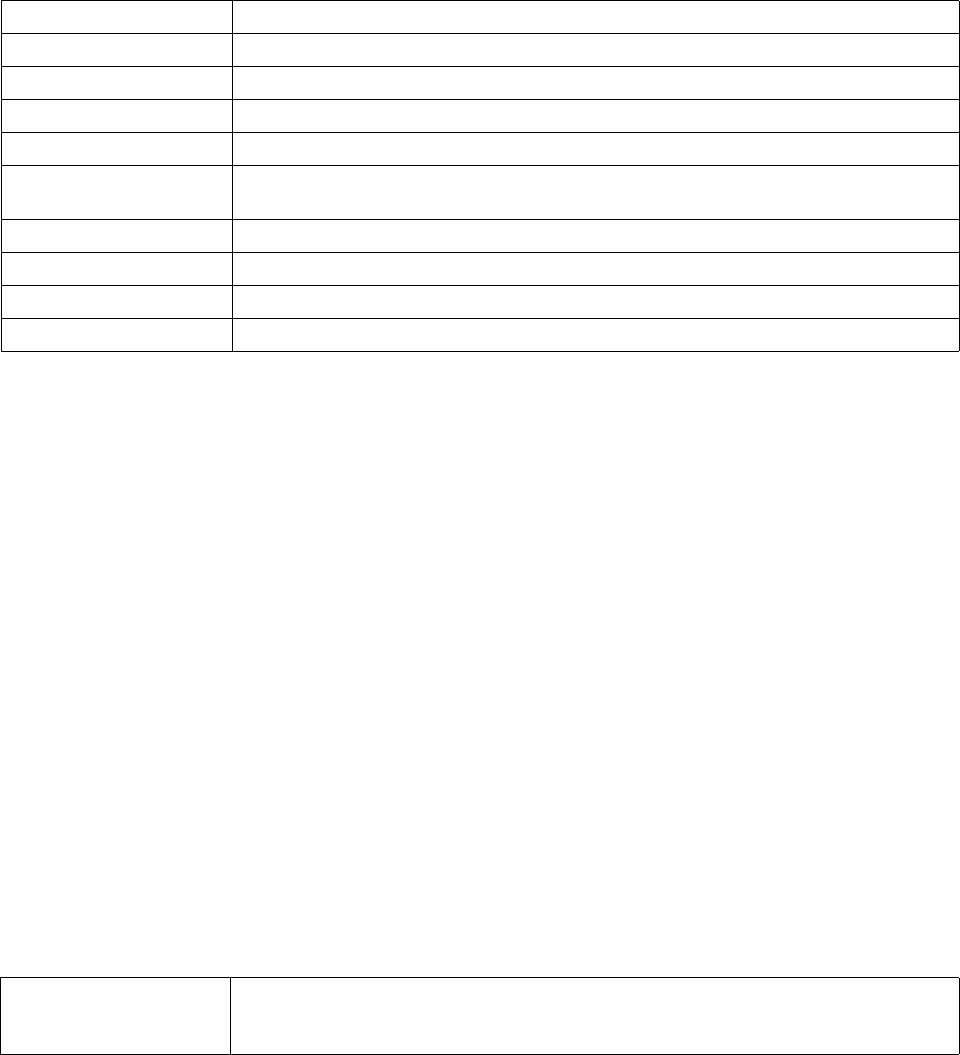
Brocade Mobility RFS4000, RFS6000, and RFS7000 CLI Reference Guide 773
53-1002619-01
21
Related Commands:
use
wips-policy
Enables device categorization on this WIPS policy. This command uses an existing device
categorization list, or creates a new device categorization list. The list categorizes devices as
authorized or unauthorized.
Supported in the following platforms:
•Brocade Mobility 300 Access Point
•Brocade Mobility 650 Access Point
•Brocade Mobility 6511 Access Point
•Brocade Mobility 71XX Access Point
•Brocade Mobility RFS4000
•Brocade Mobility RFS6000
•Brocade Mobility RFS7000
Syntax:
use device-categorization <DEVICE-CATEGORIZATION>
Parameters
use device-categorization <DEVICE-CATEGORIZATION>
Example
rfs7000-37FABE(config-wips-policy-test)#use device-categorization test
rfs7000-37FABE(config-wips-policy-test)#
rfs7000-37FABE(config-wips-policy-test)#show context
wips-policy test
bssid Configures a WIPS signature BSSID MAC address
dst-mac Configures a destination MAC address for the packet examined for matching
filter-ageout Configures the filter ageout interval
frame-type Configures the frame type to match with a signature
mode Enables or disables a WIPS signature
payload Configures payload settings. The payload command sets a numerical index pattern and offset for
this WIPS signature.
src-mac Configures a source MAC address for the packet examined for matching
ssid-match Configures a SSID for matching
threshold-client Configures a wireless client threshold limit
threshold-radio Configures a radio threshold limit
device-categorization
<DEVICE-CATEGORIZATION>
Configures a device categorization list
•<DEVICE-CATEGORIZATION> – Specify the device categorization object name to associate with
this profile


Brocade Mobility RFS4000, RFS6000, and RFS7000 CLI Reference Guide 775
53-1002619-01
Chapter
22
WLAN-QoS-Policy
In this chapter
•wlan-qos-policy. . . . . . . . . . . . . . . . . . . . . . . . . . . . . . . . . . . . . . . . . . . . . . . . 776
This chapter summarizes the WLAN QoS policy in detail.
A WLAN QoS policy increases network efficiency by prioritizing data traffic. Prioritization reduces
congestion. This is essential because of the lack of bandwidth for all users and applications. QoS
ensures WLANs get a share of the bandwidth equally or per the configured proportion.
Each WLAN QoS policy has a set of parameters which it groups into categories, such as
management, voice and data. Packets within each category are processed based on the weights
defined for each WLAN.
Use the (config) instance to configure WLAN QoS policy commands. To navigate to the WLAN QoS
policy instance, use the following commands:
rfs7000-37FABE(config)#wlan-qos-policy <POLICY-NAME>
rfs7000-37FABE(config)#wlan-qos-policy test
rfs7000-37FABE(config-wlan-qos-test)#?
WLAN QoS Mode commands:
accelerated-multicast Configure accelerated multicast streams address and
forwarding QoS classification
classification Select how traffic on this WLAN must be classified
(relative prioritization on the radio)
multicast-mask Egress multicast mask (frames that match bypass the
PSPqueue. This permits intercom mode operation
without delay even in the presence of PSP clients)
no Negate a command or set its defaults
qos Quality of service
rate-limit Configure traffic rate-limiting parameters on a
per-wlan/per-client basis
svp-prioritization Enable spectralink voice protocol support on this
wlan
voice-prioritization Prioritize voice client over other client (for
non-WMM clients)
wmm Configure 802.11e/Wireless MultiMedia parameters
clrscr Clears the display screen
commit Commit all changes made in this session
do Run commands from Exec mode
end End current mode and change to EXEC mode
exit End current mode and down to previous mode
help Description of the interactive help system
revert Revert changes
service Service Commands
show Show running system information
write Write running configuration to memory or terminal
rfs7000-37FABE(config-wlan-qos-test)#

776 Brocade Mobility RFS4000, RFS6000, and RFS7000 CLI Reference Guide
53-1002619-01
22
wlan-qos-policy
WLAN-QoS-Policy
Table 39 summarizes WLAN QoS policy commands
accelerated-multicast
wlan-qos-policy
Configures the accelerated multicast stream address and forwarding QoS classification
Supported in the following platforms:
•Brocade Mobility 300 Access Point
•Brocade Mobility 650 Access Point
•Brocade Mobility 6511 Access Point
•Brocade Mobility 71XX Access Point
•Brocade Mobility RFS4000
•Brocade Mobility RFS6000
•Brocade Mobility RFS7000
TABLE 39 WLAN QoS policy commands
Command Description Reference
accelerated-multicast Configures accelerated multicast stream addresses and forwards QoS classifications page 22-776
classification Classifies WLAN traffic based on priority page 22-777
multicast-mask Configures the egress prioritization multicast mask page 22-779
no Negates a command or sets its default page 22-780
qos Defines the QoS configuration page 22-782
rate-limit Configures the WLAN traffic rate limit using a WLAN QoS policy page 22-783
svp-prioritization Enables Spectralink voice protocol support on a WLAN page 22-784
voice-prioritization Prioritizes voice client over other clients page 22-785
wmm Configures 802.11e/wireless multimedia parameters page 22-786
clrscr Clears the display screen page 5-255
commit Commits (saves) changes made in the current session page 5-256
do Runs commands from EXEC mode page 4-149
end Ends and exits the current mode and moves to the PRIV EXEC mode page 5-257
exit Ends the current mode and moves to the previous mode page 5-257
help Displays the interactive help system page 5-258
revert Reverts changes to their last saved configuration page 5-264
service Invokes service commands to troubleshoot or debug (config-if) instance
configurations
page 5-265
show Displays running system information page 6-295
write Writes the system running configuration to memory or terminal page 5-291

Brocade Mobility RFS4000, RFS6000, and RFS7000 CLI Reference Guide 777
53-1002619-01
22
Syntax:
accelerated-multicast [<IP>|autodetect]
accelerated-multicast [<IP>|autodetect] {classification [background|
best-effort|trust|video|voice]}
Parameters
accelerated-multicast [<IP>|autodetect] {classification [background|
best-effort|trust|video|voice]}
Example
rfs7000-37FABE(config-wlan-qos-test)#accelerated-multicast autodetect
classification voice
rfs7000-37FABE(config-wlan-qos-test)#
rfs7000-37FABE(config-wlan-qos-test)#show context
wlan-qos-policy test
qos trust dscp
qos trust wmm
accelerated-multicast autodetect classification voice
rfs7000-37FABE(config-wlan-qos-test)#
classification
wlan-qos-policy
Specifies how traffic on this WLAN is classified. This classification is based on relative prioritization
on the radio.
Supported in the following platforms:
•Brocade Mobility 300 Access Point
•Brocade Mobility 650 Access Point
•Brocade Mobility 6511 Access Point
accelerated-multicast Configures the accelerated multicast stream address and forwarding QoS classification
<IP> Configures a multicast IP address in the A.B.C.D format. The system can configure up to 32 IP
addresses for each WLAN QoS policy
autodetect Allows the system to automatically detect multicast streams. This parameter allows the system
to convert multicast streams to unicast, or to specify multicast streams converted to unicast.
classification Optional. Configures the forwarding QoS classification (traffic class). When the stream is
converted and queued for transmission, specify the type of classification applied to the stream.
background Forwards streams with background (low) priority. This parameter is common to both <IP> and
autodetect.
best-effort Forwards streams with best effort (normal) priority. This parameter is common to both <IP> and
autodetect.
trust No change to the streams forwarding traffic class. This parameter is common to both <IP> and
autodetect.
video Forwards streams with video traffic priority. This parameter is common to both <IP> and
autodetect.
voice Forwards streams with voice traffic priority. This parameter is common to both <IP> and
autodetect.

778 Brocade Mobility RFS4000, RFS6000, and RFS7000 CLI Reference Guide
53-1002619-01
22
•Brocade Mobility 71XX Access Point
•Brocade Mobility RFS4000
•Brocade Mobility RFS6000
•Brocade Mobility RFS7000
Syntax:
classification [low|non-unicast|non-wmm|normal|video|voice|wmm]
classification [low|normal|video|voice|wmm]
classification non-unicast [voice|video|normal|low|default]
classification non-wmm [voice|video|normal|low]
Parameters
classification [low|normal|video|voice|wmm]
classification non-unicast [voice|video|normal|low|default]
classification non-wmm [voice|video|normal|low]
Example
rfs7000-37FABE(config-wlan-qos-test)#classification wmm
rfs7000-37FABE(config-wlan-qos-test)#classification non-wmm video
rfs7000-37FABE(config-wlan-qos-test)#
low Specifies all WLAN traffic is treated as low priority (background)
normal Specifies all WLAN traffic is treated as normal priority (best effort)
video Specifies all WLAN traffic is treated as video
voice Specifies all WLAN traffic is treated as voice
wmm Uses WMM based classification, using DSCP or 802.1p tags, to classify traffic into different queues
non-unicast Specifies how broadcast and multicast traffic is classified
video Specifies all WLAN non-unicast traffic is classified and treated as video packets
voice Specifies all WLAN non-unicast traffic is classified and treated as voice packets
normal Specifies all WLAN non-unicast traffic is classified and treated as normal priority packets (best
effort)
low Specifies all WLAN non-unicast traffic is classified and treated as low priority packets (background)
default Uses the classification mode (same as unicast classification if WMM is disabled, normal if unicast
classification is WMM)
non-wmm Specifies how traffic from non-WMM clients is classified
voice Specifies all WLAN non-WMM client traffic is classified and treated as voice packets
video Specifies all WLAN non-WMM client traffic is classified and treated as video packets
normal Specifies all WLAN non-WMM client traffic is classified and treated as normal priority packets (best
effort)
low Specifies all WLAN non-WMM client traffic is classified and treated as low priority packets
(background)

Brocade Mobility RFS4000, RFS6000, and RFS7000 CLI Reference Guide 779
53-1002619-01
22
rfs7000-37FABE(config-wlan-qos-test)#classification non-unicast normal
rfs7000-37FABE(config-wlan-qos-test)#show context
wlan-qos-policy test
classification non-wmm video
classification non-unicast normal
qos trust dscp
qos trust wmm
accelerated-multicast autodetect classification voice
rfs7000-37FABE(config-wlan-qos-test)#
multicast-mask
wlan-qos-policy
Configure an egress prioritization multicast mask for this WLAN QoS policy. By configuring a
primary or secondary prioritization multicast mask, the network administrator can indicate which
packets are to be transmitted immediately.
Supported in the following platforms:
•Brocade Mobility 300 Access Point
•Brocade Mobility 650 Access Point
•Brocade Mobility 6511 Access Point
•Brocade Mobility 71XX Access Point
•Brocade Mobility RFS4000
•Brocade Mobility RFS6000
•Brocade Mobility RFS7000
Syntax:
multicast-mask [primary|secondary] <MAC/MASK>
Parameters
multicast-mask [primary|secondary] <MAC/MASK>
Example
rfs7000-37FABE(config-wlan-qos-test)#multicast-mask primary
11-22-33-44-55-66/22-33-44-55-66-77
rfs7000-37FABE(config-wlan-qos-test)#show context
rfs7000-37FABE(config-wlan-qos-test)#show context
wlan-qos-policy test
classification non-wmm video
multicast-mask primary 11-22-33-44-55-66/22-33-44-55-66-77
classification non-unicast normal
qos trust dscp
qos trust wmm
accelerated-multicast autodetect classification voice
primary
<MAC/MASK>
Configures the primary egress prioritization multicast mask
•<MAC/MASK> – Sets the MAC address and the mask in the
ABB-CC-DD-EE-FF/XX-XX-XX-XX-XX-XX-XX format
secondary
<MAC/MASK>
Configures the primary egress prioritization multicast mask
•<MAC/MASK> – Sets the MAC address and the mask in the
ABB-CC-DD-EE-FF/XX-XX-XX-XX-XX-XX-XX format
780 Brocade Mobility RFS4000, RFS6000, and RFS7000 CLI Reference Guide
53-1002619-01
22
no
wlan-qos-policy
Negates a command or resets settings to their default
Supported in the following platforms:
•Brocade Mobility 300 Access Point
•Brocade Mobility 650 Access Point
•Brocade Mobility 6511 Access Point
•Brocade Mobility 71XX Access Point
•Brocade Mobility RFS4000
•Brocade Mobility RFS6000
•Brocade Mobility RFS7000
Syntax:
no [accelerated-multicast|classification|multicast-mask|qos|rate-limit|
svp-prioritization|voice-prioritization|wmm]
no [accelerated-multicast [<IP>|autodetect]|classification [non-unicast|
non-wmm]|multicast-mask [primary|secondary]|qos trust [dscp|wmm]|
svp-prioritization|voice-prioritization]
no rate-limit [client|wlan] [from-air|to-air] [max-burst-size|rate|
red-threshold]
no rate-limit [client|wlan] [from-air|to-air] [max-burst-size|rate|
red-threshold [background|best-effort|video|voice]]
no wmm [background|best-effort|power-save|qbss-load-element|video|voice]
no wmm [power-save|qbss-load-element]
no wmm [backgorund|best-effort|video|voice] [aifsn|cw-max|cw-min|txop-limit]
Parameters

Brocade Mobility RFS4000, RFS6000, and RFS7000 CLI Reference Guide 781
53-1002619-01
22
no [accelerated-multicast [<IP>|autodetect]|classification
[non-unicast|non-wmm]|
multicast-mask [primary|secondary]|qos trust [dscp|wmm]|svp-prioritization|
voice-prioritization]
no rate-limit [client|wlan] [from-air|to-air] [max-burst-size|rate|
red-threshold [background|best-effort|video|voice]
no wmm [power-save|qbss-load-element]
no accelerated-multicast
[<IP>|autodetect>]
Disables accelerated multicast streams and forwarding QoS classification
•<IP> – Specifies the IP address to remove
•<autodetect> – Removes automatic detection of multicast streams
no classification
[non-unicast|
non-wmm]
Disables the WLAN classification scheme
•non-unicast – Removes classification for multicast and broadcast packets
•non-wmm – Removes classification for non-WMM client traffic
no multicast-mask
[procrastinatory]
Disables the egress prioritization primary or secondary multicast mask
•primary – Removes the first egress multicast mask
•secondary – Removes the second egress multicast mask
no qos trust [disquiet] Disables the QoS service
•trust – Ignores the trust QOS values of ingressing packets
•dscp – Ignores the IP DSCP values of ingressing packets
•wmm – Ignores the 802.11 WMM QoS values of ingressing packets
no svp-prioritization Disables support for the Spectralink Voice Protocol (SVP) on a WLAN
no voice-prioritization Disables the priority of voice clients over other clients (applies to non-WMM clients)
no rate-limit [client|wlan] Disables traffic rate limit parameters
•Disables client traffic rate limits
•Disables WLAN traffic rate limits
[from-air|to-air] The following are common to the client and WLAN parameters:
•from-air – Removes client/WLAN traffic rate limits in the up link direction. This is traffic from
the wireless client to the network
•to-air – Removes client/WLAN traffic rate limits in the down link direction. This is traffic from
the network to the wireless client
max-burst-size Disables the maximum burst size value
rate Disables the traffic rates configured for a wireless client or WLAN
red-threshold Disables random early detection threshold values configured for the traffic class
•background – Disables the low priority traffic (background) threshold value
•best-effort – Disables the normal priority traffic (best effort) threshold value
•video – Disables the video traffic threshold value
•voice – Disables the voice traffic threshold value
no wmm Disables 802.11e/wireless multimedia parameters
power-save Disables support for WMM-Powersave (U-APSD)
qbss-load-element Disables support for the QBSS load information element in beacons and probe responses

782 Brocade Mobility RFS4000, RFS6000, and RFS7000 CLI Reference Guide
53-1002619-01
22
no wmm [backgorund|best-effort|video|voice] [aifsn|cw-max|cw-min|txop-limit]
Example
rfs7000-37FABE(config-wlan-qos-test)#no classification
rfs7000-37FABE(config-wlan-qos-test)#no multicast-mask primary
rfs7000-37FABE(config-wlan-qos-test)#no qos trust dscp
rfs7000-37FABE(config-wlan-qos-test)#show context
wlan-qos-policy test
classification non-unicast voice
no qos trust dscp
qos trust wmm
accelerated-multicast autodetect classification voice
rfs7000-37FABE(config-wlan-qos-test)#
Related Commands:
qos
wlan-qos-policy
Enables QoS on this WLAN
Supported in the following platforms:
•Brocade Mobility 300 Access Point
•Brocade Mobility 650 Access Point
•Brocade Mobility 6511 Access Point
•Brocade Mobility 71XX Access Point
•Brocade Mobility RFS4000
•Brocade Mobility RFS6000
•Brocade Mobility RFS7000
Syntax:
no wmm Disables 802.11e/wireless multimedia parameters
background Disables background access category parameters
best-effort Disables best effort access category parameters
video Disables video access category parameters
voice Disables voice access category parameters
accelerated-multicast Configures the accelerated multicast streams address and forwards the QoS classification
classification Classifies WLAN traffic based on priority
multicast-mask Configures the egress prioritization multicast mask
qos Defines the QoS configuration
rate-limit Configures a WLAN’s traffic rate limits
svp-prioritization Enables Spectralink voice protocol support on a WLAN
voice-prioritization Prioritizes voice client over other clients
wmm Configures the 802.11e/wireless multimedia parameters

Brocade Mobility RFS4000, RFS6000, and RFS7000 CLI Reference Guide 783
53-1002619-01
22
qos trust [dscp|wmm]
Parameters
qos trust [dscp|wmm]
Example
rfs7000-37FABE(config-wlan-qos-test)#qos trust wmm
rfs7000-37FABE(config-wlan-qos-test)#qos trust dscp
rfs7000-37FABE(config-wlan-qos-test)#
rate-limit
wlan-qos-policy
Configures the WLAN traffic rate limits using the WLAN QoS policy
Supported in the following platforms:
•Brocade Mobility 300 Access Point
•Brocade Mobility 650 Access Point
•Brocade Mobility 6511 Access Point
•Brocade Mobility 71XX Access Point
•Brocade Mobility RFS4000
•Brocade Mobility RFS6000
•Brocade Mobility RFS7000
Syntax:
rate-limit [client|wlan] [from-air|to-air] {max-burst-size|rate|
red-threshold}
rate-limit [client|wlan] [from-air|to-air] {max-burst-size <2-1024>|
rate <50-1000000>}
rate-limit [client|wlan] [from-air|to-air] {red-threshold
[background <0-100>|best-effort <0-100>|video <0-100>|voice
<0-100>]}
Parameters
rate-limit [client|wlan] [from-air|to-air] {max-burst-size <2-1024>|
rate <50-1000000>}
trust [dscp|wmm] Trusts the QoS values of ingressing packets
•dscp – Trusts the IP DSCP values of ingressing packets
•wmm – Trusts the 802.11 WMM QoS values of ingressing packets
rate-limit Configures traffic rate limit parameters
client Configures traffic rate limiting parameters on a per-client basis
wlan Configures traffic rate limiting parameters on a per-WLAN basis

784 Brocade Mobility RFS4000, RFS6000, and RFS7000 CLI Reference Guide
53-1002619-01
22
rate-limit [client|wlan] [from-air|to-air] {red-threshold [background
<0-100>|best-effort <0-100>|video <0-100>|voice <0-100>]}
Example
rfs7000-37FABE(config-wlan-qos-test)#rate-limit wlan from-air max-burst-size 6
rfs7000-37FABE(config-wlan-qos-test)#rate-limit wlan from-air rate 55
rfs7000-37FABE(config-wlan-qos-test)#rate-limit wlan from-air red-threshold
best-effort 10
rfs7000-37FABE(config-wlan-qos-test)#no rate-limit wlan from-air red-threshold
best-effort
rfs7000-37FABE(config-wlan-qos-test)#rate-limit client from-air red-threshold
background 3
rfs7000-37FABE(config-wlan-qos-test)#show context
wlan-qos-policy test
classification non-wmm video
multicast-mask primary 11-22-33-44-55-66/22-33-44-55-66-77
classification non-unicast normal
rate-limit wlan from-air rate 55
rate-limit wlan from-air max-burst-size 6
rate-limit wlan from-air red-threshold best-effort 10
rate-limit client from-air red-threshold background 3
qos trust dscp
qos trust wmm
accelerated-multicast autodetect classification voice
svp-prioritization
wlan-qos-policy
from-air Configures traffic rate limiting from a wireless client to the network
to-air Configures the traffic rate limit from the network to a wireless client
max-burst-size
<2-1024>
Optional. Sets the maximum burst size from 2 - 1024 kbytes. The chances of the
upstream or downstream packet transmission getting congested for the WLAN’s
client destination are reduced for smaller burst sizes. The default is 320 kbytes.
rate <50-1000000> Optional. Sets the traffic rate from 50 - 1000000 kbps. This limit is the threshold value for the
maximum number of packets received or transmitted over the WLAN from all access categories. Any
traffic that exceeds the specified rate is dropped by the wireless controller and a log message is
generated. The default is 5000 kbps.
rate-limit Configures traffic rate limit parameters
client Configures traffic rate limiting parameters on a per-client basis
wlan Configures traffic rate limiting parameters on a per-WLAN basis
from-air Configures traffic rate limiting from a wireless client to the network
to-air Configures the traffic rate limit from the network to a wireless client
red-threshold Configures random early detection threshold values for a designated traffic class
background <0-100> Sets a threshold value for low priority traffic from 0 - 100
best-effort <0-100> Sets a threshold value for normal priority traffic from 0 - 100
video <0-100> Sets a threshold for video traffic from 0 - 100
voice <0-100> Sets a threshold for voice traffic from 0 - 100
Brocade Mobility RFS4000, RFS6000, and RFS7000 CLI Reference Guide 785
53-1002619-01
22
Enables WLAN SVP support on this WLAN QoS policy. Enabling SVP enables the wireless controller
to identify and prioritize traffic from Spectralink/Ploycomm phones. This feature is enabled by
default.
Supported in the following platforms:
•Brocade Mobility 300 Access Point
•Brocade Mobility 650 Access Point
•Brocade Mobility 6511 Access Point
•Brocade Mobility 71XX Access Point
•Brocade Mobility RFS4000
•Brocade Mobility RFS6000
•Brocade Mobility RFS7000
Syntax:
svp-prioritization
Parameters
None
Example
rfs7000-37FABE(config-wlan-qos-test)#svp-prioritization
rfs7000-37FABE(config-wlan-qos-test)#
rfs7000-37FABE(config-wlan-qos-test)#show context
wlan-qos-policy test
classification non-wmm video
svp-prioritization
multicast-mask primary 11-22-33-44-55-66/22-33-44-55-66-77
classification non-unicast normal
rate-limit wlan from-air rate 55
rate-limit wlan from-air max-burst-size 6
rate-limit wlan from-air red-threshold best-effort 10
rate-limit client from-air red-threshold background 3
qos trust dscp
qos trust wmm
accelerated-multicast autodetect classification voice
voice-prioritization
wlan-qos-policy
Prioritizes voice clients over other clients (for non-WMM clients). This feature is enabled by default.
Supported in the following platforms:
•Brocade Mobility 300 Access Point
•Brocade Mobility 650 Access Point
•Brocade Mobility 6511 Access Point
•Brocade Mobility 71XX Access Point
•Brocade Mobility RFS4000
•Brocade Mobility RFS6000
786 Brocade Mobility RFS4000, RFS6000, and RFS7000 CLI Reference Guide
53-1002619-01
22
•Brocade Mobility RFS7000
Syntax:
voice-prioritization
Parameters
None
Example
rfs7000-37FABE(config-wlan-qos-test)#voice-prioritization
rfs7000-37FABE(config-wlan-qos-test)#
rfs7000-37FABE(config-wlan-qos-test)#show context
wlan-qos-policy test
classification non-wmm video
svp-prioritization
voice-prioritization
multicast-mask primary 11-22-33-44-55-66/22-33-44-55-66-77
classification non-unicast normal
rate-limit wlan from-air rate 55
rate-limit wlan from-air max-burst-size 6
rate-limit wlan from-air red-threshold best-effort 10
rate-limit client from-air red-threshold background 3
qos trust dscp
qos trust wmm
accelerated-multicast autodetect classification voice
wmm
wlan-qos-policy
Configures 802.11e/wireless multimedia parameters for this WLAN QoS policy
Supported in the following platforms:
•Brocade Mobility 300 Access Point
•Brocade Mobility 650 Access Point
•Brocade Mobility 6511 Access Point
•Brocade Mobility 71XX Access Point
•Brocade Mobility RFS4000
•Brocade Mobility RFS6000
•Brocade Mobility RFS7000
Syntax:
wmm [background|best-effort|power-save|qbss-load-element|video|voice]
wmm [power-save|qbss-load-element]
wmm [background|best-effort|video|voice] [aifsn <2-15>|cw-max <0-15>|
cw-min <0-15>|txop-limit <0-65535>]
Parameters

Brocade Mobility RFS4000, RFS6000, and RFS7000 CLI Reference Guide 787
53-1002619-01
22
wmm [power-save|qbss-load-element]
wmm [background|best-effort|video|voice] [aifsn <2-15>|cw-max <0-15>|
cw-min <0-15>|txop-limit <0-65535>]
wmm Configures 802.11e/wireless multimedia parameters
power-save Enables support for the WMM-Powersave mechanism. This mechanism, also known as
Unscheduled Automatic Power Save Delivery (U-APSD), is specifically designed for WMM voice
devices.
qbss-load-element Enables support for the QOS Basic Service Set (QBSS) load information element in beacons and
probe response packets advertised by access packets. This feature is enabled by default.
wmm Configures 802.11e/wireless multimedia parameters. This parameter enables the configuration of
four access categories. Applications assign each data packet to one of these four access categories
and queues them for transmission.
background Configures background access category parameters
best-effort Configures best effort access category parameters. Packets not assigned to any particular access
category are categorized by default as having best effort priority
video Configures video access category parameters
voice Configures voice access category parameters

788 Brocade Mobility RFS4000, RFS6000, and RFS7000 CLI Reference Guide
53-1002619-01
22
Example
rfs7000-37FABE(config-wlan-qos-test)#wmm background aifsn 7
rfs7000-37FABE(config-wlan-qos-test)#wmm video txop-limit 9
rfs7000-37FABE(config-wlan-qos-test)#wmm voice cw-min 6
rfs7000-37FABE(config-wlan-qos-test)#wmm qbss-load-element
rfs7000-37FABE(config-wlan-qos-test)#show context
wlan-qos-policy test
classification non-wmm video
svp-prioritization
voice-prioritization
wmm video txop-limit 9
wmm voice cw-min 6
wmm voice cw-max 6
multicast-mask primary 11-22-33-44-55-66/22-33-44-55-66-77
classification non-unicast normal
rate-limit wlan from-air rate 55
rate-limit wlan from-air max-burst-size 6
rate-limit wlan from-air red-threshold best-effort 10
aifsn <2-15> Configures Arbitrary Inter-Frame Space Number (AIFSN) from 2 - 15. AIFSN is the wait time
between data frames. This parameter is common to background, best effort, video and voice.
The default for traffic voice categories is 2
The default for traffic video categories is 2
The default for traffic best effort (normal) categories is 3
The default for traffic background (low) categories is 7
•<2-15> – Sets a value from 2 - 15
cw-max <0-15> Configures the maximum contention window. Wireless clients pick a number between 0 and the
minimum contention window to wait before retransmission. Wireless clients then double their wait
time on a collision, until it reaches the maximum contention window. This parameter is common to
background, best effort, video and voice.
The default for traffic voice categories is 3
The default for traffic video categories is 4
The default for traffic best effort (normal) categories 10
The default for traffic background (low) categories is 10
•<0-15> – ECW: the contention window. The actual value used is (2^ECW - 1). Set a value from
0 - 15.
cw-min <0-15> Configures the minimum contention window. Wireless clients pick a number between 0 and the
min contention window to wait before retransmission. Wireless clients then double their wait time
on a collision, until it reaches the maximum contention window. This parameter is common to
background, best effort, video and voice.
The default for traffic voice categories is 2
The default for traffic video categories is 3
The default for traffic best effort (normal) categories is 4
The default for traffic background (low) categories is 4
•<0-15> – ECW: the contention window. The actual value used is (2^ECW - 1). Set a value from
0 - 15.
txop-limit <0-65535> Configures the transmit-opportunity (the interval of time during which a particular client has the
right to initiate transmissions). This parameter is common to background, best effort, video and
voice.
The default for traffic voice categories is 47
The default for traffic video categories is 94
The default for traffic best effort (normal) categories is 0
The default for traffic background (low) categories is 0
•<0-65535> – Set a value from 0 - 65535 to configure the transmit-opportunity in 32
microsecond units.
Brocade Mobility RFS4000, RFS6000, and RFS7000 CLI Reference Guide 789
53-1002619-01
22
rate-limit client from-air red-threshold background 3
qos trust dscp
qos trust wmm
accelerated-multicast autodetect classification voice
790 Brocade Mobility RFS4000, RFS6000, and RFS7000 CLI Reference Guide
53-1002619-01
22

Brocade Mobility RFS4000, RFS6000, and RFS7000 CLI Reference Guide 791
53-1002619-01
Chapter
23
Interface-Radio Commands
In this chapter
•interface-radio Instance . . . . . . . . . . . . . . . . . . . . . . . . . . . . . . . . . . . . . . . . 792
Use the (config-profile-default-Brocade Mobility RFS4000) instance to configure radio instances
associated with the wireless controller.
To switch to this mode, use:
Brocade Mobility RFS4000-37FAB(config-profile-default-Brocade Mobility RFS4000)#interface
radio ?
1 Radio interface 1
2 Radio interface 2
3 Radio interface 3
Brocade Mobility RFS4000-37FABE(config-profile-default-Brocade Mobility
RFS4000)#interface radio
Brocade Mobility RFS4000-880DA7(config-profile-default-Brocade Mobility
RFS4000-if-radio1)#?
Radio Mode commands:
ack-timeout Configure the 802.11 ACK timeout
aggregation Configure 802.11n aggregation related parameters
airtime-fairness Enable fair access to medium for clients based on
their usage of airtime
antenna-gain Specifies the antenna gain of this radio
antenna-mode Configure the antenna mode (number of transmit and
receive antennas) on the radio
beacon Configure beacon parameters
channel Configure the channel of operation for this radio
data-rates Specify the 802.11 rates to be supported on this
radio
description Configure a description for this radio
dynamic-chain-selection Automatic antenna-mode selection (single antenna
for non-11n transmit rates)
guard-interval Configure the 802.11n guard interval
lock-rf-mode Retain user configured rf-mode setting for this
radio
max-clients Maximum number of wireless clients allowed to
associate
mesh Configure radio mesh parameters
no Negate a command or set its defaults
non-unicast Configure handling of non-unicast frames
off-channel-scan Enable off-channel scanning on the radio
placement Configure the location where this radio is
operating
power Configure the transmit power of the radio
preamble-short User short preambles on this radio
probe-response Configure transmission parameters for Probe
Response frames
radio-tap-mode Configure the radio-tap mode of operation for this
radio

792 Brocade Mobility RFS4000, RFS6000, and RFS7000 CLI Reference Guide
53-1002619-01
23
rf-mode Configure the rf-mode of operation for this radio
rifs Configure Reduced Interframe Spacing (RIFS)
parameters
rts-threshold Configure the RTS threshold
shutdown Shutdown the selected radio interface
sniffer-redirect Capture packets and redirect to an IP address
running a packet capture/analysis tool
use Set setting to use
wireless-client Configure wireless client related parameters
wlan Enable wlans on this radio
clrscr Clears the display screen
commit Commit all changes made in this session
do Run commands from Exec mode
end End current mode and change to EXEC mode
exit End current mode and down to previous mode
help Description of the interactive help system
revert Revert changes
service Service Commands
show Show running system information
write Write running configuration to memory or terminal
Brocade Mobility RFS4000-880DA7(config-profile-default-Brocade Mobility
RFS4000-if-radio1)#
interface-radio Instance
Table 40 summarizes interface radio commands
TABLE 40 interface radio commands
Commands Description Reference
ack-timeout Configures the 802.11 ACK timeout period page 23-793
aggregation Configures 802.11n aggregation parameters page 23-794
airtime-fairness Enables fair access for clients based on airtime usage page 23-796
antenna-gain Specifies the antenna gain of the selected radio page 23-797
antenna-mode Configures the radio antenna mode page 23-798
beacon Configures beacon parameters page 23-799
channel Configures a radio’s channel of operation page 23-800
data-rates Specifies the 802.11 rates supported on a radio page 23-801
description Defines a radio’s description page 23-803
dynamic-chain-selection Enables automatic antenna mode selection page 23-804
guard-interval Configures the 802.11n guard interval page 23-804
lock-rf-mode Retains user configured radio RF mode settings page 23-805
max-clients Defines the maximum number of wireless clients allowed to associate page 23-806
mesh Configures radio mesh parameters page 23-807
no Negates a command or sets its default page 23-808
non-unicast Configures the handling of non unicast frames page 23-811

Brocade Mobility RFS4000, RFS6000, and RFS7000 CLI Reference Guide 793
53-1002619-01
23
ack-timeout
interface-radio Instance
Configures the 802.11 ACK timeout period. When a packet is sent out from one wireless client to
another, it waits for an acknowledgement (ACK) frame from the receiving client. If an ACK is not
received within the specified timeout period, the packet is re-transmitted resulting in reduced
throughput.
Supported in the following platforms:
•RFS4011
Syntax:
off-channel-scan Enables radio off channel scanning page 23-812
placement Configures the location where a radio is deployed page 23-814
power Configures the radio transmit power page 23-814
preamble-short Configures user short preambles on the radio page 23-815
probe-response Configures transmission parameters for probe response frames page 23-816
radio-tap-mode Configures the radio tap mode for a radio page 23-817
rf-mode Configures a radio RF mode page 23-817
rifs Configures Reduced Interframe Spacing (RIFS) parameters page 23-818
rts-threshold Configures a radio’s RTS threshold value page 23-819
shutdown Terminates a selected radio interface page 23-820
sniffer-redirect Captures and redirects packets to an IP address running a packet
capture/analysis tool
page 23-821
use Applies other configuration profiles or values on the current configuration item page 23-821
wireless-client Configures wireless client related parameters page 23-822
wlan Enables a radio WLAN page 23-823
clrscr Clears the display screen page 5-255
commit Commits (saves) changes made in the current session page 5-256
do Runs commands from EXEC mode page 4-149
end Ends and exits the current mode and moves to the PRIV EXEC mode page 5-257
exit Ends the current mode and moves to the previous mode page 5-257
help Displays the interactive help system page 5-262
revert Reverts changes to their last saved configuration page 5-264
service Invokes service commands to troubleshoot or debug (config-if) instance
configurations
page 5-290
show Displays running system information page 6-295
write Writes the system running configuration to memory or terminal page 5-291
TABLE 40 interface radio commands
Commands Description Reference

794 Brocade Mobility RFS4000, RFS6000, and RFS7000 CLI Reference Guide
53-1002619-01
23
ack-timeout <1-100>
Parameters
ack-timeout <1-100>
Example
Brocade Mobility RFS4000-880DA7(config-profile-default-Brocade Mobility
RFS4000-if-radio1)#ack-timeout 35
Brocade Mobility RFS4000-880DA7(config-profile-default-Brocade Mobility
RFS4000-if-radio1)#
Brocade Mobility RFS4000-880DA7(config-profile-default-Brocade Mobility
RFS4000-if-radio1)#show context
interface radio1
wlan wlan1 bss 1 primary
ack-timeout 35
Brocade Mobility RFS4000-880DA7(config-profile-default-Brocade Mobility
RFS4000-if-radio1)#
Related Commands:
aggregation
interface-radio Instance
Configures 802.11n frame aggregation. Frame aggregation increases throughput by sending two or
more data frames in a single transmission. There are two types of frame aggregation: MAC Service
Data Unit (MSDU) aggregation and MAC Protocol Data Unit (MPDU) aggregation. Both modes group
several data frames into one large data frame.
Supported in the following platforms:
•RFS4011
Syntax:
aggregation [ampdu|amsdu]
aggregation ampdu [rx-only|tx-only|tx-rx|none|max-aggr-size|min-spacing]
aggregation ampdu [rx-only|tx-only|tx-rx|none]
aggregation ampdu max-aggr-size [rx|tx]
aggregation ampdu max-aggr-size rx [8191|16383|32767|65535]
aggregation ampdu max-aggr-size tx [<0-65535>]
aggregation ampdu min-spacing [0|1|2|4|8|16]
ack-timeout <1-100> Configures the 802.11 ACK timeout period in microseconds
•<1-100> – Specify the ACK timeout period from 1 - 100 microseconds. If the ACK timeout
period set is too high, throughput is degraded waiting for the ACK window to timeout on lost
packets.
no Resets the 802.11 ACK timeout period to default

Brocade Mobility RFS4000, RFS6000, and RFS7000 CLI Reference Guide 795
53-1002619-01
23
aggregation amsdu [rx-only|tx-rx]
Parameters
aggregation ampdu [rx-only|tx-only|tx-rx|none]
aggregation ampdu max-aggr-size rx [8191|16383|32767|65535]
aggregation ampdu max-aggr-size tx [<0-65535>]
aggregation Configures 802.11n frame aggregation parameters
ampdu Configures Aggregate MAC Protocol Data Unit (AMPDU) frame aggregation parameters. AMPDU
aggregation collects Ethernet frames addressed to a single destination. It wraps each frame in an
802.11n MAC header. This aggregation mode is less efficient, but more reliable in environments
with high error rates. It enables the acknowledgement and retransmission of each aggregated data
frame individually.
tx-only Supports the transmission of AMPDU aggregated frames only
rx-only Supports the receipt of AMPDU aggregated frames only
tx-rx Supports the transmission and receipt of AMPDU aggregated frames
none Disables support for AMPDU aggregation
aggregation Configures 802.11n frame aggregation parameters
ampdu Configures AMPDU frame aggregation parameters. AMPDU aggregation collects Ethernet frames
addressed to a single destination. It wraps each frame in an 802.11n MAC header. This
aggregation mode is less efficient, but more reliable in environments with high error rates. It
enables the acknowledgement and retransmission of each aggregated data frame individually.
max-aggr-size Configures AMPDU packet size limits. Configure the packet size limit on packets both transmitted
and received.
rx
[8191|16383|32767|65535]
Configures the limit on received frames
•8191 – Advertises a maximum of 8191 bytes
•16383 – Advertises a maximum of 16383 bytes
•32767 – Advertises a maximum of 32767 bytes
•65536 – Advertises a maximum of 65535 bytes
aggregation Configures 802.11n frame aggregation parameters
ampdu Configures AMPDU frame aggregation parameters. AMPDU aggregation collects Ethernet frames
addressed to a single destination. It wraps each frame in an 802.11n MAC header. This
aggregation mode is less efficient, but more reliable in environments with high error rates. It
enables the acknowledgement and retransmission of each aggregated data frame individually.
max-aggr-size Configures AMPDU packet size limits. Configure the packet size limit on packets both transmitted
and received.
tx <0-65535> Configures the limit on transmitted frames
•<0-65535> – Sets the limit from 0 - 65536 bytes

796 Brocade Mobility RFS4000, RFS6000, and RFS7000 CLI Reference Guide
53-1002619-01
23
aggregation ampdu min-spacing [0|1|2|4|8|16]
aggregation amsdu [rx-only|tx-rx]
Example
Brocade Mobility RFS4000-880DA7(config-profile-default-Brocade Mobility
RFS4000-if-radio1)#aggregation ampdu tx-only
Brocade Mobility RFS4000-880DA7(config-profile-default-Brocade Mobility
RFS4000-if-radio1)#
Brocade Mobility RFS4000-880DA7(config-profile-default-Brocade Mobility
RFS4000-if-radio1)#show context
interface radio1
wlan wlan1 bss 1 primary
aggregation ampdu tx-only
ack-timeout 35
Brocade Mobility RFS4000-880DA7(config-profile-default-Brocade Mobility
RFS4000-if-radio1)#
Related Commands:
airtime-fairness
interface-radio Instance
Enables equal access for wireless clients based on their airtime usage
Supported in the following platforms:
•RFS4011
Syntax:
aggregation Configures 802.11n frame aggregation parameters
ampdu Configures AMPDU frame aggregation parameters. AMPDU aggregation collects Ethernet frames
addressed to a single destination. It wraps each frame in an 802.11n MAC header. This
aggregation mode is less efficient, but more reliable in environments with high error rates. It
enables the acknowledgement and retransmission of each aggregated data frame individually.
mn-spacing [0|1|2|4|8|16] Configures the minimum gap, in microseconds, between AMPDU frames
•0 – Configures the minimum gap as 0 microseconds
•1 – Configures the minimum gap as 1 microseconds
•2 – Configures the minimum gap as 2 microseconds
•4 – Configures the minimum gap as 4 microseconds
•8 – Configures the minimum gap as 8 microseconds
•16 – Configures the minimum gap as 16 microseconds
aggregation Configures 802.11n frame aggregation parameters
amsdu Configures Aggregated MAC Service Data Unit (AMSDU) frame aggregation parameters. AMSDU
aggregation collects Ethernet frames addressed to a single destination. But, unlike AMPDU, it
wraps all frames in a single 802.11n frame.
rx-only Supports the receipt of AMSDU aggregated frames only
tx-rx Supports the transmission and receipt of AMSDU aggregated frames
no Disables 802.11n aggregation parameters

Brocade Mobility RFS4000, RFS6000, and RFS7000 CLI Reference Guide 797
53-1002619-01
23
airtime-fairness {prefer-ht} {weight [<1-10>]}
Parameters
airtime-fairness {prefer-ht} {weight [<1-10>]}
Example
Brocade Mobility RFS4000-880DA7(config-profile-default-Brocade Mobility
RFS4000-if-radio1)#airtime-fairness prefer-ht weight 6
Brocade Mobility RFS4000-880DA7(config-profile-default-Brocade Mobility
RFS4000-if-radio1)#
Brocade Mobility RFS4000-880DA7(config-profile-default-Brocade Mobility
RFS4000-if-radio1)#Show context
interface radio1
wlan wlan1 bss 1 primary
aggregation ampdu tx-only
airtime-fairness prefer-ht weight 6
ack-timeout 35
Brocade Mobility RFS4000-880DA7(config-profile-default-Brocade Mobility
RFS4000-if-radio1)#
Related Commands:
antenna-gain
interface-radio Instance
Configures the antenna gain value of the selected radio. Antenna gain defines the ability of an
antenna to convert power into radio waves and vice versa.
Supported in the following platforms:
•RFS4011
Syntax:
antenna-gain <0.0-15.0>
Parameters
antenna-gain <0.0-15.0>
Example
Brocade Mobility RFS4000-880DA7(config-profile-default-Brocade Mobility
RFS4000-if-radio1)#antenna-gain 12.0
Brocade Mobility RFS4000-880DA7(config-profile-default-Brocade Mobility
RFS4000-if-radio1)#
airtime-fairness Enables equal access for wireless clients based on their airtime usage
prefer-ht Optional. Gives preference to high throughput (802.11n) clients over legacy clients
weight <1-10> Configures the relative weightage for 11n clients over legacy clients.
•<1-10> – Sets a weightage ratio for 11n clients from 1 - 10
no Disables fair access to medium for wireless clients (provides access on a round-robin mode)
<0.0-15.0> Sets the antenna gain from 0.0 - 15.0 dBi
798 Brocade Mobility RFS4000, RFS6000, and RFS7000 CLI Reference Guide
53-1002619-01
23
Brocade Mobility RFS4000-880DA7(config-profile-default-Brocade Mobility
RFS4000-if-radio1)#show context
interface radio1
wlan wlan1 bss 1 primary
antenna-gain 12.0
aggregation ampdu tx-only
airtime-fairness prefer-ht weight 6
ack-timeout 35
Brocade Mobility RFS4000-880DA7(config-profile-default-Brocade Mobility
RFS4000-if-radio1)#
Related Commands:
antenna-mode
interface-radio Instance
Configures the antenna mode (the number of transmit and receive antennas) on the radio
Supported in the following platforms:
•RFS4011
Syntax:
antenna-mode [1*1|1*3|2*2|default]
Parameters
antenna-mode [1*1|1*3|2*2|default]
Example
Brocade Mobility RFS4000-880DA7(config-profile-default-Brocade Mobility
RFS4000-if-radio1)#antenna-mode 2x2
Brocade Mobility RFS4000-880DA7(config-profile-default-Brocade Mobility
RFS4000-if-radio1)#
Brocade Mobility RFS4000-880DA7(config-profile-default-Brocade Mobility
RFS4000-if-radio1)#show context
interface radio1
wlan wlan1 bss 1 primary
antenna-gain 12.0
aggregation ampdu tx-only
antenna-mode 2x2
airtime-fairness prefer-ht weight 6
ack-timeout 35
Brocade Mobility RFS4000-880DA7(config-profile-default-Brocade Mobility
RFS4000-if-radio1)#
no Resets the antenna gain of a radio
1*1 Uses antenna A to receive and transmit
1*3 Uses antenna A to transmit and receives on other antennas
2*2 Uses antenna A and C for both transmit and receive
default Uses default antenna settings
Brocade Mobility RFS4000, RFS6000, and RFS7000 CLI Reference Guide 799
53-1002619-01
23
Related Commands:
beacon
interface-radio Instance
Configures radio beacon parameters. Beacons are packets sent by the access point to synchronize
a wireless network.
Supported in the following platforms:
•RFS4011
Syntax:
beacon [dtim-period|period]
beacon dtim-period [<1-50>|bss]
beacon dtim-period [<1-50>|bss <1-8> <1-50>]
beacon period [50|100|200]
Parametersd
beacon dtim-period [<1-50>|bss <1-8> <1-50>]
beacon period [50|100|200]
Example
Brocade Mobility RFS4000-880DA7(config-profile-default-Brocade Mobility
RFS4000-if-radio1)#beacon dtim-period bss
2 20
Brocade Mobility RFS4000-880DA7(config-profile-default-Brocade Mobility
RFS4000-if-radio1)#
Brocade Mobility RFS4000-880DA7(config-profile-default-Brocade Mobility
RFS4000-if-radio1)#beacon period 50
Brocade Mobility RFS4000-880DA7(config-profile-default-Brocade Mobility
RFS4000-if-radio1)#
no Resets the radio antenna mode (the number of transmit and receive antennas) to its default
beacon Configures radio beacon parameters
dtim-period Configures the radio Delivery Traffic Indication Message (DTIM) interval. A DTIM is a message that
informs wireless clients about the presence of buffered multicast or broadcast data. The
message is generated within the periodic beacon at a frequency specified by the DTIM interval.
<1-50> Configures a single value to use on the radio. Specify a value between 1 and 50.
bss <1-8> <1-50> Configures a separate DTIM for a Basic Service Set (BSS) on a radio
•<1-8> – Sets the BSS from 1 - 8
•<1-50> – Sets the BSS DTIM from 1 - 50
period [50|100|200] Configures the beacon period
•50 – Configures 50 K-uSec interval between beacons
•100 – Configures 100 K-uSec interval between beacons (default)
•200 – Confgiures 200 K-uSec interval between beacons

800 Brocade Mobility RFS4000, RFS6000, and RFS7000 CLI Reference Guide
53-1002619-01
23
Brocade Mobility RFS4000-880DA7(config-profile-default-Brocade Mobility
RFS4000-if-radio1)#show context
interface radio1
beacon period 50
beacon dtim-period bss 1 2
beacon dtim-period bss 2 20
beacon dtim-period bss 3 2
beacon dtim-period bss 4 2
beacon dtim-period bss 5 2
beacon dtim-period bss 6 2
beacon dtim-period bss 7 2
beacon dtim-period bss 8 2
wlan wlan1 bss 1 primary
Brocade Mobility RFS4000-880DA7(config-profile-default-Brocade Mobility
RFS4000-if-radio1)#
Related Commands:
channel
interface-radio Instance
Configures a radio’s channel of operation
Supported in the following platforms:
•RFS4011
Syntax:
channel [smart|12|3|4|-------]
Parameters
channel [smart|12|3|4|-------]
Example
Brocade Mobility RFS4000-880DA7(config-profile-default-Brocade Mobility
RFS4000-if-radio1)#channel 1
Brocade Mobility RFS4000-880DA7(config-profile-default-Brocade Mobility
RFS4000-if-radio1)#
Brocade Mobility RFS4000-880DA7(config-profile-default-Brocade Mobility
RFS4000-if-radio1)#show context
interface radio1
channel 1
beacon period 50
beacon dtim-period bss 1 2
beacon dtim-period bss 2 20
beacon dtim-period bss 3 2
beacon dtim-period bss 4 2
beacon dtim-period bss 5 2
no Resets beacon parameters to default
smart|12|3|4|-------] Uses Smart RF to assign a channel (uses uniform spectrum spreading if Smart RF is not
enabled)
•1 – Channel 1 in 20Mhz
•2 – Channel 1 in 20Mhz

Brocade Mobility RFS4000, RFS6000, and RFS7000 CLI Reference Guide 801
53-1002619-01
23
beacon dtim-period bss 6 2
beacon dtim-period bss 7 2
beacon dtim-period bss 8 2
wlan wlan1 bss 1 primary
Brocade Mobility RFS4000-880DA7(config-profile-default-Brocade Mobility
RFS4000-if-radio1)#
Related Commands:
data-rates
interface-radio Instance
Configures the 802.11 data rates on this radio
Supported in the following platforms:
•RFS4011
Syntax:
data-rates [b-only|g-only|a-only|bg|bgn|gn|an|default|custom]
data-rates [b-only|g-only|a-only|bg|bgn|gn|an|default]
data-rates custom [1|2|5.5|6|9|11|12|18|24|36|48|54|mcs0-7|mcs8-15|
mcs0-15|basic-1|basic-2|
basic-5.5|basic-6|basic-9|basic-11|basic-12|
basic-18|basic-24|basic-36|basic-48|basic-54|basic-mcs0-7]]
Parameters
data-rates [b-only|g-only|a-only|bg|bgn|gn|an|default]
no Resets a radio’s channel of operation
b-only Supports operation in the 11b only mode
g-only Uses rates that support operation in the 11g only mode
a-only Uses rates that support operation in the 11a only mode
bg Uses rates that support both 11b and 11g wireless clients
bgn Uses rates that support 11b, 11g and 11n wireless clients
gn Uses rates that support 11g and 11n wireless clients
an Uses rates that support 11a and 11n wireless clients
default Enables the default data rates according to the radio’s band of operation

802 Brocade Mobility RFS4000, RFS6000, and RFS7000 CLI Reference Guide
53-1002619-01
23
data-rates custom [1|2|5.5|6|9|11|12|18|24|36|48|54|mcs0-7|mcs8-15|
mcs0-15|basic-1|basic-2| basic-5.5|basic-6|basic-9|basic-11|basic-12|
basic-18|basic-24|basic-36|basic-48|basic-54|basic-mcs0-7]
Example
Brocade Mobility RFS4000-880DA7(config-profile-default-Brocade Mobility
RFS4000-if-radio1)#data-rates b-only
Brocade Mobility RFS4000-880DA7(config-profile-default-Brocade Mobility
RFS4000-if-radio1)#
Brocade Mobility RFS4000-880DA7(config-profile-default-Brocade Mobility
RFS4000-if-radio1)#show context
interface radio1
channel 1
data-rates b-only
wlan wlan1 bss 1 primary
aggregation ampdu tx-only
antenna-mode 2x2
airtime-fairness prefer-ht
ack-timeout 35
Brocade Mobility RFS4000-880DA7(config-profile-default-Brocade Mobility
RFS4000-if-radio1)#
Brocade Mobility RFS4000-880DA7(config-profile-default-Brocade Mobility
RFS4000-if-radio1)#data-rates custom basic-mcs0-7
custom Configures a list of data rates by specifying each rate individually. Use 'basic-' prefix before a
rate to indicate it’s used as a basic rate (For example, 'data-rates custom basic-1 basic-2 5.5
11')
•1 – 1-Mbps
•2 – 2-Mbps
•5.5 – 5.5-Mbps
•6 – 6-Mbps
•9 – 9-Mbps
•11 – 11-Mbps
•12 – 12-Mbps
•18 – 18-Mbps
•24 – 24-Mbps
•36 – 36-Mbps
•48 – 48-Mbps
•54 – 54-Mbps
•mcs0-7 – Modulation and Coding Scheme 0-7
•mcs8-15 – Modulation and Coding Scheme 8-15
•mcs0-15 – Modulation and Coding Scheme 0-15
•basic-1 – Basic 1-Mbps
•basic-2 – Basic 2-Mbps
•basic-5.5 – Basic 5.5-Mbps
•basic-6 – Basic 6-Mbps
•basic-9 – Basic 9-Mbps
•basic-11 – Basic 11-Mbps
•basic-12 – Basic 12-Mbps
•basic-18 – Basic 18-Mbps
•basic-24 – Basic 24-Mbps
•basic-36 – Basic 36-Mbps
•basic-48 – Basic 48-Mbps
•basic-54 – Basic 54-Mbps
•basic-mcs0-7 – Modulation and Coding Scheme 0-7 as a basic rate

Brocade Mobility RFS4000, RFS6000, and RFS7000 CLI Reference Guide 803
53-1002619-01
23
Brocade Mobility RFS4000-880DA7(config-profile-default-Brocade Mobility
RFS4000-if-radio1)#
Brocade Mobility RFS4000-880DA7(config-profile-default-Brocade Mobility
RFS4000-if-radio1)#show context
interface radio1
channel 1
data-rates custom basic-mcs0-7
wlan wlan1 bss 1 primary
aggregation ampdu tx-only
antenna-mode 2x2
airtime-fairness prefer-ht
ack-timeout 35
Brocade Mobility RFS4000-880DA7(config-profile-default-Brocade Mobility
RFS4000-if-radio1)#
Related Commands:
description
interface-radio Instance
Defines a description for the selected radio
Supported in the following platforms:
•RFS4011
Syntax:
description <WORD>
Parameters
description <WORD>
Example
Brocade Mobility RFS4000-880DA7(config-profile-default-Brocade Mobility
RFS4000-if-radio1)#description “primary radio to use”
Brocade Mobility RFS4000-880DA7(config-profile-default-Brocade Mobility
RFS4000-if-radio1)#show context
interface radio1
description primary\ radio\ to\ use
channel 1
data-rates custom basic-mcs0-7
wlan wlan1 bss 1 primary
aggregation ampdu tx-only
antenna-mode 2x2
airtime-fairness prefer-ht
ack-timeout 35
Brocade Mobility RFS4000-880DA7(config-profile-default-Brocade Mobility
RFS4000-if-radio1)#
no Resets the 802.11 data rates on a radio
<WORD> Defines a description for the selected radio

804 Brocade Mobility RFS4000, RFS6000, and RFS7000 CLI Reference Guide
53-1002619-01
23
Related Commands:
dynamic-chain-selection
interface-radio Instance
Enables automatic antenna mode selection (single antenna for non-11n transmit rates)
Supported in the following platforms:
•RFS4011
Syntax:
dynamic-chain-selection
Parameters
None
Example
Brocade Mobility RFS4000-880DA7(config-profile-default-Brocade Mobility
RFS4000-if-radio1)#dynamic-chain-selection
Brocade Mobility RFS4000-880DA7(config-profile-default-Brocade Mobility
RFS4000-if-radio1)#
Brocade Mobility RFS4000-880DA7(config-profile-default-Brocade Mobility
RFS4000-if-radio1)#show context
interface radio1
description primary\ radio\ to\ use
channel 1
data-rates custom basic-mcs0-7
wlan wlan1 bss 1 primary
aggregation ampdu tx-only
antenna-mode 2x2
dynamic-chain-selection
airtime-fairness prefer-ht
ack-timeout 35
Brocade Mobility RFS4000-880DA7(config-profile-default-Brocade Mobility
RFS4000-if-radio1)#
Related Commands:
guard-interval
interface-radio Instance
Configures the 802.11n guard interval. A guard interval ensures distinct transmissions do not
interfere with one another. It provides immunity to propagation delays, echoes and reflection of
radio signals.
Supported in the following platforms:
no Removes a radio’s description
no Resets automatic antenna mode selection to default

Brocade Mobility RFS4000, RFS6000, and RFS7000 CLI Reference Guide 805
53-1002619-01
23
•RFS4011
Syntax:
guard-interval [any|long]
Parameters
guard-interval [any|long]
Example
Brocade Mobility RFS4000-880DA7(config-profile-default-Brocade Mobility
RFS4000-if-radio1)#guard-interval long
Brocade Mobility RFS4000-880DA7(config-profile-default-Brocade Mobility
RFS4000-if-radio1)#
Brocade Mobility RFS4000-880DA7(config-profile-default-Brocade Mobility
RFS4000-if-radio1)#show context
interface radio1
description primary\ radio\ to\ use
channel 1
data-rates custom basic-mcs0-7
wlan wlan1 bss 1 primary
guard-interval long
aggregation ampdu tx-only
antenna-mode 2x2
dynamic-chain-selection
airtime-fairness prefer-ht
ack-timeout 35
Brocade Mobility RFS4000-880DA7(config-profile-default-Brocade Mobility
RFS4000-if-radio1)#
Related Commands:
lock-rf-mode
interface-radio Instance
Retains user configured RF mode settings for the selected radio
Supported in the following platforms:
•RFS4011
Syntax:
lock-rf-mode
Parameters
None
any Enables the radio to use any short (400nSec) or long (800nSec) guard interval
long Enables the use of long guard interval (800nSec)
no Resets the 802.11n guard interval to default

806 Brocade Mobility RFS4000, RFS6000, and RFS7000 CLI Reference Guide
53-1002619-01
23
Example
Brocade Mobility RFS4000-880DA7(config-profile-default-Brocade Mobility
RFS4000-if-radio1)#lock-rf-mode
Brocade Mobility RFS4000-880DA7(config-profile-default-Brocade Mobility
RFS4000-if-radio1)#
Brocade Mobility RFS4000-880DA7(config-profile-default-Brocade Mobility
RFS4000-if-radio1)#show context
interface radio1
description primary\ radio\ to\ use
channel 1
data-rates custom basic-mcs0-7
wlan wlan1 bss 1 primary
guard-interval long
aggregation ampdu tx-only
antenna-mode 2x2
dynamic-chain-selection
airtime-fairness prefer-ht
lock-rf-mode
ack-timeout 35
Brocade Mobility RFS4000-880DA7(config-profile-default-Brocade Mobility
RFS4000-if-radio1)#
Related Commands:
max-clients
interface-radio Instance
Configures the maximum number of wireless clients allowed to associate with this radio
Supported in the following platforms:
•RFS4011
Syntax:
max-clients <0-256>
Parameters
max-clients <0-256>
Example
Brocade Mobility RFS4000-880DA7(config-profile-default-Brocade Mobility
RFS4000-if-radio1)#max-clients 100
Brocade Mobility RFS4000-880DA7(config-profile-default-Brocade Mobility
RFS4000-if-radio1)#
Brocade Mobility RFS4000-880DA7(config-profile-default-Brocade Mobility
RFS4000-if-radio1)#show context
interface radio1
description primary\ radio\ to\ use
no Allows Smart RF to change a radio’s RF mode settings
<0-256> Configures the maximum number of clients allowed to associate with a radio. Specify a value from
0 - 256.
Brocade Mobility RFS4000, RFS6000, and RFS7000 CLI Reference Guide 807
53-1002619-01
23
channel 1
data-rates custom basic-mcs0-7
wlan wlan1 bss 1 primary
guard-interval long
aggregation ampdu tx-only
antenna-mode 2x2
dynamic-chain-selection
max-clients 100
airtime-fairness prefer-ht
lock-rf-mode
ack-timeout 35
Brocade Mobility RFS4000-880DA7(config-profile-default-Brocade Mobility
RFS4000-if-radio1)#
Related Commands:
mesh
interface-radio Instance
Use this command to configure radio mesh parameters. A Wireless Mesh Network (WMN) is a
network of radio nodes organized in a mesh topology. It consists of mesh clients, mesh routers, and
gateways.
Supported in the following platforms:
•RFS4011
Syntax:
mesh [client|links|portal|preferred-peer]
mesh [client|links <1-6>|portal|preferred-peer <1-6> <MAC>]
Parameters
mesh [client|links <1-6>|portal|preferred-peer <1-6> <MAC>]
Example
Brocade Mobility RFS4000-880DA7(config-profile-default-Brocade Mobility
RFS4000-if-radio1)#mesh preferred-peer 2 11-22-33-44-55-66
no Resets the maximum number of wireless clients allowed to associate with a radio
mesh Configures radio mesh parameters, such as maximum number of mesh links, preferred peer
device, client operations etc.
client Enables operation as a client (Scans for mesh portals or nodes that have connectivity to portals
and connects through them)
links <1-6> Configures the maximum number of mesh links a radio attempts to create
•<1-6> – Sets the maximum number of mesh links from 1 - 6
portal Enables operation as a portal (Begins beaconing immediately, accepting connections from other
mesh nodes, typically the node with a connection to the wired network)
preferred-peer <1-6> <MAC> Configures a preferred peer device
•<1-6> – Configures the priority at which the peer node will be added
•<MAC> – Sets the MAC address of the preferred peer device (Ethernet MAC of either an AP
or a wireless controller with onboard radios)

808 Brocade Mobility RFS4000, RFS6000, and RFS7000 CLI Reference Guide
53-1002619-01
23
Brocade Mobility RFS4000-880DA7(config-profile-default-Brocade Mobility
RFS4000-if-radio1)#
Brocade Mobility RFS4000-880DA7(config-profile-default-Brocade Mobility
RFS4000-if-radio1)#show context
interface radio1
description primary\ radio\ to\ use
channel 1
mesh preferred-peer 2 11-22-33-44-55-66
wlan wlan1 bss 1 primary
antenna-gain 12.0
guard-interval long
Brocade Mobility RFS4000-880DA7(config-profile-default-Brocade Mobility
RFS4000-if-radio1)#
Related Commands:
no
interface-radio Instance
Negates a command or resets settings to their default. When used in the config Brocade Mobility
RFS4000 radio Interface mode, the no command disables or resets radio interface settings.
Supported in the following platforms:
•RFS4011
Syntax:
no <parameter>
Parameters
None
Usage Guidelines:
The no command negates any command associated with it. Wherever required, use the same
parameters associated with the command getting negated.
Example
Brocade Mobility RFS4000-880DA7(config-profile-default-Brocade Mobility
RFS4000-if-radio1)#no ?
ack-timeout Reset the 802.11 ACK timeout to default
aggregation Configure 802.11n aggregation related parameters
airtime-fairness Disable fair access to medium for clients, provide
access in a round-robin mode
antenna-gain Reset the antenna gain of this radio to default
antenna-mode Reset the antenna mode (number of transmit and
receive antennas) on the radio to its default
beacon Configure beacon parameters
channel Reset the channel of operation of this radio to
default
data-rates Reset radio data rate configuration to default
description Reset the description of the radio to its default
no Disables mesh mode operation of the selected radio
Brocade Mobility RFS4000, RFS6000, and RFS7000 CLI Reference Guide 809
53-1002619-01
23
dynamic-chain-selection Use the configured transmit antenna mode for all
clients
guard-interval Configure default value of 802.11n guard interval
(long: 800nSec)
lock-rf-mode Allow smart-rf to change rf-mode setting for this
radio
max-clients Maximum number of wireless clients allowed to
associate
mesh Disable mesh mode operation of the radio
non-unicast Configure handling of non-unicast frames
off-channel-scan Disable off-channel scanning on the radio
placement Reset the placement of the radio to its default
power Reset the transmit power of this radio to default
preamble-short Disable the use of short-preamble on this radio
probe-response Configure transmission parameters for Probe
Response frames
radio-tap-mode Configure the radio-tap mode of operation for this
radio
rf-mode Reset the RF mode of operation for this radio to
default (2.4GHz on radio1, 5GHz on radio2, sensor
on radio3)
rifs Configure Reduced Interframe Spacing (RIFS)
parameters
rts-threshold Reset the RTS threshold to its default (2347)
shutdown Re-enable the selected interface
sniffer-redirect Disable capture and redirection of packets
use Set setting to use
wireless-client Configure wireless client related parameters
wlan Disable a wlan from this radio
service Service Commands
Brocade Mobility RFS4000-880DA7(config-profile-default-Brocade Mobility
RFS4000-if-radio1)#
The radio interface settings before the execution of the no command:
Brocade Mobility RFS4000-880DA7(config-profile-default-Brocade Mobility
RFS4000-if-radio1)#show context
interface radio1
description primary\ radio\ to\ use
channel 1
mesh preferred-peer 2 11-22-33-44-55-66
wlan wlan1 bss 1 primary
antenna-gain 12.0
guard-interval long
Brocade Mobility RFS4000-880DA7(config-profile-default-Brocade Mobility
RFS4000-if-radio1)#
The radio interface settings before the execution of the no command:
Brocade Mobility RFS4000-880DA7(config-profile-default-Brocade Mobility
RFS4000-if-radio1)#no channel
Brocade Mobility RFS4000-880DA7(config-profile-default-Brocade Mobility
RFS4000-if-radio1)#
Brocade Mobility RFS4000-880DA7(config-profile-default-Brocade Mobility
RFS4000-if-radio1)#no antenna-gain
Brocade Mobility RFS4000-880DA7(config-profile-default-Brocade Mobility
RFS4000-if-radio1)#

810 Brocade Mobility RFS4000, RFS6000, and RFS7000 CLI Reference Guide
53-1002619-01
23
Brocade Mobility RFS4000-880DA7(config-profile-default-Brocade Mobility
RFS4000-if-radio1)#no description
Brocade Mobility RFS4000-880DA7(config-profile-default-Brocade Mobility
RFS4000-if-radio1)#
Brocade Mobility RFS4000-880DA7(config-profile-default-Brocade Mobility
RFS4000-if-radio1)#show context
interface radio1
mesh preferred-peer 2 11-22-33-44-55-66
wlan wlan1 bss 1 primary
guard-interval long
Brocade Mobility RFS4000-880DA7(config-profile-default-Brocade Mobility
RFS4000-if-radio1)#
Related Commands:
ack-timeout Configures the 802.11 ACK timeout period
aggregation Configures 802.11n aggregation parameters
airtime-fairness Enables equal access for wireless clients based on their airtime usage
antenna-gain Configures the radio antenna gain
antenna-mode Configures the radio antenna mode (the number of transmit and receive antennas)
beacon Configure beacon parameters
channel Configures a radio channel of operation
data-rates Configures 802.11 data rates on a radio
description Defines a radio’s description
dynamic-chain-selection Enables automatic antenna mode selection (single antenna for non-11n transmit rates)
guard-interval Configures the 802.11n guard interval
lock-rf-mode Retains user configured radio RF mode settings
max-clients Configures the maximum number of wireless clients allowed to associate with a radio
mesh Enables this radio to operate in the mesh mode
non-unicast Configures the handling of radio non unicast frames
off-channel-scan Enables radio off channel scanning parameters
placement Configures the location where a radio is deployed
power Configures the radio transmit power
preamble-short Enables the use of short preamble on a radio
probe-response Configures transmission parameters for probe response frames
radio-tap-mode Configures the radio tap mode of operation for this radio
rf-mode Configures the radio RF mode
rifs Configures radio RIFS parameters
rts-threshold Configures the radio Request to Send (RTS) threshold value
shutdown Terminates or shutsdown a radio interface
sniffer-redirect Captures and redirects packets to an IP address running a packet capture/analysis tool

Brocade Mobility RFS4000, RFS6000, and RFS7000 CLI Reference Guide 811
53-1002619-01
23
non-unicast
interface-radio Instance
Configures the handling of non unicast frames on this radio. Enables the forwarding of multicast
and broadcast frames by this radio.
Supported in the following platforms:
•RFS4011
Syntax:
non-unicast [forwarding|queue|tx-rate]
non-unicast forwarding [follow-dtim|power-save-aware]
non-unicast queue [<1-200>|bss]
non-unicast queue [<1-200>|bss <1-8> <1-200>]
non-unicast tx-rate [bss
<1-8>|dynamic-all|dynamic-basic|highest-basic|lowest-basic]
non-unicast tx-rate bss <1-8>
[dynamic-all|dynamic-basic|highest-basic|lowest-basic]
Parameters
non-unicast forwarding [follow-dtim|power-save-aware]
non-unicast queue [<1-200>|bss <1-8> <1-200>]
use Enables the use of an association ACL policy and a radio QoS policy by an interface
wireless-client Configures wireless client parameters
wlan Enables a WLAN on this radio
service Service commands are used to view and manage the wireless controller configuration in all
modes
non-unicast Configures the support of non unicast frames
forwarding Configures multicast and broadcast frame forwarding on this radio
follow-dtim Specifies frames always wait for the DTIM interval to time out. The DTIM interval is configured
using the beacon command
power-save-aware Enables immediate forwarding of frames if all associated wireless clients are in the power save
mode
non-unicast Configures the support of non unicast frames
queue Configures the number of broadcast packets queued per BSS on this radio. This command also
enables you to override the default on a specific BSS.
<1-200> Specify a number from 1 - 200.
bss <1-8> <1-200> Overrides the default on a specified BSS
•<1-8> – Select the BSS to override the default value.
•<1-200> – Specify the number of broadcast packets queued for the selected BSS.

812 Brocade Mobility RFS4000, RFS6000, and RFS7000 CLI Reference Guide
53-1002619-01
23
non-unicast tx-rate [bss <1-8>|dynamic-all|dynamic-basic|highest-basic|
lowest-basic]
Example
Brocade Mobility RFS4000-880DA7(config-profile-default-Brocade Mobility
RFS4000-if-radio1)#non-unicast queue bss 2 3
Brocade Mobility RFS4000-880DA7(config-profile-default-Brocade Mobility
RFS4000-if-radio1)#
Brocade Mobility RFS4000-880DA7(config-profile-default-Brocade Mobility
RFS4000-if-radio1)#non-unicast tx-rate bss 1 dynamic-all
Brocade Mobility RFS4000-880DA7(config-profile-default-Brocade Mobility
RFS4000-if-radio1)#
Brocade Mobility RFS4000-880DA7(config-profile-default-Brocade Mobility
RFS4000-if-radio1)#show context
interface radio1
wlan wlan1 bss 1 primary
non-unicast tx-rate bss 1 dynamic-all
non-unicast tx-rate bss 2 highest-basic
non-unicast tx-rate bss 3 highest-basic
non-unicast tx-rate bss 4 highest-basic
non-unicast tx-rate bss 5 highest-basic
non-unicast tx-rate bss 6 highest-basic
non-unicast tx-rate bss 7 highest-basic
non-unicast tx-rate bss 8 highest-basic
non-unicast queue bss 1 50
non-unicast queue bss 2 3
non-unicast queue bss 3 50
non-unicast queue bss 4 50
non-unicast queue bss 5 50
non-unicast queue bss 6 50
non-unicast queue bss 7 50
non-unicast queue bss 8 50
Brocade Mobility RFS4000-880DA7(config-profile-default-Brocade Mobility
RFS4000-if-radio1)#
Related Commands:
off-channel-scan
interface-radio Instance
non-unicast Configures the support of non unicast frames
tx-rate Configures the transmission data rate for broadcast and multicast frames
bss <1-8> Overrides the default value on a specific BSS
•<1-8> – Select the BSS to override the default value.
dynamic-all Dynamically selects a rate from all supported rates based on current traffic conditions
dynamic-basic Dynamically selects a rate from all supported basic rates based on current traffic conditions
highest-basic Uses the highest configured basic rate
lowest-basic Uses the lowest configured basic rate
no Resets the handling of non unicast frames to its default

Brocade Mobility RFS4000, RFS6000, and RFS7000 CLI Reference Guide 813
53-1002619-01
23
Enables a radio’s off channel scanning parameters
Supported in the following platforms:
•RFS4011
Syntax:
off-channel-scan {channel-list|sniffer-redirect}
off-channel-scan {channel-list [2.4Ghz|5Ghz] {<CHANNEL-LIST>}}
off-channel-scan {sniffer-redirect <IP>}
Parameters
off-channel-scan {channel-list [2.4Ghz|5Ghz] {<CHANNEL-LIST>}}
off-channel-scan {sniffer-redirect <IP>}
Example
Brocade Mobility RFS4000-880DA7(config-profile-default-Brocade Mobility
RFS4000-if-radio1)#off-channel-scan channel-list 2.4GHz 1
Brocade Mobility RFS4000-880DA7(config-profile-default-Brocade Mobility
RFS4000-if-radio1)#show context
interface radio1
wlan wlan1 bss 1 primary
off-channel-scan channel-list 2.4GHz 1
non-unicast tx-rate bss 1 dynamic-all
non-unicast tx-rate bss 2 highest-basic
non-unicast tx-rate bss 3 highest-basic
non-unicast tx-rate bss 4 highest-basic
non-unicast tx-rate bss 5 highest-basic
non-unicast tx-rate bss 6 highest-basic
non-unicast queue bss 1 50
non-unicast queue bss 2 3
non-unicast queue bss 3 50
non-unicast queue bss 4 50
Brocade Mobility RFS4000-880DA7(config-profile-default-Brocade Mobility
RFS4000-if-radio1)#
off-channel-scan Enables off channel scanning parameters. These parameters are optional, and the system
configures default settings if no values are specified.
channel-list [2.4GHz|5GHz] Optional. Specifies the channel list to scan
•2.4GHZ – Selects the 2.4GHz band
•5GHz – Selects the 5GHz band
<channel-list> Optional. Specifies a list of 20MHz or 40MHz channels for the selected band (the channels are
separated by commas or hyphens)
off-channel-scan Enables off channel scanning parameters. These parameters are optional, and the system
configures default settings if no values are specified.
sniffer-redirect <IP> Optional. Captures and redirects packets to an IP address running a packet capture analysis
tool
•<IP> – Specify the destination device IP address.

814 Brocade Mobility RFS4000, RFS6000, and RFS7000 CLI Reference Guide
53-1002619-01
23
Related Commands:
placement
interface-radio Instance
Defines the location where the radio is deployed
Supported in the following platforms:
•RFS4011
Syntax:
placement [indoor|outdoor]
Parameters
placement [indoor|outdoor]
Example
Brocade Mobility RFS4000-880DA7(config-profile-default-Brocade Mobility
RFS4000-if-radio1)#placement outdoor
Brocade Mobility RFS4000-880DA7(config-profile-default-Brocade Mobility
RFS4000-if-radio1)#
Brocade Mobility RFS4000-880DA7(config-profile-default-Brocade Mobility
RFS4000-if-radio1)#show context
interface radio1
placement outdoor
mesh preferred-peer 2 11-22-33-44-55-66
wlan wlan1 bss 1 primary
guard-interval long
Brocade Mobility RFS4000-880DA7(config-profile-default-Brocade Mobility
RFS4000-if-radio1)#
Related Commands:
power
interface-radio Instance
Configures the transmit power on this radio
Supported in the following platforms:
•RFS4011
Syntax:
no Disables radio off channel scanning
indoor Radio is deployed indoors (uses indoor regulatory rules)
outdoor Radio is deployed outdoors (uses outdoor regulatory rules)
no Resets a radio’s deployment location

Brocade Mobility RFS4000, RFS6000, and RFS7000 CLI Reference Guide 815
53-1002619-01
23
power [<1-27>|smart]
Parameters
power [<1-27>|smart]
Example
Brocade Mobility RFS4000-880DA7(config-profile-default-Brocade Mobility
RFS4000-if-radio1)#power 12
Brocade Mobility RFS4000-880DA7(config-profile-default-Brocade Mobility
RFS4000-if-radio1)#
Brocade Mobility RFS4000-880DA7(config-profile-default-Brocade Mobility
RFS4000-if-radio1)#show context
interface radio1
power 12
placement outdoor
mesh preferred-peer 2 11-22-33-44-55-66
wlan wlan1 bss 1 primary
guard-interval long
Brocade Mobility RFS4000-880DA7(config-profile-default-Brocade Mobility
RFS4000-if-radio1)#
Related Commands:
preamble-short
interface-radio Instance
Enables the use of short preamble on this radio
Supported in the following platforms:
•RFS4011
Syntax:
preamble-short
Parameters
None
Example
Brocade Mobility RFS4000-880DA7(config-profile-default-Brocade Mobility
RFS4000-if-radio1)#preamble-short
Brocade Mobility RFS4000-880DA7(config-profile-default-Brocade Mobility
RFS4000-if-radio1)#
Brocade Mobility RFS4000-880DA7(config-profile-default-Brocade Mobility
RFS4000-if-radio1)#show context
power Configures a radio’s transmit power
<1-27> Transmits power in dBm (actual power could be lower based on regulatory restrictions)
smart Smart RF determines the optimum power
no Resets a radio’s transmit power
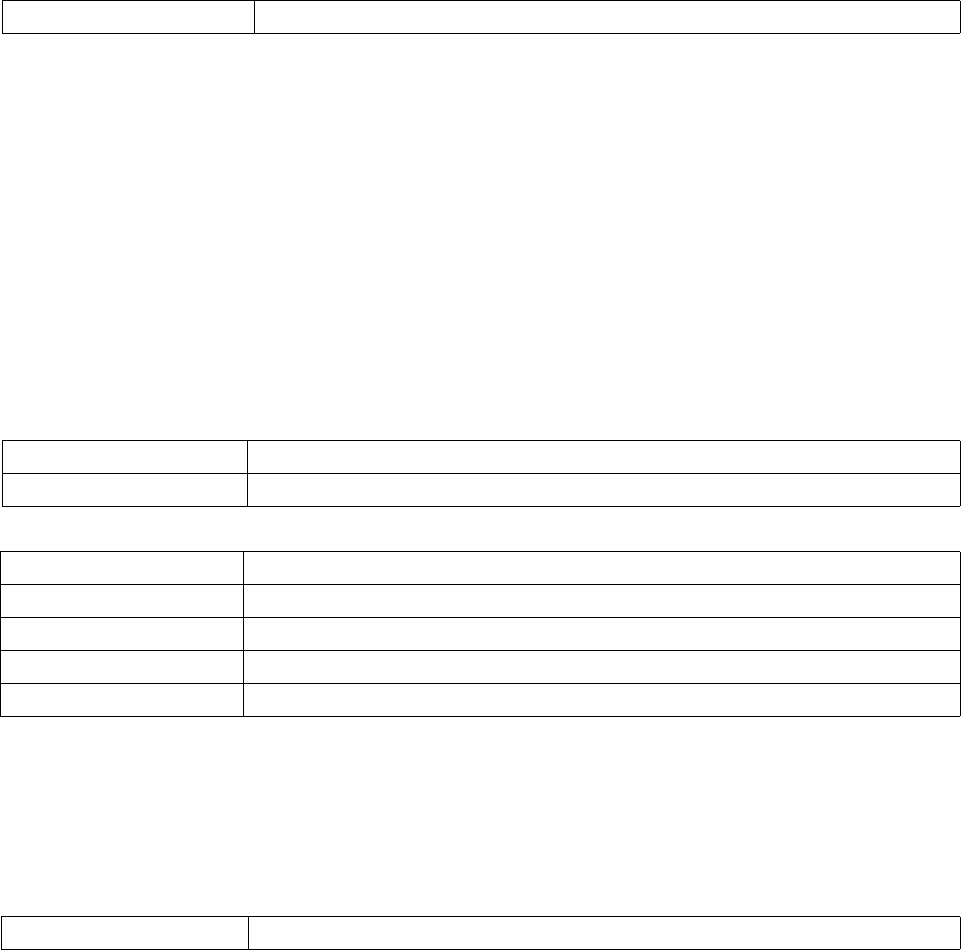
816 Brocade Mobility RFS4000, RFS6000, and RFS7000 CLI Reference Guide
53-1002619-01
23
interface radio1
power 12
placement outdoor
mesh preferred-peer 2 11-22-33-44-55-66
wlan wlan1 bss 1 primary
preamble-short
guard-interval long
Brocade Mobility RFS4000-880DA7(config-profile-default-Brocade Mobility
RFS4000-if-radio1)#
Related Commands:
probe-response
interface-radio Instance
Configures transmission parameters for probe response frames.
Supported in the following platforms:
•RFS4011
Syntax:
probe-response [rate|retry]
probe-response rate [follow-probe-request|highest-basic|lowest-basic]
Parameters
probe-response retry
probe-response rate [follow-probe-request|highest-basic|lowest-basic]
Example
Brocade Mobility RFS4000-880DA7(config-profile-default-Brocade Mobility
RFS4000-if-radio1)#probe-response rate follow-probe-request
Brocade Mobility RFS4000-880DA7(config-profile-default-Brocade Mobility
RFS4000-if-radio1)#
Related Commands:
no Disables the use of short preamble on a radio
probe-response Configures transmission parameters for probe response frames
retry Retransmits probe response if no acknowledgement is received from the client
probe-response Configures transmission parameters for probe response frames
rate Configures the data rates at which the probe responses are transmitted
follow-probe-request Transmits probe responses at the same rate the request was received
highest-basic Uses the highest configured basic rate
lowest-basic Uses the lowest configured basic rate
no Resets transmission parameters for probe response frames

Brocade Mobility RFS4000, RFS6000, and RFS7000 CLI Reference Guide 817
53-1002619-01
23
radio-tap-mode
interface-radio Instance
Configures the radio tap mode for this radio
Supported in the following platforms:
•RFS4011
Syntax:
radio-tap-mode [inline|off|promiscuous]
Parameters
Example
Brocade Mobility RFS4000-880DA7(config-profile-default-Brocade Mobility
RFS4000-if-radio1)#radio-tap-mode promiscuous
Brocade Mobility RFS4000-880DA7(config-profile-default-Brocade Mobility
RFS4000-if-radio1)#show context
interface radio1
wlan wlan1 bss 1 primary
off-channel-scan channel-list 2.4GHz 1
non-unicast queue bss 1 50
non-unicast queue bss 2 3
non-unicast queue bss 3 50
non-unicast queue bss 4 50
non-unicast queue bss 5 50
non-unicast queue bss 6 50
non-unicast queue bss 7 50
non-unicast queue bss 8 50
radio-tap-mode promiscuous
Brocade Mobility RFS4000-880DA7(config-profile-default-Brocade Mobility
RFS4000-if-radio1)#
Related Commands:
rf-mode
interface-radio Instance
Configures the radio RF mode
Supported in the following platforms:
•RFS4011
radio-tap-mode Configures the radio tap mode
inline Enables the sharing of WLAN packets serviced by this radio (matching the BSSID of the radio)
off Disables radio share (no packets shared with WIPS sensor module)
promiscuous Enables the sharing of packets received in promiscuous mode without filtering based on BSSID
no Resets the radio tap mode for this radio to its default

818 Brocade Mobility RFS4000, RFS6000, and RFS7000 CLI Reference Guide
53-1002619-01
23
Syntax:
rf-mode [2.4GHz-wlan|5GHz-wlan|sensor]
Parameters
rf-mode [2.4GHz-wlan|5GHz-wlan|sensor]
Example
Brocade Mobility RFS4000-880DA7(config-profile-default-Brocade Mobility
RFS4000-if-radio1)#rf-mode sensor
Brocade Mobility RFS4000-880DA7(config-profile-default-Brocade Mobility
RFS4000-if-radio1)#
Brocade Mobility RFS4000-880DA7(config-profile-default-Brocade Mobility
RFS4000-if-radio1)#show context
interface radio1
rf-mode sensor
wlan wlan1 bss 1 primary
off-channel-scan channel-list 2.4GHz 1
non-unicast queue bss 1 50
non-unicast queue bss 2 3
non-unicast queue bss 3 50
non-unicast queue bss 4 50
non-unicast queue bss 5 50
non-unicast queue bss 6 50
non-unicast queue bss 7 50
non-unicast queue bss 8 50
Brocade Mobility RFS4000-880DA7(config-profile-default-Brocade Mobility
RFS4000-if-radio1)#
Related Commands:
rifs
interface-radio Instance
Configures Reduced Interframe Spacing (RIFS) parameters on this radio
Supported in the following platforms:
•RFS4011
Syntax:
rifs [none|rx-only|tx-only|tx-rx]
Parameters
rf-mode Configures the radio RF mode
2.4GHz-wlan Provides WLAN service in the 2.4GHz bandwidth
5GHz-wlan Provides WLAN service in the 5GHz bandwidth
sensor Operates as a sensor radio. Configures this radio to function as a scanner, providing scanning
services on both 2.4GHz and 5GHz bands. The radio does not provide WLAN services.
no Resets the RF mode for a radio to its default

Brocade Mobility RFS4000, RFS6000, and RFS7000 CLI Reference Guide 819
53-1002619-01
23
rifs [none|rx-only|tx-only|tx-rx]
Example
Brocade Mobility RFS4000-880DA7(config-profile-default-Brocade Mobility
RFS4000-if-radio1)#rifs tx-only
Brocade Mobility RFS4000-880DA7(config-profile-default-Brocade Mobility
RFS4000-if-radio1)#
Brocade Mobility RFS4000-880DA7(config-profile-default-Brocade Mobility
RFS4000-if-radio1)#show context
interface radio1
rf-mode sensor
wlan wlan1 bss 1 primary
off-channel-scan channel-list 2.4GHz 1
rifs tx-only
non-unicast queue bss 1 50
non-unicast queue bss 2 3
non-unicast queue bss 3 50
non-unicast queue bss 4 50
non-unicast queue bss 5 50
non-unicast queue bss 6 50
non-unicast queue bss 7 50
non-unicast queue bss 8 50
Brocade Mobility RFS4000-880DA7(config-profile-default-Brocade Mobility
RFS4000-if-radio1)#
Related Commands:
rts-threshold
interface-radio Instance
Configures the RTS threshold value on this radio
Supported in the following platforms:
•RFS4011
Syntax:
rts-threshold <0-2347>
Parameters
rts-threshold <0-2347>
rifs Configures RIFS parameters
none Disables support for RIFS
rx-only Supports RIFS possession only
tx-only Supports RIFS transmission only
tx-rx Supports both RIFS transmission and possession
no Disables radio RIFS parameters
<0-2347> Specify the RTS threshold value from 0 - 2347 bytes

820 Brocade Mobility RFS4000, RFS6000, and RFS7000 CLI Reference Guide
53-1002619-01
23
Example
Brocade Mobility RFS4000-880DA7(config-profile-default-Brocade Mobility
RFS4000-if-radio1)#rts-threshold 100
Brocade Mobility RFS4000-880DA7(config-profile-default-Brocade Mobility
RFS4000-if-radio1)#
Brocade Mobility RFS4000-880DA7(config-profile-default-Brocade Mobility
RFS4000-if-radio1)#show context
interface radio1
rf-mode sensor
rts-threshold 100
wlan wlan1 bss 1 primary
off-channel-scan channel-list 2.4GHz 1
rifs tx-only
non-unicast queue bss 1 50
non-unicast queue bss 2 3
non-unicast queue bss 3 50
non-unicast queue bss 4 50
non-unicast queue bss 5 50
non-unicast queue bss 6 50
non-unicast queue bss 7 50
non-unicast queue bss 8 50
Brocade Mobility RFS4000-880DA7(config-profile-default-Brocade Mobility
RFS4000-if-radio1)#
Related Commands:
shutdown
interface-radio Instance
Terminates or shuts down a radio interface
Supported in the following platforms:
•RFS4011
Syntax:
shutdown
Parameters
None
Example
Brocade Mobility RFS4000-880DA7(config-profile-default-Brocade Mobility
RFS4000-if-radio1)#shutdown
Brocade Mobility RFS4000-880DA7(config-profile-default-Brocade Mobility
RFS4000-if-radio1)#
Related Commands:
no Resets a radio’s RTS threshold to its default (2347)
no Enables a disabled radio interface

Brocade Mobility RFS4000, RFS6000, and RFS7000 CLI Reference Guide 821
53-1002619-01
23
sniffer-redirect
interface-radio Instance
Captures and redirects packets to an IP address running a packet capture/analysis tool
Supported in the following platforms:
•RFS4011
Syntax:
sniffer-redirect <IP> channel [1|1+|10|10-|100--------165]
Parameters
sniffer-redirect <IP> channel [1|1+|10|10---------165]
Example
Brocade Mobility RFS4000-880DA7(config-profile-default-Brocade Mobility
RFS4000-if-radio1)#sniffer-redirect 172.16.10.13 channel ?
1 Channel 1 in 20Mhz
1+ Channel 1 as primary, Channel 5 as extension
10 Channel 10 in 20Mhz
10- Channel 10 as primary, Channel 6 as extension
100 Channel 100 in 20Mhz
-----------------------------------------------------------------------------
---------------------------------------------------------------------
Brocade Mobility RFS4000-880DA7(config-profile-default-Brocade Mobility
RFS4000-if-radio1)#
Related Commands:
use
interface-radio Instance
The use command enables the use of an association ACL policy and a radio QoS policy by this
radio interface
Supported in the following platforms:
•RFS4011
Syntax:
sniffer-redirect Captures and redirects packets to an IP address running a packet capture/analysis tool
<IP> Specify the IP address of the device running the capture/analysis tool
[1|1+|10|10-|100|----------16
5]
Specify the channel to capture packets
•1 – Channel 1 in 20Mhz
•1+ – Channel 1 as primary, Channel 5 as extension
•10 – Channel 10 in 20Mhz
•10- – Channel 10 as primary, Channel 6 as extension
•100 – Channel 100 in 20Mhz
no Disables capture and redirection of packets

822 Brocade Mobility RFS4000, RFS6000, and RFS7000 CLI Reference Guide
53-1002619-01
23
use [association-acl-policy|radio-qos-policy]
use [association-acl-policy <ASSOC-ACL-POLICY>|radio-qos-policy <RADIO-QOS-
POLICY>]
Parameters
use [association-acl-policy <ASSOC-ACL-POLICY>|
radio-qos-policy <RADIO-QOS-POLICY>]
Example
Brocade Mobility RFS4000-880DA7(config-profile-default-Brocade Mobility
RFS4000-if-radio1)#use association-acl-pol
icy test1
Brocade Mobility RFS4000-880DA7(config-profile-default-Brocade Mobility
RFS4000-if-radio1)#
Brocade Mobility RFS4000-880DA7(config-profile-default-Brocade Mobility
RFS4000-if-radio1)#show context
interface radio1
rf-mode sensor
rts-threshold 100
wlan wlan1 bss 1 primary
off-channel-scan channel-list 2.4GHz 1
rifs tx-only
use association-acl-policy test1
non-unicast queue bss 1 50
non-unicast queue bss 2 3
non-unicast queue bss 3 50
non-unicast queue bss 4 50
non-unicast queue bss 5 50
non-unicast queue bss 6 50
non-unicast queue bss 7 50
non-unicast queue bss 8 50
Brocade Mobility RFS4000-880DA7(config-profile-default-Brocade Mobility
RFS4000-if-radio1)#
Related Commands:
wireless-client
interface-radio Instance
Configures wireless client parameters
Supported in the following platforms:
•RFS4011
Syntax:
association-acl-policy Uses a specified association ACL policy with this radio interface
•<ASSOC-ACL-POLICY> – Specify the association ACL policy name.
radio-qos-policy Uses a specified radio QoS policy with this radio interface
•<RADIO-QoS-POLICY> – Specify the radio QoS policy name
no Disables the use of the specified association ACL policy and radio QoS policy

Brocade Mobility RFS4000, RFS6000, and RFS7000 CLI Reference Guide 823
53-1002619-01
23
wireless-client tx-power <0-20>
Parameters
wireless-client tx-power <0-20>
Example
Brocade Mobility RFS4000-880DA7(config-profile-default-Brocade Mobility
RFS4000-if-radio1)#wireless-client tx-power 20
Brocade Mobility RFS4000-880DA7(config-profile-default-Brocade Mobility
RFS4000-if-radio1)#
Brocade Mobility RFS4000-880DA7(config-profile-default-Brocade Mobility
RFS4000-if-radio1)#show context
interface radio1
rf-mode sensor
rts-threshold 100
wlan wlan1 bss 1 primary
wireless-client tx-power 20
off-channel-scan channel-list 2.4GHz 1
rifs tx-only
use association-acl-policy test1
non-unicast queue bss 1 50
non-unicast queue bss 2 3
non-unicast queue bss 3 50
non-unicast queue bss 4 50
non-unicast queue bss 5 50
non-unicast queue bss 6 50
non-unicast queue bss 7 50
non-unicast queue bss 8 50
Brocade Mobility RFS4000-880DA7(config-profile-default-Brocade Mobility
RFS4000-if-radio1)#
Related Commands:
wlan
interface-radio Instance
Enables a WLAN on this radio
Supported in the following platforms:
•RFS4011
Syntax:
wlan <WLAN> {bss|primary}
wlan <WLAN> bss <1-8> {primary}
Parameters
wireless-client Configures wireless client parameters
tx-power <0-20> Configures the transmit power indicated to wireless clients
•<0-20> – Specify transmit power from 0 - 20 dBm
no Resets the transmit power indicated to wireless clients

824 Brocade Mobility RFS4000, RFS6000, and RFS7000 CLI Reference Guide
53-1002619-01
23
wlan <WLAN> bss <1-8> {primary}
Example
Brocade Mobility RFS4000-880DA7(config-profile-default-Brocade Mobility
RFS4000-if-radio1)#wlan wlan1
Brocade Mobility RFS4000-880DA7(config-profile-default-Brocade Mobility
RFS4000-if-radio1)#
Brocade Mobility RFS4000-880DA7(config-profile-default-Brocade Mobility
RFS4000-if-radio1)#show context
interface radio1
rf-mode sensor
placement outdoor
beacon dtim-period bss 1 2
beacon dtim-period bss 2 3
beacon dtim-period bss 3 2
beacon dtim-period bss 4 2
beacon dtim-period bss 5 2
beacon dtim-period bss 6 2
rts-threshold 10
wlan wlan1 bss 1 primary
off-channel-scan channel-list 5GHz
off-channel-scan channel-list 2.4GHz 1
off-channel-scan sniffer-redirect 172.16.10.100
rifs tx-rx
use association-acl-policy test
non-unicast tx-rate bss 1 dynamic-all
non-unicast tx-rate bss 2 highest-basic
non-unicast tx-rate bss 3 highest-basic
non-unicast tx-rate bss 4 highest-basic
non-unicast tx-rate bss 5 highest-basic
non-unicast tx-rate bss 6 highest-basic
non-unicast queue bss 1 2
non-unicast queue bss 2 1
non-unicast queue bss 3 1
non-unicast queue bss 4 1
non-unicast queue bss 5 1
non-unicast queue bss 6 1
probe-response rate highest-basic
Brocade Mobility RFS4000-880DA7(config-profile-default-Brocade Mobility
RFS4000-if-radio1)#
Related Commands:
<WLAN>
{bss <1-8> |primary}
Specify the WLAN name (it must have been already created and configured)
•bss <1-8> – Optional. Provide a specific BSS for the radio where the WLAN has to be
mapped
•<1-8> – Specify the BSS number.
•primary – Optional. Uses the WLAN as the primary WLAN when multiple WLANs exist on the
BSS
no Disables a WLAN on a radio

Brocade Mobility RFS4000, RFS6000, and RFS7000 CLI Reference Guide 825
53-1002619-01
Chapter
24
Firewall Logging
In this chapter
•Firewall Log Terminology and Syslog Severity Levels . . . . . . . . . . . . . . . . . 826
This chapter summarizes firewall logging commands within the CLI.
The firewall uses logging to send system messages to one or more logging destinations, where they
can be collected, archived and reviewed.
Set the logging level to define which messages are sent to each of the target destinations.
Logging messages can be sent to any of the following destinations:
•The firewall console
•Telnet or SSH session to the firewall
•A temporary buffer internal to the firewall
•Syslog server
•E-mail addresses
•An FTP server

826 Brocade Mobility RFS4000, RFS6000, and RFS7000 CLI Reference Guide
53-1002619-01
24
Firewall Log Terminology and Syslog Severity Levels
Date format in Syslog messages
The following output displays the wireless controller date in proper format:
Brocade Mobility RFS7000-81916A(config)#Jul 25 11:09:00 2011: USER: cfgd:
deleting session 4
Brocade Mobility RFS7000-81916A(config)#
Brocade Mobility RFS7000-81916A(config)#Jul 25 11:09:17 2011: USER: cfgd:
deleting session 5
The date format is Month <MMM> Date <DD> Time <HH:MM:SS> Year <YYYY>
Month is Jul
Date is 25
Time is 11:09:00
Year is 2011
To generate a date log, enable logging
For example, the following command has to be executed:
Abbreviation Description
FTP File transfer protocol
ACL Access control list
Src MAC Source MAC address
Dest MAC Destination MAC address
LOGRULEHIT ACL rule applied
PKT DROP Packet drop
Src IP Source IP address
Dest IP / Dst IP Destination IP address
FWSTARTUP Firewall enabled
DP Destination port
SP Source port
Matched Temporary Rule This is a internal rule created to allow data traffic
Syslog Severity Level as Message Severity Level as Numeric Description
emergency 0 System is unusable
alert 1 Immediate action needed
critical 2 Critical condition
error 3 Error condition
warning 4 Warning condition
notification 5 Normal but significant condition
informational 6 Informational message
debugging 7 Debugging message

Brocade Mobility RFS4000, RFS6000, and RFS7000 CLI Reference Guide 827
53-1002619-01
24
rfs7000-37FABE#clock set 11:09:17 25 Jul 2011
rfs7000-37FABE#
FTP data connection log
An ACL rule has to be applied and logging has to be enabled to generate a FTP data collection log.
The FTP connection is Control Connection
Jul 25 11:10:17 2011: %DATAPLANE-5-LOGRULEHIT: Matched ACL:ftpuser:ip Rule:0
Disposition:Allow Packet Src MAC:<00-19-B9-6B-DA-77> Dst
MAC:<00-15-70-81-91-6A> Ethertype:0x0800 Src IP:192.168.1.99 Dst
IP:192.168.2.102 Proto:6 Src Port:3014 Dst Port:21
Date is Jul 25
Time is 11:10:17
Year is 2011
Module name is DATAPLANE
Syslog Severity level is 5
Log ID is LOGRULEHIT
Log Message is Matched ACL
The Matching ACL is FTPuser
IP Rule sequence number is O
Disposition is Allow Packet
Source MAC Address is 00-19-B9-6B-DA-77
Destination MAC Address is <00-15-70-81-91-6A>
Ethertype is 0x0800
Source IP Address is 192.168.1.99
Destination IP Address is 192.168.2.102
Protocol Type is 6
Source Port is 3014D
Destination Port is 21
NOTE
The same terminology is used across all logs.
The Data Connection in Active Mode
Jul 25 11:10:19 2011: %DATAPLANE-5-LOGRULEHIT: Matched Temporary Rule of FTP ALG.
Disposition:Allow Packet Src MAC:<00-11-25-14-D9-E2> Dst MAC:<00-15-70-81-91-6A>
Ethertype:0x0800 Src IP:192.168.2.102 Dst IP:192.168.1.99 Proto:6 Src Port:20 Dst Port:3017.
The Data Connection in Passive Mode
Jul 25 11:14:31 2011: %DATAPLANE-5-LOGRULEHIT: Matched Temporary Rule of FTP ALG.
Disposition:Allow Packet Src MAC:<00-19-B9-6B-DA-77> Dst MAC:<00-15-70-81-91-6A>
Ethertype:0x0800 Src IP:192.168.1.99 Dst IP:192.168.2.102 Proto:6 Src Port:3033 Dst
Port:3894.
For example,
rfs7000-37FABE(config-mac-acl-test)#permit any any log rule-precedence 25
rfs7000-37FABE(config-mac-acl-test)#
UDP packets log
In both DHCP release and DHCP renew scenarios, the destination port 67 is logged.
828 Brocade Mobility RFS4000, RFS6000, and RFS7000 CLI Reference Guide
53-1002619-01
24
DHCP Release
Jul 25 11:57:43 2011: %DATAPLANE-5-LOGRULEHIT: Matched ACL:ftpuser:ip Rule:1
Disposition:Allow Packet Src MAC:<00-11-25-14-D9-E2> Dst MAC:<00-15-70-81-91-6A>
Ethertype:0x0800 Src IP:192.168.2.102 Dst IP:172.16.31.196 Proto:17 Src Port:68 Dst Port:67.
DHCP Renew
Jul 25 11:58:48 2011: %DATAPLANE-5-LOGRULEHIT: Matched ACL:ftpuser:ip Rule:1
Disposition:Allow Packet Src MAC:<00-11-25-14-D9-E2> Dst MAC:<FF-FF-FF-FF-FF-FF>
Ethertype:0x0800 Src IP:0.0.0.0 Dst IP:255.255.255.255 Proto:17 Src Port:68 Dst Port:67.
To generate a UDP packet log, an ACL rule has to be applied to UDP packets, and logging has to be
enabled.
For example,
rfs7000-37FABE(config-ip-acl-test)#permit udp any any log rule-precedence 20
rfs7000-37FABE(config-ip-acl-test)#
ICMP type logs
The example below displays an ICMP Type as 13 and an ICMP Code as 0:
Jul 25 12:00:00 2011: %DATAPLANE-5-LOGRULEHIT: Matched ACL:ftpuser:ip Rule:0
Disposition:Allow Packet Src MAC:<00-11-25-14-D9-E2> Dst MAC:<00-15-70-81-91-6A>
Ethertype:0x0800 Src IP:192.168.2.102 Dst IP:192.168.1.103 Proto:1 ICMP Type:13 ICMP Code:0.
The below example displays an ICMP Type as 15 and an ICMP Code as 0:
Jul 25 12:00:07 2011: %DATAPLANE-5-LOGRULEHIT: Matched ACL:ftpuser:ip Rule:0
Disposition:Allow Packet Src MAC:<00-60-80-B0-C3-B3> Dst MAC:<00-15-70-81-91-6A>
Ethertype:0x0800 Src IP:192.168.1.104 Dst IP:192.168.2.102 Proto:1 ICMP Type:15 ICMP Code:0.
The below example displays an ICMP Type as 17 and an ICMP Code as 0:
Jul 25 12:00:25 2011: %DATAPLANE-5-LOGRULEHIT: Matched ACL:ftpuser:ip Rule:0
Disposition:Allow Packet Src MAC:<00-11-25-14-D9-E2> Dst MAC:<00-15-70-81-91-6A>
Ethertype:0x0800 Src IP:192.168.2.102 Dst IP:192.168.1.103 Proto:1 ICMP Type:17 ICMP Code:0.
The below example displays an ICMP Type as 18 and an ICMP Code as 0:
Jul 25 12 01:00:24 2011: %DATAPLANE-5-ICMPPKTDROP: Dropping ICMP Packet from
192.168.1.104 to 192.168.2.102, with ProtocolNumber:1 ICMP code 0 and ICMP type 18. Reason:
no flow matching payload of ICMP Reply.
Module name is DATAPLANE
Syslog Severity level is 5
Log ID is ICMPPKTDROP
Log Message is Dropping ICMP Packet
To generate an ICMP log, an ACL rule has to be applied on ICMP packets, and logging has to be
enabled.
For example, the following commands have to be executed:
rfs7000-37FABE(config-ip-acl-test)#permit icmp any any log rule-precedence 20
rfs7000-37FABE(config-ip-acl-test)#
Brocade Mobility RFS4000, RFS6000, and RFS7000 CLI Reference Guide 829
53-1002619-01
24
ICMP type logs
The following example displays an ICMP Type as 3 and a Code as 3:
Jul 25 12:03:00 2011: %DATAPLANE-5-ICMPPKTDROP: Dropping ICMP Packet from 192.168.1.104
to 192.168.2.102, with ProtocolNumber:1 ICMP code 3 and ICMP type 3. Reason: no flow matching
payload of ICMP Error.
Module name is DATAPLANE
Syslog Severity level is 5
Log ID is ICMPPKTDROP
Log Message is Dropping ICMP Packet
The following example displays an ICMP Type as 4 and a Code as 0:
Jul 25 12:04:06 2011: %DATAPLANE-5-ICMPPKTDROP: Dropping ICMP Packet from 192.168.1.104
to 192.168.2.102, with ProtocolNumber:1 ICMP code 0 and ICMP type 4. Reason: ICMP dest IP
does not match inner source IP.
The following example displays an ICMP Type as 5 and a Code as 0:
Jul 25 12:05:00 2011: %DATAPLANE-5-ICMPPKTDROP: Dropping ICMP Packet from 192.168.1.104
to 192.168.2.102, with ProtocolNumber:1 ICMP code 0 and ICMP type 5. Reason: ICMP dest IP
does not match inner source IP.
The following example displays an ICMP type as 11 and a Code as 0:
Jul 25 12:06:00 2011: %DATAPLANE-5-ICMPPKTDROP: Dropping ICMP Packet from 192.168.2.102
to 192.168.1.103, with ProtocolNumber:1 ICMP code 0 and ICMP type 11. Reason: ICMP dest IP
does not match inner source IP.
The following example displays an ICMP type as 14 and a Code as 0:
Jul 25 12:07:00 2011: %DATAPLANE-5-ICMPPKTDROP: Dropping ICMP Packet from 192.168.1.104
to 192.168.2.102, with ProtocolNumber:1 ICMP code 0 and ICMP type 14. Reason: no flow
matching payload of ICMP Reply.
The following example displays an ICMP type as 16 and a Code as 0:
Jul 25 12:10:11 2011: %DATAPLANE-5-ICMPPKTDROP: Dropping ICMP Packet from 192.168.1.104
to 192.168.2.102, with ProtocolNumber:1 ICMP code 0 and ICMP type 16. Reason: no flow
matching payload of ICMP Reply.
To generate an ICMP log, logging has to be enabled.
For example, the following commands has to be executed:
rfs7000-37FABE(config-fw-policy-default)#logging icmp-packet-drop all
rfs7000-37FABE(config-fw-policy-default)#
Raw IP Protocol logs
The following example displays a TCP header length as less than 20 bytes:
Jul 25 12:11:50 2011: %DATAPLANE-4-DOSATTACK: INVALID PACKET: TCP header length less than
20 bytes : Src IP : 192.168.2.102, Dst IP: 192.168.1.104, Src Mac: 00-11-25-14-D9-E2, Dst Mac:
00-15-70-81-91-6A, Proto = 6.
Module name is DATAPLANE
830 Brocade Mobility RFS4000, RFS6000, and RFS7000 CLI Reference Guide
53-1002619-01
24
Syslog Severity level is 4
Log ID is DOSATTACK
Log Message is INVALID PACKET
Jul 25 12:12:00 2011: %DATAPLANE-5-MALFORMEDIP: Dropping IPv4 Packet from 192.168.2.102
to 192.168.1.104 Protocol Number: 6. Reason: malformed TCP header.
Module name is DATAPLANE
Syslog Severity level is 5
Log ID is MALFORMEDIP
Log Message is Dropping IPv4Packet
To generate a raw IP protocol log, logging has to be enabled.
For example, the following commands has to be executed:
rfs7000-37FABE(config-fw-policy-default)# logging verbose
rfs7000-37FABE(config-fw-policy-default)#
rfs7000-37FABE(config-fw-policy-default)# logging malformed-packet-drop all
rfs7000-37FABE(config-fw-policy-default)#
When logging verbose is enabled, the log is displayed as:
Jul 25 12:15:21 2011: %DATAPLANE-5-MALFORMEDIP: Dropping IPv4 Packet from 192.168.0.91
to 192.168.0.1 Protocol Number: 6 SrcPort: 22616 DstPort: 22616 Reason: no matching TCP flow.
Module name is DATAPLANE
Syslog Severity level is 5
Log ID is MALFORMEDIP
Log Message is Dropping IPv4Packet
Raw IP Protocol logs
The following example displays TCP without data:
Jul 25 12:16:50 2011: %DATAPLANE-4-DOSATTACK: INVALID PACKET: TCP header length less than
20 bytes : Src IP : 192.168.2.102, Dst IP: 192.168.1.104, Src Mac: 00-11-25-14-D9-E2, Dst Mac:
00-15-70-81-91-6A, Proto = 6.
Jul 25 12:16:55 2011: %DATAPLANE-5-MALFORMEDIP: Dropping IPv4 Packet from 192.168.2.102
to 192.168.1.104 Protocol Number: 6. Reason: malformed TCP header.
To generate a raw IP protocol log, logging has to be enabled.
For example, the following commands has to be executed:
rfs7000-37FABE(config-fw-policy-default)# logging verbose
rfs7000-37FABE(config-fw-policy-default)#
rfs7000-37FABE(config-fw-policy-default)# logging rawip-packet-drop all
rfs7000-37FABE(config-fw-policy-default)#
When logging verbose is enabled, the log is displayed as:
Jul 25 12:20:30 2011: %DATAPLANE-4-DOSATTACK: INVALID PACKET: TCP header length less than
20 byt es : Src IP : 192.168.0.91, Dst IP: 192.168.0.1, Src Mac: 00-16-36-05-72-2A, Dst Mac:
00-23-68-22-C8-6E, Proto = 6.
Brocade Mobility RFS4000, RFS6000, and RFS7000 CLI Reference Guide 831
53-1002619-01
24
Jul 25 12:22:49 2011: %DATAPLANE-5-MALFORMEDIP: Dropping IPv4 Packet from 192.168.0.91
to 192.168.0.1 Protocol Number: 6 . Reason: malformed TCP header.
Module name is DATAPLANE
Syslog Severity level is 4
Log ID is DOSATTACK
Log Message is INVALID PACKET
Firewall startup log
The following example displays an enabled firewall. A firewall enabled message is displayed in bold.
System bootup time (via /proc/uptime) was 93.42 42.52
Please press Enter to activate this console. May 19 20:10:09 2010: %NSM-4-IFUP: Interface vlan2
is up
Jul 25 12:25:09 2011: KERN: vlan2: add 01:00:5e:00:00:01 mcast address to master interface.
Jul 25 12:25:09 2011: %NSM-4-IFUP: Interface vlan172 is up
Jul 25 12:25:09 2011: KERN: vlan172: add 01:00:5e:00:00:01 mcast address to master
interface.
Jul 25 12:25:09 2011: %PM-6-PROCSTART: Starting process "/usr/sbin/lighttpd"
Jul 25 12:25:09 2011: %FILEMGMT-5-HTTPSTART: lighttpd started in external mode with pid 0
Jul 25 12:25:09 2011: %DAEMON-3-ERR: dhcrelay: interface allocate : vlan1
Jul 25 12:25:09 2011: %USER-5-NOTICE: FILEMGMT[1086]: FTP: ftp server stopped
Jul 25 12:25:09 2011: %DAEMON-3-ERR: dhcrelay: interface allocate : vlan1
Jul 25 12:25:09 2011: %DAEMON-3-ERR: dhcrelay: interface allocate : vlan1
Jul 25 12:25:09 2011: %DAEMON-3-ERR: dhcrelay: interface allocate : vlan2
Jul 25 12:25:09 2011: %DOT11-5-COUNTRY_CODE: Country of operation configured to in [India]
Jul 25 12:25:09 2011: %DIAG-6-NEW_LED_STATE: LED state message AP_LEDS_ON from module
DOT11
Jul 25 12:25:09 2011: %PM-6-PROCSTART: Starting process "/usr/sbin/telnetd"
Jul 25 12:25:09 2011: %AUTH-6-INFO: sshd[1422]: Server listening on 0.0.0.0 port 22.
dataplane enabled
CCB:21:Firewall enabled
Jul 25 12:25:09 2011: %KERN-4-WARNING: dataplane enabled.
Jul 25 12:25:09 2011: %DATAPLANE-5-FWSTARTUP: Firewall enabled.
Jul 25 12:25:09 2011: USER: cfgd: handle_cluster_member_update
Jul 25 12:25:09 2011: USER: cfgd: ignoring, no cluster configured
Jul 25 12:25:09 2011: %PM-6-PROCSTART: Starting process "/usr/sbin/sshd"
832 Brocade Mobility RFS4000, RFS6000, and RFS7000 CLI Reference Guide
53-1002619-01
24
Manual time change log
The following example displays the manual time change log. The clock is manually set to Jul 25
12:25:33 2011.
Log change in time
rfs7000-37FABE#show clock
2011-07-25 12:25:33 UTC
rfs7000-37FABE#
rfs7000-37FABE#clock set 12:25:33 25 Jul 2011
Jul 25 12:25:33 2011: %[S1]CFGD-6-SYSTEM_CLOCK_RESET: System clock reset, Time:
2011-07-25 12:45:00[S2]
rfs7000-37FABE#show clock
Jul 25 12:45:00 UTC 2011
rfs7000-37FABE#
To generate a time log, logging has to be enabled
For example, the following command has to be executed:
rfs7000-37FABE#clock set 12:45:00 25 Jul 2011
rfs7000-37FABE#
Firewall ruleset log
The following example displays the log changes as ‘ACL_ATTACHED_ALTERED’ when an ACL Rule is
applied/removed on WLAN, VLAN, GE, and PORT-CHANNEL:
IP ACL IN on WLAN Attach
July 28 12:48:40 2011: %CFGD-6-ACL_ATTACHED_ALTERED: USER: root session 3: ACL attached to
wlan ICSA-testing is getting altered
USER: The user who is doing the change
session: means the session id of the user - one user can have multiple sessions running, so this
explains from which session this change was done
ACL: Name of the ACL that has rules added/deleted
IP ACL IN on WLAN Remove
July 28 12:48:42 2011: %CFGD-6-ACL_ATTACHED_ALTERED: USER: root session 3: ACL attached to
wlan ICSA-testing is getting altered.
IP ACL OUT on WLAN Attach
July 28 12:48:44 2011 2010: %CFGD-6-ACL_ATTACHED_ALTERED: USER: root session 3: ACL
attached to wlan
ICSA-testing is getting altered.
IP ACL OUT on WLAN Remove
July 28 12:48:50 2011 2010: %CFGD-6-ACL_ATTACHED_ALTERED: USER: root session 3: ACL
attached to wlan
ICSA-testing is getting altered.
Brocade Mobility RFS4000, RFS6000, and RFS7000 CLI Reference Guide 833
53-1002619-01
24
MAC ACL IN on WLAN Attach
July 28 12:48:55 2011: %CFGD-6-ACL_ATTACHED_ALTERED: USER: root session 3: ACL attached to
wlan ICSA-testing is getting altered.
MAC ACL IN on WLAN Remove
July 28 12:48:572011: %CFGD-6-ACL_ATTACHED_ALTERED: USER: root session 3: ACL attached to
wlan ICSA-testing is getting altered.
MAC ACL OUT on WLAN Attach
July 28 12:49:00 2011: %CFGD-6-ACL_ATTACHED_ALTERED: USER: root session 3: ACL attached to
wlan ICSA-testing is getting altered.
MAC ACL OUT on WLAN Remove
July 28 12:49:06 2011: %CFGD-6-ACL_ATTACHED_ALTERED: USER: root session 3: ACL attached to
wlan ICSA-testing is getting altered.
IP ACL on VLAN Attach
July 28 12:49:10 201: %CFGD-6-ACL_ATTACHED_ALTERED: USER: root session 3: ACL attached to
interface vlan1 is getting altered.
IP ACL on VLAN Remove
July 28 12:49:12 2011: %CFGD-6-ACL_ATTACHED_ALTERED: USER: root session 3: ACL attached to
interface vlan1 is getting altered.
IP ACL on GE Port Attach
July 28 12:49:15 2011: %CFGD-6-ACL_ATTACHED_ALTERED: USER: root session 3: ACL attached to
interface ge1 is getting altered.
IP ACL on GE Port Remove
July 28 12:49:20 2011: %CFGD-6-ACL_ATTACHED_ALTERED: USER: root session 3: ACL attached to
interface ge1 is getting altered.
MAC ACL on GE Port Attach
July 28 12:49:22 2011: %CFGD-6-ACL_ATTACHED_ALTERED: USER: root session 3: ACL attached to
interface ge1 is getting altered.
MAC ACL on GE Port Remove
July 28 12:49:24 2011: %CFGD-6-ACL_ATTACHED_ALTERED: USER: root session 3: ACL attached
to interface ge1 is getting altered.
IP ACL on Port-Channel Attach
July 28 12:49:30 2011: %CFGD-6-ACL_ATTACHED_ALTERED: USER: root session 3: ACL attached to
interface
port-channel1 is getting altered.
834 Brocade Mobility RFS4000, RFS6000, and RFS7000 CLI Reference Guide
53-1002619-01
24
IP ACL on Port-Channel Remove
July 28 12:50:00 2011: %CFGD-6-ACL_ATTACHED_ALTERED: USER: root session 3: ACL attached to
interface
port-channel1 is getting altered.
MAC ACL on Port-Channel Attach
July 28 12:50:01 2011: %CFGD-6-ACL_ATTACHED_ALTERED: USER: root session 3: ACL attached to
interface
port-channel1 is getting altered.
MAC ACL on Port-Channel Remove
July 28 12:50:05 2011: %CFGD-6-ACL_ATTACHED_ALTERED: USER: root session 3: ACL attached to
interface
port-channel1 is getting altered.
Rule added / deleted from IP/MAC ACL
Feb 26 20:32:56 2011: %CFGD-6-ACL_RULE_ALTERED: USER: admin session 3: ACL foo rule is
getting altered.
TCP Reset Packets log
For any change in the TCP configuration, a TCP reset log is generated. The following example
displays the initial TCP packets permitted before the session timedout:
July 28 20:31:26 2011: %DATAPLANE-5-LOGRULEHIT: Matched ACL:ftpuser:ip Rule:1
Disposition:Allow Packet Src MAC:<00-19-B9-6B-DA-77> Dst MAC:<00-15-70-81-91-6A>
Ethertype:0x0800 Src IP:192.168.1.99 Dst IP:192.168.2.102 Proto:6 Src Port:3318 Dst Port:21.
July 28 20:31:31 2011: %DATAPLANE-5-LOGRULEHIT: Matched ACL:ftpuser:ip Rule:1
Disposition:Allow Packet Src MAC:<00-19-B9-6B-DA-77> Dst MAC:<00-15-70-81-91-6A>
Ethertype:0x0800 Src IP:192.168.1.99 Dst IP:192.168.2.102 Proto:6 Src Port:3318 Dst Port:21.
ICMP Destination log
The following example displays an ICMP destination as unreachable when no matching payload is
found:
July 28 19:57:09 2011: %DATAPLANE-5-ICMPPKTDROP: Dropping ICMP Packet from
192.168.1.104 to 192.168.2.102, with ProtocolNumber:1 ICMP code 3 and ICMP type 3. Reason:
no flow matching payload of ICMP Error.
July 28 19:57:09 2011: %DATAPLANE-5-ICMPPKTDROP: Dropping ICMP Packet from
192.168.1.104 to 192.168.2.102, with ProtocolNumber:1 ICMP code 3 and ICMP type 3. Reason:
no flow matching payload of ICMP Error.
To generate an ICMP protocol log, an ACL rule has to be applied and logging has to be enabled.
For example, the following commands has to be executed:
rfs7000-37FABE(config-ip-acl-test)#permit icmp any any log rule-precedence 20
rfs7000-37FABE(config-ip-acl-test)#
Brocade Mobility RFS4000, RFS6000, and RFS7000 CLI Reference Guide 835
53-1002619-01
24
ICMP Packet log
July 28 20:37:04 2011: %DATAPLANE-5-LOGRULEHIT: Matched ACL:ftpuser:ip Rule:0
Disposition:Drop Packet Src MAC:<00-19-B9-6B-DA-77> Dst MAC:<00-15-70-81-91-6A>
Ethertype:0x0800 Src IP:192.168.1.99 Dst IP:192.168.1.1 Proto:1 ICMP Type:8 ICMP Code:0.
July 28 20:37:08 2011: %DATAPLANE-5-ICMPPKTDROP: Dropping ICMP Packet from 192.168.2.1
to 172.16.31.196, with Protocol Number:1 ICMP code 3 and ICMP type 3. Reason: no flow
matching payload of ICMP Error.
To generate an ICMP protocol log, an ACL rule has to be applied and logging has to be enabled:
For example, the following commands has to be executed:
rfs7000-37FABE(config-ip-acl-test)#permit icmp any any log rule-precedence 20
rfs7000-37FABE(config-ip-acl-test)#
SSH connection log
A SSH connection is enabled on the wireless controller using factory settings.
Running primary software, version 5.0.0.0-81243X
Alternate software secondary, version 5.2.0.0-048D
Software fallback feature is enabled
System bootup time (via /proc/uptime) was 126.10 92.38
Please press Enter to activate this console. May 19 20:47:33 2010: %DOT11-5-COUNTRY_CODE:
Country of operation configured to in [India]
July 28 20:47:34 2011: %DIAG-6-NEW_LED_STATE: LED state message AP_LEDS_ON from module
DOT11
July 28 20:47:34 2011: KERN: vlan1: add 01:00:5e:00:00:01 mcast address to master interface.
July 28 20:47:34 2011: %NSM-4-IFUP: Interface vlan2 is up
July 28 20:47:34 2011: KERN: vlan2: add 01:00:5e:00:00:01 mcast address to master interface.
July 28 20:47:34 2011: %NSM-4-IFUP: Interface vlan172 is up
July 28 20:47:34 2011: KERN: vlan172: add 01:00:5e:00:00:01 mcast address to master
interface.
July 28 20:47:34 2011: %DAEMON-3-ERR: dhcrelay: interface allocate: vlan1
July 28 20:47:34 2011: %PM-6-PROCSTART: Starting process "/usr/sbin/sshd"
July 28 20:47:34 2011: %DAEMON-3-ERR: dhcrelay: idataplane enabled
nterface allocatCCB:21:Firewall enabled
e : vlan1
July 28 20:47:34 2011: %DAEMON-3-ERR: dhcrelay: interface allocate : vlan2
July 28 20:47:34 2011: %KERN-4-WARNING: dataplane enabled.
July 28 20:47:34 2011: %DATAPLANE-5-FWSTARTUP: Firewall enabled.
836 Brocade Mobility RFS4000, RFS6000, and RFS7000 CLI Reference Guide
53-1002619-01
24
July 28 20:47:39 2011: %DATAPLANE-5-LOGRULEHIT: Matched ACL:ftpuser:ip Rule:0
Disposition:Drop Packet Src MAC:<00-19-B9-6B-DA-77> Dst MAC:<00-15-70-81-91-6A>
Ethertype:0x0800 Src IP:192.168.1.99 Dst IP:192.168.1.1 Proto:6 Src Port:3327 DstPort:22.
Allowed/Dropped Packets Log
The following example displays disposition information regarding allow/deny packets:
Allow Packets
CCB:0:Matched ACL:ftpuser:ip Rule:1 Disposition:Allow Packet Src MAC:<00-11-25-14-D9-E2> Dst
MAC:<00-15-70-81-91-6A> Ethertype:0x0800 Src IP:192.168.2.102 Dst IP:192.168.2.1 Proto:17
Src Port:137 Dst Port:137
CCB:0:Matched ACL:ftpuser:ip Rule:1 Disposition:Allow Packet Src MAC:<00-11-25-14-D9-E2> Dst
MAC:<00-15-70-81-91-6A> Ethertype:0x0800 Src IP:192.168.2.102 Dst IP:192.168.2.1 Proto:17
Src Port:1029 Dst Port:53
CCB:July 28 18:14:3220110: %DATAPLAN:-5-LOGRULEHIT: Matched ACL:ftpuer:aip Rule:1
Ditcposition:Allow hedacket Src MAC: 00-11-25-14-D9-A2> Dst MAC:<00-5-70-81-9C1-6A>
thertLype:0x0800:Src IP:192.168..102 Dsft IP:192t168.2.1 Proto:1p Src Port:137 Dut Port:137.
ser:ip Rule:1 Disposition:Allow Packet Src MAC:<00-11-25-14-D9-E2> Dst
MAC:<00-15-70-81-91-6A> Ethertype:0x0800 Src IP:192.168.2.102 Dst IP:192.168.2.1 Proto:17
Src Port:1029 Dst Port:53
Drop/Deny Packets
CCB:0:Matched ACL:ftpuser:ip Rule:0 Disposition:Drop Packet Src MAC:<00-11-25-14-D9-E2> Dst
MAC:<00-15-70-81-91-6A> Ethertype:0x0800 Src IP:192.168.2.102 Dst IP:192.168.2.1 Proto:17
Src Port:137 Dst Port:137
July 28 20:41:28 2011: %DATAPLANE-5-LOGRULEHIT: Matched ACL:ftpuser:ip Rule:0
Disposition:Drop Packet Src MAC:<00-11-25-14-D9-E2> Dst MAC:<00-15-70-81-91-6A>
Ethertype:0x0800 Src IP:192.168.2.102 Dst IP:192.168.2.1 Proto:17 Src Port:137 Dst
To generate an allow/deny protocol log, an ACL rule has to be applied and logging has to be
enabled.
For example, the following commands has to be executed:
rfs7000-37FABE(config-ip-acl-test)#permit ip any any log rule-precedence 20
rfs7000-37FABE(config-ip-acl-test)#
rfs7000-37FABE(config-ip-acl-test)#deny ip any any log rule-precedence 20
rfs7000-37FABE(config-ip-acl-test)#

Brocade Mobility RFS4000, RFS6000, and RFS7000 CLI Reference Guide 837
53-1002619-01
Chapter
25
L2TPV3-Policy
In this chapter
•l2tpv3-policy-commands. . . . . . . . . . . . . . . . . . . . . . . . . . . . . . . . . . . . . . . . 838
•l2tpv3-tunnel-commands . . . . . . . . . . . . . . . . . . . . . . . . . . . . . . . . . . . . . . . 846
•l2tpv3-manual-session-commands . . . . . . . . . . . . . . . . . . . . . . . . . . . . . . . 854
This chapter summarizes Layer 2 Tunnel Protocol Version 3 (L2TPV3) policy commands within the
CLI structure.
The L2TPV3 policy defines control and encapsulation protocols for tunneling different types of layer
2 frames between two IP nodes. The L2TPV3 control protocol controls dynamic creation,
maintenance, and teardown of L2TP sessions. The L2TPV3 encapsulation protocol is used to
multiplex and de-multiplex L2 data streams between two L2TP nodes across an IP network.
Use the (config) instance to configure L2TPV3 policy parameters. To navigate to the L2TPV3 policy
instance, use the following commands:
rfs7000-37FABE(config)#l2tpv3 policy <L2TPV3-POLICY-NAME>
rfs7000-37FABE(config)#l2tpv3 policy L2TPV3Policy1
rfs7000-37FABE(config-l2tpv3-policy-L2TPV3Policy1)#
rfs7000-37FABE(config-l2tpv3-policy-L2TPV3Policy1)#?
L2tpv3 Policy Mode commands:
cookie-size Size of the cookie field present in each l2tpv3 data
message
hello-interval Configure the time interval (in seconds) between l2tpv3
Hello keep-alive messages exchanged in l2tpv3 control
connection
no Negate a command or set its defaults
reconnect-attempts Maximum number of attempts to reestablish the tunnel.
reconnect-interval Time interval between the successive attempts to
reestablish the l2tpv3 tunnel
retry-attempts Configure the maximum number of retransmissions for
signaling message
retry-interval Time interval (in seconds) before the initiating a
retransmission of any l2tpv3 signaling message
rx-window-size Number of signaling messages that can be received
without sending the acknowledgement
tx-window-size Number of signaling messages that can be sent without
receiving the acknowledgement
clrscr Clears the display screen
commit Commit all changes made in this session
end End current mode and change to EXEC mode
exit End current mode and down to previous mode
help Description of the interactive help system
revert Revert changes
service Service Commands
show Show running system information
write Write running configuration to memory or terminal

838 Brocade Mobility RFS4000, RFS6000, and RFS7000 CLI Reference Guide
53-1002619-01
25
rfs7000-37FABE(config-l2tpv3-policy-L2TPV3Policy1)#
l2tpv3-policy-commands
Table 41 summarizes L2TPV3 policy commands
cookie-size
l2tpv3-policy-commands
Configures the size of the cookie field present in each L2TPV3 data packet. A tunnel cookie is a
4-byte or 8-byte signature shared between the two endpoints of a tunnel. This signature has to be
configured at both the source and destination routers. If the signature at both ends do not match,
the data is dropped.
Supported in the following platforms:
•Brocade Mobility 7131 Access Point
TABLE 41 L2TPV3 policy commands
Command Description Reference
cookie-size Configures the cookie field size for each L2TPV3 data packet page 25-838
hello-interval Configures the time interval, in seconds, between L2TPV3 “Hello” keep-alive messages
exchanged in L2TPV3 control connection
page 25-839
no Negates or reverts L2TPV3 tunnel commands page 25-840
reconnect-attempts Configures the maximum number of retransmissions for signalling messages page 25-841
reconnect-interval Configures the interval, in seconds, between successive attempts to reestablish a tunnel
connection
page 25-842
retry-attempts Configures the maximum number of retransmissions for signalling messages page 25-843
retry-interval Configures the time interval, in seconds, before initiating a retransmission of any L2TPV3
signalling message
page 25-844
rx-window-size Configures the number of signalling messages that can be received without sending an
acknowledgement
page 25-844
tx-window-size Configures the number of signalling messages that can be transmitted without receiving
an acknowledgement
page 25-845
clrscr Clears the display screen page 5-255
commit Commits (saves) changes made in the current session page 5-256
end Ends and exits the current mode and moves to the PRIV EXEC mode page 5-257
exit Ends the current mode and moves to the previous mode page 5-257
help Displays the interactive help system page 5-258
revert Reverts changes to their last saved configuration page 5-264
service Invokes service commands to troubleshoot or debug (config-if) instance
configurations
page 5-265
show Displays running system information page 6-295
write Writes the system’s running configuration to memory or terminal page 5-291

Brocade Mobility RFS4000, RFS6000, and RFS7000 CLI Reference Guide 839
53-1002619-01
25
•Brocade Mobility RFS4000
•Brocade Mobility RFS6000
•Brocade Mobility RFS7000
Syntax:
cookie-size [0|4|8]
Parameters
cookie-size [0|4|8]
Example
rfs7000-37FABE(config-l2tpv3-policy-L2TPV3Policy1)#cookie-size 8
rfs7000-37FABE(config-l2tpv3-policy-L2TPV3Policy1)#
rfs7000-37FABE(config-l2tpv3-policy-L2TPV3Policy1)#show context
l2tpv3 policy L2TPV3Policy1
cookie-size 8
rfs7000-37FABE(config-l2tpv3-policy-L2TPV3Policy1)#
Related Commands:
hello-interval
l2tpv3-policy-commands
Configures the time interval, in seconds, between L2TPV3 “Hello” keep-alive messages exchanged
in L2TPV3 control connection.
Supported in the following platforms:
•Brocade Mobility 7131 Access Point
•Brocade Mobility RFS4000
•Brocade Mobility RFS6000
•Brocade Mobility RFS7000
Syntax:
hello-interval <1-3600>
Parameters
hello-interval <1-3600>
cookie-size [0|4|8] Configures the cookie-field size for each data packet. Select one of the following options:
•0 – No cookie field present in each L2TPV3 data message (this is the default value)
•4 – 4 byte cookie field present in each L2TPV3 data message
•8 – 8 byte cookie field present in each L2TPV3 data message
no Resets the cookie-field size to its default (0 - no cookie field present in each L2TPV3 data
packet)
hello-interval <1-3600> Configures the time interval for L2TPV3 “Hello” keep-alive messages between
1 - 3600 seconds. (default is 60 seconds)
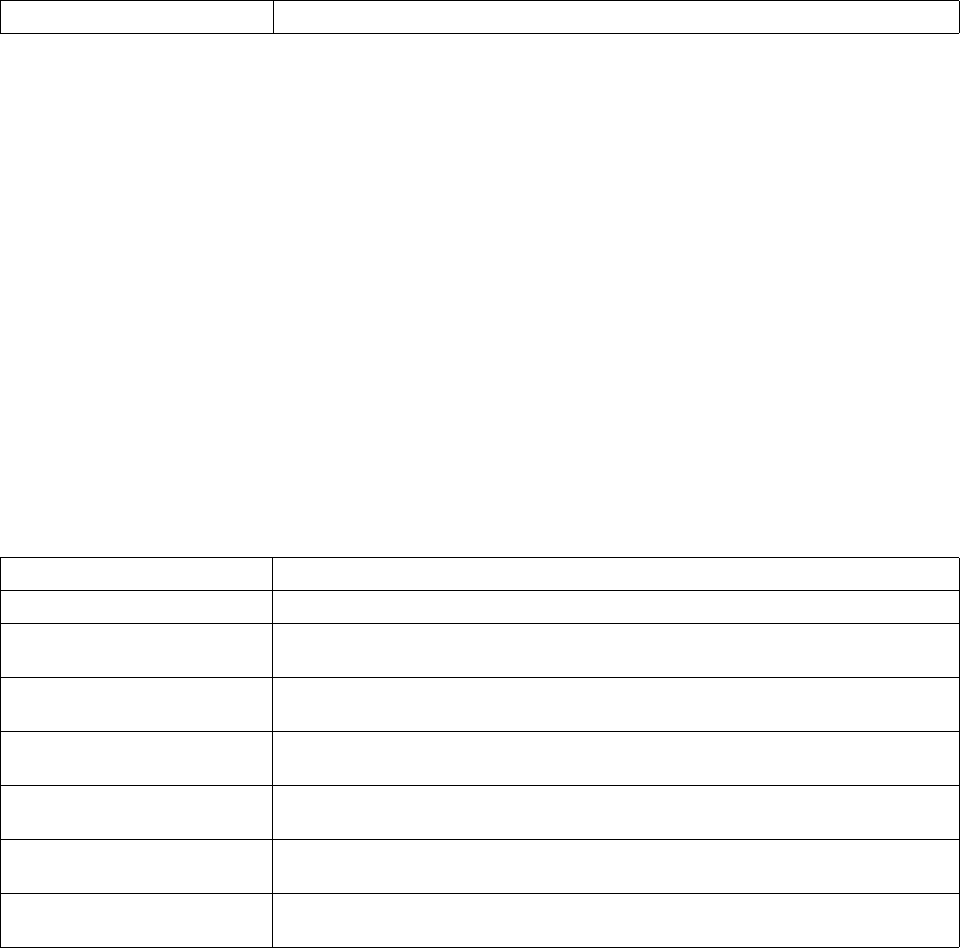
840 Brocade Mobility RFS4000, RFS6000, and RFS7000 CLI Reference Guide
53-1002619-01
25
Example
rfs7000-37FABE(config-l2tpv3-policy-L2TPV3Policy1)#hello-interval 200
rfs7000-37FABE(config-l2tpv3-policy-L2TPV3Policy1)#
rfs7000-37FABE(config-l2tpv3-policy-L2TPV3Policy1)#show context
l2tpv3 policy L2TPV3Policy1
hello-interval 200
cookie-size 8
rfs7000-37FABE(config-l2tpv3-policy-L2TPV3Policy1)#
Related Commands:
no
l2tpv3-policy-commands
Negates or reverts L2TPV3 policy settings to default values
Supported in the following platforms:
•Brocade Mobility 7131 Access Point
•Brocade Mobility RFS4000
•Brocade Mobility RFS6000
•Brocade Mobility RFS7000
Syntax:
no [cookie-size|hello-interval|reconnect-attempts|reconnect-interval|
retry-attempts|retry-interval|rx-window-size|tx-window-size]
Parameters
no [cookie-size|hello-interval|reconnect-attempts|reconnect-interval|
retry-attempts|retry-interval|rx-window-size|tx-window-size]
no Resets the “Hello” keep-alive message time interval to its default of 60 seconds
no cookie-size Resets the cookie-field size to default (0 - no cookie field present in each L2TPV3 data packet)
no hello-interval Resets the “Hello” keep-alive message time interval to default (60 seconds
no reconnect-attempts Resets the maximum number of reconnect attempts to default (0 - configures infinite
attempts)
no reconnect-interval Resets the interval between successive attempts to reestablish a tunnel connection to default
(120 seconds)
no retry-attempts Resets the maximum number of retransmissions for signalling messages to default (5
attempts)
no retry-interval Resets the time interval before initiating a retransmission of any L2TPV3 signalling message to
default (5 seconds)
no rx-window-size Resets the number of packets that can be received without sending an acknowledgement to
default (10 packets)
no tx-window-size Resets the number of packets that can be transmitted without receiving an acknowledgement
to default (10 packets)

Brocade Mobility RFS4000, RFS6000, and RFS7000 CLI Reference Guide 841
53-1002619-01
25
Example
The l2tpv3 policy settings before the no command is executed:
rfs7000-37FABE(config-l2tpv3-policy-L2TPV3Policy1)#show context
l2tpv3 policy L2TPV3Policy1
hello-interval 200
retry-attempts 10
retry-interval 30
cookie-size 8
reconnect-interval 100
reconnect-attempts 50
rfs7000-37FABE(config-l2tpv3-policy-L2TPV3Policy1)#
rfs7000-37FABE(config-l2tpv3-policy-L2TPV3Policy1)#no hello-interval
rfs7000-37FABE(config-l2tpv3-policy-L2TPV3Policy1)#no reconnect-attempts
rfs7000-37FABE(config-l2tpv3-policy-L2TPV3Policy1)#no reconnect-interval
rfs7000-37FABE(config-l2tpv3-policy-L2TPV3Policy1)#no retry-attempts
rfs7000-37FABE(config-l2tpv3-policy-L2TPV3Policy1)#no retry-interval
The l2tpv3 policy settings after the no command is executed:
rfs7000-37FABE(config-l2tpv3-policy-L2TPV3Policy1)#show context
l2tpv3 policy L2TPV3Policy1
rfs7000-37FABE(config-l2tpv3-policy-L2TPV3Policy1)#
Related Commands:
reconnect-attempts
l2tpv3-policy-commands
Configures the maximum number of attempts to reestablish a tunnel connection
Supported in the following platforms:
•Brocade Mobility 7131 Access Point
•Brocade Mobility RFS4000
•Brocade Mobility RFS6000
•Brocade Mobility RFS7000
cookie-size Configures the cookie-field size present in each L2TPV3 data packet
hello-interval Configures the time interval for L2TPV3 “Hello” keep-alive messages
reconnect-attempts Configures the maximum number of attempts made to reestablish a tunnel connection
reconnect-interval Configures the interval, in seconds, between successive attempts to reestablish a tunnel
connection
retry-attempts Configures the maximum number of retransmissions for signalling messages between 1 - 10
retry-interval Configures the time interval, in seconds, before initiating a retransmission of any L2TPV3
signalling message
rx-window-size Configures the number of packets that can be received without sending an acknowledgement
tx-window-size Configures the number of packets that can be transmitted without receiving an
acknowledgement

842 Brocade Mobility RFS4000, RFS6000, and RFS7000 CLI Reference Guide
53-1002619-01
25
Syntax:
reconnect-attempts <0-250>
Parameters
reconnect-attempts <0-250>
Example
rfs7000-37FABE(config-l2tpv3-policy-L2TPV3Policy1)#reconnect-attempts 50
rfs7000-37FABE(config-l2tpv3-policy-L2TPV3Policy1)#
rfs7000-37FABE(config-l2tpv3-policy-L2TPV3Policy1)#show context
l2tpv3 policy L2TPV3Policy1
hello-interval 200
cookie-size 8
reconnect-attempts 50
rfs7000-37FABE(config-l2tpv3-policy-L2TPV3Policy1)#
Related Commands:
reconnect-interval
l2tpv3-policy-commands
Configures the interval, in seconds, between successive attempts to reestablish a tunnel
connection
Supported in the following platforms:
•Brocade Mobility 7131 Access Point
•Brocade Mobility RFS4000
•Brocade Mobility RFS6000
•Brocade Mobility RFS7000
Syntax:
reconnect-interval <1-3600>
Parameters
reconnect-interval <1-3600>
Example
rfs7000-37FABE(config-l2tpv3-policy-L2TPV3Policy1)#reconnect-interval 100
rfs7000-37FABE(config-l2tpv3-policy-L2TPV3Policy1)#
l2tpv3 policy L2TPV3Policy1
reconnect-attempts <0-250> Configures the maximum number of attempts to reestablish a tunnel connection between 0 -
250 (default is 0: configures infinite reconnect attempts)
no Resets the maximum number of reconnect attempts to default (0: configures infinite
reconnect attempts)
reconnect-interval <1-3600> Configures the interval between successive attempts to reestablish a tunnel connection
between 1 - 3600 seconds (default is 120 seconds)

Brocade Mobility RFS4000, RFS6000, and RFS7000 CLI Reference Guide 843
53-1002619-01
25
hello-interval 200
cookie-size 8
reconnect-interval 100
reconnect-attempts 50
rfs7000-37FABE(config-l2tpv3-policy-L2TPV3Policy1)#
Related Commands:
retry-attempts
l2tpv3-policy-commands
Configures the maximum number of retransmissions for signalling messages. Use this command to
specify how many retransmission cycles occur before determining the peer is not reachable.
Supported in the following platforms:
•Brocade Mobility 7131 Access Point
•Brocade Mobility RFS4000
•Brocade Mobility RFS6000
•Brocade Mobility RFS7000
Syntax:
retry-attempts <1-10>
Parameters
retry-attempts <1-10>
Example
rfs7000-37FABE(config-l2tpv3-policy-L2TPV3Policy1)#retry-attempts 10
rfs7000-37FABE(config-l2tpv3-policy-L2TPV3Policy1)#
fs7000-37FABE(config-l2tpv3-policy-L2TPV3Policy1)#show context
l2tpv3 policy L2TPV3Policy1
hello-interval 200
retry-attempts 10
cookie-size 8
reconnect-interval 100
reconnect-attempts 50
rfs7000-37FABE(config-l2tpv3-policy-L2TPV3Policy1)#
Related Commands:
no Resets the interval between successive attempts to reestablish a tunnel connection to default
(120 seconds)
retry-attempts <1-10> Configures the maximum number of retransmissions for signalling messages between 1 - 10
(default is 5 attempts)
no Resets the maximum number of retransmissions for signalling messages to default (5
attempts)

844 Brocade Mobility RFS4000, RFS6000, and RFS7000 CLI Reference Guide
53-1002619-01
25
retry-interval
l2tpv3-policy-commands
Configures the time interval, in seconds, before initiating a retransmission of any L2TPV3 signalling
message
Supported in the following platforms:
•Brocade Mobility 7131 Access Point
•Brocade Mobility RFS4000
•Brocade Mobility RFS6000
•Brocade Mobility RFS7000
Syntax:
retry-interval <1-250>
Parameters
retry-interval <1-250>
Example
rfs7000-37FABE(config-l2tpv3-policy-L2TPV3Policy1)#retry-interval 30
rfs7000-37FABE(config-l2tpv3-policy-L2TPV3Policy1)#
rfs7000-37FABE(config-l2tpv3-policy-L2TPV3Policy1)#show context
l2tpv3 policy L2TPV3Policy1
hello-interval 200
retry-attempts 10
retry-interval 30
cookie-size 8
reconnect-interval 100
reconnect-attempts 50
rfs7000-37FABE(config-l2tpv3-policy-L2TPV3Policy1)#
Related Commands:
rx-window-size
l2tpv3-policy-commands
Configures the number of signalling messages that can be received without sending an
acknowledgement
Supported in the following platforms:
•Brocade Mobility 7131 Access Point
•Brocade Mobility RFS4000
•Brocade Mobility RFS6000
retry <1-250> Configures the time interval before initiating a retransmission of any L2TPV3 signalling
message between 1 - 250 seconds (default is 5 seconds)
no Resets the time interval before initiating a retransmission of any L2TPV3 signalling message
to default (5 seconds)

Brocade Mobility RFS4000, RFS6000, and RFS7000 CLI Reference Guide 845
53-1002619-01
25
•Brocade Mobility RFS7000
Syntax:
rx-window-size <1-15>
Parameters
rx-window-size <1-15>
Example
rfs7000-37FABE(config-l2tpv3-policy-L2TPV3Policy1)#rx-window-size 10
rfs7000-37FABE(config-l2tpv3-policy-L2TPV3Policy1)#
Related Commands:
tx-window-size
l2tpv3-policy-commands
Configures the number of signalling messages that can be transmitted without receiving an
acknowledgement
Supported in the following platforms:
•Brocade Mobility 7131 Access Point
•Brocade Mobility RFS4000
•Brocade Mobility RFS6000
•Brocade Mobility RFS7000
Syntax:
tx-window-size <1-15>
Parameters
tx-window-size <1-15>
Example
rfs7000-37FABE(config-l2tpv3-policy-L2TPV3Policy1)#tx-window-size 10
rfs7000-37FABE(config-l2tpv3-policy-L2TPV3Policy1)#
Related Commands:
rx-window-size <1-15> Configures the number of packets that can be received without sending an acknowledgement
between 1 - 15 (default is 10 packets)
no Resets the number of packets that can be received without sending an acknowledgement to
default (10 packets)
tx-window-size <1-15> Configures the number of packets that can be transmitted without receiving an
acknowledgement between 1 - 15 (default is 10 packets)
no Resets the number of packets that can be transmitted without receiving an acknowledgement
to default (10 packets)
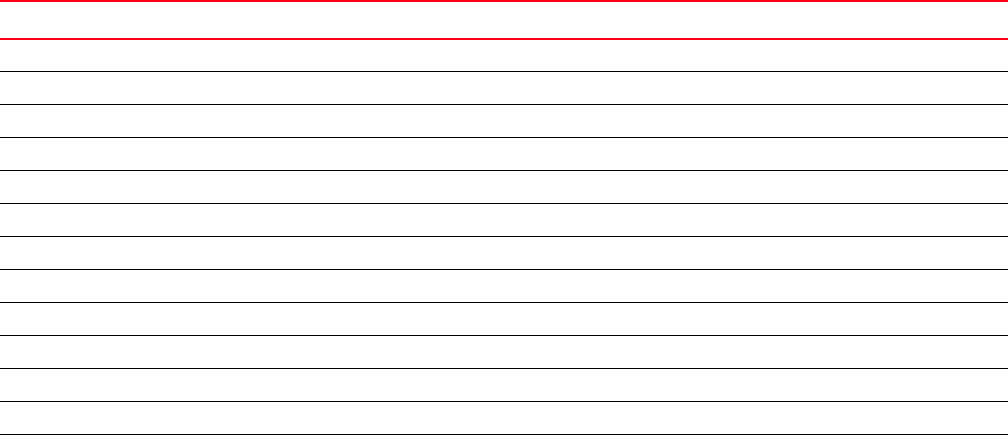
846 Brocade Mobility RFS4000, RFS6000, and RFS7000 CLI Reference Guide
53-1002619-01
25
l2tpv3-tunnel-commands
Use the (profile-context) instance to configure a L2TPV3 tunnel. To navigate to the tunnel
configuration mode, use the following command in the profile context:
rfs7000-37FABE(config-profile-default-rfs7000)#l2tpv3 tunnel <TUNNEL-NAME>
rfs7000-37FABE(config-profile-default-rfs7000)#l2tpv3 tunnel Tunnel1
rfs7000-37FABE(config-profile default-rfs7000-l2tpv3-tunnel-Tunnel1)#
rfs7000-37FABE(config-profile default-rfs7000-l2tpv3-tunnel-Tunnel1)#?
L2tpv3 Tunnel Mode commands:
hostname Tunnel specific local hostname
local-ip-address Configure the IP address for tunnel. If not specified,
tunnel source ip address would be chosen automatically
based on the tunnel peer ip address
mtu Configure the mtu size for the tunnel
no Negate a command or set its defaults
peer Configure the l2tpv3 tunnel peers. At least one peer must
be specified
router-id Tunnel sepcific local router ID
session Create / modify the specified l2tpv3 session
use Set setting to use
clrscr Clears the display screen
commit Commit all changes made in this session
end End current mode and change to EXEC mode
exit End current mode and down to previous mode
help Description of the interactive help system
revert Revert changes
service Service Commands
show Show running system information
write Write running configuration to memory or terminal
rfs7000-37FABE(config-profile default-rfs7000-l2tpv3-tunnel-Tunnel1)#
Table 42 summarizes L2TPV3 tunnel configuration commands
TABLE 42 L2TPV3 tunnel configuration commands
Command Description Reference
hostname Configures tunnel specific local hostname page 25-847
local-ip-address Configures the tunnel’s IP address page 25-847
mtu Configures the tunnel’s maximum transmission unit (mtu) size page 25-848
no Negates or reverts L2TPV3 tunnel commands page 25-849
peer Configures the tunnel’s peers page 25-850
router-id Configures the tunnel’s local router ID page 25-851
session Creates/modifies specified L2TPV3 session page 25-852
use Configures a tunnel to use a specified L2TPV3 tunnel policy page 25-853
clrscr Clears the display screen page 5-255
commit Commits (saves) changes made in the current session page 5-256
end Ends and exits the current mode and moves to the PRIV EXEC mode page 5-257
exit Ends the current mode and moves to the previous mode page 5-257
help Displays the interactive help system page 5-258
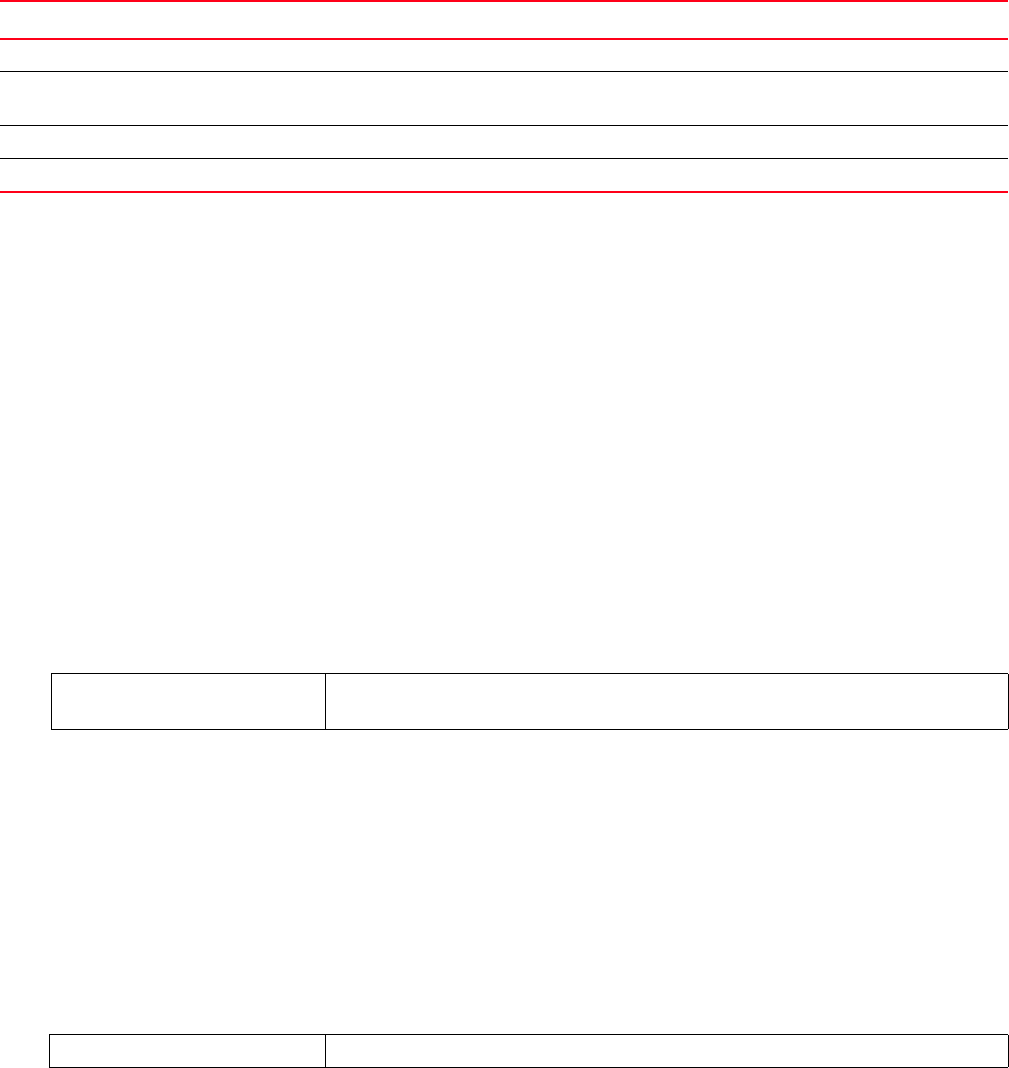
Brocade Mobility RFS4000, RFS6000, and RFS7000 CLI Reference Guide 847
53-1002619-01
25
hostname
l2tpv3-tunnel-commands
Configures the tunnel’s local hostname
Supported in the following platforms:
•Brocade Mobility 7131 Access Point
•Brocade Mobility RFS4000
•Brocade Mobility RFS6000
•Brocade Mobility RFS7000
Syntax:
hostname <WORD>
Parameters
hostname <WORD>
Example
rfs7000-37FABE(config-profile default-rfs7000-l2tpv3-tunnel-tunnel1)#hostname
TunnelHost1
rfs7000-37FABE(config-profile default-rfs7000-l2tpv3-tunnel-tunnel1)#
rfs7000-37FABE(config-profile default-rfs7000-l2tpv3-tunnel-tunnel1)#show
context
l2tpv3 tunnel tunnel1
hostname TunnelHost1
rfs7000-37FABE(config-profile default-rfs7000-l2tpv3-tunnel-tunnel1)#
Related Commands:
local-ip-address
l2tpv3-tunnel-commands
revert Reverts changes to their last saved configuration page 5-264
service Invokes service commands to troubleshoot or debug (config-if) instance
configurations
page 5-265
show Displays running system information page 6-295
write Writes the system’s running configuration to memory or terminal page 5-291
TABLE 42 L2TPV3 tunnel configuration commands
Command Description Reference
hostname <WORD> Configures the tunnel’s local hostname
•<WORD> – Specify the tunnel’s local hostname.
no Removes the tunnel’s local hostname

848 Brocade Mobility RFS4000, RFS6000, and RFS7000 CLI Reference Guide
53-1002619-01
25
Configures the tunnel’s source IP address. If no IP address is specified, the tunnel’s source IP
address is automatically configured based on the tunnel peer IP address.
Supported in the following platforms:
•Brocade Mobility 7131 Access Point
•Brocade Mobility RFS4000
•Brocade Mobility RFS6000
•Brocade Mobility RFS7000
Syntax:
local-ip-address <A.B.C.D>
Parameters
local-ip-address <A.B.C.D>
Example
rfs7000-37FABE(config-profile
default-rfs7000-l2tpv3-tunnel-tunnel1)#local-ip-address 172.16.10.2
rfs7000-37FABE(config-profile default-rfs7000-l2tpv3-tunnel-tunnel1)#
rfs7000-37FABE(config-profile default-rfs7000-l2tpv3-tunnel-tunnel1)#show
context
l2tpv3 tunnel tunnel1
hostname TunnelHost1
local-ip-address 172.16.10.2
rfs7000-37FABE(config-profile default-rfs7000-l2tpv3-tunnel-tunnel1)#
Related Commands:
mtu
l2tpv3-tunnel-commands
Configures the maximum transmission unit (mtu) size for this tunnel. This value determines the
packet size transmitted over this tunnel.
Supported in the following platforms:
•Brocade Mobility 7131 Access Point
•Brocade Mobility RFS4000
•Brocade Mobility RFS6000
•Brocade Mobility RFS7000
Syntax:
mtu <128-1460>
local-ip-address <A.B.C.D> Configures the L2TPV3 tunnel’s source IP address
•<A.B.C.D> – Specify the tunnel’s IP address. Ensure that the IP address is available (or
will become available - virtual IP) on an interface. Modifying a tunnel’s local IP address
reestablishes the tunnel.
no Resets the tunnel’s local IP address and reestablishes the tunnel

Brocade Mobility RFS4000, RFS6000, and RFS7000 CLI Reference Guide 849
53-1002619-01
25
Parameters
mtu <128-1460>
Example
rfs7000-37FABE(config-profile default-rfs7000-l2tpv3-tunnel-tunnel1)#mtu 1280
rfs7000-37FABE(config-profile default-rfs7000-l2tpv3-tunnel-tunnel1)#
rfs7000-37FABE(config-profile default-rfs7000-l2tpv3-tunnel-tunnel1)#show
context
l2tpv3 tunnel tunnel1
local-ip-address 172.16.10.2
mtu 1280
rfs7000-37FABE(config-profile default-rfs7000-l2tpv3-tunnel-tunnel1)#
Related Commands:
no
l2tpv3-tunnel-commands
Negates or reverts L2TPV3 tunnel settings to default values
Supported in the following platforms:
•Brocade Mobility 7131 Access Point
•Brocade Mobility RFS4000
•Brocade Mobility RFS6000
•Brocade Mobility RFS7000
Syntax:
no [hostname|local-ip-address|mtu|peer|router-id|session|use]
Parameters
no [hostname|local-ip-address|mtu|peer|router-id|session|use]
Example
The tunnel settings before the no command is executed:
mtu <128-1460> Configures the mtu size for this tunnel between 128 - 1460 (default is 1460)
no Resets the mtu size for this tunnel to default (1460)
no hostname Removes the tunnel’s local hostname
no local-ip-address Resets the tunnel’s local IP address and reestablishes the tunnel
no mtu Resets the mtu size for this tunnel to default (1460)
no peer Removes the peer configured for this tunnel
no router-id Removes the tunnel’s router ID
no session Removes a session
no use Removes the L2TPV3 policy configured with a tunnel and reverts to the default tunnel policy

850 Brocade Mobility RFS4000, RFS6000, and RFS7000 CLI Reference Guide
53-1002619-01
25
rfs7000-37FABE(config-profile default-rfs7000-l2tpv3-tunnel-tunnel1)#show
context
l2tpv3 tunnel tunnel1
peer 2 hostname tunnel1peer1 udp port 100
use l2tpv3-policy l2tpv3Policy1
session tunnel1peer1session1 pseudowire-id 5000 traffic-source vlan 10-20
native-vlan 1
router-id 2000
rfs7000-37FABE(config-profile default-rfs7000-l2tpv3-tunnel-tunnel1)#
rfs7000-37FABE(config-profile default-rfs7000-l2tpv3-tunnel-tunnel1)#no use
l2tpv3-policy
rfs7000-37FABE(config-profile default-rfs7000-l2tpv3-tunnel-tunnel1)
rfs7000-37FABE(config-profile default-rfs7000-l2tpv3-tunnel-tunnel1)#no peer
2
rfs7000-37FABE(config-profile default-rfs7000-l2tpv3-tunnel-tunnel1)#
The tunnel settings after the no command is executed:
rfs7000-37FABE(config-profile default-rfs7000-l2tpv3-tunnel-tunnel1)#show
context
l2tpv3 tunnel tunnel1
session tunnel1peer1session1 pseudowire-id 5000 traffic-source vlan 10-20
native-vlan 1
router-id 2000
rfs7000-37FABE(config-profile default-rfs7000-l2tpv3-tunnel-tunnel1)#
Related Commands:
peer
l2tpv3-tunnel-commands
Configures the L2TPV3 tunnel’s peers. At least one peer must be specified.
Supported in the following platforms:
•Brocade Mobility 7131 Access Point
•Brocade Mobility RFS4000
•Brocade Mobility RFS6000
•Brocade Mobility RFS7000
Syntax:
peer <1-2> {hostname|ip-address|router-id|udp}
hostname Configures the tunnel’s local hostname
local-ip-address Configures the tunnel’s source IP address
mtu Configures the maximum transmission unit (mtu) size for this tunnel
peer Configures the tunnel’s peers
router-id Configures the tunnel’s local router ID
session Creates/modifies specified L2TPV3 session
use Configures a tunnel to use a specified L2TPV3 tunnel policy

Brocade Mobility RFS4000, RFS6000, and RFS7000 CLI Reference Guide 851
53-1002619-01
25
peer <1-2> {hostname [<WORD>|any]|ip-address <A.B.C.D>|
(router-id [<A.B.C.D>|<WORD>|any])|(udp port <1-65535>)}
Parameters
peer <1-2> {hostname [<WORD>|any]|ip-address <A.B.C.D>|
(router-id [<A.B.C.D>|<WORD>|any])|(udp port <1-65535>)}
Example
rfs7000-37FABE(config-profile default-rfs7000-l2tpv3-tunnel-tunnel1)#peer 2
host
name tunnel1peer1 udp port 100
rfs7000-37FABE(config-profile default-rfs7000-l2tpv3-tunnel-tunnel1)#
rfs7000-37FABE(config-profile default-rfs7000-l2tpv3-tunnel-tunnel1)#show
contex
t
l2tpv3 tunnel tunnel1
peer 2 hostname tunnel1peer1 udp port 100
rfs7000-37FABE(config-profile default-rfs7000-l2tpv3-tunnel-tunnel1)#
Related Commands:
router-id
l2tpv3-tunnel-commands
Configures the tunnel’s local router ID
Supported in the following platforms:
•Brocade Mobility 7131 Access Point
•Brocade Mobility RFS4000
peer <1-2> Configures the tunnel peer ID from 1 - 2. At any time the tunnel is established with only one
peer.
hostname [<WORD>|any] Specifies the peer’s hostname
•hostname [<WORD>|any] – Optional. Configures the peers’ hostname. The hostname
options are:
•<WORD> – The fully qualified domain name (FQDN) or partial DN
•any – Peer name is not specified. If the hostname is ‘any’ this tunnel will be considered
as responder only and will allow incoming connection from any host.
ip-address <A.B.C.D> Optional. Configures the peer’s IP address in the A.B.C.D format
router-id [<A.B.C.D>|<WORD>|any] The following are common to the “hostname” and “ip-address” parameters.
•router-id – Optional. Configures the peer’s router-id in one of the following formats:
•<A.B.C.D> – Peer router ID in the IP address (A.B.C.D) format
•<WORD> – Peer router ID range (for example, 100-120)
•any – Peer router ID is not specified. This allows incoming connection from any router
ID.
udp port <1-65535> The UDP option configures the encapsulation mode for this tunnel.
•UDP – Optional. Configures UDP encapsulation (default encapsulation is IP)
•port <1-65535> – Configures the peer’s UDP port running the L2TPV3 service. from 1
- 65535.
no Removes the peer configured for this tunnel

852 Brocade Mobility RFS4000, RFS6000, and RFS7000 CLI Reference Guide
53-1002619-01
25
•Brocade Mobility RFS6000
•Brocade Mobility RFS7000
Syntax:
router-id [<1-4294967295>|<A.B.C.D>]
Parameters
router-id [<1-4294967295>|<A.B.C.D>]
Example
rfs7000-37FABE(config-profile
default-rfs7000-l2tpv3-tunnel-tunnel1)#router-id 2000
rfs7000-37FABE(config-profile default-rfs7000-l2tpv3-tunnel-tunnel1)#
rfs7000-37FABE(config-profile default-rfs7000-l2tpv3-tunnel-tunnel1)#show
context
l2tpv3 tunnel tunnel1
peer 2 hostname tunnel1peer1 udp port 100
router-id 2000
rfs7000-37FABE(config-profile default-rfs7000-l2tpv3-tunnel-tunnel1)#
Related Commands:
session
l2tpv3-tunnel-commands
Configures a session’s pseudowire ID, which describes the session’s purpose. The session
established message sends this pseudowire ID to the L2TPV3 peer.
Supported in the following platforms:
•Brocade Mobility 7131 Access Point
•Brocade Mobility RFS4000
•Brocade Mobility RFS6000
•Brocade Mobility RFS7000
Syntax:
session <L2TPV3-SESSION-NAME> pseudowire-id <1-4294967295> traffic-source
vlan <VLAN-ID-RANGE> {native-vlan <1-4094>}
Parameters
router-id
[<1-4294967295>|<A.B.C.D>]
Configures the tunnel’s local router ID in one of the following formats:
•<1-4294967295> – Router ID in the number format (from1- 4294967295)
•<A.B.C.D> – Router ID in IP address format (A.B.C.D)
no Removes the tunnel’s router ID

Brocade Mobility RFS4000, RFS6000, and RFS7000 CLI Reference Guide 853
53-1002619-01
25
session <L2TPV3-SESSION-NAME> pseudowire-id <1-4294967295> traffic-source
vlan <VLAN-ID-RANGE> {native-vlan <1-4094>}
Usage Guidelines:
The working status of a pseudowire is reflected by the state of the L2TPV3 session. If the
corresponding session is L2TPV3 down, the pseudowire associated with it must be shut down.
Example
rfs7000-37FABE(config-profile default-rfs7000-l2tpv3-tunnel-tunnel1)#session
tun
nel1peer1session1 pseudowire-id 5000 traffic-source vlan 10-20 native-vlan 1
rfs7000-37FABE(config-profile default-rfs7000-l2tpv3-tunnel-tunnel1)#
rfs7000-37FABE(config-profile default-rfs7000-l2tpv3-tunnel-tunnel1)#show
context
l2tpv3 tunnel tunnel1
peer 2 hostname tunnel1peer1 udp port 100
session tunnel1peer1session1 pseudowire-id 5000 traffic-source vlan 10-20
native-vlan 1
router-id 2000
rfs7000-37FABE(config-profile default-rfs7000-l2tpv3-tunnel-tunnel1)#
Related Commands:
use
l2tpv3-tunnel-commands
Configures a tunnel to use a specified L2TPV3 tunnel policy
Supported in the following platforms:
•Brocade Mobility 7131 Access Point
•Brocade Mobility RFS4000
•Brocade Mobility RFS6000
•Brocade Mobility RFS7000
Syntax:
use l2tpv3-policy <L2TPV3-POLICY-NAME>
Parameters
session
<L2TPV3-SESSION-NAME>
Configures this session’s name
pseudowire-id
<1-4294967295>
Configures the pseudowire ID for this session from 1- 4204067295
traffic-source
vlan <VLAN-ID-RANGE>
Configures VLAN as the traffic source for this tunnel
•<VLAN-ID-RANGE> – Configures VLAN range list of traffic source. Specify the VLAN IDs as
a range (for example, 10-20, 25, 30-35).
native-vlan <1-4094> Optional – Configures the native VLAN ID for this session, which is not tagged
•<1-4094> – Specify the native VLAN ID from 1- 4094.
no Removes a session

854 Brocade Mobility RFS4000, RFS6000, and RFS7000 CLI Reference Guide
53-1002619-01
25
use l2tpv3-policy <L2TPV3-POLICY-NAME>
Example
rfs7000-37FABE(config-profile default-rfs7000-l2tpv3-tunnel-tunnel1)#use
l2tpv3-
policy l2tpv3Policy1
rfs7000-37FABE(config-profile default-rfs7000-l2tpv3-tunnel-tunnel1)#
rfs7000-37FABE(config-profile default-rfs7000-l2tpv3-tunnel-tunnel1)#show
context
l2tpv3 tunnel tunnel1
peer 2 hostname tunnel1peer1 udp port 100
use l2tpv3-policy l2tpv3Policy1
session tunnel1peer1session1 pseudowire-id 5000 traffic-source vlan 10-20
native-vlan 1
router-id 2000
rfs7000-37FABE(config-profile default-rfs7000-l2tpv3-tunnel-tunnel1)#
Related Commands:
l2tpv3-manual-session-commands
Use the (profile-context) instance to configure a L2TPV3 manual session. To navigate to the L2TPV3
manual session configuration mode, use the following command in the profile context:
rfs7000-37FABE(config-profile-default-rfs7000)#l2tpv3 manual-session
<SESSION-NAME>
rfs7000-37FABE(config-profile-default-rfs7000)#l2tpv3 manual-session
manualSessi
on1
rfs7000-37FABE(config-profile
default-rfs7000-l2tpv3-manual-session-manualSessio
n1)#
rfs7000-37FABE(config-profile
default-rfs7000-l2tpv3-manual-session-manualSession1)#?
L2tpv3 Manual Session Mode commands:
local-cookie The local cookie for the session
local-ip-address Configure the IP address for tunnel. If not specified,
tunnel source ip address would be chosen automatically
based on the tunnel peer ip address
local-session-id Local session id for the session
mtu Configure the mtu size for the tunnel
no Negate a command or set its defaults
peer Configure L2TPv3 mannual session peer
remote-cookie The remote cookie for the session
remote-session-id Remote session id for the session
traffic-source Traffic that is tunneled
clrscr Clears the display screen
commit Commit all changes made in this session
use l2tpv3-policy
<L2TPV3-POLICY-NAME>
Configures the L2TPV3 policy used with this tunnel
•<L2TPV3-POLICY-NAME> – The policy name
no Removes the L2TPV3 policy configured with a tunnel and reverts to the default tunnel policy

Brocade Mobility RFS4000, RFS6000, and RFS7000 CLI Reference Guide 855
53-1002619-01
25
end End current mode and change to EXEC mode
exit End current mode and down to previous mode
help Description of the interactive help system
revert Revert changes
service Service Commands
show Show running system information
write Write running configuration to memory or terminal
rfs7000-37FABE(config-profile
default-rfs7000-l2tpv3-manual-session-manualSession1)#
Table 43 summarizes L2TPV3 manual session configuration commands
local-cookie
l2tpv3-manual-session-commands
Configures the local cookie field size for the manual session
Supported in the following platforms:
•Brocade Mobility 7131 Access Point
•Brocade Mobility RFS4000
•Brocade Mobility RFS6000
TABLE 43 L2TPV3 manual session configuration commands
Command Description Reference
local-cookie Configures the manual session’s local cookie field size page 25-855
local-ip-address Configures the manual session’s local source IP address page 25-856
local-session-id Configures the manual session’s local session ID page 25-857
mtu Configures the mtu size for the manual session tunnel page 25-858
no Negates or reverts L2TPV3 manual session commands to default values page 25-849
peer Configures the manual session’s peers page 25-860
remote-cookie Configures remote cookie for the manual session page 25-861
remote-session-id Configures the manual session’s remote session ID page 25-862
traffic-source Configures the traffic source that is tunnel by the manual session page 25-863
clrscr Clears the display screen page 5-255
commit Commits (saves) changes made in the current session page 5-256
end Ends and exits the current mode and moves to the PRIV EXEC mode page 5-257
exit Ends the current mode and moves to the previous mode page 5-257
help Displays the interactive help system page 5-258
revert Reverts changes to their last saved configuration page 5-264
service Invokes service commands to troubleshoot or debug (config-if) instance
configurations
page 5-265
show Displays running system information page 5-290
write Writes the system’s running configuration to memory or terminal page 5-291
856 Brocade Mobility RFS4000, RFS6000, and RFS7000 CLI Reference Guide
53-1002619-01
25
•Brocade Mobility RFS7000
Syntax:
local-cookie size [4|8] <1-4294967295> {<1-4294967295>}
Parameters
local-cookie size [4|8] <1-4294967295> {<1-4294967295>}
Example
rfs7000-37FABE(config-profile
default-rfs7000-l2tpv3-manual-session-manualSessio
n1)#local-cookie size 8 200 300
rfs7000-37FABE(config-profile
default-rfs7000-l2tpv3-manual-session-manualSessio
n1)#
rfs7000-37FABE(config-profile
default-rfs7000-l2tpv3-manual-session-manualSessio
n1)#show context
l2tpv3 manual-session manualSession1
local-cookie size 8 200 300
rfs7000-37FABE(config-profile
default-rfs7000-l2tpv3-manual-session-manualSessio
n1)#
Related Commands:
local-ip-address
l2tpv3-manual-session-commands
Configures the manual session’s source IP address. If no IP address is specified, the tunnel’s
source IP address is automatically configured based on the tunnel peer IP address.
Supported in the following platforms:
•Brocade Mobility 7131 Access Point
•Brocade Mobility RFS4000
•Brocade Mobility RFS6000
•Brocade Mobility RFS7000
Syntax:
local-ip-address <A.B.C.D>
local-cookie size [4|8] Configures the local cookie field size for this manual session. The options are:
•4 – 4 byte local cookie field
•8 – 8 byte local cookie field
<1-4294967295> Configures the local cookie value firstword. Applies to both the 4 byte and 8 byte local cookies
<1-4294967295> Optional – Configures the local cookie value secondword. Applicable to only 8 byte cookies.
This parameter is ignored for 4 byte cookies.
no Removes the local cookie size configured for a manual session
Brocade Mobility RFS4000, RFS6000, and RFS7000 CLI Reference Guide 857
53-1002619-01
25
Parameters
local-ip-address <A.B.C.D>
Example
rfs7000-37FABE(config-profile
default-rfs7000-l2tpv3-manual-session-manualSessio
n1)#local-ip-address 1.2.3.4
rfs7000-37FABE(config-profile
default-rfs7000-l2tpv3-manual-session-manualSessio
n1)#
rfs7000-37FABE(config-profile
default-rfs7000-l2tpv3-manual-session-manualSessio
n1)#show context
l2tpv3 manual-session manualSession1
local-cookie size 8 200 300
local-ip-address 1.2.3.4
rfs7000-37FABE(config-profile
default-rfs7000-l2tpv3-manual-session-manualSessio
n1)#
Related Commands:
local-session-id
l2tpv3-manual-session-commands
Configures the manual session’s local session ID
Supported in the following platforms:
•Brocade Mobility 7131 Access Point
•Brocade Mobility RFS4000
•Brocade Mobility RFS6000
•Brocade Mobility RFS7000
Syntax:
local-session-id <1-63>
Parameters
local-session-id <1-63>
Example
rfs7000-37FABE(config-profile
default-rfs7000-l2tpv3-manual-session-manualSessio
n1)#local-session-id 1
rfs7000-37FABE(config-profile
default-rfs7000-l2tpv3-manual-session-manualSessio
local-ip-address <A.B.C.D> Configures the manual session’s source IP address in the A.B.C.D format
no Resets the manual session’s local source IP address. This reestablishes the session.
local-session-id <1-63> Configures this manual session’s local session ID from 1 - 63

858 Brocade Mobility RFS4000, RFS6000, and RFS7000 CLI Reference Guide
53-1002619-01
25
n1)#
rfs7000-37FABE(config-profile
default-rfs7000-l2tpv3-manual-session-manualSessio
n1)#show context
l2tpv3 manual-session manualSession1
local-cookie size 8 200 300
local-ip-address 1.2.3.4
local-session-id 1
rfs7000-37FABE(config-profile
default-rfs7000-l2tpv3-manual-session-manualSessio
n1)#
Related Commands:
mtu
l2tpv3-manual-session-commands
Configures the MTU size for the manual session tunnel
Supported in the following platforms:
•Brocade Mobility 7131 Access Point
•Brocade Mobility RFS4000
•Brocade Mobility RFS6000
•Brocade Mobility RFS7000
Syntax:
mtu <128-1460>
Parameters
mtu <128-1460>
Example
rfs7000-37FABE(config-profile
default-rfs7000-l2tpv3-manual-session-manualSessio
n1)#mtu 200
rfs7000-37FABE(config-profile
default-rfs7000-l2tpv3-manual-session-manualSessio
n1)#
rfs7000-37FABE(config-profile
default-rfs7000-l2tpv3-manual-session-manualSessio
n1)#show context
l2tpv3 manual-session manualSession1
local-cookie size 8 200 300
local-ip-address 1.2.3.4
mtu 200
local-session-id 1
no Removes the manual session’s local session ID
mtu <128-1460> Configures the MTU size for this manual session tunnel from 128 - 1460 (default is 1460)

Brocade Mobility RFS4000, RFS6000, and RFS7000 CLI Reference Guide 859
53-1002619-01
25
rfs7000-37FABE(config-profile
default-rfs7000-l2tpv3-manual-session-manualSessio
n1)#
Related Commands:
no
l2tpv3-manual-session-commands
Negates or reverts L2TPV3 manual session settings to default values
Supported in the following platforms:
•Brocade Mobility 7131 Access Point
•Brocade Mobility RFS4000
•Brocade Mobility RFS6000
•Brocade Mobility RFS7000
Syntax:
no [local-cookie|local-ip-address|local-session-id|mtu|peer|remote-cookie|
remote-session-id|traffic-source]
Parameters
no [local-cookie|local-ip-address|local-session-id|mtu|peer|remote-cookie|
remote-session-id|traffic-source]
Example
The tunnel settings before the no command is executed:
rfs7000-37FABE(config-profile
default-rfs7000-l2tpv3-manual-session-manualSessio
n1)#show context
l2tpv3 manual-session manualSession1
local-ip-address 1.2.3.4
peer ip-address 5.6.7.8 udp port 150
traffic-source vlan 50-60 native-vlan 2
local-session-id 1
remote-session-id 200
remote-cookie size 8 400 700
no Resets the MTU size for this manual session to default (1460)
no local-cookie Removes the local cookie size configured for a manual session
no local-ip-address Resets the manual session’s local source IP address and reestablishes the tunnel
no local-session-id Removes the manual session’s local session ID
no mtu Resets the mtu size for this manual session’s to default (1460)
no peer Removes the peer configuration from this tunnel
no remote-cookie Removes the remote cookie field size
no remote-session-id Removes the manual session’s remote session ID
no traffic-source Removes the configured traffic source

860 Brocade Mobility RFS4000, RFS6000, and RFS7000 CLI Reference Guide
53-1002619-01
25
rfs7000-37FABE(config-profile
default-rfs7000-l2tpv3-manual-session-manualSessio
n1)#
The tunnel settings after the no command is executed:
rfs7000-37FABE(config-profile
default-rfs7000-l2tpv3-manual-session-manualSessio
n1)#no local-ip-address
rfs7000-37FABE(config-profile
default-rfs7000-l2tpv3-manual-session-manualSessio
n1)#
rfs7000-37FABE(config-profile
default-rfs7000-l2tpv3-manual-session-manualSessio
n1)#no local-session-id
rfs7000-37FABE(config-profile
default-rfs7000-l2tpv3-manual-session-manualSessio
n1)#
rfs7000-37FABE(config-profile
default-rfs7000-l2tpv3-manual-session-manualSessio
n1)#no remote-session-id
rfs7000-37FABE(config-profile
default-rfs7000-l2tpv3-manual-session-manualSessio
n1)#
rfs7000-37FABE(config-profile
default-rfs7000-l2tpv3-manual-session-manualSessio
n1)#show context
l2tpv3 manual-session manualSession1
peer ip-address 5.6.7.8 udp port 150
traffic-source vlan 50-60 native-vlan 2
remote-cookie size 8 400 700
rfs7000-37FABE(config-profile
default-rfs7000-l2tpv3-manual-session-manualSessio
n1)#
Related Commands:
peer
l2tpv3-manual-session-commands
local-cookie Configures the local cookie field size for the manual session
local-ip-address Configures the manual session’s local source IP address
local-session-id Removes the manual session’s local session ID
mtu Configures the manual session’s mtu size
peer Configures the manual session’s peers
remote-cookie Configures the manual session’s remote cookie field size
remote-session-id Configures the manual session’s remote session ID
traffic-source Configures the traffic source that will be tunneled by this tunnel

Brocade Mobility RFS4000, RFS6000, and RFS7000 CLI Reference Guide 861
53-1002619-01
25
Configures peer(s) allowed to establish the manual session tunnel. The peers are identified by their
IP addresses.
Supported in the following platforms:
•Brocade Mobility 7131 Access Point
•Brocade Mobility RFS4000
•Brocade Mobility RFS6000
•Brocade Mobility RFS7000
Syntax:
peer ip-address <A.B.C.D> {udp port <1-65535>}
Parameters
peer ip-address <A.B.C.D> {udp port <1-65535>}
Example
rfs7000-37FABE(config-profile
default-rfs7000-l2tpv3-manual-session-manualSessio
n1)#peer ip-address 5.6.7.8 udp port 150
rfs7000-37FABE(config-profile
default-rfs7000-l2tpv3-manual-session-manualSessio
n1)#
rfs7000-37FABE(config-profile
default-rfs7000-l2tpv3-manual-session-manualSessio
n1)#show context
l2tpv3 manual-session manualSession1
local-cookie size 8 200 300
local-ip-address 1.2.3.4
peer ip-address 5.6.7.8 udp port 150
mtu 200
local-session-id 1
rfs7000-37FABE(config-profile
default-rfs7000-l2tpv3-manual-session-manualSessio
n1)#
Related Commands:
remote-cookie
l2tpv3-manual-session-commands
Configures the manual session’s remote cookie field size
Supported in the following platforms:
peer ip-address <A.B.C.D> Configures the tunnel’s peer IP address in the A.B.C.D format
udp port <1-65335> The UDP option configures the encapsulation mode for this tunnel.
•UDP – Optional. Configures UDP encapsulation (default encapsulation is IP)
•port <1-65535> – Configures the peer’s UDP port running the L2TPV3 service. from 1
- 65535.
no Removes the manual session’s peer

862 Brocade Mobility RFS4000, RFS6000, and RFS7000 CLI Reference Guide
53-1002619-01
25
•Brocade Mobility 7131 Access Point
•Brocade Mobility RFS4000
•Brocade Mobility RFS6000
•Brocade Mobility RFS7000
Syntax:
remote-cookie size [4|8] <1-4294967295> {<1-4294967295>}
Parameters
remote-cookie size [4|8] <1-4294967295> {<1-4294967295>}
Example
rfs7000-37FABE(config-profile
default-rfs7000-l2tpv3-manual-session-manualSessio
n1)#remote-cookie size 8 400 700
rfs7000-37FABE(config-profile
default-rfs7000-l2tpv3-manual-session-manualSessio
n1)#
rfs7000-37FABE(config-profile
default-rfs7000-l2tpv3-manual-session-manualSessio
n1)#show context
l2tpv3 manual-session manualSession1
local-ip-address 1.2.3.4
peer ip-address 5.6.7.8 udp port 150
mtu 200
local-session-id 1
remote-cookie size 8 400 700
rfs7000-37FABE(config-profile
default-rfs7000-l2tpv3-manual-session-manualSessio
n1)#
Related Commands:
remote-session-id
l2tpv3-manual-session-commands
Configures the manual session’s remote session ID
Supported in the following platforms:
•Brocade Mobility 7131 Access Point
remote-cookie size [4|8] Configures the remote cookie field size for this manual session. The options are:
•4 – 4 byte remote cookie field
•8 – 8 byte remote cookie field
<1-4294967295> Configures the remote cookie value firstword. Applies to both the 4 byte and 8 byte local
cookies
<1-4294967295> Optional – Configures the remote cookie value secondword. Applicable to only 8 byte cookies.
This parameter is ignored for 4 byte cookies.
no Removes the manual session’s remote cookie field size

Brocade Mobility RFS4000, RFS6000, and RFS7000 CLI Reference Guide 863
53-1002619-01
25
•Brocade Mobility RFS4000
•Brocade Mobility RFS6000
•Brocade Mobility RFS7000
Syntax:
remote-session-id <1-4294967295>
Parameters
remote-session-id <1-4294967295>
Example
rfs7000-37FABE(config-profile
default-rfs7000-l2tpv3-manual-session-manualSessio
n1)#remote-session-id 200
rfs7000-37FABE(config-profile
default-rfs7000-l2tpv3-manual-session-manualSessio
n1)#
rfs7000-37FABE(config-profile
default-rfs7000-l2tpv3-manual-session-manualSessio
n1)#show context
l2tpv3 manual-session manualSession1
local-ip-address 1.2.3.4
peer ip-address 5.6.7.8 udp port 150
local-session-id 1
remote-session-id 200
remote-cookie size 8 400 700
rfs7000-37FABE(config-profile
default-rfs7000-l2tpv3-manual-session-manualSessio
n1)#
Related Commands:
traffic-source
l2tpv3-manual-session-commands
Configures the traffic source that will be tunneled by this tunnel
Supported in the following platforms:
•Brocade Mobility 7131 Access Point
•Brocade Mobility RFS4000
•Brocade Mobility RFS6000
•Brocade Mobility RFS7000
Syntax:
traffic-source vlan <VLAN-ID-RANGE> {native-vlan <1-4094>}
remote-session-id
<1-4294967295>
Configures this manual session’s remote session ID from 1 - 4294967295
no Removes the manual session’s remote session ID

864 Brocade Mobility RFS4000, RFS6000, and RFS7000 CLI Reference Guide
53-1002619-01
25
Parameters
traffic-source vlan <VLAN-ID-RANGE> {native-vlan <1-4094>}
Example
rfs7000-37FABE(config-profile
default-rfs7000-l2tpv3-manual-session-manualSessio
n1)#traffic-source vlan 50-60 native-vlan 2
rfs7000-37FABE(config-profile
default-rfs7000-l2tpv3-manual-session-manualSessio
n1)#
rfs7000-37FABE(config-profile
default-rfs7000-l2tpv3-manual-session-manualSessio
n1)#show context
l2tpv3 manual-session manualSession1
local-ip-address 1.2.3.4
peer ip-address 5.6.7.8 udp port 150
traffic-source vlan 50-60 native-vlan 2
local-session-id 1
remote-session-id 200
remote-cookie size 8 400 700
rfs7000-37FABE(config-profile
default-rfs7000-l2tpv3-manual-session-manualSessio
n1)#
Related Commands:
traffic-source vlan
<VLAN-ID-RANGE>
Configures VLAN as the traffic source for this tunnel
•<VLAN-ID-RANGE> – Configures VLAN range list of traffic source. Specify the VLAN IDs as
a range (for example, 10-20, 25, 30-35)
native-vlan <1-4094> Optional – Configures the native VLAN ID for this session, which is not tagged
•<1-4094> – Specify the native VLAN ID between 1- 4094.
no Removes the traffic source configured for a tunnel

Brocade Mobility RFS4000, RFS6000, and RFS7000 CLI Reference Guide 865
53-1002619-01
Chapter
26
Router-Mode Commands
In this chapter
•router-mode . . . . . . . . . . . . . . . . . . . . . . . . . . . . . . . . . . . . . . . . . . . . . . . . . . 866
This chapter summarizes router-mode commands in detail. All the router-mode commands are
available on both device and profile modes.
Use the (config) instance to configure router commands. To navigate to the (config-router-mode)
instance, use the following commands:
rfs7000-37FABE(config-profile-default-rfs7000)#router ospf
rfs7000-37FABE(config-profile default-rfs7000-router-ospf)#?
Router OSPF Mode commands:
area OSPF area
auto-cost OSPF auto-cost
default-information Distribution of default information
ip Internet Protocol (IP)
network OSPF network
no Negate a command or set its defaults
ospf Ospf
passive Make OSPF Interface as passive
redistribute Route types redistributed by OSPF
route-limit Limit for number of routes handled OSPF process
router-id Router ID
vrrp-state-check Publish interface via OSPF only if the interface VRRP
state is not BACKUP
clrscr Clears the display screen
commit Commit all changes made in this session
do Run commands from Exec mode
end End current mode and change to EXEC mode
exit End current mode and down to previous mode
help Description of the interactive help system
revert Revert changes
service Service Commands
show Show running system information
write Write running configuration to memory or terminal
rfs7000-37FABE(config-profile default-rfs7000-router-ospf)#

866 Brocade Mobility RFS4000, RFS6000, and RFS7000 CLI Reference Guide
53-1002619-01
26
router-mode
Table 44 summarizes router-mode commands in detail
area
router-mode
Specifies OSPF enabled interfaces
Supported in the following platforms:
•Brocade Mobility 71XX Access Point
•Brocade Mobility RFS4000
•Brocade Mobility RFS6000
•Brocade Mobility RFS7000
Syntax:
area [<0-4294967295>|<A.B.C.D>]
Parameters
area [<0-4294967295>|<A.B.C.D>]
Example
rfs7000-37FABE(config-profile default-rfs7000-router-ospf)#area 4 ?
rfs7000-37FABE(config-profile default-rfs7000-router-ospf-area
rfs7000-37FABE(config-profile default-rfs7000-router-ospf)#area 4
rfs7000-37FABE(config-profile default-rfs7000-router-ospf-area-0.0.0.4)#?
TABLE 44 router-mode commands
Command Description Reference
area Specifies OSPF enabled interfaces page 26-866
auto-cost Specifies the reference bandwidth in terms of Mbits per second page 26-867
default-information Controls the distribution of default information page 26-868
ip Configures Internet Protocol (IP) settings page 26-868
network Defines OSPF network settings page 26-869
ospf Enables OSPF settings page 26-869
passive Specifies the configured OSPF interface as passive interface page 26-870
redistribute Specifies the route types redistributed by OSPF page 26-870
route-limit Specifies the limit for the number of routes handled by OSPF process page 26-871
router-id Specifies the router ID for OSPF process page 26-872
vrrp-state-check Publishes interface via OSPF based on VVRP status page 26-873
no Negates a command or sets its defaults page 26-873
<0-4294967295> Defines OSPF area in the form of an integer. Specify the value from 0 - 4294967295.
<A.B.C.D> Defines OSPF area in the form of IP address. Specify the IP address.

Brocade Mobility RFS4000, RFS6000, and RFS7000 CLI Reference Guide 867
53-1002619-01
26
Router OSPF Area Mode commands:
area-type OSPF area type
authentication Authentication scheme for OSPF area
no Negate a command or set its defaults
range Routes matching this range are considered for summarization
(ABR only)
clrscr Clears the display screen
commit Commit all changes made in this session
do Run commands from Exec mode
end End current mode and change to EXEC mode
exit End current mode and down to previous mode
help Description of the interactive help system
revert Revert changes
service Service Commands
show Show running system information
write Write running configuration to memory or terminal
rfs7000-37FABE(config-profile default-rfs7000-router-ospf-area-0.0.0.4)#
rfs7000-37FABE(config-profile default-rfs7000-router-ospf-area-0.0.0.4)#show
context
area 0.0.0.4
rfs7000-37FABE(config-profile default-rfs7000-router-ospf-area-0.0.0.4)#
auto-cost
router-mode
Specifies the reference bandwidth in terms of Mbits per second
Supported in the following platforms:
•Brocade Mobility 71XX Access Point
•Brocade Mobility RFS4000
•Brocade Mobility RFS6000
•Brocade Mobility RFS7000
Syntax:
auto-cost reference-bandwidth <1-4294967>
Parameters
auto-cost reference-bandwidth <1-4294967>
Example
rfs7000-37FABE(config-profile default-rfs7000-router-ospf)#auto-cost
reference-bandwidth 1
Please make sure that auto-cost reference-bandwidth is configured uniformly on
all routers
rfs7000-37FABE(config-profile default-rfs7000-router-ospf)#
reference-bandwidth Defines the reference bandwidth in Mbps
<1-4294967> Specify the reference bandwidth value from1 - 4294967.

868 Brocade Mobility RFS4000, RFS6000, and RFS7000 CLI Reference Guide
53-1002619-01
26
default-information
router-mode
Controls the distribution of default route information
Supported in the following platforms:
•Brocade Mobility 71XX Access Point
•Brocade Mobility RFS4000
•Brocade Mobility RFS6000
•Brocade Mobility RFS7000
Syntax:
default-information originate {always|metric <0-16777214>|metric-type[1|2]}
default-information originate always {metric <0-16777214>|metric-type[1|2]}
default-information originate metric <0-16777214> {metric-type}[1|2]
default-information originate metric-type [1|2] {metric} <0-16777214>
Parameters
default-information originate {always|metric <0-16777214>|metric-type[1|2]}
Example
rfs7000-37FABE(config-profile
default-rfs7000-router-ospf)#default-information originate metric-type 2
metric 1
rfs7000-37FABE(config-profile default-rfs7000-router-ospf)#
ip
router-mode
Configures Internet Protocol (IP) settings
Supported in the following platforms:
•Brocade Mobility 71XX Access Point
•Brocade Mobility RFS4000
•Brocade Mobility RFS6000
•Brocade Mobility RFS7000
Syntax:
ip default-gateway priority <1-8000>
Parameters
originate Originates default route information
always Always distributes default route information
metric <0-16777214> Specifies OSPF metric value for redistributed routes. Specify a value from 0 - 16777214.
metric-type [1|2] Sets OSPF exterior metric type for redistributed routes
•1 – Sets OSPF external type 1 metrics
•2 – Sets OSPF external type 2 metrics

Brocade Mobility RFS4000, RFS6000, and RFS7000 CLI Reference Guide 869
53-1002619-01
26
ip default-gateway priority <1-8000>
Example
rfs7000-37FABE(config-profile default-rfs7000-router-ospf)#ip default-gateway
priority 1
rfs7000-37FABE(config-profile default-rfs7000-router-ospf)#
network
router-mode
Specifies the networks on which OSPF is configured
Supported in the following platforms:
•Brocade Mobility 71XX Access Point
•Brocade Mobility RFS4000
•Brocade Mobility RFS6000
•Brocade Mobility RFS7000
Syntax:
network <A.B.C.D/M> area [<0-4294967295>|<A.B.C.D>]
Parameters
network <A.B.C.D/M> area [<0-4294967295>|<A.B.C.D>]
Example
rfs7000-37FABE(config-profile default-rfs7000-router-ospf)#network 1.2.3.4/5
area 4.5.6.7
rfs7000-37FABE(config-profile default-rfs7000-router-ospf)#
ospf
router-mode
Enables OSPF settings
Supported in the following platforms:
•Brocade Mobility 71XX Access Point
•Brocade Mobility RFS4000
•Brocade Mobility RFS6000
•Brocade Mobility RFS7000
default-gateway Configures the default gateway value
priority <1-8000> Sets the priority value for the default gateway acquired via OSPF. Specify an integer value
from 1 - 8000.
< A.B.C.D/M> Specifies OSPF network address/mask value
area <0-4294967295> Defines OSPF area in the form of an integer. Specify the value from 0 - 4294967295.
<A.B.C.D> Defines OSPF area in the form of IP address. Specify the IP address.

870 Brocade Mobility RFS4000, RFS6000, and RFS7000 CLI Reference Guide
53-1002619-01
26
Syntax:
ospf enable
Parameters
ospf enable
Example
rfs7000-37FABE(config-profile default-rfs7000-router-ospf)#ospf enable
rfs7000-37FABE(config-profile default-rfs7000-router-ospf)#
passive
router-mode
Specifies the configured OSPF interface as passive interface
Supported in the following platforms:
•Brocade Mobility 71XX Access Point
•Brocade Mobility RFS4000
•Brocade Mobility RFS6000
•Brocade Mobility RFS7000
Syntax:
passive [<WORD>|all|vlan <1-4094>]
Parameters
passive [<WORD>|all|vlan <1-4094>]
Example
rfs7000-37FABE(config-profile default-rfs7000-router-ospf)#passive vlan 1
rfs7000-37FABE(config-profile default-rfs7000-router-ospf)#
redistribute
router-mode
Specifies the route types redistributed by OSPF
Supported in the following platforms:
•Brocade Mobility 71XX Access Point
•Brocade Mobility RFS4000
•Brocade Mobility RFS6000
•Brocade Mobility RFS7000
ospf enable Enables OSPF settings
<WORD> Specify the name of the interface
all Enables OSPF passive mode on all the L3 interfaces
vlan <1-4094> Specify the VLAN value from 1 - 4094.

Brocade Mobility RFS4000, RFS6000, and RFS7000 CLI Reference Guide 871
53-1002619-01
26
Syntax:
redistribute [connected|kernel|static] {metric <0-16777214>|metric-type[1|2]}
Parameters
redistribute [connected|kernel|static] {metric <0-16777214>|metric-type[1|2]}
Example
rfs7000-37FABE(config-profile default-rfs7000-router-ospf)#redistribute
static metric-type 1
rfs7000-37FABE(config-profile default-rfs7000-router-ospf)#
route-limit
router-mode
Specifies the limit for the number of routes handled by OSPF process. The maximum limit
supported by the platform is the default configuration defined under the router-ospf context
Supported in the following platforms:
•Brocade Mobility 71XX Access Point
•Brocade Mobility RFS4000
•Brocade Mobility RFS6000
•Brocade Mobility RFS7000
Syntax:
route-limit {num-routes <DYNAMIC-ROUTE-LIMIT>|reset-time <1-86400>|
retry-count <1-32>|retry-timeout <1-3600>}
Parameters
connected Redistributes all the connected interface routes by OSPF
kernel Redistributes all the routes that are neither connected, nor static, nor dynamic.
static Redistributes the static routes by OSPF
metric <0-16777214> Specifies OSPF metric value for redistributed routes. Specify a value from 0 - 16777214.
metric-type[1|2] Sets OSPF exterior metric type for redistributed routes
•1 – Sets OSPF external type 1 metrics
•2 – Sets OSPF external type 2 metrics

872 Brocade Mobility RFS4000, RFS6000, and RFS7000 CLI Reference Guide
53-1002619-01
26
route-limit {num-routes <DYNAMIC-ROUTE-LIMIT>|reset-time <1-86400>|
retry-count <1-32>|retry-timeout <1-3600>}
Example
rfs7000-37FABE(config-profile default-rfs7000-router-ospf)#route-limit
reset-time 10
rfs7000-37FABE(config-profile default-rfs7000-router-ospf)#
rfs7000-37FABE(config-profile default-rfs7000-router-ospf)#show context
include-factory
router ospf
ospf enable
no router-id
no auto-cost reference-bandwidth
no default-information originate
no passive all
vrrp-state-check
route-limit num-routes 10 retry-count 5 retry-timeout 60 reset-time 10
ip default-gateway priority 7000
rfs7000-37FABE(config-profile default-rfs7000-router-ospf)#
router-id
router-mode
Specifies the router ID for OSPF process
Supported in the following platforms:
•Brocade Mobility 71XX Access Point
•Brocade Mobility RFS4000
•Brocade Mobility RFS6000
•Brocade Mobility RFS7000
Syntax:
router-id <A.B.C.D>
Parameters
router-id <A.B.C.D>
num-routes
<DYNAMIC-ROUTE-LIMIT>
Specifies the maximum number of non self-generated LSAs this process can receive.
•<DYNAMIC-ROUTE-LIMIT> – Specify the dynamic route limit.
reset-time <1-86400> Specifies the time in seconds after which the retry-count is reset to zero. Specify a value
from 1 - 86400 seconds.
retry-count <1-32> Specifies the maximum number of times, the adjacencies can be suppressed. Each time
the OSPF process gets into an ignore state, a counter is incremented. If
the counter exceeds the timeout configured by the retry-count, then the OSPF process stays
permanently in the same ignore state. Then manual intervention is required to get the OSPF
process out of the ignore state.
retry-timeout <1-3600> Specifies the time in seconds. During this time, the OSPF process remains in ignore state
and all the adjacencies are suppressed. Specify a value from 1 - 3600 seconds.
<A.B.C.D> Specify the IP address for the router ID.

Brocade Mobility RFS4000, RFS6000, and RFS7000 CLI Reference Guide 873
53-1002619-01
26
Example
rfs7000-37FABE(config-profile default-rfs7000-router-ospf)#router-id
172.16.10.8
Reload, or execute "clear ip ospf process" command, for this to take effect
rfs7000-37FABE(config-profile default-rfs7000-router-ospf)#
vrrp-state-check
router-mode
Publishes interface via OSPF based on VVRP status
Supported in the following platforms:
•Brocade Mobility 71XX Access Point
•Brocade Mobility RFS4000
•Brocade Mobility RFS6000
•Brocade Mobility RFS7000
Syntax:
vrrp-state-check
Parameters
vrrp-state-check
Example
rfs7000-37FABE(config-profile default-rfs7000-router-ospf)#vrrp-state-check
Disable and enable OSPF feature for this command to take effect
rfs7000-37FABE(config-profile default-rfs7000-router-ospf)#
rfs7000-37FABE(config-profile default-rfs7000-router-ospf)#show context
include-factory
router ospf
ospf enable
no router-id
no auto-cost reference-bandwidth
no default-information originate
no passive all
vrrp-state-check
route-limit num-routes 10 retry-count 5 retry-timeout 60 reset-time 10
ip default-gateway priority 7000
rfs7000-37FABE(config-profile default-rfs7000-router-ospf)#
no
router-mode
Negates a command or set its defaults
vrrp-state-check Publishes interface via OSPF based on VRRP status

874 Brocade Mobility RFS4000, RFS6000, and RFS7000 CLI Reference Guide
53-1002619-01
26
Supported in the following platforms:
•Brocade Mobility 71XX Access Point
•Brocade Mobility RFS4000
•Brocade Mobility RFS6000
•Brocade Mobility RFS7000
Syntax:
no
[area|auto-cost|default-information|ip|network|ospf|passive|redistribute|rout
e-limit|router-id| vrrp-state-check]
Parameters
[area|auto-cost|default-information|ip|network|ospf|passive|redistribute|rout
e-limit|router-id| vrrp-state-check]
Usage Guidelines:
The no command negates any command associated with it. Wherever required, use the same
parameters associated with the command getting negated.
Example
rfs7000-37FABE(config-profile default-rfs7000-router-ospf)#no area 1
rfs7000-37FABE(config-profile default-rfs7000-router-ospf)#
OSPF-area-mode
router-mode
Use the (config) instance to configure ospf-area commands. To navigate to the
(config-router-ospf-area-mode) instance, use the following commands:
rfs7000-37FABE(config-profile default-rfs7000-router-ospf)#area 1
rfs7000-37FABE(config-profile default-rfs7000-router-ospf-area-0.0.0.1)#?
Router OSPF Area Mode commands:
area-type OSPF area type
authentication Authentication scheme for OSPF area
no Negate a command or set its defaults
range Routes matching this range are considered for summarization
(ABR only)
clrscr Clears the display screen
commit Commit all changes made in this session
do Run commands from Exec mode
end End current mode and change to EXEC mode
exit End current mode and down to previous mode
help Description of the interactive help system
revert Revert changes
service Service Commands
show Show running system information
write Write running configuration to memory or terminal
rfs7000-37FABE(config-profile default-rfs7000-router-ospf-area-0.0.0.1)#
no Negates a command or set its defaults

Brocade Mobility RFS4000, RFS6000, and RFS7000 CLI Reference Guide 875
53-1002619-01
26
The following table summarizes OSPF area mode commands in detail
area-type
OSPF-area-mode
Configures a particular OSPF area as STUB, Totally STUB, NSSA or Totally NSSA
Supported in the following platforms:
•Brocade Mobility 71XX Access Point
•Brocade Mobility RFS4000
•Brocade Mobility RFS6000
•Brocade Mobility RFS7000
Syntax:
area-type [nssa|stub]
area-type nssa {default-cost <0-16777215> {no-summary}|no-summary default-cost
<0-16777215>|translate-always|translate-candidate|translate-never}
area-type nssa [translate-always|translate-candidate|translate-never]
{default-cost <0-16777215>|no-summary}
area-type stub {default-cost <0-16777215> {no-summary}|no-summary default-cost
<0-16777215>}
Parameters
area-type [nssa|stub]
Example
rfs7000-37FABE(config-profile
default-rfs7000-router-ospf-area-0.0.0.1)#area-type stub default-cost 1
rfs7000-37FABE(config-profile default-rfs7000-router-ospf-area-0.0.0.1)#
Command Description Reference
area-type Configures a particular OSPF area as STUB or NSSA page 26-875
authentication Specifies the authentication scheme to be used for the OSPF area page 26-876
range Specifies the routes matching address/mask for summarization page 26-876
no Negates a command or sets its defaults page 26-877
nssa Configures the OSPF area as Not So Stubby Area (NSSA)
stub Configures the OSPF area as Stubby Area (STUB)
default-cost <0-16777215> Specifies the default summary cost that will be advertised, if the OSPF area is a STUB or NSSA
•<0-16777215> – Specify the default summary cost value from 0 - 16777215.
no-summary Configures the OSPF area as totally STUB if the area-type is STUB or totally NSSA if the area-type is
NSSA
translate-always Always translate type-7 LSAs into type 5 LSAs
translate-candidate Defines it as default behavior
translate-never Never translate type-7 LSAs into type 5 LSAs
876 Brocade Mobility RFS4000, RFS6000, and RFS7000 CLI Reference Guide
53-1002619-01
26
authentication
OSPF-area-mode
Specifies the authentication scheme to be used for the OSPF area
Supported in the following platforms:
•Brocade Mobility 71XX Access Point
•Brocade Mobility RFS4000
•Brocade Mobility RFS6000
•Brocade Mobility RFS7000
Syntax:
authentication [message-digest|simple-password]
Parameters
authentication [message-digest|simple-password]
Example
rfs7000-37FABE(config-profile
default-rfs7000-router-ospf-area-0.0.0.1)#authentication simple-password
rfs7000-37FABE(config-profile default-rfs7000-router-ospf-area-0.0.0.1)#
range
OSPF-area-mode
Specifies the routes matching address/mask for summarization
Supported in the following platforms:
•Brocade Mobility 71XX Access Point
•Brocade Mobility RFS4000
•Brocade Mobility RFS6000
•Brocade Mobility RFS7000
Syntax:
range <A.B.C.D/M>
Parameters
range <A.B.C.D/M>
message-digest Defines authentication scheme as message-digest
simple-password Defines simple password as authentication scheme
<A.B.C.D/M> Specifies the routes matching address/mask for summarization.
NOTE
This command is applicable for ABR only.

Brocade Mobility RFS4000, RFS6000, and RFS7000 CLI Reference Guide 877
53-1002619-01
26
Example
rfs7000-37FABE(config-profile default-rfs7000-router-ospf-area-0.0.0.1)#range
172.16.10.1/24
rfs7000-37FABE(config-profile default-rfs7000-router-ospf-area-0.0.0.1)#
no
router-mode
Negates a command or set its defaults
Supported in the following platforms:
•Brocade Mobility 71XX Access Point
•Brocade Mobility RFS4000
•Brocade Mobility RFS6000
•Brocade Mobility RFS7000
Syntax:
no [area-type|authentication|range]
Parameters
no [area-type|authentication|range]
Usage Guidelines:
The no command negates any command associated with it. Wherever required, use the same
parameters associated with the command getting negated.
Example
rfs7000-37FABE(config-profile default-rfs7000-router-ospf)#no area-type
rfs7000-37FABE(config-profile default-rfs7000-router-ospf)#
no Negates a command or set its defaults
878 Brocade Mobility RFS4000, RFS6000, and RFS7000 CLI Reference Guide
53-1002619-01
26
Brocade Mobility RFS4000, RFS6000, and RFS7000 CLI Reference Guide 879
53-1002619-01
Chapter
27
Routing-Policy Commands
In this chapter
•routing-policy Commands . . . . . . . . . . . . . . . . . . . . . . . . . . . . . . . . . . . . . . . 879
This chapter summarizes routing-policy commands in detail.
Use the (config) instance to configure router-policy commands. To navigate to the
(config-routing-policy mode) instance, use the following commands:
rfs7000-37FABE(config)#routing-policy testpolicy
rfs7000-37FABE(config-routing-policy-testpolicy)#?
Routing Policy Mode commands:
apply-to-local-packets Use Policy Based Routing for packets generated by
the device
logging Enable logging for this Route Map
no Negate a command or set its defaults
route-map Create a Route Map
use Set setting to use
clrscr Clears the display screen
commit Commit all changes made in this session
do Run commands from Exec mode
end End current mode and change to EXEC mode
exit End current mode and down to previous mode
help Description of the interactive help system
revert Revert changes
service Service Commands
show Show running system information
write Write running configuration to memory or terminal
rfs7000-37FABE(config-routing-policy-testpolicy)#
routing-policy Commands
Table 45 summarizes routing-policy commands in detail
TABLE 45 routing-policy commands
Command Description Reference
apply-to-local-packets Enables/Disables policy based routing for locally generated packets page 27-880
logging Enables logging for a specified route map page 27-880
route-map Creates a route map entry page 27-881
use Defines default settings to use page 27-886
no Negates a command or sets its defaults page 27-886
880 Brocade Mobility RFS4000, RFS6000, and RFS7000 CLI Reference Guide
53-1002619-01
27
apply-to-local-packets
routing-policy Commands
Enables/Disables policy based routing for locally generated packets
Supported in the following platforms:
•Brocade Mobility 300 Access Point
•Brocade Mobility 71XX Access Point
•Brocade Mobility RFS4000
•Brocade Mobility RFS6000
•Brocade Mobility RFS7000
Syntax:
apply-to-local-packets
Parameters
None
Example
rfs7000-37FABE(config-routing-policy-testpolicy)#apply-to-local-packets
rfs7000-37FABE(config-routing-policy-testpolicy)#
logging
routing-policy Commands
Enables logging for a specified route map
Supported in the following platforms:
•Brocade Mobility 300 Access Point
•Brocade Mobility 71XX Access Point
•Brocade Mobility RFS4000
•Brocade Mobility RFS6000
•Brocade Mobility RFS7000
Syntax:
logging
Parameters
None
Example
rfs7000-37FABE(config-routing-policy-testpolicy)#logging
rfs7000-37FABE(config-routing-policy-testpolicy)#

Brocade Mobility RFS4000, RFS6000, and RFS7000 CLI Reference Guide 881
53-1002619-01
27
route-map
routing-policy Commands
Creates a route map entry and changes the mode to route-map mode for further configuration
Supported in the following platforms:
•Brocade Mobility 300 Access Point
•Brocade Mobility 71XX Access Point
•Brocade Mobility RFS4000
•Brocade Mobility RFS6000
•Brocade Mobility RFS7000
Syntax:
route-map <1-100>
Parameters
route-map <1-100>
Example
rfs7000-37FABE(config-routing-policy-testpolicy)#route-map 1
rfs7000-37FABE(config-routing-policy-testpolicy-route-map-1)#?
Route Map Mode commands:
default-next-hop Default next-hop configuration (aka
gateway-of-last-resort)
fallback Fallback to destination based routing if no next-hop is
configured or all are unreachable
mark Mark action for route map
match Match clause configuration for Route Map
next-hop Next-hop configuration
no Negate a command or set its defaults
clrscr Clears the display screen
commit Commit all changes made in this session
do Run commands from Exec mode
end End current mode and change to EXEC mode
exit End current mode and down to previous mode
help Description of the interactive help system
revert Revert changes
service Service Commands
show Show running system information
write Write running configuration to memory or terminal
rfs7000-37FABE(config-routing-policy-testpolicy-route-map-1)#
route-map-mode
routing-policy Commands
route-map <1-100> Creates a route map entry and changes the mode to route-map mode for further configuration.
Specify a precedence value from 1-100.

882 Brocade Mobility RFS4000, RFS6000, and RFS7000 CLI Reference Guide
53-1002619-01
27
Table 46 summarizes route-map-mode commands in detail
default-next-hop
route-map-mode
Sets the next-hop for packets that satisfy the specified match criteria
Supported in the following platforms:
•Brocade Mobility 300 Access Point
•Brocade Mobility 71XX Access Point
•Brocade Mobility RFS4000
•Brocade Mobility RFS6000
•Brocade Mobility RFS7000
Syntax:
default-next-hop [<A.B.C.D>|<WORD>|pppoe1|vlan<1-4094>|wwan1]
Parameters
default-next-hop [<A.B.C.D>|<WORD>|pppoe1|vlan<1-4094>|wwan1]
Example
rfs7000-37FABE(config-routing-policy-testpolicy-route-map-1)#default-next-hop
ww
an1
rfs7000-37FABE(config-routing-policy-testpolicy-route-map-1)#
fallback
route-map-mode
TABLE 46 route-map-mode commands
Command Description Reference
default-next-hop Sets the next-hop for packets that satisfy the specified match criteria page 27-882
fallback Configures fallback to the next destination page 27-882
mark Marks action for the route map page 27-883
match Sets match clause configuration for a specified route map page 27-883
next-hop Sets the next-hop for packets that satisfy the specified match criteria page 27-884
no Negates a command or sets its default page 27-885
default-next--hop Sets the next-hop for packets that satisfy the specified match criteria
<A.B.C.D> Specify the IP address of the next hop.
<WORD> Specify the outgoing interface name.
pppoe1 Specifies PPoE interface
vlan <1-4094> Specifies a switch VLAN interface. Specify a VLAN ID from 1 - 4094.
wwan1 Specifies Wireless WAN interface

Brocade Mobility RFS4000, RFS6000, and RFS7000 CLI Reference Guide 883
53-1002619-01
27
Configures fallback to the next destination. If none of the configured outgoing interfaces and
next-hops are up, then fallback to the normal destination is configured. If fallback is not configured,
the default behavior is to drop the packet.
Supported in the following platforms:
•Brocade Mobility 300 Access Point
•Brocade Mobility 71XX Access Point
•Brocade Mobility RFS4000
•Brocade Mobility RFS6000
•Brocade Mobility RFS7000
Syntax:
fallback
Parameters
None
Example
rfs7000-37FABE(config-routing-policy-testpolicy-route-map-1)#fallback
rfs7000-37FABE(config-routing-policy-testpolicy-route-map-1)#
mark
route-map-mode
Marks action for the route map
Supported in the following platforms:
•Brocade Mobility 300 Access Point
•Brocade Mobility 71XX Access Point
•Brocade Mobility RFS4000
•Brocade Mobility RFS6000
•Brocade Mobility RFS7000
Syntax:
mark ip dscp <0-63>
Parameters
mark ip dscp <0-63>
Example
rfs7000-37FABE(config-routing-policy-testpolicy-route-map-1)#mark ip dscp 7
rfs7000-37FABE(config-routing-policy-testpolicy-route-map-1)#
match
route-map-mode
ip dscp <0-63> Marks the DSCP field in IP header. Specify a DSCP value from 0 - 63.

884 Brocade Mobility RFS4000, RFS6000, and RFS7000 CLI Reference Guide
53-1002619-01
27
Sets match clause configuration for a specified route map
Supported in the following platforms:
•Brocade Mobility 300 Access Point
•Brocade Mobility 71XX Access Point
•Brocade Mobility RFS4000
•Brocade Mobility RFS6000
•Brocade Mobility RFS7000
Syntax:
match [incoming-interface|ip|ip-access-list|wireless-client-role|wlan]
match incoming-interface [<WORD>|pppoe1|vlan <1-4094>|wwan1]
match ip dscp <0-63>
match ip-access-list <IP-ACCESS-LIST>
match wireless-client-role <ROLE-POLICY> <ROLE>
match wlan <WLAN>
Parameters
incoming-interface [<WORD>|pppoe1|vlan <1-4094>|wwan1]
ip dscp <0-63>
ip-access-list <IP-ACCESS-LIST>
wireless-client-role <ROLE-POLICY> <ROLE>
wlan <WLAN>
Example
rfs7000-37FABE(config-routing-policy-testpolicy-route-map-1)#match
incoming-inte
rface pppoe1
rfs7000-37FABE(config-routing-policy-testpolicy-route-map-1)#
next-hop
route-map-mode
incoming-interface Sets the incoming SVI match clause. Specify an interface name.
<WORD> Specifies layer 3 interface name
pppoe1 Specifies PPP over Ethernet interface
vlan <1-4094> Specifies Switch VLAN interface name. Specify a VLAN ID from 1 - 4094.
wwan1 Specifies Wireless WAN interface name
ip dscp <0-63> Sets the DSCP match clause. Specify a DS code point value from 0 - 63.
ip-access-list <IP-ACCESS-LIST> Sets the match clause using a preconfigured IP Access List. Specify a preconfigured IP
access list name.
wireless-client-role
<ROLE-POLICY> <ROLE>
Sets the wireless client role match clause. Specify a preconfigured role policy and a
preconfigured role within it.
wlan <WLAN> Sets the incoming WLAN match clause. Specify a WLAN name.

Brocade Mobility RFS4000, RFS6000, and RFS7000 CLI Reference Guide 885
53-1002619-01
27
Sets the next-hop for packets that satisfies the specified match criteria
Supported in the following platforms:
•Brocade Mobility 300 Access Point
•Brocade Mobility 71XX Access Point
•Brocade Mobility RFS4000
•Brocade Mobility RFS6000
•Brocade Mobility RFS7000
Syntax:
next-hop [A.B.C.D>|<WORD>|pppoe1|vlan <1-4094>|wwlan1]
{A.B.C.D>|<WORD>|pppoe1|vlan <1-4094>|wwlan1}
Parameters
next-hop [A.B.C.D>|<WORD>|pppoe1|vlan <1-4094>|wwlan1] {A.B.C.D>|<WORD>|
pppoe1|vlan <1-4094>|wwlan1}
Example
rfs7000-37FABE(config-routing-policy-testpolicy-route-map-1)#next-hop vlan 1
rfs7000-37FABE(config-routing-policy-testpolicy-route-map-1)#
no
route-map-mode
Negates a command or sets its defaults
Supported in the following platforms:
•Brocade Mobility 300 Access Point
•Brocade Mobility 71XX Access Point
•Brocade Mobility RFS4000
•Brocade Mobility RFS6000
•Brocade Mobility RFS7000
Syntax:
no [default-next-hop|fallback|mark|match|next-hop]
Parameters
None
next-hop Sets the next-hop for packets that satisfy the match criteria
[A.B.C.D] Specifies the IP addresses of primary and secondary next-hop
<WORD> Specifies layer 3 Interface name (router interface)
pppoe1 Specifies PPP over Ethernet interface
vlan <1-4094> Specifies switch VLAN interface. Specify a VLAN ID from 1 - 4094. The VLAN interface
should be a DHCP client.
wwan1 Specifies Wireless WAN interface

886 Brocade Mobility RFS4000, RFS6000, and RFS7000 CLI Reference Guide
53-1002619-01
27
Usage Guidelines:
The no command negates any command associated with it. Wherever required, use the same
parameters associated with the command getting negated.
Example
rfs7000-37FABE(config-routing-policy-testpolicy-route-map-1)#no
default-next-hop
rfs7000-37FABE(config-routing-policy-testpolicy-route-map-1)#
use
routing-policy Commands
Uses Critical Resource Monitoring to monitor the status of a link
Supported in the following platforms:
•Brocade Mobility 300 Access Point
•Brocade Mobility RFS4000
•Brocade Mobility RFS6000
•Brocade Mobility RFS7000
Syntax:
use critical-resource-monitoring
Parameters
use critical-resource-monitoring
Example
rfs7000-37FABE(config-routing-policy-testpolicy)#use
critical-resource-monitoring
rfs7000-37FABE(config-routing-policy-testpolicy)#
no
route-map-mode
Negates a command or sets its defaults
Supported in the following platforms:
•Brocade Mobility 300 Access Point
•Brocade Mobility 71XX Access Point
•Brocade Mobility RFS4000
•Brocade Mobility RFS6000
•Brocade Mobility RFS7000
Syntax:
use critical-resource-monitoring Uses Critical Resource Monitoring to monitor the status of a link. This determines the status
of next-hop in Route Map, via which the critical resources are being monitored. Link
monitoring is used for failover to a secondary next-hop
Brocade Mobility RFS4000, RFS6000, and RFS7000 CLI Reference Guide 887
53-1002619-01
27
no [apply-to-local-packets|logging|route-map|use]]
Parameters
None
Usage Guidelines:
The no command negates any command associated with it. Wherever required, use the same
parameters associated with the command getting negated.
Example
rfs7000-37FABE(config-routing-policy-testpolicy)#no logging
rfs7000-37FABE(config-routing-policy-testpolicy)#
888 Brocade Mobility RFS4000, RFS6000, and RFS7000 CLI Reference Guide
53-1002619-01
27

Brocade Mobility RFS4000, RFS6000, and RFS7000 CLI Reference Guide 889
53-1002619-01
Chapter
28
AAA-TACACS-Policy
In this chapter
•aaa-tacacs-policy . . . . . . . . . . . . . . . . . . . . . . . . . . . . . . . . . . . . . . . . . . . . . . 889
This chapter summarizes the Terminal Access Control Access-Control System (TACACS) policy
commands within the CLI structure.
Use the (config) instance to configure AAA-TACACS policy commands. To navigate to the
config-aaa-tacacs-policy instance, use the following commands:
RFSSwitch(config)#aaa-tacacs-policy <POLICY-NAME>
rfs7000-37FABE(config)#aaa-tacacs-policy test
rfs7000-37FABE(config-aaa-tacacs-policy-test)#?
AAA TACACS Policy Mode commands:
accounting Configure accounting parameters
authentication Configure authentication parameters
authorization Configure authorization parameters
no Negate a command or set its defaults
clrscr Clears the display screen
commit Commit all changes made in this session
do Run commands from Exec mode
end End current mode and change to EXEC mode
exit End current mode and down to previous mode
help Description of the interactive help system
revert Revert changes
service Service Commands
show Show running system information
write Write running configuration to memory or terminal
rfs7000-37FABE(config-aaa-tacacs-policy-test)#
aaa-tacacs-policy
Table 1 summarizes AAA-TACACS policy commands
TABLE 1 AAA-TACACS policy commands
Command Description Reference
accounting Configures accounting parameters page 28-890
authentication Configures authentication parameters page 28-892
authorization Configures authorization parameters page 28-893
no Negates a command or sets its default page 28-895
clrscr Clears the display screen page 5-255
commit Commits (saves) changes made in the current session page 5-256
890 Brocade Mobility RFS4000, RFS6000, and RFS7000 CLI Reference Guide
53-1002619-01
28
accounting
aaa-tacacs-policy
Configures the server type and interval at which interim accounting updates are sent to the server.
Up to 2 accounting servers can be configured.
Supported in the following platforms:
•Brocade Mobility 300 Access Point
•Brocade Mobility 650 Access Point
•Brocade Mobility 6511 Access Point
•Brocade Mobility 71XX Access Point
•Brocade Mobility RFS4000
•Brocade Mobility RFS6000
•Brocade Mobility RFS7000
Syntax:
accounting [auth-fail|command|server|session]
accounting server [<1-2>|preference]
accounting server preference
[authenticated-server-host|authenticated-server-number|
authorized-server-host|authorized-server-number|none]
accounting server <1-2> [host|retry-timeout-factor <50-200>|timeout]
accounting server <1-2> host <HOSTNAME> secret [0 <SECRET>|2
<SECRET>|<SECRET>]
{port <1-65535>}
accounting server <1-2> timeout <3-5> {attempts <1-3>}
Parameters
accounting [auth-fail|command|session]
do Runs commands from EXEC mode page 4-149
end Ends and exits the current mode and moves to the PRIV EXEC mode page 5-257
exit Ends the current mode and moves to the previous mode page 5-257
help Displays the interactive help system page 5-258
revert Reverts changes to their last saved configuration page 5-264
service Invokes service commands to troubleshoot or debug (config-if) instance
configurations
page 5-265
show Displays running system information page 6-295
write Writes information to memory or terminal page 5-291
TABLE 1 AAA-TACACS policy commands
Command Description Reference
auth-fail Enables Accounting for Authentication fail details
commands Enables Accounting for commands
session Enables Accounting for Session start and stop details

Brocade Mobility RFS4000, RFS6000, and RFS7000 CLI Reference Guide 891
53-1002619-01
28
accounting server preference
[authenticated-server-host|authenticated-server-number|authorized-server-host
|authorized-server-number|none]
accounting server <1-2> [retry-timeout-factor <50-200>]
accounting server <1-2> host <HOSTNAME> secret [0 <SECRET>|2
<SECRET>|<SECRET>] {port <1-65535>}
accounting server <1-2> timeout <3-5> {attempts <1-3>}
server Configures an accounting server
preference Configures the accounting server preference
authenticated-server-host Sets the authentication server as the accounting server
This parameter indicates the same server is used for authentication and accounting. The server
is referred to by its hostname.
authenticated-server-number Sets the authentication server as the accounting server
This parameter indicates the same server is used for authentication and accounting. The server
is referred to by its index or number.
authorized-server-host Sets the authentication server as the accounting server
This parameter indicates the same server is used for authentication and accounting. The server
is referred to by its hostname.
authorized-server-number Sets the authorized server as the accounting server
This parameter indicates the same server is used for authentication and accounting. The server
is referred to by its index or number.
none Indicates the accounting server is independent of the authentication server
server <1-2> Configures an accounting server. Up to 2 accounting servers can be configured
retry-timeout-factor
<50-200>
Sets the scaling factor for retry timeouts
•<50-200> – Specify a value from 50 - 200.
A value of 100 indicates the interval between 2 consecutive retries is the same irrespective of
the number of retries.
If the scaling factor value is less than 100, the time interval between two consecutive retires
keeps reducing on subsequent retries.
If this value is greater than 100, the time interval between two consecutive retries keeps
increasing on subsequent retries.
server <1-2> Configures an accounting server. Up to 2 accounting servers can be configured
host <HOSTNAME> Configures the accounting server hostname
secret [0 <SECRET>|
2 <SECRET>|<SECRET>]
Configures a common secret key used to authenticate with the accounting server
•0 <SECRET> – Configures a clear text secret key
•2 <SECRET> – Configures an encrypted secret key
•<SECRET> – Specify the secret key. This shared secret should not exceed 127 characters.
port <1-65535> Optional. Configures the accounting server port (the port used to connect to the accounting
server)
•<1-65535> – Sets the port number from 1 - 65535
server <1-2> Configures an accounting server. Up to 2 accounting servers can be configured
timeout <3-5> Configures the timeout for each request sent to the RADIUS server
•<3-5> – Specify a value from 3 - 5 seconds.
{attempts<1-3>} Optional. Specified the number of times a transmission request is attempted
•<1-3> – Specify a value from 1 - 3.

892 Brocade Mobility RFS4000, RFS6000, and RFS7000 CLI Reference Guide
53-1002619-01
28
Example
rfs7000-37FABE(config-aaa-tacacs-policy-test)#accounting auth-fail
rfs7000-37FABE(config-aaa-tacacs-policy-test)#
rfs7000-37FABE(config-aaa-tacacs-policy-test)#accounting commands
rfs7000-37FABE(config-aaa-tacacs-policy-test)#
rfs7000-37FABE(config-aaa-tacacs-policy-test)#accounting server preference
none
rfs7000-37FABE(config-aaa-tacacs-policy-test)#
rfs7000-37FABE(config-aaa-tacacs-policy-test)#accounting server preference
authenticated-server-host
rfs7000-37FABE(config-aaa-tacacs-policy-test)#
rfs7000-37FABE(config-aaa-tacacs-policy-test)#accounting server preference
authorized-server-number
rfs7000-37FABE(config-aaa-tacacs-policy-test)#
Related Commands:
authentication
aaa-tacacs-policy
Configures authentication parameters
Supported in the following platforms:
•Brocade Mobility 300 Access Point
•Brocade Mobility 650 Access Point
•Brocade Mobility 6511 Access Point
•Brocade Mobility 71XX Access Point
•Brocade Mobility RFS4000
•Brocade Mobility RFS6000
•Brocade Mobility RFS7000
Syntax:
authentication [directed-request|server]
authentication server <1-2> [host|retry-timeout-factor|timeout]
authentication server <1-2> host <IP/HOSTNAME> secret [0 <SECRET>|2 <SECRET>|
<SECRET>] {port <1-65535>}
authentication server <1-2> retry-timeout-factor <50-200>
authentication server <1-2> timeout <3-60> {attempts <1-10>}
Parameters
authentication directed-request
no Resets values or disables commands
directed-request Enables user to specify TACACS server to use with `@server'. Server specified should be present
in configured list of servers

Brocade Mobility RFS4000, RFS6000, and RFS7000 CLI Reference Guide 893
53-1002619-01
28
authentication server <1-2> host <IP/HOSTNAME> secret [0 <SECRET>|2 <SECRET>|
<SECRET>] {port <1-65535>}
authentication server <1-2> retry-timeout-factor <50-200>
authentication server <1-2> timeout <3-60> {attempts <1-10>}
Example
rfs7000-37FABE(config-aaa-tacacs-policy-testppolicy)#authentication
directed-request
rfs7000-37FABE(config-aaa-tacacs-policy-testppolicy)#
Related Commands:
authorization
aaa-tacacs-policy
Configures authorization parameters
Supported in the following platforms:
server <1-2> Configures a RADIUS authentication server. Up to 2 RADIUS servers can be configured
•<1-2> – Specify the RADIUS server index from 1 - 2.
host <IP/HOSTNAME> Sets the RADIUS server’s IP address or hostname
secret [0 <SECRET>|
2 <SECRET>|<SECRET>]
Configures the RADIUS server secret. This key is used to authenticate with the RADIUS server
•0 <SECRET> – Configures a clear text secret
•2 <SECRET> – Configures an encrypted secret
•<SECRET> – Specify the secret key. The shared key should not exceed 127 characters.
port <1-65535> Optional. Specifies the RADIUS server port (this port is used to connect to the RADIUS server)
•<1-65535> – Specify a value from 1 - 65535.
server <1-2> Configures a RADIUS authentication server. Up to 2 RADIUS servers can be configured
•<1-2> – Specify the RADIUS server index from 1 - 2.
retry-timeout-factor
<50-200>
Configures the scaling of timeouts between two consecutive RADIUS authentication retries
•<50-200> – Specify the scaling factor from 50 - 200.
•A value of 100 indicates the time gap between two consecutive retires remains the same
irrespective of the number of retries.
•A value lesser than 100 indicates the time gap between two consecutive retries reduces
with each successive retry attempt.
•A value greater than 100 indicates the time gap between two consecutive
retries increases with each successive retry attempt.
server <1-2> Configures a RADIUS authentication server. Up to 2 RADIUS servers can be configured
•<1-2> – Specify the RADIUS server index from 1- 2.
timeout <3-60> Configures the timeout, in seconds, for each request sent to the RADIUS server. This is the time
allowed to elapse before another request is sent to the RADIUS server. If a response is received
from the RADIUS server within this time, no retry is attempted.
•<3-60> – Specify a value from 3- 60 seconds.
attempts <1-10> Optional. Indicates the number of retry attempts to make before giving up
•<1-10> – Specify a value from 1 -10.
no Resets values or disables commands

894 Brocade Mobility RFS4000, RFS6000, and RFS7000 CLI Reference Guide
53-1002619-01
28
•Brocade Mobility 300 Access Point
•Brocade Mobility 650 Access Point
•Brocade Mobility 6511 Access Point
•Brocade Mobility 71XX Access Point
•Brocade Mobility RFS4000
•Brocade Mobility RFS6000
•Brocade Mobility RFS7000
Syntax:
authorization [access-method|allow-privileged-commands|server]
authorization access-method [all|console|telnet|ssh]
authorization access-method [console {telnet|ssh}|telnet {console|ssh}|
ssh {telnet|console}]
authorization server [<1-2>|preference]
authorization server <1-2> [host|retry-timeout-factor|timeout]
authorizationserver <1-2> host <IP/HOSTNAME> secret [0 <SECRET>|2 <SECRET>|
<SECRET>] {port <1-65535>}
authorization server <1-2> retry-timeout-factor <50-200>
authorization server <1-2> timeout <3-5> {attempts <1-3>}
authorization server preference
[authenticated-server-host|authenticated-server-
number|none]
Parameters
authorization access-method [all|console|telnet|ssh]
authorization allow-privileged-commands
authorization server <1-2> host <IP/HOSTNAME> secret [0 <SECRET>|2 <SECRET>|
<SECRET>] {port <1-65535>}
access-method Configures access method for command authorization
all Authorizes commands from all access methods
console Authorizes commands from console
telnet Authorizes commands from Telnet
ssh Authorizes commands from SSH
allow-privileged-commands Allows privileged commands execution without command authorization
server <1-2> Configures a RADIUS authorization server. Up to 2 RADIUS servers can be configured
•<1-2> – Specify the RADIUS server index from 1 - 2.
host <IP/HOSTNAME> Sets the RADIUS server’s IP address or hostname
secret [0 <SECRET>|
2 <SECRET>|<SECRET>]
Configures the RADIUS server secret. This key is used to authorize with the RADIUS server
•0 <SECRET> – Configures a clear text secret
•2 <SECRET> – Configures an encrypted secret
•<SECRET> – Specify the secret key. The shared key should not exceed 127 characters.
port <1-65535> Optional. Specifies the RADIUS server port (this port is used to connect to the RADIUS server)
•<1-65535> – Specify a value from 1 - 65535.

Brocade Mobility RFS4000, RFS6000, and RFS7000 CLI Reference Guide 895
53-1002619-01
28
authorization server <1-2> retry-timeout-factor <50-200>
authorization server <1-2> timeout <3-5> {attempts <1-3>}
authorization server preference
[authenticated-server-host|authenticated-server-number|none]
Example
rfs7000-37FABE(config-aaa-tacacs-policy-testppolicy)#authorization
allow-privileged-commands
rfs7000-37FABE(config-aaa-tacacs-policy-testppolicy)#
no
aaa-tacacs-policy
Negates a AAA policy command or sets its default
Supported in the following platforms:
•Brocade Mobility 300 Access Point
•Brocade Mobility 650 Access Point
•Brocade Mobility 6511 Access Point
•Brocade Mobility 71XX Access Point
server <1-2> Configures a RADIUS authorization server. Up to 2 RADIUS servers can be configured
•<1-2> – Specify the RADIUS server index from 1 - 2.
retry-timeout-factor
<50-200>
Configures the scaling of timeouts between two consecutive RADIUS authorization retries
•<50-200> – Specify the scaling factor from 50 - 200.
•A value of 100 indicates the time gap between two consecutive retires remains the same
irrespective of the number of retries.
•A value lesser than 100 indicates the time gap between two consecutive retries reduces
with each successive retry attempt.
•A value greater than 100 indicates the time gap between two consecutive
retries increases with each successive retry attempt.
server <1-2> Configures a RADIUS authorization server. Up to 2 RADIUS servers can be configured
•<1-2> – Specify the RADIUS server index from 1- 2.
timeout <3-5> Configures the timeout, in seconds, for each request sent to the RADIUS server. This is the time
allowed to elapse before another request is sent to the RADIUS server. If a response is received
from the RADIUS server within this time, no retry is attempted.
•<3-5> – Specify a value from 3 - 5 seconds.
attempts <1-3> Optional. Indicates the number of retry attempts to make before giving up
•<1-3> – Specify a value from 1 - 3.
preference Configures the authorization server preference
authenticated-server-host Sets the authentication server as the authorization server
This parameter indicates the same server is used for authentication and authorization+. The
server is referred to by its hostname.
authenticated-server-number Sets the authentication server as the authorization server
This parameter indicates the same server is used for authentication and authorization. The
server is referred to by its index or number.
none Indicates the authorization server is independent of the authentication
896 Brocade Mobility RFS4000, RFS6000, and RFS7000 CLI Reference Guide
53-1002619-01
28
•Brocade Mobility RFS4000
•Brocade Mobility RFS6000
•Brocade Mobility RFS7000
Syntax:
no [accounting|authentication|authorization]
Parameters
no accounting interim interval
Example
rfs7000-37FABE(config-aaa-tacacs-policy-testppolicy)#no authorization
allow-privileged-commands
rfs7000-37FABE(config-aaa-tacacs-policy-testppolicy)#
Related Commands:
no Negates a command or set its defaults
accounting Configures RADIUS accounting parameters
authentication Configures RADIUS authentication parameters
authorization Configures RADIUS authorization parameters

Brocade Mobility RFS4000, RFS6000, and RFS7000 CLI Reference Guide 897
53-1002619-01
Appendix
A
Controller Managed WLAN Use Case
In this chapter
•Creating a First Controller Managed WLAN . . . . . . . . . . . . . . . . . . . . . . . . . 897
This section describes the activities required to configure a controller managed WLAN. Instructions
are provided using the controller CLI.
•Creating a First Controller managed WLAN
•Assumptions
•Design
•Using the Command Line Interface to Configure the WLAN
Creating a First Controller Managed WLAN
It is assumed you have a Brocade Mobility RFS4000 wireless controller with the latest build
available from Brocade. It is also assumed you have one Brocade Mobility 71XX Access Point model
access point and one Brocade Mobility 650 Access Point model access point, both with the latest
firmware available from Brocade.
Upon completion, you will have created a WLAN on a Brocade Mobility RFS4000 model wireless
controller using a DHCP server to allocate IP addresses to associated wireless clients.
Assumptions
Creating a First Controller Managed WLAN
Verify the following conditions have been satisfied before attempting the WLAN configuration
activities described in this section:
It is assumed the wireless controller has the latest firmware version available from Brocade.
It is assumed the Brocade Mobility 71XX Access Point and Brocade Mobility 650 Access Point
access points also have the latest firmware version available from Brocade.
It is assumed there are no previous configurations on the wireless controller or access point and
default factory configurations are running on the devices.
It is assumed you have administrative access to the wireless controller and access point CLI.
It is assumed the individual administrating the network is a professional network installer.
Design
Creating a First Controller Managed WLAN
This section defines the network design being implemented.
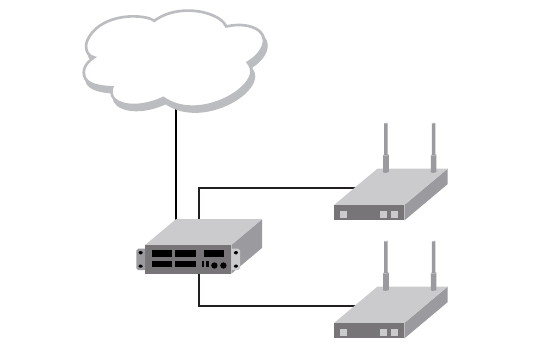
898 Brocade Mobility RFS4000, RFS6000, and RFS7000 CLI Reference Guide
53-1002619-01
A
FIGURE 1 Network Design
This is a simple deployment scenario, with the access points connected directly to the wireless
controller. One wireless controller port is connected to an external network.
On the Brocade Mobility RFS4000 wireless controller, the GE1 interface is connected to an external
network. Interfaces GE3 and GE4 are used by the access points.
On the external network, the controller is assigned an IP address of 192.168.10.188. The wireless
controller acts as a DHCP server for the wireless clients connecting to it, and assigns IP addresses
in the range of 172.16.11.11 to 172.16.11.200. The rest of IPs in the range are reserved for
devices requiring static IP addresses.
Using the Command Line Interface to Configure the WLAN
Creating a First Controller Managed WLAN
These instructions are for configuring your first WLAN using the controller CLI.
Use a serial console cable when connecting to the wireless controller for the first time. Set the
following configuration when using the serial connection:
•Bits per second: 19200
•Data Bit: 8
•Parity: None
•Stop Bit: 1
•Flow Control: None
The steps involved in creating a WLAN on a wireless controller are:
Logging Into the Controller for the First Time
Creating a RF Domain
Creating a Wireless Controller Profile
Creating an AP Profile
Creating a DHCP Server Policy
RFS4000
(DHCP Server)
172.16.11.x
AP650
(DHCP Client)
AP7131
(DHCP Client)
External Network
Brocade Mobility RFS4000, RFS6000, and RFS7000 CLI Reference Guide 899
53-1002619-01
A
Logging Into the Controller for the First Time
Using the Command Line Interface to Configure the WLAN
When powering on the wireless controller for the first time, you are prompted to replace the existing
administrative password. The credentials for logging into the wireless controller for the first time
are:
•User Name: admin
•Password: admin123
Ensure the new password created is strong enough to provide adequate security for the controller
managed network.
Creating a RF Domain
Using the Command Line Interface to Configure the WLAN
A RF Domain is a collection of configuration settings specific to devices located at the same
physical deployment, such as a building or a floor. Create a RF Domain and assign the country code
where the devices are deployed. This is a mandatory step, and the devices will not function as
intended if this step is omitted.
The instructions in this section must be performed from the Global Configuration mode of the
wireless controller. To navigate to this mode:
Brocade Mobility RFS4000>enable
Brocade Mobility RFS4000#
Brocade Mobility RFS4000#configure terminal
Enter configuration commands, one per line. End with CNTL/Z.
Brocade Mobility RFS4000(config)#
Create the RF Domain using the following commands:
Brocade Mobility RFS4000(config)#rf-domain RFDOMAIN_UseCase1
Brocade Mobility RFS4000(config-rf-domain-RFDOMAIN_UseCase1)#
This command creates a profile with the name RFDOMAIN_UseCase1.
Set the country code for the RF Domain.
Brocade Mobility RFS4000(config-rf-domain-RFDOMAIN_UseCase1)#country-code us
This sets the country code for this RF Domain. Save this change and exit the RF Domain profile
context.
Brocade Mobility RFS4000(config-rf-domain-RFDOMAIN_UseCase1)#commit write
Brocade Mobility RFS4000(config-rf-domain-RFDOMAIN_UseCase1)#exit
Brocade Mobility RFS4000(config)#
To define the wireless controller’s physical location, use the same RF Domain configuration.
Brocade Mobility RFS4000(config)#self
Brocade Mobility RFS4000(config-device-03-14-28-57-14-28)#
Brocade Mobility RFS4000(config-device-03-14-28-57-14-28)#use rf-domain
RFDOMAIN_UseCase1
Commit the changes and write to the running configuration. Exit this context.
Brocade Mobility RFS4000(config-device-03-14-28-57-14-28)#commit write
Brocade Mobility RFS4000(config-device-03-14-28-57-14-28)#exit
Brocade Mobility RFS4000(config)#
900 Brocade Mobility RFS4000, RFS6000, and RFS7000 CLI Reference Guide
53-1002619-01
A
Creating a Wireless Controller Profile
Using the Command Line Interface to Configure the WLAN
The first step in creating a WLAN is to configure a profile defining the parameters applied to a
wireless controller.
To create a profile:
Brocade Mobility RFS4000(config)#profile rfs4000 RFS4000_UseCase1
Brocade Mobility RFS4000(config-profile-RFS4000_UseCase1)#
This creates a profile with the name Brocade Mobility RFS4000_UseCase1 and moves the cursor
into its context. Any configuration made under this profile is available when it’s applied to a device.
Configure a VLAN
Create the VLAN to use with the WLAN configuration. This can be done using the following
commands:
Brocade Mobility RFS4000(config-profile-Brocade Mobility
RFS4000_UseCase1)#interface vlan 2
Brocade Mobility RFS4000(config-profile-Brocade Mobility
RFS4000_UseCase1-if-vlan2)#ip address 172.16.11.1/24
The above command assigns the IP address 172.16.11.1 with the mask of 255.255.255.0 to
VLAN2. Exit the VLAN2 context.
Brocade Mobility RFS4000(config-profile-Brocade Mobility
RFS4000_UseCase1-if-vlan2)#exit
Brocade Mobility RFS4000(config-profile-Brocade Mobility RFS4000_UseCase1)#
The next step is to assign this newly created VLAN to a physical interface. In this case, VLAN 2 is
mapped to GE3 and GE4 to support two access points, an Brocade Mobility 650 Access Point and
an Brocade Mobility 71XX Access Point. The Brocade Mobility 650 Access Point is connected to the
gigabit interface GE3 and the Brocade Mobility 71XX Access Point to the GE4 interface.
Brocade Mobility RFS4000(config-profile-Brocade Mobility
RFS4000_UseCase1)#interface ge 3
Brocade Mobility RFS4000(config-profile-Brocade Mobility
RFS4000_UseCase1-if-ge3)#
Map VLAN 1 to this interface. This assigns the IP address to the selected physical interface.
Brocade Mobility RFS4000(config-profile-Brocade Mobility
RFS4000_UseCase1-if-ge3)#switchport access vlan 2
Brocade Mobility RFS4000(config-profile-Brocade Mobility
RFS4000_UseCase1-if-ge3)#exit
Brocade Mobility RFS4000(config-profile-Brocade Mobility RFS4000_UseCase1)#
Similarly, map the defined VLAN 1 to the GE4 interface.
Brocade Mobility RFS4000(config-profile-Brocade Mobility
RFS4000_UseCase1)#interface ge 4
Brocade Mobility RFS4000(config-profile-Brocade Mobility
RFS4000_UseCase1-if-ge4)#switchport access vlan 2
Brocade Mobility RFS4000(config-profile-Brocade Mobility
RFS4000_UseCase1-if-ge4)#exit
Brocade Mobility RFS4000(config-profile-Brocade Mobility RFS4000_UseCase1)#
Exit the profile and save it.
Brocade Mobility RFS4000(config-profile-Brocade Mobility
RFS4000_UseCase1)#exit
Brocade Mobility RFS4000, RFS6000, and RFS7000 CLI Reference Guide 901
53-1002619-01
A
Brocade Mobility RFS4000(config)#commit write
Configure the Wireless Controller to use the Profile
Before the wireless controller can be further configured, the profile must be applied to the wireless
controller.
Brocade Mobility RFS4000(config)#self
Brocade Mobility RFS4000(config-device-03-14-28-57-14-28)#
Brocade Mobility RFS4000(config-device-03-14-28-57-14-28)#use profile Brocade
Mobility RFS4000_UseCase1
Brocade Mobility RFS4000(config-device-03-14-28-57-14-28)#exit
Brocade Mobility RFS4000(config)#commit write
Create a WLAN
Use the following commands to create a WLAN:
Brocade Mobility RFS4000(config)#wlan 1
Brocade Mobility RFS4000(config-wlan-1)#
Configure the SSID for the WLAN. This is the value that identifies and helps differentiate this WLAN.
Brocade Mobility RFS4000(config-wlan-1)#ssid WLAN_USECASE_01
Enable the SSID to be broadcast so wireless clients can find it and associate.
Brocade Mobility RFS4000(config-wlan-1)#broadcast-ssid
Associate the VLAN to the WLAN and exit.
Brocade Mobility RFS4000(config-wlan-1)#vlan 2
Brocade Mobility RFS4000(config-wlan-1)#exit
Commit the Changes
Once these changes have been made, they have to be committed before proceeding.
Brocade Mobility RFS4000(config)#commit write
Creating an AP Profile
Using the Command Line Interface to Configure the WLAN
An AP profile provides a method of applying common settings to access points of the same model.
The profile significantly reduces the time required to configure access points within a large
deployment. For more information, see:
•Creating a Brocade Mobility 650 Access Point Profile
•Creating a Brocade Mobility 71XX Access Point Profile
Creating a Brocade Mobility 650 Access Point Profile
Creating an AP Profile
A Brocade Mobility 650 Access Point’s firmware is updated directly by its associated wireless
controller. The process is automatic, and no intervention is required. To create a profile for use with
an Brocade Mobility 650 Access Point:
Brocade Mobility RFS4000(config)#profile br650 br650_UseCase1
Brocade Mobility RFS4000(config-profile-br650_UseCase1)#
902 Brocade Mobility RFS4000, RFS6000, and RFS7000 CLI Reference Guide
53-1002619-01
A
Assign the access point to be a member of the same VLAN defined in Creating an AP Profile on
page A-901. In this section, the VLAN was defined as VLAN 2. Configure the access point to be a
member of VLAN 2.
Brocade Mobility RFS4000(config-profile-Brocade Mobility 650 Access
Point_UseCase1)#interface vlan 2
Brocade Mobility RFS4000(config-profile-Brocade Mobility 650 Access
Point_UseCase1-if-vlan2)#
Configure this VLAN to use DHCP, so any device that is associated using this access point is
automatically assigned a unique IP address. Once completed, exit this context.
Brocade Mobility RFS4000(config-profile-Brocade Mobility 650 Access
Point_UseCase1-if-vlan2)#ip address dhcp
Brocade Mobility RFS4000(config-profile-Brocade Mobility 650 Access
Point_UseCase1-if-vlan2)#exit
The VLAN has to be mapped to a physical interface on the access point. Since the only available
physical interface on the Brocade Mobility 650 Access Point is GE1, this VLAN is mapped to it.
Brocade Mobility RFS4000(config-profile-Brocade Mobility 650 Access
Point_UseCase1)#interface ge 1
Brocade Mobility RFS4000(config-profile-Brocade Mobility 650 Access
Point_UseCase1-if-ge1)#switchport access vlan 2
Brocade Mobility RFS4000(config-profile-Brocade Mobility 650 Access
Point_UseCase1-if-ge1)#exit
Before a WLAN can be implemented, it has to be mapped to a radio on the access point. A Brocade
Mobility 650 Access Point has 2 radios, in this scenario, both radios are utilized.
Brocade Mobility RFS4000(config-profile-Brocade Mobility 650 Access
Point_UseCase1)#interface radio 1
Brocade Mobility RFS4000(config-profile-Brocade Mobility 650 Access
Point_UseCase1-if-radio1)#wlan 1
Brocade Mobility RFS4000(config-profile-Brocade Mobility 650 Access
Point_UseCase1-if-radio1)#exit
Brocade Mobility RFS4000(config-profile-Brocade Mobility 650 Access
Point_UseCase1)#interface radio 2
Brocade Mobility RFS4000(config-profile-Brocade Mobility 650 Access
Point_UseCase1-if-radio2)#wlan 1
Brocade Mobility RFS4000(config-profile-Brocade Mobility 650 Access
Point_UseCase1-if-radio2)#exit
Brocade Mobility RFS4000(config-profile-Brocade Mobility 650 Access
Point_UseCase1)#
Commit the changes made to this profile and exit.
Brocade Mobility RFS4000(config-profile-Brocade Mobility 650 Access
Point_UseCase1)#commit write
Brocade Mobility RFS4000(config-profile-Brocade Mobility 650 Access
Point_UseCase1)#exit
Brocade Mobility RFS4000(config)#
Apply this Profile to the Discovered Brocade Mobility 650 Access Point
Access the discovered access point using the following command. The discovered device’s MAC
address is used to access its context.
Brocade Mobility RFS4000(config)#br650 00-A0-F8-00-00-01
Brocade Mobility RFS4000(config-device-00-A0-F8-00-00-01)#
Assign the AP profile to this br650 access point.
Brocade Mobility RFS4000, RFS6000, and RFS7000 CLI Reference Guide 903
53-1002619-01
A
Brocade Mobility RFS4000(config-device-00-A0-F8-00-00-01)#use profile Brocade
Mobility 650 Access Point_UseCase1
Brocade Mobility RFS4000(config-device-00-A0-F8-00-00-01)#commit write
Apply the RF Domain profile to the AP
Apply the previously created RF Domain to enable a country code to be assigned to the discovered
access point. A discovered access point only works properly if its country code is the country code
of its associated wireless controller.
Brocade Mobility RFS4000(config-device-00-A0-F8-00-00-01)#use rf-domain
RFDOMAIN_UseCase1
Brocade Mobility RFS4000(config-device-00-A0-F8-00-00-01)#commit write
Brocade Mobility RFS4000(config-device-00-A0-F8-00-00-01)#exit
Brocade Mobility RFS4000(config)#
Creating a Brocade Mobility 71XX Access Point Profile
Creating an AP Profile
To create a profile for use with an Brocade Mobility 71XX Access Point:
Brocade Mobility RFS4000(config)#profile br7131 AP7131_UseCase1
Brocade Mobility RFS4000(config-profile-Brocade Mobility 71XX Access
Point_UseCase1)#
Set the access point to be a member of the same VLAN defined in Creating an AP Profile on page
A-901. In this section, the VLAN was defined as VLAN 2. Configure the access point to be a member
of the VLAN 2.
Brocade Mobility RFS4000(config-profile-Brocade Mobility 71XX Access
Point_UseCase1)#interface vlan 2
Brocade Mobility RFS4000(config-profile-Brocade Mobility 71XX Access
Point_UseCase1-if-vlan2)#
Configure this VLAN to use DHCP, so any device associated using this access point is automatically
assigned a unique IP address. Once completed, exit this context.
Brocade Mobility RFS4000(config-profile-Brocade Mobility 71XX Access
Point_UseCase1-if-vlan2)#ip address dhcp
Brocade Mobility RFS4000(config-profile-Brocade Mobility 71XX Access
Point_UseCase1-if-vlan2)#exit
The configured VLAN has to be mapped to a physical interface on the access point. Map VLAN1 to
the GE1 and GE2 interfaces on the Brocade Mobility 71XX Access Point. To configure the GE1
interface:
Brocade Mobility RFS4000(config-profile-Brocade Mobility 71XX Access
Point_UseCase1)#interface ge 1
Brocade Mobility RFS4000(config-profile-Brocade Mobility 71XX Access
Point_UseCase1-if-ge1)#switchport access vlan 2
Brocade Mobility RFS4000(config-profile-Brocade Mobility 71XX Access
Point_UseCase1-if-ge1)#exit
Similarly configure the GE2 interface.
Brocade Mobility RFS4000(config-profile-Brocade Mobility 71XX Access
Point_UseCase1)#interface ge 2
Brocade Mobility RFS4000(config-profile-Brocade Mobility 71XX Access
Point_UseCase1-if-ge2)#switchport access vlan 2
Brocade Mobility RFS4000(config-profile-Brocade Mobility 71XX Access
Point_UseCase1-if-ge2)#exit
904 Brocade Mobility RFS4000, RFS6000, and RFS7000 CLI Reference Guide
53-1002619-01
A
Before the WLAN can be implemented, it has to be mapped to the physical radio on the access
point. A Brocade Mobility 71XX Access Point has 3 radios (on certain models), two of which can be
configured for WLAN support. In this scenario, two radios are used.
Brocade Mobility RFS4000(config-profile-Brocade Mobility 71XX Access
Point_UseCase1)#interface radio 1
Brocade Mobility RFS4000(config-profile-Brocade Mobility 71XX Access
Point_UseCase1-if-radio1)#wlan 1
Brocade Mobility RFS4000(config-profile-Brocade Mobility 71XX Access
Point_UseCase1-if-radio1)#exit
Brocade Mobility RFS4000(config-profile-Brocade Mobility 71XX Access
Point_UseCase1)#interface radio 2
Brocade Mobility RFS4000(config-profile-Brocade Mobility 71XX Access
Point_UseCase1-if-radio2)#wlan 1
Brocade Mobility RFS4000(config-profile-Brocade Mobility 71XX Access
Point_UseCase1-if-radio2)#exit
Brocade Mobility RFS4000(config-profile-Brocade Mobility 71XX Access
Point_UseCase1)#
Commit the changes made to the profile and exit this context.
Brocade Mobility RFS4000(config-profile-Brocade Mobility 71XX Access
Point_UseCase1)#commit write
Brocade Mobility RFS4000(config-profile-Brocade Mobility 71XX Access
Point_UseCase1)#exit
Brocade Mobility RFS4000(config)#
Apply this Profile to the Discovered Brocade Mobility 71XX Access Point
Access the discovered access point using the following command. The discovered device’s MAC
address is used to access its context.
Brocade Mobility RFS4000(config)#br7131 00-23-68-16-C6-C4
Brocade Mobility RFS4000(config-device-00-23-68-16-C6-C4)#
Assign the AP profile to this access point.
Brocade Mobility RFS4000(config-device-00-23-68-16-C6-C4)#use profile Brocade
Mobility 71XX Access Point_UseCase1
Brocade Mobility RFS4000(config-device-00-23-68-16-C6-C4)#commit write
Apply the RF Domain profile to the AP
Apply the previously created RF Domain to enable a country code to be assigned to the discovered
access point. A discovered access point only works properly if its country code is the same as its
associated wireless controller.
Brocade Mobility RFS4000(config-device-00-23-68-16-C6-C4)#use rf-domain
RFDOMAIN_UseCase1
Brocade Mobility RFS4000(config-device-00-23-68-16-C6-C4)#commit write
Brocade Mobility RFS4000(config-device-00-23-68-16-C6-C4)#Exit
Brocade Mobility RFS4000(config)#
Creating a DHCP Server Policy
Using the Command Line Interface to Configure the WLAN
The DHCP server policy defines the parameters required to run a DHCP server on the wireless
controller and assign IP addresses automatically to devices that associate. Configuring DHCP
enables the reuse of a limited set of IP addresses.

Brocade Mobility RFS4000, RFS6000, and RFS7000 CLI Reference Guide 905
53-1002619-01
A
To create a DHCP server policy:
Brocade Mobility RFS4000(config)#dhcp-server-policy DHCP_POLICY_UseCase1
Brocade Mobility RFS4000-37FABE(config-dhcp-policy-DHCP_POLICY_UseCase1)#
Table 2 displays how IP addresses are used.
In the table, the IP address range of 172.16.11.11 to 172.16.11.200 is available using the DHCP
server. To configure the DHCP server:
Brocade Mobility
RFS4000-37FABE(config-dhcp-policy-DHCP_POLICY_UseCase1)#dhcp-pool
DHCP_POOL_USECASE1_01
Brocade Mobility
RFS4000-37FABE(config-dhcp-policy-DHCP_POLICY_UseCase1-pool-DHCP_POOL_USECASE
1_01)#
Configure the address range as follows:
Brocade Mobility
RFS4000-37FABE(config-dhcp-policy-DHCP_POLICY_UseCase1-pool-DHCP_POOL_USECASE
1_01)#address range 172.16.11.11 172.16.11.200
Brocade Mobility
RFS4000-37FABE(config-dhcp-policy-DHCP_POLICY_UseCase1-pool-DHCP_POOL_USECASE
1_01)#
Configure the IP pool used with a network segment. This starts the DHCP server on the specified
interface.
Brocade Mobility
RFS4000-37FABE(config-dhcp-policy-DHCP_POLICY_UseCase1-pool-DHCP_POOL_USECASE
1_01)#network 172.16.11.0/24
Brocade Mobility
RFS4000-37FABE(config-dhcp-policy-DHCP_POLICY_UseCase1-pool-DHCP_POOL_USECASE
1_01)#exit
Brocade Mobility RFS4000-37FABE(config-dhcp-policy-DHCP_POLICY_UseCase1)#exit
Brocade Mobility RFS4000-37FABE(config)#commit write
Configure the Brocade Mobility RFS4000 to use the DHCP Policy
For the DHCP to work properly, the new DHCP Server Policy must be applied to the wireless
controller. To apply the DHCP Server Policy to the wireless controller:
Brocade Mobility RFS4000-37FABE(config)#self
Brocade Mobility RFS4000-37FABE(config-device-03-14-28-57-14-28)#use
dhcp-server-policy DHCP_POLICY_UseCase1
Brocade Mobility RFS4000-37FABE(config-device-03-14-28-57-14-28)#commit write
Brocade Mobility RFS4000-37FABE(config-device-03-14-28-57-14-28)#exit
Brocade Mobility RFS4000-37FABE(config)#
Completing and Testing the Configuration
Using the Command Line Interface to Configure the WLAN
TABLE 2 IP Address Usage
IP Range Usage
172.16.11.1 till 172.16.11.10 Reserved for devices that require a static IP address
172.16.11.11 till 172.16.11.200 Range of IP addresses that can be assigned using the DHCP server.
172.16.11.201 till 172.16.11.254 Reserved for devices that require a static IP address
906 Brocade Mobility RFS4000, RFS6000, and RFS7000 CLI Reference Guide
53-1002619-01
A
A wireless client must be configured to associate with the controller managed WLAN. The following
information must be defined:
•SSID: WLAN_USECASE_01
•Country: Same as the country configured in Creating a RF Domain on page A-899. In this
scenario, the country code is set to US.
•Mode: Infrastructure
With the WLAN set to beacon, use the wireless client’s discovery client to discover the configured
WLAN and associate.
