Ruijiahua Technology NIAHB6 Wireless Headphones User Manual

Shenzhen Ruijiahua Technology CO.,LTD Wireless Headphones

User Manual

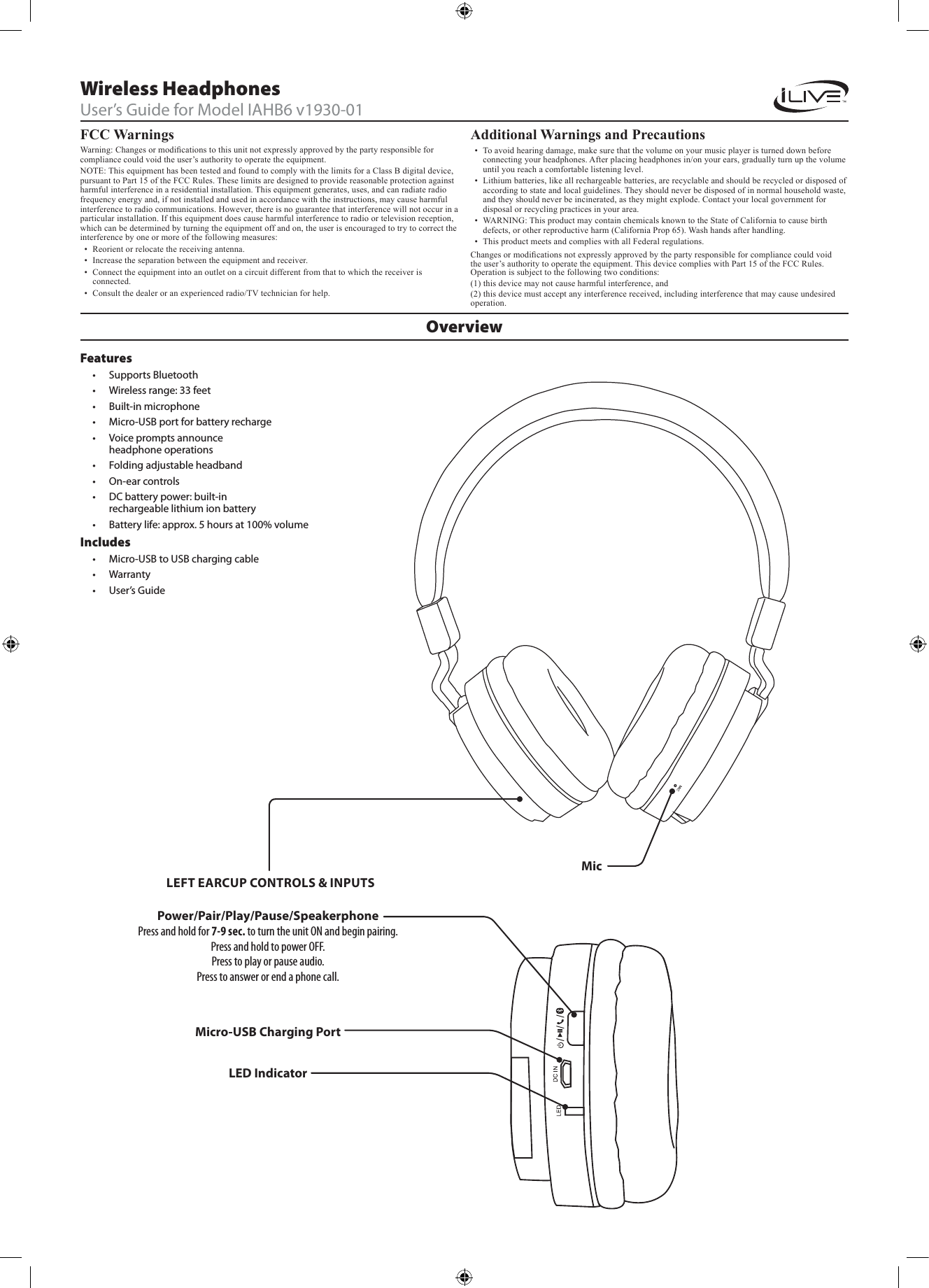
FCC Warnings Warning: Changes or modications to this unit not expressly approved by the party responsible for compliance could void the user’s authority to operate the equipment.NOTE: This equipment has been tested and found to comply with the limits for a Class B digital device, pursuant to Part 15 of the FCC Rules. These limits are designed to provide reasonable protection against harmful interference in a residential installation. This equipment generates, uses, and can radiate radio frequency energy and, if not installed and used in accordance with the instructions, may cause harmful interference to radio communications. However, there is no guarantee that interference will not occur in a particular installation. If this equipment does cause harmful interference to radio or television reception, which can be determined by turning the equipment off and on, the user is encouraged to try to correct the interference by one or more of the following measures:•  Reorient or relocate the receiving antenna.•  Increase the separation between the equipment and receiver.•  Connect the equipment into an outlet on a circuit different from that to which the receiver is connected.•  Consult the dealer or an experienced radio/TV technician for help.Additional Warnings and Precautions •  To avoid hearing damage, make sure that the volume on your music player is turned down before connecting your headphones. After placing headphones in/on your ears, gradually turn up the volume until you reach a comfortable listening level.•  Lithium batteries, like all rechargeable batteries, are recyclable and should be recycled or disposed of according to state and local guidelines. They should never be disposed of in normal household waste, and they should never be incinerated, as they might explode. Contact your local government for disposal or recycling practices in your area.•  WARNING: This product may contain chemicals known to the State of California to cause birth defects, or other reproductive harm (California Prop 65). Wash hands after handling.•  This product meets and complies with all Federal regulations.OverviewWireless HeadphonesUser’s Guide for Model IAHB6 v1930-01Features• Supports Bluetooth• Wireless range: 33 feet• Built-in microphone• Micro-USB port for battery recharge• Voice prompts announce headphone operations• Folding adjustable headband• On-ear controls• DC battery power: built-in rechargeable lithium ion battery• Battery life: approx. 5 hours at 100% volume Includes• Micro-USB to USB charging cable• Warranty• User’s GuidePower/Pair/Play/Pause/SpeakerphonePress and hold for 7-9 sec. to turn the unit ON and begin pairing.Press and hold to power OFF.Press to play or pause audio.Press to answer or end a phone call.LED IndicatorMicMicro-USB Charging PortLEFT EARCUP CONTROLS & INPUTSChanges or modications not expressly approved by the party responsible for compliance could void the user’s authority to operate the equipment. This device complies with Part 15 of the FCC Rules. Operation is subject to the following two conditions:(1) this device may not cause harmful interference, and(2) this device must accept any interference received, including interference that may cause undesired     operation.
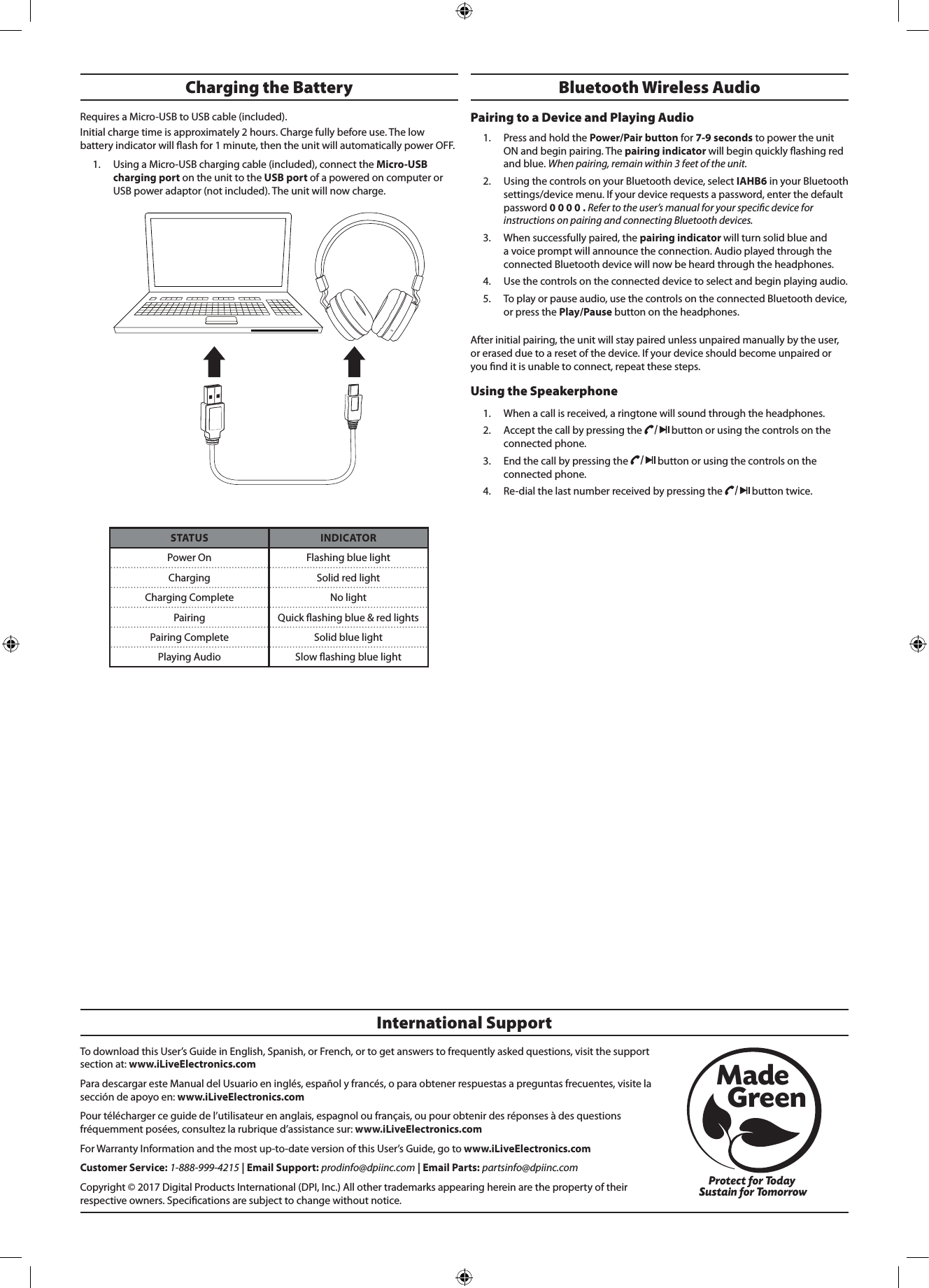
To download this User’s Guide in English, Spanish, or French, or to get answers to frequently asked questions, visit the support section at: www.iLiveElectronics.comPara descargar este Manual del Usuario en inglés, español y francés, o para obtener respuestas a preguntas frecuentes, visite la sección de apoyo en: www.iLiveElectronics.comPour télécharger ce guide de l’utilisateur en anglais, espagnol ou français, ou pour obtenir des réponses à des questions fréquemment posées, consultez la rubrique d’assistance sur: www.iLiveElectronics.comFor Warranty Information and the most up-to-date version of this User’s Guide, go to www.iLiveElectronics.comCustomer Service: 1-888-999-4215 | Email Support: prodinfo@dpiinc.com | Email Parts: partsinfo@dpiinc.comCopyright © 2017 Digital Products International (DPI, Inc.) All other trademarks appearing herein are the property of their respective owners. Specications are subject to change without notice.International SupportProtect for Today Sustain for TomorrowMade   GreenBluetooth Wireless Audio Pairing to a Device and Playing Audio1.  Press and hold the Power/Pair button for 7-9 seconds to power the unit ON and begin pairing. The pairing indicator will begin quickly ashing red and blue. When pairing, remain within 3 feet of the unit.2.  Using the controls on your Bluetooth device, select IAHB6 in your Bluetooth settings/device menu. If your device requests a password, enter the default password 0 0 0 0 . Refer to the user’s manual for your specic device for instructions on pairing and connecting Bluetooth devices.3.  When successfully paired, the pairing indicator will turn solid blue and a voice prompt will announce the connection. Audio played through the connected Bluetooth device will now be heard through the headphones. 4.  Use the controls on the connected device to select and begin playing audio. 5.  To play or pause audio, use the controls on the connected Bluetooth device, or press the Play/Pause button on the headphones.After initial pairing, the unit will stay paired unless unpaired manually by the user, or erased due to a reset of the device. If your device should become unpaired or you nd it is unable to connect, repeat these steps.Using the Speakerphone 1.  When a call is received, a ringtone will sound through the headphones.2.  Accept the call by pressing the   button or using the controls on the connected phone. 3.  End the call by pressing the   button or using the controls on the connected phone.4.  Re-dial the last number received by pressing the   button twice.STATUS INDICATORPower On Flashing blue lightCharging Solid red lightCharging Complete No lightPairing Quick ashing blue & red lightsPairing Complete Solid blue lightPlaying Audio Slow ashing blue lightCharging the Battery Requires a Micro-USB to USB cable (included). Initial charge time is approximately 2 hours. Charge fully before use. The low battery indicator will ash for 1 minute, then the unit will automatically power OFF. 1.  Using a Micro-USB charging cable (included), connect the Micro-USB charging port on the unit to the USB port of a powered on computer or USB power adaptor (not included). The unit will now charge.

Navigation menu