Users Manual
User manual
Bluetooth Earphone
Model: BTA
PRODUCT OVERVIEW
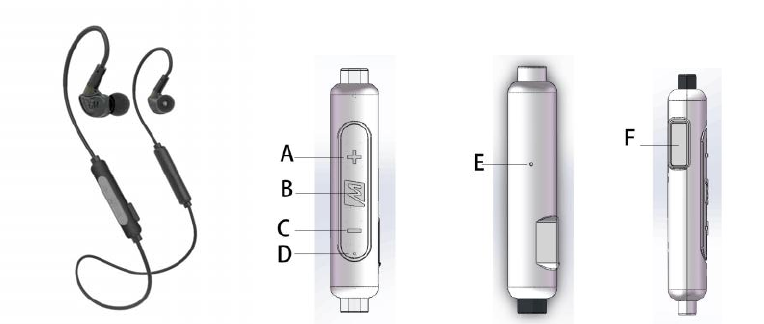
A: Volumn Up/Next track button
B: Multifunction button
C: Volumn down/Previous track button
D: LED indicator light
E: Microphone
F: Micro-USB charging port
USEINSTRUCTION
1. CHARGETHE“MEEaudioBTA”
A) Plug the earphone charging cable into a powered USB port and the Micro-USB port of the Earphone.
The red light will stay lit while charging and turn blue when fully charged.
2. PAIRWITHYOURDEVICE
A) When the earphone is off, press and hold the multifunction button for 5 seconds until you see the
red and blue lights flashing in an alternating manner. The earphone will say “Pairing.” Pairing
mode will remain active for 5 minutes or until paired.
B) Open the Bluetooth menu on the device you wish to pair. Some devices require you to select
“search for devices” or “add new device” in order to create a Bluetooth pairing.
C) Wait until you see “MEE audio BTA” on your device screen.
D) Select “MEE audio BTA” on your device and follow any further prompts to pair. Use 0000 if a pin
is required. Once pairing is complete and a connection is established, the earphone will say
“Pairing Complete.”
3. CONFIGUREFORYOUREARS
A) Ear Tips: Select Correct Size
If your music sounds tinny or lacks bass, try different ear tips.
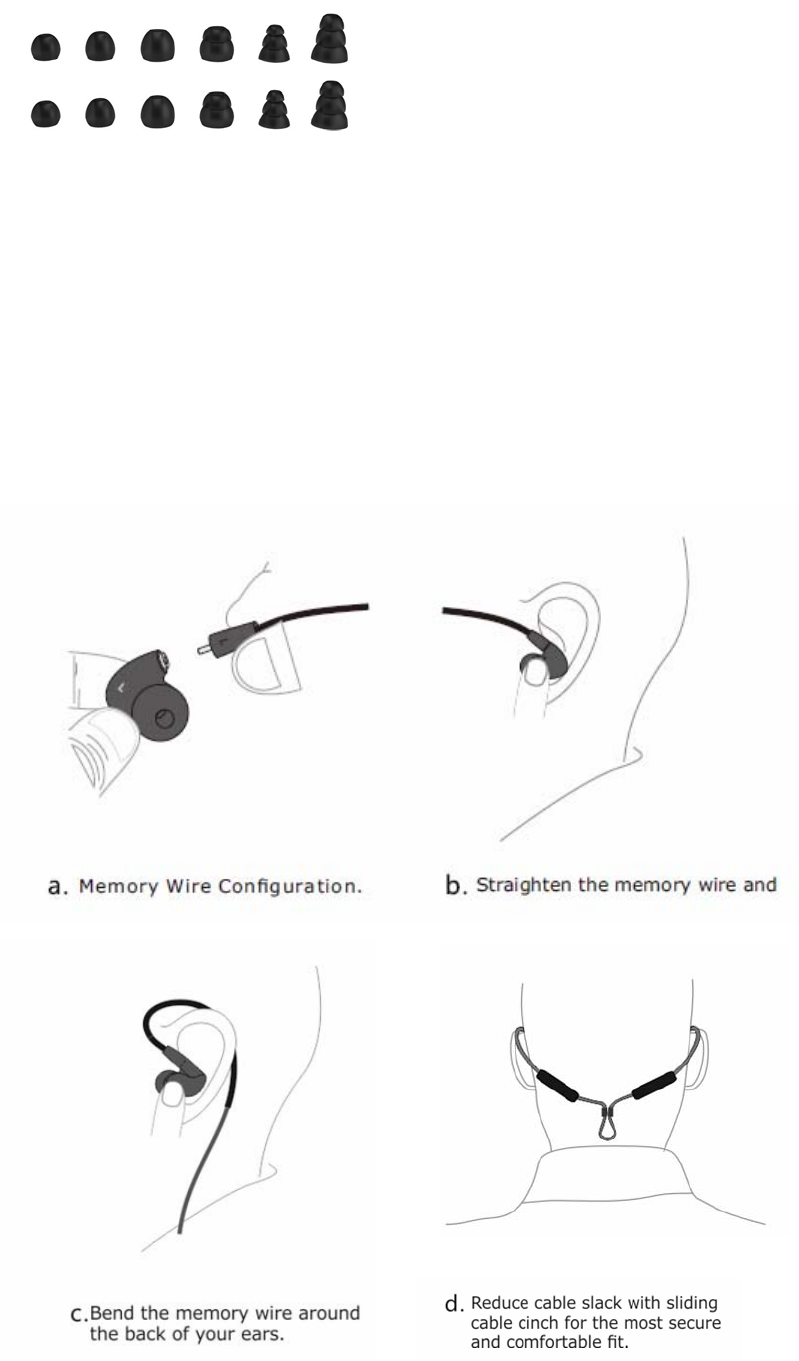
Earphone includes 6 sets of ear tips to ensure you get the best fit, comfort, and sound.
B) Identify the Right and Left Channel
They are not interchangeable, and the cable must be worn over-the-ear.
C) Configuring the Memory Wire
i Straighten the memory wire.
ii Put the earphones in your ears.
iii Ensure the ear tips seal with your ear canals and the earphone is flush in the ear.
iv Bend the memory wire tightly around the back of your ears to achieve a conforming a fit.
v (optional): For a more secure fit, remove the earphones and continue to bend the memory wire in the
same direction to make it more secure around the top of the ear when worn.
D) Use the sliding cable cinch to reduce cable slack for the most secure and comfortable fit.
BLUETOOTHFUNCTIONALITY
1. TURNINGONANDOFF
A) To turn on, press and hold the multifunction button for approximately 5 seconds. The earphone will
say “power on” and blue indicator light keeps light, then blinks 1 time every second (connected
automatically). If not connected with a device, auto shutoff occurs after 5 minutes.
B) To turn off, press and hold the multifunction button for approximately 5 seconds. Keep holding the
button until you hear “power off.”
2. PAIRING
It is only necessary to pair your earphone once with each device.
3. CONNECTED
Once the earphone is turned on, it will automatically connect with the last paired Bluetooth device
that is on and within range. If the earphone is not connected automatically, go to the Bluetooth
menu on your device and select “MEE audio BTA” from the Bluetooth device list to connect.
4. CONTROL
The earphone can control media and phone calls from a smartphone or tablet.
Note: A short-press of a button takes less than 1 second and a long-press takes approximately 2
seconds. A double-press is two short-presses.
A) Controlling Media and Volume
(Note: volume adjustments are only possible during a call or when media is playing):
i Increase volume: short-press the (+) button.
ii When maximum volume is reached, the earphone will beep.
iii Decrease volume: short-press the (-) button.
iv When minimum volume is reached, the earphone will beep.
v Play/Pause: short-press the multifunction button.
vi Skip to the previous track: short-press the (-) button.
vii Skip to the next track: short-press the (+) button.
B) Controlling Phone Calls:
i Answering an incoming call: short-press the multifunction button.
ii Hang-up a call: short-press the multifunction button.
iii Reject a call: double-press the multifunction button.
iv Double press to call the last call.
CHARGING
Plug the charging cable into a powered USB port and the Micro-USB port of the earphone. The red light
will stay lit while charging and turn blue when fully charged.
FCC Statement
Changes or modifications not expressly approved by the party responsible for compliance could void the
user's authority to operate the equipment.
This equipment has been tested and found to comply with the limits for a Class B digital device, pursuant
to Part 15 of the FCC Rules. These limits are designed to provide reasonable protection against harmful
interference in a residential installation. This equipment generates uses and can radiate radio frequency
energy and, if not installed and used in accordance with the
instructions, may cause harmful interference to radio communications. However, there is no guarantee
that interference will not occur in a particular installation. If this equipment does cause harmful
interference to radio or television reception, which can be determined by turning the equipment off and
on, the user is encouraged to try to correct the interference by one or more of the following measures:
-- Reorient or relocate the receiving antenna.
-- Increase the separation between the equipment and receiver.
-- Connect the equipment into an outlet on a circuit different from that to which the receiver is connected.
-- Consult the dealer or an experienced radio/TV technician for help
This device complies with part 15 of the FCC rules. Operation is subject to the following two conditions
(1)this device may not cause harmful interference, and (2) this device must accept any interference
received, including interference that may cause undesired operation.