SECU4 BWD77585211314 Bluetooth Watchdog User Manual Layout indd

SECU4 SA Bluetooth Watchdog Layout indd

manual rev

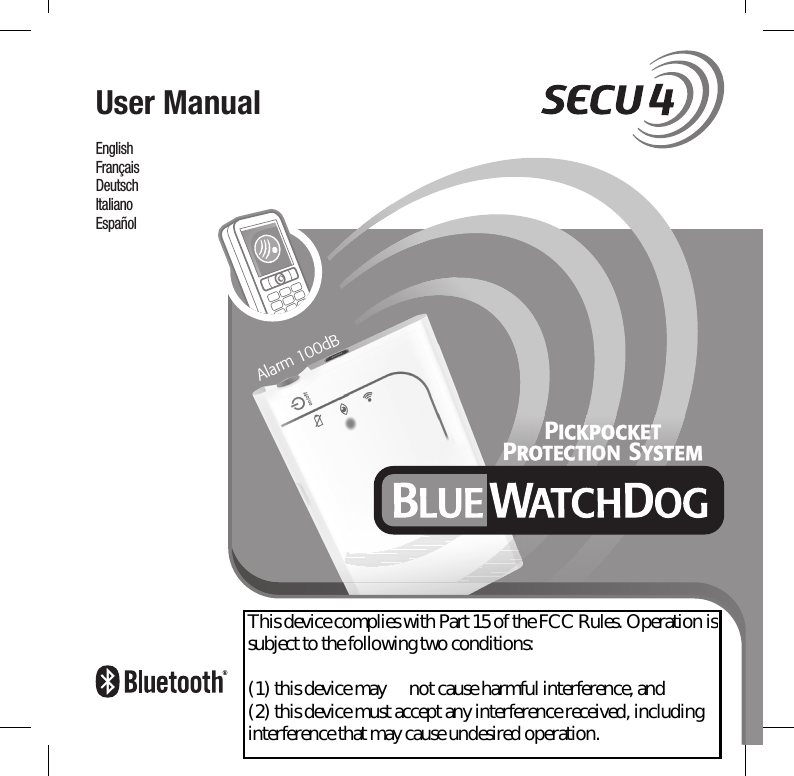
PIICKPOCKETETPROTECTIONON SYSTEMAlarm 100dBEnglishFrançaisDeutsch ItalianoEspañol User ManualLayout.indd   1 26.9.2008   9:23:30This device complies with Part 15 of the FCC Rules. Operation is subject to the following two conditions:               (1) this device may      not cause harmful interference, and  (2) this device must accept any interference received, including interference that may cause undesired operation.
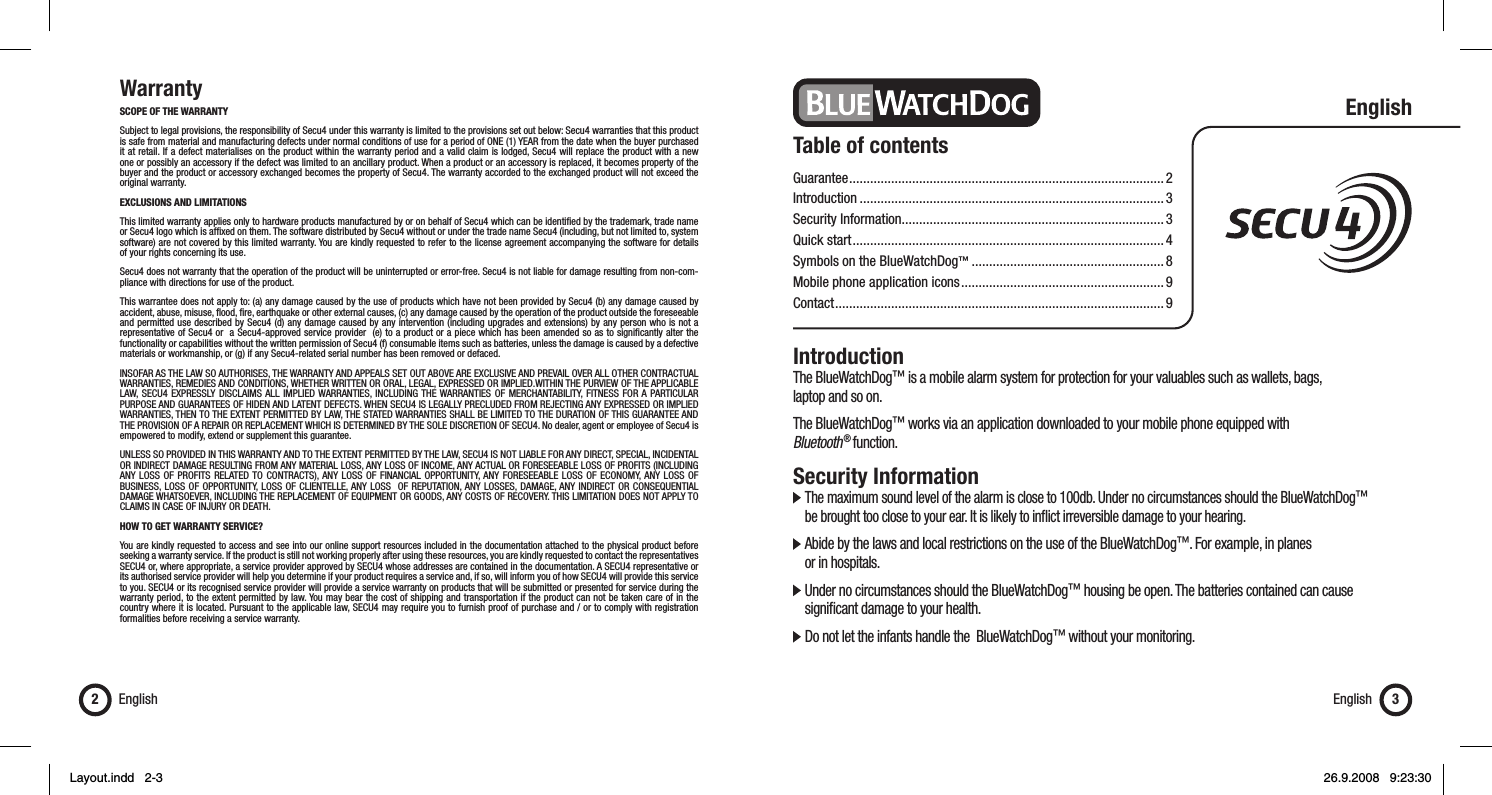
WarrantySCOPE OF THE WARRANTY Subject to legal provisions, the responsibility of Secu4 under this warranty is limited to the provisions set out below: Secu4 warranties that this product is safe from material and manufacturing defects under normal conditions of use for a period of ONE (1) YEAR from the date when the buyer purchased it at retail. If a defect materialises on the product within the warranty period and a valid claim is lodged, Secu4 will replace the product with a new one or possibly an accessory if the defect was limited to an ancillary product. When a product or an accessory is replaced, it becomes property of the buyer and the product or accessory exchanged becomes the property of Secu4. The warranty accorded to the exchanged product will not exceed the original warranty.EXCLUSIONS AND LIMITATIONS This limited warranty applies only to hardware products manufactured by or on behalf of Secu4 which can be identifi ed by the trademark, trade name or Secu4 logo which is affi xed on them. The software distributed by Secu4 without or under the trade name Secu4 (including, but not limited to, system software) are not covered by this limited warranty. You are kindly requested to refer to the license agreement accompanying the software for details of your rights concerning its use.Secu4 does not warranty that the operation of the product will be uninterrupted or error-free. Secu4 is not liable for damage resulting from non-com-pliance with directions for use of the product.This warrantee does not apply to: (a) any damage caused by the use of products which have not been provided by Secu4 (b) any damage caused by accident, abuse, misuse, fl ood, fi re, earthquake or other external causes, (c) any damage caused by the operation of the product outside the foreseeable and permitted use described by Secu4 (d) any damage caused by any intervention (including upgrades and extensions) by any person who is not a representative of Secu4 or  a Secu4-approved service provider  (e) to a product or a piece which has been amended so as to signifi cantly alter the functionality or capabilities without the written permission of Secu4 (f) consumable items such as batteries, unless the damage is caused by a defective materials or workmanship, or (g) if any Secu4-related serial number has been removed or defaced.INSOFAR AS THE LAW SO AUTHORISES, THE WARRANTY AND APPEALS SET OUT ABOVE ARE EXCLUSIVE AND PREVAIL OVER ALL OTHER CONTRACTUAL WARRANTIES, REMEDIES AND CONDITIONS, WHETHER WRITTEN OR ORAL, LEGAL, EXPRESSED OR IMPLIED.WITHIN THE PURVIEW OF THE APPLICABLE LAW, SECU4 EXPRESSLY DISCLAIMS ALL IMPLIED WARRANTIES, INCLUDING THE WARRANTIES OF MERCHANTABILITY, FITNESS FOR A PARTICULAR PURPOSE AND GUARANTEES OF HIDEN AND LATENT DEFECTS. WHEN SECU4 IS LEGALLY PRECLUDED FROM REJECTING ANY EXPRESSED OR IMPLIED WARRANTIES, THEN TO THE EXTENT PERMITTED BY LAW, THE STATED WARRANTIES SHALL BE LIMITED TO THE DURATION OF THIS GUARANTEE AND THE PROVISION OF A REPAIR OR REPLACEMENT WHICH IS DETERMINED BY THE SOLE DISCRETION OF SECU4. No dealer, agent or employee of Secu4 is empowered to modify, extend or supplement this guarantee.UNLESS SO PROVIDED IN THIS WARRANTY AND TO THE EXTENT PERMITTED BY THE LAW, SECU4 IS NOT LIABLE FOR ANY DIRECT, SPECIAL, INCIDENTAL OR INDIRECT DAMAGE RESULTING FROM ANY MATERIAL LOSS, ANY LOSS OF INCOME, ANY ACTUAL OR FORESEEABLE LOSS OF PROFITS (INCLUDING ANY LOSS OF PROFITS RELATED TO CONTRACTS), ANY LOSS OF FINANCIAL OPPORTUNITY, ANY FORESEEABLE LOSS OF ECONOMY, ANY LOSS OF BUSINESS, LOSS OF OPPORTUNITY, LOSS OF CLIENTELLE, ANY LOSS  OF REPUTATION, ANY LOSSES, DAMAGE, ANY INDIRECT OR CONSEQUENTIAL DAMAGE WHATSOEVER, INCLUDING THE REPLACEMENT OF EQUIPMENT OR GOODS, ANY COSTS OF RECOVERY. THIS LIMITATION DOES NOT APPLY TO CLAIMS IN CASE OF INJURY OR DEATH.  HOW TO GET WARRANTY SERVICE? You are kindly requested to access and see into our online support resources included in the documentation attached to the physical product before seeking a warranty service. If the product is still not working properly after using these resources, you are kindly requested to contact the representatives SECU4 or, where appropriate, a service provider approved by SECU4 whose addresses are contained in the documentation. A SECU4 representative or its authorised service provider will help you determine if your product requires a service and, if so, will inform you of how SECU4 will provide this service to you. SECU4 or its recognised service provider will provide a service warranty on products that will be submitted or presented for service during the warranty period, to the extent permitted by law. You may bear the cost of shipping and transportation if the product can not be taken care of in the country where it is located. Pursuant to the applicable law, SECU4 may require you to furnish proof of purchase and / or to comply with registration formalities before receiving a service warranty.English2English 3Table of contentsGuarantee ..........................................................................................2Introduction .......................................................................................3Security Information...........................................................................3Quick start .........................................................................................4Symbols on the BlueWatchDog™ .......................................................8Mobile phone application icons .......................................................... 9Contact ..............................................................................................9EnglishIntroductionThe BlueWatchDog™ is a mobile alarm system for protection for your valuables such as wallets, bags, laptop and so on.The BlueWatchDog™ works via an application downloaded to your mobile phone equipped with Bluetooth ® function.Security Information  The maximum sound level of the alarm is close to 100db. Under no circumstances should the BlueWatchDog™    be brought too close to your ear. It is likely to infl ict irreversible damage to your hearing.  Abide by the laws and local restrictions on the use of the BlueWatchDog™. For example, in planes   or in hospitals.  Under no circumstances should the BlueWatchDog™ housing be open. The batteries contained can cause    signifi cant damage to your health.  Do not let the infants handle the  BlueWatchDog™ without your monitoring.Layout.indd   2-3Layout.indd   2-3 26.9.2008   9:23:3026.9.2008   9:23:30
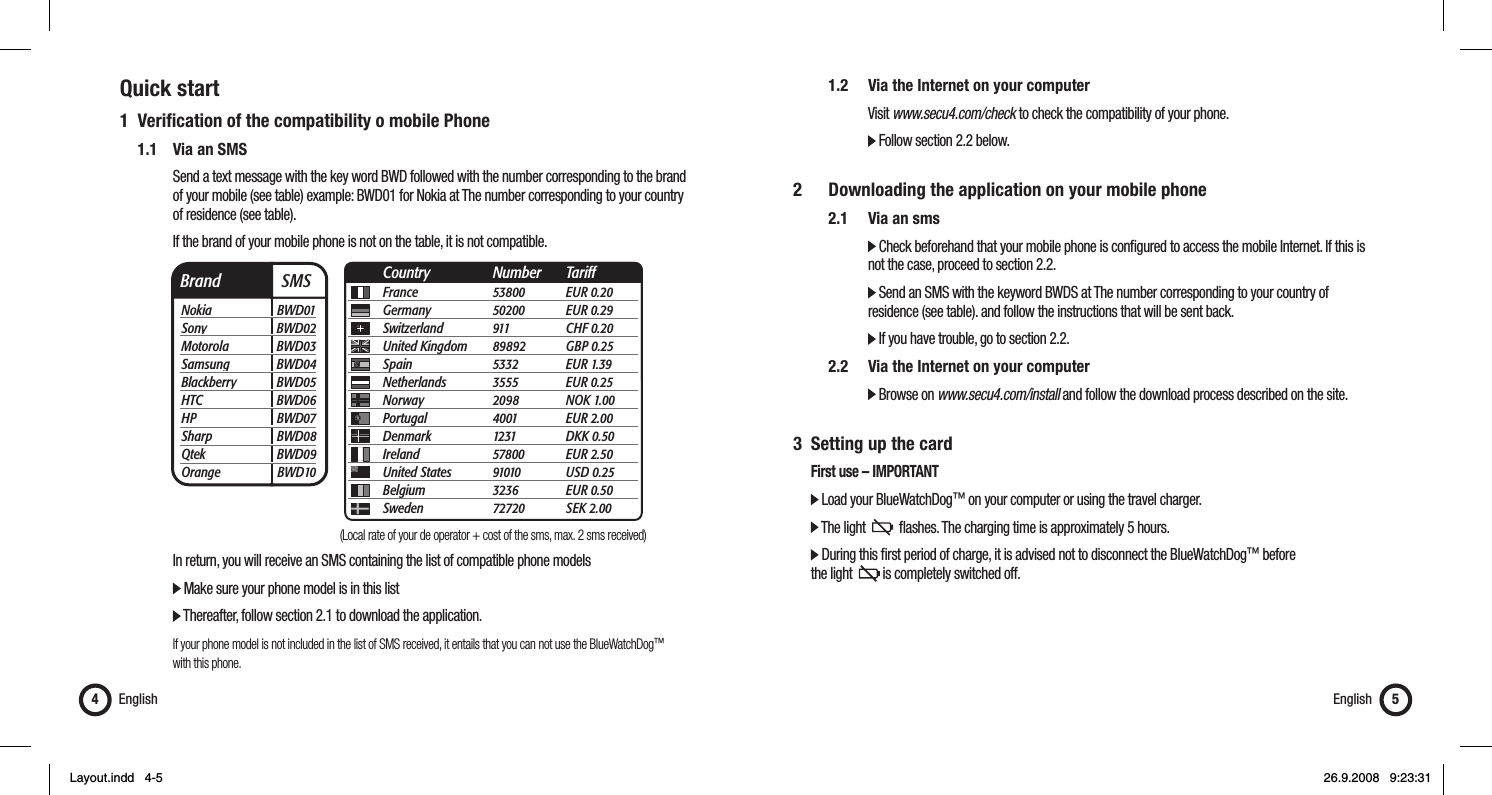
Quick start1 Verifi cation of the compatibility o mobile Phone   1.1  Via an SMS      Send a text message with the key word BWD followed with the number corresponding to the brand        of your mobile (see table) example: BWD01 for Nokia at The number corresponding to your country    of residence (see table).      If the brand of your mobile phone is not on the table, it is not compatible.         In return, you will receive an SMS containing the list of compatible phone models      Make sure your phone model is in this list       Thereafter, follow section 2.1 to download the application.      If your phone model is not included in the list of SMS received, it entails that you can not use the BlueWatchDog™    with this phone.English4    1.2  Via the Internet on your computer     Visit www.secu4.com/check to check the compatibility of your phone.      Follow section 2.2 below.2    Downloading the application on your mobile phone  2.1 Via an sms      Check beforehand that your mobile phone is confi gured to access the mobile Internet. If this is          not the case, proceed to section 2.2.      Send an SMS with the keyword BWDS at The number corresponding to your country of          residence (see table). and follow the instructions that will be sent back.      If you have trouble, go to section 2.2.   2.2   Via the Internet on your computer      Browse on www.secu4.com/install and follow the download process described on the site.3  Setting up the card  First use – IMPORTANT  Load your BlueWatchDog™ on your computer or using the travel charger.  The light     fl ashes. The charging time is approximately 5 hours.  During this fi rst period of charge, it is advised not to disconnect the BlueWatchDog™ before   the light    is completely switched off.English 5Brand  SMSNokia BWD01Sony BWD02Motorola BWD03Samsung BWD04Blackberry BWD05HTC BWD06HP BWD07Sharp BWD08Qtek BWD09Orange BWD10France 53800 EUR 0.20Germany 50200 EUR 0.29Switzerland 911  CHF 0.20United Kingdom  89892 GBP 0.25Spain 5332 EUR 1.39Netherlands 3555 EUR 0.25Norway 2098 NOK 1.00Portugal 4001 EUR 2.00Denmark 1231 DKK 0.50Ireland 57800 EUR 2.50United States  91010 USD 0.25Belgium 3236 EUR 0.50Sweden 72720 SEK 2.00Country Number Tariff(Local rate of your de operator + cost of the sms, max. 2 sms received)Layout.indd   4-5Layout.indd   4-5 26.9.2008   9:23:3126.9.2008   9:23:31
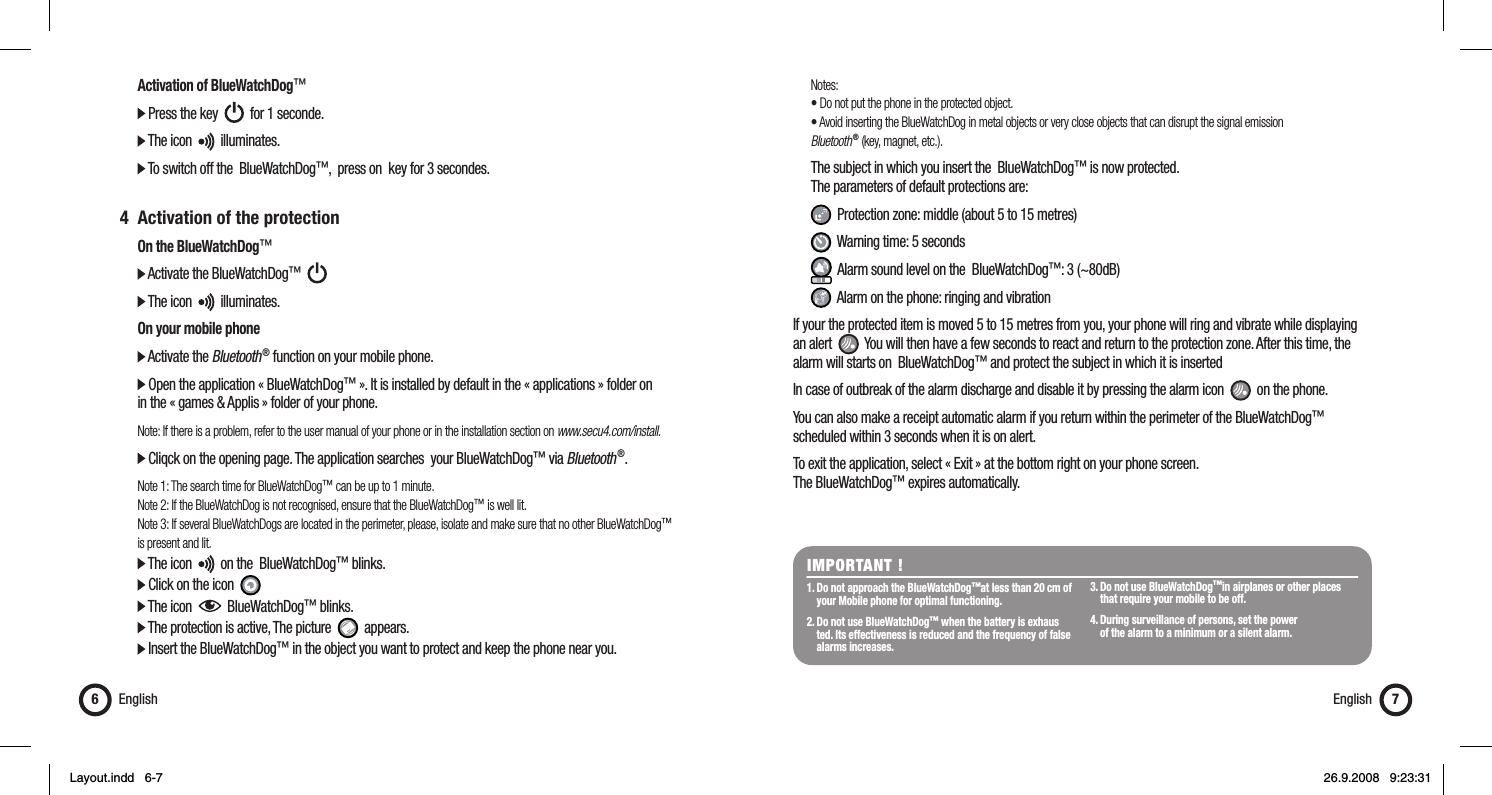
 Notes:  • Do not put the phone in the protected object.  • Avoid inserting the BlueWatchDog in metal objects or very close objects that can disrupt the signal emission  Bluetooth ® (key, magnet, etc.).  The subject in which you insert the  BlueWatchDog™ is now protected.   The parameters of default protections are:   Protection zone: middle (about 5 to 15 metres)   Warning time: 5 seconds   Alarm sound level on the  BlueWatchDog™: 3 (~80dB)   Alarm on the phone: ringing and vibrationIf your the protected item is moved 5 to 15 metres from you, your phone will ring and vibrate while displaying an alert     You will then have a few seconds to react and return to the protection zone. After this time, the alarm will starts on  BlueWatchDog™ and protect the subject in which it is insertedIn case of outbreak of the alarm discharge and disable it by pressing the alarm icon     on the phone.You can also make a receipt automatic alarm if you return within the perimeter of the BlueWatchDog™ scheduled within 3 seconds when it is on alert.To exit the application, select « Exit » at the bottom right on your phone screen. The BlueWatchDog™ expires automatically.  Activation of BlueWatchDog™  Press the key     for 1 seconde.  The icon     illuminates.  To switch off the  BlueWatchDog™,  press on  key for 3 secondes. 4  Activation of the protection  On the BlueWatchDog™  Activate the BlueWatchDog™        The icon     illuminates.  On your mobile phone  Activate the Bluetooth ® function on your mobile phone.  Open the application « BlueWatchDog™ ». It is installed by default in the « applications » folder on   in the « games & Applis » folder of your phone.  Note: If there is a problem, refer to the user manual of your phone or in the installation section on www.secu4.com/install.  Cliqck on the opening page. The application searches  your BlueWatchDog™ via Bluetooth ®. Note 1: The search time for BlueWatchDog™ can be up to 1 minute.  Note 2: If the BlueWatchDog is not recognised, ensure that the BlueWatchDog™ is well lit.  Note 3: If several BlueWatchDogs are located in the perimeter, please, isolate and make sure that no other BlueWatchDog™   is present and lit.  The icon     on the  BlueWatchDog™ blinks.   Click on the icon    The icon     BlueWatchDog™ blinks.   The protection is active, The picture     appears.  Insert the BlueWatchDog™ in the object you want to protect and keep the phone near you.English6IMPORTANT ! 1. Do not approach the BlueWatchDog™at less than 20 cm of    your Mobile phone for optimal functioning. 2. Do not use BlueWatchDog™ when the battery is exhaus   ted. Its effectiveness is reduced and the frequency of false   alarms increases. 3. Do not use BlueWatchDog™in airplanes or other places    that require your mobile to be off. 4. During surveillance of persons, set the power   of the alarm to a minimum or a silent alarm.English 7Layout.indd   6-7Layout.indd   6-7 26.9.2008   9:23:3126.9.2008   9:23:31
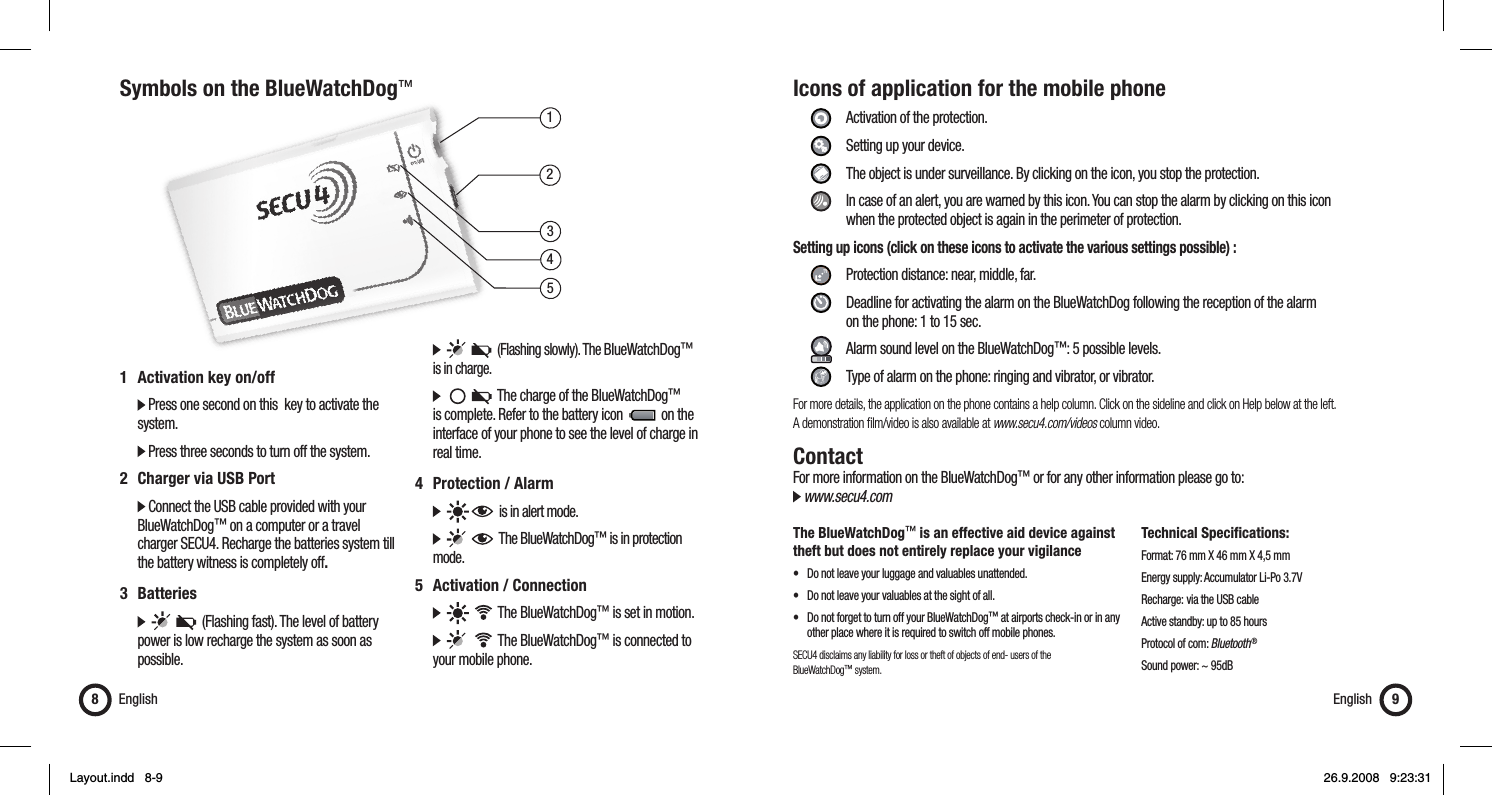
13452Symbols on the BlueWatchDog™English81  Activation key on/off   Press one second on this  key to activate the   system.  Press three seconds to turn off the system.2  Charger via USB Port  Connect the USB cable provided with your   BlueWatchDog™ on a computer or a travel    charger SECU4. Recharge the batteries system till    the battery witness is completely off.3 Batteries            (Flashing fast). The level of battery    power is low recharge the system as soon as   possible.         (Flashing slowly). The BlueWatchDog™    is in charge.           The charge of the BlueWatchDog™    is complete. Refer to the battery icon     on the    interface of your phone to see the level of charge in   real time.4 Protection / Alarm        is in alert mode.         The BlueWatchDog™ is in protection   mode.5  Activation / Connection          The BlueWatchDog™ is set in motion.          The BlueWatchDog™ is connected to    your mobile phone.Icons of application for the mobile phone     Activation of the protection.   Setting up your device.    The object is under surveillance. By clicking on the icon, you stop the protection.    In case of an alert, you are warned by this icon. You can stop the alarm by clicking on this icon        when the protected object is again in the perimeter of protection.Setting up icons (click on these icons to activate the various settings possible) :      Protection distance: near, middle, far.     Deadline for activating the alarm on the BlueWatchDog following the reception of the alarm       on the phone: 1 to 15 sec.     Alarm sound level on the BlueWatchDog™: 5 possible levels.    Type of alarm on the phone: ringing and vibrator, or vibrator.For more details, the application on the phone contains a help column. Click on the sideline and click on Help below at the left. A demonstration fi lm/video is also available at www.secu4.com/videos column video.ContactFor more information on the BlueWatchDog™ or for any other information please go to: www.secu4.comThe BlueWatchDog™ is an effective aid device against theft but does not entirely replace your vigilance•  Do not leave your luggage and valuables unattended.•  Do not leave your valuables at the sight of all.•  Do not forget to turn off your BlueWatchDog™ at airports check-in or in any    other place where it is required to switch off mobile phones.SECU4 disclaims any liability for loss or theft of objects of end- users of the BlueWatchDog™ system.Technical Specifications:Format: 76 mm X 46 mm X 4,5 mmEnergy supply: Accumulator Li-Po 3.7VRecharge:  via the USB cableActive standby: up to 85 hoursProtocol of com: Bluetooth ®Sound power: ~ 95dBEnglish 9Layout.indd   8-9Layout.indd   8-9 26.9.2008   9:23:3126.9.2008   9:23:31
GarantieETENDUE DE LA GARANTIESous réserve des dispositions légales, Secu4 au titre de la présente Garantie se limitent aux dispositions fi gurant ci-après : Secu4 garantit le présent produit matériel contre les vices de fabrication et de matière dans des conditions normales d’utilisation pour une période de UN (1) AN à compter de la date d’achat au détail par l’acheteur. Si un vice du produit matériel apparaît et qu’une réclamation valable est reçue au cours de la Période de Garantie, Secu4 échangera le produit avec un produit neuf ou éventuellement un accessoire si le vice ne devait concerner qu’un accessoire du produit. Lorsqu’un produit ou un accessoire est échangé, il devient votre propriété et le produit ou accessoire échangé devient la propriété de Secu4. La garantie du produit échangé ne pourra pas dépasser la garantie initiale d’achat.EXCLUSIONS ET LIMITATIONS La présente garantie limitée s’applique uniquement aux produits matériels fabriqués par ou pour le compte de Secu4 qui peuvent être identifi és par la marque, le nom commercial ou le logo Secu4 qui y est apposé. Les logiciels distribués par Secu4 sans ou sous le nom commercial Secu4 (y compris, de façon non limitative, les logiciels système) ne sont pas couverts par la présente garantie limitée. Nous vous prions de bien vouloir vous reporter au contrat de licence accompagnant le logiciel pour les détails de vos droits concernant son utilisation. Secu4 ne garantit pas que le fonctionnement du produit sera ininterrompu ou sans erreur. Secu4 n’est pas responsable des dommages provenant du non-respect des instructions d’utilisation du produit.La présente garantie ne s’applique pas : (a) à tout dommage causé par l’utilisation avec des produits non-Secu4 (b) à tout dommage causé par accident, abus, mauvaise utilisation, inondation, incendie, tremblement de terre ou d’autres causes extérieures ; (c) à tout dommage causé par le fonctionnement du produit hors des utilisations permises ou prévues décrites par Secu4 ; (d) à tout dommage causé par toute intervention (y compris les mises à niveau et les extensions) effectuée par toute personne qui n’est pas un représentant de Secu4 ou un prestataire de services agréé Secu4 ; (e) à un produit ou une pièce qui a été modifi é de telle manière à en altérer de manière signifi cative la fonctionnalité ou les capacités sans l’autorisation écrite de Secu4 ; (f) aux pièces consommables, telles que les batteries, sauf si le dommage est dû à un vice de matière ou de fabrication ; ou (g) si tout numéro de série Secu4 a été enlevé ou rendu illisible.DANS LA MESURE AUTORISEE PAR LA LOI, LA PRESENTE GARANTIE ET LES RECOURS ENONCES CI-DESSUS SONT EXCLUSIFS ET SONT AU LIEU ET PLACE DE TOUS AUTRES GARANTIES CONTRACTUELLES, RECOURS ET CONDITIONS, QU’ILS SOIENT ECRITS OU VERBAUX, LEGAUX, EXPRES OU TACITES. DANS LA MESURE DE CE QUI EST PERMIS PAR LE DROIT APPLICABLE, SECU4 EXCLUT EXPRESSEMENT TOUTES GARANTIES TACITES, Y COMPRIS NO-TAMMENT LES GARANTIES DE COMMERCIALISATION, D’ADEQUATION A UN USAGE PARTICULIER ET LES GARANTIES DES VICES CACHES OU LATENTS. SI SECU4 N’EST PAS JURIDIQUEMENT AUTORISEE A REJETER TOUTE GARANTIE LEGALE OU TACITE, ALORS, DANS LA MESURE AUTORISEE PAR LA LOI, LESDITES GARANTIES SERONT LIMITEES A LA DUREE DE LA PRESENTE GARANTIE EXPRESSE ET A LA FOURNITURE D’UNE PRESTATION DE REPARATION OU DE REMPLACEMENT TELLE QUE DETERMINEE A LA SEULE DISCRETION DE SECU4. Aucun revendeur, agent ou salarié de Secu4 n’est habilité à modifi er, proroger ou compléter la présente garantie.A L’EXCEPTION DE CE QUI EST PREVU DANS LA PRESENTE GARANTIE ET DANS LA MESURE AUTORISEE PAR LA LOI, SECU4 N’EST PAS RESPONSABLE DE TOUT DOMMAGE DIRECT, SPECIFIQUE, ACCESSOIRE OU INDIRECT RESULTANT DE TOUTE PERTE MATERIEL, TOUTE PERTE DE REVENU, TOUTE PERTE ACTUELLE OU PREVISIBLE DE PROFITS (Y COMPRIS TOUTE PERTE DE PROFITS LIES A DES CONTRATS), TOUTE PERTE DE DISPONIBILITE FINAN-CIERE, TOUTE PERTE D’ECONOMIE PREVUE, TOUTE PERTE D’AFFAIRES, TOUTE PERTE D’OPPORTUNITES, TOUTE PERTE DE CLIENTELE, TOUTE PERTE DE REPUTATION, TOUTE PERTE, TOUT DOMMAGE, OU TOUTE PERTE OU TOUT DOMMAGE INDIRECT OU CONSECUTIF, QUEL QU’IL SOIT, Y COMPRIS LE REMPLACEMENT D’EQUIPEMENT OU DE BIENS, TOUS FRAIS DE RECUPERATION. LA PRESENTE LIMITATION NE S’APPLIQUE PAS AUX RECLAMATIONS EN CAS DE DECES OU DE BLESSURE.  OBTENTION D’UN SERVICE DE GARANTIE Nous vous prions de bien vouloir accéder et examiner les ressources d’assistance en ligne visées dans la documentation jointe au produit matériel avant de solliciter un service de garantie. Si le produit ne fonctionne toujours pas correctement après avoir utilisé ces ressources, nous vous prions de bien vouloir contacter les représentants SECU4 ou, le cas échéant, un prestataire de services agréé SECU4 dont vous trouverez les coordonnées en utilisant les informations fournies dans la documentation. Un représentant SECU4 ou le prestataire de services agréé SECU4 vous aidera à déterminer si votre produit requiert un service et, si c’est le cas, vous informera de la manière dont SECU4 vous fournira ce service. SECU4 ou ses prestataires de services agréés SECU4 vous fourniront un service de garantie sur les produits qui seront soumis ou présentés pour service pendant la période de garantie, dans la mesure permise par la loi. Vous pourrez être responsables des frais d’expédition et de transport si le produit ne peut pas bénéfi cier du service dans le pays dans lequel il se trouve. Conformément au droit applicable, SECU4 pourra vous demander de fournir une preuve d’achat et/ou de respecter des formalités d’enregistrement avant de recevoir un service de garantie.Français10 Français 11Table des MatièresGarantie .............................................................................................10Introduction .......................................................................................11Information de sécurité ...................................................................... 11Quick start .........................................................................................12Symboles sur le BlueWatchDog™ .......................................................16Icônes de l’application du téléphone .................................................. 17Contact ..............................................................................................17FrançaisIntroductionLe BlueWatchDog™ est un système d’alarme mobile permettant la protection de vos objets de valeur tels que porte-monnaie, valise, ordinateur portable etc. Le BlueWatchDog™ fonctionne via une application téléchargée sur votre téléphone portable équipé de la fonction Bluetooth ®.Information de sécurité  Le niveau sonore maximal de l’alarme est proche de 100db. Ne mettez en aucun cas le BlueWatchDog™    trop proche de votre oreille. Vous risquez des dommages irréversibles à votre audition.  Conformer vous aux lois et aux restrictions locales en utilisant le BlueWatchDog™. Par exemple dans les    avions ou dans les hôpitaux.  N’ouvrez sous aucun prétexte le boîtier du BlueWatchDog™. Les batteries contenues peuvent causer des    dommages important à votre santé.  Ne laissez pas les enfants en bas âges manipuler le BlueWatchDog™ sans votre surveillance.Layout.indd   10-11Layout.indd   10-11 26.9.2008   9:23:3226.9.2008   9:23:32
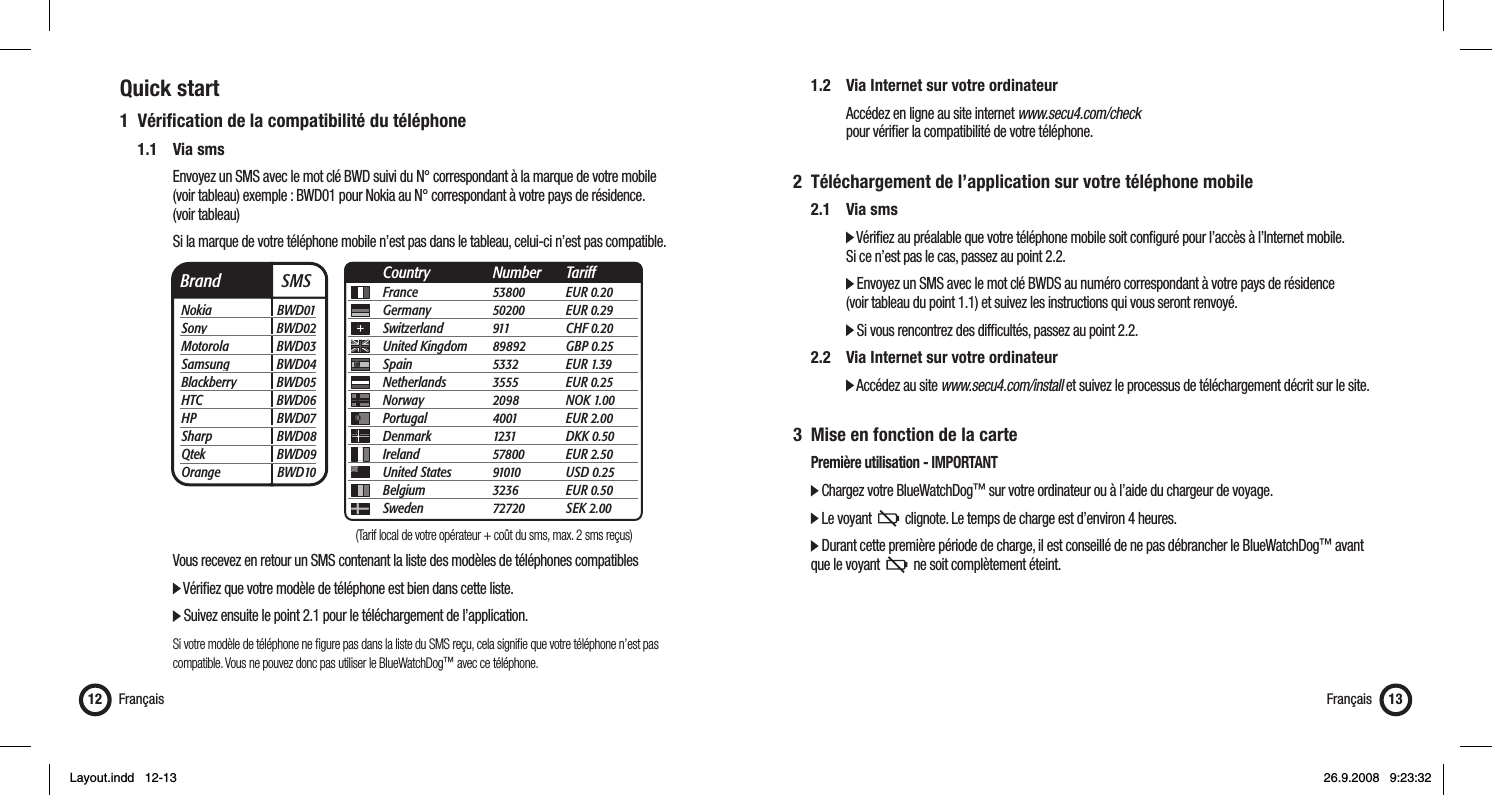
Quick start1 Vérifi cation de la compatibilité du téléphone 1.1 Via sms      Envoyez un SMS avec le mot clé BWD suivi du N° correspondant à la marque de votre mobile       (voir tableau) exemple : BWD01 pour Nokia au N° correspondant à votre pays de résidence.   (voir tableau)      Si la marque de votre téléphone mobile n’est pas dans le tableau, celui-ci n’est pas compatible.          Vous recevez en retour un SMS contenant la liste des modèles de téléphones compatibles      Vérifi ez que votre modèle de téléphone est bien dans cette liste.        Suivez ensuite le point 2.1 pour le téléchargement de l’application.      Si votre modèle de téléphone ne fi gure pas dans la liste du SMS reçu, cela signifi e que votre téléphone n’est pas        compatible. Vous ne pouvez donc pas utiliser le BlueWatchDog™ avec ce téléphone.Français12 Français 13Brand  SMSNokia BWD01Sony BWD02Motorola BWD03Samsung BWD04Blackberry BWD05HTC BWD06HP BWD07Sharp BWD08Qtek BWD09Orange BWD10France 53800 EUR 0.20Germany 50200 EUR 0.29Switzerland 911  CHF 0.20United Kingdom  89892 GBP 0.25Spain 5332 EUR 1.39Netherlands 3555 EUR 0.25Norway 2098 NOK 1.00Portugal 4001 EUR 2.00Denmark 1231 DKK 0.50Ireland 57800 EUR 2.50United States  91010 USD 0.25Belgium 3236 EUR 0.50Sweden 72720 SEK 2.00Country Number Tariff  1.2   Via Internet sur votre ordinateur      Accédez en ligne au site internet www.secu4.com/check       pour vérifi er la compatibilité de votre téléphone.2  Téléchargement de l’application sur votre téléphone mobile 2.1 Via sms     Vérifi ez au préalable que votre téléphone mobile soit confi guré pour l’accès à l’Internet mobile.       Si ce n’est pas le cas, passez au point 2.2.     Envoyez un SMS avec le mot clé BWDS au numéro correspondant à votre pays de résidence       (voir tableau du point 1.1) et suivez les instructions qui vous seront renvoyé.     Si vous rencontrez des diffi cultés, passez au point 2.2. 2.2  Via Internet sur votre ordinateur     Accédez au site www.secu4.com/install et suivez le processus de téléchargement décrit sur le site.3  Mise en fonction de la carte  Première utilisation - IMPORTANT  Chargez votre BlueWatchDog™ sur votre ordinateur ou à l’aide du chargeur de voyage.  Le voyant     clignote. Le temps de charge est d’environ 4 heures.  Durant cette première période de charge, il est conseillé de ne pas débrancher le BlueWatchDog™ avant    que le voyant     ne soit complètement éteint. (Tarif local de votre opérateur + coût du sms, max. 2 sms reçus)Layout.indd   12-13Layout.indd   12-13 26.9.2008   9:23:3226.9.2008   9:23:32
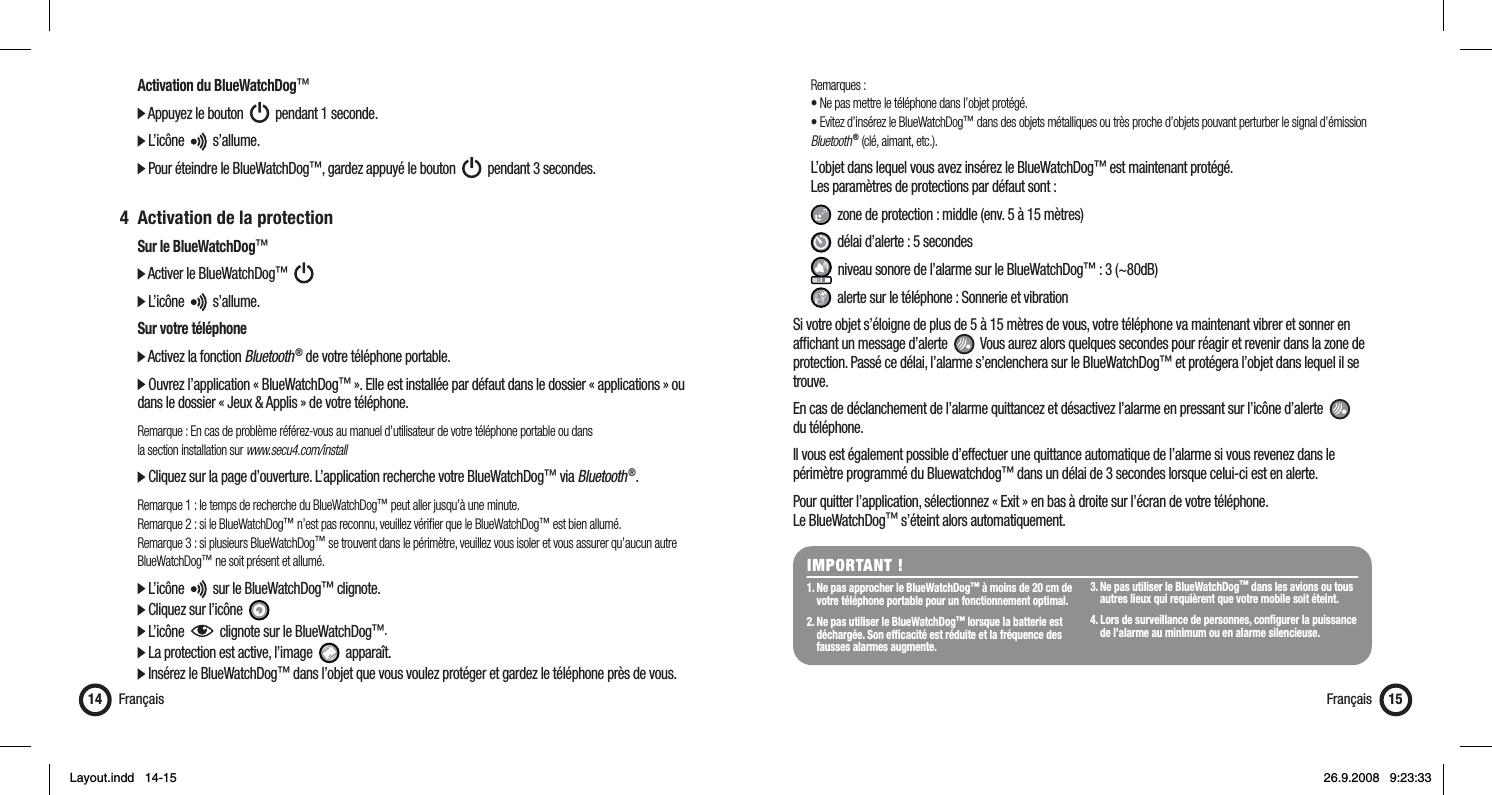
  Activation du BlueWatchDog™  Appuyez le bouton     pendant 1 seconde.   L’icône     s’allume.  Pour éteindre le BlueWatchDog™, gardez appuyé le bouton     pendant 3 secondes. 4  Activation de la protection  Sur le BlueWatchDog™  Activer le BlueWatchDog™        L’icône     s’allume.  Sur votre téléphone  Activez la fonction Bluetooth ® de votre téléphone portable.  Ouvrez l’application « BlueWatchDog™ ». Elle est installée par défaut dans le dossier « applications » ou    dans le dossier « Jeux & Applis » de votre téléphone.  Remarque : En cas de problème référez-vous au manuel d’utilisateur de votre téléphone portable ou dans   la section installation sur www.secu4.com/install  Cliquez sur la page d’ouverture. L’application recherche votre BlueWatchDog™ via Bluetooth ®. Remarque 1 : le temps de recherche du BlueWatchDog™ peut aller jusqu’à une minute.  Remarque 2 : si le BlueWatchDog™ n’est pas reconnu, veuillez vérifi er que le BlueWatchDog™ est bien allumé.  Remarque 3 : si plusieurs BlueWatchDog™ se trouvent dans le périmètre, veuillez vous isoler et vous assurer qu’aucun autre   BlueWatchDog™ ne soit présent et allumé.  L’icône     sur le BlueWatchDog™ clignote.   Cliquez sur l’icône    L’icône     clignote sur le BlueWatchDog™.   La protection est active, l’image     apparaît.  Insérez le BlueWatchDog™ dans l’objet que vous voulez protéger et gardez le téléphone près de vous.Français14 Français 15 Remarques :  • Ne pas mettre le téléphone dans l’objet protégé.  • Evitez d’insérez le BlueWatchDog™ dans des objets métalliques ou très proche d’objets pouvant perturber le signal d’émission   Bluetooth ® (clé, aimant, etc.).  L’objet dans lequel vous avez insérez le BlueWatchDog™ est maintenant protégé.   Les paramètres de protections par défaut sont :   zone de protection : middle (env. 5 à 15 mètres)   délai d’alerte : 5 secondes   niveau sonore de l’alarme sur le BlueWatchDog™ : 3 (~80dB)   alerte sur le téléphone : Sonnerie et vibrationSi votre objet s’éloigne de plus de 5 à 15 mètres de vous, votre téléphone va maintenant vibrer et sonner en affi chant un message d’alerte     Vous aurez alors quelques secondes pour réagir et revenir dans la zone de protection. Passé ce délai, l’alarme s’enclenchera sur le BlueWatchDog™ et protégera l’objet dans lequel il se trouve. En cas de déclanchement de l’alarme quittancez et désactivez l’alarme en pressant sur l’icône d’alerte     du téléphone.Il vous est également possible d’effectuer une quittance automatique de l’alarme si vous revenez dans le périmètre programmé du Bluewatchdog™ dans un délai de 3 secondes lorsque celui-ci est en alerte.Pour quitter l’application, sélectionnez « Exit » en bas à droite sur l’écran de votre téléphone. Le BlueWatchDog™ s’éteint alors automatiquement.IMPORTANT !1. Ne pas approcher le BlueWatchDog™ à moins de 20 cm de    votre téléphone portable pour un fonctionnement optimal.2. Ne pas utiliser le BlueWatchDog™ lorsque la batterie est    déchargée. Son effi cacité est réduite et la fréquence des    fausses alarmes augmente.3. Ne pas utiliser le BlueWatchDog™ dans les avions ou tous    autres lieux qui requièrent que votre mobile soit éteint.4. Lors de surveillance de personnes, confi gurer la puissance    de l’alarme au minimum ou en alarme silencieuse.Layout.indd   14-15Layout.indd   14-15 26.9.2008   9:23:3326.9.2008   9:23:33
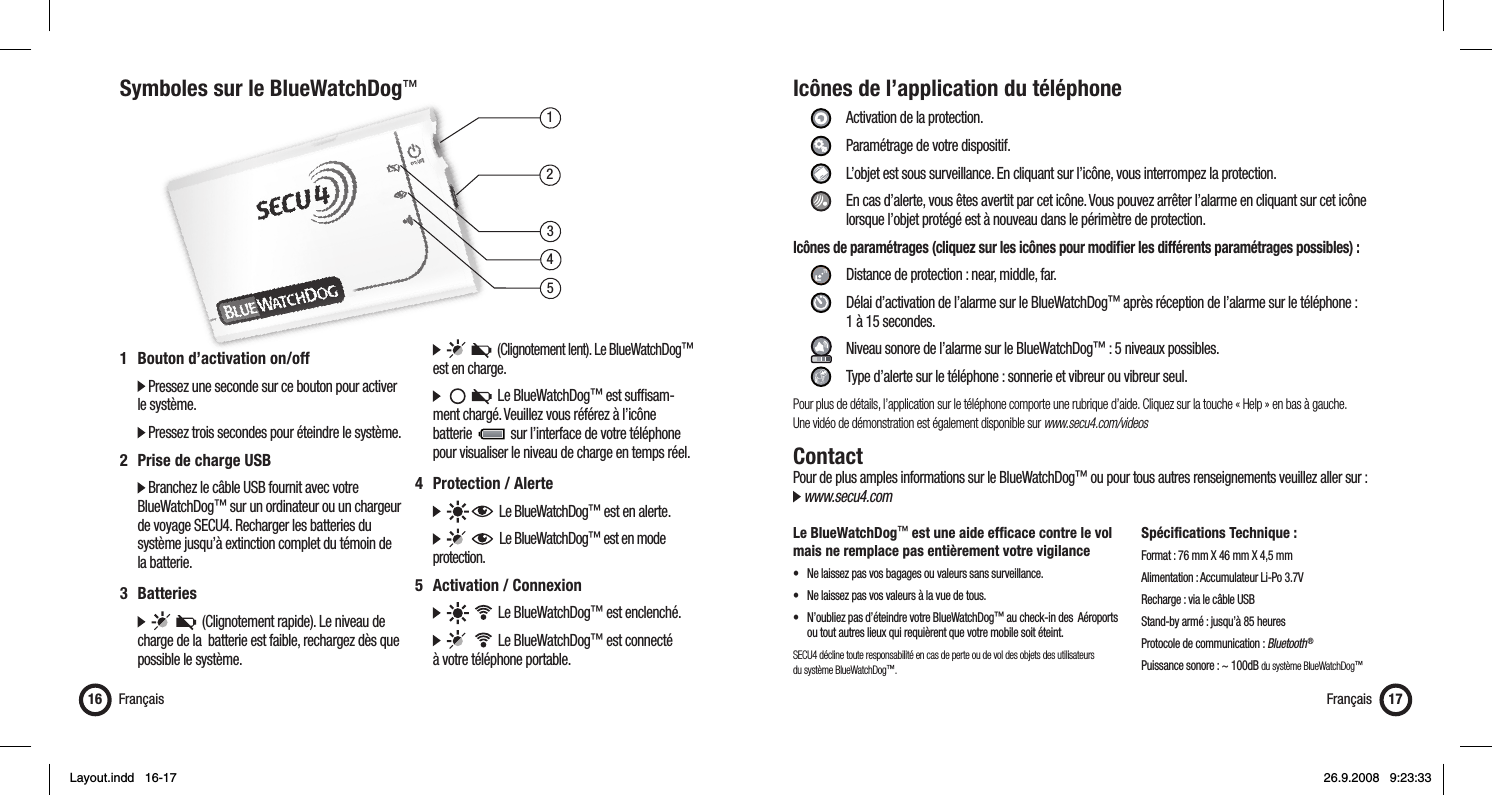
13452Symboles sur le BlueWatchDog™Français16 Français 171  Bouton d’activation on/off   Pressez une seconde sur ce bouton pour activer   le système.  Pressez trois secondes pour éteindre le système.2  Prise de charge USB  Branchez le câble USB fournit avec votre   BlueWatchDog™ sur un ordinateur ou un chargeur    de voyage SECU4. Recharger les batteries du    système jusqu’à extinction complet du témoin de   la batterie.3 Batteries            (Clignotement rapide). Le niveau de    charge de la  batterie est faible, rechargez dès que    possible le système.         (Clignotement lent). Le BlueWatchDog™   est en charge.           Le BlueWatchDog™ est suffi sam-   ment chargé. Veuillez vous référez à l’icône   batterie     sur l’interface de votre téléphone    pour visualiser le niveau de charge en temps réel.4 Protection / Alerte        Le BlueWatchDog™ est en alerte.         Le BlueWatchDog™ est en mode   protection.5  Activation / Connexion          Le BlueWatchDog™ est enclenché.          Le BlueWatchDog™ est connecté   à votre téléphone portable.Icônes de l’application du téléphone     Activation de la protection.   Paramétrage de votre dispositif.    L’objet est sous surveillance. En cliquant sur l’icône, vous interrompez la protection.    En cas d’alerte, vous êtes avertit par cet icône. Vous pouvez arrêter l’alarme en cliquant sur cet icône        lorsque l’objet protégé est à nouveau dans le périmètre de protection.Icônes de paramétrages (cliquez sur les icônes pour modifi er les différents paramétrages possibles) :      Distance de protection : near, middle, far.     Délai d’activation de l’alarme sur le BlueWatchDog™ après réception de l’alarme sur le téléphone :    1 à 15 secondes.     Niveau sonore de l’alarme sur le BlueWatchDog™ : 5 niveaux possibles.    Type d’alerte sur le téléphone : sonnerie et vibreur ou vibreur seul.Pour plus de détails, l’application sur le téléphone comporte une rubrique d’aide. Cliquez sur la touche « Help » en bas à gauche. Une vidéo de démonstration est également disponible sur www.secu4.com/videosContactPour de plus amples informations sur le BlueWatchDog™ ou pour tous autres renseignements veuillez aller sur : www.secu4.comLe BlueWatchDog™ est une aide effi cace contre le vol mais ne remplace pas entièrement votre vigilance•  Ne laissez pas vos bagages ou valeurs sans surveillance.•  Ne laissez pas vos valeurs à la vue de tous.•  N’oubliez pas d’éteindre votre BlueWatchDog™ au check-in des  Aéroports    ou tout autres lieux qui requièrent que votre mobile soit éteint.SECU4 décline toute responsabilité en cas de perte ou de vol des objets des utilisateurs du système BlueWatchDog™.Spécifications Technique :Format : 76 mm X 46 mm X 4,5 mmAlimentation : Accumulateur Li-Po 3.7VRecharge : via le câble USBStand-by armé : jusqu’à 85 heuresProtocole de communication : Bluetooth ®Puissance sonore : ~ 100dB du système BlueWatchDog™Layout.indd   16-17Layout.indd   16-17 26.9.2008   9:23:3326.9.2008   9:23:33
GarantieGARANTIEDAUERUnter Vorbehalt der rechtlichen Verordnungen stützt sich Secu4, im Rahmen der vorliegenden Garantie, auf nachfolgende Verordnungen: Secu4 gewähr-leistet das vorliegende Materialprodukt gegen Fabrikations –und Materialfehler unter normalen Gebrauchsbedingungen während EINEM (1) JAHR ab dem Kaufdatum beim Verkäufer. Sollte ein Fehler des Materialproduktes auftreten und falls eine gültige Reklamation innerhalb der Garantiefrist an Secu4 gerichtet wird, so wird Secu4 das Produkt durch eine neues Produkt oder eventuell, falls der Fehler nur ein Zubehör des Produktes betrifft, durch ein Zubehör ersetzen. Wenn ein Produkt oder ein Zubehör ersetzt wird, so wird das neue Produkt Ihr Eigentum und das ersetzte Produkt oder Zubehör wird jenes von Secu4. Die Garantie des ersetzten Produktes kann die anfängliche Kaufsgarantie nicht überschreiten.AUSNAHMEN UND EINSCHRÄNKUNGEN Die vorliegende beschränkte Garantie betrifft nur Materialprodukte fabriziert von oder für Secu4, die durch Marke, Handelsname oder Logo von Secu4 identifi ziert werden können. Die durch Secu4 verteilte Software, ohne oder unter dem Handelsname Secu4 (darin ebenfalls, in keiner einschränkender Weise, enthalten die Systemsoftware) sind durch die vorliegende beschränkte Garantie nicht gedeckt. Wir bitten Sie, sich über die Details Ihrer Rechte bezüglich des Gebrauchs an den der Software beigelegten Lizenzvertrag zu halten. Secu4 garantiert nicht, dass das Produkt ununterbrochen und ohne Fehler funktioniert. Secu4 ist nicht verantwortlich für Schäden aufgrund Nicht-Einhaltung der Gebrauchsanweisungen des Produktes. Die vorliegende Garantie betrifft nicht: (a) aller Schaden verursacht durch den Gebrauch anderer nicht von Secu4 hergestellten Produkten; (b) aller Schaden verursacht durch Unfall, Missbrauch, schlechter Gebrauch, Überschwemmung, Feuer, Erdbeben oder andere auswärtige Ursachen; (c) aller Schaden verursacht durch den Betrieb des Produktes ausserhalb des erlaubten, vorgesehenen und von Secu4 beschriebenen Gebrauchs; (d) aller Schaden verursacht durch jegliche Art von Intervention (darin ebenfalls enthalten sind Anpassungen und Erweiterungen) vorgenommen durch jegliche nicht Secu4 repräsentierende oder von einer von Secu4 nicht als Leistungserbringer beauftragten Person; (e) ein Produkt oder Bestandteil, die so verändert wurden, dass die Funktionalität und die Fähigkeit ohne schriftliche Zustimmung von Secu4 in bedeutendem Masse beeinträchtigt wurden; (f) die verbrauchbaren Bestandteile, wie zum Beispiel die Batterien, ausser falls der Schaden augrund eines Material –oder Fabrikationsfehler entstanden ist; oder (g) Produkte oder Bestandteile deren Secu4-Seriennummenr entfernt wurden oder unleserlich sind. IM VOM GESETZE ERLAUBTEN MASSE IST DIE VORLIEGENDE GARANTIE UND DIE OBEN ERWAEHNTEN REKLAMATIONEN EXKLUSIF UND ERSETZEN ALLE ANDEREN VERTRAGLICHEN GARANTIEN, REKLAMATIONEN UND BEDINGUNGEN, SEIEN SIE SCHRIFTLICHER ODER MUENDLICHER, RECHTLICHER, AUSDRUECKLICHER ODER STILL SCHWEIGENDER ART. IM RAHMEN DES VOM ANGEWENDETEN RECHT ERLAUBTEM, SCHLIESST SECU4 AUSDRUEC-KLICH ALLE STILL SCHWEIGENDEN GARANTIEN AUS, EBENSO VOR ALLEM DIE VERMARTUNGSGARANTIEN, DIE ANPASSUNGSGARANTIEN FUER EINEN SPEZIELLEN GEBRAUCH UND DIE GARANTIE DER VERSTECKTEN ODER LATENTEN SCHAEDEN. FALLS ES SECU4 JURISTISCH NICHT ERLAUBT IST, ALLE RECHTLICHEN ODER STILL SCHWEIGENDEN GARANTIEN ZU VERWERFEN, SO WERDEN DIE GENANNTEN GARANTIEN, IM RAHMEN DES VOM GESETZE ERLAUBTEM, AUF DIE DAUER DER VORLIEGENDEN AUSDRUECKLICHEN GARANTIE UND AUF DIE, ALLEINE VON SEITEN VON SECU4 FESTGELEGTEN, LIEFERUNG EINER REPARATIONS-ODER ERSATZLEISTUNG BESCHRAENKT. Kein einziger Einzelhändler, Agent oder Angestellter von Secu4 ist befugt, die vorliegende Garantie zu ändern, zu verlängern oder zu vervollständigen. MIT AUSNAHME DES IN DER VORLIEGENDEN GARANTIE VORGESEHENEM UND IM VOM GESETZE ERLAUBTEN RAHMEN IST SECU4 NICHT VERANTWORT-LICH FUER ALLEN DIREKTEN, SPEZIFISCHEN, ZWEITRANGIGEN ODER INDIREKTEN SCHADEN, DER ENTSTANDEN IST DURCH ALLER MATERIELLE VER-LUST, ALLER EINKOMMENSVERLUST, ALLER AKTUELLER ODER VORHERSEHBARER GEWINNVERLUST (DARIN ENTHALTEN AUCH ALLER GEWINNVERLUST IM ZUSAMMENHANG MIT VERTRAEGEN), ALLER VERLUST DER FINANZIELLEN VERFUEGBARKEIT, ALLER VERLUST EINER VORGESEHENEN ERSPARNIS, ALLER GESCHAEFTSVERLUST, ALLER VERLUST VON GELEGENHEITEN, ALLER KUNDSCHAFTSVERLUST, ALLER ANSEHENSVERLUST, ALLER VERLUST, ALLER SCHADEN, ODER ALLER INDIREKTEN UND DARAUS RESULTIERENDEN VERLUST ODER SCHADEN, WELCHE ES AUCH IMMER SIND, DARIN ENTHAL-TEN AUCH DER ERSATZ VON ZUBEHOER ODER VON GUT, ALLE WIEDERVERWERTUNGSKOSTEN. DIE VORLIEGENDE EINSCHRAENKUNG BETRIFFT NICHT REKLAMATIONEN IM TODESFALLE ODER BEI VERLETZUNGEN.   ERHALT EINES GARANTIESERVICES Wir bitten Sie, sich zuerst an die Online-Hilfsdienste, auf welche die dem Materialprodukt angefügte Dokumentation hinweist, zu wenden bevor Sie ein Garantieservice beanspruchen. Falls das Produkt dann immer noch nicht korrekt funktioniert, nachdem Sie diese Hilfsdienste angewendet haben, bitten wir Sie, die Vertreter von Secu4 oder, gegebenenfalls, ein von Secu4 beauftragten Leistungserbringer, dessen Angaben Sie anhand der in der Doku-mentation vorhandenen Informationen fi nden, zu kontaktieren. Ein Vertreter von SECU4 oder ein von SECU4 beauftragter Leistungserbringer wird Ihnen helfen zu bestimmen, ob Ihr Produkt einen Service benötigt und, ist dies der Fall, wird Sie über die Art der Leistungserbringung von SECU4 informieren. SECU4 und die von ihr beauftragten Leistungserbringer werden Ihnen einen Garantieservice auf jene Produkte liefern, die einem Service innerhalb der Garantiedauer, im Rahmen des vom Gesetze Erlaubten, unterliegen. Sie können verantwortlich für Liefer –und Transportkosten werden, falls das Produkt nicht vom Service desjenigen Landes gedeckt ist, in dem es sich befi ndet. Konform dem anzuwendenden Recht, wird Sie SECU4 auffordern können, einen Kaufbeleg zu liefern und/oder Eintragungsformalitäten zu respektieren bevor Sie in den Genuss eines Garantieservices kommen.Deutsch18 Deutsch 19InhaltsverzeichnisGarantie .............................................................................................18Einführung .........................................................................................19Sicherheitshinweise ...........................................................................19Schnellstart .......................................................................................20Symbole auf dem BlueWatchDog™ .................................................... 24Anwendungsymbole des Telefons ......................................................25Kontakt .............................................................................................. 25DeutschEinführungBlueWatchDog™ ist ein mobiles Alarmsystem. Es erlaubt Ihnen, Ihre Wertsachen wie Brieftasche, Reisekoffer, Laptop etc. zu schützen.  Le BlueWatchDog™ funktioniert mittels einer auf Ihr mit Bluetooth ® ausgestattetes Mobiltelefon heruntergela-denen Anwendung.Sicherheitshinweise  Die Maximallautstärke des Alarms kann 100db erreichen. Nähern Sie BlueWatchDog™ auf keinem Fall zu    stark Ihren Ohren. Sie riskieren irreversible Hörschäden.   Richten Sie sich bei Gebrauch von BlueWatchDog™ an die lokalen Gesetze und Restriktionen. Zum Beispiel    in Flugzeugen oder in Spitälern.  Öffnen Sie unter keinen Umständen das Gehäuse von BlueWatchDog™. Die darin enthaltenen Batterien    können gravierende gesundheitliche Schäden verursachen.  Lassen Sie Kleinkinder ohne Ihre Aufsicht nicht mit BlueWatchDog™ alleine.Layout.indd   18-19Layout.indd   18-19 26.9.2008   9:23:3426.9.2008   9:23:34
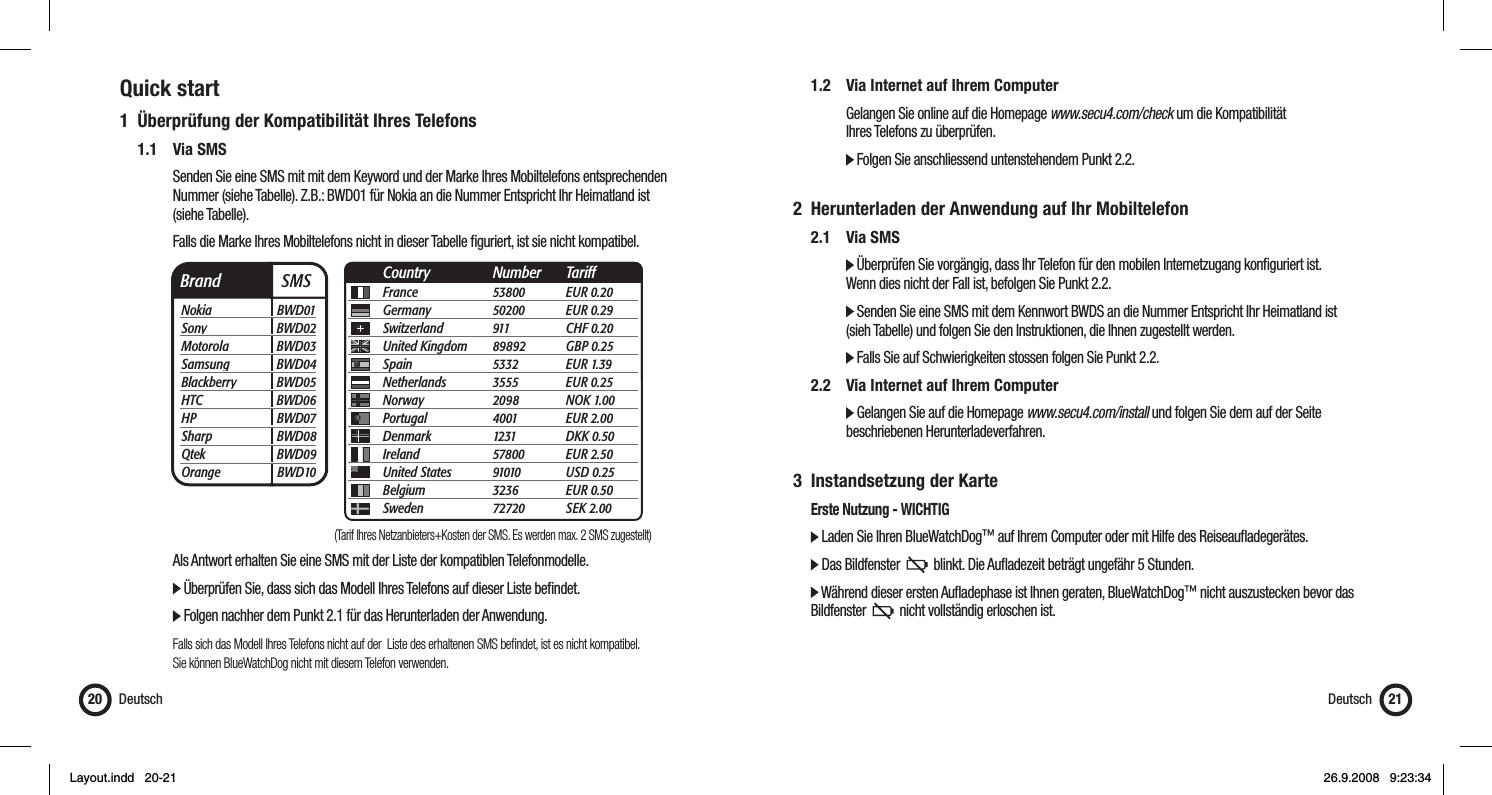
Quick start1  Überprüfung der Kompatibilität Ihres Telefons 1.1 Via SMS      Senden Sie eine SMS mit mit dem Keyword und der Marke Ihres Mobiltelefons entsprechenden        Nummer (siehe Tabelle). Z.B.: BWD01 für Nokia an die Nummer Entspricht Ihr Heimatland ist    (siehe Tabelle).      Falls die Marke Ihres Mobiltelefons nicht in dieser Tabelle fi guriert, ist sie nicht kompatibel.         Als Antwort erhalten Sie eine SMS mit der Liste der kompatiblen Telefonmodelle.      Überprüfen Sie, dass sich das Modell Ihres Telefons auf dieser Liste befi ndet.         Folgen nachher dem Punkt 2.1 für das Herunterladen der Anwendung.       Falls sich das Modell Ihres Telefons nicht auf der  Liste des erhaltenen SMS befi ndet, ist es nicht kompatibel.       Sie können BlueWatchDog nicht mit diesem Telefon verwenden.Deutsch20  1.2  Via Internet auf Ihrem Computer      Gelangen Sie online auf die Homepage www.secu4.com/check um die Kompatibilität    Ihres Telefons zu überprüfen.      Folgen Sie anschliessend untenstehendem Punkt 2.2. 2  Herunterladen der Anwendung auf Ihr Mobiltelefon 2.1 Via SMS     Überprüfen Sie vorgängig, dass Ihr Telefon für den mobilen Internetzugang konfi guriert ist.       Wenn dies nicht der Fall ist, befolgen Sie Punkt 2.2.      Senden Sie eine SMS mit dem Kennwort BWDS an die Nummer Entspricht Ihr Heimatland ist       (sieh Tabelle) und folgen Sie den Instruktionen, die Ihnen zugestellt werden.     Falls Sie auf Schwierigkeiten stossen folgen Sie Punkt 2.2.  2.2  Via Internet auf Ihrem Computer     Gelangen Sie auf die Homepage www.secu4.com/install und folgen Sie dem auf der Seite     beschriebenen Herunterladeverfahren.3 Instandsetzung der Karte  Erste Nutzung - WICHTIG  Laden Sie Ihren BlueWatchDog™ auf Ihrem Computer oder mit Hilfe des Reiseaufl adegerätes.   Das Bildfenster     blinkt. Die Aufl adezeit beträgt ungefähr 5 Stunden.  Während dieser ersten Aufl adephase ist Ihnen geraten, BlueWatchDog™ nicht auszustecken bevor das    Bildfenster     nicht vollständig erloschen ist.  Deutsch 21Brand  SMSNokia BWD01Sony BWD02Motorola BWD03Samsung BWD04Blackberry BWD05HTC BWD06HP BWD07Sharp BWD08Qtek BWD09Orange BWD10France 53800 EUR 0.20Germany 50200 EUR 0.29Switzerland 911  CHF 0.20United Kingdom  89892 GBP 0.25Spain 5332 EUR 1.39Netherlands 3555 EUR 0.25Norway 2098 NOK 1.00Portugal 4001 EUR 2.00Denmark 1231 DKK 0.50Ireland 57800 EUR 2.50United States  91010 USD 0.25Belgium 3236 EUR 0.50Sweden 72720 SEK 2.00Country Number Tariff(Tarif Ihres Netzanbieters+Kosten der SMS. Es werden max. 2 SMS zugestellt)Layout.indd   20-21Layout.indd   20-21 26.9.2008   9:23:3426.9.2008   9:23:34
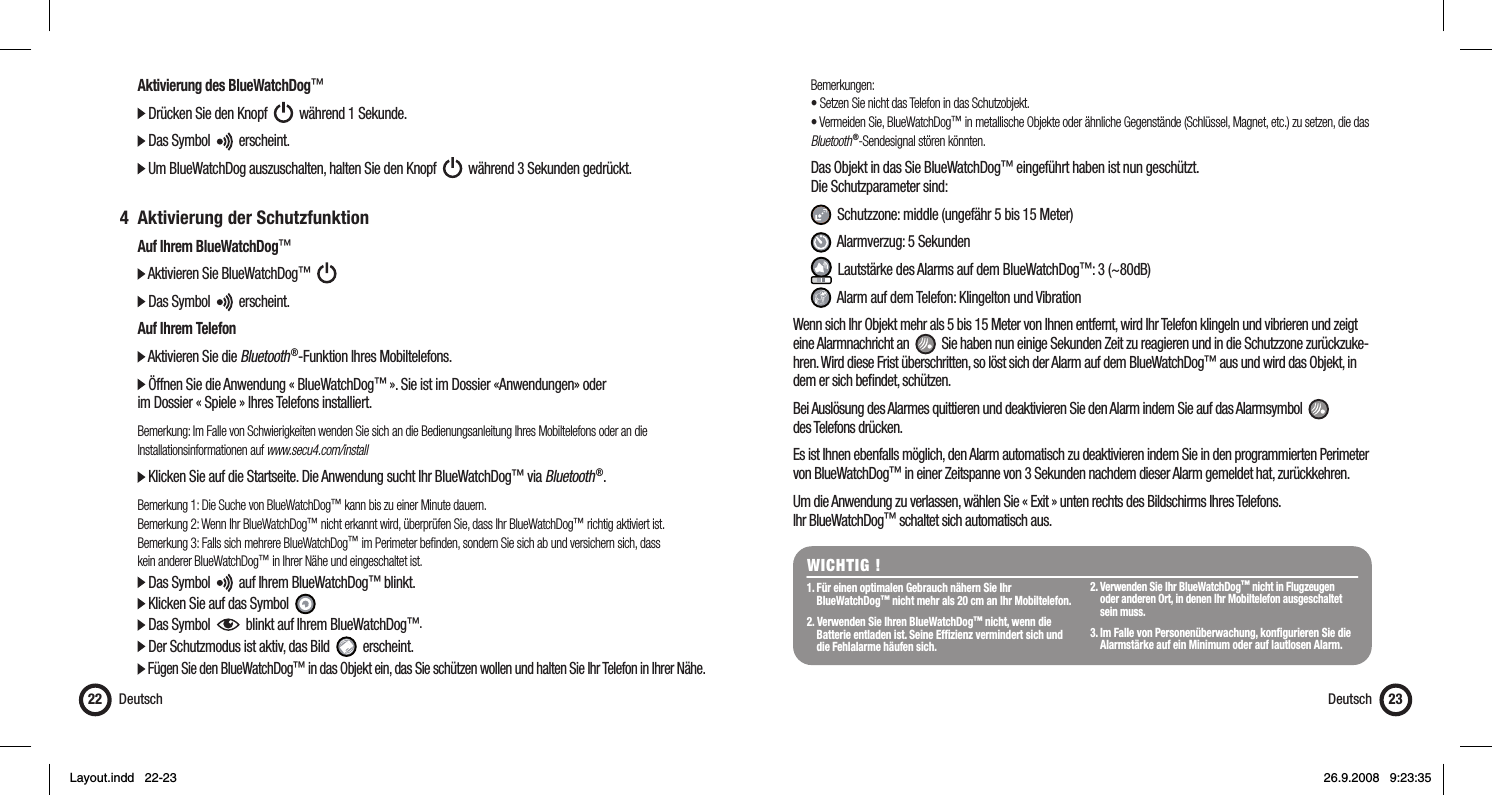
  Aktivierung des BlueWatchDog™  Drücken Sie den Knopf     während 1 Sekunde.  Das Symbol     erscheint.  Um BlueWatchDog auszuschalten, halten Sie den Knopf     während 3 Sekunden gedrückt. 4 Aktivierung der Schutzfunktion  Auf Ihrem BlueWatchDog™  Aktivieren Sie BlueWatchDog™        Das Symbol     erscheint.  Auf Ihrem Telefon  Aktivieren Sie die Bluetooth ®-Funktion Ihres Mobiltelefons.  Öffnen Sie die Anwendung « BlueWatchDog™ ». Sie ist im Dossier «Anwendungen» oder   im Dossier « Spiele » Ihres Telefons installiert.  Bemerkung: Im Falle von Schwierigkeiten wenden Sie sich an die Bedienungsanleitung Ihres Mobiltelefons oder an die  Installationsinformationen auf www.secu4.com/install  Klicken Sie auf die Startseite. Die Anwendung sucht Ihr BlueWatchDog™ via Bluetooth ®. Bemerkung 1: Die Suche von BlueWatchDog™ kann bis zu einer Minute dauern.  Bemerkung 2: Wenn Ihr BlueWatchDog™ nicht erkannt wird, überprüfen Sie, dass Ihr BlueWatchDog™ richtig aktiviert ist.   Bemerkung 3: Falls sich mehrere BlueWatchDog™ im Perimeter befi nden, sondern Sie sich ab und versichern sich, dass   kein anderer BlueWatchDog™ in Ihrer Nähe und eingeschaltet ist.  Das Symbol     auf Ihrem BlueWatchDog™ blinkt.   Klicken Sie auf das Symbol    Das Symbol     blinkt auf Ihrem BlueWatchDog™.   Der Schutzmodus ist aktiv, das Bild     erscheint.  Fügen Sie den BlueWatchDog™ in das Objekt ein, das Sie schützen wollen und halten Sie Ihr Telefon in Ihrer Nähe.Deutsch22 Bemerkungen:  • Setzen Sie nicht das Telefon in das Schutzobjekt.  • Vermeiden Sie, BlueWatchDog™ in metallische Objekte oder ähnliche Gegenstände (Schlüssel, Magnet, etc.) zu setzen, die das   Bluetooth ®-Sendesignal stören könnten.   Das Objekt in das Sie BlueWatchDog™ eingeführt haben ist nun geschützt.  Die Schutzparameter sind:    Schutzzone: middle (ungefähr 5 bis 15 Meter)   Alarmverzug: 5 Sekunden   Lautstärke des Alarms auf dem BlueWatchDog™: 3 (~80dB)   Alarm auf dem Telefon: Klingelton und VibrationWenn sich Ihr Objekt mehr als 5 bis 15 Meter von Ihnen entfernt, wird Ihr Telefon klingeln und vibrieren und zeigt eine Alarmnachricht an     Sie haben nun einige Sekunden Zeit zu reagieren und in die Schutzzone zurückzuke-hren. Wird diese Frist überschritten, so löst sich der Alarm auf dem BlueWatchDog™ aus und wird das Objekt, in dem er sich befi ndet, schützen.  Bei Auslösung des Alarmes quittieren und deaktivieren Sie den Alarm indem Sie auf das Alarmsymbol     des Telefons drücken.Es ist Ihnen ebenfalls möglich, den Alarm automatisch zu deaktivieren indem Sie in den programmierten Perimeter von BlueWatchDog™ in einer Zeitspanne von 3 Sekunden nachdem dieser Alarm gemeldet hat, zurückkehren. Um die Anwendung zu verlassen, wählen Sie « Exit » unten rechts des Bildschirms Ihres Telefons. Ihr BlueWatchDog™ schaltet sich automatisch aus.WICHTIG !1. Für einen optimalen Gebrauch nähern Sie Ihr  BlueWatchDog™ nicht mehr als 20 cm an Ihr Mobiltelefon.2. Verwenden Sie Ihren BlueWatchDog™ nicht, wenn die    Batterie entladen ist. Seine Effi zienz vermindert sich und    die Fehlalarme häufen sich.2. Verwenden Sie Ihr BlueWatchDog™ nicht in Flugzeugen    oder anderen Ort, in denen Ihr Mobiltelefon ausgeschaltet  sein muss.3. Im Falle von Personenüberwachung, konfi gurieren Sie die    Alarmstärke auf ein Minimum oder auf lautlosen Alarm. Deutsch 23Layout.indd   22-23Layout.indd   22-23 26.9.2008   9:23:3526.9.2008   9:23:35
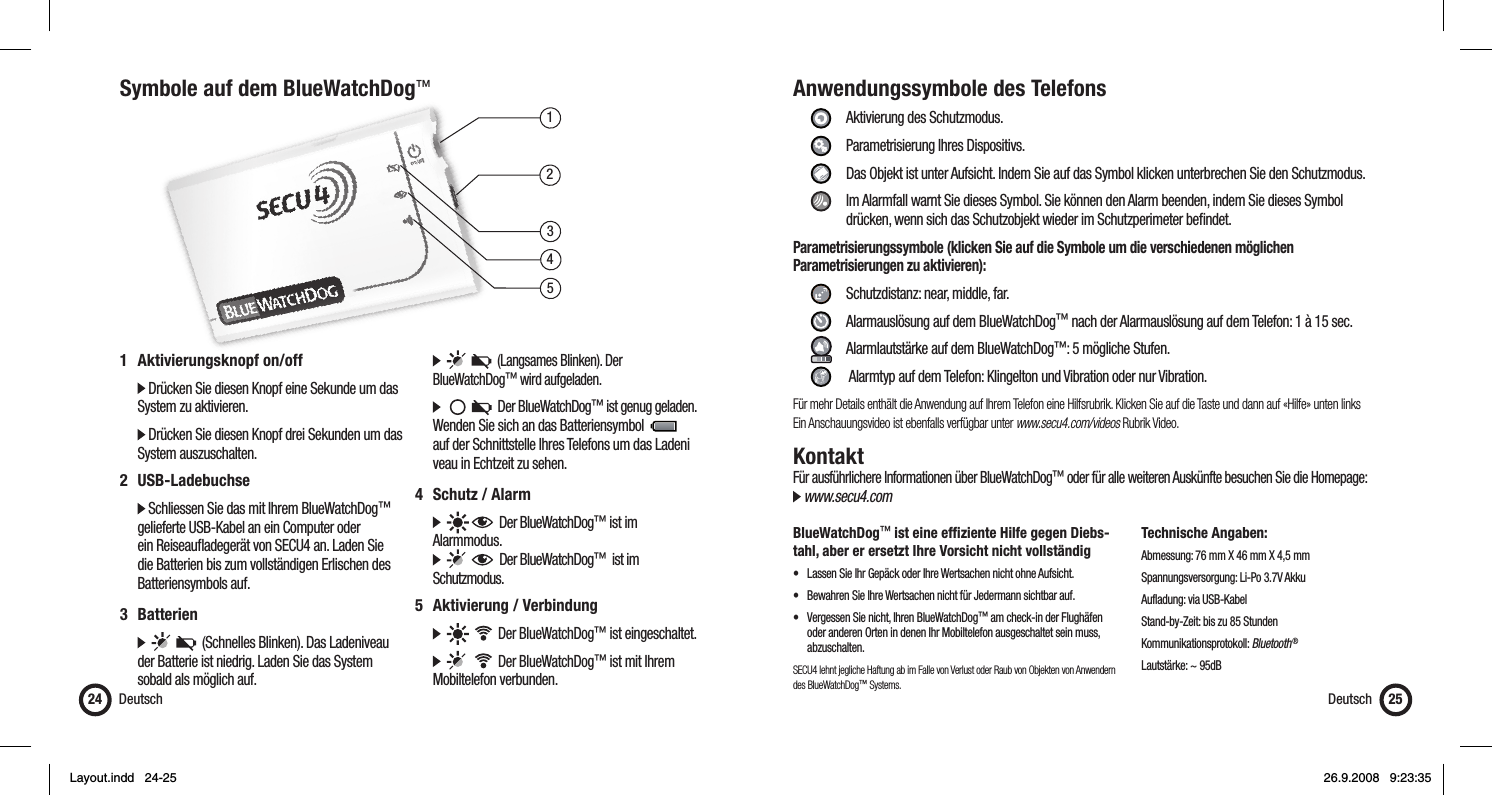
13452Symbole auf dem BlueWatchDog™Deutsch241 Aktivierungsknopf on/off   Drücken Sie diesen Knopf eine Sekunde um das    System zu aktivieren.  Drücken Sie diesen Knopf drei Sekunden um das   System auszuschalten.2 USB-Ladebuchse  Schliessen Sie das mit Ihrem BlueWatchDog™    gelieferte USB-Kabel an ein Computer oder    ein Reiseaufl adegerät von SECU4 an. Laden Sie    die Batterien bis zum vollständigen Erlischen des   Batteriensymbols auf.3 Batterien            (Schnelles Blinken). Das Ladeniveau    der Batterie ist niedrig. Laden Sie das System    sobald als möglich auf.         (Langsames Blinken). Der  BlueWatchDog™ wird aufgeladen.           Der BlueWatchDog™ ist genug geladen.    Wenden Sie sich an das Batteriensymbol        auf der Schnittstelle Ihres Telefons um das Ladeni   veau in Echtzeit zu sehen.4 Schutz / Alarm        Der BlueWatchDog™ ist im  Alarmmodus.         Der BlueWatchDog™  ist im  Schutzmodus.5 Aktivierung / Verbindung          Der BlueWatchDog™ ist eingeschaltet.          Der BlueWatchDog™ ist mit Ihrem   Mobiltelefon verbunden.Anwendungssymbole des Telefons     Aktivierung des Schutzmodus.   Parametrisierung Ihres Dispositivs.    Das Objekt ist unter Aufsicht. Indem Sie auf das Symbol klicken unterbrechen Sie den Schutzmodus.    Im Alarmfall warnt Sie dieses Symbol. Sie können den Alarm beenden, indem Sie dieses Symbol        drücken, wenn sich das Schutzobjekt wieder im Schutzperimeter befi ndet.Parametrisierungssymbole (klicken Sie auf die Symbole um die verschiedenen möglichen Parametrisierungen zu aktivieren):      Schutzdistanz: near, middle, far.     Alarmauslösung auf dem BlueWatchDog™ nach der Alarmauslösung auf dem Telefon: 1 à 15 sec.     Alarmlautstärke auf dem BlueWatchDog™: 5 mögliche Stufen.     Alarmtyp auf dem Telefon: Klingelton und Vibration oder nur Vibration.Für mehr Details enthält die Anwendung auf Ihrem Telefon eine Hilfsrubrik. Klicken Sie auf die Taste und dann auf «Hilfe» unten linksEin Anschauungsvideo ist ebenfalls verfügbar unter www.secu4.com/videos Rubrik Video.KontaktFür ausführlichere Informationen über BlueWatchDog™ oder für alle weiteren Auskünfte besuchen Sie die Homepage: www.secu4.comBlueWatchDog™ ist eine effi ziente Hilfe gegen Diebs-tahl, aber er ersetzt Ihre Vorsicht nicht vollständig•  Lassen Sie Ihr Gepäck oder Ihre Wertsachen nicht ohne Aufsicht.•  Bewahren Sie Ihre Wertsachen nicht für Jedermann sichtbar auf.•  Vergessen Sie nicht, Ihren BlueWatchDog™ am check-in der Flughäfen    oder anderen Orten in denen Ihr Mobiltelefon ausgeschaltet sein muss,   abzuschalten.SECU4 lehnt jegliche Haftung ab im Falle von Verlust oder Raub von Objekten von Anwendern des BlueWatchDog™ Systems.Technische Angaben:Abmessung: 76 mm X 46 mm X 4,5 mmSpannungsversorgung: Li-Po 3.7V AkkuAufladung: via USB-KabelStand-by-Zeit: bis zu 85 StundenKommunikationsprotokoll: Bluetooth ®Lautstärke: ~ 95dBDeutsch 25Layout.indd   24-25Layout.indd   24-25 26.9.2008   9:23:3526.9.2008   9:23:35
GaranziaESTENSIONE DELLA GARANZIACon riserva di disposizioni legali, Secu4 basandosi sulla presente Garanzia si limita alle disposizioni elencate qui : Secu4 garantisce il prodotto materiale presente contro i difetti di fabbricazione e di materia nelle condizioni normali di uso per un periodo di UN (1) ANNO a partire dalla data d’acquisto al dettaglio effettuato dal compratore. Se un difetto materiale di fabbricazione appare e un reclamo valido è stato ricevuto durante il periodo della garanzia, Secu4 cambierà il prodotto con uno nuovo o eventualmente un accessorio se il difetto non affetti che un accessorio del prodotto. In caso in cui un prodotto o un accessorio è stato scambiato, esso diventa di vostra proprietà ed il prodotto o l’accessorio scambiato diventa diverrà proprietà di Secu4. La garanzia del prodotto cambiato non potrà superare la garanzia iniziale d’acquisto.ESCLUSIONI E LIMITAZIONI La presente garanzia limitata s’applica unicamente a prodotti materiali fabbricati da o per il conto di Secu4 i quali possono essere identifi cati dalla marca, dal nome commerciale o dal logo Secu4 che vi è posto. I programmi distribuiti da Secu4 senza o sotto il nome commerciale Secu4 (compresi, in modo non limitativo, i programmi del sistema) non sono coperti dalla presente garanzia limitata. Per ulteriori dettagli sui vostri diritti riguardo l’utilizza-zione, vi preghiamo di riportarvi al contratto di licenza che accompagna il programma.Secu4 non garantisce che il funzionamento del prodotto sia ininterrotto o senza errore. Secu4 non è responsabile dei danni provenienti dal non-rispetto delle istruzioni dell’utilizzazione del prodotto.La presente garanzia non s’applica : (a) a tutti i danni causati dall’utilizzo con prodotti non-Secu4 (b) a tutti i danni causati da incidenti, abusi, utilizzi erro-nei, inondazioni, incendi, terremoti o da altre cause esterne ; (c) a tutti i danni causati dal funzionamento del prodotto al di là delle utilizzazioni permesse o previste descritte da Secu4 ; (d) a tutti i danni causati da qualsiasi intervento (compresi gli aggiornamenti e le estensioni) effettato da persone che non sono né un rappresentante di Secu4 né un addetto di servizio Secu4 ; (e) ad un prodotto o ad un componente che è stato modifi cato in modo da alterare in modo signifi cativo il funzionamento o le capacità senza l’autorizzazione scritta da parte di Secu4 ; (f) ai materiali di consumo, come le batterie, tranne quando il danno è dovuto ad un difetto di materia o di fabbrica ; o (g) se tutto il numero di serie Secu4 è stato rimosso o reso illeggibile.NELLA MISURA AUTORIZZATA DALLA LEGGE, LA PRESENTE GARANZIA E I RICORSI ENNUNCIATI QUI SOPRA SONO ESCLUSIVI E SOSTITUISCE OGNI ALTRA GARANZIA CONTRATTUALE, RICORSO E CONDIZIONE, CHE SIANO SCRITTI O VERBALI, LEGALI, APPOSITI O TACITI. NELLA MISURA IN CUI CIO CHE E PERMESSO DAL DIRITTO APPLICABILE, SECU4 ESCLUDE INTENZIONALMENTE TUTTE LE GARANZIE TACITE, INCLUSE QUINDI LE GARANZIE DI COM-MERCIALIZZAZIONE, D’ADEGUO AD UN USO PARTICOLARE E LE GARANZIE DEI DIFETTI O VIZI OCCULTI. SE SECU4 NON E GIURIDICAMENTE AUTORIZZATA A RIFIUTARE OGNI TIPO DI GARANZIA LEGALE O TACITA, ALLORA, NELLA MISURA AUTORIZZATA DALLA LEGGE, CODESTE GARANZIE SARANNO LIMITATE ALLA DURATA DELLA GARANZIA PRESENTE E ALLA FORNITURA DELLE PRESTAZIONI DI RIPARAZIONE O DI RIMPIAZZO TALI CHE SONO DETERMINATE ALLA SOLA DISCREZIONE DI SECU4. Nessun rivenditore, agente o salariato di Secu4 ha la capacità di modifi care, prolungare o completare la garanzia presente.ALL’ECCEZIONE DI CIO CHE E PREVISTO NELLA GARANZIA PRESENTE E NELLA MISURA AUTORIZZATA DALLA LEGGE, SECU4 NON E responsabile di tutti i danni diretti, specifi ci, accessori o indiretti che risultano de qualsiasi perdita materiale, perdita attuale o prevedibile di profi tti (comprese le perdite dei profi tti legati ai contratti), perdita di disponibilità fi nanziarie, perdita di economia prevista, perdita di affari, perdita di opportunità, perdita di clientela, perdita di reputazione, perdita, danno, o qualsiasi perdita o danno indiretti o consecutivi, qualsiasi essi siano, compreso il rimpiazzo di equipaggiamenti o di beni e le spese di recupero. La presente limitazione non si applica ai reclami in caso di decessI o di ferite. OTTENIMENTO DI UN SERVIZIO DI GARANZIA Vi preghiamo di voler accedere in rete ed esaminare le risorse di assistenza nella documentazione unita al prodotto materiale prima di sollecitare un servizio di garanzia. Se il prodotto non funziona correttamente anche dopo aver utilizzato queste risorse, vi preghiamo di contattare i rappresentanti SECU4 o, altrimenti, un agente di servizio SECU4 di cui troverete le coordinate utilizzando le informazioni fornite nella documentazione. Un rappresen-tante SECU4 o un agente di servizio SECU4 vi aiuterà a determinare se il vostro prodotto richiede un servizio, e in tal caso, vi informerà della procedura in cui SECU4 vi fornirà questo servizio. SECU4 o i suoi agenti di servizio SECU4 vi forniranno un servizio di garanzia sui prodotti che saranno sottomessi o presentati per servizio durante il periodo di garanzia, nella misura permessa dalla legge. Potrete essere incaricati delle spese di spedizione e di trasporto, in caso il prodotto non possa benefi ciare del servizio nel paese in cui vi trovate. Conformemente al diritto applicabile, SECU4 potrà domandarvi di fornire una prova d’acquisto e/o di rispettare le formalità di registro prima di ricevere un servizio di garanzia.Italiano26 Italiano 27SommarioGaranzia ............................................................................................ 26Introduzione .......................................................................................27Indicazioni di sicurezza ......................................................................27Quick start .........................................................................................28Simboli sul BlueWatchDog™ .............................................................. 32Icone d’applicazioni del telefono ........................................................ 33Contatti .............................................................................................. 33ItalianoIntroduzioneIl BlueWatchDog™ è un sistema d’allarme mobile che permette la protezione dei vostri oggetti di valore come il portafogli, la valigia, il computer portatile ecc. Il BlueWatchDog™ funziona tramite un’applicazione scaricata sul vostro telefono portatile munito della funzione Bluetooth ®.Indicazioni di sicurezza  Il livello sonoro massimo dell’allarme è di circa 100db. Non avvicinate in nessun caso il BlueWatchDog™    troppo al vostro orecchio. Rischierete dei danni irreversibili al vostro orecchio. Rispettate le norme e le restrinzioni locali quando utilizzate il BlueWatchDog™. Per esempio, sugli aerei   o negli ospedali.  Non aprite mai, senza alcun prestesto, l’involucro del BlueWatchDog™. Le batterie contenute al suo interno    possono causare dei gravi danni alla vostra salute.  Non lasciare manipulare il BlueWatchDog™ a bambini di età bassa senza la vostra sorveglianza.Layout.indd   26-27Layout.indd   26-27 26.9.2008   9:23:3626.9.2008   9:23:36
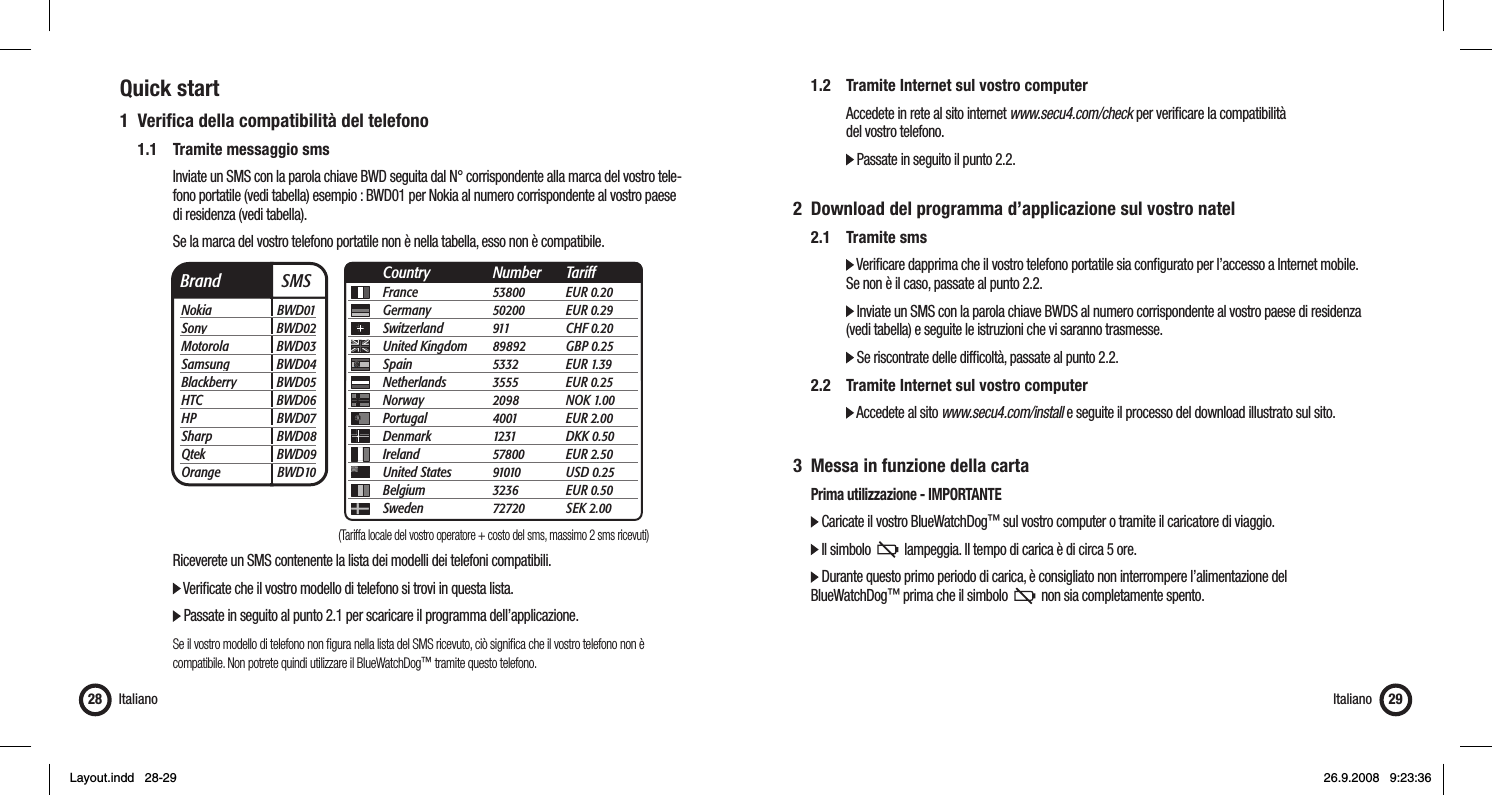
Quick start1 Verifi ca della compatibilità del telefono  1.1  Tramite messaggio sms      Inviate un SMS con la parola chiave BWD seguita dal N° corrispondente alla marca del vostro tele-      fono portatile (vedi tabella) esempio : BWD01 per Nokia al numero corrispondente al vostro paese    di residenza (vedi tabella).       Se la marca del vostro telefono portatile non è nella tabella, esso non è compatibile.          Riceverete un SMS contenente la lista dei modelli dei telefoni compatibili.     Verifi cate che il vostro modello di telefono si trovi in questa lista.        Passate in seguito al punto 2.1 per scaricare il programma dell’applicazione.       Se il vostro modello di telefono non fi gura nella lista del SMS ricevuto, ciò signifi ca che il vostro telefono non è       compatibile. Non potrete quindi utilizzare il BlueWatchDog™ tramite questo telefono.Italiano28  1.2  Tramite Internet sul vostro computer      Accedete in rete al sito internet www.secu4.com/check per verifi care la compatibilità    del vostro telefono.     Passate in seguito il punto 2.2.2  Download del programma d’applicazione sul vostro natel 2.1 Tramite sms     Verifi care dapprima che il vostro telefono portatile sia confi gurato per l’accesso a Internet mobile.       Se non è il caso, passate al punto 2.2.     Inviate un SMS con la parola chiave BWDS al numero corrispondente al vostro paese di residenza        (vedi tabella) e seguite le istruzioni che vi saranno trasmesse.     Se riscontrate delle diffi coltà, passate al punto 2.2.  2.2  Tramite Internet sul vostro computer     Accedete al sito www.secu4.com/install e seguite il processo del download illustrato sul sito.3  Messa in funzione della carta  Prima utilizzazione - IMPORTANTE  Caricate il vostro BlueWatchDog™ sul vostro computer o tramite il caricatore di viaggio.  Il simbolo     lampeggia. Il tempo di carica è di circa 5 ore.   Durante questo primo periodo di carica, è consigliato non interrompere l’alimentazione del  BlueWatchDog™ prima che il simbolo     non sia completamente spento. Italiano 29Brand  SMSNokia BWD01Sony BWD02Motorola BWD03Samsung BWD04Blackberry BWD05HTC BWD06HP BWD07Sharp BWD08Qtek BWD09Orange BWD10France 53800 EUR 0.20Germany 50200 EUR 0.29Switzerland 911  CHF 0.20United Kingdom  89892 GBP 0.25Spain 5332 EUR 1.39Netherlands 3555 EUR 0.25Norway 2098 NOK 1.00Portugal 4001 EUR 2.00Denmark 1231 DKK 0.50Ireland 57800 EUR 2.50United States  91010 USD 0.25Belgium 3236 EUR 0.50Sweden 72720 SEK 2.00Country Number Tariff(Tariffa locale del vostro operatore + costo del sms, massimo 2 sms ricevuti)Layout.indd   28-29Layout.indd   28-29 26.9.2008   9:23:3626.9.2008   9:23:36
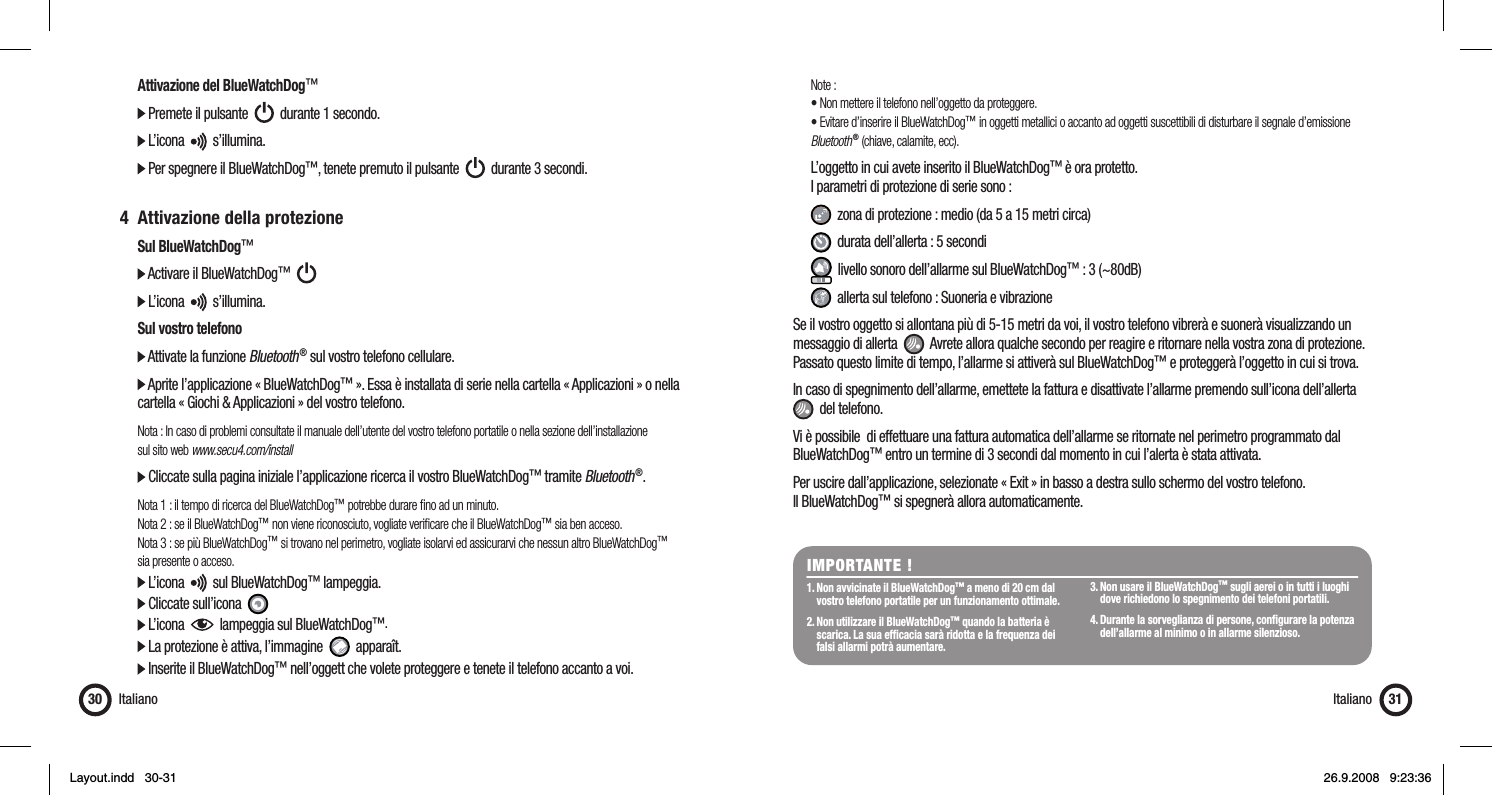
  Attivazione del BlueWatchDog™  Premete il pulsante     durante 1 secondo.   L’icona     s’illumina.  Per spegnere il BlueWatchDog™, tenete premuto il pulsante     durante 3 secondi. 4  Attivazione della protezione Sul BlueWatchDog™  Activare il BlueWatchDog™        L’icona     s’illumina.  Sul vostro telefono  Attivate la funzione Bluetooth ® sul vostro telefono cellulare.  Aprite l’applicazione « BlueWatchDog™ ». Essa è installata di serie nella cartella « Applicazioni » o nella    cartella « Giochi & Applicazioni » del vostro telefono.  Nota : In caso di problemi consultate il manuale dell’utente del vostro telefono portatile o nella sezione dell’installazione   sul sito web www.secu4.com/install  Cliccate sulla pagina iniziale l’applicazione ricerca il vostro BlueWatchDog™ tramite Bluetooth ®. Nota 1 : il tempo di ricerca del BlueWatchDog™ potrebbe durare fi no ad un minuto.   Nota 2 : se il BlueWatchDog™ non viene riconosciuto, vogliate verifi care che il BlueWatchDog™ sia ben acceso.  Nota 3 : se più BlueWatchDog™ si trovano nel perimetro, vogliate isolarvi ed assicurarvi che nessun altro BlueWatchDog™   sia presente o acceso.  L’icona     sul BlueWatchDog™ lampeggia.   Cliccate sull’icona    L’icona     lampeggia sul BlueWatchDog™.   La protezione è attiva, l’immagine     apparaît.  Inserite il BlueWatchDog™ nell’oggett che volete proteggere e tenete il telefono accanto a voi.Italiano30 Note :  • Non mettere il telefono nell’oggetto da proteggere.  • Evitare d’inserire il BlueWatchDog™ in oggetti metallici o accanto ad oggetti suscettibili di disturbare il segnale d’emissione   Bluetooth ® (chiave, calamite, ecc).   L’oggetto in cui avete inserito il BlueWatchDog™ è ora protetto.  I parametri di protezione di serie sono :    zona di protezione : medio (da 5 a 15 metri circa)   durata dell’allerta : 5 secondi   livello sonoro dell’allarme sul BlueWatchDog™ : 3 (~80dB)   allerta sul telefono : Suoneria e vibrazioneSe il vostro oggetto si allontana più di 5-15 metri da voi, il vostro telefono vibrerà e suonerà visualizzando un messaggio di allerta     Avrete allora qualche secondo per reagire e ritornare nella vostra zona di protezione. Passato questo limite di tempo, l’allarme si attiverà sul BlueWatchDog™ e proteggerà l’oggetto in cui si trova. In caso di spegnimento dell’allarme, emettete la fattura e disattivate l’allarme premendo sull’icona dell’allerta    del telefono.Vi è possibile  di effettuare una fattura automatica dell’allarme se ritornate nel perimetro programmato dal BlueWatchDog™ entro un termine di 3 secondi dal momento in cui l’alerta è stata attivata.Per uscire dall’applicazione, selezionate « Exit » in basso a destra sullo schermo del vostro telefono. Il BlueWatchDog™ si spegnerà allora automaticamente.IMPORTANTE !1. Non avvicinate il BlueWatchDog™ a meno di 20 cm dal    vostro telefono portatile per un funzionamento ottimale.2. Non utilizzare il BlueWatchDog™ quando la batteria è    scarica. La sua effi cacia sarà ridotta e la frequenza dei    falsi allarmi potrà aumentare.  3. Non usare il BlueWatchDog™ sugli aerei o in tutti i luoghi    dove richiedono lo spegnimento dei telefoni portatili. 4. Durante la sorveglianza di persone, confi gurare la potenza    dell’allarme al minimo o in allarme silenzioso.Italiano 31Layout.indd   30-31Layout.indd   30-31 26.9.2008   9:23:3626.9.2008   9:23:36
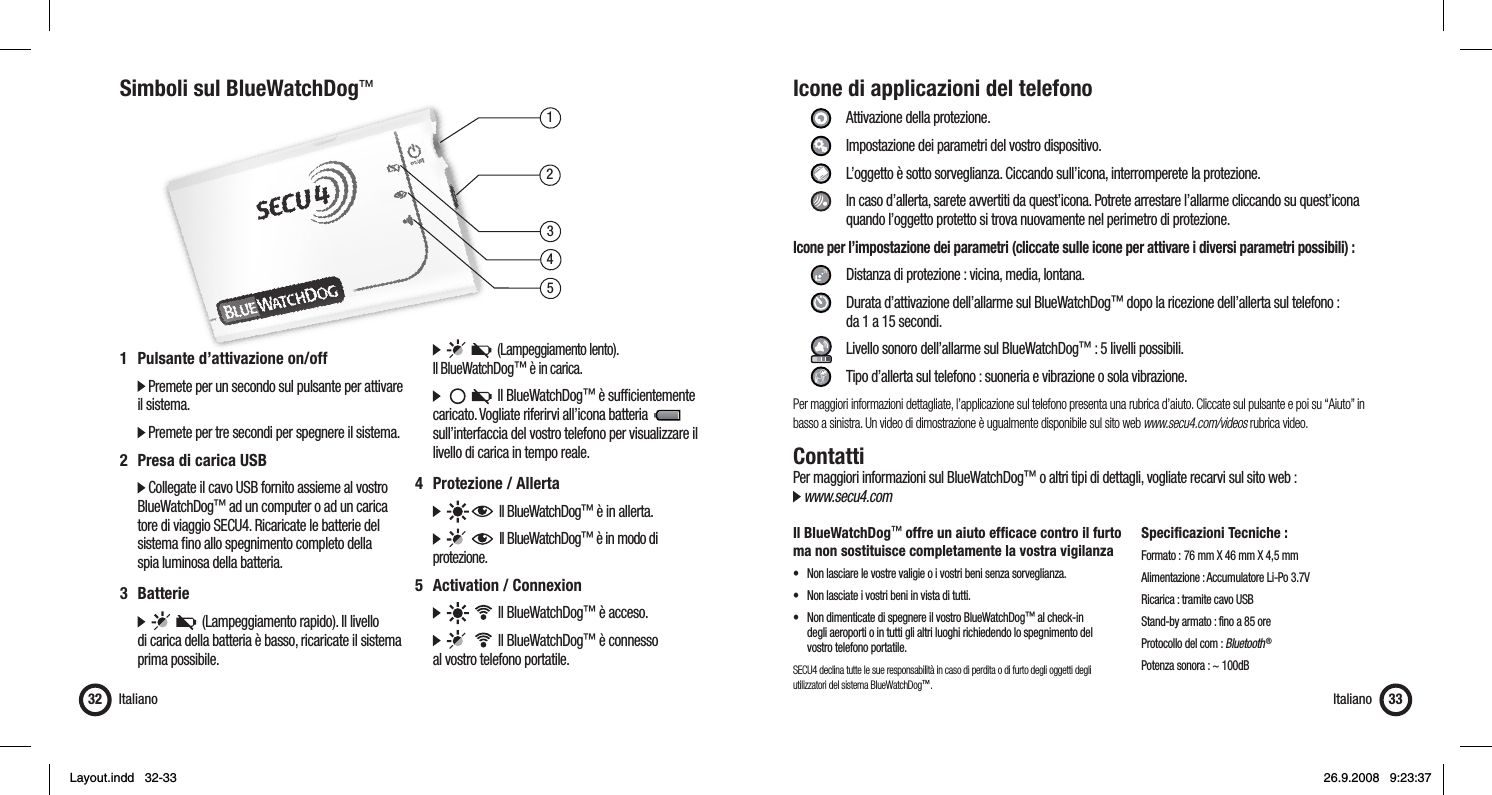
13452Simboli sul BlueWatchDog™Italiano321  Pulsante d’attivazione on/off   Premete per un secondo sul pulsante per attivare il sistema.  Premete per tre secondi per spegnere il sistema.2  Presa di carica USB  Collegate il cavo USB fornito assieme al vostro  BlueWatchDog™ ad un computer o ad un carica   tore di viaggio SECU4. Ricaricate le batterie del    sistema fi no allo spegnimento completo della    spia luminosa della batteria.3 Batterie            (Lampeggiamento rapido). Il livello    di carica della batteria è basso, ricaricate il sistema   prima possibile.         (Lampeggiamento lento).  Il BlueWatchDog™ è in carica.          Il BlueWatchDog™ è suffi cientemente    caricato. Vogliate riferirvi all’icona batteria            sull’interfaccia del vostro telefono per visualizzare il    livello di carica in tempo reale.4 Protezione / Allerta        Il BlueWatchDog™ è in allerta.         Il BlueWatchDog™ è in modo di   protezione.5  Activation / Connexion          Il BlueWatchDog™ è acceso.          Il BlueWatchDog™ è connesso   al vostro telefono portatile.Icone di applicazioni del telefono     Attivazione della protezione.   Impostazione dei parametri del vostro dispositivo.    L’oggetto è sotto sorveglianza. Ciccando sull’icona, interromperete la protezione.    In caso d’allerta, sarete avvertiti da quest’icona. Potrete arrestare l’allarme cliccando su quest’icona        quando l’oggetto protetto si trova nuovamente nel perimetro di protezione.Icone per l’impostazione dei parametri (cliccate sulle icone per attivare i diversi parametri possibili) :      Distanza di protezione : vicina, media, lontana.     Durata d’attivazione dell’allarme sul BlueWatchDog™ dopo la ricezione dell’allerta sul telefono :       da 1 a 15 secondi.     Livello sonoro dell’allarme sul BlueWatchDog™ : 5 livelli possibili.    Tipo d’allerta sul telefono : suoneria e vibrazione o sola vibrazione.Per maggiori informazioni dettagliate, l’applicazione sul telefono presenta una rubrica d’aiuto. Cliccate sul pulsante e poi su “Aiuto” in basso a sinistra. Un video di dimostrazione è ugualmente disponibile sul sito web www.secu4.com/videos rubrica video.ContattiPer maggiori informazioni sul BlueWatchDog™ o altri tipi di dettagli, vogliate recarvi sul sito web : www.secu4.comIl BlueWatchDog™ offre un aiuto effi cace contro il furto ma non sostituisce completamente la vostra vigilanza•  Non lasciare le vostre valigie o i vostri beni senza sorveglianza.•  Non lasciate i vostri beni in vista di tutti.•  Non dimenticate di spegnere il vostro BlueWatchDog™ al check-in   degli aeroporti o in tutti gli altri luoghi richiedendo lo spegnimento del   vostro telefono portatile.SECU4 declina tutte le sue responsabilità in caso di perdita o di furto degli oggetti degli utilizzatori del sistema BlueWatchDog™.Specificazioni Tecniche :Formato :  76 mm X 46 mm X 4,5 mmAlimentazione : Accumulatore Li-Po 3.7VRicarica : tramite cavo USBStand-by armato : fino a 85 oreProtocollo del com : Bluetooth ®Potenza sonora : ~ 100dBItaliano 33Layout.indd   32-33Layout.indd   32-33 26.9.2008   9:23:3726.9.2008   9:23:37
GarantiaAMPLITUD DE LA GARANTÍASecu4, bajo disposiciones legales y de conformidad con la presente garantía se limita a lo siguiente: Secu4 garantiza el presente producto contra defec-tos de fabricación, en condiciones de uso normales, por un período de UN (1) AÑO a partir de la fecha de compra. Si apareciera un defecto en el producto durante el  Período de Garantía y mientras el reclamo sea valido, Secu4, dependiendo del problema,  intercambiará el producto por un nuevo producto o un nuevo accesorio, dependiendo del defecto. Al intercambiar productos o accesorios, los productos o accesorios también intercambian propietarios, es decir, entre usted y de Secu4. La garantía del producto intercambiado no podrá sobrepasar la garantía inicial de la compra.EXCLUSIONES Y LIMITACIONES La presente garantía limitada se aplica solamente a los productos materiales fabricados por parte de Secu4 identifi cados con la marca, el nombre comercial o el logotipo Secu4. Los programas informáticos distribuidos por Secu4, sin o bajo el nombre comercial Secu4, no están cubiertos por la pre-sente garantía limitada. Le rogamos dirigirse al contrato de licencia, que acompaña el programa, para ver los detalles de sus derechos como usuario.Secu4 no garantiza que el funcionamiento del producto estará ininterrumpido o sin error. Secu4 no es responsable de los daños causados por el incumplimiento de instrucciones en la utilización del producto. La presente garantía no se aplica: (A) a todo daño causado por el uso con productos que no sean Secu4 (B) a todo daño causado por accidente, abuso, inundación, incendio, terremoto o de otras causas externas; (C) a todo daño causado por el funcionamiento del producto fuera de los estándares permi-tidos o previstos descritos por Secu4; (D) a todo  daño causado por intervenciones de personas que no sean representantes de Secu4; (E) a un producto o una parte del producto que se haya modifi cado sin la autorización escrita de Secu4, que altere signifi cativamente la funcionalidad o capacidad del producto; (F) a los productos o accesorios consumibles, como las baterías, salvo si el daño se debe a un problema de fabricación; o (G) cuando el número de serie Secu4 haya sido retirado y vuelto ilegibleSEGÚN EL MARCO LEGAL, LA PRESENTE GARANTÍA Y LOS RECURSOS PRESENTADOS ANTERIORMENTE SON EXCLUSIVOS Y SE SUPERPONEN ANTE CUALQUIER OTRO TIPO DE TRATO ESCRITO, VERBAL O CUALQUIER OTRO SOBRENTENDIDO. DENTRO DE LOS PARAMETROS LEGALES, SECU4 EXCLUYE DE IGUAL MANERA EXPRESAMENTE CUALQUIER OTRO TIPO DE GARANTÍAS, EN PARTICULAR, LAS GARANTÍAS DE COMERCIALIZACIÓN, DE ADECUACIÓN A UN USO PARTICULAR O DE DEFECTOS OCULTOS O VISIBLES. EN CASO DE QUE SECU4 NO ESTE AUTORIZADO A RECHAZAR ALGUNA GARANTIA, DENTRO DE LOS PARAMETROS LEGALES, ENTONCES DICHAS GARANTÍAS SE LIMITARÁN A LO ESTABLECIDO POR LA LEY, A LA DURACIÓN DE LA GARANTÍA Y AL SERVICIO DE PRESTACIÓN, REPARACIÓN O SUSTITUCIÓN, TAL COMO DETERMINE Y ESTABLESCA SECU4. Ningún minorista, personal o trabajador de Secu4 esta autorizado a modifi car o prorrogar el tiempo de la presente garantía. A EXCEPCIÓN DE LO QUE ESTÉ PREVISTO EN LA  PRESENTE GARANTIA Y EN LA MEDIDA QUE LO PERMITA  LA LEY, SECU4 NO ES RESPONSABLE DE NINGUN DAÑO DIRECTO, ESPECÍFICO O INDIRECTO RESULTADO DE ALGUNA: PÉRDIDA DEL PRODUCTO, PÉRDIDA DE INGRESO, PÉRDIDA DE BENEFICIOS (INCLUIDA LAS PÉRDIDAS DE BENEFICIOS LIGADAS A CONTRATOS), PÉRDIDA DE DISPONIBILIDAD FINANCIERA, PÉRDIDA DE AHORROS PREVISTOS, PÉRDIDA DE OPORTUNIDADES, PÉRDIDA DE CLIENTELA, PÉRDIDA DE REPUTACIÓN, ES DECIR TODA PÉRDIDA O DAÑO INDIRECTO O CONSECUENTE, CUALQUIERA QUE SEA, INCLUIDA LA SUSTITUCIÓN DEL EQUIPO O DE LOS ACCESORIOS. LA PRESENTE LIMITACIÓN NO SE APLICA A RECLAMOS EN CASO DE MUERTE O HERIDA. OBTENCIÓN DE UN SERVICIO DE GARANTÍA Antes de solicitar el servicio de garantía, le rogamos ingresar y examinar la asistencia en línea contemplados en la documentación adjunta del  producto. Si el problema persistiera después de haber utilizado estos recursos, le rogamos contactarse con los representantes SECU4 o en todo caso con un prestador de servicios autorizado SECU4, cuyos datos podrá encontrar en la documentación  proporcionada. Un representante SECU4 o un prestador de servicios autorizado SECU4 lo ayudará a determinar si su producto requiere un servicio, y si ese fuera el caso, le informará de tal manera que SECU4 le prestará el servicio. En la medida en que lo permita la ley, SECU4 o sus prestadores de servicios autorizados le prestarán un servicio de garantía sobre los productos que requieran atención. Usted será responsable de los gastos de transporte si el producto no puede benefi ciarse del servicio en el país en el que se encuentre. De acuerdo con la legislación, SECU4 podrá solicitarle proporcionar una prueba de su compra y/o respetar trámites de registro antes de recibir un servicio de garantíaEspañol34 Español 35ÍndiceGarantía .............................................................................................34Introducción .......................................................................................35Información de seguridad ..................................................................35Inicio rápido ....................................................................................... 36Símbolos del BlueWatchDog™ ...........................................................40Iconos de la aplicación del teléfono ....................................................41Contacto ............................................................................................ 41EspañolIntroducciónEl BlueWatchDog™ es un sistema de alarma móvil que permite la protección de sus objetos de valor (monedero, maleta, ordenador, etc.)El BlueWatchDog™ funciona mediante una aplicación instalada sobre su teléfono movil equipado de la función Bluetooth ®. Información de seguridad  El nivel sonoro máximo de la alarma es próximo a 100db. No sitúe nunca el BlueWatchDog™cerca de su    oreja porque podría ocasionar daños irreversibles en su oído.  Al utilizar el BlueWatchDog™ es importante prestar atención a la reglamentación local, por ejemplo aviones  u hospitales.  No abra bajo ningún motivo la caja del BlueWatchDog™. Las baterías podrían causar daños a su salud.  No permita que los niños manipulen el BlueWatchDog™ sin su autorización.Layout.indd   34-35Layout.indd   34-35 26.9.2008   9:23:3726.9.2008   9:23:37
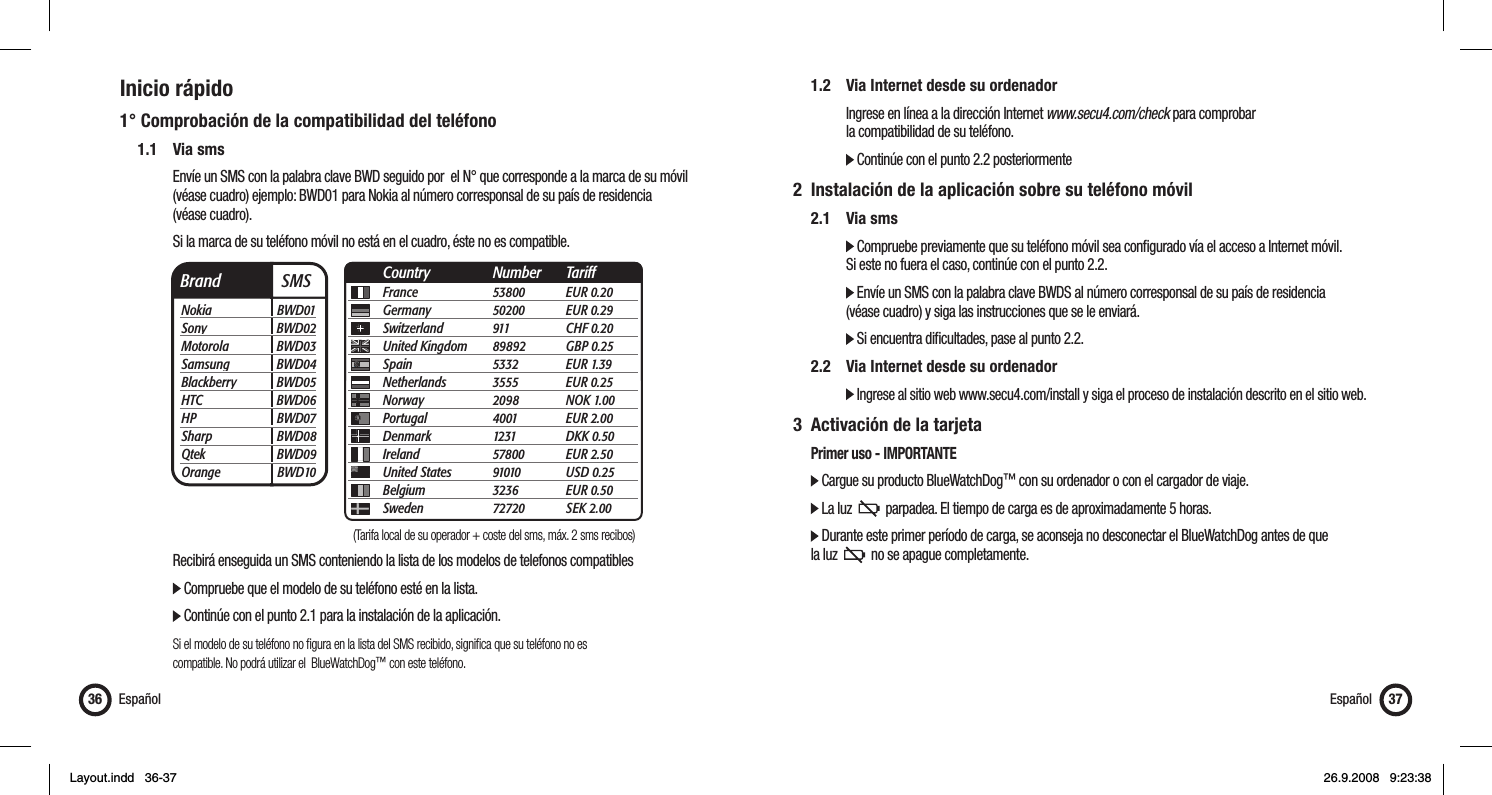
Inicio rápido1° Comprobación de la compatibilidad del teléfono 1.1 Via sms      Envíe un SMS con la palabra clave BWD seguido por  el N° que corresponde a la marca de su móvil        (véase cuadro) ejemplo: BWD01 para Nokia al número corresponsal de su país de residencia    (véase cuadro).       Si la marca de su teléfono móvil no está en el cuadro, éste no es compatible.         Recibirá enseguida un SMS conteniendo la lista de los modelos de telefonos compatibles      Compruebe que el modelo de su teléfono esté en la lista.        Continúe con el punto 2.1 para la instalación de la aplicación.    Si el modelo de su teléfono no fi gura en la lista del SMS recibido, signifi ca que su teléfono no es          compatible. No podrá utilizar el  BlueWatchDog™ con este teléfono.Español36  1.2  Via Internet desde su ordenador       Ingrese en línea a la dirección Internet www.secu4.com/check para comprobar       la compatibilidad de su teléfono.     Continúe con el punto 2.2 posteriormente2  Instalación de la aplicación sobre su teléfono móvil 2.1 Via sms     Compruebe previamente que su teléfono móvil sea confi gurado vía el acceso a Internet móvil.       Si este no fuera el caso, continúe con el punto 2.2.     Envíe un SMS con la palabra clave BWDS al número corresponsal de su país de residencia       (véase cuadro) y siga las instrucciones que se le enviará.     Si encuentra difi cultades, pase al punto 2.2.  2.2  Via Internet desde su ordenador     Ingrese al sitio web www.secu4.com/install y siga el proceso de instalación descrito en el sitio web.3  Activación de la tarjeta   Primer uso - IMPORTANTE  Cargue su producto BlueWatchDog™ con su ordenador o con el cargador de viaje.    La luz     parpadea. El tiempo de carga es de aproximadamente 5 horas.    Durante este primer período de carga, se aconseja no desconectar el BlueWatchDog antes de que   la luz     no se apague completamente. Español 37Brand  SMSNokia BWD01Sony BWD02Motorola BWD03Samsung BWD04Blackberry BWD05HTC BWD06HP BWD07Sharp BWD08Qtek BWD09Orange BWD10France 53800 EUR 0.20Germany 50200 EUR 0.29Switzerland 911  CHF 0.20United Kingdom  89892 GBP 0.25Spain 5332 EUR 1.39Netherlands 3555 EUR 0.25Norway 2098 NOK 1.00Portugal 4001 EUR 2.00Denmark 1231 DKK 0.50Ireland 57800 EUR 2.50United States  91010 USD 0.25Belgium 3236 EUR 0.50Sweden 72720 SEK 2.00Country Number Tariff(Tarifa local de su operador + coste del sms, máx. 2 sms recibos)Layout.indd   36-37Layout.indd   36-37 26.9.2008   9:23:3826.9.2008   9:23:38
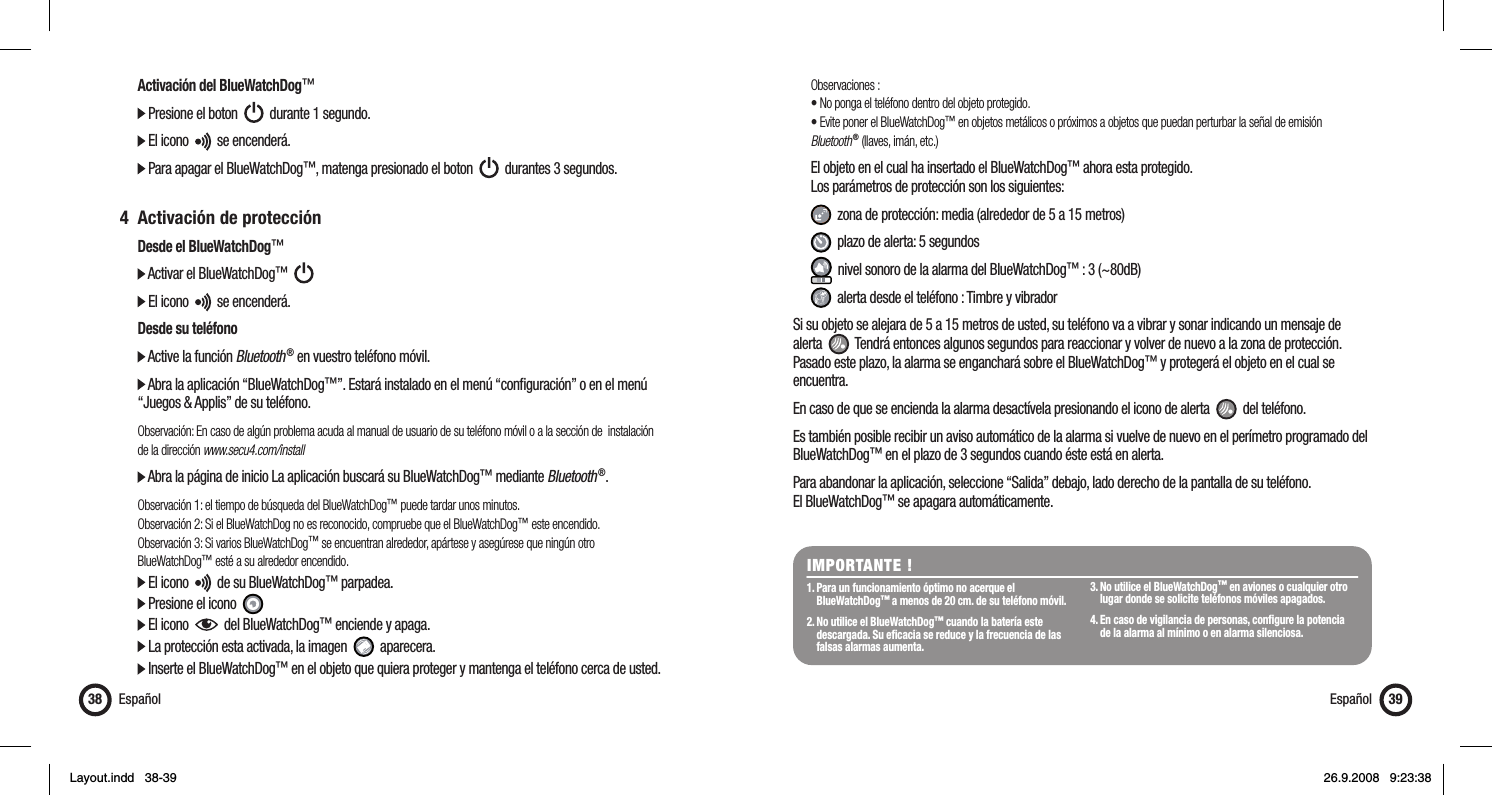
  Activación del BlueWatchDog™  Presione el boton     durante 1 segundo.  El icono     se encenderá.  Para apagar el BlueWatchDog™, matenga presionado el boton     durantes 3 segundos. 4  Activación de protección  Desde el BlueWatchDog™  Activar el BlueWatchDog™        El icono     se encenderá.  Desde su teléfono  Active la función Bluetooth ® en vuestro teléfono móvil.  Abra la aplicación “BlueWatchDog™”. Estará instalado en el menú “confi guración” o en el menú   “Juegos & Applis” de su teléfono.  Observación: En caso de algún problema acuda al manual de usuario de su teléfono móvil o a la sección de  instalación   de la dirección www.secu4.com/install  Abra la página de inicio La aplicación buscará su BlueWatchDog™ mediante Bluetooth ®. Observación 1: el tiempo de búsqueda del BlueWatchDog™ puede tardar unos minutos.  Observación 2: Si el BlueWatchDog no es reconocido, compruebe que el BlueWatchDog™ este encendido.   Observación 3: Si varios BlueWatchDog™ se encuentran alrededor, apártese y asegúrese que ningún otro  BlueWatchDog™ esté a su alrededor encendido.    El icono     de su BlueWatchDog™ parpadea.   Presione el icono    El icono     del BlueWatchDog™ enciende y apaga.   La protección esta activada, la imagen     aparecera.  Inserte el BlueWatchDog™ en el objeto que quiera proteger y mantenga el teléfono cerca de usted.Español38 Observaciones :  • No ponga el teléfono dentro del objeto protegido.  • Evite poner el BlueWatchDog™ en objetos metálicos o próximos a objetos que puedan perturbar la señal de emisión  Bluetooth ® (llaves, imán, etc.)  El objeto en el cual ha insertado el BlueWatchDog™ ahora esta protegido.   Los parámetros de protección son los siguientes:   zona de protección: media (alrededor de 5 a 15 metros)   plazo de alerta: 5 segundos   nivel sonoro de la alarma del BlueWatchDog™ : 3 (~80dB)   alerta desde el teléfono : Timbre y vibradorSi su objeto se alejara de 5 a 15 metros de usted, su teléfono va a vibrar y sonar indicando un mensaje de alerta     Tendrá entonces algunos segundos para reaccionar y volver de nuevo a la zona de protección. Pasado este plazo, la alarma se enganchará sobre el BlueWatchDog™ y protegerá el objeto en el cual se encuentra. En caso de que se encienda la alarma desactívela presionando el icono de alerta     del teléfono. Es también posible recibir un aviso automático de la alarma si vuelve de nuevo en el perímetro programado del BlueWatchDog™ en el plazo de 3 segundos cuando éste está en alerta. Para abandonar la aplicación, seleccione “Salida” debajo, lado derecho de la pantalla de su teléfono. El BlueWatchDog™ se apagara automáticamente.IMPORTANTE !1. Para un funcionamiento óptimo no acerque el  BlueWatchDog™ a menos de 20 cm. de su teléfono móvil.2. No utilice el BlueWatchDog™ cuando la batería este    descargada. Su efi cacia se reduce y la frecuencia de las    falsas alarmas aumenta.3. No utilice el BlueWatchDog™ en aviones o cualquier otro    lugar donde se solicite teléfonos móviles apagados.4. En caso de vigilancia de personas, confi gure la potencia    de la alarma al mínimo o en alarma silenciosa.Español 39Layout.indd   38-39Layout.indd   38-39 26.9.2008   9:23:3826.9.2008   9:23:38
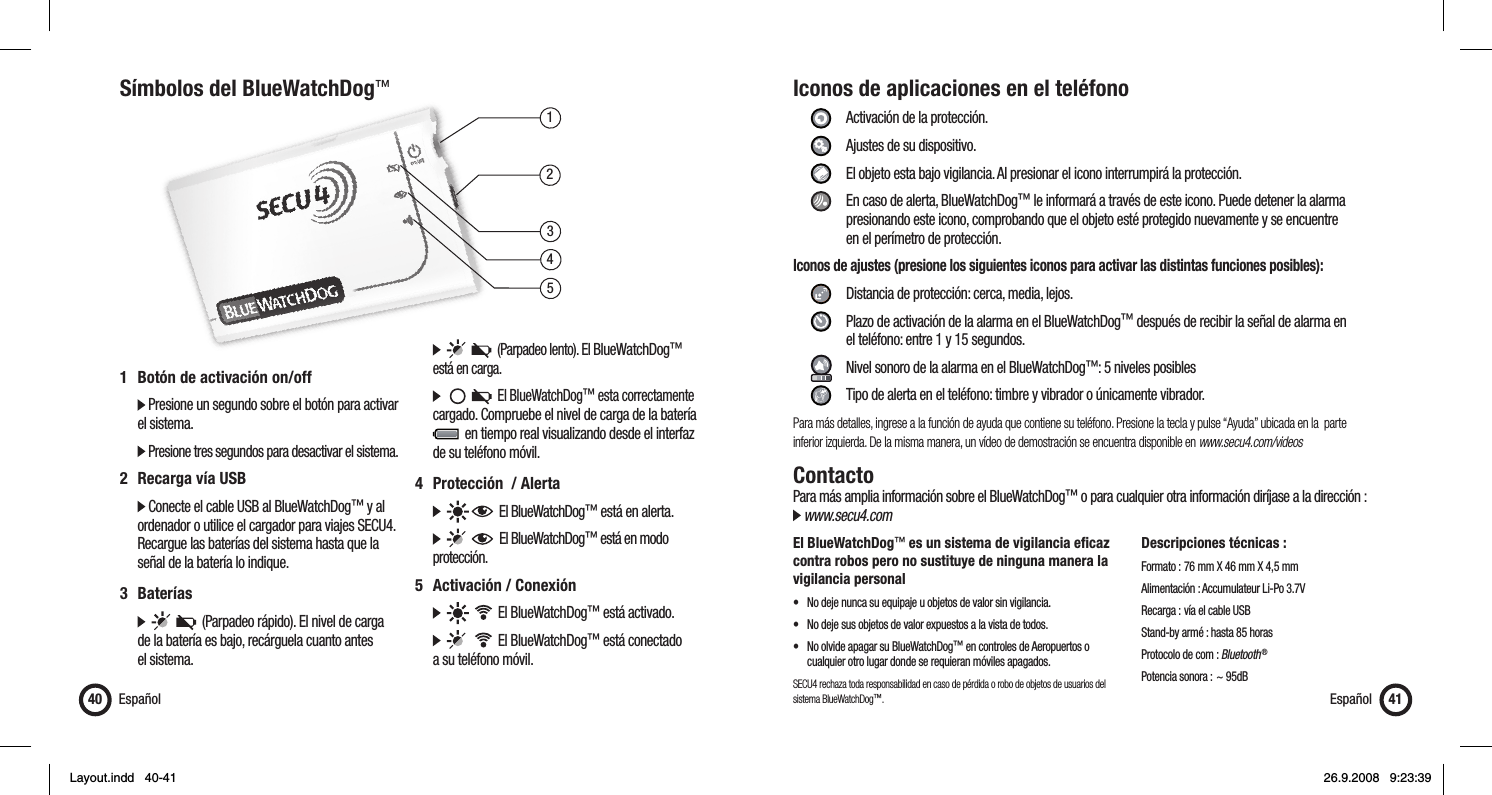
13452Símbolos del BlueWatchDog™Español401  Botón de activación on/off   Presione un segundo sobre el botón para activar   el sistema.   Presione tres segundos para desactivar el sistema.2  Recarga vía USB  Conecte el cable USB al BlueWatchDog™ y al    ordenador o utilice el cargador para viajes SECU4.    Recargue las baterías del sistema hasta que la    señal de la batería lo indique.3 Baterías            (Parpadeo rápido). El nivel de carga   de la batería es bajo, recárguela cuanto antes   el sistema.         (Parpadeo lento). El BlueWatchDog™    está en carga.           El BlueWatchDog™ esta correctamente   cargado. Compruebe el nivel de carga de la batería       en tiempo real visualizando desde el interfaz    de su teléfono móvil.4  Protección  / Alerta        El BlueWatchDog™ está en alerta.         El BlueWatchDog™ está en modo   protección.5  Activación / Conexión          El BlueWatchDog™ está activado.          El BlueWatchDog™ está conectado   a su teléfono móvil.Iconos de aplicaciones en el teléfono     Activación de la protección.   Ajustes de su dispositivo.    El objeto esta bajo vigilancia. Al presionar el icono interrumpirá la protección.    En caso de alerta, BlueWatchDog™ le informará a través de este icono. Puede detener la alarma        presionando este icono, comprobando que el objeto esté protegido nuevamente y se encuentre       en el perímetro de protección.Iconos de ajustes (presione los siguientes iconos para activar las distintas funciones posibles):      Distancia de protección: cerca, media, lejos.     Plazo de activación de la alarma en el BlueWatchDog™ después de recibir la señal de alarma en       el teléfono: entre 1 y 15 segundos.     Nivel sonoro de la alarma en el BlueWatchDog™: 5 niveles posibles     Tipo de alerta en el teléfono: timbre y vibrador o únicamente vibrador.Para más detalles, ingrese a la función de ayuda que contiene su teléfono. Presione la tecla y pulse “Ayuda” ubicada en la  parte inferior izquierda. De la misma manera, un vídeo de demostración se encuentra disponible en www.secu4.com/videosContactoPara más amplia información sobre el BlueWatchDog™ o para cualquier otra información diríjase a la dirección : www.secu4.comEl BlueWatchDog™ es un sistema de vigilancia efi caz contra robos pero no sustituye de ninguna manera la vigilancia personal•  No deje nunca su equipaje u objetos de valor sin vigilancia.•  No deje sus objetos de valor expuestos a la vista de todos.•  No olvide apagar su BlueWatchDog™ en controles de Aeropuertos o     cualquier otro lugar donde se requieran móviles apagados.SECU4 rechaza toda responsabilidad en caso de pérdida o robo de objetos de usuarios del sistema BlueWatchDog™.Descripciones técnicas :Formato :  76 mm X 46 mm X 4,5 mmAlimentación : Accumulateur Li-Po 3.7VRecarga : vía el cable USBStand-by armé : hasta 85 horasProtocolo de com : Bluetooth ®Potencia sonora : ~ 95dBEspañol 41Layout.indd   40-41Layout.indd   40-41 26.9.2008   9:23:3926.9.2008   9:23:39
 15.21 changes or modifications not expressly approved by the party responsible for compliance could void the user’s authority to operate the equipment. 15.105 NOTE: This equipment has been tested and found to comply with the limits for a Class B digital device, pursuant to Part 15 of the FCC Rules. These limits are designed to provide reasonable protection against harmful interference in a residential installation. This equipment generates, uses and can radiate radio frequency energy and, if not installed and used in accordance with the instructions, may cause harmful interference to radio communications. However, there is no guarantee that interference will not occur in a particular installation. If this equipment does cause harmful interference to radio or television reception,   which can be determined by turning the equipment off and on, the user is encouraged to try to correct the interference by one or more of the following measures: -- Reorient or relocate the receiving antenna. -- Increase the separation between the equipment and receiver. -- Connect the equipment into an outlet on a circuit different from that to which the receiver is connected. -- Consult the dealer or an experienced radio/TV technician for help.

Navigation menu