Contents
- 1. User Manual 1
- 2. User Manual 2
- 3. User Manual 3
User Manual 3
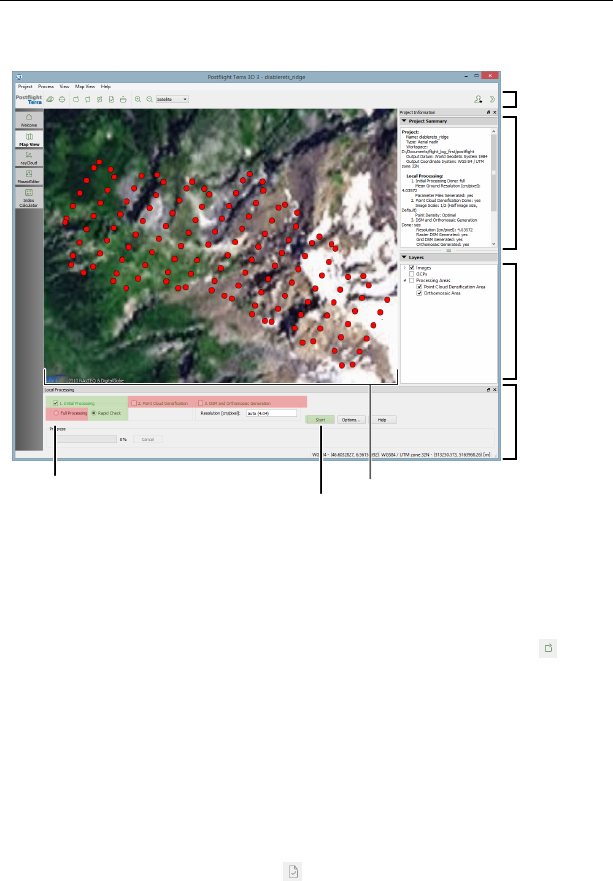
Processing image data
Map Area
Top Toolbar
Project
Summary
Local
Processing
panel
Layers
Step 1: select 1. Initial Processing,
Rapid Check Step 2: click ‘Start’
Automatic Reconstruction Report generation
To create a Quality Report while in the field bring up the local processing panel by
selecting ‘Local processing’ from the ‘Process’ menu or by clicking the icon in
the Toolbar. Select only the ‘Initial project processing’ checkbox and the ‘Rapid’
button. If you wish to create a low-resolution orthomosaic while generating the
report, check the ‘Orthomosaic and DSM generation’ checkbox. Click ‘Start’ to
begin rapid processing.
Postflight Terra 3D will now process the data and produce a report that includes
the overall completeness and georeference quality of the images taken during
your last mission. You may use this information to decide whether further imag-
ing flights are required while you are still in the field. The quality report will be
displayed in a new window (click the icon in the Toolbar if it does not appear).
53
Quick start guide
3.3 Creating advanced mapping products
Beyond Quality Reports and low-resolution orthomosaics, Postflight Terra 3D can
generate geo-referenced high-resolution 2D orthomosaics, 3D point clouds, tri-
angle models and DSMs or export to common third-party photogrammetry soft-
ware such as Bingo, Orima or Inpho. Ground Control Points (GCP) can be added to
increase the geo-reference accuracy. Postflight Terra 3D also includes a mosaic and
a rayCloud editor, giving you more control on the quality of your final mapping
products, as well as measurement tools.
The resulting orthomosaic and DSM may then be imported as custom background
map and elevation data layers in eMotion¹⁷. This data can be used for advanced
flight planning in complex or uneven terrain.
Note: You need to either enable tile set generation OR choose Gen-
erate Google Maps Tiles and KML from the Process menu before you
can push the tileset into eMotion by choosing Send Map to eMotion
from the Process menu. Alternatively, this data can be imported into
eMotion; choose Import custom map from eMotion’s File menu.
Note: The best way to learn how to use the various features of Post-
flight Terra 3D is to look at the comprehensive online Knowledge Base
within my.senseFly¹⁸
¹⁷ see the eBee Extended User Manual for more information on importing layers into eMotion
54
Part II
Specifications

Specifications
1 Software requirements
eMotion has the following minimum software requirements:
Operating system Windows XP / Vista / 7 / 8
Hardware 1.6 GHz processor
2 GB RAM
500 MB free storage space
Screen recommended resolution: 1920×1080
visible outdoors
Postflight Terra 3D has the following minimum software requirements:
Operating system Windows XP / Vista / 7 / 8, 64-bit only
Hardware 1.6 GHz processor (2 GHz Intel i5/i7/Xeon recommended)
4 GB RAM (16 GB recommended for large projects)
10 GB free storage space (1 TB recommended for large
projects)
Screen min. resolution: 1024×768
56

Processing image data
2 Drone specifications
Size Wingspan: 96 cm
Wing area: 0.25 m2
Weight without camera and battery approx. 0.41 kg
Nominal take-off weight (approx.) eBee: 0.69 kg (1.52 lbs)
eBee Ag: 0.71 kg (1.56 lbs)
(with standard camera & battery)
Material EPP foam, carbon structure & compos-
ite parts
Battery 3-cell Lithium-Polymer (0.14 kg)
Nominal endurance (flight time)¹⁹ eBee: 50 minutes
eBee Ag: 45 minutes
(with standard camera)
Propulsion Electric brushless motor
Nominal static thrust: 0.63 kgf (6.2 N)
Nominal cruise speed 40-90 km/h (11-25 m/s or 25-56 mph)
Wind resistance up to 45 km/h (12 m/s)
Max. single flight coverage²⁰ eBee: 12 km2(4.6 mi2)
eBee Ag: 10 km2(3.9 mi2)
(on a single battery charge)
¹⁹ can vary greatly depending on external factors such as wind, altitude change and temperature.
²⁰ calculated based on the following test conditions: GSD of 30 cm (11.8 in) per pixel, no wind, mod-
erate air temp. (18 C/64.4 F), new fully-charged battery, flight altitude of 1,000 m (3,280 ft) above
ground & take off at approx. sea level from centre of coverage area.
57

Specifications
Communication devices Ground modem:
•Frequency: 2.4 GHz
•Range²¹: approx. 3 km
•Certification: FCC Part 15.247, IC RSS210, CE
Remote control:
•Frequency: 2.4 GHz
•Range: approx. 1 km
•Certification: CE, FCC
Navigation Up to 50 waypoints
GSD (per pixel) eBee: Down to 1.5 cm (0.6 in)
eBee Ag: Down to 2 cm (0.8 in)
Absolute horizontal eBee (with GCPs): Down to 3 cm (1.2 in)
accuracy eBee (no GCPs): 1 to 5 m (3.3 to 16.4 ft)
eBee Ag (with GCPs): Down to 4 cm (1.6 in)
eBee Ag (no GCPs): 1 to 5 m (3.3 to 16.4 ft)
Absolute vertical eBee (with GCPs): Down to 5 cm (2.0 in)
accuracy eBee (no GCPs): 2 to 5 m (6.6 to 16.4 ft)
eBee Ag (with GCPs): Down to 7 cm (2.8 in)
eBee Ag (no GCPs): 2 to 5 m (6.6 to 16.4 ft)
Relative orthomosaic/ 1-3 times GSD
3D model accuracy
Carry case dimensions 55 x 45 x 25 cm (21.6 x 17.7 x 9.8 in)
²¹ can vary greatly depending on external factors such as cruise altitude, presence of obstacles and
radio-frequency interference.
58

Processing image data
Glossary
AMSL Above Mean Sea Level
Your eBee’s altitude can be shown and set in eMotion using ATO or AMSL.
Your drone uses the EGM96 mean sea level standard for navigation.
ATO Above the Take-off Altitude
Your eBee’s altitude can be shown and set in eMotion using ATO or AMSL.
Altitudes in ATO are relative to the place your eBee started its motor just
before take-off.
DSM Digital Surface Model
A 3D digital representation of a surface.
FTDI Future Technology Devices International
A Scottish semiconductor device company specialising in Universal Serial
Bus (USB) technology. FTDI cables allow serial connections through a USB
cable. eMotion uses FTDI technology to connect to the ground modem.
You can often connect a computer to a GNSS base station using FTDI.
geo-reference A data point associated with a specific location on the earth’s sur-
face.
GSD Ground Sampling Distance
The distance measured on the ground between pixel centres in an image
or DSM. The smaller the GSD, the higher the spatial resolution of the image.
For example, a GSD of 5 cm means that one pixel in the image represents
5 cm on the ground.
mosaic A single map or terrain model created from several map sections that
have been placed side-by-side and merged together.
orthomosaic A single, corrected image constructed either from several images
taken from different angles, or from several orthophotos. Distortions due
59

Specifications
to different camera positions, ground curvature and relief are corrected for
so that the image displays accurately in the given map projection.
photogrammetry A technique in which measurements taken from photographs
are used to reconstruct a 3D surface or a series of points in space.
point cloud A set of data points within a coordinate system.
rayCloud A feature unique to Postflight Terra3D that combines the 3D point cloud
with the original images. Multi ray matching with the rayCloud extends the
stereo view triangulation and increases the accuracy of 3D point estimates
while providing a full understanding of 3D results.
triangle model An approximate representation of a surface, constructed from
connected triangles.
60