SKANNEX AS X500 SkanFlexi User Manual
SKANNEX AS SkanFlexi
User Manual
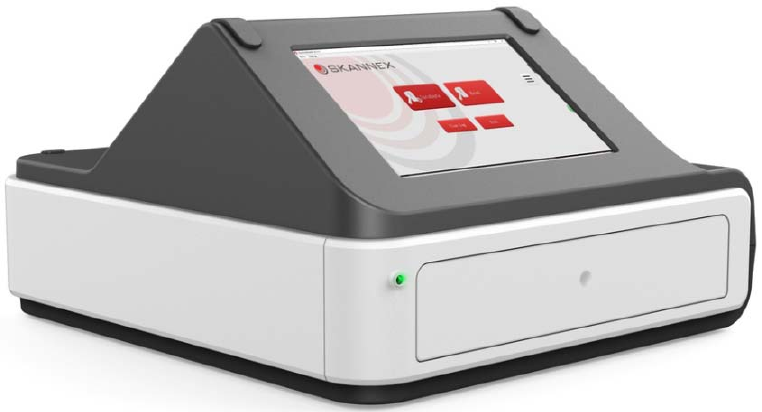
SkanFlexi
LateralFlowMulti‐ReaderManual
ModelX500
Manufacturer:SkannexAS
Registeredmanufactureraddress:
Gaustadalléen21,NO‐0349Oslo,Norway
ContactNumber:(+47)99252274
Email:info@skannex.com
Web:www.skannex.com
Issued:2017

2
Notice
Allrightsreserved.Theinformationcontainedinthisdocumentissubjecttochange
withoutnotice.Reproductionorpublicationofthisdocumentinanyformatisprohibited
withoutthewrittenconsentofSkannexAS.
CopyrightInformation
SkanFlexiLateralFlowMulti‐ReaderManual
Documentversion1.0/November2017
©Copyright2017bySkannexAS
PrintedinNorway
SkannexAS
Gaustadallén21
N‐0349Oslo
Phone:+4799252274
email:info@skannex.com
web:www.skannex.com

3
Tableofcontent
1Generaldescription....................................................................................................................................4
2Readertechnicalparameters................................................................................................................5
2.1MainTechnicalParameters..........................................................................................................5
2.2Calibrationandperformancecharacteristics .......................................................................6
3Intendeduse.................................................................................................................................................6
4UnpackandInstallation ..........................................................................................................................7
4.1Unpack ...................................................................................................................................................7
4.2WorkingEnvironment ....................................................................................................................7
4.3InstallationofSkanFlexi.................................................................................................................8
5OperatingSkanFlexireader...................................................................................................................9
5.1Switchingreaderonandoff .........................................................................................................9
5.2Readingtestdevices .....................................................................................................................10
5.2.1PrintingfromSkanFlexiX500 ...............................................................................................12
5.4SkanFlexiisnotworking.............................................................................................................15
5.4.1Useofresetpin.............................................................................................................................15
6Maintenance..............................................................................................................................................16
6.1Dailycleaning...................................................................................................................................16
7Precautions................................................................................................................................................17
7.1Environmentlight..........................................................................................................................17
7.2Environmentingeneral...............................................................................................................17
8Transportationandstorage ...............................................................................................................17
8.1Transportation................................................................................................................................17
8.2.Storage................................................................................................................................................17

4
1Generalde s c r i p ti o n
SkanFlexiisareaderforanalyzingcolorimetricassaysbycapturingascannedimage.
Oneormultipletestscanbeanalyzedinonerun.Thescanningallowsthedetectionof
qualitativeand/orquantitativeresultdependingonthetestrunand/orsoftware
information.Thedataareautomaticallystoredandcanbeprintedand/orexportedto
externalsystem.
TheIVDequipmentcomplieswiththeemissionandimmunityrequirements
describedinthepartoftheIEC61326series,andtheelectricalandelectronically
safetyrequirementsdescribedinIEC61010.
SkanFlexihasthefollowingadvantages:
ReliableandCompactHardwareDesign
AdoptsRGBimagesfromPlustekOS550plusscannerforhighqualityresults.
Adoptspoweradaptorofprofessionalmanufacturerforsafetyand
adaptability.
Possibilitytoreadmanydifferentcassettes/stripsinonescan.
Possibilitytoreadmanydifferentcassettes/stripsinonescan.
Extractbatchspecificinformationfrombarcodeoneachcassette/strip.
Computequalitativeand/orquantitativeresults.
Friendlyuserinterface.Easytolearn,easytouse.
Storesmorethan75000results.
Software upgrade can be done by connecting the analyzer to Internet or
upgradefromanUSBmemorystick.
Thefollowingsignsareusedinthisdocument.
Riskofelectricshock
Dangerous!Becareful.Referencetherequirementsofthismanual
IVD Invitrodiagnosticdevices
5
2Readertechnicalparameters
Thisanalyzercanbeusedinmedicalinstitutionofanytypeandanylevel.
Thereaderisadedicatedinstrument,alloperationsmustbeaccordingtothe
manual.Ifnot,thereadermaybedamagedortestperformancecannotbe
guaranteed.
Riskofelectricshock.
2.1 MainTechnicalParameters
SpecificationTechnicalParameter
TestingPrinciples Colorimetricmeasurementsoflateralflowtestand
controllines
Operatingsystem Windows10
ExternalPorts
ThreeUSBports,forconnectiontoprinter,external
barcodereaderorUSBmemorystick
OneEthernetport,forconnectiontonetwork(Lanor
Wan).
OneRS232port,forconnectiontohospitalplatform
WiFi Wirelessconnection
PowerSupply 100‐250V(AC)
Frequencyrange 50‐60Hz
Currentrating 5Amp
Operatingconditions Forindooruseonly.Tobeplacedonasuitablebench.
Temperaturerange 15–30°C
RelativeHumidity 20‐80%RH
Storagecapacity Storesmorethan75000setsofresults(15GB)
Dimension 37.8x35.2x22.2cm(LxWxH)
Weight 4,5kg

6
2.2Calibrationandperformancecharacteristics
TheSkanFlexireader’stouchdisplayandthescannerpartarecalibratedandthe
opticalperformancequalitycheckedaspartoftheQCinthemanufacturingprocess.
ThescannerpartisfurtherrecalibratedbytheSWevery2ndweek.
Theperformancecharacteristicsofthereaderhavebeenevaluated.Inastudythe
intravariationandintervariationbetween4SkanFlexireadersshowedCVsbelow
5%.Thecomputedresultswerecalculatedaspropertyvalues;
(test–background)/(control–background).
Standardcurvesorthresholdsforthedifferenttestsareestablishedbythetest
manufacturer.Itisincludedaspartofthebarcodefollowingeachcassetteortemplate
andreadbythereader’sSW.
3Intendeduse
“TheintendeduseoftheSkanFlexireaderistoscan,readandcalculateresultsfrom
lateralflowtestswithinthemarketareasinvitrodiagnostics(IVD),e.g.laterflow
cassettesinMyocardialmarkers,CtnI,Myoglobin,CK‐MB,H‐FABP,etc.,orinfectious
disease,HbsAg,HbsAb,HCV,HP,etc.,orvenerealdisease,TP,Chlamydia,NGH,PSA,
CEA,etc.,drugsofabuse,veterinarydiagnostics,foodandfeedandenvironmentalin
bodyfluidsandotherextractedbiologicalliquids.”
Indicationsforuse:
Itisindicatedforbothquantitativeandqualitativetests.Todetectvariable
biomoleculeswithinhumanbodyfluids,andliquidextractsfromagricultural,animal
andenvironmentalsamples.
TheSkanFlexiproductisenabledbyaprogramkeyallowingcustomerstoupgradethe
proprietarysoftwaredirectlyfromWeboraUSBmemorystick.
Itisindicatedforrapidanalysisonsite.Theuserinterfaceshallbedesignedsuchthata
layusershallbeabletooperatethesysteminsuchawaythaterrorsofoperationand
resultinterpretationareminimizedtoanacceptablelevel.

7
4UnpackandInstallation
4.1Unpack
CarefullyremovetheSkanFlexireaderfromtheshippingbox.Inspectthereaderfor
visiblesignsofdamage.Ifdamagetothereaderexists,pleasefileacomplainttothe
logisticcompanyorretailersassoonaspossible.
Listofcontent:
ItemQuantity
SkanFlexireader 1
CertificateofQuality 1
WarrantyCard 1
SkanFleximanual 1
Powersupply 1
Resetpin 1
Packagelist 1
4.2WorkingEnvironment
Foroperator’ssafetyandtheproperoperationofthereader,thepowercordmustbe
pluggedintoanappropriatelygroundedACelectricaloutlet.Connectinganydualcord
powersurgeprotectorisstrictlyprohibited.
SkanFlexiisaprofessionalinstrument.Openingthecoverwithoutauthorizationis
prohibited.Theinstrumentandinstrumentpartsareonlytobeinspectedand
providedbythemanufacturer.
Operationviolatingthemanual’sdescriptionswillcausetheanalyzerdamaged.
Placethereaderonafirm,leveldesignedworkarea.
Pleaseavoidoperatinginthefollowingenvironment:
Indirectsunlight
Nearflammableandexplosivegas
Nexttoanopeningwindow
Nexttoheatingorrefrigerationequipment
8
Nearstronglightsource
4.3InstallationofSkanFlexi
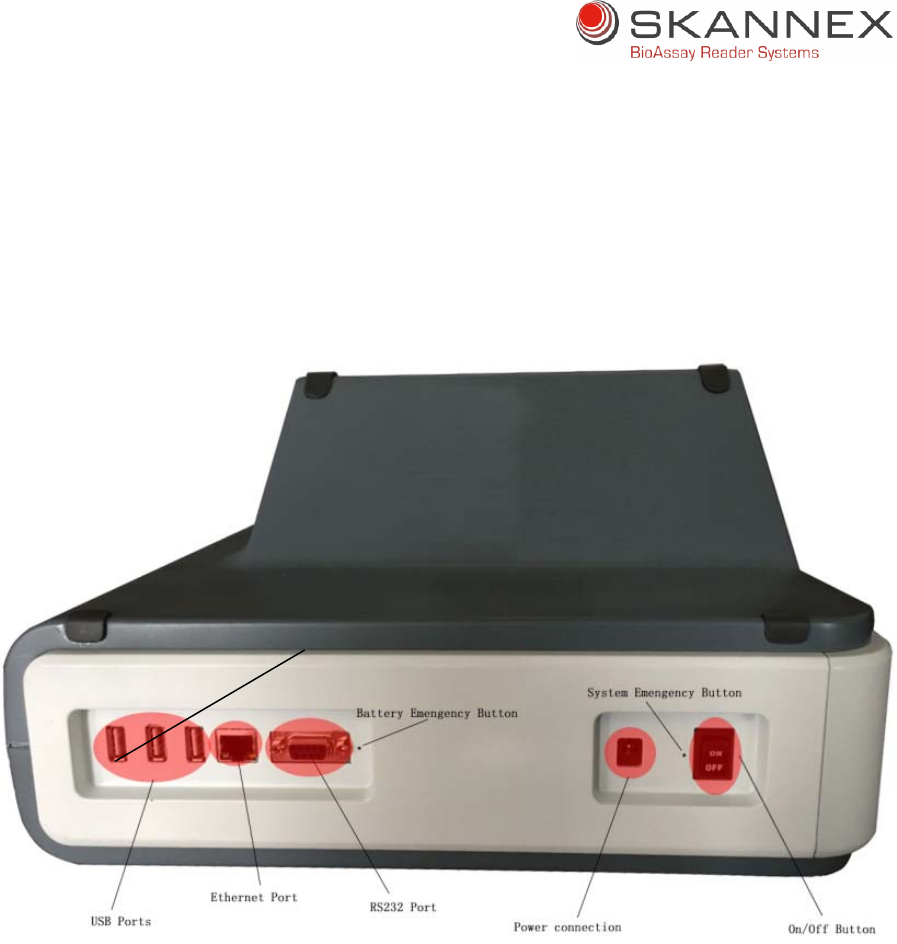
AtthebackofthereadertherearethreeUSBports,oneEthernetport,oneRS232port,
oneon/offbuttonandpowersupplyconnection.
ConnectpowersupplytoSkanFlexi
Connectpowersupplytoelectricalsocket
9
5OperatingSkanFlexireader
5.1Switchingreaderonandoff
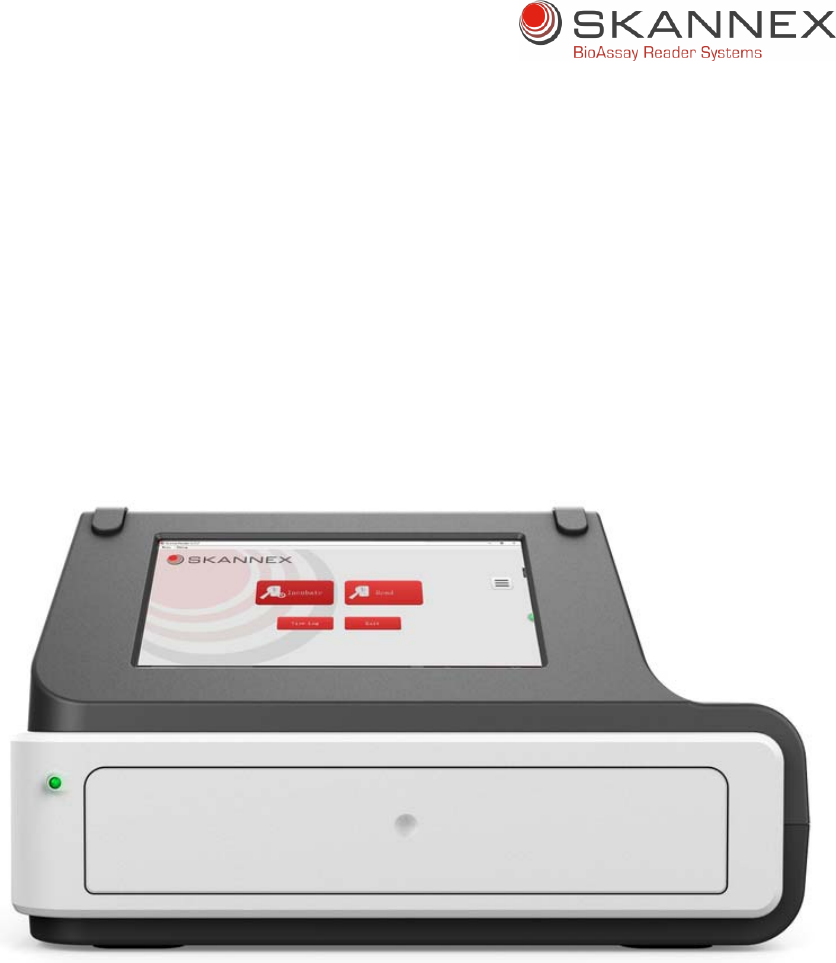
Switchonreaderbysettingon/offbutton(attherearofthereader)toposition
“On”
Computerwillbeswitchedonandpowerindicatedled(atfrontleftcornerofthe
reader)becomesgreenandisflashinguntilreaderprogramstarts.
SkanFlexiisreadyforuse
Whenswitchingoffthereaderpress“Exit”buttoninthereaderprogram
Poweroffreaderbysettingtheon/offbuttontoposition”Off”.Thepower
indicationledwillswitchoff.
Warning:AfterSkanFlexiisswitchedoffbyeitherpressingexitbuttoninSkanFlexi
softwareorswitchingtheon/offbuttontooff,thenwaitatleast10secondsbefore
switchingtheon/offbuttonon.
IftheSkanFlexiisnotstartingpleasefollowprocedureinCh.5.4
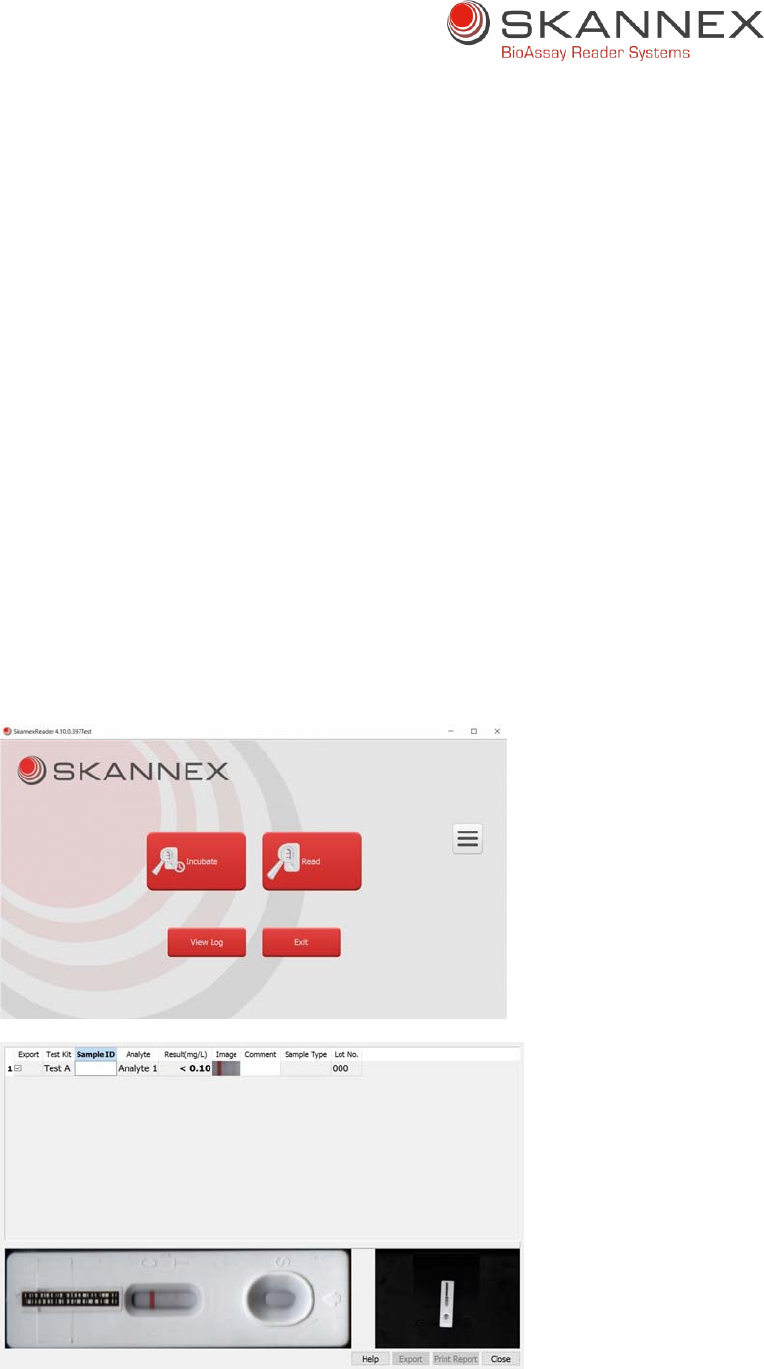
10
5.2Readingtestdevices
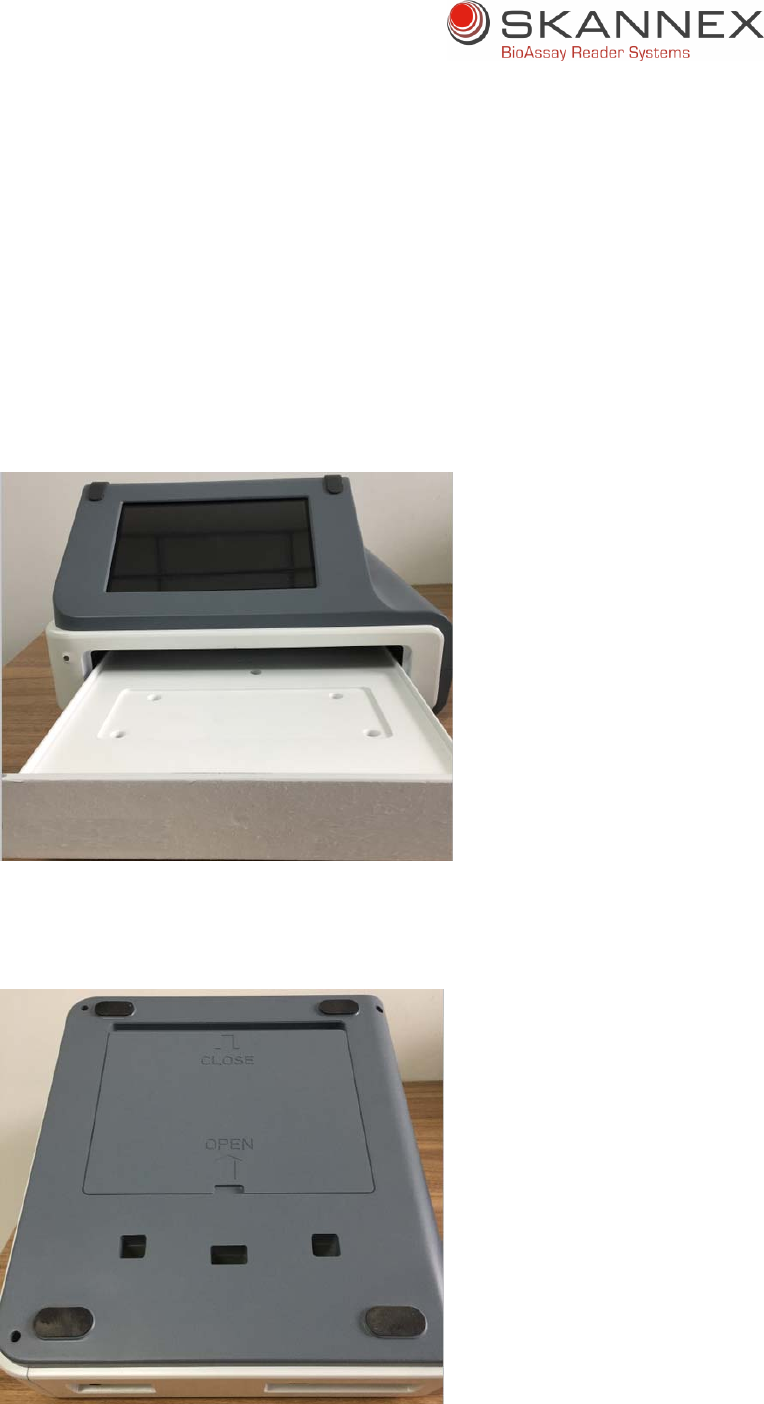
1. Pushandopenthedrawer
2. Placethetestdevicerightsideuponthescannersurface
3. Ensurethattestandcontrollinesareplacedinthescanner’smovementdirection.
4. Incubationcanbeperformedbeforeorafterplacingthetestdeviceintothe
drawer.
5. Multipletestdevicescanbeplacedinthedrawerandbereadatthesametime.
6. Closedrawerbeforescanningtoavoidinterferencefromsurroundinglights.
7. Press“ReadTest”buttoninprogram.Scanningofthecassettewillstartandresult
willappearafterafewseconds.
11
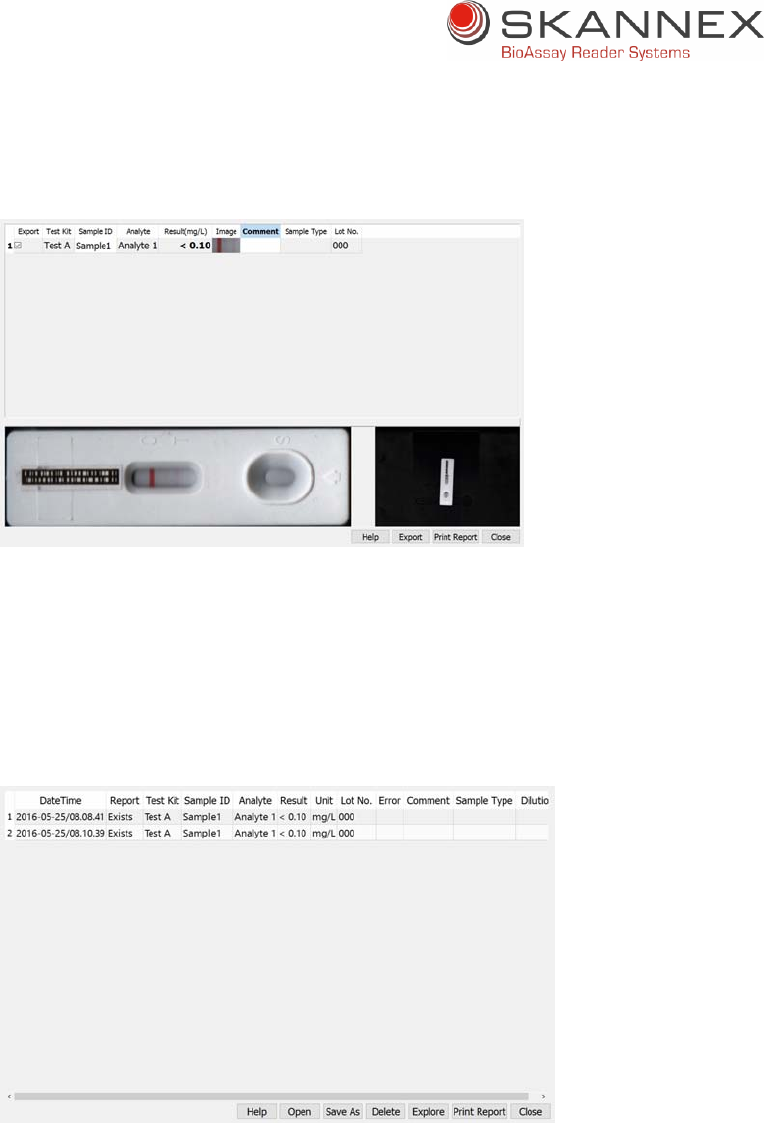
8. Enterrequiredinformationinresultscreen.
9. Resultsareautomaticallystoredinhistoriclog.
10. Apdfreportmaybeprintedfromthisscreenif“PrintReport”buttonisselected
andprinterisinstalledandconnected.
11. Pdfreportcanalsoanytimebeprintedfromthehistoriclogscreen.Thelogis
openedwhen“ViewLog”buttoninmainscreenisselected.
12. Whenresultscreenisfilledinwithrequireddata,closethisscreenbyselecting
“Close”button.Youwillreturntomainscreenandprogramisreadyforreading
newtestdevices.
12
5.2.1PrintingfromSkanFlexiX500
SkanFlexiX500isusingaWindowstablet.AnyWindowsoperatingprintercanbeused.
5.3 Cleaningthereaderscanner
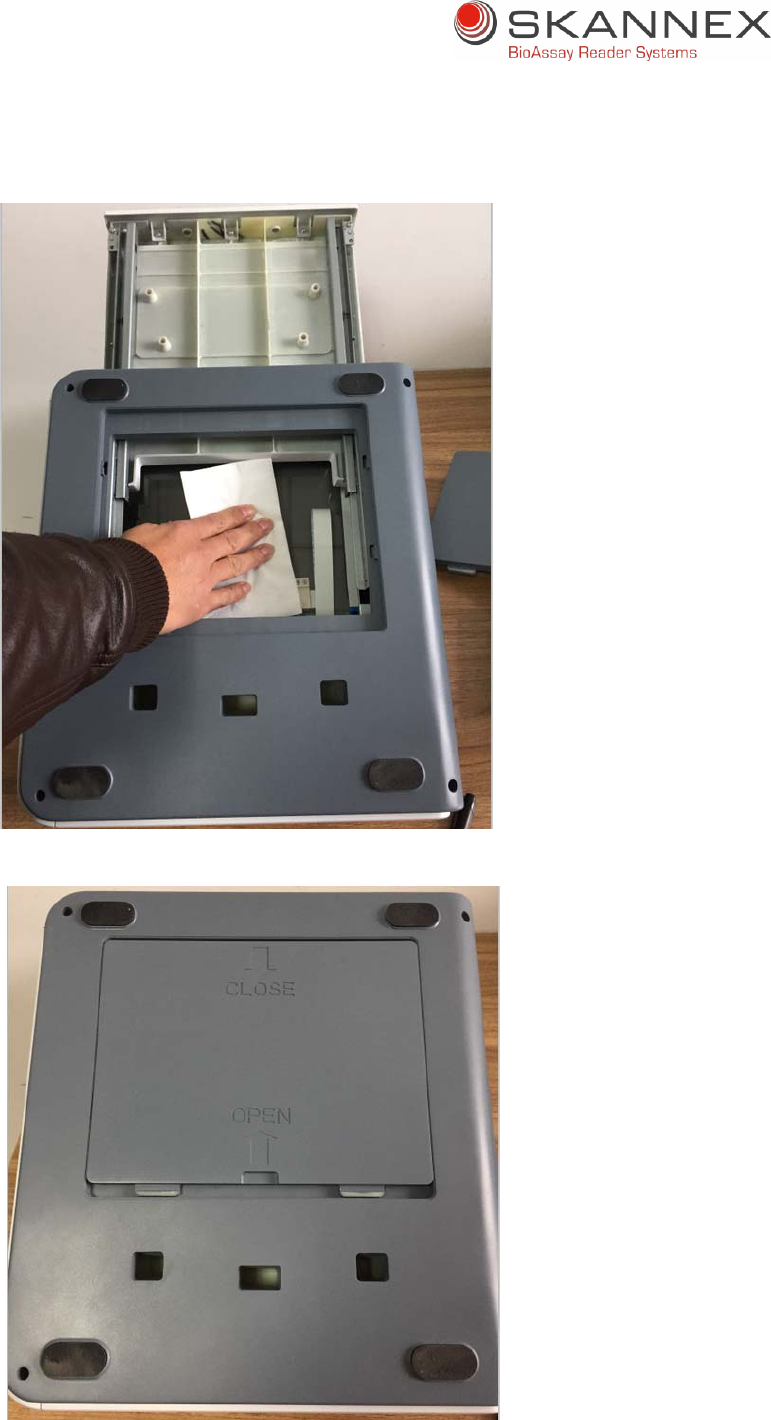
Thescannercanbecleanedbyfollowingthestepsbelow.
Closetheinstrumentanddisconnectthepowersupplycord.Openthedrawer
andtakeoutthetemplate.
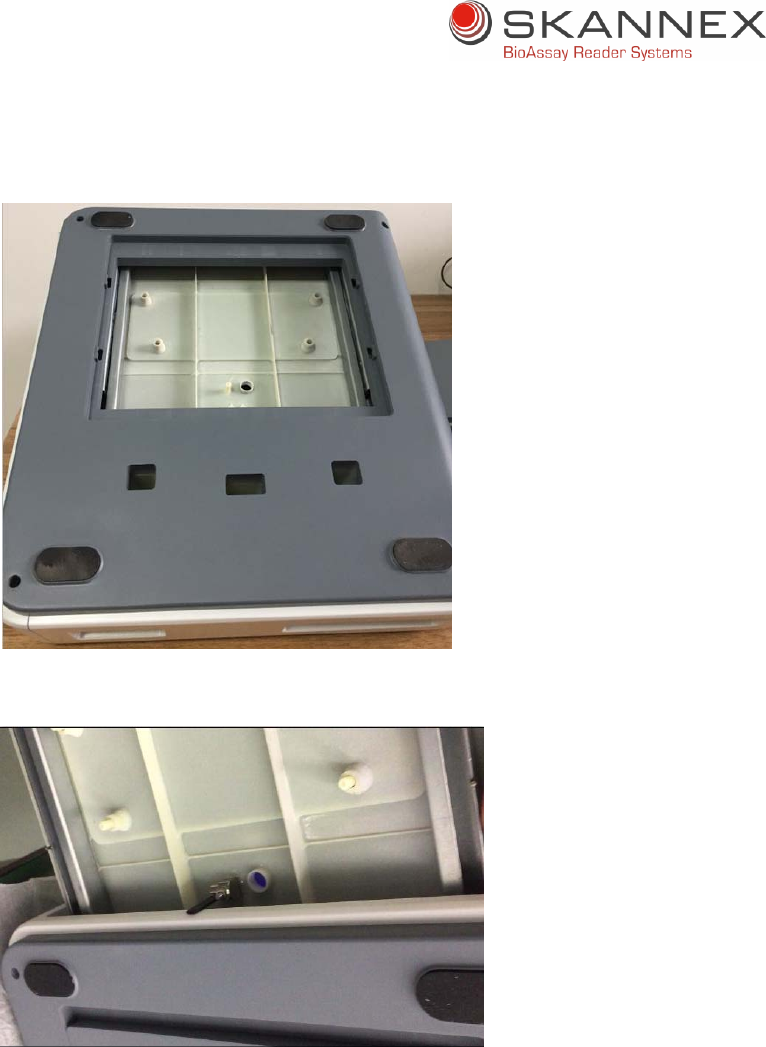
Closethedrawerandturnovertheinstrument.
13
Pushthe“Open”sideandremovethebottomplate.
Openthedrawerandrotatetheblackholdertolockit.
14
Cleanthescannerwithhumidclothorwithalcohol.
Rotatetheblackholder,closethedrawerandputbackthebottomplate.

15
Pushthe“Close”sideandfixthebottomplate.Turnovertheinstrumentandput
backthetemplateintothedrawer.
5.4SkanFlexiisnotworking
SkanFlexi’stouchpanelhasabatteryinside.InthecaseSkanFlexihasnotbeenusedfor
days,thetouchpanelwillhavenopower.Therefore,pleasechargetheSkanFlexiforat
least10minutesifSkanFlexihasnotbeenworkingfordays.
1)ConnectpowersupplytoSkanFlexi
2)Switchonreaderbysettingon/offbutton(attherearofthereader)toposition
“On”
3)AfterchargingtheSkanFlexiforatleast10minutes,switchoffthereaderby
settingon/offbutton(atrearofthereader)toposition“Off”
4)Switchonreaderagain,andSkanFlexiwillstart
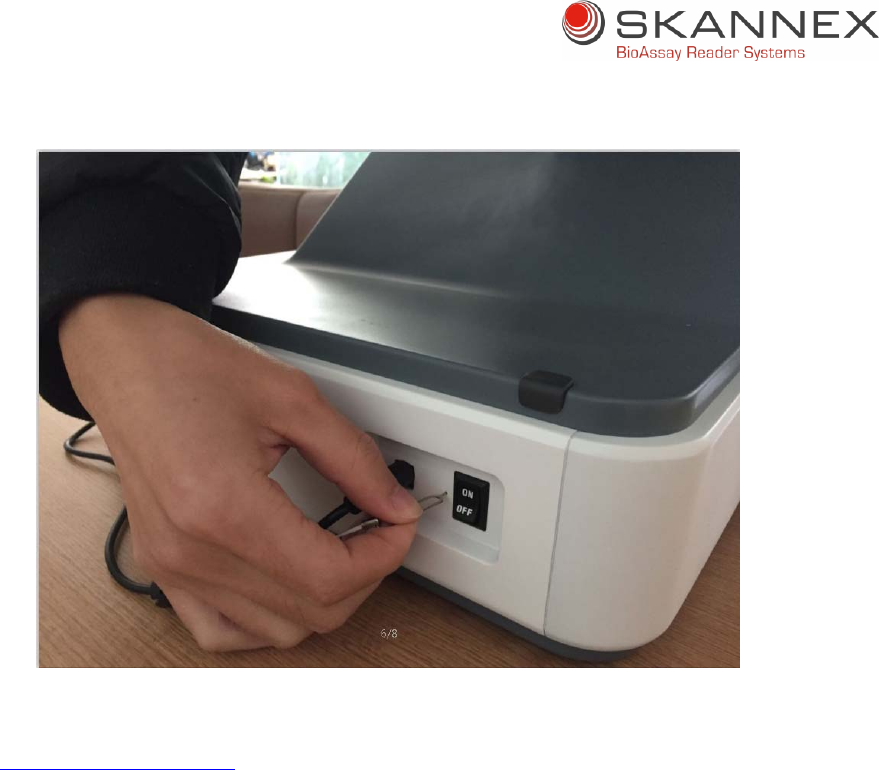
5.4.1Useofresetpin
IfSkanFlexiisstillnotworkingafterperformingtheabovestepsin5.4,pleasefollow
belowresetprocedure:
1) Switchonreaderbysettingon/offbutton(attherearofthereader)toposition
“On”
2) UsetheprovidedResetpintopushtheresetbuttonfor15‐20seconds
3) Switchoffthereaderbysettingon/offbutton(attherearofthereader)to
position“Off”
4) Switchonthereaderagainbysettingon/offbutton(attherearofthereader)to
position“On”
5) SkanFlexiwillstart
16
IftheSkanFlexiisstillnotworking,pleasecontactSkannexASat:
support@skannex.com
AswithanyotherinstrumentsthetabletinSkanFleximightappearwiththefollowing:
1. Systemcrash/tabletseemtobe“frozen”
2. BlurredscreenwhenyoustartupSkanFlexiorwhenSkanFlexiisrunning
3. RecoverynotificationwhenyoustartupSkanFlexi
Inallthesecasesthe“Resetpin”shouldbeused.Pleasefollowdescriptionabove.
6Maintenance
6.1Dailycleaning
Keepreadercleanbyusingadampcloth
Scannersurfacemaybecleaned/decontaminatedwithalcoholifnecessary
Touchscreenshallbecleanedwithspecialtissuesintendedforresistivescreen
Donotuseaggressivesolventssuchasacetone.

17
7Precautions
7.1Environmentlight
KeepSkanFlexioutofdirectsunlightorotherstronglightsourcesasthiscancause
interferencewhenscanning,whichagaincanresultinwrongornoresults.
7.2Environmentingeneral
Protectthereaderfromhighhumidityandextensivecontacttoliquids.
Donotexposethereadertoextensiveheat.
Insomecasesapoorgroundconnectioninsocketandinterferenceofsomelarge
medicalequipment(X‐raymachine,CTmachine),cancausethattheSkanFlexiget
ElectroMagneticInterference(EMI)problem.Thiscanbeseenasaseriesofsmall
circles/rectanglesappearingwhentouchingthepanel.Thiscanmakeitdifficultto
touchthecorrectposition.Changingtosocketwithbettergroundingormoving
SkanFlexiawayfrominterferenceenvironmentwillresolvethiskindofproblem.
.
8Transportationandstorage
8.1 Transportation
SkanFleximustbetransportedinthesamepackingmaterialasitwasreceivedin.
Transportationshouldbedoneusingacommonshippingcompanyundernormal
conditions.
8.2.Storage
SkanFlexishouldbestoredinanup‐rightpositionintheoriginalpackingmaterial,
indoorandundernormalroomtemperatureandenvironmentconditions.Avoid
directsunlight.Formoredetailsseetable2.1.

18
FCC STATEMENT
1. This device complies with Part 15 of the FCC Rules. Operation is subject to the following two
conditions:
(1) This device may not cause harmful interference, and
(2) This device must accept any interference received, including interference that may cause
undesired operation.
2. Changes or modifications not expressly approved by the party responsible for compliance could
void the user’s authority to operate the equipment.
This equipment has been tested and found to comply with the limits for a Class B digital device,
pursuant to part 15 of the FCC Rules. These limits are designed to provide reasonable protection
against harmful interference in a residential installation. This equipment generates, uses and can
radiate radio frequency energy and, if not installed and used in accordance with the instructions,
may cause harmful interference to radio communications. However, there is no guarantee that
interference will not occur in a particular installation. If this equipment does cause harmful
interference to radio or television reception, which can be determined by turning the equipment off
and on, the user is encouraged to try to correct the interference by one or more of the following
measures:
—Reorient or relocate the receiving antenna.
—Increase the separation between the equipment and receiver.
—Connect the equipment into an outlet on a circuit different from that to which the receiver is
connected.
—Consult the dealer or an experienced radio/ TV technician for help.
FCC Radiation Exposure Statement:
This equipment complies with FCC radiation exposurere quirement.
The device can be used in portable exposure condition without RF striction