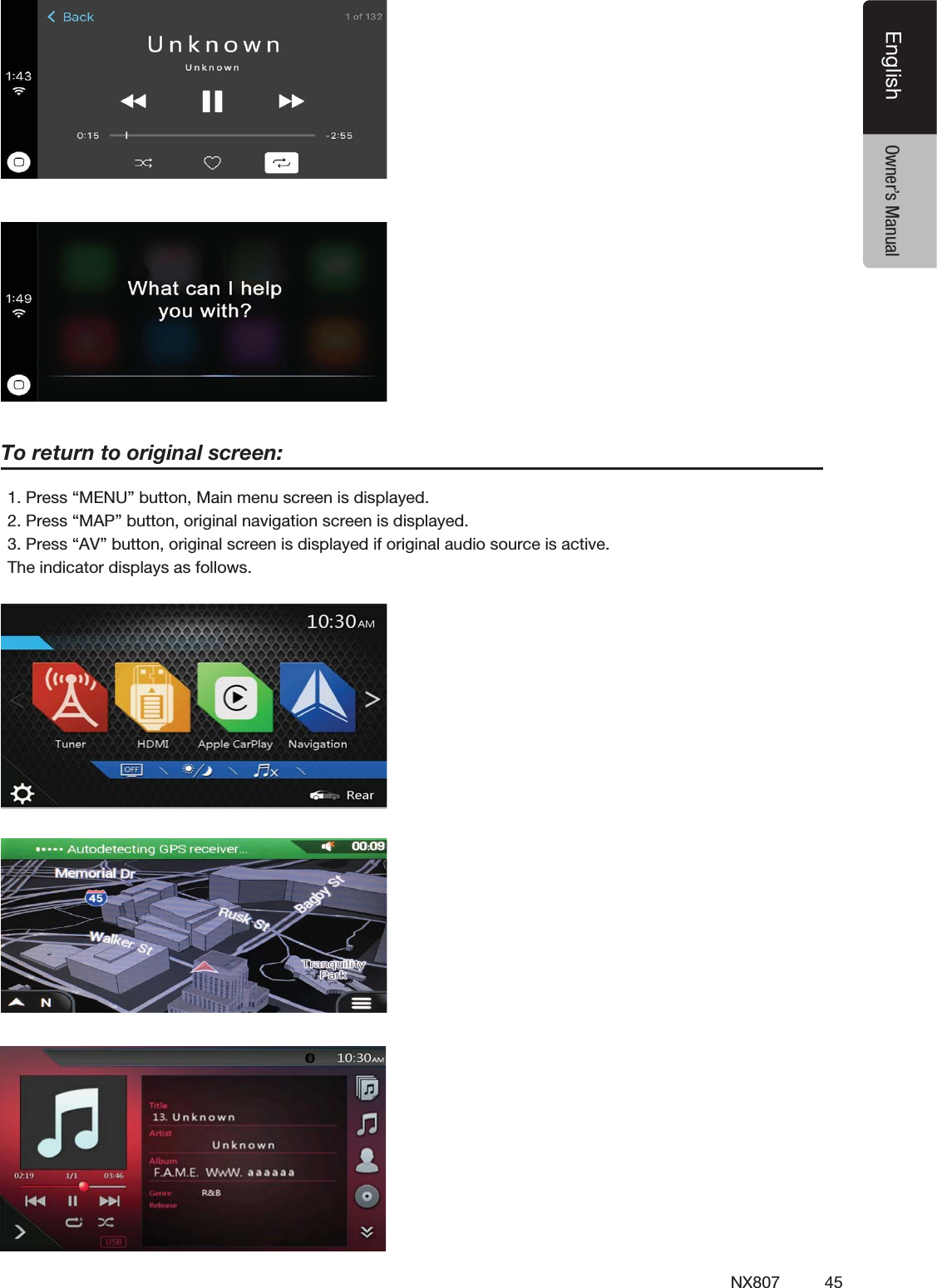
SKYPINE ELECTRONICS NX807 ALL IN ONE DVD PLAYER User Manual NX807 Usermanual1226

SKYPINE ELECTRONICS (SHEN ZHEN) CO., LTD. ALL IN ONE DVD PLAYER NX807 Usermanual1226

Contents

User Manual 1

DVD MULTIMEDIA STATION WITH BUILT-IN NAVIGATION &7 ’’ TOUCH PANEL CONTROLOwner’s ManualNX807
1NX807EnglishEnglish Owner’s ManualCLARION PRODUCT REGISTRATION INFORMATIONINFORMATIONS DE L’ENREGISTREMENT DE PRODUITS CLARIONINFORMACIÓN DEL REGISTRO DE PRODUCT O DE CLARIONFor USA and Canada onlywww.clarion.comPour les Étas Unis et le Canada seulementwww.clarion.comPara USA y Canada nomaswww.clarion.comDear Customer:Congratulations on your purchase of a Clarion mobile electronic product. We are confident that you’ll enjoy your Clarion experience.There are many benefits to registering your product. We invite you to visit our website at www.clarion.com to register your Clarion product.We have made product registration simple with our easy to use website.The registration form is short and easy to complete. Once you’re registered, we can keep you informed of important product information.Register at www.clarion.com - it’s easy to keep your Clarion product up to date.Cher client:Nous vous remercions d’avoir acheté ce produit électronique mobile Clarion. Nous sommes confiants que vous apprécierez votre expérience Clarion.Il y a beaucoup d’avantage à enregistrer votre produits. Nous vous invitons à visiter notre site Web www.clarion.com pour enregistrer votre produit Clarion.Nous avons facilité la tache d’enregistrement de produit simple et facile grâce à notre site Web.Le formulaire d’enregistrement est court et facile à compléter. Lorsque vous êtes enregistrer, nous pouvons vous tenir informé des informations important de produits. Enregistrer à www.clarion.com - c’est facile de mettre à jour votre produit Clarion.Querido Cliente:Felicitaciones por su compra de producto electrónico móvil de Clarion. Estamos seguros que usted gozará de su experiencia con el producto de Clarion.Hay muchas ventajas al registrar su producto. Le invitamos a que visite nuestro sitio en internet www.clarion.com para registrar su producto de Clarion.Hemos hecho el registro de producto fácil en nuestro sitio. La forma de registro es corta y fácil de completar. Una vez que lo registre, podremos proporcionarle la infor-mación de su producto.Registrese en  www.clarion.com - es fácil mantener su producto de Clarion actual-izado.Under Industry Canada regulations, this radio transmitter may only operate using an antenna of a type and maximum (or lesser) gain approved for the transmitter by Industry Canada. To reduce potential radio interference to other users, the antenna type and its gain should be so chosen that the equivalent isotropically radiated power (e.i.r.p.) is not more than that necessary for successful communication.Conformément à la réglementation d’Industrie Canada, le présent émetteur radio peutfonctionner avec une antenne d’un type et d’un gain maximal (ou inférieur) approuvé pourl’émetteur par Industrie Canada. Dans le but de réduire les risques de brouillage radioé-lectriqueà l’intention des autres utilisateurs, il faut choisir le type d’antenne et son gain de sorte que la puissance isotrope rayonnée équivalente (p.i.r.e.) ne dépasse pas l’intensité néces-saire à l’établissement d’une communication satisfaisante.
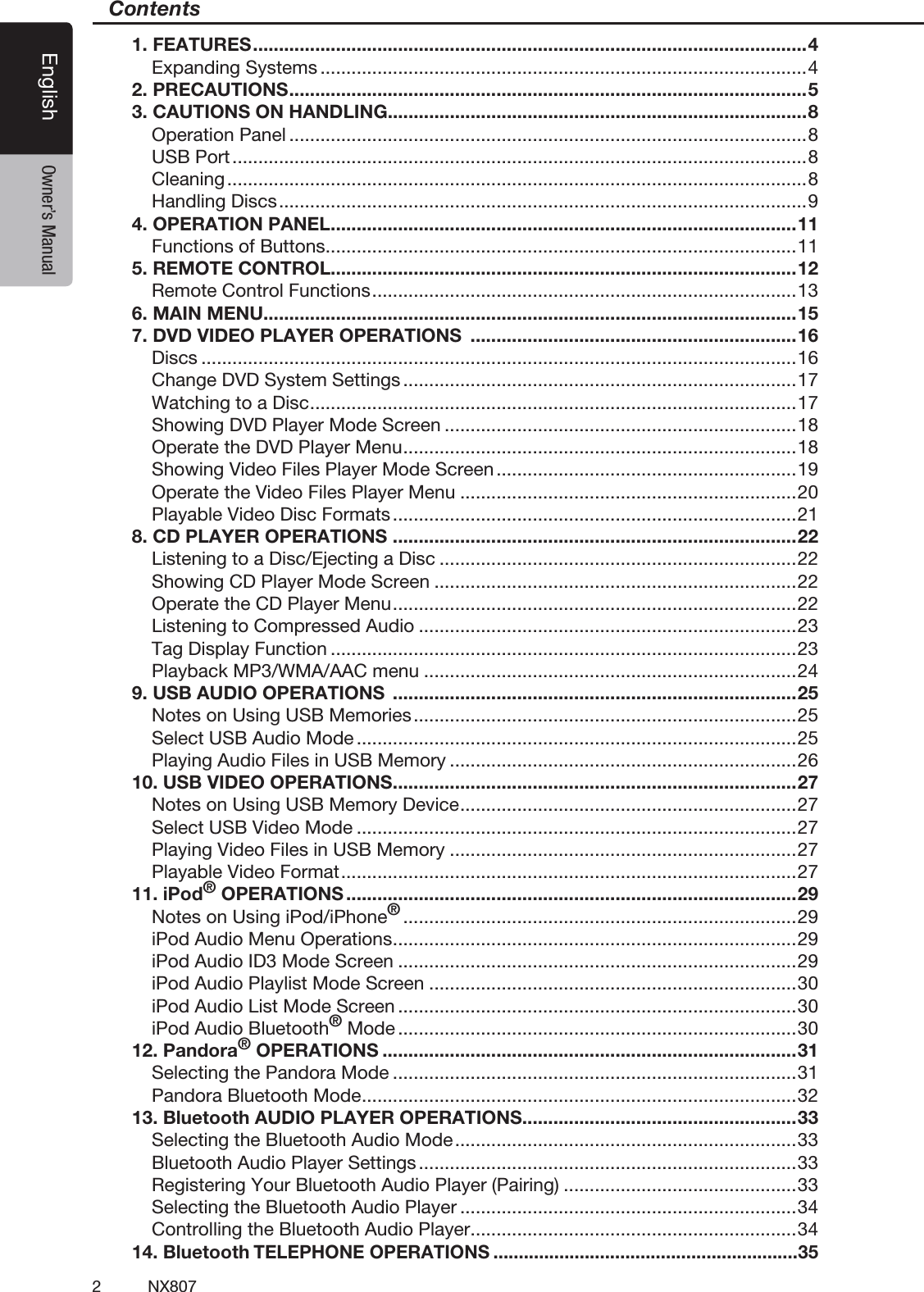
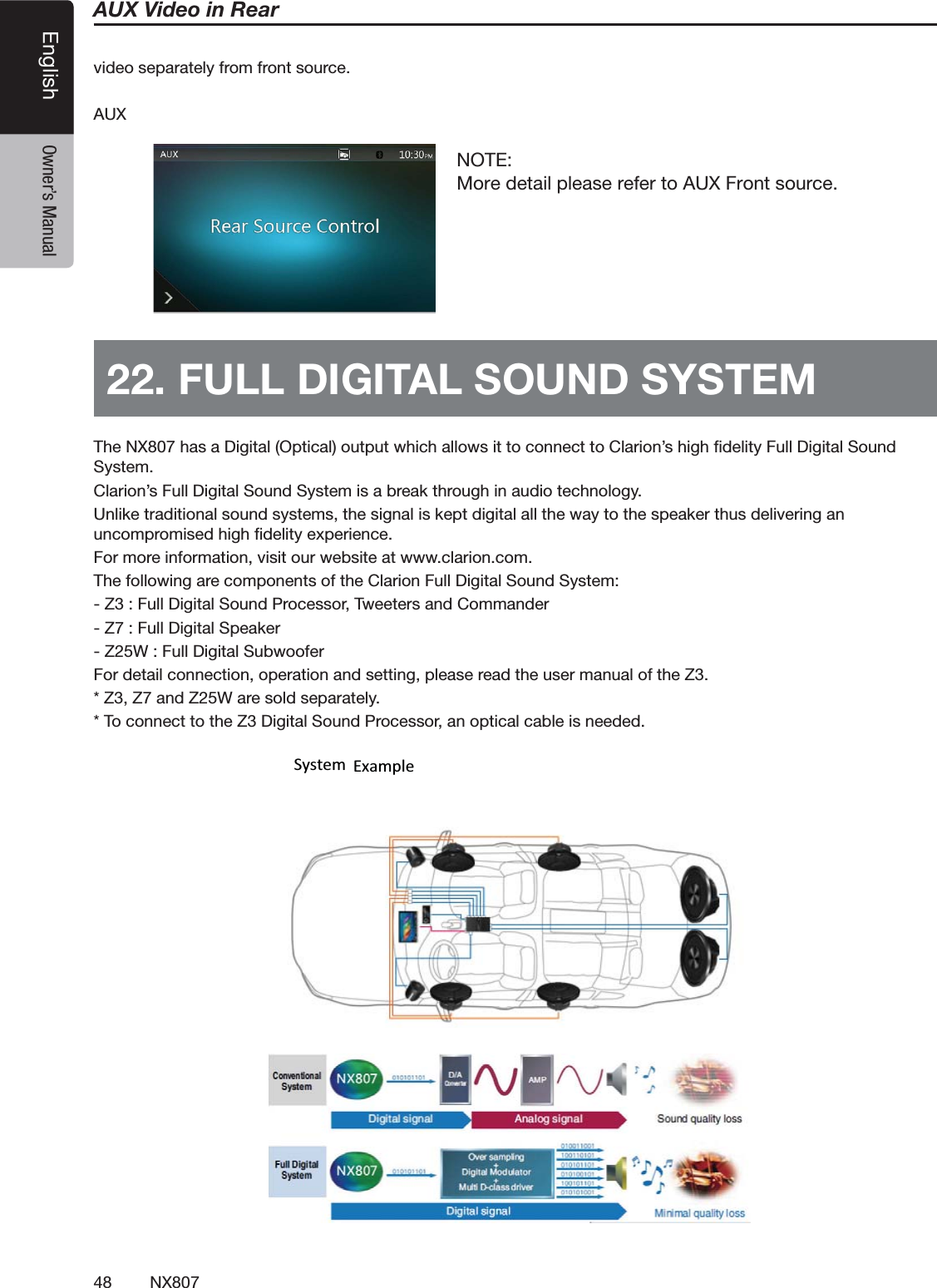
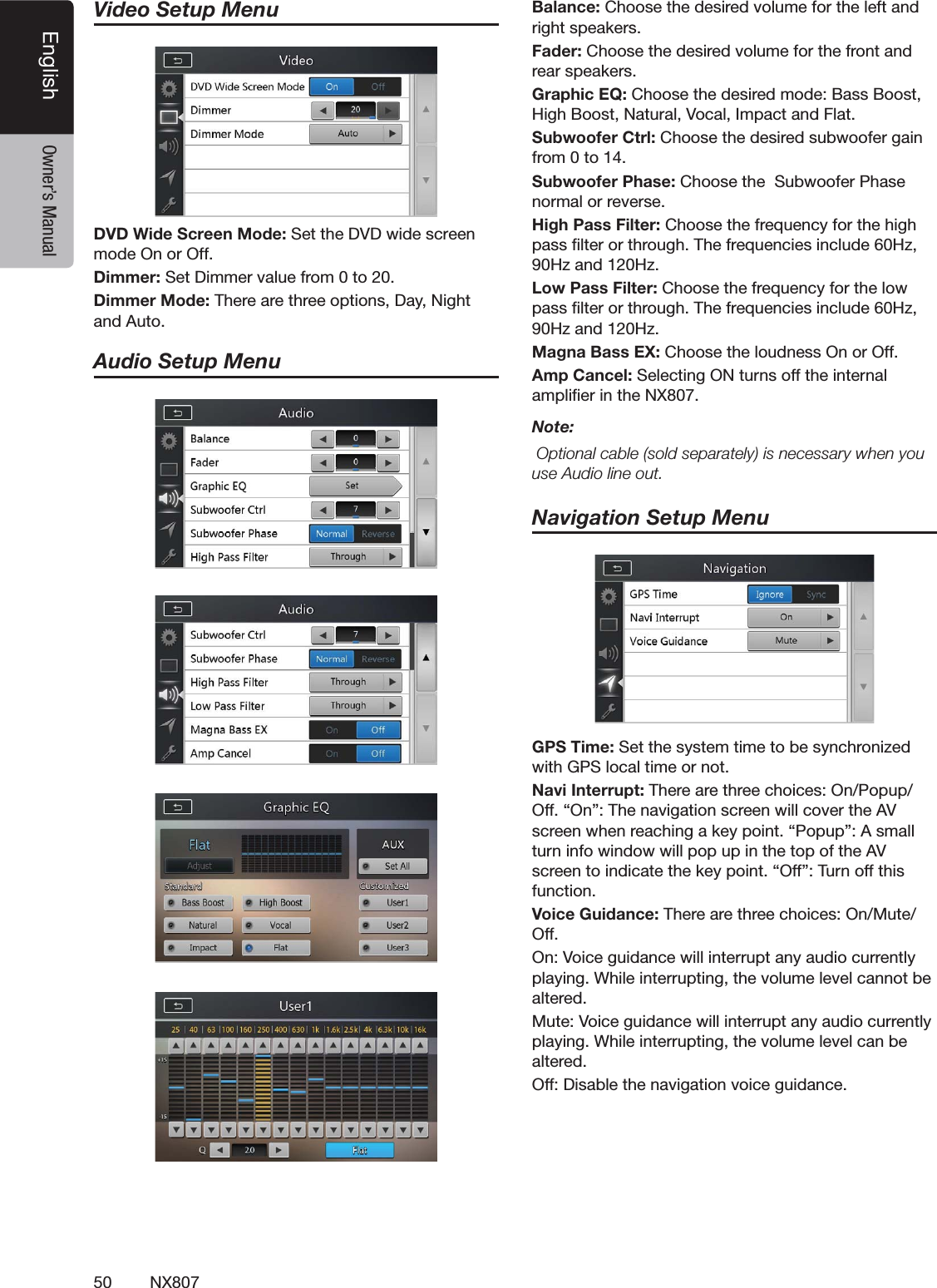
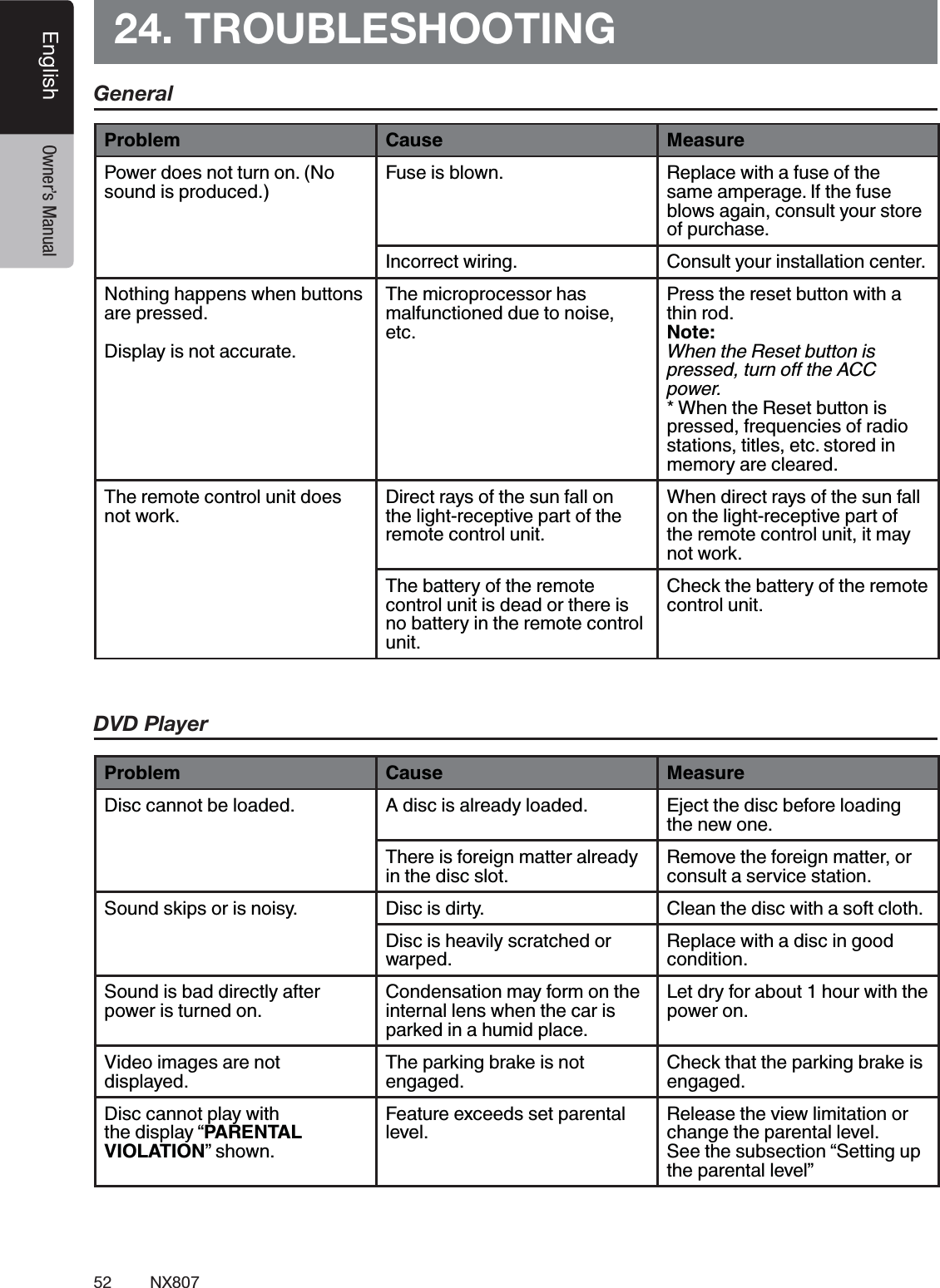
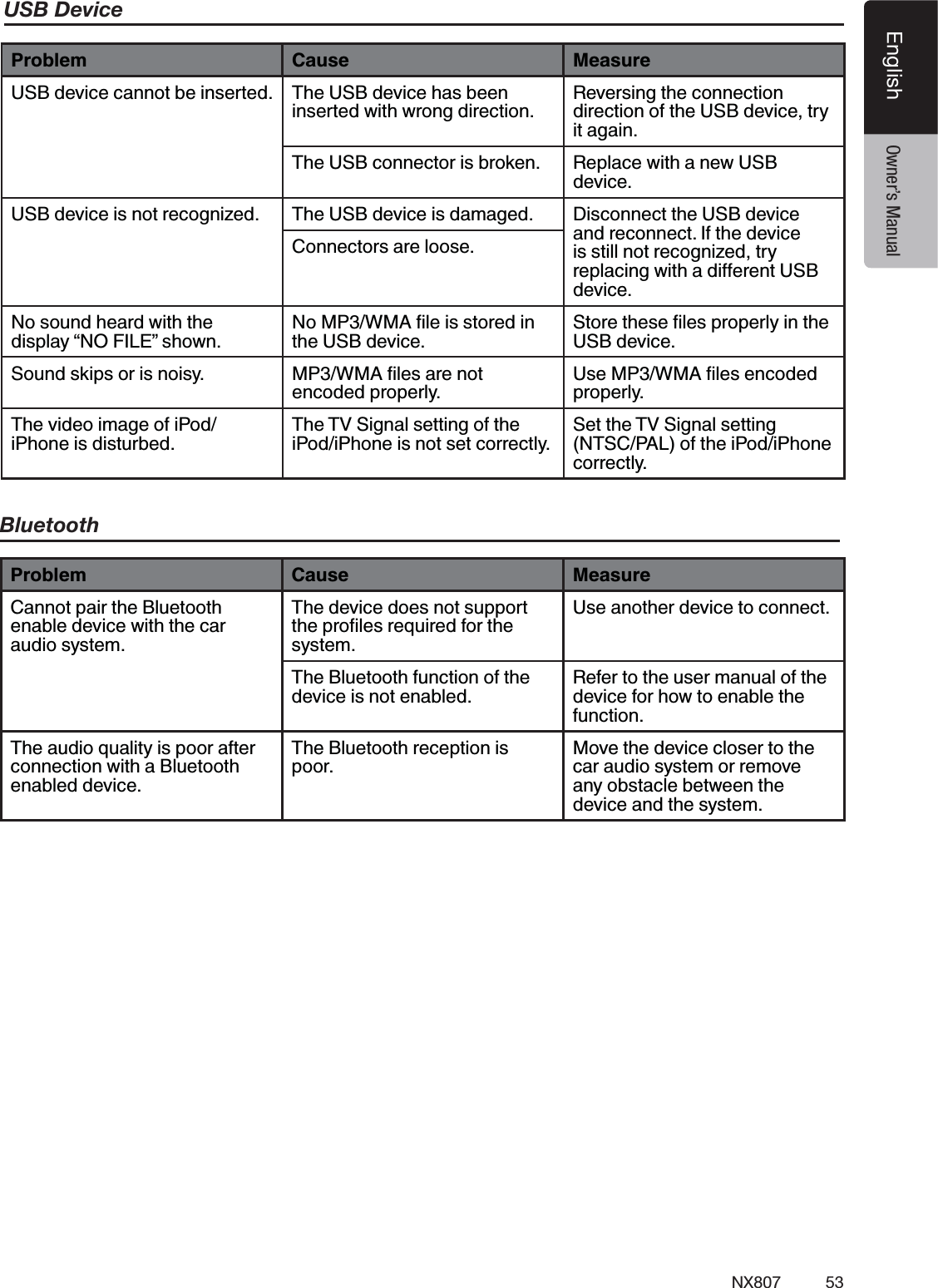
2NX807English Owner’s ManualContents1. FEATURES ...........................................................................................................4Expanding Systems ..............................................................................................42. PRECAUTIONS ....................................................................................................53. CAUTIONS ON HANDLING.................................................................................8Operation Panel ....................................................................................................8USB Port ...............................................................................................................8Cleaning ................................................................................................................8Handling Discs ......................................................................................................94. OPERATION PANEL ..........................................................................................11Functions of Buttons ...........................................................................................115. REMOTE CONTROL..........................................................................................12Remote Control Functions ..................................................................................136. MAIN MENU.......................................................................................................157. DVD VIDEO PLAYER OPERATIONS  ...............................................................16Discs ...................................................................................................................16Change DVD System Settings ............................................................................17Watching to a Disc ..............................................................................................17Showing DVD Player Mode Screen ....................................................................18Operate the DVD Player Menu ............................................................................18Showing Video Files Player Mode Screen ..........................................................19Operate the Video Files Player Menu .................................................................20Playable Video Disc Formats ..............................................................................218. CD PLAYER OPERATIONS  ..............................................................................22Listening to a Disc/Ejecting a Disc .....................................................................22Showing CD Player Mode Screen ......................................................................22Operate the CD Player Menu ..............................................................................22Listening to Compressed Audio .........................................................................23Tag Display Function ..........................................................................................23Playback MP3/WMA/AAC menu ........................................................................249. USB AUDIO OPERATIONS  ..............................................................................25Notes on Using USB Memories ..........................................................................25Select USB Audio Mode .....................................................................................25Playing Audio Files in USB Memory ...................................................................2610. USB VIDEO OPERATIONS ..............................................................................27Notes on Using USB Memory Device .................................................................27Select USB Video Mode .....................................................................................27Playing Video Files in USB Memory ...................................................................27Playable Video Format ........................................................................................2711. iPod® OPERATIONS .......................................................................................29Notes on Using iPod/iPhone® ............................................................................29iPod Audio Menu Operations ..............................................................................29iPod Audio ID3 Mode Screen .............................................................................29iPod Audio Playlist Mode Screen .......................................................................30iPod Audio List Mode Screen .............................................................................30iPod Audio Bluetooth® Mode .............................................................................3012. Pandora® OPERATIONS ................................................................................31Selecting the Pandora Mode ..............................................................................31Pandora Bluetooth Mode ....................................................................................3213. Bluetooth AUDIO PLAYER OPERATIONS .....................................................33Selecting the Bluetooth Audio Mode ..................................................................33Bluetooth Audio Player Settings .........................................................................33Registering Your Bluetooth Audio Player (Pairing) .............................................33Selecting the Bluetooth Audio Player .................................................................34Controlling the Bluetooth Audio Player ...............................................................3414. Bluetooth TELEPHONE OPERATIONS ............................................................35
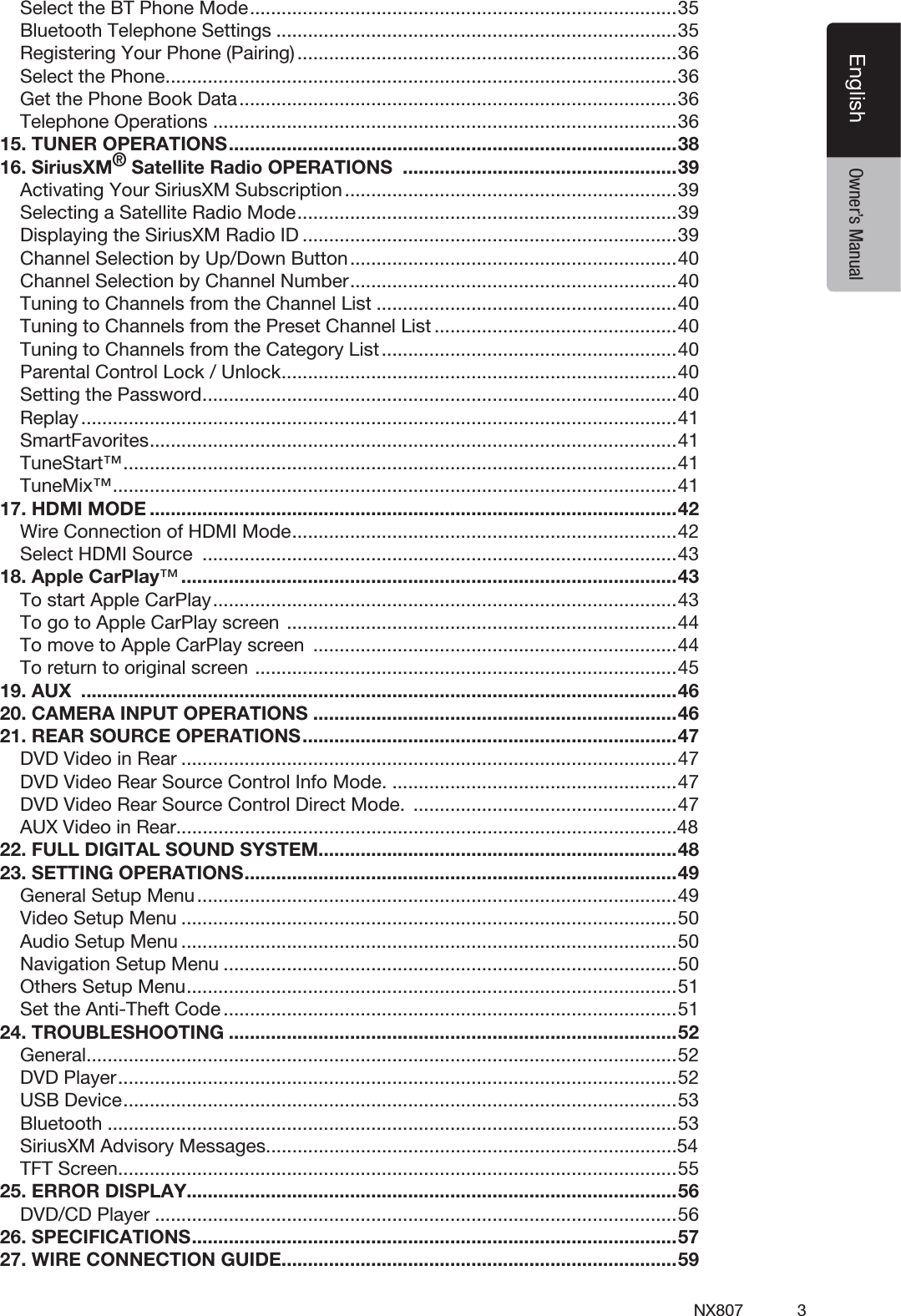
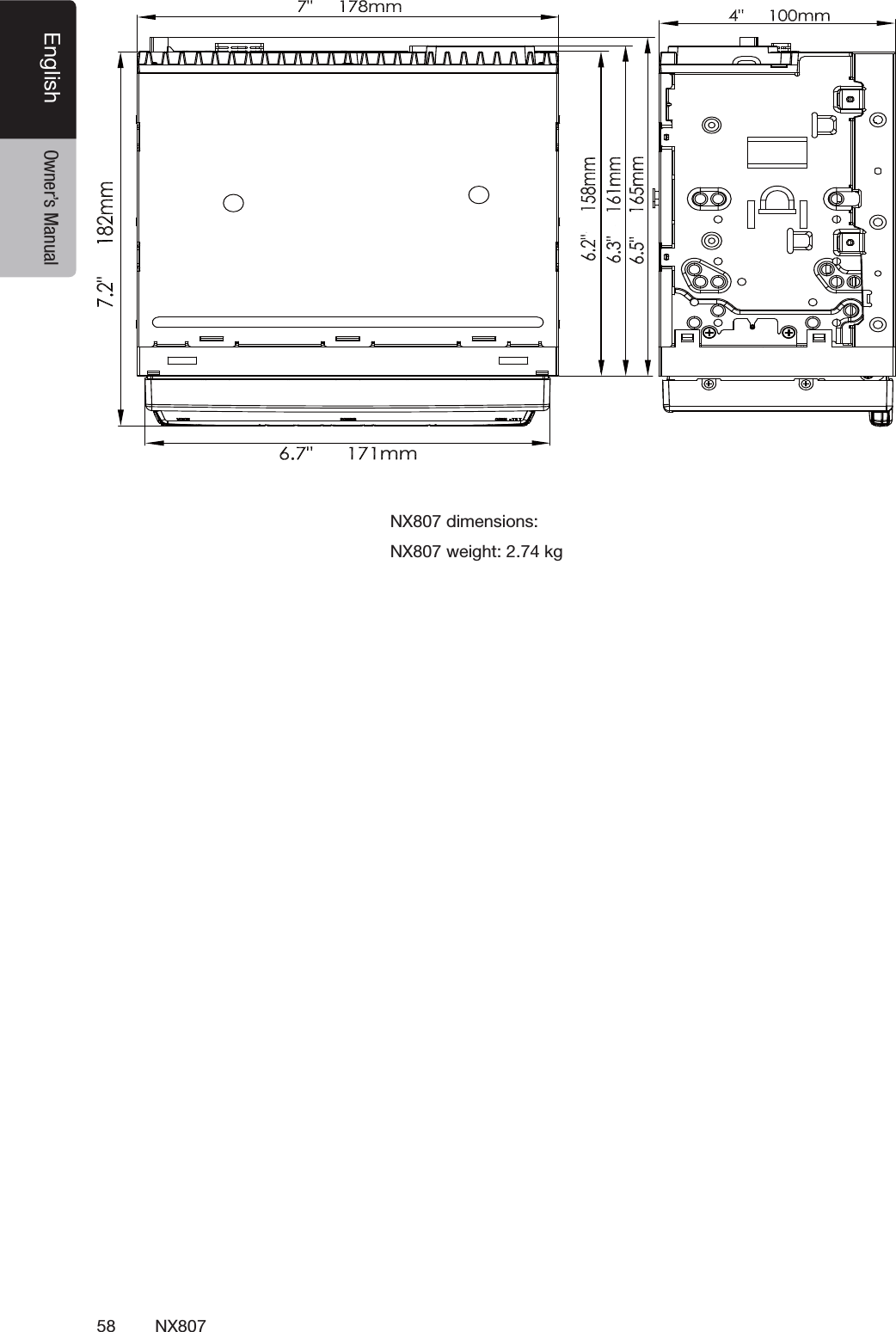
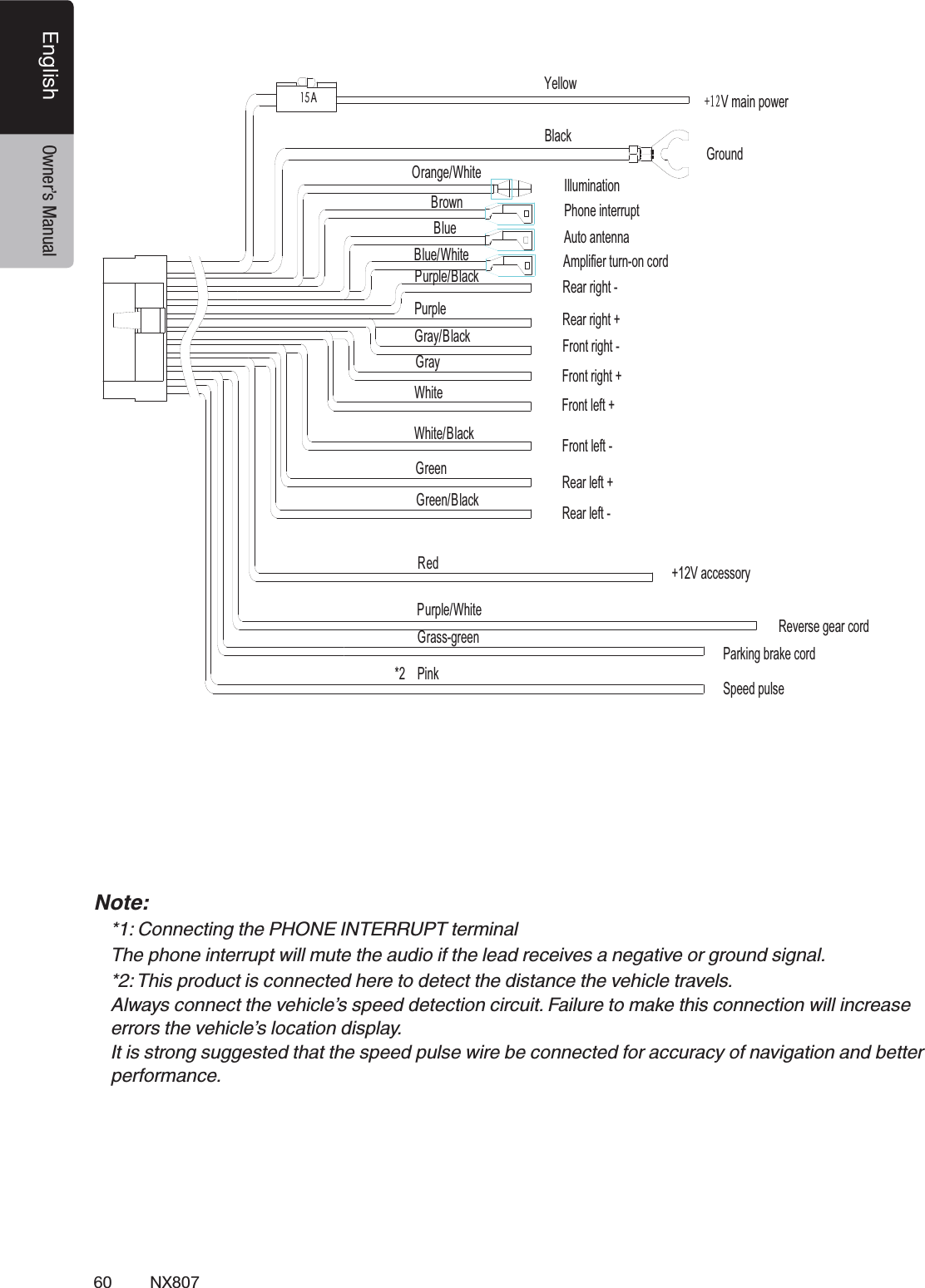
3NX807EnglishEnglish Owner’s ManualSelect the BT Phone Mode .................................................................................35Bluetooth Telephone Settings ............................................................................35Registering Your Phone (Pairing) ........................................................................36Select the Phone .................................................................................................36Get the Phone Book Data ...................................................................................36Telephone Operations ........................................................................................3615. TUNER OPERATIONS .....................................................................................3816. SiriusXM® Satellite Radio OPERATIONS  ....................................................39Activating Your SiriusXM Subscription ...............................................................39Selecting a Satellite Radio Mode ........................................................................39Displaying the SiriusXM Radio ID .......................................................................39Channel Selection by Up/Down Button ..............................................................40Channel Selection by Channel Number ..............................................................40Tuning to Channels from the Channel List .........................................................40Tuning to Channels from the Preset Channel List ..............................................40Tuning to Channels from the Category List ........................................................40Parental Control Lock / Unlock ...........................................................................40Setting the Password ..........................................................................................40Replay .................................................................................................................41SmartFavorites .................................................................................................... 41TuneStart™ ......................................................................................................... 41TuneMix™ ........................................................................................................... 4117. HDMI MODE ....................................................................................................42Wire Connection of HDMI Mode .........................................................................42Select HDMI Source  ..........................................................................................4318. Apple CarPlay™ ..............................................................................................43To start Apple CarPlay ........................................................................................43To go to Apple CarPlay screen  ..........................................................................44To move to Apple CarPlay screen  .....................................................................44To return to original screen  ................................................................................4519. AUX  .................................................................................................................4620. CAMERA INPUT OPERATIONS .....................................................................4621. REAR SOURCE OPERATIONS .......................................................................47DVD Video in Rear ..............................................................................................47DVD Video Rear Source Control Info Mode. ......................................................47DVD Video Rear Source Control Direct Mode.  ..................................................47AUX Video in Rear...............................................................................................4822. FULL DIGITAL SOUND SYSTEM....................................................................4823. SETTING OPERATIONS ..................................................................................49General Setup Menu ...........................................................................................49Video Setup Menu ..............................................................................................50Audio Setup Menu ..............................................................................................50Navigation Setup Menu ......................................................................................50Others Setup Menu .............................................................................................51Set the Anti-Theft Code ......................................................................................5124. TROUBLESHOOTING .....................................................................................52General ................................................................................................................52DVD Player ..........................................................................................................52USB Device .........................................................................................................53Bluetooth ............................................................................................................53SiriusXM Advisory Messages..............................................................................54TFT Screen ..........................................................................................................5525. ERROR DISPLAY.............................................................................................56DVD/CD Player ...................................................................................................5626. SPECIFICATIONS ............................................................................................5727. WIRE CONNECTION GUIDE ...........................................................................59
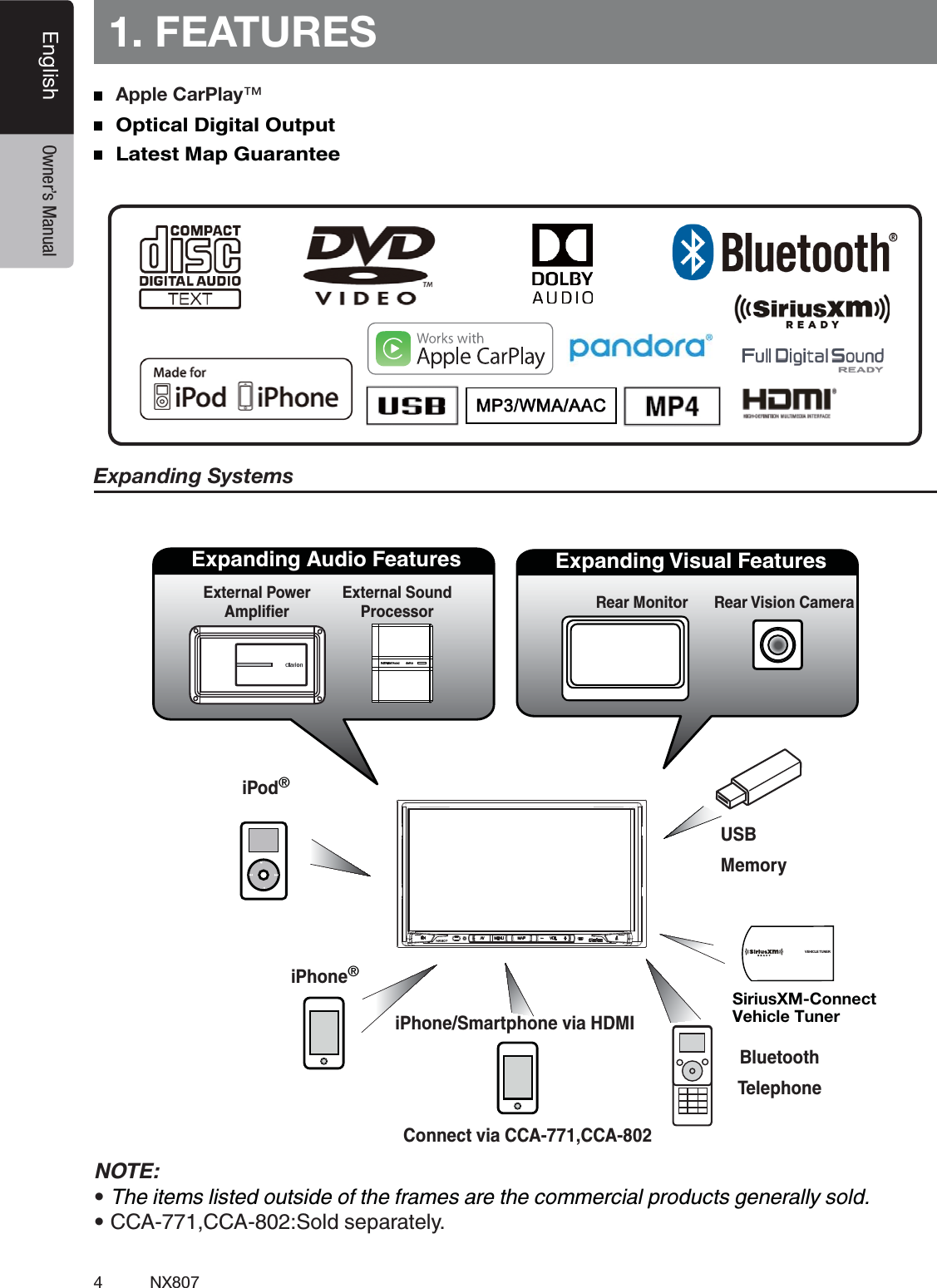
4NX807English Owner’s Manual1. FEATURESExpanding SystemsNOTE:tThe items listed outside of the frames are the commercial products generally sold.tCCA-771,CCA-802:Sold separately.  Apple CarPlay™    Optical Digital Output   Latest Map Guarantee   iPod®Expanding Visual FeaturesRear Monitor Rear Vision CameraExpanding Audio FeaturesExternal Power External Sound ProcessoriPhone®USBMemoryBluetoothTelephoneiPhone/Smartphone via HDMISiriusXM-Connect Vehicle Tuner        VEHICLE TUNERConnect via CCA-771,CCA-802
5NX807EnglishEnglish Owner’s Manual2. PRECAUTIONSWARNINGt 'PSZPVSTBGFUZUIFESJWFSTIPVMEOPUXBUDIBOZWJEFPTPVSDFTBOEPSPQFSBUFUIFDPOUSPMTXIJMFESJWJOHPlease note that watching and operating any video sources while driving are prohibited by law in some countries. Also, while driving, keep the volume to a level at which external sounds can be heard.t%POPUEJTBTTFNCMFPSNPEJGZUIJTVOJU*UNBZDBVTFBOBDDJEFOUmSFPSFMFDUSJDTIPDLt%POPUVTFUIJTVOJUXIFOBUSPVCMFFYJTUTTVDIBTOPTDSFFODPOUFOUBQQFBSTPSOPTPVOEJTaudible. It may cause an accident, fire, or electric shock. For that case, consult your authorized dealer or a nearest Clarion service center.t*ODBTFPGBQSPCMFNTVDIBTBOZNBUFSJBMIBTCFFOFOUFSFEJOUIFVOJUUIFVOJUHFUTXFUPSsmoke or strange smells come out of the unit, etc., stop using this unit immediately, and consult your authorized dealer or a nearest Clarion service center.  Using it in that condition may cause an accident, fire, or electric shock.t6TFBGVTFXJUIUIFTBNFTQFDJmDBUJPOPOMZXIFOSFQMBDJOHUIFGVTF Using a fuse with a different specification may causes a fire.t'PSUIFJOTUBMMBUJPOPGUIJTVOJUPSBDIBOHFJOUIFJOTUBMMBUJPOBTLZPVSBVUIPSJ[FEEFBMFSPSBnearest Clarion service center for safety. Professional skills and experiences are required to do so.t5IJTOBWJHBUJPOTZTUFNTIPVMEOPUCFVTFEUPSFQMBDFZPVSPXOKVEHNFOU/PJUJOFSBSZTVHHFTUFEby this navigation system should ever override any highway regulations, your own judgment, or a knowledge of safe driving practices. Do not follow the navigation system’s suggested itinerary if it would cause you to perform a dangerous or illegal act, place you in a dangerous situation, or take you into an area you consider unsafe.t5IFBEWJDFQSPWJEFECZUIFOBWJHBUJPOTZTUFNJTUPCFSFHBSEFEBTBTVHHFTUJPOPOMZ5IFSFNBZbe times when the navigation system displays the vehicle’s location incorrectly, fails to suggest the shortest route, or fails to direct you to your desired destination. In such instances, rely on your own driving judgment, taking into account the driving conditions at the time.t%POPUVTFUIFOBWJHBUJPOTZTUFNUPMPDBUFFNFSHFODZTFSWJDFT5IFEBUBCBTFEPFTOPUDPOUBJOa complete listing of emergency services such as police stations, fire  halls, hospitals and walk-in clinics. Please show discretion and ask for directions in such instances.t"TUIFESJWFSZPVBMPOFBSFSFTQPOTJCMFGPSZPVSESJWJOHTBGFUZt*OPSEFSUPBWPJEBUSBGmDBDDJEFOUEPOPUPQFSBUFUIFTZTUFNXIJMFESJWJOHt*OPSEFSUPBWPJEBUSBGmDBDDJEFOUPQFSBUFUIFTZTUFNPOMZXIFOUIFWFIJDMFJTTUPQQFEBUBTBGFplace and the parking brake is on.t*OPSEFSUPBWPJEBUSBGmDBDDJEFOUPSUSBGmDPGGFOTFSFNFNCFSUIBUBDUVBMSPBEDPOEJUJPOTBOEtraffic regulations take precedence over the information contained on the navigation system.t5IFTPGUXBSFNBZDPOUBJOJOBDDVSBUFPSJODPNQMFUFJOGPSNBUJPOEVFUPUIFQBTTBHFPGUJNFchanging circumstances, and the sources of information used. Please respect current traffic  conditions and regulations at all times while driving.t8IFSFBDUVBMSPBEDPOEJUJPOTBOEIJHIXBZSFHVMBUJPOTEJGGFSGSPNUIFJOGPSNBUJPODPOUBJOFEPOthe navigation system, abide by the highway regulations.t,FFQUIFBNPVOUPGUJNFTQFOUWJFXJOHUIFTDSFFOXIJMFESJWJOHUPBTUSJDUNJOJNVNt5IFOBWJHBUJPOTZTUFNEPFTOPUQSPWJEFOPSSFQSFTFOUJOBOZXBZJOGPSNBUJPOPOUSBGmDBOEhighway regulations; technical aspects of the vehicle including weight, height, width, load and speed limits; road conditions including grade, percentage of incline and surface conditions; obstacles such as the height and width of bridges and tunnels; and other current driving or road conditions. Always rely on your own judgment when driving a car, taking into account current driving conditions.
6NX807English Owner’s Manualt$IBOHFTPSNPEJmDBUJPOTOPUFYQSFTTMZBQQSPWFECZUIFQBSUZSFTQPOTJCMFGPSDPNQMJBODFDPVMEvoid the user’s authority to operate the equipment.   This equipment has been tested and found to comply with the limits for a Class B digital device, pursuant to Part 15 of the FCC Rules. These limits are designed to provide reasonable protection against harmful interference in a residential installation. This equipment generates, uses and can radiate radio frequency energy and, if not installed and used in accordance with the instructions, may cause harmful interference to radio communications. However, there is no guarantee that interference will not occur in a particular installation.   If this equipment does cause harmful interference to radio or television reception, which can be determined by turning the equipment off and on, the user is encouraged to try to correct the interference by one or more of the following measures:   -- Reorient or relocate the receiving antenna.   -- Increase the separation between the equipment and receiver.   -- Connect the equipment into an outlet on a circuit different from that to which the receiver is       connected.   -- Consult the dealer or an experienced radio/TV technician for help.t5IJTFRVJQNFOUDPNQMJFTXJUI'$$SBEJBUJPOFYQPTVSFMJNJUTTFUGPSUIGPSBOVODPOUSPMMFEenvironment. End user must follow the specific operating instructions for satisfying RF exposure compliance. This transmitter must not be co-located or operating in conjunction with any other antenna or transmitter.   The portable device is designed to meet the requirements for exposure to radio waves established by the Federal Communications Commission (USA).    These requirements set a SAR limit of 1.6 W/kg averaged over one gram of tissue.    The highest SAR value reported under this standard during product certification for use when properly worn on the body is 0.626 W/kg.t*NQSPQFSDPOOFDUJPOPGTQFFEQVMTFTJHOBMNBZSFTVMUJOTFSJPVTEBNBHFPSJOKVSZJODMVEJOHelectrical shock, and interference with the operation of the vehicle’s anti-lock braking system, automatic gearbox and speedometer indication. t'$$DN4UBUFNFOU   This equipment complies with FCC radiation exposure limits set forth for an uncontrolled environment. This equipment should be installed and operated with a minimum distance of 20cm between the radiator & your body. This transmitter must not be co-located or operating in conjunction with any other antenna or transmitter. t*$DN4UBUFNFOU   The device meets the exemption from the routine evaluation limits in section 2.5 of RSS 102 and compliance with RSS-102 RF exposure, users can obtain Canadian information on RF exposure and compliance.   Le dispositif rencontre l’exemption des limites courantes d’évaluation dans la section 2.5 de RSS 102 etla conformité à l’exposition de RSS-102 rf, utilisateurs peut obtenir l’information canadienne surl’exposition et la conformité de rf.   This transmitter must not be co-located or operating in conjunction with any other antenna or transmitter. This equipment should be installed and operated with a minimum distance of 20 centimeters between the radiator and your body.   Cet émetteur ne doit pas être Co-placé ou ne fonctionnant en même temps qu’aucune autre antenne ouémetteur. Cet équipement devrait être installé et actionné avec une distance minimum de 20 centimètres entre le radiateur et votre corps.
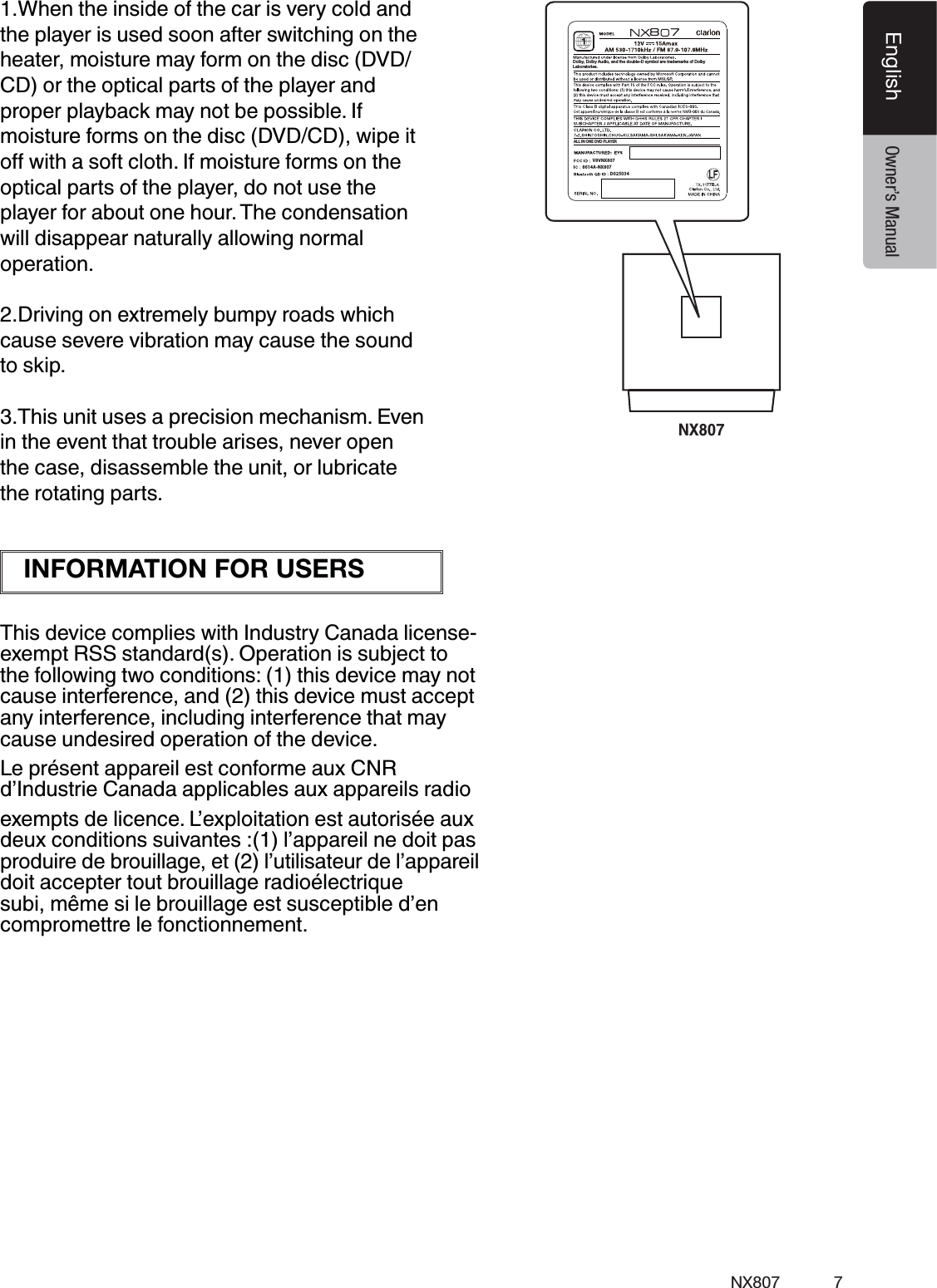
7NX807EnglishEnglish Owner’s ManualNX8078777BD025034ALL IN ONE DVD PLAYERDolby, Dolby Audio, and the double-D symbol are trademarks of DolbyLaboratories. V8VNX8078614A-NX8071.When the inside of the car is very cold and the player is used soon after switching on the heater, moisture may form on the disc (DVD/ CD) or the optical parts of the player and proper playback may not be possible. If moisture forms on the disc (DVD/CD), wipe it optical parts of the player, do not use the player for about one hour. The condensation will disappear naturally allowing normal operation.2.Driving on extremely bumpy roads which cause severe vibration may cause the sound to skip.3.This unit uses a precision mechanism. Even in the event that trouble arises, never open the case, disassemble the unit, or lubricate the rotating parts.This device complies with Industry Canada license-exempt RSS standard(s). Operation is subject to the following two conditions: (1) this device may not cause interference, and (2) this device must accept any interference, including interference that may cause undesired operation of the device.Le présent appareil est conforme aux CNR d’Industrie Canada applicables aux appareils radio exempts de licence. L’exploitation est autorisée aux deux conditions suivantes :(1) l’appareil ne doit pas produire de brouillage, et (2) l’utilisateur de l’appareil doit accepter tout brouillage radioélectrique subi, même si le brouillage est susceptible d’en compromettre le fonctionnement.INFORMATION FOR USERS
8NX807English Owner’s Manual3. CAUTIONS ON HANDLINGOperation Panelt5IFPQFSBUJPOQBOFMXJMMPQFSBUFQSPQFSMZJOBtemperature range of 0˚ to 60˚ C.t%POPUBMMPXBOZMJRVJETPOUIFTFUGSPNdrinks, umbrellas etc. Doing so may damage the internal circuitry.t%POPUEJTBTTFNCMFPSNPEJGZUIFTFUJOBOZway. Doing so may result in damage.t4VCKFDUJOHUIFPQFSBUJPOQBOFMUPTIPDLTmay result in breakage, deformation or other damage.t%POPUMFUDJHBSFUUFTCVSOUIFEJTQMBZt*GBQSPCMFNTIPVMEPDDVSIBWFUIFTFUinspected at your store of purchase.t5IFSFNPUFDPOUSPMVOJUNBZOPUXPSLJGUIFremote control sensor is exposed to direct sunlight.t*OFYUSFNFMZDPMEXFBUIFSUIFEJTQMBZmovement may slow down and the display may darken, but this is not a malfunction. The display will work normally when the temperature increases.t4NBMMCMBDLBOETIJOZTQPUTJOTJEFUIFMJRVJEcrystal panel are normal for LCD products.For a longer service life, be sure to read the following cautions.Cleaning   Use a soft, dry cloth and gently wipe off the dirt. For tough dirt, apply some neutral detergent diluted in water to a soft cloth, wipe off the dirt gently, then wipe again with a dry cloth.   Do not use benzene, thinner, car cleaner, etc., as these substances may damage the cabinet or cause the paint to peel. Also, leaving rubber or plastic products in contact with the cabinet for long periods of time may cause stains.   The liquid crystal panel tends to collect dust, so wipe it off occasionally with a soft cloth. The surface is easily scratched, so do not rub it with hard objects.USB Portt5IF64#NFNPSZTUJDLTNVTUCFSFDPHOJ[FEas “USB mass storage class” to work properly. Some models may not operate correctly.  When the memorized data is lost or   When using an USB memory stick, we recommend that you backup your data stored on it before by using a personal computer etc.t%BUBmMFTNBZCFCSPLFOXIFOVTJOH64#memory sticks in the following situation:  When disconnecting the USB memory stick or turning the power off during writing or reading data. When affected by static electricity or electric noise. Connect/disconnect the USB memory stick when it is not accessed.t$POOFDUJOHXJUIUIFDPNQVUFSJTOPUsupported.t$POOFDUJOHXJUIUIF64#)VCJTOPUsupported.
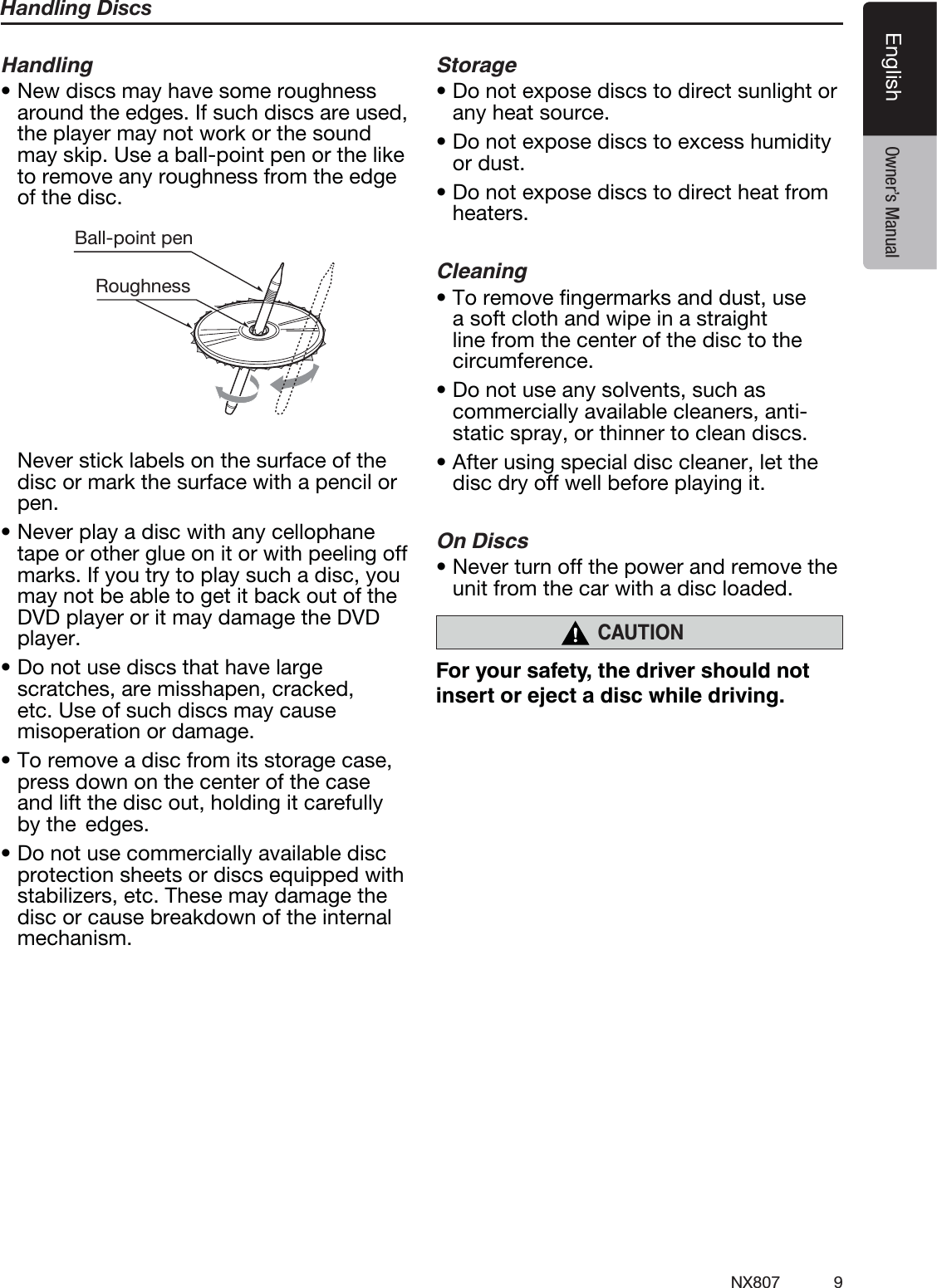
9NX807EnglishEnglish Owner’s ManualHandling DiscsHandlingt/FXEJTDTNBZIBWFTPNFSPVHIOFTTaround the edges. If such discs are used, the player may not work or the sound may skip. Use a ball-point pen or the like to remove any roughness from the edge of the disc.Ball-point pen Roughness  Never stick labels on the surface of the disc or mark the surface with a pencil or pen.t/FWFSQMBZBEJTDXJUIBOZDFMMPQIBOFtape or other glue on it or with peeling off marks. If you try to play such a disc, you may not be able to get it back out of the DVD player or it may damage the DVD player.t%POPUVTFEJTDTUIBUIBWFMBSHFscratches, are misshapen, cracked, etc. Use of such discs may cause misoperation or damage.t5PSFNPWFBEJTDGSPNJUTTUPSBHFDBTFpress down on the center of the case and lift the disc out, holding it carefully by the  edges.t%POPUVTFDPNNFSDJBMMZBWBJMBCMFEJTDprotection sheets or discs equipped with stabilizers, etc. These may damage the disc or cause breakdown of the internal mechanism.Storaget%POPUFYQPTFEJTDTUPEJSFDUTVOMJHIUPSany heat source.t%POPUFYQPTFEJTDTUPFYDFTTIVNJEJUZor dust.t%POPUFYQPTFEJTDTUPEJSFDUIFBUGSPNheaters.Cleaningt5PSFNPWFmOHFSNBSLTBOEEVTUVTFa soft cloth and wipe in a straight line from the center of the disc to the circumference.t%POPUVTFBOZTPMWFOUTTVDIBTcommercially available cleaners, anti-static spray, or thinner to clean discs.t"GUFSVTJOHTQFDJBMEJTDDMFBOFSMFUUIFdisc dry off well before playing it.On Discst/FWFSUVSOPGGUIFQPXFSBOESFNPWFUIFunit from the car with a disc loaded.CAUTION!
10 NX807English Owner’s ManualThis product incorporates copyright protection technology that is protected by U.S. patents and other intellectual property rights. Use of this copyright protection technology must be authorized by Rovi Corporation, and is intended for home and other limited viewing uses only unless otherwise authorized by Rovi Corporation.  Reverse engineering or disassembly is prohibited.Manufactured under license from Dolby Laboratories.Dolby, Dolby Audio, and the double-D symbol are trademarks of Dolby Laboratories.“Made for iPod” and “Made for iPhone” mean that an electronic accessory has been designed to connect specifically to iPod or iPhone, respectively,and has been certified by the developer to meet Apple performance standards.Use of the Apple CarPlay logo means that a vehicle user interface meets Apple performance standards.Apple is not responsible for the operation of this device or its compliance with safety and regulatory standards.Please note that the use of this accessory with iPod or iPhone may affect wireless performance.iPhone, iPod and Siri are trademarks of Apple Inc.,registered in the U.S. and other countries.Apple CarPlay and Lightning are trademarks of Apple Inc. AndroidTM is the trademark of Google Inc.The Bluetooth® word mark and logos are registered trademarks owned by the Bluetooth® SIG, Inc. And any use of such marks by Clarion Co., Ltd. is under license. Other trademarks and trade names are those of their respective owners. Pandora, the Pandora logo, and the Pandora trade dress are trademarks or registered trademarks of Pandora Media, Inc. used with permission.Sirius, XM and all related marks and logos are trademarks of Sirius XM Radio Inc. All rights reserved.The terms HDMI and HDMI High-Definition Multimedia Interface, and the HDMI Logo are trademarks or registered trademarks of HDMI Licensing LLC in the United States and other countries."
11NX807EnglishEnglish Owner’s Manual[MENU] [MAP][Open/Tilt][AV][IR] [RESET] [-VOL+]4. OPERATION PANELFunctions of Buttons[MAP] Buttons0RESSTHISBUTTONTOMOVETOTHE.ATIVE.AVIGATIONSCREENs0RESSANDHOLDTHISBUTTONFORSECONDSTOMOVETO!PPLE#AR0LAYMAP[AV] Buttons0RESSTHISBUTTONTODISPLAYTHECURRENTAUDIOSOURCESCREEN[MENU] Buttons0RESSTHISBUTTONTODISPLAYMAINMENUPRESSAGAINTORETURNCURRENTSOURCEs0RESSANDHOLDTHISBUTTONFORSECONDSTOTURNOFFTHEMONITOR0RESSANYWHEREONTHETOUCHSCREENTOTURNONTHEMONITORAGAIN[RESET] Buttons 0RESSTHISBUTTONTOHARDWARERESETTHEUNITNote: When the [RESET] button is pressed, frequencies of radio stations, titles, etc. stored in memory are cleared.[IR]3%.3/2s2ECEIVERFORTHEREMOTECONTROLUNITOPERATINGRANGEDEGREEINALLDIRECTIONS[VOICE] ButtonsPress this button until you hear the tone,  then you can use Siri® function.[Open/Tilt] Buttons0RESSTHISBUTTONTOOPENANDCLOSETHEPANELs+EEPPRESSINGTHISBUTTONMORETHANSECONDSINORDERTOCHANGETHETILTANGLE[-VOL+] Buttons0RESSTHESEBUTTONSTOINCREASEORDECREASETHEVOLUMELEVELs+EEPPRESSINGONEOFTHESEBUTTONSFORMORETHANSECONDSTOQUICKLYINCREASEORDECREASETHEVOLUMELEVELOnly navigation map card is available and don’t remove it when unit is powered on[VOICE]
12 NX807English Owner’s Manual5. REMOTE CONTROLReplacing the batteries0RESSTHERETENTIONTABANDPULLOUTTHEBATTERYTRAYANDREMOVETHEOLDBATTERY)NSERTTHENEW#2BATTERYANDSLIDETHEBATTERYTRAYBACKINTHEREMOTECONTROLTHESAMEDIRECTIONTHATYOUREMOVEDIT0LEASEENSURETHETRAYISINSERTEDINTHECORRECTDIRECTIONs+EEPTHEBATTERYOUTOFTHEREACHOFCHILDREN3HOULDTHEBATTERYBESWALLOWEDCONSULTADOCTORIMMEDIATELYs"ATTERIESBATTERYPACKORBATTERIESINSTALLEDMUSTNOTBEEXPOSEDTOEXCESSIVEHEATSUCHASSUNSHINElREORTHELIKE3IGNALTRANSMITTER/PERATINGRANGEªINALLDIRECTIONS[   /   ][ 0-9 ][SRCH][BACK][  ,  ,  ,   ][TITLE][   ], [   ][ZOOM][MUTE][AUDIO][POWER/SRC][VOLUME][SET][PIC][TAG][RPT][   ], [   ][SUB.T][OPEN][ANGLE][NAVI/AV][MENU][BAND][ROOT][ENT]CAUTIONRCX005 Remote Control Included
13NX807EnglishEnglish Owner’s Manual[   /   ] Buttons0RESSTHISBUTTONTOPLAYORPAUSEVIDEOANDAUDIOMEDIAs0RESSTHISBUTTONMORETHANSECONDTOSTOPVIDEOANDAUDIOMEDIAs0LAY0AUSE2EPLAY4UNE-IXIN3IRIUS8-MODE [MUTE] Buttons-UTEORUNMUTETHESPEAKERs4HESYMBOL; =ONTHEUPPERRIGHTAREAOFTHESCREENINDICATESTHESPEAKERSAREMUTED[POWER/SRC] Buttons0RESSTHISBUTTONTOMOVETHEFOCUSTOTHENEXTAVAILABLESOURCEITEMONTHEMAINMENU[0 - 9] "UTTONSs5SEINTHEKEYPADSCREENTOSELECTTHERADIOs5SETOSELECTTHETRACKINTHETRACKLISTSCREENs0RESSTOENTER$6$VIDEOCHAPTERSTITLESINTHEKEYPADSCREEN[VOLUME] "UTTONSs)NCREASEANDDECREASEVOLUMELEVEL[NAVI/AV] Buttons0RESSTHISBUTTONTOSWITCHBETWEENCURRENTSOURCEANDCURRENTPOSITIONONTHENAVIGATIONMAPs[SRCH] Buttons0RESSTHISBUTTONTOOPENTHECHAPTERORTITLESEARCHWINDOWWHILEPLAYING$6$[BAND] Buttons#YCLESTOTHENEXTBAND[SET] Buttons0RESSTHISBUTTONTOOPENTHEAUDIOSETTINGMENUINANYMODE[BACK] Buttons7HENINTHEMAINMENUPRESSTHISBUTTONTORETURNTOTHELASTSCREEN[   ], [   ], [   ], [   ]"UTTONSs0RESSTHESEBUTTONSFORCURSORMOVEMENTINTHEMAINMENUORSETTINGSMODEs&ROMTHEMAINMENUYOUCANSELECTYOURDESIREDSOURCEORCHANGEYOURSETTINGS[ENT] Buttons0RESSTOlXTHEENTEREDDATAINTHEKEYPADSCREENORSELECTTHEITEMTHECURSORISON[MENU] Buttons0RESSTHISBUTTONTOENTERTHEMAINMENUORRETURNTOTHECURRENTRESOURCE[PIC] Buttons.OFUNCTION[TAG] Buttons.OFUNCTION [TITLE] Buttons0RESSTOGOTOTHETITLEMENUONTHE$6$ [ROOT] Buttons0RESSTOGOTOTHEROOTMENUONTHE$6$ [RPT] ButtonRemote Control Functions9OUCANUSETHEREMOTECONTROLTOOPERATETHE.8Note:s4HEWIRELESSREMOTECONTROLOPERATIONMAYNOTBEOPTIMALINDIRECTSUNLIGHTCAUTIONs5SEONE#26LITHIUMBATTERYs2EMOVETHEBATTERYIFTHEREMOTECONTROLISNOTUSEDFORAMONTHORLONGERs4HEREISADANGEROFEXPLOSIONIFBATTERYISINCORRECTLYREPLACED2EPLACEONLYWITHTHESAMEOREQUIVALENTTYPEs$ONOTHANDLETHEBATTERYWITHMETALLICTOOLSs$ONOTSTORETHEBATTERYWITHMETALLICOBJECTSs)FTHEBATTERYLEAKSWIPETHEREMOTECONTROLCOMPLETELYCLEANANDINSTALLANEWBATTERYs7HENDISPOSINGOFUSEDBATTERIESCOMPLYWITHGOVERNMENTALREGULATIONSORENVIRONMENTALPUBLICINSTITUTIONSRULESTHATAPPLYINYOURCOUNTRYAREAImportants$ONOTSTORETHEREMOTECONTROLINHIGHTEMPERATURESORDIRECTSUNLIGHTs4HEREMOTECONTROLMAYNOTFUNCTIONPROPERLYINDIRECTSUNLIGHTs$ONOTLETTHEREMOTECONTROLFALLONTOTHEmOORWHEREITMAYBECOMEJAMMEDUNDERTHEBRAKEORACCELERATORPEDAL
14 NX807English Owner’s Manuals0RESSTOPERFORMCHAPTERREPEATTITLEREPEATREPEATOFFWHILEPLAYING$6$MODEs0RESSTOPERFORM2EPEAT4RACK2EPEAT!LLWHILEPLAYING#$s0RESSTOPERFORM2EPEAT4RACK2EPEAT&OLDER2EPEAT!LLWHILEPLAYING-07-!ORVIDEOlLESONDISCs0RESSTOPERFORM2EPEAT4RACK2EPEAT&OLDER2EPEAT!LLWHILEPLAYING-07-!ORVIDEOlLESIN53"MEMORY [   ], [   ] "UTTONSs0RESSTOSELECTTHENEXTPRESETLOWERORHIGHERNUMBERIN4UNERMODEs0RESSTOSELECTTHENEXTLOWERORHIGHERCHAPTERNUMBERIN$6$VIDEOMODEs0RESSTOSELECTTHENEXTLOWERORHIGHERTRACKIN#$53"6IDEO53"!UDIOMODEs0RESSFORCONTROLOFBACKGROUNDSOURCEIN.AVIGATIONMODEs0RESET5P$OWN4RACK5P$OWN4UNE-IXIN3IRIUS8-MODE [   ], [   ]"UTTONSs0RESSTOMANUALLYSELECTTHENEXTLOWERORHIGHERSTATIONIN4UNERMODESs0RESSTOPERFORMFASTBACKWARDORFASTFORWARDSEARCHING0RESSAGAINTOCHANGETHESPEEDTOXXXORXs0RESSFORCONTROLOFBACKGROUNDSOURCEIN.AVIGATIONMODEs#HANNEL5P$OWNIN3IRIUS8-MODE [ZOOM] Buttons0RESSTOTURNONANDZOOMINWHILEPLAYING$6$9OUCANZOOMINUPTOX.OTALL$6$DISCSSUPPORTTHISFUNCTION. [AUDIO] Buttons0RESSTOSWITCHTHEAUDIOTRACKOFTHEDISCWHILEPLAYINGA$6$ [SUB-T] Buttons0RESSTOSWITCHNEXTAVAILABLESUBTITLEWHILEPLAYING$6$s0RESSTODISPLAYTHEVIDEOMENUINI0ODMODE [ANGLE] Buttons0RESSTOSWITCHTHEANGLEOPTIONOFTHEDISCWHILEPLAYINGA$6$.OTALL$6$DISCSSUPPORTTHISFUNCTIONs0RESSTODISPLAYTHEAUDIOMENUINI0ODMODE [OPEN] Buttons0RESSTOOPENCLOSETHEFRONTPANEL
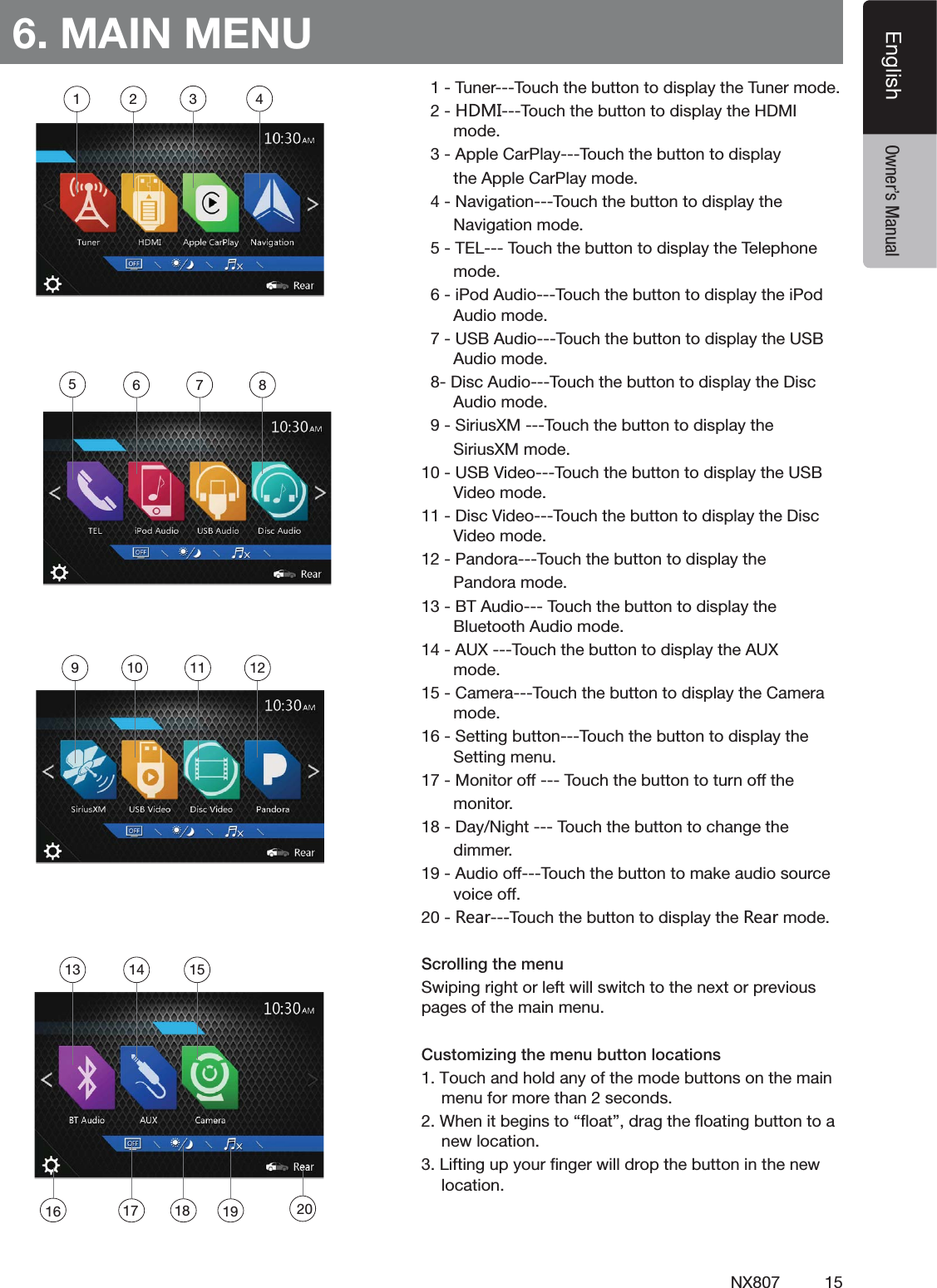
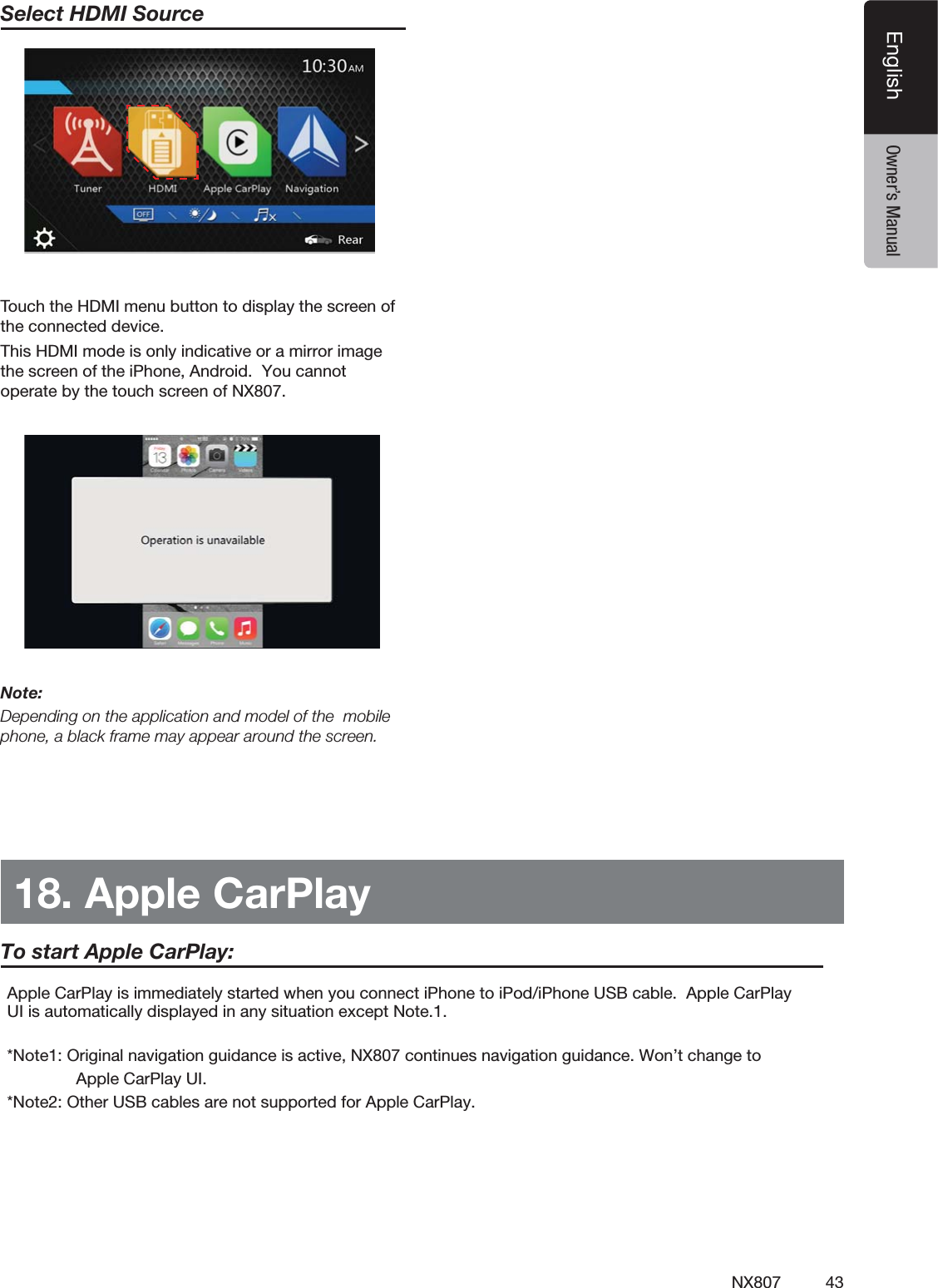
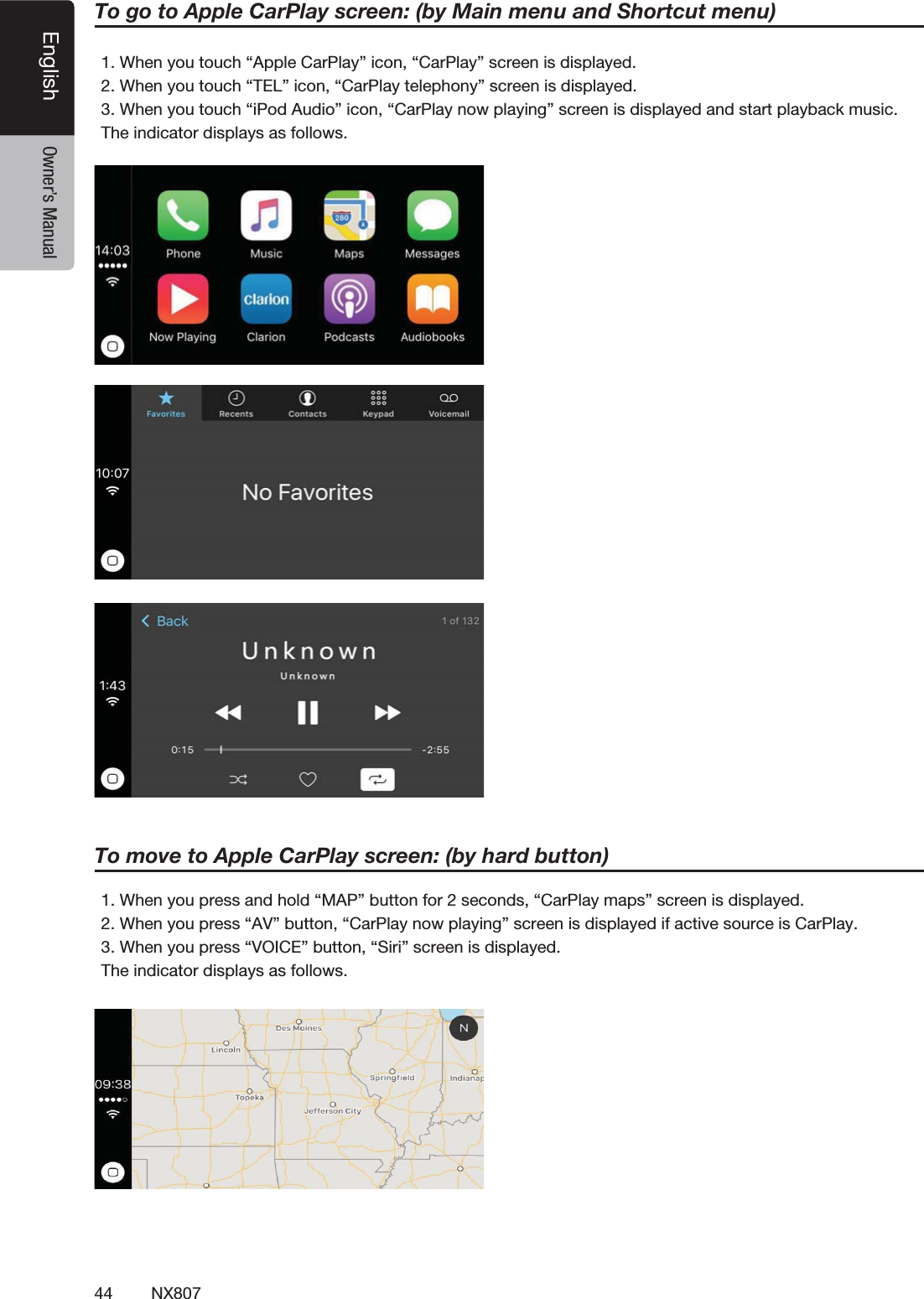
15NX807EnglishEnglish Owner’s Manual6. MAIN MENU4UNER4OUCHTHEBUTTONTODISPLAYTHE4UNERMODE.*3/4OUCHTHEBUTTONTODISPLAYTHE($-)MODE!PPLE#AR0LAY4OUCHTHEBUTTONTODISPLAYTHE!PPLE#AR0LAYMODE.AVIGATION4OUCHTHEBUTTONTODISPLAYTHE.AVIGATIONMODE4%,4OUCHTHEBUTTONTODISPLAYTHE4ELEPHONEMODEI0OD!UDIO4OUCHTHEBUTTONTODISPLAYTHEI0OD!UDIOMODE53"!UDIO4OUCHTHEBUTTONTODISPLAYTHE53"!UDIOMODE$ISC!UDIO4OUCHTHEBUTTONTODISPLAYTHE$ISC!UDIOMODE3IRIUS8-4OUCHTHEBUTTONTODISPLAYTHE3IRIUS8-MODE53"6IDEO4OUCHTHEBUTTONTODISPLAYTHE53"6IDEOMODE$ISC6IDEO4OUCHTHEBUTTONTODISPLAYTHE$ISC6IDEOMODE0ANDORA4OUCHTHEBUTTONTODISPLAYTHE0ANDORAMODE"4!UDIO4OUCHTHEBUTTONTODISPLAYTHE"LUETOOTH!UDIOMODE!584OUCHTHEBUTTONTODISPLAYTHE!58MODE#AMERA4OUCHTHEBUTTONTODISPLAYTHE#AMERAMODE3ETTINGBUTTON4OUCHTHEBUTTONTODISPLAYTHE3ETTINGMENU-ONITOROFF4OUCHTHEBUTTONTOTURNOFFTHEMONITOR$AY.IGHT4OUCHTHEBUTTONTOCHANGETHEDIMMER!UDIOOFF4OUCHTHEBUTTONTOMAKEAUDIOSOURCEVOICEOFF8KGX4OUCHTHEBUTTONTODISPLAYTHE8KGXMODEScrolling the menuSwiping right or left will switch to the next or previous pages of the main menu.Customizing the menu button locations1. Touch and hold any of the mode buttons on the main menu for more than 2 seconds.2. When it begins to “float”, drag the floating button to a new location.3. Lifting up your finger will drop the button in the new location.1 2 3 456 7 89 10 11 1213 14 1516 17 2018 19
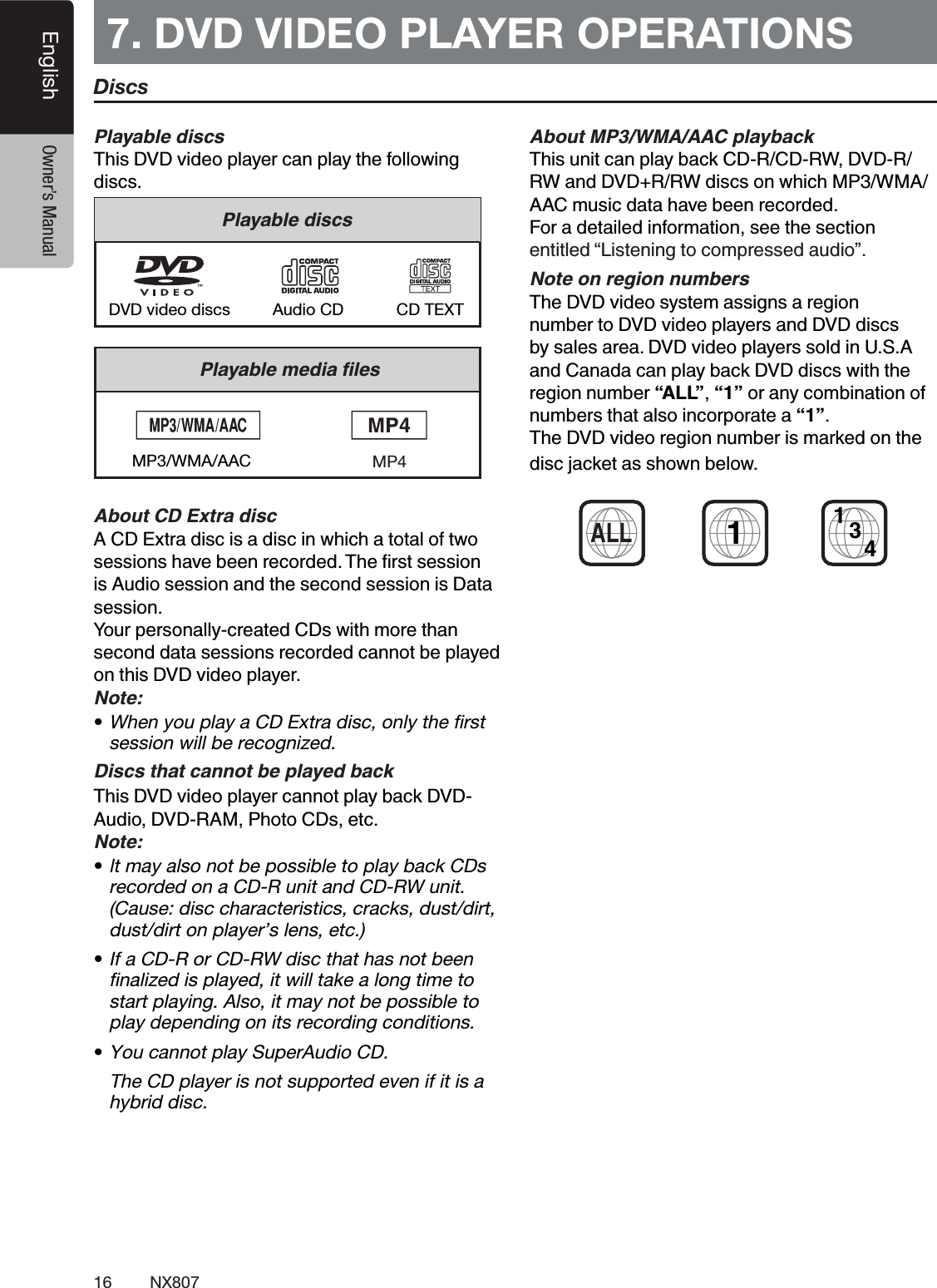
16 NX807English Owner’s Manual7. DVD VIDEO PLAYER OPERATIONS #This DVD video player can play the following discs.#CD TEXTDVD video discs Audio CD#MP3/WMA/AAC$%&A CD Extra disc is a disc in which a total of two is Audio session and the second session is Data session.Your personally-created CDs with more than second data sessions recorded cannot be played on this DVD video player.Note:tWhen you play a CD Extra disc, only the first session will be recognized.$"This DVD video player cannot play back DVD-Audio, DVD-RAM, Photo CDs, etc.Note:t It may also not be possible to play back CDs recorded on a CD-R unit and CD-RW unit. (Cause: disc characteristics, cracks, dust/dirt, dust/dirt on player’s lens, etc.)tIf a CD-R or CD-RW disc that has not been finalized is played, it will take a long time to start playing. Also, it may not be possible to play depending on its recording conditions.tYou cannot play SuperAudio CD.   The CD player is not supported even if it is a hybrid disc.'#()*')"This unit can play back CD-R/CD-RW, DVD-R/ RW and DVD+R/RW discs on which MP3/WMA/AAC music data have been recorded.For a detailed information, see the section entitled “Listening to compressed audio”.+The DVD video system assigns a region number to DVD video players and DVD discs by sales area. DVD video players sold in U.S.A and Canada can play back DVD discs with the region number “ALL”, “1” or any combination of numbers that also incorporate a “1”.The DVD video region number is marked on the disc jacket as shown below.1ALL1(4DiscsMP4
17NX807EnglishEnglish Owner’s ManualChange DVD System SettingsNote:  If the setup operation is performed in the middle of DVD video play, the disc will restart from the beginning.Selecting DVD Setup Menu4OUCHTHE[Settings]BUTTONONTHE-AIN-ENUTOACCESSTHE6IDEOSETUPMENU4OUCH[Video] BUTTON4HEVIDEOMENUISDISPLAYEDSetting up the Screen Size4OUCHTHE[DVD Wide Screen Mode]BUTTONTOTURNONORTURNOFFTHE$6$WIDESCREENMODE4HEFACTORYDEFAULTSETTINGIShOFFv.OTE.OTALL$6$DISCSSUPPORTTHISFUNCTIONSetting up the password for parental level control4HEFACTORYDEFAULTPASSCODEIShv1.In Main Menu4OUCH[Settings]BUTTON4OUCH[Others]BUTTONONTHEDISPLAY4OUCHTHE[Set Password] ----ANDANUMERICALKEYPADWILLAPPEAR)NPUTANEWPASSWORDANDCONlRM4HEPASSWORDISSETNote:  When a disc with view restrictions is inserted, you will BEPROMPTEDTOINPUTTHISPASSWORD4HEDISCWILLNOTBEviewable until the correct password is entered.Set rating for parental level control3ELECT/THERSSCREENWHILEIN3ETTINGMODE4OUCH[Parental Control] BUTTON4OUCHTHEDESIREDRATINGFORLEVELCONTROL5SETHISTABLETOSETTHEPARENTALLEVEL+ID3AFE +ID3AFEG'ENERAL!UDIENCESPG 0ARENTAL'UIDANCE3UGGESTED0' 0ARENTS3TRONGLY#AUTIONED0'2 0ARENTAL'UIDANCE2ESTRICTED2 2ESTRICTED.# .O/NE!ND5NDER!DMITTEDAdult /NLY!DULTs 4HECONTENTSTHATTHEPARENTALLEVELRESTRICTSVARYWITHTHECOUNTRYCODENote:4HERATINGCANBESELECTEDONLYUNDERTHEpassword unlocked status, and the limits can be set only under the password locked status.Watching to a Disc4OLOADADISC)NSERTTHEDISCINTOTHECENTEROFTHEINSERTIONSLOTTHELABELSIDEFACINGUP CAUTIONFor your safety, the driver should not insert or eject a disc while driving.Note:s.EVERINSERTFOREIGNOBJECTSINTOTHEDISCINSERTIONSLOTs)FTHEDISCISNOTINSERTEDEASILYTHEREMAYBEANOTHERdisc in the mechanism or the unit may require service.sCMSINGLEPLAYDISCSCANNOTBEUSED$ISCSTARTSPLAYINGAUTOMATICALLY WARNINGSome videos may be recorded at higher than desired volume levels. Increase the volume gradually from the minimal setting after the video has started.Ejecting a disc4OEJECTTHEDISCOPENTHEFRONTPANELBYPRESSINGTHE/PENBUTTONTHENPRESSTHEEJECTIMAGEBUTTON4HEPLAYMODETHENSWITCHESTOTHE4UNERMODE)FTHEDISCISLEFTINTHEEJECTEDPOSITIONFORSECONDSTHEDISCISAUTOMATICALLYRELOADEDNote: If you force a disc in before auto reloading, it may damage a disc.
18 NX807English Owner’s ManualShowing DVD Player Mode Screen!FTERTHEDISCISLOADEDTHEPLAYMODEISAUTOMATICALLYENGAGED4OUCHANYPLACEONTHESCREENTODISPLAYTHE$6$6IDEOMENUTOUCHTHESCREENAGAINTORETURNTOTHEPLAYBACKSCREEN4HEDISPLAYWILLRETURNTOTHEPLAYBACKSCREENIFYOUDONOTTOUCHTHESCREENFORSECONDS /PTIONBUTTON3HOW#URSORKEYSBUTTON0REVIOUS#HAPTER&AST"ACKWARDBUTTON0LAY0AUSEBUTTON.EXT#HAPTER&AST&ORWARDBUTTON%LAPSEDPLAYINGTIME3EEKBAR4OTALTIME-ENU,ISTBUTTON3YSTEMTIME"LUETOOTHSTATUSINDICATOR$6$PLAYBACKINFORMATION3HORTCUTBUTTON2EPEAT3WITCHINGBUTTON!UDIO#HANNELSWITCHINGBUTTON3UBTITLESWITCHINGBUTTON!NGLEBUTTON$IRECTCHAPTERORTITLESEARCHINGBUTTON)NFORMATIONBUTTONOperate the DVD Player Menu9OUCANSELECTTHEBUTTONITEMSDISPLAYEDINTHE$6$MENUBYDIRECTLYTOUCHINGTHEMPlay/Pause Playback4OUCH[  ]BUTTONTOPAUSEDURINGPLAYBACK4OUCH[]BUTTONAGAINTORESUMEPLAYBACKSkip (Search) a Chapter4OUCH[ ] or [ ]BUTTONDURINGPLAYBACK#HAPTERSARESKIPPEDDOWNORUPFROMCURRENTLOCATIONSASMANYTIMESASTHEBUTTONISTOUCHEDANDTHENPLAYBACKSTARTSSkip use seek bar4OUCHTHESPHERICAL[ ]ONSEEKBARANDDRAGITTOANYPOSITIONWHEREYOUWANTTOSTARTPLAYBACKFast Forward/Fast Backward4OUCH[ ] or [ ]BUTTONANDHOLDSECONDSTOSTARTFASTBACKWARDORFASTFORWARDDURINGPLAYBACK4HEPLAYBACKSPEEDSTARTSATXTHENWILLINCREASETOXXANDX2ELEASETHEBUTTONWILLCONTINUEPLAYINGWITHNORMALSPEEDNote:s.OAUDIOISREPRODUCEDDURINGFASTFORWARDANDFASTbackward operation.s4HEFASTFORWARDANDFASTBACKWARDSPEEDMAYDIFFERdepending on the disc.Search function9OUCANLOCATETHEBEGINNINGOFASCENEUSINGTHECHAPTERNUMBERSORTITLENUMBERSRECORDEDONTHE$6$6IDEODISC3HOWINGTHE$6$6IDEOMENUTOUCH[]BUTTON4HE+EY0ADSCREENAPPEARSWITHTHECHAPTER4ITLENUMBERINPUTMODE4OUCHING[]BUTTONTURNSTHE+EY0ADTOTHECHAPTERNUMBERINPUTMODE4OUCHING[]BUTTONTURNSTHE+EY0ADTOTHETITLENUMBERINPUTMODEs4ITLE!LARGESEGMENTTODIVIDETHEDATAAREAOFTHEDISCs#HAPTER!SMALLSEGMENTTODIVIDETHEDATAAREAOFTHEDISC14 15 161918131011121235 6 894717
19NX807EnglishEnglish Owner’s Manual)NPUTTHENUMBEROFTHETITLECHAPTERTHATYOUWANTTOPLAYWITHTHE[0] to [9]KEY4OUCHTHE[]BUTTON         0LAYBACKSTARTSFROMTHESCENEOFTHEINPUTTITLENUMBERORCHAPTERNUMBERNOTE:)FTHEINPUTTITLECHAPTERNUMBERDOESNOTEXISTORSEARCHINGWITHATITLECHAPTERNUMBERISNOTALLOWEDTHESCREENIMAGEWILLNOTCHANGE4OUCH[]BUTTONTOCLOSETHEKEYPADRepeat Playback4HISOPERATIONPLAYSBACKCHAPTERSRECORDEDONTHE$6$6IDEOREPEATEDLY3HOWINGTHE$6$6IDEOMENUTOUCH[]BUTTON4OUCH[]BUTTONONCEFOR2EPEAT#HAPTERAGAINFOR2EPEAT4ITLE4OUCH[]BUTTONAGAINTOTURNOFFTHEREPEATPLAYBACKUsing the Title Menu/N$6$DISCSCONTAININGTWOORMORETITLESYOUCANSELECTFROMTHETITLEMENUFORPLAYBACK3HOWINGTHE$6$6IDEOMENUTOUCH[ ]BUTTONDURINGPLAYBACK $EPENDINGONTHEDISCTHETITLEMENUMAYNOTBECALLED4OUCHTHETITLEMENUSCREENTHENTOUCHTHE3HOW#URSORKEYSBUTTON3ELECTTHEITEMSINTHETITLEMENUSCREENBY  DIRECTIONALBUTTONS $EPENDINGONTHEDISCITEMSMAYNOTBESELECTEDWITHTHEDIRECTIONALBUTTONS4OUCH[]BUTTONTOlXONTHESELECTEDITEM4OUCH[ ]BUTTONSwitching Audio/NDISCSINWHICHTWOORMOREAUDIOSORAUDIOLANGUAGESHAVEBEENRECORDEDYOUCANSWITCHAMONGTHEAUDIOLANGUAGESDURINGPLAYBACK3HOWINGTHE$6$6IDEOMENUTOUCH[]BUTTONDURINGPLAYBACKs %ACHTIMEYOUTOUCHTHEBUTTONYOUCANSWITCHAMONGAUDIOLANGUAGESs )TMAYTAKETIMETOSWITCHAMONGAUDIOLANGUAGES $EPENDINGONTHEDISCUPTOKINDSOFAUDIOLANGUAGESMAYBERECORDED&ORDETAILSSEETHEMARKOFTHEDISC )NDICATESTHATAUDIOLANGUAGESHAVEBEENRECORDED 7HENTHEPOWERISTURNEDONANDWHENTHEDISCISCHANGEDTOANEWONETHELANGUAGESETASTHEFACTORYDEFAULTISSELECTED)FTHATLANGUAGEHASNOTBEENRECORDEDONDISCTHELANGUAGEISSPECIlEDONTHEDISC $EPENDINGONTHEDISCSWITCHINGMAYBECOMPLETELYIMPOSSIBLEORIMPOSSIBLEONSOMESCENESSwitching Subtitles/N$6$DISCSINWITHTWOORMORESUBTITLELANGUAGESHAVEBEENRECORDEDYOUCANSWITCHAMONGTHESUBTITLELANGUAGESDURINGPLAYBACK3HOWINGTHE$6$6IDEOMENUTOUCH[]BUTTONTOSELECTASUBTITLEDURINGPLAYBACK%ACHTIMEYOUTOUCHTHEBUTTONYOUCANSWITCHAMONGSUBTITLESs )TMAYTAKETIMETOSWITCHAMONGSUBTITLES $EPENDINGONTHEDISCUPTOKINDSOFSUBTITLESMAYBERECORDED&ORDETAILSSEETHEMARKOFTHEDISC )NDICATESTHATKINDSOFSUBTITLESHAVEBEENRECORDED $EPENDINGONTHEDISCSWITCHINGMAYBECOMPLETELYIMPOSSIBLEORIMPOSSIBLEONSOMESCENES4OTURNOFFSUBTITLESREPEATTOUCHING[]BUTTONUNTILSUBTITLESARETURNEDOFFDisplaying the playback status4OUCH[ ]BUTTONON$6$0LAYERMODESCREEN0LAYBACKSTATUSISDISPLAYEDONSCREENPlay video files4HISSYSTEMCANPLAYVIDEOlLESSTOREDONDISCShowing Video Files Player Mode Screen!FTERADISCWITHVIDEOlLESISLOADEDTOUCH;$ISC6IDEO=BUTTONON-!).-%.5TOSHOWTHEVIDEOlLESPLAYERMODESCREEN4OUCHTHESCREENOFTHEPLAYINGVIDEOlLETODISPLAY6IDEOlLESPLAYERMENUTOUCHTHESCREENAGAINTORETURNTHEPLAYBACKSCREEN4HEDISPLAYWILLRETURNTO
20 NX807English Owner’s ManualTHEPLAYBACKSCREENIFYOUDONOTTOUCHTHESCREENFORSECONDS/PTIONBUTTON0REVIOUS4RACK&AST"ACKWARDBUTTON0LAY0AUSEBUTTON.EXT4RACK&AST&ORWARDBUTTON%LAPSEDPLAYINGTIME3EEKBAR,IST-ODEBUTTON3YSTEMTIME"LUETOOTHSTATUSINDICATOR0LAYBACKINFORMATION2EPEATBUTTON!UDIOBUTTON3UBTITLEBUTTONOperate the Video Files Player Menu9OUCANSELECTTHEBUTTONITEMSDISPLAYEDINTHE6IDEOlLESPLAYERMENUBYDIRECTLYTOUCHINGITPlay/Pause Playback4OUCH; =BUTTONTOPAUSEDURINGPLAYBACK4OUCH; =BUTTONAGAINTORESUMEPLAYBACKSwitch to Previous/Next File4OUCH[ ] or [ ]BUTTONDURINGPLAYBACKTOPLAYPREVIOUSNEXTlLESkip using seek bar4OUCHTHEBALLONSEEKBARANDDRAGITTOANYPOSITIONWHEREYOUWANTTOSTARTPLAYBACKFast Forward/Fast Backward4OUCH[ ] or [ ]BUTTONANDHOLDSECONDSTOSTARTFASTBACKWARDORFASTFORWARDDURINGPLAYBACK4HEPLAYBACKSPEEDSTARTSATXTHENWILLINCREASETOXXANDX2ELEASETHEBUTTONWILLCONTINUEPLAYBACKWITHNORMALSPEEDNote:.OAUDIOISREPRODUCEDDURINGFASTFORWARDANDFASTbackward operation.4HEFASTFORWARDANDFASTBACKWARDSPEEDMAYDIFFERdepending on the disc.Repeat Playback4HISOPERATIONPLAYSBACKVIDEOlLESRECORDEDONTHEDISCREPEATEDLY2EPEAT!LLISTHEFACTORYDEFAULTREPEATSETTING3HOWINGTHEVIDEOlLESPLAYERMENUTOUCH[] BUTTON4OUCH[]BUTTONONCEFOR2EPEAT4RACKAGAINFOR2EPEAT&OLDER4OUCH[]BUTTONAGAINFOR2EPEAT!LLSwitching Audio3OMEVIDEOlLESWILLHAVETWOORMOREAUDIOCHANNELSYOUCANSWITCHAMONGTHEAUDIOCHANNELSDURINGPLAYBACK4OUCH[]BUTTONDURINGPLAYBACKs %ACHTIMEYOUTOUCHTHEBUTTONYOUCANSWITCHAMONGAUDIOLANGUAGESs )TMAYTAKETIMETOSWITCHAMONGAUDIOLANGUAGES$EPENDINGONTHEDISCSWITCHINGMAYBEIMPOSSIBLESwitching Subtitles3OMEVIDEOlLESWILLHAVETWOORMORESUBTITLESHAVEBEENRECORDEDYOUCANSWITCHAMONGTHESESUBTITLESDURINGPLAYBACK4OUCHTHE[]BUTTONTOSELECTASUBTITLEDURINGPLAYBACKs %ACHTIMEYOUTOUCHTHEBUTTONYOUCANSWITCHAMONGSUBTITLESs )TMAYTAKETIMETOSWITCHAMONGSUBTITLES$EPENDINGONTHEDISCSWITCHINGMAYBEIMPOSSIBLEVideo Files List3HOWINGTHE6IDEOlLESPLAYERMENUTOUCHTHE []BUTTONTODISPLAYVIDEOlLESLISTSCREEN6IDEOlLESLISTOPERATIONSISALMOSTTHESAMEASTHE$ISC!UDIOPLAYERMODE0LEASEREFERTO#$0LAYER/PERATIONS10 11 12123456789
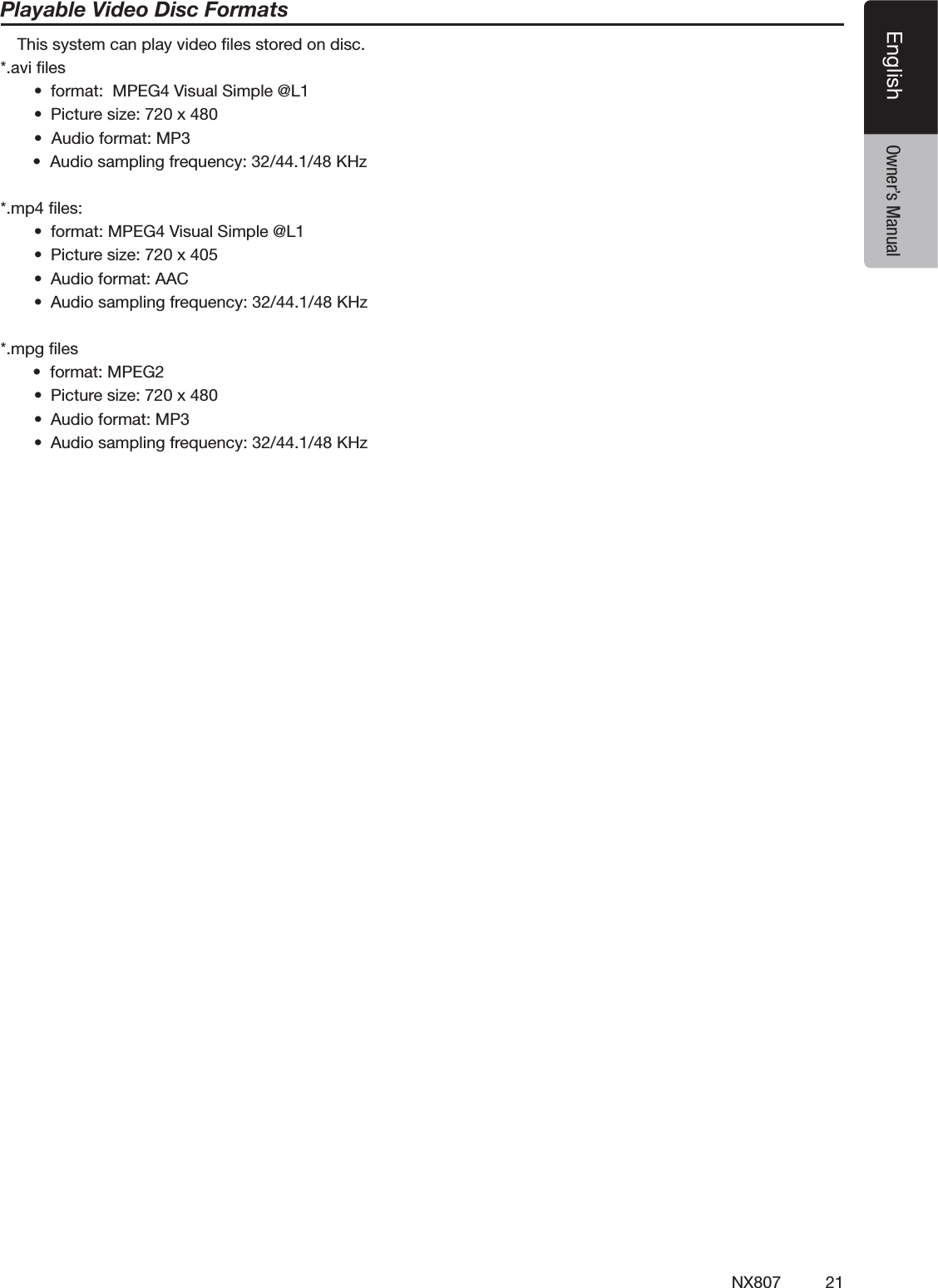
21NX807EnglishEnglish Owner’s ManualPlayable Video Disc Formats 4HISSYSTEMCANPLAYVIDEOlLESSTOREDONDISCAVIlLESs FORMAT-0%'6ISUAL3IMPLE ,s 0ICTURESIZEXs!UDIOFORMAT-0s!UDIOSAMPLINGFREQUENCY+(ZMPlLESs FORMAT-0%'6ISUAL3IMPLE ,s 0ICTURESIZEXs !UDIOFORMAT!!#s !UDIOSAMPLINGFREQUENCY+(ZMPGlLESsFORMAT-0%'s 0ICTURESIZEXs !UDIOFORMAT-0s !UDIOSAMPLINGFREQUENCY+(Z
22 NX807English Owner’s ManualListening to a Disc/Ejecting a Disc0LEASEREFERTO$ISC6IDEO0LAYER/PERATIONSWATCHINGTOADISCAND%JECTINGADISCShowing CD Player Mode Screen!FTERTHEDISCISLOADEDTHEPLAYMODEISAUTOMATICALLYENGAGED)FTHEDISCHAVEBEENLOADEDYOUCANTOUCHTHE[Disc Audio]BUTTONONMAINMENUTODISPLAYTHE#$PLAYERMODESCREEN/PTIONBUTTON%LAPSEDPLAYINGTIMEINDICATOR0ROGRESSBAR0AGE4URNINGBUTTON3YSTEMTIME"LUETOOTHSTATUSINDICATOR2EPEATBUTTON0REVIOUS4RACK&AST"ACKWARDBUTTON3HORTCUTBUTTON0LAY0AUSEBUTTON.EXT4RACK&AST&ORWARDBUTTON3HUFmEBUTTON $IRECT3EARCHINGBUTTON3CAN3TART3TOPBUTTON3ONG4ITLE!RTIST!LBUM)NFORMATION#LOSEOPTIONMENUBUTTONOperate the CD Player Menu9OUCANSELECTTHEBUTTONITEMSDISPLAYEDINTHE#$PLAYERMENUBYDIRECTLYTOUCHINGITINLISTPlay/Pause Playback4OUCH[ ]BUTTONTOPAUSEDURINGPLAYBACK4OUCH[ ]BUTTONAGAINTORESUMEPLAYBACKSwitch to Previous/Next file or track4OUCH[ ] or [ ]BUTTONDURINGPLAYBACKTOPLAYPREVIOUSNEXTlLEs 4OUCHING[]BUTTONSTARTSPLAYBACKFROMTHEBEGINNINGOFTHENEXTTRACKs 4OUCHING[]BUTTONSTARTSPLAYBACKFROMTHEBEGINNINGOFTHECURRENTTRACK7HENTHISBUTTONISTOUCHEDAGAINWITHINSECONDSPLAYBACKSTARTSFROMTHEBEGINNINGOFPREVIOUSTRACKFast Forward/Fast Backward4OUCH[ ] or [ ]BUTTONANDHOLDMORETHANSECONDSTOSTARTFASTBACKWARDORFASTFORWARDDURINGPLAYBACK4HEPLAYBACKSPEEDSTARTSATXTHENWILLINCREASETOXXANDX2ELEASETHEBUTTONWILLCONTINUEPLAYBACKWITHNORMALSPEEDNote:4HEFASTFORWARDANDFASTBACKWARDSPEEDMAYDIFFERdepending on the disc.Repeat Playback2EPEAT!LLISTHEFACTORYDEFAULTREPEATSETTING 4OUCH[]BUTTONSWITCHBETWEEN2EPEAT&OLDER2EPEAT!LLAND2EPEAT4RACKShuffle Playback4OUCH;;=BUTTONTOSHUFmETHETRACKSDURINGPLAYBACK4OUCHTHISBUTTONAGAINTOTURNOFFTHEFEATURESelecting a track on the Track List Screen4HISFUNCTIONALLOWSYOUTOSELECTTRACKSFROMADISPLAYEDLIST4OUCHTHETRACKTITLEONTHEDISPLAYLIST4HESELECTEDTRACKWILLSTARTPLAYING7HENTHEDESIREDTRACKISNOTDISPLAYEDTOUCHANDSWIPETHETRACKLISTUPORDOWN4OUCHTHEDESIREDTRACKTITLEBUTTON4HECORRESPONDINGTRACKISSTARTEDPLAYBACK8. CD PLAYER OPERATIONS 4102113141236158511791617
23NX807EnglishEnglish Owner’s ManualScanning the Tracks4OUCH[ ]BUTTONTOSHOW[Scan  ]BUTTON4OUCH[Scan  ]BUTTONDURINGPLAYBACKs )TWILLPLAYFROMNEXTTRACKANDEACHTRACKWILLDISPLAYFORSECONDSs 4HE[Scan  ]BUTTONWILLSWITCHTO[Scan  ]BUTTON4OUCH[Scan  ]BUTTONs )TWILLCONTINUEPLAYBACKFROMCURRENTTRACKs [Scan  ]BUTTONWILLSWITCHTO[Scan  ] BUTTON 4HEFUNCTIONWILLSEQUENTIALLYSCANALLTRACKSINTHECURRENTFOLDERONETIME!FTERTHE3CANFEATURESTOPSNORMALPLAYBACKWILLCONTINUESearching with the Track Number4HISOPERATIONALLOWSSEARCHINGUSINGTHETRACKNUMBERSRECORDEDONTHE#$S4OUCH[]BUTTONTOSHOW[ ]BUTTON4OUCH[]BUTTON4HENUMERICALKEYPADWILLAPPEARONTHESCREENANDTOUCH;;;;;;;;=BUTTON)NPUTTHETRACKNUMBERTHATYOUWANTTOPLAYBACKWITH[0] to [9]KEYANDTOUCH;/+=BUTTON0LAYBACKSTARTSFROMTHETRACKOFTHEINPUTTRACKNUMBERs )FTHEINPUTTRACKNUMBERDOESNOTEXISTORSEARCHINGWITHTRACKNUMBERISNOTALLOWEDTHESCREENIMAGEWILLNOTCHANGEs 4OUCHTHE[]BUTTONWILLCLOSETHENUMERICALKEYPADs 4OUCH[]BUTTONWILLCLOSETHEOPTIONWINDOWANDDISPLAYPLAYBACKSCREENListening to Compressed Audio4HISSYSTEMCANPLAYAUDIOlLESSTOREDONDISC-07-!!!#Tag Display Function4HISUNITISAN)$4AGCOMPATIBLEMODEL4HISUNITSUPPORTSTHE)$4!'SOFTHE6ERSION1.1 and 1.0.)NDISPLAYINGTHISUNITGIVESPRIORITYTOTHE6ERSIONAND4!'SNote:s3OME#$SRECORDEDON#$227MODEMAYNOTBEusable.Displaying  MP3/WMA/AAC TAG titles4AGINFORMATIONCANBEDISPLAYEDFORCOMPRESSEDAUDIOlLESCONTAINING4AGINFORMATION4AGDATATITLEARTISTALBUMPrecautions when creating MP3 discs &ILEEXTENSIONS!LWAYSADDAlLEEXTENSIONh-0vORhMPvTOAN-0lLEANDh7-!vORhWMAvTOA7-!ANDhMAvTOA!!#lLEBYUSINGSINGLEBYTELETTERS)FYOUADDAlLEEXTENSIONOTHERTHANSPECIlEDORFORGETTOADDTHESElLEEXTENSIONTHElLECANNOTBEPLAYED)NADDITIONIFYOUUSEUPPERCASEANDLOWERCASELETTERSCAPITALANDSMALLLETTERSMIXEDFORlLEEXTENSIONSNORMALPLAYMAYNOTBEPOSSIBLE&ILESOTHERTHAN-07-!!!#DATACANNOTBEplayed. 0LAYINGlLESWITHAFORMATNOTSUPPORTEDWILLBESKIPPEDANDTHESCANRANDOMANDREPEATPLAYBACKMODEMAYBECANCELEDs &ILEAND$ISC.OT3UPPORTED&ILESANDDISCSWITHFOLLOWINGEXTENSIONSARENOTSUPPORTED!!#$,&-50,3-002/lLESlLESWITH$2-OPENSESSIONDISCSs ,OGICALFORMAT&ILESYSTEM7HENWRITINGAN-07-!!!#lLEONADISCPLEASESELECTh)3/LEVELORLEVELWITHOUTINCLUDINGEXPANSIONFORMATvASTHEWRITINGSOFTWAREFORMAT.ORMALPLAYBACKMAYNOTBEPOSSIBLEIFTHEDISCISRECORDEDONANOTHERFORMAT4HEFOLDERNAMEANDlLENAMECANBEDISPLAYEDASTHETITLEDURING-07-!!!#PLAYs %NTERING&ILEAND&OLDER.AMES.AMESUSINGTHECODELISTCHARACTERSARETHEONLYlLENAMESANDFOLDERNAMESTHATCANBEENTEREDANDDISPLAYED5SINGANYOTHERCHARACTERWILLCAUSETHElLEANDFOLDERNAMESTOBEDISPLAYEDINCORRECTLYs &OLDERSTRUCTURE!DISCWITHAFOLDERHAVINGMORETHANHIERARCHICALLEVELSWILLCONmICTWITHTHE)3/ANDPLAYBACKWILLBEIMPOSSIBLEs .UMBEROFlLESORFOLDERS4HEMAXIMUMALLOWABLENUMBEROFFOLDERSISINCLUDINGROOTDIRECTORYTHEMAXIMUMALLOWABLENUMBEROFlLESISMAXPERFOLDER4HISREPRESENTSTHEMAXIMUMNUMBEROFTRACKSTHATCANBEPLAYEDBACK4RACKSAREPLAYEDINTHEORDERTHATTHEYWERERECORDEDONTOADISC4RACKSMIGHTNOTALWAYSBEPLAYEDINTHEORDERDISPLAYEDONTHE0#s 3OMENOISEMAYOCCURDEPENDINGONTHETYPEOFENCODERSOFTWAREUSEDWHILERECORDING
24 NX807English Owner’s Manuals )NCASEOFATRACKRECORDEDAT6"2VARIABLEBITRATETHEDISPLAYFORTHEPLAYTIMEOFTHETRACKMAYBESLIGHTLYDIFFERENTFROMTHEACTUALPLAYTIME!LSOTHERECOMMENDEDVALUEOF6"2RANGESFROMKBPSTOKBPSs !FTERDISCSELECTIONTHEPLAYMODEISAUTOMATICALLYENGAGEDPlayback MP3/WMA/AAC menu2EPEAT0LAYBACK7HILEPLAYING-07-!!!#TOUCH BUTTONCANSWITCHBETWEEN2EPEAT&OLDER2EPEAT!LLAND2EPEAT4RACK2EPEAT&OLDERAND2EPEAT!LL#URRENTFOLDERLISTs3HOWINGTITLEOFCURRENTFOLDERs4HENUMBERONTHEFOLDERSYMBOLISTHENUMBEROFlLESANDFOLDERSINTHECURRENTFOLDERs4OUCHTHETITLEOFCURRENTFOLDERPLAYLISTWILLSHOWlLESANDFOLDERSINUPPERFOLDER* Other operations about playing MP3/WMA/AAC are almost the same as CD Player mode.3TOP0LAYBACK4OUCH[   ]BUTTONTOSTOPPLAYBACK4OUCH[   ]BUTTONAGAINTORESUMEPLAYBACK0LAYBACKRESUMESFROMTHESTARTOFTHEFOLDERWHICHTHEPLAYINGTRACKISINs/THEROPERATIONSABOUTPLAYING-07-!!!#AREALMOSTTHESAMEAS#$0LAYERMODE12
25NX807EnglishEnglish Owner’s Manual4HISSYSTEMCANPLAYAUDIOlLES-07-!!!#&,!#STOREDINA53"MEMORYWHICHISRECOGNIZEDASh53"-ASS3TORAGE#LASSDEVICEv9OUCANUSEYOUR53"MEMORYASANAUDIODEVICEBYSIMPLYCOPYINGDESIREDAUDIOlLESINTOITNote: s4HISSYSTEMWILLNOTOPERATEORMAYOPERATEIMPROPERLYWITHSOME53"MEMORYs&ILESPROTECTEDWITHANY$2-CANNOTBEPLAYEDNotes on Using USB MemoriesGeneral notess 7HENNOSUPPORTEDlLESAREONTHE53"DEVICENOTHINGDISPLAYSINTHElLELIST.OTESONTHE!UDIOlLESs4HISSYSTEMCANPLAY-07-!!!#&,!#lLESSTOREDINTHE53"MEMORY-0lLESs FORMAT-0%'!UDIOLAYERs BITRATEK^KBPSsSAMPLINGFREQUENCY+(ZslLEEXTENSIONMP7-!lLESs FORMAT7INDOWSMEDIA!UDIOSTANDARD,PROlLEs BITRATE^KBPSs SAMPLINGFREQUENCY+(Zs lLEEXTENSIONWMA!!#lLESsFORMAT!DVANCED!UDIO#ODING,#!!#(%       AAC  sBITRATE^+BPSs SAMPLINGFREQUENCY+(Zs lLEEXTENSIONMA&,!#lLESs FORMAT&REE,OSSLESS!UDIO#ODECs QUANTIZATIONBITRATEORBITSs SAMPLINGFREQUENCY^+(Zs lLEEXTENSIONmAC.OTESONTHEFOLDERSTRUCTUREs 4HEFOLDERHIERARCHYMUSTBEWITHINHIERARCHICALLEVELS/THERWISEPLAYBACKMAYBEIMPOSSIBLEs 4HEMAXIMUMALLOWABLENUMBEROFFOLDERSISINCLUDINGROOTDIRECTORYANDFOLDERSWITHNO-07-!!!#&,!#lLEs 4HEMAXIMUMALLOWABLENUMBEROFlLESINAFOLDERISs 9OUCANSTORETHE-07-!!!#&,!#lLESTOGETHERINAFOLDERs 4HESYSTEMMAYBECOMESLOWIFTHElLESORFOLDERSEXCEEDTHELIMITATIONABOVENotes on the Tag titles-0TITLEARTISTALBUM7-!TITLEARTISTALBUM!!#CANNOTDISPLAYTAGINFORMATION&,!#TITLEARTISTALBUMSelect USB Audio Mode#ONNECTYOUR53"MEMORYWITH-07-!!!#&,!#lLESTOTHE53"CONNECTOR4HESYSTEMWILLAUTOMATICALLYDETECTTHECONNECTEDDEVICEANDTHE[USB Audio]BUTTONONMAINMENUWILLBEENABLEDs 7HENA53"MEMORYDEVICEISALREADYCONNECTEDTOUCHTHE[USB Audio]BUTTONTOSELECTTHE53"!UDIOMODE4HESYSTEMCHANGESTOTHE53"!UDIOMODEANDSTARTSPLAYBACKFROMTHEPREVIOUSPOSITIONORFROMTHEBEGINNINGNote:4HISSYSTEMHASTWO53"CONNECTORSANDCANCONNECTTWO53"9OUCANSELECTTHEDESIRED53"BYTOUCHINGTHELISTOF53"ROOTMENU4HISSYSTEMINDICATESTHE53"DEVICEASh-Y53"vh-Y53"vONTHELIST9. USB AUDIO OPERATIONS 1920712135648239101111415161718
26 NX807English Owner’s Manual/PTIONBUTTON  20LAY0AUSEBUTTON  30REVIOUS4RACK&AST"ACKWARDBUTTON  4.EXT4RACK&AST&ORWARDBUTTON  52EPEATBUTTON  63HUFmEBUTTON  7!UDIOlLESINLIST  8&OLDERSINLIST  90AGETURNINGBUTTON103YSTEMTIME11"LUETOOTHSTATUSINDICATOR12!LBUM!RT133HORTCUTBUTTON14#URRENT)$INFOAREA15%LAPSEDPLAYINGTIMEINDICATOR3EEKBAR160LAYBACKSTATUSINFORMATION17!LPHABETSEARCHBUTTON18#ATEGORYLIST19$IRECTBUTTON203CANBUTTONPlaying Audio Files in USB MemoryPlay/Pause Playback4OUCHTHE[ ]BUTTONTOPAUSEDURINGPLAYBACK4OUCHTHE[]BUTTONAGAINTORESUMEPLAYBACKSwitch to Previous/Next file4OUCHTHE[ ] or [ ]BUTTONSDURINGPLAYBACKTOPLAYPREVIOUSNEXTlLEs 4OUCHTHE[]BUTTONTOSTARTPLAYBACKFROMTHEBEGINNINGOFTHENEXTTRACKs 4OUCHTHE[]BUTTONSTOSTARTPLAYBACKFROMTHEBEGINNINGOFTHECURRENTTRACKWHENTHISBUTTONISTOUCHEDAGAINWITHINABOUTSECONDSPLAYBACKSTARTSFROMTHEBEGINNINGOFPREVIOUSTRACKFast Forward/Fast Backward 4OUCH the [ ] or [ ]BUTTONANDHOLDMORETHANSECONDSTOSTARTFASTBACKWARDORFASTFORWARDDURINGPLAYBACK4HEPLAYBACKSPEEDSTARTSATXTHENWILLINCREASETOXXANDX2ELEASETHEBUTTONWILLCONTINUEPLAYBACKWITHNORMALSPEEDNote:4HEFASTFORWARDANDFASTBACKWARDSPEEDMAYDIFFERdepending on the audio files.Repeat Playback2EPEAT!LLISTHEFACTORYDEFAULTREPEATSETTING4OUCHTHE[]BUTTONONCEFOR2EPEAT4RACKAGAINFOR2EPEAT&OLDER2EPEAT!LLShuffle Playback4OUCHTHE[ ]BUTTONTOSHUFmETHETRACKSINPLAYINGFOLDERDURINGPLAYBACK4OUCHTHISBUTTONAGAINTOTURNOFFTHEFEATUREAlphabet Search4OUCHTHE[  ]BUTTONTOSEARCHWITHALPHABETINCURRENTLISTAlbum Art work)F-0AUDIOlLECONTAINSALBUMARTIMAGEIN)$THEPICTUREWILLBEDISPLAYEDINTHISAREAID3 Information Area4HISAREADISPLAY)$INFORMATIONOFPLAYINGlLESkip Using Seek Bar4OUCH ONSEEKBARANDDRAGITTOANYPOSITIONWHEREYOUWANTTOSTARTPLAYBACKSelect a Folder on the Display List4OUCHTHEFOLDERTITLEONTHEDISPLAYLISTTHEDISPLAYLISTWILLDISPLAYlLESANDFOLDERSINTHESELECTEDFOLDERSelecting a Track on the Display List 4HISFUNCTIONALLOWSYOUTOSELECTTRACKSFROMADISPLAYEDLIST4OUCHTHETRACKTITLEONTHEDISPLAYLIST4HESELECTEDTRACKWILLSTARTPLAYING7HENTHEDESIREDTRACKISNOTDISPLAYEDTOUCH and SWIPETHETRACKLISTUPORDOWN4OUCHTHEDESIREDTRACKTITLEBUTTON4HECORRESPONDINGTRACKWILLPLAYBACKScanning the Tracks4OUCH[ ]BUTTONTOSHOW[Scan  ]BUTTON4OUCH[Scan  ]BUTTONDURINGPLAYBACKs )TWILLPLAYFROMNEXTTRACKANDEACHTRACKWILLPLAYFORSECONDSs 4HE[Scan  ]BUTTONWILLSWITCHTO[Scan  ] BUTTON4OUCH[Scan  ]BUTTONs )TWILLCONTINUEPLAYBACKFROMTHECURRENTTRACKs [Scan  ]BUTTONWILLSWITCHTO[Scan  ] BUTTON 4HEFUNCTIONWILLSEQUENTIALLYSCANALLTRACKSINTHECURRENTFOLDERONETIME!FTERTHE3CANFEATURESTOPSNORMALPLAYBACKWILLCONTINUESearching with the Track Number4HISOPERATIONALLOWSSEARCHINGTOUSETHETRACKNUMBERSINPLAYINGFOLDER4OUCHTHE[]BUTTONTOSHOWTHE[ ]BUTTON4OUCHTHE[]BUTTON4HENUMERICALKEYPADWILLAPPEARONTHESCREEN)NPUTTHETRACKNUMBERTHATYOUWANTTOPLAYBACKWITHTHE[0] to [9]KEYSANDTOUCHTHE[OK] BUTTON0LAYBACKSTARTSFROMTHETRACKOFTHEINPUTTRACKNUMBERs )FTHEINPUTTRACKNUMBERDOESNOTEXISTORSEARCHINGWITHATRACKNUMBERISNOTALLOWEDTHESCREENIMAGEWILLNOTCHANGEs 4OUCHTHE[]BUTTONTOCLOSETHENUMERICALKEYPADs 4OUCHTHE[]BUTTONTOCLOSETHEOPTIONWINDOWANDDISPLAYPLAYBACKSCREEN
27NX807EnglishEnglish Owner’s Manual10. USB VIDEO OPERATIONS 4HISSYSTEMCANPLAY53"VIDEOlLES-0'0ETCSTOREDINA53"MEMORYWHICHISRECOGNIZEDASh53"-ASS3TORAGE#LASSDEVICEv9OUCANUSEYOUR53"MEMORYASANVIDEODEVICEBYSIMPLYCOPYINGDESIREDVIDEOlLESINTOITNote:s 4HISSYSTEMWILLNOTOPERATEORMAYOPERATEIMPROPERLYWITHSOME53"MEMORYs &ILESPROTECTEDWITHANY$2-CANNOTBEPLAYEDNotes on Using USB Memory DevicesGeneral notes7HENNOSUPPORTEDlLESAREONTHE53"DEVICENOTHINGDISPLAYSINTHElLELIST.OTESONTHEFOLDERSTRUCTURE4HELIMITATIONSONTHEFOLDERSTRUCTUREARETHESAMEASTHOSEINTHE53"!UDIO0LAYERMODENotes on the Tag titles4HELIMITATIONSONTHE4AGTITLESARESAMEASTHOSEIN53"!UDIO0LAYERMODESelect USB Video Mode#ONNECTYOUR53"MEMORYDEVICEWITHVIDEOlLESTOTHE53"CONNECTOR4HESYSTEMWILLAUTOMATICALLYDETECTTHECONNECTEDDEVICEANDTHE[USB Video] BUTTONONMAINMENUWILLBEENABLEDs 7HENAN53"MEMORYDEVICEISALREADYCONNECTED4OUCHTHE[USB Video]BUTTONONMAINMENUTOSELECTTHE53"6IDEOMODE4HESYSTEMCHANGESTOTHE53"6IDEOMODEANDSTARTSPLAYBACKFROMTHEPREVIOUSPOSITIONORFROMTHEBEGINNINGNote:4HISSYSTEMHASTWO53"CONNECTORSANDCANCONNECTTWO53"DEVICE9OUCANSELECTTHEDESIRED53"DEVICEBYTOUCHINGTHELISTOF53"ROOTMENU4HISSYSTEMINDICATESTHE53"DEVICEASh-Y53"vh-Y53"vONTHELISTPlaying Video Files in USB Memory)FTHEVIDEOISPLAYINGTOUCHTHESCREENOFTHEPLAYINGVIDEOTODISPLAYTHE/PERATIONBUTTONS 4HEDISPLAYWILLRETURNTOTHEPLAYBACKSCREENIFYOUDONOTTOUCHTHESCREENFORSECONDSPlayable Video FormatMPlLES   sFORMAT-0%'6ISUAL-0%'!6#(   s0ICTURESIZEX-0%'6ISUAL X-0%'!6#   s!UDIOFORMAT!!#   s!UDIOSAMPLINGFREQUENCY+(ZMVlLES   sFORMAT-0%'6ISUAL -0%'!6#(   s0ICTURESIZEX   s!UDIOFORMAT!!#   s!UDIOSAMPLINGFREQUENCY+(ZMPGlLES   sFORMAT-0%'   s0ICTURESIZEX   s!UDIOFORMAT-0   s!UDIOSAMPLINGFREQUENCY+(ZGPlLES   sFORMAT-0%'6ISUAL(   s!UDIOFORMAT!!#!-2   s!UDIOSAMPLINGFREQUENCY+(Z  .OTE4HEABOVEMENTIONED&ILEFORMISNOTGUARANTEEINGALLOFWHATCANREPRODUCE0REVIOUS4RACK&AST"ACKWARDBUTTON0LAY0AUSEBUTTON.EXT4RACK&AST&ORWARDBUTTON%LAPSEDPLAYINGTIMEINDICATOR3EEKBAR-ENU,IST2EPEATBUTTON3YSTEMTIME"LUETOOTHSTATUSINDICATOR0LAYBACKINFORMATION3HORTCUTBUTTON1012349 8 756
28 NX807English Owner’s ManualPlay/Pause Playback4OUCHTHE[ ]BUTTONTOPAUSEPLAYBACK4OUCHTHE[]BUTTONTORESUMEPLAYBACKSwitch to Previous/Next file4OUCHTHE[ ] or [ ]BUTTONDURINGPLAYBACKTOPLAYTHEPREVIOUSNEXTlLEs 4OUCHTHE[]BUTTONTOSTARTPLAYBACKFROMTHEBEGINNINGOFTHENEXTTRACKs 4OUCHTHE[]BUTTONTOSTARTPLAYBACKFROMTHEBEGINNINGOFTHECURRENTTRACKWHENTHISBUTTONISTOUCHEDAGAINWITHINSECONDSPLAYBACKSTARTSFROMTHEBEGINNINGOFPREVIOUSTRACKRepeat Playback2EPEAT!LLISTHEFACTORYDEFAULTREPEATSETTING4OUCHTHE[]BUTTONONCEFOR2EPEAT4RACKAGAINFOR2EPEAT&OLDERAGAINFOR2EPEAT!LLSkip Using Seek Bar4OUCH the  ONTHESEEKBARANDDRAGITTOANYPOSITIONWHEREYOUWANTTOSTARTPLAYBACKSwitching USB Video Menu4OUCH the [ ]BUTTONTOPAUSEPLAYBACKANDSWITCHTHESCREENTOTHE53"6IDEO,IST/PTIONBUTTON0LAY0AUSEBUTTON0REVIOUS4RACK&AST"ACKWARDBUTTON.EXT4RACK&AST&ORWARDBUTTON2EPEATBUTTON3HUFmEBUTTON6IDEOlLESINLIST3YSTEMTIME"LUETOOTHSTATUSINDICATOR0LAYBACKSTATUSINFORMATION!LBUM!RT3HORTCUTBUTTON#URRENTlLEINFORMATIONAREA%LAPSEDPLAYINGTIMEINDICATOR3EEKBAR!LPHABETSEARCHBUTTON$IRECTBUTTON3CANBUTTONPlay/Pause Playback/NTHE53"6IDEOMENUSCREENPLAYBACKSTATUSISPAUSE4OUCHTHE[]BUTTONTORESUMEPLAYBACK4HESCREENWILLGOTOVIDEOSCREENAUTOMATICALLYSwitch to Previous/Next file4OUCH the [ ] or [ ]BUTTONDURINGPLAYBACKTOPLAYPREVIOUSNEXTlLEs 4OUCH the []BUTTONTOSTARTPLAYBACKFROMTHEBEGINNINGOFTHENEXTTRACKs 4OUCH the []BUTTONTOSTARTPLAYBACKFROMTHEBEGINNINGOFTHECURRENTTRACKWHENTHISBUTTONISTOUCHEDAGAINWITHINSECONDSPLAYBACKSTARTSFROMTHEBEGINNINGOFPREVIOUSTRACKRepeat Playback2EPEAT!LLISTHEFACTORYDEFAULTREPEATSETTING4OUCHTHE[]BUTTONONCEFOR2EPEAT4RACKAGAINFOR2EPEAT&OLDERAGAINFOR2EPEAT!LLShuffle Playback4OUCHTHE[ ]BUTTONTOSHUFmETHETRACKSINTHEPLAYINGFOLDERDURINGPLAYBACK4OUCHTHISBUTTONAGAINTOTURNOFFTHEFEATUREAlphabet SearchTouch the [ ] button to use the alphabet to search the current list.Current File Information Area4HISAREADISPLAYSINFORMATIONOFTHECURRENTVIDEOlLElLENAMENUMBEROFCURRENTlLESTOTALNUMBEROFlLESINTHECURRENTFOLDERELAPSEDPLAYINGTIMETOTALTIMEOFCURRENTlLESkip Using Seek Bar4OUCH ONSEEKBARANDDRAGITTOANYPOSITIONWHEREYOUWANTTOSTARTPLAYBACKSelect a Folder on Display List4HISOPERATIONISTHESAMEASINTHE53"!UDIOMODESelecting a Track on the Display List 4HISOPERATIONISTHESAMEASINTHE53"!UDIOMODEScanning the Tracks4HISOPERATIONISTHESAMEASINTHE53"!UDIOMODESearching with the Track Number4HISOPERATIONISTHESAMEASINTHE53"!UDIOMODE1135 6 47289101314151121617
29NX807EnglishEnglish Owner’s Manual11. iPod OPERATIONSI0ODI0HONECANBECONNECTEDBYUSINGTHE,IGHTNING4-CONNECTORONLYCANCONNECTPINCABLEAND"LUETOOTHCONNECTIONYOUCANENJOYITSAUDIOSOUNDNote:s4HISSYSTEMWILLNOTOPERATEORMAYOPERATEIMPROPERLYwith unsupported versions.s&ORDETAILEDINFORMATIONONTHEPLAYABLEI0ODI0HONEmodels, see our home page: www.clarion.comNotes on Using an iPod/iPhones $ONOTCONNECTANI0ODI0HONETOTHISUNITWITHAHEADPHONECONNECTEDTOTHEI0ODI0HONEs 3ETTHELANGUAGESETTINGOFTHEI0ODI0HONETO%NGLISHBEFORECONNECTINGYOURI0ODI0HONE3OMECHARACTERSOFTHEOTHERLANGUAGESMAYNOTBEDISPLAYEDCORRECTLYINTHISSYSTEMs0RECAUTIONSONBATTERYCONSUMPTION)FTHEI0ODI0HONEISCONNECTEDTOTHISUNITWHENTHEINTERNALBATTERYOFTHEI0ODI0HONEHASRUNDOWNTHISFUNCTIONMAYNOTOPERATECORRECTLY9OUMUSTCONNECTTHEI0ODI0HONEAFTERCHARGINGTHEBATTERYIFITHASRUNDOWNiPod Audio Menu Operations#ONNECTYOURI0ODI0HONETOTHE53"CONNECTOR4HESYSTEMWILLAUTOMATICALLYDETECTTHECONNECTEDDEVICEANDTHEI0OD!UDIOBUTTONWILLBEENABLEDFOROPERATIONONTHE-AIN-ENUSCREENNote: 4HISSYSTEMHASTWO53"CONNECTORSPLEASECONNECTTOTHE53"WITHTHELABELOFhI0ODI0HONEv"YCONNECTINGANOTHER53"CABLEI0ODI0HONECANTPLAYback the music. 7HENANI/3DEVICEISCONNECTEDVIA53"AND"LUETOOTHATTHESAMETIMEANDINTHEI0ODMODETHEI/3DEVICEISCONTROLLEDTHROUGHTHE53"CONNECTION7HENANINTHEI0ODMODEANDOPERATETHEAUDIOPLAYERORINTERNETRADIOOTHERTHANTHEI0ODFUNCTIONTHEREISACASETHATI0ODDOESNTPLAYBACKCORRECTLY0LEASEDONTOPERATETHEAUDIOPLAYERORINTERNETRADIOOTHERTHAN0ANDORA® WHENINTHE0ANDORAMODE 7HENANI/3DEVICEISCONNECTEDBY"LUETOOTHANDTHEI0ODMODEISSELECTEDTHEVOLUMELEVELISCONTROLLEDBYBOTHI/3DEVICEANDTHEUNIT 7HENANI/3DEVICEISCONNECTEDBY"LUETOOTH!LBUMARTIMAGEISNOTDISPLAYED4HEPLAYBACKSTARTSFROMWHERETHEI0ODI0HONEHASBEENPAUSEDs 7HENTHEI0ODI0HONEISALREADYCONNECTED4OUCHTHE[]BUTTONONTHE-AIN-ENUSCREEN4HESYSTEMCHANGESTOTHEI0ODMODEANDSTARTSPLAYBACKFROMTHEPREVIOUSPOSITIONiPod Audio ID3 Mode Screen/PTIONBUTTON2EPEATBUTTON3HUFmEBUTTON0REVIOUS4RACK&AST"ACKWARDBUTTON0LAY0AUSEBUTTON.EXT4RACK&AST&ORWARDBUTTON)$)NFORMATION.EXT0AGE; =0REVIOUS0AGE; =BUTTON#ATEGORYLIST3YSTEMTIME"LUETOOTHSTATUSINDICATOR0LAYBACKSTATUSINDICATOR!RTWORK3HORTCUTBUTTON0ROGRESSBAR135 3 6 7214101112154981
30 NX807English Owner’s ManualPlay/Pause Playback4OUCHTHE[ ]BUTTONTOPAUSEDURINGPLAYBACK4OUCHTHE[]BUTTONAGAINTORESUMEPLAYBACKSwitch to Previous/Next files4OUCH the [ ] or [ ]BUTTONDURINGPLAYBACKTOPLAYPREVIOUSNEXTlLEs4OUCH the []BUTTONTOSTARTPLAYBACKFROMTHE   4OUCHOFTHENEXTTRACKs4OUCH the []BUTTONTOSTARTPLAYBACKFROMTHEBEGINNINGOFTHECURRENTTRACKWHENTHISBUTTONISTOUCHEDAGAINWITHINSECONDSPLAYBACKSTARTSFROMTHEBEGINNINGOFTHEPREVIOUSTRACKFast Forward/Fast Backward4OUCH the [ ] or [ ]BUTTONANDHOLDMORETHANSECONDSTOFASTBACKWARDORFASTFORWARDDURINGPLAYBACKNote:4HEFASTFORWARDANDFASTBACKWARDSPEEDMAYDIFFERdepending on the audio files.Repeat PlaybackDEPENDONI0ODVERSION4OUCHTHE[]BUTTONONCEFOR2EPEAT4RACKAGAINFOR2EPEAT!LLAGAINFOR2EPEAT/FFShuffle Playback4OUCHTHE[ ]BUTTONTOSHUFmETHETRACKSINTHEPLAYINGFOLDERDURINGPLAYBACK4OUCHTHISBUTTONAGAINTOTURNOFFTHEFEATUREAlbum Art work)FCURRENTAUDIOlLECONTAINSALBUMARTIMAGEIN)$THEPICTUREWILLBEDISPLAYEDINTHISAREAID3 Information Area4HISAREADISPLAYS)$INFORMATIONOFTHEPLAYINGlLESONGTITLEARTISTINFORMATIONALBUMINFORMATION'ENREPLAYLISTANDRELEASETIMECategory List3ELECTDIFFERENTSONGCATEGORIESTOPLAY4HECATEGORYISSAMEASONTHEI0ODI0HONEiPod Audio Playlist Mode Screen"ACKTOPARENTFOLDER0LAYINGLIST0AGETURNINGBUTTONSs)NTHE)$INFORMATIONMODESCREENTOUCHTHE)$INFOAREATOSWITCHTHEPLAYINGLISTANDINTHEPLAYINGLISTMODESCREENTOUCHTHE[]BUTTONTOGOBACKTOTHEPARENTFOLDER)FTHELISTISINROOTFOLDERTOUCHITTOCLOSETHELISTiPod Audio List Mode Screen"ACKTOPARENTFOLDER!LPHABETSEARCHBUTTONs4OUCHTHE;;;;;;;;;;;;;;;;;=BUTTONTOGOBACKTOTHEPARENTFOLDER)FTHELISTISINROOTFOLDERTOUCHITTOCLOSETHELISTs4OUCHTHE; =BUTTONTOUSETHEALPHABETTOSEARCHTHECURRENTLISTiPod Audio Bluetooth Mode7HENYOURI0ODI0HONEISCONNECTEDVIA"LUETOOTHTOTHISUNITYOUCANALSOENTERI0OD!UDIOMODE4HEOPERATIONISSAMEASTHENORMALI0OD!UDIOMODE         12213
31NX807EnglishEnglish Owner’s Manual12. Pandora® OPERATIONSSelecting the Pandora Mode4URNONTHE0ANDORAFUNCTIONOFYOURI0ODI0HONE!NDROID#ONNECTYOURI0ODI0HONE!NDROIDVIA"LUETOOTHTOTHEUNIT7HENTHEI0ODI0HONE!NDROIDISCONNECTEDTOUCHthe [Pandora] ICONONTHE-AIN-ENUSCREENs0ANDORAMODENOWPLAYINGONSCREEN0ANDORAMODEINFORMATIONSCREEN!RTWORK0ROGRESSBAR3ETTINGSBUTTON4HUMBSDOWN4OUCHTHISBUTTON4HUMBSDOWNCURRENTTRACKANDPLAYNEXTTRACK0LAY0AUSEBUTTON5SETOCONTROLPLAYBACKANDPAUSE4OUCHTHEBUTTONDURINGPLAYBACK0LAYBACKPAUSES4ORESUMEPLAYBACKTOUCHTHEBUTTONAGAIN.EXTTRACKBUTTON4HUMBSUP3YSTEMTIME,ISTBUTTON4OUCHTHISBUTTONTOSHOW,IST3CREEN#URRENTSTATIONNAME#URRENTTITLE4OUCHICONTOSTORECURRENTTITLETOTRACKFAVORITESLIST#URRENTARTIST4OUCHICONTOSTORECURRENTARTISTTOARTISTFAVORITESLIST#URRENTALBUMNAMEs3KIPPINGATRACK0ANDORAMODE4OUCHTHE;=BUTTONDURINGPLAYBACKTRACKSARESKIPPEDANDSTARTPLAYBACKFROMTHEBEGINNINGOFTHENEXTTRACKNote: s3OMETRACKARENOTABLETOBESKIPPEDs)FSKIPLIMITHASBEENREACHED3KIPTRACKSIN(THISFUNCTIONWILLNOTAVAILABLEs4RACKRATING4OUCHTHE; =OR; =BUTTONTO4HUMBSDOWNOR4HUMBSUPCURRENTTRACKANDTHEBUTTONWILLLIGHTUP.OTEs4OUCHTHE; =BUTTONWILLSKIPTONEXTTRACKIFTHESKIPLIMITHASNOTBEENREACHEDs3OMETRACKARENOTABLETOBERATEDIEAUDIOADSANDSTATIONCONTENT4HETHUMBBUTTONSWILLDISABLEDs"OOKMARKING4OUCHTHE; =BUTTONTOSTORETHECURRENTTHETITLEORARTISTTOTHETRACKFAVORITESLISTNote: s3OMETRACKARENOTABLETOBEBOOKMARKEDIEAUDIOADS)NTHISCASETHEBOOKMARKBUTTONSWILLDISABLEDs0ANDORA-ODE3TATION,IST; =BUTTON4OUCHTHISBUTTONTODISPLAYTHE)NFORMATION3CREEN; =BUTTON4OUCHTHISBUTTONTOSORTTHELISTBYlRSTLETTERTOUCHAGAINTOSORTTHELISTBYDATE3TATIONLISTTOUCHTOSELECTSTATIONTOPLAY7HENTHEDESIREDSTATIONISNOTDISPLAYEDTOUCHANDSWIPETHESTATIONLISTUPORDOWNs0ANDORA-ODE3ETTINGSCREEN4 5 762311129110138123;If you have any issues with the Pandora application on yourmobile phone, please direct them topandora-support@pandora.com.123
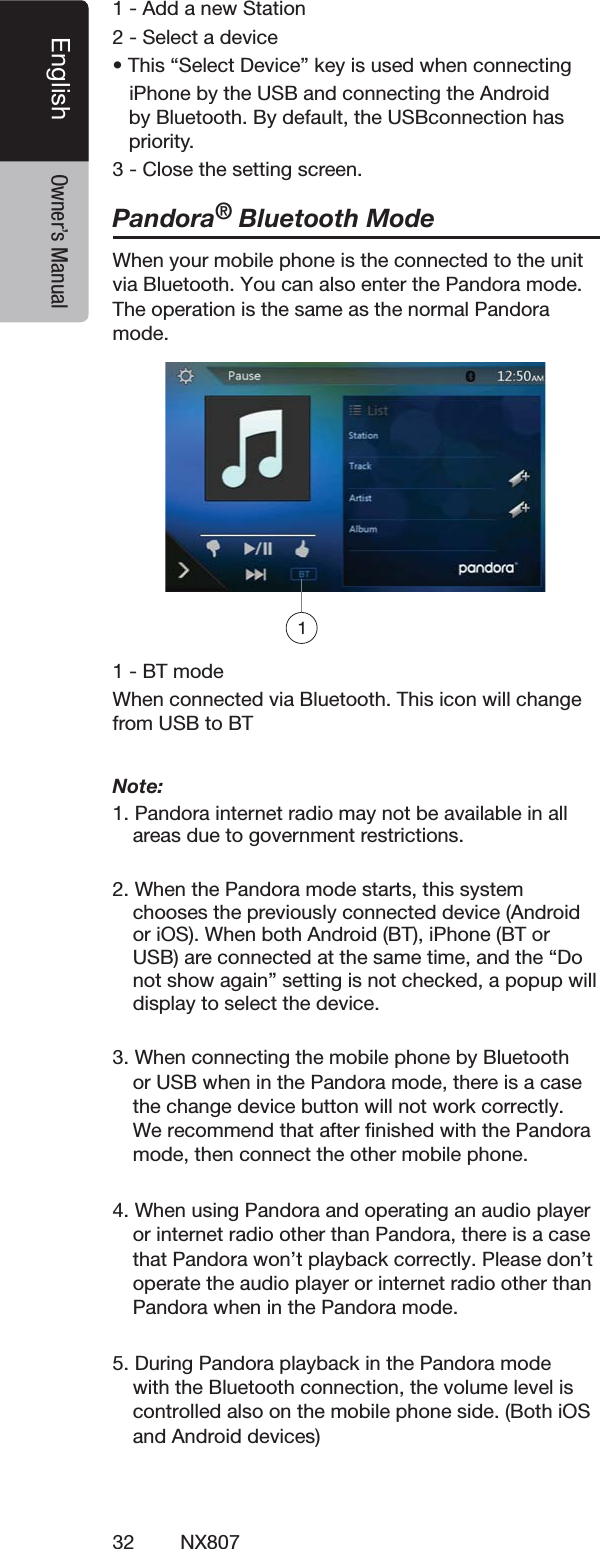
32 NX807English Owner’s Manual!DDANEW3TATION3ELECTADEVICEs4HISh3ELECT$EVICEvKEYISUSEDWHENCONNECTINGI0HONEBYTHE53"ANDCONNECTINGTHE!NDROIDBY"LUETOOTH"YDEFAULTTHE53"CONNECTIONHASPRIORITY#LOSETHESETTINGSCREENPandora® Bluetooth ModeWhen your mobile phone is the connected to the unit via Bluetooth. You can also enter the Pandora mode. The OPERATIONISTHESAMEASTHENORMALPandora MODE"4MODE7HENCONNECTEDVIA"LUETOOTH4HISICONWILLCHANGEFROM53"TO"4Note: 0ANDORAINTERNETRADIOMAYNOTBEAVAILABLEINALLAREASDUETOGOVERNMENTRESTRICTIONS7HENTHE0ANDORAMODESTARTSTHISSYSTEMCHOOSESTHEPREVIOUSLYCONNECTEDDEVICE!NDROIDORI/37HENBOTH!NDROID"4I0HONE"4OR53"ARECONNECTEDATTHESAMETIMEANDTHEh$ONOTSHOWAGAINvSETTINGISNOTCHECKEDAPOPUPWILLDISPLAYTOSELECTTHEDEVICE3. When connecting the mobile phone by Bluetooth or USB when in the Pandora mode, there is a case the change device button will not work correctly. We recommend that after finished with the Pandora mode, then connect the other mobile phone.4. When using Pandora and operating an audio player or internet radio other than Pandora, there is a case that Pandora won’t playback correctly. Please don’t operate the audio player or internet radio other than Pandora when in the Pandora mode.5. During Pandora playback in the Pandora mode with the Bluetooth connection, the volume level is  controlled also on the mobile phone side. (Both iOS and Android devices)1
33NX807EnglishEnglish Owner’s Manual13. Bluetooth AUDIO PLAYER OPERATIONS3OME"LUETOOTHPHONESHAVEAUDIOFEATURESANDSOMEPORTABLEAUDIOPLAYERSSUPPORTTHE"LUETOOTHFEATURE4HESEDEVICESWILLBECALLEDASh"LUETOOTHAUDIOPLAYERSvINTHISMANUAL4HISSYSTEMCANPLAYAUDIODATASTOREDINA"LUETOOTHAUDIOPLAYERNote: s3ETTHEVOLUMELEVELOF"LUETOOTHAUDIOPLAYERTOmaximum when playback.s4HISSYSTEMWILLNOTOPERATEORMAYOPERATEIMPROPERLYWITHSOME"LUETOOTHAUDIOPLAYERSs&ORDETAILEDINFORMATIONONTHEPLAYABLE"LUETOOTHaudio players, see our home page: www.clarion.comSelecting the Bluetooth Audio Mode4OUCHTHE [BT Audio]BUTTONTOSELECTTHE"LUETOOTH!UDIOMODE4HESYSTEMCHANGESTOTHE"LUETOOTHMODE)FTHECONNECTIONWITHA"LUETOOTHAUDIOPLAYERHASBEENALREADYESTABLISHEDYOUMAYSELECTTHE-USICFUNCTION0RESSTHE-%.5BUTTONONTHE/PERATIONAL0ANELTORETURNTOTHE-AIN-ENUs 7HENACONNECTIONWITHA"LUETOOTHAUDIOPLAYERHASBEENESTABLISHEDTHE[]ICONISDISPLAYEDATTHETOPOFTHESCREENBluetooth Audio Player Settings9OUCANCONlRMVARIOUSSETTINGSREGARDINGTHE"LUETOOTHINTERFACEFEATURES4OUCHTHE[]BUTTONTODISPLAYTHEINFORMATIONONTHESCREEN7HENYOUlNISHCONlRMINGTHE"LUETOOTHINFORMATIONTOUCHTHE[]BUTTONTORETURNTOTHEPREVIOUSSCREENRegistering Your Bluetooth Audio Player (Pairing)9OUCANREGISTERUPTO"LUETOOTHAUDIOPLAYERS)FYOURMOBILEPHONE"LUETOOTHVERSIONISUNDER0LEASEINPUT0).CODEhv4URNONTHEPOWEROFTHE"LUETOOTHAUDIOPLAYERYOUWISHTOREGISTER4OUCHTHE$EVICEBUTTON[]TODISPLAYTHE$EVICE3ELECTSCREEN4OUCHTHE[ ]BUTTONTODISPLAYTHE)NQUIRING$EVICESCREEN4OUCHYOURDESIREDDEVICEBUTTONANDTOUCHTHE[]BUTTONTOREGISTERFORTHE"LUETOOTHAUDIOPLAYER4HENSELECTANIMAGEOFTHISDEVICE
34 NX807English Owner’s Manual!NDSELECTATYPEOFTHISDEVICE7HENTHEPAIRINGOPERATIONCOMPLETESTHEREGISTERED"LUETOOTHAUDIOPLAYERISSETASTHECURRENTDEVICEAFTERSELECTINGTHEFAVORITEICONTHEDISPLAYRETURNSTOTHEDEVICELISTSCREEN4OUCHTHE[]BUTTONTHEDISPLAYWILLRETURNTOTHE"LUETOOTHAUDIOMODESCREENs4ODELETETHE"LUETOOTHAUDIOPLAYERREGISTRATION4OUCHTHE; =BUTTONANDTHENPUSHTHE;;;;;;;;;;;;;] BUTTONTODELETETHEDEVICE!CONlRMATIONSCREENISDISPLAYED4OUCHTHE; =BUTTONTOCONlRMDELETESelecting the Bluetooth Audio Player4OCHANGETHECURRENT"LUETOOTHAUDIOPLAYERTOTHEOTHERDEVICEWHICHISALREADYREGISTEREDPERFORMTHEFOLLOWINGOPERATION4OUCHTHEDEVICEBUTTONTO[]DISPLAYTHE$EVICE3ELECTSCREEN4OUCHTHECURRENTLYCONNECTEDDEVICEBUTTONTHENTOUCHTHE[]BUTTONTODISCONNECTTHEACTIVEDEVICE4OUCHTHEDESIREDDEVICEBUTTONYOUWISHTOUSE4OUCHTHE[]BUTTONTOSELECTITASYOURACTIVEDEVICE4HECORRESPONDINGPHONEISSETASTHECURRENTTELEPHONE4OUCHTHE[]BUTTONTORETURNTOTHEPREVIOUSSCREENControlling the Bluetooth Audio PlayerNote:s/CCASIONALLYDEPENDINGONTHEENVIRONMENTPLAYBACKsounds may be fragmented, or noises may be generated.Playing Music!FTERTHECONNECTIONWITHA"LUETOOTHAUDIOPLAYERISESTABLISHEDTHEPLAYMODEISAUTOMATICALLYENGAGEDs 7HENPLAYBACKISNOTSTARTEDFORSOMEDEVICESTOUCHTHE[]BUTTONMANUALLYPausing Playback4OUCHTHE[ ]BUTTONDURINGPLAYBACKPlayback Pauses4ORESUMEPLAYBACKTOUCHTHE[ ]BUTTON0LAYBACKRESUMESSkipping a Track Searching4OUCHTHE[ ] or [ ]BUTTONDURINGPLAYBACKStopping Playback4OUCHTHE[ ]BUTTONDURINGPLAYBACK4RACKSARESTOPPEDTOUCHTHE[]BUTTONTOPLAYBACKTHElRSTTRACKShow Track List4OUCHTHE[ ]BUTTONTOSHOWTHECURRENTTRACKLIST4OUCHTHE[]BUTTONTOSHOWALLOFTHELISTS9OUCANPLAYBACKANYTRACKSBYTOUCHINGTHEITEMSINTHELIST
35NX807EnglishEnglish Owner’s Manual7HENTHECONNECTIONTOYOUR"LUETOOTHPHONEISESTABLISHEDTHEFOLLOWINGFUNCTIONSAREAVAILABLEONTHISUNITs ,ISTENINGTOYOURTELEPHONECALLSONTHECARSPEAKERSs !NSWERINGANINCOMINGCALLs -AKINGACALLUSINGTHE+EYPADSCREENs -AKINGACALLUSINGTHEPHONEBOOKDATAINTHESELECTEDPHONEs -AKINGACALLUSINGTHEHISTORYDATAOFTHEDIALEDRECEIVEDCALLSNote:s3OMEPHONESMAYNOTBEABLETOTRANSFERTHE0HONE"OOKDATATOTHEHEADUNITs4HE0HONE"OOKDATATRANSMISSIONMAYTAKEAWHILE4HEOPERATIONSOFSENDINGCALLSAREDISABLEDDURINGTHEdata transmission.Select the BT Phone Mode4OUCHTHE[TEL]BUTTONTOSELECTTHE"LUETOOTH4ELEPHONEMODE4HE4ELEPHONESCREENISDISPLAYED0RESSTHE-%.5BUTTONONTHE/PERATIONAL0ANELTORETURNTOTHE-AIN-ENUs 7HENNO"LUETOOTHPHONEISCONNECTEDTHEICON[]ISDISPLAYEDATTHETOPOFTHESCREENs 7HENTHECONNECTIONWITHA"LUETOOTHPHONEHASBEENESTABLISHEDTHE[]ICONANDSIGNALLEVELINDICATORAREDISPLAYEDATTHETOPOFTHESCREENBluetooth Telephone Settings9OUCANCONlRMVARIOUSSETTINGSREGARDINGABOUTTHE"LUETOOTHINTERFACEFEATURES4OUCHTHE[]BUTTONTODISPLAYTHEINFORMATIONONTHESCREEN3ELECTTHESETTINGFORTHEDESIREDITEM3EETHEFOLLOWINGSECTIONSFORDETAIL7HENYOUlNISHCONlRMINGTHE"LUETOOTHINFORMATIONTOUCHTHE[]BUTTONTORETURNTOTHEPREVIOUSSCREEN3ETTING!UTOMATIC#ONNECTION4HESYSTEMAUTOMATICALLYRECONNECTSTHECELLULARPHONEAFTERTHECONNECTIONISLOSTORTHESYSTEMISRESTARTEDs 4HEFACTORYDEFAULTSETTINGISh/.v4OUCHTHE [] or [ ]BUTTONOFTHE!UTOMATIC#ONNECTIONITEMTOSETTHEFUNCTION/.OR/&&3ETTING!UTOMATIC!NSWER)FACALLCOMESINANSWERAUTOMATICALLYAFTERSECONDSs 4HEFACTORYDEFAULTSETTINGISh/&&v4OUCHTHE [] or [ ]BUTTONOFTHE!UTOMATIC!NSWERITEMTOSETTHEFUNCTION/.OR/&&3ETTING-ICROPHONE'AIN9OUCANADJUSTTHEINPUTLEVELOFTHEMICROPHONEINLEVELSs 4OUCHTHELEVELINDICATORBUTTONOFTHE-ICROPHONE'AINITEMTOADJUSTTHEINPUTLEVELNote:s4HEINPUTLEVELOFTHEMICROPHONECANBEAFFECTEDBYITSSURROUNDINGS!DJUSTTHELEVELIFTHEPERSONONTHEother end of the telephone has a reception problem.14. Bluetooth TELEPHONE OPERATIONS
36 NX807English Owner’s ManualRegistering Your Phone (Pairing)9OUCANREGISTERUPTOPHONES4HEREGISTERINGMETHODISSAMEASh2EGISTERINGYOUR"LUETOOTHAUDIOPLAYERv)FYOURMOBILEPHONE"LUETOOTHVERSIONISUNDER0LEASEINPUT0).CODEhv4URNONTHEPOWEROFTHEPHONEYOUWISHTOREGISTER4OUCHTHE$EVICEBUTTON[]TODISPLAYTHE$EVICE3ELECTSCREEN4OUCHTHE[ ]BUTTONTODISPLAYTHE)NQUIRING$EVICESCREEN4OUCHYOURDESIRED0HONEBUTTONTOSELECTTHEBUTTONFORTHEPHONETOBEREGISTEREDANDTOUCHTHE[]BUTTONTOREGISTERFORTHE"LUETOOTHPHONEs9OUCANNOTSELECTTHE0HONEBUTTONOFWHICHANOTHERPHONEISALREADYREGISTERED3ELECTABLANK0HONEBUTTON)FENTERINGTHE0ASS+EYCODEISPROMPTEDONYOURPHONEENTERTHE0ASS+EYCODESETINTHISUNITs9OUCANCHANGETHE0ASSKEYSETTINGOFTHISUNITFROMTHE"LUETOOTH)NFOSCREENUNDERTHE4ELEPHONE3ETTINGSSCREEN 7HENTHEPAIRINGOPERATIONCOMPLETESTHEREGISTEREDPHONEISSETASTHEONEANDTHEDISPLAYRETURNSTOTHE4ELEPHONESCREENs 4ODELETETHEPHONEREGISTRATION4OUCHTHE; =BUTTONTODELETETHEDEVICE!CONlRMATIONSCREENISDISPLAYED4OUCHTHE; =BUTTONTOCONlRMDELETESelect the Phone4OCHANGETHECURRENTPHONETOTHEOTHERDEVICEWHICHISALREADYREGISTEREDPERFORMTHEFOLLOWINGOPERATION4OUCHTHE[]BUTTONTODISPLAYTHE$EVICE3ELECTSCREEN4OUCHTHECURRENTLYCONNECTEDDEVICETHENTOUCH []BUTTONTODISCONNECTTHEACTIVEDEVICE4OUCHTHEDESIRED$EVICEBUTTONYOUWISHTOUSE4OUCHTHE[]BUTTONTOSELECTITASYOURACTIVEDEVICE4HECORRESPONDINGPHONEISSETASTHECURRENTPHONEs )FTHEPOWEROFTHEPHONEISNOTTURNEDONTURNITONs 4HEPHONEMAYPROMPTTOACKNOWLEDGETHE"LUETOOTHCONNECTIONORTOENTERTHE0ASS+EYCODEOFTHISUNIT0ERFORMTHESEOPERATIONSACCORDINGTOTHEMESSAGEDISPLAYED4OUCHTHE[]BUTTONTORETURNTOTHEPREVIOUSSCREENGet the Phone Book Data3ENDINGTHE0HONE"OOKDATAFROMTHEPHONEENABLESYOUTOMAKEACALLUSINGTHE0HONE"OOKFUNCTIONFROMTHISUNITTelephone OperationsMaking a call using the 10-Key pad4OUCHTHE[ ]BUTTONTODISPLAYTHE+EYPADSCREEN%NTERTHETELEPHONENUMBERBYUSINGTHE+EYPADDISPLAYEDONTHESCREEN
37NX807EnglishEnglish Owner’s Manual4OUCHTHE[ ]3ENDBUTTONTOCALLTHEENTEREDNUMBERs 4HEFOLLOWING4ELEPHONE)NTERRUPTSCREENISDISPLAYEDDURINGPHONECALLs 4OUCHTHE[ ]BUTTONTOTALKBYUSINGTHEPHONEANDCANCELINGTHEHANDSFREEFUNCTION0RIVATE-ODE4ORETURNTOTHEHANDSFREEMODETOUCHTHE[]BUTTONAGAINs 4OUCHTHE[]BUTTONTOMUTETHEMICROPHONE9OUCANHEARTHEPERSONYOURECALLINGBUTTHEYCANTHEARYOUs 4OUCHTHE[]BUTTONTOHOLDTHECURRENTPHONECALLNOWYOUCANANSWERTHEOTHERINCOMINGCALL4OUCHAGAINTOTALKWITHPREVIOUSCALL)FDURINGACALLWITHATHIRDPARTYCALLYOUCANKEEPTHECURRENTCALLTOANSWERATHIRDPARTYORHANGUPTHECURRENTCALLTOANSWERATHIRDPARTY9OUCANALSOIGNORETHETHIRDPARTYCALLS      7HENTHECALLISlNISHEDTOUCH[ ]BUTTONTOHANGUPNote:s$EPENDINGONSOMEPHONESTHE4ELEPHONE)NTERRUPTscreen may be closed and the connection with this system may be disconnected when entering the 0RIVATEMODEMaking a Call Using the Phone Book9OUCANUSETHE0HONE"OOKDATAOBTAINEDFROMTHEPHONETOMAKEACALLFROMTHISUNITNote:s"EFOREUSINGTHISFUNCTIONTHE0HONE"OOKDATAMUSTbe sent from the phone.s/NLYTHE0HONE"OOKITEMSWITHATLEASTONETELEPHONENUMBERREGISTEREDINTHECAPTURED0HONE"OOKDATAAREDISPLAYEDONTHE0HONE"OOKSCREEN4OUCHTHE[]BUTTONTODISPLAYTHE0HONE"OOKSCREEN4OUCHTHEDESIREDNAMEBUTTONYOUWISHTODIALs 3WIPETHELISTUPANDDOWNTOSCROLLTHELIST4OUCHTHE[]BUTTONTOCALLTHESPECIlEDNUMBER4HE4ELEPHONE)NTERRUPTSCREENISDISPLAYEDANDCALLINGSTARTSs 7HENTHECALLISlNISHEDTOUCHTHE[]BUTTONTOHANGUPMaking a Call Using the History4HESYSTEMWILLSAVETHE$IALED2ECEIVEDCALLSRECORDDATAINTHEMEMORY9OUCANCONlRMITANDUSEITTOMAKEACALLFROMTHISUNIT4OUCHTHE[]BUTTON4HE(ISTORY,ISTSCREENISDISPLAYEDs 4HEITEMSARESORTEDBY$IALED-ISSEDAND2ECEIVEDCALLSs 3WIPETHELISTUPANDDOWNTOSCROLLTHELIST4OUCHTHEDESIRED(ISTORYITEMKEYYOUWISHTODIAL4OUCHTHE[]BUTTONTOCALLTHESPECIlEDNUMBER4HE4ELEPHONE)NTERRUPTSCREENISDISPLAYEDANDCALLINGSTARTSs 7HENTHECALLISlNISHEDTOUCHTHE[]BUTTONTOHANGUPAnswering an incoming call7HENACALLCOMESINTHEFOLLOWING4ELEPHONE)NTERRUPTSCREENAPPEARS9OUCANANSWERTHEINCOMINGCALLONTHISSYSTEMBYTHEFOLLOWINGOPERATION4OUCHTHE[]BUTTONTOANSWERTHECALL7HENTHECALLISlNISHEDTOUCHTHE[]BUTTONTOHANGUP
38 NX807English Owner’s ManualListening to the Tuner4OUCHTHE[Tuner]BUTTONONTHEMAINMENUDISPLAY4HETUNERMODESCREENISDISPLAYED4OUCHTHE;&-&-&-!-=BUTTONTOSELECTTHERADIOBAND%ACHTIMETHEBUTTONISTOUCHEDTHERADIORECEPTIONBANDCHANGESINTHEFOLLOWINGORDER&-&-&-!-&-0RESET3CANBUTTON3EEKDOWNBUTTON3EEKUPBUTTON3TEPDOWNBUTTON3TEPUPBUTTON&REQUENCIESDISPLAY3YSTEMTIME"LUETOOTHSTATUSINDICATOR0RESETCHANNELLIST$8,OCALINDICATOR"ANDBUTTON3HORTCUTBUTTON/PTIONBUTTONSeek Tuning4OUCHTHE;&-!-=BUTTONTOSELECTTHERADIOBAND&-OR!-4OUCHTHE[] or [ ]BUTTONs7HENTHE[ ]BUTTONISTOUCHEDTHESTATIONISSEARCHEDINTHEDIRECTIONOFHIGHERFREQUENCYs7HENTHE[]BUTTONISTOUCHEDTHESTATIONISSEARCHEDINTHEDIRECTIONOFLOWERFREQUENCYStep Tuning4OUCHTHE;&-!-=BUTTONTOSELECTTHERADIOBAND&-OR!-4OUCHTHE[] or [ ]BUTTONINFREQUENCYMENUTOTUNEUPORDOWNBYONESTEPRecalling a preset station4OUCHTHE[FM1/2/3/AM]BUTTONTOSELECTTHEDESIREBAND&-OR!-ONTHETUNER0RESSTHEPRESETSTATIONTOON0RESETLISTManual Memory4OUCHTHEDESIREDBANDBUTTONTOSELECTTHEBANDYOUWISHTOSTORE4UNETOASTATIONYOUWANTTOSTOREUSINGTHESEEKTUNINGSTEPTUNINGORPRESETTUNING4OUCHANDHOLDTHEDESIRED0RESETBUTTONYOUWANTTOSTOREFORABOUTSECONDSAuto Store4HE!UTO3TOREISAFUNCTIONFORSTORINGUPTOSTATIONSTHATAREAUTOMATICALLYSEARCHEDSEQUENTIALLY)FTHENUMBEROFRECEIVABLESTATIONSCANNOTREACHTOTHEPREVIOUSSTOREDSTATIONREMAINS4OUCHTHE[FM1/2/3/AM]BUTTONTOSELECTTHEDESIREDBAND&-OR!-4OUCHTHE[]BUTTONANDTHENTOUCHTHE[ ] BUTTONTOSTARTTHE!UTO3TORE!BEEPSOUNDSANDTHESTATIONSWITHGOODRECEPTIONARESTOREDAUTOMATICALLYTOTHEPRESETLISTNotes:!FTERAUTOSTORETHEPREVIOUSSTOREDSTATIONSWILLBEoverwritten.4HEUNITHASBANDSBUT&-AND!-CANSTOREBY!UTO3TOREFUNCTIONPreset Scan4HE0RESET3CANRECEIVESTHESTATIONSSTOREDINTHEPRESETMEMORYINORDER4HISFUNCTIONISUSEFULWHENSEARCHINGFORTHEDESIREDSTATIONINMEMORY4OUCHTHE;&-!-=BUTTONTOSELECTTHEDESIREDBAND&-OR!-4OUCHTHE[]BUTTONTOSTARTTHE0RESET3CAN4HEUNITSTARTSSCANNINGEACHSTATIONFORSECONDSSEQUENTIALLY"UTIFTHESTATIONSTOREDISNOTAVALIDSTATIONTHESCANNINGTIMEISONLYSECONDS7HENTHEDESIREDSTATIONISTUNEDINTOUCHTHE []BUTTONAGAINTOSTAYINTHATSTATIONDX/Local Setting4HE$8,OCALSETTINGCHANGESTHETUNERSENSITIVITYINORDERTOSEPARATECLOSELYSPACEDSTATIONS4HISFEATUREISUSEFULINAREASTHATHAVEMANYRADIOSTATIONSINCLOSEPROXIMITY1112789102346511315. TUNER OPERATIONS
39NX807EnglishEnglish Owner’s Manual16. SiriusXM® Satellite Radio OPERATIONS /NLY3IRIUS8-®®BRINGSYOUMOREOFWHATYOULOVETOLISTENTOALLINONEPLACE'ETOVERCHANNELSINCLUDINGCOMMERCIALFREEMUSICPLUSTHEBESTSPORTSNEWSTALKCOMEDYANDENTERTAINMENT7ELCOMETOTHEWORLDOFSATELLITERADIO!3IRIUS8-6EHICLE4UNERAND3UBSCRIPTIONAREREQUIRED&ORMOREINFORMATIONVISITWWWSIRIUSXMCOMActivating Your SiriusXM Subscription!FTERINSTALLINGYOUR3IRIUS8-#ONNECT6EHICLE4UNERANDANTENNAPOWERONYOURHEADUNITANDSELECT3IRIUS8-MODE9OUSHOULDBEABLETOHEARTHE3IRIUS8-PREVIEWCHANNELON#HANNEL)FYOUCANNOTHEARTHEPREVIEWCHANNELPLEASECHECKTHEINSTALLATIONINSTRUCTIONSTOMAKESUREYOUR3IRIUS8-#ONNECTTUNERISPROPERLYINSTALLED!FTERYOUCANHEARTHEPREVIEWCHANNELTUNETO#HANNELTOlNDTHE2ADIO)$OFYOURTUNER)NADDITIONTHE2ADIO)$ISLOCATEDONTHEBOTTOMOFTHE3IRIUS8-#ONNECT6EHICLE4UNERANDITSPACKAGING9OUWILLNEEDTHISNUMBERTOACTIVATEYOURSUBSCRIPTION7RITETHENUMBERDOWNFORREFERENCENote: The SiriusXM Radio ID does not include the letters I, O, S or F. In the USA, you can activate online or by calling SiriusXM Listener care: s6ISITWWWSIRIUSXMCOMACTIVATENOWs#ALL3IRIUS8-,ISTENER#AREAT For Canadian Subscriptions, please contact:s6ISITWWWSIRIUSXMCAACTIVATEXMs#ALL8-CUSTOMER#AREATAs part of the activation process, the SiriusXM satellites will send an activation message to your tuner. When your radio detects that the tuner has received the activation message, your radio will display: “Subscription Updated”. Once subscribed, you can tune to channels in your subscription PLAN.OTETHEACTIVATIONPROCESSUSUALLYTAKESTOMINUTESBUTMAYTAKEUPTOANHOUR9OURradio will need to be powered on and receiving the SiriusXM signal to receive the activation message.Selecting a Satellite Radio Mode4OUCHTHE3IRIUS8-BUTTONONTHE-AIN-ENUDISPLAY4HESYSTEMCHANGESTOTHE3IRIUS8-3ATELLITE2ADIOMODE4HE3IRIUS8-MODESCREENISDISPLAYED  1. Band select button  2. Signal status  3. Option Setting button  4. Current Channel Number / Category Name / Preset      Number  5. Preset List Button  6. Channel List Button  7. Category List Button  8. List scroll buttons  9. Channel List10. Channel up button11. Channel down button12. Direct Channel Tuning button13. TuneMix button14. Channel Name / Artist Name / Song Title / Content      InfoDisplaying the SiriusXM Radio ID4OUCHTHE3IRIUS8-BUTTONONTHEMAINMENUDISPLAYThe SiriusXM Radio ID is required for activation and can be found by tuning to Channel 0 as well as on the label found on the SiriusXM Connect tuner and its packaging. You can also find it by touching the [Option Setting] button to enter the Setting menu.  3 4 5 6721141312 11 10 98
40 NX807English Owner’s ManualChannel Selection by Up/Down Button1. Select a channel with the [            ] buttons. Only    channels that can be received are selected.     Channels that are locked and channels not covered    by the subscription will be skipped. The receiver    tunes to the next available channel below or above    the current channel.    Channel Selection by Channel Number1. Touch the [Direct Channel Tuning] button to enter    channels directly. 2. Enter the number of your desired channel by    touching the [0] to [9] buttons. If you enter a wrong      number, you can cancel it by touching the [Clear]    button.3. Touch the [OK] button. The radio will be tuned to  the channel you entered.   Tuning to Channels from the Channel List1. Touch the [Channel List] button on the SiriusXM    Menu display to enter channel list preview mode.2. Touch and swipe the category list up or down.3. You can select any channels in the list directly.Tuning to Channels from the Preset Channel ListA total of 6 SiriusXM channels for each band can be stored in the tuner’s memory. You can access the presets by touching the Preset button. This allows you to store your favorite satellite radio channels in the memory for later recall.1. Touch the [Preset List] button on the SiriusXM    Menu display to enter preset list preview mode.     You can select the desired channel by touching the    preset list.2. To store the current channel as a preset, touch and    hold a preset button for more than 2 seconds to    save the channel to that preset button.Tuning to Channels from the Category ListSatellite Radio allows you to select broadcast channelcategory (contents).1. Touch the [Category List] button on the SiriusXM Menu display to enter category list preview mode.2. Touch and swipe the category list up or down.3. Touch the desired category item button to enter    channel lists belonging to this category.4. Select the desired channel by touching it on the list.5. Touch the [Return] button to go back to category    list.Note:  “All Chan” category includes all channels available with your subscription, including locked channels which are displayed with an “(L)”.  Parental Control Lock / UnlockThe Parental Control feature allows you to limit access to any SiriusXM channels, including those with mature content. When enabled, the Parental Control feature requires you to enter a passcode to tune to the locked channels. Information on setting up the passcode and locking channels can be found below.1. Touch the [Option Setting] button to enter setting    page.2. Touch the [Set] button in “Lock” item to enter    passcode screen, enter the right passcode to    enter the lock list.3. Touch and swipe the channel list up or down.4. Touch and hold the channel item, and it will be    locked or unlocked alternately.Setting the Password1. Touch the [Option Setting] button to enter setting    page.2. Touch the [Set] button in “Password” item to set a    new passcode following the screen indicator.    If you enter a wrong number, you can cancel it by touching the [Clear] button .
41NX807EnglishEnglish Owner’s ManualNote:You must input the correct passcode to enter the lock list. When you try to tune to a locked channel by the direct tune keypad, it will display the password keypad.  Only entering the correct code can tune to that channel, otherwise it will go back to the previous channel.The default passcode is “0000”.ReplayThe Replay feature allows you to pause, rewind and replay live SiriusXM Satellite Radio programming.Operation of the Replay feature can be found below.1. Touch the [Play/Pause] button to start Replay mode.2. In Replay mode you can use the buttons below to    control playback.18 752 3 4 69  1. Playback Status.  2. Previous track/program.      Fast Backward (long press).  3. Play/Pause Button.  4. Next track/program.      Fast forward (long press).  5. Go to Live mode (Only displayed during Replay      mode).  6. Remaining time to LIVE.  7. Buffered memory.  8. Playback position.  9. Current track play time .SmartFavoritesSmartFavorites allow you to rewind and replay any missed programming from your current Band of Preset channels. Miss a music, news, talk or sports segment?No Problem, because you can rewind and replay when you tune to one of your Preset channels and hear what you missed.Note:1. Compatible with SXV200 or later tuner models.2. SXM1 band only is assigned as Smart Favorites for SXV200, and SXM1/SXM2/SXM3 bands for SXV300 or later.TuneStart™With the TuneStart™ feature turned ON, you will hear the beginning of the song when you tune to one of your Preset channels. It may take a minute or two forthe feature to work after power up or after changing preset bands.  You can turn TuneStart On or Off in the following operation.1. Touch the [Option Setting] button to enter the setting men.2. Touch and slide to select “On” or “Off” in “TuneStart” item.Note:1. Compatible with SXV200 or later tuner models.2. TuneStart will only work for channels in the SXM1 band with a SXV200, and channels in the SXM1/SXM2/SXM3 bands with a SXV300 or later in SXM1/SXM2/SXM3 bands for SXV300 or later.TuneMix™TuneMix™ plays a unique blend of songs from your Preset music channels from the current SiriusXM Preset Band, allowing you to build a custom channelfrom as few as two to as many as 6 music channels. You can even skip songs you don’t want to hear. Operation of the TuneMix Feature can be found below.1. Touch the [TuneMix] button to start playback with the [TuneMix] button highlighted.2. You can operate the buttons for the Replay function while listening to TuneMix.  3. To cancel the TuneMix feature, touch the [TuneMix] button again.  Note:1. Compatible with SXV300 or later tuner models.2. When there are not enough channels or tracks, the [TuneMix] button is grayed out.
42 NX807English Owner’s ManualNX807NX807NX807Electronic devices with HDMI outputHDMI cable sold in the marketHDMI cable sold in the market or   CCA-802MHL adaptor soldin the marketMicro USB cable sold in the marketLightning  cable Lightning-Digital AV adapterHDMI cable sold in the market or   CCA-802iPhone 5, iPhone 5s, iPhone 5c,iPhone 6,iPhone 6 Plus, iPhone 6s,iPhone 6s Plus,iPhone SE, iPhone 7 and iPhone 7 Plus17. HDMI MODEI0HONEI0HONESI0HONECI0HONEI0HONE0LUSI0HONESI0HOES0LUSI0HONE3%I0HONEANDI0HONE0LUSCANBECONNECTEDBYUSINGTHECONNECTORCABLESUPPLIEDWITHTHERESPECTIVEDEVICEAND($-)CABLESOLDINTHEMARKETANDDIGITAL!6ADAPTERNote:4HEFOLLOWINGAREWIRINGEXAMPLES$EPENDINGONTHEDEVICEITMIGHTBEABLETOCONNECTTOTHE#LARIONDEVICEDIRECTLYWITHTHE##!$EPENDINGONTHEADAPTERORDEVICEAUDIOANDORVIDEONOISEMIGHTBEEXPERIENCEDWire Connection of HDMI Mode(1) Connection with the iPhone 5, iPhone 5s, iPhone 5c, iPhone 6, iPhone 6 Plus, iPhone 6s, iPhoe 6s Plus, iPhone SE, iPhone 7 and iPhone 7 Plus(2) Connection with the Android Phone(3) Connection with the equipment with HDMI output
43NX807EnglishEnglish Owner’s ManualSelect HDMI Source 4OUCHTHE($-)MENUBUTTONTODISPLAYTHESCREENOFTHECONNECTEDDEVICEThis HDMI mode is only indicative or a mirror image the screen of the iPhone, Android.  You cannot operate by the touch screen of NX807.Note:Depending on the application and model of the  mobile phone, a black frame may appear around the screen.18. Apple CarPlay!PPLE#AR0LAYISIMMEDIATELYSTARTEDWHENYOUCONNECTI0HONETOI0ODI0HONE53"CABLE!PPLE#AR0LAY5)ISAUTOMATICALLYDISPLAYEDINANYSITUATIONEXCEPT.OTE*Note1: Original navigation guidance is active, NX807 continues navigation guidance. Won’t change to                         Apple CarPlay UI.*Note2: Other USB cables are not supported for Apple CarPlay.To start Apple CarPlay:
44 NX807English Owner’s Manual1. When you touch “Apple CarPlay” icon, “CarPlay” screen is displayed.2. When you touch “TEL” icon, “CarPlay telephony” screen is displayed.3. When you touch “iPod Audio” icon, “CarPlay now playing” screen is displayed and start playback music.The indicator displays as follows.To go to Apple CarPlay screen: (by Main menu and Shortcut menu)1. When you press and hold “MAP” button for 2 seconds, “CarPlay maps” screen is displayed.2. When you press “AV” button, “CarPlay now playing” screen is displayed if active source is CarPlay.3. When you press “VOICE” button, “Siri” screen is displayed.The indicator displays as follows.To move to Apple CarPlay screen: (by hard button)
45NX807EnglishEnglish Owner’s Manual1. Press “MENU” button, Main menu screen is displayed.2. Press “MAP” button, original navigation screen is displayed.3. Press “AV” button, original screen is displayed if original audio source is active.The indicator displays as follows.To return to original screen:
46 NX807English Owner’s Manual19. AUX %XTERNALPERIPHERALDEVICESSUCHASGAMECONSOLESCAMCORDERSNAVIGATIONUNITSPHONESETCCANBECONNECTEDTOTHE!58CONNECTORONTHEBACKOFTHISUNITUSINGTHE!6MEDIACABLESSwitching to AUX IN 4OUCHTHE[AUX] BUTTONON-AIN-ENUTOSELECTTHEMODE)FTHEEXTERNALDEVICECONNECTEDTOTHE!58INPUTHASANAUDIOSIGNALTHEUNITWILLBROADCASTAUDIOOFTHEEXTERNALDEVICE0RESS-ENUBUTTONON/PERATIONAL0ANELTORETURNTOTHE-AIN-ENU9OUCANNOTDIRECTLYCONTROLEXTERNALDEVICESCONNECTEDTO!58INPUT20. CAMERA INPUT OPERATIONSSwitching to Camera mode4OUCHTHE [Camera] BUTTONON-AIN-ENU4HE,#$WILLDISPLAYTHEEXTERNALCAMERAVIDEO4HESCREENWILLDISPLAYh.O6IDEO3IGNALvMESSAGEIFAVALIDCAMERAISNOTCONNECTTOTHISDEVICE0RESS-%.5BUTTONON/PERATIONAL0ANELTORETURNTOTHE-AIN-ENUSetting Camera audio3ELECTh/.vBUTTONINTHE#AMERA!UDIOSETTINGOFTHE'ENERALSETTING4HEAUDIOFROMCAMERAWILLBEHEARDWHENREVERSEGEARISENGAGED4HEVOLUMECONTROLISAVAILABLEBUTNOTINDICATEDONTHESCREENDUETOTHESAFETY3ELECTTHEh-54%vBUTTONTOMUTETHEAUDIOWHILETHEREVERSEGEARISENGAGED3ELECTTHEh/FFvBUTTONTOPLAYTHEAUDIOWHILETHEREVERSEGEARISENGAGEDNote:If the reverse cable is connected correctly to the car, the unit goes to camera mode automatically when the car is in reverse.As an additional safety feature, the audio from a camera with a built-in microphone can be heard through the NX807.
47NX807EnglishEnglish Owner’s Manual)FAMONITORISINSTALLEDINTHEREARZONEANDCONNECTEDTOTHEREARZONE!6OUTPUTPASSENGERSINTHEBACKSEATCANWATCHTHE$6$!58VIDEOSEPARATELYFROMFRONTSOURCE4OUCHTHEBUTTONTOACCESSTHEFRONTSOURCE4OUCHTHEBUTTONTOCLOSETHEREARSOURCEMulti-Zone Operation)NDEPENDENTSOURCESCANBEPLAYEDSIMULTANEOUSLYONTHEUNIT&OREXAMPLEA&-!-CONSOLECANPLAYBACKONTHEFRONTSCREENWHILE$6$VIDEOISAVAILABLETOREARPASSENGERSAccess Rear-Zone4OUCHTHE2EARBUTTONON-AIN-ENUTOACCESSTHE2EAR3OURCE3ELECTASOURCETOPLAYExit Rear-ZoneTouch the 2-Zone off button to close the Rear Source. Note:)FTHESOURCEISSELECTEDASTHEFRONTTHESOURCEINREARCANTBESELECTED)FTHESOURCEISSELECTEDASTHEREARTHESOURCEINFRONTCANTBESELECTED4OUCHTHE&RONTBUTTONTOACCESSTHEMAINMENUBUTNOTCLOSETHE2EAR3OURCEDVD Video in Rear  /PTIONBUTTON3HOW#URSORKEYS0REVIOUS#HAPTER&AST"ACKWARDBUTTON0LAY0AUSEBUTTON.EXT#HAPTER&AST&ORWARDBUTTON%LAPSEDPLAYINGTIME-ENU,ISTBUTTON&RONT2EARBUTTON)FTHESCREENDISPLAYS2EAR3OURCETOUCH&RONT2EARBUTTONTOSWITCHTO&RONT3OURCE)FTHESCREENDISPLAYS&RONT3OURCETOUCH&RONT2EARBUTTONTOSWITCHTO2EAR3OURCEDVD Video Rear Source Control Info Mode. 5PVDI#"$,CVUUPOUPSFUVSODVD Video Rear Source Control Direct Mode. ./4%-OREDETAILPLEASEREFERTO$6$6IDEO&RONTSOURCE21. REAR SOURCE OPERATIONS1872 3 4 5 6 12
48 NX807English Owner’s ManualAUX Video in RearVIDEOSEPARATELYFROMFRONTSOURCE!58             4HE.8HASA$IGITAL/PTICALOUTPUTWHICHALLOWSITTOCONNECTTO#LARIONSHIGHlDELITY&ULL$IGITAL3OUND3YSTEM#LARIONS&ULL$IGITAL3OUND3YSTEMISABREAKTHROUGHINAUDIOTECHNOLOGY5NLIKETRADITIONALSOUNDSYSTEMSTHESIGNALISKEPTDIGITALALLTHEWAYTOTHESPEAKERTHUSDELIVERINGANUNCOMPROMISEDHIGHlDELITYEXPERIENCE&ORMOREINFORMATIONVISITOURWEBSITEATWWWCLARIONCOM4HEFOLLOWINGARECOMPONENTSOFTHE#LARION&ULL$IGITAL3OUND3YSTEM:&ULL$IGITAL3OUND0ROCESSOR4WEETERSAND#OMMANDER:&ULL$IGITAL3PEAKER:7&ULL$IGITAL3UBWOOFER&ORDETAILCONNECTIONOPERATIONANDSETTINGPLEASEREADTHEUSERMANUALOFTHE:::AND:7ARESOLDSEPARATELY4OCONNECTTOTHE:$IGITAL3OUND0ROCESSORANOPTICALCABLEISNEEDED                                       System Example22. FULL DIGITAL SOUND SYSTEMNOTE:More detail please refer to AUX Front source.
49NX807EnglishEnglish Owner’s Manual23. SETTING OPERATIONS4OUCH[ ]BUTTONONTHE-AINMENUSCREEN4HE3ETTINGMENUSCREENWILLBEDISPLAYEDGeneral Setup Menu3YSTEM,ANGUAGE3ETTHE,ANGUAGEFORTHESYSTEMSCREEN3HORTCUT-ENU4OUCHTHE3ETBUTTONTOGOTOTHE3HORTCUT-ENUSCREEN$RAGTHEBUTTONSINTHEUPPERAREAANDDROPTHEMTHESHORTCUTMENUONTHEBOTTOMINORDERTOMAKEYOURCUSTOMIZATIONS4IME3ETSYSTEMCLOCK24-Hour Format: Set the time display mode."EEP4URNONORTURNOFFTHEBEEPCONlRMATIONSOUND"LUETOOTH3ETTHE"LUETOOTH/NOR/FF"4$EVICE#ONNECTEDDEVICENAME"4!UTO#ONNECT4HESYSTEMAUTOMATICALLYRECONNECTSTHECELLULARPHONEAFTERTHECONNECTIONISLOSTORTHESYSTEMISRESTARTED"4!UTO!NSWER)FACALLCOMESINANSWERAUTOMATICALLYAFTERSECONDS-)#'AIN9OUCANADJUSTTHEINPUTLEVELOFTHEMICROPHONEINLEVELS4OUCHTHELEVELINDICATORBUTTONOFTHE-ICROPHONE'AINITEMTOADJUSTTHEINPUTLEVEL7ALLPAPER#HOOSETHEDESIREDWALLPAPER4HEREARETHREEOPTIONALIMAGESWHICHYOUCANIMPORTFROM53"3ELECTh)MPORTEDvANDTOUCH;)MPORT=4HEFORMATSHOULDBEJPEGOFLESSTHAN-BYTESIllumi Color: Set the illumination color on the panel.Tel Speaker: There are two options, Left and Right. For example, if current setting is Right, when BT phone is coming in, only right speaker can hear the phone. Steering Wheel: Change the position of Apple CarPlay home button.Camera Audio: There are three options, Off, On and Mute.Version: Display the software version information.Note:s4IMEAND(OUR&ORMATCANBEADJUSTEDWHENSETTHESYSTEMTIMENOTTOBESYNCHRONIZEDWITH'03LOCALtime.
50 NX807English Owner’s ManualVideo Setup MenuDVD Wide Screen Mode: Set the DVD wide screen mode On or Off.$IMMER3ET$IMMERVALUEFROMTO$IMMER-ODE4HEREARETHREEOPTIONS$AY.IGHTand Auto.Audio Setup Menu"ALANCE#HOOSETHEDESIREDVOLUMEFORTHELEFTANDRIGHTSPEAKERS&ADER#HOOSETHEDESIREDVOLUMEFORTHEFRONTANDREARSPEAKERS'RAPHIC%1#HOOSETHEDESIREDMODE"ASS"OOST(IGH"OOST.ATURAL6OCAL)MPACTAND&LAT3UBWOOFER#TRL#HOOSETHEDESIREDSUBWOOFERGAINFROMTO3UBWOOFER0HASE#HOOSETHE3UBWOOFER0HASENORMALORREVERSE(IGH0ASS&ILTER#HOOSETHEFREQUENCYFORTHEHIGHPASSlLTERORTHROUGH4HEFREQUENCIESINCLUDE(Z(ZAND(Z,OW0ASS&ILTER#HOOSETHEFREQUENCYFORTHELOWPASSlLTERORTHROUGH4HEFREQUENCIESINCLUDE(Z(ZAND(Z-AGNA"ASS%8#HOOSETHELOUDNESS/NOR/FF!MP#ANCEL3ELECTING/.TURNSOFFTHEINTERNALAMPLIlERINTHE.8Note:/PTIONALCABLESOLDSEPARATELYISNECESSARYWHENYOUUSE!UDIOLINEOUTNavigation Setup Menu'034IME3ETTHESYSTEMTIMETOBESYNCHRONIZEDWITH'03LOCALTIMEORNOT.AVI)NTERRUPT4HEREARETHREECHOICES/N0OPUP/FFh/Nv4HENAVIGATIONSCREENWILLCOVERTHE!6SCREENWHENREACHINGAKEYPOINTh0OPUPv!SMALLTURNINFOWINDOWWILLPOPUPINTHETOPOFTHE!6SCREENTOINDICATETHEKEYPOINTh/FFv4URNOFFTHISFUNCTION6OICE'UIDANCE4HEREARETHREECHOICES/N-UTE/FF/N6OICEGUIDANCEWILLINTERRUPTANYAUDIOCURRENTLYPLAYING7HILEINTERRUPTINGTHEVOLUMELEVELCANNOTBEaltered.-UTE6OICEGUIDANCEWILLINTERRUPTANYAUDIOCURRENTLYPLAYING7HILEINTERRUPTINGTHEVOLUMELEVELCANBEaltered./FF$ISABLETHENAVIGATIONVOICEGUIDANCE
51NX807EnglishEnglish Owner’s ManualOthers Setup Menu.3ET0ASSWORD3ETTHEPASSWORDFORTHE$6$PARENTALCONTROL0ARENTAL#ONTROL3ETTHERATINGOFTHEAGE)TCONTAINS+ID3AFE'0'0'0'22.#!DULT!UDIO,ANGUAGE3ETTHE,ANGUAGEFORTHE$6$!UDIO3UBTITLE,ANGUAGE3ETTHE,ANGUAGEFORTHE$6$SUBTITLE"LINKING,%$3ETBLINKING,%$/NOR/FF3OURCE,EVEL3ETTHEEACHSOURCEGAIN!UDIO3IGNAL3ELECTTHEAUDIOOUTPUT!NALOGOR/PTICAL3AMPLING2ATEK(ZORK(Z6OLUMEOUT&IXOR6ARIABLE3CREEN#ALIBRATE4HEFUNCTIONOFITISTOSELECTTHE43#ALIBRATE9%3OR./&ACTORY$EFAULT4HEFUNCTIONISTOSELECTTOLOADFACTORYDEFAULTORNOT3ETTHE!NTI4HEFT#ODE)FYOURUNITISUNLOCKEDHOLDTHE[ ]BUTTONMORETHANSECONDSTHENTHE!NTI4HEFTSETTINGMODEWILLDISPLAY5SERSCANCHANGEANTITHEFTCODE 4OUCH;9%3=BUTTONTHENUMERICALKEYPADISDISPLAYED%NTERTHENEWPASSWORDTWICETHENANTITHEFTCODEISSETANDYOURUNITISSECURED7HENTHE!NTITHEFTISh/NvYOUNEEDTOENTERTHECORRECT!NTITHEFTCODETOTURNTHEUNITON)FYOUENTERWRONGCODETHREETIMESTHEUNITISLOCKEDANDMUSTBEUNLOCKEDBYTHEPROFESSIONALS)FYOURUNITISSECUREDHOLDTHE; =BUTTONMORETHANSECONDSTHENTHE!NTI4HEFTSETTINGMODEWILLDISPLAY4HENUMERICALKEYPADISDISPLAYEDENTERTHERIGHTCODETOUNLOCKNote:)FTHEANTITHEFTCODEISLOSTORFORGOTTENACHARGEWILLBEINCURREDATTHEOWNERSEXPENSEBYA#LARIONSERVICESTATIONTOUNLOCKTHE.8
52 NX807English Owner’s Manual24. TROUBLESHOOTINGGeneralDVD Player# Cause MeasurePower does not turn on. (No sound is produced.)Fuse is blown. Replace with a fuse of the same amperage. If the fuse blows again, consult your store of purchase.Incorrect wiring. Consult your installation center.Nothing happens when buttons are pressed. Display is not accurate.The microprocessor has malfunctioned due to noise, etc.Press the reset button with a thin rod.Note:When the Reset button is power. * When the Reset button is pressed, frequencies of radio stations, titles, etc. stored in memory are cleared.The remote control unit does not work.Direct rays of the sun fall on the light-receptive part of the remote control unit.When direct rays of the sun fall on the light-receptive part of the remote control unit, it may not work.The battery of the remote control unit is dead or there is no battery in the remote control unit.Check the battery of the remote control unit.# Cause MeasureDisc cannot be loaded. A disc is already loaded. Eject the disc before loading the new one.There is foreign matter already in the disc slot.Remove the foreign matter, or consult a service station.Sound skips or is noisy. Disc is dirty. Clean the disc with a soft cloth.Disc is heavily scratched or warped.Replace with a disc in good condition.Sound is bad directly after power is turned on.Condensation may form on the internal lens when the car is parked in a humid place.Let dry for about 1 hour with the power on.Video images are not displayed.The parking brake is not engaged.Check that the parking brake is engaged.Disc cannot play with the display “PARENTAL VIOLATION” shown.Feature exceeds set parental level.Release the view limitation or change the parental level. See the subsection “Setting up the parental level”
53NX807EnglishEnglish Owner’s ManualUSB Device# Cause MeasureUSB device cannot be inserted. The USB device has been inserted with wrong direction.Reversing the connection direction of the USB device, try it again.The USB connector is broken. Replace with a new USB device.USB device is not recognized. The USB device is damaged. Disconnect the USB device and reconnect. If the device is still not recognized, try device.Connectors are loose.No sound heard with the display “NO FILE” shown.the USB device.USB device.Sound skips or is noisy. encoded properly.properly.The video image of iPod/iPhone is disturbed.The TV Signal setting of the iPod/iPhone is not set correctly.Set the TV Signal setting (NTSC/PAL) of the iPod/iPhone correctly.Bluetooth# Cause MeasureCannot pair the Bluetooth enable device with the car audio system.The device does not support system.Use another device to connect.The Bluetooth function of the device is not enabled.Refer to the user manual of the device for how to enable the function.The audio quality is poor after connection with a Bluetooth enabled device.The Bluetooth reception is poor.Move the device closer to the car audio system or remove any obstacle between the device and the system.
54 NX807English Owner’s ManualSiriusXM Advisory MessagesAdvisory  Name  Description#HECK!NTENNA4HERADIOHASDETECTEDAFAULTWITHTHE3IRIUS8-ANTENNA4HEANTENNACABLEMAYBEEITHERDISCONNECTEDORDAMAGED6ERIFYTHATTHEANTENNACABLEISCONNECTEDTOTHE3IRIUS8-#ONNECT6EHICLE4UNER)NSPECTTHEANTENNACABLEFORDAMAGEANDKINKS2EPLACETHEANTENNAIFTHECABLEISDAMAGED3IRIUS8-PRODUCTSAREAVAILABLEATYOURLOCALCARAUDIORETAILERORONLINEATWWWSHOPSIRIUSXMCOM#HECK4UNER4HERADIOISHAVINGDIFlCULTYCOMMUNICATINGWITHTHE3IRIUS8-#ONNECT6EHICLE4UNER4HETUNERMAYBEDISCONNECTEDORDAMAGED6ERIFYTHATTHE3IRIUS8-#ONNECT6EHICLE4UNERCABLEISSECURELYCONNECTEDTOTHERADIO.O3IGNAL4HE3IRIUS8-#ONNECT6EHICLE4UNERISHAVINGDIFlCULTYRECEIVINGTHE3IRIUS8-SATELLITESIGNAL6ERIFYTHATYOURVEHICLEISOUTDOORSWITHACLEARVIEWOFTHESKY6ERIFYTHATTHE3IRIUS8-MAGNETICMOUNTANTENNAISMOUNTEDONAMETALSURFACEONTHEOUTSIDEOFTHEVEHICLE-OVETHE3IRIUS8-ANTENNAAWAYFROMANYOBSTRUCTIONS)NSPECTTHEANTENNACABLEFORDAMAGEANDKINKS#ONSULTTHE3IRIUS8-#ONNECT6EHICLETUNERINSTALLATIONMANUALFORMOREINFORMATIONONANTENNAINSTALLATION2EPLACETHEANTENNAIFTHECABLEISDAMAGED3IRIUS8-PRODUCTSAREAVAILABLEATYOURLOCALCARAUDIORETAILERORONLINEAT WWWSHOPSIRIUSXMCOM3UBSCRIPTION5PDATED4HERADIOHASDETECTEDACHANGEINYOUR3IRIUS8-SUBSCRIPTIONSTATUS0RESSTHEv%NTERvBUTTONTOCLEARTHEMESSAGE)NTHE53!VISITWWWSIRIUSXMCOMORCALLIFYOUHAVEQUESTIONSABOUTYOURSUBSCRIPTION)N#ANADAVISITWWWSIRIUSXMCAORCALLIFYOUHAVEQUESTIONSABOUTYOURSUBSCRIPTION#HANNEL.OT!VAILABLE4HECHANNELTHATYOUHAVEREQUESTEDISNOTAVALID3IRIUS8-CHANNELORTHECHANNELTHATYOUWERELISTENINGTOISNOLONGERAVAILABLE9OUMAYALSOSEETHISMESSAGEBRIEmYWHENlRSTCONNECTINGANEW3IRIUS8-#ONNECTVEHICLETUNER6ISITWWWSIRIUSXMCOMFORMOREINFORMATIONABOUTTHE3IRIUS8-CHANNELLINEUP#H5NSUBSCRIBED4HECHANNELTHATYOUHAVEREQUESTEDISNOTINCLUDEDINYOUR3IRIUS8-SUBSCRIPTIONPACKAGE6ISITWWWSHOPSIRIUSXMCOMORCALLIFYOUHAVEQUESTIONSABOUTYOURSUBSCRIPTION)NTHE53!VISITWWWSIRIUSXMCOMORCALLIFYOUHAVEQUESTIONSABOUTYOURSUBSCRIPTIONORWOULDLIKETOSUBSCRIBETOTHISCHANNEL)N#ANADAVISITWWWSIRIUSXMCAORCALLIFYOUHAVEQUESTIONSABOUTYOURSUBSCRIPTIONORWOULDLIKETOSUBSCRIBETOTHISCHANNELORWOULDLIKETOSUBSCRIBETOTHISCHANNEL
55NX807EnglishEnglish Owner’s Manual#HANNEL,OCKED4HECHANNELTHATYOUHAVEREQUESTEDIS,OCKEDBYTHERADIO0ARENTAL#ONTROLFEATURE3EETHE0ARENTAL#ONTROL,OCK5NLOCKSECTIONPAGEFORMOREINFORMATIONONTHE0ARENTAL#ONTROLFEATUREANDHOWTOACCESSLOCKEDCHANNELSTFT Screen# Cause MeasureThe image is not displayed. The parking brake is not engaged.Check that the parking brake is engaged.The display is dark. The Dimmer control is too low. Adjust the Dimmer properly.The operating condition is not good.The temperature inside the vehicle may be 0°C or lower. Set to an appropriate temperature (25°C or so) and check it again.The headlight of the vehicle is litThe display is made dark at night to prevent the glare (When the headlight of the vehicle is lit in the daytime, the display gets dark).There are red, green, and blue points in display.-------------------- This is not a failure, but a phenomenon peculiar to a liquid crystal panel (The liquid crystal panel is produced according to technology with very high precision. Note that, pixels of 99.99% or more, pixel missing or normally lit pixels account for 0.01%).
56 NX807English Owner’s Manual25. ERROR DISPLAYIf an error occurs, one of the following displays is displayed. Take the measures described below to solve the problem.DVD/CD PlayerDisplay Cause MeasureBAD DISC A disc cannot be played due to scratches, etc.Replace with a non-scratched, non-warped disc.Invalid Disc A disc is loaded upside-down inside the DVD deck and does not play.Eject the disc then reload it properly.PARENTAL VIOLATION Parental level error. Set the correct Parental level.Region code error Region code error. Eject the disc, and replace correct region code disc.
57NX807EnglishEnglish Owner’s Manual26. SPECIFICATIONSFM Tuner&REQUENCY2ANGE -(ZTO-(Z5SABLE3ENSITIVITYD"«63TEREO3EPARATION D"K(Z&REQUENCY2ESPONSE(ZTOK(ZAM Tuner&REQUENCY2ANGEK(ZTOK(Z5SABLE3ENSITIVITYD"«6DVD Player System$IGITAL6ERSATILE$ISC3YSTEMWITH#$$!CAPABLE5SABLEDISCS$6$VIDEODISC#OMPACTDISC&REQUENCY2ESPONSE(ZTOK(Z3IGNAL.OISE2ATIO88 DB!72EF$ISTORTION0.05%6IDEOSYSTEM.43#0!,Audio/Video Input!UDIOINPUTVOLTAGE d6RMS6IDEOINPUTVOLTAGE6PP !UDIOINPUTSENSITIVITYAT6OUTPUT(IGH M6RMS-ID M6RMS,OW 6RMSAudio/Video output6IDEOOUTPUTVOLTAGE6PP 3CREEN3IZEvWIDETYPE0IXELS2ESOLUTIONXX2'"Bluetooth3PECIlCATION"LUETOOTH6ER0ROlLE(0&(ANDS&REE0ROlLE(30(EADSET0ROlLE !$0!DVANCED!UDIO$ISTRIBUTION0ROlLE !62#0!62EMOTE#ONTROL0ROlLE 0"!00HONE"OOK!CCESS0ROlLE 3003ERIAL0ORT0ROlLE0OWER#LASS 2USB3PECIlCATION53"&30LAYABLE!UDIOFORMAT-07-!!!#&,!#0LAYABLE6IDEOFORMAT!6)-0-0'-0%'GPGeneral0OWERSOURCEVOLTAGE6$#TO6ALLOWABLE'ROUND.EGATIVE#URRENTCONSUMPTION! 7!UTO!NTENNA2ATED#URRENTM!LESSNote: to change without notice for further improvement.Power Output:=839^)NGTTKRYGZœGTJʇ:.*4Signal to Noise Ratio:J('XKLKXKTIK=OTZUœ
58 NX807English Owner’s Manual.8DIMENSIONS.8WEIGHTKG
59NX807EnglishEnglish Owner’s Manual27. WIRE CONNECTION GUIDENote:  items.)GHRK5VZOIGR)GHRK9URJOTZNKSGXQKZ@)USSGTJKX/TIR[JKJ@@=,[RR*OMOZGR9[H]UULKX9URJYKVGXGZKR_@=,[RR*OMOZGR9[H]UULKX9URJYKVGXGZKR_@,[RR*OMOZGR9VKGQKX9URJYKVGXGZKR_@,[RR*OMOZGR9VKGQKX9URJYKVGXGZKR_@,[RR*OMOZGR9U[TJ6XUIKYYUX]OZN:]KKZKX9URJYKVGXGZKR_Lightning cable (Included with iPod/iPhone)iPod/iPhoneNote: For prevent the disconnection of the Optical cable,           please fix the cable to NX807 with vinyl tie.
60 NX807English Owner’s Manual15A9PDLQSRZHU*URXQG<HOORZ%ODFN,OOXPLQDWLRQOUDQJHWKLWHBURZQ 3KRQHLQWHUUXSWBOXH $XWRDQWHQQD$PSOLILHUWXUQRQFRUGBOXHWKLWH5HDUULJKWPXUSOHBODFN3XUSOHGUD\BODFNGUD\WKLWHWKLWHBODFNGUHHQGUHHQBODFNRHGPXUSOHWKLWHGUDVVJUHHQ5HDUULJKW)URQWULJKW)URQWULJKW)URQWOHIW)URQWOHIW5HDUOHIW5HDUOHIW9DFFHVVRU\5HYHUVHJHDUFRUG3DUNLQJEUDNHFRUG*2    Pink 6SHHGSXOVHNote: *1: Connecting the PHONE INTERRUPT terminalThe phone interrupt will mute the audio if the lead receives a negative or ground signal.*2: This product is connected here to detect the distance the vehicle travels.Always connect the vehicle’s speed detection circuit. Failure to make this connection will increase errors the vehicle’s location display.It is strong suggested that the speed pulse wire be connected for accuracy of navigation and better performance.
 Clarion Co., Ltd.All Rights Reserved. Copyright © 2017: Clarion Co., Ltd.2016/10

Navigation menu