SMK RXR9400-6000E 2.4 GHz Control Unit Transceiver User Manual remotion manual ok

SMK (UK) Ltd 2.4 GHz Control Unit Transceiver remotion manual ok

User manual

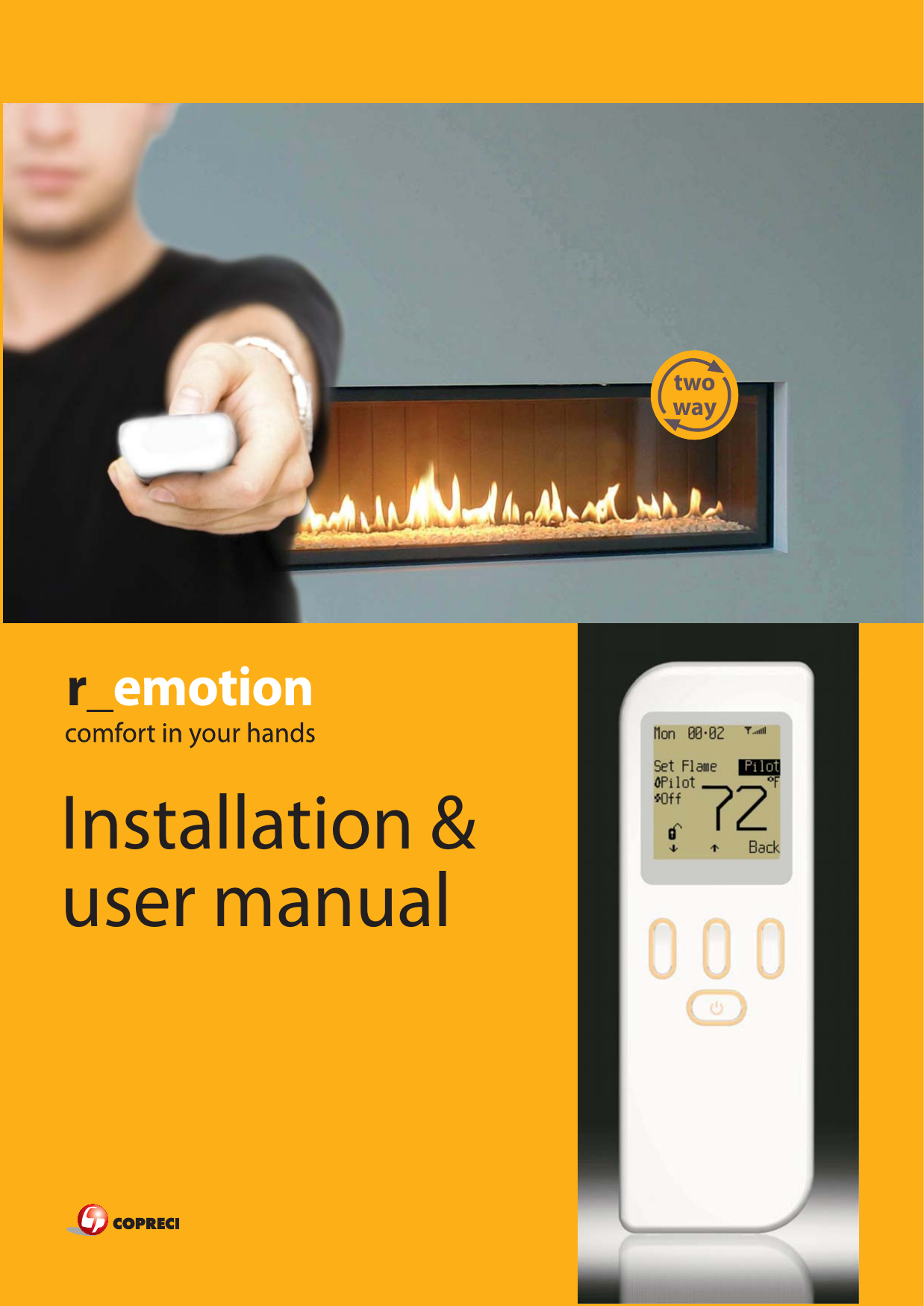
twowayInstallation &user manual
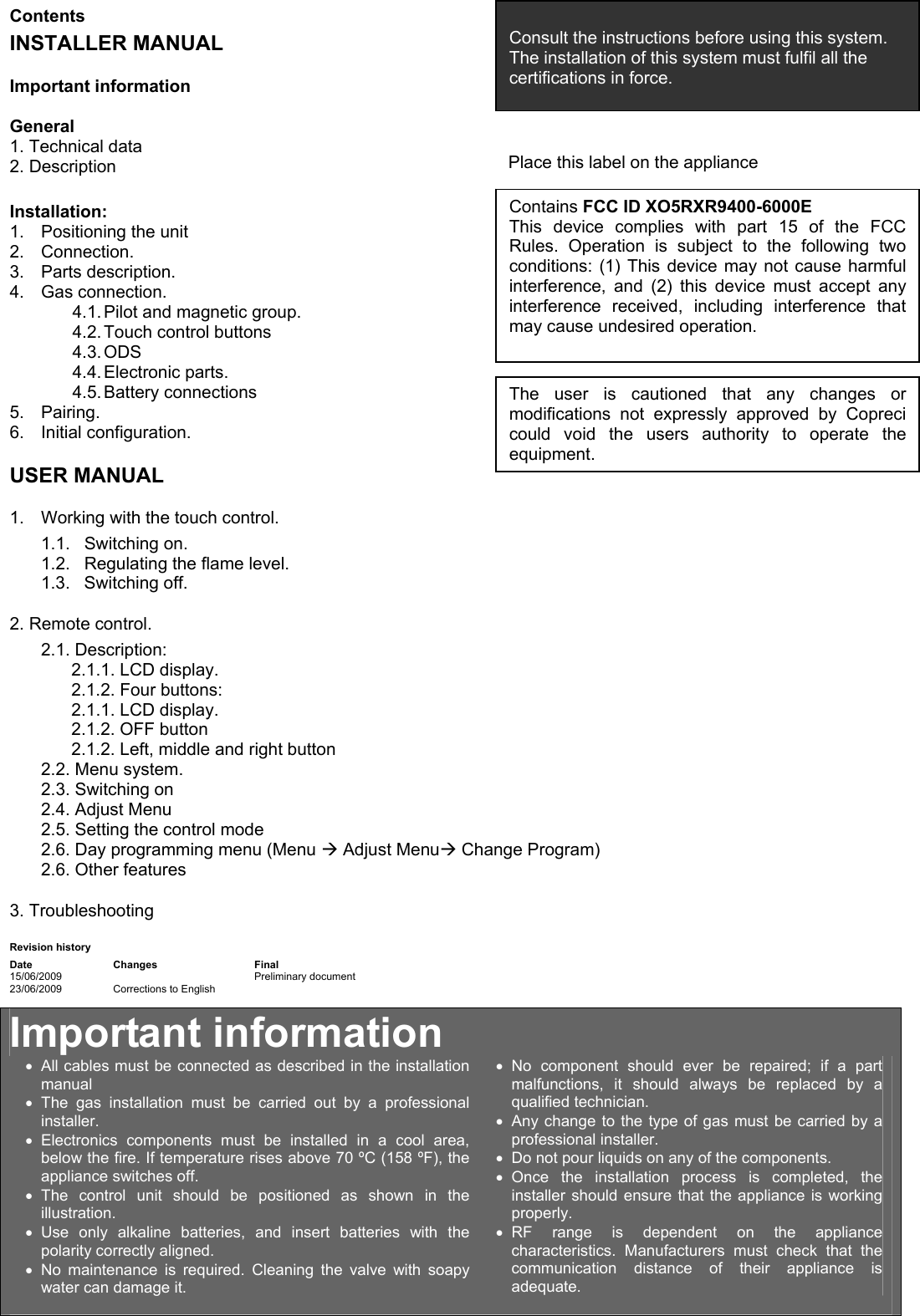
  Contents INSTALLER MANUAL Important information  General 1. Technical data 2. Description  Installation: 1.  Positioning the unit 2. Connection. 3. Parts description. 4. Gas connection. 4.1. Pilot and magnetic group. 4.2. Touch control buttons 4.3. ODS 4.4. Electronic  parts. 4.5. Battery  connections 5. Pairing. 6. Initial configuration. USER MANUAL 1.  Working with the touch control. 1.1. Switching on. 1.2.  Regulating the flame level. 1.3. Switching off. 2. Remote control. 2.1. Description: 2.1.1. LCD display. 2.1.2. Four buttons: 2.1.1. LCD display.  2.1.2. OFF button 2.1.2. Left, middle and right button 2.2. Menu system. 2.3. Switching on  2.4. Adjust Menu 2.5. Setting the control mode 2.6. Day programming menu (Menu Æ Adjust MenuÆ Change Program) 2.6. Other features 3. Troubleshooting Revision history Date Changes  Final 15/06/2009   Preliminary document 23/06/2009  Corrections to English       Important information •  All cables must be connected as described in the installation manual • The gas installation must be carried out by a professional installer. • Electronics components must be installed in a cool area, below the fire. If temperature rises above 70 ºC (158 ºF), the appliance switches off. • The control unit should be positioned as shown in the illustration.  • Use only alkaline batteries, and insert batteries with the polarity correctly aligned. • No maintenance is required. Cleaning the valve with soapy water can damage it.  • No component should ever be repaired; if a part malfunctions, it should always be replaced by a qualified technician. •  Any change to the type of gas must be carried by a professional installer. •  Do not pour liquids on any of the components. • Once the installation process is completed, the installer should ensure that the appliance is working properly. • RF range is dependent on the appliance characteristics. Manufacturers must check that the communication distance of their appliance is adequate.   Consult the instructions before using this system. The installation of this system must fulfil all the certifications in force. Contains FCC ID XO5RXR9400-6000E This device complies with part 15 of the FCC Rules. Operation is subject to the following two conditions: (1) This device may not cause harmful interference, and (2) this device must accept any interference received, including interference that may cause undesired operation.  Place this label on the appliance The user is cautioned that any changes or modifications not expressly approved by Copreci could void the users authority to operate the equipment.
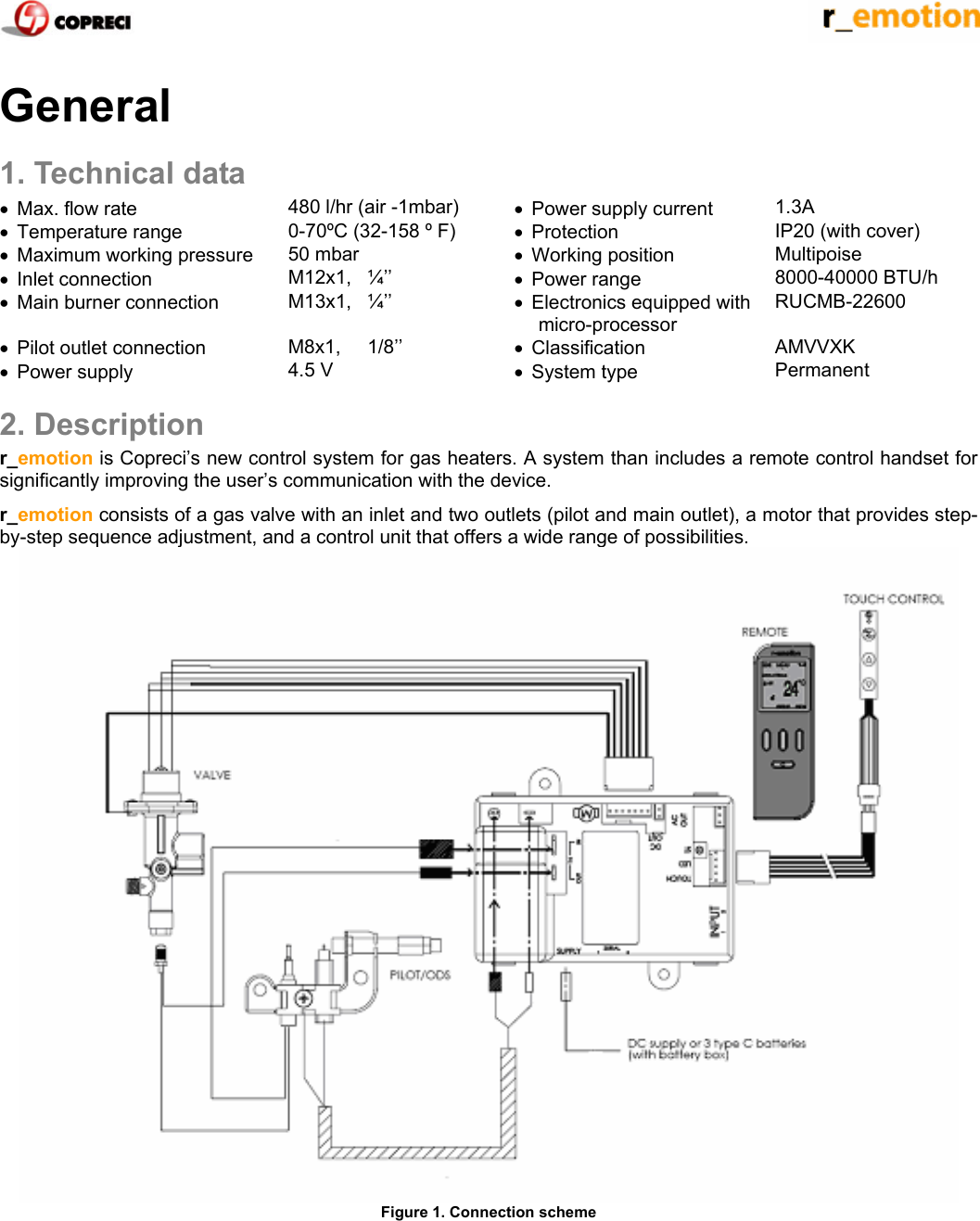
   General 1. Technical data •  Max. flow rate  480 l/hr (air -1mbar)  •  Power supply current   1.3A • Temperature range  0-70ºC (32-158 º F)  • Protection  IP20 (with cover) •  Maximum working pressure  50 mbar  • Working position  Multipoise • Inlet connection  M12x1,   ¼’’   • Power range  8000-40000 BTU/h •  Main burner connection  M13x1,   ¼’’  •  Electronics equipped with micro-processor RUCMB-22600 •  Pilot outlet connection  M8x1,     1/8’’  • Classification  AMVVXK • Power supply  4.5 V  • System type  Permanent 2. Description r_emotion is Copreci’s new control system for gas heaters. A system than includes a remote control handset for significantly improving the user’s communication with the device. r_emotion consists of a gas valve with an inlet and two outlets (pilot and main outlet), a motor that provides step-by-step sequence adjustment, and a control unit that offers a wide range of possibilities.  Figure 1. Connection scheme
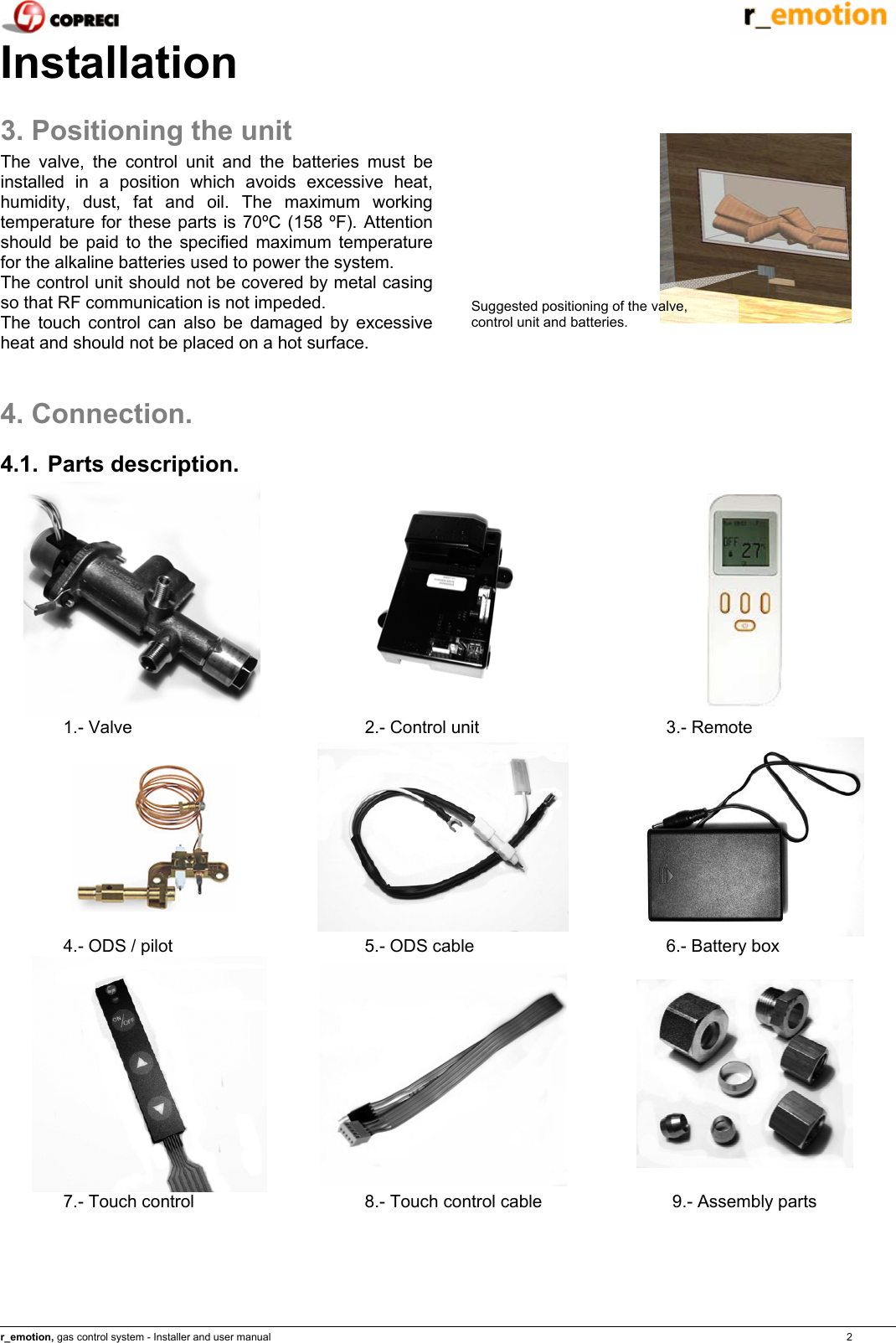
   r_emotion, gas control system - Installer and user manual                                                                                                                                                                                                                            2 Installation 3. Positioning the unit The valve, the control unit and the batteries must be installed in a position which avoids excessive heat, humidity, dust, fat and oil. The maximum working temperature for these parts is 70ºC (158 ºF). Attention should be paid to the specified maximum temperature for the alkaline batteries used to power the system. The control unit should not be covered by metal casing so that RF communication is not impeded. The touch control can also be damaged by excessive heat and should not be placed on a hot surface.   4. Connection. 4.1. Parts description.    1.- Valve  2.- Control unit  3.- Remote    4.- ODS / pilot  5.- ODS cable  6.- Battery box    7.- Touch control  8.- Touch control cable  9.- Assembly parts  Suggested positioning of the valve, control unit and batteries.
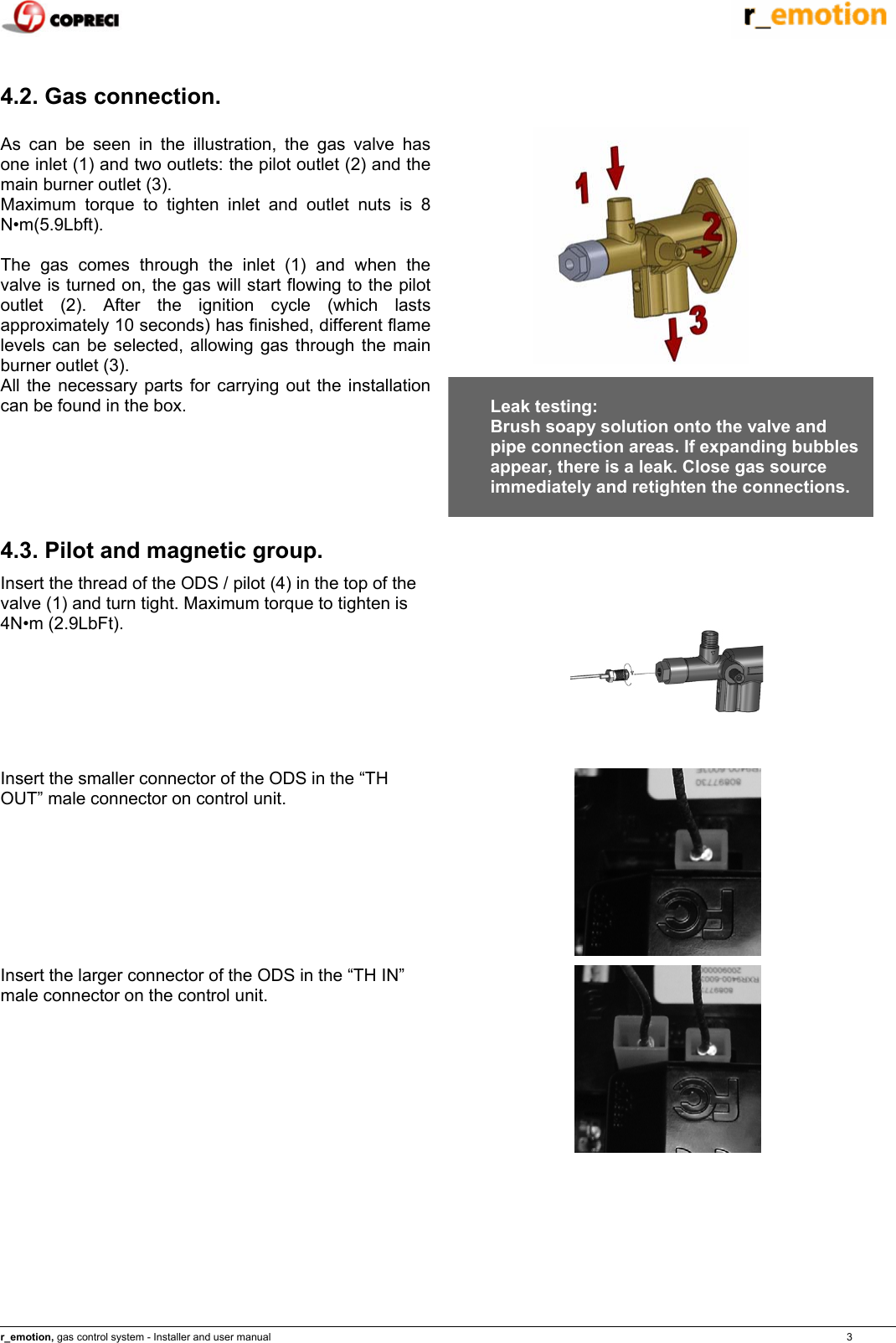
   r_emotion, gas control system - Installer and user manual                                                                                                                                                                                                                            3  4.2. Gas connection.  As can be seen in the illustration, the gas valve has one inlet (1) and two outlets: the pilot outlet (2) and the main burner outlet (3).  Maximum torque to tighten inlet and outlet nuts is 8 N•m(5.9Lbft).  The gas comes through the inlet (1) and when the valve is turned on, the gas will start flowing to the pilot outlet (2). After the ignition cycle (which lasts approximately 10 seconds) has finished, different flame levels can be selected, allowing gas through the main burner outlet (3). All the necessary parts for carrying out the installation can be found in the box.    Leak testing: Brush soapy solution onto the valve and pipe connection areas. If expanding bubbles appear, there is a leak. Close gas source immediately and retighten the connections.   4.3. Pilot and magnetic group. Insert the thread of the ODS / pilot (4) in the top of the valve (1) and turn tight. Maximum torque to tighten is 4N•m (2.9LbFt).  Insert the smaller connector of the ODS in the “TH OUT” male connector on control unit.   Insert the larger connector of the ODS in the “TH IN” male connector on the control unit.
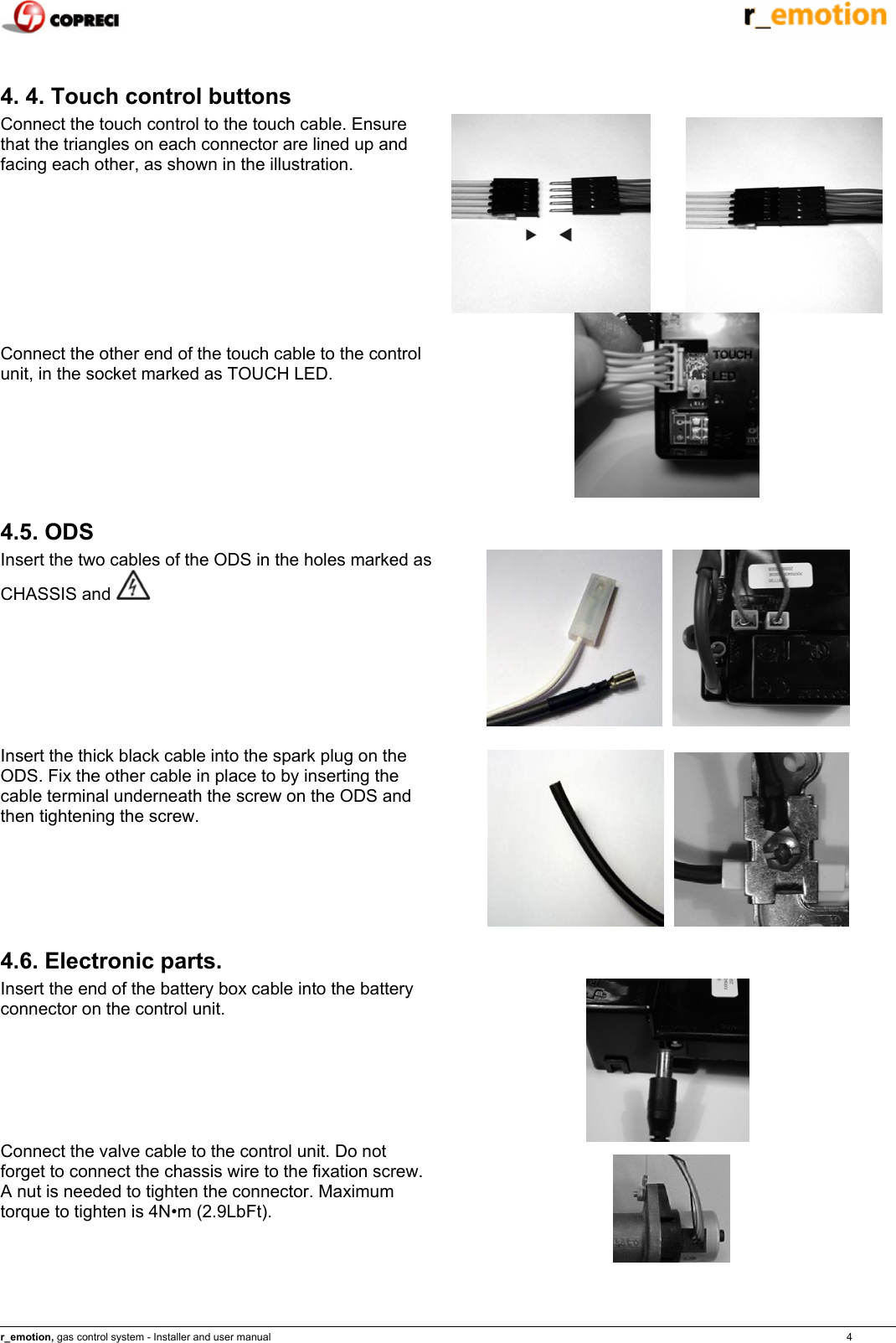
   r_emotion, gas control system - Installer and user manual                                                                                                                                                                                                                            4  4. 4. Touch control buttons Connect the touch control to the touch cable. Ensure that the triangles on each connector are lined up and facing each other, as shown in the illustration.           Connect the other end of the touch cable to the control unit, in the socket marked as TOUCH LED.   4.5. ODS Insert the two cables of the ODS in the holes marked as CHASSIS and        Insert the thick black cable into the spark plug on the ODS. Fix the other cable in place to by inserting the cable terminal underneath the screw on the ODS and then tightening the screw.            4.6. Electronic parts. Insert the end of the battery box cable into the battery connector on the control unit.   Connect the valve cable to the control unit. Do not forget to connect the chassis wire to the fixation screw. A nut is needed to tighten the connector. Maximum torque to tighten is 4N•m (2.9LbFt).
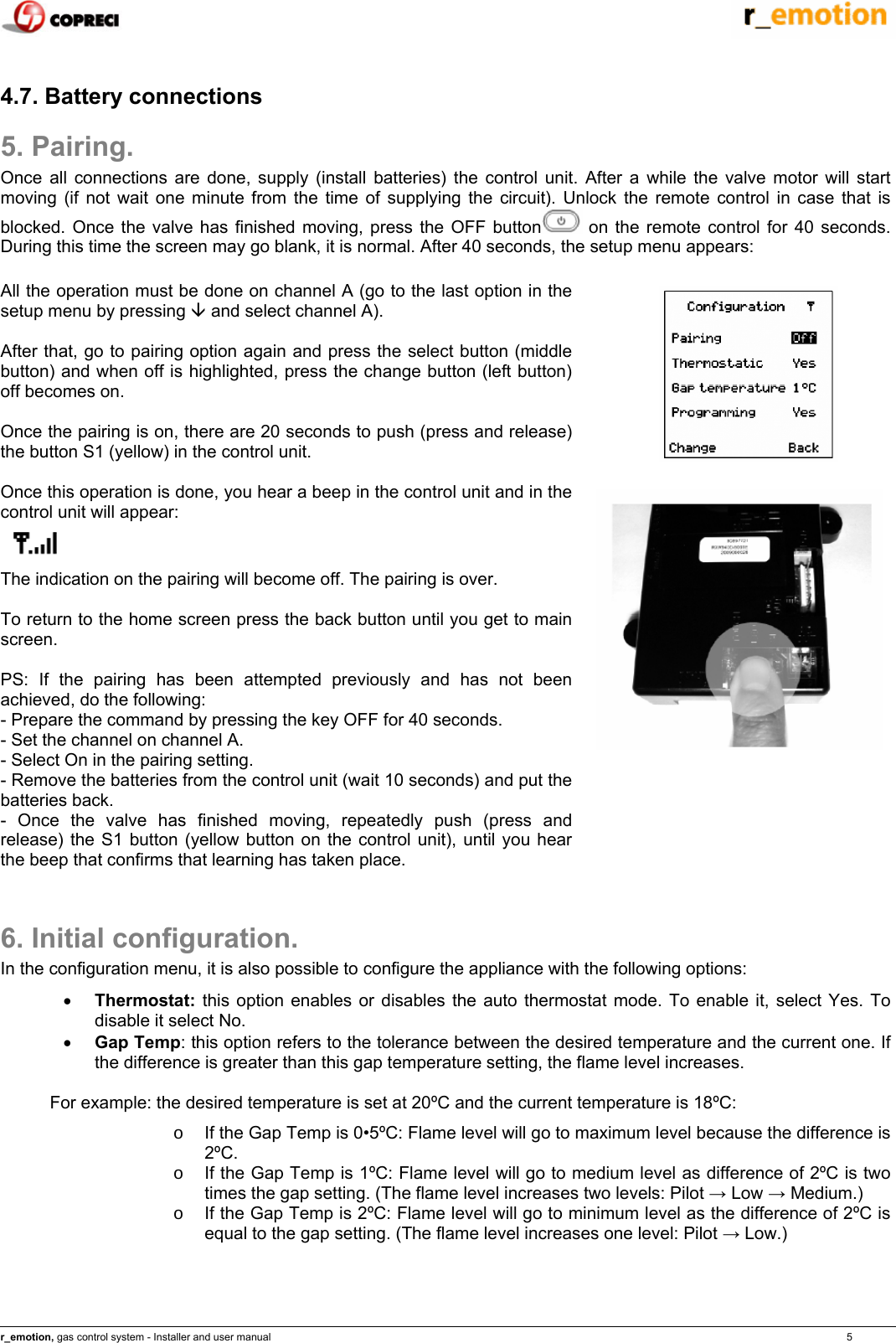
   r_emotion, gas control system - Installer and user manual                                                                                                                                                                                                                            5  4.7. Battery connections 5. Pairing. Once all connections are done, supply (install batteries) the control unit. After a while the valve motor will start moving (if not wait one minute from the time of supplying the circuit). Unlock the remote control in case that is blocked. Once the valve has finished moving, press the OFF button  on the remote control for 40 seconds. During this time the screen may go blank, it is normal. After 40 seconds, the setup menu appears:  All the operation must be done on channel A (go to the last option in the setup menu by pressing È and select channel A).  After that, go to pairing option again and press the select button (middle button) and when off is highlighted, press the change button (left button) off becomes on.  Once the pairing is on, there are 20 seconds to push (press and release) the button S1 (yellow) in the control unit.  Once this operation is done, you hear a beep in the control unit and in the control unit will appear:  The indication on the pairing will become off. The pairing is over.  To return to the home screen press the back button until you get to main screen.   PS: If the pairing has been attempted previously and has not been achieved, do the following: - Prepare the command by pressing the key OFF for 40 seconds. - Set the channel on channel A. - Select On in the pairing setting. - Remove the batteries from the control unit (wait 10 seconds) and put the batteries back. - Once the valve has finished moving, repeatedly push (press and release) the S1 button (yellow button on the control unit), until you hear the beep that confirms that learning has taken place.   6. Initial configuration. In the configuration menu, it is also possible to configure the appliance with the following options: • Thermostat: this option enables or disables the auto thermostat mode. To enable it, select Yes. To disable it select No. • Gap Temp: this option refers to the tolerance between the desired temperature and the current one. If the difference is greater than this gap temperature setting, the flame level increases.  For example: the desired temperature is set at 20ºC and the current temperature is 18ºC: o  If the Gap Temp is 0•5ºC: Flame level will go to maximum level because the difference is 2ºC. o  If the Gap Temp is 1ºC: Flame level will go to medium level as difference of 2ºC is two times the gap setting. (The flame level increases two levels: Pilot → Low → Medium.) o  If the Gap Temp is 2ºC: Flame level will go to minimum level as the difference of 2ºC is equal to the gap setting. (The flame level increases one level: Pilot → Low.)
   r_emotion, gas control system - Installer and user manual                                                                                                                                                                                                                            6    • Programming: this option enables or disables the program mode. To enable it, select Yes. To disable it, select No. • Fan System: this option enables or disables the fan system. To enable it, select Yes. To disable it, select No. • Soft start: this option causes the thermostat mode to work incrementally. When the change of flame level required by the thermostat involves more than one level, this option makes the change step by step, with a delay of 10 seconds between each change of flame level. To enable this option, select Yes. To disable it, select No. • Ember bed: This option enables or disables the ember bed output. To enable it, select Yes. To disable it, select No. • Sounder: This option enables or disables the sounder option. To enable it, select Yes. To disable it, select No. • Safety temp: this temperature is the maximum permitted room temperature. If the remote detects that the temperature is higher than the Safety temp, the appliance is switched off. This temperature can never be set higher than 40ºC (104ºF). The possible range of values is 25-40ºC (77-104ºF). • Channel: There are three different channels available: A, B and C. A change of channel should be done if communication is no good, and only after pairing has been done. Never try to do channel change and a pairing at the same time. To change the channel just press Select, choose one of the channels and then reset the control unit by disconnecting the power supply for a short period. Afterwards the connection between the remote and the control unit will be re-established. This process can take 10 seconds.  e one of the channels and then reset the control unit by disconnecting the power supply for a short period. Afterwards the connection between the remote and the control unit will be re-established. This process can take 10 seconds.
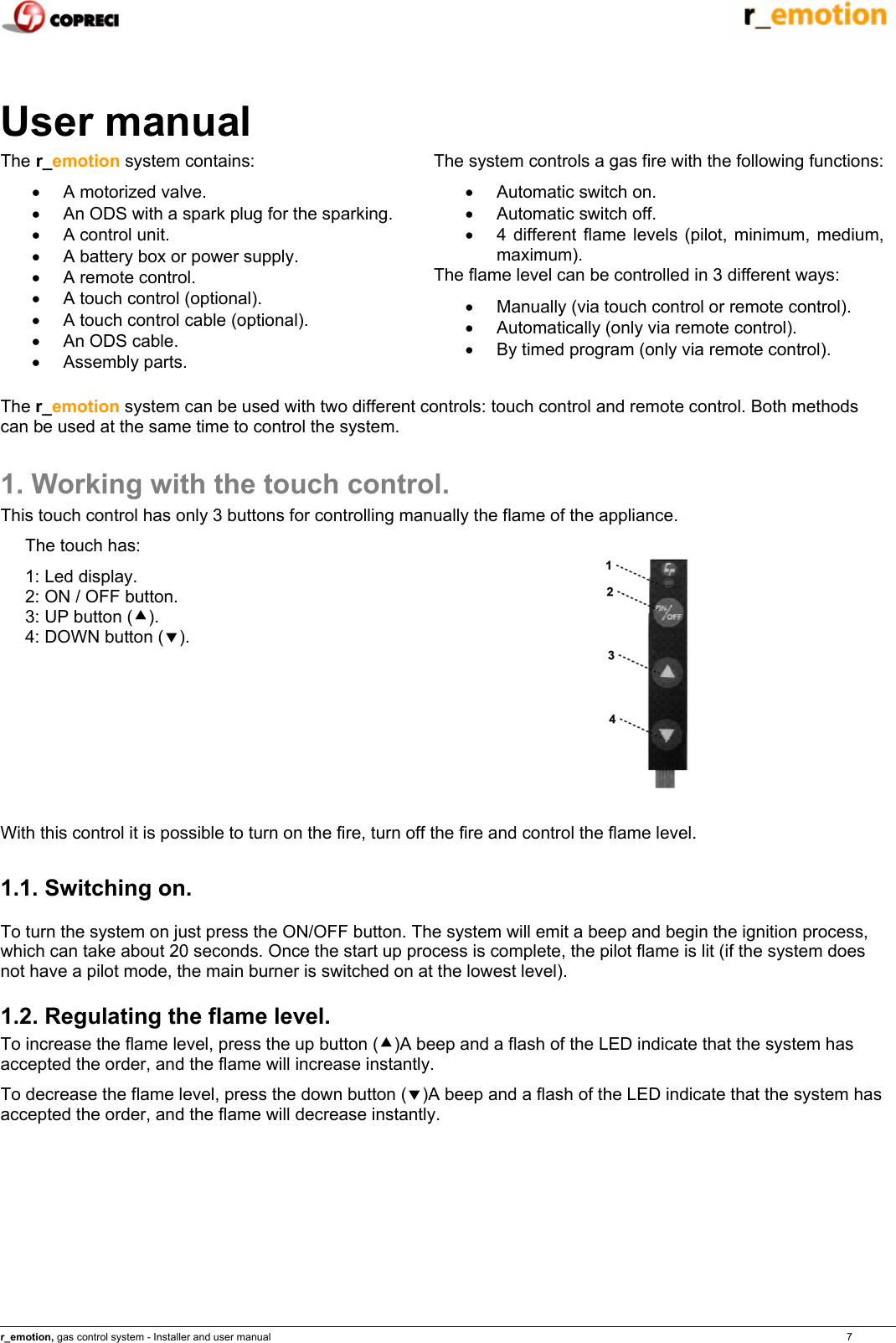
   r_emotion, gas control system - Installer and user manual                                                                                                                                                                                                                            7   User manual The r_emotion system contains: •  A motorized valve. •  An ODS with a spark plug for the sparking. •  A control unit. •  A battery box or power supply. •  A remote control. •  A touch control (optional). •  A touch control cable (optional). •  An ODS cable. • Assembly parts.  The system controls a gas fire with the following functions: •  Automatic switch on. •  Automatic switch off. •  4 different flame levels (pilot, minimum, medium, maximum). The flame level can be controlled in 3 different ways: •  Manually (via touch control or remote control). •  Automatically (only via remote control). •  By timed program (only via remote control). The r_emotion system can be used with two different controls: touch control and remote control. Both methods can be used at the same time to control the system. 1. Working with the touch control. This touch control has only 3 buttons for controlling manually the flame of the appliance. The touch has: 1: Led display. 2: ON / OFF button. 3: UP button (c). 4: DOWN button (d).   With this control it is possible to turn on the fire, turn off the fire and control the flame level. 1.1. Switching on. To turn the system on just press the ON/OFF button. The system will emit a beep and begin the ignition process, which can take about 20 seconds. Once the start up process is complete, the pilot flame is lit (if the system does not have a pilot mode, the main burner is switched on at the lowest level).  1.2. Regulating the flame level. To increase the flame level, press the up button (c)A beep and a flash of the LED indicate that the system has accepted the order, and the flame will increase instantly. To decrease the flame level, press the down button (d)A beep and a flash of the LED indicate that the system has accepted the order, and the flame will decrease instantly.
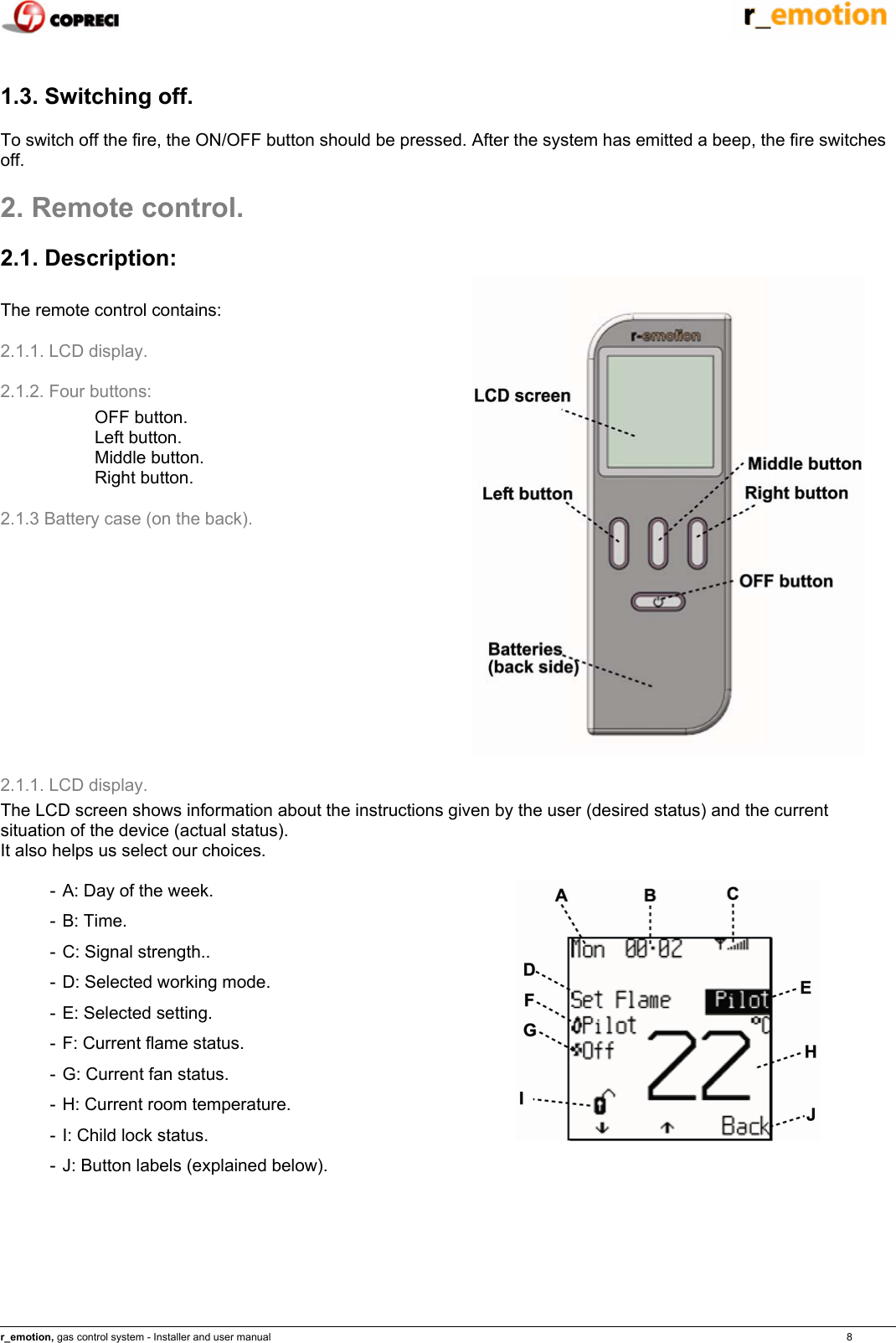
   r_emotion, gas control system - Installer and user manual                                                                                                                                                                                                                            8  1.3. Switching off. To switch off the fire, the ON/OFF button should be pressed. After the system has emitted a beep, the fire switches off. 2. Remote control. 2.1. Description:  The remote control contains:  2.1.1. LCD display. 2.1.2. Four buttons: OFF button. Left button. Middle button. Right button. 2.1.3 Battery case (on the back).   2.1.1. LCD display.  The LCD screen shows information about the instructions given by the user (desired status) and the current situation of the device (actual status). It also helps us select our choices.  - A: Day of the week. - B: Time. - C: Signal strength.. - D: Selected working mode. - E: Selected setting. - F: Current flame status. - G: Current fan status. - H: Current room temperature. - I: Child lock status. - J: Button labels (explained below).
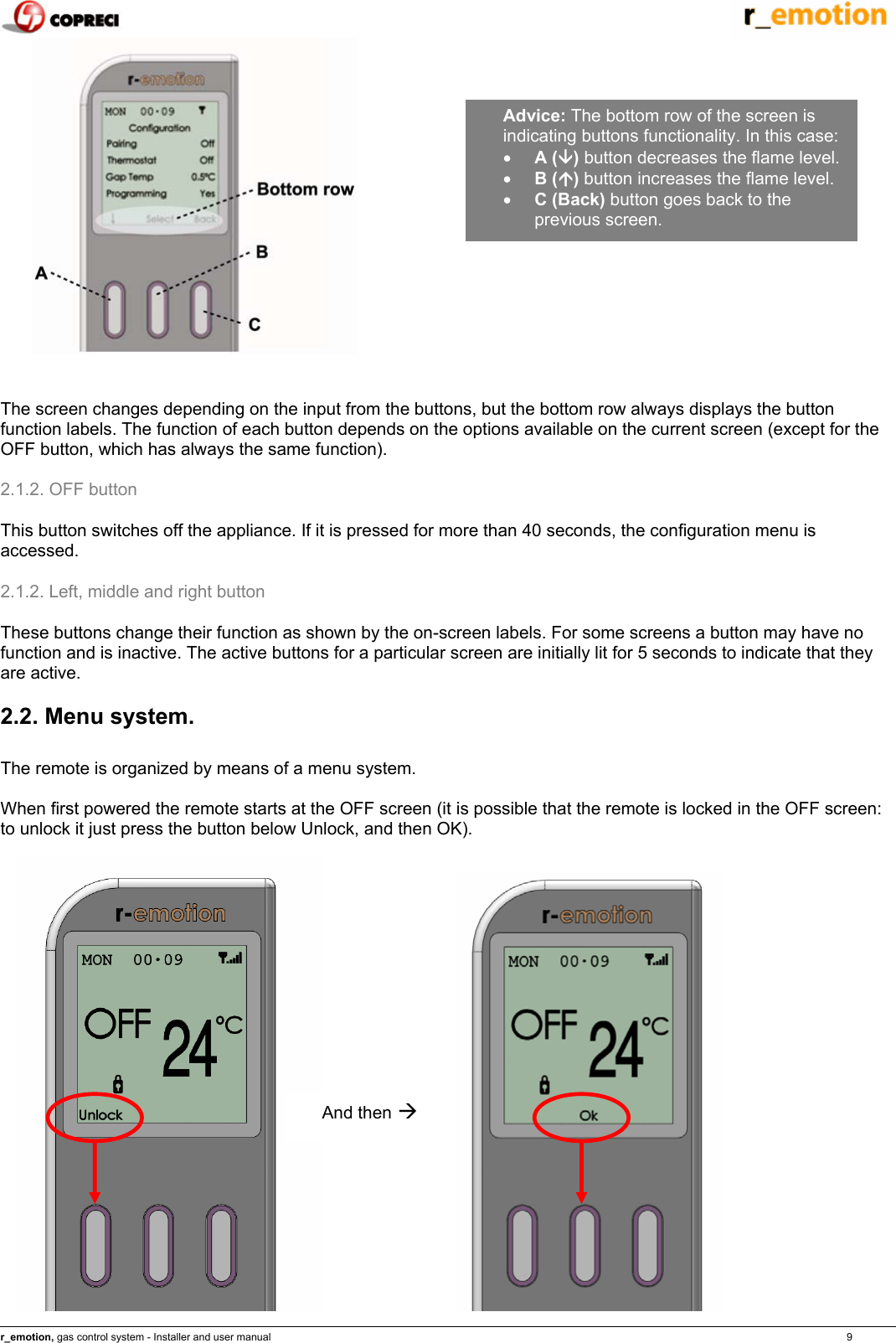
   r_emotion, gas control system - Installer and user manual                                                                                                                                                                                                                            9    The screen changes depending on the input from the buttons, but the bottom row always displays the button function labels. The function of each button depends on the options available on the current screen (except for the OFF button, which has always the same function). 2.1.2. OFF button This button switches off the appliance. If it is pressed for more than 40 seconds, the configuration menu is accessed. 2.1.2. Left, middle and right button These buttons change their function as shown by the on-screen labels. For some screens a button may have no function and is inactive. The active buttons for a particular screen are initially lit for 5 seconds to indicate that they are active.  2.2. Menu system.  The remote is organized by means of a menu system.   When first powered the remote starts at the OFF screen (it is possible that the remote is locked in the OFF screen: to unlock it just press the button below Unlock, and then OK).                 Advice: The bottom row of the screen is indicating buttons functionality. In this case: • A (È) button decreases the flame level. • B (Ç) button increases the flame level. • C (Back) button goes back to the previous screen. And then Æ
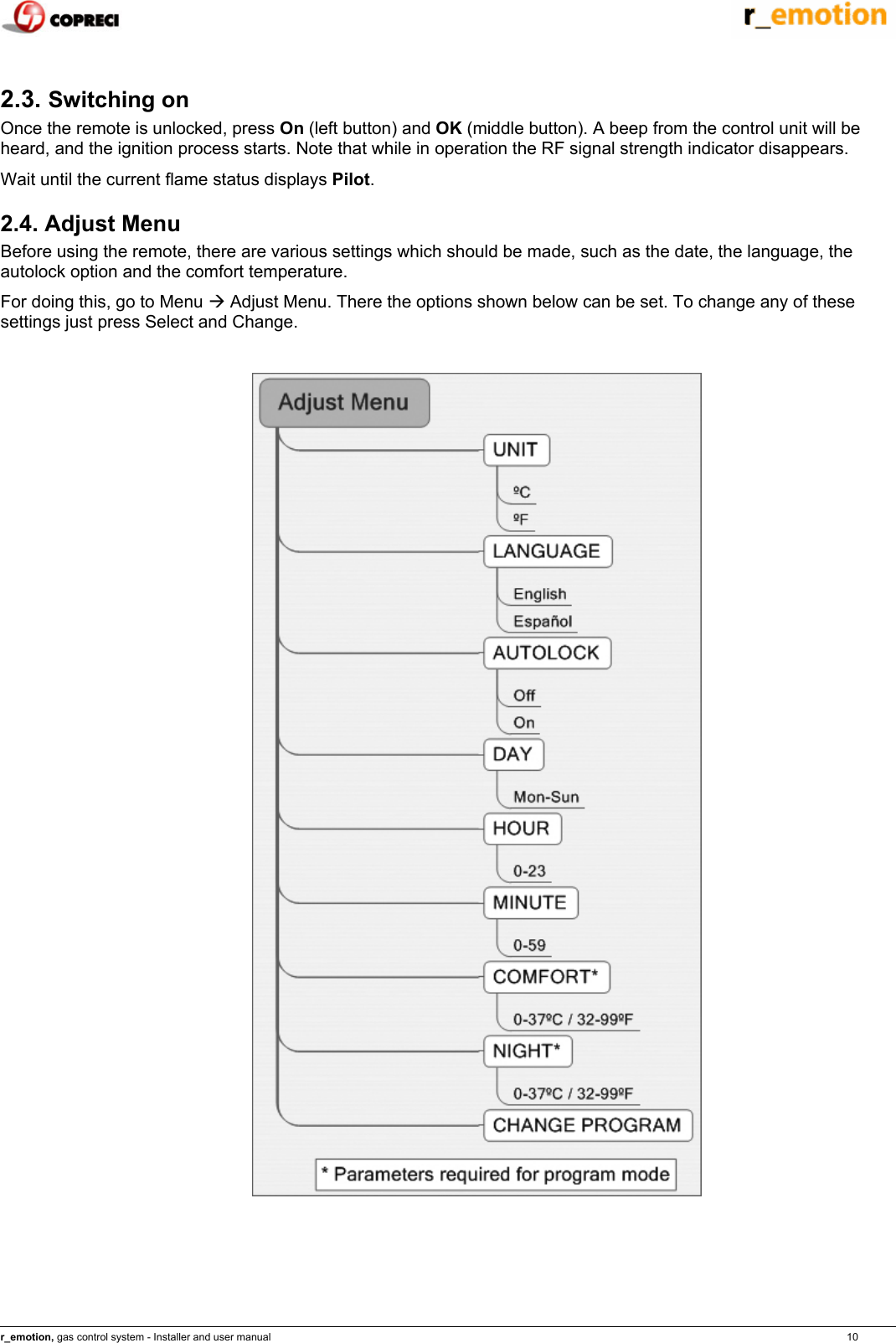
   r_emotion, gas control system - Installer and user manual                                                                                                                                                                                                                            10  2.3. Switching on  Once the remote is unlocked, press On (left button) and OK (middle button). A beep from the control unit will be heard, and the ignition process starts. Note that while in operation the RF signal strength indicator disappears. Wait until the current flame status displays Pilot. 2.4. Adjust Menu Before using the remote, there are various settings which should be made, such as the date, the language, the autolock option and the comfort temperature. For doing this, go to Menu Æ Adjust Menu. There the options shown below can be set. To change any of these settings just press Select and Change.
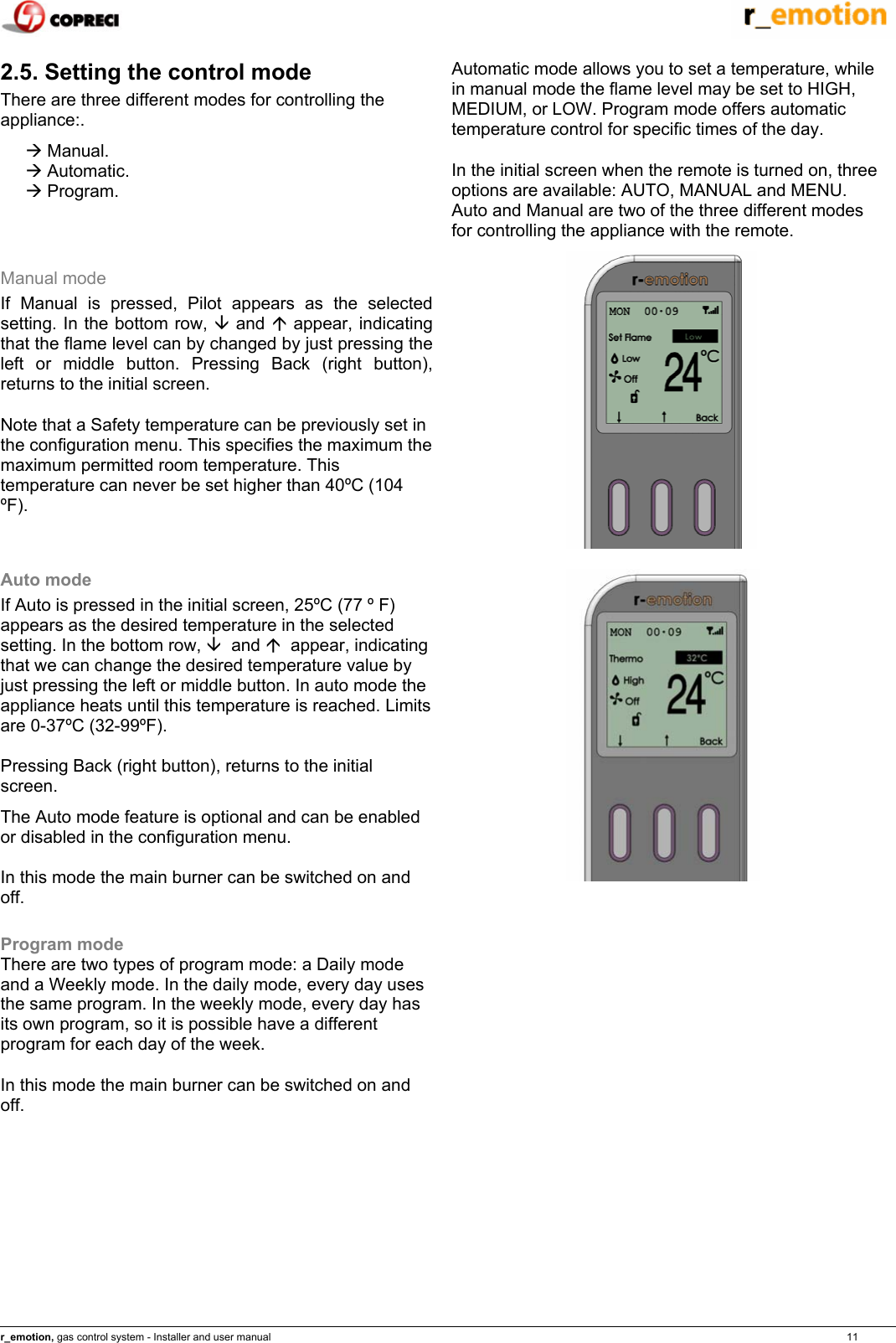
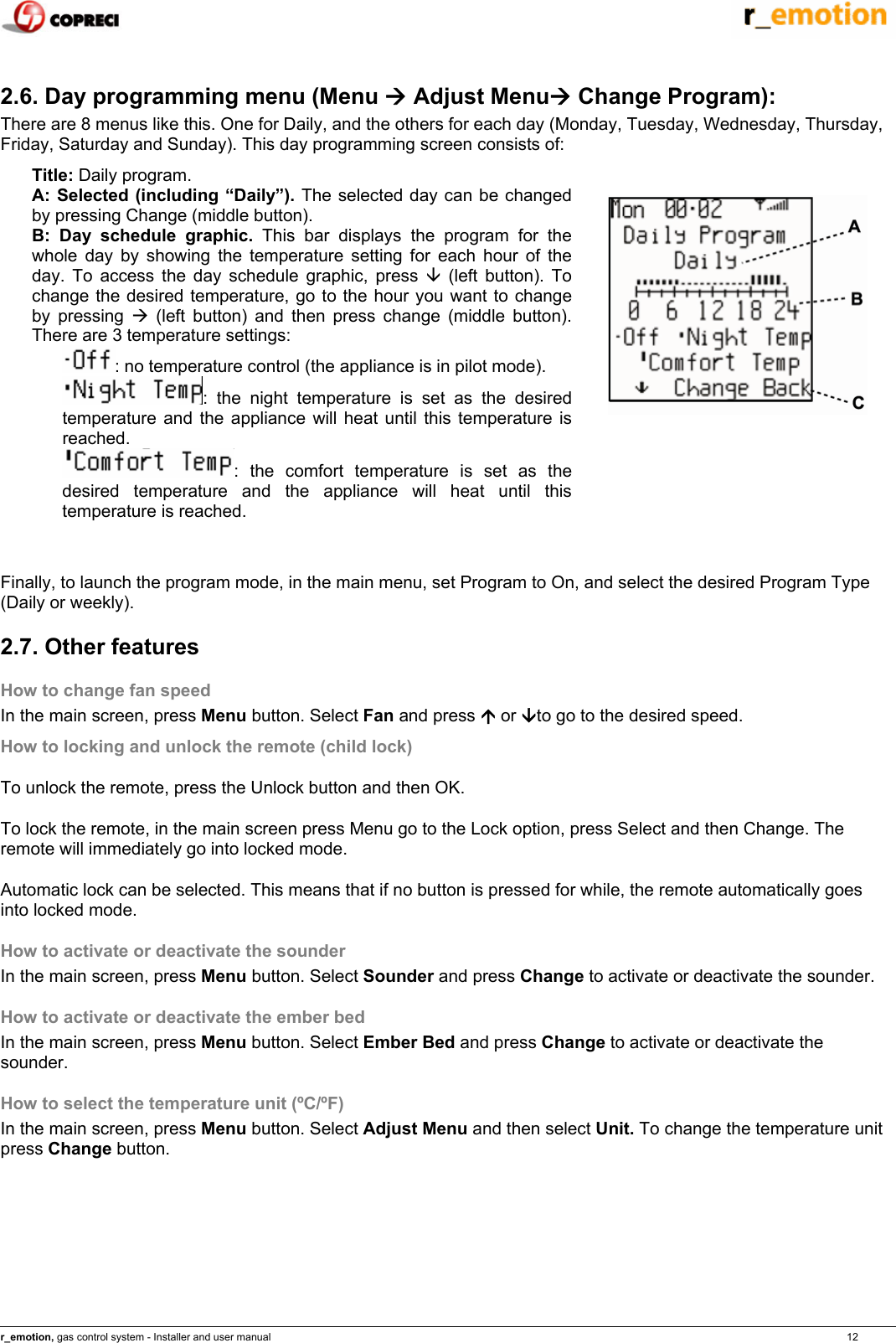
   r_emotion, gas control system - Installer and user manual                                                                                                                                                                                                                            11 2.5. Setting the control mode There are three different modes for controlling the appliance:. Æ Manual. Æ Automatic. Æ Program.  Automatic mode allows you to set a temperature, while in manual mode the flame level may be set to HIGH, MEDIUM, or LOW. Program mode offers automatic temperature control for specific times of the day. In the initial screen when the remote is turned on, three options are available: AUTO, MANUAL and MENU. Auto and Manual are two of the three different modes for controlling the appliance with the remote. Manual mode If Manual is pressed, Pilot appears as the selected setting. In the bottom row, È and Ç appear, indicating that the flame level can by changed by just pressing the left or middle button. Pressing Back (right button), returns to the initial screen. Note that a Safety temperature can be previously set in the configuration menu. This specifies the maximum the maximum permitted room temperature. This temperature can never be set higher than 40ºC (104 ºF).  Auto mode If Auto is pressed in the initial screen, 25ºC (77 º F)  appears as the desired temperature in the selected setting. In the bottom row, È  and Ç  appear, indicating that we can change the desired temperature value by just pressing the left or middle button. In auto mode the appliance heats until this temperature is reached. Limits are 0-37ºC (32-99ºF).  Pressing Back (right button), returns to the initial screen. The Auto mode feature is optional and can be enabled or disabled in the configuration menu. In this mode the main burner can be switched on and off.  Program mode There are two types of program mode: a Daily mode and a Weekly mode. In the daily mode, every day uses the same program. In the weekly mode, every day has its own program, so it is possible have a different program for each day of the week. In this mode the main burner can be switched on and off.
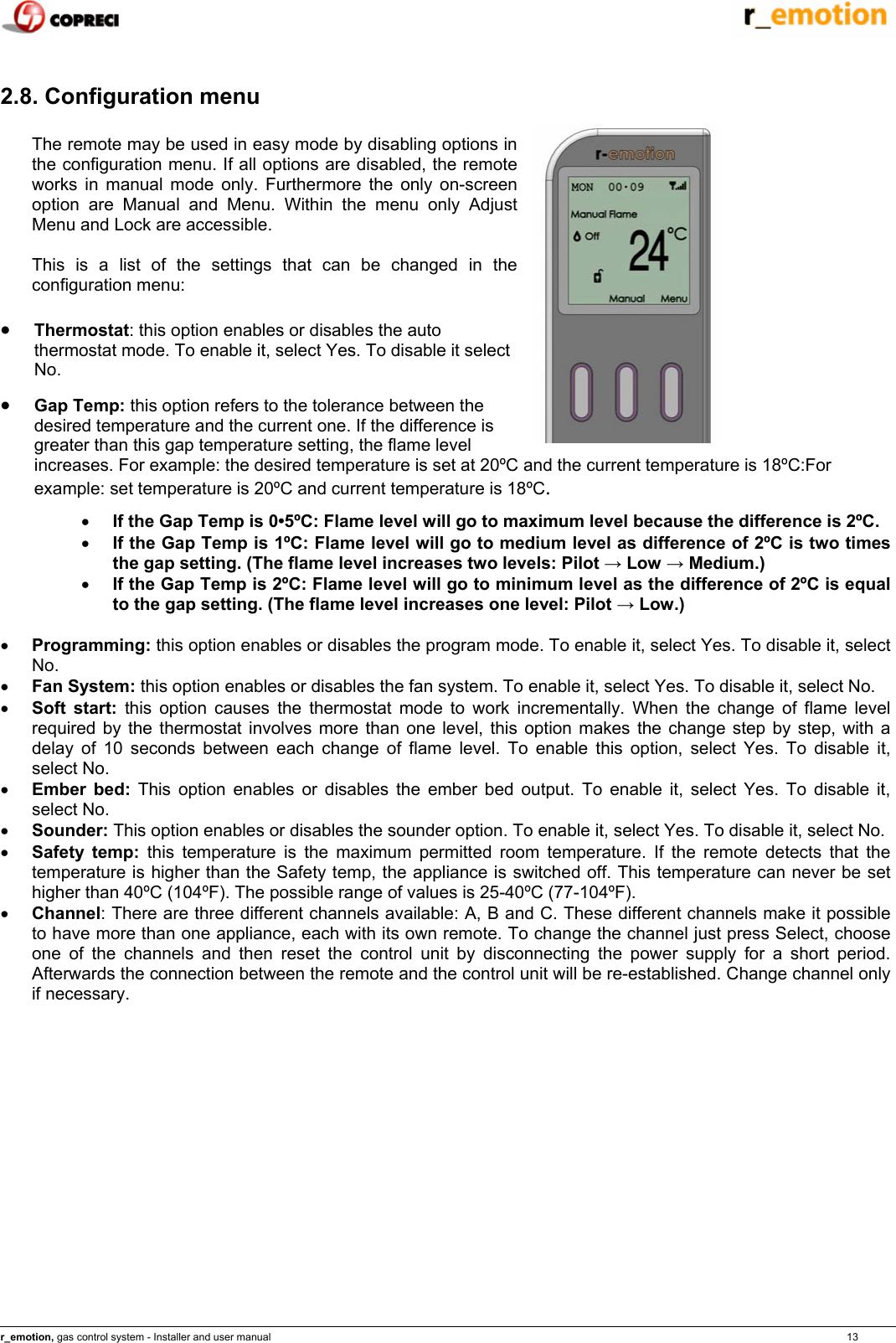
   r_emotion, gas control system - Installer and user manual                                                                                                                                                                                                                            12  2.6. Day programming menu (Menu Æ Adjust MenuÆ Change Program): There are 8 menus like this. One for Daily, and the others for each day (Monday, Tuesday, Wednesday, Thursday, Friday, Saturday and Sunday). This day programming screen consists of: Title: Daily program. A: Selected (including “Daily”). The selected day can be changed by pressing Change (middle button). B: Day schedule graphic. This bar displays the program for the whole day by showing the temperature setting for each hour of the day. To access the day schedule graphic, press È (left button). To change the desired temperature, go to the hour you want to change by pressing Æ (left button) and then press change (middle button). There are 3 temperature settings: : no temperature control (the appliance is in pilot mode). : the night temperature is set as the desired temperature and the appliance will heat until this temperature is reached. : the comfort temperature is set as the desired temperature and the appliance will heat until this temperature is reached.    Finally, to launch the program mode, in the main menu, set Program to On, and select the desired Program Type (Daily or weekly). 2.7. Other features How to change fan speed In the main screen, press Menu button. Select Fan and press Ç or Èto go to the desired speed. How to locking and unlock the remote (child lock) To unlock the remote, press the Unlock button and then OK. To lock the remote, in the main screen press Menu go to the Lock option, press Select and then Change. The remote will immediately go into locked mode. Automatic lock can be selected. This means that if no button is pressed for while, the remote automatically goes into locked mode. How to activate or deactivate the sounder In the main screen, press Menu button. Select Sounder and press Change to activate or deactivate the sounder. How to activate or deactivate the ember bed In the main screen, press Menu button. Select Ember Bed and press Change to activate or deactivate the sounder. How to select the temperature unit (ºC/ºF) In the main screen, press Menu button. Select Adjust Menu and then select Unit. To change the temperature unit press Change button.
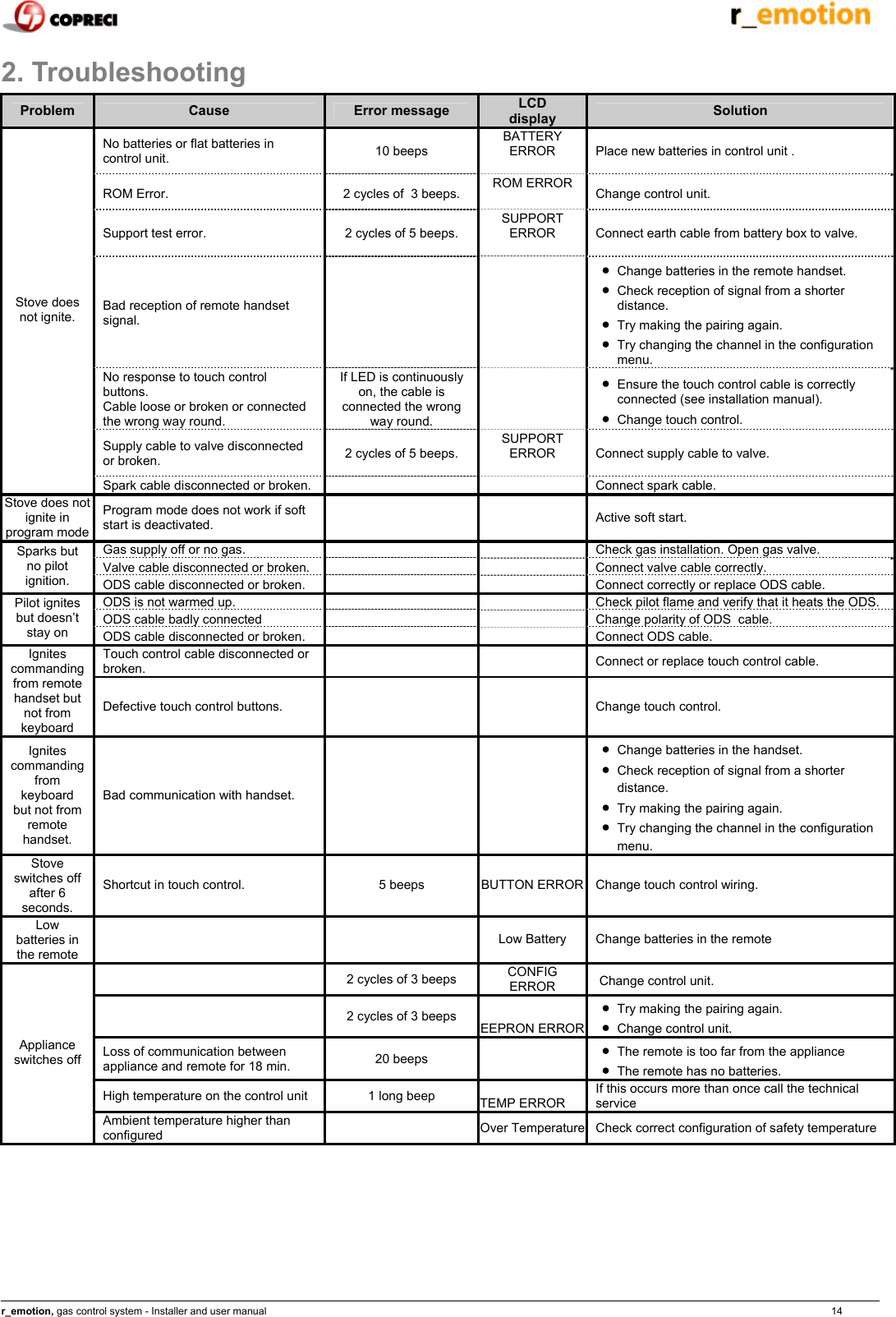
   r_emotion, gas control system - Installer and user manual                                                                                                                                                                                                                            13  2.8. Configuration menu  The remote may be used in easy mode by disabling options in the configuration menu. If all options are disabled, the remote works in manual mode only. Furthermore the only on-screen option are Manual and Menu. Within the menu only Adjust Menu and Lock are accessible.  This is a list of the settings that can be changed in the configuration menu:  • Thermostat: this option enables or disables the auto thermostat mode. To enable it, select Yes. To disable it select No. • Gap Temp: this option refers to the tolerance between the desired temperature and the current one. If the difference is greater than this gap temperature setting, the flame level increases. For example: the desired temperature is set at 20ºC and the current temperature is 18ºC:For example: set temperature is 20ºC and current temperature is 18ºC. • If the Gap Temp is 0•5ºC: Flame level will go to maximum level because the difference is 2ºC. • If the Gap Temp is 1ºC: Flame level will go to medium level as difference of 2ºC is two times the gap setting. (The flame level increases two levels: Pilot → Low → Medium.) • If the Gap Temp is 2ºC: Flame level will go to minimum level as the difference of 2ºC is equal to the gap setting. (The flame level increases one level: Pilot → Low.)  • Programming: this option enables or disables the program mode. To enable it, select Yes. To disable it, select No. • Fan System: this option enables or disables the fan system. To enable it, select Yes. To disable it, select No. • Soft start: this option causes the thermostat mode to work incrementally. When the change of flame level required by the thermostat involves more than one level, this option makes the change step by step, with a delay of 10 seconds between each change of flame level. To enable this option, select Yes. To disable it, select No. • Ember bed: This option enables or disables the ember bed output. To enable it, select Yes. To disable it, select No. • Sounder: This option enables or disables the sounder option. To enable it, select Yes. To disable it, select No. • Safety temp: this temperature is the maximum permitted room temperature. If the remote detects that the temperature is higher than the Safety temp, the appliance is switched off. This temperature can never be set higher than 40ºC (104ºF). The possible range of values is 25-40ºC (77-104ºF). • Channel: There are three different channels available: A, B and C. These different channels make it possible to have more than one appliance, each with its own remote. To change the channel just press Select, choose one of the channels and then reset the control unit by disconnecting the power supply for a short period. Afterwards the connection between the remote and the control unit will be re-established. Change channel only if necessary.
   r_emotion, gas control system - Installer and user manual                                                                                                                                                                                                                            14 2. Troubleshooting Problem  Cause  Error message  LCD display  Solution No batteries or flat batteries in control unit.  10 beeps BATTERY ERROR  Place new batteries in control unit . ROM Error.  2 cycles of  3 beeps.  ROM ERROR  Change control unit.  Support test error.  2 cycles of 5 beeps. SUPPORT ERROR  Connect earth cable from battery box to valve.  Bad reception of remote handset signal.    • Change batteries in the remote handset.  • Check reception of signal from a shorter distance.  • Try making the pairing again. • Try changing the channel in the configuration menu. No response to touch control buttons. Cable loose or broken or connected the wrong way round. If LED is continuously on, the cable is connected the wrong way round.  • Ensure the touch control cable is correctly connected (see installation manual). • Change touch control. Supply cable to valve disconnected or broken.  2 cycles of 5 beeps. SUPPORT ERROR  Connect supply cable to valve. Stove does not ignite. Spark cable disconnected or broken.      Connect spark cable. Stove does not ignite in program mode Program mode does not work if soft start is deactivated.      Active soft start. Gas supply off or no gas.      Check gas installation. Open gas valve. Valve cable disconnected or broken.      Connect valve cable correctly. Sparks but no pilot ignition.  ODS cable disconnected or broken.      Connect correctly or replace ODS cable. ODS is not warmed up.      Check pilot flame and verify that it heats the ODS. ODS cable badly connected      Change polarity of ODS  cable. Pilot ignites but doesn’t stay on  ODS cable disconnected or broken.      Connect ODS cable. Touch control cable disconnected or broken.      Connect or replace touch control cable. Ignites commanding from remote handset but not from keyboard Defective touch control buttons.      Change touch control. Ignites commanding from keyboard but not from remote handset. Bad communication with handset.     • Change batteries in the handset.  • Check reception of signal from a shorter distance. • Try making the pairing again. • Try changing the channel in the configuration menu. Stove switches off after 6 seconds. Shortcut in touch control.  5 beeps  BUTTON ERROR Change touch control wiring. Low batteries in the remote     Low Battery  Change batteries in the remote   2 cycles of 3 beeps  CONFIG ERROR   Change control unit.   2 cycles of 3 beeps EEPRON ERROR• Try making the pairing again. • Change control unit. Loss of communication between appliance and remote for 18 min.  20 beeps  • The remote is too far from the appliance • The remote has no batteries. High temperature on the control unit  1 long beep  TEMP ERROR If this occurs more than once call the technical service Appliance switches off Ambient temperature higher than configured    Over Temperature Check correct configuration of safety temperature

Navigation menu