SPRING TECHNOLOGY BT-3 Bluetooth receiver User Manual BT 3 V1

SHENZHEN SPRING TECHNOLOGY CO., LIMITED Bluetooth receiver BT 3 V1

User manual

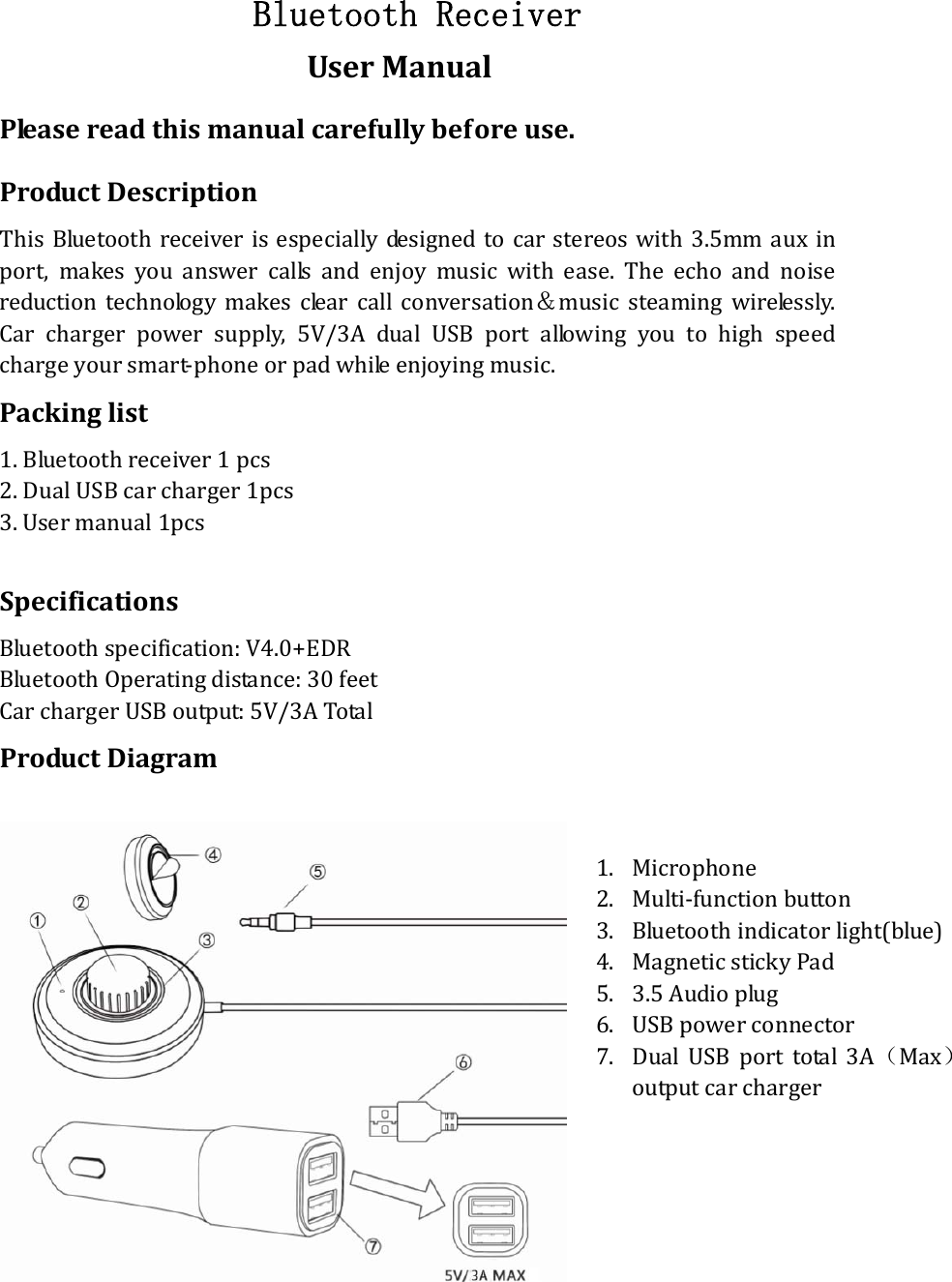
Bluetooth Receiver UserManualPleasereadthismanualcarefullybeforeuse.ProductDescriptionThisBluetoothreceiverisespeciallydesignedtocarstereoswith3.5mmaux inport,makesyouanswercallsandenjoymusicwithease.Theecho and noisereductiontechnologymakesclearcallconversation&music steaming wirelessly.Carchargerpowersupply,5V/3AdualUSBportallowingyoutohigh speedchargeyoursmart‐phoneorpadwhileenjoyingmusic.Packinglist1.Bluetoothreceiver1pcs 2.DualUSBcarcharger1pcs 3.Usermanual1pcsSpecificationsBluetoothspecification:V4.0+EDRBluetoothOperatingdistance:30feetCarchargerUSBoutput:5V/3ATotalProductDiagram   1. Microphone2. Multi‐functionbutton3. Bluetoothindicatorlight(blue)4. MagneticstickyPad5. 3.5Audioplug6. USBpowerconnector7. DualUSBporttotal3A(Max)outputcarcharger
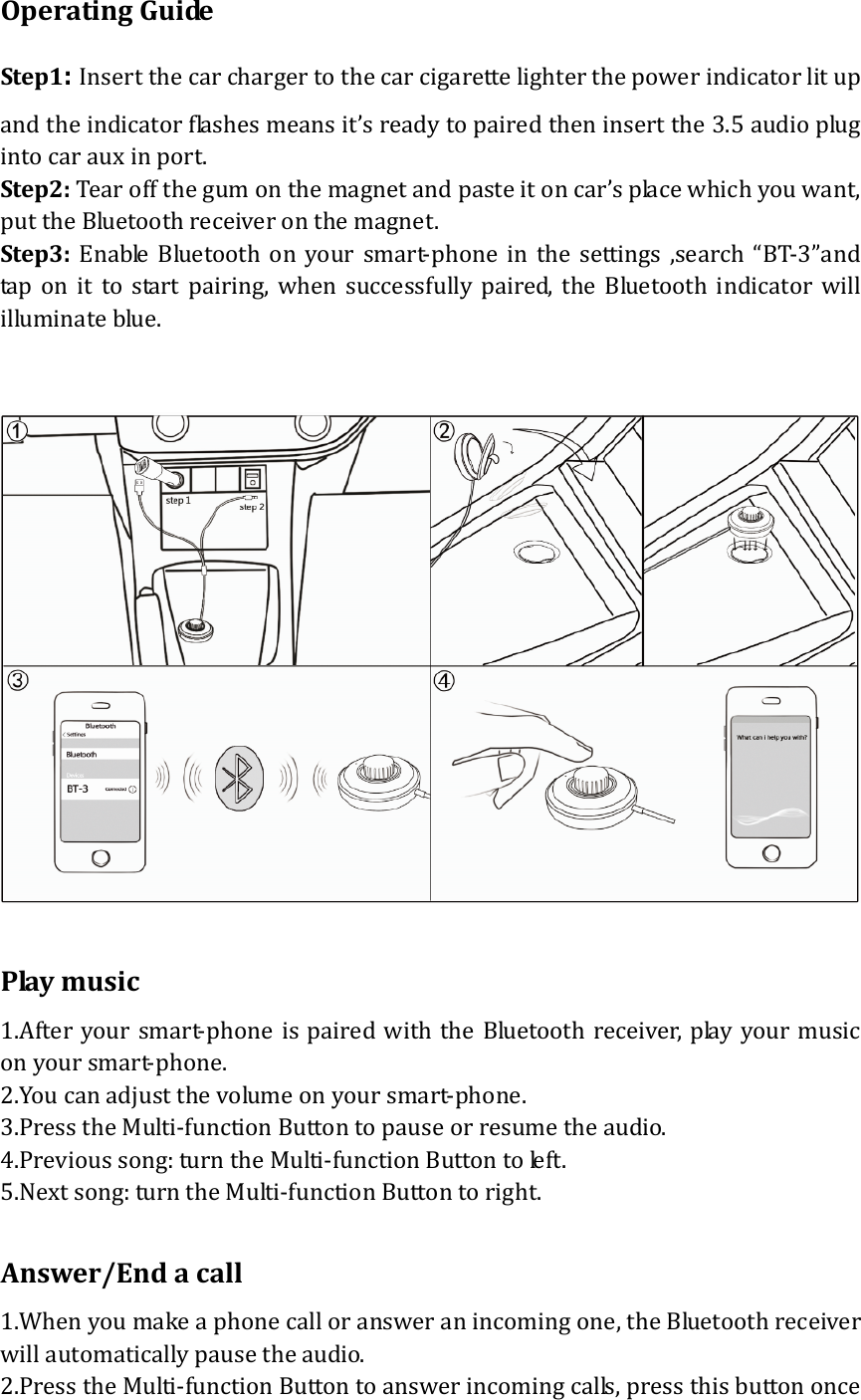
OperatingGuideStep1:Insertthecarchargertothecarcigarettelighterthepowerindicatorlitupandtheindicatorflashesmeansit’sreadytopairedtheninsertthe3.5audioplugintocarauxinport.Step2:Tearoffthegumonthemagnetandpasteitoncar’splacewhichyouwant,puttheBluetoothreceiveronthemagnet.Step3:EnableBluetoothonyoursmart‐phoneinthesettings,search“BT‐3”and taponittostartpairing,whensuccessfullypaired,theBluetoothindicatorwillilluminateblue.Playmusic1.Afteryoursmart‐phoneis pairedwiththeBluetoothreceiver,playyourmusiconyoursmart‐phone.2.Youcanadjustthevolumeonyoursmart‐phone.3.PresstheMulti‐functionButtontopauseorresumetheaudio.4.Previoussong:turntheMulti‐functionButtontoleft.5.Nextsong:turntheMulti‐functionButtontoright.Answer/Endacall1.Whenyoumakeaphonecalloransweranincomingone,theBluetoothreceiverwillautomaticallypausetheaudio.2.PresstheMulti‐functionButtontoanswerincomingcalls,pressthisbuttononce
againtoendthecall;youraudiowillbeautomaticallyresumed.Redialthelastnumber1. DoublepresstheMulti‐functionbutton.Rejectingacall1.LongpresstheMulti‐functionbuttonrejecttheincomingcall.EnableSiriForabetterIOSuserexperience,addtheSarifunctiontothisBluetoothreceiver,activatethevoicesoftwarebylongpresstheMulti‐functionButton.Remark1.Itwillconnecttothelastpaireddeviceautomaticallywhenturned on nexttime(TurnontheBluetoothofyoursmartdevicefirst).2.Forthebestaudioquality,pleaseturnthevolumeofyoursmartdeviceintothemaxlevel.TroubleshootingOncethepairingprocessiscompleted,theconnectioncanbreakforthesereasons:Connectionhasnotbeenmadewithinaspecifictimeandthedeviceisinsleepmodeorpoweredoff.Turnon/offBluetoothreceivertore‐connect.Pleasetrythefollowing:1.RestarttheBluetoothreceiver.2.Restartandrepeatpairingprocessforbothdevices.
FCC Statement  This device complies with Part 15 of the FCC rules. Operation is subject to thefollowingtwoconditions:1)thisdevicemaynotcauseharmfulinterference,and2)thisdevicemustacceptanyinterferencereceived,includinginterferencethatmaycauseundesiredoperation.Note:ThisequipmenthasbeentestedandfoundtocomplywiththelimitsforaClassBdigitaldevice,pursuanttopart15oftheFCCRules.These limits aredesigned to provide reasonable protection against harmful interference in aresidential installation. This equipment generates uses and canradiateradiofrequencyenergyand,ifnotinstalledandusedinaccordancewith theinstructions,maycauseharmfulinterferencetoradiocommunications.However,thereisnoguaranteethatinterferencewillnotoccurinparticu lar  in stal lati on . I fthisequipmentdoescauseharmfulinterferencetoradioortelevisionreception,which can be determined by turning the equipment off and on, the user isencouragedtotrytocorrecttheinterferencebyoneormoreofthefollowingmeasures:‐‐Reorientorrelocatethereceivingantenna.‐‐Increasetheseparationbetweentheequipmentandreceiver.‐‐Connecttheequipmentintoanoutletonacircuitdifferentfromthattowhichthereceiverisconnected.‐‐Consultthedealeroranexperiencedradio/TVtechnicianforhelp.Changes or modifications not expressly approved by the party responsible forcompliancecouldvoidtheuser’sauthoritytooperatetheequipment.ThisdeviceismeasuredRFoutputpowerislessthantheSARexclusionthresholdvalueforhumanheadandbody.Therefore,SARtestisnotnecessary.

Navigation menu