SPRING TECHNOLOGY FM25 Bluetooth FM Transmitter User Manual
SHENZHEN SPRING TECHNOLOGY CO., LIMITED Bluetooth FM Transmitter
Contents
- 1. User Manual
- 2. User manual
User manual
BluetoothFMtransmitterquickstartguide
PleasereadthisguidetomakethebestuseofthisbluetoothFMtransmitter
Specifications:
Bluetoothspecification:V4.0
Bluetoothprofiles:HSP,HFPA2DPandAVRCP
FMfrequencyrange:88.1~107.9MHz
BluetoothOperatingdistance:30feet
FMOperatingdistance:15feet
USB1output:5V/2.4A(MAX)
USB2output:5V/1A
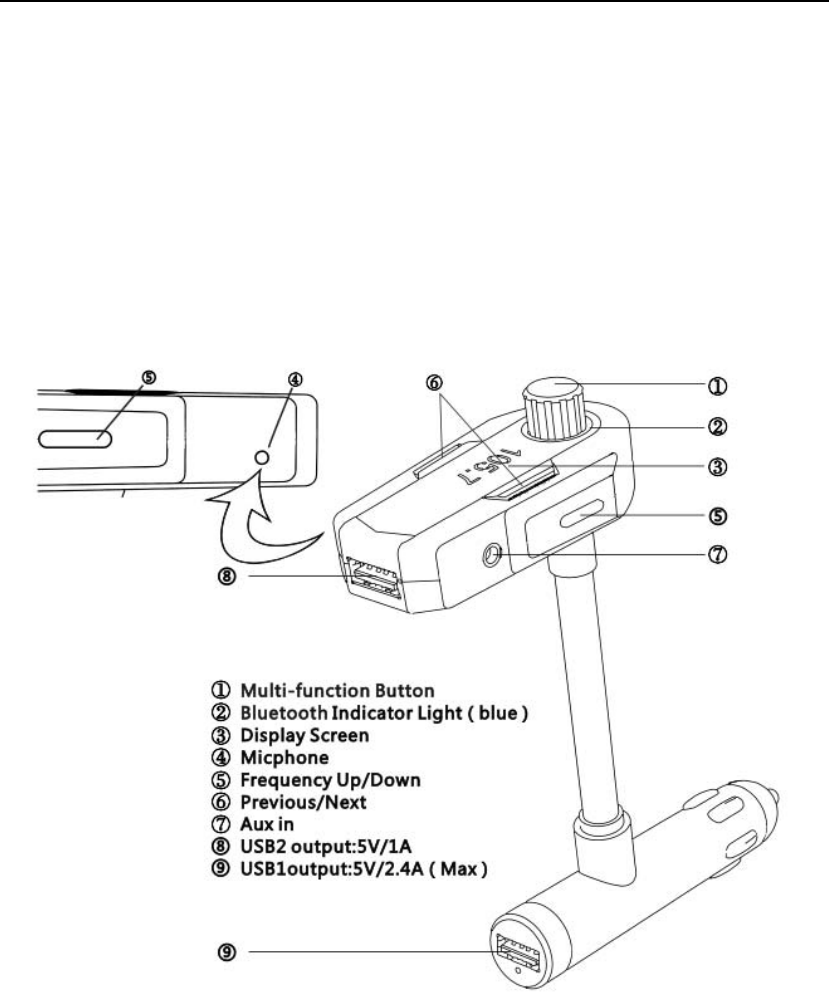
ProductDiagram:
Poweron/offtheFMtransmitter:
Poweron:Plugthetransmitterintothecarcigarettesocket.
Poweroff:Pressthemultifunctionbuttonforabout2secondsuntiltheblue
indicatorlightgoesoff.
Instruction:
1.Plugthetransmitterintothecarcigarettesocket,theproductwillpoweron
andtheindicatorflashesmeansit’sreadytopair.
2.TurnontheBluetoothfunctionofyourphone.
3.SearchfortheBluetoothdevicesandselect"BTFM".
4.Ifparingissuccessful,theblueindicatorlightwillbealwayson.
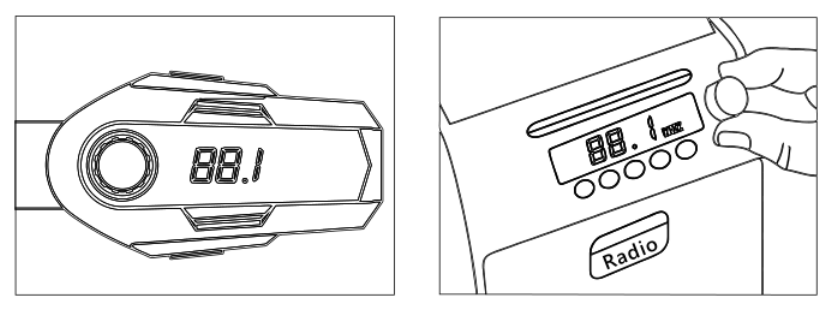
5.TunethecarFMradiofrequencytoanunusedFMstation.
6.TunetheFMtransmitterintothesamefrequencywiththecarFMradio.
7.Nowyoucanenjoyyourmusicthroughthecarstereo.
Remark:
1.Itwillconnecttothepre‐setphoneautomaticallywhenturnson.(Turnonthe
Bluetoothofyourcellphonefirst,andthenturnontheproduct.)
2.Forthebestaudioquality,pleaseturnthevolumeofthecell phone and FM
transmitterintothemaxlevel.
3.Ifthenoisyistooloud,pleasetryotherFMfrequency.
Answeringacall:
ForiPhoneusers:
Selection1.PresstheMulti‐functionbutton.
Selection2.Pressthe“Answer”buttonofyouriPhoneandcheckyouriPhonecall
menu.Lookfortheaudiosourceandselectthetransmitter"FM25".
ForAndroidUser(suchasSamsung,HTC,Sonyetc.):
Selection1.PresstheMulti‐functionbutton.
Selection2.Pressthe“Answer”buttonofyourphone.
Endingacall:
1. PresstheMulti‐functionbutton.
Rejectingacall:
1.DoublepresstheMulti‐functionbutton.
Playingmusic:
1. Play/Pause:ShortpresstheMulti‐functionbutton.
2. NextSong:Shortpressthebutton“Next”.
3. PreviousSong:Shortpressthebutton“Previous”.
VolumeControl:
1. Volumedown‐‐‐turntheknob(multi‐function)totheleft,
2. Volumeup—turntheknob(multi‐function)totheright.
FCCStatement
ThisequipmenthasbeentestedandfoundtocomplywiththelimitsforaClassB
digitaldevice,pursuanttopart15oftheFCCrules.Theselimitsaredesignedto
provide reasonable protection against harmful interference in a residential
installation. This equipment generates, uses and can radiate radio frequency
energy and, if not installed and used in accordance with the instructions, may
cause harmful interference to radio communications. However, there is no
guarantee that interference will not occur in a particular installation. If this
equipment does cause harmful interference to radio or television reception,
which can be determined by turning the equipment off and on, the user is
encouragedtotrytocorrecttheinterferencebyoneormoreofthefollowing
measures:
‐Reorientorrelocatethereceivingantenna.
‐Increasetheseparationbetweentheequipmentandreceiver.
‐Connecttheequipmentintoanoutletonacircuitdifferentfromthattowhich
thereceiverisconnected.
‐Consultthedealeroranexperiencedradio/TVtechnicianforhelp.
To assure continued compliance, any changes or modifications not expressly
approvedbytheparty.
Responsible for compliance could void the user’s authority to operate this
equipment. (Example‐ use only shielded interface cables when connecting to
computerorperipheraldevices).
ThisequipmentcomplieswithPart15oftheFCCRules.Operationissubjectto
thefollowingtwoconditions:
(1)Thisdevicemaynotcauseharmfulinterference,and
(2)Thisdevicemustacceptanyinterferencereceived,includinginterferencethat
maycauseundesiredoperation.
RFwarningstatement:
The device has been evaluated to meet general RF exposure requirement. The
devicecanbeusedinportableexposureconditionwithoutrestriction.