SUPERSCAN LCD Television Manual L0608331
User Manual: SUPERSCAN SUPERSCAN LCD Television Manual SUPERSCAN LCD Television Owner's Manual, SUPERSCAN LCD Television installation guides
Open the PDF directly: View PDF  .
.
Page Count: 23
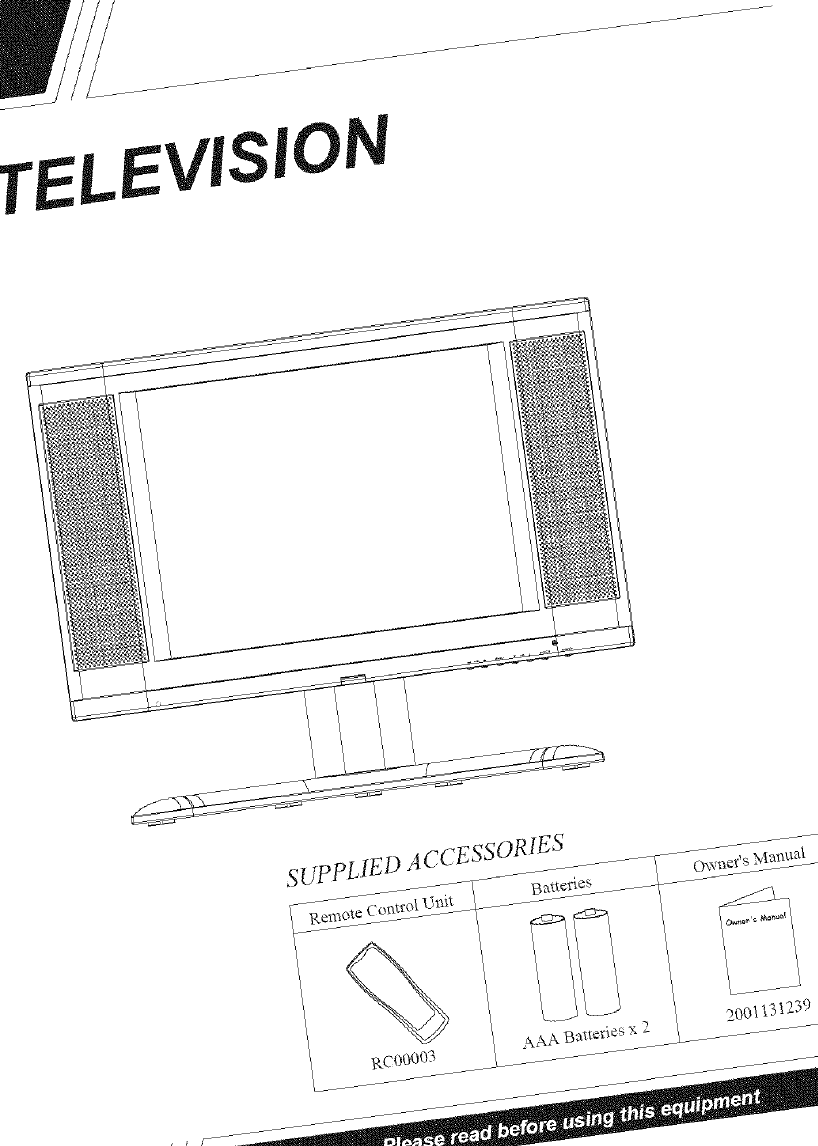
TELE.VISIO
sUP PLIE D A ccESSOR1ES
200_31239
,JSJ
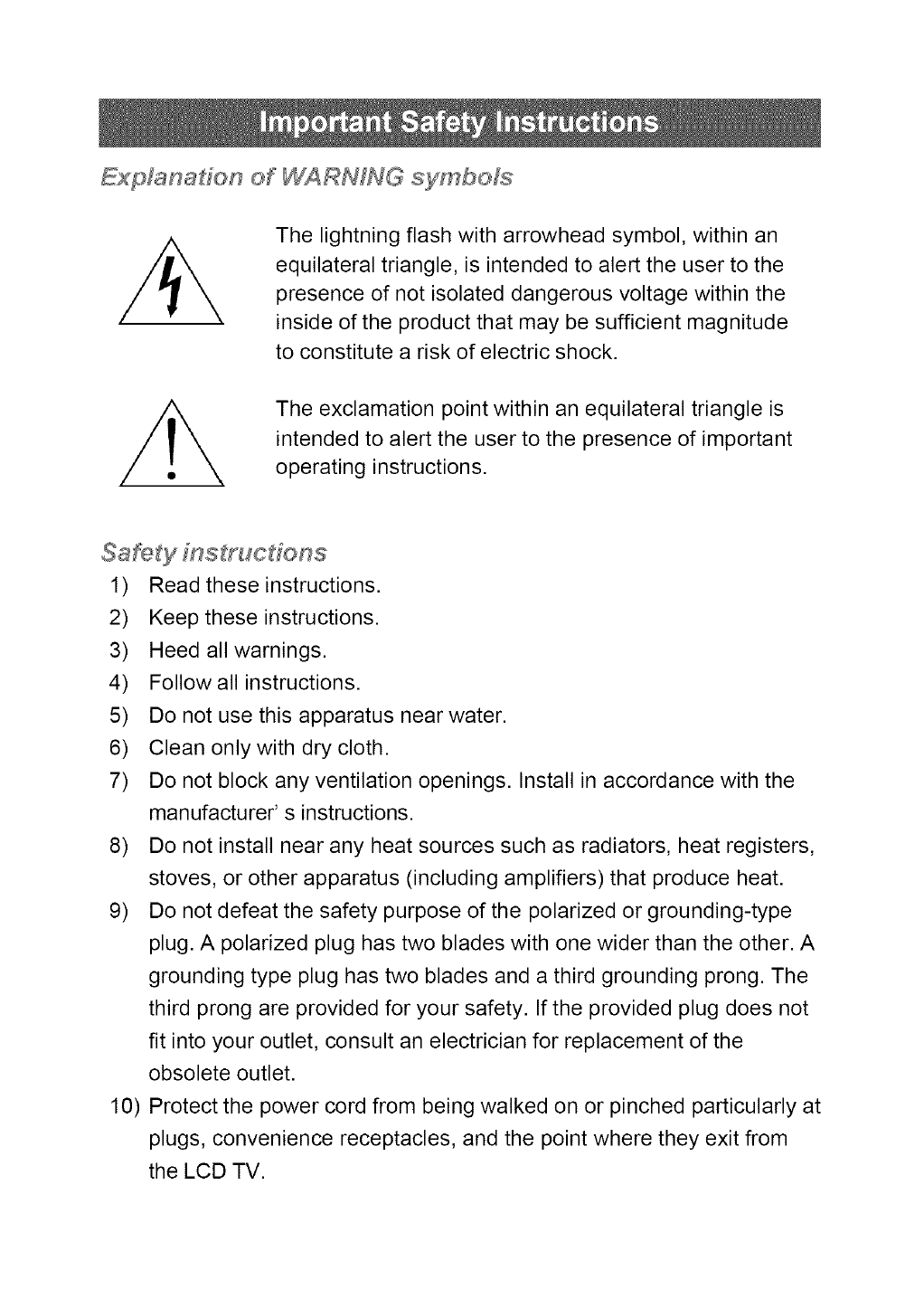
ExpMnadon of WARNING symbols
The lightning flash with arrowhead symbol, within an
equilateral triangle, is intended to alert the user to the
presence of not isolated dangerous voltage within the
inside of the product that may be sufficient magnitude
to constitute a risk of electric shock.
The exclamation point within an equilateral triangle is
intended to alert the user to the presence of important
operating instructions.
1) Read these instructions.
2) Keep these instructions.
3) Heed all warnings.
4) Follow all instructions.
5) Do not use this apparatus near water.
6) Clean only with dry cloth.
7) Do not block any ventilation openings. Install in accordance with the
manufacturer' s instructions.
8) Do not install near any heat sources such as radiators, heat registers,
stoves, or other apparatus (including amplifiers) that produce heat.
9) Do not defeat the safety purpose of the polarized or grounding-type
plug. A polarized plug has two blades with one wider than the other. A
grounding type plug has two blades and a third grounding prong. The
third prong are provided for your safety. If the provided plug does not
fit into your outlet, consult an electrician for replacement of the
obsolete outlet.
10) Protect the power cord from being walked on or pinched particularly at
plugs, convenience receptacles, and the point where they exit from
the LCD TV.
11) Only use attachments/accessories specified by the manufacturer.
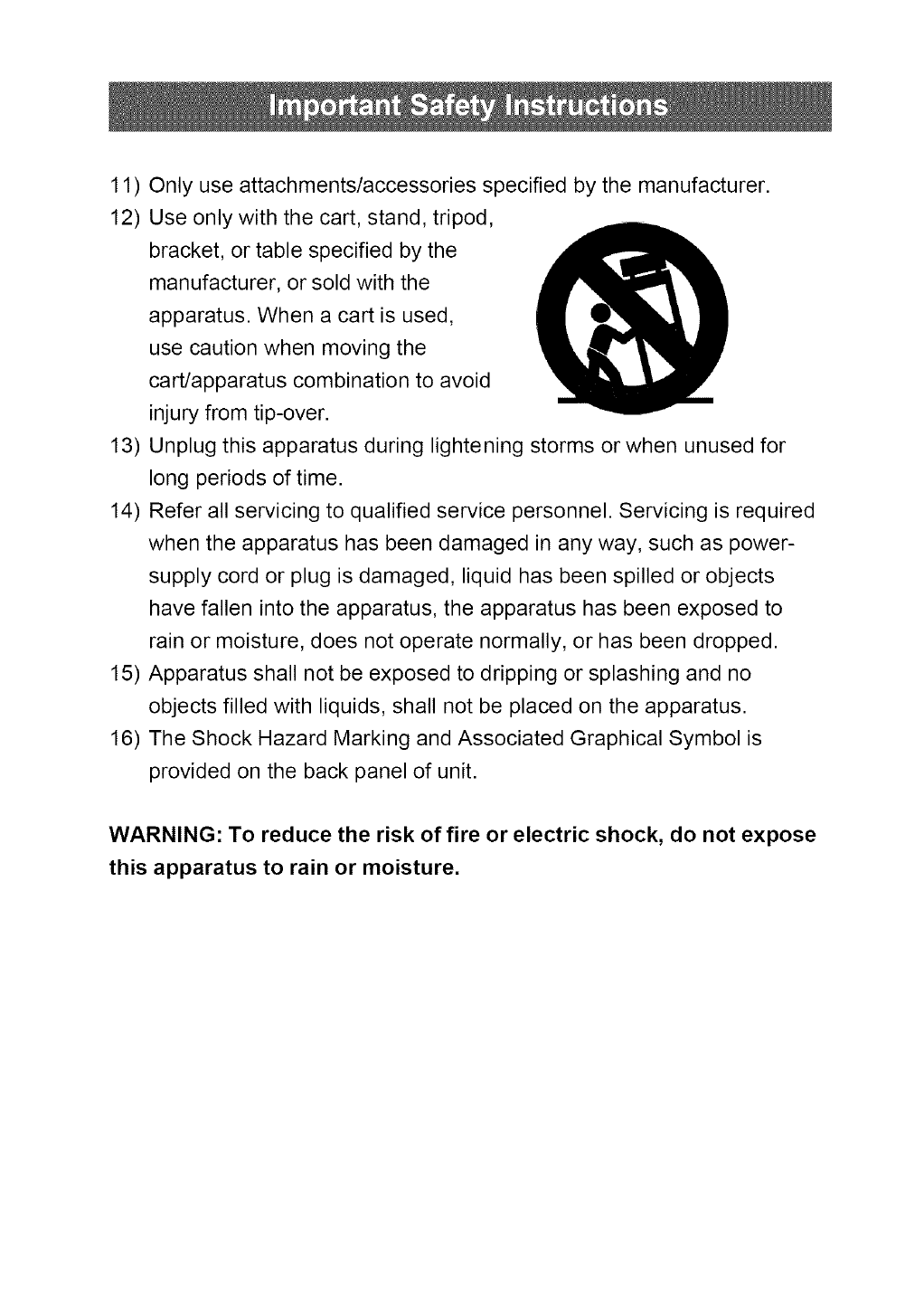
12) Use only with the cart, stand, tripod,
bracket, or table specified by the
manufacturer, or sold with the
apparatus. When a cart is used,
use caution when moving the
cart/apparatus combination to avoid
injury from tip-over.
13) Unplug this apparatus during lightening storms or when unusedfor
long periods of time.
14) Refer all servicing to qualified service personnel. Servicing is required
when the apparatus has been damaged in anyway, such as power-
supply cord or plug is damaged, liquid has been spilled or objects
have fallen intothe apparatus, the apparatus has been exposed to
rain or moisture, does not operate normally, or has been dropped.
15) Apparatus shall not be exposed to dripping or splashing and no
objects filled with liquids, shall not be placed on the apparatus.
16) The Shock Hazard Marking and Associated Graphical Symbol is
provided on the back panel of unit.
WARNING: To reduce the risk of fire or electric shock, do not expose
this apparatus to rain or moisture.
Thank you for purchasing this color LCD-TV. Please read this guide thoroughly
before installing or operating this unit.
FCC RADIO FREQUENCY INTERFERENCE STATEMENT
WARNING: (FOR FCC CERTIFIED MODELS)
This LCD-TV has been tested and found compliant with the limits for a Class B
digital device, pursuant to part 15 of the FCC Rules. These limits are designed to
provide proper protection against harmful interference to a residential installation.
This LCD-TV generates, uses, and can radiate radio frequency energy.
Interference to radio communication may be a result if not properly installed.
However, there is no guarantee that interference will not occur in a particular
installation. If this LCD-TV does cause interference to radio or television reception,
users are encouraged to correct interference by doing one or more of the
following:
• Reorient or relocate the receiving antenna.
• Move the LCD-TV and the other product further away from each other.
• Connect the LCD-TV into an outlet on a circuit different from that to which the
product is connected.
• Consult your local dealer or an qualified technician.
FCC Warning:
To assure a continued FCC compliance, a user must use a grounded power
supply cord and the provided shielded video interface cable with bonded ferrite
cores. Also, any unauthorized changes or modifications to this LCD-TV would void
the user's authority to operate this device.
Note: If necessary, shielded interface cables and AC power cord must be used to
meet the emission level limits.
EMI Certification
The Class B digital apparatus meets all requirements of the Canadian
Interference-Causing Equipment Regulation.
Cet appareil numerique de class B respecte toutes les exigences du Reglement
sur le materiel brouilleur du Canada.
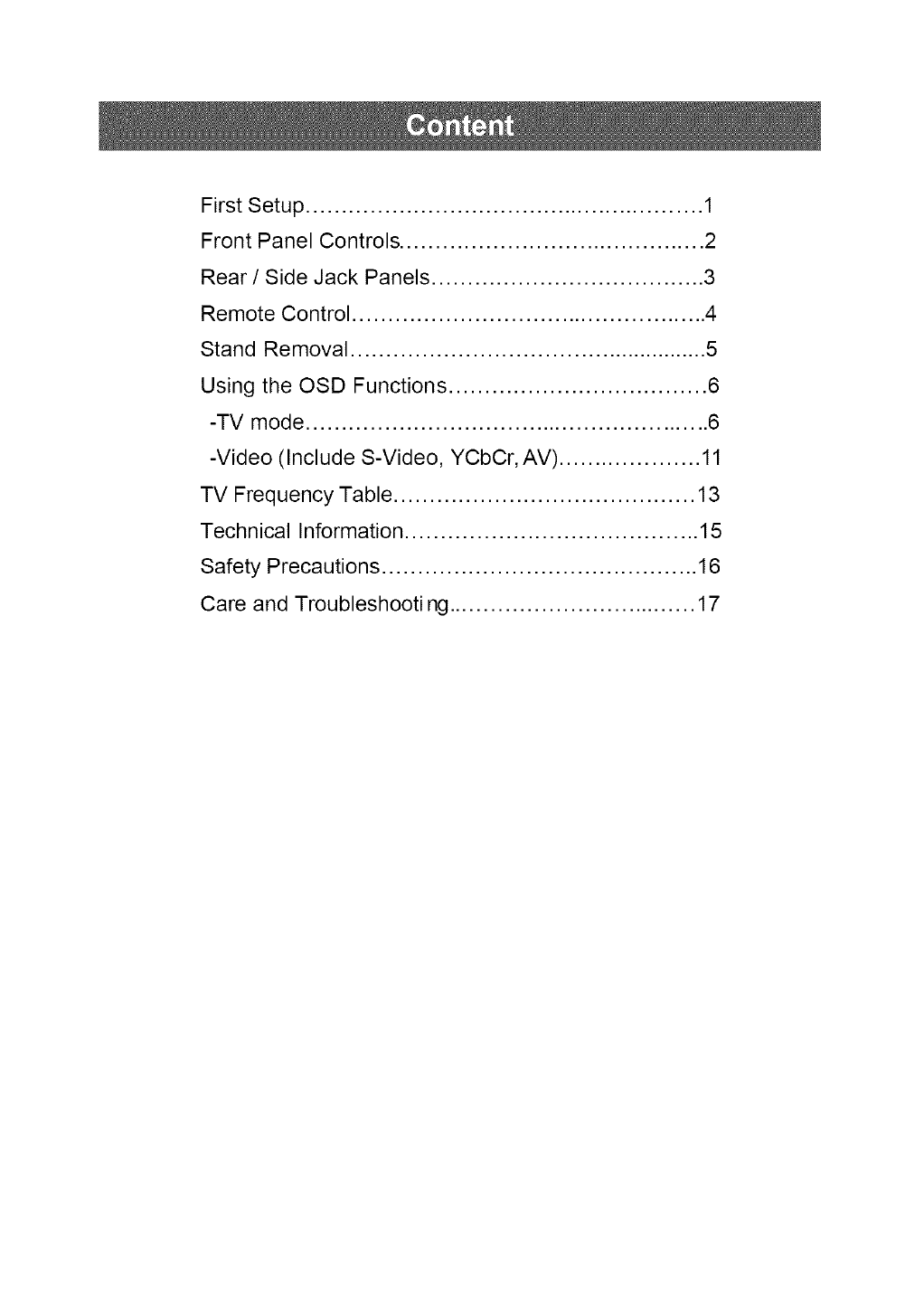
First Setup ........................................................ 1
Front Panel Controls ........................................... 2
Rear /Side Jack Panels ...................................... 3
Remote Control .................................................. 4
Stand Removal .................................................... 5
Using the OSD Functions .................................... 6
-TV mode ......................................................... 6
-Video (Include S-Video, YCbCr, AV) .................... 11
TV Frequency Table .......................................... 13
Technical Information ......................................... 15
Safety Precautions ............................................ 16
Care and Troubleshooting ................................... 17
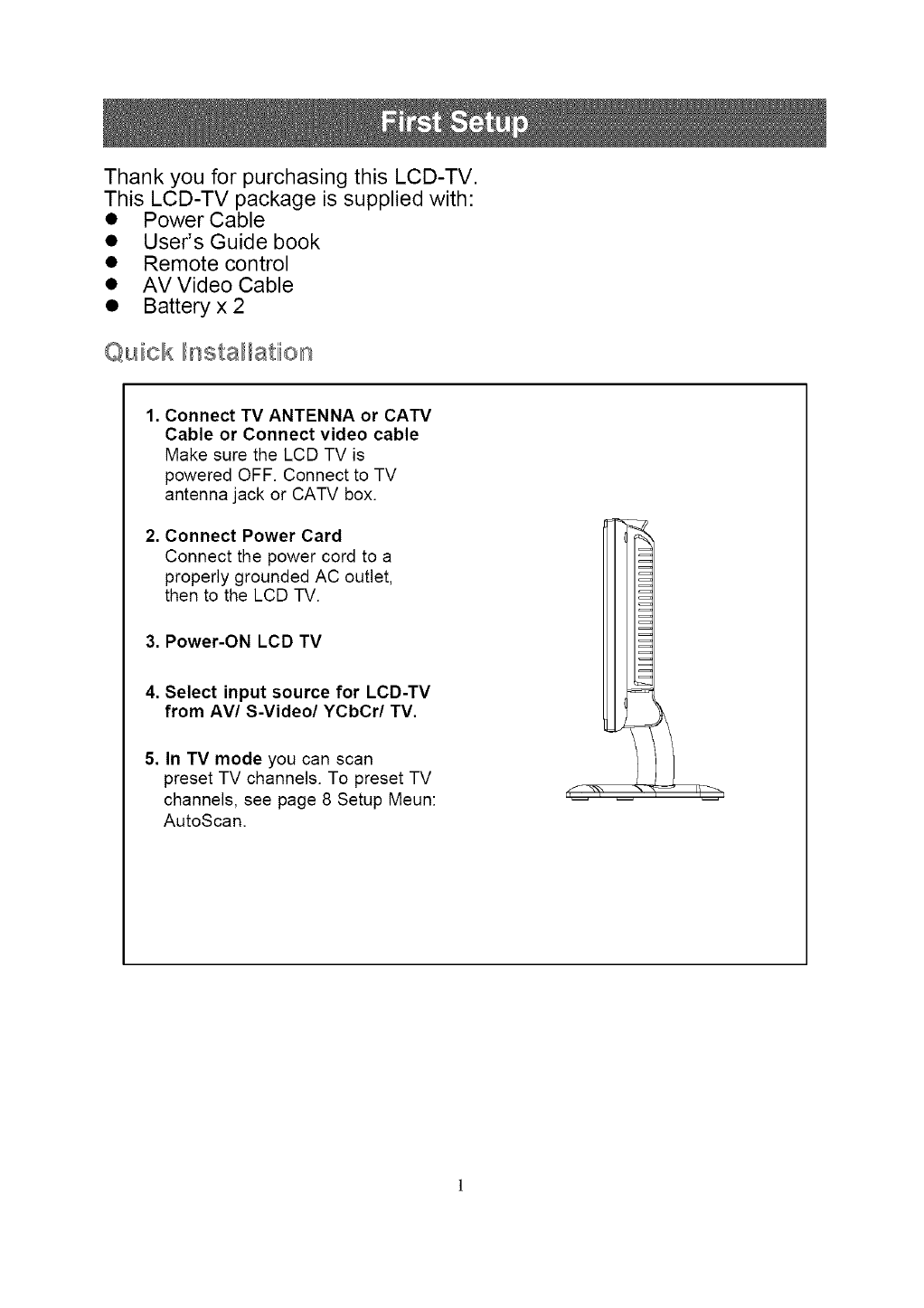
Thank you for purchasing this LCD-TV.
This LCD-TV package is supplied with:
• Power Cable
• User's Guide book
• Remote control
• AVVideo Cable
• Batteryx2
Quiick Illnstall_atiion
Connect TV ANTENNA or CATV
Cable or Connect video cable
Make sure the LCD TV is
powered OFF. Connect to TV
antenna jack or CATV box.
Connect Power Card
Connect the power cord to a
properly grounded AC outlet,
then to the LCD -IV.
3. Power-ON LCD TV
,
Select input source for LCD-TV
from AV/S-Video/YCbCr/TV.
In TV mode you can scan
preset TV channels. To preset TV
channels, see page 8 Setup Meun:
AutoScan.
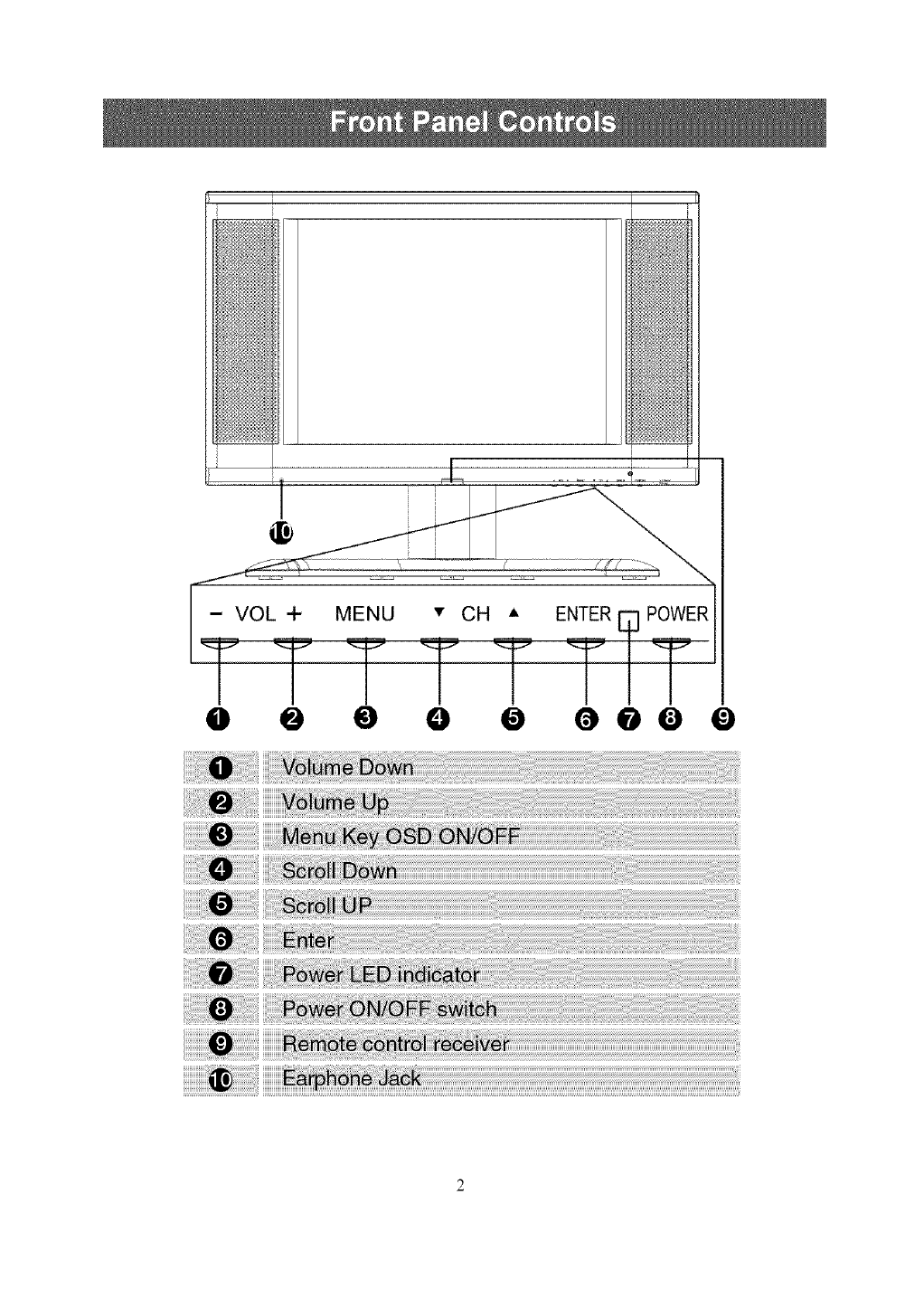
@ @ 0 O @ 000 0
iiiiiiiiiiii
!iiiii ii i
!iiiii iii
!i ii
iiiiiiiiiiiiiiiiiiiiiiiiiiiiiii_i!_i!_i!_i!_i!_i!_i!_i!_i!_i!_i!_!_i!iii!i_i_iiiiiiiiiiiii__i;_!i_!i_!i_!i_i_!_!_!_;_!_!!_!!_!!_!!_!!_!!_!!_!!_!!_!!_!!_!!_!!_!!_!!_!!_!!_!!_!!_!!_!!_!!_!!_!!_!!_!!_!!_!!_!!_!!_!!_!!_!!_!!_!!_!!_!!_!!_!!_!!_!!_!!_!!_!!_!!_!!_!!_!!_!!_!!_!!_!!_!!_!!_!!_!!_!!_!!_!!_!!_!!_!!_!!_!!_!!_!!_!!_!!_!!_!!_!!_!!_!!_!!_!!_!!_!!_!!_!!_!!_!!_!!_!!_!!_!!_!!_!!_!!_!!_!!_!!_!!_!!_!!_!!_!!_!!_!!_!!_!!_!!_!!_!!_!!_!!_!!_!!_!!_!!_!!_!!_!!_!!_!!_!!_!!_!!_!!_!!_!!_!!_!!_!!_!!_!!_!!_!!_!!_!!_!!_!!_!!_!!_!!_!!_!!_!!_!!_!!_!!_!!_!!_!!_!!_!!_!!_!!_!!_!!_!!_!!_!!_!!_!!_!!_!!_!!_!!_!!_!!_!!_!!_!!_!!_!!_!!_!!_!!_!!_!!_!!_!!_!!_!!_!!_!!_!!_!!_!!_!!_!!_!!_!!_!!_!!_!!_!!_!!_!!_!!_!!_!!_!!_!!_!!_!!_!!_!!_!!_!!_i!;_i_!:
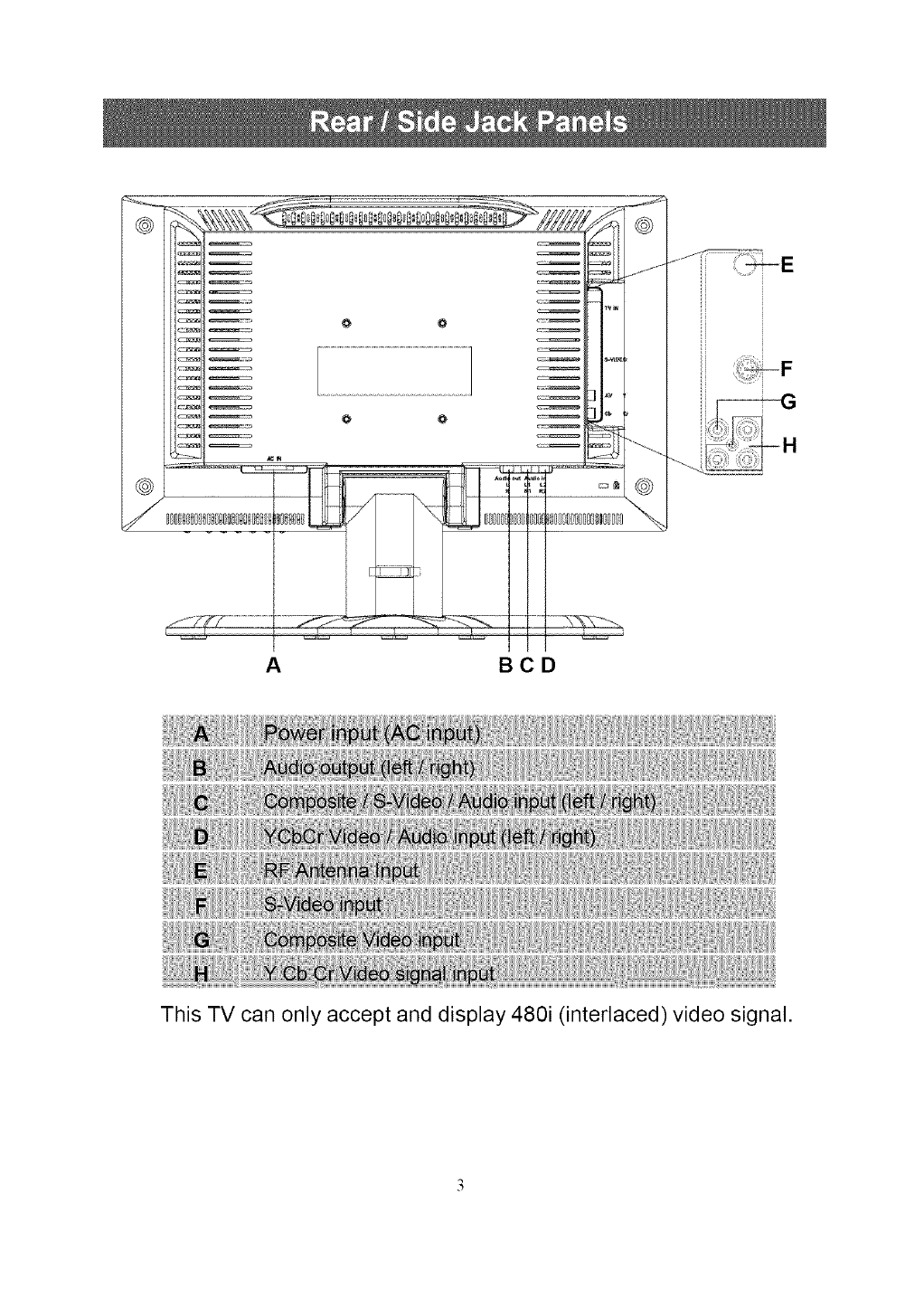
@
@
J
A BCD
This TV can only accept and display 480i (interlaced) video signal.
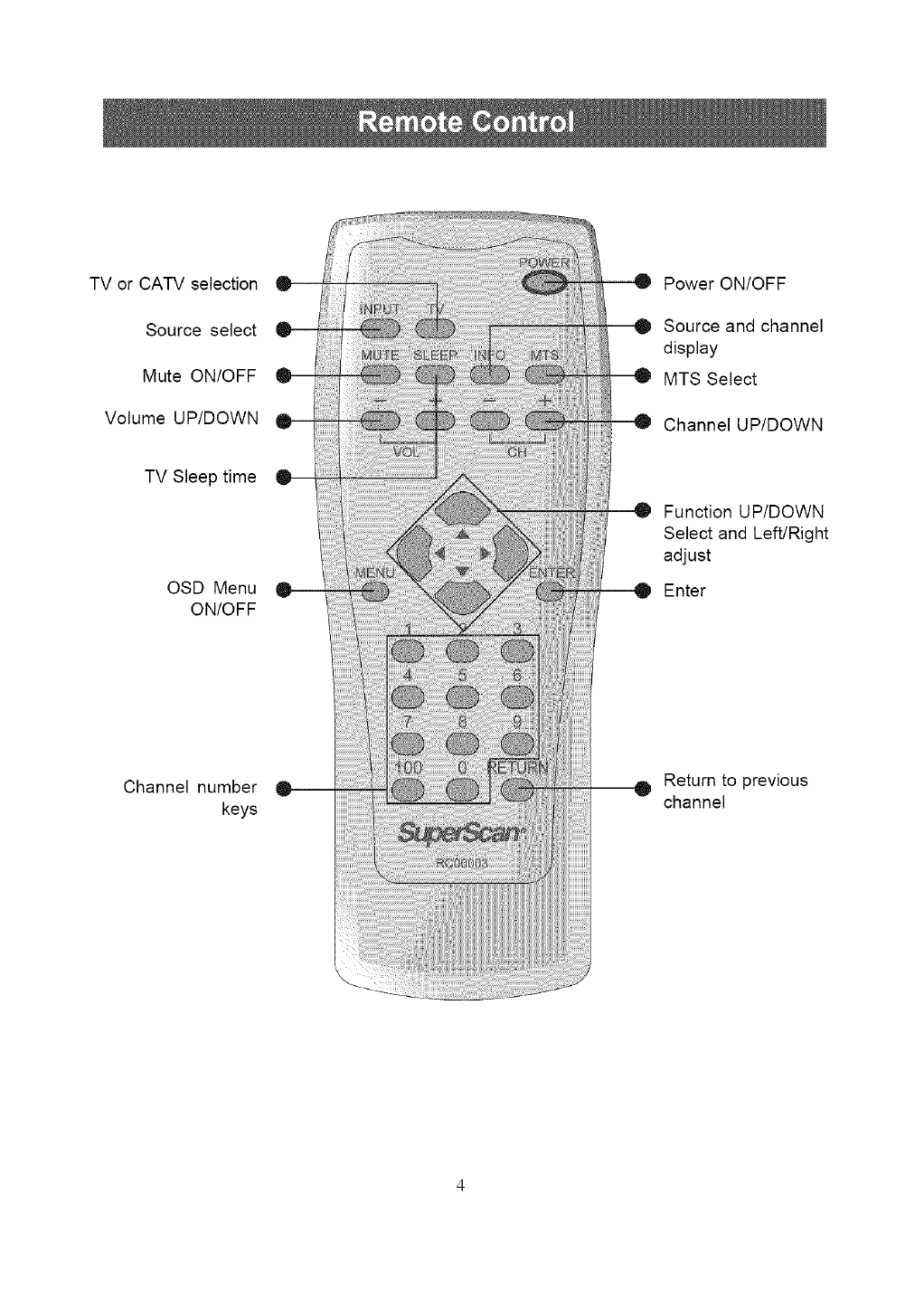
TV or CATV selection
Source select
Mute ON/OFF
Volume UP/DOWN
TV Sleep time
OSD Menu
ON/OFF
Channel number
keys
Power ON/OFF
Source and channel
display
MTS Select
Channel UP/DOWN
Function UP/DOWN
Select and Left/Right
adjust
Enter
Return to previous
channel

(For wall-mounting the LCD TV)
Fig.1 Fig.2
Fig.3 Fig.4
Fig.5 Fig.6
1. Lay a piece of fabric on the table, and lay the TV flat on the table with
the front face down (see Fig.l).
2. Press the two concave tabs with both of your thumbs (see Fig.2).
3. Pull the pivot cover to yourself to detach the cover from the back panel
of the TV (see Fig.3).
4. Remove the pivot cover (see Fig.4).
5. Unscrew the four setscrews (see Fig.5).
6. Remove the stand from the TV (see Fig.6).
Caution: Any damage caused by incorrectly attemping to mount
the LCD TV is not covered under the terms of the manufacturers
warranty.
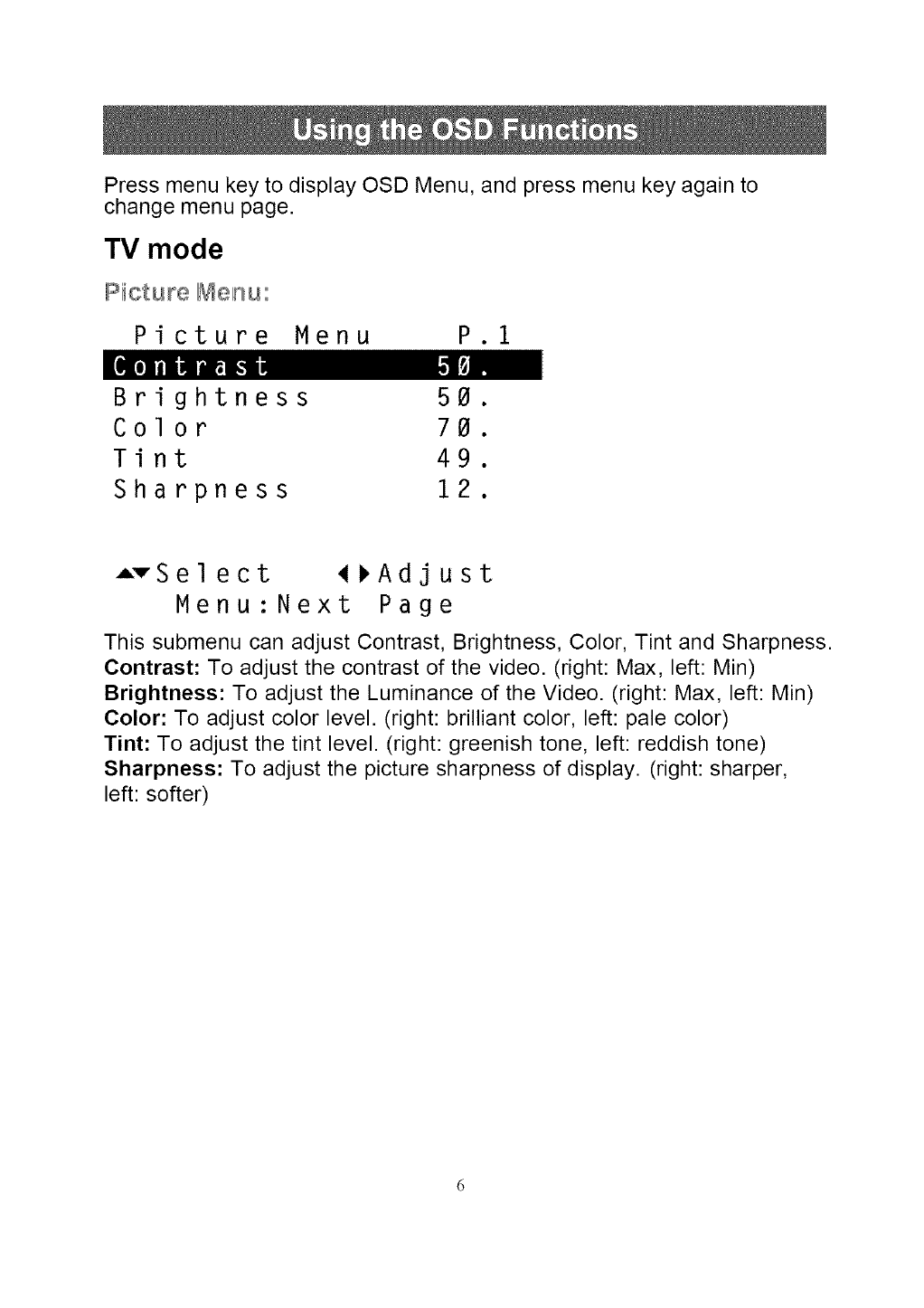
Press menu key to display OSD Menu, and press menu key again to
change menu page.
TV mode
Picture_enu:
Picture Menu P.1
[€[0]ra]ii flmt.liil _,I_].,
Brightness 50.
Color 70.
Tint 49.
Sharpness 12.
=vSelect 4_Adjust
Menu:Next Page
This submenu can adjust Contrast, Brightness, Color, Tint and Sharpness.
Contrast: To adjust the contrast of the video. (right: Max, left: Min)
Brightness: To adjust the Luminance of the Video. (right: Max, left: Min)
Color: To adjust color level. (right: brilliant color, left: pale color)
Tint: To adjust the tint level. (right: greenish tone, left: reddish tone)
Sharpness: To adjust the picture sharpness of display. (right: sharper,
left: softer)
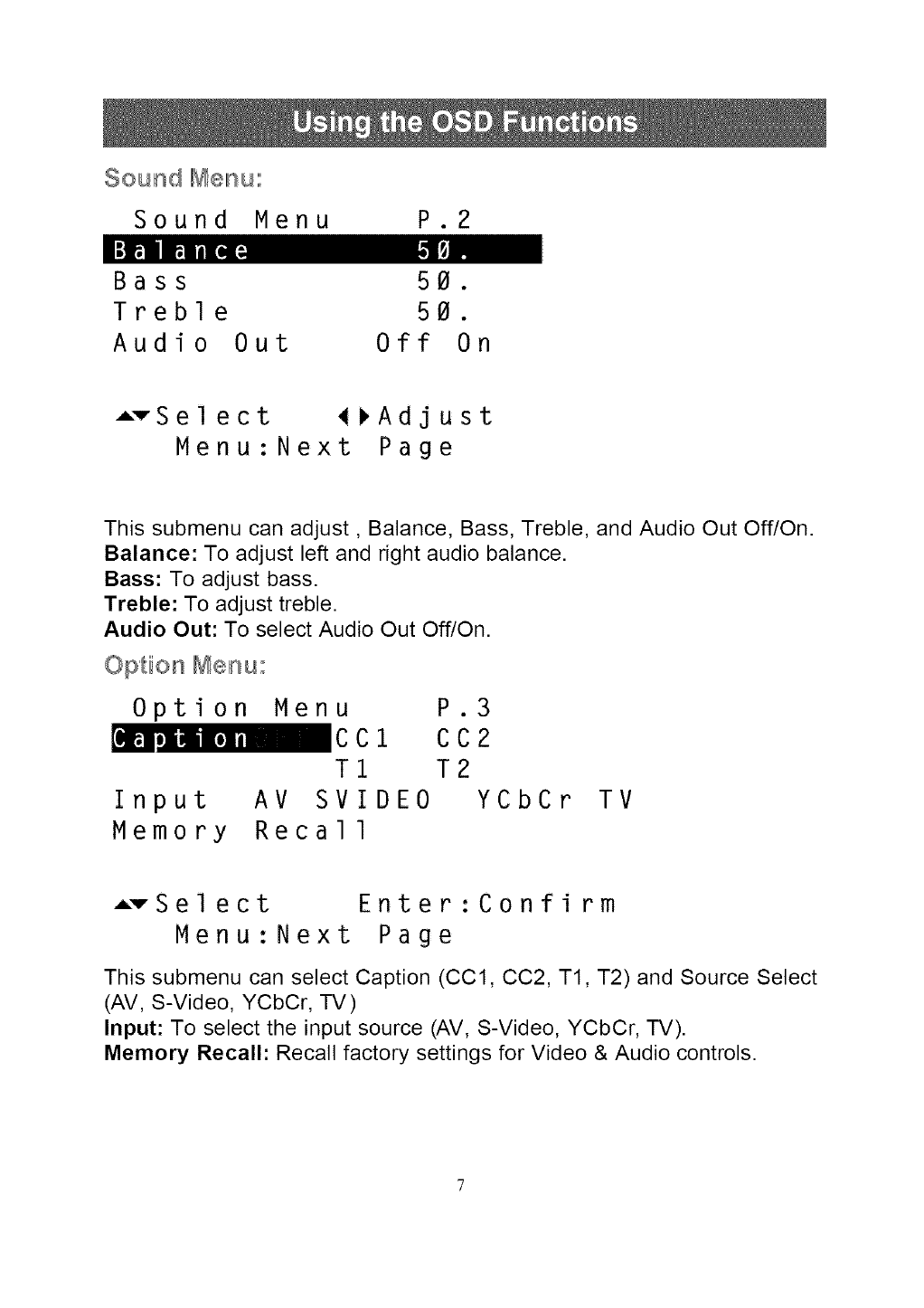
Sound Menu:
Sound Menu P.2
I:]m mrll[_m l.![_].,
Bass 50.
Treble 50.
Audio Out Off On
AvSelect _Adjust
Menu:Next Page
This submenu can adjust, Balance, Bass, Treble, and Audio Out Off/On.
Balance: To adjust left and right audio balance.
Bass: To adjust bass.
Treble: To adjust treble.
Audio Out: To select Audio Out Off/On.
Option _enu:
Option Menu P.3
_CC1 CC2
T1 T2
Input AV SVIDE0 YCbCr
Memory Recall
TV
AvSelect Enter:Confirm
Menu:Next Page
This submenu can select Caption (CCl, CC2, T1, T2) and Source Select
(AV, S-Video, YCbCr, TV)
Input: To select the input source (AV, S-Video, YCbCr, TV).
Memory Recall: Recall factory settings for Video & Audio controls.
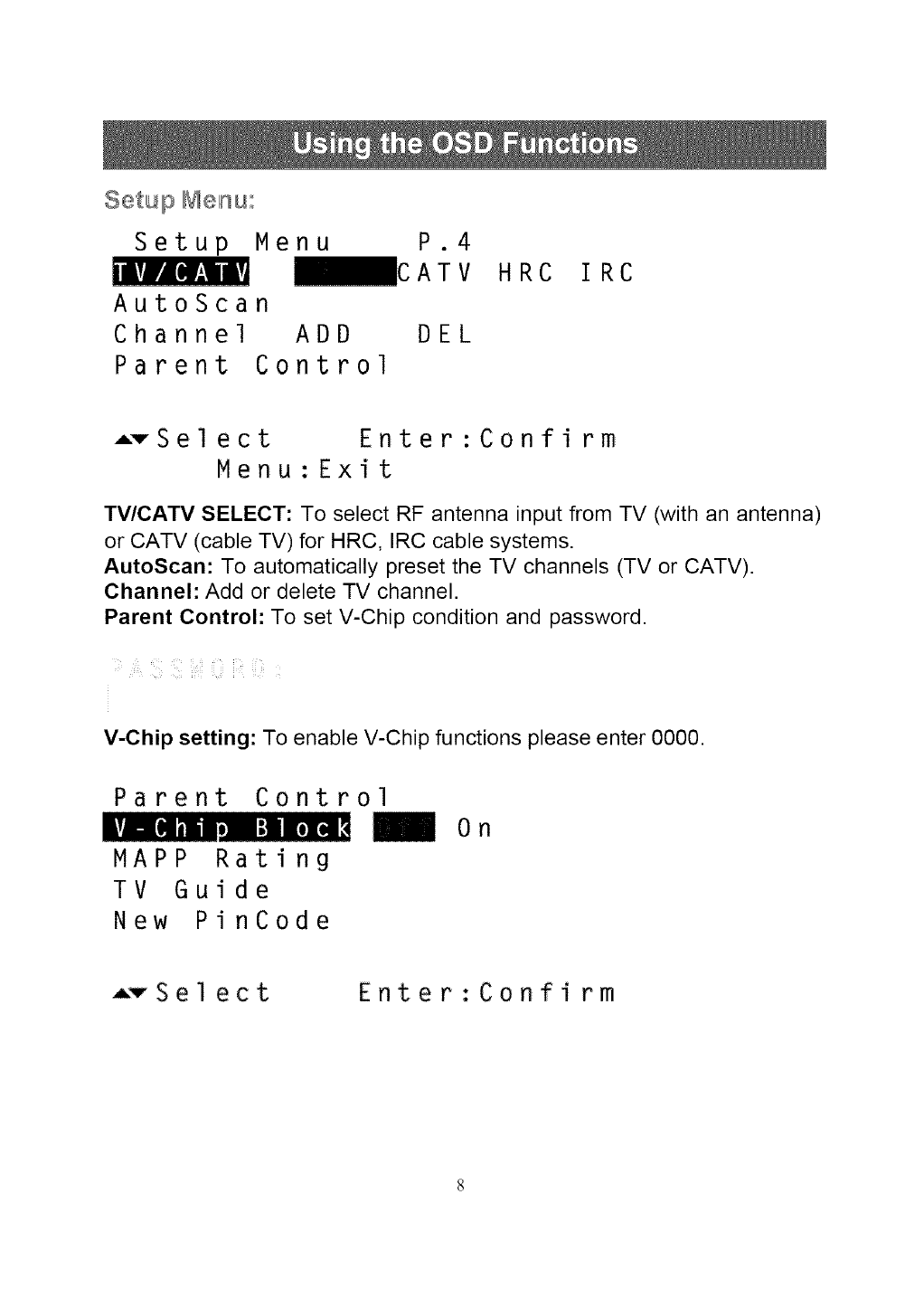
Setup Menu:
Setup Menu P.4
_CATV
LV_B [l_V;!/i'
AutoScan
Channel ADD DEL
Parent Control
HRC IRC
-vSelect Enter:Confirm
Menu:Exit
TV/CATV SELECT: To select RF antenna input from TV (with an antenna)
or CATV (cable TV) for HRC, IRC cable systems.
AutoScan: To automatically preset the TV channels (TV or CATV).
Channel: Add or delete TV channel.
Parent Control: To set V-Chip condition and password.
V-Chip setting: To enable V-Chip functions please enter 0000.
Parent Control
LvJ-.[e]111" [,][_
MAPP Rating
TV Guide
New PinCode
On
ATSel ect Enter:Confi rm
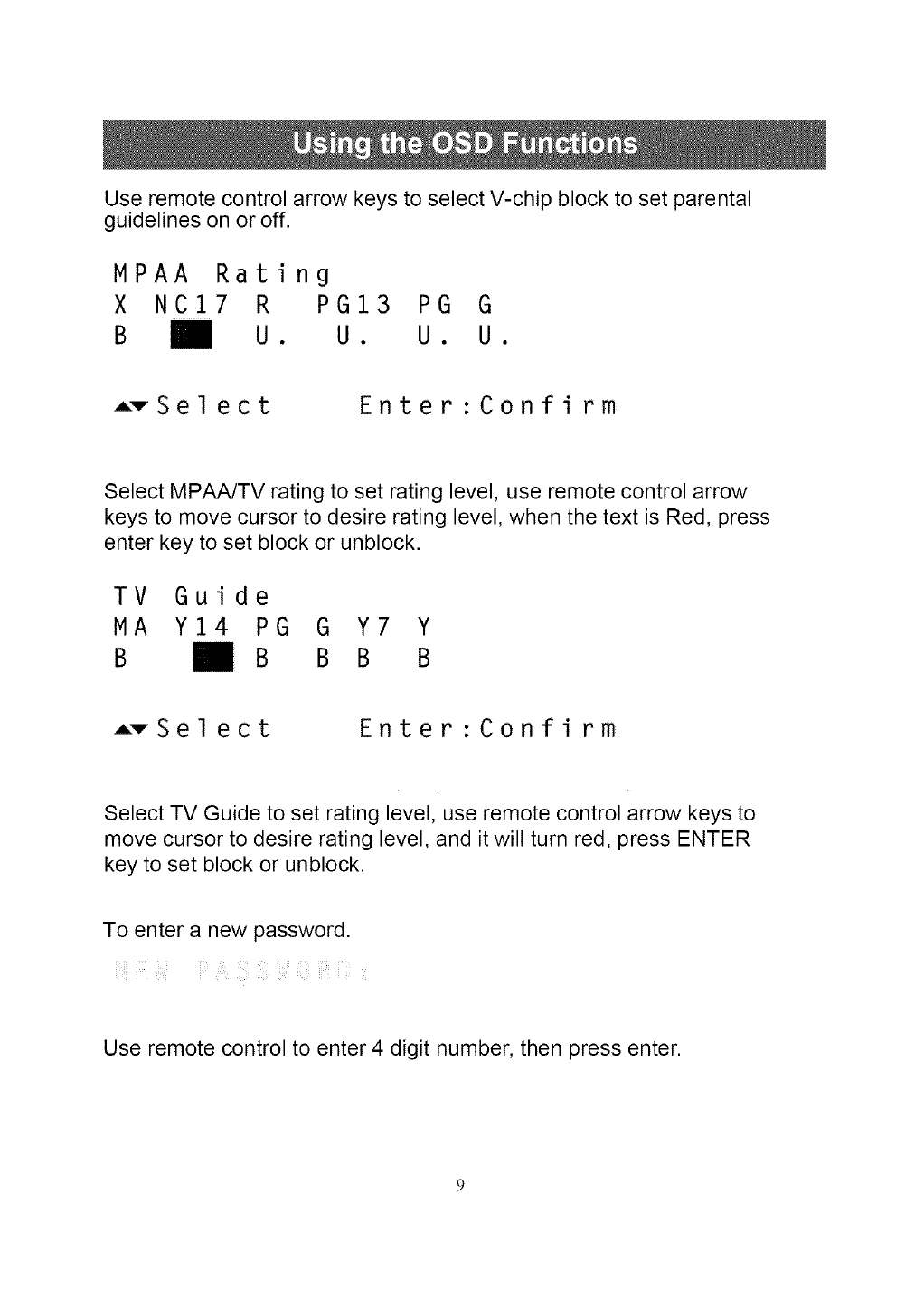
Use remote control arrow keys to select V-chip block to set parental
guidelines on or off.
MPAA Rating
X NC17 R PG13 PG G
B _ U. U. U. U.
AvSel ect Enter:Confirm
Select MPAA/TV rating to set rating level, use remote control arrow
keys to move cursor to desire rating level, when the text is Red, press
enter key to set block or unblock.
TV Guide
MA Y14 PG G Y7 Y
B B B B B
AvSel ect Enter:Confirm
Select TV Guide to set rating level, use remote control arrow keys to
move cursor to desire rating level, and it will turn red, press ENTER
key to set block or unblock.
To enter a new password.
Use remote control to enter 4 digit number, then press enter.
_i il ii¸ i
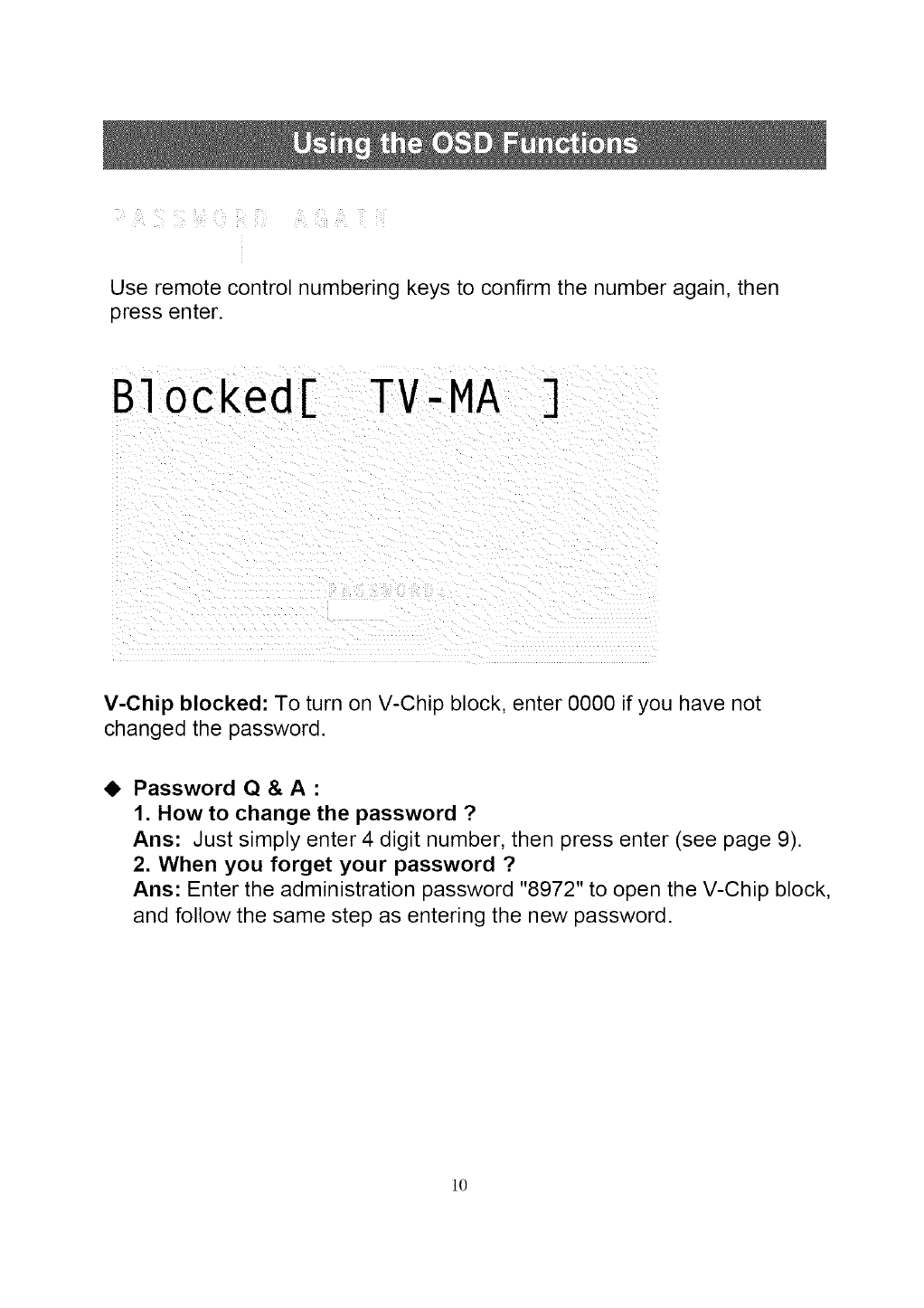
Use remote control numbering keys to confirm the number again, then
press enter.
B1ocked[ TV-MA ]
V-Chip blocked: To turn on V-Chip block, enter 0000 if you have not
changed the password.
41, Password Q & A:
1. How to change the password ?
Ans: Just simply enter 4 digit number, then press enter (see page 9).
2. When you forget your password ?
Ans: Enter the administration password "8972" to open the V-Chip block,
and follow the same step as entering the new password.
l0
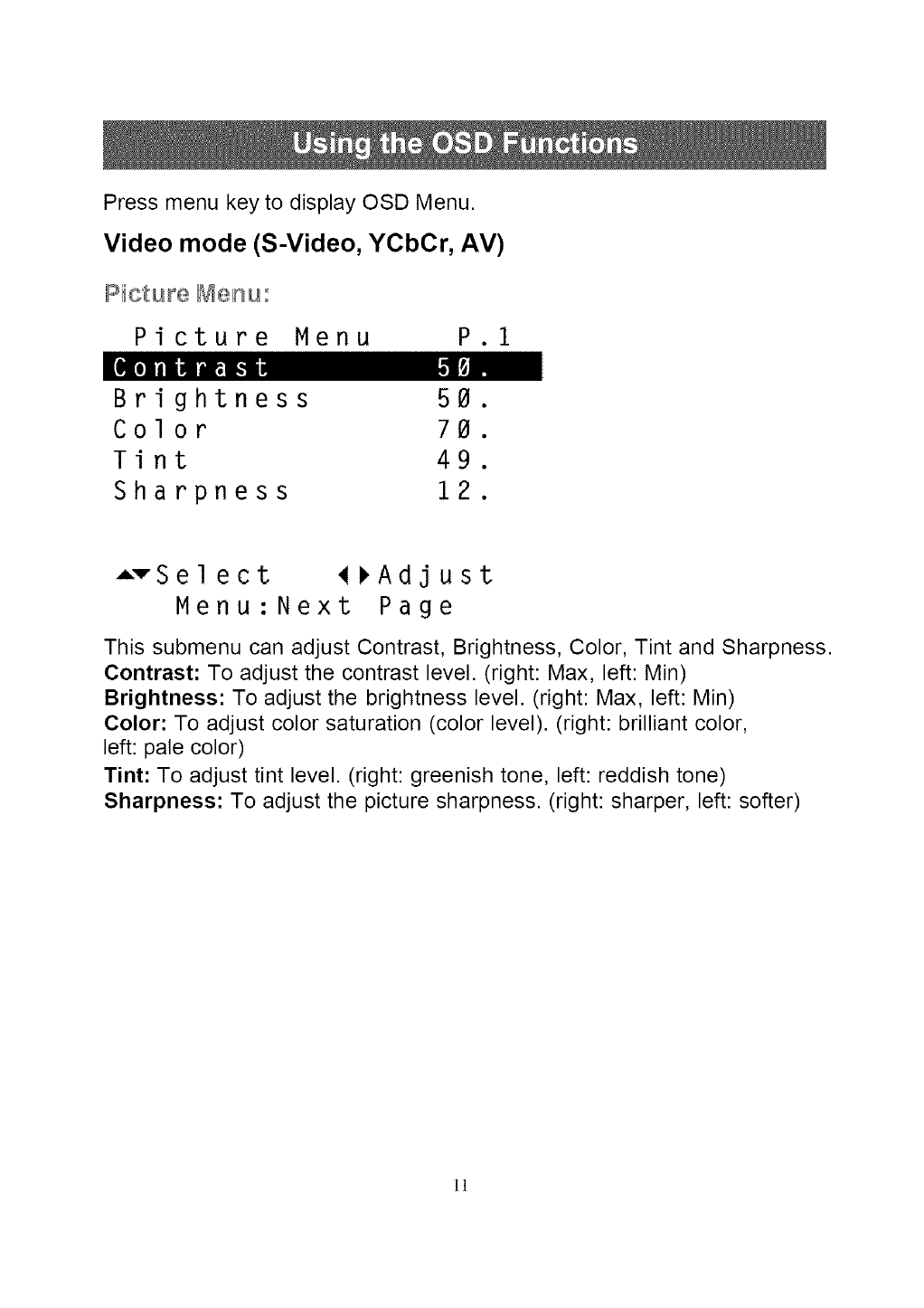
Press menu key to display OSD Menu.
Video mode (S-Video, YCbCr, AV)
Pictu_e Menu:
Picture Menu P.1
[€_o]raliHFita_.1iI [,1_].,
Brightness 50.
Color 70.
Tint 49.
Sharpness 12.
AvSelect _FAdjust
Menu:Next Page
This submenu can adjust Contrast, Brightness, Color, Tint and Sharpness.
Contrast: To adjust the contrast level. (right: Max, left: Min)
Brightness: To adjust the brightness level. (right: Max, left: Min)
Color: To adjust color saturation (color level). (right: brilliant color,
left: pale color)
Tint: To adjust tint level. (right: greenish tone, left: reddish tone)
Sharpness: To adjust the picture sharpness. (right: sharper, left: softer)
]!
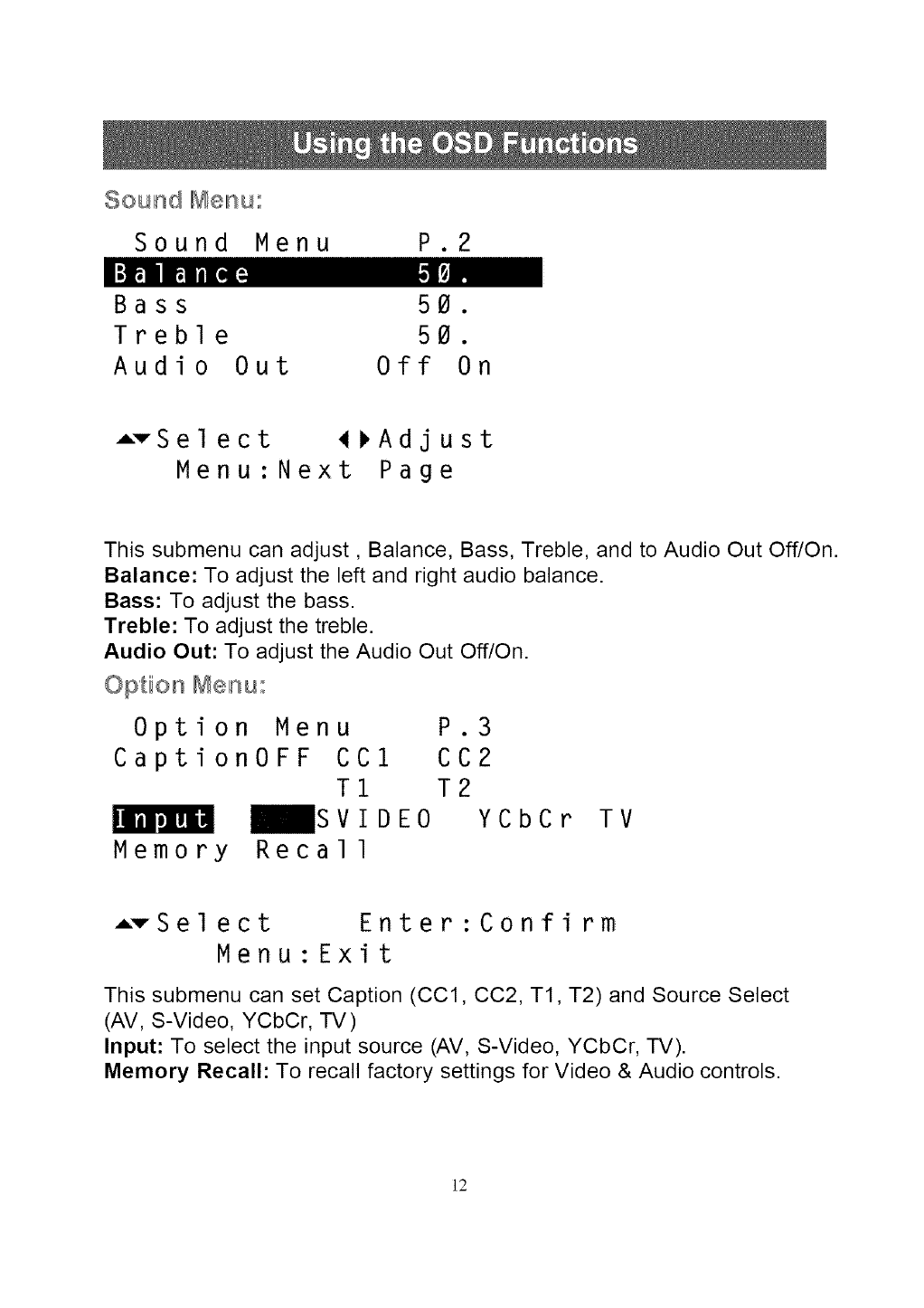
Sound Menu:
Sound Menu P.2
I:t_1 m-,l[,lp] 1,1[_.:
Bass 50.
Treble 50.
Audio Out Off On
ATSel ect _Adjust
Menu:Next Page
This submenu can adjust, Balance, Bass, Treble, and to Audio Out Off/On.
Balance: To adjust the left and right audio balance.
Bass: To adjust the bass.
Treble: To adjust the treble.
Audio Out: To adjust the Audio Out Off/On.
Option Menu:
Option Menu P.3
Caption0FF CCl CC2
T1 T2
_SVIDE0 YCbCrPJ_I_mH
Memory Recall
TV
ATSelect Enter:Confirm
Menu:Exit
This submenu can set Caption (CCl, CC2, T1, T2) and Source Select
(AV, S-Video, YCbCr, TV)
Input: To select the input source (AV, S-Video, YCbCr, TV).
Memory Recall: To recall factory settings for Video & Audio controls.
]2
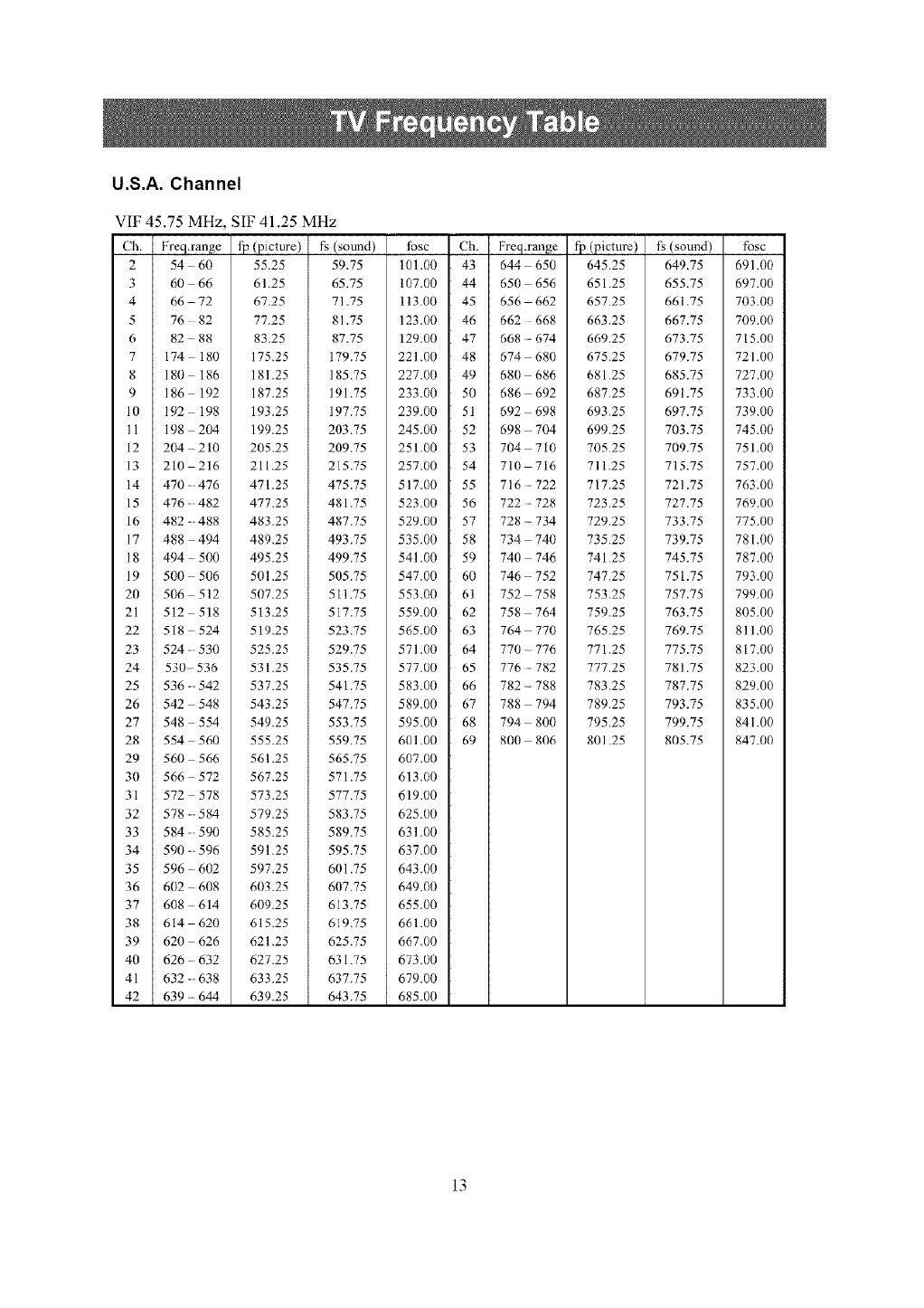
U.S.A. Channel
VIF 45.75 MHz, SIF 41.25 MHz
Ch. Freq.range
2 54 60
3 60 66
4 66 72
5 76 82
6 82 88
7 174 180
8 180 186
9 186 192
10 192 198
11 198 204
12 204 210
13 210 216
14 470476
15 476482
16 482488
17 488 494
18 494 500
19 500 506
20 506 512
21 512 518
22 518 524
23 524530
24 530-536
25 536542
26 542 548
27 548 554
28 554 560
29 560 566
30 566 572
31 572 578
32 578584
33 584590
34 590596
35 596 602
36 602 608
37 608 614
38 614 620
39 620 626
40 626 632
41 632638
42 639 oo 644
fp(picture)
55.25
61.25
67.25
77.25
83.25
175.25
181.25
187.25
193.25
199.25
205.25
211.25
471.25
477.25
483.25
489.25
495.25
501.25
507.25
513.25
519.25
525.25
531.25
537.25
543.25
549.25
555.25
561.25
567.25
573,25
579.25
585.25
591.25
597.25
603.25
609.25
615.25
621.25
627.25
633.25
639.25
(sound) tosc Ch. Freq.range
59.75 101.00 43 644 650
65.75 107.00 44 650 656
71.75 113.00 45 656 662
81.75 123.00 46 662 668
87.75 129.00 47 668674
179.75 221.00 48 674 - 680
185.75 227.00 49 680 686
191.75 233.00 50 686 692
197.75 239.00 51 692 698
203.75 245.00 52 698 704
209.75 251.00 53 704 710
215.75 257.00 54 710 716
475.75 517.00 55 716722
481.75 523.00 56 722728
487.75 529.00 57 728 - 734
493.75 535.00 58 734 740
499.75 541.00 59 740 746
505.75 547.00 60 746 752
511.75 553.00 61 752 758
517.75 559.00 62 758 764
523.75 565.00 63 764 770
529.75 571.00 64 770 - 776
535.75 577.00 65 776782
541.75 583.00 66 782 - 788
547.75 589.00 67 788 794
553.75 595.00 68 794 800
559.75 601.00 69 800 806
565.75 607.00
571.75 613.00
57775 619,00
583.75 625.00
589.75 631.00
595.75 637.00
601.75 643.00
607.75 649.00
613.75 655.00
619.75 661.00
625.75 667.00
631.75 673.00
637.75 679.00
643.75 685.00
f]_ (picture)
645.25
651.25
65725
663,25
669,25
675.25
681.25
687.25
693.25
699.25
70525
711.25
717,25
723,25
729,25
735.25
741.25
747.25
75325
759.25
765.25
771,25
777,25
783.25
789.25
795.25
801 25
(sound) fbsc
649.75 691.00
655.75 697.00
661.75 703.00
667.75 709.00
673.75 715.00
679.75 72/.00
685.75 727.00
691.75 733.00
697.75 739.00
703.75 745.00
709.75 751.00
715.75 757.00
721.75 763.00
727.75 769.00
733.75 775.00
739.75 781.00
745.75 787.00
751.75 793.00
757.75 799.00
763.75 805.00
769.75 811.00
775.75 817.00
781,75 823.00
787.75 829.00
793.75 835.00
799.75 841.00
805.75 847.00
13
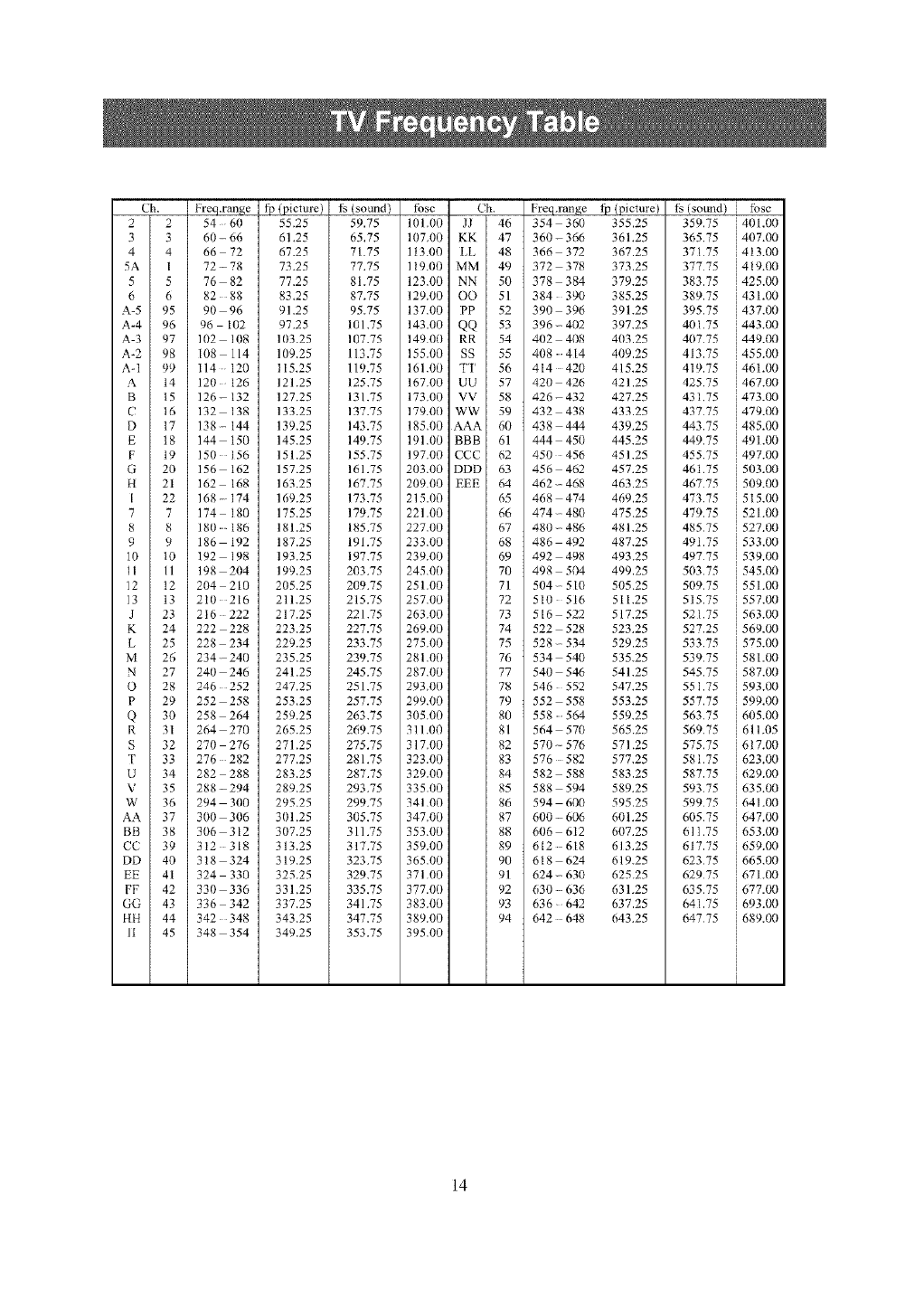
Ch, Freq,range tp (picture) t_ (sound) tbsc
2 2 54 60 55.25
3 3 60- 66 61.25
4 4 66 72 67.25
5A 1 72 - 78 73.25
5 5 76 82 77.25
6 6 82 88 83.25
A-5 95 90 96 91,25
A-4 96 96 102 97.25
A-3 97 102 108 103.25
A-2 98 108 114 109.25
A-1 99 114 120 I15,25
A t4 120 126 121.25
B t5 126 - 132 127.25
C t6 132 138 133.25
D 17 138 - 144 139.25
E 18 144 150 145,25
F t9 150 156 151.25
G 20 156 162 157,25
H 21 162 168 163.25
[ 22 168 -174 169.25
7 7 174 180 175.25
8 8 180186 181.25
9 9 186 192 187,25
10 t0 192 198 193.25
11 11 198 2114 199.25
12 t2 204 210 205.25
13 13 2 t0 216 211.25
J 23 216 222 217.25
K 24 222 228 223.25
L25 228 234 229.25
M 26 234- 240 235.25
N 27 240 246 241.25
O 28 246 252 247.25
P 29 252 258 253,25
Q 30 258 264 259.25
R 31 264 270 265.25
S 32 270 276 271.25
T 33 276 282 277.25
U 34 282 288 283.25
V 35 288 - 294 289.25
W 36 294 3110 295.25
AA 37 300 306 31tl.25
BB 38 306 312 307,25
CC 39 312 318 313.25
DD 40 3t8 324 319,25
EE 41 324 330 325.25
FF 42 330 336 331.25
GG 43 336 342 337.25
HH 44 342 348 343.25
II 45 348 354 349,25
Ch. Freq.range tp (picture)
59.75 101.00 JJ 46 354 360 355.25
65,75 107,0I/ KK 47 360-366 361,25
7175 113.00 LL 48 366 - 372 367.25
77.75 1t9.110 MM 49 372 378 373.25
81.75 123.00 NN 50 378 384 379.25
87,75 129.0// OO 51 384 39/1 385,25
95.75 137.00 PP 52 390 396 391.25
101.75 143.00 QQ 53 396- 402 397.25
107.75 14900 RR 54 402 408 403.25
113.75 155.00 SS 55 408414 409.25
119.75 161.00 TT 56 414 420 415,25
125.75 167.00 UU 57 420 426 421.25
131.75 173.0I) VV 58 426-432 427,25
137.75 179.0/) WW 59 432 438 433.25
143.75 185,00 AAA 60 438 444 439.25
149.75 191.00 BBB 61 444 450 445.25
155.75 197.00 CCC 62 450 456 451.25
161.75 203.00 DDD 63 456 462 457.25
16%75 20900 EEE 64 462-468 463.25
173.75 215.00
179.75 221.00
185.75 227.0/)
191.75 233.00
197.75 239.00
203.75 24500
209.75 251.00
215.75 257,00
22/.75 263.00
227.75 269.0I/
233.75 27500
239.75 281.00
245.75 287.00
251.75 293,00
257.75 299.00
263.75 305.00
269.75 311.00
275.75 317.00
281.75 323.00
287.75 329.00
293.75 335.00
299.75 34100
305.75 347,00
311.75 353.00
317.75 359.00
323.75 365.00
329.75 37100
335,75 377.00
341.75 383.00
347,75 389.0/)
353.75 395,00
65 468 474 469.25
66 474- 480 475.25
67 480 - 486 481,25
68 486 492 487.25
69 492 498 493_25
70 498 504 499.25
71 504- 510 505.25
72 510 516 511.25
73 516 522 517.25
74 522 528 523.25
75 528 - 534 529.25
76 534 5411 535.25
77 540 546 541.25
78 546 552 547,25
79 552 558 553.25
80 558564 559.25
81 564 570 565.25
82 570 - 576 571.25
83 576 582 577,25
84 582 - 588 583.25
85 588 594 589,25
86 594 600 595.25
87 600 -606 601,25
88 606 612 607.25
89 612 618 613.25
90 618 624 619.25
91 624- 630 625.25
92 630 - 636 631.25
93 636 642 637.25
94 642 648 643,25
tg (sound) i fbsc
359.75 i401.00
365.75 i407.00
37/75 i413.00
37775 i419.00
383.75 i425.00
389.75 i431.00
395.75 i437.00
401.75 i 443.00
40775 i 449.00
413.75 i 455.00
419.75 i 461.00
425.75 i467.00
431.75 i 473.00
43775 i 479.00
443.75 i 485.00
449.75 i 491.00
455.75 i497.00
461.75 i503.00
46775 i509.00
47375 i5t5.00
479.75 i521.00
485.75 i527.00
491.75 i533.00
49775 i539.00
50375 i545.00
509.75 i551.00
515.75 i557.00
521,75 i563.00
527.25 i569,00
53375 i575.00
539.75 i581.00
545.75 i587.00
551,75 i593.00
557.75 i599.00
563,75 i605.00
569,75 i611.05
575.75 i6t7.00
581.75 i623.00
587.75 i629.00
593,75 i635.00
59975 i641.00
605.75 i647.00
611.75 i653.00
617.75 i659.00
623.75 i665.00
62975 i671.00
635.75 i677.00
641.75 i693.00
647.75 689.0(1
i
i
14
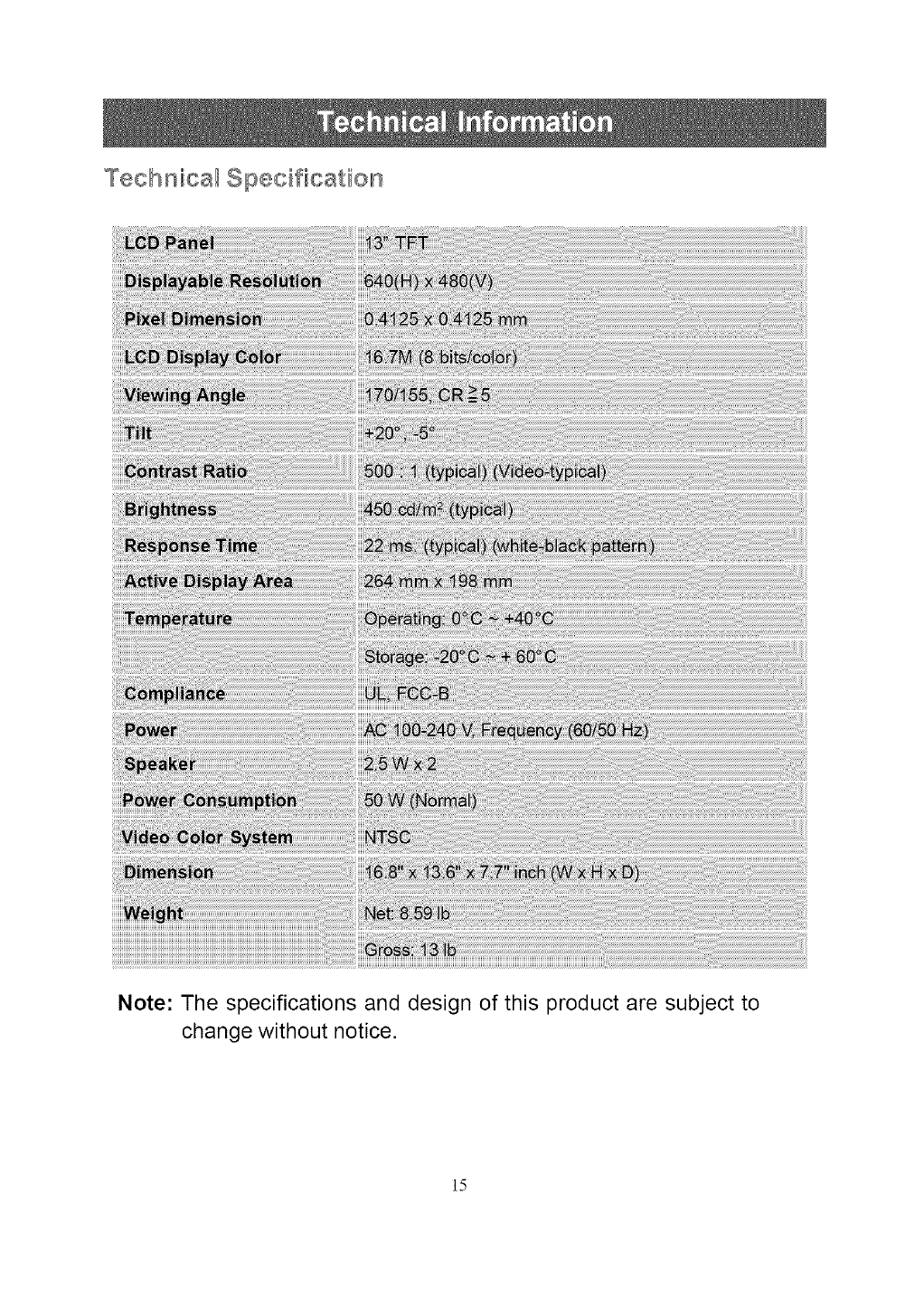
Technica_ Specification
Note: The specifications and design of this product are subject to
change without notice.
15
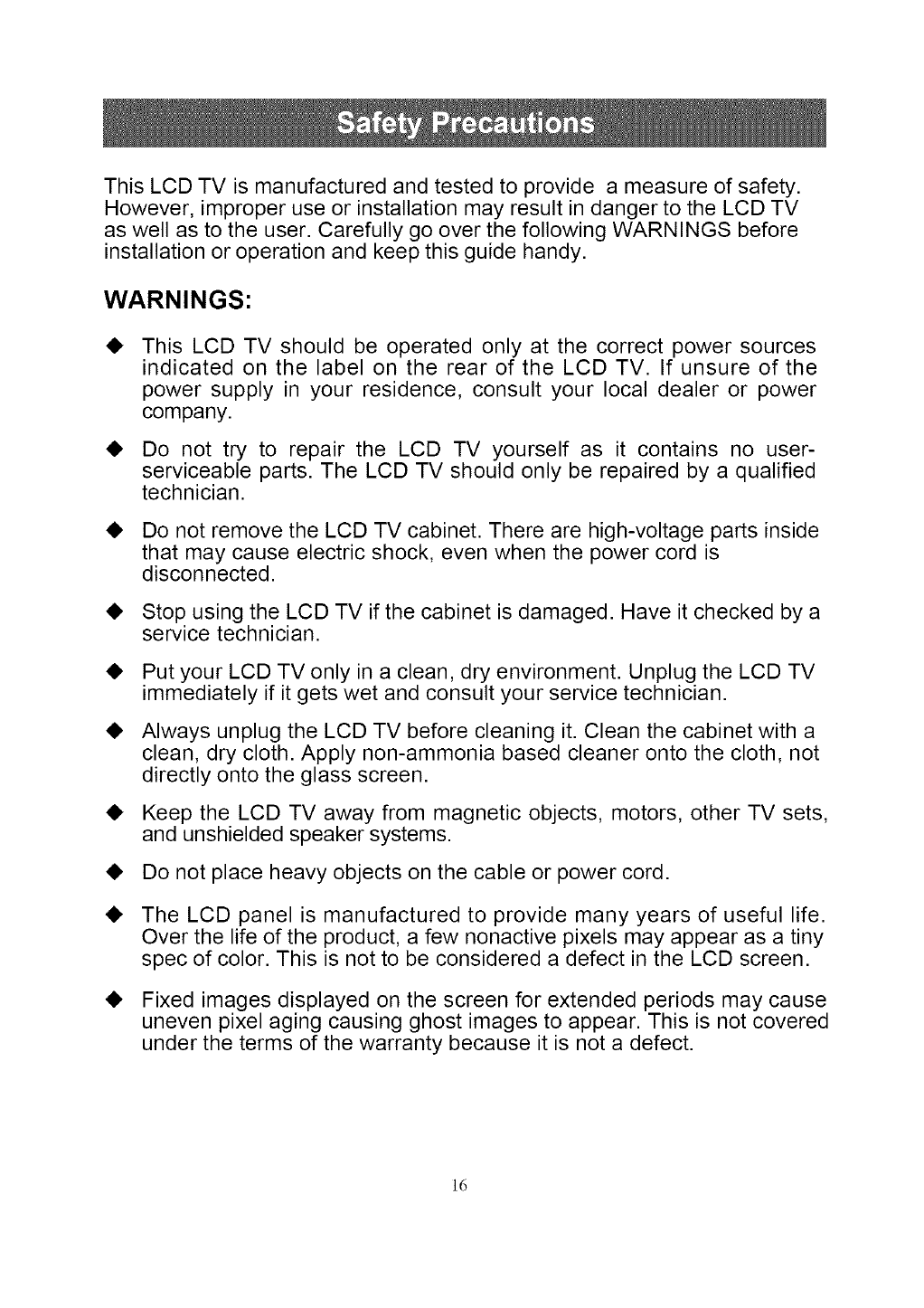
This LCD TV is manufactured and tested to provide a measure of safety.
However, improper use or installation may result in danger to the LCD TV
as well as to the user. Carefully go over the following WARNINGS before
installation or operation and keep this guide handy.
WARNINGS:
This LCD TV should be operated only at the correct power sources
indicated on the label on the rear of the LCD TV. If unsure of the
power supply in your residence, consult your local dealer or power
company.
Do not try to repair the LCD TV yourself as it contains no user-
serviceable parts. The LCD TV should only be repaired by a qualified
technician.
• Do not remove the LCD TV cabinet. There are high-voltage parts inside
that may cause electric shock, even when the power cord is
disconnected.
• Stop using the LCD TV if the cabinet is damaged. Have it checked by a
service technician.
Put your LCD TV only in a clean, dry environment. Unplug the LCD TV
immediately if it gets wet and consult your service technician.
Always unplug the LCD TV before cleaning it. Clean the cabinet with a
clean, dry cloth. Apply non-ammonia based cleaner onto the cloth, not
directly onto the glass screen.
Keep the LCD TV away from magnetic objects, motors, other TV sets,
and unshielded speaker systems.
Do not place heavy objects on the cable or power cord.
• The LCD panel is manufactured to provide many years of useful life.
Over the life of the product, a few nonactive pixels may appear as a tiny
spec of color. This is not to be considered a defect in the LCD screen.
• Fixed images displayed on the screen for extended periods may cause
uneven pixel aging causing ghost images to appear. This is not covered
under the terms of the warranty because it is not a defect.
]6
• Avoid exposing your LCD TV directly to sunlight or other heat sources.
Place your LCD TV away from the sun to reduce glare.
• Put your LCD TV in a well ventilated area. Do not place anything
on the top of your LCD TV.
• Make certain your LCD TV is installed in a cleanand moisture-free
area.
• Keep your LCD TV away from magnetic objects, motors, transformers,
other TV sets, and unshielded speaker systems.
Safety Tips
• If smoke, abnormal noise or odor comes out of your LCD TV,
remove the power cord immediately and call your service
center.
• CAUTION-Never remove the rear cover of your LCD TV cabinet. The
display unit inside contains high-voltage parts and may cause electric
shock.
• Never try to repair your LCD TV yourself. Always call your service
center or a qualified technician to fix it.
No power
• Make sure A/C power cord is securely connected to the power
adapter and the power supply is firmly connected to the TV.
• Plug another electrical device into the power outlet to verify that the
outlet is supplying proper voltage.
Power on but no screen image
• Make sure the video cable supplied with the TV is tightly secured to
the video output jack on back of video component (DVD, VCR...).
If not, tightly secure it.
• Adjust brightness.
• Make sure all signal cables are installed.
• Select the correct video input source (AV /S-Video /YCbCr /TV).
]7
Wrong or abnormal colors
•If any colors (red, green, blue) are missing, check the video cable to
make sure it is securely connected. Loose or broken pins in the cable
connector could cause an improper connection.
• Connect the TV unit to another video component or use another TVs to
make sure the video component is not the source of the problem.
18
