SWITCHMATE HOME SM003 Switchmate User Manual 15 TSM003 UserMan
Switchmate Home, LLC Switchmate 15 TSM003 UserMan
15_TSM003 UserMan
Finally, smart lighting
made easy
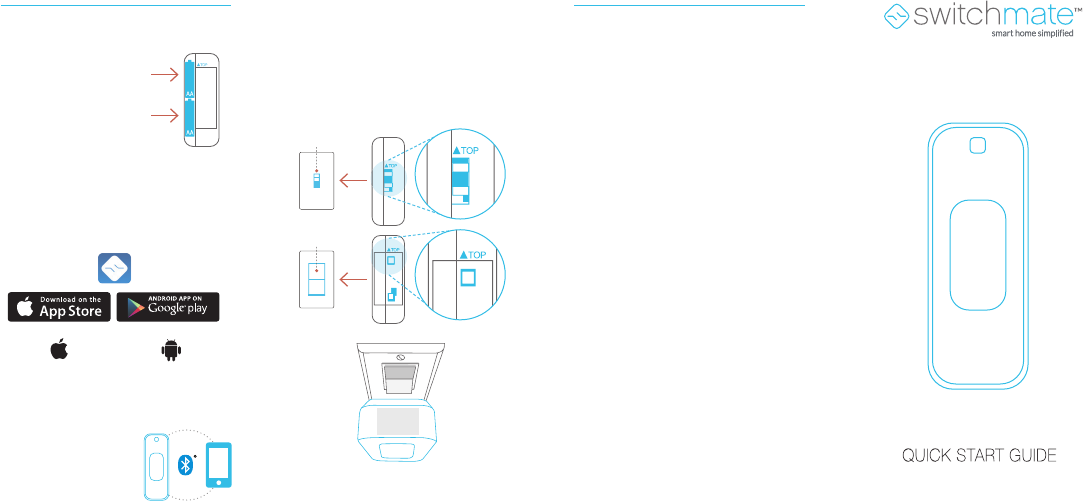
Install two AA batteries
into the back of
Switchmate
Launch the App and
walk through the
simple installation
Download the free Switchmate App
from the Google Play or Apple App
store onto your phone
Android 4.4+
Compatibility:
iPhone 5 and
above/iOS 8.0+
1
3
2
Installation
Snap Switchmate with the “top” sticker
facing up - over your light switch with
the light switch and the Switchmate in
the “up/sTOP position”
4Q: I am having trouble getting my
smartphone to connect to my
Switchmate
A: Different phones may behave
differently when connecting to
Switchmate. When experiencing
difficulties, TURN OFF WIFI then
try the following steps:
1. Close the Switchmate App and
restart the App – try to connect
2 Turn Bluetooth off then on –
try to connect
3. Restart Smartphone – try to
connect
4. Reset Switchmate by taking the
batteries out and put them back
in – try to connect
5. Uninstall the App and download
it again.
Troubleshooting
For further troubleshooting please
contact us at:
www.SwitchmateHome.com/support
ON
ON
on
on
on
o
n
on
on
QSG 2017 April
Designed in California
Switchmate Bright
*Remove “TOP”
sticker once
installed
TOP
ON
Switchmate Home, LLC
Model: TSM003
FCC ID: 2AICR-SM003
FCC Warning
This device complies with part 15 of the FCC Rules .
Operation is subject to the following two conditions: (1) This
device may not cause harmful interference, and (2) his device
must accept any interference received, including interference that
may cause undesired operation.
NOTE: Changes or modifications not expressly approved by the party
responsible for compliance could void the user's authority to operate
the equipment.
The equipment has been evaluated to meet general RF exposure
requirement. The device can be used in portable condition without
restriction.
IC Warning
This device complies with Industry Canada license-exempt
RSS standard(s). Operation is subject to the following two
conditions: (1) This device may not cause harmful interference,
and (2) this device must accept any interference, including
interference that may cause undesired operation of the device.
Avis d’Industrie Canada
Le présent appareil est conforme aux CNR d'industrie Canada
applicables aux appareils radio exem pts de licence
L'exploitation est autorisée aux deux conditions suivantes:
1) I'appareil ne doit pas produire de brouillage; et
2) I'utillsateur de I'appareil doit accepter brouillage radio
électrique subi meme si le brouillage est susceptible
d'encompromettre le fonctionnement. mauvais fonctionnement
de I'appareil.
Switchmate
®