Saab Defense and Security USA RPG915 RPG ANTI-TANK WEAPON SIMULATOR User Manual Simulator for RPG 7 US
Saab Defense and Security USA LLC RPG ANTI-TANK WEAPON SIMULATOR Simulator for RPG 7 US
USERS MANUAL
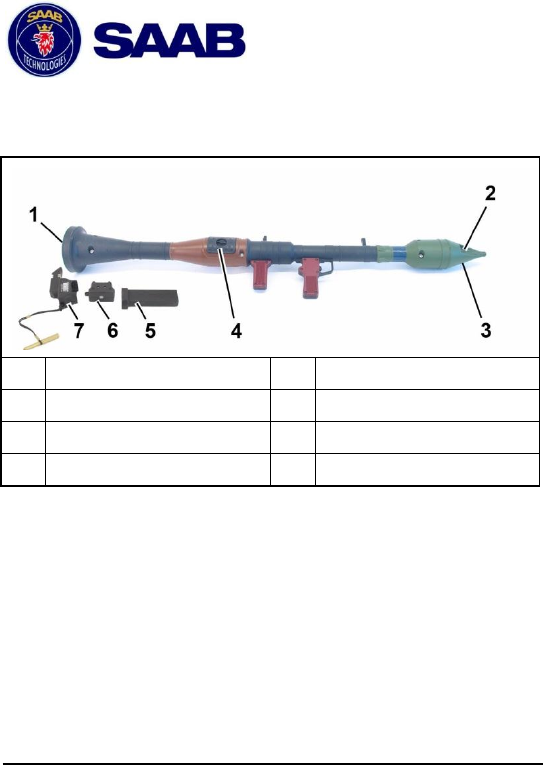
Simulator
for
RPG-7
1 Overview
1
Loudspeaker
5
RPG-7 Adapter
2
Firing signature
6
RPG-7 Fill
3
Laser aperture
7
SAAD Align 72
4
Battery
2 General
2.1 Laser safety Class 1
LASER Class 1 A Class 1 laser product does not present a
hazard to the human eye. There are no associated hazard
distances.
The user is not at risk when directly exposed to the beam
even at close range, however it is recommended that the
user avoids direct exposure to the beam as a matter of good
practice.
© Saab Training Systems Final 4 8875 801-135
2
WARNING!
Do not try to open the laser product. In case of
failure, the laser product shall be sent to Saab
Training Systems for service and repair.
2.2 Battery safety
WARNING!
Prevent Batteries from:
• Damage
• Short circuit
• Exposure to temperatures above 70°C
(158°F)
• Being dismantled
• Immersion in liquids
For more information about how to handle Lithium Batteries
in a safe way, see Safety Handling Instructions 8875 809-
470.
2.3 Interaction between RPG-7 and PDD
(option)
The RPG-7 and the PDD interact as follows:
• the PDD and the RPG-7 communicate using WLN (short
range Radio Communication)
• the RPG-7 automatically associates to the nearest PDD
• if the weapon is handed over to another soldier the RPG-
7 automatically detects and associates with the new PDD
3
Each time the soldier fires the simulator, the RPG-7 checks
the status of the PDD to determine if the soldier is alive,
wounded or killed. The soldier can not use the RPG-7 if the
soldier has a kill or seriously wounded status and is therefore
unable to handle the weapon.
3 Installation
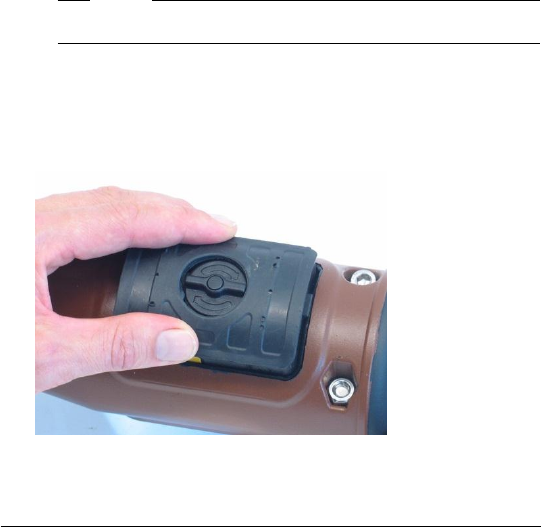
3.1 Battery Installation
1. Make sure that the battery housing is clean and empty.
Note!
Make sure that the battery is charged.
2. Position the battery with the rails of the battery facing
backwards and push the battery into the battery housing.
When the simulator is powered up and the BIT is OK the
simulator generates a short tone.
4
Note!
The battery typically needs to be replaced every 100
hours. The replacement times are reduced in cold
conditions.
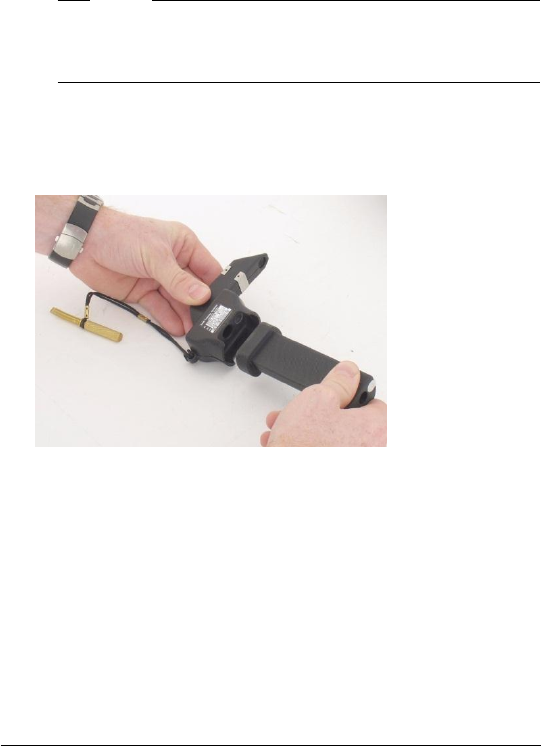
3.2 Align the RPG-7
1. Put the SAAD Align 72 and the RPG-7 adapter together.
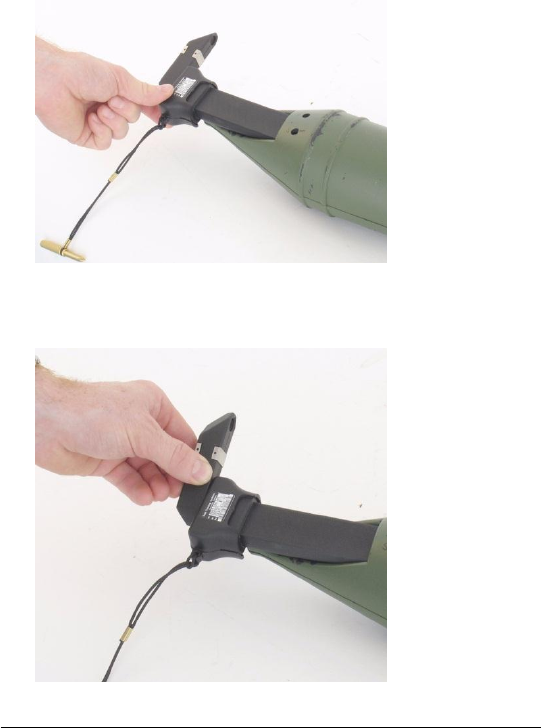
5
2. Attach the SAAD to the front end of the RPG-7.
3. Rotate the optics of the SAAD into the line of sight. A
reticle pattern will be visible.
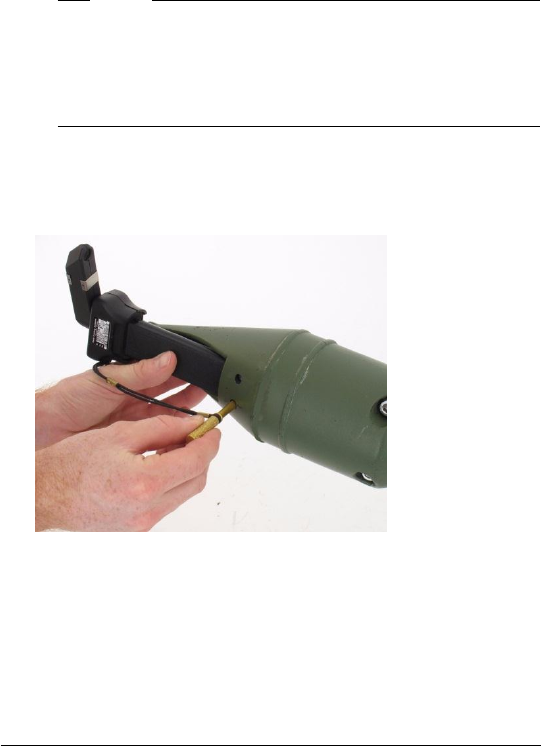
6
Note!
The SAAD will turn off if a BIT error is detected, see
Troubleshooting.
The SAAD will also turn off after 3 minutes as a
battery saving feature. Remove the SAAD and
reinstall after 5 seconds.
4. The shooter should adopt a firing position and look
through the sights. Adjust the reticle pattern to the sight
by turning the two adjustment screws.
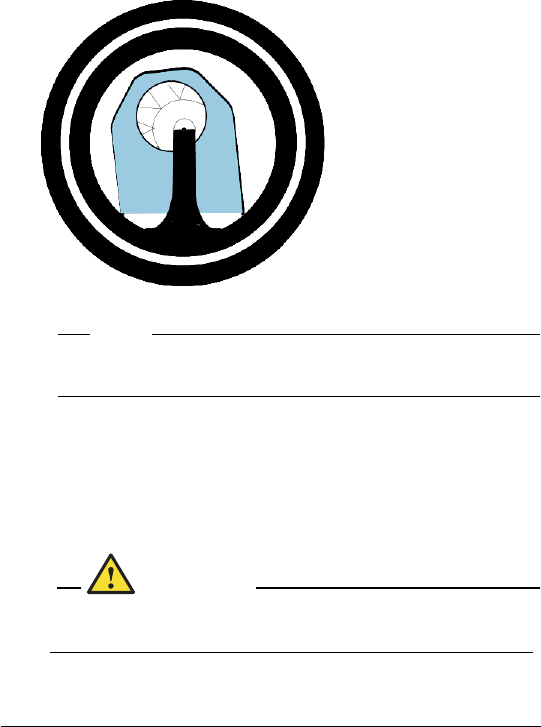
7
Correctly
aligned:
Note!
If the alignment screws reach their end position, do
not use excessive force, contact the Support team.
4 Operation
4.1 Fire the simulator
Safety conditions
WARNING!
It is recommended to use ear protection when
operating the simulator, because of high sound.
1. Follow the normal procedure for the actual weapon.
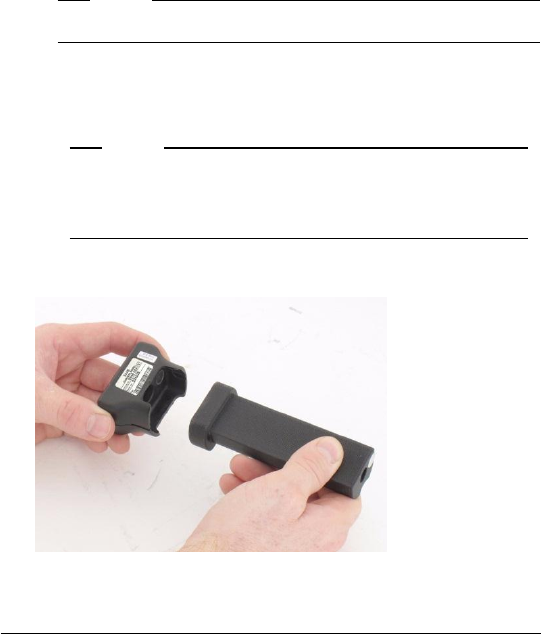
8
2. Make sure no other personnel are within the safety area.
3. Fire the simulator.
4. The firing signature will be simulated with a flashing LED
in the front and a firing sound from the loudspeaker in the
rear of the RPG-7.
Note!
There is a default reload time after firing.
4.2 Refill ammunition (option)
Note!
The RPG-7 is loaded with X number of ammo.
"Out of ammo" sound is generated when the
RPG-7 has run out of ammo.
1. Put the RPG-7 Fill and the RPG-7 adapter together.
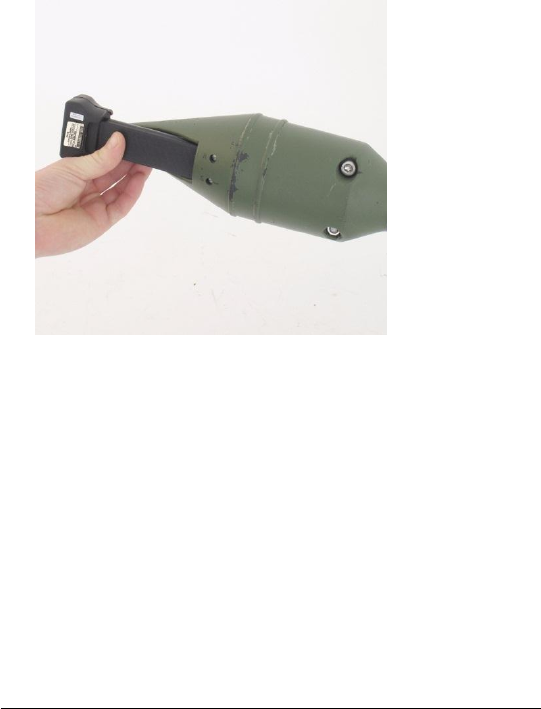
9
2. Attach the RPG-7 Fill SAAD to the front end of the RPG-
7.
3. When the ammunition is loaded the RPG-7 generates a
short tone.

10
5 Maintenance
5.1 Troubleshooting
Symptom
Cause
Corrective
action
Double tone
Low battery
Replace battery
with a charged
battery
Simulator not
working
Replace the
simulator
No simulation
when firing (no
firing sound or
flashing LED)
Fire button not
pressed long
enough
Press fire button
at least 1 second
Firing again too
quickly
Wait for loading
time and try again
Triple tone after
firing
Low battery
warning
Replace the
battery as soon
as possible
Beep sound
when firing
(option)
No associated
PDD
Equip the
shooter
with an alive PDD
RPG-7 OK, no
simulation
because the
PDD
has a killed/
wounded or
tampering status
Reset PDD with
CGUN

11
Symptom
Cause
Corrective
action
Firing OK but NO
hit on the target
RPG-7 is not
correctly aligned
Carry out the
alignment
procedure
The target is too
far away
Out of range for
RPG-7
Dirty Laser
aperture
Clean the Laser
aperture
Increasing triple
tone
Error
Replace the
simulator
5.2 Clean the equipment
1. Clean with water and a soft brush.
2. Wipe with dry cloth.

12
6 Regulatory Statements
6.1 FCC Certification
The United States Federal Communication Commission (FCC) has
established certain rules governing the use of electronic
equipment.
6.2 Part15, Class B
1 This device is FCC certified, FCC ID: R4ARPG915
2 This device complies with Part 15 of FCC rules and operation
and is subject to the following two conditions:
2.1 This device may not cause harmful interference, and
2.2 This device must accept any interference received,
including interference that may cause undesired operation.
This equipment has been tested and found to comply with the
limits for a Class B digital device, pursuant to Part 15 of the
FCC rules.
6.6.3 IC Certification
This device is IC certified, IC: 4660D-RPG915
IC RSS-GEN, Sec 7.1.3 Warning Statement- (Required
for license-exempt devices)
ENGLISH:
This device complies with Industry Canada license-
exempt RSS standard(s). Operation is subject to the
following two conditions:
(1) this device may not cause interference, and
(2) this device must accept any interference, including
interference that may cause undesired operation of the
device.

13
FRENCH:
Le présent appareil est conforme aux CNR d'Industrie
Canada applicables aux appareils radio exempts de
licence. L'exploitation est autorisée aux deux conditions
suivantes :
(1) l'appareil ne doit pas produire de brouillage, et
(2) l'utilisateur de l'appareil doit accepter tout brouillage
radioélectrique subi, même si le brouillage est susceptible
d'en compromettre le fonctionnement.
IC RSS-GEN, Sec 7.1.2 Warning Statement- (Required for
Transmitters)
ENGLISH:
Under Industry Canada regulations, this radio transmitter
may only operate using an antenna of a type and
maximum (or lesser) gain approved for the transmitter by
Industry Canada. To reduce potential radio interference to
other users, the antenna type and its gain should be so
chosen that the equivalent isotropically radiated power
(e.i.r.p.) is not more than that necessary for successful
communication.
FRENCH:
Conformément à la réglementation d'Industrie Canada, le
présent émetteur radio peut fonctionner avec une antenne
d'un type et d'un gain maximal (ou inférieur) approuvé pour
l'émetteur par Industrie Canada. Dans le but de réduire les
risques de brouillage radioélectrique à l'intention des
autres utilisateurs, il faut choisir le type d'antenne et son
gain de sorte que la puissance isotrope rayonnée
quivalente (p.i.r.e.) ne dépassepas l'intensité nécessaire à
l'établissement d'une communication satisfaisante.

14
6.3 User Information
WARNING!
Any changes or modifications not expressly approved
by the party responsible for compliance, namely Saab
Defense and Security USA LLC, could void the user's
authority to operate the equipment.