Safety Technology 34071 Remote Control User Manual

Safety Technology International, Inc. Remote Control

User Manual

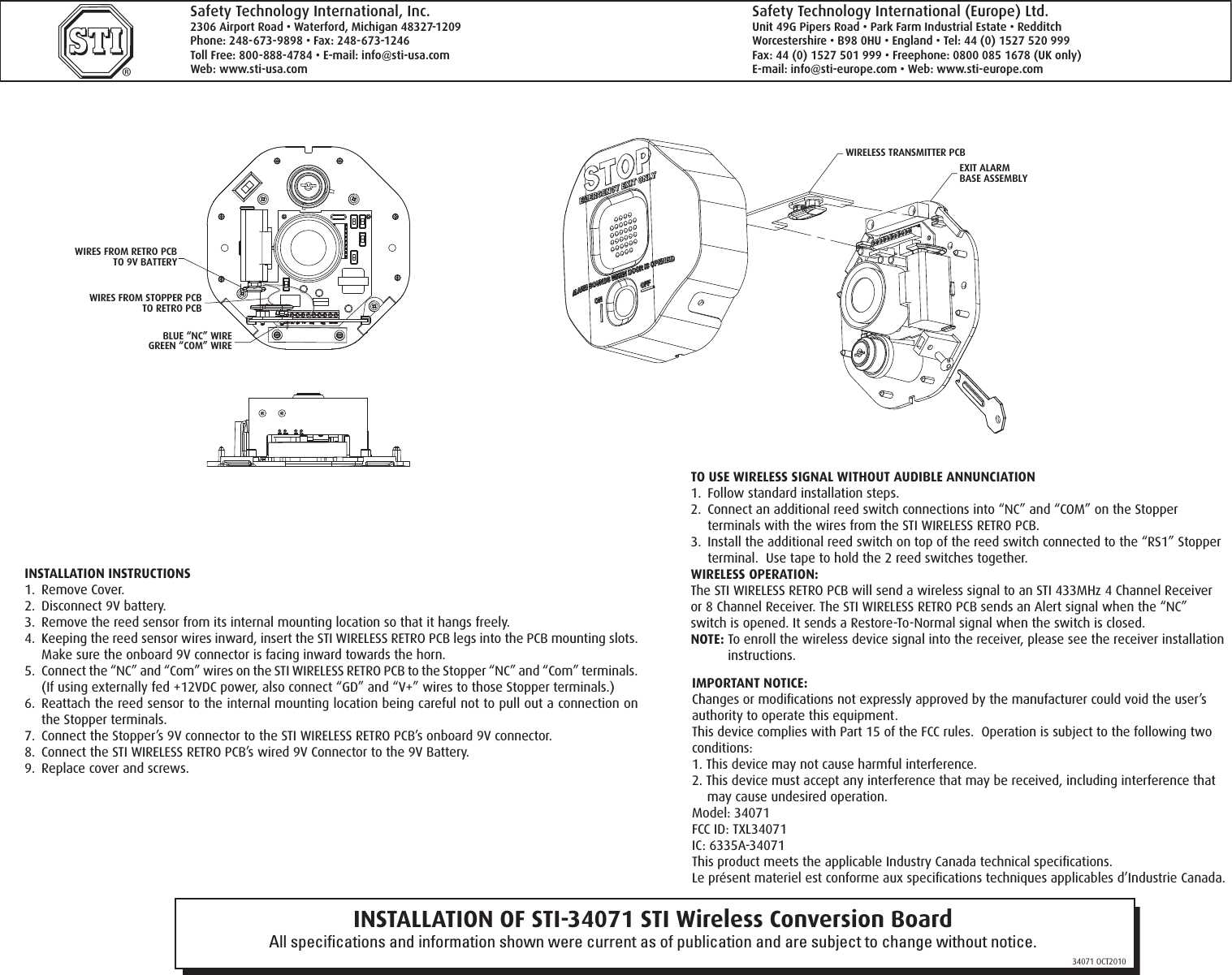
INSTALLATION OF STI-34071 STI Wireless Conversion BoardAll specifications and information shown were current as of publication and are subject to change without notice.34071 OCT2010®Safety Technology International, Inc.2306 Airport Road • Waterford, Michigan 48327-1209Phone: 248-673-9898 • Fax: 248-673-1246Toll Free: 800-888-4784 • E-mail: info@sti-usa.comWeb: www.sti-usa.comSafety Technology International (Europe) Ltd.Unit 49G Pipers Road • Park Farm Industrial Estate • RedditchWorcestershire • B98 0HU • England • Tel: 44 (0) 1527 520 999Fax: 44 (0) 1527 501 999 • Freephone: 0800 085 1678 (UK only)E-mail: info@sti-europe.com • Web: www.sti-europe.com INSTALLATION INSTRUCTIONS1.  Remove Cover.2.  Disconnect 9V battery.3.  Remove the reed sensor from its internal mounting location so that it hangs freely.4.  Keeping the reed sensor wires inward, insert the STI WIRELESS RETRO PCB legs into the PCB mounting slots.  Make sure the onboard 9V connector is facing inward towards the horn.5.  Connect the “NC” and “Com” wires on the STI WIRELESS RETRO PCB to the Stopper “NC” and “Com” terminals.  (If using externally fed +12VDC power, also connect “GD” and “V+” wires to those Stopper terminals.)6.  Reattach the reed sensor to the internal mounting location being careful not to pull out a connection on the Stopper terminals.7.  Connect the Stopper’s 9V connector to the STI WIRELESS RETRO PCB’s onboard 9V connector.8.  Connect the STI WIRELESS RETRO PCB’s wired 9V Connector to the 9V Battery.9.  Replace cover and screws.IMPORTANT NOTICE:Changes or modifications not expressly approved by the manufacturer could void the user’s authority to operate this equipment.This device complies with Part 15 of the FCC rules.  Operation is subject to the following two conditions:1. This device may not cause harmful interference.2. This device must accept any interference that may be received, including interference that may cause undesired operation.Model: 34071FCC ID: TXL34071IC: 6335A-34071This product meets the applicable Industry Canada technical specifications.Le présent materiel est conforme aux specifications techniques applicables d’Industrie Canada.TO USE WIRELESS SIGNAL WITHOUT AUDIBLE ANNUNCIATION1.  Follow standard installation steps.2.  Connect an additional reed switch connections into “NC” and “COM” on the Stopper terminals with the wires from the STI WIRELESS RETRO PCB.3.  Install the additional reed switch on top of the reed switch connected to the “RS1” Stopper terminal.  Use tape to hold the 2 reed switches together.WIRELESS OPERATION:The STI WIRELESS RETRO PCB will send a wireless signal to an STI 433MHz 4 Channel Receiver or 8 Channel Receiver. The STI WIRELESS RETRO PCB sends an Alert signal when the “NC” switch is opened. It sends a Restore-To-Normal signal when the switch is closed.NOTE: To enroll the wireless device signal into the receiver, please see the receiver installation instructions.JP5JP2JP4JP3JP7SWITCHALARMDURATIONALARM VOLUME SWITCHTRIP DELAY SWITCHARMING SWITCH  (FACTORY DEFAULT SETTINGS)(ON)(ON)(OFF)(OFF)(OFF)TERMINAL BLOCKFOR COMPLETE ALARM OPTIONSAND SWITCH SETTINGS SEE CHARTON REVERSE SIDE.PC BOARDJP5JP2JP4JP3SWITCHALARMDURATIONALARM VOLUME SWITCHTRIP DELAY SWITCHARMING SWITCH(FACTORY DEFAULT SETTINGS (FACTORY DEFAULT SETTINGS)(ON)(ON)(OFF)(OFF)(OFF)WIRES FROM RETRO PCBTO 9V BATTERYWIRES FROM STOPPER PCBTO RETRO PCBBLUE “NC” WIREGREEN “COM” WIREWIRELESS TRANSMITTER PCBEXIT ALARMBASE ASSEMBLY

Navigation menu