Samson Electri Actuator Type 3374 Eb 8331 1 En Users Manual E83311EN.VP
EB 8331-1 EN to the manual 75a7956f-aff9-4df1-aa05-7e3af85b1d1c
2015-02-02
: Samson Samson-Electri-Actuator-Type-3374-Eb-8331-1-En-Users-Manual-444561 samson-electri-actuator-type-3374-eb-8331-1-en-users-manual-444561 samson pdf
Open the PDF directly: View PDF  .
.
Page Count: 24
Electric Actuator
Type 3374
Mounting and
Operating Instructions
EB 8331-1 EN
Edition October 2007
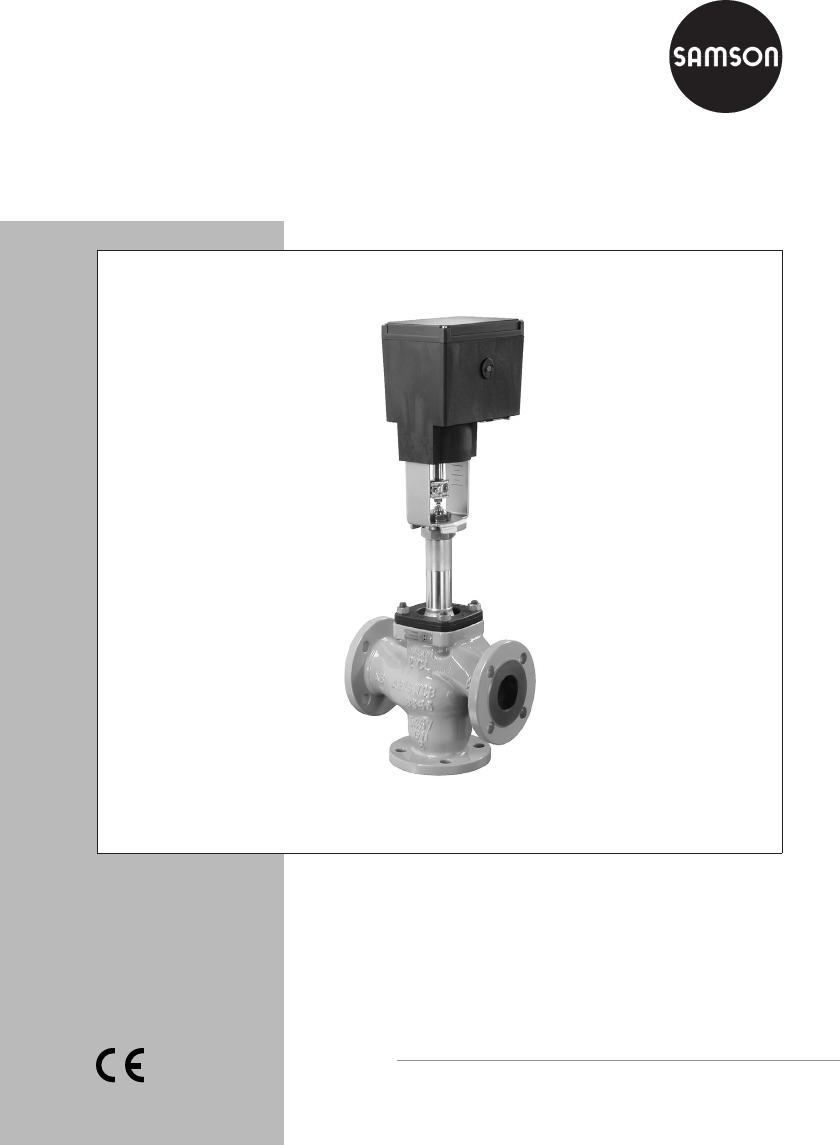
Fig. 1 · Type 3374 Actuator mounted on a Type 3535 Three-way Valve

Contents Page
1 Design and principle of operation . . . . . . . . . . . . . . . . . . . 5
1.1 Additional equipment. . . . . . . . . . . . . . . . . . . . . . . . . . 5
1.2 Technical data . . . . . . . . . . . . . . . . . . . . . . . . . . . . . 6
2 Installation. . . . . . . . . . . . . . . . . . . . . . . . . . . . . . . 8
2.1 Mounting position . . . . . . . . . . . . . . . . . . . . . . . . . . . 8
2.2 Attachment to the valve . . . . . . . . . . . . . . . . . . . . . . . . . 8
3 Electrical connections . . . . . . . . . . . . . . . . . . . . . . . . . 10
4 Operation and setting . . . . . . . . . . . . . . . . . . . . . . . . 12
4.1 Manual operation of the actuator . . . . . . . . . . . . . . . . . . . 12
4.2 Setting the additional equipment . . . . . . . . . . . . . . . . . . . . 12
4.2.1 Limit switches . . . . . . . . . . . . . . . . . . . . . . . . . . . . . 12
4.2.2 Potentiometers . . . . . . . . . . . . . . . . . . . . . . . . . . . . 12
4.3 Setting the digital positioner . . . . . . . . . . . . . . . . . . . . . . 14
5 Retrofitting additional electrical equipment . . . . . . . . . . . . . . 17
5.1 Limit switches . . . . . . . . . . . . . . . . . . . . . . . . . . . . . 18
5.2 Potentiometers . . . . . . . . . . . . . . . . . . . . . . . . . . . . 20
5.3 Digital positioner . . . . . . . . . . . . . . . . . . . . . . . . . . . 21
5.3.1 Calibrating the positioner . . . . . . . . . . . . . . . . . . . . . . . 22
5.3.2 Simplest method to calibrate the actuator. . . . . . . . . . . . . . . . 22
6 Dimensions in mm . . . . . . . . . . . . . . . . . . . . . . . . . . 23
2EB 8331-1 EN
Contents

EB 8331-1 EN 3
Safety instructions
General safety instructions
4
Assembly, start-up and operation of this device may only be performed by
trained and experienced personnel familiar with the product.
According to these mounting and operating instructions, trained personnel
refers to individuals who are able to judge the work they are assigned to
and recognize possible hazards due to their specialized training, their
knowledge and experience as well as their knowledge of the applicable
standards.
4
Any hazards which could be caused in the connected valve by the process
medium, operating pressure or moving parts are to be prevented by means
of the appropriate measures.
4
The actuators has been designed for use in electrical power installations.
For wiring and maintenance, you are required to observe the relevant safety
regulations. The actuator must be protected against unintentional
reconnection of the power supply.
Take special care when making adjustments on live parts. Do not remove
any covers!
4
Proper transportation and storage are assumed.

4EB 8331-1 EN
Note:
Actuators with a CE marking fulfill the requirements of the Directives 94/9/EC and
89/336/EEC.
The Declaration of Conformity is available on request.

1 Design and principle of
operation
The Type 3374 Electric Actuator is used in
industrial plants as well as in heating, venti-
lation and air-conditioning systems.
The linear actuator is suitable for form-fit at-
tachment to various SAMSON valve series,
depending on the version with or without
fail-safe action. The actuators consist of a
reversible synchronous motor and a mainte-
nance-free planetary gear with ball screw.
The synchronous motor is switched off by
torque-dependent switches when the final
positions are reached or in case of an over-
load.
The motion is transmitted to the actuator
stem by the gears and ball screw.
Actuator versions with integrated yoke are
primarily used for attachment to Series
V 2001 Valves, Type 3260 (DN 65 to 150),
and Type 3214 (DN 65 to 250) Valves.
Actuator versions for central attachment us-
ing an M30 x 1.5 ring nut are preferably
combined with Series 240 Valves and
Type 3214 (DN 125 to 150) .
1.1 Additional equipment
The actuators can be equipped with addi-
tional units, such as limit switches and po-
tentiometers, to influence the tasks of control
equipment. In addition, the actuator can be
equipped with a digital positioner for pro-
cessing standard signals in the range of
0 (2) to 10 V or 4 (0) to 20 mA.
Refer to section 5 for details on retrofitting
additional equipment.
EB 8331-1 EN 5
Design and principle of operation

1.2 Technical data
6EB 8331-1 EN
Design and principle of operation
Actuator Type 3374 -10 -11 -15 -21 -26 -31 -36
Version with Yoke Ring nut Yoke Ring nut Yoke Ring nut
Safety function Without Stem extends Stem retracts
Rated travel mm 30 15 30/15 15
Actuating time for
rated travel s 240 120 240/120 120
Actuating time in case of
fail-safe action s –12
Nominal thrust 2.5 kN
Stem extends or retracts 2kN
Stem extends 0.5 kN
Stem retracts
Power supply 207 V to 253 V; 50 Hz, 90 V to 127 V; 60 Hz
or 21.6 V to 27.6 V; 50 Hz (other voltages on request)
Power consumption VA
Without positioner
With positioner 7.5/13
9.5/15 10.5/16
12.5/18
Motor switch-off Torque-dependent
Rated temperature range 5 to 60 °C
Storage temperature range –20 to +70 °C
Degree of protection IP 54 according to IEC 529, (IP 65 with cable glands 1))
Suspended mounting position not approved
Overvoltage category II
Design and inspection EN 61010 Edition 3.94
Class of protection II
Noise immunity EN 50082 Part 2
Noise emission EN 50082 Part 1
Manual override Using hex wrench · Adjustment impossible after fail-safe action has been triggered
Manual adjustment of actuators with fail-safe action only possible when supply
voltage is applied (see also section 4.1)
Weight, approx. kg 3.2 3.3 3.9 4.0 3.5 3.6
Materials Housing and cover made of plastic (PPO glass fiber reinforced)
Additional electrical equipment
Limit switch Two travel-dependent, adjustable limit switches, perm. load 250 V AC; 3A
Potentiometer 2) 0 to 1000 Ω, (0 to 900 Ωat rated travel) max. permissible current 1 mA
1) Cable glands M20 x 1.5 with metal nut, width across flats 23/24 mm
2) Not for version with positioner

EB 8331-1 EN 7
Design and principle of operation
Digital positioner 1)
Operating mode 1 Operating mode 2 Operating mode 3
Input variable 2) Range 4...20 mA, Ri = 0.05 kΩ
2...10 V, Ri = 10 kΩ0...20 mA, Ri = 0.05 kΩ
0...10 V, Ri = 10 kΩAs per settings 3)
Resolution 10 Bit
Position feedback
signal 4) 5)
Range 4...20 mA, RB0.2 ≤kΩ
2...10 V, RB≥5 kΩ0...20 mA, RB≤0.2 kΩ
0...10 V, RB≥5 kΩAs per settings 3)
Resolution 8 Bit
Characteristic Increasing, actuator stem retracts or extends
as the input variable increases As per settings 3)
Travel Adjustable 6 to 20 mm at 15 mm rated travel
6 to 35 mm at 30 mm rated travel
(the travel range between 12 and 35 mm has been extended to between 6
and 35 mm for 30 mm rated travel in positioner version V1.10 and higher)
Setting Using travel calibration button
(1 mm each time the button is pressed) As per settings 3)
using button
1 binary input Electrically isolated, switching voltage 18 to 30 V DC, approx. 7 mA
1 binary output Electrically isolated semiconductor contact, max. 45 V DC,
min. 3 V DC, max. 25 mA
Integrated interface for SAMSON
memory pen /PC Data transmission including settings, operating status and alarms
Transfer protocol: SAMSON SSP protocol
Retrofittable bus interface On request
Total delay time Approx. 30 ms
Accuracy ≤2.5 % without taking the dead band into account
1) Maximum two current inputs may be switched in series
2) Maximum values ±50 mA or ±25 V
3) SAMSON TROVIS-VIEW Operator Interface software, SAMSON memory pen
4) Can only be taken from current or voltage signal
5) Not when retrofittable interface is used

2 Installation
2.1 Mounting position
Installation depends on the mounting posi-
tion of the valve. However, do not install the
actuator suspended downwards.
Note!
Manual override is only possible in actua-
tors with fail-safe action when the power
supply is connected (see section 4.1).
2.2 Attachment to the valve
Series V 2001 (DN 15 to 80),
Type 3260 Valves (DN 65 to 150) and
Type 3214 Valves (DN 65 to 100)
1. Remove protective covers and unscrew
nut (6) from the control valve.
2. Place actuator with yoke onto the valve
and fasten with the nut (6, SW 36) using
a minimum tightening torque of
150 Nm. If necessary, retract actuator
stem slightly beforehand using the man-
ual override.
3. When the plug stem (5) fits closely onto
the actuator stem (3), attach both stem
connector clamps (4) and fasten with
screws.
Series 240
1. Push plug stem down to close the valve.
2. Turn coupling nut (8) until a distance of
x = 75 mm (x = 90 mm for DN 100 and
larger) between the top of the yoke and
the top of the coupling nut (8) is
reached. Secure position with lock nut
(9).
3. Place actuator onto valve bonnet (2.3)
and fasten with ring nut (7).
If necessary, retract actuator stem
slightly beforehand using the manual
override.
4. When the coupling nut (8) fits closely
onto the actuator stem, attach both stem
connector clamps (4) and screw tight.
5. Move actuator stem (3) to the end posi-
tion (valve closed) using the manual
override or motor.
6. Align travel indicator scale (10) to the
middle of the stem connector (4) and
screw tight.
Type 3214 (DN 125 to 250)
1. Place actuator onto the valve and secure
with the ring nut (7). If necessary, retract
actuator stem slightly beforehand using
the manual override.
2. When the plug stem fits closely onto the
actuator stem (3), attach both stem
connector clamps (4) and screw tight.
3. Move actuator stem (3) to the end posi-
tion (valve closed) using the manual
override or motor.
4. Align travel indicator scale (10) to the
middle of the stem connector (4) and
screw tight.
8EB 8331-1 EN
Installation
EB 8331-1 EN 9
Installation
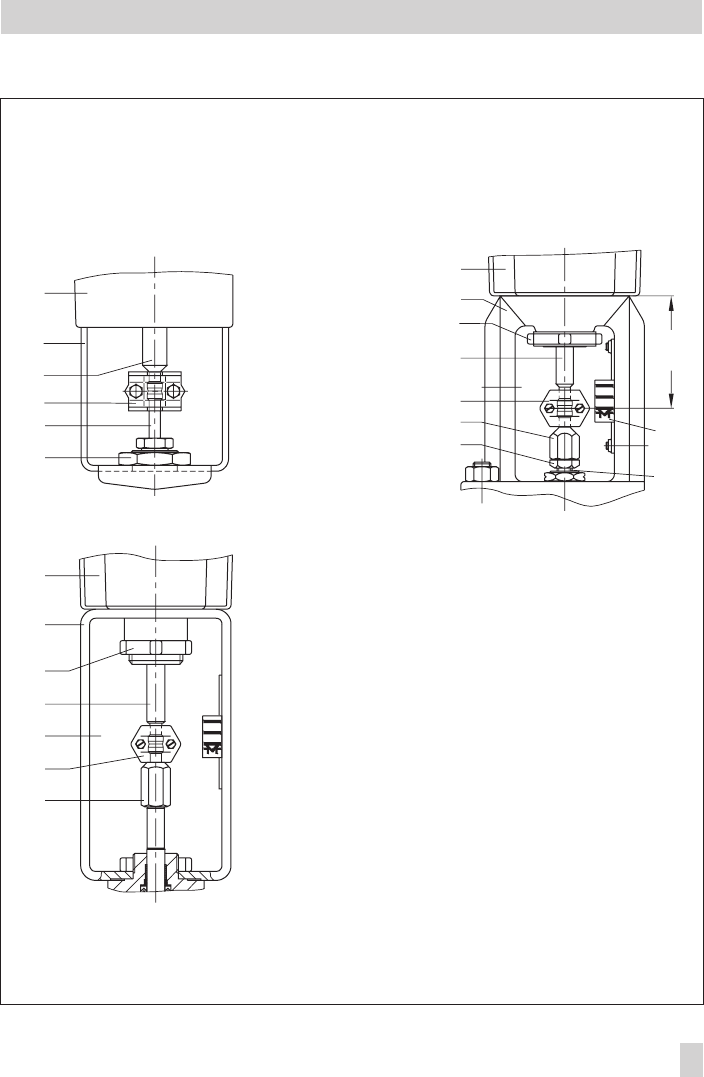
Fig. 2 · Attachment to the valve
1
2.1
3
4
5
6
x
1
2.3
7
3
4
8
910
5
1
2.2
7
3
10
4
5
Attachment to Series V 2001,
Type 3260 DN 65 to 150 and
Type 3214 DN 65 to 100
Attachment to Series 240
Attachment to Type 3214
DN 125 to 250
1 Actuator
2.1 Actuator yoke
2.2 Valve yoke
2.3 Bonnet
3 Actuator stem
4 Stem connector
5 Plug stem
6 Nut
7 Ring nut
8 Coupling nut
9 Lock nut
10 Travel indicator scale
3 Electrical connections
Upon installation of the electric ca-
bles, you are required to observe the
regulations concerning electrical
power installations according to DIN
VDE 0100 as well as the regulations
of your local power supplier.
Establish electrical connections as indicated
on the circuit diagram on the actuator cover
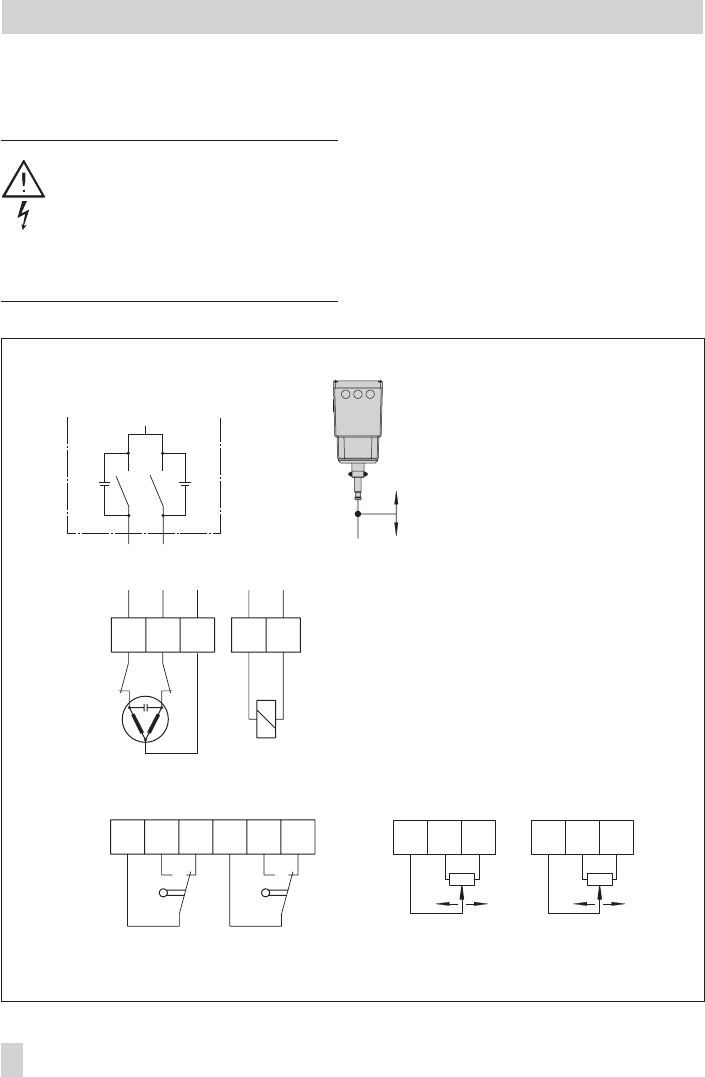
and as illustrated in Figs. 3 and 4.
A maximum of 3 cable glands can be at-
tached to the housing for cable entries.
10 EB 8331-1 EN
Electrical connections
aL eL N NL
N+–LN
eL
aL
Ce Ce
L
41 44 42 51 54 52 81 82 83 91 92 93
ea ae
Fig. 3 · Terminal connections, version for three-point stepping signal
Magnet in version with
fail-safe action
Limit switches (optional)
Retracts
Extends
Potentiometer (optional)
Caution!
4Only connect to the main power network
when the power is switched off.
4Only use power interruption devices
which ensure that the power cannot be
switched on again unintentionally.
4Particularly for 24 V, 50 Hz actuators,
use wires with a sufficiently large
cross-section to guarantee that the per-
missible voltage tolerances are not ex-
ceeded.
EB 8331-1 EN 11
Electrical connections
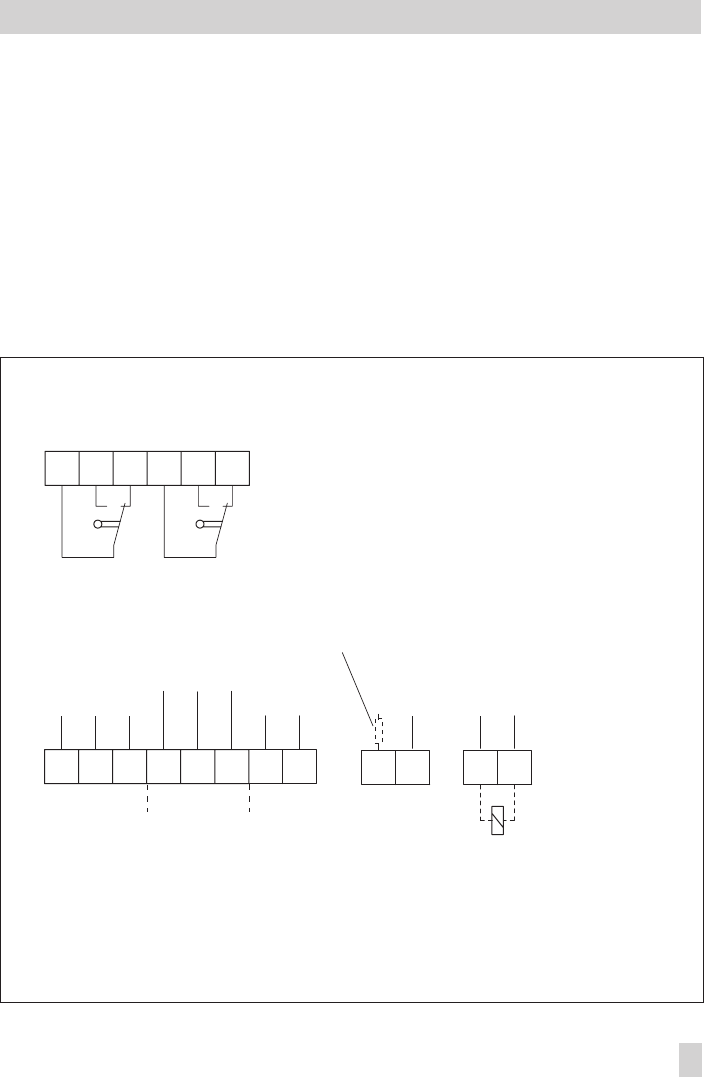
Fig. 4 · Terminal connections, version with digital positioner
31 32 33 13 12 11
41 44 42 51 54 52
83 84
81 82 NL
NL
++
_
++
_
_
+_
+V
mA VV
mA
V
Limit switches (optional)
Magnet in version with
fail-safe action
Load, max. 25 mA
Position feedback Input Binary input Binary output Power supply
active when
voltage is
applied

4 Operation and setting
4.1 Manual operation of the
actuator
To operate the manual override, place
4 mm hex wrench on the red actuator shaft
located at the side of the housing. The hex
wrench is delivered with the actuator. It is
attached to the bottom of the housing.
Manual override is only possible in actua-
tors with fail-safe action when the power
supply is connected (terminals N and L).
Set the selector switch (2, in Fig. 6) of the
actuator with positioner to the operating
mode 0=.
4.2 Setting the additional
equipment
To access the additional equipment, unscrew
the four fixing screws on the cover using a
Pozidrive PZ2 screwdriver to provide
enough hold on the screw heads. Take off
the cover.
After completing the settings and establish-
ing the electrical connection, refasten the
cover. To proceed, place back on the cover
and screw the cover screws in slightly to po-
sition the cover before tightening them prop-
erly.
Perform settings while the power is
switched on!
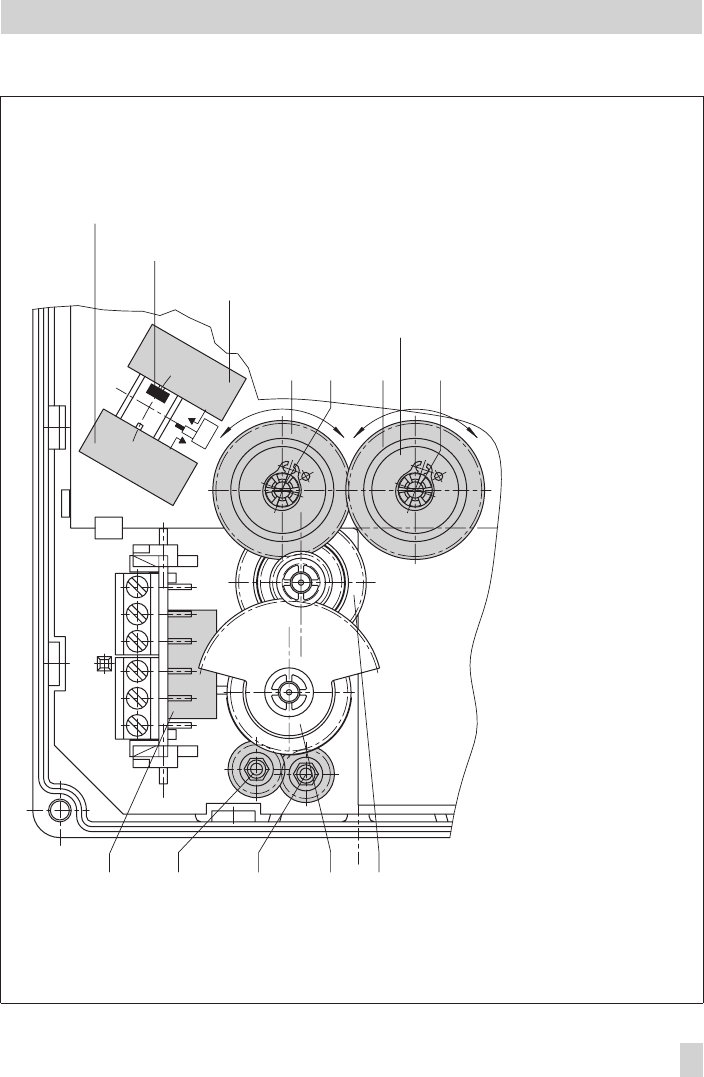
4.2.1 Limit switches
1. Use motor or manual override to move
the control valve to the position where
the switching function is to be activated.
2. Use hex wrench to turn spindle (2) for
the upper limit switch or spindle (3) for
the lower limit switch until the associated
contact cam on the cam bracket (7) trig-
gers the switch contact of the upper or
lower microswitch (1).
4.2.2 Potentiometers
The gears of the potentiometers (12) and
(13) must be put onto their shafts to
correspond with the rated travel of the con-
trol valve. The rated travel inscription
“Nennhub 15” or “Nennhub 30” must be
legible. If this is not the case, pull each po-
tentiometer gear off the shaft and put it back
on again with the reverse side of the wheel
facing upwards, ensuring it is aligned
roughly flush with the potentiometer shaft.
Zero point adjustment
1. Use motor or manual override to move
the control valve to the desired end posi-
tion.
2. Place screwdriver on the slotted potenti-
ometer shaft (12.1 and 13.1).
3. Calibrate potentiometer using the con-
nected ohmmeter correspondingly:
Actuator stem extends:
81/82 = 0 Ω; 91/93 = 0 Ω;
Actuator stem retracts:
81/83 = 0 Ω; 91/92 = 0 Ω.
12 EB 8331-1 EN
Operation and setting
EB 8331-1 EN 13
Operation and setting
Fig. 5 · Performing settings
12 375
1312.1
aae
12
Nennhub
15
13.1
B
Limit switch
Stem retracts
Metal tag
Rated travel inscription
Stem extends
1 Microswitch
2 Spindle upwards
3 Spindle downwards
5 Intermediate gear
7 Cam bracket
12 Gear potentiometer 1
12.1 Potentiometer shaft
13 Gear potentiometer 2
13.1 Potentiometer shaft

4.3 Setting the digital positioner
In the actuator version with digital
positioner, the travel is calibrated automati-
cally, allowing the travel (controlled variable
x) and the input signal (reference variable
w) of the positioner to be matched in the
best possible way. Additionally, the digital
positioner provides valve position feedback
for remote transmission.
Setting and start-up can be carried out us-
ing four different operating modes. Oper-
ating modes 1and 2work with set data
stored in the positioner's memory. The user
only needs to select the operating mode via
the selector switch (2) and press the button
(4) to start travel calibration.
Note!
Setup with operating modes 3and 0=
can only be performed using a SAMSON
memory pen as the storage medium, or in
connection with SAMSON's TROVIS-VIEW
Configuration and Operator Interface soft-
ware and a PC or bus system. Setup with
operating modes 3und 0= is described
in Mounting and Operating Instructions
EB 8331-2 EN.
Settings for operating modes 1 and 2
Increasing characteristic: actuator stem re-
tracts or extends as the reference variable
increases.
After the actuator has been mounted on the
valve as described in section 2.2 and the
electrical connections have been established
as described in section 3, proceed as fol-
lows:
1. Set selector switch (2) with the arrow
pointing to operating mode 0=
(control switched off).
2. Check mounting position of the potenti-
ometer gear (12).
The gear must be put onto the potentiometer
shaft to correspond with the rated travel of
the control valve. The inscription
“Nennhub 15” (for 6 to 20 mm travel) or
“Nennhub 30” (for 6 to 35 mm travel) must
be legible from above on the associated
gear side. If this is not the case, pull the
gear off the shaft and put it back on again
with the reverse side facing upwards, allow-
ing the intermediate gear to engage prop-
erly.
Note!
Actuators with fail-safe action "Actuator
stem retracts" or "extends" are only de-
signed for a rated travel of 15 mm. Do not
rearrange the gear!
Make sure that the shaft of the potentiometer
(12.1) is adjusted correctly.
3. Switch on auxiliary power and set the
reference variable to a value > 4 mA.
4. Set selector switch (2) with the arrow
pointing to operating mode 1for 4 to
20 mA or 2 to 10 V input and alarm
signal, or set it to operating mode 2for
0 to 20 mA or 0 to 10 V input and
alarm signal.
5. Press button (4) to start travel calibra-
tion.
14 EB 8331-1 EN
Operation and setting
Press the button briefly to obtain a travel
calibration for valve CLOSED when the actu-
ator stem extends.
Direction of action: Increasing/increasing.
Hold the button pressed for longer than 3
seconds (indicated by switchover from sig-
nal lamp 8 to signal lamp 9) to obtain a
travel calibration for valve CLOSED when
the actuator stem retracts.
Direction of action: Increasing/decreasing.
Caution!
The automatic travel calibration lasts
approximately twice as long as the
actuator's transit time. During this
period, the valve leaves its current
position. Calibrate the travel either
on the test bench or when the
shut-off valves in the plant are
closed.
After pressing the travel calibration but-
ton (4), the actuator stem first moves as far
EB 8331-1 EN 15
Operation and setting
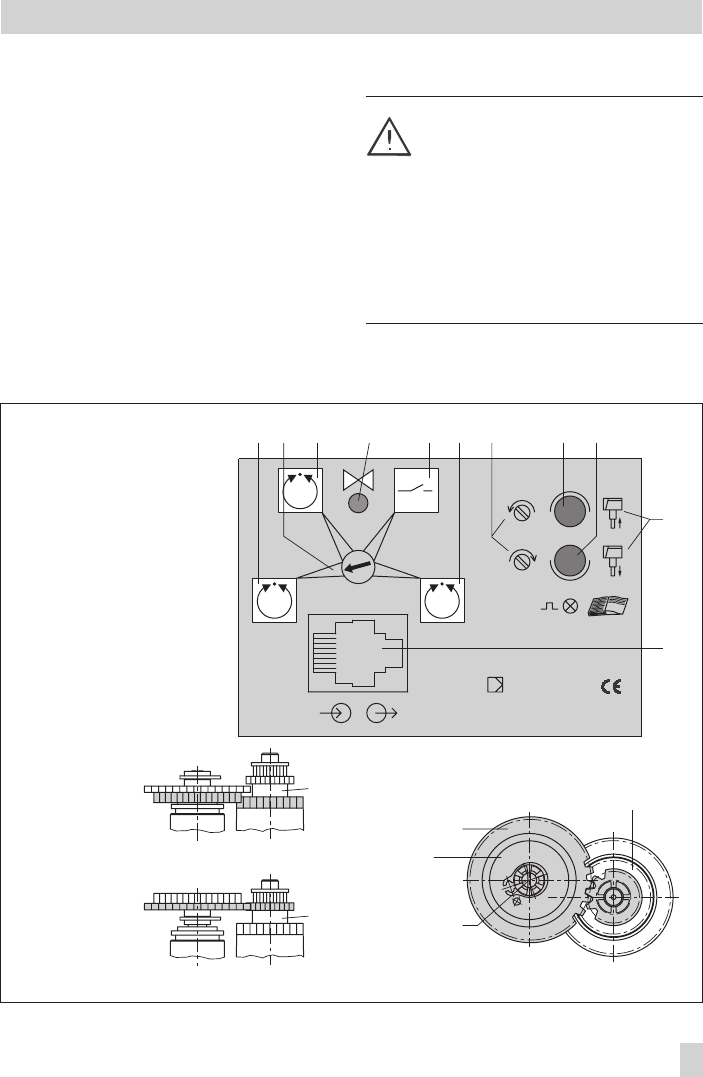
Fig. 6 · Selector switch and position of potentiometer gears in version with digital positioner
12
12.1
B
Stellungsregler
Positioner
Régulateur de position
SAMSON
10
9
11
65
2
13
431 72 8
1 Operating mode 1
2 Selector switch
3 Operating mode2
4 Travel calibration button
5 Operating mode 0
6 Operating mode 3
7 Potentiometer counter-
clockwise or clockwise
8 Signal lamp
9 Signal lamp
10 Actuator stem extends
and retracts
11 Interface jack
12 Potentiometer gear
12.1 Potentiometer shaft
Intermediate gear
Gear (12)
Position for rated travel 15
Gear (12)
Position for rated travel 30 Intermediate gear
Rated travel
inscription
Intermediate gear

as it will go to the valve's CLOSED position.
Calibration is carried out when both signal
lamps (8 and 9) are lit.
Travel calibration starts after the mounting
position of the potentiometer gear (12) has
been determined automatically. This is indi-
cated by signal lamp (8) for 6 to 35 mm
travel and by signal lamp (9) for 6 to
20 mm travel.
When travel calibration starts, the lower sig-
nal lamp (9) blinks quickly for about 10 sec-
onds. The actuator stem retracts as far as it
will go (maximum travel - valve OPEN).
Travel calibration is successfully completed
when the end position is reached. The actu-
ator is in control operation. The actuator
stem moves to the valve position determined
by the reference variable.
Note!
If one of the signal lamps starts to blink
slowly after the travel calibration button has
been pressed and the actuator stem has ex-
tended to the valve's CLOSED position, the
potentiometer shaft (12.1) has been wrongly
positioned. Readjust it manually.
Do not adjust the potentiometer before the
closed position is actually reached. This is
indicated by the associated, activated limit
switch on the board (Fig. 5 on page 13).
To proceed, adjust the shaft of the potenti-
ometer (12.1) by turning it gradually clock-
wise or counterclockwise with a screwdriver
until the signal lamp stops blinking and is
constantly illuminated. Turn the screwdriver
counterclockwise if the upper signal lamp
(8) blinks, and clockwise if the lower signal
lamp (9) blinks, corresponding to the icons
(7). Travel calibration does not continue until
both signal lamps are illuminated at the
same time.
Note!
If both signal lamps start to blink simulta-
neously during travel calibration, interrupt
calibration by pressing the travel calibration
button (4) and check the mounting position
of the potentiometer gear (12) again.
If no travel motion can be determined dur-
ing calibration, e.g. due to a loose or miss-
ing potentiometer gear, both signal lamps
blink alternately.
If this is the case, interrupt travel calibration
by pressing the button (4), correct the error,
and restart calibration by pressing the but-
ton (4) again.
16 EB 8331-1 EN
Operation and setting

Setting with limited travel range
Travel calibration is usually based on the
maximum travel of the control valve.
If, however, the maximum possible travel is
to be limited to a smaller travel end value,
press the button (4) once at the start of cali-
bration while the signal lamp blinks for
10 seconds. As a result, travel calibration
via the potentiometer gear with rated travel
15 or 30 is limited to 6 mm. Each time the
button is pressed, the travel range is in-
creased by 1 mm.
If, for example, a control valve designed for
15 mm is to be operated with a limited
travel range of 10 mm, press the button (4)
5 times during the 10 second time limit. The
top signal lamp (8) flashes each time the key
is pressed.
Reporting defined events
At the binary output (terminal 83 and 84),
predefined events can be indicated (see
EB 8331-2 EN) during positioner operation
and transmitted to a control room.
5 Retrofitting additional
electrical equipment
The actuator can be subsequently equipped
with two limit switches, two potentiometers
or a digital positioner.
Depending on the actuator version used, the
actuator board needs to be replaced as
well.
The actuator version is marked on the name-
plate, e.g. model 3374-11000002000.
When ordering additional electrical equip-
ment from the manufacturer, make sure to
include this model number in the order.
Caution!
When installing electrical equipment, make
sure the supply voltage and the signal input
are disconnected. Only use power interrup-
tion devices which are protected against un-
intentional reconnection of the power sup-
ply.
Note!
It is recommendable to slightly apply lubri-
cant (e.g. Vaseline) to the spindles on the
gear faces and to the sides of the cogs.
EB 8331-1 EN 17
Retrofitting additional electrical equipment

5.1 Limit switches
The retrofit kit (order no. 1400-8830) is re-
quired to install limit switches. If the actuator
is not already equipped with potentiometers
or a positioner, the basic unit (order no.
1400-8829) is also required. The unit in-
cludes the spindle gear (2) and the interme-
diate gear (5).
Note! To mount the limit switches, the actua-
tor stem must be in end position, i.e. the
stem must be either fully extended or fully
retracted. If necessary, move the stem to the
appropriate position using the manual over-
ride on the side.
1. Remove the fastening screws. Push the
actuator board (1) from its guiding to
the right. Slightly lift the board and con-
tinue pushing it further towards the cable
entry.
2. Clip the spindle gear (2) onto the sleeve
(3). Make sure the lateral latch is prop-
erly engaged in the groove of the sleeve.
3. Plug intermediate gear (5) onto the spin-
dle (4). Place the serrated ring (10) on
top and push it down until it will not go
any further.
4. Plug both premounted contact cams (6)
with the ring gear first onto the cam
bracket (7).
5. Push adjustment gears (8) onto their
spindles and fasten with one screw
each. Check whether the adjustment
screws can be turned easily. If not,
slightly loosen the screw again.
6. Turn both contact cams (6) as illustrated
in Fig. 7.1 corresponding with the posi-
tion of the actuator stem on the cam
bracket (7).
7. Push the spacer (9) onto the spindle for
the cam bracket. Push the cam bracket
with both cams onto the spindle corre-
sponding with the position of the actua-
tor stem as illustrated in Fig. 7.2. Make
sure that the outermost cog of the cam
bracket (7) engages in the gearwheel of
the intermediate gear (5). In addition,
the adjustment gears (8) must engage
properly in the corresponding gears of
the contact cams (6).
8. Secure the cam bracket (7) and interme-
diate gear (5) with the serrated ring
(10), pushing the ring down until it will
not go any further.
9. Position the terminal board (11) at the
base of the support at a 45° angle
(approx.) with the switches facing to-
wards the gears. Push the upper end of
the terminal board towards the gears
until the board is in a vertical position
and properly engaged in the support.
10.Push the actuator board (1) back into its
guiding. Make sure that the gears are
properly engaged. Fasten the board us-
ing screws.
4Adjust limit switches as described in sec-
tion 4.2.1.
18 EB 8331-1 EN
Retrofitting additional electrical equipment
EB 8331-1 EN 19
Retrofitting additional electrical equipment
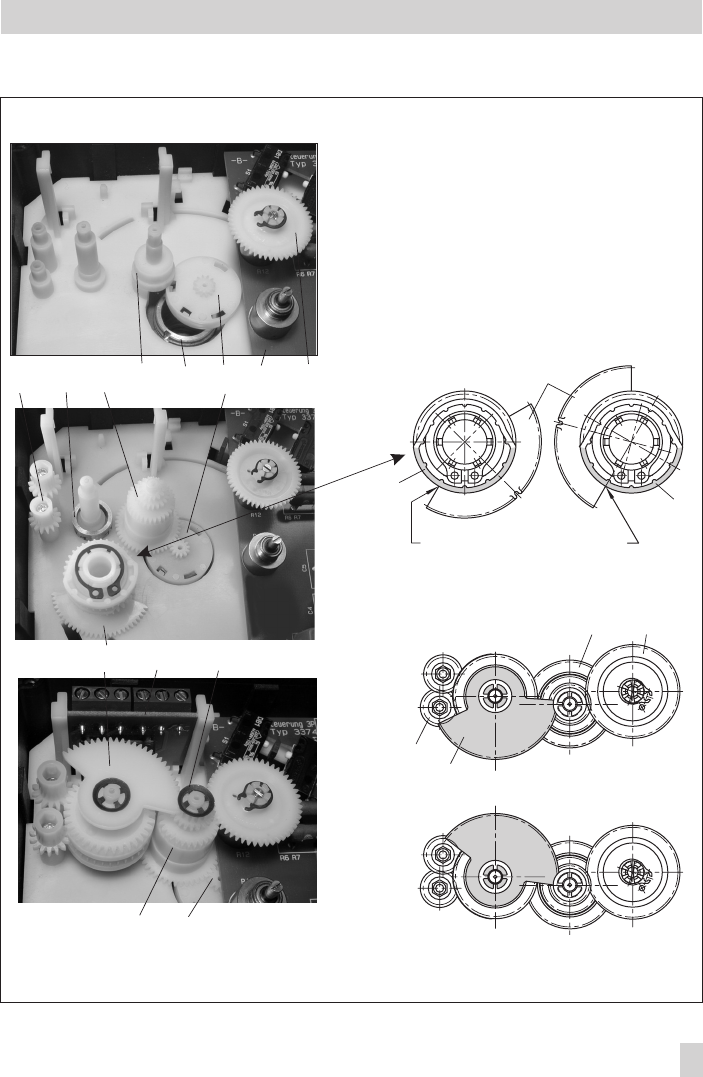
Fig. 7 · Retrofitting limit switches, in this example model 3374-11000002000, version with potentiometers
7
7
5 12
8
66
B
B
1 Actuator board
2 Spindle gear
3 Sleeve
4 Spindle
5 Intermediate gear
6 Contact cam
7 Cam bracket
8 Adjustment gear
9 Spacer
10 Serrated ring
11 Terminal board with
microswitches
12 Gear in version
with potentiometer
8 954 32112
71110
52
7.1 Position of the contact cams (6) on the cam bracket (7)
For actuator stem
retracts extends
7.2 Position of the cam bracket (7)
For actuator stem retracts
For actuator stem extends
5.2 Potentiometers
Actuators with a digital positioner cannot be
equipped with potentiometers.
To install the potentiometers, an actuator
board with the appropriate potentiometers
and gears (12 and 13) is required.
If the actuator is not already equipped with
limit switches, the basic unit (order no.
1400-8829) is also required. The unit in-
cludes the spindle gear (2) and the interme-
diate gear (5).
1. Remove the fastening screws. Push the
actuator board (1) from its guiding to
the right. Take out the board and re-
place it with a board with potentiom-
eters.
2. Clip the spindle gear (2) onto the sleeve
(3) as illustrated in Fig. 7, top. Make
sure the lateral latch is properly en-
gaged in the groove of the sleeve.
3. Plug intermediate gear (5) onto the spin-
dle (4). Place the serrated ring (10) on
top and push it down until it will not go
any further.
4. The potentiometer gears (12 and 13)
with retaining rings must be put onto
their shafts corresponding with the rated
travel of the control valve. The rated
travel inscription “Nennhub 15” (on the
upper side with the retaining ring) or
“Nennhub 30” (lower side) must be legi-
ble from above (also see Figs. 4 and 5).
5. Push the actuator board back into its
guiding. Make sure that the gears are
properly engaged. Fasten the board us-
ing screws.
4Adjust the potentiometer as described in
section 4.2.2.
20 EB 8331-1 EN
Retrofitting additional electrical equipment
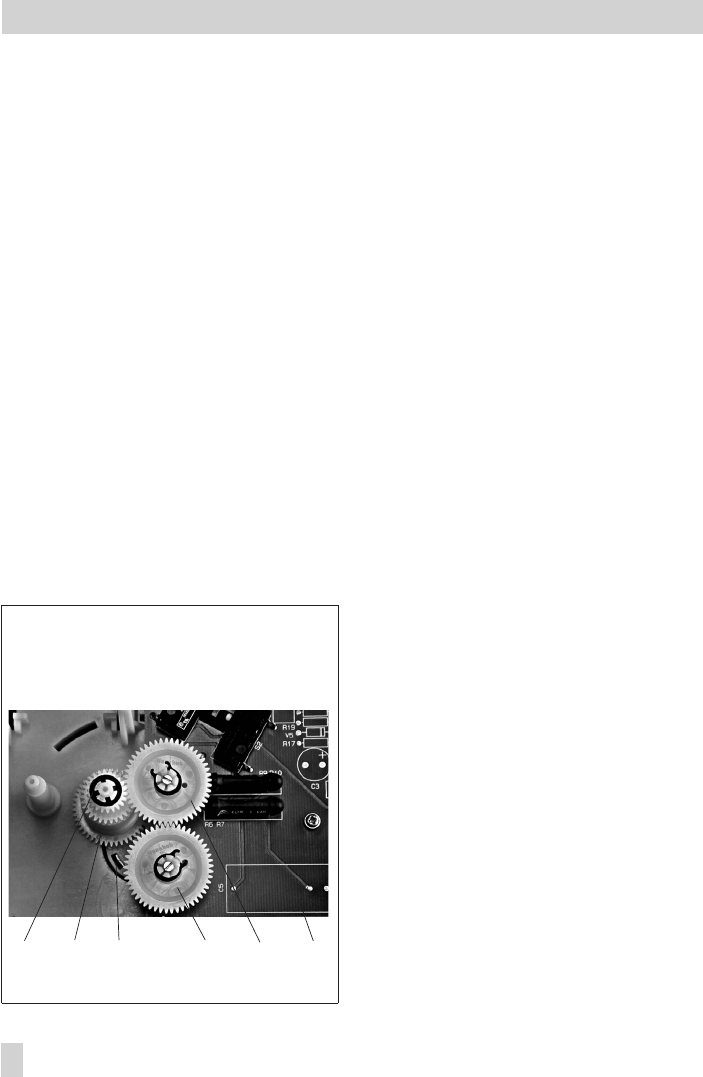
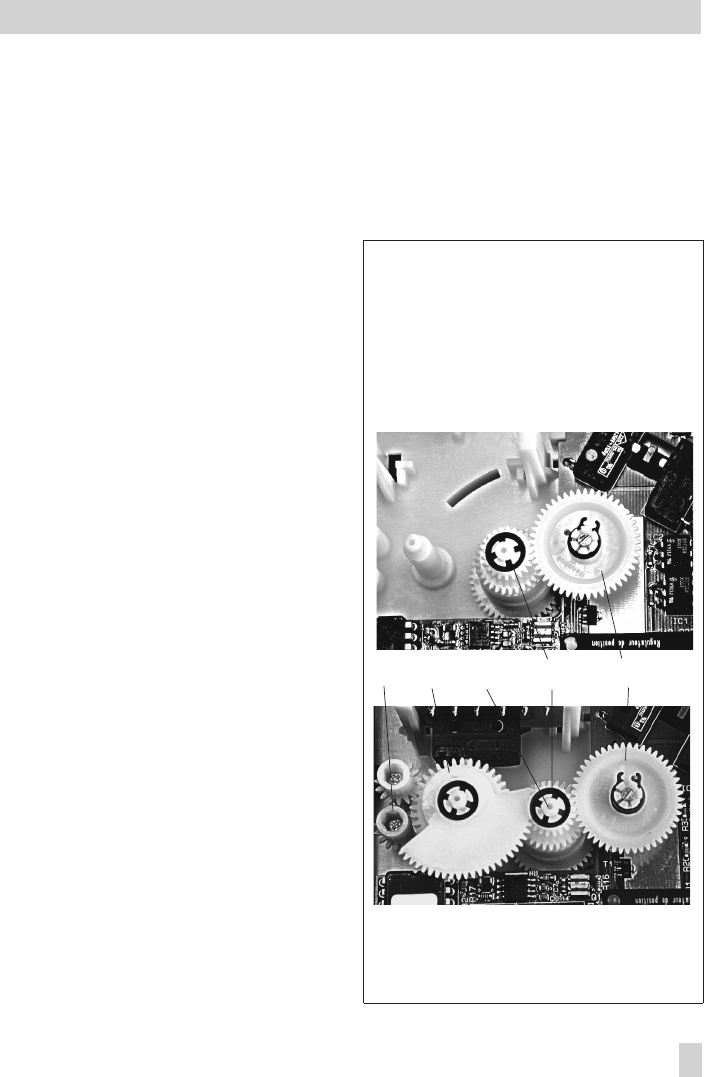
Fig. 8 · Version with potentiometer
10 5 2 13 12 1
1 Actuator board
2 Contact cam
5 Intermediate gear
10 Serrated ring
12 Gear potentiometer 1
13 Gear potentiometer 2
5.3 Digital positioner
To install a positioner, a corresponding ac-
tuator board and TROVIS-VIEW 3374 and
connecting cable 0450-1978 are necessary.
If the actuator is not already equipped with
limit switches, the basic unit (order no.
1400-8829) is also required. The unit in-
cludes the spindle gear (2) and the interme-
diate gear (5).
Note! Actuators with a digital positioner
cannot be equipped with a potentiometer.
1. Remove the fastening screws. Push the
actuator board (1) from its guiding to
the right. Take out the board and re-
place it with a board with positioner.
2. Clip the spindle gear (2) onto the sleeve
(3) as illustrated in Fig. 7, top. Make
sure the lateral latch is properly en-
gaged in the groove of the sleeve.
3. Plug intermediate gear (5) onto the spin-
dle (4). Place the serrated ring (10) on
top and push it down until it will not go
any further.
4. The gear (12) on the feedback potenti-
ometer, which is equipped with a retain-
ing ring, must be put onto its shaft corre-
sponding with the rated travel of the
control valve. The rated travel inscription
“Nennhub 15” (on the upper side with
the retaining ring) or “Nennhub 30”
(lower side) must be legible from above
(also see Figs. 4 and 5).
5. Push the actuator board (1) back into its
guiding. Make sure that the gears are
properly engaged. Fasten the board us-
ing screws.
EB 8331-1 EN 21
Retrofitting additional electrical equipment
Fig. 9 · Version with positioner
without (top) and with (bottom) limit switches
5 Intermediate gear
6 Contact cam
7 Cam bracket
8 Adjustment gears
10 Serrated ring
12 Gear feedback potentiometer
8751012

5.3.1 Calibrating the positioner
To calibrate the positioner, proceed as de-
scribed in section 4 of EB 8331-2 EN.
5.3.2 Simplest method to calibrate
the actuator
If tools such as the TROVIS-VIEW software,
PC etc. are not available for calibration of
the actuator and the actuator operation with
maximum precision is not necessary, the
simplest calibration method can be per-
formed as follows:
1. Position the selector switch (2) to operat-
ing mode 0=.
2. Press down the travel calibration button
(5) for at least 15 seconds until both sig-
nal lamps light up.
3. Release the button to start calibration.
The actuator stem extends until the
torque-dependent switches switch off the
actuator.
The position of the potentiometer is
checked.
4. Re-adjust the potentiometer, if neces-
sary, while observing the signal lamps.
Refer to the description given on
page 14 of EB 8331-2 EN.
After adjusting the potentiometer, the
calibration of the actuator is continued.
4Mount the actuator on the valve and set
the positioner as described in section
4.3 of these instructions.
22 EB 8331-1 EN
Retrofitting additional electrical equipment
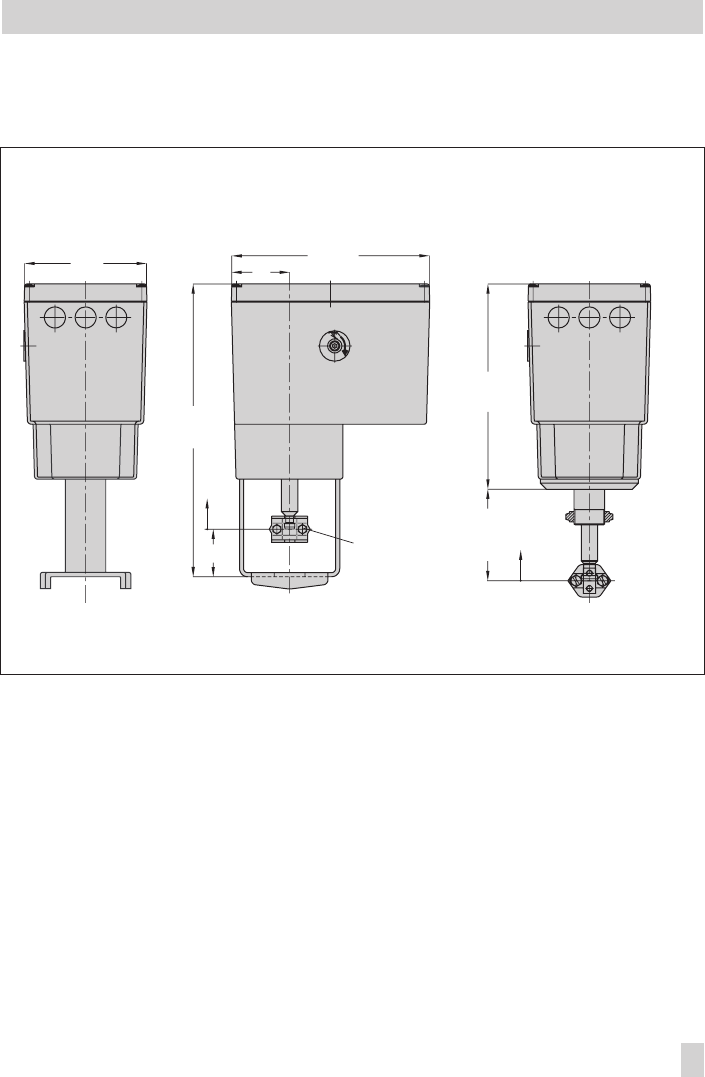
6 Dimensions in mm
EB 8331-1 EN 23
Dimensions in mm
120
50 15 (30)
294
60 193
90 (75) 204
30 (15)
Version with yoke Version with ring nut
Stem connector

SAMSON AG · MESS- UND REGELTECHNIK
Weismüllerstraße 3 · 60314 Frankfurt am Main · Germany
Phone: +49 69 4009-0 · Fax: +49 69 4009-1507
Internet: http://www.samson.de EB 8331-1 EN
S/Z 2007-10
