Samsung Electronics Co GTC3520I Mobile Phone User Manual Manual
Samsung Electronics Co Ltd Mobile Phone Manual
Manual
User manual
GT-C3520I
Draft 1
2013-12-28
Only for Marketing
using this manual
This user manual has been specially designed to guide you through the functions
and features of your mobile phone. To get started quickly, refer to “introducing your
mobile phone,” “错误!未找到引用源。,” and “错误!未找到引用源。.”
Instructional icons
Before you start, familiarise yourself with the icons you will see in this manual:
Warning—situations that could cause injury to yourself or others
Caution—situations that could cause damage to your phone or other
equipment
Note—notes, usage tips, or additional information
Refer to—pages with related information; for example: p. 12
(represents “see page 12”)
Õ Followed by—the order of options or menus you must select to perform a
step; for example: In Menu mode, select Messages Õ Create new message
(represents Messages, followed by Create new message)
[ ] Square brackets—phone keys; for example: [ ](represents the Power/
Menu exit key)
< > Angled brackets—softkeys that control different functions at each screen; for
example: <OK> (represents the OK softkey)
Copyright information
Rights to all technologies and products that comprise this device are the property of
their respective owners:
Bluetooth®
Java™ is a trademark of Sun Microsystems, Inc.
is a registered trademark of the Bluetooth SIG, Inc. worldwide
Windows Media Player® is a registered trademark of Microsoft Corporation.

contents
safety and usage information
Safety warnings
Safety precautions
Important usage information
introducing your mobile phone
Unpack ..
Phone layout
Keys
Display
Icons
assembling and preparing your mobile phone
Install the SIM card and battery
Charge the battery
using basic functions
Turn your phone on and off
Access menus
Customise your phone
Use basic call functions
Send and view messages
Add and find contacts
troubleshooting
safety and usage
information
Comply with the following precautions to avoid dangerous or illegal situations and
ensure peak performance of your mobile phone.
Safety warnings
Keep your phone away from small children and pets
Keep your phone and all accessories out of the reach of small children or animals.
Small parts may cause choking or serious injury if swallowed.
Protect your hearing

Listening to a headset at high volumes can damage your hearing. Use
only the minimum volume setting necessary to hear your conversation or music.
Install mobile phones and equipment with caution
Ensure that any mobile phones or related equipment installed in your vehicle are
securely mounted. Avoid placing your phone and accessories near or in an air bag
deployment area. Improperly installed wireless equipment can cause serious injury
when air bags inflate rapidly.
Handle and dispose of batteries and chargers with care
Use only Samsung-approved batteries and chargers specifically designed for
your phone. Incompatible batteries and chargers can cause serious injuries
or damage to your phone.
Never dispose of batteries or phones in a fire. Follow all local regulations
when disposing used batteries or phones.
Never place batteries or phones on or in heating devices, such as microwave
ovens, stoves, or radiators. Batteries may explode when overheated.
Never crush or puncture the battery. Avoid exposing the battery to high
external pressure, which can lead to an internal short circuit and overheating.
Avoid interference with pacemakers
Maintain a minimum of 15 cm (6 inches) between mobile phones and pacemakers to
avoid potential interference, as recommended by manufacturers and the
independent research group, Wireless Technology Research. If you have any reason
to suspect that your phone is interfering with a pacemaker or other medical device,
turn off the phone immediately and contact the manufacturer of the pacemaker or
medical device for guidance.
Turn off the phone in potentially explosive environments
Do not use your phone at refuelling points (service stations) or near fuels or
chemicals. Turn off your phone whenever directed by warning signs or instructions.
Your phone could cause explosions or fire in and around fuel or chemical storage
and transfer areas or blasting areas. Do not store or carry flammable liquids, gases,
or explosive materials in the same compartment as the phone, its parts, or
accessories.
Reduce the risk of repetitive motion injuries
When sending text messages or playing games on your phone, hold the phone with
a relaxed grip, press the keys lightly, use special features that reduce the number of
keys you have to press (such as templates and predictive text), and take frequent
breaks.
Safety precautions
Drive safely at all times
Avoid using your phone while driving and obey all regulations that restrict the use of
mobile phones while driving. Use hands-free accessories to increase your safety
when possible.
Follow all safety warnings and regulations
Comply with any regulations that restrict the use of a mobile phone in a certain area.
Use only Samsung-approved accessories
Using incompatible accessories may damage your phone or cause injury.
Turn off the phone near medical equipment
Your phone can interfere with medical equipment in hospitals or health care facilities.
Follow all regulations, posted warnings, and directions from medical personnel.
Turn off the phone or disable the wireless functions when in an aircraft
Your phone can cause interference with aircraft equipment. Follow all airline
regulations and turn off your phone or switch to a mode that disables the wireless
functions when directed by airline personnel.
Protect batteries and chargers from damage
Avoid exposing batteries to very cold or very hot temperatures (below 0° C/32° F or
above 45° C/ 113° F). Extreme temperatures can reduce the charging capacity and
life of your batteries.
Prevent batteries from contacting metal objects, as this can create a connection
between the + and - terminals of your batteries and lead to temporary or permanent
battery damage.
Never use a damaged charger or battery.
Handle your phone carefully and sensibly
Do not allow your phone to get wet—liquids can cause serious damage. Do not
handle your phone with wet hands. Water damage to your phone can void your
manufacturer’s warranty.
Avoid using or storing your phone in dusty, dirty areas to prevent damage to
moving parts.
Your phone is a complex electronic device— protect it from impacts and
rough handling to avoid serious damage.
Do not paint your phone, as paint can clog moving parts and prevent proper
operation.
Avoid using the phone’s camera flash or light close to the eyes of children or
animals.
Your phone and memory cards may be damaged by exposure to magnetic
fields. Do not use carrying cases or accessories with magnetic closures or
allow your phone to come in contact with magnetic fields for extended
periods of time.
Avoid interference with other electronic devices
Your phone emits radio frequency (RF) signals that may interfere with unshielded or
improperly shielded electronic equipment, such as pacemakers, hearing aids,
medical devices, and other electronic devices in homes or vehicles. Consult the

manufacturers of your electronic devices to solve any interference problems you
experience.
Important usage information
Use your phone in the normal position
Avoid contact with your phone’s internal antenna.
Allow only qualified personnel to service your phone
Allowing unqualified personnel to service your phone may result in damage to your
phone and will void your warranty.
Ensure maximum battery and charger life
Avoid charging batteries for more than a week, as overcharging may shorten
battery life.
Over time, unused batteries will discharge and must be recharged before use.
Disconnect chargers from power sources when not in use.
Use batteries only for their intended purpose.
Handle SIM cards and memory cards with care
Do not remove a card while the phone is transferring or accessing
information, as this could result in loss of data and/or damage to the card or
phone.
Protect cards from strong shocks, static electricity, and electrical noise from
other devices.
Frequent writing and erasing will shorten the life span of memory cards.
Do not touch gold-coloured contacts or terminals with your fingers or metal
objects. If dirty, wipe the card with a soft cloth.
Ensure access to emergency services
Emergency calls from your phone may not be possible in some areas or
circumstances. Before travelling in remote or undeveloped areas, plan an alternate
method of contacting emergency services personnel.
Health and safety information
Cer t ifica t ion I nfor m at ion ( SAR)
Ex posure t o Radio Fr eque ncy ( RF) Signals
Your wireless phone is a radio transm it t er and receiver. I t is designed and
m anufact ured not t o exceed the exposure lim it s for radio frequency ( RF)
energy set by t he Federal Com m unications Com m ission ( FCC) of t he U.S.
governm ent. These FCC exposure lim it s are derived from t he
recom m endations of two expert organizations, the National Counsel on
Radiation Prot ect ion and Measurem ent ( NCRP) and t he I nst itute of

Elect rical and Elect r onics Engineers ( I EEE) . I n both cases, the
recom m endations w ere developed by scient ific and engineering expert s
drawn from indust r y, governm ent , and academ ia aft er ext ensive reviews
of the scient ific literat ure relat ed t o t he biological effect s of RF energy.
The exposure lim it set by t he FCC for wireless m obile phones em ploys a
unit of m easurem ent known as t he Specific Absorpt ion Rate ( SAR). The
SAR is a m easure of the rate of absorpt ion of RF energy by the hum an
body expressed in units of w at t s per kilogram ( W/ kg) . The FCC requires
wireless phones to com ply w it h a safety lim it of 1.6 wat ts per kilogram
( 1.6 W/ kg) . The FCC exposure lim it incorporat es a subst antial m argin of
safety t o give addit ional protect ion t o t he public and to account for any
variations in m easurem ent s.
SAR t ests are conduct ed using standard operating positions accepted by
the FCC wit h t he phone t r ansm itt ing at its highest cert ified power level in
all test ed frequency bands. Alt hough t he SAR is determ ined at the highest
certified power level, t he act ual SAR lev el of the phone while operating
can be well below t he m axim um value. This is because the phone is
designed to operate at m ultiple power levels so as to use only t he power
required to reach the network. I n general, the closer you are to a wireless
base station ant enna, the lower the power output.
Before a new m odel phone is available for sale to t he public, it m ust be
test ed and cert ified t o the FCC that it does not exceed the exposure lim it
est ablished by t he FCC. Test s for each m odel phone are perform ed in
positions and locat ions (e.g. at the ear and worn on t he body) as required
by the FCC.
For body worn operation, t his m odel phone has been t est ed and m eet s
the FCC RF exposur e guidelines whenused with a Sam sung accessory
designated for this product or when used wit h an accessory t hat cont ains
no m etal and t hat positions t he handset a m inim um of 1.5 cm from the
body.
Non-com pliance wit h t he above restrict ions m ay result in violation of FCC
RF exposure guidelines.
SAR inform at ion on t his and other m odel phones can be viewed on-line at
www.fcc.gov/ oet / fccid. This site uses t he phone FCC I D num ber,
A3LGTC3520I . Som et im es it m ay be necessary to rem ove the bat t ery
pack to find t he num ber. Once you have t he FCC I D num ber for a
part icular phone, follow t he inst ruct ions on t he website and it should
provide values for t ypical or m axim um SAR for a part icular phone.
Additional product specific SAR inform ation can also be obt ained at
www.fcc.gov/ cgb/ sar.
The U.S. Food and Drug Adm inistrat ion ( FDA) has published a series of
Quest ions and Answ ers for consum ers relat ing to radio frequency (RF)
exposure from wireless phones. The FDA publication includes the
following inform at ion:
Consum e r I nform at ion on W ir eless Phones
W ha t k inds of ph ones a re t he subj e ct of t his u pda t e?
The term wireless phone refers her e t o hand-held wireless phones with
built -in ant ennas, often called “ cell,” “ m obile,” or “ PCS” phones. These
types of wireless phones can expose the user t o m easurable radio
frequency energy ( RF) because of t he short dist ance between t he phone
and t he user's head. These RF exposures are lim it ed by Federal
Com m unications Com m ission safety guidelines t hat were developed with
the advice of FDA and other federal healt h and safety agencies. When t he
phone is located at great er dist ances from t he user, t he exposure t o RF is
drast ically lower because a person's RF exposure decreases rapidly wit h
increasing distance from t he source. The so-called “ cordless phones,”
which have a base unit connect ed t o the telephone wiring in a house,
typically operate at far lower power levels, and thus produce RF
exposures well wit hin t he FCC's com pliance lim its.
Do w ir eless phone s pose a hea lt h ha za r d?
The available scient ific evidence does not show t hat any health problem s
are associated with using wireless phones. There is no proof, however,
that wireless phones are absolut ely safe. Wireless phones em it low levels
of radio frequency energy ( RF) in t he m icrowave range while being used.
They also em it very low levels of RF when in t he st and-by m ode. Whereas
high levels of RF can produce healt h effect s ( by heat ing t issue), exposure
to low level RF t hat does not produce heat ing effect s causes no known
adverse health effects. Many st udies of low level RF exposures have not
found any biological effect s. Som e st udies have suggested t hat som e
biological effects m ay occur, but such findings have not been confirm ed
by addit ional research. I n som e cases, other researchers have had
difficulty in reproducing t hose st udies, or in det erm ining t he reasons for
inconsistent results.
W ha t is FD A's role concer ning t he sa fe t y of w ir e less phone s?
Under t he law, FDA does not review t he safet y of radiation-em itt ing
consum er product s such as w ireless phones before t hey can be sold, as it
does w ith new drugs or m edical devices. However, t he agency has
authority t o t ake act ion if wireless phones are shown t o em it radio
frequency energy ( RF) at a level t hat is hazardous t o t he user. I n such a
case, FDA could require the m anufact urers of wireless phones t o not ify
users of the health hazard and t o repair, replace or recall t he phones so
that t he hazard no longer exist s.
Alt hough the exist ing scient ific dat a do not j ustify FDA regulatory act ions,
FDA has urged t he wireless phone indust ry t o t ake a num ber of st eps,
including t he following:
“ Suppor t needed r esearch int o possible biological effect s of RF of
the t ype em itt ed by wireless phones;
“ Design wireless phones in a way t hat m inim izes any RF exposure
to t he user t hat is not necessary for device funct ion; and
“ Cooperate in providing users of wireless phones wit h t he best
possible inform at ion on possible effect s of w ireless phone use on
hum an healt h.
FDA belongs t o an interagency working group of the federal agencies t hat
have responsibility for different aspect s of RF safety to ensure coordinated
efforts at the federal level. The follow ing agencies belong t o t his w orking
group:
“ National I nst itute for Occupational Safety and Health
“ Environm ental Prot ect ion Agency
“ Federal Com m unications Com m ission
“ Occupational Safety and Health Adm inist ration
“ National Telecom m unications and I nform ation Adm inist rat ion
The National I nst it utes of Healt h part icipates in som e int eragency working
group act ivit ies, as well.
FDA shares r egulatory responsibilit ies for wireless phones with t he Federal
Com m unications Com m ission ( FCC). All phones that are sold in the United
St ates m ust com ply with FCC safety guidelines t hat lim it RF exposure.
FCC relies on FDA and other healt h agencies for safety quest ions about
wireless phones.
FCC also regulates t he base st at ions t hat the wireless phone networks
rely upon. While t hese base st ations operate at higher power than do the
wireless phones them selves, t he RF exposures that people get from t hese
base stations are t ypically t housands of tim es lower than t hose t hey can
get fr om wireless phones. Base st ations are thus not the prim ary subj ect
of t he safet y quest ions discussed in this docum ent .
W ha t a r e t he r e sult s of t he r esea r ch done a lr eady?
The research done thus far has produced conflict ing result s, and m any
studies have suffered from flaws in t heir research m et hods. Anim al
exper im ent s invest igating t he effects of radio frequency energy ( RF)
exposures characterist ic of wireless phones have yielded conflict ing
result s that often cannot be repeat ed in ot her laboratories. A few anim al
studies, however, have suggest ed t hat low levels of RF could accelerate
the developm ent of cancer in laboratory anim als. However, m any of t he
studies t hat showed increased t um or developm ent used anim als t hat had
been genet ically engineered or treated with cancer-causing chem icals so
as t o be pre-disposed t o develop cancer in absence of RF exposure. Ot her
studies exposed t he anim als t o RF for up to 22 hour s per day. These
condit ions are not sim ilar to the condit ions under which people use
wireless phones, so we don't know w ith cert ainty what t he result s of such
studies m ean for hum an healt h.
Three large epidem iology st udies have been published since Decem ber
2000. Betw een t hem , t he st udies invest igat ed any possible association
bet ween t he use of wireless phones and prim ary brain cancer, gliom a,
m eningiom a, or acoust ic neurom a, t um ors of t he brain or salivary gland,
leukem ia, or ot her cancers. None of the st udies dem onst rat ed t he
exist ence of any harm ful healt h effect s from wireless phones RF
exposures. However, none of t he st udies can answer quest ions about
long-t erm exposures, since the average period of phone use in t hese
studies was around t hree years.
W ha t resea r ch is ne e de d t o de cide w h et her RF exposure fr om
w ir e le ss phone s pose s a h e a lt h r isk ?
A com bination of laboratory st udies and epidem iological st udies of people
act ually using wireless phones would provide som e of t he data t hat are
needed. Lifetim e anim al exposure st udies could be com plet ed in a few
years. However, very large num bers of anim als would be needed t o
provide reliable proof of a cancer prom oting effect if one exist s.
Epidem iological st udies can provide dat a that is direct ly applicable to
hum an populations, but ten or m ore years' follow-up m ay be needed to
provide answers about som e health effect s, such as cancer. This is
because the interval bet ween the time of exposure to a cancer-causing
agent and the t im e t um ors develop - if t hey do - m ay be m any, m any
years. The interpretation of epidem iological st udies is ham pered by
difficult ies in m easuring act ual RF exposure during day-t o-day use of
wireless phones. Many fact ors affect t his m easurem ent, such as t he angle
at which the phone is held, or which m odel of phone is used.
W ha t is FD A doing t o find out m or e a bout t he possible he a lt h
effe cts of w ir e less phone RF?
FDA is working w ith the U.S. Nat ional Toxicology Program and wit h
groups of invest igators around t he world t o ensure t hat high priority
anim al st udies are conduct ed t o address im port ant quest ions about t he
effects of exposure to radio frequency energy ( RF) .
FDA has been a leading part icipant in t he World Healt h Or ganizat ion
int ernational Elect rom agnetic Fields ( EMF) Proj ect since it s incept ion in
1996. An influent ial result of t his w ork has been t he developm ent of a
detailed agenda of r esearch needs that has driven the establishm ent of
new research program s around t he world. The Project has also helped
develop a series of public inform at ion docum ent s on EMF issues.
FDA and Cellular Telecom m unicat ions & I nternet Association ( CTI A) have
a form al Cooperat ive Research and Developm ent Agreem ent ( CRADA) to
do research on wireless phone safety. FDA provides t he scientific
oversight , obtaining input fr om experts in governm ent , indust r y, and
academ ic organizations. CTI A-funded research is conduct ed t hrough
cont racts to independent investigators. The initial research w ill include
both laboratory st udies and st udies of wireless phone users. The CRADA
will also include a broad assessm ent of additional research needs in t he
context of the lat est research developm ent s around t he world.
W hat steps can I t ake t o reduce m y exposur e t o radio frequency
energy from m y w ire le ss phone ?
I f t here is a risk from t hese product s - and at this point we do not know
that t here is - it is probably very sm all. But if you are concerned about
avoiding even potent ial risks, you can take a few sim ple st eps to m inim ize
your exposure t o radio frequency energy ( RF) . Since t im e is a key factor
in how m uch exposure a person receives, reducing t he am ount of t im e
spent using a wireless phone will reduce RF exposure.
“ I f you m ust conduct ext ended conversat ions by wireless phone
every day, you could place m ore dist ance bet ween your body and
the source of t he RF, since the exposure level drops off
dram atically wit h dist ance. For exam ple, you could use a headset
and carry t he wireless phone away from your body or use a
wireless phone connected t o a rem ote antenna.
Again, t he scient ific data do not dem onstrate that wireless phones are
harm ful. But if you are concerned about t he RF exposure from these
product s, you can use m easures like those described above t o reduce
your RF exposure from wireless phone use.
W ha t a bout childre n using w ir eless phones?
The scientific evidence does not show a danger t o users of wireless
phones, including children and t eenagers. I f you want t o t ake steps t o
lower exposure t o radio frequency energy ( RF) , t he m easures described
above would apply t o children and t eenagers using wireless phones.
Reducing t he tim e of wireless phone use and increasing t he dist ance
bet ween t he user and the RF source will reduce RF exposure.
Som e groups sponsored by ot her national governm ents have advised t hat
children be discouraged from using w ireless phones at all. For exam ple,
the governm ent in t he Unit ed Kingdom dist ribut ed leaflets containing such
a recom m endation in Decem ber 2000. They not ed t hat no evidence exist s
that using a wireless phone causes brain t um ors or ot her ill effect s. Their
recom m endation to lim it wireless phone use by children was st rict ly
precaut ionary; it was not based on scient ific evidence t hat any healt h
hazard exist s.
Do ha nds-fr ee k it s for w ir e less phones re duce r isks from ex posur e
t o RF em issions?
Since t here are no known risks from exposure to RF em issions from
wireless phones, t here is no reason t o believe that hands-free kits reduce
risks. Hands-free kits can be used w ith wireless phones for convenience
and com fort . These system s reduce t he absorpt ion of RF energy in the
head because t he phone, which is t he sour ce of the RF em issions, will not
be placed against t he head. On t he other hand, if t he phone is m ounted
against t he waist or ot her part of the body during use, t hen that part of
the body will absorb m ore RF energy. Wireless phones m arketed in t he
U.S. are required to m eet safety requirem ents regardless of whether t hey
are used against t he head or against the body. Either configuration should
result in com pliance w ith t he safety lim it .
Do w ir eless phone a ccessor ie s t ha t claim to shield t he hea d fr om
RF r adia t ion w or k ?
Since t here are no known risks from exposure to RF emissions from
wireless phones, t here is no reason t o believe that accessories that claim

to shield t he head from those em issions reduce risks. Som e products t hat
claim to shield t he user from RF absorpt ion use special phone cases, while
others involve not hing m ore t han a m etallic accessory att ached to t he
phone. St udies have shown t hat t hese product s generally do not work as
adver t ised. Unlike “ hand-free” kits, t hese so-called “ shields” m ay interfere
with proper operation of t he phone. The phone m ay be forced t o boost its
power to com pensat e, leading to an increase in RF absorpt ion. I n
February 2002, the Federal trade Com m ission ( FTC) charged two
com panies t hat sold devices that claim ed t o protect wireless phone users
from radiat ion wit h m aking false and unsubst ant iated claim s. According to
FTC, these defendant s lacked a reasonable basis to subst ant iate t heir
claim .
W ha t a bout w ireless phon e in t erfe rence w it h m edical e quipm ent ?
Radio fr equency energy ( RF) from wireless phones can int eract with som e
elect ronic devices. For t his reason, FDA helped develop a detailed test
m ethod to m easure electrom agnetic int erference (EMI ) of im plant ed
cardiac pacem akers and defibrillators from wireless t elephones. This test
m ethod is now part of a st andard sponsored by t he Association for the
Advancem ent of Medical instrum ent at ion ( AAMI ) . The final dr aft , a j oint
effort by FDA, m edical device m anufact urers, and m any other groups,
was com pleted in late 2000. This st andard will allow m anufact urers to
ensure t hat cardiac pacem akers and defibrillators are safe from wireless
phone EMI . FDA has t est ed wireless phones and helped develop a
voluntary st andard sponsored by t he I nst it ut e of Elect rical and Electr onic
Engineers (I EEE) . This st andard specifies t est m ethods and perform ance
requirem ent s for hearing aids and wireless phones so that no int erference
occurs when a person uses a com patible phone and a com patible hearing
aid at t he sam e t im e. This standard was approved by the I EEE in 2000.
FDA cont inues to m onitor t he use of wireless phones for possible
int eractions wit h ot her m edical devices. Should harm ful int erference be
found to occur, FDA will conduct test ing t o assess the int erference and
work t o resolve the problem .
Additional inform ation on the safety of RF exposures from various sources
can be obt ained from t he following organizations:
FCC RF Safety Program :
Environm ental Prot ect ion Agency (EPA) :
ht tp: / / www.fcc.gov/ oet/ rfsafety/
Occupational Safety and Health Adm inist ration's ( OSHA):
ht tp: / / www.epa.gov/ radiation/
National instit ut e for Occupational Safet y and Health ( NI OSH):
ht tp: / / www.osha.gov/ SLTC/ radiofrequencyradiat ion/ index.htm l
World health Organizat ion (WHO) :
ht tp: / / www.cdc.gov/ niosh/ em fpg.ht m l
I nt ernational Com m ission on Non-I onizing Radiation Protect ion:
ht tp: / / www.who.int / peh-em f/
National Radiat ion Prot ect ion Board ( UK) :
ht tp: / / www.icnirp.de
Updated 4/ 3/ 2002: US food and Drug Adm inistrat ion
ht tp: / / www.nr pb.org.uk
ht tp: / / www.fda.gov/ cellphones
Your w ireless phone gives you t he powerful ability to com m unicate by
voice, alm ost anyw here, anyt im e. But an im port ant responsibility
accom panies t he benefits of wireless phones, one t hat every user m ust
uphold.
Roa d Safe t y
When driving a car, driving is your first responsibilit y. When using your
wireless phone behind t he wheel of a car, pract ice good com m on sense
and rem em ber the following tips:
1. Get t o know your wireless phone and its features, such as speed
dial and redial. I f available, t hese feat ures help you t o place your
call wit hout t aking your at t ent ion off the road.
2. When available, use a hands-free device. I f possible, add an
additional layer of convenience and safety to your wireless phone
with one of t he m any hands free accessories available today.
3. Position your wireless phone within easy reach. Be able to access
your wireless phone without rem oving your eyes from the road. I f
you get an incom ing call at an inconvenient t im e, let your voice
m ail answer it for y ou.
4. Let t he person you are speaking with know you are driving; if
necessary, suspend t he call in heavy traffic or hazardous weat her
condit ions. Rain, sleet, snow, ice and even heavy t r affic can be
hazardous.
5. Do not t ake not es or look up phone num bers while driving. Jot t ing
down a “ t o do” list or flipping t hrough your address book t akes
att ent ion away from your prim ary responsibility, driving safely.
6. Dial sensibly and assess t he traffic; if possible, place calls when
you are not m oving or before pulling int o t raffic. Try to plan calls
when your car will be st ationary. I f you need to m ake a call while
m oving, dial only a few num bers, check t he road and your m irrors,
then cont inue.
7. Do not engage in st ressful or em otional conversations t hat m ay be
dist ract ing. Make people you are talk ing w ith aware you are driving
and suspend conversations t hat have t he pot ential t o divert your
att ent ion from t he road.
8. Use your w ireless phone to call for help. Dial 9- 1-1 or other local
em ergency num ber in t he case of fire, t raffic accident or m edical
em ergencies. Rem em ber, it is a free call on your wireless phone!
9. Use your w ireless phone to help others in em ergencies. I f you see
an aut o accident , cr im e in progress or other serious em ergency
where lives are in danger, call 9-1- 1 or other local em ergency

num ber, as you would want others to do for you.
10. Call roadside assist ance or a special non-em ergency wireless
assist ance num ber when necessary. I f you see a broken-down
vehicle posing no serious hazard, a broken t raffic signal, a m inor
traffic accident w here no one appears inj ured, or a vehicle you
know t o be st olen, call roadside assistance or other special non-
em ergency num ber.
“The w ir eless indust r y rem inds you t o use you r phone sa fely w hen
driving.”
For m or e inform at ion, ple a se call 1 -888-901-SAFE, or visit our
w eb-sit e w w w .w ow -com .com
Provided by t he Cellula r Te lecom m unicat ions & I nt e r net
Associa t ion
Rem em ber to follow any special regulat ions in force in any area and
always swit ch your phone off whenever it is forbidden t o use it, or when it
m ay cause interference or danger. When connect ing the phone or any
accessory to another device, read its user's guide for detailed safety
inst ructions. Do not connect incom patible product s.
Ope r a t ing Envir onm ent
As wit h other m obile radio transm it t ing equipm ent, users are advised t hat
for t he satisfactory operation of the equipm ent and for t he safety of
personnel, it is recom m ended t hat t he equipm ent should only be used in
the norm al operating posit ion ( held t o your ear with t he ant enna point ing
over your shoulder).
Most m odern elect ronic equipm ent is shielded from radio frequency ( RF)
signals. How ever, certain elect ronic equipm ent m ay not be shielded
against t he RF signals from your wireless phone. Consult t he
m anufact urer t o discuss alternatives.
Using Your Phone N e a r Ot her Electr onic De vice s
Pacem akers
Pacem aker m anufact urers recom m end t hat a m inim um dist ance of 15 cm
( 6 inches) be m aint ained between a wireless phone and a pacem aker t o
avoid potent ial int erference w ith t he pacem aker.
These recom m endations are consistent with the independent research
and recom m endat ions of Wireless Technology Research.
Persons w it h pa cem ak e r s:
should always keep t he phone m ore t han 15 cm
( 6 inches) from their pacem aker when the phone is swit ched on.
should not carry the phone in a breast pocket.
should use the ear opposite the pacem aker to m inim ize pot ential
interference.
I f you have any reason to suspect that int erference is taking place, switch
your phone off im m ediat ely.
Hea r ing Aids

Som e digital wireless phones m ay int erfere wit h som e hearing aids. I n the
event of such int erference, you m ay wish t o consult your hearing aid
m anufact urer t o discuss alternatives.
Ot her M edical D e vices
I f you use any other personal m edical devices, consult t he m anufacturer
of your device t o determ ine if it is adequately shielded from external RF
energy. Your physician m ay be able t o assist you in obt aining this
inform ation. Switch your phone off in healt h care facilities when any
regulat ions post ed in t hese areas inst ruct you t o do so. Hospitals or
healt h care facilities m ay be using equipm ent that could be sensitive t o
ext ernal RF energy.
Vehicles
RF signals m ay affect im properly inst alled or inadequately shielded
elect ronic syst em s in m ot or vehicles. Check w ith t he m anufact urer or it s
represent ative regarding your vehicle. You should also consult t he
m anufact urer of any equipm ent t hat has been added t o your vehicle.
Post ed Facilit ie s
Switch your phone off in any facility where post ed notices require you t o
do so.
Switch your phone off when in any area with a pot ent ially explosive
atm osphere and obey all signs and inst ruct ions. Sparks in such areas
could cause an explosion or fire resulting in bodily inj ury or even deat h.
Pot e nt ially Ex plosive Environm ent s
Users are advised t o switch the phone off while at a refueling point
( service st at ion) . Users are rem inded of t he need to observe restrictions
on the use of r adio equipm ent in fuel depots ( fuel st orage and distribut ion
areas) , chem ical plants or where blast ing operations are in progress.
Areas with a pot entially explosive atm osphere are oft en but not always
clearly m arked. They include below deck on boats, chem ical transfer or
storage facilit ies, vehicles using liquefied petroleum gas (such as propane
or butane), areas w here the air contains chem icals or part icles, such as
grain, dust or m etal powders, and any other area where you would
norm ally be advised t o turn off your vehicle engine.
Em ergency Ca lls
This phone, like any w ireless phone, operates using radio signals, wireless
and landline networks as well as user program m ed funct ions, which
cannot guarantee connection in all conditions. Therefore, you should
never rely solely on any w ireless phone for essent ial com m unications
( m edical em ergencies, for exam ple) .
Rem em ber, t o m ake or receive any calls t he phone m ust be switched on
and in a service area with adequate signal st rength. Em ergency calls m ay
not be possible on all wireless phone networks or when cert ain netw ork
services and/ or phone feat ures are in use. Check with local service
providers.
To m ake an em ergency call:
1. I f the phone is not on, swit ch it on.
2. Key in t he em ergency num ber for your present location ( for
exam ple, 911 or other official emergency num ber). Em ergency
num bers vary by location.
3. Press .
I f certain feat ures are in use ( call barring, for example), you m ay first
need t o deactivate t hose features before you can m ake an em ergency call.
Consult t his docum ent and your local cellular service provider.
When m aking an em ergency call, rem em ber to give all the necessary
inform ation as accurately as possible. Rem em ber t hat your phone m ay be
the only m eans of com m unicat ion at t he scene of an accident; do not cut
off t he call unt il given perm ission t o do so.
Restr icting Childr en's acce ss t o you r Phone
Your phone is not a toy. Children should not be allowed t o play wit h it
because t hey could hurt t hem selves and ot hers, dam age t he phone or
m ake calls that increase your phone bill.
FCC Not ice
FCC N ot ice and Ca ut ions
This device com plies with Part 15 of t he FCC Rules. Operation is
subj ect to t he following t wo condit ions: ( 1) t his device m ay not cause
harm ful int erference, and ( 2) this device m ust accept any interference
received, including int erference that m ay cause undesired operation.
This equipm ent has been t est ed and found t o com ply with t he
lim it s for a Class B digital device, pursuant t o part 15 of t he FCC
Rules. These lim it s are designed to provide reasonable protect ion
against harm ful int erference in a resident ial inst allat ion. This
equipm ent generates, uses and can radiate radio frequency energy
and, if not inst alled and used in accordance with t he instructions,
m ay cause harm ful int erference t o radio com m unications. However,
there is no guarant ee that int erference will not occur in a part icular
inst allat ion. I f t his equipm ent does cause harm ful interference t o
radio or television r eception, w hich can be determ ined by t urning
the equipm ent off and on, t he user is encouraged to t ry t o correct
the int erference by one or m ore of t he following m easures:
-Reorient or relocate t he receiving ant enna.
-I ncrease t he separation betw een t he equipm ent and receiver.
-Connect t he equipm ent int o an outlet on a circuit different from t hat t o
which the receiver is connect ed.
-Consult t he dealer or an experienced radio/ TV technician for help.
The phone m ay cause TV or radio int erference if used in close proxim it y

to receiving equipm ent . The FCC can require you to stop using the phone
if such int erference cannot be elim inated.
Vehicles using liquefied petroleum gas ( such as propane or but ane) m ust
com ply wit h the National Fire Protect ion St andard ( NFPA-58) . For a copy
of this st andard, cont act t he Nat ional Fire Prot ect ion Association, One
Batt ery m arch Park, Quincy , MA 02269, At t n: Publication Sales Division.
Ca ut ions
Changes or m odifications m ade in the r adio phone, not expressly
approved by Sam sung, will void t he user’s authority t o operate t he
equipm ent .
Only use approved batt eries, antennas and chargers. The use of any
unaut horized accessories m ay be dangerous and void t he phone warrant y
if said accessories cause dam age or a defect to t he phone.
Alt hough your phone is quit e st urdy, it is a com plex piece of equipm ent
and can be broken. Avoid dropping, hit t ing, bending or sit t ing on it .
Only qualified personnel should service t he phone or inst all t he
phone in a vehicle. Faulty inst allat ion or service m ay be dangerous
and m ay invalidat e any warrant y applicable t o t he device.
Ot her I m port a nt Safet y I nform at ion
Check regularly t hat all wireless phone equipm ent in your vehicle is
m ount ed and operating properly.
Do not st ore or carry flam m able liquids, gases or explosive
m aterials in the sam e com partm ent as the phone, its part s or
accessories.
For vehicles equipped w ith an air bag, rem em ber t hat an air bag
inflat es wit h gr eat force. Do not place obj ect s, including bot h
inst alled or port able wireless equipm ent in t he area over t he air
bag or in the air bag deploym ent area. I f wireless equipm ent is
im properly inst alled and t he air bag inflates, serious inj ury could
result .
Switch your phone off before boarding an aircraft . The use of
wireless phone in aircraft is illegal and m ay be dangerous t o t he
aircraft's operation.
Failure t o observe these inst ruct ions m ay lead t o t he suspension or
denial of telephone services t o t he offender, or legal act ion, or both.
Get t ing t he M ost Out of Your Signa l Recept ion
Product Per form ance
The quality of each call you m ake or receive depends on t he signal
strength in your area. Your phone inform s you of t he current signal
strength by displaying a num ber of bars next t o t he signal st rengt h icon.
The m ore bars displayed, t he st ronger t he signal.
I f you're inside a building, being near a window m ay give you bett er
reception.
Unde r st a nding t he Pow e r Save Fea t ure

I f your phone is unable to find a signal aft er 15 m inut es of searching, a
Power Save feature is autom at ically act ivat ed. I f your phone is act ive, it
periodically rechecks service availabilit y or you can check it yourself by
pressing any key.
Anyt im e the Power Save feat ure is act ivated, a m essage displays on t he
screen. When a signal is found, your phone returns t o st andby m ode.
Ma int a ining Your Phon e's Pea k Perform a nce
For t he best care of your phone, only authorized personnel should service
your phone and accessories. Faulty service m ay void t he warrant y.
There are several sim ple guidelines to operating your phone properly and
m aint aining safe, satisfact ory service.
Hold t he phone with t he antenna raised, fully-extended and over
your shoulder.
Try not t o hold, bend or t wist the phone's antenna.
Don't use the phone if t he antenna is dam aged.
Speak direct ly into t he phone's receiver.
Avoid exposing your phone and accessories t o rain or liquid spills.
I f your phone does get wet, im m ediately t urn t he power off and
rem ove t he battery. I f it is inoperable, call Cust om er Care for
service.
Many services and feat ures are network dependent and m ay require
additional subscript ion and/ or usage charges. Not all feat ures are
available for purchase or use in all areas. Downloadable Ring Tones m ay
be available at an additional cost. Other condit ions and rest rictions m ay
apply. See your service provider for additional inform at ion.
Ava ila bilit y of Various Fea t ures/ Rin g Tones
St andby and t alk t im es will vary depending on phone usage pat t erns and
condit ions. Bat t ery power consum ption depends on fact ors such as
network configurat ion, signal st rengt h, operating t em perat ure, feat ures
select ed, frequency of calls, and voice, data, and ot her applicat ion usage
patt erns.
Ba t t er y St a ndby and Talk Tim e
Never use any charger or batt ery that is dam aged in any way.
Ba t t er y Pr e caut ions
Use t he batt ery only for its intended purpose.
I f you use t he phone near t he network's base stat ion, it uses less
power; t alk and st andby t im e are greatly affect ed by t he signal
strength on t he cellular network and t he param eters set by t he
network operator.
Batt ery charging t im e depends on t he rem aining batt ery charge
and t he type of batt ery and charger used. The battery can be
charged and discharged hundreds of t im es, but it will gradually

wear out. When t he operation t im e ( t alk t im e and st andby t im e) is
not iceably short er t han norm al, it is t im e to buy a new bat t ery.
I f left unused, a fully charged battery will discharge itself over t im e.
Use only Sam sung-approved batteries and r echarge your batt ery
only wit h Sam sung-approved chargers. When a charger is not in
use, disconnect it from t he power source. Do not leave the batt ery
connect ed t o a charger for m ore t han a week, since overcharging
m ay short en it s life.
Extrem e t em peratures will affect the charging capacit y of your
batt ery: it m ay require cooling or warm ing first .
Do not leave t he bat t ery in hot or cold places, such as in a car in
sum m er or wint er condit ions, as you will reduce the capacit y and
lifetim e of t he batt ery. Always tr y to keep the batt ery at room
tem perature. A phone with a hot or cold bat t ery m ay tem porarily
not work, even when t he battery is fully charged. Li-ion bat teries
are particularly affect ed by tem peratures below 0 ° C ( 32 ° F) .
Do not short-circuit the battery. Accident al short - circuiting can
occur when a m etallic object ( coin, clip or pen) causes a direct
connect ion between the + and - t erm inals of t he batt ery ( m etal
strips on t he bat t ery) , for exam ple when you carry a spare batt ery
in a pocket or bag. Short-circuit ing t he t erm inals m ay dam age t he
batt ery or t he obj ect causing the short -cir cuit in g.
Dispose of used bat t eries in accordance with local regulat ions. I n
som e areas, the disposal of batteries in household or business
trash m ay be prohibited. For safe disposal opt ions for Li-I on
batt eries, cont act your nearest Sam sung aut horized service cent er.
Always recycle. Do not dispose of batteries in a fire.
Your phone is a product of superior design and craft sm anship and should
be treat ed with care. The suggest ions below will help you fulfill any
warrant y obligations and allow you t o enj oy t his product for m any years.
Car e a nd Ma int enance
Keep the phone and all its parts and accessories out of t he reach of
sm all children.
Keep t he phone dry. Precipitation, hum idity and liquids cont ain
m inerals t hat w ill corrode elect r onic circuits.
Do not use t he phone with a wet hand. Doing so m ay cause an
electric shock to you or dam age to t he phone.
Do not use or st ore t he phone in dusty, dirt y areas, as its m oving
parts m ay be dam aged.
Do not st ore t he phone in hot areas. High tem peratures can
short en the life of elect ronic devices, dam age batteries, and warp
or m elt cert ain plast ics.
Do not st ore t he phone in cold areas. When t he phone warm s up to
its norm al operating tem perature, m oist ure can form inside t he
phone, which m ay dam age the phone's elect ronic circuit boards.
Do not drop, knock or shake the phone. Rough handling can break
int ernal circuit boar ds.
Do not use harsh chem icals, cleaning solvent s or st rong detergent s
to clean t he phone. Wipe it with a soft clot h slight ly dam pened in a
m ild soap-and-wat er solution.
Do not paint the phone. Paint can clog t he device's m oving part s
and prevent pr oper operation.
Do not put the phone in or on heat ing devices, such as a
m icrowave oven, a stove or a radiator. The phone m ay explode
when overheat ed.
When t he phone or batt ery gets wet, t he label indicating w ater
dam age inside t he phone changes color. I n t his case, phone repairs
are no longer guarant eed by t he m anufact urer's warrant y, even if
the warrant y for your phone has not expired.
I f your phone has a flash or light , do not use it t oo close to the
eyes of people or anim als. This m ay cause dam age to t heir eyes.
Use only t he supplied or an approved replacem ent ant enna.
Unaut horized ant ennas or m odified accessories m ay dam age the
phone and v iolat e r egulations governing radio devices.
I f t he phone, bat t ery, charger or any accessory is not working
properly, take it t o your nearest qualified service facility. The
personnel there will assist you, and if necessary, arrange for
service.
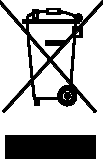
Correct disposal of this product
(Waste Electrical & Electronic Equipment)
(Applicable in the European Union and other European countries with separate
collection systems)
This marking shown on the product or its literature, indicates that it should not be
disposed with other household wastes at the end of its working life. To prevent
possible harm to the environment or human health from uncontrolled waste disposal,
please separate this from other types of wastes and recycle it responsibly to promote
the sustainable reuse of material resources.
Household users should contact either the retailer where they purchased this product,
or their local government office, for details of where and how they can take this item
for environmentally safe recycling.
Business users should contact their supplier and check the terms and conditions of
the purchase contract. This product should not be mixed with other commercial
wastes for disposal.

Correct disposal of batteries in this product
(Applicable in the European Union and other European countries with separate
battery return systems)
This marking on the battery, manual or packaging indicates that the batteries in this
product should not be disposed of with other household waste at the end of their
working life. Where marked, the chemical symbols Hg, Cd or Pb indicate that the
battery contains mercury, cadmium or lead above the reference levels in EC
Directive 2006/66. If batteries are not properly disposed of, these substances can
cause harm to human health or the environment.
To protect natural resources and to promote material reuse, please separate
batteries from other types of waste and recycle them through your local, free battery
return system.
introducing your mobile
phone
In this section, learn about your mobile phone’s layout, keys, display, and icons
Unpack
Check your product box for the following items:
Mobile phone
Battery
Travel adapter (charger)
User manual
The items supplied with your phone may vary depending on the software and
accessories available in your region or offered by your service provider. You can
obtain additional accessories from your local Samsung dealer.
Phone layout
The front of your phone includes the following keys and features:
The rear of your phone includes the following keys and features:
Keys
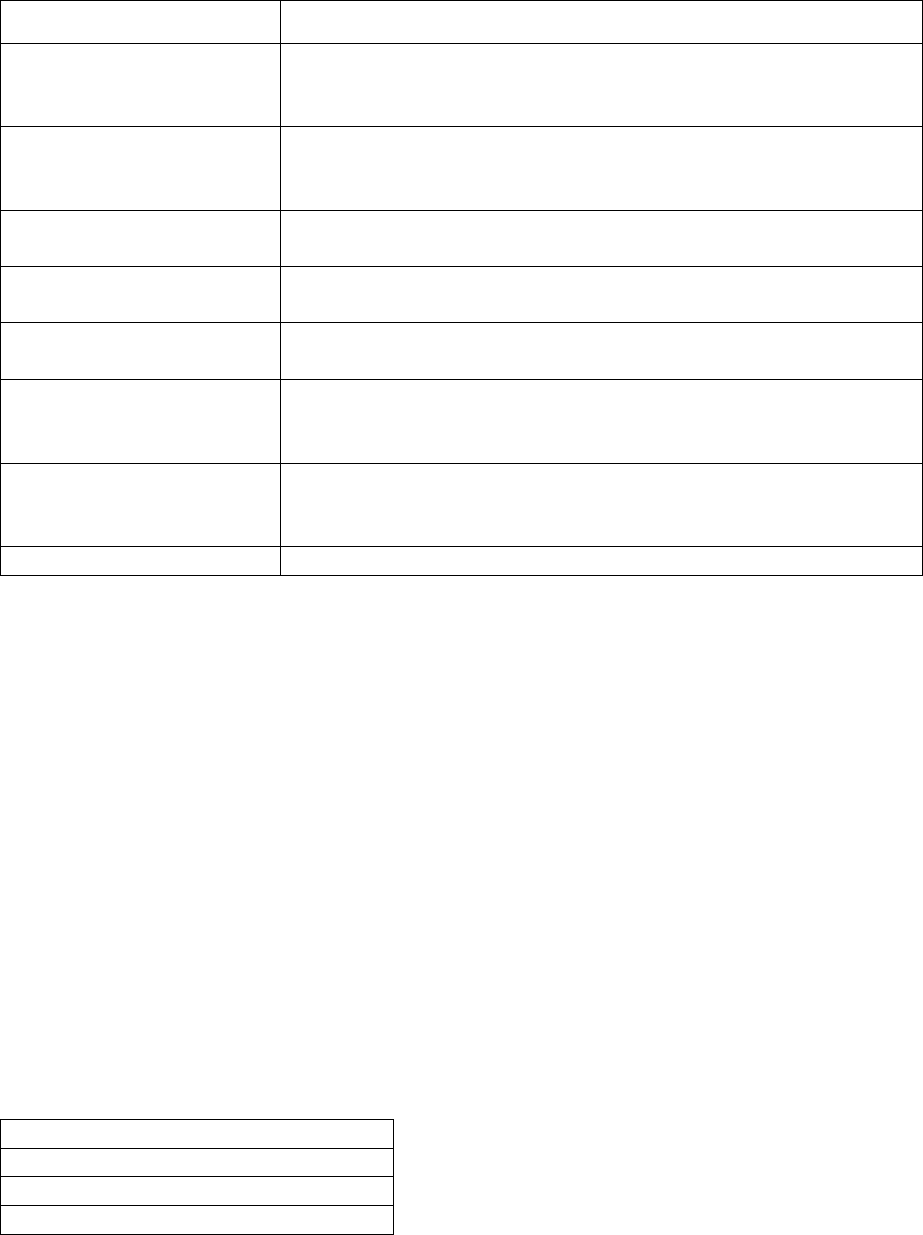
Key Function
Softkeys
Perform actions indicated at the bottom of the display; In
Idle mode, press and hold the left softkey to access the
simplified menus
4-way navigation
In Idle mode, access user-defined menus
(left/right/up/down); In Menu mode, scroll through menu
options
Confirm
In Idle mode, launch the web browser; In Menu mode,
select the highlighted menu option or confirm an input
Dial
Make or answer a call; In Idle mode, retrieve recently
dialled, missed, or received numbers
Power/ Menu exit
Turn the phone on and off (press and hold); End a call; In
Menu mode, cancel input and return to Idle mode
Alpha-numeric
Enter numbers, letters and special characters; In Idle
mode, press and hold [1] to access voice mails and [0] to
enter an international call prefix
Special function
Enter special characters or perform special functions; In
Idle mode, press and hold [#] for the silent profile; Press
and hold [*] to enter a pause between numbers
Volume
Adjust the phone’s volume
Display
Your phone’s display consists of three areas:
Icon line
Displays various icons
Text and graphic area
Displays messages, instructions, and information you enter
Softkey line
Displays the current actions assigned to each softkey
Icons
Learn about the icons that appear on your display.
Definition
Signal strength
Call in progress
New text message
assembling and preparing

your mobile phone
Get started by assembling and setting up
your mobile phone for its first use.
Install the SIM card and battery
When you subscribe to a cellular service, you will receive a Subscriber Identity
Module, or SIM card, with subscription details, such as your personal identification
number (PIN) and optional services.
To install the SIM card and battery,
1. Remove the battery cover. If the phone is on, press and hold [ ] to turn it
off.
2. Insert the SIM card. Place the SIM card in the phone with the gold-coloured
contacts facing down.
3. Insert the battery.
4. Replace the battery cover.
Charge the battery
Before using the phone for the first time, you must charge the battery.
1. Open the cover to the multifunction jack on the side of the phone.
2. Plug the small end of the travel adapter into the multifunction jack. Improperly
connecting the travel adapter can cause serious damage to the phone. Any
damages by misuse are not covered by the warranty.
3. Plug the large end of the travel adapter into a power outlet.
4. When the battery is fully charged (the [|||||] icon is no longer moving), unplug
the travel adapter from the power outlet.
5. Unplug the travel adapter from the phone.
6. Close the cover to the multifunction jack.
About the low battery indicator
When your battery is low, the phone will emit a warning tone and a low battery
message. The battery icon will also be empty and blinking. If the battery level
becomes too low, the phone will automatically power off. Recharge your battery to
continue using your phone.
using basic functions
Learn how to perform basic operations and use the main features of your mobile
phone.

Turn your phone on and off
To turn your phone on,
1. Slide open the phone.
2. Press and hold [ ].
3. Enter your PIN and press <OK> (if necessary).
4. When the setup wizard opens, customise your phone as desired by following
the screen.
To turn your phone off, repeat steps 1 and 2 above.
Switch to the offline profile
By switching to the offline profile, you can use your phone’s non-network services in
areas where wireless devices are prohibited, such as aeroplane and hospitals.
To switch to the offline profile, in Menu mode, select Settings Õ Phone profiles Õ
Offline.
Follow all posted warnings and directions from official personnel when in areas
where wireless devices are prohibited.
Access menus
To access your phone’s menus,
1. In Idle mode, press <Menu> to access Menu mode.
2. Use the navigation key to scroll to a menu or option.
3. Press [OK], <Select>, or <Save> to confirm the highlighted option.
4. Press <Back> to move up one level; Press [ ] to return to Idle mode.
Customise your phone
Get more from your phone by customising it to match your preferences.
Adjust the volume of the key tones
In Idle mode, press the Volume key up or down to adjust the key tone volume.
Switch to or from the silent profile
In Idle mode, press and hold [#] to silence or unsilence your phone.
Change your ringtone
1. In Menu mode, select Settings Õ Phone profiles .
2. Scroll to the profile you are using.
3. Press <Options> Õ Edit Õ Voice call ringtone.
4. Select a ringtone category Õ a ringtone.
5. Press <Options> Õ Select (if necessary).
6. Press <Save>.
To switch to another profile, select it from the list.
Create a phone profile
1. In Menu mode, select Settings Õ Phone profiles .
2. Press <Options> Õ Create.
3. Enter a name for the profile and press <Options> Õ Save.
4. Customise the sound settings as desired.
5. When you are finished, press <Save>.
6.
Select a wallpaper (Idle mode)
1. In Menu mode, select Settings Õ Display and light Õ Home screen.
2. Scroll left or right to Images.
3. Select Wallpaper.
4. Select an image category Õ an image.
5. Press <Select> or <Select> Õ <Set>.
6. Press <Save>.
Select a theme for the display
To select a theme,
1. In Menu mode, select Settings Õ Display and light Õ My theme.
2. Scroll to a theme and press <Select>.
To create and apply a theme,
1. In Menu mode, select Settings Õ Display and light Õ My theme.
2. Scroll to Create and press <Select>.
3. Customise the theme as desired by following the screen.
4. When you have finished, enter a name for the theme and press <Save>.
5. Press <Yes> to apply the theme.
Set menu shortcuts
1. In Menu mode, select Settings Õ Phone settings Õ Shortcuts.
2. Select a key to use as a shortcut.
3. Select a menu to assign to the shortcut key.
Use the simplified menus
To set up simplified menu items,
1. In Idle mode, press [OK].
2. Press <Options> Õ Customise menu.
3. Select your favourite menus.
4. Press <Options> Õ Open to select submenus (if necessary).
5. Press <Save>.
6. To access an item from the simplified menus,
7. In Idle mode, press [OK].
8. Scroll to the menu item you want and press [OK].
Lock your phone
1. In Menu mode, select Settings Õ Security Õ Phone lock Õ On.
2. Enter a new 4- to 8-digit password and press <OK>.
3. Enter the new password again and press <OK>.
Use basic call functions
Learn to make or answer calls and use basic call functions.
Make a call
1. In Idle mode, enter an area code and a phone number.
2. Press [ ] to dial the number
3. To end the call, press [ ].
Answer a call
1. When a call comes in, press [ ].
2. To end the call, press [ ].
Adjust the volume
To adjust the volume during a call, press the Volume key up or down.
Use the speakerphone feature
1. During a call, press [OK] Õ <Yes> to activate the speaker.
2. To switch back to the earpiece, press [OK] again.
In noisy environment, you may have difficulty hearing the calls while using the
speakerphone feature. For better performance, use the normal phone mode.
Use the headset
By plugging the supplied headset into the multifunction jack, you can make and
answer calls:
To redial the last call, press and hold the headset button.
To answer a call, press the headset button.
To end a call, press the headset button.
Send and view messages
Learn to send or view text (SMS), multimedia (MMS), or email messages.
Send a text or multimedia message
1. In Menu mode, select Messages Õ Create new message Õ Message.
2. Enter a destination number or an email address and scroll down.
3. Enter your message text. p. 错误!未定义书签。
For sending as a text message, skip to step 5.
For attaching multimedia, continue with step 4.
4. Press <Options> Õ Add multimedia and add an item.
5. Press [OK] Õ Send to send the message.
Send an email
1. In Menu mode, select Messages Õ Create new message Õ Email.
2. Enter an email address and scroll down.
3. Enter a subject and scroll down.
4. Enter your email text.
5. Press <Options> Õ Attach multimedia and attach a file (if necessary).
6. Press [OK] Õ Send to send the message.
Enter text
When entering text, you can change the text input mode:
Press and hold [*] to switch between T9 and ABC modes. Depending on your
country, you may be able to access an input mode for your specific language.
Press [*] to change case or switch to Number mode.
Press and hold [#] to switch to Symbol mode.
Enter text in one of the following modes:

Mode Function
ABC
Press the appropriate alphanumeric key until the character you
want appears on the display.
T9
1. Press the appropriate alphanumeric keys to enter an entire
word.
2. When the word displays correctly, press [0] to insert a
space. If the correct word does not display, select an
alternate word from the list that appears.
Number
Press the appropriate alphanumeric key to enter a number.
Symbol
Press the appropriate alphanumeric key to select a symbol.
View text or multimedia messages
1. In Menu mode, select Messages Õ My messages Õ Inbox.
2. Select a text or multimedia message.
View an email
1. In Menu mode, select Messages Õ My messages Õ Email inbox.
2. Select Check new email.
3. Select an email or a header.
4. If you selected a header, press <Options> Õ Retrieve to view the body of the
email.
Add and find contacts
Learn the basics of using the phonebook feature.
Add a new contact
1. In Idle mode, enter a phone number and press <Options>.
2. Select Save Õ a memory location (phone or SIM) Õ New.
3. Select a number type (if necessary).
4. Enter contact information.
5. Press <Options> Õ Save to add the contact to memory.
Find a contact
1. In Menu mode, select Phonebook.
2. Enter the first few letters of the name you want to find.
3. Select the contact’s name from the search list.
Once you have found a contact, you can:
call the contact by pressing []
edit the contact information by pressing [OK]
troubleshooting
If you are having trouble with your mobile phone, try these troubleshooting
procedures before contacting a service professional.
While using your phone, the following messages may appear:
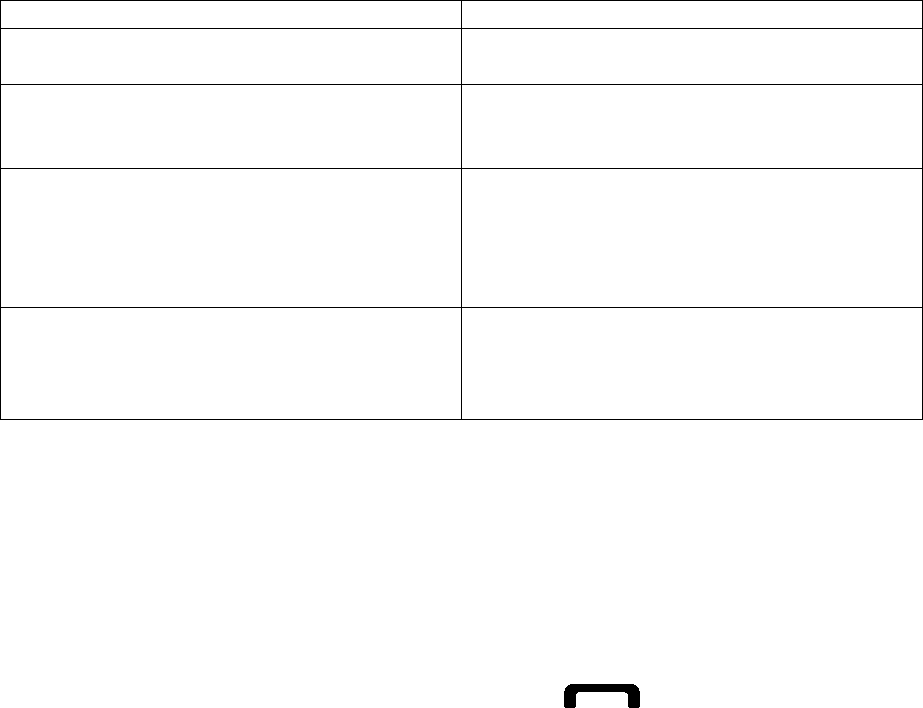
Message
Try this to solve the problem:
Please insert SIM card
Ensure that the SIM card is installed
correctly.
Phone lock
When the phone lock feature is enabled,
you must enter the password you set for
the phone.
Enter PIN
When using the phone for the first time
or when the PIN requirement is enabled,
you must enter the PIN supplied with the
SIM card. You can disable this feature
by using the PIN lock menu.
Enter PUK
Your SIM card is blocked, usually as a
result of entering your PIN incorrectly
several times. You must enter the PUK
supplied by your service provider.
Your phone displays “Network unavailable” or “Network error.”
When you are in areas with weak signals or poor reception, you may lose
reception. Move to another area and try again.
You cannot access some options without a subscription. Contact your service
provider for more details.
You enter a number, but the call is not dialled.
Ensure that you have pressed the Dial key: [ ].
Ensure that you have accessed the right cellular network.
Ensure that you have not set call barring for the phone number.
Another caller cannot reach you.
Ensure that your phone is turned on.
Ensure that you have accessed the right cellular network.
Ensure that you have not set call barring for the phone number.
Another caller cannot hear you speaking.
Ensure that you are not covering the built-in microphone.
Ensure that the microphone is close to your mouth.
If using a headset, ensure that it is properly connected.
The phone beeps and the battery icon flashes.
Your battery is low. Recharge or replace the battery to continue using the phone.
The audio quality of the call is poor.
Ensure that you are not blocking the phone’s internal antenna.
When you are in areas with weak signals or poor reception, you may lose
reception. Move to another area and try again.
You select a contact to call, but the call is not dialled.
Ensure that the correct number is stored in the contact list.
Re-enter and save the number, if necessary.
The battery does not charge properly or sometimes the phone turns itself off.
The battery terminals may be dirty. Wipe both gold-coloured contacts with a
clean, soft cloth and try charging the battery again.
If the battery will no longer charge completely, dispose of the old battery
properly and replace it with a new battery.
Your phone is hot to the touch.
When you use several applications at once, your phone requires more power and
may heat up.
This is normal and should not affect your phone’s lifespan or performance.
Some of the contents in this manual may differ from your phone depending on
the software of the phone or your service provider.
Printed in Korea
Code No.:GH68-XXXXXA