Samsung Electronics Co SF5800P FAX/LASTER PRINTER User Manual 00 Cover
Samsung Electronics Co Ltd FAX/LASTER PRINTER 00 Cover
USER MANUAL
Xerox Work
Centre 385
User’s Guide

Trademarks
¥ Windows is a trademark of Microsoft Corporation.
¥ IBM is a trademark of International Business Machines.
¥ Centronics is a trademark of Centronics Data Computer.
¥ Other names and trademarks mentioned in this manual are trademarks of their respective
holders.
Thank you for purchasing Xerox Work Centre
385—the multifunction office product for your home
office and the whole family. We are sure that Xerox
Work Centre 385 will provide all you need in one
machine.
Xerox Work Centre 385 combines these office
machines:
- Plain paper fax
- Copier
- Laser printer
- Scanner
Enjoy your new Xerox Work Centre 385!

Important Safety Information
Always be careful when using the machine. To reduce the risk of fire, electrical shock,
and other injuries, keep these safety considerations in mind when installing, using,
and maintaining your machine:
¥ Stability. Place the machine on a secure, stable surface. The machine can cause serious
damage if it falls.
¥ Power Supply. Provide the correct power to the machine, as listed on its back. If you
arenÕt sure of the type of power thatÕs supplied to your home or office, call your electric
company.
¥ Grounding. If the plug has three prongs, it must be plugged into a grounded (three
hole) outlet. Grounded plugs and outlets are designed for your safetyÐdonÕt try to make
a three-prong plug fit into a two-prong outlet by modifying the plug or outlet in any
way. If you canÕt insert the plug into your wall outlet easily, the outlet should be
inspected by a qualified electrician.
¥ Overload. DonÕt plug too many electrical devices into a wall outlet or extension cord.
An overloaded outlet is a fire and electrical shock hazard.
¥ Cleaning. Before cleaning the machine, unplug it from both the power outlet and the
telephone jack. Clean exposed parts with a soft cloth slightly dampened with water.
DonÕt use aerosol cleaners.
¥ Thunderstorms. Unplug electrical appliances during thunderstorms. Avoid using any
telephone (except a cordless model) during a thunderstorm, since thereÕs a small chance
you could get an electrical shock from lightning.
¥ Gas Leaks. Never use any telephone close to a gas leak. If you think gas is leaking, call
the gas company immediately, but use a telephone far away from the leak area.
A small electrical spark in the telephone could cause a fire.
vi
1.2 Set Up Your Machine
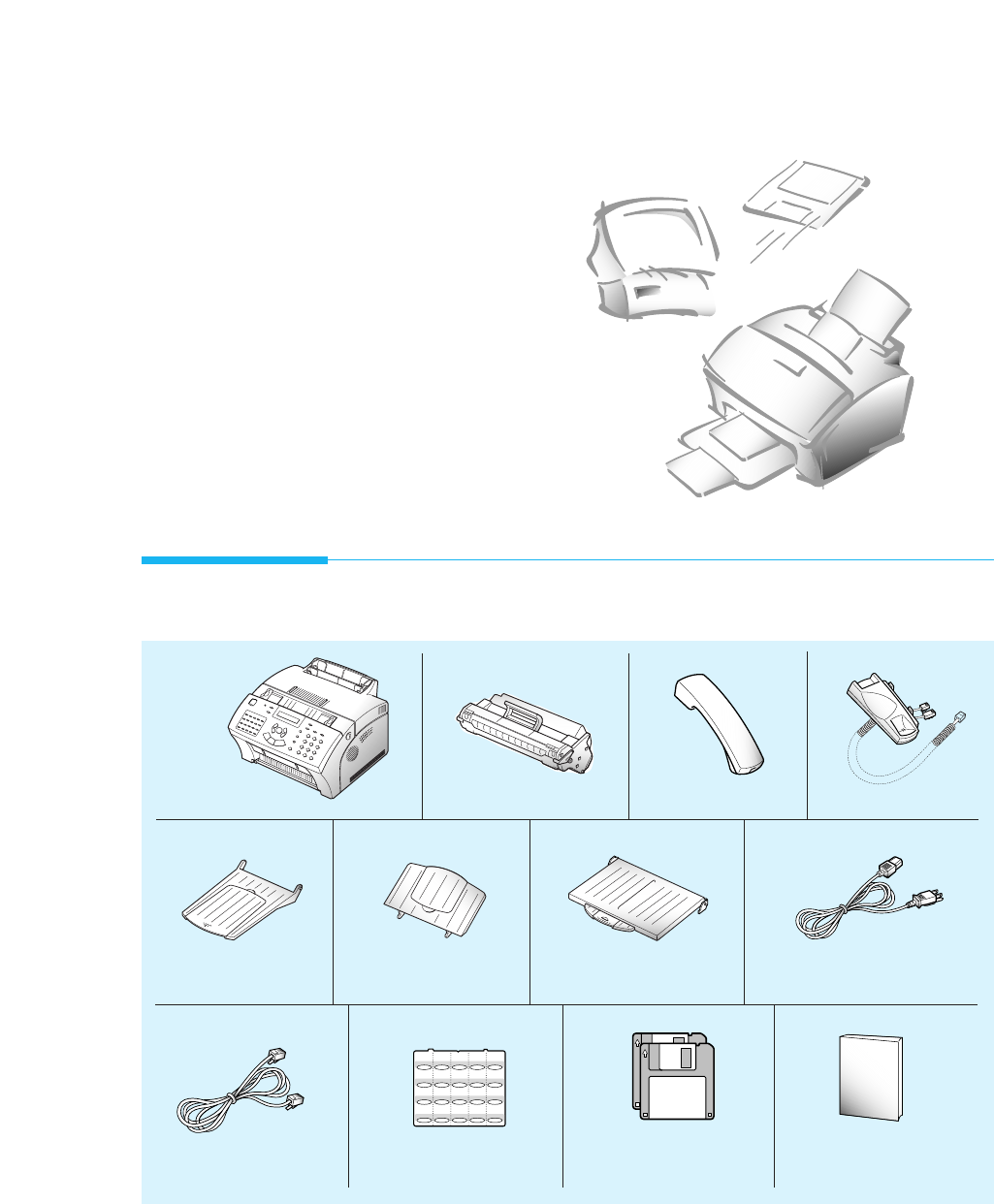
Machine Toner Cartridge Handset *1
Document Tray
Printer driver
installation diskettes User’s Guide
Document exit trayPrinter Exit Tray
01 02 03 04 05
06 07 08 09 10
11 12 13 14 15
16 17 18 19 20
AC power cord *2
Telephone line cord *2One-touch Label
Unpacking
Set Up Your
Machine
*1 These parts may not be provided depending on country.
*2 These parts may look different. The appearance varies according to country.
Handset cradle *1
1.3
Set Up Your Machine
Control Locations and Functions
Take a moment to familiarize yourself with the main components and
understand their functions.
Front View
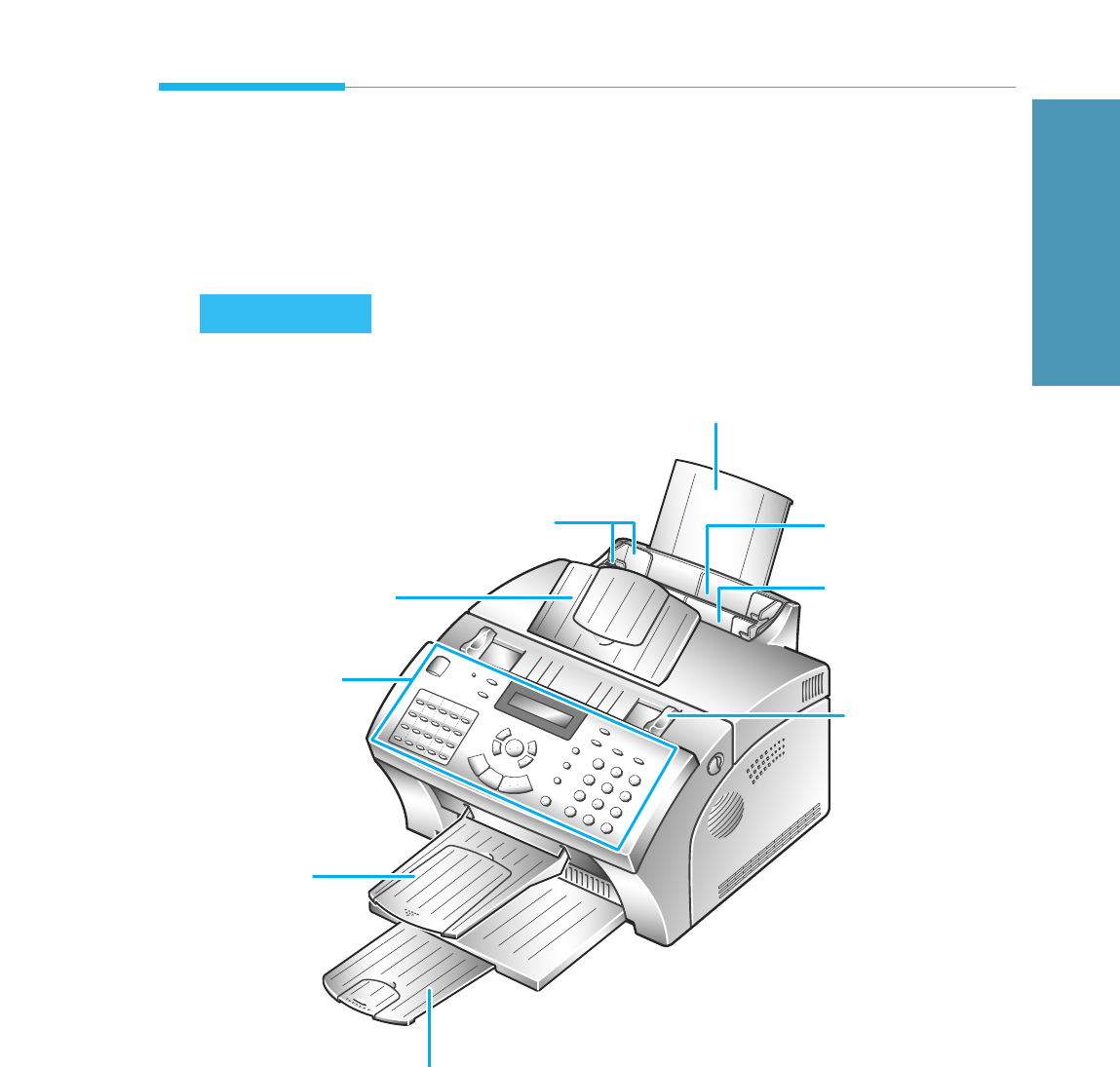
Paper Extension
Automatic Paper Feeder
Manual Paper Feeder
Document Guides
Paper Guides
Document Tray
Control Panel
Document
Exit Tray
Print Exit Tray
1Getting Started
Note: Your machine may look slightly different than the illustration.
1.4 Set Up Your Machine
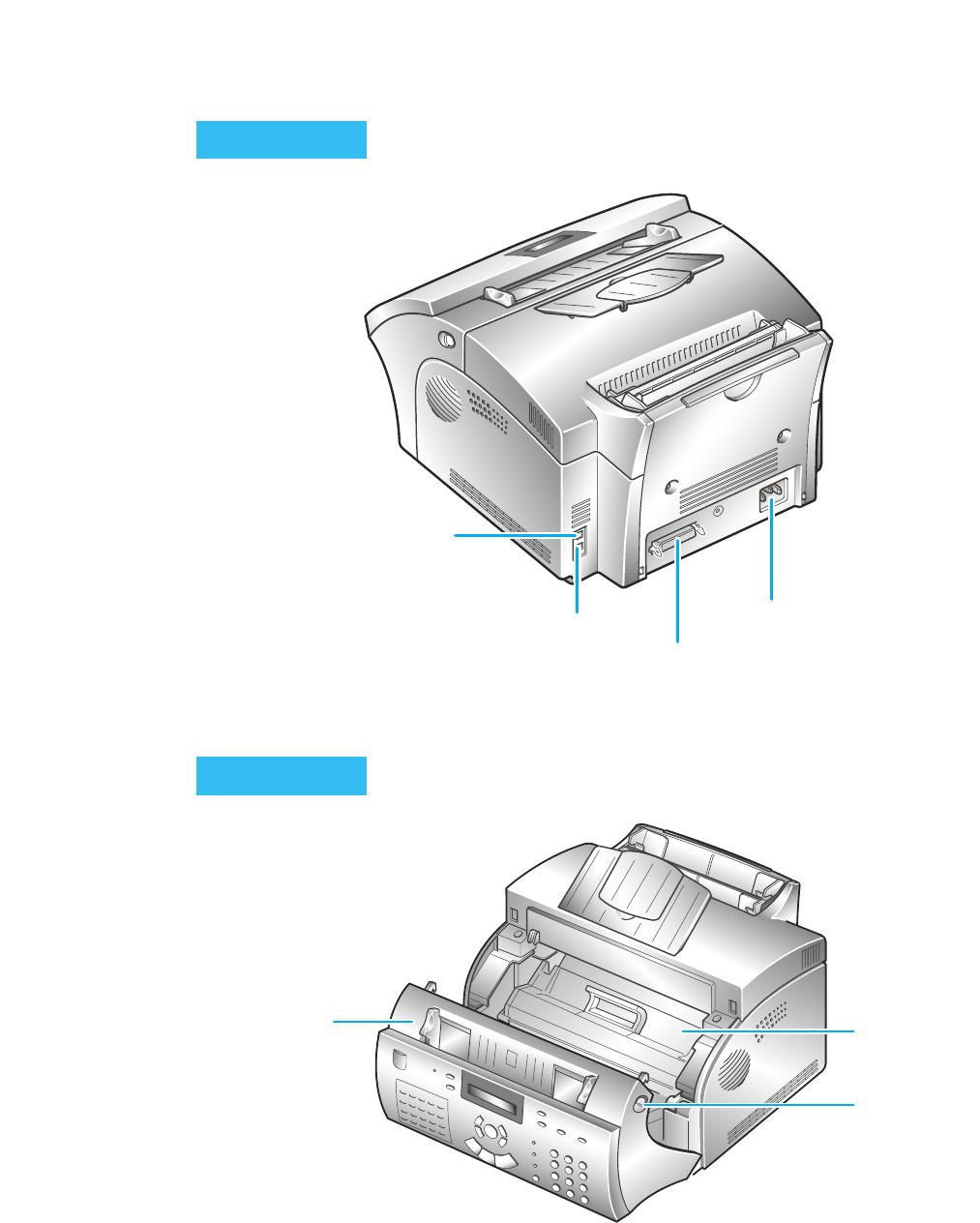
Printer Connector
Power Cord Connector
TEL LINE Jack
EXT. LINE Jack
Image
Cover
Cover Release
Buttons (right and
left)
Rear View
Inside
1.5
Set Up Your Machine
1Getting Started
Choosing a Location
To help guarantee trouble-free operation of your machine, place it on a flat,
stable surface near your workstation. Leave enough space to allow for easy
paper loading, paper out and opening the front cover.
Do not place your machine:
- In direct sunlight.
- Near heat sources or air conditioners.
- In dusty or dirty environments.
Setting Up Your Machine
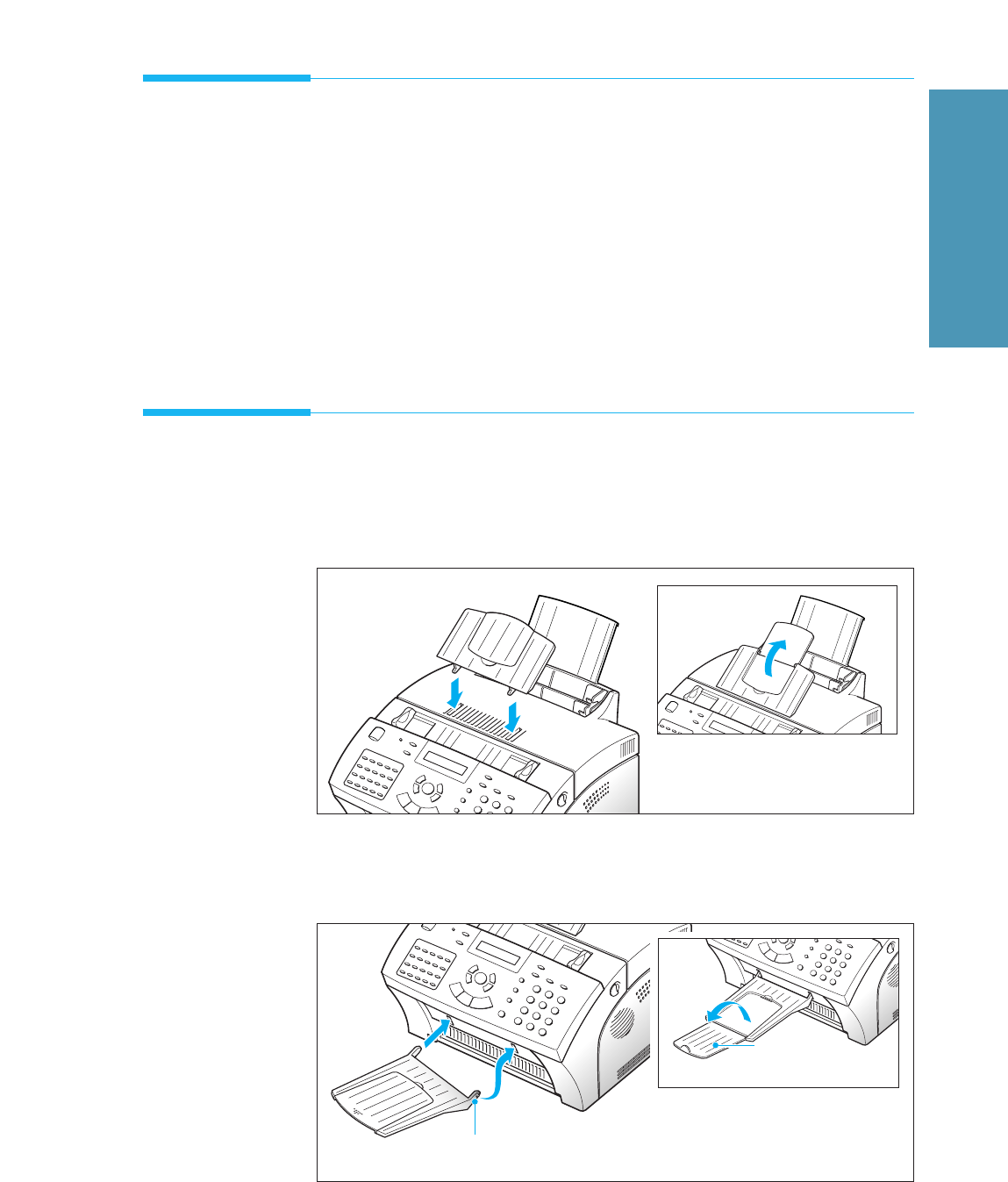
Document Tray
Insert two tabs on the tray into the slots as shown. Fold out the
extender on the tray, if necessary.
Document Exit Tray
Insert the two tabs on the document exit tray into the slots on the
front of your machine. Fold out the extender, if necessary.
Extender
Insert one end first, then the other end by pulling this
leg inward to make the tray easy to insert.
1.8 Set Up Your Machine
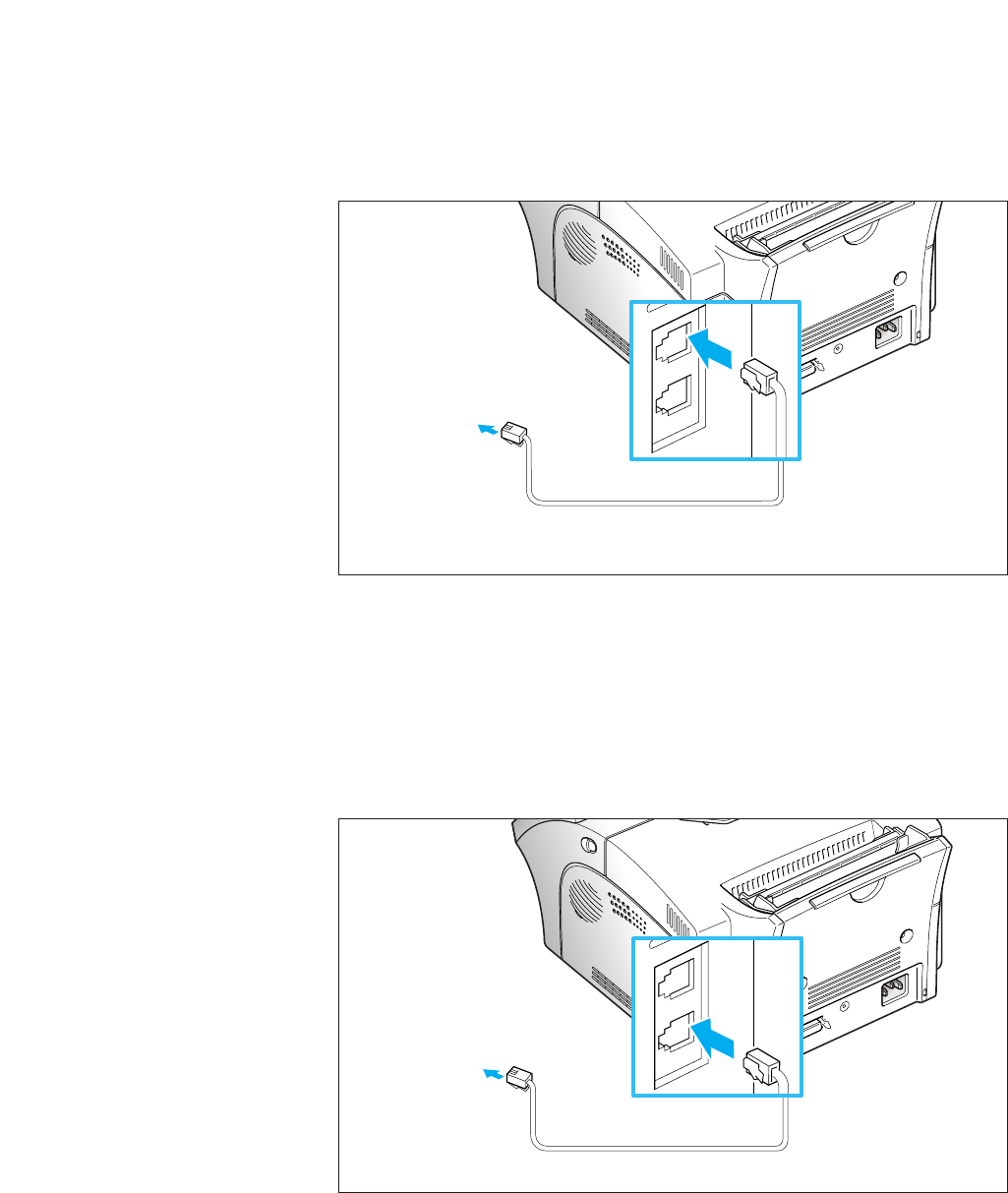
Telephone Line
Plug one end of the telephone line cord into the TEL LINE jack and the
other end into a standard phone wall jack.
TEL LINE
EXT. LINE
Extension Phone
If you want to use a regular phone or answering machine with your
Work Centre 385 machine, connect the phone into the EXT.LINE jack.
Plug the cord of your extension phone or answering machine into the
socket marked EXT.LINE on the back of the machine.
TEL LINE
EXT. LINE
To a standard
phone wall
jack
To a regular
phone
1.9
Set Up Your Machine
1Getting Started
Printer Cable
Your Xerox Work Centre 385 has a parallel interface port, which allows you
to use it with IBM PCs and compatible computers. You have to purchase a
Centronics parallel interface cable that supports bi-directional
communications (IEEE standard 1284). Ask your dealer for assistance if
you need help selecting the right cable.
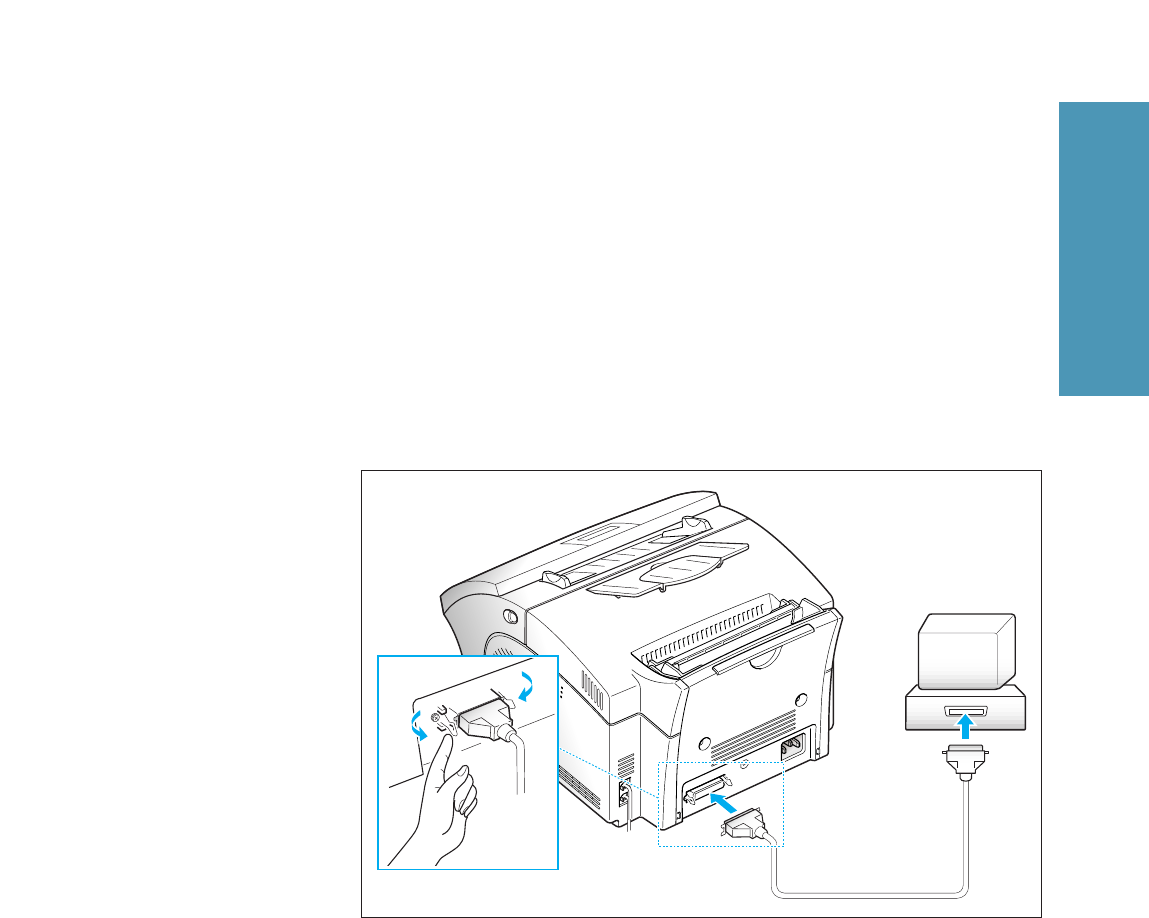
To connect the printer to the computer, follow the steps below:
1. Make sure that both the Xerox Work Centre 385 and the computer
are turned off.
2. Plug the cable into the connector on the back of the printer. Push
the metal clips down to fit inside the notches on the cable plug.
3. Connect the other end of the cable to the parallel interface port on
your computer. See your computer documentation if you need help.
1.10 Set Up Your Machine
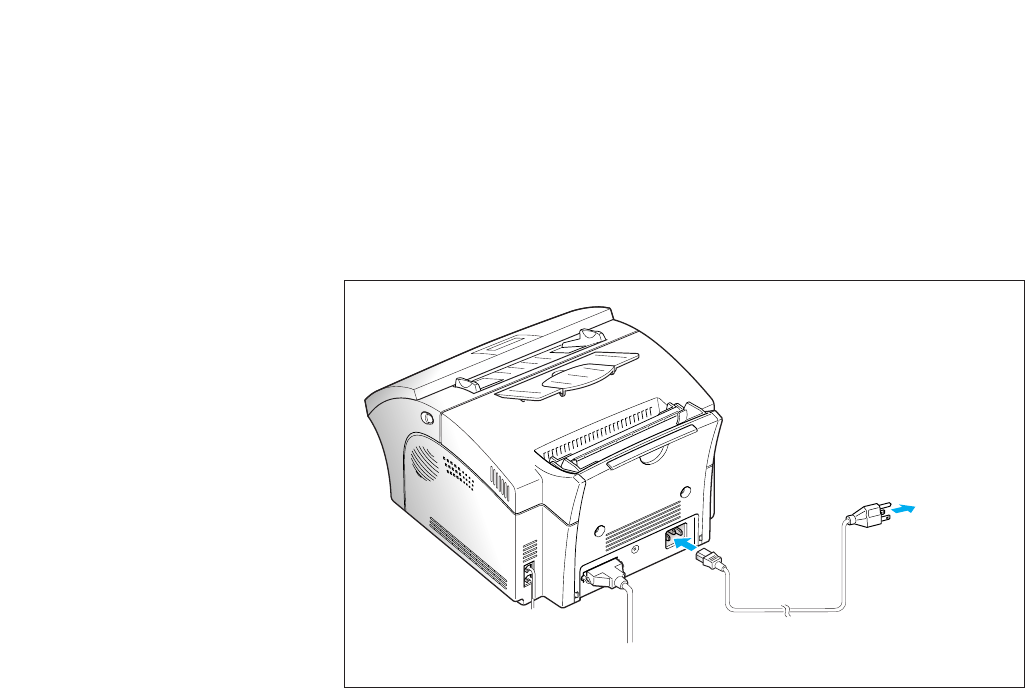
AC Power Cord
Plug one end of the cord into the back of the machine and the other
end into a standard AC power outlet.
The machine turns on. If there is no cartridge installed, or no paper, the
display shows ‘DOOR OPEN or NO TONER!!!’ or [NO PAPER].
If you want to turn it off, unplug the power cord.
To
AC
outlet
4.2 Appendix
FCC Information
The following information is applicable only to the machines installed in the United
States of America.
Label Identification
This equipment complies with Part 68 of the FCC rules. On the rear of this equipment is a
label that contains, among information, the FCC Registration Number and Ringer
Equivalence Number(REN) for this equipment. You may need to provide this information
for your telephone company.
Type of Service
This equipment is designed to be used on standard device telephone lines. Connection to
telephone company provided coin service(central office implemented systems) is
prohibited. Connection to party-line service is subject to state tariffs.
Telephone Company Procedure
The goal of the telephone company is to provide you with the best service it can. In order
to do this, it may occasionally be necessary for it to make changes in its equipment,
operation, or procedures. If these changes affect your service or the operation of the
equipment, the telephone company will give you notice, in writing, to allow you to make
any changes necessary to maintain uninterrupted service.
If you have any question about your telephone line, such as how many pieces of
equipment you can connect to it, the telephone company will provide this information
upon request.
In certain circumstances, it may be necessary for the telephone company to request
information from you concerning the equipment which you have connected to your
telephone line. Upon request of the telephone company, provide the FCC registration
number and the Ringer Equivalence Number(REN) which is connected to your line; both
of these items are listed on the equipment label and in the Service information chapter of
this guide. The sum of all of the RENs on your telephone line should be less than 5 in
order to assure proper service from the telephone company. In some cases, a sum of 5
may not be usable on a given line.
About Interference
This equipment has been tested and found to comply with the limits for a Class B digital
device, pursuant to Part 15 of the FCC Rules. These limits are designed to provide
reasonable protection against harmful interference in a residential installation. This
equipment generates, uses, and can radiate radio frequency energy and, if not installed
and used in accordance with the instructions, may cause harmful interference to radio
communications. However, there is no guarantee that interference will not occur in a
particular installation. If this equipment does cause harmful interference to radio or
television reception, which can be determined by turning the equipment off and on, the
user is encouraged to try to correct the interference by one or more the following
measures:
PLEASE CHECK!!
4.3
Appendix
Appendix
¥ Reorient or relocate the receiving antenna.
¥ Increase the separation between the equipment and the receiver.
¥ Connect the equipment into an outlet on a circuit different form that to which the
receiver is connected.
¥ Consult the dealer or an experienced radio/TV technician for help.
Fax Branding
The Telephone Consumer Protection Act of 1991 makes it unlawful for any person to use
a computer or other electronic device to send any message via a telephone fax machine
unless such message is clearly contained in a margin at the top or bottom of each
transmitted page or on the first page of the transmission, the date and time it is sent and
an identification of the business or other entity, or other individual sending the message
and the telephone number of the sending machine or such business, other entity, or
individual.
In order to program this information into your fax machine, you should complete the
following steps on page 1.16.
If a Problem Arises
If any of your telephone equipment is not operating properly, you should immediately
remove it from your telephone line, as it may cause harm to the telephone network.
If the telephone company notes a problem, it may temporarily discontinue service.
When practical, the telephone company will notify you in advance of the disconnection. If
advance notice is not feasible, you will be notified as soon as possible. When you are
notified, you will be given the opportunity to correct the problem and informed of your
right to file a complaint with the FCC.
Hearing Aid Compatible
The telephone handset attached to this equipment is hearing aid compatible.
Lightning
Your unit has built-in protection circuits, which meet or exceed FCC requirements, to
reduce the risk of damage from surges in telephone line currents. However, lightning
striking near or on these lines can cause an excessive surge of voltage that can damage
the phone.
Lightning damage is uncommon. However, if you are concerned about it or live in an
area with frequent and/or severe electrical storms, we suggest that you unplug your
electronic equipment during the storms.
PLEASE CHECK!!
4.4 Appendix
IC Information
The following information is applicable only to facsimile machines installed in Canada.
Notices
The Industry Canada(IC) label identifies certified equipment. This certification means that
the equipment meets certain telecommunications network protective, operational and
safety requirements. The Department does not guarantee the equipment will operate to
the userÕs satisfaction.
Before installing this equipment, users should ensure that it is permissible to be
connected to the facilities of the local telecommunications company. The equipment must
also be installed using an acceptable method of connection. In some cases, the companyÕs
inside wiring associated with a single line individual service may be extended by means
of a certified connector assembly(telephone extension cord). The customer should be
aware that compliance with the above conditions may not prevent degradation of service
in some situations.
Repairs to certified equipment should be made by an authorized Canadian maintenance
facility designated by the supplier. Any repairs or alterations made by the user to this
equipment, or equipment malfunctions may give the telecommunications company cause
to request the user to disconnect the equipment.
Users should ensure for their own protection that the electrical ground connections of the
power utility, telephone lines and internal metallic water pipe system, if present, are
connected together. This precaution may be particularly important in rural areas.
Caution:
Users should not attempt to make such connections themselves, but should contact the
appropriate electric inspection authority, or electrician, as appropriate.
The Load Number(LN) assigned to each terminal device denotes the percentage of the
total load to be connected to a telephone loop which is used by the device, to prevent
overloading. The termination on a loop may consist of any combination of devices subject
only to the requirement that the total of the load numbers of all the devices does not
exceed 100s. The load Number of this unit is 5.
Class B
This Digital Apparatus does not exceed the Class B limits for Radio Frequency noise from
Digital Apparatus set out in the Radio Interference Regulations of the Industry Canada.
PLEASE CHECK!!
4.5
Appendix
Appendix
Renseignements du Industrie Canada
Les renseignements suivants ne sÕappliquent quÕaux tŽlŽcopieurs installŽs au Canada.
Avis
LÕŽtiquette du Industrie Canada(IC)est une marque dÕidentification dÕappareil certifiŽ.
Cette certification signifie que l'appareil rŽpond ˆ certains crit•res de sŽcuritŽ et
dÕutilisation. Cependant, le Minist•re ne peut pas garantir que l'appareil rencontrera les
exigences de son utilisateur.
Avant de faire lÕinstallation de lÕappareil, lÕutilisateur devrait sÕassurerÕquÕil paurra
brancher son appareil en utilisant les services gŽnŽralement offerts par la compagnie
tŽlŽphonique de sa rŽgion. Il faut sÕassurer de brancher convenablement lÕappareil. Dans
certains cas, le syst•me interne de communication dÕune compagnie poss•de aussi une
ligne individuelle quÕil vous sera possible dÕutiliser avec un dispositif dÕassemblage
certifiŽ (rallonge de telephone).
LÕutilisateur devrait se renseigner afin de faire une bonne utilisation de son appareil et de
ne pas nuire au syst•me interne de communication de la compagnie.
Toute rŽparation dÕun appareil certifiŽ devrait etre effectuŽe dans un centre dÕentretien
approuvŽ par le fournisseur. Toute rŽparation ou modification apportŽe par lÕutilisateur ˆ
son appareil ou tout probl•me de fonctionnement purrait forcer votre compagnie
tŽlŽphonique ˆ dŽbrancher votre appareil.
LÕutilisateur devrait sÕassurer que les raccordements de mise ˆ la terre de lÕalimentation,
des lignes tŽlŽphoniques et du syst•me de tuyauterie hydraulique, si prŽsent, soient tous
reliŽs ensembles. Cette mesure de sŽcuritŽ est importante surtout en milieu rural.
Mise en garde
LÕutilsateur ne devrait pas essayer de faire de tels raccordements seul, il devrait faire
appel ˆ du personnel qualifiŽ ou ˆ un Žlectricien selon le cas.
Le numŽro de raccordement(LN) se rapporte ˆ chaque appareil et dŽtermine le nombre
maximum de raccordements afin dÕŽviter une surcharge. La boucle peut comprendre
plusieurs choix diffŽrents tant et aussi longtemps que le total des numŽros de
raccordement ne dŽpasse pas la somme de 100.
Le numŽro de raccordement de votre appareil es 5.
Classe B
Cet appareil nÕexcede pas les limites de la classe B pour les Žmissions de parasites radio ˆ
partir dÕun appareil numŽrique Žtablies par le r•glement sur les parasites radio du
Industrie Canada.
LÕindice de charge(IC) assignŽ a chaque dispositif terminal indique, pour Žviter toute
surchange, le pourcentage de la charge totale qui peut etre raccordŽe a un circuit
tŽlŽphonique bouclŽ utilisŽ par ce dispositif. La terminaison du circuit bouclŽ peut •tre
constituŽe de nÕimport quelle combinaison de dispositifs, pourvu que la somme des
indices de charge de lÕensemble des dispositifs ne dŽpasse pas 100. LÕindice de cet produit
est.
PLEASE CHECK!!

CDRH Regulation
This fax is certified as a ÒClass 1Ó laser product under the U.S. department of
health and human services(DHHS) radiation performance standard according
to the radiation control for health and safety act of 1968.
This product complies with FDA radiation performance standard, 21 CFR
subchapter J.
Since radiation emitted inside this fax is completely confined within protective
housings and external covers, the laser beam cannot escape during any phase
of normal user operation.
Laser Statement (Laserturvallisuus)
NEVER OPERATE AND SERVICE THE FAX WITH THE PROTECTIVE COVER
REMOVED FROM LASER/SCANNER ASSEMBLY. THE REFLECTED BEAM,
ALTHOUGH INVISIBLE, CAN DAMAGE YOUR EYES.
Class 1 laser product
Produit laser de la premi•re classe
Laser beam wavelength: 780nm
Longueur dÕondes de rayon laser: 780nm
Laser beam power: 0.18mW +/- 0.009mW
Puissance de rayon laser: 0.18mW +/- 0.009mW
4.6 Appendix
WARNING
PLEASE CHECK!!
4.7
Appendix
Appendix
Ozone Emission
This fax has no corona wires and therefore does not generate ozone gas.
UL Standards for Ozone
A standard for ozone emissions has been established by Underwriters Laboratory
(UL). This fax meets this standard when shipped from the factory to our customers.
Power Saver
This fax contains advanced energy conservation technology that reduces power
consumption when it is not in active use.
When the fax does not receive data for an extended period of time, power
consumption is automatically lowered.
For potentially faster printing of the first page, you can turn the power save feature
off in system data.
The energy star emblem does not represent EPA endorsement of any product of
service.
Safety Information
Safety and Regulatory Listing for this fax
Product Safety
USA UL 1950 (UL listing)
CANADA CSA C22.2-950 (CSA Certification)
Laser Safety
USA 21 CFR. Chapter 1, Subchapter J (CDRH Certified)
PLEASE CHECK!!

4.8 Appendix
Specifications
Applicable line Public Switched Telephone Network (PSTN) or behind
PABX
Compatibility CCITT Group 3, ECM
Data coding MH/MR/MMR
Modem speed 14400/12000/9600/7200/4800/2400 bps
Transmission speed Approx. 6 sec. (V.17 ECM: 14.4 kbps)
Effective scanning width 8.3 inches (210 mm)
Effective printing width 8.2 inches (202 mm)
Scanning method Sheet-fed Contact Image Sensor (CIS)
Memory 2 MByte
Halftone 64 levels
Printing speed 8 PPM
Automatic document feeder 30 pages
LCD 16 characters 5 2 lines
Dimension (H 5 W 5 D) 9.8 5 14.3 5 17.5 inches (249 5 363 5 446 mm)
Weight Approx. 33 lbs (fully equipped)
Approx. 22 lbs (cartridge and recording paper excluded)
Power requirements 120 VAC, 60 Hz
Power consumption (Standby) 13 W (Maximum) 490 W
Environmental conditions Temperature : 50¡F to 86¡F (10¡C to 30¡C)
Humidity : 30% to 80% RH
Auto dialer One-touch dialing (registration for 20 numbers)
Speed dialing (registration for 80 numbers)
Document size Ð Width 5.8 to 8.5 inches (148 to 216 mm)
Ð Length Single page : 5 to 14 inches (128 to 356 mm)
Multi pages : 5 to 11.7 inches (128 to 297 mm)
Recording paper size Letter : 8.5 5 11 inches (216 5 279 mm)
- for cassette A4 : 8.3 5 11.6 inches (210 5 297 mm)
Legal* : 8.5 5 14 inches (216 5 356 mm)
*available in an optional second cassette
Ð for manual feeder min. : 4 5 5.9 inches (100 5 149 mm)
(weight : 60 to 130 g/m2)
Recording paper capacity 150 sheets (weight: 60 to 90 g/m2,
thickness: 0.08 to 0.12 mm)
Printing method Laser Scanning Unit
Scanning density Ð Horizontal 300 dpi
Ð Vertical Standard: 3.85 lines/mm (98 Lpi)
Fine : 7.7 lines/mm (196 Lpi)
Super fine : 11.8 lines/mm (300 Lpi)
Super fine : 15.4 lines/mm (392 Lpi)
PLEASE CHECK!!