Samsung Electronics Co SWDE2210C Cellular/PCS GSM Phone User Manual E2210C FCC English manual Approval 090330a indd
Samsung Electronics Co Ltd Cellular/PCS GSM Phone E2210C FCC English manual Approval 090330a indd
Users Manual
E2210C
Mobile Phone
user manual
Some of the contents in this manual may differ
from your phone depending on the software of
the phone or your service provider.
www.samsungmobile.com
Health and safety information Comply with the following precautions to avoid dangerous or illegal situations
and ensure peak performance of your mobile phone.
Exposure to Radio Frequency (RF)
Signals
Certication Information (SAR)
Your wireless phone is a radio transmitter and receiver. It is designed and
manufactured not to xceed the exposure limits for radio frequency (RF)
energy set by the Federal Communications ommission (FCC) of the
U.S. government. These FCC exposure limits are derived from the
recommendations of two expert organizations, the ational Counsel
on Radiation Protection and Measurement (NCRP) and the Institute
of Electrical and Electronics Engineers (IEEE). In both cases, the
recommendations were developed by scientic and engineering experts
drawn from industry, government, and academia after extensive reviews of
the scientic literature related to the biological effects of RF energy.
The exposure limit set by the FCC for wireless mobile phones employs a
unit of measurement known as the Specic Absorption Rate (SAR). The
SAR is a measure of the rate of absorption of RF energy by the human
body expressed in units of watts per kilogram (W/kg). The FCC requires
wireless phones to comply with a safety limit of 1.6 watts per kilogram (1.6
W/kg). The FCC exposure limit incorporates a substantial margin of safety
to give additional protection to the public and to account for any variations
in measurements.
SAR tests are conducted using standard operating positions accepted by
the FCC with the phone ransmitting at its highest certied power level in all
tested frequency bands. Although the SAR is determined at the highest
certied power level, the actual SAR level of the phone while operating can
be well below the maximum value. This is because the phone is designed
to operate at multiple power levels so as to use only the power required to
reach the network. In general, the closer you are to a wireless base station
antenna, the lower the power output.
Before a new model phone is available for sale to the public, it must be
tested and certied to the FCC that it does not exceed the exposure limit
Consumer Information on Wireless
Phones
The U.S. Food and Drug Administration (FDA) has published a series
of Questions and Answers for consumers relating to radio frequency
(RF) exposure from wireless phones. The FDA publication includes the
following information:
What kinds of phones are the subject of this update?
The term wireless phone refers here to hand-held wireless phones
with built-in antennas, often called “cell,” “mobile,” or “PCS” phones.
These types of wireless phones can expose the user to measurable
radio frequency energy (RF) because of the short distance between the
phone and the user’s head. These RF exposures are limited by Federal
Communications Commission safety guidelines that were developed with
the advice of FDA and other federal health and safety agencies. When the
phone is located at greater distances from the user, the exposure to RF is
drastically lower because a person’s RF exposure decreases rapidly with
increasing distance from the source. The so-called “cordless phones,”
which have a base unit connected to the telephone wiring in a house,
typically operate at far lower power levels, and thus produce RF
exposures well within the FCC’s compliance limits.
Do wireless phones pose a health
hazard?
The available scientific evidence does not show that
any health problems are associated with using
wireless
phones. There is no proof, however, that
wireless phones
are absolutely safe. Wireless
phones emit low levels of
radio frequency energy
(RF) in the microwave range
while being used. They
also emit very low levels of RF
when in the stand-by
mode. Whereas high levels of RF
can produce
health effects (by heating tissue), exposure
to low
level RF that does not produce heating effects
causes no known adverse health effects. Many
studies
of low level RF exposures have not found
any biological
effects. Some studies have suggested
that some
biological effects may occur, but such
ndings have not
been conrmed by additional
research. In some cases,
other researchers have
had difculty in reproducing those
studies, or in
determining the reasons for inconsistent
results.
What is FDA’s role concerning the
safety of wireless
phones?
Under the law, FDA does not review the safety of
radiation-emitting consumer products such as
wireless
phones before they can be sold, as it does
with new
drugs or medical devices. However, the
agency has
authority to take action if wireless
phones are shown
to emit radio frequency energy
(RF) at a level that is
hazardous to the user. In such a
case, FDA could require
the manufacturers of
wireless phones to notify users
of the health hazard
and to repair, replace or recall the
phones so that the
hazard no longer exists.
Although the existing scientific data do not justify
FDA regulatory actions, FDA has urged the wireless
phone industry to take a number of steps, including
the
following:
“Support needed research into possible biological
effects of RF of the type emitted by wireless phones;
“Design wireless phones in a way that minimizes any
RF exposure to the user that is not necessary for
device
function; and
“Cooperate in providing users of wireless
phones
with the best possible information on possible
effects of wireless phone use on human health.
FDA belongs to an interagency working group of the
federal agencies that have responsibility for different
aspects of RF safety to ensure coordinated efforts at
the federal level. The following agencies belong to
this
working group:
“National Institute for Occupational Safety and
Health
“Environmental Protection Agency
“Federal Communications Commission
•
•
•
UL Certied Travel Adapter
The Travel Adaptor for this phone has met applicable UL safety
requirements. Please adhere to the following safety instructions per UL
guidelines.
FAILURE TO FOLLOW THE INSTRUCTIONS OUTLINED MAY LEAD
TO SERIOUS PERSONAL INJURY AND POSSIBLE PROPERTY
DAMAGEIMPORTANT SAFETY INSTRUCTIONS - SAVE THESE
INSTRUCTIONS.DANGER - TO REDUCE THE RISK OF FIRE OR
ELECTRIC SHOCK, CAREFULLY FOLLOW THESE INSTRUCTIONS.
FOR CONNECTION TO A SUPPLY NOT IN NORTHVAMERICA, USE AN
ATTACHMENT PLUG ADAPTOR OF THE PROPER CONFIGURATION
FOR THE POWER OUTLET. THIS POWER UNIT IS INTENDED TO
BE CORRECTLY ORIENTATED IN A VERTICAL OR HORIZONTAL OR
FLOOR MOUNT POSITION.
established by the FCC. Tests for each model phone are performed in
positions and locations (e.g. at the ear and worn on the body) as required
by the FCC.
For body worn operation, this model phone has been tested and meets
the FCC RF exposure guidelines whenused with a Samsung accessory
that contains no metal and that positions the handset a minimum of 1.5 cm
from the body.
Use of other accessories may not ensure compliance with FCC RF
exposure guidelines.
The FCC has granted an Equipment Authorization for this mobile phone
with all reported SAR levels evaluated as in compliance with the FCC RF
exposure guidelines. The maximum SAR values for this model phone as
reported to the FCC are:
GSM850
Head: 1.19 W/kg
Body-worn: 1.04 W/kg
GSM1900
Head: 0.926 W/kg
Body-worn: 0.687 W/kg
This site uses the phone FCC ID number, A3LSWDE2210C Sometimes
it may be necessary to remove the battery pack to nd the number. Once
you have the FCC ID number for a particular phone, follow the instructions
on the website and it should provide values for typical or maximum SAR
for a particular phone. Additional product specic SAR information can also
be obtained at www.fcc.gov/ cgb/sar.
•
•
•
•
What are the results of the research
done already?
The research done thus far has produced conflicting
results, and many studies have suffered from flaws
in
their research methods. Animal experiments
investigating
the effects of radio frequency energy
(RF) exposures
characteristic of wireless phones
have yielded conicting
results that often cannot be
repeated in other laboratories.
A few animal studies,
however, have suggested that low
levels of RF could
accelerate the development of cancer
in laboratory
animals. However, many of the studies that
showed
increased tumor development used animals
that had
been genetically engineered or treated with
cancercausing
chemicals so as to be pre-disposed to
develop cancer in absence of RF exposure. Other
studies
exposed the animals to RF for up to 22
hours per day.
These conditions are not similar to the
conditions under
which people use wireless phones,
so we don’t know with
certainty what the results of
such studies mean for human
health.
Three large epidemiology studies have been
published since December 2000. Between them,
the
studies investigated any possible association
between the
use of wireless phones and primary
brain cancer, glioma,
meningioma, or acoustic
neuroma, tumors of the brain or
salivary gland,
leukemia, or other cancers. None of the
studies
demonstrated the existence of any harmful health
effects from wireless phones RF exposures.
However,
none of the studies can answer questions
about long-
term exposures, since the average
period of phone use
in these studies was around
three years.
What research is needed to decide
whether RF
exposure from wireless
phones poses a health risk?
A combination of laboratory studies and
epidemiological
studies of people actually using
wireless phones would
provide some of the data that
are needed. Lifetime
animal exposure studies could
be completed in a few
years. However, very large
numbers of animals would be
needed to provide
reliable proof of a cancer promoting
effect if one
exists. Epidemiological studies can provide
data that
is directly applicable to human populations, but
ten
or more years’ follow-up may be needed to provide
answers about some health effects, such as cancer.
This
is because the interval between the time of
exposure to
a cancer-causing agent and the time
tumors develop - if
they do - may be many, many
years. The interpretation
of epidemiological studies is
hampered by difculties in
measuring actual RF
exposure during day-to-day use of
wireless phones.
Many factors affect this measurement,
such as the
angle at which the phone is held, or which
model of
phone is used.
What steps can I take to reduce my
exposure to radio
frequency energy
from my wireless phone?
If there is a risk from these products - and at this
point
we do not know that there is - it is probably
very small.
But if you are concerned about avoiding
even potential
risks, you can take a few simple steps
to minimize your
exposure to radio frequency energy
(RF). Since time is
a key factor in how much
exposure a person receives,
reducing the amount of
time spent using a wireless
phone will reduce RF
exposure.
“If you must conduct extended conversations by
wireless phone every day, you could place more
distance between your body and the source of
the
RF, since the exposure level drops off
dramatically
with distance. For example, you
could use a headset
and carry the wireless phone
away from your body or
use a wireless phone
connected to a remote antenna.
Again, the scientific data do not demonstrate
that
wireless phones are harmful. But if you
are concerned
about the RF exposure from
these products, you can use
measures like
those described above to reduce your RF
exposure from wireless phone use.
•
“Occupational Safety and Health Administration
“National Telecommunications and Information
Administration
The National Institutes of Health participates in some
interagency working group activities, as well.
FDA shares
regulatory responsibilities for wireless
phones with the
Federal Communications
Commission (FCC). All phones
that are sold in the
United States must comply with FCC
safety
guidelines that limit RF exposure. FCC relies on
FDA
and other health agencies for safety questions
about
wireless phones.
FCC also regulates the base
stations that the
wireless phone networks rely upon.
While these
base stations operate at higher power than
do the
wireless phones themselves, the RF exposures
that
people get from these base stations are typically
thousands of times lower than those they can get
from wireless phones. Base stations are thus not the
primary subject of the safety questions discussed in
this
document.
•
•
What is FDA doing to nd out more
about the possible
health effects of
wireless phone RF?
FDA is working with the U.S. National Toxicology
Program and with groups of investigators around the
world to ensure that high priority animal studies are
conducted to address important questions about the
effects of exposure to radio frequency energy (RF).
FDA has been a leading participant in the World
Health
Organization international Electromagnetic
Fields (EMF)
Project since its inception in 1996. An
inuential result of
this work has been the
development of a detailed agenda
of research
needs that has driven the establishment of
new
research programs around the world. The Project
has also helped develop a series of public
information
documents on EMF issues.
FDA and Cellular Telecommunications & Internet
Association (CTIA) have a formal Cooperative
Research
and Development Agreement (CRADA) to
do research
on wireless phone safety. FDA provides
the scientific
oversight, obtaining input from experts
in government,
industry, and academic
organizations. CTIA-funded
research is conducted
through contracts to independent
investigators. The
initial research will include both
laboratory studies
and studies of wireless phone users.
The CRADA
will also include a broad assessment of
additional
research needs in the context of the latest
research
developments around the world.
What about children using wireless
phones?
The scientic evidence does not show a danger to
users
of wireless phones, including children and
teenagers.
If you want to take steps to lower
exposure to radio
frequency energy (RF), the
measures described above
would apply to children
and teenagers using wireless
phones. Reducing the
time of wireless phone use and
increasing the
distance between the user and the RF
source will
reduce RF exposure.
Some groups sponsored by other national
governments
have advised that children be
discouraged from using
wireless phones at all. For
example, the government in
the United Kingdom
distributed leaets containing such a
recommendation in December 2000. They noted
that no
evidence exists that using a wireless phone
causes brain
tumors or other ill effects. Their
recommendation to limit
wireless phone use by
children was strictly precautionary;
it was not based
on scientific evidence that any health
hazard exists.
Do hands-free kits for wireless phones
reduce risks
from exposure to RF
emissions?
Since there are no known risks from exposure to RF
emissions from wireless phones, there is no reason
to believe that hands-free kits reduce risks. Handsfree
kits can be used with wireless phones for
convenience
and comfort. These systems reduce
the absorption of
RF energy in the head because the
phone, which is the
source of the RF emissions, will
not be placed against
the head. On the other hand,
if the phone is mounted
against the waist or other
part of the body during use,
then that part of the
body will absorb more RF energy.
Wireless phones
marketed in the U.S. are required to
meet safety
requirements regardless of whether they
are used
against the head or against the body. Either
conguration should result in compliance with the
safety
limit.
What about wireless phone
interference with medical
equipment?
Radio frequency energy (RF) from wireless phones
can
interact with some electronic devices. For this
reason,
FDA helped develop a detailed test method
to measure
electromagnetic interference (EMI) of
implanted cardiac
pacemakers and debrillators
from wireless telephones.
This test method is now
part of a standard sponsored
by the Association for
the Advancement of Medical
instrumentation (AAMI).
The final draft, a joint effort by FDA, medical device
manufacturers, and many other groups, was
completed
in late 2000. This standard will allow
manufacturers to
ensure that cardiac pacemakers
and defibrillators are
safe from wireless phone EMI.
FDA has tested wireless
phones and helped
develop a voluntary standard
sponsored by the
Institute of Electrical and Electronic
Engineers (IEEE).
This standard specifies test methods and
performance
requirements for hearing aids and
wireless phones
so that no interference occurs
when a person uses a
compatible phone and a
compatible hearing aid at the
same time. This
standard was approved by the IEEE in
2000.
FDA continues to monitor the use of wireless phones
for
possible interactions with other medical devices.
Should
harmful interference be found to occur, FDA
will conduct
testing to assess the interference and
work to resolve the
problem.
Do wireless phone accessories that
claim to shield the
head from RF
radiation work?
Since there are no known risks from exposure to RF
emissions from wireless phones, there is no reason
to
believe that accessories that claim to shield the
head
from those emissions reduce risks. Some
products that
claim to shield the user from RF
absorption use special
phone cases, while others
involve nothing more than a
metallic accessory
attached to the phone. Studies have
shown that
these products generally do not work as
advertised.
Unlike “hand-free” kits, these so-called “shields” may
interfere with proper operation of the phone. The
phone
may be forced to boost its power to
compensate,
leading to an increase in RF
absorption. In February
2002, the Federal trade
Commission (FTC) charged
two companies that sold
devices that claimed to protect
wireless phone users
from radiation with making false
and unsubstantiated
claims. According to FTC, these
defendants lacked
a reasonable basis to substantiate
their claim.
“The wireless industry reminds you to
use your phone
safely when driving.”
For more information, please call 1-888-901-SAFE,
or
visit our web-site www.wow-com.com
Provided by the Cellular Telecommunications &
Internet
Association
5. Do not take notes or look up phone
numbers while
driving. Jotting down a “to
do” list or ipping through
your address
book takes attention away from your
primary responsibility, driving safely.
6. Dial sensibly and assess the trafc; if
possible, place
calls when you are not
moving or before pulling
into traffic. Try
to plan calls when your car will be
stationary. If you need to make a call
while moving,
dial only a few numbers,
check the road and your
mirrors, then
continue.
7. Do not engage in stressful or emotional
conversations
that may be distracting.
Make people you are talking
with aware
you are driving and suspend
conversations
that have the potential to
divert your attention from
the road.
8. Use your wireless phone to call for help.
Dial 9-1-1
or other local emergency
number in the case of re,
trafc accident
or medical emergencies. Remember,
it is
a free call on your wireless phone!
9. Use your wireless phone to help others in
emergencies. If you see an auto accident,
crime in
progress or other serious
emergency where lives are
in danger, call
9-1-1 or other local emergency number,
as you would want others to do for you.
10.Call roadside assistance or a special nonemergency
wireless assistance number
when necessary. If you
see a brokendown
vehicle posing no serious hazard,
a
broken trafc signal, a minor trafc
accident where
no one appears injured,
or a vehicle you know to
be stolen, call
roadside assistance or other special
nonemergency number.
Additional information on the safety of RF exposures
from various sources can be obtained from the
following
organizations:
FCC RF Safety Program:
http://www.fcc.gov/oet/
rfsafety/
Environmental Protection Agency (EPA):
http://www.
epa.gov/radiation/
Occupational Safety and Health
Administration’s (OSHA):
http://www.osha.gov/SLTC/
radiofrequencyradiation/index.html
National institute for Occupational Safety
and Health
(NIOSH):http://www.cdc.gov/niosh/emfpg.html
World health Organization (WHO):
http://www.who.
int/peh-emf/
International Commission on Non-
Ionizing Radiation
Protection:
http://www.icnirp.de
National Radiation Protection Board (UK):
http://www.
nrpb.org.uk
Updated 4/3/2002: US food and Drug
Administration
http://www.fda.gov/cellphones
•
•
•
•
•
•
•
•
•
•
•
Operating Environment
Remember to follow any special regulations in force
in
any area and always switch your phone off
whenever it is
forbidden to use it, or when it may
cause interference or
danger. When connecting the
phone or any accessory to
another device, read itsvuser’s guide for detailed safety
instructions. Do not
connect incompatible products.
As with other mobile radio transmitting equipment,
users are advised that for the satisfactory operation
of the equipment and for the safety of personnel, it is
recommended that the equipment should only be
used
in the normal operating position (held to your
ear with the
antenna pointing over your shoulder).
Using Your Phone Near Other
Electronic Devices
Most modern electronic equipment is shielded from
radio frequency (RF) signals. However, certain
electronic
equipment may not be shielded against
the RF signals
from your wireless phone. Consult the
manufacturer to
discuss alternatives.
Pacemakers
Pacemaker manufacturers recommend that a
minimum
distance of 15 cm (6 inches) be
maintained between
a wireless phone and a
pacemaker to avoid potential
interference with the
pacemaker.
These recommendations are consistent with the
independent research and recommendations of
Wireless
Technology Research.
Persons with pacemakers:
should always keep the phone more than
15 cm
(6
inches) from their pacemaker when
the phone is
switched on.
should not carry the phone in a breast
pocket.
should use the ear opposite thevpacemaker to
minimize potential
interference.
If you have any reason to suspect that interference is
taking place, switch your phone off immediately.
•
•
•
Potentially Explosive Environments
Switch your phone off when in any area with a
potentially
explosive atmosphere and obey all signs
and instructions.
Sparks in such areas could cause
an explosion or fire
resulting in bodily injury or even
death.
Users are advised to switch the phone off while at a
refueling point (service station). Users are reminded
of the need to observe restrictions on the use of
radio
equipment in fuel depots (fuel storage and
distribution
areas), chemical plants or where blasting
operations are
in progress.
Areas with a potentially explosive atmosphere are
often
but not always clearly marked. They include
below
deck on boats, chemical transfer or storage
facilities,
vehicles using liqueed petroleum gas
(such as propane
or butane), areas where the air
contains chemicals or
particles, such as grain, dust
or metal powders, and any
other area where you
would normally be advised to turn
off your vehicle
engine.
Other Medical Devices
If you use any other personal medical devices,
consult
the manufacturer of your device to determine
if it is
adequately shielded from external RF energy.
Your physician may be able to assist you in obtaining
this
information. Switch your phone off in health care
facilities
when any regulations posted in these areas
instruct you
to do so. Hospitals or health care
facilities may be using
equipment that could be
sensitive to external RF energy.
Vehicles
RF signals may affect improperly installed or
inadequately
shielded electronic systems in motor
vehicles. Check
with the manufacturer or its
representative regarding your
vehicle. You should
also consult the manufacturer of any
equipment that
has been added to your vehicle.
Posted Facilities
Switch your phone off in any facility where posted
notices
require you to do so.
Road Safety
Your wireless phone gives you the powerful ability to
communicate by voice, almost anywhere, anytime.
But an important responsibility accompanies the
benets
of wireless phones, one that every user
must uphold.
When driving a car, driving is your rst responsibility.
When using your wireless phone behind the
wheel
of a car, practice good common sense and
remember the following tips:
1. Get to know your wireless phone and its
features,
such as speed dial and redial. If
available, these
features help you to place
your call without taking
your attention off
the road.
2. When available, use a hands-free device.
If possible,
add an additional layer of
convenience and safety to
your wireless
phone with one of the many hands free
accessories available today.
3. Position your wireless phone within easy
reach. Be
able to access your wireless
phone without removing
your eyes from
the road. If you get an incoming call at
an
inconvenient time, let your voice mail
answer it for you.
4. Let the person you are speaking with
know you are
driving; if necessary,
suspend the call in heavy trafc
or
hazardous weather conditions. Rain,
sleet, snow, ice
and even heavy trafc
can be hazardous.

Emergency Calls
This phone, like any wireless phone, operates using
radio signals, wireless and landline networks as well
as
user programmed functions, which cannot
guarantee
connection in all conditions. Therefore,
you should
never rely solely on any wireless phone
for essential
communications (medical emergencies,
for example).
Remember, to make or receive any calls the phone
must
be switched on and in a service area with
adequate
signal strength. Emergency calls may not
be possible
on all wireless phone networks or when
certain network
services and/or phone features are
in use. Check with
local service providers
To make an emergency call:
1. If the phone is not on, switch it on.
2. Key in the emergency number for your
present
location (for example, 911 or
other ofcial emergency
number).
Emergency numbers vary by location.
3. Press .
If certain features are in use (call barring, for
example),
you may first need to deactivate those
features before
you can make an emergency call.
Consult this document and your local cellular service
provider.
When making an emergency call, remember to give
all
the necessary information as accurately as
possible.
Remember that your phone may be the
only means of
communication at the scene of an
accident; do not cut off
the call until given
permission to do so.
Restricting Children’s access to your
Phone
Your phone is not a toy. Children should not be
allowed
to play with it because they could hurt
themselves and
others, damage the phone or make
calls that increase
your phone bill.
The phone may cause TV or radio interference if
used
in close proximity to receiving equipment. The
FCC can
require you to stop using the phone if such
interference
cannot be eliminated.
Vehicles using liqueed petroleum gas (such as
propane
or butane) must comply with the National
Fire Protection
Standard (NFPA-58). For a copy of
this standard, contact
the National Fire Protection
Association, One Battery
march Park, Quincy, MA
02269, Attn: Publication Sales
Division.
Cautions
Changes or modications made in the radio phone,
not
expressly approved by Samsung, will void the
user’s
authority to operate the equipment.
Only use approved batteries, antennas andchargers.
The use of any unauthorized accessories may be
dangerous and void the phone warranty if said
accessories cause damage or a defect to the
phone.
Although your phone is quite sturdy, it is a complex
piece
of equipment and can be broken. Avoid
dropping, hitting,
bending or sitting on it.
FCC Notice and Cautions
FCC Notice
This device complies with Part 15 of the FCC Rules.
Operation is subject to the following two conditions:
(1) this device may not cause harmful interference,
and
(2) this device must accept any interference
received,
including interference that may cause
undesired
operation.
This equipment has been tested and found to
comply
with the limits for a Class B digital device,
pursuant to
part 15 of the FCC Rules. These limits
are designed
to provide reasonable protection
against harmful
interference in a residential
installation.This equipment
generates, uses and can
radiate radio frequency energy
and,if not installed
and used in accordance with the
instructions, may
cause harmful interference to radio
communications.
However, there is no guarantee that
interference will
not occur in a particular installation. If this
equipment
does cause harmful interference to radio or
television
reception, which can be determined by turning
the
equipment off and on, the user is encouraged to try
to correct the interference by one or more of the
following
measures:
Reorient or relocate the receiving antenna.
Increase the separation between the equipment
and
receiver.
Connect the equipment into an outlet on a circuit
different from that to which the receiver is
connected.
Consult the dealer or an experienced radio/TV
technician for help
•
•
•
•
Availability of Various Features/
Ring
Tones
Many services and features are network
dependent
and may require additional
subscription and/or usage
charges. Not all
features are available for purchase
or use in
all areas. Downloadable Ring Tones may be
available at an additional cost. Other
conditions and
restrictions may apply. See
your service provider for
additional
information.
Battery Standby and Talk Time
Standby and talk times will vary depending
on phone
usage patterns and conditions.
Battery power consumption depends on
factors such
as network configuration, signal
strength, operating
temperature, features
selected, frequency of calls, and
voice, data,
and other application usage patterns.
Maintaining Your Phone’s Peak
Performance
For the best care of your phone, only
authorized
personnel should service your
phone and accessories.
Faulty service may
void the warranty.
There are several simple guidelines to
operating
your phone properly and
maintaining safe,
satisfactory service.
Hold the phone with the antenna raised,
fully-
extended and over your shoulder.
Try not to hold, bend or twist the phone’s
antenna.
Don’t use the phone if the antenna is
damaged.
Speak directly into the phone’s receiver.
Avoid exposing your phone and
accessories to rain or liquid spills. If your
phone does
get wet, immediately turn the
power off and remove the
battery. If it is
inoperable, call Customer Care for
service.
•
•
•
•
•
Other Important Safety
Information
Only qualified personnel should service
the phone
or install the phone in a
vehicle. Faulty installation or
service may
be dangerous and may invalidate any
warranty applicable to the device.
Check regularly that all wireless phone
equipment in
your vehicle is mounted and
operating properly.
Do not store or carry flammable liquids,
gases or
explosive materials in the same
compartment as the
phone, its parts or
accessories.
For vehicles equipped with an air bag,
remember
that an air bag inates with
great force. Do not place
objects,
including both installed or portable
wireless
equipment in the area over the
air bag or in the air bag
deployment area.
If wireless equipment is improperly
installed and the air bag inates, serious
injury could
result.
Switch your phone off before boarding an
aircraft. The
use of wireless phone in
aircraft is illegal and may be
dangerous to
the aircraft’s operation.
Failure to observe these instructions may
lead to the
suspension or denial of
telephone services to the
offender, or
legal action, or both.
•
•
•
•
•
•
•
Battery Precautions
Never use any charger or battery that is
damaged in
any way.
Use the battery only for its intended
purpose.
If you use the phone near the network’s
base station, it uses less power; talk and
standby
time are greatly affected by the
signal strength on
the cellular network
and the parameters set by the
network
operator.
Battery charging time depends on the
remaining
battery charge and the type of
battery and charger
used. The battery
can be charged and discharged
hundreds
of times, but it will gradually wear out.
When
the operation time (talk time and
standby time) is
noticeably shorter than
normal, it is time to buy a new
battery.
If left unused, a fully charged battery will
discharge
itself over time.
Use only Samsung-approved batteries
and recharge
your battery only with
Samsung-approved chargers.
When a
charger is not in use, disconnect it from
the
power source. Do not leave the
battery connected to
a charger for more
than a week, since overcharging
may
shorten its life.
•
•
•
•
•
•
•
Extreme temperatures will affect the
charging capacity
of your battery: it may
require cooling or warming rst.
Do not leave the battery in hot or cold
places, such
as in a car in summer or
winter conditions, as you will
reduce the
capacity and lifetime of the battery.
Always
try to keep the battery at room
temperature. A phone
with a hot or cold
battery may temporarily not work,
even
when the battery is fully charged. Li-ion
batteries
are particularly affected by
temperatures below 0 °C
(32 °F).
Do not short-circuit the battery.
Accidental short-
circuiting can occur
when a metallic object (coin,
clip or pen)
causes a direct connection between the
+
and - terminals of the battery (metal
strips on the
battery), for example when
you carry a spare battery
in a pocket or
bag. Short-circuiting the terminals may
damage the battery or the object causing
the short-
circuiting.
Dispose of used batteries in accordance
with local
regulations. In some areas, the
disposal of batteries
in household or
business trash may be prohibited. For
safe disposal options for Li-Ion batteries,
contact your
nearest Samsung authorized
service center. Always
recycle. Do not
dispose of batteries in a re.
•
•
•
•
Do not put the phone in or on heating
devices, such
as a microwave oven, a
stove or a radiator. The
phone may
explode when overheated.
When the phone or battery gets wet, the
label
indicating water damage inside the
phone changes
color. In this case, phone
repairs are no longer
guaranteed by the
manufacturer’s warranty, even if
the
warranty for your phone has not expired.
If your phone has a flash or light, do not
use it too
close to the eyes of people or
animals. This may
cause damage to their
eyes.
Use only the supplied or an approved
replacement
antenna. Unauthorized
antennas or modified
accessories may
damage the phone and violate
regulations
governing radio devices.
If the phone, battery, charger or any
accessory is
not working properly, take it
to your nearest qualied
service facility.
The personnel there will assist you,
and if necessary, arrange for service.
•
•
•
•
•
Care and Maintenance
Your phone is a product of superior design
and
craftsmanship and should be treated
with care. The
suggestions below will help
you fulfill any warranty
obligations and allow
you to enjoy this product for many
years.
Keep the phone and all its parts and
accessories out
of the reach of small
children.
Keep the phone dry. Precipitation,
humidity and
liquids contain minerals that
will corrode electronic
circuits.
Do not use the phone with a wet hand.
Doing so
may cause an electric shock to
you or damage to the
phone.
Do not use or store the phone in dusty,
dirty areas, as
its moving parts may be
damaged.
Do not store the phone in hot areas. High
temperatures can shorten the life of
electronic
devices, damage batteries, and
warp or melt certain
plastics.
Do not store the phone in cold areas.
When the
phone warms up to its normal
operating temperature,
moisture can
form inside the phone, which may
damage the phone’s electronic circuit
boards.
Do not drop, knock or shake the phone.
Rough
handling can break internal circuit
boards.
Do not use harsh chemicals, cleaning
solvents or
strong detergents to clean the
dampened in a mild
soap-and-water
solution.
Do not paint the phone. Paint can clog the
device’s
moving parts and prevent proper
operation.
•
•
•
•
•
•
•
•
•
Product Performance
Getting the Most Out of Your Signal
Reception
The quality of each call you make or receive
depends
on the signal strength in your area.
Your phone informs
you of the current signal
strength by displaying a number
of bars next
to the signal strength icon. The more bars
displayed, the stronger the signal.
If you’re inside a building, being near a
window may give
you better reception.
Understanding the Power Save Feature
If your phone is unable to nd a signal after
15 minutes
of searching, a Power Save
feature is automatically
activated. If your
phone is active, it periodically rechecks
service availability or you can check it
yourself by
pressing any key.
Anytime the Power Save feature is activated,
a message
displays on the screen. When a
signal is found, your
phone returns to
standby mode.
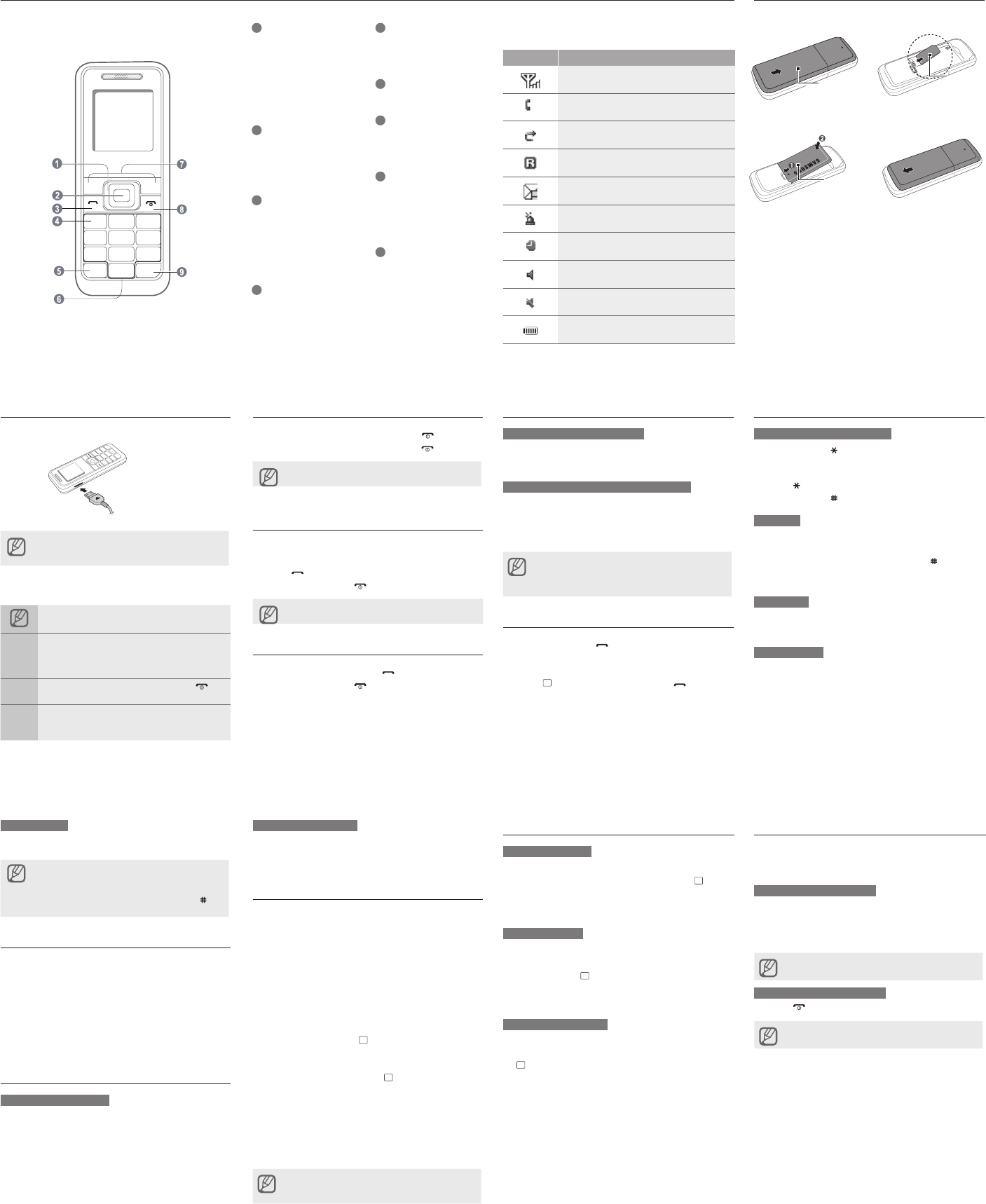
Phone layout
Charge the battery
1. Plug the supplied travel adapter.
2. When charging is nished, unplug the travel adapter.
Do not remove the battery from the phone before
unplugging the travel adapter rst. Otherwise, the
phone may be damaged.
Instructional icons
Note: notes, usage tips, or additional information
→
Followed by: the order of options or menus you
must select to perform a step; for example: Press
<Menu> → Messages (represents Menu, followed
by Messages)
[ ] Square brackets: phone keys; for example: [ ]
(represents the Power/Menu exit key)
< >
Angled brackets: softkeys that control different
functions at each screen; for example: <OK>
(represents the OK softkey)
To AC power outletTo AC power outlet
Turn your phone on or off
1. To turn your phone on, press and hold [ ].
2. To turn your phone off, press and hold [ ].
If the battery has been removed, the scheduled alarm
may not sound.
Make a call
1. In Idle mode, enter an area code and a phone
number.
2. Press [ ] to dial the number.
3. To end the call, press [ ].
The volume through mono earphones is very low or
virtually inaudible. Use stereo earphones only.
Answer a call
1. When a call comes in, press [ ].
2. To end the call, press [ ].
Adjust the volume
To adjust the volume of the key
In Idle mode, press the navigation key up or down to
adjust the volume level.
To adjust the volume of voice during a call
While a call is in progress, press the navigation key up or
down to adjust the earpiece volume.
►
When you press and hold navigation key up, Torch Light is activated.
In Speakerphone mode, a noisy environment will make
it difcult to hear the person whom you are speaking
with. In a noisy environment, it is better to use the
normal phone mode for better audio performance.
Call a recently dialled number
1. In Idle mode, press [ ].
2. Scroll left or right to select a call type.
3. Scroll up or down to select a number or name.
4. Press [ ] to view details of the call or [ ] to dial
the number.
Enter text
To change the text input mode
Press and hold [ ] to switch to an input mode.
Depending on your region, you may be able to
access an input mode for your specic language.
Press [ ] to change case or switch to Number mode.
Press and hold [ ] to switch to Symbol mode.
T9 mode
1. Press the appropriate alphanumeric keys to enter an
entire word.
2. When the word displays correctly, press [ ] to insert
a space. If the correct word does not display, press
[0] to select an alternate word.
ABC mode
Press the appropriate alphanumeric key until the
character you want appears on the display.
Number mode
Press the appropriate alphanumeric key to enter a
number.
•
•
•
Install the SIM card and battery
1. Remove the battery cover and insert the SIM card.
2. Insert the battery and replace the battery cover.
Battery coverBattery cover
BatteryBattery
Symbol mode
Press the appropriate alphanumeric key to select a symbol.
To move the cursor, press the navigation key.
To delete characters one by one, press <Clear>. To
delete all of the characters, press and hold <Clear>.
To insert a space between characters, press [ ].
To enter punctuation marks, press [1].
•
•
•
•
Add a new contact
1. In Idle mode, enter a phone number and press
<Options>.
2. Select Create contact.
3. Select a number type (if necessary).
4. Enter contact information.
5. Press <Options> → Save to add the contact to
memory.
Send and view messages
To send a text message
1. In Idle mode, press <Menu> → Messages →
Create new message.
2. Enter a destination number.
3. Enter the message text.
4. Press <Options> → Send to send the message.
To view text messages
1. In Idle mode, press <Menu> → Messages → Inbox.
2. Select a text message.
Activate the mobile tracker
This feature helps track your phone when it is stolen
or when someone tries to use your phone using other
SIM card, the phone will automatically send the preset
tracking message to family or friends. This feature may
be unavailable due to certain features supported by your
service provider.
1. In Idle mode, press <Menu> → Settings → Security
→ Mobile tracker.
2. Enter your password and press <OK>.
3. Scroll left or right to On.
4. Scroll down and press [ ] to open the recipient list.
5. Press <Options> → Phonebook to open your
contact list.
6. Scroll to a contact and press [ ].
7. Select a number (if necessary).
8. When you are nished selecting contacts, press
<Options>→ Add to return to the recipient list.
9. Press <Options> → Save to save the recipients.
10. Scroll down and enter the sender's name.
11. Press <Save> → <Accept>.
The rst time you access the mobile tracker, you will be
asked to accept the end user agreement to activate the
mobile tracker.
Set and use alarms
To set a new alarm
1. In Idle mode, press <Menu> → Alarms.
2. Scroll to an empty alarm location and press [ ].
3. Set alarm details.
4. Press <Save>.
To stop an alarm
When the alarm sounds,
Press any key to stop an alarm without snooze.
Press <OK> or [ ] to stop an alarm with snooze, or
press <Snooze> or any key to silence the alarm for
the snooze period.
To deactivate an alarm
1. In Idle mode, press <Menu> → Alarms.
2. Scroll to the alarm you want to deactivate and press
[ ].
3. Scroll down (if necessary).
4. Scroll left or right to Off.
5. Press <Save>.
•
•
Activate the Torch Light function
This feature helps shine a Torch Light into the dark
space. This feature makes LCD screen to white for using
the LCD Backlight and Torch function.
To activate the Torch Light
In idle mode, press and hold navigation up key to be
cancelled from idle mode, activate Torch Light.
In Keypad lock status, press and hold navigation up key
to be cancelled from Keypad Lock, activate Torch Light.
LCD screen turns to white and highest brightness with
a torch icon or text.
To deactivate the Torch Light
Press [ ] or <Back> to deactivate the Torch Light.
Torch Light can be activated in lock or idle status only.
•
•
•
1
4-way navigation key
In ldle mode, adjust the volume
level (up/down) or user-dened
menus (left/right); In Menu
mode, scroll through menu
options
►
Active and deactive Torch
light function
2
Menu entry/Conrm key
In ldle mode, enter the Menu;
In Menu mode, select the
highlighted menu option or
conrm an input
3
Dial key
Make or answer a call; In Idle
mode, retrieve recently dialled,
missed, or received numbers;
Send an SOS message
►
Activate and send an SOS
message
4
Voice mail service key
In ldle mode, access voice
mails (press and hold)
5
Keypad lock key
In ldle mode, lock the keys
(press and hold)
6
Alphanumeric keys
7
Softkeys
Perform actions indicated at the
bottom of the display
8
Power/Menu exit key
Turn the phone on and off
(press and hold); End a call;
In Menu mode, cancel input
and return to Idle mode
9
Silent mode key
In ldle mode, activate or
deactivate Silent mode (press
and hold)
Your phone displays the following status indicators on the
top of the screen:
Icon Description
Signal strength
Call in progress
Call diverting activated
Roaming network
New message
SOS message feature activated
Alarm activated
Normal prole activated
Silent prole activated
Battery power level
SIM card