Samsung Rf197Acbp Users Manual
RF217ACBP to the manual 60087f76-6a68-402e-a25e-ee5685afed66
2015-01-23
: Samsung Samsung-Rf197Acbp-Users-Manual-282179 samsung-rf197acbp-users-manual-282179 samsung pdf
Open the PDF directly: View PDF  .
.
Page Count: 34
imagine the possibilities
Thank you for purchasing this Samsung product.
To receive more complete service,
please register your product at
www.samsung.com/register
RF195**
RF197**
RF215**
RF217**
English
Refrigerator
user manual
Free Standing Appliance
DA68-01845C.indb 1 2010.4.24 10:22:28 AM
2_ Features
For easy future reference, write the model
and serial number down. You will find
your model number and serial number on
the left side of the refrigerator.
Model #
Serial #
Features of your new Refrigerator
KEY FEATURES OF YOUR NEW REFRIGERATOR
Your Samsung Refrigerator comes equipped with various innovative storage and energy-efficient features.
Twin Cooling System
The Refrigerator and Freezer have separate evaporators. Due to this independent cooling system,
the Freezer and Refrigerator cool more efficiently.
Additionally, this separate air flow system prevents food odor of one compartment from seeping into
other compartments.
Bigger & Wider Space
The wide shelf area provides enough space for larger items.
The wide freezer drawer also provides enough space for 2~3 turkeys.
Secure Auto Close
The Secure Auto Close feature will automatically close a door that is slightly open.
Digital Display and Temperature Control
The easy-to-read Digital Display enhances the look of your kitchen and allows you precise
temperature control.
Door Alarm
A helpful beeper alerts you if a door is ajar.
Easy Handle
Freezer door can be opened with less effort.
Energy Star
This Energy star labeled product may save you money on your energy costs.
DA68-01845C.indb 2 2010.4.24 10:22:28 AM
Safety Information _3
SAFETY INFORMATION
Before operating the appliance, please read this manual thoroughly and retain it for your reference.
Use this appliance only for its intended purpose as described in this instruction manual.
This appliance is not intended for use by persons (including children) with reduced physical, sensory
or mental capabilities, or lack of experience and knowledge, unless they have been given supervision
or instruction concerning use of the appliance by a person responsible for their safety.
This appliance is not intended for use by persons (including children) with reduced physical, sensory
or mental capabilities, or lack of experience and knowledge, unless they have been given supervision
or instruction concerning use of the appliance by a person responsible for their safety.
Because the following instruction covers various models, the characteristics of your Refrigerator may
differ slightly from the Refrigerator described in this manual. If you have any question, contact us at
1-800-SAMSUNG or find help and information online at www.samsung.com.
Important safety symbols and precautions:
WARNING Hazards or unsafe practices that may result in .
CAUTION
Hazards or unsafe practices that may result in
.
Do NOT attempt.
Do NOT disassemble.
Do NOT touch.
Follow directions carefully.
Unplug the power plug from the wall socket.
Make sure the machine is grounded to prevent electric shock.
Call the contact center for help.
Note.
WARNING
SEVERE WARNING SIGNS FOR INSTALLATION
Safety Information
heaters or other appliance.
water.
- Deteriorated insulation of electrical parts may cause an electric shock or fire.
DA68-01845C.indb 3 2010.4.24 10:22:29 AM
Safety Information
4_ Safety Information
WARNING
- Improper use of the grounding plug can result in a risk of electric shock.
If it is necessary to use an extension cord, use only a 3-wire extension cord that has a 3-blade
grounding plug and a 3-slot receptacle that will accept the plug on the appliance. The marked
rating of the extension cord should be AC115-120 V, 10 A, or more. If a grounding adapter is
used, make sure the receptacle box is fully ground
- Always make sure that you have grounded the Refrigerator before attempting to investigate or
repair any part of the appliance. Power leakages can cause severe electric shock.
ground.
before it is used.
- If you connect the power plug upside down, the wire can get cut off and cause a fire or electric
shock.
- This constitutes a fire hazard.
refrigerator.
- There is a risk of death from suffocation if children put them on their head.
matched the rating plate.
- This provides the best performance and also prevents overloading house wiring circuits, which
could cause a fire hazard from overheated wires.
- There is a risk of electric shock of fire.
pull straight out from the outlet.
- Damage to the cord may cause a short-circuit, fire and/or electric shock.
- Aerosols used near the Refrigerator may cause an explosion or fire.
DA68-01845C.indb 4 2010.4.24 10:22:29 AM
Safety Information _5
- When you open or close the door, the articles may fall and cause personal injury and/or
material damage.
- If spilled, there is a risk of fire or electric shock.
- Any sharp edges may cause personal injury.
- The drawer may break and cause them to slip.
- When you open the door, an item may fall out and cause personal injury or material damage.
hands.
- This may cause frostbite.
- There is a risk of explosion or fire.
- The storage of benzene, thinner, alcohol, ether, LP gas and other such products may cause
explosions.
products in the refrigerator.
- Products that require strict temperature controls must not be stored in the refrigerator.
recommended by the manufacturer.
other than those recommended by the manufacturer.
Safety Information _5
- You run risk of causing a fire, malfunction and/or personal injury.
CAUTION
CAUTION SIGNS FOR INSTALLATION
- If your refrigerator is not level, the internal cooling system may not work correctly.
obstruction.
WARNING
SEVERE WARNING SIGNS FOR USING
DA68-01845C.indb 5 2010.4.24 10:22:29 AM
6_ safety information
Safety Information
- Otherwise there is a risk of fire
- When the contents freeze, the glass may break and cause personal injury.
- Any changes or modifications performed by a 3rd party on this finished appliance is not
covered under Samsung warranty service, nor can Samsung be responsible for safety issues
that result from 3rd party modifications.
- If the air holes are blocked, especially with a plastic bag, the refrigerator can be over cooled. If
this cooling period lasts too long, the water filter may break and cause water leakage.
- Deterioration in the insulation may cause fire.
- Otherwise, door and mold may develop.
- Do not place foods too closely in front of the vents at the rear of the appliance as it can
obstruct free air circulation in the refrigerator compartment.
- Wrap the food up properly or place it in airtight containers before putting it into the refrigerator.
WARNING
SEVERE WARNING SIGNS FOR USING
CAUTION
CAUTION SIGNS FOR USING
refrigerator.
- Otherwise, there is a risk of electric shock.
DA68-01845C.indb 6 2010.4.24 10:22:29 AM
safety information _7
pins.
- Otherwise there is a risk of fire or electric shock.
- There is a risk of fire or electric shock.
- Take off the doors.
- Leave the shelves in place so that children may not easily climb inside.
manner.
small children or animals cannot become trapped inside.
of the refrigerator are damaged prior to disposal.
WARNING
CAUTION
CAUTION SIGNS FOR USING
- There is a risk of electric shock or fire.
DA68-01845C.indb 7 2010.4.24 10:22:30 AM
8_ contents
Contents
09
09 Getting ready to install the refrigerator
10 Setting up the refrigerator
10 Removing the refrigerator doors
15 Adjusting the doors
16 Making minor adjustments between doors
17 Installation of the water line
19
19 Parts and features
20 Using the control panel
21 Controlling the temperature
24 Storing food in the refrigerator
24 Storing food in the freezer drawer
25 Food storage tips
27 Removing the fridge accessories
28 Removing the freezer accessories
29 Cleaning the refrigerator
30 Changing the interior light
TROUBLESHOOTING
31
31 Troubleshooting
32
32 Warranty
DA68-01845C.indb 8 2010.4.24 10:22:30 AM
setting up _9
01
Setting up your French Door Refrigerator
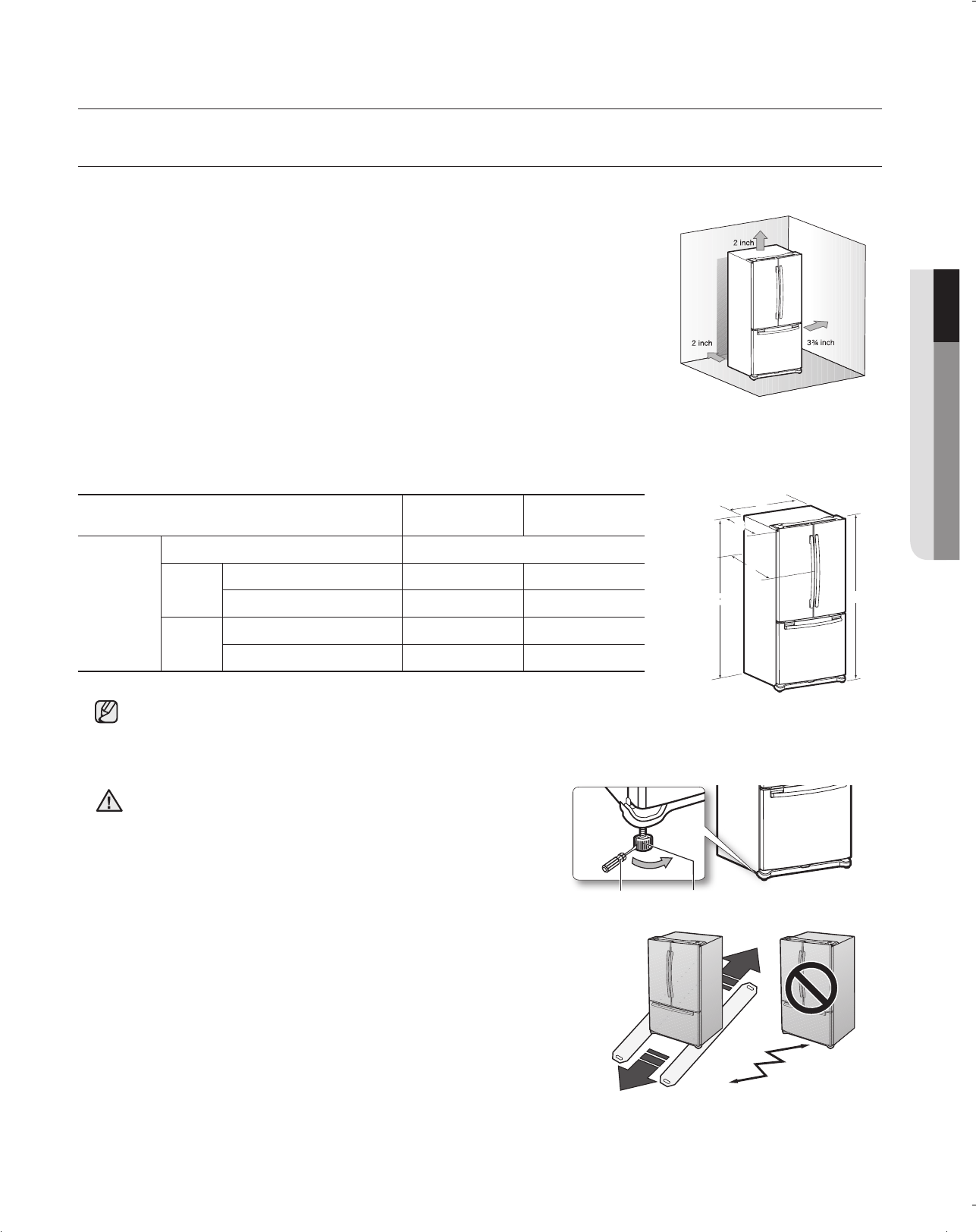
First thing! Make sure that you can easily move your Refrigerator to its final location by measuring doorways
(both width and height), thresholds, ceilings, stairways, etc.
The following chart details the exact height and depth of Samsung French Door Refrigerator.
FLOORING
For proper installation, this refrigerator must be placed on a level
surface of hard material that is the same height as the rest of the
flooring. This surface should be strong enough to support a fully
loaded refrigerator, or approximately 223lbs(106kg). To protect
the finish of the flooring, cut a large section of the cardboard
carton and place under the refrigerator where you are working.
When moving the refrigerator, be sure to pull it straight out and
return it to position by pushing it straight in.
• Allow clearance to the right, left, back and top when installing. This will help reduce power consumption
and keep your energy bills lower.
• If you install the Refrigerator where is below 50ºF (10ºC), it may not function optimally.
• Do not locate the refrigerator where the wet condition.
When moving your refrigerator
To prevent floor damage, be sure the front adjusting legs
are in the up position(above the floor).
Refer to ‘Adjusting the doors’ (on page 15).
CAUTION
RF195**
RF197**
RF215**
RF217**
Dimension
(inch/mm)
Width (A) 31⅞ / 810
Depth without door (B) 24⅜ / 620 26⅜ / 671
with door (C) 30⅛ / 764 32⅞ / 836
Height without hinge (D) 68⅞ / 1750 68⅞ / 1750
with hinge (E) 70 / 1778 70 / 1778
Congratulations on your purchase of this Samsung French Door Refrigerator. We hope you enjoy the state-of-art
features and efficiencies that this new appliance offers.
• A location with easy access to the water supply.
• A location without direct exposure to sunlight.
• A location with level (or nearly level) ooring.
• A location with enough space for the Refrigerator doors to open easily.
• Allow sufcient space to the right, left, back and top for air circulation. If the
Refrigerator does not have enough space, the internal cooling system may not
work properly.
• Please ensure that appliance can be moved freely in the event of maintenance
& service.
B
C
D
A
E
GETTING READY TO INSTALL THE REFRIGERATOR
DA68-01845C.indb 9 2010.4.24 10:22:38 AM
10_ setting up
REMOVING THE REFRIGERATOR DOORS
Now that you have your new Refrigerator installed in place, you are ready to set up and enjoy the features and
functions of the appliance. By completing the following steps, your Refrigerator should be fully operational.
1. Place the Refrigerator in an appropriate location with reasonable clearance between it and the wall.
Refer to installation instructions in this manual. (page 9, selecting the best location for the Refrigerator)
2. Once the Refrigerator is plugged in, make sure the interior light comes on when you open the doors.
3. Set the Temperature control to the coldest temperature and wait for an hour. The Freezer will get slightly
chilled and the motor will run smoothly.
4. After powering the Refrigerator, it will take a few hours to reach the appropriate temperature. You can
store food and drinks in the Refrigerator after the temperature is sufficiently cool.
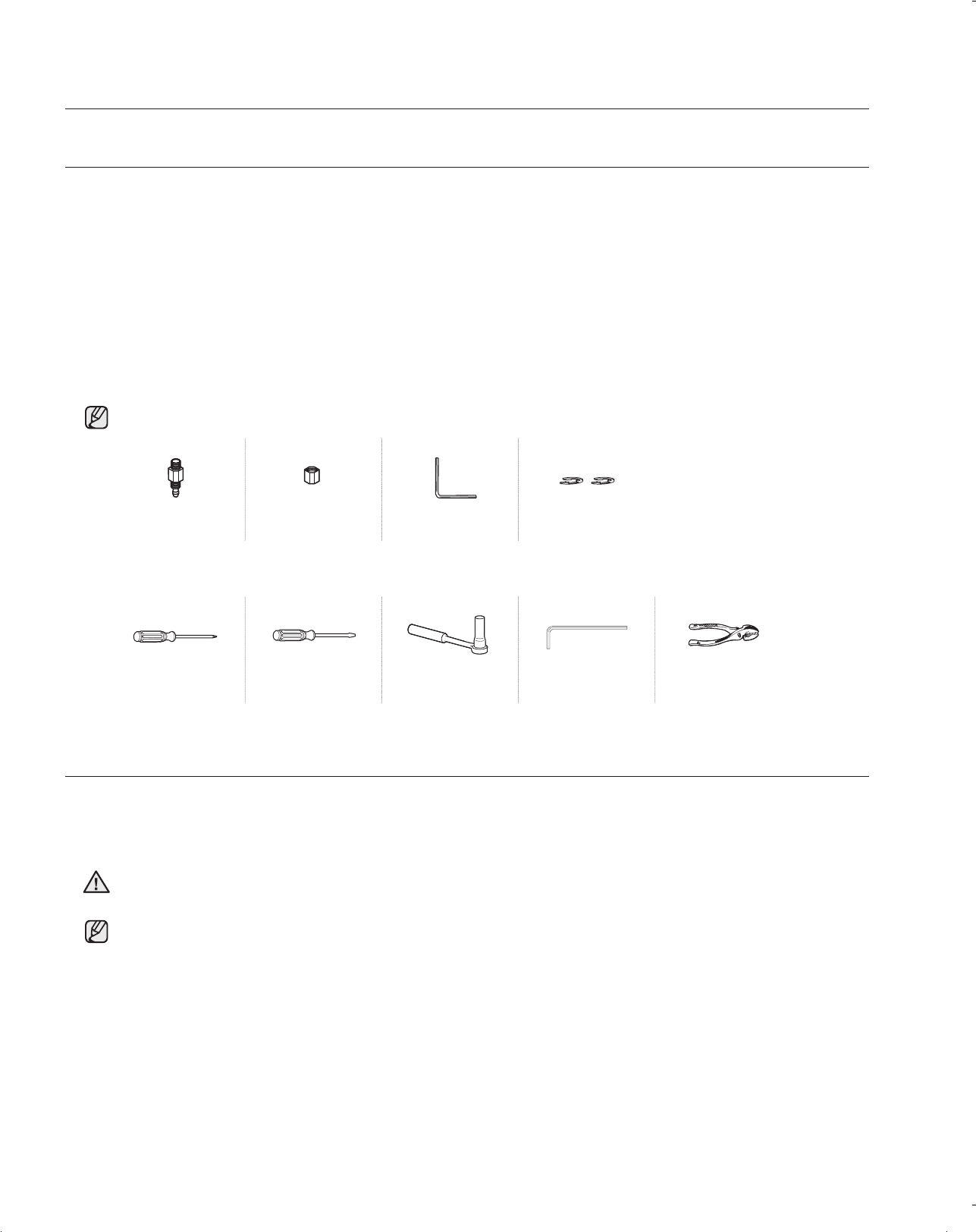
Phillips screwdriver(+) Flat-blade screwdriver(-) Socket Wrench
(10mm) (for bolts)
Hex Wrench (3/16”)
(for Mid hinge)
Pliers
Compression fitting Compression nut Hex Wrench Fastener
Some installations require door/drawer removal to transport the Refrigerator to its final location.
Do not remove the door/drawer if it is not needed. Before removing the door/drawer make sure you read
following items.
Disconnect power to the Refrigerator before removing the door or drawer.
WARNING
• Be careful not to drop, damage or scratch the door/drawer while removing them.
• Be careful not to get injured while removing the door/drawer.
• Reattach the door/drawer properly to avoid:
- Moisture from air leakage.
- Uneven door alignment.
- Wasting energy due to improper door seal.
Check the accessories listed below.
Setting up your French Door Refrigerator
DA68-01845C.indb 10 2010.4.24 10:22:39 AM
setting up _11
01
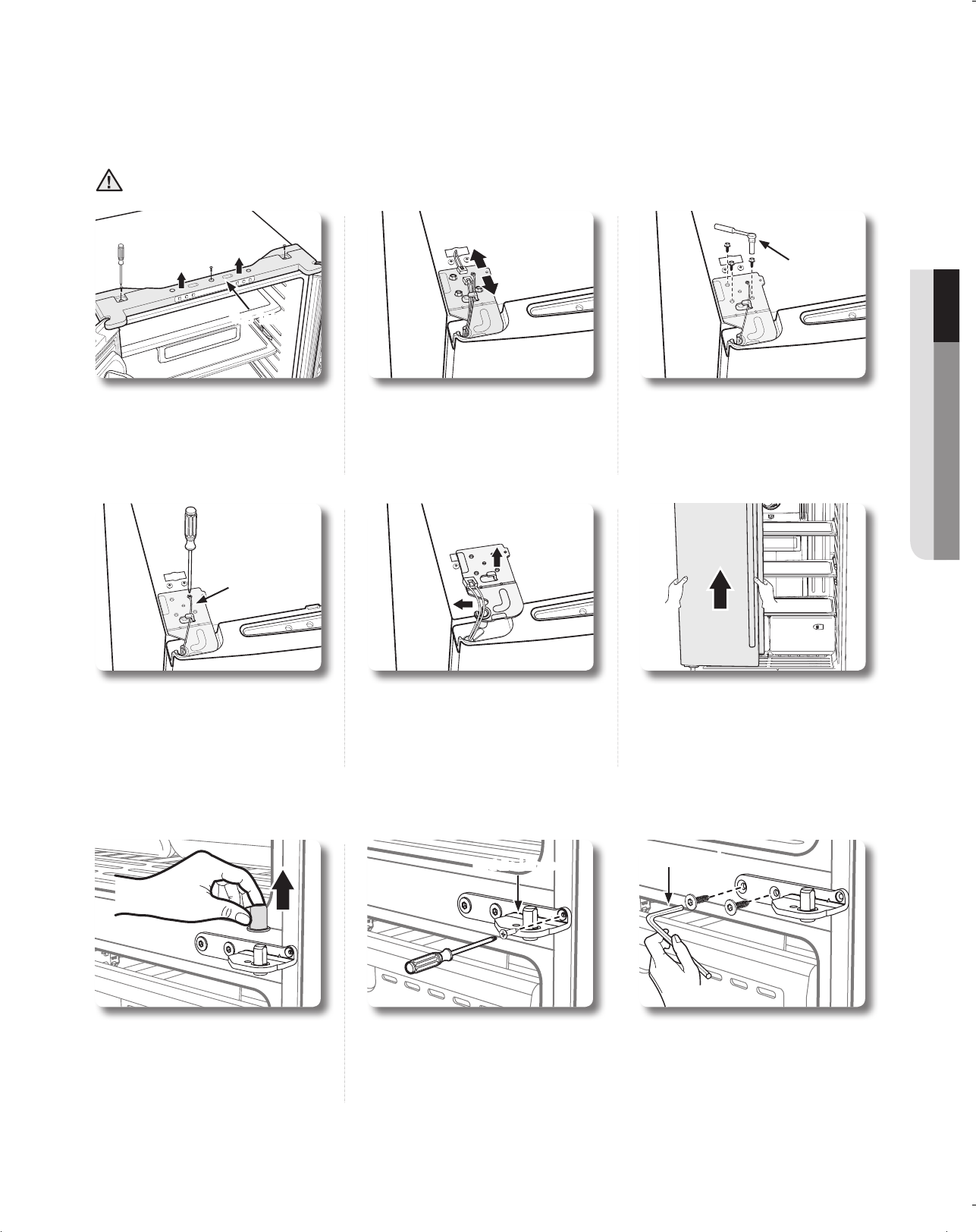
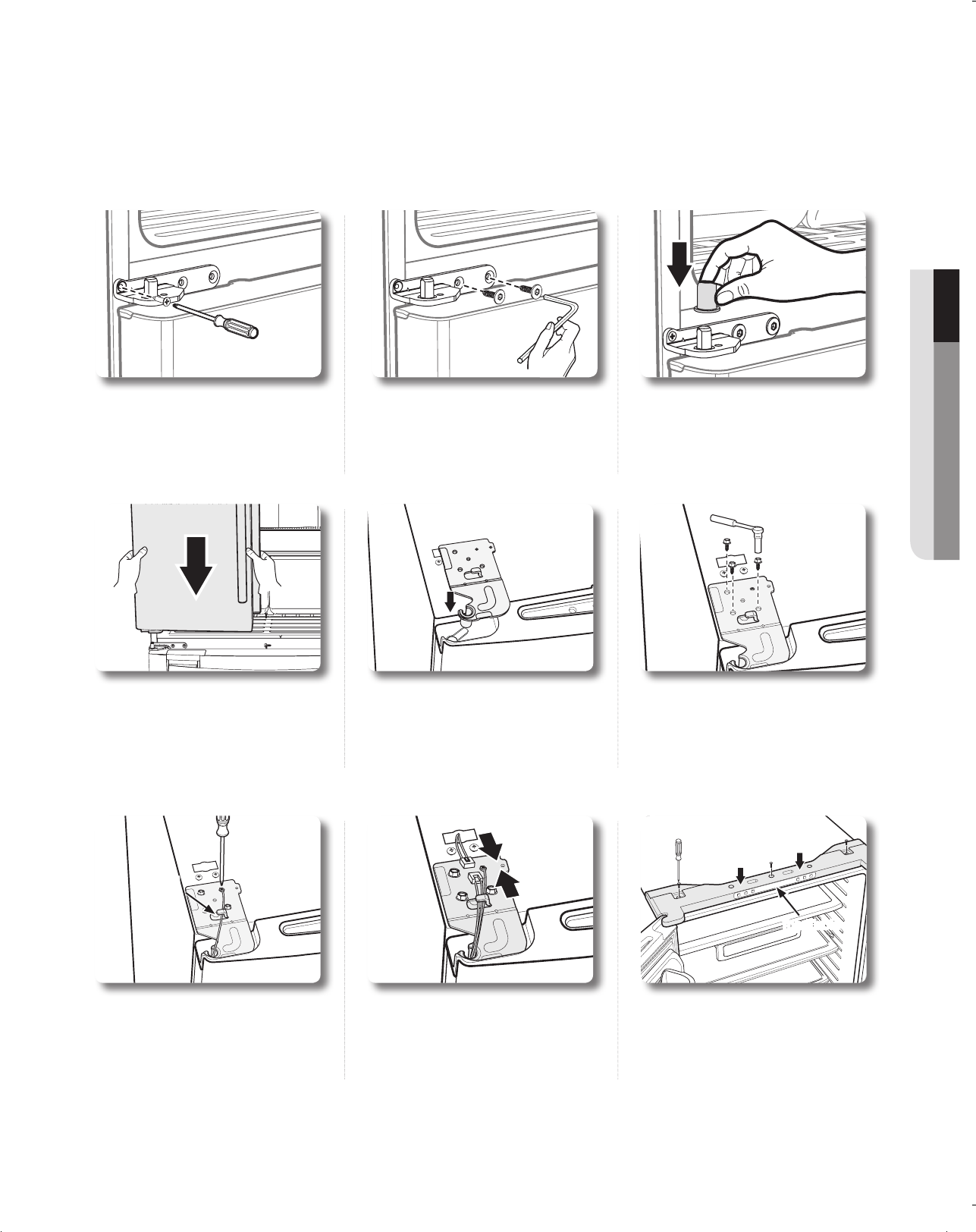
1. Separate the cap on the middle
hinge.
2. Remove the screw attached to the left and right middle hinges with a
philips screwdriver(+).
Remove the 2 hex head bolts attached to the left and right middle
hinges with an allen wrench(3/16”).
Middle Hinge Allen wrench
4. Remove the screw that holds
the ground wire with a philips
screwdriver(+).
5. Separate the hinge from the
electric wire and ground wire as
shown above.
6. Lift the door straight up to
remove.
Be careful not to drop and
scratch the doors while removing
them.
Disassembling the fridge door
1. Remove the 3 screws holding
down the top table and remove
it.
2. Disconnect electric wire on the
top of the refrigerator.
3. Remove the 3 hex bolts that
hold the hinge on the top of
the refrigerator with the 10mm
socket wrench.
Top Table
Be careful not to drop and scratch the fridge door while removing the fridge door!
WARNING
ground
wire
DA68-01845C.indb 11 2010.4.24 10:22:43 AM
12_ setting up
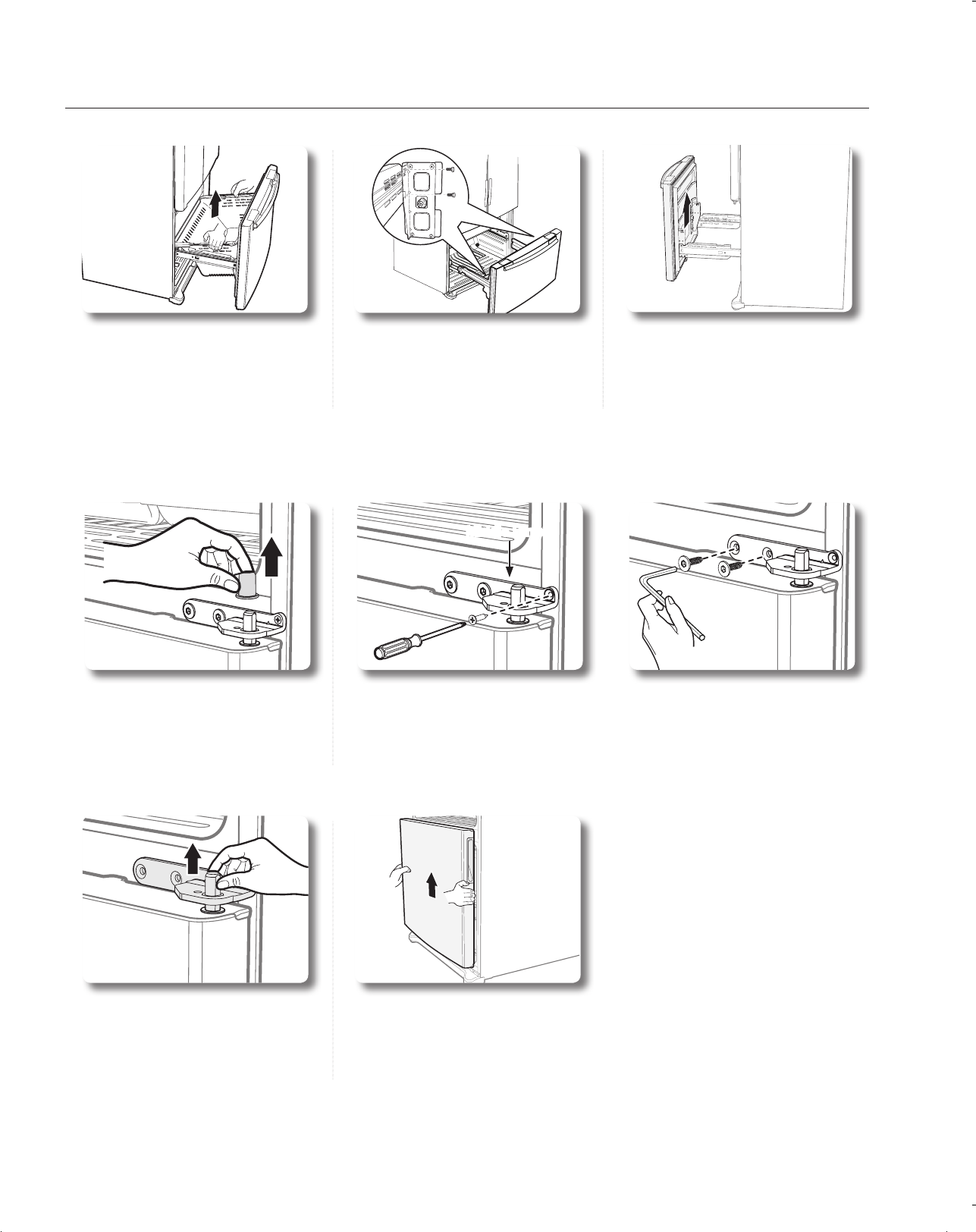
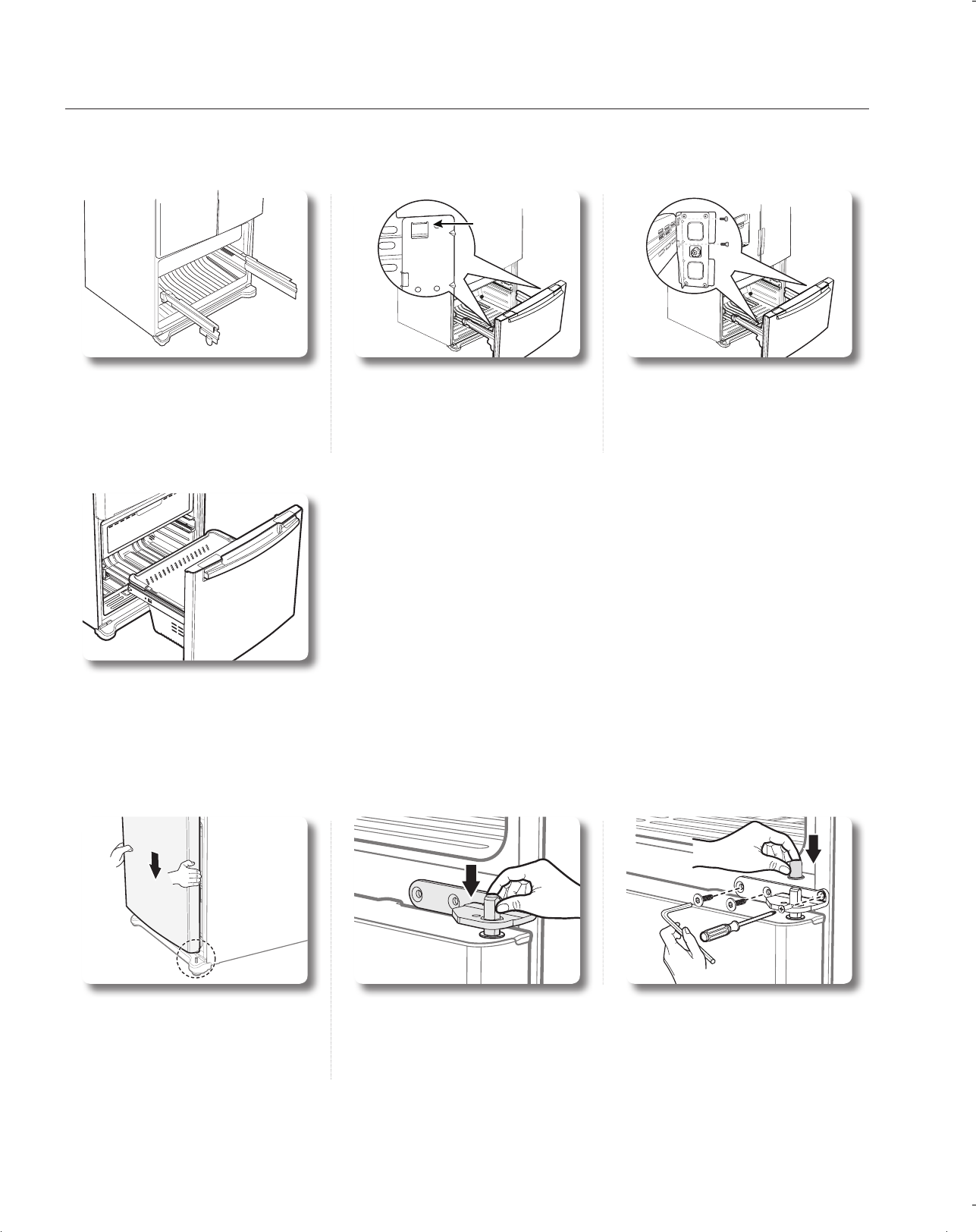
3. After opening the Freezer door,
lift the drawer box.
4. Remove 4 hex head bolts
from both sides with a socket
wrench(10mm)
1. Separate the Cap on the Middle
Hinge.
2. Remove the screw attached to the left and right middle hinges with a
philips screwdriver(+).
Remove the 2 hex head bolts attached to the left and right middle
hinges with an allen wrench(3/16”).
Middle Hinge
3. Remove the Middle Hinge
connected to the Freezer.
4. Lift up the freezer door from the
hinge.
Be careful not to drop and
scratch the freezer door.
5. Lift up the freezer door from the
rails.
Be careful not to drop and
scratch the freezer door.
Setting up your French Door Refrigerator
DA68-01845C.indb 12 2010.4.24 10:22:46 AM
setting up _13
01
5. Insert the left upper hinge shaft
into the hole on the corner of the
fridge door.
8. Connect the electronic wire on
the top of the refrigerator.
6. Insert the upper hinges into the holes
at the top of the door.
Insert and tighten the 3 hex head
bolts into the left and right upper
hinges with a socket wrench.
9. Position the top table in place.
Insert and tighten the 3 screws
into the top table with a philips
screwdriver(+).
7. Insert and tighten the ground
screw into the left and right
upper hinges with a philips
screwdriver(+).
Reassembling the fridge door
1. Insert and tighten the screw into
the left and right middle hinges
with a philips screwdriver(+).
2. Insert and tighten the 2 hex head
bolts into the left and right middle
hinges with an allen wrench(3/16”).
3. Replace the middle hinge cap.
4. Place the hole in the bottom of
the left d oor over the middle
hinge.
ground
wire
Top Table
DA68-01845C.indb 13 2010.4.24 10:22:50 AM
14_ setting up
Slot
Slot
1. Pull out the rails to the full length
on each sidle of the cabinet
evenly.
1. Place the hole in the bottom of
the freezer door over the right
side low hinge.
2. Hang the freezer door front onto
open slot on the sides.
2. Replace the middle hinge connected to the freezer.
3. Insert and tighten the screw into the left and right middle hinges with a
philips screwdriver(+). Insert and tighten the 2 hex head bolts into the
left and right middle hinges with an allen wrench(3/16”).
4. Replace the cap on the middle hinge.
Slot
4. With the drawer pulled out fully,
insert the drawer box into the rail
system.
3. With the 10mm wrench, reattach
4 bolts to connect the rail with
the door.
Setting up your French Door Refrigerator
DA68-01845C.indb 14 2010.4.24 10:22:53 AM
setting up _15
01
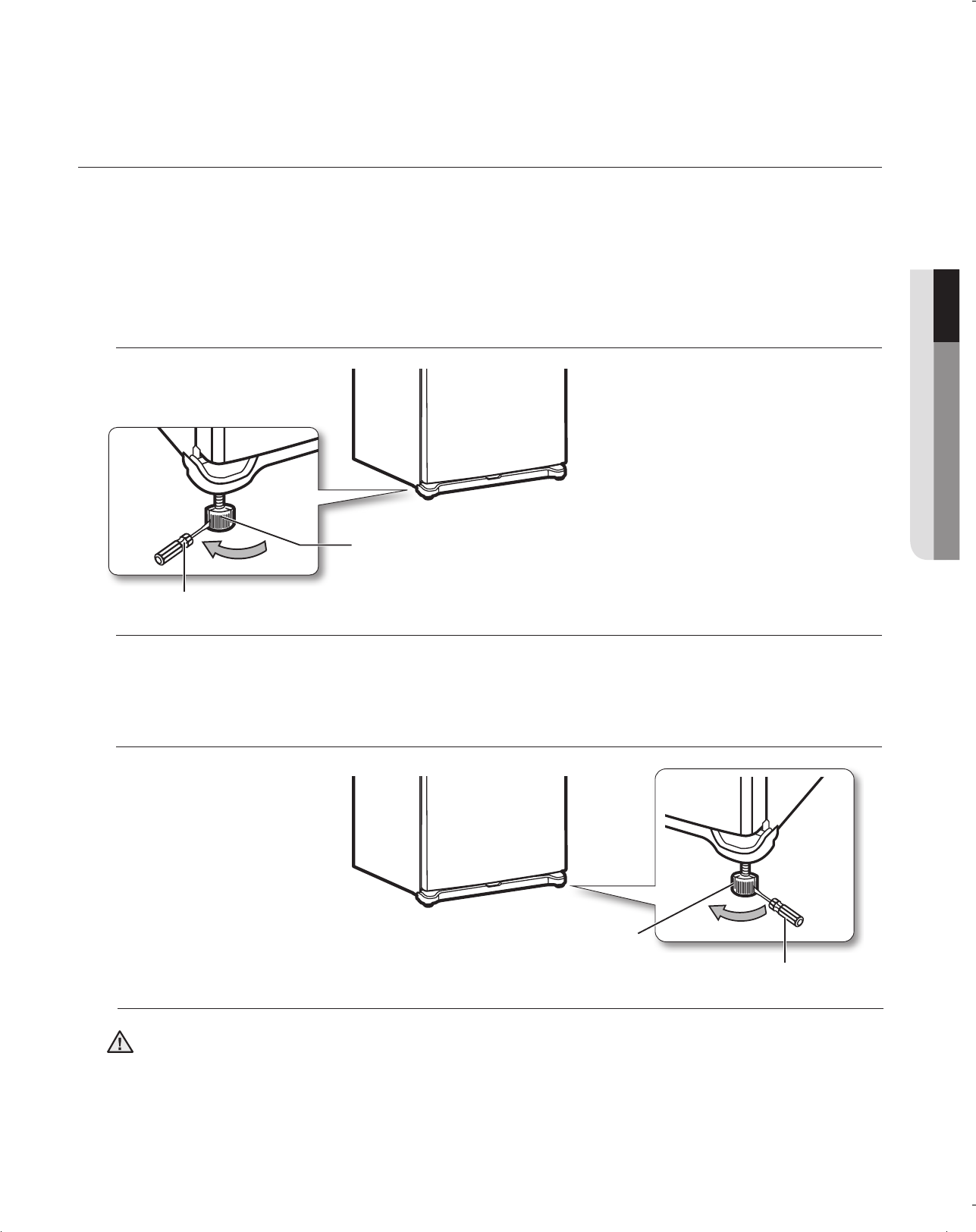
ADJUSTING THE DOORS
Now that the doors are back on the Refrigerator, you want to make sure the Refrigerator is level so that you can
make final adjustments. If the Refrigerator is not level, it will not be possible to get the doors perfectly even.
When the Left door is lower than the Right door.
Insert a flat-blade screwdriver into a notch on the left control lever, turn it clockwise or counter-clockwise
to level the left door.
When the Left door is higher than the Right door.
Insert a flat-blade screwdriver into a notch on the right control lever, turn it clockwise or counter-clockwise
to level the right door.
Both control levers must be surely touching the floor to avoid the possible personal injury or property
damage because of tipping.
CAUTION
DA68-01845C.indb 15 2010.4.24 10:22:54 AM
16_ setting up
When the left
door is lower
than the right
door.
When the left
door is higher
than the right
door.
Adjustment
part Adjustment
part
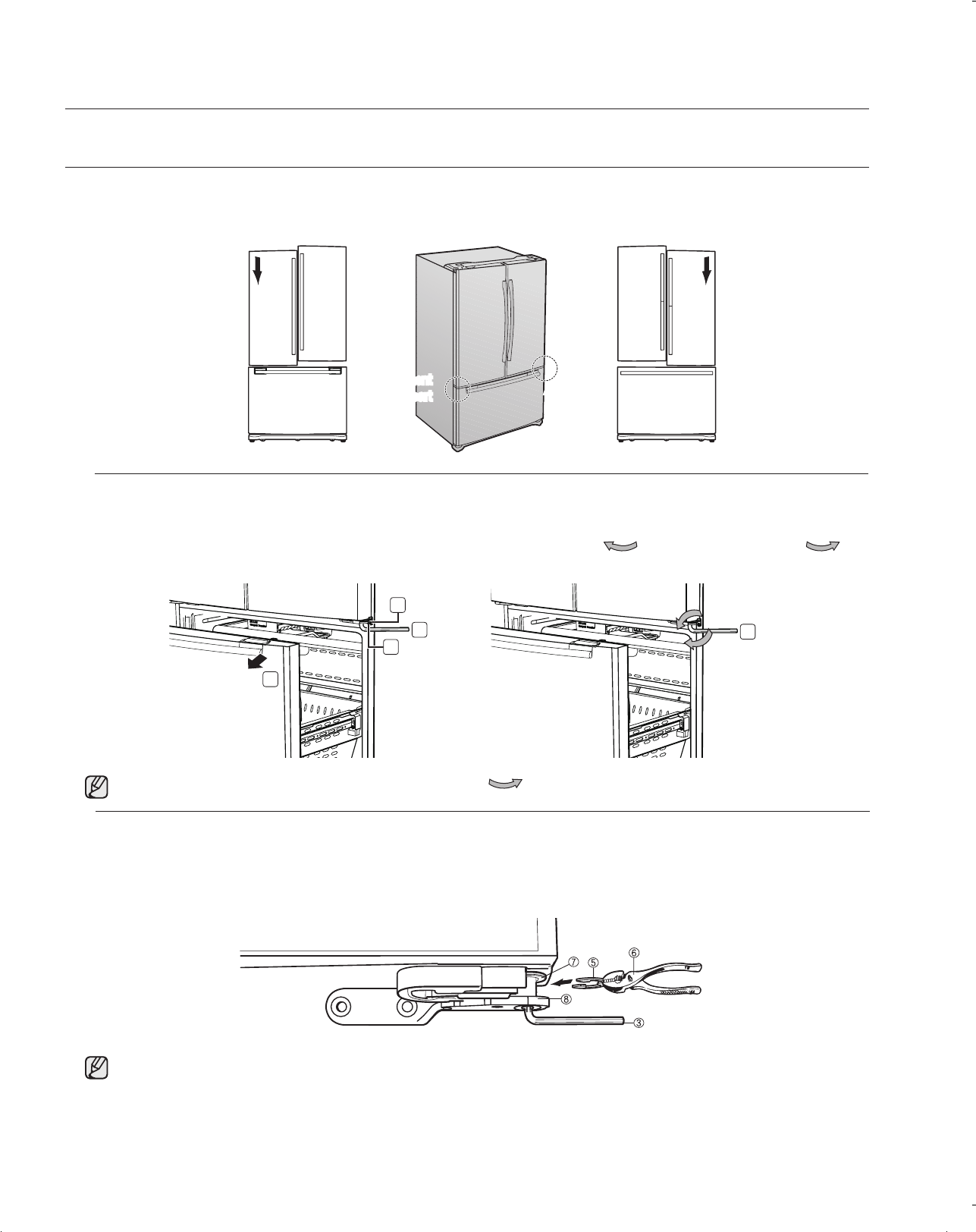
1. Pull out the freezer drawer ( 1 ), then you can see the middle hinge ( 2 ) .
2. Insert the supplied hex wrench ( 3 ) into the shaft ( 4 ) of the middle hinge.
3. Please adjust the height by turning the hex wrench ( 3 ) clockwise ( ) or counter-clockwise ( ).
1. After adjusting the doors, please insert the supplied fastener ( 5 ) using Pliers ( 6 ) in the gap between
the hinge-grommet ( 7 ) and the middle hinge ( 8 ). The number of fasteners you’ll need to insert
depends on the gap.
2
3
4
1
3
MAKING MINOR ADJUSTMENTS BETWEEN DOORS
Remember, a level Refrigerator is necessary for getting the doors perfectly even. If you need help, review the
previous section on leveling the Refrigerator.
Setting up your French Door Refrigerator
When you turn the hex wrench counter-clockwise( ), the door will move up.
2 fastener are enclosed with the refrigerator.
The thickness of each fastener is 0.04”.
DA68-01845C.indb 16 2010.4.24 10:22:58 AM
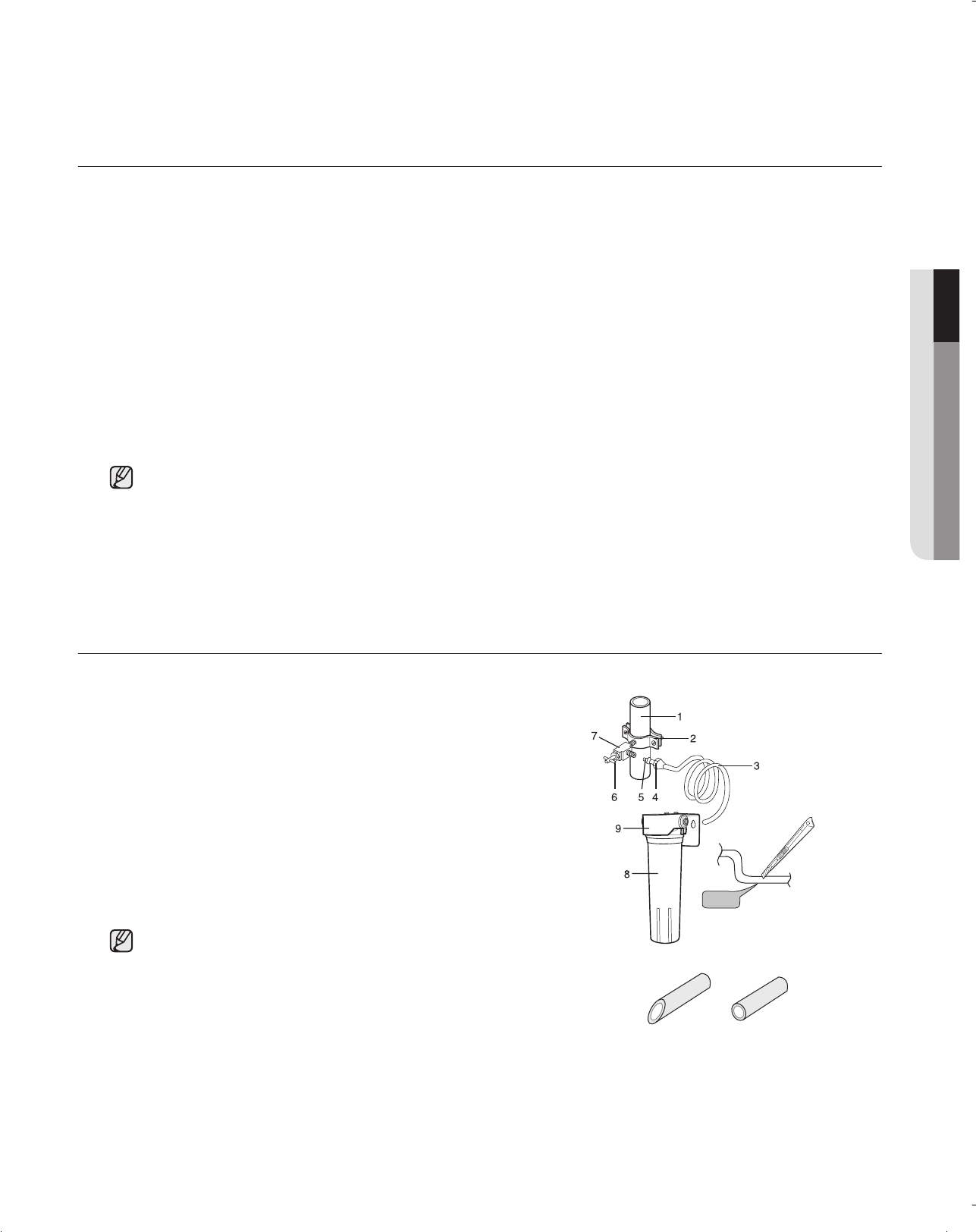
setting up _17
01
INSTALLATION OF THE WATER LINE
Before You Install the water line
• The water line installation is not warranted by the refrigerator manufacturer.
So before you install the water line, read the whole steps for installing and follow these instructions
carefully to minimize the risk of expensive water damage.
• Banging pipes (water banging in the pipes) in house plumbing can cause damage to fridge parts and
lead to water leakage or flooding. Call a qualified plumber to correct the problem before installing the
water supply line to the fridge.
• To prevent burns and product damage, do not hook up the water line to the hot water line.
• Do not install the water line in areas where temperatures fall below freezing.
• When using any electrical device (such as a power drill) during installation, be sure the device is
insulated or wired in a manner to prevent electric shock.
• All installations must be in a accordance with local plumbing code requirements.
Connecting to water supply line
• Shut off the main water supply line and turn the Ice maker to
the off position.
• Locate the nearest cold drinking water line.
• Follow the instructions in the water lter installation kit.
• After connecting the water supply line to the Cartridge Holder
inlet (insert plastic line in fully), install the Filter Cartridge.
• Turn on water supply and Flush 3 gallons through lter before
use (flush approximately 6 minutes)
• Water line Kit and water lter are not covered by Samsung’s Warranty. The manufacturer (or dealer,
installer) of them is responsible for any defects and all the loss caused by water filter & water line kit .
• The lter should be replaced according to manufacturer (or dealer)’s instruction.
• To order additional water lters, please contact the manufacturer (or dealer) of the lter.
• If you want to install a water lter, it must be installed outside
the refrigerator.
It is not provided with your new refrigerator. The filter cartridge
(8) and holder (9) kit can be purchased from the retailer where
you purchased this refrigerator.
• Do not use copper line.
• Cut the tubing, making sure the ends are square and clean.
90 degree
1. Cold Water line
4. Compression Nut
8. Filter Cartridge
9. Cartridge Holder
DA68-01845C.indb 17 2010.4.24 10:22:58 AM
18_ setting up
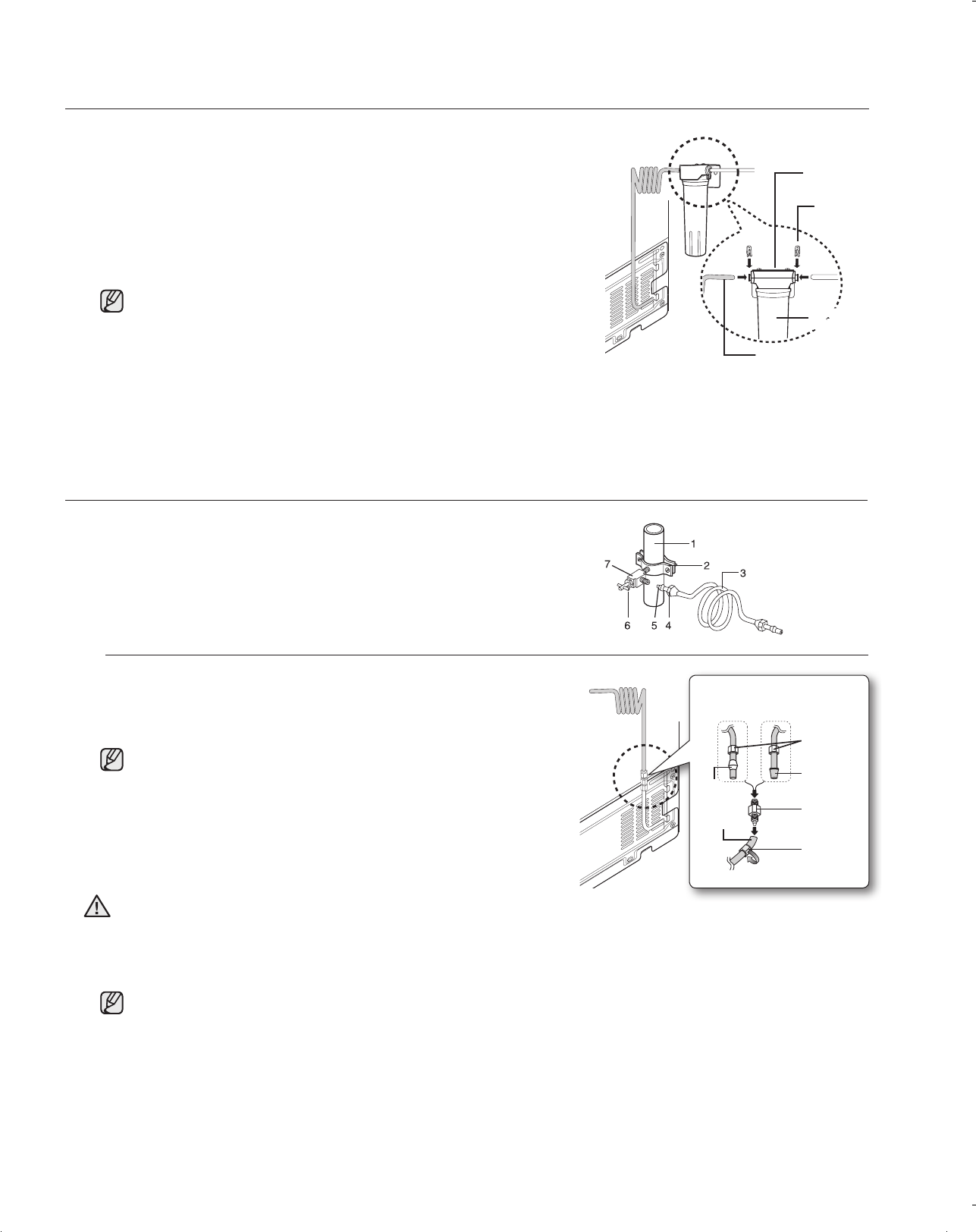
Connect the water line to the fridge
• Connect the plastic line on the back of your fridge to the cartridge
holder outlet (fully insert the plastic line to the cartridge holder
outlet).
• Insert plastic clip to the cartridge holder inlet and outlet.
• Turn water on and check for any leakage.
• You can purchase the necessary lter cartridge at the retailer
where you purchased this refrigerator. Make sure you buy the
SAMSUNG lter cartridge (Replacement cartridge No : DA29-
00015A) to ensure the best performance.
• The water line must be connected to drinkable water only
• A compression tting and nut kit is supplied with the unit and it is inside the fridge drawer.
• When pushing the Refrigerator back, make sure you don’t roll over the power cord or water
line(Icemaker supply line)
Setting up your French Door Refrigerator
Cartridge
Holder
Clip
Filter
cartridge
Connecting to the water supply line
• Shut off the main water supply line and turn the Ice maker to the
off position.
• Locate the nearest cold water drinking line.
1. Cold Water line
4. Compression Nut
Connect the water line to the fridge
1) Slip the compression nut through the plastic tubing.
2) After inserting the compression nut into plastic tubing, tighten
the compression nut onto 1/4” compression fitting(Provided).
Do not overtighten the compression nut.
• Using Copper Tubing
- Slip the compression nut and ferrule on copper tubing as
shown.
• Using Plastic Tubing
- Insert the molded end(Bulb) of the plastic tubing into the
compression fitting.
Do not use without the molded end(Bulb) of the plastic tubing.
3) Tighten the compression nut onto the compression fitting.
4) Turn water on and check for any leakage.
• Water line must be connected to drinkable water only.
• When pushing the Refrigerator back, make sure you don’t roll over the power cord or water line
(Icemaker supply line).
CAUTION
Compression Nut
Compression
Compression Nut
Bulb
Ferrule
DA68-01845C.indb 18 2010.4.24 10:22:59 AM
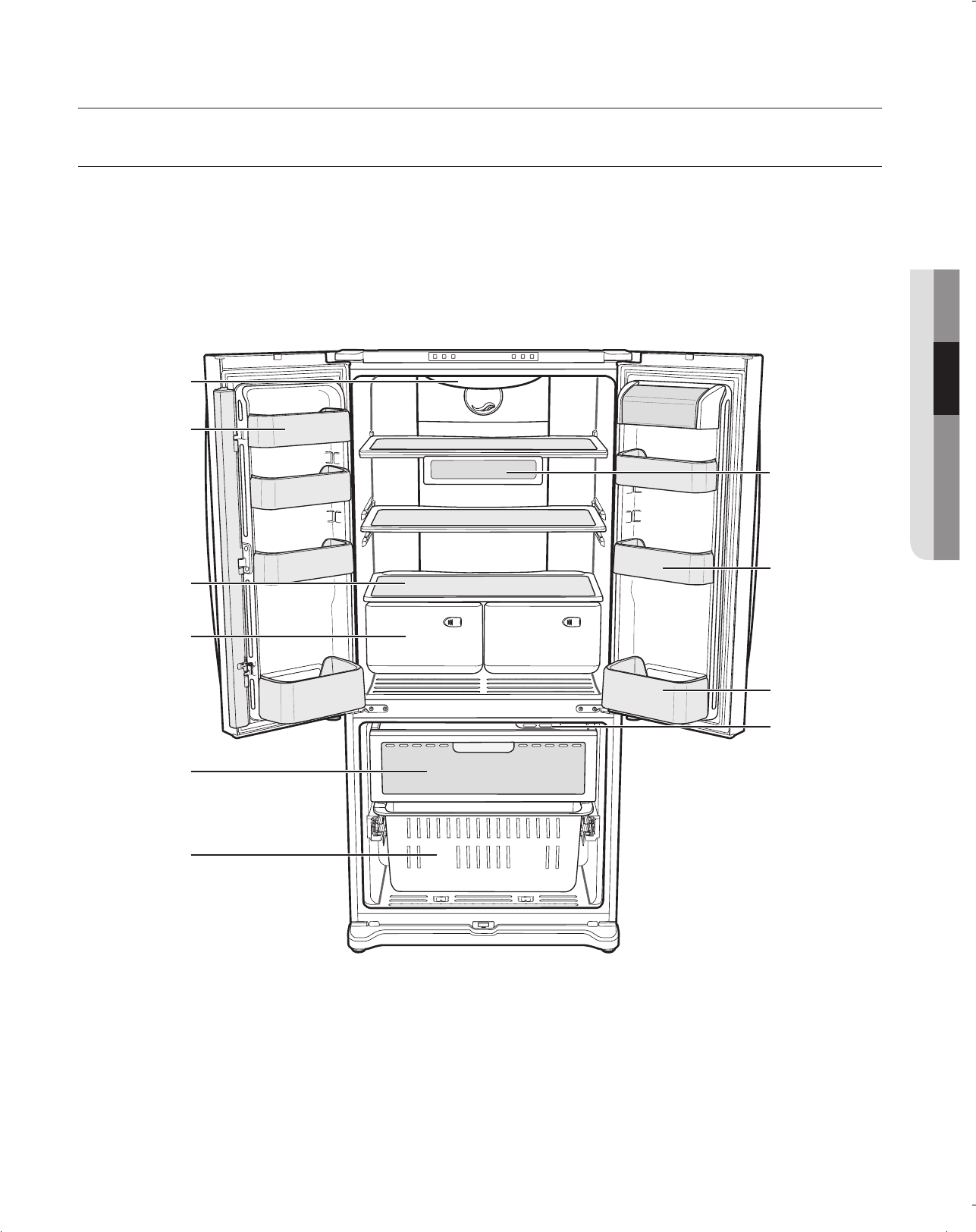
Operating _19
02
Use this page to become more familiar with the parts and features of the Refrigerator.
Fridge Light
Glass Shelf
Moving Tray
(Location is adjustable)
Door Bin
Vegetable & Fruit
Drawer
Bottle Bin
Door Bin
Pull Out Drawer
Freezer Drawer
Bin
Freezer Light
Operating your SAMSUNG Refrigerator
DA68-01845C.indb 19 2010.4.24 10:23:0 AM
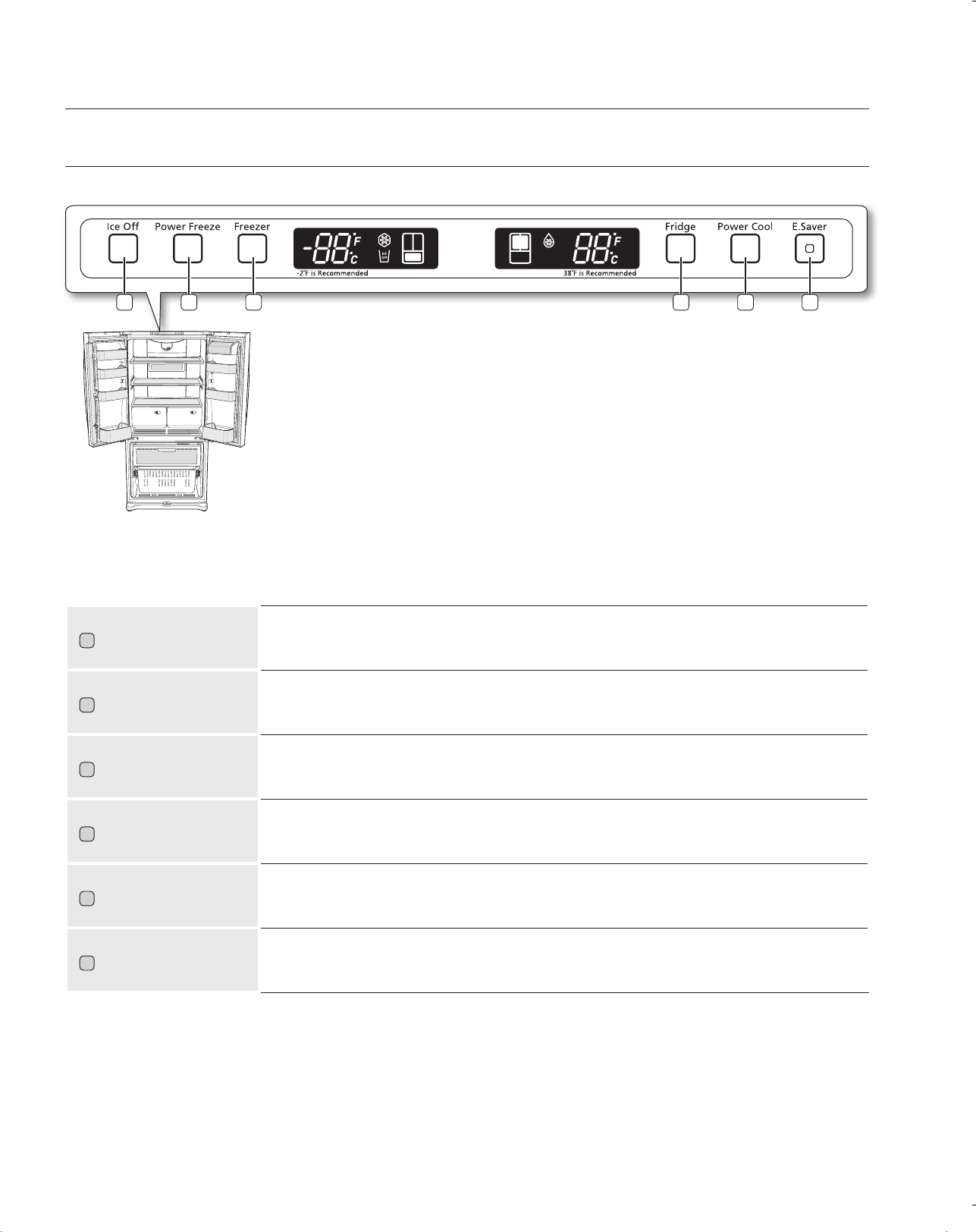
20_ Operating
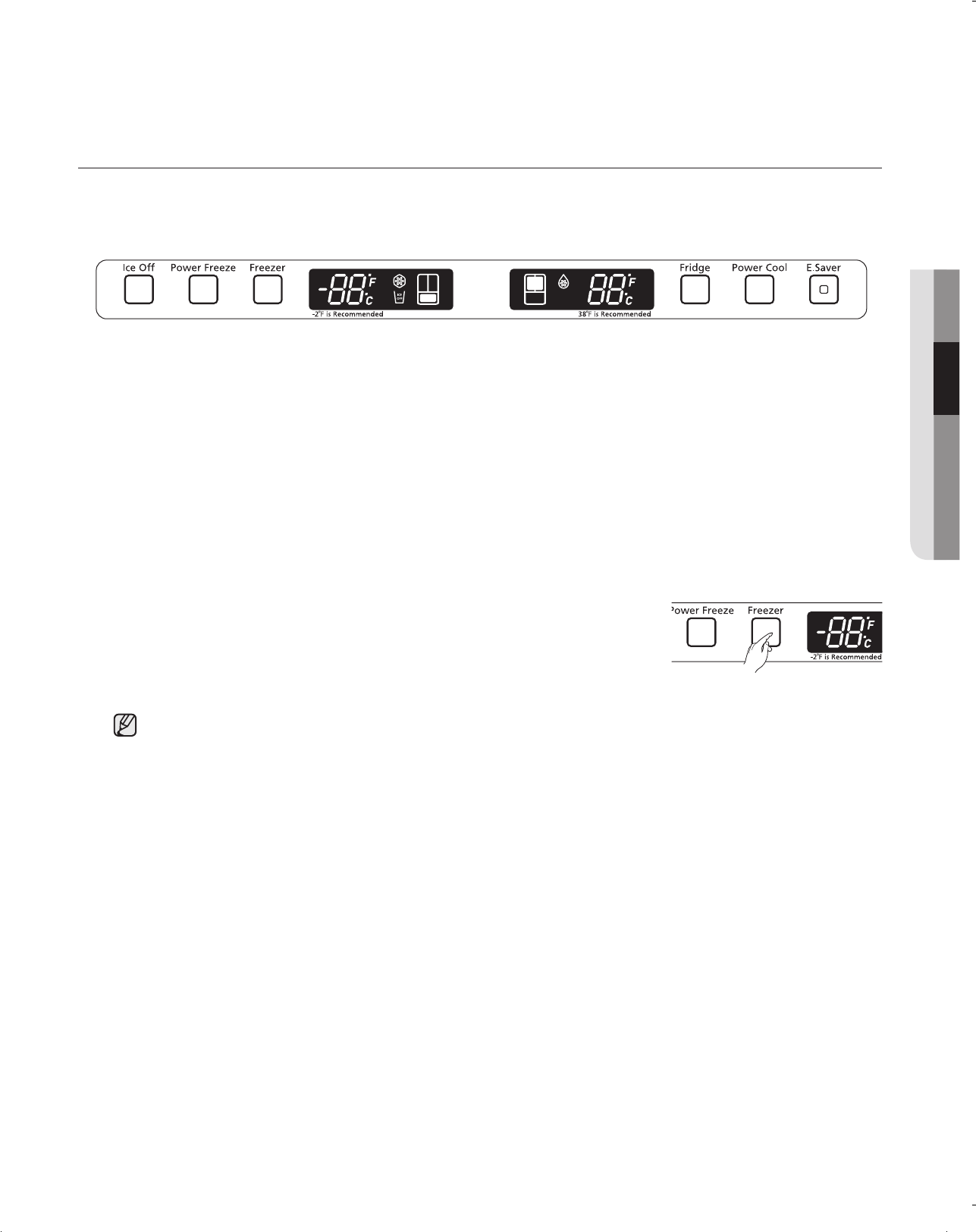
1
When the is pressed, ice will not be produced.
Use this function only when it is needed.
2
Press this button to freeze food quickly.
(Power Freeze will last 2 and a half hours.)
3
Freezer temperature set button.
Press this button to set the Freezer temp between 8ºF and -8ºF.
(At initial power on, the default setting is -2ºF.)
4
Fridge temperature set button.
Press this button to set the Fridge temperature in 2ºF intervals between 46ºF and 34ºF.
(At initial power on, the default setting is 38ºF.)
5
Press this button to cool the food in the fridge quickly.
(Power Cool will shut off when 25ºF is reached or after 2 and a half hours.
6
Press the Energy Saver button for better energy efficiency. If water drops appear on the doors, turn
the Energy Saver function off.
Operating your SAMSUNG Refrigerator
1 42 53 6
DA68-01845C.indb 20 2010.4.24 10:23:1 AM
Operating _21
02
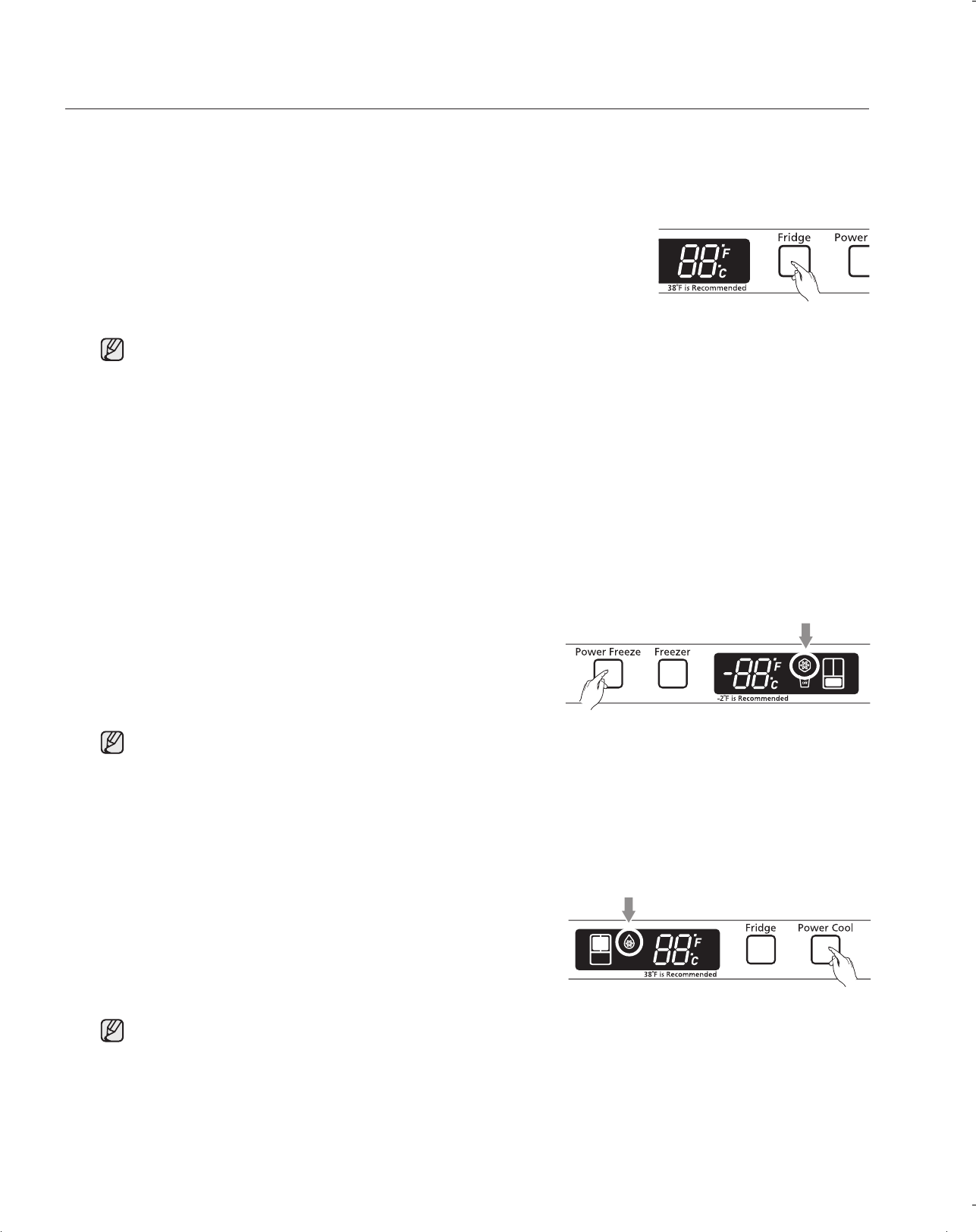
If you want to control the freezer temperature, follow as below.
Press the Button (Refer the picture)
- The temperature can be set in 2ºF interval between -8ºF and 8ºF.
- Each time the Button is pressed, the temperature setting will change as follows;
(-2ºF → -4ºF → -6ºF → -8ºF → 8ºF → 6ºF → 4ºF → 2ºF → 0ºF → -2ºF)
If you want to control the fridge temperature, follow as below.
Press the Button (Refer the picture)
- The temperature can be set in 2ºF interval between 34ºF and 46ºF.
- Each time the Button is pressed, the temperature setting will change as follows;
(38ºF → 36ºF → 34ºF → 46ºF → 44ºF → 42ºF → 40ºF → 38ºF)
When selecting the temperature, the set temperature is displayed initially
for 5 seconds, then the actual temperature is displayed.
(There may be slight difference between the set temperature and
displayed actual temperature, but it will be corrected to the set
temperature automatically.)
- The Freezer temperature will change depending on the number of door openings, quantity of food,
ambient temperature, etc.
- The temperature display will blink when freezer temperature increases due to frequent door opening,
keeping warm food, etc.
(Blinking will stop when the refrigerator reaches normal temperature. If for some reason it does not stop
after a long period of time, contact a Samsung service center.)
DA68-01845C.indb 21 2010.4.24 10:23:1 AM
22_ Operating
- The Fridge temperature will change depending on the number of door openings, quantity of food,
ambient temperature, etc.
- Temperature of each shelve or container in the fridge may be different.
- The temperature display will blink when fridge temperature is increases due to frequent door opening,
keeping warm food, etc.
(Blinking will stop when the refrigerator reaches normal temperature. If for some reason it does not stop
after a long period of time, contact a Samsung service center.)
- The Power Freeze function operates for 2 and a half hours regardless of the set temperature.
- The Power Cool function operates for 2 and a half hours regardless of the set temperature.
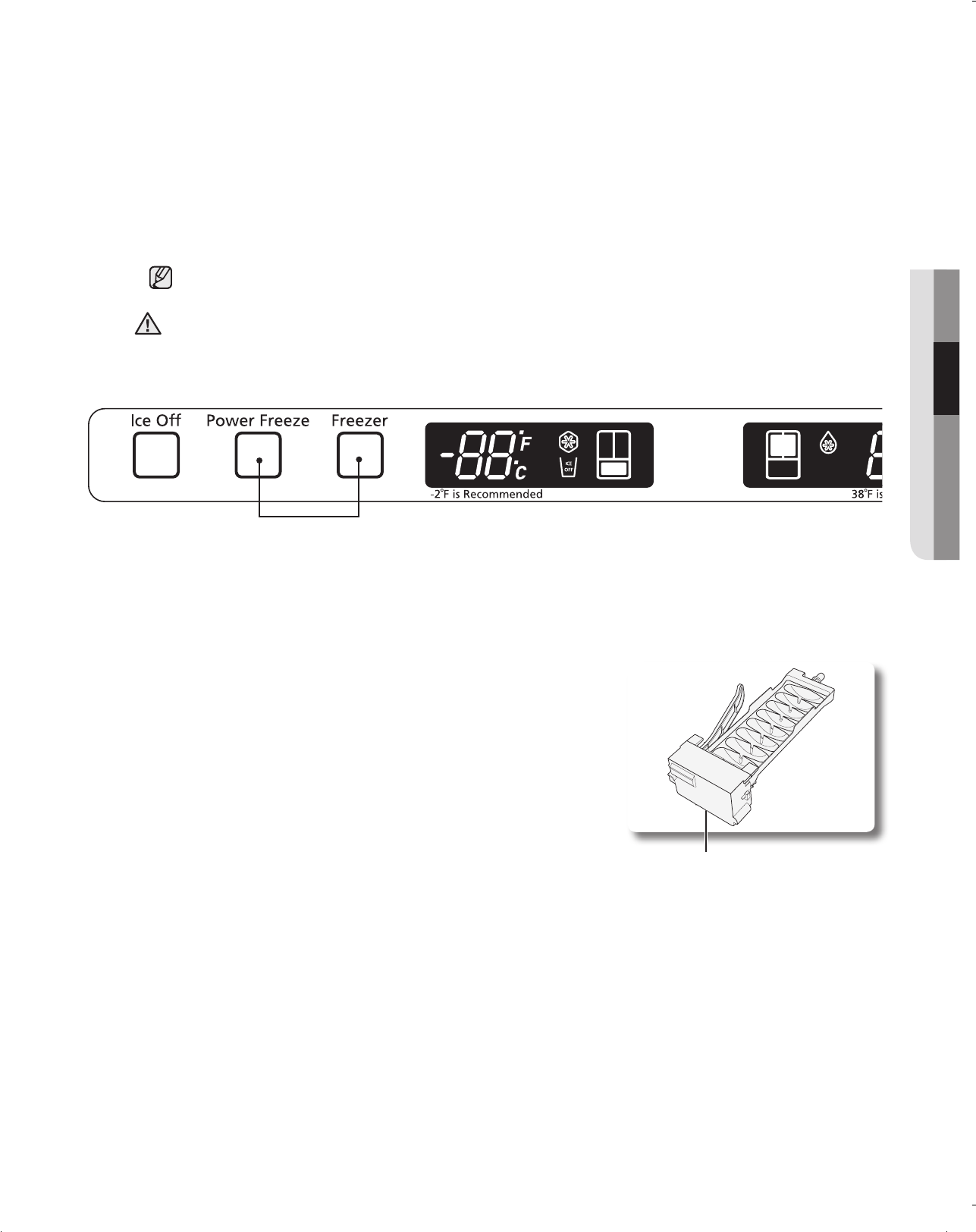
Press the Button. (Refer to the picture.)
- The power Freeze light on the display goes on (see the arrow mark) and this function begins to
operate regardless of the set freezer temperature.
Press the Button again to cancel this
function.
- The light goes off and it operates at the set freezer
temperature again.
Press the Button. (Refer to the picture.)
- The Power cool light on the display goes on (see the arrow mark) and this function begins to operate
regardless of the set fridge temperature.
Press the Button again to cancel this function.
- The light goes off and it operates at the set fridge
temperature again.
When selecting the fridge temperature, the set temperature is displayed
initially for 5 seconds, then the actual temperature is displayed.
(There may be slight difference between the set temperature and
displayed actual temperature, but it will be corrected to the set
temperature automatically.)
Operating your SAMSUNG Refrigerator
DA68-01845C.indb 22 2010.4.24 10:23:2 AM
Operating _23
02
The ice maker will produce 8 cubes per cycle - approximately
100~130 cubes in a 24-hour period, depending on freezer
compartment temperature, room temperature, number of door
openings and other use conditions.
Throw away the first few batches of ice to allow the water line to
clear.
Be sure nothing interferes with the sweep of the feeler arm.
When the bin fills to the level of the feeler arm, the icemaker will
stop producing ice.
After the icemaker has been turned on again, there will be a time
delay before the icemaker resumes operation.
It is normal for several cubes to be joined together.
If ice is not used frequently, old ice cubes will become cloudy, taste stale and shrink.
So if you don’t want to make ice, press the Ice Off button.
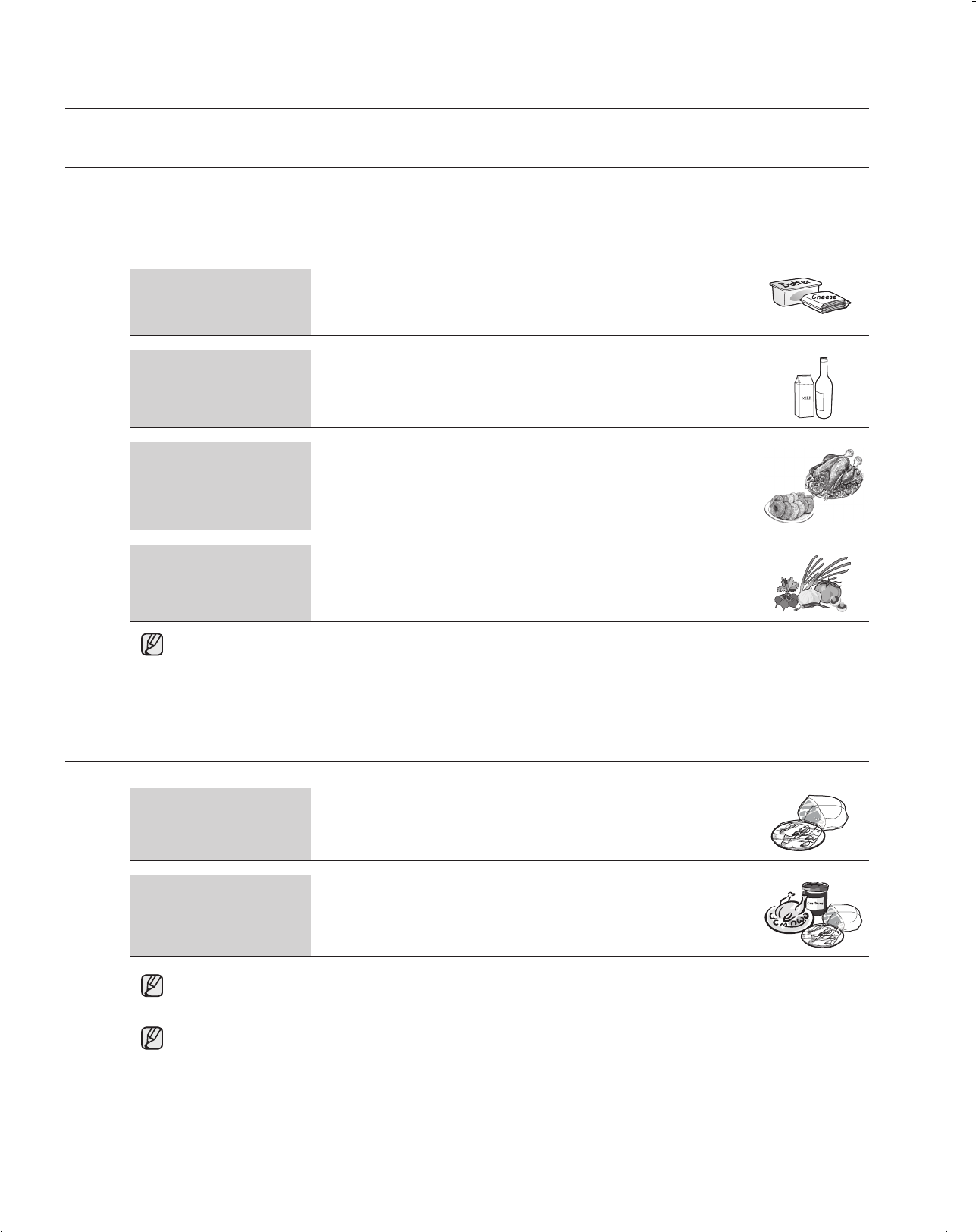
This function is for store display refrigerators. It is not for customer use.
In Cooling Off Mode, the refrigerator works but doesn’t make cool air. To cancel this mode, press
the Power Freeze and Freezer buttons at the same time for 3 seconds until a “Ding-dong” sound
is heard. The unit will now cool.
CAUTION
DA68-01845C.indb 23 2010.4.24 10:23:2 AM
24_ Operating
STORING FOOD IN THE REFRIGERATOR
STORING FOOD IN THE FREEZER DRAWER
The Samsung Refrigerator has been designed to provide you with maximum space saving features and
functions. Here are some of the customized compartments we have created to keep your food fresher longer. In
order to further prevent odor from seeping into the ice compartment, stored food should be wrapped securely
and as airtight as possible.
Operating your SAMSUNG Refrigerator
Moving Tray Can be used to store small dairy items like butter or margarine, yogurt
or cream cheese bricks
Bottle Bin Designed to handle large, bulky items such as gallons of milk or other
large bottles and containers.
Fridge Shelves
Designed to be crack-resistant, the shelves can be used to store all
types of food and drinks. Circular marks on the glass surface are a
normal phenomenon and can usually be wiped clean with a damp cloth.
Vegetable & Fruit
Drawers
Used for preserving the freshness of your stored vegetables and fruits.
This drawer has been specifically designed to control the level of
humidity within the compartment. Keep vegetables and fruits separate
when possible.
Do not place any large articles of food under the lamp in the Refrigerator. An air sensor is located
near the lamp and if the sensor is blocked, your Refrigerator may become too cold. Please place
Vegetable and Fruits in the Vegetable and Fruits Drawers to avoid freezing them. If the food in
your Refrigerator becomes frozen, please set the temperature higher.
Pull Out Drawer
Best used to store meats or dry foods. Stored food should be placed
in a container or wrapped securely using plastic wrap or other suitable
wrapping materials.
Freezer Drawer Bin
Can be used to store meat and dry foods.
Stored food should be placed in a container or wrapped securely using
plastic wrap or other suitable wrapping materials.
If you plan to go away for a long time, empty the Refrigerator and turn it off. Wipe the excess
moisture from the inside of the appliance and leave the doors open. This helps keep odor and
mold from developing.
Bottles should be stored tightly together so that they do not tip and fall out when the Refrigerator
door is opened.
DA68-01845C.indb 24 2010.4.24 10:23:5 AM
Operating _25
02
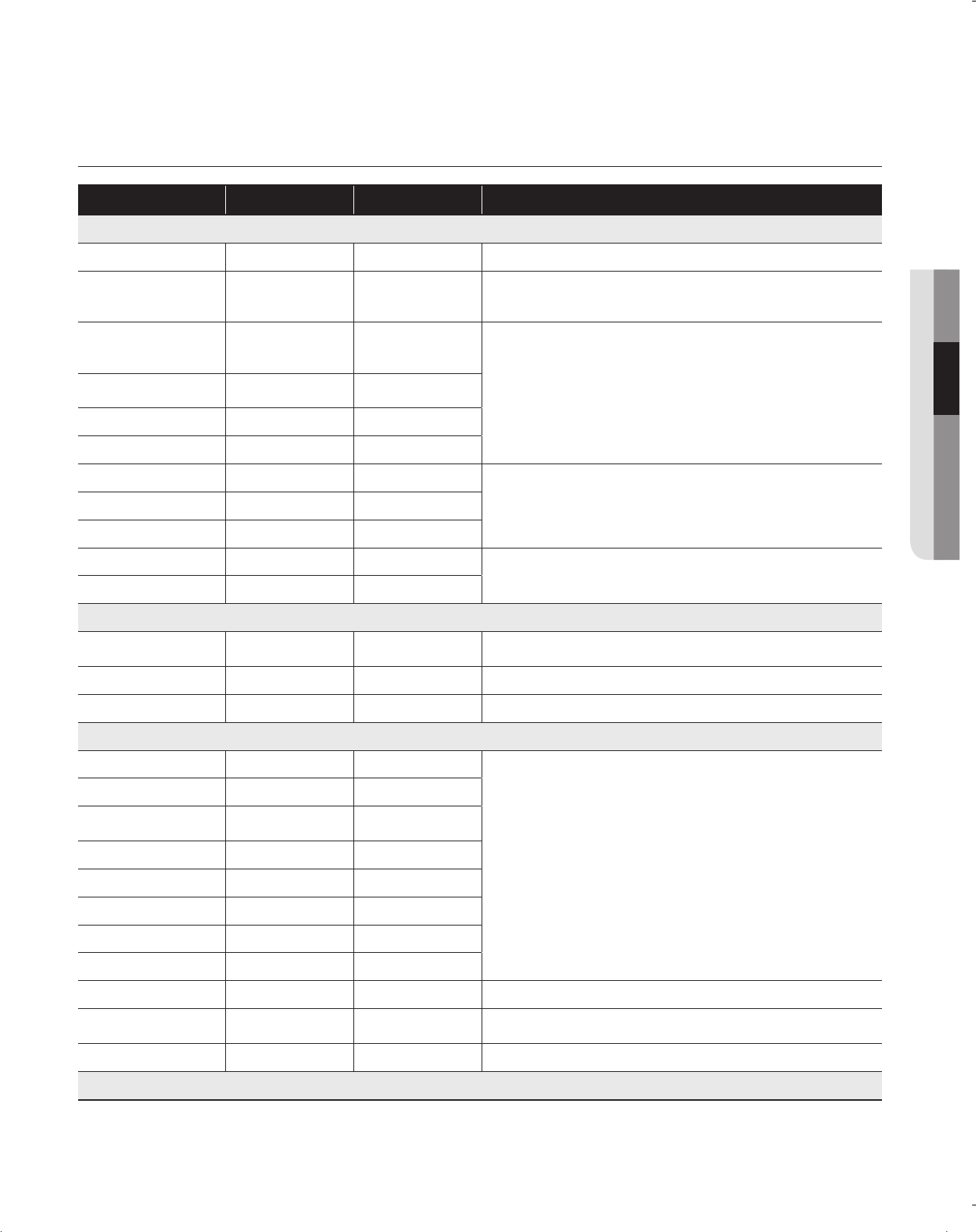
DAIRY PRODUCTS
Butter 2-3 Weeks 6-9 Months Wrap or cover tightly.
Milk 1-2 Weeks Not recommended
Check date code. Most milk and similar products are sold in date-coded
cartons that indicate a products’s peak freshness. Re-seal with cap or
wrap tightly. Do not return unused protions to oroginal container.
Cream Cheese, cheese
food, and cheese
spread
2-4 Weeks Not recommended
Check date code. Keep all cheese tightly packed in moisture proof wrap
Hard Cheese (un-
opened) 3-4 Months 6 Months
Hard Cheese (opened) 2 Months Not recommended
Cottage Cheese 10-15 Days Not recommended
Cream 7-10 Days 2 Months Check date code. Most yogurt, creams, and similar products are sold in
date-coded cartons that indicate a product’s peak freshness. Re-seal or
cover tightly. Do not return unused portions to original container.
Sour Cream 2 Weeks Not recommended
Cream Dips (opened) 1 Week Not recommended
Yogurt 10-14 Days Not recommended
Check date code. Keep covered.
Frozen Yogurt n/a 2 Months
EGGS
Eggs (uncooked) 3-4 Weeks Not recommended Check date code. Store eggs in coldest part of refrigerator and in their
original container.
Eggs (cooked) 1 weeks Not recommended Store in covered container
Leftover egg dishes 3-4 Days Not recommended Store in covered container
FRESH FRUITS
Apples 1 Month Not recommended
If storing in refrigerator, do not wash fruit before storing. Store in mois-
ture resistant bags or containers. Wrap cut fruits. Some fruits darken
when refrigerated.
Bananas 2-4 Days Not recommended
Peaches, Melons,
Pears, Avocados 3-5 Days Not recommended
Berries and Cherries 2-3 Days 12 Months
Apricots 3-5 Days Not recommended
Grapes 2-5 Days n/a
Pineapple (un-cut) 2-3 Days Not recommended
Pineapple (cut) 5-7 Days 6-12 Months
Citrus 1-2 Weeks Not recommended Store uncovered.
Juice 6 Days Not recommended Check date code and re-seal in original container. Do not return unused
portions to original container.
Frozen Juice Thawing only 12 Months Check date code. Do not re-freeze.
FISH AND SHELLFISH
DA68-01845C.indb 25 2010.4.24 10:23:6 AM
26_ Operating
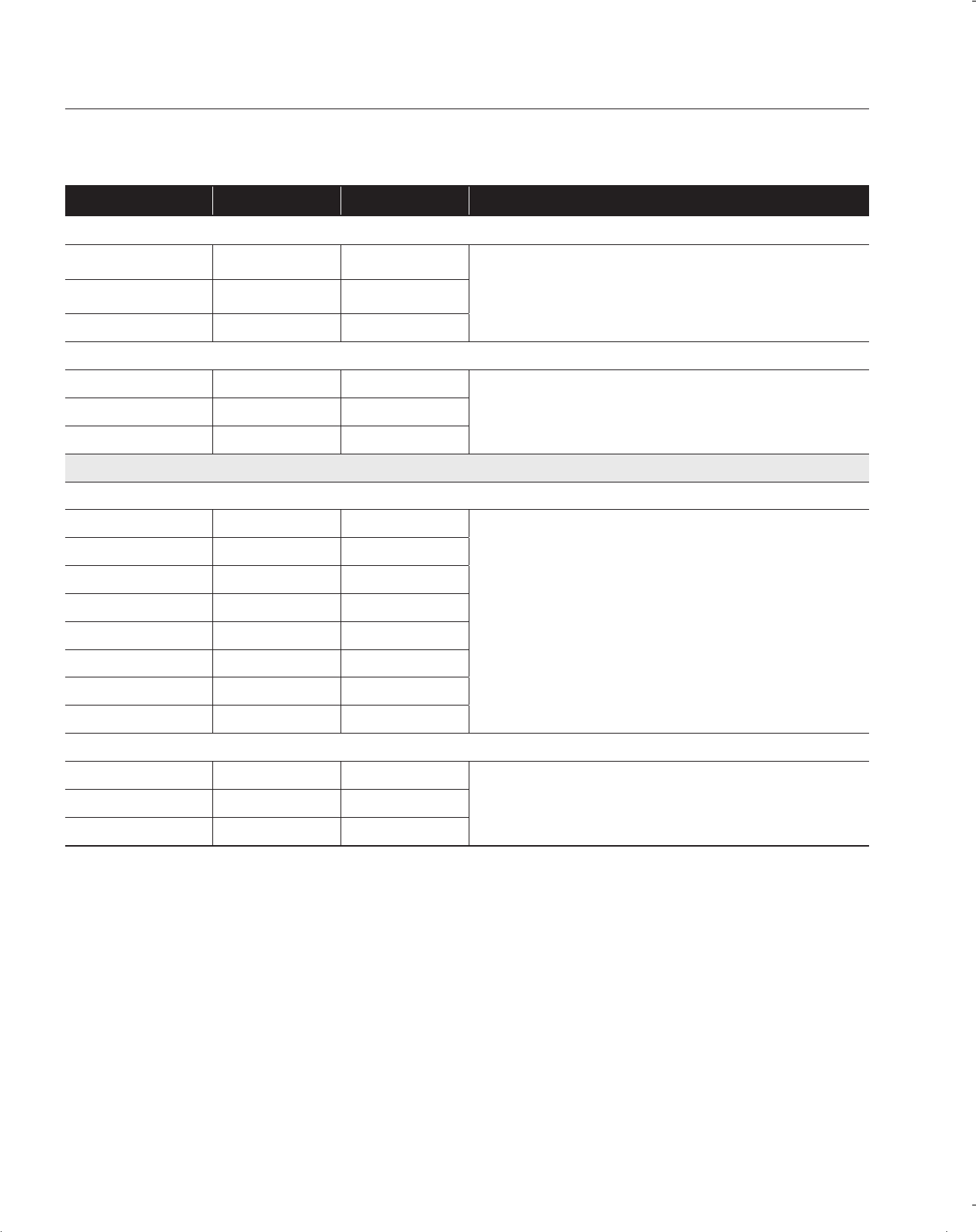
Fish
Fatty Fish (mackerel,
trout, salmon) 1-2 Days 2-3 Months
Keep in original wrapper and store in coldest part of refrigerator. Pack-
age in vapor-proof and moisture proof wrap for freezer. Freeze at 0ºF.
Thaw in refrigerator or Check date code. Freeze in original packaging.
Lean Fish (cod, flounder,
etc) 1-2 Days 6 Months
Frozen or Breaded n/a 3 Months
Shellfish
Shrimp (uncooked) 1-2 Days 12 Months
Freeze package in vapor and moisture-proof container.Crab 3-5 Days 10 Months
Cooked Fish or Shellfish 2-3 Days 3 Months
MEAT
Fresh, Uncooked
Chops 2-4 Days 6-12 Months
Check date code for use. Store in coldest part of refrigerator in original
packaging. Use additional moisture and vapor-proof container for freez-
ing. Recommended refrigerator temperature 33ºF to 36ºF and freezer
temperature 0ºF to 2ºF
Ground 1 Day 3-4 Months
Roast 2-4 Days 6-12 Months
Bacon 1-2 Weeks 1-2 Months
Sausage 1-2 Days 1-2 Months
Steak 2-4 Days 6-9 Months
Poultry 1 Day 12 Months
Lunch meat 3-5 Days 1 Month
Cooked
Meat 2-3 Days 2-3 Months Check date code for use. Store in coldest part of refrigerator in original
packaging. Place package in moisture and vapor-proof container for
freezing.
Poultry 2-3 Days 4-5 Months
Ham 1-2 weeks 1-2 Months
Sources:
American Meat Institute Foundation. 1994. Yellow pages: answers to predictable questions consumers ask about meat and poultry.
American Meat Institute Food Marketing Institute. 1999. The food keeper. Food Marketing Institute, Washington, D.C. Freeland-Graves,
J.H. and G.C. Peckham. 1996. Foundations of food preparation, 6th ed. Prentice-Hall, Inc. Englewood Cliffs, NJ. Hillers, V.N. 1993. Stor-
ing foods at home. Washington State University Cooperative Extension, Pullman, WA. Publ. EB 1205.
National Restaurant Association. 2001. Be cool-chill out! Refrigerate promptly. National Restaurant Association Education Foundation¼s
International Food Safety Council, Washington, D.C. USDA. 1997. Basics for handling food safely. U.S. Department of Agriculture, Food
Safety and Inspection Service, Washington, D.C.
Operating your SAMSUNG Refrigerator
DA68-01845C.indb 26 2010.4.24 10:23:6 AM
Operating _27
02
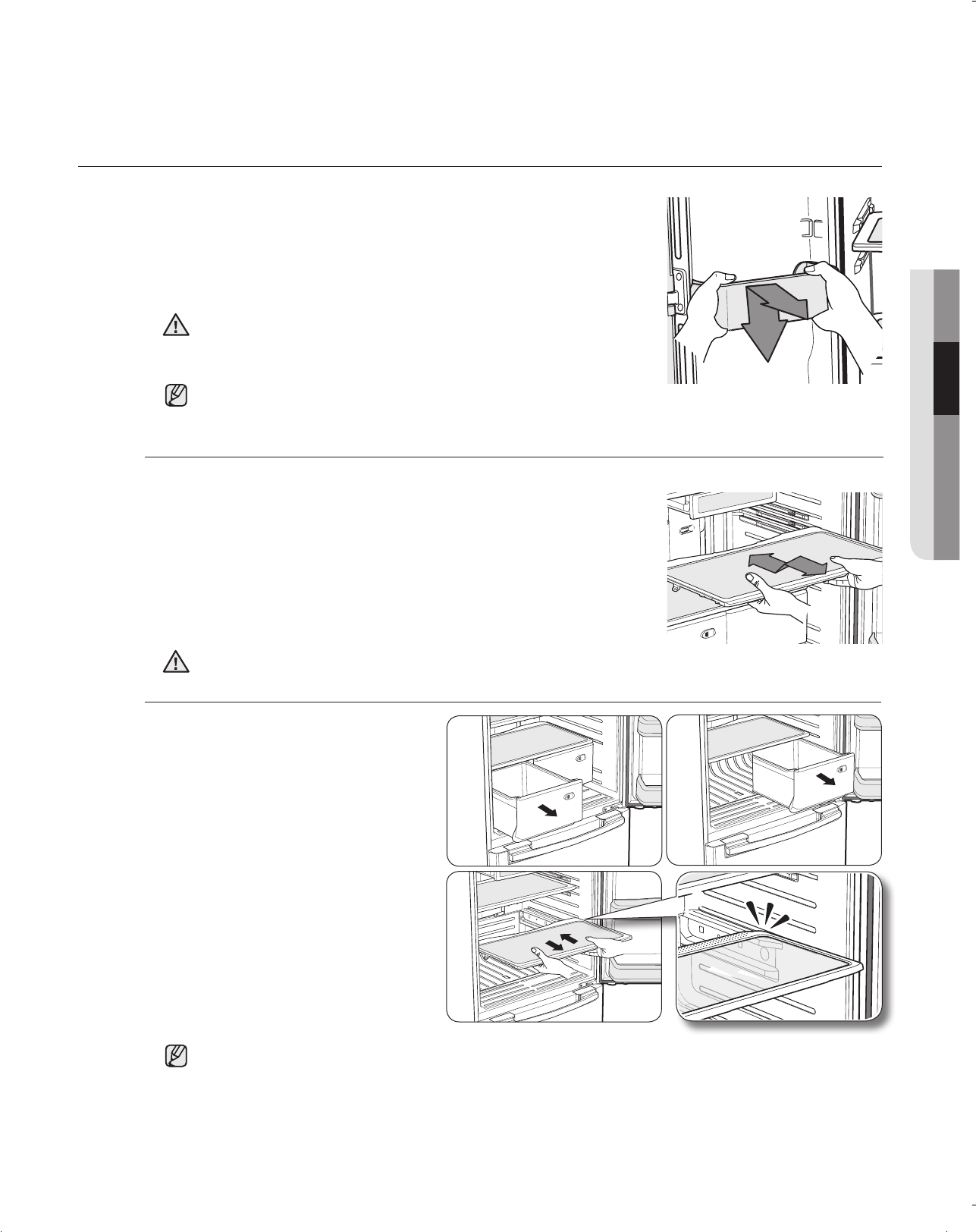
REMOVING THE FRIDGE ACCESSORIES
To remove - When pulling out the shelf, if it does not slide out
easily, lift it up slightly and pull out again.
To replace - When pushing in the shelf, if it does not slide in
easily, lift it up slightly and push in again.
1. Door Bins
To remove - Simply lift the bin up and pull straight out.
To replace - Slide it in above the desired location and push
down until it stops.
Dust removal method -Remove the guard and wash in water.
3. Vegetable & Fruit Drawers
To remove - Pull the drawer out to
full extension. Tilt up the
front of the drawer and
pull straight out.
(Refer to picture 1~3)
To replace - Insert the drawer into
the frame rails and push
back into place.
(Refer to picture 4)
Injury may occur if the door bins are not firmly inserted.
Do not allow children to play with bins. Sharp corners of the bins
may cause injury.
CAUTION
The Glass shelves are heavy.
Use special care when removing them.
CAUTION
The drawers need to be removed before the glass shelf above them can be lifted out.
Do not adjust a bin full of foods.
3
1 2
4
DA68-01845C.indb 27 2010.4.24 10:23:14 AM
28_ Operating
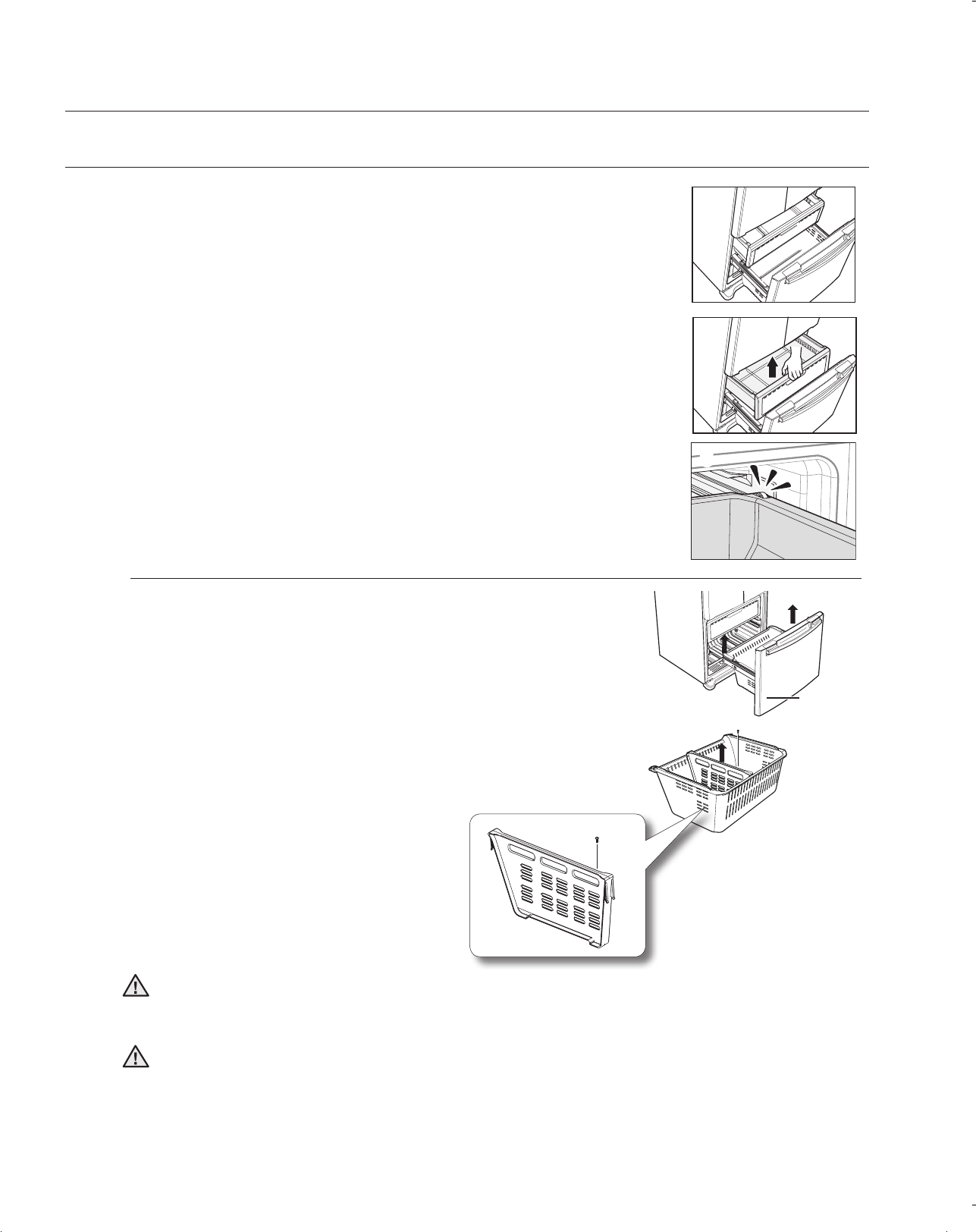
REMOVING THE FREEZER ACCESSORIES
To remove - Pull the drawer out to full extension.
Tilt up rear of drawer and lift straight out.
(Refer to picture 1 & 2)
Operating your SAMSUNG Refrigerator
1
2
3
To replace - Place the drawer onto the rails by tilting it up. Lower
the drawer into place until it is horizontal and slide the
drawer in.
(Refer to picture 3)
Open the freezer door fully and remove the drawer.
To remove the drawer - Pull the drawer out fully. Tilt up the rear
of the bin and lift it out to remove.
To relocate the drawer - Place the bin into the rail assembly.
Do not allow baby or children go inside the drawer bin. They could damage the Refrigerator and seriously
injure themselves. Do not sit on the Freezer door. The door may break. Do not allow children to climb into
the Freezer basket.
If you remove the divider to clean the basket bin, you must reinstall the divider using 1 screw after cleaning
to prevent children from getting trapped inside the basket.
CAUTION
WARNING
DA68-01845C.indb 28 2010.4.24 10:23:18 AM
Operating _29
02
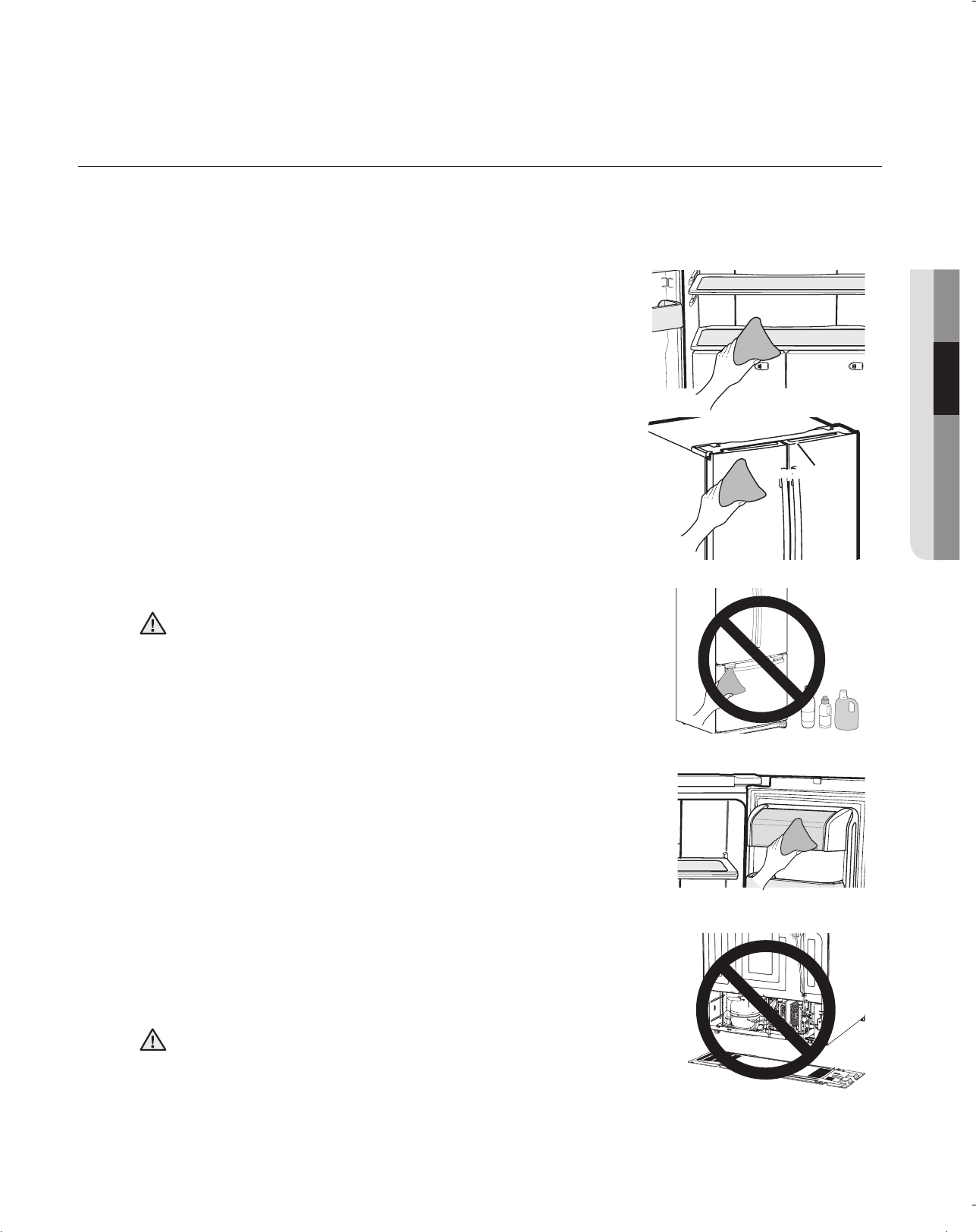
Cleaning the Interior
Clean the inside walls and accessories with a mild detergent
and then wipe dry with a soft cloth. You can remove the drawers
and shelves for a more thorough cleaning. Just make sure to dry
drawers and shelves before putting them back into place.
Do not use Benzene, Thinner, car detergent, or Clorox for cleaning.
They may damage the surface of the appliance and may cause fire.
Printed letters on the display may come off if you spray the
cleaning products directly on the product.
Cleaning the Rubber door seals
If the rubber door seals are dirty, the doors may not close properly,
and the Refrigerator will not operate efciently. Keep the door seals
free of grit or grime by cleaning the doors with a mild detergent and
damp cloth. Wipe dry with a clean, soft cloth.
Cleaning behind the Refrigerator
To keep cords and exposed parts free of dust and dirt accumulation,
vacuum behind the appliance once or twice a year.
Do not remove the back cover. Doing so may cause an electric shock.
CAUTION
CAUTION
Thinner Clorox Benzene
CLEANING THE REFRIGERATOR
Caring for your Samsung Refrigerator prolongs the life of your appliance and helps
keep it odor and germ-free.
Wipe the display panel with a damp, clean and soft cloth. Do not
spray water directly on the surface of the Refrigerator.
The doors, handles and cabinet surfaces should be cleaned with a
mild detergent and then wiped dry with a soft cloth. To keep your
appliance looking its best, the exterior should be polished once or
twice a year.
DA68-01845C.indb 29 2010.4.24 10:23:20 AM
30_ Operating
Operating your SAMSUNG Refrigerator
CHANGING THE INTERIOR LIGHTS
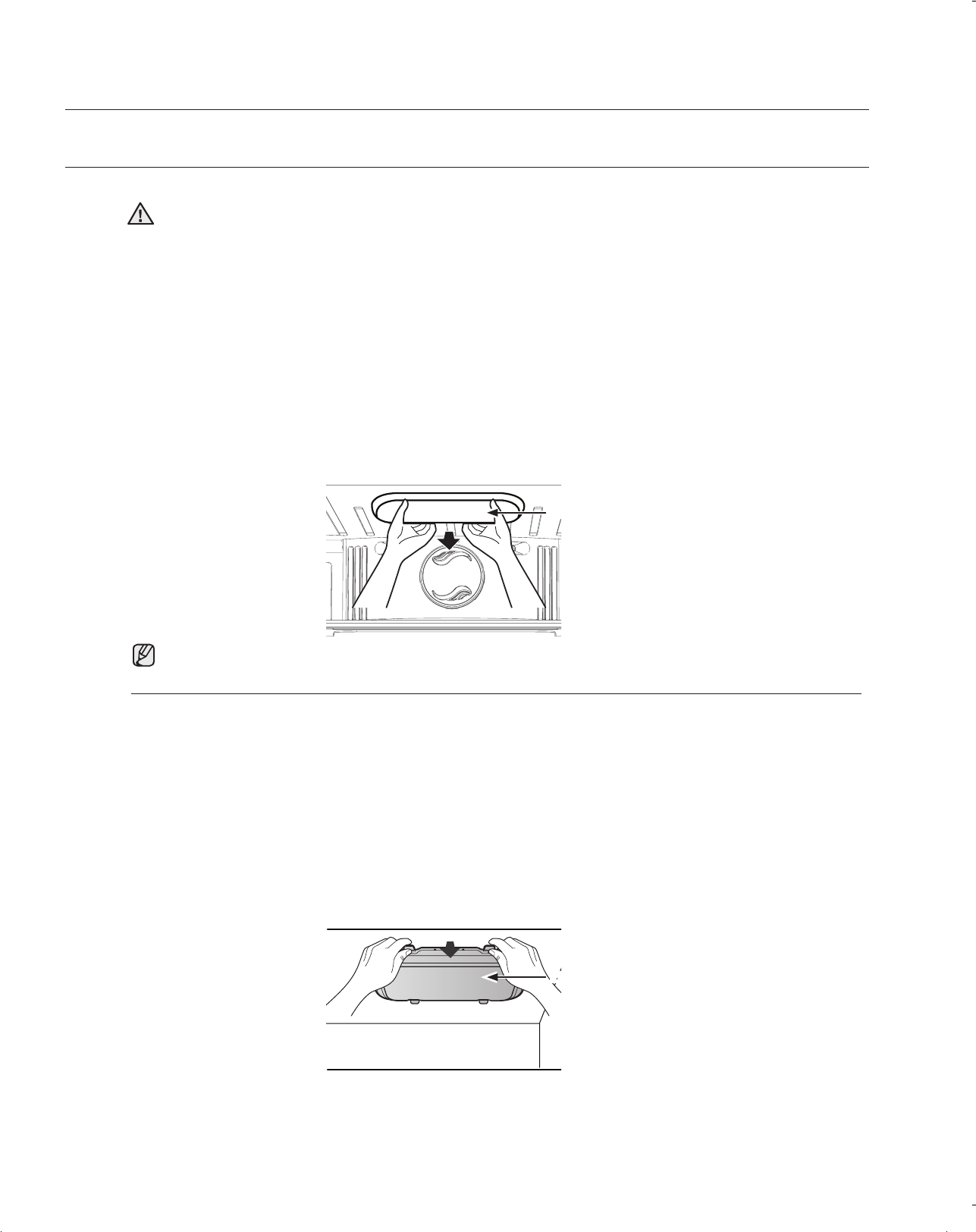
Refrigerator Light Replacement
1. Unplug the power cord from the outlet.
2. Open the refrigerator door.
3. Pull the light cover down while pushing it backwards to remove it.
4. Disconnect the housing connector.
5. Change the LED from the light cover
6. Install the light cover, close the door, and plug in the power cord.
Before changing any of the interior lights, either unplug the refrigerator or turn off power at the circuit
breaker or fuse box. Failure to do so could cause electric shock resulting in death, personal injury, or
damage to the appliance.
1. Unplug the power cord from the outlet.
2. Open the freezer door.
3. Pull the shield down while pushing it backwards to remove it.
4. Disconnect the housing connector.
5. Change the LED from the light cover.
6. Install the light cover, close the door, and plug in the power cord.
WARNING
Replacement LED is available from your nearest service center. If you need to change LED, contact our
service center
DA68-01845C.indb 30 2010.4.24 10:23:22 AM
troubleshooting _31
03 TROUBLESHOOTING
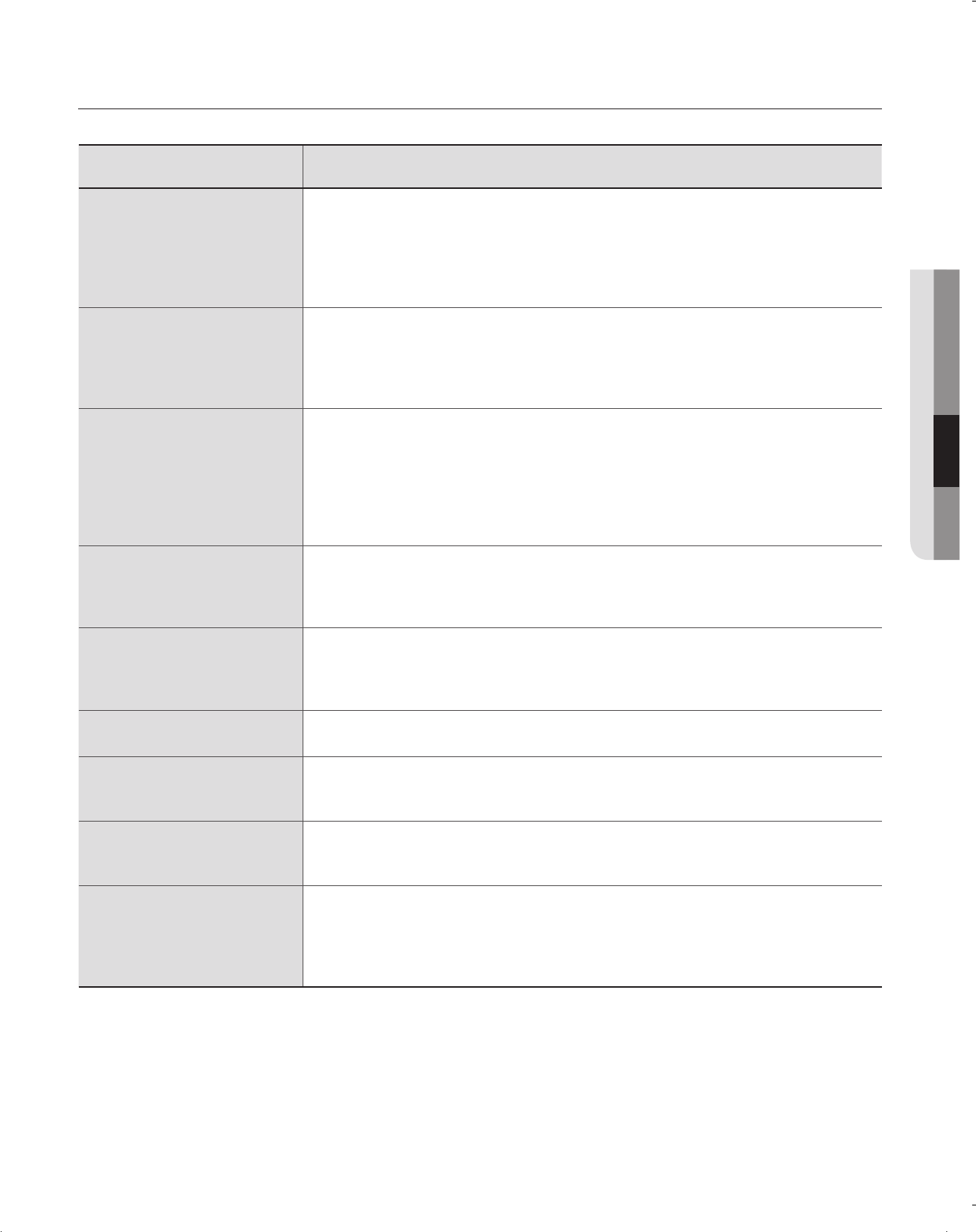
Troubleshooting
SOLUTION
• Check that the power plug is properly connected.
• Is the temperature control on the display panel set to the correct temperature?
Try setting it to a lower temperature.
• Is the Refrigerator in direct sunlight or located near a heat source?
• Is the back of the Refrigerator so close to the wall that air cannot keep circulating?
(Refer to page 10 for the best location.)
• Is the temperature control on the display set to the correct temperature?
Try setting it to a warmer temperature.
• Is the temperature in the room too low?
• Did you store the food too close to the air vent at the back of the Refrigerator? Move the
food away from the air vent.
• Check that the Refrigerator is level and stable.
• Is the back of the Refrigerator too close to the wall and therefore keeping air from
circulating?
• Was anything dropped behind or under the Refrigerator?
• A “ticking” sound is heard from inside the Refrigerator. It is normal and occurs because
various accessories are contracting or expanding according to the temperature of the
Refrigerator interior.
• Some heat is normal as anti-condensators are installed in the vertical hinged section of
the Refrigerator to prevent condensation.
• Is the Refrigerator door ajar? Condensation can occur when you leave the door open for
a long time.
• Did you wait for 12 hours after installation of the water supply line before making ice?
• Is the water line connected and the shut-off valve opened?
• Did you manually stop the ice making function?
• Is the Freezer temperature too warm? Try setting the Freezer temperature lower.
• This is normal. The bubbling comes from the Refrigerator coolant liquid circulating
through the Refrigerator.
• Check for spoiled food.
• Foods with strong odors(for example, sh) should be tightly covered.
• Clean out your Freezer periodically and throw away any spoiled or suspicious food.
• Is the air vent blocked? Remove any obstructions so air can circulate freely.
• Allow sufcient space between the foods stored for efcient air circulation.
• Is the Freezer drawer closed properly?
• Is the water line connected and the shut-off valve opened?
• Has the water supply line tubing been crushed or kinked?
Make sure the tubing is free and clear of any obstruction.
• Is the water tank frozen because the Refrigerator temperature is too low?
Try selecting a warmer setting on the main display panel.
DA68-01845C.indb 31 2010.4.24 10:23:23 AM
32_ warranty
Warranty
SAMSUNG REFRIGERATOR
LIMITED WARRANTY TO ORIGINAL PURCHASER
This Samsung brand product, as supplied and distributed by Samsung Electronics America, Inc. (Samsung)
and delivered new, in the original carton to the original consumer purchaser, is warranted by Samsung against
manufacturing defects in materials and workmanship for a limited warranty period of:
(*Compressor, evaporator, condenser, drier, connecting tubing)
This limited warranty begins on the original date of purchase, and is valid only on products purchased and
used in the United States. To receive warranty service, the purchaser must contact Samsung for problem
determination and service procedures. Warranty service can only be performed by a Samsung authorized
service center. The original dated bill of sale must be presented upon request as proof of purchase to Samsung
or Samsung authorized service center.
Samsung will repair or replace any part found to be defective, at our option and at no charge as stipulated
herein, with new or reconditioned parts during the limited warranty period specified above. All replaced parts
and products become the property of Samsung and must be returned to Samsung. Replacement parts and
products assume the remaining original warranty, or ninety (90) days, whichever is longer.
In-home service will be provided during the warranty labor period subject to availability within the contiguous
United States. In-home service is not available in all areas. To receive in-home service, the product must be
unobstructed and accessible from floor level to service personnel. If during in-home service repair cannot be
completed, it may be necessary to remove, repair and return the product. If in-home service is unavailable,
Samsung may elect, at our option, to provide for transportation of our choice to and from a Samsung authorized
service center. Otherwise, transportation to and from the Samsung authorized service center is the responsibility
of the purchaser.
This limited warranty covers manufacturing defects in materials and workmanship encountered in normal,
noncommercial use of this product, and shall not apply to the following, including, but not limited to: damage
which occurs in shipment; delivery and installation; applications and uses for which this product was not
intended; altered product or serial numbers; cosmetic damage or exterior finish; accidents, abuse, neglect, fire,
water, lightning or other acts of nature; use of products, equipment, systems, utilities, services, parts, supplies,
accessories, applications, installations, repairs, external plumbing and leaks, external wiring, circuit breakers,
fuses or connectors not supplied and authorized by Samsung, or which damage this product or result in service
problems; incorrect electrical line voltage, fluctuations and surges; customer adjustments and failure to follow
operating instructions, cleaning, maintenance and environmental instructions that are covered and prescribed in
the instruction book; loss of food due to spoilage; consumable items including filters and light bulbs.
DA68-01845C.indb 32 2010.4.24 10:23:23 AM
warranty _33
04 WARRANTY
THERE ARE NO EXPRESS WARRANTIES OTHER THAN THOSE LISTED AND DESCRIBED ABOVE, AND
NO WARRANTIES WHETHER EXPRESS OR IMPLIED, INCLUDING, BUT NOT LIMITED TO, ANY IMPLIED
WARRANTIES OF MERCHANTABILITY OR FITNESS FOR A PARTICULAR PURPOSE, SHALL APPLY
AFTER THE EXPRESS WARRANTY PERIODS STATED ABOVE, AND NO OTHER EXPRESS WARRANTY
OR GUARANTY GIVEN BY ANY PERSON, FIRM OR CORPORATION WITH RESPECT TO THIS PRODUCT
SHALL BE BINDING ON SAMSUNG. SAMSUNG SHALL NOT BE LIABLE FOR LOSS OF REVENUE OR
PROFITS, FAILURE TO REALIZE SAVINGS OR OTHER BENEFITS, OR ANY OTHER SPECIAL, INCIDENTAL
OR CONSEQUENTIAL DAMAGES CAUSED BY THE USE, MISUSE OR INABILITY TO USE THIS PRODUCT,
REGARDLESS OF THE LEGAL THEORY ON WHICH THE CLAIM IS BASED, AND EVEN IF SAMSUNG
HAS BEEN ADVISED OF THE POSSIBILITY OF SUCH DAMAGES. NOR SHALL RECOVERY OF ANY KIND
AGAINST SAMSUNG BE GREATER IN AMOUNT THAN THE PURCHASE PRICE OF THE PRODUCT SOLD BY
SAMSUNG AND CAUSING THE ALLEGED DAMAGE. WITHOUT LIMITING THE FOREGOING, PURCHASER
ASSUMES ALL RISK AND LIABILITY FOR LOSS, DAMAGE OR INJURY TO PURCHASER AND PURCHASER’S
PROPERTY AND TO OTHERS AND THEIR PROPERTY ARISING OUT OF THE USE, MISUSE OR INABILITY TO
USE THIS PRODUCT SOLD BY SAMSUNG NOT CAUSED DIRECTLY BY THE NEGLIGENCE OF SAMSUNG.
THIS LIMITED WARRANTY SHALL NOT EXTEND TO ANYONE OTHER THAN THE ORIGINAL PURCHASER OF
THIS PRODUCT, IS NONTRANSFERABLE AND STATES YOUR EXCLUSIVE REMEDY.
Some states do not allow limitations on how long an implied warranty lasts, or the exclusion or limitation of
incidental or consequential damages, so the above limitations or exclusions may not apply to you. This warranty
gives you specific legal rights, and you may also have other rights, which vary from state to state.
To obtain warranty service, please contact Samsung at:
SAMSUNG CUSTOMER CARE CENTER
Samsung Electronics America, Inc. 400 Valley Road Suite 201 Mt. Arlington, NJ 07956
1-800-SAMSUNG (1-800-726-7864) and www.samsung.com
DA68-01845C.indb 33 2010.4.24 10:23:23 AM
In an effort to promote recycling this user manual is printed on recycled paper.
DA68-01845C.indb 34 2010.4.24 10:23:23 AM
